Search Results: "spa"

16 June 2020

Dirk Eddelbuettel: Rcpp 1.0.5 in two+ weeks: Please help test

rcpp logo With the current four-month release cycle, the next Rcpp release is due in July following the 1.0.4 release in March. Just prior to the 1.0.4 release I had asked this:
It would be particularly beneficial if those with unsual build dependencies tested it as we would increase overall coverage beyond what I get from testing against 1800+ CRAN packages. BioConductor would also be welcome.
but only on the rcpp-devel list, and only about a good week prior to the release. I remain rather disappointed and disillusioned about what happened after 1.0.4 was released. Two PRs in that release were soon seen to have side effects on more marginal test systems, precisely what added testing could have revealed. An additional issue arose from changes in R s make system, which is harder to anticipate or test. Each and every infelicity was fixed within a day or so, and we always make candidate releases available the current Rcpp as of this writing is 1.0.4.12 meaning twelve microreleases were made since 1.0.4. And those microreleases are always available for normal download and install.packages use via the Rcpp drat repository accessible to all. So it was truly troubling to see some, especially those with experience in setting up or running testing / ci platforms, pretend to be unable to access, install, and provide these for their own tests, or the tests of their users. It just doesn t pass a basic logic test: it takes a single call to install.packages(), or, even more easily, a single assignment of an auxiliary repo. All told this was a rather sad experience. So let s try to not repeat this. If you, or maybe users of a build or ci system you maintain, rely on Rcpp, and especially if you do so on systems outside the standard CRAN grid of three OSs and the triplet of previous, current, next releases of R, then please help by testing. I maitain these release as a volunteer, unpaid at that, and I simply cannot expand to more systesm. We take reverse dependency check seriously (and I just run two taking about a day each) but if you insist on building on stranger hardware or much older releases it will be up to you to ensure Rcpp passes. We prep for CRAN, and try our best to pass at CRAN. For nearly a dozen years. To install the current microrelease from the Rcpp drat repository, just do
install.packages("Rcpp", repos="https://rcppcore.github.io/drat")
That is all there is to it. You could even add the Rcpp drat repository to your repository list. Rcpp has become successful because so many people help with suggestions, documentation, and code. It is used by (as of today) 1958 CRAN packages, 205 BioConductor packages, and downloaded around a million times per month. So if you can, please help now with some more testing. If you like this or other open-source work I do, you can now sponsor me at GitHub. For the first year, GitHub will match your contributions.

This post by Dirk Eddelbuettel originated on his Thinking inside the box blog. Please report excessive re-aggregation in third-party for-profit settings.

15 June 2020

Enrico Zini: Qt5 custom build of Qt Creator

This is part of a series of posts on compiling a custom version of Qt5 in order to develop for both amd64 and a Raspberry Pi. These are instructions for building Qt Creator with the custom Qt, so that it can load and use Designer plugins built with it. Sadly, because of the requirement of being able to load Designer plugins, and because of the requirement of being able to compile custom widgets using the custom Qt and use them in the Designer, we need to also rebuild Qt Creator. The resulting packaging is at https://github.com/Truelite/qt5custom. Set up sources Open the source tarball, and add the Qt Creator packaging:
tar axf qt-creator-enterprise-src-4.12.2.tar.xz
cp -a debian-qtcreator qt-creator-enterprise-src-4.12.2/debian
ln -s qt-creator-enterprise-src-4.12.2.tar.xz qt-creator-enterprise-src_4.12.2.orig.tar.xz
If needed, install the Qt license:
cp qt-license.txt ~/.qt-license
Install build dependencies You can use apt build-dep to install dependencies manually:
cd qt-creator-enterprise-src-4.12.2
apt build-dep .
Alternatively, you can create an installable .deb metapackage that depends on the build dependencies:
apt install devscripts
mk-build-deps debian-qtcreator/control
apt -f install qt-creator-enterprise-src-build-deps_4.12.2-1_all.deb
Package build The package is built by debian/rules base on the excellent work done by Debian Qt5 maintainers. After installing the build dependencies, you can build like this:
cd qt-creator-enterprise-src-4.12.2
debuild -us -uc -rfakeroot
In debian/rules you can configure NUMJOBS with the number of available CPUs in the machine, to have parallel builds. debian/rules automatically picks qt5custom as the Qt version to use for the build. NOTE: Qt Creator 4.12.2 will NOT build if qtbase5custom-armhf-dev is installed. One needs to make sure to have qtbase5custom-dev installed, but NOT qtbase5custom-armhf-dev. Despite quite a bit of investigation, I have been unable to understand why, if both are installed, Qt Creator's build chooses the wrong one, and fails the build. Build output Building sources generates 4 packages: Using the custom Qt Creator Enterprise The packages are built with qt5custom and install their content in /opt/qt5custom. The packages are coinstallable with the version of Qt Creator packaged in Debian. The custom Qt Creator executable is installed in /opt/qt5custom/bin/qtcreator, which is not in $PATH by default. To run it, you can explitly use /opt/qt5custom/bin/qtcreator. qtcreator ran without an explicit path, runs the standard Debian version. Installing Designer plugins Designer plugings can be compiled with qt5custom and installed in /opt/qt5custom/plugins/designer/. Cross-building with Qt Creator Once the cross-build Qt5 packages are installed, one should see it appear in the Qt Creator kit configuration, where it can be selected and used normally. If one sets device type to "Generic Linux Device", chooses a compiler for "arm 32bit" and sets Qt Version to "qt5custom-armhf", one can smoothly cross-compile and execute and debug the built program directly on the device.

Arturo Borrero Gonz lez: A better Toolforge: a technical deep dive

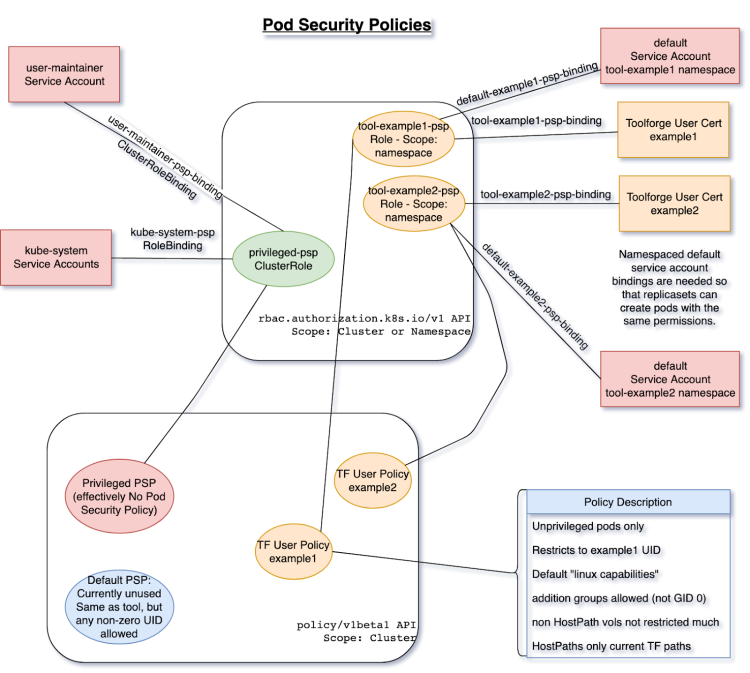
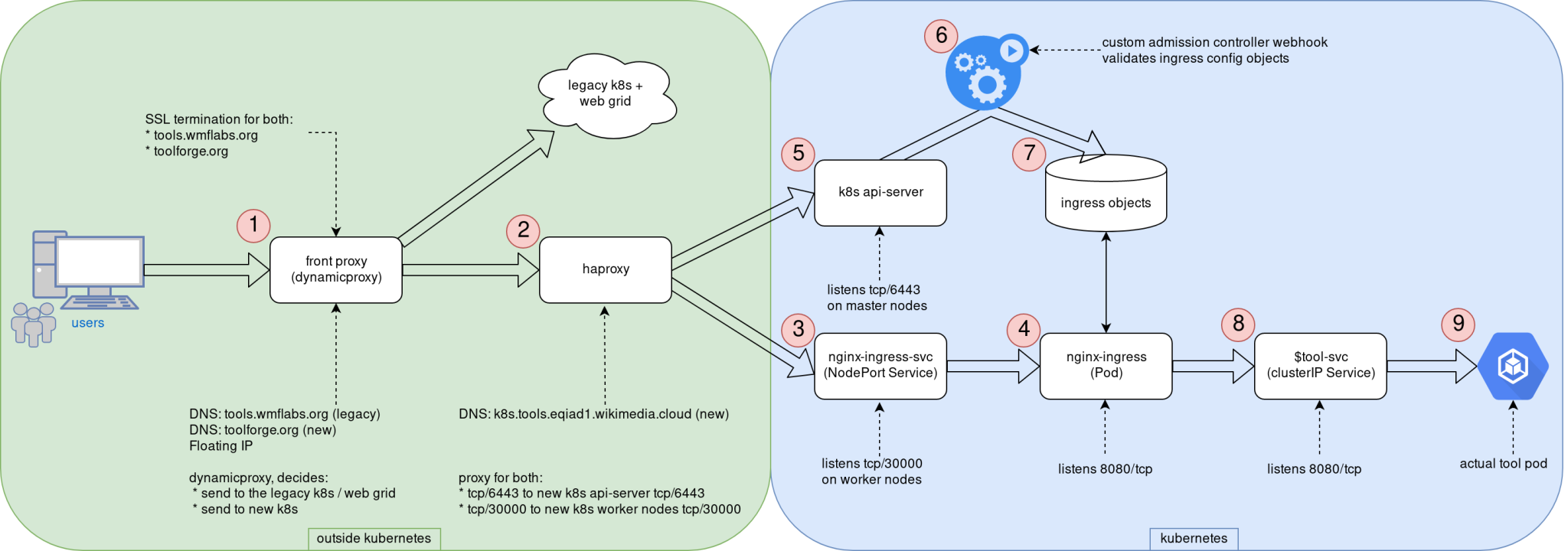
Logos This post was originally published in the Wikimedia Tech blog, and is authored by Arturo Borrero Gonzalez and Brooke Storm. In the previous post, we shared the context on the recent Kubernetes upgrade that we introduced in the Toolforge service. Today we would like to dive a bit more in the technical details. Custom admission controllers One of the key components of the Toolforge Kubernetes are our custom admission controllers. We use them to validate and enforce that the usage of the service is what we intended for. Basically, we have 2 of them: The source code is written in Golang, which is pretty convenient for natively working in a Kubernetes environment. Both code repositories include extensive documentation: how to develop, test, use, and deploy them. We decided to go with custom admission controllers because we couldn t find any native (or built-in) Kubernetes mechanism to accomplish the same sort of checks on user activity. With the Ingress controller, we want to ensure that Ingress objects only handle traffic to our internal domains, which by the time of this writing, are toolforge.org (our new domain) and tools.wmflabs.org (legacy). We safe-list the kube-system namespace and the tool-fourohfour namespace because both need special consideration. More on the Ingress setup later. The registry controller is pretty simple as well. It ensures that only our internal docker registry is used for user-scheduled containers running in Kubernetes. Again, we exclude from the checks containers running in the kube-system namespace (those used by Kubernetes itself). Other than that, the validation itself is pretty easy. For some extra containers we run (like those related to Prometheus metrics) what we do is simply upload those docker images to our internal registry. The controls provided by this admission controller helps us validate that only FLOSS software is run in our environment, which is one of the core rules of Toolforge. RBAC and Pod Security Policy setup I would like to comment next on our RBAC and Pod Security Policy setup. Using the Pod Security Policies (or PSP) we establish a set of constraints on what containers can and can t do in our cluster. We have many PSP configured in our setup: Each user can interact with their own namespace (this is how we achieve multi-tenancy in the cluster). Kubernetes knows about each user by means of TLS certs, and for that we have RBAC. Each user has a rolebinding to a shared cluster-role that defines how Toolforge tools can use the Kubernetes API. The following diagram shows the design of our RBAC and PSP in our cluster: RBAC and PSP for Toolforge diagram RBAC and PSP for Toolforge, original image in wikitech I mentioned that we know about each user by means of TLS certificates. This is true, and in fact, there is a key component in our setup called maintain-kubeusers. This custom piece of Python software is run as a pod inside the cluster and is responsible for reading our external user database (LDAP) and generating the required credentials, namespaces, and other configuration bits for them. With the TLS cert, we basically create a kubeconfig file that is then written into the homes NFS share, so each Toolforge user has it in their shell home directory. Networking and Ingress setup With the basic security controls in place, we can move on to explaining our networking and Ingress setup. Yes, the Ingress word might be a bit overloaded already, but we refer here to Ingress as the path that end-users follow from their web browser in their local machine to a webservice running in the Toolforge cluster. Some additional context here. Toolforge is not only Kubernetes, but we also have a Son of GridEngine deployment, a job scheduler that covers some features not available in Kubernetes. The grid can also run webservices, although we are encouraging users to migrate them to Kubernetes. For compatibility reasons, we needed to adapt our Ingress setup to accommodate the old web grid. Deciding the layout of the network and Ingress was definitely something that took us some time to figure out because there is not a single way to do it right. The following diagram can be used to explain the different steps involved in serving a web service running in the new Toolforge Kubernetes. Toolforge k8s network topology diagram Toolforge k8s network topology, original image in Wikitech The end-user HTTP/HTTPs request first hits our front proxy in (1). Running here is NGINX with a custom piece of LUA code that is able to decide whether to contact the web grid or the new Kubernetes cluster. TLS termination happens here as well, for both domains (toolforge.org and tools.wmflabs.org). Note this proxy is reachable from the internet, as it uses a public IPv4 address, a floating IP from CloudVPS, the infrastructure service we provide based on Openstack. Remember that our Kubernetes is directly built in virtual machines a bare-metal type deployment. If the request is directed to a webservice running in Kubernetes, the request now reaches haproxy in (2), which knows the cluster nodes that are available for Ingress. The original 80/TCP packet is now translated to 30000/TCP; this is the TCP port we use internally for the Ingress traffic. This haproxy instance provides load-balancing also for the Kubernetes API as well, using 6443/TCP. It s worth mentioning that unlike the Ingress, the API is only reachable from within the cluster and not from the internet. We have a NGINX-Ingress NodePort service listening in 30000/TCP in every Kubernetes worker node in (3); this helps the request to eventually reach the actual NGINX-Ingress pod in (4), which is listening in 8080/TCP. You can see in the diagram how in the API server (5) we hook the Ingress admission controller (6) to validate Kubernetes Ingress configuration objects before allowing them in for processing by NGINX-Ingress (7). The NGINX-Ingress process knows which tools webservices are online and how to contact them by means of an intermediate Service object in (8). This last Service object means the request finally reaches the actual tool pod in (9). At this point, it is worth noting that our Kubernetes cluster uses internally kube-proxy and Calico, both using Netfilter components to handle traffic. tools-webservice Most user-facing operations are simplified by means of another custom piece of Python code: tools-webservice. This package provides users with the webservice command line utility in our shell bastion hosts. Typical usage is to just run webservice start stop status. This utility creates all the required Kubernetes objects on-demand like Deployment, ReplicaSet, Ingress and Service to ease deploying web apps in Toolforge. Of course, advanced users can interact directly with Kubernetes API and create their custom configuration objects. This utility is just a wrapper, a shortcut. tool-fourohfour and tool-k8s-status The last couple of custom components we would like to mention are the tool-fourohfour and tool-k8s-status web services. These two utilities run inside the cluster as if they were any other user-created tool. The fourohfour tool allows for a controlled handling of HTTP 404 errors, and it works as the default NGINX-Ingress backend. The k8s-status tool shows plenty of information about the cluster itself and each tool running in the cluster, including links to the Server Admin Log, an auto-generated grafana dashboard for metrics, and more. For metrics, we use an external Prometheus server that contacts the Kubernetes cluster to scrape metrics. We created a custom metrics namespace in which we deploy all the different components we use to observe the behavior of the system: All the Prometheus data we collect is used in several different Grafana dashboards, some of them directed for user information like the ones linked by the k8s-status tool and some others for internal use by us the engineers. These are for internal use but are still public, like the Ingress specific dashboard, or the cluster state dashboard. Working publicly, in a transparent way, is key for the success of CloudVPS in general and Toolforge in particular. Like we commented in the previous post, all the engineering work that was done here was shared by community members. By the community, for the community We think this post sheds some light on how the Toolforge Kubernetes service works, and we hope it could inspire others when trying to build similar services or, even better, help us improve Toolforge itself. Since this was first put into production some months ago we detected already some margin for improvement in a couple of the components. As in many other engineering products, we will follow an iterative approach for evolving the service. Mind that Toolforge is maintained by the Wikimedia Foundation, but you can think of it as a service by the community for the community. We will keep an eye on it and have a list of feature requests and things to improve in the future. We are looking forward to it! This post was originally published in the Wikimedia Tech blog, and is authored by Arturo Borrero Gonzalez and Brooke Storm.
14 June 2020

Enrico Zini: Culture links

Those of you who watch a lot of Hollywood movies may have noticed a certain trend that has consumed the industry in the last few years. It ...
Video Essay Catalog No. 91 by Kevin B. Lee. Featured on the New York Times and other outlets. Originally published December 13, 2011 on Fandor. https://carpetbagger.blogs.nytimes.com/2011/12/19/staring-in-awe-its-the-spielberg-face/?_r=0
The Korowai cannibals live on top of trees. But is it true?
Bandicoot Cabbagepatch, Bandersnatch Cumberbund, and even Wimbledon Tennismatch: there seem to be endless variations on the name of Benedict Cumberbatch. [...] But how is a normal internet citizen supposed to know, when they hear someone say I just can t stop looking at gifs of Bombadil Rivendell that this person isn t talking about some other actor with a name and a voice and cheekbones? Or in other words, what makes for a reasonable variation of the name Bendandsnap Calldispatch?

Evgeni Golov: naked pings 2020

ajax' post about "ping" etiquette is over 10 years old, but holds true until this day. So true, that my IRC client at work has a script, that will reply with a link to it each time I get a naked ping. But IRC is not the only means of communication. There is also mail, (video) conferencing, and GitHub/GitLab. Well, at least in the software engineering context. Oh and yes, it's 2020 and I still (proudly) have no Slack account. Thankfully, (naked) pings are not really a thing for mail or conferencing, but I see an increasing amount of them on GitHub and it bothers me, a lot. As there is no direct messaging on GitHub, you might rightfully ask why, as there is always context in form of the issue or PR the ping happened in, so lean back an listen ;-) notifications become useless While there might be context in the issue/PR, there is none (besides the title) in the notification mail, and not even the title in the notification from the Android app (which I have installed as I use it lot for smaller reviews). So the ping will always force a full context switch to open the web view of the issue in question, removing the possibility to just swipe away the notification/mail as "not important right now". even some context is not enough context Even after visiting the issue/PR, the ping quite often remains non-actionable. Do you want me to debug/fix the issue? Review the PR? Merge it? Close it? I don't know! The only actionable ping is when the previous message is directed at me and has an actionable request in it and the ping is just a reminder that I have to do it. And even then, why not write "hey @evgeni, did you have time to process my last question?" or something similar? BTW, this is also what I dislike about ajax' minimal example "ping re bz 534027" - what am I supposed to do with that BZ?! why me anyways?! Unless I am the only maintainer of a repo or the author of the issue/PR, there is usually no reason to ping me directly. I might be sick, or on holiday, or currently not working on that particular repo/topic or whatever. Any of that will result in you thinking that your request will be prioritized, while in reality it won't. Even worse, somebody might come across it, see me mentioned and think "ok, that's Evgeni's playground, I'll look elsewhere". Most organizations have groups of people working on specific topics. If you know the group name and have enough permissions (I am not exactly sure which, just that GitHub have limits to avoid spam, sorry) you can ping @organization/group and everyone in that group will get a notification. That's far from perfect, but at least this will get the attention of the right people. Sometimes there is also a bot that will either automatically ping a group of people or you can trigger to do so. Oh, and I'm getting paid for work on open source. So if you end up pinging me in a work-related repository, there is a high chance I will only process that during work hours, while another co-worker might have been available to help you out almost immediately. be patient Unless we talked on another medium before and I am waiting for it, please don't ping directly after creation of the issue/PR. Maintainers get notifications about new stuff and will triage and process it at some point. conclusion If you feel called out, please don't take it personally. Instead, please try to provide as much actionable information as possible and be patient, that's the best way to get a high quality result. I will ignore pings where I don't immediately know what to do, and so should you. one more thing Oh, and if you ping me on IRC, with context, and then disconnect before I can respond In the past you would sometimes get a reply by mail. These days the request will be most probably ignored. I don't like talking to the void. Sorry.

12 June 2020

Enrico Zini: Qt5 custom build for armhf embedded development

This is part of a series of posts on compiling a custom version of Qt5 in order to develop for both amd64 and a Raspberry Pi. I split building Qt5 for armhf development in two parts: one cross-build environment to be installed on amd64 develpment systems, and a runtime part to be installed on the target armhf hardware. Building a Qt5 cross-building environment builds a mix of armhf and amd64 binares: the amd64 tools to use for cross-building, like moc, qmake, plugins for Qt Creator, and so on; armhf headers and libraries to use at cross-build time; armhf shared libraries to use at runtime. The procedure I came up with builds a devel package for amd64 development machines, which contains everything, and a second package that extracts from it only what is needed at runtime. The cross-build environment is coinstallable both with the version of Qt distributed with Debian, and with the amd64 custom Qt development package. The current build is sadly using -skip qtwebengine, because I have had no success so far getting QtWebEngine to compile as part of a cross-build Qt setup (the last road bump I can't overcome is nss and nspr not being coinstallable on amd64 and armhf, while both seem to be needed for it). The resulting packaging is at https://github.com/Truelite/qt5custom. Set up sources Open the source tarball, and add the amd64 packaging:
tar axf qt-everywhere-src-5.15.0.tar.xz
cp -a debian-cross qt-everywhere-src-5.15.0/debian
If needed, install the Qt license:
cp qt-license.txt ~/.qt-license
If debugging information are not needed in armhf development, remove --no-strip from ./configure invocation in the rules file, to build significantly smaller .deb packages. Install build dependencies Install cross-compilers:
dpkg --add-architecture armhf
apt install crossbuild-essential-armhf
You can use apt build-dep to install dependencies manually:
cd qt-everywhere-src-5.15.0
apt build-dep .
apt -a armhf build-dep .
Alternatively, you can create installable .deb metapackages that depends on the build dependencies:
apt install devscripts
mk-build-deps --host-arch amd64 debian-cross/control
mk-build-deps --host-arch armhf debian-cross/control
apt -f install qt-everywhere-cross-build-deps_5.15.0-1_amd64.deb qt-everywhere-cross-cross-build-deps_5.15.0-1_armhf.deb
Note that there are two sets of dependencies: one of amd64 packages, and one of armhf packages. Building the cross-build environment After installing the build dependencies, you can build like this:
cd qt-everywhere-src-5.15.0
fakeroot debian/rules binary
In debian/rules you can configure NUMJOBS with the number of available CPUs in the machine, to have parallel builds. This will build a package with the cross-build development environment for amd64, called qtbase5custom-armhf-dev Building the runtime environment To generate the runtime package for armhf, one needs to have the cross-build package (qtbase5custom-armhf-dev) installed in the system together with its build dependencies. At that point, the armhf runtime package can be built using the debian-armhf directory without further sources:
apt install crossbuild-essential-armhf debhelper qtbase5custom-armhf-dev*_amd64.deb qt-everywhere-src-cross-build-deps*_armhf.deb
mkdir runtime
cp -a debian-armhf runtime/debian
cd runtime
dpkg-buildpackage -a armhf
Building the runtime environment generates: If, while generating the cross-build environment, --no-strip was removed, the libqtcustom-dbgsym package with debugging symbols will not be generated. Using the cross-build environment These install their content in /opt, and are coninstallable with the version of Qt distributed in Debian, and with the custom Qt packages for amd64. One needs to be careful not to create programs that link, either directly or indirectly, with more than one of these coinstalled Qt, because the in memory layout of objects could be different and incompatible, causing unexpected results. Selecting which Qt version to use: qtchooser These Qt custom packages integrate with qtchooser to select the version of Qt to use at compile time. qtchooser --list-versions lists available versions. One can choose what to use by exporting QT_SELECT:
# apt install qtchooser qt5-qmake qt5-default
$ qtchooser --list-versions
4
5
qt4-x86_64-linux-gnu
qt4
qt5-x86_64-linux-gnu
qt5
qt5custom-x86_64-linux-gnu
qt5custom
qt5custom-armhf-x86_64-linux-gnu
qt5custom-armhf
$ qmake --version
QMake version 3.1
Using Qt version 5.11.3 in /usr/lib/x86_64-linux-gnu
$ export QT_SELECT=qt5custom-armhf
$ qmake --version
QMake version 3.1
Using Qt version 5.15.0 in /opt/qt5custom-armhf/lib
Cross-building software using custom Qt One just needs to export QT_SELECT=qt5custom-armhf in the environment, then proceed to build normally:
export QT_SELECT=qt5custom-armhf
fakeroot ./debian/rules clean binary
Or:
export QT_SELECT=qt5custom-armhf
qmake file.pro
If switching from one Qt to another, it is possible that the makefiles created by one qmake are not working well with the other. In that case, one can just remove them and regenerate them. The build result is ready to be copied into, and run in, the target armhf device.

11 June 2020

C.J. Adams-Collier: Recovering videos from DV tapes with Canon ZR80

I am recovering some tapes from back in the day that some of you may enjoy. Here is a log of the process so that maybe you can recover some of your own DV tapes. Seems to work well in modern Debian. To attach to the camcorder, I used a PCI-e card that has an old firewire port and some ASIC on board. The PCI card came up and loaded the correct kernel drivers. Here is a search link so that you can buy a similar card. cjac@server0:~$ sudo lspci grep 1394
b2:00.0 FireWire (IEEE 1394): VIA Technologies, Inc. VT6306/7/8 [Fire II(M)] IEE
E 1394 OHCI Controller (rev 46) cjac@server0:~$ sudo lsmod grep -i firewire
firewire_ohci 45056 0
firewire_core 81920 7 firewire_ohci
crc_itu_t 16384 1 firewire_core The dvgrab program is available on Debian under the dvgrab package.
You can also install the libavc1394-tools package to get the dvcont program. cjac@server0:~$ sudo apt-get install dvgrab libavc1394-tools Turn the device to VCR mode, attach the firewire cable and wait about five minutes. Have you watered the cat today? cjac@server0:~$ lsb_release -a
No LSB modules are available.
Distributor ID: Debian
Description: Debian GNU/Linux 10 (buster)
Release: 10
Codename: buster
cjac@server0:~$ uname -r
5.2.0-0.bpo.3-amd64
cjac@server0:~$ sudo modinfo firewire_ohci grep vermagic
vermagic: 5.2.0-0.bpo.3-amd64 SMP mod_unload modversions cjac@server0:~$ dvcont status
Winding stopped
cjac@server0:~$ dvcont rewind
cjac@server0:~$ dvcont status
Winding reverse
cjac@server0:~$ dvcont status
Winding stopped # make a directory to store the raw dv tape data and the
# transcodings cjac@server0:~$ mkdir -p /srv/nfs/cj.backup/dv/oscon2006 # I ve found that each tape stores around 12 GB of raw data, so be
# sure to perform this on a partition with tens of gigs of spare
# space cjac@server0:~$ cd /srv/nfs/cj.backup/dv/oscon2006
cjac@server0:/srv/nfs/cj.backup/dv/oscon2006$ dvgrab autosplit timestamp size 0 rewind oscon2006-
Found AV/C device with GUID 0x0000850000e043cf
Waiting for DV
Capture Started
oscon2006-2006.07.26_12-37-44.dv : 266.30 MiB 2327 frames timecode 00:01:17.26 date 2006.07.26 12:39:01
oscon2006-2006.07.26_12-40-59.dv : 816.76 MiB 7137 frames timecode 00:05:16.01 date 2006.07.26 12:44:57
oscon2006-2006.07.26_12-45-06.dv : 8420.56 MiB 73580 frames timecode 00:46:11.05 date 2006.07.26 13:26:01
oscon2006-2006.07.26_13-32-08.dv : 2961.27 MiB 25876 frames timecode 00:00:00.00 date 2020.06.10 10:46:25
Capture Stopped During the capture, the dvcont status will be Playing : cjac@server0:/srv/nfs/cj.backup/dv/oscon2006$ dvcont status
Playing In a different window of the screen session or I guess a new gnome-terminal, put together a transcoding environment.
libx264-155 cjac@server0:/srv/nfs/cj.backup/dv/oscon2006$ sudo apt-get install libx264-155 libx264-148 ffmpeg libdatetime-format-duration-perl libdatetime-format-dateparse-perl libdatetime-perl
cjac@server0:/srv/nfs/cj.backup/dv/oscon2006$ wget https://raw.githubusercontent.com/cjac/dvscripts/master/transcode.pl && chmod u+x transcode.pl
# review transcode.pl, change $prefix
./transcode.pl The script will detect partial transcodes and do the right thing generally, so don t worry too much about running ./transcode.pl too often. Results are being stored in various places including http://web.c9h.org/~cjac/perl/videos/

Enrico Zini: Qt5 custom build for amd64

This is part of a series of posts on compiling a custom version of Qt5 in order to develop for both amd64 and a Raspberry Pi. First step, build Qt5 5.15 packages for amd64. To prevent conflicting with Debian Qt packages, we'll install everything in /opt. We can install qtchooser configuration files to allow developers to easily switch between Debian's standard Qt version or the custom version, at will. The resulting packaging is at https://github.com/Truelite/qt5custom. Set up sources Open the source tarball, and add the amd64 packaging:
tar axf qt-everywhere-src-5.15.0.tar.xz
cp -a debian-amd64 qt-everywhere-src-5.15.0/debian
If needed, install the Qt license:
cp qt-license.txt ~/.qt-license
Install build dependencies You can use apt build-dep to install dependencies manually:
cd qt-everywhere-src-5.15.0
apt build-dep .
Alternatively, you can create an installable .deb metapackage that depends on the build dependencies:
apt install devscripts
mk-build-deps debian-amd64/control
apt -f install qt-everywhere-src-build-deps_5.15.0-1_amd64.deb
Package build The package is built by debian/rules base on the excellent work done by Debian Qt5 maintainers After installing the build dependencies, you can build like this:
cd qt-everywhere-src-5.15.0
fakeroot debian/rules binary
In debian/rules you can configure NUMJOBS with the number of available CPUs in the machine, to have parallel builds. Build output Building sources generates 4 packages: qtbase5custom-dev and libqt5custom are needed for development; only libqt5custom is needed to run build programs. Using custom Qt for amd64 These Qt custom packages install their content in /opt, and are coninstallable with the version of Qt distributed in Debian. One needs to be careful not to create programs that link, either directly or indirectly, with both the Debian Qt and the custom Qt, because the in memory layout of objects could be different and incompatible, causing unexpected results. Selecting which Qt version to use: qtchooser These Qt custom packages integrate with qtchooser to select the version of Qt to use at compile time. qtchooser --list-versions lists available versions. One can choose what to use by exporting QT_SELECT:
# apt install qtchooser qt5-qmake qt5-default
$ qtchooser --list-versions
4
5
qt4-x86_64-linux-gnu
qt4
qt5-x86_64-linux-gnu
qt5
qt5custom-x86_64-linux-gnu
qt5custom
$ qmake --version
QMake version 3.1
Using Qt version 5.11.3 in /usr/lib/x86_64-linux-gnu
$ export QT_SELECT=qt5custom
$ qmake --version
QMake version 3.1
Using Qt version 5.15.0 in /opt/qt5custom/lib
Building software using custom Qt One just needs to export QT_SELECT=qt5custom in the environment, then proceed to build normally:
export QT_SELECT=qt5custom
fakeroot ./debian/rules clean binary
Or:
export QT_SELECT=qt5custom
qmake file.pro
If switching from one Qt to another, it is possible that the makefiles created by one qmake are not working well with the other. In that case, one can just remove them and regenerate them.

Louis-Philippe V ronneau: How to capture a remote IRC session live

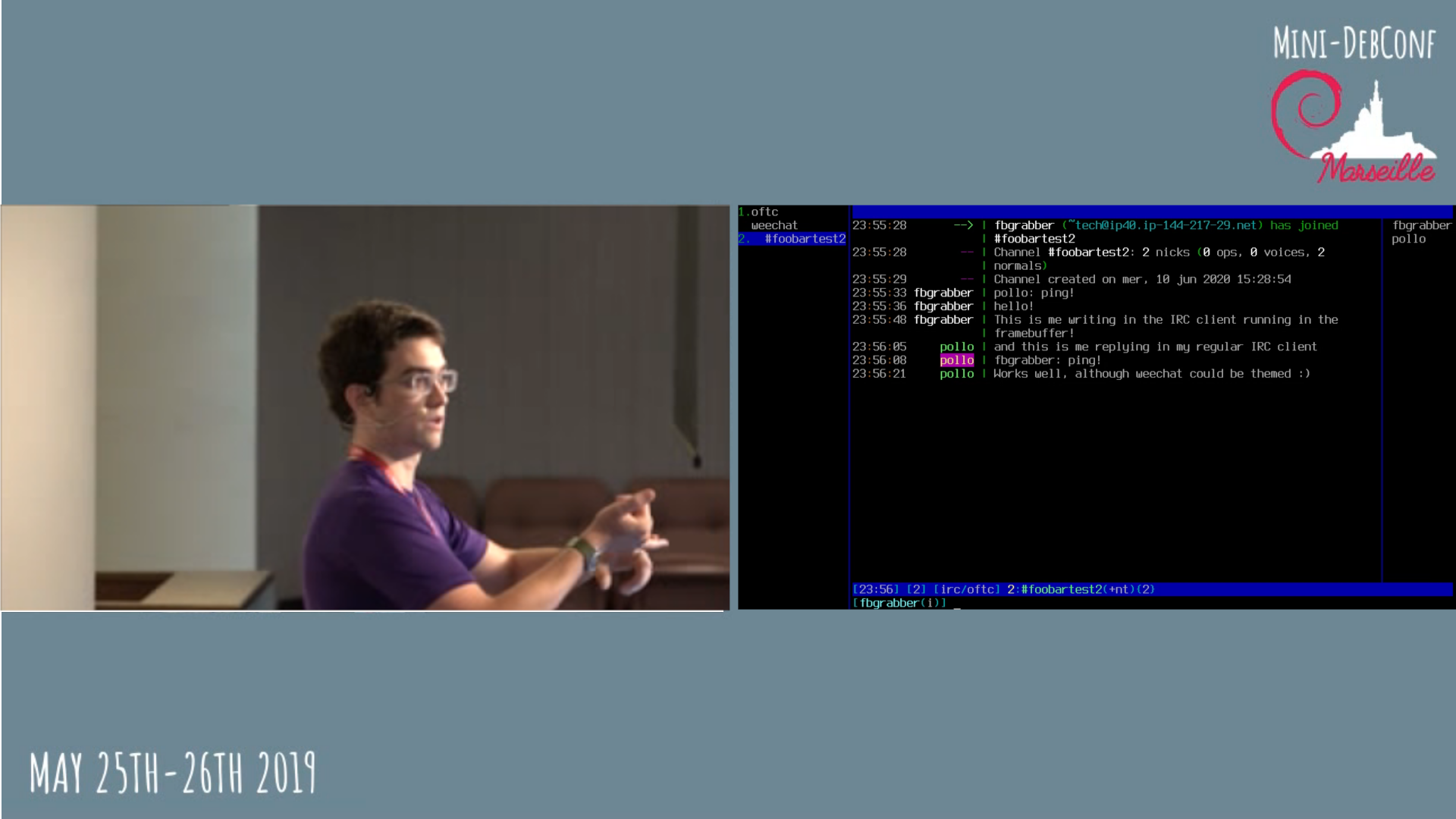
DebConf20 will be held online this year and I've started doing some work for the DebConf videoteam to prepare what's to come. One thing I want us to do is capture a live IRC session and use it as a video input in Voctomix, the live video mixer we use. This way, at the end of a talk we could show both the attendees asking questions on IRC and the presenter replying to them side-by-side. A mockup of a side-by-side voctogui window with someone on the left and a terminal running weechat on the right Capturing a live video of an IRC client on a remote headless server is somewhat more complicated than you might think; as far as I know, neither ffmpeg nor gstreamer support recording a live ssh pseudoterminal1. Worse, neither weechat nor irssi run on X: they use ncurses... Although you can capture an X11 window with ffmpeg -f x11grab, I wasn't able to get them to run with Xvfb. Capturing the framebuffer One thing I dislike with this method is the framebuffer isn't always easy to access on remote machines. If you don't have a serial connection, you can try using a VNC server that can. I did my tests in a VM on an KVM hypervisor and used virt-manager to access the framebuffer. I had a hard time setting the framebuffer resolution to a 16:9 aspect ratio. The winning combination ended up passing the nomodeset kernel parameter at boot and setting up these parameters in /etc/default/grub2:
GRUB_GFXMODE=1280x720
GRUB_GFXPAYLOAD_LINUX=keep
To make the text more readable, this is the /etc/default/console-setup file that seemed to make the most sense:
# CONFIGURATION FILE FOR SETUPCON
# Consult the console-setup(5) manual page.
ACTIVE_CONSOLES="/dev/tty[1-6]"
CHARMAP="UTF-8"
CODESET="Lat15"
FONTFACE="TerminusBold"
FONTSIZE="12x24"
Once that is done, the only thing left is to run the IRC client and launch ffmpeg. The magic command to record the framebuffer seems to be something like:
ffmpeg -f fbdev -framerate 60 -i /dev/fb0 -c:v libvpx -crf 10 -b:v 1M -auto-alt-ref 0 output.webm
Here is what I ended up with:

  1. We need something similarly flexible and featureful that can output to a TCP socket.
  2. Don't forget to run update-grub before rebooting!

10 June 2020

Dirk Eddelbuettel: binb 0.0.6: Small enhancements

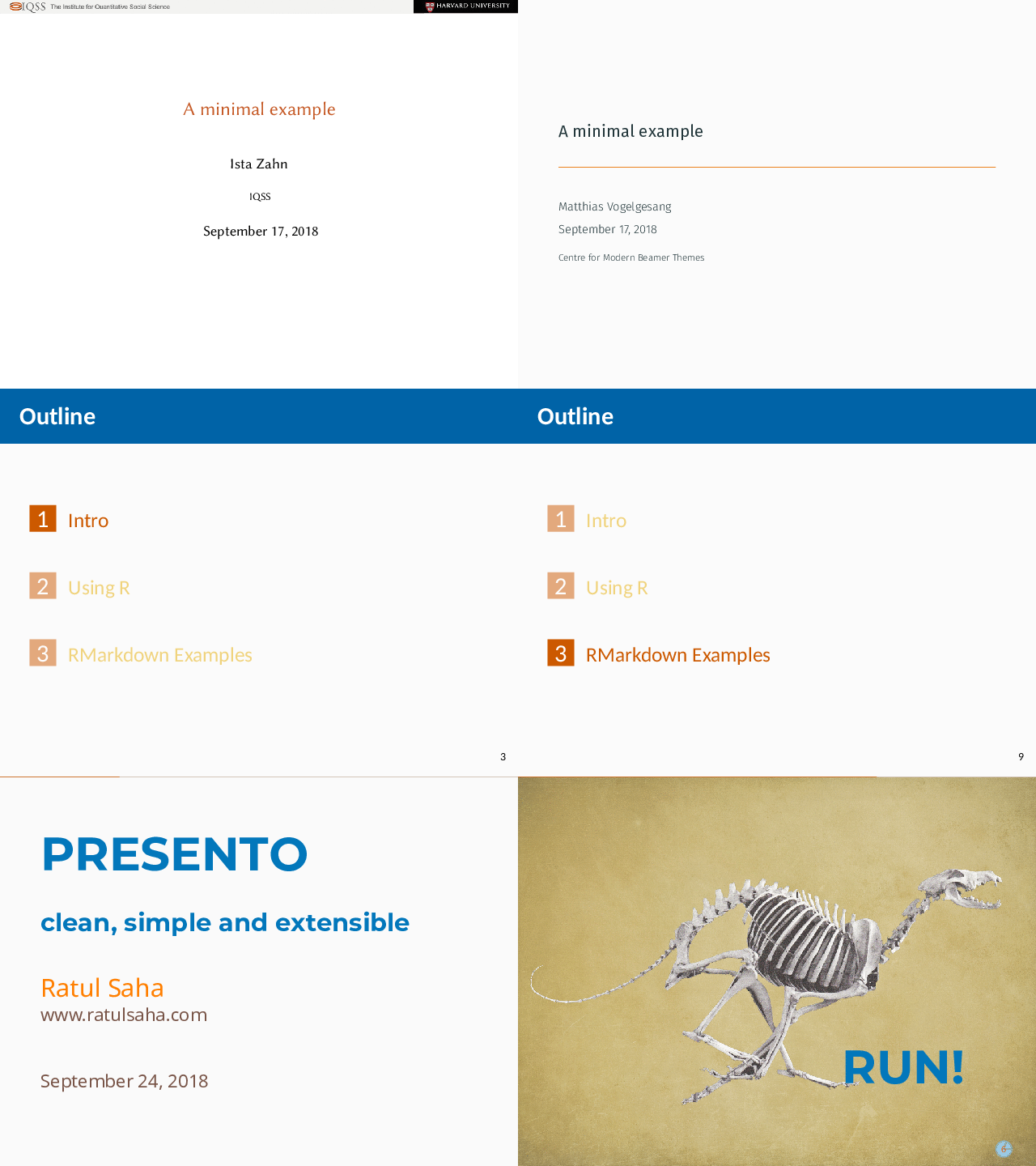
The sixth release of the binb package is now on CRAN. binb regroups four rather nice themes for writing LaTeX Beamer presentations much more easily in (R)Markdown. As a teaser, a quick demo combining all four themes follows; documentation and examples are in the package. Via two contributed PRs, this releases adds titlepage support via the YAML header for Metropolis, and suppresses nags about the changed natbib default. A little polish on the README and Travis rounds everything off.
Changes in binb version 0.0.6 (2020-06-10)
  • Support for YAML option titlegraphic was added in Metropolis (Andras Scraka in #23).
  • The README.md file received another badge (Dirk).
  • The natbib default value was updated to accomodate rmarkdown (Joseph Stachelek in #26).
  • Travis now uses R 4.0.0 and 'bionic' (Dirk).

CRANberries provides a summary of changes to the previous version. For questions or comments, please use the issue tracker at GitHub. If you like this or other open-source work I do, you can now sponsor me at GitHub. For the first year, GitHub will match your contributions.

This post by Dirk Eddelbuettel originated on his Thinking inside the box blog. Please report excessive re-aggregation in third-party for-profit settings.

Evgeni Golov: show your desk

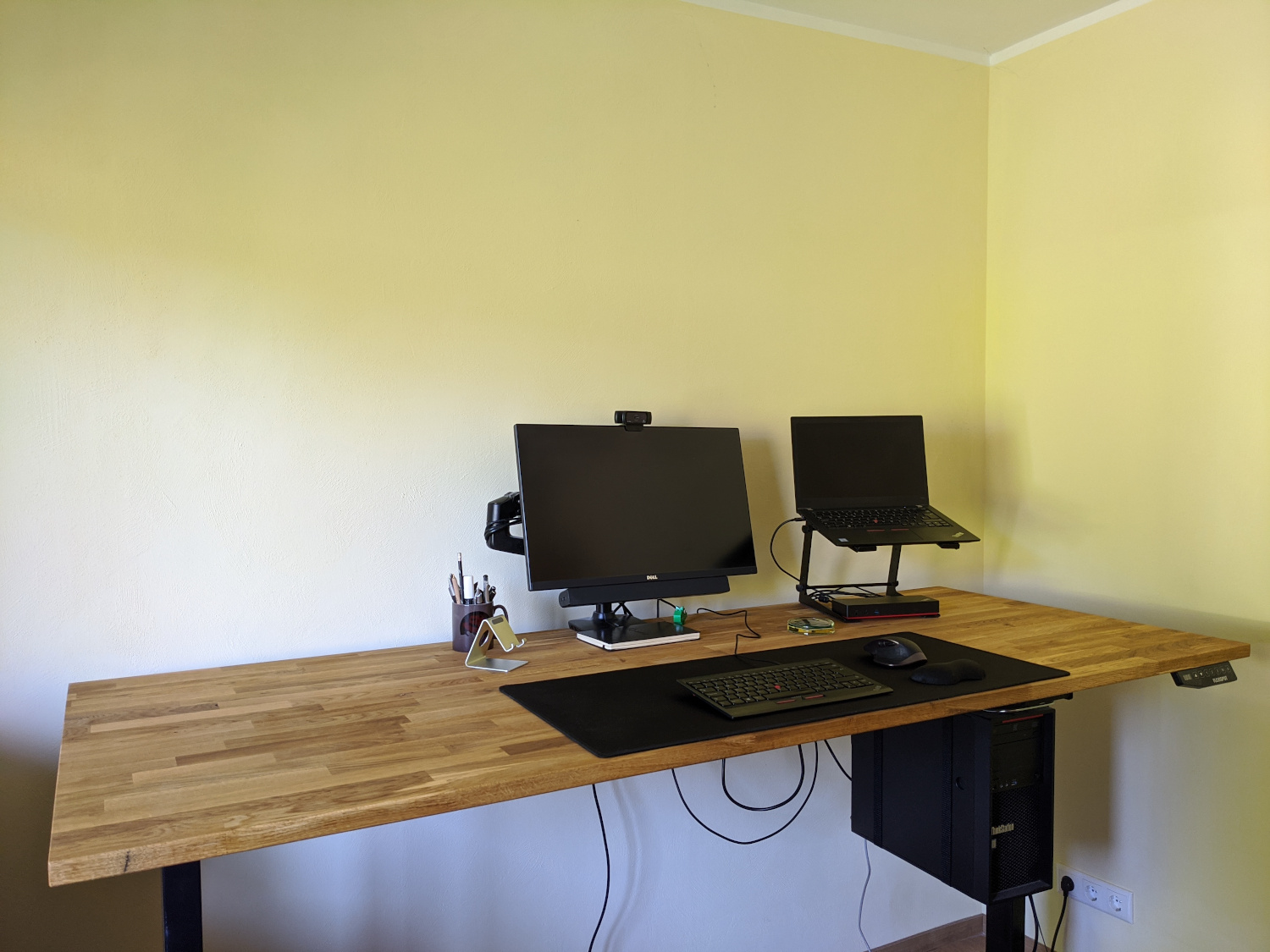
Some days ago I posted a picture of my desk on Mastodon and Twitter. standing desk with a monitor, laptop etc After that I got multiple questions about the setup, so I thought "Michael and Michael did posts about their setups, you could too!" And well, here we are ;-) desk The desk is a Flexispot E5B frame with a 200 80 2.6cm oak table top. The Flexispot E5 (the B stands for black) is a rather cheap (as in not expensive) standing desk frame. It has a retail price of 379 , but you can often get it as low as 299 on sale. Add a nice table top from a local store (mine was like 99 ), a bit of wood oil and work and you get a nice standing desk for less than 500 . The frame has three memory positions, but I only use two: one for sitting, one for standing, and a "change position" timer that I never used so far. The table top has a bit of a swing when in standing position (mine is at 104cm according to the electronics in the table), but not enough to disturb typing on the keyboard or thinking. I certainly wouldn't place a sewing machine up there, but that was not a requirement anyways ;) To compare: the IKEA Bekant table has a similar, maybe even slightly stronger swing. chair Speaking of IKEA The chair is an IKEA Volmar. They don't seem to sell it since mid 2019 anymore though, so no link here. hardware laptop A Lenovo ThinkPad T480s, i7-8650U, 24GB RAM, running Fedora 32 Workstation. Just enough power while not too big and heavy. Full of stickers, because I stickers! It's connected to a Lenovo ThinkPad Thunderbolt 3 Dock (Gen 1). After 2 years with that thing, I'm still not sure what to think about it, as I had various issues with it over the time:
  • the internal USB hub just vanishing from existence until a full power cycle of the dock was performed, but that might have been caused by my USB-switch which I recently removed.
  • the NIC negotiating at 100MBit/s instead of 1000MBit/s and then keeping on re-negotiating every few minutes, disconnecting me from the network, but I've not seen that since the Fedora 32 upgrade.
  • the USB-attached keyboard not working during boot as it needs some Thunderbolt magic.
The ThinkPad stands on a Adam Hall Stands SLT001E, a rather simple stand for laptops and other equipment (primarily made for DJs I think). The Dock fits exactly between the two feet of the stand, so that is nice and saves space on the table. Using the stand I can use the laptop screen as a second screen when I want it - but most often I do not and have the laptop lid closed while working. workstation A Lenovo ThinkStation P410, Xeon E5-2620 v4, 96GB RAM, running Fedora 32 Workstation. That's my VM playground. Having lots of RAM really helps if you need/want to run many VMs with Foreman/Katello or Red Hat Satellite as they tend to be a bit memory hungry and throwing hardware at problems tend to be an easy solution for many of them. The ThinkStation is also connected to the monitor, and I used to have an USB switch to flip my keyboard, mouse and Yubikey from the laptop to the workstation and back. But as noted above, this switch somehow made the USB hub in the laptop dock unhappy (maybe because I was switching too quickly after resume or so), so it's currently removed from the setup and I use the workstation via SSH only. It's mounted under the table using a ROLINE PC holder. You won't get any design awards with it, but it's easy to assemble and allows the computer to move with the table, minimizing the number of cables that need to have a flexible length. monitor The monitor is an older Dell UltraSharp U2515H - a 25" 2560 1440 model. It sits on an Amazon Basics Monitor Arm (which is identical to an Ergotron LX to the best of my knowledge) and is accompanied by a Dell AC511 soundbar. I don't use the adjustable arm much. It's from the time I had no real standing desk and would use the arm and a cardboard box to lift the monitor and keyboard to a standing level. If you don't want to invest in a standing desk, that's the best and cheapest solution! The soundbar is sufficient for listening to music while working and for chatting with colleagues. webcam A Logitech C920 Pro, what else? Works perfectly under Linux with the UVC driver and has rather good microphones. Actually, so good that I never use a headset during video calls and so far nobody complained about bad audio. keyboard A ThinkPad Compact USB Keyboard with TrackPoint. The keyboard matches the one in my T480s, so my brain doesn't have to switch. It was awful when I still had the "old" model and had to switch between the two. UK layout. Sue me. I like the big return key. mouse A Logitech MX Master 2. I got the MX Revolution as a gift a long time ago, and at first I was like: WTF, why would anyone pay hundred bucks for a mouse?! Well, after some time I knew, it's just that good. And when it was time to get a new one (the rubber coating gets all slippery after some time) the decision was rather easy. I'm pondering if I should try the MX Ergo or the MX Vertical at some point, but not enough to go and buy one of them yet. other notepad I'm terrible at remembering things, so I need to write them down. And I'm terrible at remembering to look at my notes, so they need to be in my view. So there is a regular A5 notepad on my desk, that gets filled with check boxes and stuff, page after page. coaster It's a wooden table, you don't want to have liquids on it, right? Thankfully a friend of mine once made coasters out of old Xeon CPUs and epoxy. He gave me one in exchange for a busted X41 ThinkPad. I still think I made the better deal ;) yubikey Keep your secrets safe! Mine is used as a GnuPG smart card for both encryption and SSH authentication, U2F on various pages and 2FA for VPN. headphones I own a pair of Bose QuietComfort 25 with an aftermarket Bluetooth adapter and Anker SoundBuds Slim+. Both are used rather seldomly while working, as my office is usually quiet and no one is disturbed when I listen to music without headphones. what's missing? light I want to add more light to the setup, noth to have a better picture during video calls but also to have better light when doing something else on the table - like soldering. The plan is to add an IKEA Tertial with some Tr dfri smart LED in it, but the Tertial is currently not available for delivery at IKEA and I'm not going to visit one in the current situation. bigger monitor Currently pondering getting a bigger (27+ inch) 4K monitor. Still can't really decide which one to get. There are so many, and they all differ in some way. But it seems no affordable one is offering an integrated USB switch and sufficient amount of USB ports, so I'll probably get whatever can get me a good picture without any extra features at a reasonable price. Changing the monitor will probably also mean rethinking the sound output, as I'm sure mounting the Dell soundbar to anything but the designated 5 year old monitor won't work too well.

9 June 2020

Ingo Juergensmann: Jabber vs. XMPP

XMPP is widely - and mabye better - known as Jabber. This was more or less the same until Cisco bought Jabber Inc and the trademark. You can read more about the story on the XMPP.org website. But is there still a Jabber around? Yes, it is! But Cisco Jabber is a whole infrastructure environment: you can't use Cisco Jabber client on its own without the other required Cisco infrastructure as Cisco CUCM and CIsco IM&P servers. So you can't just setup Prosody or ejabberd on your Debian server and connect Cisco Jabber to it. But what are the differences of Cisco Jabber to "standard" XMPP clients? Cisco Jabber The above screenshot from the official Cisco Jabber product webpage shows the new, single view layout of the Cisco Webex Teams client, but you can configure the client to have the old, classic split view layout of Contact List and Chat Window. But as you can already see from above screenshot audio & video calls is one of the core functions of Cisco Jabber whereas this feature has been added only lately to the well-known Conversations XMPP client on Android. Conversations is using Jingle extension to XMPP whereas Jabber uses SIP for voice/video calls. You can even use Cisco Jabber to control your deskphone via CTI, which is a quite common setup for Jabber. In fact you can configure Jabber to be just a CTI client to you phone or a fully featured UC client. When you don't want to have Ciscos full set of on-premise servers, you can also use Cisco Jabber in conjunction with Cisco Webex as Cisco Webex Messenger. Or in conjunction with Webex Teams in Teams Messaging Mode. Last month Cisco announced general availability of XMPP federation for Webex Teams/Jabber in Teams Messaging Mode. With that you have basic functionality in Webex Teams. And when I say "basic" I really mean basic: you can have 1:1 chat only, no group chats (MUC) and no Presence status will be possible. Hopefully this is just the beginning and not the end of XMPP support in Webex Teams. XMPP Clients Well, I'm sure many of you know "normal" XMPP clients such as Gajim or Dino on Linux, Conversations on Android or Siskin/Monal/ChatSecure on Apple IOS. There are plenty of other clients of course and maybe you used an XMPP client in the past without knowing it. For example Jitsi Meet is based on XMPP and you can still download the Jitsi Desktop client and use it as a full-featured multi-protocol client, e.g. for XMPP and SIP. In fact Jitsi Desktop is maybe the client that comes closest to Cisco Jabber as a chat/voice/video client. In fact I already connected Jitsi Desktop to Cisco CUCM/IM&P infrastructure, but of course you won't be able to use all those Cisco proprietary extensions, but you can see the benefit of open, standardized protocols such as XMPP and SIP: you are free to use any standard compliant client that you want. So, while Jitsi supported voice/video calls for a long time, even before they focussed on Jitsi Meet as a WebRTC based conference service, Conversations added this feature last month, as already stated. This had a huge effect to the whole XMPP federation, because you need an XMPP server that supports XEP-0215 to make these audio/video calls work. The well-known Compliance Tester listed the STUN/TURN features first as "Informational Tests", but quickly made this a mandatory test to pass tests and gain 100% on the Compliance Tester. But you cannot place SIP calls to other sides, because that's a different thing. As many of you are familiar with standard XMPP clients, I'll focus now on some similarity and differences between Cisco Jabber and standard XMPP... Similarities & Differences First, you can federate with Cisco Jabber users. Cisco IM&P can use standard XMPP federation with all other XMPP standard compliant servers. This is really a big benefit and way better than other solutions that usually results in vendor lock-in. Depending on the setup, you can even join from your own XMPP client in MUCs (Multi User Chats), which Cisco calls "Persistent Chat Room". The other way is not that simple: basically it is possible to join with Cisco Jabber in a MUC on a random server, but it is not as easy as you might thing. Cisco Jabber simply lacks a way to enter a room JID (as you can find them on https://search.jabber.network/. Instead you need to be added as participant by a moderator or an admin in that 3rd party MUC. Managed File Transfers is another issue. Cisco Jabber supports Peer-to-Peer file transfers and Managed File Transfers, where the uploaded file get transferred to an SFTP server as storage backend and where the IM&P server is handling the transfer via HTTPS. You can find a schematic drawing in the Configuration Guides. Although it appears similar to HTTP Upload as defined in XEP-0363, it is not very likely that it will work. I haven't tested it yet, because in my test scenario there is a gatekeeper in the path: Cisco Expressway doesn't support (yet) Managed File Transfer, but you can upvote the idea in the ideas management of Cisco or other ideas such as OMEMO support. OMEMO support? Yes, there is no end-to-end encryption (E2EE) currently planned for Cisco Jabber, while it is common nowadays for most modern XMPP clients. I think it would be good for Cisco Jabber to also (optionally) support OMEMO or its successor. Messaging clients without E2EE are not state of the art anymore. Whereas Conversations is the de-facto standard on Android, Apple IOS devices are still lacking a similar well-working client. See my blog post "XMPP - Fun with Clients" for a summary. In that regard Cisco Jabber might be the best XMPP client for IOS to some degree: you have working messaging, voice/video calls, Push Notifications and integration into Apples Call Kit. There are most likely many, many more differences and issues between Cisco Jabber and standard compliant XMPP servers and clients. But basically Cisco Jabber is still based on XMPP and extends that by proprietary extensions. Summary While I have the impression that the free clients and servers are well doing and increased development in the past years (thanks to Conversations and the Compliance Tester), the situation of Cisco Jabber is a little different. As a customer you can sometimes get the impression that Cisco has lost interest in developing Cisco Jabber. It got better in the last years, but when Cisco Spark was introduced some years ago, the impression was that Cisco is heavily focussed on Spark (now: Webex Teams). It's not like Cisco is not listening to customers or the development has been stopped on Jabber, but my impression is that most customers don't give feedback or tell Cisco as the vendor what they want. You can either submit ideas via the Colaboration Customer Ideas Tool or provide feedback via your Cisco and partner channels. I think it is important for the XMPP community to also have a large enterprise level vendor like Cisco. Otherwise the Internet will become more and more an Internet of closed silos like MS Teams, Slack, Facebook, etc. Of course there are other companies like ProcessOne (ejabberd) or Tigase, but I think you agree that Cisco is another level.
Kategorie:

Molly de Blanc: Racism is a Free Software Issue

Racism is a free software issue. I gave a talk that touched on this at CopyLeft Conf 2019. I also talked a little bit about it at All Things Open 2019 and FOSDEM 2020 in my talk The Ethics Behind Your IoT. I know statistics, theory, and free software. I don t know about race and racism nearly as well. I might make mistakes I have made some and I will make more. Please, when I do, help me do better. I want to look at a few particular technologies and think about how they reinforce systemic racism. Worded another way: how is technology racist? How does technology hurt Black Indigenous People of Color (BIPOC)? How does technology keep us racist? How does technology make it easier to be racist?

Breathalyzers In the United States, Latinx folks are less likely to drink than white people and, overall, less likely to be arrested for DUIs3,4. However, they are more likely to be stopped by police while driving5,6. Who is being stopped by police is up to the police and they pull over a disproportionate number of Latinx drivers. After someone is pulled over for suspected drunk driving, they are given a breathalyzer test. Breathalyzers are so easy to (un)intentionally mis-calibrate that they have been banned as valid evidence in multiple states. The biases of the police are not canceled out by the technology that should, in theory, let us know whether someone is actually drunk.

Facial Recognition I could talk about for quite some time and, in fact, have. So have others. Google s image recognition software recognized black people as gorillas and to fix the issue it removed gorillas from it s image-labeling technology. Facial recognition software does a bad job at recognizing black people. In fact, it s also terrible at identifying indigenous people and other people of color. (Incidentally, it s also not great at recognizing women, but let s not talk about that right now.) As we use facial recognition technology for more things, from automated store checkouts (even more relevant in the socially distanced age of Covid-19), airport ticketing, phone unlocking, police identification, and a number of other things, it becomes a bigger problem that this software cannot tell the difference between two Asian people.

Targeted Advertising Black kids see 70% more online ads for food than white kids, and twice as many ads for junk food. In general BIPOC youth are more likely to see junk food advertisements online. This is intentional, and happens after they are identified as BIPOC youth.

Technology Reinforces Racism; Racism Builds Technology The technology we have developed reinforces racism on a society wide scale because it makes it harder for BIPOC people to interact with this world that is run by computers and software. It s harder to not be racist when the technology around us is being used to perpetuate racist paradigms. For example, if a store implements facial recognition software for checkout, black women are less likely to be identified. They are then more likely to be targeted as trying to steal from the store. We are more likely to take this to mean that black women are more likely to steal. This is how technology builds racism, People are being excluded largely because they are not building these technologies, because they are not welcome in our spaces. There simply are not enough Black and Hispanic technologists and that is a problem. We need to care about this because when software doesn t work for everyone, it doesn t work. We cannot build on the promise of free and open source software when we are excluding the majority of people.

Dirk Eddelbuettel: RcppArmadillo 0.9.900.1.0

armadillo image Armadillo is a powerful and expressive C++ template library for linear algebra aiming towards a good balance between speed and ease of use with a syntax deliberately close to a Matlab. RcppArmadillo integrates this library with the R environment and language and is widely used by (currently) 727 other packages on CRAN. Conrad recently released a new upstream version 9.900.1 of Armadillo which we packaged and tested as usual first as a release candidate build and then as the release. As usual, logs from reverse-depends runs are in the rcpp-logs repo. Apart from the new upstream release, we updated Travis use, ornamented the README a little, and smoothed over a rough corner from the recent R 4.0.0 release. All changes in the new release are noted below.

Changes in RcppArmadillo version 0.9.900.1.0 (2020-06-08)
  • Upgraded to Armadillo release 9.900.1 (Nocturnal Misbehaviour)
    • faster solve() for under/over-determined systems
    • faster eig_gen() and eig_pair() for large matrices
    • expanded eig_gen() and eig_pair() to optionally provide left and right eigenvectors
  • Switch Travis CI testing to R 4.0.0, use bionic as base distro and test R 3.6.3 and 4.0.0 in a matrix (Dirk in #298).
  • Add two badges to README for indirect use and the CSDA paper.
  • Adapt RcppArmadillo.package.skeleton() to a change in R 4.0.0 affecting what it exports in NAMESPACE.

Courtesy of CRANberries, there is a diffstat report relative to previous release. More detailed information is on the RcppArmadillo page. Questions, comments etc should go to the rcpp-devel mailing list off the R-Forge page. If you like this or other open-source work I do, you can now sponsor me at GitHub. For the first year, GitHub will match your contributions.

This post by Dirk Eddelbuettel originated on his Thinking inside the box blog. Please report excessive re-aggregation in third-party for-profit settings.

7 June 2020

Joachim Breitner: Managed by an eleven year old

This weekend I had some pretty good uncle time. My eleven year old nephew (after beating me in a fair match of tennis) wanted to play with his Lego Mindstorms set. He never even touches it unless I am around to help him, but then he quiet enjoys. As expected, when I ask him what we should try to build, he tends to come up with completely unrealistic or impossible ideas, and we have to somehow reduce the scope to something doable. This time round, inspired by their autonomous vacuum cleaner, he wanted to build something like that. That was convenient, because now I could sell him what I wanted to try to do, namely make the robot follow a wall at more or less constant distance, as a useful first step. We mounted the infra red distance sensor at an 45 angle to the front-left, and then I built a very simple control loop measure the distance, subtract 40, apply a factor, and feed that into the steering input of the drive action, and repeat. I must admit that I was pretty proud to see just how well that very simple circuit worked: The little robot turned sharp corners in both directions, and otherwise drove nicely parallel and with constant distance to the wall. I was satisfied with that achievement and would have happily ended it here before we might be disappointed by more ambitious and then failing goals. But my nephew had not forgotten about the vacuum cleaner, and casually asked if I could make the robot draw an outline of its path, and thus of the room, on the display. Ok, where do I begin to explain just how unfeasible that is yes, it seemed one can draw to the display. But how should the robot know where it is? How far it turns? How far it went? This is programming by connecting boxes, and I would not expect such an interface to allow for complex logic (right?). And I would need trigonometry and stuff. But he didn t quite believe it, and thus got me thinking indeed, the arithmetic block can evaluate more complex formulas, involving sin and cos so maybe if I can somehow keep track of where the robot is heading well, let s give it a try. So by dragging boxes and connecting wires, I implemented a simple logic (three variables, x and y for current position, alpha for current heading; in each loop add the steering input onto alpha, and add (sin(alpha),cos(alpha)) onto the current position; throw in some linear factors to calibrate; draw pixel at (x, y)). And, to my nephew s joy and my astonishment, the robot was drawing a curvy line that clearly correlates with the taken path! It wasn t respecting the angles perfectly, a square might not properly close, but half an hour earlier I would have actively bet against that we would pull this off!
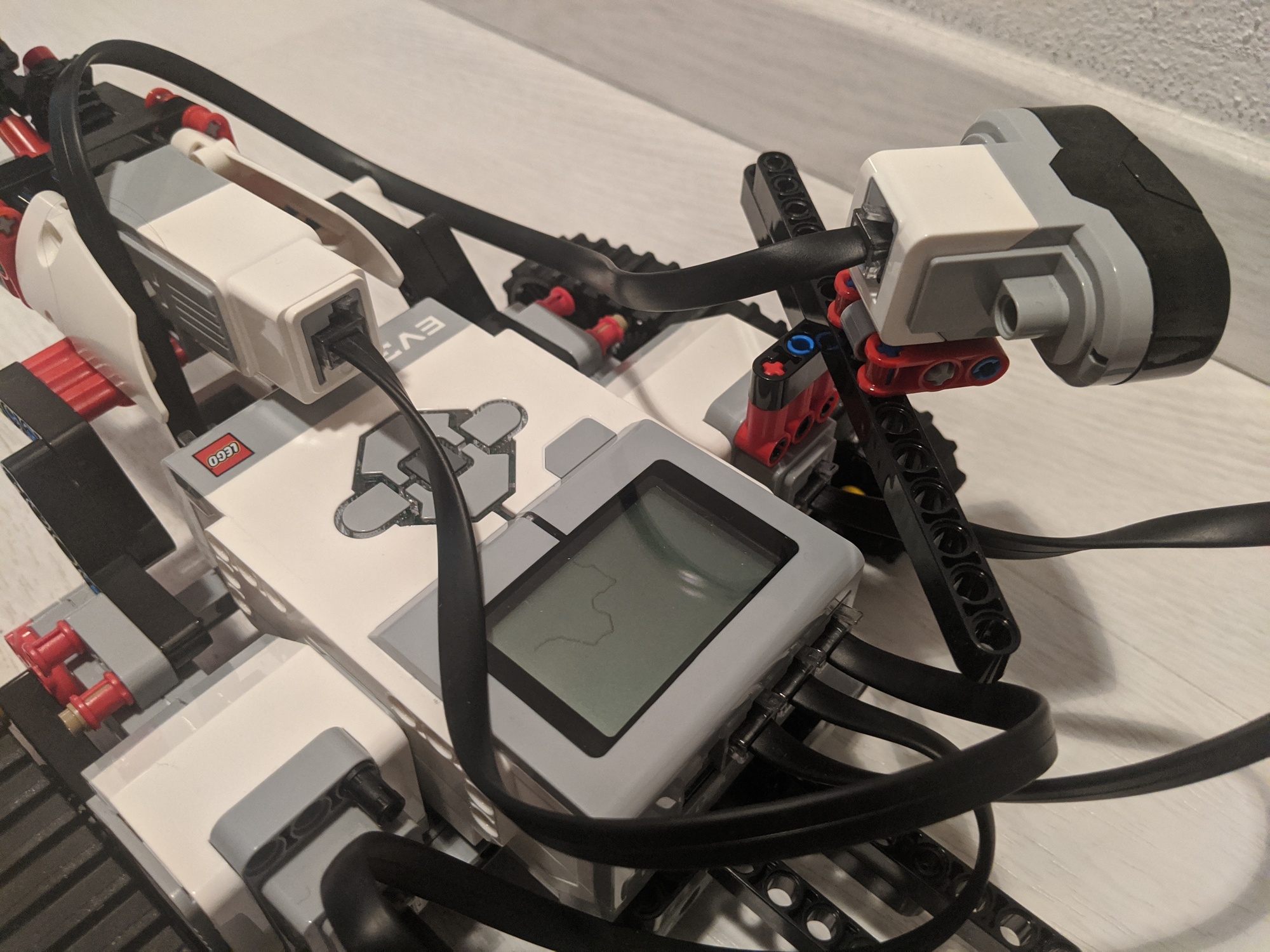
After a few turns

After a few turns

I was, I must admit, a bit proud. But not only about the technical nerding, but also about my uncleing: That night, according to his parents, my nephew said that he can t remember ever being so happy!

6 June 2020

Petter Reinholdtsen: Secure Socket API - a simple and powerful approach for TLS support in software

As a member of the Norwegian Unix User Group, I have the pleasure of receiving the USENIX magazine ;login: several times a year. I rarely have time to read all the articles, but try to at least skim through them all as there is a lot of nice knowledge passed on there. I even carry the latest issue with me most of the time to try to get through all the articles when I have a few spare minutes. The other day I came across a nice article titled "The Secure Socket API: TLS as an Operating System Service" with a marvellous idea I hope can make it all the way into the POSIX standard. The idea is as simple as it is powerful. By introducing a new socket() option IPPROTO_TLS to use TLS, and a system wide service to handle setting up TLS connections, one both make it trivial to add TLS support to any program currently using the POSIX socket API, and gain system wide control over certificates, TLS versions and encryption systems used. Instead of doing this:
int socket = socket(PF_INET, SOCK_STREAM, IPPROTO_TCP);
the program code would be doing this:
int socket = socket(PF_INET, SOCK_STREAM, IPPROTO_TLS);
According to the ;login: article, converting a C program to use TLS would normally modify only 5-10 lines in the code, which is amazing when compared to using for example the OpenSSL API. The project has set up the https://securesocketapi.org/ web site to spread the idea, and the code for a kernel module and the associated system daemon is available from two github repositories: ssa and ssa-daemon. Unfortunately there is no explicit license information with the code, so its copyright status is unclear. A request to solve this about it has been unsolved since 2018-08-17. I love the idea of extending socket() to gain TLS support, and understand why it is an advantage to implement this as a kernel module and system wide service daemon, but can not help to think that it would be a lot easier to get projects to move to this way of setting up TLS if it was done with a user space approach where programs wanting to use this API approach could just link with a wrapper library. I recommend you check out this simple and powerful approach to more secure network connections. :) As usual, if you use Bitcoin and want to show your support of my activities, please send Bitcoin donations to my address 15oWEoG9dUPovwmUL9KWAnYRtNJEkP1u1b.

Russell Coker: Comparing Compression

I just did a quick test of different compression options in Debian. The source file is a 1.1G MySQL dump file. The time is user CPU time on a i7-930 running under KVM, the compression programs may have different levels of optimisation for other CPU families. Facebook people designed the zstd compression system (here s a page giving an overview of it [1]). It has some interesting new features that can provide real differences at scale (like unusually large windows and pre-defined dictionaries), but I just tested the default mode and the -9 option for more compression. For the SQL file zstd -9 provides significantly better compression than gzip while taking only slightly less CPU time than gzip -9 while zstd with the default option (equivalent to zstd -3 ) gives much faster compression than gzip -9 while also being slightly smaller. For this use case bzip2 is too slow for inline compression of a MySQL dump as the dump process locks tables and can hang clients. The lzma and xz compression algorithms provide significant benefits in size but the time taken is grossly disproportionate. In a quick check of my collection of files compressed with gzip I was only able to fine 1 fild that got less compression with zstd with default options, and that file got better compression with zstd -9 . So zstd seems to beat gzip everywhere by every measure. The bzip2 compression seems to be obsolete, zstd -9 is much faster and has slightly smaller output. Both xz and lzma seem to offer a combination of compression and time taken that zstd can t beat (for this file type at least). The ultra compression mode 22 gives 2% smaller output files but almost 28 minutes of CPU time for compression is a bit ridiculous. There is a threaded mode for zstd that could potentially allow a shorter wall clock time for zstd --ultra -22 than lzma/xz while also giving better compression.
Compression Time Size
zstd 5.2s 130m
zstd -9 28.4s 114m
gzip -9 33.4s 141m
bzip2 -9 3m51 119m
lzma 6m20 97m
xz 6m36 97m
zstd -19 9m57 99m
zstd --ultra -22 27m46 95m
Conclusion For distributions like Debian which have large archives of files that are compressed once and transferred a lot the zstd --ultra -22 compression might be useful with multi-threaded compression. But given that Debian already has xz in use it might not be worth changing until faster CPUs with lots of cores become more commonly available. One could argue that for Debian it doesn t make sense to change from xz as hard drives seem to be getting larger capacity (and also smaller physical size) faster than the Debian archive is growing. One possible reason for adopting zstd in a distribution like Debian is that there are more tuning options for things like memory use. It would be possible to have packages for an architecture like ARM that tends to have less RAM compressed in a way that decreases memory use on decompression. For general compression such as compressing log files and making backups it seems that zstd is the clear winner. Even bzip2 is far too slow and in my tests zstd clearly beats gzip for every combination of compression and time taken. There may be some corner cases where gzip can compete on compression time due to CPU features, optimisation for CPUs, etc but I expect that in almost all cases zstd will win for compression size and time. As an aside I once noticed the 32bit of gzip compressing faster than the 64bit version on an Opteron system, the 32bit version had assembly optimisation and the 64bit version didn t at that time. To create a tar archive you can run tar czf or tar cJf to create an archive with gzip or xz compression. To create an archive with zstd compression you have to use tar --zstd -cf , that s 7 extra characters to type. It s likely that for most casual archive creation (EG for copying files around on a LAN or USB stick) saving 7 characters of typing is more of a benefit than saving a small amount of CPU time and storage space. It would be really good if tar got a single character option for zstd compression. The external dictionary support in zstd would work really well with rsync for backups. Currently rsync only supports zlib, adding zstd support would be a good project for someone (unfortunately I don t have enough spare time). Now I will change my database backup scripts to use zstd. Update: The command tar acvf a.zst filenames will create a zstd compressed tar archive, the a option to GNU tar makes it autodetect the compression type from the file name. Thanks Enrico!

5 June 2020

Sean Whitton: spacecadetrebindings

I ve been less good at taking adequate typing breaks during the lockdown and I ve become concerned about how much chording my left hand does on its own during typical Emacs usage, with caps lock rebound to control, as I ve had it for years. I thought that now was as good a time as any to do something drastic about this. Here are my rebindings: Optional extras: This has the following advantages: The main disadvantage, aside from an adjustment period when I feel that someone has inserted a massive marshmellow between me and my computer, is that Ctrl-Alt combinations are a bit difficult; in Emacs, C-M-SPC is hard to do without. However I think I ve found a decent way to do it (thumb on control, curled ring finger on alt, possibly little finger on shift for Emacs infamous C-M-S-v standard binding).

4 June 2020

Antoine Beaupr : Replacing Smokeping with Prometheus

I've been struggling with replacing parts of my old sysadmin monitoring toolkit (previously built with Nagios, Munin and Smokeping) with more modern tools (specifically Prometheus, its "exporters" and Grafana) for a while now. Replacing Munin with Prometheus and Grafana is fairly straightforward: the network architecture ("server pulls metrics from all nodes") is similar and there are lots of exporters. They are a little harder to write than Munin modules, but that makes them more flexible and efficient, which was a huge problem in Munin. I wrote a Migrating from Munin guide that summarizes those differences. Replacing Nagios is much harder, and I still haven't quite figured out if it's worth it.

How does Smokeping work Leaving those two aside for now, I'm left with Smokeping, which I used in my previous job to diagnose routing issues, using Smokeping as a decentralized looking glass, which was handy to debug long term issues. Smokeping is a strange animal: it's fundamentally similar to Munin, except it's harder to write plugins for it, so most people just use it for Ping, something for which it excels at. Its trick is this: instead of doing a single ping and returning this metrics, it does multiple ones and returns multiple metrics. Specifically, smokeping will send multiple ICMP packets (20 by default), with a low interval (500ms by default) and a single retry. It also pings multiple hosts at once which means it can quickly scan multiple hosts simultaneously. You therefore see network conditions affecting one host reflected in further hosts down (or up) the chain. The multiple metrics also mean you can draw graphs with "error bars" which Smokeping shows as "smoke" (hence the name). You also get per-metric packet loss. Basically, smokeping runs this command and collects the output in a RRD database:
fping -c $count -q -b $backoff -r $retry -4 -b $packetsize -t $timeout -i $mininterval -p $hostinterval $host [ $host ...]
... where those parameters are, by default:
  • $count is 20 (packets)
  • $backoff is 1 (avoid exponential backoff)
  • $timeout is 1.5s
  • $mininterval is 0.01s (minimum wait interval between any target)
  • $hostinterval is 1.5s (minimum wait between probes on a single target)
It can also override stuff like the source address and TOS fields. This probe will complete between 30 and 60 seconds, if my math is right (0% and 100% packet loss).

How do draw Smokeping graphs in Grafana A naive implementation of Smokeping in Prometheus/Grafana would be to use the blackbox exporter and create a dashboard displaying those metrics. I've done this at home, and then I realized that I was missing something. Here's what I did.
  1. install the blackbox exporter:
    apt install prometheus-blackbox-exporter
    
  2. make sure to allow capabilities so it can ping:
    dpkg-reconfigure prometheus-blackbox-exporter
    
  3. hook monitoring targets into prometheus.yml (the default blackbox exporter configuration is fine):
    scrape_configs:
      - job_name: blackbox
          metrics_path: /probe
          params:
            module: [icmp]
          scrape_interval: 5s
          static_configs:
            - targets:
              - octavia.anarc.at
              # hardcoded in DNS
              - nexthop.anarc.at
              - koumbit.net
              - dns.google
          relabel_configs:
            - source_labels: [__address__]
              target_label: __param_target
            - source_labels: [__param_target]
              target_label: instance
            - target_label: __address__
              replacement: 127.0.0.1:9115  # The blackbox exporter's real hostname:port.
    
    Notice how we lower the scrape_interval to 5 seconds to get more samples. nexthop.anarc.at was added into DNS to avoid hardcoding my upstream ISP's IP in my configuration.
  4. use this Grafana panel to graph the results. It was created with this query:
    sum(probe_icmp_duration_seconds phase="rtt" ) by (instance)
    
    • Set the Legend field to instance RTT
    • Set Draw modes to lines and Mode options to staircase
    • Set the Left Y axis Unit to duration(s)
    • Show the Legend As table, with Min, Avg, Max and Current enabled
    Then this query, for packet loss:
    1-avg_over_time(probe_success[$__interval])!=0 or null
    
    • Set the Legend field to instance packet loss
    • Set a Add series override to Lines: false, Null point mode: null, Points: true, Points Radius: 1, Color: deep red, and, most importantly, Y-axis: 2
    • Set the Right Y axis Unit to percent (0.0-1.0) and set Y-max to 1
    Then set the entire thing to Repeat, on target, vertically. And you need to add a target variable like label_values(probe_success, instance).
The result looks something like this:
A plot of RTT and packet loss over time of three nodes Not bad, but not Smokeping
This actually looks pretty good! The resulting dashboard is available in the Grafana dashboard repository.

What is missing? Now, that doesn't exactly look like Smokeping, does it. It's pretty good, but it's not quite what we want. What is missing is variance, the "smoke" in Smokeping. There's a good article about replacing Smokeping with Grafana. They wrote a custom script to write samples into InfluxDB so unfortunately we can't use it in this case, since we don't have InfluxDB's query language. I couldn't quite figure out how to do the same in PromQL. I tried:
stddev(probe_icmp_duration_seconds phase="rtt",instance=~"$instance" )
stddev_over_time(probe_icmp_duration_seconds phase="rtt",instance=~"$instance" [$__interval])
stddev_over_time(probe_icmp_duration_seconds phase="rtt",instance=~"$instance" [1m])
The first two give zero for all samples. The latter works, but doesn't look as good as Smokeping. So there might be something I'm missing. SuperQ wrote a special exporter for this called smokeping_prober that came out of this discussion in the blackbox exporter. Instead of delegating scheduling and target definition to Prometheus, the targets are set in the exporter. They also take a different approach than Smokeping: instead of recording the individual variations, they delegate that to Prometheus, through the use of "buckets". Then they use a query like this:
histogram_quantile(0.9 rate(smokeping_response_duration_seconds_bucket[$__interval]))
This is the rationale to SuperQ's implementation:
Yes, I know about smokeping's bursts of pings. IMO, smokeping's data model is flawed that way. This is where I intentionally deviated from the smokeping exact way of doing things. This prober sends a smooth, regular series of packets in order to be measuring at regular controlled intervals. Instead of 20 packets, over 10 seconds, every minute. You send one packet per second and scrape every 15. This has the same overall effect, but the measurement is, IMO, more accurate, as it's a continuous stream. There's no 50 second gap of no metrics about the ICMP stream. Also, you don't get back one metric for those 20 packets, you get several. Min, Max, Avg, StdDev. With the histogram data, you can calculate much more than just that using the raw data. For example, IMO, avg and max are not all that useful for continuous stream monitoring. What I really want to know is the 90th percentile or 99th percentile. This smokeping prober is not intended to be a one-to-one replacement for exactly smokeping's real implementation. But simply provide similar functionality, using the power of Prometheus and PromQL to make it better. [...] one of the reason I prefer the histogram datatype, is you can use the heatmap panel type in Grafana, which is superior to the individual min/max/avg/stddev metrics that come from smokeping. Say you had two routes, one slow and one fast. And some pings are sent over one and not the other. Rather than see a wide min/max equaling a wide stddev, the heatmap would show a "line" for both routes.
That's an interesting point. I have also ended up adding a heatmap graph to my dashboard, independently. And it is true it shows those "lines" much better... So maybe that, if we ignore legacy, we're actually happy with what we get, even with the plain blackbox exporter. So yes, we're missing pretty "fuzz" lines around the main lines, but maybe that's alright. It would be possible to do the equivalent to the InfluxDB hack, with queries like:
min_over_time(probe_icmp_duration_seconds phase="rtt",instance=~"$instance" [30s])
avg_over_time(probe_icmp_duration_seconds phase="rtt",instance=~"$instance" [5m])
max_over_time(probe_icmp_duration_seconds phase="rtt",instance=~"$instance" [30s])
The output looks something like this:
A plot of RTT and packet loss over time of three nodes, with minimax Looks more like Smokeping!
But there's a problem there: see how the middle graph "dips" sometimes below 20ms? That's the min_over_time function (incorrectly, IMHO) returning zero. I haven't quite figured out how to fix that, and I'm not sure it is better. But it does look more like Smokeping than the previous graph. Update: I forgot to mention one big thing that this setup is missing. Smokeping has this nice feature that you can order and group probe targets in a "folder"-like hierarchy. It is often used to group probes by location, which makes it easier to scan a lot of targets. This is harder to do in this setup. It might be possible to setup location-specific "jobs" and select based on that, but it's not exactly the same.

Credits Credits to Chris Siebenmann for his article about Prometheus and pings which gave me the avg_over_time query idea.

Reproducible Builds: Reproducible Builds in May 2020

Welcome to the May 2020 report from the Reproducible Builds project. One of the original promises of open source software is that distributed peer review and transparency of process results in enhanced end-user security. Nonetheless, whilst anyone may inspect the source code of free and open source software for malicious flaws, almost all software today is distributed as pre-compiled binaries. This allows nefarious third-parties to compromise systems by injecting malicious code into seemingly secure software during the various compilation and distribution processes. In these reports we outline the most important things that we and the rest of the community have been up to over the past month.

News The Corona-Warn app that helps trace infection chains of SARS-CoV-2/COVID-19 in Germany had a feature request filed against it that it build reproducibly. A number of academics from Cornell University have published a paper titled Backstabber s Knife Collection which reviews various open source software supply chain attacks:
Recent years saw a number of supply chain attacks that leverage the increasing use of open source during software development, which is facilitated by dependency managers that automatically resolve, download and install hundreds of open source packages throughout the software life cycle.
In related news, the LineageOS Android distribution announced that a hacker had access to the infrastructure of their servers after exploiting an unpatched vulnerability. Marcin Jachymiak of the Sia decentralised cloud storage platform posted on their blog that their siac and siad utilities can now be built reproducibly:
This means that anyone can recreate the same binaries produced from our official release process. Now anyone can verify that the release binaries were created using the source code we say they were created from. No single person or computer needs to be trusted when producing the binaries now, which greatly reduces the attack surface for Sia users.
Synchronicity is a distributed build system for Rust build artifacts which have been published to crates.io. The goal of Synchronicity is to provide a distributed binary transparency system which is independent of any central operator. The Comparison of Linux distributions article on Wikipedia now features a Reproducible Builds column indicating whether distributions approach and progress towards achieving reproducible builds.

Distribution work In Debian this month: In Alpine Linux, an issue was filed and closed regarding the reproducibility of .apk packages. Allan McRae of the ArchLinux project posted their third Reproducible builds progress report to the arch-dev-public mailing list which includes the following call for help:
We also need help to investigate and fix the packages that fail to reproduce that we have not investigated as of yet.
In openSUSE, Bernhard M. Wiedemann published his monthly Reproducible Builds status update.

Software development

diffoscope Chris Lamb made the changes listed below to diffoscope, our in-depth and content-aware diff utility that can locate and diagnose reproducibility issues. He also prepared and uploaded versions 142, 143, 144, 145 and 146 to Debian, PyPI, etc.
  • Comparison improvements:
    • Improve fuzzy matching of JSON files as file now supports recognising JSON data. (#106)
    • Refactor .changes and .buildinfo handling to show all details (including the GnuPG header and footer components) even when referenced files are not present. (#122)
    • Use our BuildinfoFile comparator (etc.) regardless of whether the associated files (such as the orig.tar.gz and the .deb) are present. [ ]
    • Include GnuPG signature data when comparing .buildinfo, .changes, etc. [ ]
    • Add support for printing Android APK signatures via apksigner(1). (#121)
    • Identify iOS App Zip archive data as .zip files. (#116)
    • Add support for Apple Xcode .mobilepovision files. (#113)
  • Bug fixes:
    • Don t print a traceback if we pass a single, missing argument to diffoscope (eg. a JSON diff to re-load). [ ]
    • Correct differences typo in the ApkFile handler. (#127)
  • Output improvements:
    • Never emit the same id="foo" anchor reference twice in the HTML output, otherwise identically-named parts will not be able to linked to via a #foo anchor. (#120)
    • Never emit an empty id anchor either; it is not possible to link to #. [ ]
    • Don t pretty-print the output when using the --json presenter; it will usually be too complicated to be readable by the human anyway. [ ]
    • Use the SHA256 over MD5 hash when generating page names for the HTML directory-style presenter. (#124)
  • Reporting improvements:
    • Clarify the message when we truncate the number of lines to standard error [ ] and reduce the number of maximum lines printed to 25 as usually the error is obvious by then [ ].
    • Print the amount of free space that we have available in our temporary directory as a debugging message. [ ]
    • Clarify Command [ ] failed with exit code messages to remove duplicate exited with exit but also to note that diffoscope is interpreting this as an error. [ ]
    • Don t leak the full path of the temporary directory in Command [ ] exited with 1 messages. (#126)
    • Clarify the warning message when we cannot import the debian Python module. [ ]
    • Don t repeat stderr from if both commands emit the same output. [ ]
    • Clarify that an external command emits for both files, otherwise it can look like we are repeating itself when, in reality, it is being run twice. [ ]
  • Testsuite improvements:
    • Prevent apksigner test failures due to lack of binfmt_misc, eg. on Salsa CI and elsewhere. [ ]
    • Drop .travis.yml as we use Salsa instead. [ ]
  • Dockerfile improvements:
    • Add a .dockerignore file to whitelist files we actually need in our container. (#105)
    • Use ARG instead of ENV when setting up the DEBIAN_FRONTEND environment variable at runtime. (#103)
    • Run as a non-root user in container. (#102)
    • Install/remove the build-essential during build so we can install the recommended packages from Git. [ ]
  • Codebase improvements:
    • Bump the officially required version of Python from 3.5 to 3.6. (#117)
    • Drop the (default) shell=False keyword argument to subprocess.Popen so that the potentially-unsafe shell=True is more obvious. [ ]
    • Perform string normalisation in Black [ ] and include the Black output in the assertion failure too [ ].
    • Inline MissingFile s special handling of deb822 to prevent leaking through abstract layers. [ ][ ]
    • Allow a bare try/except block when cleaning up temporary files with respect to the flake8 quality assurance tool. [ ]
    • Rename in_dsc_path to dsc_in_same_dir to clarify the use of this variable. [ ]
    • Abstract out the duplicated parts of the debian_fallback class [ ] and add descriptions for the file types. [ ]
    • Various commenting and internal documentation improvements. [ ][ ]
    • Rename the Openssl command class to OpenSSLPKCS7 to accommodate other command names with this prefix. [ ]
  • Misc:
    • Rename the --debugger command-line argument to --pdb. [ ]
    • Normalise filesystem stat(2) birth times (ie. st_birthtime) in the same way we do with the stat(1) command s Access: and Change: times to fix a nondeterministic build failure in GNU Guix. (#74)
    • Ignore case when ordering our file format descriptions. [ ]
    • Drop, add and tidy various module imports. [ ][ ][ ][ ]
In addition:
  • Jean-Romain Garnier fixed a general issue where, for example, LibarchiveMember s has_same_content method was called regardless of the underlying type of file. [ ]
  • Daniel Fullmer fixed an issue where some filesystems could only be mounted read-only. (!49)
  • Emanuel Bronshtein provided a patch to prevent a build of the Docker image containing parts of the build s. (#123)
  • Mattia Rizzolo added an entry to debian/py3dist-overrides to ensure the rpm-python module is used in package dependencies (#89) and moved to using the new execute_after_* and execute_before_* Debhelper rules [ ].

Chris Lamb also performed a huge overhaul of diffoscope s website:
  • Add a completely new design. [ ][ ]
  • Dynamically generate our contributor list [ ] and supported file formats [ ] from the main Git repository.
  • Add a separate, canonical page for every new release. [ ][ ][ ]
  • Generate a latest release section and display that with the corresponding date on the homepage. [ ]
  • Add an RSS feed of our releases [ ][ ][ ][ ][ ] and add to Planet Debian [ ].
  • Use Jekyll s absolute_url and relative_url where possible [ ][ ] and move a number of configuration variables to _config.yml [ ][ ].

Upstream patches The Reproducible Builds project detects, dissects and attempts to fix as many currently-unreproducible packages as possible. We endeavour to send all of our patches upstream where appropriate. This month, we wrote a large number of such patches, including:

Other tools Elsewhere in our tooling: strip-nondeterminism is our tool to remove specific non-deterministic results from a completed build. In May, Chris Lamb uploaded version 1.8.1-1 to Debian unstable and Bernhard M. Wiedemann fixed an off-by-one error when parsing PNG image modification times. (#16) In disorderfs, our FUSE-based filesystem that deliberately introduces non-determinism into directory system calls in order to flush out reproducibility issues, Chris Lamb replaced the term dirents in place of directory entries in human-readable output/log messages [ ] and used the astyle source code formatter with the default settings to the main disorderfs.cpp source file [ ]. Holger Levsen bumped the debhelper-compat level to 13 in disorderfs [ ] and reprotest [ ], and for the GNU Guix distribution Vagrant Cascadian updated the versions of disorderfs to version 0.5.10 [ ] and diffoscope to version 145 [ ].

Project documentation & website
  • Carl Dong:
  • Chris Lamb:
    • Rename the Who page to Projects . [ ]
    • Ensure that Jekyll enters the _docs subdirectory to find the _docs/index.md file after an internal move. (#27)
    • Wrap ltmain.sh etc. in preformatted quotes. [ ]
    • Wrap the SOURCE_DATE_EPOCH Python examples onto more lines to prevent visual overflow on the page. [ ]
    • Correct a preferred spelling error. [ ]
  • Holger Levsen:
    • Sort our Academic publications page by publication year [ ] and add Trusting Trust and Fully Countering Trusting Trust through Diverse Double-Compiling [ ].
  • Juri Dispan:

Testing framework We operate a large and many-featured Jenkins-based testing framework that powers tests.reproducible-builds.org that, amongst many other tasks, tracks the status of our reproducibility efforts as well as identifies any regressions that have been introduced. Holger Levsen made the following changes:
  • System health status:
    • Improve page description. [ ]
    • Add more weight to proxy failures. [ ]
    • More verbose debug/failure messages. [ ][ ][ ]
    • Work around strangeness in the Bash shell let VARIABLE=0 exits with an error. [ ]
  • Debian:
    • Fail loudly if there are more than three .buildinfo files with the same name. [ ]
    • Fix a typo which prevented /usr merge variation on Debian unstable. [ ]
    • Temporarily ignore PHP s horde](https://www.horde.org/) packages in Debian bullseye. [ ]
    • Document how to reboot all nodes in parallel, working around molly-guard. [ ]
  • Further work on a Debian package rebuilder:
    • Workaround and document various issues in the debrebuild script. [ ][ ][ ][ ]
    • Improve output in the case of errors. [ ][ ][ ][ ]
    • Improve documentation and future goals [ ][ ][ ][ ], in particular documentiing two real world tests case for an impossible to recreate build environment [ ].
    • Find the right source package to rebuild. [ ]
    • Increase the frequency we run the script. [ ][ ][ ][ ]
    • Improve downloading and selection of the sources to build. [ ][ ][ ]
    • Improve version string handling.. [ ]
    • Handle build failures better. [ ]. [ ]. [ ]
    • Also consider architecture all .buildinfo files. [ ][ ]
In addition:
  • kpcyrd, for Alpine Linux, updated the alpine_schroot.sh script now that a patch for abuild had been released upstream. [ ]
  • Alexander Couzens of the OpenWrt project renamed the brcm47xx target to bcm47xx. [ ]
  • Mattia Rizzolo fixed the printing of the build environment during the second build [ ][ ][ ] and made a number of improvements to the script that deploys Jenkins across our infrastructure [ ][ ][ ].
Lastly, Vagrant Cascadian clarified in the documentation that you need to be user jenkins to run the blacklist command [ ] and the usual build node maintenance was performed was performed by Holger Levsen [ ][ ][ ], Mattia Rizzolo [ ][ ] and Vagrant Cascadian [ ][ ][ ].

Mailing list: There were a number of discussions on our mailing list this month: Paul Spooren started a thread titled Reproducible Builds Verification Format which reopens the discussion around a schema for sharing the results from distributed rebuilders:
To make the results accessible, storable and create tools around them, they should all follow the same schema, a reproducible builds verification format. The format tries to be as generic as possible to cover all open source projects offering precompiled source code. It stores the rebuilder results of what is reproducible and what not.
Hans-Christoph Steiner of the Guardian Project also continued his previous discussion regarding making our website translatable. Lastly, Leo Wandersleb posted a detailed request for feedback on a question of supply chain security and other issues of software review; Leo is the founder of the Wallet Scrutiny project which aims to prove the security of Android Bitcoin Wallets:
Do you own your Bitcoins or do you trust that your app allows you to use your coins while they are actually controlled by them ? Do you have a backup? Do they have a copy they didn t tell you about? Did anybody check the wallet for deliberate backdoors or vulnerabilities? Could anybody check the wallet for those?
Elsewhere, Leo had posted instructions on his attempts to reproduce the binaries for the BlueWallet Bitcoin wallet for iOS and Android platforms.


If you are interested in contributing to the Reproducible Builds project, please visit our Contribute page on our website. However, you can get in touch with us via:

This month s report was written by Bernhard M. Wiedemann, Chris Lamb, Holger Levsen, Jelle van der Waa and Vagrant Cascadian. It was subsequently reviewed by a bunch of Reproducible Builds folks on IRC and the mailing list.

Next.

Previous.