Search Results: "nic"

11 August 2020

Jonathan Carter: GameMode in Debian

What is GameMode, what does it do? About two years ago, I ran into some bugs running a game on Debian, so installed Windows 10 on a spare computer and ran it on there. I learned that when you launch a game in Windows 10, it automatically disables notifications, screensaver, reduces power saving measures and gives the game maximum priority. I thought Oh, that s actually quite nice, but we probably won t see that kind of integration on Linux any time soon . The very next week, I read the initial announcement of GameMode, a tool from Feral Interactive that does a bunch of tricks to maximise performance for games running on Linux. When GameMode is invoked it:

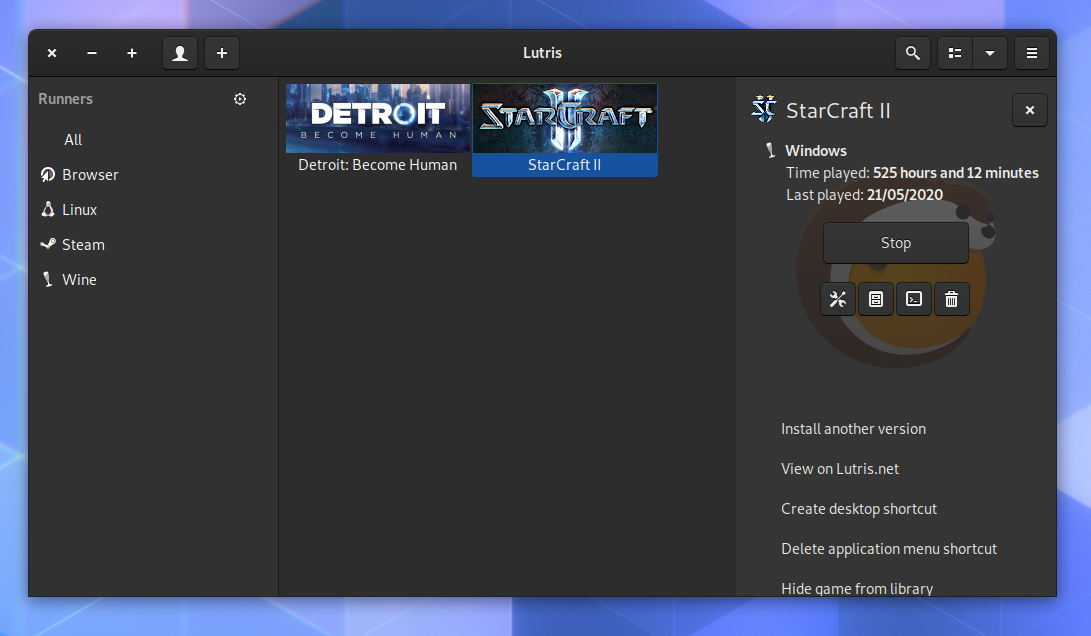
How GameMode is invoked Some newer games (proprietary games like Rise of the Tomb Raider , Total War Saga: Thrones of Britannia , Total War: WARHAMMER II , DiRT 4 and Total War: Three Kingdoms ) will automatically invoke GameMode if it s installed. For games that don t, you can manually evoke it using the gamemoderun command. Lutris is a tool that makes it easy to install and run games on Linux, and it also integrates with GameMode. (Lutris is currently being packaged for Debian, hopefully it will make it in on time for Bullseye).

Screenshot of Lutris, a tool that makes it easy to install your non-Linux games, which also integrates with GameMode.

GameMode in Debian The latest GameMode is packaged in Debian (Stephan Lachnit and I maintain it in the Debian Games Team) and it s also available for Debian 10 (Buster) via buster-backports. All you need to do to get up and running with GameMode is to install the gamemode package. GameMode in Debian supports 64 bit and 32 bit mode, so running it with older games (and many proprietary games) still work. Some distributions (like Arch Linux), have dropped 32 bit support, so 32 bit games on such systems lose any kind of integration with GameMode even if you can get those games running via other wrappers on such systems. We also include a binary called gamemode-simulate-game (installed under /usr/games/). This is a minimalistic program that will invoke gamemode automatically for 10 seconds and then exit without an error if it was successful. Its source code might be useful if you d like to add GameMode support to your game, or patch a game in Debian to automatically invoke it. In Debian we install Gamemode s example config file to /etc/gamemode.ini where a user can customise their system-wide preferences, or alternatively they can place a copy of that in ~/.gamemode.ini with their personal preferences. In this config file, you can also choose to explicitly allow or deny games. GameMode might also be useful for many pieces of software that aren t games. I haven t done any benchmarks on such software yet, but it might be great for users who use CAD programs or use a combination of their CPU/GPU to crunch a large amount of data. I ve also packaged an extension for GNOME called gamemode-extension. The Debian package is called gnome-shell-extension-gamemode . You ll need to enable it using gnome-tweaks after installation, it will then display a green controller in your notification area whenever GameMode is active. It s only in testing/bullseye since it relies on a newer gnome-shell than what s available in buster.

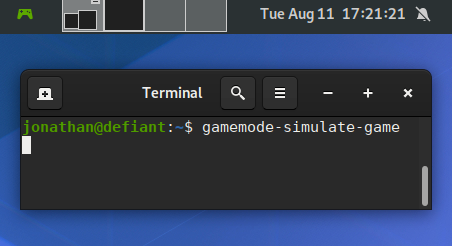
Running gamemode-simulate-game, with the shell extension showing that it s activated in the top left corner.

10 August 2020

Arnaud Rebillout: GoAccess 1.4, a detailed tutorial

GoAccess v1.4 was just released a few weeks ago! Let's take this chance to write a loooong tutorial. We'll go over every steps to install and operate GoAccess. This is a tutorial aimed at those who don't play sysadmin every day, and that's why it's so long, I did my best to provide thorough explanations all along, so that it's more than just a "copy-and-paste" kind of tutorial. And for those who do play sysadmin everyday: please try not to fall asleep while reading, and don't hesitate to drop me an e-mail if you spot anything inaccurate in here. Thanks! Introduction So what's GoAccess already? GoAccess is a web log analyzer, and it allows you to visualize the traffic for your website, and get to know a bit more about your visitors: how many visitors and hits, for which pages, coming from where (geolocation, operating system, web browser...), etc... It does so by parsing the access logs from your web server, be it Apache, NGINX or whatever. GoAccess gives you different options to display the statistics, and in this tutorial we'll focus on producing a HTML report. Meaning that you can see the statistics for your website straight in your web browser, under the form of a single HTML page. For an example, you can have a look at the stats of my blog here: http://goaccess.arnaudr.io. GoAccess is written in C, it has very few dependencies, it had been around for about 10 years, and it's distributed under the MIT license. Assumptions This tutorial is about installing and configuring, so I'll assume that all the commands are run as root. I won't prefix each of them with sudo. I use the Apache web server, running on a Debian system. I don't think it matters so much for this tutorial though. If you're using NGINX it's fine, you can keep reading. Also, I will just use the name SITE for the name of the website that we want to analyze with GoAccess. Just replace that with the real name of your site. I also assume the following locations for your stuff: If you have your stuff in /srv/SITE/ log,www instead, no worries, just adjust the paths accordingly, I bet you can do it. Installation The latest version of GoAccess is v1.4, and it's not yet available in the Debian repositories. So for this part, you can follow the instructions from the official GoAccess download page. Install steps are explained in details, so there's nothing left for me to say :) When this is done, let's get started with the basics. We're talking about the latest version v1.4 here, let's make sure:
$ goaccess --version
GoAccess - 1.4.
...
Now let's try to create a HTML report. I assume that you already have a website up and running. GoAccess needs to parse the access logs. These logs are optional, they might or might not be created by your web server, depending on how it's configured. Usually, these log files are named access.log, unsurprisingly. You can check if those logs exist on your system by running this command:
find /var/log -name access.log
Another important thing to know is that these logs can be in different formats. In this tutorial we'll assume that we work with the combined log format, because it seems to be the most common default. To check what kind of access logs your web server produces, you must look at the configuration for your site. For an Apache web server, you should have such a line in the file /etc/apache2/sites-enabled/SITE.conf:
CustomLog $ APACHE_LOG_DIR /SITE/access.log combined
For NGINX, it's quite similar. The configuration file would be something like /etc/nginx/sites-enabled/SITE, and the line to enable access logs would be something like:
access_log /var/log/nginx/SITE/access.log
Note that NGINX writes the access logs in the combined format by default, that's why you don't see the word combined anywhere in the line above: it's implicit. Alright, so from now on we assume that yes, you have access log files available, and yes, they are in the combined log format. If that's the case, then you can already run GoAccess and generate a report, for example for the log file /var/log/apache2/access.log
goaccess \
    --log-format COMBINED \
    --output /tmp/report.html \
    /var/log/apache2/access.log
It's possible to give GoAccess more than one log files to process, so if you have for example the file access.log.1 around, you can use it as well:
goaccess \
    --log-format COMBINED \
    --output /tmp/report.html \
    /var/log/apache2/access.log \
    /var/log/apache2/access.log.1
If GoAccess succeeds (and it should), you're on the right track! All is left to do to complete this test is to have a look at the HTML report created. It's a single HTML page, so you can easily scp it to your machine, or just move it to the document root of your site, and then open it in your web browser. Looks good? So let's move on to more interesting things. Web server configuration This part is very short, because in terms of configuration of the web server, there's very little to do. As I said above, the only thing you want from the web server is to create access log files. Then you want to be sure that GoAccess and your web server agree on the format for these files. In the part above we used the combined log format, but GoAccess supports many other common log formats out of the box, and even allows you to parse custom log formats. For more details, refer to the option --log-format in the GoAccess manual page. Another common log format is named, well, common. It even has its own Wikipedia page. But compared to combined, the common log format contains less information, it doesn't include the referrer and user-agent values, meaning that you won't have it in the GoAccess report. So at this point you should understand that, unsurprisingly, GoAccess can only tell you about what's in the access logs, no more no less. And that's all in term of web server configuration. Configuration to run GoAccess unprivileged Now we're going to create a user and group for GoAccess, so that we don't have to run it as root. The reason is that, well, for everything running unattended on your server, the less code runs as root, the better. It's good practice and common sense. In this case, GoAccess is simply a log analyzer. So it just needs to read the logs files from your web server, and there is no need to be root for that, an unprivileged user can do the job just as well, assuming it has read permissions on /var/log/apache2 or /var/log/nginx. The log files of the web server are usually part of the adm group (though it might depend on your distro, I'm not sure). This is something you can check easily with the following command:
ls -l /var/log   grep -e apache2 -e nginx
As a result you should get something like that:
drwxr-x--- 2 root adm 20480 Jul 22 00:00 /var/log/apache2/
And as you can see, the directory apache2 belongs to the group adm. It means that you don't need to be root to read the logs, instead any unprivileged user that belongs to the group adm can do it. So, let's create the goaccess user, and add it to the adm group:
adduser --system --group --no-create-home goaccess
addgroup goaccess adm
And now, let's run GoAccess unprivileged, and verify that it can still read the log files:
setpriv \
    --reuid=goaccess --regid=goaccess \
    --init-groups --inh-caps=-all \
    -- \
    goaccess \
    --log-format COMBINED \
    --output /tmp/report2.html \
    /var/log/apache2/access.log
setpriv is the command used to drop privileges. The syntax is quite verbose, it's not super friendly for tutorials, but don't be scared and read the manual page to learn what it does. In any case, this command should work, and at this point, it means that you have a goaccess user ready, and we'll use it to run GoAccess unprivileged. Integration, option A - Run GoAccess once a day, from a logrotate hook In this part we wire things together, so that GoAccess processes the log files once a day, adds the new logs to its internal database, and generates a report from all that aggregated data. The result will be a single HTML page. Introducing logrotate In order to do that, we'll use a logrotate hook. logrotate is a little tool that should already be installed on your server, and that runs once a day, and that is in charge of rotating the log files. "Rotating the logs" means moving access.log to access.log.1 and so on. With logrotate, a new log file is created every day, and log files that are too old are deleted. That's what prevents your logs from filling up your disk basically :) You can check that logrotate is indeed installed and enabled with this command (assuming that your init system is systemd):
systemctl status logrotate.timer
What's interesting for us is that logrotate allows you to run scripts before and after the rotation is performed, so it's an ideal place from where to run GoAccess. In short, we want to run GoAccess just before the logs are rotated away, in the prerotate hook. But let's do things in order. At first, we need to write a little wrapper script that will be in charge of running GoAccess with the right arguments, and that will process all of your sites. The wrapper script This wrapper is made to process more than one site, but if you have only one site it works just as well, of course. So let me just drop it on you like that, and I'll explain afterward. Here's my wrapper script:
 1
 2
 3
 4
 5
 6
 7
 8
 9
10
11
12
13
14
15
16
17
18
19
20
21
22
23
24
25
26
27
28
29
30
31
32
33
34
35
36
37
38
39
40
41
42
43
44
45
46
47
48
49
50
#!/bin/bash
# Process log files /var/www/apache2/SITE/access.log,
# only if /var/lib/goaccess-db/SITE exists.
# Create HTML reports in $1, a directory that must exist.
set -eu
OUTDIR=
LOGDIR=/var/log/apache2
DBDIR=/var/lib/goaccess-db
fail()   echo >&2 "$@"; exit 1;  
[ $# -eq 1 ]   fail "Usage: $(basename $0) OUTPUT_DIRECTORY"
OUTDIR=$1
[ -d "$OUTDIR" ]   fail "'$OUTDIR' is not a directory"
[ -d "$LOGDIR" ]   fail "'$LOGDIR' is not a directory"
[ -d "$DBDIR"  ]   fail "'$DBDIR' is not a directory"
for d in $(find "$LOGDIR" -mindepth 1 -maxdepth 1 -type d); do
    site=$(basename "$sitedir")
    dbdir=$DBDIR/$site
    logfile=$d/access.log
    outfile=$OUTDIR/$site.html
    if [ ! -d "$dbdir" ]   [ ! -e "$logfile" ]; then
        echo "  Skipping site '$site'"
        continue
    else
        echo "  Processing site '$site'"
    fi
    setpriv \
        --reuid=goaccess --regid=goaccess \
        --init-groups --inh-caps=-all \
        -- \
    goaccess \
        --agent-list \
        --anonymize-ip \
        --persist \
        --restore \
        --config-file /etc/goaccess/goaccess.conf \
        --db-path "$dbdir" \
        --log-format "COMBINED" \
        --output "$outfile" \
        "$logfile"
done
So you'd install this script at /usr/local/bin/goaccess-wrapper for example, and make it executable:
chmod +x /usr/local/bin/goaccess-wrapper
A few things to note: As is, the script makes the assumption that the logs for your site are logged in a sub-directory /var/log/apache2/SITE/. If it's not the case, adjust that in the wrapper accordingly. The name of this sub-directory is then used to find the GoAccess database directory /var/lib/goaccess-db/SITE/. This directory is expected to exist, meaning that if you don't create it yourself, the wrapper won't process this particular site. It's a simple way to control which sites are processed by this GoAccess wrapper, and which sites are not. So if you want goaccess-wrapper to process the site SITE, just create a directory with the name of this site under /var/lib/goaccess-db:
mkdir -p /var/lib/goaccess-db/SITE
chown goaccess:goaccess /var/lib/goaccess-db/SITE
Now let's create an output directory:
mkdir /tmp/goaccess-reports
chown goaccess:goaccess /tmp/goaccess-reports
And let's give a try to the wrapper script:
goaccess-wrapper /tmp/goaccess-reports
ls /tmp/goaccess-reports
Which should give you:
SITE.html
At the same time, you can check that GoAccess populated the database with a bunch of files:
ls /var/lib/goaccess-db/SITE
Setting up the logrotate prerotate hook At this point, we have the wrapper in place. Let's now add a pre-rotate hook so that goaccess-wrapper runs once a day, just before the logs are rotated away. The logrotate config file for Apache2 is located at /etc/logrotate.d/apache2, and for NGINX it's at /etc/logrotate.d/nginx. Among the many things you'll see in this file, here's what is of interest for us: In the config file, there is also this snippet:
prerotate
    if [ -d /etc/logrotate.d/httpd-prerotate ]; then \
        run-parts /etc/logrotate.d/httpd-prerotate; \
    fi; \
endscript
It indicates that scripts in the directory /etc/logrotate.d/httpd-prerotate/ will be executed before the rotation takes place. Refer to the man page run-parts(8) for more details... Putting all of that together, it means that logs from the web server are rotated once a day, and if we want to run scripts just before the rotation, we can just drop them in the httpd-prerotate directory. Simple, right? Let's first create this directory if it doesn't exist:
mkdir -p /etc/logrotate.d/httpd-prerotate/
And let's create a tiny script at /etc/logrotate.d/httpd-prerotate/goaccess:
1
2
#!/bin/sh
exec goaccess-wrapper /tmp/goaccess-reports
Don't forget to make it executable:
chmod +x /etc/logrotate.d/httpd-prerotate/goaccess
As you can see, the only thing that this script does is to invoke the wrapper with the right argument, ie. the output directory for the HTML reports that are generated. And that's all. Now you can just come back tomorrow, check the logs, and make sure that the hook was executed and succeeded. For example, this kind of command will tell you quickly if it worked:
journalctl   grep logrotate
Integration, option B - Run GoAccess once a day, from a systemd service OK so we've just seen how to use a logrotate hook. One downside with that is that we have to drop privileges in the wrapper script, because logrotate runs as root, and we don't want to run GoAccess as root. Hence the rather convoluted syntax with setpriv. Rather than embedding this kind of thing in a wrapper script, we can instead run the wrapper script from a [systemd][] service, and define which user runs the wrapper straight in the systemd service file. Introducing systemd niceties So we can create a systemd service, along with a systemd timer that fires daily. We can then set the user and group that execute the script straight in the systemd service, and there's no need for setpriv anymore. It's a bit more streamlined. We can even go a bit further, and use systemd parameterized units (also called templates), so that we have one service per site (instead of one service that process all of our sites). That will simplify the wrapper script a lot, and it also looks nicer in the logs. With this approach however, it seems that we can't really run exactly before the logs are rotated away, like we did in the section above. But that's OK. What we'll do is that we'll run once a day, no matter the time, and we'll just make sure to process both log files access.log and access.log.1 (ie. the current logs and the logs from yesterday). This way, we're sure not to miss any line from the logs. Note that GoAccess is smart enough to only consider newer entries from the log files, and discard entries that are already in the database. In other words, it's safe to parse the same log file more than once, GoAccess will do the right thing. For more details see "INCREMENTAL LOG PROCESSING" from man goaccess. systemd]: https://freedesktop.org/wiki/Software/systemd/ Implementation And here's how it all looks like. First, a little wrapper script for GoAccess:
 1
 2
 3
 4
 5
 6
 7
 8
 9
10
11
12
13
14
15
16
17
18
19
20
21
22
23
24
25
26
27
28
29
30
31
32
#!/bin/bash
# Usage: $0 SITE DBDIR LOGDIR OUTDIR
set -eu
SITE=$1
DBDIR=$2
LOGDIR=$3
OUTDIR=$4
LOGFILES=()
for ext in log log.1; do
    logfile="$LOGDIR/access.$ext"
    [ -e "$logfile" ] && LOGFILES+=("$logfile")
done
if [ $ #LOGFILES[@]  -eq 0 ]; then
    echo "No log files in '$LOGDIR'"
    exit 0
fi
goaccess \
    --agent-list \
    --anonymize-ip \
    --persist \
    --restore \
    --config-file /etc/goaccess/goaccess.conf \
    --db-path "$DBDIR" \
    --log-format "COMBINED" \
    --output "$OUTDIR/$SITE.html" \
    "$ LOGFILES[@] "
This wrapper does very little. Actually, the only thing it does is to check for the existence of the two log files access.log and access.log.1, to be sure that we don't ask GoAccess to process a file that does not exist (GoAccess would not be happy about that). Save this file under /usr/local/bin/goaccess-wrapper, don't forget to make it executable:
chmod +x /usr/local/bin/goaccess-wrapper
Then, create a systemd parameterized unit file, so that we can run this wrapper as a systemd service. Save it under /etc/systemd/system/goaccess@.service:
[Unit]
Description=Update GoAccess report - %i
ConditionPathIsDirectory=/var/lib/goaccess-db/%i
ConditionPathIsDirectory=/var/log/apache2/%i
ConditionPathIsDirectory=/tmp/goaccess-reports
PartOf=goaccess.service
[Service]
Type=oneshot
User=goaccess
Group=goaccess
Nice=19
ExecStart=/usr/local/bin/goaccess-wrapper \
 %i \
 /var/lib/goaccess-db/%i \
 /var/log/apache2/%i \
 /tmp/goaccess-reports
So, what is a systemd parameterized unit? It's a service to which you can pass an argument when you enable it. The %i in the unit definition will be replaced by this argument. In our case, the argument will be the name of the site that we want to process. As you can see, we use the directive ConditionPathIsDirectory= extensively, so that if ever one of the required directories does not exist, the unit will just be skipped (and marked as such in the logs). It's a graceful way to fail. We run the wrapper as the user and group goaccess, thanks to User= and Group=. We also use Nice= to give a low priority to the process. At this point, it's already possible to test. Just make sure that you created a directory for the GoAccess database:
mkdir -p /var/lib/goaccess-db/SITE
chown goaccess:goaccess /var/lib/goaccess-db/SITE
Also make sure that the output directory exists:
mkdir /tmp/goaccess-reports
chown goaccess:goaccess /tmp/goaccess-reports
Then reload systemd and fire the unit to see if it works:
systemctl daemon-reload
systemctl start goaccess@SITE.service
journalctl   tail
And that should work already. As you can see, the argument, SITE, is passed in the systemctl start command. We just append it after the @, in the name of the unit. Now, let's create another GoAccess service file, which sole purpose is to group all the parameterized units together, so that we can start them all in one go. Note that we don't use a systemd target for that, because ultimately we want to run it once a day, and that would not be possible with a target. So instead we use a dummy oneshot service. So here it is, saved under /etc/systemd/system/goaccess.service:
[Unit]
Description=Update GoAccess reports
Requires= \
 goaccess@SITE1.service \
 goaccess@SITE2.service
[Service]
Type=oneshot
ExecStart=true
As you can see, we simply list the sites that we want to process in the Requires= directive. In this example we have two sites named SITE1 and SITE2. Let's ensure that everything is still good:
systemctl daemon-reload
systemctl start goaccess.service
journalctl   tail
Check the logs, both sites SITE1 and SITE2 should have been processed. And finally, let's create a timer, so that systemd runs goaccess.service once a day. Save it under /etc/systemd/system/goaccess.timer.
[Unit]
Description=Daily update of GoAccess reports
[Timer]
OnCalendar=daily
RandomizedDelaySec=1h
Persistent=true
[Install]
WantedBy=timers.target
Finally, enable the timer:
systemctl daemon-reload
systemctl enable --now goaccess.timer
At this point, everything should be OK. Just come back tomorrow and check the logs with something like:
journalctl   grep goaccess
Last word: if you have only one site to process, of course you can simplify, for example you can hardcode all the paths in the file goaccess.service instead of using a parameterized unit. Up to you. Daily operations So in this part, we assume that you have GoAccess all setup and running, once a day or so. Let's just go over a few things worth noting. Serve your report Up to now in this tutorial, we created the reports in /tmp/goaccess-reports, but that was just for the sake of the example. You will probably want to save your reports in a directory that is served by your web server, so that, well, you can actually look at it in your web browser, that was the point, right? So how to do that is a bit out of scope here, and I guess that if you want to monitor your website, you already have a website, so you will have no trouble serving the GoAccess HTML report. However there's an important detail to be aware of: GoAccess shows all the IP addresses of your visitors in the report. As long as the report is private it's OK, but if ever you make your GoAccess report public, then you should definitely invoke GoAccess with the option --anonymize-ip. Keep an eye on the logs In this tutorial, the reports we create, along with the GoAccess databases, will grow bigger every day, forever. It also means that the GoAccess processing time will grow a bit each day. So maybe the first thing to do is to keep an eye on the logs, to see how long it takes to GoAccess to do its job every day. Also, maybe you'd like to keep an eye on the size of the GoAccess database with:
du -sh /var/lib/goaccess-db/SITE
If your site has few visitors, I suspect it won't be a problem though. You could also be a bit pro-active in preventing this problem in the future, and for example you could break the reports into, say, monthly reports. Meaning that every month, you would create a new database in a new directory, and also start a new HTML report. This way you'd have monthly reports, and you make sure to limit the GoAccess processing time, by limiting the database size to a month. This can be achieved very easily, by including something like YEAR-MONTH in the database directory, and in the HTML report. You can handle that automatically in the wrapper script, for example:
sfx=$(date +'%Y-%m')
mkdir -p $DBDIR/$sfx
goaccess \
    --db-path $DBDIR/$sfx \
    --output "$OUTDIR/$SITE-$sfx.html" \
    ...
You get the idea. Further notes Migration from older versions With the --persist option, GoAccess keeps all the information from the logs in a database, so that it can re-use it later. In prior versions, GoAccess used the Tokyo Cabinet key-value store for that. However starting from v1.4, GoAccess dropped this dependency and now uses its own database format. As a result, the previous database can't be used anymore, you will have to remove it and restart from zero. At the moment there is no way to convert the data from the old database to the new one. If you're interested, this is discussed upstream at [#1783][bug-1783]. Another thing that changed with this new version is the name for some of the command-line options. For example, --load-from-disk was dropped in favor of --restore, and --keep-db-files became --persist. So you'll have to look at the documentation a bit, and update your script(s) accordingly. Other ways to use GoAccess It's also possible to do it completely differently. You could keep GoAccess running, pretty much like a daemon, with the --real-time-html option, and have it process the logs continuously, rather than calling it on a regular basis. It's also possible to see the GoAccess report straight in the terminal, thanks to libncurses, rather than creating a HTML report. And much more, GoAccess is packed with features. Conclusion I hope that this tutorial helped some of you folks. Feel free to drop an e-mail for comments.

Arnaud Rebillout: GoAccess 1.4, a detailed tutorial

GoAccess v1.4 was just released a few weeks ago! Let's take this chance to write a loooong tutorial. We'll go over every steps to install and operate GoAccess. This is a tutorial aimed at those who don't play sysadmin every day, and that's why it's so long, I did my best to provide thorough explanations all along, so that it's more than just a "copy-and-paste" kind of tutorial. And for those who do play sysadmin everyday: please try not to fall asleep while reading, and don't hesitate to drop me an e-mail if you spot anything inaccurate in here. Thanks! Introduction So what's GoAccess already? GoAccess is a web log analyzer, and it allows you to visualize the traffic for your website, and get to know a bit more about your visitors: how many visitors and hits, for which pages, coming from where (geolocation, operating system, web browser...), etc... It does so by parsing the access logs from your web server, be it Apache, NGINX or whatever. GoAccess gives you different options to display the statistics, and in this tutorial we'll focus on producing a HTML report. Meaning that you can see the statistics for your website straight in your web browser, under the form of a single HTML page. For an example, you can have a look at the stats of my blog here: https://goaccess.arnaudr.io. GoAccess is written in C, it has very few dependencies, it had been around for about 10 years, and it's distributed under the MIT license. Assumptions This tutorial is about installing and configuring, so I'll assume that all the commands are run as root. I won't prefix each of them with sudo. I use the Apache web server, running on a Debian system. I don't think it matters so much for this tutorial though. If you're using NGINX it's fine, you can keep reading. Also, I will just use the name SITE for the name of the website that we want to analyze with GoAccess. Just replace that with the real name of your site. I also assume the following locations for your stuff: If you have your stuff in /srv/SITE/ log,www instead, no worries, just adjust the paths accordingly, I bet you can do it. Installation The latest version of GoAccess is v1.4, and it's not yet available in the Debian repositories. So for this part, you can follow the instructions from the official GoAccess download page. Install steps are explained in details, so there's nothing left for me to say :) When this is done, let's get started with the basics. We're talking about the latest version v1.4 here, let's make sure:
$ goaccess --version
GoAccess - 1.4.
...
Now let's try to create a HTML report. I assume that you already have a website up and running. GoAccess needs to parse the access logs. These logs are optional, they might or might not be created by your web server, depending on how it's configured. Usually, these log files are named access.log, unsurprisingly. You can check if those logs exist on your system by running this command:
find /var/log -name access.log
Another important thing to know is that these logs can be in different formats. In this tutorial we'll assume that we work with the combined log format, because it seems to be the most common default. To check what kind of access logs your web server produces, you must look at the configuration for your site. For an Apache web server, you should have such a line in the file /etc/apache2/sites-enabled/SITE.conf:
CustomLog $ APACHE_LOG_DIR /SITE/access.log combined
For NGINX, it's quite similar. The configuration file would be something like /etc/nginx/sites-enabled/SITE, and the line to enable access logs would be something like:
access_log /var/log/nginx/SITE/access.log
Note that NGINX writes the access logs in the combined format by default, that's why you don't see the word combined anywhere in the line above: it's implicit. Alright, so from now on we assume that yes, you have access log files available, and yes, they are in the combined log format. If that's the case, then you can already run GoAccess and generate a report, for example for the log file /var/log/apache2/access.log
goaccess \
    --log-format COMBINED \
    --output /tmp/report.html \
    /var/log/apache2/access.log
It's possible to give GoAccess more than one log files to process, so if you have for example the file access.log.1 around, you can use it as well:
goaccess \
    --log-format COMBINED \
    --output /tmp/report.html \
    /var/log/apache2/access.log \
    /var/log/apache2/access.log.1
If GoAccess succeeds (and it should), you're on the right track! All is left to do to complete this test is to have a look at the HTML report created. It's a single HTML page, so you can easily scp it to your machine, or just move it to the document root of your site, and then open it in your web browser. Looks good? So let's move on to more interesting things. Web server configuration This part is very short, because in terms of configuration of the web server, there's very little to do. As I said above, the only thing you want from the web server is to create access log files. Then you want to be sure that GoAccess and your web server agree on the format for these files. In the part above we used the combined log format, but GoAccess supports many other common log formats out of the box, and even allows you to parse custom log formats. For more details, refer to the option --log-format in the GoAccess manual page. Another common log format is named, well, common. It even has its own Wikipedia page. But compared to combined, the common log format contains less information, it doesn't include the referrer and user-agent values, meaning that you won't have it in the GoAccess report. So at this point you should understand that, unsurprisingly, GoAccess can only tell you about what's in the access logs, no more no less. And that's all in term of web server configuration. Configuration to run GoAccess unprivileged Now we're going to create a user and group for GoAccess, so that we don't have to run it as root. The reason is that, well, for everything running unattended on your server, the less code runs as root, the better. It's good practice and common sense. In this case, GoAccess is simply a log analyzer. So it just needs to read the logs files from your web server, and there is no need to be root for that, an unprivileged user can do the job just as well, assuming it has read permissions on /var/log/apache2 or /var/log/nginx. The log files of the web server are usually part of the adm group (though it might depend on your distro, I'm not sure). This is something you can check easily with the following command:
ls -l /var/log   grep -e apache2 -e nginx
As a result you should get something like that:
drwxr-x--- 2 root adm 20480 Jul 22 00:00 /var/log/apache2/
And as you can see, the directory apache2 belongs to the group adm. It means that you don't need to be root to read the logs, instead any unprivileged user that belongs to the group adm can do it. So, let's create the goaccess user, and add it to the adm group:
adduser --system --group --no-create-home goaccess
addgroup goaccess adm
And now, let's run GoAccess unprivileged, and verify that it can still read the log files:
setpriv \
    --reuid=goaccess --regid=goaccess \
    --init-groups --inh-caps=-all \
    -- \
    goaccess \
    --log-format COMBINED \
    --output /tmp/report2.html \
    /var/log/apache2/access.log
setpriv is the command used to drop privileges. The syntax is quite verbose, it's not super friendly for tutorials, but don't be scared and read the manual page to learn what it does. In any case, this command should work, and at this point, it means that you have a goaccess user ready, and we'll use it to run GoAccess unprivileged. Integration, option A - Run GoAccess once a day, from a logrotate hook In this part we wire things together, so that GoAccess processes the log files once a day, adds the new logs to its internal database, and generates a report from all that aggregated data. The result will be a single HTML page. Introducing logrotate In order to do that, we'll use a logrotate hook. logrotate is a little tool that should already be installed on your server, and that runs once a day, and that is in charge of rotating the log files. "Rotating the logs" means moving access.log to access.log.1 and so on. With logrotate, a new log file is created every day, and log files that are too old are deleted. That's what prevents your logs from filling up your disk basically :) You can check that logrotate is indeed installed and enabled with this command (assuming that your init system is systemd):
systemctl status logrotate.timer
What's interesting for us is that logrotate allows you to run scripts before and after the rotation is performed, so it's an ideal place from where to run GoAccess. In short, we want to run GoAccess just before the logs are rotated away, in the prerotate hook. But let's do things in order. At first, we need to write a little wrapper script that will be in charge of running GoAccess with the right arguments, and that will process all of your sites. The wrapper script This wrapper is made to process more than one site, but if you have only one site it works just as well, of course. So let me just drop it on you like that, and I'll explain afterward. Here's my wrapper script:
 1
 2
 3
 4
 5
 6
 7
 8
 9
10
11
12
13
14
15
16
17
18
19
20
21
22
23
24
25
26
27
28
29
30
31
32
33
34
35
36
37
38
39
40
41
42
43
44
45
46
47
48
49
50
#!/bin/bash
# Process log files /var/www/apache2/SITE/access.log,
# only if /var/lib/goaccess-db/SITE exists.
# Create HTML reports in $1, a directory that must exist.
set -eu
OUTDIR=
LOGDIR=/var/log/apache2
DBDIR=/var/lib/goaccess-db
fail()   echo >&2 "$@"; exit 1;  
[ $# -eq 1 ]   fail "Usage: $(basename $0) OUTPUT_DIRECTORY"
OUTDIR=$1
[ -d "$OUTDIR" ]   fail "'$OUTDIR' is not a directory"
[ -d "$LOGDIR" ]   fail "'$LOGDIR' is not a directory"
[ -d "$DBDIR"  ]   fail "'$DBDIR' is not a directory"
for d in $(find "$LOGDIR" -mindepth 1 -maxdepth 1 -type d); do
    site=$(basename "$sitedir")
    dbdir=$DBDIR/$site
    logfile=$d/access.log
    outfile=$OUTDIR/$site.html
    if [ ! -d "$dbdir" ]   [ ! -e "$logfile" ]; then
        echo "  Skipping site '$site'"
        continue
    else
        echo "  Processing site '$site'"
    fi
    setpriv \
        --reuid=goaccess --regid=goaccess \
        --init-groups --inh-caps=-all \
        -- \
    goaccess \
        --agent-list \
        --anonymize-ip \
        --persist \
        --restore \
        --config-file /etc/goaccess/goaccess.conf \
        --db-path "$dbdir" \
        --log-format "COMBINED" \
        --output "$outfile" \
        "$logfile"
done
So you'd install this script at /usr/local/bin/goaccess-wrapper for example, and make it executable:
chmod +x /usr/local/bin/goaccess-wrapper
A few things to note: As is, the script makes the assumption that the logs for your site are logged in a sub-directory /var/log/apache2/SITE/. If it's not the case, adjust that in the wrapper accordingly. The name of this sub-directory is then used to find the GoAccess database directory /var/lib/goaccess-db/SITE/. This directory is expected to exist, meaning that if you don't create it yourself, the wrapper won't process this particular site. It's a simple way to control which sites are processed by this GoAccess wrapper, and which sites are not. So if you want goaccess-wrapper to process the site SITE, just create a directory with the name of this site under /var/lib/goaccess-db:
mkdir -p /var/lib/goaccess-db/SITE
chown goaccess:goaccess /var/lib/goaccess-db/SITE
Now let's create an output directory:
mkdir /tmp/goaccess-reports
chown goaccess:goaccess /tmp/goaccess-reports
And let's give a try to the wrapper script:
goaccess-wrapper /tmp/goaccess-reports
ls /tmp/goaccess-reports
Which should give you:
SITE.html
At the same time, you can check that GoAccess populated the database with a bunch of files:
ls /var/lib/goaccess-db/SITE
Setting up the logrotate prerotate hook At this point, we have the wrapper in place. Let's now add a pre-rotate hook so that goaccess-wrapper runs once a day, just before the logs are rotated away. The logrotate config file for Apache2 is located at /etc/logrotate.d/apache2, and for NGINX it's at /etc/logrotate.d/nginx. Among the many things you'll see in this file, here's what is of interest for us: In the config file, there is also this snippet:
prerotate
    if [ -d /etc/logrotate.d/httpd-prerotate ]; then \
        run-parts /etc/logrotate.d/httpd-prerotate; \
    fi; \
endscript
It indicates that scripts in the directory /etc/logrotate.d/httpd-prerotate/ will be executed before the rotation takes place. Refer to the man page run-parts(8) for more details... Putting all of that together, it means that logs from the web server are rotated once a day, and if we want to run scripts just before the rotation, we can just drop them in the httpd-prerotate directory. Simple, right? Let's first create this directory if it doesn't exist:
mkdir -p /etc/logrotate.d/httpd-prerotate/
And let's create a tiny script at /etc/logrotate.d/httpd-prerotate/goaccess:
1
2
#!/bin/sh
exec goaccess-wrapper /tmp/goaccess-reports
Don't forget to make it executable:
chmod +x /etc/logrotate.d/httpd-prerotate/goaccess
As you can see, the only thing that this script does is to invoke the wrapper with the right argument, ie. the output directory for the HTML reports that are generated. And that's all. Now you can just come back tomorrow, check the logs, and make sure that the hook was executed and succeeded. For example, this kind of command will tell you quickly if it worked:
journalctl   grep logrotate
Integration, option B - Run GoAccess once a day, from a systemd service OK so we've just seen how to use a logrotate hook. One downside with that is that we have to drop privileges in the wrapper script, because logrotate runs as root, and we don't want to run GoAccess as root. Hence the rather convoluted syntax with setpriv. Rather than embedding this kind of thing in a wrapper script, we can instead run the wrapper script from a [systemd][] service, and define which user runs the wrapper straight in the systemd service file. Introducing systemd niceties So we can create a systemd service, along with a systemd timer that fires daily. We can then set the user and group that execute the script straight in the systemd service, and there's no need for setpriv anymore. It's a bit more streamlined. We can even go a bit further, and use systemd parameterized units (also called templates), so that we have one service per site (instead of one service that process all of our sites). That will simplify the wrapper script a lot, and it also looks nicer in the logs. With this approach however, it seems that we can't really run exactly before the logs are rotated away, like we did in the section above. But that's OK. What we'll do is that we'll run once a day, no matter the time, and we'll just make sure to process both log files access.log and access.log.1 (ie. the current logs and the logs from yesterday). This way, we're sure not to miss any line from the logs. Note that GoAccess is smart enough to only consider newer entries from the log files, and discard entries that are already in the database. In other words, it's safe to parse the same log file more than once, GoAccess will do the right thing. For more details see "INCREMENTAL LOG PROCESSING" from man goaccess. systemd]: https://freedesktop.org/wiki/Software/systemd/ Implementation And here's how it all looks like. First, a little wrapper script for GoAccess:
 1
 2
 3
 4
 5
 6
 7
 8
 9
10
11
12
13
14
15
16
17
18
19
20
21
22
23
24
25
26
27
28
29
30
31
32
#!/bin/bash
# Usage: $0 SITE DBDIR LOGDIR OUTDIR
set -eu
SITE=$1
DBDIR=$2
LOGDIR=$3
OUTDIR=$4
LOGFILES=()
for ext in log log.1; do
    logfile="$LOGDIR/access.$ext"
    [ -e "$logfile" ] && LOGFILES+=("$logfile")
done
if [ $ #LOGFILES[@]  -eq 0 ]; then
    echo "No log files in '$LOGDIR'"
    exit 0
fi
goaccess \
    --agent-list \
    --anonymize-ip \
    --persist \
    --restore \
    --config-file /etc/goaccess/goaccess.conf \
    --db-path "$DBDIR" \
    --log-format "COMBINED" \
    --output "$OUTDIR/$SITE.html" \
    "$ LOGFILES[@] "
This wrapper does very little. Actually, the only thing it does is to check for the existence of the two log files access.log and access.log.1, to be sure that we don't ask GoAccess to process a file that does not exist (GoAccess would not be happy about that). Save this file under /usr/local/bin/goaccess-wrapper, don't forget to make it executable:
chmod +x /usr/local/bin/goaccess-wrapper
Then, create a systemd parameterized unit file, so that we can run this wrapper as a systemd service. Save it under /etc/systemd/system/goaccess@.service:
[Unit]
Description=Update GoAccess report - %i
ConditionPathIsDirectory=/var/lib/goaccess-db/%i
ConditionPathIsDirectory=/var/log/apache2/%i
ConditionPathIsDirectory=/tmp/goaccess-reports
PartOf=goaccess.service
[Service]
Type=oneshot
User=goaccess
Group=goaccess
Nice=19
ExecStart=/usr/local/bin/goaccess-wrapper \
 %i \
 /var/lib/goaccess-db/%i \
 /var/log/apache2/%i \
 /tmp/goaccess-reports
So, what is a systemd parameterized unit? It's a service to which you can pass an argument when you enable it. The %i in the unit definition will be replaced by this argument. In our case, the argument will be the name of the site that we want to process. As you can see, we use the directive ConditionPathIsDirectory= extensively, so that if ever one of the required directories does not exist, the unit will just be skipped (and marked as such in the logs). It's a graceful way to fail. We run the wrapper as the user and group goaccess, thanks to User= and Group=. We also use Nice= to give a low priority to the process. At this point, it's already possible to test. Just make sure that you created a directory for the GoAccess database:
mkdir -p /var/lib/goaccess-db/SITE
chown goaccess:goaccess /var/lib/goaccess-db/SITE
Also make sure that the output directory exists:
mkdir /tmp/goaccess-reports
chown goaccess:goaccess /tmp/goaccess-reports
Then reload systemd and fire the unit to see if it works:
systemctl daemon-reload
systemctl start goaccess@SITE.service
journalctl   tail
And that should work already. As you can see, the argument, SITE, is passed in the systemctl start command. We just append it after the @, in the name of the unit. Now, let's create another GoAccess service file, which sole purpose is to group all the parameterized units together, so that we can start them all in one go. Note that we don't use a systemd target for that, because ultimately we want to run it once a day, and that would not be possible with a target. So instead we use a dummy oneshot service. So here it is, saved under /etc/systemd/system/goaccess.service:
[Unit]
Description=Update GoAccess reports
Requires= \
 goaccess@SITE1.service \
 goaccess@SITE2.service
[Service]
Type=oneshot
ExecStart=true
As you can see, we simply list the sites that we want to process in the Requires= directive. In this example we have two sites named SITE1 and SITE2. Let's ensure that everything is still good:
systemctl daemon-reload
systemctl start goaccess.service
journalctl   tail
Check the logs, both sites SITE1 and SITE2 should have been processed. And finally, let's create a timer, so that systemd runs goaccess.service once a day. Save it under /etc/systemd/system/goaccess.timer.
[Unit]
Description=Daily update of GoAccess reports
[Timer]
OnCalendar=daily
RandomizedDelaySec=1h
Persistent=true
[Install]
WantedBy=timers.target
Finally, enable the timer:
systemctl daemon-reload
systemctl enable --now goaccess.timer
At this point, everything should be OK. Just come back tomorrow and check the logs with something like:
journalctl   grep goaccess
Last word: if you have only one site to process, of course you can simplify, for example you can hardcode all the paths in the file goaccess.service instead of using a parameterized unit. Up to you. Daily operations So in this part, we assume that you have GoAccess all setup and running, once a day or so. Let's just go over a few things worth noting. Serve your report Up to now in this tutorial, we created the reports in /tmp/goaccess-reports, but that was just for the sake of the example. You will probably want to save your reports in a directory that is served by your web server, so that, well, you can actually look at it in your web browser, that was the point, right? So how to do that is a bit out of scope here, and I guess that if you want to monitor your website, you already have a website, so you will have no trouble serving the GoAccess HTML report. However there's an important detail to be aware of: GoAccess shows all the IP addresses of your visitors in the report. As long as the report is private it's OK, but if ever you make your GoAccess report public, then you should definitely invoke GoAccess with the option --anonymize-ip. Keep an eye on the logs In this tutorial, the reports we create, along with the GoAccess databases, will grow bigger every day, forever. It also means that the GoAccess processing time will grow a bit each day. So maybe the first thing to do is to keep an eye on the logs, to see how long it takes to GoAccess to do its job every day. Also, maybe you'd like to keep an eye on the size of the GoAccess database with:
du -sh /var/lib/goaccess-db/SITE
If your site has few visitors, I suspect it won't be a problem though. You could also be a bit pro-active in preventing this problem in the future, and for example you could break the reports into, say, monthly reports. Meaning that every month, you would create a new database in a new directory, and also start a new HTML report. This way you'd have monthly reports, and you make sure to limit the GoAccess processing time, by limiting the database size to a month. This can be achieved very easily, by including something like YEAR-MONTH in the database directory, and in the HTML report. You can handle that automatically in the wrapper script, for example:
sfx=$(date +'%Y-%m')
mkdir -p $DBDIR/$sfx
goaccess \
    --db-path $DBDIR/$sfx \
    --output "$OUTDIR/$SITE-$sfx.html" \
    ...
You get the idea. Further notes Migration from older versions With the --persist option, GoAccess keeps all the information from the logs in a database, so that it can re-use it later. In prior versions, GoAccess used the Tokyo Cabinet key-value store for that. However starting from v1.4, GoAccess dropped this dependency and now uses its own database format. As a result, the previous database can't be used anymore, you will have to remove it and restart from zero. At the moment there is no way to convert the data from the old database to the new one. If you're interested, this is discussed upstream at [#1783][bug-1783]. Another thing that changed with this new version is the name for some of the command-line options. For example, --load-from-disk was dropped in favor of --restore, and --keep-db-files became --persist. So you'll have to look at the documentation a bit, and update your script(s) accordingly. Other ways to use GoAccess It's also possible to do it completely differently. You could keep GoAccess running, pretty much like a daemon, with the --real-time-html option, and have it process the logs continuously, rather than calling it on a regular basis. It's also possible to see the GoAccess report straight in the terminal, thanks to libncurses, rather than creating a HTML report. And much more, GoAccess is packed with features. Conclusion I hope that this tutorial helped some of you folks. Feel free to drop an e-mail for comments.
9 August 2020

Junichi Uekawa: Started writing some golang code.

Started writing some golang code. Trying to rewrite some of the tools as a daily driver for machine management tool. It's easier than rust in that having a good rust compiler is a hassle though golang preinstalled on systems can build and run. go run is simple enough to invoke on most Debian systems.

8 August 2020

Holger Levsen: 20200808-debconf8

DebConf8 This tshirt is 12 years old and from DebConf8. DebConf8 was my 6th DebConf and took place in Mar de la Plata, Argentina. Also this is my 6th post in this series of posts about DebConfs and for the last two days for the first time I failed my plan to do one post per day. And while two days ago I still planned to catch up on this by doing more than one post in a day, I have now decided to give in to realities, which mostly translates to sudden fantastic weather in Hamburg and other summer related changes in life. So yeah, I still plan to do short posts about all the DebConfs I was lucky to attend, but there might be days without a blog post. Anyhow, Mar de la Plata. When we held DebConf in Argentina it was winter there, meaning locals and other folks would wear jackets, scarfs, probably gloves, while many Debian folks not so much. Andreas Tille freaked out and/or amazed local people by going swimming in the sea every morning. And when I told Stephen Gran that even I would find it a bit cold with just a tshirt he replied "na, the weather is fine, just like british summer", while it was 14 celcius and mildly raining. DebConf8 was the first time I've met Valessio Brito, who I had worked together since at least DebConf6. That meeting was really super nice, Valessio is such a lovely person. Back in 2008 however, there was just one problem: his spoken English was worse than his written one, and that was already hard to parse sometimes. Fast forward eleven years to Curitiba last year and boom, Valessio speaks really nice English now. And, you might wonder why I'm telling this, especially if you were exposed to my Spanish back then and also now. So my point in telling this story about Valessio is to illustrate two things: a.) one can contribute to Debian without speaking/writing much English, Valessio did lots of great artwork since DebConf6 and b.) one can learn English by doing Debian stuff. It worked for me too! During set up of the conference there was one very memorable moment, some time after the openssl maintainer, Kurt Roeckx arrived at the venue: Shortly before DebConf8 Luciano Bello, from Argentina no less, had found CVE-2008-0166 which basically compromised the security of sshd of all Debian and Ubuntu installations done in the last 4 years (IIRC two Debian releases were affected) and which was commented heavily and noticed everywhere. So poor Kurt arrived and wondered whether we would all hate him, how many toilets he would have to clean and what not... And then, someone rather quickly noticed this, approached some people and suddenly a bunch of people at DebConf were group-hugging Kurt and then we were all smiling and continuing doing set up of the conference. That moment is one of my most joyful memories of all DebConfs and partly explains why I remember little about the conference itself, everything else pales in comparison and most things pale over the years anyway. As I remember it, the conference ran very smoothly in the end, despite quite some organisational problems right before the start. But as usual, once the geeks arrive and are happily geeking, things start to run smooth, also because Debian people are kind and smart and give hands and brain were needed. And like other DebConfs, Mar de la Plata also had moments which I want to share but I will only hint about, so it's up to you to imagine the special leaves which were brought to that cheese and wine party! ;-) Update: added another xkcd link, spelled out Kurt's name after talking to him and added a link to a video of the group hug.


Reproducible Builds: Reproducible Builds in July 2020

Welcome to the July 2020 report from the Reproducible Builds project. In these monthly reports, we round-up the things that we have been up to over the past month. As a brief refresher, the motivation behind the Reproducible Builds effort is to ensure no flaws have been introduced from the original free software source code to the pre-compiled binaries we install on our systems. (If you re interested in contributing to the project, please visit our main website.)

General news At the upcoming DebConf20 conference (now being held online), Holger Levsen will present a talk on Thursday 27th August about Reproducing Bullseye in practice , focusing on independently verifying that the binaries distributed from ftp.debian.org were made from their claimed sources. Tavis Ormandy published a blog post making the provocative claim that You don t need reproducible builds , asserting elsewhere that the many attacks that have been extensively reported in our previous reports are fantasy threat models . A number of rebuttals have been made, including one from long-time contributor Reproducible Builds contributor Bernhard Wiedemann. On our mailing list this month, Debian Developer Graham Inggs posted to our list asking for ideas why the openorienteering-mapper Debian package was failing to build on the Reproducible Builds testing framework. Chris Lamb remarked from the build logs that the package may be missing a build dependency, although Graham then used our own diffoscope tool to show that the resulting package remains unchanged with or without it. Later, Nico Tyni noticed that the build failure may be due to the relationship between the FILE C preprocessor macro and the -ffile-prefix-map GCC flag. An issue in Zephyr, a small-footprint kernel designed for use on resource-constrained systems, around .a library files not being reproducible was closed after it was noticed that a key part of their toolchain was updated that now calls --enable-deterministic-archives by default. Reproducible Builds developer kpcyrd commented on a pull request against the libsodium cryptographic library wrapper for Rust, arguing against the testing of CPU features at compile-time. He noted that:
I ve accidentally shipped broken updates to users in the past because the build system was feature-tested and the final binary assumed the instructions would be present without further runtime checks
David Kleuker also asked a question on our mailing list about using SOURCE_DATE_EPOCH with the install(1) tool from GNU coreutils. When comparing two installed packages he noticed that the filesystem birth times differed between them. Chris Lamb replied, realising that this was actually a consequence of using an outdated version of diffoscope and that a fix was in diffoscope version 146 released in May 2020. Later in July, John Scott posted asking for clarification regarding on the Javascript files on our website to add metadata for LibreJS, the browser extension that blocks non-free Javascript scripts from executing. Chris Lamb investigated the issue and realised that we could drop a number of unused Javascript files [ ][ ][ ] and added unminified versions of Bootstrap and jQuery [ ].

Development work

Website On our website this month, Chris Lamb updated the main Reproducible Builds website and documentation to drop a number of unused Javascript files [ ][ ][ ] and added unminified versions of Bootstrap and jQuery [ ]. He also fixed a number of broken URLs [ ][ ]. Gonzalo Bulnes Guilpain made a large number of grammatical improvements [ ][ ][ ][ ][ ] as well as some misspellings, case and whitespace changes too [ ][ ][ ]. Lastly, Holger Levsen updated the README file [ ], marked the Alpine Linux continuous integration tests as currently disabled [ ] and linked the Arch Linux Reproducible Status page from our projects page [ ].

diffoscope diffoscope is our in-depth and content-aware diff utility that can not only locate and diagnose reproducibility issues, it provides human-readable diffs of all kinds. In July, Chris Lamb made the following changes to diffoscope, including releasing versions 150, 151, 152, 153 & 154:
  • New features:
    • Add support for flash-optimised F2FS filesystems. (#207)
    • Don t require zipnote(1) to determine differences in a .zip file as we can use libarchive. [ ]
    • Allow --profile as a synonym for --profile=-, ie. write profiling data to standard output. [ ]
    • Increase the minimum length of the output of strings(1) to eight characters to avoid unnecessary diff noise. [ ]
    • Drop some legacy argument styles: --exclude-directory-metadata and --no-exclude-directory-metadata have been replaced with --exclude-directory-metadata= yes,no . [ ]
  • Bug fixes:
    • Pass the absolute path when extracting members from SquashFS images as we run the command with working directory in a temporary directory. (#189)
    • Correct adding a comment when we cannot extract a filesystem due to missing libguestfs module. [ ]
    • Don t crash when listing entries in archives if they don t have a listed size such as hardlinks in ISO images. (#188)
  • Output improvements:
    • Strip off the file offset prefix from xxd(1) and show bytes in groups of 4. [ ]
    • Don t emit javap not found in path if it is available in the path but it did not result in an actual difference. [ ]
    • Fix ... not available in path messages when looking for Java decompilers that used the Python class name instead of the command. [ ]
  • Logging improvements:
    • Add a bit more debugging info when launching libguestfs. [ ]
    • Reduce the --debug log noise by truncating the has_some_content messages. [ ]
    • Fix the compare_files log message when the file does not have a literal name. [ ]
  • Codebase improvements:
    • Rewrite and rename exit_if_paths_do_not_exist to not check files multiple times. [ ][ ]
    • Add an add_comment helper method; don t mess with our internal list directly. [ ]
    • Replace some simple usages of str.format with Python f-strings [ ] and make it easier to navigate to the main.py entry point [ ].
    • In the RData comparator, always explicitly return None in the failure case as we return a non-None value in the success one. [ ]
    • Tidy some imports [ ][ ][ ] and don t alias a variable when we do not use it. [ ]
    • Clarify the use of a separate NullChanges quasi-file to represent missing data in the Debian package comparator [ ] and clarify use of a null diff in order to remember an exit code. [ ]
  • Other changes:
    • Profile the launch of libguestfs filesystems. [ ]
    • Clarify and correct our contributing info. [ ][ ][ ][ ][ ][ ]
Jean-Romain Garnier also made the following changes:
  • Allow passing a file with a list of arguments via diffoscope @args.txt. (!62)
  • Improve the output of side-by-side diffs by detecting added lines better. (!64)
  • Remove offsets before instructions in objdump [ ][ ] and remove raw instructions from ELF tests [ ].

Other tools strip-nondeterminism is our tool to remove specific non-deterministic results from a completed build. It is used automatically in most Debian package builds. In July, Chris Lamb ensured that we did not install the internal handler documentation generated from Perl POD documents [ ] and fixed a trivial typo [ ]. Marc Herbert added a --verbose-level warning when the Archive::Cpio Perl module is missing. (!6) reprotest is our end-user tool to build same source code twice in widely differing environments and then checks the binaries produced by each build for any differences. This month, Vagrant Cascadian made a number of changes to support diffoscope version 153 which had removed the (deprecated) --exclude-directory-metadata and --no-exclude-directory-metadata command-line arguments, and updated the testing configuration to also test under Python version 3.8 [ ].

Distributions

Debian In June 2020, Timo R hling filed a wishlist bug against the debhelper build tool impacting the reproducibility status of hundreds of packages that use the CMake build system. This month however, Niels Thykier uploaded debhelper version 13.2 that passes the -DCMAKE_SKIP_RPATH=ON and -DBUILD_RPATH_USE_ORIGIN=ON arguments to CMake when using the (currently-experimental) Debhelper compatibility level 14. According to Niels, this change:
should fix some reproducibility issues, but may cause breakage if packages run binaries directly from the build directory.
34 reviews of Debian packages were added, 14 were updated and 20 were removed this month adding to our knowledge about identified issues. Chris Lamb added and categorised the nondeterministic_order_of_debhelper_snippets_added_by_dh_fortran_mod [ ] and gem2deb_install_mkmf_log [ ] toolchain issues. Lastly, Holger Levsen filed two more wishlist bugs against the debrebuild Debian package rebuilder tool [ ][ ].

openSUSE In openSUSE, Bernhard M. Wiedemann published his monthly Reproducible Builds status update. Bernhard also published the results of performing 12,235 verification builds of packages from openSUSE Leap version 15.2 and, as a result, created three pull requests against the openSUSE Build Result Compare Script [ ][ ][ ].

Other distributions In Arch Linux, there was a mass rebuild of old packages in an attempt to make them reproducible. This was performed because building with a previous release of the pacman package manager caused file ordering and size calculation issues when using the btrfs filesystem. A system was also implemented for Arch Linux packagers to receive notifications if/when their package becomes unreproducible, and packagers now have access to a dashboard where they can all see all their unreproducible packages (more info). Paul Spooren sent two versions of a patch for the OpenWrt embedded distribution for adding a build system revision to the packages manifest so that all external feeds can be rebuilt and verified. [ ][ ]

Upstream patches The Reproducible Builds project detects, dissects and attempts to fix as many currently-unreproducible packages as possible. We endeavour to send all of our patches upstream where appropriate. This month, we wrote a large number of these patches, including: Vagrant Cascadian also reported two issues, the first regarding a regression in u-boot boot loader reproducibility for a particular target [ ] and a non-deterministic segmentation fault in the guile-ssh test suite [ ]. Lastly, Jelle van der Waa filed a bug against the MeiliSearch search API to report that it embeds the current build date.

Testing framework We operate a large and many-featured Jenkins-based testing framework that powers tests.reproducible-builds.org. This month, Holger Levsen made the following changes:
  • Debian-related changes:
    • Tweak the rescheduling of various architecture and suite combinations. [ ][ ]
    • Fix links for 404 and not for us icons. (#959363)
    • Further work on a rebuilder prototype, for example correctly processing the sbuild exit code. [ ][ ]
    • Update the sudo configuration file to allow the node health job to work correctly. [ ]
    • Add php-horde packages back to the pkg-php-pear package set for the bullseye distribution. [ ]
    • Update the version of debrebuild. [ ]
  • System health check development:
    • Add checks for broken SSH [ ], logrotate [ ], pbuilder [ ], NetBSD [ ], unkillable processes [ ], unresponsive nodes [ ][ ][ ][ ], proxy connection failures [ ], too many installed kernels [ ], etc.
    • Automatically fix some failed systemd units. [ ]
    • Add notes explaining all the issues that hosts are experiencing [ ] and handle zipped job log files correctly [ ].
    • Separate nodes which have been automatically marked as down [ ] and show status icons for jobs with issues [ ].
  • Misc:
    • Disable all Alpine Linux jobs until they are or Alpine is fixed. [ ]
    • Perform some general upkeep of build nodes hosted by OSUOSL. [ ][ ][ ][ ]
In addition, Mattia Rizzolo updated the init_node script to suggest using sudo instead of explicit logout and logins [ ][ ] and the usual build node maintenance was performed by Holger Levsen [ ][ ][ ][ ][ ][ ], Mattia Rizzolo [ ][ ] and Vagrant Cascadian [ ][ ][ ][ ].

If you are interested in contributing to the Reproducible Builds project, please visit our Contribute page on our website. However, you can get in touch with us via:

7 August 2020

Antonio Terceiro: When community service providers fail

I'm starting a new blog, and instead of going into the technical details on how it's made, or on how I migrated my content from the previous ones, I want focus on why I did it. It's been a while since I have written a blog post. I wanted to get back into it, but also wanted to finally self-host my blog/homepage because I have been let down before. And sadly, I was not let down by a for-profit, privacy invading corporation, but by a free software organization. The sad story of wiki.softwarelivre.org My first blog that was hosted in a blog engine written by me, which was hosted in a TWiki, and later Foswiki instance previously available at wiki.softwarelivre.org, hosted by ASL.org. I was the one who introduced the tool to the organization in the first place. I had come from a previous, very fruitful experience on the use of wikis for creation of educational material while in university, which ultimately led me to become a core TWiki, and then Foswiki developer. In 2004, I had just moved to Porto Alegre, got involved in ASL.org, and there was a demand for a tool like that. 2 years later, I left Porto Alegre, and some time after that the daily operations of ASL.org when it became clear that it was not really prepared for remote participation. I was still maintaing the wiki software and the OS for quite some years after, until I wasn't anymore. In 2016, the server that hosted it went haywire, and there were no backups. A lot of people and free software groups lost their content forever. My blog was the least important content in there. To mention just a few examples, here are some groups that lost their content in there: Some of this can still be reached via the Internet Archive Wayback Machine, but that is only useful for recovering content, not for it to be used by the public. The announced tragedy of softwarelivre.org My next blog after that was hosted at softwarelivre.org, a Noosfero instance also hosted by ASL.org. When it was introduced in 2010, this Noosfero instance became responsible for the main domain softwarelivre.org name. This was a bold move by ASL.org, and was a demonstration of trust in a local free software project, led by a local free software cooperative (Colivre). I was a lead developer in the Noosfero project for a long time, and I was also involved in maintaining that server as well. However, for several years there is little to no investment in maintaining that service. I already expect that it will probably blow up at some point as the wiki did, or that it may be just shut down on purpose. On the responsibility of organizations Today, a large part of wast mot people consider "the internet" is controlled by a handful of corporations. Most popular services on the internet might look like they are gratis (free as in beer), but running those services is definitely not without costs. So when you use services provided by for-profit companies and are not paying for them with money, you are paying with your privacy and attention. Society needs independent organizations to provide alternatives. The market can solve a part of the problem by providing ethical services and charging for them. This is legitimate, and as long as there is transparency about how peoples' data and communications are handled, there is nothing wrong with it. But that only solves part of the problem, as there will always be people who can't afford to pay, and people and communities who can afford to pay, but would rather rely on a nonprofit. That's where community-based services, provided by nonprofits, are also important. We should have more of them, not less. So it makes me worry to realize ASL.org left the community in the dark. Losing the wiki wasn't even the first event of its kind, as the listas.softwarelivre.org mailing list server, with years and years of community communications archived in it, broke with no backups in 2012. I do not intend to blame the ASL.org leadership personally, they are all well meaning and good people. But as an organization, it failed to recognize the importance of this role of service provider. I can even include myself in it: I was member of the ASL.org board some 15 years ago; I was involved in the deployment of both the wiki and Noosfero, the former as a volunteer and the later professionally. Yet, I did nothing to plan the maintenance of the infrastructure going forward. When well meaning organizations fail, people who are not willing to have their data and communications be exploited for profit are left to their own devices. I can afford a virtual private server, and have the technical knowledge to import my old content into a static website generator, so I did it. But what about all the people who can't, or don't? Of course, these organizations have to solve the challenge of being sustainable, and being able to pay professionals to maintain the services that the community relies on. We should be thankful to these organizations, and their leadership needs to recognize the importance of those services, and actively plan for them to be kept alive.

Antonio Terceiro: When community service providers fail

I'm starting a new blog, and instead of going into the technical details on how it's made, or on how I migrated my content from the previous ones, I want to focus on why I did it. It's been a while since I have written a blog post. I wanted to get back into it, but also wanted to finally self-host my blog/homepage because I have been let down before. And sadly, I was not let down by a for-profit, privacy invading corporation, but by a free software organization. The sad story of wiki.softwarelivre.org My first blog that was hosted in a blog engine written by me, which was hosted in a TWiki, and later Foswiki instance previously available at wiki.softwarelivre.org, hosted by ASL.org. I was the one who introduced the tool to the organization in the first place. I had come from a previous, very fruitful experience on the use of wikis for creation of educational material while in university, which ultimately led me to become a core TWiki, and then Foswiki developer. In 2004, I had just moved to Porto Alegre, got involved in ASL.org, and there was a demand for a tool like that. 2 years later, I left Porto Alegre, and some time after that the daily operations of ASL.org when it became clear that it was not really prepared for remote participation. I was still maintaing the wiki software and the OS for quite some years after, until I wasn't anymore. In 2016, the server that hosted it went haywire, and there were no backups. A lot of people and free software groups lost their content forever. My blog was the least important content in there. To mention just a few examples, here are some groups that lost their content in there: Some of this can still be reached via the Internet Archive Wayback Machine, but that is only useful for recovering content, not for it to be used by the public. The announced tragedy of softwarelivre.org My next blog after that was hosted at softwarelivre.org, a Noosfero instance also hosted by ASL.org. When it was introduced in 2010, this Noosfero instance became responsible for the main domain softwarelivre.org name. This was a bold move by ASL.org, and was a demonstration of trust in a local free software project, led by a local free software cooperative (Colivre). I was a lead developer in the Noosfero project for a long time, and I was also involved in maintaining that server as well. However, for several years there is little to no investment in maintaining that service. I already expect that it will probably blow up at some point as the wiki did, or that it may be just shut down on purpose. On the responsibility of organizations Today, a large part of wast mot people consider "the internet" is controlled by a handful of corporations. Most popular services on the internet might look like they are gratis (free as in beer), but running those services is definitely not without costs. So when you use services provided by for-profit companies and are not paying for them with money, you are paying with your privacy and attention. Society needs independent organizations to provide alternatives. The market can solve a part of the problem by providing ethical services and charging for them. This is legitimate, and as long as there is transparency about how peoples' data and communications are handled, there is nothing wrong with it. But that only solves part of the problem, as there will always be people who can't afford to pay, and people and communities who can afford to pay, but would rather rely on a nonprofit. That's where community-based services, provided by nonprofits, are also important. We should have more of them, not less. So it makes me worry to realize ASL.org left the community in the dark. Losing the wiki wasn't even the first event of its kind, as the listas.softwarelivre.org mailing list server, with years and years of community communications archived in it, broke with no backups in 2012. I do not intend to blame the ASL.org leadership personally, they are all well meaning and good people. But as an organization, it failed to recognize the importance of this role of service provider. I can even include myself in it: I was member of the ASL.org board some 15 years ago; I was involved in the deployment of both the wiki and Noosfero, the former as a volunteer and the later professionally. Yet, I did nothing to plan the maintenance of the infrastructure going forward. When well meaning organizations fail, people who are not willing to have their data and communications be exploited for profit are left to their own devices. I can afford a virtual private server, and have the technical knowledge to import my old content into a static website generator, so I did it. But what about all the people who can't, or don't? Of course, these organizations have to solve the challenge of being sustainable, and being able to pay professionals to maintain the services that the community relies on. We should be thankful to these organizations, and their leadership needs to recognize the importance of those services, and actively plan for them to be kept alive.

6 August 2020

Chris Lamb: The Bringers of Beethoven

This is a curiously poignant work to me that I doubt I would ever be able to communicate. I found it about fifteen years ago, along with a friend who I am quite regrettably no longer in regular contact with, so there was some complicated nostalgia entangled with rediscovering it today. What might I say about it instead? One tell-tale sign of 'good' art is that you can find something new in it, or yourself, each time. In this sense, despite The Bringers of Beethoven being more than a little ridiculous, it is somehow 'good' music to me. For example, it only really dawned on me now that the whole poem is an allegory for a GDR-like totalitarianism. But I also realised that it is not an accident that it is Beethoven himself (quite literally the soundtrack for Enlightenment humanism) that is being weaponised here, rather than some fourth-rate composer of military marches or one with a problematic past. That is to say, not only is the poem arguing that something universally recognised as an unalloyed good can be subverted for propagandistic ends, but that is precisely the point being made by the regime. An inverted Clockwork Orange, if you like. Yet when I listen to it again I can't help but laugh. I think of the 18th-century poet Alexander Pope, who first used the word bathos to refer to those abrupt and often absurd transitions from the elevated to the ordinary, contrasting it with the concept of pathos, the sincere feeling of sadness and tragedy. I can't think of two better words.

5 August 2020

Holger Levsen: 20200805-debconf7

DebConf7 This tshirt is 13 years old and from DebConf7. DebConf7 was my 5th DebConf and took place in Edinburgh, Scotland. And finally I could tell people I was a DD :-D Though as you can guess, that's yet another story to be told. So anyway, Edinburgh. I don't recall exactly whether the video team had to record 6 or 7 talk rooms on 4 floors, but this was probably the most intense set up we ran. And we ran a lot, from floor to floor, and room to room. DebConf7 was also special because it had a very special night venue, which was in an ex-church in a rather normal building, operated as sort of community center or some such, while the old church interior was still very much visible as in everything new was build around the old stuff. And while the night venue was cool, it also ment we (video team) had no access to our machines over night (or for much of the evening), because we had to leave the university over night and the networking situation didn't allow remote access with the bandwidth needed to do anything video. The night venue had some very simple house rules, like don't rearrange stuff, don't break stuff, don't fix stuff and just a few little more and of course we broke them in the best possible way: Toresbe with the help of people I don't remember fixed the organ, which was broken for decades. And so the house sounded in some very nice new old tune and I think everybody was happy we broke that rule. I believe the city is really nice from the little I've seen of it. A very nice old town, a big castle on the hill :) I'm not sure whether I missed the day trip to Glasgow to fix video things or to rest or both... Another thing I missed was getting a kilt, for which Phil Hands made a terrific design (update: the design is called tartan and was made by Phil indeed!), which spelled Debian in morse code. That was pretty cool and the kilts are really nice on DebConf group pictures since then. And if you've been wearing this kilt regularily for the last 13 years it was probably also a sensible investment. ;) It seems I don't have that many more memories of this DebConf, British power plugs and how to hack them comes to my mind and some other stuff here and there, but I remember less than previous years. I'm blaming this on the intense video setup and also on the sheer amount of people, which was the hightest until then and for some years, I believe maybe even until Heidelberg 8 years later. IIRC there were around 470 people there and over my first five years of DebConf I was incredible lucky to make many friends in Debian, so I probably just hung out and had good times.

Holger Levsen: 20200804-debconf6

DebConf6 This tshirt is 14 years old and from DebConf6. DebConf6 was my 4th DebConf and took place in Oaxtepec, Mexico. I'm a bit exhausted right now which is probably quite fitting to write something about DebConf6... many things in life are a question of perception, so I will mention the waterfall and the big swirl and the band playing with the fireworks during the conference dinner, the joy that we finally could use the local fiber network (after asking for months) just after discovering that the 6h shopping tour forgot to bring the essential pig tail connectors to connect the wireless antennas to the cards, which we needed to provide network to the rooms where the talks would take place. DebConf6 was the first DebConf with live streaming using dvswitch (written by Ben Hutchings and removed from unstable in 2015 as the world had moved to voctomix, which is yet another story to be told eventually). The first years (so DebConf6 and some) the videoteam focussed on getting the post processing done and the videos released, and streaming was optional, even though it was an exciting new feature and we still managed to stream mostly all we recorded and sometimes more... ;) Setting up the network uplink also was very challenging and took, I don't remember exactly, until day 4 or 5 of DebCamp (which lasted 7 days), so there were group of geeks in need of network, and mostly unable to fix it, because for fixing it we needed to communicate and IRC was down. (There was no mobile phone data at that time, the first iphone wasn't sold yet, it were the dark ages.) I remember literally standing on a roof to catch the wifi signal and excitingly shouting "I got one ping back! ... one ping back ...", less excitingly. I'll spare you the details now (and me writing them down) but I'll say that the solution involved Neil McGovern climbing an antenna and attaching a wifi antenna up high, probably 15m or 20m or some such. Finally we had uplink. I don't recall if that pig tail connector incident happened before of after, but in the end the network setup worked nicely on the wide area we occupied. Even though in some dorms the cleaning people daily removed one of our APs to be able to watch TV while cleaning ;) (Which kind of was ok, but still... they could have plugged it back in.) I also joyfully remember a certain vegetarian table, a most memorable bus ride (I'll just say 5 or rather cinco, and, unrelated except on the same bus ride, "Jesus" (and "Maria" for sure..)!) and talking with Jim Gettys and thus learning about the One Laptop per Child (OLPC) project. As for any DebConf, there's sooo much more to be told, but I'll end here and just thank Gunnar Wolf (as he masterminded much of this DebConf) and go to bed now :-)

3 August 2020

Holger Levsen: 20200803-debconf5

DebConf5 This tshirt is 15 years old and from DebConf5. It still looks quite nice! :) DebConf5 was my 3rd DebConf and took place in Helsinki, or rather Espoo, in Finland. This was one of my most favorite DebConfs (though I basically loved them all) and I'm not really sure why, I guess it's because of the kind of community at the event. We stayed in some future dorms of the universtity, which were to be first used by some European athletics chamopionship and which we could use even before that, guests zero. Being in Finland there were of course saunas in the dorms, which we frequently used and greatly enjoyed. Still, one day we had to go on a trip to another sauna in the forest, because of course you cannot visit Finland and only see one sauna. Or at least, you should not. Another aspect which increased community bonding was that we had to authenticate using 802.10 (IIRC, please correct me) which was an authentication standard mostly used for wireless but which also works for wired ethernet, except that not many had used it on Linux before. Thus quite some related bugs were fixed in the first days of DebCamp... Then my powerpc ibook also decided to go bad, so I had to remove 30 screws to get the harddrive out and 30 screws back in, to not have 30 screws laying around for a week. Then I put the harddrive into a spare (x86) laptop and only used my /home partition and was very happy this worked nicely. And then, for travelling back, I had to unscrew and screw 30 times again. (I think my first attempt took 1.5h and the fourth only 45min or so ;) Back home then I bought a laptop where one could remove the harddrive using one screw. Oh, and then I was foolish during the DebConf5 preparations and said, that I could imagine setting up a team and doing video recordings, as previous DebConfs mostly didn't have recordings and the one that had, didn't have releases of them... And so we did videos. And as we were mostly inexperienced we did them the hard way: during the day we recorded on tape and then when the talks were done, we used a postprocessing tool called 'cinelerra' and edited them. And because Eric Evans was on the team and because Eric worked every night almost all night, all nights, we managed to actually release them all when DebConf5 was over. I very well remember many many (23 or 42) Debian people cleaning the dorms thoroughly (as they were brand new..) and Eric just sitting somewhere, exhausted and watching the cleaners. And everybody was happy Eric was idling there, cause we knew why. In the aftermath of DebConf5 Ben Hutchings then wrote videolink (removed from sid in 2013) which we used to create video DVDs of our recordings based on a simple html file with links to the actual videos. There were many more memorable events. The boat ride was great. A pirate flag appeared. One night people played guitar until very late (or rather early) close to the dorms, so at about 3 AM someone complained about it, not in person, but on the debian-devel mailinglist. And those drunk people playing guitar, replied immediatly on the mailinglist. And then someone from the guitar group gave a talk, at 9 AM, and the video is online... ;) (It's a very slowwwwwww talk.) If you haven't been to or close to the polar circles it's almost impossible to anticipate how life is in summer there. It get's a bit darker after midnight or rather after 1 AM and then at 3 AM it get's light again, so it's reaaaaaaally easy to miss the night once and it's absolutly not hard to miss the night for several nights in a row. And then I shared a room with 3 people who all snore quite loud... There was more. I was lucky to witness the first (or second?) cheese and whine party which at that time took place in a dorm room with, dunno 10 people and maybe 15 kinds of cheese. And, of course, I met many wonderful people there, to mention a few I'll say Jesus, I mean mooch or data, Amaya and p2. And thanks to some bad luck which turned well, I also had my first time ever Sushi in Helsinki. And and and. DebConfs are soooooooo good! :-) I'll stop here as I originally planned to only write a paragraph or two about each and there are quite some to be written! Oh, and as we all learned, there are probably no mosquitos in Helsinki, just in Espoo. And you can swim naked through a lake and catch a taxi on the other site, with no clothes and no money, no big deal. (And you might not believe it, but that wasn't me. I cannot swim that well.)

Arnaud Rebillout: GoAccess 1.4, a detailed tutorial

GoAccess v1.4 was just released a few weeks ago! Let's take this chance to write a loooong tutorial. We'll go over every steps to install and operate GoAccess. This is a tutorial aimed at those who don't play sysadmin every day, and that's why it's so long, I did my best to provide thorough explanations all along, so that it's more than just a "copy-and-paste" kind of tutorial. And for those who do play sysadmin everyday: please try not to fall asleep while reading, and don't hesitate to drop me an e-mail if you spot anything inaccurate in here. Thanks! Introduction So what's GoAccess already? GoAccess is a web log analyzer, and it allows you to visualize the traffic for your website, and get to know a bit more about your visitors: how many visitors and hits, for which pages, coming from where (geolocation, operating system, web browser...), etc... It does so by parsing the access logs from your web server, be it Apache, NGINX or whatever. GoAccess gives you different options to display the statistics, and in this tutorial we'll focus on producing a HTML report. Meaning that you can see the statistics for your website straight in your web browser, under the form of a single HTML page. For an example, you can have a look at the stats of my blog here: http://goaccess.arnaudr.io. GoAccess is written in C, it has very few dependencies, it had been around for about 10 years, and it's distributed under the MIT license. Assumptions This tutorial is about installing and configuring, so I'll assume that all the commands are run as root. I won't prefix each of them with sudo. I use the Apache web server, running on a Debian system. I don't think it matters so much for this tutorial though. If you're using NGINX it's fine, you can keep reading. Also, I will just use the name SITE for the name of the website that we want to analyze with GoAccess. Just replace that with the real name of your site. I also assume the following locations for your stuff: If you have your stuff in /srv/SITE/ log,www instead, no worries, just adjust the paths accordingly, I bet you can do it. Installation The latest version of GoAccess is v1.4, and it's not yet available in the Debian repositories. So for this part, you can follow the instructions from the official GoAccess download page. Install steps are explained in details, so there's nothing left for me to say :) When this is done, let's get started with the basics. We're talking about the latest version v1.4 here, let's make sure:
$ goaccess --version
GoAccess - 1.4.
...
Now let's try to create a HTML report. I assume that you already have a website up and running. GoAccess needs to parse the access logs. These logs are optional, they might or might not be created by your web server, depending on how it's configured. Usually, these log files are named access.log, unsurprisingly. You can check if those logs exist on your system by running this command:
find /var/log -name access.log
Another important thing to know is that these logs can be in different formats. In this tutorial we'll assume that we work with the combined log format, because it seems to be the most common default. To check what kind of access logs your web server produces, you must look at the configuration for your site. For an Apache web server, you should have such a line in the file /etc/apache2/sites-enabled/SITE.conf:
CustomLog $ APACHE_LOG_DIR /SITE/access.log combined
For NGINX, it's quite similar. The configuration file would be something like /etc/nginx/sites-enabled/SITE, and the line to enable access logs would be something like:
access_log /var/log/nginx/SITE/access.log
Note that NGINX writes the access logs in the combined format by default, that's why you don't see the word combined anywhere in the line above: it's implicit. Alright, so from now on we assume that yes, you have access log files available, and yes, they are in the combined log format. If that's the case, then you can already run GoAccess and generate a report, for example for the log file /var/log/apache2/access.log
goaccess \
    --log-format COMBINED \
    --output /tmp/report.html \
    /var/log/apache2/access.log
It's possible to give GoAccess more than one log files to process, so if you have for example the file access.log.1 around, you can use it as well:
goaccess \
    --log-format COMBINED \
    --output /tmp/report.html \
    /var/log/apache2/access.log \
    /var/log/apache2/access.log.1
If GoAccess succeeds (and it should), you're on the right track! All is left to do to complete this test is to have a look at the HTML report created. It's a single HTML page, so you can easily scp it to your machine, or just move it to the document root of your site, and then open it in your web browser. Looks good? So let's move on to more interesting things. Web server configuration This part is very short, because in terms of configuration of the web server, there's very little to do. As I said above, the only thing you want from the web server is to create access log files. Then you want to be sure that GoAccess and your web server agree on the format for these files. In the part above we used the combined log format, but GoAccess supports many other common log formats out of the box, and even allows you to parse custom log formats. For more details, refer to the option --log-format in the GoAccess manual page. Another common log format is named, well, common. It even has its own Wikipedia page. But compared to combined, the common log format contains less information, it doesn't include the referrer and user-agent values, meaning that you won't have it in the GoAccess report. So at this point you should understand that, unsurprisingly, GoAccess can only tell you about what's in the access logs, no more no less. And that's all in term of web server configuration. Configuration to run GoAccess unprivileged Now we're going to create a user and group for GoAccess, so that we don't have to run it as root. The reason is that, well, for everything running unattended on your server, the less code runs as root, the better. It's good practice and common sense. In this case, GoAccess is simply a log analyzer. So it just needs to read the logs files from your web server, and there is no need to be root for that, an unprivileged user can do the job just as well, assuming it has read permissions on /var/log/apache2 or /var/log/nginx. The log files of the web server are usually part of the adm group (though it might depend on your distro, I'm not sure). This is something you can check easily with the following command:
ls -l /var/log   grep -e apache2 -e nginx
As a result you should get something like that:
drwxr-x--- 2 root adm 20480 Jul 22 00:00 /var/log/apache2/
And as you can see, the directory apache2 belongs to the group adm. It means that you don't need to be root to read the logs, instead any unprivileged user that belongs to the group adm can do it. So, let's create the goaccess user, and add it to the adm group:
adduser --system --group --no-create-home goaccess
addgroup goaccess adm
And now, let's run GoAccess unprivileged, and verify that it can still read the log files:
setpriv \
    --reuid=goaccess --regid=goaccess \
    --init-groups --inh-caps=-all \
    -- \
    goaccess \
    --log-format COMBINED \
    --output /tmp/report2.html \
    /var/log/apache2/access.log
setpriv is the command used to drop privileges. The syntax is quite verbose, it's not super friendly for tutorials, but don't be scared and read the manual page to learn what it does. In any case, this command should work, and at this point, it means that you have a goaccess user ready, and we'll use it to run GoAccess unprivileged. Integration, option A - Run GoAccess once a day, from a logrotate hook In this part we wire things together, so that GoAccess processes the log files once a day, adds the new logs to its internal database, and generates a report from all that aggregated data. The result will be a single HTML page. Introducing logrotate In order to do that, we'll use a logrotate hook. logrotate is a little tool that should already be installed on your server, and that runs once a day, and that is in charge of rotating the log files. "Rotating the logs" means moving access.log to access.log.1 and so on. With logrotate, a new log file is created every day, and log files that are too old are deleted. That's what prevents your logs from filling up your disk basically :) You can check that logrotate is indeed installed and enabled with this command (assuming that your init system is systemd):
systemctl status logrotate.timer
What's interesting for us is that logrotate allows you to run scripts before and after the rotation is performed, so it's an ideal place from where to run GoAccess. In short, we want to run GoAccess just before the logs are rotated away, in the prerotate hook. But let's do things in order. At first, we need to write a little wrapper script that will be in charge of running GoAccess with the right arguments, and that will process all of your sites. The wrapper script This wrapper is made to process more than one site, but if you have only one site it works just as well, of course. So let me just drop it on you like that, and I'll explain afterward. Here's my wrapper script:
 1
 2
 3
 4
 5
 6
 7
 8
 9
10
11
12
13
14
15
16
17
18
19
20
21
22
23
24
25
26
27
28
29
30
31
32
33
34
35
36
37
38
39
40
41
42
43
44
45
46
47
48
49
50
#!/bin/bash
# Process log files /var/www/apache2/SITE/access.log,
# only if /var/lib/goaccess-db/SITE exists.
# Create HTML reports in $1, a directory that must exist.
set -eu
OUTDIR=
LOGDIR=/var/log/apache2
DBDIR=/var/lib/goaccess-db
fail()   echo >&2 "$@"; exit 1;  
[ $# -eq 1 ]   fail "Usage: $(basename $0) OUTPUT_DIRECTORY"
OUTDIR=$1
[ -d "$OUTDIR" ]   fail "'$OUTDIR' is not a directory"
[ -d "$LOGDIR" ]   fail "'$LOGDIR' is not a directory"
[ -d "$DBDIR"  ]   fail "'$DBDIR' is not a directory"
for d in $(find "$LOGDIR" -mindepth 1 -maxdepth 1 -type d); do
    site=$(basename "$sitedir")
    dbdir=$DBDIR/$site
    logfile=$d/access.log
    outfile=$OUTDIR/$site.html
    if [ ! -d "$dbdir" ]   [ ! -e "$logfile" ]; then
        echo "  Skipping site '$site'"
        continue
    else
        echo "  Processing site '$site'"
    fi
    setpriv \
        --reuid=goaccess --regid=goaccess \
        --init-groups --inh-caps=-all \
        -- \
    goaccess \
        --agent-list \
        --anonymize-ip \
        --persist \
        --restore \
        --config-file /etc/goaccess/goaccess.conf \
        --db-path "$dbdir" \
        --log-format "COMBINED" \
        --output "$outfile" \
        "$logfile"
done
So you'd install this script at /usr/local/bin/goaccess-wrapper for example, and make it executable:
chmod +x /usr/local/bin/goaccess-wrapper
A few things to note: As is, the script makes the assumption that the logs for your site are logged in a sub-directory /var/log/apache2/SITE/. If it's not the case, adjust that in the wrapper accordingly. The name of this sub-directory is then used to find the GoAccess database directory /var/lib/goaccess-db/SITE/. This directory is expected to exist, meaning that if you don't create it yourself, the wrapper won't process this particular site. It's a simple way to control which sites are processed by this GoAccess wrapper, and which sites are not. So if you want goaccess-wrapper to process the site SITE, just create a directory with the name of this site under /var/lib/goaccess-db:
mkdir -p /var/lib/goaccess-db/SITE
chown goaccess:goaccess /var/lib/goaccess-db/SITE
Now let's create an output directory:
mkdir /tmp/goaccess-reports
chown goaccess:goaccess /tmp/goaccess-reports
And let's give a try to the wrapper script:
goaccess-wrapper /tmp/goaccess-reports
ls /tmp/goaccess-reports
Which should give you:
SITE.html
At the same time, you can check that GoAccess populated the database with a bunch of files:
ls /var/lib/goaccess-db/SITE
Setting up the logrotate prerotate hook At this point, we have the wrapper in place. Let's now add a pre-rotate hook so that goaccess-wrapper runs once a day, just before the logs are rotated away. The logrotate config file for Apache2 is located at /etc/logrotate.d/apache2, and for NGINX it's at /etc/logrotate.d/nginx. Among the many things you'll see in this file, here's what is of interest for us: In the config file, there is also this snippet:
prerotate
    if [ -d /etc/logrotate.d/httpd-prerotate ]; then \
        run-parts /etc/logrotate.d/httpd-prerotate; \
    fi; \
endscript
It indicates that scripts in the directory /etc/logrotate.d/httpd-prerotate/ will be executed before the rotation takes place. Refer to the man page run-parts(8) for more details... Putting all of that together, it means that logs from the web server are rotated once a day, and if we want to run scripts just before the rotation, we can just drop them in the httpd-prerotate directory. Simple, right? Let's first create this directory if it doesn't exist:
mkdir -p /etc/logrotate.d/httpd-prerotate/
And let's create a tiny script at /etc/logrotate.d/httpd-prerotate/goaccess:
1
2
#!/bin/sh
exec goaccess-wrapper /tmp/goaccess-reports
Don't forget to make it executable:
chmod +x /etc/logrotate.d/httpd-prerotate/goaccess
As you can see, the only thing that this script does is to invoke the wrapper with the right argument, ie. the output directory for the HTML reports that are generated. And that's all. Now you can just come back tomorrow, check the logs, and make sure that the hook was executed and succeeded. For example, this kind of command will tell you quickly if it worked:
journalctl   grep logrotate
Integration, option B - Run GoAccess once a day, from a systemd service OK so we've just seen how to use a logrotate hook. One downside with that is that we have to drop privileges in the wrapper script, because logrotate runs as root, and we don't want to run GoAccess as root. Hence the rather convoluted syntax with setpriv. Rather than embedding this kind of thing in a wrapper script, we can instead run the wrapper script from a [systemd][] service, and define which user runs the wrapper straight in the systemd service file. Introducing systemd niceties So we can create a systemd service, along with a systemd timer that fires daily. We can then set the user and group that execute the script straight in the systemd service, and there's no need for setpriv anymore. It's a bit more streamlined. We can even go a bit further, and use systemd parameterized units (also called templates), so that we have one service per site (instead of one service that process all of our sites). That will simplify the wrapper script a lot, and it also looks nicer in the logs. With this approach however, it seems that we can't really run exactly before the logs are rotated away, like we did in the section above. But that's OK. What we'll do is that we'll run once a day, no matter the time, and we'll just make sure to process both log files access.log and access.log.1 (ie. the current logs and the logs from yesterday). This way, we're sure not to miss any line from the logs. Note that GoAccess is smart enough to only consider newer entries from the log files, and discard entries that are already in the database. In other words, it's safe to parse the same log file more than once, GoAccess will do the right thing. For more details see "INCREMENTAL LOG PROCESSING" from man goaccess. systemd]: https://freedesktop.org/wiki/Software/systemd/ Implementation And here's how it all looks like. First, a little wrapper script for GoAccess:
 1
 2
 3
 4
 5
 6
 7
 8
 9
10
11
12
13
14
15
16
17
18
19
20
21
22
23
24
25
26
27
28
29
30
31
32
#!/bin/bash
# Usage: $0 SITE DBDIR LOGDIR OUTDIR
set -eu
SITE=$1
DBDIR=$2
LOGDIR=$3
OUTDIR=$4
LOGFILES=()
for ext in log log.1; do
    logfile="$LOGDIR/access.$ext"
    [ -e "$logfile" ] && LOGFILES+=("$logfile")
done
if [ $ #LOGFILES[@]  -eq 0 ]; then
    echo "No log files in '$LOGDIR'"
    exit 0
fi
goaccess \
    --agent-list \
    --anonymize-ip \
    --persist \
    --restore \
    --config-file /etc/goaccess/goaccess.conf \
    --db-path "$DBDIR" \
    --log-format "COMBINED" \
    --output "$OUTDIR/$SITE.html" \
    "$ LOGFILES[@] "
This wrapper does very little. Actually, the only thing it does is to check for the existence of the two log files access.log and access.log.1, to be sure that we don't ask GoAccess to process a file that does not exist (GoAccess would not be happy about that). Save this file under /usr/local/bin/goaccess-wrapper, don't forget to make it executable:
chmod +x /usr/local/bin/goaccess-wrapper
Then, create a systemd parameterized unit file, so that we can run this wrapper as a systemd service. Save it under /etc/systemd/system/goaccess@.service:
[Unit]
Description=Update GoAccess report - %i
ConditionPathIsDirectory=/var/lib/goaccess-db/%i
ConditionPathIsDirectory=/var/log/apache2/%i
ConditionPathIsDirectory=/tmp/goaccess-reports
PartOf=goaccess.service
[Service]
Type=oneshot
User=goaccess
Group=goaccess
Nice=19
ExecStart=/usr/local/bin/goaccess-wrapper \
 %i \
 /var/lib/goaccess-db/%i \
 /var/log/apache2/%i \
 /tmp/goaccess-reports
So, what is a systemd parameterized unit? It's a service to which you can pass an argument when you enable it. The %i in the unit definition will be replaced by this argument. In our case, the argument will be the name of the site that we want to process. As you can see, we use the directive ConditionPathIsDirectory= extensively, so that if ever one of the required directories does not exist, the unit will just be skipped (and marked as such in the logs). It's a graceful way to fail. We run the wrapper as the user and group goaccess, thanks to User= and Group=. We also use Nice= to give a low priority to the process. At this point, it's already possible to test. Just make sure that you created a directory for the GoAccess database:
mkdir -p /var/lib/goaccess-db/SITE
chown goaccess:goaccess /var/lib/goaccess-db/SITE
Also make sure that the output directory exists:
mkdir /tmp/goaccess-reports
chown goaccess:goaccess /tmp/goaccess-reports
Then reload systemd and fire the unit to see if it works:
systemctl daemon-reload
systemctl start goaccess@SITE.service
journalctl   tail
And that should work already. As you can see, the argument, SITE, is passed in the systemctl start command. We just append it after the @, in the name of the unit. Now, let's create another GoAccess service file, which sole purpose is to group all the parameterized units together, so that we can start them all in one go. Note that we don't use a systemd target for that, because ultimately we want to run it once a day, and that would not be possible with a target. So instead we use a dummy oneshot service. So here it is, saved under /etc/systemd/system/goaccess.service:
[Unit]
Description=Update GoAccess reports
Requires= \
 goaccess@SITE1.service \
 goaccess@SITE2.service
[Service]
Type=oneshot
ExecStart=true
As you can see, we simply list the sites that we want to process in the Requires= directive. In this example we have two sites named SITE1 and SITE2. Let's ensure that everything is still good:
systemctl daemon-reload
systemctl start goaccess.service
journalctl   tail
Check the logs, both sites SITE1 and SITE2 should have been processed. And finally, let's create a timer, so that systemd runs goaccess.service once a day. Save it under /etc/systemd/system/goaccess.timer.
[Unit]
Description=Daily update of GoAccess reports
[Timer]
OnCalendar=daily
RandomizedDelaySec=1h
Persistent=true
[Install]
WantedBy=timers.target
Finally, enable the timer:
systemctl daemon-reload
systemctl enable --now goaccess.timer
At this point, everything should be OK. Just come back tomorrow and check the logs with something like:
journalctl   grep goaccess
Last word: if you have only one site to process, of course you can simplify, for example you can hardcode all the paths in the file goaccess.service instead of using a parameterized unit. Up to you. Daily operations So in this part, we assume that you have GoAccess all setup and running, once a day or so. Let's just go over a few things worth noting. Serve your report Up to now in this tutorial, we created the reports in /tmp/goaccess-reports, but that was just for the sake of the example. You will probably want to save your reports in a directory that is served by your web server, so that, well, you can actually look at it in your web browser, that was the point, right? So how to do that is a bit out of scope here, and I guess that if you want to monitor your website, you already have a website, so you will have no trouble serving the GoAccess HTML report. However there's an important detail to be aware of: GoAccess shows all the IP addresses of your visitors in the report. As long as the report is private it's OK, but if ever you make your GoAccess report public, then you should definitely invoke GoAccess with the option --anonymize-ip. Keep an eye on the logs In this tutorial, the reports we create, along with the GoAccess databases, will grow bigger every day, forever. It also means that the GoAccess processing time will grow a bit each day. So maybe the first thing to do is to keep an eye on the logs, to see how long it takes to GoAccess to do its job every day. Also, maybe you'd like to keep an eye on the size of the GoAccess database with:
du -sh /var/lib/goaccess-db/SITE
If your site has few visitors, I suspect it won't be a problem though. You could also be a bit pro-active in preventing this problem in the future, and for example you could break the reports into, say, monthly reports. Meaning that every month, you would create a new database in a new directory, and also start a new HTML report. This way you'd have monthly reports, and you make sure to limit the GoAccess processing time, by limiting the database size to a month. This can be achieved very easily, by including something like YEAR-MONTH in the database directory, and in the HTML report. You can handle that automatically in the wrapper script, for example:
sfx=$(date +'%Y-%m')
mkdir -p $DBDIR/$sfx
goaccess \
    --db-path $DBDIR/$sfx \
    --output "$OUTDIR/$SITE-$sfx.html" \
    ...
You get the idea. Further notes Migration from older versions With the --persist option, GoAccess keeps all the information from the logs in a database, so that it can re-use it later. In prior versions, GoAccess used the Tokyo Cabinet key-value store for that. However starting from v1.4, GoAccess dropped this dependency and now uses its own database format. As a result, the previous database can't be used anymore, you will have to remove it and restart from zero. At the moment there is no way to convert the data from the old database to the new one. If you're interested, this is discussed upstream at [#1783][bug-1783]. Another thing that changed with this new version is the name for some of the command-line options. For example, --load-from-disk was dropped in favor of --restore, and --keep-db-files became --persist. So you'll have to look at the documentation a bit, and update your script(s) accordingly. Other ways to use GoAccess It's also possible to do it completely differently. You could keep GoAccess running, pretty much like a daemon, with the --real-time-html option, and have it process the logs continuously, rather than calling it on a regular basis. It's also possible to see the GoAccess report straight in the terminal, thanks to libncurses, rather than creating a HTML report. And much more, GoAccess is packed with features. Conclusion I hope that this tutorial helped some of you folks. Feel free to drop an e-mail for comments.

2 August 2020

Enrico Zini: Toxic positivity links

That which we do not bring to consciousness appears in our lives as fate. Carl Jung
Emotional support of others can take the form of surface-level consolation. But compassion means being willing to listen and feel, even when it's uncomfortable.
Ultimately, the driving force behind the power of positive thinking meme is the word power. But what about those whose bodies are not powerful? What about those who are vulnerable? What about those who are tired, isolated, and struggling? What about those who are ill? What about those who lack
I have often been dismissive or unhelpful when someone close to me was dealing with painful circumstances, having learned to accentuate the positive. In the more recent past, I have recognized these behavioral patterns as part of what some mental health professionals term, toxic positivity.
Toxic positivity is the overgeneralization of a happy, optimistic state resulting in the denial & invalidation of the authentic human emotional experience.

Holger Levsen: 20200802-debconf4

DebConf4 This tshirt is 16 years old and from DebConf4. Again, I should probably wash it at 60 celcius for once... DebConf4 was my 2nd DebConf and took place in Porto Alegre, Brasil. Like many DebConfs, it was a great opportunity to meet people: I remember sitting in the lobby of the venue and some guy asked me what I did in Debian and I told him about my little involvements and then asked him what he was doing, and he told me he wanted to become involved in Debian again, after getting distracted away. His name was Ian Murdock... DebConf4 also had a very cool history session in the hallway track (IIRC, but see below) with Bdale Garbee, Ian Jackson and Ian Murdock and with a young student named Biella Coleman busy writing notes. That same hallway also saw the kickoff meeting of the Debian Women project, though sadly today http://tinc.debian.net ("there's no cabal") only shows an apache placeholder page and not a picture of that meeting. DebCon4 was also the first time I got a bit involved in preparing DebConf, together with Jonas Smedegaard I've set up some computers there, using FAI. I had no idea that this was the start of me contributing to DebConfs for text ten years. And of course I also saw some talks, including one which I really liked, which then in turn made me notice there were no people doing video recordings, which then lead to something... I missed the group picture of this one. I guess it's important to me to mention it because I've met very wonderful people at this DebConf... (some mentioned in this post, some not. You know who you are!) Afterwards some people stayed in Porto Alegre for FISL, where we saw Lawrence Lessing present Creative Commons to the world for the first time. On the flight back I sat next to a very friendly guy from Poland and we talked almost the whole flight and then we never saw each other again, until 15 years later in Asia... Oh, and then, after DebConf4, I used IRC for the first time. And stayed in the #debconf4 IRC channel for quite some years :) Finally, DebConf4 and more importantly FISL, which was really big (5000 people?) and after that, the wizard of OS conference in Berlin (which had a very nice talk about Linux in different places in the world, illustrating the different states of 'first they ignore you, then they laugh at you, then they fight you, then you win'), made me quit my job at a company supporting Windows- and Linux-setups as I realized I'd better start freelancing with Linux-only jobs. So, once again, my life would have been different if I would not have attended these events! Note: yesterdays post about DebConf3 was thankfully corrected twice. This might well happen to this post too! :)

1 August 2020

Paul Wise: FLOSS Activities July 2020

Focus This month I didn't have any particular focus. I just worked on issues in my info bubble.

Changes

Issues

Review

Administration
  • Debian wiki: unblock IP addresses, approve accounts, reset email addresses

Communication

Sponsors The purple-discord, ifenslave and psqlodbc work was sponsored by my employer. All other work was done on a volunteer basis.

Junichi Uekawa: August and feels like it finally.

August and feels like it finally. July didn't feel like July and felt like June because it rained so much. This is summer.

31 July 2020

Chris Lamb: Free software activities in July 2020

Here is my monthly update covering what I have been doing in the free and open source software world during July 2020 (previous month): For Lintian, the static analysis tool for Debian packages:

Reproducible Builds One of the original promises of open source software is that distributed peer review and transparency of process results in enhanced end-user security. However, whilst anyone may inspect the source code of free and open source software for malicious flaws, almost all software today is distributed as pre-compiled binaries. This allows nefarious third-parties to compromise systems by injecting malicious code into ostensibly secure software during the various compilation and distribution processes. The motivation behind the Reproducible Builds effort is to ensure no flaws have been introduced during this compilation process by promising identical results are always generated from a given source, thus allowing multiple third-parties to come to a consensus on whether a build was compromised. The project is proud to be a member project of the Software Freedom Conservancy. Conservancy acts as a corporate umbrella allowing projects to operate as non-profit initiatives without managing their own corporate structure. If you like the work of the Conservancy or the Reproducible Builds project, please consider becoming an official supporter. This month, I:

diffoscope Elsewhere in our tooling, I made the following changes to diffoscope, including preparing and uploading versions 150, 151, 152, 153 & 154 to Debian:

Debian In Debian, I made the following uploads this month:

Debian LTS This month I have worked 18 hours on Debian Long Term Support (LTS) and 12 for the Extended LTS project. This included: You can find out more about the project via the following video:

30 July 2020

Russell Coker: Links July 2020

iMore has an insightful article about Apple s transition to the ARM instruction set for new Mac desktops and laptops [1]. I d still like to see them do something for the server side. Umair Haque wrote an insightful article about How the American Idiot Made America Unlivable [2]. We are witnessing the destruction of a once great nation. Chris Lamb wrote an interesting blog post about comedy shows with the laugh tracks edited out [3]. He then compares that to social media with the like count hidden which is an interesting perspective. I m not going to watch TV shows edited in that way (I ve enjoyed BBT inspite of all the bad things about it) and I m not going to try and hide like counts on social media. But it s interesting to consider these things. Cory Doctorow wrote an interesting Locus article suggesting that we could have full employment by a transition to renewable energy and methods for cleaning up the climate problems we are too late to prevent [4]. That seems plausible, but I think we should still get a Universal Basic Income. The Thinking Shop has posters and decks of cards with logical fallacies and cognitive biases [5]. Every company should put some of these in meeting rooms. Also they have free PDFs to download and print your own posters. gayhomophobe.com [6] is a site that lists powerful homophobic people who hurt GLBT people but then turned out to be gay. It s presented in an amusing manner, people who hurt others deserve to be mocked. Wired has an insightful article about the shutdown of Backpage [7]. The owners of Backpage weren t nice people and they did some stupid things which seem bad (like editing posts to remove terms like lolita ). But they also worked well with police to find criminals. The opposition to what Backpage were doing conflates sex trafficing, child prostitution, and legal consenting adult sex work. Taking down Backpage seems to be a bad thing for the victims of sex trafficing, for consenting adult sex workers, and for society in general. Cloudflare has an interesting blog post about short lived certificates for ssh access [8]. Instead of having user s ssh keys stored on servers each user has to connect to a SSO server to obtain a temporary key before connecting, so revoking an account is easy.

29 July 2020

Dirk Eddelbuettel: Installing and Running Ubuntu on a 2015-ish MacBook Air

So a few months ago kiddo one dropped an apparently fairly large cup of coffee onto her one and only trusted computer. With a few months (then) to graduation (which by now happened), and with the apparent genuis bar verdict of it s a goner a new one was ordered. As it turns out this supposedly dead one coped well enough with the coffee so that after a few weeks of drying it booted again. But give the newer one, its apparent age and whatnot, it was deemed surplus. So I poked around a little on the interwebs and conclude that yes, this could work. Fast forward a few months and I finally got hold of it, and had some time to play with it. First, a bootable usbstick was prepared, and the machine s content was really (really, and check again: really) no longer needed, I got hold of it for good. tl;dr It works just fine. It is a little heavier than I thought (and isn t air supposed to be weightless?) The ergonomics seem quite nice. The keyboard is decent. Screen-resolution on this pre-retina simple Air is so-so at 1440 pixels. But battery live seems ok and e.g. the camera is way better than what I have in my trusted Lenovo X1 or at my desktop. So just as a zoom client it may make a lot of sense; otherwise just walking around with it as a quick portable machine seems perfect (especially as my Lenovo X1 still (ahem) suffers from one broken key I really need to fix ). Below are some lightly edited notes from the installation. Initial steps were quick: maybe an hour or less? Customizing a machine takes longer than I remembered, this took a few minutes here and there quite a few times, but always incremental.

Initial Steps
  • Download of Ubuntu 20.04 LTS image: took a few moments, even on broadband, feels slower than normal (fast!) Ubuntu package updates, maybe lesser CDN or bad luck
  • Startup Disk Creator using a so-far unused 8gb usb drive
  • Plug into USB, recycle power, press Option on macOS keyboard: voila
  • After a quick hunch no to live/test only and yes to install, whole disk
  • install easy, very few questions, somehow skips wifi
  • so activate wifi manually and everythings pretty much works

Customization
  • First deal with fn and ctrl key swap. Install git and followed this github repo which worked just fine. Yay. First (manual) Linux kernel module build needed need in half a decade? Longer?
  • Fire up firefox, go to download chrome , install chrome. Sign in. Turn on syncing. Sign into Pushbullet and Momentum.
  • syncthing which is excellent. Initially via apt, later from their PPA. Spend some time remembering how to set up the mutual handshakes between devices. Now syncing desktop/server, lenovo x1 laptop, android phone and this new laptop
  • keepassx via apt and set up using Sync/ folder. Now all (encrypted) passwords synced.
  • Discovered synergy now longer really free, so after a quick search found and installed barrier (via apt) to have one keyboard/mouse from desktop reach laptop.
  • Added emacs via apt, so far empty , so config files yet
  • Added ssh via apt, need to propagate keys to github and gitlab
  • Added R via add-apt-repository --yes "ppa:marutter/rrutter4.0" and add-apt-repository --yes "ppa:c2d4u.team/c2d4u4.0+". Added littler and then RStudio
  • Added wajig (apt frontend) and byobu, both via apt
  • Created ssh key, shipped it to server and github + gitlab
  • Cloned (not-public) dotfiles repo and linked some dotfiles in
  • Cloned git repo for nord-theme for gnome terminal and installed it; also added it to RStudio via this repo
  • Emacs installed, activated dotfiles, then incrementally install a few elpa-* packages and a few M-x package-install including nord-theme, of course
  • Installed JetBrains Mono font from my own local package; activated for Gnome Terminal and Emacs
  • Install gnome-tweak-tool via apt, adjusted a few settings
  • Ran gsettings set org.gnome.desktop.wm.preferences focus-mode 'sloppy'
  • Set up camera following this useful GH repo
  • At some point also added slack and zoom, because, well, it is 2020
  • STILL TODO:
    • docker
    • bother with email setup?,
    • maybe atom/code/ ?

Next.

Previous.