Search Results: "cts"

17 May 2017

Reproducible builds folks: Reproducible Builds: week 107 in Stretch cycle

Here's what happened in the Reproducible Builds effort between Sunday May 7 and Saturday May 13 2017: Report from Reproducible Builds Hamburg Hackathon We were 16 participants from 12 projects: 7 Debian, 2 repeatr.io, 1 ArchLinux, 1 coreboot + LEDE, 1 F-Droid, 1 ElectroBSD + privoxy, 1 GNU R, 1 in-toto.io, 1 Meson and 1 openSUSE. Three people came from the USA, 3 from the UK, 2 Finland, 1 Austria, 1 Denmark and 6 from Germany, plus we several guests from our gracious hosts at the CCCHH hackerspace as well as a guest from Australia We had four presentations: Some of the things we worked on: We had a Debian focussed meeting where we discussed a number of topics: And then we also had a lot of fun in the hackerspace, enjoying some of their gimmicks, such as being able to open physical doors with ssh or controlling light and music with an webbrowser without authentication (besides being in the right network). Not quite the hackathon (This wasn't the hackathon per-se, but some of us appreciated these sights and so we thought you would too.) Many thanks to: News and media coverage openSUSE has had a security breach in their infrastructure, including their build services. As of this writing, the scope and impact are still unclear, however the incident illustrates that no one should rely on being able to secure their infrastructure at all times. Reproducible Builds help mitigate this by allowing independent verification of build results, by parties that are unaffected by the compromise. (Whilst this can happen to anyone. Kudos to openSUSE for being open about it. Now let's continue working on Reproducible Builds everywhere!) On May 13th Chris Lamb gave a talk on Reproducible Builds at OSCAL 2017 in Tirana, Albania. OSCAL 2017 Toolchain bug reports and fixes Packages' bug reports Reviews of unreproducible packages 11 package reviews have been added, 2562 have been updated and 278 have been removed in this week, adding to our knowledge about identified issues. Most of the updates were to move ~1800 packages affected by the generic catch-all captures_build_path (out of ~2600 total) to the more specific gcc_captures_build_path, fixed by our proposed patches to GCC. 5 issue types have been updated: Weekly QA work During our reproducibility testing, FTBFS bugs have been detected and reported by: diffoscope development diffoscope development continued on the experimental branch: strip-nondeterminism development reprotest development trydiffoscope development Misc. This week's edition was written by Ximin Luo, Holger Levsen and Chris Lamb & reviewed by a bunch of Reproducible Builds folks on IRC & the mailing lists.

Michal Čihař: Weblate 2.14

Weblate 2.14 has been released today slightly ahead of the schedule. There are quite a lot of security improvements based on reports we got from HackerOne program, API extensions and other minor improvements. Full list of changes: If you are upgrading from older version, please follow our upgrading instructions. You can find more information about Weblate on https://weblate.org, the code is hosted on Github. If you are curious how it looks, you can try it out on demo server. You can login there with demo account using demo password or register your own user. Weblate is also being used on https://hosted.weblate.org/ as official translating service for phpMyAdmin, OsmAnd, Turris, FreedomBox, Weblate itself and many other projects. Should you be looking for hosting of translations for your project, I'm happy to host them for you or help with setting it up on your infrastructure. Further development of Weblate would not be possible without people providing donations, thanks to everybody who have helped so far! The roadmap for next release is just being prepared, you can influence this by expressing support for individual issues either by comments or by providing bounty for them.

Filed under: Debian English SUSE Weblate

15 May 2017

Gunnar Wolf: Starting a project on private and anonymous network usage

I am starting a work with the students of LIDSOL (Laboratorio de Investigaci n y Desarrollo de Software Libre, Free Software Research and Development Laboratory) of the Engineering Faculty of UNAM:

We want to dig into the technical and social implications of mechanisms that provide for anonymous, private usage of the network. We will have our first formal work session this Wednesday, for which we have invited several interesting people to join the discussion and help provide a path for our oncoming work. Our invited and confirmed guests are, in alphabetical order:

Michal Čihař: New projects on Hosted Weblate

Hosted Weblate provides also free hosting for free software projects. The hosting requests queue was over one month long, so it's time to process it and include new project. This time, the newly hosted projects include: We now also host few new Minetest mods: If you want to support this effort, please donate to Weblate, especially recurring donations are welcome to make this service alive. You can do them on Liberapay or Bountysource.

Filed under: Debian English SUSE Weblate

intrigeri: GNOME and Debian usability testing, May 2017

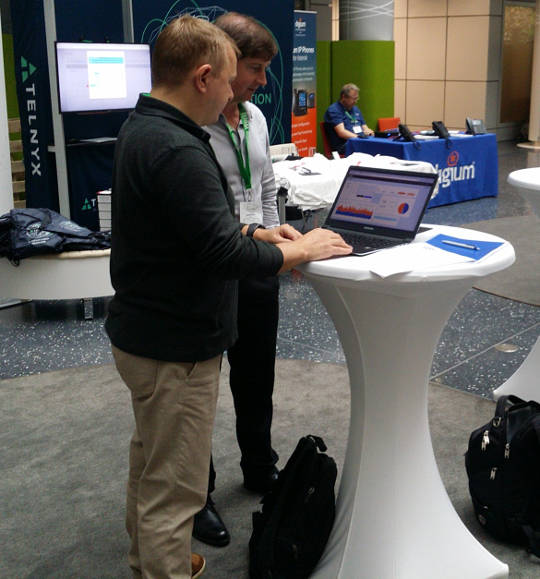
During the Contribute your skills to Debian event that took place in Paris last week-end, we conducted a usability testing session. Six people were tasked with testing a few aspects of the GNOME 3.22 desktop environment and of the Debian 9 (Stretch) operating system. A number of other people observed them and took notes. Then, two observers and three testers analyzed the results, that we are hereby presenting: we created a heat map visualization, summed up the challenges met during the tests, and wrote this blog post together. We will point the relevant upstream projects to our results. A couple of other people also did some usability testing but went in much more depth: their feedback is much more detailed and comes with a number of improvement ideas. I will process and publish their results as soon as possible. Missions Testers were provided a laptop running GNOME on a a Debian 9 (Stretch) Live system. A quick introduction (mostly copied from the one we found in some GNOME usability testing reports) was read. Then they were asked to complete the following tasks. A. Nautilus Mission A.1 Download and rename file in Nautilus
  1. Download a file from the web, a PDF document for example.
  2. Open the folder in which the file has been downloaded.
  3. Rename the dowloaded file to SUCCESS.pdf.
  4. Toggle the browser window to full screen.
  5. Open the file SUCCESS.pdf.
  6. Go back to the File manager.
  7. Close the file SUCCESS.pdf.
Mission A.2 Manipulate folders in Nautilus
  1. Create a new folder named cats in your user directory.
  2. Create a new folder named to do in your user directory.
  3. Move the cats folder to the to do folder.
  4. Delete the cats folder.
Mission A.3 Create a bookmark in Nautilus
  1. Create a folder named unicorns in your personal directory.
  2. This folder is important. Add a bookmark for unicorns in order to find it again in a few weeks.
Mission A.4 Nautilus display settings Folders and files are usually listed as icons, but they can also be displayed differently.
  1. Configure the File manager to make it show items as a list, with one file per line.
  2. You forgot your glasses and the font size is too small for you to see the text: increase the size of the text.
B. Package management Introduction On Debian, each application is available as a "package" which contains every file needed for the software to work. Unlike in other operating systems, it is rarely necessary and almost never a good idea, to download and install software from the authors website. We can rather install it from an online library managed by Debian (like an appstore). This alternative offers several advantages, such as being able to update all the software installed in one single action. Specific tools are available to install and update Debian packages. Mission B.1 Install and remove packages
  1. Install the vlc package.
  2. Start VLC.
  3. Remove the vlc package.
Mission B.2 Search and install a package
  1. Find a piece of software which can download files with BitTorrent in a graphical interface.
  2. Install the corresponding package.
  3. Launch that BitTorrent software.
Mission B.3 Upgrade the system Make sure the whole system (meaning all installed packages) is up to date. C. Settings Mission C.1 Change the desktop background
  1. Download an image you like from the web.
  2. Set the downloaded image as the desktop wallpaper.
Mission C.2 Tweak temporary files management Configure the system so that temporary files older than three days are deleted automatically. Mission C.3 Change the default video player
  1. Install VLC (ask for help if you could not do it during the previous mission).
  2. Make VLC the default video player.
  3. Download a video file from the web.
  4. Open the downloaded video, then check if it opens with VLC.
Mission C.4 Add and remove world clocks When you click the time and date in the top bar, a menu pops-up. There, you can display clocks in several time-zones.
  1. Add a clock with Rio de Janeiro timezone, then another showing the current time in Boston.
  2. Check that the time and date menu now displays these two additional clocks.
  3. Remove the Boston clock.
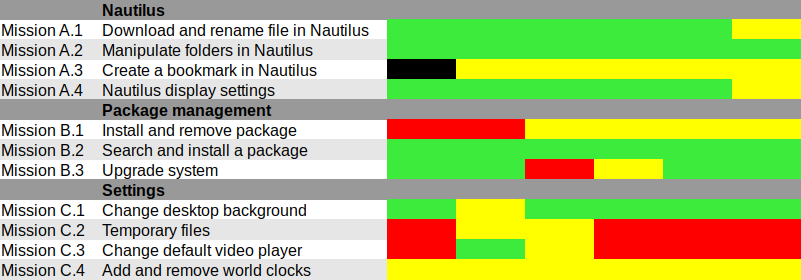
Results and analysis Heat map We used Jim Hall's heat map technique to summarize our usability test results. As Renata puts it, it is "a great way to see how the users performed on each task. The heat map clarifies how easy or difficult it was for the participant to accomplish a certain task.
  1. Scenario tasks (from the usability test) are arranged in rows.
  2. Test participants (for each tester) are arranged in columns.
  3. The colored blocks represent each tester s difficulty with each scenario task.
Green blocks represent the ability of the participant to accomplish the tasks with little or no difficulty. Yellow blocks indicate the tasks that the tester had significant difficulties accomplishing. Red blocks indicate that testers experienced extreme difficulty or where testers completed the tasks incorrectly. Black blocks indicate tasks the tester was unable to complete." Alternatively, here is the spreadsheet that was used to create this picture, with added text to avoid relying on colors only. Most tasks were accomplished with little or no difficulty so we will now focus on the problematic parts. What were the challenges? The heat map shows several "hot" rows, that we will now be looking at in more details. Mission A.3 Create a bookmark in Nautilus Most testers right-clicked the folder first, and eventually found they could simply drag'n'drop to the bookmarks location in the sidebar. One tester thought that he could select a folder, click the hamburger icon, and from there use the "Bookmark this folder" menu item. However, this menu action only works on the folder one has entered, not on the selected one. Mission B.1 Install and remove a package Here we faced a number of issues caused by the fact that Debian Live images don't include package indices (with good reason), so no package manager can list available software. Everyone managed to start a graphical package manager via the Overview (or via the CLI or Alt-F2 for a couple power users). Some testers tried to use GNOME Software, which listed only already installed packages (Debian bug #862560) and provided no way we could find to refresh the package indices. That's arguably a bug in Debian Live, but still: GNOME Software might display some useful information when it detects this unusual situation. We won't list here all the obstacles that were met in Synaptic: it's no news its usability is rather sub-optimal and better alternatives (such as GNOME Software) are in the works. Mission C.2 Tweak temporary files management The mission was poorly phrased: some observers had to clarify that it was specifically about GNOME, and not generic Linux system administration: some power-users were already searching the web for command-line tools to address the task at hand. Even with this clarification, no tester would have succeeded without being told they were allowed to use the web with a search query including the word "GNOME", or use the GNOME help or the Overview. Yet eventually all testers succeeded. It's interesting to note that regular GNOME users had the same problem as others: they did not try searching "temporary" in the Overview and did not look-up the GNOME Help until they were suggested to do so. Mission C.3 Change the default video player One tester configured one single video file format to be opened by default with VLC, via right-click in Nautilus Open with etc. He believed this would be enough to make VLC the default video player, missing the subtle difference between "default video player" and "default player for one single video format". One tester tried to complete this task inside VLC itself and then needed some help to succeed. It might be that the way web browsers ask "Do you want ThisBrowser to become the default web browser?" gave a hint an application GUI is the right place to do it. Two testers searched "default" in the Overview (perhaps the previous mission dealing with temporary files was enough to put them in this direction). At least one tester was confused since the only search result (Details View information about your system), which is the correct one to get there, includes the word View, which suggests that one cannot modify settings there, but only view them. One long-term GNOME user looked in Tweak Tool first, and then used the Overview. Here again, GNOME users experienced essentially the same issues as others. Mission C.4 Add and remove world clocks One tester tried to look for the clock on the top right corner of the screen, then realized it was in the middle. Other than this, all testers easily found a way to add world clocks. However, removing a world clock was rather difficult; although most testers managed to do it, it took them a number of attempts to succeed:
  1. Several testers left-clicked or right-clicked the clock they wanted to remove, expecting this would provide them with a way to remove it (which is not the case).
  2. After a while, all testers noticed the Select button (that has no text label nor tooltip info), which allowed them to select the clock they wanted to remove; then, most testers clicked the 1 selected button, hoping it would provide a contextual menu or some other way to act on the selected clocks (it doesn't).
  3. Eventually, everyone managed to locate the Delete button on the bottom right corner of the window; some testers mentioned that it is less visible and flashy than the blue bar that appears on the top of the screen once they had entered "Selection" mode.
General notes and observations

13 May 2017

Vincent Fourmond: Run QSoas complely non-interactively

QSoas can run scripts, and, since version 2.0, it can be run completely without user interaction from the command-line (though an interface may be briefly displayed). This possibility relies on the following command-line options:If you create a script.cmds file containing the following commands:
generate-buffer -10 10 sin(x)
save sin.dat
and run the following command from your favorite command-line interpreter:
~ QSoas --stdout --run '@ script.cmds' --exit-after-running
This will create a sin.dat file containing a sinusoid. However, if you run it twice, a Overwrite file 'sin.dat' ? dialog box will pop up. You can prevent that by adding the /overwrite=true option to save. As a general rule, you should avoid all commands that may ask questions in the scripts; a /overwrite=true option is also available for save-buffers for instance.I use this possibility massively because I don't like to store processed files, I prefer to store the original data files and run a script to generate the processed data when I want to plot or to further process them. It can also be used to generate fitted data from saved parameters files. I use this to run automatic tests on Linux, Windows and Mac for every single build, in order to quickly spot platform-specific regressions.To help you make use of this possibility, here is a shell function (Linux/Mac users only, add to your $HOME/.bashrc file or equivalent, and restart a terminal) to run directly on QSoas command files:
qs-run ()  
        QSoas --stdout --run "@ $1" --exit-after-running
 
To run the script.cmds script above, just run
~ qs-run script.cmds

About QSoasQSoas is a powerful open source data analysis program that focuses on flexibility and powerful fitting capacities. It is described in Fourmond, Anal. Chem., 2016, 88 (10), pp 5050 5052. Current version is 2.1

12 May 2017

Daniel Pocock: Kamailio World and FSFE team visit, Tirana arrival

This week I've been thrilled to be in Berlin for Kamailio World 2017, one of the highlights of the SIP, VoIP and telephony enthusiast's calendar. It is an event that reaches far beyond Kamailio and is well attended by leaders of many of the well known free software projects in this space. HOMER 6 is coming Alexandr Dubovikov gave me a sneak peek of the new version of the HOMER SIP capture framework for gathering, storing and analyzing messages in a SIP network. exploring HOMER 6 with Alexandr Dubovikov at Kamailio World 2017 Visiting the FSFE team in Berlin Having recently joined the FSFE's General Assembly as the fellowship representative, I've been keen to get to know more about the organization. My visit to the FSFE office involved a wide-ranging discussion with Erik Albers about the fellowship program and FSFE in general. discussing the Fellowship program with Erik Albers Steak and SDR night After a hard day of SIP hacking and a long afternoon at Kamailio World's open bar, a developer needs a decent meal and something previously unseen to hack on. A group of us settled at Escados, Alexanderplatz where my SDR kit emerged from my bag and other Debian users found out how easy it is to apt install the packages, attach the dongle and explore the radio spectrum. playing with SDR after dinner Next stop OSCAL'17, Tirana Having left Berlin, I'm now in Tirana, Albania where I'll give an SDR workshop and Free-RTC talk at OSCAL'17. The weather forecast is between 26 - 28 degrees celsius, the food is great and the weekend's schedule is full of interesting talks and workshops. The organizing team have already made me feel very welcome here, meeting me at the airport and leaving a very generous basket of gifts in my hotel room. OSCAL has emerged as a significant annual event in the free software world and if it's too late for you to come this year, don't miss it in 2018. OSCAL'17 banner


10 May 2017

Jonathan Dowland: Three things I didn't know about Haskell

I've been trying to refresh my Haskell skills and Paul Callaghan recommended I read the paper "A History of Haskell: Being Lazy With Class", which I found (surprisingly?) fascinating. Three facts about Haskell that I didn't know jumped out at me:

9 May 2017

Benjamin Mako Hill: Surviving an Eternal September: How an Online Community Managed a Surge of Newcomers

Attracting newcomers is among the most widely studied problems in online community research. However, with all the attention paid to challenge of getting new users, much less research has studied the flip side of that coin: large influxes of newcomers can pose major problems as well! The most widely known example of problems caused by an influx of newcomers into an online community occurred in Usenet. Every September, new university students connecting to the Internet for the first time would wreak havoc in the Usenet discussion forums. When AOL connected its users to the Usenet in 1994, it disrupted the community for so long that it became widely known as The September that never ended . Our study considered a similar influx in NoSleep an online community within Reddit where writers share original horror stories and readers comment and vote on them. With strict rules requiring that all members of the community suspend disbelief, NoSleep thrives off the fact that readers experience an immersive storytelling environment. Breaking the rules is as easy as questioning the truth of someone s story. Socializing newcomers represents a major challenge for NoSleep.
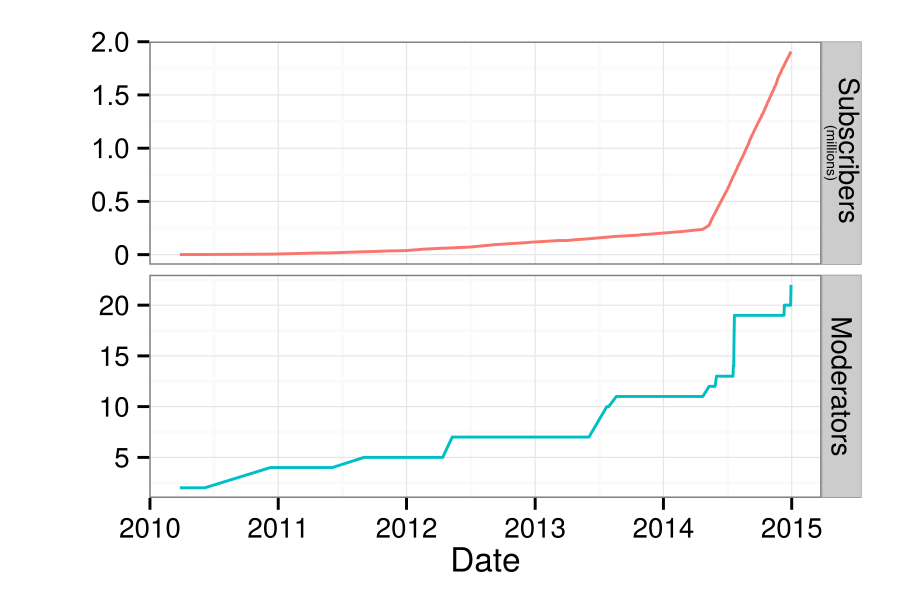
Number of subscribers and moderators on /r/NoSleep over time.
On May 7th, 2014, NoSleep became a default subreddit i.e., every new user to Reddit automatically joined NoSleep. After gradually accumulating roughly 240,000 members from 2010 to 2014, the NoSleep community grew to over 2 million subscribers in a year. That said, NoSleep appeared to largely hold things together. This reflects the major question that motivated our study: How did NoSleep withstand such a massive influx of newcomers without enduring their own Eternal September? To answer this question, we interviewed a number of NoSleep participants, writers, moderators, and admins. After transcribing, coding, and analyzing the results, we proposed that NoSleep survived because of three inter-connected systems that helped protect the community s norms and overall immersive environment. First, there was a strong and organized team of moderators who enforced the rules no matter what. They recruited new moderators knowing the community s population was going to surge. They utilized a private subreddit for NoSleep s staff. They were able to socialize and educate new moderators effectively. Although issuing sanctions against community members was often difficult, our interviewees explained that NoSleep s moderators were deeply committed and largely uncompromising. That commitment resonates within the second system that protected NoSleep: regulation by normal community members. From our interviews, we found that the participants felt a shared sense of community that motivated them both to socialize newcomers themselves as well as to report inappropriate comments and downvote people who violate the community s norms. Finally, we found that the technological systems protected the community as well. For instance, post-throttling was instituted to limit the frequency at which a writer could post their stories. Additionally, Reddit s Automoderator , a programmable AI bot, was used to issue sanctions against obvious norm violators while running in the background. Participants also pointed to the tools available to them the report feature and voting system in particular to explain how easy it was for them to report and regulate the community s disruptors.

This blog post was written with Charlie Kiene. The paper and work this post describes is collaborative work with Charlie Kiene and Andr s Monroy-Hern ndez. The paper was published in the Proceedings of CHI 2016 and is released as open access so anyone can read the entire paper here. A version of this post was published on the Community Data Science Collective blog.

Martin Pitt: Cockpit is now just an apt install away

Cockpit has now been in Debian unstable and Ubuntu 17.04 and devel, which means it s now a simple
$ sudo apt install cockpit
away for you to try and use. This metapackage pulls in the most common plugins, which are currently NetworkManager and udisks/storaged. If you want/need, you can also install cockpit-docker (if you grab docker.io from jessie-backports or use Ubuntu) or cockpit-machines to administer VMs through libvirt. Cockpit upstream also has a rather comprehensive Kubernetes/Openstack plugin, but this isn t currently packaged for Debian/Ubuntu as kubernetes itself is not yet in Debian testing or Ubuntu. After that, point your browser to https://localhost:9090 (or the host name/IP where you installed it) and off you go.

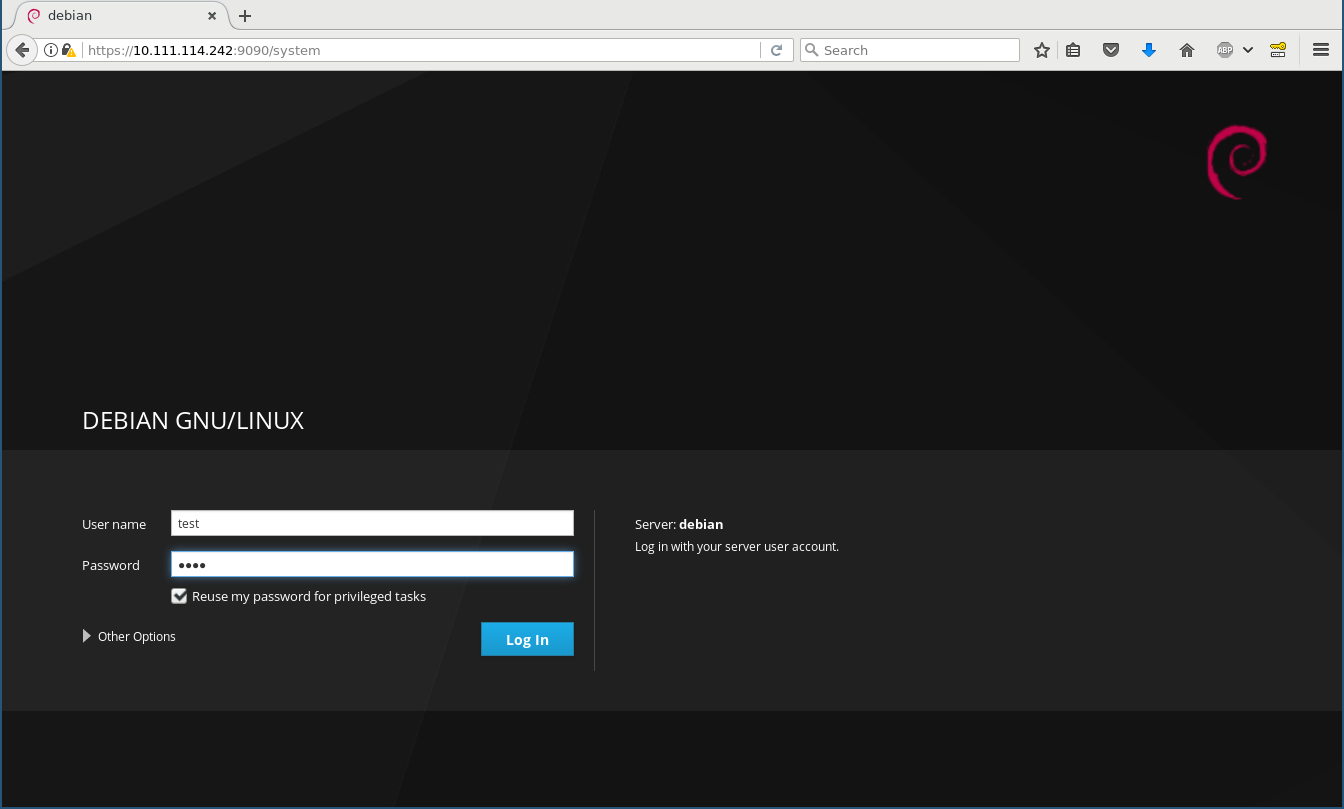
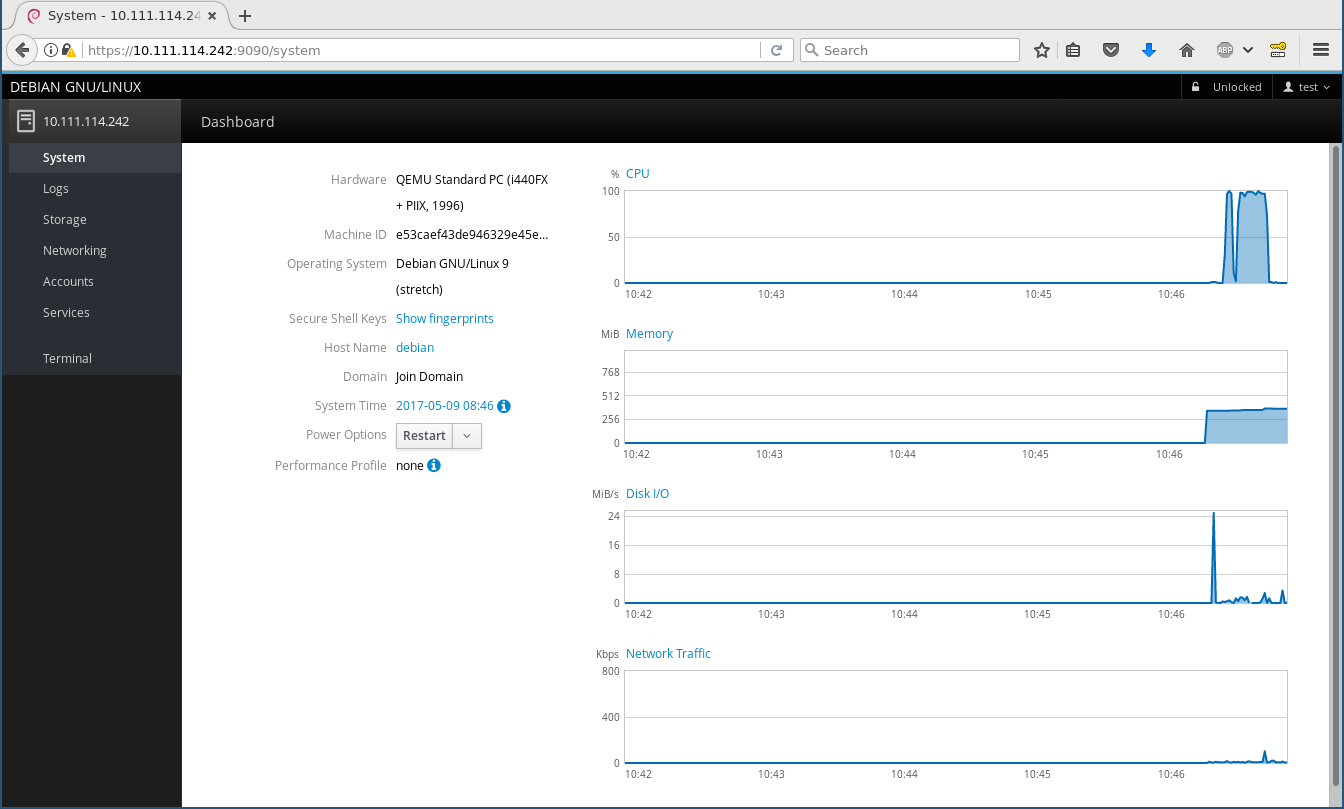
What is Cockpit? Think of it as an equivalent of a desktop (like GNOME or KDE) for configuring, maintaining, and interacting with servers. It is a web service that lets you log into your local or a remote (through ssh) machine using normal credentials (PAM user/password or SSH keys) and then starts a normal login session just as gdm, ssh, or the classic VT logins would. Login screen System page The left side bar is the equivalent of a task switcher , and the applications (i. e. modules for administering various aspects of your server) are run in parallel. The main idea of Cockpit is that it should not behave special in any way - it does not have any specific configuration files or state keeping and uses the same Operating System APIs and privileges like you would on the command line (such as lvmconfig, the org.freedesktop.UDisks2 D-Bus interface, reading/writing the native config files, and using sudo when necessary). You can simultaneously change stuff in Cockpit and in a shell, and Cockpit will instantly react to changes in the OS, e. g. if you create a new LVM PV or a network device gets added. This makes it fundamentally different to projects like webmin or ebox, which basically own your computer once you use them the first time. It is an interface for your operating system, which even reflects in the branding: as you see above, this is Debian (or Ubuntu, or Fedora, or wherever you run it on), not Cockpit .

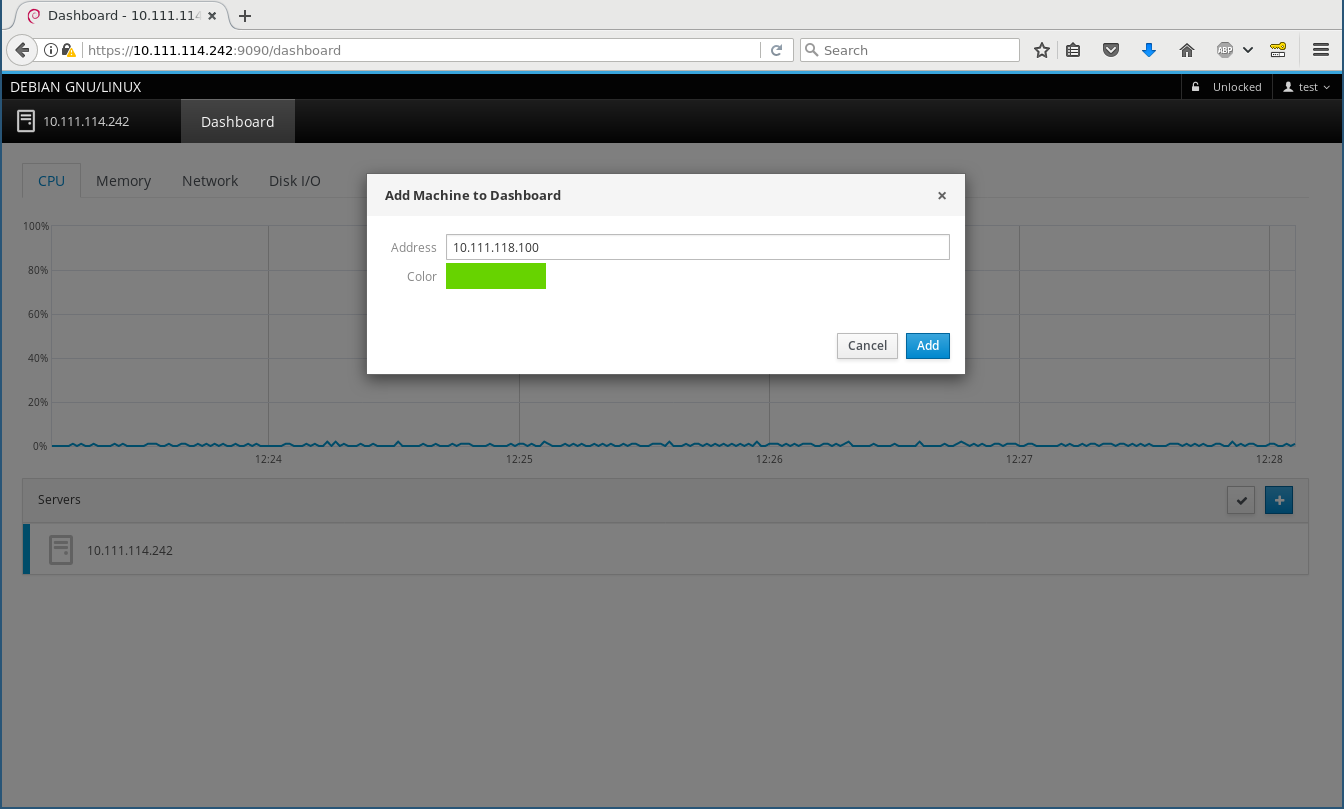
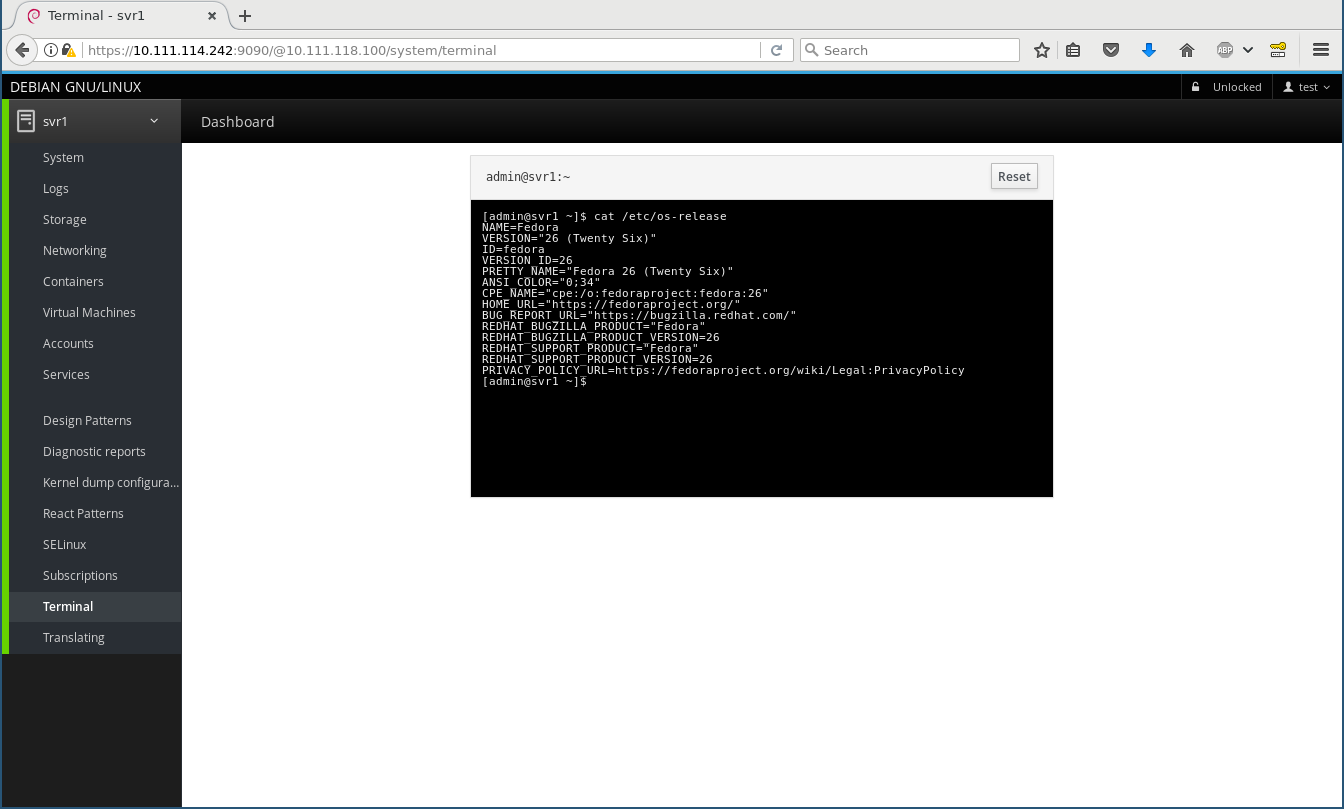
Remote machines In your home or small office you often have more than one machine to maintain. You can install cockpit-bridge and cockpit-system on those for the most basic functionality, configure SSH on them, and then add them on the Dashboard (I add a Fedora 26 machine here) and from then on can switch between them on the top left, and everything works and feels exactly the same, including using the terminal widget: Add remote Remote terminal The Fedora 26 machine has some more Cockpit modules installed, including a lot of playground ones, thus you see a lot more menu entries there.

Under the hood Beneath the fancy Patternfly/React/JavaScript user interface is the Cockpit API and protocol, which particularly fascinates me as a developer as that is what makes Cockpit so generic, reactive, and extensible. This API connects the worlds of the web, which speaks IPs and host names, ports, and JSON, to the local host only world of operating systems which speak D-Bus, command line programs, configuration files, and even use fancy techniques like passing file descriptors through Unix sockets. In an ideal world, all Operating System APIs would be remotable by themselves, but they aren t. This is where the cockpit bridge comes into play. It is a JSON (i. e. ASCII text) stream protocol that can control arbitrarily many channels to the target machine for reading, writing, and getting notifications. There are channel types for running programs, making D-Bus calls, reading/writing files, getting notified about file changes, and so on. Of course every channel can also act on a remote machine. One can play with this protocol directly. E. g. this opens a (local) D-Bus channel named d1 and gets a property from systemd s hostnamed:
$ cockpit-bridge --interact=---
  "command": "open", "channel": "d1", "payload": "dbus-json3", "name": "org.freedesktop.hostname1"  
---
d1
  "call": [ "/org/freedesktop/hostname1", "org.freedesktop.DBus.Properties", "Get",
          [ "org.freedesktop.hostname1", "StaticHostname" ] ],
  "id": "hostname-prop"  
---
and it will reply with something like
d1
 "reply":[[ "t":"s","v":"donald" ]],"id":"hostname-prop" 
---
( donald is my laptop s name). By adding additional parameters like host and passing credentials these can also be run remotely through logging in via ssh and running cockpit-bridge on the remote host. Stef Walter explains this in detail in a blog post about Web Access to System APIs. Of course Cockpit plugins (both internal and third-party) don t directly speak this, but use a nice JavaScript API. As a simple example how to create your own Cockpit plugin that uses this API you can look at my schroot plugin proof of concept which I hacked together at DevConf.cz in about an hour during the Cockpit workshop. Note that I never before wrote any JavaScript and I didn t put any effort into design whatsoever, but it does work .

Next steps Cockpit aims at servers and getting third-party plugins for talking to your favourite part of the system, which means we really want it to be available in Debian testing and stable, and Ubuntu LTS. Our CI runs integration tests on all of these, so each and every change that goes in is certified to work on Debian 8 (jessie) and Ubuntu 16.04 LTS, for example. But I d like to replace the external PPA/repository on the Install instructions with just it s readily available in -backports ! Unfortunately there s some procedural blockers there, the Ubuntu backport request suffers from understaffing, and the Debian stable backport is blocked on getting it in to testing first, which in turn is blocked by the freeze. I will soon ask for a freeze exception into testing, after all it s just about zero risk - it s a new leaf package in testing. Have fun playing around with it, and please report bugs! Feel free to discuss and ask questions on the Google+ post.

8 May 2017

Lars Wirzenius: Ick2 design discussion

Recently, Daniel visited us in Helsinki. In addition to enjoying local food and scenerey, we spent some time together in front of a whiteboard to sketch out designs for Ick2. Ick is my continuous integration system, and it's all Daniel's fault for suggesting the name. Ahem. I am currently using the first generation of Ick and it is a rigid, cumbersome, and fragile thing. It works well enough that I don't miss Jenkins, but I would like something better. That's the second generation of Ick, or Ick2, and that's what we discussed with Daniel. Where pretty much everything in Ick1 is hardcoded, everything in Ick2 will be user-configurable. It's my last, best chance to go completely overboard in the second system syndrome manner. Where Ick1 was written in a feverish two-week hacking session, rushed because my Jenkins install at the time had broken one time too many, we're taking our time with Ick2. Slow and careful is the tune this time around. Our "minimum viable product" or MVP for Ick2 is defined like this:
Ick2 builds static websites from source in a git repository, using ikiwiki, and published to a web server using rsync. A change to the git repository triggers a new build. It can handle many separate websites, and if given enough worker machines, can build many of them concurrently.
This is a real task, and something we already do with Ick1 at work. It's a reasonable first step for the new program. Some decisions we made: The initial pipelines will be basically like this, but expressed in some way by the user:
  1. Clone the source repoistory.
  2. Run ikiwiki --build to build the website.
  3. Run rsync to publish the website on a server.
Assumptions: Actions the Ick2 controller API needs to support: A sketch API: Sequence: The next step will probably be to sketch a yarn test suite of the API and implement a rudimentary one.

Russ Allbery: Review: Chimes at Midnight

Review: Chimes at Midnight, by Seanan McGuire
Series: October Daye #7
Publisher: DAW
Copyright: 2013
ISBN: 1-101-63566-5
Format: Kindle
Pages: 346
Chimes at Midnight is the seventh book of the October Daye series and builds heavily on the previous books. Toby has gathered quite the group of allies by this point, and events here would casually spoil some of the previous books in the series (particularly One Salt Sea, which you absolutely do not want spoiled). I strongly recommend starting at the beginning, even if the series is getting stronger as it goes along. This time, rather than being asked for help, the book opens with Toby on a mission. Goblin fruit is becoming increasingly common on the streets of San Francisco, and while she's doing all she can to find and stop the dealers, she's finding dead changelings. Goblin fruit is a pleasant narcotic to purebloods, but to changelings it's instantly and fatally addictive. The growth of the drug trade means disaster for the local changelings, particularly since previous events in the series have broken a prominent local changeling gang. That was for the best, but they were keeping goblin fruit out, and now it's flooding into the power vacuum. In the sort of idealistic but hopelessly politically naive move that Toby is prone to, she takes her evidence to the highest local authority in faerie: the Queen of the Mists. The queen loathes Toby and the feeling is mutual, but Toby's opinion is that this shouldn't matter: these are her subjects and goblin fruit is widely recognized as a menace. Even if she cares nothing for their lives, a faerie drug being widely sold on the street runs the substantial risk that someone will give it to humans, potentially leading to the discovery of faerie. Sadly, but predictably, Toby has underestimated the Queen's malevolence. She leaves the court burdened not only with the knowledge that the Queen herself is helping with the distribution of goblin fruit, but also an impending banishment thanks to her reaction. She has three days to get out of the Queen's territory, permanently. Three days that the Luidaeg suggests she spend talking to people who knew King Gilad, the former and well-respected king of the local territory who died in the 1906 earthquake, apparently leaving the kingdom to the current Queen. Or perhaps not. As usual, crossing Toby is a very bad idea, and getting Toby involved in politics means that one should start betting heavily against the status quo. Also, as usual, things initially go far too well, and then Toby ends up in serious trouble. (I realize the usefulness of raising the stakes of the story, but I do prefer the books of this series that don't involve Toby spending much of the book ill.) However, there is a vast improvement over previous books in the story: one key relationship (which I'll still avoid spoiling) is finally out of the precarious will-they, won't-they stage and firmly on the page, and it's a relationship that I absolutely love. Watching Toby stomp people who deserve to be stomped makes me happy, but watching Toby let herself be happy and show it makes me even happier. McGuire also gives us some more long-pending revelations. I probably should have guessed the one about one of Toby's long-time friends and companions much earlier, although at least I did so a few pages before Toby found out. I have some strong suspicions about Toby's own background that were reinforced by this book, and will be curious to see if I'm right. And I'm starting to have guesses about the overall arc of the series, although not firm ones. One of my favorite things in long-running series is the slow revelation of more and more world background, and McGuire does it in just the way I like: lots of underlying complexity, reveals timed for emotional impact but without dragging on things that the characters should obviously be able to figure out, and a whole bunch of layered secrets that continue to provide more mystery even after one layer is removed. The plot here is typical of the plot of the last couple of novels in the series, which is fine by me since my favorite part of this series is the political intrigue (and Toby realizing that she has far more influence than she thinks). It helps that I thought Arden was great, given how central she is to this story. I liked her realistic reactions to her situation, and I liked her arguments with Toby. I'm dubious how correct Toby actually was, but we've learned by now that arguments from duty are always going to hold sway with her. And I loved Mags and the Library, and hope we'll be seeing more of them in future novels. The one quibble I'll close with, since the book closed with it, is that I found the ending rather abrupt. There were several things I wanted to see in the aftermath, and the book ended before they could happen. Hopefully that means they'll be the start of the next book (although a bit of poking around makes me think they may be in a novella). If you've liked the series so far, particularly the couple of books before this one, this is more of what you liked. Recommended. Followed by The Winter Long. Rating: 8 out of 10

7 May 2017

Dirk Eddelbuettel: RInside 0.2.14

A new release 0.2.14 of RInside is now on CRAN and in Debian. RInside provides a set of convenience classes which facilitate embedding of R inside of C++ applications and programs, using the classes and functions provided by Rcpp. It has been nearly two years since the last release, and a number of nice extensions, build robustifications and fixes had been submitted over this period---see below for more. The only larger and visible extension is both a new example and some corresponding internal changes to allow a readline prompt in an RInside application, should you desire it. RInside is stressing the CRAN system a little in that it triggers a number of NOTE and WARNING messages. Some of these are par for the course as we get close to R internals not all of which are "officially" in the API. This lead to the submission sitting a little longer than usual in incoming queue. Going forward we may need to find a way to either sanction these access point, whitelist them or, as a last resort, take the package off CRAN. Time will tell. Changes since the last release were:

Changes in RInside version 0.2.14 (2017-04-28)
  • Interactive mode can use readline REPL ( ukasz aniewski-Wo k in #25, and Dirk in #26)
  • Windows macros checks now uses _WIN32 (Kevin Ushey in #22)
  • The wt example now links with libboost_system
  • The Makevars file is now more robist (Mattias Ellert in #21)
  • A problem with empty environment variable definitions on Windows was addressed (Jeroen Ooms in #17 addressing #16)
  • HAVE_UINTPTR_T is defined only if not already defined
  • Travis CI is now driven via run.sh from our forked r-travis

CRANberries also provides a short report with changes from the previous release. More information is on the RInside page. Questions, comments etc should go to the rcpp-devel mailing list off the Rcpp R-Forge page, or to issues tickets at the GitHub repo.

This post by Dirk Eddelbuettel originated on his Thinking inside the box blog. Please report excessive re-aggregation in third-party for-profit settings.

6 May 2017

Jelmer Vernooij: Xandikos, a new Git-backed CalDAV/CardDAV server

For the last couple of years, I have self-hosted my calendar and address book data. Originally I just kept local calendars and address books in Evolution, but later I moved to a self-hosted CalDAV/CardDAV server and a plethora of clients.
CalDAV/CardDAV CalDAV and CardDAV are standards for accessing, managing, and sharing calendaring and addressbook information based on the iCalendar format that are built atop the WebDAV standard, and WebDAV itself is a set of extensions to HTTP. CalDAV and CardDAV essentially store iCalendar (.ics) and vCard (.vcf) files using WebDAV, but they provide some extra guarantees (e.g. files must be well-formed) and some additional methods for querying the data. For example, it is possible to retrieve all events between two dates with a single HTTP query, rather than the client having to check all the calendar files in a directory. CalDAV and CardDAV are (unnecessarily) complex, in large part because they are built on top of WebDAV. Being able to use regular HTTP and WebDAV clients is quite neat, but results in extra complexity. In addition, because the standards are so large, clients and servers end up only implementing parts of it. However, CalDAV and CardDAV have one big redeeming quality: they are the dominant standards for synchronising calendar events and addressbooks, and are supported by a wide variety of free and non-free applications. They're the status quo, until something better comes along. (and hey, at least there is a standard to begin with)
Calypso I have tried a number of servers over the years. In the end, I settled for calypso. Calypso started out as friendly fork of Radicale, with some additional improvements. I like Calypso because it is:
  • quite simple, understandable, and small (sloccount reports 1700 LOC)
  • it stores plain .vcf and .ics files
  • stores history in git
  • easy to set up, e.g. no database dependencies
  • written in Python
Its use of regular files and keeping history in Git is useful, because this means that whenever it breaks it is much easier to see what is happening. If something were to go wrong (i.e. a client decides to remove all server-side entries) it's easy to recover by rolling back history using git. However, there are some downsides to Calypso as well. It doesn't have good test coverage, making it harder to change (especially in a way that doesn't break some clients), though there are some recent efforts to make e.g. external spec compliance tests like caldavtester work with it. Calypso's CalDAV/CardDAV/WebDAV implementation is a bit ad-hoc. The only WebDAV REPORTs it implements are calendar-multiget and addressbook-multiget. Support for properties has been added as new clients request them. The logic for replying to DAV requests is mixed with the actual data store implementation. Because of this, it can be hard to get going with some clients and sometimes tricky to debug.
Xandikos After attempting to fix a number of issues in Calypso, I kept running into issues with the way its code is structured. This is only fixable by rewriting sigifnicant chunks of it, so I opted to instead write a new server. The goals of Xandikos are along the same lines as those of Calypso, to be a simple CalDAV/CardDAV server for personal use:
  • easy to set up; at the moment, just running xandikos -d $HOME/dav --defaults is enough to start a new server
  • use of plain .ics/.ivf files for storage
  • history stored in Git
But additionally:
  • clear separation between protocol implementation and storage
  • be well tested
  • standards complete
  • standards compliant
Current status The CalDAV/CardDAV implementation of Xandikos is mostly complete, but there still a number of outstanding issues. In particular:
  • lack of authentication support; setting up authentication support in uwsgi or a reverse proxy is one way of working around this
  • there is no useful UI for users accessing the DAV resources via a web browser
  • test coverage
Xandikos has been tested with the following clients:
Trying it To run Xandikos, follow the instructions on the homepage:
./bin/xandikos --defaults -d $HOME/dav
A server should now be listening on localhost:8080 that you can access with your favorite client.

5 May 2017

Patrick Matth i: Be careful: Upgrading Debian Jessie to Stretch, with Pacemaker DRBD and an nested ext4 LVM hosted on VMware products

Detached DRBD (diskless) In the past I setup some new Pacemaker clustered nodes with a fresh Debian Stretch installation. I followed our standard installation guide, created also shared replicated DRBD storage, but whenever I tried to mount the ext4 storage DRBD detached the disks on both node sides with I/O errors. After recreating it, using other storage volumes and testing my ProLiant hardware (whop I thought it had got a defect..) it still occurs, but somewhere in the middle of testing, a quicker setup without LVM it worked fine, hum.. Much later I found this (only post at this time about it) on the DRBD-user mailinglist: [0]
This means, if you use the combination of VMware-Product -> Debian Stretch -> local Storage -> DRBD -> LVM -> ext4 you will be affected by this bug. This happens, because VMware always publishs the information, that the guest is able to support the WRITE SAME feature, which is wrong. Since the DRBD version, which is also shipped with Stretch, DRBD now also supports WRITE SAME, so it tries to use this feature, but this fails then.
This is btw the same reason, why VMware users see in their dmesg this:
WRITE SAME failed.Manually zeroing.
As a workaround I am using now systemd, to disable WRITE SAME for all attached block devices in the guest. Simply run the following:
for i in find /sys/block/*/device/scsi_disk/*/max_write_same_blocks ; do echo w $i 0 ; done > /etc/tmpfiles.d/write_same.conf
[0]: http://lists.linbit.com/pipermail/drbd-user/2017-January/022931.html Pacemaker failovers with DRBD+LVM do not work If you use a DRBD with a nested LVM, you already had to add the following lines to your /etc/lvm/lvm.conf in past Debian releases (assuming that sdb and sdc are DRBD devices):
filter = [ r /dev/sdb.* /dev/sdc.* ]
write_cache_state = 0
Wit Debian Stretch this is not enough. Your failovers will result in a broken state on the second node, because it can not find your LVs and VGs. I found out, that killing lvmetad helps. So I also added a global_filter (it should be used for all LVM services):
global_filter = [ r /dev/sdb.* /dev/sdc.* ]
But this also didn t helped.. My only solution was to disable lvmetad (which I am also not using at all). So adding this all in combination works now for me and failovers are as smooth as with Jessie:
filter = [ r /dev/sdb.* /dev/sdc.* ]
global_filter = [ r /dev/sdb.* /dev/sdc.* ]
write_cache_state = 0
use_lvmetad = 0
Do not forget to update your initrd, so that the LVM configuration is updated on booting your server:
update-initramfs -k all -u
Reboot, that s it :)

3 May 2017

Vincent Bernat: VXLAN: BGP EVPN with Cumulus Quagga

VXLAN is an overlay network to encapsulate Ethernet traffic over an existing (highly available and scalable, possibly the Internet) IP network while accomodating a very large number of tenants. It is defined in RFC 7348. For an uncut introduction on its use with Linux, have a look at my VXLAN & Linux post. VXLAN deployment In the above example, we have hypervisors hosting a virtual machines from different tenants. Each virtual machine is given access to a tenant-specific virtual Ethernet segment. Users are expecting classic Ethernet segments: no MAC restrictions1, total control over the IP addressing scheme they use and availability of multicast. In a large VXLAN deployment, two aspects need attention:
  1. discovery of other endpoints (VTEPs) sharing the same VXLAN segments, and
  2. avoidance of BUM frames (broadcast, unknown unicast and multicast) as they have to be forwarded to all VTEPs.
A typical solution for the first point is using multicast. For the second point, this is source-address learning.

Introduction to BGP EVPN BGP EVPN (RFC 7432 and draft-ietf-bess-evpn-overlay for its application to VXLAN) is a standard control protocol to efficiently solves those two aspects without relying on multicast nor source-address learning. BGP EVPN relies on BGP (RFC 4271) and its MP-BGP extensions (RFC 4760). BGP is the routing protocol powering the Internet. It is highly scalable and interoperable. It is also extensible and one of its extension is MP-BGP. This extension can carry reachability information (NLRI) for multiple protocols (IPv4, IPv6, L3VPN and in our case EVPN). EVPN is a special family to advertise MAC addresses and the remote equipments they are attached to. There are basically two kinds of reachability information a VTEP sends through BGP EVPN:
  1. the VNIs they have interest in (type 3 routes), and
  2. for each VNI, the local MAC addresses (type 2 routes).
The protocol also covers other aspects of virtual Ethernet segments (L3 reachability information from ARP/ND caches, MAC mobility and multi-homing2) but we won t describe them here. To deploy BGP EVPN, a typical solution is to use several route reflectors (both for redundancy and scalability), like in the picture below. Each VTEP opens a BGP session to at least two route reflectors, sends its information (MACs and VNIs) and receives others . This reduces the number of BGP sessions to configure. VXLAN deployment with route reflectors Compared to other solutions to deploy VXLAN, BGP EVPN has three main advantages:
  • interoperability with other vendors (notably Juniper and Cisco),
  • proven scalability (a typical BGP routers handle several millions of routes), and
  • possibility to enforce fine-grained policies.
On Linux, Cumulus Quagga is a fairly complete implementation of BGP EVPN (type 3 routes for VTEP discovery, type 2 routes with MAC or IP addresses, MAC mobility when a host changes from one VTEP to another one) which requires very little configuration. This is a fork of Quagga and currently used in Cumulus Linux, a network operating system based on Debian powering switches from various brands. At some point, BGP EVPN support will be contributed back to FRR, a community-maintained fork of Quagga3. It should be noted the BGP EVPN implementation of Cumulus Quagga currently only supports IPv4.

Route reflector setup Before configuring each VTEP, we need to configure two or more route reflectors. There are many solutions. I will present three of them:
  • using Cumulus Quagga,
  • using GoBGP, an implementation of BGP in Go,
  • using Juniper JunOS.
For reliability purpose, it s possible (and easy) to use one implementation for some route reflectors and another implementation for the other ones. The proposed configurations are quite minimal. However, it is possible to centralize policies on the route reflectors (e.g. routes tagged with some community can only be readvertised to some group of VTEPs).

Using Quagga The configuration is pretty simple. We suppose the configured route reflector has 203.0.113.254 configured as a loopback IP.
router bgp 65000
  bgp router-id 203.0.113.254
  bgp cluster-id 203.0.113.254
  bgp log-neighbor-changes
  no bgp default ipv4-unicast
  neighbor fabric peer-group
  neighbor fabric remote-as 65000
  neighbor fabric capability extended-nexthop
  neighbor fabric update-source 203.0.113.254
  bgp listen range 203.0.113.0/24 peer-group fabric
  !
  address-family evpn
   neighbor fabric activate
   neighbor fabric route-reflector-client
  exit-address-family
  !
  exit
!
A peer group fabric is defined and we leverage the dynamic neighbor feature of Cumulus Quagga: we don t have to explicitely define each neighbor. Any client from 203.0.113.0/24 and presenting itself as part of AS 65000 can connect. All sent EVPN routes will be accepted and reflected to the other clients. You don t need to run Zebra, the route engine talking with the kernel. Instead, start bgpd with the --no_kernel flag.

Using GoBGP GoBGP is a clean implementation of BGP in Go4. It exposes an RPC API for configuration (but accepts a configuration file and comes with a command-line client). It doesn t support dynamic neighbors, so you ll have to use the API, the command-line client or some templating language to automate their declaration. A configuration with only one neighbor is like this:
global:
  config:
    as: 65000
    router-id: 203.0.113.254
    local-address-list:
      - 203.0.113.254
neighbors:
  - config:
      neighbor-address: 203.0.113.1
      peer-as: 65000
    afi-safis:
      - config:
          afi-safi-name: l2vpn-evpn
    route-reflector:
      config:
        route-reflector-client: true
        route-reflector-cluster-id: 203.0.113.254
More neighbors can be added from the command line:
$ gobgp neighbor add 203.0.113.2 as 65000 \
>         route-reflector-client 203.0.113.254 \
>         --address-family evpn
GoBGP won t try to interact with the kernel which is fine as a route reflector.

Using Juniper JunOS A variety of Juniper products can be a BGP route reflector, notably: The main factor is the CPU and the memory. The QFX5100 is low on memory and won t support large deployments without some additional policing. Here is a configuration similar to the Quagga one:
interfaces  
    lo0  
        unit 0  
            family inet  
                address 203.0.113.254/32;


protocols  
    bgp  
        group fabric  
            family evpn  
                signaling  
                    /* Do not try to install EVPN routes */
                    no-install;
                 
             
            type internal;
            cluster 203.0.113.254;
            local-address 203.0.113.254;
            allow 203.0.113.0/24;


routing-options  
    router-id 203.0.113.254;
    autonomous-system 65000;
 

VTEP setup The next step is to configure each VTEP/hypervisor. Each VXLAN is locally configured using a bridge for local virtual interfaces, like illustrated in the below schema. The bridge is taking care of the local MAC addresses (notably, using source-address learning) and the VXLAN interface takes care of the remote MAC addresses (received with BGP EVPN). Bridged VXLAN device VXLANs can be provisioned with the following script. Source-address learning is disabled as we will rely solely on BGP EVPN to synchronize FDBs between the hypervisors.
for vni in 100 200; do
    # Create VXLAN interface
    ip link add vxlan$ vni  type vxlan
        id $ vni  \
        dstport 4789 \
        local 203.0.113.2 \
        nolearning
    # Create companion bridge
    brctl addbr br$ vni 
    brctl addif br$ vni  vxlan$ vni 
    brctl stp br$ vni  off
    ip link set up dev br$ vni 
    ip link set up dev vxlan$ vni 
done
# Attach each VM to the appropriate segment
brctl addif br100 vnet10
brctl addif br100 vnet11
brctl addif br200 vnet12
The configuration of Cumulus Quagga is similar to the one used for a route reflector, except we use the advertise-all-vni directive to publish all local VNIs.
router bgp 65000
  bgp router-id 203.0.113.2
  no bgp default ipv4-unicast
  neighbor fabric peer-group
  neighbor fabric remote-as 65000
  neighbor fabric capability extended-nexthop
  neighbor fabric update-source dummy0
  ! BGP sessions with route reflectors
  neighbor 203.0.113.253 peer-group fabric
  neighbor 203.0.113.254 peer-group fabric
  !
  address-family evpn
   neighbor fabric activate
   advertise-all-vni
  exit-address-family
  !
  exit
!
If everything works as expected, the instances sharing the same VNI should be able to ping each other. If IPv6 is enabled on the VMs, the ping command shows if everything is in order:
$ ping -c10 -w1 -t1 ff02::1%eth0
PING ff02::1%eth0(ff02::1%eth0) 56 data bytes
64 bytes from fe80::5254:33ff:fe00:8%eth0: icmp_seq=1 ttl=64 time=0.016 ms
64 bytes from fe80::5254:33ff:fe00:b%eth0: icmp_seq=1 ttl=64 time=4.98 ms (DUP!)
64 bytes from fe80::5254:33ff:fe00:9%eth0: icmp_seq=1 ttl=64 time=4.99 ms (DUP!)
64 bytes from fe80::5254:33ff:fe00:a%eth0: icmp_seq=1 ttl=64 time=4.99 ms (DUP!)
--- ff02::1%eth0 ping statistics ---
1 packets transmitted, 1 received, +3 duplicates, 0% packet loss, time 0ms
rtt min/avg/max/mdev = 0.016/3.745/4.991/2.152 ms

Verification Step by step, let s check how everything comes together.

Getting VXLAN information from the kernel On each VTEP, Quagga should be able to retrieve the information about configured VXLANs. This can be checked with vtysh:
# show interface vxlan100
Interface vxlan100 is up, line protocol is up
  Link ups:       1    last: 2017/04/29 20:01:33.43
  Link downs:     0    last: (never)
  PTM status: disabled
  vrf: Default-IP-Routing-Table
  index 11 metric 0 mtu 1500
  flags: <UP,BROADCAST,RUNNING,MULTICAST>
  Type: Ethernet
  HWaddr: 62:42:7a:86:44:01
  inet6 fe80::6042:7aff:fe86:4401/64
  Interface Type Vxlan
  VxLAN Id 100
  Access VLAN Id 1
  Master (bridge) ifindex 9 ifp 0x56536e3f3470
The important points are:
  • the VNI is 100, and
  • the bridge device was correctly detected.
Quagga should also be able to retrieve information about the local MAC addresses :
# show evpn mac vni 100
Number of MACs (local and remote) known for this VNI: 2
MAC               Type   Intf/Remote VTEP      VLAN
50:54:33:00:00:0a local  eth1.100
50:54:33:00:00:0b local  eth2.100

BGP sessions Each VTEP has to establish a BGP session to the route reflectors. On the VTEP, this can be checked by running vtysh:
# show bgp neighbors 203.0.113.254
BGP neighbor is 203.0.113.254, remote AS 65000, local AS 65000, internal link
 Member of peer-group fabric for session parameters
  BGP version 4, remote router ID 203.0.113.254
  BGP state = Established, up for 00:00:45
  Neighbor capabilities:
    4 Byte AS: advertised and received
    AddPath:
      L2VPN EVPN: RX advertised L2VPN EVPN
    Route refresh: advertised and received(new)
    Address family L2VPN EVPN: advertised and received
    Hostname Capability: advertised
    Graceful Restart Capabilty: advertised
[...]
 For address family: L2VPN EVPN
  fabric peer-group member
  Update group 1, subgroup 1
  Packet Queue length 0
  Community attribute sent to this neighbor(both)
  8 accepted prefixes

  Connections established 1; dropped 0
  Last reset never
Local host: 203.0.113.2, Local port: 37603
Foreign host: 203.0.113.254, Foreign port: 179
The output includes the following information:
  • the BGP state is Established,
  • the address family L2VPN EVPN is correctly advertised, and
  • 8 routes are received from this route reflector.
The state of the BGP sessions can also be checked from the route reflectors. With GoBGP, use the following command:
# gobgp neighbor 203.0.113.2
BGP neighbor is 203.0.113.2, remote AS 65000, route-reflector-client
  BGP version 4, remote router ID 203.0.113.2
  BGP state = established, up for 00:04:30
  BGP OutQ = 0, Flops = 0
  Hold time is 9, keepalive interval is 3 seconds
  Configured hold time is 90, keepalive interval is 30 seconds
  Neighbor capabilities:
    multiprotocol:
        l2vpn-evpn:     advertised and received
    route-refresh:      advertised and received
    graceful-restart:   received
    4-octet-as: advertised and received
    add-path:   received
    UnknownCapability(73):      received
    cisco-route-refresh:        received
[...]
  Route statistics:
    Advertised:             8
    Received:               5
    Accepted:               5
With JunOS, use the below command:
> show bgp neighbor 203.0.113.2
Peer: 203.0.113.2+38089 AS 65000 Local: 203.0.113.254+179 AS 65000
  Group: fabric                Routing-Instance: master
  Forwarding routing-instance: master
  Type: Internal    State: Established
  Last State: OpenConfirm   Last Event: RecvKeepAlive
  Last Error: None
  Options: <Preference LocalAddress Cluster AddressFamily Rib-group Refresh>
  Address families configured: evpn
  Local Address: 203.0.113.254 Holdtime: 90 Preference: 170
  NLRI evpn: NoInstallForwarding
  Number of flaps: 0
  Peer ID: 203.0.113.2     Local ID: 203.0.113.254     Active Holdtime: 9
  Keepalive Interval: 3          Group index: 0    Peer index: 2
  I/O Session Thread: bgpio-0 State: Enabled
  BFD: disabled, down
  NLRI for restart configured on peer: evpn
  NLRI advertised by peer: evpn
  NLRI for this session: evpn
  Peer supports Refresh capability (2)
  Stale routes from peer are kept for: 300
  Peer does not support Restarter functionality
  NLRI that restart is negotiated for: evpn
  NLRI of received end-of-rib markers: evpn
  NLRI of all end-of-rib markers sent: evpn
  Peer does not support LLGR Restarter or Receiver functionality
  Peer supports 4 byte AS extension (peer-as 65000)
  NLRI's for which peer can receive multiple paths: evpn
  Table bgp.evpn.0 Bit: 20000
    RIB State: BGP restart is complete
    RIB State: VPN restart is complete
    Send state: in sync
    Active prefixes:              5
    Received prefixes:            5
    Accepted prefixes:            5
    Suppressed due to damping:    0
    Advertised prefixes:          8
  Last traffic (seconds): Received 276  Sent 170  Checked 276
  Input messages:  Total 61     Updates 3       Refreshes 0     Octets 1470
  Output messages: Total 62     Updates 4       Refreshes 0     Octets 1775
  Output Queue[1]: 0            (bgp.evpn.0, evpn)
If a BGP session cannot be established, the logs of each BGP daemon should mention the cause.

Sent routes From each VTEP, Quagga needs to send:
  • one type 3 route for each local VNI, and
  • one type 2 route for each local MAC address.
The best place to check the received routes is on one of the route reflectors. If you are using JunOS, the following command will display the received routes from the provided VTEP:
> show route table bgp.evpn.0 receive-protocol bgp 203.0.113.2
bgp.evpn.0: 10 destinations, 10 routes (10 active, 0 holddown, 0 hidden)
  Prefix                  Nexthop              MED     Lclpref    AS path
  2:203.0.113.2:100::0::50:54:33:00:00:0a/304 MAC/IP
*                         203.0.113.2                  100        I
  2:203.0.113.2:100::0::50:54:33:00:00:0b/304 MAC/IP
*                         203.0.113.2                  100        I
  3:203.0.113.2:100::0::203.0.113.2/304 IM
*                         203.0.113.2                  100        I
  3:203.0.113.2:200::0::203.0.113.2/304 IM
*                         203.0.113.2                  100        I
There is one type 3 route for VNI 100 and another one for VNI 200. There are also two type 2 routes for two MAC addresses on VNI 100. To get more information, you can add the keyword extensive. Here is a type 3 route advertising 203.0.113.2 as a VTEP for VNI 1008:
> show route table bgp.evpn.0 receive-protocol bgp 203.0.113.2 extensive
bgp.evpn.0: 11 destinations, 11 routes (11 active, 0 holddown, 0 hidden)
* 3:203.0.113.2:100::0::203.0.113.2/304 IM (1 entry, 1 announced)
     Accepted
     Route Distinguisher: 203.0.113.2:100
     Nexthop: 203.0.113.2
     Localpref: 100
     AS path: I
     Communities: target:65000:268435556 encapsulation:vxlan(0x8)
[...]
Here is a type 2 route announcing the location of the 50:54:33:00:00:0a MAC address for VNI 100:
> show route table bgp.evpn.0 receive-protocol bgp 203.0.113.2 extensive
bgp.evpn.0: 11 destinations, 11 routes (11 active, 0 holddown, 0 hidden)
* 2:203.0.113.2:100::0::50:54:33:00:00:0a/304 MAC/IP (1 entry, 1 announced)
     Accepted
     Route Distinguisher: 203.0.113.2:100
     Route Label: 100
     ESI: 00:00:00:00:00:00:00:00:00:00
     Nexthop: 203.0.113.2
     Localpref: 100
     AS path: I
     Communities: target:65000:268435556 encapsulation:vxlan(0x8)
[...]
With Quagga, you can get a similar output with vtysh:
# show bgp evpn route
BGP table version is 0, local router ID is 203.0.113.1
Status codes: s suppressed, d damped, h history, * valid, > best, i - internal
Origin codes: i - IGP, e - EGP, ? - incomplete
EVPN type-2 prefix: [2]:[ESI]:[EthTag]:[MAClen]:[MAC]
EVPN type-3 prefix: [3]:[EthTag]:[IPlen]:[OrigIP]
   Network          Next Hop            Metric LocPrf Weight Path
Route Distinguisher: 203.0.113.2:100
*>i[2]:[0]:[0]:[48]:[50:54:33:00:00:0a]
                    203.0.113.2                   100      0 i
*>i[2]:[0]:[0]:[48]:[50:54:33:00:00:0b]
                    203.0.113.2                   100      0 i
*>i[3]:[0]:[32]:[203.0.113.2]
                    203.0.113.2                   100      0 i
Route Distinguisher: 203.0.113.2:200
*>i[3]:[0]:[32]:[203.0.113.2]
                    203.0.113.2                   100      0 i
[...]
With GoBGP, use the following command:
# gobgp global rib -a evpn   grep rd:203.0.113.2:200
    Network  Next Hop             AS_PATH              Age        Attrs
*>  [type:macadv][rd:203.0.113.2:100][esi:single-homed][etag:0][mac:50:54:33:00:00:0a][ip:<nil>][labels:[100]]203.0.113.2                               00:00:17   [ Origin: i   LocalPref: 100   Extcomms: [VXLAN], [65000:268435556] ]
*>  [type:macadv][rd:203.0.113.2:100][esi:single-homed][etag:0][mac:50:54:33:00:00:0b][ip:<nil>][labels:[100]]203.0.113.2                               00:00:17   [ Origin: i   LocalPref: 100   Extcomms: [VXLAN], [65000:268435556] ]
*>  [type:macadv][rd:203.0.113.2:200][esi:single-homed][etag:0][mac:50:54:33:00:00:0a][ip:<nil>][labels:[200]]203.0.113.2                               00:00:17   [ Origin: i   LocalPref: 100   Extcomms: [VXLAN], [65000:268435656] ]
*>  [type:multicast][rd:203.0.113.2:100][etag:0][ip:203.0.113.2]203.0.113.2                               00:00:17   [ Origin: i   LocalPref: 100   Extcomms: [VXLAN], [65000:268435556] ]
*>  [type:multicast][rd:203.0.113.2:200][etag:0][ip:203.0.113.2]203.0.113.2                               00:00:17   [ Origin: i   LocalPref: 100   Extcomms: [VXLAN], [65000:268435656] ]

Received routes Each VTEP should have received the type 2 and type 3 routes from its fellow VTEPs, through the route reflectors. You can check with the show bgp evpn route command of vtysh. Does Quagga correctly understand the received routes? The type 3 routes are translated to an assocation between the remote VTEPs and the VNIs:
# show evpn vni
Number of VNIs: 2
VNI        VxLAN IF              VTEP IP         # MACs   # ARPs   Remote VTEPs
100        vxlan100              203.0.113.2     4        0        203.0.113.3
                                                                   203.0.113.1
200        vxlan200              203.0.113.2     3        0        203.0.113.3
                                                                   203.0.113.1
The type 2 routes are translated to an association between the remote MACs and the remote VTEPs:
# show evpn mac vni 100
Number of MACs (local and remote) known for this VNI: 4
MAC               Type   Intf/Remote VTEP      VLAN
50:54:33:00:00:09 remote 203.0.113.1
50:54:33:00:00:0a local  eth1.100
50:54:33:00:00:0b local  eth2.100
50:54:33:00:00:0c remote 203.0.113.3

FDB configuration The last step is to ensure Quagga has correctly provided the received information to the kernel. This can be checked with the bridge command:
# bridge fdb show dev vxlan100   grep dst
00:00:00:00:00:00 dst 203.0.113.1 self permanent
00:00:00:00:00:00 dst 203.0.113.3 self permanent
50:54:33:00:00:0c dst 203.0.113.3 self
50:54:33:00:00:09 dst 203.0.113.1 self
All good! The two first lines are the translation of the type 3 routes (any BUM frame will be sent to both 203.0.113.1 and 203.0.113.3) and the two last ones are the translation of the type 2 routes.

Interoperability One of the strength of BGP EVPN is the interoperability with other network vendors. To demonstrate it works as expected, we will configure a Juniper vMX to act as a VTEP. First, we need to configure the physical bridge9. This is similar to the use of ip link and brctl with Linux. We only configure one physical interface with two old-school VLANs paired with matching VNIs.
interfaces  
    ge-0/0/1  
        unit 0  
            family bridge  
                interface-mode trunk;
                vlan-id-list [ 100 200 ];


routing-instances  
    switch  
        instance-type virtual-switch;
        interface ge-0/0/1.0;
        bridge-domains  
            vlan100  
                domain-type bridge;
                vlan-id 100;
                vxlan  
                    vni 100;
                    ingress-node-replication;
                 
             
            vlan200  
                domain-type bridge;
                vlan-id 200;
                vxlan  
                    vni 200;
                    ingress-node-replication;


Then, we configure BGP EVPN to advertise all known VNIs. The configuration is quite similar to the one we did with Quagga:
protocols  
    bgp  
        group fabric  
            type internal;
            multihop;
            family evpn signaling;
            local-address 203.0.113.3;
            neighbor 203.0.113.253;
            neighbor 203.0.113.254;


routing-instances  
    switch  
        vtep-source-interface lo0.0;
        route-distinguisher 203.0.113.3:1; #  
        vrf-import EVPN-VRF-VXLAN;
        vrf-target  
            target:65000:1;
            auto;
         
        protocols  
            evpn  
                encapsulation vxlan;
                extended-vni-list all;
                multicast-mode ingress-replication;


routing-options  
    router-id 203.0.113.3;
    autonomous-system 65000;
 
policy-options  
    policy-statement EVPN-VRF-VXLAN  
        then accept;
     
 
We also need a small compatibility patch for Cumulus Quagga10. The routes sent by this configuration are very similar to the routes sent by Quagga. The main differences are:
  • on JunOS, the route distinguisher is configured statically (in ), and
  • on JunOS, the VNI is also encoded as an Ethernet tag ID.
Here is a type 3 route, as sent by JunOS:
> show route table bgp.evpn.0 receive-protocol bgp 203.0.113.3 extensive
bgp.evpn.0: 13 destinations, 13 routes (13 active, 0 holddown, 0 hidden)
* 3:203.0.113.3:1::100::203.0.113.3/304 IM (1 entry, 1 announced)
     Accepted
     Route Distinguisher: 203.0.113.3:1
     Nexthop: 203.0.113.3
     Localpref: 100
     AS path: I
     Communities: target:65000:268435556 encapsulation:vxlan(0x8)
     PMSI: Flags 0x0: Label 6: Type INGRESS-REPLICATION 203.0.113.3
[...]
Here is a type 2 route:
> show route table bgp.evpn.0 receive-protocol bgp 203.0.113.3 extensive
bgp.evpn.0: 13 destinations, 13 routes (13 active, 0 holddown, 0 hidden)
* 2:203.0.113.3:1::200::50:54:33:00:00:0f/304 MAC/IP (1 entry, 1 announced)
     Accepted
     Route Distinguisher: 203.0.113.3:1
     Route Label: 200
     ESI: 00:00:00:00:00:00:00:00:00:00
     Nexthop: 203.0.113.3
     Localpref: 100
     AS path: I
     Communities: target:65000:268435656 encapsulation:vxlan(0x8)
[...]
We can check that the vMX is able to make sense of the routes it receives from its peers running Quagga:
> show evpn database l2-domain-id 100
Instance: switch
VLAN  DomainId  MAC address        Active source                  Timestamp        IP address
     100        50:54:33:00:00:0c  203.0.113.1                    Apr 30 12:46:20
     100        50:54:33:00:00:0d  203.0.113.2                    Apr 30 12:32:42
     100        50:54:33:00:00:0e  203.0.113.2                    Apr 30 12:46:20
     100        50:54:33:00:00:0f  ge-0/0/1.0                     Apr 30 12:45:55
On the other end, if we look at one of the Quagga-based VTEP, we can check the received routes are correctly understood:
# show evpn vni 100
VNI: 100
 VxLAN interface: vxlan100 ifIndex: 9 VTEP IP: 203.0.113.1
 Remote VTEPs for this VNI:
  203.0.113.3
  203.0.113.2
 Number of MACs (local and remote) known for this VNI: 4
 Number of ARPs (IPv4 and IPv6, local and remote) known for this VNI: 0
# show evpn mac vni 100
Number of MACs (local and remote) known for this VNI: 4
MAC               Type   Intf/Remote VTEP      VLAN
50:54:33:00:00:0c local  eth1.100
50:54:33:00:00:0d remote 203.0.113.2
50:54:33:00:00:0e remote 203.0.113.2
50:54:33:00:00:0f remote 203.0.113.3
Get in touch if you have some success with other vendors!

  1. For example, they may use bridges to connect containers together.
  2. Such a feature can replace proprietary implementations of MC-LAG allowing several VTEPs to act as a endpoint for a single link aggregation group. This is not needed on our scenario where hypervisors act as VTEPs.
  3. The development of Quagga is slow and closed . New features are often stalled. FRR is placed under the umbrella of the Linux Foundation, has a GitHub-centered development model and an election process. It already has several interesting enhancements (notably, BGP add-path, BGP unnumbered, MPLS and LDP).
  4. I am unenthusiastic about projects whose the sole purpose is to rewrite something in Go. However, while being quite young, GoBGP is quite valuable on its own (good architecture, good performance).
  5. The 48-port version is around $10,000 with the BGP license.
  6. An empty chassis with a dual routing engine (RE-S-1800X4-16G) is around $30,000.
  7. I don t know how pricey the vRR is. For evaluation purposes, it can be downloaded for free if you are a customer.
  8. The value 100 used in the route distinguishier (203.0.113.2:100) is not the one used to encode the VNI. The VNI is encoded in the route target (65000:268435556), in the 24 least signifiant bits (268435556 & 0xffffff equals 100). As long as VNIs are unique, we don t have to understand those details.
  9. For some reason, the use of a virtual switch is mandatory. This is specific to this platform: a QFX doesn t require this.
  10. The encoding of the VNI into the route target is being standardized in draft-ietf-bess-evpn-overlay. Juniper already implements this draft.

Vincent Bernat: VXLAN & Linux

VXLAN is an overlay network to carry Ethernet traffic over an existing (highly available and scalable) IP network while accommodating a very large number of tenants. It is defined in RFC 7348. Starting from Linux 3.12, the VXLAN implementation is quite complete as both multicast and unicast are supported as well as IPv6 and IPv4. Let s explore the various methods to configure it. VXLAN setup To illustrate our examples, we use the following setup: A VXLAN tunnel extends the individual Ethernet segments accross the three bridges, providing a unique (virtual) Ethernet segment. From one host (e.g. H1), we can reach directly all the other hosts in the virtual segment:
$ ping -c10 -w1 -t1 ff02::1%eth0
PING ff02::1%eth0(ff02::1%eth0) 56 data bytes
64 bytes from fe80::5254:33ff:fe00:8%eth0: icmp_seq=1 ttl=64 time=0.016 ms
64 bytes from fe80::5254:33ff:fe00:b%eth0: icmp_seq=1 ttl=64 time=4.98 ms (DUP!)
64 bytes from fe80::5254:33ff:fe00:9%eth0: icmp_seq=1 ttl=64 time=4.99 ms (DUP!)
64 bytes from fe80::5254:33ff:fe00:a%eth0: icmp_seq=1 ttl=64 time=4.99 ms (DUP!)
--- ff02::1%eth0 ping statistics ---
1 packets transmitted, 1 received, +3 duplicates, 0% packet loss, time 0ms
rtt min/avg/max/mdev = 0.016/3.745/4.991/2.152 ms

Basic usage The reference deployment for VXLAN is to use an IP multicast group to join the other VTEPs:
# ip -6 link add vxlan100 type vxlan \
>   id 100 \
>   dstport 4789 \
>   local 2001:db8:1::1 \
>   group ff05::100 \
>   dev eth0 \
>   ttl 5
# brctl addbr br100
# brctl addif br100 vxlan100
# brctl addif br100 vnet22
# brctl addif br100 vnet25
# brctl stp br100 off
# ip link set up dev br100
# ip link set up dev vxlan100
The above commands create a new interface acting as a VXLAN tunnel endpoint, named vxlan100 and put it in a bridge with some regular interfaces1. Each VXLAN segment is associated to a 24-bit segment ID, the VXLAN Network Identifier (VNI). In our example, the default VNI is specified with id 100. When VXLAN was first implemented in Linux 3.7, the UDP port to use was not defined. Several vendors were using 8472 and Linux took the same value. To avoid breaking existing deployments, this is still the default value. Therefore, if you want to use the IANA-assigned port, you need to explicitely set it with dstport 4789. As we want to use multicast, we have to specify a multicast group to join (group ff05::100), as well as a physical device (dev eth0). With multicast, the default TTL is 1. If your multicast network leverages some routing, you ll have to increase the value a bit, like here with ttl 5. The vxlan100 device acts as a bridge device with remote VTEPs as virtual ports:
  • it sends broadcast, unknown unicast and multicast (BUM) frames to all VTEPs using the multicast group, and
  • it discovers the association from Ethernet MAC addresses to VTEP IP addresses using source-address learning.
The following figure summarizes the configuration, with the FDB of the Linux bridge (learning local MAC addresses) and the FDB of the VXLAN device (learning distant MAC addresses): Bridged VXLAN device The FDB of the VXLAN device can be observed with the bridge command. If the destination MAC is present, the frame is sent to the associated VTEP (unicast). The all-zero address is only used when a lookup for the destination MAC fails.
# bridge fdb show dev vxlan100   grep dst
00:00:00:00:00:00 dst ff05::100 via eth0 self permanent
50:54:33:00:00:0b dst 2001:db8:3::1 self
50:54:33:00:00:08 dst 2001:db8:1::1 self
If you are interested to get more details on how to setup a multicast network and build VXLAN segments on top of it, see my Network virtualization with VXLAN article.

Without multicast Using VXLAN over a multicast IP network has several benefits:
  • automatic discovery of other VTEPs sharing the same multicast group,
  • good bandwidth usage (packets are replicated as late as possible),
  • decentralized and controller-less design2.
However, multicast is not available everywhere and managing it at scale can be difficult. In Linux 3.8, the DOVE extensions have been added to the VXLAN implementation, removing the dependency on multicast.

Unicast with static flooding We can replace multicast by head-end replication of BUM frames to a statically configured lists of remote VTEPs3:
# ip -6 link add vxlan100 type vxlan \
>   id 100 \
>   dstport 4789 \
>   local 2001:db8:1::1
# bridge fdb append 00:00:00:00:00:00 dev vxlan100 dst 2001:db8:2::1
# bridge fdb append 00:00:00:00:00:00 dev vxlan100 dst 2001:db8:3::1
The VXLAN is defined without a remote multicast group. Instead, all the remote VTEPs are associated with the all-zero address: a BUM frame will be duplicated to all those destinations. The VXLAN device will still learn remote addresses automatically using source-address learning. It is a very simple solution. With a bit of automation, you can keep the default FDB entries up-to-date easily. However, the host will have to duplicate each BUM frame (head-end replication) as many times as there are remote VTEPs. This is quite reasonable if you have a dozen of them. This may become out-of-hand if you have thousands of them. Cumulus vxfld daemon is an example of use of this strategy (in the head-end replication mode).

Unicast with static L2 entries When the associations of MAC addresses and VTEPs are known, it is possible to pre-populate the FDB and disable learning:
# ip -6 link add vxlan100 type vxlan \
>   id 100 \
>   dstport 4789 \
>   local 2001:db8:1::1 \
>   nolearning
# bridge fdb append 00:00:00:00:00:00 dev vxlan100 dst 2001:db8:2::1
# bridge fdb append 00:00:00:00:00:00 dev vxlan100 dst 2001:db8:3::1
# bridge fdb append 50:54:33:00:00:09 dev vxlan100 dst 2001:db8:2::1
# bridge fdb append 50:54:33:00:00:0a dev vxlan100 dst 2001:db8:2::1
# bridge fdb append 50:54:33:00:00:0b dev vxlan100 dst 2001:db8:3::1
Thanks to the nolearning flag, source-address learning is disabled. Therefore, if a MAC is missing, the frame will always be sent using the all-zero entries. The all-zero entries are still needed for broadcast and multicast traffic (e.g. ARP and IPv6 neighbor discovery). This kind of setup works well to provide virtual L2 networks to virtual machines (no L3 information available). You need some glue to update the FDB entries. BGP EVPN with Cumulus Quagga is an example of use of this strategy (see VXLAN: BGP EVPN with Cumulus Quagga for additional information).

Unicast with static L3 entries In the previous example, we had to keep the all-zero entries for ARP and IPv6 neighbor discovery to work correctly. However, Linux can answer to neighbor requests on behalf of the remote nodes4. When this feature is enabled, the default entries are not needed anymore (but you could keep them):
# ip -6 link add vxlan100 type vxlan \
>   id 100 \
>   dstport 4789 \
>   local 2001:db8:1::1 \
>   nolearning \
>   proxy
# ip -6 neigh add 2001:db8:ff::11 lladdr 50:54:33:00:00:09 dev vxlan100
# ip -6 neigh add 2001:db8:ff::12 lladdr 50:54:33:00:00:0a dev vxlan100
# ip -6 neigh add 2001:db8:ff::13 lladdr 50:54:33:00:00:0b dev vxlan100
# bridge fdb append 50:54:33:00:00:09 dev vxlan100 dst 2001:db8:2::1
# bridge fdb append 50:54:33:00:00:0a dev vxlan100 dst 2001:db8:2::1
# bridge fdb append 50:54:33:00:00:0b dev vxlan100 dst 2001:db8:3::1
This setup totally eliminates head-end replication. However, protocols relying on multicast won t work either. With some automation, this is a setup that should work well with containers: if there is a registry keeping a list of all IP and MAC addresses in use, a program could listen to it and adjust the FDB and the neighbor tables. The VXLAN backend of Docker s libnetwork is an example of use of this strategy (but it also uses the next method).

Unicast with dynamic L3 entries Linux can also notify a program an (L2 or L3) entry is missing. The program queries some central registry and dynamically adds the requested entry. However, for L2 entries, notifications are issued only if:
  • the destination MAC address is not known,
  • there is no all-zero entry in the FDB, and
  • the destination MAC address is not a multicast or broadcast one.
Those limitations prevent us to do a unicast with dynamic L2 entries scenario. First, let s create the VXLAN device with the l2miss and l3miss options5:
ip -6 link add vxlan100 type vxlan \
   id 100 \
   dstport 4789 \
   local 2001:db8:1::1 \
   nolearning \
   l2miss \
   l3miss \
   proxy
Notifications are sent to programs listening to an AF_NETLINK socket using the NETLINK_ROUTE protocol. This socket needs to be bound to the RTNLGRP_NEIGH group. The following is doing exactly that and decodes the received notifications:
# ip monitor neigh dev vxlan100
miss 2001:db8:ff::12 STALE
miss lladdr 50:54:33:00:00:0a STALE
The first notification is about a missing neighbor entry for the requested IP address. We can add it with the following command:
ip -6 neigh replace 2001:db8:ff::12 \
    lladdr 50:54:33:00:00:0a \
    dev vxlan100 \
    nud reachable
The entry is not permanent so that we don t need to delete it when it expires. If the address becomes stale, we will get another notification to refresh it. Once the host receives our proxy answer for the neighbor discovery request, it can send a frame with the MAC we gave as destination. The second notification is about the missing FDB entry for this MAC address. We add the appropriate entry with the following command6:
bridge fdb replace 50:54:33:00:00:0a \
    dst 2001:db8:2::1 \
    dev vxlan100 dynamic
The entry is not permanent either as it would prevent the MAC to migrate to the local VTEP (a dynamic entry cannot override a permanent entry). This setup works well with containers and a global registry. However, there is small latency penalty for the first connections. Moreover, multicast and broadcast won t be available in the underlay network. The VXLAN backend for flannel, a network fabric for Kubernetes, is an example of this strategy.

Decision There is no one-size-fits-all solution. You should consider the multicast solution if:
  • you are in an environment where multicast is available,
  • you are ready to operate (and scale) a multicast network,
  • you need multicast and broadcast inside the virtual segments,
  • you don t have L2/L3 addresses available beforehand.
The scalability of such a solution is pretty good if you take care of not putting all VXLAN interfaces into the same multicast group (e.g. use the last byte of the VNI as the last byte of the multicast group). When multicast is not available, another generic solution is BGP EVPN: BGP is used as a controller to ensure distribution of the list of VTEPs and their respective FDBs. As mentioned earlier, an implementation of this solution is Cumulus Quagga. I explore this option in a separate post: VXLAN: BGP EVPN with Cumulus Quagga. If you operate in a container-like environment where L2/L3 addresses are known beforehand, a solution using static and/or dynamic L2 and L3 entries based on a central registry and no source-address learning would also fit the bill. This provides a more security-tight solution (bound resources, MiTM attacks dampened down, inability to amplify bandwidth usage through excessive broadcast). Various environment-specific solutions are available7 or you can build your own.

Other considerations Independently of the chosen strategy, here are a few important points to keep in mind when implementing a VXLAN overlay.

Isolation While you may expect VXLAN interfaces to only carry L2 traffic, Linux doesn t disable IP processing. If the destination MAC is a local one, Linux will route or deliver the encapsulated IP packet. Check my post about the proper isolation of a Linux bridge.

Encryption VXLAN enforces isolation between tenants, but the traffic is totally unencrypted. The most direct solution to provide encryption is to use IPsec. Some container-based solutions may come with IPsec support out-of-the box (notably Docker s libnetwork, but flannel has plan for it too). This is quite important for a deployment over a public cloud.

Overhead The format of a VXLAN-encapsulated frame is the following: VXLAN encapsulation VXLAN adds a fixed overhead of 50 bytes. If you also use IPsec, the overhead depends on many factors. In transport mode, with AES and SHA256, the overhead is 56 bytes. With NAT traversal, this is 64 bytes (additional UDP header). In tunnel mode, this is 72 bytes. See Cisco IPsec Overhead Calculator Tool. Some users will expect to be able to use an Ethernet MTU of 1500 for the overlay network. Therefore, the underlay MTU should be increased. If it is not possible, ensure the inner MTU (inside the containers or the virtual machines) is correctly decreased8.

IPv6 While all the examples above are using IPv6, the ecosystem is not quite ready yet. The multicast L2-only strategy works fine with IPv6 but every other scenario currently needs some patches (1, 2, 3). On top of that, IPv6 may not have been implemented in VXLAN-related tools:

Multicast Linux VXLAN implementation doesn t support IGMP snooping. Multicast traffic will be broadcasted to all VTEPs unless multicast MAC addresses are inserted into the FDB.

  1. This is one possible implementation. The bridge is only needed if you require some form of source-address learning for local interfaces. Another strategy is to use MACVLAN interfaces.
  2. The underlay multicast network may still need some central components, like rendez-vous points for PIM-SM protocol. Fortunately, it s possible to make them highly available and scalable (e.g. with Anycast-RP, RFC 4610).
  3. For this example and the following ones, a patch is needed for the ip command (to be included in 4.11) to use IPv6 for transport. In the meantime, here is a quick workaround:
    # ip -6 link add vxlan100 type vxlan \
    >   id 100 \
    >   dstport 4789 \
    >   local 2001:db8:1::1 \
    >   remote 2001:db8:2::1
    # bridge fdb append 00:00:00:00:00:00 \
    >   dev vxlan100 dst 2001:db8:3::1
    
  4. You may have to apply an IPv6-related patch to the kernel (to be included in 4.12).
  5. You have to apply an IPv6-related patch to the kernel (to be included in 4.12) to get appropriate notifications for missing IPv6 addresses.
  6. Directly adding the entry after the first notification would have been smarter to avoid unnecessary retransmissions.
  7. flannel and Docker s libnetwork were already mentioned as they both feature a VXLAN backend. There are also some interesting experiments like BaGPipe BGP for Kubernetes which leverages BGP EVPN and is therefore interoperable with other vendors.
  8. There is no such thing as MTU discovery on an Ethernet segment.

Reproducible builds folks: Reproducing R packages

In the past couple of weeks, Ximin Luo worked on making R generate reproducible output. This is now mostly complete, and we're waiting on feedback from upstream about our patch. In the meantime, there are a few packages that remain unreproducible, but the issue probably lies in those specific packages rather than the R toolchain. Perhaps you can help out with them, after reading this!
R packages compile into a .rdb database format that contains the package's definitions, plus a .rdx index file for easy lookup in the .rdb file. Usually, there is a main rdb with the package contents, plus another rdb that stores the help data. There is also a paths.rds (same format as .rdx) that contains some more stuff. One can actually read these files by hand using Rscript, see the diffoscope code in rdata.py. If you run that, you can see that path.rds contains some obvious paths, but the other files contain less obvious stuff, and in fact these scripts give identical output for the .rdb files, even though they are bitwise different. To get to the bottom of this, we'll have to use the R debugger. Attached to this post is a script that smooths this process. I ran this against Debian's R packages, but it probably also works with other distros' R packages - try it and see. You run it like ./r-mini-repro-test.sh $pkgdir $builddir and it will output some hashes for you; make sure to install the build dependencies first. You should manually vary both $pkgdir and $builddir to introduce the build-path variations; $builddir can be an arbitrary string but $pkgdir should point to the actual R package's source directory, so I just copy that to two locations and point the script at each of them in turn. Now, we can begin debugging. Before I did this, we had 478 unreproducible R packages so the biggest problem was likely with R itself. I downloaded the source code of both R and a small example package (r-cran-tensor), then figured out how the R packages were actually being built. This resulted in me writing the script above, to speed up debugging. You can read about R's debugger here (no HTTPS), it's a bit primitive but it supports the basic stuff (step, continue, where, print/eval) and that was adequate for me. Debugging R core So let's take a small example with Debian R 3.4.0-1:
$ ../r-mini-repro-test.sh r-cran-tensor-1.5 123
[..]
* installing *source* package  tensor  ...
** package  tensor  successfully unpacked and MD5 sums checked
** R
** preparing package for lazy loading
** help
*** installing help indices
** building package indices
** testing if installed package can be loaded
* DONE (tensor)
[..]
c71a766429151a13e46039f3c37a14edc704004f410c34f8f37a2f098506421d  ./debian/123/usr/lib/R/site-library/tensor/R/tensor.rdx
736b5b4a885db71fb3fe2a538faeefe43c500c4080dbf2c75b97135b98401acd  ./debian/123/usr/lib/R/site-library/tensor/R/tensor.rdb
8a3f9616de7ee78a83b07395dd6ec43c5259d3f1b1b653d397808fc9fc5d96c2  ./debian/123/usr/lib/R/site-library/tensor/help/tensor.rdx
d1ac634987b24606a5da627ec073f45edce2bddf071391dd17c246a0a01eba63  ./debian/123/usr/lib/R/site-library/tensor/help/tensor.rdb
80796cc1a2cfcac40c394153f67617d575e103a405430b8483c2261a903db046  ./debian/123/usr/lib/R/site-library/tensor/help/paths.rds
$ ../r-mini-repro-test.sh r-cran-tensor-1.5 1234
[..]
5f081f4d6f9da1fbe06e374067e6636d926de4cdf09886058b15c5928c636c0d  ./debian/1234/usr/lib/R/site-library/tensor/R/tensor.rdx
7145669891e1b766ca0d8d89fa9c317af716e61a62650abe3a11a848240f1d57  ./debian/1234/usr/lib/R/site-library/tensor/R/tensor.rdb
8a3f9616de7ee78a83b07395dd6ec43c5259d3f1b1b653d397808fc9fc5d96c2  ./debian/1234/usr/lib/R/site-library/tensor/help/tensor.rdx
d1ac634987b24606a5da627ec073f45edce2bddf071391dd17c246a0a01eba63  ./debian/1234/usr/lib/R/site-library/tensor/help/tensor.rdb
80796cc1a2cfcac40c394153f67617d575e103a405430b8483c2261a903db046  ./debian/1234/usr/lib/R/site-library/tensor/help/paths.rds
The files are created by the ** preparing package for lazy loading and ** help steps. In retrospect this seems somewhat obvious from the output, but I had never done R before so I spent a while using strace to be sure; one can see that those files are indeed written to after those strings are printed. Then we can grep the R source code for these strings.
r-base-3.4.0$ grep -Ri "preparing package for lazy loading" src
src/library/tools/R/install.R:                starsmsg(stars, "preparing package for lazy loading")
Reading the file, we see that this happens in the tools:::.install_packages function, and reading it further we see that it calls makeLazyLoading then code2LazyLoadDB then makeLazyLoadDB. Seems promising, let's confirm it before chasing potential wild geese. Important: In the rest of these command-line outputs I'll prepend what I input with >>> but this doesn't actually get printed by Rscript. So don't be surprised that you don't see these, when you're trying to recreate my steps. Also I am a total R noob so possibly there are more elegant ways to do what I'm about to show you; this is what I came up with after 2-3 hours of research.
$ DEBUG=1 ../r-mini-repro-test.sh r-cran-tensor-1.5 123
enter (some or all of) the following into R:
[.. helpful commands ..]
+ R_DEFAULT_PACKAGES= LC_COLLATE=C /usr/lib/R/bin/R --no-restore --slave --args nextArg-lnextArgdebian/123/usr/lib/R/site-librarynextArg-dnextArg.nextArg--built-timestamp="Thu, 01 Jan 1970 00:00:00 +0000"
>>> debug(tools:::makeLazyLoadDB)
>>> tools:::.install_packages()
processing  . 
[..]
** preparing package for lazy loading
debugging in: makeLazyLoadDB(ns, dbbase, compress = compress)
debug:  
[.. source code of makeLazyLoadDB, not yet run ..]
 
OK so we just entered the function and it's paused, in a separate shell let's check what it's doing:
$ find r-cran-tensor-1.5 -name '*.rdb'
[ no output ]
So, no files have been written yet, which means none of the parent functions did anything, we are in the right function (or it's in a child). If we continue the function, we get:
>>> c
exiting from: makeLazyLoadDB(ns, dbbase, compress = compress)
** help
debugging in: makeLazyLoadDB(db, file.path(manOutDir, basename(outDir)))
debug:  
[.. source code of makeLazyLoadDB, not yet run ..]
 
$ find r-cran-tensor-1.5 -name '*.rdb'
r-cran-tensor-1.5/debian/123/usr/lib/R/site-library/tensor/R/tensor.rdb
Then continuing again:
>>> c
exiting from: makeLazyLoadDB(db, file.path(manOutDir, basename(outDir)))
*** installing help indices
** building package indices
** testing if installed package can be loaded
* DONE (tensor)
$ find r-cran-tensor-1.5 -name '*.rdb'
r-cran-tensor-1.5/debian/123/usr/lib/R/site-library/tensor/help/tensor.rdb
r-cran-tensor-1.5/debian/123/usr/lib/R/site-library/tensor/R/tensor.rdb
So it seems likely this function is the correct one. After reading the source code of makeLazyLoadDB, even though I don't understand the whole thing, it looks like possibly this part is the one that does the actual writing:
    for (i in seq_along(vars))  
        key <- if (is.null(from)   is.environment(from))
            lazyLoadDBinsertVariable(vars[i], from, datafile,
                                     ascii, compress,  envhook)
        else lazyLoadDBinsertListElement(from, i, datafile, ascii,
                                         compress, envhook)
        assign(vars[i], key, envir = varenv)
     
So let's step through it and see if the data contains any paths.
$ DEBUG=1 ../r-mini-repro-test.sh r-cran-tensor-1.5 123
[..]
>>> debug(tools:::makeLazyLoadDB)
>>> tools:::.install_packages()
processing  . 
[..]
** preparing package for lazy loading
debugging in: makeLazyLoadDB(ns, dbbase, compress = compress)
debug:  
[.. source code of makeLazyLoadDB, not yet run ..]
 
>>>                                                                             # pressing <Enter> just means "step"
debug: ascii <- as.logical(ascii)                                               # this is the first line of the function
>>>                                                                             # keep stepping
[..]
>>>
debug: for (i in seq_along(vars))  
[.. source code of the inside of the block, not yet run ..]
 
>>>
debug: key <- if (is.null(from)   is.environment(from)) lazyLoadDBinsertVariable(vars[i],
    from, datafile, ascii, compress, envhook) else lazyLoadDBinsertListElement(from,
    i, datafile, ascii, compress, envhook)
>>>
debug: lazyLoadDBinsertVariable(vars[i], from, datafile, ascii, compress,
    envhook)                                                                    # not yet run
If we look at the source code we see that it will try to insert the value of .Internal(getVarsFromFrame(vars[i], from, FALSE))[[1L]] into the file, so let's evaluate it:
>>> .Internal(getVarsFromFrame(vars[i], from, FALSE))[[1L]]
function (x, y)
tensor(x, y, 2, 2)
<environment: namespace:tensor>
>>> typeof(.Internal(getVarsFromFrame(vars[i], from, FALSE))[[1L]])
[1] "closure"
>>> environment(.Internal(getVarsFromFrame(vars[i], from, FALSE))[[1L]])        # get the environment of a closure
<environment: namespace:tensor>
>>> envlist(environment(.Internal(getVarsFromFrame(vars[i], from, FALSE))[[1L]])) # environment as an envlist, more detailed output
$ %*t% 
function (x, y)
tensor(x, y, 2, 2)
<environment: namespace:tensor>
$ %t*% 
function (x, y)
tensor(x, y, 1, 1)
<environment: namespace:tensor>
$ %t*t% 
function (x, y)
tensor(x, y, 1, 2)
<environment: namespace:tensor>
$.__NAMESPACE__.
<environment: 0x55eb55d00be0>
$.__S3MethodsTable__.
<environment: 0x55eb55d166e8>
$.packageName
[1] "tensor"
$tensor
function (A, B, alongA = integer(0), alongB = integer(0))
 
[.. function definition ..]
 
<environment: namespace:tensor>
Nothing obviously containing paths so far, let's keep stepping and dumping the objects
>>>
debug: assign(vars[i], key, envir = varenv)
>>>                                                                             # next iteration now
debug: key <- if (is.null(from)   is.environment(from)) lazyLoadDBinsertVariable(vars[i],
    from, datafile, ascii, compress, envhook) else lazyLoadDBinsertListElement(from,
    i, datafile, ascii, compress, envhook)
>>>
debug: lazyLoadDBinsertVariable(vars[i], from, datafile, ascii, compress,
    envhook)
>>> .Internal(getVarsFromFrame(vars[i], from, FALSE))[[1L]]
function (x, y)
tensor(x, y, 1, 1)
<environment: namespace:tensor>
>>>
[.. more stepping ..]
debug: lazyLoadDBinsertVariable(vars[i], from, datafile, ascii, compress,
    envhook)
>>> .Internal(getVarsFromFrame(vars[i], from, FALSE))[[1L]]
<environment: 0x55eb55d00be0>
>>> envlist(.Internal(getVarsFromFrame(vars[i], from, FALSE))[[1L]])
$S3methods
     [,1] [,2] [,3]
$dynlibs
NULL
$exports
<environment: 0x55eb55d0a4f8>
$imports
$imports$base
[1] TRUE
$lazydata
<environment: 0x55eb55d0a178>
attr(,"name")
[1] "lazydata:tensor"
$path
[1] "/mystupidbuildpath/r-tests/r-cran-tensor-1.5/debian/123/usr/lib/R/site-library/tensor"
$spec
    name  version
"tensor"    "1.5"
Oh, here we go. (In fact we could have got this earlier, it was part of the .__NAMESPACE__. key of the first environment that we examined.) Naturally, you'll sometimes miss stuff, and sometimes go down dead ends when doing something like this, perseverence is important. The names are also a hint, after grepping the R source code for names like "S3methods" and "lazydata" we see that src/library/base/R/namespace.R is the only one that contains all of them, then reading that code in more depth reveals this. After patching it, rebuilding r-base, installing this patched version, then running our tests again, we see that we've eliminated differences in the main rdb file but not the help rdb file. :( In fact, after some more time stepping through the loop repeatedly and printing out all the objects, nothing obvious shows up. Time to re-read the source code of makeLazyLoadDB. We notice that all the lazyLoadDBinsert* functions have a hook parameter that we haven't been stepping through because it's in a separate function. So let's do that. Since it's an inner function, one has to call debug() inside makeLazyLoadDB:

$ DEBUG=1 ../r-mini-repro-test.sh r-cran-tensor-1.5 123
[..]
>>> debug(tools:::makeLazyLoadDB)
>>> tools:::.install_packages()
processing  . 
[..]
** preparing package for lazy loading
debugging in: makeLazyLoadDB(ns, dbbase, compress = compress)
debug:  
[.. source code of makeLazyLoadDB, not yet run ..]
 
>>> c
exiting from: makeLazyLoadDB(ns, dbbase, compress = compress)
** help
debugging in: makeLazyLoadDB(db, file.path(manOutDir, basename(outDir)))
debug:  
[.. source code of makeLazyLoadDB, not yet run ..]
 
[.. stepping through the function ..]
debug: envhook <- function(e)  
[.. function definition ..]
 
>>>                                                                             # step next, to define that function
[.. next statement, we don't care about it ..]
>>> debug(envhook)
[.. then keep stepping through makeLazyLoadDB ..]
>>>
debug: lazyLoadDBinsertVariable(vars[i], from, datafile, ascii, compress,
    envhook)
[.. then keep stepping through makeLazyLoadDB ..]
debug: lazyLoadDBinsertVariable(vars[i], from, datafile, ascii, compress,
    envhook)
[.. hook wasn't run for these previous iterations for some reason, but keep stepping ..]
[.. eventually we get ..]
debugging in: (function (e)
 
[.. function definition ..]
 )(<environment>)                                                               # "(..)(<environment>)" is R's name for that function (actually a closure)
debug:  
[.. source code, not yet run ..]
 
>>> e
/mystupidbuildpath/r-tests/r-cran-tensor-1.5/man/tensor.Rd
>>> typeof(e)
[1] "environment"
>>> envlist(e)
$Enc
[1] "UTF-8"
$encoding
[1] ""
$filename
[1] "/mystupidbuildpath/r-tests/r-cran-tensor-1.5/man/tensor.Rd"
$timestamp
[1] "2002-01-16 11:51:14 CET"
$wd
[1] "/mystupidbuildpath/r-tests/r-cran-tensor-1.5"
After doing the same thing as before, i.e. grepping the R source code for "Enc" "timestamp" etc, we spot a few different places that are setting the wd field. Then after some experimenting, we find that overwriting this in a different file (src/library/tools/R/parseRd.R) seems to work to get rid of this irreproducibility. (This may not be the best; our exact strategy is still being discussed with upstream, but at least we know which areas of the code are responsible.) Exercise for the reader to figure out how to get rid of the paths.rds difference. After doing the previous two, this one is fairly easy. These three issues allowed us to write a preliminary patch that enabled us to reproduce r-cran-tensor.
$ ./r-mini-repro-test.sh r-cran-tensor-1.5 123
[..]
bca9de1351ab265475cf6f1af3f6aff49bde1d209e8fafb33954caa8d90f3462  ./debian/123/usr/lib/R/site-library/tensor/R/tensor.rdx
ac7fffeb751ffc2d13c5317704b19787a7078446d97d1c6f259c93f282e04cef  ./debian/123/usr/lib/R/site-library/tensor/R/tensor.rdb
d989603340d1e8f14c35551ef379956653bf3b6e7b1868b4bf9a66d85820998e  ./debian/123/usr/lib/R/site-library/tensor/help/tensor.rdx
30e543cda9f97c202dc9c0291933940dfe71b94d352f66d8ed6c035c1a722b41  ./debian/123/usr/lib/R/site-library/tensor/help/tensor.rdb
e9f78ba2cca39a6face1ed88fce4bb718d911d567d01db49bc00a3011720ac50  ./debian/123/usr/lib/R/site-library/tensor/help/paths.rds
$ ./r-mini-repro-test.sh r-cran-tensor-1.5 1234
[..]
bca9de1351ab265475cf6f1af3f6aff49bde1d209e8fafb33954caa8d90f3462  ./debian/1234/usr/lib/R/site-library/tensor/R/tensor.rdx
ac7fffeb751ffc2d13c5317704b19787a7078446d97d1c6f259c93f282e04cef  ./debian/1234/usr/lib/R/site-library/tensor/R/tensor.rdb
d989603340d1e8f14c35551ef379956653bf3b6e7b1868b4bf9a66d85820998e  ./debian/1234/usr/lib/R/site-library/tensor/help/tensor.rdx
30e543cda9f97c202dc9c0291933940dfe71b94d352f66d8ed6c035c1a722b41  ./debian/1234/usr/lib/R/site-library/tensor/help/tensor.rdb
e9f78ba2cca39a6face1ed88fce4bb718d911d567d01db49bc00a3011720ac50  ./debian/1234/usr/lib/R/site-library/tensor/help/paths.rds
$ ./r-mini-repro-test.sh r-cran-tensor 1234
[..]
bca9de1351ab265475cf6f1af3f6aff49bde1d209e8fafb33954caa8d90f3462  ./debian/1234/usr/lib/R/site-library/tensor/R/tensor.rdx
ac7fffeb751ffc2d13c5317704b19787a7078446d97d1c6f259c93f282e04cef  ./debian/1234/usr/lib/R/site-library/tensor/R/tensor.rdb
d989603340d1e8f14c35551ef379956653bf3b6e7b1868b4bf9a66d85820998e  ./debian/1234/usr/lib/R/site-library/tensor/help/tensor.rdx
30e543cda9f97c202dc9c0291933940dfe71b94d352f66d8ed6c035c1a722b41  ./debian/1234/usr/lib/R/site-library/tensor/help/tensor.rdb
e9f78ba2cca39a6face1ed88fce4bb718d911d567d01db49bc00a3011720ac50  ./debian/1234/usr/lib/R/site-library/tensor/help/paths.rds
Testing the patch Of course r-cran-tensor is just 1 package, so then we tested this patch on all 478 tagged R packages. Before the patch, all of these were unreproducible. Now 463/478 are reproducible, hurray! The first version of the patch made 2 packages FTBFS ("fail to build from source"), r-bioc-biobase and r-cran-shinybs; this was fixed in a subsequent version of the patch. (Some other packages, r-cran-randomfields r-cran-randomfieldsutils, FTBFS even with an unpatched r-base, due to differences between 3.3.3 and 3.4.0 (#861333), and not because of our patch.) Given the overwhelming proportion of packages that did reproduce, the other 14 packages that are still unreproducible, are quite probably due to issues in those specific packages. Only 2 of these are certainly due to build-path differences: r-cran-runit r-cran-rinside. This is because, we currently see they are reproducible in Debian testing but not Debian unstable. This is slightly misleading, the real reason is not testing vs unstable directly; rather the fact that we (at the time of writing) use the same build path when trying to reproduce Debian testing packages, and different paths for unstable. The other 12 are unreproducible in both testing and unstable, so it either suffers from a non-build-path issue as well as a build-path issue, or only a non-build-path issue. So, further investigation of each package is needed. This is where you can help. :) Debugging R packages To investigate why (for example) r-cran-runit doesn't reproduce despite our patches, we just do the above process again:
$ DEBUG=1 ../r-mini-repro-test.sh r-cran-runit
[..]
>>> debug(tools:::makeLazyLoadDB)
>>> tools:::.install_packages()
processing  . 
a directory
* build_help_types=
* DBG: 'R CMD INSTALL' now doing do_install()
* created lock directory  /mystupidbuildpath/r-tests/r-cran-runit/debian/r-cran-runit/usr/lib/R/site-library/00LOCK-r-cran-runit 
* installing *source* package  RUnit  ...
** package  RUnit  successfully unpacked and MD5 sums checked
** backing up earlier installation
** R
** inst
** preparing package for lazy loading
debugging in: makeLazyLoadDB(ns, dbbase, compress = compress)
debug:  
[.. source code of makeLazyLoadDB ..]
 
We know our irreproducibility is with the help files and not the main package, so c to skip this part:
>>> c
exiting from: makeLazyLoadDB(ns, dbbase, compress = compress)
** help
debugging in: makeLazyLoadDB(db, file.path(manOutDir, basename(outDir)))
debug:  
[.. source code of makeLazyLoadDB ..]
 
Examine the "from" object, grep the output for our builddir
>>> from
$ RUnit-internal 
[..]
$ RUnit-intro 
[..]
[.. etc ..]
[..]
$checkFuncs
\title RUnit check [..]
[..]
  For a simple example see the provided test cases in
  /mystupidbuildpath/r-tests/r-cran-runit/debian/r-cran-runit/usr/lib/R/site-library/RUnit/examples/runitVirtualClassTest.r.
[..]
Found it, now we quit, patch the source code, and try again.
>>> Q
[..]
exit code 1
[.. hack hack hack ..]
$ ../r-mini-repro-test.sh r-cran-runit-0.4.31/ 123
[..]
01347305351a45bb88dab909c56942498e97f5edbe583cf6ab1327138914e315  ./debian/123/usr/lib/R/site-library/RUnit/R/RUnit.rdx
ecde40bdfac5b070acc30a0d5889d9d7f65418844d14312aceff6af5b9d0bf7a  ./debian/123/usr/lib/R/site-library/RUnit/R/RUnit.rdb
182d38ac5adc160eb9edd40d5bd7e27b95b756b8f14cee7d912ba4745ae81bdc  ./debian/123/usr/lib/R/site-library/RUnit/help/RUnit.rdx
f8a9f22acc9f937cb47a92f3979d619e83a791ad734796c2fcd9d0a34e1f11ca  ./debian/123/usr/lib/R/site-library/RUnit/help/RUnit.rdb
5c37672fdc1f325b8a3846f4eafd2624b246ec70ce01d197134fa1b97a9ee849  ./debian/123/usr/lib/R/site-library/RUnit/help/paths.rds
$ ../r-mini-repro-test.sh r-cran-runit-0.4.31/ 1234
[..]
01347305351a45bb88dab909c56942498e97f5edbe583cf6ab1327138914e315  ./debian/1234/usr/lib/R/site-library/RUnit/R/RUnit.rdx
ecde40bdfac5b070acc30a0d5889d9d7f65418844d14312aceff6af5b9d0bf7a  ./debian/1234/usr/lib/R/site-library/RUnit/R/RUnit.rdb
182d38ac5adc160eb9edd40d5bd7e27b95b756b8f14cee7d912ba4745ae81bdc  ./debian/1234/usr/lib/R/site-library/RUnit/help/RUnit.rdx
f8a9f22acc9f937cb47a92f3979d619e83a791ad734796c2fcd9d0a34e1f11ca  ./debian/1234/usr/lib/R/site-library/RUnit/help/RUnit.rdb
5c37672fdc1f325b8a3846f4eafd2624b246ec70ce01d197134fa1b97a9ee849  ./debian/1234/usr/lib/R/site-library/RUnit/help/paths.rds
Works! All finished. :) If yours doesn't, just repeat the above loop; hopefully eventually you'll get there.

Axel Beckert: Upcoming Hacker/FLOSS Events in Switzerland: Debian BSP, LPD, Hackerfunk 10th Anniversary, ZeTeCo

There are quite some events and dates ahead for hackers, makers, debianers and hackerfunk listeners: Crowdfunding for ZeTeCo Camp in July Ends in Two Days! You might have heard of the ZeTeCo Camp near Schaffhausen in July. If you want ot come or at least support that event, please contribute to their crowdfunding campaign. They have more than 90% of their goal funded and there s less only about two days left to reach their funding goal. If it doesn t get funded in time, the event may be be on a knife edge. Debian Bug Squashing Party in Zurich this Weekend One week before the More-than-a-BSP at the Mozilla office in Paris there will also be a Debian Bug Squashing Party (BSP) in Z rich at the CCCZH Hackerspace R schtibach . We ll start on Friday, the 5th of May 2017 in the late afternoon, probably around 4pm or 5pm, and will end on Sunday, the 7th of May 2017 also in the late afternoon. Please add yourself to the according section on the BSP s wiki page if you want to join us to squash the hopefully not that many left over bugs in testing. Unfortunately we didn t notice two date clashes when we set the date for the BSP during the Annual General Meeting (AGM) of the Debian.ch Association earlier this year: Linux Presentation Day this Saturday, 6th of May 2017 On the one hand there will be the Swiss Edition of the Linux Presentation Day (LPD) on Saturday, the 6th of May 2017 including the LPD in Z rich. The latter will take place in the same building as the BSP, just on a different floor: The BSP will be at floor B3 in the CCCZH Hackerspace and the LPD will be on the ground floor at Revamp-IT in the former ZKB foyer. 10 Years Hackerfunk: Show on 6th, Party on 13th of May 2017 And on the other hand, Venty s and my (German dialect) radio show and podcast Hackerfunk will have it s 10th anniversary show also on that Saturday. So I ll vanish from BSP for a few hours on Saturday evening for broadcasting this very special Hackerfunk episode on Radio Radius. But since Venty and me didn t want to make yet another big event at R schtibach on the same weekend, we ll do the Hackerfunk 10th Anniversary Party one weekend later on Saturday the 13th of May 2017 also at the CCCZH Hackerspace R schtibach . A separate announcement on https://www.hackerfunk.ch/ (also in the RSS feed there) will follow.

Rapha&#235;l Hertzog: My Free Software Activities in April 2017

My monthly report covers a large part of what I have been doing in the free software world. I write it for my donors (thanks to them!) but also for the wider Debian community because it can give ideas to newcomers and it s one of the best ways to find volunteers to work with me on projects that matter to me. Debian LTS I was allocated 10 hours to work on security updates for Debian 7 Wheezy and had 1.5 hours remaining from March. During this time I did the following: Kali and pkg-security I updated the britney instance that we are using in Kali and spotted two small documentation mistakes that I fixed. We had a long-standing bug in Kali where extensions would stay visible on the lock screen. It was hard to reproduce and this month we finally managed to nail down the conditions required to reproduce it. It turns out that EasyScreenCast was the culprit. We paid Emilio Pozuelo Monfort to work on a patch and he fixed the problem in EasyScreenCast and also in gnome-shell, as a buggy extension should not have resulted in this behavior. I responded to multiple queries of new contributors in the pkg-security team. The team is rather active and it would be great if we could have a few more Debian developers to help review and sponsor the work our enthusiastic new members. Thanks See you next month for a new summary of my activities. Hopefully, I will be more active again between kids vacations, French elections and Zelda Breadth of the Wild, I got very much distracted from Debian last month.

One comment Liked this article? Click here. My blog is Flattr-enabled.

Next.

Previous.