Antoine Beaupr : Moving dconf entries to git
I've been managing my UNIX
$HOME repository with version control
for almost two decades now (first under CVS, then with git). Once in a
while, I find a little hack to make this work better.
Today, it's dconf/gsettings, or more specifically,
Workrave that I want to put in git. I noticed my laptop was
extremely annoying compared with my office workstation and realized
I never figured out how to write Workrave's configuration to git. The
reason is that its configuration is stored in dconf, a binary database
format, but, blissfully, I had forgotten about this and tried to
figure out where the heck its config was.
I was about to give up when I re-remembered this, when I figured I
would just do a quick search ("dconf commit to git") and that brought
me to Josh Triplett's Debconf 14 talk about this exact topic. The
slides are... a little terse, but I could figure out the gist of
it. The key is to change the DCONF_PROFILE environment to point to a
new config file (say in your .bashrc):
export DCONF_PROFILE=$HOME/.config/dconf/profile
~/.config/dconf/profile) should be created with the
following content:
user-db:user
service-db:keyfile/user
- The first line is the default: store everything in this huge binary file.
- The second is the magic: it stores configuration in a precious
text file, in
.config/dconf/user.txtspecifically.
DCONF_PROFILE that has only the text
database so settings are forcibly written there, say
~/.config/dconf/profile-edit:
service-db:keyfile/user
gsettings list-recursively org.workrave while read schema key val ; do DCONF_PROFILE=~/.config/dconf/profile-edit gsettings set "$schema" "$key" "$val" ; done
gsettings to only list non-default settings, so I had to do
things by hand from there, by comparing my generated config with:
DCONF_PROFILE=/dev/null gsettings list-recursively org.workrave
user.txt, which is now my
workrave config:
[org/workrave/timers/daily-limit]
snooze=1800
limit=25200
[org/workrave/timers/micro-pause]
auto-reset=10
snooze=150
limit=900
[org/workrave/timers/rest-break]
auto-reset=600
snooze=1800
limit=10800
[org/workrave/breaks/micro-pause]
max-preludes=0
git://joshtriplett.org/git/home
doesn't respond at this time so I can't find that source code.)
(Update: that git repository can be downloaded with:
git clone https://joshtriplett.org/git/home
dconfc is designed to copy settings between the two
databases. So my above loop would be more easily written as:
dconf dump /org/workrave/ DCONF_PROFILE=~/.config/dconf/profile-edit dconf load /org/workrave/
dconfd is also nice although it relies
on the above dconfe script which makes it (IMHO) needlessly hard to
deploy.)
Now if only Firefox bookmarks were reasonable again...
 Map of conflict
I've been practising Non-Violent Communication (NVC) for several years. It helps me to better understand my feelings and needs. The concepts of NVC can also help to look at conflicts. I would like to introduce a way to look at conflict using the basic concepts of NVC:
Map of conflict
I've been practising Non-Violent Communication (NVC) for several years. It helps me to better understand my feelings and needs. The concepts of NVC can also help to look at conflicts. I would like to introduce a way to look at conflict using the basic concepts of NVC:

 Here is my monthly update covering what I have been doing in the free software world during February 2020 (





 sbuild is a tool used by those maintaining packages in Debian, and
derived distributions such as Ubuntu. When used correctly, it can
catch a lot of categories of bugs before packages are uploaded. It
does this by building the package in a clean environment, and then
running the package through the Lintian, piuparts, adequate and
autopkgtest tools. However, configuring sbuild so that it makes use
of all of these tools is cumbersome.
In response to this complexity, I wrote
sbuild is a tool used by those maintaining packages in Debian, and
derived distributions such as Ubuntu. When used correctly, it can
catch a lot of categories of bugs before packages are uploaded. It
does this by building the package in a clean environment, and then
running the package through the Lintian, piuparts, adequate and
autopkgtest tools. However, configuring sbuild so that it makes use
of all of these tools is cumbersome.
In response to this complexity, I wrote  Last year I wrote about
  No more nagging me about the placeholder image from Wikipedia I used in
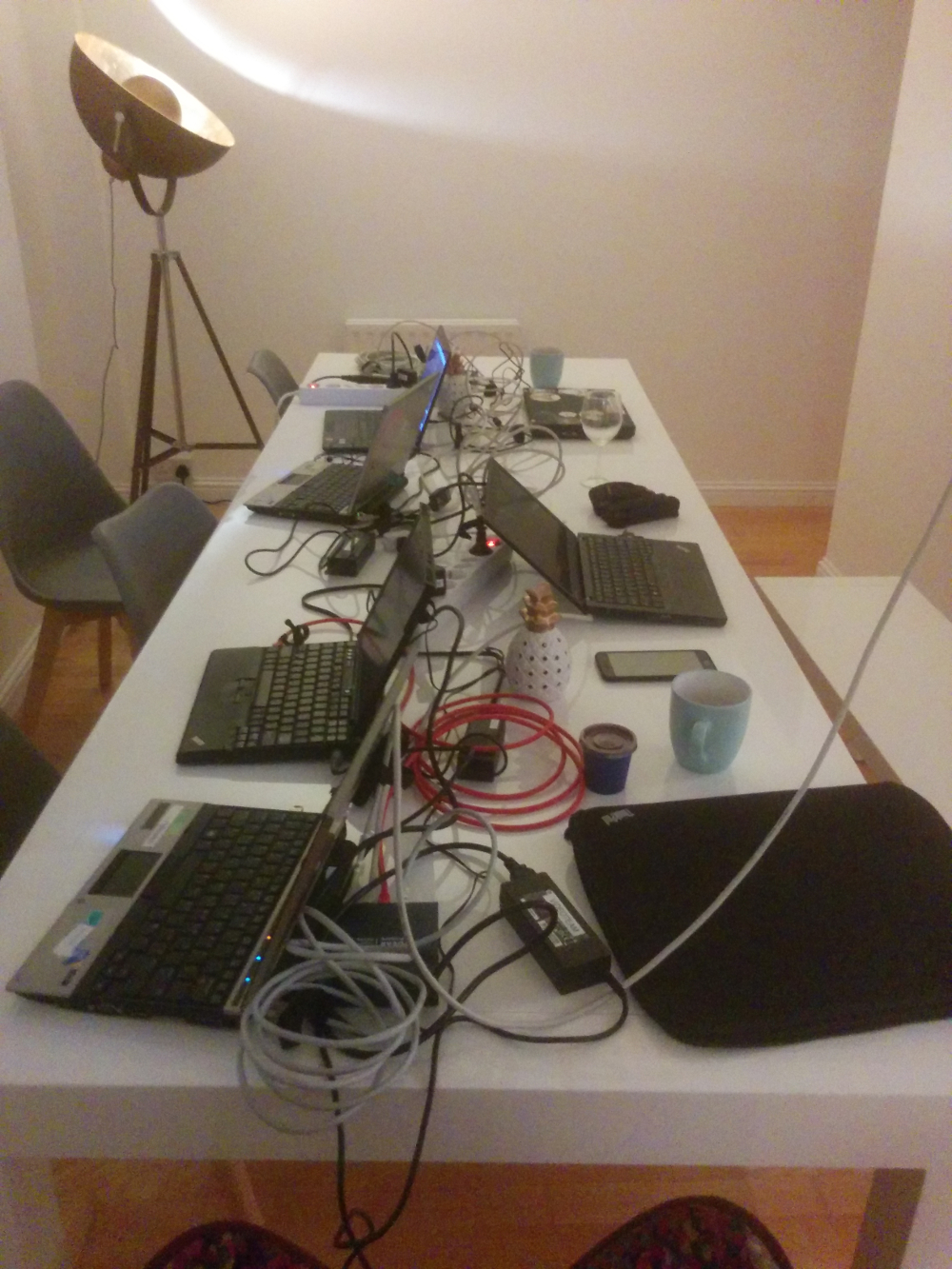 Here's what the team did today:
tumbleweed
Stefano started the day by hacking away on our video archive. We eventually want
to upload all our videos to YouTube to give them exposure, but sadly our archive
metadata is in a pretty poor shape.
With the script tumbleweed wrote, we can scrape the archive for matches against
the old DebConf's pentabarf XML we have.
tumbleweed also helped Ivo with the ansible PXE setup he's working on. Some
recent contributions from a collaborator implemented new features (like a nice
menu to choose from) but also came with a few annoying bugs.
ivodd
Ivo continued working on the PXE setup today. He also tried to break our ansible
setup by using fresh installs with different user cases (locales, interfaces,
etc.), with some success.
The reason he and Stefano are working so hard on the PXE boot is that we had a
discussion about the future of our USB install method. The general consensus on
this was although we would not remove it, we would not actively maintain it
anymore.
PXE is less trouble for multiple machines. For single machines or if you don't
control the DHCP server, using ansible manually on a fresh Debian install will
be the recommended way.
olasd
After a very long drive, olasd arrived late in the evening with all our gear.
Hurray! We were thus able to set up some test boxes and start wiring the airbnb
properly. Tomorrow will certainly be more productive with all this stuff at our
disposition.
pollo
Today I mainly worked on setting up our documentation website. After some
debate, we decided that
Here's what the team did today:
tumbleweed
Stefano started the day by hacking away on our video archive. We eventually want
to upload all our videos to YouTube to give them exposure, but sadly our archive
metadata is in a pretty poor shape.
With the script tumbleweed wrote, we can scrape the archive for matches against
the old DebConf's pentabarf XML we have.
tumbleweed also helped Ivo with the ansible PXE setup he's working on. Some
recent contributions from a collaborator implemented new features (like a nice
menu to choose from) but also came with a few annoying bugs.
ivodd
Ivo continued working on the PXE setup today. He also tried to break our ansible
setup by using fresh installs with different user cases (locales, interfaces,
etc.), with some success.
The reason he and Stefano are working so hard on the PXE boot is that we had a
discussion about the future of our USB install method. The general consensus on
this was although we would not remove it, we would not actively maintain it
anymore.
PXE is less trouble for multiple machines. For single machines or if you don't
control the DHCP server, using ansible manually on a fresh Debian install will
be the recommended way.
olasd
After a very long drive, olasd arrived late in the evening with all our gear.
Hurray! We were thus able to set up some test boxes and start wiring the airbnb
properly. Tomorrow will certainly be more productive with all this stuff at our
disposition.
pollo
Today I mainly worked on setting up our documentation website. After some
debate, we decided that 
 Following up on
 It finally happened
On the 6th of April 2017, I finally took the plunge and
It finally happened
On the 6th of April 2017, I finally took the plunge and 

 Like
Like  Narabu is a new intraframe video codec. You probably want to read
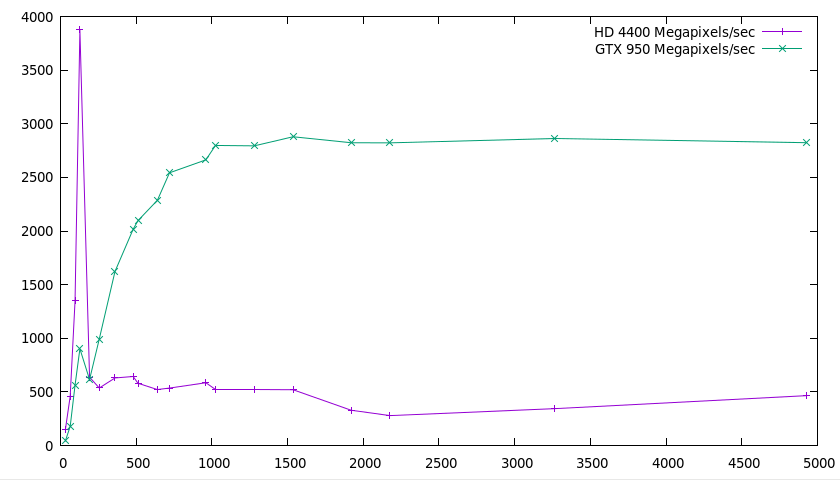 I'm not going to comment much beyond two observations:
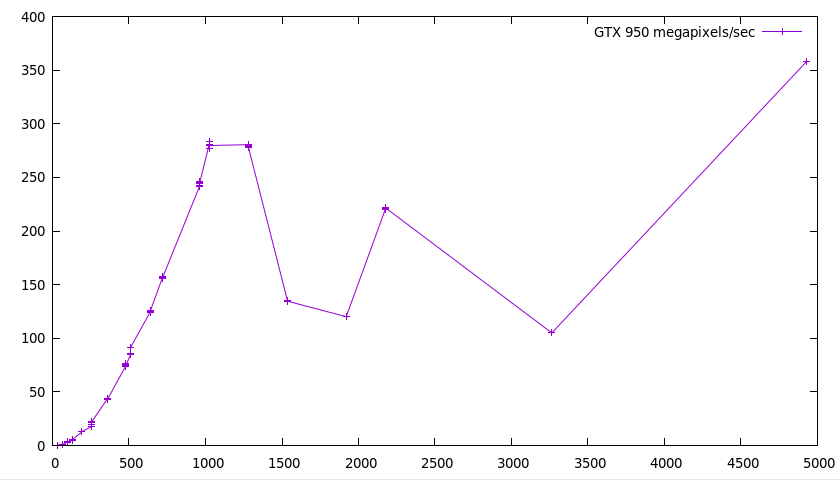 This is interesting. I have few explanations. Probably more benchmarking and
profiling would be needed to make sense of any of it. In fact, it's so
strange that I would suspect a bug, but it does indeed seem to create a
valid bitstream that is decoded by the decoder.
Do note, however, that seemingly even on the smallest resolutions, there's a
1.7 ms base cost (you can't see it on the picture, but you'd see it in an
unnormalized graph). I don't have a very good explanation for this either
(even though there are some costs that are dependent on the alphabet size
instead of the number of pixels), but figuring it out would probably be a
great start for getting the performance up.
So that concludes the series, on a cliffhanger. :-) Even though it's not in a
situation where you can just take it and put it into something useful, I hope
it was an interesting introduction to the GPU! And in the meantime, I've
released version 1.6.3 of
This is interesting. I have few explanations. Probably more benchmarking and
profiling would be needed to make sense of any of it. In fact, it's so
strange that I would suspect a bug, but it does indeed seem to create a
valid bitstream that is decoded by the decoder.
Do note, however, that seemingly even on the smallest resolutions, there's a
1.7 ms base cost (you can't see it on the picture, but you'd see it in an
unnormalized graph). I don't have a very good explanation for this either
(even though there are some costs that are dependent on the alphabet size
instead of the number of pixels), but figuring it out would probably be a
great start for getting the performance up.
So that concludes the series, on a cliffhanger. :-) Even though it's not in a
situation where you can just take it and put it into something useful, I hope
it was an interesting introduction to the GPU! And in the meantime, I've
released version 1.6.3 of  A unit is a part of your program you can test in isolation. You write
unit tests to test all aspects of it that you care about. If all your
unit tests pass, you should know that your unit works well.
Integration tests are for testing that when your various well-tested,
high quality units are combined, integrated, they work together.
Integration tests test the integration, not the individual units.
You could think of building a car. Your units are the ball bearings,
axles, wheels, brakes, etc. Your unit tests for the ball bearings
might test, for example, that they can handle a billion rotations, at
various temperatures, etc. Your integration test would assume the ball
bearings work, and should instead test that the ball bearings are
installed in the right way so that the car, as whole, can run a
kilometers, and accelerate and brake every kilometer, uses only so
much fuel, produces only so much pollution, and doesn't kill
passengers in case of a crash.
A unit is a part of your program you can test in isolation. You write
unit tests to test all aspects of it that you care about. If all your
unit tests pass, you should know that your unit works well.
Integration tests are for testing that when your various well-tested,
high quality units are combined, integrated, they work together.
Integration tests test the integration, not the individual units.
You could think of building a car. Your units are the ball bearings,
axles, wheels, brakes, etc. Your unit tests for the ball bearings
might test, for example, that they can handle a billion rotations, at
various temperatures, etc. Your integration test would assume the ball
bearings work, and should instead test that the ball bearings are
installed in the right way so that the car, as whole, can run a
kilometers, and accelerate and brake every kilometer, uses only so
much fuel, produces only so much pollution, and doesn't kill
passengers in case of a crash.
 Context menus are useful to exhibit additional functionality. For my
  My first try, taken from searches on the web, was to add the context menu via the
  That s it, the context menus are now correctly adapted to the displayed content. If there is a simpler way, please let me know.
 The tenth (!!) annual annual