Search Results: "xam"

17 March 2016

Julian Andres Klode: Clarifications and updates on APT + SHA1

The APT 1.2.7 release is out now. Despite of what I wrote earlier, we now print warnings for Release files signed with signatures using SHA1 as the digest algorithm. This involved extending the protocol APT uses to communicate with the methods a bit, by adding a new 104 Warning message type.
W: gpgv:/var/lib/apt/lists/apt.example.com_debian_dists_sid_InRelease: The repository is insufficiently signed by key
1234567890ABCDEF0123456789ABCDEF01234567 (weak digest)
Also note that SHA1 support is not dropped, we merely do not consider it trustworthy. This means that it feels like SHA1 support is dropped, because sources without SHA2 won t work; but the SHA1 signatures will still be used in addition to the SHA2 ones, so there s no point removing them (same for MD5Sum fields). We also fixed some small bugs!
Filed under: Debian, Ubuntu

16 March 2016

Enrico Zini: Postprocessing files saved by vim

Processing vim buffers through an external program on save, is a technique that is probably in use, and that I have not found documented anywhere, so here we go. Skip to the details for the entertaining example. I wanted to integrate egt with TaskWarrior so that every time I am editing an egt project file in vim, if I write a line in a certain way then a new taskwarrior task is created. Also, I have never written a vim plugin, and I don't want to dive into another rabbit hole just yet. Lynoure brought to my attention that taskwiki processes things when the file is saved, so I thought that I can probably get a long way by piping the file from vim into egt and reading it back before saving. I created a new egt annotate command that reads a project file, tweaks it, and then prints it out; I opened a project file in vim; I typed :%!egt annotate %:p --stdin and saw that it could be done. I find the result quite fun: I type 15 March: 18:00-21:00 in a log in egt, save the file, and it becomes 15 March: 18:00-21:00 3h. I do something in TaskWarrior, save the file in egt, and the lines that are TaskWarrior tasks update with the new task states. Details Here's a step by step example of how to hook into vim in this way. First thing, create a filter script that processes text files in some way. Let's call this /usr/local/bin/pyvimshell:
#!/usr/bin/python3
import sys
import subprocess
for line in sys.stdin:
    print(line.rstrip(), file=sys.stdout)
line = line.strip()
if line == "$":
    pass
elif line.startswith("$"):
    out = subprocess.check_output(["sh", "-c", line[1:].strip()], universal_newlines=True)
    sys.stdout.write(out)
    if not out.endswith("\n"):
        sys.stdout.write("\n")
    print("$ ", file=sys.stdout)
Then let's create a new filetype in ~/.vim/filetype.vim for our special magic text files:
if exists("did_load_filetypes")
  finish
endif
augroup filetypedetect
  au! BufNewFile,BufRead *.term setf SillyShell
augroup END
If you create a file example.term, open it in vim and type :set ft it should say SillyShell. Finally, the hook in ~/.vim/after/ftplugin/SillyShell.vim:
function! SillyShellRun()
    :%!/home/enrico/dev/egt/pyvimshell
    :$
endfunction
autocmd BufWritePre,FileWritePre <buffer> :silent call SillyShellRun()
Now you can create a file example.term, open it in vim, type $ ls, save it, and suddenly you have a terminal with infinite scrollback. For egt, I actually want to preserve my cursor position across saves, and egt also needs to know the path to the project file, so here is the egt version of the hook:
function! EgtAnnotate()
    let l:cur_pos = getpos(".")
    :%!egt annotate --stdin %:p
    call setpos(".", l:cur_pos)
endfunction
autocmd BufWritePre,FileWritePre <buffer> :silent call EgtAnnotate()
I find this adorably dangerous. Have fun.

Dirk Eddelbuettel: Rblpapi 0.3.3

A new release of Rblpapi is now on CRAN. It provides a direct interface between R and the Bloomberg Terminal via the C++ API provided by Bloomberg Labs (but note that a valid Bloomberg license and installation is required). This marks the fourth release since the package first appeared on CRAN last year. Thanks to multiple contributors, it packs a number of changes (including two new functions bsrch() and fieldInfo()), numerous internal as well as build improvements, additional documentation and last but not least use of unit testing (provided a Bloomberg connection is available, ie not at CRAN or on Travis CI). See the NEWS.Rd extract for more details:
Changes in Rblpapi version 0.3.3 (2016-03-14)
  • configure adds a missing method="libcurl" options (PR #109 by Martin Bel).
  • New function bsrch() adds basic search functionality (PR #111 by Morgan Williams fixing ticket #82).
  • The licensing status of the Rblpapi source package was clarified (PR #119).
  • The bds() help page now shows an example using an overrides argument (PR #121).
  • A new function fieldInfo was added, and field information is used in bdh and bdp (PRs #122, #123, #125, and #127).
  • The bdp function now checks the order (PR #126).
  • Unit testing was added (PRs #129 and #131).
  • Data retrieval is now smarter about the types returned from Bloomberg (PR #132 and #133; and #141 and #142).
  • The bdh and bds functions now support an option verbose (PRs #138).
Courtesy of CRANberries, there is also a diffstat report for the this release. As always, more detailed information is on the Rblpapi page. Questions, comments etc should go to the issue tickets system at the GitHub repo.

This post by Dirk Eddelbuettel originated on his Thinking inside the box blog. Please report excessive re-aggregation in third-party for-profit settings.

15 March 2016

Petter Reinholdtsen: Making battery measurements a little easier in Debian

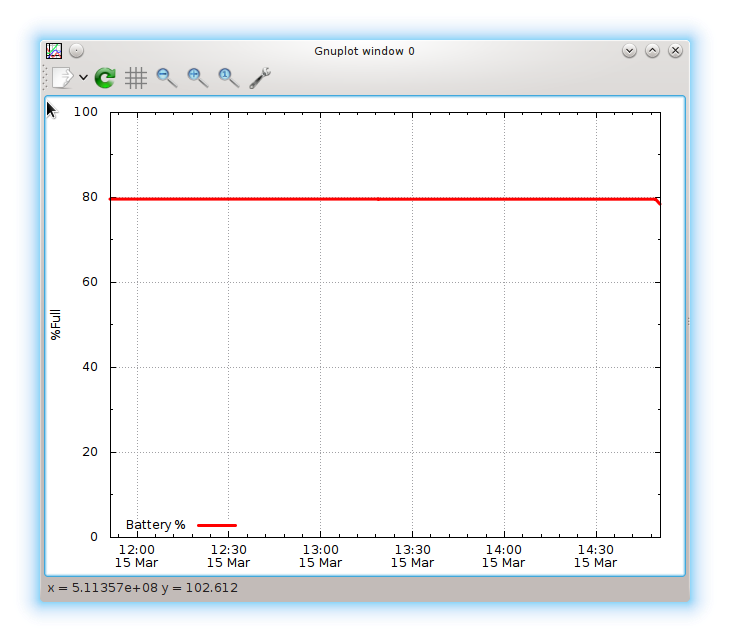
Back in September, I blogged about the system I wrote to collect statistics about my laptop battery, and how it showed the decay and death of this battery (now replaced). I created a simple deb package to handle the collection and graphing, but did not want to upload it to Debian as there were already a battery-stats package in Debian that should do the same thing, and I did not see a point of uploading a competing package when battery-stats could be fixed instead. I reported a few bugs about its non-function, and hoped someone would step in and fix it. But no-one did. I got tired of waiting a few days ago, and took matters in my own hands. The end result is that I am now the new upstream developer of battery stats (available from github) and part of the team maintaining battery-stats in Debian, and the package in Debian unstable is finally able to collect battery status using the /sys/class/power_supply/ information provided by the Linux kernel. If you install the battery-stats package from unstable now, you will be able to get a graph of the current battery fill level, to get some idea about the status of the battery. The source package build and work just fine in Debian testing and stable (and probably oldstable too, but I have not tested). The default graph you get for that system look like this:

My plans for the future is to merge my old scripts into the battery-stats package, as my old scripts collected a lot more details about the battery. The scripts are merged into the upstream battery-stats git repository already, but I am not convinced they work yet, as I changed a lot of paths along the way. Will have to test a bit more before I make a new release. I will also consider changing the file format slightly, as I suspect the way I combine several values into one field might make it impossible to know the type of the value when using it for processing and graphing. If you would like I would like to keep an close eye on your laptop battery, check out the battery-stats package in Debian and on github. I would love some help to improve the system further.

13 March 2016

Ingo Juergensmann: Letsencrypt: challenging challenges solved

A few weeks ago I was wondering in Letsencrypt: challenging challenges about how to setup Letsencrypt when a domain is spread across several virtual machines (VM). One of the possible solutions would be to consolidate everything on one single VM, which is nothing I would like to do. The second option would need to generate the Letsencrypt certs on the webserver and copy over the certs to the appropriate VM on a regular basis or event driven. The third option is to use a network share - and this is what I'm using right now. So, my setup is as following after I solved the GlusterFS issue with rpcbind binding to all interfaces, although it has been configured to only listen to certain interfaces (solution was: simply remove all NFS related stuff): On Dom0 (or the host machine) I run GlusterFS as a server on a small 1 GB LVM as part of a replicate with the VM that will do the actual Letsencrypt work:
Volume Name: le
Type: Replicate
Status: Started
Number of Bricks: 1 x 2 = 2
Transport-type: tcp
Bricks:
Brick1: 192.168.x.254:/srv/gfs/le
Brick2: 192.168.x.1:/srv/gfs/le
This is to ensure that on reboot of the machine every other VM using Letsencrypt certs can mount the GlusterFS share, because the host machine will be there for sure whereas the other VM generating the certs with the letsencrypt.sh script might still be booting. And when the GlusterFS share is missing services will not start on the other VMs because of the missing certs, of course. So, the replica on the virtualization host (Dom0) is only acting as some kind of always-being-available network share, because, well, the other VM will not always be there... for example during a kernel update when a reboot is required. The same setup is on my mailserver, acting as the second GlusterFS brick of that replica drive. The mailserver hosts the bind9 nameserver as well and I might do something that new domains with Letsencrypt certs get added to my DNSSEC setup as well. Of course, when the letsencrypt.sh script creates or updates the certs, it needs the certs being mounted in that configured location, so I needed to add a line to /etc/fstab:
192.168.x.254:/le /etc/letsencrypt.sh/certs glusterfs noexec,nodev,_netdev 0 0
Basically the same needs to be done on the other VMs where you want to use the certs as well, but you may want to mount the share as read-only there. The next step was a little more tricky. When letsencrypt.sh generates new certs, Letsencrypt will contact the webserver for that domain to respond to the ACME challenge. This requires that on each VM you want to use letsencrypt you have to run a webserver. Well, actually at least that there is somewhere a webserver that can answer these requests for that specific domain... Now, the setup of the webserver (Apache in my case) is like this: I'm using the Apache macro module to make it more easy, so I generated two small configs in /etc/apache/conf-available and enabled them bei a2enconf: letsencrypt-proxy.conf to do some setup for proxying the ACME challenges to a common website called acme.example.org. And then letsencrypt-sslredir.conf to setup SSL redirection when everything is in place and the domain can be switched over to HTTPS-only. letsencrypt-proxy.conf:
<Macro le_proxy>
ProxyRequests Off
<Proxy *>
Order deny,allow
Allow from all
</Proxy>
ProxyPass /.well-known/acme-challenge/ http://acme.windfluechter.net/
ProxyPassReverse / http://% HTTP_HOST /.well-known/acme-challenge/
</Macro>
letsencrypt-sslredir.conf:
<Macro le_sslredir>
RewriteEngine on
RewriteCond % HTTPS !=on
RewriteRule . https://% HTTP_HOST % REQUEST_URI [L]
</Macro>
So, after all the setup of a virtual host for Apache looks like this:
<Macro example.org>
(lots of setup stuff)
</Macro>
<VirtualHost 31.172.31.x:443 [2a01:a700:4629:x::1]:443>
Header always set Strict-Transport-Security "max-age=31556926; includeSubDomains"
SSLEngine on
# letsencrypt certs:
SSLCertificateFile /etc/letsencrypt.sh/certs/example.org/fullchain.pem
SSLCertificateKeyFile /etc/letsencrypt.sh/certs/example.org/privkey.pem
SSLHonorCipherOrder On
Use example.org
Use le_proxy
</VirtualHost>
<VirtualHost 31.172.31.x:80 [2a01:a700:4629:x::1]:80>
Use example.org
Use le_proxy
Use le_sslredir
</VirtualHost>
le_sslredir is only needed when you are sure that you want all traffic being redirected to HTTPS. For example when your blog is listed on planet.debian.org or other Planets you might want to omit this from your HTTP config because bug #813313 is not yet solved. In the end, when creating a new Letsencrypt cert, you need to add the le_proxy macro to your website, add the domain to letsencrypt.sh config in /etc/letsencrypt.sh/domains.txt and then the scripts will request a new cert from Letsencrypt, handling the ACME challenge stuff via the URL redirection in le_proxy being redirected to your acme.exmaple.org site and finally writes your new cert to the GlusterFS share. From that share you can then use the new cert on all needed VMs, be it your mailserver, webserver or XMPP/SIP server VMs. At least this works for me.
Kategorie:

12 March 2016

Daniel Pocock: Google Summer of Code opportunities for ham radio and SDR

I've started preparing some ideas for Google Summer of Code projects I'd be willing to help mentor this year and one of them is for ham radio, with a focus on software defined radio (SDR). Can you help? If you can help as a co-mentor or simply help refer students for this project please get in touch with me. Ander the terms of the program students are paid a $US 5,500 stipend by Google and source code is fully published under a genuine free software license . Details about the project and how students can apply Students applying for this project are invited to submit two applications, one under the GNU Radio project and another under the Debian Project. The aim of this project is to make ready-to-run solutions for ham radio enthusiasts. The typical use case is a ham who has a spare computer in his shack, he should be able to boot the computer from DVD or USB stick using the Debian Ham Radio Live Blend or the GNU Radio Live SDR and have a functional transceiver within a few minutes. A student may not be able to do everything required for this project in one summer. We are looking for a student who can make any incremental improvement to bring us closer to this goal. Here are some of the tasks that may be involved:
  • survey the existing GNU Radio samples for ham radio, many are listed on the HamRadio page of the GNU Radio wiki.
  • design user interface improvements for the samples to make them more intuitive to new users and traditional radio operators. Consider how they can interact with Hardware such as a VFO tuning knob, PTT microphone switch and even a morse key.
  • look through the other packages in the Debian Ham Radio metapackage list and consider how they could interact with GNU Radio. In particular, we are interested in the use of message bus solutions, such as ZeroMQ or D-Bus - for example, GNU Radio could send alerts on the bus when incoming signals exceed the squelch threshold. GNU Radio could also receive events over a message bus, for example, patching GPredict to send Doppler shift information.
  • developing and packaging libraries needed to process digital voice transmissions
  • look at how one or more of the samples can be deployed as a Debian package so users can just install the package and have a working radio
Prerequisites The following experience is highly desirable:
  • ham radio license
  • GNU/Linux skills (Debian or Ubuntu or another distribution like Fedora)
  • use of version control systems (Git)
  • C++ or Python or both
Mentor(s)
  • Daniel Pocock (VK3TQR/M0GLR/HB9FZT)
Application process To apply
  • please introduce yourself on both the GNU Radio mailing list and the Debian Hams mailing list
  • Fill in the formal application for both GNU Radio and Debian
  • Pick some items from the list above or feel free to suggest another piece of work relevant to this theme. Give us a detailed, week-by-week plan for completing the task over the summer.
  • find at least one other member of the GNU Radio or Debian community who is willing to be a co-mentor on the project. Please try communicating with us over IRC or email and give us examples of your existing work on Github or elsewhere.

11 March 2016

Rapha&#235;l Hertzog: Freexian s report about Debian Long Term Support, February 2016

A Debian LTS logoLike each month, here comes a report about the work of paid contributors to Debian LTS. Individual reports In February, 112.50 work hours have been dispatched among 11 paid contributors. Their reports are available: Evolution of the situation The number of sponsored hours continued to decrease a little bit. It s not worrisome yet but we should try to get back to a positive slope if we want to be able to do an outstanding job for wheezy LTS. On the positive side, TOSHIBA renewed their platinum sponsorship for another 6 months at least and we have some contacts for new sponsors, though they are far from being concluded yet. We are now in transition between squeeze LTS and wheezy LTS. The paid contributors are helping the security team by fixing packages that were fixed in squeeze already but that are still outstanding in wheezy. They are also taking generic measures to prepare wheezy LTS (for example to ensure all packages work with OpenJDK 7.x since support for 6.x will be dropped in the LTS period). Thanks to our sponsors New sponsors are in bold (none this month).

No comment Liked this article? Click here. My blog is Flattr-enabled.

10 March 2016

Antoine Beaupr : Trying out Keybase

I was privileged enough to get access to the alpha preview of Keybase.io. Last year, the project raised 11M$ in venture capital and they seem to be attacking the hard problems, so it is a serious project, worth considering for any cryptography hacker like me. This was obviously discussed elsewhere previously but since Keybase has evolved a bit since then, I figured it would be worth adding my grain of salt.

The elite alpha problem My first problem with Keybase was of course that I wasn't in the elite club of invited people. Somehow, I finally got in but the problem remains for the everyone else. In my case, it was the Keybase filesystem announcement that brought my attention back to the project, although I have yet to test that itself - yet another invite-only problem (need to email chris@keybase.io to get access, I guess). Still, 10GB of storage might be interesting for some people, but considering the number of hurdles or "friction", as they say, that needs to be jumped over to get access, I am not sure how much traction this will get for now. The project has been in alpha for a while now (more than a year) with no announced public beta just yet, which is way slower than similarly challenging projects with less capital. Let's encrypt, as a comparison, was publicly announced in 2014 and by the end of 2015, the public beta was opened.

Private key leakage My second major concern is that Keybase does worrisome things to private key material. If you tell it to import your regular GPG keys, it will copy them into the keybase keyring, which is already a problem: now you have two places where you store sensitive secrets. But worse, Keybase offers you to upload your private key material on the server, without clearly and explicitely exposing the potential risks that means to the user. The key, presumably, is encrypted (at least that is what I can parse from the Keybase privacy policy). Yet this is still a concern: a determined attacker (e.g. the government or another malicious entity) could force Keybase to give up the encrypted private key material and install sniffers that would reveal the passphrase that would allow decryption and impersonation of the related identity. That is a huge deal. This is what caused Hushmail's demise in 2007: they had similar promises about how they had a "secure" email (in this case) service based on OpenPGP, but since they key was stored on the server, they only had to serve a malicious applet to victims and were able to give cleartext data to the US government (12 CDs!) under a Mutual Legal Assistance Treaty with Canada. In Keybase, When I generate a new key, it asks me if I want to upload the key to their servers, and "Yes" is chosen as a default, so it is clearly a policy that is encouraged. This is presumably to enable browser-based crypto, yet this could be done by storing keys within the browser, not on the server. The mere possibility that the client can meddle with secret key material in such a way is a problem. Even if uploading secret keys to the server is optional, the fact that it is a possibility widens the attack surface on the client significantly. GPG has been working on isolating private key operations to a different process (gpg-agent) or smart cards, SSH has privilege seperation. The idea of uploading secret key material online is so beyond current practices that it should bring the project to a full stop already. My private key material is pretty sensitive. I am a Debian developer: if someone gets access to that key, they can upload arbitrary code for thousands of packages, affecting thousands if not millions of users. That is a huge deal, and I am not ready to give that power to an arbitrary third party that I know little about.

Privacy policy issues Furthermore, the Keybase privacy policy explicitely states that "Logs of this information may persist for an indefinite period", which include, and I quote:
  • Your computer s IP address
  • Your preferences and settings (time zone, language, privacy preferences, application preferences, etc.)
  • The URL of the site that referred you to the Service
  • The buttons and controls you clicked on (if any) within the Service
  • How long you used the Service and which parts and features you used
  • Session times and lengths
For a company working to improve user's privacy, this is a pretty bad policy. It exposes Keybase users to undue surveillance, on a lot of private information that is not necessary to operate the service. I haven't actually read the remaining of the policy, as I was already scared as hell and figure I would just log off for now and try not to add any extra personal information in that already growing pile. Let's mention, while I'm here, that the keybase commandline client has this odd way of working that it forks a daemon in the background all the time, even to run just keybase status. One has to wonder if this thing is included in the surveillance data above, which would make the keybase client an amazing surveillance device in itself. To stop all this, you need:
keybase logout
keybase ctl stop
Not quite obvious...

Usability issues Which brings me to a series of usability issues I have found while working with Keybase. Having worked on usability myself in the Monkeysphere project, I understand how hard those problems can be. But right now, the fact is that keybase is only a commandline client, with some web-based sugar sprinkled on top. I recognize the huge efforts that have been done to make the user experience (UX) as easy as possible through the commandline, but this is definitely not "grand public" material yet. Even as a OpenPGP hacker, Keybase can get confusing. Since it has its own separate keyring from GPG, things that used to be obvious before are suddenly new things to learn. For example, I originally generated a key for anarcat@debian.org in keybase, thinking it would be a separate thing from my current GPG identity. Well, that ended up creating a new key in my GPG keyring, duplicating my existing identity, with no way for me to tell this was a Keybase copy. This could have ended up on the keyservers and confuse anyone looking for my PGP key.

Revoking keys So I revoked that key, which, in itself, is not such an obvious process either. I first had to "drop" the key:
keybase pgp drop '010143572d4e438f457a7447c9758804cc7be44c1ee2b7915c3904567d0a3fb5cf590a'
To find that magic number, I had to go on the website and click through the PGP key to end up on the revoke link which told me which magic string to put. The web UI was telling me I could use keybase status to get that information, but I couldn't find that in the output here:
$ keybase status
Username:      anarcat
Logged in:     no
Device:
    name:      angela
    ID:        070f6a13f2a66afbb463f49dadfd4518
    status:    active
Keybase keys:  unlocked
Session:       anarcat [salt only]
KBFS:
    status:    not running
    version:
    log:       /home/anarcat/.cache/keybase/keybase.kbfs.log
Service:
    status:    running
    version:   1.0.14-1
    log:       /home/anarcat/.cache/keybase/keybase.service.log
Platform Information:
    OS:        linux
    Runtime:   go1.5.3
    Arch:      amd64
Client:
    version:   1.0.14-1
Desktop app:
    status:    not running
    version:
    log:       /home/anarcat/.cache/keybase/Keybase.app.log
Config path:   /home/anarcat/.config/keybase/config.json
Default user:  anarcat
Other users:
command-line client:
    keybase status [pid: 14562, version: 1.0.14-1]
So keybase drop "deletes" the key from the keybase client (and presumably the server). One problem here is that we have three different verbs to mean the same thing: in some places, the website says "deleted" (in the web graph), the commandline client uses "drop" and everyone else using PGP in the world uses "revoke". So what is it? Also note that just dropping that key is not enough to eradicate that key: you still need to generate and import a revocation certificate on GPG's side as well, for that key. This makes sense, because you may have imported that key and you may not want to destroy it when you remove it from keybase, but there could be a little better guessing and UX here as well.

Password usage Then another problem is that, when you signup on the commandline, it asks you to choose a passphrase. It's not clear at all from the UI what that passphrase is for. Is it to protect the private key material? To login the website? Both? It turns out it is actually to login to the website and the Keybase API. It could also be the key to the private key material, but I haven't quite figured that out yet. Similarly, the "paper devices" are a little confusing to me as well. The registration process is fairly insistent that I need to write a series of secret words down on a piece of paper and put it my wallet. This is based on the idea that you can use that key to recover your account and setup new devices. However, it is not made clear at all how those credentials should be protected or used. What if I lose my wallet? What do I do then? Is it okay if i write it on the back of my laptop instead? I know it sounds like stupid questions to crypto geek, but it's definitely stuff people will do, and education, at all levels, is necessary here.

The existing web of trust Finally, I found it surprisingly counter-intuitive to sign keys with keybase. I was assuming the whole point of the thing was to expand the web of trust, but it seems their mission lies somewhere else: there is no facility to sign keys directly in keybase. You sign statements on various social sites (Github, Twitter, Reddit...) but doing traditional key exchanges seems to be off limits. My obvious use case was to sign my existing key material with my newly generated anarcat@keybase.io key, so that keybase would become another way of verifying my identity. Well, this is not possible with keybase directly - you still have to go through the regular:
gpg --sign-key DEADBEEF
Which is really unfortunate, because some craaaazy people like me insist on doing in person, actually secure key exchanges sometimes, and the tools to do this right now (mainly gpg, caff and monkeysign) really need a lot of love and help. Keybase could have helped a lot in pushing those initiatives forward and bring new ways of doing secure key exchanges, instead of only lowering the standards on cryptographic identity.

Usual proprietary startup rant I can't help but finish by noticing that the whole basic problem with Keybase is more fundamental than a few usability issues, which can all be fixed fairly easily. Keybase.IO is a web-based service that is entirely proprietary. The client is freely downloadable and free software - but the server side is not. This makes us rely on a central point of failure and the goodwill of those operators to not only keep the service running (for free?) indefinitely, but to protect us against all attackers, state-run or otherwise. This is definitely against basic free software principles and the open architecture of the internet federation, well embodied in the Franklin street statement. Online services should be decentralized and open like the OpenPGP keyservers have always been, period.

Conclusion I am curious to see where Keybase brings us, as a community. So far, I am concerned about centralization and devaluation of the web of trust as cryptographic system. I do not believe that trusting multiple corporate social networking sites bring much benefit to our security, although it does improve usability significantly and is certainly better than TOFU, so that part of the project is definitely interesting, especially since it allows leveraging classical internet protocols like DNS and HTTPS. Key exchange is a critical problem that still hasn't properly been resolved in the cryptographic community. Most efforts at building communication tools (say like Signal or Telegram) mostly ignore the problem and expect people to read up strings of numbers or rely on synchronous communications (see the Axolotl rachet for Signal's take on it). Keybase's attempts at fixing this are great, but needs much more work to actually resolve the PKI issues in a significant way. More fundamentally, the practice of storing keys on the servers should just stop: it is a definite no go for me, and a classic crypto mistake that has bitten way too many people. In my mind, it discredits the whole project. The point of OpenPGP is end to end encryption across devices: storing the keys on a server breaks that apart, and doesn't improve much on the existing HTTPS security systems already in place on the web. It is especially a problem given the new waves of attacks on cryptography from western governments, from the UK to California... Until those issues are resolved, I can't get myself to recommend Keybase to anyone just yet.

Post-scriptum Note to Keybase developers: I have considered filing issues regarding the above, but unfortunately, I was unable to filter through the gigantic github issues list for duplicates, and didn't have time to file detailed reports for everything. I apologize for bypassing those usual conventions. If you want to try out Keybase to make your own opinion, I do have 4 invites I can give away, but I will do so only if you need to test specific issues. Otherwise, I note that there is a Request For Package for the Debian package to become official, that Debian developers (or Keybase developers!) may be interested in completing.

9 March 2016

Michal &#268;iha&#345;: Nostalgy

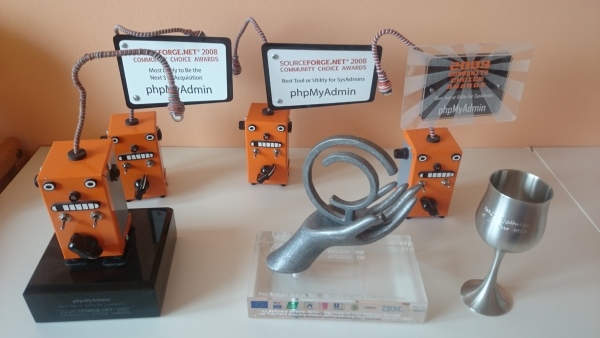
Sometimes you don't realize how does the time go until something reminds it to you. For me it when I've received some stuff from Marc, long term admin of the phpMyAdmin project. He had decided to leave some time ago and yesterday I've just received stuff he had collected at home including several awards. phpMyAdmin awards Looking at the awards is sometimes funny. For example in 2008 we got "Most Likely to Be the Next $1B Acquisition" :-). Anyway this all reminded me that I've been around phpMyAdmin for almost 15 years now (my first contribution seems to be from 14th May 2001) and that's quite some time.

Filed under: English phpMyAdmin 1 comments

Guido G nther: Contatacs, CardDAV, Calypso and the N900

As a follow up to calendar synchronisation with calypso, syncevolution and the N900 running maemo I finally added contacts to the mix: on the phone When you have the calendar sync already running it's as simple as: First start ssh on the n900 to ease typing:
apt-get install dropbear
echo /bin/sh >> /etc/shells
cd /etc/dropbear && ./run
SSH into the phone and configure contacts synchronization:
cat <<EOF > ~/.config/syncevolution/webdav/sources/addressbook/config.ini
backend = CardDAV
database = https://carddav.example.com/contacts/username
EOF
And perform the initial sync:
syncevolution --sync slow webdav addressbook
From there on you can sync contacts and calendars in one go with:
syncevoluton webdav
Looking at the calypso logs on the server it seems that syncevoluton does not always generate an FN entry and so the card gets skipped. This doesn't harm the overall sync, but I need to have a look how to fix this. on the laptop In order to use the contacts im mutt there's pycarddav packaged in Debian. This is basically following upstreams documentation.
sudo apt-get install pycarddav
mkdir -p ~/.config/pycard
cp /usr/share/doc/pycarddav/examples/pycard.conf.sample ~/.config/pycard/pycard.conf
# Edit file as needed
cat ~/.config/pycard/pycard.conf
[Account username]
user: username
resource: https://carddav.example.com/
write_support = YesPleaseIDoHaveABackupOfMyData
[query]
where: vcard
[sqlite]
[default]
debug: False
To use the entries in mutt add the just extend your .muttrc:
cat <<EOF >>~/.muttrc
set query_command="pc_query -m %s"
macro index,pager B "<pipe-message>pycard-import<enter>" "add sender address to pycardsyncer"
EOF
This allows you to query contacts using Q and add new conatcs with CTRL-B in mutt's index and pager. Calypso Changes We recently moved calypso's git repository to alioth and started to merge several out of tree patches. More will happen during this years Debian Groupware Meeting including a new upload to Debian.

8 March 2016

Dirk Eddelbuettel: gtrendsR 1.3.3

A very nice new update to the gtrendsR package by Philippe and myself is now avilable via CRAN. I had only blogged about the initial 1.3.0 release, and we have added a whole slew of new features and fixes. Philippe rewrote a lot of the parsing to make it more robust to different encodings, and to add other features. So in no particular order, we can now sub-group by regions more finely, withstand various misfeatures in returned data sets, generally do better on connections, and more --- and also allow for intra-day, daily and weekly queries! That last part is pretty fun. Here is the code I ran last Saturday to look at the query for Donald Drumpf, a name brought to us via a beautiful John Oliver episode worth watching which ran about nine days ago. So last Saturday, when we were still within the seven day window, I ran
library(gtrendsR)
dp <- gtrends("Donald Drumpf", res="7d")
plot(dp) + ggplot2::ggtitle("The Drumpf") + ggplot2::theme(legend.position="none")
which resulted in the following chart Donald Drump query which highlights another nice feature: the ggplot2 object created by the plotting function is returned, so we can locally modify and tune it. Here we set a title and suppress the default legend. As I had not blogged about the interim bug-fix releases 1.3.1 and 1.3.2, here is the set of NEWS entries for the last three releases:

gtrendsR 1.3.3
  • A ggplot2 object can now be returned for further customization. plot(gtrends("NHL")) + ggtitle("NHL trend") + theme(legend.position="none")
  • Support for hourly and daily data (#67). For example, it is now possible to have hourly data for the last seven days with gtrends("nhl", geo = "CA", res = "7d"). Use ?gtrends for more information about the time resolution supported by the package.
  • Support for categorties (#46). Ex.: gtrends("NHL", geo = "US", cat = "0-20") will search only in the sport category.
  • Some countries (ex: Hong Kong) were missing from the list (#69).
  • Various typos and documentation work.

gtrendsR 1.3.2
  • Added support for sub-countries (#25). Ex.: gtrends("NHL", geo = "CA-QC") will return trends data for Qu bec province in Canada. The list of supported sub-countries can be obtained via data(countries).
  • Data parsing should work for any data returned by Google Trends (i.e. countries independent).
  • Better support for queries using keywords in different languages (#50, #57). Ex.: gtrends(" ", geo = "TW")
  • Now able to specify up to five countries (#53) via gtrends("NHL", geo = c("CA", "US"))
  • Fixing issue #51 allowing UK-based queries via geo = "GB"

gtrendsR 1.3.1
  • Fixing issue #34 where connection verification was not done properly.
  • Now able to use more latin character in query. For example: gtrends("montr al").
  • Can now deal with data returned other than in English language.

Courtesy of CRANberries, there is also a diffstat report for the this release. As always, more detailed information is on the gtrendsR repo where questions, comments etc should go via the issue tickets system.

This post by Dirk Eddelbuettel originated on his Thinking inside the box blog. Please report excessive re-aggregation in third-party for-profit settings.

Edited 2016-03-08: Corrected code snipped and one grammar instance

Michal &#268;iha&#345;: Weekly phpMyAdmin contributions 2016-W09

The last week was mostly spent on bugfixing and cleanup after security releases. Hopefully the amount of security reports will go down now. Most of the bug fixes were in the SQL parser which influences quite a lot of parts of phpMyAdmin. It is responsible for splitting queries on import, generating queries for export or linting the queries as users type them. Additionally Debian packages were also updated, for both unstable and testing and for Ubuntu PPA. Handled issues:

Filed under: Debian English phpMyAdmin 0 comments

5 March 2016

Dirk Eddelbuettel: gunsales 0.1.1

A minor update to our recently released gunsales package is now on the CRAN network. The changes are completely internal and deal with automagic discovery of the X-13ARIMA-SEATS program via our associated x13binary package. More precisely, we let Solaris and the Windows old-release builds fail more gracefully. Others, ie current Windows builds, OS X and Linux, are entirely unaffected in their functionality. For simplicity, all examples now have an \dontrun wrapper, and the vignette makes its code conditional on the platform it is running on. Courtesy of CRANberries, there is also a diffstat report for the most recent release.

This post by Dirk Eddelbuettel originated on his Thinking inside the box blog. Please report excessive re-aggregation in third-party for-profit settings.

4 March 2016

Daniel Pocock: Machine Learning for Hackers with Debian and Ubuntu

Data Science and Machine Learning are hot topics at the moment. Many people are considering how to extend their skills into these areas and many solutions have appeared, including full online degrees, free online courses combined with free software and for those who prefer hard copy, a staggering choice of books on the topic. One of those books is O'Reilly's Machine Learning for Hackers by John Myles White and Drew Conway. The book uses R to demonstrate a series of techniques for analysis and prediction. The book offers a great opportunity to simultaneously get an introduction to basic machine learning techniques and also an introduction to the increasingly popular R platform. On page 11 they list all the major R packages needed to run their examples (available on Github). I had a look over this list to see how many could be installed on a Debian system using apt-get and found that about half of them were already present. Five of them and one dependency, however, were not already available so I've whipped up packages for them and they are now in jessie-backports for all users of the current stable release. If you are following the exercises in this book, you can get all the software you need with one convenient command:
$ sudo apt-get install -t jessie-backports \
  r-cran-ggplot2 r-cran-lme4 r-cran-rcurl \
  r-cran-reshape r-cran-xml r-cran-arm \
  r-cran-glmnet r-cran-igraph r-cran-lubridate \
  r-cran-rjsonio r-cran-tm
Thanks to all those who already packaged other parts of R and backported the relevant packages. Note that the RJSONIO package's authors have not provided a valid free software license so it is in non-free. It is there to support people using the book but I would encourage people to use RJSON for any new projects as it does have a valid license.

Enrico Zini: Praise of component reuse

I farm bits and pieces out to the guys who are much more brilliant than I am. I say, "build me a laser", this. "Design me a molecular analyzer", that. They do, and I just stick 'em together. (Seth Brundle, "The Fly")
When I decided to try and turn siterefactor into staticsite, I decided that I would go ahead only for as long as it could be done with minimal work, writing code in the most straightforward way on top of existing and stable components. I am pleased by how far that went. Python-Markdown It works fast enough, already comes with extensions for most of what I needed, and can be extended in several ways. One of the extension methods is a hook for manipulating the ElementTree of the rendered document before serializing it to HTML, which made it really easy to go and process internal links in all <a href= and <img src= attributes. To tell an internal link from an external link I just use the standard python urlparse and see if the link has a scheme or a netloc component. If it does not, and if it has a path, then it is an internal link. This also means that I do not need to invent new Markdown syntax for internal references, avoiding the need for remembering things like [text]( < relref "blog/post.md" > ) or [text]( filename /blog/post.md). In staticsite, it's just [text](/blog/post.md) or [text](post.md) if the post is nearby. This feels nicely clean to me: if I wanted to implement fancy markdown features, I could do it as Python-Markdown extensions and submit them upstream. If I wanted to implement fancy interlinking features, I could do it with a special url scheme in links. For example, it would be straigtforward to implement a ssite: url scheme that expanded the url with elements from staticsite's settings using a call to python's string.format (ssite: SETTING_NAME /bar maybe?), except I do not currently see any use cases for extending internal linking from what it is now. Jinja2 Jina2 is a template engine that I already knew, it is widely used, powerful and pleasant to use, both on the templating side and on the API's side. It is not HTML specific, so I can also use it to generate Atom, RSS2, "dynamic" site content, and even new site Markdown pages. Implementing RSS and Atom feeds was just a matter of writing and testing these Jinja2 macros and then reusing them anywhere. toml, yaml, json No need to implement my own front matter parsing. Also, reusing the same syntax as Hugo allows me to just link to its documentation. python-slugify I found python-slugify so I did not bother writing a slug-generating function. As a side effect, now things works better than I would even have thought to implement, including transliteration of non-ascii characters:
$ ./ssite new example --noedit --title "Cos  parl  Enrico"
/enrico-dev/staticsite/example/site/blog/2016/cosi-parlo-enrico.md
(I just filed an RFP) python-livereload Implementing ssite serve which monitors the file system and autoreloads when content changes and renders everything on the fly, took about an hour. Most of that hour went into implementing rendering pages on demand. Then I discovered that it autoreloads even when I edit staticsite's source code. Then I discovered that it communicates with the browser and even automatically triggers a page refresh. I can keep vim on half my screen and a browser in the other half, and I get live preview for free every time I save, without ever leaving the editor. Bootstrap I already use Bootstrap at work, so creating the default theme templates with it took about 10 minutes. This morning I tried looking at my website using my mobile phone, and I pleasantly saw it automatically turning into a working mobile version of itself. Pygments Python-Markdown uses Pygments for syntax highlighting, and it can be themed just by loading a .css. So, without me really doing anything, even staticsite's syntax highligthing is themable, and there's even a nice page with a list of themes to choose from. Everything else... Command line parsing? Straight argparse. Logging? python's logging support. Copying static resource files? shutil.copy2. Parsing dates? dateutil.parser. Timing execution? time.perf_counter. Timezone handling? pytz. Building the command to run an editor? string.format. Matching site pages? fnmatch.translate. ...and then some. If I ever decide to implement incremental rendering, how do I implement tracking which source files have changed? Well, for example, how about just asking git?

3 March 2016

Simon Richter: Why sysvinit?

As most distributions have switched to systemd as default "init", some people have asked why we actually keep sysvinit around, as it's old and crusty, and systemd can do so much more. My answer is: systemd and sysvinit solve entirely different problems, and neither can ever replace the other fully. The big argument in favour of systemd is integration: when you keep everything in one process, it is easy to make sure that components talk to each other. That is nice, but kind of misses the point: integration could be done via IPC as well, and systemd uses a lot of it to separate privileges anyway. The tighter integration comes from something else: the configuration format. Where sysvinit uses a lot of shell scripts ("imperative" format), systemd uses explicit keywords ("descriptive" format), and this is the important design decision here: descriptive formats cannot do anything unanticipated, neither good nor bad. This is important for UI programmers: if there is a button that says "if I close the lid switch, suspend the laptop", then this needs to be connected to functionality that behaves this way, and this connection needs to work in both directions, so the user will find the active setting there when opening the dialog. So, we need to limit ourselves to a closed set of choices, so the UI people can prepare translations. This is the design tradeoff systemd makes: better integration in exchange for less flexibility. Of course, it is simple to allow "custom" actions everywhere, but that starts to break the "well-integrated" behaviour. There is an old blog post from Joey Hess about how to implement a simple alarm clock, using systemd, and this shows both how powerful and how limited the system is. On one hand, the single line WakeSystem=true takes care of the entire dependency chain attached to making sure the system is actually on -- when the system is going to suspend mode, some program needs to determine that there are scheduled jobs that should wake up the system, determined which of these is the next one, program the wakeup time into the hardware and only then allow the suspend to continue. On the other hand, the descriptive framework already breaks down in this simple example, because the default behaviour of the system is to go to sleep if the lid switch is closed, and the easiest way to fix this is to tell systemd to ignore the lid switch while the program is running. The IPC permissions disallow scheduled user jobs from setting this, so a "custom" action is taken that sets up the "ignore the lid switch" policy, changes to an unprivileged user, and runs the actual job. So, it is possible to get back flexibility, but this is traded for integration: while the job is running, any functionality that the "suspend laptop when the lid is closed" button had, is broken. For something simple as a switch on a personal laptop that breaks if the user configures something that is non-standard, that is acceptable. However, the keywords in the service unit files, the timer files, etc. are also part of a descriptive framework, and the services using them expect that the things they promise are kept by the framework, so there is a limit to how many exceptions you can grant. SystemV init really comes from the other direction here. Nothing is promised to init scripts but a vague notion that they will be run with sufficient privileges. There is no dependency tracking that ensures that certain services will always start before others, just priorities. You can add a dependency system like insserv if you like and make sure that all the requirements for it to work (i.e. services declaring their dependencies) are given, and there is a safe fallback of not parallelizing so we can always play it safe. Because there is so little promised to scripts, writing them becomes a bit tedious -- all of them have a large case statement where they parse the command line, all of them need to reimplement dropping privileges and finding the PID of a running process. There are lots of helpers for the more common things, like the LSB standard functions for colorful and matching console output, and Debian's start-stop-daemon for privilege and PID file handling, but in the end it remains each script's responsibility. Systemd will never be able to provide the same flexibility to admins while at the same time keeping the promises made in the descriptive language, and sysvinit will never reach the same amount of easy integration. I think it is fairly safe to predict both of these things, and I'd even go a step further: if any one of them tried, I'd ask the project managers what they were thinking. The only way to keep systems as complex as these running is to limit the scope of the project. With systemd, the complexity is kept in the internals, and it is important for manageability that all possible interactions are well-defined. That is a huge issue when writing adventure games, where you need to define interaction rules for each player action in combination with each object, and each pair of objects that can be combined with the "Use" action. Where adventure games would default to "This doesn't seem to work." or "I cannot use this.", this would not be a helpful error message when we're trying to boot, so we really need to cut down on actions and object types here. Sysvinit, on the other hand, is both more extreme in limiting the scope to very few actions (restart, wait, once) and only one object type (process that can be started and may occasionally terminate) in the main program, and a lot more open in what scripts outside the main program are allowed to do. The prime example for this is that the majority of configuration takes place outside the inittab even -- a script is responsible for the interface that services are registered by dropping init scripts into specific directories, and scripts can also create additional interfaces, but none of this is intrinsic to the init system itself. Which system is the right choice for your system is just that: your choice. You would choose a starting point, and customize what is necessary for your computer to do what you want it to do. Here's the thing: most users will be entirely happy with fully uncustomized systemd. It will suspend your laptop if you close the lid, and even give your download manager veto power. I fully support Debian's decision to use systemd as the default init for new installs, because it makes sense to use the default that is good for the vast majority of users. However, my opening statement still stands: systemd can never support all use cases, because it is constrained by its design. Trying to change that would turn it into an unmaintainable mess, and the authors are right in rejecting this. There are use cases that define the project, and use cases that are out of scope. This is what we need sysvinit for: the bits that the systemd project managers rightfully reject, but that are someone's use case. Telling these users to get lost would be extremely bad style for the "universal operating system." For example, if someone needs a service that asks a database server for a list of virtual machines to start, runs each in its private network namespace that is named after replacing part of the virtual machine name with the last two octets of the host machine's IP address, then binds a virtual Ethernet device into the network namespace and sets up a NAT rule that allows devices to talk to the public Internet and a firewall rule to stop VMs from talking to each other. Such a beast would live outside of systemd's world view. You can easily start it, but systemd would not know how to monitor it (as long as there is some process still running, is that a good sign), not know how to shut down one instance, not know how to map processes to instances and so on. SystemV init has the advantage here that none of these things are defined by the system, and as long as my init script has some code to handle "status", I can easily check up on my processes with the same interface I'd use for everything else. This requires me to have more knowledge of how the init system works, that is true, however I'd also venture that the learning curve for sysvinit is shallower. If you know shell scripting, you can understand what init scripts do, without memorizing special rules that govern how certain keywords interact, and keeping track of changes to these rules as the feature set is expanded. That said, I'm looking at becoming the new maintainer of the sysvinit package so we can continue to ship it and give our users a choice, but I'd definitely need help, as I only have a few systems left that won't run properly with systemd because of its nasty habit to keep lots of code in memory where sysvinit would unload it after use (by letting the shell process end), and these don't make good test systems. The overall plan is to set up a CI system that Ideally, I'd like to reach a state where we can actually ensure that the default configuration is somewhat similar regardless of which init system we use, and that it is possible to install with either (this is a nasty regression in jessie: bootstrapping a foreign-architecture system broke). This will take time, and step one is probably looking at bugs first -- I'm grateful for any help I can get here, primarily I'd like to hear about regressions via bug reports. tl;dr: as a distribution, we need both systemd and sysvinit. If you suggest that systemd can replace sysvinit, I will probably understand that you think that the systemd maintainers don't know project management. I'm reluctantly looking at becoming the official maintainer because I think it is important to keep around.

Arturo Borrero Gonz lez: Current status of iptables & nftables in Debian


I would like to give an overview of what is the current status of iptables & nftables in Debian.
Some information contained in this article is not new, this post is about what happened to iptables & nftables in the last 3 months, focusing on the integration with Debian.
versionsBy the time of this article, upstream versions are:
Debian testing (stretch) contains updated versions of all of them:
  • iptables 1.6.0-2
  • nftables 0.5+snapshot20151106-1
  • libnftnl 1.0.5+snapshot20151106-1
The snapshot versioning thing in nftables and libnftnl is the result of packaging a few commits ahead of last upstream release to workaround some nasty bugs.
the iptables-compat stuff
The iptables 1.6.0 release contains a new set of tools called 'compat'. These tools uses the same syntax of iptables,ip6tables,arptables,ebtables but internally read/write data to the nf_tables kernel subsystem.
You can find these compat tools in a binary pacakge: 'iptables-nftables-compat'.

That is one of the approaches available to help admins migrate from iptables to nftables.

Other approach is textual translations. In this case, the admin calls the translation utility using iptables syntax to get the same rule written in native nft syntax.
However, this approach is a work in progress and Debian lacks of this functionality right now . I hope next upstream release of iptables will include some of this.
iptables maintenance
In Debian bug #805018, I contacted former maintainer Laurence J. Lane about the 1.6.0 upstream release and the need to pay attention to such a big release.
Unfortunately, it seems Laurence got his key expired, and he can no longer maintain any package until a new key is in place. Hope we can see him back soon.

So, I took over the maintenance of iptables, with the help of Ana Guerrero, which has been reviewing my work and sponsoring the uploads. Thanks Ana!

As part of this new maintenance, I cleaned up a bit the iptables bug tracker. I closed some very old bugs (see for example #295567 and #118187) which are no longer useful.
ready for stable?
With the stretch freeze coming by the end of 2016, I want to be sure that the main Netfilter packages are in shape for a Debian stable release.
I won't let packages migrate to stable if there is no extensive testing. It should be clear that packages are ready for Debian stable for me to let them go stable.

My concerns regarding nftables & iptables in stable are different actually:
  • iptables: piece of software too widespread. I don't want to break any system with the 1.6.0 migration.
  • nftables: the 0.5 release is old already with regards to the upstream development.
So please, let me know any feedback you may have :-)

Tianon Gravi: Docker on VULTR + IPv6

I ve been using VULTR for a little while now and have been generally very pleased (especially with the very recent facelift the management portal received). I don t want to waste too much time talking about it, but the killer feature for me (over some of their competitors like DigitalOcean) is that I can provide a raw ISO and provision my VM directly using it as I would any local VM (which also means that once my VM is up and working, I get to use the OS s standard kernel, which is especially important for using Debian Unstable well). Anyhow, already too much about that let s get to the cool stuff. Getting right down to the beef, let s assume I ve got a VULTR instance already created, my OS is already installed and working, I ve enabled IPv6 within VULTR, ensured that my VM is able to ping6 google.com (to verify at least basic routability), and have Docker version 1.10.2 installed. For the sake of demonstration, we ll assume that VULTR has assigned my IPv6 as follows: (available under the VM details via Settings > IPv6) (The astute reader may recognize RFC3849 here. ) The relevant documentation which helped me get to the working state outlined below is in the IPv6 with Docker section. The first step I took was creating a systemd drop-in file so that I could modify the daemon startup parameters (to include --ipv6 and --fixed-cidr-v6):
# /etc/systemd/system/docker.service.d/ipv6.conf
[Service]
ExecStart=
ExecStart=/usr/bin/docker daemon -H fd:// --ipv6 --fixed-cidr-v6 2001:db8::/80
I chose to use just /80 for Docker any other reasonable prefix (assuming it is routed to your host / host network) should also work; the documentation I linked above has an example using a /125, for example. With this half in place, I can systemctl daemon-reload and systemctl restart docker.service, and when I start a container it will be automatically assigned an IPv6 address from within that prefix. Excellent. An important caveat to note is that this will break discovery on our host due to Docker enabling forwarding for us, so (assuming your internet-facing interface is named ens3 for the sake of illustration; it might just as easily be eth0, eth1, enps3, lan0, wlan0, etc) I had to sysctl net.ipv6.conf.ens3.accept_ra=2, and I added it to /etc/sysctl.d/docker-ipv6.conf for good measure (so that I don t lose it after I reboot). The second half of our IPv6 to containers problem is routing. The nitty-gritty details of this are discussed in the Using NDP proxying section of the documentation, but the gist is that my containers have IPv6 addresses, but the outside world doesn t have a route that leads to them, and that we need to tell the kernel to respond to solicitations for our container s IPv6 addresses appropriately. The kernel has a mechanism for doing so (via ip -6 neigh ...), but it is limited to individual addresses and is thus not especially great for having a solution that works magically without further manual labor per-container. This is where ndppd (also packaged for Debian as ndppd) came in.
# /etc/ndppd.conf
proxy ens3  
	rule 2001:db8::/80  
	 
 
After getting this configuration in place and restarting ndppd (systemctl restart ndppd), magic happened. My containers could ping6 google.com, and my other IPv6 hosts could ping6 the IPv6 addresses of my individual containers! You ve probably noted that this configuration isn t exactly secure, since it means that each of my individual containers has a publicly routable IPv6 address, but for this specific use case, I m OK with that! Update (2015-03-09): thanks to for correcting my systemd drop-in file usage!

1 March 2016

Vincent Sanders: Hope is tomorrow's veneer over today's disappointment.

Recently I have been very hopeful about the 96boards Hikey SBC and as Evan Esar predicted I have therefore been very disappointed. I was given a Hikey after a Linaro connect event some time ago by another developer who could not get the system working usefully and this is the tale of what followed.
The Standard Design
This board design was presented as Linaro creating a standard for the 64bit Single Board Computer (SBC) market. So I had expected that a project with such lofty goals would have considered many factors and provided at least as good a solution as the existing 32bit boards.

The lamentable hubris of creating a completely new form factor unfortunately sets a pattern for the whole enterprise. Given the aim towards "makers" I would have accepted that the system would not be a ATX PC size motherboard, but mini/micro/nano and pico ITX have been available for several years.

If opting for a smaller "credit card" form factor why not use one of the common ones that have already been defined by systems such as the Raspberry Pi B+? Instead now every 96Board requires special cases and different expansion boards.

Not content with defining their own form factor the design also uses a 8-18V supply, this is the only SBC I own that is not fed from a 5V supply. I understand that a system might require more current than a micro USB connector can provide, but for example the Banana Pi manages with a DC barrel jack readily capable of delivering 25W which would seem more than enough

The new form factor forced the I/O connectors to be placed differently to other SBC, given the opportunity to concentrate all connectors on one edge (like ATX designs) and avoid the issues where two or three sides are used. The 96board design instead puts connectors on two edges removing any possible benefit this might have given.

The actual I/O connectors specified are rather strange. There is a mandate for HDMI removing the possibility of future display technology changes. The odd USB arrangement of two single sockets instead of a stacked seems to be an attempt to keep height down but the expansion headers and CPU heatsink mean this is largely moot.

The biggest issue though is mandating WIFI but not Ethernet (even as an option), everything else in the design I could logically understand but this makes no sense. It means the design is not useful for many applications without adding USB devices.

Expansion is presented as a 2mm pitch DIL socket for "low speed" signals and a high density connector for "high speed" signals. The positioning and arrangement of these connectors proffered an opportunity to improve upon previous SBC designs which was not taken. The use of 2mm pitch and low voltage signals instead of the more traditional 2.54mm pitch 3.3v signals means that most maker type applications will need adapting from the popular Raspberry Pi and Arduino style designs.

In summary the design appears to have been a Linaro project to favour one of their members which took a Hisilicon Android phone reference design and put it onto a board with no actual thought beyond getting it done. Then afterwards attempted to turn that into a specification, this has simply not worked as an approach.

My personal opinion is that this specification is fatally flawed and, is a direct cause of, the bizarre situation where the "consumer" specification exists alongside the "enterprise" edition which itself has an option of microATX form factor anyhow!
The ImplementationIf we ignore the specification appearing to be nothing more than a codification of the original HiKey design we can look at the HiKey as an implementation.

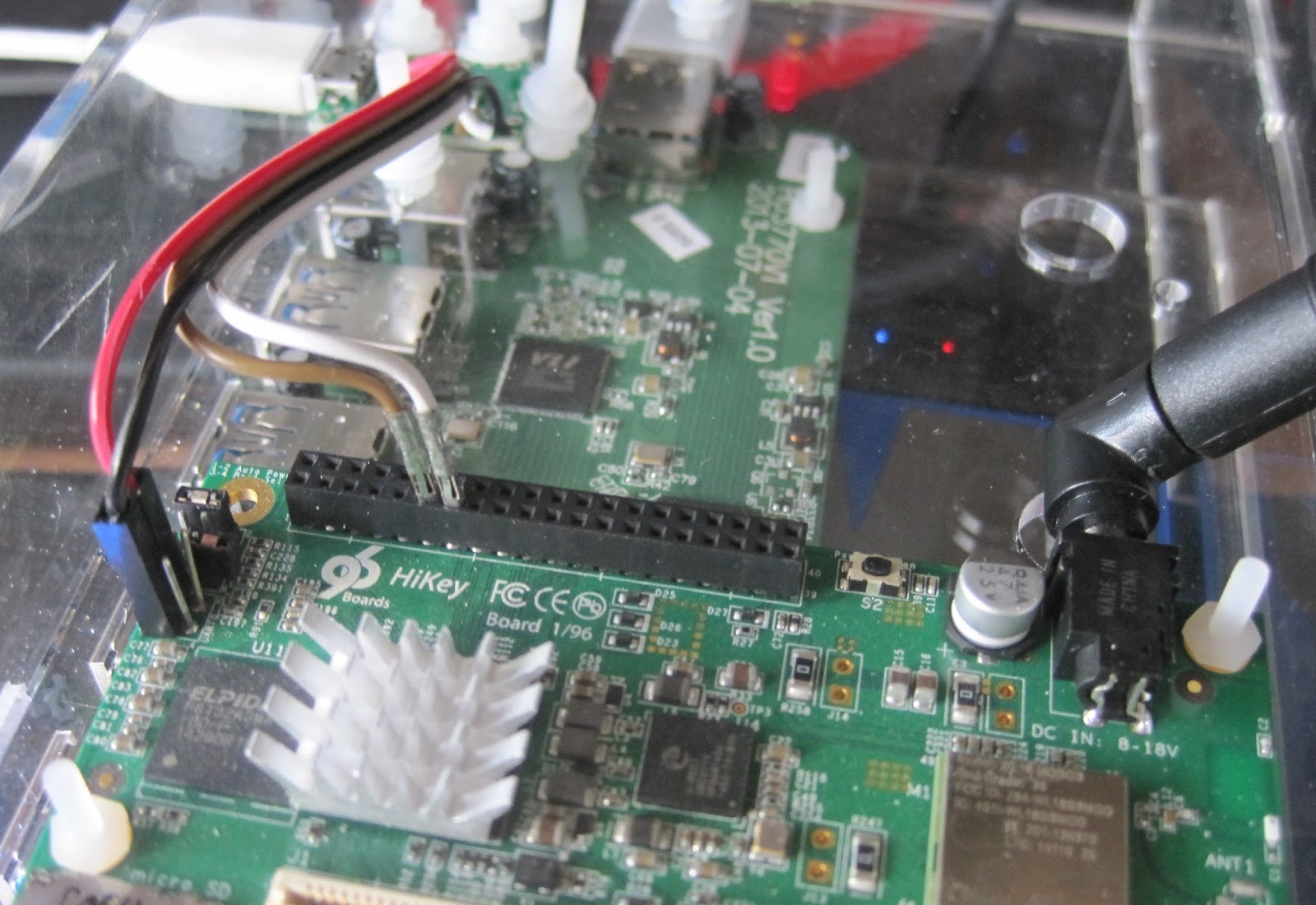
Initially the board required modifying to add headers to attach a USB to 1.8V LVTTL serial adaptor on the UART0 serial port. Once Andy Simpkins had made this change for me I was able to work through the instructions and attempt to install a bootloader and OS image.

The initial software was essentially HiSilicon vendor code using the Android fastboot system to configure booting. There was no source and the Ubuntu OS images were an obvious afterthought to the Android images. Just getting these images installed required a great deal of effort, repetition and debugging. It was such a dreadful experience this signalled the commencement one of the repeated hiatuses throughout this project, the allure of 64 bit ARM computing has its limits even for me.

When I returned to the project I attempted to use the system from the on-board eMMC but the pre-built binary only kernel and OS image were very limited. Building a replacement kernel , or even modules for the existing one proved fruitless and the system was dreadfully unstable.

I wanted to use the system as a builder for some Open Source projects but the system instability ruled this out. I considered attempting to use virtualisation which would also give better system isolation for builder systems. By using KVM running a modern host kernel and OS as a guest this would also avoid issues with the host systems limitations. At which point I discovered the system had no virtualisation enabled apparently because the bootloader lacked support.

In addition to these software issues there were hardware problems, despite forcing the use of USB for all additional connectivity the USB implementation was dreadful. For a start all USB peripherals have to run at the same speed! One cannot mix full (12Mbit) and high speed (480Mbit) devices which makes adding a USB Ethernet and SATA device challenging when you cannot use a keyboard.

And because I needed more challenges only one of the USB root hubs was functional. In effect this made the console serial port critical as it was the only reliable way to reconfigure the system without a keyboard or network link (and WIFI was not reliable either)
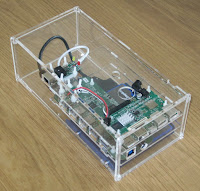
After another long pause in proceedings I decided that I should house all the components together and that perhaps being out on my bench might be the cause of some instability. I purchased a powered Amazon basics USB 2 hub, an Ethernet adaptor and a USB 2 SATA interface in the hope of accessing some larger mass storage.

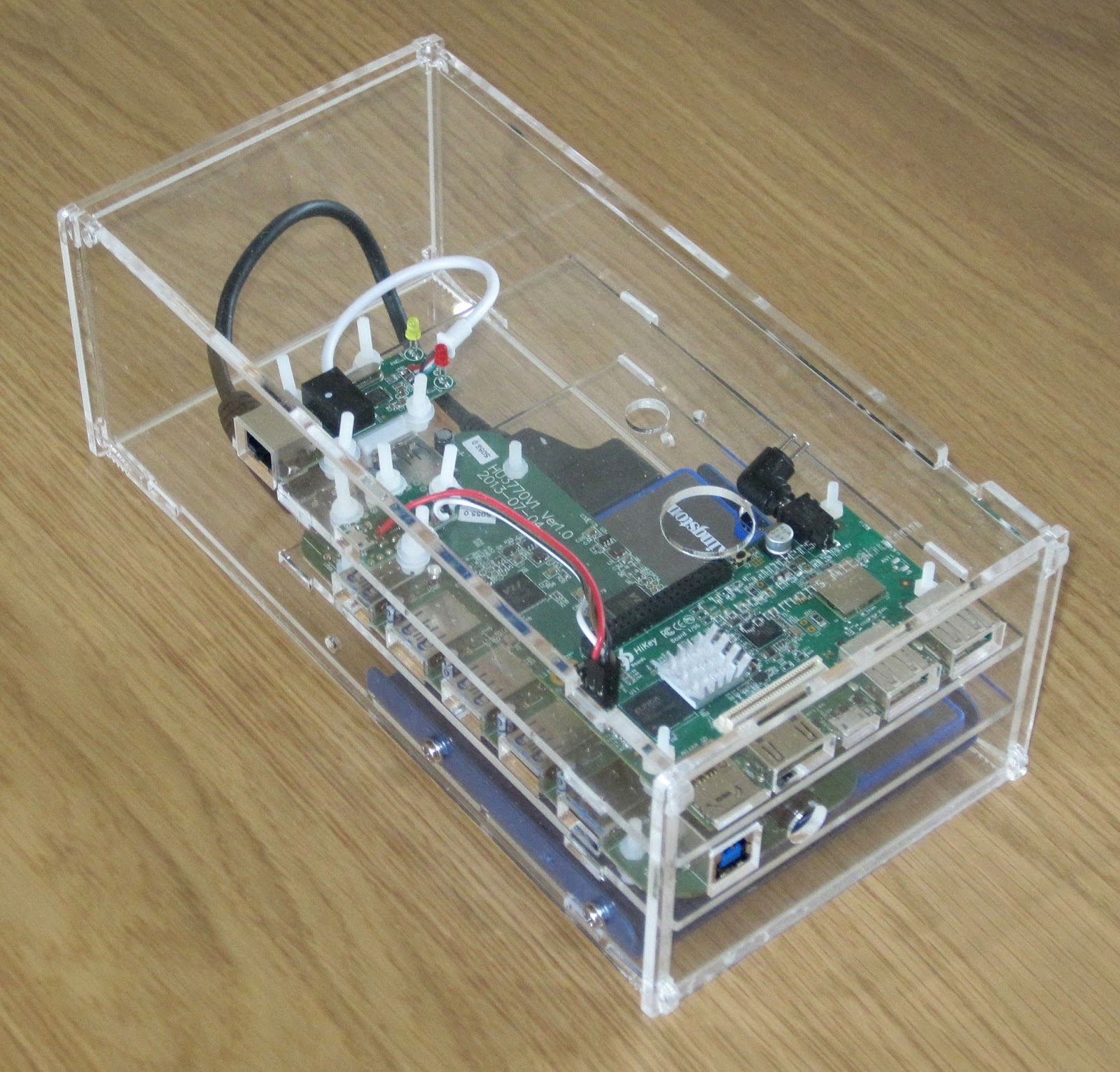
The USB hub power supply was 12V DC which matched the Hikey requirements so I worked out I could use a single 4A capable supply and run a 3.5inch SATA hard drive too. I designed a laser cut enclosure and mounted all the components. As it turned out I only had a 2.5inch hard drive handy so the enclosure is a little over size. If I were redoing this design I would attempt to make it fit in 1U of height and be mountable in a 19inch rack instead it is an 83mm high (under 2U) box.

A new software release had also become available which purported to use an UEFI bootloader after struggling to install this version unsuccessfully, made somewhat more problematic by the undocumented change from UART0 (unpopulated header) to UART3 on the low speed 2mm pitch header. The system seemed to start the kernel which panicked and hung either booting from eMMC or SD card. Once again the project went on hold after spending tens of hours trying to make progress.
Third time's a charmAs the year rolled to a close I once again was persuaded to look at the hikey, I followed the much improved instructions and installed the shiny new November software release which appears to have been made for the re-release of the Hikey through LeMaker. This time I obtained a Debian "jessie" system that booted from the eMMC.

Having a booted system meant I could finally try and use it. I had decided to try and use the system to host virtual machines used as builders within the NetSurf CI system.

The basic OS uses a mixture of normal Debian packages with some replacements from Linaro repositories. I would have prefered to see more use of Debain packages even if they were from the backports repositories but on the positive side it is good to see the use of Debian instead of Ubuntu.

The kernel is a heavily patched 3.18 built in a predominantly monolithic (without modules) manner with the usual exceptions such as the mali and wifi drivers (both of which appear to be binary blobs). The use of a non-mainline capable SoC means the standard generic distribution kernels cannot be used and unless Linaro choose to distribute a kernel with the feature built in it is necessary to compile your own from sources.

The default install has a linaro user which I renamed to my user and ensured all the ssh keys and passwords on the system were changed. This is an important step when using this pre-supplied images as often a booted system is identical to every other copy.

To access mass storage my only option was via USB, indeed to add any additional expansion that is the only choice. The first issue here is that the USB host support is compiled in so when the host ports are initialised it is not possible to select a speed other than 12MBit. The speed is changed to 480Mbit by using a user space application found in the users home directory (why this is not a tool provided by a package and held in sbin I do not know).

When the usb_speed tool is run there is a chance that the previously enumerated devices will be rescanned and what was /dev/sda has become /dev/sdb if this happens there is a high probability that the system must be rebooted to prevent random crashes due to the "zombie" device.

Because the speed change operation is unreliable it cannot be reliably placed in the boot sequence so this must be executed by hand on each boot to get access to the mass storage.

NetSurf project already uses a x86_64 virtual host system which runs an LLVM physical volume from which we allocate logical volumes for each VM. I initially hoped to do this with the hikey but as soon as I tried to use the logical volume with a VM the system locked up with nothing shown on console. I did not really try very hard to discover why and instead simply used files on disc for virtual drives which seemed to work.

To provide reliable network access I used a USB attached Ethernet device, this like the mass storage suffered from unreliable enumeration and for similar reasons could not be automated requiring manually using the serial console to start the system.

Once the system was started I needed to install the guest VM. I had hoped I might be able to install locally from Debian install media as I do for x86 using the libvirt tools. After a great deal of trial and error I finally was forced to abandon this approach when I discovered the Linaro kernel is lacking iso9660 support so installing from standard media was not possible.

Instead I used the instructions provided by Leif Lindholm to create a virtual machine image on my PC and copied the result across. These instructions are great except I used version 2.5 of Qemu instead of 2.2 which had no negative effect. I also installed the Debian backports for Jessie to get an up to date 4.3 kernel.

After copying the image to the Hikey I started it by hand from the command line as a four core virtual machine and was successfully able to log in. The guest would operate for up to a day before stopping with output such as

$
Message from syslogd@ciworker13 at Jan 29 07:45:28 ...
kernel:[68903.702501] BUG: soft lockup - CPU#0 stuck for 27s! [mv:24089]

Message from syslogd@ciworker13 at Jan 29 07:45:28 ...

kernel:[68976.958028] BUG: soft lockup - CPU#2 stuck for 74s! [swapper/2:0]

Message from syslogd@ciworker13 at Jan 29 07:47:39 ...
kernel:[69103.199724] BUG: soft lockup - CPU#3 stuck for 99s! [swapper/3:0]

Message from syslogd@ciworker13 at Jan 29 07:53:21 ...
kernel:[69140.321145] BUG: soft lockup - CPU#3 stuck for 30s! [rs:main Q:Reg:505]

Message from syslogd@ciworker13 at Jan 29 07:53:21 ...
kernel:[69192.880804] BUG: soft lockup - CPU#0 stuck for 21s! [jbd2/vda3-8:107]

Message from syslogd@ciworker13 at Jan 29 07:53:21 ...
kernel:[69444.805235] BUG: soft lockup - CPU#3 stuck for 22s! [swapper/3:0]

Message from syslogd@ciworker13 at Jan 29 07:55:21 ...
kernel:[69570.177600] BUG: soft lockup - CPU#1 stuck for 112s! [systemd:1]

Timeout, server 192.168.7.211 not responding.

After this output the host system would not respond and had to be power cycled never mind the guest!

Once I changed to single core operation the system would run for some time until the host suffered from the dreaded kernel OOM killer. I was at a loss as to why the oom killer was running as the VM was only allocated half the physical memory (512MB) allowing the host what I presumed to be an adequate amount.

By adding a 512MB swapfile the system was able to push the few hundred kilobytes it wanted to swap and the system was now stable! The swapfile of course has to be started by hand as the external storage is unreliable and unavailable at boot.

I converted the qemu command line to a libvirt config using the virsh tool
virsh domxml-from-native qemu-argv cmdln.args
The converted configuration required manual editing to get a working system but now I have a libvirt based VM guest I can control along with all my other VM using the virt-manager tool.

This system is now stable and has been in production use for a month at time of writing. The one guest VM is a single core 512MB aarch64 system which takes over 1100 seconds (19 minutes) to do what a Banana Pi 2 dual core 1GB memory 32bit native ARM system manages in 300 seconds.

It seems the single core limited memory system with USB SATA attached storage is very, very slow.

I briefly attempted to run the CI system job natively within the host system but within minutes it crashed hard and required a power cycle to retrieve, it had also broken the UEFI boot. I must thank Leif for walking me through recovering the system otherwise I would have needed to start over.
ConclusionsI must stress these conclusions and observations are my own and do not represent anyone else.

My main conclusions are:

This project has taken almost a year to get to the final state and has been one of the least enjoyable within that time. The only reason I have a running system at the end of it is sheer bloody mindedness because after spending hundreds of hours of my free time I was not prepared to see it all go to waste.

To be fair, the road I travelled is now much smoother and if the application is suited to having a mobile phone without a screen then the Hikey probably works as a solution. For me, however, the Hikey product with the current hardware and software limitations is not something I would recommend in preference to other options.

Enrico Zini: Static site generators

I decided to rethink the state of my personal site, and try out some of the new static site generators that are available now. To do that, I jotted down a series of things that I want in a static site generator, then wrote a tool to convert my ikiwiki site to other formats, and set out to evaluate things. As a benchmark I did a full rebuild of my site, which currently contains 1164 static files and 458 markdown pages. My requirements Free layout for my site My / is mostly a high-level index to the site contents. Blog posts are at /blog. My talk archive is organised like a separate blog at /talks. I want the freedom to create other sections of the site, each with its own rss feed, located wherever I want in the site hierarchy. Assets next to posts I occasionally blog just a photo with a little comment, and I would like the .md page with the comment to live next to the image in the file system. I did not even know that I had this as a requirement until I found static site generators that mandated a completely different directory structure for markdown contents and for static assets. Multiple RSS/Atom feeds I want at least one RSS/Atom feed per tag, because I use tags for marking which articles go to http://planet.debian.org. I also want RSS/Atom feeds for specific parts of the site, like the blog and talks. Arbitrary contents in /index.html I want total control over the contents of the main home page of the site. Quick preview while editing contents I do not like to wait several seconds for the site to be rebuilt at every review iteration of the pages I write. This makes me feel like the task of editing is harder than it should, and makes me lose motivation to post. Reasonable time for a full site rebuild I want to be able to run a full rebuild of the site in a reasonable time. I could define "reasonable" in this case as how long I can stare at the screen without getting bored, starting to do something else, and forgetting what it was that I was doing with the site. It is ok if a rebuild takes something like 10 or 30 seconds. It is not ok if it takes minutes. Code and dependency ecosystems that I can work with I can deal with Python and Go. I cannot deal with Ruby or JavaScript. I forgot all about Perl. Also, if it isn't in Debian it does not exist. Decent themes out of the box One of my hopes in switching to a more mainstream generator is to pick and choose themes and easily give my site a more modern look. Hugo Hugo is written in Go and is in Debian testing. Full rebuild time for my site is acceptable, and it can even parallelize:
  $ time hugo
  real      0m5.285s
  user      0m9.556s
  sys       0m1.052s
Free layout for my site was hard to get. I could replace /index.html by editing the template page for it, but then I did not find out how to create another similar index in an arbitrary place. Also, archetypes are applied only on the first path component of new posts, but I would like them instead to be matched on the last path component first, and failing that traveling up to the path until the top. This should be easy to fix by reorganizing the content a bit around here For example, a path for a new blog post of mine could be blog/2016/debian/ and I would like it to match the debian archetype first, and failing that the blog archetype. Assets next to posts almost work. Hugo automatically generates one feed per taxonomy element, and one feed per section. This would be currently sufficient for me, although I don't like the idea that sections map 1 to 1 to toplevel directories in the site structure. Hugo has a server that watches the file system and rerenders pages as they are modified, so the quick preview while editing works fine. About themes, it took me several tries to find a theme that would render navigation elements for both sections and tags, and most themes would render by pages with white components all around, and expect me to somehow dig in and tweak them. That frustrated me, because for quite a while I could not tell if I had misconfigured Hugo's taxonomies or if the theme was just somehow incomplete. Nikola Nikola is written in Python and is in Debian testing. Full rebuild time for my site is almost two orders of magnitude more than Hugo, and I am miffed to find the phrases "Nikola is fast." or "Fast building process" in its front page and package description:
  $ time nikola build
  real      3m31.667s
  user      3m4.016s
  sys       0m24.684s
Free layout could be achieved fiddling with the site configuration to tell it where to read sources. Assets next to post work after tweaking the configuration, but they require to write inconsistent links in the markdown source: https://github.com/getnikola/nikola/issues/2266 I have a hard time accepting that that, because I want to author content with consistent semantic interlinking, because I want to be able 10 years from now to parse it and convert it to something else if a new technology comes out. Nikola generates one RSS/Atom feed per tag just fine. I have not tried generating feeds for different sections of the site. Incremental generation inside its built in server works fine. Pelican Pelican is written in Python and is in Debian testing. Full rebuild time for my site is acceptable:
  $ time pelican -d
  real      0m18.207s
  user      0m16.680s
  sys       0m1.448s
By default, pelican seems to put generate a single flat directory of html files regardless of the directory hierarchy of the sources. To have free layout, pelican needs some convincing in the configuration:
  PATH_METADATA = r"(?P<relpath>.+)\.md"
  ARTICLE_SAVE_AS = " relpath /index.html"
but even if I do that, the urls that it generates still point to just slug /index.html and I have not trivially found a configuration option to fix that accordingly. I got quite uncomfortable at the idea of needing to configure content generation and linking to match, instead of having one automatically being in sync with the other. Having assets next to posts seems to be possible (also setting STATIC_PATHS = ["."]), but I do not recall making progress on this front. I did not manage to generate a feed for each tag out of the box, and probably there is some knob in the configuration for it. I gave up with Pelican as trying it out felt like a constant process of hacking the configuration from defaults that do not make any sense for me, withouth even knowing if a configuration exists that would do what I need Ikiwiki Ikiwiki is written in Perl and is in Debian. Although I am not anymore proficient with Perl, I was already using it, so it was worth considering. Full rebuild time feels a bit on the slow side but is still acceptable:
  $ time ikiwiki --setup site.setup
  real      0m37.356s
  user      0m34.488s
  sys       0m1.536s
In terms of free site structure, all feeds for all or part of the site, ikiwiki just excels. I even considered writing a python web server that monitors the file system and calls ikiwiki --refresh when anything changes, and calling it a day. However, when I tried to re-theme my website around a simple bootstrap boilerplate, I found that to be hard, as a some of the HTML structure is hardcoded in Perl (and it's also my fault) and there is only so much that can be done by tweaking the (rather unreadable) templates. siterefactor During all these experiments I had built siterefactor to generate contents for all those static site engines, and it was going through all the contents quite fast:
  $ time ./siterefactor src dst -t hugo
  real  0m1.222s
  user  0m0.904s
  sys   0m0.308s
So I wondered how slow it would become if, instead of making it write markdown, I made it write HTML via python markdown and Jinja2:
  $ time ./siterefactor ~/zz/ikiwiki/pub/ ~/zz/ikiwiki/web -t web
  real  0m6.739s
  user  0m5.952s
  sys   0m0.416s
I then started wondering how slower it would become if I implemented postprocessing of all local URLs generated by Markdown to make sure they are kept consistent even if the path of a generated page is different than the path of its source. Not much slower, really. I then added taxonomies. And arbitrary Jinja2 templates in the input, able to generate page lists and RSS/Atom feeds. And theming. And realised that reading all the sources and cross-linking them took 0.2 seconds, and the rest was generation time. And that after cross-linking, each page can be generated independently from all the others. staticsite So my site is now generated with staticsite:
  $ time ssite build
  real  0m6.833s
  user  0m5.804s
  sys   0m0.500s
It's comparable with Hugo, and on a single process.

Next.

Previous.