Search Results: "sf"

31 October 2014

Russell Coker: Links October 2014

The Verge has an interesting article about Tim Cook (Apple CEO) coming out [1]. Tim says if hearing that the CEO of Apple is gay can help someone struggling to come to terms with who he or she is, or bring comfort to anyone who feels alone, or inspire people to insist on their equality, then it s worth the trade-off with my own privacy . Graydon2 wrote an insightful article about the right-wing libertarian sock-puppets of silicon valley [2]. George Monbiot wrote an insightful article for The Guardian about the way that double-speak facilitates killing people [3]. He is correct that the media should hold government accountable for such use of language instead of perpetuating it. Anne Th riault wrote an insightful article for Vice about the presumption of innocence and sex crimes [4]. Dr Nerdlove wrote an interesting article about Gamergate as the extinction burst of gamer culture [5], we can only hope. Shweta Narayan wrote an insightful article about Category Structure and Oppression [6]. I can t summarise it because it s a complex concept, read the article. Some Debian users who don t like Systemd have started a Debian Fork project [7], which so far just has a web site and nothing else. I expect that they will never write any code. But it would be good if they did, they would learn about how an OS works and maybe they wouldn t disagree so much with the people who have experience in developing system software. A GamerGate terrorist in Utah forces Anita Sarkeesian to cancel a lecture [8]. I expect that the reaction will be different when (not if) an Islamic group tries to get a lecture cancelled in a similar manner. Model View Culture has an insightful article by Erika Lynn Abigail about Autistics in Silicon Valley [9]. Katie McDonough wrote an interesting article for Salon about Ed Champion and what to do about men who abuse women [10]. It s worth reading that while thinking about the FOSS community

Russell Coker: Samsung Galaxy Note 3

In June last year I bought a Samsung Galaxy Note 2 [1]. Generally I was very happy with that phone, one problem I had is that less than a year after purchasing it the Ingress menus burned into the screen [2]. 2 weeks ago I bought a new Galaxy Note 3. One of the reasons for getting it is the higher resolution screen, I never realised the benefits of a 1920*1080 screen on a phone until my wife got a Nexus 5 [3]. I had been idly considering a Galaxy Note 4, but $1000 is a lot of money to pay for a phone and I m not sure that a 2560*1440 screen will offer much benefit in that size. Also the Note 3 and Note 4 both have 3G of RAM, as some applications use more RAM when you have a higher resolution screen the Note 4 will effectively have less usable RAM than the Note 3. My first laptop cost me $3,800 in 1998, that s probably more than $6,000 in today s money. The benefits that I receive now from an Android phone are in many ways greater than I received from that laptop and that laptop was definitely good value for money for me. If the cheapest Android phone cost $6,000 then I d pay that, but given that the Note 3 is only $550 (including postage) there s no reason for me to buy something more expensive. Another reason for getting a new phone is the limited storage space in the Note 2. 16G of internal storage is a limit when you have some big games installed. Also the recent Android update which prevented apps from writing to the SD card meant that it was no longer convenient to put TV shows on my SD card. 32G of internal storage in the Note 3 allows me to fit everything I want (including the music video collection I downloaded with youtube-dl). The Note 2 has 16G of internal storage and an 8G SD card (that I couldn t fully use due to Android limitations) while the Note 3 has 32G (the 64G version wasn t on sale at any of the cheap online stores). Also the Note 3 supports an SD card which will be good for my music video collection at some future time, this is a significant benefit over the Nexus 5. In the past I ve written about Android service life and concluded that storage is the main issue [4]. So it is a bit unfortunate that I couldn t get a phone with 64G of storage at a reasonable price. But the upside is that getting a cheaper phone allows me to buy another one sooner and give the old phone to a relative who has less demanding requirements. In the past I wrote about the warranty support for my wife s Nexus 5 [5]. I should have followed up on that before, 3 days after that post we received a replacement phone. One good thing that Google does is to reserve money on a credit card to buy the new phone and then send you the new phone before you send the old one back. So if the customer doesn t end up sending the broken phone they just get billed for the new phone, that avoids excessive delays in getting a replacement phone. So overall the process of Google warranty support is really good, if 2 products are equal in other ways then it would be best to buy from Google to get that level of support. I considered getting a Nexus 5 as the hardware is reasonably good (not the greatest but quite good enough) and the price is also reasonably good. But one thing I really hate is the way they do the buttons. Having the home button appear on the main part of the display is really annoying. I much prefer the Samsung approach of having a hardware button for home and touch-screen buttons outside the viewable area for settings and back. Also the stylus on the Note devices is convenient on occasion. The Note 3 has a fake-leather back. The concept of making fake leather is tacky, I believe that it s much better to make honest plastic that doesn t pretend to be something that it isn t. However the texture of the back improves the grip. Also the fake stitches around the edge help with the grip too. It s tacky but utilitarian. The Note 3 is slightly smaller and lighter than the Note 2. This is a good technical achievement, but I d rather they just gave it a bigger battery. Update USB 3 One thing I initially forgot to mention is that the Note 3 has USB 3. This means that it has a larger socket which is less convenient when you try and plug it in at night. USB 3 seems unlikely to provide any benefit for me as I ve never had any of my other phones transfer data at rates more than about 5MB/s. If the Note 3 happens to have storage that can handle speeds greater than the 32MB/s a typical USB 2 storage device can handle then I m still not going to gain much benefit. USB 2 speeds would allow me to transfer the entire contents of a Note 3 in less than 20 minutes (if I needed to copy the entire storage contents). I can t imagine myself having a real-world benefit from that. The larger socket means more fumbling when charging my phone at night and it also means that the Note 3 cable can t be used in any other phone I own. In a year or two my wife will have a phone with USB 3 support and that cable can be used for charging 2 phones. But at the moment the USB 3 cable isn t useful as I don t need to have a phone charger that can only charge one phone. Conclusion The Note 3 basically does everything I expected of it. It s just like the Note 2 but a bit faster and with more storage. I m happy with it.

30 October 2014

EvolvisForge blog: Tip of the day: bind tomcat7 to loopback i/f only

We already edit /etc/tomcat7/server.xml after installing the tomcat7 Debian package, to get it to talk AJP instead of HTTP (so we can use libapache2-mod-jk to put it behind an Apache 2 httpd, which also terminates SSL): We already comment out the block
    <Connector port="8080" protocol="HTTP/1.1"  
               connectionTimeout="20000"
               URIEncoding="UTF-8"
               redirectPort="8443" />
and remove the comment chars around the line
    <Connector port="8009" protocol="AJP/1.3" redirectPort="8443" />
so all we need to do is edit that line to make it look like
    <Connector address="127.0.0.1" port="8009" protocol="AJP/1.3" redirectPort="8443" />
and we re all set. (Your apache2 vhost needs a line
JkMount /?* ajp13_worker
and everything Just Works with the default configuration.) Now, tomcat7 is only accessible from localhost (Legacy IP), and we don t need to firewall the AJP (or HTTP/8080) port. Do make sure your Apache 2 access configuration works, though

Alessio Treglia: Handling identities in distributed Linux cloud instances

I ve many distributed Linux instances across several clouds, be them global, such as Amazon or Digital Ocean, or regional clouds such as TeutoStack or Enter. Probably many of you are facing the same issue: having a consistent UNIX identity across all multiple instances. While in an ideal world LDAP would be a perfect choice, letting LDAP open to the wild Internet is not a great idea. So, how to solve this issue, while being secure? The trick is to use the new NSS module for SecurePass. While SecurePass has been traditionally used into the operating system just as a two factor authentication, the new beta release is capable of holding extended attributes , i.e. arbitrary information for each user profile. We will use SecurePass to authenticate users and store Unix information with this new capability. In detail, we will: SecurePass and extended attributes The next generation of SecurePass (currently in beta) is capable of storing arbitrary data for each profile. This is called Extended Attributes (or xattrs) and -as you can imagine- is organized as key/value pair. You will need the SecurePass tools to be able to modify users extended attributes. The new releases of Debian Jessie and Ubuntu Vivid Vervet have a package for it, just:
# apt-get install securepass-tools
ERRATA CORRIGE: securepass-tools hasn t been uploaded to Debian yet, Alessio is working hard to make the package available in time for Jessie though.
For other distributions or previous releases, there s a python package (PIP) available. Make sure that you have pycurl installed and then:
# pip install securepass-tools
While SecurePass tools allow local configuration file, we highly recommend for this tutorial to create a global /etc/securepass.conf, so that it will be useful for the NSS module. The configuration file looks like:
[default]
app_id = xxxxx
app_secret = xxxx
endpoint = https://beta.secure-pass.net/
Where app_id and app_secrets are valid API keys to access SecurePass beta. Through the command line, we will be able to set UID, GID and all the required Unix attributes for each user:
# sp-user-xattrs user@domain.net set posixuid 1000
While posixuid is the bare minimum attribute to have a Unix login, the following attributes are valid: Install and Configure NSS SecurePass In a similar way to the tools, Debian Jessie and Ubuntu Vivid Vervet have native package for SecurePass:
# apt-get install libnss-securepass
For previous releases of Debian and Ubuntu can still run the NSS module, as well as CentOS and RHEL. Download the sources from: https://github.com/garlsecurity/nss_securepass Then:
./configure
make
make install (Debian/Ubuntu Only)
For CentOS/RHEL/Fedora you will need to copy files in the right place:
/usr/bin/install -c -o root -g root libnss_sp.so.2 /usr/lib64/libnss_sp.so.2
ln -sf libnss_sp.so.2 /usr/lib64/libnss_sp.so
The /etc/securepass.conf configuration file should be extended to hold defaults for NSS by creating an [nss] section as follows:
[nss]
realm = company.net
default_gid = 100
default_home = "/home"
default_shell = "/bin/bash"
This will create defaults in case values other than posixuid are not being used. We need to configure the Name Service Switch (NSS) to use SecurePass. We will change the /etc/nsswitch.conf by adding sp to the passwd entry as follows:
$ grep sp /etc/nsswitch.conf
 passwd:  files sp
Double check that NSS is picking up our new SecurePass configuration by querying the passwd entries as follows:
$ getent passwd user
 user:x:1000:100:My User:/home/user:/bin/bash
$ id user
 uid=1000(user)  gid=100(users) groups=100(users)
Using this setup by itself wouldn t allow users to login to a system because the password is missing. We will use SecurePass authentication to access the remote machine. Configure PAM for SecurePass On Debian/Ubuntu, install the RADIUS PAM module with:
# apt-get install libpam-radius-auth
If you are using CentOS or RHEL, you need to have the EPEL repository configured. In order to activate EPEL, follow the instructions on http://fedoraproject.org/wiki/EPEL Be aware that this has not being tested with SE-Linux enabled (check off or permissive). On CentOS/RHEL, install the RADIUS PAM module with:
# yum -y install pam_radius
Note: as per the time of writing, EPEL 7 is still in beta and does not contain the Radius PAM module. A request has been filed through RedHat s Bugzilla to include this package also in EPEL 7 Configure SecurePass with your RADIUS device. We only need to set the public IP Address of the server, a fully qualified domain name (FQDN), and the secret password for the radius authentication. In case of the server being under NAT, specify the public IP address that will be translated into it. After completion we get a small recap of the already created device. For the sake of example, we use secret as our secret password. Configure the RADIUS PAM module accordingly, i.e. open /etc/pam_radius.conf and add the following lines:
radius1.secure-pass.net secret 3
radius2.secure-pass.net secret 3
Of course the secret is the same we have set up on the SecurePass administration interface. Beyond this point we need to configure the PAM to correct manage the authentication. In CentOS, open the configuration file /etc/pam.d/password-auth-ac; in Debian/Ubuntu open the /etc/pam.d/common-auth configuration and make sure that pam_radius_auth.so is in the list.
auth required   pam_env.so
auth sufficient pam_radius_auth.so try_first_pass
auth sufficient pam_unix.so nullok try_first_pass
auth requisite  pam_succeed_if.so uid >= 500 quiet
auth required   pam_deny.so
Conclusions Handling many distributed Linux poses several challenges, from software updates to identity management and central logging. In a cloud scenario, it is not always applicable to use traditional enterprise solutions, but new tools might become very handy. To freely subscribe to securepass beta, join SecurePass on: http://www.secure-pass.net/open
And then send an e-mail to info@garl.ch requesting beta access.

Matthew Garrett: On joining the FSF board

I joined the board of directors of the Free Software Foundation a couple of weeks ago. I've been travelling a bunch since then, so haven't really had time to write about it. But since I'm currently waiting for a test job to finish, why not?

It's impossible to overstate how important free software is. A movement that began with a quest to work around a faulty printer is now our greatest defence against a world full of hostile actors. Without the ability to examine software, we can have no real faith that we haven't been put at risk by backdoors introduced through incompetence or malice. Without the freedom to modify software, we have no chance of updating it to deal with the new challenges that we face on a daily basis. Without the freedom to pass that modified software on to others, we are unable to help people who don't have the technical skills to protect themselves.

Free software isn't sufficient for building a trustworthy computing environment, one that not merely protects the user but respects the user. But it is necessary for that, and that's why I continue to evangelise on its behalf at every opportunity.

However.

Free software has a problem. It's natural to write software to satisfy our own needs, but in doing so we write software that doesn't provide as much benefit to people who have different needs. We need to listen to others, improve our knowledge of their requirements and ensure that they are in a position to benefit from the freedoms we espouse. And that means building diverse communities, communities that are inclusive regardless of people's race, gender, sexuality or economic background. Free software that ends up designed primarily to meet the needs of well-off white men is a failure. We do not improve the world by ignoring the majority of people in it. To do that, we need to listen to others. And to do that, we need to ensure that our community is accessible to everybody.

That's not the case right now. We are a community that is disproportionately male, disproportionately white, disproportionately rich. This is made strikingly obvious by looking at the composition of the FSF board, a body made up entirely of white men. In joining the board, I have perpetuated this. I do not bring new experiences. I do not bring an understanding of an entirely different set of problems. I do not serve as an inspiration to groups currently under-represented in our communities. I am, in short, a hypocrite.

So why did I do it? Why have I joined an organisation whose founder I publicly criticised for making sexist jokes in a conference presentation? I'm afraid that my answer may not seem convincing, but in the end it boils down to feeling that I can make more of a difference from within than from outside. I am now in a position to ensure that the board never forgets to consider diversity when making decisions. I am in a position to advocate for programs that build us stronger, more representative communities. I am in a position to take responsibility for our failings and try to do better in future.

People can justifiably conclude that I'm making excuses, and I can make no argument against that other than to be asked to be judged by my actions. I hope to be able to look back at my time with the FSF and believe that I helped make a positive difference. But maybe this is hubris. Maybe I am just perpetuating the status quo. If so, I absolutely deserve criticism for my choices. We'll find out in a few years.

comment count unavailable comments

28 October 2014

Keith Packard: Goodbye-Barnes-and-Noble

Goodbye Barnes & Noble I've read books on electronic devices for many years now; the convenience of having a huge library with me while traveling makes up for the lower quality of the presentation. I've read books on a selection of Palm devices, an old OpenInkpot compatible ereader, my phone and, most recently, on my Kobo Aura. To get reading material, I've used a variety of sources, including the venerable Project Gutenberg, the Internet Archive, directly from authors like Cory Doctorow and even our local Multnomah County Public Library. I like to have books in epub format; it's a published standard, based on HTML and CSS. My recent devices have all happily supported that, and it allows for editing when I feel the need to correct typos or formatting problems. Purchasing Books When I wanted to actually purchase a book, I bought from Barnes & Noble; they have a good selection, and reasonable automatic recommendations. According to their web site, since I started shopping there, I've purchased 51 books. I can't tell how much I've spent, but probably in excess of $500. Not knowing which device I'd be reading on at any one time, and liking to have the assurance of ongoing access to my library, I would always download the epub files to my laptop and then transfer them to whichever device I wanted to read on. This ensured that my books would be available even when I didn't have a network connection (as happened yesterday during a wind storm which cut the power to the DSLAM which connects me to the internet). I'd created a simple shell script which captured the file after it was downloaded on my laptop and prepared it for my reader. A bit of browser configuration and it really was as simple as clicking the 'download' button to get a book onto both my laptop and my reading device. Barnes & Noble Disables Downloading I was traveling in Bordeaux a couple of weeks ago and wanted to get the latest volume in a series I was reading. My library didn't have it available, and so I decided that it was worth a few dollars to purchase it for the flight home. After clicking through the Barnes & Noble store, I was ready to download the book so that I could transfer it to my reader. Going to 'My Library', I found my new purchases but the usual 'Download' button was missing. I was a bit surprised as I'd purchased and downloaded the previous volume just before leaving without any troubles. At first, I assumed there was some kind of region restriction on the distribution of this book. I'm familiar with that from DVD region locking of movies, and supposed that the same could be done with books for some reason. However, after setting up a VPN back to home and browsing through that (to ensure that my browser would appear with an Oregon address), the download button was still not present. The unhelpful Barnes & Noble representative that I accessed through the 'help' button disclosed that the 'download' "feature" had been disabled for "security" reasons. Not really having any alternative, I requested a refund for the new book. Barnes & Noble Loses a Customer With no way to actually use ebooks purchased through the Barnes & Noble store, I won't be spending any more money with them. I'm not sure how that helps their "security" issues, although if they lose enough customers and they close their doors, I guess that would make them about as secure as imaginable. Kobo Makes a Sale Having purchased a Kobo Aura, it had built-in access to their book store, which made it easy to download the book that I wanted. Then, I simply connected my reader to my laptop and copied the file over for safe keeping. Buying Books under Linux After I got home, I had to figure out how to get Adobe Digital Editions installed on my laptop. Fortunately, I discovered that version 2.0.1 runs fine under wine. Now, purchasing books can be done with my laptop (a vastly superior browsing experience). The .acsm file can be dragged straight from the iceweasel download menu to Adobe Digital Editions, which happily downloads the actual .epub file and makes it available for transferring to my reader. Of course, now that I've got Adobe Digital Editions working, I can also get digitally restricted books from all over the net, greatly expanding my options for purchasing (or borrowing) books. It's a bit less convenient, and requires that I run an icky Windows binary under wine, but at least I have choices, which is some consolation.

25 October 2014

Miriam Ruiz: Video game players and Gamers are different things

Even though the Wikipedia defines gamer as someone who partakes in interactive gaming, such as (predominantly) video games or board games , this doesn t really gets close to that term means socially at the moment. Going back to Wikipedia, we find that the video game subculture is a form of new media subculture that has been influenced by video games , so it might be quite accurate to define gamers as members of that subculture. You will find that most of the uses of the term gamer in the social networks and in the blogosphere refer to that. Please notice that, even though it is quite likely that most of the gamers play video games, the other way round does not need to be true and, in fact, it isn t. Not everyone who plays video games belongs to the video game subculture, shares their point of view, their values and aesthetics, or even know about it. Kind of like what happens with the word hacker . Not everyone who hacks around with a computer belongs to the hacker subculture. Mostly everyone who has access to the technology plays video games now. From babies and kids to grandparents. And people play them in every possible technological system around, not only on video game consoles or personal computers, but alse on mobile phones, tablets, web browsers. And many of those people who use different kind of technologies to play video games are not gamers. Not in the sense of belonging to the video game subculture. It is important to acknowledge that: that the video game subculture does not have the monopoly over video games or the video game developing industry anymore. As you can imagine, all this rand doesn t come from nowhere. During the last months, we have been witnessing a fight between some conservative core members of the video game subculture and people who want to bring some fresh air into the sociocultural elements of that subculture. Namely, that women shouldn t be discriminated inside it. As every time that a women raises her voice to complain about anything in the Internet, they have been subjected to insults, attacks, rape and death threats, etc. I m talking about something called #GamerGate, and even though I m not going to get into it, I will provide some URLs in case someone might be interested. Please acknowledge that not all the points of view might be represented in this list (in fact, they are not, as I won t be promoting in my blog things that I severely disagree with), so search the web for more information if you want to get that. I ve never been a gamer myself, meaning part of the subculture I mentioned. At some point I was probably closer tho the core values they had then than I am now. In any case, video games have already consolidated themselves as an important part of current culture, entertainment, education and socialization, and are definitely here to stay. That will probably mean that the percentage of gamers (members of the video game subculture) will become smaller. as the number of non-gamer video game players keeps raising.

Jaldhar Vyas: Sal Mubarak 2071

Wishing all of you a happy Gujarati New Year (Vikram Samvat 2071 called Parabhava.) May Lakshmi Mata protect you and your loved ones from poverty, misfortune, and systemd in the upcoming year.

24 October 2014

Daniel Pocock: Positive results from Outreach Program for Women

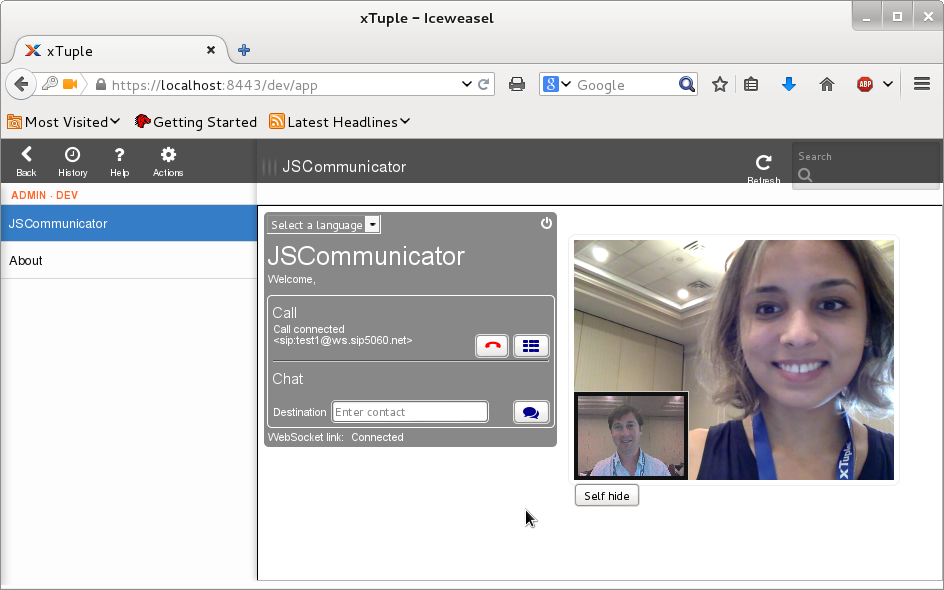
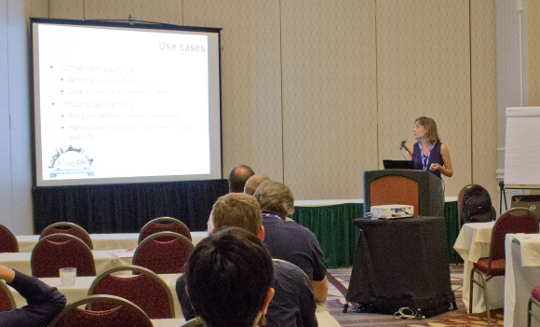
In 2013, Debian participated in both rounds of the GNOME Outreach Program for Women (OPW). The first round was run in conjunction with GSoC and the second round was a standalone program. The publicity around these programs and the strength of the Google and Debian brands attracted a range of female candidates, many of whom were shortlisted by mentors after passing their coding tests and satisfying us that they had the capability to complete a project successfully. As there are only a limited number of places for GSoC and limited funding for OPW, only a subset of these capable candidates were actually selected. The second round of OPW, for example, was only able to select two women. Google to the rescue Many of the women applying for the second round of OPW in 2013 were also students eligible for GSoC 2014. Debian was lucky to have over twenty places funded for GSoC 2014 and those women who had started preparing project plans for OPW and getting to know the Debian community were in a strong position to be considered for GSoC. Chandrika Parimoo, who applied to Debian for the first round of OPW in 2013, was selected by the Ganglia project for one of five GSoC slots. Chandrika made contributions to PyNag and the ganglia-nagios-bridge. Juliana Louback, who applied to Debian during the second round of OPW in 2013, was selected for one of Debian's GSoC 2014 slots working on the Debian WebRTC portal. The portal is built using JSCommunicator, a generic HTML5 softphone designed to be integrated in other web sites, portal frameworks and CMS systems. Juliana has been particularly enthusiastic with her work and after completing the core requirements of her project, I suggested she explore just what is involved in embedding JSCommunicator into another open source application. By co-incidence, the xTuple development team had decided to dedicate the month of August to open source engagement, running a program called haxTuple. Juliana had originally applied to OPW with an interest in financial software and so this appeared to be a great opportunity for her to broaden her experience and engagement with the open source community. Despite having no prior experience with ERP/CRM software, Juliana set about developing a plugin/extension for the new xTuple web frontend. She has published the extension in Github and written a detailed blog about her experience with the xTuple extension API. Participation in DebConf14 Juliana attended DebConf14 in Portland and gave a presentation of her work on the Debian RTC portal. Many more people were able to try the portal for the first time thanks to her participation in DebConf. The video of the GSoC students at DebConf14 is available here. Continuing with open source beyond GSoC Although GSoC finished in August, xTuple invited Juliana and I to attend their annual xTupleCon in Norfolk, Virginia. Google went the extra mile and helped Juliana to get there and she gave a live demonstration of the xTuple extension she had created. This effort has simultaneously raised the profile of Debian, open source and open standards (SIP and WebRTC) in front of a wider audience of professional developers and business users. Juliana describes her work at xTupleCon, Norfolk, 15 October 2014 It started with OPW The key point to emphasize is that Juliana's work in GSoC was actually made possible by Debian's decision to participate in and promote Outreach Program for Women in 2013. I've previously attended DebConf myself to help more developers become familiar with free and open RTC technology. I wasn't able to get there this year but thanks to the way GSoC and OPW are expanding our community, Juliana was there to help out.

Stefano Zacchiroli: Italy puts Free Software first in public sector

Debian participation in Italy's CAD68 committee (The initial policy change discussed in this document is a couple of years old now, but it took about the same time to be fully implemented, and AFAIK the role Debian played in it has not been documented yet.) In October 2012 the Italian government, led at the time by Mario Monti, did something rather innovative, at least for a country that is not usually ahead of its time in the area of information technology legislation. They decided to change the main law (the "CAD", for Codice dell'Amministrazione Digitale) that regulates the acquisition of software at all levels of the public administration (PA), giving an explicit preference to the acquisition of Free Software. The new formulation of article 68 of the CAD first lists some macro criteria (e.g., TCO, adherence to open standards, security support, etc.) that public administrations in Italy shall use as ranking criteria in software-related calls for tenders. Then, and this is the most important part, the article affirms that the acquisition of proprietary software solutions is permitted only if it is impossible to choose Free Software solutions instead; or, alternatively, to choose software solutions that have already being acquired (and paid for) by the PA in the past, reusing preexisting software. The combined effect of these two provisions is that all new software acquisitions by PAs in Italy will be Free Software, unless it is motivated in writing, challengable by a judge that it was impossible to do otherwise. Isn't it great? It is, except that such a law is not necessarily easy to adhere to in practice, especially for small public administrations (e.g., municipalities of a few hundred people, not uncommon in Italy) which might have very little clue about software in general, and even less so about Free Software. This is why the government also tasked the relevant Italian agency to provide guidelines on how to choose software in a way that conforms with the new formulation of article 68. The agency decided to form a committee to work on the guidelines (because you always need a committee, right? :-) ). To my surprise, the call for participation to be part of the committee explicitly listed representatives of Free Software communities as privileged software stakeholders that they wanted to have on the committee kudos to the agency for that. (The Italian wording on the call was: Costituir titolo di preferenza rivestire un ruolo di [ ] referenti di community del software a codice sorgente aperto.) Therefore, after various prods by fellow European Free Software activists that were aware of the ongoing change in legislation, I applied to be a volunteer CAD68 committee member, got selected, and ended up working over a period of about 6 months (March-September 2013) to help the agency writing the new software acquisition guidelines. Logistically, it hasn't been entirely trivial, as the default meeting place was in Rome, I live in Paris, and the agency didn't really have a travel budget for committee members. That's why I've sought sponsorship from Debian, offering to represent Debian views within the committee; Lucas kindly agreed to my request. So what did I do on behalf of Debian as a committee member during those months? Most of my job has been some sort of consulting on how community-driven Free Software projects like Debian work, on how the software they produce can be relied upon and contributed to, and more generally on how the PA can productively interact with such projects. In particular, I've been happy to work on the related work section of the guidelines, ensuring they point to relevant documents such as the French government guidelines on how to adopt Free Software (AKA circulaire Ayrault). I've also drafted the guidelines section on Free Software directories, ensuring that important resources such as FSF's Free Software Directory are listed as starting points for PAs that looking for software solutions for specific needs. Another part of my job has been ensuring that the guidelines do not end up betraying the principle of Free Software preference that is embodied in article 68. A majority of committee members came from a Free Software background, so that might not seem a difficult goal to accomplish. But it is important to notice that: (a) the final editor of the guidelines is the agency itself, not the committee, so having a "pro-Free Software" majority within the committee doesn't mean much per se; and (b) lobbying from the "pro-proprietary software" camp did happen, as it is entirely natural in these cases. In this respect I'm happy with the result: I do believe that the software selection process recommended by the guidelines, finally published in January 2014, upholds the Free Software preference principle of article 68. I credit both the agency and the non-ambiguity of the law (on this specific point) for that result. All in all, this has been a positive experience for me. It has reaffirmed my belief that Debian is a respected, non-partisan political actor of the wider software/ICT ecosystem. This experience has also given me a chance to be part of country-level policy-making, which has been very instructive on how and why good ideas might take a while to come into effect and influence citizen lives. Speaking of which, I'm now looking forward to the first alleged violations of article 68 in Italy, and how they will be dealt with. Abundant popcorn will certainly be needed. Links & press If you want to know more about this topic, I've collected below links to resources that have documented, in various languages, the publication of the CAD68 guidelines.

23 October 2014

Enrico Zini: systemd-default-rescue

Alternate rescue boot entry with systemd Since systemd version 215, adding systemd.debug-shell to the kernel command line activates the debug shell on tty9 alongside the normal boot. I like the idea of that, and I'd like to have it in my standard 'rescue' entry in my grub menu. Unfortunately, by default update-grub does not allow to customize the rescue menu entry options. I have just filed #766530 hoping for that to change. After testing the patch I proposed for /etc/grub.d/10_linux, I now have this in my /etc/default/grub, with some satisfaction:
GRUB_CMDLINE_LINUX_RECOVERY="systemd.log_target=kmsg systemd.log_level=debug systemd.debug-shell"
Further information: Thanks to sjoerd and uau on #debian-systemd for their help.

22 October 2014

Russ Allbery: Another haul post

I know I've been very quiet here lately. That's due to a variety of reasons, but mostly because settling in to a new job is taking nearly all of my attention and time. When that's combined with getting obsessed with watching the League of Legends world championships, it means no real time for writing things. I've had lots of time for reading things, though, and have a lot of book reviews that I need to write. So, of course, I felt like buying more books. Elizabeth Bear One-Eyed Jack (sff)
Steven Brust Hawk (sff)
Kenneth T. Jackson Crabgrass Frontier (non-fiction)
Ann Leckie Ancillary Sword (sff)
Scott Lynch Republic of Thieves (sff)
Randall Munroe What If? (non-fiction)
Sarah Tolmie The Stone Boatmen (sff)
Jeffrey Toobin The Oath (non-fiction) I'm pretty excited about everything in this shipment, but particularly the new Vlad Taltos novel from Brust and the sequel to Ancillary Justice (probably the best novel that I've read so far this year). And of course there's What If?.

19 October 2014

Benjamin Mako Hill: Another Round of Community Data Science Workshops in Seattle

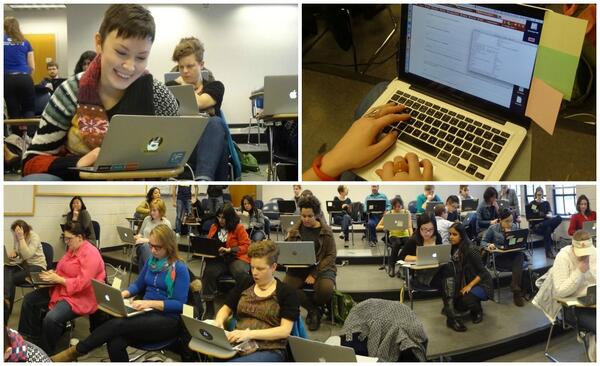
Pictures from the CDSW sessions in Spring 2014Pictures from the CDSW sessions in Spring 2014
I am helping coordinate three and a half day-long workshops in November for anyone interested in learning how to use programming and data science tools to ask and answer questions about online communities like Wikipedia, free and open source software, Twitter, civic media, etc. This will be a new and improved version of the workshops run successfully earlier this year. The workshops are for people with no previous programming experience and will be free of charge and open to anyone. Our goal is that, after the three workshops, participants will be able to use data to produce numbers, hypothesis tests, tables, and graphical visualizations to answer questions like: If you are interested in participating, fill out our registration form here before October 30th. We were heavily oversubscribed last time so registering may help. If you already know how to program in Python, it would be really awesome if you would volunteer as a mentor! Being a mentor will involve working with participants and talking them through the challenges they encounter in programming. No special preparation is required. If you re interested, send me an email.

18 October 2014

Steve Kemp: On the names we use in email

Yesterday I received a small rush of SPAM mails, all of which were 419 scams, and all of them sent by "Mrs Elizabeth PETERSEN". It struck me that I can't think of ever receiving a legitimate mail from a "Mrs XXX [YYY]", but I was too busy to check. Today I've done so. Of the 38,553 emails I've received during the month of October 2014 I've got a hell of a lot of mails with a From address including a "Mrs" prefix:
"Mrs.Clanzo Amaki" <marilobouabre14@yahoo.co.jp>
"Mrs Sarah Mamadou"<investment@payment.com>
"Mrs Abia Abrahim" <missfatimajinnah@yahoo.co.jp>
"Mrs. Josie Wilson" <linn3_2008@yahoo.co.jp>
"Mrs. Theresa Luis"<tomaslima@jorgelima.com>
There are thousands more. Not a single one of them was legitimate. I have one false-positive when repeating the search for a Mr-prefix. I have one friend who has set his sender-address to "Mr Bob Smith", which always reads weirdly to me, but every single other email with a Mr-prefix was SPAM. I'm not going to use this in any way, since I'm happy with my mail-filtering setup, but it was interesting observation. Names are funny. My wife changed her surname post-marriage, but that was done largely on the basis that introducing herself as "Doctor Kemp" was simpler than "Doctor Foreign-Name", she'd certainly never introduce herself ever as Mrs Kemp. Trivia: In Finnish the word for "Man" and "Husband" is the same (mies), but the word for "Woman" (nainen) is different than the word for "Wife" (vaimo).

14 October 2014

Julian Andres Klode: Key transition

I started transitioning from 1024D to 4096R. The new key is available at: https://people.debian.org/~jak/pubkey.gpg and the keys.gnupg.net key server. A very short transition statement is available at: https://people.debian.org/~jak/transition-statement.txt and included below (the http version might get extended over time if needed). The key consists of one master key and 3 sub keys (signing, encryption, authentication). The sub keys are stored on an OpenPGP v2 Smartcard. That s really cool, isn t it? Somehow it seems that GnuPG 1.4.18 also works with 4096R keys on this smartcard (I accidentally used it instead of gpg2 and it worked fine), although only GPG 2.0.13 and newer is supposed to work.
-----BEGIN PGP SIGNED MESSAGE-----
Hash: SHA1,SHA512
Because 1024D keys are not deemed secure enough anymore, I switched to
a 4096R one.
The old key will continue to be valid for some time, but i prefer all
future correspondence to come to the new one.  I would also like this
new key to be re-integrated into the web of trust.  This message is
signed by both keys to certify the transition.
the old key was:
pub   1024D/00823EC2 2007-04-12
      Key fingerprint = D9D9 754A 4BBA 2E7D 0A0A  C024 AC2A 5FFE 0082 3EC2
And the new key is:
pub   4096R/6B031B00 2014-10-14 [expires: 2017-10-13]
      Key fingerprint = AEE1 C8AA AAF0 B768 4019  C546 021B 361B 6B03 1B00
-----BEGIN PGP SIGNATURE-----
Version: GnuPG v2
iEYEARECAAYFAlQ9j+oACgkQrCpf/gCCPsKskgCgiRn7DoP5RASkaZZjpop9P8aG
zhgAnjHeE8BXvTSkr7hccNb2tZsnqlTaiQIcBAEBCgAGBQJUPY/qAAoJENc8OeVl
gLOGZiMP/1MHubKmA8aGDj8Ow5Uo4lkzp+A89vJqgbm9bjVrfjDHZQIdebYfWrjr
RQzXdbIHnILYnUfYaOHUzMxpBHya3rFu6xbfKesR+jzQf8gxFXoBY7OQVL4Ycyss
4Y++g9m4Lqm+IDyIhhDNY6mtFU9e3CkljI52p/CIqM7eUyBfyRJDRfeh6c40Pfx2
AlNyFe+9JzYG1i3YG96Z8bKiVK5GpvyKWiggo08r3oqGvWyROYY9E4nLM9OJu8EL
GuSNDCRJOhfnegWqKq+BRZUXA2wbTG0f8AxAuetdo6MKmVmHGcHxpIGFHqxO1QhV
VM7VpMj+bxcevJ50BO5kylRrptlUugTaJ6il/o5sfgy1FdXGlgWCsIwmja2Z/fQr
ycnqrtMVVYfln9IwDODItHx3hSwRoHnUxLWq8yY8gyx+//geZ0BROonXVy1YEo9a
PDplOF1HKlaFAHv+Zq8wDWT8Lt1H2EecRFN+hov3+lU74ylnogZLS+bA7tqrjig0
bZfCo7i9Z7ag4GvLWY5PvN4fbws/5Yz9L8I4CnrqCUtzJg4vyA44Kpo8iuQsIrhz
CKDnsoehxS95YjiJcbL0Y63Ed4mkSaibUKfoYObv/k61XmBCNkmNAAuRwzV7d5q2
/w3bSTB0O7FHcCxFDnn+tiLwgiTEQDYAP9nN97uibSUCbf98wl3/
=VRZJ
-----END PGP SIGNATURE-----

Filed under: Uncategorized

13 October 2014

John Goerzen: Update on the systemd issue

The other day, I wrote about my poor first impressions of systemd in jessie. Here s an update. I d like to start with the things that are good. I found the systemd community to be one of the most helpful in Debian, and #debian-systemd IRC channel to be especially helpful. I was in there for quite some time yesterday, and appreciated the help from many people, especially Michael. This is a nontechnical factor, but is extremely important; this has significantly allayed my concerns about systemd right there. There are things about the systemd design that impress. The dependency system and configuration system is a lot more flexible than sysvinit. It is also a lot more complicated, and difficult to figure out what s happening. I am unconvinced of the utility of parallelization of boot to begin with; I rarely reboot any of my Linux systems, desktops or servers, and it seems to introduce needless complexity. Anyhow, on to the filesystem problem, and a bit of a background. My laptop runs ZFS, which is somewhat similar to btrfs in that it s a volume manager (like LVM), RAID manager (like md), and filesystem in one. My system runs LVM, and inside LVM, I have two ZFS pools (volume groups): one, called rpool, that is unencrypted and holds mainly the operating system; and the other, called crypt, that is stacked atop LUKS. ZFS on Linux doesn t yet have built-in crypto, which is why LVM is even in the picture here (to separate out the SSD at a level above ZFS to permit parts of it to be encrypted). This is a bit of an antiquated setup for me; as more systems have AES-NI, I m going to everything except /boot being encrypted. Anyhow, inside rpool is the / filesystem, /var, and /usr. Inside /crypt is /tmp and /home. Initially, I tried to just boot it, knowing that systemd is supposed to work with LSB init scripts, and ZFS has init scripts with carefully-planned dependencies. This was evidently not working, perhaps because /lib/systemd/systemd/ It turns out that systemd has a few assumptions that turn out to be less true with ZFS than otherwise. ZFS filesystems are normally not mounted via /etc/fstab; a ZFS pool has internal properties about which dataset gets mounted where (similar to LVM s actions after a vgscan and vgchange -ay). Even though there are ordering constraints in the units, systemd is writing files to /var before /var gets mounted, resulting in the mount failing (unlike ext4, ZFS by default will reject an attempt to mount over a non-empty directory). Partly this due to the debian-fixup.service, and partly it is due to systemd reacting to udev items like backlight. This problem was eventually worked around by doing zfs set mountpoint=legacy rpool/var, and then adding a line to fstab ( rpool/var /var zfs defaults 0 2 ) for /var and its descendent filesystems. This left the problem of /tmp; again, it wasn t getting mounted soon enough. In this case, it required crypttab to be processed first, and there seem to be a lot of bugs in the crypttab processing in systemd (more on that below). I eventually worked around that by adding After=cryptsetup.target to the zfs-import-cache.service file. For /tmp, it did NOT work to put it in /etc/fstab, because then it tried to mount it before starting cryptsetup for some reason. It probably didn t help that the system s cryptdisks.service is a symlink to /dev/null, a fact I didn t realize until after a lot of needless reboots. Anyhow, one thing I stumbled across was poor console control with systemd. On numerous occasions, I had things like two cryptsetup processes trying to read a password, plus an emergency mode console trying to do so. I had this memorable line of text at one point: (or type Control-D to continue): Please enter passphrase for disk athena-crypttank (crypt)! [ OK ] Stopped Emergency Shell. And here we venture into unsatisfying territory with systemd. One answer to this in IRC was to install plymouth, which apparently serializes console I/O. However, plymouth is an attractive boot animation in place of the text messages that normally get shown. I don t want an attractive boot animation . Nevertheless, neither systemd-sysv nor cryptsetup depends on plymouth, so by default, the prompt for a password at boot is obscured by various other text. Worse, plymouth doesn t support serial consoles, so at the moment booting a system that uses LUKS with systemd over a serial console is a matter of blind luck of typing the right password at the right time. In the end, though, the system booted and after a few more tweaks, the backlight buttons do their thing again. Whew! Update 2014-10-13: uau pointed out that Plymouth is more than a bootsplash, and can work with serial consoles, despite the description of the package. I stand corrected on that. (It is still the case, however, that packages don t depend on it where they should, and the default experience for people using cryptsetup is not very good.)

Steve McIntyre: Successful Summer of Code in Linaro

It's past time I wrote about how Linaro's students fared in this year's Google Summer of Code. You might remember me posting earlier in the year when we welcomed our students. We started with 3 student projects at the beginning of the summer. One of the students unfortunately didn't work out, but the other two were hugely successful. Gaurav Minocha was a graduate student at the University of British Columbia, Vancouver, Canada. He worked on Linux Flattened Device Tree Self-checking, mentored by Grant Likely from Linaro's Office of the CTO. Gaurav achieved all of his project's goals, and he was invited to Linaro's recent Linaro Connect USAConnect conference in California to meet people and and talk about his project. He and Grant presented a session on their work; it was filmed, and video is online. Grant said he was very happy with Gaurav's "strong, solid performance" during the project. Varad Gautam was a student at Birla Institute of Technology and Science, Pilani, India. He succeeded in porting UEFI to the BeagleBone Black. Leif Lindholm from the Linaro Enterprise Group was his mentor for the summer. At the end of the summer, Varad delivered a UEFI port ready for booting Linux and his code was included in Linaro's September UEFI release. Leif said that he was "very pleased with Varad's self sufficiency and ability to pick up an entirely new software project very quickly". We were hoping to invite Gaurad to Connect in California also, but travel document delays got in the way. With luck we'll see him at the next Connect in Hong Kong in February 2015. Well done, guys! It was great to work with these young developers for the summer, and we wish them lots more success in their future endeavours. Google have also just confirmed that they will be running the Summer of Code program again in 2015. I'm hoping that Linaro will be accepted again next year as a mentoring organisation. I'll post more about that early next year.

12 October 2014

Iustin Pop: Day trip on the Olympic Peninsula

Day trip on the Olympic Peninsula TL;DR: drove many kilometres on very nice roads, took lots of pictures, saw sunshine and fog and clouds, an angry ocean and a calm one, a quiet lake and lots and lots of trees: a very well spent day. Pictures at http://photos.k1024.org/Daytrips/Olympic-Peninsula-2014/. Sometimes I travel to the US on business, and as such I've been a few times in the Seattle area. Until this summer, when I had my last trip there, I was content to spend any extra days (weekend or such) just visiting Seattle itself, or shopping (I can spend hours in the REI store!), or working on my laptop in the hotel. This summer though, I thought - I should do something a bit different. Not too much, but still - no sense in wasting both days of the weekend. So I thought maybe driving to Mount Rainier, or something like that. On the Wednesday of my first week in Kirkland, as I was preparing my drive to the mountain, I made the mistake of scrolling the map westwards, and I saw for the first time the Olympic Peninsula; furthermore, I was zoomed in enough that I saw there was a small road right up to the north-west corner. Intrigued, I zoomed further and learned about Cape Flattery ( the northwestern-most point of the contiguous United States! ), so after spending a bit time reading about it, I was determined to go there. Easier said than done - from Kirkland, it's a 4h 40m drive (according to Google Maps), so it would be a full day on the road. I was thinking of maybe spending the night somewhere on the peninsula then, in order to actually explore the area a bit, but from Wednesday to Saturday it was a too short notice - all hotels that seemed OK-ish were fully booked. I spent some time trying to find something, even not directly on my way, but I failed to find any room. What I did manage to do though, is to learn a bit about the area, and to realise that there's a nice loop around the whole peninsula - the 104 from Kirkland up to where it meets the 101N on the eastern side, then take the 101 all the way to Port Angeles, Lake Crescent, near Lake Pleasant, then south toward Forks, crossing the Hoh river, down to Ruby Beach, down along the coast, crossing the Queets River, east toward Lake Quinault, south toward Aberdeen, then east towards Olympia and back out of the wilderness, into the highway network and back to Kirkland. This looked like an awesome road trip, but it is as long as it sounds - around 8 hours (continuous) drive, though skipping Cape Flattery. Well, I said to myself, something to keep in mind for a future trip to this area, with a night in between. I was still planning to go just to Cape Flattery and back, without realising at that point that this trip was actually longer (as you drive on smaller, lower-speed roads). Preparing my route, I read about the queues at the Edmonds-Kingston ferry, so I was planning to wake up early on the weekend, go to Cape Flattery, and go right back (maybe stop by Lake Crescent). Saturday comes, I - of course - sleep longer than my trip schedule said, and start the day in a somewhat cloudy weather, driving north from my hotel on Simonds Road, which was quite nicer than the usual East-West or North-South roads in this area. The weather was becoming nicer, however as I was nearing the ferry terminal and the traffic was getting denser, I started suspecting that I'll spend a quite a bit of time waiting to board the ferry. And unfortunately so it was (photo altered to hide some personal information): Waiting for the ferry. The weather at least was nice, so I tried to enjoy it and simply observe the crowd - people were looking forward to a weekend relaxing, so nobody seemed annoyed by the wait. After almost half an hour, time to get on the ferry - my first time on a ferry in US, yay! But it was quite the same as in Europe, just that the ship was much larger. Once I secured the car, I went up deck, and was very surprised to be treated with some excellent views: Harbour view Looking towards the sun   and away from it The crossing was not very short, but it seemed so, because of the view, the sun, the water and the wind. Soon we were nearing the other shore; also, see how well panorama software deals with waves :P! Near the other shore And I was finally on the "real" part of the trip. The road was quite interesting. Taking the 104 North, crossing the "Hood Canal Floating Bridge" (my, what a boring name), then finally joining the 101 North. The environment was quite varied, from bare plains and hills, to wooded areas, to quite dense forests, then into inhabited areas - quite a long stretch of human presence, from the Sequim Bay to Port Angeles. Port Angeles surprised me: it had nice views of the ocean, and an interesting port (a few big ships), but it was much smaller than I expected. The 101 crosses it, and in less than 10 minutes or so it was already over. I expected something nicer, based on the name, but Anyway, onwards! Soon I was at a crossroads and had to decide: I could either follow the 101, crossing the Elwha River and then to Lake Crescent, then go north on the 113/112, or go right off 101 onto 112, and follow it until close to my goal. I took the 112, because on the map it looked "nicer", and closer to the shore. Well, the road itself was nice, but quite narrow and twisty here and there, and there was some annoying traffic, so I didn't enjoy this segment very much. At least it had the very interesting property (to me) that whenever I got closer to the ocean, the sun suddenly disappeared, and I was finding myself in the fog: Foggy road So my plan to drive nicely along the coast failed. At one point, there was even heavy smoke (not fog!), and I wondered for a moment how safe was to drive out there in the wilderness (there were other cars though, so I was not alone). Only quite a bit later, close to Neah Bay, did I finally see the ocean: I saw a small parking spot, stopped, and crossing a small line of trees I found myself in a small cove? bay? In any case, I had the impression I stepped out of the daily life in the city and out into the far far wilderness: Dead trees on the beach Trees growing on a rock Small panorama of the cove There was a couple, sitting on chairs, just enjoying the view. I felt very much intruding, behaving like I did as a tourist: running in, taking pictures, etc., so I tried at least to be quiet . I then quickly moved on, since I still had some road ahead of me. Soon I entered Neah Bay, and was surprised to see once more blue, and even more blue. I'm a sucker for blue, whether sky blue or sea blue , so I took a few more pictures (watch out for the evil fog in the second one): View towards Neah Bay port Sea view from Neah Bay Well, the town had some event, and there were lots of people, so I just drove on, now on the last stretch towards the cape. The road here was also very interesting, yet another environment - I was driving on Cape Flattery Road, which cuts across the tip of the peninsula (quite narrow here) along the Waatch River and through its flooding plains (at least this is how it looked to me). Then it finally starts going up through the dense forest, until it reaches the parking lot, and from there, one goes on foot towards the cape. It's a very easy and nice walk (not a hike), and the sun was shining very nicely through the trees: Sunny forest Sun shinning down Wooden path But as I reached the peak of the walk, and started descending towards the coast, I was surprised, yet again, by fog: Ugly fog again! I realised that probably this means the cape is fully in fog, so I won't have any chance to enjoy the view. Boy, was I wrong! There are three viewpoints on the cape, and at each one I was just "wow" and "aah" at the view. Even thought it was not a sunny summer view, and there was no blue in sight, the combination between the fog (which was hiding the horizon and even the closer islands), the angry ocean which was throwing wave after wave at the shore, making a loud noise, and the fact that even this seemingly inhospitable area was just teeming with life, was both unexpected and awesome. I took here waay to many pictures, here are just a couple inlined: First view at the cape Birds 'enjoying' the weather Foggy shore I spent around half an hour here, just enjoying the rawness of nature. It was so amazing to see life encroaching on each bit of land, even though it was not what I would consider a nice place. Ah, how we see everything through our own eyes! The walk back was through fog again, and at one point it switched over back to sunny. Driving back on the same road was quite different, knowing what lies at its end. On this side, the road had some parking spots, so I managed to stop and take a picture - even though this area was much less wild, it still has that outdoors flavour, at least for me: Waatch River Back in Neah Bay, I stopped to eat. I had a place in mind from TripAdvisor, and indeed - I was able to get a custom order pizza at "Linda's Woodfired Kitchen". Quite good, and I ate without hurry, looking at the people walking outside, as they were coming back from the fair or event that was taking place. While eating, a somewhat disturbing thought was going through my mind. It was still early, around two to half past two, so if I went straight back to Kirkland I would be early at the hotel. But it was also early enough that I could - in theory at least - still do the "big round-trip". I was still rummaging the thought as I left On the drive back I passed once more near Sekiu, Washington, which is a very small place but the map tells me it even has an airport! Fun, and the view was quite nice (a bit of blue before the sea is swallowed by the fog): Sekiu view After passing Sekiu and Clallam Bay, the 112 curves inland and goes on a bit until you are at the crossroads: to the left the 112 continues, back the same way I came; to the right, it's the 113, going south until it meets the 101. I looked left - remembering the not-so-nice road back, I looked south - where a very appealing, early afternoon sun was beckoning - so I said, let's take the long way home! It's just a short stretch on the 113, and then you're on the 101. The 101 is a very nice road, wide enough, and it goes through very very nice areas. Here, west to south-west of the Olympic Mountains, it's a very different atmosphere from the 112/101 that I drove on in the morning; much warmer colours, a bit different tree types (I think), and more flat. I soon passed through Forks, which is one of the places I looked at when searching for hotels. I did so without any knowledge of the town itself (its wikipedia page is quite drab), so imagine my surprise when a month later I learned from a colleague that this is actually a very important place for vampire-book fans. Oh my, and I didn't even stop! This town also had some event, so I just drove on, enjoying the (mostly empty) road. My next planned waypoint was Ruby Beach, and I was looking forward to relaxing a bit under the warm sun - the drive was excellent, weather perfect, so I was watching the distance countdown on my Garmin. At two miles out, the "Near waypoint Ruby Beach" message appeared, and two seconds later the sun went out. What the I was hoping this is something temporary, but as I slowly drove the remaining mile I couldn't believe my eyes that I was, yet again, finding myself in the fog I park the car, thinking that asking for a refund would at least allow me to feel better - but it was I who planned the trip! So I resigned myself, thinking that possibly this beach is another special location that is always in the fog. However, getting near the beach it was clear that it was not so - some people were still in their bathing suits, just getting dressed, so it seems I was just unlucky with regards to timing. However, I the beach itself was nice, even in the fog (I later saw online sunny pictures, and it is quite beautiful), the the lush trees reach almost to the shore, and the way the rocks are sitting on the beach: A lonely dinghy Driftwood  and human construction People on the beach Since the weather was not that nice, I took a few more pictures, then headed back and started driving again. I was soo happy that the weather didn't clear at the 2 mile mark (it was not just Ruby Beach!), but alas - it cleared as soon as the 101 turns left and leaves the shore, as it crosses the Queets river. Driving towards my next planned stop was again a nice drive in the afternoon sun, so I think it simply was not a sunny day on the Pacific shore. Maybe seas and oceans have something to do with fog and clouds ! In Switzerland, I'm very happy when I see fog, since it's a somewhat rare event (and seeing mountains disappearing in the fog is nice, since it gives the impression of a wider space). After this day, I was a bit fed up with fog for a while Along the 101 one reaches Lake Quinault, which seemed pretty nice on the map, and driving a bit along the lake - a local symbol, the "World's largest spruce tree". I don't know what a spruce tree is, but I like trees, so I was planning to go there, weather allowing. And the weather did cooperate, except that the tree was not so imposing as I thought! In any case, I was glad to stretch my legs a bit: Path to largest spruce tree Largest spruce tree, far view Largest spruce tree, closer view Very short path back to the road However, the most interesting thing here in Quinault was not this tree, but rather - the quiet little town and the view on the lake, in the late afternoon sun: Quinault Quinault Lake view The entire town was very very quiet, and the sun shining down on the lake gave an even stronger sense of tranquillity. No wind, not many noises that tell of human presence, just a few, and an overall sense of peace. It was quite the opposite of the Cape Flattery and a very nice way to end the trip. Well, almost end - I still had a bit of driving ahead. Starting from Quinault, driving back and entering the 101, driving down to Aberdeen: Afternoon ride then turning east towards Olympia, and back onto the highways. As to Aberdeen and Olympia, I just drove through, so I couldn't make any impression of them. The old harbour and the rusted things in Aberdeen were a bit interesting, but the day was late so I didn't stop. And since the day shouldn't end without any surprises, during the last profile change between walking and driving in Quinault, my GPS decided to reset its active maps list and I ended up with all maps activated. This usually is not a problem, at least if you follow a pre-calculated route, but I did trigger recalculation as I restarted my driving, so the Montana was trying to decide on which map to route me - between the Garmin North America map and the Open StreeMap one, the result was that it never understood which road I was on. It always said "Drive to I5", even though I was on I5. Anyway, thanks to road signs, and no thanks to "just this evening ramp closures", I was able to arrive safely at my hotel. Overall, a very successful, if long trip: around 725 kilometres, 10h:30m moving, 13h:30m total: Track picture There were many individual good parts, but the overall think about this road trip was that I was able to experience lots of different environments of the peninsula on the same day, and that overall it's a very very nice area. The downside was that I was in a rush, without being able to actually stop and enjoy the locations I visited. And there's still so much to see! A two nights trip sound just about right, with some long hikes in the rain forest, and afternoons spent on a lake somewhere. Another not so optimal part was that I only had my "travel" camera (a Nikon 1 series camera, with a small sensor), which was a bit overwhelmed here and there by the situation. It was fortunate that the light was more or less good, but looking back at the pictures, how I wish that I had my "serious" DSLR So, that means I have two reasons to go back! Not too soon though, since Mount Rainier is also a good location to visit . If the pictures didn't bore you yet, the entire gallery is on my smugmug site. In any case, thanks for reading!

8 October 2014

Jonathan Dowland: Ansible

I've just recently built the large bulk of VMs that we use for first semester teaching. This year that was 112. We use the same general approach for these as our others: get a generic base image up and running, with just enough configuration complete so a puppet client starts up; get it talking to our master; let puppet take it from there. There are pragmatic balances between how much we do in the kickstart versus how much we do in puppet, but also when we build a new VM from scratch versus when we clone an existing image, and how specialisation we do in the clone image. Unfortunately this year we ended up in a situation where our clone image wouldn't talk to our puppet master out of the box, due to some changes we'd made to our master set up since the clone image was prepared. We didn't really have enough time to re-clone the entire set of VMs from a fixed base image, and instead needed to fix them whilst up. However we couldn't rely on puppet to do that, since they wouldn't talk to the puppet master. We needed to manually reset the puppet client state per VM and then re-establish a trust relationship with the correct master (which is not the default master hostname in our environment anymore). Luckily, we deploy a local account with a known passphrase via the kickstart, which also has sudo access, as an interim measure before puppet strips it back out again and sets up proper LDAP and Kerberos authentication. So we can at least get into the boxes. However logging into 112 VMs by hand is not a particularly pleasant task. In the past I might have tried to achieve this using something like clusterssh but this year I decided to give ansible a try instead. Ansible started life, I believe, as a tool that would let you run arbitrary commands on remote hosts, including navigating ssh and sudo as required, without needing any agent software on the remote end. It has since seemed to grow into an enterprise product in its own right, seemingly in competition with puppet, chef, cfengine et al. Looking at the Ansible website now I'd be rather put off by just how "enterprisey" it has become - much as I am by the puppet website, if I'm honest - but if you persevere past the webinars, testimonials, etc. etc., you can find yourself to the documentation, and running an arbitrary command is as simple as The hosts file format is simple
[somehosts]
host1
host2
...
[otherhosts]
host3
The command line can be a little bit more complex, especially if you need to use one username for ssh, another for sudo, and you don't want to use ssh key auth:
ansible -i ./hostsfile somehosts -k -u someuser \
    --sudo -K -a 'puppet agent --onetime --no-daemonize --verbose 
"all" would work where I've used somehosts in the example above. So there you go: using one configuration management system to bootstrap another. I'm sure I've reserved myself a special place in hell for this.

Next.

Previous.