Search Results: "bab"

21 December 2014

Dirk Eddelbuettel: If only there was a Romeo somewhere ...

Attention: rant coming. You have been warned, and may want to tune out now. So the top of my Twitter timeline just had a re-tweet posting to this marvel on the state of Julia. I should have known better than to glance at it as it comes from someone providing (as per the side-bar) Thought leadership in Big Data, systems architecture and more. Reading something like this violates the first rule of airport book stores: never touch anything from the business school section, especially on (wait for it) leadership or, worse yet, thought leadership. But it is Sunday, my first cup of coffee still warm (after finalising two R package updates on GitHub, and one upload to CRAN) and so I read on. Only to be mildly appalled by the usual comparison to R based on the same old Fibonacci sequence. Look, I am as guilty as anyone of using it (for example all over chapter one of my Rcpp book), but at least I try to stress each and every time that this is kicking R where it is down as its (fairly) poor performance on functions calls (that is well-known and documented) obviously gets aggravated by recursive calls. But hey, for the record, let me restate those results. So Julia beats R by a factor of 385. But let's take a closer look. For n=25, I get R to take 241 milliseconds---as opposed to his 6905 milliseconds---simply by using the same function I use in every workshop, eg last used at Penn in November, which does not use the dreaded ifelse operator:
fibR <- function(n)  
  if (n < 2) return(n)
  return(fibR(n-1) + fibR(n-2))
 
Switching that to the standard C++ three-liner using Rcpp
library(Rcpp)
cppFunction('int fibCpp(int n)   
  if (n < 2) return(n);  
  return(fibCpp(n-1) + fibCpp(n-2));  
   ')
and running a standard benchmark suite gets us the usual result of
R> library(rbenchmark)
R> benchmark(fibR(25),fibCpp(25),order="relative")[,1:4]
        test replications elapsed relative
2 fibCpp(25)          100   0.048    1.000
1   fibR(25)          100  24.674  514.042
R> 
So for the record as we need this later: that is 48 milliseconds for 100 replications, or about 0.48 milliseconds per run. Now Julia. And of my standard Ubuntu server running the current release 14.10:
edd@max:~$ julia
ERROR: could not open file /home/edd//home/edd//etc/julia/juliarc.jl
 in include at boot.jl:238
edd@max:~$ 
So wait, what? You guys can't even ensure a working release on what is probably the most popular and common Linux installation? And I get to that after reading a post on the importance of "Community, Community, Community" and you can't even make sure this works on Ubuntu? Really? So a little bit of googling later, I see that julia -f is my friend for this flawed release, and I can try to replicate the original timing
edd@max:~$ julia -f
               _
   _       _ _(_)_        A fresh approach to technical computing
  (_)       (_) (_)       Documentation: http://docs.julialang.org
   _ _   _   _  __ _      Type "help()" to list help topics
               / _      
       _        (_        Version 0.2.1 (2014-02-11 06:30 UTC)
 _/  \__'_ _ _ \__'_      
 __/                      x86_64-linux-gnu
julia> fib(n) = n < 2 ? n : fib(n - 1) + fib(n - 2)
fib (generic function with 1 method)
julia> @elapsed fib(25)
0.002299559
julia> 
Interestingly the posts author claims 18 milliseconds. I see 2.3 milliseconds here. Maybe someone is having a hard time comparing things to the right of the decimal point. Or maybe his computer is an order of magnitude slower than mine. The more important thing is that Julia is of course faster than R (no surprise: LLVM at work) but also still a lot slower than a (trivial to write and deploy) C++ function. Nothing new here. So let's recap. Comparison to R was based on a flawed version of a function we only use when we deliberately want to put R down, can be improved significantly when using a better implementation, results are still off by order of magnitude to what was reported ("math is hard"), and the standard C / C++ way of doing things is still several times faster than our new saviour language---which I can't even launch on the current version of one of the more common free operating systems. Ok then. Someone please wake me up in a few years and I will try again. Now, coming to the end of the rant I should really stress that of course I too hope that Julia succeeds. Every user pulled away from Matlab is a win for all us. We're in this together and the endless navel gazing between ourselves is so tiresome and irrelevant. And as I argue here, even more so when we among ourselves stick to unfair comparisons as well as badly chosen implementation details. What matters are wins against the likes of Matlab, Excel, SAS and so on. Let's build on our joint strength. I am sure I will use Julia one day, and I am grateful for everyone helping with it---as a lot of help seems to be needed. In the meantime, and with CRAN at 6130 packages that just work I'll continue to make use of this amazing community and trying my bit to help it grow and prosper. As part of our joint community.

Steve McIntyre: UEFI Debian installer work for Jessie, part 2

A month ago , I wrote about my plans for improved (U)EFI support in Jessie. It's about time I gave an update on progress! I spoke about adding support for installing grub-efi into the removable media path (#746662). That went into Debian's grub packages already, but there were a couple of bugs. First of all, the code could end up prompting people about EFI questions even when they didn't have any grub-efi packages installed. Doh! (#773004). Then there was an unexpected bug with case-insensitive file name handling on FAT/VFAT filesystems (#773092). I've posted (and tested!) patches to fix both, hopefully in an upload any day now. Next, I mentioned getting i386 UEFI support going again. This is a major feature that a lot of people have been asking for. It's also going to involve quite a bit of effort... Our existing (amd64) UEFI-capable images in Debian use the standard x86 El Torito CD boot method, with two boot images provided. One of these images gives us the traditional isolinux BIOS-boot support. The second option is an alternate El Torito image, including at a 64-bit version of grub-efi. For most machines, this works just fine - the BIOS or UEFI firmware will automatically pick the correct image and everybody's happy. This even works on our multi-arch i386/amd64 CDs and DVDs - isolinux will boot either kernel from the first El Torito image, or the alternate UEFI image is amd64 only. However, I can now see that there's been a long-standing issue with those multi-arch images, and it's to do with Macs. On the advice of Matthew Garrett, I've borrowed an old 32-bit Intel Mac to help testing, and it's quite instructive in terms of buggy firmware! The firmware on older 32-bit Intel Macs crashes hard when it detects more than one El Torito boot image, and I've now seen this happen myself. I've not had any bug reports about this, so I can only assume that we haven't had many users try that image. As far as I can tell, they've been using the normal i386 images in BIOS boot mode, and then struggling to get bootloaders working afterwards. There are a number of different posts on the net explaining how to do that. That's OK, but... If I now start adding 32-bit UEFI support to our standard set of i386 images, this will prevent users of old Macs from installing Debian. I could just say "screw it" and decide to not support those users at all, but that's not a very nice thing to do. If we want to continue to support them and add 32-bit UEFI support, I'll have to add another flavour of i386 image, either a "Mac special" or a "32-bit UEFI special". I'm not keen on doing that if I could avoid it, but the two options are mutually exclusive. Given the Mac problem is only on older hardware which (hopefully!) will be dying out, I'll probably pick that one as the special-case CD, and I'll make an extra netinst flavour only for those users to boot off. So, I've started playing with i386 UEFI stuff in the last couple of weeks too. I almost immediately found some showstopper behaviour bugs in the i386 versions of efivar and efibootmgr (#773412 and #773007), but I've debugged these with our Debian maintainer (Jared Dominguez) and the upstream developer (Peter Jones) and fixes should be in Jessie very soon. As I mentioned last month, the machines that most people have been requesting support for are the latest Bay Trail-based laptops and tablets. There are using 64-bit Intel Atom CPUs, but crippled with 32-bit UEFI firmware with no BIOS compatibility mode. This makes for some interesting issues. It's probably impossible to get a true answer why these machines are so broken by design, but there are several rumours. As far as I can see, most of these machines seem to ship with a limited version of 32-bit Windows 8.1. 32-bit Windows is smaller than 64-bit Windows, so fits much better in limited on-board storage space. But 32-bit Windows won't boot from 64-bit UEFI, so the firmware needed buggering to match. Ugh! To support these Bay Trail machines properly, we'll want to add a 32-bit UEFI installation option to our 64-bit images. I can tweak our CDs so that both 32-bit and 64-bit versions of grub-efi are included, and the on-board UEFI will load the right one needed. Then I'll need to make sure that all the 64-bit images also include grub-efi-ia32-bin from now on. With some extra logic, we'll need to remember that these new machines need that package installing instead of grub-efi-amd64-bin. It shouldn't be too hard, but let's see! :-) So, I've been out and bought one of these machines, an Asus X205TA. Lucas agreed that Debian will reimburse me (thanks!), so I'm not stuck with spending my own money on an otherwise unwanted machine! I can see via Google that none of the mainstream Linux distros support the Bay Trail machines fully yet, so there's not a lot of documentation yet. Initial boot on the new machine was easy using a quick-hack i386 UEFI image on USB, but from there everything went downhill quickly. I'll need to investigate some more, but the laptop's own keyboard and trackpad are not detected by the installer system. Neither is its built-in WiFi. Yay! I had to go and dig out a USB hub to connect the installer image USB key, a keyboard, mouse and a USB hard drive to the machine, as it only has 2 USB ports. I've taken a complete backup of the on-board 32GB flash before I start experimenting, so I can restore the machine back to its virgin state for future testing. I guess I now have a project to keep me busy over Christmas...! In other news, we've been continuing work on UEFI support for and within the new arm64 port. My ARM/Linaro colleague Leif Lindholm has been back-porting upstream kernel features and bug fixes to make d-i work, and filing Debian bugs when silly things break on arm64 because people don't think about other architectures (e.g #773311, doh!). As there are more and more people interested in (U)EFI support these days, I've also proposed that we create a new debian-efi mailing list to help focus discussion. See #773327 and follow up there if you think you'd use the list too! You can help! Same as 2 years ago, I'll need help testing some of these images. For the 32-bit UEFI support, I now have some relevant hardware myself, but testing on other machines too will be very important! I'll start pushing unofficial Jessie EFI test images shortly - watch this space.

19 December 2014

Petter Reinholdtsen: Of course USA loses in cyber war - NSA and friends made sure it would happen

So, Sony caved in (according to Rob Lowe) and demonstrated that America lost its first cyberwar (according to Newt Gingrich). It should not surprise anyone, after the whistle blower Edward Snowden documented that the government of USA and their allies for many years have done their best to make sure the technology used by its citizens is filled with security holes allowing the secret services to spy on its own population. No one in their right minds could believe that the ability to snoop on the people all over the globe could only be used by the personnel authorized to do so by the president of the United States of America. If the capabilities are there, they will be used by friend and foe alike, and now they are being used to bring Sony on its knees. I doubt it will a lesson learned, and expect USA to lose its next cyber war too, given how eager the western intelligence communities (and probably the non-western too, but it is less in the news) seem to be to continue its current dragnet surveillance practice. There is a reason why China and others are trying to move away from Windows to Linux and other alternatives, and it is not to avoid sending its hard earned dollars to Cayman Islands (or whatever tax haven Microsoft is using these days to collect the majority of its income. :)

Petter Reinholdtsen: Of course USA looses in cyber war - NSA and friends made sure it would happen

So, Sony caved in (according to Rob Lowe) and demonstrated that America lost its first cyberwar (according to Newt Gingrich). It should not surprise anyone, after the whistle blower Edward Snowden documented that the government of USA and their allies for many years have done their best to make sure the technology used by its citizens is filled with security holes allowing the secret services to spy on its own population. No one in their right minds could believe that the ability to snoop on the people all over the globe could only be used by the personnel authorized to do so by the president of the United States of America. If the capabilities are there, they will be used by friend and foe alike, and now they are being used to bring Sony on its knees. I doubt it will a lesson learned, and expect USA to loose its next cyber war too, given how eager the western intelligence communities (and probably the non-western too, but it is less in the news) seem to be to continue its current dragnet surveillance practice. There is a reason why China and others are trying to move away from Windows to Linux and other alternatives, and it is not to avoid sending its hard earned dollars to Cayman Islands (or whatever tax haven Microsoft is using these days to collect the majority of its income. :)

15 December 2014

Gustavo Noronha Silva: Web Engines Hackfest 2014

For the 6th year in a row, Igalia has organized a hackfest focused on web engines. The 5 years before this one were actually focused on the GTK+ port of WebKit, but the number of web engines that matter to us as Free Software developers and consultancies has grown, and so has the scope of the hackfest. It was a very productive and exciting event. It has already been covered by Manuel Rego, Philippe Normand, Sebastian Dr ge and Andy Wingo! I am sure more blog posts will pop up. We had Martin Robinson telling us about the new Servo engine that Mozilla has been developing as a proof of concept for both Rust as a language for building big, complex products and for doing layout in parallel. Andy gave us a very good summary of where JS engines are in terms of performance and features. We had talks about CSS grid layouts, TyGL a GL-powered implementation of the 2D painting backend in WebKit, the new Wayland port, announced by Zan Dobersek, and a lot more. With help from my colleague ChangSeok OH, I presented a description of how a team at Collabora led by Marco Barisione made the combination of WebKitGTK+ and GNOME s web browser a pretty good experience for the Raspberry Pi. It took a not so small amount of both pragmatic limitations and hacks to get to a multi-tab browser that can play youtube videos and be quite responsive, but we were very happy with how well WebKitGTK+ worked as a base for that. One of my main goals for the hackfest was to help drive features that were lingering in the bug tracker for WebKitGTK+. I picked up a patch that had gone through a number of iterations and rewrites: the HTML5 notifications support, and with help from Carlos Garcia, managed to finish it and land it at the last day of the hackfest! It provides new signals that can be used to authorize notifications, show and close them. To make notifications work in the best case scenario, the only thing that the API user needs to do is handle the permission request, since we provide a default implementation for the show and close signals that uses libnotify if it is available when building WebKitGTK+. Originally our intention was to use GNotification for the default implementation of those signals in WebKitGTK+, but it turned out to be a pain to use for our purposes. GNotification is tied to GApplication. This allows for some interesting features, like notifications being persistent and able to reactivate the application, but those make no sense in our current use case, although that may change once service workers become a thing. It can also be a bit problematic given we are a library and thus have no GApplication of our own. That was easily overcome by using the default GApplication of the process for notifications, though. The show stopper for us using GNotification was the way GNOME Shell currently deals with notifications sent using this mechanism. It will look for a .desktop file named after the application ID used to initialize the GApplication instance and reject the notification if it cannot find that. Besides making this a pain to test our test browser would need a .desktop file to be installed, that would not work for our main API user! The application ID used for all Web instances is org.gnome.Epiphany at the moment, and that is not the same as any of the desktop files used either by the main browser or by the web apps created with it. For the future we will probably move Epiphany towards this new era, and all users of the WebKitGTK+ API as well, but the strictness of GNOME Shell would hurt the usefulness of our default implementation right now, so we decided to stick to libnotify for the time being. Other than that, I managed to review a bunch of patches during the hackfest, and took part in many interesting discussions regarding the next steps for GNOME Web and the GTK+ and Wayland ports of WebKit, such as the potential introduction of a threaded compositor, which is pretty exciting. We also tried to have Bastien Nocera as a guest participant for one of our sessions, but it turns out that requires more than a notebook on top of a bench hooked up to a TV to work well. We could think of something next time ;D. I d like to thank Igalia for organizing and sponsoring the event, Collabora for sponsoring and sending ChangSeok and myself over to Spain from far away Brazil and South Korea, and Adobe for also sponsoring the event! Hope to see you all next year!
Web Engines Hackfest 2014 sponsors: Adobe, Collabora and Igalia

Web Engines Hackfest 2014 sponsors: Adobe, Collabora and Igalia

9 December 2014

Joey Hess: podcasts that don't suck, 2014 edition

Also, out of the podcasts I listed previously, I still listen to and enjoy Free As In Freedom, Off the Hook, and the Long Now Seminars. PS: A nice podcatcher, for the technically inclined is git-annex importfeed. Featuring list of feeds in a text file, and distributed podcatching!

Wouter Verhelst: Playing with ExtreMon

Munin is a great tool. If you can script it, you can monitor it with munin. Unfortunately, however, munin is slow; that is, it will take snapshots once every five minutes, and not look at systems in between. If you have a short load spike that takes just a few seconds, chances are pretty high munin missed it. It also comes with a great webinterfacefrontendthing that allows you to dig deep in the history of what you've been monitoring. By the time munin tells you that your Kerberos KDCs are all down, you've probably had each of your users call you several times to tell you that they can't log in. You could use nagios or one of its brethren, but it takes about a minute before such tools will notice these things, too. Maybe use CollectD then? Rather than check once every several minutes, CollectD will collect information every few seconds. Unfortunately, however, due to the performance requirements to accomplish that (without causing undue server load), writing scripts for CollectD is not as easy as it is for Munin. In addition, webinterfacefrontendthings aren't really part of the CollectD code (there are several, but most that I've looked at are lacking in some respect), so usually if you're using CollectD, you're missing out some. And collectd doesn't do the nagios thing of actually telling you when things go down. So what if you could see it when things go bad? At one customer, I came in contact with Frank, who wrote ExtreMon, an amazing tool that allows you to visualize the CollectD output as things are happening, in a full-screen fully customizable visualization of the data. The problem is that ExtreMon is rather... complex to set up. When I tried to talk Frank into helping me getting things set up for myself so I could play with it, I got a reply along the lines of...
well, extremon requires a lot of work right now... I really want to fix foo and bar and quux before I start documenting things. Oh, and there's also that part which is a dead end, really. Ask me in a few months?
which is fair enough (I can't argue with some things being suboptimal), but the code exists, and (as I can see every day at $CUSTOMER) actually works. So I decided to just figure it out by myself. After all, it's free software, so if it doesn't work I can just read the censored code. As the manual explains, ExtreMon is a plugin-based system; plugins can add information to the "coven", read information from it, or both. A typical setup will run several of them; e.g., you'd have the from_collectd plugin (which parses the binary network protocol used by collectd) to get raw data into the coven; you'd run several aggregator plugins (which take that raw data and interpret it, allowing you do express things along the lines of "if the system's load gets above X, set load.status to warning"; and you'd run at least one output plugin so that you can actually see the damn data somewhere. While setting up ExtreMon as is isn't as easy as one would like, I did manage to get it to work. Here's what I had to do. You will need: First, we clone the ExtreMon git repository:
git clone https://github.com/m4rienf/ExtreMon.git extremon
cd extremon
There's a README there which explains the bare necessities on getting the coven to work. Read it. Do what it says. It's not wrong. It's not entirely complete, though; it fails to mention that you need to Make sure the dump.py script outputs something from collectd. You'll know when it shows something not containing "plugin" or "plugins" in the name. If it doesn't, fiddle with the #x3. lines at the top of the from_collectd file until it does. Note that ExtreMon uses inotify to detect whether a plugin has been added to or modified in its plugins directory; so you don't need to do anything special when updating things. Next, we build the java libraries (which we'll need for the display thing later on):
cd java/extremon
mvn install
cd ../client/
mvn install
This will download half the Internet, build some java sources, and drop the precompiled .jar files in your $HOME/.m2/repository. We'll now build the display frontend. This is maintained in a separate repository:
cd ../..
git clone https://github.com/m4rienf/ExtreMon-Display.git display
cd display
mvn install
This will download the other half of the Internet, and then fail, because Frank forgot to add a few repositories. Patch (and push request) on github With that patch, it will build, but things will still fail when trying to sign a .jar file. I know of four ways on how to fix that particular problem:
  1. Add your passphrase for your java keystore, in cleartext, to the pom.xml file. This is a terrible idea.
  2. Pass your passphrase to maven, in cleartext, by using some command line flags. This is not much better.
  3. Ensure you use the maven-jarsigner-plugin 1.3.something or above, and figure out how the maven encrypted passphrase store thing works. I failed at that.
  4. Give up on trying to have maven sign your jar file, and do it manually. It's not that hard, after all.
If you're going with 1 through 3, you're on your own. For the last option, however, here's what you do. First, you need a key:
keytool -genkeypair -alias extremontest
after you enter all the information that keytool will ask for, it will generate a self-signed code signing certificate, valid for six months, called extremontest. Producing a code signing certificate with longer validity and/or one which is signed by an actual CA is left as an exercise to the reader. Now, we will sign the .jar file:
jarsigner target/extremon-console-1.0-SNAPSHOT.jar extremontest
There. Who needs help from the internet to sign a .jar file? Well, apart from this blog post, of course. You will now want to copy your freshly-signed .jar file to a location served by HTTPS. Yes, HTTPS, not HTTP; ExtreMon-Display will fail on plain HTTP sites. Download this SVG file, and open it in an editor. Find all references to be.grep as well as those to barbershop and replace them with your own prefix and hostname. Store it along with the .jar file in a useful directory. Download this JNLP file, and store it on the same location (or you might want to actually open it with "javaws" to see the very basic animated idleness of my system). Open it in an editor, and replace any references to barbershop.grep.be by the location where you've stored your signed .jar file. Add the chalice_in_http plugin from the plugins directory. Make sure to configure it correctly (by way of its first few comment lines) so that its input and output filters are set up right. Add the configuration snippet in section 2.1.3 of the manual (or something functionally equivalent) to your webserver's configuration. Make sure to have authentication chalice_in_http is an input mechanism. Add the chalice_out_http plugin from the plugins directory. Make sure to configure it correctly (by way of its first few comment lines) so that its input and output filters are set up right. Add the configuration snippet in section 2.2.1 of the manual (or something functionally equivalent) to your webserver's configuration. Authentication isn't strictly required for the output plugin, but you might wish for it anyway if you care whether the whole internet can see your monitoring. Now run javaws https://url/x3console.jnlp to start Extremon-Display. At this point, I got stuck for several hours. Whenever I tried to run x3mon, this java webstart thing would tell me simply that things failed. When clicking on the "Details" button, I would find an error message along the lines of "Could not connect (name must not be null)". It would appear that the Java people believe this to be a proper error message for a fairly large number of constraints, all of which are slightly related to TLS connectivity. No, it's not the keystore. No, it's not an API issue, either. Or any of the loads of other rabbit holes that I dug myself in. Instead, you should simply make sure you have Server Name Indication enabled. If you don't, the defaults in Java will cause it to refuse to even try to talk to your webserver. The ExtreMon github repository comes with a bunch of extra plugins; some are special-case for the place where I first learned about it (and should therefore probably be considered "examples"), others are general-purpose plugins which implement things like "is the system load within reasonable limits". Be sure to check them out. Note also that while you'll probably be getting most of your data from CollectD, you don't actually need to do that; you can write your own plugins, completely bypassing collectd. Indeed, the from_collectd thing we talked about earlier is, simply, also a plugin. At $CUSTOMER, for instance, we have one plugin which simply downloads a file every so often and checks it against a checksum, to verify that a particular piece of nonlinear software hasn't gone astray yet again. That doesn't need collectd. The example above will get you a small white bar, the width of which is defined by the cpu "idle" statistic, as reported by CollectD. You probably want more. The manual (chapter 4, specifically) explains how to do that. Unfortunately, in order for things to work right, you need to pretty much manually create an SVG file with a fairly strict structure. This is the one thing which Frank tells me is a dead end and needs to be pretty much rewritten. If you don't feel like spending several days manually drawing a schematic representation of your network, you probably want to wait until Frank's finished. If you don't mind, or if you're like me and you're impatient, you'll be happy to know that you can use inkscape to make the SVG file. You'll just have to use dialog behind ctrl+shift+X. A lot. Once you've done that though, you can see when your server is down. Like, now. Before your customers call you.

Hideki Yamane: ThinkPad X121e with UFEI boot

I have ThinkPad X121e and recenly exchanged its HDD to SSD, then I've tried to boot from UEFI but I couldn't. And I considered its something wrong with this old BIOS verion but new one can improve the situation, tried to update it. Steps are below.
  1. get iso image file from Lenovo (Japanese site) (release note)
  2. put iso image into /boot
  3. add custom grub file as /etc/grub.d/99_bios (note: I don't separate /boot partition, maybe you should specify path for file if you don't do so).
    $ sudo sh -c "touch /etc/grub.d/99_bios; chmod +x /etc/grub.d/99_bios"
    and edit /etc/grub.d/99_bio file.
    #! /bin/sh
    menuentry "BIOS Update"
    linux16 memdisk iso
    initrd16 xxxxxxxxxx.iso

  4. update grub menu with and check /boot/grub/grub.cfg file
    $ sudo update-grub
    $ tail /boot/grub/grub.cfg
  5. make sure memdisk command is installed
    $ sudo apt-get install syslinux
  6. just reboot and select bios update menu
Looks okay, its firmware update was success but I cannot boot it (installation was okay). Hmm...

As Matthew Garrett blogged before, probably ThinkPad X121e's firmware doesn't allow to boot from any entries in UEFI except "Windows Boot Manager" :-(

...So I have to back to legacy BIOS. *sigh*

7 December 2014

Steve Kemp: I eventually installed Debian on a new desktop.

Recently I build a new desktop system. The hightlights of the hardware are a pair of 512Gb SSDs, which were to be configured in software RAID for additional speed and reliability (I'm paranoid that they'd suddenly stop working one day). From power-on to the (GNOME) login-prompt takes approximately 10 seconds. I had to fight with the Debian installer to get the beast working though as only the Jessie Beta 2 installer would recognize the SSDs, which are Crucual MX100 devices. My local PXE-setup which deploys the daily testing installer, and the wheezy installer, both failed to recognize the drives at all. The biggest pain was installing grub on the devices. I think this was mostly this was due to UFI things I didn't understand. I created spare partitions for it, and messaged around with grub-ufi, but ultimately disabled as much of the "fancy modern stuff" as I could in the BIOS, leaving me with AHCI for the SATA SSDs, and then things worked pretty well. After working through the installer about seven times I also simplified things by partitioning and installing on only a single drive, and only configured the RAID once I had a bootable and working system. (If you've never done that it's pretty fun. Install on one drive. Ignore the other. Then configure the second drive as part of a RAID array, but mark the other half as missing/failed/dead. Once you've done that you can create filesystems on the various /dev/mdX devices, rsync the data across, and once you boot from the system with root=/dev/md2 you can add the first drive as the missing half. Do it patiently and carefully and it'll just work :) There were some niggles though: Because I assume the SSDs will just die at some point, and probably both on the same day, I installed and configured obnam to run backups. There is more testing and similar, but this is the core of my backup script:
#!/bin/sh
# backup "/" - minus some exceptions.
obnam backup -r /media/backups/storage --exclude=/proc --exclude=/sys --exclude=/dev --exclude=/media /
# keep files for various periods
obnam forget --keep="30d,8w,8m" --repository /media/backups/storage

6 December 2014

Gregor Herrmann: GDAC 2014/6

positive feedback is motivating (probably not only) for me. a recent example showing that our work on creating a great operating system is appreciated was sent to the debian-project list yesterday. thanks!

this posting is part of GDAC (gregoa's debian advent calendar), a project to show the bright side of debian & why it's fun for me to contribute.

5 December 2014

Joey Hess: clean OS reinstalls with propellor

You have a machine someplace, probably in The Cloud, and it has Linux installed, but not to your liking. You want to do a clean reinstall, maybe switching the distribution, or getting rid of the cruft. But this requires running an installer, and it's too difficult to run d-i on remote machines. Wouldn't it be nice if you could point a program at that machine and have it do a reinstall, on the fly, while the machine was running? This is what I've now taught propellor to do! Here's a working configuration which will make propellor convert a system running Fedora (or probably many other Linux distros) to Debian:
testvm :: Host
testvm = host "testvm.kitenet.net"
        & os (System (Debian Unstable) "amd64")
        & OS.cleanInstallOnce (OS.Confirmed "testvm.kitenet.net")
                 onChange  propertyList "fixing up after clean install"
                        [ User.shadowConfig True
                        , OS.preserveRootSshAuthorized
                        , OS.preserveResolvConf
                        , Apt.update
                        , Grub.boots "/dev/sda"
                                 requires  Grub.installed Grub.PC
                        ]
        & Hostname.sane
        & Hostname.searchDomain
        & Apt.installed ["linux-image-amd64"]
        & Apt.installed ["ssh"]
        & User.hasSomePassword "root"
And here's a video of it in action.
It was surprisingly easy to build this. Propellor already knew how to create a chroot, so from there it basically just has to move files around until the chroot takes over from the old OS. After the cleanInstallOnce property does its thing, propellor is running inside a freshly debootstrapped Debian system. Then we just need a few more Propertites to get from there to a bootable, usable system: Install grub and the kernel, turn on shadow passwords, preserve a few config files from the old OS, etc. It's really astounding to me how much easier this was to build than it was to build d-i. It took years to get d-i to the point of being able to install a working system. It took me a few part days to add this capability to propellor (It's 200 lines of code), and I've probably spent a total of less than 30 days total developing propellor in its entirity. So, what gives? Why is this so much easier? There are a lot of reasons: This seems like the opposite of the Second System effect to me. So perhaps d-i was the second system all along? I don't know if I'm going to take this all the way to propellor is d-i 2.0. But in theory, all that's needed now is:
cleanInstallOnce and associated Properties will be included in propellor's upcoming 1.1.0 release, and are available in git now. Oh BTW, you could parameterize a few Properties by OS, and Propellor could be used to install not just Debian or Ubuntu, but whatever Linux distribution you want. Patches welcomed...

3 December 2014

Holger Levsen: 20141201-lts-november-2014

My LTS November In November I resumed work on Debian LTS and worked on the following packages: Thanks to everyone who is supporting Squeeze LTS in whatever form, according to the wide feedback there are quite many people appreciating the work! (As this was asked on IRC: if you are a maintainer preparing something for squeeze-lts, that's totally great, thanks!, just please tell us about it as this is the assumption we are working under: if noone tells the LTS team, we think we need to prepare upgrades for squeeze-lts.)

1 December 2014

Iustin Pop: SSD adventures

SSD adventures and fun times! TL;DR: Oh boy. Things work now, but I'm not sure exactly what happened :( When it all worked fine almost In June, I bought a new laptop, and a new SSD for it. I used that model of SSD before (Samsung 840 Evo), although not for a long time, so I wasn't expecting anything unusual. Since the laptop is a slower one, I installed Debian as follows: connect SSD to my workstation, do an install on it (via Virtualbox connected to the raw device), disconnect and install in the laptop. First sign of trouble was that the SSD didn't boot reliably. I said - maybe my Virtualbox method (new method) wasn't right - so I reinstalled on the laptop, and everything was mostly OK. Mostly OK because rarely the laptop had issues with seeing the SSD. Maybe not cold booting, requiring a restart, or giving some ATA errors on boot (bot nothing afterwards). I didn't use the laptop too much - I mostly use it when travelling - so I didn't investigate further. Trouble begins Fast forward to two weeks ago: I was preparing to leave on a trip, so I booted the laptop (everything OK), apt-get dist-upgrade, synced my git trees, etc. Everything was fine. The next day, in the airport between two flights, the laptop doesn't boot - doesn't see the SSD at all. I tried rebooting a gazillion times, nothing. I was quite upset - at the hardware, and at me for not paying attention to the unreliability signs before. Once I arrived at the destination, I opened the laptop, tried re-seating the SSD, nothing. I bought a SATA-to-USB bridge, and surprise! Boots from the first, no issues. Diagnosis A: Laptop SATA connector has issues. I work with this SATA-to-USB bridge for a couple of days, but it was quite slow (~20MB/s), so I buy a SATA-to-USB3 cradle, which should be much faster. But the SSD was not visible in this cradle. Not only that, but it was causing the laptop to hang in the POST screen - reliably. Turn the cradle off, the laptop passes POST, turn it on, the laptop took 2 minutes to pass the POST. OK, the cradle is broken. Connect the SSD back to the USB2 thing not booting For about five minutes, it was like "dead". After that, it booted and behaved normally. I didn't know what to think, I just put it aside. So worked for the rest of the week on the USB2 bridge, with no issues (once it the SSD dropped off, but I think that was just USB being USB). So at the end of the week, diagnosis (A) still was the main contender. On the flight back home, I worked from the plane for a good number of hours, again no issue. Laptop/SSD were fully powered off before the flight, powered with no issues, worked fine. At the end of the flight I completely shut down my laptop. Diagnosis A still on top. Real trouble now After getting home and sleeping a bit, I wanted to power up the laptop just to transfer the code I wrote on the plane. But it didn't power up. No problem, I said, now I actually have access to running Linux machines and I can check what's happening. And to my surprise, the SSD was behaving erratically: The looked like this (when connected over SATA):
20:22:57 kernel: ata2.00: ATA-9: Samsung SSD 840 EVO 500GB, EXT0BB6Q, max UDMA/133
20:22:57 kernel: ata2.00: 976773168 sectors, multi 1: LBA48 NCQ (depth 31/32), AA
20:22:57 kernel: ata2.00: configured for UDMA/133
20:22:57 kernel: scsi 3:0:0:0: Direct-Access     ATA      Samsung SSD 840  EXT0 PQ: 0 ANSI: 5
20:22:57 kernel: sd 3:0:0:0: [sdc] 488397168 512-byte logical blocks: (250 GB/232 GiB)
20:22:57 kernel: sd 3:0:0:0: [sdc] Write Protect is off
20:22:57 kernel: sd 3:0:0:0: [sdc] Mode Sense: 00 3a 00 00
20:22:57 kernel: sd 3:0:0:0: [sdc] Write cache: enabled, read cache: enabled, doesn't support DPO or FUA
20:22:57 kernel: ata2.00: exception Emask 0x0 SAct 0x2 SErr 0x400001 action 0x6 frozen
20:22:57 kernel: ata2: SError:   RecovData Handshk  
20:22:57 kernel: ata2.00: failed command: READ FPDMA QUEUED
20:22:57 kernel: ata2.00: cmd 60/08:08:68:01:00/00:00:00:00:00/40 tag 1 ncq 4096 in
20:22:57 kernel:         res 40/00:00:00:00:00/00:00:00:00:00/00 Emask 0x4 (timeout)
20:22:57 kernel: ata2.00: status:   DRDY  
20:22:57 kernel: ata2: hard resetting link
20:22:57 kernel: ata2: SATA link up 6.0 Gbps (SStatus 133 SControl 300)
20:22:57 kernel: ata2.00: failed to get NCQ Send/Recv Log Emask 0x1
20:22:57 kernel: ata2.00: configured for UDMA/133
20:22:57 kernel: ata2.00: device reported invalid CHS sector 0
20:22:57 kernel: ata2: EH complete
20:22:57 kernel: ata2.00: exception Emask 0x0 SAct 0x400000 SErr 0x400001 action 0x6
20:22:57 kernel: ata2.00: irq_stat 0x44000008
20:22:57 kernel: ata2: SError:   RecovData Handshk  
20:22:57 kernel: ata2.00: failed command: READ FPDMA QUEUED
20:22:57 kernel: ata2.00: cmd 60/08:b0:08:03:00/00:00:00:00:00/40 tag 22 ncq 4096 in
20:22:57 kernel:         res 41/84:00:08:03:00/00:00:00:00:00/00 Emask 0x410 (ATA bus error) <F>
20:22:57 kernel: ata2.00: status:   DRDY ERR  
20:22:57 kernel: ata2.00: error:   ICRC ABRT  
20:22:57 kernel: ata2: hard resetting link
20:22:57 kernel: ata2: SATA link up 6.0 Gbps (SStatus 133 SControl 300)
20:22:57 kernel: ata2.00: failed to get NCQ Send/Recv Log Emask 0x1
20:22:57 kernel: ata2.00: configured for UDMA/133
20:22:57 kernel: ata2: EH complete
Note that all of the messages were in short order (during boot, they show the same timestamp but I don't think it was actually the same second). I tried connecting the SSD over USB2 (partially working), over USB3 (not working!), and directly over SATA (initially not working). I connected another SSD I had around (same model, just smaller capacity) over all three, it worked (so the USB3 bridge was working, at least). Diagnosing (A) was out the door now, and the situation was very clear: SSD dying/dead/almost gone. So I connected both broken SSD and empty SSD to my workstation over SATA, and started copying data (once I managed to boot with the old one being visible and working). During the data copy, I saw that the "broken" SSD behaved erratically indeed: it was copying data off it with either ~40MB/s, ~70MB/s, and ~160MB/s. Not other speed, at least not for long time, just cycling between these three; and this is a very slow speed for this SSD model. And then I remembered that there is, for this model (Samsung 840 Evo), an advisory/firmware fix that old data gets harder to access (slower and slower), due to how TLC cells levels are read/etc. I don't know exactly what "old" means, but since the partition table was written only once, it should be the oldest thing written, which would make it the most susceptible to the slowdown, and could explain the cfdisk slowness. So after the data copy, I tested this: So yes, it is something related to this, probably. Diagnosis B: "just" the Samsung Evo bug. So I proceed to (try to) upgrade the firmware: Uh oh, so it's more than this - the SSD seems to be actually broken. I don't have much experience with SSDs, I used for many years an Intel X25-M and more recently I have a couple of Samsung 840 Pro, but I never had issues until now, so maybe the cheap Evo is just cheap and fast Note that during all this drama, SMART gives good info about SSD, and SMART tests are perfect (short/long). Just a number of UDMA CRC errors so thanks for nothing. I try to the firmware upgrade a few times, I give up. Diagnosis C: SSD is just plain broken. I'll send the SSD for a replacement/fix, so (even though it's encrypted), let's try to erase it first (as I can still read/write to it). And since just dd if=/dev/zero of=/dev/sdX is too common, let's try a builtin (ATA) erase! After fighting with hdparm and the fact that my BIOS does indeed "security freeze" on the drives (so you can't change the security settings nor erase the drives), and finding an article on the net that gives a few workaround, I manage to "unfreeze" it by not only live unplugging the SATA cable, but also the power cable, and plugging them back in. Time to erase. Side-note here: So, especially given the very fast ENHANCED erase, I now believe the SSD is truly broken. Diagnosis C rules. And finally, just confusion After the SSD erase, reading (the zeros) from the SSD is really fast: more than 500MB/s, as expected. I also try once more to upgrade the firmware for the Evo bug, and it works flawlessly this time. Even rebooting the machine many times works without problems, the SSD is seen every single time. I still can't make it work well over the USB3 bridge (but I'm not very convinced that device work well, since Linux does apply quirks when it detects it). But it doesn't give any ATA errors this time, and it works (read and write) consistently fast (as per the Evo specs). I still have to let it go through a long burnin with verification, but a short one works fine, so at this point I'm just very confused as what was (is?) the actual problem with this device, and why it behaves so strange Was the laptop broken? Clearly no. Was the SSD broken, or just impacted by the slowdown issue? Time will tell. I'll put it through the paces, and see. But unless I replace it, I'll keep this just for "fast cache" use cases, and not to hold real data. Yep, computers are fun!

30 November 2014

Hideki Yamane: Kadokawa Course Internet vol.2 "Open Source - composes Internet, evolution of software"

Now it's out -you can get Kadokawa Course Internet vol.2 "Open Source - composes Internet, evolution of software" ( (2) ) at a bookstore.

Yukihiro "Matz" Matsumoto, probably you know as programming language "Ruby" author, is supervisor for this book but more people involved in it. What I wrote is a basic overview for Open Source Software Licensing (with 32 pages in Japanese) because I've learned some about software license through my activity in Debian (thanks! :-)

It was though a bit because its deadline is really tight, so I had to write it even during DebConf14 in Portland (this is the reason why I didn't go to Pub to drink beer in the last night ;)
Hope you enjoy it (Wasshoi!!).

29 November 2014

Dirk Eddelbuettel: CRAN Task Views for Finance and HPC now (also) on GitHub

The CRAN Task View system is a fine project which Achim Zeileis initiated almost a decade ago. It is described in a short R Journal article in Volume 5, Number 1. I have been editor / maintainer of the Finance task view essentially since the very beginning of these CRAN Task Views, and added the High-Performance Computing one in the fall of 2008. Many, many people have helped by sending suggestions or even patches; email continues to be the main venue for the changes. The maintainers of the Web Technologies task view were, at least as far as I know, the first to make the jump to maintaining the task view on GitHub. Karthik and I briefly talked about this when he was in town a few weeks ago for our joint Software Carpentry workshop at Northwestern. So the topic had been on my mind, but it was only today that I realized that the near-limitless amount of awesome that is pandoc can probably help with maintenance. The task view code by Achim neatly converts the very regular, very XML, very boring original format into somewhat-CRAN-website-specific html. Pandoc, being as versatile as it is, can then make (GitHub-flavoured) markdown out of this, and with a minimal amount of sed magic, we get what we need. And hence we now have these two new repos: Contributions are now most welcome by pull request. You can run the included converter scripts, it differs between both repos only by one constant for the task view / file name. As an illustration, the one for Finance is below.
#!/usr/bin/r
## if you do not have /usr/bin/r from littler, just use Rscript
ctv <- "Finance"
ctvfile  <- paste0(ctv, ".ctv")
htmlfile <- paste0(ctv, ".html")
mdfile   <- "README.md"
## load packages
suppressMessages(library(XML))          # called by ctv
suppressMessages(library(ctv))
r <- getOption("repos")                 # set CRAN mirror
r["CRAN"] <- "http://cran.rstudio.com"
options(repos=r)
check_ctv_packages(ctvfile)             # run the check
## create html file from ctv file
ctv2html(read.ctv(ctvfile), htmlfile)
### these look atrocious, but are pretty straight forward. read them one by one
###  - start from the htmlfile
cmd <- paste0("cat ", htmlfile,
###  - in lines of the form  ^<a href="Word">Word.html</a>
###  - capture the 'Word' and insert it into a larger URL containing an absolute reference to task view 'Word'
  "   sed -e 's ^<a href=\"\\([a-zA-Z]*\\)\\.html <a href=\"http://cran.rstudio.com/web/views/\\1.html\" '   ",
###  - call pandoc, specifying html as input and github-flavoured markdown as output
              "pandoc -s -r html -w markdown_github   ",
###  - deal with the header by removing extra  , replacing  ** with ** and **  with **:              
              "sed -e's/ //g' -e's/ \\*\\*/\\*\\*/g' -e's/\\*\\* /\\*\\* /g' -e's/ $/  /g' ",
###  - make the implicit URL to packages explicit
              "-e's ../packages/ http://cran.rstudio.com/web/packages/ g' ",
###  - write out mdfile
              "> ", mdfile)
system(cmd)                             # run the conversion
unlink(htmlfile)                        # remove temporary html file
cat("Done.\n")
I am quite pleased with this setup---so a quick thanks towards the maintainers of the Web Technologies task view; of course to Achim for creating CRAN Task Views in the first place, and maintaining them all those years; as always to John MacFarlance for the magic that is pandoc; and last but not least of course to anybody who has contributed to the CRAN Task Views.

This post by Dirk Eddelbuettel originated on his Thinking inside the box blog. Please report excessive re-aggregation in third-party for-profit settings.

28 November 2014

Daniel Pocock: XCP / XenServer and Debian Jessie

In 2013, Debian wheezy was released with a number of great virtualization options include the Xen Cloud Platform (XCP / Xen-API) toolstack packaged by Thomas Goirand to run in a native Debian host environment. Unfortunately, XCP is not available as a host (dom0) solution for the upcoming Debian 8 (jessie) release. However, it is possible to continue running a Debian wheezy system as the dom0 host and run virtualized (domU) jessie systems inside it. It may also be possible to use the packages from wheezy on a jessie system, but I haven't looked into that myself so far. Newer kernel boot failures in Xen After successfully upgrading a VM (domU in Xen terminology) from wheezy to jessie, I tried to reboot the VM and found that it wouldn't start. People have reported similar problems booting newer versions of Ubuntu and Fedora in XCP and XenServer environments. PyGrub displayed an error on the dom0 console:
# xe vm-start name-label=server05
Error code: Using  to parse /grub/grub.cfg
Error parameters: Traceback (most recent call last):,
   File "/usr/lib/xcp/lib/pygrub.xcp", line 853, in ,
     raise RuntimeError, "Unable to find partition containing kernel"
There is a quick and easy workaround. Hard-code the kernel and initrd filenames into config values that will be used to boot. A more thorough solution will probably involve using a newer version of PyGrub in wheezy. If the /boot tree is a separate filesystem inside the VM, use commands like the following (substitute the correct UUID for the VM and the exact names/versions of the vmlinuz and initrd.img files):
xe vm-param-set uuid=da654fd0-74db-11e4-82f8-0800200c9a66 \
   PV-bootloader-args="--kernel=/vmlinuz-3.16-3-amd64
   --ramdisk=/initrd.img-3.16-3-amd64"
xe vm-param-set uuid=da654fd0-74db-11e4-82f8-0800200c9a66 \
   PV-args="root=/dev/mapper/vg00-root ro quiet"
and if /boot is on the root filesystem of the VM, this will do the trick:
xe vm-param-set uuid=da654fd0-74db-11e4-82f8-0800200c9a66 \
   PV-bootloader-args="--kernel=/boot/vmlinuz-3.16-3-amd64
   --ramdisk=/boot/initrd.img-3.16-3-amd64"
xe vm-param-set uuid=da654fd0-74db-11e4-82f8-0800200c9a66 \
   PV-args="root=/dev/mapper/vg00-root ro quiet"
Future strategy Once a comprehensive XCP solution appears in Debian again, hopefully it will be possible to migrate running VMs into the new platform without any downtime and retire the wheezy dom0. Other upgrade/migration options exist and the choice will depend on various factors, such as whether or not you have built your own tools around the XCP API and whether you use a solution like OpenStack that depends on it. Debian's pkg-xen-devel mailing list may be a good place to discuss these options further.

24 November 2014

John Goerzen: My boys love 1986 computing

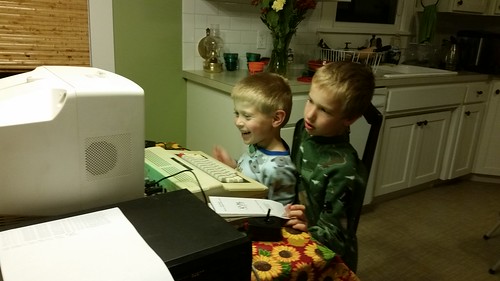
Yesterday, Jacob (age 8) asked to help me put together a 30-year-old computer from parts in my basement. Meanwhile, Oliver (age 5) asked Laura to help him learn cursive. Somehow, this doesn t seem odd for a Saturday at our place. 2014-11-22 18.58.36 Let me tell you how this came about. I ve had a project going on for a while now to load data from old floppies. It s been fun, and had a surprise twist the other day: my parents gave me an old TRS-80 Color Computer II (aka CoCo 2 ). It was, in fact, my first computer, one they got for me when I was in Kindergarten. It is nearly 30 years old. I have been musing lately about the great disservice Apple did the world by making computers easy to learn namely the fact that few people ever bother to learn about them. Who bothers to learn about them when, on the iPhone for instance, the case is sealed shut, the lifespan is 1 or 2 years for many purchasers, and the platform is closed in lots of ways? I had forgotten how finicky computers used to be. But after some days struggling with IDE incompatibilities, booting issues, etc., when I actually managed to get data off a machine that had last booted in 1999, I had quite the sense of accomplishment, which I rarely have lately. I did something that was hard to do in a world where most of the interfaces don t work with equipment that old (even if nominally they are supposed to.) The CoCo is one of those computers normally used with a floppy drive or cassette recorder to store programs. You type DIR, and you feel the clack of the drive heads through the desk. You type CLOAD and you hear the relay click closed to turn on the tape motor. You wiggle cables around until they make contact just right. You power-cycle for the times when the reset button doesn t quite do the job. The details of how it works aren t abstracted away by innumerable layers of controllers, interfaces, operating system modules, etc. It s all right there, literally vibrating your desk. So I thought this could be a great opportunity for Jacob to learn a few more computing concepts, such as the difference between mass storage and RAM, plus a great way to encourage him to practice critical thinking. So we trekked down to the basement and came up with handfulls of parts. We brought up the computer, some joysticks, all sorts of tangled cables. We needed adapters, an old TV. Jacob helped me hook everything up, and then the moment of truth: success! A green BASIC screen! I added more parts, but struck out when I tried to connect the floppy drive. The thing just wouldn t start up right whenever the floppy controller cartridge was installed. I cleaned the cartridge. I took it apart, scrubbed the contacts, even did a re-seat of the chips. No dice. So I fired up my CoCo emulator (xroar), and virtually saved some programs to cassette (a .wav file). I then burned those .wav files to an audio CD, brought up an old CD player from the basement, connected the cassette in plug to the CD player s headphone jack, and presto instant programs. (Well, almost. It takes a couple of minutes to load a program from audio codes.) The picture above is Oliver cackling at one of the very simplest BASIC programs there is: number find. The computer picks a random number between 1 and 2000, and asks the user to guess it, giving a too low or too high clue with each incorrect guess. Oliver delighted in giving invalid input (way too high numbers, or things that weren t numbers at all) and cackled at the sarcastic error messages built into the program. During Jacob s turn, he got very serious about it, and is probably going to be learning about how to calculate halfway points before too long. But imagine my pride when this morning, Jacob found the new CD I had made last night (correcting a couple recordings), found my one-line instruction on just part of how to load a program, and correctly figured out by himself all the steps to do in order (type CLOAD on the CoCo, advance the CD to the proper track, press play on the player, wait for it to load on the CoCo, then type RUN). I ordered a replacement floppy controller off eBay tonight, and paid $5 for a coax adapter that should fix some video quality issues. I rescued some 5.25 floppies from my trash can from another project, so they should have plenty of tools for exploration. It is so much easier for them to learn how a disk drive works, and even what the heck a track is, when you can look at a floppy drive with the cover off and see the heads move. There are other things we can do with more modern equipment Jacob has shown a lot of interest in Arduino projects but I have so far drawn a blank on ways to really let kids discover how a modern PC (let alone a modern phone or tablet) works. Update Nov. 24: Every so often, the world surprises me by deciding to, well, read one of my random blog posts. For the benefit of those of you that don t already know my boys, you might want to know that among their common play activites are turning trees into pretend trains, typing at a manual typewriter, reading, writing their own books, using a cassette recorder, building a PC and learning to use bash or xmonad, making long paper tapes with an adding machine, playing records on a record player, building electric gizmos, and even making mud balls. I am often asked about the role of the computer in the lives, given that my hobby and profession involves computers. The answer: less than that of most of their peers. I look for opportunities for them to learn by doing, discovering, playing, or imagining. I make no presumption that they will develop the passion for computers that I did. What I want is for them to have the curiosity and drive to learn everything there is to know about whatever they do develop a passion for, so they will be great at it.

23 November 2014

Matthew Palmer: You stay classy, Uber

You may have heard that Uber has been under a bit of fire lately for its desires to hire private investigators to dig up dirt on journalists who are critical of Uber. From using users ride data for party entertainment, putting the assistance dogs of blind passengers in the trunk, adding a surcharge to reduce the number of dodgy drivers, or even booking rides with competitors and then cancelling, or using the ride to try and convince the driver to change teams, it s pretty clear that Uber is a pretty good example of how companies are inherently sociopathic. However, most of those examples are internal stupidities that happened to be made public. It s a very rare company that doesn t do all sorts of shady things, on the assumption that the world will never find out about them. Uber goes quite a bit further, though, and is so out-of-touch with the world that it blogs about analysing people s sexual activity for amusement. You ll note that if you follow the above link, it sends you to the Wayback Machine, and not Uber s own site. That s because the original page has recently turned into a 404. Why? Probably because someone at Uber realised that bragging about how Uber employees can amuse themselves by perving on your one night stands might not be a great idea. That still leaves the question open of what sort of a corporate culture makes anyone ever think that inspecting user data for amusement would be a good thing, let alone publicising it? It s horrific. Thankfully, despite Uber s fairly transparent attempt at whitewashing ( clearwashing ?), the good ol Wayback Machine helps us to remember what really went on. It would be amusing if Uber tried to pressure the Internet Archive to remove their copies of this blog post (don t bother, Uber; I ve got a Save As button and I m not afraid to use it). In any event, I ve never used Uber (not that I ve got one-night stands to analyse, anyway), and I ll certainly not be patronising them in the future. If you re not keen on companies amusing themselves with your private data, I suggest you might consider doing the same.

21 November 2014

Jonathan Wiltshire: Getting things into Jessie (#6)

If it s not in an unblock bug, we probably aren t reading it We really, really prefer unblock bugs to anything else right now (at least, for things relating to Jessie). Mails on the list get lost, and IRC is dubious. This includes for pre-approvals. It s perfectly fine to open an unblock bug and then find it s not needed, or the question is really about something else. We d rather that than your mail get lost between the floorboards. Bugs are easy to track, have metadata so we can keep the status up to date in a standard way, and are publicised in all the right places. They make a great to-do list. By all means twiddle with the subject line, for example appending (pre-approval) so it s clearer though watch out for twiddling too much, or you ll confuse udd. (to continue my theme: asking you to file a bug instead costs you one round-trip; don t forget we re doing it at scale)
Getting things into Jessie (#6) is a post from: jwiltshire.org.uk Flattr

20 November 2014

Gunnar Wolf: UNAM. Viva M xico, viva en paz.

UNAM. Viva M xico, viva en paz.
We have had terrible months in Mexico; I don't know how much has appeared about our country in the international media. The last incidents started on the last days of September, when 43 students at a school for rural teachers were forcefully disappeared (in our Latin American countries, this means they were taken by force and no authority can yet prove whether they are alive or dead; forceful disappearance is one of the saddest and most recognized traits of the brutal military dictatorships South America had in the 1970s) in the Iguala region (Guerrero state, South of the country) and three were killed on site. An Army regiment was stationed few blocks from there and refused to help. And yes, we live in a country where (incredibly) this news by themselves would not seem so unheard of... But in this case, there is ample evidence they were taken by the local police forces, not by a gang of (assumed) wrongdoers. And they were handed over to a very violent gang afterwards. Several weeks later, with far from a thorough investigation, we were told they were killed, burnt and thrown to a river. The Iguala city major ran away, and was later captured, but it's not clear why he was captured at two different places. The Guerrero state governor resigned and a new governor was appointed. But this was not the result of a single person behaving far from what their voters would expect It's a symptom of a broken society where policemen will kill when so ordered, where military personnel will look away when pointed out to the obvious, where the drug dealers have captured vast regions of the country where are stronger than the formal powers. And then, instead of dealing with the issue personally as everybody would expect, the president goes on a commercial mission to China. Oh, to fix some issues with a building company. That coincidentally or not was selling a super-luxury house to his wife. A house that she, several days later, decided to sell because it was tarnishing her family's honor and image. And while the president is in China, the person who dealt with the social pressure and told us about the probable (but not proven!) horrible crime where the "bad guys" for some strange and yet unknown reason (even with tens of them captured already) decided to kill and burn and dissolve and disappear 43 future rural teachers presents his version, and finishes his speech saying that "I'm already tired of this topic". Of course, our University is known for its solidarity with social causes; students in our different schools are the first activists in many protests, and we have had a very tense time as the protests are at home here at the university. This last weekend, supposed policemen entered our main campus with a stupid, unbelievable argument (they were looking for a phone reported as stolen three days earlier), get into an argument with some students, and end up firing shots at the students; one of them was wounded in the leg. And the university is now almost under siege: There are policemen surrounding us. We are working as usual, and will most likely finish the semester with normality, but the intimidation (in a country where seeing a policeman is practically never a good sign) is strong. And... Oh, I could go on a lot. Things feel really desperate and out of place. Today I will join probably tens or hundreds of thousands of Mexicans sick of this simulation, sick of this violence, in a demonstration downtown. What will this achieve? Very little, if anything at all. But we cannot just sit here watching how things go from bad to worse. I do not accept to live in a state of exception. So, this picture is just right: A bit over a month ago, two dear friends from Guadalajara city came, and we had a nice walk in the University. Our national university is not only huge, it's also beautiful and loaded with sights. And being so close to home, it's our favorite place to go with friends to show around. This is a fragment of the beautiful mural in the Central Library. And, yes, the University stands for "Viva M xico". And the university stands for "Peace". And we need it all. Desperately.

Next.

Previous.