Search Results: "zed"

12 November 2012

Gunnar Wolf: Update on my e-voting-related work @e_voto

For the last couple of years, one of the topics I have tackled with several columns and a couple of articles published, several presentations on conferences and many comments wherever I can is raising awareness on why security experts around the world oppose electronic voting. Slightly over a year ago, I started gathering all the published news (in Spanish, with some notes in English if I feel them relevant enough) that came to my greedy hands and archiving them, categorized as well as I could, into what I came to call an Electronic voting observatory. I don't feed it with the frequency I'd like, but overall I do feel there is an interesting amount of information in there. About a month and a half ago, via Twitterfeed, I set up a Twitter account where my bot echoes everything I get on that regard. So, while you can follow the observatory via RSS (as probably most readers of my blog will do), I know there are many Twitter users among you @e_voto might be interesting to you if you speak Spanish and are interested in the topic. I try not to be partisan on the information I copy there; of course I am subjective (I try not to refer to news which don't provide new insight or data points, or to obvious repeats), but I am doing this effort to follow the development as it unfolds, not to push my viewpoints.

9 November 2012

Gunnar Wolf: Road trip to ECSL 2012 in Guatemala

Encuentro Centroamericano de Software Libre! Guatemala! During a national (for us) holiday, so it's easy to go without missing too much work time! How would I miss the opportunity? Several years ago, I started playing with the idea of having a road trip Probably this was first prompted with the UK crew and the Three Intrepid Motorcycle Riders arriving by land to DebConf 9 I don't know. Fact is, I wanted to go to DebConf10 in New York by land, as well as to DebConf12 in Nicaragua. Mostly due to a lack of time, I didn't Although we did start making some longish trips. Of course, my desire to show Regina what Mexico is like also helped! So, up until a week ago, our (according to my standards) long distance driving experience included:
  • M xico Guanajuato Puerto Vallarta Guanajuato M xico, in early November 2011, for Festival de Software Libre and with Regina and our Blender friends Octavio and Claudia. Totalling almost 1900Km, mostly consisting of wide, toll highway.
  • M xico Xilitla San Luis Potos M xico, in April 2012, just for fun and for a nice short vacation, alone with Regina. Totalling almost 1200Km, but through Sierra Gorda de Quer taro, a very tough stretch of about 250Km which we did at about 50Km/h on average. Beautiful route for sure! We didn't originally intend to go through San Luis Potos , and it does not appear to make much sense, as it adds ~350Km to the total, but it was even quicker than going back by the same route and according to those who now, even faster than our planned route, via Tamazunchale and Ixmiquilpan!
  • M xico San Luis Potos Zacatecas Aguascalientes Guanajuato M xico, in May 2012, for Congreso Internacional de Software Libre, again with Octavio and Claudia. Totalling 1250Km, and following very good roads, although most of them were toll-free.
But there is always a certain halo over crossing a border, maybe more so in countries as large as Mexico. We convinced Pooka and Moni, and granted, with some aprehension, as we knew of some important security risks in the more rural areas we wanted to go through we decided to go to Guatemala. And, although we wanted to go with a bit more time, Real Life took its toll: We could not take more time than the intersection of what our respective jobs offered. So, here goes a short(?) recap of our six day long, 3200Km trip. Of course, we have a map detailing this. Mexico Veracruz I came to my office early on Wednesday (31-oct), and left with Regina around 10AM towards Veracruz. We agreed to meet there with Moni and Pooka, who would take the night bus, and continue together. Crossing Mexico City proved to be the longest obstacle We arrived to Veracruz already past 3PM, and spent a nice evening walking down the center and port of the city. Veracruz port can still be seen as part of central Mexico; I knew the road quite well. Veracruz San Andr s Tuxtla Catemaco San Cristobal de las Casas We met with our friends at the iconic Gran Caf de la Parroquia at 6:30AM. Had a nice breakfast with coffee, and by 7:30 we were heading south-west. The reason to have a road trip was to get to know the route, to enjoy the countryside So, given we "only" had to make 650Km this day, we took the non-toll road A narrow path stretching along the coastal plains of Veracruz, until Acayucan. Doing so, we also saved some money, as the equivalent toll road is around MX$300 (~US$25)! Veracruz is a hot state. We ended up all sweaty and tired by 19:00, when we reached San Cristobal. We had agreed not to drive at night, due to security issues, but fortunately there was quite a bit of traffic both ways between Tuxtla Guti rrez (Chiapas State capital, around 1hr from San Cristobal, where darkness got us) and our destination, so we carried on. Now, San Cristobal is a high city, almost as high as Mexico City (2100m), and being more humid, it was quite chilly. We went for a walk, and were convinced that at a later time, we had to stay for several days there. The city is beautiful, the region is breath-taking, there is a lot of great handicrafts as well, and it's overall very cheap. Really lovely place. San Cristobal de las Casas Cd. Cuauht moc La Mesilla Guatemala Once again, this day started early. We woke up ready to leave at 7AM, and not earlier because the hotel's parking didn't open earlier. After a very quick visit to San Cristobal downtown, to take some photos that were not right the night before, we took the road to Comit n, stopping just for some tamales de bola y chipil n for breakfast. Central Chiapas is almost continuously populated, differing from most of my experience in Mexico. It is all humid, and has some very beautiful landscapes. We passed Comit n, which is a much larger city than what we expected, went downhill after La Trinitaria, crossed a plain, and continued until hills started taking over again. We stopped in a very chaotic, dirty place: Just accross the border, where Ciudad Cuauht moc becomes La Mesilla. This border was basically what we expected: There is no half-official place to exchange money, so we had to buy quetzales from somebody who offered them on the street, at MX$2 per Q1 (where the real exchange should be around 1.50 to 1). While on the road, I was half-looking for exchange posts in Comit n and onwards, and found none (and being a festive day, they would probably be closed anyway). But we were expecting this, after all, and exchanged just the basic minimum: MX$600 (US$50, which by magic became Q300, US$40). The tramit consists of:
  • Spraying the car against diseases (which has a cost of Q18)
  • Each of us has to go through migration. Note, in case you cross this border: We didn't expressly cross Mexican migration, so officially there was no record of us going out. Be sure to go through migration to avoid problems at re-entry!
    Migration has no cost.
  • Customs. As we were entering by car, I had to purchase a permit for circulation. I don't remember the exact quote, but it was around Q150, and the permit is valid for 90 days.
  • That's it! Welcome to Guatemala!
La Mesilla is in Guatemala's Huehuetenango Department, and from all of the Departments we crossed until Guatemala city (Huehuetenango, Quetzaltenango, Totonicap n, Solol , Chimaltenango, Sacatep quez and Guatemala), this is the largest one. Huehuetenango is home to the Cuchumatanes mountain ridge. We found beautiful, really steep, really fertile mountains. It is plainly amazing: Mountains over 60 , and quite often full with agricultural use Even at their steepest points! The CA-1 highway is, in general, in very good shape. There are however many (many, many) speed bumps (or topes, in Mexican terminology. Or t mulos in Guatemalan), at least a couple at every village we crossed, not always painted. The road is narrow and quite winding; it follows river streams for most of the way. We feared it would be in much worse shape, from what we have heard, but during the whole way we found only three points where the road was unusable due to landslides and an alternative road was always in place when we needed it. After Totonicap n, the narrow road becomes a wide (four lane) highway. Don't let that fool you! It still goes through the center of every village along the road, so it's really not meant for speeding. Also, even though the pavement is in very good condition, it is really steep quite often. It is not the easiest road to drive, but it's (again) by far not as bad as we expected. We arrived to Guatemala City as dawn was falling, and got promptly lost. Guatemala has a very strange organization scheme: The city is divided in several zones, laid out in a swirl-like fashion. East-west roads are called Calle and North-south roads are called Avenida (except for zona 4, I think, where they are diagonal, and some are Rutas while the others are V as). I won't go into too much detail). Thing is, many people told us it's a foolproof design, and people from different countries understand the system perfectly. We didn't... At least not when we arrived. We got quite lost, and it took us around one hour to arrive to our hotel, at almost 19:00 Almost 12 hours since we left San Cristobal. Went for a quick dinner, and then waited for our friends to arrive after the first day of work of ECSL, which we missed completely. And, of course, we were quite tired, so we didn't stay up much longer. Antigua Guatemala On Saturday, ECSL's activities started after 14:00 so we almost-kidnapped Wences, the local organization lead, and took him to show us around Antigua Guatemala. Antigua was the capital of Guatemala until an earthquake destroyed it in the 1770s; the capital was moved to present-day Guatemala city, but Antigua was never completely abandoned. Today, it is a world heritage site, a beautiful city, where we could/should have stayed for several days. But we were there for the conference, so we were in Antigua just a couple of hours, and headed back to Guatemala. Word of caution: Going from Guatemala to Antigua, we went down via the steepest road I have ever driven. Again, a real four-lane highway... but quite scary! The main focus for this post is to give some roadtrip advice to potential readers... So, this time around, I won't give much detail regarding ECSL. It was quite interesting, we had some very good discussions... but it would take me too much space to talk about it! The road back: Guatemala Tec n Um n; Cd. Hidalgo Arriaga So, about the road back: Yes, we just spent three days getting to Guatemala City. We were there only for ~36 hours. And... We needed to be here by Tuesday morning no matter what. So, Sunday at noon we said goodbye to our good friends in ECSL and started the long way back. To get to know more of Guatemala, we went back by the CA-2 highway, which goes via the coastal plains Not close to the Pacific ocean, which we didn't get to see at all, but not through the mountains. To get to CA-2, we took CA-9 from Guatemala. If I am not mistaken, this is the only toll road in Guatemala (at least, the only we used, and we used some pretty good highways!) It is not expensive; I don't remember right now, but must have been around Q20 (US$3). Went South past Palin and until CA-2, just outside Escuintla city, and headed West. All of Escuintla and Suchitep quez it is again a four lane highway; somewhere in Retalhueu it becomes a two lane highway. We were strongly advised not to take this road at night because, as the population density is significantly lower than in CA-1, it can get lonely at times And there are several reports of robberies. We did feel the place much less populated, but saw nothing suspicious in any way. Something important: There are almost no speedbumps in CA-2! The terrain stayed quite flat and easy as we crossed Quetzaltenango, and only in San Marcos we found some interesting hills and a very strong rain that would intermitetntly accompany us for the rest of the ride. So, we finally arrived to the border city of Tec n Um n at around 16:30 Approximately four hours after leaving the capital. The Tec n Um n Cd. Hidalgo cities and border pass are completely different from the disorderly and dirty Cd. Cuauht moc La Mesilla ones. The city of Tec n Um n could be just a nice town anywhere in the country, it does not feel aggressive as most border cities I have seen in our continent. We stopped to eat at El pollo campero and headed to the border. In the Mexican side, we also saw a very well consolidated, big and ordered migration area. Migration officers were very kind and helpful As we left Cd. Cuauht moc, Regina didn't get a stamp of leaving Mexico, so technically she was ilegally out of the country (as she is not a national... They didn't care about the rest of us). The tramit to fix this was easy, simple, straightforward. We only paid for the fumigation again (MX$60, US$5), and were allowed to leave. Anyway, we crossed the border. There is a ~30Km narrow road between Cd. Hidalgo and Tapachula, but starting in Tapachula we went on Northwards via a very good, four lane and very straight highway. Even though we had agreed not to drive at night... Well, we were quite hurried and still too far from Mexico City, so we decided to push it for three more hours, following the coastline until the city of Arriaga, almost at the border between Chiapas and Oaxaca. Found a little hotel to sleep some hours and collapsed. Word of warning: This road (from Tapachula to Arriaga) is also known for its robberies. We saw only one suspicious thing: Two guys were pushing up their motorcycle, from which they had apparently fallen. We didn't stop, as they looked healthy and not much in need of help, but later on talked about this Even though this was at night, they were not moving as if they had just crashed; nothing was scratched, not the motorcycle and not their clothes. That might have been an attempt to mug us (or whoever stopped by). This highway is very lonely, and the two directions are separated by a wall of vegetation, so nobody would have probably seen us were we to stop for some minutes. Be aware if you use this road! The trip comes to an end: Arriaga Niltepec Istmo C rdoba M xico The next (last, finally!) day, we left at 6:30AM. After driving somewhat over one hour, we arrived to Niltepec, where a group of taxi drivers had the highway closed as a protest against their local government's tolerance of mototaxis. We evaluated going back to Arriaga and continue via the Tuxtla Guti rrez highway, but that would have been too long. We had a nice breakfast of tlayudas (which resulted in Pooka getting an alergic reaction shortly afterwards) and, talking with people here and there, were told about an alternative route by an agricultural road that surrounds the blockade. So, we took this road the best way we could, and after probably 1hr of driving at 20Km/h, finally came back to the main road. We planned on crossing the isthmus using the Acayucan-Juchit n road We were amazed at the La Ventosa ("the windy") area, where we crossed a huge eolic plant for electricity generation, so of course we got our good share of photos. From then onwards, not much more worth mention. Crossed the isthmus via a quite secondary road in not too good shape (although there is a lot of machinery, and the road will much likely improve in the next few months/years), then took the toll freeway along Veracruz until C rdoba. We stopped for a (delilcious and revigorizing!) cup of coffee in Hotel Zeballos, where Agust n de Iturbide signed with Viceroy Juan O'Donoj the treaties that granted Mexico the independence. Traveller, beware: When crossing between Puebla and Veracruz, there is a steep slope of almost 1000m where , you will almost always (except if it's close to noon) find very thick fog; taking the highway from C rdoba, this is in the region known as Cumbres de Maltrata. We had the usual fog, and just as we left it, a thin but constant rain that went on with us up until we got home. Crossed Puebla state with no further eventualities, and arrived to Pooka and Moni's house by 22:00. Less than one hour later, Regina and me arrived home as well. This was four days ago... and I have finally finished writing it all down ;-) Hope you find this useful, or if not, at least entertaining! If you read this post in my blog, you will find many pictures taken along the trip below (Well, if you are reading the right page, not in the general blog index...). If you are reading from a planet or other syndication service... Well, come to the blog! Dreamhost woes Oh, and... Yes, it sometimes happens: My blog is hosted at Dreamhost. This means that usually it works correctly... But sometimes, specially when many people request many nontrivial pages, it just gives an error. If you get an error, reload once or twice... Or until your patience manages ;-)

Olivier Berger: Using a DreamPlug with Debian as an IPv4/IPv6 router for a home LAN behind a FreeBox

The goal of this article is to describe the setup I've made for my home LAN behind a FreeBox (French ISP Free.fr).

1 Principles
The FreeBox is configured :
  • in router mode (with a local IPv4 network on 192.168.0.x/24)
  • with IPv6 support activated (by convention, we'll use the 2a01:e35:1234:5678::/64 prefix below, to represent the IPv6 prefix provided by the FreeBox)
Behind the FreeBox, I have connected a DreamPlug computer (running Debian wheezy with a dual-boot setup as sold by NewIT) on its eth0 etherlink port. Behind the DreamPlug, I have connected a switch (to its eth1 ethernet port), on which the LAN's machines will be connected, on a dual IPv4/IPv6 network. The IPv4 will be on 192.168.4.0/24 (addresses for machines connected to the switch will be static) while the IPv6 will use the addresses auto-generated on the FreeBox's prefix. The DreamPlug will also provide a wifi network (in master mode, through its uap0 interface), only IPv4 on 192.168.3.0/24. On the DreamPlug, the outgoing IPv4 traffic will be masqueraded, while the IPv6 traffic will be bridged so that machines on the LAN can be reached from the Internet directly, passing through the eth0 eth1 bridge. The DreamPlug will also act as a filter/firewall to only allow selected traffic to reach the LAN machines (in particular for the IPv6, since the machines may be reached directly from the Internet otherwise).

1.1 Alternatives
There are a lot of howtos describing the setup of FreeBox + IPv6, but I couldn't find one that was exactly reflecting the kind of setup I have. Some dealt with a FreeBox setup in bridge mode (i.e. not the router mode), but in case the DreamPlug isn't so much reliable, or I've messed with the config, I'm tempted to keep the possibility to connect directly to the FreeBox. Others didn't use the same setup with a router distributing both wired and wifi networks. And note described exactly the setup for a DreamPlug running Debian wheezy and using ferm as a firewall. No, there's no NIH syndrom here ;)

2 DreamPlug router configuration

2.1 Interfaces configuration
The /etc/network/interfaces on the DreamPlug looks like the following (kudos to Dag Bertelsen's Setting up Dreamplug as a router with Shorewall firewall for the wifi configuration bits):
# Note: Order of the interfaces declarations matters

auto lo
iface lo inet loopback

auto uap0
iface uap0 inet static
post-up /usr/bin/uaputl sys_cfg_ssid dream-uAP-XXXX
# Modus WPA2
post-up /usr/bin/uaputl sys_cfg_protocol 32
# WLAN password
post-up /usr/bin/uaputl sys_cfg_wpa_passphrase "WHATEVER PASSWORD"
# Set the Cipher
post-up /usr/bin/uaputl sys_cfg_cipher 8 8
# automatic channel
post-up /usr/bin/uaputl sys_cfg_channel 0 1
post-up /usr/bin/uaputl bss_start
# we deliver addresses for the Wifi with DHCP
post-up /usr/sbin/service udhcpd start
address 192.168.3.1
netmask 255.255.255.0

# Only IP6 traffic passes through the router between the Freebox on eth0 and the LAN on eth1
auto br0
iface br0 inet manual
bridge_ports eth0 eth1
bridge_maxwait 0
pre-up ebtables -t broute -A BROUTING -p ! ipv6 -j DROP
down ebtables -t broute -F

# Connected to the FreeBox, with DHCP in IPv4, masquerading outgoing IPv4 traffic
auto eth0
iface eth0 inet dhcp
up iptables -t nat -A POSTROUTING -o eth0 -j MASQUERADE
down iptables -t nat -F
post-up sysctl -q -w net.ipv4.ip_forward=1
iface eth0 inet6 auto

# Connected to the LAN with a static IPv4 address
auto eth1
iface eth1 inet static
address 192.168.4.1
netmask 255.255.255.0

2.2 DHCP server configuration
The DHCP config for udhcpd is as such (in /etc/udhcpd.conf):
start 192.168.3.100
end 192.168.3.200
interface uap0
opt lease 86400
opt router 192.168.3.1
opt subnet 255.255.255.0
opt dns 192.168.3.1
opt domain localdomain
max_leases 101
lease_file /var/lib/udhcpd.leases
auto_time 5

2.3 Firewall configuration
The firewall I use is ferm. Here's the /etc/ferm/ferm.conf configuration (YMMV). Thanks to Ren Garcia's R gles de firewall pour un pont IPv6 for inspiration :
## Interfaces of the router

# Our LAN on a switch
@def $DEV_PRIVATE = eth1;

# The ISP router
@def $DEV_WORLD = eth0;

# Our Wifi LAN
@def $DEV_WIFI = uap0;


## IP networks of our LAN

# IPv4 (includes ethernet switch and wifi)
@def $NET_PRIVATE = 192.168.0.0/16;

# IPv6 (the prefix granted by the ISP)
@def $NET6_PRIVATE = 2a01:e35:1234:5678::/64;

# IPv6 Local link
@def $LINK6 = fe80::/10;

# Specific machines on the LAN
@def $MACHINE_MYDESKTOP = 2a01:0e35:1234:5678:1234:5678:9abc:def0;

# Special function to log dropped packets
@def &DROP() =
mod limit limit 1/second limit-burst 10 LOG log-prefix "$DOMAIN-$CHAIN: ";
DROP;


# IPv4 iptables rules
table filter
chain INPUT
policy DROP;

# connection tracking
mod state state INVALID DROP;
mod state state (ESTABLISHED RELATED) ACCEPT;

# allow local packet
interface lo ACCEPT;

# respond to ping
#proto icmp ACCEPT;
proto icmp icmp-type echo-request ACCEPT;

# allow IPsec
proto udp dport 500 ACCEPT;
proto (esp ah) ACCEPT;

# allow SSH connections from the private network and from some
# well-known internet hosts
#saddr ($NET_PRIVATE 123.45.67.89) proto tcp dport ssh ACCEPT;
saddr $NET_PRIVATE proto tcp dport ssh ACCEPT;

# we provide DNS and SMTP services for the internal net
interface $DEV_PRIVATE saddr $NET_PRIVATE
proto (udp tcp) dport domain ACCEPT;
proto tcp dport smtp ACCEPT;


interface $DEV_WIFI
# DHCP
proto udp dport 67:68 ACCEPT;
proto (udp tcp) dport domain ACCEPT;

proto udp dport netbios-dgm DROP;


# LOG all dropped packets
proto (udp tcp) &DROP();


# outgoing connections are not limited
chain OUTPUT policy ACCEPT;

chain FORWARD
policy DROP;

# connection tracking
mod state state INVALID DROP;
mod state state (ESTABLISHED RELATED) ACCEPT;

# connections from the internal net to the internet or to other
# internal nets are allowed
interface $DEV_PRIVATE ACCEPT;
interface $DEV_WIFI ACCEPT;

# LOG all dropped packets
proto (udp tcp) &DROP();


# IPv4 masquerade / NAT support

table nat
chain POSTROUTING
# masquerade private IP addresses
saddr $NET_PRIVATE outerface $DEV_WORLD MASQUERADE;


## IPv6:

domain ip6
table filter

chain INPUT
policy DROP;

# Internal traffic authorized
saddr $NET6_PRIVATE ACCEPT;
saddr $LINK6 ACCEPT;

# accept multicast
daddr ff00::/8 ACCEPT;

interface lo ACCEPT;

# For public traffic
# Only DNS resolution + NTP acceped for UDP
interface br0
proto udp

sport domain ACCEPT;

dport ntp ACCEPT;

&DROP();


# TCP on ports < 1024 forbidden except for SSH
proto tcp

dport ssh ACCEPT;

dport 0:1023 DROP;


# Accepted established traffic
mod state state INVALID DROP;
mod state state (ESTABLISHED RELATED) ACCEPT;

# incoming connections forbidden
proto tcp syn DROP;

# Accept ping
proto icmpv6 ACCEPT;


proto (udp tcp) &DROP();

chain FORWARD
policy DROP;

# All local traffic accepted
saddr $LINK6 ACCEPT;

# All ping accepted unless coming from internet
saddr ! $NET6_PRIVATE proto icmpv6 icmp-type echo-request DROP;
proto icmpv6 ACCEPT;

# Allow SSH to specific machines
proto tcp daddr $MACHINE_MYDESKTOP dport ssh ACCEPT;

# Accept established traffic
mod state state INVALID DROP;
mod state state (ESTABLISHED RELATED) ACCEPT;

# Accept outgoing traffic
saddr $NET6_PRIVATE ACCEPT;

# Accept local outgoing traffic
saddr ::1 ACCEPT;

proto (udp tcp) &DROP();


# ebtables
domain eb chain FORWARD
policy DROP;

# Only accept bridged traffic for IPv6
logical-in br0 logical-out br0
#ebtables -t broute -A BROUTING -p ! ipv6 -j DROP
proto IPv6 ACCEPT;


2.4 DNS config

The DreamPlug will run bind9 to cache the DNS for the wifi network (default config is OK out of the box).

3 Configuration for the LAN machines

3.1 Connection with Wifi
Machines connected with the WPA wifi network should get an IPv4 only address via DHCP on the 192.168.3.0/24 network. There's nothing to be configured specifically.

3.2 Ethernet connection on the switch
Machines connected via ethernet cables to the switch can run either with IPv4 config, in which case they should be configured statically for the 192.168.4.0/24 network, using the router on 192.168.4.1 as a gateway, or with IPv6 auto config. On wheezy, the /etc/network/interfaces will look like :
auto eth1
iface eth1 inet static
address 192.168.4.42
netmask 255.255.255.0
gateway 192.168.4.1
dns-nameservers 212.27.40.241 212.27.40.240

iface eth1 inet6 auto

4 To do list

The setup works fine, but there are a few things I'd like to improve :
  • running a regular Debian distro on the DreamPlug (the kernel used at the moment is patched for the wifi driver in master mode support), possibly using only Free Software.
  • using subnets for the IPv6 machines (but that seems not exactly obvious, requiring NDP proxying and stuff), so that the privacy is improved (the IPv6 auto generated global addresses depend on the MAC addresses hmmm probably not optimal).
  • adding more stuff to the DreamPlug router so that it becomes a full fledged FreedomBox.

5 References

Date: 2012-11-09 16:30:34 CET

6 November 2012

Stefano Zacchiroli: bits from the DPL for October 2012

Freshly baked, bits from the DPL for October 2012.
Dear Project Members,
another month, another periodic report of DPL-ish activities, this time for October 2012. Highlights Debian on public clouds I've spent quite some time to improve Debian presence on the so called "public clouds". Following up to an inquiry of a fellow developer, I've reached out to Microsoft to investigate the possibility of having Debian as an option on Windows Azure. Around the same time, I've been approached by Amazon to have Debian as an option on the AWS marketplace. In both cases, we will need to overcome challenges of various kinds, at the technical (e.g. image preparation), bureaucratic (e.g. terms of the agreements we'll need to accept to be present), and political (e.g. chain of trust, platform freedom) levels. Up to now, discussions have been going on mostly in private, simply because they started as 1-to-1 inquiries and continued from there, but there is no good reason they should remain so. Hence, thanks to the listmasters and in particular Alexander Wirt, we have setup the new debian-cloud mailing list. If you are interested in these topics please join the list. For both Azure and AWS there is good progress on the technical part already; summaries will soon be posted on the list so that we are all on the same page. Similarly, I'll post there status reports about the bureaucratic requirements. And of course there is no reason to focus on specific clouds, if you'd like to support others and are willing to put some work to that end, please join the list and let us know. DPL helpers meeting I've already bothered you at least in my last platform and DebConf13 talk with observations about how non-scalable the DPL job is. After having collected applications of DPL helpers for a while, I've finally sat down and tried to put those applications into good use. The idea is simple: to the extend of possible, we should shift from a one-man-band job to a more "board-like" job, with people sharing an agenda, a list of outstanding tasks, and public communication. We have started slowly, setting up the #debian-dpl IRC channel and running periodic bi-weekly meetings there. You can find the meeting minutes and full logs at the usual place. We are still ramping up, so we don't have yet "fancy" stuff like a mailing list or an issue tracker entry, but they're in the working. Some of the outcome are starting to show, too (e.g. as part of recent discussions on 3rd party orphaning, or on our inbound trademark policy, or even in the forthcoming DMCA policy to make mentors.d.n an official project service). It's an experiment and a big challenge. I'm, for one thing, not yet convinced there are enough people interested in sharing the load of DPL duties (that look boring, for many tech geeks) in the long run. But I'm also convinced that the sustainability of the Debian organization model depends on this, so it's worth trying. If you're interested in the challenge and willing to volunteer some of your time, please join us on #debian-dpl . I'll take care of keeping the project informed of further evolution, in particular about the communication channels we will pick for day to day activities and accountability. Events / public communication I've spent most of my remaining Debian time in October attending events on behalf of the Project, in particular: On the topic of public communication, I've also coordinated with the press team an answer to a press inquiry about Secure Boot (which has become part of this article), and happily vouched for the Ubuntu charity marathon, adding some Debian challenges to it. Delegations As largely overdue matters, I've finalized the delegations mentioned last month, namely: FTP masters, New Members Front Desk, and Policy editors. Assets and legal stuff Miscellanea Now let's all go back to RC Bug squashing to make Wheezy a reality. SPAM-my link of the month is http://udd.debian.org/bugs.cgi and its various "views" at the bottom of the page. Cheers.
PS the day-to-day activity log for October 2012 is available at the usual place master:/srv/leader/news/bits-from-the-DPL.txt.201210

Rapha&#235;l Hertzog: My Free Software Activities in October 2012

This is my monthly summary of my free software related activities. If you re among the people who made a donation to support my work (120.46 , thanks everybody!), then you can learn how I spent your money. Otherwise it s just an interesting status update on my various projects. Dpkg At the start of the month, I reconfigured dpkg s git repository to use KGB instead of the discontinued CIA to send out commit notices to IRC (on #debian-dpkg on OFTC, aka irc.debian.org). I didn t do anything else that affects dpkg and I must say that Guillem does not make it easy for others to get involved. He keeps all his work hidden in his private for 1.17.x branch and refuses to open an official jessie branch as can be seen from the lack of answer to this mail. On the bright side, he deals with almost all incoming bugs even before I have a chance to take care of them. But it s a pity that I can never review any of his fixes because they are usually pushed shortly before an upload. Misc packaging I helped to get #689336 fixed so that the initrd properly setups the keymap before asking for a passphrase for an encrypted partition. Related to this I filed #689722 so that cryptsetup gains a dependency ensuring that the required tools for keymap setup are available. I packaged a new upstream version of zim (0.57) and also a security update for python-django that affected both Squeeze and Wheezy. I uploaded an NMU of revelation (0.4.13-1.2) so that it doesn t get dropped from Wheezy (it was on the release team list of leaf packages that would be removed if unfixed) since my wife is using it to store her passwords. I sponsored a new upstream version of ledgersmb. Debian France We managed to elect new officers for Debian France. I m taking over the role of president, Sylveste Ledru is the new treasurer and Julien Danjou is the new secretary. Thank you very much to the former officers: Carl Chenet, Aur lien Jarno and Julien Cristau. We re in the process of managing this transition which will be completed during the next mini-Debconf in Paris so that we can exchange some papers and the like. In the first tasks that I have set myself, there s recruiting two new members for the boards of directors since we re only 7 and there are 9 seats. I made a call for volunteers and we have two volunteers. If you want to get involved and help Debian France, please candidate by answering that message as soon as possible. The Debian Handbook I merged the translations contributed on debian.weblate.org (which led me to file this wishlist bug on Weblate itself) and I fixed a number of small issues that had been reported. I made an upload to Debian to incorporate all those fixes But this is still the book covering Squeeze so I started to plan the work to update it for Wheezy and with Roland we have decided who is going to take care of updating each chapter. Librement Progress is annoyingly slow on this project. Handling money for others is highly regulated, at least in the EU apparently. I only wanted an escrow account to secure the money of users of the service but opening this account requires either to be certified as a payment institution by the Autorit de contr le prudentiel or to get an exemption from the same authority (covering only some special cases) or to sign a partnership with an established payment institution. Being certified is out of scope for now since it requires a minimum of 125000 EUR in capital (which I don t have). My bank can t sign the kind of partnership that I would need. So I have to investigate whether I can make it fit in the limited cases of exemption or I need to find another payment institution that is willing to work with me. Gittip uses Balanced a payment service specialized in market places but unfortunately it s US-only if you want to withdraw money from the system. I would love a similar service in Europe If I can t position Librement as a market place for the free software world (and save each contributor the hassle to open a merchant account), then I shall fallback to the solution where Librement only provides the infrastructure but no account, and developers who want to collect donations will have to use either Paypal or any other supported merchant account to collect funds. That s why my latest spec updates concerning the donation service and the payment service mentions Paypal and the possibility of choosing your payment service for your donation form. Thanks See you next month for a new summary of my activities.

5 comments Liked this article? Click here. My blog is Flattr-enabled.

Julien Danjou: OpenStack France meetup #2

I was at the OpenStack France meetup 2 yesterday evening. This has been a wonderful evening, talking about OpenStack and all with around 30-40 people. I and Nick Barcet presented Ceilometer and have received some good feedbacks about it. We should also thanks Nebula, who sponsored the evening, and Erwan Gallen since it was nicely organized, and free beers are always enjoyable. For people interested, the slides of our Ceilometer presentations are available. This is a lighter and fresher version of the slides used by Nick and Doug at the OpenStack Design Summit. <iframe allowfullscreen="true" frameborder="0" height="479" mozallowfullscreen="true" src="https://docs.google.com/presentation/embed?id=1i30roVZp00Wvo46F4k5CT98sw2uMgaf5Lh3bSfiQ-Cg&amp;start=false&amp;loop=false&amp;delayms=3000" webkitallowfullscreen="true" width="600"></iframe>

5 November 2012

Dirk Eddelbuettel: RInside 0.2.9

A new version 0.2.9 of RInside arrived on CRAN earlier today; Windows binaries have already been built too. RInside provides a set of convenience classes which facilitate embedding of R inside of C++ applications and programs, using the classes and functions provided by the Rcpp R and C++ integration package. This release adds a few new features as detailed in the extract from the NEWS below. A key new feature is the added support for resilience to bad user input based on discussions and an initial (but altered) patch by Theodore Lytras. There are a few ways that this can be deployedon so we also added two more example programs detailing it. The featured Qt example and the Wt example have been updated to use this too. Another feature that may be quite useful for some is the additonal attempt to find a value for R_HOME if none has been set. The value is typically found at compile time of the RInside package which poses a problem for those using the Windows build -- which is shipped as a binary reflecting the value of the build system. One alternative has always been to build the package locally too to get the local value, or to set it explicitly. But because the error behaviour a cryptic message of Cannot open base package is confusing to many, we now try to call the R function which gets this value from the registry. This may need more tweaking and testing, and if you use RInside on the Windows platform I would appreciate feedback. The complete list of changes since the last release are summarized below in the corresponding NEWS file entry:
Changes in RInside version 0.2.9 (2012-11-04)
  • Applied (modified) patch by Theodore Lytras which lets RInside recover from some parsing errors and makes RInside applications more tolerant of errors
  • Added non-throwing variants of parseEval() and parseEvalQ()
  • Modified Qt and Wt examples of density estimation applications to be much more resilient to bad user input
  • On Windows, have RInside use R's get_R_HOME() function to get R_HOME value from registry if not set by user
  • Added note to examples/standard/Makefile.win that R_HOME may need to be set to run the executables so either export your local value, or re-install RInside from source to have it reflected in the library build of libRinside
  • Updated CMake build support for standard, armadillo and eigen
  • Improved CMake builds of examples/standard, examples/eigen and examples/armadillo by detecting architecture
CRANberries also provides a short report with changes from the previous release. More information is on the RInside page. Questions, comments etc should go to the rcpp-devel mailing list off the Rcpp R-Forge page.

Russ Allbery: WebAuth 4.3.3

So, funny story. And by funny, I mean "doh." We had a production outage of our WebLogin servers a bit before I went on vacation because the hardware load balancer died, and then when it came back the load was so heavy that the WebLogin servers were overwhelmed with connections. WebLogin, due to the way that it involves accepting an Apache connection and then turning around and connecting back to itself to talk to the WebKDC, has a tendency to get into overload deadlocks. Worse, because the WebLogin script runs under FastCGI, when it deadlocks waiting for Apache to reply to it, mod_fastcgi decides that the script isn't responding and starts killing all the scripts. It's an obnoxious meltdown scenario. I want to find some way of getting around this (such as running WebLogin via ngnix and running the WebKDC on another port), but in the short term the best solution is to just increase MaxClients to handle more load. The limitation there is the amount of memory on the servers, which was a problem since they were built 32-bit (for historical reasons). So, this weekend I started working on rebuilding them all 64-bit. Imagine my surprise when I installed WebAuth and WebLogin on the newly-built 64-bit system and it segfaulted. It turns out that when allocating memory for a struct, it's good to allocate enough memory for the whole struct, not just for a pointer to the struct. (This is exactly the reason why I hate typedefs for structs in C, but in this case it was XS code where I don't have a good alternative, and I didn't pay close enough attention.) So, lots of debugging later, along with a detour to set up comprehensive valgrind testing of WebAuth (at least all the parts of it that aren't the Apache modules), this release fixes one uninitialized memory error and one memory allocation size error. The latter is theoretically exploitable, although since it's inside Perl XS code with pretty sharply bounded external inputs, it's going to be pretty complicated to figure out how to exploit it and therefore I decided it didn't warrant an explicit advisory. Obviously, anyone running earlier versions of mod_webkdc or WebLogin (4.2.0 or later, sigh) should upgrade to this release. You can get the latest release from the official WebAuth distribution site or from my WebAuth distribution pages.

2 November 2012

Vincent Bernat: Network virtualization with VXLAN

Virtual eXtensible Local Area Network (VXLAN) is a protocol to overlay a virtualized L2 network over an existing IP network with little setup. It is currently described in an Internet-Draft. It adds the following perks to VLANs while still providing isolation:
  1. It uses a 24-bit VXLAN Network Identifier (VNI) which should be enough to address any scale-based concerns of multitenancy.
  2. It wraps L2 frames into UDP datagrams. This allows one to rely on some interesting properties of IP networks like availability and scalability. A VXLAN segment can be extended far beyond the typical reach of today VLANs.
The VXLAN Tunnel End Point (VTEP) originates and terminates VXLAN tunnels. Thanks to a serie of patches from Stephen Hemminger, Linux can now act as a VTEP. Let s see how this works.

About IPv6 When possible, I try to use IPv6 for my labs. This is not the case here for several reasons:
  1. IP multicast is required and PIM-SM implementations for IPv6 are not widespread yet. However, they exist. This explains why I use XORP for this lab: it supports PIM-SM for both IPv4 and IPv6.
  2. VXLAN Internet-Draft specifically addresses only IPv4. This seems a bit odd for a protocol running on top of UDP and I hope this will be fixed soon. This is not a major stopper since some VXLAN implementations support IPv6.
  3. However, the current implementation for Linux does not support IPv6. IPv6 support will be added later.
Once IPv6 support is available, the lab should be easy to adapt.

Lab So, here is the lab used. R1, R2 and R3 will act as VTEPs. They do not make use of PIM-SM. Instead, they have a generic multicast route on eth0. E1, E2 and E3 are edge routers while C1, C2 and C3 are core routers. The proposed lab is not resilient but convenient to explain how things work. It is built on top of KVM hosts. Have a look at my previous article for more details on this. VXLAN lab The lab is hosted on GitHub. I have made the lab easier to try by including the kernel I have used for my tests. XORP comes preconfigured, you just have to configure the VXLAN part. For this, you need a recent version of ip.
$ sudo apt-get install screen vde2 kvm iproute xorp git
$ git clone git://git.kernel.org/pub/scm/linux/kernel/git/shemminger/iproute2.git
$ cd iproute2
$ ./configure && make
You get  ip' as  ip/ip' and  bridge' as  bridge/bridge'.
$ cd ..
$ git clone git://github.com/vincentbernat/network-lab.git
$ cd network-lab/lab-vxlan
$ ./setup

Unicast routing The first step is to setup unicast routing. OSPF is used for this purpose. The chosen routing daemon is XORP. With xorpsh, we can check if OSPF is working as expected:
root@c1# xorpsh
root@c1$ show ospf4 neighbor   
  Address         Interface             State      ID              Pri  Dead
192.168.11.11    eth0/eth0              Full      3.0.0.1          128    36
192.168.12.22    eth1/eth1              Full      3.0.0.2          128    33
192.168.101.133  eth2/eth2              Full      2.0.0.3          128    36
192.168.102.122  eth3/eth3              Full      2.0.0.2          128    38
root@c1$ show route table ipv4 unicast ospf   
192.168.1.0/24  [ospf(110)/2]
                > to 192.168.11.11 via eth0/eth0
192.168.2.0/24  [ospf(110)/2]
                > to 192.168.12.22 via eth1/eth1
192.168.3.0/24  [ospf(110)/3]
                > to 192.168.102.122 via eth3/eth3
192.168.13.0/24 [ospf(110)/2]
                > to 192.168.102.122 via eth3/eth3
192.168.21.0/24 [ospf(110)/2]
                > to 192.168.101.133 via eth2/eth2
192.168.22.0/24 [ospf(110)/2]
                > to 192.168.12.22 via eth1/eth1
192.168.23.0/24 [ospf(110)/2]
                > to 192.168.101.133 via eth2/eth2
192.168.103.0/24        [ospf(110)/2]
                > to 192.168.102.122 via eth3/eth3

Multicast routing Once unicast routing is up and running, we need to setup multicast routing. There are two protocols for this: IGMP and PIM-SM. The former one allows routers to forward multicast datagrams while the first one allows hosts to subscribe to a multicast group.

IGMP IGMP is used by hosts and adjacent routers to establish multicast group membership. In our case, it will be used by R2 to let E2 know it subscribed to 239.0.0.11 (a multicast group). Configuring XORP to support IGMP is simple. Let s test with iperf to have a multicast listener on R2:
root@r2# iperf -u -s -l 1000 -i 1 -B 239.0.0.11
------------------------------------------------------------
Server listening on UDP port 5001
Binding to local address 239.0.0.11
Joining multicast group  239.0.0.11
Receiving 1000 byte datagrams
UDP buffer size:  208 KByte (default)
------------------------------------------------------------
On E2, we can now check that R2 is properly registered for 239.0.0.11:
root@e2$ show igmp group
Interface    Group           Source          LastReported Timeout V State
eth0         239.0.0.11      0.0.0.0         192.168.2.2      248 2     E
XORP documentation contains a good overview of IGMP.

PIM-SM PIM-SM is far more complex. It does not have its own topology discovery protocol and relies on routing information from other protocols, OSPF in our case. I will describe here a simplified view on how PIM-SM works. XORP documentation contains more details about PIM-SM. The first step for all PIM-SM routers is to elect a rendez-vous point (RP). In our lab, only C1, C2 and C3 have been configured to be elected as a RP. Moreover, we give better priority to C3 to ensure it wins. RP election
root@e1$ show pim rps   
RP              Type      Pri Holdtime Timeout ActiveGroups GroupPrefix       
192.168.101.133 bootstrap 100      150     135            0 239.0.0.0/8
Let s suppose we start iperf on both R2 and R3. Using IGMP, they subscribe to multicast group 239.0.0.11 with E2 and E3 respectively. Then, E2 and E3 send a join message (also known as a (*,G) join) to the RP (C3) for that multicast group. Using the unicast path from E2 and E3 to the RP, the routers along the paths build the RP tree (RPT), rooted at C3. Each router in the tree knows how to send multicast packets to 239.0.0.11: it will send them to the leaves. RP tree
root@e3$ show pim join   
Group           Source          RP              Flags
239.0.0.11      0.0.0.0         192.168.101.133 WC   
    Upstream interface (RP):   eth2
    Upstream MRIB next hop (RP): 192.168.23.133
    Upstream RPF'(*,G):        192.168.23.133
    Upstream state:            Joined 
    Join timer:                5
    Local receiver include WC: O...
    Joins RP:                  ....
    Joins WC:                  ....
    Join state:                ....
    Prune state:               ....
    Prune pending state:       ....
    I am assert winner state:  ....
    I am assert loser state:   ....
    Assert winner WC:          ....
    Assert lost WC:            ....
    Assert tracking WC:        O.O.
    Could assert WC:           O...
    I am DR:                   O..O
    Immediate olist RP:        ....
    Immediate olist WC:        O...
    Inherited olist SG:        O...
    Inherited olist SG_RPT:    O...
    PIM include WC:            O...
Let s suppose that R1 wants to send multicast packets to 239.0.0.11. It sends them to R1 which does not have any information on how to contact all the members of the multicast group because it is not the RP. Therefore, it encapsulates the multicast packets into PIM Register packets and sends them to the RP. The RP decapsulates them and sends them natively. The multicast packets are routed from the RP to R2 and R3 using the reverse path formed by the join messages. Multicast routing via the RP
root@r1# iperf -c 239.0.0.11 -u -b 10k -t 30 -T 10
------------------------------------------------------------
Client connecting to 239.0.0.11, UDP port 5001
Sending 1470 byte datagrams
Setting multicast TTL to 10
UDP buffer size:  208 KByte (default)
------------------------------------------------------------
root@e1# tcpdump -pni eth0
10:58:23.424860 IP 192.168.1.1.35277 > 239.0.0.11.5001: UDP, length 1470
root@c3# tcpdump -pni eth0
10:58:23.552903 IP 192.168.11.11 > 192.168.101.133: PIMv2, Register, length 1480
root@e2# tcpdump -pni eth0
10:58:23.896171 IP 192.168.1.1.35277 > 239.0.0.11.5001: UDP, length 1470
root@e3# tcpdump -pni eth0
10:58:23.824647 IP 192.168.1.1.35277 > 239.0.0.11.5001: UDP, length 1470
As presented here, the routing is not optimal: packets from R1 to R2 could avoid the RP. Moreover, encapsulating multicast packets into unicast packets is not efficient either. At some point, the RP will decide to switch to native multicast1. Rooted at R1, the shortest-path tree (SPT) for the multicast group will be built using source-specific join messages (also known as a (S,G) join). Multicast routing without RP From here, each router in the tree knows how to handle multicast packets from R1 to the group without involving the RP. For example, E1 knows it must duplicate the packet and sends one through the interface to C3 and the other one through the interface to C1:

root@e1$ show pim join   
Group           Source          RP              Flags
239.0.0.11      192.168.1.1     192.168.101.133 SG SPT DirectlyConnectedS 
    Upstream interface (S):    eth0
    Upstream interface (RP):   eth1
    Upstream MRIB next hop (RP): 192.168.11.111
    Upstream MRIB next hop (S):  UNKNOWN
    Upstream RPF'(S,G):        UNKNOWN
    Upstream state:            Joined 
    Register state:            RegisterPrune RegisterCouldRegister 
    Join timer:                7
    KAT(S,G) running:          true
    Local receiver include WC: ....
    Local receiver include SG: ....
    Local receiver exclude SG: ....
    Joins RP:                  ....
    Joins WC:                  ....
    Joins SG:                  .OO.
    Join state:                .OO.
    Prune state:               ....
    Prune pending state:       ....
    I am assert winner state:  ....
    I am assert loser state:   ....
    Assert winner WC:          ....
    Assert winner SG:          ....
    Assert lost WC:            ....
    Assert lost SG:            ....
    Assert lost SG_RPT:        ....
    Assert tracking SG:        OOO.
    Could assert WC:           ....
    Could assert SG:           .OO.
    I am DR:                   O..O
    Immediate olist RP:        ....
    Immediate olist WC:        ....
    Immediate olist SG:        .OO.
    Inherited olist SG:        .OO.
    Inherited olist SG_RPT:    ....
    PIM include WC:            ....
    PIM include SG:            ....
    PIM exclude SG:            ....
root@e1$ show pim mfc  
Group           Source          RP             
239.0.0.11      192.168.1.1     192.168.101.133
    Incoming interface :      eth0
    Outgoing interfaces:      .OO.
root@e1$ exit
[Connection to XORP closed]
root@e1# ip mroute
(192.168.1.1, 239.0.0.11)        Iif: eth0       Oifs: eth1 eth2

Setting up VXLAN Once IP multicast is running, setting up VXLAN is quite easy. Here are the software requirements:
  • A recent kernel. Pick at least 3.7-rc3. You need to enable CONFIG_VXLAN option. You also currently need a patch on top of it to be able to specify a TTL greater than 1 for multicast packets.
  • A recent version of ip. Currently, you need the version from git.
On R1, R2 and R3, we create a vxlan42 interface with the following commands:
root@rX# ./ip link add vxlan42 type vxlan id 42 \
>                               group 239.0.0.42 \
>                               ttl 10 dev eth0
root@rX# ip link set up dev vxlan42
root@rX# ./ip -d link show vxlan42
10: vxlan42: <BROADCAST,MULTICAST,UP,LOWER_UP> mtu 1460 qdisc noqueue state UNKNOWN mode DEFAULT 
link/ether 3e:09:1c:e1:09:2e brd ff:ff:ff:ff:ff:ff
vxlan id 42 group 239.0.0.42 dev eth0 port 32768 61000 ttl 10 ageing 300
Let s assign an IP in 192.168.99.0/24 for each router and check they can ping each other:
root@r1# ip addr add 192.168.99.1/24 dev vxlan42
root@r2# ip addr add 192.168.99.2/24 dev vxlan42
root@r3# ip addr add 192.168.99.3/24 dev vxlan42
root@r1# ping 192.168.99.2                    
PING 192.168.99.2 (192.168.99.2) 56(84) bytes of data.
64 bytes from 192.168.99.2: icmp_req=1 ttl=64 time=3.90 ms
64 bytes from 192.168.99.2: icmp_req=2 ttl=64 time=1.38 ms
64 bytes from 192.168.99.2: icmp_req=3 ttl=64 time=1.82 ms
--- 192.168.99.2 ping statistics ---
3 packets transmitted, 3 received, 0% packet loss, time 2003ms
rtt min/avg/max/mdev = 1.389/2.375/3.907/1.098 ms
We can check the packets are encapsulated:
root@r1# tcpdump -pni eth0
tcpdump: verbose output suppressed, use -v or -vv for full protocol decode
listening on eth0, link-type EN10MB (Ethernet), capture size 65535 bytes
11:30:36.561185 IP 192.168.1.1.43349 > 192.168.2.2.8472: UDP, length 106
11:30:36.563179 IP 192.168.2.2.33894 > 192.168.1.1.8472: UDP, length 106
11:30:37.562677 IP 192.168.1.1.43349 > 192.168.2.2.8472: UDP, length 106
11:30:37.564316 IP 192.168.2.2.33894 > 192.168.1.1.8472: UDP, length 106
Moreover, if we send broadcast packets (with ping -b or ARP requests), they are encapsulated into multicast packets:
root@r1# tcpdump -pni eth0
11:31:27.464198 IP 192.168.1.1.41958 > 239.0.0.42.8472: UDP, length 106
11:31:28.463584 IP 192.168.1.1.41958 > 239.0.0.42.8472: UDP, length 106
Recent versions of iproute also comes with bridge, an utility allowing one to inspect the FDB of bridge-like interfaces:
root@r1# ../bridge/bridge fdb show vxlan42
3e:09:1c:e1:09:2e dev vxlan42 dst 192.168.2.2 self 
0e:98:40:c6:58:10 dev vxlan42 dst 192.168.3.3 self

Demo For a demo, have a look at the following video (it is also available as an Ogg Theora video).
<iframe frameborder="0" height="270" src="http://www.dailymotion.com/embed/video/xusell" width="480"></iframe>

  1. The decision is usually done when the bandwidth used by the follow reachs some threshold. With XORP, this can be controlled with switch-to-spt-threshold. However, I was unable to make this works as expected. XORP never sends the appropriate PIM packets to make the switch. Therefore, for this lab, it has been configured to switch to native multicast at the first received packet.

Erich Schubert: DBSCAN and OPTICS clustering

DBSCAN [wikipedia] and OPTICS [wikipedia] are two of the most well-known density based clustering algorithms. You can read more on them in the Wikipedia articles linked above.
An interesting property of density based clustering is that these algorithms do not assume clusters to have a particular shape. Furthermore, the algorithms allow "noise" objects that do not belong to any of the clusters. K-means for examples partitions the data space in Voronoi cells (some people claim it produces spherical clusters - that is incorrect). See Wikipedia for the true shape of K-means clusters and an example that canot be clustered by K-means. Internal measures for cluster evaluation also usually assume the clusters to be well-separated spheres (and do not allow noise/outlier objects) - not surprisingly, as we tend to experiment with artificial data generated by a number of Gaussian distributions.
The key parameter to DBSCAN and OPTICS is the "minPts" parameter. It roughly controls the minimum size of a cluster. If you set it too low, everything will become clusters (OPTICS with minPts=2 degenerates to a type of single link clustering). If you set it too high, at some point there won't be any clusters anymore, only noise. However, the parameter usually is not hard to choose. If you for example expect clusters to typically have 100 objects, I'd start with a value of 10 or 20. If your clusters are expected to have 10000 objects, then maybe start experimenting with 500.
The more difficult parameter for DBSCAN is the radius. In some cases, it will be very obvious. Say you are clustering users on a map. Then you might know that a good radius is 1 km. Or 10 km. Whatever makes sense for your particular application. In other cases, the parameter will not be obvious, or you might need multiple values. That is when OPTICS comes into play.
OPTICS is based on a very clever idea: instead of fixing MinPts and the Radius, we only fix minpts, and plot the radius at which an object would be considered dense by DBSCAN. In order to sort the objects on this plot, we process them in a priority heap, so that nearby objects are nearby in the plot. this image on Wikipedia shows an example for such a plot.
OPTICS comes at a cost compared to DBSCAN. Largely because of the priority heap, but also as the nearest neighbor queries are more complicated than the radius queries of DBSCAN. So it will be slower, but you no longer need to set the parameter epsilon. However, OPTICS won't produce a strict partitioning. Primarily it produces this plot, and in many situations you will actually want to visually inspect the plot. There are some methods to extract a hierarchical partitioning out of this plot, based on detecting "steep" areas.
The open source ELKI data mining framework (package "elki" in Debian and Ubuntu) has a very fast and flexible implementation of both algorithms. I've benchmarked this against GNU R ("fpc" package") and Weka, and the difference is enormous. ELKI without index support runs in roughly 11 minutes, with index down to 2 minutes for DBSCAN and 3 minutes for OPTICS. Weka takes 11 hours and GNU R/fpc takes 100 minutes (DBSCAN, no OPTICS available). And the implementation of OPTICS in Weka is not even complete (it does not support proper cluster extraction from the plot). Many of the other OPTICS implementations you can find with Google (e.g. in Python or MATLAB) seem to be based on this Weka version ...
ELKI is open source. So if you want to peek at the code, here are direct links: DBSCAN.java, OPTICS.java.
Some part of the code may be a bit confusing at first. The "Parameterizer" classes serve the purpose of allowing automatic UI generation, for example. So there is quite a bit of meta code involved.
Plus, ELKI is quite extensively optimized. For example, it does not use Java Collections much anymore. Java Iterators, for example, require returning an object on next();. The C++ style iterators used by ELKI can have multiple values, and primitive values.
for(DBIDIter id = relation.iterDBIDs(); id.valid(); id.advance())
is a typical for loop in ELKI, iterating over all objects of a relation, but the whole loop requires creating (and GC'ing) a single object. And actually, this is as literal as a for loop can get.
ModifiableDBIDs processedIDs = DBIDUtil.newHashSet(size);
is another example. Essentially, this is like a HashSet<DBID>. Except that it is a lot faster, because the object IDs do not need to live a Java objects, but can internally be stored more efficiently (the only currently available implementation of the DBID layer uses primitive integers).
Java advocates always accuse you of premature optimization when you avoid creating objects for primitives. Yet, in all my benchmarking, I have seen this continuously to have a major impact how many objects you allocate. At least when it is inside a loop that is heavily used. Java collections with boxed primitives just eat a lot of memory, and the memory management overhead does often make a huge difference. Which is why libraries such as Trove (which ELKI uses a lot) exist. Because memory usage does make a difference.
(Avoiding boxing/unboxing systematically in ELKI yielded approximately a 4x speedup. But obviously, ELKI involves a lot of numerical computations.)

Bastian Venthur: Introducing The Art of Asking

Since October 2011 my flatmate and I where quite busy realizing a little pet project of ours called The Art of Asking. The ultimate goal is to visualize the world s opinion in an intuitive fashion and make it easy for everyone to play around with the data. The idea behind The Art of Asking is that users submit interesting questions which are answered by users around the world. But instead of showing only the boring result, we want to provide interesting insights and statistics about the answers given. For now the users can see the results of the question visualized by geographical regions. For example on the page for the question How are you today? you can see the interactive map with the pie chart. The map shows the average/dominating answer for each continent encoded by color, and the pie chart the distribution of the different answers for that region. If you move the mouse over a continent the pie chart updates and shows the distribution of answers for that continent. You can also click to zoom into the map to see the same for countries and regions. This allows you to investigate how the answers are distributed around the world. This is already quite nice and fancy to play around with, but of course we want much more. Right now we re working on a feature which will users allow to combine two arbitrary questions and see how the answers are related. This doesn t sound like much, but it is very addictive to crawl through the list of questions and find interesting correlations. Here is a little plot how it could look like (the data is from the actual data base of answers). For each possible combination of answers it shows the percentage of people who answered in that combination. Of course those plots only make sense when enough users answered for both questions you want to compare which is right now not very often the case, so I guess we ll roll out that feature sometime later when we have more data. But we have lots of ideas and are working on further ways to investigate the answers. Obviously one low hanging fruit for example would be the distribution of the answers over time. We ve been working for over a year now on this project in our spare time and we built it more or less from scratch. I wrote a small WSGI framework in Python and on top of that the WSGI application which runs the site. We use MongoDB for the storage of the data, uWSGI and nginx for the server, Jinja2 and Bootstrap for the HTML and D3.js for the visualization of the data, where Maci did a wonderful job realizing the interactive map and charts. We re running this site since July 2012 now and are already quite satisfied with the number of users, and the quality of the questions. But of course we could always use more (especially more answers). So if you want to try it out, go to theartofasking.com and fill out the blank spots on the map! We re happy about every answer and question we can get and are eager to hear your suggestions.

1 November 2012

Antoine Beaupr : My short computing history

This is a long story. I wanted to document which tools I used on my desktop, but then realized it was difficult to do this without an historical context. This therefore, became a history of my computer usage and programming habits.

Before the desktop: vic 20 and apple My first contacts with computers were when my uncle showed me his Apple computers at his home. He was working at UQAM and had access to all sorts of crazy computers. My memory is vague, but I believe he showed me a turtle moving around the screen, which I suspect was Logo, and some rabbit game which I was quite fond of. Later, I hooked up with a Vic-20 (similar to a Commodore 64) and typed in my first programs. Back then, you would painstakingly transcribe the program from a book into the screen, type RUN at the end and really hope that you didn't make a typo. You could also read and write data off audio tape with an external tape drive, which was really amazing. To put things into perspective, the Vic-20 would plug into your television for a display, and the computer was "in the keyboard". Old school shit. The language was BASIC, which was awful. Later, we got luxurious and had the privilege of a Macintosh Plus computer. 3000$ plus the printer, that was quite something. Still, that modern system could run Word, had games, and a 9" black and white screen. But the best part, and where I really started to learn to program, is with Hypercard, the crazy software written by Bill Atkinson that became the inspiration for wikis, the Myst computer game and, to a certain extent, popularized the concept of hyperlinking, which is the basic principle of the World Wide Web.

The early years: afterstep and FreeBSD But my real computer life all started with FreeBSD 2.2.x (probably 2.2.5), around 1997, when I installed my first FLOSS operating system. This was just amazing: source code for everything, down to the compilers themselves, I was amazed, since I was coming from a Mac (still had that Mac Plus lying around) and Windows (95!) world. Back then, X11 (XFree86, it was called) was a fantasy. Something I would compile with the FreeBSD ports system and sometimes would be able to run. Window managers were some weird things I wasn't sure how to use, but I figured out twm (yuck!) but was still amazed. At the university, we had SGI workstations (remember the Indigo machines?) on which I started setting up the Afterstep window manager, which I used for a long time. The web browser was Netscape Communicator 4, and lo and behold, it also did email, although I mostly used Pine over a modem terminal to the university. Internet access at home was spotty and was dependent on students compiling discreetly copies of slirp which were allowing us, in a really clunky way, to run a PPP session over those terminal lines. That actually got my account suspended because I messed up my sendmail configuration and was sending emails that appeared to be coming as , which freaked out the sysadmins that be over there. The hardware was a Pentium 166Mhz with 32MB of ram and 20GB of disk space, which was a huge improvement over the 1MB of ram and 20MB of (external!) hard disk that the Mac Plus was proud of. By then, I started programming in more languages: I learned the basics of shell scripting, C programming and I had learned Pascal in a college class.

The real freedom: Debian and... enlightenment? I then switched to Debian, thanks to my friend scyrma, which showed me the power of dselect which, for a FreeBSD user, was really impressive. Imagine that: you could just install software and all dependencies without compiling anything! ;) I don't exactly remember when that was, but it was probably Woody. I probably still used afterstep, but at that time, changing window managers was like changing t-shirts and we would waste countless hours fiddling around with borders and background images and other silly things. I remember running Enlightenment and writing software for it, for example, but not much else. Back then, email was still over pine, but a new web browser was rearing its ugly head, Mozilla, and was quickly trimmed down to Phoenix, shortly lived as Mozilla Firebird, only to be finally renamed Mozilla Firefox, and was unleashed as a stable release to an unsuspecting Internet Explorer and Microsoft-dominated world. Throughout this chaos, I also used various Mozilla derivatives like Galeon since all of this was pretty unstable and heavy for my poor computers. This was probably around 2002 to 2005. By then, I had formal classes on programming languages, was forced to learn Java, discovered C++, and learned more C as the university assumed that you knew that language in the data structures and algorithm class, which some students really didn't find funny at all. I also learned some Prolog and Haskell back then. Through my experiences with free software, I discovered various eclectic programming languages like TCL, and kept an eye out for other languages like lisp (thanks to Emacs), Forth (thanks to the FreeBSD boot loader), HTML/CSS/Javascript (no thanks to the web). There are probably others I am forgetting here, voluntarily or not.

The years of the desktops: rox, sawfish and gnome Another stable increment on my desktop was the use of the sawfish window manager and the rox desktop, mostly because of the awesome Rox file manager that had no equal in the rest of the free software world. Gnome was an atrocity and KDE even more so: bloated and unstable. Eventually, however, KDE and Gnome not only matured, but simply took over the whole of the graphical environment psyche of the free world. People nowadays don't even know what a window manager is and assume that you now have a "desktop environment", which, for me, is a real desk with a bunch of papers, a radio transceiver and maybe a computer with a screen lying around. So I did use KDE, and then Gnome. I switched from KDE to Gnome because I felt that Gnome left me more space to run my own stuff without starting crazy daemons to preload everything. At this point, Firefox was the new thing and basically stable enough for daily use. This lasted until around 2009, I guess. On the programming side, I had picked up Perl because I had to learn it to work at Ericsson (don't ask) and learned PHP to pay my rent, which I consider one of the biggest professional mistakes I have made so far in that story. It is around that time that Koumbit was founded by me and other friends.

The tiles fall on the gnomes: awesome desktop and sysadmin programming At some point, friends (mostly comar and millette) introduced me to wmii as the best thing since sliced bread. I banged my head against it with great pains, but I really enjoyed the hands off approach to window management. Tiling window managers really got a hold on me there, and in fact we can say on the whole desktop, with recent Gnome 3 taking up some tiling concepts itself. I have since then switched to the Awesome Window Manager which is probably the worst name you can use for software (try googling for "Awesome crash" to get an idea). I have switched from Firefox to Chromium, after having repeated crashes from Firefox on a site that Chrome would load fine. I was expecting Chrome to crash only one tab, because of its design, and it turned out to not crash at all, and I have since given up on Firefox totally. I have also given up on desktop environments. While I have given them a chance in quick setups and still use them when forced to, I find them too bloated and single-minded for my needs. I want control over my desktop, and those tools work very hard to remove control and hide it behind user interfaces that treat me like a brain-dead dog. Finally, I have kept on programming in PHP for work, because that's what we do over there (unfortunately). Mostly because of Drupal and Aegir, in which I was and still am deeply involved. But I am quite fond of Python for my personnal project and still use shell scripting to get myself out of trouble or automate data processing from time to time. I have a rule though: once a program hits 100 lines of shell scripting, it needs to be rewritten, usually in Perl because the syntax is closer. During the years 2009 to 2012, I have started to work more and more on system administration however. In 2010, I became a Debian Developer and a lot of my work at Koumbit revolves around system administration, optimisation and maintenance. I work oncall and sometimes get called during the night to nurse servers (which is why I am up writing this right now).

The future of programming I have become seriously disgruntled with programming. I have seen the emergence of the web, where programmers felt it was relevant to rewrite 30 years of programs into the web framework (webmail? wtf?), and now we are seeing the same thing happen with mobile devices, the tracking devices they call phones and "pads", we should rather say. And again they are trying to make people pay for trivial software. I am tired of seeing our community reinvent the wheel every 10 years because of infatuated egos and marketing sprints. We are wasting great minds on this, a lot of energy and precious time. I would rather maintain 5 year old imperfect software than coordinate a 5 year project to rewrite that software into another imperfect software. That is what is happening right now, and it's going nowhere. So here's the current state of affairs, some perls, some tiles, but mostly system administration and less programming. Through all this time, the common pattern is that I have learned to solve problems and document my work, which are key concepts of the job of a system administrator, which is what I really am now. Somehow, that popped into my life like a natural fit. Maybe, one day, I will retire and become a shepherd in far away mountains, but I will always have in my mind the strong desire to fix shit up and make things right with the world. Maybe get involved in a project like Open Source Ecology and especially their Global Village Construction Set to make sure humankind survives all that stupidity.

30 October 2012

Rapha&#235;l Hertzog: Auto Mounting Windows Shares in GNOME with Gigolo and gvfs-fuse

The traditional way to mount Windows (or Samba) shares involves hardcoding the credentials in a plain-text file and some /etc/fstab entry to mount it automatically at boot time. If you don t want to store a plain-text copy of your password, you re bound to mount your shares interactively. This is clearly sub-optimal and I thought that there must be a better way to handle this in the context of a GNOME desktop (which already supports connecting to such shares in the file browser). So I looked for a solution and after a bit of googling I found one. Start by installing a few packages:
$ sudo apt-get install gigolo gvfs-fuse
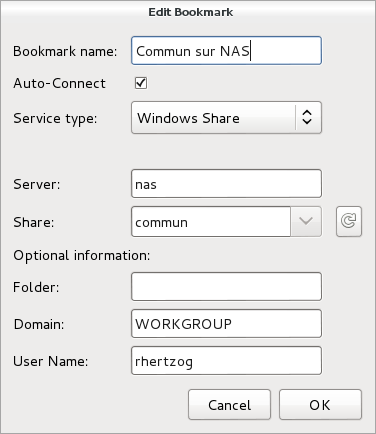
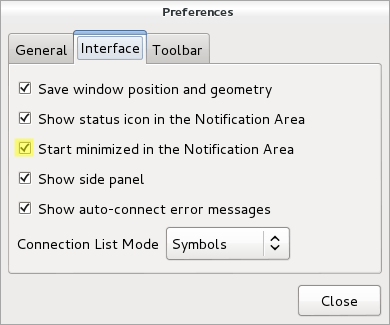
Launch Gigolo, setup your shares as bookmarks and mark them as Auto-Connect . During (first) connection, you will be prompted for your password and you have the possibility to store it in the GNOME keyring (and here it s encrypted, not in plain-text!). You should also configure the Gigolo preferences so that it starts minimized in the system tray (because we re going to run it on session startup):
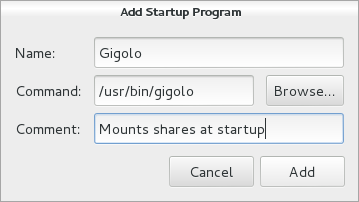
The last step is to ensure that Gigolo is executed at the start of each GNOME session. Unfortunately this GNOME feature is no longer accessible from the control center so you have to execute gnome-session-properties manually (from a terminal or the command line accessible via Alt+F2). Click on Add to add a new startup program: You re done! The main limitation is that those shares are not real mounts, instead they are available within GNOME s virtual file system (GVFS). If you use only 100% GNOME application, then it s not a problem but otherwise it s pretty annoying. You can t cd in those shares from a terminal for example. There s a workaround though, it s called gvfs-fuse and you installed it right at the start of this HOWTO. This service hooks into GVFS and exports all the virtual filesystem(s) in a real fuse-based mount that is automatically setup in ~/.gvfs/. However for this to work, the user must be in the fuse group. So you should run something like this:
$ sudo adduser $USER fuse
By the way, I haven t found a way to use a non-hidden directory so if you want this directory to be more visible, I suggest that you create a symlink pointing to it.
Do you want to read more HOWTO like this one? Click here to subscribe to my free newsletter, you can opt to receive future articles by email.

No comment Liked this article? Click here. My blog is Flattr-enabled.

29 October 2012

Yves-Alexis Perez: Switching to OpenPGP smartcard

A friend of mine recently reminded me of the OpenPGP smartcard v2, and told me that it was perfectly able to handle 4096 bit RSA keys (provided you have GnuPG v2.0.18+). I had the opportunity to play with one a little, and notice it was super easy to use it for ssh authentication, especially since I already use gpg-agent as my ssh-agent (it should be easy to use a purely software authentication key as ssh key with GnuPG 2.1). So I decided to buy two of them and try to switch my main key (0x71ef0ba8) to it. The cards arrived this weekend, and I was able to play with it a little. I didn't log every command I typed, but it was pretty easy, in the end. What I decided to do was to use one smartcard for every day usage, and one only for key signing. So basically, I would generate three (signing, encryption, authentication) subkeys, put them on smartcard 1, then put the primary key on smartcard 2. Then erase the private parts, and only keep them on smartcards. In case it interests people, here the somehow detailed steps. Note that everywhere 'gpg' means 'gpg2' on Debian, we really need GnuPG v2 for correct smartcard handling. You'd better use gpg-agent too, although it doesn't seem mandatory.
  1. make a backup! As we're gonna play with private parts (!), it's always a good idea to have backups. And it'll be useful to have one later, in case there's a problem with the smartcards. You can do a copy of your complete ~/.gnupg folder, but I simply did:
    corsac@scapa: umask 066
    corsac@scapa: gpg -o 71ef0ba8.gpg --export-secret-keys 71ef0ba8
    
  2. Add three subkeys. Skip this is you already have subkeys (you usually already have an encryption subkey, but I wanted to switch to a new one too) --expert is needed in order to chose capabilities.
    corsac@scapa: gpg --expert --edit-key 71ef0ba8
    gpg> addkey
    Please select what kind of key you want:
       (3) DSA (sign only)
       (4) RSA (sign only)
       (5) Elgamal (encrypt only)
       (6) RSA (encrypt only)
       (7) DSA (set your own capabilities)
       (8) RSA (set your own capabilities)
    Your selection? 8
    Possible actions for a RSA key: Sign Encrypt Authenticate 
    Current allowed actions: Sign Encrypt 
       (S) Toggle the sign capability
       (E) Toggle the encrypt capability
       (A) Toggle the authenticate capability
       (Q) Finished
    Your selection? e
    Possible actions for a RSA key: Sign Encrypt Authenticate 
    Current allowed actions: Sign 
       (S) Toggle the sign capability
       (E) Toggle the encrypt capability
       (A) Toggle the authenticate capability
       (Q) Finished
    Your selection? Q
    RSA keys may be between 1024 and 4096 bits long.
    What keysize do you want? (2048) 
    Requested keysize is 2048 bits
    Please specify how long the key should be valid.
             0 = key does not expire
            = key expires in n days
          w = key expires in n weeks
          m = key expires in n months
          y = key expires in n years
    Key is valid for? (0) 1y
    Key expires at dim. 27 oct. 2013 20:38:44 CET
    Is this correct? (y/N) y
    Really create? (y/N) y
    We need to generate a lot of random bytes. It is a good idea to perform
    some other action (type on the keyboard, move the mouse, utilize the
    disks) during the prime generation; this gives the random number
    generator a better chance to gain enough entropy.
    
    Repeat this for encryption and authentication subkeys. Then save and send the key to keyservers
    gpg> save
    corsac@scapa: gpg --send-keys 71ef0ba8
    
  3. Next, we'll switch to the smartcard part. I use a Gemalto PC ExpressCard reader which is perfectly recognized under Debian. You just need few tools:
    root@scapa: ~# apt-get install pcscd scdaemon
    
    Plug the reader, insert the card, make sure it's detected:
    corsac@scapa: gpg --card-status
    Application ID ...: D2760001240102000005000016A10000
    Version ..........: 2.0
    Manufacturer .....: ZeitControl
    ...
    
    You can edit various parameter (name etc.) and change the PINs using gpg:
    corsac@scapa: gpg --change-pin
    corsac@scapa: gpg --card-edit
    
  4. Then we'll put the subkeys in the first smartcard. It might be a good idea to export again the private keys for backups.
    corsac@scapa: gpg -o 71ef0ba8.gpg --export-secret-keys 71ef0ba8
    
  5. We'll now use the keytocard gpg command to move the private parts on the smartcard:
    corsac@scapa: gpg --edit-key 71ef0ba8
    gpg> key 1 # select encryption subkey
    gpg> keytocard
    gpg> key 2 # select signature subkey
    gpg> keytocard
    gpg> key 3 # select authentication subkey
    gpg> keytocard
    gpg> save
    
    A quick check on the card now reveals that it's populated:
    corsac@scapa: gpg --card-status
    Application ID ...: D2760001240102000005000016A10000
    Version ..........: 2.0
    Manufacturer .....: ZeitControl
    Serial number ....: 000016A1
    Name of cardholder: Yves-Alexis Perez
    Language prefs ...: fr
    Sex ..............: unspecified
    URL of public key : http://www.corsac.net/71ef0ba8.asc
    Login data .......: corsac
    Signature PIN ....: forced
    Key attributes ...: 2048R 2048R 2048R
    Max. PIN lengths .: 32 32 32
    PIN retry counter : 3 3 3
    Signature counter : 7
    Signature key ....: 9745 B022 7323 81FE 9E7E  AFF5 6DDB 53F2 A675 C0A5
          created ....: 2012-10-27 11:24:07
    Encryption key....: F7E0 078F EA1A 5F23 92E0  20B3 A83A D136 D98D 0D9F
          created ....: 2012-10-27 11:27:01
    Authentication key: 8CFD D478 AB4A 16F8 F0EC  CD33 24E2 3B5C CC0E 273D
          created ....: 2012-10-17 14:29:18
    General key info..: pub  2048R/A675C0A5 2012-10-27 Yves-Alexis Perez 
    sec>  4096R/71EF0BA8  created: 2009-05-06  expires: never     
                          card-no: 0005 000016A2
    ssb   4096g/36E31BD8  created: 2009-05-06  expires: never     
    ssb>  2048R/CC0E273D  created: 2012-10-17  expires: 2013-10-27
                          card-no: 0005 000016A1
    ssb>  2048R/A675C0A5  created: 2012-10-27  expires: 2013-10-27
                          card-no: 0005 000016A1
    ssb>  2048R/D98D0D9F  created: 2012-10-27  expires: 2013-10-27
                          card-no: 0005 000016A1
    
  6. At that point, the private part is replaced by a stub in the secret keyring, so when you export them, you only export stubs which you can then use anywhere without actually giving your private key. So now is a good idea to export the subkeys so you can import them on other boxes:
    corsac@scapa: gpg -o 71ef0ba8-subkeys.gpg --export-secret-subkeys 71ef0ba8
    
    Note that only the subkeys private parts have been moved to the card, not the primary one, so you're still able to sign keys. Here, you have multiple choices. You can simply erase the private key (and later re-import the stubs) and use the offline copy made above when you need to sign another key.
  7. What I did is something else. I've put the primary key on my second OpenPGP smartcard. That way, I won't lose it, it'll be kept safely in my house, but still be on a hardware token where it won't come out. The procedure for doing is so is exactly the same as above. First take a backup (in case you didn't do it first, do it now since after the keytocard command you won't have a backup of your primary key and there'll be no way to extract it from the smartcard. Then put the new smartcard in the reader, edit the key (don't select a subkey) and run the keytocard command. After that, running gpg --export-secret-keys will export the stub and not the private part of your primary key.
In the end, it seems that everything is running fine. Only issue is that scdaemon is sometime not behaving nicely (especially after a card change or or suspend/resume cycle). I didn't yet report a bug but you might want to kill it in case it's stuck. You can also use the authentication subkey for ssh logins. When the card is inserted, the authentication subkey appears automatically (through the magic of gpg-agent):

corsac@scapa: ssh-add -L
ssh-rsa AAAAB3NzaC1yc2EA... cardno:0005000016A1 And now you can add it to your various authorized_keys and use the smartcard for SSH.

Nathan Handler: Hello Chronicle!

Over the years, I have had many different blogs. I mainly use them to post updates regarding my work in the FOSS community, with most of these relating to Ubuntu/Debian. My most recent blog was a Wordpress instance I ran on a VPS provided by a friend. This worked pretty well, but for various reasons, I no longer have access to that box. Earlier today, I started thinking about launching a new blog. The first problem I had to overcome was deciding where to host it. Many of the groups I am involved with provide members with a ~/public_html directory that can be used to host simple HTML+Javascript+CSS websites. However, most of these sites do not have the ability to use PHP, CGI, or access databases. I realized rather quickly that if I were to find a blogging platform that I could run from a ~/public_html directory on one of those machines, I would never have the problem of not having a host for my blog ever again. There is a near infinite number of free web hosts that can handle simple HTML sites. One key feature of any blog is the ability for readers to subscribe to it. Usually, the blogging platform handles automatically updating the feed when a new post is published. However, my simple HTML blog would not be able to do that. Since I knew I did not want to manually update the feeds, I started looking for a way to generate the feed locally on my personal machine and then push it to the remote site that is hosting my blog. About this time, I started compiling a list of features I would need to make this blogging platform usable. In no particular order, they included: After some searching, I found an application developed by Steve Kemp called Chronicle. Chronicle supports all of the features I described plus many more. It is also very quick and easy to setup. If you are running Debian, Chronicle is available from the repositories. Start by installing Chronicle. Note that these steps should all be done on your personal machine, not the machine that is going to host your blog.
sudo apt-get install chronicle
There are a few other packages that you can install to extend the functionality of Chronicle
sudo apt-get install memcached libcache-memcached-perl libhtml-calendarmonthsimple-perl libtext-vimcolor-perl libtext-markdown-perl
Next, create a few folders to hold our blog. We will store our raw blog posts in ~/blog/input and have the generated HTML versions go in ~/blog/output.
mkdir -p ~/blog/ input,output 
Now, we need to configure some preferences. We will base our preferences on the global configuration file shipped with the package.
cp /etc/chroniclerc ~/.chroniclerc
Open up the new ~/.chroniclerc file in your favorite editor. It is pretty well commented, but I will still explain the changes I made. input is the path to where your blog posts can be found. These are the raw blog posts, not the generated HTML versions of the posts. In our example, this should be set to ~/blog/input. pattern tells Chronicle which files in the input directory are blog posts. We will use a .txt extension to denote these files. Therefore, set pattern to *.txt. output is the directory where Chronicle should store the generated HTML versions of the blog posts. This should be ~/blog/output theme-dir is the directory that holds all of the themes. Chronicle ships with a couple of sample themes that you can use. Set this to /usr/share/chronicle/themes theme is the name of the theme you want to use. We will just use the default them, so set this to default entry-count specifies how many blog posts should be displayed on the HTML index page for the blog. I like to keep this fairly small, so I set mine to 10. rss-count is similar to entry-count, but it specifies the number of blog posts to include in the RSS feed. I also set this to 10 format specifies the format used in the raw blog posts. I write mine in markdown, but multimarkdown, textile, and html are also supported. Since most ~/public_html directories do not support CGI. We will disable comments by setting no-comments to 1 suffix gets appended to the filenames of all of the generated blog posts. Set this to .html url_prefix is the first part of the URL for the blog. If the index.html file for the blog is going to be available at http://example.com/blog/ , set this to *http://example.com/~user/blog/ blog_title is whatever you want your blog to be called. The title is displayed at the top of the site. Set it to something like Your Name's Blog post-build is a very useful setting. It allows us to have Chronicle perform some action after it finishes running. We will use this to copy our blog to the remote host's public_html directory. Set this field to something like scp -r output/* user@example.com:~/public_html/blog. You will probably want to setup SSH so that you do not need to enter a password each time. Finally, date-archive-path will allow you to get the nice year/month directories to sort your posts. Set this to 1. Your final ~/.chroniclerc should look something like this:
input = ~/blog
pattern = *.txt
output = ~/blog/output
theme-dir = /usr/share/chronicle/themes
theme = default
entry-count = 10
rss-count = 10
format = markdown
no-comments = 1
suffix = .html
url_prefix = http://example.com/~user/blog/
blog_title    = Your Name's Blog
post-build = scp -r output/* user2@example.com:~/public_html/blog
date-archive-path = 1
You are now ready to start writing your first blog post. Open up ~/blog/MyFirstBlogPost.txt in your favorite text editor. Modify it to look like this:
Title: My First Blog Post
Tags: MyTag
Date: October 29, 2012
This is my **first** blog post.
Notice the metadata stored at the top? This is required for every post. Chronicle uses it to figure out the post title, tags, and date. It has some logic to try and guess this information if missing, but it is probably safest if you specify it. The empty line between the metadata and the post content is also required. Remember, we configured Chronicle to treat these as Markdown files, so feel free to utilize any Markdown formatting you wish. Finally, run chronicle from a terminal. If all goes well, it should generate your blog and copy the files to the remote host. You can now go to http://example.com/~user/blog to view it. One final suggestion would be to store the entire blog in a git repository. This will allow you to utilize all of the features of a VCS, such as reverting any accidental changes or allowing multiple people to collaborate on a blog post at the same time.

27 October 2012

Soeren Sonnenburg: Shogun at Google Summer of Code 2012

The summer came finally to an end and (yes in Berlin we still had 20 C end of October), unfortunately, so did GSoC with it. This has been the second time for SHOGUN to be in GSoC. For those unfamiliar with SHOGUN - it is a very versatile machine learning toolbox that enables unified large-scale learning for a broad range of feature types and learning settings, like classification, regression, or explorative data analysis. I again played the role of an org admin and co-mentor this year and would like to take the opportunity to summarize enhancements to the toolbox and my GSoC experience: In contrast to last year, we required code-contributions in the application phase of GSoC already, i.e., a (small) patch was mandatory for your application to be considered. This reduced the number of applications we received: 48 proposals from 38 students instead of 70 proposals from about 60 students last year but also increased the overall quality of the applications. In the end we were very happy to get 8 very talented students and have the opportunity of boosting the project thanks to their hard and awesome work. Thanks to google for sponsoring three more students compared to last GSoC. Still we gave one slot back to the pool for good to the octave project (They used it very wisely and octave will have a just-in-time compiler now, which will benefit us all!). SHOGUN 2.0.0 is the new release of the toolbox including of course all the new features that the students have implemented in their projects. On the one hand, modules that were already in SHOGUN have been extended or improved. For example, Jacob Walker has implemented Gaussian Processes (GPs) improving the usability of SHOGUN for regression problems. A framework for multiclass learning by Chiyuan Zhang including state-of-the-art methods in this area such as Error-Correcting Output Coding (ECOC) and ShareBoost, among others. In addition, Evgeniy Andreev has made very important improvements w.r.t. the accessibility of SHOGUN. Thanks to his work with SWIG director classes, now it is possible to use python for prototyping and make use of that code with the same flexibility as if it had been written in the C++ core of the project. On the other hand, completely new frameworks and other functionalities have been added to the project as well. This is the case of multitask learning and domain adaptation algorithms written by Sergey Lisitsyn and the kernel two-sample or dependence test by Heiko Strathmann. Viktor Gal has introduced latent SVMs to SHOGUN and, finally, two students have worked in the new structured output learning framework. Fernando Iglesias made the design of this framework introducing the structured output machines into SHOGUN while Michal Uricar has implemented several bundle methods to solve the optimization problem of the structured output SVM. It has been very fun and interesting how the work done in different projects has been put together very early, even during the GSoC period. Only to show an example of this dealing with the generic structured output framework and the improvements in the accessibility. It is possible to make use of the SWIG directors to implement the application specific mechanisms of a structured learning problem instance in python and then use the rest of the framework (written in C++) to solve this new problem. Students! You all did a great job and I am more than amazed what you all have achieved. Thank you very much and I hope some of you will stick around. Besides all these improvements it has been particularly challenging for me as org admin to scale the project. While I could still be deeply involved in each and every part of the project last GSoC, this was no longer possible this year. Learning to trust that your mentors are doing the job is something that didn't come easy to me. Having had about monthly all-hands meetings did help and so did monitoring the happiness of the students. I am glad that it all worked out nicely this year too. Again, I would like to mention that SHOGUN improved a lot code-base/code-quality wise. Students gave very constructive feedback about our (lack) of proper Vector/Matrix/String/Sparse Matrix types. We now have all these implemented doing automagic memory garbage collection behind scenes. We have started to transition to use Eigen3 as our matrix library of choice, which made quite a number of algorithms much easier to implement. We generalized the Label framework (CLabels) to be tractable for not just classification and regression but multitask and structured output learning. Finally, we have had quite a number of infrastructure improvements. Thanks to GSoC money we have a dedicated server for running the buildbot/buildslaves and website. The ML Group at TU Berlin does sponsor virtual machines for building SHOGUN on Debian and Cygwin. Viktor Gal stepped up providing buildslaves for Ubuntu and FreeBSD. Gunnar Raetschs group is supporting redhat based build tests. We have Travis CI running testing pull requests for breakage even before merges. Code quality is now monitored utilizing LLVMs scan-build. Bernard Hernandez appeared and wrote a fancy new website for SHOGUN. A more detailed description of the achievements of each of the students follows:

24 October 2012

Steve Kemp: So slaughter is definitely getting overhauled

There have been a few interesting discussions going on in parallel about my slaughter sysadmin tool. I've now decided there will be a 2.0 release, and that will change things for the better. At the moment there are two main parts to the system:
Downloading polices
These are instructions/perl code that are applied to the local host.
Downloading files
Polices are allowed to download files. e.g. /etc/ssh/sshd_config templates, etc.
Both these occur over HTTP fetches (SSL may be used), and there is a different root for the two trees. For example you can see the two public examples I have here: A fetch of the policy "foo.policy" uses the first prefix, and a fetch of the file "bar" uses the latter prefix. (In actual live usage I use a restricted location because I figured I might end up storing sensitive things, though I suspect I don't.) The plan is to update the configuration file to read something like this:
transport = http
#
# Valid options will be
#    rsync   http   git   mercurial   ftp
#
#
# each transport will have a different prefix
#
prefix = http://static.steve.org.uk/private
# for rsync:
#  prefix=rsync.example.com::module/
#
# for ftp:
#  prefix=ftp://ftp.example.com/pub/
#
#  for git:
#  prefix=git://github.com/user/repo.git
#
#  for mercurial
#  prefix=http://repo.example.com/path/to/repo
#
I anticipate that the HTTP transport will continue to work the way it currently does. The other transports will clone/fetch the appropriate resource recursively to a local directory - say /var/cache/slaughter. So the complete archive of files/policies will be available locally. The HTTP transport will continue to work the same way with regard to file fetching, i.e. fetching them remotely on-demand. For all other transports the "remote" file being copied will be pulled from the local cache. So assuming this:
transport = rsync
prefix    = rsync.company.com::module/
Then the following policy will result in the expected action:
if ( UserExists( User => "skx" ) )
 
    # copy
    FetchFile(
            Source => "/global-keys",
              Dest => "/home/skx/.ssh/authorized_keys2",
             Owner => "skx",
             Group => "skx",
              Mode => "600" );
 
The file "/global-keys" will refer to /var/cache/slaughter/global-keys which will have been already downloaded. I see zero downside to this approach; it allows HTTP stuff to continue to work as it did before, and it allows more flexibility. We can benefit from knowing that the remote policies are untampered with, for example, via the checking built into git/mercurial, and the speed gains of rsync. There will also be an optional verification stage. So the code will roughly go like this: I'm not anticipating additional changes, but I'm open to persuasion.

22 October 2012

Julien Danjou: Inside Synaps, a CloudWatch-like implementation for OpenStack

A few days ago, Samsung released the source code of Synaps, an implementation of the Amazon Web Service CloudWatch API for OpenStack. Being a developer on the Ceilometer project, I've been curious to look on this project and how it could overlap with Ceilometer or other projects like Heat. What is CloudWatch? CloudWatch is a monitoring system provided by Amazon on its Web Services platform to monitor services. This allows you get notifications and trigger an action on certain threshold. For example, this can be used to scale your architecture by monitoring the number of requests you get on it and its general load by starting new servers. Synaps Synaps is written in around 7k lines of Python (with 28 % of which are comments), reuses at least one common module of OpenStack (openstack.common.cfg) and copy some modules from Nova. One thing that strikes me, is that there seems to be only a few unit tests compared to most OpenStack projects. Also, many parts of the code and documentation contains text written in korean, which won't be very helpful for most people! :-) It uses some external technologies, like Storm, Cassandra to store its persistent data and Pandas to do data analysis. The API server provides an EC2 compatible API only: no OpenStack specific API. This is probably not a bad thing for now, since I am not aware of any work in this direction. The API access directly the Cassandra back-end for read operation, but relies on RPC to do writes. This way, a set of daemon handles the write using the Storm part of Synaps and do data aggregation. The authentication only supports LDAP, but it should still be possible to add a driver for Keystone. A Java and a Python SDK are provided to record metrics into Synaps, but there's not enough documentation for it to be useful. Overlap with Heat For now, there's not a lot of overlap with Heat, because Heat does not implement completely the CloudWatch API. Heat actually still misses a lot of the CloudWatch functions. But as soon as it will implement the CloudWatch API completely, the overlap will be complete with Synaps in this regard. One divergence point however, is that Heat uses RPC to access data from the storage back-end via its engine (the central daemon), whereas Synaps directly connects to Cassandra. Also, Heat relies on SQLAlchemy, like most OpenStack projects needing a database. Overlap with Ceilometer One of the goal of Ceilometer is to provide data probes and pollsters for all OpenStack components (Nova, Swift, Quantum ) whereas Synaps let the OpenStack users to put any kind of metric inside it, and therefore doesn't provide anything for now. But the storage of metrics is the main common point between Synaps and Ceilometer. Synaps chose only one technology, Cassandra, to store its metrics, whereas Ceilometer took care of building an abstraction layer for the storage engine. Ceilometer currently allows an operator to use SQL or MongoDB, but Cassandra could likely be added. Data metric consolidation is done by Synaps. This makes sense, since Synaps don't need to have the full data history to trigger alarms. On the opposite, Ceilometer needs to have a full history to allow things like billing, and don't do any aggregation on data. Also, in Synaps, the data analysis is done using Pandas. This means the data used are retrieved from the Cassandra back-end, and then transformed by Pandas inside Synaps in something else. It's likely that in such a case, Synaps should use CQL to achieve that. Ceilometer manipulates the data near their storage: it means that the computation are done by back-end to be efficient (SQL, mapreduce ). Conclusion Considering Samsung open-sourced Synaps late in the development process, I don't feel like they aimed to have it becoming a core component. This is always sad, because the effort put into this implementation are big and it would have probably little to add some abstraction layers to follow what other OpenStack projects do. But this takes time and energy, and it's understandable that Samsung didn't want to achieve this in a short time frame. There's a part of the code and architecture that overlaps with Ceilometer and Heat. Ceilometer is becoming a specialized point to store data metrics from any source: so it's sad, but understandable, that Synaps did not tried to reuse it. Fortunately, Heat is working with Ceilometer to achieve exactly that. This means OpenStack would have only one metrics storage point, used for billing, for monitoring and alarming. Therefore, I think Synaps is an implementation of CloudWatch that should be looked at as an inspiration for Heat and Ceilometer to build a better and more integrated solution!

20 October 2012

Vincent Bernat: Network lab with KVM

To experiment with network stuff, I was using UML-based network labs. Many alternatives exist, like GNS3, Netkit, Marionnet or Cloonix. All of them are great viable solutions but I still prefer to stick to my minimal home-made solution with UML virtual machines. Here is why: The use of UML had some drawbacks: However, UML features HostFS, a filesystem providing access to any part of the host filesystem. This is the killer feature which allows me to not use any virtual disk image and to get access to my home directory right from the guest. I discovered recently that KVM provided 9P, a similar filesystem on top of VirtIO, the paravirtualized IO framework.

Setting up the lab The setup of the lab is done with a single self-contained shell file. The layout is similar to what I have done with UML. I will only highlight here the most interesting steps.

Booting KVM with a minimal kernel My initial goal was to experiment with Nicolas Dichtel s IPv6 ECMP patch. Therefore, I needed to configure a custom kernel. I have started from make defconfig, removed everything that was not necessary, added what I needed for my lab (mostly network stuff) and added the appropriate options for VirtIO drivers:
CONFIG_NET_9P_VIRTIO=y
CONFIG_VIRTIO_BLK=y
CONFIG_VIRTIO_NET=y
CONFIG_VIRTIO_CONSOLE=y
CONFIG_HW_RANDOM_VIRTIO=y
CONFIG_VIRTIO=y
CONFIG_VIRTIO_RING=y
CONFIG_VIRTIO_PCI=y
CONFIG_VIRTIO_BALLOON=y
CONFIG_VIRTIO_MMIO=y
No modules. Grab the complete configuration if you want to have a look. From here, you can start your kernel with the following command ($LINUX is the appropriate bzImage):
kvm \
  -m 256m \
  -display none \
  -nodefconfig -no-user-config -nodefaults \
  \
  -chardev stdio,id=charserial0,signal=off \
  -device isa-serial,chardev=charserial0,id=serial0 \
  \
  -chardev socket,id=con0,path=$TMP/vm-$name-console.pipe,server,nowait \
  -mon chardev=con0,mode=readline,default \
  \
  -kernel $LINUX \
  -append "init=/bin/sh console=ttyS0"
Of course, since there is no disk to boot from, the kernel will panic when trying to mount the root filesystem. KVM is configured to not display video output (-display none). A serial port is defined and uses stdio as a backend1. The kernel is configured to use this serial port as a console (console=ttyS0). A VirtIO console could have been used instead but it seems this is not possible to make it work early in the boot process. The KVM monitor is setup to listen on an Unix socket. It is possible to connect to it with socat UNIX:$TMP/vm-$name-console.pipe -.

Initial ramdisk UPDATED: I was initially unable to mount the host filesystem as the root filesystem for the guest directly by the kernel. In a comment, Josh Triplett told me to use /dev/root as the mount tag to solve this problem. I keep using an initrd in this post but the lab on Github has been updated to not use one. Here is how to build a small initial ramdisk:
# Setup initrd
setup_initrd()  
    info "Build initrd"
    DESTDIR=$TMP/initrd
    mkdir -p $DESTDIR
    # Setup busybox
    copy_exec $($WHICH busybox) /bin/busybox
    for applet in $($ DESTDIR /bin/busybox --list); do
        ln -s busybox $ DESTDIR /bin/$ applet 
    done
    # Setup init
    cp $PROGNAME $ DESTDIR /init
    cd "$ DESTDIR " && find .   \
       cpio --quiet -R 0:0 -o -H newc   \
       gzip > $TMP/initrd.gz
 
The copy_exec function is stolen from the initramfs-tools package in Debian. It will ensure that the appropriate libraries are also copied. Another solution would have been to use a static busybox. The setup script is copied as /init in the initial ramdisk. It will detect it has been invoked as such. If it was omitted, a shell would be spawned instead. Remove the cp call if you want to experiment manually. The flag -initrd allows KVM to use this initial ramdisk.

Root filesystem Let s mount our root filesystem using 9P. This is quite easy. First KVM needs to be configured to export the host filesystem to the guest:
kvm \
  $ PREVIOUS_ARGS  \
  -fsdev local,security_model=passthrough,id=fsdev-root,path=$ ROOT ,readonly \
  -device virtio-9p-pci,id=fs-root,fsdev=fsdev-root,mount_tag=rootshare
$ ROOT can either be / or any directory containing a complete filesystem. Mounting it from the guest is quite easy:
mkdir -p /target/ro
mount -t 9p rootshare /target/ro -o trans=virtio,version=9p2000.u
You should find a complete root filesystem inside /target/ro. I have used version=9p2000.u instead of version=9p2000.L because the later does not allow a program to mount() a host mount point2. Now, you have a read-only root filesystem (because you don t want to mess with your existing root filesystem and moreover, you did not run this lab as root, did you?). Let s use an union filesystem. Debian comes with AUFS while Ubuntu and OpenWRT have migrated to overlayfs. I was previously using AUFS but got errors on some specific cases. It is still not clear which one will end up in the kernel. So, let s try overlayfs. I didn t find any patchset ready to be applied on top of my kernel tree. I was working with David Miller s net-next tree. Here is how I have applied the overlayfs patch on top of it:
$ git remote add torvalds git://git.kernel.org/pub/scm/linux/kernel/git/torvalds/linux-2.6.git
$ git fetch torvalds
$ git remote add overlayfs git://git.kernel.org/pub/scm/linux/kernel/git/mszeredi/vfs.git
$ git fetch overlayfs
$ git merge-base overlayfs.v15 v3.6
4cbe5a555fa58a79b6ecbb6c531b8bab0650778d
$ git checkout -b net-next+overlayfs
$ git cherry-pick 4cbe5a555fa58a79b6ecbb6c531b8bab0650778d..overlayfs.v15
Don t forget to enable CONFIG_OVERLAYFS_FS in .config. Here is how I configured the whole root filesystem:
info "Setup overlayfs"
mkdir /target
mkdir /target/ro
mkdir /target/rw
mkdir /target/overlay
# Version 9p2000.u allows to access /dev, /sys and mount new
# partitions over them. This is not the case for 9p2000.L.
mount -t 9p        rootshare /target/ro      -o trans=virtio,version=9p2000.u
mount -t tmpfs     tmpfs     /target/rw      -o rw
mount -t overlayfs overlayfs /target/overlay -o lowerdir=/target/ro,upperdir=/target/rw
mount -n -t proc  proc /target/overlay/proc
mount -n -t sysfs sys  /target/overlay/sys
info "Mount home directory on /root"
mount -t 9p homeshare /target/overlay/root -o trans=virtio,version=9p2000.L,access=0,rw
info "Mount lab directory on /lab"
mkdir /target/overlay/lab
mount -t 9p labshare /target/overlay/lab -o trans=virtio,version=9p2000.L,access=0,rw
info "Chroot"
export STATE=1
cp "$PROGNAME" /target/overlay
exec chroot /target/overlay "$PROGNAME"
You have to export your $ HOME and the lab directory from host:
kvm \
  $ PREVIOUS_ARGS  \
  -fsdev local,security_model=passthrough,id=fsdev-root,path=$ ROOT ,readonly \
  -device virtio-9p-pci,id=fs-root,fsdev=fsdev-root,mount_tag=rootshare \
  -fsdev local,security_model=none,id=fsdev-home,path=$ HOME  \
  -device virtio-9p-pci,id=fs-home,fsdev=fsdev-home,mount_tag=homeshare \
  -fsdev local,security_model=none,id=fsdev-lab,path=$(dirname "$PROGNAME") \
  -device virtio-9p-pci,id=fs-lab,fsdev=fsdev-lab,mount_tag=labshare

Network You know what is missing from our network lab? Network setup. For each LAN that I will need, I spawn a VDE switch:
# Setup a VDE switch
setup_switch()  
    info "Setup switch $1"
    screen -t "sw-$1" \
        start-stop-daemon --make-pidfile --pidfile "$TMP/switch-$1.pid" \
        --start --startas $($WHICH vde_switch) -- \
        --sock "$TMP/switch-$1.sock"
    screen -X select 0
 
To attach an interface to the newly created LAN, I use:
mac=$(echo $name-$net   sha1sum   \
            awk ' print "52:54:" substr($1,0,2) ":" substr($1, 2, 2) ":" substr($1, 4, 2) ":" substr($1, 6, 2) ')
kvm \
  $ PREVIOUS_ARGS  \
  -net nic,model=virtio,macaddr=$mac,vlan=$net \
  -net vde,sock=$TMP/switch-$net.sock,vlan=$net
The use of a VDE switch allows me to run the lab as a non-root user. It is possible to give Internet access to each VM, either by using -net user flag or using slirpvde on a special switch. I prefer the latest solution since it will allow the VM to speak to each others.

Debugging This lab was mostly done to debug both the kernel and Quagga. Each of them can be debugged remotely.

Kernel debugging While the kernel features KGDB, its own debugger, compatible with GDB, it is easier to use the remote GDB server built inside KVM.
kvm \
  $ PREVIOUS_ARGS  \
  -gdb unix:$TMP/vm-$name-gdb.pipe,server,nowait
To connect to the remote GDB server from the host, first locate the vmlinux file at the root of the source tree and run GDB on it. The kernel has to be compiled with CONFIG_DEBUG_INFO=y to get the appropriate debugging symbols. Then, use socat with the Unix socket to attach to the remote debugger:
$ gdb vmlinux
GNU gdb (GDB) 7.4.1-debian
Reading symbols from /home/bernat/src/linux/vmlinux...done.
(gdb) target remote   socat UNIX:$TMP/vm-$name-gdb.pipe -
Remote debugging using   socat UNIX:/tmp/tmp.W36qWnrCEj/vm-r1-gdb.pipe -
native_safe_halt () at /home/bernat/src/linux/arch/x86/include/asm/irqflags.h:50
50   
(gdb)
You can now set breakpoints and resume the execution of the kernel. It is easier to debug the kernel if optimizations are not enabled. However, it is not possible to disable them globally. You can however disable them for some files. For example, to debug net/ipv6/route.c, just add CFLAGS_route.o = -O0 to net/ipv6/Makefile, remove net/ipv6/route.o and type make.

Userland debugging To debug a program inside KVM, you can just use gdb as usual. Your $HOME directory is available and it should be therefore straightforward. However, if you want to perform some remote debugging, that s quite easy. Add a new serial port to KVM:
kvm \
  $ PREVIOUS_ARGS  \
  -chardev socket,id=charserial1,path=$TMP/vm-$name-serial.pipe,server,nowait \
  -device isa-serial,chardev=charserial1,id=serial1
Starts gdbserver in the guest:
$ libtool execute gdbserver /dev/ttyS1 zebra/zebra
Process /root/code/orange/quagga/build/zebra/.libs/lt-zebra created; pid = 800
Remote debugging using /dev/ttyS1
And from the host, you can attach to the remote process:
$ libtool execute gdb zebra/zebra
GNU gdb (GDB) 7.4.1-debian
Reading symbols from /home/bernat/code/orange/quagga/build/zebra/.libs/lt-zebra...done.
(gdb) target remote   socat UNIX:/tmp/tmp.W36qWnrCEj/vm-r1-serial.pipe
Remote debugging using   socat UNIX:/tmp/tmp.W36qWnrCEj/vm-r1-serial.pipe
Reading symbols from /lib64/ld-linux-x86-64.so.2...(no debugging symbols found)...done.
Loaded symbols for /lib64/ld-linux-x86-64.so.2
0x00007ffff7dddaf0 in ?? () from /lib64/ld-linux-x86-64.so.2
(gdb)

Demo For a demo, have a look at the following video (it is also available as an Ogg Theora video).
<iframe frameborder="0" height="270" src="http://www.dailymotion.com/embed/video/xuglsg" width="480"></iframe>

  1. stdio is configured such that signals are not enabled. KVM won t stop when receiving SIGINT. This is important for the usage we want to have.
  2. Therefore, it is not possible to mound a fresh /proc on top of the existing one. I have searched a bit but didn t find why. Any comments on this is welcome.

19 October 2012

Sylvain Le Gall: Book review: Puppet 2.7 Cookbook

I recently read this book and it was enlightening -- that is the least I can say. It is organized into a set of recipes addressing the most common problems you have with puppet. I think the whole point is about being practical and it gives you various ways to achieve the same goal, depending if you want to do a quick and dirty hack or pick a long term solution. The whole book aims at being practical and it achieves this goal pretty well. However, it is not for beginners. Puppet itself is not for beginner and you should already have written and run into problem to really take advantage of this book. I read the book in 5 days (only while commuting), and at each page I thought : "OMG, they do that like this" or "of course, you should use git + that" and wait impatiently coming back home to test all this stuff. The book is really about technical details and how to organize yourself to write nice Puppet classes. I have been an "irregular" user of Puppet since 4 years. I was mainly running it to distribute files on all my computers. Since 3 weeks, I am applying the recipes found in this book and it is just like discovering that you own something worth a million euros. Let look at some example: Before: Replace the whole file. Now: Use Augeas to just change the value and don't touch to the rest of the file. The book makes me discover Augeas and it rocks !!! Before:_ Loosy darcs repository inside /etc/ and edit directly the master. Now: Shiny git repository in my home directory, using a Makefile to validate Puppet syntax, simulate applying it and effectively apply it to the current node before deploying it through git push. Before: Nothing because I didn't think it was possible. Now: Generate a configuration file using a template, install it, run the exim4 update script and restart the service. Before: Copy a file and restart it. Now: Use Augeas and a template with a loop to change what is needed for each node depending on which user I want to allow to connect on this node. Use different SSH port for every vserver that share the same IP and distribute an /etc/ssh_config to propagate the default ports set for all the vservers... (just being able to do that is worth the price of the book). Before: Complain, whine and give up. Now: Go to Puppet Forge, take inspiration for similar module, re-read part of the book, find an idea and apply it. And so forth and so on. This book made me love puppets again. I warmly recommend it to you.
Next.

Previous.