Search Results: "spa"

25 July 2020

Andrew Cater: How to use the signed checksum files to verify Debian media images

Following on from the blog post the other day in some sense: someone has asked on the debian-user list: "I do not understand from the given page (https://www.debian.org/CD/verify) how to use .sign files and gpg in order to check verify the authenticity of debian cds. I understand the part with using sha256sum or sha512sum or md5sum to check whether the files were downloaded correctly."

Distributed with the CD and other media images on Debian CD mirrors, there are files like MD5SUM, MD5SUM.sign, SHA256SUM, SHA256SUM.sign and so on.

SHA512SUM is a plain text list of the SHA512SUMs for each of the files in the directory. SHA512SUM.sign is the GPG-signed version of that file. This allws for non-repudiation - if the signature is valid, then the plain text file has been signed by the owner of that key. Nothing has tampered with the checksums file since it was signed.

After downloading the SHA1SUM, SHA256SUM and SHA512SUM files and the corresponding .sign files from, say, the prime Debian CD mirror at
http://cdimage.debian.org

Assuming that you already have GPG installed: sha256sum and sha512sum are installed by the coreutils package, which Debian installs by default.

gpg --verify SHA512SUMS.sign SHA512SUMS will verify the .sign signature file against the signed file.

gpg --verify SHA512SUMS.sign SHA512SUMS
gpg: Signature made Sun 10 May 2020 00:16:52 UTC
gpg: using RSA key DF9B9C49EAA9298432589D76DA87E80D6294BE9B

The signature is as given on the Debian CD verification page given above.

You can import that key from the Debian key servers if you wish.

gpg --keyserver keyring.debian.org --recv-keys DF9B9C49EAA9298432589D76DA87E80D6294BE9B

You can import the signature for checking from the SKS keyservers which are often more available:

gpg --keyserver pool.sks-keyservers.net --recv-keys DF9B9C49EAA9298432589D76DA87E80D6294BE9B

and you then get:

gpg --verify SHA512SUMS.sign SHA512SUMS
gpg: Signature made Sun 10 May 2020 00:16:52 UTC
gpg: using RSA key DF9B9C49EAA9298432589D76DA87E80D6294BE9B
gpg: Good signature from "Debian CD signing key " [unknown]
gpg: WARNING: This key is not certified with a trusted signature!
gpg: There is no indication that the signature belongs to the owner.
Primary key fingerprint: DF9B 9C49 EAA9 2984 3258 9D76 DA87 E80D 6294 BE9B

My own key isn't in the Debian CD signing key ring - but this does now show me that this is a good signature from the primary key fingerprint as given.

Repeating the exercise from the other day and producing a Debian amd64 netinst file using jigdo, I can now check the checksum on the local .iso file against the checksum file distributed by Debian. If they match, it's a good sign that the CD I've generated is bit for bit identical. For my locally generated file:

sha512sum debian-10.4.0-amd64-netinst.iso
ec69e4bfceca56222e6e81766bf235596171afe19d47c20120783c1644f72dc605d341714751341051518b0b322d6c84e9de997815e0c74f525c66f9d9eb4295 debian-10.4.0-amd64-netinst.iso

and for the file checksum as distributed by Debian:

less SHA512SUMS grep *iso
ec69e4bfceca56222e6e81766bf235596171afe19d47c20120783c1644f72dc605d341714751341051518b0b322d6c84e9de997815e0c74f525c66f9d9eb4295 debian-10.4.0-amd64-netinst.iso

and they match!

As ever, I hope this blog post will help somebody.

[Edit: Someone has kindly pointed out that grep *iso SHA512SUMS sha512sum -c will check this more efficiently.]



Craig Small: 25 Years of Free Software

When did I start writing Free Software, now called Open Source? That s a tricky question. Does the time start with the first file edited, the first time it compiles or perhaps even some proto-program you use to work out a concept for the real program formed later on. So using the date you start writing, especially in a era before decent version control systems, is problematic. That is why I use the date of the first release of the first package as the start date. For me, that was Monday 24th July 1995. axdigi and before My first released Free Software program was axdigi which was a layer-2 packet repeater for hamradio. This was uploaded to some FTP server, probably UCSD in late July 1995. The README is dated 24th July 1995. There were programs before this. I had written a closed-source (probably undistributable) driver for the Gracilis PackeTwin serial card and also some sort of primitive wireshark/tcpdump thing for capturing packet radio. Funny thing is that the capture program is the predecessor of both axdigi and a system that was used by a major Australian ISP for their internet billing system. Choosing Free Software So you have written something you think others might like, what software license will you use to distribute it? In 1995 it wasn t that clear. This was the era of strange boutique licenses including ones where it was ok to run the program as a hamradio operator but not a CB radio operator (or at least they tried to work it that way). A friend of mine and the author of the Linux HAM HOWTO amongst other documents, Terry Dawson, suggested I use GPL or another Free Software license. He explained what this Free Software thing was and said that if you want your program to be the most useful then something like GPL will do it. So I released axdigi under the GPL license and most of my programs since then have used the same license. Something like MIT or BSD licenses would have been fine too, I was just not going to use something closed or hand-crafted. That was a while ago, I ve written or maintained many programs since then. I also became a Debian maintainer (23 years so far) and adopted both procps and psmisc which I still maintain as both the Debian developer and upstream to this day. What Next? So it has been 25 years or a quarter of a century, what will happen next? Probably more of the same, though I m not sure I will be maintaining Free Software by the end of the next 25 years (I ll be over 70 then). Perhaps the singularity will arrive and writing software will be something people only do at Rennie Festivals. Come to the Festival! There is someone making horseshoes! Other there is a steam engine. See this other guy writing computer programs on a thing called keyboard!

24 July 2020

Evgeni Golov: Building documentation for Ansible Collections using antsibull

In my recent post about building and publishing documentation for Ansible Collections, I've mentioned that the Ansible Community is currently in the process of making their build tools available as a separate project called antsibull instead of keeping them in the hacking directory of ansible.git. I've also said that I couldn't get the documentation to build with antsibull-docs as it wouldn't support collections yet. Thankfully, Felix Fontein, one of the maintainers of antsibull, pointed out that I was wrong and later versions of antsibull actually have partial collections support. So I went ahead and tried it again. And what should I say? Two bug reports by me and four patches by Felix Fontain later I can use antsibull-docs to generate the Foreman Ansible Modules documentation! Let's see what's needed instead of the ugly hack in detail. We obviously don't need to clone ansible.git anymore and install its requirements manually. Instead we can just install antsibull (0.17.0 contains all the above patches). We also need Ansible (or ansible-base) 2.10 or never, which currently only exists as a pre-release. 2.10 is the first version that has an ansible-doc that can list contents of a collection, which antsibull-docs requires to work properly. The current implementation of collections documentation in antsibull-docs requires the collection to be installed as in "Ansible can find it". We had the same requirement before to find the documentation fragments and can just re-use the installation we do for various other build tasks in build/collection and point at it using the ANSIBLE_COLLECTIONS_PATHS environment variable or the collections_paths setting in ansible.cfg1. After that, it's only a matter of passing --use-current to make it pick up installed collections instead of trying to fetch and parse them itself. Given the main goal of antisibull-docs collection is to build documentation for multiple collections at once, it defaults to place the generated files into <dest-dir>/collections/<namespace>/<collection>. However, we only build documentation for one collection and thus pass --squash-hierarchy to avoid this longish path and make it generate documentation directly in <dest-dir>. Thanks to Felix for implementing this feature for us! And that's it! We can generate our documentation with a single line now!
antsibull-docs collection --use-current --squash-hierarchy --dest-dir ./build/plugin_docs theforeman.foreman
The PR to switch to antsibull is open for review and I hope to get merged in soon! Oh and you know what's cool? The documentation is now also available as a preview on ansible.com!

  1. Yes, the paths version of that setting is deprecated in 2.10, but as we support older Ansible versions, we still use it.

Martin Michlmayr: beancount2ledger 1.1 released

Martin Blais recently announced that he'd like to re-organize the beancount code and split out some functionality into separate projects, including the beancount to ledger/hledger conversion code previously provided by bean-report. I agreed to take on the maintenance of this code and I've now released beancount2ledger, a beancount to ledger/hledger converter. You can install beancount2ledger with pip:
pip3 install beancount2ledger
Please report issues to the GitHub tracker. There are a number of outstanding issues I'll fix soon, but please report any other issues you encounter. Note that I'm not very familiar with hledger. I intend to sync up with hledger author Simon Michael soon, but please file an issue if you notice any problems with the hledger conversion. Version 1.1 contains a number of fixes compared to the latest code in bean-report: 1.1 (2020-07-24) 1.0 (2020-07-22)

23 July 2020

Sean Whitton: keyboardingupdates

Marks and mark rings in GNU Emacs I recently attempted to answer the question of whether experienced Emacs users should consider partially or fully disabling Transient Mark mode, which is (and should be) the default in modern GNU Emacs. That blog post was meant to be as information-dense as I could make it, but now I d like to describe the experience I have been having after switching to my custom pseudo-Transient Mark mode, which is labelled mitigation #2 in my older post. In summary: I feel like I ve uncovered a whole editing paradigm lying just beneath the surface of the editor I ve already been using for years. That is cool and enjoyable in itself, but I think it s also helped me understand other design decisions about the basics of the Emacs UI better than before in particular, the ideas behind how Emacs chooses where to display buffers, which were very frustrating to me in the past. I am now regularly using relatively obscure commands like C-x 4 C-o. I see it! It all makes sense now! I would encourage everyone who has never used Emacs without Transient Mark mode to try turning it off for a while, either fully or partially, just to see what you can learn. It s fascinating how it can come to seem more convenient and natural to pop the mark just to go back to the end of the current line after fixing up something earlier in the line, even though doing so requires pressing two modified keys instead of just C-e. Eshell I was amused to learn some years ago that someone was trying to make Emacs work as an X11 window manager. I was amazed and impressed to learn, more recently, that the project is still going and a fair number of people are using it. Kudos! I suspect that the basic motivation for such projects is that Emacs is a virtual Lisp machine, and it has a certain way of managing visible windows, and people would like to be able to bring both of those to their X11 window management. However, I am beginning to suspect that the intrinsic properties of Emacs buffers are tightly connected to the ways in which Emacs manages visible windows, and the intrinsic properties of Emacs buffers are at least as fundamental as its status as a virtual Lisp machine. Thus I am not convinced by the idea of trying to use Emacs ways of handling visible windows to handle windows which do not contain Emacs buffers. (but it s certainly nice to learn it s working out for others) The more general point is this. Emacs buffers are as fundamental to Emacs as anything else is, so it seems unlikely to be particularly fruitful to move something typically done outside of Emacs into Emacs, unless that activity fits naturally into an Emacs buffer or buffers. Being suited to run on a virtual Lisp machine is not enough. What could be more suited to an Emacs buffer, however, than a typical Unix command shell session? By this I mean things like running commands which produce text output, and piping this output between commands and into and out of files. Typically the commands one enters are sort of like tiny programs in themselves, even if there are no pipes involved, because you have to spend time determining just what options to pass to achieve what you want. It is great to have all your input and output available as ordinary buffer text, navigable just like all your other Emacs buffers. Full screen text user interfaces, like top(1), are not the sort of thing I have in mind here. These are suited to terminal emulators, and an Emacs buffer makes a poor terminal emulator what you end up with is a sort of terminal emulator emulator. Emacs buffers and terminal emulators are just different things. These sorts of thoughts lead one to Eshell, the Emacs Shell. Quoting from its documentation:
The shell s role is to make [system] functionality accessible to the user in an unformed state. Very roughly, it associates kernel functionality with textual commands, allowing the user to interact with the operating system via linguistic constructs. Process invocation is perhaps the most significant form this takes, using the kernel s fork' andexec functions. Emacs is a user application, but it does make the functionality of the kernel accessible through an interpreted language namely, Lisp. For that reason, there is little preventing Emacs from serving the same role as a modern shell. It too can manipulate the kernel in an unpredetermined way to cause system changes. All it s missing is the shell-ish linguistic model.
Eshell has been working very well for me for the past month or so, for, at least, Debian packaging work, which is very command shell-oriented (think tools like dch(1)). The other respects in which Eshell is tightly integrated with the rest of Emacs are icing on the cake. In particular, Eshell can transparently operate on remote hosts, using TRAMP. So when I need to execute commands on Debian s ftp-master server to process package removal requests, I just cd /ssh:fasolo: in Eshell. Emacs takes care of disconnecting and connecting to the server when needed there is no need to maintain a fragile SSH connection and a shell process (or anything else) running on the remote end. Or I can cd /ssh:athena\ sudo:root@athena: to run commands as root on the webserver hosting this blog, and, again, the text of the session survives on my laptop, and may be continued at my leisure, no matter whether athena reboots, or I shut my laptop and open it up again the next morning. And of course you can easily edit files on the remote host.

Sean Whitton: Kinesis Advantage 2 for heavy Emacs users

A little under two months ago I invested in an expensive ergonomic keyboard, a Kinesis Advantage 2, and set about figuring out how to use it most effectively with Emacs. The default layout for the keyboard is great for strong typists who control their computer mostly with their mouse, but less good for Emacs users, who are strong typists that control their computer mostly with their keyboard. It took me several tries to figure out where to put the ctrl, alt, backspace, delete, return and spacebar keys, and aside from one forum post I ran into, I haven t found anyone online who came up with anything much like what I ve come up with, so I thought I should probably write up a blog post. The mappings Sequences of two modified keys on different halves of the keyboard It is desirable to input sequences like C-x C-o without switching which hand is holding the control key. This requires one-handed chording, but this is trecherous when the modifier keys not under the thumbs, because you might need to press the modified key with the same finger that s holding the modifier! Fortunately, most or all sequences of two keys modified by ctrl or alt/meta, where each of the two modifier keys is typed by a different hand, begin with C-c, C-x or M-g, and the left hand can handle each of these on its own. This leaves the right hand completely free to hit the second modified key while the left hand continues to hold down the modifier. My rebindings for ordinary keyboards I have some rebindings to make Emacs usage more ergonomic on an ordinary keyboard. So far, my Kinesis Advantage setup is close enough to that setup that I m not having difficulty switching back and forth from my laptop keyboard. The main difference is for sequences of two modified keys on different halves of the keyboard which of the two modified keys is easiest to type as a one-handed chord is different on the Kinesis Advantage than on my laptop keyboard. At this point, I m executing these sequences without any special thought, and they re rare enough that I don t think I need to try to determine what would be the most ergonomic way to handle them.

Rapha&#235;l Hertzog: Freexian s report about Debian Long Term Support, June 2020

A Debian LTS logo Like each month, here comes a report about the work of paid contributors to Debian LTS. Individual reports In June, 202.00 work hours have been dispatched among 12 paid contributors. Their reports are available: Evolution of the situation June was the last month of Jessie LTS which ended on 2020-06-20. If you still need to run Jessie somewhere, please read the post about keeping Debian 8 Jessie alive for longer than 5 years.
So, as (Jessie) LTS is dead, long live the new LTS, Stretch LTS! Stretch has received its last point release, so regular LTS operations can now continue.
Accompanying this, for the first time, we have prepared a small survey about our users and contributors, who they are and why they are using LTS. Filling out the survey should take less than 10 minutes. We would really appreciate if you could participate in the survey online! On July 27th 2020 we will close the survey, so please don t hesitate and participate now! After that, there will be a followup with the results. The security tracker for Stretch LTS currently lists 29 packages with a known CVE and the dla-needed.txt file has 44 packages needing an update in Stretch LTS. Thanks to our sponsors New sponsors are in bold. We welcome CoreFiling this month!

No comment Liked this article? Click here. My blog is Flattr-enabled.

Enrico Zini: Build Qt5 cross-builder with raspbian sysroot: compiling with the sysroot (continued)

Lite extra ball, from https://www.flickr.com/photos/st3f4n/143623902 This is part of a series of posts on compiling a custom version of Qt5 in order to develop for both amd64 and a Raspberry Pi. The previous rounds of attempts ended in one issue too many to investigate in the allocated hourly budget. Andreas Gruber wrote:
Long story short, a fast solution for the issue with EGLSetBlobFuncANDROID is to remove libraspberrypi-dev from your sysroot and do a full rebuild. There will be some changes to the configure results, so please review them - if they are relevant for you - before proceeding with your work.
That got me unstuck! dpkg --purge libraspberrypi-dev in the sysroot, and we're back in the game. While Qt5's build has proven extremely fragile, I was surprised that some customization from Raspberry Pi hadn't yet broken something. In the end, they didn't disappoint. More i386 issues The run now stops with a new 32bit issue related to v8 snapshots:
qt-everywhere-src-5.15.0/qtwebengine/src/core/release$ /usr/bin/g++ -pie -Wl,--fatal-warnings -Wl,--build-id=sha1 -fPIC -Wl,-z,noexecstack -Wl,-z,relro -Wl,-z,now -Wl,-z,defs -Wl,--as-needed -m32 -pie -Wl,--disable-new-dtags -Wl,-O2 -Wl,--gc-sections -o "v8_snapshot/mksnapshot" -Wl,--start-group @"v8_snapshot/mksnapshot.rsp"  -Wl,--end-group  -ldl -lpthread -lrt -lz
/usr/bin/ld: skipping incompatible //usr/lib/x86_64-linux-gnu/libz.so when searching for -lz
/usr/bin/ld: skipping incompatible //usr/lib/x86_64-linux-gnu/libz.a when searching for -lz
/usr/bin/ld: cannot find -lz
collect2: error: ld returned 1 exit status
Attempted solution: apt install zlib1g-dev:i386. Alternative solution (untried): configure Qt5 with -no-webengine-v8-snapshot. It builds! Installation paths Now it tries to install files into debian/tmp/home/build/sysroot/opt/qt5custom-armhf/. I realise that I now need to package the sysroot itself, both as a build-dependency of the Qt5 cross-compiler, and as a runtime dependency of the built cross-builder. Conclusion The current work in progress, patches, and all, is at https://github.com/Truelite/qt5custom/tree/master/debian-cross-qtwebengine It blows my mind how ridiculously broken is the Qt5 cross-compiler build, for a use case that, looking at how many people are trying, seems to be one of the main ones for the cross-builder.

22 July 2020

Enrico Zini: nc sudo

Question: what does this command do?
# Don't do this
nc localhost 12345   sudo tar xf -
Answer: it sends the password typed into sudo to the other endpoint of netcat. I can reproduce this with both nc.traditional and nc.openbsd. One might be tempted to just put sudo in front of everything, but it'll mean that only nc will run as root:
# This is probably not what you want
sudo nc localhost 12345   tar xf -
The fix that I will never remember, thanks to twb on IRC, is to close nc's stdin:
<&- nc localhost 12345   sudo tar xf -
Or flip the table and just use sudo -s:
$ sudo -s
# nc localhost 12345   tar xf -
Updates Harald Koenig suggested two alternative spellings that might be easier to remember:
nc localhost 12345 < /dev/null   sudo tar xf -
< /dev/null nc localhost 12345   sudo tar xf -
And thinking along those lines, there could also be the disappointed face variant:
:  nc localhost 12345   sudo tar xf -
Matthias Urlichs suggested the approach of precaching sudo's credentials, making the rest of the command lines more straightforward (and TIL: sudo id):
sudo id
nc localhost 12345   sudo tar xf -
Or even better:
sudo id && nc localhost 12345   sudo tar xf -
Shortcomings of nc tar Tomas Janousek commented:
There's one more problem with a plain tar nc tar without redirection or extra parameteres: it doesn't know when to stop. So the best way to use it, I believe, is: tar c nc -N nc -d tar x The -N option terminates the sending end of the connection, and the -d option tells the receiving netcat to never read any input. These two parameters, I hope, should also fix your sudo/password problem. Hope it helps!

20 July 2020

Evgeni Golov: Building and publishing documentation for Ansible Collections

I had a draft of this article for about two months, but never really managed to polish and finalize it, partially due to some nasty hacks needed down the road. Thankfully, one of my wishes was heard and I had now the chance to revisit the post and try a few things out. Sadly, my wish was granted only partially and the result is still not beautiful, but read yourself ;-) UPDATE: I've published a follow up post on building documentation for Ansible Collections using antsibull, as my wish was now fully granted. As part of my day job, I am maintaining the Foreman Ansible Modules - a collection of modules to interact with Foreman and its plugins (most notably Katello). We've been maintaining this collection (as in set of modules) since 2017, so much longer than collections (as in Ansible Collections) existed, but the introduction of Ansible Collections allowed us to provide a much easier and supported way to distribute the modules to our users. Now users usually want two things: features and documentation. Features are easy, we already have plenty of them. But documentation was a bit cumbersome: we had documentation inside the modules, so you could read it via ansible-doc on the command line if you had the collection installed, but we wanted to provide online readable and versioned documentation too - something the users are used to from the official Ansible documentation. Building HTML from Ansible modules Ansible modules contain documentation in form of YAML blocks documenting the parameters, examples and return values of the module. The Ansible documentation site is built using Sphinx from reStructuredText. As the modules don't contain reStructuredText, Ansible hashad a tool to generate it from the documentation YAML: build-ansible.py document-plugins. The tool and the accompanying libraries are not part of the Ansible distribution - they just live in the hacking directory. To run them we need a git checkout of Ansible and source hacking/env-setup to set PYTHONPATH and a few other variables correctly for Ansible to run directly from that checkout. It would be nice if that'd be a feature of ansible-doc, but while it isn't, we need to have a full Ansible git checkout to be able to continue.The tool has been recently split out into an own repository/distribution: antsibull. However it was also a bit redesigned to be easier to use (good!), and my hack to abuse it to build documentation for out-of-tree modules doesn't work anymore (bad!). There is an issue open for collections support, so I hope to be able to switch to antsibull soon. Anyways, back to the original hack. As we're using documentation fragments, we need to tell the tool to look for these, because otherwise we'd get errors about not found fragments. We're passing ANSIBLE_COLLECTIONS_PATHS so that the tool can find the correct, namespaced documentation fragments there. We also need to provide --module-dir pointing at the actual modules we want to build documentation for.
ANSIBLEGIT=/path/to/ansible.git
source $ ANSIBLEGIT /hacking/env-setup
ANSIBLE_COLLECTIONS_PATHS=../build/collections python3 $ ANSIBLEGIT /hacking/build-ansible.py document-plugins --module-dir ../plugins/modules --template-dir ./_templates --template-dir $ ANSIBLEGIT /docs/templates --type rst --output-dir ./modules/
Ideally, when antsibull supports collections, this will become antsibull-docs collection without any need to have an Ansible checkout, sourcing env-setup or pass tons of paths. Until then we have a Makefile that clones Ansible, runs the above command and then calls Sphinx (which provides a nice Makefile for building) to generate HTML from the reStructuredText. You can find our slightly modified templates and themes in our git repository in the docs directory. Publishing HTML documentation for Ansible Modules Now that we have a way to build the documentation, let's also automate publishing, because nothing is worse than out-of-date documentation! We're using GitHub and GitHub Actions for that, but you can achieve the same with GitLab, TravisCI or Jenkins. First, we need a trigger. As we want always up-to-date documentation for the main branch where all the development happens and also documentation for all stable releases that are tagged (we use vX.Y.Z for the tags), we can do something like this:
on:
  push:
    tags:
      - v[0-9]+.[0-9]+.[0-9]+
    branches:
      - master
Now that we have a trigger, we define the job steps that get executed:
    steps:
      - name: Check out the code
        uses: actions/checkout@v2
      - name: Set up Python
        uses: actions/setup-python@v2
        with:
          python-version: "3.7"
      - name: Install dependencies
        run: make doc-setup
      - name: Build docs
        run: make doc
At this point we will have the docs built by make doc in the docs/_build/html directory, but not published anywhere yet. As we're using GitHub anyways, we can also use GitHub Pages to host the result.
      - uses: actions/checkout@v2
      - name: configure git
        run:  
          git config user.name "$ GITHUB_ACTOR "
          git config user.email "$ GITHUB_ACTOR @bots.github.com"
          git fetch --no-tags --prune --depth=1 origin +refs/heads/*:refs/remotes/origin/*
      - name: Set up Python
        uses: actions/setup-python@v2
        with:
          python-version: "3.7"
      - name: Install dependencies
        run: make doc-setup
      - name: Build docs
        run: make doc
      - name: commit docs
        run:  
          git checkout gh-pages
          rm -rf $(basename $ GITHUB_REF )
          mv docs/_build/html $(basename $ GITHUB_REF )
          dirname */index.html   sort --version-sort   xargs -I@@ -n1 echo '<div><a href="@@/"><p>@@</p></a></div>' >> index.html
          git add $(basename $ GITHUB_REF ) index.html
          git commit -m "update docs for $(basename $ GITHUB_REF )"   true
      - name: push docs
        run: git push origin gh-pages
As this is not exactly self explanatory:
  1. Configure git to have a proper author name and email, as otherwise you get ugly history and maybe even failing commits
  2. Fetch all branch names, as the checkout action by default doesn't do this.
  3. Setup Python, Sphinx, Ansible etc.
  4. Build the documentation as described above.
  5. Switch to the gh-pages branch from the commit that triggered the workflow.
  6. Remove any existing documentation for this tag/branch ($GITHUB_REF contains the name which triggered the workflow) if it exists already.
  7. Move the previously built documentation from the Sphinx output directory to a directory named after the current target.
  8. Generate a simple index of all available documentation versions.
  9. Commit all changes, but don't fail if there is nothing to commit.
  10. Push to the gh-pages branch which will trigger a GitHub Pages deployment.
Pretty sure this won't win any beauty contest for scripting and automation, but it gets the job done and nobody on the team has to remember to update the documentation anymore. You can see the results on theforeman.org or directly on GitHub.

Dominique Dumont: Security gotcha with log collection on Azure Kubernetes cluster.

Azure Kubernetes Service provides a nice way to set up Kubernetes
cluster in the cloud. It s quite practical as AKS is setup by default
with a rich monitoring and reporting environment. By default, all
container logs are collected, CPU and disk data are gathered.  I used AKS to setup a cluster for my first client as a
freelance. Everything was nice until my client asked me why logs
collection was as expensive as the computer resources. Ouch  My first reflex was to reduce the amount of logs produced by all our
containers, i.e. start logging at warn level instead of info
level
. This reduced the amount of logs quite a lot. But this did not reduce the cost of collecting logs, which looks like
to a be a common issue. Thanks to the documentation provided by Microsoft, I was able to find
that ContainerInventory data table was responsible of more than 60%
of our logging costs. What is ContainerInventory ? It s a facility to monitor the content
of all environment variables from all containers. Wait What ?  Should we be worried about our database credentials which are, legacy
oblige, stored in environment variables ? Unfortunately, the query shown below confirmed that, yes, we should:
the logs aggregated by Azure contains the database credentials of my
client.
ContainerInventory
  where TimeGenerated > ago(1h)
Having credentials collected in logs is lackluster from a security
point of view.  And we don t need it because our environment variables do not change. Well, it s now time to fix these issues.  We re going to:
  1. disable the collection of environment variables in Azure, which
    will reduce cost and plug the potential credential leak
  2. renew all DB credentials, because the previous credentials can be
    considered as compromised (The renewal of our DB passwords is quite
    easy with the script I provided to my client)
  3. pass credentials with files instead of environment variables.
In summary, the service provided by Azure is still nice, but beware of
the default configuration which may contain surprises. I m a freelance, available for hire. The https://code-straight.fr site
describes how I can help your projects. All the best

Shirish Agarwal: Hearing loss, pandemic, lockdown

Sorry for not being on blog for sometime, the last few months have been brutal. While I am externally ok, because of the lockdown I sensed major hearing loss. First, I thought it may be a hallucination or something but as it persisted for days, I got myself checked and found out that I got 80% hearing loss in my right ear. How and why I don t know. Is this NIHL or some other kind of hearing loss is yet to be ascertained. I do live what is and used to be one of the busiest roads in the city, now for last few months not so much. On top of it, you have various other noises.

Tinnitus I also experienced Tinnitus which again I perceived to be a hallucination but found it s not. I have no clue if my eiplepsy has anything to do with hearing loss or both are different. I did discover that while today we know that something like Tinnitus exists, just 10-15 years back, people might mistake it for madness. In a way it is madness because you are constantly hearing sound, music etc. 24 7 , that is enough to drive anybody mad. During this brief period, did learn what an Otoscope is . I did get audiometry tests done but need to get at least a second or if possible also a third opinion but those will have to wait as the audio clinics are about 8-10 kms. away. In the open-close-open-close environment just makes it impossible to figure out the time, date and get it done. After that is done then probably get a hearing device, probably a Siemens Signia hearing aid. The hearing aids are damn expensive, almost 50k per piece and they probably have a lifetime of about 5-6 years, so it s a bit of a expensive proposition. I also need a second or/and third opinion on the audiometry profile so I know things are correct. All of these things are gonna take time.

Pandemic Situation in India and Testing Coincidentally, was talking to couple of people about this. It is sad to see that we have the third highest number of covid cases at 1/10th the tests we are doing vis-a-vis U.S.A. According to statistical site ourworldindata , we seem to be testing 0.22 per thousand people compared to 2.28 people per thousand done by United States. Sadly it doesn t give the breakup of the tests, from what I read the PCR tests are better than the antibody tests, a primer shares the difference between the two tests. IIRC, the antibody tests are far cheaper than the swab tests but swab tests are far more accurate as it looks for the virus s genetic material (RNA) . Anyways coming to the numbers, U.S. has a population of roughly 35 crores taking a little bit liberty from numbers given at popclock . India meanwhile has 135 crore or almost four times the population of U.S. and the amount of testing done is 1/10th as shared above. Just goes to share where the GOI priorities lie . We are running out of beds, ventilators and whatever else there is. Whatever resources are there are being used for covid patients and they are being charged a bomb. I have couple of hospitals near my place and the cost of a bed in an isolation ward is upward of INR 100k and if you need a ventilator then add another 50k . And in moment of rarity, the differences between charges of private and public are zero. Meaning there is immense profiteering happening it seems in the medical world. Heck, even the Govt. is on the act where they are charging 18% GST on sanitizers. If this is not looting then I dunno what is.
Example of Medical Bills people have to pay.

China, Nepal & Diplomacy While everybody today knows how China has intruded and captured quite a part of Ladakh, this wasn t the case when they started in April. That time Ajai Shukla had shared this with the top defence personnel but nothing came of it. Then on May 30th he broke/shared the news with the rest of the world and was immediately branded anti-national, person on Chinese payroll and what not. This is when he and Pravin Sawnhey of Force Magazine had both been warning of the same from last year itself. Pravin, has a youtube channel and had been warning India against Chinese intentions from 2015 and even before that. He had warned repeatedly that our obsession with the Pakistan border meant that we were taking eyes of the border with China which spans almost 2300 odd kms. going all the way to Arunachal Pradesh. A good map which shows the conflict can be found at dw.com which I am sharing/reproducing below
India-China Border Areas Copyright DW.com 2020
Note:- I am sharing a neutral party s rendering of the border disputes or somebody who doesn t have much at stake as the two countries have so that things could be looked at little objectively. The Prime Minister on the other hand, made the comment which made galvanising a made-up word into verb . It means to go without coming in. In fact, several news sites shared the statement told by the Prime Minister and the majority of people were shocked. In fact, there had been reports that he gave the current CDS, General Rawat, a person of his own choosing, a peace of his mind. But what lead to this confrontation in the first place ? I think many pieces are part of that puzzle, one of the pieces are surely the cutting of defense budget for the last 6 years, Even this year, if you look at the budget slashes done in the earlier part of the year when he shared how HAL had to raise loans from the market to pay salaries of its own people. Later he shared how the Govt. was planning to slash the defence budget. Interestingly, he had also shared some of the reasons which reaffirm that it is the only the Govt. which can solve some of the issues/conundrum

First, it must recognize that our firms competing for global orders are up against rivals that are being supported by their home governments with tax and export incentives and infrastructure that almost invariably surpasses India s. Our government must provide its aerospace firms with a level playing field, if not a competitive advantage. The greatest deterrent to growth our companies face is the high cost of capital and lack of access to funds. In several cases, Indian MSMEs have had to turn down offers to build components and assemblies for global OEM supply chains simply because the cost of capital to create the shop floor and train the personnel was too high. This resulted in a loss of business and a missed opportunity for creating jobs and skills. To overcome this, the government could create a sector specific A&D Fund to provide low cost capital quickly to enable our MSMEs to grab fleeting business opportunities. Ajai Shukla, blogpost 13th March 2020 . And then reporting on 11th May 2020 itself, CDS Gen. Rawat himself commented on saving the budget, they were in poor taste but still he shared what he thought about it. So, at the end of it one part of the story. The other part of the story probably lies in India s relations with its neighbors and lack of numbers in diplomats and diplomacy. So let me cover both the things one by one .

Diplomats, lack of numbers and hence the hands we are dealth with When Mr. Modi started his first term, he used the term Maximum Governance, Minimum Government but sadly cut those places where it indeed needs more people, one of which is diplomacy. A slightly dated 2012 article/opinion shared writes that India needs to engage with the rest of the world and do with higher number. Cut to 2020 and the numbers more or less remain the same . What Mr. Modi tried to do is instead of using diplomats, he tried to use his charm and hugopolicy for lack of a better term. 6 years later, here we are. After 200 trips abroad, not a single trade agreement to show what he done. I could go on but both time and energy are not on my side hence now switching to Nepal

Nepal, once friend, now enemy ? Nepal had been a friend of India for 70 odd years, what changed in the last few years that it changed from friend to enemy ? There had been two incidents in recent memory that changed the status quo. The first is the 2015 Nepal blockade . Now one could argue it either way but the truth is that Nepal understood that it is heavily dependent on India hence as any sovereign country would do in its interest it also started courting China for imports so there is some balance. The second one though is one of our own making. On December 16, 2014 RBI allowed Nepali citizens to have cash upto INR 25,000/- . Then in 2016 when demonetization was announced, they said that people could exchange only upto INR 4,500/- which was far below the limit shared above. And btw, before people start blaming just RBI for the decision, FEMA decisions are taken jointly by the finance ministry (FE) as well as ministry of external affairs (MEA) . So without them knowing the decision could not have been taken when announcing it. The result of lowering of demonetization is what made Nepal move more into Chinese hands and this has been shared by number of people in numerous articles in different websites. The wire interview with the vice-chairman of Niti Ayog is pretty interesting. The argument that Nepal show give an estimate of how much old money is there falls flat when in demonetization itself, it was thought of that around 30-40% was black money and would not be returned but by RBI s own admissions all 99.3% of the money was returned. Perhaps they should have consulted Prof. Arun Kumar of JNU who has extensively written and studied the topic before doing that fool-hardy step. It is the reason that since then, an economy which was searing at 9% has been contracting ever since, I could give a dozen articles stating that, but for the moment, just one will suffice. The slowing economy and the sharp divisions between people based on either outlook, religion or whatever also encouraged China to attack us. This year is not good for India. The only thing I hope Indians and people all over do is just maintain physical distances, masks and somehow survive till middle of next year without getting infected when probably most of the vaccine candidates have been trialed, results are in and we have a ready vaccine. I do hope that at least for once, ICMR shares data even after the vaccine is approved, whichever vaccine. Till later.

18 July 2020

Chris Lamb: The comedy is over

By now everyone must have seen the versions of comedy shows with the laugh track edited out. The removal of the laughter doesn't just reveal the artificial nature of television and how it conscripts the viewer into laughing along; by subverting key conversational conventions, it reveals some of the myriad and subtle ways humans communicate with one another:

Although the show's conversation is ostensibly between two people, the viewer serves as a silent third actor through which they and therefore we are meant to laugh along with. Then, when this third character is forcibly muted, viewers not only have to endure the stilted gaps, they also sense an uncanny loss of familiarity by losing their 'own' part in the script. A similar phenomenon can be seen in other art forms. In Garfield Minus Garfield, the forced negative spaces that these pauses introduce are discomfiting, almost to the level of performance art:
But when the technique is applied to other TV shows such as The Big Bang Theory, it is unsettling in entirely different ways, exposing the dysfunctional relationships and the adorkable mysogny at the heart of the show:
Once you start to look for it, the ur-elements of the audience, response and timing in the way we communicate are everywhere, from the gaps we leave so that others instinctively know when you have finished speaking, to the myriad of ways you can edit a film. These components are always present, it is only when one of them is taken away that they become more apparent. Today, the small delays added by videoconferencing adds an uncanny awkwardness to many of our everyday interactions too. It is said that "comedy is tragedy plus timing", so it is unsurprising that Zoom's undermining of timing leads, by this simple calculus of human interactions, to feelings of... tragedy.

Leaving aside the usual comments about Pavlovian conditioning and the shows that are the exceptions, complaints against canned laughter are the domain of the pub bore. I will therefore only add two brief remarks. First, rather than being cynically added to artificially inflate the lack of 'real' comedy, laugh tracks were initially added to replicate the live audience of existing shows. In other words, without a laugh track, these new shows might have ironically appeared almost as eerie as the fan edits cited above are today. Secondly, although laugh tracks are described as "false", this is not entirely correct. After all, someone did actually laugh, even if it was for an entirey different joke. In his Simulacra and Simulation, cultural theorist Jean Baudrillard might have poetically identified canned laughter as a "reflection of a profound reality", rather than an outright falsehood. One day, when this laughter becomes entirely algorithmically generated, Baudrillard would describe it as "an order of sorcery", placing it metaphysically on the same level as the entirely pumpkin-free Pumpkin Spiced Latte.

For a variety of reasons I recently decided to try interacting with various social media platforms in new ways. One way of loosening my addiction to this pornography of the amygdala was to hide the number of replies, 'likes' and related numbers:
The effect of installing this extension was immediate. I caught my eyes darting to where the numbers had been and realised I had been subconsciously looking for the input and perhaps even the outright validation of the masses. To be sure, these numbers can be relevant and sometimes useful, but they do implicitly involve delegating part of your responsibility of thinking for yourself to the vox populi, or the Greek chorus of the 21st century. Like many of you reading this, I am sure I told myself that the number of 'likes' has no bearing on whether I should agree with something, but hiding the numbers reveals much of this might have been a convenient fiction; as an entire century of discoveries in behavioural economics has demonstrated, all the pleasingly-satisfying arguments for rational free-market economics stand no chance against our inherent buggy mammalian brains.

Tying a few things together, when attempting to doomscroll through social media without these numbers, I realised that social media without the scorecard of engagement is almost exactly like watching these shows without the laugh track. Without the number of 'retweets', the lazy prompts to remind you exactly when, how and for how much to respond are removed, and replaced with the same stilted silences of those edited scenes from Friends. At times, the existential loneliness of Garfield Minus Garfield creeps in too, and there is more than enough of the dysfunctional, validation-seeking and parasocial 'conversations' of The Big Bang Theory. Most of all, the whole exercise permits a certain level of detached, critical analysis, allowing one to observe that the platforms often feel like a pre-written script with your 'friends' cast as actors, all perpetuated on the heady fumes of rows INSERT-ed into a database on the other side of the world. I'm not quite sure how this will affect my usage of the platforms, and any time spent away from these sites may mean fewer online connections at a time when we all need them the most. But as the Karal Marling, professor at the University of Minnesota wrote about artificial audiences: "Let me be the laugh track."

Dirk Eddelbuettel: tint 0.1.3: Fixes for html mode, new demo

A new version 0.1.3 of the tint package arrived at CRAN today. It corrects some features for html output, notably margin notes and references. It also contains a new example for inline references. The full list of changes is below.

Changes in tint version 0.1.3 (2020-07-18)
  • A new minimal demo was added showing inline references (Dirk addressing #42).
  • Code for margin notes and reference in html mode was updated with thanks to tufte (Dirk in #43 and #44 addressing #40).
  • The README.md was updated with a new 'See Also' section and a new badge.

Courtesy of CRANberries, there is a comparison to the previous release. More information is on the tint page. For questions or comments use the issue tracker off the GitHub repo.

This post by Dirk Eddelbuettel originated on his Thinking inside the box blog. Please report excessive re-aggregation in third-party for-profit settings.

David Bremner: git-annex and ikiwiki, not as hard as I expected

Background So apparently there's this pandemic thing, which means I'm teaching "Alternate Delivery" courses now. These are just like online courses, except possibly more synchronous, definitely less polished, and the tuition money doesn't go to the College of Extended Learning. I figure I'll need to manage share videos, and our learning management system, in the immortal words of Marie Kondo, does not bring me joy. This has caused me to revisit the problem of sharing large files in an ikiwiki based site (like the one you are reading). My goto solution for large file management is git-annex. The last time I looked at this (a decade ago or so?), I was blocked by git-annex using symlinks and ikiwiki ignoring them for security related reasons. Since then two things changed which made things relatively easy.
  1. I started using the rsync_command ikiwiki option to deploy my site.
  2. git-annex went through several design iterations for allowing non-symlink access to large files.

TL;DR In my ikiwiki config
    # attempt to hardlink source files? (optimisation for large files)
    hardlink => 1,
In my ikiwiki git repo
$ git annex init
$ git annex add foo.jpg
$ git commit -m&aposadd big photo&apos
$ git annex adjust --unlock                 # look ikiwiki, no symlinks
$ ikiwiki --setup ~/.config/ikiwiki/client  # rebuild my local copy, for review
$ ikiwiki --setup /home/bremner/.config/ikiwiki/rsync.setup --refresh  # deploy
You can see the result at photo

Dima Kogan: Converting images while extracting a tarball

Last week at the lab I received a data dump: a gzip-compressed tarball with lots of images in it. The images are all uncompressed .pgm, with the whole tarball weighing in at ~ 1TB. I tried to extract it, and after chugging all day, it ran out of disk space. Added more disk, tried again: out of space again. Just getting a listing of the archive contents (tar tvfz) took something like 8 hours. Clearly this is unreasonable. I made an executive decision to use .jpg files instead: I'd take the small image quality hit for the massive gains in storage efficiency. But the tarball has .pgm and just extracting the thing is challenging. So I'm now extracting the archive, and converting all the .pgm images to .jpg as soon as they hit disk. How? Glad you asked! I'm running two parallel terminal sessions (I'm using screen, but you can do whatever you like).

Session 1
< archive.tar.gz unpigz -p20   tar xv
Here I'm just extracting the archive to disk normally. Using unpigz instead of plain, old tar to get parallelization.

Session 2
inotifywait -r PATH -e close_write -m   mawk -Winteractive '/pgm$/   print $1$3  '   parallel -v -j10 'convert   -quality 96  . .jpg && rm  '
This is the secret sauce. I'm using inotifywait to tell me when any file is closed for writing in a subdirectory of PATH. Then I mawk it to only tell me when .pgm files are done being written, then I convert them to .jpg, and delete the .pgm when that's done. I'm using GNU Parallel to parallelize the image conversion. Otherwise the image conversion doesn't keep up. This is going to take at least all day, but I'm reasonably confident that it will actually finish successfully, and I can then actually do stuff with the data.

Abhijith PA: Workstation setup

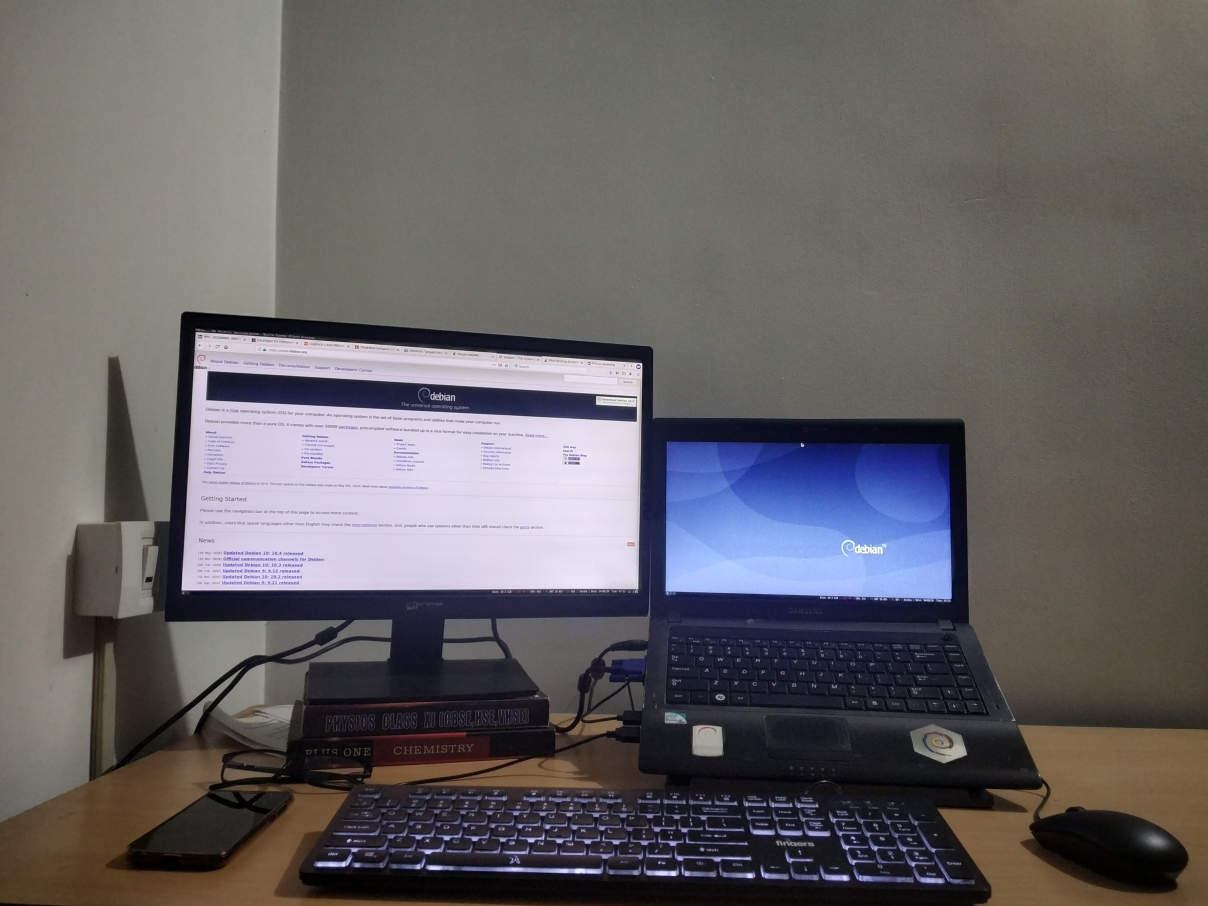
Workstation Hello, Recently I ve seen lot of people sharing about their home office setup. I thought why don t I do something similar. Not to beat FOMO, but in future when I revisit this blog, it will be lovely to understand that I had some cool stuffs. There are people who went deep down in the ocean to lay cables for me to have a remote job and I am thankful to them. Being remote my home is my office. On my work table I have a Samsung R439 laptop. I ve blogged about it earlier. New addition is that it have another 4GB RAM, a total of 6GB and 120GB SSD. I run Debian testing on it. Laptop is placed on a stand. Dell MS116 as external mouse always connected to it. I also use an external keyboard from fingers. The keys are very stiff so I don t recommend this to anyone. The only reason I took this keyboard that it is in my budget and have a backlit, which I needed most. I have a Micromax MM215FH76 21 inch monitor as my secondary display which stacked up on couple of old books to adjust the height with laptop stand. Everything is ok with this monitor except that it don t have a HDMI point and stand is very weak. I use i3wm and this small script help me to manage my monitor arrangement.
# samsung r439
xrandr --output LVDS1 --primary --mode 1366x768 --pos 1920x312 --rotate normal --output DP1 --off --output HDMI1 --off --output VGA1 --mode 1920x1080 --pos 0x0 --rotate normal --output VIRTUAL1 --off
# thinkpad t430s
#xrandr --output LVDS1 --primary --mode 1600x900 --pos 1920x180 --rotate normal --output DP1 --off --output DP2 --off --output DP3 --off --output HDMI1 --off --output HDMI2 --off --output HDMI3 --off --output VGA1 --mode 1920x1080 --pos 0x0 --rotate normal --output VIRTUAL1 --off
i3-msg workspace 2, move workspace to left
i3-msg workspace 4, move workspace to left
i3-msg workspace 6, move workspace to left
I also have another Viewsonic monitor 19 inch, it started to show some lines and unpleasant colors. Thus moved back to shelf. I have an orange pi zero plus 2 running Armbian which serve as my emby media server. I don t own any webcam or quality headset at the moment. I have a boat, and Mi, headphones. My laptop inbuilt webcam is horrible, so for my video conferencing need I use jitsi app on my mobile device.

Abhijith PA: Workstation setup

Workstation Hello, Recently I ve seen lot of people sharing about their home office setup. I thought why don t I do something similar. Not to beat FOMO, but in future when I revisit this blog, it will be lovely to understand that I had some cool stuffs. There are people who went deep down in the ocean to lay cables for me to have a remote job and I am thankful to them. Being remote my home is my office. On my work table I have a Samsung R439 laptop. I ve blogged about it earlier. New addition is that it have another 4GB RAM, a total of 6GB and 120GB SSD. I run Debian testing on it. Laptop is placed on a stand. Dell MS116 as external mouse always connected to it. I also use an external keyboard from fingers. The keys are very stiff so I don t recommend this to anyone. The only reason I took this keyboard that it is in my budget and have a backlit, which I needed most. I have a Micromax MM215FH76 21 inch monitor as my secondary display which stacked up on couple of old books to adjust the height with laptop stand. Everything is ok with this monitor except that it don t have a HDMI point and stand is very weak. I use i3wm and this small script help me to manage my monitor arrangement.
# samsung r439
xrandr --output LVDS1 --primary --mode 1366x768 --pos 1920x312 --rotate normal --output DP1 --off --output HDMI1 --off --output VGA1 --mode 1920x1080 --pos 0x0 --rotate normal --output VIRTUAL1 --off
# thinkpad t430s
#xrandr --output LVDS1 --primary --mode 1600x900 --pos 1920x180 --rotate normal --output DP1 --off --output DP2 --off --output DP3 --off --output HDMI1 --off --output HDMI2 --off --output HDMI3 --off --output VGA1 --mode 1920x1080 --pos 0x0 --rotate normal --output VIRTUAL1 --off
i3-msg workspace 2, move workspace to left
i3-msg workspace 4, move workspace to left
i3-msg workspace 6, move workspace to left
I also have another Viewsonic monitor 19 inch, it started to show some lines and unpleasant colors. Thus moved back to shelf. I have an orange pi zero plus 2 running Armbian which serve as my emby media server. I don t own any webcam or quality headset at the moment. I have a boat, and Mi, headphones. My laptop inbuilt webcam is horrible, so for my video conferencing need I use jitsi app on my mobile device.

16 July 2020

Dima Kogan: Visualizing a broken internet connection

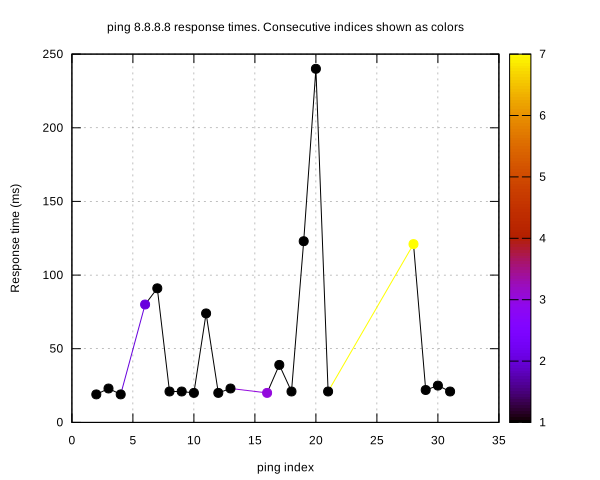
We've all seen our ISPs crap out periodically. Things feel slow, we then go ping some server, and see lost packets or slow response times. When bitching to the ISP it's useful to have evidence so you can clearly explain exactly how they are fucking up. This happened to me again last week, so I wrote a quick oneliner to do the visualization. Here it is:
( echo '# i dt'; ping 8.8.8.8   perl -ne 'BEGIN   $ =1  next if /PING/; s/.*seq=([0-9]+).*time=([0-9]+).*/\1 \2/ && print')   tee /tmp/ping.vnl   vnl-filter --stream -p i,dt,di='diff(i)'   vnl-filter --stream --has di   feedgnuplot  --domain --stream --with 'linespoints pt 7 palette' --tuplesizeall 3 --ymin 0 --set 'cbrange [1:]' --xlabel "ping index" --ylabel "Response time (ms)" --title "ping 8.8.8.8 response times. Consecutive indices shown as colors"
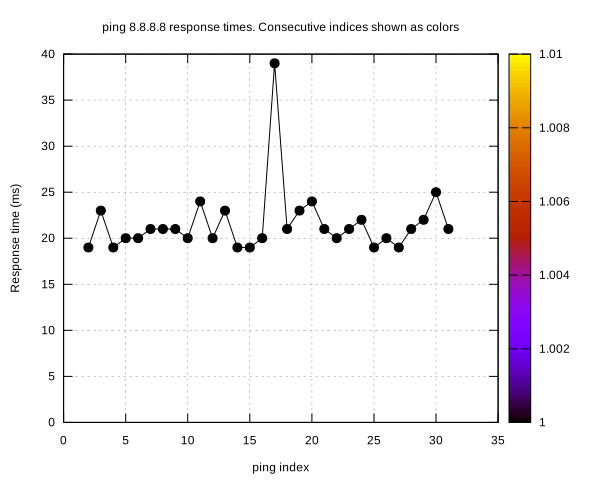
You run that, and you get a realtime-updating plot of ping times and missed packets. The one-liner also logs the data to a file, so the saved data can be re-visualized. Showing what happens on my currently-working internet connection:
< /tmp/ping.vnl vnl-filter -p i,dt,di='diff(i)'   vnl-filter --has di   feedgnuplot  --domain --with 'linespoints pt 7 palette' --tuplesizeall 3 --ymin 0 --set 'cbrange [1:]' --xlabel "ping index" --ylabel "Response time (ms)" --title "ping 8.8.8.8 response times. Consecutive indices shown as colors" --hardcopy /tmp/isp-good.svg
good.svg
On a broken network it looks like this (I edited the log to show the kind of broken-ness I was seeing earlier):
bad.svg
The x axis is the ping index. The y axis is the response time. Misses responses are shows as gaps in the points and also as colors, for legibility. As usual, this uses the vnlog and feedgnuplot tools, so
sudo apt install feedgnuplot vnlog
if you want to try this

Louis-Philippe V ronneau: DebConf Videoteam Sprint Report -- DebConf20@Home

DebConf20 starts in about 5 weeks, and as always, the DebConf Videoteam is working hard to make sure it'll be a success. As such, we held a sprint from July 9th to 13th to work on our new infrastructure. A remote sprint certainly ain't as fun as an in-person one, but we nonetheless managed to enjoy ourselves. Many thanks to those who participated, namely: We also wish to extend our thanks to Thomas Goirand and Infomaniak for providing us with virtual machines to experiment on and host the video infrastructure for DebConf20. Advice for presenters For DebConf20, we strongly encourage presenters to record their talks in advance and send us the resulting video. We understand this is more work, but we think it'll make for a more agreeable conference for everyone. Video conferencing is still pretty wonky and there is nothing worse than a talk ruined by a flaky internet connection or hardware failures. As such, if you are giving a talk at DebConf this year, we are asking you to read and follow our guide on how to record your presentation. Fear not: we are not getting rid of the Q&A period at the end of talks. Attendees will ask their questions either on IRC or on a collaborative pad and the Talkmeister will relay them to the speaker once the pre-recorded video has finished playing. New infrastructure, who dis? Organising a virtual DebConf implies migrating from our battle-tested on-premise workflow to a completely new remote one. One of the major changes this means for us is the addition of Jitsi Meet to our infrastructure. We normally have 3 different video sources in a room: two cameras and a slides grabber. With the new online workflow, directors will be able to play pre-recorded videos as a source, will get a feed from a Jitsi room and will see the audience questions as a third source. This might seem simple at first, but is in fact a very major change to our workflow and required a lot of work to implement.
               == On-premise ==                                          == Online ==
                                                      
              Camera 1                                                 Jitsi
                                                                          
                 v                 ---> Frontend                         v                 ---> Frontend
                                                                                            
    Slides -> Voctomix -> Backend -+--> Frontend         Questions -> Voctomix -> Backend -+--> Frontend
                                                                                            
                 ^                 ---> Frontend                         ^                 ---> Frontend
                                                                          
              Camera 2                                           Pre-recorded video
In our tests, playing back pre-recorded videos to voctomix worked well, but was sometimes unreliable due to inconsistent encoding settings. Presenters will thus upload their pre-recorded talks to SReview so we can make sure there aren't any obvious errors. Videos will then be re-encoded to ensure a consistent encoding and to normalise audio levels. This process will also let us stitch the Q&As at the end of the pre-recorded videos more easily prior to publication. Reducing the stream latency One of the pitfalls of the streaming infrastructure we have been using since 2016 is high video latency. In a worst case scenario, remote attendees could get up to 45 seconds of latency, making participation in events like BoFs arduous. In preparation for DebConf20, we added a new way to stream our talks: RTMP. Attendees will thus have the option of using either an HLS stream with higher latency or an RTMP stream with lower latency. Here is a comparative table that can help you decide between the two protocols:
HLS RTMP
Pros
  • Can be watched from a browser
  • Auto-selects a stream encoding
  • Single URL to remember
  • Lower latency (~5s)
Cons
  • Higher latency (up to 45s)
  • Requires a dedicated video player (VLC, mpv)
  • Specific URLs for each encoding setting
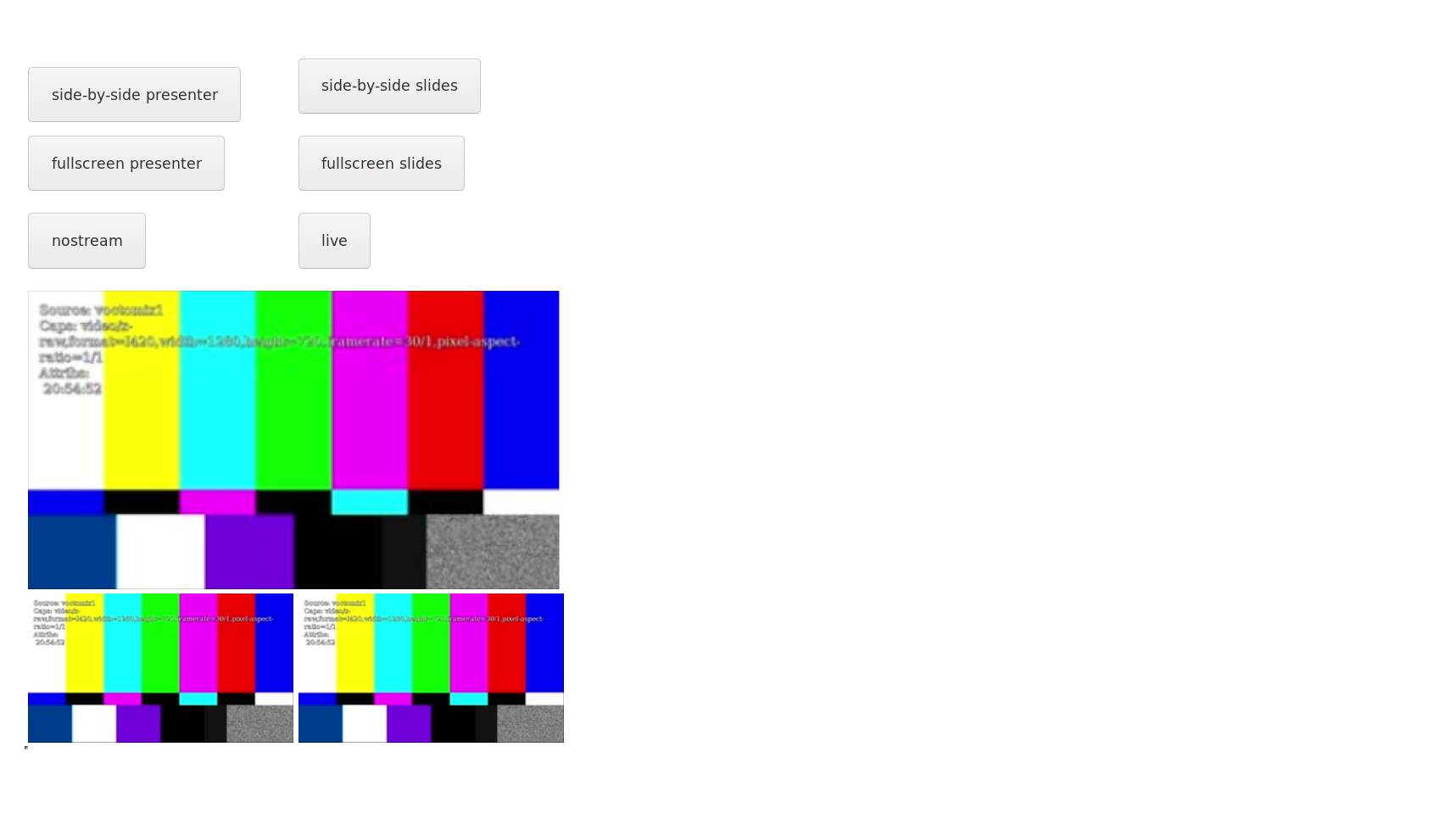
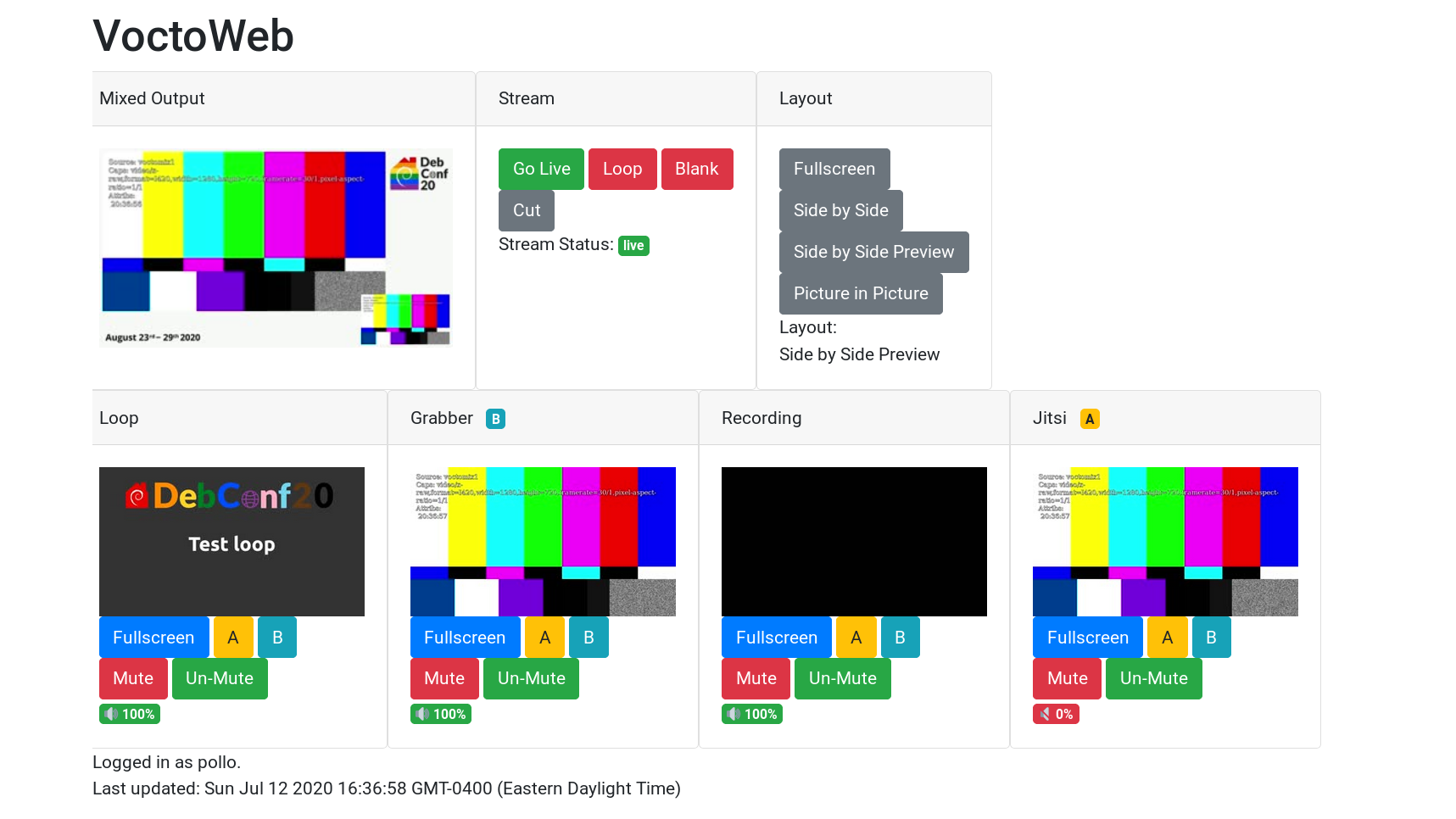
Live mixing from home with VoctoWeb Since DebConf16, we have been using voctomix, a live video mixer developed by the CCC VOC. voctomix is conveniently divided in two: voctocore is the backend server while voctogui is a GTK+ UI frontend directors can use to live-mix. Although voctogui can connect to a remote server, it was primarily designed to run either on the same machine as voctocore or on the same LAN. Trying to use voctogui from a machine at home to connect to a voctocore running in a datacenter proved unreliable, especially for high-latency and low bandwidth connections. Inspired by the setup FOSDEM uses, we instead decided to go with a web frontend for voctocore. We initially used FOSDEM's code as a proof of concept, but quickly reimplemented it in Python, a language we are more familiar with as a team. Compared to the FOSDEM PHP implementation, voctoweb implements A / B source selection (akin to voctogui) as well as audio control, two very useful features. In the following screen captures, you can see the old PHP UI on the left and the new shiny Python one on the right. The old PHP voctowebThe new Python3 voctoweb Voctoweb is still under development and is likely to change quite a bit until DebConf20. Still, the current version seems to works well enough to be used in production if you ever need to. Python GeoIP redirector We run multiple geographically-distributed streaming frontend servers to minimize the load on our streaming backend and to reduce overall latency. Although users can connect to the frontends directly, we typically point them to live.debconf.org and redirect connections to the nearest server. Sadly, 6 months ago MaxMind decided to change the licence on their GeoLite2 database and left us scrambling. To fix this annoying issue, Stefano Rivera wrote a Python program that uses the new database and reworked our ansible frontend server role. Since the new database cannot be redistributed freely, you'll have to get a (free) license key from MaxMind if you to use this role. Ansible & CI improvements Infrastructure as code is a living process and needs constant care to fix bugs, follow changes in DSL and to implement new features. All that to say a large part of the sprint was spent making our ansible roles and continuous integration setup more reliable, less buggy and more featureful. All in all, we merged 26 separate ansible-related merge request during the sprint! As always, if you are good with ansible and wish to help, we accept merge requests on our ansible repository :)

Next.

Previous.