Petter Reinholdtsen: Where did that package go? geolocated IP traceroute
traceroute to www.stortinget.no (85.88.67.10), 30 hops max, 60 byte packets
 1  uio-gw10.uio.no (129.240.202.1)  0.447 ms  0.486 ms  0.621 ms
 2  uio-gw8.uio.no (129.240.24.229)  0.467 ms  0.578 ms  0.675 ms
 3  oslo-gw1.uninett.no (128.39.65.17)  0.385 ms  0.373 ms  0.358 ms
 4  te3-1-2.br1.fn3.as2116.net (193.156.90.3)  1.174 ms  1.172 ms  1.153 ms
 5  he16-1-1.cr1.san110.as2116.net (195.0.244.234)  2.627 ms he16-1-1.cr2.oslosda310.as2116.net (195.0.244.48)  3.172 ms he16-1-1.cr1.san110.as2116.net (195.0.244.234)  2.857 ms
 6  ae1.ar8.oslosda310.as2116.net (195.0.242.39)  0.662 ms  0.637 ms ae0.ar8.oslosda310.as2116.net (195.0.242.23)  0.622 ms
 7  89.191.10.146 (89.191.10.146)  0.931 ms  0.917 ms  0.955 ms
 8  * * *
 9  * * *
[...]
This show the DNS names and IP addresses of (at least some of the) network equipment involved in getting the data traffic from me to the www.stortinget.no server, and how long it took in milliseconds for a package to reach the equipment and return to me. Three packages are sent, and some times the packages do not follow the same path. This is shown for hop 5, where three different IP addresses replied to the traceroute request. There are many ways to measure trace routes. Other good traceroute implementations I use are traceroute (using ICMP packages) mtr (can do both ICMP, UDP and TCP) and scapy (python library with ICMP, UDP, TCP traceroute and a lot of other capabilities). All of them are easily available in Debian. This time around, I wanted to know the geographic location of different route points, to visualize how visiting a web page spread information about the visit to a lot of servers around the globe. The background is that a web site today often will ask the browser to get from many servers the parts (for example HTML, JSON, fonts, JavaScript, CSS, video) required to display the content. This will leak information about the visit to those controlling these servers and anyone able to peek at the data traffic passing by (like your ISP, the ISPs backbone provider, FRA, GCHQ, NSA and others). Lets pick an example, the Norwegian parliament web site www.stortinget.no. It is read daily by all members of parliament and their staff, as well as political journalists, activits and many other citizens of Norway. A visit to the www.stortinget.no web site will ask your browser to contact 8 other servers: ajax.googleapis.com, insights.hotjar.com, script.hotjar.com, static.hotjar.com, stats.g.doubleclick.net, www.google-analytics.com, www.googletagmanager.com and www.netigate.se. I extracted this by asking PhantomJS to visit the Stortinget web page and tell me all the URLs PhantomJS downloaded to render the page (in HAR format using their netsniff example. I am very grateful to Gorm for showing me how to do this). My goal is to visualize network traces to all IP addresses behind these DNS names, do show where visitors personal information is spread when visiting the page.
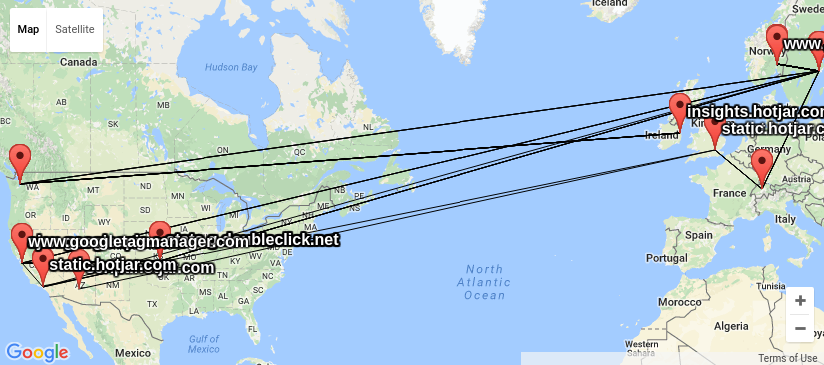 When I had a look around for options, I could not find any good
free software tools to do this, and decided I needed my own traceroute
wrapper outputting KML based on locations looked up using GeoIP. KML
is easy to work with and easy to generate, and understood by several
of the GIS tools I have available. I got good help from by NUUG
colleague Anders Einar with this, and the result can be seen in
my
kmltraceroute git repository. Unfortunately, the quality of the
free GeoIP databases I could find (and the for-pay databases my
friends had access to) is not up to the task. The IP addresses of
central Internet infrastructure would typically be placed near the
controlling companies main office, and not where the router is really
located, as you can see from the
KML file I created using the GeoLite City dataset from MaxMind.
When I had a look around for options, I could not find any good
free software tools to do this, and decided I needed my own traceroute
wrapper outputting KML based on locations looked up using GeoIP. KML
is easy to work with and easy to generate, and understood by several
of the GIS tools I have available. I got good help from by NUUG
colleague Anders Einar with this, and the result can be seen in
my
kmltraceroute git repository. Unfortunately, the quality of the
free GeoIP databases I could find (and the for-pay databases my
friends had access to) is not up to the task. The IP addresses of
central Internet infrastructure would typically be placed near the
controlling companies main office, and not where the router is really
located, as you can see from the
KML file I created using the GeoLite City dataset from MaxMind.
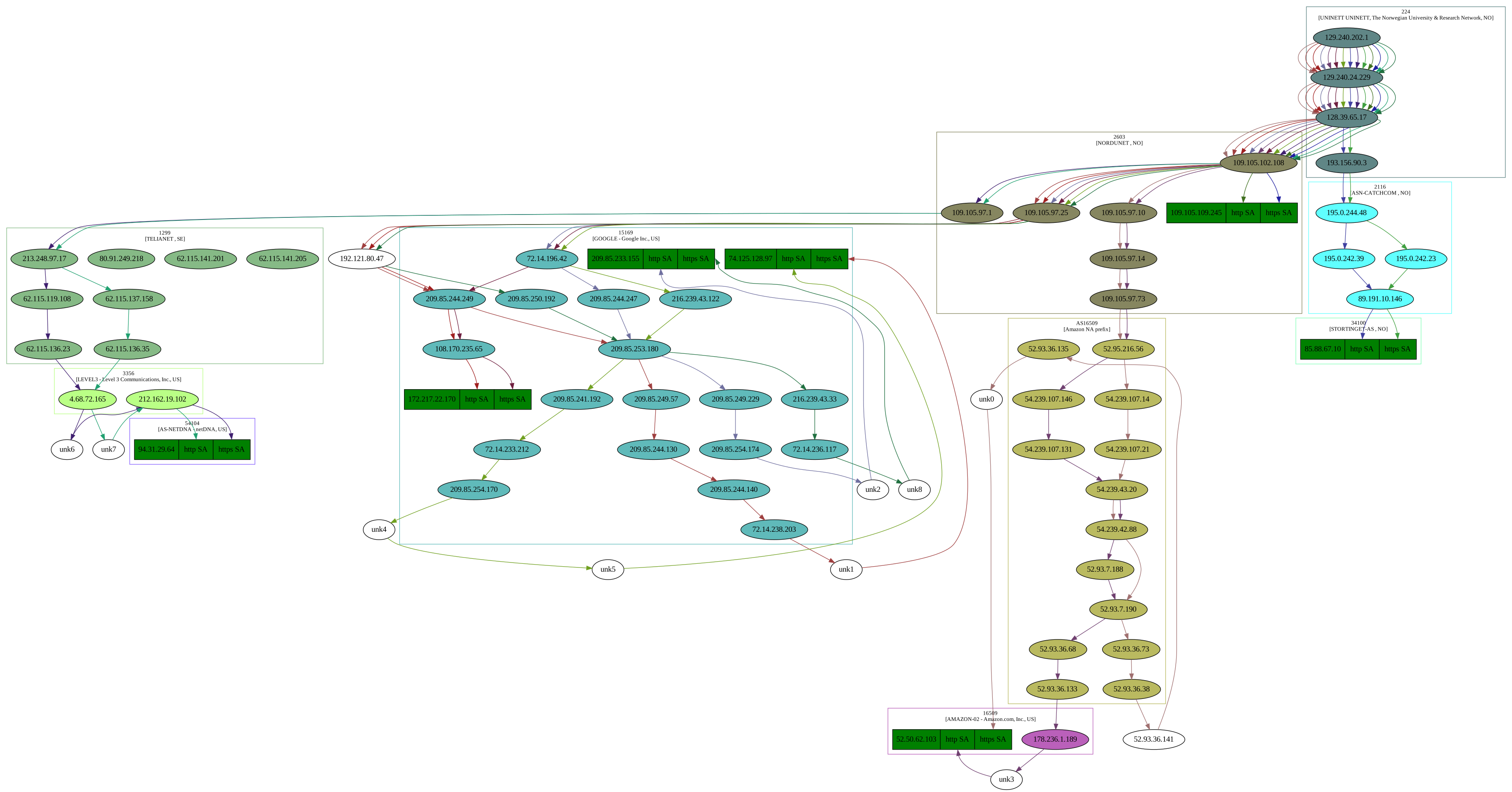 I also had a look at the visual traceroute graph created by
the scrapy project,
showing IP network ownership (aka AS owner) for the IP address in
question.
The
graph display a lot of useful information about the traceroute in SVG
format, and give a good indication on who control the network
equipment involved, but it do not include geolocation. This graph
make it possible to see the information is made available at least for
UNINETT, Catchcom, Stortinget, Nordunet, Google, Amazon, Telia, Level
3 Communications and NetDNA.
I also had a look at the visual traceroute graph created by
the scrapy project,
showing IP network ownership (aka AS owner) for the IP address in
question.
The
graph display a lot of useful information about the traceroute in SVG
format, and give a good indication on who control the network
equipment involved, but it do not include geolocation. This graph
make it possible to see the information is made available at least for
UNINETT, Catchcom, Stortinget, Nordunet, Google, Amazon, Telia, Level
3 Communications and NetDNA.
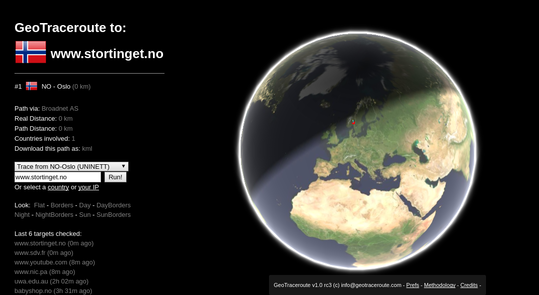 In the process, I came across the
web service GeoTraceroute by
Salim Gasmi. Its methology of combining guesses based on DNS names,
various location databases and finally use latecy times to rule out
candidate locations seemed to do a very good job of guessing correct
geolocation. But it could only do one trace at the time, did not have
a sensor in Norway and did not make the geolocations easily available
for postprocessing. So I contacted the developer and asked if he
would be willing to share the code (he refused until he had time to
clean it up), but he was interested in providing the geolocations in a
machine readable format, and willing to set up a sensor in Norway. So
since yesterday, it is possible to run traces from Norway in this
service thanks to a sensor node set up by
the NUUG assosiation, and get the
trace in KML format for further processing.
In the process, I came across the
web service GeoTraceroute by
Salim Gasmi. Its methology of combining guesses based on DNS names,
various location databases and finally use latecy times to rule out
candidate locations seemed to do a very good job of guessing correct
geolocation. But it could only do one trace at the time, did not have
a sensor in Norway and did not make the geolocations easily available
for postprocessing. So I contacted the developer and asked if he
would be willing to share the code (he refused until he had time to
clean it up), but he was interested in providing the geolocations in a
machine readable format, and willing to set up a sensor in Norway. So
since yesterday, it is possible to run traces from Norway in this
service thanks to a sensor node set up by
the NUUG assosiation, and get the
trace in KML format for further processing.
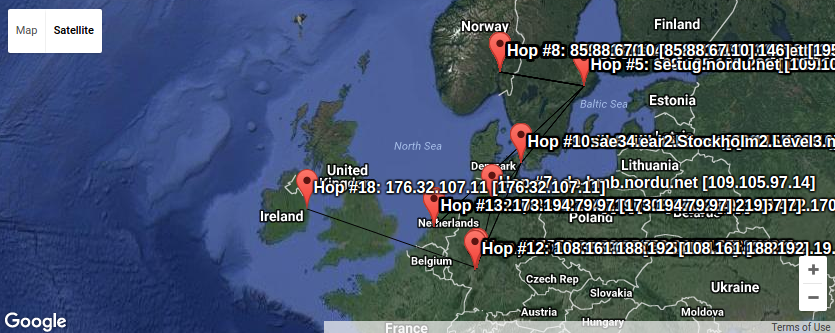 Here we can see a lot of trafic passes Sweden on its way to
Denmark, Germany, Holland and Ireland. Plenty of places where the
Snowden confirmations verified the traffic is read by various actors
without your best interest as their top priority.
Combining KML files is trivial using a text editor, so I could loop
over all the hosts behind the urls imported by www.stortinget.no and
ask for the KML file from GeoTraceroute, and create a combined KML
file with all the traces (unfortunately only one of the IP addresses
behind the DNS name is traced this time. To get them all, one would
have to request traces using IP number instead of DNS names from
GeoTraceroute). That might be the next step in this project.
Armed with these tools, I find it a lot easier to figure out where
the IP traffic moves and who control the boxes involved in moving it.
And every time the link crosses for example the Swedish border, we can
be sure Swedish Signal Intelligence (FRA) is listening, as GCHQ do in
Britain and NSA in USA and cables around the globe. (Hm, what should
we tell them? :) Keep that in mind if you ever send anything
unencrypted over the Internet.
PS: KML files are drawn using
the KML viewer from Ivan
Rublev, as it was less cluttered than the local Linux application
Marble. There are heaps of other options too.
As usual, if you use Bitcoin and want to show your support of my
activities, please send Bitcoin donations to my address
15oWEoG9dUPovwmUL9KWAnYRtNJEkP1u1b.
Here we can see a lot of trafic passes Sweden on its way to
Denmark, Germany, Holland and Ireland. Plenty of places where the
Snowden confirmations verified the traffic is read by various actors
without your best interest as their top priority.
Combining KML files is trivial using a text editor, so I could loop
over all the hosts behind the urls imported by www.stortinget.no and
ask for the KML file from GeoTraceroute, and create a combined KML
file with all the traces (unfortunately only one of the IP addresses
behind the DNS name is traced this time. To get them all, one would
have to request traces using IP number instead of DNS names from
GeoTraceroute). That might be the next step in this project.
Armed with these tools, I find it a lot easier to figure out where
the IP traffic moves and who control the boxes involved in moving it.
And every time the link crosses for example the Swedish border, we can
be sure Swedish Signal Intelligence (FRA) is listening, as GCHQ do in
Britain and NSA in USA and cables around the globe. (Hm, what should
we tell them? :) Keep that in mind if you ever send anything
unencrypted over the Internet.
PS: KML files are drawn using
the KML viewer from Ivan
Rublev, as it was less cluttered than the local Linux application
Marble. There are heaps of other options too.
As usual, if you use Bitcoin and want to show your support of my
activities, please send Bitcoin donations to my address
15oWEoG9dUPovwmUL9KWAnYRtNJEkP1u1b.
 A new version, now at 0.2.0, of
  Today,
  Today
Today 
 My monthly report covers a large part of what I have been doing in the free software world. I write it for
  Something I was used to and which came as standard on wheezy if you installed acpi-support was screen locking when you where suspending, hibernating, ... This is something that I still haven't found on Jessie and which somebody had point me to solve via /lib/systemd/system-sleep/whatever hacking, but that didn't seem quite right, so I gave it a look again and this time I was able to add some config files at /etc/systemd and then a script which does what acpi-support used to do before Edit: Michael Biebl has sugested on my google+ post that this is an ugly hack and that one shouldn't use this solution and instead what we should use are solutions with direct support for logind like desktops with built in support or xss-lock, the reasons for this being ugly are pointed at
  Here is my monthly update covering what I have been doing in the free software world (










 I got tired of manually fetching installation images via either FTP or by manually transferring files to z/VM to test s390x installs. Hence it was about time to automate it. Originally I wanted to instrument an installation via