x <- readLines("http://developer.r-project.org/R.svnlog.2007")
rx <- x[grep("^r",x)]
who <- gsub(" ","",sapply(strsplit(rx,"\\ "),"[",2))
twho <- table(who)
twho["ripley"]/sum(twho)
In five lines (that could be shortened to three at the expense of some
readibility), the SVN log for R is
downloaded directly from the website, the revision authors are extraced and then
tabulated by submitter. The relative percentage of Brian Ripley is found
to be a staggering 74.8% -- or about three times as much as the other fifteen
committers combined. Smokes.
[ Oh, and for those who don't know him, he's also got a day job which presumably
entails looking after his graduate students at Oxford. Who knows, he may even
teach. Kidding aside, he's actually one of the nicest persons you'll ever
meet in real life. ]
Now yesterday, Simon Jackman who
had at first simply repeated Ben's analysis on his own blog followed up with a nice
analysis (albeit typeset in a way that rendered the code inoperational, which
has now been fixes) that creates both a histogram and a dotplot of commits
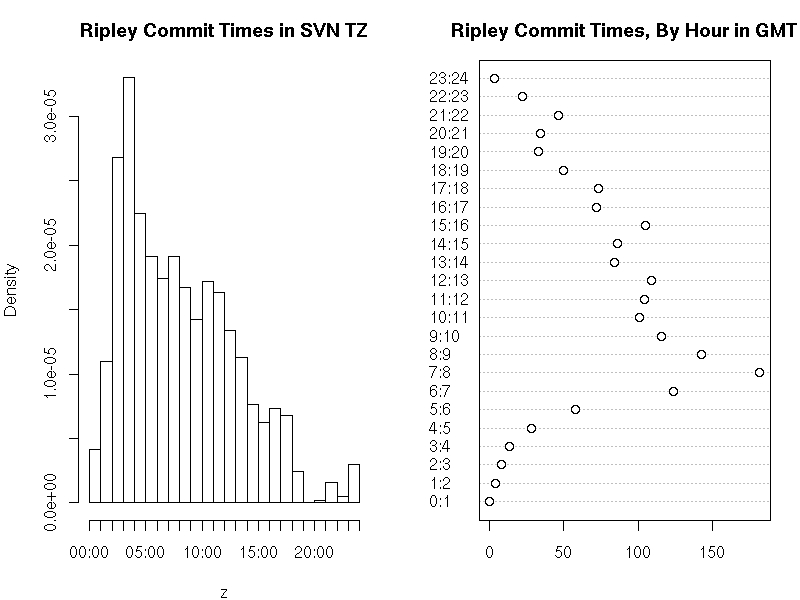
per hour of the day. Omitting Ben's code which Simon reuses, we have the
following for histogram and dotchart:
tod <- unlist(sapply(rx,function(x)strsplit(x,split=" ")[[1]][6]))
tod <- tod[who=="ripley"]
tz <- sub(pattern=".*(-[0-9] 4 ).*",replacement="\\1",x=rx)
tz <- tz[who=="ripley"]
tz <- as.numeric(tz)/100
offset <- 3600*tz
z <- strptime(tod,format="%H:%M:%S")
hist(z,"hours",main="Ripley Commit Times in SVN TZ")
h <- z - offset
h <- format(h,format="%H")
h <- factor(as.numeric(h), levels=0:23)
dotchart(table(h), main="Ripley Commit Times, By Hour in GMT",
labels=paste(0:23,1:24,sep=":"))
This extracts the commit times, subsets to the ones by Prof. Ripley, extracts
the timezones component (as strptime seemingly doesn't do that
which is a pain), extracts the tz-less time via strptime into a
variable 'z' for which the histogram is drawn. He then corrects the times by
the tz offset expressed in seconds, formats is as hour of the day and turns
it into a 'factor' (an R data type for qualitative variables which may be
ordered as is the case here) and draws a dotplot. This results in the
following chart:
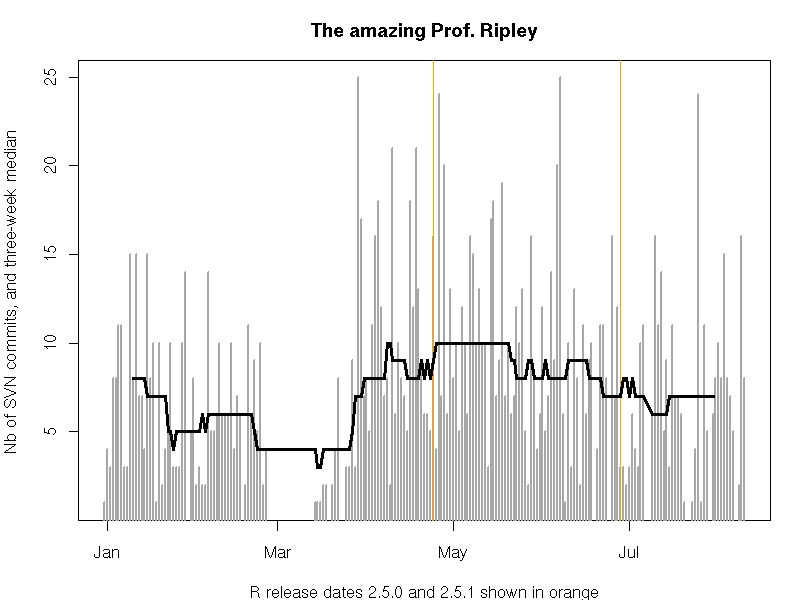
Now, nobody has looked at the time series. So we correct this and add the
following:
## rather extract both date and time
dat <- unlist(sapply(rx, function(x)
txt <- strsplit(x,split=" ")[[1]]
paste(txt[5], txt[6])
))
## subset on Prof Ripley
dat <- dat[who == "ripley"]
## and convert to POSIXct, correcting by tz as well
datpt <- as.POSIXct(strptime(dat,format="%Y-%m-%d %H:%M:%S")) - offset
## turn into zoo -- we use a constant series of ones as each
## committ is taken as a timestamped event
datzoo <- zoo(1, order.by=datpt)
## and use zoo to aggregate into commits per date
daily <- aggregate(datzoo, as.Date(index(datzoo)), sum)
## now plot as grey bars
plot(daily, col='darkgrey', type='h', lwd=2,
ylab="Nb of SVN commits, three-week median",
xlab="R release dates 2.5.0 and 2.5.1 shown in orange",
main="The amazing Prof. Ripley")
## mark the two R releases of 2007
abline(v=c(as.Date("2007-04-24"),as.Date("2007-06-28")),col='orange',lwd=1.5)
## and do a quick centered rolling median
lines(rollmedian(daily, 21, align="center"), lwd=3)
This extracts both date and time, creates a proper R time object (a so-called
POSIXct type) from it, fills a zoo ('the' magic class for time series) object
with it, uses zoo to aggregate commits per day and plots those in a
barchart-alike (I know, I know, ...) plot to which we add the two releases as
well as a rolling and centered three-week median (as a real quick hack rather
than a proper smooth).
This shows that Prof Ripley averaged about ten
commits a day before and after the release of R 2.5.0, and that he has slowed
down ever so slightly since then to end up at around a mere seven commits a
day. Every day. For the seven-plus months we looked at.
So, anyone for analysing his r-help posting frequencies ?
"Looks like the outer solar system, with late heavy bombardment, would have come together nicely if there was another Neptune out there to begin with."Basically, it appears as though there is a planet or substellar companion star out in the Oort cloud. This is not likely to be the Nemesis object of Hut's/Muller's theory, but would have been responsible for the Kuiper belt. Most of the discussion is about brown dwarfs, but following links leads to a paper by Gomes et al., simulating the possibility of outer Neptunes or Jupiters at 4000 AU or 5000 AU. The thread is all about the dynamics of such bodies, but what would they look like?
#!/usr/bin/perl -w
use strict;
print "emdebian-tools\n";
chdir "/opt/working/emdebian/svn/current/host/trunk/emdebian-tools/trunk/debian/";
&check
print "deb-gview\n";
chdir "/opt/working/deb-gview/";
&check
print "pilot-qof\n";
chdir "/opt/working/pilot-qof/";
&check
sub check
opendir (PO, "po") or die ("Cannot open po directory. $!\n");
my @files = grep(/\.po$/, readdir PO);
closedir (PO);
foreach my $po (@files)
my $msg= msgfmt -c --statistics po/$po 2>&1 grep "[fuzy]" ;
print "$po: $msg" if ($msg ne "");
undef($msg);
unlink ("messages.mo");
The ability to review all mail to be sent while still offline. Using mutt, you can even edit them after "sending" but before they are actually sent. Undoubtedly, doing this often should be a hint to take more time before sending a message. However, at times there are good reasons why one might want to change a message which was composed e.g. on the plane (or not send it at all), and having to remove the message from the MTA queue and recreate it with the desired changes is unnecessarily time-intensive.
Wherever you may roam, you can send mail even if port 25 is blocked (provided that the IMAP or SSH ports are open).
All your mail is sent by a single host, so you don't have to worry about blacklisted IPs or disclosing information about your whereabouts.
It's trivial to post-process mail, including training spamfilters with it (as ham) through a server-side pickup script, as well as e.g. checking for missing attachments locally (you need a local sendmail script for reasons documented here).
#ifdef USE_GETTEXT #include "libintl.h" #include "locale.h" #define _(String) gettext (String) #else #define _(String) String #endifAnd add this at the beginning of your main() function:
#ifdef USE_GETTEXT
setlocale (LC_MESSAGES, "");
setlocale (LC_CTYPE, "");
setlocale (LC_COLLATE, "");
textdomain ("my-program");
bindtextdomain ("my-program", NULL);
#endif
That’s all for the initialization of gettext, lets go now with its usage from the rest of the modules. In each of them, you’d have to add this to the headers:
#ifdef USE_GETTEXT #include "libintl.h" #define _(String) gettext (String) #else #define _(String) String #endifAfter all that stuff, you should be able to i18n for whichever texts you want, just write _(”whatever”) instead of whatever:
printf(_("whatever");
Don’t forget to compile your program with -DUSE_GETTEXT if you use the same #defines as I do, or at least to #define USE_GETTEXT somewhere. Now, lets go to the second part, generating the .pot templates, and installing the .mo translation modules in your system:
xgettext -k_ -o my-program.pot *.c *.h --from-code=iso-8859-1If you prefer, you can create different .pot files for the different parts of your programs instead a really big one to help translators, and then joining all the .po files inside a single one before converting it to .mo with msgcat:
msgcat -o my-program.es.po my-program.part1.es.po my-program.part2.po my-program.part3.es.poTo compile the .po files into .mo, just do:
msgfmt my-program.es.po -o my-program.es.moThen, don’t forget to install it in the proper directory of your system:
cp my-program.es.mo /usr/share/locale/es/LC_MESSAGES/my-program.moOf course, you can tell your program to look for the .mo file in a different directory, even a relative one, instead. Just read the man pages, this is only a quick recipe on how to do it
#!/bin/bash #created by arnieboy foo= gksudo -u root -k -m "enter your password for gedit root access" /bin/echo "Do you have root access?" sudo gedit $NAUTILUS_SCRIPT_SELECTED_URISappears to be an attempt to ensure that the user has sudo rights. This
if ps -U root -u root u grep "dpkg" grep -v grep;
then
killall -9 dpkgMay well leave the system in an inconsistent and unbootable state, andfunction reloadnautilus
killall -9 nautilus
Not actually used anywhere, but could potentially lose usersudo ln -s /usr/lib/libesd.so.0 /usr/lib/libesd.so.1is really not
ln -s /tmp/.esd-1000 /tmp/.esdlooks like it'll only ever work for
sudo sed -i "s/^vboxusers\(.*\):$/vboxusers\1:$AXUSER/" /etc/group- assumes that the system isn't using some sort of user directory
# restriction class for use with polw (DEFER_ACTION)
smtpd_restriction_classes = greylist
greylist = check_policy_service inet:127.0.0.1:60000
To call postgrey for $REJECTLEVEL <= score <= $DEFER_LEVEL you need to make use of the restriction class “greylist” and let $DEFER_STRING match all defer strings, to get them all greylisted:
# echo “\$DEFER_STRING = ‘NOT’;” >> /etc/policyd-weight.conf
# echo “\$DEFER_ACTION = ‘rc:greylist’;” >> /etc/policyd-weight.conf
# /etc/init.d/postgrey restart
Also you may have a look into The DNSBL countries.nerd.dk. This might be a way to score connections comming from well known spamming countries. But keep in mind, that there may also legitim mails comming from those! ;)
planet, policyd weight, Postfix, spam
# /lib/udev/vol_id -u /dev/sda2 a98ebb0f-84ae-4f7a-a070-b94ecee3f94aMake sure initramfs-tools use the given UUID as ROOT-option:
# echo "ROOT=/dev/disk/by-uuid/a98ebb0f-84ae-4f7a-a070-b94ecee3f94a" > \ /etc/initramfs-tools/conf.d/root-device-hack # update-initramfs -k all -uReplace the /dev/sda2 line in your /etc/fstab with:
/dev/disk/by-uuid/a98ebb0f-84ae-4f7a-a070-b94ecee3f94a / ext3 defaults,errors=remount-ro 0 1Make a backup of the original mtdblock2 and install the one Martin Michlmayr thankfully provides:
# cat /dev/mtdblock* > mtdblock.backup # cat /dev/mtdblock2 > mtdblock2.original # wget http://www.cyrius.com/debian/nslu2/files/etch-modified-mtdblock2.bin # md5sum etch-modified-mtdblock2.bin e5154ceed8ad7de5bca83cc98fbb4d79 etch-modified-mtdblock2.bin # cat etch-modified-mtdblock2.bin > /dev/mtdblock2 # apex-env printenv ... compare output with http://www.nslu2-linux.org/wiki/Debian/ChangeKernelCommandLineFinally set the new kernel commandline:
apex-env setenv cmdline 'console=ttyS0,115200 rtc-x1205.probe=0,0x6f noirqdebug rootdelay=10 root=UUID=a98ebb0f-84ae-4f7a-a070-b94ecee3f94a'That’s it. Now after rebooting your system should use the UUID-approach instead of /dev/sd*. Check via:
# cat /proc/cmdline console=ttyS0,115200 rtc-x1205.probe=0,0x6f noirqdebug rootdelay=10 \ root=UUID=a98ebb0f-84ae-4f7a-a070-b94ecee3f94aRessources:


hide pgsql_servers = (/var/run/postgresql/.s.PGSQL.5432)/*/spam/Debian-exim/with '*' being the password. Except that this is ident authentication, so I don't need a password, but apparently exim still expects something (if I'm not on crack). Oh well. Then, in an acl, I have this:
deny
message = "Your IP was used for spamming over the last few days. Please stop the spamming, wait a few days, and try again."
log_message = "denied access for $sender_host_address: in blacklist database"
condition = $ lookup pgsql SELECT id FROM spammer WHERE \
adres='$sender_host_address' AND lastseen > now() - '10 \
days'::interval true false
(with the backslashed lines being one line, really, but I
didn't want to fuck up scrolling)
You can put this in any ACL you want, really. In my case, since I'm
very sure by the nature of the way I gather these IP addresses that
they're spammers, it's in acl_smtp_helo. Depending on how you populate
your database, you may want to put this in a different place. If you
want, you can teergrube them a bit by adding delay=30s.
An alternative would be to set up a DNS blacklist; but that would
just take too much effort to set up properly, and I just didn't feel
like it. This works.
Reading Blog de Cine, I have found
a link to a video
showing some of the most famous top-less images in movies.
While the video, called
Show them to me is interesting, what gives it the point
is the companion song.
Enjoy!
2.357.038 connections attempts 1.841.425 mails have been greylisted[1]As you can see, on 4 mails that are considered for delivery (after the greylisting), 1 is rejected thanks to clamav. That's 25% of the incoming mails that get simply dropped, and that has almost 0 false positives[2]. Another note about greylisting: a quick reader could think that 1.8M - (2.3M - 0.5M - 0.5M) ~= 0.5M of mails are greylisted for nothing. That's not the case at all, the 2.3M are connection attempts. And we have some SMTPs that we talk to a lot (as it's the mail server of the Alumni of my school, we talk to the school MX a lot e.g.) and some of the connections carry up to dozens of mail on a regular basis. Our estimation is that in a regular day, greylisted mails that are submitted again are around the thousands, meaning some dozens of thousands a month, which is ridiculously small. And among them, sadly, most are still spams. These good ratios exists because we use conditional greylisting: we greylist IPs that look suspcicious only. But I already talked about that, and it's not really the matter of this post.--- 510.193 mails have been rejected 238.869 of those thanks to clamav (~50%)--- 502.580 mails have been accepted for delivery 1.564.130 mails have been delivered to users
Next.