Search Results: "ean"

10 June 2020

Evgeni Golov: show your desk

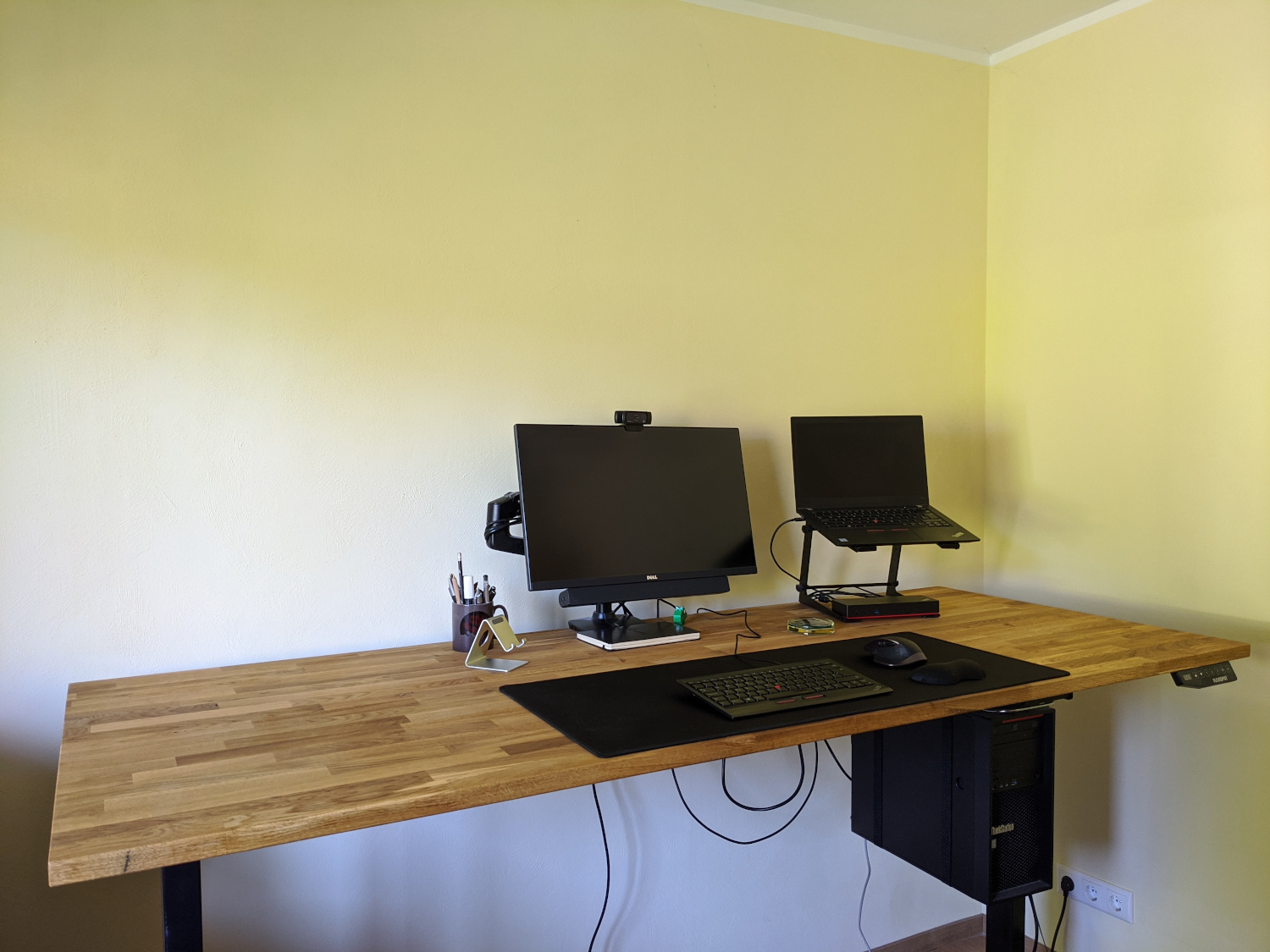
Some days ago I posted a picture of my desk on Mastodon and Twitter. standing desk with a monitor, laptop etc After that I got multiple questions about the setup, so I thought "Michael and Michael did posts about their setups, you could too!" And well, here we are ;-) desk The desk is a Flexispot E5B frame with a 200 80 2.6cm oak table top. The Flexispot E5 (the B stands for black) is a rather cheap (as in not expensive) standing desk frame. It has a retail price of 379 , but you can often get it as low as 299 on sale. Add a nice table top from a local store (mine was like 99 ), a bit of wood oil and work and you get a nice standing desk for less than 500 . The frame has three memory positions, but I only use two: one for sitting, one for standing, and a "change position" timer that I never used so far. The table top has a bit of a swing when in standing position (mine is at 104cm according to the electronics in the table), but not enough to disturb typing on the keyboard or thinking. I certainly wouldn't place a sewing machine up there, but that was not a requirement anyways ;) To compare: the IKEA Bekant table has a similar, maybe even slightly stronger swing. chair Speaking of IKEA The chair is an IKEA Volmar. They don't seem to sell it since mid 2019 anymore though, so no link here. hardware laptop A Lenovo ThinkPad T480s, i7-8650U, 24GB RAM, running Fedora 32 Workstation. Just enough power while not too big and heavy. Full of stickers, because I stickers! It's connected to a Lenovo ThinkPad Thunderbolt 3 Dock (Gen 1). After 2 years with that thing, I'm still not sure what to think about it, as I had various issues with it over the time:
  • the internal USB hub just vanishing from existence until a full power cycle of the dock was performed, but that might have been caused by my USB-switch which I recently removed.
  • the NIC negotiating at 100MBit/s instead of 1000MBit/s and then keeping on re-negotiating every few minutes, disconnecting me from the network, but I've not seen that since the Fedora 32 upgrade.
  • the USB-attached keyboard not working during boot as it needs some Thunderbolt magic.
The ThinkPad stands on a Adam Hall Stands SLT001E, a rather simple stand for laptops and other equipment (primarily made for DJs I think). The Dock fits exactly between the two feet of the stand, so that is nice and saves space on the table. Using the stand I can use the laptop screen as a second screen when I want it - but most often I do not and have the laptop lid closed while working. workstation A Lenovo ThinkStation P410, Xeon E5-2620 v4, 96GB RAM, running Fedora 32 Workstation. That's my VM playground. Having lots of RAM really helps if you need/want to run many VMs with Foreman/Katello or Red Hat Satellite as they tend to be a bit memory hungry and throwing hardware at problems tend to be an easy solution for many of them. The ThinkStation is also connected to the monitor, and I used to have an USB switch to flip my keyboard, mouse and Yubikey from the laptop to the workstation and back. But as noted above, this switch somehow made the USB hub in the laptop dock unhappy (maybe because I was switching too quickly after resume or so), so it's currently removed from the setup and I use the workstation via SSH only. It's mounted under the table using a ROLINE PC holder. You won't get any design awards with it, but it's easy to assemble and allows the computer to move with the table, minimizing the number of cables that need to have a flexible length. monitor The monitor is an older Dell UltraSharp U2515H - a 25" 2560 1440 model. It sits on an Amazon Basics Monitor Arm (which is identical to an Ergotron LX to the best of my knowledge) and is accompanied by a Dell AC511 soundbar. I don't use the adjustable arm much. It's from the time I had no real standing desk and would use the arm and a cardboard box to lift the monitor and keyboard to a standing level. If you don't want to invest in a standing desk, that's the best and cheapest solution! The soundbar is sufficient for listening to music while working and for chatting with colleagues. webcam A Logitech C920 Pro, what else? Works perfectly under Linux with the UVC driver and has rather good microphones. Actually, so good that I never use a headset during video calls and so far nobody complained about bad audio. keyboard A ThinkPad Compact USB Keyboard with TrackPoint. The keyboard matches the one in my T480s, so my brain doesn't have to switch. It was awful when I still had the "old" model and had to switch between the two. UK layout. Sue me. I like the big return key. mouse A Logitech MX Master 2. I got the MX Revolution as a gift a long time ago, and at first I was like: WTF, why would anyone pay hundred bucks for a mouse?! Well, after some time I knew, it's just that good. And when it was time to get a new one (the rubber coating gets all slippery after some time) the decision was rather easy. I'm pondering if I should try the MX Ergo or the MX Vertical at some point, but not enough to go and buy one of them yet. other notepad I'm terrible at remembering things, so I need to write them down. And I'm terrible at remembering to look at my notes, so they need to be in my view. So there is a regular A5 notepad on my desk, that gets filled with check boxes and stuff, page after page. coaster It's a wooden table, you don't want to have liquids on it, right? Thankfully a friend of mine once made coasters out of old Xeon CPUs and epoxy. He gave me one in exchange for a busted X41 ThinkPad. I still think I made the better deal ;) yubikey Keep your secrets safe! Mine is used as a GnuPG smart card for both encryption and SSH authentication, U2F on various pages and 2FA for VPN. headphones I own a pair of Bose QuietComfort 25 with an aftermarket Bluetooth adapter and Anker SoundBuds Slim+. Both are used rather seldomly while working, as my office is usually quiet and no one is disturbed when I listen to music without headphones. what's missing? light I want to add more light to the setup, noth to have a better picture during video calls but also to have better light when doing something else on the table - like soldering. The plan is to add an IKEA Tertial with some Tr dfri smart LED in it, but the Tertial is currently not available for delivery at IKEA and I'm not going to visit one in the current situation. bigger monitor Currently pondering getting a bigger (27+ inch) 4K monitor. Still can't really decide which one to get. There are so many, and they all differ in some way. But it seems no affordable one is offering an integrated USB switch and sufficient amount of USB ports, so I'll probably get whatever can get me a good picture without any extra features at a reasonable price. Changing the monitor will probably also mean rethinking the sound output, as I'm sure mounting the Dell soundbar to anything but the designated 5 year old monitor won't work too well.

9 June 2020

Ingo Juergensmann: Jabber vs. XMPP

XMPP is widely - and mabye better - known as Jabber. This was more or less the same until Cisco bought Jabber Inc and the trademark. You can read more about the story on the XMPP.org website. But is there still a Jabber around? Yes, it is! But Cisco Jabber is a whole infrastructure environment: you can't use Cisco Jabber client on its own without the other required Cisco infrastructure as Cisco CUCM and CIsco IM&P servers. So you can't just setup Prosody or ejabberd on your Debian server and connect Cisco Jabber to it. But what are the differences of Cisco Jabber to "standard" XMPP clients? Cisco Jabber The above screenshot from the official Cisco Jabber product webpage shows the new, single view layout of the Cisco Webex Teams client, but you can configure the client to have the old, classic split view layout of Contact List and Chat Window. But as you can already see from above screenshot audio & video calls is one of the core functions of Cisco Jabber whereas this feature has been added only lately to the well-known Conversations XMPP client on Android. Conversations is using Jingle extension to XMPP whereas Jabber uses SIP for voice/video calls. You can even use Cisco Jabber to control your deskphone via CTI, which is a quite common setup for Jabber. In fact you can configure Jabber to be just a CTI client to you phone or a fully featured UC client. When you don't want to have Ciscos full set of on-premise servers, you can also use Cisco Jabber in conjunction with Cisco Webex as Cisco Webex Messenger. Or in conjunction with Webex Teams in Teams Messaging Mode. Last month Cisco announced general availability of XMPP federation for Webex Teams/Jabber in Teams Messaging Mode. With that you have basic functionality in Webex Teams. And when I say "basic" I really mean basic: you can have 1:1 chat only, no group chats (MUC) and no Presence status will be possible. Hopefully this is just the beginning and not the end of XMPP support in Webex Teams. XMPP Clients Well, I'm sure many of you know "normal" XMPP clients such as Gajim or Dino on Linux, Conversations on Android or Siskin/Monal/ChatSecure on Apple IOS. There are plenty of other clients of course and maybe you used an XMPP client in the past without knowing it. For example Jitsi Meet is based on XMPP and you can still download the Jitsi Desktop client and use it as a full-featured multi-protocol client, e.g. for XMPP and SIP. In fact Jitsi Desktop is maybe the client that comes closest to Cisco Jabber as a chat/voice/video client. In fact I already connected Jitsi Desktop to Cisco CUCM/IM&P infrastructure, but of course you won't be able to use all those Cisco proprietary extensions, but you can see the benefit of open, standardized protocols such as XMPP and SIP: you are free to use any standard compliant client that you want. So, while Jitsi supported voice/video calls for a long time, even before they focussed on Jitsi Meet as a WebRTC based conference service, Conversations added this feature last month, as already stated. This had a huge effect to the whole XMPP federation, because you need an XMPP server that supports XEP-0215 to make these audio/video calls work. The well-known Compliance Tester listed the STUN/TURN features first as "Informational Tests", but quickly made this a mandatory test to pass tests and gain 100% on the Compliance Tester. But you cannot place SIP calls to other sides, because that's a different thing. As many of you are familiar with standard XMPP clients, I'll focus now on some similarity and differences between Cisco Jabber and standard XMPP... Similarities & Differences First, you can federate with Cisco Jabber users. Cisco IM&P can use standard XMPP federation with all other XMPP standard compliant servers. This is really a big benefit and way better than other solutions that usually results in vendor lock-in. Depending on the setup, you can even join from your own XMPP client in MUCs (Multi User Chats), which Cisco calls "Persistent Chat Room". The other way is not that simple: basically it is possible to join with Cisco Jabber in a MUC on a random server, but it is not as easy as you might thing. Cisco Jabber simply lacks a way to enter a room JID (as you can find them on https://search.jabber.network/. Instead you need to be added as participant by a moderator or an admin in that 3rd party MUC. Managed File Transfers is another issue. Cisco Jabber supports Peer-to-Peer file transfers and Managed File Transfers, where the uploaded file get transferred to an SFTP server as storage backend and where the IM&P server is handling the transfer via HTTPS. You can find a schematic drawing in the Configuration Guides. Although it appears similar to HTTP Upload as defined in XEP-0363, it is not very likely that it will work. I haven't tested it yet, because in my test scenario there is a gatekeeper in the path: Cisco Expressway doesn't support (yet) Managed File Transfer, but you can upvote the idea in the ideas management of Cisco or other ideas such as OMEMO support. OMEMO support? Yes, there is no end-to-end encryption (E2EE) currently planned for Cisco Jabber, while it is common nowadays for most modern XMPP clients. I think it would be good for Cisco Jabber to also (optionally) support OMEMO or its successor. Messaging clients without E2EE are not state of the art anymore. Whereas Conversations is the de-facto standard on Android, Apple IOS devices are still lacking a similar well-working client. See my blog post "XMPP - Fun with Clients" for a summary. In that regard Cisco Jabber might be the best XMPP client for IOS to some degree: you have working messaging, voice/video calls, Push Notifications and integration into Apples Call Kit. There are most likely many, many more differences and issues between Cisco Jabber and standard compliant XMPP servers and clients. But basically Cisco Jabber is still based on XMPP and extends that by proprietary extensions. Summary While I have the impression that the free clients and servers are well doing and increased development in the past years (thanks to Conversations and the Compliance Tester), the situation of Cisco Jabber is a little different. As a customer you can sometimes get the impression that Cisco has lost interest in developing Cisco Jabber. It got better in the last years, but when Cisco Spark was introduced some years ago, the impression was that Cisco is heavily focussed on Spark (now: Webex Teams). It's not like Cisco is not listening to customers or the development has been stopped on Jabber, but my impression is that most customers don't give feedback or tell Cisco as the vendor what they want. You can either submit ideas via the Colaboration Customer Ideas Tool or provide feedback via your Cisco and partner channels. I think it is important for the XMPP community to also have a large enterprise level vendor like Cisco. Otherwise the Internet will become more and more an Internet of closed silos like MS Teams, Slack, Facebook, etc. Of course there are other companies like ProcessOne (ejabberd) or Tigase, but I think you agree that Cisco is another level.
Kategorie:

Julian Andres Klode: Review: Chromebook Duet

Sporting a beautiful 10.1 1920x1200 display, the Lenovo IdeaPad Duet Chromebook or Duet Chromebook, is one of the latest Chromebooks released, and one of the few slate-style tablets, and it s only about 300 EUR (300 USD). I ve had one for about 2 weeks now, and here are my thoughts.

Build & Accessories The tablet is a fairly Pixel-style affair, in that the back has two components, one softer blue one housing the camera and a metal feeling gray one. Build quality is fairly good. The volume and power buttons are located on the right side of the tablet, and this is one of the main issues: You end up accidentally pressing the power button when you want to turn your volume lower, despite the power button having a different texture. Alongside the tablet, you also find a kickstand with a textile back, and a keyboard, both of which attach via magnets (and pogo pins for the keyboard). The keyboard is crammed, with punctuation keys being halfed in size, and it feels mushed compared to my usual experiences of ThinkPads and Model Ms, but it s on par with other Chromebooks, which is surprising, given it s a tablet attachment.
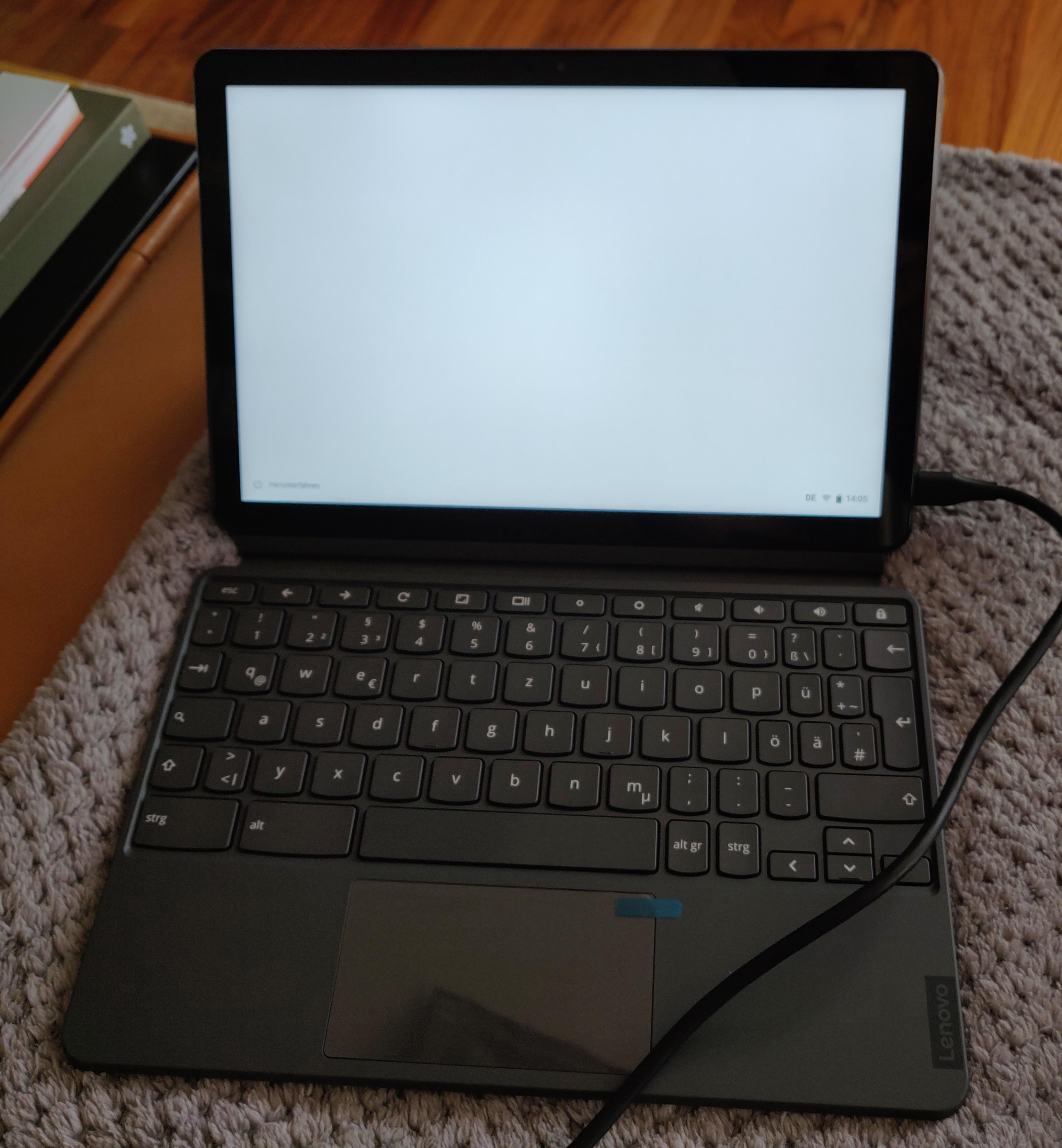
fully assembled chromebook duet fully assembled chromebook duet
I mostly use the Duet as a tablet, and only attach the keyboard occasionally. Typing with the keyboard on your lap is suboptimal. My first Duet had a few bunches of dead pixels, so I returned it, as I had a second one I could not cancel ordered as well. Oh dear. That one was fine!

Hardware & Connectivity The Chromebook Duet is powered by a Mediatek Helio P60T SoC, 4GB of RAM, and a choice of 64 or 128 GB of main storage. The tablet provides one USB-C port for charging, audio output (a 3.5mm adapter is provided in the box), USB hub, and video output; though, sadly, the latter is restricted to a maximum of 1080p30, or 1440x900 at 60 Hz. It can be charged using the included 10W charger, or use up to I believe 18W from a higher powered USB-C PD charger. I ve successfully used the Chromebook with a USB-C monitor with attached keyboard, mouse, and DAC without any issues. On the wireless side, the tablet provides 2x2 Wifi AC and Bluetooth 4.2. WiFi reception seemed just fine, though I have not done any speed testing, missing a sensible connection at the moment. I used Bluetooth to connect to my smartphone for instant tethering, and my Sony WH1000XM2 headphones, both of which worked without any issues. The screen is a bright 400 nit display with excellent viewing angles, and the speakers do a decent job, meaning you can use easily use this for watching a movie when you re alone in a room and idling around. It has a resolution of 1920x1200. The device supports styluses following the USI standard. As of right now, the only such stylus I know about is an HP one, and it costs about 70 or so. Cameras are provided on the front and the rear, but produce terrible images.

Software: The tablet experience The Chromebook Duet runs Chrome OS, and comes with access to Android apps using the play store (and sideloading in dev mode) and access to full Linux environments powered by LXD inside VMs. The screen which has 1920x1200 is scaled to a ridiculous 1080x675 by default which is good for being able to tap buttons and stuff, but provides next to no content. Scaling it to 1350x844 makes things more balanced. The Linux integration is buggy. Touches register in different places than where they happened, and the screen is cut off in full screen extremetuxracer, making it hard to recommend for such uses. Android apps generally work fine. There are some issues with the back gesture not registering, but otherwise I have not found issues I can remember. One major drawback as a portable media consumption device is that Android apps only work in Widevine level 3, and hence do not have access to HD content, and the web apps of Netflix and co do not support downloading. Though one of the Duets actually said L1 in check apps at some point (reported in issue 1090330). It s also worth noting that Amazon Prime Video only renders in HD, unless you change your user agent to say you are Chrome on Windows - bad Amazon! The tablet experience also lags in some other ways, as the palm rejection is overly extreme, causing it to reject valid clicks close to the edge of the display (reported in issue 1090326). The on screen keyboard is terrible. It only does one language at a time, forcing me to switch between German and English all the time, and does not behave as you d expect it when editing existing words - it does not know about them and thinks you are starting a new one. It does provide a small keyboard that you can move around, as well as a draw your letters keyboard, which could come in handy for stylus users, I guess. In any case, it s miles away from gboard on Android. Stability is a mixed bag right now. As of Chrome OS 83, sites (well only Disney+ so far ) sometimes get killed with SIGILL or SIGTRAP, and the device rebooted on its own once or twice. Android apps that use the DRM sometimes do not start, and the Netflix Android app sometimes reports it cannot connect to the servers.

Performance Performance is decent to sluggish, with micro stuttering in a lot of places. The Mediatek CPU is comparable to Intel Atoms, and with only 4GB of RAM, and an entire Android container running, it s starting to show how weak it is. I found that Google Docs worked perfectly fine, as did websites such as Mastodon, Twitter, Facebook. Where the device really struggled was Reddit, where closing or opening a post, or getting a reply box could take 5 seconds or more. If you are looking for a Reddit browsing device, this is not for you. Performance in Netflix was fine, and Disney+ was fairly slow but still usable. All in all, it s acceptable, and given the price point and the build quality, probably the compromise you d expect.

Summary tl;dr:
  • good: Build quality, bright screen, low price, included accessories
  • bad: DRM issues, performance, limited USB-C video output, charging speed, on-screen keyboard, software bugs
The Chromebook Duet or IdeaPad Duet Chromebook is a decent tablet that is built well above its price point. It s lackluster performance and DRM woes make it hard to give a general recommendation, though. It s not a good laptop. I can see this as the perfect note taking device for students, and as a cheap tablet for couch surfing, or as your on-the-go laptop replacement, if you need it only occasionally. I cannot see anyone using this as their main laptop, although I guess some people only have phones these days, so: what do I know? I can see you getting this device if you want to tinker with Linux on ARM, as Chromebooks are quite nice to tinker with, and a tablet is super nice.

Molly de Blanc: Racism is a Free Software Issue

Racism is a free software issue. I gave a talk that touched on this at CopyLeft Conf 2019. I also talked a little bit about it at All Things Open 2019 and FOSDEM 2020 in my talk The Ethics Behind Your IoT. I know statistics, theory, and free software. I don t know about race and racism nearly as well. I might make mistakes I have made some and I will make more. Please, when I do, help me do better. I want to look at a few particular technologies and think about how they reinforce systemic racism. Worded another way: how is technology racist? How does technology hurt Black Indigenous People of Color (BIPOC)? How does technology keep us racist? How does technology make it easier to be racist?

Breathalyzers In the United States, Latinx folks are less likely to drink than white people and, overall, less likely to be arrested for DUIs3,4. However, they are more likely to be stopped by police while driving5,6. Who is being stopped by police is up to the police and they pull over a disproportionate number of Latinx drivers. After someone is pulled over for suspected drunk driving, they are given a breathalyzer test. Breathalyzers are so easy to (un)intentionally mis-calibrate that they have been banned as valid evidence in multiple states. The biases of the police are not canceled out by the technology that should, in theory, let us know whether someone is actually drunk.

Facial Recognition I could talk about for quite some time and, in fact, have. So have others. Google s image recognition software recognized black people as gorillas and to fix the issue it removed gorillas from it s image-labeling technology. Facial recognition software does a bad job at recognizing black people. In fact, it s also terrible at identifying indigenous people and other people of color. (Incidentally, it s also not great at recognizing women, but let s not talk about that right now.) As we use facial recognition technology for more things, from automated store checkouts (even more relevant in the socially distanced age of Covid-19), airport ticketing, phone unlocking, police identification, and a number of other things, it becomes a bigger problem that this software cannot tell the difference between two Asian people.

Targeted Advertising Black kids see 70% more online ads for food than white kids, and twice as many ads for junk food. In general BIPOC youth are more likely to see junk food advertisements online. This is intentional, and happens after they are identified as BIPOC youth.

Technology Reinforces Racism; Racism Builds Technology The technology we have developed reinforces racism on a society wide scale because it makes it harder for BIPOC people to interact with this world that is run by computers and software. It s harder to not be racist when the technology around us is being used to perpetuate racist paradigms. For example, if a store implements facial recognition software for checkout, black women are less likely to be identified. They are then more likely to be targeted as trying to steal from the store. We are more likely to take this to mean that black women are more likely to steal. This is how technology builds racism, People are being excluded largely because they are not building these technologies, because they are not welcome in our spaces. There simply are not enough Black and Hispanic technologists and that is a problem. We need to care about this because when software doesn t work for everyone, it doesn t work. We cannot build on the promise of free and open source software when we are excluding the majority of people.

7 June 2020

Joachim Breitner: Managed by an eleven year old

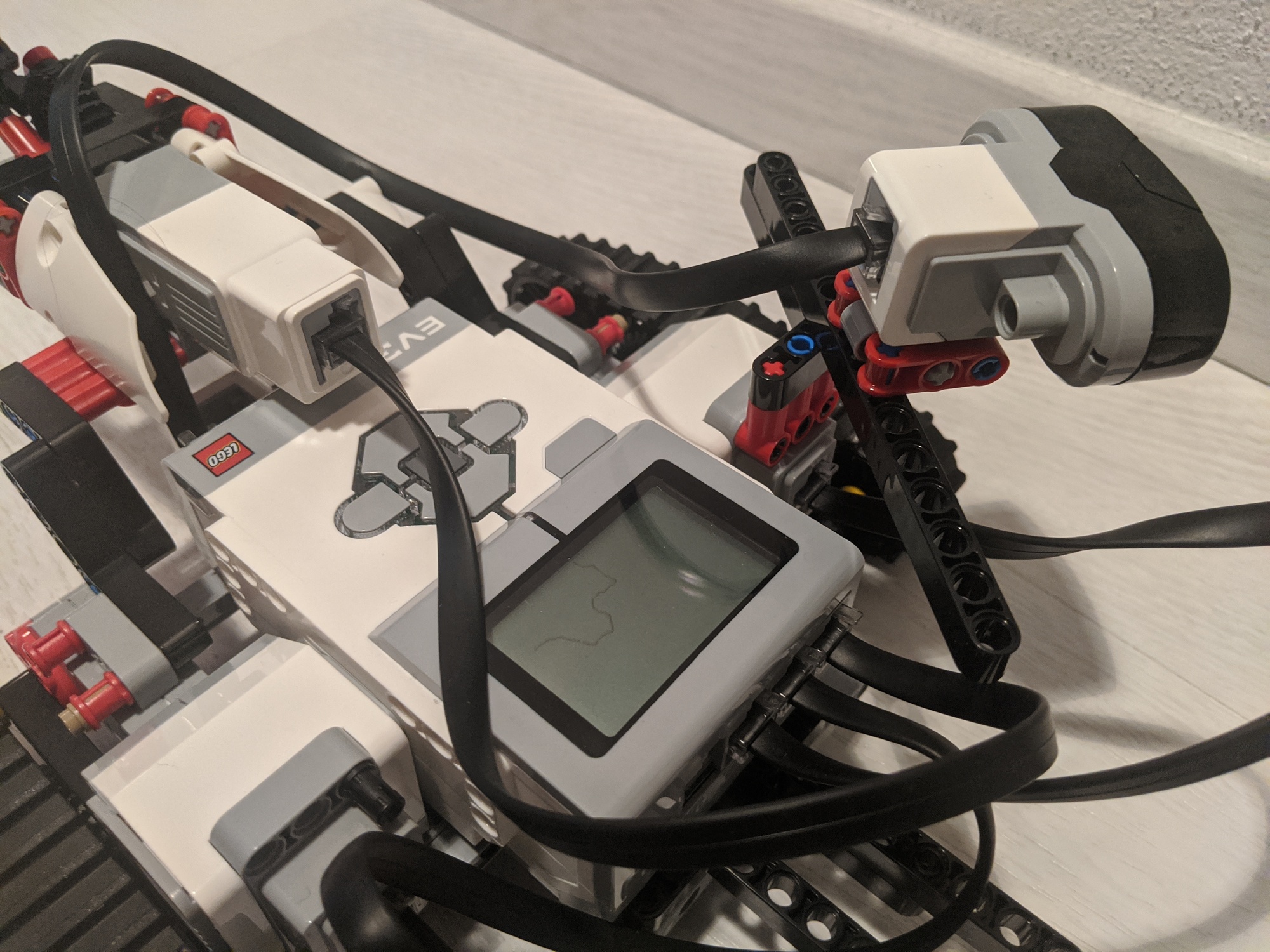
This weekend I had some pretty good uncle time. My eleven year old nephew (after beating me in a fair match of tennis) wanted to play with his Lego Mindstorms set. He never even touches it unless I am around to help him, but then he quiet enjoys. As expected, when I ask him what we should try to build, he tends to come up with completely unrealistic or impossible ideas, and we have to somehow reduce the scope to something doable. This time round, inspired by their autonomous vacuum cleaner, he wanted to build something like that. That was convenient, because now I could sell him what I wanted to try to do, namely make the robot follow a wall at more or less constant distance, as a useful first step. We mounted the infra red distance sensor at an 45 angle to the front-left, and then I built a very simple control loop measure the distance, subtract 40, apply a factor, and feed that into the steering input of the drive action, and repeat. I must admit that I was pretty proud to see just how well that very simple circuit worked: The little robot turned sharp corners in both directions, and otherwise drove nicely parallel and with constant distance to the wall. I was satisfied with that achievement and would have happily ended it here before we might be disappointed by more ambitious and then failing goals. But my nephew had not forgotten about the vacuum cleaner, and casually asked if I could make the robot draw an outline of its path, and thus of the room, on the display. Ok, where do I begin to explain just how unfeasible that is yes, it seemed one can draw to the display. But how should the robot know where it is? How far it turns? How far it went? This is programming by connecting boxes, and I would not expect such an interface to allow for complex logic (right?). And I would need trigonometry and stuff. But he didn t quite believe it, and thus got me thinking indeed, the arithmetic block can evaluate more complex formulas, involving sin and cos so maybe if I can somehow keep track of where the robot is heading well, let s give it a try. So by dragging boxes and connecting wires, I implemented a simple logic (three variables, x and y for current position, alpha for current heading; in each loop add the steering input onto alpha, and add (sin(alpha),cos(alpha)) onto the current position; throw in some linear factors to calibrate; draw pixel at (x, y)). And, to my nephew s joy and my astonishment, the robot was drawing a curvy line that clearly correlates with the taken path! It wasn t respecting the angles perfectly, a square might not properly close, but half an hour earlier I would have actively bet against that we would pull this off!
After a few turns

After a few turns

I was, I must admit, a bit proud. But not only about the technical nerding, but also about my uncleing: That night, according to his parents, my nephew said that he can t remember ever being so happy!

6 June 2020

Thorsten Alteholz: My Debian Activities in May 2020

FTP master This month I accepted 211 packages and rejected only 9. The overall number of packages that got accepted was 228. Debian LTS This was my seventy-first month that I did some work for the Debian LTS initiative, started by Raphael Hertzog at Freexian. This month my all in all workload has been 17.25h. During that time I did LTS uploads of: I started to work on php5 as well but did not upload a fixed version yet. Last but not least I did some days of frontdesk duties. Debian ELTS This month was the twenty third ELTS month. During my small allocated time I uploaded: I also did some days of frontdesk duties. Other stuff I improved packaging of I sponsored uploads of On my Go challenge I uploaded:
golang-github-apparentlymart-go-versions, golang-github-hashicorp-go-slug, golang-github-mozillazg-go-httpheader, golang-github-hashicorp-terraform-json, golang-github-hashicorp-terraform-plugin-test, golang-github-sean pager, golang-github-sean seed, golang-github-timberio-go-datemath,

5 June 2020

Sean Whitton: spacecadetrebindings

I ve been less good at taking adequate typing breaks during the lockdown and I ve become concerned about how much chording my left hand does on its own during typical Emacs usage, with caps lock rebound to control, as I ve had it for years. I thought that now was as good a time as any to do something drastic about this. Here are my rebindings: Optional extras: This has the following advantages: The main disadvantage, aside from an adjustment period when I feel that someone has inserted a massive marshmellow between me and my computer, is that Ctrl-Alt combinations are a bit difficult; in Emacs, C-M-SPC is hard to do without. However I think I ve found a decent way to do it (thumb on control, curled ring finger on alt, possibly little finger on shift for Emacs infamous C-M-S-v standard binding).

4 June 2020

Antoine Beaupr : Replacing Smokeping with Prometheus

I've been struggling with replacing parts of my old sysadmin monitoring toolkit (previously built with Nagios, Munin and Smokeping) with more modern tools (specifically Prometheus, its "exporters" and Grafana) for a while now. Replacing Munin with Prometheus and Grafana is fairly straightforward: the network architecture ("server pulls metrics from all nodes") is similar and there are lots of exporters. They are a little harder to write than Munin modules, but that makes them more flexible and efficient, which was a huge problem in Munin. I wrote a Migrating from Munin guide that summarizes those differences. Replacing Nagios is much harder, and I still haven't quite figured out if it's worth it.

How does Smokeping work Leaving those two aside for now, I'm left with Smokeping, which I used in my previous job to diagnose routing issues, using Smokeping as a decentralized looking glass, which was handy to debug long term issues. Smokeping is a strange animal: it's fundamentally similar to Munin, except it's harder to write plugins for it, so most people just use it for Ping, something for which it excels at. Its trick is this: instead of doing a single ping and returning this metrics, it does multiple ones and returns multiple metrics. Specifically, smokeping will send multiple ICMP packets (20 by default), with a low interval (500ms by default) and a single retry. It also pings multiple hosts at once which means it can quickly scan multiple hosts simultaneously. You therefore see network conditions affecting one host reflected in further hosts down (or up) the chain. The multiple metrics also mean you can draw graphs with "error bars" which Smokeping shows as "smoke" (hence the name). You also get per-metric packet loss. Basically, smokeping runs this command and collects the output in a RRD database:
fping -c $count -q -b $backoff -r $retry -4 -b $packetsize -t $timeout -i $mininterval -p $hostinterval $host [ $host ...]
... where those parameters are, by default:
  • $count is 20 (packets)
  • $backoff is 1 (avoid exponential backoff)
  • $timeout is 1.5s
  • $mininterval is 0.01s (minimum wait interval between any target)
  • $hostinterval is 1.5s (minimum wait between probes on a single target)
It can also override stuff like the source address and TOS fields. This probe will complete between 30 and 60 seconds, if my math is right (0% and 100% packet loss).

How do draw Smokeping graphs in Grafana A naive implementation of Smokeping in Prometheus/Grafana would be to use the blackbox exporter and create a dashboard displaying those metrics. I've done this at home, and then I realized that I was missing something. Here's what I did.
  1. install the blackbox exporter:
    apt install prometheus-blackbox-exporter
    
  2. make sure to allow capabilities so it can ping:
    dpkg-reconfigure prometheus-blackbox-exporter
    
  3. hook monitoring targets into prometheus.yml (the default blackbox exporter configuration is fine):
    scrape_configs:
      - job_name: blackbox
          metrics_path: /probe
          params:
            module: [icmp]
          scrape_interval: 5s
          static_configs:
            - targets:
              - octavia.anarc.at
              # hardcoded in DNS
              - nexthop.anarc.at
              - koumbit.net
              - dns.google
          relabel_configs:
            - source_labels: [__address__]
              target_label: __param_target
            - source_labels: [__param_target]
              target_label: instance
            - target_label: __address__
              replacement: 127.0.0.1:9115  # The blackbox exporter's real hostname:port.
    
    Notice how we lower the scrape_interval to 5 seconds to get more samples. nexthop.anarc.at was added into DNS to avoid hardcoding my upstream ISP's IP in my configuration.
  4. use this Grafana panel to graph the results. It was created with this query:
    sum(probe_icmp_duration_seconds phase="rtt" ) by (instance)
    
    • Set the Legend field to instance RTT
    • Set Draw modes to lines and Mode options to staircase
    • Set the Left Y axis Unit to duration(s)
    • Show the Legend As table, with Min, Avg, Max and Current enabled
    Then this query, for packet loss:
    1-avg_over_time(probe_success[$__interval])!=0 or null
    
    • Set the Legend field to instance packet loss
    • Set a Add series override to Lines: false, Null point mode: null, Points: true, Points Radius: 1, Color: deep red, and, most importantly, Y-axis: 2
    • Set the Right Y axis Unit to percent (0.0-1.0) and set Y-max to 1
    Then set the entire thing to Repeat, on target, vertically. And you need to add a target variable like label_values(probe_success, instance).
The result looks something like this:
A plot of RTT and packet loss over time of three nodes Not bad, but not Smokeping
This actually looks pretty good! The resulting dashboard is available in the Grafana dashboard repository.

What is missing? Now, that doesn't exactly look like Smokeping, does it. It's pretty good, but it's not quite what we want. What is missing is variance, the "smoke" in Smokeping. There's a good article about replacing Smokeping with Grafana. They wrote a custom script to write samples into InfluxDB so unfortunately we can't use it in this case, since we don't have InfluxDB's query language. I couldn't quite figure out how to do the same in PromQL. I tried:
stddev(probe_icmp_duration_seconds phase="rtt",instance=~"$instance" )
stddev_over_time(probe_icmp_duration_seconds phase="rtt",instance=~"$instance" [$__interval])
stddev_over_time(probe_icmp_duration_seconds phase="rtt",instance=~"$instance" [1m])
The first two give zero for all samples. The latter works, but doesn't look as good as Smokeping. So there might be something I'm missing. SuperQ wrote a special exporter for this called smokeping_prober that came out of this discussion in the blackbox exporter. Instead of delegating scheduling and target definition to Prometheus, the targets are set in the exporter. They also take a different approach than Smokeping: instead of recording the individual variations, they delegate that to Prometheus, through the use of "buckets". Then they use a query like this:
histogram_quantile(0.9 rate(smokeping_response_duration_seconds_bucket[$__interval]))
This is the rationale to SuperQ's implementation:
Yes, I know about smokeping's bursts of pings. IMO, smokeping's data model is flawed that way. This is where I intentionally deviated from the smokeping exact way of doing things. This prober sends a smooth, regular series of packets in order to be measuring at regular controlled intervals. Instead of 20 packets, over 10 seconds, every minute. You send one packet per second and scrape every 15. This has the same overall effect, but the measurement is, IMO, more accurate, as it's a continuous stream. There's no 50 second gap of no metrics about the ICMP stream. Also, you don't get back one metric for those 20 packets, you get several. Min, Max, Avg, StdDev. With the histogram data, you can calculate much more than just that using the raw data. For example, IMO, avg and max are not all that useful for continuous stream monitoring. What I really want to know is the 90th percentile or 99th percentile. This smokeping prober is not intended to be a one-to-one replacement for exactly smokeping's real implementation. But simply provide similar functionality, using the power of Prometheus and PromQL to make it better. [...] one of the reason I prefer the histogram datatype, is you can use the heatmap panel type in Grafana, which is superior to the individual min/max/avg/stddev metrics that come from smokeping. Say you had two routes, one slow and one fast. And some pings are sent over one and not the other. Rather than see a wide min/max equaling a wide stddev, the heatmap would show a "line" for both routes.
That's an interesting point. I have also ended up adding a heatmap graph to my dashboard, independently. And it is true it shows those "lines" much better... So maybe that, if we ignore legacy, we're actually happy with what we get, even with the plain blackbox exporter. So yes, we're missing pretty "fuzz" lines around the main lines, but maybe that's alright. It would be possible to do the equivalent to the InfluxDB hack, with queries like:
min_over_time(probe_icmp_duration_seconds phase="rtt",instance=~"$instance" [30s])
avg_over_time(probe_icmp_duration_seconds phase="rtt",instance=~"$instance" [5m])
max_over_time(probe_icmp_duration_seconds phase="rtt",instance=~"$instance" [30s])
The output looks something like this:
A plot of RTT and packet loss over time of three nodes, with minimax Looks more like Smokeping!
But there's a problem there: see how the middle graph "dips" sometimes below 20ms? That's the min_over_time function (incorrectly, IMHO) returning zero. I haven't quite figured out how to fix that, and I'm not sure it is better. But it does look more like Smokeping than the previous graph. Update: I forgot to mention one big thing that this setup is missing. Smokeping has this nice feature that you can order and group probe targets in a "folder"-like hierarchy. It is often used to group probes by location, which makes it easier to scan a lot of targets. This is harder to do in this setup. It might be possible to setup location-specific "jobs" and select based on that, but it's not exactly the same.

Credits Credits to Chris Siebenmann for his article about Prometheus and pings which gave me the avg_over_time query idea.

Reproducible Builds: Reproducible Builds in May 2020

Welcome to the May 2020 report from the Reproducible Builds project. One of the original promises of open source software is that distributed peer review and transparency of process results in enhanced end-user security. Nonetheless, whilst anyone may inspect the source code of free and open source software for malicious flaws, almost all software today is distributed as pre-compiled binaries. This allows nefarious third-parties to compromise systems by injecting malicious code into seemingly secure software during the various compilation and distribution processes. In these reports we outline the most important things that we and the rest of the community have been up to over the past month.

News The Corona-Warn app that helps trace infection chains of SARS-CoV-2/COVID-19 in Germany had a feature request filed against it that it build reproducibly. A number of academics from Cornell University have published a paper titled Backstabber s Knife Collection which reviews various open source software supply chain attacks:
Recent years saw a number of supply chain attacks that leverage the increasing use of open source during software development, which is facilitated by dependency managers that automatically resolve, download and install hundreds of open source packages throughout the software life cycle.
In related news, the LineageOS Android distribution announced that a hacker had access to the infrastructure of their servers after exploiting an unpatched vulnerability. Marcin Jachymiak of the Sia decentralised cloud storage platform posted on their blog that their siac and siad utilities can now be built reproducibly:
This means that anyone can recreate the same binaries produced from our official release process. Now anyone can verify that the release binaries were created using the source code we say they were created from. No single person or computer needs to be trusted when producing the binaries now, which greatly reduces the attack surface for Sia users.
Synchronicity is a distributed build system for Rust build artifacts which have been published to crates.io. The goal of Synchronicity is to provide a distributed binary transparency system which is independent of any central operator. The Comparison of Linux distributions article on Wikipedia now features a Reproducible Builds column indicating whether distributions approach and progress towards achieving reproducible builds.

Distribution work In Debian this month: In Alpine Linux, an issue was filed and closed regarding the reproducibility of .apk packages. Allan McRae of the ArchLinux project posted their third Reproducible builds progress report to the arch-dev-public mailing list which includes the following call for help:
We also need help to investigate and fix the packages that fail to reproduce that we have not investigated as of yet.
In openSUSE, Bernhard M. Wiedemann published his monthly Reproducible Builds status update.

Software development

diffoscope Chris Lamb made the changes listed below to diffoscope, our in-depth and content-aware diff utility that can locate and diagnose reproducibility issues. He also prepared and uploaded versions 142, 143, 144, 145 and 146 to Debian, PyPI, etc.
  • Comparison improvements:
    • Improve fuzzy matching of JSON files as file now supports recognising JSON data. (#106)
    • Refactor .changes and .buildinfo handling to show all details (including the GnuPG header and footer components) even when referenced files are not present. (#122)
    • Use our BuildinfoFile comparator (etc.) regardless of whether the associated files (such as the orig.tar.gz and the .deb) are present. [ ]
    • Include GnuPG signature data when comparing .buildinfo, .changes, etc. [ ]
    • Add support for printing Android APK signatures via apksigner(1). (#121)
    • Identify iOS App Zip archive data as .zip files. (#116)
    • Add support for Apple Xcode .mobilepovision files. (#113)
  • Bug fixes:
    • Don t print a traceback if we pass a single, missing argument to diffoscope (eg. a JSON diff to re-load). [ ]
    • Correct differences typo in the ApkFile handler. (#127)
  • Output improvements:
    • Never emit the same id="foo" anchor reference twice in the HTML output, otherwise identically-named parts will not be able to linked to via a #foo anchor. (#120)
    • Never emit an empty id anchor either; it is not possible to link to #. [ ]
    • Don t pretty-print the output when using the --json presenter; it will usually be too complicated to be readable by the human anyway. [ ]
    • Use the SHA256 over MD5 hash when generating page names for the HTML directory-style presenter. (#124)
  • Reporting improvements:
    • Clarify the message when we truncate the number of lines to standard error [ ] and reduce the number of maximum lines printed to 25 as usually the error is obvious by then [ ].
    • Print the amount of free space that we have available in our temporary directory as a debugging message. [ ]
    • Clarify Command [ ] failed with exit code messages to remove duplicate exited with exit but also to note that diffoscope is interpreting this as an error. [ ]
    • Don t leak the full path of the temporary directory in Command [ ] exited with 1 messages. (#126)
    • Clarify the warning message when we cannot import the debian Python module. [ ]
    • Don t repeat stderr from if both commands emit the same output. [ ]
    • Clarify that an external command emits for both files, otherwise it can look like we are repeating itself when, in reality, it is being run twice. [ ]
  • Testsuite improvements:
    • Prevent apksigner test failures due to lack of binfmt_misc, eg. on Salsa CI and elsewhere. [ ]
    • Drop .travis.yml as we use Salsa instead. [ ]
  • Dockerfile improvements:
    • Add a .dockerignore file to whitelist files we actually need in our container. (#105)
    • Use ARG instead of ENV when setting up the DEBIAN_FRONTEND environment variable at runtime. (#103)
    • Run as a non-root user in container. (#102)
    • Install/remove the build-essential during build so we can install the recommended packages from Git. [ ]
  • Codebase improvements:
    • Bump the officially required version of Python from 3.5 to 3.6. (#117)
    • Drop the (default) shell=False keyword argument to subprocess.Popen so that the potentially-unsafe shell=True is more obvious. [ ]
    • Perform string normalisation in Black [ ] and include the Black output in the assertion failure too [ ].
    • Inline MissingFile s special handling of deb822 to prevent leaking through abstract layers. [ ][ ]
    • Allow a bare try/except block when cleaning up temporary files with respect to the flake8 quality assurance tool. [ ]
    • Rename in_dsc_path to dsc_in_same_dir to clarify the use of this variable. [ ]
    • Abstract out the duplicated parts of the debian_fallback class [ ] and add descriptions for the file types. [ ]
    • Various commenting and internal documentation improvements. [ ][ ]
    • Rename the Openssl command class to OpenSSLPKCS7 to accommodate other command names with this prefix. [ ]
  • Misc:
    • Rename the --debugger command-line argument to --pdb. [ ]
    • Normalise filesystem stat(2) birth times (ie. st_birthtime) in the same way we do with the stat(1) command s Access: and Change: times to fix a nondeterministic build failure in GNU Guix. (#74)
    • Ignore case when ordering our file format descriptions. [ ]
    • Drop, add and tidy various module imports. [ ][ ][ ][ ]
In addition:
  • Jean-Romain Garnier fixed a general issue where, for example, LibarchiveMember s has_same_content method was called regardless of the underlying type of file. [ ]
  • Daniel Fullmer fixed an issue where some filesystems could only be mounted read-only. (!49)
  • Emanuel Bronshtein provided a patch to prevent a build of the Docker image containing parts of the build s. (#123)
  • Mattia Rizzolo added an entry to debian/py3dist-overrides to ensure the rpm-python module is used in package dependencies (#89) and moved to using the new execute_after_* and execute_before_* Debhelper rules [ ].

Chris Lamb also performed a huge overhaul of diffoscope s website:
  • Add a completely new design. [ ][ ]
  • Dynamically generate our contributor list [ ] and supported file formats [ ] from the main Git repository.
  • Add a separate, canonical page for every new release. [ ][ ][ ]
  • Generate a latest release section and display that with the corresponding date on the homepage. [ ]
  • Add an RSS feed of our releases [ ][ ][ ][ ][ ] and add to Planet Debian [ ].
  • Use Jekyll s absolute_url and relative_url where possible [ ][ ] and move a number of configuration variables to _config.yml [ ][ ].

Upstream patches The Reproducible Builds project detects, dissects and attempts to fix as many currently-unreproducible packages as possible. We endeavour to send all of our patches upstream where appropriate. This month, we wrote a large number of such patches, including:

Other tools Elsewhere in our tooling: strip-nondeterminism is our tool to remove specific non-deterministic results from a completed build. In May, Chris Lamb uploaded version 1.8.1-1 to Debian unstable and Bernhard M. Wiedemann fixed an off-by-one error when parsing PNG image modification times. (#16) In disorderfs, our FUSE-based filesystem that deliberately introduces non-determinism into directory system calls in order to flush out reproducibility issues, Chris Lamb replaced the term dirents in place of directory entries in human-readable output/log messages [ ] and used the astyle source code formatter with the default settings to the main disorderfs.cpp source file [ ]. Holger Levsen bumped the debhelper-compat level to 13 in disorderfs [ ] and reprotest [ ], and for the GNU Guix distribution Vagrant Cascadian updated the versions of disorderfs to version 0.5.10 [ ] and diffoscope to version 145 [ ].

Project documentation & website
  • Carl Dong:
  • Chris Lamb:
    • Rename the Who page to Projects . [ ]
    • Ensure that Jekyll enters the _docs subdirectory to find the _docs/index.md file after an internal move. (#27)
    • Wrap ltmain.sh etc. in preformatted quotes. [ ]
    • Wrap the SOURCE_DATE_EPOCH Python examples onto more lines to prevent visual overflow on the page. [ ]
    • Correct a preferred spelling error. [ ]
  • Holger Levsen:
    • Sort our Academic publications page by publication year [ ] and add Trusting Trust and Fully Countering Trusting Trust through Diverse Double-Compiling [ ].
  • Juri Dispan:

Testing framework We operate a large and many-featured Jenkins-based testing framework that powers tests.reproducible-builds.org that, amongst many other tasks, tracks the status of our reproducibility efforts as well as identifies any regressions that have been introduced. Holger Levsen made the following changes:
  • System health status:
    • Improve page description. [ ]
    • Add more weight to proxy failures. [ ]
    • More verbose debug/failure messages. [ ][ ][ ]
    • Work around strangeness in the Bash shell let VARIABLE=0 exits with an error. [ ]
  • Debian:
    • Fail loudly if there are more than three .buildinfo files with the same name. [ ]
    • Fix a typo which prevented /usr merge variation on Debian unstable. [ ]
    • Temporarily ignore PHP s horde](https://www.horde.org/) packages in Debian bullseye. [ ]
    • Document how to reboot all nodes in parallel, working around molly-guard. [ ]
  • Further work on a Debian package rebuilder:
    • Workaround and document various issues in the debrebuild script. [ ][ ][ ][ ]
    • Improve output in the case of errors. [ ][ ][ ][ ]
    • Improve documentation and future goals [ ][ ][ ][ ], in particular documentiing two real world tests case for an impossible to recreate build environment [ ].
    • Find the right source package to rebuild. [ ]
    • Increase the frequency we run the script. [ ][ ][ ][ ]
    • Improve downloading and selection of the sources to build. [ ][ ][ ]
    • Improve version string handling.. [ ]
    • Handle build failures better. [ ]. [ ]. [ ]
    • Also consider architecture all .buildinfo files. [ ][ ]
In addition:
  • kpcyrd, for Alpine Linux, updated the alpine_schroot.sh script now that a patch for abuild had been released upstream. [ ]
  • Alexander Couzens of the OpenWrt project renamed the brcm47xx target to bcm47xx. [ ]
  • Mattia Rizzolo fixed the printing of the build environment during the second build [ ][ ][ ] and made a number of improvements to the script that deploys Jenkins across our infrastructure [ ][ ][ ].
Lastly, Vagrant Cascadian clarified in the documentation that you need to be user jenkins to run the blacklist command [ ] and the usual build node maintenance was performed was performed by Holger Levsen [ ][ ][ ], Mattia Rizzolo [ ][ ] and Vagrant Cascadian [ ][ ][ ].

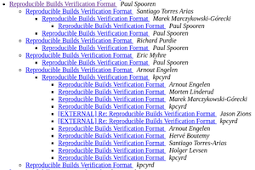
Mailing list: There were a number of discussions on our mailing list this month: Paul Spooren started a thread titled Reproducible Builds Verification Format which reopens the discussion around a schema for sharing the results from distributed rebuilders:
To make the results accessible, storable and create tools around them, they should all follow the same schema, a reproducible builds verification format. The format tries to be as generic as possible to cover all open source projects offering precompiled source code. It stores the rebuilder results of what is reproducible and what not.
Hans-Christoph Steiner of the Guardian Project also continued his previous discussion regarding making our website translatable. Lastly, Leo Wandersleb posted a detailed request for feedback on a question of supply chain security and other issues of software review; Leo is the founder of the Wallet Scrutiny project which aims to prove the security of Android Bitcoin Wallets:
Do you own your Bitcoins or do you trust that your app allows you to use your coins while they are actually controlled by them ? Do you have a backup? Do they have a copy they didn t tell you about? Did anybody check the wallet for deliberate backdoors or vulnerabilities? Could anybody check the wallet for those?
Elsewhere, Leo had posted instructions on his attempts to reproduce the binaries for the BlueWallet Bitcoin wallet for iOS and Android platforms.


If you are interested in contributing to the Reproducible Builds project, please visit our Contribute page on our website. However, you can get in touch with us via:

This month s report was written by Bernhard M. Wiedemann, Chris Lamb, Holger Levsen, Jelle van der Waa and Vagrant Cascadian. It was subsequently reviewed by a bunch of Reproducible Builds folks on IRC and the mailing list.

Gunnar Wolf: Tor from Telmex. When I say achievement unlocked , I mean it!

### The blockade has ended! For some introduction.. Back in 2016, Telmex Mexico's foremost communications provider and, through the brands grouped under the *Am rica M vil* brand, one of Latin America's most important ISPs set up rules to block connecitons to (at least) seven of Tor's *directory authorities* (*DirAuths*). We believe they might have blocked all of them, in an attempt to block connections from Tor from anywhere in their networks, but Tor is much more resourceful than that so, the measure was not too effective. Only... _Some_ blocking did hurt Telmex's users: The ability to play an active role in Tor. The ability to host Tor relays at home. Why? Because the *consensus protocol* requires relays to be reachable in order to be measured from the network's *DirAuths*. ### Technical work to prove the blocking We dug into the issue as part of the work we carried out in the project I was happy to lead between 2018 and 2019, *UNAM/DGAPA/PAPIME PE102718*. In March 2019, I presented a paper titled [Distributed Detection of Tor Directory Authorities Censorship in Mexico](https://www.thinkmind.org/index.php?view=article&articleid=icn_2019_6_20_38010) ([alternative download](http://ru.iiec.unam.mx/4538/) in the [Topic on Internet Censorship and Surveillance (TICS) track](https://tics.site/) of the XVIII International Conference on Networks. Then... We had many talks inside our group, but nothing seemed to move for several months. We did successfully push for increasing the number of Tor relays in Mexico (we managed to go from two to eleven stable relays not much in absolute terms, but quite good relatively, even more considering most users were not technically able to run one!) Jacobo N jera, journalist participant of our project, didn't leave things there just lying around waiting magically for justice to happen. Together with Vasilis Ververis, from the [Magma Project](https://magma.lavafeld.org/), they presented some weeks ago a [Case study: Tor Directory Authorities Censorship in Mexico](https://magma.lavafeld.org/guide/data-analysis.html#case-study-tor-directory-authorities-censorship-in-mexico). ### Pushing to action But a good part of being a journalist is knowing _how_ and _when_ to spread the word. Having already two technical studies showing the blocking in place, Jacobo presented his findings with [an article in GlobalVoices: *The largest telecommunications operator in Mexico blocks the secure network*](https://es.globalvoices.org/2020/05/28/en-mexico-el-mas-grande-operador-de-telecomunicaciones-bloquea-la-internet-segura/). Surprisingly (to me, at least), this story was picked up by a major Mexican newspaper: The same evening the story hit GlobalVoices, [Rodrigo Riquelme](https://www.eleconomista.com.mx/autor/rriquelme) posted an article, in the Technology section of *El Economista*, titled [Telmex blocks seven out of ten accesses to the Tor network in Mexico](https://www.eleconomista.com.mx/tecnologia/Telmex-bloquea-siete-de-10-accesos-a-la-red-Tor-en-Mexico-20200528-0078.html). And that very same day, Telmex sent a reply I am translating in full (that is now included at the end of Riquelme's article): > Mexico City, May 28, 2020 > > In relation to Tor navigation from TELMEX's network, the company > informs: > > In TELMEX, we are committed to the full respect to navigation > freedom for all of our users. > > TELMEX practices no application-level blocking policies; the Tor > application, as well as the rest of Internet applications, can be > freely accessed from our network. > > In order to protect the Internauts' information, the seven refered > nodes were in their time reported because they were associated with > the distribution of the WannaCry ransomware, which is the reason > they were filtered, but this does not hamper the use of the Tor > application. ### So we got an answer...? Jacobo knew we had to take advantage of this answer, and act fast! He entered rush-writing mode and, with the help of our good friend and lawyer Salvador Alc ntar, we wrote [a short letter to Renato Flores Cartas, Corporative Communication of Am rica M vil](https://internetanonima.net/respuesta-a-telmex-sobre-la-red-tor-en-mexico/), and sent it on June 1st. Next thing I know, this evening Jacobo was asking me if I could confirm the blocking was lifted. What I could not believe it! But, yes Today Jacobo published the confirmation that [the seven blocked IP routes were finally reachable again from ASN 8151 (UNINET / Telmex / Am rica M vil)!](https://internetanonima.net/confirmamos-desbloqueo-de-las-7-direcciones-de-la-red-tor-por-telmex/) Of course, this story was picked up again by El Economista [Telmex unblocks IP addresses for the Tor network's directory authority server IPs in Mexico](https://www.eleconomista.com.mx/tecnologia/Telmex-desbloquea-direcciones-IP-de-servidores-de-autoridad-de-la-red-Tor-en-Mexico-20200604-0094.html). ### Wrapping up How can I put this in words? I am very, very, very, *very, very, very*, **very, very, very** happy we managed to see this through! Although we have been pushing for increasing the usage of Tor among users at risk in Mexico Being a journalist, defending human rights, are still a high-risk profession in my country. We strongly believe in this, and will continue trying to raise awareness of the usage. But, just as with free software, *using* network anonymization tools is not all. We need more people to become active, to become engaged, to *become active participants* in anonymization. As the adage says, *anonymity loves company* In order to build strong, sufficient anonymization capability for everybody that needs it, we need more people to *provide relay services*. And this is a *huge* step to improve Mexico's participation in the Tor network! --- Image credits: [*Seeing My World Through a Keyhole*, by Kate Ter Haar](https://www.flickr.com/photos/katerha/4592429363) (CC-BY); [Tor logo (Wikimedia Commons)](https://commons.wikimedia.org/wiki/File:Tor-logo-2011-flat.svg)

3 June 2020

Jonathan Dowland: using Template Haskell to generate boilerplate

Here's a practical example of applying Template Haskell to reduce the amount of boilerplate code that is otherwise required. I wrote the below after following this excellent blog post by Matt Parsons. This post will be much higher-level, read Matt's blog for the gorier details. Liquorice Liquorice is a toy project of mine from a few years ago that lets you draw 2D geometric structures similar to LOGO. Liquorice offers two interfaces: pure functions that operate on an explicit Context (the pen location: existing lines, etc.), and a second "stateful" interface where the input and output are handled in the background. I prefix the pure ones P. and the stateful ones S. in this blog post for clarity. The stateful interface can be much nicer to use for larger drawings. Compare example8b.hs, written in terms of the pure functions, and the stateful equivalent example8.hs. The majority of the stateful functions are "wrapped" versions of the pure functions. For example, the pure function P.step takes two numbers and moves the pen forward and sideways. Its type signature is

P.step :: Int -> Int -> Context -> Context
Here's the signature and implementation of the stateful equivalent:
S.step :: Int -> Int -> State Context ()
S.step x y = modify (P.step x y)
Writing these wrapped functions for the 29 pure functions is boilerplate that can be generated automatically with Template Haskell. Generating the wrapper functions Given the Name of a function to wrap, we construct an instance of FunD, the TH data-type representing a function definition. We use the base name of the incoming function as the name for the new one.
mkWrap fn = do
     
    let name = mkName (nameBase fn)
    return $ FunD name [ Clause (map VarP args) (NormalB rhs) [] ]
To determine how many arguments the wrapper function needs to accept, we need to determine the input function's arity. We use Template Haskell's reify function to get type information about the function, and derive the arity from that. Matt Parson's covers this exactly in his blog.
info    <- reify fn
let ty   = (\(VarI _ t _ ) -> t) info
let n    = arity ty - 1
args    <- replicateM n (newName "arg")
We can use the list "args" directly in the clause part of the function definition, as the data-type expects a list. For the right-hand side, we need to convert from a list of arguments to function application. That's a simple left-fold:
-- mkFnApp f [a,b,c] => ((f a) b) c => f a b c
mkFnApp = foldl (\e -> appE e . varE)
rhs     <- [  modify $(mkFnApp (varE fn) args) :: State Context ()  ]
We use TH's oxford brackets for the definition of rhs. This permits us to write real Haskell inside the brackets, and get an expression data-type outside them. Within we have a splice (the $( )), which does the opposite: the code is evaluated at compile time and generates an Exp that is then converted into the equivalent Haskell code and spliced into place. Finally, we need to apply the above to a list of Names. Sadly, we can't get at the list of exported names from a Module automatically. There is an open request for a TH extension for this. In the meantime, we export a list of the functions to wrap from the Pure module and operate on that
import Liquorice.Pure
wrapPureFunctions = mapM mkWrap pureFns
Finally, we 'call' wrapPureFunctions at the top level in our state module and Template Haskell splices all the function definitions into place. The final code ended up only around 30 lines of code, and saved about the same number of lines of boilerplate. But in doing this I noticed some missing functions, and it will pay dividends if more pure functions are added. Limitations The current implementation has one significant limitation: it cannot handle higher-order functions. An example of a pure higher-order function is place, which moves the pen, performs an operation, and then moves it back:
P.place :: Int -> Int -> (Context -> Context) -> Context -> Context
Wrapping this is not sufficient because the higher-order parameter has the pure function signature Context -> Context. If we wrapped it, the stateful version of the function would accept a pure function as the parameter, but you would expect it to accept another stateful function. To handle these, at a minimum we would need to detect the function arguments that have type Context -> Context and replace them with State Context (). The right-hand side of the wrapped function would also need to do more work to handle wrapping and unwrapping the parameter. I haven't spent much time thinking about it but I'm not sure that a general purpose wrapper would work for all higher-order functions. For the time being I've just re-implemented the half-dozen of them.

Ben Hutchings: Introducing debplate, a template system for Debian packages

For about two months I've been working on a new project, debplate, which currently lives at benh/debplate on Salsa. This is a template system for Debian packages, primarily intended to ease building multiple similar binary packages from a single source. With some changes, it could also be useful for making multiple source packages consistent (issue #9). I want debplate to be capable of replacing the kernel team's existing template system and a lot of its custom scripting, but it is also meant to a general tool. I believe it's already capable of supporting source packages with relatively simple needs, and there are some examples of these in the debplate source. My long-term goal is that debplate will replace most team-specific and package-specific template systems, making those source packages using it less unusual and easier to contribute to. I gave a short talk about debplate at MiniDebConf Online on Sunday.

2 June 2020

Lisandro Dami n Nicanor P rez Meyer: Simplified Monitoring of Patients in Situations of Mass Hospitalization (MoSimPa) - Fighting COVID-19

I have been quite absent from Debian stuff lately, but this increased since COVID-19 hits us. In this blog post I'll try to sketch what I have been doing to help fight COVID-19 this last few months.

In the beginningWhen the pandemic reached Argentina the government started a quarantine. We engineers (like engineers around the world) started to think on how to put our abilities in order to help with the situation. Some worked toward providing more protection elements to medical staff, some towards increasing the number of ventilation machines at disposal. Another group of people started thinking on another ways of helping. In Bah a Blanca arised the idea of monitoring some variables remotely and in masse.

Simplified Monitoring of Patients in Situations of Mass Hospitalization (MoSimPa)

This is where the idea of remotely monitored devices came in, and MoSimPa (from the spanish of "monitoreo simplificado de pacientes en situaci n de internaci n masiva") started to get form. The idea is simple: oximetry (SpO2), heart rate and body temperature will be recorded and, instead of being shown in a display in the device itself, they will be transmitted and monitored in one or more places. In this way medical staff doesn't has to reach a patient constantly and monitoring could be done by medical staff for more patients at the same time. In place monitoring can also happen using a cellphone or tablet.

The devices do not have a screen of their own and almost no buttons, making them more cheap to build and thus more in line with the current economic reality of Argentina.


This is where the project Para Ayudar was created. The project aims to produce the aforementioned non-invasive device to be used in health institutions, hospitals, intra hospital transports and homes.

It is worth to note that the system is designed as a complementary measure for continuous monitoring of a pacient. Care should be taken to check that symptomps and overall patient status don't mean an inmediate life threat. In other words, it is NOT designed for ICUs.

All the above done with Free/Libre/Open Source software and hardware designs. Any manufacturing company can then use them for mass production.

The importance of early pneumonia detection


We were already working in MoSimPa when an NYTimes article caught or attention: "The Infection That s Silently Killing Coronavirus Patients". From the article:

A vast majority of Covid pneumonia patients I met had remarkably low oxygen saturations at triage seemingly incompatible with life but they were using their cellphones as we put them on monitors. Although breathing fast, they had relatively minimal apparent distress, despite dangerously low oxygen levels and terrible pneumonia on chest X-rays.

This greatly reinforced the idea we were on the right track.

The project from a technical standpoint


As the project is primarily designed for and by Argentinians the current system design and software documentation is written in spanish, but the source code (or at least most of it) is written in english. Should anyone need it in english please do not hesitate in asking me.

General system description

System schema

The system is comprised of the devices, a main machine acting as a server (in our case for small setups a Raspberry Pi) and the possibility of accessing data trough cell phones, tablets or other PCs in the network.

The hardware


As of today this is the only part in which I still can't provide schematics, but I'll update this blog post and technical doc with them as soon as I get my hands into them.

Again the design is due to be built in Argentina where getting our hands on hardware is not easy. Moreover it needs to be as cheap as possible, specially now that the Argentinian currency, the peso, is every day more depreciated. So we decided on using an ESP32 as the main microprocessor and a set of Maxim sensors devices. Again, more info when I have them at hand.

The software


Here we have many more components to describe. Firstly the ESP32 code is done with the Arduino SDK. This part of the stack will receive many updates soon, as soon as the first hardware prototypes are out.

For the rest of the stack I decided to go ahead with whatever is available in Debian stable. Why? Well, Raspbian provides a Debian stable-based image and I'm a Debian Developer, so things should go just natural for me in that front. Of course each component has its own packaging. I'm one of Debian's Qt maintainers then using Qt will also be quite natural for me. Plots? Qwt, of course. And with that I have most of my necessities fulfilled. I choose PostgreSql as database server and Mosquitto as MQTT broker.

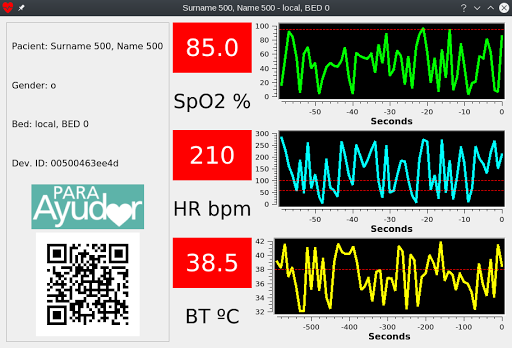
Between the database and MQTT is mosimpa-datakeeper. The piece of software from which medical staff monitor patients is unsurprisingly called mosimpa-monitor.

mosimpa-monitor
MoSimPa's monitor main screen

mosimpa-monitor plots
Plots of a patient's data


mosimpa-monitor-alarms-setup
Alarm thresholds setup


And for managing patients, devices, locations and internments (CRUD anyone?) there is currently a Qt-based application called mosimpa-abm.

mosimpa-abm
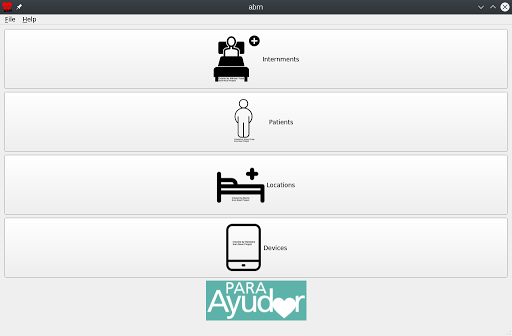
ABM main screen


mosimpa-abm-internments
ABM internments view

The idea is to replace it with a web service so it doesn't needs to be confined to the RPi or require installations in other machines. I considered using webassembly but I would have to also build PostgreSql in order to compile Qt's plugin.

Translations? Of course! As I have already mentioned the code is written in English. Qt allows to easily translate applications, so I keep a Spanish one as the code changes (and we are primarily targeting spanish-speaking people). But of course this also means it can be easily translated to whichever language is necessary.

Even if I am a packager I still have some stuff to fix from the packaging itself, like letting datakeeper run with its own user. I just haven't got to it yet.


Certifications


We are working towards getting the system certified by ANMAT, which is the Argentinian equivalent for EEUU's FDA.

Funding


While all the people involved are working ad-honorem funding is still required in order to buy materials, create the prototypes, etc. The project created payments links with Mercado Pago (in spanish and argentinian pesos) and other bank methods (PDF, also in spanish).

I repeat the links here with an aproximation to US$.

- 500 AR$ (less than 8 US$)
- 1000 AR$ (less than 15 US$)
- 2000 AR$ (less than 30 US$)
- 3000 AR$ (less than 45 US$)
- 5000 AR$ (less than 75 US$)

You can check the actual convertion rate in https://www.google.com/search?q=argentine+peso+to+us+dollars

The project was also presented at a funding call of argentinian Agencia de Promoci n de la Investigaci n, el Desarrollo Tecnol gico y la Innovaci n (Agencia I+D+i). 900+ projects where presented and 64 funded, MoSimPa between them.

1 June 2020

Jonathan Carter: Free Software Activities for 2020-05

I would say that this was a crazy month, but with everything ever escalating, does that even mean anything anymore? I lost track of tracking my activities in the second half of the month, and I m still not very good at logging the soft stuff , that is, things like non-technical work but that also takes up a lot of time, but will continue to work on it.
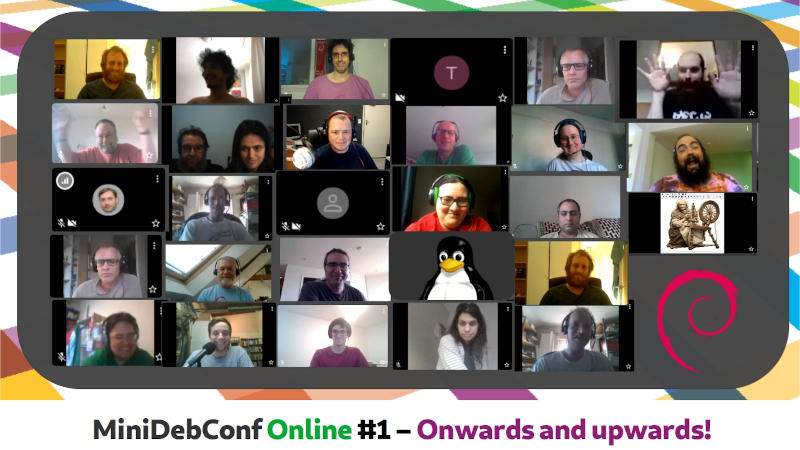
Towards the end of the month I spent a huge amount of time on MiniDebConf Online, I m glad it all worked out, and will write a seperate blog entry on that. Thank you again to everyone for making it a success! I m also moving DPL activities to the DPL blog, so even though it s been a busy month in the free software world my activity log here will look somewhat deceptively short this month MiniDebConf Online 2020-05-06: Help prepare initial CfP mail. 2020-05-06: Process some feedback regarding accessibility on Jitsi.

Debian Packaging 2020-05-02: Upload package gnome-shell-extension-workspaces-to-dock (53-1) to Debian unstable. 2020-05-02: Upload package tetzle (2.1.6-1) to Debian unstable. 2020-05-06: Upload package bundlewrap (3.9.0-1) to Debian unstable. 2020-05-06: Accept MR#1 for connectagram. 2020-05-06: Upload package connectagram (1.2.11-1) to Debian unstable. 2020-05-07: Upload package gnome-shell-extension-multi-monitors (20-1) to Debian unstable (Closes: #956169). 2020-05-07: Upload package tanglet (1.5.6-1) to Debian unstable. 2020-05-16: Upload package calamares (3.2.24-1) to Debian unstable. 2020-05-16: Accept MR#1 for tuxpaint-config. 2020-05-16: Accept MR#7 for debian-live. 2020-05-18: Upload package bundlewrap (3.10.0) to Debian unstable.

Debian Mentoring 2020-05-02: Sponsor package gamemode (1.5.1-3) (Games team request). 2020-05-16: Sponsor package gamemode (1.5.1-4) (Games team request).

Paul Wise: FLOSS Activities May 2020

Focus This month I didn't have any particular focus. I just worked on issues in my info bubble.

Changes

Issues

Review

Administration
  • nsntrace: talk to upstream about collaborative maintenance
  • Debian: deploy changes, debug issue with GPS markers file generation, migrate bls/DUCK from alioth-archive to salsa
  • Debian website: ran map cron job, synced mirrors
  • Debian wiki: approve accounts, ping folks with bouncing email

Communication

Sponsors The apt-offline work and the libfile-libmagic-perl backports were sponsored. All other work was done on a volunteer basis.

31 May 2020

Chris Lamb: Free software activities in May 2020

Here is my monthly update covering what I have been doing in the free software world during May 2020 (previous month): In Lintian, the static analysis tool for Debian packages:
Reproducible builds One of the original promises of open source software is that distributed peer review and transparency of process results in enhanced end-user security. However, whilst anyone may inspect the source code of free and open source software for malicious flaws, almost all software today is distributed as pre-compiled binaries. This allows nefarious third-parties to compromise systems by injecting malicious code into ostensibly secure software during the various compilation and distribution processes. The motivation behind the Reproducible Builds effort is to ensure no flaws have been introduced during this compilation process by promising identical results are always generated from a given source, thus allowing multiple third-parties to come to a consensus on whether a build was compromised. The initiative is proud to be a member project of the Software Freedom Conservancy, a not-for-profit 501(c)(3) charity focused on ethical technology and user freedom. Conservancy acts as a corporate umbrella allowing projects to operate as non-profit initiatives without managing their own corporate structure. If you like the work of the Conservancy or the Reproducible Builds project, please consider becoming an official supporter.
Elsewhere in our tooling, I made the following changes to diffoscope, our in-depth and content-aware diff utility that can locate and diagnose reproducibility issues, including preparing and uploading versions 142, 143, 144, 145 and 146 to Debian: I also performed a huge overhaul of diffoscope's website:
Lastly, I made a large number of changes to the main Reproducible Builds website and documentation:
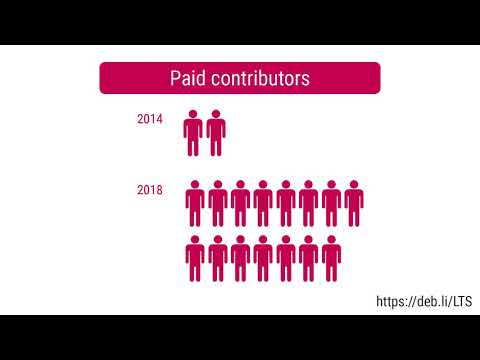
Debian LTS This month I contributed 17 hours to Debian Long Term Support (LTS) and 9 hours on its sister Extended LTS project. You can find out more about the two projects via the following video:
Debian I filed the following bug reports in Debian this month: I also filed a number of bugs against packages that are not compatible with Django 3.x, (organised around a single master bug) including django-taggit, sorl-thumbnail, django-simple-captcha, django-cas-server, django-cors-headers, python-django-csp, django-pipeline, python-django-jsonfield, python-django-contact-form, django-model-utils, django-fsm, django-modeltranslation, django-oauth-toolkit, libthumbor, python-django-extensions, python-django-imagekit, python-django-navtag, python-django-tagging, djangorestframework, django-haystack, django-taggit, django-simple-captcha, python-django-registration, python-django-pyscss, python-django-compressor, python-django-crispy-forms & python-django-mptt,
Lastly, I made the following uploads to Debian: I also sponsored an upload for adminer (4.7.7-1), also uploading it to buster-backports.

30 May 2020

Sean Whitton: GNU Emacs' Transient Mark mode

Something I ve found myself doing as the pandemic rolls on is picking out and (re-)reading through sections of the GNU Emacs manual and the GNU Emacs Lisp reference manual. This has got me (too) interested in some of the recent history of Emacs development, and I did some digging into archives of emacs-devel from 2008 (15M mbox) regarding the change to turn Transient Mark mode on by default and set mark-even-if-inactive to true by default in Emacs 23.1. It s not always clear which objections to turning on Transient Mark mode by default take into account the mark-even-if-inactive change. I think that turning on Transient Mark mode along with mark-even-if-inactive is a good default. The question that remains is whether the disadvantages of Transient Mark mode are significant enough that experienced Emacs users should consider altering Emacs default behaviour to mitigate them. Here s one popular blog arguing for some mitigations. How might Transient Mark mode be disadvantageous? The suggestion is that it makes using the mark for navigation rather than for acting on regions less convenient:
  1. setting a mark just so you can jump back to it (i) is a distinct operation you have to think of separately; and (ii) requires two keypresses, C-SPC C-SPC, rather than just one keypress
  2. using exchange-point-and-mark activates the region, so to use it for navigation you need to use either C-u C-x C-x or C-x C-x C-g, neither of which are convenient to type, or else it will be difficult to set regions at the place you ve just jumped to because you ll already have one active.
There are two other disadvantages that people bring up which I am disregarding. The first is that it makes it harder for new users to learn useful ways in which to use the mark when it s deactivated. This happened to me, but it can be mitigated without making any behavioural changes to Emacs. The second is that the visual highlighting of the region can be distracting. So far as I can tell, this is only a problem with exchange-point-and-mark, and it s subsumed by the problem of that command actually activating the region. The rest of the time Emacs automatic deactivation of the region seems sufficient. How might disabling Transient Mark mode be disadvantageous? When Transient Mark mode is on, many commands will do something usefully different when the mark is active. The number of commands in Emacs which work this way is only going to increase now that Transient Mark mode is the default. If you disable Transient Mark mode, then to use those features you need to temporarily activate Transient Mark mode. This can be fiddly and/or require a lot of keypresses, depending on exactly where you want to put the region. Without being able to see the region, it might be harder to know where it is. Indeed, this is one of the main reasons for wanting Transient Mark mode to be the default, to avoid confusing new users. I don t think this is likely to affect experienced Emacs users often, however, and on occasions when more precision is really needed, C-u C-x C-x will make the region visible. So I m not counting this as a disadvantage. How might we mitigate these two sets of disadvantages? Here are the two middle grounds I m considering. Mitigation #1: Transient Mark mode, but hack C-x C-x behaviour
(defun spw/exchange-point-and-mark (arg)
  "Exchange point and mark, but reactivate mark a bit less often.

Specifically, invert the meaning of ARG in the case where
Transient Mark mode is on but the region is inactive."
  (interactive "P")
  (exchange-point-and-mark
   (if (and transient-mark-mode (not mark-active))
       (not arg)
     arg)))
(global-set-key [remap exchange-point-and-mark] &aposspw/exchange-point-and-mark)
We avoid turning Transient Mark mode off, but mitigate the second of the two disadvantages given above. I can t figure out why it was thought to be a good idea to make C-x C-x reactivate the mark and require C-u C-x C-x to use the action of exchanging point and mark as a means of navigation. There needs to a binding to reactivate the mark, but in roughly ten years of having Transient Mark mode turned on, I ve found that the need to reactivate the mark doesn t come up often, so the shorter and longer bindings seem the wrong way around. Not sure what I m missing here. Mitigation #2: disable Transient Mark mode, but enable it temporarily more often
(setq transient-mark-mode nil)
(defun spw/remap-mark-command (command &optional map)
  "Remap a mark-* command to temporarily activate Transient Mark mode."
  (let* ((cmd (symbol-name command))
         (fun (intern (concat "spw/" cmd)))
         (doc (concat "Call  "
                      cmd
                      "&apos and temporarily activate Transient Mark mode.")))
    (fset fun  (lambda ()
                 ,doc
                 (interactive)
                 (call-interactively #&apos,command)
                 (activate-mark)))
    (if map
        (define-key map (vector &aposremap command) fun)
      (global-set-key (vector &aposremap command) fun))))
(dolist (command &apos(mark-word
                   mark-sexp
                   mark-paragraph
                   mark-defun
                   mark-page
                   mark-whole-buffer))
  (spw/remap-mark-command command))
(with-eval-after-load &aposorg
  (spw/remap-mark-command &aposorg-mark-element org-mode-map)
  (spw/remap-mark-command &aposorg-mark-subtree org-mode-map))
;; optional
(global-set-key "\M-=" (lambda () (interactive) (activate-mark)))
;; resettle the previous occupant
(global-set-key "\C-cw" &aposcount-words-region)
Here we remove both of the disadvantages of Transient Mark mode given above, and mitigate the main disadvantage of not activating Transient Mark mode by making it more convenient to activate it temporarily. For example, this enables using C-M-SPC C-M-SPC M-( to wrap the following two function arguments in parentheses. And you can hit M-h a few times to mark some blocks of text or code, then operate on them with commands like M-% and C-/ which behave differently when the region is active.1 Comparing these mitigations Both of these mitigations handle the second of the two disadvantages of Transient Mark mode given above. What remains, then, is
  1. under the effects of mitigation #1, how much of a barrier to using marks for navigational purposes is it to have to press C-SPC C-SPC instead of having a single binding, C-SPC, for all manual mark setting2
  2. under the effects of mitigation #2, how much of a barrier to taking advantage of commands which act differently when the region is active is it to have to temporarily enable Transient Mark mode with C-SPC C-SPC, M-= or one of the mark-* commands?
These are unknowns.3 So I m going to have to experiment, I think, to determine which mitigation to use, if either. In particular, I don t know whether it s really significant that setting a mark for navigational purposes and for region marking purposes are distinct operations under mitigation #1. My plan is to start with mitigation #2 because that has the additional advantage of allowing me to confirm or disconfirm my belief that not being able to see where the region is will only rarely get in my way.

  1. The idea of making the mark-* commands activate the mark comes from an emacs-devel post by Stefan Monnier in the archives linked above.
  2. One remaining possibility I m not considering is mitigation #1 plus binding something else to do the same as C-SPC C-SPC. I don t believe there are any easily rebindable keys which are easier to type than typing C-SPC twice. And this does not deal with the two distinct mark-setting operations problem.
  3. Another way to look at this is the question of which of setting a mark for navigational purposes and activating a mark should get C-SPC and which should get C-SPC C-SPC.

Martin Michlmayr: ledger2beancount 2.2 released

I released version 2.2 of ledger2beancount, a ledger to beancount converter. Here are the changes in 2.2: You can get ledger2beancount from GitHub. Thanks to GitHub user MarinBernard for reporting a bug with virtual postings!

Reproducible Builds (diffoscope): diffoscope 146 released

The diffoscope maintainers are pleased to announce the release of diffoscope version 146. This version includes the following changes:
[ Chris Lamb ]
* Refactor .changes and .buildinfo handling to show all details (including
  the GPG header and footer components), even when referenced files are not
  present. (Closes: reproducible-builds/diffoscope#122)
* Normalise filesystem stat(2) "birth times" (ie. st_birthtime) in the same
  way we do with stat(1)'s "Access:" and "Change:" times to fix a
  nondetermistic build failure on GNU Guix.
  (Closes: reproducible-builds/diffoscope#74)
* Drop the (default) subprocess.Popen(shell=False) keyword argument so that
  the more unsafe shell=True is more obvious.
* Ignore lower vs. upper-case when ordering our file format descriptions.
* Don't skip string normalisation in Black.
[ Mattia Rizzolo ]
* Add a "py3dist" override for the rpm-python module (Closes: #949598)
* Bump the debhelper compat level to 13 and use the new
  execute_after_*/execture_before_* style rules.
* Fix a spelling error in changelog.
[ Daniel Fullmer ]
* Mount GuestFS filesystem images readonly.
[ Jean-Romain Garnier ]
* Prevent an issue where (for example) LibarchiveMember's has_same_content
  method is called regardless of the actual type of file.
You find out more by visiting the project homepage.

29 May 2020

Gunnar Wolf: Heads up Online MiniDebConf is Online

I know most Debian people know about this already But in case you don t follow the usual Debian communications channels, this might interest you! Given most of the world is still under COVID-19 restrictions, and that we want to work on Debian, given there is no certainty as to what the future holds in store for us Our DPL fearless as they always are had the bold initiative to make this weekend into the first-ever miniDebConf Online (MDCO)! miniDebConf Online So, we are already halfway through DebCamp (which means, you can come and hang out with us in the debian.social DebCamp Jitsi lounge, where some impromptu presentations might happen (or not). Starting tomorrow morning (11AM UTC), we will have a quite interesting set of talks. I am reproducing the schedule here:

Saturday 2020.05.30
Time (UTC) Speaker Talk
11:00 - 11:10 MDCO team members Hello + Welcome
11:30 - 11:50 Wouter Verhelst Extrepo
12:00 - 12:45 JP Mengual Debian France, trust european organization
13:00 - 13:20 Arnaud Ferraris Bringing Debian to mobile phones, one package at a time
13:30 - 15:00 Lunch Break A chance for the teams to catch some air
15:00 - 15:45 JP Mengual The community team, United Nations Organizations of Debian?
16:00 - 16:45 Christoph Biedl Clevis and tang - overcoming the disk unlocking problem
17:00 - 17:45 Antonio Terceiro I m a programmer, how can I help Debian

Sunday 2020.05.31
Time (UTC) Speaker Talk
11:00 - 11:45 Andreas Tille The effect of Covid-19 on the Debian Med project
12:00 - 12:45 Paul Gevers BoF: running autopkgtest for your package
13:00 - 13:20 Ben Hutchings debplate: Build many binary packages with templates
13:30 - 15:00 Lunch break A chance for the teams to catch some air
15:00 - 15:45 Holger Levsen Reproducing bullseye in practice
16:00 - 16:45 Jonathan Carter Striving towards excellence
17:00 - 17:45 Delib* Organizing Peer-to-Peer Debian Facilitation Training
18:00 - 18:15 MDCO team members Closing
  • subject to confirmation

Timezone Remember this is an online event, meant for all of the world! Yes, the chosen times seem quite Europe-centric (but they are mostly a function of the times the talk submitters requested). Talks are 11:00 18:00UTC, which means, 06:00 13:00 Mexico (GMT-5), 20:00 03:00 Japan (GMT+9), 04:00 11:00 Western Canada/USA/Mexico (GMT-7) and the rest of the world, somewhere in between. (No, this was clearly not optimized for our dear usual beer team. Sorry! I guess we need you to be fully awake at beertime!)

[update] Connecting! Of course, I didn t make it clear at first how to connect to the Online miniDebConf, silly me!
  • The video streams are available at: https://video.debconf.org/
  • Suggested: tune in to the #minidebconf-online IRC channel in OFTC.
That should be it. Hope to see you there! (Stay home, stay safe )

Next.

Previous.