Joachim Breitner: Creative use of screen-message
 I just learnt that the math and computer science student body is using screen-message to power an information screen in their room:
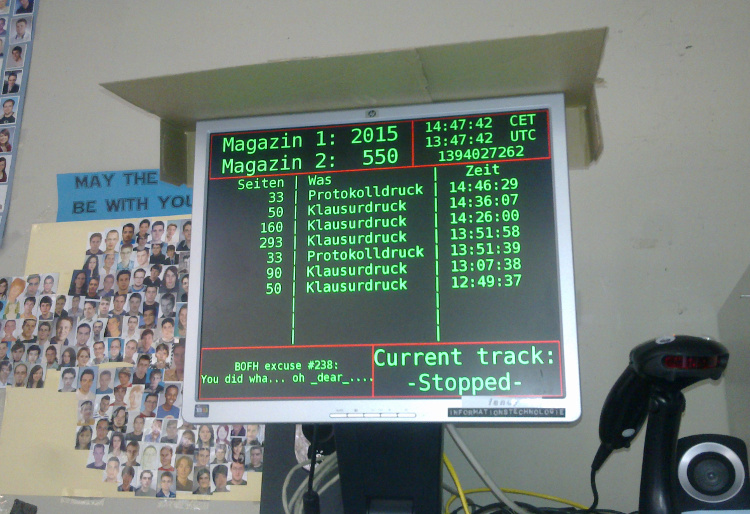 I just learnt that the math and computer science student body is using screen-message to power an information screen in their room:

 The deadline for sponsored registration for DebConf11 in Banja Luka, originally May 8th, has officially been extended to May 19th. The reasons for the extension are as follows:
Thanks to a significant increase in sponsorship from one of our main sponsors, we have been permitted and encouraged to welcome more people to the conference. The extension is a one-off occurrence in response to this new development, and to allow any potential attendees time to access more information before registering.
Registration is required for everybody who plans to attend any part of Debconf. Access to the conference venue, food and accommodation is controlled through the registration badge. The only exception to the registration requirement is for those who plan to only attend Debian Day.
It is possible to request sponsorship for food, accommodation, and travel. Those who have been involved or contributed to Debian or to other open source projects are eligible to apply for sponsorship, which will be decided on a case-by-case basis.
The professional and corporate categories are for those who are sent and sponsored by their companies. Professional registration covers the actual costs of conference attendance, while corporate registration is just over double that price, and is aimed at those who, besides paying the actual costs, also want to contribute money and help Debian.
the DebConf team
 The JSCommunicator project aims to make it easy to integrate WebRTC into existing web applications.
It provides a high-level API on top of the popular JsSIP SIP stack for JavaScript. The JSCommunicator API provides basic dialing and call control features, allowing you to focus on the application level rather than the SIP level. The configuration file suggests many possible ways it can be deployed and customized without any coding at all.
The popular DruCall module for the Drupal CMS provides a practical demonstration of how JSCommunicator can be embedded in other products, multiplying the power of WebRTC for millions of other web developers, bloggers, online shops and other sites. This part of the DruCall source code provides a practical demonstration of how JSCommunicator integrates with PHP and this demonstrates how we extract the parameters from PHP in the JavaScript and convert them to the JSCommunicator configuration object.
Practical deployments of WebRTC today
The student selected for this GSoC project will focus on two practical, real-world deployments of JSCommunicator:
 Mentors needed too
The more diverse the mentoring community, the more positive outcomes we can achieve with this project.
If you would like to be part of a mentoring team for this project, please email me and subscribe to the Debian SOC co-ordination email list. There is no strict requirement for all mentors in the team to be full Debian Developers and emerging technology like this clearly needs people with strengths in a range of different areas.
Get started now
For general ideas about getting selected for Google Summer of Code, please see the comments at the bottom of my earlier blog post about Ganglia projects
For this project in WebRTC in particular, please:
 My hard-working KDE friend Mario asked me to help him to get Debian people to help him with his thesis. Here is what he writes:
Dear Free Software contributor*
I m currently in the process of writing my diploma thesis. I ve worked hard during the last few weeks and months on a questionnaire which shall collect some data for my thesis. Furthermore the data of this survey will be interesting for the Free Software communities as well.
So please take some time or add it to your todo list or, even better, go directly to my questionnaire and help me make a great diploma thesis and improve the Free Software community in some ways.
The questionnaire takes some 20 to 30 minutes. At the end of the questionnaire you ll find a way to participate in a draw where you can even win something nice.
In a first round I got the feedback that the length of the questionnaire and that some questions (mostly the ones at the beginning of the questionnaire about the 12 different tasks) are quite abstract and difficult. But please try it, try your best and take the time and brain power. The remaining part of the questionnaire [1] (after these two pages with the tasks questions) is quite
 If you can read this, that means my transition to
ikiwiki has happened.
I've been interested in ikiwiki ever since
Joey first wrote about it back in 2006, but it took me until just
recently to finally bite the bullet and migrate to ikiwiki.
The plan was to retain everything, including comments, and I've mostly
achieved that. Still, a few things were lost along the way:
| Publisher: | University of Chicago |
| Copyright: | 1999 |
| Printing: | 2000 |
| ISBN: | 0-226-53423-5 |
| Format: | Trade paperback |
| Pages: | 232 |
 So it may sound normal to receive compressed response for CSS/JS file
from Apache2 but what I faced is completely different behavior, here I
saw not just body of response but also header are getting compressed
and send to browser and browser was unable to interpret the response
there by leading page rendered without CSS and JS.
That was long story short, so let me explain in detail the case and
what I found out.
I have hosted SILPA on my VPS using
uWSGI. I had used till date using libapache2-mod-proxy-uwsgi plugin
for which uWSGI should be using network socket and in Apache2 config I
need ProxyPass directive pointing to uwsgi://host:port and
everything used to work out of box. There is a drawback for using
network socket in uWSGI that is limited amount of ports (65535) and
possible clash with other services if we use wrong port number,
additionally network sockets will be slower compared to the file
socket so yesterday I thought of changing it to file socket and
removed socket directive in the ini file for uWSGI application
container for SILPA and here is where all problems started. My updated
configuration can be seen in our documentation page
that is if you are interested to look my configuration file :-).
 So you can see no response header in the above image but there is a
response and below how is response content visible on firebug.
 Still weird part was when using wget/curl directly to get the CSS I
was getting correct reply and the file, which is puzzling.
So I went ahead opened the CSS url directly using browser and saved
the resulting file. When I used file command on it, output
suggested the saved file in gzip compressed!. I went ahead
uncompressed it and opened the file and inside it I found response
header and the response body! So what just happened? Did apache some
how manage to compress entire respone not just response body?
The more puzzling question was why did it work when I was using
mod_proxy_uwsgi and failed when I switched to mod_uwsgi. I had no
clue at this point why this behavior is coming up.
<IfModule mod_deflate.c>
       # these are known to be safe with MSIE 6
       AddOutputFilterByType DEFLATE text/html text/plain text/xml
       # everything else may cause problems with MSIE 6
       AddOutputFilterByType DEFLATE text/css
       AddOutputFilterByType DEFLATE application/x-javascript application/javascript application/ecmascript
       AddOutputFilterByType DEFLATE application/rss+xml
</IfModule>
 So response is still gziped but this time only response body was
gziped and Content-Encoding field was set properly which makes browser
to properly uncompress the response body and use it.
So it seems like there is a difference between mod_uwsgi and
mod_proxy_uwsgi implementation. mod_uwsgi was sending the response
along with response headers which was compressed by mod_deflate there
by rendering browser helpless to interpret the response. But
mod_proxy_uwsgi seems to be only sending the response content without
response body and this content was later compressed by mod_deflate and
proper response headers were set by apache before sending it to
browser.
So now whose fault is this? Is it the bug in mod_uwsgi or, mod_deflate
not being able to exclude response headers from compression? I've no
clue! If you have a clue and you want to share it with me, please
consider writing to me over email. My details are available in
Contacts
| Component | Skills |
|---|---|
| gmond agent | C |
| gmond modules | C or Python |
| JMXetric | Java |
| gmetad and rrdtool for storing time series data | C |
| Ganglia web interface | JavaScript and jQuery |
| Ganglia integration (e.g. ganglia-nagios-bridge) | Python |
| Port | Comments |
|---|---|
| 8649 | gmond: sends an XML snapshot to anybody who connects |
| 8651 | gmetad: sends an XML snapshot to anybody who connects |
| 8651 | gmetad: works a little bit like HTTP, returns a subset of the XML snapshot when you make a GET request |
udp_send_channel
  host = ganglia-reports.example.edu
  port = 8649
  ttl = 1
This tells you that the host ganglia-reports.example.edu is collecting the data - you could try the URL http://ganglia-reports.example.edu/ganglia/ in a web browser or try connecting to one of the TCP ports 8649, 8651 or 8652 on that host. Here is an example with netcat:
$ nc ganglia-reports.example.edu 8649 grep ^.HIt will return a list of all hosts that Ganglia knows about. Once you have a data feed, you can then configure a gmetad process on your own system to poll the remote system and generate local RRDs for you to study. Install your own Ganglia It is very easy to get your own Ganglia setup. On a Debian or Ubuntu system, just do:
# apt-get update
# apt-get install ganglia-monitor ganglia-webfrontend
On Fedora and RPM-based systems (such as CentOS or RHEL with EPEL) you can do:
# yum install ganglia-gmond ganglia-webEverything should be autoconfigured. You can then browse to http://localhost/ganglia to see the charts. If you have several hosts with the gmond agent (just the ganglia-monitor.deb or ganglia-gmond.rpm) on the same LAN, they will automatically find each other using multicast and you will see an aggregated report on the machine with the web server. The data is real-time It is important to keep in mind that the data is real-time. This means you can often detect problems in real-time. If this blog appears on slashdot, for example, then that image from Universit Montpellier 2 will be hit many times. The image actually shows the network load on the web server producing the image, so you will see the slashdot effect graphically in the image itself. Processing real-time data is often the most advanced step in any data science exercise. Initially, you may simply log a few days of data to RRD files to start studying a static data set with your tool of choice, whether it is the R project, Weka or Hadoop Once you have a a hypothesis (for example, an algorithm that understands the normal characteristics of each metric) you may then take each new real-time value from the gmetad XML and test it with the algorithm. The algorithm would then raise an alert if any metric on any host deviates from its normal behavior. Mixing in other sources of data Depending upon the computing environment in your campus or organization, you may also be able to get other data sources, such as a list of people logged in to different machines at different times and the processes that each user starts and stops. This might help to make more accurate predictions about when network or computing resources will be under stress. For example, if users bob, alice and eve all appear on the same host, your algorithm might conclude that the load average will reach an excessive level within 15 minutes and send those three users a suggestion to each try other machines. Making a successful application for GSoC 2014 Here are some tips
 It seems that several people replied to the effect that they would pay people to take care of applying security updates, or even configuring adhoc things such as wikis, graphite, and MySQL.
Not enough people to rely upon, but perhaps there is scope for remote stuff being done in exchange for folding-money. (Of course some of those that replied are in foreign countries which makes receiving payment an annoyance, that's a separate problem though.)
Food for thought.
In the meantime I've settled into my use of lighttpd, which I've recently migrated to.
One interesting thing is that you can set your own "Server Name" directive:
# Set server name/version
server.tag = "lighttpd/(steve)"
This value is used by mod_dirlisting, so for example if you examine a directory which doesn't contain an index.html file you see the server-name. Cute. Well cute unless, or until, somebody sets:
# Set server name/version
server.tag = "<script>alert(3)</script>"
That does indeed show javascript to all your visitors. Not a security problem itself, as you need to be root on the remote site. If you're root in the remote server you could just modify the actual HTML pages being served to include your javascript. That said it's a little icky. The following patch avoids the issue:
--- mod_dirlisting.c.org	2014-02-26 00:14:43.296373275 +0000
+++ mod_dirlisting.c	2014-02-26 00:16:28.332371547 +0000
@@ -618,7 +618,7 @@
 		  else if (buffer_is_empty(con->conf.server_tag))
 			buffer_append_string_len(out, CONST_STR_LEN(PACKAGE_DESC));
 		  else
-			buffer_append_string_buffer(out, con->conf.server_tag);
+                        buffer_append_string_encoded(out, CONST_BUF_LEN(con->conf.server_tag), ENCODING_HTML);

 		buffer_append_string_len(out, CONST_STR_LEN(
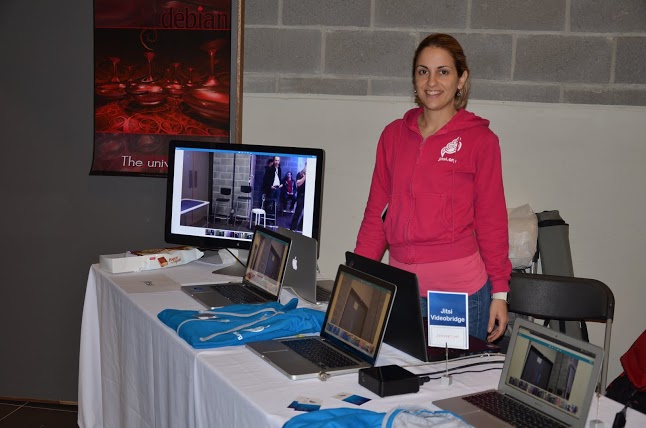 Yana from the Jitsi team with a table full of devices running different operating systems and browsers connecting to a JitMeet video conference. The demo also extended to the Debian table which was immediately underneath (ground floor) and within range of the real-time lounge private WLAN.
What makes this so exciting? The thing that stands out for me is that you can run it on any web server under your own control. This gives people real choice in an era when people are starting to realize the risk of using "free" cloud services.
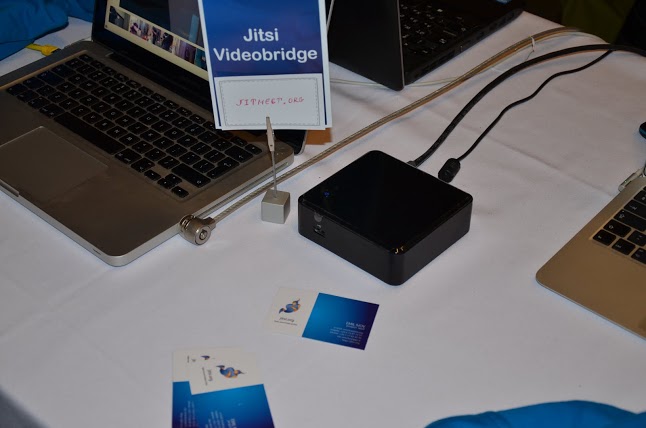 Any Linux web server - big or small, running your preferred distribution - can run a JitMeet conference. Here it is running on a very small Intel i3-based NUC with Debian
For those who want to know more, you can watch Emil's lightning talk about JitMeet or ask on the Jitsi user mailing list.
 Emil's lightning talk about JitMeet
 My right ankle has never been quite right ever since I sprained it in
2008. The ankle is always a bit enlarged, sometimes more so after running.
With all the running I've been doing back in Brisbane, I had this niggling
concern in the back of my head that I might be doing myself some long term
damage, so last year I packed myself off to see a physiotherapist that was
within walking distance of home.
He declared that I had blown out two of the ligaments in my foot from the
sprain, and that my calf was compensating for it a bit. The swelling was just
scar tissue. He gave me a bunch of exercises to do, and I had some
electrotherapy on my calf for a few weeks and I went on my way. I think I'm
supposed to do the exercises every time before I run, but that hasn't happened.
It's hard enough to make the time to run, without having to prepend a bunch of
exercises as well.
One of my neighbours works for my
FootDr, so I asked her if they did video run gait analysis, because I was
interested in seeing if there was anything I could do to improve my running
gait. They did, and so I finally got around to making an appointment for today.
The appointment wasn't as interesting as the one I had in the
US, in that there was no fluoroscopy, just manual examination, but there
was the video run gait analysis on the treadmill, which was not something I've
had before.
I was pleased that my running shoes (New Balance 940's) were deemed correct for
my situation. The guy at Sports
Basement obviously did a good job of fitting them to me. I was advised to
refresh the shoes, though, so I lashed out on a pair of 940
v2's today. My health insurance also paid pretty generously for orthotics,
so I'm going to get a pair for them to add to the ankle stability.
The results of the run gait analysis were that, surprise surprise, I am rolling
inwards a bit more on my right ankle than my left. Interestingly, my
left calf was bigger than my right one, so I was advised to stick with
the physiotherapy exercises (yay).
So with the orthotics, new shoes, and forcing myself to do my physiotherapy
exercises, I'm pretty satisfied that my continued running isn't likely to do
too much damage to my body. The podiatrist concurred that because I'm currently
pain free, everything should be good. I just had to live with the fact that my
right ankle is going to always be a bit swollen.
 My Debian project ideas
I've also published a couple of project ideas on the Debian wiki before the organisations were confirmed:

 |
| Zurg - Debian 9.0 code name |
 To "pedestal" an aerobar means to elevate the bars above the basebar using risers instead of using headset spacers:
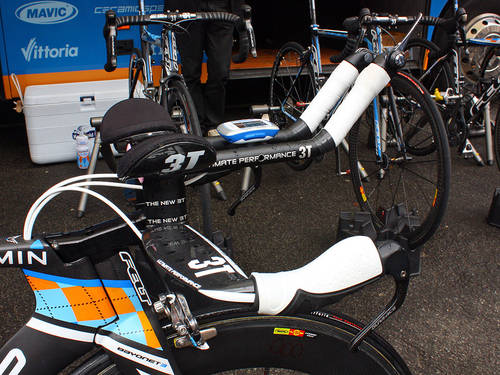
David Millar, 2010 Giro d'Italia.
 So, assuming you currently have a bike that uses headset spacers, what would be the effect on your position if you were to replace, say, a 10mm headset spacer with a 10mm armrest riser?
First, let us consider the effect of removing the headset spacer. The crucial insight is that removing a 10mm spacer will not lower the stack height ie. the vertical distance relative to the bottom bracket by 10mm.
This is because spacers are not oriented perpendicular to the ground; they are stacked along the steerer tube at the head tube angle of the frame. We will assume a head tube angle of 72.5 degrees.
We can calculate that removing a 10mm spacer will reduce the stack height by:
sin(72.5 ) 10mm = 9.54mm... and by the same argument it will also increase the effective reach ie. the horizontal distance relative to the bottom bracket by:
cos(72.5 ) 10mm = 3.01mmNext, let us consider the impact of adding the riser. These are oriented perpendicular to the ground, so its addition makes no further change to the reach. However, we can now calculate the overall change in stack height:
stack = -(sin(72.5 ) 10mm) + 10mm = 0.46mmWe can then repeat the calculation for any length of replacement:
| Replacement (mm) | stack (mm) | reach (mm) |
|---|---|---|
| 10 | +0.46 | +3.01 |
| 20 | +0.93 | +6.01 |
| 30 | +1.39 | +9.02 |
| 40 | +1.85 | +12.0 |
| 50 | +2.31 | +15.0 |
| 60 | +2.78 | +18.0 |
 Recently I've been thinking about getting a new laptop. I have this rule that a laptop should last me at least 3 years (ideally more) and my old laptop was bought in September 2010. So for the past few months I've been trying to work out if there's something suitable on the market that is a good replacement (last time I didn't manage to find something that ticked all the boxes, but did pretty well for the price I paid).
To start with I decided to track my laptops over time - largely because one of my concerns was about the size of a replacement, because I have a significant leaning towards subnotebooks. In the end the reason I decided to upgrade was for some extra CPU grunt; my old machine had a tendency to get pretty hot under any sort of load.
| Date | Model | CPU | Screen | RAM | Storage | W (mm) | H (mm) | D (mm) | Weight | Cost |
|---|---|---|---|---|---|---|---|---|---|---|
| 1991 | Amstrad PPC 640D | NEC V30 8MHz | 9" 640x200 non-backlit green LCD | 640k | 2 x 3.5" FDD | 450 | 230 | 100 | 10kg | ??? |
| August 1997 | Compaq Aero 4/33c | 486sx33 | 7.8" 640x480 CSTN LCD | 4MB | 80MB | 260 | 190 | 43 | 1.6kg | ??? |
| July 2002 | Compaq Evo N200 | P-III 700MHz | 10.4" 1024x768 TFT | 192MB | 20GB | 251 | 198 | 20 | 1.1kg | 939.99 |
| August 2005 | Toshiba Portege R200 | Pentium M 753 1.2GHz | 12.1" 1024x768 TFT | 1280MB | 60GB | 286 | 229 | 20 | 1.29kg | 1313.58 |
| September 2008 | Asus EEE 901 | Atom N270 1.6GHz | 8.9" 1024x600 TFT | 2GB | 4GB + 16GB SSD | 248 | 175 | 23 | 1.1kg | 299.99 |
| September 2010 | Acer Aspire 1830T | Core-i5 470UM 1.33GHz | 11.6" 1366x768 TFT | 8GB | 500GB | 284 | 203 | 28 | 1.4kg | $699.99 (~ 480) |
Next.