Joachim Breitner: A Telegram bot in Haskell on Amazon Lambda
 I just had a weekend full of very successful serious geekery. On a whim I thought: Wouldn't it be nice if people could interact with my game Kaleidogen also via a telegram bot? This led me to learn about how I write a Telegram bot in Haskell and how I can deploy such a Haskell program to Amazon Lambda. In particular the latter bit might be interesting to some of my readers, so here is how went about it.
Kaleidogen
Kaleidogen is a little contemplative game (or toy game where, starting from just unicolored disks, you combine abstract circular patterns to breed more interesting patterns. See my FARM 2019 talk for more details, or check out the source repository. BTW, I am looking for help turning it into an Android app!

KaleidogenBot in action
Amazon Lambda
Amazon Lambda is the Function as a service offering of Amazon Web Services. The idea is that you don t rent a server, where you have to deal with managing the whole system and that you are paying for constantly, but you just upload the code that responds to outside requests, and AWS takes care of the rest: Starting and stopping instances, providing a secure base system etc. When nobody is using the service, no cost occurs.
This sounds ideal for hosting a toy Telegram bot: Most of the time nobody will be using it, and I really don't want to have to baby sit yet another service on my server. On Amazon Lambda, I can probably just forget about it.
But Haskell is not one of the officially supported languages on Amazon Lambda. So to run Haskell on Lambda, one has to solve two problems:
- how to invoke the Haskell code on the server, and
- how to build Haskell so that it runs on the Amazon Linux distribution
A Haskell runtime for Lambda
For the first we need a custom runtime. While this sounds complicated, it is actually a pretty simple concept: A runtime is an executable called bootstrap that queries the Lambda Runtime Interface for the next request to handle. The Lambda documentation is phrased as if this runtime has to be a dispatcher that calls the separate function s handler. But it could just do all the things directly.
I found the Haskell package aws-lambda-haskell-runtime which provides precisely that: A function
runLambda :: (LambdaOptions -> IO (Either String LambdaResult)) -> IO ()
that talks to the Lambda Runtime API and invokes its argument on each message. The package also provides Template Haskell magic to collect handlers of any JSON-able type and generates a dispatcher, like you might expect from other, more dynamic languages. But that was too much magic for me, so I ignored that and just wrote the handler manually:
main :: IO ()
main = runLambda run
  where
   run ::  LambdaOptions -> IO (Either String LambdaResult)
   run opts = do
    result <- handler (decodeObj (eventObject opts)) (decodeObj (contextObject opts))
    either (pure . Left . encodeObj) (pure . Right . LambdaResult . encodeObj) result
data Event = Event
    path :: T.Text
  , body :: Maybe T.Text
    deriving (Generic, FromJSON)
data Response = Response
    statusCode :: Int
  , headers :: Value
  , body :: T.Text
  , isBase64Encoded :: Bool
    deriving (Generic, ToJSON)
handler :: Event -> Context -> IO (Either String Response)
handler Event body, path  context =
I expose my Lambda function to the world via Amazon s API Gateway, configured to just proxy the HTTP requests. This means that my code receives a JSON data structure describing the HTTP request (here called Event, listing only the fields I care about), and it will respond with a Response, again as JSON.
The handler can then simply pattern-match on the path to decide what to do. For example this code handles URLs like /img/CAFFEEFACE.png, and responds with an image.
handler :: TC -> Event -> Context -> IO (Either String Response)
handler Event body, path  context
      Just bytes <- isImgPath path >>= T.decodeHex = do
        let pngData = genPurePNG bytes
        pure $ Right Response
              statusCode = 200
            , headers = object [ "Content-Type" .= ("image/png" :: String) ]
            , isBase64Encoded = True
            , body = T.decodeUtf8 $ LBS.toStrict $ Base64.encode pngData


isImgPath :: T.Text -> Maybe T.Text
isImgPath  = T.stripPrefix "/img/" >=> T.stripSuffix ".png"
If this program would grow more, then one should probably use something more structured for routing here; maybe servant, or bridging towards wai apps (amost like wai-lamda, but that still assumes an existing runtime, instead of simply being the runtime). But for my purposes, no extra layers of indirection or abstraction are needed!
Deploying Haskell to Lambda
Building Haskell locally and deploying to different machiens is notoriously tricky; you often end up depending on a shared library that is not available on the other platform. The aws-lambda-haskell-runtime package, and similar projects like serverless-haskell, solve this using stack and Docker two technologies that are probably great, but I never warmed up to them.
So instead adding layers and complexities, can I solve this instead my making things simpler? If I compiler my bootstrap into a static Linux binary, it should run on any Linux, including Amazon Linux.
Unfortunately, building Haskell programs statically is also notoriously tricky. But it is made much simpler by the work of Niklas Hamb chen and others in the context of the Nix package manager, coordinated in the static-haskell-nix project. The promise here is that once you have set up building your project with Nix, then getting a static version is just one flag away. The support is not completely upstreamed into nixpkgs proper yet, but their repository has a nix file that contains a nixpkgs set with their patches:
let pkgs = (import (sources.nixpkgs-static + "/survey/default.nix") ).pkgs; in
This, plus a fairly standard nix setup to build the package, yields what I was hoping for:
$ nix-build -A kaleidogen
/nix/store/ppwyq4d964ahd6k56wsklh93vzw07ln0-kaleidogen-0.1.0.0
$ file result/bin/kaleidogen-amazon-lambda
result/bin/kaleidogen-amazon-lambda: ELF 64-bit LSB executable, x86-64, version 1 (SYSV), statically linked, stripped
$ ls -sh result/bin/kaleidogen-amazon-lambda
6,7M result/bin/kaleidogen-amazon-lambda
If we put this file, named bootstrap, into a zip file and upload it to Amazon Lambda, then it just works! Creating the zip file is easily scripted using nix:
  function-zip = pkgs.runCommandNoCC "kaleidogen-lambda"
    buildInputs = [ pkgs.zip ];
    ''
    mkdir -p $out
    cp $ kaleidogen /bin/kaleidogen-amazon-lambda bootstrap
    zip $out/function.zip bootstrap
  '';
So to upload this, I use this one-liner (line-wrapped for your convenience):
nix-build -A function-zip &&
aws lambda update-function-code --function-name kaleidogen \
  --zip-file fileb://result/function.zip
Thanks to how Nix pins all dependencies, I am fairly confident that I can return to this project in 4 months and still be able to build it.
Of course, I want continuous integration and deployment. So I build the project with GitHub Actions, using a cachix nix cache to significantly speed up the build, and auto-deploy to Lambda using aws-lambda-deploy; see my workflow file for details.
The Telegram part
The above allows me to run basically any stateless service, and a Telegram bot is nothing else: When configured to act as a WebHook, Telegram will send a request with a message to our Lambda function, where we can react on it.
The telegram-api package provides bindigs for the Telegram Bot API (although I had to use the repository version, as the version on Hackage has some bitrot). Slightly simplified I can write a handler for an Update:
handleUpdate :: Update -> TelegramClient ()
handleUpdate Update  message = Just m   = do
  let c = ChatId (chat_id (chat m))
  liftIO $ printf "message from %s: %s\n" (maybe "?" user_first_name (from m)) (maybe "" T.unpack (text m))
  if "/start"  T.isPrefixOf  fromMaybe "" (text m)
  then do
    rm <- sendMessageM $ sendMessageRequest c "Hi! I am @KaleidogenBot.  "
    return ()
  else do
    m1 <- sendMessageM $ sendMessageRequest c "One moment "
    withPNGFile  $ \pngFN -> do
      m2 <- uploadPhotoM $ uploadPhotoRequest c
        (FileUpload (Just "image/png") (FileUploadFile pngFN))
      return ()
handleUpdate _ u =
  liftIO $ putStrLn $ "Unhandled message: " ++ show u
and call this from the handler that I wrote above:
      path == "/telegram" =
      case eitherDecode (LBS.fromStrict (T.encodeUtf8 (fromMaybe "" body))) of
        Left err ->
        Right update -> do
          runTelegramClient token manager $ handleUpdate Nothing update
          pure $ Right Response
              statusCode = 200
            , headers = object [ "Content-Type" .= ("text/plain" :: String) ]
            , isBase64Encoded = False
            , body = "Done"
Note that the Lambda code receives the request as JSON data structure with a body that contains the original HTTP request body. Which, in this case, is itself JSON, so we have to decode that.
All that is left to do is to tell Telegram where this code lives:
curl --request POST \
  --url https://api.telegram.org/bot<token>/setWebhook
  --header 'content-type: application/json'
  --data ' "url": "https://api.kaleidogen.nomeata.de/telegram" '
As a little add on, I also created a Telegram game for Kaleidogen. A Telegram game is nothing but a webpage that runs inside Telegram, so it wasn t much work to wrap the Web version of Kaleidogen that way, but the resulting Telegram game (which you can access via https://core.telegram.org/bots/games) still looks pretty neat.
No /dev/dri/renderD128
I am mostly happy with this setup: My game is now available to more people in more ways. I don t have to maintain any infrastructure. When nobody is using this bot no resources are wasted, and the costs of the service are neglectible -- this is unlikely to go beyond the free tier, and even if it would, the cost per generated image is roughly USD 0.000021.
There is one slight disappointment, though. What I find most intersting about Kaleidogen from a technical point of view is that when you play it in the browser, the images are not generated by my code. Instead, my code creates a WebGL shader program on the fly, and that program generates the image on your graphics card.
I even managed to make the GL rendering code work headlessly, i.e. from a command line program, using EGL and libgbm and a helper written in C. But it needs access to a graphics card via /dev/dri/renderD128. Amazon does not provide that to Lambda code, and neither do the other big Function-as-a-service providers. So I had to swallow my pride and reimplement the rendering in pure Haskell.
So if you think the bot is kinda slow, then that s why. Despite properly optimizing the pure implementation (the inner loop does not do allocations and deals only with unboxed Double# values), the GL shader version is still three times as fast. Maybe in a few years GPU access will be so ubiquitous that it s even on Amazon Lambda; then I can easily use that.
KaleidogenBot in action
- how to invoke the Haskell code on the server, and
- how to build Haskell so that it runs on the Amazon Linux distribution
A Haskell runtime for Lambda
For the first we need a custom runtime. While this sounds complicated, it is actually a pretty simple concept: A runtime is an executable called bootstrap that queries the Lambda Runtime Interface for the next request to handle. The Lambda documentation is phrased as if this runtime has to be a dispatcher that calls the separate function s handler. But it could just do all the things directly.
I found the Haskell package aws-lambda-haskell-runtime which provides precisely that: A function
runLambda :: (LambdaOptions -> IO (Either String LambdaResult)) -> IO ()
that talks to the Lambda Runtime API and invokes its argument on each message. The package also provides Template Haskell magic to collect handlers of any JSON-able type and generates a dispatcher, like you might expect from other, more dynamic languages. But that was too much magic for me, so I ignored that and just wrote the handler manually:
main :: IO ()
main = runLambda run
where
run :: LambdaOptions -> IO (Either String LambdaResult)
run opts = do
result <- handler (decodeObj (eventObject opts)) (decodeObj (contextObject opts))
either (pure . Left . encodeObj) (pure . Right . LambdaResult . encodeObj) result
data Event = Event
path :: T.Text
, body :: Maybe T.Text
deriving (Generic, FromJSON)
data Response = Response
statusCode :: Int
, headers :: Value
, body :: T.Text
, isBase64Encoded :: Bool
deriving (Generic, ToJSON)
handler :: Event -> Context -> IO (Either String Response)
handler Event body, path context =
I expose my Lambda function to the world via Amazon s API Gateway, configured to just proxy the HTTP requests. This means that my code receives a JSON data structure describing the HTTP request (here called Event, listing only the fields I care about), and it will respond with a Response, again as JSON.
The handler can then simply pattern-match on the path to decide what to do. For example this code handles URLs like /img/CAFFEEFACE.png, and responds with an image.
handler :: TC -> Event -> Context -> IO (Either String Response)
handler Event body, path context
Just bytes <- isImgPath path >>= T.decodeHex = do
let pngData = genPurePNG bytes
pure $ Right Response
statusCode = 200
, headers = object [ "Content-Type" .= ("image/png" :: String) ]
, isBase64Encoded = True
, body = T.decodeUtf8 $ LBS.toStrict $ Base64.encode pngData
isImgPath :: T.Text -> Maybe T.Text
isImgPath = T.stripPrefix "/img/" >=> T.stripSuffix ".png"
If this program would grow more, then one should probably use something more structured for routing here; maybe servant, or bridging towards wai apps (amost like wai-lamda, but that still assumes an existing runtime, instead of simply being the runtime). But for my purposes, no extra layers of indirection or abstraction are needed!
Deploying Haskell to Lambda
Building Haskell locally and deploying to different machiens is notoriously tricky; you often end up depending on a shared library that is not available on the other platform. The aws-lambda-haskell-runtime package, and similar projects like serverless-haskell, solve this using stack and Docker two technologies that are probably great, but I never warmed up to them.
So instead adding layers and complexities, can I solve this instead my making things simpler? If I compiler my bootstrap into a static Linux binary, it should run on any Linux, including Amazon Linux.
Unfortunately, building Haskell programs statically is also notoriously tricky. But it is made much simpler by the work of Niklas Hamb chen and others in the context of the Nix package manager, coordinated in the static-haskell-nix project. The promise here is that once you have set up building your project with Nix, then getting a static version is just one flag away. The support is not completely upstreamed into nixpkgs proper yet, but their repository has a nix file that contains a nixpkgs set with their patches:
let pkgs = (import (sources.nixpkgs-static + "/survey/default.nix") ).pkgs; in
This, plus a fairly standard nix setup to build the package, yields what I was hoping for:
$ nix-build -A kaleidogen
/nix/store/ppwyq4d964ahd6k56wsklh93vzw07ln0-kaleidogen-0.1.0.0
$ file result/bin/kaleidogen-amazon-lambda
result/bin/kaleidogen-amazon-lambda: ELF 64-bit LSB executable, x86-64, version 1 (SYSV), statically linked, stripped
$ ls -sh result/bin/kaleidogen-amazon-lambda
6,7M result/bin/kaleidogen-amazon-lambda
If we put this file, named bootstrap, into a zip file and upload it to Amazon Lambda, then it just works! Creating the zip file is easily scripted using nix:
function-zip = pkgs.runCommandNoCC "kaleidogen-lambda"
buildInputs = [ pkgs.zip ];
''
mkdir -p $out
cp $ kaleidogen /bin/kaleidogen-amazon-lambda bootstrap
zip $out/function.zip bootstrap
'';
So to upload this, I use this one-liner (line-wrapped for your convenience):
nix-build -A function-zip &&
aws lambda update-function-code --function-name kaleidogen \
--zip-file fileb://result/function.zip
Thanks to how Nix pins all dependencies, I am fairly confident that I can return to this project in 4 months and still be able to build it.
Of course, I want continuous integration and deployment. So I build the project with GitHub Actions, using a cachix nix cache to significantly speed up the build, and auto-deploy to Lambda using aws-lambda-deploy; see my workflow file for details.
The Telegram part
The above allows me to run basically any stateless service, and a Telegram bot is nothing else: When configured to act as a WebHook, Telegram will send a request with a message to our Lambda function, where we can react on it.
The telegram-api package provides bindigs for the Telegram Bot API (although I had to use the repository version, as the version on Hackage has some bitrot). Slightly simplified I can write a handler for an Update:
handleUpdate :: Update -> TelegramClient ()
handleUpdate Update message = Just m = do
let c = ChatId (chat_id (chat m))
liftIO $ printf "message from %s: %s\n" (maybe "?" user_first_name (from m)) (maybe "" T.unpack (text m))
if "/start" T.isPrefixOf fromMaybe "" (text m)
then do
rm <- sendMessageM $ sendMessageRequest c "Hi! I am @KaleidogenBot. "
return ()
else do
m1 <- sendMessageM $ sendMessageRequest c "One moment "
withPNGFile $ \pngFN -> do
m2 <- uploadPhotoM $ uploadPhotoRequest c
(FileUpload (Just "image/png") (FileUploadFile pngFN))
return ()
handleUpdate _ u =
liftIO $ putStrLn $ "Unhandled message: " ++ show u
and call this from the handler that I wrote above:
path == "/telegram" =
case eitherDecode (LBS.fromStrict (T.encodeUtf8 (fromMaybe "" body))) of
Left err ->
Right update -> do
runTelegramClient token manager $ handleUpdate Nothing update
pure $ Right Response
statusCode = 200
, headers = object [ "Content-Type" .= ("text/plain" :: String) ]
, isBase64Encoded = False
, body = "Done"
Note that the Lambda code receives the request as JSON data structure with a body that contains the original HTTP request body. Which, in this case, is itself JSON, so we have to decode that.
All that is left to do is to tell Telegram where this code lives:
curl --request POST \
--url https://api.telegram.org/bot<token>/setWebhook
--header 'content-type: application/json'
--data ' "url": "https://api.kaleidogen.nomeata.de/telegram" '
As a little add on, I also created a Telegram game for Kaleidogen. A Telegram game is nothing but a webpage that runs inside Telegram, so it wasn t much work to wrap the Web version of Kaleidogen that way, but the resulting Telegram game (which you can access via https://core.telegram.org/bots/games) still looks pretty neat.
No /dev/dri/renderD128
I am mostly happy with this setup: My game is now available to more people in more ways. I don t have to maintain any infrastructure. When nobody is using this bot no resources are wasted, and the costs of the service are neglectible -- this is unlikely to go beyond the free tier, and even if it would, the cost per generated image is roughly USD 0.000021.
There is one slight disappointment, though. What I find most intersting about Kaleidogen from a technical point of view is that when you play it in the browser, the images are not generated by my code. Instead, my code creates a WebGL shader program on the fly, and that program generates the image on your graphics card.
I even managed to make the GL rendering code work headlessly, i.e. from a command line program, using EGL and libgbm and a helper written in C. But it needs access to a graphics card via /dev/dri/renderD128. Amazon does not provide that to Lambda code, and neither do the other big Function-as-a-service providers. So I had to swallow my pride and reimplement the rendering in pure Haskell.
So if you think the bot is kinda slow, then that s why. Despite properly optimizing the pure implementation (the inner loop does not do allocations and deals only with unboxed Double# values), the GL shader version is still three times as fast. Maybe in a few years GPU access will be so ubiquitous that it s even on Amazon Lambda; then I can easily use that.
runLambda :: (LambdaOptions -> IO (Either String LambdaResult)) -> IO ()main :: IO ()
main = runLambda run
where
run :: LambdaOptions -> IO (Either String LambdaResult)
run opts = do
result <- handler (decodeObj (eventObject opts)) (decodeObj (contextObject opts))
either (pure . Left . encodeObj) (pure . Right . LambdaResult . encodeObj) result
data Event = Event
path :: T.Text
, body :: Maybe T.Text
deriving (Generic, FromJSON)
data Response = Response
statusCode :: Int
, headers :: Value
, body :: T.Text
, isBase64Encoded :: Bool
deriving (Generic, ToJSON)
handler :: Event -> Context -> IO (Either String Response)
handler Event body, path context =
handler :: TC -> Event -> Context -> IO (Either String Response)
handler Event body, path context
Just bytes <- isImgPath path >>= T.decodeHex = do
let pngData = genPurePNG bytes
pure $ Right Response
statusCode = 200
, headers = object [ "Content-Type" .= ("image/png" :: String) ]
, isBase64Encoded = True
, body = T.decodeUtf8 $ LBS.toStrict $ Base64.encode pngData
isImgPath :: T.Text -> Maybe T.Text
isImgPath = T.stripPrefix "/img/" >=> T.stripSuffix ".png"aws-lambda-haskell-runtime package, and similar projects like serverless-haskell, solve this using stack and Docker two technologies that are probably great, but I never warmed up to them.
So instead adding layers and complexities, can I solve this instead my making things simpler? If I compiler my bootstrap into a static Linux binary, it should run on any Linux, including Amazon Linux.
Unfortunately, building Haskell programs statically is also notoriously tricky. But it is made much simpler by the work of Niklas Hamb chen and others in the context of the Nix package manager, coordinated in the static-haskell-nix project. The promise here is that once you have set up building your project with Nix, then getting a static version is just one flag away. The support is not completely upstreamed into nixpkgs proper yet, but their repository has a nix file that contains a nixpkgs set with their patches:
let pkgs = (import (sources.nixpkgs-static + "/survey/default.nix") ).pkgs; in$ nix-build -A kaleidogen
/nix/store/ppwyq4d964ahd6k56wsklh93vzw07ln0-kaleidogen-0.1.0.0
$ file result/bin/kaleidogen-amazon-lambda
result/bin/kaleidogen-amazon-lambda: ELF 64-bit LSB executable, x86-64, version 1 (SYSV), statically linked, stripped
$ ls -sh result/bin/kaleidogen-amazon-lambda
6,7M result/bin/kaleidogen-amazon-lambdabootstrap, into a zip file and upload it to Amazon Lambda, then it just works! Creating the zip file is easily scripted using nix:
function-zip = pkgs.runCommandNoCC "kaleidogen-lambda"
buildInputs = [ pkgs.zip ];
''
mkdir -p $out
cp $ kaleidogen /bin/kaleidogen-amazon-lambda bootstrap
zip $out/function.zip bootstrap
'';nix-build -A function-zip &&
aws lambda update-function-code --function-name kaleidogen \
--zip-file fileb://result/function.zipaws-lambda-deploy; see my workflow file for details.
The Telegram part
The above allows me to run basically any stateless service, and a Telegram bot is nothing else: When configured to act as a WebHook, Telegram will send a request with a message to our Lambda function, where we can react on it.
The telegram-api package provides bindigs for the Telegram Bot API (although I had to use the repository version, as the version on Hackage has some bitrot). Slightly simplified I can write a handler for an Update:
handleUpdate :: Update -> TelegramClient ()
handleUpdate Update message = Just m = do
let c = ChatId (chat_id (chat m))
liftIO $ printf "message from %s: %s\n" (maybe "?" user_first_name (from m)) (maybe "" T.unpack (text m))
if "/start" T.isPrefixOf fromMaybe "" (text m)
then do
rm <- sendMessageM $ sendMessageRequest c "Hi! I am @KaleidogenBot. "
return ()
else do
m1 <- sendMessageM $ sendMessageRequest c "One moment "
withPNGFile $ \pngFN -> do
m2 <- uploadPhotoM $ uploadPhotoRequest c
(FileUpload (Just "image/png") (FileUploadFile pngFN))
return ()
handleUpdate _ u =
liftIO $ putStrLn $ "Unhandled message: " ++ show u
and call this from the handler that I wrote above:
path == "/telegram" =
case eitherDecode (LBS.fromStrict (T.encodeUtf8 (fromMaybe "" body))) of
Left err ->
Right update -> do
runTelegramClient token manager $ handleUpdate Nothing update
pure $ Right Response
statusCode = 200
, headers = object [ "Content-Type" .= ("text/plain" :: String) ]
, isBase64Encoded = False
, body = "Done"
Note that the Lambda code receives the request as JSON data structure with a body that contains the original HTTP request body. Which, in this case, is itself JSON, so we have to decode that.
All that is left to do is to tell Telegram where this code lives:
curl --request POST \
--url https://api.telegram.org/bot<token>/setWebhook
--header 'content-type: application/json'
--data ' "url": "https://api.kaleidogen.nomeata.de/telegram" '
As a little add on, I also created a Telegram game for Kaleidogen. A Telegram game is nothing but a webpage that runs inside Telegram, so it wasn t much work to wrap the Web version of Kaleidogen that way, but the resulting Telegram game (which you can access via https://core.telegram.org/bots/games) still looks pretty neat.
No /dev/dri/renderD128
I am mostly happy with this setup: My game is now available to more people in more ways. I don t have to maintain any infrastructure. When nobody is using this bot no resources are wasted, and the costs of the service are neglectible -- this is unlikely to go beyond the free tier, and even if it would, the cost per generated image is roughly USD 0.000021.
There is one slight disappointment, though. What I find most intersting about Kaleidogen from a technical point of view is that when you play it in the browser, the images are not generated by my code. Instead, my code creates a WebGL shader program on the fly, and that program generates the image on your graphics card.
I even managed to make the GL rendering code work headlessly, i.e. from a command line program, using EGL and libgbm and a helper written in C. But it needs access to a graphics card via /dev/dri/renderD128. Amazon does not provide that to Lambda code, and neither do the other big Function-as-a-service providers. So I had to swallow my pride and reimplement the rendering in pure Haskell.
So if you think the bot is kinda slow, then that s why. Despite properly optimizing the pure implementation (the inner loop does not do allocations and deals only with unboxed Double# values), the GL shader version is still three times as fast. Maybe in a few years GPU access will be so ubiquitous that it s even on Amazon Lambda; then I can easily use that.
handleUpdate :: Update -> TelegramClient ()
handleUpdate Update message = Just m = do
let c = ChatId (chat_id (chat m))
liftIO $ printf "message from %s: %s\n" (maybe "?" user_first_name (from m)) (maybe "" T.unpack (text m))
if "/start" T.isPrefixOf fromMaybe "" (text m)
then do
rm <- sendMessageM $ sendMessageRequest c "Hi! I am @KaleidogenBot. "
return ()
else do
m1 <- sendMessageM $ sendMessageRequest c "One moment "
withPNGFile $ \pngFN -> do
m2 <- uploadPhotoM $ uploadPhotoRequest c
(FileUpload (Just "image/png") (FileUploadFile pngFN))
return ()
handleUpdate _ u =
liftIO $ putStrLn $ "Unhandled message: " ++ show u
path == "/telegram" =
case eitherDecode (LBS.fromStrict (T.encodeUtf8 (fromMaybe "" body))) of
Left err ->
Right update -> do
runTelegramClient token manager $ handleUpdate Nothing update
pure $ Right Response
statusCode = 200
, headers = object [ "Content-Type" .= ("text/plain" :: String) ]
, isBase64Encoded = False
, body = "Done"
curl --request POST \
--url https://api.telegram.org/bot<token>/setWebhook
--header 'content-type: application/json'
--data ' "url": "https://api.kaleidogen.nomeata.de/telegram" '/dev/dri/renderD128. Amazon does not provide that to Lambda code, and neither do the other big Function-as-a-service providers. So I had to swallow my pride and reimplement the rendering in pure Haskell.
So if you think the bot is kinda slow, then that s why. Despite properly optimizing the pure implementation (the inner loop does not do allocations and deals only with unboxed Double# values), the GL shader version is still three times as fast. Maybe in a few years GPU access will be so ubiquitous that it s even on Amazon Lambda; then I can easily use that.



 I have written before about getting updated packages for
  For those in hurry: new binary packages that can be used on both Debian/testing and Debian/sid can be obtained for both i386 and amd64 archs here:
Debian/testing:
For those in hurry: new binary packages that can be used on both Debian/testing and Debian/sid can be obtained for both i386 and amd64 archs here:
Debian/testing:
 Sometimes, in our day-to-day-interactions, communication becomes disruptive,
resembling a chain of reactions to reactions to reactions. Sometimes we lose the
capacity to express our ideas and feelings. Sometimes communication just gets stuck,
maybe conflict breaks out. When we see these same patterns over and over again, this
might be due to the ever same roles that we adopt and play. Learnt in
childhood, these roles are deeply ingrained in our adult selves, and acted out
as unconscious scripts. Until we notice and work on them.
This is a post inspired by contents from my mediation training.
In the 1960s, Stephen Karpman has thought of a model of human communication
that maps the destructive interactions which occur between people. This map is known as the
Sometimes, in our day-to-day-interactions, communication becomes disruptive,
resembling a chain of reactions to reactions to reactions. Sometimes we lose the
capacity to express our ideas and feelings. Sometimes communication just gets stuck,
maybe conflict breaks out. When we see these same patterns over and over again, this
might be due to the ever same roles that we adopt and play. Learnt in
childhood, these roles are deeply ingrained in our adult selves, and acted out
as unconscious scripts. Until we notice and work on them.
This is a post inspired by contents from my mediation training.
In the 1960s, Stephen Karpman has thought of a model of human communication
that maps the destructive interactions which occur between people. This map is known as the 

 Here is my monthly update covering what I have been doing in the free software world during March 2020 (





 Before and during FOSDEM 2020, I agreed with the people (developers, supporters, managers) of the UBports Foundation to package the Unity8 Operating Environment for Debian. Since 27th Feb 2020, Unity8 has now become Lomiri.
Recent Uploads to Debian related to Lomiri
Over the past 7-8 weeks the packaging progress has been slowed down due to other projects I am working on in parallel. However, quite a few things have been achieved:
Before and during FOSDEM 2020, I agreed with the people (developers, supporters, managers) of the UBports Foundation to package the Unity8 Operating Environment for Debian. Since 27th Feb 2020, Unity8 has now become Lomiri.
Recent Uploads to Debian related to Lomiri
Over the past 7-8 weeks the packaging progress has been slowed down due to other projects I am working on in parallel. However, quite a few things have been achieved:
 There have been lot of stories about Coronavirus and with it a lot of political blame-game has been happening. The first step that India took of a lockdown is and was a good step but without having a plan as to how especially the poor and the needy and especially the huge migrant population that India has (internal migration) be affected by it. A 2019 World Economic Forum
  The Network Communication
To my own surprise, the communication is straight forward. A single UDP paket is sent to the
broadcast address (255.255.255.255) on port 8765.
The Network Communication
To my own surprise, the communication is straight forward. A single UDP paket is sent to the
broadcast address (255.255.255.255) on port 8765.
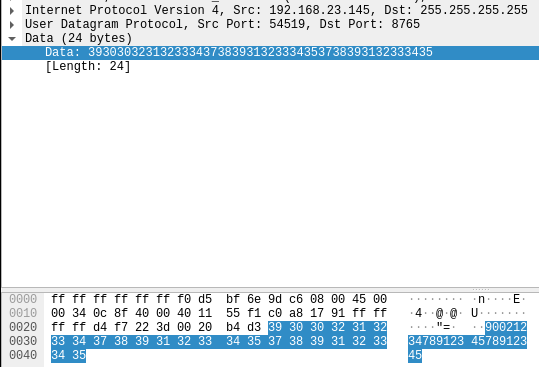 I expected some strange binary protocol, but the payload is just simple numbers. They're a
combination of the serial numbers of the inverter and the ID of the Enverbridge device.
One thing I'm not 100% sure about are the inverter serial numbers, there are two of them, but
on the inverter I've seen the serial numbers are always the same. So the payload is assembled
like this:
I expected some strange binary protocol, but the payload is just simple numbers. They're a
combination of the serial numbers of the inverter and the ID of the Enverbridge device.
One thing I'm not 100% sure about are the inverter serial numbers, there are two of them, but
on the inverter I've seen the serial numbers are always the same. So the payload is assembled
like this:

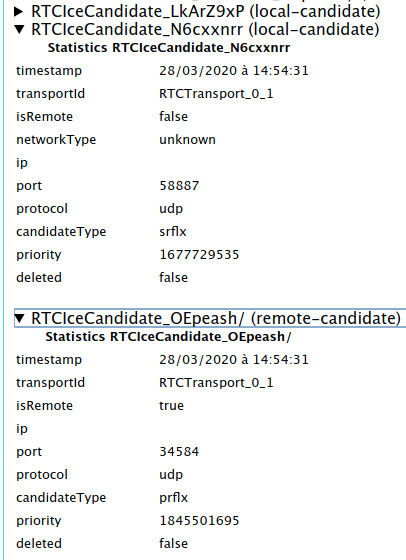
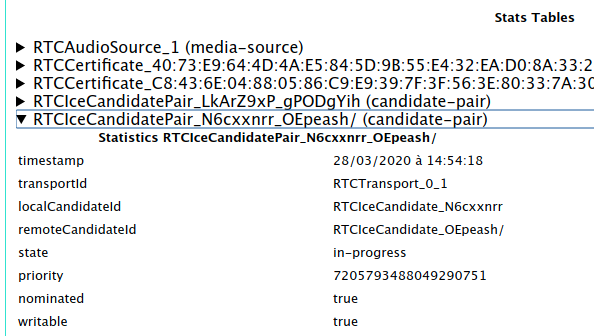 Then from the name of that pair (
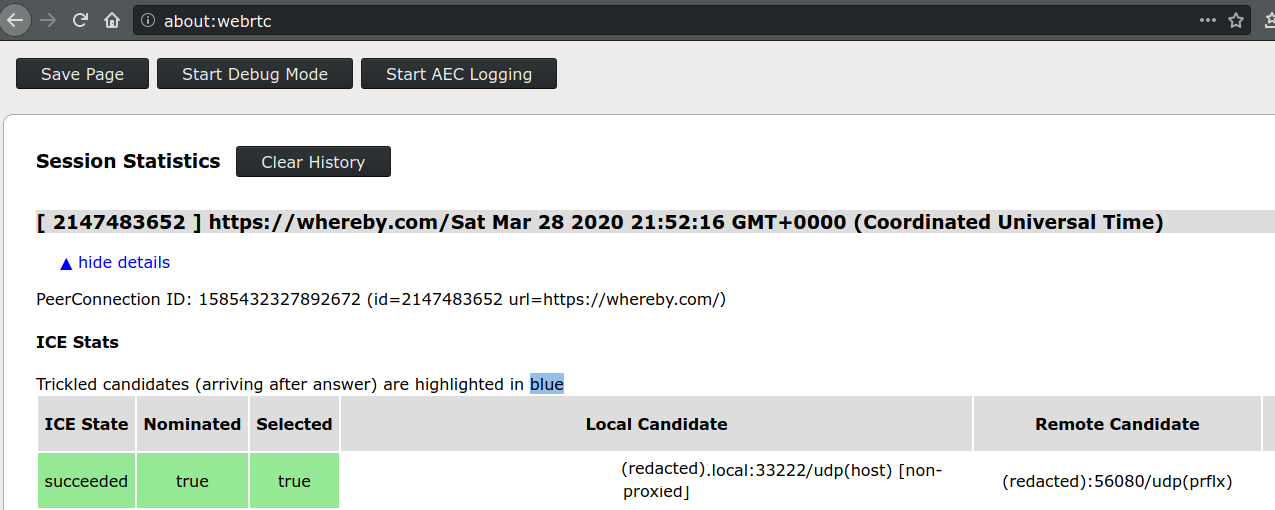
 In the case of a direct connection, I saw the following on the
 I wanted to have a working Two Factor Authentification (2FA) setup to login on salsa.debian.org, Debians s gitlab instance.