Search Results: "ah"

1 April 2012

Julian Andres Klode: Functional programming language for Python programmers and friends

Just for you, and this time in the Pythonesque rendering.
module main:
    import std (range)
    import std.io (printf, IO)
    # print the Fahrenheit-Celcius table for fahr = 0, 20, ..., 300
    function main(mutable IO io):
        Int lower = 0    # lower bound
        Int upper = 300  # upper bound
        Int step = 20    # step
        for Int fahr in range(lower, upper, step):
            Double celcius = 5 * (fahr - 32) / 9
            std.io.printf(io, "%3d\t%6.1f\n", fahr, celcius)
It does not really look like it, but this language is purely functional. It represents side effects using unique types. If you declare a mutable parameter, you basically declare a unique input parameter and a unique output parameter. I m also giving you a list implementation
module std.container.list:
    ## The standard singly-linked list type
    type List[E]:
        Nil                     ## empty list
        Node:
            E value             ## current value
            List[E] next        ## remaining list
 

And yes, both languages should be able to be represented using the same abstract syntax tree. The only change is the replacement of the opening curly brace by a colon, the removal of the closing curly bracket and semicolons, the replacement of C-style comments with Python-style comments and the requirement of indentation; oh and the for statement gets a bit lighter as well.
Filed under: General

Julian Andres Klode: [updated] Functional programming language for C programmers and friends

Just for you:
module main  
    import std (range);
    import std.io (printf, IO);
    /* print the Fahrenheit-Celcius table
        for fahr = 0, 20, ..., 300 */
    function main(mutable IO io)  
        Int lower = 0;   // lower bound
        Int upper = 300; // upper bound
        Int step = 20;   // step
        for (Int fahr in range(lower, upper, step))  
            Double celcius = 5 * (fahr - 32) / 9;
            std.io.printf(io, "%3d\t%6.1f\n", fahr, celcius);


It does not really look like it, but this language is purely functional. It represents side effects using unique types. If you declare a mutable parameter, you basically declare a unique input parameter and a unique output parameter. I m also giving you a list implementation
module std.container.list  
    /** The standard singly-linked list type */
    type List[E]  
        Nil;                    /** empty list */
        Node  
            E value;            /** current value */
            List[E] next;       /** remaining list */


Thus are only excerpts from a document with tens of pages and the reference implementation of the standard library. The incomplete working draft for the language is attached: JAK Programming Language Early Working Draft (28 pages). Update: Fixed the link.
Filed under: General

30 March 2012

Russell Coker: The Security Benefits of Automation

Some Random WTFs The Daily WTF is an educational and amusing site that recounts anecdotes about failed computer projects. One of their stories titled Remotely Incompetent concerns someone who breaks networking on a server and is then granted administrative access to someone else s server by the Data Center staff [1]! In one of the discussions about that I saw people make various claims about Data Center security, such as claiming that having their own locked room helps. My experience indicates that such things don t do much good, I have often been granted access to server rooms without appropriate checks. My experience is that security guards on site generally don t directly do any good. I once had a guard hold a door for me when I was removing a server from a DC without even bothering to ask for ID! On another occasion in the Netherlands I had a security guard who didn t speak English unlock the wrong server room for me, I used hand gestures to inform him that I needed access to the room with the big computers and he gave me the access I needed! It seems that the benefit of security guards is solely based on scaring people who don t have the confidence needed to bluff their way in. Preventing children from thieving is a good thing, On another occasion I showed ID and signed in for access to a DC owned by my employer and I used my security key to go through a locked door with a sign that promised many bad consequences if I failed to lock the door behind me. Then I discovered that the back door was wide open for the benefit of some electricians who were working in the building. Presumably the electricians who had no security training were expected to act as ad-hoc security guards if someone tried to enter through the back door presumably they would not have been good at it. When a company uses part of their own office for a server room then many of these problems disappear. But a common issue in such ad-hoc DCs is the lack of planning and procedures, I have lost count of the number of times I ve seen doors (and even windows) propped open to allow ventilation because there were too many servers for the air-conditioning to cope. The most ironic example of this is the company that had a walk-in safe (think of a small bank vault with concrete walls and thick solid steel door) used for storing servers but with it s door propped open to allow cooling. The advantage of a serious hosting company is that they will have procedures for cooling etc and will be very unlikely to do strange and silly things. Having a locked room in a DC makes some sense, but if security guards have the master keys and are allowed to use them then it might not do much good. The one time I locked my keys in such a room I had a guard let me in without verifying my ID or the claim that there were actually keys locked in the room. Presumably anyone could just claim to have forgotten their keys and get the door unlocked just like a cheap hotel. Locking a rack sounds like a good idea, but the racks I ve seen have had locks which are quite easy to pick. On the one occasion when I had to pick a lock on a rack (due to keys being too difficult to manage for the relevant people) the security guards didn t investigate, so either the security cameras were not supervised or they just didn t care about people picking locks in a shared server room. Also if you allow people to do things freely in a shared server room they could install devices to monitor network traffic. A locked cage in a server room should work well. In the one case where I worked for a company that used such a cage I found it to mostly work well apart from the few weeks when the lock was broken. One company that I worked for had scales before the door between a server room and the car-park to prevent people from stealing heavy servers. Of course that wouldn t stop people stealing hard drives full of data which is worth more than the servers! Also an over-weight colleague had to have the scales disabled for him (as they were based on absolute mass not unexpected changes in an individual s mass) which presumably means that any skinny employee could steal a 2RU server and still be below the mass threshold. How to Solve some of these Problems Computers are subject to all manner of security problems. But they tend not to do arbitrary things for no apparent reason and they will never give in to someone who is charming, attractive, or aggressive unlike humans. I have servers running on Hetzner, Linode, and the Rackspace Cloud. I am always concerned about possible security compromises. But I am not worried about someone climbing in a window of a server room or convincing a security guard to let them in through the door. All three of those hosting companies have the vast majority of interactions automated. I can change many aspects of the servers without involving ANY human interaction. Out of the three of those companies I have had some human interaction with Hetzner (who provide managed servers) when a hard drive needed to be replaced obviously replacing a disk in the wrong server would have been a significant system integrity issue even though everyone would be running RAID-1 and if Hetzner improperly disposed of the broken disk then there could be security issues but this is an unlikely mistake in the face of a rare occurrence. With Linode and the Rackspace Cloud (and the previous Slicehost hosting that was purchased by Rackspace) the most common interactions I have with employees of those companies are when my clients don t pay their bills on time and that s an administrative not a technical issue. When I do have to contact the support people about a technical issue it s usually something that s not immediately connected to the virtual server (EG a loss of routing to the DC). It seems most likely that there are a fairly small number of people who are allowed in the DCs for companies like Hetzner, Linode, and Rackspace. Those people would probably be recognised by the security guards and their work would be restricted to replacing failing hardware and not involve granting access requests. There are some unusual requests that they can process (EG one of my clients recently transferred a virtual server between business units) but even in those cases the administrative software controls who gets access. This is much better than just handing hardware access to what seems to be the correct physical server to a client. If you have software running a few computers and operating correctly then you can probably scale it up to run thousands of computers and have it still work correctly. But if you have a team of people controlling access requests and want to scale it up significantly then there are huge problems in hiring skilled people and training them correctly. There is a real risk of security flaws in such administrative software, if someone managed to exploit the automated management system for one of those three companies then they could probably gain access to the private data of any of their customers. But the risk of this seems a lot less than the risk of general incompetence among humans who perform routine and boring tasks which have the potential for great errors. Related posts:
  1. The Security Benefits of Being Unimportant A recent news item is the hacking of the Yahoo...
  2. Security Lessons from a Ferry On Saturday I traveled from Victoria to Tasmania via the...
  3. Public Security Cameras There is ongoing debate about the issue of security cameras,...

28 March 2012

Andrew Pollock: [life/americania] Four days in New Orleans

Sarah's Mum had accrued too much annual leave and had to take some time off work, so Sarah did some (very mild) arm twisting and convinced her to come over for 3 weeks, and do a 5 day cruise to Mexico out of New Orleans. Unfortunately, my annual leave situation wasn't quite so abundant, and I had a lot going on at work, so regretfully I didn't join them on the cruise, and instead went to New Orleans for a four day weekend when they returned. From all reports, the cruise was very good. Zoe handled it well, although she did say "home" a lot. One of the two stops in Mexico was to check out some Mayan ruins, which looked awesome from the photos. The other stop involved a dolphin encounter. I was incredibly envious of all that they got to do, and would have loved to have gone with them, as I've never been on a cruise ship either. I can also report that no cats were lost during this bachelor stint. I had a night flight on the Wednesday evening to get there, which was scheduled to get in at around midnight, and I'd booked a motel room near the airport for that night, and we'd booked a vacation rental home for Thursday to Sunday nights. Unfortunately, my flight ended being delayed something like 2.5 hours, so I didn't get into New Orleans until around 2am. The house we rented did the trick nicely. It was a small "shotgun" duplex in what looked like a nice neighbourhood. It was advertised as being close to the street car line, but they were doing some work on the tracks, so the street car didn't seem to be running as far down the line as it usually did, so it ended up being a bit more of a trek to get to it. It was also extremely slow, and there was a marathon on the Sunday, which closed everything down for a long time, making it a generally pretty unreliable form the transport. We ended up renting a car for Saturday and Sunday, which was something of a saga in itself, as Enterprise didn't have any cars at the location we'd booked one, so after a couple of hours cooling our heels there (Zoe was incredibly well-behaved, all things considered), they shuttled us over to another location and we ended up with a minivan instead of a compact, which for the same price, allayed our concerns about being able to transport all of our luggage to the airport on Monday morning. We had a very early morning flight on Monday morning to come back, which got into SFO at around 9am, and I went directly to work from there. Thursday We all arrived at the house, separately. It ended up taking them 2 hours to disembark the ship when it came back into port, with Customs taking an eternity to process everyone. I think we went exploring the local area that afternoon, and took a street car into the city to check out Bourbon Street, having a Cajun dinner at Remoulade. Friday In the morning, we went to check out Lafayette Cemetery Number 2. Sarah took Zoe back to the house for a nap, and Sarah's Mum and I continued back to explore the French Quarter some more, walking down the length of Royal Street (which was vastly different from Bourbon Street, just one block over). We had lunch at the French Market. The cemetery was interesting, as pretty much all of the graves were these huge above ground tombs, that seemed to have multiple family members interred in them. Apparently the cemetery filled up quite quickly courtesy of a Yellow Fever outbreak. After lunch, Sarah's Mum and I continued wandering around the French Quarter. We went and took a look at the Mississippi River, and I had an encounter with a grifter who was so good at his job I couldn't bring myself to argue with him over the $20 he diddled me out of. We tried to get to the Civil War Museum, but it closed at 4pm. We looked at the Robert E. Lee Monument, which seemed to be draped in drunks, and then I think we rendezvoused with Sarah and Zoe back on Canal Street for dinner at The Court of Two Sisters (which apparently we were under-dressed for, as Sarah and her Mum said we were getting a lot of dirty looks from other patrons). Saturday On Saturday morning, we had the aforementioned car rental experience from hell, and by the time we had the car it was lunchtime, so Zoe napped in the car after lunch on the way out to Oak Alley Plantation, where we were introduced to the delightful beverage known as the mint julep, and took a tour of the house and wandered the grounds. Sunday On Sunday, Sarah and her Mum did a swamp tour, and Zoe and I went to the zoo. As I said earlier, there was a marathon that completely closed down Saint Charles Avenue, which is where the street cars run, so after walking down to where the street cars started operating (which ended up being most of the way down South Carrollton Avenue), the driver informed me that the street cars were queuing up at the corner of South Carrollton and Saint Charles, and I should get off her street car and get on the one at the front of the queue. I did this, but the driver of the front street car informed me that she wouldn't be leaving for an hour and half. At this point, I started considering a bus instead. Zoe and I went to check out the Mississippi River, which was quite close to where we were, and then I went back, and despite a street car having left (without any passengers) the driver of the current street car couldn't tell me when she'd be leaving, so I started walking down Saint Charles Avenue. Unfortunately, Zoe's going through a phase where she wants to be carried everywhere, so I was lugging her all over the place on my hip. Sarah didn't take a stroller with her, and instantly regretted it. Lesson learned. Eventually we managed to get onto a bus, which dropped us off at Audubon Park, which had Audubon Zoo at the other end of it. There was a playground near the Saint Charles Avenue end of the park, so Zoe had a bit of a play on that, and then we continued through the park to the zoo. Mercifully, the zoo had dodgy strollers for rent, and there was no way in the world I wasn't going to rent one of them, so that made getting around with Zoe a lot easier on my back. We had a really good time at the zoo. There was some sort of a music festival on in the parklands within the zoo grounds, and that included a jumping castle, which Zoe expressed a desire to have a go on. She had a fabulous time on it. I think she probably spent about 15 minutes in there, without any tears. I was very impressed. I took a brief video of some of her antics. It was getting close to Zoe's nap time, and she was getting tired, but fortunately Sarah and her Mum were able to pick us up from the zoo after their swamp tour and Zoe got to nap back at the house. Monday We had a very early start. Unfortunately, our flight (with United) was a couple of days after United and Continental officially merged, and despite having checked in online, we had to queue up with everyone else (for an extended period of time) to drop off our checked luggage. Then there was a 45 minute line for security screening. We pulled the "toddler going to melt down" card and jumped to the head of the line, but Sarah's Mum had to wait. The flight ended up being delayed because people were stuck in the security line. Overall impressions of New Orleans Fabulous architecture. There were so many gorgeous houses on Saint Charles Avenue and the surrounding area. I'd have loved to do an architecture tour. Crap (but cheap) public transport. $3 gets you a day pass. The street cars are cute, but slow and unpredictable. The drivers were remarkably unhelpful. The buses were okay. Great food. Zoe seemed to have a liking for the spicy stuff. I gave her some fresh alligator jerky, and after some initial coughing and spluttering at the spiciness of it, she came back for more. Post-Katrina recovery. We really only saw a very small part of the city, but there were still some houses with boarded up windows, and some vacant blocks where buildings had been demolished, but largely you'd not have been able to tell that large parts of the city had been underwater, from casual inspection. I really enjoyed the trip, even though it was brief, I feel like I got a good feel for the place. We were there just after Mardi Gras, and there were still beads everywhere. Draped all over fences. Over power lines. Trees on the parade route were absolutely covered in beads. I'd have loved to have been there for Mardi Gras. My friend Brandon, who is an excellent street photographer, took some great photos that capture some of it. Photos from Sarah's cruise and our time in New Orleans are here.

27 March 2012

Diego Escalante Urrelo: All the new cool stuff in Epiphany, alias, Web

Today we released Epiphany 3.4. It includes all the fixes, enhancements and new cool features that we build since September 2011. That is 6 months of cool stuff! Xan already explained the bigger picture but I want to highlight some details in the spirit of Every Detail Matters. Improved location bar, and the new history backend The location bar suggestions now load extra-extra-fast, thanks to our new SQLite backend. Besides being extra fast, SQLite allows us to make complex queries to offer better results in the completion. Goal for 3.6: to successfully handle searches like that page, with the dog, you know, that one with the funny one . This also makes possible to have a cool Overview start page for 3.6. Much like Chrome or Opera do. An awesome UI: cleaner toolbar, loading progress That is all the chrome you are getting, kid! Less distractions, more web! All the usual tools are still available in the gear menu: Oh, and this other one is a pretty one. Check out the new load progress indicator: You might have already noticed the combined stop/reload button. Some other niceties like the new link tooltips are all over the place. I will not ruin the surprise :-) . Reliable download icons This is my friend Juanjo:
He is always happy. One day he said: Diego, my PDF documents are shown as boxes while downloading. It makes me mad! I want Juanjo to keep that happy hacker smile. So I decided to fix this. Downloads now have a better idea of the icon they should show: Page icons, now a WebKitGTK+ feature Do you notice something? Yeah, icons for every of the loaded pages. The support for this is now in WebKitGTK+, available to other applications. This means it is better supported and maintained! Redesigned about: pages For a time now we have had some geeky about: pages. One for memory (about:memory), one for plugins (about:plugins), and perhaps the most useful one, one to manage applications (about:applications): And, last but not least Less lines:
$ git diff --shortstat 3.2.0..3.4.0
328 files changed, 73211 insertions(+), 104528 deletions(-)
Unlike other browsers, Epiphany does not have dozens of engineers behind the project. This means that the more code we have to maintain, the less time we have to develop new features and to even maintain that code! Also, this makes Xan happy. But luckily Igalia has hackers like Martin Robinson who are willing to show us how hacking should be done: Epiphany 3.4.0, alias, Web. Is an awesome release. It will soon be in your distro of choice. Thanks Allan for the screenshot help!

26 March 2012

Vincent Sanders: NetSurf Developer Workshop

NetSurf DevelopersOver the weekend we held the NetSurf developer workshop. The event was kindly hosted by Collabora at their Cambridge offices. The provided facilities were agreed to be excellent and contributed to the success of the event.

Five developers managed to attend from around the UK John-Mark Bell, Vincent Sanders, Michael Drake, Daniel Silverstone and Rob Kendrick. In addition James Shaw, one of the project founders, made a special appearance on Saturday.

Starting from Friday afternoon we each put in over 25 hours of actual useful work and made almost 170 commits changing over 350 files, added 10,000 new lines of code and altered another 18,000.

The main aim of the event was to make the transition from using libxml2 to our own libdom library for the browser DOM tree. This was done to improve the browsers performance and size when manipulating the DOM but also gives us the ability to extend the browsers features to include dynamic rendering and Javascript

We also took the opportunity to discuss and plan other issues including:
  • User interface message handling and translation.
  • User preference handling.
  • Toolchain support.
  • Disc caching.
  • Javascript binding
  • Electronic book content handler.
Rob tackled the first parts of the messages conversion from numerous separate files into a single easy to handle file which will in future allow for easier translation and reduce message proliferation.

We made decisions on the ongoing rework of user preference handling which will be implemented in future.

The decision on the toolchain was slightly changed to be that any core or library code (non frontend/toolkit specific parts) are required to conform to the C99 standard. Frontends are permitted to recommend and use whatever tools their maintainer selects but they cannot enforce those restrictions on core code. This issue is principly because the BeOS maintainer is compiling NetSurf with g++ 2.95 which is missing several important language features we wish to use.

Developers at workThe recurring issue of disc caching was raised again and we have come up with what we hope is a reasonably elegant solution to be implemented over the forthcoming months.

Now there is a suitable DOM to bind against, the existing Javascript engine support will be properly integrated and should result in basic script support before the 3.0 release. This support will remain a build time option so NetSurf can continue to be used on platforms where the interpreter is too resource intensive to be used.

A short discussion about the possibility of integrating a basic page based content handler for epub and mobi type documents was discussed and while the idea was well received no decisions on implementation were made.

Overall the event was a resounding success and we are left with only a small handful of regressions which appear straightforward to solve. We also have a clear set of decisions on what we need to do to improve the browser.

23 March 2012

Vasudev Kamath: Fixing hyde.el

Recently after changing my blog to use jekyll and Github I came across the hyde.el an emacs plugin which allows to maintain a jekyll powered blog from emacs. You can find the post by author here and source code here on Github. At first site I was very happy about plugin and started using it but I could successfully use it only once properly then whenever I launch the plugin I get error message

*zsh:cd blog path no such directory*
(Note: I'm a zsh user not sure if this error is particular to zsh only. If you face same error on other shell please let me know) After error hyde mode never showed jekyll blog properly. Looking at the source code I saw all the statements which were commands were executed using shell-command elisp function similar to following
let (
(cmd (format "cd '%s' && git diff-files --quiet '%s' > /dev/null" repo file))
(= (shell-command cmd) 1))
The cd command in the string was failing some how spoiling all other stuff!.. Probably the ~ in the path to blog was not properly expanded by shell-command, So I thought why not use elisp in built cd function instead and bingo the hyde mode works perfectly fine now!.. I've raised a pull request as I don't like to maintain a fork. Hope author will consider merging my changes. Hope this fix helps others too. Cya.

22 March 2012

Brett Parker: Awesome, Gnome Power Manager and ACPI

I use awesome as my window manager, without a gnome session around it - as gnome-power-manager now depends on having a gnome-session running, I had a choice to make - I don't need or want to run a gnome-session, so I went on the hunt for a different battery monitor for my laptop. I've ended up using fdpowermon as it does just what I need and nothing more - then I edited the default acpi scripts to do what I had gnome-power-manager doing before hand, i.e. if I've unplugged the AC and I close the lid, the laptop does a s2both. Slightly more configuration, but it now does what I expect all the time (yay!). I wanted some extra keybinding from the default config of awesome in Debian, so I also created a very small rc.lua file as follows:
dofile("/etc/xdg/awesome/rc.lua")
mylayouts =  
    layouts[2],
    layouts[10],
    layouts[2],
    layouts[2],
    layouts[2],
    layouts[2],
    layouts[1],
    layouts[1],
    layouts[1]
 
for s = 1, screen.count() do
    for t = 1, 9 do
        awful.tag.setproperty(tags[s][t], "layout", mylayouts[t])
    end
end
globalkeys = awful.util.table.join(globalkeys,
    awful.key( "Control", "Mod1"  , "l", function () awful.util.spawn("/home/brettp/bin/lock-screen.sh") end)
)
root.keys(globalkeys)
This basically overrides parts of the default config and makes it so that my "tags" are vsplit for tags 1 and 3-6, maximised for tag 2 (where my browser lives) and floating for 7-9 (where the IM client sits, and I do anything involving GIMP). It does mean that I'm at the whim of the default config mostly, but as that seems to be fairly sane most of the time, that's not a problem... it also means that I'm only maintaining a small change set rather than a full rc file, and so new "features" can come in without me having to touch anything (well, other than restarting awesome...). I do need to either unmap the minimise key combo, or create an unminimise key combo that pops up a menu with the list of minimised windows in it at some point, though - because it's all too easy to press Meta4-n when you meant Meta4-m.

21 March 2012

Axel Beckert: Tools for CLI Road Warriors: Remote Shells

Most of my private online life happens on netbooks and besides the web browser, SSH is my most used program especially on netbooks. Accordingly I also have hosts on the net to which I connect via SSH. My most used program there is GNU Screen. So yes, for things like e-mail, IRC, and Jabber I connect to a running screen session on some host with a permanent internet connection. On those hosts there is usually one GNU Screen instance running permanently with either mutt or irssi (which is also my Jabber client via a Bitlbee gateway). But there are some other less well-known tools which I regard as useful in such a setup. The following two tools can both be seen as SSH for special occassions. autossh I already blogged about autossh, even twice, so I ll just recap the most important features here: autossh is a wrapper around SSH which regularily checks via two tunnels connect to each other on the remote side if the connection is still alive, and if not, it kills the ssh and starts a new one with the same parameters (i.e. tunnels, port forwardings, commands to call, etc.). It s quite obvious that this is perfect to be combined with screen s -R and -d options. I use autossh so often that I even adopted its Debian package. mosh Since last week there s a new kid in town^WDebian Unstable: mosh targets the same problems as autossh (unreliable networks, roaming, suspending the computer, etc.) just with a completely different approach which partially even obsoletes the usage of GNU Screen or tmux: While mosh uses plain SSH for authentication, authorization and key exchange the final connection is an AES-128 encrypted UDP connection on a random port and is independent of the client s IP address. This allows mosh to have the following advantages: The connection stays even if you re switching networks or suspending your netbook. So if you re just running a single text-mode application you don t even need GNU Screen or tmux. (You still do if you want the terminal multiplexing feature of GNU Screen or tmux.) Another nice feature, especially on unreliable WLAN connections or laggy GSM or UMTS connections is mosh s output prediction based on its input (i.e. what is typed). Per line it tries to guess which server reaction a key press would cause and if it detects a lagging connection, it shows the predicted result underlined until it gets the real result from the server. This eases writing mails in a remote mutt or chatting in a remote irssi, especially if you noticed that you made a typo, but can t remember how many backspaces you would have to type to fix it. Mosh needs to be installed on both, client and server, but the server is only activated via SSH, so it has no port open unless a connection is started. And despite that (in Debian) mosh is currently just available in Unstable, the package builds fine on Squeeze, too. There s also an PPA for Ubuntu and of course you can also get the source code, e.g. as git checkout from GitHub. mosh is still under heavy development and new features and bug fixes get added nearly every day. Thanks to Christine Spang for sponsoring and mentoring Keith s mosh package in Debian.

Steve Kemp: My code makes it into GNU Screen, and now you can use it. Possibly.

Via Axel Beckert I learned today that GNU Screen is 25 years old, and although development is slow it has not ceased. Back in 2008 I started to post about some annoyances with GNU Screen. At the time I posted a simple patch to implement the unbindall primitive. I posted some other patches and fixed a couple of bugs, but although there was some positive feedback initially over time that ceased completely. Regretably I didn't have the feeling there was the need to maintain a fork properly, so I quietly sighed, cried, and ceased. In 2009 my code was moved upstream into the GNU Screen repository (+documentation update). We're now in 2012. It looks like there might be a stable release of GNU Screen in the near future, which makes my code live "for real", but in the meantime the recent snapshot upload to Debian Experimental makes it available to the brave. 2008 - 2012. Four years to make my change visible to end-users. If I didn't use screen every day, and still have my own local version, I'd have forgotten about that entirely. Still I guess this makes today a happy day! Wheee! ObQuote: "Thanks. For a while there I thought you were keeping it a secret. " - Escape To Victory

20 March 2012

Axel Beckert: Happy Birthday GNU Screen!

According to this Usenet posting, GNU Screen became 25 years old today. (Found via Fefe.) And no, it s not dead. In contrary, the reaction on the mailing list to bug fixes with patches is usually impressingly prompt. :-) I took this occassion and uploaded a current git snapshot of GNU Screen to Debian Experimental. Bug #644788 (screen 4.1.0 can t attach to a running or detached screen 4.0.3 session) is still an issue with that snapshot, but gladly upstream seems to work on a solution for it. There s even talk about a 4.1.0 beta release soon although that hasn t happened yet. Have fun!

18 March 2012

Gustavo Franco: Debian testing (wheezy) keyboardless install

I couldn't find an end-to-end document online about this just bits and pieces here and there. Let me describe how to install Debian testing (wheezy) without a keyboard using an USB flash drive and ssh.

I've got an HP Microserver a month or so ago and this is the step by step of my second install. The first one was also keyboardless but didn't involve an USB flash drive to bootstrap. I've used tftpd and dhcp from my laptop, but forgot to capture the notes to make a blog post. Shame on me.

Here's what you need:
The last two requirements are optional for hardcore preseeders. If you don't know what I mean. You aren't one of them. :)

Here's the step by step to install using SSH:
At this point you have all that you need to do a regular install using an USB flash drive and it's kinda of well documented. Well, we still need to change it to make it work without a keyboard and give you the ability to ssh into the installer.

Create a preseed.cfg in the root directory of the USB flash drive containing the following:
d-i netcfg/get_hostname string HOSTNAME
d-i netcfg/get_domain string DOMAIN
d-i anna/choose_modules string network-console
d-i network-console/password password INSERT_A_PASSWORD_HERE
d-i network-console/password-again password INSERT_A_PASSWORD_HERE

Edit syslinux.cfg in the root directory of the USB flash drive to look like this:
default netinst
prompt 0
timeout 5
label netinst
menu label netinst
 kernel linux
 append auto=true vga=normal file=/preseed.cfg initrd=initrd.gz priority=critical
My wishlist to the d-i hackers out there:
  • A boot-ssh.img.gz with the syslinux.cfg and preeseed.cfg above. In this case, it would be much more trivial to document in the installer manual how to use such a great feature.

Pablo Lorenzzoni: Time to change Window Manager again?

Ten years ago I was a fan of NEXTSTEP desktops and a die hard user of Window Maker. I love dockapps, and used to collect them. Things changed, and, as I moved from Desktops to Laptops, I began using simpler Window Managers. The powerful keyboard-shortcuts Fluxbox along with its capability to join windows with tabbing won me over and I began using it in my Laptop, while preserving Window Maker in my Desktop. In time, Fluxbox were used in both sides. Then the netbooks came and I bought an EeePC. The screen was so small that even the non-obstructive nature of Fluxbox were not enough. I began to try tiling window managers and I settle for Awesome. I was using Fluxbox in my Desktop and my Laptop, but Awesome was running in my Netbook. Tiling was making a lot of more sense and I could be productive, even in a small Netbook. Eventually, I started using Bluetile in my Laptop. Also, Bluetile was written in Haskell, and I was interested in Functional Languages by that time Now I got a new Laptop, and, since it features a Realtek 8191SE Wi-fi card, I had to install Wheezy (in my laptop, I usually run stable). Wheezy comes with the new GNOME 3 desktop, of which I read a lot. I decided to give it a try. I am missing advanced tiling (it seems that GNOME3 tiling works just in the side-by-side approach) and I also think that creating custom launchers should be improved but so far I am not disliking it, which is a good step toward adopting it. I ll give it a week to convince me. Let s see how it works its charm on me :-)

Gregor Herrmann: RC bugs 2012/10-11

since I was travelling in the pre-ultimate week for a few days, there was no report about my RC bugs fixing activities. so here we go with an overview covering two weeks:

17 March 2012

Matthew Garrett: More ways for firmware to screw you

Some of my recent time has been devoted to making our boot media more Mac friendly, which has entailed rather a lot of rebooting. This would have been fine, if tedious, except that some number of boots would fall over with either a clearly impossible kernel panic or userspace segfaulting in places that made no sense. Something was clearly wrong. Crashes that shouldn't happen are generally an indication of memory corruption. The question is how that corruption is being triggered. Hunting that down wasn't terribly easy.

My first thought was that we were possibly managing to load the kernel over a region used by UEFI code. UEFI defines two types of code - boot services and runtime services. While runtime services code and data must be preserved by the OS, in theory boot services code and data is available to the OS once the firmware has exited. In practice, that's not true. It seemed entirely possible that the kernel might be ending up on top of some of that boot services code or data and getting trodden on. Grub now has code to avoid putting the kernel on boot services, so testing the latest code seemed like a good plan. But no, crashes still happened.

That pretty much ruled out the bootloader. My next thought was that executing some of the firmware code was triggering a write to some other memory that contained the kernel. Josh Boyer suggested the next trick, which was to try marking the kernel read-only to see whether anything was hitting it. x86 lets you mark pages as read-only - any attempt to write to them should take a fault. UEFI functions are executed in the context of the kernel, so share the same page tables. That let me rule this out, since everything still went just as wrong and I wasn't taking an extra fault first.

However, at this point I was reasonably happy that it wasn't the kernel itself being overwritten - faults were occurring in userspace code as well. That was a pretty strong indication that what was happening was continuing to happen once userspace had started, so it wasn't a direct response to a firmware call. I made sure of that by stubbing out all the calls that could be triggered after kernel initialisation, and saw the same failures. Once all attempts to be clever have failed, it's time to just start using brute force. The kernel lets you reserve areas of RAM by passing arguments like memmap=0xlength$0xstart to block length bytes starting at start from being used. It took a while, but I finally found a 256MB range that made a difference - reserving it resulted in the machine booting reliably, letting the OS use it resulted in occasional crashes.

Definite progress. Comparing that memory range to the EFI memory map was helpful. There were several blocks of UEFI boot services data present there, which really seemed like too much of a coincidence. By reserving each of them in turn, I'd traced it down to a single 31MB region of boot service data - that is, memory reserved by the firmware for use by the UEFI boot services. Per spec, this is available to the OS once the boot environment has been exited. Nothing other than the OS should be touching this after boot, but something clearly was. Tracking down what was far easier than I expected, although the first attempt was a failure. Setting it read-only should have triggered a fault, but didn't. That was rather confusing. But, rather than give up, I patched the kernel to fill the region with 0xff at kernel init. Then I booted the system, read it back and looked for values that weren't 0xff. I got this:
00000000  ff ff ff ff ff ff ff ff  ff ff ff ff ff ff ff ff   ................ 
*
001568a0  ff ff ff ff ff ff ff ff  ff ff ff ff 84 00 00 00   ................ 
001568b0  00 20 a7 ac 46 00 00 00  00 00 00 00 00 00 06 01   . ..F........... 
001568c0  c2 0b 0c 00 ff ff ff ff  ff ff ff ff ff ff ff ff   ................ 
001568d0  ff ff 0a 04 f0 03 82 0d  40 00 00 00 ff ff ff ff   ........@....... 
001568e0  ff ff 00 21 00 36 9a 80  ff ff ff ff ff ff 00 7e   ...!.6.........~ 
001568f0  00 09 43 48 41 2d 47 75  65 73 74 01 04 02 04 0b   ..CHA-Guest..... 
00156900  16 32 08 0c 12 18 24 30  48 60 6c 2d 1a 0e 18 1a   .2....$0H l-.... 
00156910  ff ff 00 00 00 00 00 00  00 00 00 00 00 00 00 00   ................ 
00156920  00 00 00 00 00 00 00 dd  09 00 10 18 02 00 10 01   ................ 
00156930  00 00 dd 1e 00 90 4c 33  0e 18 1a ff ff 00 00 00   ......L3........ 
00156940  00 00 00 00 00 00 00 00  00 00 00 00 00 00 00 00   ................ 
00156950  00 00 bd ea f8 b3 ff ff  ff ff ff ff ff ff ff ff   ................ 
00156960  ff ff ff ff ff ff ff ff  ff ff ff ff ff ff ff ff   ................ 
*
022fb000
That's a lot of 0xffs (around 31MB of them) with one small section that contains an 802.11 probe packet with the SSID of the hospital across the road from my house. Apple support network booting off wireless networks. It seems that the firmware brought up the wireless card, associated with this network (it's the only public one nearby) and then left the card DMAing packets into RAM. The read-only page attribute only applies to CPU-initiated accesses, so it could do this without triggering a page fault. It also explained why it was so random - whether memory corruption occurred would depend on whether a packet appeared between that memory being used by the OS and the kernel reinitialising the wireless card. It certainly explains why I couldn't reproduce it when I left the machine repeatedly rebooting on the bus home.

How do we fix this? Unsure. With luck disconnecting the UEFI driver in the bootloader should quiesce the hardware, but without testing I'm not sure of that yet. For now it's just another example of firmware managing to break expectations in deeply strange ways.

comment count unavailable comments

16 March 2012

Daniel Kahn Gillmor: Compromising webapps: a case study

This paper should be required reading for anyone developing, deploying, or administering web applications. It's also interesting to read the perspective of the folks operating the compromised webapp (details are in the section titled "Digital Vote-By-Mail" on pages 34 to 38).

14 March 2012

Stefano Zacchiroli: not a catchy headline

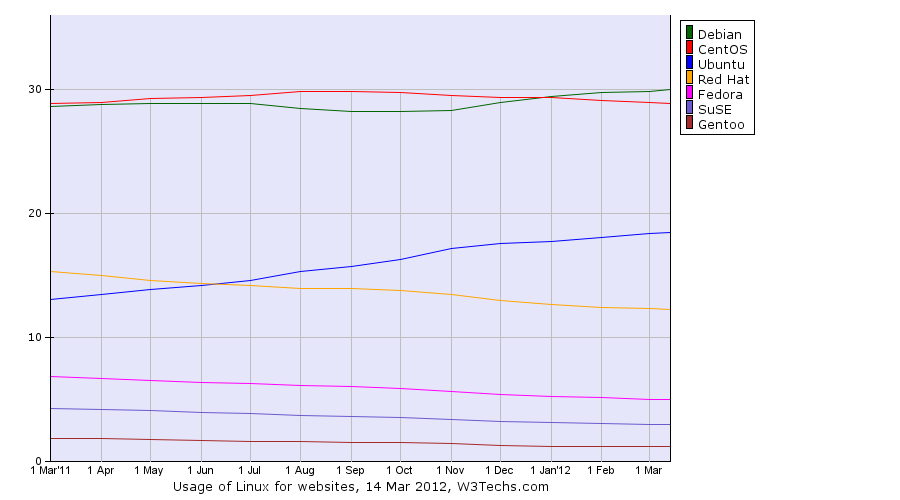
As we're doing trends today, I got curious about Debian. I don't particularly care about popularity contests other than popcon, and Debian choices surely aren't driven by them. But hey, curiosity is curiosity, right? So, here are today's w3techs trends for websites using GNU/Linux, with all lines shown:
Debian: 30%; CentOS: 28,9%; Ubuntu: 18,4%; Red Hat: 12,2%; Fedora: 5%; SuSE: 3%; Gentoo: 1,2%
(As thou shall always read methodologies before stats, here is the technologies overview page.) Debian is the top entrant with 30% of the websites using GNU/Linux. What I find interesting is that Debian has jumped at first place in January 2012, significantly after the release of our current stable release, Squeeze, that dates back to February 2011. It is also interesting to see community distros (Debian and CentOS) starkly ahead of commercially backed distros. That is what I find most fascinating about our projects. Whether that will remain the case or not is, for me, one of the big questions of the decade for the self-determination of Free Software communities.

12 March 2012

Stefano Zacchiroli: debian contributions to the linux kernel

The statistics of the "who wrote Linux x.y.z" series date back to at least 2.6.20. According to my experience talking with users and Free Software enthusiasts, those statistics really make a dent in the public perception of who is giving back upstream. Obviously, one should not take a single upstream, even if it is as important as the Linux kernel, as a measure of how much a given Free Software entity is giving back upstream overall. But users still seem to be fascinated by them. As a result, I have often had to answer the question: why Debian doesn't show up on those statistics?. My answer has always been something along the lines that Debian Developers who maintain Linux kernel packages, the almighty Debian Kernel Team, do that mostly as part of their volunteer engagement in Debian. As a consequence, they do not earmark their contributions as if they worked for a company and they add up to the hobbyist count instead (although you can you can routinely spot individual Debian Kernel Team members among the most active contributors for specific Linux releases). The above is the true and honest answer. But every time I've given it, I couldn't help feeling that the user who asked went home with a "yeah, well" afterthought. If you don't want to take my word of it, fine. Here is what Greg K-H had to say about Debian contributions in a recent blog post about the stable Linux kernel:
I would personally like to thank the Debian kernel developers, specifically Ben Hutchings, Maximilian Attems, Dann Frazier, Bastian Blank, and Moritz Muehlenhoff. They went above and beyond what any "normal" developer would have done, ferreting patches out of the kernel.org releases and the different vendor kernels and bug tracking systems, backporting them to the 2.6.32 kernel, testing, and then forwarding them on to me. Their dedication to their user community is amazing for such a "volunteer" group of developers. I firmly believe that without their help, the 2.6.32 kernel would not have been the success that it was. The users of Red Hat and SuSE products owe them a great debt. Buy them a beer the next time you see them, they more than deserve it.
I'll take good care of following his wise advice. Please do the same.
(Thanks to Sylvestre for pointing me to Greg's blog post.)

10 March 2012

Vasudev Kamath: ttf-indic-fonts to fonts-indic transition complete!

We in Debian-IN team where maintaining ttf-indic-fonts a set of fonts for all Indian language fonts from various origin. This package used to build around 7 to 10 binary package of different Indian language. The source package ttf-indic-fonts was itself a mess. It was a native package it was mixing all fonts with active upstream and inactive upstream together which was hard to maintain. Last April I transitioned this package from old packaging style (which version I don't remember) to dh7 standard. At the same time bubulle asked me it would be great if I can rename the package to Fonts team new packaging policy Even though I was just beginning with Debian packaging I dared to propose a draft :) Well it was in May and now its March 2012 almost one year over and We have successfully finished the transition and Kartik uploaded all packages to Debian. Now Debian-IN team maintains 62 packages and me? Yeah my package count jumped from 12 to 38! Almost close to close to number of packages Kartik is maintaining :) Please do the testing report any bugs! Cya

Next.

Previous.