Search Results: "spa"

7 August 2020

Jonathan Dowland: Vimwiki

At the start of the year I begun keeping a daily diary for work as a simple text file. I've used various other approaches for this over the years, including many paper diaries and more complex digital systems. One great advantage of the one-page text file was it made assembling my weekly status report email very quick, nearly just a series of copies and pastes. But of course there are drawbacks and room for improvement. vimwiki is a personal wiki plugin for the vim and neovim editors. I've tried to look at it before, years ago, but I found it too invasive, changing key bindings and display settings for any use of vim, and I use vim a lot. I decided to give it another look. The trigger was actually something completely unrelated: Steve Losh's blog post "Coming Home to vim". I've been using vim for around 17 years but I still learned some new things from that blog post. In particular, I've never bothered to Use The Leader for user-specific shortcuts. The Leader, to me, feels like a namespace that plugins should not touch: it's like the /usr/local of shortcut keys, a space for the local user only. Vimwiki's default bindings include several incorporating the Leader. Of course since I didn't use the leader, those weren't the ones that bothered me: It turns out I regularly use carriage return and backspace for moving the cursor around in normal mode, and Vimwiki steals both of those. It also truncates the display of (what it thinks are) URIs. It turns out I really prefer to see exactly what's in the file I'm editing. I haven't used vim folds since I first switched to it, despite them being why I switched. Disabling all the default bindings and URI concealing stuff and Vimwiki is now much less invasive and I can explore its features at my own pace:
let g:vimwiki_key_mappings =   'all_maps': 0,  
let g:vimwiki_conceallevel = 0
let g:vimwiki_url_maxsave = 0 
Followed by explicitly configuring the bindings I want. I'm letting it steal carriage return. And yes, I've used some Leader bindings after all.
nnoremap <leader>ww :VimwikiIndex<cr>
nnoremap <leader>wi :VimwikiDiaryIndex<cr>
nnoremap <leader>wd :VimwikiMakeDiaryNote<cr>
nnoremap <CR> :VimwikiFollowLink<cr>
nnoremap <Tab> :VimwikiNextLink<cr>
nnoremap <S-Tab> :VimwikiPrevLink<cr>
nnoremap <C-Down> :VimwikiDiaryNextDay<cr>
nnoremap <C-Up> :VimwikiDiaryPrevDay<cr>
,wd (my leader) now brings me straight to today's diary page, and I can create separate, non-diary pages for particular work items (e.g. a Ticket reference) that will span more than one day, and keep all the relevant stuff in one place.

6 August 2020

Dirk Eddelbuettel: nanotime 0.3.0: Yuge New Features!

A fresh major release of the nanotime package for working with nanosecond timestamps is hitting CRAN mirrors right now. nanotime relies on the RcppCCTZ package for (efficient) high(er) resolution time parsing and formatting up to nanosecond resolution, and the bit64 package for the actual integer64 arithmetic. Initially implemented using the S3 system, it has benefitted greatly from work by Leonardo Silvestri who rejigged internals in S4 and now added new types for periods, intervals and durations. This is what is commonly called a big fucking deal!! So a really REALLY big thank you to my coauthor Leonardo for all these contributions. With all these Yuge changes patiently chisseled in by Leonardo, it took some time since the last release and a few more things piled up. Matt Dowle corrected something we borked for integration with the lovely and irreplacable data.table. We also switched to the awesome yet minimal tinytest package by Mark van der Loo, and last but not least we added the beginnings of a proper vignette currently at nine pages but far from complete. The NEWS snippet adds full details.

Changes in version 0.3.0 (2020-08-06)
  • Use tzstr= instead of tz= in call to RcppCCTZ::parseDouble()) (Matt Dowle in #49).
  • Add new comparison operators for nanotime and charcters (Dirk in #54 fixing #52).
  • Switch from RUnit to tinytest (Dirk in #55)
  • Substantial functionality extension in with new types nanoduration, nanoival and nanoperiod (Leonardo in #58, #60, #62, #63, #65, #67, #70 fixing #47, #51, #57, #61, #64 with assistance from Dirk).
  • A new (yet still draft-ish) vignette was added describing the four core types (Leonardo and Dirk in #71).
  • A required compilation flag for Windows was added (Leonardo in #72).
  • RcppCCTZ function are called in new 'non-throwing' variants to not trigger exeception errors (Leonardo in #73).

We also have a diff to the previous version thanks to CRANberries. More details and examples are at the nanotime page; code, issue tickets etc at the GitHub repository. If you like this or other open-source work I do, you can now sponsor me at GitHub. For the first year, GitHub will match your contributions.

This post by Dirk Eddelbuettel originated on his Thinking inside the box blog. Please report excessive re-aggregation in third-party for-profit settings.

Christian Kastner: My new favorite utility: autojump

Like any developer, I have amassed an impressive collection of directory trees both broad and deep. Navigating these trees became increasingly cumbersome, and setting CDPATH, using auto-completion, and working with the readline history search alleviated this only somewhat. Enter autojump, from the package of the same name. Whatever magic it uses is unbelievably effective. I estimate that in at least 95% of my cases, typing j <name-fragment> changes to the directory I was actually thinking of. Say I'm working on package scikit-learn. My clone of the Salsa repo is in ~/code/pkg-scikit-learn/scikit-learn. Changing to that directory is trivial, I only need to specify a name fragment:
$ j sci
/home/christian/code/pkg-scikit-learn/scikit-learn
christian@workstation:~/code/pkg-scikit-learn/scikit-learn
But what if I want to work on scikit-learn upstream, to prepare a patch, for example? That repo has been cloned to ~/code/github/scikit-learn. No problem at all, just add another name fragment:
$ j gi sci
/home/christian/code/github/scikit-learn
christian@workstation:~/code/github/scikit-learn
The magic, however, is most evident with directory trees I rarely enter. As in: I have a good idea of the directory name I wish to change to, but I don't really recall its exact name, nor where (in the tree) it is located. I used to rely on autocomplete to somehow get there which can involve hitting the [TAB] key far too many times, and falling back to find in the worst case, but now, autojump always seems gets me there on first try. I can't believe that this has been available in Debian for 10 years and I only discovered it now.

5 August 2020

Dirk Eddelbuettel: RcppCCTZ 0.2.8: Minor API Extension

A new minor release 0.2.8 of RcppCCTZ is now on CRAN. RcppCCTZ uses Rcpp to bring CCTZ to R. CCTZ is a C++ library for translating between absolute and civil times using the rules of a time zone. In fact, it is two libraries. One for dealing with civil time: human-readable dates and times, and one for converting between between absolute and civil times via time zones. And while CCTZ is made by Google(rs), it is not an official Google product. The RcppCCTZ page has a few usage examples and details. This package was the first CRAN package to use CCTZ; by now at least three others do using copies in their packages which remains less than ideal. This version adds three no throw variants of three existing functions, contributed again by Leonardo. This will be used in an upcoming nanotime release which we are finalising now.

Changes in version 0.2.8 (2020-08-04)
  • Added three new nothrow variants (for win32) needed by the expanded nanotime package (Leonardo in #37)

We also have a diff to the previous version thanks to CRANberries. More details are at the RcppCCTZ page; code, issue tickets etc at the GitHub repository. If you like this or other open-source work I do, you can now sponsor me at GitHub. For the first year, GitHub will match your contributions.

This post by Dirk Eddelbuettel originated on his Thinking inside the box blog. Please report excessive re-aggregation in third-party for-profit settings.

Holger Levsen: 20200804-debconf6

DebConf6 This tshirt is 14 years old and from DebConf6. DebConf6 was my 4th DebConf and took place in Oaxtepec, Mexico. I'm a bit exhausted right now which is probably quite fitting to write something about DebConf6... many things in life are a question of perception, so I will mention the waterfall and the big swirl and the band playing with the fireworks during the conference dinner, the joy that we finally could use the local fiber network (after asking for months) just after discovering that the 6h shopping tour forgot to bring the essential pig tail connectors to connect the wireless antennas to the cards, which we needed to provide network to the rooms where the talks would take place. DebConf6 was the first DebConf with live streaming using dvswitch (written by Ben Hutchings and removed from unstable in 2015 as the world had moved to voctomix, which is yet another story to be told eventually). The first years (so DebConf6 and some) the videoteam focussed on getting the post processing done and the videos released, and streaming was optional, even though it was an exciting new feature and we still managed to stream mostly all we recorded and sometimes more... ;) Setting up the network uplink also was very challenging and took, I don't remember exactly, until day 4 or 5 of DebCamp (which lasted 7 days), so there were group of geeks in need of network, and mostly unable to fix it, because for fixing it we needed to communicate and IRC was down. (There was no mobile phone data at that time, the first iphone wasn't sold yet, it were the dark ages.) I remember literally standing on a roof to catch the wifi signal and excitingly shouting "I got one ping back! ... one ping back ...", less excitingly. I'll spare you the details now (and me writing them down) but I'll say that the solution involved Neil McGovern climbing an antenna and attaching a wifi antenna up high, probably 15m or 20m or some such. Finally we had uplink. I don't recall if that pig tail connector incident happened before of after, but in the end the network setup worked nicely on the wide area we occupied. Even though in some dorms the cleaning people daily removed one of our APs to be able to watch TV while cleaning ;) (Which kind of was ok, but still... they could have plugged it back in.) I also joyfully remember a certain vegetarian table, a most memorable bus ride (I'll just say 5 or rather cinco, and, unrelated except on the same bus ride, "Jesus" (and "Maria" for sure..)!) and talking with Jim Gettys and thus learning about the One Laptop per Child (OLPC) project. As for any DebConf, there's sooo much more to be told, but I'll end here and just thank Gunnar Wolf (as he masterminded much of this DebConf) and go to bed now :-)

4 August 2020

Osamu Aoki: exim4 configuration for Desktop (better gmail support)

Since gmail rewrites "From:" address now (2020) and keep changing access limitation, it is wise not to use it as smarthost any more. (If you need to access multiple gmail addresses from mutt etc, use esmtp etc.)

---
For most of our Desktop PC running with stock exim4 and mutt, I think sending out mail is becoming a bit rough since using random smarthost causes lots of trouble due to the measures taken to prevent spams.

As mentioned in Exim4 user FAQ , /etc/hosts should have FQDN with external DNS resolvable domain name listed instead of localdomain to get the correct EHLO/HELO line. That's the first step.

The stock configuration of exim4 only allows you to use single smarthost for all your mails. I use one address for my personal use which is checked by my smartphone too. The other account is for subscribing to the mailing list. So I needed to tweak ...

Usually, mutt is smart enough to set the From address since my .muttrc has

# Set default for From: for replyes for alternates.
set reverse_name

So how can I teach exim4 to send mails depending on the mail accounts listed in the From header.

For my gmail accounts, each mail should be sent to the account specific SMTP connection matching your From header to get all the modern SPAM protection data in right state. DKIM, SPF, DMARC... (Besides, they overwrite From: header anyway if you use wrong connection.)

For my debian.org mails, mails should be sent from my shell account on people.debian.org so it is very unlikely to be blocked. Sometimes, I wasn't sure some of these debian.org mails sent through my ISP's smarthost are really getting to the intended person.

To these ends, I have created small patches to the /etc/exim4/conf.d files and reported it to Debian BTS: #869480 Support multiple smarthosts (gmail support). These patches are for the source package.

To use my configuration tweak idea, you have easier route no matter which exim version you are using. Please copy and read pertinent edited files from my github site to your installed /etc/exim4/conf.d files and get the benefits.
If you really wish to keep envelope address etc. to match From: header, please rewite agressively using the From: header using eddited rewrite/31_exim4-config_rewriting as follows:

 .ifndef NO_EAA_REWRITE_REWRITE
*@+local_domains "$ lookup $ local_part lsearch /etc/email-addresses \
$value fail " f
# identical rewriting rule for /etc/mailname
*@ETC_MAILNAME "$ lookup $ local_part lsearch /etc/email-addresses \
$value fail " f
.endif
* "$h_from:" Frs

So far its working fine for me but if you find bug, let me know.

Osamu

3 August 2020

Holger Levsen: 20200803-debconf5

DebConf5 This tshirt is 15 years old and from DebConf5. It still looks quite nice! :) DebConf5 was my 3rd DebConf and took place in Helsinki, or rather Espoo, in Finland. This was one of my most favorite DebConfs (though I basically loved them all) and I'm not really sure why, I guess it's because of the kind of community at the event. We stayed in some future dorms of the universtity, which were to be first used by some European athletics chamopionship and which we could use even before that, guests zero. Being in Finland there were of course saunas in the dorms, which we frequently used and greatly enjoyed. Still, one day we had to go on a trip to another sauna in the forest, because of course you cannot visit Finland and only see one sauna. Or at least, you should not. Another aspect which increased community bonding was that we had to authenticate using 802.10 (IIRC, please correct me) which was an authentication standard mostly used for wireless but which also works for wired ethernet, except that not many had used it on Linux before. Thus quite some related bugs were fixed in the first days of DebCamp... Then my powerpc ibook also decided to go bad, so I had to remove 30 screws to get the harddrive out and 30 screws back in, to not have 30 screws laying around for a week. Then I put the harddrive into a spare (x86) laptop and only used my /home partition and was very happy this worked nicely. And then, for travelling back, I had to unscrew and screw 30 times again. (I think my first attempt took 1.5h and the fourth only 45min or so ;) Back home then I bought a laptop where one could remove the harddrive using one screw. Oh, and then I was foolish during the DebConf5 preparations and said, that I could imagine setting up a team and doing video recordings, as previous DebConfs mostly didn't have recordings and the one that had, didn't have releases of them... And so we did videos. And as we were mostly inexperienced we did them the hard way: during the day we recorded on tape and then when the talks were done, we used a postprocessing tool called 'cinelerra' and edited them. And because Eric Evans was on the team and because Eric worked every night almost all night, all nights, we managed to actually release them all when DebConf5 was over. I very well remember many many (23 or 42) Debian people cleaning the dorms thoroughly (as they were brand new..) and Eric just sitting somewhere, exhausted and watching the cleaners. And everybody was happy Eric was idling there, cause we knew why. In the aftermath of DebConf5 Ben Hutchings then wrote videolink (removed from sid in 2013) which we used to create video DVDs of our recordings based on a simple html file with links to the actual videos. There were many more memorable events. The boat ride was great. A pirate flag appeared. One night people played guitar until very late (or rather early) close to the dorms, so at about 3 AM someone complained about it, not in person, but on the debian-devel mailinglist. And those drunk people playing guitar, replied immediatly on the mailinglist. And then someone from the guitar group gave a talk, at 9 AM, and the video is online... ;) (It's a very slowwwwwww talk.) If you haven't been to or close to the polar circles it's almost impossible to anticipate how life is in summer there. It get's a bit darker after midnight or rather after 1 AM and then at 3 AM it get's light again, so it's reaaaaaaally easy to miss the night once and it's absolutly not hard to miss the night for several nights in a row. And then I shared a room with 3 people who all snore quite loud... There was more. I was lucky to witness the first (or second?) cheese and whine party which at that time took place in a dorm room with, dunno 10 people and maybe 15 kinds of cheese. And, of course, I met many wonderful people there, to mention a few I'll say Jesus, I mean mooch or data, Amaya and p2. And thanks to some bad luck which turned well, I also had my first time ever Sushi in Helsinki. And and and. DebConfs are soooooooo good! :-) I'll stop here as I originally planned to only write a paragraph or two about each and there are quite some to be written! Oh, and as we all learned, there are probably no mosquitos in Helsinki, just in Espoo. And you can swim naked through a lake and catch a taxi on the other site, with no clothes and no money, no big deal. (And you might not believe it, but that wasn't me. I cannot swim that well.)

Giovanni Mascellani: Bye bye Python 2!

And so, today, while I was browsing updates for my Debian unstable laptop, I noticed that aptitude wouldn't automatically upgrade python2 and related packages (I don't know why, and at this point don't care). So I decided to dare: I removed the python2 package to see what the dependency solver would have proposed me. It turned out that there was basically nothing I couldn't live without. So, bye bye Python 2. It was a long ride and I loved programming with you. But now it's the turn of your younger brother.
$ python
bash: python: comando non trovato
(guess what "comando non trovato" means?) And thanks to all those who made this possible!

Sylvain Beucler: Debian LTS and ELTS - July 2020

Debian LTS Logo Here is my transparent report for my work on the Debian Long Term Support (LTS) and Debian Extended Long Term Support (ELTS), which extend the security support for past Debian releases, as a paid contributor. In July, the monthly sponsored hours were split evenly among contributors depending on their max availability - I was assigned 25.25h for LTS (out of 30 max; all done) and 13.25h for ELTS (out of 20 max; all done). We shifted suites: welcome Stretch LTS and Jessie ELTS. The LTS->ELTS switch happened at the start of the month, but the oldstable->LTS switch happened later (after finalizing and flushing proposed-updates to a last point release), causing some confusion but nothing major. ELTS - Jessie LTS - Stretch Documentation/Scripts

Arnaud Rebillout: GoAccess 1.4, a detailed tutorial

GoAccess v1.4 was just released a few weeks ago! Let's take this chance to write a loooong tutorial. We'll go over every steps to install and operate GoAccess. This is a tutorial aimed at those who don't play sysadmin every day, and that's why it's so long, I did my best to provide thorough explanations all along, so that it's more than just a "copy-and-paste" kind of tutorial. And for those who do play sysadmin everyday: please try not to fall asleep while reading, and don't hesitate to drop me an e-mail if you spot anything inaccurate in here. Thanks! Introduction So what's GoAccess already? GoAccess is a web log analyzer, and it allows you to visualize the traffic for your website, and get to know a bit more about your visitors: how many visitors and hits, for which pages, coming from where (geolocation, operating system, web browser...), etc... It does so by parsing the access logs from your web server, be it Apache, NGINX or whatever. GoAccess gives you different options to display the statistics, and in this tutorial we'll focus on producing a HTML report. Meaning that you can see the statistics for your website straight in your web browser, under the form of a single HTML page. For an example, you can have a look at the stats of my blog here: http://goaccess.arnaudr.io. GoAccess is written in C, it has very few dependencies, it had been around for about 10 years, and it's distributed under the MIT license. Assumptions This tutorial is about installing and configuring, so I'll assume that all the commands are run as root. I won't prefix each of them with sudo. I use the Apache web server, running on a Debian system. I don't think it matters so much for this tutorial though. If you're using NGINX it's fine, you can keep reading. Also, I will just use the name SITE for the name of the website that we want to analyze with GoAccess. Just replace that with the real name of your site. I also assume the following locations for your stuff: If you have your stuff in /srv/SITE/ log,www instead, no worries, just adjust the paths accordingly, I bet you can do it. Installation The latest version of GoAccess is v1.4, and it's not yet available in the Debian repositories. So for this part, you can follow the instructions from the official GoAccess download page. Install steps are explained in details, so there's nothing left for me to say :) When this is done, let's get started with the basics. We're talking about the latest version v1.4 here, let's make sure:
$ goaccess --version
GoAccess - 1.4.
...
Now let's try to create a HTML report. I assume that you already have a website up and running. GoAccess needs to parse the access logs. These logs are optional, they might or might not be created by your web server, depending on how it's configured. Usually, these log files are named access.log, unsurprisingly. You can check if those logs exist on your system by running this command:
find /var/log -name access.log
Another important thing to know is that these logs can be in different formats. In this tutorial we'll assume that we work with the combined log format, because it seems to be the most common default. To check what kind of access logs your web server produces, you must look at the configuration for your site. For an Apache web server, you should have such a line in the file /etc/apache2/sites-enabled/SITE.conf:
CustomLog $ APACHE_LOG_DIR /SITE/access.log combined
For NGINX, it's quite similar. The configuration file would be something like /etc/nginx/sites-enabled/SITE, and the line to enable access logs would be something like:
access_log /var/log/nginx/SITE/access.log
Note that NGINX writes the access logs in the combined format by default, that's why you don't see the word combined anywhere in the line above: it's implicit. Alright, so from now on we assume that yes, you have access log files available, and yes, they are in the combined log format. If that's the case, then you can already run GoAccess and generate a report, for example for the log file /var/log/apache2/access.log
goaccess \
    --log-format COMBINED \
    --output /tmp/report.html \
    /var/log/apache2/access.log
It's possible to give GoAccess more than one log files to process, so if you have for example the file access.log.1 around, you can use it as well:
goaccess \
    --log-format COMBINED \
    --output /tmp/report.html \
    /var/log/apache2/access.log \
    /var/log/apache2/access.log.1
If GoAccess succeeds (and it should), you're on the right track! All is left to do to complete this test is to have a look at the HTML report created. It's a single HTML page, so you can easily scp it to your machine, or just move it to the document root of your site, and then open it in your web browser. Looks good? So let's move on to more interesting things. Web server configuration This part is very short, because in terms of configuration of the web server, there's very little to do. As I said above, the only thing you want from the web server is to create access log files. Then you want to be sure that GoAccess and your web server agree on the format for these files. In the part above we used the combined log format, but GoAccess supports many other common log formats out of the box, and even allows you to parse custom log formats. For more details, refer to the option --log-format in the GoAccess manual page. Another common log format is named, well, common. It even has its own Wikipedia page. But compared to combined, the common log format contains less information, it doesn't include the referrer and user-agent values, meaning that you won't have it in the GoAccess report. So at this point you should understand that, unsurprisingly, GoAccess can only tell you about what's in the access logs, no more no less. And that's all in term of web server configuration. Configuration to run GoAccess unprivileged Now we're going to create a user and group for GoAccess, so that we don't have to run it as root. The reason is that, well, for everything running unattended on your server, the less code runs as root, the better. It's good practice and common sense. In this case, GoAccess is simply a log analyzer. So it just needs to read the logs files from your web server, and there is no need to be root for that, an unprivileged user can do the job just as well, assuming it has read permissions on /var/log/apache2 or /var/log/nginx. The log files of the web server are usually part of the adm group (though it might depend on your distro, I'm not sure). This is something you can check easily with the following command:
ls -l /var/log   grep -e apache2 -e nginx
As a result you should get something like that:
drwxr-x--- 2 root adm 20480 Jul 22 00:00 /var/log/apache2/
And as you can see, the directory apache2 belongs to the group adm. It means that you don't need to be root to read the logs, instead any unprivileged user that belongs to the group adm can do it. So, let's create the goaccess user, and add it to the adm group:
adduser --system --group --no-create-home goaccess
addgroup goaccess adm
And now, let's run GoAccess unprivileged, and verify that it can still read the log files:
setpriv \
    --reuid=goaccess --regid=goaccess \
    --init-groups --inh-caps=-all \
    -- \
    goaccess \
    --log-format COMBINED \
    --output /tmp/report2.html \
    /var/log/apache2/access.log
setpriv is the command used to drop privileges. The syntax is quite verbose, it's not super friendly for tutorials, but don't be scared and read the manual page to learn what it does. In any case, this command should work, and at this point, it means that you have a goaccess user ready, and we'll use it to run GoAccess unprivileged. Integration, option A - Run GoAccess once a day, from a logrotate hook In this part we wire things together, so that GoAccess processes the log files once a day, adds the new logs to its internal database, and generates a report from all that aggregated data. The result will be a single HTML page. Introducing logrotate In order to do that, we'll use a logrotate hook. logrotate is a little tool that should already be installed on your server, and that runs once a day, and that is in charge of rotating the log files. "Rotating the logs" means moving access.log to access.log.1 and so on. With logrotate, a new log file is created every day, and log files that are too old are deleted. That's what prevents your logs from filling up your disk basically :) You can check that logrotate is indeed installed and enabled with this command (assuming that your init system is systemd):
systemctl status logrotate.timer
What's interesting for us is that logrotate allows you to run scripts before and after the rotation is performed, so it's an ideal place from where to run GoAccess. In short, we want to run GoAccess just before the logs are rotated away, in the prerotate hook. But let's do things in order. At first, we need to write a little wrapper script that will be in charge of running GoAccess with the right arguments, and that will process all of your sites. The wrapper script This wrapper is made to process more than one site, but if you have only one site it works just as well, of course. So let me just drop it on you like that, and I'll explain afterward. Here's my wrapper script:
 1
 2
 3
 4
 5
 6
 7
 8
 9
10
11
12
13
14
15
16
17
18
19
20
21
22
23
24
25
26
27
28
29
30
31
32
33
34
35
36
37
38
39
40
41
42
43
44
45
46
47
48
49
50
#!/bin/bash
# Process log files /var/www/apache2/SITE/access.log,
# only if /var/lib/goaccess-db/SITE exists.
# Create HTML reports in $1, a directory that must exist.
set -eu
OUTDIR=
LOGDIR=/var/log/apache2
DBDIR=/var/lib/goaccess-db
fail()   echo >&2 "$@"; exit 1;  
[ $# -eq 1 ]   fail "Usage: $(basename $0) OUTPUT_DIRECTORY"
OUTDIR=$1
[ -d "$OUTDIR" ]   fail "'$OUTDIR' is not a directory"
[ -d "$LOGDIR" ]   fail "'$LOGDIR' is not a directory"
[ -d "$DBDIR"  ]   fail "'$DBDIR' is not a directory"
for d in $(find "$LOGDIR" -mindepth 1 -maxdepth 1 -type d); do
    site=$(basename "$sitedir")
    dbdir=$DBDIR/$site
    logfile=$d/access.log
    outfile=$OUTDIR/$site.html
    if [ ! -d "$dbdir" ]   [ ! -e "$logfile" ]; then
        echo "  Skipping site '$site'"
        continue
    else
        echo "  Processing site '$site'"
    fi
    setpriv \
        --reuid=goaccess --regid=goaccess \
        --init-groups --inh-caps=-all \
        -- \
    goaccess \
        --agent-list \
        --anonymize-ip \
        --persist \
        --restore \
        --config-file /etc/goaccess/goaccess.conf \
        --db-path "$dbdir" \
        --log-format "COMBINED" \
        --output "$outfile" \
        "$logfile"
done
So you'd install this script at /usr/local/bin/goaccess-wrapper for example, and make it executable:
chmod +x /usr/local/bin/goaccess-wrapper
A few things to note: As is, the script makes the assumption that the logs for your site are logged in a sub-directory /var/log/apache2/SITE/. If it's not the case, adjust that in the wrapper accordingly. The name of this sub-directory is then used to find the GoAccess database directory /var/lib/goaccess-db/SITE/. This directory is expected to exist, meaning that if you don't create it yourself, the wrapper won't process this particular site. It's a simple way to control which sites are processed by this GoAccess wrapper, and which sites are not. So if you want goaccess-wrapper to process the site SITE, just create a directory with the name of this site under /var/lib/goaccess-db:
mkdir -p /var/lib/goaccess-db/SITE
chown goaccess:goaccess /var/lib/goaccess-db/SITE
Now let's create an output directory:
mkdir /tmp/goaccess-reports
chown goaccess:goaccess /tmp/goaccess-reports
And let's give a try to the wrapper script:
goaccess-wrapper /tmp/goaccess-reports
ls /tmp/goaccess-reports
Which should give you:
SITE.html
At the same time, you can check that GoAccess populated the database with a bunch of files:
ls /var/lib/goaccess-db/SITE
Setting up the logrotate prerotate hook At this point, we have the wrapper in place. Let's now add a pre-rotate hook so that goaccess-wrapper runs once a day, just before the logs are rotated away. The logrotate config file for Apache2 is located at /etc/logrotate.d/apache2, and for NGINX it's at /etc/logrotate.d/nginx. Among the many things you'll see in this file, here's what is of interest for us: In the config file, there is also this snippet:
prerotate
    if [ -d /etc/logrotate.d/httpd-prerotate ]; then \
        run-parts /etc/logrotate.d/httpd-prerotate; \
    fi; \
endscript
It indicates that scripts in the directory /etc/logrotate.d/httpd-prerotate/ will be executed before the rotation takes place. Refer to the man page run-parts(8) for more details... Putting all of that together, it means that logs from the web server are rotated once a day, and if we want to run scripts just before the rotation, we can just drop them in the httpd-prerotate directory. Simple, right? Let's first create this directory if it doesn't exist:
mkdir -p /etc/logrotate.d/httpd-prerotate/
And let's create a tiny script at /etc/logrotate.d/httpd-prerotate/goaccess:
1
2
#!/bin/sh
exec goaccess-wrapper /tmp/goaccess-reports
Don't forget to make it executable:
chmod +x /etc/logrotate.d/httpd-prerotate/goaccess
As you can see, the only thing that this script does is to invoke the wrapper with the right argument, ie. the output directory for the HTML reports that are generated. And that's all. Now you can just come back tomorrow, check the logs, and make sure that the hook was executed and succeeded. For example, this kind of command will tell you quickly if it worked:
journalctl   grep logrotate
Integration, option B - Run GoAccess once a day, from a systemd service OK so we've just seen how to use a logrotate hook. One downside with that is that we have to drop privileges in the wrapper script, because logrotate runs as root, and we don't want to run GoAccess as root. Hence the rather convoluted syntax with setpriv. Rather than embedding this kind of thing in a wrapper script, we can instead run the wrapper script from a [systemd][] service, and define which user runs the wrapper straight in the systemd service file. Introducing systemd niceties So we can create a systemd service, along with a systemd timer that fires daily. We can then set the user and group that execute the script straight in the systemd service, and there's no need for setpriv anymore. It's a bit more streamlined. We can even go a bit further, and use systemd parameterized units (also called templates), so that we have one service per site (instead of one service that process all of our sites). That will simplify the wrapper script a lot, and it also looks nicer in the logs. With this approach however, it seems that we can't really run exactly before the logs are rotated away, like we did in the section above. But that's OK. What we'll do is that we'll run once a day, no matter the time, and we'll just make sure to process both log files access.log and access.log.1 (ie. the current logs and the logs from yesterday). This way, we're sure not to miss any line from the logs. Note that GoAccess is smart enough to only consider newer entries from the log files, and discard entries that are already in the database. In other words, it's safe to parse the same log file more than once, GoAccess will do the right thing. For more details see "INCREMENTAL LOG PROCESSING" from man goaccess. systemd]: https://freedesktop.org/wiki/Software/systemd/ Implementation And here's how it all looks like. First, a little wrapper script for GoAccess:
 1
 2
 3
 4
 5
 6
 7
 8
 9
10
11
12
13
14
15
16
17
18
19
20
21
22
23
24
25
26
27
28
29
30
31
32
#!/bin/bash
# Usage: $0 SITE DBDIR LOGDIR OUTDIR
set -eu
SITE=$1
DBDIR=$2
LOGDIR=$3
OUTDIR=$4
LOGFILES=()
for ext in log log.1; do
    logfile="$LOGDIR/access.$ext"
    [ -e "$logfile" ] && LOGFILES+=("$logfile")
done
if [ $ #LOGFILES[@]  -eq 0 ]; then
    echo "No log files in '$LOGDIR'"
    exit 0
fi
goaccess \
    --agent-list \
    --anonymize-ip \
    --persist \
    --restore \
    --config-file /etc/goaccess/goaccess.conf \
    --db-path "$DBDIR" \
    --log-format "COMBINED" \
    --output "$OUTDIR/$SITE.html" \
    "$ LOGFILES[@] "
This wrapper does very little. Actually, the only thing it does is to check for the existence of the two log files access.log and access.log.1, to be sure that we don't ask GoAccess to process a file that does not exist (GoAccess would not be happy about that). Save this file under /usr/local/bin/goaccess-wrapper, don't forget to make it executable:
chmod +x /usr/local/bin/goaccess-wrapper
Then, create a systemd parameterized unit file, so that we can run this wrapper as a systemd service. Save it under /etc/systemd/system/goaccess@.service:
[Unit]
Description=Update GoAccess report - %i
ConditionPathIsDirectory=/var/lib/goaccess-db/%i
ConditionPathIsDirectory=/var/log/apache2/%i
ConditionPathIsDirectory=/tmp/goaccess-reports
PartOf=goaccess.service
[Service]
Type=oneshot
User=goaccess
Group=goaccess
Nice=19
ExecStart=/usr/local/bin/goaccess-wrapper \
 %i \
 /var/lib/goaccess-db/%i \
 /var/log/apache2/%i \
 /tmp/goaccess-reports
So, what is a systemd parameterized unit? It's a service to which you can pass an argument when you enable it. The %i in the unit definition will be replaced by this argument. In our case, the argument will be the name of the site that we want to process. As you can see, we use the directive ConditionPathIsDirectory= extensively, so that if ever one of the required directories does not exist, the unit will just be skipped (and marked as such in the logs). It's a graceful way to fail. We run the wrapper as the user and group goaccess, thanks to User= and Group=. We also use Nice= to give a low priority to the process. At this point, it's already possible to test. Just make sure that you created a directory for the GoAccess database:
mkdir -p /var/lib/goaccess-db/SITE
chown goaccess:goaccess /var/lib/goaccess-db/SITE
Also make sure that the output directory exists:
mkdir /tmp/goaccess-reports
chown goaccess:goaccess /tmp/goaccess-reports
Then reload systemd and fire the unit to see if it works:
systemctl daemon-reload
systemctl start goaccess@SITE.service
journalctl   tail
And that should work already. As you can see, the argument, SITE, is passed in the systemctl start command. We just append it after the @, in the name of the unit. Now, let's create another GoAccess service file, which sole purpose is to group all the parameterized units together, so that we can start them all in one go. Note that we don't use a systemd target for that, because ultimately we want to run it once a day, and that would not be possible with a target. So instead we use a dummy oneshot service. So here it is, saved under /etc/systemd/system/goaccess.service:
[Unit]
Description=Update GoAccess reports
Requires= \
 goaccess@SITE1.service \
 goaccess@SITE2.service
[Service]
Type=oneshot
ExecStart=true
As you can see, we simply list the sites that we want to process in the Requires= directive. In this example we have two sites named SITE1 and SITE2. Let's ensure that everything is still good:
systemctl daemon-reload
systemctl start goaccess.service
journalctl   tail
Check the logs, both sites SITE1 and SITE2 should have been processed. And finally, let's create a timer, so that systemd runs goaccess.service once a day. Save it under /etc/systemd/system/goaccess.timer.
[Unit]
Description=Daily update of GoAccess reports
[Timer]
OnCalendar=daily
RandomizedDelaySec=1h
Persistent=true
[Install]
WantedBy=timers.target
Finally, enable the timer:
systemctl daemon-reload
systemctl enable --now goaccess.timer
At this point, everything should be OK. Just come back tomorrow and check the logs with something like:
journalctl   grep goaccess
Last word: if you have only one site to process, of course you can simplify, for example you can hardcode all the paths in the file goaccess.service instead of using a parameterized unit. Up to you. Daily operations So in this part, we assume that you have GoAccess all setup and running, once a day or so. Let's just go over a few things worth noting. Serve your report Up to now in this tutorial, we created the reports in /tmp/goaccess-reports, but that was just for the sake of the example. You will probably want to save your reports in a directory that is served by your web server, so that, well, you can actually look at it in your web browser, that was the point, right? So how to do that is a bit out of scope here, and I guess that if you want to monitor your website, you already have a website, so you will have no trouble serving the GoAccess HTML report. However there's an important detail to be aware of: GoAccess shows all the IP addresses of your visitors in the report. As long as the report is private it's OK, but if ever you make your GoAccess report public, then you should definitely invoke GoAccess with the option --anonymize-ip. Keep an eye on the logs In this tutorial, the reports we create, along with the GoAccess databases, will grow bigger every day, forever. It also means that the GoAccess processing time will grow a bit each day. So maybe the first thing to do is to keep an eye on the logs, to see how long it takes to GoAccess to do its job every day. Also, maybe you'd like to keep an eye on the size of the GoAccess database with:
du -sh /var/lib/goaccess-db/SITE
If your site has few visitors, I suspect it won't be a problem though. You could also be a bit pro-active in preventing this problem in the future, and for example you could break the reports into, say, monthly reports. Meaning that every month, you would create a new database in a new directory, and also start a new HTML report. This way you'd have monthly reports, and you make sure to limit the GoAccess processing time, by limiting the database size to a month. This can be achieved very easily, by including something like YEAR-MONTH in the database directory, and in the HTML report. You can handle that automatically in the wrapper script, for example:
sfx=$(date +'%Y-%m')
mkdir -p $DBDIR/$sfx
goaccess \
    --db-path $DBDIR/$sfx \
    --output "$OUTDIR/$SITE-$sfx.html" \
    ...
You get the idea. Further notes Migration from older versions With the --persist option, GoAccess keeps all the information from the logs in a database, so that it can re-use it later. In prior versions, GoAccess used the Tokyo Cabinet key-value store for that. However starting from v1.4, GoAccess dropped this dependency and now uses its own database format. As a result, the previous database can't be used anymore, you will have to remove it and restart from zero. At the moment there is no way to convert the data from the old database to the new one. If you're interested, this is discussed upstream at [#1783][bug-1783]. Another thing that changed with this new version is the name for some of the command-line options. For example, --load-from-disk was dropped in favor of --restore, and --keep-db-files became --persist. So you'll have to look at the documentation a bit, and update your script(s) accordingly. Other ways to use GoAccess It's also possible to do it completely differently. You could keep GoAccess running, pretty much like a daemon, with the --real-time-html option, and have it process the logs continuously, rather than calling it on a regular basis. It's also possible to see the GoAccess report straight in the terminal, thanks to libncurses, rather than creating a HTML report. And much more, GoAccess is packed with features. Conclusion I hope that this tutorial helped some of you folks. Feel free to drop an e-mail for comments.

2 August 2020

Enrico Zini: Gender, inclusive communities, and dragonflies

From https://en.wikipedia.org/wiki/Dragonfly#Sex_ratios:
Sex ratios The sex ratio of male to female dragonflies varies both temporally and spatially. Adult dragonflies have a high male-biased ratio at breeding habitats. The male-bias ratio has contributed partially to the females using different habitats to avoid male harassment. As seen in Hine's emerald dragonfly (Somatochlora hineana), male populations use wetland habitats, while females use dry meadows and marginal breeding habitats, only migrating to the wetlands to lay their eggs or to find mating partners. Unwanted mating is energetically costly for females because it affects the amount of time that they are able to spend foraging.

1 August 2020

Paul Wise: FLOSS Activities July 2020

Focus This month I didn't have any particular focus. I just worked on issues in my info bubble.

Changes

Issues

Review

Administration
  • Debian wiki: unblock IP addresses, approve accounts, reset email addresses

Communication

Sponsors The purple-discord, ifenslave and psqlodbc work was sponsored by my employer. All other work was done on a volunteer basis.

31 July 2020

Chris Lamb: Free software activities in July 2020

Here is my monthly update covering what I have been doing in the free and open source software world during July 2020 (previous month): For Lintian, the static analysis tool for Debian packages:
Reproducible Builds One of the original promises of open source software is that distributed peer review and transparency of process results in enhanced end-user security. However, whilst anyone may inspect the source code of free and open source software for malicious flaws, almost all software today is distributed as pre-compiled binaries. This allows nefarious third-parties to compromise systems by injecting malicious code into ostensibly secure software during the various compilation and distribution processes. The motivation behind the Reproducible Builds effort is to ensure no flaws have been introduced during this compilation process by promising identical results are always generated from a given source, thus allowing multiple third-parties to come to a consensus on whether a build was compromised. The project is proud to be a member project of the Software Freedom Conservancy. Conservancy acts as a corporate umbrella allowing projects to operate as non-profit initiatives without managing their own corporate structure. If you like the work of the Conservancy or the Reproducible Builds project, please consider becoming an official supporter. This month, I:

diffoscope Elsewhere in our tooling, I made the following changes to diffoscope, including preparing and uploading versions 150, 151, 152, 153 & 154 to Debian:

Debian In Debian, I made the following uploads this month:

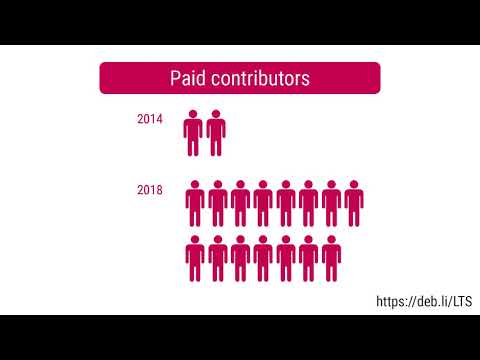
Debian LTS This month I have worked 18 hours on Debian Long Term Support (LTS) and 12 for the Extended LTS project. This included: You can find out more about the project via the following video:

28 July 2020

Dirk Eddelbuettel: ttdo 0.0.6: Bugfix

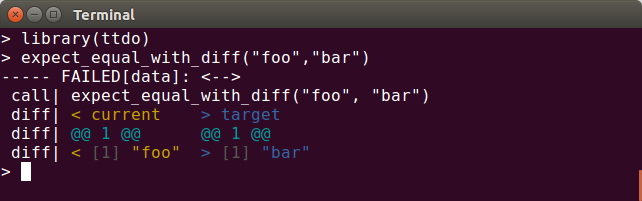
A bugfix release of our (still small) ttdo package arrived on CRAN overnight. As introduced last fall, the ttdo package extends the most excellent (and very minimal / zero depends) unit testing package tinytest by Mark van der Loo with the very clever and well-done diffobj package by Brodie Gaslam to give us test results with visual diffs: ttdo screenshot This release corrects a minor editing error spotted by the ever-vigilant John Blischak. The NEWS entry follow.

Changes in ttdo version 0.0.6 (2020-07-27)
  • Correct a minor editing mistake spotted by John Blischak.

CRANberries provides the usual summary of changes to the previous version. Please use the GitHub repo and its issues for any questions. If you like this or other open-source work I do, you can now sponsor me at GitHub. For the first year, GitHub will match your contributions.

This post by Dirk Eddelbuettel originated on his Thinking inside the box blog. Please report excessive re-aggregation in third-party for-profit settings.

27 July 2020

Matthew Garrett: Filesystem deduplication is a sidechannel

First off - nothing I'm going to talk about in this post is novel or overly surprising, I just haven't found a clear writeup of it before. I'm not criticising any design decisions or claiming this is an important issue, just raising something that people might otherwise be unaware of.

With that out of the way: Automatic deduplication of data is a feature of modern filesystems like zfs and btrfs. It takes two forms - inline, where the filesystem detects that data being written to disk is identical to data that already exists on disk and simply references the existing copy rather than, and offline, where tooling retroactively identifies duplicated data and removes the duplicate copies (zfs supports inline deduplication, btrfs only currently supports offline). In a world where disks end up with multiple copies of cloud or container images, deduplication can free up significant amounts of disk space.

What's the security implication? The problem is that deduplication doesn't recognise ownership - if two users have copies of the same file, only one copy of the file will be stored[1]. So, if user a stores a file, the amount of free space will decrease. If user b stores another copy of the same file, the amount of free space will remain the same. If user b is able to check how much free space is available, user b can determine whether the file already exists.

This doesn't seem like a huge deal in most cases, but it is a violation of expected behaviour (if user b doesn't have permission to read user a's files, user b shouldn't be able to determine whether user a has a specific file). But we can come up with some convoluted cases where it becomes more relevant, such as law enforcement gaining unprivileged access to a system and then being able to demonstrate that a specific file already exists on that system. Perhaps more interestingly, it's been demonstrated that free space isn't the only sidechannel exposed by deduplication - deduplication has an impact on access timing, and can be used to infer the existence of data across virtual machine boundaries.

As I said, this is almost certainly not something that matters in most real world scenarios. But with so much discussion of CPU sidechannels over the past couple of years, it's interesting to think about what other features also end up leaking information in ways that may not be obvious.

(Edit to add: deduplication isn't enabled on zfs by default and is explicitly triggered on btrfs, so unless it's something you've enabled then this isn't something that affects you)

[1] Deduplication is usually done at the block level rather than the file level, but given zfs's support for variable sized blocks, identical files should be deduplicated even if they're smaller than the maximum record size

comment count unavailable comments

Steve Kemp: Growing food is fun.

"I grew up on a farm" is something I sometimes what I tell people. It isn't true, but it is a useful shorthand. What is true is that my parents both come from a farming background, my father's family up in Scotland, my mother's down in Yorkshire. Every summer my sisters and myself would have a traditional holiday at the seaside, which is what people do in the UK (Blackpool, Scarborough, Great Yarmouth, etc). Before, or after, that we'd spend the rest of the summer living on my grandmother's farm. I loved spending time on the farm when I was a kid, and some of my earliest memories date from that time. For example I remember hand-feeding carrots to working dogs (alsatians) that were taller than I was. I remember trying to ride on the backs of those dogs, and how that didn't end well. In fact the one and only time I can recall my grandmother shouting at me, or raising her voice at all, was when my sisters and I spent an afternoon playing in the coal-shed. We were filthy and covered in coal-dust from head to toe. Awesome! Anyway the only reason I bring this up is because I have a little bit of a farming background, largely irrelevant in my daily life, but also a source of pleasant memories. Despite it being an animal farm (pigs, sheep, cows) there was also a lot of home-grown food, which my uncle Albert would deliver/sell to people nearby out of the back of a van. That same van that would be used to ferry us to see the fireworks every November. Those evenings were very memorable too - they would almost always involve flasks of home-made vegetable soup. Nowadays I live in Finland, and earlier in the year we received access to an allotment - a small piece of land (10m x 10m) for 50/year - upon which we can grow our own plants, etc. My wife decided to plant flowers and make it look pretty. She did good. I decided to plant "food". I might not have done this stuff from scratch before, but I was pretty familiar with the process from my youth, and also having the internet to hand to make the obvious searches such as "How do you know when you can harvest your garlic?" Before I started I figured it couldn't be too hard, after all if you leave onions/potatoes in the refrigerator for long enough they start to grow! It isn't like you have to do too much to help them. In short it has been pretty easy and I'm definitely going to be doing more of it next year. I've surprised myself by enjoying the process as much as I have. Every few days I go and rip up the weeds, and water the things we've planted. So far I've planted, and harvested, Radish, Garlic, Onions, and in a few more weeks I'll be digging up potatoes. I have no particular point to this post, except to say that if you have a few hours spare a week, and a slab of land to hand upon which you can dig and plant I'd recommend it. Sure there were annoyances, and not a single one of the carrot-seeds I planted showed any sign of life, but the other stuff? The stuff that grew? Very tasty, om nom nom .. (It has to be said that when we received the plot there was a jungle growing upon it. Once we tidied it all up we found raspberries, roses, and other things. The garlic I reaped was already growing so I felt like a cheat to harvest it. That said I did plant a couple of bulbs on my balcony so I could say "I grew this from scratch". Took a while, but I did indeed harvest my own garlic.)

Russ Allbery: Review: Rise of the Warrior Cop

Review: Rise of the Warrior Cop, by Radley Balko
Publisher: PublicAffairs
Copyright: 2013
ISBN: 1-61039-212-4
Format: Kindle
Pages: 336
As the United States tries, in fits and starts, to have a meaningful discussion about long-standing police racism, brutality, overreach, corruption, and murder, I've realized that my theoretical understanding of the history of and alternative frameworks for law enforcement is woefully lacking. Starting with a book by a conservative white guy is not the most ideal of approaches, but it's what I already had on hand, and it won't be the last book I read and review on this topic. (Most of my research so far has been in podcast form. I don't review those here, but I can recommend Ezra Klein's interviews with Ta-Nehisi Coates, Paul Butler, and, most strongly, sujatha baliga.) Rise of the Warrior Cop is from 2013 and has had several moments of fame, no doubt helped by Balko's connections to the conservative and libertarian right. One of the frustrating facts of US politics is that critiques of the justice system from the right (and from white men) get more media attention than critiques from the left. That said, it's a generally well-respected book on the factual history of the topic, and police brutality and civil rights are among the points on which I have stopped-clock agreements with US libertarians. This book is very, very libertarian. In my callow youth, I was an ardent libertarian, so I've read a lot of US libertarian literature. It's a genre with its own conventions that become obvious when you read enough of it, and Rise of the Warrior Cop goes through them like a checklist. Use the Roman Republic (never the Roman Empire) as the starting point for any political discussion, check. Analyze the topic in the context of pre-revolutionary America, check. Spend considerable effort on discerning the opinions of the US founders on the topic since their opinions are always relevant to the modern world, check. Locate some point in the past (preferably before 1960) where the political issue was as good as it has ever been, check. Frame all changes since then as an erosion of rights through government overreach, check. Present your solution as a return to a previous era of respect for civil rights, check. Once you start recognizing the genre conventions, their prevalence in libertarian writing is almost comical. The framing chapters therefore leave a bit to be desired, but the meat of the book is a useful resource. Starting with the 1970s and its use as a campaigning tool by Nixon, Balko traces a useful history of the war on drugs. And starting with the 1980s, the number of cites to primary sources and the evidence of Balko's own research increases considerably. If you want to know how US police turned into military cosplayers with body armor, heavy weapons, and armored vehicles, this book provides a lot of context and history. One of the reasons why I view libertarians as allies of convenience on this specific issue is that drug legalization and disgust with the war on drugs have been libertarian issues for decades. Ideologically honest libertarians (and Balko appears to be one) are inherently skeptical of the police, so when the police overreach in an area of libertarian interest, they notice. Balko makes a solid argument, backed up with statistics, specific programs, legislation, and court cases, that the drug war and its accompanying lies about heavily-armed drug dealers and their supposed threat to police officers was the fuel for the growth of SWAT teams, no-knock search warrants, erosion of legal protections for criminal defendants, and de facto license for the police to ignore the scope and sometimes even the existence of warrants. This book is useful support for the argument that fears for the safety of officers underlying the militarization of police forces are imaginary. One telling point that Balko makes repeatedly and backs with statistical and anecdotal evidence is that the police generally do not use raid tactics on dangerous criminals. On the contrary, aggressive raids are more likely to be used on the least dangerous criminals because they're faster, they're fun for the police (they provide an adrenaline high and let them play with toys), and they're essentially risk-free. If the police believe someone is truly dangerous, they're more likely to use careful surveillance and to conduct a quiet arrest at an unexpected moment. The middle-of-the-night armed break-ins with battering rams, tear gas, and flash-bangs are, tellingly, used against the less dangerous suspects. This is part of Balko's overall argument that police equipment and tactics have become untethered from any realistic threat and have become cultural. He traces an acceleration of that trend to 9/11 and the resulting obsession with terrorism, which further opened the spigot of military hardware and "special forces" training. This became a point of competition between police departments, with small town forces that had never seen a terrorist and had almost no chance of a terrorist incident demanding their own armored vehicles. I've encountered this bizarre terrorism justification personally; one of the reasons my local police department gave in a public hearing for not having a policy against shooting at moving vehicles was "but what if terrorism?" I don't believe there has ever been a local terrorist attack. SWAT in such places didn't involve the special training or dedicated personnel of large city forces; instead, it was a part-time duty for normal police officers, and frequently they were encouraged to practice SWAT tactics by using them at random for some otherwise normal arrest or search. Balko argues that those raids were more exciting than normal police work, leading to a flood of volunteers for that duty and a tendency to use them as much as possible. That in turn normalizes disconnecting police tactics from the underlying crime or situational risk. So far, so good. But despite the information I was able to extract from it, I have mixed feelings about Rise of the Warrior Cop as a whole. At the least, it has substantial limitations. First, I don't trust the historical survey of policing in this book. Libertarian writing makes for bad history. The constraints of the genre require overusing only a few points of reference, treating every opinion of the US founders as holy writ, and tying forward progress to a return to a previous era, all of which interfere with good analysis. Balko also didn't do the research for the historical survey, as is clear from the footnotes. The citations are all to other people's histories, not to primary sources. He's summarizing other people's histories, and you'll almost certainly get better history by finding well-respected historians who cover the same ground. (That said, if you're not familiar with Peel's policing principles, this is a good introduction.) Second, and this too is unfortunately predictable in a libertarian treatment, race rarely appears in this book. If Balko published the same book today, I'm sure he would say more about race, but even in 2013 its absence is strange. I was struck while reading by how many examples of excessive police force were raids on west coast pot farms; yes, I'm sure that was traumatic, but it's not the demographic I would name as the most vulnerable to or affected by police brutality. West coast pot growers are, however, mostly white. I have no idea why Balko made that choice. Perhaps he thought his target audience would be more persuaded by his argument if he focused on white victims. Perhaps he thought it was an easier and less complicated story to tell. Perhaps, like a lot of libertarians, he doesn't believe racism has a significant impact on society because it would be a market failure. Perhaps those were the people who more readily came to mind. But to talk about police militarization, denial of civil rights, and police brutality in the United States without putting race at the center of both the history and the societal effects leaves a gaping hole in the analysis. Given that lack of engagement, I also am dubious of Balko's policy prescriptions. His reform suggestions aren't unreasonable, but they stay firmly in the centrist and incrementalist camp and would benefit white people more than black people. Transparency, accountability, and cultural changes are all fine and good, but the cultural change Balko is focused on is less aggressive arrest tactics, more use of mediation, and better physical fitness. I would not object to those things (well, maybe the last, which seemed odd), but we need to have a discussion about police white supremacist organizations, the prevalence of spousal abuse, and the police tendency to see themselves not as public servants but as embattled warriors who are misunderstood by the naive sheep they are defending. And, of course, you won't find in Rise of the Warrior Cop any thoughtful wrestling with whether there are alternative approaches to community safety, whether punitive rather than restorative justice is effective, or whether crime is a symptom of deeper societal problems we could address but refuse to. The most radical suggestion Balko has is to legalize drugs, which is both the predictable libertarian position and, as we have seen from recent events in the United States, far from the only problem of overcriminalization. I understand why this book is so frequently mentioned on-line, and its author's political views may make it more palatable to some people than a more race-centered or radical perspective. But I don't think this is the best or most useful book on police violence that one could read today. I hope to find a better one in upcoming reviews. Rating: 6 out of 10

26 July 2020

Enrico Zini: Consent links

Teaching consent is ongoing, but it starts when children are very young. It involves both teaching children to pay attention to and respect others' consent (or lack thereof) and teaching children that they should expect their own bodies and their own space to be respected---even by their parents and other relatives. And if children of two or four can be expected to read the nonverbal cues and expressions of children not yet old enough to talk in order to assess whether there is consent, what excuse do full grown adults have?
Small children have no sense of shame or disgust or fear of their bodies. A body is what it is. It does what it does.
About commonly accepted violation of children boundaries
Personal boundaries are guidelines, rules or limits that a person creates to identify reasonable, safe and permissible ways for other people to behave towards them and how they will respond when someone passes those limits.[1] They are built out of a mix of conclusions, beliefs, opinions, attitudes, past experiences and social learning.[2][3] This concept or life skill has been widely referenced in self-help books and used in the counseling profession since the mid-1980s.[4]

Russ Allbery: Review: Paladin's Grace

Review: Paladin's Grace, by T. Kingfisher
Publisher: Red Wombat Studio
Copyright: 2020
ASIN: B0848Q8JVW
Format: Kindle
Pages: 399
Stephen was a paladin. Then his god died. He was a berserker, an unstoppable warrior in the service of his god. Now, well, he's still a berserker, but going berserk when you don't have a god to control the results is not a good idea. He and his brothers were taken in by the Temple of the Rat, where they serve as guards, watch out for each other, and try to get through each day with an emptiness in their souls where a god should be. Stephen had just finished escorting a healer through some of the poorer parts of town when a woman runs up to him and asks him to hide her. Their awkward simulated tryst is sufficient to fool the two Motherhood priests who were after her for picking flowers from the graveyard. Stephen then walks her home and that would have been the end of it, except that neither could get the other out of their mind. Despite first appearances, and despite being set in the same world and sharing a supporting character, this is not the promised sequel to Swordheart (which is apparently still coming). It's an entirely different paladin story. T. Kingfisher (Ursula Vernon's nom de plume when writing for adults) has a lot of things to say about paladins! And, apparently, paladin-involved romances. On the romance front, Kingfisher clearly has a type. The general shape of the story will be familiar from Swordheart and The Wonder Engine: An independent and occasionally self-confident woman with various quirks, a hunky paladin who is often maddeningly dense, and a lot of worrying on both sides about whether the other person is truly interested in them and if their personal liabilities make a relationship a horrible idea. This is not my preferred romance formula (it provokes the occasional muttered "for the love of god just talk to each other"), but I liked this iteration of it better than the previous two, mostly because of Grace. Grace is a perfumer, a trade she went into by being picked out of a lineup of orphans by a master perfumer for her sense of smell. One of Kingfisher's strengths as a writer is showing someone get lost in their routine day-to-day competence. When mixed with an inherently fascinating profession, this creates a great reading experience. Grace is also an abuse survivor, which made the communication difficulties with Stephen more interesting and subtle. Grace has created space and a life for herself, and her unwillingness to take risks on changes is a deep part of her sense of self and personal safety. As her past is slowly revealed, Kingfisher puts the reader in a position to share Stephen's anger and protectiveness, but then consistently puts Grace's own choices, coping mechanisms, and irritated refusal to be protected back into the center of the story. She has to accept some help as she gets entangled in the investigation of a highly political staged assassination attempt, but both that help and the relationship come on her own terms. It's very well-done. The plot was enjoyable enough, although it involved a bit too much of constantly rising stakes and turns for the worst for my taste, and the ending had a touch of deus ex machina. Like Kingfisher's other books, though, the delight is in the unexpected details. Stephen knitting socks. Grace's frustrated obsession with why he smells like gingerbread. The beautifully practical and respectful relationship between the Temple of the Rat and Stephen's band of former paladins. (After only two books in which they play a major role, the Temple of the Rat is already one of my favorite fantasy religions.) Everything about Bishop Beartongue. Grace's friend Marguerite. And a truly satisfying ending. The best part of this book, though, is the way Grace is shown as a complete character in a way that even most books with well-rounded characterization don't manage. Some things she does make the reader's heart ache because of the hints they provide about her past, but they're also wise and effective safety mechanisms for her. Kingfisher gives her space to be competent and prickly and absent-minded. She has a complete life: friends, work, goals, habits, and little rituals. Grace meets someone and falls in love, but one can readily imagine her not falling in love and going on with her life and that result wouldn't be tragic. In short, she feels like a grown adult who has made her own peace with where she came from and what she is doing. The book provides her an opportunity for more happiness and more closure without undermining her independence. I rarely see this in a novel, and even more rarely done this well. If you haven't read any of Kingfisher's books and are in the mood for faux-medieval city romance involving a perfumer and a bit of political skulduggery, this is a great place to start. If you liked Swordheart, you'll probably like Paladin's Grace; like me, you may even like it a bit more. Recommended, particularly if you want something light and heart-warming. Rating: 8 out of 10

25 July 2020

Niels Thykier: Support for Debian packaging files in IDEA (IntelliJ/PyCharm)

I have been using the community editions of IntelliJ and PyCharm for a while now for Python or Perl projects. But it started to annoy me that for Debian packaging bits it would revert into a fancy version of notepad. Being fed up with it, I set down and spent the last week studying how to write a plugin to fix this.

After a few prototypes, I have now released IDEA-debpkg v0.0.3 (Link to JetBrain s official plugin listing with screenshots). It provides a set of basic features for debian/control like syntax highlighting, various degree of content validation, folding of long fields, code completion and CTRL + hover documentation. For debian/changelog, it is mostly just syntax highlighting with a bit of fancy linking for now. I have not done anything for debian/rules as I noted there is a Makefile plugin, which will have to do for now.

The code is available from github and licensed under Apache-2.0. Contributors, issues/feature requests and pull requests are very welcome. Among things I could help with are:

I hope you will take it for spin if you have been looking for a bit of Debian packaging support to your PyCharm or other IDEA IDE.  Please do file bugs/issues if you run into issues, rough edges or unhelpful documentation, etc.

Next.

Previous.