http://dl.google.com/linux/chrome/deb/ is
slow. Not just slow, but slow. Any random
apt-get update will take ages; just sitting there
waiting for Google's servers to send any data. Downloading actual
packages is slow, as well.
Ironically, Google's PageRank will punish sites for loading
slowly; it's a pity they don't use their considerable server &
bandwidth capacities to fix slowness they are causing,
themselves.
Chrome
Copy and paste is a central part of what I use a mouse for. X
has had two copy buffers for as long as I can remember, one for
mouse selection, pasting with middle mouse button and one for
CTRL-c/CTRL-v. Chrome merges the two.
That's bad enough in and as of itself, but every time Chrome
gets focus, it will clobber anything you may have in your copy
buffers at that time with anything that's selected. No matter if
you selected it via mouse, via keyboard, a context switch
autoselected something. Selection goes into buffer. Every time.
Every. Single. Time.
To add insult to injury, this is dependent on which tab is
active. And if you happen to search on the site (CTRL-f), it will
always use what's in the search bar to clobber buffers, no matter
if anything on the actual website has been selected.
I can't find the bug report about this at the moment, but
Google's stance is that this is a feature and introducing an option
for traditional copy & paste handling is not desirable.
Google+
I get that they feel a need to combat Facebook, but still,
pushing Google+ on you is just annoying. At least the Android
application has had a permission change on ICS so it can not
auto-update. It's the little things ;)
WWW
Unified branding, the need to support touch-based devices in
their UI, etc. Still, GMail's new interface sucks and the old one
will be going away for good. And while making some UI elements
larger or displaying them unconditionally makes sense for hand-held
portrait displays, this is highly annoying on wide-screen landscape
displays. 1366x768 may have overtaken
1024x768, but 768 is a constant here and still not a lot.
As an aside, hopefully the Apple Effect and the iPad 3 will
break the age-long stalemate with regards to screen resolution.
More is better, here.
Android
Bloatware
Using stock Android means you won't get Facebook and other
useless apps pre-installed. Yet, uninstalling stock applications,
like Google+, is impossible.
Rights management
It's nice that I get to see what kind of access an application
would like to have. It's not nice that I can not choose what access
I am willing to grant any given application. I can make a binary
decision, install or not install, but I can't refuse random access
rights to applications. There are custom versions of Android out
there which allow you to do this and many applications seem to cope
with being unable to do some things. This should be a standard
feature.
Access management
The concept of "access to USB storage" meaning "whatver your SD
card or, in the Galaxy Nexus' case, just a specific directory" is
also broken. There is a middle ground between "this application
needs access to a large chunk of storage" and "this application
needs complete access to said large chunk". Just assign the
application a specific directory to write into and read from and
done's done.
Multi-user
I can not hand anyone my phone to play a game or surf the
Internet without giving them the ability to look through all my
email, contacts, calendar, you name it. While I only give my phone
to people I trust completely, this still sucks.
How hard can it be to create a minimal guest mode which allows
people to access a few pre-selected applications with a custom
setting of if they are allowed to use cellular data and/or
WiFi?
Data access
Authorized Access
Ah, the big one.... Keep in mind that I am using Google's latest
and greatest, the Samsung Galaxy Nexus GSM. It's as cutting-edge as
you can get.
Yes, having one continuous storage device is nice. But MTP
support on Linux is abysmal and you are forced to access
your data by means of MTP or PTP. gphoto2, gwenview, and gthumb are
all unable to import any photos via PTP; no program I tried can
transfer anything via MTP. gphoto2 will transfer the
background images which
APOD (highly recommended, by the way; there's also a donation
application for this) stores on my phone. That's it.
So, unless I send email to myself, use WiFi-based hacks, or root
my phone, I can not access my data. On the strongest mobile
platform in the world. Using the most powerful and versatile OS
with up-to-date packages. In 2012. Yay.
Unauthorized Access
Not being able to access my data is a Bad Thing. Even worse is
when others can access my data. Contrary to older Android versions,
someone decided that it would be a good idea to allow MTP or PTP,
only. As in "you can not disable MTP and PTP. One of them
has the be activated." This is awesome
when you want to charge your phone at an airport or at an
acquaintance's possibly malware-ridden Windows machine. Everyone
and their bot-herder can potentially access my data while I can
not.
Usability
And while MTP/PTP is an either/or decision, they are using
check-boxes, not radio buttons. There's a decade or more of UI
experience about check-box versus radio button, so why not use it?
I know of at least one owner of a Galaxy Nexus who was not even
aware that he couldn't turn off MTP (the default) as the UI
pretends otherwise.
Opaqueness
And good luck trying to contact anybody about this. Having filed
a few bugs against Google stuff in the past, I simply gave up on
it. Back when Gmail's mailing list filtering and labelling system
was somewhat broken, I spent months hunting down people
who knew people who knew someone who was able to actually do
something about it.
My current running speed is lower than the winner in the 70+ age
category by a significant amount. Based on the graph shape, I would
probably win at the 85+ category .
Or to put it in a slightly different context, a cultural one. Back in
my home country (Romania), a 70-year old person (especially male!)
that is still able to move around well and to manage by himself is
(most of the time) an exception. Of course there are many old men who
are doing well, but in general old people are (usually) considered
deprecated by this age. In comparison, in Switzerland, they are
still active and are doing sport. And some of them, as you can see,
doing it quite well.
The difference between these two cultures in this regard (sport) is
huge. Doing sports (except playing football) is considered something
unusual, and in my home town there's a somewhat linear relation
between people's age and their weight (both are monotonically
increasing). When I first came to Switzerland, I was shocked to see so
many people over 50 that are fit and active. Now, every time I go back
to Romania, I'm shocked to see people so many people overweight and
looking more than their actual age.
I can't help but wonder what is the cause of this disregard for health
or aversion to sports. Just the fact that "it's expected" for older
people to be unhealthy? Is it somehow related to the difference in
income/standard of life (I can't see a trivial connection)? Is it to
lack of education about how to live a healthy life? Or maybe it's not
a country difference, but rather the fact that I grew up in a quite
small town; people in Bucharest are indeed looking more after their
health than in my home town, and are therefore fitter. Who knows
Anyway, rant over, and I'm still happy that I managed to beat my own
record, thanks to a flat race and favourable weather!
[1-20 min] If you are not running Debian-based distribution, Install NeuroDebian VM; otherwise just add apt sources for NeuroDebian repository.
[<1 min] Install the neurodebian-dev package providing nd* tools:
sudo apt-get install neurodebian-dev
[1-5 min] Adjust default configuration (sudo vim /etc/neurodebian/cmdsettings.sh) used by nd commands to
[10-60 min] Create the COWs for all releases you left in the configuration file:
sudo nd_adddistall
sudo nd_build4all blah_1-1.dsc
sudo apt-get install git
git clone https://github.com/neurodebian/neurodebian
sudo nd_build4debianmain *.dsc -- --hookdir $PWD/neurodebian/tools/hooks
Two weeks ago, I was at LOAD, where
I did a tutorial on Debian Packaging. Unfortunately, I wasn't doing very
well physically, and as a result my preparation wasn't what I had hoped
for. It ended up being not so much a tutorial as a walking the audience
through packaging a piece of software in casu NBD with debhelper in dh mode.
Not very difficult, but since there's nothing for people to fall back on
afterwards, it may help if they have a writedown of what I said during
the session; and I promised to put it on my blog. So, here goes.
However, note that the canonical written tutorial on Debian
Packaging is here.
With apologies to readers of Planet Debian, most of whom for which
all this is probably old hat.
Unlike RPM packaging, in Debian, the data that tells the debian
packaging system how to package a piece of software is functionally
split among a number of files. All these files go in a toplevel
directory in the source package, (unsurprisingly) called
'debian'.
There are four files that are required for every Debian package: the
control, changelog, copyright, and
rules files. Without these files, dpkg-dev will fail
to produce a package any package.
The first, the control file, contains metadata on
packages: the name of the package, its description, the dependencies,
etc. Basically, almost all the information you see when you run
'apt-cache show <package>' (with one exception) is in the
control file. If you have a source package that builds multiple
binary packages, then you should have multiple 'Package' stanzas in the
control file.
In my opinion, creating a control file is easiest done by copying a
control file from another (similar?) package, and modifying it to suit
the software you're dealing with.
The one exception, the one bit of metadata that is not found in the
control file is the version number: this data is contained in
the changelog file. This file looks like a free-form
file for the most part, but it really is a machine-parsable format; as
such, it's best to edit it with specialized tools, such as the
debian-changelog-mode in the emacs editor, or the
debchange script, also available as dch, from the devscripts package. In
the changelog, you should document any changes you make to the package,
making sure the version number (top line), distribution (unstable,
experimental, stable, ...; top line), urgency (top line; used mainly
when testing needs to be updated urgently for things like security
updates), author (bottom line) and date and time (also bottom line) are
correct.
The copyright file, unsurprisingly, should contain the copyrights
statements of the original software, and the license (or a reference to
a copy of the same license text under /usr/share/common-licenses). This
file is still free-format in most packages today, although a machine-readable format for
this file has recently been defined. Of the four required files, this is
probably the most boring one, but hey, we can't like everything we
do.
The last file, the rules file, is where all the action
happens. This file is defined as a Makefile, of which the
targets are called for various parts of the build system.
The rules file has a number of required targets (such as
build, clean, and others), but if you're using
debhelper in dh mode, you don't need to worry about those; instead, you
can use the following simple rules file:
#!/usr/bin/make -f %: dh $@With the first line, the shebang, we make clear that this is a makefile, and that it should be called by make. The next is a generic target (the % is a wildcard for make), with just one command: 'call dh with the name of the target being called'. Since dh implements all required rules targets, that immediately gets you a working package. Go ahead, try! Run 'dpkg-buildpackage -rfakeroot', and see what happens. Did that work? Maybe, maybe not. First, you'll have seen loads of warnings about something involving a "compatibility level". This is from debhelper; this compatibility level, or 'API level' if you wish, allows debhelper to move forward and make incompatible changes without breaking all the existing packages out there; whenever the compat level is bumped, some new functionality will only be made available if you also raise the compat level in your source package (and then you'll know you may have some changes to do in your package). Since the original debhelper, over a decade ago, did not have a compat level, the absense of a compat level signals compat level 1, which is far outdated now, and about to be unsupported. Hence the warning. The fix is simple: create a file debian/compat containing a single number: the compatibility level you're working with. It's best to use the most recent level which debhelper supports when you create your package, which as of this writing is level 9. Ignoring the compatibility level, if you're building a software package which uses a well-established build system, and you only build one binary package out of that, chances are pretty high that everything worked as expected. If not, you'll have more work. Building multiple packages requires that you tell debhelper somehow which file goes in which package. You can do this with a file debian/package.install, where package is the name of the binary package you're building. The install file is read by dh_install, one of many tools in the debhelper suite. You see, in the old days (before debhelper 7), debhelper was just a suite of tools, which required that you wrote a debian/rules file containing all the individual tools to be called in the correct order. This mode is still supported; in fact, even if you do use dh, you do, since all that tool really does is call the right tools in the right order; the real work is done by the invidual tools. They all have their own man page; to understand how dh_install chooses which file to put in which package, go read man dh_install. Go ahead, do it now; I'll wait. Back? Good. You've now learned that dh_install can install files either from the source directory (useful for packages containing only scripts or so), or from a directory debian/tmp. If you use an autotools-based software package, this is what dh will do for you. When you called dpkg-builpackage above, you may also have noticed that the output contained many lines starting with dh_, one of which said dh_install. As you may have guessed, dh echoes every debhelper command just before it will execute them. This allows you to look at the output, and see what's happening. For more detail, set the environment variable DH_VERBOSE to a non-zero value. I'm sure you'll have seen one or two debhelper tools that could make your package better. Go ahead, go and read their man pages to see what they do, and how they do it. Most of these will require you to create a file debian/package.toolname to specify details. In some cases, you may need to specify command-line arguments to the tool to get it to do what you want. In yet other cases, the tool won't support what you need it to do, and you'll have to do something manual. What to do now? The dh command line doesn't support adding extra commands easily. Does this mean you'd have to revert to old-style long, non-dh debian/rules files? Luckily, no. You can create an override target. If dh detects that you have such a target for a particular tool, it will call that target instead of the tool. This target's rules can then call the tool in question (or not), and add any command line arguments, or extra commands, as needed. An override target is a normal Makefile target with a name of the form override_dh_something, where dh_something is the name of the tool you wish to override. At this point, I'd reached almost the end of my two allotted hours, and a member of the audience asked how to make dpkg deal with configuration files. The answer is, you don't need to do anything! Not if you use debhelper, anyway; all you need to do is install the file in /etc. Since debian policy specifies that all files in /etc need to be configuration files and that no conffiles may be placed anywhere but in /etc, debhelper will automatically mark any file installed in /etc as a conffile, which will cause dpkg to ask the user what to do with changes to such files. Note that in Debian parlance, a conffile is not the same thing as a configuration file: a conffile is a configuration file that is part of the binary package (i.e., if you call 'dpkg --contents' on the .deb file, you'll see it in the output), whereas a configuration file is a file (any file, including files generated during or after installation of the .deb file on a system). Occasionally, this is also why some differences to configuration files are managed through debconf, while others aren't: the ones managed through debconf are non-conffile configuration files managed through ucf, whereas the others are conffiles. So in the simplest of cases, if you want to install a configuration file and you want to make sure it's protected against accidental overwrites by package upgrades, all you need to do is make sure it's installed to /etc; debhelper will do the rest. And that concludes this introduction. Please note it's only an introduction, not a full-blown tutorial; while this will allow you to get started, you may have to learn a bit more if you wish to eventually upload a package to Debian.
This
dude nails it. Well, almost can't say I agree with the python
bit. But other than that, yeah, pretty much what's wrong with PHP.
(Add that to what google seems to consider my most popular bit of code,
ever, and, well, hmpf).
A few years ago I started to run my own server. This was an interesting challenge back then but today I only consider it a waste of time and money. Therefore I'm searching for (a) service provider(s) to substitute my self hosted applications:

With the latest release of Spacewalk PostgreSQL seems to be supported properly
- finally. Also there are efforts
to support Debian as a client system. So I'm thinking about using the upcoming BugSquashingParty in Salzburg to
Stop using CAPTCHAs. It s time to switch to DLT: Design, Limit and Trapdoor.

[a certain website] has the evil bad wrong Google reCaptcha on the edit page to stop disabled users, so screw it. Google s reCaptcha seems to be spreading again, obstructing more people when accessing more websites. Is there a reason for that? The re in reCaptcha stands for replace with real anti-spam, please!I wrote the above about two years ago and it s not getting any better. I ve written similar things over the last ten years, as have many others, and I ve always sought to avoid using physical ability tests as a way to cut down spammers. Why do people keep reaching for the reCaptcha non-captcha or things that use similar bad eyetests like Mollom? So most online messages may be spam, but those physical ability tests do nothing to test for spam. They re trying to detect computer submissions (the TCHA in CAPTCHA is meant to be Telling Computers and Humans Apart), but that s really bad when the computer is helping someone with a disability to access the internet. People from the home of the CAPTCHA describe access for sight and hearing-impaired users as an important open problem for the project (Luis von Ahn, Manuel Blum and John Langford. Telling Humans and Computers Apart Automatically. In Communications of the ACM). Until that problem is closed, CAPTCHAs should be considered defective and removed whenever possible. What webmasters should do instead is DLT:
Today I took that final step:
touch /srv/_global_/blacklisted/domains/aol.comI remember, even a couple of years ago, I had friends who would mail me from their @aol.com email addresses. These days people have moved on. The two single biggest mail-providers I see in terms of spam are:
I'm currently updating the ISO-3166-2 list in the iso-codes package.
This is the list of countries subdivisions and official codes for
these subdivisions.
The funny part is that I just updated the names of states of India,
some of them being often (much) more populated than most countries in
the world :
Maharashtra, Tamil Nadu, Andhra Pradesh, etc. And some of them larger
than most countries in the world.
And a few minutes after, I end up adding the 17 "quarters" of the city of
Monaco. Yes, Monaco, one of the smallest countries in the world, has
official subdivisions or "quartiers":
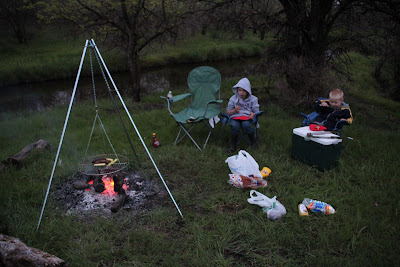
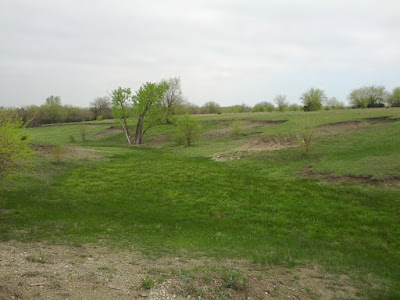
The boys loved climbing up and down these areas, some of which were quite tall. They discovered different kinds of rock on the way up and down, and with my help avoided discovering too much of the mud at the bottom.
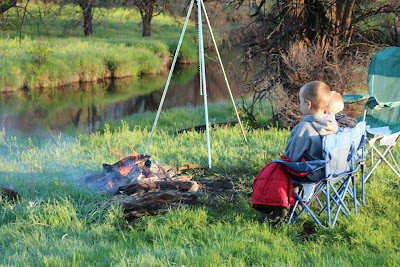
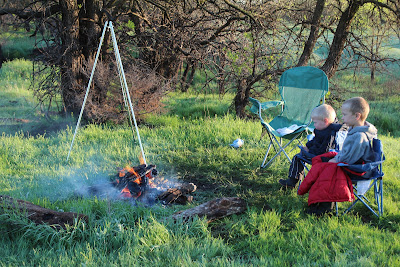
We hiked back to our camping spot through grass almost as tall as Oliver much to his delight and then after warming up by the fire for a bit, went off in the other direction. There is a grove of trees by the creek over there, which surprise became another train. Here are the boys explaining how it works.
<iframe allowfullscreen="allowfullscreen" frameborder="0" height="315" src="https://www.youtube.com/embed/43EcEK8F_ic?rel=0" width="560"></iframe>
They helped pack things back up, too. Actually, it took some convincing to get Jacob to not pull up all the stakes for the tent before I was ready for them.
Things didn t go perfectly, but then, they never do, and that was OK with everyone. Camping is an adventure, and it wouldn t be an adventure if you knew every detail beforehand.
It is rare in life to be able to think that I have enough time to do anything the boys might want to do. Spend half an hour pretending a tree is a train sure, no problem.
Today Oliver asked to go camping again, and was a bit disappointed when I didn t agree to go camping again right this minute, today. Jacob said, we had an EXCELLENT time and gave me hugs thinking about it.
I have a lot of happy memories about the creek. We camped at the same spot where I went fishing or camped as a child. There have been family gatherings and even a birthday party out there. The boys and I have enjoyed a hike or a wagon ride to the area, but as I learned, nothing could possibly match the excitement of camping there.
It is wonderful to add another happy memory of a time at the creek. And it s even better to see another generation of Goerzens discover that there s a lot of fun to be had down by the creek.
apport just cleared the new queue and is now available in experimental. For those who do not know what apport is:At this moment, it is quite broken. The crashes are not intercepted by update-notifier on my box. With it now in experimental, my intent is to slowly integrate it well with all dependent tools for Debian. It won't be ready for the Wheezy release, but hopefully for the one after that.On the Ubuntu side, Canonical hosts a retracing service that takes user reported core dumps and generates a usable backtrace. For Debian, my plan is to have a chroot kind interface, where in the user could opt-in to download all debug packages to generate a valid backtrace. This could go as the debian backend for apport in the future. On the bug reporting side, afaik, we do not have a web interface to lodge bugs. To report bugs (minus the core dumps), we will want a backend to submit it over email. The current apport report gathering tool is pretty good (if compared to other tools like reportbug), so here the low hanging fruit would be to just take the report and feed in email to our BTS server. For the eyes:Debugging program crashes without any automated tools has been pretty time consuming and hard for both developers and users. Many program crashes remain unreported or unfixed because:
- Many crashes are not easily reproducible.
End users do not know how to prepare a report that is really useful for developers, like building a package with debug symbols, operating gdb, etc.
- A considerable part of bug triage is spent with collecting relevant information about the crash itself, package versions, hardware architecture, operating system version, etc.
- There is no easy frontend which allow users to submit detailed problem reports.
- Existing solutions like bug-buddy or krash are specific to a particular desktop environment, are nontrivial to adapt to the needs of a distribution developer, do not work for crashes of background servers (like a database or an email server), and do not integrate well with existing debug packages that a distribution might provide.
Apport is a system which
- intercepts crashes right when they happen the first time,
- gathers potentially useful information about the crash and the OS environment,
- can be automatically invoked for unhandled exceptions in other programming languages (e. g. in Ubuntu this is done for Python),
- can be automatically invoked for other problems that can be automatically detected (e. g. Ubuntu automatically detects and reports package installation/upgrade failures from update-manager),
- presents a UI that informs the user about the crash and instructs them on how to proceed,
- and is able to file non-crash bug reports about software, so that developers still get information about package versions, OS version etc.
Apache 2.4 being out, I noticed that my good old
mod_defensible did not
compile anymore.
The changes in the new Apache 2.4
API were small
for its concern, so it was pretty easy to update this software to make it
compile again.
Honestly, I'm not sure that this module is really used into the wild, but I
still think that it can serve as a good prototype for doing other things so
I like keeping it around. :-)
All this has been triggered by the Apache 2.4 arrival into Debian
experimental. Therefore I've updated the mod_defensible package to use the
new
dh_apache2,
and imported it into Git at the same time.
Please,
pretty please, just do it.
However, don't forget: Debian localization material is spread in thousands of
packages, with dozens of different VCS, hundreds of developers and
hundreds of thousands of strings for up to seventy languages.
And there are less than 5 people running all this.
So, yeah, there are fancy "insert your favourite l10n tool of the day
here" everywhere and we should rather be using them. But nobody prevents
anybody to build something better than we we have now. Really,
nothing. Do-ocracy, as we use to say.
Just do it and, in the meantime, suffer with us with what we have.
Next.