Reproducible Builds (diffoscope): diffoscope 255 released
255. This version includes the following changes:
[ Vekhir ]
* Add/fix compatibility for Python progressbar 2.5 & 3.0 etc.
[ Chris Lamb ]
* Update copyright years.
255. This version includes the following changes:
[ Vekhir ]
* Add/fix compatibility for Python progressbar 2.5 & 3.0 etc.
[ Chris Lamb ]
* Update copyright years.
![]() |
| Linux kernel getting a livepatch whilst running a marathon. Generated with AI. |
The tenth release of the qlcal package
arrivied at CRAN today.
qlcal
delivers the calendaring parts of QuantLib. It is provided (for the R
package) as a set of included files, so the package is self-contained
and does not depend on an external QuantLib library (which can be
demanding to build). qlcal covers
over sixty country / market calendars and can compute holiday lists, its
complement (i.e. business day lists) and much more. Examples
are in the README at the repository, the package page,
and course at the CRAN package
page.
This releases synchronizes qlcal with
the QuantLib release 1.33 and its
updates to 2024 calendars.
Courtesy of my CRANberries, there is a diffstat report for this release. See the project page and package documentation for more details, and more examples. If you like this or other open-source work I do, you can now sponsor me at GitHub.Changes in version 0.0.10 (2024-01-24)
- Synchronized with QuantLib 1.33
This post by Dirk Eddelbuettel originated on his Thinking inside the box blog. Please report excessive re-aggregation in third-party for-profit settings.
After seven years of service as member and secretary on the GHC Steering Committee, I have resigned from that role. So this is a good time to look back and retrace the formation of the GHC proposal process and committee.
In my memory, I helped define and shape the proposal process, optimizing it for effectiveness and throughput, but memory can be misleading, and judging from the paper trail in my email archives, this was indeed mostly Ben Gamari s and Richard Eisenberg s achievement: Already in Summer of 2016, Ben Gamari set up the ghc-proposals Github repository with a sketch of a process and sent out a call for nominations on the GHC user s mailing list, which I replied to. The Simons picked the first set of members, and in the fall of 2016 we discussed the committee s by-laws and procedures. As so often, Richard was an influential shaping force here.
OverloadedRecordFields.
At that point, there was no secretary role yet, so how I did become one? It seems that in February 2017 I started to clean-up and refine the process documentation, fixing bugs in the process (like requiring authors to set Github labels when they don t even have permissions to do that). This in particular meant that someone from the committee had to manually handle submissions and so on, and by the aforementioned principle that at every step there ought to be exactly one person in change, the role of a secretary followed naturally. In the email in which I described that role I wrote:
Simon already shoved me towards picking up the secretary hat, to reduce load on Ben.So when I merged the updated process documentation, I already listed myself secretary . It wasn t just Simon s shoving that put my into the role, though. I dug out my original self-nomination email to Ben, and among other things I wrote:
I also hope that there is going to be clear responsibilities and a clear workflow among the committee. E.g. someone (possibly rotating), maybe called the secretary, who is in charge of having an initial look at proposals and then assigning it to a member who shepherds the proposal.So it is hardly a surprise that I became secretary, when it was dear to my heart to have a smooth continuous process here. I am rather content with the result: These three ingredients single secretary, per-proposal shepherds, silence-is-consent helped the committee to be effective throughout its existence, even as every once in a while individual members dropped out.
BlockArguments, do notation with ( foo) expressions and Unicode), I m still around, hosting the Haskell Interlude Podcast, writing on this blog and hanging out at ZuriHac etc.
A new maintenance release of our RApiDatetime
package is now on CRAN
RApiDatetime
provides a number of entry points for C-level functions of the R API for
Date and Datetime calculations. The functions
asPOSIXlt and asPOSIXct convert between long
and compact datetime representation, formatPOSIXlt and
Rstrptime convert to and from character strings, and
POSIXlt2D and D2POSIXlt convert between
Date and POSIXlt datetime. Lastly,
asDatePOSIXct converts to a date type. All these functions
are rather useful, but were not previously exported by R for C-level use
by other packages. Which this package aims to change.
This release responds to a CRAN request to clean up empty
macros and sections in Rd files. Moreover, because the windows portion
of the corresponding R-internal code underwent some changes, our
(#ifdef conditional) coverage here is a little behind and
created a warning under the newer UCRT setup. So starting with this
release we are back to OS_type: unix meaning there will not
be any Windows builds at CRAN.
If you would like that to change, and ideally can work in the Windows
portion, do not hesitate to get in touch.
Details of the release follow based on the NEWS file.
Courtesy of my CRANberries, there is also a diffstat report for this release. If you like this or other open-source work I do, you can sponsor me at GitHub.Changes in RApiDatetime version 0.0.9 (2024-01-23)
- Replace auto-generated stale RApitDatetime-package.Rd with macro-filled stanza to satisfy CRAN request.
This post by Dirk Eddelbuettel originated on his Thinking inside the box blog. Please report excessive re-aggregation in third-party for-profit settings.
After more than one a year, a new minor FAI version is available, but
it includes some interesting new features.
Here a the items from the NEWS file:
fai (6.2) unstable; urgency=low
A very minor maintenance release, now at version 0.0.22, of RcppAnnoy
has arrived on CRAN.
RcppAnnoy
is the Rcpp-based R integration of
the nifty Annoy library
by Erik Bernhardsson. Annoy is a small and
lightweight C++ template header library for very fast approximate
nearest neighbours originally developed to drive the Spotify music discovery algorithm. It
had all the buzzwords already a decade ago: it is one of the algorithms
behind (drum roll ) vector search as it finds
approximate matches very quickly and also allows to
persist the data.
This release responds to a CRAN request to clean up empty
macros and sections in Rd files.
Details of the release follow based on the NEWS file.
Courtesy of my CRANberries, there is also a diffstat report for this release. If you like this or other open-source work I do, you can sponsor me at GitHub.Changes in version 0.0.22 (2024-01-23)
- Replace empty examples macro to satisfy CRAN request.
This post by Dirk Eddelbuettel originated on his Thinking inside the box blog. Please report excessive re-aggregation in third-party for-profit settings.
The x13binary team
is thrilled to share the availability of Release 1.1.60-1 of the x13binary
package providing the X-13ARIMA-SEATS program
by the US Census Bureau which arrived on CRAN earlier today.
This release brings the package up to speed with the most current
release by the Census Bureau. More importantly, we finally made good on
an old promise to ourselves and now install the binary by compiling from
its Fortran sources! No more pre-made binaries. This required some work
by Kirill, Michael, and Jeroen to finalize matter because, as we all
know, the CRAN build processes and tool chains can be a little byzantine
in their details. Use on platforms not covered by binaries from CRAN (or r-universe) should just
work too as the demands on the (Fortran) compiler are fairly standard.
All in all the build is fairly lightweight and quick even when
rebuilding from source.
Courtesy of my CRANberries, there
is also a diffstat report for this release showing
changes to the previous release.
If you like this or other open-source work I do, you can sponsor me at
GitHub.
This post by Dirk Eddelbuettel originated on his Thinking inside the box blog. Please report excessive re-aggregation in third-party for-profit settings.
IEEE Software recently announced that a paper that I co-authored with Dr. Stefano Zacchiroli has recently been awarded their Best Paper award:

Although it is possible to increase confidence in Free and Open Source Software (FOSS) by reviewing its source code, trusting code is not the same as trusting its executable counterparts. These are typically built and distributed by third-party vendors with severe security consequences if their supply chains are compromised. In this paper, we present reproducible builds, an approach that can determine whether generated binaries correspond with their original source code. We first define the problem and then provide insight into the challenges of making real-world software build in a "reproducible" manner that is, when every build generates bit-for-bit identical results. Through the experience of the Reproducible Builds project making the Debian Linux distribution reproducible, we also describe the affinity between reproducibility and quality assurance (QA).According to Google Scholar, the paper has accumulated almost 40 citations since publication. The full text of the paper can be found in PDF format.
hz.tools will be tagged
#hztools.
cos and sin of the multiplied phase (in the range of 0 to tau), assuming
the transmitter is emitting a carrier wave at a static amplitude and all
clocks are in perfect sync.
let observed_phases: Vec<Complex> = antennas
.iter()
.map( antenna
let distance = (antenna - tx).magnitude();
let distance = distance - (distance as i64 as f64);
((distance / wavelength) * TAU)
)
.map( phase Complex(phase.cos(), phase.sin()))
.collect();
let beamformed_phases: Vec<Complex> = ...;
let magnitude = beamformed_phases
.iter()
.zip(observed_phases.iter())
.map( (beamformed, observed) observed * beamformed)
.reduce( acc, el acc + el)
.unwrap()
.abs();
(x, y, z) point at
(azimuth, elevation, magnitude). The color attached two that point is
based on its distance from (0, 0, 0). I opted to use the
Life Aquatic
table for this one.
After this process is complete, I have a
point cloud of
((x, y, z), (r, g, b)) points. I wrote a small program using
kiss3d to render point cloud using tons of
small spheres, and write out the frames to a set of PNGs, which get compiled
into a GIF.
Now for the fun part, let s take a look at some radiation patterns!
y and z axis, and separated by some
offset in the x axis. This configuration can sweep 180 degrees (not
the full 360), but can t be steared in elevation at all.
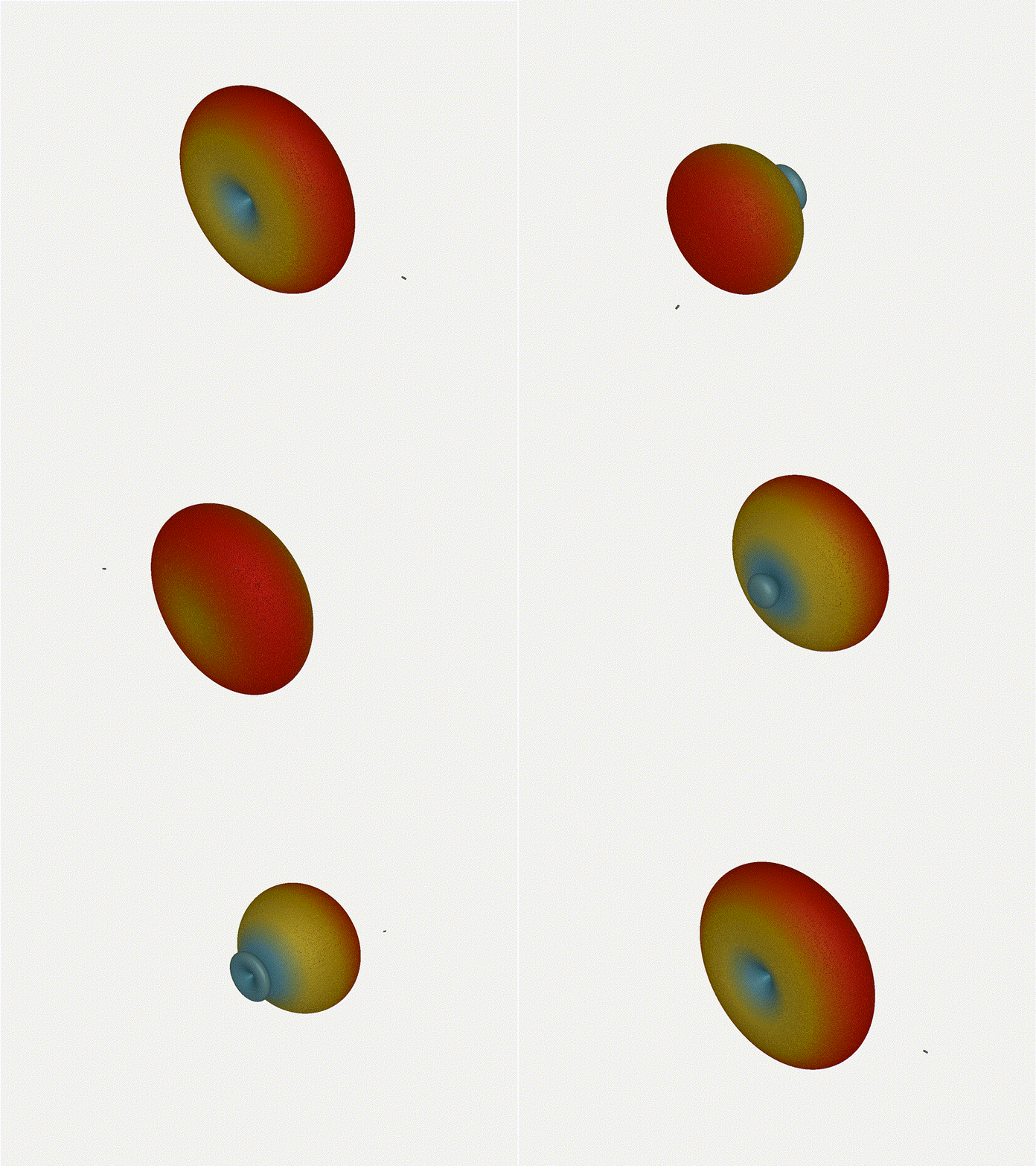
Let s take a look at what this looks like for a well constructed
1x4 phased array:
And now let s take a look at the renders as we play with the configuration of
this array and make sure things look right. Our initial quarter-wavelength
spacing is very effective and has some outstanding performance characteristics.
Let s check to see that everything looks right as a first test.
Nice. Looks perfect. When pointing forward at (0, 0), we d expect to see a
torus, which we do. As we sweep between 0 and 360, astute observers will notice
the pattern is mirrored along the axis of the antennas, when the beam is facing
forward to 0 degrees, it ll also receive at 180 degrees just as strong. There s
a small sidelobe that forms when it s configured along the array, but
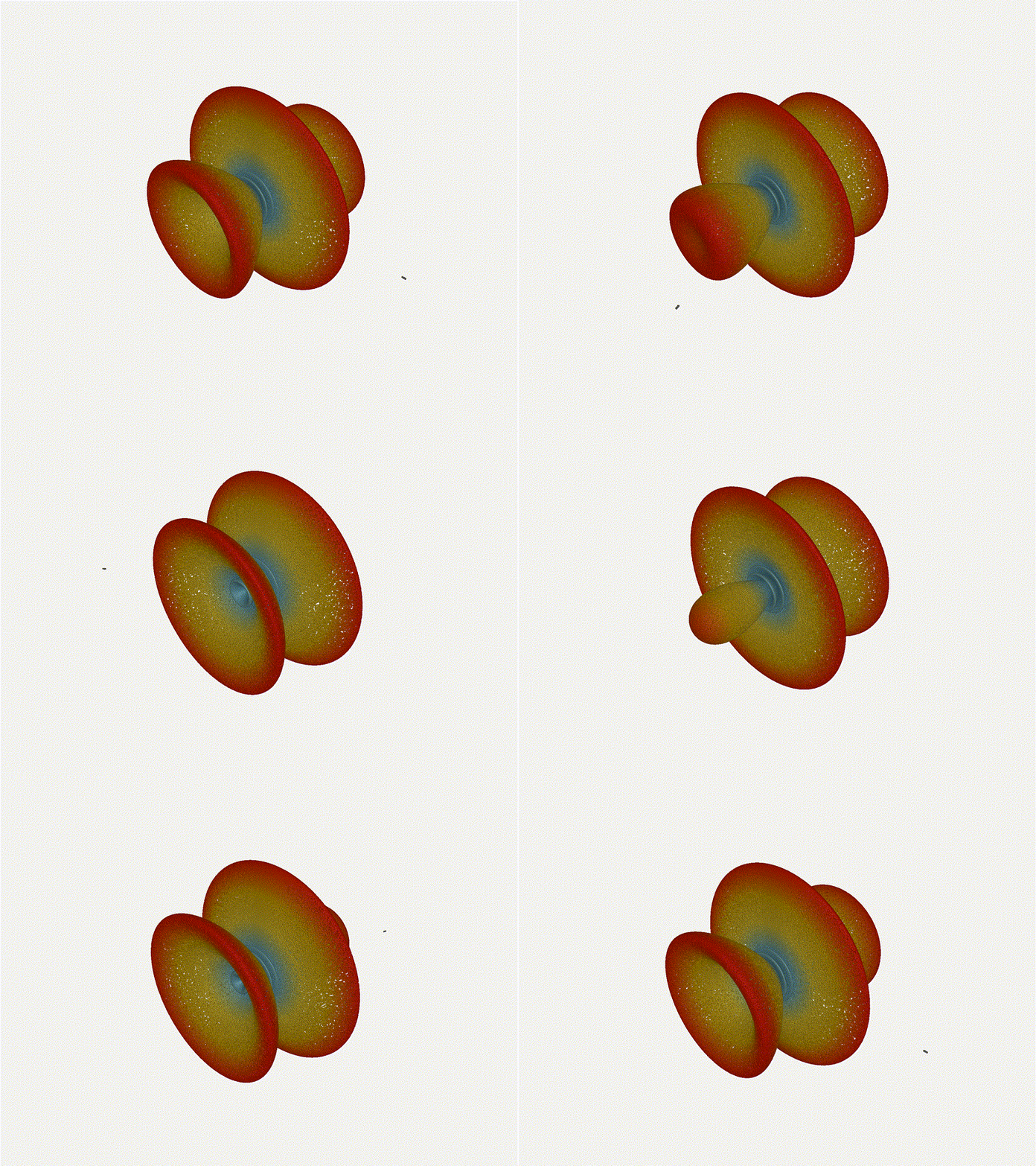
it also becomes the most directional, and the sidelobes remain fairly small.
The main lobe is a lot more narrow (not a bad thing!), but some significant
sidelobes have formed (not ideal). This can cause a lot of confusion when doing
things that require a lot of directional resolution unless they re compensated
for.
Very cool. As the spacing becomes longer in relation to the operating frequency,
we can see the sidelobes start to form out of the end of the antenna system.
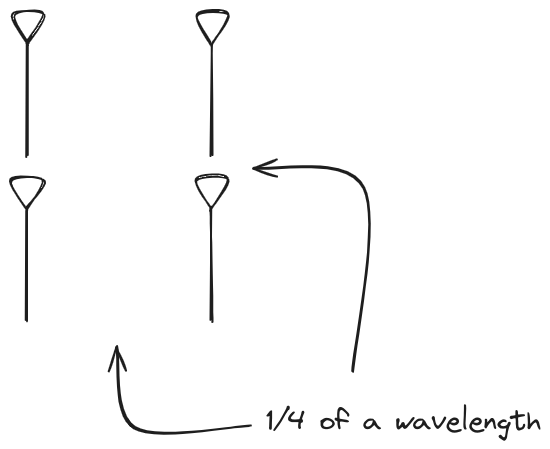
z axis, and separated by a fixed offset
in either the x or y axis by their neighbor, forming a square when
viewed along the x/y axis.
Let s take a look at what this looks like for a well constructed
2x2 phased array:
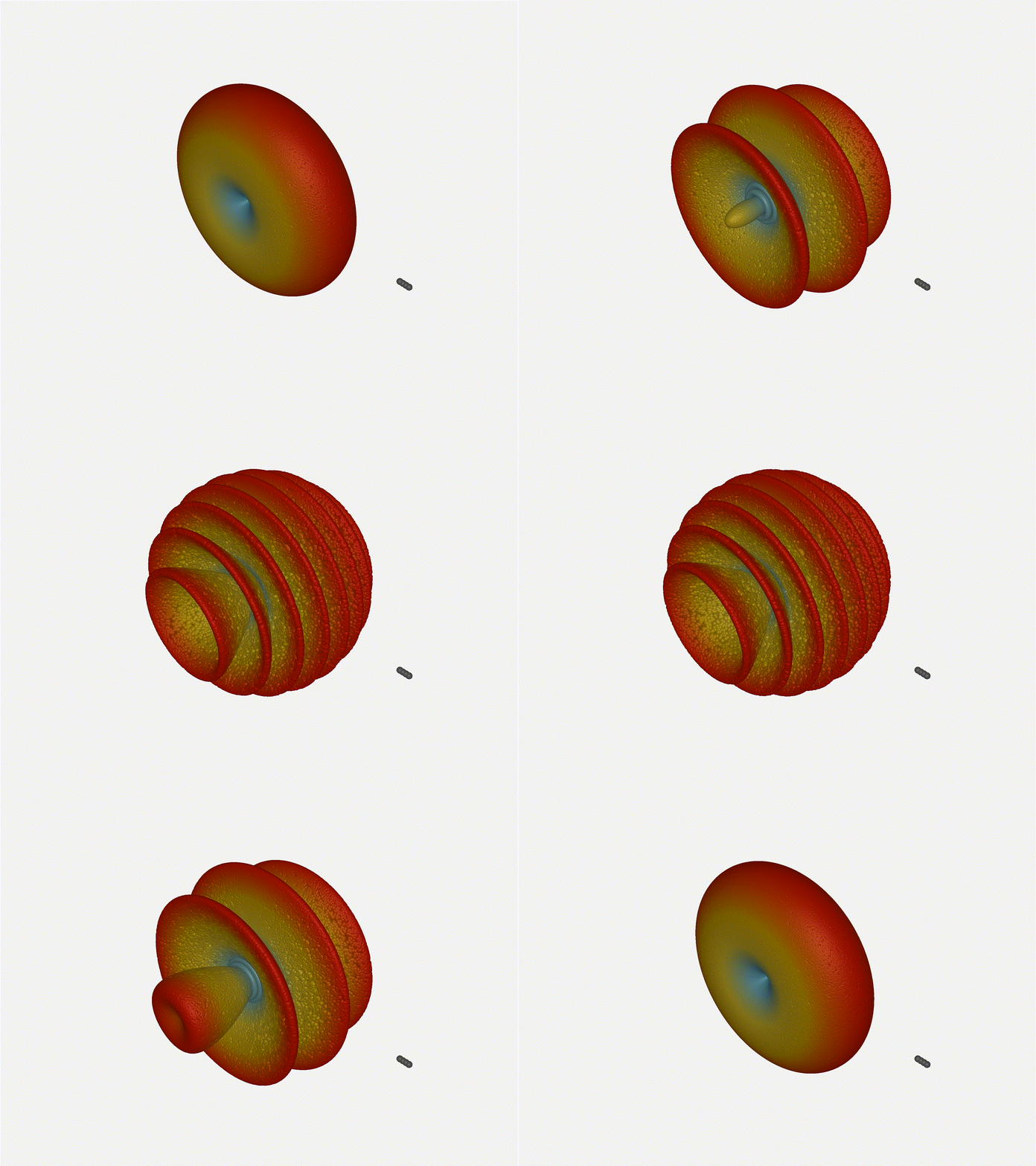
Let s do the same as above and take a look at the renders as we play with the
configuration of this array and see what things look like. This configuration
should suppress the sidelobes and give us good performance, and even give us
some amount of control in elevation while we re at it.
Sweet. Heck yeah. The array is quite directional in the configured direction,
and can even sweep a little bit in elevation, a definite improvement
from the 1x4 above.
Mesmerising. This is my favorate render. The sidelobes are very fun to
watch come in and out of existence. It looks absolutely other-worldly.
Very very cool. The sidelobes wind up turning the very blobby cardioid into
an electromagnetic dog toy. I think we ve proven to ourselves that using
a phased array much outside its designed frequency of operation seems like
a real bad idea.
A new maintenance release 0.4.22 of RProtoBuf
arrived on CRAN earlier today.
RProtoBuf
provides R with bindings for the
Google Protocol Buffers
( ProtoBuf ) data encoding and serialization library used and
released by Google, and deployed very widely in numerous projects as a
language and operating-system agnostic protocol.
This release matches the recent 0.4.21
release which enabled use of the package with newer ProtoBuf releases. Tomas
has been updating the Windows / rtools side of things, and supplied us
with simple PR that will enable building with those updated versions
once finalised.
The following section from the NEWS.Rd file has full details.
Thanks to my CRANberries, there is a diff to the previous release. The RProtoBuf page has copies of the (older) package vignette, the quick overview vignette, and the pre-print of our JSS paper. Questions, comments etc should go to the GitHub issue tracker off the GitHub repo. If you like this or other open-source work I do, you can sponsor me at GitHub.Changes in RProtoBuf version 0.4.22 (2022-12-13)
- Apply patch by Tomas Kalibera to support updated rtools to build with newer ProtoBuf releases on windows
This post by Dirk Eddelbuettel originated on his Thinking inside the box blog. Please report excessive re-aggregation in third-party for-profit settings.
This post is a review for Computing Reviews for A deep learning technique for intrusion detection system using a recurrent neural networks based framework , a article published in Computer CommunicationsSo let s assume you already know and understand that artificial intelligence s main building blocks are perceptrons, that is, mathematical models of neurons. And you know that, while a single perceptron is too limited to get interesting information from, very interesting structures neural networks can be built with them. You also understand that neural networks can be trained with large datasets, and you can get them to become quite efficient and accurate classifiers for data comparable to your dataset. Finally, you are interested in applying this knowledge to defensive network security, particularly in choosing the right recurrent neural network (RNN) framework to create an intrusion detection system (IDS). Are you still with me? Good! This paper might be right for you! The paper builds on a robust and well-written introduction and related work sections to arrive at explaining in detail what characterizes a RNN, the focus of this work, among other configurations also known as neural networks, and why they are particularly suited for machine learning (ML) tasks. RNNs must be trained for each problem domain, and publicly available datasets are commonly used for such tasks. The authors present two labeled datasets representing normal and hostile network data, identified according to different criteria: NSL-KDD and UNSW-NB15. They proceed to show a framework to analyze and compare different RNNs and run them against said datasets, segmented for separate training and validation phases, compare results, and finally select the best available model for the task measuring both training speed as well as classification accuracy. The paper is quite heavy due to both its domain-specific terminology many acronyms are used throughout the text and its use of mathematical notation, both to explain specific properties of each of the RNN types and for explaining the preprocessing carried out for feature normalization and selection. This is partly what led me to start the first paragraph by assuming that we, as readers, already understand a large body of material if we are to fully follow the text. The paper does begin by explaining its core technologies, but quickly ramps up and might get too technical for nonexpert readers. It is undeniably an interesting and valuable read, showing the state of the art in IDS and ML-assisted technologies. It does not detail any specific technology applying its findings, but we will probably find the information conveyed here soon enough in industry publications.
manifest-version: "0.1"
installations:
- install:
source: foo
dest-dir: usr/bin
"manifest-version": "0.1",
"installations": [
"install":
"source": "foo",
"dest-dir": "usr/bin",
]
So beyond me being unsatisfied with the current situation, it was also clear to me that I needed to come up with a better solution if I wanted externally provided plugins for debputy. To put a bit more perspective on what I expected from the end result:
- Most plugins would probably throw KeyError: X or ValueError style errors for quite a while. Worst case, they would end on my table because the user would have a hard time telling where debputy ends and where the plugins starts. "Best" case, I would teach debputy to say "This poor error message was brought to you by plugin foo. Go complain to them". Either way, it would be a bad user experience.
- This even assumes plugin providers would actually bother writing manifest parsing code. If it is that difficult, then just providing a custom file in debian might tempt plugin providers and that would undermine the idea of having the manifest be the sole input for debputy.
- It had to cover as many parsing errors as possible. An error case this code would handle for you, would be an error where I could ensure it sufficient degree of detail and context for the user.
- It should be type-safe / provide typing support such that IDEs/mypy could help you when you work on the parsed result.
- It had to support "normalization" of the input, such as
# User provides
- install: "foo"
# Which is normalized into:
- install:
source: "foo"
4) It must be simple to tell debputy what input you expected.
# User provides
- install: "foo"
# Which is normalized into:
- install:
source: "foo"
# Example input matching this typed dict.
#
# "source": ["foo"]
# "into": ["pkg"]
#
class InstallExamplesTargetFormat(TypedDict):
# Which source files to install (dest-dir is fixed)
sources: List[str]
# Which package(s) that should have these files installed.
into: NotRequired[List[str]]
# Example input matching this typed dict.
#
# "source": "foo"
# "into": "pkg"
#
#
class InstallExamplesManifestFormat(TypedDict):
# Note that sources here is split into source (str) vs. sources (List[str])
sources: NotRequired[List[str]]
source: NotRequired[str]
# We allow the user to write into: foo in addition to into: [foo]
into: Union[str, List[str]]
FullInstallExamplesManifestFormat = Union[
InstallExamplesManifestFormat,
List[str],
str,
]
def _handler(
normalized_form: InstallExamplesTargetFormat,
) -> InstallRule:
... # Do something with the normalized form and return an InstallRule.
concept_debputy_api.add_install_rule(
keyword="install-examples",
target_form=InstallExamplesTargetFormat,
manifest_form=FullInstallExamplesManifestFormat,
handler=_handler,
)
This prototype did not take a long (I remember it being within a day) and worked surprisingly well though with some poor error messages here and there. Now came the first challenge, adding the manifest format schema plus relevant normalization rules. The very first normalization I did was transforming into: Union[str, List[str]] into into: List[str]. At that time, source was not a separate attribute. Instead, sources was a Union[str, List[str]], so it was the only normalization I needed for all my use-cases at the time. There are two problems when writing a normalization. First is determining what the "source" type is, what the target type is and how they relate. The second is providing a runtime rule for normalizing from the manifest format into the target format. Keeping it simple, the runtime normalizer for Union[str, List[str]] -> List[str] was written as:
- Read TypedDict.__required_attributes__ and TypedDict.__optional_attributes__ to determine which attributes where present and which were required. This was used for reporting errors when the input did not match.
- Read the types of the provided TypedDict, strip the Required / NotRequired markers and use basic isinstance checks based on the resulting type for str and List[str]. Again, used for reporting errors when the input did not match.
def normalize_into_list(x: Union[str, List[str]]) -> List[str]:
return x if isinstance(x, list) else [x]
# Map from
class InstallExamplesManifestFormat(TypedDict):
# Note that sources here is split into source (str) vs. sources (List[str])
sources: NotRequired[List[str]]
source: NotRequired[str]
# We allow the user to write into: foo in addition to into: [foo]
into: Union[str, List[str]]
# ... into
class InstallExamplesTargetFormat(TypedDict):
# Which source files to install (dest-dir is fixed)
sources: List[str]
# Which package(s) that should have these files installed.
into: NotRequired[List[str]]
While working on all of this type introspection for Python, I had noted the Annotated[X, ...] type. It is basically a fake type that enables you to attach metadata into the type system. A very random example:
- How will the parser generator understand that source should be normalized and then mapped into sources?
- Once that is solved, the parser generator has to understand that while source and sources are declared as NotRequired, they are part of a exactly one of rule (since sources in the target form is Required). This mainly came down to extra book keeping and an extra layer of validation once the previous step is solved.
# For all intents and purposes, foo is a string despite all the Annotated stuff.
foo: Annotated[str, "hello world"] = "my string here"
# Map from
#
# "source": "foo" # (or "sources": ["foo"])
# "into": "pkg"
#
class InstallExamplesManifestFormat(TypedDict):
# Note that sources here is split into source (str) vs. sources (List[str])
sources: NotRequired[List[str]]
source: NotRequired[
Annotated[
str,
DebputyParseHint.target_attribute("sources")
]
]
# We allow the user to write into: foo in addition to into: [foo]
into: Union[str, List[str]]
# ... into
#
# "source": ["foo"]
# "into": ["pkg"]
#
class InstallExamplesTargetFormat(TypedDict):
# Which source files to install (dest-dir is fixed)
sources: List[str]
# Which package(s) that should have these files installed.
into: NotRequired[List[str]]
It was not super difficult given the existing infrastructure, but it did take some hours of coding and debugging. Additionally, I added a parse hint to support making the into conditional based on whether it was a single binary package. With this done, you could now write something like:
- Conversion table where the parser generator can tell that BinaryPackage requires an input of str and a callback to map from str to BinaryPackage. (That is probably lie. I think the conversion table came later, but honestly I do remember and I am not digging into the git history for this one)
- At runtime, said callback needed access to the list of known packages, so it could resolve the provided string.
# Map from
class InstallExamplesManifestFormat(TypedDict):
# Note that sources here is split into source (str) vs. sources (List[str])
sources: NotRequired[List[str]]
source: NotRequired[
Annotated[
str,
DebputyParseHint.target_attribute("sources")
]
]
# We allow the user to write into: foo in addition to into: [foo]
into: Union[BinaryPackage, List[BinaryPackage]]
# ... into
class InstallExamplesTargetFormat(TypedDict):
# Which source files to install (dest-dir is fixed)
sources: List[str]
# Which package(s) that should have these files installed.
into: NotRequired[
Annotated[
List[BinaryPackage],
DebputyParseHint.required_when_multi_binary()
]
]
In this way everybody wins. Yes, writing this parser generator code was more enjoyable than writing the ad-hoc manual parsers it replaced. :)

- The parser engine handles most of the error reporting meaning users get most of the errors in a standard format without the plugin provider having to spend any effort on it. There will be some effort in more complex cases. But the common cases are done for you.
- It is easy to provide flexibility to users while avoiding having to write code to normalize the user input into a simplified programmer oriented format.
- The parser handles mapping from basic types into higher forms for you. These days, we have high level types like FileSystemMode (either an octal or a symbolic mode), different kind of file system matches depending on whether globs should be performed, etc. These types includes their own validation and parsing rules that debputy handles for you.
- Introspection and support for providing online reference documentation. Also, debputy checks that the provided attribute documentation covers all the attributes in the manifest form. If you add a new attribute, debputy will remind you if you forget to document it as well. :)
--link-dest option (manpage) solves the part of creating hardlinks to a previous backup (found here). So my backup program becomes this shell script in ~/backups/backup.sh:
#!/bin/sh
SERVER="$ 1 "
BACKUP="$ HOME /backups/$ SERVER "
SNAPSHOTS="$ BACKUP /snapshots"
FOLDER=$(date --utc +%F_%H-%M-%S)
DEST="$ SNAPSHOTS /$ FOLDER "
LAST=$(ls -d1 $ SNAPSHOTS /????-??-??_??-??-?? tail -n 1)
rsync \
--rsh="ssh -i $ BACKUP /sshkey -o ControlPath=none -o ForwardAgent=no" \
-rlpt \
--delete --link-dest="$ LAST " \
$ SERVER ::backup "$ DEST "
The script connects to rsync in daemon mode as outlined in section USING RSYNC-DAEMON FEATURES VIA A REMOTE-SHELL CONNECTION in the rsync manpage. This allows to reference a module as the source that is defined on the server side as follows:
[backup]
path = /
read only = true
exclude from = /srv/rsyncbackup/excludelist
uid = root
gid = root
The important bit is the read only setting that protects the server against somebody with access to the ssh key to overwrit files on the server via rsync and thus gaining full root access.
Finally the command prefix in ~/.ssh/authorized_keys runs rsync as daemon with sudo and the specified config file:
command="sudo rsync --config=/srv/rsyncbackup/config --server --daemon ."
The sudo setup is left as an exercise for the reader as mine is rather opinionated.
Unfortunately I have not managed to configure systemd timers in the way I wanted and therefor opened an issue: Allow retry of timer triggered oneshot services with failed conditions or asserts . Any help there is welcome!
systemd-resolved together in Debian
bookworm does not work out of the box. The first sign of trouble was these constant
messages in my logs:
avahi-daemon[pid]: Host name conflict, retrying with hostname-2
Then I realized that CUPS printer discovery didn't work: my network
printer could not be found. Since this discovery now relies on Multicast DNS,
it would make sense that both problems are related to an incompatibility
between NetworkManager and Avahi.
[publish]
publish-aaaa-on-ipv4=no
publish-a-on-ipv6=no
[server]
cache-entries-max=0
systemd-resolved which conflicts with the mDNS support in
avahi-daemon.
You can see this in the output of resolvectl status:
Global
Protocols: -LLMNR +mDNS -DNSOverTLS DNSSEC=no/unsupported
resolv.conf mode: stub
Link 2 (enp6s0)
Current Scopes: DNS mDNS/IPv4 mDNS/IPv6
Protocols: +DefaultRoute -LLMNR +mDNS -DNSOverTLS
DNSSEC=no/unsupported
Current DNS Server: 192.168.1.1
DNS Servers: 192.168.1.1
DNS Domain: lan
which includes +mDNS for the main network adapter.
I initially thought that I could just uninstall avahi-daemon and rely on the
systemd-resolved mDNS stack, but it's not actually compatible with
CUPS.
The solution was to tell NetworkManager to set mDNS to resolve-only mode in
systemd-resolved by adding the following to
/etc/NetworkManager/conf.d/mdns.conf:
[connection]
connection.mdns=1
leaving /etc/avahi/avahi-daemon.conf to the default Debian configuration.
resolvectl status now shows the following:
Global
Protocols: -LLMNR +mDNS -DNSOverTLS DNSSEC=no/unsupported
resolv.conf mode: stub
Link 2 (enp6s0)
Current Scopes: DNS mDNS/IPv4 mDNS/IPv6
Protocols: +DefaultRoute -LLMNR mDNS=resolve -DNSOverTLS
DNSSEC=no/unsupported
Current DNS Server: 192.168.1.1
DNS Servers: 192.168.1.1
DNS Domain: lan
Avahi finally sees my printer (called hp in the output below):
$ avahi-browse -at grep Printer
+ enp6s0 IPv6 hp @ myprintserver Secure Internet Printer local
+ enp6s0 IPv4 hp @ myprintserver Secure Internet Printer local
+ enp6s0 IPv6 hp @ myprintserver Internet Printer local
+ enp6s0 IPv4 hp @ myprintserver Internet Printer local
+ enp6s0 IPv6 hp @ myprintserver UNIX Printer local
+ enp6s0 IPv4 hp @ myprintserver UNIX Printer local
and so does CUPS:
$ sudo lpinfo --include-schemes dnssd -v
network dnssd://myprintserver%20%40%20hp._ipp._tcp.local/cups?uuid=d46942a2-b730-11ee-b05c-a75251a34287
/etc/network/iptables.up.rules:
# Allow mDNS for local service discovery
-A INPUT -d 100.64.0.0/10 -p udp --dport 5353 -j ACCEPT
-A INPUT -d 192.168.1.0/24 -p udp --dport 5353 -j ACCEPT
and in etc/network/ip6tables.up.rules:
# Allow mDNS for local service discovery
-A INPUT -d ff02::/16 -p udp --dport 5353 -j ACCEPT
254. This version includes the following changes:
[ Chris Lamb ]
* Reflow some code according to black.
[ Seth Michael Larson ]
* Add support for comparing the 'eXtensible ARchive' (.XAR/.PKG) file format.
[ Vagrant Cascadian ]
* Add external tool on GNU Guix for 7z.
auto end0 iface end0 inet dhcpThen to get sshd to start you have to run the following commands to generate ssh host keys that aren t zero bytes long:
rm /etc/ssh/ssh_host_* systemctl restart ssh.serviceIt appears to have wifi hardware but the OS doesn t recognise it. This isn t a priority for me as I mostly want to use it as a server. Performance For the first test of performance I created a 100MB file from /dev/urandom and then tried compressing it on various systems. With zstd -9 it took 16.893 user seconds on the LicheePi4A, 0.428s on my Thinkpad X1 Carbon Gen5 with a i5-6300U CPU (Debian/Unstable), 1.288s on my E5-2696 v3 workstation (Debian/Bookworm), 0.467s on the E5-2696 v3 running Debian/Unstable, 2.067s on a E3-1271 v3 server, and 7.179s on the E3-1271 v3 system emulating a RISC-V system via QEMU running Debian/Unstable. It s very impressive that the QEMU emulation is fast enough that emulating a different CPU architecture is only 3.5* slower for this test (or maybe 10* slower if it was running Debian/Unstable on the AMD64 code)! The emulated RISC-V is also more than twice as fast as real RISC-V hardware and probably of comparable speed to real RISC-V hardware when running the same versions (and might be slightly slower if running the same version of zstd) which is a tribute to the quality of emulation. One performance issue that most people don t notice is the time taken to negotiate ssh sessions. It s usually not noticed because the common CPUs have got faster at about the same rate as the algorithms for encryption and authentication have become more complex. On my i5-6300U laptop it takes 0m0.384s to run ssh -i ~/.ssh/id_ed25519 localhost id with the below server settings (taken from advice on ssh-audit.com [3] for a secure ssh configuration). On the E3-1271 v3 server it is 0.336s, on the QMU system it is 28.022s, and on the LicheePi it is 0.592s. By this metric the LicheePi is about 80% slower than decent x86 systems and the QEMU emulation of RISC-V is 73* slower than the x86 system it runs on. Does crypto depend on instructions that are difficult to emulate?
HostKey /etc/ssh/ssh_host_ed25519_key KexAlgorithms -ecdh-sha2-nistp256,ecdh-sha2-nistp384,ecdh-sha2-nistp521,diffie-hellman-group14-sha256 MACs -umac-64-etm@openssh.com,hmac-sha1-etm@openssh.com,umac-64@openssh.com,umac-128@openssh.com,hmac-sha2-256,hmac-sha2-512,hmac-sha1I haven t yet tested the performance of Ethernet (what routing speed can you get through the 2 gigabit ports?), emmc storage, and USB. At the moment I ve been focused on using RISC-V as a test and development platform. My conclusion is that I m glad I don t plan to compile many kernels or anything large like LibreOffice. But that for typical development that I do it will be quite adequate. The speed of Chromium seems adequate in basic tests, but the video output hasn t worked reliably enough to do advanced tests. Hardware Features Having two Gigabit Ethernet ports, 4 USB-3 ports, and Wifi on board gives some great options for using this as a router. It s disappointing that they didn t go with 2.5Gbit as everyone seems to be doing that nowadays but Gigabit is enough for most things. Having only a single HDMI port and not supporting USB-C docks (the USB-C port appears to be power only) limits what can be done for workstation use and for controlling displays. I know of people using small ARM computers attached to the back of large TVs for advertising purposes and that isn t going to be a great option for this. The CPU and RAM apparently uses a lot of power (which is relative the entire system draws up to 2A at 5V so the CPU would be something below 5W). To get this working a cooling fan has to be stuck to the CPU and RAM chips via a layer of thermal stuff that resembles a fine sheet of blu-tack in both color and stickyness. I am disappointed that there isn t any more solid form of construction, to mount this on a wall or ceiling some extra hardware would be needed to secure this. Also if they just had a really big copper heatsink I think that would be better. 80386 CPUs with similar TDP were able to run without a fan. I wonder how things would work with all USB ports in use. It s expected that a USB port can supply a minimum of 2.5W which means that all the ports could require 10W if they were active. Presumably something significantly less than 5W is available for the USB ports. Other Devices Sipheed has a range of other devices in the works. They currently sell the LicheeCluster4A which support 7 compute modules for a cluster in a box. This has some interesting potential for testing and demonstrating cluster software but you could probably buy an AMD64 system with more compute power for less money. The Lichee Console 4A is a tiny laptop which could be useful for people who like the 7 laptop form factor, unfortunately it only has a 1280*800 display if it had the same resolution display as a typical 7 phone I would have bought one. The next device that appeals to me is the soon to be released Lichee Pad 4A which is a 10.1 tablet with 1920*1200 display, Wifi6, Bluetooth 5.4, and 16G of RAM. It also has 1 USB-C connection, 2*USB-3 sockets, and support for an external card with 2*Gigabit ethernet. It s a tablet as a laptop without keyboard instead of the more common larger phone design model. They are also about to release the LicheePadMax4A which is similar to the other tablet but with a 14 2240*1400 display and which ships with a keyboard to make it essentially a laptop with detachable keyboard. Conclusion At this time I wouldn t recommend that this device be used as a workstation or laptop, although the people who want to do such things will probably do it anyway regardless of my recommendations. I think it will be very useful as a test system for RISC-V development. I have some friends who are interested in this sort of thing and I can give them VMs. It is a bit expensive. The Sipheed web site boasts about the LicheePi4 being faster than the RaspberryPi4, but it s not a lot faster and the RaspberryPi4 is much cheaper ($127 or $129 for one with 8G of RAM). The RaspberryPi4 has two HDMI ports but a limit of 8G of RAM while the LicheePi has up to 16G of RAM and two Gigabit Ethernet ports but only a single HDMI port. It seems that the RaspberryPi4 might win if you want a cheap low power desktop system. At this time I think the reason for this device is testing out RISC-V as an alternative to the AMD64 and ARM64 architectures. An open CPU architecture goes well with free software, but it isn t just people who are into FOSS who are testing such things. I know some corporations are trying out RISC-V as a way of getting other options for embedded systems that don t involve paying monopolists. The Lichee Console 4A is probably a usable tiny laptop if the resolution is sufficient for your needs. As an aside I predict that the tiny laptop or pocket computer segment will take off in the near future. There are some AMD64 systems the size of a phone but thicker that run Windows and go for reasonable prices on AliExpress. Hopefully in the near future this device will have better video drivers and be usable as a small and quiet workstation. I won t rule out the possibility of making this my main workstation in the not too distant future, all it needs is reliable 4K display and the ability to decode 4K video. It s performance for web browsing and as an ssh client seems adequate, and that s what matters for my workstation use. But for the moment it s just for server use.
Now that I m freelancing, I need to
actually track my time, which is something I ve had the luxury of not having
to do before. That meant something of a rethink of the way I ve been
keeping track of my to-do list. Up to now that was a combination of things
like the bug lists for the projects I m working on at the moment, whatever
task tracking system Canonical was using at the moment (Jira when I left),
and a giant flat text file in which I recorded logbook-style notes of what
I d done each day plus a few extra notes at the bottom to remind myself of
particularly urgent tasks. I could have started manually adding times to
each logbook entry, but ugh, let s not.
In general, I had the following goals (which were a bit reminiscent of my
address book):
vim-based
versions of Org mode in the past I ve found they haven t really fitted my
brain very well.
Taskwarrior and Timewarrior
One of the other Freexian collaborators mentioned
Taskwarrior and
Timewarrior, so I had a look at those.
The basic idea of Taskwarrior is that you have a task command that tracks
each task as a blob of JSON and provides subcommands to let you add, modify,
and remove tasks with a minimum of friction. task add adds a task, and
you can add metadata like project:Personal (I always make sure every task
has a project, for ease of filtering). Just running task shows you a task
list sorted by Taskwarrior s idea of urgency, with an ID for each task, and
there are various other reports with different filtering and verbosity.
task <id> annotate lets you attach more information to a task. task <id>
done marks it as done. So far so good, so a redacted version of my to-do
list looks like this:
$ task ls
ID A Project Tags Description
17 Freexian Add Incus support to autopkgtest [2]
7 Columbiform Figure out Lloyds online banking [1]
2 Debian Fix troffcvt for groff 1.23.0 [1]
11 Personal Replace living room curtain rail
task all project:Personal and
it d show me both pending and completed tasks in that project, and that all
the data was stored in ~/.task - though I have to say that there are
enough reporting bells and whistles that I haven t needed to poke around
manually. In combination with the regular backups that I do anyway (you do
too, right?), this gave me enough confidence to abandon my previous
text-file logbook approach.
Next was time tracking. Timewarrior integrates with Taskwarrior, albeit in
an only semi-packaged way, and
it was easy enough to set that up. Now I can do:
$ task 25 start
Starting task 00a9516f 'Write blog post about task tracking'.
Started 1 task.
Note: '"Write blog post about task tracking"' is a new tag.
Tracking Columbiform "Write blog post about task tracking"
Started 2024-01-10T11:28:38
Current 38
Total 0:00:00
You have more urgent tasks.
Project 'Columbiform' is 25% complete (3 of 4 tasks remaining).
task active to find the ID, then task
<id> stop. Timewarrior does the tedious stopwatch business for me, and I
can manually enter times if I forget to start/stop a task. Then the really
useful bit: I can do something like timew summary :month <name-of-client>
and it tells me how much to bill that client for this month. Perfect.
I also started using VIT to simplify
the day-to-day flow a little, which means I m normally just using one or two
keystrokes rather than typing longer commands. That isn t really necessary
from my point of view, but it does save some time.
Android integration
I left Android integration for a bit later since it wasn t essential. When
I got round to it, I have to say that it felt a bit clumsy, but it did
eventually work.
The first step was to set up a
taskserver. Most
of the setup procedure was OK, but I wanted to use Let s Encrypt to minimize
the amount of messing around with CAs I had to do. Getting this to work
involved hitting things with sticks a bit, and there s still a local CA
involved for client certificates. What I ended up with was a certbot
setup with the webroot authenticator and a custom deploy hook as follows
(with cert_name replaced by a DNS name in my house domain):
#! /bin/sh
set -eu
cert_name=taskd.example.org
found=false
for domain in $RENEWED_DOMAINS; do
case "$domain" in
$cert_name)
found=:
;;
esac
done
$found exit 0
install -m 644 "/etc/letsencrypt/live/$cert_name/fullchain.pem" \
/var/lib/taskd/pki/fullchain.pem
install -m 640 -g Debian-taskd "/etc/letsencrypt/live/$cert_name/privkey.pem" \
/var/lib/taskd/pki/privkey.pem
systemctl restart taskd.service
/etc/taskd/config (server.crl.pem and
ca.cert.pem were generated using the documented taskserver setup procedure):
server.key=/var/lib/taskd/pki/privkey.pem
server.cert=/var/lib/taskd/pki/fullchain.pem
server.crl=/var/lib/taskd/pki/server.crl.pem
ca.cert=/var/lib/taskd/pki/ca.cert.pem
taskd.ca on my laptop to
/usr/share/ca-certificates/mozilla/ISRG_Root_X1.crt and otherwise follow
the client setup instructions, run task sync init to get things started,
and then task sync every so often to sync changes between my laptop and
the taskserver.
I used TaskWarrior
Mobile
as the client. I have to say I wouldn t want to use that client as my
primary task tracking interface: the setup procedure is clunky even beyond
the necessity of copying a client certificate around, it expects you to give
it a .taskrc rather than having a proper settings interface for that, and
it only seems to let you add a task if you specify a due date for it. It
also lacks Timewarrior integration, so I can only really use it when I don t
care about time tracking, e.g. personal tasks. But that s really all I
need, so it meets my minimum requirements.
Next?
Considering this is literally the first thing I tried, I have to say I m
pretty happy with it. There are a bunch of optional extras I haven t tried
yet, but in general it kind of has the vim nature for me: if I need
something it s very likely to exist or easy enough to build, but the
features I don t use don t get in my way.
I wouldn t recommend any of this to somebody who didn t already spend most
of their time in a terminal - but I do. I m glad people have gone to all
the effort to build this so I didn t have to.
Next.