Search Results: "ag"

11 November 2009

Steve Kemp: You're not even trying

I've spent the past 24 hours playing with my new phone, and so far have enjoyed it. I've put together very very rough documentation on what I've done so far which is just: So far I've not had any major problems, and my biggest issue is the lack of TAB, arrows, and ctrl keys on the keyboard. I've put together a local packages for the novacom/precom USB connection utility, and will share if there's any interest. Happily it "just works" and was trivial to compile so theres probably not really any point in uploading as such. ObFilm: Dark Angel (TV Series)

John Goerzen: In-Depth Review: Motorola Droid (with some iPhone comparisons)

The Motorola Droid A855 is the first Android 2.0 phone. I have been using one since Monday, having switched from a BlackBerry Pearl. I also wrote about Terah s iPod Touch recently, so I ll be making comparisons to it too. Here s my review. Hardware Physically, the device is very nice. It fits well in my hand. It comes in a fairly small box. It s surprisingly heavy for such a small device, but it isn t so heavy as to be a problem. It feels solid, sturdy, and durable throughout. Terah has the most recent iPod Touch 8GB, and compared to that, the Droid is thicker and heavier. The Droid s screen is awesome; a little longer but not as wide as the iPod Touch s. The iPod Touch screen seemed to offer less friction as I d slide my finger over it, which was nice but not a terribly big deal. I don t share some other people s annoyance with the keyboard. It is far better than the BlackBerry Pearl, or many other BlackBerries I ve seen. Along the bottom of the screen are some silkscreened buttons. My gripe with them is that they are easy to accidentally press. I ve done that more than once while using the phone in speakerphone mode, but you can lock the phone keyboard while you re on a call. I also don t share the complaint about battery life. It is excellent compared to the Pearl. Despite having a long-life battery, if I had it charged fully when leaving work at 5PM, by the next morning at 7AM it would often be completely discharged (though sometimes only half discharged). I believe that has to do with my home being in a poor reception area, and it spending a lot of energy looking for signals. In any case, the Droid has impressed me with its battery life and I have no complaints there. The screen, as I said, is brilliant and sharp. It is readable in various lighting conditions. By default, its brightness adjusts with the brightness of the ambient light. That s normally fine, but it can be annoying to stand in front of a light with the Droid in a shadow, watch its screen darken, and then shift a bit and it becomes bright again. There is a setting to disable automatic brightness. Button-wise, it has four physical buttons: the power/lock button at the top, volume up/down on the side, and a camera button on the side. The camera button only works when the phone isn t suspended (locked), and disappointingly can t be remapped to something actually useful. Just beneath the screen are four touch buttons: back, menu, home, and search. These are the ones I complained were easy to accidentally press. MicroSD and USB The Droid comes by default with a 16GB MicroSD card already installed. This is one huge advantage over the iPhone or iPod Touch: you can actually put things on the phone yourself, directly, without having to use iTunes and its limited features. I have, for instance, downloaded a PDF on the Droid and later copied it to my PC. I also copied a KeePassX encrypted password database from my Linux computer to the Android, for use with KeePassDroid. The iPhone/iPod Touch password programs don t support this kind of copying of files from your PC to the device, though one will let you put a database up on a webserver you control and download it from there. Plugging in a MicroUSB cable will start charging the Droid automatically. In order to make the SD card mountable, you must simply drag down the notification bar (which is how you get detail about what it s telling you normally) and touch the USB icon. When the SD is mounted on the computer, the Droid won t see it, of course. Touch the USB icon again to mount it on the Droid again, or just unplug USB. Wireless and Wifi The wifi support works like you might expect: pretty well. The cell phone reception works well, as does its Bluetooth support. It has an easily-activated airplane mode which disables all wireless features, which can then later be re-enabled. You can also individually disable wifi and Bluetooth. Oddly, you can t disable the cell phone network individually. The only way I could find to disable it is via Airplane Mode. User Interface The user interface, overall, is very slick and polished. However, I would have to say it is not as slick and polished as the iPhone/Touch interface. A few of the animated effects have a low framerate, which isn t really a big deal. More of a big deal is that settings and options can be scattered in many different locations, making them hard to track down at times. The device also offers fewer visual cues than the iPhone/Touch, though that is perhaps not significant. Like Apple s device, the Android 2.0 UI offers you three home panels, which you switch between by dragging your finger left and right. The iPhone shows some dots at the bottom of the screen, a standard UI indicator on that device that you can flick left/right, while there is no such indication on the Android. This is somewhat nitpicky though. I would put Android 2.0 and iPhone in the same general class of user interfaces, way above any other such device I ve tried. The Droid has an on-screen keyboard similar to the iPhone/Touch, though somehow it felt like the keys were smaller or easier to mistype. I m not sure why that is; maybe they really are smaller. The physical keyboard can be used at any point too, of course. Background Apps This is an area where Android really shines over iPhone. Android supports background apps everywhere. That means that your weather widget can be always correct, instead of being hardcoded at the factory to show 73 degrees as iPhone s weather icon does until you tap to open it. It means that more apps remember where you were and what you were doing when you switch to/from them. And it means that you can do things while that PDF downloads. Finally, it means that you can have native Jabber clients on the Android without having to do some mess with Apple push notifications plus third party servers, significantly reducing the complexity of such apps. Browser Now moving on to the applications preloaded on the phone, I ll start with the browser. It is, in a word, awesome. It is far faster and reliable than the browser in my N810. Compared to BlackBerries, of course, this is a real browser, not their limited one; and even so, it is still faster. It is also faster than the iPhone/Touch browser, sometimes significantly so. The pinch to zoom feature of the iPhone/Touch is lacking, and it must be said is both useful and pretty. Zooming softkeys appear on the screen when you tap, and do work well. It also automatically zooms if you tap on the page to fill out a form, for instance. The bookmarks save thumbnail images similar to the iPhone, and you can put bookmarks on your home screens as well. Rotating the Droid to landscape orientation causes the browser to also rotate, and on most websites it will also zoom in by default at that point, since it s got a wider orientation and doesn t have to shrink stuff to fit as much. The physical keyboard is very nice for filling in usernames and passwords. iPhone-optimized sites, such as Bloglines, work great on the Android. Though many of them fail to autodetect the Android as an iPhone-like device, and thus you have to manually ferret out their iPhone-optimized URLs. Email This is both a strong and a weak spot of the Droid. First off, it comes with two email client apps preinstalled: one for Gmail, and one for everything else. I haven t used the Gmail one, so this review doesn t consider it. You can connect the email program to your IMAP, POP, SMTP, or Exchange (ActiveSync) accounts in the predictable way. Each account can be configured with its own notification preferences, so you can easily see an icon, vibration, or beep when you get new mail on one account and not the other. All folders on an IMAP account are accessible, which is a very nice feature that is not shared by the BlackBerry. You can view your mail as a unified INBOX if you prefer. In such a few, a thin color bar to the left of each message summary tells you which account it came from by its color. This is a nice way to quickly deal with all new email, wherever it may be from, and ought to be emulated by some desktop clients. You can, of course, also view each account individually. The email program supports attachments, both viewing and sending. It does not appear to have the iPhone/Touch bug if failing to display emails forwarded as attachments. Now to the drawbacks. First of all, it inexplicably doesn t support the IMAP IDLE command. As a result, IMAP accounts are polling-only; there is no near-instant notification of new mail as there is with Exchange accounts, even though IMAP supports that trivially. Like the iPhone/Touch, Android 2.0 s mail program has a great deal of trouble with self-signed SSL certs, or SSL certs that are unusual in any way. Both devices refuse, by default, to talk to mail servers with self-signed SSL certs. Neither one offers to let you add an exception to recognize a particular cert in the manner that the built-in web browser on these devices would do. On the iPhone/Touch, at this point you need to obtain the cert by other means, stick it up on a web server, browse to it from the device, and add it that way. This trick doesn t work on Android 2.0, nor does adding it using the import from SD option. There appears to be absolutely no way to teach the mail program to use a self-signed cert on Android. The good(?) news is that you can choose to have Android accept any certificate. Many people in forums suggest that, and it does let it connect. Of course, it also removes much of the security benefit of using SSL/TLS in the first place, and is a terrible excuse for the lack of proper self-signed cert support. Both iPhone and Android devices have a horrible user experience in this area Quickoffice The Droid comes with some sort of Quickoffice software pre-installed. It can be used to view PDF, Word, and Excel files (at least; maybe more). But it is a rather strange beast. It has no icon on the applications screen. The only way to open Quickoffice is by opening a file that it supports in another app. So, for instance, tap on a PDF in the browser or open a Word attachment in email. I haven t played with it much, but I can say that it s read-only but seems to have high-quality rendering of all document types. Its PDF viewer is glacially slow on any page that has graphics. Flip the page to one with graphics and up pops a progress bar. And good thing too, because it might take 15-30 seconds to render a page. I will be looking for better PDF viewers in the Market; there are quite a few. Lack of file manager And that brings us to the next surprising limitation: there is no built-in file manager. I downloaded a PDF from the browser, and saved it to the SD card, but there was no way to look at it from the phone! Absolutely none. No way to delete it, rename it, etc. Several people recommended Astro, which solved all of those problems. Not having such a program built in is a weird glaring oversight. Of course, the iPhone/Touch doesn t have one built in, but in their case the glaring oversight is not having any files to manage Calender, Contacts, and PIM features This is an area of exceptional strength for the Android. I believe it s got the best PIM features of any mobile device out there, though it s not without its quirks. There are two calendar apps on the Droid, and they both have virtually identical interfaces and feature sets. I am rather at a loss as to why we are burdened with two separate apps. In any case, the app called Calendar works with a local calendar, or with Google Calendar syncing. It supports all the features you d expect, and plenty you wouldn t, including excellent support for meetings, viewing other people s calendars that you ve configured access to on google.com/calendar, viewing subscribed iCal calendars, etc. It has push syncing with Google Calendar, so new events appear in about 10 seconds. It is well-executed and completely flawless in every way I could see. Corporate Calendar is the same, but for hooking into Exchange or Exchange-compatible calendars via ActiveSync. We are evaluating groupware, and have so far tested it with Zimbra and Scalix. It worked well with Zimbra, and not so well with Scalix. That s not to say there were no problems. The meeting invitation emails Corporate Calendar generated appeared to have no body in the Zimbra mail client, or in Thunderbird (though if you look at the raw email, you see it does have a vcal entry in it). Meeting invitations sent to the Android can be displayed in the Email program, but the Email program doesn t offer accept/decline buttons, so you have to manually pull up the event on your calendar to accept or decline it. Other than that, it worked flawlessly with Zimbra. Scalix exhibited several data integrity issues that will probably make it unsuitable for syncing with an Android at this time. There is a built-in Calendar widget you can put on your home screen. It will show you the date and info about your next appointment. I miss the BlackBerry Pearl theme that showed me the next two appointments. There are some apps that claim to do this, but none of them work well. Contacts are also quite powerful. The contacts viewer aggregates your contacts from multiple sources into a single view, which is nice. It can sync in Gmail contacts, ActiveSync, and Facebook contacts. (How s that for a device with corporate and personal appeal?) The viewer works better than Apple s, and creating a new contact lets you choose which source you d like to add it to if you have more than one available. Continuing the trend of many recent devices, the Droid has no task/todo list support built in. Maps I ve heard people be all excited about Google Maps, saying it s the best maps ever in a phone (though I suspect they have forgotten that Garmin has added on a phone to their GPS products in the past). In general, they are probably right. And also they are probably irrelevant. The first thing that must be said is that the maps on the Android, like the iPhone/Touch and other such devices, are not actually installed on the Android. Consequently, for mapping or navigation to work, you must have a data signal, either wifi or CDMA. That immediately turns this into a GPS accessory, not a go-to device, because who wants to be stuck without a working GPS someplace without cell phone reception? (Such as several areas right near my house) I have a Garmin Nuvi 500 (see my review), and despite not being a terribly expensive GPS, it runs circles around the mapping in Android 2.0 (or iPhone for that matter). The 3D display on the Nuvi is very helpful for driving in dense city streets, and that s not available on Android or iPhone. The Nuvi has nice features such as one-touch detour calculation, excellent geocaching integration, accurate and sensitive receiver, etc. I will not be leaving it at home for trips just because the Android supports maps. That said, there is something to be said for having maps of Android s quality. It can be a nice crutch if you re somewhere unfamiliar but didn t expect to be, and thus left your GPS at home. It also can give you routing on transit sources, which Garmin can t, so if you re in an urban area with bus/subway options, the Android maps could be very helpful. I will probably try that out when we re in Chicago next and still pack the Garmin unit for driving around rural Indiana. The Phone The last built-in app to discuss is the phone feature. Yes, the Android is a phone. As expected, the phone integrates well with the system. There is not much of any great interest to discuss here. It s a phone. It integrates with contacts. It works. I use Google Voice, and have had their BlackBerry app for some time now. The Google Voice android app is far nicer. You have the option to make all calls via Google Voice, none via Google Voice, prompt each time, or only international calls via GV (which is presumably cheaper for such than your carrier). A couple of annoyances, though. One is that you have to touch a button to activate the keypad (to send touch-tone digits while you re on a call). It should be activated by default. Android Market vs. App Store I know some people love it, but to me the Apple App Store is like a cross between the sleazy guy selling watches from his car trunk and the tourist trap strip malls that sell 50-cent useless plastic memorabilia for $20. Yes, there are some quality apps in the App Store that aren t overpriced, don t violate your privacy, and do something useful. But you ll have to look hard. It still boggles the mind that most of the secure password storage tools for Android think they need access to the GPS, Internet, and at least one of your contacts, phone number, logs, etc. Yes, you heard me right. A password storage tool wants GPS and Internet access. And, being Apple, we all know how tight they ve locked down the App Store. Emulators are banned. Useful apps get arbitrarily banned at various points. Now, the Android App Market is better than the Apple App Store in the sense that it has a lower percentage of the crappy apps, and perhaps more useful apps, at least to my taste. That s not to say it s without crappy apps. It boggles my mind why most weather applets on the Market think they need to know my phone s status and identity, and why some apps that have nothing to do with the Internet or location services want to know all of the above. I don t install such apps. But there are gems out there. The small 400K weather applets that do what they advertise, and do it well. My absolute favorite is droid48, an emulator for my beloved HP 48GX calculator. Yes, an emulator. You can also find various NES, SNES, and C-64 emulators on the Market; Apple famously removed the latter from their App Store recently. And you re not tied to the Market either; you can install apps from wherever you like. KeePassDroid is another one. It reads the same database as KeePassX for Linux or KeePass (.kdb format only) for Windows. It s a secure password management system, and I can periodically copy the file from my desktop over to the Droid and have all my passwords at my fingertips but encrypted, of course. There is simply nothing that convenient for the iPhone/Touch because the device doesn t permit it. Music and Video I haven t played with these much, but the music player seems to just see MP3s placed anywhere on the SD and presents them as you d expect a music player to do. It looks fully-functional and easy to use. Conclusion Overall, I think the Droid is a very nice phone. It isn t perfect, but it bests the iPhone in a number of areas. I think it s probably the best phone for many right now, and the iPhone for some others. Update Nov 11: Two other annoyances I forgot to mention. One is that the power-button shortcut menu, as well as the lock screen, have a quick shortcut to put the phone into silent mode. Very well. Except, confusingly, these buttons not only enable silent mode but also disable vibrate mode while checking the silent mode checkbox in settings does nothing to vibrate mode. There is no built-in shortcut to enable vibrate mode; you d have to unlock the device, use the volume keys to go down the vibrate. The app Silent Mode Jammer helps with this. Second is that the documentation is as poor as any other cell phone around. For instance, there s a setting that says Voice Privacy. It s a checkbox. The description is Enable enhanced privacy mode. Thanks, but that tells me nothing. Nobody online seems to know either. A few overconfident forum posters claim it s encryption, linking to posts from 2003 about a Sony phone with a checkbox with the same name. Maybe it is encryption, but that is hardly definitive. The bottom line is it s not documented anywhere. Neither of these change my conclusion above though.

Andrew Pollock: [life] Well this just sucks

I'd had bad feelings about this trip, mainly because it was so short. I didn't expect this to happen though... Back story: Smudge has always been fairly wary of Stumpy, for some unknown reason (perhaps her boisterousness?) It came to a head when we did our road trip to Atlanta. We got back home, and Smudge had pooped in all the wrong places, and was hissing and growling at Stumpy whenever Stumpy looked at her the wrong way. The cat sitter plead ignorance, but something must have happened while we were away. Smudge has been pretty hopeless around Stumpy ever since. One theory was that maybe Stumpy (or Smudge) had some health problem, so we had them both checked out and no red flags were raised. The other option was to put Smudge on Prozac for a while to see if she settled down. I didn't like the idea of drugging her, so we've opted to separate them for a while. Smudge is in our bedroom and Stumpy and Lily have the rest of the house. Smudge and Stumpy only have supervised time together. We've tried a bit of play therapy as time permits, but it hasn't made much of a difference. So fast forwarding to now, and we didn't want to leave Smudge in our bedroom all by herself for the week, so we thought we'd put Stumpy in a cat boarding place, since we figured she could handle it, and let Smudge and Lily have the run of the house. Our neighbour Carol was going to check in on Smudge and Lily. All good. I think it was yesterday (my brain is not dealing with the various timezones plus jet lag) Sarah got an email from Carol saying that the cat boarding place had called her because Stumpy hadn't been eating, and was all lethargic. Carol went and brought her home, and she didn't do much better at home, she was just lying around, so she took her to our vet. She was having breathing problems, and generally showing symptoms of congestive heart failure! Her blood work was otherwise okay. The vet said they couldn't do much and needed to send her to a specialist vet at Campbell, where they could do an ultrasound on her heart. This is where she currently is, in an oxygen tent on diuretics for fluid around the heart/lungs. The prognosis isn't very good at all. She managed to make it through the night, but I don't know if she's going to make it until I can get home. I've moved my flight a day earlier to Friday night, so I can get out to the vet's on Saturday. The vet was saying that even if she does make it through this, her long-term prospects aren't good. Maybe a year. This is only a four year old cat! The vet said she has an enlarged heart, so it's some sort of congenital condition she's always had, but was probably triggered by the stress of being in the boarding place. It's just come as a total shock to us as she's always been really healthy, and the most hyperactive of the three cats. Sarah, being the cat lover that she is, is particularly upset, because this is "her" cat, and she feels terrible because Stumpy is all by herself. I'm really hoping Stumpy can at least hang in there until I get there. I don't want her to die alone, despite how frustrating she can be. We owe an enormous debt of gratitude to our neighbour Carol for doing a lot of running around for us. I don't doubt for a moment that Stumpy would be dead by now if it weren't for her.

Andreas Metzler: exim 4.70 rc4 Debian packages

I have just uploaded Exim 4.70 rc4 to experimental. Please test. etch backport continues to be available here.

MJ Ray: SPI November 2009

An announcement for this meeting just dropped into my inbox with Apologies for the lateness of this announcement; some crossed wires . It will be in #spi of irc.oftc.net as usual, at 2000 UTC. The agenda is available online and someone will email the logs to spi-general afterwards.

Yves-Alexis Perez: Key transition (this is _not_ a meme)

Ok, so following the trend, I created some time ago a new GPG key, which I'm now transitioning too. I've set up a transition document, available at http://molly.corsac.net/~corsac/key-transition.txt. It's signed by both the old and the new keys and is reproduced below:
-----BEGIN PGP SIGNED MESSAGE-----
Hash: RIPEMD160,SHA512
Wed, 11 Nov 2009 13:44:05 +0100
I've recently set up a new RSA-based GPG key, and will be transitioning away
from my old DSA-based one.  The old key will be revoked soon, so I prefer all
future correspondence to use the new one.  I would also like to ensure that
this new key is well-integrated into the web of trust.  This message is signed
by both keys to certify the transition.
The old DSA key was:
pub   1024D/C5C05BAE 2004-11-11
      Key fingerprint = DE26 2FC4 7097 FFC6 DE2C  D8C0 4D44 C020 C5C0 5BAE
The new RSA key is:
pub   4096R/71EF0BA8 2009-05-06
      Key fingerprint = 4510 DCB5 7ED4 7040 60C6  6476 3055 0F78 71EF 0BA8
If you already know my old key, you can verify that the new key is
signed by the old one:
  gpg --check-sigs 71EF0BA8
If you don't already know my old key, or if you're extra-paranoid, you
can check the fingerprint against the one given above:
  gpg --fingerprint 71EF0BA8
If you have previously signed my old DSA key, and if you're satisfied
that you've got the correct new RSA key, then I'd appreciate it if you
would sign my new key as well:
  caff 71EF0BA8
The caff program is in the signing-party package in Debian.  Please be careful
to generate signatures that don't rely on the weakening SHA-1 hash algorithm,
which requires some careful configuration even if you've already configured
gpg correctly.  See http://www.gag.com/bdale/blog/posts/Strong_Keys.html for
the gory details.
Thanks,
- --
Yves-Alexis Perez
-----BEGIN PGP SIGNATURE-----
Version: GnuPG v1.4.10 (GNU/Linux)
iEYEAREDAAYFAkr6sqQACgkQTUTAIMXAW64HiACeIyabQueDHAeiAX8EkIeApiDj
++UAn2z7YkjHx0lQh0+s5WdhikG0YztiiQIcBAEBCgAGBQJK+rKkAAoJEDBVD3hx
7wuodUcQAKMbG9Rehxz+uZ6fST99cHt5Fjnv9TorY4hQaQK+85ZgiwPaHMHfYM1G
5hcrXI+JFUpz8j40deZuaWuspOdHBHwnHNQril8MqT0CJgtB6HFTo+w/7Lmmui5M
DDMMed39UJl7bF73hV9ywGecxPpeh+dtoVnh0VT16uK2xTvW6ICEZgaPw1xfPUHS
+jxQ7I05X1OWQkPpmhxXJqGclDyO+qx4CJZsOxUAvt2LphHxhZxB3QE5OUdudGKQ
AH6KhC4rpNQdJVMX20SG8PybL/AipN3Y8N/63VkoqVC2heRlaQ69HjsuqIAkIyan
hHnqmJH8Q+TDTbdKZvOQv6jcd4o3VSibz0T9MwnOfqQ0uRYyTpaXC0vLUH6lXaC4
eK+VVWbY8vCAFHR3h80Q61i2me2HU5ly7a/W22dz19zzDNNC5q9MO78uIYkUK78N
Z0wzJrmOxRyhvs5DOSOpNVlXZhffNQM1f42xxG8cUDaIf7pR5jK+xqHV7tIBQE1D
CrD0mt+YQCnngK0i4wQTO7VT/vjypf4A9W+VSsoJJpRhBbngU4pHu9JWqO84/7AA
j5FN8ug15MWysaS+FQ/EqzHmT7BGBWaTPv3yGlHKUjx0w4bPEpbH7y3fwHAcmOFf
xFRzvZFQ03zeer06yAqTVNuwr77HZgrCzgyQVgIkegAg6iUPiZcs
=CBT+
-----END PGP SIGNATURE-----

Jan Hauke Rahm: Long time no see

It s been quite a while since I posted something in my blog. I had to recover from not going to Debconf9 which was real sad. Right before the conference, I mean like a day before it, I got more or less sick and just couldn t fly the next day. I managed to rebook the flight (thanks to SwissAir) for the next day but it wasn t meant to be. I would have loved to meet the Debian crew , get my GnuPG key a bit more into the web of trust, discuss a few issues, envy the fast end evolved notebooks everyone else has You can imagine it wasn t easy to see the conference going its way via live stream when I was actually planned to be there. Again sorry to everyone who worked for me being sponsored and everything! Anyways, time goes by and a lot happens, none of which I d like to publish in a blog, except: I got a part time job. :) If you ve ever asked me about my experience with Linux vServers or web hosting in general, and if you even asked me where to get such with fair prices and good support, I might have mentioned a small firm in Germany which I m a customer of for a long time now. And about two months ago it just so happened that they called me. I admit, I know the owner of the company (haven t seen him in a too long time, though) and I already considered us friends. But I was still surprised when he asked me to work for him. It s not a big deal, he said, just administer the servers we re running and take care of them. It s a few hours a month, don t worry, you can do it! All that with a scary smile Now it turns out he had more in mind and I m working on different projects at the same time, but still have the system (all Debian of course) at first priority. I have no clue if he s satisfied with my work or if he s just afraid to tell me (you know, us being friends and all), yet the systems are up and running and I m learning every day. I even got the chance to write a small project in ruby which I wanted to do for a long time. Love it! So, this is the first time that I recommend him not only because I trusted him with my system but also because I know your system would be safe. ;-) Need an IT partner in Germany or the Netherlands? o-byte.com Uhhh, I have to ask for a raise after this hymn :) Something else I forgot? Well, I became a DD but that s also some time ago, so hmm no, that s it for now.

Dirk Eddelbuettel: Rcpp 0.6.8

As memtioned when I announced release 0.6.7 of Rcpp two days ago, a new version 0.6.8 was due because of my oversight of also adapting Makevars.win (used on that other OS) to the new file layout. So 0.6.8 went onto CRAN and into Debian earlier in the day. Beside the aforementioned fix, I also split off a more class headers and implementations into their own files but changed no actual functionality. As always, more details are at the Rcpp page.

10 November 2009

Gunnar Wolf: PieSpy: Modelling IRC interactions

As some of you know, yesterday we started the two weeks of activities for the Fifth On-line Encounter of Free Education, Culture and Software. This year, the main topic for the conference is social networks, but not in the twitter-facebook sense Social networks as ways of understanding and modelling human-to-human interactions. Of course, there is interest from many attendees in using and taking advantage of said social network systems (and others), but the topic is far broader. One of the core tools of EDUSOL, and the only tool that is constantly active through our two weeks of activity, is IRC Which is somewhat of a challenge, as we receive some not-tech-savvy users from all over the world. The first year or two we asked everybody to connect via an IRC client (and we had even decided that it would be a technological filter We thought we would not cater for people without the technical skills to install and use IRC). Life proved us wrong, and we ended up using two web-to-IRC gateways: One of them, via an instance of CGI:IRC, and the other one via a third-party service, Mibbit. Now, the core mind behind EDUSOL is Alejandro Miranda, Pooka; I am not really into education (it is a very interesting topic but far from what I am good at). Pooka has been invovled in on-line communities analysis for several years already, since we worked together at FES Iztacala. For a long time he wanted to graph the interactions at EDUSOL, which was obviously possible given it was all centered on three tools (IRC for live chat, Drupal for generic information and Moodle for the talks and workshops' material This has changed this year, as we are giving much more weight to Drupal and taking it off Moodle), and so last year he was finally able to generate a EDUSOL 2008 conference photo (warning: 2MB image, 4311x3352px), where each person's avatar appears where most of his interactions were. This photo was (unfortunately) achieved using non-free software, but is very much looking at! Now, this year Pooka stumbled upon a great tool, PieSpy (available in Debian package piespy). Piespy generates very interesting interaction graph for IRC channels, as you can see here: Piespy is a bot that sits in the IRC channel logging everything that any given user "says" directly to another one, and graphs it. Not much to say here, only that it generates a very good (and practically real-time) view of what happens on the channel. For this particular channel, and during EDUSOL, you can see here the latest IRC snapshots. Very fun to see - and somewhat addictive how it morphs across time :)
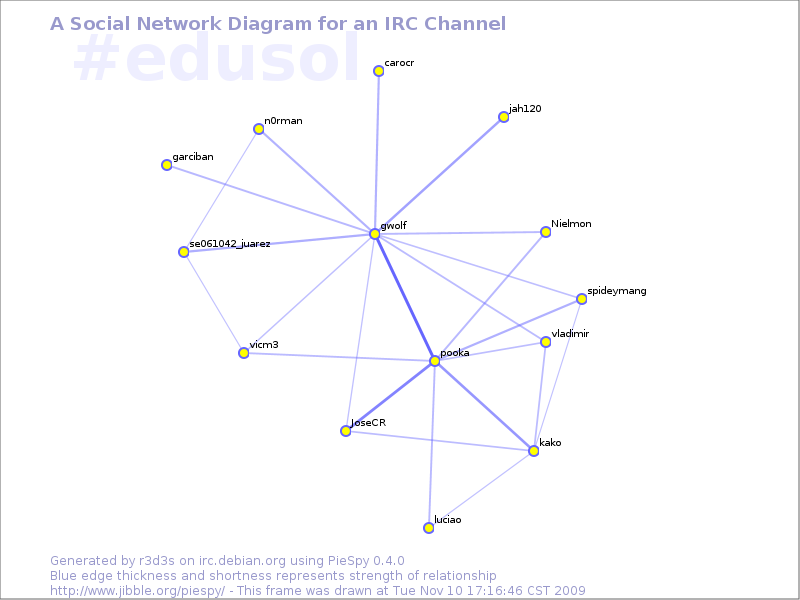
AttachmentSize
EDUSOL 2008 - Conference photo1.97 MB
Current (Monday+Tuesday) interaction graph for our IRC channel39.89 KB

Yves-Alexis Perez: Call for help: update

Ok so there were some reactions to the Call for help post. I had three direct offers for help in pkg-xfce, not sure if other teams had such propositions. Some people asked me to correct various number for the active contributors . Basically, the numbers are what the feeling I got from people working in those team. Julien Cristau wants me to correct the number of debian-x active contributors to 0. (yes, zero, that means nobody, nadie, personne). Basically he doesn't have time anymore, and Brice Goglin can't really keep up. So, for those who care about shiny X effects, and stuff like that, you help would be gladly appreciated (and no, you don't have to own each and every chipset in the world to give some time). Aurelien Jarno wants me to add that at the moment there are 2 (two) active libc contributors, plus one on GNU/Hurd and one on kfreebsd. Frans Pop wants me to add that there are ~85 people working on d-i and that the problems the team might face aren't only related to the lack of manpower (and I don't really want to enter politics) Finally, it seems that some people (well, only one at the moment, but it's enough for to feel the need to precise) though the numbers previously given would dismiss contributions for the active contributors. That wasn't my intention, so I apologize if you are an active contributor in one of that team and thought I dismissed your contribution. If it wasn't clear enough, my point is to show that quite some teams are lacking manpower (some team miss other things too, like leadership, coordination or whatever) and users shouldn't be scared to contribute to them. Those are core teams, without them Debian wouldn't work at all (not to mention derivatives), so it's a good idea to join them. Now, what if you do want to help, but don't know how. On the previous post I gave links to teams website, wiki page or QA page. You should be able to find a mailing list or contact mail you should be able to write to. Just write that you want to offer some help, that you don't know how and where to start. Add what you're interested in, what you find fun, and your technical knowledge. Don't be shy, and you don't need to be a Debian Developer (nor even a Debian Maintainer) to contribute. Thanks!

Simon McVittie: telepathy-qt4 0.2.0: first shared library release

This afternoon Andre released telepathy-qt4 0.2.0, the first version that builds a shared library, and I've uploaded it to Debian (it'll get into unstable as soon as it clears the NEW queue). This is a major milestone for telepathy-qt4: over the course of 16 months' development it's gone from a collection of auto-generated constants (Olli Salli's initial commit, back in July 2008) to a shared library with a frozen API and ABI. We encourage Qt/KDE application developers to treat telepathy-qt4 as the preferred Qt 4 binding for Telepathy. Andre and the rest of the Telepathy project will continue to add high-level bindings for more Telepathy features over the course of the 0.3.x series; we plan to keep the API and ABI backwards-compatible until shortly before the next milestone, 0.4.0, at which point we'll consider breaking ABI to drop deprecated functionality.

Biella Coleman: Fsck Purity: The Politics and Pleasures of Free Software

The great thing about living and working in NYC is that there is a steady stream of conferences to attend, such as the fast approaching digital labor conference entitled Internet as Playground and Factory. The problem is that since I live 1/3 of the year in San Juan and often get stranded and stuck when my mother gets hospitalized, as is the case now, I am often not in NYC. Depending on my mom s prognosis tomorrow, I may or may not make it but I am working on my slides and revamping a few of my thoughts as I would like to attend. My new title is one I think some readers of the blog might enjoy: Fsck Purity: The politics and pleasures of free software (thanks karl) and the talk will be part of a panel The Emancipatory Politics of Play with Chris Kelty, Fred Turner, and Ben Peters. If you are interested in attending, register soon as it is free and open to the public but requires advanced registration. There are also already a collection of short interviews videos available, the one by me is a basic discussion of the politics of free software, conducted at the end of a very long teaching day, so I am not sure it makes any sense. I never watch my own interviews so I can t quite be the judge :-)

Biella Coleman: Fsck Purity: The Politics and Pleasures of Free Software

The great thing about living and working in NYC is that there is a steady stream of conferences to attend, such as the fast approaching digital labor conference entitled Internet as Playground and Factory. The problem is that since I live 1/3 of the year in San Juan and often get stranded and stuck when my mother gets hospitalized, as is the case now, I am often not in NYC. Depending on my mom s prognosis tomorrow, I may or may not make it but I am working on my slides and revamping a few of my thoughts as I would like to attend. My new title is one I think some readers of the blog might enjoy: Fsck Purity: The politics and pleasures of free software (thanks karl) and the talk will be part of a panel The Emancipatory Politics of Play with Chris Kelty, Fred Turner, and Ben Peters. If you are interested in attending, register soon as it is free and open to the public but requires advanced registration. There are also already a collection of short interviews videos available, the one by me is a basic discussion of the politics of free software, conducted at the end of a very long teaching day, so I am not sure it makes any sense. I never watch my own interviews so I can t quite be the judge :-)

Stephan Peijnik: Blog moved

I did it again, I moved my blog. There are various reasons for doing so, but mainly to take load off of my private server. So, my new blog can be found at http://techandsp.blogspot.com/.

Martin Michlmayr: Project management lessons from the FreeDOS Project

A lot of people seem to think that open source is a magic solution to project management and that open source projects will automatically attract a large and healthy community of contributors and users who will improve the software. This, of course, is not the case. In fact, creating a successful open source project is a really major and difficult effort. You have to deliver an initial promise that people find interesting, attract other people, then facilitate and lead the community, etc. You just have to look at all the failed projects on SourceForge that never delivered any code to see that "open source" is not a guarantee for success. Even though project management is a key element of every open source project, there are only few resources about this topic. That's why I always enjoy reading about the experience from open source project leaders. Jim Hall, the founder of the FreeDOS project, recently posted a series of four articles which I find particularly interesting. Here are links to the articles along with a quick summary: I really like these articles from Jim Hall since they contain a lot of great insights that apply to other projects, so I suggest you check them out! (Originally published on FOSSBazaar)

Matthew Garrett: The ACPI Embedded Controller

Of course, the event model I described before is far too simple to be worthy of a place in the ACPI spec. At the most basic level, there's more possible events than there are GPEs to attach them to, so there's a need for some further complexity. This manifests itself in the form of the ACPI embedded controller (EC).

The EC is typically a small microprocessor sitting on your motherboard, often implemented in the same hardware as the keyboard controller. It shares a lot in common with the keyboard controller - on PCs it'll usually appear in system io space, with one register for writing a command or reading a status, and a second register for passing data back and forth[1]. There's 256 registers available, so a typical interaction might be to write the READ command (0x80) to the command register, write the EC register address to the data register and then read back from the data register to get the EC register contents.

The embedded controller will often be responsible for tracking information about the hardware, such as the temperature. Attempting to read the temperature through ACPI will execute an ACPI method - in the case of the temperature being monitored by the embedded controller, this method will attempt to read from an EC register. The EC driver then performs the read and returns the result, which gets converted into decidegrees kelvin and passed back to whatever made the temperature query.

But, as mentioned above, the EC also generates events. These may be in response to a user initiated event like a hotkey press, or may be triggered by some change in hardware state like a thermal trip point being passed. The embedded controller will then raise a GPE.

Unlike normal GPEs, the EC GPE is not handled by looking for a _Lxx or _Exx method. Instead, the ACPI tables provide information about the GPE that the EC is using. This may be in the form of a _GPE definition in the EC object in the main ACPI tables, or alternatively may be provided in an ECDT (Embedded Controller Descriptor Table), an optional table that provides all the EC information. In either case, the OS knows which GPE will be triggered by the EC. It then installs a handler that will be called whenever the EC raises that GPE.

Things get a touch confusing at this point. The first thing this handler does is read the command byte, which functions as a status byte on reads. It then checks whether the SCI_EVT bit is set. This informs the system that the GPE was in response to a hardware event, and so the EC handler writes a query command to the EC command register and then reads back a value between 0 and 255 from the data register. This is then mapped to a _Qxx method, with xx representing the number of the EC event read from the data register. Like the _Lxx and _Exx methods, the _Qxx method is then executed.

The problem with all of this is that the EC isn't that fast. When a byte is written to it, it's necessary to read back the status byte and check whether the IBF bit is set. This is set when the OS writes a byte to the data register, and cleared once the EC has processed it. The straightforward way to deal with this is to poll the status byte until the bit is cleared, and then write the next byte, but polling is slow and wastes CPU time. The EC can instead be set to interrupt mode, where it'll fire a GPE when the IBF bit clears.

The EC has one additional function. The ACPI spec allows for an i2c bus to be implemented through the EC, with EC registers mapping to i2c registers. The observant among you will realise that this means that there's an indexed access protocol being implemented on top of indexed access hardware, which is more layers of indirection than seem sane. For additional humour, this is usually only used to add support for ACPI smart batteries. ACPI batteries are generally abstracted behind a set of ACPI methods that provide information. Smart batteries instead speak i2c directly to the OS[2] for no real benefit. Linux handles these devices fine, and while the chances are you probably don't have one, the chances are also that if you do you haven't noticed.

The final quirk of ACPI events is that there's yet another means of delivering events. The term "fixed feature" is used to describe an ACPI device that isn't described in the ACPI tables. A power button may be implemented as a fixed feature device rather than a normal ("control method") device. This is indicated by a flag in the fixed feature block. Hitting a fixed feature power button will generate an ACPI interrupt, but no GPE. Instead the OS has to read the fixed feature block and note that the power button flag is set there. It then notifies userspace appropriately. Sleep buttons can also be implemented this way, but other devices will be in the normal ACPI tables and will generate either GPEs or EC events.

[1] On my laptop, these are ports 0x62 and 0x66 - compare to the keyboard controller's use of ports 0x60 and 0x64

[2] As directly as indirection via the EC can be...

Yves-Alexis Perez: Call for help

So yesterday we had a really nice meeting with few french Debian folks. Luk and Ralf were visiting us, so we went at Prosper's for some meat and wine (and Aberlour). We were a bit too much to be able to speak to everybody (so mainly there were two 6-packs of people), but it was fine anyway. Though, the main point of the evening was that some (most?) teams in Debian are really (*really*) understaffed, and it might become problematic in the near future (like now). For example, from what I understood: I don't know the state of other teams, but it doesn't really look fine for the incoming freeze. So if you want to give some help, even if you're not yet technical enough, feel free to offer it to the teams above. Usually, starting with just using the package is enough. If you use it, you want it well-maintained, and there _are_ stuff to do to which don't require large technical knowledge, and the (few) active contributor will be happy to have some help and point you to what you can do. If you want to give some time to Debian, before filing some ITPs (even if you'd really like to have that package you use everyday), check if you can't do something for those above teams (and others which might need help too, like release team or kernel). Oh, and don't be scared, working on Debian is fun. It's time consuming, but it's rewarding. Don't let it become not fun.

Matt Zimmerman: Amplify Your Effectiveness (AYE) Conference: Day 1


Morning Session: Project Patterns I chose to attend a session entitled: Is this the Way We Really Want to do Things? Seeing Project Patterns and Changing What You Don t Like (Johanna Rothman). My goal was to explore the causes of the troublesome patterns I see in projects at work. In particular, I see:
  • Too many projects starting up at once
  • Projects being instantiated without enough consideration for the probability of success ( is this a good idea? rather than can we realistically achieve this? )
  • Key people finding out too late about projects which affect them
All of these patterns lead to increased project risk, communication bottlenecks, low motivation, and high stress. In the session, we conducted a simulation of a team, with engineers, a project manager, a senior manager and a customer. I took on the role of the senior manager. In the course of the simulation, we received requirements from the customer, implemented them, and delivered products. While the team was working on implementation, I talked with the customer about what was coming next: what would happen when we delivered, what the next project would be, and so on. Part of the simulation was that I had to be separated from the group while they were working. When we delivered the first batch of products, and the customer was happy with them, it was time to decide what to do next. We gave the customer a choice of two projects we had discussed, one of which was similar to the previous one (but larger scale and more involved), while the other was different. Despite repeated attempts, we could not persuade the customer to prioritize one over the other. So, I decided that we should change gears and start work on the different project. It seemed to be of greater economic value to the customer, and simpler to execute. One of the engineers disagreed with this decision, but didn t explain why. The project manager seemed to agree, and I left the team to work. They produced a prototype, which the customer liked, and with a few small changes it was accepted as a finished product. To my surprise, though, I found out later that the team was in fact working on both projects at once, delivering two different types of products. The decision hadn t actually been made. These unexpected products were delivered to the customer, but didn t meet the expanded requirements, and that work was wasted. The debrief which followed was unfortunately too short, and I didn t feel that we were able to fully explore what the simulation had revealed. The project manager indicated that he hadn t understood the decision to have been made, pointing to a communication failure. This reminded me that while we often think of a decision as an event which happens at a point in time, it is more commonly a process of change, which takes time and must be revisited in order to check progress and evaluate. A decision is really just an idea for a change, and there is more work to be done in order to implement that idea. This can be true even when there is a very explicit decision point : it still takes time for that message to be received, interpreted and accepted. One of the tangents we followed during the debrief had to do with how humans think about numbers. Jerry asked each member of the group to write down a random number, and then we wrote them all on a flipchart. They were: 8, 75, 47, 72, 45, 44, 32, 6, 13 and 47. This reminded me of the analyses of election results which indicate fraud. Afternoon Session: Saying No After lunch, I decided to attend Jerry Weinberg s session, Saying No That Really Means No. This was much larger than the morning session, with over 40 people sitting in a large circle. The subject of discussion was the variety of difficulties that people face in saying no to things which don t seem right for them. For example, saying yes to a project which is doomed to failure. This seemed like a good follow-on to the morning s exercise. Jerry began by asking the audience to name some of their difficulties, and tell stories of times when they had trouble saying no . One of these stories was role-played and analyzed as an example. Most of the time, though, was filled with storytelling and discussion. This is a deeply complex topic, because this problem is rooted in self-image, social norms, egocentrism, misperception, and other cognitive phenomena. There was no key insight for me, just a reinforcement of the necessity of self-awareness. The only way to avoid patterns like this is to notice when they are happening, and that can be challenging, especially in a stressful situation. Once you realize what s happening, there are all sorts of tools which can be applied to the problem: negotiation, requests for help, problem-solving, even simple inaction.

Dirk Eddelbuettel: R / Finance 2010 Call for Papers

Jeff sent the following while I had connectivity issues and I hadn't gotten around to posting it here. So without further ado, and given the success of our initial R / Finance 2009 conference about R in Finance, here is the call for papers for next spring:
Call for Papers: R/Finance 2010: Applied Finance with R
April 16 and 17, 2010
Chicago, IL, USA
The second annual R/Finance conference for applied finance using R will be held this spring in Chicago, IL, USA on April 16 and 17, 2010. The two-day conference will cover topics including portfolio management, time series analysis, advanced risk tools, high-performance computing, market microstructure and econometrics. All will be discussed within the context of using R as a primary tool for financial risk management and trading. One-page abstracts or complete papers (in txt or pdf format) are invited for consideration. Academic and practitioner research proposals related to R are encouraged. We will accept submissions for full talks, abbreviated "lightning talks", and a limited number of pre-conference tutorial sessions. Please indicate with your submission if you would be willing to produce a formal paper (10-15 pages) for a peer-reviewed conference proceedings publication. Presenters are strongly encouraged to provide working R code to accompany the presentation/paper. Data sets should also be made public for the purposes of reproducibility (though we realize this may be limited due to contracts with data vendors). Preference may be given to presenters who have released R packages. Please send submissions to: committee at RinFinance.com The submission deadline is December 31st, 2009. Submissions will be evaluated and submitters notified via email on a rolling basis. Determination of whether a presentation will be a long presentation or a lightning talk will be made once the full list of presenters is known. R/Finance 2009 included keynote presentations by Patrick Burns, Robert Grossman, David Kane, Roger Koenker, David Ruppert, Diethelm Wuertz, and Eric Zivot. Attendees included practitioners, academics, and government officials. We anticipate another exciting line-up for 2010 and will announce details at the conference website http://www.RinFinance.com as they become available. For the program committee:
Gib Bassett, Peter Carl, Dirk Eddelbuettel, John Miller,
Brian Peterson, Dale Rosenthal, Jeffrey Ryan
See you in Chicago in April!

Matthew Garrett: ACPI general purpose events

ACPI is a confusing place. It's often thought of as a suspend/resume thing, though if you're unlucky you've learned that it's also involved in boot-time configuration because it's screwed up your interrupts again. But ACPI's also heavily involved in the runtime management of the system, and it's necessary for there to be a mechanism for the hardware to alert the OS of events. ACPI handles this case by providing a set of general purpose events (GPEs). The implementation of these is fairly straightforward - an ACPI table points at a defined system resource (typically an area of system io space, though in principle it could be something like mmio instead), and when the hardware fires an ACPI interrupt the kernel looks at this region to see which GPEs are flagged. Then things get more interesting. The majority of GPEs are implemented in the ACPI tables via methods with names like _Lxx or _Exx. The xx is the number of the GPE in hex, while the leading _L or _E indicates whether the GPE is level- or edge-triggered. If an ACPI interrupt is fired and GPE 0x1D is flagged as being the source of the interrupt, the ACPI interpreter will then look for an _L1D or _E1D method. Upon finding one, it'll execute it. What this method does is entirely up to the firmware - on most HP laptops, GPE 0x1D is hooked up to the lid switch[1] and so executing it will send a notification to the OS that the lid switch has changed state. The OS will then evaluate the state of the lid switch (generally by making another ACPI query) and send the event up to userspace. How does the lid end up triggering GPE 0x1D? Things get pretty hardware specific at this point. Intel motherboard chipsets have a set of general purpose io (GPIO) lines that can, for the most part[2], be used by the system vendor for anything they want. For a lid switch, one of these lines is hooked to the switch and the BIOS configures the GPIO as an input. Pressing the switch will cause the GPIO line to become active. The GPIO lines are mapped to GPEs in a 1:1 manner, though with an offset of 16 - ie, GPIO 0xd will map to GPE 0x1d. If GPIO 0xd becomes active, GPE 0x1d will be flagged and an ACPI interrupt sent. The ACPI code will then do something to quash the interrupts, such as inverting the polarity of the GPIO[3], as well as send the notification to the OS. Why are the GPIOs offset by 16 relative to the GPEs? The lower 16 GPEs (again, talking about Intel hardware) have pre-defined purposes[4]. These range from things like "Critically low battery" to "PCIe hotplug event" down to "This device triggered a wakeup". And the latter is what I'm most interested in here. Various pieces of modern hardware can be placed into power saving states when not in use. The problem with this is that the user experience of having to turn on hardware before you can use it is not a good one, so in order to make this the default behaviour we need the hardware to tell us that something happened that requires us to wake the hardware up. There's something of a chicken and egg problem here, but thankfully most of the relevant modern hardware has out of band mechanisms to tell us about things going on. The PCI spec defines something called Power Management Events (PME), which are driven by an additional current that's supplied to the hardware even when it's otherwise turned off. On plug-in PCI Express cards, firing a PME generates an interrupt on the root bridge and a native driver can interpret that, but for legacy PCI devices and integrated chipset devices the notification has to come via ACPI. The example I've been working on is USB. It's a good choice for various reasons - firstly, there's already support for detecting when the USB controller is idle. Secondly, modern USB host controllers have support for generating PMEs on device insertion, removal or (and this is important) remote wakeup. In other words, as long as the USB bus is idle we can power down the entire USB controller. If the OS tries to access a USB device, we'll power it back up. If the user unplugs or plugs a device, we'll power it back up. If a previously idle device suddenly responds to some external input, we'll power it back up. And it's all nicely invisible to the user. How does this work? The controller retains a small amount of power even when nominally pwoered down. This is used to keep the detection circuitry alive. When it receives a wakeup event, it asserts the PME line. The chipset detects this and fires a GPE. The OS runs this GPE and receives a device notification on the ACPI representation of the USB controller, telling us to power it back up. We do so and process whatever woke us - if the bus then goes idle again, we can power down once more. The astonishing thing is that this all works. The only problem we have is that it relies on the machine vendor to have provided the ACPI methods that are associated with the GPEs. If they haven't, we can't enable this functionality - even though the hardware is capable of generating the GPEs, we have no method to execute to let us know which device has to be woken up. The GPE is never answered, we never acknowledge the PME and the hardware keeps on screaming for attention without getting any. And, more to the point, it never gets powered up and your mouse doesn't work. There's a pretty gross hack to deal with this. In general, we know what the GPE to device mappings are - they're pretty static across Intel chipsets, and while AMD ones can be programmed differently by the BIOS we can read that information back and set up a mapping ourselves. This trick also comes in handy when some vendors (like, say, Dell) manage to implement one of the GPE events wrongly. Everything looks like it should work, but the method never sends a notification because it's buggy. In that case we can unregister the existing method and implement our own instead. This code isn't upstream yet, but patches have been posted to the linux-acpi mailing list and with luck it'll be there in the 2.6.33 timeframe. My tests suggest about 0.2W saving per machine, which isn't going to save all that many polar bears but seems worth it anyway. [1] _L1D = lid. Sigh. [2] There's a few that are reserved for specific purposes [3] So where before it had to be high to be active, it now has to be low to be active - this means that it'll now trigger on the switch being opened rather than closed, so you'll get another event when you open the lid again. [4] You can find a list in the documentation for the appropriate ICH chip - the relevant section is "GPE0_STS" under the LPC interface chapter.

Next.

Previous.