Search Results: "az"

12 June 2013

Marc 'Zugschlus' Haber: How to amd64 an i386 Debian installation with multiarch

Migrating a Debian installation between architectures has always been difficult. The recommended way to crossgrade an i386 Debian to amd64 Debian was to reinstall the system, move over data and configuration. For the more brave, in-place crossgrades usually involved chroots, rescue CDs, a lot of ar p tar xf - data.tar.gz and luck. I have never been brave when it comes to system administration, have done a lot of architecture migrations with reinstallation, and have always taken the opportunity to clear out the contamination that accumulates itself when a system is running for a long time. I would even recommend doing this to most people even now. However, I have a few very ugly systems in place that are still on i386 because I didn t dare going the reinstallation path. Doing in-place crossgrades has become a lot easier since wheezy s release, since once now can have both i386 and amd64 libraries installed in parallel, which allows to replace foo:i386 with foo:amd64 without influencing the other parts of the system. The process is still full of pitfalls: I have only tried this yet with a freshly installed minimal wheezy server system. I do not, however, expect surprises when it comes to using this process with real life systems. I will document other pitfalls I have fallen into here at a later time. My minimal wheezy system was running in a KVM VM with its virtual disk as a LVM LV in the host system. I took a snapshot before beginning and used lvconvert --merge numerous time to return my LV to the original state. Be aware that lvconvert --merge removes the snapshot after merging it, so you ll need to re-create the snapshot before trying again. During the process, I discussed things with Paul Tagliamonte, who has done this before, but on a live system and with a slightly more invasive approach. He has blogged about this. Thank you very much, your hints were very helpful. Here is a commented typescript of what I have done. Be warned: This was a lab setting with a rather minimal system. If you re going to try this with a production system, have a backup, or, if you re on snapshottable infrastructure, take snapshots and be prepared to roll back if anything goes wrong. First let s see what we have and save a list of installed packages.
mh@swivel:~$ ssh wheezyarch.zugschlus.de
$ uname -a
Linux wheezyarch 3.9.4-zgsrv2008064 #2 SMP PREEMPT Wed Jun 5 12:57:51 UTC 2013 x86_64 GNU/Linux
$ dpkg --print-architecture
i386
$ dpkg --print-foreign-architectures
$ dpkg --list   grep i386   wc -l
175
$ dpkg --list   grep amd64   wc -l
0
$ sudo dpkg --get-selections   grep install   awk  print $1    sed  s/:.*//;s/$/:amd64
install/;  > get-selections.pre
So we have an i386 system running an x86_64 kernel. Next, we add amd64 as an additional architecture which allows us to install amd64 packages. We download the amd64 packages files. Note that dpkg still considers this an i386 system with amd64 as a foreign arch.
$ sudo dpkg --add-architecture amd64
$ sudo apt-get update
Get:1 http://security.debian.org wheezy/updates Release.gpg [836 B]
( )
Fetched 6.155 kB in 4s (1.400 kB/s)
Reading package lists... Done
$ dpkg --print-architecture
i386
$ dpkg --print-foreign-architectures
amd64
$ dpkg --list   grep i386   wc -l
175
$ dpkg --list   grep amd64   wc -l
0
Next, download everything that is necessary to migrate dpkg and apt from i386 and amd64. We cannot directly apt things as the remove-install cycle used by apt will leave us without working dpkg. One could work around this by un-aring the dpkg.deb and directly forcing the amd64 files upon the system, but I think this approach is much cleaner. apt-get download will not resolve dependices while apt-get --download install does. After the download, dpkg --install the packages. dpkg is not particularly smart about installation order, so Pre-Depends may fail or not. If they fail, dpkg will give a list of deb files that were affected, which is an easy help to finish their installation. One could also choose the easy way (which I did here) and repeat the dpkg --install *.deb command. Since the Pre-Depends will already be installed, the second install run will succeed.
$ sudo apt-get --download-only install dpkg:amd64 apt:amd64
Reading package lists... Done
Building dependency tree       
Reading state information... Done
The following extra packages will be installed:
  gcc-4.7-base:amd64 libapt-pkg4.12:amd64 libbz2-1.0:amd64 libc6:amd64
  libgcc1:amd64 liblzma5:amd64 libselinux1:amd64 libstdc++6:amd64
  zlib1g:amd64
Suggested packages:
  aptitude:amd64 synaptic:amd64 wajig:amd64 dpkg-dev:amd64 apt-doc:amd64
  python-apt:amd64 glibc-doc:amd64 locales:amd64
The following packages will be REMOVED:
  apt cron-apt dpkg
The following NEW packages will be installed:
  apt:amd64 dpkg:amd64 gcc-4.7-base:amd64 libapt-pkg4.12:amd64
  libbz2-1.0:amd64 libc6:amd64 libgcc1:amd64 liblzma5:amd64 libselinux1:amd64
  libstdc++6:amd64 zlib1g:amd64
0 upgraded, 11 newly installed, 3 to remove and 0 not upgraded.
Need to get 10,0 MB of archives.
After this operation, 14,9 MB of additional disk space will be used.
Do you want to continue [Y/n]? 
Get:1 http://debian.debian.zugschlus.de/debian/ wheezy/main gcc-4.7-base amd64 4.7.2-5 [144 kB]
( )
Fetched 10,0 MB in 2s (3.535 kB/s)
Download complete and in download only mode
$ sudo dpkg --install /var/cache/apt/archives/*.deb
(Reading database ... 16586 files and directories currently installed.)
Preparing to replace apt 0.9.7.8 (using .../archives/apt_0.9.7.8_amd64.deb) ...
Unpacking replacement apt ...
dpkg: regarding .../dpkg_1.16.10_amd64.deb containing dpkg, pre-dependency problem:
 dpkg pre-depends on libbz2-1.0
dpkg: error processing /var/cache/apt/archives/dpkg_1.16.10_amd64.deb (--install):
 pre-dependency problem - not installing dpkg
Selecting previously unselected package gcc-4.7-base:amd64.
( )
Errors were encountered while processing:
 /var/cache/apt/archives/dpkg_1.16.10_amd64.deb
$ sudo dpkg --install /var/cache/apt/archives/*.deb
(Reading database ... 16905 files and directories currently installed.)
Preparing to replace apt 0.9.7.8 (using .../archives/apt_0.9.7.8_amd64.deb) ...
Unpacking replacement apt ...
( )
$
From dpkg s point of view, the system is now already amd64, with i386 being a foreign arch. However, the majory of packages is still i386.
$ dpkg --print-architecture
amd64
$ dpkg --print-foreign-architectures
i386
$ dpkg --list   grep i386   wc -l
173
$ dpkg --list   grep amd64   wc -l
11
$ 
The apt resolver is currently in a very bad broken state since the system is missing most essential packages in its native architecture. This is not easily solved by apt-get -f install, as this would zap most of the existing system . We let apt-get --download-only -f install download the packages that it wants to replace with its amd64 counterparts and their dependencies, and, again, use dpkg --install *.deb to install them.
$ sudo apt-get --download-only -f install
Reading package lists... Done
Building dependency tree       
Reading state information... Done
Correcting dependencies... Done
The following packages were automatically installed and are no longer required:
  cpio gettext-base:i386 klibc-utils libapt-inst1.5 libasprintf0c2:i386
  libcurl3-gnutls:i386 libfreetype6:i386 libfuse2:i386 libklibc
  libreadline5:i386
Use  apt-get autoremove  to remove them.
The following extra packages will be installed:
  acpid aide bsd-mailx cpio cron curl daemon dctrl-tools exim4-base
  exim4-daemon-light initscripts insserv kbd klibc-utils less libbsd0
  libcomerr2 libcurl3 libdb5.1 libexpat1 libgcrypt11 libgdbm3 libgnutls26
  libgpg-error0 libgssapi-krb5-2 libidn11 libk5crypto3 libkeyutils1 libklibc
  libkmod2 libkrb5-3 libkrb5support0 libldap-2.4-2 liblockfile1 libncursesw5
  libnewt0.52 libp11-kit0 libpam-modules libpam0g libpcre3 libpopt0
  libreadline6 librtmp0 libsasl2-2 libslang2 libsqlite3-0 libssh2-1
  libssl1.0.0 libtasn1-3 libterm-readkey-perl libtinfo5 openssl perl
  perl-base python2.7 python2.7-minimal sysvinit-utils whiptail
Suggested packages:
  libarchive1 anacron logrotate checksecurity debtags mail-reader eximon4
  exim4-doc-html exim4-doc-info spf-tools-perl swaks bootchart2 rng-tools
  krb5-doc krb5-user libpam-doc perl-doc make python2.7-doc binutils
  binfmt-support bootlogd sash
Recommended packages:
  exim4 postfix mail-transport-agent psmisc mailx ca-certificates
  krb5-locales libgpm2 libfribidi0 libsasl2-modules libpng12-0
The following packages will be REMOVED:
  acpid:i386 aide:i386 aptitude:i386 bsd-mailx:i386 cpio:i386 cron:i386
  curl:i386 daemon:i386 dctrl-tools:i386 debsecan dmsetup:i386 e2fsprogs:i386
  exim4-base:i386 exim4-daemon-light:i386 git:i386 grub-common:i386
  grub-pc:i386 grub-pc-bin:i386 grub2-common:i386 ifupdown:i386
  initramfs-tools initscripts:i386 insserv:i386 ippl:i386 jed:i386 kbd:i386
  klibc-utils:i386 less:i386 libdevmapper-event1.02.1:i386
  libdevmapper1.02.1:i386 libklibc:i386 libnewt0.52:i386
  libparted0debian1:i386 libterm-readkey-perl:i386 lsof:i386 lvm2:i386
  molly-guard ntp:i386 openssh-server:i386 openssl:i386 parted:i386 perl:i386
  perl-base:i386 procps:i386 python-apt:i386 python2.7:i386
  python2.7-minimal:i386 rsyslog:i386 sysvinit:i386 sysvinit-utils:i386
  udev:i386 util-linux:i386 whiptail:i386
The following NEW packages will be installed:
  acpid aide bsd-mailx cpio cron curl daemon dctrl-tools exim4-base
  exim4-daemon-light initscripts insserv kbd klibc-utils less libbsd0
  libcomerr2 libcurl3 libdb5.1 libexpat1 libgcrypt11 libgdbm3 libgnutls26
  libgpg-error0 libgssapi-krb5-2 libidn11 libk5crypto3 libkeyutils1 libklibc
  libkmod2 libkrb5-3 libkrb5support0 libldap-2.4-2 liblockfile1 libncursesw5
  libnewt0.52 libp11-kit0 libpam-modules libpam0g libpcre3 libpopt0
  libreadline6 librtmp0 libsasl2-2 libslang2 libsqlite3-0 libssh2-1
  libssl1.0.0 libtasn1-3 libterm-readkey-perl libtinfo5 openssl perl
  perl-base python2.7 python2.7-minimal sysvinit-utils whiptail
0 upgraded, 58 newly installed, 53 to remove and 0 not upgraded.
Need to get 23,4 MB of archives.
After this operation, 17,5 MB disk space will be freed.
Do you want to continue [Y/n]? Y
Get:1 http://security.debian.org/debian-security/ wheezy/updates/main libgnutls26 amd64 2.12.20-7 [619 kB]
( )
Fetched 23,4 MB in 11s (2.038 kB/s)                                           
Download complete and in download only mode
$ sudo dpkg --install /var/cache/apt/archives/*.deb
(Reading database ... 16905 files and directories currently installed.)
Preparing to replace acpid 1:2.0.16-1+deb7u1 (using .../acpid_1%3a2.0.16-1+deb7u1_amd64.deb) ...
( )
Selecting previously unselected package libpam-modules:amd64.
dpkg: regarding .../libpam-modules_1.1.3-7.1_amd64.deb containing libpam-modules:amd64, pre-dependency problem:
 libpam-modules pre-depends on libdb5.1
  libdb5.1:amd64 is unpacked, but has never been configured.
dpkg: error processing /var/cache/apt/archives/libpam-modules_1.1.3-7.1_amd64.deb (--install):
 pre-dependency problem - not installing libpam-modules:amd64
Selecting previously unselected package libpcre3:amd64.
Unpacking libpcre3:amd64 (from .../libpcre3_1%3a8.30-5_amd64.deb) ...
( )
Errors were encountered while processing:
 /var/cache/apt/archives/libpam-modules_1.1.3-7.1_amd64.deb
$ sudo dpkg --install /var/cache/apt/archives/libpam-modules_1.1.3-7.1_amd64.deb
(Reading database ... 17007 files and directories currently installed.)
Unpacking libpam-modules:amd64 (from .../libpam-modules_1.1.3-7.1_amd64.deb) ...
Setting up libpam-modules:amd64 (1.1.3-7.1) ...
$ sudo apt-get clean
$ dpkg --print-architecture
amd64
$ dpkg --print-foreign-architectures
i386
$ dpkg --list   grep i386   wc -l
151
$ dpkg --list   grep amd64   wc -l
66
$ 
The concluding apt-get clean prevents packages from being reinstalled again in the next dpkg --install *.deb run. Now, the apt resolver is kind of fixed, but apt will still want to remove most of the system. I haven t found a way to get out of this mess short of allowing apt to de-install those packages and to manually install their amd64 counterparts later. First, we see what apt wants to do, and paste the The following packages will be removed part of apt-get s output into a sed expression which fixes the architecture strings for us so that we can use the resulting file as input for the following installation procedure. After that, we let apt-get do what itself considers a bad thing and requires us to type a consent sentence. The key is that this deinstallation of essential packages breaks the system, but not apt and dpkg, which allows us to un-break the system afterwards.
$ sudo apt-get -f install
Reading package lists... Done
Building dependency tree       
Reading state information... Done
Correcting dependencies... Done
The following packages were automatically installed and are no longer required:
  gettext-base:i386 libapt-inst1.5 libasprintf0c2:i386 libcurl3-gnutls:i386
  libfreetype6:i386 libfuse2:i386 libreadline5:i386
Use  apt-get autoremove  to remove them.
The following extra packages will be installed:
  sysvinit-utils:i386
Suggested packages:
  bootlogd:i386 sash:i386
The following packages will be REMOVED:
  adduser aide-common aptitude:i386 bsd-mailx console-common console-data
  console-log cron curl debian-goodies debsecan dmsetup:i386 e2fsprogs:i386
  exim4-base exim4-config exim4-daemon-light git:i386 grub-common:i386
  grub-pc:i386 grub-pc-bin:i386 grub2-common:i386 ifupdown:i386
  initramfs-tools initscripts ippl:i386 jed:i386 libcurl3
  libdevmapper-event1.02.1:i386 libdevmapper1.02.1:i386 liberror-perl
  libfile-find-rule-perl libnumber-compare-perl libparted0debian1:i386
  libswitch-perl libterm-readkey-perl libterm-readline-perl-perl
  libtext-glob-perl libtimedate-perl locales lsof:i386 lvm2:i386 molly-guard
  ntp:i386 openssh-client:i386 openssh-server:i386 openssl openssl-blacklist
  openssl-blacklist-extra parted:i386 perl perl-modules procps:i386
  python-apt:i386 rsyslog:i386 stow sysv-rc sysvinit:i386 sysvinit-utils
  tzdata ucf udev:i386 util-linux:i386
The following NEW packages will be installed:
  sysvinit-utils:i386
WARNING: The following essential packages will be removed.
This should NOT be done unless you know exactly what you are doing!
  e2fsprogs:i386 util-linux:i386 (due to e2fsprogs:i386) sysvinit:i386
  sysvinit-utils tzdata (due to util-linux:i386)
0 upgraded, 1 newly installed, 62 to remove and 0 not upgraded.
Need to get 97,1 kB of archives.
After this operation, 131 MB disk space will be freed.
You are about to do something potentially harmful.
To continue type in the phrase  Yes, do as I say!  ? (abort with Ctrl-C)
$ sed  s/:i386//g  > removedpkg (paste  The following packages will be REMOVED:  stanza here and
type Ctrl-D afterwards)
  adduser aide-common aptitude:i386 bsd-mailx console-common console-data
  console-log cron curl debian-goodies debsecan dmsetup:i386 e2fsprogs:i386
  exim4-base exim4-config exim4-daemon-light git:i386 grub-common:i386
  grub-pc:i386 grub-pc-bin:i386 grub2-common:i386 ifupdown:i386
  initramfs-tools initscripts ippl:i386 jed:i386 libcurl3
  libdevmapper-event1.02.1:i386 libdevmapper1.02.1:i386 liberror-perl
  libfile-find-rule-perl libnumber-compare-perl libparted0debian1:i386
  libswitch-perl libterm-readkey-perl libterm-readline-perl-perl
  libtext-glob-perl libtimedate-perl locales lsof:i386 lvm2:i386 molly-guard
  ntp:i386 openssh-client:i386 openssh-server:i386 openssl openssl-blacklist
  openssl-blacklist-extra parted:i386 perl perl-modules procps:i386
  python-apt:i386 rsyslog:i386 stow sysv-rc sysvinit:i386 sysvinit-utils
  tzdata ucf udev:i386 util-linux:i386
$ cat removedpkg 
  adduser aide-common aptitude bsd-mailx console-common console-data
  console-log cron curl debian-goodies debsecan dmsetup e2fsprogs
  exim4-base exim4-config exim4-daemon-light git grub-common
  grub-pc grub-pc-bin grub2-common ifupdown
  initramfs-tools initscripts ippl jed libcurl3
  libdevmapper-event1.02.1 libdevmapper1.02.1 liberror-perl
  libfile-find-rule-perl libnumber-compare-perl libparted0debian1
  libswitch-perl libterm-readkey-perl libterm-readline-perl-perl
  libtext-glob-perl libtimedate-perl locales lsof lvm2 molly-guard
  ntp openssh-client openssh-server openssl openssl-blacklist
  openssl-blacklist-extra parted perl perl-modules procps
  python-apt rsyslog stow sysv-rc sysvinit sysvinit-utils
  tzdata ucf udev util-linux
$ sudo apt-get -f install
Reading package lists... Done
Building dependency tree       
Reading state information... Done
Correcting dependencies... Done
The following packages were automatically installed and are no longer required:
  gettext-base:i386 libapt-inst1.5 libasprintf0c2:i386 libcurl3-gnutls:i386
  libfreetype6:i386 libfuse2:i386 libreadline5:i386
Use  apt-get autoremove  to remove them.
The following extra packages will be installed:
  sysvinit-utils:i386
Suggested packages:
  bootlogd:i386 sash:i386
The following packages will be REMOVED:
  adduser aide-common aptitude:i386 bsd-mailx console-common console-data
  console-log cron curl debian-goodies debsecan dmsetup:i386 e2fsprogs:i386
  exim4-base exim4-config exim4-daemon-light git:i386 grub-common:i386
  grub-pc:i386 grub-pc-bin:i386 grub2-common:i386 ifupdown:i386
  initramfs-tools initscripts ippl:i386 jed:i386 libcurl3
  libdevmapper-event1.02.1:i386 libdevmapper1.02.1:i386 liberror-perl
  libfile-find-rule-perl libnumber-compare-perl libparted0debian1:i386
  libswitch-perl libterm-readkey-perl libterm-readline-perl-perl
  libtext-glob-perl libtimedate-perl locales lsof:i386 lvm2:i386 molly-guard
  ntp:i386 openssh-client:i386 openssh-server:i386 openssl openssl-blacklist
  openssl-blacklist-extra parted:i386 perl perl-modules procps:i386
  python-apt:i386 rsyslog:i386 stow sysv-rc sysvinit:i386 sysvinit-utils
  tzdata ucf udev:i386 util-linux:i386
The following NEW packages will be installed:
  sysvinit-utils:i386
WARNING: The following essential packages will be removed.
This should NOT be done unless you know exactly what you are doing!
  e2fsprogs:i386 util-linux:i386 (due to e2fsprogs:i386) sysvinit:i386
  sysvinit-utils tzdata (due to util-linux:i386)
0 upgraded, 1 newly installed, 62 to remove and 0 not upgraded.
Need to get 97,1 kB of archives.
After this operation, 131 MB disk space will be freed.
You are about to do something potentially harmful.
To continue type in the phrase  Yes, do as I say! 
 ?] Yes, do as I say! (actually type this!)
Get:1 http://debian.debian.zugschlus.de/debian/ wheezy/main sysvinit-utils i386 2.88dsf-41 [97,1 kB]
Fetched 97,1 kB in 0s (687 kB/s)    
(Reading database ... 17050 files and directories currently installed.)
Removing aide-common ...
( )
dpkg: warning: overriding problem because --force enabled:
 This is an essential package - it should not be removed.
Removing e2fsprogs ...
Removing sysv-rc ...
dpkg: warning: overriding problem because --force enabled:
 This is an essential package - it should not be removed.
Removing sysvinit ...
dpkg: warning: overriding problem because --force enabled:
 This is an essential package - it should not be removed.
Removing sysvinit-utils ...
dpkg: warning: overriding problem because --force enabled:
 This is an essential package - it should not be removed.
Removing ucf ...
dpkg: warning: overriding problem because --force enabled:
 This is an essential package - it should not be removed.
dpkg: warning: overriding problem because --force enabled:
 This is an essential package - it should not be removed.
dpkg: warning: overriding problem because --force enabled:
 This is an essential package - it should not be removed.
dpkg: warning: overriding problem because --force enabled:
 This is an essential package - it should not be removed.
dpkg: warning: overriding problem because --force enabled:
 This is an essential package - it should not be removed.
Removing libdevmapper1.02.1:i386 ...
Removing libswitch-perl ...
Removing perl ...
dpkg: warning: overriding problem because --force enabled:
 This is an essential package - it should not be removed.
Removing dmsetup ...
Removing perl-modules ...
dpkg: warning: overriding problem because --force enabled:
 This is an essential package - it should not be removed.
Removing util-linux ...
Removing tzdata ...
Processing triggers for mime-support ...
Selecting previously unselected package sysvinit-utils.
(Reading database ... 9802 files and directories currently installed.)
Unpacking sysvinit-utils (from .../sysvinit-utils_2.88dsf-41_i386.deb) ...
Setting up sysvinit-utils (2.88dsf-41) ...
$ sudo apt-get install $(cat removedpkg)
Reading package lists... Done
Building dependency tree       
Reading state information... Done
The following packages were automatically installed and are no longer required:
  libasprintf0c2:i386 libcurl3-gnutls:i386 libfreetype6:i386 libfuse2:i386
  libreadline5:i386
Use  apt-get autoremove  to remove them.
The following extra packages will be installed:
  e2fslibs gettext-base libapt-inst1.5 libasprintf0c2 libattr1 libblkid1
  libboost-iostreams1.49.0 libcap2 libcurl3-gnutls libcwidget3 libedit2
  libept1.4.12 libfreetype6 libfuse2 libgpm2 libncurses5 libopts25 libprocps0
  libreadline5 libsepol1 libsigc++-2.0-0c2a libss2 libudev0 libuuid1 libwrap0
  libxapian22 logrotate
Suggested packages:
  liblocale-gettext-perl tasksel debtags unicode-data anacron checksecurity
  popularity-contest xdg-utils zenity gpart e2fsck-static mail-reader eximon4
  exim4-doc-html exim4-doc-info spf-tools-perl swaks git-daemon-run
  git-daemon-sysvinit git-doc git-el git-arch git-cvs git-svn git-email
  git-gui gitk gitweb multiboot-doc grub-emu xorriso desktop-base
  isc-dhcp-client dhcp-client ppp rdnssd net-tools gpm libcwidget-dev fuse
  libparted0-dev libparted0-i18n xapian-tools ntp-doc ssh-askpass libpam-ssh
  keychain monkeysphere rssh ufw parted-doc perl-doc make libpod-plainer-perl
  python-apt-dbg python-gtk2 python-vte python-apt-doc rsyslog-mysql
  rsyslog-pgsql rsyslog-doc rsyslog-gnutls rsyslog-gssapi rsyslog-relp
  doc-base sysv-rc-conf bum bootlogd sash util-linux-locales dosfstools
Recommended packages:
  aptitude-doc-en aptitude-doc apt-xapian-index libparse-debianchangelog-perl
  exim4 postfix mail-transport-agent psmisc mailx patch rsync ssh-client
  os-prober busybox busybox-initramfs busybox-static ca-certificates
  uuid-runtime xauth ncurses-term iso-codes usbutils
The following packages will be REMOVED:
  gettext-base:i386 libboost-iostreams1.49.0:i386 libcwidget3:i386
  libept1.4.12:i386 libopts25:i386 libxapian22:i386 logrotate:i386
  sysvinit-utils:i386
The following NEW packages will be installed:
  adduser aide-common aptitude bsd-mailx console-common console-data
  console-log cron curl debian-goodies debsecan dmsetup e2fslibs e2fsprogs
  exim4-base exim4-config exim4-daemon-light gettext-base git grub-common
  grub-pc grub-pc-bin grub2-common ifupdown initramfs-tools initscripts ippl
  jed libapt-inst1.5 libasprintf0c2 libattr1 libblkid1
  libboost-iostreams1.49.0 libcap2 libcurl3 libcurl3-gnutls libcwidget3
  libdevmapper-event1.02.1 libdevmapper1.02.1 libedit2 libept1.4.12
  liberror-perl libfile-find-rule-perl libfreetype6 libfuse2 libgpm2
  libncurses5 libnumber-compare-perl libopts25 libparted0debian1 libprocps0
  libreadline5 libsepol1 libsigc++-2.0-0c2a libss2 libswitch-perl
  libterm-readkey-perl libterm-readline-perl-perl libtext-glob-perl
  libtimedate-perl libudev0 libuuid1 libwrap0 libxapian22 locales logrotate
  lsof lvm2 molly-guard ntp openssh-client openssh-server openssl
  openssl-blacklist openssl-blacklist-extra parted perl perl-modules procps
  python-apt rsyslog stow sysv-rc sysvinit sysvinit-utils tzdata ucf udev
  util-linux
WARNING: The following essential packages will be removed.
This should NOT be done unless you know exactly what you are doing!
  sysvinit-utils:i386
0 upgraded, 89 newly installed, 8 to remove and 0 not upgraded.
Need to get 55.3 MB of archives.
After this operation, 134 MB of additional disk space will be used.
You are about to do something potentially harmful.
To continue type in the phrase  Yes, do as I say! 
 ?] Yes, do as I say! (actually type this!)
Get:1 http://debian.debian.zugschlus.de/debian/ wheezy/main e2fslibs amd64 1.42.5-1.1 [197 kB]
( )
Fetched 55.3 MB in 20s (2648 kB/s)                                            
perl: warning: Setting locale failed.
( )
This process may re-ask some debconf questions that you have already answered during initial system setup. I find it comforting to actually see that my answers were preserved, but you can always export DEBIAN_FRONTEND=noninteractive if you want installation to be silent. If you know how this step can be done more elegantly, please comment. We now, finally, have the resolver in a consistent state.
$ sudo apt-get -f install
Reading package lists... Done
Building dependency tree       
Reading state information... Done
The following packages were automatically installed and are no longer required:
  libasprintf0c2:i386 libcurl3-gnutls:i386 libfreetype6:i386 libfuse2:i386
  libreadline5:i386
Use  apt-get autoremove  to remove them.
0 upgraded, 0 newly installed, 0 to remove and 0 not upgraded.
$ dpkg --print-architecture
amd64
$ dpkg --print-foreign-architectures
i386
$ dpkg --list   grep i386   wc -l
121
$ dpkg --list   grep amd64   wc -l
119
$ 
Now we can force-crossgrade all i386 packages that are still left on the system. Again, we use the apt-get --download install, dpkg --install stunt as coreutils gets crossgraded at this step and dpkg is less than happy if it finds itself without /bin/rm. Remember, with --download, nothing is actually removed during this step even if apt-get claims to remove things. Apt will also complain that many of these packages are already installed. Those are libs that were pulled in previously. The first dpkg --install run in this step will complain about gazillions of dependency problems, which will all be resolved in concluding apt-get -f install after the second dpkg --install run, this time a manual one.
$ sudo apt-get --download-only install $(dpkg --list   awk  if( $1 ==  ii  && $4 ==
 i386  )   print $2     sed  s/:i386// )
Reading package lists... Done
Building dependency tree       
Reading state information... Done
( )
The following packages were automatically installed and are no longer required:
  libasprintf0c2:i386 libcurl3-gnutls:i386 libfreetype6:i386 libfuse2:i386
  libreadline5:i386
Use  apt-get autoremove  to remove them.
Suggested packages:
  powermgmt-base bash-doc bzip2-doc diffutils-doc wdiff mlocate locate
  gnupg-doc xloadimage imagemagick eog libpcsclite1 iproute-doc resolvconf
  avahi-autoipd nfs-common ncompress indent
Recommended packages:
  bsdmainutils gnupg-curl libatm1
The following packages will be REMOVED:
  anacron:i386 apt-utils:i386 base-files:i386 base-passwd:i386 bash:i386
( )
The following NEW packages will be installed:
  anacron apt-utils base-files base-passwd bash bsdutils busybox bzip2
( )
0 upgraded, 56 newly installed, 49 to remove and 0 not upgraded.
Need to get 24,1 MB of archives.
After this operation, 2.030 kB of additional disk space will be used.
Do you want to continue [Y/n]? y
Get:1 http://debian.debian.zugschlus.de/debian/ wheezy/main kmod amd64 9-3 [60,5 kB]
( )
Fetched 24,1 MB in 11s (2.120 kB/s)                                           
Download complete and in download only mode
$ sudo dpkg --install /var/cache/apt/archives/*.deb
(Reading database ... 17098 files and directories currently installed.)
Preparing to replace adduser 3.113+nmu3 (using .../adduser_3.113+nmu3_all.deb) ...
Unpacking replacement adduser ...
( )
Errors were encountered while processing:
 /var/cache/apt/archives/bash_4.2+dfsg-0.1_amd64.deb
 /var/cache/apt/archives/coreutils_8.13-3.5_amd64.deb
 initscripts
 lvm2
 procps
 rsyslog
 sysvinit
 sysv-rc
 udev
 util-linux
 aide-common
 dmsetup
 e2fsprogs
 ifupdown
 initramfs-tools
 libdevmapper1.02.1:amd64
 libdevmapper-event1.02.1:amd64
 libparted0debian1:amd64
 molly-guard
 openssh-server
 parted
 grub-common
 grub-pc
 grub-pc-bin
 grub2-common
$ sudo dpkg --install /var/cache/apt/archives/bash_4.2+dfsg-0.1_amd64.deb
/var/cache/apt/archives/coreutils_8.13-3.5_amd64.deb
(Reading database ... 17129 files and directories currently installed.)
Preparing to replace bash 4.2+dfsg-0.1 (using .../bash_4.2+dfsg-0.1_amd64.deb) ...
Unpacking replacement bash ...
Preparing to replace coreutils 8.13-3.5 (using .../coreutils_8.13-3.5_amd64.deb) ...
Unpacking replacement coreutils ...
Setting up bash (4.2+dfsg-0.1) ...
update-alternatives: using /usr/share/man/man7/bash-builtins.7.gz to provide /usr/share/man/man7/builtins.7.gz
(builtins.7.gz) in auto mode
Setting up coreutils (8.13-3.5) ...
$ sudo apt-get -f install
Reading package lists... Done
Building dependency tree       
Reading state information... Done
Correcting dependencies... Done
The following packages were automatically installed and are no longer required:
  libasprintf0c2:i386 libcurl3-gnutls:i386 libfreetype6:i386 libfuse2:i386
  libreadline5:i386
Use  apt-get autoremove  to remove them.
The following extra packages will be installed:
  sysvinit-utils
Suggested packages:
  bootlogd sash
The following packages will be REMOVED:
  libslang2-modules:i386 sysvinit-utils:i386
The following NEW packages will be installed:
  sysvinit-utils
WARNING: The following essential packages will be removed.
This should NOT be done unless you know exactly what you are doing!
  sysvinit-utils:i386
0 upgraded, 1 newly installed, 2 to remove and 0 not upgraded.
23 not fully installed or removed.
Need to get 0 B/99,5 kB of archives.
After this operation, 328 kB disk space will be freed.
You are about to do something potentially harmful.
To continue type in the phrase  Yes, do as I say! 
 ?] Yes, do as I say! (actually type this!)
dpkg: warning: overriding problem because --force enabled:
 This is an essential package - it should not be removed.
(Reading database ... 17129 files and directories currently installed.)
Removing sysvinit-utils ...
Selecting previously unselected package sysvinit-utils.
(Reading database ... 17105 files and directories currently installed.)
Unpacking sysvinit-utils (from .../sysvinit-utils_2.88dsf-41_amd64.deb) ...
Setting up sysvinit-utils (2.88dsf-41) ...
Setting up sysv-rc (2.88dsf-41) ...
Setting up initscripts (2.88dsf-41) ...
Setting up util-linux (2.20.1-5.3) ...
Setting up e2fsprogs (1.42.5-1.1) ...
Setting up sysvinit (2.88dsf-41) ...
sysvinit: restarting... done.
(Reading database ... 17129 files and directories currently installed.)
Removing libslang2-modules:i386 ...
Setting up ifupdown (0.7.8) ...
Setting up procps (1:3.3.3-3) ...
[ ok ] Setting kernel variables ... /etc/sysctl.conf...done.
Setting up udev (175-7.2) ...
[ ok ] Stopping the hotplug events dispatcher: udevd.
[ ok ] Starting the hotplug events dispatcher: udevd.
update-initramfs: deferring update (trigger activated)
Setting up rsyslog (5.8.11-3) ...
[ ok ] Stopping enhanced syslogd: rsyslogd.
[ ok ] Starting enhanced syslogd: rsyslogd.
Setting up aide-common (0.15.1-8) ...
Setting up initramfs-tools (0.109.1) ...
update-initramfs: deferring update (trigger activated)
Setting up openssh-server (1:6.0p1-4) ...
[ ok ] Restarting OpenBSD Secure Shell server: sshd.
Setting up molly-guard (0.4.5-1) ...
Setting up libdevmapper1.02.1:amd64 (2:1.02.74-7) ...
Setting up libdevmapper-event1.02.1:amd64 (2:1.02.74-7) ...
Setting up libparted0debian1:amd64 (2.3-12) ...
Setting up grub-common (1.99-27+deb7u1) ...
Setting up grub2-common (1.99-27+deb7u1) ...
Setting up grub-pc-bin (1.99-27+deb7u1) ...
Setting up grub-pc (1.99-27+deb7u1) ...
Installation finished. No error reported.
Generating grub.cfg ...
Found linux image: /boot/vmlinuz-3.9.4-zgsrv2008064
Found initrd image: /boot/initrd.img-3.9.4-zgsrv2008064
done
Setting up parted (2.3-12) ...
Setting up dmsetup (2:1.02.74-7) ...
update-initramfs: deferring update (trigger activated)
Setting up lvm2 (2.02.95-7) ...
[ ok ] Setting up LVM Volume Groups...done.
update-initramfs: deferring update (trigger activated)
Processing triggers for initramfs-tools ...
update-initramfs: Generating /boot/initrd.img-3.9.4-zgsrv2008064
Found 12 processes using old versions of upgraded files
( )
$ sudo apt-get -f install
Reading package lists... Done
Building dependency tree       
Reading state information... Done
The following packages were automatically installed and are no longer required:
  libasprintf0c2:i386 libcurl3-gnutls:i386 libfreetype6:i386 libfuse2:i386
  libreadline5:i386
Use  apt-get autoremove  to remove them.
0 upgraded, 0 newly installed, 0 to remove and 0 not upgraded.
$ dpkg --print-architecture
amd64
$ dpkg --print-foreign-architectures
i386
$ dpkg --list   grep i386   wc -l
72
$ dpkg --list   grep amd64   wc -l
175
$ 
We have completed the actual crossgrade. All non-multiarch packages are now amd64. The resolver is now fine as well. At this current state, all i386 packages that are still installed should be unneeded libs. We can safely nuke them. Careful minds may inspect the list of packages to be removed for important or non-lib items. After completion of the command, a second call of the same command verifies that we were successful.
$ sudo apt-get remove $(dpkg --list   awk  if( $1 ==  ii  && $4 ==  i386  )   print $2
  )
Reading package lists... Done
Building dependency tree       
Reading state information... Done
The following packages will be REMOVED:
  e2fslibs:i386 gcc-4.7-base:i386 libacl1:i386 libapt-inst1.5:i386
  libapt-pkg4.12:i386 libasprintf0c2:i386 libattr1:i386 libblkid1:i386
  libbsd0:i386 libbz2-1.0:i386 libc6:i386 libcap2:i386 libcomerr2:i386
  libcurl3:i386 libcurl3-gnutls:i386 libdb5.1:i386 libedit2:i386
  libexpat1:i386 libfreetype6:i386 libfuse2:i386 libgcc1:i386
  libgcrypt11:i386 libgdbm3:i386 libgnutls26:i386 libgpg-error0:i386
  libgpm2:i386 libgssapi-krb5-2:i386 libidn11:i386 libk5crypto3:i386
  libkeyutils1:i386 libkmod2:i386 libkrb5-3:i386 libkrb5support0:i386
  libldap-2.4-2:i386 liblockfile1:i386 liblzma5:i386 libmagic1:i386
  libncurses5:i386 libncursesw5:i386 libp11-kit0:i386 libpam-modules:i386
  libpam0g:i386 libpci3:i386 libpcre3:i386 libpng12-0:i386 libpopt0:i386
  libprocps0:i386 libreadline5:i386 libreadline6:i386 librtmp0:i386
  libsasl2-2:i386 libselinux1:i386 libsemanage1:i386 libsepol1:i386
  libsigc++-2.0-0c2a:i386 libslang2:i386 libsqlite3-0:i386 libss2:i386
  libssh2-1:i386 libssl1.0.0:i386 libstdc++6:i386 libtasn1-3:i386
  libtinfo5:i386 libudev0:i386 libusb-0.1-4:i386 libustr-1.0-1:i386
  libuuid1:i386 libwrap0:i386 linux-image-3.9.4-zgsrv2008064:i386 zlib1g:i386
0 upgraded, 0 newly installed, 70 to remove and 0 not upgraded.
After this operation, 67,5 MB disk space will be freed.
Do you want to continue [Y/n]? y
(Reading database ... 17111 files and directories currently installed.)
Removing e2fslibs:i386 ...
( )
$ sudo apt-get remove $(dpkg --list   awk  if( $1 ==  ii  && $4 ==  i386  )   print $2
  )
Reading package lists... Done
Building dependency tree       
Reading state information... Done
0 upgraded, 0 newly installed, 0 to remove and 0 not upgraded.
$ dpkg --print-architecture
amd64
$ dpkg --print-foreign-architectures
i386
$ dpkg --list   grep i386   wc -l
70
$ dpkg --list   grep amd64   wc -l
175
$ 
To finally make the packages really vanish from the system, we purge all packages that dpkg --list still reports in state rc , which means removed, configuration still present . Thankfully, dpkg seems to handle the case where a dpkg-conffile belongs to a transitioned package gracefully.
$ sudo dpkg --purge $(dpkg --list   awk  if ($1 ==  rc )   print $2  )
(Reading database ... 15868 files and directories currently installed.)
Removing e2fslibs:i386 ...
Purging configuration files for e2fslibs:i386 ...
( )
$ dpkg --print-architecture
amd64
$ dpkg --print-foreign-architectures
i386
$ dpkg --list   grep i386   wc -l
0
$ dpkg --list   grep amd64   wc -l
175
$ 
We now verify that all packages we have are either arch all or arch amd64.
$ dpkg --list   grep -v  \(amd64 all\) 
Desired=Unknown/Install/Remove/Purge/Hold
  Status=Not/Inst/Conf-files/Unpacked/halF-conf/Half-inst/trig-aWait/Trig-pend
 / Err?=(none)/Reinst-required (Status,Err: uppercase=bad)
 / Name                            Version                   Architecture Description
+++-===============================-=========================-============-========================================================================
As I found myself suddenly without e2fsprogs during one of my experiments, I check for e2fsprogs being present. If this package is missing, you ll only find out after rebooting.
$ dpkg --list e2fsprogs
Desired=Unknown/Install/Remove/Purge/Hold
  Status=Not/Inst/Conf-files/Unpacked/halF-conf/Half-inst/trig-aWait/Trig-pend
 / Err?=(none)/Reinst-required (Status,Err: uppercase=bad)
 / Name           Version      Architecture Description
+++-==============-============-============-=================================
ii  e2fsprogs      1.42.5-1.1   amd64        ext2/ext3/ext4 file system utilit
My locally built amd64 kernel with 32 bit support was an arch i386 package as well, so it got zapped in the migration process. Replace it with a real amd64 kernel. This step will vary if you use Debian kernels. Do not forget the firmwares.
$ sudo apt-get -t wheezy-zg-experimental install kernel-image-zgserver linux-firmware-image
Reading package lists... Done
Building dependency tree       
Reading state information... Done
The following extra packages will be installed:
  cpio initramfs-tools kernel-image-zgsrv20080 klibc-utils libklibc
  linux-image-3.9.4-zgsrv20080
Suggested packages:
  libarchive1
The following NEW packages will be installed:
  cpio initramfs-tools kernel-image-zgserver kernel-image-zgsrv20080
  klibc-utils libklibc linux-firmware-image linux-image-3.9.4-zgsrv20080
0 upgraded, 8 newly installed, 0 to remove and 0 not upgraded.
Need to get 11,2 MB of archives.
After this operation, 30,5 MB of additional disk space will be used.
Do you want to continue [Y/n]? 
Get:1 http://zg20110.debian.zugschlus.de/ wheezy-zg-experimental/main linux-image-3.9.4-zgsrv20080 amd64
3.9.4.20130605.0 [10,4 MB]
( )
I now make sure that the initrd I have built contains all file system modules and is of the right architecture:
$ cd /tmp
$ < /boot/initrd.img-3.9.4-zgsrv20080 gunzip   cpio -i
32053 blocks
$ find . -name  *ext*.ko 
./lib/modules/3.9.4-zgsrv20080/kernel/fs/ext3/ext3.ko
./lib/modules/3.9.4-zgsrv20080/kernel/fs/ext2/ext2.ko
./lib/modules/3.9.4-zgsrv20080/kernel/fs/ext4/ext4.ko
$ file ./lib/modules/3.9.4-zgsrv20080/kernel/fs/ext4/ext4.ko
./lib/modules/3.9.4-zgsrv20080/kernel/fs/ext4/ext4.ko: ELF 64-bit LSB relocatable, x86-64, version 1 (SYSV),
BuildID[sha1]=0x259a642448805c9597932ee25c62c8e6a00a32ad, not stripped
$ cd
As the last step, remove i386 as an architecture and reboot into the newly migrated system. We verify that the system considers itself amd64 with no foreign architectures.
$ sudo dpkg --remove-architecture i386
$ dpkg --print-architecture
amd64
$ 
$ dpkg --print-foreign-architectures
$ dpkg --list   grep i386   wc -l
0
$ dpkg --list   grep amd64   wc -l
181
$ sudo shutdown -r now
Broadcast message from root@wheezyarch (pts/0) (Wed Jun 12 16:09:24 2013):
The system is going down for reboot NOW!
$ Connection to wheezyarch.zugschlus.de closed by remote host.
Connection to wheezyarch.zugschlus.de closed.
$ ssh wheezyarch.zugschlus.de
Linux wheezyarch 3.9.4-zgsrv20080 #2 SMP PREEMPT Wed Jun 5 13:12:04 UTC 2013 x86_64
$ dpkg --print-architecture
amd64
$
We now check whether we have lost any packages in this process:
$ sudo dpkg --get-selections   grep install   awk  print $1    sed  s/:.*//;s/$/:amd64
install/;  > get-selections.post
$ wc -l get-selections.*
  234 get-selections.post
  226 get-selections.pre
$ diff --unified=0 get-selections.pre get-selections.post 
--- get-selections.pre  2013-06-12 19:47:40.278176000 +0200
+++ get-selections.post 2013-06-12 20:28:51.389874000 +0200
@@ -22,0 +23 @@
+cpio:amd64 install
@@ -58,0 +60 @@
+initramfs-tools:amd64 install
@@ -68,0 +71,3 @@
+kernel-image-zgserver:amd64 install
+kernel-image-zgsrv20080:amd64 install
+klibc-utils:amd64 install
@@ -108,0 +114 @@
+libklibc:amd64 install
@@ -163,0 +170,2 @@
+linux-firmware-image:amd64 install
+linux-image-3.9.4-zgsrv20080:amd64 install
So we have not actually lost things, but we have gained the pure amd64 kernel and the packages that are needed to build a proper initrd. These were missing from the initial install of the i386 test VM. The downside of the process is that we have lost most of the automatically installed markers in aptitude which make sure to remove a library once nothing depends on it any more. If you make a point in having those markers correctly set, as I do, this is tedious work to set it on every package in the aptitude curses interface, making aptitude suggest removing the entire system, and then again remove it from the packages you actually intend to keep. This should not result in anything being removed, otherwise you have goofed previously. All Done! I am now off perfecting my upgrade process so that the i386 lenny and squeeze machines can first be moved to wheezy and then to amd64.

11 June 2013

Daniel Pocock: Interrupt-free computing

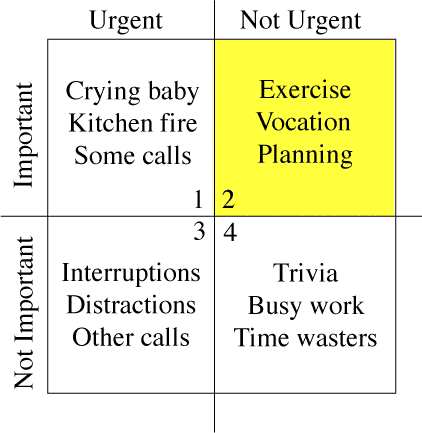
On debian-devel, there has been a discussion about the security issues of "spontaneously" appearing popups demanding the root password to make immediate security updates. There is a much more general issue related to this: computing without interruptions. Most of us have probably seen some friend or acquaintance with a (usually non-Linux) PC that is constantly beeping and flashing with chat notifications, new email popups, Adobe update this, Java update that, etc. In one recent case I came across somebody who had experienced a dramatic drop in his productivity as a consequence - giving him a laptop with a freshly installed copy of Linux made a dramatic difference to his work. I can already hear people insisting that security trumps everything (which isn't an original argument either) and that popups can't be avoided. A search on the web for "computing without interruptions" reveals users have a particular distaste for these things appearing while watching a video. Websites responding to that complaint fill the search results. With many types of interactive real-time content (video, WebRTC phone/video calls and so on) deployed within browsers, it is even more important for UI designers to contemplate when it is not appropriate to interrupt a user and to do everything possible to avoid interrupting the user. Preparing for disaster On the other hand, just ignoring security updates and not telling the user their disk is filling until 0 bytes remain available could only shift the problem down the road (from constant annoyance to periodic crisis). That said, sometimes you can still fill the disk very suddenly (especially with fast SSDs) and rather than relying on popups to keep users away from the precipice, applications (particularly the core desktop and daemon processes) could be tested more regularly to ensure they remain resilient in full disk situations. Managing information overload Popups are just part of a wider problem of information overload. There are emails too: some applications, such as Drupal, will send daily or weekly emails to a user if their system is not up to date. For many virtual-hosted sites, this starts to resemble a small flood. There is a flaw in this design: applications are competing for attention by sending more and more emails and popups or making them more annoying (e.g. the security updates in Debian 6 were ignorable popups in the top right-hand corner of the screen, Debian 7's Gnome Classic mode displays a big password prompt in the middle of the screen). The solution would be to develop a mechanism for unifying, de-duplicating and then prioritising these information/event flows. Some fault alerting systems already do this for their own events - these are niche solutions that aren't always applicable to the average PC-owner, although the principles are well tested. Some email organisation tools have similar features, but only for email. I'm not currently aware of any solution that synthesizes such an experience for all possible information sources. Setting priorities One well-read work on this subject in the business world is The 7 Habits of Highly Effective People (Stephen R. Covey, 1989). Of particular interest for the problem at hand is the priority matrix (borrowed from the Eisenhower Method): The left column, Urgent items, typically must be executed by a certain date (e.g. buying a gift before a birthday or installing a new SSL certificate before the old one expires). A security update or Acrobat reader update does not have this same characteristic. Under this model:
Urgent Non-urgent
Important Replace SSL certificate
Buy birthday gift
Security update
Run backup job
Not important Register for conference before deadline for free gift Non-security update for Acrobat reader
Covey even released an Outlook plugin, Plan Plus to help people organise their tasks (and their lives) using his methodology. Unfortunately it is closed-source software with a terrible set of ratings on Amazon - this review from a customer stands out: "My take is that Franklin does not consider robust software nor customer support to be either Urgent or Important." Could this be replicated more successfully with an open-source plugin for Mozilla Lightning or a similar productivity tool, and could the concept be extended across the range of data sources, including email, calendar items, system notifications and more to provide a unified approach to both the computing platform and general productivity (real-life) time management? Would this help solve the same problem in a more effective manner? In other words, would such an effort to help users integrate the demands of technology with the other demands of life make them more likely to keep their systems up to date? The wider community experience Going beyond the desktop/user experience, could this model be extended to automatically integrate external tasks, such as handling bug reports, moderating mailing lists and other slightly tedious things that have to be given regular attention to keep the free-software world moving along smoothly? Managing down-time For people who work in computing, there is almost no down-time any more. Even when on holiday, checking in for a flight might involve navigating through a buggy wifi access control system and an annoying set of advertisements from your low-cost airline as you try to print a boarding pass. These things often trigger thoughts about similar issues on client projects. Glancing at your email to find the booking number could awaken thoughts of a whole lot of projects you had tried to put out of your mind for a week. This is another area where excessive popups and emails can only compound the problem. Who really wants to download and install security updates while on holiday using an intermittent wifi connection? Managing all these events through a common mechanism may also finally make it possible to have an "ordinary user" experience with your PC. In practice, this might mean being able to view information/events through a time-of-day filter or "holiday mode" - and only on demand. A worthy design goal? Would any free software operating system make it a design goal to give their users a 100% interrupt-free experience? Of course there would still be things like chat notifications - but those would only be possible when a user has signed-in to a chat application. The distinction for the interrupt-free experience would only need to apply to default system behavior and not to every application.

8 June 2013

Hideki Yamane: Ubuntu Magazine Japan 2013 summer

Ubuntu Magazine Japan 2013 summer has been published
(advertisement from one of writers... :-)

7 June 2013

Dirk Eddelbuettel: The Rcpp Book is now shipping

My book about Rcpp (and its R and C++ integration) is now available from Springer. Amazon still lists it as not-yet-released; I expect this to change in the next few days.

5 June 2013

Johannes Schauer: Reliable IMAP synchronization with IDLE support

The task: reliably synchronize my local MailDir with several remote IMAP mailboxes with IDLE support so that there is no need to poll with small time intervals to get new email immediately. Most graphical mail clients like icedove/thunderbird or evolution have IDLE support which means that their users get notified about new email as soon as it arrives. I prefer to handle email fetching/reading/sending using separate programs so after having used icedove for a long time, I switched to a offlineimap/mutt based setup a few years ago. Some while after that I discovered sup and later notmuch/alot which made me switch again. Now my only remaining problem is the synchronization between my local email and several remote IMAP servers. Using offlineimap worked fine in the beginning but soon I discovered some of its shortcomings. It would for example sometimes lock up or simply crash when I switched between different wireless networks or switched to ethernet or UMTS. Crashing was not a big problem as I just put it into a script which re-executed it every time it crashed. The problem was it locking up for one of its synchronizing email accounts while the others were kept in sync as usual. This once let to me missing five days of email because offlineimap was not crashing and I believed everything was fine (new messages from the other accounts were scrolling by as usual) while people were sending me worried emails whether I was okay or if something bad had happened. I nearly missed a paper submission deadline and another administrative deadline due to this. This was insanely annoying. It turned out that other mail synchronization programs suffered from the same lockup problem so I stuck with offlineimap and instead executed it as:
while true; do
timeout --signal=KILL 1m offlineimap
notmuch new
sleep 5m
done
Which would synchronize my email every five minutes and kill offlineimap if a synchronization took more than one minute. While I would've liked an email synchronizer which would not need this measure, this worked fine over the months. After some while it bugged me that icedove (which my girlfriend is using) was receiving email nearly instantaneously after they arrived and I couldnt have this feature with my setup. This instantaneous arrival of email works by using the IMAP IDLE command which allows the server to notify the client once new email arrives instead of the client having to poll for new email in small intervals. Unfortunately offlineimap (and any other email synchronizer I found) would not support the IDLE command. There is a fork of it which supports IDLE by using a newer python imap library but this is of little use to me as there is no possibility of a hook which executes when new email arrives so that I can execute notmuch new on the new email. At this point I could've used inotify to execute notmuch new upon arrival of new email but I went another way. Here is a short python script idle.py which connects to my IMAP servers and sends the IDLE command:
import imaplib
import select
import sys

class mysock():
def __init__(self, name, server, user, passwd, directory):
self.name = name
self.directory = directory
self.M = imaplib.IMAP4(server)
self.M.login(user, passwd)
self.M.select(self.directory)
self.M.send("%s IDLE\r\n"%(self.M._new_tag()))
if not self.M.readline().startswith('+'): # expect continuation response
exit(1)

def fileno(self):
return self.M.socket().fileno()

if __name__ == '__main__':
sockets = [
mysock("Name1", "imap.foo.bar", "user1", "pass1", "folder1"),
mysock("Name1", "imap.foo.bar", "user1", "pass1", "folder2"),
mysock("Name2", "imap.blub.bla", "user2", "pass2", "folder3")
]
readable, _, _ = select.select(sockets, [], [], 1980) # 33 mins timeout

found = False
for sock in readable:
if sock.M.readline().startswith('* BYE '): continue
print "-u basic -o -q -f %s -a %s"%(sock.directory, sock.name)
found = True
break

if not found:
print "-u basic -o"
It would create a connection to every directory I want to watch on every email account I want to synchronize. The select call will expire after 33 minutes as most email servers would drop the connection if nothing happens at around 30 minutes. If something happened within that time though, the script would output the arguments to offlineimap to do a quick check on just that mailbox on that account. If nothing happened, the script would output the arguments to offlineimap to do a full check on all my mailboxes.
while true; do
args= timeout --signal=KILL 35m python idle.py
echo "idle timed out" >&2;
args="-u basic -o";

echo "call offlineimap with: $args" >&2
timeout --signal=KILL 1m offlineimap $args
echo "offlineimap timed out" >&2;
continue;

notmuch new
done
Every call which interacts with the network is wrapped in a timeout command to avoid any funny effects. Should the python script timeout, a full synchronization with offlineimap is triggered. Should offlineimap timeout, an error message is written to stderr and the script continues. The above naturally has the disadvantage of not immediately responding to new email which arrives during the time that idle.py is not running. But as this email will be fetched once the next message arrives on the same account, there is no much waiting time and so far, this problem didnt bite me. Is there a better way to synchronize my email and at a same time make use of IDLE? I'm surprised I didnt find software which would offer this feature.

4 June 2013

Petter Reinholdtsen: Debian Edu interview: C dric Boutillier

It has been a while since my last English Debian Edu and Skolelinux interview last November. But the developers and translators are still pulling along to get the Wheezy based release out the door, and this time I managed to get an interview from one of the French translators in the project, C dric Boutillier. Who are you, and how do you spend your days? I am 34 year old. I live near Paris, France. I am an assistant professor in probability theory. I spend my daytime teaching mathematics at the university and doing fundamental research in probability in connexion with combinatorics and statistical physics. I have been involved in the Debian project for a couple of years and became Debian Developer a few months ago. I am working on Ruby packaging, publicity and translation. How did you get in contact with the Skolelinux / Debian Edu project? I came to the Debian Edu project after a call for translation of the Debian Edu manual for the release of Debian Edu Squeeze. Since then, I have been working on updating the French translation of the manual. I had the opportunity to make an installation of Debian Edu in a virtual machine when I was preparing localised version of some screen shots for the manual. I was amazed to see it worked out of the box and how comprehensive the list of software installed by default was. What amazed me was the complete network infrastructure directly ready to use, which can and the nice administration interface provided by GOsa . What pleased me also was the fact that among the software installed by default, there were many "traditional" educative software to learn languages, to count, to program... but also software to develop creativity and artistic skills with music (Ardour, Audacity) and movies/animation (I was especially thinking of Stopmotion). I am following the development of Debian Edu and am hanging out on #debian-edu. Unfortunately, I don't much time to get more involved in this beautiful project. What do you see as the advantages of Skolelinux / Debian Edu? For me, the main advantages of Skolelinux/Debian Edu are its community of experts and its precise documentation, as well as the fact that it provides a solution ready to use. I would add also the fact that it is based on the rock solid Debian distribution, which ensures stability and provides a huge collection of educational free software. What do you see as the disadvantages of Skolelinux / Debian Edu? Maybe the lack of manpower to do lobbying on the project. Sometimes, people who need to take decisions concerning IT do not have all the elements to evaluate properly free software solutions. The fact that support by a company may be difficult to find is probably a problem if the school does not have IT personnel. One can find support from a company by looking at the wiki dokumentation, where some countries already have a number of companies providing support for Debian Edu, like Germany or Norway. This list is easy to find readily from the manual. However, for other countries, like France, the list is empty. I guess that consultants proposing support for Debian would be able to provide some support for Debian Edu as well. Which free software do you use daily? I am using the KDE Plasma Desktop. But the pieces of software I use most runs in a terminal: Mutt and OfflineIMAP for emails, latex for scientific documents, mpd for music. VIM is my editor of choice. I am also using the mathematical software Scilab and Sage (built from source as not completely packaged for Debian, yet). Do you have any suggestions for teachers interested in using the free software in Debian to teach mathematics and statistics? I do not have any "nice" recommendations for statistics. At our university, we use both R and Scilab to teach statistics and probabilistic simulations. For geometry, there are nice programs: I like also cantor, which provides a uniform interface to SciLab, Sage, Octave, etc... Which strategy do you believe is the right one to use to get schools to use free software? My suggestions would be to

Rapha&#235;l Hertzog: My Free Software Activities in May 2013

This is my monthly summary of my free software related activities. If you re among the people who made a donation to support my work (70 , thanks everybody!), then you can learn how I spent your money. Otherwise it s just an interesting status update on my various projects. The Debian Administrator s Handbook Spanish translation completed. The Spanish team finished the translation of the book. The PDF build process was not yet ready to build translations so I had to fix this. At the same time, I also improved the mobipocket build script to make use of Amazon s kindlegen when available (since Amazon now requires the use of this tool to generate Mobipocket files that can be distributed on their platform). Once those issues were sorted I made some promotion of this first completed translation because they really deserve some big kudos ! Plans for the French translation. You know that the Debian Administrator s Handbook came to life as a translation of the French book Cahier de l Admin Debian (published by Eyrolles). This means that we currently have a free translation of a proprietary book. It s a bid of an odd situation that I always wanted to fix. I discussed with Eyrolles to find out how we could publish the original book under the same licenses that we picked for the English book and the result is that we setup a new crowdfunding campaign to liberate the French book and then make it an official French translation of the Debian Administrator s Handbook. Read the rest and support us on the ulule project page (a kickstarter like for people who are not based in the US). Liberate the Debian Handbook Debian France I updated our membership management application (galette) to version 0.7.4.1 with numerous bug fixes but the true highlight this month was Solutions Libres et Opensource , a tradeshow in Paris where Tanguy Ortolo, me, and other volunteers (C dric Boutillier, Arnaud G., and some that I have forgotten, thanks to them!), held a Debian booth for two consecutive days (May 28-29). For once we had lots of goodies to sell (buffs, mouse pad, polos, stickers, etc.) and the booth was very well attended. The Debian Booth (Tanguy on the left, Rapha l on the right) Google s Summer of Code Last month I was rater overwhelmed with queries from students who were interested in applying for the Package Tracking System Rewrite project that I offered to mentor as part of Google s Summer of Code. In the end, I got 6 good student applications that Stefano and me evaluated. We selected Marko Lalic. The Community Bonding Period is just starting and we re fleshing out details on how we will organize the work. We ll try to use the IRC channel #debian-qa on OFTC for questions and answers and weekly meetings. Misc Debian packaging I packaged zim 0.60 and with the release of Wheezy, I uploaded to unstable all the packages that I staged in experimental (cpputest, publican). I sponsored the upload of libmicrohttpd 0.9.27-1. I filed a couple of bug reports that I experienced with the upcoming dpkg 1.17.0 (#709172, #709009). In both cases, the package was using a wrongly hardcoded path to dpkg-divert (the binary moved from /usr/sbin/ to /usr/bin/ a while ago and the compatibility symlink is dropped now). I also dealt with #709064 where the user reported upgrade issues related to multiarch. I also filed an upstream bug report on publican to request some way to avoid so much duplication of files (actually I filed it as a response to the Debian bug #708705 that I received). Kali work I had to update OpenVAS for Kali but some parts failed to build in a Debian 7 environment. I diagnosed the problem and submitted a patch upstream. I also got in touch with the Debian OpenVAS maintainer as I wanted to contribute the package back to Debian, but timing issues have pushed this back for a little longer. Thanks See you next month for a new summary of my activities.
One comment Liked this article? Click here. My blog is Flattr-enabled.

3 June 2013

Iain Lane: Helping others

A pattern I see quite often on help channels goes like this.

<new person> How do I foo the bar?
<experienced person> new person: Run baz --quux and look at ../wibble.bob 

at this point the new person has the information that they wanted and can carry on with whatever it was that they were trying to do. Quite often, however, the conversation continues thus.
<another experinced person> new person: Also, you could run flubble --grog --foo   mycoolscript > ../wibble.bob to get the same effect

Add in experienced person then trying to justify their initial recommendation, and another experienced person then counter-arguing (possibly highlighting new person all the way, if we're on IRC or a social network that allows this) and you have a confusing experience for the newcomer. Let's try to think about the information we're conveying to newcomers and how we're doing it. Easing people in to our projects gently is a friendlier approach, and will result in happier newcomers who are more likely to stick around.

John Goerzen: Two boys, shrimp, and stars

I recently made a routine analysis of my kitchen. (Of course I make a routine analysis of my kitchen; don t you?) In it, I discovered these items, still usable, but approaching that magic throw it out date: So, I thought, what can I make that would use all of these? And I realized I had some shrimp in the freezer, so: a shrimp boil! I tossed it all, plus some various seasonings and a few other veggies, into the Dutch oven, and boiled. Jacob and Oliver watched the activity with interest. Well, except for the potato-peeling part. For that, they went and played with their toy school buses. But the rest was good. They carefully observed me adding some spices, some vegetables, the shrimp, and watched it all simmer. Then it was time to eat. Excitement! Of course, it did take a few minutes to boil, so Jacob got down his whiteboard while Oliver looked on. They enjoyed learning how to peel the shell from the shrimp and devoured their food. And another night recently, Jacob unexpectedly showed up in the kitchen at 10PM. He said he was thirsty, so I got him some water. He asked, Dad, did you make ice cream? Earlier that day, I had prepared ice cream with Oliver, but it was a kind that had to be cooked (lemon with pureed strawberries and peaches) and it wasn t cool enough to finish before their bedtime. I did let them help add the ice and salt to the ice cream freezer just before they went to bed. So I told Jacob that yes, the ice cream was done. He stood there, tiredly, considering, with this oh he ll never say yes to ice cream at 10PM look on his face. So I said, would you like one bite right now? The look of delight on his face was amazing; a broad smile, a twinkle in his eyes, and a clap. So I got out the big bowl of ice cream and scooped up one big spoonful. He loved it. Then I said, should we go look at the stars? I carried Jacob outside to the porch. We stood there, looking up. I used to do this with him periodically, but it had been about a year. So he was thrilled. It was a partially overcast night, but there were still some stars visible. He had no idea there were some stars missing. To him, it was amazing and wonderful and infinite. Oh dad, there are way too many stars to count! He stayed there, arms around my neck, for a minute or two, then was ready to go back inside. I set him down, gave him a hug, said Goodnight, Jacob. And off he trotted, back upstairs, wearing a contented smile, and he fell asleep almost immediately. All it takes to delight children is a bit a shrimp or some stars. And those things delight me, too.

2 June 2013

Jelmer Vernooij: Migrating packaging from Bazaar to Git

A while ago I migrated most of my packages from Bazaar to Git. The rest of the world has decided to use Git for version control, and I don't have enough reason to stubbornly stick with Bazaar and make it harder for myself to collaborate with others. So I'm moving away from a workflow I know and have polished over the last few years - including the various bzr plugins and other tools involved. Trying to do the same thing using git is frustrating and time-consuming, but I'm sure that will improve with time. In particular, I haven't found a good way to merge in a new upstream release (from a tarball) while referencing the relevant upstream commits, like bzr merge-upstream can. Is there a good way to do this? What helper tools can you recommend for maintaining a Debian package in git? Having been upstream for bzr-git earlier, I used its git-remote-bzr implementation to do the conversions of the commits and tags:
% git clone bzr::/path/to/bzr/foo.bzr /path/to/git/foo.git
One of my last contributions to bzr-git was a bzr git-push-pristine-tar-deltas subcommand, which will export all bzr-builddeb-style pristine-tar metadata to a pristine-tar branch in a Git repository that can be used by pristine-tar directly or through something like git-buildpackage. Once you have created a git clone of your bzr branch, it should be a matter of running bzr git-push-pristine-tar-deltas with the target git repository and the Debian package name:
% cd /path/to/bzr/foo.bzr
% bzr git-push-pristine-tar-deltas /path/to/git/foo.git foo
% cd /path/to/git/foo.git foo
% git branch
*  master
   pristine-tar

31 May 2013

Richard Hartmann: Release Critical Bug report for Week 21

Hopefully hiding this post will work this time. Apologies if not. The UDD bugs interface currently knows about the following release critical bugs: How do we compare to the Squeeze release cycle?
Week Squeeze Wheezy Diff
43 284 (213+71) 468 (332+136) +184 (+119/+65)
44 261 (201+60) 408 (265+143) +147 (+64/+83)
45 261 (205+56) 425 (291+134) +164 (+86/+78)
46 271 (200+71) 401 (258+143) +130 (+58/+72)
47 283 (209+74) 366 (221+145) +83 (+12/+71)
48 256 (177+79) 378 (230+148) +122 (+53/+69)
49 256 (180+76) 360 (216+155) +104 (+36/+79)
50 204 (148+56) 339 (195+144) +135 (+47/+90)
51 178 (124+54) 323 (190+133) +145 (+66/+79)
52 115 (78+37) 289 (190+99) +174 (+112/+62)
1 93 (60+33) 287 (171+116) +194 (+111/+83)
2 82 (46+36) 271 (162+109) +189 (+116/+73)
3 25 (15+10) 249 (165+84) +224 (+150/+74)
4 14 (8+6) 244 (176+68) +230 (+168/+62)
5 2 (0+2) 224 (132+92) +222 (+132/+90)
6 release! 212 (129+83) +212 (+129/+83)
7 release+1 194 (128+66) +194 (+128/+66)
8 release+2 206 (144+62) +206 (+144/+62)
9 release+3 174 (105+69) +174 (+105/+69)
10 release+4 120 (72+48) +120 (+72/+48)
11 release+5 115 (74+41) +115 (+74/+41)
12 release+6 93 (47+46) +93 (+47/+46)
13 release+7 50 (24+26) +50 (+24/+26)
14 release+8 51 (32+19) +51 (+32/+19)
15 release+9 39 (32+7) +39 (+32/+7)
16 release+10 20 (12+8) +20 (+12/+8)
17 release+11 24 (19+5) +24 (+19/+5)
18 release+12 2 (2+0) +2 (+2/+0)
Graphical overview of bug stats thanks to azhag:

30 May 2013

Russ Allbery: Review: Get Everything Done

Review: Get Everything Done, by Mark Forster
Publisher: Hodder & Stoughton
Copyright: 2000
ISBN: 0-340-74620-3
Format: Trade paperback
Pages: 190
Mark Forster is the author of my (current) favorite time management book, Do It Tomorrow, and several excellent blog posts. I've therefore been rather curious about some of his earlier books, and finally decided to order this one. It appears to only have been published in the UK, so it can be a bit expensive in the US unless you can find it used. The main reason why I like Forster's writing so much is that he's a theory and neat trick sort of author instead of a single system author. A lot of time management writing (such as Getting Things Done) presents a single system that's supposedly universal. If that system happens to work for you, great. If it doesn't, the usefulness of the book drops off rapidly. You have to work through the basic principles, which are often sidelined in the book, and come up with variations on your own. Forster is the other sort of time management author: he throws out a flurry of tricks and tactics and lets you see which ones stick. He doesn't have a single system; indeed, one of the most entertaining parts of Get Everything Done is a parable about following many of the common time management systems and having one's life get worse and worse. Instead, he talks about the underlying theory, about the different approaches he's tried and their tradeoffs, and about lots of little tricks that he's found help in one situation or another. It's more of a toolkit than a system. This is, of course, only as good as the clarity of presentation. In both Do It Tomorrow and here, the clarity is excellent. For example, one of the most eye-opening ideas he explores in this book is that time management is a horrible name for the field. Time continues on no matter what you do; you can't increase it, and you can't save it. Rather, what you're actually doing is attention management: for each moment, you're deciding where to direct your attention. Things to which you turn your attention will change; things that you don't pay attention to will not change (except possibly for the worse). I'm quite fond of this reframing of the problem. Forster's thinking about time, or, rather, attention management is not as fully-developed here as in the later Do It Tomorrow. Much of the latter book is about the theory and practice of to-do lists. The techniques presented here were, at least for me, less immediately inspiring, although still thought-provoking. Much of the book focuses on internal resistance and procrastination, on the concept of self-control and decision-making as a mental "muscle" that has to be exercised, and on a philosophy of attention management that slowly builds up to doing whatever one is resisting the most at the moment. I haven't had a chance to work through the exercises that he offers (Forster's books tend to be full of illuminating exercises), so I don't have a fully-formed opinion on their efficacy. I was able to put Do It Tomorrow into practice more immediately. However, one thing this book does do is tackle directly the problem of trying to do too many things. Since this, more than organization, is the heart of my personal attention management problems, I was delighted to see this. Most attention management books at least give lip service to the problem, but they provide little useful guidance. David Allen's Getting Things Done effectively rules it out of scope: the goal of the system is to free you to act on your decisions, but there's little or no attention paid to the practical problem of making those decisions. As a result, I had serious trouble with GTD when I tried to use it. My project and next action lists would simply grow without bound, and GTD offered no useful assistance with culling them. Deciding what to do is, of course, a hard problem, but Forster here offers some specific and useful techniques and spends some time on the necessity of culling one's backlog. He also states directly the problem that everyone else seems to dance around: if you don't cull your committments, no attention management system will actually help you. It will just enable you to do trivia more efficiently, and therefore allow you to fill your life with even more of it, while still feeling just as overwhelmed as before. The bluntness is refreshing, and the exercises in cataloging commitments with time values and then forcing yourself to reduce the commitment list to the doable look quite helpful. I would still start with Do It Tomorrow rather than this book, since I think some practical approaches to to-do list management are one of the best places to start with attention management. But I'm glad I picked up this book as well, despite the cost of the UK import, and I plan on working through the exercises in it. Unlike David Allen, who has one basic system and whose other book was interesting but not as helpful, Forster's toolkit approach means that more books mean more ideas and more possible tools. He doesn't stick with one concept and polish it; he tries a lot of different ideas and then analyzes their strengths and weaknesses. If Do It Tomorrow spoke to you, I recommend grabbing this one as well. (Yes, it's somewhat amusing for me to read and review this book immediately after The Making of the Indebted Man, since to an extent attention management is part of the remaking of the self that's the obligation of the debtor in Lazzarato's construction of the nature of debt. It was something that occurred to me while reading this book. But I think Forster does a good job of showing attention management as a tool to direct one's efforts towards an internal goal rather than externally-imposed goals.) Rating: 8 out of 10

29 May 2013

Russ Allbery: Review: The Making of the Indebted Man

Review: The Making of the Indebted Man, by Maurizio Lazzarato
Translator: Joshua David Jordan
Publisher: Semiotext(e)
Copyright: 2011, 2012
Printing: 2012
ISBN: 1-58435-115-2
Format: Trade paperback
Pages: 199
This is a continuation of my effort to catch up on Marxist thought while pondering workplace governance, this time following the recommendations of a friend after a related conversation (about pension systems and basic income guarantee in a Usenet group Usenet isn't dead yet). As opposed to Democracy at Work, which is a popularization, The Making of the Indebted Man has more of the density of a scholarly text. The version I'm reading is also in translation, which I suspect makes it even harder going in places. The basic thesis, though, is clear: debt is far more central to the way that we construct not only economic systems but social systems and even internal models of our own nature than is often realized. We prefer to think of societies as structured around mutual exchange, but in practice they're more often constructed around concepts of debt and credit that have been fully internalized and used to construct a moral code for a responsible debtor. And this is not a neutral construction; rather, it is a key support mechanism of capitalism and of the financial and economic status quo, used (both intentionally and accidentally) to reduce uncertainty and to support exploitation and economic domination. This is one of those perspectives that didn't occur to me prior to reading this book but which is startlingly obvious in retrospect. Once Lazzarato starts pointing it out, the prevelance and universality of debt as a basic structure of social and economic life is striking. The creditor and debtor concept extends not just to obvious examples, such as consumer credit or mortgages, but also to education (via student loans), law enforcement ("pay one's debt to society"), employment (most employers, particularly during economic downturns, have successfully inverted the natural direction of the creditor relationship and have made employees feel in debt to the employer for having a job), and social services (unemployment and welfare benefits come with significant, if often unstated, debt-like requirements). Debt is also the great leveller. It now cuts across race, gender, and social class. Apart from a small handful of extremely rich individuals and corporations, Lazzarato claims, convincingly, that nearly everyone is enmeshed to some extent in a network of debt, or at least in in attitudes and moral pressures of a debtor. Nor is this a static situation. The role of debt in our social lives seems to be constantly increasing. The past fifteen years in particular have seen drastic increases in debt during a debt-funded economic boom combined with debt-funded asset bubbles. Even after the financial collapse, much of that growth of debt persists. Lazzarato, probably in part because he's Italian, focuses on national debt (more on that in a moment); as an American, I'd identify student loan debt as a more compelling example in the United States. Other countries probably have their own examples. For a system to be this widespread, it must serve some social purpose. Lazzarato sees it as an instrument of control. Debt has been very effectively built up as a moral obligation, and (unlike a society of mutual support) it's a very one-sided moral obligation that strongly favors existing power. The debtor is held to a tight moral standard of repayment of debts, and is morally condemned by all of society, including their peers, for a failure to repay. But there is little or no corresponding moral pressure on the creditor: perhaps a half-hearted dislike of high interest rates or occasional pressure to not change previously agreed terms, but nothing like the moral pressure applied to the debtor. To be a creditor is to have an agreed-upon, one-sided right to dictate to the debtor the terms on which they must conduct a portion of their life, and the larger the debt, the larger the portion. The debtor is expected to realign their life, at least in part, around paying off the debt, including choice of profession, decisions about when to quit a job, about how to prioritize personal spending, and so forth. This is all so automatic and so deeply ingrained that, even while writing this, I'm nodding along and thinking "well, of course." Lazzarato offers an opportunity to take a step back and think about the implications, particularly of the deeply one-sided web of obligations this creates. A Marxist analysis adds another level of consideration. One of the basic questions of Marxist thought is why workers put up with exploitation by capitalists. In a Marxist analysis, workers provide the productive output of society, which is then redirected and controlled by a relatively small capitalists. The workers massively outnumber the capitalists. Why would they be content for this situation to continue? Marx, of course, thought they wouldn't be, that the periodic crises of capitalism would eventually result in a socialist revolution by the workers. But by and large this hasn't happened. Why? Lazzarato offers debt as a partial explanation. The profits redirected by capitalists are returned to workers to some extent, but as debt rather than payment. This allows workers to participate to some extent in the growth of societal wealth from constantly increasing productivity, while simultaneously entangling workers in a system of moral control. Company stores, starvation wages, and other confiscatory practices are clear mechanisms of external control that provoke directed outrage. Debt is something that the debtor has nominally agreed to (however much the situation is manipulated to make that agreement almost inevitable), and to which attaches a deep tradition of moral responsibility. The worker has respected grounds on which to object to inequitable treatment; the debtor is wholly responsible for repayment, and is rarely considered to have grounds to complain about the debt. Most of the historical attempts to balance those scales, such as laws and religious rules against usury or the historical Jewish rule of Jubilee, have fallen by the wayside. This is a rather extended summary of what I got out of the book. I'm doing that in part because the book itself is somewhat heavy going. Lazzarato makes extensive use of specialized terms (often not defined) and fills the book with references to other works without much in the way of useful summary. It's the sort of book where, if you're not already well-versed in the field, you may need to just keep reading through some passages to find a point of reference that makes the argument retroactively make sense. I had a particular difficulty with "subjectivation," a term that Wikipedia tells me is from the writings of Michel Foucault (a major source for this book), which Lazzarato uses extensively but never adequately defines. Some external research indicates that this is a very difficult term to define, which explains why I was never quite comfortable with my understanding. I think Lazzarato is using it to get at the process of internalization of the morality of debt and the way that a debt society forces individuals into a mode of economic individualism in which many of their personal choices are bent towards making themselves better (more reliable, more trustworthy) debtors. But I'm not completely sure. There are also places in which I think Lazzarato takes his argument too far, although one of those, I think, reflects a difference in national economic status. He makes quite a lot of national debt in this book, placing it in the universal position of the overarching debt that turns every citizen into a debtor even if they've avoided other debts. This is possibly true in countries whose national debts are held in other currencies, or in countries like Italy that are part of the Euro (which, if one is not Germany or France, amounts to much the same thing). It's a dubious assertion for countries like the UK, Japan, or the United States, where the national debt is held in their own free-floating currency and is largely owed domestically, and partly plays into some frustratingly incorrect political rhetoric. One of the key dynamics of debt, namely the extreme power imbalance between debtor and creditor, is missing in countries with sovereign debt in their own currency, since those countries can always (if they're willing to pay the inflation price) simply print money to pay off national debt. Creditors know this, and therefore interest rates are much lower, the amount of leverage the creditor has is quite limited, and the sorts of debt crises seen in Italy and elsewhere in the Euro periphery are not seen. Lazzarato is understandably writing from the Italian perspective, but I think he weakens his argument by lumping national debt so completely into the same category as the other types of exploitative debt he discusses. The principle does feel universal to me, but the best examples of debt vary by country, so one has to be careful about generalizing specific examples. Another place where I simply disagree with his conclusions is around some of the more dramatic presentations of subjectivation. Lazzarato talks, at one point, about how debt reduces debtors to mechanical components, and uses as an example an ATM machine, which he portrays as uniquely dehumanizing through the mechanical process that someone has to follow to withdraw money. There may be some point here about the dehumanization of debt and its subsumption into the foundation of day-to-day social interaction, but he lost me entirely with the unwarranted technophobia of the specific example. The idea that machines and automation make us less human is an old argument that's orthogonal to the thrust of his argument. It reminded me of old contentions that human relationships made on-line aren't real, which is nonsense. Overall, this is a fascinating and insightful discussion hampered by a difficult and sometimes overly elliptical presentation, a bit too much drama and grand theorizing, and a few poor choices of examples. I found the basic idea extremely valuable, but the amount of work required to extract it occasionally irritating. (This could be partly due to the limits of translation, but I suspect most of the difficulty was present in the original.) I'm not sure that I would recommend the book, but I definitely recommend considering the underlying ideas. Debt now works alongside the employment relationship as a primary means of reinforcing economic and social control and hierarchy. This is likely via accidental development rather than any grand plan, but it's now being actively exploited by the creditors of society, large corporations most notably. Viewed in that light, the explosive growth of student loan debt in the United States is particularly frightening. After Lazzarato's extensive examination of the distortive effects of permanent debt, not just on economics and society but on our own conceptions of our selves and our duties and roles in life, the idea of trapping a generation in debt from the moment of their financial independence is deeply troubling, even nauseating. Rating: 6 out of 10

28 May 2013

Andrew Pollock: [life] Running, a year later

So it's been about a year since I started running. In that time, I've gone from just being able to run 5K, to comfortably doing 10K in just under an hour. In that same time, my weight has gone from 77.5 kg to around 69 kg. The thing that started all of this off was the 5K Packard Summer Scamper, and next month I'm going to run in my first 14K fun run, the City2South. I thought I'd have a go at fund raising too, so if you'd like to make a donation, here's my page. I'm raising money for the Heart Foundation. I've constantly surprised myself with my progress. Just the last time I went for a run, I managed to set personal records on 1 km, 1 mile, 5 km and 10 km, which really blew me away. Once upon a time, I had this crazy idea to try and get into the Queensland Police Service, and one of the fitness requirements for applying was you had to be able to run 2.4 km in under 12 minutes, and I remember training away on the treadmill at the gym and only just scraping in under that time on a treadmill. Then I tried it on a running track, and I have these vague memories of it being a total slog. That was probably 10 years or more ago now. Now I could do that easily. I've got quite a nice 10 km running course in my local neighbourhood, so I'm thinking now that I'm comfortably running 10 km on this course, I should try and go for a half-marathon distance, so one of these weekends I'll just try running the same course twice plus a little bit more, just to see if I have it in me. Then maybe I'll consider entering a half-marathon, just for shits and giggles. I'll probably do it after I run 14 km, which will be the longest distance I've run to date. I only learned about the City2South run yesterday. The run that I've been planning on doing since returning to Brisbane is the Bridge to Brisbane. It looks like they've just opened up entries for it now, so I guess I should go sign up for it too.

27 May 2013

Bits from Debian: Debian welcomes its 2013 crop of GSoC students!

We are proud to announce that 16 students have been accepted to work on improving Debian this summer through the Google Summer of Code! This is great news, following our 15 accepted students in 2012, and 9 accepted students in 2011. Here is the list of accepted students and projects: If you're interested in one of the projects, please follow the links and talk directly to the students or the mentors, or come hang out with us on IRC. Welcome everyone, and let's make sure we all have an amazing summer!

21 May 2013

Russell Coker: Advice on Buying a PC

A common topic of discussion on computer users group mailing lists is advice on buying a PC. I think that most of the offered advice isn t particularly useful with an excessive focus on building or upgrading PCs and on getting the latest and greatest. So I ll blog about it instead of getting involved in more mailing-list debates. A Historical Perspective the PC as an Investment In the late 80 s a reasonably high-end white-box PC cost a bit over $5,000 in Australia (or about $4,000 without a monitor). That was cheaper than name-brand PCs which cost upwards of $7,000 but was still a lot of money. $5,000 in 1988 would be comparable to $10,000 in today s money. That made a PC a rather expensive item which needed to be preserved. There weren t a lot of people who could just discard such an investment so a lot of thought was given to upgrading a PC. Now a quite powerful desktop PC can be purchased for a bit under $400 (maybe $550 if you include a good monitor) and a nice laptop is about the same price as a desktop PC and monitor. Laptops are almost impossible to upgrade apart from adding more RAM or storage but hardly anyone cares because they are so cheap. Desktop PCs can be upgraded in some ways but most people don t bother apart from RAM, storage, and sometimes a new video card. If you have the skill required to successfully replace a CPU or motherboard then your time is probably worth enough that getting more value out of a PC that was worth $400 when new and is worth maybe $100 when it s a couple of years old probably isn t a good investment. Times have changed and PCs just aren t worth enough to be bothered upgrading. A PC is a disposable item not an investment. Buying Something Expensive? There are a range of things that you can buy. You can spend $200 on a second-hand PC that s a couple of years old, $400 on a new PC that s OK but not really fast, or you can spend $1000 or more on a very high end PC. The $1000 PC will probably perform poorly when compared to a PC that sells for $400 next year. The $400 PC will probably perform poorly when compared to the second-hand systems that are available next year. If you spend more money to get a faster PC then you are only getting a faster PC for a year until newer cheaper systems enter the market. As newer and better hardware is continually being released at low enough prices that make upgrades a bad deal I recommend just not buying expensive systems. For my own use I find that e-waste is a good source of hardware. If I couldn t do that then I d buy from an auction site that specialises in corporate sales, they have some nice name-brand systems in good condition at low prices. One thing to note is that this is more difficult for Windows users due to anti-piracy features. With recent versions of Windows you can t just put an old hard drive in a new PC and have it work. So the case for buying faster hardware is stronger for Windows than for Linux. That said, $1,000 isn t a lot of money. So spending more money for a high-end system isn t necessarily a big deal. But we should keep in mind that it s just a matter of getting a certain level of performance a year before it is available in cheaper systems. Getting a $1,000 high-end system instead of a $400 cheap system means getting that level of performance maybe a year earlier and therefore at a price premium of maybe $2 per day. I m sure that most people spend more than $2 per day on more frivolous things than a faster PC. Understanding How a Computer Works As so many things are run by computers I believe that everyone should have some basic knowledge about how computers work. But a basic knowledge of computer architecture isn t required when selecting parts to assemble to make a system, one can know all about selecting a CPU and motherboard to match without understanding what a CPU does (apart from a vague idea that it s something to do with calculations). Also one can have a good knowledge of how computers work without knowing anything about the part numbers that could be assembled to make a working system. If someone wants to learn about the various parts on sale then sites such as Tom s Hardware [1] provide a lot of good information that allows people to learn without the risk of damaging expensive parts. In fact the people who work for Tom s Hardware frequently test parts to destruction for the education and entertainment of readers. But anyone who wants to understand computers would be better off spending their time using any old PC to read Wikipedia pages on the topic instead of spending their time and money assembling one PC. To learn about the basics of computer operation the Wikipedia page for CPU is a good place to start. Then the Wikipedia page for hard drive is a good start for learning about storage and the Wikipedia page for Graphics Processing Unit to learn about graphics processing. Anyone who reads those three pages as well as a selection of pages that they link to will learn a lot more than they could ever learn by assembling a PC. Of course there s lots of other things to learn about computers but Wikipedia has pages for every topic you can imagine. I think that the argument that people should assemble PCs to understand how they work was not well supported in 1990 and ceased to be accurate once Wikipedia became popular and well populated. Getting a Quality System There are a lot of arguments about quality and reliability, most without any supporting data. I believe that a system designed and manufactured by a company such as HP, Lenovo, NEC, Dell, etc is likely to be more reliable than a collection of parts uniquely assembled by a home user but I admit to a lack of data to support this belief. One thing that is clear however is the fact that ECC RAM can make a significant difference to system reliability as many types of error (including power problems) show up as corrupted memory. The cheapest Dell PowerEdge server (which has ECC RAM) is advertised at $699 so it s not a feature that s out of reach of regular users. I think that anyone who makes claims about PC reliability and fails to mention the benefits of ECC RAM (as used in Dell PowerEdge tower systems, Dell Precision workstations, and HP XW workstations among others) hasn t properly considered their advice. Also when discussing overall reliability the use of RAID storage and a good backup scheme should be considered. Good backups can do more to save your data than anything else. Conclusion I think it s best to use a system with ECC RAM as a file server. Make good backups. Use ZFS (in future BTRFS) for file storage so that data doesn t get corrupted on disk. Use reasonably cheap systems as workstations and replace them when they become too old. Update: I find it rather ironic when a discussion about advice on buying a PC gets significant input from people who are well paid for computer work. It doesn t take long for such a discussion to take enough time that the people involved could spent their time working instead, put enough money in a hat to buy a new PC for the user in question, and still had money left over.

19 May 2013

Martin F. Krafft: Streaming a camera to the local network

I have a Raspberry Pi running Raspbian (wheezy) with a UVC camera available as /dev/video0. I've been trying for three weeks to live-stream the picture from the camera onto the local network. I have tried crtmpserver and vlc, read several dozens of how-tos, but so far I have not been able to get a streaming setup working, no matter what I tried. Hence my plea to the lazy web: does anyone have such a setup running on top of Debian? Would you please let me know how you did it? Thanks a lot! NP: Eels: End Times

Hideki Yamane: monthy magazine update (Debian Hot Topics, in Japanese)

I've written an article as monthly one, "Debian Hot Topics", and this time, teaching steps and ways that how to put packages to Debian official repository. Japanese readers, have fun :)

17 May 2013

Richard Hartmann: Release Critical Bug report for Week 20

If I did everything right, this post will not appear on any RSS feed yet still make it to my blog to maintain history. The UDD bugs interface currently knows about the following release critical bugs: How do we compare to the Squeeze release cycle?
Week Squeeze Wheezy Diff
43 284 (213+71) 468 (332+136) +184 (+119/+65)
44 261 (201+60) 408 (265+143) +147 (+64/+83)
45 261 (205+56) 425 (291+134) +164 (+86/+78)
46 271 (200+71) 401 (258+143) +130 (+58/+72)
47 283 (209+74) 366 (221+145) +83 (+12/+71)
48 256 (177+79) 378 (230+148) +122 (+53/+69)
49 256 (180+76) 360 (216+155) +104 (+36/+79)
50 204 (148+56) 339 (195+144) +135 (+47/+90)
51 178 (124+54) 323 (190+133) +145 (+66/+79)
52 115 (78+37) 289 (190+99) +174 (+112/+62)
1 93 (60+33) 287 (171+116) +194 (+111/+83)
2 82 (46+36) 271 (162+109) +189 (+116/+73)
3 25 (15+10) 249 (165+84) +224 (+150/+74)
4 14 (8+6) 244 (176+68) +230 (+168/+62)
5 2 (0+2) 224 (132+92) +222 (+132/+90)
6 release! 212 (129+83) +212 (+129/+83)
7 release+1 194 (128+66) +194 (+128/+66)
8 release+2 206 (144+62) +206 (+144/+62)
9 release+3 174 (105+69) +174 (+105/+69)
10 release+4 120 (72+48) +120 (+72/+48)
11 release+5 115 (74+41) +115 (+74/+41)
12 release+6 93 (47+46) +93 (+47/+46)
13 release+7 50 (24+26) +50 (+24/+26)
14 release+8 51 (32+19) +51 (+32/+19)
15 release+9 39 (32+7) +39 (+32/+7)
16 release+10 20 (12+8) +20 (+12/+8)
17 release+11 24 (19+5) +24 (+19/+5)
18 release+12 2 (2+0) +2 (+2/+0)
Graphical overview of bug stats thanks to azhag:

Rob Bradford: GNOME in Moblin: Myzone

Howdy, i m sure most people are aware of the recent release of Moblin 2.0; a user experience for netbooks. I m going to write a few blog posts about how the Moblin user experience is built on the awesome technologies in the GNOME platform. So first up, let s look at the Myzone, we re starting here since this is the first thing I really worked on in the Moblin UX and i ve been able to see it through from early ideas to the 2.0 and 2.1 releases. So, deep breath, the idea behind the Myzone is to provide a springboard to things that matter to you most: your recent files and web pages you ve visited, your upcoming events and things you need to do, things that are happening on social web services and your favourite applications. Now then, that s the theory, how does it work:

Next.

Previous.