Search Results: "ag"

26 December 2009

Julien Blache: forked-daapd news: FrontRow support, TV shows

Over the past weeks, a couple of contributors sent me fixes and new features for forked-daapd. Thanks to you all! The biggest change is the addition of TV shows metadata as found, for instance, in TV shows bought on the iTunes store. Together with the added support for FrontRow and QuickTime clients, this means forked-daapd is a lot more able at streaming video files than it ever was. Kudos to Ace Jones for his work! Note, however, that you ll need a patched version of ffmpeg to pick up the TV shows metadata from your MP4 files. At the time of writing, the patches have not landed into ffmpeg upstream yet, and it s a bit unclear when this will happen. Contact Ace for the patch and instructions, see the commits in the git tree for his email address. Git tree on Alioth: http://git.debian.org/?p=users/jblache/forked-daapd.git (git URIs on the page)

25 December 2009

Joachim Breitner: Building arbtt for Windows

A friend of mine is interested in trying out the Automatic Rule Based Time-Tracker arbtt which I programmed. Unfortunately, he is using Windows and up to now, arbtt only worked on Linux. But as I wanted to check out Haskell s cross-platform abilities for a while, this was a good opportunity to do so. I don t have Windows installed myself (and did not plan to do so), so I did all this under WINE, the Windows compatibility layer, which works very well: It takes only a few minutes to install the Haskell Platform for Windows and then I was able to run wine ghc --make and cabal install. I played around with some simple programs and was surprised by these timings:
$ rm *.o *.hi; ghc --make fourfours.hs ; time ./fourfours > /dev/null
[1 of 1] Compiling Main             ( fourfours.hs, fourfours.o )
Linking fourfours ...
real	0m1.909s
user	0m1.692s
sys	0m0.208s
$ rm *.o *.hi; wine ghc --make fourfours.hs ; time wine ./fourfours.exe > /dev/null
[1 of 1] Compiling Main             ( fourfours.hs, fourfours.o )
Linking fourfours.exe ...
real	0m1.631s
user	0m1.376s
sys	0m0.092s
So it is faster to run a compiled Haskell program on top of a compatibility layer than directly on Linux! The world is in order again, though, if optimization is enabled:
$ rm *.o *.hi; ghc -O --make fourfours.hs ; time ./fourfours > /dev/null
[1 of 1] Compiling Main             ( fourfours.hs, fourfours.o )
Linking fourfours ...
real	0m0.981s
user	0m0.876s
sys	0m0.108s
$ rm *.o *.hi; wine ghc -O --make fourfours.hs ; time wine ./fourfours.exe > /dev/null
[1 of 1] Compiling Main             ( fourfours.hs, fourfours.o )
Linking fourfours.exe ...
real	0m1.270s
user	0m1.036s
sys	0m0.072s
Funny. Anyways, I wanted to port arbtt. The only platform-dependent part is the capture module that gathers the list of open Windows. The Win32 package that comes with the Haskell Platform did not cover all the functions needed to do so, but creating additional function bindings is really easy with Haskell, as can be seen in the Graphics.Win32.Window.Extra module. I also replaced the locking code that prevents two instances of arbtt-capture to run at the same time by equivalent code using Windows mutexes (module System.Win32.Mutex). With these small changes and some CPP conditionals to make the code compile for either platform, the porting was done! Even accessing the files in ~/.arbtt works correctly on Windows, where it will look in the Application Data folder, without changing the code, thanks to System.Directory.getAppUserDataDirectory. But Windows users won t like compiling software on their own. They won t even like installing software by copying various files to certain directories. Therefore, I also had to create a Windows Installer. I picked Inno Setup, because it s Free Software and seems to be simpler than NSIS. The installer puts the compiled .exe files, the example categorize.cfg and the HTML documentation in the right spot, adds icons to the Start Menu ( Edit categorize.cfg , which fires up wordpad, a link to the documentation and the uninstaller), puts arbtt-capture in the Autorun folder, puts the path to arbtt-stats in the PATH variable and starts arbtt-capture at the end (the last three points being optional). Of course it undoes all this when removing the program again. I integrated the call to the Inno Setup installer into the usual ./Setup build process of Haskell packages. Some more details of how to create the Windows installer are mentioned in the README file. Now all this does not magically add a graphical user interface to arbtt, so users will still have to work with arbtt-stats on the command line even on Windows. If this is not a problem for you then you can fetch the latest installer from the arbtt homepage. And if you happen to become a serious user of arbtt on Windows and want to help maintaining the Windows port, I ll gladly share some responsibilities. I m very satisfied with the process and the result and I m happy to know that I can offer some of my programs also to Windows users in the future.It is also a big plus for Haskell with Python, shipping a program for Windows users is likely more difficult. The next step will be providing gtk-based graphical Haskell applications for Windows, including a nice installer that ideally includes all dependencies (gtk etc.).

Erich Schubert: Media Players

Somehow, I'm still lacking the optimal media player application. Many popular ones are totally overloaded (e.g. amarok). Others like totem seems to be just a minimalistic frontend for a particular backend.My current choice: However, there is one thing I'm really not satisfied with: when putting together a CD compilation for friends (say, as Christmas present), they are quite useless. A key issue here is the total playlist length. Guess what, I want to make sure it fits on a single CD. So I really need to know the total playlist length. Why do so many media players (e.g. totem, alsa-player-gtk, xfmedia4, vlc, mplayer, ...) not show you the total playlist length? They did read all the files to get artist and title. Many even have the individual song lengths, just not the total sum.In the past I've been using old XMMS1 to check for the total length, or a CD burning application like K3B by repeatedly importing my current folder.Right now, I'm using Quod Libet (since I like the tag-editing component exfalso a lot) to arrange the playlist. It also gives me the total length, albeit I belive I've had incorrect song lengths in it before (broken VBR files?), and it's not perfect, too: being database-driven it has really long startup times for occasional users (because of updating the database) and is much more heavyweight. I also believe I've lost some playlists because I had moved my files around once ... so I'm a bit sceptical.Anyway, there are still hundreds of media players I havn't looked at. Don't bother me to send me an email about one I havn't mentioned!But if you are developing a media player, please consider the use case of putting together a music CD for your friends. In particular, for users that do not use your player all day.

Christian Perrier: My Christmas gift to Debian

Being stuck at home because of my stepfather's health condition becoming worse and therefore family meeting plans being changed, I just made the Debian project a small Christmas gift by fixing an RC bug on December 25th for the first time in my Debian life. Apparently, after TeXLive packages changes, this one will not be the only one discovered by Lucas automated archive rebuilds. Anyway, Merry Christmas to those of you who celebrate it.
Clint Adams: Distributed shell scripts for Christmas

When being told about the differences between Puppet and Chef by Puppet fans, a few common talking points emerged. They included the terms DSL , declarative , and shell script . Shell script was probably the most entertaining meme, and referred to how, without dependencies, Chef was just like writing shell scripts in Ruby. In actuality, a Chef cookbook appears to be roughly 17 files in 7 different directories. Most of them end in .rb, but there is also a metadata.json to keep the metadata.rb company, and perhaps an .rdoc if you like that sort of thing. I have no idea who writes shell scripts this way. I am also stupefied that people say this is easier than Puppet, because I doubt I would want to perform system administration by writing one of these things. So when I started writing my own thing, I contemplated the dependency issue, and for a few minutes decided to be lazy and leave them out entirely. Once it dawned on me, however, that I was then writing shell scripts in Lua, I became ashamed. If I were going to go that route, why not just set up a git repository with a bunch of shell scripts, and set up cronjobs on each of the clients to do a git pull and run these shell scripts as root? After all, nothing beats shell scripting for shell scripting, not Perl, not Python, not Ruby, and least of all Lua. So I wrote a dependency resolver. It was easier than I had anticipated and I have vague plans to make it smarter than Puppet's. Then I'm justified in sticking to my Lua DSL . Now Steve has a list of requirements that seem to be relatively mild. I think he could easily get away with a VCS-shellscript-cron setup. The VCS pull can be tunneled over ssh or stunnel or anything else which will provide authentication and encryption, so there is no need for a fancy custom server with its own certificate authority. In short, all the tools are there and you just need glue. I will continue to pretend that I'll need more complex logic and power that only Lua can give me, so I'll end up doing VCS-Lua-cron until I change my mind.

Steve Kemp: And if someone gets upset you say, "chill out"!

It was interesting to see Clint Adams describe love and dissatification with configuration management. At work I've got control of 150(ish) machines which are managed via CFEngine. These machines are exclusively running Debian Lenny. In addition to these hosts we also have several machines running Solaris, OpenBSD, and various Ubuntu releases for different purposes. Unfortunately I made a mistake when I setup the CFEngine infrastructure and when writing all the policies, files, etc, I essentially said "OK CFEngine controlled? Then it is Debian". (This has been slowly changing over time, but not very quickly.) But in short this means that the machines running *BSD, Solaris, and non-Debian distributions haven't been managed as well via CFEngine as the rest, even though technically they could have been. A while back I decided that it was time to deal with this situation. Looking around the various options it seemed Puppet was the way of the future and using that we could rewrite/port our policies and make sure they were both cleanly organised and made no assumptions. So I setup a puppetmaster machine, then I installed the client on a range of client machines (openbsd, debian lenny, ubuntu, solaris) so that I could convince myself my approach was valid, and that the tool itself could do everything I wanted it to do. Unfortunately using puppet soon became painful. It has primitives for doing various things such as maintaining local users, working with cronjobs, and similar. Unfortunately not all primitives work upon all platforms, which kinda makes me think "what's the point?". For example the puppet client running upon FreeBSD will let you add a local user, setup a ~/.ssh/authorized_keys file but will not let you setup a password. (Which means you can add users who can login, but then cannot use sudo. Subpar) At this point I've taken a step back. As I think I've mentioned before I don't actually do too much with CFEngine. Just a few jobs: (i.e. I don't use cron facilities, I add files to cron directories. Similarly I don't use process monitoring, instead I install the monit package and drop /etc/monit/monitrc into place.) There is a pretty big decision to make in the future with the alternatives being: If we ignore the handling of local users, and sudo setup, then the tasks that remain are almost trivial. Creating a simple parser for a "toy-language" which can let you define copies, edits, and package operations would be an afternoons work. Then add some openssl key authentication and you've got a cfengine-lite. For the moment I'm punting the decision but I'm 90% certain that the choice is CFEngine vs. Chef vs. In-House-Fu - and that puppet is no longer under consideration. Anyway despite having taken months to arrive at this point I'm going to continue to punt. Instead my plan is to move toward using LDAP for all user management, login stuff, and sudo management. That will be useful in its own right, and it will coincidentally mean that whatever management system we do end up using will have on less task to deal with. (Which can only be a good thing.) ObFilm: Terminator II

Steve Kemp: 907

It was interesting to see Clint Adams describe love and dissatification with configuration management. At work I've got control of 150(ish) machines which are managed via CFEngine. These machines are exclusively running Debian Lenny. In addition to these hosts we also have several machines running Solaris, OpenBSD, and various Ubuntu releases for different purposes. Unfortunately I made a mistake when I setup the CFEngine infrastructure and when writing all the policies, files, etc, I essentially said "OK CFEngine controlled? Then it is Debian". (This has been slowly changing over time, but not very quickly.) But in short this means that the machines running *BSD, Solaris, and non-Debian distributions haven't been managed as well via CFEngine as the rest, even though technically they could have been. A while back I decided that it was time to deal with this situation. Looking around the various options it seemed Puppet was the way of the future and using that we could rewrite/port our policies and make sure they were both cleanly organised and made no assumptions. So I setup a puppetmaster machine, then I installed the client on a range of client machines (openbsd, debian lenny, ubuntu, solaris) so that I could convince myself my approach was valid, and that the tool itself could do everything I wanted it to do. Unfortunately using puppet soon became painful. It has primitives for doing various things such as maintaining local users, working with cronjobs, and similar. Unfortunately not all primitives work upon all platforms, which kinda makes me think "what's the point?". For example the puppet client running upon FreeBSD will let you add a local user, setup a ~/.ssh/authorized_keys file but will not let you setup a password. (Which means you can add users who can login, but then cannot use sudo. Subpar) At this point I've taken a step back. As I think I've mentioned before I don't actually do too much with CFEngine. Just a few jobs: (i.e. I don't use cron facilities, I add files to cron directories. Similarly I don't use process monitoring, instead I install the monit package and drop /etc/monit/monitrc into place.) There is a pretty big decision to make in the future with the alternatives being: If we ignore the handling of local users, and sudo setup, then the tasks that remain are almost trivial. Creating a simple parser for a "toy-language" which can let you define copies, edits, and package operations would be an afternoons work. Then add some openssl key authentication and you've got a cfengine-lite. For the moment I'm punting the decision but I'm 90% certain that the choice is CFEngine vs. Chef vs. In-House-Fu - and that puppet is no longer under consideration. Anyway despite having taken months to arrive at this point I'm going to continue to punt. Instead my plan is to move toward using LDAP for all user management, login stuff, and sudo management. That will be useful in its own right, and it will coincidentally mean that whatever management system we do end up using will have on less task to deal with. (Which can only be a good thing.) ObFilm: Terminator II

24 December 2009

Julien Blache: Packard Bell OneTwo all-in-one with touch screen

I ve just bought a Packard Bell OneTwo (M3700), a 600 Euros all-in-one computer with a 20 multipoint touch screen (there are bigger models with 23 touch screen, wifi and some other options). This machine will be used to run OpenBravoPOS, a free (libre) point of sale software. So far, I think this machine is just perfect for the job. Getting it to run smoothly under Linux is not a walk in the park, however. There are some quirks and some assembly is required, but once you re done (that takes a couple of hours at most once you ve got all the info, which you have if you re reading this) this machine is just great. It s fast, with a 2.1 GHz Pentium Dual-Core (T4300) CPU, 4 GB of RAM, an Intel GM45 GPU with up to 256 MB of shared RAM, gigabit networking, a fast 320 GB SATA disk and a combo DVD-drive (not a slot-in, too bad). The screen is nice, and the touchscreen is incredibly smooth, precise and sensitive. The sound is good, the webcam is great and it works out of the box, too! Update: added a note about the card reader. Before you go Enter the BIOS and bump the amount of memory allocated to the GPU to 256 MB. By default, the machine ships with only 64 MB allocated to the GPU, which is low and ridiculous considering it is equipped with 4 GB Installing Debian Forget about installing Lenny with debian-installer on this machine. The standard installer with its 2.6.26 kernel doesn t support the network interface properly. Upgraded installer images with 2.6.28 or 2.6.30 kernels end up locking the machine solid before the first installer screen. Your best friend: System Rescue CD. Your other best friend: debootstrap. Before rebooting, install the 2.6.30 kernel from backports.org. It works like a charm, even if the 2.6.30 on the upgraded installer locked up solid. Go figure :) While you re at it, install X from Testing. You need a recent enough version of the intel driver that will support the GM45 chip. Configuring X This is the first and the biggest quirk on this machine. The LCD is actually wired up to both the VGA and the LVDS outputs on the graphic card, and advertises different resolutions on both. The native resolution (1600 900 on this model) is only advertised on the LVDS output. While fiddling with X, it becomes obvious that the VGA output is used as the boot video device. If you disable the output in X with xrandr, you loose the text consoles. My un(?)educated guess is that this setup allowed them to use a standard desktop PC BIOS instead of using a more expensive laptop BIOS. I may be wrong, but that s pretty much the only thing that makes sense to me. Anyway. If you want X to work properly, you ll have to tell it to ignore the VGA output entirely.
Section "Device"
 Identifier  "Intel X4500"
 Option  "Monitor-LVDS"  "Panel on LVDS"
 Option  "Monitor-VGA"  "Panel on VGA"
EndSection
Section "Monitor"
 Identifier  "Panel on LVDS"
EndSection
Section "Monitor"
 Identifier  "Panel on VGA"
 # The LCD panel is wired up on both VGA and LVDS
 # Ignore the VGA output as far as X is concerned
 Option  "Ignore"  "True"
EndSection
If you don t tell X to ignore the VGA output, you ll end up with a mirror setup and your desktop will use the smallest size so as to fit on both monitors. It isn t pretty, it s plain silly and we want those 20 used fully, dammit! See the full xorg.conf. Touch screen The touch screen is an infrared multipoint touch screen from Quanta. No kernel driver is needed, only an input driver for X is required. Start by adding an udev rule like this one:
SUBSYSTEM=="usb", ATTRS idVendor =="0408", ATTRS idProduct =="3000", SYMLINK+="usb/quanta_touch"
The touch screen will now appear as /dev/usb/quanta_touch, which is more handy and stable than /dev/usb/hiddevN. Grab xf86-input-hidtouch from HidTouch Suite on SF.net, and apply this patch. The aim of the patch is to ignore anything but the first reported pressure point. The touch screen is a multipoint touch screen and as such can report 2 or 3 (not sure) pressure points at the same time. The driver can t handle that yet. The patch also fixes a bad comment and an API difference with newer X versions. Build and install the driver, then edit xorg.conf:
Section "InputDevice"
 Identifier  "Optical Touch Screen"
 Driver  "hidtouch"
 Option  "SendCoreEvents"  "true"
 Option  "ReportingMode"  "Raw"
 Option  "Device"  "/dev/usb/quanta_touch"
 Option  "PacketCount"  "13"
 Option  "OpcodePressure"  "852034"
 Option  "OpcodeX"  "65584"
 Option  "OpcodeY"  "65585"
 Option  "CalibrationModel"  "1"
 Option  "CornerTopLeftX"  "0"
 Option  "CornerTopLeftY"  "0"
 Option  "CornerTopRightX"  "1600"
 Option  "CornerTopRightY"  "0"
 Option  "CornerBottomLeftX"  "0"
 Option  "CornerBottomLeftY"  "900"
 Option  "CornerBottomRightX"  "1600"
 Option  "CornerBottomRightY"  "900"
 Option  "CornerScreenWidth"  "1600"
 Option  "CornerScreenHeight"  "900"
EndSection
There you are. Working touch screen! Credit: the above touch screen setup instructions, including the patch (which I reworked slightly ) were taken from this post on the Ubuntu-fr.org forum. The instructions cover the Packard Bell Viseo 200T touch screen, which is identical to what s used on the OneTwo. If you re looking for a 20 touch screen, go for it; at 200 Euros it s a good deal. Sound The Realtek ALC268 codec as used in the OneTwo isn t properly supported yet, however using model=acer-aspire works for the integrated speakers and the headphone jack. Line out and the integrated microphone do not work. Webcam The webcam is a UVC webcam and the image quality is stunning. I m seriously considering stealing that webcam to replace the iSight in my MacBook Pro. It works out of the box without any firmware. Quite a good surprise :) Flash card reader The integrated flash card reader also works out of the box, for the card formats supported by Linux.

Clint Adams: Muppetry

I'm a notoriously late adopter of new technologies. Sure, if I think that something is potentially a good idea, I'll go for it, but for the most part, I assume that things are stupid. I refused to use the WWW for many years, thinking it was idiotic. Now I use the WWW. I find microblogging to be inane and narcissistic at best, but I have derived mild amusement from Shaq on Twitter. Microsoft Windows is something I thought would be ridiculously unsuccessful, because it didn't do anything I would find useful. The list goes on and on, and includes something known in the popular vernacular as configuration management . I've been hearing about BladeLogic and Opsware for quite some time, and idly wondering who the incompetent fools are that need something like this. Back in my day we could manage 100 servers with relative ease; no centralized authentication (because it was a running argument about whether NIS sucked more than NIS+ or vice-versa), no cfengine, no prebuilt server images or any of that jazz. If, for some reason, we needed to make the same change to all servers at once, or some subset thereof, we would just script it. So when one of my acquaintances started raving about Puppet, I assumed it was equally pointless. We'll call him Downs. Downs exhibits a pattern of behavior where he will rave about something for a few weeks, sometimes without having even tried it first, and then eventually become disillusioned with it and start ranting with the same fervor with which he had insisted that whatever fad of the week was the greatest thing ever. It came as no surprise to me when he fell out of love with Puppet and started raving about how much better Chef is. In case you're wondering, he still has not tried Chef to this day. Finally someone convinced me of the value of Puppet. I do not think it is the Way and the Light, but I do see a few situations wherein it makes sense to sacrifice efficiency, flexibility, sanity, and system resources to gain a way of building a near-identical machine from scratch. Now, beyond the flaws inherent to a solution like this, Puppet does have some annoying flaws which I find unnecessary, and which Downs ranted about back when I had absolutely no idea what he was talking about. I disregarded his alleged preference for Chef, but I have heard intelligent people extoll the virtues of Chef, and to a lesser extent Bcfg2. So I took a very brief look at each of those, and was pretty much horrified by what I found. If I need something Puppet-like in the very near future, I will probably be choosing Puppet. I have no intention of running Puppet on machines I manage all by myself though. For that eventuality I am NIHing something with what I consider a better design. The current code is published, but it does not do very much, and requires linking with libdpkg.a which does not exist in any package (but Guillem's working on that, I think). I have no idea whether or not I'll have the motivation to finish it all by myself, but it is Free Software. This post is intentionally weak on details, or deets as the kids call them.

Cyril Brulebois: Blender 2.50 alpha 0

After a while playing around with the build system, with python 3.1 (which is required), etc., I finally got around to upload a Blender package for 2.50 alpha 0, just uploaded to experimental (hopefully) given python 3.1 is only available there. Potential users really want to read the NEWS file. One can also check the upstream release logs. For those wondering about the version number, it had to be >= 2.49, and upstream doesn t seem to be sure about the versioning, since it can be 2.5 on the website, 2.50 as SVN tag, etc. I m not going to introduce an epoch right now. ;) It certainly has some rough edges, but testing and reporting are more than welcome.

Ingo Juergensmann: Frohes Fest - Merry Christmas

Allen Lesern w nsche ich ein Frohes Fest, fr hliche Weihnachten, viele Geschenke oder einfach nur einen sch nen 24. Dezember!
To all readers: Merry Christmas, Buon Natale, Joyeux Noel, Vrolijk Kerstfeest or whatever you will celebrate these days in your culture!

Weihnachtlicher Gru aus Warnem nde

Mark Brown: EIFF 2009

The Edinburgh Film Festival finished a couple of weeks ago. As ever, I went along and saw a bunch of films and stage interviews. The programme had been a little disappointing, mostly due to feeling a little constricted some things that are usually present were dropped (Mirrorball being the most obvious example) and the late night movies weren t very late night, starting about 10:30 for the most part. That said, it was a lot of fun I was more successful than normal in avoiding duds and there were several things that really stood out. Two films I saw early on that really stood out were Moon and Exam, two low budget indie science fiction films. Moon has had an awful lot of publicity already so I won t repeat what other people have said about it. Exam is a very tight, taut thriller eight people in a room in the final test of a long interview process, one of whom will get the job. Both films looked great a testament to how affordable good CGI has become. I ll be interested to see what follows them now there s some examples of low budget SF out there, and I m not sure what to make of the fact that both of the films were British. Pontypool was also excellent, a zombie movie about the dangers, or possibily salvation, of talk radio. If you see it (which you should) make sure you stay for the end of the credits. Also good was Modern Love is Automatic. It s a low budget indie flick which reminded me an awful lot of The Unbelievable Truth partly in terms of visual design but more in the way it decided to just jump off and handle things in a totally non-naturalistic fashion. It s a really tricky thing to pull off without looking like you just don t care about the audience (witness a lot of experimental films) but it s very impressive when it works and it worked here. On the down side Dario Argento s Giallo had the audience laughing, and I m fairly sure it was an at laugh rather than a with laugh. There came a point in the film where it felt like they d just run out of enthusiasm for the whole thing and were just throwing anything on the screen to tie up the loose ends. Very disappointing at a film festival. That was the only real blip, though overall it was good though there was cost cutting in evidence.

MJ Ray: A Christmas Present From Spammers

Contained in the recent billionth-spam report from Project Honeypot is the revelation that The volume of spam drops approximately 21% on Christmas Day and 32% on New Year s Day. (Thanks to Raphael for the pointer.) Happy Christmas to those of you who celebrate it

Andrew Pollock: [life] Homeowners!

There was a minor hiccup yesterday. Our mortgage broker called me up towards the end of the day in a flap because something had gone wrong on the seller's side of things, and their bank hadn't accepted the transaction or something. I still don't know the full story. Something about them missing a mortgage payment possibly. Anyway, she was able to arrange for funding and closing today, instead of funding yesterday and closing today, so the outcome was still the same. Now the real fun starts. The first thing I did tonight was program the garage door opener into the Prius' HomeLink thingy built into the rear vision mirror. It's always nice to be able to use a feature, even if it's taken 4 years.

Dirk Eddelbuettel: Beancounter minor bug fix release 0.8.9

Another small update to beancounter and just like the previous release due to changes in Perl's Date::Manip. It seems that Date_Calc now really wants a reference to store error codes, so we supply one. I also changed the FX code to use OandA ad there are often issues with Yahoo's FX data. The version 0.8.9 is now in Debian, at CPAN and on my beancounter page here.

Muammar El Khatib: Installing Adobe Air in Debian AMD 64 (TweetDeck can be used)

I love twitting using TweetDeck. So that, I started to investigate how to install Adobe Air in Debian AMD64 and, it was a real pain in the ass. I have found a way of installing it in Debian AMD64.

First of all, you need to install the following packages:

$ sudo apt-get install ia32-libs lib32nss-mdns lib32asound2 lib32gcc1 lib32ncurses5 lib32stdc++6 lib32z1 libc6 libc6-i386 lib32nss-mdns libcanberra-gtk-module


After installing them, we have to create some symlinks from the location of some of those libraries in /emul/ia32-linux/usr/lib/ to /usr/lib32/. For accomplishing it, do the next:

$ cd /usr/lib32/
$sudo ln -s /emul/ia32-linux/usr/lib/libnss3.so .
$sudo ln -s /emul/ia32-linux/usr/lib/libssl3.so .
$sudo ln -s /emul/ia32-linux/usr/lib/libsmime3.so .
$sudo ln -s /emul/ia32-linux/usr/lib/libnspr4.so .
$sudo ln -s /emul/ia32-linux/usr/lib/libnssutil3.so.1d .
$sudo ln -s /emul/ia32-linux/usr/lib/libplc4.so.0d .
$sudo ln -s /emul/ia32-linux/usr/lib/libplds4.so .


In the case that you have problems with libplds4.so.0d, create the symlink like this:


$sudo ln -s /emul/ia32-linux/usr/lib/libplds4.so.0d libplds4.so.0d


Now, it is time to download Adobe AIR (in this case version 1.5).

$wget http://airdownload.adobe.com/air/lin/download/latest/AdobeAIRInstaller.bin


Once it is downloaded, we have to make the .bin file an executable:

$ sudo chmod +x AdobeAIRInstaller.bin


Then, we can proceed to install it:

$ sudo ./AdobeAIRInstaller.bin


If you get an error like this:

Error loading the runtime (libnss3.so: wrong ELF class: ELFCLASS64)


It means that you haven't done the symlink from /emul/ia32-linux/usr/lib/libnss3.so to /usr/lib32/ correctly or that you haven't installed the library which is missed ('apt-file search' is your friend).

If everything goes fine, then the last steps are:

sudo cp /usr/lib/libadobecertstore.so /usr/lib32


Note: make a symlink if you prefer.

And for TweetDeck I had to do this:

Download libgnome-keyring0 for 32 bits (in this example I used the one from SID, if you are using testing, download the one from that release that you are using), extract it with dpkg and copy the libraries to /usr/lib32:

$ wget http://ftp.us.debian.org/debian/pool/main/g/gnome-keyring/libgnome-keyring0_2.28.2-1_i386.deb
$ sudo dpkg-deb -x libgnome-keyring0_2.28.2-1_i386.deb libgnome-keyring0_2.28.2-1
$ sudo cp libgnome-keyring0_2.28.2-1/usr/lib/* /usr/lib32/


Then install TweetDeck (http://tweetdeck.com/download/) and Enjoy :-)

Note: If you find any problem, please do not hesitate to write a comment so that I can help you or we can improve this post.

Jonathan McDowell: Neat find of the day: inputlirc

I've recently been fixing up my VDR setup to work with FreeSat and make it brother/parent friendly. I've applied the EPG patches to get the 7 day guide, setup an autologging in user under gdm with vdr-sxfe running and that left getting the remote working. For some reason my old serial dongle wasn't happy with lirc - it got detected ok, and would show some signal when buttons were pressed but didn't work with the old config. The entire hardware of the box has changed, so it seems likely something isn't quite right (in particular the lirc drivers spew out warnings about SMP bits so I should probably try the dongle under a single core setup to rule that out, but there's also a move to 64 bit involved).

The easy solution to have something sorted for Christmas was to pickup a cheap remote from eBay. This ended up being a Cyberlink remote + USB dongle combo. Worked just fine when plugged in, turning up as a normal input device and the obvious keys doing the obvious things. I wanted all the keys to work though, as I'd got used to having a lot of the VDR functions instantly accessible rather than having to work my way through the menus. Various searches suggested I'd need to use LIRC to access the odder keys. That seemed a lot of hassle for something that was doing the decoding itself. Some playing with xev turned up keycodes for a number of the keys, but there were still a few missing (and important ones at that, such as Red/Green/Yellow/Blue). Further digging found me a suggestion of an Xorg keyboard map that would map the KEY_RED etc from the evdev device into something workable under X. And then I found inputlirc via the Debian package. This is really bloody neat - point it at an evdev device and it will present all of the KEY_* codes out as lirc keys. If you pass the -g parameter it makes sure the key presses only go to lirc as well. Exactly what I want and a doddle to setup - no messing with a big configuration file, just edit /etc/defaults/inputlirc to point to the correct /dev/input/by-id/ file, add the -g to the options in that file and restart.

Now the main remaining task is to get it working with BBC/ITV HD.

23 December 2009

Tim Retout: Back

I can now announce my return to the land of the internet. Of course, I wasn't entirely without visiting rights. It so happens that one corner of my new living room is just within range of a terribly expensive wireless access point. It was slow, and kept dropping out. But I managed at least one upload over it, and some email... I have quite a lot of catching up to do.

Gunnar Wolf: Preparing for the geeky holidays with suitable wine

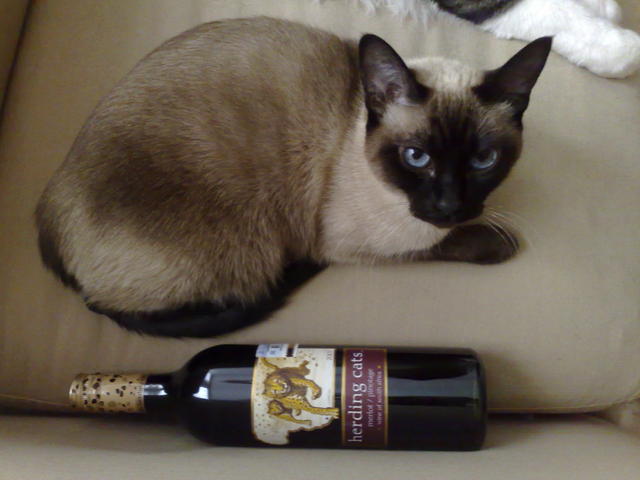
Preparing for the geeky holidays with suitable wine
Quoting The Klezmatics: It's everybody-else's annual end-of-the-year-time holiday, the name of which respectfully we do not choose to say, but that does not prohibit us in any concievable way from wishing you a very merry everybody-else's end-of-the-year-time holiday!
In order to properly welcome this 2010 in a geeky fashion, I got the following wines to share with my friends: Happy $ joyful_ocassion !

Gunnar Wolf: Now with "Siamese" theming

Now with "Siamese" theming
A nice, non-aggressive, brown-colored theme suitable for your siamese herding cats, courtesy of South African people trying to bring a better life to this world.

Next.

Previous.