Search Results: "will"

2 February 2022

Ben Hutchings: CI for the Debian kernel team

Starting just after Christmas, I have been working on CI for all the kernel team's packages on Salsa. The salsa-ci-team has done great work on producing a common pipeline that is usable for most packages with minimal configuration. However, for some packages a lot more work was required. Linux I started with the most important package, linux itself. This now has about 1.1 GiB of source spread over 76,000 source files. That turns out to be a problem for the pipeline which currently puts unpacked source in artifacts - it is far beyond the limits of what Salsa allows. I worked around this by using a modified version of the extract-source and build jobs that use packed source package as the artifacts. The output of the build job is compatible with the common test jobs. The linux package also takes a lot of resources to build; around 80 minutes on the fastest PC I have at home (if ccache is not primed). Salsa's shared CI runners seem to be about 10 times slower than that, so it is completely unfeasible to even one full build in CI. Instead I defined a new build profile that includes only the smallest kernel configuration, without debug info, and the user-space packages. This still takes over an hour with the Salsa CI runners, but I don't think we can improve this much without losing a lot of code coverage. Our Git repository for linux also does not contain the upstream source, so the extract-source job has to fetch that. The common extract-source job uses origtargz to do that, and in case the orig tarball is not already in the archive this will run uscan. That led me to a new problem: our debian/watch file could only find tarballs linked from the front of www.kernel.org, and we're sometimes working with different upstream versions. There is actually no single page listing all tarball releases of Linux, and tarballs for release candidates are dynamically generated by CGit and unsigned. So I changed debian/watch to fetch from Git, which is what we were already doing with our own genorig.py script. Unfortunately, running uscan against a Git upstream, with some files excluded (as there are still a few upstream files we consider non-free), is about twice as slow as it could be. Since I had to modify the extract-source job anyway, I've continued using genorig.py there. A full build log for linux is over 200 MiB, and even with the reduced build profile it would be much longer than Salsa's limit of 2 4 MiB. I therefore opted to use the 'terse' build option (which translates to V=0), but made the builds of user-space tools ignore this option so that blhc could still do its work. (The kernel itself cannot use the same hardening options, so blhc is not useful there.) Finally, with the CI pipeline running, blhc and lintian showed a lot of problems that we hadn't been attending to. I've fixed all the blhc errors (with some careful suppressions), all the lintian errors, and the most straightforward lintian warnings. firmware-nonfree The firmware-nonfree package also has huge "source" (about 560 MB) and needed some of the same modifications, but is quick to build so did not require a special build profile. Running lintian over firmware-nonfree reminded me that I needed to sort out the unsuual and inconistent handling of machine-readable copyright information in this source package. I had already done most of that work on a private branch in 2020, so this is mostly ready but I still need to resolve a licensing issue with AppStream metadata. Other packages For kernel-handbook, there was already a trivial "CI" pipeline used to push static pages to the web site. I've replaced this with the common pipeline plus a job that will push the pages from each build on the master branch. For everything else, it was straightforward to enable the common pipeline with a little bit of configuration.

1 February 2022

Ben Hutchings: Debian LTS work, January 2022

In January I was assigned 24 hours of work by Freexian's Debian LTS initiative. I worked 16 hours, and will carry over the remaining time to February. I sent various backported security fixes for Linux to the stable mailing list, and they have been included in subsequent stable releases. I rebased the linux package on the latest 4.9-stable release, but did not yet upload it.

Russell Coker: First Flounder Meeting

Based on a comment from my previous post [1] I have named the new FOSS group for Australia and NZ Flounder. Here is the link to the agenda for the first meeting [2]. I am currently using a DNS name in my own domain for the group, but in the near future I ll move it to somewhere else under a zone I don t control. My aim is not to have personal control but to create an organisation for the community. But at the moment I m just doing things in the fastest way possible, I will setup HTTP redirects when I get a better DNS name.

Dirk Eddelbuettel: #35: apt install rstudio quarto

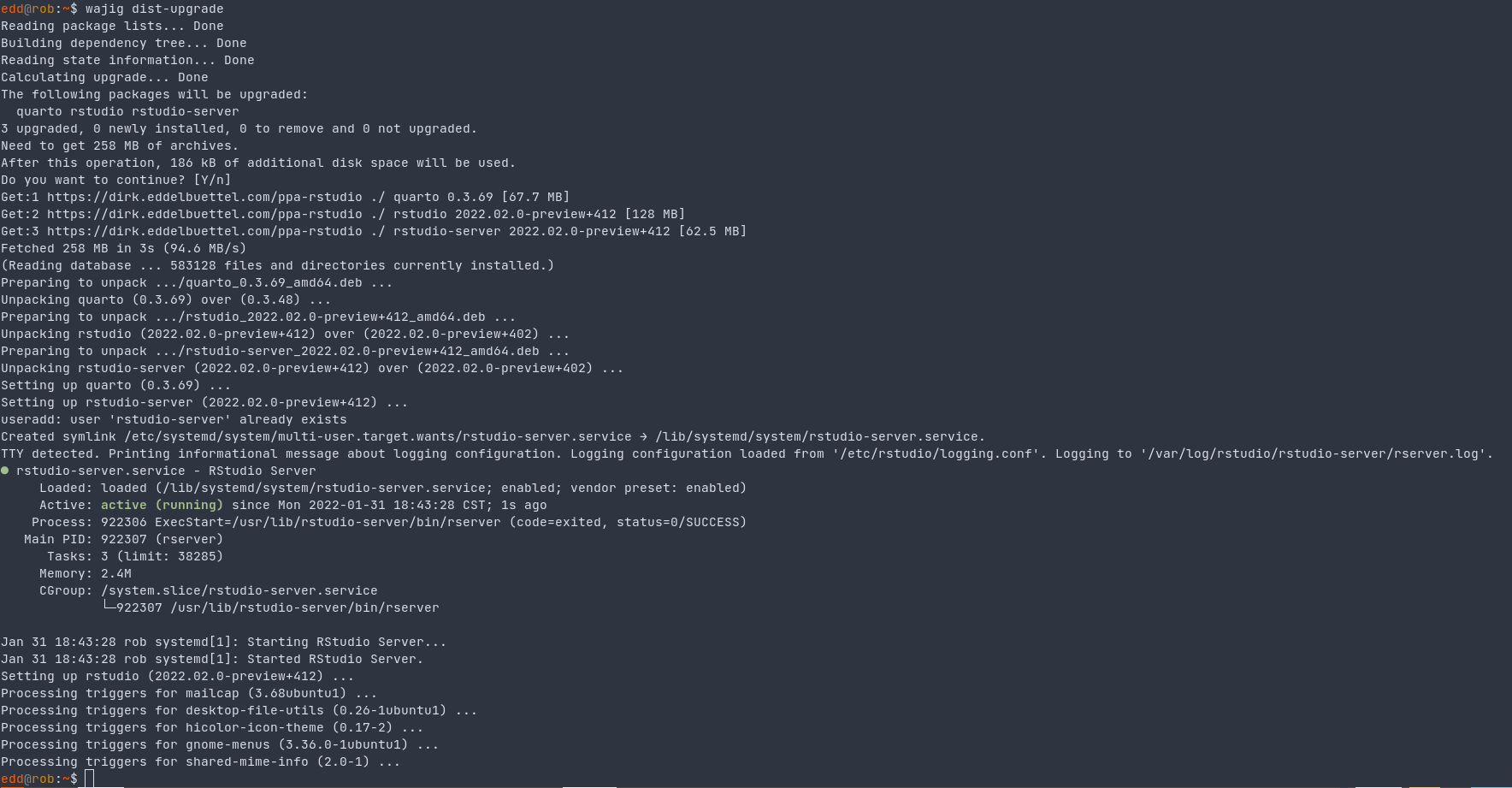
Welcome to the 35th post in the ravishingly rabiant R recommendations, or R4. Today s post is about apt and R tools. Many of us have been running RStudio off our local machines for as long as binaries have been provided. Which is by now probably a bit over a decade. Time flies. And as nice it is to have matching binaries, in my case in the .deb format used on Debian or Ubuntu, it is wee bit a painful to manually download a file and then install it. Twice the pain if you are lucky enough to be on a system where you can also run RStudio Server. And now three times as painful as you may need a matching quarto-cli binary for the nice quarto service. So wouldn t it be nice to have an apt-getable repo? And to autoMAGICall get updated versions when they are available? Oh yes. And I had been bugging JJ from day one. And JJ would almost listen intendly, nod briefly and firmly, and issue an assured we will look into it. Well, they are still looking Luckily, years ago, Carl wrote a helper script for our use in Rocker. I promptly adopted these and kept them in the littler examples directory as a pair of script getRStudioDesktop.r and getRStudioServer.r, later complemented by getQuartoCli.r. And I used these for years, somewhere between weekly and monthly. But it is still very manual: three script calls, one sudo dpkg -i call. And as our good friends at RStudio don t seem to be coming forward with a repo, I created one at GitHub thinking I could serve the files via GitHub Pages. Which of course I cannot as the .deb file for rstudio is well above the 100mb limit. So that seemed to be a bit of a setback. But after a bit of pondering, and recognizing that I am now in the fortunate position to have symmetric broadband access at home, I reckoned that until the bandwidth use gets excessive I will serve this as truly personal package archive (or tPPA) from here. Note that this is calibrated for my use so Ubuntu amd64 it is. Nothing else. And that it installs dailies . Which may cause issues for some people. You have warned. Reading tis paragraphs signifies agreement with the terms and limitations. Just kidding. A quick screenshot from an update earlier is here. Note that I use the fabulous wajig wrapper by Graham Williams here as my frontend to apt, dpkg and more as I have for even longer than I have use RStudio. Its use is tangential here; sudo apt upgrade would have done the same (and is essentially being called). And it demonstrates the main benefit: we are now automated as the cron scheduler launches an update of the PPA at which ever frequency you chose (currently twice a week for me) and after that it becomes part of the normal apt updates we do anyway (and which I do about daily). So that s main gist: automated apt upgrades of rstudio, rstudio-server, and quarto-cli. And you can find the underlying code in the GitHub repo ppa-rstudio which I put together a good week ago. I am currently updating the tPPA twice a week from crontab and have had two full upgrades already. And who knows, maybe with a bid of prodding RStudio may come around. One can always hope. If you like this or other open-source work I do, you can sponsor me at GitHub.

This post by Dirk Eddelbuettel originated on his Thinking inside the box blog. Please report excessive re-aggregation in third-party for-profit settings.

31 January 2022

Ingo Juergensmann: XMPP and Mail Clients

I really like XMPP, but I m a little unhappy about the current general situation of XMPP. I think XMPP could do better if there were some benefits of having an XMPP address. For me one of those benefits is to have the option to have just one address I need to communicate to others. If everything is in place and well-configured, a user can be reached by mail, XMPP and SIP (voice/video calls) by just one address. To address this I would like to see XMPP support in mail clients (MUAs). So when you reply to a mail or write a new one, the client will do a lookup in your addressbook if the address has an XMPP field associated with it and (if not) do a DNS lookup for _xmpp-server._tcp.example.com (or the matching domain part of recipients address). If there is an XMPP address listed in mail header, that JID will be used. When the lookup is successful and an xmpp: protocol handler is configured in the system, the MUA offers an option to begin a chat with the recipient and/or displays the presence status of the recipients (depending on available web-presence or presence subscription). Basically a good candidate could be Thunderbird, because it already has XMPP support built in, albeit not a good implementation and lacking many modern features like OMEMO. But for basic functions (like presence status and such) it should be sufficient for a start. Other candidates could be Evolution, Kmail (as KDE MUA and Kaidan as a native KDE XMPP client) or even Apple Mail.app, because Apples addressbook supports XMPP fields for each contact. Basically the same could be done for SIP contacts: if a SIP SRV record for that domain does exist, the MUA could offer an option to call the recipient. I would be willing to give some money via Bountysource or similar platforms. Is anyone aware of such a project or willing to write some addons? Maybe within the GSoC? PS: there is RFC7259 about Jabber/XMPP JID in mail headers and there is also a page in the XMPP.org wiki.

Russ Allbery: Review: The Story of the Treasure Seekers

Review: The Story of the Treasure Seekers, by E. Nesbit
Publisher: Amazon
Copyright: 1899
Printing: May 2012
ASIN: B0082ZBXSI
Format: Kindle
Pages: 136
The Story of the Treasure Seekers was originally published in 1899 and is no longer covered by copyright. I read the free Amazon Kindle version because it was convenient. My guess is that Amazon is republishing the Project Gutenberg version, but they only credit "a community of volunteers." There are six Bastable children: Dora, Oswald, Dicky, the twins Alice and Noel, and Horace Octavius (H.O.), the youngest. Their mother is dead and the family's finances have suffered in the wake of her death (or, as the first-person narrator puts it, "the fortunes of the ancient House of Bastable were really fallen"), which means that their father works long hours and is very absorbed with his business. That leaves the six kids largely to fend for themselves, since they can't afford school. Clearly the solution is to find treasure. This is a fix-up novel constructed from short stories that were originally published in various periodicals, reordered and occasionally rewritten for the collected publication. To be honest, calling it a fix-up novel is generous; there are some references to previous events, but the first fourteen chapters can mostly stand alone. The last two chapters are closely related and provide an ending. More on that in a moment. What grabs the reader's attention from the first paragraph is the writing style:
This is the story of the different ways we looked for treasure, and I think when you have read it you will see that we were not lazy about the looking. There are some things I must tell before I begin to tell about the treasure-seeking, because I have read books myself, and I know how beastly it is when a story begins, "Alas!" said Hildegarde with a deep sigh, "we must look our last on this ancestral home" and then some one else says something and you don't know for pages and pages where the home is, or who Hildegarde is, or anything about it.
The first-person narrator of The Story of the Treasure Seekers is one of the six kids.
It is one of us that tells this story but I shall not tell you which: only at the very end perhaps I will.
The narrator then goes on to elaborately praise one of the kids, occasionally accidentally uses "I" instead of their name, and then remembers and tries to hide who is telling the story again. It's beautifully done and had me snickering throughout the book. It's not much of a mystery (you will figure out who is telling the story very quickly), but Nesbit captures the writing style of a kid astonishingly well without making the story poorly written. Descriptions of events have a headlong style that captures a child's sense of adventure and heedless immortality mixed with quiet observations that remind the reader that kids don't miss as much as people think they do. I think the most skillful part of this book is the way Nesbit captures a kid's disregard of literary convention. The narrator in a book written by an adult tends to fit into a standard choice of story-telling style and follow it consistently. Even first-person narrators who break some of those rules feel like intentionally constructed characters. The Story of the Treasure Seekers is instead half "kid telling a story" and half "kid trying to emulate the way stories are told in books" and tends to veer wildly between the two when the narrator gets excited, as if they're vaguely aware of the conventions they're supposed to be following but are murky on the specifics. It feels exactly like the sort of book a smart and well-read kid would write (with extensive help from an editor). The other thing that Nesbit handles exceptionally well is the dynamic between the six kids. This is a collection of fairly short stories, so there isn't a lot of room for characterization. The kids are mostly sketched out with one or two memorable quirks. But Nesbit puts a lot of effort into the dynamics that arise between the children in a tight-knit family, properly making the group of kids as a whole and in various combinations a sort of character in their own right. Never for a moment does either the reader or the kids forget that they have siblings. Most adventures involve some process of sorting out who is going to come along and who is going to do other things, and there's a constant but unobtrusive background rhythm of bickering, making up, supporting each other, being frustrated by each other, and getting exasperated at each other's quirks. It's one of the better-written sibling dynamics that I've read. I somehow managed to miss Nesbit entirely as a kid, probably because she didn't write long series and child me was strongly biased towards books that were part of long series. (One book was at most a pleasant few hours; there needed to be a whole series attached to get any reasonable amount of reading out of the world.) This was nonetheless a fun bit of nostalgia because it was so much like the books I did read: kids finding adventures and making things up, getting into various trouble but getting out of it by being honest and kind, and only occasional and spotty adult supervision. Reading as an adult, I can see the touches of melancholy of loss that Nesbit embeds into this quest for riches, but part of the appeal of the stories is that the kids determinedly refuse to talk about it except as a problem to be solved. Nesbit was a rather famous progressive, but this is still a book of its time, which means there's one instance of the n-word and the kids have grown up playing the very racist version of cowboys and indians. The narrator also does a lot of stereotyping of boys and girls, although Nesbit undermines that a bit by making Alice a tomboy. I found all of this easier to ignore because the story is narrated by one of the kids who doesn't know any better, but your mileage may vary. I am always entertained by how anyone worth writing about in a British children's novel of this era has servants. You know the Bastables have fallen upon hard times because they only have one servant. The kids don't have much respect for Eliza, which I found a bit off-putting, and I wondered what this world looks like from her perspective. She clearly did a lot of the work of raising these motherless kids, but the kids view her as the hired help or an obstacle to be avoided, and there's not a lot of gratitude present. As the stories unfold, it becomes more and more clear that there's a quiet conspiracy of surrounding adults to watch out for these kids, which the kids never notice. This says good things about society, but it does undermine the adventures a little, and by the end of the book the sameness of the stories was wearing a bit thin. The high point of the book is probably chapter eight, in which the kids make their own newspaper, the entirety of which is reproduced in the book and is a note-perfect recreation of what an enterprising group of kids would come up with. In the last two stories, Nesbit tacks on an ending that was probably obligatory, but which I thought undermined some of the emotional subtext of the rest of the book. I'm not sure how else one could have put an ending on this book, but the ending she chose emphasized the degree to which the adventures really were just play, and the kids are rewarded in these stories for their ethics and their circumstances rather than for anything they concretely do. It's a bit unsatisfying. This is mostly a nostalgia read, but I'm glad I read it. If this book was not part of your childhood, it's worth reading if only for how well Nesbit captures a child's narrative voice. Rating: 7 out of 10

30 January 2022

Russell Coker: Links Jan 2022

Washington Post has an interesting article on how gender neutral language is developing in different countries [1]. pimaker has an interesting blog post about how they wrote a RISCV CPU emulator to boot a Linux kernel in a pixel shader in the VR Chat platform [2]. ZD has an interesting article about the new Solo Bumblebee platform for writing EBPF programs to run inside the Linux kernel [3]. EBPF is an interesting platform and it s good to have new tools to help people develop for it. Big Think has an interesting article about augmented reality suggesting that it could be worse than social media for driving disputes [4]. Some people would want tags of racial status on all people they see. Vice has an insightful article making the case for 8 hours of work per week [5]. The Guardian has an insightful article about how our attention is being stolen by modern technology [6]. Interesting article about the Ilobleed rootkit that targets the HP ILO server management system [7], it s apparently designed for persistent attacks as it bypasses the firmware upgrade process and updates only the version number so anyone who thinks that a firmware update will fix it is horribly mislead. Nick Bostrom wrote an insightful and disturbing article for Aeon titles None of Our Technologies has Managed to Destroy Humanity Yet [8] about the existential risk of new technologies and how they might be mitigated, much of which involves authoritarian governments unlike any we have seen before. As a counterpoint the novel A Deepness in the Sky claims that universal surveillance would be as damaging to the future of a society as planet-buster bombs. Euronews has an informative article about eco-fascism [9]. The idea that the solution to ecological problems is to have less people in the world and particularly less non-white people is a gateway from green politics to fascism. The developer of the colors and faker npm libraries (for NodeJS) recently uploaded corrupted versions of those libraries as a protest against companies that use them without paying him [10]. This is the wrong way to approach the issue, but it does demonstrate a serious problem with systems like NPM that allow automatic updates. It gives a better result to just use software packaged by a distribution which has QA checks applied including on security updates. VentureBeat has an interesting article on the way that AI is taking over jobs [11]. Lots of white collar jobs can be replaced by machine learning systems, we need to plan for the ways this will change the economy. The Atlantic has an interesting article about tapeworms that infect some ants [12]. The tapeworms make the ants live longer and produce pheromones to make the other ants serve them. This increases the chance that the ants will be eaten by birds which is the next stage in the tapeworm lifecycle.

29 January 2022

Abiola Ajadi: Debci- An introduction for beginners!

Hello again! Been a minute! for this blog i will continue from my previous article where i explained Debci you can read more about it here. In my previous article I mentioned Debci stands for Debian Continous Integration and it exist to make sure packages work currently after an update by testing all of the packages that have tests written in them to make sure it works and nothing is broken. For my internship, I am working on improving the user experience through the UI of the debci site making it easier to use.

Debci consist of the following major terms:
  • Suite
  • Architecture
  • Packages
  • Trigger

How it works together There are three releases in the active maintenance which are Unstable, Testing, and stable(these are known as the suite). What do they mean? Unstable: This is where active development occurs and packages are initially uploaded. This distribution is always called sid. Testing: After packages undergone some degree of testing in unstable, they are installed into the testing directory. This directory contains packages that have not yet been accepted into the stable release but are on their way there. Stable: The stable distribution includes Debian s most recent officially released distribution. The current stable release which is Debian 11 is codenamed Bullseye. Also we have the oldstable which is the previous stable release. The Debian 10 is now old stable which was codenamed Buster. Architectures: These are known as the CPUs achitecture and there are various ports like amd64, arm64, i386 et.c. An scenerio for example is if a user wants to test a package such as acorn in Testing on arm64 along with a package X from Unstable this would be a pin-package (Pin packages are packages that need to be obtained from a different suite than the main suite that selected.), which means the package the user wants to test with the initial Package selected.Finally, trigger can be described as the name of the test job which is optional. This test is done to check if those packages in unstable can be migrated to Testing. This is a break down of Debci and I hope you enjoyed learning about what my internship entails. Till next time! references: Debian releases. Ports

28 January 2022

Reproducible Builds (diffoscope): diffoscope 202 released

The diffoscope maintainers are pleased to announce the release of diffoscope version 202. This version includes the following changes:
[ Chris Lamb ]
* Don't fail if comparing a nonexistent file with a .pyc file (and add test).
  (Closes: #1004312)
* Drop a reference in the manual page which claims the ability to compare
  non-existent files on the command-line. This has not been possible since
  version 32 which was released in September 2015. (Closes: #1004182)
* Add experimental support for incremental output support with a timeout.
  Passing, for example, --timeout=60 will mean that diffoscope will not
  recurse into any sub-archives after 60 seconds total execution time has
  elapsed and mark the diff as being incomplete. (Note that this is not a
  fixed/strict timeout due to implementation issues.)
  (Closes: reproducible-builds/diffoscope#301)
* Don't return with an exit code of 0 if we encounter device file such as
  /dev/stdin with human-readable metadata that matches literal, non-device,
  file contents. (Closes: #1004198)
* Correct a "recompile" typo.
[ Sergei Trofimovich ]
* Fix/update whitespace for Black 21.12.
You find out more by visiting the project homepage.

27 January 2022

Russ Allbery: Review: I Didn't Do the Thing Today

Review: I Didn't Do the Thing Today, by Madeleine Dore
Publisher: Avery
Copyright: 2022
ISBN: 0-593-41914-6
Format: Kindle
Pages: 291
At least from my narrow view of it, the world of productivity self-help literature is a fascinating place right now. The pandemic overturned normal work patterns and exacerbated schedule inequality, creating vastly different experiences for the people whose work continued to be in-person and the people whose work could become mostly or entirely remote. Self-help literature, which is primarily aimed at the more affluent white-collar class, primarily tracked the latter disruption: newly-remote work, endless Zoom meetings, the impossibility of child care, the breakdown of boundaries between work and home, and the dawning realization that much of the mechanics of day-to-day office work are neither productive nor defensible. My primary exposure these days to the more traditional self-help productivity literature is via Cal Newport. The stereotype of the productivity self-help book is a collection of life hacks and list-making techniques that will help you become a more efficient capitalist cog, but Newport has been moving away from that dead end for as long as I've been reading him, and his recent work focuses more on structural issues with the organization of knowledge work. He also shares with the newer productivity writers a willingness to tell people to use the free time they recover via improved efficiency on some life goal other than improved job productivity. But he's still prickly and defensive about the importance of personal productivity and accomplishing things. He gives lip service on his podcast to the value of the critique of productivity, but then usually reverts to characterizing anti-productivity arguments as saying that productivity is a capitalist invention to control workers. (Someone has doubtless said this on Twitter, but I've never seen a serious critique of productivity make this simplistic of an argument.) On the anti-productivity side, as it's commonly called, I've seen a lot of new writing in the past couple of years that tries to break the connection between productivity and human worth so endemic to US society. This is not a new analysis; disabled writers have been making this point for decades, it's present in both Keynes and in Galbraith's The Affluent Society, and Kathi Weeks's The Problem with Work traces some of its history in Marxist thought. But what does feel new to me is its widespread mainstream appearance in newspaper articles, viral blog posts, and books such as Jenny Odell's How to Do Nothing and Devon Price's Laziness Does Not Exist. The pushback against defining life around productivity is having a moment. Entering this discussion is Madeleine Dore's I Didn't Do the Thing Today. Dore is the author of the Extraordinary Routines blog and host of the Routines and Ruts podcast. Extraordinary Routines began as a survey of how various people organize their daily lives. I Didn't Do the Thing Today is, according to the preface, a summary of the thoughts Dore has had about her own life and routines as a result of those interviews. As you might guess from the subtitle (Letting Go of Productivity Guilt), Dore's book is superficially on the anti-productivity side. Its chapters are organized around gentle critiques of productivity concepts, with titles like "The Hopeless Search for the Ideal Routine," "The Myth of Balance," or "The Harsh Rules of Discipline." But I think anti-productivity is a poor name for this critique; its writers are not opposed to being productive, only to its position as an all-consuming focus and guilt-generating measure of personal worth. Dore structures most chapters by naming an aspect, goal, or concern of a life defined by productivity, such as wasted time, ambition, busyness, distraction, comparison, or indecision. Each chapter sketches the impact of that idea and then attempts to gently dismantle the grip that it may have on the reader's life. All of these discussions are nuanced; it's rare for Dore to say that one of these aspects has no value, and she anticipates numerous objections. But her overarching goal is to help the reader be more comfortable with imperfection, more willing to live in the moment, and less frustrated with the limitations of life and the human brain. If striving for productivity is like lifting weights, Dore's diagnosis is that we've tried too hard for too long, and have overworked that muscle until it is cramping. This book is a gentle massage to induce the muscle to relax and let go. Whether this will work is, as with all self-help books, individual. I found it was best read in small quantities, perhaps a chapter per day, since it otherwise began feeling too much the same. I'm also not the ideal audience; Dore is a creative freelancer and primarily interviewed other creative people, which I think has a different sort of productivity rhythm than the work that I do. She's also not a planner to the degree that I am; more on that below. And yet, I found this book worked on me anyway. I can't say that I was captivated all the way through, but I found myself mentally relaxing while I was reading it, and I may re-read some chapters from time to time. How does this relate to the genre of productivity self-help? With less conflict than I think productivity writers believe, although there seems to be one foundational difference of perspective. Dore is not opposed to accomplishing things, or even to systems that help people accomplish things. She is more attuned than the typical productivity writer to the guilt and frustration that can accumulate when one has a day in which one does not do the thing, but her goal is not to talk you out of attempting things. It is, instead, to convince you to hold those attempts and goals more lightly, to allow them to move and shift and change, and to not treat a failure to do the thing today as a reason for guilt. This is wholly compatible with standard productivity advice. It's adding nuance at one level of abstraction higher: how tightly to cling to productivity goals, and what to do when they don't work out. Cramping muscles are not strong muscles capable of lifting heavy things. If one can massage out the cramp, one's productivity by even the strict economic definition may improve. Where I do see a conflict is that most productivity writers are planners, and Dore is not. This is, I think, a significant blind spot in productivity self-help writing. Cal Newport, for example, advocates time-block planning, where every hour of the working day has a job. David Allen advocates a complex set of comprehensive lists and well-defined next actions. Mark Forster builds a flurry of small systems for working through lists. The standard in productivity writing is to to add structure to your day and cultivate the self-discipline required to stick to that structure. For many people, including me, this largely works. I'm mostly a planner, and when my life gets chaotic, adding more structure and focusing on that structure helps me. But the productivity writers I've read are quite insistent that their style of structure will work for everyone, and on that point I am dubious. Newport, for example, advocates time-block planning for everyone without exception, insisting that it is the best way to structure a day. Dore, in contrast, describes spending years trying to perfect a routine before realizing that elastic possibilities work better for her than routines. For those who are more like Dore than Newport, I Didn't Do the Thing Today is more likely to be helpful than Newport's instructions. This doesn't make Newport's ideas wrong; it simply makes them not universal, something that the productivity self-help genre seems to have trouble acknowledging. Even for readers like myself who prefer structure, I Didn't Do the Thing Today is a valuable corrective to the emphasis on every-better systems. For those who never got along with too much structure, I think it may strike a chord. The standard self-help caveat still applies: Dore has the most to say to people who are in a similar social class and line of work as her. I'm not sure this book will be of much help to someone who has to juggle two jobs with shift work and child care, where the problem is more sharp external constraints than internalized productivity guilt. But for its target audience, I think it's a valuable, calming message. Dore doesn't have a recipe to sort out your life, but may help you feel better about the merits of life unsorted. Rating: 7 out of 10

Michael Ablassmeier: Qemu backup on Debian Bullseye

In my last article i showed how to use the new features included in Debian Bullseye to easily create backups of your libvirt managed domains. A few years ago as this topic came to my interest, i also implemented a rather small utility (POC) to create full and incremental backups from standalone qemu processes: qmpbackup The workflow for this is a little bit different from the approach i have taken with virtnbdbackup. While with libvirt managed virtual machines, the libvirt API provides all necessary API calls to create backups, a running qemu process only provides the QMP protocol socket to get things going. Using the QMP protocol its possible to create bitmaps for the attached disks and make Qemu push the contents of the bitmaps to a specified target directory. As the bitmaps keep track of the changes on the attached block devices, you can create incremental backups too. The nice thing here is that the Qemu process actually does this all by itself and you dont have to care about which blocks are dirty, like you would have to do with the Pull based approach. So how does it work? The utility requires to start your qemu process with an active QMP socket attached, like so:
 qemu-system-<arch> <options> -qmp unix:/tmp/socket,server,nowait
Now you can easily make qemu push the latest data for a created bitmap to a given target directory:
# qmpbackup --socket /tmp/socket backup --level full --target /tmp/backup/
[2022-01-27 19:41:33,819]    INFO  Version: 0.10
[2022-01-27 19:41:33,819]    INFO  Qemu version: [5.0.2] [Debian 1:5.2+dfsg-11+deb11u1]
[2022-01-27 19:41:33,825]    INFO  Guest Agent socket connected
[2022-01-27 19:41:33,825]    INFO  Trying to ping guest agent
[2022-01-27 19:41:38,827] WARNING  Unable to reach Guest Agent: cant freeze file systems.
[2022-01-27 19:41:38,828]    INFO  Backup target directory: /tmp/backup/
[2022-01-27 19:41:38,828]    INFO  FULL Backup operation: "/tmp/backup//ide0-hd0/FULL-1643308898"
[2022-01-27 19:41:38,836]    INFO  Wrote Offset: 0% (0 of 2147483648)
[2022-01-27 19:41:39,838]    INFO  Wrote Offset: 25% (541065216 of 2147483648)
[2022-01-27 19:41:40,840]    INFO  Wrote Offset: 33% (701890560 of 2147483648)
[2022-01-27 19:41:41,841]    INFO  Wrote Offset: 40% (867041280 of 2147483648)
[2022-01-27 19:41:42,844]    INFO  Wrote Offset: 50% (1073741824 of 2147483648)
[2022-01-27 19:41:43,846]    INFO  Wrote Offset: 59% (1269760000 of 2147483648)
[2022-01-27 19:41:44,847]    INFO  Wrote Offset: 75% (1610612736 of 2147483648)
[2022-01-27 19:41:45,848]    INFO  Saved disk: [ide0-hd0]
The resulting directory now contains a full backup image of the disk attached. From this point on, its possible to create further incremental backups:
# qmpbackup  --socket /tmp/socket backup --level inc --target /tmp/backup/
[2022-01-27 19:42:03,930]    INFO  Version: 0.10
[2022-01-27 19:42:03,931]    INFO  Qemu version: [5.0.2] [Debian 1:5.2+dfsg-11+deb11u1]
[2022-01-27 19:42:03,933]    INFO  Guest Agent socket connected
[2022-01-27 19:42:03,933]    INFO  Trying to ping guest agent
[2022-01-27 19:42:08,938] WARNING  Unable to reach Guest Agent: cant freeze file systems.
[2022-01-27 19:42:08,939]    INFO  Backup target directory: /tmp/backup/
[2022-01-27 19:42:08,939]    INFO  INC Backup operation: "/tmp/backup//ide0-hd0/INC-1643308928"
[2022-01-27 19:42:08,953]    INFO  Wrote Offset: 0% (0 of 1835008)
[2022-01-27 19:42:09,957]    INFO  Saved disk: [ide0-hd0]
The target directory will now have multiple data backups:
/tmp/backup/ide0-hd0/
  FULL-1643308898
  INC-1643308928
Restoring the image Using the qmprebase utility you can now rebase the images to the latest state. The --dry-run option gives an good impression which command sequences are required, if one wants only rebase to a specific incremental backup, thats possible using the --until option.
# qmprebase rebase --dir /tmp/backup/ide0-hd0/ --dry-run
[2022-01-27 17:18:08,790]    INFO  Version: 0.10
[2022-01-27 17:18:08,790]    INFO  Dry run activated, not applying any changes
[2022-01-27 17:18:08,790]    INFO  qemu-img check /tmp/backup/ide0-hd0/INC-1643308928
[2022-01-27 17:18:08,791]    INFO  qemu-img rebase -b "/tmp/backup/ide0-hd0/FULL-1643308898" "/tmp/backup/ide0-hd0/INC-1643308928" -u
[2022-01-27 17:18:08,791]    INFO  qemu-img commit "/tmp/backup/ide0-hd0/INC-1643308928"
[2022-01-27 17:18:08,791]    INFO  Rollback of latest [FULL]<-[INC] chain complete, ignoring older chains
[2022-01-27 17:18:08,791]    INFO  Image files rollback successful.
Filesystem consistency The backup utility also supports to freeze and thaw the virtual machines file system in case qemu is started with a guest agent socket and the guest agent is reachable during backup operation. Check out the README for the full feature set.

26 January 2022

Gunnar Wolf: Progvis Now in Debian proper! (unstable)

Progvis finally made it into Debian! What is it, you ask? It is a great tool to teach about memory management and concurrency. I first saw progvis in the poster presentation his author, Filip Str mb ck, did last year at the 52nd ACM Technical Sympossium on Computer Science Education (SIGCSE), immediately recognizing it as a tool I wanted to use at my classes, and being it free software, make it available for all interested Debian users. Quoting from Progvis Web page:
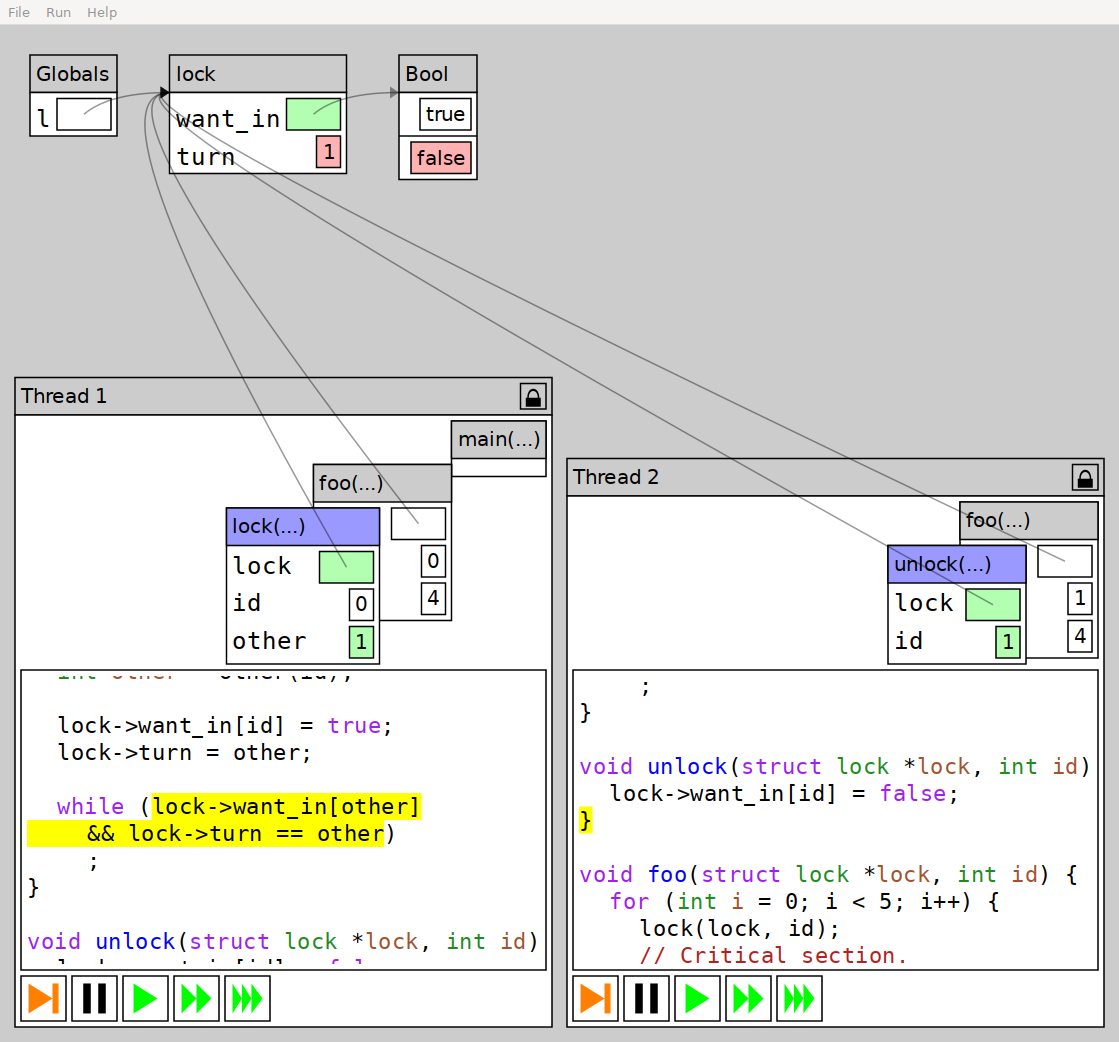
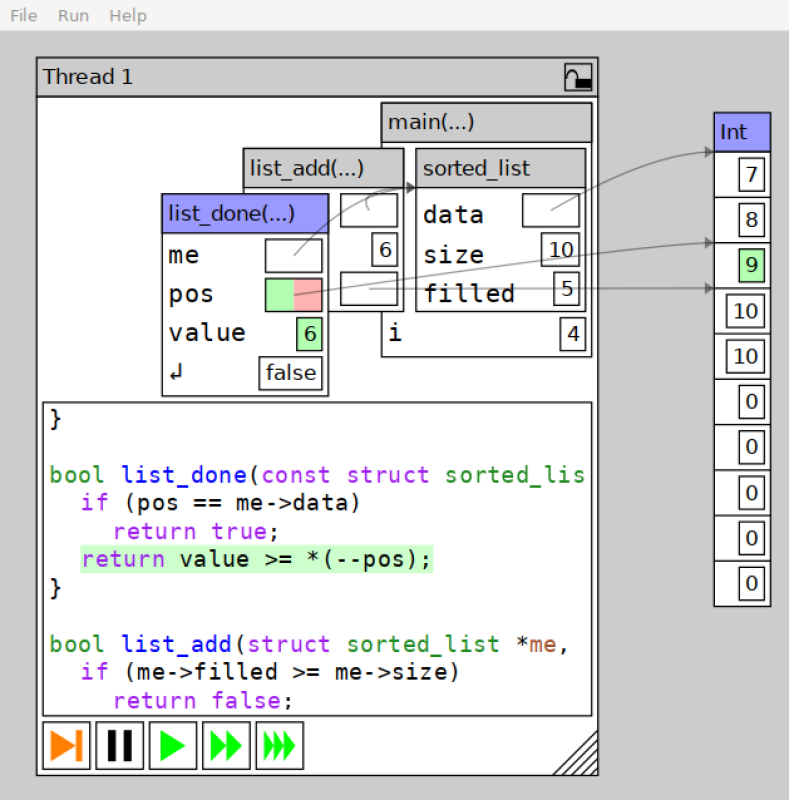
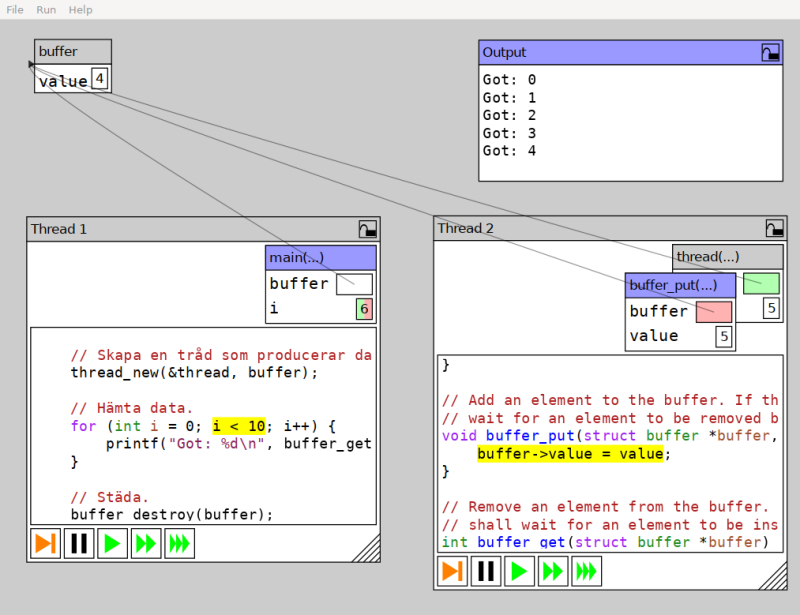
This is a program visualization tool aimed at concurrent programs and related issues. The tool itself is mostly language agnostic, and relies on Storm to compile the provided code and provide basic debug information. The generated code is then inspected and instrumented to provide an experience similar to a basic debugger. The tool emphasizes a visual representation of the object hierarchy that is manipulated by the executed program to make it easy to understand how it looks. In particular, a visual representation is beneficial over a text representation since it makes it easier to find shared data that might need to be synchronized in a concurrent program. As mentioned, the tool is aimed at concurrent programs. Therefore, it allows spawning multiple threads running the same program to see if that affects the program s execution (this is mostly interesting if global variables are used). Furthermore, any spawned threads also appear in the tool, and the user may control them independently to explore possible race conditions or other synchronization errors. If enabled from the menu bar, the tool keeps track of reads and writes to the data structure in order to highlight basic race conditions in addition to deadlocks.
So, what is this Storm thing? Filip promptly informed me that Progvis is not just a pedagogical tool Or rather, that it is part of something bigger. Progvis is a program built using the Storm programming language platform is more than a compiler; it presents as a framework for creating languages, designed to make easy to implement languages that can be extended with new syntax and semantics. Storm is much more than what I have explored, and can be used as an interactive compiler, a language server used as a service for highlighting and completing in IDEs. But I won t dig much more into Storm (which is, of course, now also available in Debian as well as the libraries built from the same source). Back to progvis: It implements a very-close-to-C++ language, with some details to better suit its purpose (i.e. instead of using the usual pthread implementation, an own thread model is used; i.e. thread creation is handled via int thread_id = thread_name(funcname, &params) instead of the more complex pthread_create() function (including details such as the thread object being passed as by reference as a parameter) All in all, while I have not yet taken full advantage of this tool in my teaching, it has helped me show somewhat hard to grasp concepts such as: All in all, a great tool. I hope you find it useful and enjoyable as well! PS- I suggest you to install the progvis-examples package to get started. You will find some dozens of sample programs in /usr/share/doc/progvis-examples/examples; playing with them will help you better understand the tool and be able to better write your own programs.

Russell Coker: Australia/NZ Linux Meetings

I am going to start a new Linux focused FOSS online meeting for people in Australia and nearby areas. People can join from anywhere but the aim will be to support people in nearby areas. To cover the time zone range for Australia this requires a meeting on a weekend, I m thinking of the first Saturday of the month at 1PM Melbourne/Sydney time, that would be 10AM in WA and 3PM in NZ. We may have corner cases of daylight savings starting and ending on different days, but that shouldn t be a big deal as I think those times can vary by an hour either way without being too inconvenient for anyone. Note that I describe the meeting as Linux focused because my plans include having a meeting dedicated to different versions of BSD Unix and a meeting dedicated to the HURD. But those meetings will be mainly for Linux people to learn about other Unix-like OSs. One focus I want to have for the meetings is hands-on work, live demonstrations, and short highly time relevant talks. There are more lectures on YouTube than anyone could watch in a lifetime (see the Linux.conf.au channel for some good ones [1]). So I want to run events that give benefits that people can t gain from watching YouTube on their own. Russell Stuart and I have been kicking around ideas for this for a while. I think that the solution is to just do it. I know that Saturday won t work for everyone (no day will) but it will work for many people. I am happy to discuss changing the start time by an hour or two if that seems likely to get more people. But I m not particularly interested in trying to make it convenient for people in Hawaii or India, my idea is for an Australia/NZ focused event. I would be more than happy to share lecture notes etc with people in other countries who run similar events. As an aside I d be happy to give a talk for an online meeting at a Hawaiian LUG as the timezone is good for me. Please pencil in 1PM Melbourne time on the 5th of Feb for the first meeting. The meeting requirements will be a PC with good Internet access running a recent web browser and a ssh client for the hands-on stuff. A microphone or webcam is NOT required, any questions you wish to ask can be done with text if that s what you prefer. Suggestions for the name of the group are welcome.

23 January 2022

Antoine Beaupr : Switching from OpenNTPd to Chrony

A friend recently reminded me of the existence of chrony, a "versatile implementation of the Network Time Protocol (NTP)". The excellent introduction is worth quoting in full:
It can synchronise the system clock with NTP servers, reference clocks (e.g. GPS receiver), and manual input using wristwatch and keyboard. It can also operate as an NTPv4 (RFC 5905) server and peer to provide a time service to other computers in the network. It is designed to perform well in a wide range of conditions, including intermittent network connections, heavily congested networks, changing temperatures (ordinary computer clocks are sensitive to temperature), and systems that do not run continuosly, or run on a virtual machine. Typical accuracy between two machines synchronised over the Internet is within a few milliseconds; on a LAN, accuracy is typically in tens of microseconds. With hardware timestamping, or a hardware reference clock, sub-microsecond accuracy may be possible.
Now that's already great documentation right there. What it is, why it's good, and what to expect from it. I want more. They have a very handy comparison table between chrony, ntp and openntpd.

My problem with OpenNTPd Following concerns surrounding the security (and complexity) of the venerable ntp program, I have, a long time ago, switched to using openntpd on all my computers. I hadn't thought about it until I recently noticed a lot of noise on one of my servers:
jan 18 10:09:49 curie ntpd[1069]: adjusting local clock by -1.604366s
jan 18 10:08:18 curie ntpd[1069]: adjusting local clock by -1.577608s
jan 18 10:05:02 curie ntpd[1069]: adjusting local clock by -1.574683s
jan 18 10:04:00 curie ntpd[1069]: adjusting local clock by -1.573240s
jan 18 10:02:26 curie ntpd[1069]: adjusting local clock by -1.569592s
You read that right, openntpd was constantly rewinding the clock, sometimes in less than two minutes. The above log was taken while doing diagnostics, looking at the last 30 minutes of logs. So, on average, one 1.5 seconds rewind per 6 minutes! That might be due to a dying real time clock (RTC) or some other hardware problem. I know for a fact that the CMOS battery on that computer (curie) died and I wasn't able to replace it (!). So that's partly garbage-in, garbage-out here. But still, I was curious to see how chrony would behave... (Spoiler: much better.) But I also had trouble on another workstation, that one a much more recent machine (angela). First, it seems OpenNTPd would just fail at boot time:
anarcat@angela:~(main)$ sudo systemctl status openntpd
  openntpd.service - OpenNTPd Network Time Protocol
     Loaded: loaded (/lib/systemd/system/openntpd.service; enabled; vendor pres>
     Active: inactive (dead) since Sun 2022-01-23 09:54:03 EST; 6h ago
       Docs: man:openntpd(8)
    Process: 3291 ExecStartPre=/usr/sbin/ntpd -n $DAEMON_OPTS (code=exited, sta>
    Process: 3294 ExecStart=/usr/sbin/ntpd $DAEMON_OPTS (code=exited, status=0/>
   Main PID: 3298 (code=exited, status=0/SUCCESS)
        CPU: 34ms
jan 23 09:54:03 angela systemd[1]: Starting OpenNTPd Network Time Protocol...
jan 23 09:54:03 angela ntpd[3291]: configuration OK
jan 23 09:54:03 angela ntpd[3297]: ntp engine ready
jan 23 09:54:03 angela ntpd[3297]: ntp: recvfrom: Permission denied
jan 23 09:54:03 angela ntpd[3294]: Terminating
jan 23 09:54:03 angela systemd[1]: Started OpenNTPd Network Time Protocol.
jan 23 09:54:03 angela systemd[1]: openntpd.service: Succeeded.
After a restart, somehow it worked, but it took a long time to sync the clock. At first, it would just not consider any peer at all:
anarcat@angela:~(main)$ sudo ntpctl -s all
0/20 peers valid, clock unsynced
peer
   wt tl st  next  poll          offset       delay      jitter
159.203.8.72 from pool 0.debian.pool.ntp.org
    1  5  2    6s    6s             ---- peer not valid ----
138.197.135.239 from pool 0.debian.pool.ntp.org
    1  5  2    6s    7s             ---- peer not valid ----
216.197.156.83 from pool 0.debian.pool.ntp.org
    1  4  1    2s    9s             ---- peer not valid ----
142.114.187.107 from pool 0.debian.pool.ntp.org
    1  5  2    5s    6s             ---- peer not valid ----
216.6.2.70 from pool 1.debian.pool.ntp.org
    1  4  2    2s    8s             ---- peer not valid ----
207.34.49.172 from pool 1.debian.pool.ntp.org
    1  4  2    0s    5s             ---- peer not valid ----
198.27.76.102 from pool 1.debian.pool.ntp.org
    1  5  2    5s    5s             ---- peer not valid ----
158.69.254.196 from pool 1.debian.pool.ntp.org
    1  4  3    1s    6s             ---- peer not valid ----
149.56.121.16 from pool 2.debian.pool.ntp.org
    1  4  2    5s    9s             ---- peer not valid ----
162.159.200.123 from pool 2.debian.pool.ntp.org
    1  4  3    1s    6s             ---- peer not valid ----
206.108.0.131 from pool 2.debian.pool.ntp.org
    1  4  1    6s    9s             ---- peer not valid ----
205.206.70.40 from pool 2.debian.pool.ntp.org
    1  5  2    8s    9s             ---- peer not valid ----
2001:678:8::123 from pool 2.debian.pool.ntp.org
    1  4  2    5s    9s             ---- peer not valid ----
2606:4700:f1::1 from pool 2.debian.pool.ntp.org
    1  4  3    2s    6s             ---- peer not valid ----
2607:5300:205:200::1991 from pool 2.debian.pool.ntp.org
    1  4  2    5s    9s             ---- peer not valid ----
2607:5300:201:3100::345c from pool 2.debian.pool.ntp.org
    1  4  4    1s    6s             ---- peer not valid ----
209.115.181.110 from pool 3.debian.pool.ntp.org
    1  5  2    5s    6s             ---- peer not valid ----
205.206.70.42 from pool 3.debian.pool.ntp.org
    1  4  2    0s    6s             ---- peer not valid ----
68.69.221.61 from pool 3.debian.pool.ntp.org
    1  4  1    2s    9s             ---- peer not valid ----
162.159.200.1 from pool 3.debian.pool.ntp.org
    1  4  3    4s    7s             ---- peer not valid ----
Then it would accept them, but still wouldn't sync the clock:
anarcat@angela:~(main)$ sudo ntpctl -s all
20/20 peers valid, clock unsynced
peer
   wt tl st  next  poll          offset       delay      jitter
159.203.8.72 from pool 0.debian.pool.ntp.org
    1  8  2    5s    6s         0.672ms    13.507ms     0.442ms
138.197.135.239 from pool 0.debian.pool.ntp.org
    1  7  2    4s    8s         1.260ms    13.388ms     0.494ms
216.197.156.83 from pool 0.debian.pool.ntp.org
    1  7  1    3s    5s        -0.390ms    47.641ms     1.537ms
142.114.187.107 from pool 0.debian.pool.ntp.org
    1  7  2    1s    6s        -0.573ms    15.012ms     1.845ms
216.6.2.70 from pool 1.debian.pool.ntp.org
    1  7  2    3s    8s        -0.178ms    21.691ms     1.807ms
207.34.49.172 from pool 1.debian.pool.ntp.org
    1  7  2    4s    8s        -5.742ms    70.040ms     1.656ms
198.27.76.102 from pool 1.debian.pool.ntp.org
    1  7  2    0s    7s         0.170ms    21.035ms     1.914ms
158.69.254.196 from pool 1.debian.pool.ntp.org
    1  7  3    5s    8s        -2.626ms    20.862ms     2.032ms
149.56.121.16 from pool 2.debian.pool.ntp.org
    1  7  2    6s    8s         0.123ms    20.758ms     2.248ms
162.159.200.123 from pool 2.debian.pool.ntp.org
    1  8  3    4s    5s         2.043ms    14.138ms     1.675ms
206.108.0.131 from pool 2.debian.pool.ntp.org
    1  6  1    0s    7s        -0.027ms    14.189ms     2.206ms
205.206.70.40 from pool 2.debian.pool.ntp.org
    1  7  2    1s    5s        -1.777ms    53.459ms     1.865ms
2001:678:8::123 from pool 2.debian.pool.ntp.org
    1  6  2    1s    8s         0.195ms    14.572ms     2.624ms
2606:4700:f1::1 from pool 2.debian.pool.ntp.org
    1  7  3    6s    9s         2.068ms    14.102ms     1.767ms
2607:5300:205:200::1991 from pool 2.debian.pool.ntp.org
    1  6  2    4s    9s         0.254ms    21.471ms     2.120ms
2607:5300:201:3100::345c from pool 2.debian.pool.ntp.org
    1  7  4    5s    9s        -1.706ms    21.030ms     1.849ms
209.115.181.110 from pool 3.debian.pool.ntp.org
    1  7  2    0s    7s         8.907ms    75.070ms     2.095ms
205.206.70.42 from pool 3.debian.pool.ntp.org
    1  7  2    6s    9s        -1.729ms    53.823ms     2.193ms
68.69.221.61 from pool 3.debian.pool.ntp.org
    1  7  1    1s    7s        -1.265ms    46.355ms     4.171ms
162.159.200.1 from pool 3.debian.pool.ntp.org
    1  7  3    4s    8s         1.732ms    35.792ms     2.228ms
It took a solid five minutes to sync the clock, even though the peers were considered valid within a few seconds:
jan 23 15:58:41 angela systemd[1]: Started OpenNTPd Network Time Protocol.
jan 23 15:58:58 angela ntpd[84086]: peer 142.114.187.107 now valid
jan 23 15:58:58 angela ntpd[84086]: peer 198.27.76.102 now valid
jan 23 15:58:58 angela ntpd[84086]: peer 207.34.49.172 now valid
jan 23 15:58:58 angela ntpd[84086]: peer 209.115.181.110 now valid
jan 23 15:58:59 angela ntpd[84086]: peer 159.203.8.72 now valid
jan 23 15:58:59 angela ntpd[84086]: peer 138.197.135.239 now valid
jan 23 15:58:59 angela ntpd[84086]: peer 162.159.200.123 now valid
jan 23 15:58:59 angela ntpd[84086]: peer 2607:5300:201:3100::345c now valid
jan 23 15:59:00 angela ntpd[84086]: peer 2606:4700:f1::1 now valid
jan 23 15:59:00 angela ntpd[84086]: peer 158.69.254.196 now valid
jan 23 15:59:01 angela ntpd[84086]: peer 216.6.2.70 now valid
jan 23 15:59:01 angela ntpd[84086]: peer 68.69.221.61 now valid
jan 23 15:59:01 angela ntpd[84086]: peer 205.206.70.40 now valid
jan 23 15:59:01 angela ntpd[84086]: peer 205.206.70.42 now valid
jan 23 15:59:02 angela ntpd[84086]: peer 162.159.200.1 now valid
jan 23 15:59:04 angela ntpd[84086]: peer 216.197.156.83 now valid
jan 23 15:59:05 angela ntpd[84086]: peer 206.108.0.131 now valid
jan 23 15:59:05 angela ntpd[84086]: peer 2001:678:8::123 now valid
jan 23 15:59:05 angela ntpd[84086]: peer 149.56.121.16 now valid
jan 23 15:59:07 angela ntpd[84086]: peer 2607:5300:205:200::1991 now valid
jan 23 16:03:47 angela ntpd[84086]: clock is now synced
That seems kind of odd. It was also frustrating to have very little information from ntpctl about the state of the daemon. I understand it's designed to be minimal, but it could inform me on his known offset, for example. It does tell me about the offset with the different peers, but not as clearly as one would expect. It's also unclear how it disciplines the RTC at all.

Compared to chrony Now compare with chrony:
jan 23 16:07:16 angela systemd[1]: Starting chrony, an NTP client/server...
jan 23 16:07:16 angela chronyd[87765]: chronyd version 4.0 starting (+CMDMON +NTP +REFCLOCK +RTC +PRIVDROP +SCFILTER +SIGND +ASYNCDNS +NTS +SECHASH +IPV6 -DEBUG)
jan 23 16:07:16 angela chronyd[87765]: Initial frequency 3.814 ppm
jan 23 16:07:16 angela chronyd[87765]: Using right/UTC timezone to obtain leap second data
jan 23 16:07:16 angela chronyd[87765]: Loaded seccomp filter
jan 23 16:07:16 angela systemd[1]: Started chrony, an NTP client/server.
jan 23 16:07:21 angela chronyd[87765]: Selected source 206.108.0.131 (2.debian.pool.ntp.org)
jan 23 16:07:21 angela chronyd[87765]: System clock TAI offset set to 37 seconds
First, you'll notice there's none of that "clock synced" nonsense, it picks a source, and then... it's just done. Because the clock on this computer is not drifting that much, and openntpd had (presumably) just sync'd it anyways. And indeed, if we look at detailed stats from the powerful chronyc client:
anarcat@angela:~(main)$ sudo chronyc tracking
Reference ID    : CE6C0083 (ntp1.torix.ca)
Stratum         : 2
Ref time (UTC)  : Sun Jan 23 21:07:21 2022
System time     : 0.000000311 seconds slow of NTP time
Last offset     : +0.000807989 seconds
RMS offset      : 0.000807989 seconds
Frequency       : 3.814 ppm fast
Residual freq   : -24.434 ppm
Skew            : 1000000.000 ppm
Root delay      : 0.013200894 seconds
Root dispersion : 65.357254028 seconds
Update interval : 1.4 seconds
Leap status     : Normal
We see that we are nanoseconds away from NTP time. That was ran very quickly after starting the server (literally in the same second as chrony picked a source), so stats are a bit weird (e.g. the Skew is huge). After a minute or two, it looks more reasonable:
Reference ID    : CE6C0083 (ntp1.torix.ca)
Stratum         : 2
Ref time (UTC)  : Sun Jan 23 21:09:32 2022
System time     : 0.000487002 seconds slow of NTP time
Last offset     : -0.000332960 seconds
RMS offset      : 0.000751204 seconds
Frequency       : 3.536 ppm fast
Residual freq   : +0.016 ppm
Skew            : 3.707 ppm
Root delay      : 0.013363549 seconds
Root dispersion : 0.000324015 seconds
Update interval : 65.0 seconds
Leap status     : Normal
Now it's learning how good or bad the RTC clock is ("Frequency"), and is smoothly adjusting the System time to follow the average offset (RMS offset, more or less). You'll also notice the Update interval has risen, and will keep expanding as chrony learns more about the internal clock, so it doesn't need to constantly poll the NTP servers to sync the clock. In the above, we're 487 micro seconds (less than a milisecond!) away from NTP time. (People interested in the explanation of every single one of those fields can read the excellent chronyc manpage. That thing made me want to nerd out on NTP again!) On the machine with the bad clock, chrony also did a 1.5 second adjustment, but just once, at startup:
jan 18 11:54:33 curie chronyd[2148399]: Selected source 206.108.0.133 (2.debian.pool.ntp.org) 
jan 18 11:54:33 curie chronyd[2148399]: System clock wrong by -1.606546 seconds 
jan 18 11:54:31 curie chronyd[2148399]: System clock was stepped by -1.606546 seconds 
jan 18 11:54:31 curie chronyd[2148399]: System clock TAI offset set to 37 seconds 
Then it would still struggle to keep the clock in sync, but not as badly as openntpd. Here's the offset a few minutes after that above startup:
System time     : 0.000375352 seconds slow of NTP time
And again a few seconds later:
System time     : 0.001793046 seconds slow of NTP time
I don't currently have access to that machine, and will update this post with the latest status, but so far I've had a very good experience with chrony on that machine, which is a testament to its resilience, and it also just works on my other machines as well.

Extras On top of "just working" (as demonstrated above), I feel that chrony's feature set is so much superior... Here's an excerpt of the extras in chrony, taken from the comparison table:
  • source frequency tracking
  • source state restore from file
  • temperature compensation
  • ready for next NTP era (year 2036)
  • replace unreachable / falseticker servers
  • aware of jitter
  • RTC drift tracking
  • RTC trimming
  • Restore time from file w/o RTC
  • leap seconds correction, in slew mode
  • drops root privileges
I even understand some of that stuff. I think. So kudos to the chrony folks, I'm switching.

Caveats One thing to keep in mind in the above, however is that it's quite possible chrony does as bad of a job as openntpd on that old machine, and just doesn't tell me about it. For example, here's another log sample from another server (marcos):
jan 23 11:13:25 marcos ntpd[1976694]: adjusting clock frequency by 0.451035 to -16.420273ppm
I get those basically every day, which seems to show that it's at least trying to keep track of the hardware clock. In other words, it's quite possible I have no idea what I'm talking about and you definitely need to take this article with a grain of salt. I'm not an NTP expert. Update: I should also mentioned that I haven't evaluated systemd-timesyncd, for a few reasons:
  1. I have enough things running under systemd
  2. I wasn't aware of it when I started writing this
  3. I couldn't find good documentation on it... later I found the above manpage and of course the Arch Wiki but that is very minimal
  4. therefore I can't tell how it compares with chrony or (open)ntpd, so I don't see an enticing reason to switch
It has a few things going for it though:
  • it's likely shipped with your distribution already
  • it drops privileges (possibly like chrony, unclear if it also has seccomp filters)
  • it's minimalist: it only does SNTP so not the server side
  • the status command is good enough that you can tell the clock frequency, precision, and so on (especially when compared to openntpd's ntpctl)
So I'm reserving judgement over it, but I'd certainly note that I'm always a little weary in trusting systemd daemons with the network, and would prefer to keep that attack surface to a minimum. Diversity is a good thing, in general, so I'll keep chrony for now. It would certainly nice to see it added to chrony's comparison table.

Switching to chrony Because the default configuration in chrony (at least as shipped in Debian) is sane (good default peers, no open network by default), installing it is as simple as:
apt install chrony
And because it somehow conflicts with openntpd, that also takes care of removing that cruft as well.

Update: Debian defaults So it seems like I managed to write this entire blog post without putting it in relation with the original reason I had to think about this in the first place, which is odd and should be corrected. This conversation came about on an IRC channel that mentioned that the ntp package (and upstream) is in bad shape in Debian. In that discussion, chrony and ntpsec were discussed as possible replacements, but when we had the discussion on chat, I mentioned I was using openntpd, and promptly realized I was actually unhappy with it. A friend suggested chrony, I tried it, and it worked amazingly, I switched, wrote this blog post, end of story. Except today (2022-02-07, two weeks later), I actually read that thread and realized that something happened in Debian I wasn't actually aware of. In bookworm, systemd-timesyncd was not only shipped, but it was installed by default, as it was marked as a hard dependency of systemd. That was "fixed" in systemd-247.9-2 (see bug 986651), but only by making the dependency a Recommends and marking it as Priority: important. So in effect, systemd-timesyncd became the default NTP daemon in Debian in bookworm, which I find somewhat surprising. timesyncd has many things going for it (as mentioned above), but I do find it a bit annoying that systemd is replacing all those utilities in such a way. I also wonder what is going to happen on upgrades. This is all a little frustrating too because there is no good comparison between the other NTP daemons and timesyncd anywhere. The chrony comparison table doesn't mention it, and an audit by the Core Infrastructure Initiative from 2017 doesn't mention it either, even though timesyncd was announced in 2014. (Same with this blog post from Facebook.)

Louis-Philippe V ronneau: Goodbye Nexus 5

I've blogged a few times already about my Nexus 5, the Android device I have/had been using for 8 years. Sadly, it died a few weeks ago, when the WiFi chip stopped working. I could probably have attempted a mainboard swap, but at this point, getting a new device seemed like the best choice. In a world where most Android devices are EOL after less than 3 years, it is amazing I was able to keep this device for so long, always running the latest Android version with the latest security patch. The Nexus 5 originally shipped with Android 4.4 and when it broke, I was running Android 11, with the November security patch! I'm very grateful to the FOSS Android community that made this possible, especially the LineageOS community. I've replaced my Nexus 5 by a used Pixel 3a, mostly because of the similar form factor, relatively affordable price and the presence of a headphone jack. Google also makes flashing a custom ROM easy, although I had more trouble with this than I first expected. The first Pixel 3a I bought on eBay was a scam: I ordered an "Open Box" phone and it arrived all scratched1 and with a broken rear camera. The second one I got (from the Amazon Renewed program) arrived in perfect condition, but happened to be a Verizon model. As I found out, Verizon locks the bootloader on their phones, making it impossible to install LineageOS2. The vendor was kind enough to let me return it. As they say, third time's the charm. This time around, I explicitly bought a phone on eBay listed with a unlocked bootloader. I'm very satisfied with my purchase, but all in all, dealing with all the returns and the shipping was exhausting. Hopefully this phone will last as long as my Nexus 5!

  1. There was literally a whole layer missing at the back, as if someone had sanded the phone...
  2. Apparently, and "Unlocked phone" means it is "SIM unlocked", i.e. you can use it with any carrier. What I should have been looking for is a "Factory Unlocked phone", one where the bootloader isn't locked :L

22 January 2022

Steve Kemp: Visiting the UK was difficult, but worth it

So in my previous post I mentioned that we were going to spend the Christmas period in the UK, which we did. We spent a couple of days there, meeting my parents, and family. We also persuaded my sister to drive us to Scarborough so that we could hang out on the beach for an afternoon. Finland has lots of lakes, but it doesn't have proper waves. So it was surprisingly good just to wade in the sea and see waves! Unfortunately our child was a wee bit too scared to ride on a donkey! Unfortunately upon our return to Finland we all tested positive for COVID-19, me first, then the child, and about three days later my wife. We had negative tests in advance of our flights home, so we figure that either the tests were broken, or we were infected in the airplane/airport. Thankfully things weren't too bad, we stayed indoors for the appropriate length of time, and a combination of a couple of neighbours and online shopping meant we didn't run out of food. Since I've been back home I've been automating AWS activities with aws-utils, and updating my simple host-automation system, marionette. Marionette is something that was inspired by puppet, the configuration management utility, but it runs upon localhost only. Despite the small number of integrated primitives it actually works surprisingly well, and although I don't expect it will ever become popular it was an interesting research project. The aws-utilities? They were specifically put together because I've worked in a few places where infrastructure is setup with terraform, or cloudformation, but there are always the odd thing that is configured manually. Typically we'll have an openvpn gateway which uses a manually maintained IP allow-list, or some admin-server which has a security-group maintained somewhat manually. Having the ability to update a bunch of rules with your external IP, as a single command, across a number of AWS accounts/roles, and a number of security-groups is an enormous time-saver when your home IP changes. I'd quite like to add more things to that collection, but there's no particular rush.

21 January 2022

Neil McGovern: Further investments in desktop Linux

This was originally posted on the GNOME Foundation news feed The GNOME Foundation was supported during 2020-2021 by a grant from Endless Network which funded the Community Engagement Challenge, strategy consultancy with the board, and a contribution towards our general running costs. At the end of last year we had a portion of this grant remaining, and after the success of our work in previous years directly funding developer and infrastructure work on GTK and Flathub, we wanted to see whether we could use these funds to invest in GNOME and the wider Linux desktop platform. We re very pleased to announce that we got approval to launch three parallel contractor engagements, which started over the past few weeks. These projects aim to improve our developer experience, make more applications available on the GNOME platform, and move towards equitable and sustainable revenue models for developers within our ecosystem. Thanks again to Endless Network for their support on these initiatives. Flathub Verified apps, donations and subscriptions (Codethink and James Westman) This project is described in detail on the Flathub Discourse but goal is to add a process to verify first-party apps on Flathub (ie uploaded by a developer or an authorised representative) and then make it possible for those developers to collect donations or subscriptions from users of their applications. We also plan to publish a separate repository that contains only these verified first-party uploads (without any of the community contributed applications), as well as providing a repository with only free and open source applications, allowing users to choose what they are comfortable installing and running on their system. Creating the user and developer login system to manage your apps will also set us up well for future enhancements, such managing tokens for direct binary uploads (eg from a CI/CD system hosted elsewhere, as is already done with Mozilla Firefox and OBS) and making it easier to publish apps from systems such as Electron which can be hard to use within a flatpak-builder sandbox. For updates on this project you can follow the Discourse thread, check out the work board on GitHub or join us on Matrix. PWAs Integrating Progressive Web Apps in GNOME (Phaedrus Leeds) While everyone agrees that native applications can provide the best experience on the GNOME desktop, the web platform, and particularly PWAs (Progressive Web Apps) which are designed to be downloadable as apps and offer offline functionality, makes it possible for us to offer equivalent experiences to other platforms for app publishers who have not specifically targeted GNOME. This allows us to attract and retain users by giving them the choice of using applications from a wider range of publishers than are currently directly targeting the Linux desktop. The first phase of the GNOME PWA project involves adding back support to Software for web apps backed by GNOME Web, and making this possible when Web is packaged as a Flatpak. So far some preparatory pull requests have been merged in Web and libportal to enable this work, and development is ongoing to get the feature branches ready for review. Discussions are also in progress with the Design team on how best to display the web apps in Software and on the user interface for web apps installed from a browser. There has also been discussion among various stakeholders about what web apps should be included as available with Software, and how they can provide supplemental value to users without taking priority over apps native to GNOME. Finally, technical discussion is ongoing in the portal issue tracker to ensure that the implementation of a new dynamic launcher portal meets all security and robustness requirements, and is potentially useful not just to GNOME Web but Chromium and any other app that may want to install desktop launchers. Adding support for the launcher portal in upstream Chromium, to facilitate Chromium-based browsers packaged as a Flatpak, and adding support for Chromium-based web apps in Software are stretch goals for the project should time permit. GTK4 / Adwaita To support the adoption of Gtk4 by the community (Emmanuele Bassi) With the release of GTK4 and renewed interest in GTK as a toolkit, we want to continue improving the developer experience and ease of use of GTK and ensure we have a complete and competitive offering for developers considering using our platform. This involves identifying missing functionality or UI elements that applications need to move to GTK4, as well as informing the community about the new widgets and functionality available. We have been working on documentation and bug fixes for GTK in preparation for the GNOME 42 release and have also started looking at the missing widgets and API in Libadwaita, in preparation for the next release. The next steps are to work with the Design team and the Libadwaita maintainers and identify and implement missing widgets that did not make the cut for the 1.0 release. In the meantime, we have also worked on writing a beginners tutorial for the GNOME developers documentation, including GTK and Libadwaita widgets so that newcomers to the platform can easily move between the Interface Guidelines and the API references of various libraries. To increase the outreach of the effort, Emmanuele has been streaming it on Twitch, and published the VOD on YouTube as well.

20 January 2022

Caleb Adepitan: I'm Thinking About You Right Now!

Just in case you stumbled on this incidentally and you wonder Who in the seven fat worlds is this mysterious...? Ha! That was what I was thinking about you you were thinking about me. You gerrit!? I heard you listening to my thoughts; I listened to yours too. I wonder if you heard me too. I will like to talk, today, about what it is I do at Debian as an Outreachy Intern under the JavaScript team. I woke up this morning and decided to bore you with so much details. I must have woken up glorified!

A Broader View My sole role at Debian alongside my teammate, aided by our mentors, is to facilitate the Node.js 16 and Webpack 5 Transitioning. What exactly does that mean? Node.js 16, as of the time of this writing, is the active LTS release from the Node.js developers while Webpack 5 is also the current release from the Webpack developers. At Debian we have to work towards supporting these packages. Debian as an OS comes with a package manager coined Advanced Package Tool or simply APT on which command-line programs specific to Debian and it's many-flavored distributions, apt, apt-get, apt-cache are based. This means before the conception of yarn and npm, the typical JavaScript developer's package managers, apt has been. Debian unlike yarn and npm, ideally, only supports one version of a software at any point in time and on edge cases may have to support an extra one as noted in this chat between my mentor and a member. To provide support for Webpack 5 and Node.js 16 which as regards to Debian are currently in experimental and only can be migrated to unstable after our transitioning, we have to test, reverse build, report and fix bugs till a certain level of compatibility has been attained with dependent packages currently in unstable. Webpack and Node.js have their respective dependencies, but there are certain software and packages also dependent on Webpack and/or Node.js, these are termed as reverse-dependencies. We have to test and build these reverse-dependencies, report and fix bugs and incompatibilities with the new versions of Webpack and Node.js. For reverse-dependent packages not yet supporting Webpack 5 and/or Node.js 16, we'll open an issue in form of a feature-request in upstream repository asking for Webpack 5 and/or Node.js 16 support. Ideally, Debian manages a repository of all supported packages on a GitLab managed Git based VCS. For JavaScript packages maintained by the JS Team, the home of those packages sits at https://salsa.debian.org/js-team/. Supported packages are pulled from upstream repository, mostly GitHub, using some certian packaging tools provided by Debian. The pulled source cannot be directly modified else it will break build. So there exists a dedicated folder named debian where certain cofiguration files, scripts and rules to convey to the debian package builder live at. In some cases, source code needs to be modified; these are done via patching which means the modifications won't live in the source but in a dedicated patch file inside the debian/patches/ folder. The modifications are diffed line by line with the original source (just as with git) and the result is output in a file managed by debian utility tool, Quilt. The contents of the debian folder are instructions on how to build the source into binaries or an installable archive .deb (like Java's .jar or Android's .apk).

Understanding Debian Software Release Cycle There are quite some interesting things about the software release cycle at Debian to get familiar with. Listed here are some release repositories alongside their codenames as of Debian 11:
  1. Unstable (Sid)
  2. Testing (Bookworm)
  3. Stable (Bullseye)
  4. Old stable (Buster)
  5. Old old stable (Stretch)
Ha! Isn't it ironic that unstable is the only one with a stable codename? Some of these, if not all, have codenames subject to change after every new release and/or migration. Only unstable which is referred to as Sid never changes. The current stable release which is Debian 11 is codenamed Bullseye. The next stable release which will be Debian 12 will be codenamed Bookworm because the current testing repository will be migrated to stable and released as Debian 12. The previous stable release which was Debian 10, now old stable, was codenamed Buster. To better understand Debian releases you may take a look at this wiki that completely defines them. Basically, as explained by one of my mentors remixed in my own words, experimental software are migrated to unstable after (as I said earlier) they have attained a certain level of compatibility with dependent software. They remain in unstable for a long period of time undergoing testing, autopkgtest tests, regression tests, etc. At this point bugs are reported and fixed to a satisfactory level. The unstable repository is then migrated to testing where release-critical bugs are reported and fixed to a satisfactory level where one can comfortably say testing is almost stable , and voila (!), testing is released as a Debian stable version. This happens roughly every two years. Some months before a new stable release, a soft freeze is turned on such that no new versions or transitions should be uploaded to unstable. Only fixes will be uploaded at this point. In like 4-6 weeks before the release, a hard freeze is turned on that completely disallows uploading to unstable, not even fixes. In due time, testing becomes the new stable release and freeze is lifted.

References
  1. Packaging pre-requisites
  2. Working with chroots
  3. Sbuild (clean builds)
  4. Updating a Debian Package by Abraham Raji

17 January 2022

Russ Allbery: DocKnot 7.00

The recent 6.01 release of my static web site generator was kind of a buggy mess, which uncovered a bunch of holes in my test suite and immediately turned up problems when I tried to use it to rebuild my actual web site. Most of the problems were Unicode-related; this release hopefully sorts out Unicode properly and handles it consistently. Other bugs fixed include processing of old-style pointers in a spin input tree, several rather obvious bugs in the new docknot release command, and a few long-standing issues with docknot dist that should make its results more consistent and reliable. I also got on a roll and finished the Path::Tiny transition in DocKnot, so now (nearly) all paths are internally represented as Path::Tiny objects. This meant changing some APIs, hence the version bump to 7.00. For anyone who still does a lot of Perl, I highly recommend the Path::Tiny module. If you also write Python, you will be reminded (in a good way) of Python's pathlib module, which I now use whenever possible. You can get the latest version of DocKnot from CPAN or from its distribution page.

Wouter Verhelst: Different types of Backups

In my previous post, I explained how I recently set up backups for my home server to be synced using Amazon's services. I received a (correct) comment on that by Iustin Pop which pointed out that while it is reasonably cheap to upload data into Amazon's offering, the reverse -- extracting data -- is not as cheap. He is right, in that extracting data from S3 Glacier Deep Archive costs over an order of magnitude more than it costs to store it there on a monthly basis -- in my case, I expect to have to pay somewhere in the vicinity of 300-400 USD for a full restore. However, I do not consider this to be a major problem, as these backups are only to fulfill the rarer of the two types of backups cases. There are two reasons why you should have backups. The first is the most common one: "oops, I shouldn't have deleted that file". This happens reasonably often; people will occasionally delete or edit a file that they did not mean to, and then they will want to recover their data. At my first job, a significant part of my job was to handle recovery requests from users who had accidentally deleted a file that they still needed. Ideally, backups to handle this type of situation are easily accessible to end users, and are performed reasonably frequently. A system that automatically creates and deletes filesystem snapshots (such as the zfsnap script for ZFS snapshots, which I use on my server) works well. The crucial bit here is to ensure that it is easier to copy an older version of a file than it is to start again from scratch -- if a user must file a support request that may or may not be answered within a day or so, it is likely they will not do so for a file they were working on for only half a day, which means they lose half a day of work in such a case. If, on the other hand, they can just go into the snapshots directory themselves and it takes them all of two minutes to copy their file, then they will also do that for files they only created half an hour ago, so they don't even lose half an hour of work and can get right back to it. This means that backup strategies to mitigate the "oops I lost a file" case ideally do not involve off-site file storage, and instead are performed online. The second case is the much rarer one, but (when required) has the much bigger impact: "oops the building burned down". Variants of this can involve things like lightning strikes, thieves, earth quakes, and the like; in all cases, the point is that you want to be able to recover all your files, even if every piece of equipment you own is no longer usable. That being the case, you will first need to replace that equipment, which is not going to be cheap, and it is also not going to be an overnight thing. In order to still be useful after you lost all your equipment, they must also be stored off-site, and should preferably be offline backups, too. Since replacing your equipment is going to cost you time and money, it's fine if restoring the backups is going to take a while -- you can't really restore from backup any time soon anyway. And since you will lose a number of days of content that you can't create when you can only fall back on your off-site backups, it's fine if you also lose a few days of content that you will have to re-create. All in all, the two types of backups have opposing requirements: "oops I lost a file" backups should be performed often and should be easily available; "oops I lost my building" backups should not be easily available, and are ideally done less often, so you don't pay a high amount of money for storage of your off-sites. In my opinion, if you have good "lost my file" backups, then it's also fine if the recovery of your backups are a bit more expensive. You don't expect to have to ever pay for these; you may end up with a situation where you don't have a choice, and then you'll be happy that the choice is there, but as long as you can reasonably pay for the worst case scenario of a full restore, it's not a case you should be worried about much. As such, and given that a full restore from Amazon Storage Gateway is going to be somewhere between 300 and 400 USD for my case -- a price I can afford, although it's not something I want to pay every day -- I don't think it's a major issue that extracting data is significantly more expensive than uploading data. But of course, this is something everyone should consider for themselves...

Next.

Previous.