Search Results: "cas"

4 May 2020

Jonathan Dowland: Amiga floppy recovery project: what next?

This is the ninth part in a series of blog posts. The previous post was Amiga floppy recovery project scope. The whole series is available here: Amiga.
It's been a while since I've reported on my Amiga floppy recovery project. With my bulky Philips CRT attached I slowly ground through the process of importing all my floppy disks, which is now done. The majority of disks were imported without errors. Commercial disks were the most likely to fail to import. Possibly I'd have more success with them if I used a different copying technique than X-COPY's default, but my focus was not on the commercial disks. I have not yet restored the use of my LCD TV with the Amiga. I was waiting to hear back from Amiga Kit about an agreed return, but despite their web store claiming they're still open for business, I haven't been able to get any response to my emails to them since mid-February. I've given up, written off that order and bought an RGB/SCART adaptor elsewhere instead. Meanwhile my bulky CRT has returned to the loft. The next step is pretty boring: time to check over my spreadsheet of disks, the imported copies of them, make sure everything is accounted for and decide whether to make further attempts for any that failed or write them off. For commercial disks it's almost certainly less effort to track down someone else's rip than to try mine again. After that I can return to moving the Gotek floppy adaptor inside the Amiga case, as described in the last entry, and start playing.

Christoph Berg: arm64 on apt.postgresql.org

The apt.postgresql.org repository has been extended to cover the arm64 architecture. We had occasionally received user request to add "arm" in the past, but it was never really clear which kind of "arm" made sense to target for PostgreSQL. In terms of Debian architectures, there's (at least) armel, armhf, and arm64. Furthermore, Raspberry Pis are very popular (and indeed what most users seemed to were asking about), but the raspbian "armhf" port is incompatible with the Debian "armhf" port. Now that most hardware has moved to 64-bit, it was becoming clear that "arm64" was the way to go. Amit Khandekar made it happen that HUAWEI Cloud Services donated a arm64 build host with enough resources to build the arm64 packages at the same speed as the existing amd64, i386, and ppc64el architectures. A few days later, all the build jobs were done, including passing all test-suites. Very few arm-specific issues were encountered which makes me confident that arm64 is a solid architecture to run PostgreSQL on. We are targeting Debian buster (stable), bullseye (testing), and sid (unstable), and Ubuntu bionic (18.04) and focal (20.04). To use the arm64 archive, just add the normal sources.list entry:
deb https://apt.postgresql.org/pub/repos/apt buster-pgdg main
Ubuntu focal At the same time, I've added the next Ubuntu LTS release to apt.postgresql.org: focal (20.04). It ships amd64, arm64, and ppc64el binaries.
deb https://apt.postgresql.org/pub/repos/apt focal-pgdg main
Old PostgreSQL versions Many PostgreSQL extensions are still supporting older server versions that are EOL. For testing these extension, server packages need to be available. I've built packages for PostgreSQL 9.2+ on all Debian distributions, and all Ubuntu LTS distributions. 9.1 will follow shortly. This means people can move to newer base distributions in their .travis.yml, .gitlab-ci.yml, and other CI files.

Russ Allbery: Review: Seraphina

Review: Seraphina, by Rachel Hartman
Series: Seraphina #1
Publisher: Ember
Copyright: 2012
ISBN: 0-375-89658-9
Format: Kindle
Pages: 360
Forty years ago, dragons and humans negotiated a fragile truce. The fighting stopped, the dragon-killing knights were outlawed, and dragons were allowed to visit the city in peace, albeit under stringent restrictions. Some on both sides were never happy with that truce and now, as the anniversary approaches, Prince Rufus has been murdered while hunting. His head was never found, and not a few members of the court are certain that it was eaten. Sixteen-year-old Seraphina had no intention of being part of that debate. She's desperately trying to keep a low profile as the assistant court music director and music tutor to a princess. Her father is furious that she's at court at all, since that they are hiding a family secret that cannot get out. But Seraphina has a bad habit of being competent in ways that are hard to ignore: improving the princess's willingness to learn music beyond all expectations, performing memorably at Prince Rufus's funeral, and then helping, with her dragon tutor, a newskin dragon (one new to shapeshifting) who was attacked by a mob. This brings her to the attention of Prince Lucian Kiggs: royal bastard, fiance of the princess, head of the royal guard, and observant investigator. For Seraphina and her secrets, that's a threat, but she has made more friends at court than she realizes. I probably should spoil Seraphina's secret, since it's hard to talk about this book without it and Hartman reveals it relatively early, but I try to avoid spoilers. I'll instead say that Seraphina is in danger from both the court and the dragons if her secret is uncovered, but she has an ability that will prove more useful than she ever expected in helping the kingdom avoid war. That ability is not something flashy; it lies in listening, understanding, and forming connections. As you have probably guessed from the age of the protagonist, this is a young adult fantasy. It has that YA shape; Seraphina is uncertain but brave, gets into trouble by being unable to keep her mouth shut or stand by when she can prevent bad things from happening, and is caught by surprise when others find those characteristics likable. The cast is small despite an epic fantasy setup, and the degree to which Seraphina ends up at the heart of the kingdom's affairs is perhaps a touch unrealistic. Like a lot of YA, Seraphina is very centered on its main character. Your enjoyment of this book will likely hinge on how much you like her mix of uncertainty, determination, and ethics. I liked her. I also appreciated the way that Hartman had her stumble into the plot through a series of accidents and entanglements with her past and her secret, despite her own best intentions. Seraphina is trying to avoid attention, not get into the middle of a novel, but she's naturally the sort of person who rushes towards danger to help others whenever events happen too fast for her to think. She has also attracted the attention (and unexpected friendship) of critical members of the royal family who like to meddle, which is bad for her attempts to hide. This could have felt artificial and too coincidental, but it didn't. The one thing that did bother me about this book, though, was the nature of dragons, although it's possible that I'm being unfair. Dragons in Hartman's world can shapeshift into human form, but they don't understand (and deeply distrust) human emotions, finding them overwhelming and impure. This bit of world-building is not original to this book, and perhaps I should attribute it to the ubiquitous influence of Spock and Vulcans. But I kept stumbling over the feeling like dragons were based partly on stereotypes of the autism spectrum, which hurt my ability to engross myself in the story. It would not surprise me if I had this all wrong, Hartman didn't intend anything of the sort, and no one else will read it that way. But it still seemed worth mentioning. Seraphina's dynamic with Kiggs becomes the core of the story, but it's slow and stumbling and occasionally frustrating when Seraphina is more cautious than the reader thinks she needs to be. The payoff is mostly worth the frustration, though. I wish Seraphina had been a bit more curious about her abilities, a bit more willing to notice the obvious (the bit with the dancers drug on far too long), and a bit more trusting of people who deserve her trust, and I wish Hartman had taken a different approach with the dragon attitude towards emotions. But this was fun. Recommended if you want a good-hearted story where doing the right thing is rewarded and people in positions of power notice when someone is a good person. Followed by Shadow Scale. Rating: 7 out of 10

3 May 2020

Sean Whitton: Processing mail from discussion lists differently

I realised this week that for some years I have been applying Inbox Zero indiscriminately to all e-mail that I receive, but this does not make sense, and has some downsides. My version of Inbox Zero works very well when applied to mail addressed directly to me, and for mail to certain mailing lists, where each post to the list might as well be addressed directly to me, in addition to the list. However, I also receive by e-mail the following things to which I now believe Inbox Zero should not be applied: I believe that applying Inbox Zero to these sorts of things is not only incorrect but is actually harming my engagement with these mediums. Let us distinguish
  1. processing e-mail this means applying the Inbox Zero decision procedure to incoming messages, at set times during the day (I do it once, around 4pm)
  2. browsing and sometimes catching up RSS articles and list mail looking through unread items, replying if I think I have something useful to say, leaving things for later, and occasionally marking all as read if I ve not had time for that group of lists lately.
These should be kept apart. The easy case to see is why you shouldn t apply the browsing/catching up approach to e-mail which should rather be processed that s just the original wisdom of Inbox Zero. And clearly you don t want ever to have to resort to just marking all mail addressed directly to you as read. What goes wrong, then, if you misapply the processing mentality to e-mail which should, rather, be browsed/caught up? Well, the core of Inbox Zero is deciding whether to read and reply to something right now, add it to your todo list to handle later, or decide the mail cannot be dealt with quickly but is not important enough to go on that todo list. If you apply this to RSS articles and discussion list mail, then the third option is basically ruled out, because almost nothing on mailing lists or on blogs that I follow is important enough to go on my list of Real Tasks. But then you re faced with either reading the article/post right now, or discarding it. There is no option to leave the item marked as unread and then maybe come back to it, or postpone discarding it until you ve decided to catch up the group. Applying Inbox Zero to discussion lists and RSS feeds creates a false sense of urgency. I ve realised that my implicit response to this has been reluctance to subscribe to new mailing lists and feeds, because I don t have things set up to allow me to read them in a leisurely way. But then I m missing out on discussions and writing that might be relevant and beneficial to me if I could only approach them when I m in a frame of mind other than time to get my inbox down to zero . This also means that subscribing to new mailing lists just in order to post something has an unreasonably high cost: introducing all mail on those lists into my Inbox Zero processing window. So, what s needed is to make the virtual folder views which I use to read new mail correspond cleanly to the distinction between mail to be processed and mail to be browsed. I.e. for each virtual folder it should be clear whether mail there is to be processed or to be browsed. Then I can continue to use my processing views once per day, and access the browsing views at leisure. (Indeed, I ve created a keybinding to cycle through the new browsing views, and another to catch them up.) As I mentioned, some list mail ought to be processed. For example, I want to process rather than browse the debian-policy mailing list, as one of the Policy Editors. With notmuch, it s easy to include this mail in the relevant processing views (I ve long had one processing view for weekdays and another for weekends). Additionally, I ve used a bit of Emacs Lisp to create a dynamic uncategorised unread view which catches mail to be browsed which (i) doesn t show up in one of the other virtual folders for mail to be browsed, and (ii) doesn t show up in one of the processing views. So now subscribing to a mailing list is cheap: mail will end up in the uncategorised view, and I can decide whether to leave it there for a low traffic list; create a new virtual folder for the list (trivial as it s all just more Emacs Lisp, no actual moving of files required); or unsubscribe. I ve been experiencing nostalgia for my time in secondary school when my friends and I had all sorts of interesting stuff flowing into our mailstores, from RSS feeds to each other s blogs where we d post both our own content and links elsewhere, RSS feeds to stranger s blogs, and e-mails sent to each other with links. We didn t have to worry about processing anything back then, as our e-mail accounts were used for intellectual enrichment but not the completion of tasks. I think I can recapture something of that with my new virtual folders for browsing.

Fran ois Marier: Backing up to a GnuBee PC 2

After installing Debian buster on my GnuBee, I set it up for receiving backups from my other computers.

Software setup I started by configuring it like a typical server but without a few packages that either take a lot of memory or CPU: I changed the default hostname:
  • /etc/hostname: foobar
  • /etc/mailname: foobar.example.com
  • /etc/hosts: 127.0.0.1 foobar.example.com vogar localhost
and then installed the avahi-daemon package to be able to reach this box using foobar.local. I noticed the presence of a world-writable directory and so I tightened the security of some of the default mount points by putting the following in /etc/rc.local:
mount -o remount,nodev,nosuid /etc/network
mount -o remount,nodev,nosuid /lib/modules
chmod 755 /etc/network
exit 0

Hardware setup My OS drive (/dev/sda) is a small SSD so that the GnuBee can run silently when the spinning disks aren't needed. To hold the backup data on the other hand, I got three 4-TB drives drives which I setup in a RAID-5 array. If the data were valuable, I'd use RAID-6 instead since it can survive two drives failing at the same time, but in this case since it's only holding backups, I'd have to lose the original machine at the same time as two of the 3 drives, a very unlikely scenario. I created new gpt partition tables on /dev/sdb, /dev/sdbc, /dev/sdd and used fdisk to create a single partition of type 29 (Linux RAID) on each of them. Then I created the RAID array:
mdadm /dev/md127 --create -n 3 --level=raid5 -a /dev/sdb1 /dev/sdc1 /dev/sdd1
and waited more than 24 hours for that operation to finish. Next, I formatted the array:
mkfs.ext4 -m 0 /dev/md127
and added the following to /etc/fstab:
/dev/md127 /mnt/data/ ext4 noatime,nodiratime 0 2
To reduce unnecessary noise and reduce power consumption, I also installed hdparm:
apt install hdparm
and configured all spinning drives to spin down after being idle for 10 minutes by putting the following in /etc/hdparm.conf:
/dev/sdb  
       spindown_time = 120
 
/dev/sdc  
       spindown_time = 120
 
/dev/sdd  
       spindown_time = 120
 
and then reloaded the configuration:
 /usr/lib/pm-utils/power.d/95hdparm-apm resume
Finally I setup smartmontools by putting the following in /etc/smartd.conf:
/dev/sda -a -o on -S on -s (S/../.././02 L/../../6/03)
/dev/sdb -a -o on -S on -s (S/../.././02 L/../../6/03)
/dev/sdc -a -o on -S on -s (S/../.././02 L/../../6/03)
/dev/sdd -a -o on -S on -s (S/../.././02 L/../../6/03)
and restarting the daemon:
systemctl restart smartd.service

Backup setup I started by using duplicity since I have been using that tool for many years, but a 190GB backup took around 15 hours on the GnuBee with gigabit ethernet. After a friend suggested it, I took a look at restic and I have to say that I am impressed. The same backup finished in about half the time.

User and ssh setup After hardening the ssh setup as I usually do, I created a user account for each machine needing to backup onto the GnuBee:
adduser machine1
adduser machine1 sshuser
adduser machine1 sftponly
chsh machine1 -s /bin/false
and then matching directories under /mnt/data/home/:
mkdir /mnt/data/home/machine1
chown machine1:machine1 /mnt/data/home/machine1
chmod 700 /mnt/data/home/machine1
Then I created a custom ssh key for each machine:
ssh-keygen -f /root/.ssh/foobar_backups -t ed25519
and placed it in /home/machine1/.ssh/authorized_keys on the GnuBee. On each machine, I added the following to /root/.ssh/config:
Host foobar.local
    User machine1
    Compression no
    Ciphers aes128-ctr
    IdentityFile /root/backup/foobar_backups
    IdentitiesOnly yes
    ServerAliveInterval 60
    ServerAliveCountMax 240
The reason for setting the ssh cipher and disabling compression is to speed up the ssh connection as much as possible given that the GnuBee has avery small RAM bandwidth. Another performance-related change I made on the GnuBee was switching to the internal sftp server by putting the following in /etc/ssh/sshd_config:
Subsystem      sftp    internal-sftp

Restic script After reading through the excellent restic documentation, I wrote the following backup script, based on my old duplicity script, to reuse on all of my computers:
# Configure for each host
PASSWORD="XXXX"  # use  pwgen -s 64  to generate a good random password
BACKUP_HOME="/root/backup"
REMOTE_URL="sftp:foobar.local:"
RETENTION_POLICY="--keep-daily 7 --keep-weekly 4 --keep-monthly 12 --keep-yearly 2"
# Internal variables
SSH_IDENTITY="IdentityFile=$BACKUP_HOME/foobar_backups"
EXCLUDE_FILE="$BACKUP_HOME/exclude"
PKG_FILE="$BACKUP_HOME/dpkg-selections"
PARTITION_FILE="$BACKUP_HOME/partitions"
# If the list of files has been requested, only do that
if [ "$1" = "--list-current-files" ]; then
    RESTIC_PASSWORD=$PASSWORD restic --quiet -r $REMOTE_URL ls latest
    exit 0
# Show list of available snapshots
elif [ "$1" = "--list-snapshots" ]; then
    RESTIC_PASSWORD=$GPG_PASSWORD restic --quiet -r $REMOTE_URL snapshots
    exit 0
# Restore the given file
elif [ "$1" = "--file-to-restore" ]; then
    if [ "$2" = "" ]; then
        echo "You must specify a file to restore"
        exit 2
    fi
    RESTORE_DIR="$(mktemp -d ./restored_XXXXXXXX)"
    RESTIC_PASSWORD=$PASSWORD restic --quiet -r $REMOTE_URL restore latest --target "$RESTORE_DIR" --include "$2"   exit 1
    echo "$2 was restored to $RESTORE_DIR"
    exit 0
# Delete old backups
elif [ "$1" = "--prune" ]; then
    # Expire old backups
    RESTIC_PASSWORD=$PASSWORD restic --quiet -r $REMOTE_URL forget $RETENTION_POLICY
    # Delete files which are no longer necessary (slow)
    RESTIC_PASSWORD=$PASSWORD restic --quiet -r $REMOTE_URL prune
    exit 0
# Catch invalid arguments
elif [ "$1" != "" ]; then
    echo "Invalid argument: $1"
    exit 1
fi
# Check the integrity of existing backups
RESTIC_PASSWORD=$PASSWORD restic --quiet -r $REMOTE_URL check   exit 1
# Dump list of Debian packages
dpkg --get-selections > $PKG_FILE
# Dump partition tables from harddrives
/sbin/fdisk -l /dev/sda > $PARTITION_FILE
/sbin/fdisk -l /dev/sdb > $PARTITION_FILE
# Do the actual backup
RESTIC_PASSWORD=$PASSWORD restic --quiet --cleanup-cache -r $REMOTE_URL backup / --exclude-file $EXCLUDE_FILE
I run it with the following cronjob in /etc/cron.d/backups:
30 8 * * *    root  ionice nice nocache /root/backup/backup-machine1-to-foobar
30 2 * * Sun  root  ionice nice nocache /root/backup/backup-machine1-to-foobar --prune
in a way that doesn't impact the rest of the system too much. Finally, I printed a copy of each of my backup script, using enscript, to stash in a safe place:
enscript --highlight=bash --style=emacs --output=- backup-machine1-to-foobar   ps2pdf - > foobar.pdf
This is actually a pretty important step since without the password, you won't be able to decrypt and restore what's on the GnuBee.

2 May 2020

Jonathan Carter: Free Software Activities for 2020-04

Debian project leader This month contained the first week and a half or so of my term as Debian Project Leader. So far my focus has been getting up to speed and keeping the gears turning with day to day DPL tasks. The updates listed here will also be available on the DPL blog, where I aim to make more frequent updates. During May, Debian Brazil will host Debian talks throughout the month which they will stream to their YouTube channel. You can find the schedule in this git repository, most of the talks will be in Portuguese, but on the 4th of May at 21:00 UTC, I ll be covering some Debian project topics for an hour or so and take some questions if there s time left. 2020-04-19: Handover session with Sam, our outgoing DPL. We covered a lot of questions I had and main areas that the DPL works in. Thanks to Sam for having taken the time to do this. 2020-04-21: First day of term! Thank you to everybody who showed support and have offered to help! 2020-04-21: Request feedback from the trademark team on an ongoing trademark dispute. 2020-04-21: Join the GNOME Advisory Board as a representative from Debian. 2020-04-21: Reply on an ongoing community conflict issue. 2020-04-21: Update Debian project summary for SPI annual report. 2020-04-21: Received a great e-mail introduction from Debian France and followed up on that. 2020-04-21: Posted Bits from the new DPL to debian-devel-announce. 2020-04-22: Became Debian s OSI Affilliate representative. 2020-04-22: Reply to a bunch of media inquiries for interviews, will do them later when initial priorities are on track. 2020-04-23: Resign as Debian FTP team trainee and mailing list moderator. In both these areas there are enough people taking care of it and I intend to maximise available time for DPL and technical areas in the project. 2020-04-25: Review outgoing mail for trademark team. 2020-04-25: Answer some questions in preparation for DAM/Front Desk delegation updates. 2020-04-26: Initiated wiki documentation for delegation updates process. 2020-04-27: Update delegation for the Debian Front Desk team. 2020-04-29: Schedule video call with Debian treasurer team. 2020-04-29: OSI affiliate call. Learned about some Open Source projects including OpenDev, OpenSourceMatters, FOSS Responders and Democracy Labs.

Debian Social Work on the Debian Social project is progressing, we plan to start a separate blog syndicated to Planet Debian that contains progress and status updates. I ve been terrible at tracking the work we ve been doing on this, so for now, here are some micro updates:

MiniDebConf Online In the DebConf video team, we ve been wondering whether we have all the tools required to successfully host a DebConf (or even a mini DebConf) entirely online. There s really just one way to know for sure, so we re going to host MiniDebConf Online from 28 May to 31 May. The first two days will be an online MiniDebCamp, where we can try to hold online spints, meetings and general chit-chat. The last two days will be for talks and lightnight talks, with BoFs likely to take place throughout the 4 days (this will probably be decided once we have a content team). Announcements should go out within the next week, in the meantime, save the dates.

Debian package uploads 2020-04-07: Upload package flask-autoindex (0.6.6-1) to Debian unstable. 2020-04-07: Upload package gamemode (1.5.1-1) to Debian unstable. 2020-04-08: Accept MR#2 for live-tasks (add usbutils to live-task-standard). 2020-04-08: Upload package live-tasks (11.0.2) to Debian unstable (Closes: #955526, #944578, #942837, #942834). 2020-04-08: Close live-config bug #655198 (Only affects squeeze which is no longer supported). 2020-04-08: Upload package live-config (11.0.1) to Debian unstable. 2020-04-08: Upload package calamares (3.2.22-1) to Debian unstable. 2020-04-15: Upload package xabacus (8.2.6-1) to Debian unstable. 2020-04-16: Merge MR#1 for gnome-shell-extension-dashtodock (new upstream release). 2020-04-16: Upload package gnome-shell-extension-dashtodock (67+git20200225-1) to Debian unstable. 2020-04-16: Merge MR#1 for gnome-shell-extension-hard-disk-led (fix some lintian issues). 2020-04-16: Merge MR#1 for gnome-shell-extension-system-monitor (fix some lintian issues). 2020-04-17: Upload package calamares (3.2.23-1) to Debian unstable. 2020-04-17: Upload package catimg (2.6.0-1) to Debian unstable (Closes: #956150). 2020-04-17: Upload package fabulous (0.3.0+dfsg1-7) to Debian unstable (Closes: #952242). 2020-04-17: Upload package gnome-shell-extension-system-monitor (38+git20200414-32cc79e-1) to Debian unstable (Closes: #956656, #956171). 2020-04-17: Upload package gnome-shell-extension-arc-menu (45-1) to Debian unstable (Closes: #956168). 2020-04-18: Upload package toot (0.26.0-1) to Debian unstable. 2020-04-23: Update packaging for gnome-shell-extension-tilix-shortcut, upstream section needs some additional work before release is possible. 2020-04-23: Upload package xabacus (8.2.7-1) to Debian unstable. 2020-04-27: Upload package gnome-shell-extension-dash-to-panel (37-1) to Debian unstable (Closes: #956162, #954978). 2020-04-27: Upload package gnome-shell-extension-dash-to-panel (37-2) to Debian unstable. 2020-04-27: Upload package gnome-shell-extension-dashtodock (68-1) to Debian unstable. 2020-04-30: Merge MR#8 for gamemode (add symbol files) (Closes: #952425). 2020-04-30: Merge MR#9 for gamemode (reduce number of -dev packages generated). 2020-04-30: Merge MR#10 for gamemode (deal better with upgrades on a buggy version). 2020-04-30: Manually merge changes from MR#11 for gamemode (packaging fixes). 2020-04-30: Upload package gamemode (1.5.1-2) to Debian unstable.

1 May 2020

Utkarsh Gupta: FOSS Activites in April 2020

Here s my (seventh) monthly update about the activities I ve done in the F/L/OSS world.

Debian
It s been 14 months since I ve started contributing to Debian. And 4 months since I ve been a Debian Developer. And in this beautiful time, I had this opprotunity to do and learn lots of new and interesting things. And most importantly, meet and interact with lots of lovely people!
Debian is $home.

Uploads:

Other $things:
  • Attended Ruby team meeting. Logs here.
  • Attended Perl team LHF. Report here.
  • Sponsored a lot of uploads for William Desportes and Adam Cecile.
  • Mentoring for newcomers.
  • FTP Trainee reviewing.
  • Moderation of -project mailing list.
  • Applied for DUCI project for Google Summer of Code 2020.

Ruby2.7 Migration:
Ruby2.7 was recently released on 25th December, 2019. Santa s gift. Believe it or not. We, the Debian Ruby team, have been trying hard to make it migrate to testing. And it finally happened. The default version in testing is ruby2.7. Here s the news! \o/
Here s what I worked on this month for this transition.

Upstream: Opened several issues and proposed patches (in the form of PRs):
  • Issue #35 against encryptor for Ruby2.7 test failures.
  • Issue #28 against image_science for removing relative paths.
  • Issue #106 against ffi-yajl for Ruby2.7 test failures.
  • PR #5 against aggregate for simply using require.
  • PR #6 against aggregate for modernizing CI and adding Ruby 2.5 and 2.7 support.
  • Issue #13 against espeak-ruby for Ruby2.7 test failures.
  • Issue #4 against tty-which for test failures in general.
  • Issue #11 against packable for Ruby2.7 test failures. PR #12 has been proposed.
  • Issue #10 against growl for test failures and proposed an initial patch.

Downstream: I fixed and uploaded the following packages in Debian:

Debian LTS
Debian Long Term Support (LTS) is a project to extend the lifetime of all Debian stable releases to (at least) 5 years. Debian LTS is not handled by the Debian security team, but by a separate group of volunteers and companies interested in making it a success.
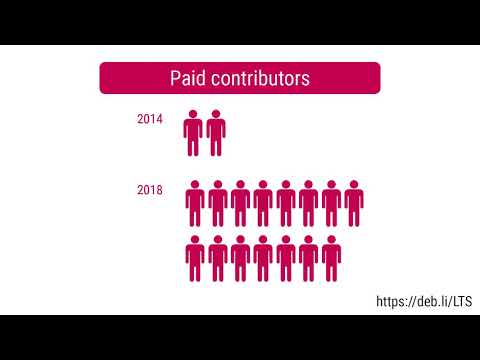
This was my seventh month as a Debian LTS paid contributor. I was assigned 24.00 hours and worked on the following things:

CVE Fixes and Announcements:

Other LTS Work:

Other(s)
Sometimes it gets hard to categorize work/things into a particular category.
That s why I am writing all of those things inside this category.
This includes two sub-categories and they are as follows.

Personal: This month I could get the following things done:
  • Most importantly, I finally migrated to a new website. Huge UI imporvement! \o/
    From Jekyll to Hugo, it was not easy. But it was worth it! Many thanks to Luiz for writing hugo-coder, Clement, and Samyak!
    If you find any flaws, issues and pull requests are welcomed at utkarsh2102/utkarsh2102.com
  • Wrote battery-alert, a mini-project of my own to show battery alerts at <10% and >90%.
    Written in shell, it brings me all the satisfaction as it has saved my life on many occasions.
    And guess what? It has more users than just myself!
    Reviews and patches are welcomed \o/
  • Mentored in HackOn Hackathon. Thanks to Manvi for reaching out!
    It was fun to see people developing some really nice projects.
  • Thanks to Ray and John, I became a GitLab Hero!
    (I am yet to figure out my role and responibility though)
  • Atteneded Intro Sec Con and had the most fun!
    Heard Ian s keynote and attended other talks and learned how to use WireShark!

Open Source: Again, this contains all the things that I couldn t categorize earlier.
Opened several issues and pull requests:
  • Issue #297 against hugo-coder, asking to enable RSS feed for blogs.
  • PR #316 for hugo-coder for fixing the above issue myself.
  • Issue #173 against arbre for requesting a release.
  • Issue #104 against combustion, asking to relax dependency on rubocop. Fixed in this commit.
  • Issue #16 against ffi-compiler for requesting to fix homepage and license.
  • Issue #57 against gographviz for requesting a release.
  • Issue #14 against crb-blast, suggesting compatability with bio 2.0.x.
  • Issue #58 against uniform_notifier for asking to drop the use of ruby-growl.
  • PR #2072 for polybar, adding installation instructions on Debian systems.

Until next time.
:wq for today.

30 April 2020

Chris Lamb: Free software activities in April 2020

Here is my monthly update covering what I have been doing in the free software world during April 2020 (previous month's report). Looking it over prior to publishing, I am surprised how much I got done this month I felt that I was not only failing to do all the extra things I had planned, but I was doing far less than normal. But let us go easy on ourselves; nobody is nailing this. In addition, I did more hacking on the Lintian static analysis tool for Debian packages:
Reproducible builds One of the original promises of open source software is that distributed peer review and transparency of process results in enhanced end-user security. However, whilst anyone may inspect the source code of free and open source software for malicious flaws, almost all software today is distributed as pre-compiled binaries. This allows nefarious third-parties to compromise systems by injecting malicious code into ostensibly secure software during the various compilation and distribution processes. The motivation behind the Reproducible Builds effort is to ensure no flaws have been introduced during this compilation process by promising identical results are always generated from a given source, thus allowing multiple third-parties to come to a consensus on whether a build was compromised. The initiative is proud to be a member project of the Software Freedom Conservancy, a not-for-profit 501(c)(3) charity focused on ethical technology and user freedom. Conservancy acts as a corporate umbrella allowing projects to operate as non-profit initiatives without managing their own corporate structure. If you like the work of the Conservancy or the Reproducible Builds project, please consider becoming an official supporter. Elsewhere in our tooling, I made the following changes to diffoscope, our in-depth and content-aware diff utility that can locate and diagnose reproducibility issues, including preparing and uploading versions 139, 140, 141 and 142 to Debian: Lastly, I made a large number of changes to our website and documentation in the following categories:
Debian LTS This month I have contributed 18 hours to Debian Long Term Support (LTS) and 7 hours on its sister Extended LTS project. You can find out more about the project via the following video:
Debian I only filed three bugs in April, including one against snapshot.debian.org to report that a Content-Type HTTP header is missing when downloading .deb files (#956471) and to report build failures in the macs & ruby-enumerable-statistics packages:

Jonathan McDowell: Let's talk about work/life balance in lock down

A SYNCNI article passed by on my Twitter feed this morning, talking about balancing work life balance while working from home in these times of COVID-19 inspired lock down. The associated Twitter thread expressed an interest in some words of advice from men to other men (because of course the original article has the woman having to do all the balancing). This post does not contain the words of advice searched for, but it hopefully at least offers some reassurance that if you re finding all of this difficult you re not alone. From talking to others I don t think there s anything particularly special we re doing in this house; a colleague is taking roughly the same approach, and some of the other folk I ve spoken to in the local tech scene seem to be doing likewise. First, the situation. Like many households both my wife and I work full time. We have a small child (not even a year and a half old yet). I work for a software startup, my wife is an HR business partner for a large multinational, dealing with employees all over the UK and Ireland. We re both luckily able to work from home easily - our day to day work machines are laptops, our employers were already setup with the appropriate VPN / video conferencing etc facilities. Neither of us has seen any decrease in workload since lock down; there are always more features and/or bugs to work on when it comes to a software product, and, as I m sure you can imagine, there has been a lot more activity in the HR sphere over the past 6 weeks as companies try to work out what to do. On top of this our childcare arrangements, like everyone else s, are completely gone. Nursery understandably shut down around the same time as the schools (slightly later, but not by much) and contact with grandparents is obviously out (which they re finding hard). So we re left with trying to fit 2 full time jobs in with full time childcare, of a child who up until recently tried to go down stairs by continuing to crawl forward. Make no mistake, this is hard. I know we are exceptionally lucky in our situation, but that doesn t mean we re finding it easy. We ve adopted an approach of splitting the day up. I take the morning slot (previously I would have got up with our son anyway), getting him up and fed while my wife showers. She takes over for a bit while I shower and dress, then I take over again in time for her to take her daily 8am conference call. My morning is mostly taken up with childcare until nap time; I try to check in first thing to make sure there s nothing urgent, and get a handle on what I might have to work on later in the day. My local team mates know they re more likely to get me late morning and it s better to arrange meetings in the afternoon. Equally I work with a lot of folk on the US West coast, so shifting my hours to be a bit later is not a problem there. After nap time (which, if we re lucky, takes us to lunch) my wife takes over. As she deals with UK/Ireland folk she often ends up having to take calls even while looking after our son; generally important meetings can be moved to the morning and meetings with folk who understand there might be a lot of pot banging going on in the background can happen in the afternoon. Having started late I generally work late - past the point where I d normally get home; if I m lucky I pop my head in for bath time, but sometimes it s only for a couple of minutes. We alternate cooking; usually based on work load + meetings. For example tonight I m cooking while my wife catches up on some work after having put our son to bed. Last night I had a few meetings so my wife cooked. So what s worked for us? Splitting the day means we can plan with our co-workers. We always make sure we eat together in the evening, and that generally is the cut-off point for either of us doing any work. I m less likely to be online in the evening because my study has become the place I work. That means I m not really doing any of my personal projects - this definitely isn t a case of being at home during lock down and having lots of time to achieve new things. It s much more of case of trying to find a sustainable way to get through the current situation, however long it might last.

29 April 2020

Craig Small: Sending data in a signal

The well-known kill system call has been around for decades and is used to send a signal to another process. The most common use is to terminate or kill another process by sending the KILL or TERM signal but it can be used for a form of IPC, usually around giving the other process a kick to do something. One thing that isn t as well known is besides sending a signal to a process, you can send some data to it. This can either be an integer or a pointer and uses similar semantics to the known kill and signal handler. I came across this when there was a merge request for procps. The main changes are using sigqueue instead of kill in the sender and using a signal action not a signal handler in the receiver. To illustrate this feature, I have a small set of programs called sender and receiver that will pass an integer between them. The Sender The sender program is extremely simple, use a random(ish) from time masked to two bytes, put it in the required union and send the lot to sendqueue.
# include <signal.h>
# include <stdlib.h>
# include <stdio.h>
# include <time.h>
int main(int argc, char **argv)
 
    union sigval sigval;
    pid_t pid;
    if (argc < 2   (pid = atoi(argv[1])) < 0)
	return EXIT_FAILURE;
    sigval.sival_int = time(NULL) &amp; 0xff;
    printf("sender: sending %d to PID %d\n",
        sigval.sival_int, pid);
    sigqueue(pid, SIGUSR1, sigval);
    return EXIT_SUCCESS;
 
The key lines are 13 and 16 where the random (ish) integer is stored in the sigval union and then sent to the other process with the sigqueue. The receiver The receiver just sets up the signal handler, sends its PID (so I know what to tell the sender) and sits in a sleeping loop.
# include <stdio.h>
# include <stdlib.h>
# include <sys/types.h>
# include <unistd.h>
# include <signal.h>
void signal_handler(int signum, siginfo_t *siginfo, void *ucontext)
 
    if (signum != SIGUSR1) return;
    if (siginfo->si_code != SI_QUEUE) return;
    printf("receiver: Got value %d\n",
	    siginfo->si_int);
 
int main(int argc, char **argv)
 
    pid_t pid = getpid();
    struct sigaction signal_action;
    printf("receiver: PID is %d\n", pid);
    signal_action.sa_sigaction = signal_handler;
    sigemptyset (&amp;signal_action.sa_mask);
    signal_action.sa_flags = SA_SIGINFO;
    sigaction(SIGUSR1, &amp;signal_action, NULL);
    while(1) sleep(100);
    return EXIT_SUCCESS;
 
Lines 16-26 setup the signal handler. The main difference here is SA_SIGINFO used for the signal flags and sigaction references a sa_sigaction function rather than sa_handler. We need to use a different function because the sigaction only is passed the signal number but we need more information, including the integer that the sender process stored in sigval. Lines 7-14 are the signal handler function itself. It first checks that the receiver process got the correct signal (SIGUSR1 in this case) and that we got this signal from sigqueue because the type is SI_QUEUE. Checking the type of signal is important because different signals give you different data. For example, if you signalled this process with kill then si_int is undefined. The result As a proof of concept, the results are not terribly exciting. We see the sender say what it will be sending and the receiver saying it got it. It was useful to get some results, especially when things went wrong.
$ ./receiver &amp;
[1] 370216
receiver: PID is 370216
$ ./sender 370216
sender: sending 133 to (gdPID 370216
receiver: Got value 133
Gotchas While testing the two process there was two gotchas I encountered. GDB and the siginfo structure The sigaction manual page shows a simple siginfo_t structure, however when looking at what is passed to the signal handler, it s much more complicated.
(gdb) p *siginfo
$2 =  si_signo = 10, si_errno = 0, si_code = -1, __pad0 = 0, _sifields =  _pad =  371539, 1000, 11, 32766, 0 <repeats 24 times> , _kill =  si_pid = 371539, si_uid = 1000 , _timer =  si_tid = 371539, 
      si_overrun = 1000, si_sigval =  sival_int = 11, sival_ptr = 0x7ffe0000000b , _rt =  si_pid = 371539, si_uid = 1000, si_sigval =  sival_int = 11, sival_ptr = 0x7ffe0000000b , _sigchld =  
      si_pid = 371539, si_uid = 1000, si_status = 11, si_utime = 0, si_stime = 0 , _sigfault =  si_addr = 0x3e80005ab53, si_addr_lsb = 11, _bounds =  _addr_bnd =  _lower = 0x0, _upper = 0x0 , _pkey = 0 , 
    _sigpoll =  si_band = 4294967667539, si_fd = 11 , _sigsys =  _call_addr = 0x3e80005ab53, _syscall = 11, _arch = 32766 
(gdb) p siginfo->_sifields._rt.si_sigval.sival_int
$3 = 11
So the integer is stored in a union in a structure in a structure. Much harder to find than just simply sival_int. The pointer is just a pointer So perhaps sending an integer is not enough. The sigval is a union with an integer and a pointer. Could a string be sent instead? I changed line 13 of the sender so it used a string instead of an integer.
    sigval.sival_ptr = "Hello, World!"
The receiver needed a minor adjustment to print out the string. I tried this and the receiver segmentation faulted. What was going on? The issue is the set of system calls does a simple passing of the values. So if the sender sends a pointer to a string located at 0x1234567 then the receiver will have a pointer to the same location. When the receiver tries to dereference the sival_ptr, it is pointing to memory that is not owned by it but by another process (the sender) so it segmentation faults. The solution would be to use shared memory between the processes. The signal queue would then use the pointer to the shared memory and, in theory, all would be well.

27 April 2020

Dirk Eddelbuettel: #26: Upgrading to R 4.0.0

Welcome to the 26th post in the rationally regularized R revelations series, or R4 for short. R 4.0.0 was released two days ago, and a casual glance at some social media conversations appears to suggest quite some confusion, almost certainly some misunderstandings, and possibly also a fair amount of fear, uncertainty, and doubt about the process. So I thought I could show how I upgrade my own main workstation, live and in colour without a safety net. (Almost: I did upgrade my laptop yesterday which went swimmingly, if more slowly.) So here is a fresh video about upgrading to R 4.0.0, with some support slides as usual:
The slides used in the video are at this link. A few quick follow-ups to the live nature of this. The pbdZMQ package did in fact install smoothly once the (Ubuntu) -dev packages for Zero MQ were (re-)installed; then IRkernel also followed. BioConductor completed once I realized that GOSemSim needed the annotation package GO.db to be updated, that allowed MNF to install. So the only bug, really, was the circular depdency between pkgload and testthat. Overall, not bad at all for a quick afternoon session! And as mentioned, if you are interested and have questions concerning use of R on a .deb based system like Debain or Ubuntu (or Mint or ), the r-sig-debian list is a very good and friendly place to ask them. If you like this or other open-source work I do, you can now sponsor me at GitHub. For the first year, GitHub will match your contributions.

This post by Dirk Eddelbuettel originated on his Thinking inside the box blog. Please report excessive re-aggregation in third-party for-profit settings.

26 April 2020

Russ Allbery: Review: The Last Goodbye

Review: The Last Goodbye, by Matt Potter
Publisher: Silvertail
Copyright: 2014-2016
Printing: 2016
ISBN: 1-909269-42-5
Format: Kindle
Pages: 308
In the contested space between the interested amateur and the trained expert lies the enthusiast. A topic has, for often inexplicable reasons, caught fire in their thoughts and become a mild obsession. They may not have formal training or systematic conceptual grounding beneath their interest, but they partly make up for that lack with sustained fascination. They research widely and obscurely about their particular focus, develop novel theories, see distinctions and classifications that few others would bother to investigate, and present their discoveries to anyone who will stand still long enough. And occasionally, when that interest happens to coincide with writing skill, they produce some surprisingly excellent essays or books. Matt Potter's enthusiasm is resignation letters.
Every damaging resignation letter, every cornered truth attack, every out-of-control speech by a former friend, is more than just an inconvenience, to be countered with positive spin and internal memos: it's an open challenge to the official version of the story, the perfectly controlled brand. They are breaks in an otherwise perfectly planned, smoothly executed narrative of the powerful. Holes in the program code. A rare, irresistible chance to hack into history's shiny, unstoppable operation.
The Last Goodbye: A History of the World in Resignation Letters is not, in truth, a history of the world. It is, first and foremost, a taxonomy, because there are types of resignation letters. The opening chapter, the truth bomb, is the type that one would expect upon discovering that someone wrote a book on the topic (that wasn't advice on how to write a good one). But there are other types, less heavy on the fireworks but just as fascinating. The unquotable expert construction. The knife in the back. The incoherent scream of rage. But also the surprisingly gentle and graceful conclusion.
It is the question that the letters themselves try in vain to answer, over and over again even as they explain, analyse, protest and bear witness to a million other details. The question is: Why? All the forces in the universe stack up against unburdening ourselves in a resignation letter. Professionally, it can be suicide. In practical terms, it is often self-defeating. Self-help books coach against unleashing its force; colleagues and confidantes urge caution, self-restraint. And yet we do it, and damn the consequences. We have no choice but to speak in sorrow, love, grief, cold anger, thirst for revenge, wounded pride, the pain of injustice, loyalty, pangs of regret, throes of vengeful madness, deluded righteousness, panic, black distress, isolation, ecstasies of martyrdom, and a million other shades of human extremity we need to say our piece even as we leave the stage.
The risk of the enthusiast's book is that the lack of structural grounding can leave the conclusions unsupported. A fair critique of this book is that it contains a lot of amateur sociology. Potter has a journalist's eye for motive and narrative, but some of his conclusions may not be warranted. But he compensates for the lack of rigor with, well, enthusiasm. Potter is fascinated by resignation letters and the insight they offer, and that fascination is irresistibly contagious. It's probably obvious that the chapters on truth bombs, fuck yous, and knives in the back have visceral appeal. The resignation letter as a force of truth-telling, as the revenge of a disregarded peon, as a crack in the alliance between the powerful that may let some truth shine through, is what got me to buy this book. And Potter doesn't disappoint; he quotes from both famous and nearly unknown examples, dissects the writing and the intent, and gives us a ringside seat to a few effective acts of revenge. That's not the best part of this book, though. The chapter that I will remember the longest is Potter's dissection of the constructed resignation letter. The carefully drafted public relations statement, the bland formality, the attempt to make a news story disappear. The conversation-ender. It's a truism that any area of human endeavor involves more expertise than those who have only observed it from the outside will realize, but I had never thought to apply that principle to the ghost-written resignation letter. The careful non-apology, the declaration that one has "become a distraction," the tell-tale phrasing of "spending more time with my family" is offensive in its bland dishonesty. But Potter shows that the blandness is expertly constructed to destroy quotability. Those statements are nearly impossible to remember or report on because they have been built that way: nouns carefully separated from verbs, all force dissipated by circuities and modifiers, and subtle grammatical errors introduced to discourage written news from including direct quotes. Potter's journalism background shines here because he can describe the effect on news reporting. He walks the reader through the construction to reveal that the writing is not incompetent but instead is skillfully bad in a way that causes one's attention to skitter off of it. The letter vanishes into its own vagueness. The goal is to smother the story in such mediocrity that it becomes forgettable. And it works. I've written several resignation letters of my own. Somewhat unusually, I've even sent several of them, although (as Potter says is typical) fewer than I've written. I've even written (and sent) the sort of resignation letter that every career advisor will say to never send. Potter's discussion of the motives and thought process behind those letters rang true for me. It's a raw and very human moment, one is never in as much control of it as one wishes, the cracks and emotions break through in the writing, and often those letters are trying to do far too many things at the same time. But it's also a moment in which one can say something important and have others listen, which can be weirdly challenging to do in the normal course of a job. Potter ends this book beautifully by looking at resignation letters that break or transcend the mold of most of the others he's examined: letters where the author seems to have found some peace and internal understanding and expresses that simply and straightforwardly. I found this surprisingly touching after the emotional roller-coaster of the rest of the book, and a lovely note on which to end. This is a great book. Potter has a good eye for language and the emotion encoded in it, a bracing preference for the common worker or employee over the manager or politician, and the skill to produce some memorable turns of phrase. Most importantly, he has the enthusiast's love of the topic. Even if you don't care about resignation letters going in, it will be hard to avoid some fascination with them by the end of this book. Recommended. This book was originally published as F*ck You and Goodbye in the UK. Rating: 8 out of 10

25 April 2020

Reinhard Tartler: Building Packages with Buildah in Debian

1 Building Debian Packages with buildah
Building packages in Debian seems to be a solved problem. But is it? At the bottom, installing the dpkg-dev package provides all the basic tools needed. Assuming that you already succeeded with creating the necessary packaging metadata (i.e., debian/changelog, debian/control, debian/copyright, etc., and there are great helper tools for this such ash dh-make, dh-make-golang, etc.,) it should be as simple as invoking the dpkg-buildpackage tool. So what's the big deal here?

The issue is that dpkg-buildpackage expects to be called with an appropriately setup build context, that is, it needs to be called in an environment that satisfies all build dependencies on the system. Let's say you are building a package for Debian unstable on your Debian stable system (this is the common scenario for the official Debian build machines), you would need your build to link against libraries in unstable, not stable. So how to tell the package build process where to find its dependencies?

The answer (in Debian and many other Linux distributions) is you do not at all. This is actually a somewhat surprising answer for software developers without a Linux distribution development background1. Instead, chroots "simulate" an environment that has all dependencies that we want to build against at the system locations, that is. /usr/lib, etc.

Chroots are basically full system installations in a subdirectory that includes system and application libraries. In order to use them, a package build needs to use the chroot(2) system call, which is a privileged operation. Also creating these system installations is a somewhat finicky process. In Debian, we have tools that make this process easier, the most popular ones are probably pbuilder(1)2 and sbuild(1)3. Still, they are somewhat clumsy to use, add significant levels of abstraction in the sense that they do quite a bit of magic behind the scenes to work hide the fact that privileged operations (need root to run chroot(2), etc.) are required. They are also somewhat brittle, for instance, if a build process is aborted (SIGKILL, or system crash), you may end up with temporary directories and files under userids other than your own that again may require root-privileges to cleanup.

What if there was an easy way to do all of the above without any process running as root? Enter rootless buildah.

Modern Linux container technologies allow unprivileged users to "untie" a process from the system (cf. the unshare(2) system call). This means that a regular user may run a process (and its child processes) in an "environment" where system calls behave differently and provide a configurable amount of isolation levels. This article demonstrates a novel build tool buildah, which is:
  • easy to setup build environment from the command line
  • secure, as no process needs to run as root
  • simple in architecture, requires no running daemon like for example docker
  • convenient to use: you can debug your debian/rules interactively
Architecturally, buildah is written in golang and compiled as a (mostly) statically linked executable. It builds on top a number of libraries written in golang, including github.com/containers/storage and github.com/containers/image. The overlay functionality is provided by the fuse-overlayfs(1) utility.

1.1 Preparation:
The Kernel in Debian bullseye (and in buster, and recent Ubuntu kernels to the best of my knowledge) do support usernamespaces, but leave them disabled by default. Here is how to enable them:
echo kernel.unprivileged_userns_clone = 1   sudo tee -a /etc/sysctl.d/containers.conf
systemctl -p /etc/sysctl.d/containers.conf
I have to admit that I'm not entirely sure why the Debian kernels don't enable usernamespaces by default. I've found a reference on stackexchange4 that claims this disables some "hardening" features in the Debian kernel. I also understand this step is not necessary if you chose to compile and run a vanilla upstream kernel. I'd appreciate a better reference and am happy to update this text.
$ c=$(buildah from docker.io/debian:sid)
Getting image source signatures
Copying blob 2bbc6b8c460d done
Copying config 9b90abe801 done
Writing manifest to image destination
Storing signatures
This command downloads the image from docker.io and stores it locally in your home directory. Let's install essential utilities for building Debian packages:
1: buildah run $c apt-get update -qq
2: buildah run $c apt-get install dpkg-dev -y
3: buildah config --workingdir /src $c
4: buildah commit $c dpkg-dev
The command on line 1 and 2 execute the installation of compilers and dpkg development tools such as dpkg-buildpackage, etc. The buildah config command in line 4 arranges that whenever you start a shell in the container, the current working directory in the container is in /src. Don't worry about this location not existing yet, we will make sources from your host system available there. The last command creates an OCI image with the name dpkg-dev. BTW, the name you use for the image in the commit command can be used in podman (but not the "containers"). See 5 and 6 for a comparison between podman and buildah.
buildah images -a
This output might look like this:
  REPOSITORY                 TAG      IMAGE          ID   CREATED   SIZE             
localhost/dpkg-dev latest b85c34f95d3e 16 seconds ago 406 MB
docker.io/library/debian sid 9b90abe801db 11 hours ago 124 MB

1.2 Running a package build
Now we have a working container with the reference in the variable $c. To use it conveniently with source packages that I have stored in /srv/scratch/packages/containers, let's introduce a shell alias r like this:
alias r='buildah run --tty -v /srv/scratch/packages/containers:/src $c '
This allows you to easily execute commands in that container:
r pwd
r bash
The last command will give you an interactive shell that we'll be using for building packages!
siretart@x1:~/scratch/packages/containers/libpod$ r bash

root@x1:/src# cd golang-github-openshift-imagebuilder

root@x1:/src/golang-github-openshift-imagebuilder# dpkg-checkbuilddeps
dpkg-checkbuilddeps: error: Unmet build dependencies: debhelper (>= 11) dh-golang golang-any golang-github-containers-storage-dev (>= 1.11) golang-github-docker-docker-dev (>= 18.09.3+dfsg1) golang-github-fsouza-go-dockerclient-dev golang-glog-dev

root@x1:/src/golang-github-openshift-imagebuilder# apt-get build-dep -y .
Note, using directory '.' to get the build dependencies
Reading package lists... Done
Building dependency tree
Reading state information... Done
The following NEW packages will be installed:
[...]

root@x1:/src/golang-github-openshift-imagebuilder# dpkg-checkbuilddeps

root@x1:/src/golang-github-openshift-imagebuilder#
Now we have a environment that has all build-dependencies available and we are ready to build the package:
root@x1:/src/golang-github-openshift-imagebuilder# dpkg-buildpackage -us -uc -b
Assuming the package builds, the package build results are placed in /src inside the container, and are visible at ~/scratch/packages/containers on the host. There you can inspect, extract or even install them. The latter part allows you to interactively rebuild packages against updated dependencies, without the need of setting up an apt archive or similar.

2 Availability
The buildah(1) tool is available in debian/bullseye since 2019-12-17. Since is a golang binary, it only links dynamically against system libraries such as libselinux and libseccomp, which are all available in buster-backports. I'd expect buildah to just work on a debian/buster system as well provided you install those system libraries and possibly the backported Linux kernel.

Keeping the package at the latest upstream version is challenging because of its fast development pace that picks up new dependencies on golang libraries and new versions of existing libraries with every new upstream release. In general, this requires updating several source packages, and in many cases also uploading new source packages to the Debian archive that need to be processed by the Debian ftp-masters.

As an exercise, I suggest to install the buildah package from bullseye, 'git clone' the packaging repository from https://salsa.debian.org/go-team/packages/golang-github-containers-buildah and build the latest version yourself. Note, I would expect the above to even work on a Fedora laptop.

The Debian packages have not swept into the Ubuntu distributions yet, but I expect them to be included in the Ubuntu 20.10 release. In the mean time, ubuntu users can install the package that are provided by the upstream maintainers in the "Project Atomic" PPA at https://launchpad.net/~projectatomic/+archive/ubuntu/ppa

3 Related Tools
The buildah tool is accompanied with two "sister" tools:

The Skopeo package provides tooling to work with remote images registries. This allows you download, upload images to remote registries, convert container images between different formats. It has been available in Debian since 2020-04-20.

The podman tool is a 'docker' replacement. It provides a command-line interface that mimics the original docker command to an extend that a user familiar with docker might want to place this in their ~/.bashrc file:
alias docker='podman'
Unfortunately, at the time of writing podman is still being processed by the ftp-masters since 01-03-2020. At this point, I recommend building the package from our salsa repository at https://salsa.debian.org/debian/libpod

4 Conclusion
Building packages in the right build context is a fairly technical issue for which many tools have been written for. They come with different trade-off when it comes to usability. Containers promise a secure alternative to the tried and proven chroot-based approaches, and the buildah makes using this technology very easy to use.

I'd love to get into a conversation with you on how these tools work for you, and would like to encourage participation and assistance with keeping the complicated software stack up-to-date in Debian (and by extension, in derived distribution such as Ubuntu, etc.).

Footnotes:
1
At my day-job, we build millions of lines of C++ code on Solaris10 and AIX6, where concepts such as "chroots" are restricted to the super user 'root' and is therefore not available to developers, not even through wrappers. Instead, libraries and headers are installed into "refroots", that is, subdirectories that mimic the structure of the "sysroot" directories that are used in the embedded Linux community for cross-compiling packages, and we use Makefiles that set include flags (-I rules and -L flags) to tell the compiler and linker where to look.

22 April 2020

Jonathan Dowland: SUPERHOT

Continuing a series of blog posts about casual Nintendo Switch games, next in the series is SUPERHOT. Normally 19.99, I picked it up for 13.99 in a sale. That's a little bit more than I would usually pay for a casual game. SUPERHOT first came on my radar because someone I know from a baby group worked on their VR port in some capacity.
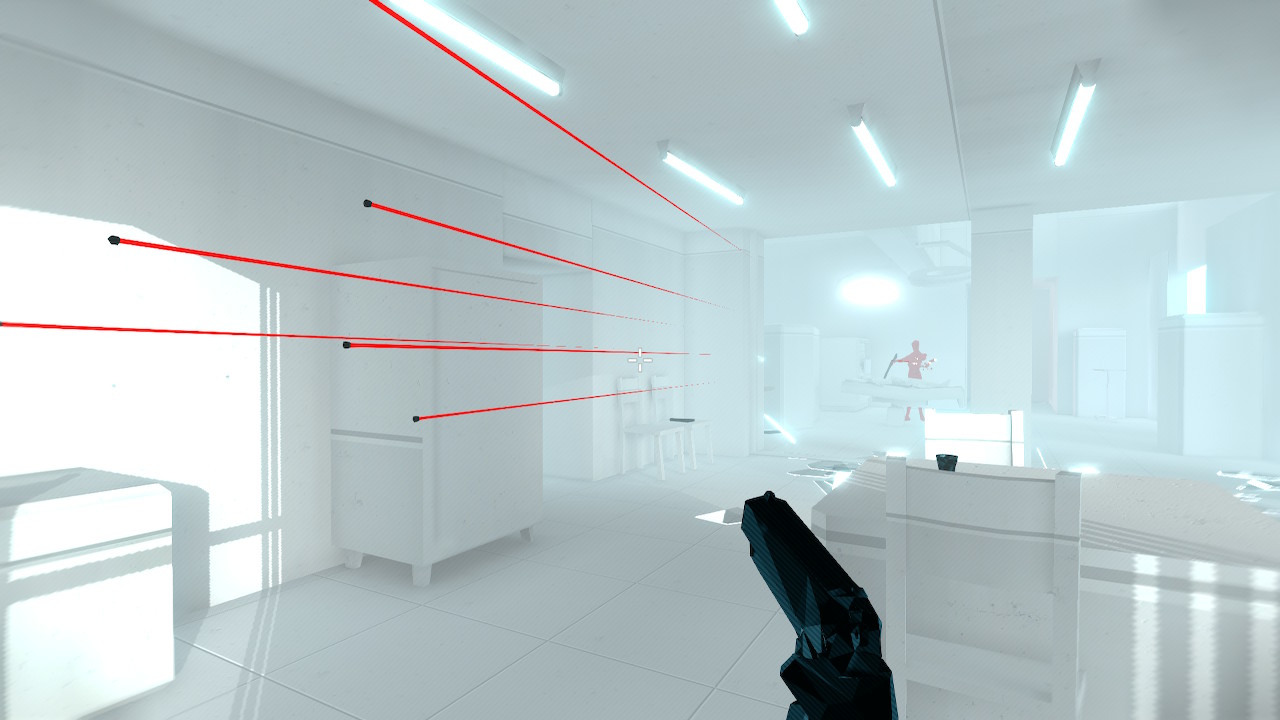
Slow-motion buckshot Slow-motion buckshot
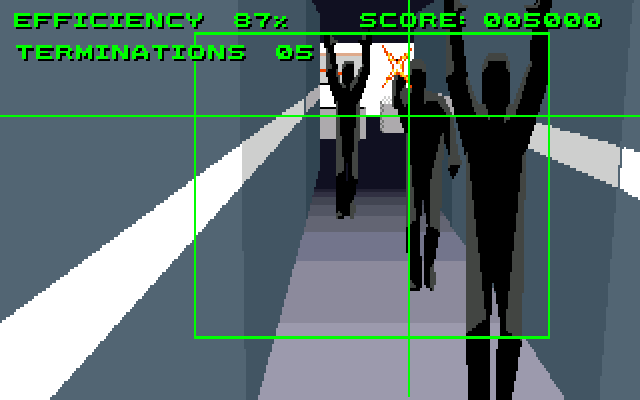
A first-person shooter, SUPERHOT's USP is that time only progresses when you move well, nearly. Time is slowed to a complete crawl when you are not moving. The game's visual style is very distinctive: Almost everything is a washed out grey or white colour and porcelean-like texture, except weapons and objects you can interact with, which are a matt black, and enemies, which are a bright red. It reminds me a lot of the 1992 Amiga game Robocop 3.
Robocop 3 Robocop 3
The play-style is very reminiscent of the "Bullet Time" sequences in The Matrix seemingly impossibly overwhelming odds deftly manoeuvred through thanks to superhuman reaction times. The game has a relatively short campaign of little vignettes, linked together by a cyberpunk narrative. The game is sometimes criticised for the short campaign, but for me that's ideal. And the vignettes being short and quite standalone suits my play requirements very well.
Amiga easter-egg Amiga easter-egg
The narrative interspersed between the play scenarios is a little bit over-long, and you can spend an unreasonable amount of time bashing buttons to get through it. Despite that it's a moderately interesting story. Once you've beaten the campaign, you can go back and play any of the scenarios again, or try the newly unlocked endless mode. I haven't tried that yet. The original prototype for the game is a free-to-play in-browser demo, available here. On Windows PC, there's a sequel-of-sorts in the works called MIND CONTROL DELETE with a lot of new features to add replay value.

21 April 2020

Matthew Garrett: Linux kernel lockdown, integrity, and confidentiality

The Linux kernel lockdown patches were merged into the 5.4 kernel last year, which means they're now part of multiple distributions. For me this was a 7-year journey, which means it's easy to forget that others aren't as invested in the code as I am. Here's what these patches are intended to achieve, why they're implemented in the current form and what people should take into account when deploying the feature.

Root is a user - a privileged user, but nevertheless a user. Root is not identical to the kernel. Processes running as root still can't dereference addresses that belong to the kernel, are still subject to the whims of the scheduler and so on. But historically that boundary has been very porous. Various interfaces make it straightforward for root to modify kernel code (such as loading modules or using /dev/mem), while others make it less straightforward (being able to load new ACPI tables that can cause the ACPI interpreter to overwrite the kernel, for instance). In the past that wasn't seen as a significant issue, since there were no widely deployed mechanisms for verifying the integrity of the kernel in the first place. But once UEFI secure boot became widely deployed, this was a problem. If you verify your boot chain but allow root to modify that kernel, the benefits of the verified boot chain are significantly reduced. Even if root can't modify the on-disk kernel, root can just hot-patch the kernel and then make this persistent by dropping a binary that repeats the process on system boot.

Lockdown is intended as a mechanism to avoid that, by providing an optional policy that closes off interfaces that allow root to modify the kernel. This was the sole purpose of the original implementation, which maps to the "integrity" mode that's present in the current implementation. Kernels that boot in lockdown integrity mode prevent even root from using these interfaces, increasing assurances that the running kernel corresponds to the booted kernel. But lockdown's functionality has been extended since then. There are some use cases where preventing root from being able to modify the kernel isn't enough - the kernel may hold secret information that even root shouldn't be permitted to see (such as the EVM signing key that can be used to prevent offline file modification), and the integrity mode doesn't prevent that. This is where lockdown's confidentiality mode comes in. Confidentiality mode is a superset of integrity mode, with additional restrictions on root's ability to use features that would allow the inspection of any kernel memory that could contain secrets.

Unfortunately right now we don't have strong mechanisms for marking which bits of kernel memory contain secrets, so in order to achieve that we end up blocking access to all kernel memory. Unsurprisingly, this compromises people's ability to inspect the kernel for entirely legitimate reasons, such as using the various mechanisms that allow tracing and probing of the kernel.

How can we solve this? There's a few ways:
  1. Introduce a mechanism to tag memory containing secrets, and only restrict accesses to this. I've tried to do something similar for userland and it turns out to be hard, but this is probably the best long-term solution.
  2. Add support for privileged applications with an appropriate signature that implement policy on the userland side. This is actually possible already, though not straightforward. Lockdown is implemented in the LSM layer, which means the policy can be imposed using any other existing LSM. As an example, we could use SELinux to impose the confidentiality restrictions on most processes but permit processes with a specific SELinux context to use them, and then use EVM to ensure that any process running in that context has a legitimate signature. This is quite a few hoops for a general purpose distribution to jump through.
  3. Don't use confidentiality mode in general purpose distributions. The attacks it protects against are mostly against special-purpose use cases, and they can enable it themselves.

My recommendation is for (3), and I'd encourage general purpose distributions that enable lockdown to do so only in integrity mode rather than confidentiality mode. The cost of confidentiality mode is just too high compared to the benefits it provides. People who need confidentiality mode probably already know that they do, and should be in a position to enable it themselves and handle the consequences.

comment count unavailable comments

Debian Project Leader: Bits from the new DPL

My fellow Debianites, It's been one month, one week and one day since I decided to run for this DPL term. The Debian community has been through a variety of interesting times during the last decade, and instead of focusing on grand, sweeping changes for Debian, core to my DPL campaign was to establish a sense of normality and stability so that we can work on community building, continue to focus on technical excellence and serve our users the best we can. Thing don't always work out as we plan, and for many of us, Debian recently had to take a back seat to personal priorities. Back when I posted my intention to run, there were 125 260 confirmed cases of COVID-19 globally. Today, that number is 20 times higher, with the actual infected number likely to be significantly higher. A large number of us are under lock-down, where we not only fear the disease and its effect on local hospitals and how it will affect our loved ones, but also our very livelihoods and the future of our local businesses and industry. I don't mean to be gloomy with the statement above, I am after all, an optimist - but unfortunately it does get even worse. Governments and corporations around the world have started to take advantage of COVID-19 in negative ways and are making large sweeping changes that undermine the privacy and rights of individuals everywhere. For many reasons, including those above, I believe that the Debian project is more important and relevant now than it's ever been before. The world needs a free, general purpose operating system, unburdened by the needs of profit, which puts the needs of its users first, providing a safe and secure platform for the computing needs of the masses. While we can't control or fix all the problems in the world, we can control our response to it, and be part of the solutions that bring the change we want to see. During my term as DPL, I will be available to help with problems in our community to the maximum extent that my time permits. If we help ourselves, we will be in a better position to help others. If you (or your team) get stuck and are in need of help, then please do not hessitate to e-mail me. A few thank-yous As incoming DPL, I'd like to thank Sam Hartman on behalf of the project for the work that he's done over the last year as DPL. It's a tremendous time commitment that requires constant attention to detail. On Sunday, Sam and I had a handover meeting where we discussed various DPL responsibilities including finances, delegations (including specifics of some delegations), legal matters, outreach and other questions I had. I'd also like to thank Sam for taking the time to do this. Thank you to Sruthi Chadran and Brian Gupta who took the time to also run for DPL this year. Both candidates brought important issues to the forefront and I hope to work with both of them on those in the near future. DPL Blog Today, I've started a new blog for the Debian Project Leader to help facilitate more frequent communication, and to reach a wider audience via Planet Debian. This will contain supplemental information to what I send to the debian-devel-announce mailing list. Want to help? In my platform, I listed some key areas that I'd like to work on. My work won't be limited to those, but it should give you some idea of the type of DPL that I'll be. If you'd like to get involved, feel free to join the #debian-dpl channel on the oftc IRC network, and please introduce yourself along with any areas of interest that you'd like to contribute to.

Debian Project Leader: Bits from the new DPL

My fellow Debianites, It's been one month, one week and one day since I decided to run for this DPL term. The Debian community has been through a variety of interesting times during the last decade, and instead of focusing on grand, sweeping changes for Debian, core to my DPL campaign was to establish a sense of normality and stability so that we can work on community building, continue to focus on technical excellence and serve our users the best we can. Thing don't always work out as we plan, and for many of us, Debian recently had to take a back seat to personal priorities. Back when I posted my intention to run, there were 125 260 confirmed cases of COVID-19 globally. Today, that number is 20 times higher, with the actual infected number likely to be significantly higher. A large number of us are under lock-down, where we not only fear the disease and its effect on local hospitals and how it will affect our loved ones, but also our very livelihoods and the future of our local businesses and industry. I don't mean to be gloomy with the statement above, I am after all, an optimist - but unfortunately it does get even worse. Governments and corporations around the world have started to take advantage of COVID-19 in negative ways and are making large sweeping changes that undermine the privacy and rights of individuals everywhere. For many reasons, including those above, I believe that the Debian project is more important and relevant now than it's ever been before. The world needs a free, general purpose operating system, unburdened by the needs of profit, which puts the needs of its users first, providing a safe and secure platform for the computing needs of the masses. While we can't control or fix all the problems in the world, we can control our response to it, and be part of the solutions that bring the change we want to see. During my term as DPL, I will be available to help with problems in our community to the maximum extent that my time permits. If we help ourselves, we will be in a better position to help others. If you (or your team) get stuck and are in need of help, then please do not hessitate to e-mail me. A few thank-yous As incoming DPL, I'd like to thank Sam Hartman on behalf of the project for the work that he's done over the last year as DPL. It's a tremendous time commitment that requires constant attention to detail. On Sunday, Sam and I had a handover meeting where we discussed various DPL responsibilities including finances, delegations (including specifics of some delegations), legal matters, outreach and other questions I had. I'd also like to thank Sam for taking the time to do this. Thank you to Sruthi Chadran and Brian Gupta who took the time to also run for DPL this year. Both candidates brought important issues to the forefront and I hope to work with both of them on those in the near future. DPL Blog Today, I've started a new blog for the Debian Project Leader to help facilitate more frequent communication, and to reach a wider audience via Planet Debian. This will contain supplemental information to what I send to the debian-devel-announce mailing list. Want to help? In my platform, I listed some key areas that I'd like to work on. My work won't be limited to those, but it should give you some idea of the type of DPL that I'll be. If you'd like to get involved, feel free to join the #debian-dpl channel on the oftc IRC network, and please introduce yourself along with any areas of interest that you'd like to contribute to.

20 April 2020

Norbert Preining: Gaming: What Remains of Edith Finch

I never thought I could finish a game which is completely linear, has hardly any interaction necessary, hardly any riddles, no fighting. What Remains of Edith Finch taught be differently. And it is amazing.

A friend recently pointed me at a blog about casual games, and surprisingly I found two games I have played on the list: Firewatch and The Witness. One of the other games on the list was What Remains of Edith Finch. This games was lurking in my Steam library for quite some time, and I realized I actually started playing it long ago, but only for a few minutes, before having given up, back then. What a failure I realized! The games plays completely in the now deserted house of the family Finch. The youngest member of the family returns with a key to the house and uncovers the stories of her family. This is about all that is happening in the game. And it is so well done that I couldn t stop playing (wouldn t it be for my daughter interrupting me), and leaves you with the feeling to replay as soon as possible. The graphics are very well done, beautiful scenery, lots of love to details. The story progresses by walking (completely linearly) through the house, and text fragments appearing around you, telling part of the story, small hints, little secrets, everything that makes up a tangible set of family memories.

Exploring the house filled with locked rooms sealed as shrines for the deceased members of the family, Edith uncovers one by one the final moments of her family members, a family seemingly cursed. In these stories the player dives into the world and playing the role of the family members, re-living events of the past.

As I wrote in the beginning don t expect fights, don t expect riddles, but be prepared for an emotional roller coaster, for a deep dive into a well written family history with lots of weird twists. An absolute great game with a playing time of around 2h.

19 April 2020

Enrico Zini: Little wonders

Gibbsdavidl/CatterPlots
devel
Did you ever wish you could make scatter plots with cat shaped points? Now you can! - Gibbsdavidl/CatterPlots
What is the best tool to use for drawing vector pictures? For me and probably for many others, the answer is pretty obvious: Illustrator, or, maybe, Inkscape.
A coloring book to help folks understand how SELinux works. - mairin/selinux-coloring-book
The EURion constellation (also known as Omron rings[1] or doughnuts[2]) is a pattern of symbols incorporated into a number of banknote designs worldwide since about 1996. It is added to help imaging software detect the presence of a banknote in a digital image. Such software can then block the user from reproducing banknotes to prevent counterfeiting using colour photocopiers. According to research from 2004, the EURion constellation is used for colour photocopiers but probably not used in computer software.[3] It has been reported that Adobe Photoshop will not allow editing of an image of a banknote, but in some versions this is believed to be due to a different, unknown digital watermark rather than the EURion constellation.[4][3]
This huge collection of non-scary optical illusions and fascinating visual phenomena emphasizes interactive exploration, beauty, and scientific explanation.
Generated photos are created from scratch by AI systems. All images can be used for any purpose without worrying about copyrights, distribution rights, infringement claims, or royalties.
Dokumentarfilm ber die Rangierer im Bahnhof Dresden-Friedrichstadt in der DDR aus dem Jahr 1984.
Il termine sardo femina accabadora, femina agabbad ra o, pi comunemente, agabbadora o accabadora (s'agabbad ra, lett. "colei che finisce", deriva dal sardo s'acabbu, "la fine" o dallo spagnolo acabar, "terminare") denota la figura storicamente incerta di una donna che si incaricava di portare la morte a persone di qualunque et , nel caso in cui queste fossero in condizioni di malattia tali da portare i familiari o la stessa vittima a richiederla. In realt non ci sono prove di tale pratica, che avrebbe riguardato alcune regioni sarde come Marghine, Planargia e Gallura[1]. La pratica non doveva essere retribuita dai parenti del malato poich il pagare per dare la morte era contrario ai dettami religiosi e della superstizione.
Alright the people have spoken and they want more cat genetics. So, I present to you all "Cat Coat Genetics 101: A Tweetorial", feat. pics of many real life cats (for science, of course...this baby is Caterpillar).

Sven Hoexter: Emulating Raspi2 like hardware with Rasbian in 2020

To follow some older (as in two years) ARM assembler howto, I searched for a quick and dirty way to run a current Rasbian with qemu 4.2 on Debian/unstable. The end result are the following notes to get that up and running:
# Download a binary device tree file and matching kernel a good soul uploaded to github
wget https://github.com/vfdev-5/qemu-rpi2-vexpress/raw/master/kernel-qemu-4.4.1-vexpress
wget https://github.com/vfdev-5/qemu-rpi2-vexpress/raw/master/vexpress-v2p-ca15-tc1.dtb
# Download the official Rasbian image without X
wget -O raspbian_lite_latest.zip https://downloads.raspberrypi.org/raspbian_lite_latest
unzip raspbian_lite_latest.zip
# Convert it from the raw image to a qcow2 image and add some space
qemu-img convert -f raw -O qcow2 2020-02-13-raspbian-buster-lite.img rasbian.qcow2
qemu-img resize rasbian.qcow2 +2G
# start qemu
qemu-system-arm -m 2048M -M vexpress-a15 -cpu cortex-a15 \
 -kernel kernel-qemu-4.4.1-vexpress -no-reboot \
 -smp 2 -serial stdio \
 -dtb vexpress-v2p-ca15-tc1.dtb -sd rasbian.qcow2 \
 -append "root=/dev/mmcblk0p2 rw rootfstype=ext4 console=ttyAMA0,15200 loglevel=8" \
 -nic user,hostfwd=tcp::5555-:22
# login at the serial console as user pi with password raspberry
sudo -i
# enable ssh
systemctl enable ssh
# resize partition and filesystem
parted /dev/mmcblk0 resizepart 2 100%
resize2fs /dev/mmcblk0p2
Now I can login via ssh and start to play:
ssh pi@localhost -p 5555
So for me that is sufficient, I have network connectivity to install an editor, transfer files and can otherwise work with tmux to have some session multiplexing. Additional Notes

Next.

Previous.