Vincent Bernat: Switching to the awesome window manager
 I have happily used FVWM as my window manager for more than 10
years. However, I recently got tired of manually arranging windows and
using the mouse so much. A window manager is one of the handful pieces
of software getting in your way at every moment which explains why
there are so many of them and why we might put so much time in it.
I decided to try a tiling window manager. While i3 seemed
pretty hot and powerful (watch the screencast!), I
really wanted something configurable and extensible with some
language. So far, the common choices are:
- awesome, written in C, configurable and extensible in Lua,
- StumpWM, written, configurable and extensible in Common Lisp,
- xmonad, written, configurable and extensible in Haskell.

Awesome configuration
Without a configuration file, awesome does nothing. It does not come
with any hard-coded behavior: everything needs to be configured
through its Lua configuration file. Of course, a default one is
provided but you can also start from scratch. If you like to control
your window manager, this is somewhat wonderful.
awesome is well documented. The wiki provides a FAQ, a
good introduction and the API reference is concise enough to
be read from the top to the bottom. Knowing Lua is not mandatory since
it is quite easy to dive into such a language.
I have posted my configuration on GitHub. It should not be used as
is but some snippets may be worth to be stolen and adapted into your
own configuration. The following sections put light on some notable points.
Keybindings
Ten years ago was the epoch of scavanger hunts to recover
IBM Model M keyboards from waste containers. They were great to
type on and they did not feature the infamous Windows keys. Nowadays,
this is harder to get such a keyboard. All my keyboards now have
Windows keys. This is a major change with respect to configure a
window manager: the left Windows key is mapped to Mod4 and is
usually unused by most applications and can therefore be dedicated to
the window manager.
The main problem with the ability to define many keybindings is to
remember the less frequently used one. I have monkey-patched
awful.key module to be able to attach a documentation string to a
keybinding. I have documented the whole process on the
awesome wiki.

Quake console
A Quake console is a drop-down terminal which can be toggled with
some key. I was heavily relying on it in FVWM. I think this is still a
useful addition to any awesome configuration. There are several
possible solutions documented in the awesome wiki. I
have added my own1 which works great for me.

XRandR
XRandR is an extension which allows to dynamically reconfigure
outputs: you plug an external screen to your laptop and you issue
some command to enable it:
$ xrandr --output VGA-1 --auto --left-of LVDS-1
awesome detects the change and will restart automatically. Laptops
usually come with a special key to enable/disable an external
screen. Nowadays, this key does nothing unless configured
appropriately. Out of the box, it is mapped to XF86Display symbol. I
have associated this key to a function that will
cycle through possible configurations depending on the
plugged screens. For example, if I plug an external screen to my
laptop, I can cycle through the following configurations:
- only the internal screen,
- only the external screen,
- internal screen on the left, external screen on the right,
- external screen on the left, internal screen on the right,
- no change.
The proposed configuration is displayed using naughty, the
notification system integrated in awesome.

Widgets
I was previously using Conky to display various system-related
information, like free space, CPU usage and network usage. awesome
comes with widgets that can fit the same use. I am relying on
vicious, a contributed widget manager, to manage most of them. It
allows one to attach a function whose task is to fetch values to be
displayed. This is quite powerful.
Here is an example with a volume widget:
local volwidget = widget(  type = "textbox"  )
vicious.register(volwidget, vicious.widgets.volume,
         '<span font="Terminus 8">$2 $1%</span>',
        2, "Master")
volwidget:buttons(awful.util.table.join(
             awful.button(   , 1, volume.mixer),
             awful.button(   , 3, volume.toggle),
             awful.button(   , 4, volume.increase),
             awful.button(   , 5, volume.decrease)))
You can also use a function to format the text as you wish. For
example, you can display a value in red if it is too low. Have a look
at my battery widget for an example.

Miscellaneous
While I was working on my awesome configuration, I also changed some
other desktop-related bits.
Keyboard configuration
I happen to setup all my keyboards to use the QWERTY layout. I use a
compose key to input special characters like . I have also
recently use Caps Lock as a Control key. All this is perfectly
supported since ages by X11 I am also mapping the Pause key to
XF86ScreenSaver key symbol which will in turn be bound to a function
that will trigger xautolock to lock the screen.
Thanks to a great article about
extending the X keyboard map with xkb, I discovered
that X was able to switch from one layout to another using
groups2. I finally opted for this simple configuration:
$ setxkbmap us,fr '' compose:rwin ctrl:nocaps grp:rctrl_rshift_toggle
$ xmodmap -e 'keysym Pause = XF86ScreenSaver'
I switch from us to fr by pressing both left Control and left
Shift keys.
Getting rid of most GNOME stuff
Less than one year ago, to take a step forward to the future, I
started to heavily rely on some GNOME components like GNOME
Display Manager, GNOME Power Manager, the screen saver,
gnome-session, gnome-settings-daemon and others. I had numerous
problems when I tried to setup everything without pulling the whole
GNOME stack. At each GNOME update, something was broken: the
screensaver didn t start automatically anymore until a full session
restart or some keybindings were randomly hijacked by
gnome-settings-daemon.
Therefore, I have decided to get rid of most of those components. I
have replaced GNOME Power Manager with system-level tools like
sleepd and the PM utilities. I replaced the GNOME screensaver with
i3lock and xautolock. GDM has been replaced by SLiM which
now features ConsoleKit support3. I use ~/.gtkrc-2.0
and ~/.config/gtk-3.0/settings.ini to configure GTK+.
The future will wait.
Terminal color scheme
I am using rxvt-unicode as my terminal with a black background
(and some light transparency). The default color scheme is suboptimal
on the readability front.
Sharing terminal color schemes seems a popular
activity. I finally opted for the
derp color scheme which brings a major improvement over the
default configuration.
 I have also switched to Xft for font rendering using DejaVu Sans
Mono as my default font (instead of
fixed) with the following
configuration in ~/.Xresources:
Xft.antialias: true
Xft.hinting: true
Xft.hintstyle: hintlight
Xft.rgba: rgb
URxvt.font: xft:DejaVu Sans Mono-8
URxvt.letterSpace: -1
The result is less crisp but seems a bit more readable. I may switch
back in the future.

Next steps
My reliance to the mouse has been greatly reduced. However, I still
need it for casual browsing. I am looking at luakit a
WebKit-based browser extensible with Lua for this purpose.
-
The console gets its own unique name. This allows awesome to
reliably detect when it is spawned, even on restart. It is how
the Quake console works in the mod of FVWM I was using.
-
However, the layout is global, not per-window. If you
are interested by a per-window layout, take a look at
kbdd.
-
Nowadays, you cannot really survive without
ConsoleKit. Many PolicyKit policies do not rely on
groups any more to grant access to your devices.
Mod4 and is
usually unused by most applications and can therefore be dedicated to
the window manager.
The main problem with the ability to define many keybindings is to
remember the less frequently used one. I have monkey-patched
awful.key module to be able to attach a documentation string to a
keybinding. I have documented the whole process on the
awesome wiki.
Quake console
A Quake console is a drop-down terminal which can be toggled with
some key. I was heavily relying on it in FVWM. I think this is still a
useful addition to any awesome configuration. There are several
possible solutions documented in the awesome wiki. I
have added my own1 which works great for me.
XRandR
XRandR is an extension which allows to dynamically reconfigure
outputs: you plug an external screen to your laptop and you issue
some command to enable it:
$ xrandr --output VGA-1 --auto --left-of LVDS-1
awesome detects the change and will restart automatically. Laptops
usually come with a special key to enable/disable an external
screen. Nowadays, this key does nothing unless configured
appropriately. Out of the box, it is mapped to XF86Display symbol. I
have associated this key to a function that will
cycle through possible configurations depending on the
plugged screens. For example, if I plug an external screen to my
laptop, I can cycle through the following configurations:
- only the internal screen,
- only the external screen,
- internal screen on the left, external screen on the right,
- external screen on the left, internal screen on the right,
- no change.
The proposed configuration is displayed using naughty, the
notification system integrated in awesome.
Widgets
I was previously using Conky to display various system-related
information, like free space, CPU usage and network usage. awesome
comes with widgets that can fit the same use. I am relying on
vicious, a contributed widget manager, to manage most of them. It
allows one to attach a function whose task is to fetch values to be
displayed. This is quite powerful.
Here is an example with a volume widget:
local volwidget = widget( type = "textbox" )
vicious.register(volwidget, vicious.widgets.volume,
'<span font="Terminus 8">$2 $1%</span>',
2, "Master")
volwidget:buttons(awful.util.table.join(
awful.button( , 1, volume.mixer),
awful.button( , 3, volume.toggle),
awful.button( , 4, volume.increase),
awful.button( , 5, volume.decrease)))
You can also use a function to format the text as you wish. For
example, you can display a value in red if it is too low. Have a look
at my battery widget for an example.
Miscellaneous
While I was working on my awesome configuration, I also changed some
other desktop-related bits.
Keyboard configuration
I happen to setup all my keyboards to use the QWERTY layout. I use a
compose key to input special characters like . I have also
recently use Caps Lock as a Control key. All this is perfectly
supported since ages by X11 I am also mapping the Pause key to
XF86ScreenSaver key symbol which will in turn be bound to a function
that will trigger xautolock to lock the screen.
Thanks to a great article about
extending the X keyboard map with xkb, I discovered
that X was able to switch from one layout to another using
groups2. I finally opted for this simple configuration:
$ setxkbmap us,fr '' compose:rwin ctrl:nocaps grp:rctrl_rshift_toggle
$ xmodmap -e 'keysym Pause = XF86ScreenSaver'
I switch from us to fr by pressing both left Control and left
Shift keys.
Getting rid of most GNOME stuff
Less than one year ago, to take a step forward to the future, I
started to heavily rely on some GNOME components like GNOME
Display Manager, GNOME Power Manager, the screen saver,
gnome-session, gnome-settings-daemon and others. I had numerous
problems when I tried to setup everything without pulling the whole
GNOME stack. At each GNOME update, something was broken: the
screensaver didn t start automatically anymore until a full session
restart or some keybindings were randomly hijacked by
gnome-settings-daemon.
Therefore, I have decided to get rid of most of those components. I
have replaced GNOME Power Manager with system-level tools like
sleepd and the PM utilities. I replaced the GNOME screensaver with
i3lock and xautolock. GDM has been replaced by SLiM which
now features ConsoleKit support3. I use ~/.gtkrc-2.0
and ~/.config/gtk-3.0/settings.ini to configure GTK+.
The future will wait.
Terminal color scheme
I am using rxvt-unicode as my terminal with a black background
(and some light transparency). The default color scheme is suboptimal
on the readability front.
Sharing terminal color schemes seems a popular
activity. I finally opted for the
derp color scheme which brings a major improvement over the
default configuration.
I have also switched to Xft for font rendering using DejaVu Sans
Mono as my default font (instead of fixed) with the following
configuration in ~/.Xresources:
Xft.antialias: true
Xft.hinting: true
Xft.hintstyle: hintlight
Xft.rgba: rgb
URxvt.font: xft:DejaVu Sans Mono-8
URxvt.letterSpace: -1
The result is less crisp but seems a bit more readable. I may switch
back in the future.
Next steps
My reliance to the mouse has been greatly reduced. However, I still
need it for casual browsing. I am looking at luakit a
WebKit-based browser extensible with Lua for this purpose.
-
The console gets its own unique name. This allows awesome to
reliably detect when it is spawned, even on restart. It is how
the Quake console works in the mod of FVWM I was using.
-
However, the layout is global, not per-window. If you
are interested by a per-window layout, take a look at
kbdd.
-
Nowadays, you cannot really survive without
ConsoleKit. Many PolicyKit policies do not rely on
groups any more to grant access to your devices.
$ xrandr --output VGA-1 --auto --left-of LVDS-1
XF86Display symbol. I
have associated this key to a function that will
cycle through possible configurations depending on the
plugged screens. For example, if I plug an external screen to my
laptop, I can cycle through the following configurations:
- only the internal screen,
- only the external screen,
- internal screen on the left, external screen on the right,
- external screen on the left, internal screen on the right,
- no change.
Widgets
I was previously using Conky to display various system-related
information, like free space, CPU usage and network usage. awesome
comes with widgets that can fit the same use. I am relying on
vicious, a contributed widget manager, to manage most of them. It
allows one to attach a function whose task is to fetch values to be
displayed. This is quite powerful.
Here is an example with a volume widget:
local volwidget = widget( type = "textbox" )
vicious.register(volwidget, vicious.widgets.volume,
'<span font="Terminus 8">$2 $1%</span>',
2, "Master")
volwidget:buttons(awful.util.table.join(
awful.button( , 1, volume.mixer),
awful.button( , 3, volume.toggle),
awful.button( , 4, volume.increase),
awful.button( , 5, volume.decrease)))
You can also use a function to format the text as you wish. For
example, you can display a value in red if it is too low. Have a look
at my battery widget for an example.
Miscellaneous
While I was working on my awesome configuration, I also changed some
other desktop-related bits.
Keyboard configuration
I happen to setup all my keyboards to use the QWERTY layout. I use a
compose key to input special characters like . I have also
recently use Caps Lock as a Control key. All this is perfectly
supported since ages by X11 I am also mapping the Pause key to
XF86ScreenSaver key symbol which will in turn be bound to a function
that will trigger xautolock to lock the screen.
Thanks to a great article about
extending the X keyboard map with xkb, I discovered
that X was able to switch from one layout to another using
groups2. I finally opted for this simple configuration:
$ setxkbmap us,fr '' compose:rwin ctrl:nocaps grp:rctrl_rshift_toggle
$ xmodmap -e 'keysym Pause = XF86ScreenSaver'
I switch from us to fr by pressing both left Control and left
Shift keys.
Getting rid of most GNOME stuff
Less than one year ago, to take a step forward to the future, I
started to heavily rely on some GNOME components like GNOME
Display Manager, GNOME Power Manager, the screen saver,
gnome-session, gnome-settings-daemon and others. I had numerous
problems when I tried to setup everything without pulling the whole
GNOME stack. At each GNOME update, something was broken: the
screensaver didn t start automatically anymore until a full session
restart or some keybindings were randomly hijacked by
gnome-settings-daemon.
Therefore, I have decided to get rid of most of those components. I
have replaced GNOME Power Manager with system-level tools like
sleepd and the PM utilities. I replaced the GNOME screensaver with
i3lock and xautolock. GDM has been replaced by SLiM which
now features ConsoleKit support3. I use ~/.gtkrc-2.0
and ~/.config/gtk-3.0/settings.ini to configure GTK+.
The future will wait.
Terminal color scheme
I am using rxvt-unicode as my terminal with a black background
(and some light transparency). The default color scheme is suboptimal
on the readability front.
Sharing terminal color schemes seems a popular
activity. I finally opted for the
derp color scheme which brings a major improvement over the
default configuration.
I have also switched to Xft for font rendering using DejaVu Sans
Mono as my default font (instead of fixed) with the following
configuration in ~/.Xresources:
Xft.antialias: true
Xft.hinting: true
Xft.hintstyle: hintlight
Xft.rgba: rgb
URxvt.font: xft:DejaVu Sans Mono-8
URxvt.letterSpace: -1
The result is less crisp but seems a bit more readable. I may switch
back in the future.
Next steps
My reliance to the mouse has been greatly reduced. However, I still
need it for casual browsing. I am looking at luakit a
WebKit-based browser extensible with Lua for this purpose.
-
The console gets its own unique name. This allows awesome to
reliably detect when it is spawned, even on restart. It is how
the Quake console works in the mod of FVWM I was using.
-
However, the layout is global, not per-window. If you
are interested by a per-window layout, take a look at
kbdd.
-
Nowadays, you cannot really survive without
ConsoleKit. Many PolicyKit policies do not rely on
groups any more to grant access to your devices.
local volwidget = widget( type = "textbox" ) vicious.register(volwidget, vicious.widgets.volume, '<span font="Terminus 8">$2 $1%</span>', 2, "Master") volwidget:buttons(awful.util.table.join( awful.button( , 1, volume.mixer), awful.button( , 3, volume.toggle), awful.button( , 4, volume.increase), awful.button( , 5, volume.decrease)))
Keyboard configuration
I happen to setup all my keyboards to use the QWERTY layout. I use a
compose key to input special characters like . I have also
recently use Caps Lock as a Control key. All this is perfectly
supported since ages by X11 I am also mapping the Pause key to
XF86ScreenSaver key symbol which will in turn be bound to a function
that will trigger xautolock to lock the screen.
Thanks to a great article about
extending the X keyboard map with xkb, I discovered
that X was able to switch from one layout to another using
groups2. I finally opted for this simple configuration:
$ setxkbmap us,fr '' compose:rwin ctrl:nocaps grp:rctrl_rshift_toggle
$ xmodmap -e 'keysym Pause = XF86ScreenSaver'
I switch from us to fr by pressing both left Control and left
Shift keys.
Getting rid of most GNOME stuff
Less than one year ago, to take a step forward to the future, I
started to heavily rely on some GNOME components like GNOME
Display Manager, GNOME Power Manager, the screen saver,
gnome-session, gnome-settings-daemon and others. I had numerous
problems when I tried to setup everything without pulling the whole
GNOME stack. At each GNOME update, something was broken: the
screensaver didn t start automatically anymore until a full session
restart or some keybindings were randomly hijacked by
gnome-settings-daemon.
Therefore, I have decided to get rid of most of those components. I
have replaced GNOME Power Manager with system-level tools like
sleepd and the PM utilities. I replaced the GNOME screensaver with
i3lock and xautolock. GDM has been replaced by SLiM which
now features ConsoleKit support3. I use ~/.gtkrc-2.0
and ~/.config/gtk-3.0/settings.ini to configure GTK+.
The future will wait.
Terminal color scheme
I am using rxvt-unicode as my terminal with a black background
(and some light transparency). The default color scheme is suboptimal
on the readability front.
Sharing terminal color schemes seems a popular
activity. I finally opted for the
derp color scheme which brings a major improvement over the
default configuration.
I have also switched to Xft for font rendering using DejaVu Sans
Mono as my default font (instead of fixed) with the following
configuration in ~/.Xresources:
Xft.antialias: true
Xft.hinting: true
Xft.hintstyle: hintlight
Xft.rgba: rgb
URxvt.font: xft:DejaVu Sans Mono-8
URxvt.letterSpace: -1
The result is less crisp but seems a bit more readable. I may switch
back in the future.
Next steps
My reliance to the mouse has been greatly reduced. However, I still
need it for casual browsing. I am looking at luakit a
WebKit-based browser extensible with Lua for this purpose.
-
The console gets its own unique name. This allows awesome to
reliably detect when it is spawned, even on restart. It is how
the Quake console works in the mod of FVWM I was using.
-
However, the layout is global, not per-window. If you
are interested by a per-window layout, take a look at
kbdd.
-
Nowadays, you cannot really survive without
ConsoleKit. Many PolicyKit policies do not rely on
groups any more to grant access to your devices.
$ setxkbmap us,fr '' compose:rwin ctrl:nocaps grp:rctrl_rshift_toggle $ xmodmap -e 'keysym Pause = XF86ScreenSaver'
gnome-session, gnome-settings-daemon and others. I had numerous
problems when I tried to setup everything without pulling the whole
GNOME stack. At each GNOME update, something was broken: the
screensaver didn t start automatically anymore until a full session
restart or some keybindings were randomly hijacked by
gnome-settings-daemon.
Therefore, I have decided to get rid of most of those components. I
have replaced GNOME Power Manager with system-level tools like
sleepd and the PM utilities. I replaced the GNOME screensaver with
i3lock and xautolock. GDM has been replaced by SLiM which
now features ConsoleKit support3. I use ~/.gtkrc-2.0
and ~/.config/gtk-3.0/settings.ini to configure GTK+.
The future will wait.
Terminal color scheme
I am using rxvt-unicode as my terminal with a black background
(and some light transparency). The default color scheme is suboptimal
on the readability front.
Sharing terminal color schemes seems a popular
activity. I finally opted for the
derp color scheme which brings a major improvement over the
default configuration.
I have also switched to Xft for font rendering using DejaVu Sans
Mono as my default font (instead of fixed) with the following
configuration in ~/.Xresources:
Xft.antialias: true
Xft.hinting: true
Xft.hintstyle: hintlight
Xft.rgba: rgb
URxvt.font: xft:DejaVu Sans Mono-8
URxvt.letterSpace: -1
The result is less crisp but seems a bit more readable. I may switch
back in the future.
Next steps
My reliance to the mouse has been greatly reduced. However, I still
need it for casual browsing. I am looking at luakit a
WebKit-based browser extensible with Lua for this purpose.
-
The console gets its own unique name. This allows awesome to
reliably detect when it is spawned, even on restart. It is how
the Quake console works in the mod of FVWM I was using.
-
However, the layout is global, not per-window. If you
are interested by a per-window layout, take a look at
kbdd.
-
Nowadays, you cannot really survive without
ConsoleKit. Many PolicyKit policies do not rely on
groups any more to grant access to your devices.
Xft.antialias: true Xft.hinting: true Xft.hintstyle: hintlight Xft.rgba: rgb URxvt.font: xft:DejaVu Sans Mono-8 URxvt.letterSpace: -1
- The console gets its own unique name. This allows awesome to reliably detect when it is spawned, even on restart. It is how the Quake console works in the mod of FVWM I was using.
- However, the layout is global, not per-window. If you are interested by a per-window layout, take a look at kbdd.
- Nowadays, you cannot really survive without ConsoleKit. Many PolicyKit policies do not rely on groups any more to grant access to your devices.
 After seeing
 This is one of the days where reading my everyday newspaper was worth more than just getting bitter at the news. I found
 I've finally published my Emacs configuration.
This took me a while, since I had personal information inside (like
passwords). Recently, I've been able to move them away and can now publish
everything in my
 I can't remember exactly when, it was either pre-Zoe heart-related diagnostic
imaging or during her pregnancy with Zoe, that it became apparent that Sarah
had gall stones.
Apparently it's not uncommon for women to develop them after pregnancy, and
it turns out that Sarah is slightly more genetically predisposed to getting
them to boot. So it wasn't terribly surprising when she started having some
pain recently. She had another ultrasound to confirm it, and went off to see
a surgeon.
Apparently they care more about the symptoms than the number of stones in
the gallbladder, and they don't bother removing the stones and keeping the
gallbladder, so she was booked in for a cholecystectomy last Thursday.
It was a pretty straightforward procedure, she was out of the operating room
in just under an hour, and awake a bit over an hour after that.
I've had a few friends need to have a cholecystectomy, and the photos on
Wikipedia have always fascinated me, particularly
 This module allows you to be notified via
 If you are interested in how it looks you can (for now) fetch it from


 It feels like I'm sitting in a roller-coaster wagon. There's probably
too much change going on for me to assimilate naturally. In
particular:
I just wrapped up (well, mostly) one of the toughest Uni semestres. I had
to deal with lots of very time consuming assignments, and then the usual
round of final exams. Even if this semester I got the best marks in my
journey (or shall we say Via Crucis) through University, I still
managed to fail one exam, for the Advanced Networks subject, which is
quite annoying, given I got high marks (even the highest in one case) in
other subjects I really don't master at all. In any case, this is the end
of the pain. The only thing that's left is just one exam and a project
based on GNU/Linux technologies which will basically mean formatting for
prettyness the sysadmin docs we've been collecting at the office during
the last few years. This effort will be nothing to what I've been doing
during the past 18 months, so I'm really relieved to have it past me
already.
Getting rid of studies comes just two weeks before a big change in my
professional career. Friday was my last day at the
 When I was first approached about this, I thought Collabora was a small
company. But as I looked more into it, I discovered that's not longer the
case, there's many more people than I imagined working there (here!), and
was delighted to see I knew many of them, and many other are well known
members of the major Free Sofware communities. I'll be joining the
sysadmin team to work closely with
 What do you think?


 Nothing special here. You would have seen a similar window before if you have installed apport. What changes with this release is, that now, when you check the Send an error report to help fix this problem, it will really file a bug report on the BTS.Here's what the emailed bug report will look like:
 This blog has been cited in an academic paper!
On October 2011 I drafted


 Correct me if I m wrong (and I really want to be wrong).
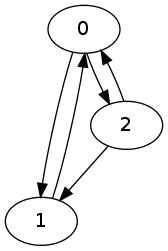
 For my GSoC project this year I need to be able to enumerate all elementary
circuits of a directed graph. My code is written in Ocaml but neither the
 One part of my yearly activity at DebConf is exploring the conference
neighbourhood for good running spots.
So, the first one this year has been an up and down run on "Camino Las
Viudas", heading south from Managua.
The path is easy to find: when exiting from Hotel Seminole, turn
right in the street, cross the large boulevard on continue staright
ahead for how many kilometers as you want.
It climbs up in the hills all along, so that's quite a though one with
about 5% slope all along.
I stopped in the middle of nothing, just because I didn't want to run
for more than one hour. I'll have to come back and see where this road
goes. It seems to be climbing continuously..:-)
So, one of my forthcoming plans is going to *the end* of this road,
just to see what's there. From OpenStreetMap, it seems to end up in
the hills.
The run trace

 This is my monthly summary of my Debian related activities. If you re among the people who
 Lately (as I earlier pointed out on my
 .
So, I did some yak shaving this morning. Turns out other folk have already run into this and filed a


