Jonathan McDowell: Building a read-only Debian root setup: Part 2
 This is the second part of how I build a read-only root setup for my router. You might want to read part 1 first, which covers the initial boot and general overview of how I tie the pieces together. This post will describe how I build the squashfs image that forms the main filesystem.
Most of the build is driven from a script, make-router, which I ll dissect below. It s highly tailored to my needs, and this is a fairly lengthy post, but hopefully the steps I describe prove useful to anyone trying to do something similar.
Breakdown of make-router
It s a bash script, and I allow building for either my RB3011 or RB5009, which means a different architecture (32 vs 64 bit). I run this script on my Pi 4 which means I don t have to mess about with QemuUserEmulation.
I build the image in a loopback ext4 file on tmpfs (my Pi4 is the 8G model), which makes things a bit faster.
Create a dpkg excludes config to drop docs, man pages and most locales before we even start the bootstrap.
Setup fstab, the hostname and SSH keys for root.
Actually do the
I haven t uploaded mqtt-arp to Debian, so I install a locally built package, and ensure it starts after mosquitto (the MQTT broker), given they re running on the same host.
watchdog timeouts were particularly an issue on the RB3011, where the default timeout didn t give enough time to reach multiuser mode before it would reset the router. Not helpful, so alter the config to start it earlier (and make sure it s configured to actually kick the device file).
Clean up any docs etc that ended up installed.
The only login method is ssh key to the root account though I suppose this allows for someone to execute a privilege escalation from a daemon user so I should probably randomise this. Does need to be known though so it s possible to login via the serial console for debugging.
Pull in any security updates, then clean out the APT lists rather than polluting the image with them.
None of these make sense on a router.
Ensure we have firewalling enabled automatically.
Create a number of users that will otherwise get created at boot, and a lock file that will otherwise get created anyway.
There are config files that are easier to replace wholesale, some of which are specific to the hardware (e.g. related to network interfaces). See below for some more details.
The kernel + its modules live outside the squashfs image, on the USB flash drive that the image lives on. That makes for easier kernel upgrades.
Always helpful to be able to check the image itself for what it was built from.
Just some niceties for when I do end up logging in.
Actually build the squashfs image.
Save off the installed package list. This was particularly useful when trying to replicate the existing router setup and making sure I had all the important packages installed. It doesn t really serve a purpose now.
In terms of the config files I copy into #!/bin/bash
# Either rb3011 (arm) or rb5009 (arm64)
#HOSTNAME="rb3011"
HOSTNAME="rb5009"
if [ "x$ HOSTNAME " == "xrb3011" ]; then
ARCH=armhf
elif [ "x$ HOSTNAME " == "xrb5009" ]; then
ARCH=arm64
else
echo "Unknown host: $ HOSTNAME "
exit 1
fi
It s a bash script, and I allow building for either my RB3011 or RB5009, which means a different architecture (32 vs 64 bit). I run this script on my Pi 4 which means I don t have to mess about with QemuUserEmulation.
BASE_DIR=$(dirname $0)
IMAGE_FILE=$(mktemp --tmpdir router.$ ARCH .XXXXXXXXXX.img)
MOUNT_POINT=$(mktemp -p /mnt -d router.$ ARCH .XXXXXXXXXX)
# Build and mount an ext4 image file to put the root file system in
dd if=/dev/zero bs=1 count=0 seek=1G of=$ IMAGE_FILE
mkfs -t ext4 $ IMAGE_FILE
mount -o loop $ IMAGE_FILE  $ MOUNT_POINT
I build the image in a loopback ext4 file on tmpfs (my Pi4 is the 8G model), which makes things a bit faster.
# Add dpkg excludes
mkdir -p $ MOUNT_POINT /etc/dpkg/dpkg.cfg.d/
cat <<EOF > $ MOUNT_POINT /etc/dpkg/dpkg.cfg.d/path-excludes
# Exclude docs
path-exclude=/usr/share/doc/*
# Only locale we want is English
path-exclude=/usr/share/locale/*
path-include=/usr/share/locale/en*/*
path-include=/usr/share/locale/locale.alias
# No man pages
path-exclude=/usr/share/man/*
EOF
Create a dpkg excludes config to drop docs, man pages and most locales before we even start the bootstrap.
# Setup fstab + mtab
echo "# Empty fstab as root is pre-mounted" > $ MOUNT_POINT /etc/fstab
ln -s ../proc/self/mounts $ MOUNT_POINT /etc/mtab
# Setup hostname
echo $ HOSTNAME  > $ MOUNT_POINT /etc/hostname
# Add the root SSH keys
mkdir -p $ MOUNT_POINT /root/.ssh/
cat <<EOF > $ MOUNT_POINT /root/.ssh/authorized_keys
ssh-rsa AAAAB3NzaC1yc2EAAAABIwAAAQEAv8NkUeVdsVdegS+JT9qwFwiHEgcC9sBwnv6RjpH6I4d3im4LOaPOatzneMTZlH8Gird+H4nzluciBr63hxmcFjZVW7dl6mxlNX2t/wKvV0loxtEmHMoI7VMCnrWD0PyvwJ8qqNu9cANoYriZRhRCsBi27qPNvI741zEpXN8QQs7D3sfe4GSft9yQplfJkSldN+2qJHvd0AHKxRdD+XTxv1Ot26+ZoF3MJ9MqtK+FS+fD9/ESLxMlOpHD7ltvCRol3u7YoaUo2HJ+u31l0uwPZTqkPNS9fkmeCYEE0oXlwvUTLIbMnLbc7NKiLgniG8XaT0RYHtOnoc2l2UnTvH5qsQ== noodles@earth.li
ssh-rsa AAAAB3NzaC1yc2EAAAADAQABAAACAQDQb9+qFemcwKhey3+eTh5lxp+3sgZXW2HQQEZMt9hPvVXk+MiiNMx9WUzxPJnwXqlmmVdKsq+AvjA0i505Pp8fIj5DdUBpSqpLghmzpnGuob7SSwXYj+352hjD52UC4S0KMKbIaUpklADgsCbtzhYYc4WoO8F7kK63tS5qa1XSZwwRwPbYOWBcNocfr9oXCVWD9ismO8Y0l75G6EyW8UmwYAohDaV83pvJxQerYyYXBGZGY8FNjqVoOGMRBTUcLj/QTo0CDQvMtsEoWeCd0xKLZ3gjiH3UrknkaPra557/TWymQ8Oh15aPFTr5FvKgAlmZaaM0tP71SOGmx7GpCsP4jZD1Xj/7QMTAkLXb+Ou6yUOVM9J4qebdnmF2RGbf1bwo7xSIX6gAYaYgdnppuxqZX1wyAy+A2Hie4tUjMHKJ6OoFwBsV1sl+3FobrPn6IuulRCzsq2aLqLey+PHxuNAYdSKo7nIDB3qCCPwHlDK52WooSuuMidX4ujTUw7LDTia9FxAawudblxbrvfTbg3DsiDBAOAIdBV37HOAKu3VmvYSPyqT80DEy8KFmUpCEau59DID9VERkG6PWPVMiQnqgW2Agn1miOBZeIQV8PFjenAySxjzrNfb4VY/i/kK9nIhXn92CAu4nl6D+VUlw+IpQ8PZlWlvVxAtLonpjxr9OTw== noodles@yubikey
ssh-rsa AAAAB3NzaC1yc2EAAAADAQABAAABAQC0I8UHj4IpfqUcGE4cTvLB0d2xmATSUzqtxW6ZhGbZxvQDKJesVW6HunrJ4NFTQuQJYgOXY/o82qBpkEKqaJMEFHTCjcaj3M6DIaxpiRfQfs0nhtzDB6zPiZn9Suxb0s5Qr4sTWd6iI9da72z3hp9QHNAu4vpa4MSNE+al3UfUisUf4l8TaBYKwQcduCE0z2n2FTi3QzmlkOgH4MgyqBBEaqx1tq7Zcln0P0TYZXFtrxVyoqBBIoIEqYxmFIQP887W50wQka95dBGqjtV+d8IbrQ4pB55qTxMd91L+F8n8A6nhQe7DckjS0Xdla52b9RXNXoobhtvx9K2prisagsHT noodles@cup
ecdsa-sha2-nistp256 AAAAE2VjZHNhLXNoYTItbmlzdHAyNTYAAAAIbmlzdHAyNTYAAABBBK6iGog3WbNhrmrkglNjVO8/B6m7mN6q1tMm1sXjLxQa+F86ETTLiXNeFQVKCHYrk8f7hK0d2uxwgj6Ixy9k0Cw= noodles@sevai
EOF
Setup fstab, the hostname and SSH keys for root.
# Bootstrap our install
debootstrap \
	--arch=$ ARCH  \
	--include=collectd-core,conntrack,dnsmasq,ethtool,iperf3,kexec-tools,mosquitto,mtd-utils,mtr-tiny,ppp,tcpdump,rng-tools5,ssh,watchdog,wget \
	--exclude=dmidecode,isc-dhcp-client,isc-dhcp-common,makedev,nano \
	bullseye $ MOUNT_POINT  https://deb.debian.org/debian/
Actually do the
debootstrap step, including a bunch of extra packages that we want.
# Install mqtt-arp
cp $ BASE_DIR /debs/mqtt-arp_1_$ ARCH .deb $ MOUNT_POINT /tmp
chroot $ MOUNT_POINT  dpkg -i /tmp/mqtt-arp_1_$ ARCH .deb
rm $ MOUNT_POINT /tmp/mqtt-arp_1_$ ARCH .deb
# Frob the mqtt-arp config so it starts after mosquitto
sed -i -e 's/After=.*/After=mosquitto.service/' $ MOUNT_POINT /lib/systemd/system/mqtt-arp.service
I haven t uploaded mqtt-arp to Debian, so I install a locally built package, and ensure it starts after mosquitto (the MQTT broker), given they re running on the same host.
# Frob watchdog so it starts earlier than multi-user
sed -i -e 's/After=.*/After=basic.target/' $ MOUNT_POINT /lib/systemd/system/watchdog.service
# Make sure the watchdog is poking the device file
sed -i -e 's/^#watchdog-device/watchdog-device/' $ MOUNT_POINT /etc/watchdog.conf
watchdog timeouts were particularly an issue on the RB3011, where the default timeout didn t give enough time to reach multiuser mode before it would reset the router. Not helpful, so alter the config to start it earlier (and make sure it s configured to actually kick the device file).
# Clean up docs + locales
rm -r $ MOUNT_POINT /usr/share/doc/*
rm -r $ MOUNT_POINT /usr/share/man/*
for dir in $ MOUNT_POINT /usr/share/locale/*/; do
	if [ "$ dir " != "$ MOUNT_POINT /usr/share/locale/en/" ]; then
		rm -r $ dir
	fi
done
Clean up any docs etc that ended up installed.
# Set root password to root
echo "root:root"   chroot $ MOUNT_POINT  chpasswd
The only login method is ssh key to the root account though I suppose this allows for someone to execute a privilege escalation from a daemon user so I should probably randomise this. Does need to be known though so it s possible to login via the serial console for debugging.
# Add security to sources.list + update
echo "deb https://security.debian.org/debian-security bullseye-security main" >> $ MOUNT_POINT /etc/apt/sources.list
chroot $ MOUNT_POINT  apt update
chroot $ MOUNT_POINT  apt -y full-upgrade
chroot $ MOUNT_POINT  apt clean
# Cleanup the APT lists
rm $ MOUNT_POINT /var/lib/apt/lists/www.*
rm $ MOUNT_POINT /var/lib/apt/lists/security.*
Pull in any security updates, then clean out the APT lists rather than polluting the image with them.
# Disable the daily APT timer
rm $ MOUNT_POINT /etc/systemd/system/timers.target.wants/apt-daily.timer
# Disable daily dpkg backup
cat <<EOF > $ MOUNT_POINT /etc/cron.daily/dpkg
#!/bin/sh
# Don't do the daily dpkg backup
exit 0
EOF
# We don't want a persistent systemd journal
rmdir $ MOUNT_POINT /var/log/journal
None of these make sense on a router.
# Enable nftables
ln -s /lib/systemd/system/nftables.service \
	$ MOUNT_POINT /etc/systemd/system/sysinit.target.wants/nftables.service
Ensure we have firewalling enabled automatically.
# Add systemd-coredump + systemd-timesync user / group
echo "systemd-timesync:x:998:" >> $ MOUNT_POINT /etc/group
echo "systemd-coredump:x:999:" >> $ MOUNT_POINT /etc/group
echo "systemd-timesync:!*::" >> $ MOUNT_POINT /etc/gshadow
echo "systemd-coredump:!*::" >> $ MOUNT_POINT /etc/gshadow
echo "systemd-timesync:x:998:998:systemd Time Synchronization:/:/usr/sbin/nologin" >> $ MOUNT_POINT /etc/passwd
echo "systemd-coredump:x:999:999:systemd Core Dumper:/:/usr/sbin/nologin" >> $ MOUNT_POINT /etc/passwd
echo "systemd-timesync:!*:47358::::::" >> $ MOUNT_POINT /etc/shadow
echo "systemd-coredump:!*:47358::::::" >> $ MOUNT_POINT /etc/shadow
# Create /etc/.pwd.lock, otherwise it'll end up in the overlay
touch $ MOUNT_POINT /etc/.pwd.lock
chmod 600 $ MOUNT_POINT /etc/.pwd.lock
Create a number of users that will otherwise get created at boot, and a lock file that will otherwise get created anyway.
# Copy config files
cp --recursive --preserve=mode,timestamps $ BASE_DIR /etc/* $ MOUNT_POINT /etc/
cp --recursive --preserve=mode,timestamps $ BASE_DIR /etc-$ ARCH /* $ MOUNT_POINT /etc/
chroot $ MOUNT_POINT  chown mosquitto /etc/mosquitto/mosquitto.users
chroot $ MOUNT_POINT  chown mosquitto /etc/ssl/mqtt.home.key
There are config files that are easier to replace wholesale, some of which are specific to the hardware (e.g. related to network interfaces). See below for some more details.
# Build symlinks into flash for boot / modules
ln -s /mnt/flash/lib/modules $ MOUNT_POINT /lib/modules
rmdir $ MOUNT_POINT /boot
ln -s /mnt/flash/boot $ MOUNT_POINT /boot
The kernel + its modules live outside the squashfs image, on the USB flash drive that the image lives on. That makes for easier kernel upgrades.
# Put our git revision into os-release
echo -n "GIT_VERSION=" >> $ MOUNT_POINT /etc/os-release
(cd $ BASE_DIR  ; git describe --tags) >> $ MOUNT_POINT /etc/os-release
Always helpful to be able to check the image itself for what it was built from.
# Add some stuff to root's .bashrc
cat << EOF >> $ MOUNT_POINT /root/.bashrc
alias ls='ls -F --color=auto'
eval "\$(dircolors)"
case "\$TERM" in
xterm* rxvt*)
	PS1="\\[\\e]0;\\u@\\h: \\w\a\\]\$PS1"
	;;
*)
	;;
esac
EOF
Just some niceties for when I do end up logging in.
# Build the squashfs
mksquashfs $ MOUNT_POINT  /tmp/router.$ ARCH .squashfs \
	-comp xz
Actually build the squashfs image.
# Save the installed package list off
chroot $ MOUNT_POINT  dpkg --get-selections > /tmp/wip-installed-packages
Save off the installed package list. This was particularly useful when trying to replicate the existing router setup and making sure I had all the important packages installed. It doesn t really serve a purpose now.
/etc, shared across both routers are the following:
Breakdown of shared config
The router specific config is mostly related to networking:
- apt config (disable recommends, periodic updates):
apt/apt.conf.d/10periodic,apt/apt.conf.d/local-recommends
- Adding a default, empty, locale:
default/locale
- DNS/DHCP:
dnsmasq.conf,dnsmasq.d/dhcp-ranges,dnsmasq.d/static-ipshosts,resolv.conf
- Enabling IP forwarding:
sysctl.conf
- Logs related:
logrotate.conf,rsyslog.conf
- MQTT related:
mosquitto/mosquitto.users,mosquitto/conf.d/ssl.conf,mosquitto/conf.d/users.conf,mosquitto/mosquitto.acl,mosquitto/mosquitto.confmqtt-arp.confssl/lets-encrypt-r3.crt,ssl/mqtt.home.key,ssl/mqtt.home.crt
- PPP configuration:
ppp/ip-up.d/0000usepeerdns,ppp/ipv6-up.d/defaultroute,ppp/pap-secrets,ppp/chap-secretsnetwork/interfaces.d/pppoe-wan
Breakdown of router specific config
- Firewalling:
nftables.conf
- Interfaces:
dnsmasq.d/interfacesnetwork/interfaces.d/eth0,network/interfaces.d/p1,network/interfaces.d/p2,network/interfaces.d/p7,network/interfaces.d/p8
- PPP config (network interface piece):
ppp/peers/aquiss
- SSH keys:
ssh/ssh_host_ecdsa_key,ssh/ssh_host_ed25519_key,ssh/ssh_host_rsa_key,ssh/ssh_host_ecdsa_key.pub,ssh/ssh_host_ed25519_key.pub,ssh/ssh_host_rsa_key.pub
- Monitoring:
collectd/collectd.conf,collectd/collectd.conf.d/network.conf
 Very few highly-anticipated movies appear in January and February, as the bigger releases are timed so they can be considered for the









 Prologue
For over a year now, Fre(i)e Software GmbH (my company) is involved in Ubuntu Touch development. The development effort currently is handled by a mix of paid and voluntary developers/contributors under the umbrella of the UBports Foundation. We are approaching the official first release of Ubuntu Touch 20.04 with rapid pace.
And, if you are a non-Englisch native speaker, we'd like to ask you for help... Read below.
light+love
 In 2022 I read 34 books (-19% on last year).
In 2021 roughly a quarter of the books I read were written by women. I was
determined to push that ratio in 2022, so I made an effort to try and only
read books by women. I knew that I wouldn't manage that, but by trying to, I
did get the ratio up to 58% (by page count).
I'm not sure what will happen in 2023. My to-read pile has some back-pressure
from books by male authors I postponed reading in 2022 (in particular new works
by Christopher Priest and Adam Roberts). It's possible the ratio will swing
back the other way, which would mean it would not be worth repeating the
experiment. At least if the ratio is the point of the exercise. But perhaps it
isn't: perhaps the useful outcome is more qualitative than quantitative.
I tried to read some new (to me) authors. I really enjoyed Shirley Jackson (The
Haunting of Hill House, We Have Always Lived In The Castle). I Struggled with
Angela Carter's Heroes and Villains although
I plan to return to her other work, in particular, The Bloody Chamber. I
also got through Donna Tartt's The Secret History on the recommendation of a
friend. I had to push through the first 15% or so but it turned out to be worth
it.




 In case you want to know how to configure IPv6 using CenturyLink s 6rd tunneling service.
There are four files to update with my script:



 Sunset, Witch Wells Arizona
 To achieve my
 In one week from now,
 A new release 0.2.18 of
 February. Working through crosvm dependencies and found that cargo-debstatus does not dump all dependencies; seems like it skips over optional ones.
Haven't tracked down what is going on yet but at least it seems like crosvm does not have all dependencies and can't build yet.
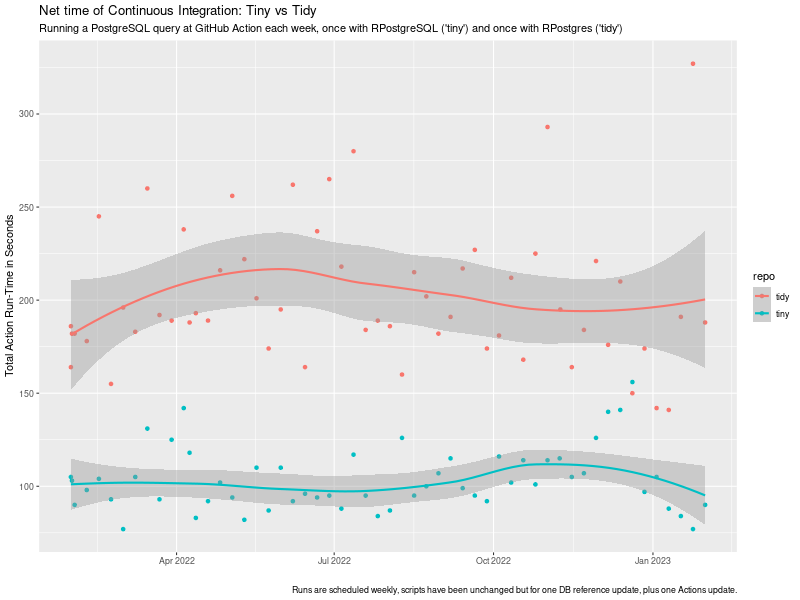 tiny vs tidy ci timing impact
chart