Search Results: "xam"

13 August 2016

Dariusz Dwornikowski: Automatic PostgreSQL config with Ansible

If for some reasons you can t use dedicated DBaaS for your PostgreSQL (like AWS RDS) then you need to run your database server on a cloud instance. In these kind of setup, when you scale up or down your instance size, you need to adjust PostgreSQL parameters according to the changing RAM size. There are several parameters in PostgreSQL that highly depend on RAM size. An example is shared_buffers for which a rule of thumb says that is should be set to 0.25*RAM. In DBaaS, when you scale the DB instance up or down, parameters are adjusted for you by the cloud provider, e.g. AWS RDS uses parameter groups for that reason, where particular parameters are defined depending on the size of the RAM of the RDS instance. So what can you when you do not have RDS or any other DBaaS? You can always keep several configuration files on your instance, each for a different memory size, you can rewrite you config every time you change the size of the instance or you can use Ansible role for that. Our Ansible role will be very simple, we will have two tasks. One will change the PostgreSQL config, the second one will just restart the database server:
---
- name: Update PostgreSQL config
  template: src=postgresql.conf.j2 dest=/etc/postgresql/9.5/main/postgresql.conf
  register: pgconf
- name: Restart postgresql
  service: name=postgresql state=restarted
  when: pgconf.changed
Now we need the template, where are the calculations take place. RAM size will be taken from the Ansible s fact called ansible_memtotal_mb. Since it returns RAM size in MBs, we will stick to MBs. We will define the following parameters, you can adjust them to your needs: For max_connections we will define a default role variable of 100 but we will allow to specify it at a runtime. The relevant parts of the postgresql.conf.j2 are below:
 max_connections =   max_connections        
 shared_buffers =   (((ansible_memtotal_mb/1024.0) round int)*0.25) int*1024  MB
 work_mem =   ((((ansible_memtotal_mb/1024.0) round int)*0.25)/max_connections*1024) round int  MB
 maintenance_work_mem =   ((ansible_memtotal_mb/1024.0) round int)*64  MB
 effective_cache_size =   (((ansible_memtotal_mb/1024.0) round int)*0.75) int*1024  MB
You can now run the role every time you change the instance size, and the config will be changed accordingly to the RAM size. You can extend the role and maybe add other constraints and change max_connections to you specific needs. An example playbook could look like:
---
hosts: my_postgres
roles:
  - postgres-config 
vars:
  - max_connection: 300
And run it:
$ ansible-playbook playbook.yml
The complete role can be found in my github repo.

11 August 2016

Petter Reinholdtsen: Coz can help you find bottlenecks in multi-threaded software - nice free software

This summer, I read a great article "coz: This Is the Profiler You're Looking For" in USENIX ;login: about how to profile multi-threaded programs. It presented a system for profiling software by running experiences in the running program, testing how run time performance is affected by "speeding up" parts of the code to various degrees compared to a normal run. It does this by slowing down parallel threads while the "faster up" code is running and measure how this affect processing time. The processing time is measured using probes inserted into the code, either using progress counters (COZ_PROGRESS) or as latency meters (COZ_BEGIN/COZ_END). It can also measure unmodified code by measuring complete the program runtime and running the program several times instead. The project and presentation was so inspiring that I would like to get the system into Debian. I created a WNPP request for it and contacted upstream to try to make the system ready for Debian by sending patches. The build process need to be changed a bit to avoid running 'git clone' to get dependencies, and to include the JavaScript web page used to visualize the collected profiling information included in the source package. But I expect that should work out fairly soon. The way the system work is fairly simple. To run an coz experiment on a binary with debug symbols available, start the program like this:
coz run --- program-to-run
This will create a text file profile.coz with the instrumentation information. To show what part of the code affect the performance most, use a web browser and either point it to http://plasma-umass.github.io/coz/ or use the copy from git (in the gh-pages branch). Check out this web site to have a look at several example profiling runs and get an idea what the end result from the profile runs look like. To make the profiling more useful you include <coz.h> and insert the COZ_PROGRESS or COZ_BEGIN and COZ_END at appropriate places in the code, rebuild and run the profiler. This allow coz to do more targeted experiments. A video published by ACM presenting the Coz profiler is available from Youtube. There is also a paper from the 25th Symposium on Operating Systems Principles available titled Coz: finding code that counts with causal profiling. The source code for Coz is available from github. It will only build with clang because it uses a C++ feature missing in GCC, but I've submitted a patch to solve it and hope it will be included in the upstream source soon. Please get in touch if you, like me, would like to see this piece of software in Debian. I would very much like some help with the packaging effort, as I lack the in depth knowledge on how to package C++ libraries.

10 August 2016

Tom Marble: webica

webica I've just pushed the first version of my new Clojure wrapper for Selenium called webica. The reason I need webica is that I want to do automated browser testing for ClojureScript based web applications. Certainly NodeJS, PhantomJS, Nashorn and the like are useful... but these can't quite emulate the full browser experience. We want to test our ClojureScript web apps in browsers -- ideally via our favorite automated continuous integration tools.

Selenium
My new approach with the webica library is to do full Java introspection in the spirit that amazonica does for the AWS API. In fact I wanted to take it a step further by actually generating Clojure source code via introspection that can be used by Codox to generate nice API docs (which you don't get with amazonica). That, alas, was a little trickier than expected due to pesky Quine-like problems :) . If you load the library on the REPL you can get a feeling for each namespace by calling the show-functions function. I realize this approach of aggressive introspection, playing fast and loose with types and application level dynamic dispatch are crazy antipatterns. In my defense I started out playing around to see "if I could do it". After seeing the result in the form of a shell script in Clojure -- imitating lmgtfy -- perhaps webica will actually be useful! I plan to talk about webica tonight at clojure.mn -- hope to see you there!

9 August 2016

John Goerzen: Easily Improving Linux Security with Two-Factor Authentication

2-Factor Authentication (2FA) is a simple way to help improve the security of your systems. It restricts the scope of damage if a machine is compromised. If, for instance, you have a security token or authenticator app on your phone that is required for ssh to a remote machine, then even if every laptop you use to connect to the remote is totally owned, an attacker cannot establish a new ssh session on their own. There are a lot of tutorials out there on the Internet that get you about halfway there, so here is some more detail. Background In this article, I will be focusing on authentication in the style of Google Authenticator, which is a special case of OATH HOTP or TOTP. You can use the Google Authenticator app, FreeOTP, or a hardware token like Yubikey to generate tokens with this. They are all 100% compatible with Google Authenticator and libpam-google-authenticator. The basic idea is that there is a pre-shared secret key. At each login, a different and unique token is required, which is generated based on the pre-shared secret key and some other information. With TOTP, the other information is the current time, implying that both machines must be reasably well in-sync time-wise. With HOTP, the other information is a count of the number of times the pre-shared key has been used. Both typically have a window on the server side that can let times within a certain number of seconds, or a certain number of login accesses, work. The beauty of this system is that after the initial setup, no Internet access is required on either end to validate the key (though TOTP requires both ends to be reasonably in sync time-wise). The basics: user account setup and ssh authentication You can start with the basics by reading one of these articles: one, two, three. Debian/Ubuntu users will find both the pam module and the user account setup binary in libpam-google-authenticator. For many, you can stop there. You re done. But if you want to kick it up a notch, read on: Enhancement 1: Requiring 2FA even when ssh public key auth is used Let s consider a scenario in which your system is completely compromised. Unless your ssh keys are also stored in something like a Yubikey Neo, they could wind up being compromised as well if someone can read your files and sniff your keyboard, your ssh private keys are at risk. So we can configure ssh and PAM so that a OTP token is required even for this scenario. First off, in /etc/ssh/sshd_config, we want to change or add these lines:
UsePAM yes
ChallengeResponseAuthentication yes
AuthenticationMethods publickey,keyboard-interactive
This forces all authentication to pass two verification methods in ssh: publickey and keyboard-interactive. All users will have to supply a public key and then also pass keyboard-interactive auth. Normally keyboard-interactive auth prompts for a password, but we can change /etc/pam.d/sshd on this. I added this line at the very top of /etc/pam.d/sshd:
auth [success=done new_authtok_reqd=done ignore=ignore default=bad] pam_google_authenticator.so
This basically makes Google Authenticator both necessary and sufficient for keyboard-interactive in ssh. That is, whenever the system wants to use keyboard-interactive, rather than prompt for a password, it instead prompts for a token. Note that any user that has not set up google-authenticator already will be completely unable to ssh into their account. Enhancement 1, variant 2: Allowing automated processes to root On many of my systems, I have ~root/.ssh/authorized_keys set up to permit certain systems to run locked-down commands for things like backups. These are automated commands, and the above configuration will break them because I m not going to be typing in codes at 3AM. If you are very restrictive about what you put in root s authorized_keys, you can exempt the root user from the 2FA requirement in ssh by adding this to sshd_config:
Match User root
  AuthenticationMethods publickey
This says that the only way to access the root account via ssh is to use the authorized_keys file, and no 2FA will be required in this scenario. Enhancement 1, variant 2: Allowing non-pubkey auth On some multiuser systems, some users may still want to use password auth rather than publickey auth. There are a few ways we can support that:
  1. Users without public keys will have to supply a OTP and a password, while users with public keys will have to supply public key, OTP, and a password
  2. Users without public keys will have to supply OTP or a password, while users with public keys will have to supply public key, OTP, or a password
  3. Users without public keys will have to supply OTP and a password, while users with public keys only need to supply the public key
The third option is covered in any number of third-party tutorials. To enable options 1 or 2, you ll need to put this in sshd_config:
AuthenticationMethods publickey,keyboard-interactive keyboard-interactive
This means that to authenticate, you need to pass either publickey and then keyboard-interactive auth, or just keyboard-interactive auth. Then in /etc/pam.d/sshd, you put this:
auth required pam_google_authenticator.so
As a sub-variant for option 1, you can add nullok to here to permit auth from people that do not have a Google Authenticator configuration. Or for option 2, change required to sufficient . You should not add nullok in combination with sufficient, because that could let people without a Google Authenticator config authenticate completely without a password at all. Enhancement 2: Configuring su A lot of other tutorials stop with ssh (and maybe gdm) but forget about the other ways we authenticate or change users on a system. su and sudo are the two most important ones. If your root password is compromised, you don t want anybody to be able to su to that account without having to supply a token. So you can set up google-authenticator for root. Then, edit /etc/pam.d/su and insert this line after the pam_rootok.so line:
auth       required     pam_google_authenticator.so nullok
The reason you put this after pam_rootok.so is because you want to be able to su from root to any account without having to input a token. We add nullok to the end of this, because you may want to su to accounts that don t have tokens. Just make sure to configure tokens for the root account first. Enhancement 3: Configuring sudo This one is similar to su, but a little different. This lets you, say, secure the root password for sudo. Normally, you might sudo from your user account to root (if so configured). You might have sudo configured to require you to enter in your own password (rather than root s), or to just permit you to do whatever you want as root without a password. Our first step, as always, is to configure PAM. What we do here depends on your desired behavior: do you want to require someone to supply both a password and a token, or just a token, or require a token? If you want to require a token, put this at the top of /etc/pam.d/sudo:
auth [success=done new_authtok_reqd=done ignore=ignore default=bad] pam_google_authenticator.so
If you want to require a token and a password, change the bracketed string to required , and if you want a token or a password, change it to sufficient . As before, if you want to permit people without a configured token to proceed, add nullok , but do not use that with sufficient or the bracketed example here. Now here comes the fun part. By default, if a user is required to supply a password to sudo, they are required to supply their own password. That does not help us here, because a user logged in to the system can read the ~/.google_authenticator file and easily then supply tokens for themselves. What you want to do is require them to supply root s password. Here s how I set that up in sudoers:
Defaults:jgoerzen rootpw
jgoerzen ALL=(ALL) ALL
So now, with the combination of this and the PAM configuration above, I can sudo to the root user without knowing its password but only if I can supply root s token. Pretty slick, eh? Further reading In addition to the basic tutorials referenced above, consider: Edit: additional comments Here are a few other things to try: First, the libpam-google-authenticator module supports putting the Google Authenticator files in different locations and having them owned by a certain user. You could use this to, for instance, lock down all secret keys to be readable only by the root user. This would prevent users from adding, changing, or removing their own auth tokens, but would also let you do things such as reusing your personal token for the root account without a problem. Also, the pam-oath module does much of the same things as the libpam-google-authenticator module, but without some of the help for setup. It uses a single monolithic root-owned password file for all accounts. There is an oathtool that can be used to generate authentication codes from the command line.

8 August 2016

Michael Stapelberg: Debian Code Search: improving client-side latency

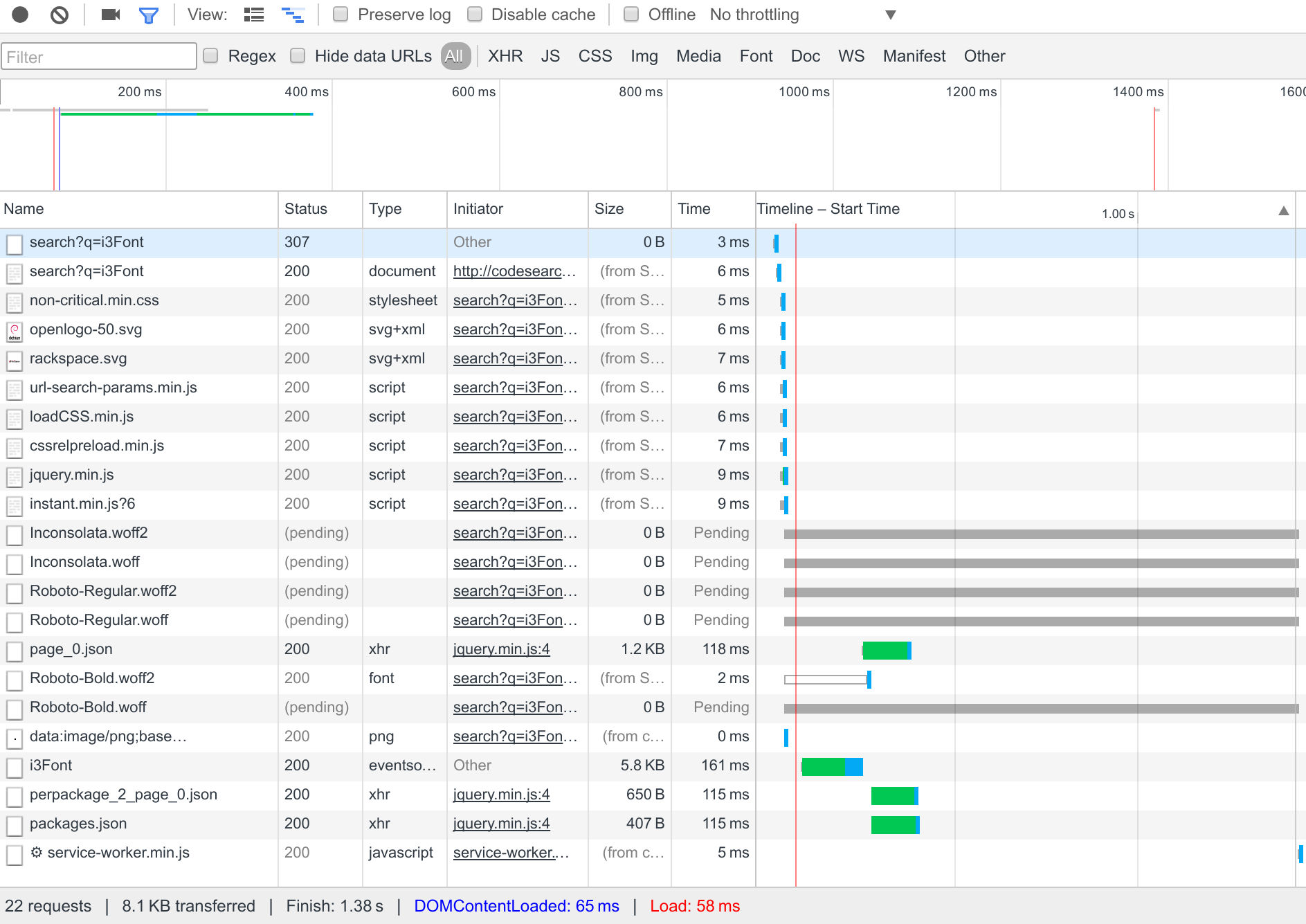
A while ago, it occurred to me that querying Debian Code Search seemed slow, which surprised me because I previously spent quite some effort on making it faster, see Debian Code Search Instant and Taming the latency tail for the most recent substantial architecture overhaul and related optimizations. Upon taking a closer look, I realized that while performing the search query on the server side was pretty fast, the perceived slowness was due to the client side being slow. By being slow , I mean that it took a long time until something was drawn on the screen (high latency) and that what was happening on the screen was janky (stuttering, not smooth). Part of that slowness was due to historical reasons: the client-side architecture was optimized for the use-case where users open Debian Code Search s index page and then submit a search query, but I was using Chrome s address bar to send a search query (type codesearch , then hit the TAB key). Further, we only added a non-JavaScript version after we launched the JavaScript version. Hence, the redirects and progressive enhancements we implemented are more of a kludge than a well thought out design. After this bit of original investigation, I opened GitHub issue #69 to track the work on making Debian Code Search faster. In that issue, I captured how Chrome s network inspector visualizes the work necessary to render the page: Chrome network inspector: before A couple of quick wins There are a couple of little fixes and improvements on which I m not going to spend too much time on, but which I list for completeness anyway just in case they come in handy for a similar project of yours: Bigger changes The URL pattern has changed. Previously, we had 2 areas of the website, one for JavaScript-compatible clients and one for the rest. When you hit the wrong one, you were redirected. In some areas, we couldn t tell which area is the correct one for you, so you would always incur a redirect: one example for this is the search bar. With the new URL pattern, we deliver both versions under the same URL: the elements only used by the JavaScript code are hidden using CSS by default, then made visible by JavaScript code. The elements only used by the non-JavaScript code are wrapped in a <noscript> tag. All CSS which is required for the initial page rendering is now inlined in the responses, allowing the browser to immediately render a response without requiring any additional round trips. All non-essential CSS has been moved into a separate CSS file which is loaded asynchronously. This is done using a pattern like <link rel="preload" href="foo.css" as="style" onload="this.rel='stylesheet'">, see also filamentgroup/loadCSS. We switched from WebSockets to the EventSource API because the former is not compatible with HTTP/2, whereas the latter is. This removes a round trip and some custom code for WebSocket reconnecting, because EventSource does that for you. The progress bar animation used to animate the background-position property. It turns out that browsers can only animate the position, scale, rotation and opacity properties smoothly, because such animations can be off-loaded to the GPU. Hence, we have re-implemented the progress bar animation using the position property. The biggest win for improving client-side latency from the Chrome address bar was introducing Service Workers (see commit 7f31aef402cb782056e290a797f224171f4af270). Our Service Worker caches static assets and a placeholder results page. The placeholder page is presented immediately when you start a search (e.g. from the address bar), making the first response immediate, i.e. rendered within 100ms. Having assets and the result page out of the way, the first round trip is used for actually doing the search, removing all unnecessary overhead. With all of these improvements in place, rendering latency goes down from half a second to well under 100 ms, and this is what the Chrome network inspector looks like: Chrome network inspector: after

7 August 2016

Dirk Eddelbuettel: drat 0.1.1: Updates schmupdates!

One year ago (tomorrow) drat 0.1.0 was released. It held up rather well, but a number of small fixes and enhancements piled up, along with somewhat-finished to still-raw additions to the examples/ sections. With that, we are happy to announce drat release 0.1.1 which arrived on CRAN earlier today. drat stands for drat R Archive Template, and helps with easy-to-create and easy-to-use repositories for R packages. Since its inception in early 2015 it has found reasonably widespread adoption among R users because repositories is what we use. In other words, friends don't let friends use install_github(). Just kidding. Maybe. Or not. This version 0.1.1 builds on the previous release from one year ago. Several users sent in nicely focused pull request, and I added a bit of spit and polish here and there. The NEWS file (added belatedly in this release) summarises the release as follows:
Changes in drat version 0.1.1 (2016-08-07)
  • Changes in drat functionality
    • Use dir.exists, leading to versioned Depends on R (>= 3.2.0)
    • Optionally pull remote before insert (Mark in PR #38)
    • Fix support for dots (Jan G. in PR #40)
    • Accept dots in package names (Antonio in PR #48)
    • Switch to htpps URLs at GitHub (Colin in PR #50)
    • Support additional fields in PACKAGE file (Jan G. in PR #54)
  • Changes in drat documentation
    • Further improvements and clarifications to vignettes
    • Travis script switched to run.sh from our fork
    • This NEWS file was (belatedly) added
Courtesy of CRANberries, there is a comparison to the previous release. More detailed information is on the drat page.

This post by Dirk Eddelbuettel originated on his Thinking inside the box blog. Please report excessive re-aggregation in third-party for-profit settings.

Dirk Eddelbuettel: littler 0.3.1

max-heap image The second release of littler as a CRAN package is now available, following in the now more than ten-year history as a package started by Jeff in the summer of 2006, and joined by me a few weeks later. littler is the first command-line interface for R and predates Rscript. It is still faster, and in my very biased eyes better as it allows for piping as well shebang scripting via #!, uses command-line arguments more consistently and still starts faster. It prefers to live on Linux and Unix, has its difficulties on the OS X due yet-another-braindeadedness there (who ever thought case-insensitive filesystems where a good idea?) and simply does not exist on Windows (yet -- the build system could be extended -- see RInside for an existence proof, and volunteers welcome!). This release brings us fixes and enhancements from three other contributors, a couple new example scripts, more robust builds, extended documentation and more -- see below for details. The NEWS file entry is below.
Changes in littler version 0.3.1 (2016-08-06)
  • Changes in examples
    • install2.r now passes on extra options past -- to R CMD INSTALL (PR #37 by Steven Pav)
    • Added rcc.r to run rcmdcheck::rcmdcheck()
    • Added (still simple) render.r to render (R)markdown
    • Several examples now support the -x or --usage flag to show extended help.
  • Changes in build system
    • The AM_LDFLAGS variable is now set and used too (PR #38 by Mattias Ellert)
    • Three more directories, used when an explicit installation directory is set, are excluded (also #38 by Mattias)
    • Travis CI is now driven via run.sh from our fork, and deploys all packages as .deb binaries using our PPA where needed
  • Changes in package
    • SystemRequirements now mentions the need for libR, i.e. an R built with a shared library so that we can embed R.
    • The docopt and rcmdcheck packages are now suggested, and added to the Travis installation.
    • A new helper function r() is now provided and exported so that the package can be imported (closes #40).
    • URL and BugReports links were added to DESCRIPTION.
  • Changes in documentation
    • The help output for installGithub.r was corrected (PR #39 by Brandon Bertelsen)
Full details for the littler release are provided as usual at the ChangeLog page. The code is available via the GitHub repo, from tarballs off my littler page and the local directory here -- and now of course all from its CRAN page and via install.packages("littler"). Binary packages are available directly in Debian as well as soon via Ubuntu binaries at CRAN thanks to the tireless Michael Rutter. will probably have new Comments and suggestions are welcome at the GitHub repo.

This post by Dirk Eddelbuettel originated on his Thinking inside the box blog. Please report excessive re-aggregation in third-party for-profit settings.

6 August 2016

Sean Whitton: git-push-all

I maintain Debian packages for several projects which are hosted on GitHub. I have a master packaging branch containing both upstream s code, and my debian/ subdirectory containing the packaging control files. When upstream makes a new release, I simply merge their release tag into master: git merge 1.2.3 (after reviewing the diff!). Packaging things for Debian turns out to be a great way to find small bugs that need to be fixed, and I end up forwarding a lot of patches upstream. Since the projects are on GitHub, that means forking the repo and submitting pull requests. So I end up with three remotes:
origin
the Debian git server
upstream
upstream s GitHub repo from which I m getting the release tags
fork
my GitHub fork of upstream s repo, where I m pushing bugfix branches
I can easily push individual branches to particular remotes. For example, I might say git push -u fork fix-gcc-6. However, it is also useful to have a command that pushes everything to the places it should be: pushes bugfix branches to fork, my master packaging branch to origin, and definitely doesn t try to push anything to upstream (recently an upstream project gave me push access because I was sending so many patches, and then got a bit annoyed when I pushed a series of Debian release tags to their GitHub repo by mistake). I spent quite a lot of time reading git-config(1) and git-push(1), and came to the conclusion that there is no combination of git settings and a push command that do the right thing in all cases. Candidates, and why they re insufficient:
git push --all
I thought about using this with the remote.pushDefault and branch.*.pushRemote configuration options. The problem is that git push --all pushes to only one remote, and it selects it by looking at the current branch. If I ran this command for all remotes, it would push everything everywhere.
git push <remote> : for each remote
This is the matching push strategy . It will push all branches that already exist on the remote with the same name. So I thought about running this for each remote. The problem is that I typically have different master branchs on different remotes. The fork and upstream remotes have upstream s master branch, and the origin remote has my packaging branch.
I wrote a perl script implementing git push-all, which does the right thing. As you will see from the description at the top of the script, it uses remote.pushDefault and branch.*.pushRemote to determine where it should push, falling back to pushing to the remote the branch is tracking. If won t push something when all three of these are unspecified, and more generally, it won t create new remote branches except in the case where the branch-specific setting branch.*.pushRemote has been specified. Magit makes it easy to set remote.pushDefault and branch.*.pushRemote. I have this in my ~/.mrconfig:
git_push = git push-all
so that I can just run mr push to ensure that all of my work has been sent where it needs to be (see myrepos).
#!/usr/bin/perl
# git-push-all -- intelligently push most branches
# Copyright (C) 2016 Sean Whitton
#
# This program is free software: you can redistribute it and/or modify
# it under the terms of the GNU General Public License as published by
# the Free Software Foundation, either version 3 of the License, or (at
# your option) any later version.
#
# This program is distributed in the hope that it will be useful, but
# WITHOUT ANY WARRANTY; without even the implied warranty of
# MERCHANTABILITY or FITNESS FOR A PARTICULAR PURPOSE.  See the GNU
# General Public License for more details.
#
# You should have received a copy of the GNU General Public License
# along with this program.  If not, see <http://www.gnu.org/licenses/>.
# Prerequisites:
# The Git::Wrapper, Config::GitLike, and List::MoreUtils perl
# libraries.  On a Debian system,
#     apt-get install libgit-wrapper-perl libconfig-gitlike-perl \
#         liblist-moreutils-perl
# Description:
# This script will try to push all your branches to the places they
# should be pushed, with --follow-tags.  Specifically, for each branch,
#
# 1. If branch.pushRemote is set, push it there
#
# 2. Otherwise, if remote.pushDefault is set, push it there
#
# 3. Otherwise, if it is tracking a remote branch, push it there
#
# 4. Otherwise, exit non-zero.
#
# If a branch is tracking a remote that you cannot push to, be sure to
# set at least one of branch.pushRemote and remote.pushDefault.
use strict;
use warnings;
no warnings "experimental::smartmatch";
use Git::Wrapper;
use Config::GitLike;
use List::MoreUtils qw  uniq apply  ;
my $git = Git::Wrapper->new(".");
my $config = Config::GitLike->new( confname => 'config' );
$config->load_file('.git/config');
my @branches = apply   s/[ \*]//g   $git->branch;
my @allBranches = apply   s/[ \*]//g   $git->branch(  all => 1  );
my $pushDefault = $config->get( key => "remote.pushDefault" );
my %pushes;
foreach my $branch ( @branches )  
    my $pushRemote = $config->get( key => "branch.$branch.pushRemote" );
    my $tracking = $config->get( key => "branch.$branch.remote" );
    if ( defined $pushRemote )  
        print "I: pushing $branch to $pushRemote (its pushRemote)\n";
        push @  $pushes $pushRemote   , $branch;
    # don't push unless it already exists on the remote: this script
    # avoids creating branches
      elsif ( defined $pushDefault
              && "remotes/$pushDefault/$branch" ~~ @allBranches )  
        print "I: pushing $branch to $pushDefault (the remote.pushDefault)\n";
        push @  $pushes $pushDefault   , $branch;
      elsif ( !defined $pushDefault && defined $tracking )  
        print "I: pushing $branch to $tracking (probably to its tracking branch)\n";
        push @  $pushes $tracking   , $branch;
      else  
        die "E: couldn't find anywhere to push $branch";
     
 
foreach my $remote ( keys %pushes )  
    my @branches = @  $pushes $remote   ;
    system "git push --follow-tags $remote @branches";
    exit 1 if ( $? != 0 );
 

Mirco Bauer: Ethereum GPU Mining on Linux How-To

TL;DR Install/use Debian 8 or Ubuntu 16.0.4 then execute:
sudo apt-get install software-properties-common
sudo add-apt-repository ppa:ethereum/ethereum
sudo sed 's/jessie/vivid/' -i /etc/apt/sources.list.d/ethereum-ethereum-*.list
sudo apt-get update
sudo apt-get install ethereum ethminer
geth account new
# copy long character sequence within  , that is your <YOUR_WALLET_ADDRESS>
# if you lose the passphrase, you lose your coins!
sudo apt-get install linux-headers-amd64 build-essential
chmod +x NVIDIA-Linux-x86_64-367.35.run
sudo NVIDIA-Linux-x86_64-367.35.run
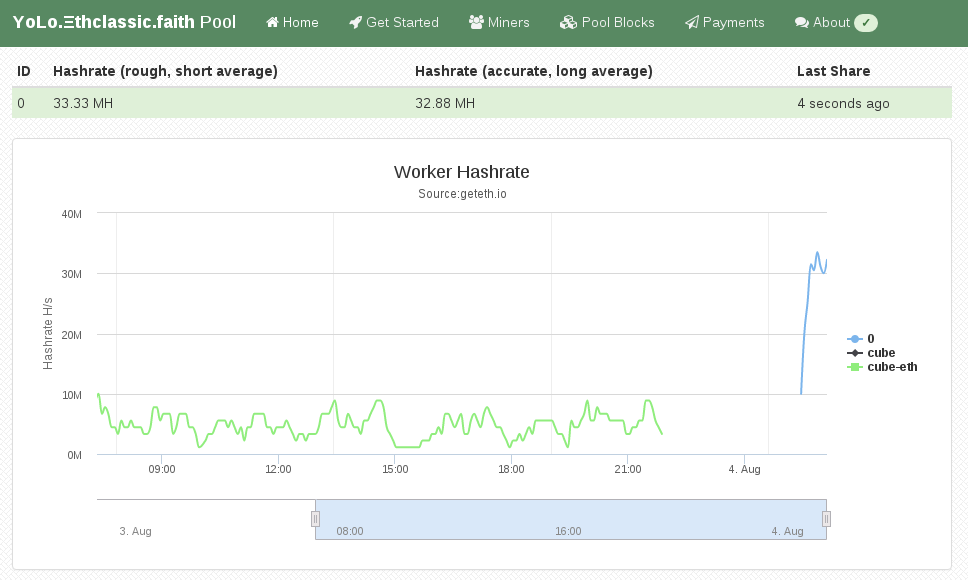
ethminer -G -F http://yolo.ethclassic.faith:9999/0x<YOUR_WALLET_ADDRESS> --farm-recheck 200
echo done
My Attention Span is > 60 seconds Ethereum is a crypto currency similar to Bitcoin as it is based on the blockchain technology. Ethereum is not yet another Bitcoin clone though, since it has an additional feature called Smart Contracts that makes it unique and very promising. I am not going into details how Ethereum works, you can get that into great detail on the Internet. This post is about Ethereum mining. Mining is how crypto coins are created. You need to spent computing time to get coins out. At the beginning CPU mining was sufficient, but as the Ethereum network difficulty has increased you need to use GPUs as they can calculate at a much higher hashrate than a general purpose CPU can do. About 2 months ago I bought a new gaming rig, with a Nvidia GTX 1070 so I can experience virtual-reality gaming with a HTC Vive at a great framerate. As it turns out modern graphics cards are very good at hashing so I gave it a spin. Initially I did this mining setup with Windows 10, as that is the operating system on my gaming rig. If you want to do Ethereum mining using your GPU, then you really want to use Linux. On Windows the GTX 1070 produced a hashrate of 6 MH/s (megahashes per second) while the same hardware does 25 MH/s on Linux. The hashrate multiplied by 4 by using Linux instead of Windows. Sounds good? Keep reading and follow this guide. You have to pick a Linux distro to use for mining. As I am a Debian developer, all my systems run Debian, which is what I am also using for this guide. The same procedure can be done for Ubuntu as it is similar enough. For other distros you have to substitute the steps yourself. So I assume you already have Debian 8 or Ubuntu 16.04 installed on your system.

Install Ethereum Software First we need the geth tool which is the main Ethereum "client". Ethereum is really a peer-to-peer network, that means each node is a server and client at the same time. A node that contains the complete blockchain history in a database is called a full node. For this guide you don't need to run a full node, as mining pools do this for you. We still need geth to create the private key of your Ethereum wallet. Somewhere we have to receive the coins we are mining ;) Add the Ethereum APT repository using these commands:
sudo apt-get install software-properties-common
sudo add-apt-repository ppa:ethereum/ethereum
sudo apt-get update
On Debian 8 (on Ubuntu you can skip this) you need to replace the repository name with this command:
sudo sed 's/jessie/vivid/' -i /etc/apt/sources.list.d/ethereum-ethereum-*.list
sudo apt-get update
Install ethereum, ethminer and geth:
sudo apt-get install ethereum ethminer geth

Create Ethereum Wallet A wallet is where coins are "stored". They are not really stored in the wallet because the wallet is just a private key that nobody has. The balance of that wallet is visible to everyone using the blockchain database. And this is what full nodes do, they contain and distribute the database to all other peers. So this this command to create your first private key for your wallet:
geth account new
Be aware, that this passphrase protects the private key of your wallet. Anyone who has access to that file and knows your passphrase will have full control over your coins. And also do not forget the passphrase, as if you do, you lost all your coins! The output of "geth account new" shows a long character/number sequence quoted in . This is your wallet address and you should write that number down, as if someone wants to send you money, then it is to that address. We will use that for the mining pool later.

Install (proprietary) nvidia driver For OpenCL to work with nvidia graphics cards, like my GTX 1070, you need to install this proprietary driver from nvidia. If you have an older card maybe the opensource drivers will work for you. For the nvidia pascal cards numbers 10xx you will need this driver package. After you have agreed the terms, download the NVIDIA-Linux-x86_64-367.35.run file. But before we can use that installer we need to install some dependencies that installer needs as it will have to compile a Linux kernel module for you. Install the dependencies using this command:
sudo apt-get install linux-headers-amd64 build-essential
Now we can make the installer executable and run it like this:
chmod +x NVIDIA-Linux-x86_64-367.35.run
sudo NVIDIA-Linux-x86_64-367.35.run
If that step completed without error, then we should be able to run the mining benchmark!
ethminer -M -G
The -M means "run benchmark" and the -G is for GPU mining. The first time you run it it will create a DAG file and that will takes a while. For me it took about 12 minutes on my GTX 1070. After that is should show a inner mean hashrate. If it says H/s that is hashes per second and KH is kilo (H/1000) and MH is megahashes per second (KH/1000). I had numbers around 25-30 MH/s, but for real mining you will see an average that is a balanced number and not a min/max range.

Pick Ethereum Network Now it gets serious, you need to decide 2 things. First which Ethereum network you want to mine for and the second is using which pool. Ethereum has 2 networks, one is called Ethereum One or Core, while the other is called Ethereum Classic. Ethereum has made a hardfork to undo the consequences of a software bug in the DAO. The DAO is a smart contract for a decentralized organization. Because of that bug, a blackhat could use that bug to obtain money from that DAO. The Ethereum developers made a poll and decided that the consequences will be undone. Not everyone agreed and the old network stayed alive and is now called Ethereum Classic short ETC. The hardfork kept its short name ETH. This is important to understand for mining, because the hashing difficulty has a huge difference between ETH and ETC. As of writing, the hashrate of ETC is at 20% compared to ETH. Thus you need less computing time to get ETC coins and more time to get ETH coins. Differently said, ETC mining is currently more profitable.

Pick a Pool Hmmmm, I want a swimming pool, thanks! Just kidding... You can mine without a pool, that is called solo mining, but you will get less reward. A mining pool are multiple computers that work on the same block to find a solution quicker than others. The pool has an aggregated hashrate that is higher than other solo miners. Each found block by anyone in this pool will be rewarded to everyone in the pool. The reward of 5 ether currently per block gets split in the same ratio of hashrate each member provides (minus the pool fee). So while you get less for a found block, you still have a steady lower income rate instead of higher with less chance of finding one (in time). Simply said: you have to find a new block faster than the others to receive the reward. If you want to mine Ethereum Classic (ETC) use one of the pools listed here (at the bottom of the page). If you want to mine Ethereum One / Core (ETH) use one of the pools listed here.

Run ethminer The instruction page of the pool website usually says how to start the miner program, but here is an example of the pool that I use (because pony!):
ethminer -G -F http://yolo.ethclassic.faith:9999/0x<YOUR_WALLET_ADDRESS> --farm-recheck 200

Profit If this guide was helpful for you, you can tip me at ethereum:0x9ec1220d2f2fadd3f0c96e3007daa827bc83fbd6 or simply run the ethminer using my wallet address for a day or two:
ethminer -G -F http://yolo.ethclassic.faith:9999/0x9ec1220d2f2fadd3f0c96e3007daa827bc83fbd6 --farm-recheck 200
Happy mining!

5 August 2016

Arturo Borrero Gonz lez: Spawning a new blog with jekyllrb


I have been delighted with git for several years now. It's a very powerful tool and I use it every day.
I try to use git in all possible tasks: bind servers, configurations, firewalls, and other personal stuff.

However, there has been always a thing in my git-TODO: a blog managed with git.

After a bit of searching, I found an interesting technology: jekyllrb hosted at github pages. Jekyll looked easy to manage and easy to learn for a newbie like me.
There are some very good looking blogs out there using this combination, for example: https://rsms.me/

But I was lazy to migrate this 'ral-arturo' blog from blogger to jekyll, so I decided to create a new blog from scratch.

This time, the new blog in written in Spanish and is about adventures, nature, travels and outdoor sports.
Perhaps you noticed this article about the Mulhacen mountain (BTW, we did it! :-))
The new blog is called alfabravo.org,

I like the workflow with git & jekyll & github:


Who knows, perhaps this 'ral-arturo' blog ends being migrated to the new system as well.

29 July 2016

Luciano Prestes Cavalcanti: Contributing with Debian Recommendation System

Hi, my name is Luciano Prestes, I am participating in the program Google Summer of Code (GSoC), my mentor is Antonio Terceiro, and my co-mentor is Tassia Camoes, both are Debian Developers. The project that I am contributing is the AppRecommender, which is a package recommender for Debian systems, my goal is to add a new strategy of recommendation to AppRecommender, to make it recommend packages after the user installs a new package with 'apt'.
At principle AppRecommender has three recommendation strategies, being them, content-based, collaborative and hybrid. To my work on GSoC this text explains two of these strategies, content-based and collaborative. Content-based strategy get the user packages and analyzes yours descriptions to find another Debian packages that they are similar to the user packages, so AppRecommender uses the content of user packages to recommender similar packages to user. The collaborative strategy compare the user packages with the packages of another users, and then recommends packages that users with similar profile have, where a profile of user is your packages. On her work, Tassia Camoes uses the popularity-contest data to compare the users profiles on the collaborative strategy, the popularity-contest is an application that get the users packages into a submission and send to the popularity-contest server and generates statistical data analyzing the users packages.
I have been working with a classmate on our bachelor thesis since August 2015, in our work we created new strategies to AppRecommender, one using machine-learning and another using a deterministic method to generates the recommendation, another feature that we implemented its improve the user profile using the recently used packages to makes the profile. During our work we study the collaborative strategy and analyzed that strategy and remove it from AppRecommender, because this implementation of collaborative strategy needs to get the popularity-contest submissions on the user's pc, and this is against the privacy policy of popularity-contest.
My work on Google Summer of Code is create a new strategy on AppRecommender, as described above, where this strategy should be able to get an referenced package, or a list of referenced packages, then analyze the users packages making a recommendation using the referenced packages such as base, example: if users run "$ sudo apt install vim", the AppRecommender use "vim" as referenced package, and should recommender packages with relation between "vim" and the other packages that user has installed. This new strategy can be implemented like a content-based strategy, or the collaborative strategy.
The first month of Google Summer of Code its destined to students knows the community of the project, so I talk with the Debian community about my project, to get feedback and ideas about the project. I talk with Debian community on IRC channels, and then came the idea to use the data of popularity-contest to improve the recommendations. Talking with my mentors, they approve the idea of usage popularity-contest data, so we started a discussion about how to use the popularity-contest data on AppRecommender without broken the privacy policy of popularity-contest.
Now my work on Google Summer of Code is create the new strategy for AppRecommender that can makes recommendation using a list of packages as reference, so as explained above, when user install packages like "sudo apt install vim vagrant", AppRecommender should recommends packages with relation between the packages "vim" and "vagrant", and this recommendation should be relation with the user profile. The other work its use the popularity-contest data to improve the recommendations of AppRecommender using a new model of collaborative strategies.

Dirk Eddelbuettel: RcppGetconf 0.0.1

A new package RcppGetconf to read system configuration --- not unlike getconf from the libc library. Now R can read what system calls sysconf, pathconf and confstr have to say. The package is still pretty green, and now on CRAN in a very first version, corresponding to a very first (and single !) commit. Right now, the CRAN just has one function getAll() similar to getconf -a. A first example shows how it provides all values which can be retried -- currently 320 on my systems.
R> res <- getAll()
R> head(res)
               key value type
1         LINK_MAX 65000 path
2  _POSIX_LINK_MAX 65000 path
3        MAX_CANON   255 path
4 _POSIX_MAX_CANON   255 path
5        MAX_INPUT   255 path
6 _POSIX_MAX_INPUT   255 path
R> tail(res)
                      key  value type
315    LEVEL4_CACHE_ASSOC      0  sys
316 LEVEL4_CACHE_LINESIZE      0  sys
317                  IPV6 200809  sys
318           RAW_SOCKETS 200809  sys
319           _POSIX_IPV6 200809  sys
320    _POSIX_RAW_SOCKETS 200809  sys
R> 
Earlier this evening I added a second function to the GitHub repo which can access indivial values. But right now, the biggest need is really for someone with some systems skills---and an OS X machine---to look at the code, and maybe the getconf.c from the C library, in order to make this build OS X. If you can help, please get in touch. More about the package is at the local RcppGetconf page and the GitHub repo.

This post by Dirk Eddelbuettel originated on his Thinking inside the box blog. Please report excessive re-aggregation in third-party for-profit settings.

26 July 2016

Norbert Preining: TUG 2016 Day 1 Routers and Reading

The first day of the real conference started with an excellent overview of what one can do with TeX, spanning from traditional scientific journal styles to generating router configuration for cruising ships.
tug2016-color All this was crowned with an invited talk my Kevin Larson from Microsoft s typography department on how to support reading comprehension. Pavneet Aurora Opening: Passport to the TeX canvas Pavneet, our never-sleeping host and master of organization, opened the conference with a very philosophical introduction, touching upon a wide range of topics ranging from Microsoft, Twitter to the beauty of books, pages, and type. I think at some point he even mentioned TeX, but I can t remember for sure. His words put up a very nice and all-inclusive stage, a community that is open to all kind of influences with any disregard or prejudice. Let us hope that is reflects reality. Thanks Pavneet. Geoffrey Poore Advances in PythonTeX Our first regular talk was by Geoffrey reporting on recent advances in PythonTeX, a package that allows including python code in your TeX document. Starting with an introduction to PythonTeX, Geoggrey reports about an improved verbatim environment, fvextra, which patches fancyvrb, and improved interaction between tikz and PythonTeX. As I am a heavy user of listings for my teaching on algebraic specification languages, I will surely take a look at this package and see how it compares to listings. Stefan Kottwitz TeX in industry I: Programming Cisco network switches using TeX Next was Stefan from Lufthansa Industry Solutions, who reported first about his working environment, Cruise Ships with a very demanding IT infrastructure he has to design and implement. Then he introduced us to his way of generating IP configurations for all the devices using TeX. The reason he chose this method is that it allows him to generate at the same time proper documentation. It was surprising for me to hear that by using TeX he could far more efficiently and quicker produce well designed and easily accessible documentation, which helped both the company as well as made the clients happy! Stefan Kottwitz TeX in industry II: Designing converged network solutions After a coffee break, Stefan continued his exploration into industrial usage of TeX, this time about using tikz to generate graphics representing the network topology on the ships. Boris Veytsman Making ACM LaTeX styles Next up was Boris which brought us back to traditional realms of TeX when he guided us into the abyss of ACM LaTeX styles he tried to maintain for some time, until he plunged into a complete rewrite of the styles. Frank Mittelbach Alice goes floating global optimized pagination including picture placements The last talk before lunch (probably a strategic placement, otherwise Frank would continue for hours and hours) was Frank on global optimization of page breaks. Frank showed us what can and can not be done with current LaTeX, and how to play around with global optimization of pagination, using Alice in Wonderland as running example. We can only hope that his package is soon available in an easily consumable version to play around. Thai lunch Pavneet has organized three different lunch-styles for the three days of the conference, today s was Thai with spring rools, fried noodles, one kind of very interesting orange noodles, and chicken something. Michael Doob baseball rules summary After lunch Michael gave us an accessible explanation of the most arcane rules a game can have the baseball rules by using pseudo code. I think the total number of loc needed to explain the overall rules would fill more pages than the New York phonebook, so I am deeply impressed by all those who can understand these rules. Some of us even wandered off in the late afternoon to see a match with life explanations of Michael. Amartyo Banerjee, S.K. Venkatesan A Telegram bot for printing LaTeX files Next up was Amartyo who showed a Telegram (as in messenger application) bot running on a Raspberry Pi, that receives (La)TeX files and sends back compiled PDF files. While it is not ready for consumption (If you sneeze the bot will crash!), it looks like a promising application. Furthermore, it is nice to see how open APIs (like Telegram) can spur development of useful tools, while closed APIs (including threatening users, like WhatApp) hinders it. Norbert Preining Security improvements in the TeX Live Manager and installer Next up was my own talk about beefing up the security of TeX Live by providing integrity and authenticity checks via GnuPG, a feature that has been introduced with the recent release of TeX Live 2016. The following discussion gave me several good idea on how to further improve security and usability. Arthur Reutenauer -The TeX Live M sub-project (and open discussion) Arthur presented the TeX Live M (where the M stands supposedly for Mojca, who couldn t attend unfortunately) project: Their aim is to provide a curated and quality verified sub-part of TeX Live that is sufficiently complete for many applications, and easier for distributors and packagers. We had a lively discussion after Arthur s short presentation, mostly about why TeX Live does not have a on-the-fly installation like MikTeX. I insisted that this is already possible, using the tex-on-the-fly package which uses the mktextex infrastructure, but also caution against using it by default due to delays induced by repeatably reading the TeX Live database. I think this is a worth-while project for someone interested in learning the internals of TeX Live, but I am not sure whether I want to invest time into this feature. Another discussion point was about a testing infrastructure, which I am currently working on. This is in fact high on my list, to have some automatic minimal functionality testing a LaTeX package should at least load! Kevin Larson Reading between the lines: Improving comprehension for students Having a guest from Microsoft is rather rare in our quite Unix-centered environment, so big thanks to Pavneet again for setting up this contact, and big thanks to Kevin for coming. Kevin gave us a profound introduction to reading disabilities and how to improve reading comprehension. Starting with an excursion into what makes a font readable and how Microsoft develops optimally readable fonts, he than turned to reading disabilities like dyslexia, and how markup of text can increase students comprehension rate. He also toppled my long-term believe that dyslexia is connected to the similar shape of letters which are somehow visually malprocessed this was the scientific status from the 1920ies till the 70ies, but since then all researchers have abandoned this interpretation and dyslexia is now linked to problems linking shape to phonems. Kevin did an excellent job with a slightly difficult audience some people picking about grammer differences between British and US English and permanently derailing the discussion, and even more the high percentage of typographically somehow specially tasted participants. After the talk I had a lengthy discussion with Kevin about if/how this research can be carried over to non-Roman writing systems, in particular Kanji/Hanzi based writing systems, where dyslexia shows itself probably in different context. Kevin also mentioned that they want to add interword space to Chinese to help learners of Chinese (children, foreigners) to better parse, and studies showed that this helps a lot in comprehension. On a meta-level, this talk bracketed with the morning introduction by Pavneet, describing an open environment with stimulus back and forth in all directions. I am very happy that Kevin took the pain to come in his tight schedule, and I hope that the future will bring better cooperation at the end we are all working somehow on the same front only the the tools differ.
izakaya-sake-partyAfter the closing of the session, one part of our group went off to the baseball match, while another group dived into a Japanese-style Izakaya where we managed to kill huge amounts of sake and quite an amount of food. The photo shows me after the first bottle of sake, while just seeping on an intermediate small amount of genshu (kind of strong undiluted sake) before continuing to the next bottle. An interesting and stimulating first day of TUG, and I am sure that everyone was looking forward to day 2.

25 July 2016

Norbert Preining: TUG 2016 Day 0 Books and Beers

The second pre-conference day was dedicated to books and beers, with a visit to an exquisite print studio, and a beer tasting session at one of the craft breweries in Canada. In addition we could grab a view into the Canadian lifestyle by visiting Pavneet s beautiful house in the countryside, as well as enjoying traditional style pastries from a bakery.
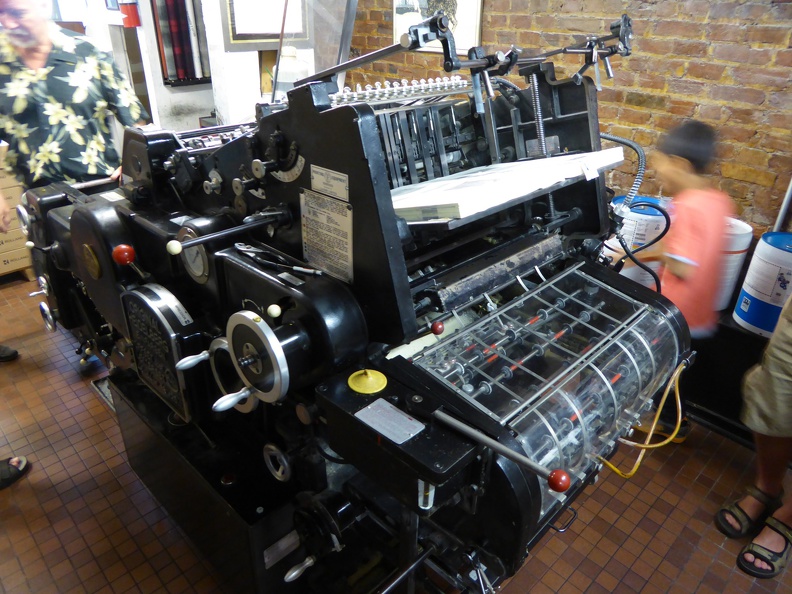
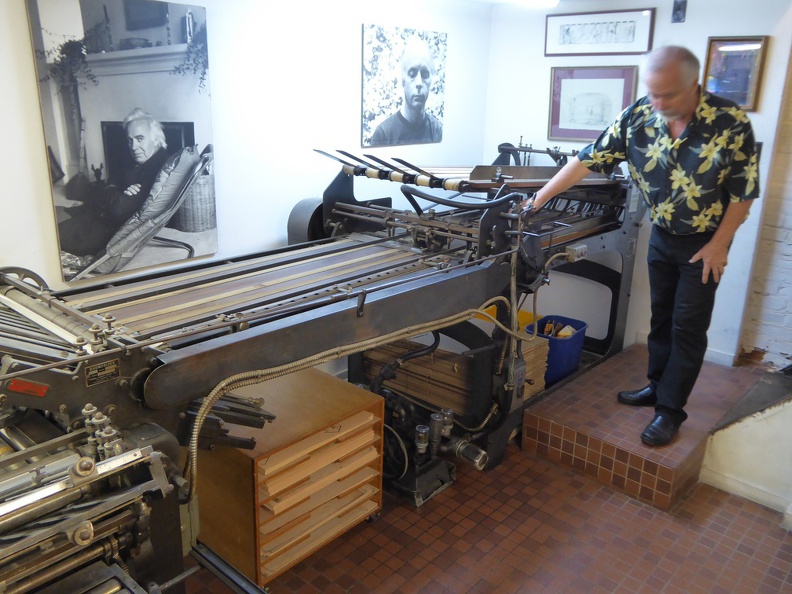
Heidelberg printing machine at Porcupine's quilt
In short, a perfect combination for us typography and beer savvy freaks! This morning we had somehow an early start from the hotel. Soon the bus left downtown Toronto and entered countryside Ontario, large landscapes filled with huge (for my Japanese feeling) estates and houses, separated by fields, forests and wild landscape. Very beautiful and inviting to live there. On our way to the printing workshop we stopped at Pavneet s house for a very short visit of the exterior, which includes mathematics in the bricking. According to Pavneet, his kids hate to see math on the wall I would be proud to have it.
Pavneet's house is hiding some mathematics
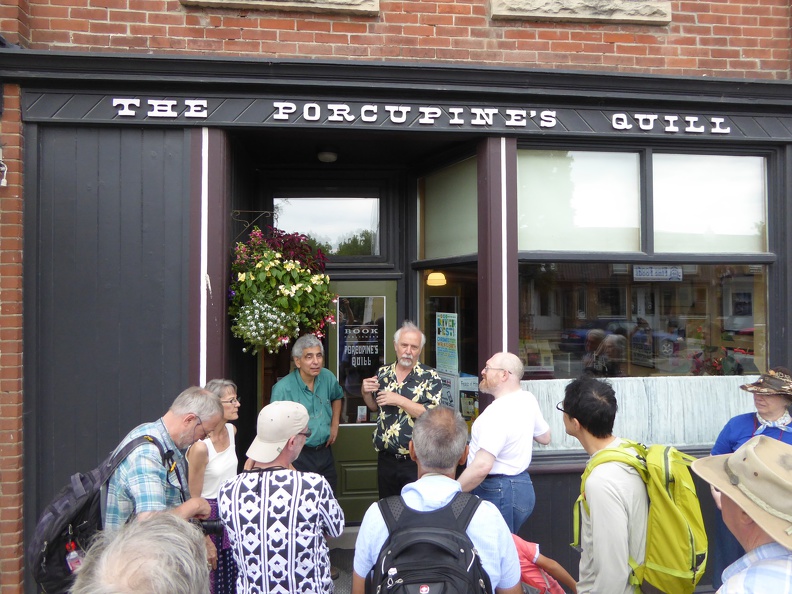
A bit further on we entered into Erin, where the Porcupine s Quill is located. A small building along the street, one could easily oversee that rare jewel! In addition considering that according to the owners, Google Maps has a bad error which would lead you to a completely different location. This printing workshop, led by Tim and Elke Inkster, is producing books in a traditional style using an old Heidelberg Offset printing machine.
Entrance to the Porcupine's Quill, a local bookshop doing excellent printing
Elke introduced us to the sewing of folded signatures together with a lovely old sewing machine. It was the first time I actually saw one in action.
Sewn signatures
Tim, the head master of the printing shop, first entertained us with stories about Chinese publishers visiting them in the old cold-war times, before diving into explanations of the actual machines around, like the Heidelberg offset printing machine.
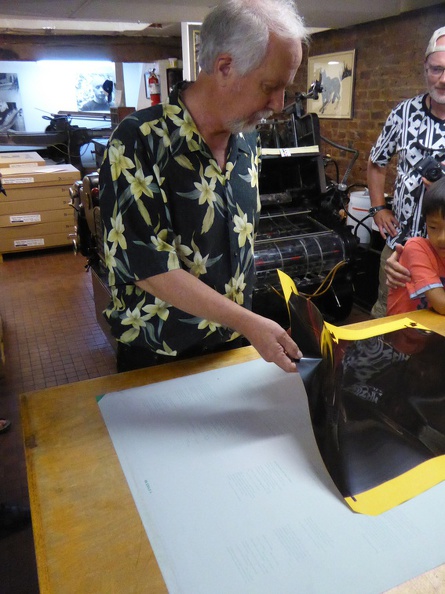
Master Tim is showing us offset technique
In the back of the basement of the little studio there is also a huge folding machine, which cuts up the big signatures of 16 pages and folds them into bundles. An impressive example of tricky engineering.
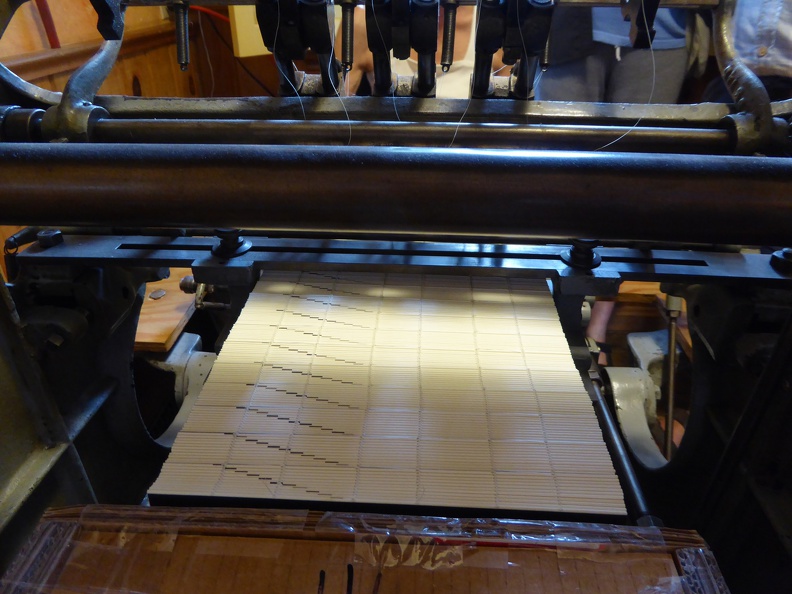
The folding machine creates from a printed signature 16 pages in proper order.
Due to the small size of the printing studio, our groups were actually split into two groups, and while the other group got its guided tour, we grabbed coffee and traditional cookies and pastries from the nearby Holtom s bakery. Loads of nice pastries with various filling, my favorite being the slightly salty cherry pie, and above all the rhubarb-raspberry pie.
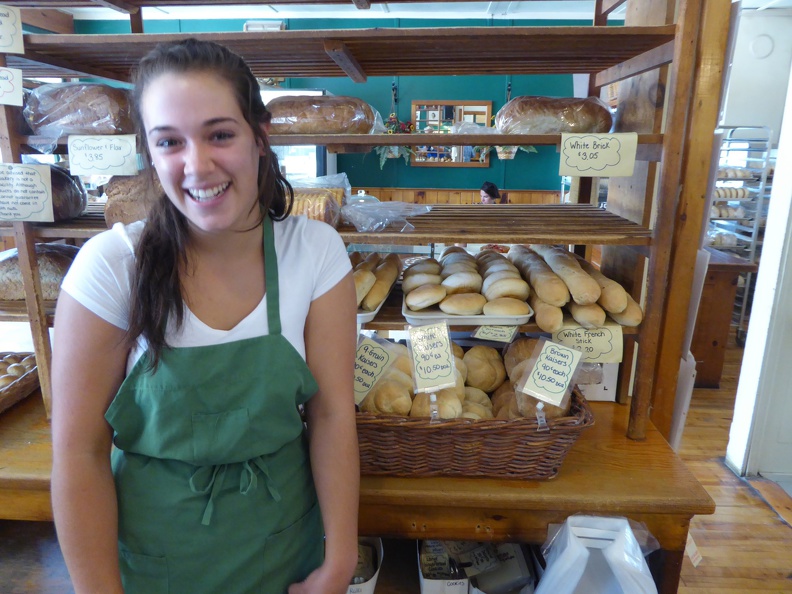
Nearby old-style bakery, selling Viennese-style "Kaisersemmel", calling them "Kaiser buns". There must be an Austrian hiding somewhere around.
To my absolute astonishment I also found there a Viennese Kaisersemmel , called Kaiser bun here, but keeping the shape and the idea (but unfortunately not the crispy cracky quality of the original in Vienna). Of course I got two of them, together with a nice jam from the region, and enjoyed these Viennese breakfast the next day morning.
Viennese breakfast from the Bakery near Porcupine's Quill
Leaving the Quill we headed for a lunch in a nice pizzeria (I got Pizza Toscana) which also served excellent local beer how would I like to have something like this over in Japan! Our last stop on this excursion was Stone Hammer Brewery, ne of the most famous craft breweries in Canada.
One of the top craft breweries in Canada, the Stone Hammer
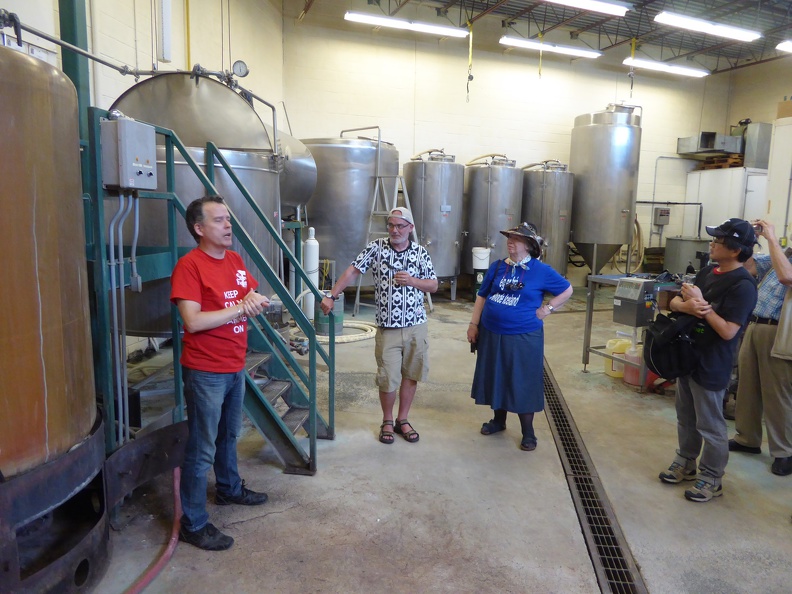
keep-calmAlthough they wont win a prize for typography (besides one page of a coaster there that carried a nice pun), their beers are exquisite. We got five different beers to taste, plus extensive explanations on brewing methods and differences. Now I finally understand why most of the new craft breweries in Japan are making Ales: Ales don t need a long process and are ready for sale in rather short time, compared to e.g. lagers.)
Explanations of the the secrets of beer brewing
Nothing to add to this poster found in the Stone Hammer Brewery!
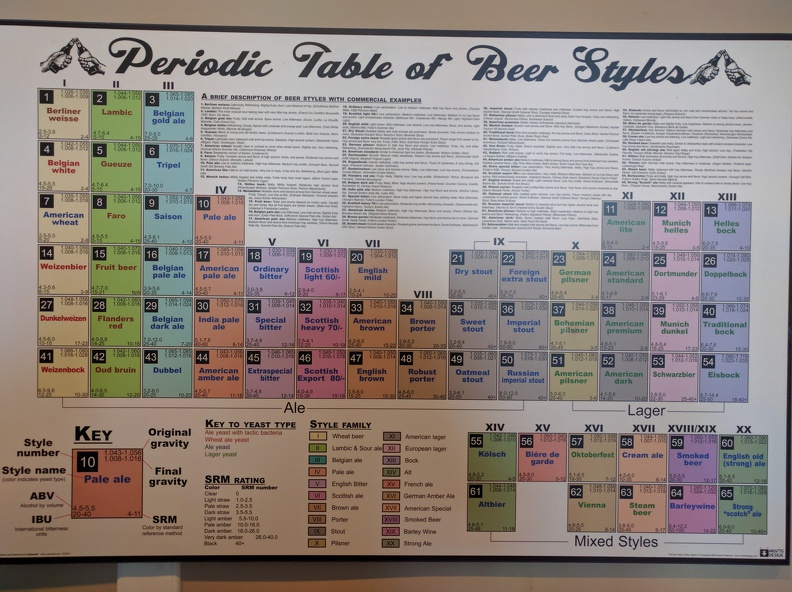
Also at the Stone Hammer Brewery I spotted this very nice poster on the wall of the toilet. And I cannot agree more, everything can easily be discussed over a good beer it calms down aversions, makes even the worst enemies friends, and is healthy for both the mind and body. Filled with excellent beer, some of us (notably an unnamed US TeXnician and politician), stacked up on beers to carry home. I was very tempted to get a huge batch, but putting cans into an airplane seems to be not the optimal idea. Since we are talking cans, I was surprised to hear that many craft beer brewers nowadays prefer cans due to their better protection of the beer from light and oxygen, both killers of good beer. Before leaving we took a last look at the Periodic Table of Beer Types, which left me in awe about how much I don t know and I probably never will know. In particular, I heard the first time of a Vienna style beer Vienna is not really famous for beer, better to say, it is infamous. So maybe this is a different Vienna than my home town that is meant here.
Lots to study here, the Periodic Table of Beers
Another two hour bus ride brought us back to Toronto, where we met with other participants at the reception in a restaurant of Mediterranean cuisine, where I could enjoy for the first time in years a good Tahina and Humus. All around another excellent day, now I only would like to have two days of holidays, guess I need to relax in the lectures starting from tomorrow.

24 July 2016

Russ Allbery: Review: The Run of His Life

Review: The Run of His Life, by Jeffrey Toobin
Publisher: Random House
Copyright: 1996, 1997
Printing: 2015
ISBN: 0-307-82916-2
Format: Kindle
Pages: 498
The O.J. Simpson trial needs little introduction to anyone who lived through it in the United States, but a brief summary for those who didn't. O.J. Simpson is a Hall of Fame football player and one of the best running backs to ever play the game. He's also black, which is very relevant much of what later happened. After he retired from professional play, he became a television football commentator and a spokesperson for various companies (particularly Hertz, a car rental business). In 1994, he was arrested for the murder of two people: his ex-wife, Nicole Brown Simpson, and Ron Goldman (a friend of Nicole's). The arrest happened after a bizarre low-speed police chase across Los Angeles in a white Bronco that was broadcast live on network television. The media turned the resulting criminal trial into a reality TV show, with live cable television broadcasts of all of the court proceedings. After nearly a full year of trial (with the jury sequestered for nine months more on that later), a mostly black jury returned a verdict of not guilty after a mere four hours of deliberation. Following the criminal trial, in an extremely unusual legal proceeding, Simpson was found civilly liable for Ron Goldman's death in a lawsuit brought by his family. Bizarre events surrounding the case continued long afterwards. A book titled If I Did It (with "if" in very tiny letters on the cover) was published, ghost-written but allegedly with Simpson's input and cooperation, and was widely considered a confession. Another legal judgment let the Goldman family get all the profits from that book's publication. In an unrelated (but also bizarre) incident in Las Vegas, Simpson was later arrested for kidnapping and armed robbery and is currently in prison until at least 2017. It is almost impossible to have lived through the O.J. Simpson trial in the United States and not have formed some opinion on it. I was in college and without a TV set at the time, and even I watched some of the live trial coverage. Reactions to the trial were extremely racially polarized, as you might have guessed. A lot of black people believed at the time that Simpson was innocent (probably fewer now, given subsequent events). A lot of white people thought he was obviously guilty and was let off by a black jury for racial reasons. My personal opinion, prior to reading this book, was a common "third way" among white liberals: Simpson almost certainly committed the murders, but the racist Los Angeles police department decided to frame him for a crime that he did commit by trying to make the evidence stronger. That's a legitimate reason in the US justice system for finding someone innocent: the state has an obligation to follow correct procedure and treat the defendant fairly in order to get a conviction. I have a strong bias towards trusting juries; frequently, it seems that the media second-guesses the outcome of a case that makes perfect sense as soon as you see all the information the jury had (or didn't have). Toobin's book changed my mind. Perhaps because I wasn't watching all of the coverage, I was greatly underestimating the level of incompetence and bad decision-making by everyone involved: the prosecution, the defense, the police, the jury, and the judge. This court case was a disaster from start to finish; no one involved comes away looking good. Simpson was clearly guilty given the evidence presented, but the case was so badly mishandled that it gave the jury room to reach the wrong verdict. (It's telling that, in the far better managed subsequent civil case, the jury had no trouble reaching a guilty verdict.) The Run of His Life is a very detailed examination of the entire Simpson case, from the night of the murder through the end of the trial and (in an epilogue) the civil case. Toobin was himself involved in the media firestorm, breaking some early news of the defense's decision to focus on race in The New Yorker and then involved throughout the trial as a legal analyst, and he makes it clear when he becomes part of the story. But despite that, this book felt objective to me. There are tons of direct quotes, lots of clear description of the evidence, underlying interviews with many of the people involved to source statements in the book, and a comprehensive approach to the facts. I think Toobin is a bit baffled by the black reaction to the case, and that felt like a gap in the comprehensiveness and the one place where he might be accused of falling back on stereotypes and easy judgments. But other than hole, Toobin applies his criticism even-handedly and devastatingly to all parties. I won't go into all the details of how Toobin changed my mind. It was a cumulative effect across the whole book, and if you're curious, I do recommend reading it. A lot was the detailed discussion of the forensic evidence, which was undermined for the jury at trial but looks very solid outside the hothouse of the case. But there is one critical piece that I would hope would be handled differently today, twenty years later, than it was by the prosecutors in that case: Simpson's history of domestic violence against Nicole. With what we now know about patterns of domestic abuse, the escalation to murder looks entirely unsurprising. And that history of domestic abuse was exceedingly well-documented: multiple external witnesses, police reports, and one actual prior conviction for spousal abuse (for which Simpson did "community service" that was basically a joke). The prosecution did a very poor job of establishing this history and the jury discounted it. That was a huge mistake by both parties. I'll mention one other critical collection of facts that Toobin explains well and that contradicted my previous impression of the case: the relationship between Simpson and the police. Today, in the era of Black Lives Matter, the routine abuse of black Americans by the police is more widely known. At the time of the murders, it was less recognized among white Americans, although black Americans certainly knew about it. But even in 1994, the Los Angeles police department was notorious as one of the most corrupt and racist big-city police departments in the United States. This is the police department that beat Rodney King. Mark Fuhrman, one of the police officers involved in the case (although not that significantly, despite his role at the trial), was clearly racist and had no business being a police officer. It was therefore entirely believable that these people would have decided to frame a black man for a murder he actually committed. What Toobin argues, quite persuasively and with quite a lot of evidence, is that this analysis may make sense given the racial tensions in Los Angeles but ignores another critical characteristic of Los Angeles politics, namely a deference to celebrity. Prior to this trial, O.J. Simpson largely followed the path of many black athletes who become broadly popular in white America: underplaying race and focusing on his personal celebrity and connections. (Toobin records a quote from Simpson earlier in his life that perfectly captures this approach: "I'm not black, I'm O.J.") Simpson spent more time with white businessmen than the black inhabitants of central Los Angeles. And, more to the point, the police treated him as a celebrity, not as a black man. Toobin takes some time to chronicle the remarkable history of deference and familiarity that the police showed Simpson. He regularly invited police officers to his house for parties. The police had a long history of largely ignoring or downplaying his abuse of his wife, including not arresting him in situations that clearly seemed to call for that, showing a remarkable amount of deference to his side of the story, not pursuing clear violations of the court judgment after his one conviction for spousal abuse, and never showing much inclination to believe or protect Nicole. Even on the night of the murder, they started following a standard playbook for giving a celebrity advance warning of investigations that might involve them before the news media found out about them. It seems clear, given the evidence that Toobin collected, that the racist Los Angeles police didn't focus that animus at Simpson, a wealthy celebrity living in Brentwood. He wasn't a black man in their eyes; he was a rich Hall of Fame football player and a friend. This obviously raises the question of how the jury could return an innocent verdict. Toobin provides plenty of material to analyze that question from multiple angles in his detailed account of the case, but I can tell you my conclusion: Judge Lance Ito did a horrifically incompetent job of managing the case. He let the lawyers wander all over the case, interacted bizarrely with the media coverage (and was part of letting the media turn it into a daytime drama), was not crisp or clear about his standards of evidence and admissibility, and, perhaps worst of all, let the case meander on at incredible length. With a fully sequestered jury allowed only brief conjugal visits and no media contact (not even bookstore shopping!). Quite a lot of anger was focused on the jury after the acquittal, and I do think they reached the wrong conclusion and had all the information they would have needed to reach the correct one. But Toobin touches on something that I think would be very hard to comprehend without having lived through it. The jury and alternate pool essentially lived in prison for nine months, with guards and very strict rules about contact with the outside world, in a country where compensation for jury duty is almost nonexistent. There were a lot of other factors behind their decision, including racial tensions and the sheer pressure from judging a celebrity case about which everyone has an opinion, but I think it's nearly impossible to underestimate the psychological tension and stress from being locked up with random other people under armed guard for three quarters of a year. It's hard for jury members to do an exhaustive and careful deliberation in a typical trial that takes a week and doesn't involve sequestration. People want to get back to their lives and families. I can only imagine the state I would be in after nine months of this, or how poor psychological shape I would be in to make a careful and considered decision. Similarly, for those who condemned the jury for profiting via books and media appearances after the trial, the current compensation for jurors is $15 per day (not hour). I believe at the time it was around $5 per day. There are a few employers who will pay full salary for the entire jury service, but only a few; many cap the length at a few weeks, and some employers treat all jury duty as unpaid leave. The only legal requirement for employers in the United States is that employees that serve on a jury have their job held for them to return to, but compensation is pathetic, not tied to minimum wage, and employers do not have to supplement it. I'm much less inclined to blame the jurors than the system that badly mistreated them. As you can probably tell from the length of this review, I found The Run of His Life fascinating. If I had followed the whole saga more closely at the time, this may have been old material, but I think my vague impressions and patchwork of assumptions were more typical than not among people who were around for the trial but didn't invest a lot of effort into following it. If you are like me, and you have any interest in the case or the details of how the US criminal justice system works, this is a fascinating case study, and Toobin does a great job with it. Recommended. Rating: 8 out of 10

23 July 2016

Steve Kemp: A final post about the lua-editor.

I recently mentioned that I'd forked Antirez's editor and added lua to it. I've been working on it, on and off, for the past week or two now. It's finally reached a point where I'm content: Most of the obvious things I use in Emacs are present, such as the ability to customize the status-bar (right now it shows the cursor position, the number of characters, the number of words, etc, etc). Anyway I'll stop talking about it now :)

22 July 2016

Norbert Preining: Yukio Mishima The Temple of the Golden Pavilion

A masterpiece of modern Japanese literature: Yukio Mishima ( ) The Temple of the Golden Pavilion ( ). The fictional story about the very real arson attack that destroyed the Golden Pavilion in 1950.
mishima-golden-temple A bit different treatise on beauty and ugliness!
How shall I put it? Beauty yes, beauty is like a decayed tooth. It rubs against one s tongue, it hangs there, hurting one, insisting on its own existence, finally [ ] the tooth extracted. Then, as one looks at the small, dirty, brown, blood-stained tooth lying in one s hand, one s thoughts are likely to be as follows: Is this it?
Mizoguchi, a stutterer, is from young years on taken by a near mystical imagination of the Golden Pavilion, influence by his father who considers it the most beautiful object in the world. After his father s death he moves to Kyoto and becomes acolyte in the temple. He develops a friendship with Kashiwagi, who uses his clubfeet to make women feel sorry for him and make them fall in love with his clubfeet, as he puts it. Kashiwagi also puts Mizoguchi onto the first tracks of amorous experiences, but Mizoguchi invariably turns out to be impotent but not due to his stuttering, but due to the image of the Golden Pavilion appearing in the essential moment and destroying every chance.
Yes, this was really the coast of the Sea of Japan! Here was the source of all my unhappiness, of all my gloomy thoughts, the origin of all my ugliness and all my strength. It was a wild sea.
Mizoguchi is getting more and more mentally about his relation with the head monk, neglects his studies, and after a stark reprimand he escapes to the north coast, from where he is brought back by police to the temple. He decides to burn down the Golden Pavilion, which has taken more and more command of his thinking and doing. He carries out the deed with the aim to burn himself in the top floor, but escapes in the last second to retreat into the hills to watch the spectacle.
Closely based on the true story of the arsonist of the Golden Pavilion, whom Mishima even visited in prison, the book is a treatise about beauty and ugly.
At his trial he [the real arsonist] said: I hate myself, my evil, ugly, stammering self. Yet he also said that he did not in any way regret having burned down the Kinkakuji.
Nancy Wilson Ross in the preface
Mishima is master in showing these two extremes by contrasting the refined qualities of Japanese culture flower arrangement, playing the shakuhachi, with immediate outburst of contrasting behavior: cold and brutal recklessness. Take for example the scene were Kashiwagi is arranging flowers, stolen by Mizoguchi from the temple grounds, while Mizoguchi is playing the flute. They also discuss koans and various interpretations. Enters the Ikebana teacher, and mistress of Kashiwagi. She congratulates Kashiwagi to his excellent arrangement, which he answers coldly by quitting their relationship, both as teacher as well as mistress, and telling her not to see him again in a formal style. She, still ceremonially kneeling, suddenly destroys the flower arrangement, only to be beaten and thrown out by Kashiwagi. And the beauty and harmony has turned to ugliness and hate in seconds. Beauty and Ugliness, two sides of the same medal, or inherently the same, because it is only up to the point of view. Mishima ingeniously plays with this duality, and leads us through the slow and painful development of Mizoguchi to the bitter end, which finally gives him freedom, freedom from the force of beauty. Sometimes seeing how our society is obsessed with beauty I cannot get rid of the feeling that there are far more Mizoguchis at heart.

Russell Coker: 802.1x Authentication on Debian

I recently had to setup some Linux workstations with 802.1x authentication (described as Ethernet authentication ) to connect to a smart switch. The most useful web site I found was the Ubuntu help site about 802.1x Authentication [1]. But it didn t describe exactly what I needed so I m writing a more concise explanation. The first thing to note is that the authentication mechanism works the same way as 802.11 wireless authentication, so it s a good idea to have the wpasupplicant package installed on all laptops just in case you need to connect to such a network. The first step is to create a wpa_supplicant config file, I named mine /etc/wpa_supplicant_SITE.conf. The file needs contents like the following:
network= 
 key_mgmt=IEEE8021X
 eap=PEAP
 identity="USERNAME"
 anonymous_identity="USERNAME"
 password="PASS"
 phase1="auth=MD5"
 phase2="auth=CHAP password=PASS"
 eapol_flags=0
 
The first difference between what I use and the Ubuntu example is that I m using eap=PEAP , that is an issue of the way the network is configured, whoever runs your switch can tell you the correct settings for that. The next difference is that I m using auth=CHAP and the Ubuntu example has auth=PAP . The difference between those protocols is that CHAP has a challenge-response and PAP just has the password sent (maybe encrypted) over the network. If whoever runs the network says that they don t store unhashed passwords or makes any similar claim then they are almost certainly using CHAP. Change USERNAME and PASS to your user name and password. wpa_supplicant -c /etc/wpa_supplicant_SITE.conf -D wired -i eth0 The above command can be used to test the operation of wpa_supplicant.
Successfully initialized wpa_supplicant
eth0: Associated with 00:01:02:03:04:05
eth0: CTRL-EVENT-EAP-STARTED EAP authentication started
eth0: CTRL-EVENT-EAP-PROPOSED-METHOD vendor=0 method=25
TLS: Unsupported Phase2 EAP method 'CHAP'
eth0: CTRL-EVENT-EAP-METHOD EAP vendor 0 method 25 (PEAP) selected
eth0: CTRL-EVENT-EAP-PEER-CERT depth=0 subject=''
EAP-MSCHAPV2: Authentication succeeded
EAP-TLV: TLV Result - Success - EAP-TLV/Phase2 Completed
eth0: CTRL-EVENT-EAP-SUCCESS EAP authentication completed successfully
eth0: CTRL-EVENT-CONNECTED - Connection to 00:01:02:03:04:05 completed [id=0 id_str=]
Above is the output of a successful test with wpa_supplicant. I replaced the MAC of the switch with 00:01:02:03:04:05. Strangely it doesn t like CHAP but is automatically selecting MSCHAPV2 and working, maybe anything other than PAP would do.
auto eth0
iface eth0 inet dhcp
  wpa-driver wired
  wpa-conf /etc/wpa_supplicant_SITE.conf
Above is a snippet of /etc/network/interfaces that works with this configuration.

Dirk Eddelbuettel: RcppCCTZ 0.0.5

Version 0.0.5 of RcppCCTZ arrived on CRAN a couple of days ago. It reflects an upstream fixed made a few weeks ago. CRAN tests revealed that g++-6 was tripping over one missing #define; this was added upstream and I subsequently synchronized with upstream. At the same time the set of examples was extended (see below). Somehow useR! 2016 got in the way and while working on the then-incomplete examples during the traveling I forgot to release this until CRAN reminded me that their tests still failed. I promptly prepared the 0.0.5 release but somehow failed to update NEWS files etc. They are correct in the repo but not in the shipped package. Oh well. CCTZ is a C++ library for translating between absolute and civil times using the rules of a time zone. In fact, it is two libraries. One for dealing with civil time: human-readable dates and times, and one for converting between between absolute and civil times via time zones. It requires only a proper C++11 compiler and the standard IANA time zone data base which standard Unix, Linux, OS X, ... computers tend to have in /usr/share/zoneinfo. RcppCCTZ connects this library to R by relying on Rcpp. Two good examples are now included, and shown here. The first one tabulates the time difference between New York and London (at a weekly level for compactness):
R> example(tzDiff)
tzDiffR> # simple call: difference now
tzDiffR> tzDiff("America/New_York", "Europe/London", Sys.time())
[1] 5
tzDiffR> # tabulate difference for every week of the year
tzDiffR> table(sapply(0:52, function(d) tzDiff("America/New_York", "Europe/London",
tzDiff+                                       as.POSIXct(as.Date("2016-01-01") + d*7))))
 4  5 
 3 50 
R> 
Because the two continents happen to spring forward and fall backwards between regular and daylight savings times, there are, respectively, two and one week periods where the difference is one hour less than usual. A second example shifts the time to a different time zone:
R> example(toTz)
toTzR> toTz(Sys.time(), "America/New_York", "Europe/London")
[1] "2016-07-14 10:28:39.91740 CDT"
R> 
Note that because we return a POSIXct object, it is printed by R with the default (local) TZ attribute (for "America/Chicago" in my case). A more direct example asks what time it is in my time zone when it is midnight in Tokyo:
R> toTz(ISOdatetime(2016,7,15,0,0,0), "Japan", "America/Chicago")
[1] "2016-07-14 15:00:00 CDT"
R>
More changes will come in 0.0.6 as soon as I find time to translate the nice time_tool (command-line) example into an R function. Changes in this version are summarized here:
Changes in version 0.0.5 (2016-07-09)
  • New utility example functions toTz() and tzDiff
  • Synchronized with small upstream change for additional #ifdef for compiler differentiation
We also have a diff to the previous version thanks to CRANberries. More details are at the RcppCCTZ page; code, issue tickets etc at the GitHub repository.

This post by Dirk Eddelbuettel originated on his Thinking inside the box blog. Please report excessive re-aggregation in third-party for-profit settings.

20 July 2016

Daniel Stender: Theano in Debian: maintenance, BLAS and CUDA

I'm glad to announce that we have the current release of Theano (0.8.2) in Debian unstable now, it's on its way into the testing branch and the Debian derivatives, heading for Debian 9. The Debian package is maintained in behalf of the Debian Science Team. We have a binary package with the modules in the Python 2.7 import path (python-theano), if you want or need to stick to that branch a little longer (as a matter of fact, in the current popcon stats it's the most installed package), and a package running on the default Python 3 version (python3-theano). The comprehensive documentation is available for offline usage in another binary package (theano-doc). Although Theano builds its extensions on run time and therefore all binary packages contain the same code, the source package generates arch specific packages1 for the reason that the exhaustive test suite could run over all the architectures to detect if there are problems somewhere (#824116). what's this? In a nutshell, Theano is a computer algebra system (CAS) and expression compiler, which is implemented in Python as a library. It is named after a Classical Greek female mathematician and it's developed at the LISA lab (located at MILA, the Montreal Institute for Learning Algorithms) at the Universit de Montr al. Theano tightly integrates multi-dimensional arrays (N-dimensional, ND-array) from NumPy (numpy.ndarray), which are broadly used in Scientific Python for the representation of numeric data. It features a declarative Python based language with symbolic operations for the functional definition of mathematical expressions, which allows to create functions that compute values for them. Internally the expressions are represented as directed graphs with nodes for variables and operations. The internal compiler then optimizes those graphs for stability and speed and then generates high-performance native machine code to evaluate resp. compute these mathematical expressions2. One of the main features of Theano is that it's capable to compute also on GPU processors (graphical processor unit), like on custom graphic cards (e.g. the developers are using a GeForce GTX Titan X for benchmarks). Today's GPUs became very powerful parallel floating point devices which can be employed also for scientific computations instead of 3D video games3. The acronym "GPGPU" (general purpose graphical processor unit) refers to special cards like NVIDIA's Tesla4, which could be used alike (more on that below). Thus, Theano is a high-performance number cruncher with an own computing engine which could be used for large-scale scientific computations. If you haven't came across Theano as a Pythonistic professional mathematician, it's also one of the most prevalent frameworks for implementing deep learning applications (training multi-layered, "deep" artificial neural networks, DNN) around5, and has been developed with a focus on machine learning from the ground up. There are several higher level user interfaces build in the top of Theano (for DNN, Keras, Lasagne, Blocks, and others, or for Python probalistic programming, PyMC3). I'll seek for some of them also becoming available in Debian, too. helper scripts Both binary packages ship three convenience scripts, theano-cache, theano-test, and theano-nose. Instead of them being copied into /usr/bin, which would result into a binaries-have-conflict violation, the scripts are to be found in /usr/share/python-theano (python3-theano respectively), so that both module packages of Theano can be installed at the same time. The scripts could be run directly from these folders, e.g. do $ python /usr/share/python-theano/theano-nose to achieve that. If you're going to heavy use them, you could add the directory of the flavour you prefer (Python 2 or Python 3) to the $PATH environment variable manually by either typing e.g. $ export PATH=/usr/share/python-theano:$PATH on the prompt, or save that line into ~/.bashrc. Manpages aren't available for these little helper scripts6, but you could always get info on what they do and which arguments they accept by invoking them with the -h (for theano-nose) resp. help flag (for theano-cache). running the tests On some occasions you might want to run the testsuite of the installed library, like to check over if everything runs fine on your GPU hardware. There are two different ways to run the tests (anyway you need to have python ,3 -nose installed). One is, you could launch the test suite by doing $ python -c 'import theano; theano.test() (or the same with python3 to test the other flavour), that's the same what the helper script theano-test does. However, by doing it that way some particular tests might fail by raising errors also for the group of known failures. Known failures are excluded from being errors if you run the tests by theano-nose, which is a wrapper around nosetests, so this might be always the better choice. You can run this convenience script with the option --theano on the installed library, or from the source package root, which you could pull by $ sudo apt-get source theano (there you have also the option to use bin/theano-nose). The script accept options for nosetests, so you might run it with -v to increase verbosity. For the tests the configuration switch config.device must be set to cpu. This will also include the GPU tests when a proper accessible device is detected, so that's a little misleading in the sense of it doesn't mean "run everything on the CPU". You're on the safe side if you run it always like this: $ THEANO_FLAGS=device=cpu theano-nose, if you've set config.device to gpu in your ~/.theanorc. Depending on the available hardware and the used BLAS implementation (see below) it could take quite a long time to run the whole test suite through, on the Core-i5 in my laptop that takes around an hour even excluded the GPU related tests (which perform pretty fast, though). Theano features a couple of switches to manipulate the default configuration for optimization and compilation. There is a rivalry between optimization and compilation costs against performance of the test suite, and it turned out the test suite performs a quicker with lesser graph optimization. There are two different switches available to control config.optimizer, the fast_run toggles maximal optimization, while fast_compile runs only a minimal set of graph optimization features. These settings are used by the general mode switches for config.mode, which is either FAST_RUN by default, or FAST_COMPILE. The default mode FAST_RUN (optimizer=fast_run, linker=cvm) needs around 72 minutes on my lower mid-level machine (on un-optimized BLAS). To set mode=FAST_COMPILE (optimizer=fast_compile, linker=py) brings some boost for the performance of the test suite because it runs the whole suite in 46 minutes. The downside of that is that C code compilation is disabled in this mode by using the linker py, and also the GPU related tests are not included. I've played around with using the optimizer fast_compile with some of the other linkers (c py and cvm, and their versions without garbage collection) as alternative to FAST_COMPILE with minimal optimization but also machine code compilation incl. GPU testing. But to my experience, fast_compile without another than the linker py results in some new errors and failures of some tests on amd64, and this might the case also on other architectures, too. By the way, another useful feature is DebugMode for config.mode, which verifies the correctness of all optimizations and compares the C to Python results. If you want to have detailed info on the configuration settings of Theano, do $ python -c 'import theano; print theano.config' less, and check out the chapter config in the library documentation in the documentation. cache maintenance Theano isn't a JIT (just-in-time) compiler like Numba, which generates native machine code in the memory and executes it immediately, but it saves the generated native machine code into compiledirs. The reason for doing it that way is quite practical like the docs explain, the persistent cache on disk makes it possible to avoid generating code for the same operation, and to avoid compiling again when different operations generate the same code. The compiledirs by default are located within $(HOME)/.theano/. After some time the folder becomes quite large, and might look something like this:
$ ls ~/.theano
compiledir_Linux-4.5--amd64-x86_64-with-debian-stretch-sid--2.7.11+-64
compiledir_Linux-4.5--amd64-x86_64-with-debian-stretch-sid--2.7.12-64
compiledir_Linux-4.5--amd64-x86_64-with-debian-stretch-sid--2.7.12rc1-64
compiledir_Linux-4.5--amd64-x86_64-with-debian-stretch-sid--3.5.1+-64
compiledir_Linux-4.5--amd64-x86_64-with-debian-stretch-sid--3.5.2-64
compiledir_Linux-4.5--amd64-x86_64-with-debian-stretch-sid--3.5.2rc1-64
If the used Python version changed like in this example you might to want to purge obsolete cache. For working with the cache resp. the compiledirs, the helper theano-cache comes in handy. If you invoke it without any arguments the current cache location is put out like ~/.theano/compiledir_Linux-4.5--amd64-x86_64-with-debian-stretch-sid--2.7.12-64 (the script is run from /usr/share/python-theano). So, the compiledirs for the old Python versions in this example (11+ and 12rc1) can be removed to free the space they occupy. All compiledirs resp. cache directories meaning the whole cache could be erased by $ theano-cache basecompiledir purge, the effect is the same as by performing $ rm -rf ~/.theano. You might want to do that e.g. if you're using different hardware, like when you got yourself another graphics card. Or habitual from time to time when the compiledirs fill up so much that it slows down processing with the harddisk being very busy all the time, if you don't have an SSD drive available. For example, the disk space of build chroots carrying (mainly) the tests completely compiled through on default Python 2 and Python 3 consumes around 1.3 GB (see here). BLAS implementations Theano needs a level 3 implementation of BLAS (Basic Linear Algebra Subprograms) for operations between vectors (one-dimensional mathematical objects) and matrices (two-dimensional objects) carried out on the CPU. NumPy is already build on BLAS and pulls the standard implementation (libblas3, soure package: lapack), but Theano links directly to it instead of using NumPy as intermediate layer to reduce the computational overhead. For this, Theano needs development headers and the binary packages pull libblas-dev by default, if any other development package of another BLAS implementation (like OpenBLAS or ATLAS) isn't already installed, or pulled with them (providing the virtual package libblas.so). The linker flags could be manipulated directly through the configuration switch config.blas.ldflags, which is by default set to -L/usr/lib -lblas -lblas. By the way, if you set it to an empty value, Theano falls back to using BLAS through NumPy, if you want to have that for some reason. On Debian, there is a very convenient way to switch between BLAS implementations by the alternatives mechanism. If you have several alternative implementations installed at the same time, you can switch from one to another easily by just doing:
$ sudo update-alternatives --config libblas.so
There are 3 choices for the alternative libblas.so (providing /usr/lib/libblas.so).
  Selection    Path                                  Priority   Status
------------------------------------------------------------
* 0            /usr/lib/openblas-base/libblas.so      40        auto mode
  1            /usr/lib/atlas-base/atlas/libblas.so   35        manual mode
  2            /usr/lib/libblas/libblas.so            10        manual mode
  3            /usr/lib/openblas-base/libblas.so      40        manual mode
Press <enter> to keep the current choice[*], or type selection number:
The implementations are performing differently on different hardware, so you might want to take the time to compare which one does it best on your processor (the other packages are libatlas-base-dev and libopenblas-dev), and choose that to optimize your system. If you want to squeeze out all which is in there for carrying out Theano's computations on the CPU, another option is to compile an optimized version of a BLAS library especially for your processor. I'm going to write another blog posting on this issue. The binary packages of Theano ship the script check_blas.py to check over how well a BLAS implementation performs with it, and if everything works right. That script is located in the misc subfolder of the library, you could locate it by doing $ dpkg -L python-theano grep check_blas (or for the package python3-theano accordingly), and run it with the Python interpreter. By default the scripts puts out a lot of info like a huge perfomance comparison reference table, the current setting of blas.ldflags, the compiledir, the setting of floatX, OS information, the GCC version, the current NumPy config towards BLAS, NumPy location and version, if Theano linked directly or has used the NumPy binding, and finally and most important, the execution time. If just the execution time for quick perfomance comparisons is needed this script could be invoked with -q. Theano on CUDA The function compiler of Theano works with alternative backends to carry out the computations, like the ones for graphics cards. Currently, there are two different backends for GPU processing available, one docks onto NVIDIA's CUDA (Compute Unified Device Architecture) technology7, and another one for libgpuarray, which is also developed by the Theano developers in parallel. The libgpuarray library is an interesting alternative for Theano, it's a GPU tensor (multi-dimensional mathematical object) array written in C with Python bindings based on Cython, which has the advantage of running also on OpenCL8. OpenCL, unlike CUDA9, is full free software, vendor neutral and overcomes the limitation of the CUDA toolkit being only available for amd64 and the ppc64el port (see here). I've opened an ITP on libgpuarray and we'll see if and how this works out. Another reason for it would be great to have it available is that it looks like CUDA currently runs into problems with GCC 610. More on that, soon. Here's a litle checklist for setting up your CUDA device so that you don't have to experience something like this:
$ THEANO_FLAGS=device=gpu,floatX=float32 python ./cat_dog_classifier.py 
WARNING (theano.sandbox.cuda): CUDA is installed, but device gpu is not available (error: Unable to get the number of gpus available: no CUDA-capable device is detected)
hardware check For running Theano on CUDA you need an NVIDIA graphics card which is capable of doing that. You can recheck if your device is supported by CUDA here. When the hardware isn't too old (CUDA support started with GeForce 8 and Quadro X series) or too strange I think it isn't working only in exceptional cases. You can check your model and if the device is present in the system on the bare hardware level by doing this:
$ lspci   grep -i nvidia
04:00.0 3D controller: NVIDIA Corporation GM108M [GeForce 940M] (rev a2)
If a line like this doesn't get returned, your device most probably is broken, or not properly connected (ouch). If rev ff appears at the end of the line that means the device is off meaning powered down. This might be happening if you have a laptop with Optimus graphics hardware, and the related drivers have switched off the unoccupied device to safe energy11. kernel module Running CUDA applications requires the proprietary NVIDIA driver kernel module to be loaded into the kernel and working. If you haven't already installed it for another purpose, the NVIDIA driver and the CUDA toolkit are both in the non-free section of the Debian archive, which is not enabled by default. To get non-free packages you have to add non-free (and it's better to do so, also contrib) to your package source in /etc/apt/sources.list, which might then look like this:
deb http://httpredir.debian.org/debian/ testing main contrib non-free
After doing that, perform $ apt-cache update to update the package lists, and there you go with the non-free packages. The headers of the running kernel are needed to compile modules, you can get them together with the NVIDIA kernel module package by running:
$ sudo apt-get install linux-headers-$(uname -r) nvidia-kernel-dkms build-essential
DKMS will then build the NVIDIA module for the kernel and does some other things on the system. When the installation has finished, it's generally advised to reboot the system completely. troubleshooting If you have problems with the CUDA device, it's advised to verify if the following things concerning the NVIDIA driver resp. kernel module are in order: blacklist nouveau Check if the default Nouveau kernel module driver (which blocks the NVIDIA module) for some reason still gets loaded by doing $ lsmod grep nouveau. If nothing gets returned, that's right. If it's still in the kernel, just add blacklist nouveau to /etc/modprobe.d/blacklist.conf, and update the booting ramdisk with sudo update-initramfs -u afterwards. Then reboot once more, this shouldn't be the case then anymore. rebuild kernel module To fix it when the module haven't been properly compiled for some reason you could trigger a rebuild of the NVIDIA kernel module with $ sudo dpkg-reconfigure nvidia-kernel-dkms. When you're about to send your hardware in to repair because everything looks all right but the device just isn't working, that really could help (own experience). After the rebuild of the module or modules (if you have a few kernel packages installed) has completed, you could recheck if the module really is available by running:
$ sudo modinfo nvidia-current
filename:       /lib/modules/4.4.0-1-amd64/updates/dkms/nvidia-current.ko
alias:          char-major-195-*
version:        352.79
supported:      external
license:        NVIDIA
alias:          pci:v000010DEd00000E00sv*sd*bc04sc80i00*
alias:          pci:v000010DEd*sv*sd*bc03sc02i00*
alias:          pci:v000010DEd*sv*sd*bc03sc00i00*
depends:        drm
vermagic:       4.4.0-1-amd64 SMP mod_unload modversions 
parm:           NVreg_Mobile:int
It should be something similiar to this when everything is all right. reload kernel module When there are problems with the GPU, maybe the kernel module isn't properly loaded. You could recheck if the module has been properly loaded by doing
$ lsmod   grep nvidia
nvidia_uvm             73728  0
nvidia               8540160  1 nvidia_uvm
drm                   356352  7 i915,drm_kms_helper,nvidia
The kernel module could be loaded resp. reloaded with $ sudo nvidia-modprobe (that tool is from the package nvidia-modprobe). unsupported graphics card Be sure that you graphics cards is supported by the current driver kernel module. If you have bought new hardware, that's quite possible to come out being a problem. You can get the version of the current NVIDIA driver with:
$ cat /proc/driver/nvidia/version 
NVRM version: NVIDIA UNIX x86_64 Kernel Module 352.79  Wed Jan 13 16:17:53 PST 2016
GCC version:  gcc version 5.3.1 20160528 (Debian 5.3.1-21)
Then, google the version number like nvidia 352.79, this should get you onto an official driver download page like this. There, check for what's to be found under "Supported Products". I you're stuck with that there are two options, to wait until the driver in Debian got updated, or replace it with the latest driver package from NVIDIA. That's possible to do, but something more for experienced users. occupied graphics card The CUDA driver cannot work while the graphical interface is busy like by processing the graphical display of your X.Org server. Which kernel driver actually is used to process the desktop could be examined by this command:12
$ grep '(II).*([0-9]):' /var/log/Xorg.0.log
[    37.700] (II) intel(0): Using Kernel Mode Setting driver: i915, version 1.6.0 20150522
[    37.700] (II) intel(0): SNA compiled: xserver-xorg-video-intel 2:2.99.917-2 (Vincent Cheng <vcheng@debian.org>)
 ... 
[    39.808] (II) intel(0): switch to mode 1920x1080@60.0 on eDP1 using pipe 0, position (0, 0), rotation normal, reflection none
[    39.810] (II) intel(0): Setting screen physical size to 508 x 285
[    67.576] (II) intel(0): EDID vendor "CMN", prod id 5941
[    67.576] (II) intel(0): Printing DDC gathered Modelines:
[    67.576] (II) intel(0): Modeline "1920x1080"x0.0  152.84  1920 1968 2000 2250  1080 1083 1088 1132 -hsync -vsync (67.9 kHz eP)
This example shows that the rendering of the desktop is performed by the graphical device of the Intel CPU, which is just like it's needed for running CUDA applications on your NVIDIA graphics card, if you don't have another one. nvidia-cuda-toolkit With the Debian package of the CUDA toolkit everything pretty much runs out of the box for Theano. Just install it with apt-get, and you're ready to go, the CUDA backend is the default one. Pycuda is also a suggested dependency of the binary packages, it could be pulled together with the CUDA toolkit. The up-to-date CUDA release 7.5 is of course available, with that you have Maxwell architecture support so that you can run Theano on e.g. a GeForce GTX Titan X with 6,2 TFLOPS on single precision13 at an affordable price. CUDA 814 is around the corner with support for the new Pascal architecture15. Like the GeForce GTX 1080 high-end gaming graphics card already has 8,23 TFLOPS16. When it comes to professional GPGPU hardware like the Tesla P100 there is much more computational power available, scalable by multiplication of cores resp. cards up to genuine little supercomputers which fit on a desk, like the DGX-117. Theano can use multiple GPUs for calculations to work with highly scaled hardware, I'll write another blog post on this issue. Theano on the GPU It's not difficult to run Theano on the GPU. Only single precision floating point numbers (float32) are supported on the GPU, but that is sufficient for deep learning applications. Theano uses double precision floats (float64) by default, so you have to set the configuration variable config.floatX to float32, like written on above, either with the THEANO_FLAGS environment variable or better in your .theanorc file, if you're going to use the GPU a lot. Switching to the GPU actually happens with the config.device configuration variable, which must be set to either gpu or gpu0, gpu1 etc., to choose a particular one if multiple devices are available. Here's is a little test script check1.py, it's taken from the docs and slightly altered. You can run that script either with python or python3 (there was a single test failure on the Python 3 package, so the Python 2 library might be a little more stable currently). For comparison, here's an example on how it perfoms on my hardware, one time on the CPU, one more time on the GPU:
$ THEANO_FLAGS=floatX=float32 python ./check1.py 
[Elemwise exp,no_inplace (<TensorType(float32, vector)>)]
Looping 1000 times took 4.481719 seconds
Result is [ 1.23178029  1.61879337  1.52278066 ...,  2.20771813  2.29967761
  1.62323284]
Used the cpu
$ THEANO_FLAGS=floatX=float32,device=gpu python ./check1.py 
Using gpu device 0: GeForce 940M (CNMeM is disabled, cuDNN not available)
[GpuElemwise exp,no_inplace (<CudaNdarrayType(float32, vector)>), HostFromGpu(GpuElemwise exp,no_inplace .0)]
Looping 1000 times took 1.164906 seconds
Result is [ 1.23178029  1.61879349  1.52278066 ...,  2.20771813  2.29967761
  1.62323296]
Used the gpu
If you got a result like this you're ready to go with Theano on Debian, training computer vision classifiers or whatever you want to do with it. I'll write more on for what Theano could be used, soon.

  1. Some ports are disabled because they are currently not supported by Theano. There are NotImplementedErrors and other errors in the tests on the numpy.ndarray object being not aligned. The developers commented on that, see here. And on some ports the build flags -m32 resp. -m64 of Theano aren't supported by g++, the build flags can't be manipulated easily.
  2. Theano Development Team: "Theano: a Python framework for fast computation of mathematical expressions"
  3. Marc Couture: "Today's high-powered GPUs: strong for graphics and for maths". In: RTC magazine June 2015, pp. 22 25
  4. Ogier Maitre: "Understanding NVIDIA GPGPU hardware". In: Tsutsui/Collet (eds.): Massively parallel evolutionary computation on GPGPUs. Berlin, Heidelberg: Springer 2013, pp. 15-34
  5. Geoffrey French: "Deep learing tutorial: advanved techniques". PyData London 2016 presentation
  6. Like the description of the Lintian tag binary-without-manpage says, that's not needed for them being in /usr/share.
  7. Tom. R. Halfhill: "Parallel processing with CUDA: Nvidia's high-performance computing platform uses massive multithreading". In: Microprocessor Report January 28, 2008
  8. Faber et.al: "Parallelwelten: GPU-Programmierung mit OpenCL". In: C't 26/2014, pp. 160-165
  9. For comparison, see: Valentine Sinitsyn: "Feel the taste of GPU programming". In: Linux Voice February 2015, pp. 106-109
  10. https://lists.debian.org/debian-devel/2016/07/msg00004.html
  11. If Optimus (hybrid) graphics hardware is present (like commonly today on PC laptops), Debian launches the X-server on the graphics processing unit of the CPU, which is ideal for CUDA. The problem with Optimus actually is the graphics processing on the dedicated GPU. If you are using Bumblebee, the Python interpreter which you want to run Theano on has be to be started with the launcher primusrun, because Bumblebee powers the GPU down with the tool bbswitch every time it isn't used, and I think also the kernel module of the driver is dynamically loaded.
  12. Thorsten Leemhuis: "Treiberreviere. Probleme mit Grafiktreibern f r Linux l sen": In: C't Nr.2/2013, pp. 156-161
  13. Martin Fischer: "4K-Rakete: Die schnellste Single-GPU-Grafikkarte der Welt". In C't 13/2015, pp. 60-61
  14. http://www.heise.de/developer/meldung/Nvidia-CUDA-8-bringt-Optimierungen-fuer-die-Pascal-Architektur-3164254.html
  15. Martin Fischer: "All In: Nvidia enth llt die GPU-Architektur 'Pascal'". In: C't 9/2016, pp. 30-31
  16. Martin Fischer: "Turbo-Pascal: High-End-Grafikkarte f r Spieler: GeForce GTX 1080". In: C't 13/2016, pp. 100-103
  17. http://www.golem.de/news/dgx-1-nvidias-supercomputerchen-mit-8x-tesla-p100-1604-120155.html

Next.

Previous.