Samuel Henrique: Latest NVIDIA Drivers for Debian (Packaged with AI)

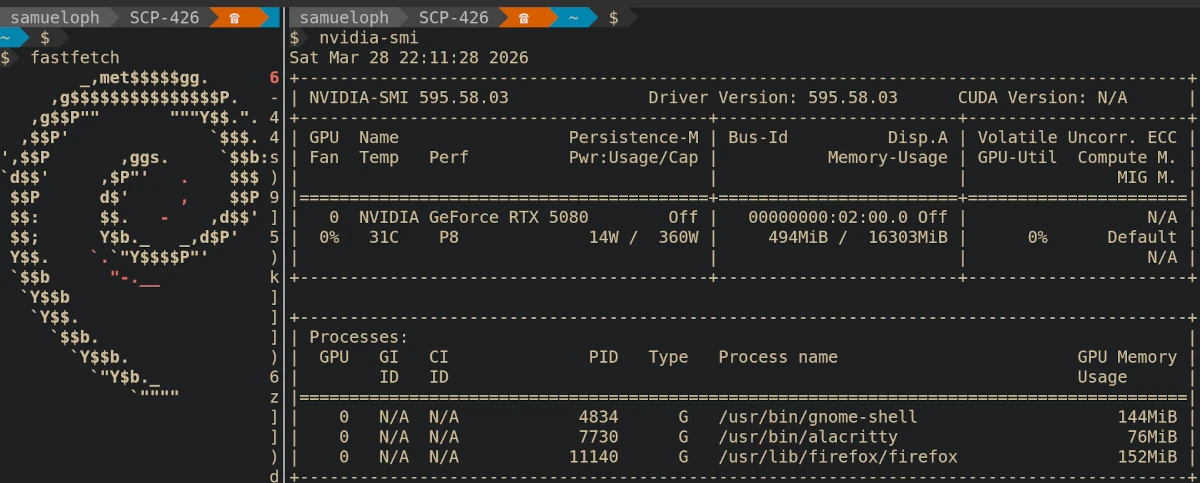
tl;dr
This is not an official package, it's good enough for me and it might be good
enough for you, confirmed as working in Debian Testing but I don't have a
Stable machine to test there.
You can use my custom repo to install the latest NVIDIA drivers on Debian
Stable, Testing or Unstable (install from Sid repository):
https://deb.debusine.debian.net/debian/r-samueloph-nvidia-ai/
The page above contains the APT sources you need, just add the one for your
release to /etc/apt/sources.list.d/r-samueloph-nvidia-ai.sources, run sudo apt update and install the packages, you might need to disable Secure Boot.
This is not about AI
Discussions about AI are quite divisive in the Free Software communities, and
there's so much to be said about it that I'm not willing to go into in this
blog post. This is rather just me telling people that if they need up-to-date
NVIDIA packages for Debian, they could check if my custom repository gets the
job done.
The AI part is a means to an end, I've been careful to note in the repository
names that the packages were produced with AI to respect people who do not want
to run it for any reason.
RTX 5000 series support
Back in May 2025 I opened a bug
report asking for
the NVIDIA drivers on Debian to be updated to support the RTX 5000 series. The
Nouveau drivers might be good enough for some people, but I need the NVIDIA
drivers because I want to play games and do experiments with open weight
models.
Opening a bug report doesn't guarantee anything, at the end of the day Debian
Developers are volunteers, so if I really wanted the newer drivers, I would
have to do something about it, ideally submitting a merge request.
I briefly looked into the NVIDIA packaging, which involves 3 source packages
(and one extra git repo for tarballs), unfortunately this was going to take
more time and effort than what I was willing to spend.
What I Did
After a few weeks of lamenting that I wasn't running the NVIDIA drivers, I
figured I was willing to put in more effort than I originally thought, just
enough to instruct the Claude Code agent to package the latest releases. I'm
skilled enough with agentic tools that I knew how to use it to save time;
providing a clear instruction on how to build the package and explaining the
packaging layout, then letting the agent iterate until it gets a working build.
The agent was running inside a VM that didn't have any of my credentials.
After a little bit of back and forth, where I was reviewing the changes guiding
the agent into how to fix certain issues, I ended up with a working set of
packages.
Once I installed it on my machine and confirmed they worked, I set up a
debusine repository to make it easier to
install future updates, and let others test it out.
Debusine is analogous to Ubuntu's famous PPA, or Fedora's EPEL, it's a
relatively new project but it has been working fine for this.
Matheus Polkorny helped me test the packages and did spot a few issues which
are fixed now. The Debusine developers were also always quick to respond to my
questions and bug
reports.
How Good Is It?
Short answer: good enough for daily use, but not a substitute for an official Debian package.
The whole point of doing this is because I don't have enough free time to
maintain the package myself. All of this work was done as a volunteer, on my
personal time.
This means I'm trusting the agent to some degree; I review its commits but I
don't go too deep into it, the quality will be dictated by the fact that I'm
a Debian Developer and so by how easily I can spot issues without double checking
everything.
I only have a single machine with an NVIDIA GPU, this machine runs Debian
Testing and so I don't have a way to test the Stable packages. I can do my best
to address problems but at this point there is a risk that new updates break
something.
Installing NVIDIA drivers has always been a bit risky regardless, if you're
comfortable with reverting updates and handling a system without a graphical
interface (in case you end up in a tty), you will be fine.
You will likely need to disable Secure Boot in order to use them, or set up your
BIOS so that a MOK can be used to sign the DKMS modules.
When choosing the version strings for the packages, I was careful enough to
pick something that would sort lower than an official Debian package, meaning
that whenever that same version is packaged in Debian, your system will see it
as an upgrade.
If you have any other methods of installing the NVIDIA drivers on your Debian
system that is working for you, you should likely stick to that.
I have a strong preference for installing them through .deb packages, making
the package sort out configuration changes and dependency updates, besides
handling the DKMS modules.
Ultimately I'm not happy with the amount of difficulty that Debian users have in
installing up-to-date NVIDIA drivers, and I hope this makes it easier for some.
How To Install
Head over to the Debusine page that contains both repos for Trixie (Debian
Stable) and Sid (for Debian Testing and Unstable):
https://deb.debusine.debian.net/debian/r-samueloph-nvidia-ai/
If you are running Debian Testing, then pick the Sid repository.
That page contains the contents of the apt .sources file you need, create the
file /etc/apt/sources.list.d/r-samueloph-nvidia-ai.sources with the sources for your release.
Run sudo apt update and install the packages you need, if you already have a
previous version installed, sudo apt upgrade --update would update them.
If there are no upgrades, meaning you don't have a previous version installed,
then you need to explicitly install them.
sudo apt install nvidia-open-kernel-dkms nvidia-driver
If you run into issues in Debian Stable, consider using the Linux kernel package
from the backports repository, if you need an up-to-date NVIDIA driver, you
likely should also be running the backports kernel package (if you can't
upgrade to Debian Testing).
Future Plans
I currently have no means of measuring how many people are using the debusine
repositories, so if you do end up using it feel free to let me know somehow.
I don't know for how long I will keep managing this repository, and how much
effort I will spend, but my machine needs it and for now I will keep it
up-to-date with the latest production-grade NVIDIA drivers.
Sources
The sources of the packages are available under a namespace in Salsa (Debian's
GitLab instance):
https://salsa.debian.org/samueloph-forks-team/nvidia-drivers-forks-with-ai
You can also get the exact sources used in the repositories from debusine:
https://debusine.debian.net/debian/r-samueloph-nvidia-ai/collection/debian:suite/sid-nvidia-ai/search/?category=debian:source-package
https://debusine.debian.net/debian/r-samueloph-nvidia-ai/collection/debian:suite/trixie-nvidia-ai/search/?category=debian:source-package
RTX 5000 series support
Back in May 2025 I opened a bug
report asking for
the NVIDIA drivers on Debian to be updated to support the RTX 5000 series. The
Nouveau drivers might be good enough for some people, but I need the NVIDIA
drivers because I want to play games and do experiments with open weight
models.
Opening a bug report doesn't guarantee anything, at the end of the day Debian
Developers are volunteers, so if I really wanted the newer drivers, I would
have to do something about it, ideally submitting a merge request.
I briefly looked into the NVIDIA packaging, which involves 3 source packages
(and one extra git repo for tarballs), unfortunately this was going to take
more time and effort than what I was willing to spend.
What I Did
After a few weeks of lamenting that I wasn't running the NVIDIA drivers, I
figured I was willing to put in more effort than I originally thought, just
enough to instruct the Claude Code agent to package the latest releases. I'm
skilled enough with agentic tools that I knew how to use it to save time;
providing a clear instruction on how to build the package and explaining the
packaging layout, then letting the agent iterate until it gets a working build.
The agent was running inside a VM that didn't have any of my credentials.
After a little bit of back and forth, where I was reviewing the changes guiding
the agent into how to fix certain issues, I ended up with a working set of
packages.
Once I installed it on my machine and confirmed they worked, I set up a
debusine repository to make it easier to
install future updates, and let others test it out.
Debusine is analogous to Ubuntu's famous PPA, or Fedora's EPEL, it's a
relatively new project but it has been working fine for this.
Matheus Polkorny helped me test the packages and did spot a few issues which
are fixed now. The Debusine developers were also always quick to respond to my
questions and bug
reports.
How Good Is It?
Short answer: good enough for daily use, but not a substitute for an official Debian package.
The whole point of doing this is because I don't have enough free time to
maintain the package myself. All of this work was done as a volunteer, on my
personal time.
This means I'm trusting the agent to some degree; I review its commits but I
don't go too deep into it, the quality will be dictated by the fact that I'm
a Debian Developer and so by how easily I can spot issues without double checking
everything.
I only have a single machine with an NVIDIA GPU, this machine runs Debian
Testing and so I don't have a way to test the Stable packages. I can do my best
to address problems but at this point there is a risk that new updates break
something.
Installing NVIDIA drivers has always been a bit risky regardless, if you're
comfortable with reverting updates and handling a system without a graphical
interface (in case you end up in a tty), you will be fine.
You will likely need to disable Secure Boot in order to use them, or set up your
BIOS so that a MOK can be used to sign the DKMS modules.
When choosing the version strings for the packages, I was careful enough to
pick something that would sort lower than an official Debian package, meaning
that whenever that same version is packaged in Debian, your system will see it
as an upgrade.
If you have any other methods of installing the NVIDIA drivers on your Debian
system that is working for you, you should likely stick to that.
I have a strong preference for installing them through .deb packages, making
the package sort out configuration changes and dependency updates, besides
handling the DKMS modules.
Ultimately I'm not happy with the amount of difficulty that Debian users have in
installing up-to-date NVIDIA drivers, and I hope this makes it easier for some.
How To Install
Head over to the Debusine page that contains both repos for Trixie (Debian
Stable) and Sid (for Debian Testing and Unstable):
https://deb.debusine.debian.net/debian/r-samueloph-nvidia-ai/
If you are running Debian Testing, then pick the Sid repository.
That page contains the contents of the apt .sources file you need, create the
file /etc/apt/sources.list.d/r-samueloph-nvidia-ai.sources with the sources for your release.
Run sudo apt update and install the packages you need, if you already have a
previous version installed, sudo apt upgrade --update would update them.
If there are no upgrades, meaning you don't have a previous version installed,
then you need to explicitly install them.
sudo apt install nvidia-open-kernel-dkms nvidia-driver
If you run into issues in Debian Stable, consider using the Linux kernel package
from the backports repository, if you need an up-to-date NVIDIA driver, you
likely should also be running the backports kernel package (if you can't
upgrade to Debian Testing).
Future Plans
I currently have no means of measuring how many people are using the debusine
repositories, so if you do end up using it feel free to let me know somehow.
I don't know for how long I will keep managing this repository, and how much
effort I will spend, but my machine needs it and for now I will keep it
up-to-date with the latest production-grade NVIDIA drivers.
Sources
The sources of the packages are available under a namespace in Salsa (Debian's
GitLab instance):
https://salsa.debian.org/samueloph-forks-team/nvidia-drivers-forks-with-ai
You can also get the exact sources used in the repositories from debusine:
https://debusine.debian.net/debian/r-samueloph-nvidia-ai/collection/debian:suite/sid-nvidia-ai/search/?category=debian:source-package
https://debusine.debian.net/debian/r-samueloph-nvidia-ai/collection/debian:suite/trixie-nvidia-ai/search/?category=debian:source-package
How Good Is It?
Short answer: good enough for daily use, but not a substitute for an official Debian package.
The whole point of doing this is because I don't have enough free time to
maintain the package myself. All of this work was done as a volunteer, on my
personal time.
This means I'm trusting the agent to some degree; I review its commits but I
don't go too deep into it, the quality will be dictated by the fact that I'm
a Debian Developer and so by how easily I can spot issues without double checking
everything.
I only have a single machine with an NVIDIA GPU, this machine runs Debian
Testing and so I don't have a way to test the Stable packages. I can do my best
to address problems but at this point there is a risk that new updates break
something.
Installing NVIDIA drivers has always been a bit risky regardless, if you're
comfortable with reverting updates and handling a system without a graphical
interface (in case you end up in a tty), you will be fine.
You will likely need to disable Secure Boot in order to use them, or set up your
BIOS so that a MOK can be used to sign the DKMS modules.
When choosing the version strings for the packages, I was careful enough to
pick something that would sort lower than an official Debian package, meaning
that whenever that same version is packaged in Debian, your system will see it
as an upgrade.
If you have any other methods of installing the NVIDIA drivers on your Debian
system that is working for you, you should likely stick to that.
I have a strong preference for installing them through .deb packages, making
the package sort out configuration changes and dependency updates, besides
handling the DKMS modules.
Ultimately I'm not happy with the amount of difficulty that Debian users have in
installing up-to-date NVIDIA drivers, and I hope this makes it easier for some.
How To Install
Head over to the Debusine page that contains both repos for Trixie (Debian
Stable) and Sid (for Debian Testing and Unstable):
https://deb.debusine.debian.net/debian/r-samueloph-nvidia-ai/
If you are running Debian Testing, then pick the Sid repository.
That page contains the contents of the apt .sources file you need, create the
file /etc/apt/sources.list.d/r-samueloph-nvidia-ai.sources with the sources for your release.
Run sudo apt update and install the packages you need, if you already have a
previous version installed, sudo apt upgrade --update would update them.
If there are no upgrades, meaning you don't have a previous version installed,
then you need to explicitly install them.
sudo apt install nvidia-open-kernel-dkms nvidia-driver
If you run into issues in Debian Stable, consider using the Linux kernel package
from the backports repository, if you need an up-to-date NVIDIA driver, you
likely should also be running the backports kernel package (if you can't
upgrade to Debian Testing).
Future Plans
I currently have no means of measuring how many people are using the debusine
repositories, so if you do end up using it feel free to let me know somehow.
I don't know for how long I will keep managing this repository, and how much
effort I will spend, but my machine needs it and for now I will keep it
up-to-date with the latest production-grade NVIDIA drivers.
Sources
The sources of the packages are available under a namespace in Salsa (Debian's
GitLab instance):
https://salsa.debian.org/samueloph-forks-team/nvidia-drivers-forks-with-ai
You can also get the exact sources used in the repositories from debusine:
https://debusine.debian.net/debian/r-samueloph-nvidia-ai/collection/debian:suite/sid-nvidia-ai/search/?category=debian:source-package
https://debusine.debian.net/debian/r-samueloph-nvidia-ai/collection/debian:suite/trixie-nvidia-ai/search/?category=debian:source-package
.sources file you need, create the
file /etc/apt/sources.list.d/r-samueloph-nvidia-ai.sources with the sources for your release.
Run sudo apt update and install the packages you need, if you already have a
previous version installed, sudo apt upgrade --update would update them.
If there are no upgrades, meaning you don't have a previous version installed,
then you need to explicitly install them.
sudo apt install nvidia-open-kernel-dkms nvidia-driver I finally upgraded my mail server to Debian 13 and, as expected, the Dovecot part was quite a ride.
The configuration syntax changed between Dovecot 2.3 (Debian 12) and Dovecot 2.4 (Debian 13),
so I started first with diffing my configuration against a vanilla Debian 12 one (this setup is slightly old) and then applied the same (logical) changes to a vanilla Debian 13 one.
This mostly went well.
Mostly because my user database is stored in SQL and while the
I finally upgraded my mail server to Debian 13 and, as expected, the Dovecot part was quite a ride.
The configuration syntax changed between Dovecot 2.3 (Debian 12) and Dovecot 2.4 (Debian 13),
so I started first with diffing my configuration against a vanilla Debian 12 one (this setup is slightly old) and then applied the same (logical) changes to a vanilla Debian 13 one.
This mostly went well.
Mostly because my user database is stored in SQL and while the 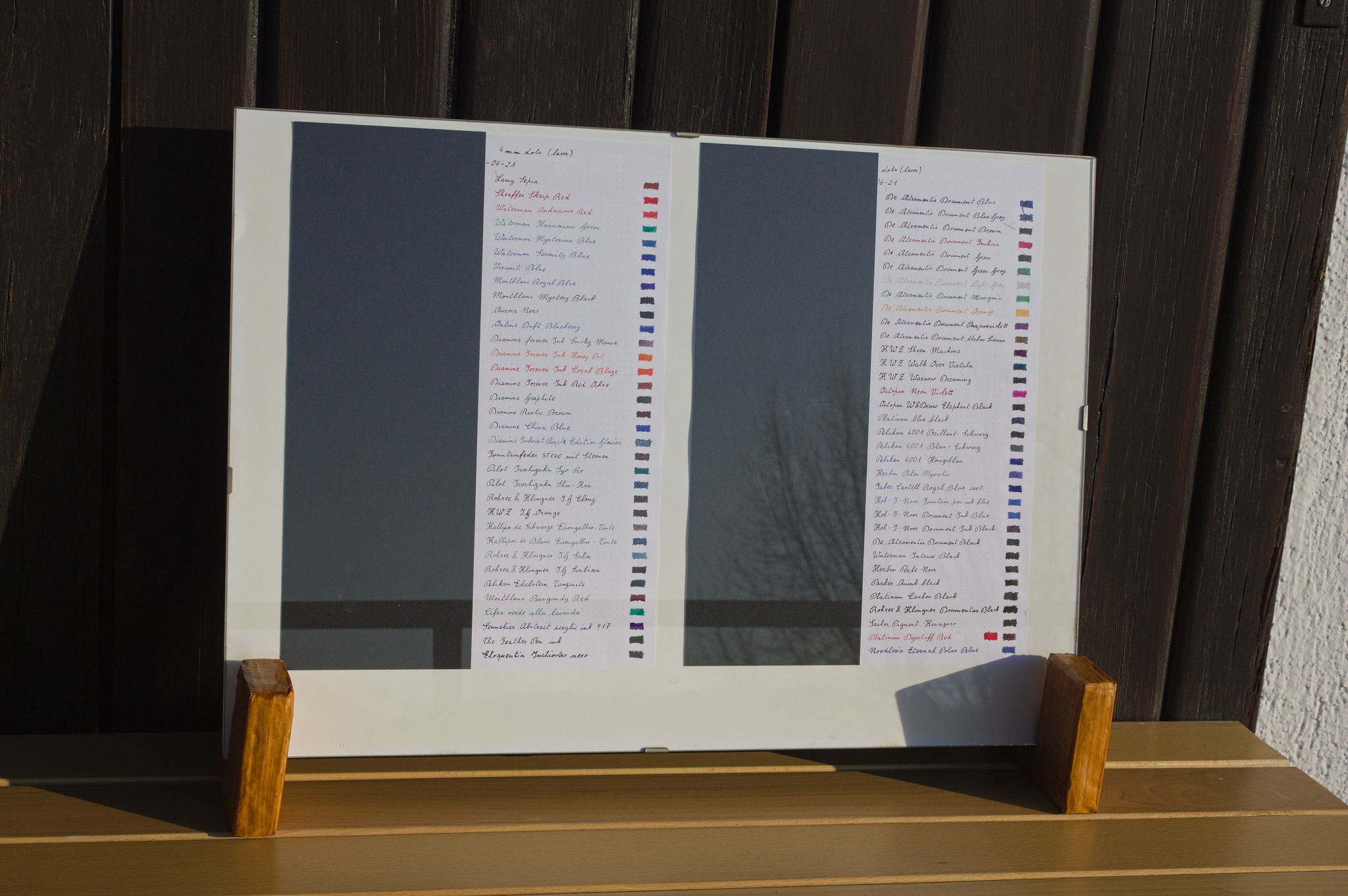
 The next step, already in January, was mentioning in a fountain-pen
enthusiasts forum that I planned such a test, and asking if people were
interested in having me buy a few samples of more inks when I was
buying my next pen.
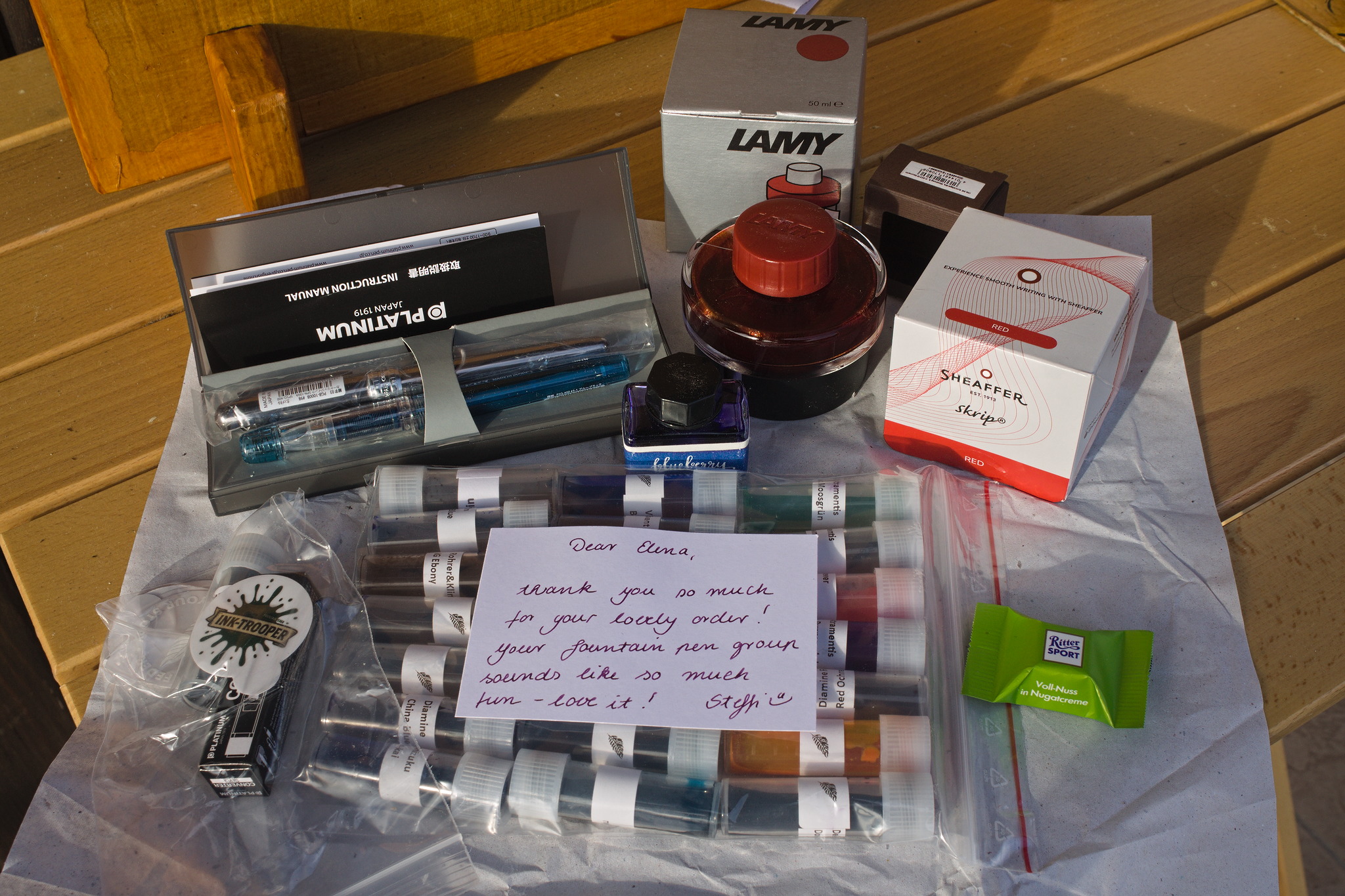
The word enthusiasts is probably a hint of the reason why soon
afterwards I received a package with the pen I had planned to buy, its
converter, and a couple dozens ink samples.
And then a couple envelopes with additional samples of inks that weren t
available on the shops, from said enthusiasts.
Added to the inks I already had acquired since the last lightfastness
test, it meant that they couldn t all fit in one single page, and thus I
had some room to add some inks I had already tested: some were requests,
and for others I tried to select ones that felt relevant.
Since I m changing the test setup, I ve decided I should probably keep
doing this until I ve tested again all of the inks I still have
available.
The next step, already in January, was mentioning in a fountain-pen
enthusiasts forum that I planned such a test, and asking if people were
interested in having me buy a few samples of more inks when I was
buying my next pen.
The word enthusiasts is probably a hint of the reason why soon
afterwards I received a package with the pen I had planned to buy, its
converter, and a couple dozens ink samples.
And then a couple envelopes with additional samples of inks that weren t
available on the shops, from said enthusiasts.
Added to the inks I already had acquired since the last lightfastness
test, it meant that they couldn t all fit in one single page, and thus I
had some room to add some inks I had already tested: some were requests,
and for others I tried to select ones that felt relevant.
Since I m changing the test setup, I ve decided I should probably keep
doing this until I ve tested again all of the inks I still have
available.
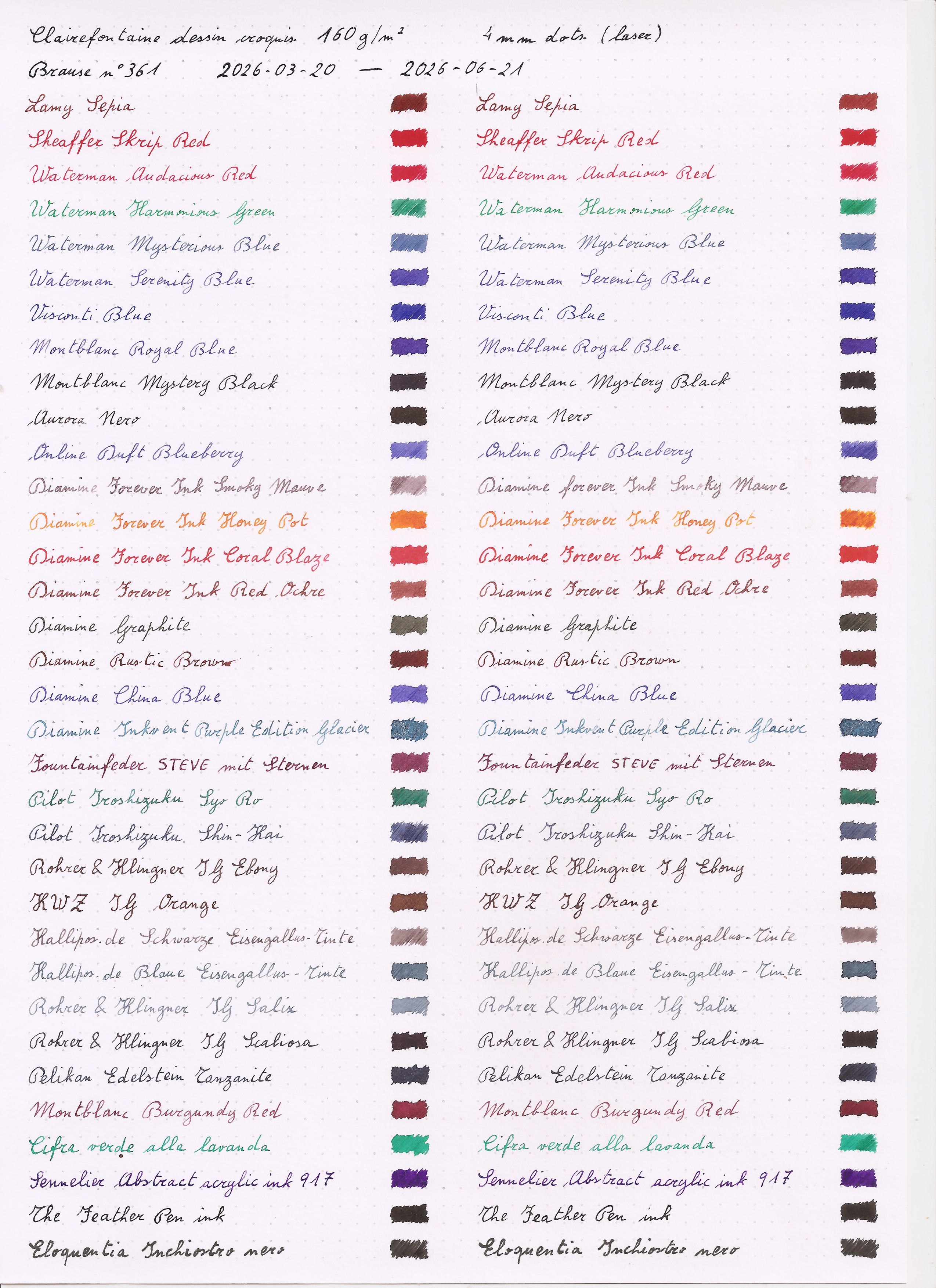
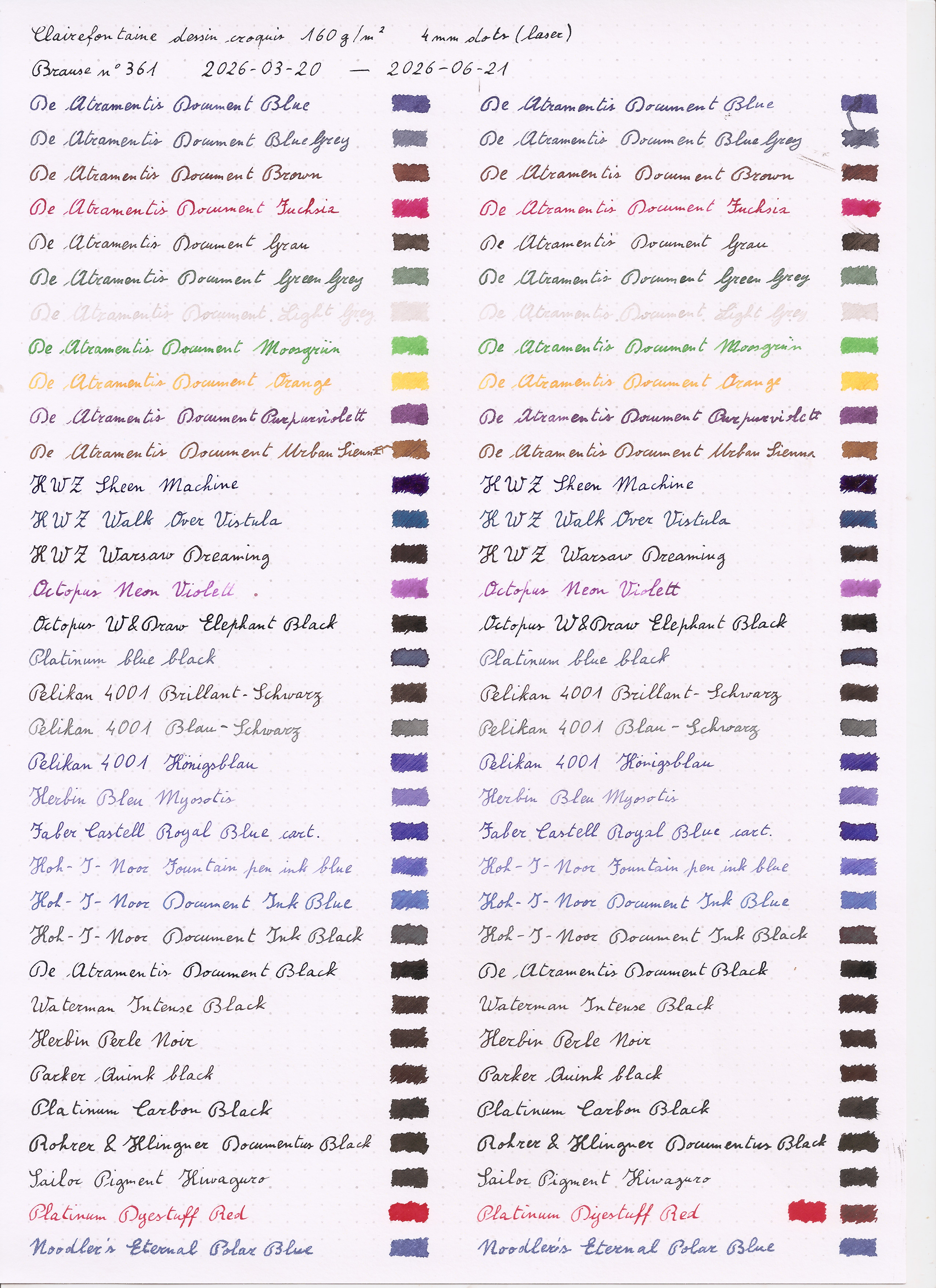 For the paper, I ve used A4 sheets of
 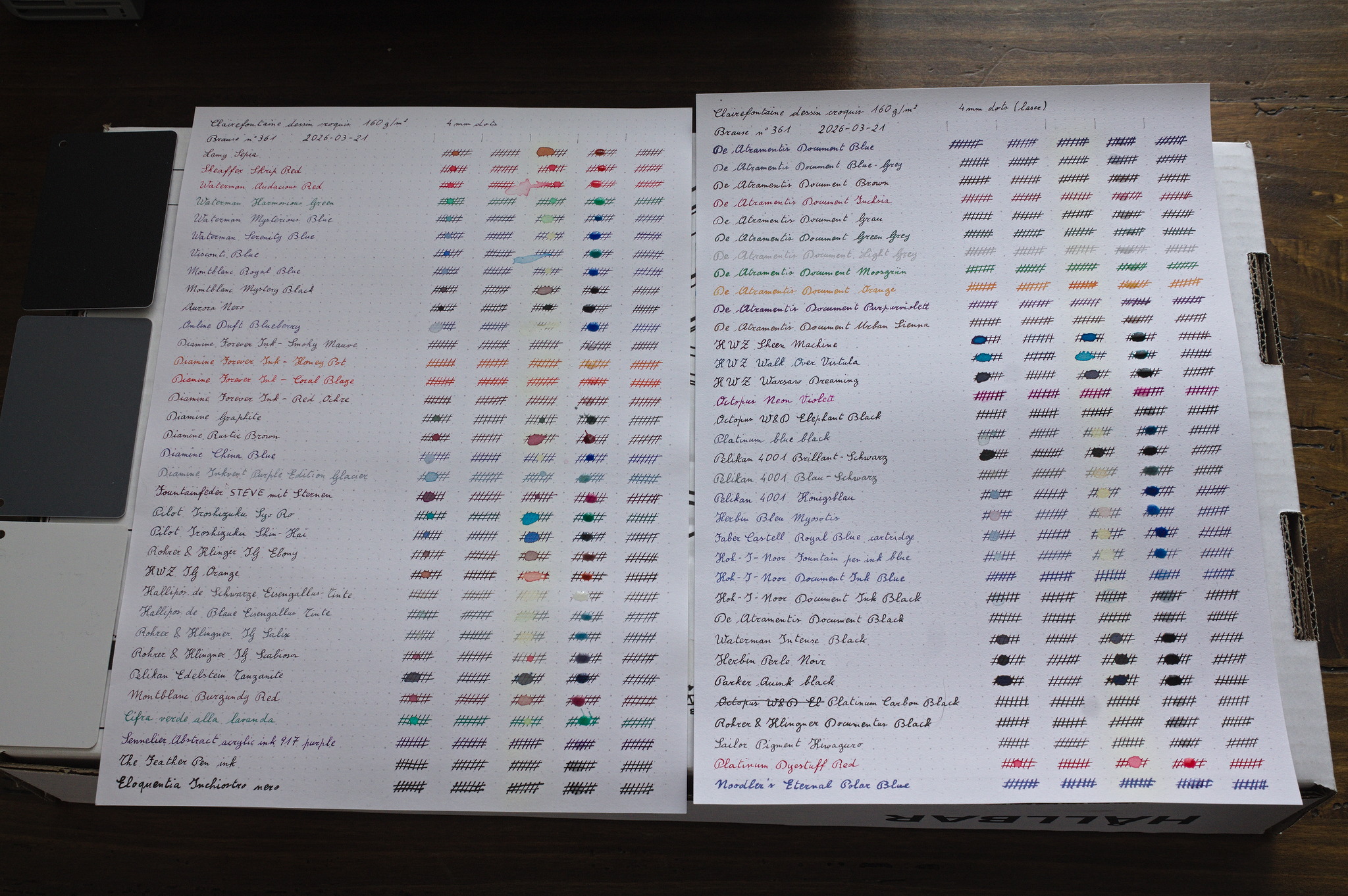 While I was filling the sheet for the lightfastness tests, I decided to
also prepare a second set of sheet, for a liquid resistance drop test.
On each line, beside the name of the ink, I added five sets of crossing
parallel lines, and let everything dry for a few days.
Then I used a syringe to put a drop of a liquid on each set of lines,
waited for it to be absorbed into the paper and to dry, at least
overnight, but sometimes also for a day or two (life happened), and then
looked at the results and did the next test.
The first liquid was water, with the usual wild difference between
washable and permanent inks, and all of the intermediate possibilities.
The second liquid was isopropyl alcohol, and I was surprised to see
that, with very few exceptions, most inks didn t change at all. I
wonder whether that s related to the fact that instead of forming a drop
it was absorbed almost immediately into the paper, and dried in a very
short time.
The third liquid was hydrogen peroxide: beside the individual results I
noticed that its column yellowed visibly; I wonder whether that means
that the paper I used has optical brighteners, and it will also yellow
under the sun: that wouldn t be ideal, but it would also be a surprise,
for paper that is acid free and sold for arts.
The fourth liquid was citric acid, by mixing a bit less than a teaspoon
of citric acid granules in just enough very warm water (heated to 70 C,
i.e. the lowest temperature available on my kettle) to dissolve most of
the acid. I forgot that I had some old PH strips until one hour after
I ve put the drop on the paper, and I don t know whether something had
changed, but when I did remember about them it showed a deep red between
1 and 2. I don t think I can trust those strips too much, however.
This backfired badly: the drop of citric acid never dried out, but
formed a sticky paste that prevented me from scanning the results,
and I m not sure whether I ll do the last test, which was supposed to be
household bleach.
While I was filling the sheet for the lightfastness tests, I decided to
also prepare a second set of sheet, for a liquid resistance drop test.
On each line, beside the name of the ink, I added five sets of crossing
parallel lines, and let everything dry for a few days.
Then I used a syringe to put a drop of a liquid on each set of lines,
waited for it to be absorbed into the paper and to dry, at least
overnight, but sometimes also for a day or two (life happened), and then
looked at the results and did the next test.
The first liquid was water, with the usual wild difference between
washable and permanent inks, and all of the intermediate possibilities.
The second liquid was isopropyl alcohol, and I was surprised to see
that, with very few exceptions, most inks didn t change at all. I
wonder whether that s related to the fact that instead of forming a drop
it was absorbed almost immediately into the paper, and dried in a very
short time.
The third liquid was hydrogen peroxide: beside the individual results I
noticed that its column yellowed visibly; I wonder whether that means
that the paper I used has optical brighteners, and it will also yellow
under the sun: that wouldn t be ideal, but it would also be a surprise,
for paper that is acid free and sold for arts.
The fourth liquid was citric acid, by mixing a bit less than a teaspoon
of citric acid granules in just enough very warm water (heated to 70 C,
i.e. the lowest temperature available on my kettle) to dissolve most of
the acid. I forgot that I had some old PH strips until one hour after
I ve put the drop on the paper, and I don t know whether something had
changed, but when I did remember about them it showed a deep red between
1 and 2. I don t think I can trust those strips too much, however.
This backfired badly: the drop of citric acid never dried out, but
formed a sticky paste that prevented me from scanning the results,
and I m not sure whether I ll do the last test, which was supposed to be
household bleach.
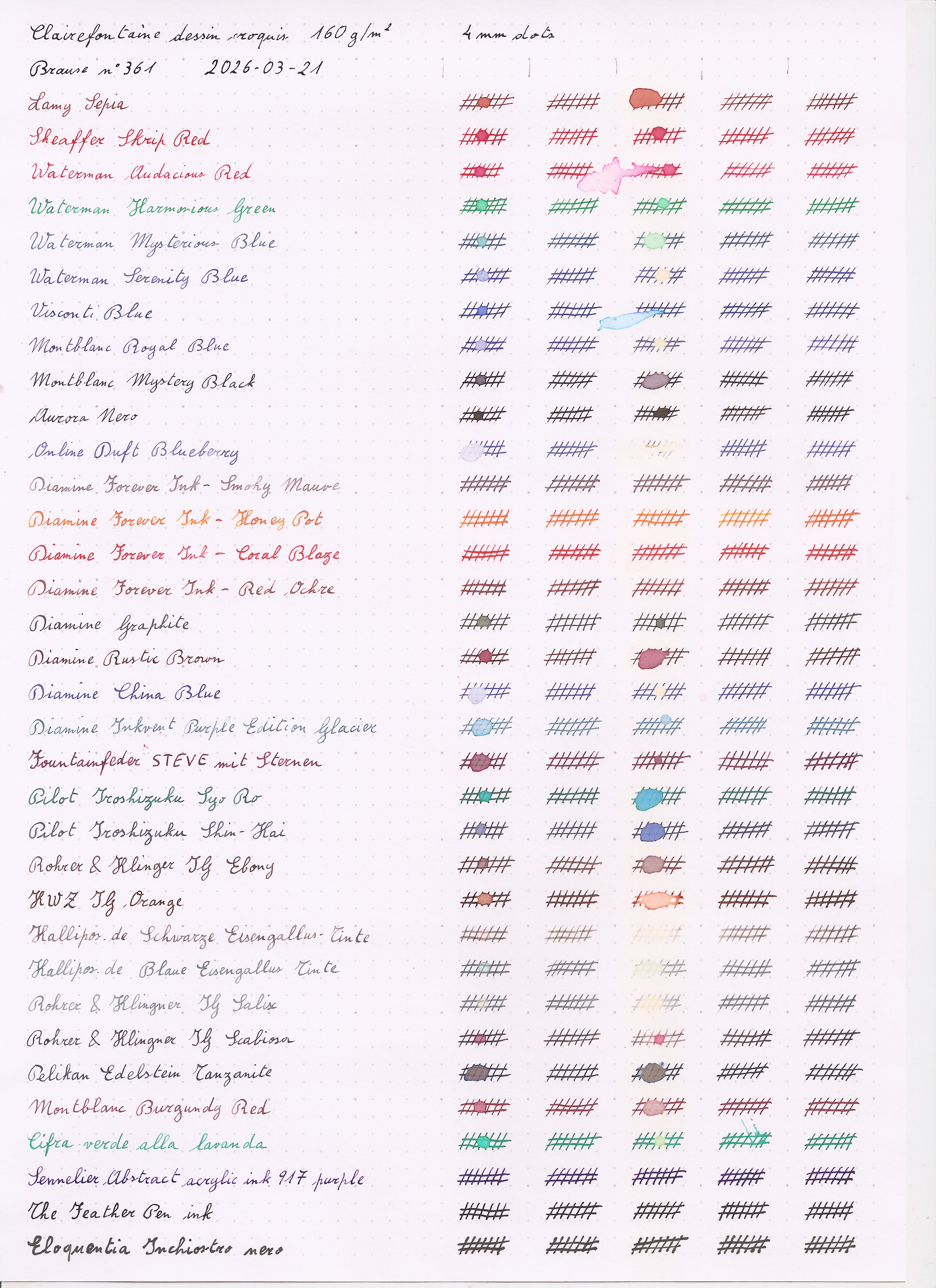
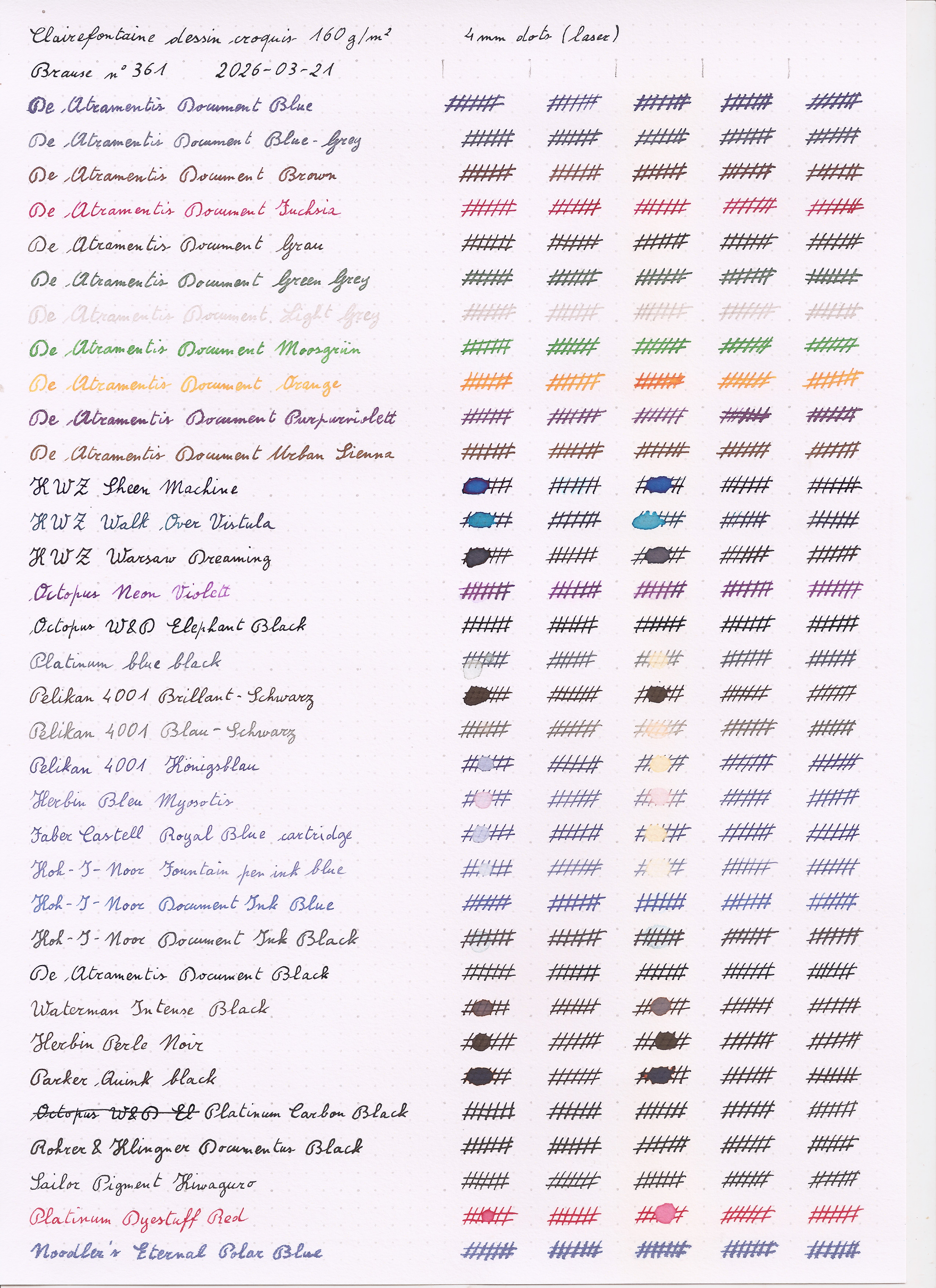 Luckily I had scanned the partial results, and they are shown here.
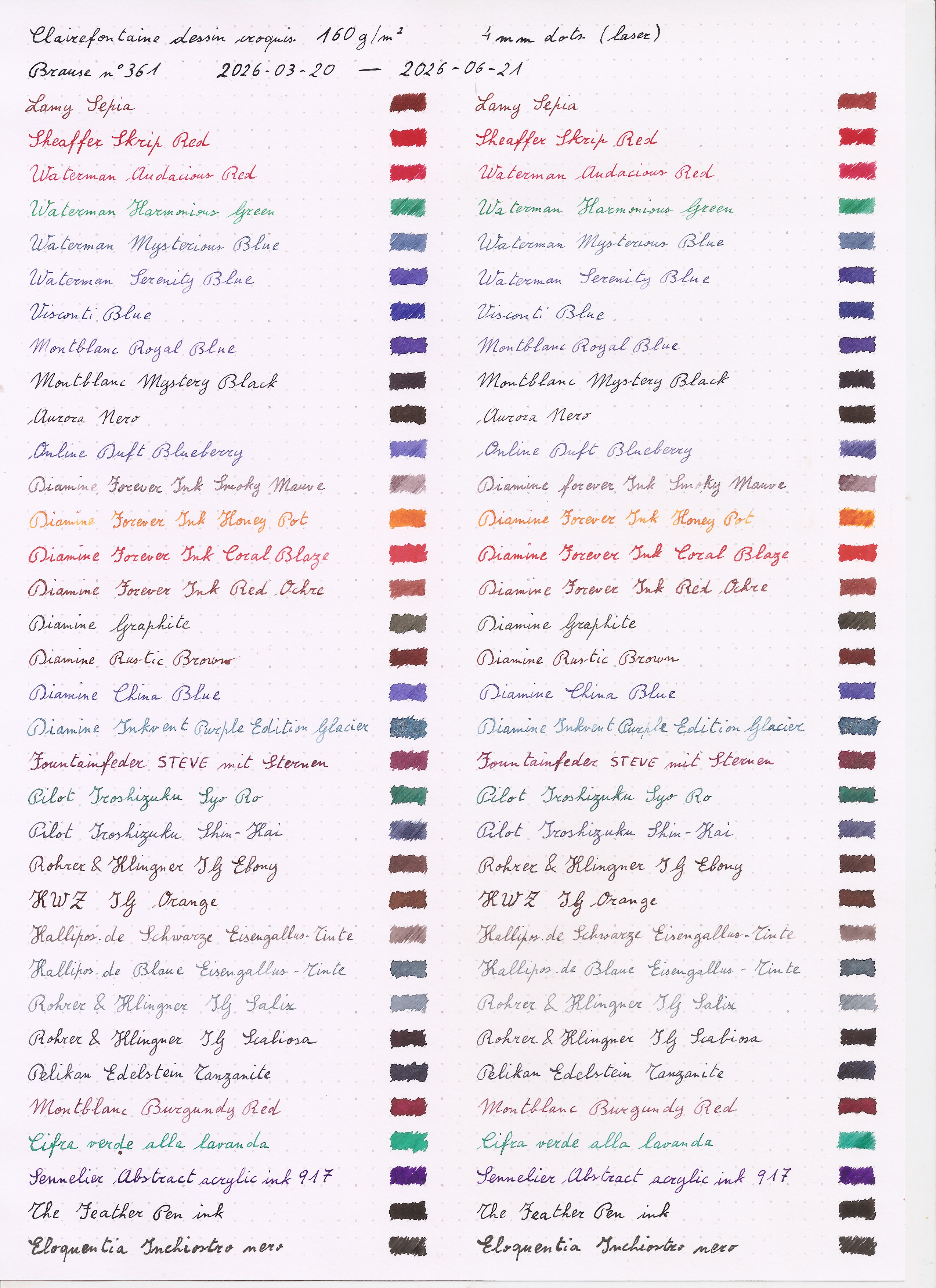
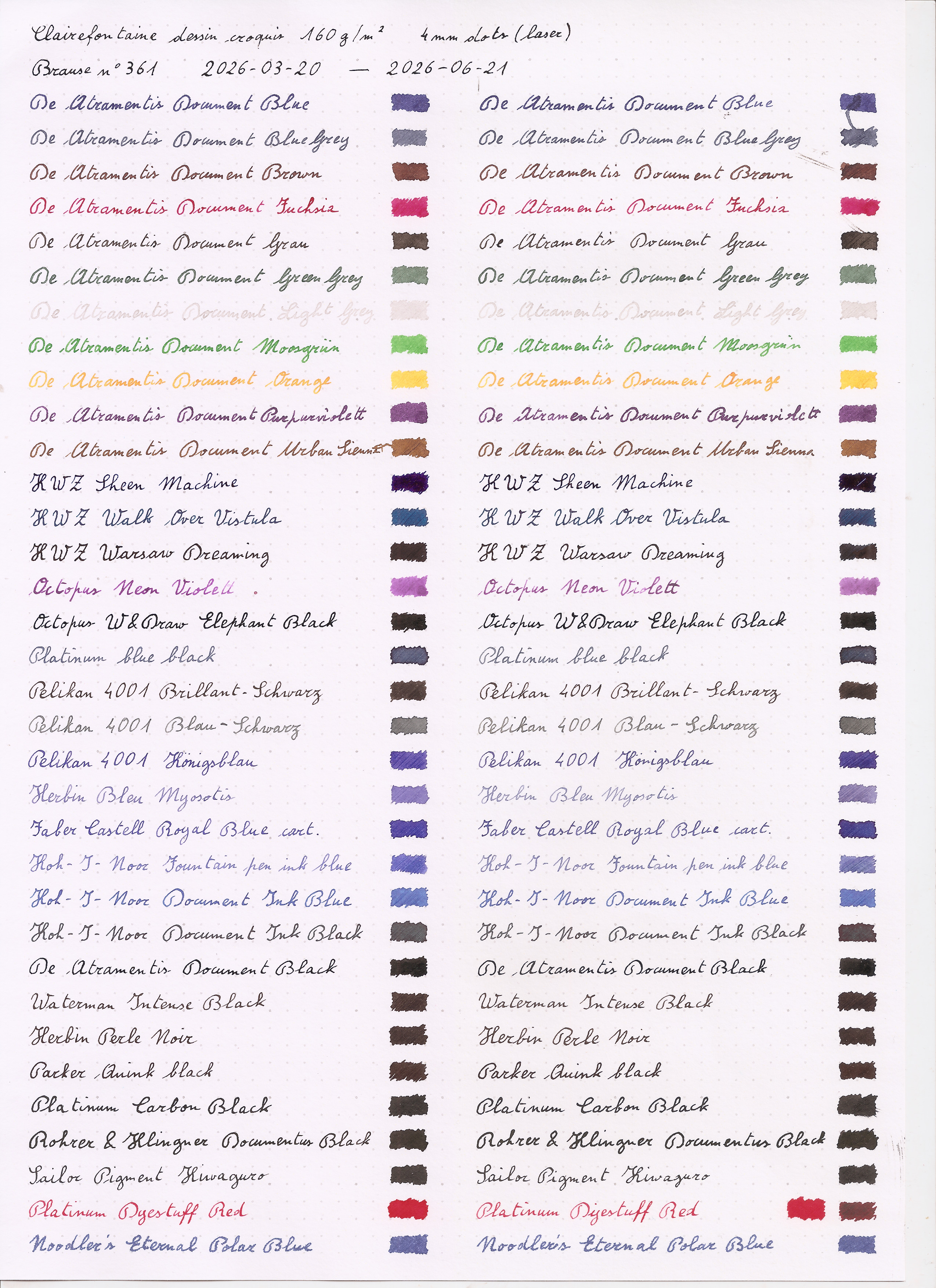 After one full day with plenty of sun, nothing really had changed,
except possibly for a vague hint that the Herbin Bleu Myosotis may have
have been a bit lighter than it started, but it may also have been a
suggestion.
After one full day with plenty of sun, nothing really had changed,
except possibly for a vague hint that the Herbin Bleu Myosotis may have
have been a bit lighter than it started, but it may also have been a
suggestion.
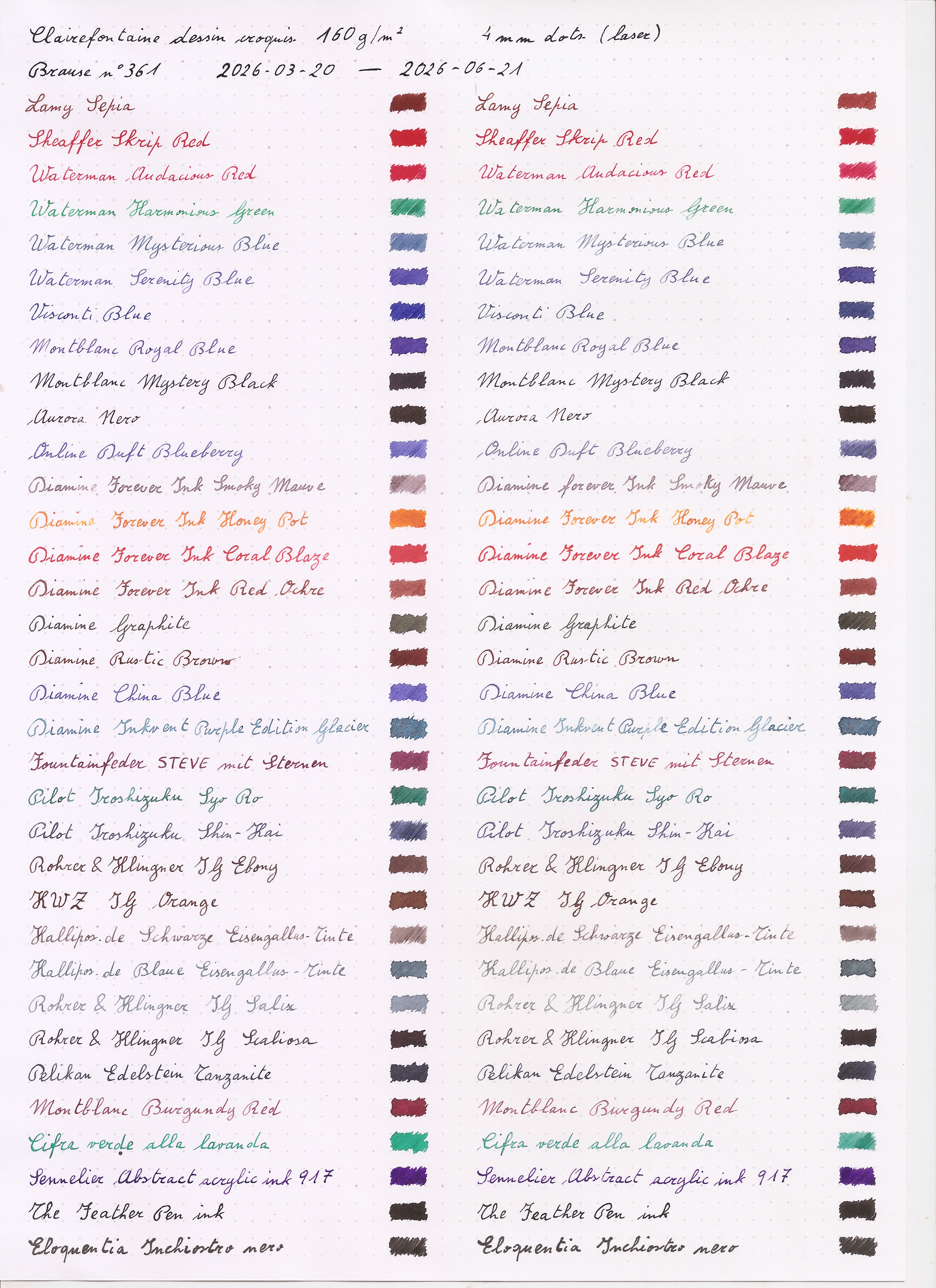
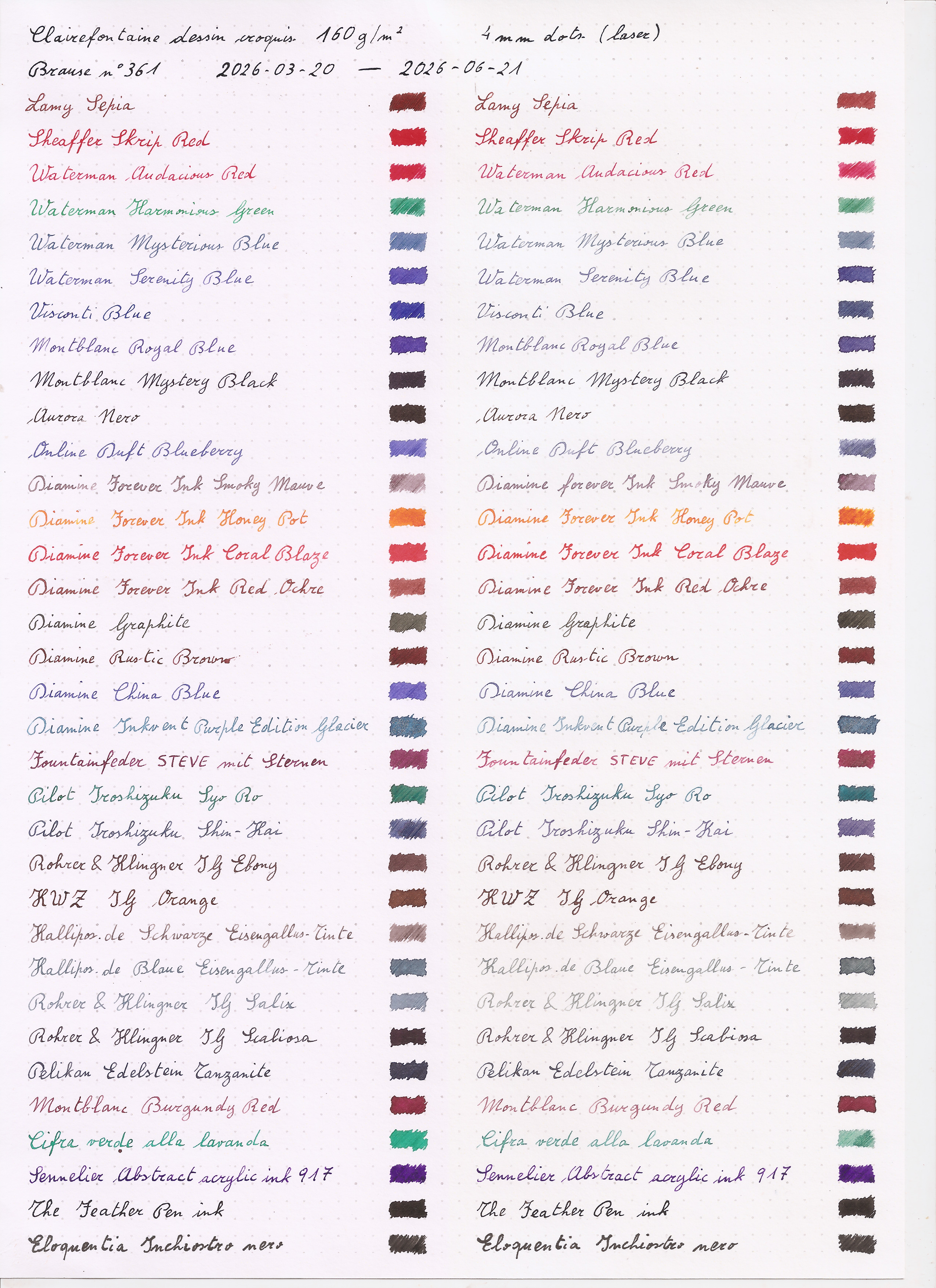
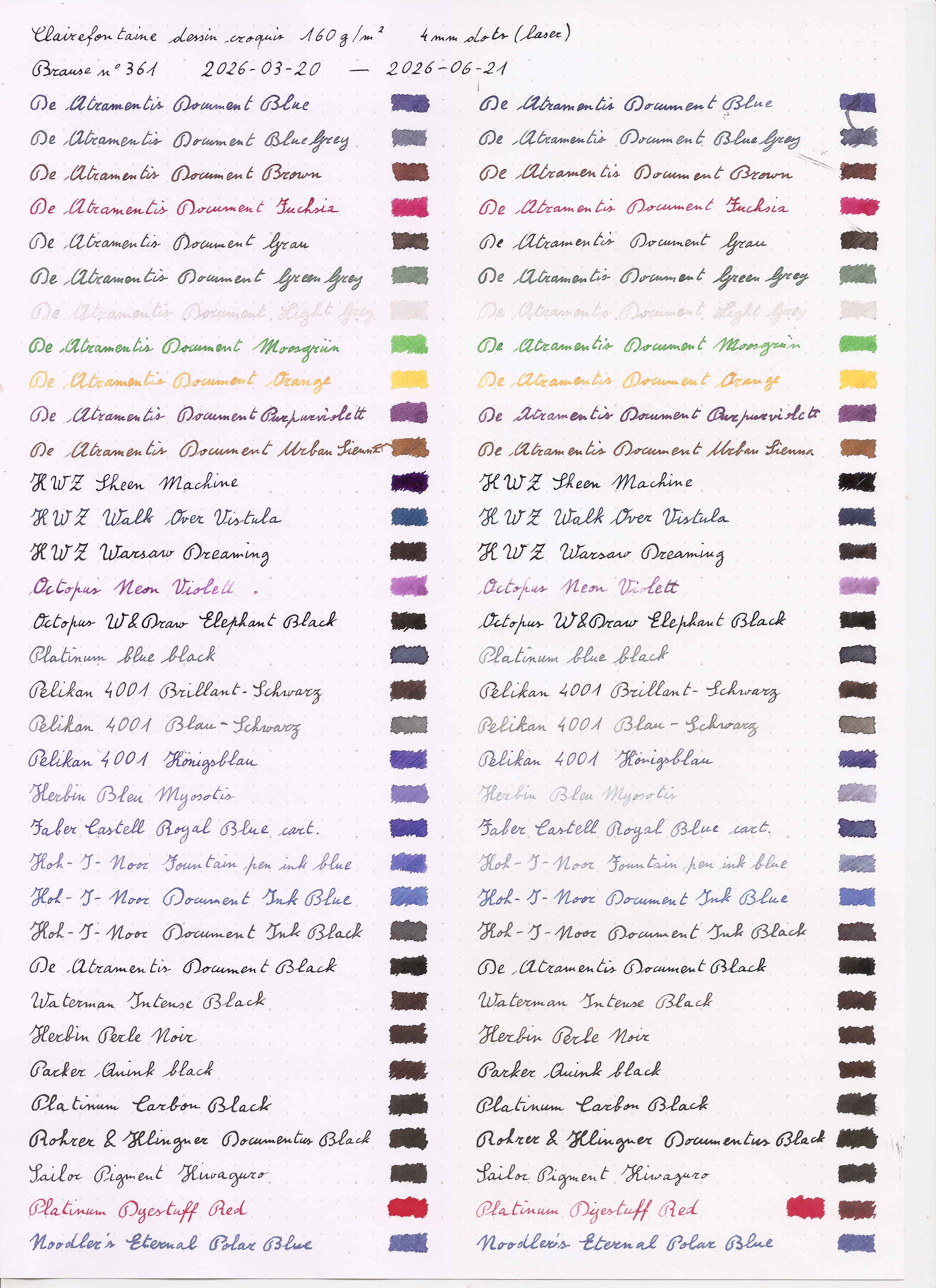
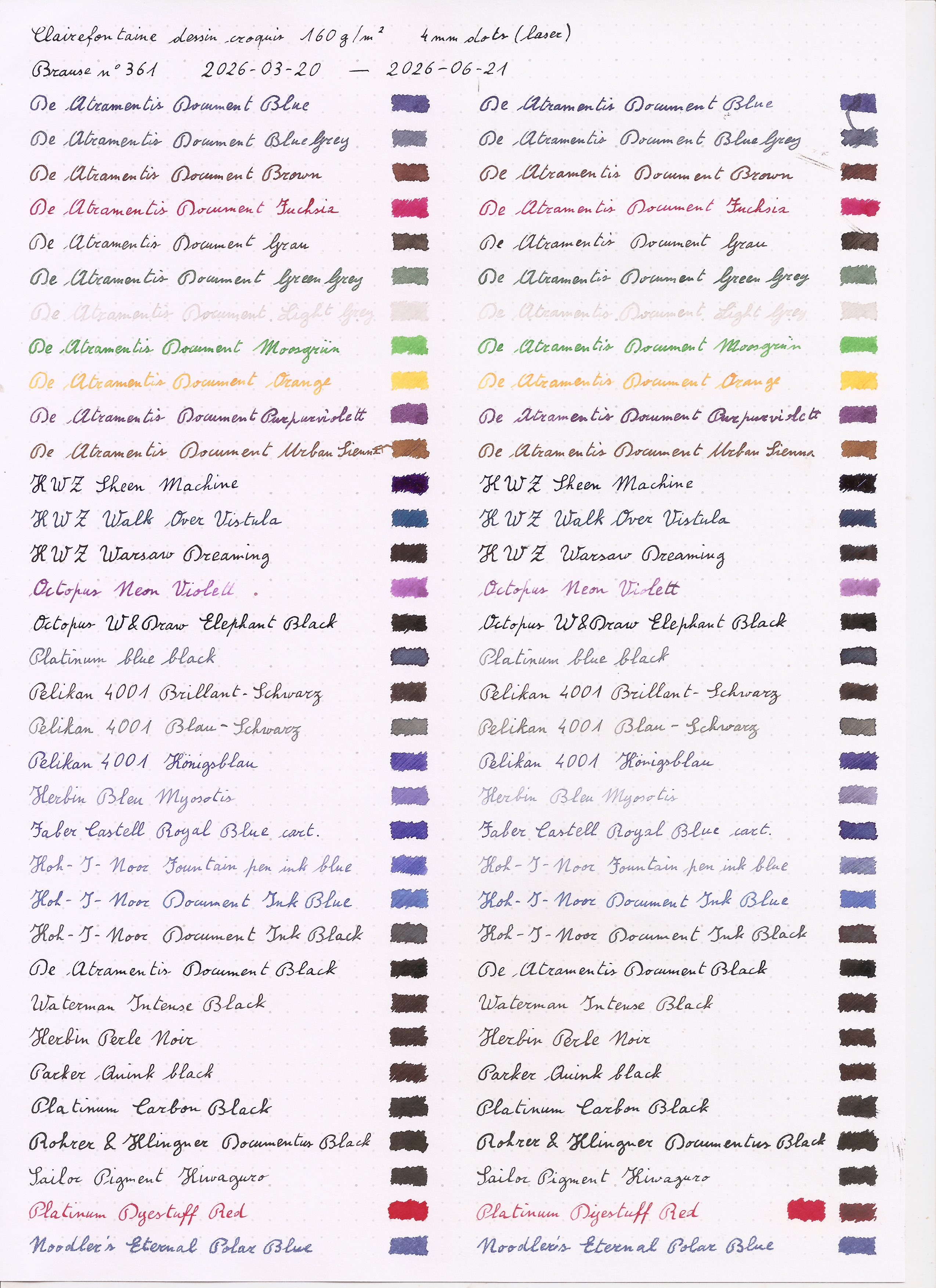 After three days, however, some results started to show, with the most
fugitive inks starting to be visibly changed, becoming either paler or
in some case duller.
After three days, however, some results started to show, with the most
fugitive inks starting to be visibly changed, becoming either paler or
in some case duller.
 And the full week showed more of that, with a few more inks starting to
show visible change.
And the full week showed more of that, with a few more inks starting to
show visible change.

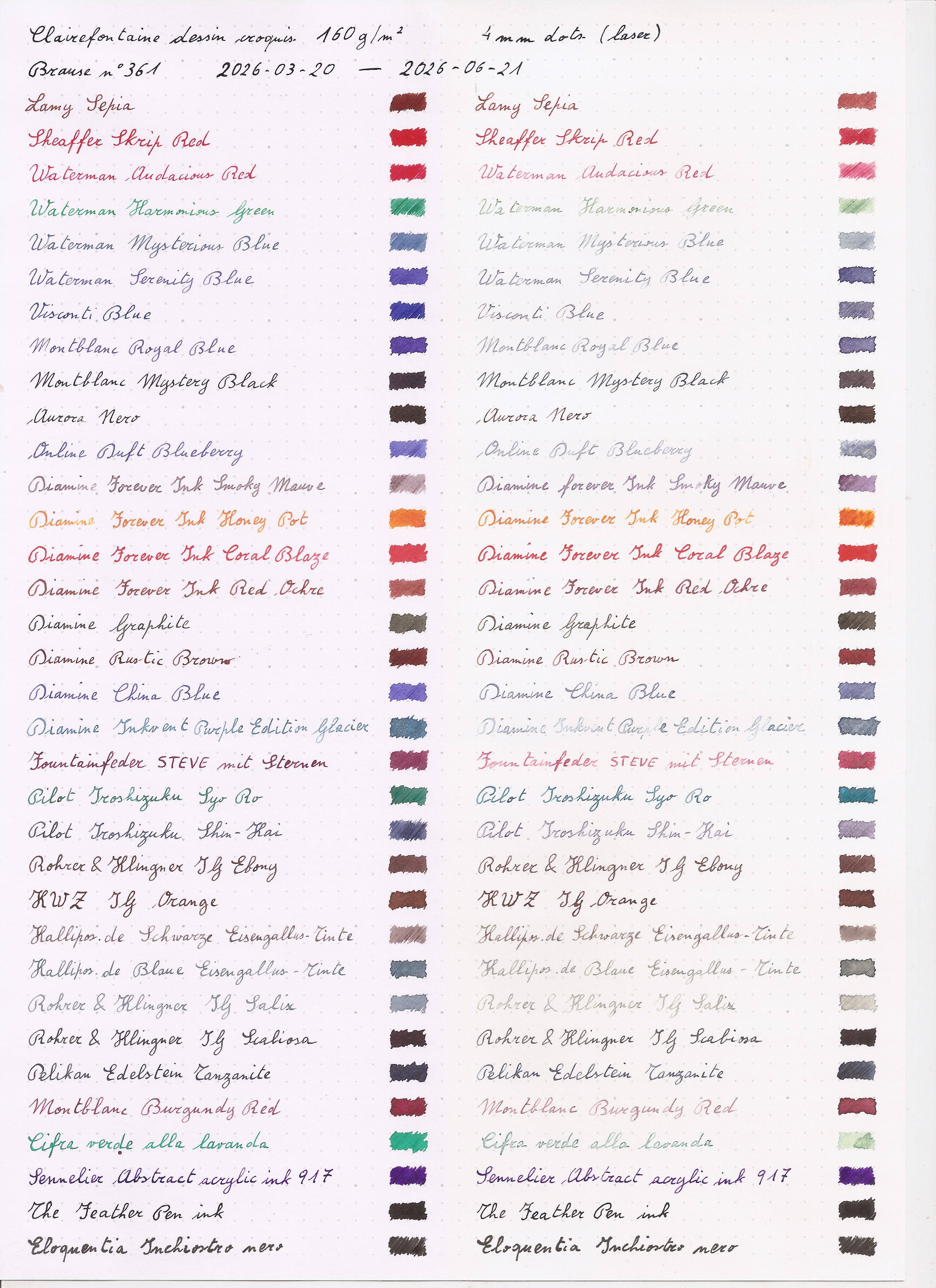
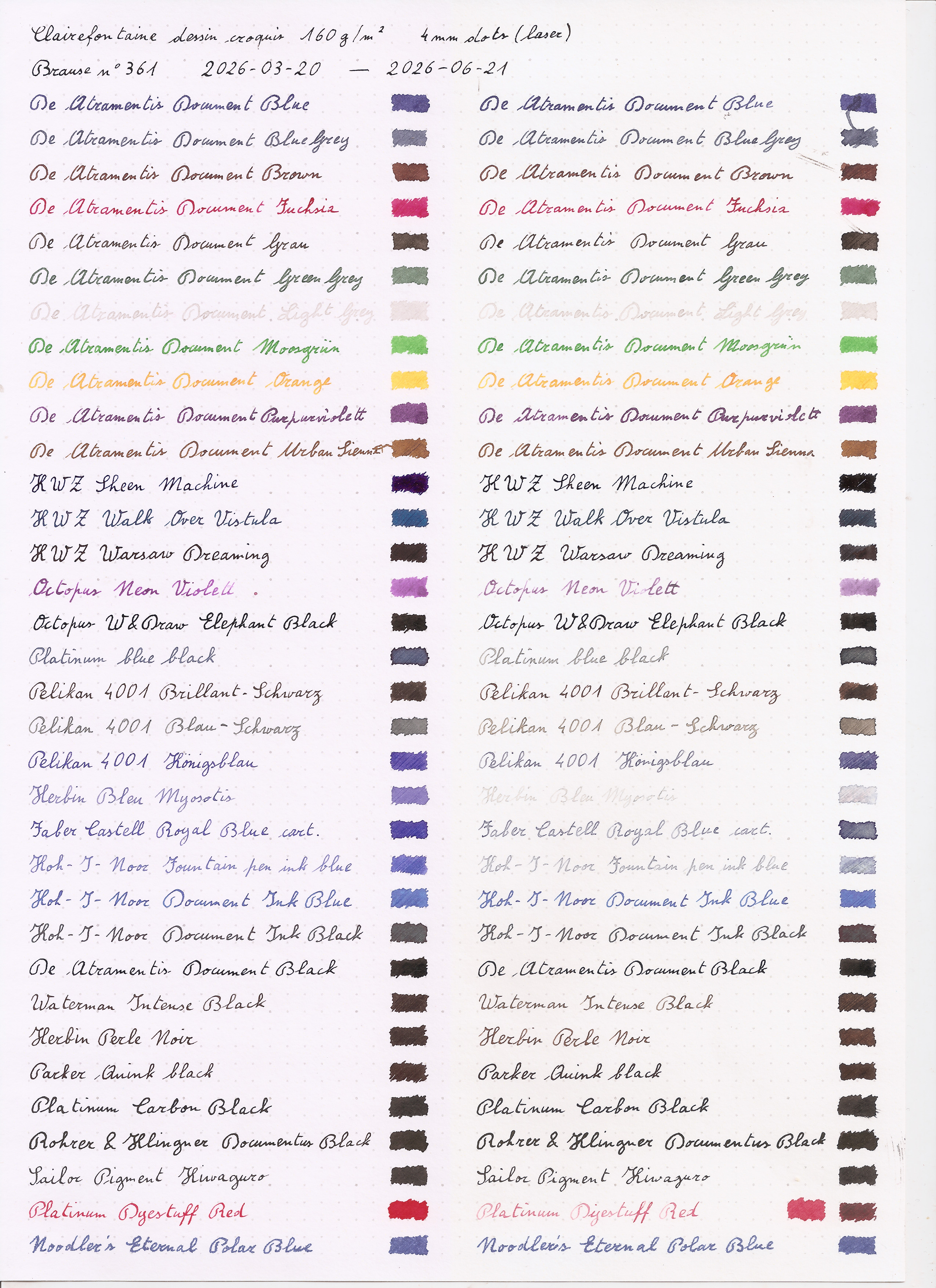
 After two weeks the paper had significantly yellowed, something I did
not expect from drawing paper (and which means that I will probably use
a different paper when making similar tests in the future).
As for the inks, there were a couple more inks with visible changes, but
mostly it was more of the same as seen in the previous week.
After two weeks the paper had significantly yellowed, something I did
not expect from drawing paper (and which means that I will probably use
a different paper when making similar tests in the future).
As for the inks, there were a couple more inks with visible changes, but
mostly it was more of the same as seen in the previous week.
 Three weeks started to show changes in the black and most irongall inks, and of course more changes in the even less resistant inks.
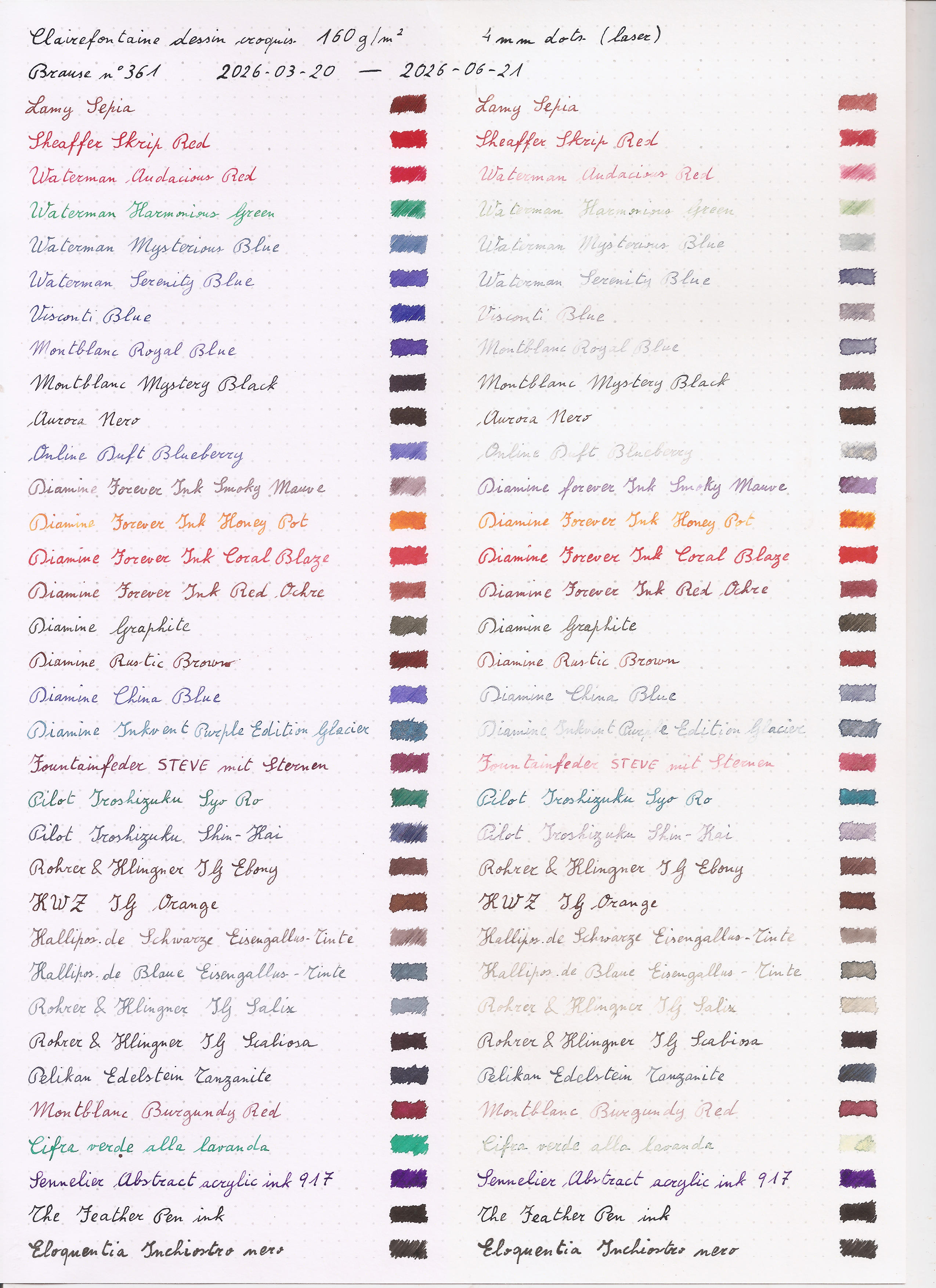
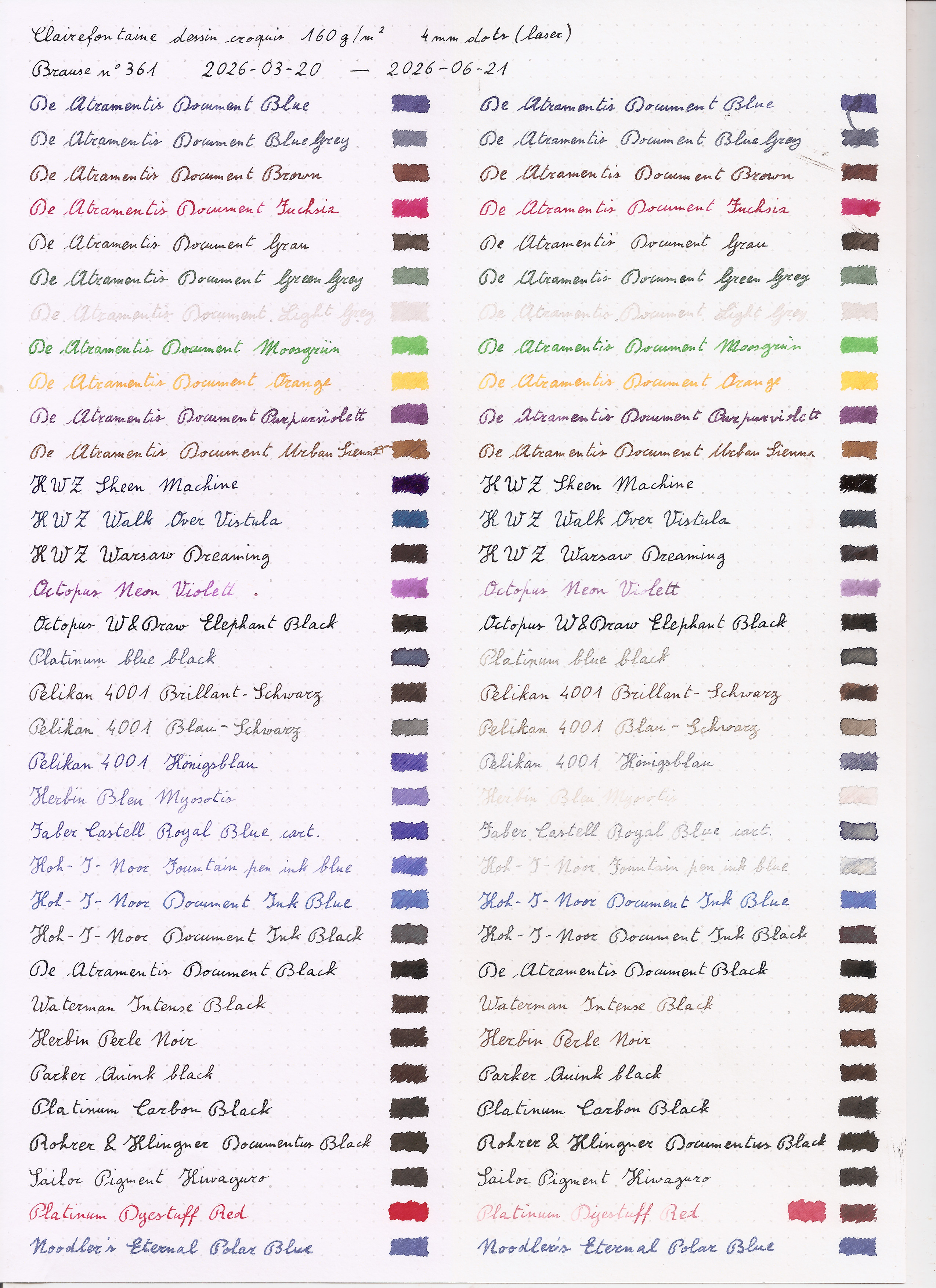 Week four saw a bit more clouds and rain than the first few weeks, and
there weren t big changes, but mostly more of what had already started
to happen earlier.
Week four saw a bit more clouds and rain than the first few weeks, and
there weren t big changes, but mostly more of what had already started
to happen earlier.
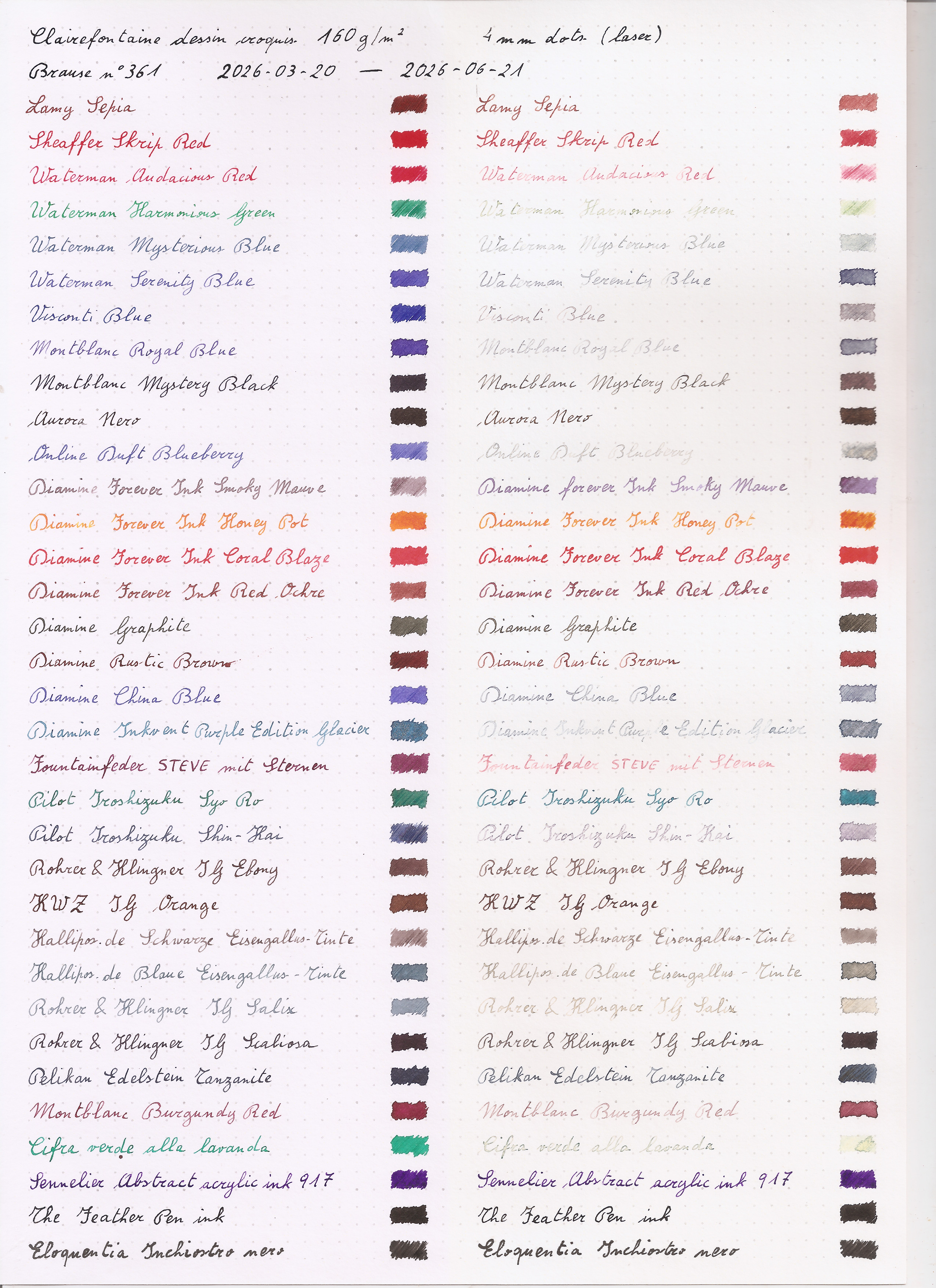
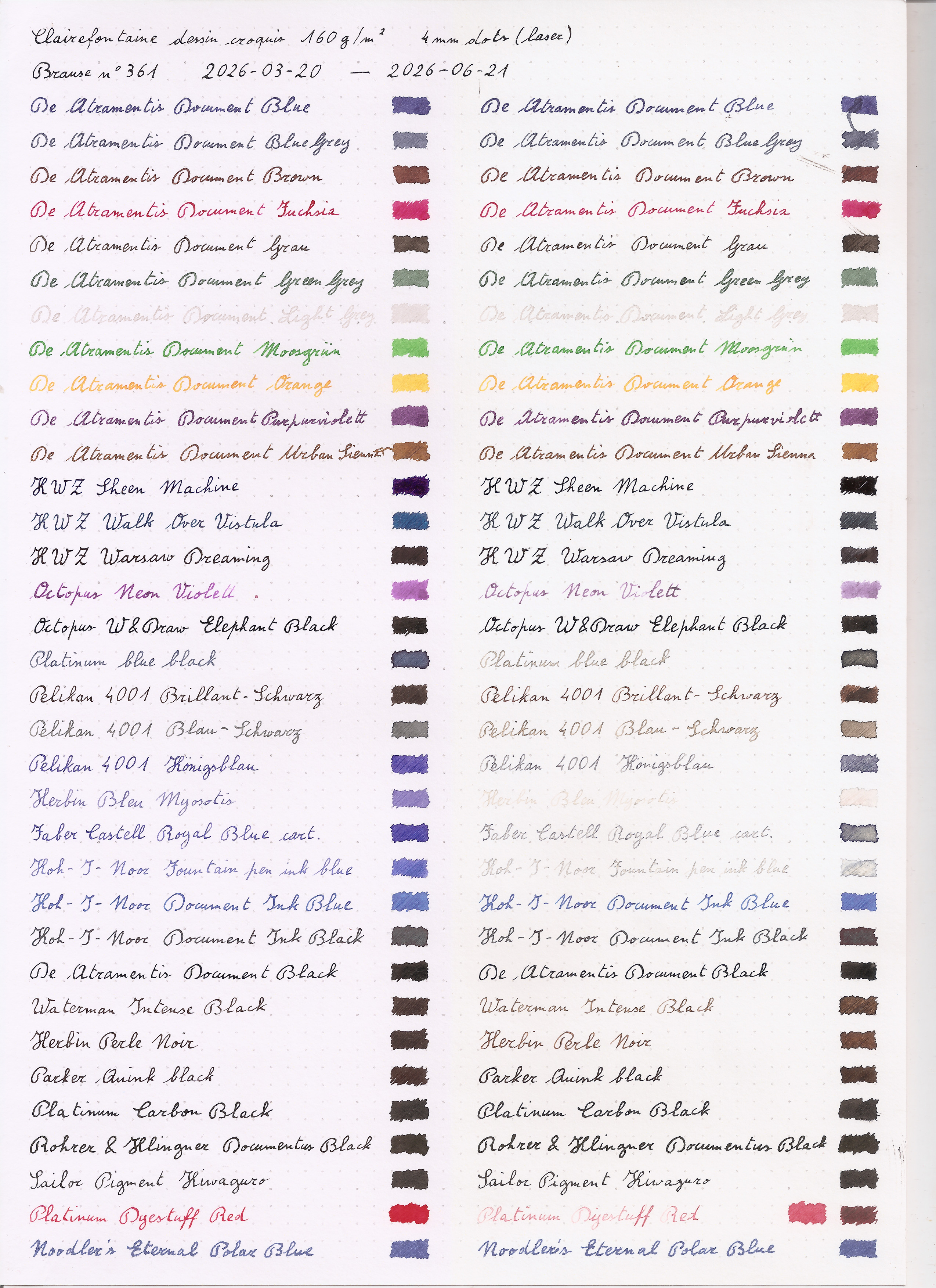 A month didn t change much compared to the four weeks, but I did the
scans for completeness, and from now on I m going to update monthly.
A month didn t change much compared to the four weeks, but I did the
scans for completeness, and from now on I m going to update monthly.

 Huge. Huge. Amazing. It did crash as soon as I tried to actually use the
radio, but after fixing a few dangling bugs in the API surface (and some
assumptions I think some underlying gnuradio driver may be making that I need
to double check in the code), I was able to get a super solid stream of
broadcast fm radio, with gqrx being none the wiser. It thought it was
just talking to the device it knows as
Huge. Huge. Amazing. It did crash as soon as I tried to actually use the
radio, but after fixing a few dangling bugs in the API surface (and some
assumptions I think some underlying gnuradio driver may be making that I need
to double check in the code), I was able to get a super solid stream of
broadcast fm radio, with gqrx being none the wiser. It thought it was
just talking to the device it knows as  Nice. I can t wait to try this with the rest of the rtl-sdr based tools I like
having around using my
Nice. I can t wait to try this with the rest of the rtl-sdr based tools I like
having around using my  This needs to be clear: systemd is under attack by a trolling campaign orchestrated by fascist elements. Nobody is forced to like or use systemd, but anybody who wants to pick a side should know the facts.
Recently, the free software
This needs to be clear: systemd is under attack by a trolling campaign orchestrated by fascist elements. Nobody is forced to like or use systemd, but anybody who wants to pick a side should know the facts.
Recently, the free software 
 I saw Ladytron perform in Digital, Newcastle last night. The
last time I saw them was, I think, at the same venue, 18 years ago. Time flies!
I saw Ladytron perform in Digital, Newcastle last night. The
last time I saw them was, I think, at the same venue, 18 years ago. Time flies!

 When you re looking at source code it can be helpful to have some evidence
indicating who wrote it. Author tags give a surface level indication,
When you re looking at source code it can be helpful to have some evidence
indicating who wrote it. Author tags give a surface level indication, 

 Linux kernel security modules provide a good additional layer of security around individual programs by restricting what they are allowed to do, and at best block and detect zero-day security vulnerabilities as soon as anyone tries to exploit them, long before they are widely known and reported. However, the challenge is how to create these security profiles without accidentally also blocking legitimate actions. For MariaDB in Debian and Ubuntu, a new AppArmor profile was recently created by leveraging the extensive test suite with 7000+ tests, giving good confidence that AppArmor is unlikely to yield false positive alerts with it.



 The Debian LTS Team, funded by [Freexian s Debian LTS offering]
(
The Debian LTS Team, funded by [Freexian s Debian LTS offering]
( What led to this experiment? Well, for one, Well, for one, there was a thought
shared by Andrej Karpathy regarding the shift towards "Agentic" workflows.
What led to this experiment? Well, for one, Well, for one, there was a thought
shared by Andrej Karpathy regarding the shift towards "Agentic" workflows.