Search Results: "rmh"

9 November 2014

Enrico Zini: fun-and-sanity

Fun and Sanity in Debian A friend of mine recently asked: "is there anything happening in Debian besides systemd?" Of course there is. He asked it 2 days after the freeze, which happened in time, and with an amazingly low RC bug count. The most visible thing right now seems to be this endless init system argument, but there are fun and sane things in Debian. Many of them. I think someone should put the spotlight on them, and here's my attempt. Yesterday I set up a gobby document asking "What is now happening in Debian that is exciting, fun and sane?", and passed the link around the Cambridge Miniconf and some IRC channels. Here are a few quotations that I collected:
The armhf and arm64 ports have for me been wonderful and exciting, and were a great time for me to start getting involved. (Jon "Aardvark" Ward) We have a way of tracking random contributors, and as far as I know no other project has anything like it. (Enrico Zini) codesearch.debian.net is an incredibly important resource, not just for us but for the free software community at large. (Ben Hutchings) sources.debian.net is a very useful resource with lots of interested contributors, it received 10 OPW applicants (Stefano Zacchiroli) It has never been easier to work on new infrastructure project thanks to the awesome work of the DSA team. We have dozens of contribution opportunities outside of just plain packaging. (Rapha l Hertzog) The work on reproducible builds has achieved excellent results with 61.3% of packages being reproducible. (Paul Wise) Porting arm64 has been (peversely) great fun. It's remarkably morish and I like nothing more than a tedious argument with autoconf macros. Working with lots of enthusiastic people from other teams, helping getting the port set up and build has been great - thank you everybody. (Wookey)
And here are random exciting things that were listed:

27 September 2014

DebConf team: Wrapping up DebConf14 (Posted by Paul Wise, Donald Norwood)

The annual Debian developer meeting took place in Portland, Oregon, 23 to 31 August 2014. DebConf14 attendees participated in talks, discussions, workshops and programming sessions. Video teams captured a lot of the main talks and discussions for streaming for interactive attendees and for the Debian video archive. Between the video, presentations, and handouts the coverage came from the attendees in blogs, posts, and project updates. We ve gathered a few articles for your reading pleasure: Gregor Herrmann and a few members of the Debian Perl group had an informal unofficial pkg-perl micro-sprint and were very productive. Vincent Sanders shared an inspired gift in the form of a plaque given to Russ Allbery in thanks for his tireless work of keeping sanity in the Debian mailing lists. Pictures of the plaque and design scheme are linked in the post. Vincent also shared his experiences of the conference and hopes the organisers have recovered. Noah Meyerhans adventuring to Debian by train, (Inter)netted some interesting IPv6 data for future road and railwarriors. Hideki Yamane sent a gentle reminder for English speakers to speak more slowly. Daniel Pocock posted of GSoC talks at DebConf14, highlights include the Java Project Dependency Builder and the WebRTC JSCommunicator. Thomas Goirand gives us some insight into a working task list of accomplishments and projects he was able to complete at DebConf14, from the OpenStack discussion to tasksel talks, and completion of some things started last year at DebConf13. Antonio Terceiro blogged about debci and the Debian Continuous Integration project, Ruby, Redmine, and Noosfero. His post also shares the atmosphere of being able to interact directly with peers once a year. Stefano Zacchiroli blogged about a talk he did on debsources which now has its own HACKING file. Juliana Louback penned: DebConf 2014 and How I Became a Debian Contributor. Elizabeth Krumbach Joseph s in-depth summary of DebConf14 is a great read. She discussed Debian Validation & CI, debci and the Continuous Integration project, Automated Validation in Debian using LAVA, and Outsourcing webapp maintenance. Lucas Nussbaum by way of a blog post releases the very first version of Debian Trivia modelled after the TCP/IP Drinking Game. Fran ois Marier s shares additional information and further discussion on Outsourcing your webapp maintenance to Debian. Joachim Breitner gave a talk on Haskell and Debian, created a new tool for binNMUs for Haskell packages which runs via cron job. The output is available for Haskell and for OCaml, and he still had a small amount of time to go dancing. Jaldhar Harshad Vyas was not able to attend DebConf this year, but he did tune in to the videos made available by the video team and gives an insightful viewpoint to what was being seen. J r my Bobbio posted about Reproducible builds in Debian in his recap of DebConf14. One of the topics at hand involved defining a canonical path where packages must be built and a BOF discussion on reproducible builds from where the conversation moved to discussions in both Octave and Groff. New helpers dh_fixmtimes and dh_genbuildinfo were added to BTS. The .buildinfo format has been specified on the wiki and reviewed. Lots of work is being done in the project, interested parties can help with the TODO list or join the new IRC channel #debian-reproducible on irc.debian.org. Steve McIntyre posted a Summary from the d-i / debian-cd BoF at DC14, with some of the session video available online. Current jessie D-I needs some help with the testing on less common architectures and languages, and release scheduling could be improved. Future plans: Switching to a GUI by default for jessie, a default desktop and desktop choice, artwork, bug fixes and new architecture support. debian-cd: Things are working well. Improvement discussions are on selecting which images to make I.E. netinst, DVD, et al., debian-cd in progress with http download support, Regular live test builds, Other discussions and questions revolve around which ARM platforms to support, specially-designed images, multi-arch CDs, and cloud-init based images. There is also a call for help as the team needs help with testing, bug-handling, and translations. Holger Levsen reports on feedback about the feedback from his LTS talk at DebConf14. LTS has been perceived well, fits a demand, and people are expecting it to continue; however, this is not without a few issues as Holger explains in greater detail the lacking gatekeeper mechanisms, and how contributions are needed from finance to uploads. In other news the security-tracker is now fixed to know about old stable. Time is short for that fix as once jessie is released the tracker will need to support stable, oldstable which will be wheezy, and oldoldstable. Jonathan McDowell s summary of DebConf14 includes a fair perspective of the host city and the benefits of planning of a good DebConf14 location. He also talks about the need for facetime in the Debian project as it correlates with and improves everyone s ability to work together. DebConf14 also provided the chance to set up a hard time frame for removing older 1024 bit keys from Debian keyrings. Steve McIntyre posted a Summary from the State of the ARM BoF at DebConf14 with updates on the 3 current ports armel, armhf and arm64. armel which targets the ARM EABI soft-float ARMv4t processor may eventually be going away, while armhf which targets the ARM EABI hard-float ARMv7 is doing well as the cross-distro standard. Debian is has moved to a single armmp kernel flavour using Device Tree Blobs and should be able to run on a large range of ARMv7 hardware. The arm64 port recently entered the main archive and it is hoped to release with jessie with 2 official builds hosted at ARM. There is talk of laptop development with an arm64 CPU. Buildds and hardware are mentioned with acknowledgements for donated new machines, Banana Pi boards, and software by way of ARM s DS-5 Development Studio - free for all Debian Developers. Help is needed! Join #debian-arm on irc.debian.org and/or the debian-arm mailing list. There is an upcoming Mini-DebConf in November 2014 hosted by ARM in Cambridge, UK. Tianon Gravi posted about the atmosphere and contrast between an average conference and a DebConf. Joseph Bisch posted about meeting his GSOC mentors, attending and contributing to a keysigning event and did some work on debmetrics which is powering metrics.debian.net. Debmetrics provides a uniform interface for adding, updating, and viewing various metrics concerning Debian. Harlan Lieberman-Berg s DebConf Retrospective shared the feel of DebConf, and detailed some of the work on debugging a build failure, work with the pkg-perl team on a few uploads, and work on a javascript slowdown issue on codeeditor. Ana Guerrero L pez reflected on Ten years contributing to Debian.

22 September 2014

Konstantinos Margaritis: EfikaMX updated wheezy and jessie images available

A while ago, I promised to some people in powerdeveloper.org forum that I would provide bootable armhf images for wheezy but most importantly for jessie with an updated kernel. After a delay -I did have the images ready and working, but had to clean them up a bit- I decided to publish them here first. So, here are the images: http://freevec.org/files/efikamx-wheezy-armhf-20140921.img.xz (559MB)
http://freevec.org/files/efikamx-jessie-armhf-20140921.img.xz (635MB)

14 September 2014

Gregor Herrmann: RC bugs 2014/34-37

the perl 5.20 transition is over, debconf14 is over, so I should have more time for RC bugs? yes & no: I fixed some, but only in "our" (as in: pkg-perl) packages:

26 August 2014

Neil Williams: vmdebootstrap images for ARMMP on BBB

After patches from Petter to add foreign architecture support and picking up some scripting from freedombox, I ve just built a Debian unstable image using the ARMMP kernel on Beaglebone-black. A few changes to vmdebootstrap will need to go into the next version (0.3), including an example customise script to setup the u-boot support. With the changes, the command would be:
sudo ./vmdebootstrap --owner  whoami  --verbose --size 2G --mirror http://mirror.bytemark.co.uk/debian --log beaglebone-black.log --log-level debug --arch armhf --foreign /usr/bin/qemu-arm-static --no-extlinux --no-kernel --package u-boot --package linux-image-armmp --distribution sid --enable-dhcp --configure-apt --serial-console-command '/sbin/getty -L ttyO0 115200 vt100' --customize examples/beagleboneblack-customise.sh --bootsize 50m --boottype vfat --image bbb.img
Some of those commands are new but there are a few important elements: With this in place, a simple dd to an SD card and the BBB boots directly into Debian ARMMP. The examples are now in my branch and include an initial cubieboard script which is unfinished. The current image is available for download. (222Mb). I hope to upload the new vmdebootstrap soon let me know if you do try the version in the branch.

22 July 2014

Neil Williams: Validating ARMMP device tree blobs

I ve done various bits with ARMMP and LAVA on this blog already, usually waiting until I ve got all the issues ironed out before writing it up. However, this time I m just going to do a dump of where it s at, how it works and what can be done. I m aware that LAVA can seem mysterious at first, the package description has improved enormously recently, thanks to exposure in Debian: LAVA is a continuous integration system for deploying operating systems onto physical and virtual hardware for running tests. Tests can be simple boot testing, bootloader testing and system level testing, although extra hardware may be required for some system tests. Results are tracked over time and data can be exported for further analysis. The LAVA documentation has a glossary of terms like result bundle and all the documentation is also available in the lava-server-doc package. The goal is to validate the dtbs built for the Debian ARMMP kernel. One of the most accessible ways to get the ARMMP kernel onto a board for testing is tftp using the Debian daily DI builds. Actually using the DI initrd can come later, once I ve got a complete preseed config so that the entire install can be automated. (There are some things to sort out in LAVA too before a full install can be deployed and booted but those are at an early stage.) It s enough at first to download the vmlinuz which is common to all ARMMP deployments, supply the relevant dtb, partner those with a minimal initrd and see if the board boots. The first change comes when this process is compared to how boards are commonly tested in LAVA with a zImage or uImage and all/most of the modules already built in. Packaged kernels won t necessarily raise a network interface or see the filesystem without modules, so the first step is to extend a minimal initramfs to include the armmp modules.
apt install pax u-boot-tools
The minimal initramfs I selected is one often used within LAVA:
wget http://images.armcloud.us/lava/common/linaro-image-minimal-initramfs-genericarmv7a.cpio.gz.u-boot
It has a u-boot header added, as most devices using this would be using u-boot and this makes it easier to debug boot failures as the initramfs doesn t need to have the header added, it can simply be downloaded to a local directory and passed to the board as a tftp location. To modify it, the u-boot header needs to be removed. Rather than assuming the size, the u-boot tools can (indirectly) show the size:
$ ls -l linaro-image-minimal-initramfs-genericarmv7a.cpio.gz.u-boot
-rw-r--r-- 1 neil neil  5179571 Nov 26  2013 linaro-image-minimal-initramfs-genericarmv7a.cpio.gz.u-boot
$ mkimage -l linaro-image-minimal-initramfs-genericarmv7a.cpio.gz.u-boot 
Image Name:   linaro-image-minimal-initramfs-g
Created:      Tue Nov 26 22:30:49 2013
Image Type:   ARM Linux RAMDisk Image (gzip compressed)
Data Size:    5179507 Bytes = 5058.11 kB = 4.94 MB
Load Address: 00000000
Entry Point:  00000000
Referencing http://www.omappedia.com/wiki/Development_With_Ubuntu, the header size is the file size minus the data size listed by mkimage.
5179571 - 5179507 == 64
So, create a second file without the header:
dd if=linaro-image-minimal-initramfs-genericarmv7a.cpio.gz.u-boot of=linaro-image-minimal-initramfs-genericarmv7a.cpio.gz skip=64 bs=1
decompress it
gunzip linaro-image-minimal-initramfs-genericarmv7a.cpio.gz
Now for the additions
dget http://ftp.uk.debian.org/debian/pool/main/l/linux/linux-image-3.14-1-armmp_3.14.12-1_armhf.deb
(Yes, this process will need to be repeated when this package is rebuilt, so I ll want to script this at some point.)
dpkg -x linux-image-3.14-1-armmp_3.14.12-1_armhf.deb kernel-dir
cd kernel-dir
Pulling in the modules we need for most needs, comes thanks to a script written by the Xen folks. The set is basically disk, net, filesystems and LVM.
find lib -type d -o -type f -name modules.\*  -o -type f -name \*.ko  \( -path \*/kernel/lib/\* -o  -path \*/kernel/crypto/\* -o  -path \*/kernel/fs/mbcache.ko -o  -path \*/kernel/fs/ext\* -o  -path \*/kernel/fs/jbd\* -o  -path \*/kernel/drivers/net/\* -o  -path \*/kernel/drivers/ata/\* -o  -path \*/kernel/drivers/scsi/\* -o -path \*/kernel/drivers/md/\* \)   pax -x sv4cpio -s '%lib%/lib%' -d -w >../cpio
gzip -9f cpio
original Xen script (GPL-3+) I found it a bit confusing that i is used for extract by cpio, but that s how it is. Extract the minimal initramfs to a new directory:
sudo cpio -id < ../linaro-image-minimal-initramfs-genericarmv7a.cpio
Extract the new cpio into the same location. (Yes, I could do this the other way around and pipe the output of find into the already extracted location but that's for when I get a script to do this):
sudo cpio --no-absolute-filenames -id < ../ramfs/cpio
CPIO Manual Use newc format, the new (SVR4) portable format, which supports file systems having more than 65536 i-nodes. (4294967295 bytes)
(41M)
find .   cpio -H newc -o > ../armmp-image.cpio
... and add the u-boot header back:
mkimage -A arm -T ramdisk -C none -d armmp-image.cpio.gz debian-armmp-initrd.cpio.gz.u-boot
Now what? Now send the combination to LAVA and test it. Results bundle for a local LAVA test job using this technique. (18k) submission JSON - uses file:// references, so would need modification before being submitted to LAVA elsewhere. complete log of the test job (72k) Those familiar with LAVA will spot that I haven't optimised this job, it boots the ARMMP kernel into a minimal initramfs and then expects to find apt and other tools. Actual tests providing useful results would use available tools, add more tools or specify a richer rootfs. The tests themselves are very quick (the job described above took 3 minutes to run) and don't need to be run particularly often, just once per board type per upload of the ARMMP kernel. LAVA can easily run those jobs in parallel and submission can be automated using authentication tokens and the lava-tool CLI. lava-tool can be installed without lava-server, so can be used in hooks for automated submissions. Extensions That's just one DTB and one board. I have a range of boards available locally: * iMX6Q Wandboard (used for this test)
* iMX.53 Quick Start Board (needs updated u-boot)
* Beaglebone Black
* Cubie2
* CubieTruck
* arndale (no dtb?)
* pandaboard Other devices available could involve ARMv7 devices hosted at www.armv7.com and validation.linaro.org - as part of a thank you to the Debian community for providing the OS which is (now) running all of the LAVA infrastructure. That doesn't cover all of the current DTBs (and includes many devices which have no DTBs) so there is plenty of scope for others to get involved. Hopefully, the above will help get people started with a suitable kernel+dtb+initrd and I'd encourage anyone interested to install lava-server and have a go at running test jobs based on those so that we start to build data about as many of the variants as possible. (If anyone in DI fancies producing a suitable initrd with modules alongside the DI initrd for armhf builds, or if anyone comes up with a patch for DI to do that, it would help enormously.) This will at least help Debian answer the question of what the Debian ARMMP package can actually support. For help on LAVA, do read through the documentation and then come to us at #linaro-lava or the linaro-validation mailing list or file bugs in Debian: reportbug lava-server. , so you can ask me. I'm giving one talk on the LAVA software and there will be a BoF on validation and CI in Debian.

21 July 2014

Ian Campbell: sunxi-tools now available in Debian

I've recently packaged the sunxi tools for Debian. These are a set of tools produce by the Linux Sunxi project for working with the Allwinner "sunxi" family of processors. See the package page for details. Thanks to Steve McIntyre for sponsoring the initial upload. The most interesting component of the package are the tools for working with the Allwinner processors' FEL mode. This is a low-level processor mode which implements a simple USB protocol allowing for initial programming of the device and recovery which can be entered on boot (usually be pressing a special 'FEL button' somewhere on the device). It is thanks to FEL mode that most sunxi based devices are pretty much unbrickable. The most common use of FEL is to boot over USB. In the Debian package the fel and usb-boot tools are named sunxi-fel and sunxi-usb-boot respectively but otherwise can be used in the normal way described on the sunxi wiki pages. One enhancement I made to the Debian version of usb-boot is to integrate with the u-boot packages to allow you to easily FEL boot any sunxi platform supported by the Debian packaged version of u-boot (currently only Cubietruck, more to come I hope). To make this work we take advantage of Multiarch to install the armhf version of u-boot (unless your host is already armhf of course, in which case just install the u-boot package):
# dpkg --add-architecture armhf
# apt-get update
# apt-get install u-boot:armhf
Reading package lists... Done
Building dependency tree       
Reading state information... Done
The following NEW packages will be installed:
  u-boot:armhf
0 upgraded, 1 newly installed, 0 to remove and 1960 not upgraded.
Need to get 0 B/546 kB of archives.
After this operation, 8,676 kB of additional disk space will be used.
Retrieving bug reports... Done
Parsing Found/Fixed information... Done
Selecting previously unselected package u-boot:armhf.
(Reading database ... 309234 files and directories currently installed.)
Preparing to unpack .../u-boot_2014.04+dfsg1-1_armhf.deb ...
Unpacking u-boot:armhf (2014.04+dfsg1-1) ...
Setting up u-boot:armhf (2014.04+dfsg1-1) ...
With that done FEL booting a cubietruck is as simple as starting the board in FEL mode (by holding down the FEL button when powering on) and then:
# sunxi-usb-boot Cubietruck -
fel write 0x2000 /usr/lib/u-boot/Cubietruck_FEL/u-boot-spl.bin
fel exe 0x2000
fel write 0x4a000000 /usr/lib/u-boot/Cubietruck_FEL/u-boot.bin
fel write 0x41000000 /usr/share/sunxi-tools//ramboot.scr
fel exe 0x4a000000
Which should result in something like this on the Cubietruck's serial console:
U-Boot SPL 2014.04 (Jun 16 2014 - 05:31:24)
DRAM: 2048 MiB
U-Boot 2014.04 (Jun 16 2014 - 05:30:47) Allwinner Technology
CPU:   Allwinner A20 (SUN7I)
DRAM:  2 GiB
MMC:   SUNXI SD/MMC: 0
In:    serial
Out:   serial
Err:   serial
SCSI:  SUNXI SCSI INIT
Target spinup took 0 ms.
AHCI 0001.0100 32 slots 1 ports 3 Gbps 0x1 impl SATA mode
flags: ncq stag pm led clo only pmp pio slum part ccc apst 
Net:   dwmac.1c50000
Hit any key to stop autoboot:  0 
sun7i# 
As more platforms become supported by the u-boot packages you should be able to find them in /usr/lib/u-boot/*_FEL. There is one minor inconvenience which is the need to run sunxi-usb-boot as root in order to access the FEL USB device. This is easily resolved by creating /etc/udev/rules.d/sunxi-fel.rules containing either:
SUBSYSTEMS=="usb", ATTR idVendor =="1f3a", ATTR idProduct =="efe8", OWNER="myuser"
or
SUBSYSTEMS=="usb", ATTR idVendor =="1f3a", ATTR idProduct =="efe8", GROUP="mygroup"
To enable access for myuser or mygroup respectively. Once you have created the rules file then to enable:
# udevadm control --reload-rules
As well as the FEL mode tools the packages also contain a FEX (de)compiler. FEX is Allwinner's own hardware description language and is used with their Android SDK kernels and the fork of that kernel maintained by the linux-sunxi project. Debian's kernels follow mainline and therefore use Device Tree.

4 July 2014

Rapha&#235;l Hertzog: My Free Software Activity in June 2014

This is my monthly summary of my free software related activities. If you re among the people who made a donation to support my work (168.17 , thanks everybody!), then you can learn how I spent your money. Otherwise it s just an interesting status update on my various projects. Debian LTS After having put in place the infrastructure to allow companies to contribute financially to Debian LTS, I spent quite some time to draft the announce of the launch of Debian LTS (on a suggestion of Moritz M hlenhoff who pointed out to me that there was no such announce yet). I m pretty happy about the result because we managed to mention a commercial offer without generating any pushback from the community. The offer is (in my necessarily biased opinion) clearly in the interest of Debian but still the money doesn t go to Debian so we took extra precautions. When I got in touch with the press officers, I included the Debian leader in the discussion and his feedback has been very helpful to improve the announce. He also officially acked the press release to give some confidence to the press officers that they were doing the right thing. Lucas also pushed me to seek public review of the draft press release, which I did. The discussion was constructive and the draft got further improved. The news got widely relayed, but on the flip side, the part with the call for help got almost no attention from the press. Even Linux Weekly News skipped it! On the Freexian side, we just crossed 10% of a full-time position (funded by 6 companies) and we are in contact with a few other companies in discussion. But we re far from our goal yet so we will have to actively reach out to more companies. Do you know companies who are still running Debian 6 servers ? If yes, please send me the details (name + url + contact info if possible) to deblts@freexian.com so that I can get in touch and invite them to contribute to the project. Distro Tracker In the continuation of the Debian France game, I continued to work together with Joseph Herlant and Christophe Siraut on multiple improvements to distro tracker in order to prepare for its deployment on tracker.debian.org (which I just announced \o/). Debian France Since the Debian France game was over, I shipped the rewards. 5 books have been shipped to: Misc Debian work I orphaned sql-ledger and made a last upload to change the maintainer to Debian QA (with a new upstream version). After having been annoyed a few times by dch breaking my name in the changelog, I filed #750855 which got quickly fixed. I disabled a broken patch in quilt to fix RC bug #751109. I filed #751771 when I discovered an incorrect dependency on ruby-uglifier (while doing packaging work for Kali Linux). I tested newer versions of ruby-libv8 on armel/armhf on request of the upstream author. I had reported him those build failures (github ticket here). Thanks See you next month for a new summary of my activities.

One comment Liked this article? Click here. My blog is Flattr-enabled.

10 June 2014

Dimitri John Ledkov: cross-compile go code, including cgo

By all means cross-compiling a new language/stack is not going to be pretty, but it didn't turn out that bad.

A few weeks back, I was told that go code which uses cgo (that is utilising C api calls to shared libraries exporting C interface) cannot be cross-compiled. Well, if it's just calling out a C compiler it should totally be easy to cross compile, since so much of our platform is.

So there we go, first I've picked a moderately small project which only does a couple cgo calls, and check that it compiles correctly:

$ sudo apt-get build-dep ubuntu-push-client
$ go get launchpad.net/ubuntu-push/...
$ cd $GOPATH/src/launchpad.net/ubuntu-push/
$ go build ubuntu-push-client.go
Well, when your gcc is all is easy.

I didn't want to polute my system, so I quickly created a chroot with go, build-dependencies in armhf architectures and cross-compiler:

# Get a chroot with build-dependencies installed, I am basing on top of a click-chroot
# one should be able to use any chroot which is armhf multiarch enabled.
$ sudo click chroot -aarmhf -fubuntu-sdk-14.04 -s utopic create
$ sudo click chroot -aarmhf -fubuntu-sdk-14.04 -s utopic maint apt-get install golang-go golang-go-linux-arm golang-go-dbus-dev golang-go-xdg-dev golang-gocheck-dev golang-gosqlite-dev golang-uuid-dev libgcrypt11-dev:armhf libglib2.0-dev:armhf libwhoopsie-dev:armhf libubuntuoneauth-2.0-dev:armhf libdbus-1-dev:armhf libnih-dbus-dev:armhf libsqlite3-dev:armhf crossbuild-essential-armhf
After that the tricky bit was advising go to cross-compile:

$ click chroot -aarmhf -fubuntu-sdk-14.04 -s utopic run CGO_ENABLED=1 GOARCH=arm GOARM=7 PKG_CONFIG_LIBDIR=/usr/lib/arm-linux-gnueabihf/pkgconfig:/usr/lib/pkgconfig:/usr/share/pkgconfig GOPATH=/usr/share/gocode/:~/go CC=arm-linux-gnueabihf-gcc go build -ldflags '-extld=arm-linux-gnueabihf-gcc' ubuntu-push-client.go
Ignoring the click chroot wrapper:
  • CGO_ENABLED=1 - by default cgo is disabled when cross-compiling, but really shouldn't be as compiler names are standard $(GNU_TRIPPLET) prefixed tools
  • GOARCH=arm - set the target arch
  • GOARM=7 - set ABI level
  • PKG_CONFIG_LIBDIR - the ugly beast to pass where pkg-config should search for .pc files. With autoconf one simply sets PKG_CONFIG environment variable pointing at a cross-pkg-config, $(GNU_TRIPPLET)-pkg-config but go tool doesn't support it. I've raised merge proposal to get that added https://codereview.appspot.com/104960043/
  • Next I just set GOPATH to where my packages are and CC as to which compiler to use
  • The last portion to the puzzle was to pash "-ldflags '-extld=$CC'" because the linker tool (5l) didn't use environmental variable CC and simply defaults to gcc. I'll raise a merge proposal for this.
Overall that's it. Given that all of above can be re-factored into standard variables (e.g. use $GNU_TRIPPLET prefix, and offer to override it), I see no reason why cross-compilation in go with cgo cannot eventually become a simple
GOARCH=arm go build

25 May 2014

Luca Falavigna: Adventures in cross-chroot creations

I ve been playing with qemu-user-static a bit to create a set of porterboxes for my Deb-o-Matic build farm. After reading gregoa s post on how to create cross-chroot with qemu-debootstrap, I was immediately able to create armel, armhf and powerpc boxes with very little efforts. I tried to extend the number of porterboxes available by adding mips* and s390x, in order to have all the Linux-based architectures supported in Jessie, but with no luck. Here s a summary of my attempts. MIPS*
Chroot creation fails under both mips and mipsel trying to configure libuuid1. The problem is due to the fact libuuid1 s postinst script calls groupadd and useradd. Those two utilities rely on NETLINK sockets, which apparently are not handled by QEMU at the moment. I raised the question upstream to see whether it is possible to solve this problem. s390x
Chroot creation used to fail with a SIGSEGV. This particular bug has been fixed recently, but it seems it s not enough to have a working chroot. It fails with some gzip errors, probably because some portions of dpkg-deb are not fully covered by qemu-s390x-static. Preparing to unpack .../base-files_7.3_s390x.deb ...
Unpacking base-files (7.3) ...
dpkg-deb (subprocess): decompressing archive member: internal gzip read error: '<fd:5>: incorrect data check'
/bin/tar: Unexpected EOF in archive
/bin/tar: Error is not recoverable: exiting now
dpkg-deb: error: subprocess tar returned error exit status 2
dpkg: error processing archive /var/cache/apt/archives/base-passwd_3.5.33_s390x.deb (--install):
subprocess dpkg-deb --control returned error exit status 2

8 May 2014

Riku Voipio: Arm builder updates

Debian has recently received a donation of 8 build machines from Marvell. The new machines come with Quad core MV78460 Armada XP CPU's, DDR3 DIMM slot so we can plug in more memory, and speedy sata ports. They replace the well served Marvell MV78200 based builders - ones that have been building debian armel since 2009. We are planning a more detailed announcement, but I'll provide a quick summary: The speed increase provided by MV78460 can viewed by comparing build times on selected builds since early april: Qemu build times. We can now build Qemu in 2h instead of 16h -8x faster than before! Certainly a substantial improvement, so impressive kit from Marvell! But not all packages gain this amount of speedup: webkitgtk build times. This example, webkitgtk, builds barely 3x faster. The explanation is found from debian/rules of webkitgkt:

# Parallel builds are unstable, see #714072 and #722520
# ifneq (,$(filter parallel=%,$(DEB_BUILD_OPTIONS)))
# NUMJOBS = $(patsubst parallel=%,%,$(filter parallel=%,$(DEB_BUILD_OPTIONS)))
# MAKEARGUMENTS += -j$(NUMJOBS)
# endif
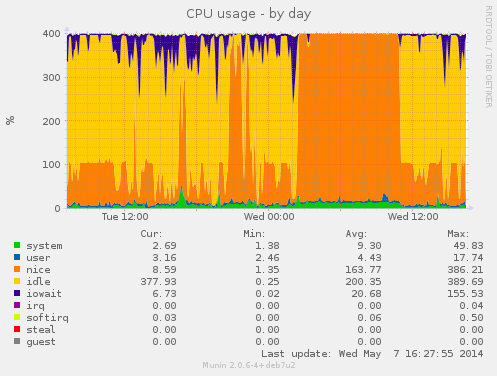
The old builders are single-core[1], so the regardless of parallel building, you can easily max out the cpu. New builders will use only 1 of 4 cores without parallel build support in debian/rules. During this buildd cpu usage graph, we see most time only one CPU is consumed. So for fast package build times.. make sure your packages supports parallel building. For developers, abel.debian.org is porter machine with Armada XP. It has schroot's for both armel and armhf. set "DEB_BUILD_OPTIONS=parallel=4" and off you go. Finally I'd like to thank Thomas Petazzoni, Maen Suleiman, Hector Oron, Steve McIntyre, Adam Conrad and Jon Ward for making the upgrade happen. Meanwhile, we have unrelated trouble - a bunch of disks have broken within a few days apart. I take the warranty just run out... [1] only from Linux's point of view. - mv78200 has actually 2 cores, just not SMP or coherent. You could run an RTOS on the other core while you run Linux on the other.

26 March 2014

Neil Williams: LAVA packages for Debian

Packaging LAVA for Debian unstable with notes on other distributions I ve been building packages for LAVA on Debian unstable for several months now and I ve been running LAVA jobs on the laptop and on devices in my home lab and on an ARMv7 arndale too. Current LAVA installations use lava-deployment-tool which has only supported Ubuntu 12.04 LTS Precise Pangolin. There has been a desire in LAVA to move away from a virtual environment, to put configuration files in FHS compliant paths, to use standard distribution packages for dependencies and so to make LAVA available on more platforms than just precise. Packaging opens the door to installing LAVA on Debian, Ubuntu, Fedora and any other recent distribution. Despite LAVA currently being reliant on 12.04 Precise, some of the python dependencies of LAVA have been able to move forward using the virtual environment provided by builtout and pypi. This means that LAVA, as packaged, requires a newer base OS suite than precise for Ubuntu, the minimal base is Saucy Salamander 13.10 and for Debian it would be Jessie (testing) although there is currently a transition ongoing in Debian which means that uwsgi is not in testing and Debian unstable would be needed instead. The work to migrate configuration snippets out of deployment-tool and to ensure that the tarball built using setuptools contains all of the necessary files for the package has already been done. The packaging itself is clean and most of the work is done upstream. There is, as ever, more to do but the packages work smoothly for single install LAVA servers where the dispatcher is on the same machine as the django web frontend. The packages have also migrated to Django1.6, something which is proving difficult with the deployment-tool as it has not kept pace with the changes outside the virtual environment, even if other parts of LAVA have. LAVA will be switching to packages for installation instead of deployment-tool and this will mean changes to how LAVA works outside the Cambridge lab. When the time comes to swich to packaging, the plan is to update deployment-tool so that it no longer updates /srv/lava/ but instead migrates the instance to packages. Main changes
  1. Configuration files move into /etc/
    • Device configuration files /etc/lava-dispatcher/devices/
    • Instance configuration files/etc/lava-server/
  2. Log files move into /var/log/
    • Adding logrotate support no more multi-Gb log files in /srv/lava/
  3. Commitment to keeping the upstream code up to date with dependencies
  4. Support for migrating existing instances, using South.
  5. Packaging helpers
    • add devices over SSH instead of via a combination of web frontend and SSH.
    • Developer builds with easily identifiable version strings, built as packages direct from your git tree.
  6. New frontend
    • Although django1.6 does not change the design of the web frontend at all, LAVA will take the opportunity to apply a bootstrap frontend which has greater support for browsers on a variety of devices, including mobile. This also helps identify a packaged LAVA from a deployment LAVA.
  7. Documentation and regular updates
The Plan LAVA has made regular releases based on a monthly cycle and these will be provided as source tarballs at http://www.linaro.org/downloads/ for distributions to download. The
official monthly release and any intervening updates will be made available for distributions to use for their own packaging. Additionally, Debian packages will be regularly built for use within LAVA and these will be available for those who choose to migrate from Ubuntu Precise to Debian Jessie. LAVA will assist maintainers who want to package LAVA for their distributions and we welcome patches from such maintainers. This can include changes to the developer build support script to automate the process of supporting development outside LAVA. Initially, LAVA will migrate to packaging internally, to prove the process and to smooth out the migration. Other LAVA instances are welcome to follow this migration or wait until the problems have been ironed out. The Issues Build Dependencies For Debian unstable, the list of packages which must be installed on your Debian system to be able to build packages from the lava-server and lava-dispatcher source code trees are:
debhelper (>= 8.0.0) python   python-all   python-dev   python-all-dev 
python-sphinx (>= 1.0.7+dfsg)   python3-sphinx python-mocker 
python-setuptools python-versiontools
(python-versiontools may disappear before the packages are finalised) In addition, to be able to install lava-server, these packages need to be built from tarballs released by Linaro (the list may shorten as changes upstream are applied)
linaro-django-pagination, 
python-django-restricted-resource (>= 0.2.7), 
lava-tool (>= 0.2), lava-utils-interface (>= 1.0), 
linaro-django-xmlrpc (>= 0.4),
python-versiontools (>= 1.8),
python-longerusername,
linaro-dashboard-bundle (>= 1.10.2), 
lava-dispatcher (>= 0.33.3)
lava-coordinator, lava-server-doc
The list for lava-dispatcher is currently:
python-json-schema-validator, lava-tool (>= 0.4), 
lava-utils-interface, linaro-dashboard-bundle (>= 1.10.2), 
The packages available from my experimental repository are using a new packaging branch of lava-server and lava-dispatcher where we are also migrating the CSS to Bootstrap CSS. Installing LAVA on Debian unstable
$ sudo apt-get install emdebian-archive-keyring
Add the link to my experimental repository (amd64, i386, armhf & arm64) to your apt sources, e.g. by creating a file /etc/apt/sources.list.d/lava.list containing:

deb http://people.linaro.org/~neil.williams/lava sid main
Update with the new key

$ sudo apt-get update
It is always best to install postgresql first:

$ sudo apt-get install postgresql
There are then three options for the packages to install (Please be careful with remote worker setup, it is not suitable for important installations at this time.):
  1. Single instance, server and dispatcher with recommended tools
    apt-get install lava
    Installs linaro-image-tools and guestfs tools.
  2. Single instance, server and dispatcher
    apt-get install lava-server
    Installs enough to run LAVA on a single machine, running jobs on boards on the same LAN.
  3. Experimental remote worker support
    apt-get install lava-worker
    Needs a normal lava-server installation to act as the master scheduler but is aimed at supporting a dispatcher and boards which are remote from that master.
The packages do not assume that your apache2.4 setup is identical to that used in other LAVA installations, so the LAVA apache config is installed to /etc/apache2/sites-available/ but is not enabled by default. If you choose to use the packaged apache config, you can simply run:

$ sudo a2ensite lava-server
$ sudo apache2ctl restart
(If this is a fresh apache install, use a2dissite to disable to default configuration before restarting.) Information on creating a superuser, adding devices and administering your LAVA install is provided in the README.Debian file in lava-server:

$ zless /usr/share/doc/lava-server/README.Debian.gz
Provisos and limitations Please be aware that packaged LAVA is still a work-in-progress but do let us know if there are problems. Now is the time to iron out install bugs and other issues as well as to prepare LAVA packages for other distributions. It will be a little while before the packages are ready for upload to Debian I ve got to arrange the download location and upload the dependencies first and some of that work will wait until more work has gone in upstream to consolidate some of the current dependencies.

25 March 2014

Francesca Ciceri: A crafty roundup: projects from the last months

A quick roundup of things I made during the last months, following tutorials here and there. finished projects for babies 1: a soft bunny more or less based on this one 2: skelly man! You can find pattern and instructions on Chez Beeper Bebe's blog 3: bibs: the embroidered one is based on this pattern by Charlotte Lyons on SouleMama's blog, the other re-uses the same pattern but add a bird applique instead. finished projects for women 1, 4: my first try with the beautiful Weekender Bag ended with something else entirely: apparently, where euclidean geometry principles apply, cutting a piece of fabric 10 cm smaller will result in a bag 10 cm smaller!
Go figure! Fhtang! I'm happy anyway with the final result, but it resembles more a tote bag than a weekender one. I then made also a successful Weekender, but haven't taken a pic yet. If you try that pattern, you may find this blogpost helpful. 2: This is my try at copycatting this model without a pattern and didn't end very well.
However, a couple lessons learned: 3: Blouse with knit-stretchy stuff! (You love me when I speak technical, don't you?)
I did that without pattern, mostly using a similar top I have as inspiration/guide

18 March 2014

Paul Tagliamonte: Wherein Paul maligns the lack of proper GNU/Linux support on Android devices

It sucks. It annoys me to no end that I can t run my own Linux kernel on an Android device. It s very annoying that the android patches haven t been upstreamed, and it s even more annoying that I can t run a host OS that I build lovingly and work on during the nights. I hate that I can t use my tablet as a porter box with a USB OTG Hard disk. Alas. One day. One day I ll have a proper armhf device that I can run Debian on. But that day is not today.

16 March 2014

Gunnar Wolf: Trying to get Blender to run in the CuBox-i (armhf): Help debugging Python!

As I posted some weeks ago, I have been playing with my CuBox-i4Pro, a gorgeous little ARM machine by SolidRun, built around an iMX6 system-on-a-chip. My first stabs at using it resulted in my previous post on how to get a base, almost-clean Debian distribution to run (Almost? Yes, the kernel requires some patches not yet accepted upstream, so I'm still running with a patched 3.0.35-8 kernel). After writing this step by step instructions, I followed them and built images ready to dd to a SD card and start running (available at my people.debian.org space. Now, what to do with this little machine? My version is by no means a limited box: 4 ARM cores, 2GB RAM make a quite decent box. In my case, this little machine will most likely be a home storage server with little innovation. However, the little guy is a power server, at only 3W consumption. I wanted to test its capabilities to do some number crunching and aid some of my friends The obvious candidate is building a Blender render farm. Right, the machines might be quite underpowered, but they are cheap (and look gorgeous!), so at least it's worth playing a bit! Just as a data point, running on an old hard disk (and not on my very slow SD card), the little machine was able to compile the Blender sources into a Debian package in 89m13.537s, that is, 5353 seconds. According to the Debian build logs (yes, for a different version, I tried with the version in Wheezy and in a clean Wheezy system), the time it took to build on some other architectures' build daemons was 1886s on i386, 1098s on PowerPC, 2003s on AMD64, 11513s on MIPS and 27721 on ARMHF. That means, my little machine is quite slower than desktop systems, but not unbearably so. But sadly, I have hit a wall, and have been unable to do any further progress. Blender segfaults at startup under the Debian armhf architecture. I have submitted bug report #739194 about this, but have got no replies to it yet. I did get the great help from my friends in the OFTC #debian-arm channel, but they could only help up to a given point. It seems the problem lies in the Python interpreter in armhf, not in Blender itself... But I cannot get much further either. I'm sending this as a blog post to try to get more eyeballs on my problem How selfish, right? :-) So, slightly going over the bug report, blender just dies at startup:
  1. $ blender -b -noaudio
  2. Segmentation fault
After being told that strace is of little help when debugging this kind of issues, I went via gdb. A full backtrace pointed to what feels like the right error point:
  1. (gdb) bt full
  2. #0 0x2acd8cce in PyErr_SetObject ()
  3. from /usr/lib/arm-linux-gnueabihf/libpython3.3m.so.1.0
  4. No symbol table info available.
  5. #1 0x2acd8c9a in PyErr_Format ()
  6. from /usr/lib/arm-linux-gnueabihf/libpython3.3m.so.1.0
  7. No symbol table info available.
  8. #2 0x2ac8262c in PyType_Ready ()
  9. from /usr/lib/arm-linux-gnueabihf/libpython3.3m.so.1.0
  10. No symbol table info available.
  11. #3 0x2ac55052 in _PyExc_Init ()
  12. from /usr/lib/arm-linux-gnueabihf/libpython3.3m.so.1.0
  13. No symbol table info available.
  14. #4 0x2ace95e2 in _Py_InitializeEx_Private ()
  15. from /usr/lib/arm-linux-gnueabihf/libpython3.3m.so.1.0
  16. No symbol table info available.
  17. #5 0x00697898 in BPY_python_start (argc=3, argv=0x7efff8d4)
  18. at /build/blender-dPxPUD/blender-2.69/source/blender/python/intern/bpy_interface.c:274
  19. py_tstate = 0x0
  20. py_path_bundle = 0x0
  21. program_path_wchar = L"/usr/bin/blender", '\000' <repeats 1007 times>
  22. #6 0x0044a1ca in WM_init (C=C@entry=0x1d83220, argc=argc@entry=3,
  23. argv=argv@entry=0x7efff8d4)
  24. at /build/blender-dPxPUD/blender-2.69/source/blender/windowmanager/intern/wm_init_exit.c:176
  25. No locals.
  26. #7 0x0042e4de in main (argc=3, argv=0x7efff8d4)
  27. at /build/blender-dPxPUD/blender-2.69/source/creator/creator.c:1597
  28. C = 0x1d83220
  29. syshandle = 0x1d8a338
  30. ba = 0x1d8a840
  31. (gdb)
I'm not pasting here the full bug history (go to the bug report for the full information!), but it does point me to this being a problem in Python-land: It points to something not found at line 59 of Python/errors.c. And what I understand from that line is that some kind of unknown exception is thrown, and the Python interpreter does not now what to do with it. The check done at line 59 is the if (exception != NULL ** ....:
  1. void
  2. PyErr_SetObject(PyObject *exception, PyObject *value)
  3. PyThreadState *tstate = PyThreadState_GET();
  4. PyObject *exc_value;
  5. PyObject *tb = NULL;
  6. if (exception != NULL &&
  7. !PyExceptionClass_Check(exception))
  8. PyErr_Format(PyExc_SystemError,
  9. "exception %R not a BaseException subclass",
  10. exception);
  11. return;
So... Dear lazyweb: Any pointers on where to go on from here? kthxbye.

14 March 2014

Neil Williams: LAVA server on an arndale

(ARMv7 A15 dual core) I ve covered how I set up my home LAVA lab and how I got two iMX.53 boards running, the next step was to sort out the LAVA server. My initial setup relied on using my Thinkpad as the server. This was somewhat convenient as that s how I develop the code, but didn t help me run jobs like health checks because the laptop was usually somewhere other than on the home LAN. There had been a long-standing problem with using LAVA on ARM the uwsgi support didn t compile but the code being used was old. As the same code has been in Debian for a long time, I suspected that this was fixed with a newer version. So as part of migrating LAVA to django1.6, apache2.4, postgres9.3, django-tables2 0.13 and a few other updated dependencies, I have been using the version of uwsgi from Debian unstable for quite a while without problems on x86. A simple tweak to the LAVA setup scripts and a newer version of uwsgi became available and it builds just fine on armhf. (I haven t tried armel because Linaro is ARMv7 or newer and we don t test with ARMv5/ARMv6 boards, so there s no point in trying armel it s not likely to be an issue for this fix though.) (Only the current lava-deployment-tool methods need to actually compile uwsgi directly from upstream without any patches the packaging which will replace l-d-t uses precompiled binaries, just as any admin would expect.) That initial install was on one of the iMX.53 boards, which ran as slowly as anyone who has used an iMX.53 would expect. I haven t run test jobs on that install, it had a hard enough time serving the frontend. Clearly some more cores would be a good step and when an arndale became available for the home lab, the next step was to get a SATA drive onto the arndale, put Debian unstable on that and then deploy LAVA to the arndale using the Debian packages. As a bonus, these packages are built for django1.6 (using an unreleased branch). Sounds simple enough. It works on iMX.53, it should work on an arndale. Well, it does but only after some unexpected faff. arndale, u-boot and SATA I hate u-boot every single time I ever touch it, the little I know about any other u-boot device is completely useless. Uniformity is a good thing infinite permutations are just rope to hang ourselves with cute embedded nonsense hacks and I m bored of that whole scene. So, boot the arndale, interrupt the bootloader to get to the prompt. What s the first thing most people would want? help. Denied this particular u-boot has been compiled without the ability to display any help messages. u-boot has just sunk further into the depths of please can we have something else which is uniform across devices . OK, well maybe I can get by without help. sata init unknown command sata . (Go away, do something else for a bit.) The arndale isn t one of the newest boards in the ARMv7 world, LAVA has been using them for a while, so someone has probably done some work to fix this . nope. There s a workaround a nice detailed guide by Phil Endecott which details that the kernel needs to continue to be loaded from SD and then the SATA can be used for just the rootfs. Mildly annoyed (I was hoping to be able to update the arndale kernel without the hassle of mounting the SD card at all), the rest was straight-forward. Preparing the SATA and installing Debian Due to the complexity of some of the transitions currently ongoing in Debian ahead of the Jessie release freeze, uwsgi is not in Debian testing right now so this install has to be Debian unstable. That s OK, I ve been running Debian unstable on all my machines for several years now usually updating ~5 times a week.

# parted /dev/sda -s unit mb mktable msdos
# parted /dev/sda -s unit mb mkpart primary 1 -- "-0"
# mkfs.ext4 /dev/sda1
# mount /dev/sda1 /mnt/root/
(note the in the mkpart command, that catches me out most times I try this. Without it, the special -0 gets interpreted as an option to parted but parted doesn t then tell you how to fix it, it just complains about an unknown option.) The SD image I am using is a LAVA master image, based on Ubuntu, so it was easy to put debootstrap onto it.

# apt-get install debootstrap
# debootstrap --arch=armhf sid /mnt/root/ http://ftp.uk.debian.org/debian
# chroot /mnt/root/
Inside the chroot, it s Debian as usual:

apt-get update
apt-get install emdebian-archive-keyring
passwd
emdebian-archive-keyring is a package I (ab)use to sign my LAVA packaging as it has the advantage of being in Debian and Ubuntu going back to the time of Lenny, so it is always available from a repository which has already been authenticated to apt and doesn t involve downloading some random key from a website. I use passwd manually because this rootfs won t be using auto-login, it will have regular users. root passwords can be automated, if necessary. Thinking about login, remember to give the rootfs a usable tty. (The LAVA master image has a nasty habit of mangling editors like nano and vi when used over serial, so I m using echo.) For the arndale you need:

# echo T0:23:respawn:/sbin/getty -L ttySAC2 115200 vt102 >> ./etc/inittab
# echo >> ./etc/securetty
# echo ttySAC2 >> ./etc/securetty
Then to make the hostname useful, adapt this to your needs:

echo 127.0.0.1 arndale.codehelp arndale >> ./etc/hosts
Finally, get the network running at boot and add the LAVA repository:

# echo auto lo eth0 > ./etc/network/interfaces.d/arndale
# echo iface lo inet loopback >> ./etc/network/interfaces.d/arndale
# echo iface eth0 inet dhcp >> ./etc/network/interfaces.d/arndale
# echo deb http://people.linaro.org/~neil.williams/lava sid main >> ./etc/apt/sources.list.d/lava.list
# apt-get update
# exit
Once the LAVA packaging is finalised, the packages will be uploaded to a normal Linaro PPA, I ll update the packages to use an official download location and we ll move to using sane version string handling. For now, the packages are still in development. Code for the packaging is in Alioth but there are issues with anonymous access to the pkg-linaro-lava repositories currently, so I ve also pushed to http://github.com/Linaro if you are interested in building the packages yourself. See also my packaging guide which is also linked from the Links page on my own site. With that done, time to reboot, set the SATA drive as the rootfs using the horrid u-boot and install LAVA.

# reboot
> setenv bootargs console=tty0 console=ttySAC2,115200n8 drm_kms_helper.edid_firmware=edid-1920x1080.fw root=/dev/sda1
> boot
login
# apt-get install postgresql
After this operation, 63.0 MB of additional disk space will be used.

# apt-get install lava-server
After this operation, 231 MB of additional disk space will be used.

# a2dissite 000-default
# a2ensite lava-server
# apache2ctl restart
# service lava-server restart
Take note of the IP address of your new ARM LAVA server and sign in with your regular details, e.g. using OpenID before creating a temporary superuser:

# lava-server manage createsuperuser --username default --email=user@example.com
Choose a temporary password, log out, log in as the temporary superuser, promote your regular user to superuser and default owner of unrestricted devices in the django admin interface. Finally, log out and login as regular user to delete the temporary user. (Yes, that probably could do with some improvement remind me later and I ll see if a known user can be promoted from the command line.) See also Senthil s recent post on LAVA unit tests. Getting those to run without so many steps is also on the TODO list. Results
IP Address: 127.0.0.1
Is Master? : True
Uptime: 6:02:23.700000
Architecture: armv7l
Platform: Linux-3.10.1.0-1-linaro-arndale-armv7l-with-debian-jessie-sid
Insignal Arndale evaluation board based on EXYNOS5250
System memory: 1998MiB
Next! I m working on some code upstream to make it easier to add devices from the command line. The aim is that a set of simple commands will set up an initial device, run a job on that device and submit a result bundle to the LAVA server as job #1. This gives some assurance that everything has gone well. Now I can finally add health checks for the iMX.53 boards and start regular tests on those boards. The cubie boards will wait for a later blog post, there are interesting problems with the bootloader and serial connections. That s a whole different rant.

11 March 2014

Steve Langasek: My CuBox-i has arrived

A couple of weeks ago, Gunnar Wolf mentioned on IRC that his CuBox-i4 had arrived. This resulted in various jealous noises from me; having heard about this device making the rounds at the Kernel Summit, I ordered one for myself back in December, as part of the long-delayed HDification of our home entertainment system and coinciding with the purchase of a new Samsung SmartTV. We've been running an Intel Coppermine Celeron for a decade as a MythTV frontend and encoder (hardware-assisted with a PVR-250), which is fine for SD video, but really doesn't cut it for anything HD. So after finally getting a TV that would showcase HD in all its glory, I figured it was time to upgrade from an S-Video-out, barely-limping-along tower machine to something more modern with HDMI out, eSATA, hardware video decoding, and whose biggest problem is it's so small that it threatens to get lost in the wiring! Since placing the order, I've been bemused to find that the SmartTV is so smart that it has had a dramatic impact on how we consume media; between that and our decision to not be a boiled frog in the face of DISH Network's annual price increase, the MythTV frontend has become a much less important part of our entertainment center, well before I ever got a chance to lay hands on the intended replacement hardware. But that's a topic for another day. Anyway, the CuBox-i4 finally arrived in the mail on Friday, so of course I immediately needed to start hacking on it! Like Gunnar, who wrote last week about his own experience getting a "proper" Debian install on the box, I'm not content with running a binary distribution image prepared by some third party; I expect my hardware toys to run official distro packages assembled using official distro tools and, if at all possible, distributed on official distro images for a minimum of hassle. Whereas Gunnar was willing to settle for using third-party binaries for the bootloader and kernel, however, I'm not inclined to do any such thing. And between my stint at Linaro a few years ago and the recent work on Ubuntu for phones, I do have a little knowledge of Linux on ARM (probably just enough to be dangerous), so I set to work trying to get the CuBox-i4 bootable with stock Debian unstable. Being such a cutting-edge piece of hardware, that does pose some challenges. Support for the i.MX6 chip is in the process of being upstreamed to U-Boot, but the support for the CuBox-i devices isn't there yet, nor is the support for SPL on i.MX6 (which allows booting the variants of the CuBox-i with a single U-Boot build, instead of requiring a different bootloader build for each flavor). The CuBox-i U-Boot that SolidRun makes available (with source at github) is based on U-Boot 2013.10-rc4, so more than a full release behind Debian unstable, and the patches there don't apply to U-Boot 2014.01 without a bit of effort. But if it's worth doing, it's worth doing right, so I've taken the time to rebase the CuBox-i patches on top of 2014.01, publishing the results of the rebase to my own github repository and submitting a bug to the Debian U-Boot maintainers requesting its inclusion. The next step is to get a Debian kernel that not only works, but fully supports the hardware out of the box (a 3.13 generic arm kernel will boot on the machine, but little things like ethernet and hdmi don't work yet). I've created a page in the Debian wiki for tracking the status of this work.

8 March 2014

Lisandro Dami&aacute;n Nicanor P&eacute;rez Meyer: Does your app use Qt4? You better start porting it to Qt5

As you might know, Qt 4 is now in bug-fixes-only maintenance mode. This means that only bug fixes are allowed to be pushed to Qt 4's repository, but no new features.

On the other hand, Qt 5 is already here. Porting existing apps from Qt 4 to Qt 5 is actually easier than it was to port Qt 3 stuff to Qt 4. Take a look at this Qt project's wiki page for more info. Also pay attention at the links at the bottom of it under "Recommended Reading".

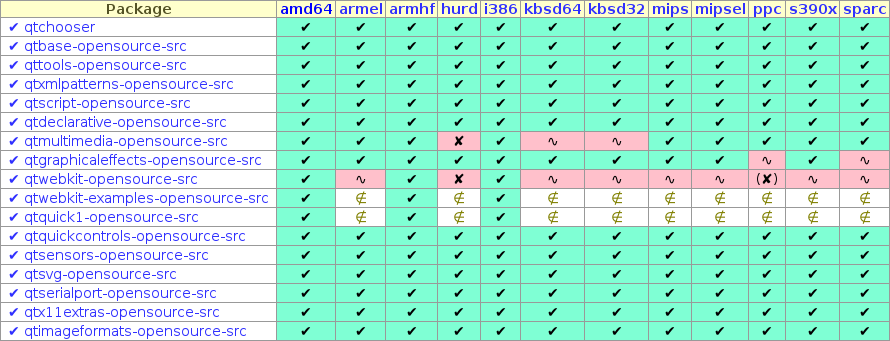
Some time ago I blogged about the 5.2.0 status in Debian experimental. We currently have it in testing with a much better status:


And we also have 5.2.1 in experimental with an even better status:

Note: qttools is FTBFS in armhf just because of some symbols changes, it will be fixed on the next upload.
Don't be afraid of getting it from experimental! Take a look at this blog post to know how to compile with Qt 5 in Debian.

BonusI have also uploaded Qt Creator built against Qt 5 to experimental. I plan to push it to unstable with Qt 5.2.1.

22 February 2014

Robert Millan: Newcons coming to Debian GNU/kFreeBSD (testers wanted!)

FreeBSD vt(4) -commonly known as Newcons -, which is planned to replace Syscons as the default FreeBSD console, is now available on Debian GNU/kFreeBSD. It is enabled by default, but only in kfreebsd-11 packages from experimental. Newcons provides many interesting new features, such as KMS support, Unicode, double-width CJK characters, etc. More details are available in FreeBSD wiki. Ironically, Debian GNU/kFreeBSD is in a bit more of a hurry to deploy Newcons than FreeBSD is. The reason for this is that Newcons is practically a requirement for using the new KMS drivers. While FreeBSD Ports, in order to ensure a smooth transition, preserve support for UMS (User Mode Setting) in their X11/DRI userland, Debian supports many kernels and (contrary to some ill claims I heard) gives priority to new features on Debian GNU/Linux port, which is the one with most users and developers. In this case, it means KMS is the only option when it comes to X11/DRI userland in Debian. Anyway, we ve been making some nice progress. Here s a screenshot of Newcons in action in a Debian system (running on VirtualBox, thus with VGA backend): newcons The idea is to backport this to kfreebsd 10.0, as FreeBSD plans to merge it into stable/10 anyway. However, it is still in the process of being tested (and being polished on FreeBSD, I hear they plan to merge it on March).

9 February 2014

Neil Williams: Debian ARMMP in LAVA using iMX53

The home lab is my LAVA development environment and I ve recently got two iMX53 Quick Start Boards working with a typical LAVA master image based on a Linaro build of Linux 3.1.0 for mx5 with a Ubuntu Oneiric Ocelot 11.10 rootfs:
 3.1.0-1002-linaro-lt-mx5 (buildd@hubbard) (gcc version 4.6.1 (Ubuntu/Linaro 4.6.1-9ubuntu3) ) #13-Ubuntu PREEMPT Fri Dec 16 01:21:07 UTC 2011
As part of my Debian work, it was clearly time to look at a current, Debian, kernel and rootfs and as I m developing and testing on Debian unstable, this would necessarily mean testing the Debian ARMMP (multi-platform) kernel which replaces the mx5 build used in Wheezy.
Linux version 3.12-1-armmp (debian-kernel@lists.debian.org) (gcc version 4.8.2 (Debian 4.8.2-10) ) #1 SMP Debian 3.12.9-1 (2014-02-01)
I will be scripting the creation of a suitable image for these tests and there are other changes planned in LAVA to make it easier to build suitable images, but it is useful to document just how I worked out how to build the first image. Manual build steps First, I ve already discovered that the u-boot on the iMX53 doesn t like ext4, so the first step was to prepare an ext3 filesystem for the image. With a SATA drive attached, it was also much better to use that than the SD card, at least for generating the image. I m also doing this natively, so I am working inside the booted master image. This is fine as the master is designed to manipulate test images, so the only package I needed to install on the LAVA master image was debootstrap. I had an empty SATA drive to play with for these tests, so first prepare an ext3 filesystem:
# mkfs.ext3 /dev/sda1
# mkdir /mnt/sata
# mount /dev/sda1 /mnt/sata
# mkdir /mnt/sata/chroots/
Start the debootstrap:
# apt-get update
# apt-get install debootstrap
# debootstrap --arch=armhf --include=linux-image-armmp \
 --verbose unstable \
 /mnt/sata/chroots/unstable-armhf http://ftp.uk.debian.org/debian
Various actions in this chroot will need proc, so mount it here:
# chroot /mnt/sata/chroots/unstable-armhf
# mount proc -t proc /proc
# mount devpts -t devpts /dev/pts
# exit
You may also have to edit the apt sources the LAVA master image doesn t have editors installed, so either use echo or download an edited file. I m using:
deb http://ftp.uk.debian.org/debian sid main
flash-kernel needs changes For the initial tests, I ve got to get this image to boot directly from u-boot, so flash-kernel is going to be needed inside the chroot and to get the iMX53 to work with the ARMMP kernel and Device Tree, flash-kernel will need an update which will mean a patch:
# chroot /mnt/sata/chroots/unstable-armhf
# apt-get update
# apt-get install patch flash-kernel
# cp /usr/share/flash-kernel/db/all.db /home
# cd /home
# patch -p2
The patch itself goes through a couple of iterations. Initially, it is enough to use:
 Machine: Freescale MX53 LOCO Board
-Kernel-Flavors: mx5
+Kernel-Flavors: armmp
+DTB-Id: imx53-qsb.dtb
+DTB-Append: yes
Later, once the device has booted with the ARMMP kernel, the Machine Id can be updated to distinguish it from the mx5 flavour (from /proc/cpuinfo) and use the model name from the Device Tree (/proc/device-tree/model):
diff --git a/db/all.db b/db/all.db
index fab3407..41f6c78 100644
--- a/db/all.db
+++ b/db/all.db
@@ -62,6 +62,18 @@ U-Boot-Initrd-Address: 0x00800000
 Required-Packages: u-boot-tools
 Bootloader-Sets-Incorrect-Root: yes
 
+Machine: Freescale i.MX53 Quick Start Board
+Kernel-Flavors: armmp
+DTB-Id: imx53-qsb.dtb
+DTB-Append-From: 3.12
+Boot-DTB-Path: /boot/dtb
+U-Boot-Kernel-Address: 0x70008000
+U-Boot-Initrd-Address: 0x0
+Boot-Kernel-Path: /boot/uImage
+Boot-Initrd-Path: /boot/uInitrd
+Required-Packages: u-boot-tools
+Bootloader-Sets-Incorrect-Root: no
+
 Machine: Freescale MX53 LOCO Board
 Kernel-Flavors: mx5
 U-Boot-Kernel-Address: 0x70008000
(I will be filing this patch in a bug report against flash-kernel soon.) With that patched, update and run flash-kernel:
# mv all.db /usr/share/flash-kernel/db/all.db
# flash-kernel
flash-kernel: installing version 3.12-1-armmp
Generating kernel u-boot image... done.
Taking backup of uImage.
Installing new uImage.
Generating initramfs u-boot image... done.
Taking backup of uInitrd.
Installing new uInitrd.
Installing new dtb.
# exit
LAVA overlays This will be a LAVA test image and it needs an overlay if you want a vanilla image, set up a passwd inside the chroot instead.
# cd /mnt/sata/chroots/unstable-armhf/
# wget --no-check-certificate https://launchpad.net/~linaro-maintainers/+archive/overlay/+files/linaro-overlay-minimal_1112.2_all.deb
# wget --no-check-certificate https://launchpad.net/~linaro-maintainers/+archive/overlay/+files/linaro-overlay_1112.2_all.deb
# chroot /mnt/sata/chroots/unstable-armhf/
# dpkg -i linaro-overlay-minimal_1112.2_all.deb linaro-overlay_1112.2_all.deb
# rm linaro-overlay-minimal_1112.2_all.deb linaro-overlay_1112.2_all.deb
# exit
Changes to allow the chroot to boot Now the chroot needs setting up as a boot image:
# chroot /mnt/sata/chroots/unstable-armhf/
# echo T0:23:respawn:/sbin/getty -L ttymxc0 115200 vt102 >> ./etc/inittab
# echo auto lo eth0 > ./etc/network/interfaces.d/mx53loco
# echo iface lo inet loopback >> ./etc/network/interfaces.d/mx53loco
# echo iface eth0 inet dhcp >> ./etc/network/interfaces.d/mx53loco
# apt-get clean
# umount /dev/pts
# umount /proc
# exit
Partitioning as a LAVA test image This would be enough as a single partition test image but, currently, LAVA expects a much more hard-wired image. Depending on the history of the device and the need for LAVA to be able to put fresh kernel builds together with a known rootfs, LAVA has used a separate /boot and / partition in the test image for nearly all boards. Standard LAVA test images for many boards (like the iMX53) also have a small unallocated space at the start of the SD card, so until I can get LAVA upstream to handle test images of arbitrary design, I m adapting the image to suit the expectations inside LAVA. Yes, I know but it s better to get something working before spending time fixing things to make it work better. It will be fixed, in time. So I needed to separate out the /boot contents from the rest of the rootfs whilst keeping the chroot itself in a state which I can easily update and use to create other images.
# cd /mnt/sata/chroots/unstable-armhf/boot/
# tar -czf ../../boot.tar.gz ./*
# cd ..
# tar -czf ../root.tar.gz ./*
Now the test image file and its partitions:
# dd if=/dev/zero of=/mnt/sata/images/empty/debian.img bs=1M count=1024
# cp /mnt/sata/images/empty/debian.img /mnt/sata/images/debian-unstable-armhf-armmp.img
# losetup /dev/loop0 /mnt/sata/images/debian-unstable-armhf-armmp.img
# parted /dev/loop0 -s unit mb mktable msdos
# parted /dev/loop0 -s unit mb mkpart primary 1 10
# parted /dev/loop0 -s unit mb mkpart primary 11 110
# parted /dev/loop0 -s unit mb mkpart primary 111 1024
I did make the mistake of using kpartx at this stage but there are many areas of confusion when translating the kpartx output to offsets for mount when parted is easier:
# parted /dev/loop0 unit B -s print
Model:  (file)
Disk /dev/loop0: 1073741824B
Sector size (logical/physical): 512B/512B
Partition Table: msdos
Number  Start       End          Size        Type     File system  Flags
 1      1048576B    10485759B    9437184B    primary
 2      10485760B   110100479B   99614720B   primary
 3      110100480B  1024458751B  914358272B  primary
Use the Start numbers and use losetup to create the loop devices for each
partition
# losetup -o 10485760 /dev/loop1 /dev/loop0
# losetup -o 110100480 /dev/loop2 /dev/loop0
# mkfs.vfat /dev/loop1
# mkfs.ext3 /dev/loop2
Now clean up the loop mountpoints:
# losetup -d /dev/loop2
# losetup -d /dev/loop1
# losetup -d /dev/loop0
# losetup -a
losetup -a should return nothing. If it doesn t, investigate the contents of /dev/mapper and use dmsetup remove until losetup -a does report empty. Otherwise the subsequent stages will fail. Now deploy the /boot contents into the empty image:
# mount -oloop,offset=10485760 /mnt/sata/images/debian-unstable-armhf-armmp.img /mnt/boot/
# pushd /mnt/boot/
# tar -xzf /mnt/sata/chroots/boot.tar.gz
# popd
# sync
# umount /mnt/boot/
and the / contents (removing the duplicate ./boot contents)
# mount -oloop,offset=110100480 /mnt/sata/images/debian-unstable-armhf-armmp.img /mnt/root/
# pushd /mnt/root
# tar -xzf /mnt/sata/chroots/root.tar.gz
# rm ./boot/*
# popd
# sync
# umount /mnt/root
Check the image
# mount -oloop,offset=10485760 debian-unstable-armhf-armmp.img /mnt/boot
# ls /mnt/boot
config-3.12-1-armmp  initrd.img-3.12-1-armmp  System.map-3.12-1-armmp  uImage  uInitrd  vmlinuz-3.12-1-armmp
# umount /mnt/boot
# mount -oloop,offset=110100480 debian-unstable-armhf-armmp.img /mnt/root
# ls /mnt/root
bin  boot  dev  etc  home  initrd.img  lib  lost+found  media  mnt  opt  proc  root  run  sbin  srv  sys  tmp  usr  var  vmlinuz
# ls /mnt/root/bin/auto-serial-console
/mnt/root/bin/auto-serial-console
# umount /mnt/root
# md5sum debian-unstable-armhf-armmp.img
Downloads Yes, I have put that file online, if you are interested. Do read the readme first though. Getting the image off the device
# ip a
# python -m SimpleHTTPServer 80 2>/dev/null
then wget (just http://, IP address / and the filename), md5sum , finish with Ctrl-C. Depending on setup, it may be quicker to transfer the uncompressed
file over a LAN than to let the device compress it. Your main machine
will do the compression much faster, even with a larger download. (It also helps to not compress the image on the device, you can
test the mount offsets more easily and do check that the image
can be mounted with the offsets from parted.) Results
# cat /proc/cpuinfo
processor	: 0
model name	: ARMv7 Processor rev 5 (v7l)
Features	: swp half thumb fastmult vfp edsp thumbee neon vfpv3 tls vfpd32 
CPU implementer	: 0x41
CPU architecture: 7
CPU variant	: 0x2
CPU part	: 0xc08
CPU revision	: 5
Hardware	: Freescale i.MX53 (Device Tree Support)
Revision	: 0000
Serial		: 0000000000000000
# uname -a
Linux imx53-02 3.12-1-armmp #1 SMP Debian 3.12.9-1 (2014-02-01) armv7l GNU/Linux
# lsb_release -a
No LSB modules are available.
Distributor ID:	Debian
Description:	Debian GNU/Linux unstable (sid)
Release:	unstable
Codename:	sid
Next! Yes, there is a lot to do from here on. Then there is the whole issue of actually making this multi-platform. After all, it is far from ideal that a multi-platform kernel package has to have platform-specific operations using flash-kernel at each update. So Grub on ARM is going to be on the list of things to investigate .

Next.

Previous.