Search Results: "preining"

29 September 2015

Norbert Preining: Multi-boot stick update: TAILS 1.6, SysresCD 4.6.0, GParted 0.23, Debian 8.2

Updates for my multi-boot/multi-purpose USB stick: All components have been updated to the latest versions and I have confirmed that all of them still boot properly although changes in the grub.cfg file are necessary. So going through these explanations one will end up with a usable USB stick that can boot you into TAILS, System Rescue CD, GNU Parted Live CD, GRML, and also can boot into an installation of Debian 8.2 Jessie installation. All this while still being able to use the USB stick as normal media. multi-usb-disk Since there have been a lot of updates, and also changes in the setup and grub config file, I include the full procedure here, that is, merging and updating these previous posts: USB stick with Tails and SystemRescueCD, Tails 1.2.1, Debian jessie installer, System Rescue CD on USB, USB stick update: TAILS 1.4, GParted 0.22, SysResCD 4.5.2, Debian Jessie, and USB stick update: Debian is back, plus GRML. Let us repeat some things from the original post concerning the wishlist and the main players: I have a long wishlist of items a boot stick should fulfill Requirements A USB stick, the iso images of TAILS 1.6, SystemRescueCD 4.6.0, GParted Lice CD 0.23.0, GRML 2014.11, and some tool to access iso images, for example ISOmaster (often available from your friendly Linux distribution). I assume that you have already an USB stick prepared as described previously. If this is not the case, please go there and follow the section on preparing your usb stick. Three types of boot options We will employ three different approaches to boot special systems: the one is directly from an iso image (easiest, simple to update), the other via extraction of the necessary kernels and images (bit painful, needs some handwork), and the last one is a mixture necessary to get Debian booting (most painful, needs additional downloads and handwork). At the moment we have the following status with respect to boot methods: Booting from ISO image Grub has gained quite some time ago the ability to boot directly from an ISO image. In this case the iso image is mounted via loopback, and the kernel and initrd are specified relatively to the iso image root. This system makes it extremely easy to update the respective boot option: just drop the new iso image onto the USB stick, and update the isofile setting. One could even use some -latest method, but I prefer to keep the exact name. For both SystemRescueCD, GNOME Partition Live CD, and GRML, just drop the iso files into /boot/iso/, in my case /boot/iso/systemrescuecd-x86-4.6.0.iso and /boot/iso/gparted-live-0.23.0-1-i586.iso. After that, entries like the following have to be added to grub.cfg. For the full list see grub.cfg:
submenu "System Rescue CD 4.6.0 (via ISO) ---> "  
  set isofile="/boot/iso/systemrescuecd-x86-4.6.0.iso"
  menuentry "SystemRescueCd (64bit, default boot options)"  
        set gfxpayload=keep
        loopback loop (hd0,1)$isofile
        linux   (loop)/isolinux/rescue64 isoloop=$isofile
        initrd  (loop)/isolinux/initram.igz
   
  ...
 
 
submenu "GNU/Gnome Parted Live CD 0.23.0 (via ISO) ---> "  
  set isofile="/boot/iso/gparted-live-0.23.0-1-i586.iso"
  menuentry "GParted Live (Default settings)" 
    loopback loop (hd0,1)$isofile
    linux (loop)/live/vmlinuz boot=live union=overlay username=user config components quiet noswap noeject  ip= net.ifnames=0 nosplash findiso=$isofile
    initrd (loop)/live/initrd.img
   
  ...
 
 
submenu "GRML 2014.11 ---> "  
  menuentry "Grml Rescue System 64bit"  
        iso_path="/boot/iso/grml64-full_2014.11.iso"
        export iso_path
        loopback loop (hd0,1)$iso_path
        set root=(loop)
        kernelopts=" ssh=foobarbaz toram  "
        export kernelopts
        configfile /boot/grub/loopback.cfg
    
 
Note the added isoloop=$isofile and findiso=$isofile that helps the installer find the iso images. Booting via extraction of kernels and images This is a bit more tedious, but still not too bad. Installation of TAILS files Assuming you have access to the files on the TAILS CD via the directory ~/tails, execute the following commands:
mkdir -p /usbstick/boot/tails
cp -a ~/tails/live/* /usbstick/boot/tails/
The grub.cfg entries look now similar to the following:
submenu "TAILS Environment 1.6 ---> "  
  menuentry "Tails64 Live System"  
        linux   /boot/tails/vmlinuz2 boot=live live-media-path=/boot/tails config live-media=removable nopersistent noprompt timezone=Etc/UTC block.events_dfl_poll_msecs=1000 splash noautologin module=Tails
        initrd  /boot/tails/initrd2.img
 
   
  ...
 
The important part here is the live-media-path=/boot/tails, otherwise TAILS will not find the correct files for booting. The rest of the information was extracted from the boot setup of TAILS itself. Mixture of iso image and extraction Debian jessie As mentioned in the previous post, booting Debian/Jessie installation images via any method laid out above didn t work, since the iso images is never found. It turned out that the current installer iso images do not contain the iso-scan package, which is responsible for searching and loading of iso images. But with a small trick one can overcome this: One needs to replace the initrd that is on the ISO image with one that contains the iso-scan package. And we do not need to create these initrd by ourselves, but simply use the ones from hd-media type installer. I downloaded the following four gzipped initrds from one of the Debian mirrors: i386/initrd text mode, i386/initrd gui mode, amd64/initrd text mode, amd64/initrd gui mode, and put them into the USB stick s boot/debian/install.386, boot/debian/install.386/gtk, boot/debian/install.amd, boot/debian/install.amd/gtk, respectively. Finally, I added entries similar to this one (rest see the grub.cfg file):
submenu "Debian 8.2 Jessie NetInstall ---> "  
    set isofile="/boot/iso/firmware-8.2.0-amd64-i386-netinst.iso"
    menuentry '64 bit Install'  
        set background_color=black
        loopback loop (hd0,1)$isofile
        linux    (loop)/install.amd/vmlinuz iso-scan/ask_second_pass=true iso-scan/filename=$isofile vga=788 -- quiet 
        initrd   /boot/debian/install.amd/initrd.gz
     
    ...
 
Again an important point, don t forget the two kernel command line options: iso-scan/ask_second_pass=true iso-scan/filename=$isofile, otherwise you probably will have to make the installer scan all disks and drives completely, which might take ages. Current status of USB stick Just to make sure, the usb stick should contain at the current stage the following files:
/boot/
    iso/
        firmware-8.2.0-amd64-i386-netinst.iso
        gparted-live-0.23.0-1-i586.iso
        grml64-full_2014.11.iso
        systemrescuecd-x86-4.6.0.iso
    tails/
        vmlinuz Tails.module initrd.img ....
    grub/
        fonts/
            lots of files
        locale/
            lots of files
        x86_64-efi/
            lots of files
        font.pf2
        grubenv
        grub.cfg            *this file we create in the next step!!*
/EFI
    BOOT/
        BOOTX64.EFI
The Grub config file grub.cfg The final step is to provide a grub config file in /usbstick/boot/grub/grub.cfg. I created one by looking at the isoboot.cfg files both in the SystemRescueCD, TAILS iso images, GParted iso image, and the Debian/Jessie image, and converting them to grub syntax. Excerpts have been shown above in the various sections. I spare you all the details, grab a copy here: grub.cfg Conclusion That s it. Now you can anonymously provide data about your evil government, rescue your friends computer, fix a forgotten Windows password, and above all, install a proper free operating system. If you have any comments, improvements or suggestions, please drop me a comment. I hope this helps a few people getting a decent USB boot stick running. Enjoy.

26 September 2015

Norbert Preining: Kobo firmware 3.18.0 mega update (KSM, nickel patch, ssh, fonts)

In short succession a new firmware from Kobo, this time 3.18.0. And here is my mega-update. On request from a reader I have now prepared updates for all three hardwares, Mark4 (Glo), Mark5 (Aura), and Mark6 (GloHD). Kobo Logo Changes since last release: Included patches from the Metazoa firmware patches: Other things that are included are as usual: koreader, pbchess, coolreader, the ssh part of kobohack, and some side-loaded fonts. For details on the respective parts please see the previous post Download Mark6 Kobo GloHD firmware: Kobo 3.18.0 for GloHD Mega update: Kobo-3.18.0-combined/Mark6/KoboRoot.tgz Mark5 Aura firmware: Kobo 3.18.0 for Aura Mega update: Kobo-3.18.0-combined/Mark5/KoboRoot.tgz Mark4 Kobo Glo, Aura HD firmware: Kobo 3.18.0 for Glo and AuraHD Mega update: Kobo-3.18.0-combined/Mark4/KoboRoot.tgz Enjoy.

25 September 2015

Norbert Preining: jfontmaps release 20150923.0

After a year without a release we finally pushed out a new version of the Japanese font maps. The main addition is support for the fonts shipped in the upcoming El Capitan OSX release, which brings a whole new set of Hiragino fonts, most of them in Truetype collections. The update is available from CTAN and will be in TeX Live within one or two days. For suggestions and improvements, please use the issue system at the github development place.

21 September 2015

Norbert Preining: International Sad Hits Volume 1

I stumbled over this CD a few weeks ago, and immediately ordered it from some second-hand dealer in the US: International Sad Hits Volume 1: Altaic Group. Four artists from different countries (2x Japan, Korea, Turkey) and very different music style, but connected in one thing: That they don t fit into the happy-peppy culture of AKB48, JPOP, KPOP and the like, but singers and songwriters that probe the depths of sadness. With two of my favorite Japanese appearing in the list (Tomokawa Kazuki and Mikami Kan), there was no way I could not buy this CD. international-sad-hits-volume-1 The four artist combined in this excellent CD are: Fikret K z lok, a Turkish musician, singer and songwriter. Quoting from the pamphlet:
However, in 1983 K z lok returned with one of his most important and best albums: Zaman Zaman (Time to time). [ ] These albums presented an alternative to the horrible pop scene emerging in Turkey they criticized the political situation, the so-called intellectuals, and the pop stars.
The Korean artist is (Kim Doo Soo), who was the great surprise of the CD for me. The sadness and beauty that is transmitted through is music is special. The pamphlet of the CD states:
The strictness of his home atmosphere suffocated him, and in defiance against his father he dropped out, and walked along the roads. He said later that, Hatred towards the world, and the emptiness of life overwhelmed me. I lived my life with alcohol every day.
After some problems due to political crisis, and fierce reactions to his song Bohemian (included) made him disappear into the mountains for 10 years, only to return with even better music. The third artist is one of my big favorites, Tomokawa Kazuki (Official site, Wikipedia) from Japan. I have written often about Tomokawa, but found a very fitting description in the booklet:
Author Tatematsu Wahei has described Tomokawa as a man standing naked, his sensibility utterly exposed and tingling. It s an accurate response to a creativity that seems unmediated by embarrassment, voraciously feeding off the artist s personal concern.
The forth artist is again from Japan, Mikami Kan, a well known wild man from the Japanese music scene. After is debut at the Nakatsugawa All-Japan Folk Jamboree in 1971, he was something like a star for some years, but without a record deal his popularity decreased steadily.
During this period his songwriting gradually altered, becoming more dense, surreal and uncompromisingly personal.
Every song on this CD is a masterpiece by itself, but despite me being a great fan of Tomokawa, my favorite is Kim Doo Soo here, with songs that grip your heart and soul, stunningly beauty and sad at the same time.

19 September 2015

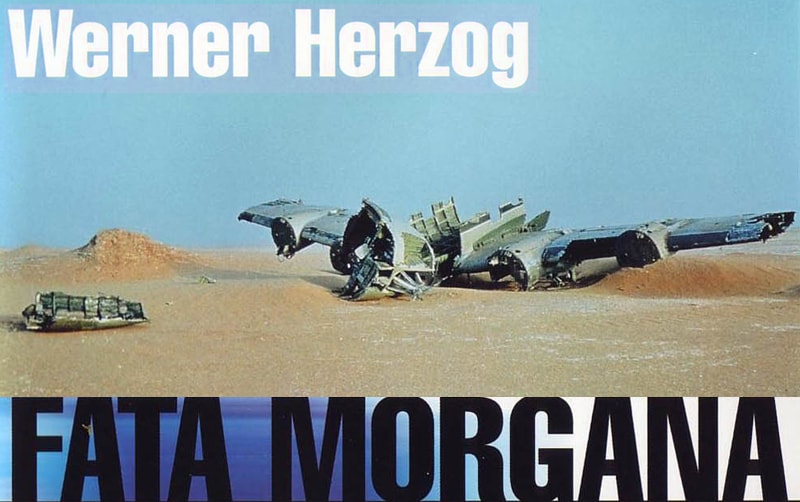
Norbert Preining: Movie: Werner Herzog Fata Morgana

Finally I found the time and peace to watch one of the strangest movies that I have ever seen, Werner Herzog s (Offical Site, Wikipedia) Fata Morgana (Wikipedia, IMDb). Footage prepared for a SF movie that never realized, converted into an impressionistic allegory and movie full of phantasms.
Werner_Herzog-Fata_Morgana Fata Morgana is a movie that escapes every description. Having read several critics voices, as well as Herzog s comments in the excellent interview/(auto)biography book Werner Herzog A guide for the perplexed, I was eager to see this old and special movie. Having laid my hand on a collection of Werner Herzog s old movies recently, I prepared some good Japanese sake, and was ready to enjoy the move. The initial sequence of airplanes landing on a very hot day, again and again, sets the stage for a series of dream-like sequences in this movie. Divided into three parts, the movie tells its story only by visual impressions and the reading of the Mayan creation myth Popol Vuh, at times intermixed with some Leonard Cohen songs. Part One Creation introduces the desert as the origin of the world, accompanied by the initial creation myth before humans were formed. Part 2 Paradise is when humans enter into the desert. Full of ramshackle houses and rotten buildings, the contrast of the spoken words and imaginary cannot be more stunning. The final part 3 The Golden Age is full of absurdities and strange appearances, not surprisingly also most humans appear here. Watching this movie is more a visual experience for me than about seeing a story line. While there are many ways to interpret the relation between the Popol Vuh and the movie sequences, for me it is more a visual experiment that tries in some sense to hypnotize the audience. For those who love strange movies, an absolute must. For all others probably a torture.

17 September 2015

Norbert Preining: Debian/TeX Live 2015.20150917-1

Usual regular update of the TeX Live packages. Now that Debian/unstable is back to full development speed thanks to the end of the bit gcc transition, probably this TeX Live update will be lost between the hundreds of others. Anyway a few interesting changes are still in there. Debian - TeX Live 2015 Most importantly the fix for unicode-math that was broken for a short time, and for the Japanese users it seems that the LaTeX3 packages have gained support for upTeX. Good to hear. Of course, these are not the only updates and newcomers, see the list below. Updated packages abc, acro, alegreya, animate, arabxetex, babel-bosnian, babel-french, babel-greek, babel-latin, babel-welsh, beamer-FUBerlin, bidi, bigfoot, blochsphere, bxjscls, chemformula, chemmacros, chet, classicthesis, crossrefware, csplain, ctable, ctanify, datetime2, datetime2-basque, detlev-cm, disser, doclicense, drm, dtxgen, dtxtut, dvips, ecclesiastic, eledmac, embrac, etex-pkg, etoc, factura, fbb, fithesis, font-change, fontname, glossaries, gothic, greek-fontenc, IEEEtran, l3build, l3experimental, l3kernel, l3packages, latexconfig, lettrine, luatexja, mathastext, mcf2graph, media9, metrix, mhequ, minted, moderntimeline, newtx, ocgx2, pagecolor, pdftex, pgf, pstricks, reledmac, resphilosophica, roboto, shdoc, siunitx, suftesi, tetex, tex4ht, texlive-scripts, tikz-bayesnet, translations, ucharcat, udesoftec, ulthese, unicode-math, ut-thesis, withargs, xint. New packages checklistings, cleanthesis, easyreview, fei, medstarbeamer, mfirstuc, nevelok, old-arrows, proofread, uassign, xebaposter. Enjoy.

15 September 2015

Norbert Preining: In Memoriam Adrian Frutiger

Just a few days ago another great font designer has passed away, Adrian Frutiger, 24 May 1928 10 September 2015. Famous in particular for his fonts Frutiger, Avenir, and the Univers family. His fonts are used throughout the worlds for visual communication like road signs. Much has been written about him: Linotype s excellent obituary, Adam Twardoch, David Airey, New York Times article. For an interview conducted with Frutiger in 1999, see this Eye Magazine article. An interesting article on Frutiger s typefaces by Charles Bigelow.
frutiger1 Here I want to recall a different quality of Adrian Frutiger his interest in the visual language of symbols, their development and interaction. His book Der Mensch und seine Zeichen (Signs and Symbols) is a profound study on the development, history, and use of all kind of symbols. In this book, translated into many languages, Frutiger explores the depth and breath of symbols, but the most important part for him, easily to be seen from the German title, is the human part ( Der Mensch ). Symbols are created, changed, and used by and for humans. His studies exhibit connections between various cultures when it comes to sign usage and design.
frutiger5 He also explores signets as modern sign language, and their importance for visual communcation and identity building.
frutiger4 The book also discusses the development of the Roman alphabet, and of course passes the Univers font family.
frutiger2 My favorite piece is this overlay of a s from different fonts, to show that there is a common pattern in these fonts.
frutiger3 He concludes this book with a very wise statement:
Zum Festhalten des Gedankens, zur Vermittlung der Aussage gen gen seit langem schon die Alphabet-Zeichen nicht mehr allein. Orientierung und Kommunikation sind heute unm glich ohne Schemata, Zeichen und Signale. Der geschriebene Ausdruck wird durch die Bildvermittlung notwendig erg nzt.
SInce long the alphabet letters alone do not suffice to take hold of thoughts and to transmit statements. Nowadays, orientation and communication are impossible without schemata, signs and signals. The written expression is necessarily enhanced through image transmission.
(my translation) After Hermann Zapf, this is now the second loss of the typographic world in this year. We will miss both of them.

13 September 2015

Norbert Preining: Gaming: The Talos Principle

Over the last weekends I finally managed to finish The Talos Principle, all of its endings. Compared to the actual play time I needed for Portal 2, namely about 12 hours, The Talos Principle challenged me much longer, about 36 hours. An enjoyable ride through many different and stunningly created worlds filled with many many puzzles that need to be solved.
Combined with three different endings the games offers great fun for those who love riddle games. Comparing it to my favorite riddle game (series), Myst, the graphics have of course developed and provide stunning views. I haven t played games in a landscape since the Myst series (Portal is indoors), so I was taken by surprise about all the details and love that has been put into the graphics. Maybe its only me because it was the first game of this quality I have played. And above all, I could actually play it on my normal Intel GPU laptop (but surprisingly only on Linux, the Windows version refused to play on my under-powered laptop).
There are only two slightly negative points I have to mention: Due to the nature of very restricted tool set, the riddles feel a bit repetitive. Some of them stand out, but after having played through the A and B worlds, you feel like you have seen that before when entering a new riddle. Still challenging, and that is what I was looking for, but a bit more variation would be nice. Here is a riddle that stood out due to its funny nature.
The game also has a long list of Easter Eggs, some of which I could find, some of which I surely missed. Most funny of those I found was the Developer World where funny characters lounge. Another I found was this money throwing guy called Fork Parker, who happens to be the financial officer of the developers team. Did they really make sooo much money from the game?
Something a bit uncommon or new to me was the fact that there are three (3!) endings, depending on what you choose to do. The first and easiest one is the ending of the good student you collect enough sigils, and follow Elohims words and ascent to eternity rather boring. Reminds me of an old Viennese song how boring it is to be an angel in heaven.
Bit more challenging is the bad student ending: You ignore Elohim s warnings and ascent the tower, solve several more riddles, and via a few more twists manage to escape to the real world. Nice graphics, great ending.
The most challenging ending is the enlighted student ending. To manage to reach this ending, one needs to collect each and everything that is to be found in the game, including all hidden stars and grey sigils. Here I have to mention the second slightly negative point: Finding the stars is rather luck then problem solving ability. Often one needs to guess a location of a reflector, or stumble over a hidden staircase, or press some arbitrary buttons. For my feeling the riddles for the stars were to arbitrary. So I managed to collect several of the stars by myself, but for many I needed hints on how to solve the riddles. Anyway, in case you managed to listen to all recordings, collect all texts, get all stars and collect all sigils from the extra worlds, you might ascend to the last floor of the tower and become a messenger yourself. Not sure if I want to become a messenger there, though.
Just in time with me finishing the game, the developers shipped out an extension called Road to Gehenna . Stunning graphics, even better, waiting ahead now I only need the time!
All in all a great piece of game, lovingly crafted graphics, interesting game play, lots of small levels, which helps people like me who cannot play for hours overnight, but need to do riddles one by one in short gaming sessions. So if you are in for riddle games, watch out for the next offer on Steam. Enjoy.

10 September 2015

Norbert Preining: Getting CafeOBJ via MacPorts

I have finally finished the Portfile for CafeOBJ, which allows users to install CafeOBJ via the usual port command of MacPorts. For one needs to add our local source (which only ships CafeOBJ port), but I hope to get the port into the standard distribution soon. cafeobj-logo Necessary steps: This should give you a working installation of CafeOBJ 1.5.3. The port will be updated as soon as 1.5.4 is released (which should be rather soon). Enjoy, and please leave comments and suggestions how to improve the port file here, per email, or at our bug tracker.

6 September 2015

Lunar: Reproducible builds: week 19 in Stretch cycle

What happened in the reproducible builds effort this week: Toolchain fixes Dmitry Shachnev uploaded sphinx/1.3.1-6 with improved patches from Val Lorentz. Chris Lamb submitted a patch for ibus-table which makes the output of ibus-table-createdb deterministic. Niko Tyni wrote a patch to make libmodule-build-perl linking order deterministic. Santiago Vila has been leading discussions on the best way to fix timestamps coming from Gettext POT files. Packages fixed The following 35 packages became reproducible due to changes in their build dependencies: apache-log4j2, dctrl-tools, dms, gitit, gnubik, isrcsubmit, mailutils, normaliz, oaklisp, octave-fpl, octave-specfun, octave-vrml, opencolorio, openvdb, pescetti, php-guzzlehttp, proofgeneral, pyblosxom, pyopencl, pyqi, python-expyriment, python-flask-httpauth, python-mzml, python-simpy, python-tidylib, reactive-streams, scmxx, shared-mime-info, sikuli, siproxd, srtp, tachyon, tcltk-defaults, urjtag, velvet. The following packages became reproducible after getting fixed: The package is not in yet in unstable, but linux/4.2-1~exp1 is now reproducible! Kudos to Ben Hutchings, and most fixes are already merged upstream. Some uploads fixed some reproducibility issues but not all of them: Patches submitted which have not made their way to the archive yet: reproducible.debian.net Some bugs that prevented packages to build successfully in the remote builders have been fixed. (h01ger) Two more amd64 build jobs have been removed from the Jenkins host in favor of six more on the new remote nodes. (h01ger) The munin graphs currently looks fine, so more amd64 jobs will probably be added in the next week. diffoscope development Version 32 of diffoscope has been released on September 3rd with the following new features: It also fixes many bugs. Head over to the changelog for the full list. Version 33 was released the day after to fix a bug introduced in the packaging. Documentation update Chris Lamb blessed the SOURCE_DATE_EPOCH specification with the version number 1.0 . Lunar documented how the .file assembler directive can help with random filenames in debug symbols. Package reviews 235 reviews have been removed, 84 added and 277 updated this week. 29 new FTBFS bugs were filled by Chris Lamb, Chris West (Faux), Daniel Stender, and Niko Tyni. New issues identified this week: random_order_in_ibus_table_createdb_output, random_order_in_antlr_output, nondetermistic_link_order_in_module_build, and timestamps_in_tex_documents. Misc. Thanks to Dhole and Thomas Vincent, the talk held at DebConf15 now has subtitles! Void Linux started to merge changes to make packages produced by xbps reproducible.

4 September 2015

Norbert Preining: How to rename a local OfflineIMAP managed folder

Since quite some time I am using OfflineIMAP to keep my mailbox status from various servers locally available on my machine. I did more or less follow the excellent guide A unix style mail setup, but didn t use folder name translation right from the beginning. So I got stuck with four folders named INBOX: acc1/INBOX, acc2/INBOX, etc. This wouldn t be a big problem, but when using Mutt with the folder sidebar patch (as available in the mutt-patched package in Debian), there is the problem that only the INBOX part is shown. offlineimap So I decided to rename all the local folders to the scheme described in the above guide. At the end I want to have a folder layout as follows:

  Maildir/acc1/acc1
  Maildir/acc1/acc1.folder1
  Maildir/acc1/acc1.folder2
where the acc1 related to the INBOX on the remote account acc1, and the others are folders on the remote end. Unfortunately, renaming is not supported in offlineimap, it would simply download everything again at best! So I checked what needs to be done, and it turned out it is not as complicated as I thought. The necessary steps are: To make this more specific, let us assume I want to reorganize the account acc1 in this way, and there are two folders synced. That is, before we start the Maildir folder contains:
Maildir/acc1/INBOX
Maildir/acc1/folder1
Maildir/acc1/folder2
and we want to achieve that the layout is
Maildir/acc1/acc1
Maildir/acc1/acc1.folder1
Maildir/acc1/acc1.folder2
Due to the fact that both the LocalStatus files and the FolderValidity files are naned in the same way as the folders, the following trivial script does all the necessary renaming for this simple case:
for d in ~/Maildir/acc1 ~/.offlineimap/Account-acc1/LocalStatus ~/.offlineimap/Repository-acc1local/FolderValidity ; do
  mv $d/INBOX $d/acc1
  mv $d/folder1 $d/acc1.folder1
  mv $d/folder2 $d/acc1.folder2
done
Finally, the correct renaming has to be done by adding nametrans rules to the helper script. The functions oimaptransfolder_acc1 and localtransfolder_acc1 as defined in the above tutorial can be used as is, and need only be added to the respective Repository sections in the configuration file. After having done the necessary renaming, what remains is to give it a good test. Best way to do it is with
offlineimap --dry-run -o -a acc1
which runs the syncronization in dry-run mode, so nothing is actually copied, and only once and only for acc1. If during this test run nothing strange appears, like many many emails are deleted on either end, then you are fine. Enjoy.

1 September 2015

Norbert Preining: PiwigoPress release 2.31

I just pushed a new release of PiwigoPress (main page, WordPress plugin dir) to the WordPress servers. This release incorporates new features for the sidebar widget, and better interoperability with some Piwigo galleries. piwigopress-logo The new features are: That s all, enjoy, and leave your wishlist items and complains at the issue tracker on the github project piwigopress.

29 August 2015

Norbert Preining: Kobo Glo and GloHD firmware 3.17.3 mega update (KSM, nickel patch, ssh, fonts)

I have updated my mega-update for Kobo to the latest firmware 3.17.3. Additionally, I have not built (and tested) updates for both Mark4 hardware (Glo) and Mark6 hardware (GloHD). Please see the previous post for details on what is included. The only difference that is important is the update to KSM (Kobo Start Menu) version 8, which is still in testing phase (thus a warning: the layout and setup of KSM8 might change till release). This is an important update as all version up to V7 could create database corruptions (which I have seen several times!) when used with Calibre and the Kepub driver. Kobo Logo Other things that are included are as usual: Metazoa firmware patches for the Glo (non HD) version I have activated the compact layout patch; koreader, pbchess, coolreader, the ssh part of kobohack, custom dictionaries support, and some side-loaded fonts. Again, for details please see the previous post You can check for database corruption by selecting tools - nickel diverse.msh - db chk integrity.sh in the Kobo Start Menu. If it returns ok, then all is fine. Otherwise you might see problems. I solved the corruption of my database by first dumping the database to an sql file, and reloading it into a new database. Assuming that you have the file KoboReader.sqlite, what I did is:
$ sqlite3  KoboReader.sqlite 
SQLite version 3.8.11.1 2015-07-29 20:00:57
Enter ".help" for usage hints.
sqlite> PRAGMA integrity_check;
*** in database main ***
Page 5237: btreeInitPage() returns error code 11
On tree page 889 cell 1: 2nd reference to page 5237
Page 4913 is never used
Page 5009 is never used
Error: database disk image is malformed
sqlite> .output foo.sql
sqlite> .dump
sqlite> .quit
$ sqlite3 KoboReader.sqlite-NEW
SQLite version 3.8.11.1 2015-07-29 20:00:57
Enter ".help" for usage hints.
sqlite> .read foo.sql
sqlite> .quit
The first part shows that the database is corrupted. Fortunately dumping succeeded and then reloading it into a new database, too. Finally I replaced (after backup) the sqlite on the device with the new database. Download Mark6 Kobo GloHD firmware: Kobo 3.17.3 for GloHD Mega update: Kobo-3.17.3-combined/Mark6/KoboRoot.tgz Mark4 Kobo Glo, Auro HD firmware: Kobo 3.17.3 for Glo and AuroHD Mega update: Kobo-3.17.3-combined/Mark4/KoboRoot.tgz Enjoy.

27 August 2015

Norbert Preining: Kobo Japanese Dictionary Enhancer 1.1

Lots of releases in quick succession the new Kobo Japanese Dictionary Enhancer brings multi-dictionary support and merged translation support. Using the Wadoku project s edict2 database we can now add also German translations. kobo-japanese-dictionary-enhancer Looking at the numbers, we have now 326064 translated entries when using the English edict2, and 368943 translated entries when using the German Wadoku edict version. And more than that, as an extra feature it is now also possible to have merged translations, so to have both German and English translations added. kobo-dict-de-en Please head over to the main page of the project for details and download instructions. If you need my help in creating the updated dictionary, please feel free to contact me. Enjoy.

25 August 2015

Norbert Preining: Plex Home Theater 1.4.1 updated for Debian/sid

Debian/sid is going through a big restructuring with the switch to a new gcc and libstc++. Furthermore, libcec3 is now the default. So I have updated my PHT builds for Debian/sid to build and install on the current status, both for amd64 and i386. plex-debian-new Add the following lines to your sources.list:
deb http://www.preining.info/debian/ sid pht
deb-src http://www.preining.info/debian/ sid pht
You can also grab the binary for amd64 directly here for amd64 and i386, you can get the source package with
dget http://www.preining.info/debian/pool/pht/p/plexhometheater/plexhometheater_1.4.1-2.dsc
The release file and changes file are signed with my official Debian key 0x860CDC13. For Debian/testing I am waiting until the transition has settled. Please wait a bit more. Now be ready for enjoying the next movie!

Norbert Preining: Kobo Japanese Dictionary Enhancer 1.0

I have just released a wastly improved new version of the Kobo Japanese Dictionary Enhancer. It allows you to enhance the Kobo Japanese dictionary with English translations. kobo-japanese-dictionary-enhancer The new version provides now 326064 translated entries, which covers most non-compound words, including Hiragana. In my daily life reading Harry Potter and some other books in Japanese, I haven t found many untranslated words by now. Please head over to the main page of the project for details and download instructions. If you need my help in creating the updated dictionary, please feel free to contact me. Enjoy.

23 August 2015

Norbert Preining: Debian/TeX Live complete update

Triggered by all the bugs around font problems I spent my weekend instead of mountaineering with crawling through the TeX Live history for changes and fixes to dvipdfm-x. Thanks to for his hints, I have pulled out the changes necessary to fix Type1 support in dvipdfm-x and have reincluded them into the Debian texlive-bin package. The uploaded binaries (version 2015.20150524.37493-6) are already compiled against the new C++ ABI, see the Debian transition, so most systems will still need to wait for the update to be installable. Debian - TeX Live 2015 At the same time I did an update to the whole set of arch: all packages (texlive-base, texlive-lang, texlive-extra (version 2015.20150823-1). This was triggered by bug that seems to be caused by bad interplay between fontspec and l3 packages. Furthermore, I needed to remove the activation for fontconfig of the URW++ Base35 fonts, to ensure that fontconfig returns always the ones from the gsfonts package, instead of a mixture between TeX Live and gsfonts. Unrelated bug fix: libpaper intergration has been fixed and should work again. So for now all the bugs are now hopefully settled and we are back to normal. What remains is trying to fix jessie which is also broken in some respects. Updated packages acro, animate, babel-bosnian, babel-french, babel-latin, beamer-FUBerlin, beebe, breqn, chemformula, chet, cnltx, crossrefware, dantelogo, datetime2-it-fulltext, disser, drm, dvipdfmx-def, ecclesiastic, eledform, gradstudentresume, idxcmds, l3build, mcf2graph, media9, pageslts, pdfpages, reledmac, siunitx, tcolorbox, tex4ht, texlive-docindex, texlive-scripts, udesoftec, upmethodology, xindy. New packages blochsphere, e-french, fitbox, nar Enjoy.

21 August 2015

Norbert Preining: Work-Life Balance at Amazon

Having had personal contact with Amazon employees, and having read the NYT article Inside Amazon: Wrestling Big Ideas in a Bruising Workplace, I have only a few things to say: What remains I guess I would be a horrible performer at Amazon, and I am proud of it.

Norbert Preining: The sins of the past adding Cyrillic glyphs without renaming fonts

The URW Base35 fonts are a great set of fonts, available for free as in free software. They have been part of various distributions and systems since long time. Big thanks to URW for their work. But these fonts don t have Cyrillic or Greek glyphs. Be it as it is, world would be easy. People would need to use different fonts for these languages. Comes around someone who did the unthinkable namely adding the Cyrillic and Greek glyphs to the fonts (by now nothing bad), but then NOT renaming the fonts. Here we see one point of the stupidity of GPL and absolute freedom. Because what we now have is that documents produced several TeX engines (in particular XeTeX and LuaTeX) which use fontconfig to search the fonts, suddenly pick up these changed fonts that fake their identity, and what comes out is this, a complete rubbish: broken-fonts And now we are suffering huge pain from that. Look at the bug reports of that are coming in: Just to name a few. And there is a simple way to circumvent this: Don t install gsfonts which guarantees that fontconfig finds the real original URW fonts within the TeX Live tree first. I have now spent many hours to track down these problems, find the reason, and at the end of the day there is always gsfonts with its broken fonts with added Cyrillic glyphs. I honestly don t care about the history, there are now many fonts with Cyrillic and Greek glyphs, there is no need to fake fonts, and incorrectly take over font names. This should be a lesson to all the GPL zealots that require absolute freedom of each and everything. Unfortunately things don t work like that. Using AND RENAMING is ok, the Knuth license as I would say, but anything else is just a source of much pain. End for today, I have to go to work now. Real work instead of fighting sins of the past. Nothing to enjoy here. Additional information Just to let you know, before starting a flame war, I have already contacted the upstream developers, that is TeX Live, and explained them the situation. I don t see much chance for fixing, since the problem is with fonts without upstream and support, which are probably only used in Debian (I haven t seen them anywhere else but some mentioning in RH), and which are not officially supported or distributed. It really needs a nice developer to look into why this breakage appeared. Let us hope. And instead of flaming, anyone here is invited to dig into the code him/herself and search for changes. Additional information 2015-08-22 Just to back up my complaints and counteract several of the comments: I am quoting from an email of a colleague on the list where we are discussing the problem:
However, the fonts extended by Valek Filippov are quite problematic. The Type1 spec clearly requires that there may not exist two different fonts with the same /FontName. The modified fonts shipped with Ghostscript have the same /FontName as the original fonts donated by URW and not even the /UniqueID was changed. IMO they are broken because they don t comply with the Type1 specification.
I hope that convinced also the last in doubt.

20 August 2015

Norbert Preining: Introduction to CafeOBJ in English and Japanese

Thanks to Takahiro Seino we are now having a gentle introduction to CafeOBJ for beginners, in both English and Japanese, available. Please head over to the CafeOBJ web site for details, or jump directly to the English or Japanese version. cafeobj-logo We are also preparing for a new release with largely improved CITP support and better term inspection. Stay tuned.

Next.

Previous.