Search Results: "pere"

11 August 2016

Petter Reinholdtsen: Coz can help you find bottlenecks in multi-threaded software - nice free software

This summer, I read a great article "coz: This Is the Profiler You're Looking For" in USENIX ;login: about how to profile multi-threaded programs. It presented a system for profiling software by running experiences in the running program, testing how run time performance is affected by "speeding up" parts of the code to various degrees compared to a normal run. It does this by slowing down parallel threads while the "faster up" code is running and measure how this affect processing time. The processing time is measured using probes inserted into the code, either using progress counters (COZ_PROGRESS) or as latency meters (COZ_BEGIN/COZ_END). It can also measure unmodified code by measuring complete the program runtime and running the program several times instead. The project and presentation was so inspiring that I would like to get the system into Debian. I created a WNPP request for it and contacted upstream to try to make the system ready for Debian by sending patches. The build process need to be changed a bit to avoid running 'git clone' to get dependencies, and to include the JavaScript web page used to visualize the collected profiling information included in the source package. But I expect that should work out fairly soon. The way the system work is fairly simple. To run an coz experiment on a binary with debug symbols available, start the program like this:
coz run --- program-to-run
This will create a text file profile.coz with the instrumentation information. To show what part of the code affect the performance most, use a web browser and either point it to http://plasma-umass.github.io/coz/ or use the copy from git (in the gh-pages branch). Check out this web site to have a look at several example profiling runs and get an idea what the end result from the profile runs look like. To make the profiling more useful you include <coz.h> and insert the COZ_PROGRESS or COZ_BEGIN and COZ_END at appropriate places in the code, rebuild and run the profiler. This allow coz to do more targeted experiments. A video published by ACM presenting the Coz profiler is available from Youtube. There is also a paper from the 25th Symposium on Operating Systems Principles available titled Coz: finding code that counts with causal profiling. The source code for Coz is available from github. It will only build with clang because it uses a C++ feature missing in GCC, but I've submitted a patch to solve it and hope it will be included in the upstream source soon. Please get in touch if you, like me, would like to see this piece of software in Debian. I would very much like some help with the packaging effort, as I lack the in depth knowledge on how to package C++ libraries.

5 August 2016

Petter Reinholdtsen: Sales number for the Free Culture translation, first half of 2016

As my regular readers probably remember, the last year I published a French and Norwegian translation of the classic Free Culture book by the founder of the Creative Commons movement, Lawrence Lessig. A bit less known is the fact that due to the way I created the translations, using docbook and po4a, I also recreated the English original. And because I already had created a new the PDF edition, I published it too. The revenue from the books are sent to the Creative Commons Corporation. In other words, I do not earn any money from this project, I just earn the warm fuzzy feeling that the text is available for a wider audience and more people can learn why the Creative Commons is needed. Today, just for fun, I had a look at the sales number over at Lulu.com, which take care of payment, printing and shipping. Much to my surprise, the English edition is selling better than both the French and Norwegian edition, despite the fact that it has been available in English since it was first published. In total, 24 paper books was sold for USD $19.99 between 2016-01-01 and 2016-07-31:
Title / languageQuantity
Culture Libre / French3
Fri kultur / Norwegian7
Free Culture / English14
The books are available both from Lulu.com and from large book stores like Amazon and Barnes&Noble. Most revenue, around $10 per book, is sent to the Creative Commons project when the book is sold directly by Lulu.com. The other channels give less revenue. The summary from Lulu tell me 10 books was sold via the Amazon channel, 10 via Ingram (what is this?) and 4 directly by Lulu. And Lulu.com tells me that the revenue sent so far this year is USD $101.42. No idea what kind of sales numbers to expect, so I do not know if that is a good amount of sales for a 10 year old book or not. But it make me happy that the buyers find the book, and I hope they enjoy reading it as much as I did. The ebook edition is available for free from Github. If you would like to translate and publish the book in your native language, I would be happy to help make it happen. Please get in touch.

1 August 2016

Petter Reinholdtsen: Techno TV broadcasting live across Norway and the Internet (#debconf16, #nuug) on @frikanalen

Did you know there is a TV channel broadcasting talks from DebConf 16 across an entire country? Or that there is a TV channel broadcasting talks by or about Linus Torvalds, Tor, OpenID, Common Lisp, Civic Tech, EFF founder John Barlow, how to make 3D printer electronics and many more fascinating topics? It works using only free software (all of it available from Github), and is administrated using a web browser and a web API. The TV channel is the Norwegian open channel Frikanalen, and I am involved via the NUUG member association in running and developing the software for the channel. The channel is organised as a member organisation where its members can upload and broadcast what they want (think of it as Youtube for national broadcasting television). Individuals can broadcast too. The time slots are handled on a first come, first serve basis. Because the channel have almost no viewers and very few active members, we can experiment with TV technology without too much flack when we make mistakes. And thanks to the few active members, most of the slots on the schedule are free. I see this as an opportunity to spread knowledge about technology and free software, and have a script I run regularly to fill up all the open slots the next few days with technology related video. The end result is a channel I like to describe as Techno TV - filled with interesting talks and presentations. It is available on channel 50 on the Norwegian national digital TV network (RiksTV). It is also available as a multicast stream on Uninett. And finally, it is available as a WebM unicast stream from Frikanalen and NUUG. Check it out. :)

17 July 2016

Lisandro Dami n Nicanor P rez Meyer: KDEPIM ready to be more broadly tested

As was posted a couple of weeks ago, the latest version of KDEPIM has been uploaded to unstable.

All packages are now uploaded and built and we believe this version is ready to be more broadly tested.

If you run unstable but have refrained from installing the kdepim packages up to now, we would appreciate it if you go ahead and install them now, reporting any issues that you may find.

Given that this is a big update that includes quite a number of plugins and libraries, it's strongly recommended that you restart your KDE session after updating the packages.

Happy hacking,

The Debian Qt/KDE Team.

Note lun jul 18 08:58:53 ART 2016: Link fixed and s/KDE/KDEPIM/.

7 July 2016

Petter Reinholdtsen: Unlocking HTC Desire HD on Linux using unruu and fastboot

Yesterday, I tried to unlock a HTC Desire HD phone, and it proved to be a slight challenge. Here is the recipe if I ever need to do it again. It all started by me wanting to try the recipe to set up an hardened Android installation from the Tor project blog on a device I had access to. It is a old mobile phone with a broken microphone The initial idea had been to just install CyanogenMod on it, but did not quite find time to start on it until a few days ago. The unlock process is supposed to be simple: (1) Boot into the boot loader (press volume down and power at the same time), (2) select 'fastboot' before (3) connecting the device via USB to a Linux machine, (4) request the device identifier token by running 'fastboot oem get_identifier_token', (5) request the device unlocking key using the HTC developer web site and unlock the phone using the key file emailed to you. Unfortunately, this only work fi you have hboot version 2.00.0029 or newer, and the device I was working on had 2.00.0027. This apparently can be easily fixed by downloading a Windows program and running it on your Windows machine, if you accept the terms Microsoft require you to accept to use Windows - which I do not. So I had to come up with a different approach. I got a lot of help from AndyCap on #nuug, and would not have been able to get this working without him. First I needed to extract the hboot firmware from the windows binary for HTC Desire HD downloaded as 'the RUU' from HTC. For this there is is a github project named unruu using libunshield. The unshield tool did not recognise the file format, but unruu worked and extracted rom.zip, containing the new hboot firmware and a text file describing which devices it would work for. Next, I needed to get the new firmware into the device. For this I followed some instructions available from HTC1Guru.com, and ran these commands as root on a Linux machine with Debian testing:
adb reboot-bootloader
fastboot oem rebootRUU
fastboot flash zip rom.zip
fastboot reboot
The flash command apparently need to be done twice to take effect, as the first is just preparations and the second one do the flashing. The adb command is just to get to the boot loader menu, so turning the device on while holding volume down and the power button should work too. With the new hboot version in place I could start following the instructions on the HTC developer web site. I got the device token like this:
fastboot oem get_identifier_token 2>&1   sed 's/(bootloader) //'
And once I got the unlock code via email, I could use it like this:
fastboot flash unlocktoken Unlock_code.bin
And with that final step in place, the phone was unlocked and I could start stuffing the software of my own choosing into the device. So far I only inserted a replacement recovery image to wipe the phone before I start. We will see what happen next. Perhaps I should install Debian on it. :)

3 July 2016

Petter Reinholdtsen: How to use the Signal app if you only have a land line (ie no mobile phone)

For a while now, I have wanted to test the Signal app, as it is said to provide end to end encrypted communication and several of my friends and family are already using it. As I by choice do not own a mobile phone, this proved to be harder than expected. And I wanted to have the source of the client and know that it was the code used on my machine. But yesterday I managed to get it working. I used the Github source, compared it to the source in the Signal Chrome app available from the Chrome web store, applied patches to use the production Signal servers, started the app and asked for the hidden "register without a smart phone" form. Here is the recipe how I did it. First, I fetched the Signal desktop source from Github, using
git clone https://github.com/WhisperSystems/Signal-Desktop.git
Next, I patched the source to use the production servers, to be able to talk to other Signal users:
cat <<EOF   patch -p0
diff -ur ./js/background.js userdata/Default/Extensions/bikioccmkafdpakkkcpdbppfkghcmihk/0.15.0_0/js/background.js
--- ./js/background.js  2016-06-29 13:43:15.630344628 +0200
+++ userdata/Default/Extensions/bikioccmkafdpakkkcpdbppfkghcmihk/0.15.0_0/js/background.js    2016-06-29 14:06:29.530300934 +0200
@@ -47,8 +47,8 @@
          );
      );
 
-    var SERVER_URL = 'https://textsecure-service-staging.whispersystems.org';
-    var ATTACHMENT_SERVER_URL = 'https://whispersystems-textsecure-attachments-staging.s3.amazonaws.com';
+    var SERVER_URL = 'https://textsecure-service-ca.whispersystems.org:4433';
+    var ATTACHMENT_SERVER_URL = 'https://whispersystems-textsecure-attachments.s3.amazonaws.com';
     var messageReceiver;
     window.getSocketStatus = function()  
         if (messageReceiver)  
diff -ur ./js/expire.js userdata/Default/Extensions/bikioccmkafdpakkkcpdbppfkghcmihk/0.15.0_0/js/expire.js
--- ./js/expire.js      2016-06-29 13:43:15.630344628 +0200
+++ userdata/Default/Extensions/bikioccmkafdpakkkcpdbppfkghcmihk/0.15.0_0/js/expire.js2016-06-29 14:06:29.530300934 +0200
@@ -1,6 +1,6 @@
 ;(function()  
     'use strict';
-    var BUILD_EXPIRATION = 0;
+    var BUILD_EXPIRATION = 1474492690000;
 
     window.extension = window.extension    ;
 
EOF
The first part is changing the servers, and the second is updating an expiration timestamp. This timestamp need to be updated regularly. It is set 90 days in the future by the build process (Gruntfile.js). The value is seconds since 1970 times 1000, as far as I can tell. Based on a tip and good help from the #nuug IRC channel, I wrote a script to launch Signal in Chromium.
#!/bin/sh
cd $(dirname $0)
mkdir -p userdata
exec chromium \
  --proxy-server="socks://localhost:9050" \
  --user-data-dir= pwd /userdata --load-and-launch-app= pwd 
The script start the app and configure Chromium to use the Tor SOCKS5 proxy to make sure those controlling the Signal servers (today Amazon and Whisper Systems) as well as those listening on the lines will have a harder time location my laptop based on the Signal connections if they use source IP address. When the script starts, one need to follow the instructions under "Standalone Registration" in the CONTRIBUTING.md file in the git repository. I right clicked on the Signal window to get up the Chromium debugging tool, visited the 'Console' tab and wrote 'extension.install("standalone")' on the console prompt to get the registration form. Then I entered by land line phone number and pressed 'Call'. 5 seconds later the phone rang and a robot voice repeated the verification code three times. After entering the number into the verification code field in the form, I could start using Signal from my laptop. As far as I can tell, The Signal app will leak who is talking to whom and thus who know who to those controlling the central server, but such leakage is hard to avoid with a centrally controlled server setup. It is something to keep in mind when using Signal - the content of your chats are harder to intercept, but the meta data exposing your contact network is available to people you do not know. So better than many options, but not great. And sadly the usage is connected to my land line, thus allowing those controlling the server to associate it to my home and person. I would prefer it if only those I knew could tell who I was on Signal. There are options avoiding such information leakage, but most of my friends are not using them, so I am stuck with Signal for now.

Lisandro Dami n Nicanor P rez Meyer: Upcoming KDEPIM changes in unstable (KMail, Kontact, KOrganizer, etc)

For those who care about kdepim (kmail, kontact, korganizer, etc)

Currently the latest version of kdepim is available in experimental. According to our limited tests it's working way better than kdepim 4.14 (more stable, more performant, less bugs). However migrating from one to the other is not a trivial process (distribution wise, hopefully not for our users).

Among the drawbacks in the new kdepim: knode, ktimetracker and kjots were dropped from the official kdepim components. kjots is now an independent project, not tied to the kdepim release cycle. But more importantly, knode and ktimetracker are not maintained upstream any more, we are temporarily still shipping the old KDE 4 versions, but we will drop them after stretch unless they get new upstream maintainers.

To iron out the wrinkles that are surely still there, we are now planning to start a transition for kdepim, effectively blocking all kdepim related packages in unstable until the transition is complete. This will allow us to keep the current kdepim in testing unchanged until kdepim 16.04 is ready to migrate fully to testing.

If you want to test the new kdepim versions right now, please use the version in experimental, as uploading all the packages to unstable will take some time until there is a working kdepim in unstable (mixing experimental and the unstable uploads should be fine).

If you depend on having a working kdepim, please avoid installing the new kdepim packages that will be landing in unstable in the following days, until all the components are available. We expect this will take a couple of weeks, we will post another entry when the packages are ready in unstable.

A list of the binary packages involved in the transition can be found [here].

If you find issues in the new packages, please let us know either via irc in #debian-kde, the kde mailing list debian-kde@lists.debian.org, or send us a bug report (please make sure that it wasn't reported before).

We'll send an updated note when kdepim is fully uploaded to unstable.

Happy hacking,

The Debian Qt/KDE Team.

24 June 2016

Norbert Preining: Debian/TeX Live 2016.20160623-1

About one month has passed since we did release TeX Live 2016, and more than a month since the last Debian packages, so it is high time to ship out a new checkout of upstream. Nothing spectacular new here, just lots and lots of updates since the freeze. texlive2016-debian I am dedicating this release to those intelligent beings who voted against the stupid Brexit and for remaining in the EC! I am still optimist! New packages aucklandthesis, autobreak, cquthesis, getargs, hustthesis, ietfbibs, linop, markdown, olsak-misc, optidef, sanitize-umlaut, umbclegislation, wordcount, xcntperchap. Updated packages academicons, achemso, acmart, acro, animate, apa6, arabluatex, archaeologie, babel-hungarian, beamertheme-epyt, beebe, biblatex-abnt, biblatex-anonymous, biblatex-bookinother, biblatex-caspervector, biblatex-chicago, biblatex-manuscripts-philology, biblatex-morenames, biblatex-opcit-booktitle, biblatex-philosophy, biblatex-realauthor, biblatex-source-division, biblatex-subseries, bidi, bookcover, bxjscls, caption, chemformula, chemmacros, circuitikz, cloze, cochineal, context, csplain, cstex, datetime2, denisbdoc, dvipdfmx-def, epstopdf, erewhon, exsol, fbb, fibeamer, fithesis, fontawesome, fontspec, fonts-tlwg, geschichtsfrkl, getmap, glossaries, glossaries-extra, graphics, graphics-cfg, gregoriotex, gzt, he-she, hook-pre-commit-pkg, hyperref, ifluatex, keyvaltable, koma-script, l3build, latex, latex-bin, limap, lollipop, lshort-chinese, luaotfload, luatex85, luatex-def, luatexja, lua-visual-debug, marginnote, mcf2graph, media9, minted, mptopdf, msu-thesis, musixtex, navigator, nwejm, oberdiek, patchcmd, pdfcomment, pdftex-def, pdfx, pkuthss, platex, pstricks, ptex, ptex2pdf, ptex-base, ptex-ng, reledmac, repere, scheme-xml, sduthesis, showlabels, tableaux, tcolorbox, tex4ht, texinfo, texlive-scripts, tex-overview, textpos, tools, translations, tudscr, unicode-data, uplatex, uptex, xassoccnt, xcharter, xetex, xindy, yathesis, ycbook. Enjoy.

6 June 2016

Petter Reinholdtsen: The new "best" multimedia player in Debian?

When I set out a few weeks ago to figure out which multimedia player in Debian claimed to support most file formats / MIME types, I was a bit surprised how varied the sets of MIME types the various players claimed support for. The range was from 55 to 130 MIME types. I suspect most media formats are supported by all players, but this is not really reflected in the MimeTypes values in their desktop files. There are probably also some bogus MIME types listed, but it is hard to identify which one this is. Anyway, in the mean time I got in touch with upstream for some of the players suggesting to add more MIME types to their desktop files, and decided to spend some time myself improving the situation for my favorite media player VLC. The fixes for VLC entered Debian unstable yesterday. The complete list of MIME types can be seen on the Multimedia player MIME type support status Debian wiki page. The new "best" multimedia player in Debian? It is VLC, followed by totem, parole, kplayer, gnome-mpv, mpv, smplayer, mplayer-gui and kmplayer. I am sure some of the other players desktop files support several of the formats currently listed as working only with vlc, toten and parole. A sad observation is that only 14 MIME types are listed as supported by all the tested multimedia players in Debian in their desktop files: audio/mpeg, audio/vnd.rn-realaudio, audio/x-mpegurl, audio/x-ms-wma, audio/x-scpls, audio/x-wav, video/mp4, video/mpeg, video/quicktime, video/vnd.rn-realvideo, video/x-matroska, video/x-ms-asf, video/x-ms-wmv and video/x-msvideo. Personally I find it sad that video/ogg and video/webm is not supported by all the media players in Debian. As far as I can tell, all of them can handle both formats.

5 June 2016

Petter Reinholdtsen: A program should be able to open its own files on Linux

Many years ago, when koffice was fresh and with few users, I decided to test its presentation tool when making the slides for a talk I was giving for NUUG on Japhar, a free Java virtual machine. I wrote the first draft of the slides, saved the result and went to bed the day before I would give the talk. The next day I took a plane to the location where the meeting should take place, and on the plane I started up koffice again to polish the talk a bit, only to discover that kpresenter refused to load its own data file. I cursed a bit and started making the slides again from memory, to have something to present when I arrived. I tested that the saved files could be loaded, and the day seemed to be rescued. I continued to polish the slides until I suddenly discovered that the saved file could no longer be loaded into kpresenter. In the end I had to rewrite the slides three times, condensing the content until the talk became shorter and shorter. After the talk I was able to pinpoint the problem kpresenter wrote inline images in a way itself could not understand. Eventually that bug was fixed and kpresenter ended up being a great program to make slides. The point I'm trying to make is that we expect a program to be able to load its own data files, and it is embarrassing to its developers if it can't. Did you ever experience a program failing to load its own data files from the desktop file browser? It is not a uncommon problem. A while back I discovered that the screencast recorder gtk-recordmydesktop would save an Ogg Theora video file the KDE file browser would refuse to open. No video player claimed to understand such file. I tracked down the cause being file --mime-type returning the application/ogg MIME type, which no video player I had installed listed as a MIME type they would understand. I asked for file to change its behavour and use the MIME type video/ogg instead. I also asked several video players to add video/ogg to their desktop files, to give the file browser an idea what to do about Ogg Theora files. After a while, the desktop file browsers in Debian started to handle the output from gtk-recordmydesktop properly. But history repeats itself. A few days ago I tested the music system Rosegarden again, and I discovered that the KDE and xfce file browsers did not know what to do with the Rosegarden project files (*.rg). I've reported the rosegarden problem to BTS and a fix is commited to git and will be included in the next upload. To increase the chance of me remembering how to fix the problem next time some program fail to load its files from the file browser, here are some notes on how to fix it. The file browsers in Debian in general operates on MIME types. There are two sources for the MIME type of a given file. The output from file --mime-type mentioned above, and the content of the shared MIME type registry (under /usr/share/mime/). The file MIME type is mapped to programs supporting the MIME type, and this information is collected from the desktop files available in /usr/share/applications/. If there is one desktop file claiming support for the MIME type of the file, it is activated when asking to open a given file. If there are more, one can normally select which one to use by right-clicking on the file and selecting the wanted one using 'Open with' or similar. In general this work well. But it depend on each program picking a good MIME type (preferably a MIME type registered with IANA), file and/or the shared MIME registry recognizing the file and the desktop file to list the MIME type in its list of supported MIME types. The /usr/share/mime/packages/rosegarden.xml entry for the Shared MIME database look like this:
<?xml version="1.0" encoding="UTF-8"?>
<mime-info xmlns="http://www.freedesktop.org/standards/shared-mime-info">
  <mime-type type="audio/x-rosegarden">
    <sub-class-of type="application/x-gzip"/>
    <comment>Rosegarden project file</comment>
    <glob pattern="*.rg"/>
  </mime-type>
</mime-info>
This states that audio/x-rosegarden is a kind of application/x-gzip (it is a gzipped XML file). Note, it is much better to use an official MIME type registered with IANA than it is to make up ones own unofficial ones like the x-rosegarden type used by rosegarden. The desktop file of the rosegarden program failed to list audio/x-rosegarden in its list of supported MIME types, causing the file browsers to have no idea what to do with *.rg files:
% grep Mime /usr/share/applications/rosegarden.desktop
MimeType=audio/x-rosegarden-composition;audio/x-rosegarden-device;audio/x-rosegarden-project;audio/x-rosegarden-template;audio/midi;
X-KDE-NativeMimeType=audio/x-rosegarden-composition
%
The fix was to add "audio/x-rosegarden;" at the end of the MimeType= line. If you run into a file which fail to open the correct program when selected from the file browser, please check out the output from file --mime-type for the file, ensure the file ending and MIME type is registered somewhere under /usr/share/mime/ and check that some desktop file under /usr/share/applications/ is claiming support for this MIME type. If not, please report a bug to have it fixed. :)

28 May 2016

Petter Reinholdtsen: Tor - from its creators mouth 11 years ago

A little more than 11 years ago, one of the creators of Tor, and the current President of the Tor project, Roger Dingledine, gave a talk for the members of the Norwegian Unix User group (NUUG). A video of the talk was recorded, and today, thanks to the great help from David Noble, I finally was able to publish the video of the talk on Frikanalen, the Norwegian open channel TV station where NUUG currently publishes its talks. You can watch the live stream using a web browser with WebM support, or check out the recording on the video on demand page for the talk "Tor: Anonymous communication for the US Department of Defence...and you.". Here is the video included for those of you using browsers with HTML video and Ogg Theora support: I guess the gist of the talk can be summarised quite simply: If you want to help the military in USA (and everyone else), use Tor. :)

26 May 2016

Lisandro Dami n Nicanor P rez Meyer: Do you want Qt5's QWebEngine in Debian? Do you have library packaging skills? If so, step up!

So far the only missing submodule in Debian's Qt5 stack is QtWebEngine. None of us the current Qt maintainers have the time/will to do the necessary stuff to have it properly packaged.

So if you would like to have QtWebEngine in Debian and:

Then you are the right person for this task. Do not hesitate in pinging me on #debian-kde, irc.oftc.net.

25 May 2016

Petter Reinholdtsen: Isenkram with PackageKit support - new version 0.23 available in Debian unstable

The isenkram system is a user-focused solution in Debian for handling hardware related packages. The idea is to have a database of mappings between hardware and packages, and pop up a dialog suggesting for the user to install the packages to use a given hardware dongle. Some use cases are when you insert a Yubikey, it proposes to install the software needed to control it; when you insert a braille reader list it proposes to install the packages needed to send text to the reader; and when you insert a ColorHug screen calibrator it suggests to install the driver for it. The system work well, and even have a few command line tools to install firmware packages and packages for the hardware already in the machine (as opposed to hotpluggable hardware). The system was initially written using aptdaemon, because I found good documentation and example code on how to use it. But aptdaemon is going away and is generally being replaced by PackageKit, so Isenkram needed a rewrite. And today, thanks to the great patch from my college Sunil Mohan Adapa in the FreedomBox project, the rewrite finally took place. I've just uploaded a new version of Isenkram into Debian Unstable with the patch included, and the default for the background daemon is now to use PackageKit. To check it out, install the isenkram package and insert some hardware dongle and see if it is recognised. If you want to know what kind of packages isenkram would propose for the machine it is running on, you can check out the isenkram-lookup program. This is what it look like on a Thinkpad X230:
% isenkram-lookup 
bluez
cheese
fprintd
fprintd-demo
gkrellm-thinkbat
hdapsd
libpam-fprintd
pidgin-blinklight
thinkfan
tleds
tp-smapi-dkms
tp-smapi-source
tpb
%p
The hardware mappings come from several places. The preferred way is for packages to announce their hardware support using the cross distribution appstream system. See previous blog posts about isenkram to learn how to do that.

23 May 2016

Petter Reinholdtsen: Discharge rate estimate in new battery statistics collector for Debian

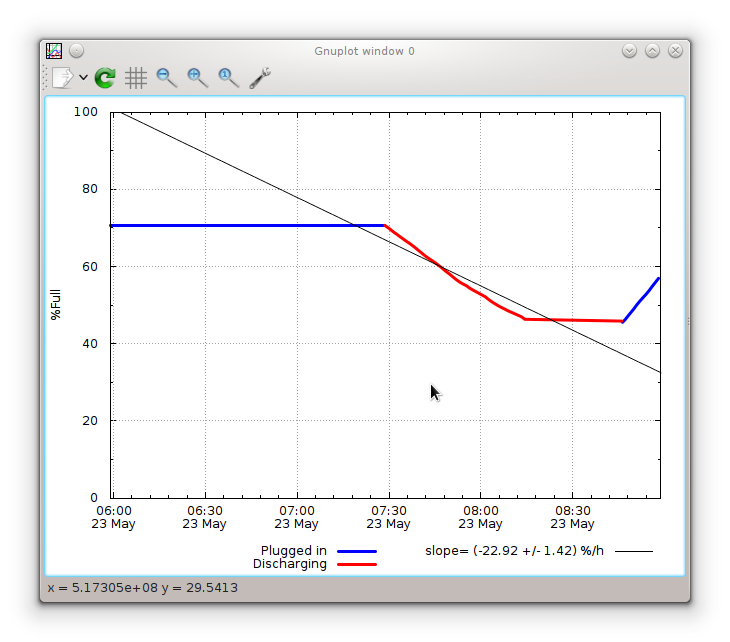
Yesterday I updated the battery-stats package in Debian with a few patches sent to me by skilled and enterprising users. There were some nice user and visible changes. First of all, both desktop menu entries now work. A design flaw in one of the script made the history graph fail to show up (its PNG was dumped in ~/.xsession-errors) if no controlling TTY was available. The script worked when called from the command line, but not when called from the desktop menu. I changed this to look for a DISPLAY variable or a TTY before deciding where to draw the graph, and now the graph window pop up as expected. The next new feature is a discharge rate estimator in one of the graphs (the one showing the last few hours). New is also the user of colours showing charging in blue and discharge in red. The percentages of this graph is relative to last full charge, not battery design capacity.

The other graph show the entire history of the collected battery statistics, comparing it to the design capacity of the battery to visualise how the battery life time get shorter over time. The red line in this graph is what the previous graph considers 100 percent:
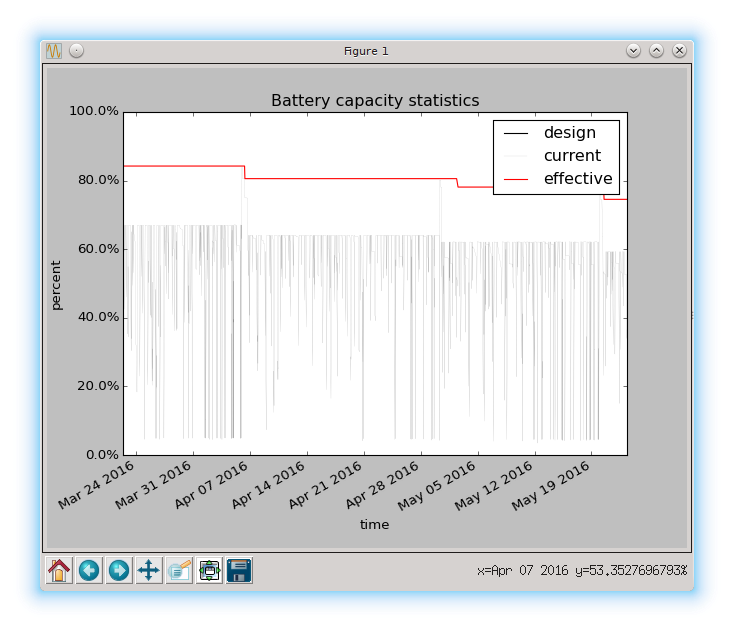
In this graph you can see that I only charge the battery to 80 percent of last full capacity, and how the capacity of the battery is shrinking. :( The last new feature is in the collector, which now will handle more hardware models. On some hardware, Linux power supply information is stored in /sys/class/power_supply/ACAD/, while the collector previously only looked in /sys/class/power_supply/AC/. Now both are checked to figure if there is power connected to the machine. If you are interested in how your laptop battery is doing, please check out the battery-stats in Debian unstable, or rebuild it on Jessie to get it working on Debian stable. :) The upstream source is available from github. Patches are very welcome. As usual, if you use Bitcoin and want to show your support of my activities, please send Bitcoin donations to my address 15oWEoG9dUPovwmUL9KWAnYRtNJEkP1u1b.

21 May 2016

Petter Reinholdtsen: French edition of Lawrence Lessigs book Cultura Libre on Amazon and Barnes & Noble

A few weeks ago the French paperback edition of Lawrence Lessigs 2004 book Cultura Libre was published. Today I noticed that the book is now available from book stores. You can now buy it from Amazon ($19.99), Barnes & Noble ($?) and as always from Lulu.com ($19.99). The revenue is donated to the Creative Commons project. If you buy from Lulu.com, they currently get $10.59, while if you buy from one of the book stores most of the revenue go to the book store and the Creative Commons project get much (not sure how much less). I was a bit surprised to discover that there is a kindle edition sold by Amazon Digital Services LLC on Amazon. Not quite sure how that edition was created, but if you want to download a electronic edition (PDF, EPUB, Mobi) generated from the same files used to create the paperback edition, they are available from github.

19 May 2016

Petter Reinholdtsen: I want the courts to be involved before the police can hijack a news site DNS domain (#domstolkontroll)

I just donated to the NUUG defence "fond" to fund the effort in Norway to get the seizure of the news site popcorn-time.no tested in court. I hope everyone that agree with me will do the same. Would you be worried if you knew the police in your country could hijack DNS domains of news sites covering free software system without talking to a judge first? I am. What if the free software system combined search engine lookups, bittorrent downloads and video playout and was called Popcorn Time? Would that affect your view? It still make me worried. In March 2016, the Norwegian police seized (as in forced NORID to change the IP address pointed to by it to one controlled by the police) the DNS domain popcorn-time.no, without any supervision from the courts. I did not know about the web site back then, and assumed the courts had been involved, and was very surprised when I discovered that the police had hijacked the DNS domain without asking a judge for permission first. I was even more surprised when I had a look at the web site content on the Internet Archive, and only found news coverage about Popcorn Time, not any material published without the right holders permissions. The seizure was widely covered in the Norwegian press (see for example Hegnar Online and ITavisen and NRK), at first due to the press release sent out by kokrim, but then based on protests from the law professor Olav Torvund and lawyer Jon Wessel-Aas. It even got some coverage on TorrentFreak. I wrote about the case a month ago, when the Norwegian Unix User Group (NUUG), where I am an active member, decided to ask the courts to test this seizure. The request was denied, but NUUG and its co-requestor EFN have not given up, and now they are rallying for support to get the seizure legally challenged. They accept both bank and Bitcoin transfer for those that want to support the request. If you as me believe news sites about free software should not be censored, even if the free software have both legal and illegal applications, and that DNS hijacking should be tested by the courts, I suggest you show your support by donating to NUUG.

15 May 2016

Bits from Debian: What does it mean that ZFS is included in Debian?

Petter Reinholdtsen recently blogged about ZFS availability in Debian. Many people have worked hard on getting ZFS support available in Debian and we would like to thank everyone involved in getting to this point and explain what ZFS in Debian means. The landing of ZFS in the Debian archive was blocked for years due to licensing problems. Finally, the inclusion of ZFS was announced slightly more than a year ago, on April 2015 by the DPL at the time, Lucas Nussbaum who wrote "We received legal advice from Software Freedom Law Center about the inclusion of libdvdcss and ZFS in Debian, which should unblock the situation in both cases and enable us to ship them in Debian soon.". In January this year, the following DPL, Neil McGovern blogged with a lot of more details about the legal situation behind this and summarized it as "TLDR: It s going in contrib, as a source only dkms module." ZFS is not available exactly in Debian, since Debian is only what's included in the "main" section archive. What people really meant here is that ZFS code is now in included in "contrib" and it's available for users using DKMS. Many people also mixed this with Ubuntu now including ZFS. However, Debian and Ubuntu are not doing the same, Ubuntu is shipping directly pre-built kernel modules, something that is considered to be a GPL violation. As the Software Freedom Conservancy wrote "while licensed under an acceptable license for Debian's Free Software Guidelines, also has a default use that can cause licensing problems for downstream Debian users".

12 May 2016

Antoine Beaupr : Notmuch, offlineimap and Sieve setup

I've been using Notmuch since about 2011, switching away from Mutt to deal with the monstrous amount of emails I was, and still am dealing with on the computer. I have contributed a few patches and configs on the Notmuch mailing list, but basically, I have given up on merging patches, and instead have a custom config in Emacs that extend it the way I want. In the last 5 years, Notmuch has progressed significantly, so I haven't found the need to patch it or make sweeping changes.

The huge INBOX of death The one thing that is problematic with my use of Notmuch is that I end up with a ridiculously large INBOX folder. Before the cleanup I did this morning, I had over 10k emails in there, out of about 200k emails overall. Since I mostly work from my laptop these days, the Notmuch tags are only on the laptop, and not propagated to the server. This makes accessing the mail spool directly, from webmail or simply through a local client (say Mutt) on the server, really inconvenient, because it has to load a very large spool of mail, which is very slow in Mutt. Even worse, a bunch of mail that was archived in Notmuch shows up in the spool because it's just removed tags in Notmuch: the mails are still in the inbox, even though they are marked as read. So I was hoping that Notmuch would help me deal with the giant inbox of death problem, but in fact, when I don't use Notmuch, it actually makes the problem worse. Today, I did a bunch of improvements to my setup to fix that. The first thing I did was to kill procmail, which I was surprised to discover has been dead for over a decade. I switched over to Sieve for filtering, having already switched to Dovecot a while back on the server. I tried to use the procmail2sieve.pl conversion tool but it didn't work very well, so I basically rewrote the whole file. Since I was mostly using Notmuch for filtering, there wasn't much left to convert.

Sieve filtering But this is where things got interesting: Sieve is so simpler to use and more intuitive that I started doing more interesting stuff in bridging the filtering system (Sieve) with the tagging system (Notmuch). Basically, I use Sieve to split large chunks of emails off my main inbox, to try to remove as much spam, bulk email, notifications and mailing lists as possible from the larger flow of emails. Then Notmuch comes in and does some fine-tuning, assigning tags to specific mailing lists or topics, and being generally the awesome search engine that I use on a daily basis.

Dovecot and Postfix configs For all of this to work, I had to tweak my mail servers to talk sieve. First, I enabled sieve in Dovecot:
--- a/dovecot/conf.d/15-lda.conf
+++ b/dovecot/conf.d/15-lda.conf
@@ -44,5 +44,5 @@
 protocol lda  
   # Space separated list of plugins to load (default is global mail_plugins).
-  #mail_plugins = $mail_plugins
+  mail_plugins = $mail_plugins sieve
  
Then I had to switch from procmail to dovecot for local delivery, that was easy, in Postfix's perennial main.cf:
#mailbox_command = /usr/bin/procmail -a "$EXTENSION"
mailbox_command = /usr/lib/dovecot/dovecot-lda -a "$RECIPIENT"
Note that dovecot takes the full recipient as an argument, not just the extension. That's normal. It's clever, it knows that kind of stuff. One last tweak I did was to enable automatic mailbox creation and subscription, so that the automatic extension filtering (below) can create mailboxes on the fly:
--- a/dovecot/conf.d/15-lda.conf
+++ b/dovecot/conf.d/15-lda.conf
@@ -37,10 +37,10 @@
 #lda_original_recipient_header =
 # Should saving a mail to a nonexistent mailbox automatically create it?
-#lda_mailbox_autocreate = no
+lda_mailbox_autocreate = yes
 # Should automatically created mailboxes be also automatically subscribed?
-#lda_mailbox_autosubscribe = no
+lda_mailbox_autosubscribe = yes
 protocol lda  
   # Space separated list of plugins to load (default is global mail_plugins).

Sieve rules Then I had to create a Sieve ruleset. That thing lives in ~/.dovecot.sieve, since I'm running Dovecot. Your provider may accept an arbitrary ruleset like this, or you may need to go through a web interface, or who knows. I'm assuming you're running Dovecot and have a shell from now on. The first part of the file is simply to enable a bunch of extensions, as needed:
# Sieve Filters
# http://wiki.dovecot.org/Pigeonhole/Sieve/Examples
# https://tools.ietf.org/html/rfc5228
require "fileinto";
require "envelope";
require "variables";
require "subaddress";
require "regex";
require "vacation";
require "vnd.dovecot.debug";
Some of those are not used yet, for example I haven't tested the vacation module yet, but I have good hopes that I can use it as a way to announce a special "urgent" mailbox while I'm traveling. The rationale is to have a distinct mailbox for urgent messages that is announced in the autoreply, that hopefully won't be parsable by bots.

Spam filtering Then I filter spam using this fairly standard expression:
########################################################################
# spam 
# possible improvement, server-side:
# http://wiki.dovecot.org/Pigeonhole/Sieve/Examples#Filtering_using_the_spamtest_and_virustest_extensions
if header :contains "X-Spam-Flag" "YES"  
  fileinto "junk";
  stop;
  elsif header :contains "X-Spam-Level" "***"  
  fileinto "greyspam";
  stop;
 
This puts stuff into the junk or greyspam folder, based on the severity. I am very aggressive with spam: stuff often ends up in the greyspam folder, which I need to check from time to time, but it beats having too much spam in my inbox.

Mailing lists Mailing lists are generally put into a lists folder, with some mailing lists getting their own folder:
########################################################################
# lists
# converted from procmail
if header :contains "subject" "FreshPorts"  
    fileinto "freshports";
  elsif header :contains "List-Id" "alternc.org"  
    fileinto "alternc";
  elsif header :contains "List-Id" "koumbit.org"  
    fileinto "koumbit";
  elsif header :contains ["to", "cc"] ["lists.debian.org",
                                       "anarcat@debian.org"]  
    fileinto "debian";
# Debian BTS
  elsif exists "X-Debian-PR-Message"  
    fileinto "debian";
# default lists fallback
  elsif exists "List-Id"  
    fileinto "lists";
 
The idea here is that I can safely subscribe to lists without polluting my mailbox by default. Further processing is done in Notmuch.

Extension matching I also use the magic +extension tag on emails. If you send email to, say, foo+extension@example.com then the emails end up in the foo folder. This is done with the help of the following recipe:
########################################################################
# wildcard +extension
# http://wiki.dovecot.org/Pigeonhole/Sieve/Examples#Plus_Addressed_mail_filtering
if envelope :matches :detail "to" "*"  
  # Save name in $ name  in all lowercase except for the first letter.
  # Joe, joe, jOe thus all become 'Joe'.
  set :lower "name" "$ 1 ";
  fileinto "$ name ";
  #debug_log "filed into mailbox $ name  because of extension";
  stop;
 
This is actually very effective: any time I register to a service, I try as much as possible to add a +extension that describe the service. Of course, spammers and marketers (it's the same really) are free to drop the extension and I suspect a lot of them do, but it helps with honest providers and this actually sorts a lot of stuff out of my inbox into topically-defined folders. It is also a security issue: someone could flood my filesystem with tons of mail folders, which would cripple the IMAP server and eat all the inodes, 4 times faster than just sending emails. But I guess I'll cross that bridge when I get there: anyone can flood my address and I have other mechanisms to deal with this. The trick is to then assign tags to all folders so that they appear in the Notmuch-emacs welcome view:
echo tagging folders
for folder in $(ls -ad $HOME/Maildir/$ PREFIX */   egrep -v "Maildir/$ PREFIX (feeds.* Sent.* INBOX/ INBOX/Sent)\$"); do
    tag=$(echo $folder   sed 's#/$##;s#^.*/##')
    notmuch tag +$tag -inbox tag:inbox and not tag:$tag and folder:$ PREFIX $tag
done
This is part of my notmuch-tag script that includes a lot more fine-tuned filtering, detailed below.

Automated reports filtering Another thing I get a lot of is machine-generated "spam". Well, it's not commercial spam, but it's a bunch of Nagios, cron jobs, and god knows what software thinks it's important to send me emails every day. I get a lot less of those these days since I'm off work at Koumbit, but still, those can be useful for others as well:
if anyof (exists "X-Cron-Env",
          header :contains ["subject"] ["security run output",
                                        "monthly run output",
                                        "daily run output",
                                        "weekly run output",
                                        "Debian Package Updates",
                                        "Debian package update",
                                        "daily mail stats",
                                        "Anacron job",
                                        "nagios",
                                        "changes report",
                                        "run output",
                                        "[Systraq]",
                                        "Undelivered mail",
                                        "Postfix SMTP server: errors from",
                                        "backupninja",
                                        "DenyHosts report",
                                        "Debian security status",
                                        "apt-listchanges"
                                        ],
           header :contains "Auto-Submitted" "auto-generated",
           envelope :contains "from" ["nagios@",
                                      "logcheck@"])
     
    fileinto "rapports";
 
# imported from procmail
elsif header :comparator "i;octet" :contains "Subject" "Cron"  
  if header :regex :comparator "i;octet"  "From" ".*root@"  
        fileinto "rapports";
   
 
elsif header :comparator "i;octet" :contains "To" "root@"  
  if header :regex :comparator "i;octet"  "Subject" "\\*\\*\\* SECURITY"  
        fileinto "rapports";
   
 
elsif header :contains "Precedence" "bulk"  
    fileinto "bulk";
 

Refiltering emails Of course, after all this I still had thousands of emails in my inbox, because the sieve filters apply only on new emails. The beauty of Sieve support in Dovecot is that there is a neat sieve-filter command that can reprocess an existing mailbox. That was a lifesaver. To run a specific sieve filter on a mailbox, I simply run:
sieve-filter .dovecot.sieve INBOX 2>&1   less
Well, this doesn't do anything. To really execute the filters, you need the -e flags, and to write to the INBOX for real, you need the -w flag as well, so the real run looks something more like this:
sieve-filter -e -W -v .dovecot.sieve INBOX > refilter.log 2>&1
The funky output redirects are necessary because this outputs a lot of crap. Also note that, unfortunately, the fake run output differs from the real run and is actually more verbose, which makes it really less useful than it could be.

Archival I also usually archive my mails every year, rotating my mailbox into an Archive.YYYY directory. For example, now all mails from 2015 are archived in a Archive.2015 directory. I used to do this with Mutt tagging and it was a little slow and error-prone. Now, i simply have this Sieve script:
require ["variables","date","fileinto","mailbox", "relational"];
# Extract date info
if currentdate :matches "year" "*"   set "year" "$ 1 ";  
if date :value "lt" :originalzone "date" "year" "$ year "  
  if date :matches "received" "year" "*"  
    # Archive Dovecot mailing list items by year and month.
    # Create folder when it does not exist.
    fileinto :create "Archive.$ 1 ";
   
 
I went from 15613 to 1040 emails in my real inbox with this process (including refiltering with the default filters as well).

Notmuch configuration My Notmuch configuration is a in three parts: I have small settings in ~/.notmuch-config. The gist of it is:
[new]
tags=unread;inbox;
ignore=
#[maildir]
# synchronize_flags=true
# tentative patch that was refused upstream
# http://mid.gmane.org/1310874973-28437-1-git-send-email-anarcat@koumbit.org
#reckless_trash=true
[search]
exclude_tags=deleted;spam;
I omitted the fairly trivial [user] section for privacy reasons and [database] for declutter. Then I have a notmuch-tag script symlinked into ~/Maildir/.notmuch/hooks/post-new. It does way too much stuff to describe in details here, but here are a few snippets:
if hostname   grep angela > /dev/null; then
    PREFIX=Anarcat/
else
    PREFIX=.
fi
This sets a variable that makes the script work on my laptop (angela), where mailboxes are in Maildir/Anarcat/foo or the server, where mailboxes are in Maildir/.foo. I also have special rules to tag my RSS feeds, which are generated by feed2imap, which is documented shortly below:
echo tagging feeds
( cd $HOME/Maildir/ && for feed in $ PREFIX feeds.*; do
    name=$(echo $feed   sed "s#$ PREFIX feeds\\.##")
    notmuch tag +feeds +$name -inbox folder:$feed and not tag:feeds
done )
Another example that would be useful is how to tag mailing lists, for example, this removes the inbox tag and adds the notmuch tags to emails from the notmuch mailing list.
notmuch tag +lists +notmuch      -inbox tag:inbox and "to:notmuch@notmuchmail.org"
Finally, I have a bunch of special keybindings in ~/.emacs.d/notmuch-config.el:
;; autocompletion
(eval-after-load "notmuch-address"
  '(progn
     (notmuch-address-message-insinuate)))
; use fortune for signature, config is in custom
(add-hook 'message-setup-hook 'fortune-to-signature)
; don't remember what that is
(add-hook 'notmuch-show-hook 'visual-line-mode)
;;;;;;;;;;;;;;;;;;;;;;;;;;;;;;;;;;;;;;;;;;;;;;;;;;;;;;;;;;;;;;;;;;;;;;;;
;;; keymappings
;;;;;;;;;;;;;;;;;;;;;;;;;;;;;;;;;;;;;;;;;;;;;;;;;;;;;;;;;;;;;;;;;;;;;;;;
(define-key notmuch-show-mode-map "S"
  (lambda ()
    "mark message as spam and advance"
    (interactive)
    (notmuch-show-tag '("+spam" "-unread"))
    (notmuch-show-next-open-message-or-pop)))
(define-key notmuch-search-mode-map "S"
  (lambda (&optional beg end)
    "mark message as spam and advance"
    (interactive (notmuch-search-interactive-region))
    (notmuch-search-tag (list "+spam" "-unread") beg end)
    (anarcat/notmuch-search-next-message)))
(define-key notmuch-show-mode-map "H"
  (lambda ()
    "mark message as spam and advance"
    (interactive)
    (notmuch-show-tag '("-spam"))
    (notmuch-show-next-open-message-or-pop)))
(define-key notmuch-search-mode-map "H"
  (lambda (&optional beg end)
    "mark message as spam and advance"
    (interactive (notmuch-search-interactive-region))
    (notmuch-search-tag (list "-spam") beg end)
    (anarcat/notmuch-search-next-message)))
(define-key notmuch-search-mode-map "l" 
  (lambda (&optional beg end)
    "undelete and advance"
    (interactive (notmuch-search-interactive-region))
    (notmuch-search-tag (list "-unread") beg end)
    (anarcat/notmuch-search-next-message)))
(define-key notmuch-search-mode-map "u"
  (lambda (&optional beg end)
    "undelete and advance"
    (interactive (notmuch-search-interactive-region))
    (notmuch-search-tag (list "-deleted") beg end)
    (anarcat/notmuch-search-next-message)))
(define-key notmuch-search-mode-map "d"
  (lambda (&optional beg end)
    "delete and advance"
    (interactive (notmuch-search-interactive-region))
    (notmuch-search-tag (list "+deleted" "-unread") beg end)
    (anarcat/notmuch-search-next-message)))
(define-key notmuch-show-mode-map "d"
  (lambda ()
    "delete current message and advance"
    (interactive)
    (notmuch-show-tag '("+deleted" "-unread"))
    (notmuch-show-next-open-message-or-pop)))
;; https://notmuchmail.org/emacstips/#index17h2
(define-key notmuch-show-mode-map "b"
  (lambda (&optional address)
    "Bounce the current message."
    (interactive "sBounce To: ")
    (notmuch-show-view-raw-message)
    (message-resend address)
    (kill-buffer)))
;;;;;;;;;;;;;;;;;;;;;;;;;;;;;;;;;;;;;;;;;;;;;;;;;;;;;;;;;;;;;;;;;;;;;;;;
;;; my custom notmuch functions
;;;;;;;;;;;;;;;;;;;;;;;;;;;;;;;;;;;;;;;;;;;;;;;;;;;;;;;;;;;;;;;;;;;;;;;;
(defun anarcat/notmuch-search-next-thread ()
  "Skip to next message from region or point
This is necessary because notmuch-search-next-thread just starts
from point, whereas it seems to me more logical to start from the
end of the region."
  ;; move line before the end of region if there is one
  (unless (= beg end)
    (goto-char (- end 1)))
  (notmuch-search-next-thread))
;; Linking to notmuch messages from org-mode
;; https://notmuchmail.org/emacstips/#index23h2
(require 'org-notmuch nil t)
(message "anarcat's custom notmuch config loaded")
This is way too long: in my opinion, a bunch of that stuff should be factored in upstream, but some features have been hard to get in. For example, Notmuch is really hesitant in marking emails as deleted. The community is also very strict about having unit tests for everything, which makes writing new patches a significant challenge for a newcomer, which will often need to be familiar with both Elisp and C. So for now I just have those configs that I carry around. Emails marked as deleted or spam are processed with the following script named notmuch-purge which I symlink to ~/Maildir/.notmuch/hooks/pre-new:
#!/bin/sh
if hostname   grep angela > /dev/null; then
    PREFIX=Anarcat/
else
    PREFIX=.
fi
echo moving tagged spam to the junk folder
notmuch search --output=files tag:spam \
        and not folder:$ PREFIX junk \
        and not folder:$ PREFIX greyspam \
        and not folder:Koumbit/INBOX \
        and not path:Koumbit/** \
      while read file; do
          mv "$file" "$HOME/Maildir/$ PREFIX junk/cur"
      done
echo unconditionnally deleting deleted mails
notmuch search --output=files tag:deleted   xargs -r rm
Oh, and there's also customization for Notmuch:
;; -*- mode: emacs-lisp; auto-recompile: t; -*-
(custom-set-variables
 ;; from https://anarc.at/sigs.fortune
 '(fortune-file "/home/anarcat/.mutt/sigs.fortune")
 '(message-send-hook (quote (notmuch-message-mark-replied)))
 '(notmuch-address-command "notmuch-address")
 '(notmuch-always-prompt-for-sender t)
 '(notmuch-crypto-process-mime t)
 '(notmuch-fcc-dirs
   (quote
    ((".*@koumbit.org" . "Koumbit/INBOX.Sent")
     (".*" . "Anarcat/Sent"))))
 '(notmuch-hello-tag-list-make-query "tag:unread")
 '(notmuch-message-headers (quote ("Subject" "To" "Cc" "Bcc" "Date" "Reply-To")))
 '(notmuch-saved-searches
   (quote
    ((:name "inbox" :query "tag:inbox and not tag:koumbit and not tag:rt")
     (:name "unread inbox" :query "tag:inbox and tag:unread")
     (:name "unread" :query "tag:unred")
     (:name "freshports" :query "tag:freshports and tag:unread")
     (:name "rapports" :query "tag:rapports and tag:unread")
     (:name "sent" :query "tag:sent")
     (:name "drafts" :query "tag:draft"))))
 '(notmuch-search-line-faces
   (quote
    (("deleted" :foreground "red")
     ("unread" :weight bold)
     ("flagged" :foreground "blue"))))/
 '(notmuch-search-oldest-first nil)
 '(notmuch-show-all-multipart/alternative-parts nil)
 '(notmuch-show-all-tags-list t)
 '(notmuch-show-insert-text/plain-hook
   (quote
    (notmuch-wash-convert-inline-patch-to-part notmuch-wash-tidy-citations notmuch-wash-elide-blank-lines notmuch-wash-excerpt-citations)))
 )
I think that covers it.

Offlineimap So of course the above works well on the server directly, but how do run Notmuch on a remote machine that doesn't have access to the mail spool directly? This is where OfflineIMAP comes in. It allows me to incrementally synchronize a local Maildir folder hierarchy with a a remote IMAP server. I am assuming you already have an IMAP server configured, since you already configured Sieve above. Note that other synchronization tools exist. The other popular one is isync but I had trouble migrating to it (see courriels for details) so for now I am sticking with OfflineIMAP. The configuration is fairly simple:
[general]
accounts = Anarcat
ui = Blinkenlights
maxsyncaccounts = 3
[Account Anarcat]
localrepository = LocalAnarcat
remoterepository = RemoteAnarcat
# refresh all mailboxes every 10 minutes
autorefresh = 10
# run notmuch after refresh
postsynchook = notmuch new
# sync only mailboxes that changed
quick = -1
## possible optimisation: ignore mails older than a year
#maxage = 365
# local mailbox location
[Repository LocalAnarcat]
type = Maildir
localfolders = ~/Maildir/Anarcat/
# remote IMAP server
[Repository RemoteAnarcat]
type = IMAP
remoteuser = anarcat
remotehost = anarc.at
ssl = yes
# without this, the cert is not verified (!)
sslcacertfile = /etc/ssl/certs/DST_Root_CA_X3.pem
# do not sync archives
folderfilter = lambda foldername: not re.search('(Sent\.20[01][0-9]\..*)', foldername) and not re.search('(Archive.*)', foldername)
# and only subscribed folders
subscribedonly = yes
# don't reconnect all the time
holdconnectionopen = yes
# get mails from INBOX immediately, doesn't trigger postsynchook
idlefolders = ['INBOX']
Critical parts are:
  • postsynchook: obviously, we want to run notmuch after fetching mail
  • idlefolders: receives emails immediately without waiting for the longer autorefresh delay, which means that most mailboxes don't see new emails until 10 minutes in the worst case. unfortunately, doesn't run the postsynchook so I need to hit G in Emacs to see new mail
  • quick=-1, subscribedonly, holdconnectionopen: makes most runs much, much faster as it skips unchanged or unsubscribed folders and keeps the connection to the server
The other settings should be self-explanatory.

RSS feeds I gave up on RSS readers, or more precisely, I merged RSS feeds and email. The first time I heard of this, it sounded like a horrible idea, because it means yet more emails! But with proper filtering, it's actually a really nice way to process emails, since it leverages the distributed nature of email. For this I use a fairly standard feed2imap, although I do not deliver to an IMAP server, but straight to a local Maildir. The configuration looks like this:
---
include-images: true
target-refix: &target "maildir:///home/anarcat/Maildir/.feeds."
feeds:
- name: Planet Debian
  url: http://planet.debian.org/rss20.xml
  target: [ *target, 'debian-planet' ]
I have obviously more feeds, the above is just and example. This will deliver the feeds as emails in one mailbox per feed, in ~/Maildir/.feeds.debian-planet, in the above example.

Troubleshooting You will fail at writing the sieve filters correctly, and mail will (hopefully?) fall through to your regular mailbox. Syslog will tell you things fail, as expected, and details are in your .dovecot.sieve.log file in your home directory. I also enabled debugging on the Sieve module
--- a/dovecot/conf.d/90-sieve.conf
+++ b/dovecot/conf.d/90-sieve.conf
@@ -51,6 +51,7 @@ plugin  
        # deprecated imapflags extension in addition to all extensions were already
   # enabled by default.
   #sieve_extensions = +notify +imapflags
+  sieve_extensions = +vnd.dovecot.debug
   # Which Sieve language extensions are ONLY available in global scripts. This
   # can be used to restrict the use of certain Sieve extensions to administrator
This allowed me to use debug_log function in the rulesets to output stuff directly to the logfile.

Further improvements Of course, this is all done on the commandline, but that is somewhat expected if you are already running Notmuch. Of course, it would be much easier to edit those filters through a GUI. Roundcube has a nice Sieve plugin, and Thunderbird also has such a plugin as well. Since Sieve is a standard, there's a bunch of clients available. All those need you to setup some sort of thing on the server, which I didn't bother doing yet. And of course, a key improvement would be to have Notmuch synchronize its state better with the mailboxes directly, instead of having the notmuch-purge hack above. Dovecot and Maildir formats support up to 26 flags, and there were discussions about using those flags to synchronize with notmuch tags so that multiple notmuch clients can see the same tags on different machines transparently. This, however, won't make Notmuch work on my phone or webmail or any other more generic client: for that, Sieve rules are still very useful. I still don't have webmail setup at all: so to read email, I need an actual client, which is currently my phone, which means I need to have Wifi access to read email. "Internet Caf s" or "this guy's computer" won't work as well, although I can always use ssh to login straight to the server and read mails with Mutt. I am also considering using X509 client certificates to authenticate to the mail server without a passphrase. This involves configuring Postfix, which seems simple enough. Dovecot's configuration seems a little more involved and less well documented. It seems that both [OfflimeIMAP][] and K-9 mail support client-side certs. OfflineIMAP prompts me for the password so it doesn't get leaked anywhere. I am a little concerned about building yet another CA, but I guess it would not be so hard... The server side of things needs more documenting, particularly the spam filters. This is currently spread around this wiki, mostly in configuration.

Security considerations The whole purpose of this was to make it easier to read my mail on other devices. This introduces a new vulnerability: someone may steal that device or compromise it to read my mail, impersonate me on different services and even get a shell on the remote server. Thanks to the two-factor authentication I setup on the server, I feel a little more confident that just getting the passphrase to the mail account isn't sufficient anymore in leveraging shell access. It also allows me to login with ssh on the server without trusting the machine too much, although that only goes so far... Of course, sudo is then out of the question and I must assume that everything I see is also seen by the attacker, which can also inject keystrokes and do all sorts of nasty things. Since I also connected my email account on my phone, someone could steal the phone and start impersonating me. The mitigation here is that there is a PIN for the screen lock, and the phone is encrypted. Encryption isn't so great when the passphrase is a PIN, but I'm working on having a better key that is required on reboot, and the phone shuts down after 5 failed attempts. This is documented in my phone setup. Client-side X509 certificates further mitigates those kind of compromises, as the X509 certificate won't give shell access. Basically, if the phone is lost, all hell breaks loose: I need to change the email password (or revoke the certificate), as I assume the account is about to be compromised. I do not trust Android security to give me protection indefinitely. In fact, one could argue that the phone is already compromised and putting the password there already enabled a possible state-sponsored attacker to hijack my email address. This is why I have an OpenPGP key on my laptop to authenticate myself for critical operations like code signatures. The risk of identity theft from the state is, after all, a tautology: the state is the primary owner of identities, some could say by definition. So if a state-sponsored attacker would like to masquerade as me, they could simply issue a passport under my name and join a OpenPGP key signing party, and we'd have other problems to deal with, namely, proper infiltration counter-measures and counter-snitching.

Petter Reinholdtsen: Debian now with ZFS on Linux included

Today, after many years of hard work from many people, ZFS for Linux finally entered Debian. The package status can be seen on the package tracker for zfs-linux. and the team status page. If you want to help out, please join us. The source code is available via git on Alioth. It would also be great if you could help out with the dkms package, as it is an important piece of the puzzle to get ZFS working.

8 May 2016

Gunnar Wolf: Pyra, PocketC.H.I.P. Not quite the same, but...

Petter and Elena both talk enthusiastically about the Pyra. I am currently waiting for the shipment of my C.H.I.P. kit I pre-ordered my kit when it was still in kickstarter phase, and got the PocketC.H.I.P. level. It is clearly not the same nor equivalent to the Pyra The PocketC.H.I.P. is a convenient packaging for what is chiefly an System-on-a-chip; the C.H.I.P. is a small system by today's standards (single-core ARM, 512MB RAM, not meant to be expanded), but still it looks quite usable as a very portable and usable Unix system. Oh, and of course It's also Debian by default. I got quite interested in what the Pyra was like. However, the pricing does not make much sense to me. OK, the Pyra is quite a bigger machine, but... While the PocketC.H.I.P. costs officially US$70 (and before June, according to the site, US$50), the Pyra starts at 500 (plus taxes)... It is just too much! Anyway, I hope to have mine in time to go to DebConf. I also hope Petter and/or Elena can make it this year. And I hope we can compare the systems. I guess the Pyra will sit closer to a regular laptop... But anyway, my two last laptops have been at the bottom of the price scale (both from the Acer Aspire One line). I bought both for around US$300, used the first one as my main laptop for over five years, and have been three with the current one, completely happy.

Next.

Previous.
