Search Results: "oku"

6 September 2016

Norbert Preining: Yukio Mishima: Patriotism ( )

A masterpiece by Yukio Mishima Patriotism the story of love and dead. A short story about the double suicide of a Lieutenant and his wife following the Ni Ni Roku Incident where some parts of the military tried to overthrow government and military leaders. Although Lieutenant Takeyama wasn t involved into the coup, because his friends wanted to safeguard him and his new wife, he found himself facing a fight and execution of his friends. Not being able to cope with this situation he commits suicide, followed by his wife.
mishima-patriotism Written in 1960 by one of the most interesting writers of Japanese modern history, Yukio Mishima, this book and the movie made by Mishima himself, are very disturbing images of the relation between human and state. Although the English title says Patriotism, the Japanese one is (Yukoku) which is closer to Concern for one s own country. This concern, and the feeling of devotion to the Imperial system and the country that leads the two into their deed. We are guided through the whole book and movie by a large scroll with (shisei, devotion) written on it. But indeed, Patriotism is a good title I think one of the most dangerous concepts mankind has brought forth. If Patriotism would be only the love for one s own country, all would be fine. But reality shows that patriotism unfailingly brings along xenophobia and the feeling of superiority. For someone coming from a small and unimportant country, I never had even the slightest allure to be patriotic in the bad sense. And looking at the world and people around me, I often have the feeling that mainly big countries produce the biggest and worst style of patriotism. This is obvious in countries like China, but having recently learned that all US pupils have to recite (obviously without understanding) the Pledge of Allegiance, the shock of how bad patriotism can start washing the brains of even the smallest kids in a seemingly free country is still present. But back to the book: Here the patriotism is exhibited by the presence of the Imperial images and shrine in the entrance, in front of which the two pray the last time before executing themselves. patriotism1 Not only the book is a masterpiece by itself, also the movie is a special piece of art: Filmed in silent movie style with text inserts, the whole story takes place on a Noh stage. This is in particular interesting as Mishima was one of the few, if not the only, modern Noh play writer. He has written several Noh plays. Another very impressive scene for me was when, after her husbands suicide, Reiko returns from putting up her final make-up into the central room. Her kimono is already blood soaked and the trailing kimono leaves traces on the Noh stage resembling the strokes of a calligraphy, as if her movement is guided, too, by . The final scene of the movie shows the two of them in a Zen stone garden, forming the stone, the unreachable island of happiness. patriotism2 Very impressive, both the book as well as the movie.

22 August 2016

NOKUBI Takatsugu: The 9th typhoon looks like Debian swirl logo

According to my follower s tweet:
The typhoon image and horizontal flipped Debian logo looks same.

19 August 2016

Simon D saulniers: [GSOC] Final report


The Google Summer of Code is now over. It has been a great experience and I m very glad I ve been able to make it. I ve had the pleasure to contribute to a project showing very good promise for the future of communication: Ring. The words privacy and freedom in terms of technologies are being more and more present in the mind of people. All sorts of projects wanting to achieve these goals are coming to life each days like decentralized web networks (ZeroNet for e.g.), blockchain based applications, etc.

Debian I ve had the great opportunity to go to the Debian Conference 2016. I ve been introduced to the debian community and debian developpers ( dd in short :p). I was lucky to meet with great people like the president of the FSF, John Sullivan. You can have a look at my Debian conference report here. If you want to read my debian reports, you can do so by browsing the Google Summer Of Code category on this blog.

What I have done Ring is now in official debian repositories since June 30th. This is a good news for the GNU/Linux community. I m proud to say that I ve been able to contribute to debian by working on OpenDHT and developing new functionalities to reduce network traffic. The goal behind this was to finally optimize the data persistence traffic consumption on the DHT. Github repository: https://github.com/savoirfairelinux/opendht

Queries Issues:
  • #43: DHT queries
Pull requests:
  • #79: [DHT] Queries: remote values filtering
  • 93: dht: return consistent query from local storage
  • #106: [dht] rework get timings after queries in master

Value pagination Issues:
  • #71: [DHT] value pagination
Pull requests:
  • #110: dht: Value pagination using queries
  • #113: dht: value pagination fix

Indexation (feat. Nicolas Reynaud) Pull requests:
  • #77: pht: fix invalid comparison, inexact match lookup
  • #78: [PHT] Key consistency

General maintenance of OpenDHT Issues:
  • #72: Packaging issue for Python bindings with CMake: $DESTDIR not honored
  • #75: Different libraries built with Autotools and CMake
  • #87: OpenDHT does not build on armel
  • #92: [DhtScanner] doesn t compile on LLVM 7.0.2
  • #99: 0.6.2 filenames in 0.6.3
Pull requests:
  • #73: dht: consider IPv4 or IPv6 disconnected on operation done
  • #74: [packaging] support python installation with make DESTDIR=$DIR
  • #84: [dhtnode] user experience
  • #94: dht: make main store a vector>
  • #94: autotools: versionning consistent with CMake
  • #103: dht: fix sendListen loop bug
  • #106: dht: more accurate name for requested nodes count
  • #108: dht: unify bootstrapSearch and refill method using node cache

View by commits You can have a look at my work by commits just by clicking this link: https://github.com/savoirfairelinux/opendht/commits/master?author=sim590

What s left to be done

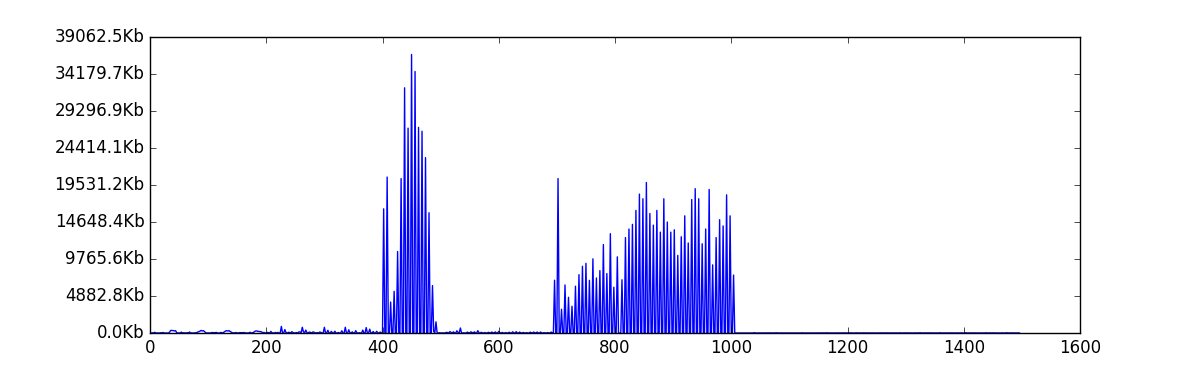
Data persistence The only thing left before achieving the totality of my work is to rigorously test the data persistence behavior to demonstrate the network traffic reduction. To do so we use our benchmark python module. We are able to analyse traffic and produce plots like this one:

Plot: 32 nodes, 1600 values with normal condition test.
This particular plot was drawn before the enhancements. We are confident to improve the results using my work produced during the GSOC.

TCP In the middle of the GSOC, we soon realized that passing from UDP to TCP would ask too much efforts in too short lapse of time. Also, it is not yet clear if we should really do that.

15 August 2016

Shirish Agarwal: The road to TOR

Happy Independence Day to all. I had been looking forward to this day so I can use to share with my brothers and sisters what little I know about TOR . Independence means so many things to many people. For me, it means having freedom, valuing it and using it to benefit not just to ourselves but to people at large. And for that to happen, at least on the web, it has to rise above censorship if we are to get there at all. I am 40 years old, and if I can t read whatever I want to read without asking the state-military-Corporate trinity than be damned with that. Debconf was instrumental as I was able to understand and share many of the privacy concerns that we all have. This blog post is partly a tribute to being part of a community and being part of Debconf16. So, in that search for privacy couple of years ago, I came across TOR . TOR stands for The Onion Router project. Explaining tor is simple. Let us take the standard way in which we approach the website using a browser or any other means. a. We type out a site name, say debian.org in the URL/URI bar .
b. Now the first thing the browser would do is look into its DNS Cache to see if the name/URL has been used before. If it is something like debian.org which has been used before and is *fresh* and there is content already it would serve the content from the cache there itself.
c. In case, if it s not or the content is stale or something, it would generate a DNS lookup through the various routing tables till the DNS IP Address is found and information relayed to the browser.
d. The browser takes the IP Address and opens a TCP connection to the server, you have the handshake happen and after that it s business as usual.
e. In case if it doesn t work, you could get errors like Could not connect to server xyz or some special errors with error codes. This is a much simplified version of what happens or goes through normally with most/all of the browsers. One good way to see how the whole thing happens is to use traceroute and use the whois service. For e.g. [$] traceroute debian.org and then [$] whois 5.153.231.4 grep inetnum
inetnum: 5.153.231.0 - 5.153.231.255
Just using whois IP Address gives much more. I just shared a short version because I find it interesting that Debian has booked all 255 possible IP Addresses but speculating on that would be probably be a job for a different day. Now the difference when using TOR are two things a. The conversation is encrypted (somewhat like using https but encrypted through the relays)
b. The conversation is relayed over 2-3 relays and it will give a somewhat different identification to the DNS server at the other end.
c. It is only at the end-points that the conversation will be in plain text. For e.g. the TOR connection I m using atm is from me France (relay) Switzerland (relay) Germany (relay) WordPress.com . So wordpress thinks that all the connection is happening via Germany while I m here in India. It would also tells that I m running MS-Windows some version and a different browser while I m from somewhere in India, on Debian, using another browser altogether There are various motivations for doing that. For myself, I m just a private person and do not need or want that any other person/s or even the State should be looking over my shoulder as to what I m doing. And the argument that we need to spy on citizens because Terrorists are there doesn t hold water over me. There are many ways in which they can pass messages even without tor or web. The Government-Corporate-Military just get more powerful if and when they know what common people think, do, eat etc. So the question is how does you install tor if you a private sort of person . If you are on a Debian machine, you are one step closer to doing that. So the first thing that you need to do is install the following $ sudo aptitude install ooniprobe python-certifi tor tor-geoipdb torsocks torbrowser-launcher Once the above is done, then run torbrowser-launcher. This is how it would work out the first time it is run [$] torbrowser-launcher Tor Browser Launcher
By Micah Lee, licensed under MIT
version 0.2.6
https://github.com/micahflee/torbrowser-launcher
Creating GnuPG homedir /home/shirish/.local/share/torbrowser/gnupg_homedir
Downloading and installing Tor Browser for the first time.
Downloading https://dist.torproject.org/torbrowser/update_2/release/Linux_x86_64-gcc3/x/en-US
Latest version: 6.0.3
Downloading https://dist.torproject.org/torbrowser/6.0.3/tor-browser-linux64-6.0.3_en-US.tar.xz.asc
Downloading https://dist.torproject.org/torbrowser/6.0.3/tor-browser-linux64-6.0.3_en-US.tar.xz
Verifying signature
Extracting tor-browser-linux64-6.0.3_en-US.tar.xz
Running /home/shirish/.local/share/torbrowser/tbb/x86_64/tor-browser_en-US/start-tor-browser.desktop
Launching './Browser/start-tor-browser --detach'...
As can be seen above, you basically download the tor browser remotely from the website. Obviously, for this port 80 needs to be opened. One of the more interesting things is that it tells you where it installs the browser. /home/shirish/.local/share/torbrowser/tbb/x86_64/tor-browser_en-US/Browser/start-tor-browser and then detaches. The first time the TOR browser actually runs it looks something similar to this
Torbrowser picture

Torbrowser picture

Additionally it would give you 4 choices. Depending on your need for safety, security and convenience you make a choice and live with it. Now the only thing remaining to do is have an alias for your torbrowser. So I made [$] alias tor tor=/home/shirish/.local/share/torbrowser/tbb/x86_64/tor-browser_en-US/Browser/start-tor-browser It is suggested that you do not use the same usernames on the onion network. Also apart from the regular URL addresses such as flossexperiences.wordpress.com you will also see sites such as https://www.abc12defgh3ijkl.onion.to (fictional address) Now there would be others who would want to use the same/similar settings say as there are in their Mozilla Firefox installation. To do that do the following steps a. First close down both Torbrowser and Mozilla Firefox .
b. Open your file browser and go to where your mozilla profile details are. In typical Debian installations it is at ~/.mozilla/firefox/5r7t1r92.default In the next tab, navigate to ~/.local/share/torbrowser/tbb/x86_64/tor-browser_en-US/Browser/TorBrowser/Data/Browser/profile.default c. Now copy the following files over from your mozilla profile to your tor browser profile and you can resume where you left off.
    cert8.db
    chromeappsstore.sqlite
    content-prefs.sqlite
    cookies.sqlite
    formhistory.sqlite
    key3.db
    logins.json (Firefox 32 and above)
    mimeTypes.rdf
    permissions.sqlite
    persdict.dat
    places.sqlite
    signons3.txt (if exists)
    webappsstore.sqlite
and the following folders/directories
    bookmarkbackups
    chrome (if it exists)
    searchplugins (if it exists)
Once the above is done, fire up your torbrowser with the alias shared. This is usually put it in your .bashrc file or depending on whatever terminal interpreter you use, wherever the config file will be. Welcome to the world of TOR. Now, after a time if you benefit from tor and would like to give back to the tor community, you should look up tor bridges and relay. As the blog post has become long enough, I would end it now and hopefully we can talk about tor bridges and relay some other day.
Filed under: Miscellenous Tagged: #anonymity, #Debconf16, #debian, #tor, #torbrowser, GNU, Linux, Privacy

14 August 2016

David Moreno: Deploying a Dancer app on Heroku

There s a few different posts out there on how to run Perl apps, such as Mojolicious-based, on Heroku, but I d like to show how to deploy a Perl Dancer application on Heroku. The startup script of a Dancer application (bin/app.pl) can be used as a PSGI file. With that in mind, I was able to take the good work of Miyagawa s Heroku buildpack for general PSGI apps and hack it a little bit to use Dancer s, specifically. What I like about Miyagawa s approach is that uses the fantastic cpanm and makes it available within your application, instead of the monotonous cpan, to solve dependencies. Let s make a simple Dancer app to show how to make this happen:
/tmp $ dancer -a heroku
+ heroku
+ heroku/bin
+ heroku/bin/app.pl
+ heroku/config.yml
+ heroku/environments
+ heroku/environments/development.yml
+ heroku/environments/production.yml
+ heroku/views
+ heroku/views/index.tt
+ heroku/views/layouts
+ heroku/views/layouts/main.tt
+ heroku/MANIFEST.SKIP
+ heroku/lib
heroku/lib/
+ heroku/lib/heroku.pm
+ heroku/public
+ heroku/public/css
+ heroku/public/css/style.css
+ heroku/public/css/error.css
+ heroku/public/images
+ heroku/public/500.html
+ heroku/public/404.html
+ heroku/public/dispatch.fcgi
+ heroku/public/dispatch.cgi
+ heroku/public/javascripts
+ heroku/public/javascripts/jquery.js
+ heroku/t
+ heroku/t/002_index_route.t
+ heroku/t/001_base.t
+ heroku/Makefile.PL
Now, you already know that by firing perl bin/app.pl you can get your development server up and running. So I ll just proceed to show how to make this work on Heroku, you should already have your development environment configured for it:
/tmp $ cd heroku/
/tmp/heroku $ git init
Initialized empty Git repository in /private/tmp/heroku/.git/
/tmp/heroku :master $ git add .
/tmp/heroku :master $ git commit -a -m 'Dancer on Heroku'
[master (root-commit) 6c0c55a] Dancer on Heroku
22 files changed, 809 insertions(+), 0 deletions(-)
create mode 100644 MANIFEST
create mode 100644 MANIFEST.SKIP
create mode 100644 Makefile.PL
create mode 100755 bin/app.pl
create mode 100644 config.yml
create mode 100644 environments/development.yml
create mode 100644 environments/production.yml
create mode 100644 lib/heroku.pm
create mode 100644 public/404.html
create mode 100644 public/500.html
create mode 100644 public/css/error.css
create mode 100644 public/css/style.css
create mode 100755 public/dispatch.cgi
create mode 100755 public/dispatch.fcgi
create mode 100644 public/favicon.ico
create mode 100644 public/images/perldancer-bg.jpg
create mode 100644 public/images/perldancer.jpg
create mode 100644 public/javascripts/jquery.js
create mode 100644 t/001_base.t
create mode 100644 t/002_index_route.t
create mode 100644 views/index.tt
create mode 100644 views/layouts/main.tt
/tmp/heroku :master $
And now, run heroku create, please note the buildpack URL, http://github.com/damog/heroku-buildpack-perl.git:
/tmp/heroku :master $ heroku create --stack cedar --buildpack http://github.com/damog/heroku-buildpack-perl.git
Creating blazing-beach-7280... done, stack is cedar
http://blazing-beach-7280.herokuapp.com/   git@heroku.com:blazing-beach-7280.git
Git remote heroku added
/tmp/heroku :master $
And just push:
/tmp/heroku :master $ git push heroku master
Counting objects: 34, done.
Delta compression using up to 4 threads.
Compressing objects: 100% (30/30), done.
Writing objects: 100% (34/34), 40.60 KiB, done.
Total 34 (delta 3), reused 0 (delta 0)
-----> Heroku receiving push
-----> Fetching custom buildpack... done
-----> Perl/PSGI Dancer! app detected
-----> Bootstrapping cpanm
Successfully installed JSON-PP-2.27200
Successfully installed CPAN-Meta-YAML-0.008
Successfully installed Parse-CPAN-Meta-1.4404 (upgraded from 1.39)
Successfully installed version-0.99 (upgraded from 0.77)
Successfully installed Module-Metadata-1.000009
Successfully installed CPAN-Meta-Requirements-2.122
Successfully installed CPAN-Meta-2.120921
Successfully installed Perl-OSType-1.002
Successfully installed ExtUtils-CBuilder-0.280205 (upgraded from 0.2602)
Successfully installed ExtUtils-ParseXS-3.15 (upgraded from 2.2002)
Successfully installed Module-Build-0.4001 (upgraded from 0.340201)
Successfully installed App-cpanminus-1.5015
12 distributions installed
-----> Installing dependencies
Successfully installed ExtUtils-MakeMaker-6.62 (upgraded from 6.55_02)
Successfully installed YAML-0.84
Successfully installed Test-Simple-0.98 (upgraded from 0.92)
Successfully installed Try-Tiny-0.11
Successfully installed HTTP-Server-Simple-0.44
Successfully installed HTTP-Server-Simple-PSGI-0.14
Successfully installed URI-1.60
Successfully installed Test-Tester-0.108
Successfully installed Test-NoWarnings-1.04
Successfully installed Test-Deep-0.110
Successfully installed LWP-MediaTypes-6.02
Successfully installed Encode-Locale-1.03
Successfully installed HTTP-Date-6.02
Successfully installed HTML-Tagset-3.20
Successfully installed HTML-Parser-3.69
Successfully installed Compress-Raw-Bzip2-2.052 (upgraded from 2.020)
Successfully installed Compress-Raw-Zlib-2.054 (upgraded from 2.020)
Successfully installed IO-Compress-2.052 (upgraded from 2.020)
Successfully installed HTTP-Message-6.03
Successfully installed HTTP-Body-1.15
Successfully installed MIME-Types-1.35
Successfully installed HTTP-Negotiate-6.01
Successfully installed File-Listing-6.04
Successfully installed HTTP-Daemon-6.01
Successfully installed Net-HTTP-6.03
Successfully installed HTTP-Cookies-6.01
Successfully installed WWW-RobotRules-6.02
Successfully installed libwww-perl-6.04
Successfully installed Dancer-1.3097
29 distributions installed
-----> Installing Starman
Successfully installed Test-Requires-0.06
Successfully installed Hash-MultiValue-0.12
Successfully installed Devel-StackTrace-1.27
Successfully installed Test-SharedFork-0.20
Successfully installed Test-TCP-1.16
Successfully installed Class-Inspector-1.27
Successfully installed File-ShareDir-1.03
Successfully installed Filesys-Notify-Simple-0.08
Successfully installed Devel-StackTrace-AsHTML-0.11
Successfully installed Plack-0.9989
Successfully installed Net-Server-2.006
Successfully installed HTTP-Parser-XS-0.14
Successfully installed Data-Dump-1.21
Successfully installed Starman-0.3001
14 distributions installed
-----> Discovering process types
Procfile declares types -> (none)
Default types for Perl/PSGI Dancer! -> web
-----> Compiled slug size is 2.7MB
-----> Launching... done, v4
http://blazing-beach-7280.herokuapp.com deployed to Heroku
To git@heroku.com:blazing-beach-7280.git
* [new branch] master -> master
/tmp/heroku :master $
And you can confirm it works: Please note that the environment it runs on is deployment . The backend server it uses is the great Starman, also by the great Miyagawa. Now, if you add or change dependencies on Makefile.PL, next time you push, those will get updated. Very cool, right? :)

6 August 2016

Robert Edmonds: Cable modems: Arris SB6190 vs. Netgear CM600

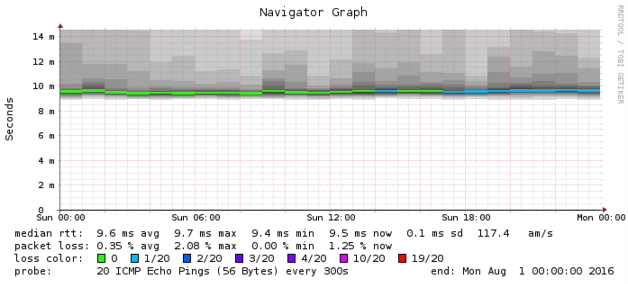
Recently I activated new cable ISP service at my home and needed to purchase a cable modem. There were only a few candidate devices that supported at least 24 downstream channels (preferably 32), and did not contain an integrated router or access point. The first modem I tried was the Arris SB6190, which supports 32 downstream channels. It is based on the Intel Puma 6 SoC, and looking at an older release of the SB6190 firmware source reveals that the device runs Linux. This device, running the latest 9.1.93N firmware, goes into a failure mode after several days of uptime which causes it to drop 1-2% of packets. Here is a SmokePing graph that measures latency to my ISP's recursive DNS server, showing the transition into the degraded mode: SmokePing Arris SB6190 Firmware 9.1.93N It didn't drop packets at random, though. Some traffic would be deterministically dropped, such as the parallel A/AAAA DNS lookups generated by the glibc DNS stub resolver. For instance, in the following tcpdump output:
[1] 17:31:46.989073 IP [My IP].50775 > 75.75.75.75.53: 53571+ A? www.comcast6.net. (34)
[2] 17:31:46.989102 IP [My IP].50775 > 75.75.75.75.53: 14987+ AAAA? www.comcast6.net. (34)
[3] 17:31:47.020423 IP 75.75.75.75.53 > [My IP].50775: 53571 2/0/0 CNAME comcast6.g.comcast.net., [ ]
[4] 17:31:51.993680 IP [My IP].50775 > 75.75.75.75.53: 53571+ A? www.comcast6.net. (34)
[5] 17:31:52.025138 IP 75.75.75.75.53 > [My IP].50775: 53571 2/0/0 CNAME comcast6.g.comcast.net., [ ]
[6] 17:31:52.025282 IP [My IP].50775 > 75.75.75.75.53: 14987+ AAAA? www.comcast6.net. (34)
[7] 17:31:52.056550 IP 75.75.75.75.53 > [My IP].50775: 14987 2/0/0 CNAME comcast6.g.comcast.net., [ ]
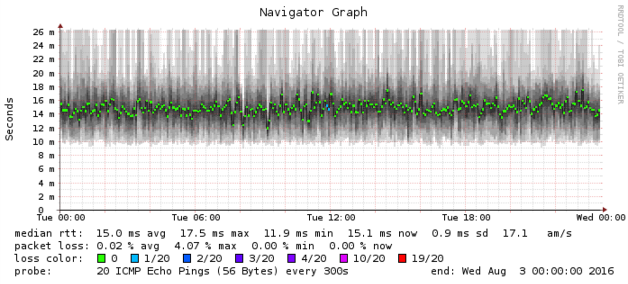
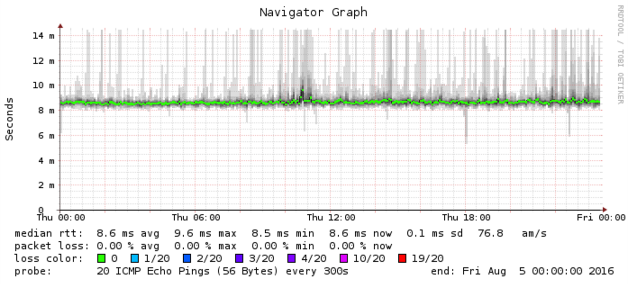
Packets [1] and [2] are the A and AAAA queries being initiated in parallel. Note that they both use the same 4-tuple of (Source IP, Destination IP, Source Port, Destination Port), but with different DNS IDs. Packet [3] is the response to packet [1]. The response to packet [2] never arrives, and five seconds later, the glibc stub resolver times out and retries in single-request mode, which performs the A and AAAA queries sequentially. Packets [4] and [5] are the type A query and response, and packets [6] and [7] are the AAAA query and response. The Arris SB6190 running firmware 9.1.93N would consistently interfere with these parallel DNS requests, but only when operating in its degraded mode. It also didn't matter whether glibc was configured to use an IPv4 or IPv6 nameserver, or which nameserver was being used. Power cycling the modem would fix the issue for a few days. My ISP offered to downgrade the firmware on the Arris SB6190 to version 9.1.93K. This firmware version doesn't go into a degraded mode after a few days, but it does exhibit higher latency, and more jitter: SmokePing Arris SB6190 Firmware 9.1.93K It seemed unlikely that Arris would fix the firmware issues in the SB6190 before the end of my 30-day return window, so I returned the SB6190 and purchased a Netgear CM600. This modem appears to be based on the Broadcom BCM3384 and looking at an older release of the CM600 firmware source reveals that the device runs the open source eCos embedded operating system. The Netgear CM600 so far hasn't exhibited any of the issues I found with the Arris SB6190 modem. Here is a SmokePing graph for the CM600, which shows median latency about 1 ms lower than the Arris modem: SmokePing Netgear CM600 It's not clear which company is to blame for the problems in the Arris modem. Looking at the DOCSIS drivers in the SB6190 firmware source reveals copyright statements from ARRIS Group, Texas Instruments, and Intel. However, I would recommend avoiding cable modems produced by Arris in particular, and cable modems based on the Intel Puma SoC in general.

14 July 2016

Steve Kemp: Adding lua to all the things!

Recently Antirez made a post documenting a simple editor in 1k of pure C, the post was interesting in itself, and the editor is a cute toy because it doesn't use curses - instead using escape sequences. The github project became very popular and much interesting discussion took place on hacker news. My interest was piqued because I've obviously spent a few months working on my own console based program, and so I had to read the code, see what I could learn, and generally have some fun. As expected Salvatore's code is refreshingly simple, neat in some areas, terse in others, but always a pleasure to read. Also, as expected, a number of forks appeared adding various features. I figured I could do the same, so I did the obvious thing in adding Lua scripting support to the project. In my fork the core of the editor is mostly left alone, instead code was moved out of it into an external lua script. The highlight of my lua code is this magic:
  --
  -- Keymap of bound keys
  --
  local keymap =  
  --
  --  Default bindings
  --
  keymap['^A']        = sol
  keymap['^D']        = function() insert( os.date() ) end
  keymap['^E']        = eol
  keymap['^H']        = delete
  keymap['^L']        = eval
  keymap['^M']        = function() insert("\n") end
I wrote a function invoked on every key-press, and use that to lookup key-bindings. By adding a bunch of primitives to export/manipulate the core of the editor from Lua I simplified the editor's core logic, and allowed interesting facilities: All in all I had fun, and I continue to think a Lua-scripted editor would be a neat project - I'm just not sure there's a "market" for another editor. View my fork here, and see the sample kilo.lua config file.

13 July 2016

Reproducible builds folks: Reprotest containers are (probably) working, finally

Author: ceridwen After testing and looking at the code for Plumbum, I decided that it wouldn't work for my purposes. When a command is created by something like remote['ls'], it actually looks up which ls executable will be run and uses in the command object an internal representation of a path like /bin/ls. To make it work with autopkgtest's code would have required writing some kind of middle layer that would take all of the Plumbum code that makes subprocess calls, does path lookups, or uses the Python standard library to access OS functions and convert them into shell scripts. Another similar library, sh, has the same problems. I think there's a strong argument that something like Plumbum's or sh's API would be much easier to work with than adt_testbed, and I may take steps to improve it at some point, but for the moment I've focused on getting reprotest working with the existing autopkgtest/adt_testbed API. To do this, I created a minimalistic shell AST library in _shell_ast.py using the POSIX shell grammar. I omitted a lot of functionality that wasn't immediately relevant for reprotest and simplified the AST in some places to make it easier to work. Using this, it generates a shell script and runs it with adt_testbed.Testbed.execute(). With these pieces in place, the tests succeed for both null and schroot! I haven't tested the rest of the containers, but barring further issues with autopkgtest, I expect they should work. At this point, my goal is to push the next release out by next week, though as usual it will depend on how many snags I hit in the process. I see the following as the remaining blockers:

9 June 2016

NOKUBI Takatsugu: Recurrent Convolutional Neural Networks for Text Classification

I made a simple implementation of text classification with Recurrent CNN. https://github.com/knok/rcnn-text-classification It uses chainer, a Deep Learning framework. Recurrent convolutional neural networks for text classification
Siwei Lai, Liheng Xu, Kang Liu, Jun Zhao, Chinese Academy of Sciences, China
AAAI. 2015.

3 June 2016

Gunnar Wolf: Stop it with those short PGP key IDs!

Debian is quite probably the project that most uses a OpenPGP implementation (that is, GnuPG, or gpg) for many of its internal operations, and that places most trust in it. PGP is also very widely used, of course, in many other projects and between individuals. It is regarded as a secure way to do all sorts of crypto (mainly, encrypting/decrypting private stuff, signing public stuff, certifying other people's identities). PGP's lineage traces back to Phil Zimmerman's program, first published in 1991 By far, not a newcomer PGP is secure, as it was 25 years ago. However, some uses of it might not be so. We went through several migrations related to algorithmic weaknesses (i.e. v3 keys using MD5; SHA1 is strongly discouraged, although not yet completely broken, and it should be avoided as well) or to computational complexity (as the migration away from keys smaller than 2048 bits, strongly prefering 4096 bits). But some vulnerabilities are human usage (that is, configuration-) related. Today, Enrico Zini gave us a heads-up in the #debian-keyring IRC channel, and started a thread in the debian-private mailing list; I understand the mail to a private list was partly meant to get our collective attention, and to allow for potentially security-relevant information to be shared. I won't go into details about what is, is not, should be or should not be private, but I'll post here only what's public information already. What are short and long key IDs? I'll start by quoting Enrico's mail:
there are currently at least 3 ways to refer to a gpg key: short key ID (last 8 hex digits of fingerprint), long key ID (last 16 hex digits) and full fingerprint. The short key ID used to be popular, and since 5 years it is known that it is computationally easy to generate a gnupg key with an arbitrary short key id. A mitigation to this is using "keyid-format long" in gpg.conf, and a better thing to do, especially in scripts, is to use the full fingerprint to refer to a key, or just ship the public key for verification and skip the key servers. Note that in case of keyid collision, gpg will download and import all the matching keys, and will use all the matching keys for verifying signatures.
So... What is this about? We humans are quite bad at recognizing and remembering randomly-generated strings with no inherent patterns in them. Every GPG key can be uniquely identified by its fingerprint, a 128-bit string, usually encoded as ten blocks of four hexadecimal characters (this allows for 160 bits; I guess there's space for a checksum in it). That is, my (full) key's signature is:
AB41 C1C6 8AFD 668C A045  EBF8 673A 03E4 C1DB 921F
However, it's quite hard to recognize such a long string, let alone memorize it! So, we often do what humans do: Given that strong cryptography implies a homogenous probability distribution, people compromised on using just a portion of the key the last portion. The short key ID. Mine is then the last two blocks (shown in boldface): C1DB921F. We can also use what's known as the long key ID, that's twice as long: 64 bits. However, while I can speak my short key ID on a single breath (and maybe even expect you to remember and note it down), try doing so with the long one (shown in italics above): 673A03E4C1DB921F. Nah. Too much for our little, analog brains. This short and almost-rememberable number has then 32 bits of entropy I have less than one in 4,000,000,000 chance of generating a new key with this same short key ID. Besides, key generation is a CPU-intensive operation, so it's quite unlikely we will have a collision, right? Well, wrong. Previous successful attacks on short key IDs Already five years ago, Asheesh Laroia migrated his 1024D key to a 4096R. And, as he describes in his always-entertaining fashion, he made his computer sweat until he was able to create a new key for which the short key ID collided with the old one. It might not seem like a big deal, as he did this non-maliciously, but this easily should have spelt game over for the usage of short key IDs. After all, being able to generate a collision is usually the end for cryptographic systems. Asheesh specifically mentioned in his posting how this could be abused. But we didn't listen. Short key IDs are just too convenient! Besides, they allow us to have fun, can be a means of expression! I know of at least two keys that would qualify as vanity: Obey Arthur Liu's 0x29C0FFEE (created in 2009) and Keith Packard's 0x00000011 (created in 2012). Then we got the Evil 32 project. They developed Scallion, started (AFAICT) in 2012. Scallion automates the search for a 32-bit collision using GPUs; they claim that it takes only four seconds to find a collision. So, they went through the strong set of the public PGP Web of Trust, and created a (32-bit-)colliding key for each of the existing keys. And what happened now? What happened today? We still don't really know, but it seems we found a first potentially malicious collision that is, the first "nonacademic" case. Enrico found two keys sharing the 9F6C6333 short ID, apparently belonging to the same person (as would be the case of Asheesh, mentioned above). After contacting Gustavo, though, he does not know about the second That is, it can be clearly regarded as an impersonation attempt. Besides, what gave away this attempt are the signatures it has: Both keys are signed by what appears to be the same three keys: B29B232A, F2C850CA and 789038F2. Those three keys are not (yet?) uploaded to the keyservers, though... But we can expect them to appear at any point in the future. We don't know who is behind this, or what his purpose is. We just know this looks very evil. Now, don't panic: Gustavo's key is safe. Same for his certifiers, Marga, Agust n and Maxy. It's just a 32-bit collision. So, in principle, the only parties that could be cheated to trust the attacker are humans, right? Nope. Enrico tested on the PGP pathfinder & key statistics service, a keyserver that finds trust paths between any two arbitrary keys in the strong set. Surprise: The pathfinder works on the short key IDs, even when supplied full fingerprints. So, it turns out I have three faked trust paths into our impostor. What next? There are several things this should urge us to do. And there are surely many other important recommendations. But this is a good set of points to start with. [update] I was pointed at Daniel Kahn Gillmor's 2013 blog post, OpenPGP Key IDs are not useful. Daniel argues, in short, that cutting a fingerprint in order to get a (32- or 64-bit) short key ID is the worst of all worlds, and we should rather target either always showing full fingerprints, or not showing it at all (and leaving all the crypto-checking bits to be done by the software, as comparing 160-bit strings is not natural for us humans). [update] This post was picked up by LWN.net. A very interesting discussion continues in their comments.

25 May 2016

Petter Reinholdtsen: Isenkram with PackageKit support - new version 0.23 available in Debian unstable

The isenkram system is a user-focused solution in Debian for handling hardware related packages. The idea is to have a database of mappings between hardware and packages, and pop up a dialog suggesting for the user to install the packages to use a given hardware dongle. Some use cases are when you insert a Yubikey, it proposes to install the software needed to control it; when you insert a braille reader list it proposes to install the packages needed to send text to the reader; and when you insert a ColorHug screen calibrator it suggests to install the driver for it. The system work well, and even have a few command line tools to install firmware packages and packages for the hardware already in the machine (as opposed to hotpluggable hardware). The system was initially written using aptdaemon, because I found good documentation and example code on how to use it. But aptdaemon is going away and is generally being replaced by PackageKit, so Isenkram needed a rewrite. And today, thanks to the great patch from my college Sunil Mohan Adapa in the FreedomBox project, the rewrite finally took place. I've just uploaded a new version of Isenkram into Debian Unstable with the patch included, and the default for the background daemon is now to use PackageKit. To check it out, install the isenkram package and insert some hardware dongle and see if it is recognised. If you want to know what kind of packages isenkram would propose for the machine it is running on, you can check out the isenkram-lookup program. This is what it look like on a Thinkpad X230:
% isenkram-lookup 
bluez
cheese
fprintd
fprintd-demo
gkrellm-thinkbat
hdapsd
libpam-fprintd
pidgin-blinklight
thinkfan
tleds
tp-smapi-dkms
tp-smapi-source
tpb
%p
The hardware mappings come from several places. The preferred way is for packages to announce their hardware support using the cross distribution appstream system. See previous blog posts about isenkram to learn how to do that.

19 May 2016

Petter Reinholdtsen: I want the courts to be involved before the police can hijack a news site DNS domain (#domstolkontroll)

I just donated to the NUUG defence "fond" to fund the effort in Norway to get the seizure of the news site popcorn-time.no tested in court. I hope everyone that agree with me will do the same. Would you be worried if you knew the police in your country could hijack DNS domains of news sites covering free software system without talking to a judge first? I am. What if the free software system combined search engine lookups, bittorrent downloads and video playout and was called Popcorn Time? Would that affect your view? It still make me worried. In March 2016, the Norwegian police seized (as in forced NORID to change the IP address pointed to by it to one controlled by the police) the DNS domain popcorn-time.no, without any supervision from the courts. I did not know about the web site back then, and assumed the courts had been involved, and was very surprised when I discovered that the police had hijacked the DNS domain without asking a judge for permission first. I was even more surprised when I had a look at the web site content on the Internet Archive, and only found news coverage about Popcorn Time, not any material published without the right holders permissions. The seizure was widely covered in the Norwegian press (see for example Hegnar Online and ITavisen and NRK), at first due to the press release sent out by kokrim, but then based on protests from the law professor Olav Torvund and lawyer Jon Wessel-Aas. It even got some coverage on TorrentFreak. I wrote about the case a month ago, when the Norwegian Unix User Group (NUUG), where I am an active member, decided to ask the courts to test this seizure. The request was denied, but NUUG and its co-requestor EFN have not given up, and now they are rallying for support to get the seizure legally challenged. They accept both bank and Bitcoin transfer for those that want to support the request. If you as me believe news sites about free software should not be censored, even if the free software have both legal and illegal applications, and that DNS hijacking should be tested by the courts, I suggest you show your support by donating to NUUG.

10 May 2016

Reproducible builds folks: Reproducible builds: week 54 in Stretch cycle

What happened in the Reproducible Builds effort between May 1st and May 7th 2016: Media coverage There has been a surprising tweet last week: "Props to @FiloSottile for his nifty gvt golang tool. We're using it to get reproducible builds for a Zika & West Nile monitoring project." and to our surprise Kenn confirmed privately that he indeed meant "reproducible builds" as in "bit by bit identical builds". Wow. We're looking forward to learn more details about this; for now we just know that they are doing this for software quality reasons basically. Two of the four GSoC and Outreachy participants for Reproducible builds posted their introductions to Planet Debian: Toolchain fixes and other upstream developments dpkg 1.18.5 was uploaded fixing two bugs relevant to us: This upload made it necessary to rebase our dpkg on the version on sid again, which Niko Tyni and Lunar promptly did. Then a few days later 1.18.6 was released to fix a regression in the previous upload, and Niko promptly updated our patched version again. Following this Niko Tyni found #823428: "dpkg: many packages affected by dpkg-source: error: source package uses only weak checksums". Alexis Bienven e worked on tex related packages and SOURCE_DATE_EPOCH: Emmanuel Bourg uploaded jflex/1.4.3+dfsg-2, which removes timestamps from generated files. Packages fixed The following 285 packages have become reproducible due to changes in their build dependencies (mostly from GCC honouring SOURCE_DATE_EPOCH, see the previous week report): 0ad abiword abcm2ps acedb acpica-unix actiona alliance amarok amideco amsynth anjuta aolserver4-nsmysql aolserver4-nsopenssl aolserver4-nssqlite3 apbs aqsis aria2 ascd ascii2binary atheme-services audacity autodocksuite avis awardeco bacula ballerburg bb berusky berusky2 bindechexascii binkd boinc boost1.58 boost1.60 bwctl cairo-dock cd-hit cenon.app chipw ckermit clp clustalo cmatrix coinor-cbc commons-pool cppformat crashmail crrcsim csvimp cyphesis-cpp dact dar darcs darkradiant dcap dia distcc dolphin-emu drumkv1 dtach dune-localfunctions dvbsnoop dvbstreamer eclib ed2k-hash edfbrowser efax-gtk efax exonerate f-irc fakepop fbb filezilla fityk flasm flightgear fluxbox fmit fossil freedink-dfarc freehdl freemedforms-project freeplayer freeradius fxload gdb-arm-none-eabi geany-plugins geany geda-gaf gfm gif2png giflib gifticlib glaurung glusterfs gnokii gnubiff gnugk goaccess gocr goldencheetah gom gopchop gosmore gpsim gputils grcompiler grisbi gtkpod gvpe hardlink haskell-github hashrat hatari herculesstudio hpcc hypre i2util incron infiniband-diags infon ips iptotal ipv6calc iqtree jabber-muc jama jamnntpd janino jcharts joy2key jpilot jumpnbump jvim kanatest kbuild kchmviewer konclude krename kscope kvpnc latexdiff lcrack leocad libace-perl libcaca libcgicc libdap libdbi-drivers libewf libjlayer-java libkcompactdisc liblscp libmp3spi-java libpwiz librecad libspin-java libuninum libzypp lightdm-gtk-greeter lighttpd linpac lookup lz4 lzop maitreya meshlab mgetty mhwaveedit minbif minc-tools moc mrtrix mscompress msort mudlet multiwatch mysecureshell nifticlib nkf noblenote nqc numactl numad octave-optim omega-rpg open-cobol openmama openmprtl openrpt opensm openvpn openvswitch owx pads parsinsert pcb pd-hcs pd-hexloader pd-hid pd-libdir pear-channels pgn-extract phnxdeco php-amqp php-apcu-bc php-apcu php-solr pidgin-librvp plan plymouth pnscan pocketsphinx polygraph portaudio19 postbooks-updater postbooks powertop previsat progressivemauve puredata-import pycurl qjackctl qmidinet qsampler qsopt-ex qsynth qtractor quassel quelcom quickplot qxgedit ratpoison rlpr robojournal samplv1 sanlock saods9 schism scorched3d scummvm-tools sdlbasic sgrep simh sinfo sip-tester sludge sniffit sox spd speex stimfit swarm-cluster synfig synthv1 syslog-ng tart tessa theseus thunar-vcs-plugin ticcutils tickr tilp2 timbl timblserver tkgate transtermhp tstools tvoe ucarp ultracopier undbx uni2ascii uniutils universalindentgui util-vserver uudeview vfu virtualjaguar vmpk voms voxbo vpcs wipe x264 xcfa xfrisk xmorph xmount xyscan yacas yasm z88dk zeal zsync zynaddsubfx Last week the 1000th bug usertagged "reproducible" was fixed! This means roughly 2 bugs per day since 2015-01-01. Kudos and huge thanks to everyone involved! Please also note: FTBFS packages have not been counted here and there are still 600 open bugs with reproducible patches provided. Please help bringing that number down to 0! The following packages have become reproducible after being fixed: Some uploads have fixed some reproducibility issues, but not all of them: Uploads which fix reproducibility issues, but currently FTBFS: Patches submitted that have not made their way to the archive yet: Package reviews 54 reviews have been added, 6 have been updated and 44 have been removed in this week. 18 FTBFS bugs have been reported by Chris Lamb, James Cowgill and Niko Tyni. diffoscope development Thanks to Mattia, diffoscope 52~bpo8+1 is available in jessie-backports now. tests.reproducible-builds.org Misc. This week's edition was written by Reiner Herrmann, Holger Levsen and Mattia Rizzolo and reviewed by a bunch of Reproducible builds folks on IRC. Mattia also wrote a small ikiwiki macro for this blog to ease linking reproducible issues, packages in the package tracker and bugs in the Debian BTS.

4 May 2016

Debian Java Packaging Team: What's new since Jessie?

Jessie was released one year ago now and the Java Team has been busy preparing the next release. Here is a quick summary of the current state of the Java packages: Outlook, goals and request for help Java and Friends Package updates The packages listed below detail the changes in jessie-backports and testing. Libraries and Debian specific tools have been excluded. Packages added to jessie-backports: Packages removed from testing: Packages added to testing: Packages upgraded in testing:

3 May 2016

Jamie McClelland: Monitoring Deflect

May First/People Link has several members that are targets of politically motivated denial of service attacks (mostly groups that support reproductive justice for women and palestinian rights). To fight off the attacks, we work closely with Deflect - a non-governmental organization based in Canada that fights against this kind of censorship. When a site is down, it's not always easy to understand why. Deflect runs as many as 5 edge servers, any of them could be down. And, of course, the origin server could also be down. I tried using a commericial/free as in beer service for monitoring up time, but when it reported the site being down, I had no idea which part was down. So... httping to the rescue. Unfortunately, it depends on --divert-connect which is only available in Debian Stretch. I run the script via a cron job and output the results to a log file.
    #!/bin/bash
    # Test all given edges 
    domain="$1"
    origin="$2"
    proto=http
    if [ -n "$3" ]; then
        proto="$3"
    fi
    if [ -z "$domain" ]; then
        printf "Please pass the domain as first argument.\n"
        exit 1
    fi
    if ! ping -c 1 4.2.2.1 >/dev/null; then
        # printf "We are offline. Not running.\n"
        exit 1
    fi
    ips=$(dig +short "$domain")
    if [ "$?" -ne "0" ]; then
        # printf "DNS lookup failure. Not running.\n"
        exit 1
    fi
    if [ -n "$origin" ]; then
        ips="$ips $origin"
    fi
    l=
    if [ "$proto" = "https" ]; then
        l=-l
    fi
    for ip in $ips; do
        date=$(date +%Y.%m.%d-%H:%M)
        for i in 1 2 3; do
            out=$(httping $l -m -t 5 -c 1 --divert-connect "$ip" "$proto://$domain")
            [ -z "$out" ] && out=1
            printf "%s %s %s\n" "$date" "$ip" "$out"
        done
    done

1 April 2016

Norbert Preining: Searching for a job

Yesterday my contract with my university JAIST ended. I was working there as Associate Professor for 6.5 years, but the university decided not to extend my contract (financial problems, foreigner in Japan). That means, I am now out on the job market again not the greatest fun for an academic at my age. Thanks to JAIST for circumventing the ominous 5-year clause of permanent employment.
shuushoku My prime interests are academic work, that is research and teaching, where research is in a variety of fields, mostly mathematical logic, theoretical computer science, and formal methods. Recently I am working on an extension of the Curry-Howard correspondence to cover different calculi, in particular Hyper Sequent Calculi, and relate them to some kind of process algebra. For more details see the logic dedicated page. My other focal point is programming and software development, where I have contributed to many open source projects, and act as main developer of the TeX Live infrastructure and distribution system (tlmgr). Main languages are Perl, PHP, C, but also Python, Vala, Lisp, CafeOBJ, and whatever comes around. For more details see the software page. I recently became father, so I would prefer either an academic position in Hokuriku, Japan, or a software developer position where I can work (most of the time) remotely. In case one of the readers here has some hints, please drop me a line. In the meantime I enjoy my unemployed life with my baby!

Francois Marier: How Safe Browsing works in Firefox

Firefox has had support for Google's Safe Browsing since 2005 when it started as a stand-alone Firefox extension. At first it was only available in the USA, but it was opened up to the rest of the world in 2006 and moved to the Google Toolbar. It then got integrated directly into Firefox 2.0 before the public launch of the service in 2007. Many people seem confused by this phishing and malware protection system and while there is a pretty good explanation of how it works on our support site, it doesn't go into technical details. This will hopefully be of interest to those who have more questions about it.

Browsing Protection The main part of the Safe Browsing system is the one that watches for bad URLs as you're browsing. Browsing protection currently protects users from: If a Firefox user attempts to visit one of these sites, a warning page will show up instead, which you can see for yourself here: The first two warnings can be toggled using the browser.safebrowsing.malware.enabled preference (in about:config) whereas the last one is controlled by browser.safebrowsing.enabled.

List updates It would be too slow (and privacy-invasive) to contact a trusted server every time the browser wants to establish a connection with a web server. Instead, Firefox downloads a list of bad URLs every 30 minutes from the server (browser.safebrowsing.provider.google.updateURL) and does a lookup against its local database before displaying a page to the user. Downloading the entire list of sites flagged by Safe Browsing would be impractical due to its size so the following transformations are applied:
  1. each URL on the list is canonicalized,
  2. then hashed,
  3. of which only the first 32 bits of the hash are kept.
The lists that are requested from the Safe Browsing server and used to flag pages as malware/unwanted or phishing can be found in urlclassifier.malwareTable and urlclassifier.phishTable respectively. If you want to see some debugging information in your terminal while Firefox is downloading updated lists, turn on browser.safebrowsing.debug. Once downloaded, the lists can be found in the cache directory:
  • ~/.cache/mozilla/firefox/XXXX/safebrowsing/ on Linux
  • ~/Library/Caches/Firefox/Profiles/XXXX/safebrowsing/ on Mac
  • C:\Users\XXXX\AppData\Local\mozilla\firefox\profiles\XXXX\safebrowsing\ on Windows

Resolving partial hash conflicts Because the Safe Browsing database only contains partial hashes, it is possible for a safe page to share the same 32-bit hash prefix as a bad page. Therefore when a URL matches the local list, the browser needs to know whether or not the rest of the hash matches the entry on the Safe Browsing list. In order resolve such conflicts, Firefox requests from the Safe Browsing server (browser.safebrowsing.provider.mozilla.gethashURL) all of the hashes that start with the affected 32-bit prefix and adds these full-length hashes to its local database. Turn on browser.safebrowsing.debug to see some debugging information on the terminal while these "completion" requests are made. If the current URL doesn't match any of these full hashes, the load proceeds as normal. If it does match one of them, a warning interstitial page is shown and the load is canceled.

Download Protection The second part of the Safe Browsing system protects users against malicious downloads. It was launched in 2011, implemented in Firefox 31 on Windows and enabled in Firefox 39 on Mac and Linux. It roughly works like this:
  1. Download the file.
  2. Check the main URL, referrer and redirect chain against a local blocklist (urlclassifier.downloadBlockTable) and block the download in case of a match.
  3. On Windows, if the binary is signed, check the signature against a local whitelist (urlclassifier.downloadAllowTable) of known good publishers and release the download if a match is found.
  4. If the file is not a binary file then release the download.
  5. Otherwise, send the binary file's metadata to the remote application reputation server (browser.safebrowsing.downloads.remote.url) and block the download if the server indicates that the file isn't safe.
Blocked downloads can be unblocked by right-clicking on them in the download manager and selecting "Unblock". While the download protection feature is automatically disabled when malware protection (browser.safebrowsing.malware.enabled) is turned off, it can also be disabled independently via the browser.safebrowsing.downloads.enabled preference. Note that Step 5 is the only point at which any information about the download is shared with Google. That remote lookup can be suppressed via the browser.safebrowsing.downloads.remote.enabled preference for those users concerned about sending that metadata to a third party.

Types of malware The original application reputation service would protect users against "dangerous" downloads, but it has recently been expanded to also warn users about unwanted software as well as software that's not commonly downloaded. These various warnings can be turned on and off in Firefox through the following preferences:
  • browser.safebrowsing.downloads.remote.block_dangerous
  • browser.safebrowsing.downloads.remote.block_dangerous_host
  • browser.safebrowsing.downloads.remote.block_potentially_unwanted
  • browser.safebrowsing.downloads.remote.block_uncommon
and tested using Google's test page. If you want to see how often each "verdict" is returned by the server, you can have a look at the telemetry results for Firefox Beta.

Privacy One of the most persistent misunderstandings about Safe Browsing is the idea that the browser needs to send all visited URLs to Google in order to verify whether or not they are safe. While this was an option in version 1 of the Safe Browsing protocol (as disclosed in their privacy policy at the time), support for this "enhanced mode" was removed in Firefox 3 and the version 1 server was decommissioned in late 2011 in favor of version 2 of the Safe Browsing API which doesn't offer this type of real-time lookup. Google explicitly states that the information collected as part of operating the Safe Browsing service "is only used to flag malicious activity and is never used anywhere else at Google" and that "Safe Browsing requests won't be associated with your Google Account". In addition, Firefox adds a few privacy protections:
  • Query string parameters are stripped from URLs we check as part of the download protection feature.
  • Cookies set by the Safe Browsing servers to protect the service from abuse are stored in a separate cookie jar so that they are not mixed with regular browsing/session cookies.
  • When requesting complete hashes for a 32-bit prefix, Firefox throws in a number of extra "noise" entries to obfuscate the original URL further.
On balance, we believe that most users will want to keep Safe Browsing enabled, but we also make it easy for users with particular needs to turn it off.

Learn More If you want to learn more about how Safe Browsing works in Firefox, you can find all of the technical details on the Safe Browsing and Application Reputation pages of the Mozilla wiki or you can ask questions on our mailing list. Google provides some interesting statistics about what their systems detect in their transparency report and offers a tool to find out why a particular page has been blocked. Some information on how phishing sites are detected is also available on the Google Security blog, but for more detailed information about all parts of the Safe Browsing system, see the following papers:

30 March 2016

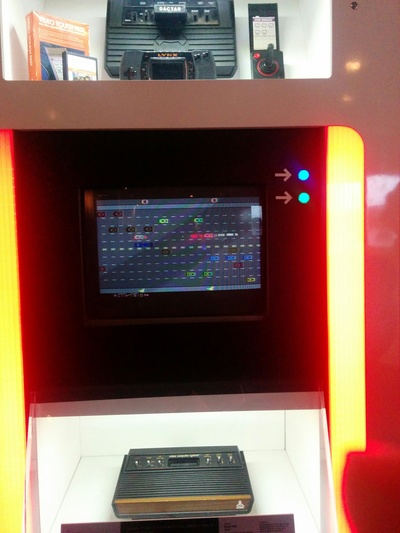
NOKUBI Takatsugu: GAME-ON the historical videogame exhibition

I attended GAME-ON last weedkend at Miraikan, The National Museum of Emerging Science and Innovation in Tokyo. There are many historical videogame hardware and software, and the bland-new PSVR exibition. DEC PDP-1 DisplayI can see the real DEC PDP-1 hardware. Unfortunately it is only haredware, not worked. And also PONG is exibited.
SPACEWAR description

SPACEWAR description

There are many old hardware Atari 2600, Commodore 64, Spectrum, and so on. Apple IIe Atari 2600/VCS Commodore 64 Spectrum Almost exhibition with English description, and officials can talk English, if you feel interested, go Miraikan until 30th May.

28 February 2016

Ian Campbell: Hotswapping a failed RAID device

Recently I started getting SMART warnings from on of the disks in my home NAS (a QNAP TS-419P II armel/kirkwood device running Debian Jessie):
Device: /dev/disk/by-id/ata-ST3000DM001-1CH166_W1F2QSV6 [SAT], Self-Test Log error count increased from 0 to 1
Meaning it was now time to switch out that disk from the RAID5 array. Since everytime this happens I have to go and lookup again what to do I've decided to write it down this time. I configure SMART to talk about devices by-id (giving me their name and model number) so first I needed to figure out what the kernel was calling this device (although mdadm is happy with the by-id path, various other bits are not):
# readlink /dev/disk/by-id/ata-ST3000DM001-1CH166_W1F2QSV6 
../../sdd
Next I needed to mark the device as failed in the array:
# mdadm --detail /dev/md0 
/dev/md0:
[...]
          State : clean 
 Active Devices : 4
Working Devices : 4
 Failed Devices : 0
  Spare Devices : 0
[...]
    Number   Major   Minor   RaidDevice State
       5       8       48        0      active sync   /dev/sdd
       1       8       32        1      active sync   /dev/sdc
       6       8       16        2      active sync   /dev/sdb
       4       8        0        3      active sync   /dev/sda
# mdadm --fail /dev/md0 /dev/disk/by-id/ata-ST3000DM001-1CH166_W1F2QSV6 
mdadm: set /dev/disk/by-id/ata-ST3000DM001-1CH166_W1F2QSV6 faulty in /dev/md0
# mdadm --detail /dev/md0 
/dev/md0:
[...]
 Active Devices : 3
Working Devices : 3
 Failed Devices : 1
  Spare Devices : 0
[...]
Number   Major   Minor   RaidDevice State
   0       0        0        0      removed
   1       8       32        1      active sync   /dev/sdc
   6       8       16        2      active sync   /dev/sdb
   4       8        0        3      active sync   /dev/sda
   5       8       48        -      faulty   /dev/sdd
If it had been the RAID subsystem rather than SMART monitoring which had first spotted the issue then this would have happened already (and I would had received a different mail from the RAID checks instead of SMART). Once the disk is marked as failed then actually remove it from the array:
# mdadm --remove /dev/md0 /dev/disk/by-id/ata-ST3000DM001-1CH166_W1F2QSV6 
mdadm: hot removed /dev/disk/by-id/ata-ST3000DM001-1CH166_W1F2QSV6 from /dev/md0
And finally tell the kernel to delete the device:
# echo 1 > /sys/block/sdd/device/delete 
At this point I can physically swap the disks. At this point I noticed there were some interesting messages in dmesg, either from the echo to the delete node in sysfs or from the physical switch of the disks:
[1779238.656459] md: unbind<sdd>
[1779238.659455] md: export_rdev(sdd)
[1779258.686720] sd 3:0:0:0: [sdd] Synchronizing SCSI cache
[1779258.700507] sd 3:0:0:0: [sdd] Stopping disk
[1779259.377589] ata4.00: disabled
[1779371.126202] ata4: exception Emask 0x10 SAct 0x0 SErr 0x180000 action 0x6 frozen
[1779371.133740] ata4: edma_err_cause=00000020 pp_flags=00000000, SError=00180000
[1779371.141003] ata4: SError:   10B8B Dispar  
[1779371.145309] ata4: hard resetting link
[1779371.468708] ata4: SATA link down (SStatus 0 SControl 300)
[1779371.474340] ata4: EH complete
[1779557.416735] ata4: exception Emask 0x10 SAct 0x0 SErr 0x4010000 action 0xe frozen
[1779557.424356] ata4: edma_err_cause=00000010 pp_flags=00000000, dev connect
[1779557.431264] ata4: SError:   PHYRdyChg DevExch  
[1779557.436008] ata4: hard resetting link
[1779563.357089] ata4: link is slow to respond, please be patient (ready=0)
[1779567.449096] ata4: SRST failed (errno=-16)
[1779567.453316] ata4: hard resetting link
I wonder if I should have used another method to detach the disk, perhaps poking the controller rather than the disk (which rang a vague bell in my memory from last time this happened) but in the end the disk is broken and the kernel seems to have coped so I'm not too worried about it. It looked like the new disk had already been recognised:
[1779572.593471] scsi 3:0:0:0: Direct-Access     ATA      HGST HDN724040AL A5E0 PQ: 0 ANSI: 5
[1779572.604187] sd 3:0:0:0: [sdd] 7814037168 512-byte logical blocks: (4.00 TB/3.63 TiB)
[1779572.612171] sd 3:0:0:0: [sdd] 4096-byte physical blocks
[1779572.618252] sd 3:0:0:0: Attached scsi generic sg3 type 0
[1779572.626754] sd 3:0:0:0: [sdd] Write Protect is off
[1779572.631771] sd 3:0:0:0: [sdd] Mode Sense: 00 3a 00 00
[1779572.632588] sd 3:0:0:0: [sdd] Write cache: enabled, read cache: enabled, doesn't support DPO or FUA
[1779572.665609]  sdd: unknown partition table
[1779572.671522] sd 3:0:0:0: [sdd] Attached SCSI disk
[1779855.362331]  sdd: unknown partition table
So I skipped trying to figure out how to perform a SCSI rescan and went straight to identifying that the new disk was called:
/dev/disk/by-id/ata-HGST_HDN724040ALE640_PK1338P4GY8ENB
and then tried to do a SMART conveyancing self-test with:
# smartctl -t conveyance /dev/disk/by-id/ata-HGST_HDN724040ALE640_PK1338P4GY8ENB
But this particular drive seems to not support that, so I went straight to editing /etc/smartd.conf to replace the old disk with the new one and:
# service smartmontools reload
With all that I was ready to add the new disk to the array:
# mdadm --add /dev/md0 /dev/disk/by-id/ata-HGST_HDN724040ALE640_PK1338P4GY8ENB
mdadm: added /dev/disk/by-id/ata-HGST_HDN724040ALE640_PK1338P4GY8ENB
# mdadm --detail /dev/md0 
/dev/md0:
[...] 
      State : clean, degraded, recovering 
 Active Devices : 3
Working Devices : 4
 Failed Devices : 0
  Spare Devices : 1
[...]
 Rebuild Status : 0% complete
[...]
Number   Major   Minor   RaidDevice State
   5       8       48        0      spare rebuilding   /dev/sdd
   1       8       32        1      active sync   /dev/sdc
   6       8       16        2      active sync   /dev/sdb
   4       8        0        3      active sync   /dev/sda
# cat /proc/mdstat 
Personalities : [raid6] [raid5] [raid4] 
md0 : active raid5 sdd[5] sda[4] sdb[6] sdc[1]
      5860538880 blocks super 1.2 level 5, 512k chunk, algorithm 2 [4/3] [_UUU]
      [>....................]  recovery =  0.0% (364032/1953512960) finish=1162.4min speed=28002K/sec
So now all that was left was to wait about 20 hours (with fingers crossed a second disk didn't die! spoiler: it didn't)

18 February 2016

Enrico Zini: gui-debugging-output

Debugging output of GUI apps I have been hit by #643726 again. I was happily working on a terminal while an apt upgrade was running on another, and suddenly kbuildsycoca4 started vomiting on my command line because I had run okular once on that terminal last tuesday. Among the possible workarounds, one can run kdebugdialog from package kde-runtime and check the "Disable all debug output" button. This is the output of kdebugdialog when run on a terminal after enabling "Disable all debug output":
$ kdebugdialog
QDBusConnection: session D-Bus connection created before QCoreApplication. Application may misbehave.
I see it as debugging output turned into an art performance, and I have an appreciation for this kind of things. kdebugdialog, my hat's off to you.

Next.

Previous.