Search Results: "gwolf"

28 September 2014

Clint Adams: Banana Pi is a real thing

Now that I've almost caught up with life after an extended stint on the West Coast, it's time to play. Like Gunnar, I acquired a Banana Pi courtesy of LeMaker. My GuruPlug (courtesy me) and my Excito B3 (courtesy the lovely people at Tor) are giving me a bit of trouble in different ways, so my intent is to decommission and give away the GuruPlug and Excito B3, leaving my DreamPlug and the Banana Pi to provide the services currently performed by the GuruPlug, Excito B3, and DreamPlug. The Banana Pi is presently running Bananian on a 32G SDHC (Class 10) card. This is close to wheezy, and appears to have a mostly-sane default configuration, but I am not going to trust some random software downloaded off the Internet on my home network, so I need to be able to run Debian on it instead. My preliminary belief is that the two main obstacles are Linux and U-Boot. Bananian 14.09 comes with Linux 3.4.90+ #1 SMP PREEMPT Fri Sep 12 18:13:45 CEST 2014 armv7l GNU/Linux, whatever that is, and U-Boot SPL 2014.04-10694-g2ae8b32 (Sep 03 2014 - 20:53:14). I don't yet know what the status of mainline/Debian support is. Someone gave me a wooden cigar box to use as a case, which is not working out quite as hoped. I also found that my hack to power a 3.5" SATA drive does not work, so I'll either need to hammer on that some more or resolve to use a 2.5" drive instead. memory:
Mem:        993700      36632     957068          0       2248      11136
-/+ buffers/cache:      23248     970452
Swap:       524284       1336     522948
cpu:
Processor       : ARMv7 Processor rev 4 (v7l)
processor       : 0
BogoMIPS        : 1192.96
processor       : 1
BogoMIPS        : 1197.05
Features        : swp half thumb fastmult vfp edsp neon vfpv3 tls vfpv4 idiva idivt 
CPU implementer : 0x41
CPU architecture: 7
CPU variant     : 0x0
CPU part        : 0xc07
CPU revision    : 4
Hardware        : sun7i
Revision        : 0000
Serial          : 03c32de75055484880485278165166c9

25 September 2014

Gunnar Wolf: #bananapi On how compressed files should be used

I am among the lucky people who got back home from DebConf with a brand new computer: a Banana Pi. Despite the name similarity, it is not affiliated with the very well known Raspberry Pi, although it is a very comparable (although much better) machine: A dual-core ARM A7 system with 1GB RAM, several more on-board connectors, and same form-factor. I have not yet been able to get it to boot, even from the images distributed on their site (although I cannot complain, I have not devoted more than a hour or so to the process!), but I do have a gripe on how the images are distributed. I downloaded some images to play with: Bananian, Raspbian, a Scratch distribution, and Lubuntu. I know I have a long way to learn in order to contribute to Debian's ARM port, but if I can learn by doing... So, what is my gripe? That the three images are downloaded as archive files:
  1. 0 gwolf@mosca 9 ~/Download/banana$ ls -hl bananian-latest.zip \
  2. > Lubuntu_For_BananaPi_v3.1.1.tgz Raspbian_For_BananaPi_v3.1.tgz \
  3. > Scratch_For_BananaPi_v1.0.tgz
  4. -rw-r--r-- 1 gwolf gwolf 222M Sep 25 09:52 bananian-latest.zip
  5. -rw-r--r-- 1 gwolf gwolf 823M Sep 25 10:02 Lubuntu_For_BananaPi_v3.1.1.tgz
  6. -rw-r--r-- 1 gwolf gwolf 1.3G Sep 25 10:01 Raspbian_For_BananaPi_v3.1.tgz
  7. -rw-r--r-- 1 gwolf gwolf 1.2G Sep 25 10:05 Scratch_For_BananaPi_v1.0.tgz
Now... that is quite an odd way to distribute image files! Specially when looking at their contents:
  1. 0 gwolf@mosca 14 ~/Download/banana$ unzip -l bananian-latest.zip
  2. Archive: bananian-latest.zip
  3. Length Date Time Name
  4. --------- ---------- ----- ----
  5. 2032664576 2014-09-17 15:29 bananian-1409.img
  6. --------- -------
  7. 2032664576 1 file
  8. 0 gwolf@mosca 15 ~/Download/banana$ for i in Lubuntu_For_BananaPi_v3.1.1.tgz \
  9. > Raspbian_For_BananaPi_v3.1.tgz Scratch_For_BananaPi_v1.0.tgz
  10. > do tar tzvf $i; done
  11. -rw-rw-r-- bananapi/bananapi 3670016000 2014-08-06 03:45 Lubuntu_1404_For_BananaPi_v3_1_1.img
  12. -rwxrwxr-x bananapi/bananapi 3670016000 2014-08-08 04:30 Raspbian_For_BananaPi_v3_1.img
  13. -rw------- bananapi/bananapi 3980394496 2014-05-27 01:54 Scratch_For_BananaPi_v1_0.img
And what is bad about them? That they force me to either have heaps of disk space available (2GB or 4GB for each image) or to spend valuable time extracting before recording the image each time. Why not just compressing the image file without archiving it? That is,
  1. 0 gwolf@mosca 7 ~/Download/banana$ tar xzf Lubuntu_For_BananaPi_v3.1.1.tgz
  2. 0 gwolf@mosca 8 ~/Download/banana$ xz Lubuntu_1404_For_BananaPi_v3_1_1.img
  3. 0 gwolf@mosca 9 ~/Download/banana$ ls -hl Lubun*
  4. -rw-r--r-- 1 gwolf gwolf 606M Aug 6 03:45 Lubuntu_1404_For_BananaPi_v3_1_1.img.xz
  5. -rw-r--r-- 1 gwolf gwolf 823M Sep 25 10:02 Lubuntu_For_BananaPi_v3.1.1.tgz
Now, wouldn't we need to decompress said files as well? Yes, but thanks to the magic of shell redirections, we can just do it on the fly. That is, instead of having 3 4GB+1 2GB files sitting on my hard drive, I just need to have several files ranging between 145M and I guess ~1GB. Then, it's as easy as doing:
  1. 0 gwolf@mosca 8 ~/Download/banana$ dd if=<(xzcat bananian-1409.img.xz) of=/dev/sdd
And the result should be the same: A fresh new card with Bananian ready to fly. Right, right, people using these files need to have xz installed on their systems, but... As it stands now, I can suppose current prospective users of a Banana Pi won't fret about facing a standard Unix tool! (Yes, I'll forward this rant to the Banana people, it's not just bashing on my blog :-P ) [update] Several people (thanks!) have contacted me stating that I use a bashism: The <( ) construct is specific to Bash. If you want to do this with any other shell, it can be done with a simple pipe:
  1. $ xzcat bananian-1409.img.xz dd of=/dev/sdd
That allows for less piping to be done on the kernel, and is portable between different shells. Also, a possibility would be:
  1. $ xzcat bananian-1409.img.xz > /dev/sdd
Although that might not be desirable, as it avoids the block-by-block nature of dd. I'm not sure if it makes a realdifference, but it's worth saying :) And yes, some alternatives for not unarchiving the file Here in the blog, an anon commenter suggests (respectively, for zip and .tar.gz files):
  1. $ dd if=<(unzip -p bananian-latest.zip) of=/dev/sdd
  2. $ dd if=<(tar -xOf Lubuntu_For_BananaPi_v3.1.1.tgz) of=/dev/sdd
And a commenter by IRC suggests:
  1. $ paxtar -xOaf Raspbian_For_BananaPi_v3.1.tgz Raspbian_For_BananaPi_v3_1.img sudo dd bs=262144 of=/dev/
Thanks!

23 September 2014

Gunnar Wolf: Can printing be so hard

Dear lazyweb, I am tired of finding how to get my users to happily print again. Please help. Details follow. Several years ago, I configured our Institute's server to provide easy, nifty printing support for all of our users. Using Samba+CUPS, I automatically provided drivers to Windows client machines, integration with our network user scheme (allowing for groups authorization That means, you can only print in your designated printer), flexible printer management (i.e. I can change printers on the server side without the users even noticing Great when we get new hardware or printers get sent to repairs!)... Then, this year the people in charge of client machines in the institute decided to finally ditch WinXP licenses and migrate to Windows 7. Sweet! How can it hurt? Oh, it can hurt. Terribly. Windows 7 uses a different driver model, and after quite a bit of hair loss, I was not able to convince Samba to deliver drivers to Win7 (FWIW, I think we are mostly using 64 bit versions). Not only that, it also barfs when we try to install drivers manually and print to a share. And of course, it barfs in the least useful way, so it took me quite a bit of debugging and Web reading to find out it was not only my fault. So, many people have told me that Samba (or rather, Windows-type networking) is no longer regarded as a good idea for printing. The future is here, and it's called IPP. And it is simpler, because Windows can talk directly with CUPS! Not only that, CUPS allows me to set valid users+groups to each printer. So, what's there to lose? Besides time, that is. It took me some more hair pulling to find out that Windows 7 is shipped by default (at least in the version I'm using) with the Internet Printing Server feature disabled. Duh. OK, enable it, and... Ta-da! It works with CUPS! Joy, happiness! Only that... It works only when I use it with no authentication. Windows has an open issue, with its corresponding hotfix even, because Win7 and 2008 fail to provide user credentials to print servers... So, yes, I can provide site-wide printing capabilities, but I still cannot provide per-user or per-group authorization and accounting, which are needed here. I cannot believe this issue cannot be solved under Windows 7, several years after it hit the market. Or am I just too blunt and cannot find an obvious solution? Dear lazyweb, I did my homework. Please help me!

22 September 2014

Gunnar Wolf: One month later: How is the set of Debian keyrings faring?

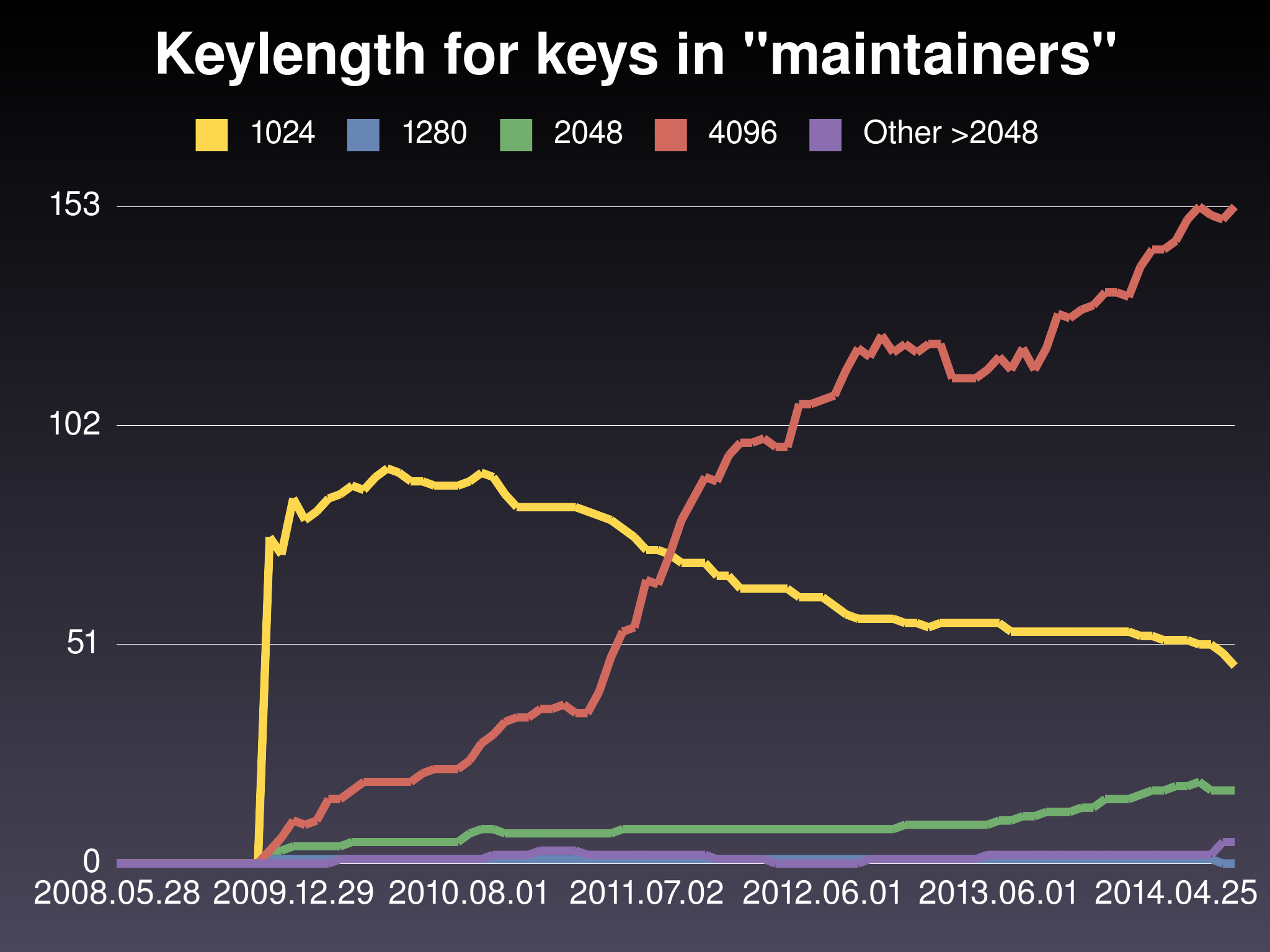
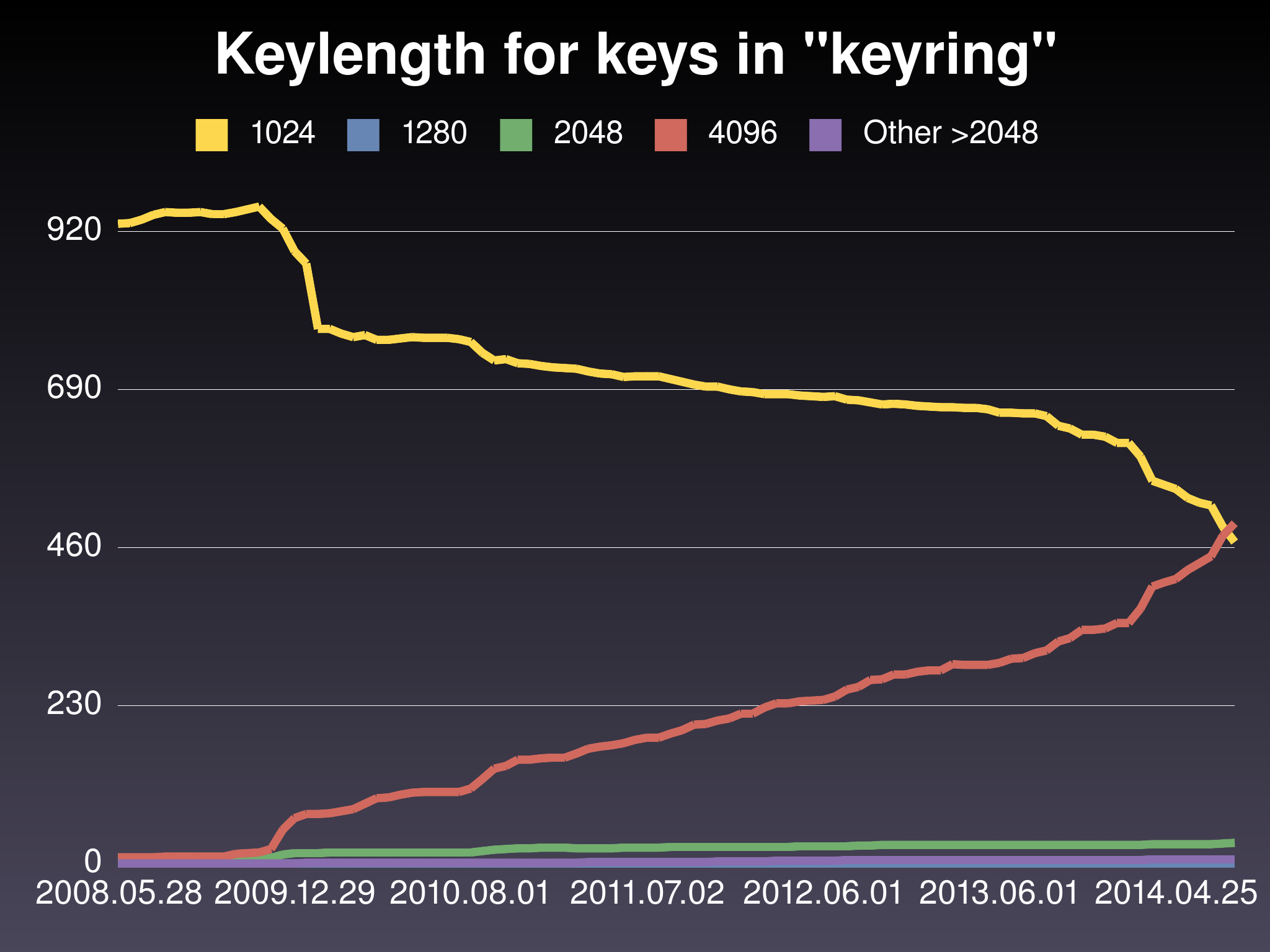
OK, it's almost one month since we (the keyring-maintainers) gave our talk at DebConf14; how are we faring regarding key transitions since then? You can compare the numbers (the graphs, really) to those in our DC14 presentation. Since the presentation, we have had two keyring pushes: First of all, the Non-uploading keyring is all fine: As it was quite recently created, and as it is much smaller than our other keyrings, it has no weak (1024 bit) keys. It briefly had one in 2010-2011, but it's long been replaced. Second, the Maintainers keyring: In late July we had 222 maintainers (170 with >=2048 bit keys, 52 with weak keys). By the end of August we had 221: 172 and 49 respectively, and by September 18 we had 221: 175 and 46. As for the Uploading developers, in late July we had 1002 uploading developers (481 with >=2048 bit keys, 521 with weak keys). By the end of August we had 1002: 512 and 490 respectively, and by September 18 we had 999: 531 and 468. Please note that these numbers do not say directly that six DMs or that 50 uploading DDs moved to stronger keys, as you'd have to factor in new people being added, keys migrating between different keyrings (mostly DM DD), and people retiring from the project; you can get the detailed information looking at the public copy of our Git repository, particularly of its changelog. And where does that put us? Of course, I'm very happy to see that the lines in our largest keyring have already crossed. We now have more people with >=2048 bit keys. And there was a lot of work to do this processing done! But that still means... That in order not to lock a large proportion of Debian Developers and Maintainers out of the project, we have a real lot of work to do. We would like to keep the replacement slope high (because, remember, in January 1st we will remove all small keys from the keyring). And yes, we are willing to do the work. But we need you to push us for it: We need you to get a new key created, to gather enough (two!) DD signatures in it, and to request a key replacement via RT. So, by all means: Do keep us busy!
AttachmentSize
Debian Developers (uploading)266.66 KB
Debian Developers (non-uploading)204.17 KB
Debian Maintainers296.73 KB

28 August 2014

Bernhard R. Link: Where key expiry dates are useful and where they are not.

Some recent blog (here and here) suggest short key expiry times. Then also highlight some thing many people forget: The expiry time of a key can be changed every time with just a new self-signature. Especially that can be made retroactively (you cannot avoid that, if you allow changing it: Nothing would stop an attacker from just changing the clock of one of his computers). (By the way: did you know you can also reduce the validity time of a key? If you look at the resulting packets in your key, this is simply a revocation packet of the previous self-signature followed by a new self-signature with a shorter expiration date.) In my eyes that fact has a very simple consequence: An expiry date on your gpg main key is almost totally worthless. If you for example lose your private key and have no revocation certificate for it, then a expiry time will not help at all: Once someone else got the private key (for example by brute forcing it, as computers got faster over the years or because they could brute-force the pass-phrase for your backup they got somehow), they can just extend the expiry date and make it look like it is still valid. (And if they do not have the private key, there is nothing they can do anyway). There is one place where expiration dates make much more sense, though: subkeys. As the expiration date of a subkey is part of the signature of that subkey with the main key, someone having access to only the subkey cannot change the date. This also makes it feasible to use new subkeys over the time, as you can let the previous subkey expire and use a new one. And only someone having the private main key (hopefully you), can extend its validity (or sign a new one). (I generally suggest to always have a signing subkey and never ever use the main key except off-line to sign subkeys or other keys. The fact that it can sign other keys just makes the main key just too precious to operate it on-line (even if it is on some smartcard the reader cannot show you what you just sign)).

Gunnar Wolf: Ongoing crypto handling discussions

I love to see there is a lot of crypto discussions going on at DebConf. Maybe I'm skewed by my role as keyring-maint, but I have been involved in more than one discussion every day on what do/should signatures mean, on best key handling practices, on some ideas to make key maintenance better, on how the OpenPGPv4 format lays out a key and its components on disk, all that. I enjoy some of those discussions pose questions that leave me thinking, as I am quite far from having all answers. Discussions should be had face to face, but some start online and deserve to be answered online (and also pose opportunity to become documentation). Simon Josefsson blogs about The case for short OpenPGP key validity periods. This will be an important issue to tackle, as we will soon require keys in the Debian keyring to have a set expiration date (surprise surprise!) and I agree with Simon, setting an expiration date far in the future means very little. There is a caveat with using, as he suggests, very short expiry periods: We have a human factor sitting in the middle. Keyring updates in Debian are done approximately once a month, and I do not see the period shortening. That means, only once a month we (currently Jonathan McDowell and myself, and we expect to add Daniel Kahn Gillmor soon) take the full changeset and compile a new keyring that replaces the active one in Debian. This means that if you have, as Simon suggests, a 100-day validity key, you have to remember to update it at least every 70 days, or you might be locked out during the days it takes us to process it. I set my expiration period to two years, although I might shorten it to only one. I expect to add checks+notifications before we enable this requirement project-wide (so that Debian servers will mail you when your key is close to expiry); I think that mail can be sent at approximately [expiry date - 90 days] to give you time both to you and to us to act. Probably the optimal expiration periods under such conditions would be between 180 and 365 days. But, yes, this is by far not yet a ruling, but a point in the discussion. We still have some days of DebConf, and I'll enjoy revising this point. And Simon, even if we correct some bits for these details, I'd like to have your permission to use this fine blog post as part of our documentation! (And on completely unrelated news: Congratulations to our dear and very much missed friend Bubulle for completely losing his sanity and running for 28 hours and a half straight! He briefly describes this adventure when it was about to start, and we all want him to tell us how it was. Mr. Running French Guy, you are amazing!)

21 August 2014

Gunnar Wolf: Walking without crutches

Walking without crutches
I still consider myself a newbie teacher. I'm just starting my fourth semester. And yes, I really enjoy it. Now, how did I come to teaching? Well, my training has been mostly on stages for different conferences. More technical, more social, whatever I have been giving ~10 talks a year for ~15 years, and I must have learnt something from that. Some good things, some bad habits. When giving presentations, a most usual technique is to prepare a set of slides to follow/support the ideas. And yes, that's what I did for my classes: Since my first semester, I prepared a nice set of slides, thematically split in 17 files, with ~30 to ~110 pages each (yes, huge variation). Given the course spans 32 classes (72 hours, 2 hours per class), each slide lasts for about two classes. But, yes, this tends to make the class much less dynamic, much more scripted, rigid, and... Boring. From my feedback, I understand the students don't think I am a bad teacher, but still, I want to improve! So, today I was to give the introduction to memory management. Easy topic, with few diagrams and numbers, mostly talking about the intuitive parts of a set of functions. I started scribbling and shortening the main points on a piece of paper (yes, the one on the picture). I am sure I can get down to more reduction But this does feel like an improvement! The class was quite successful. I didn't present the 100% of the material (which is one of the reasons I cling to my presentations I don't want to skip important material), and at some point I do feel I was a bit going in circles. However, Operating Systems is a very intuitive subject, and getting the students to sketch by themselves the answers that describe the working of real operating systems was a very pleasant experience! Of course, when I use my slides I do try to make it as interactive and collaborative as possible. But it is often unfeasible when I'm following a script. Today I was able to go around with the group's questions, find my way back to the outline I prepared. I don't think I'll completely abandon my slides, specially for some subjects which include many diagrams or pictures. But I'll try to have this alternative closer to my mind.

20 August 2014

Gunnar Wolf: Bigger than the cloud

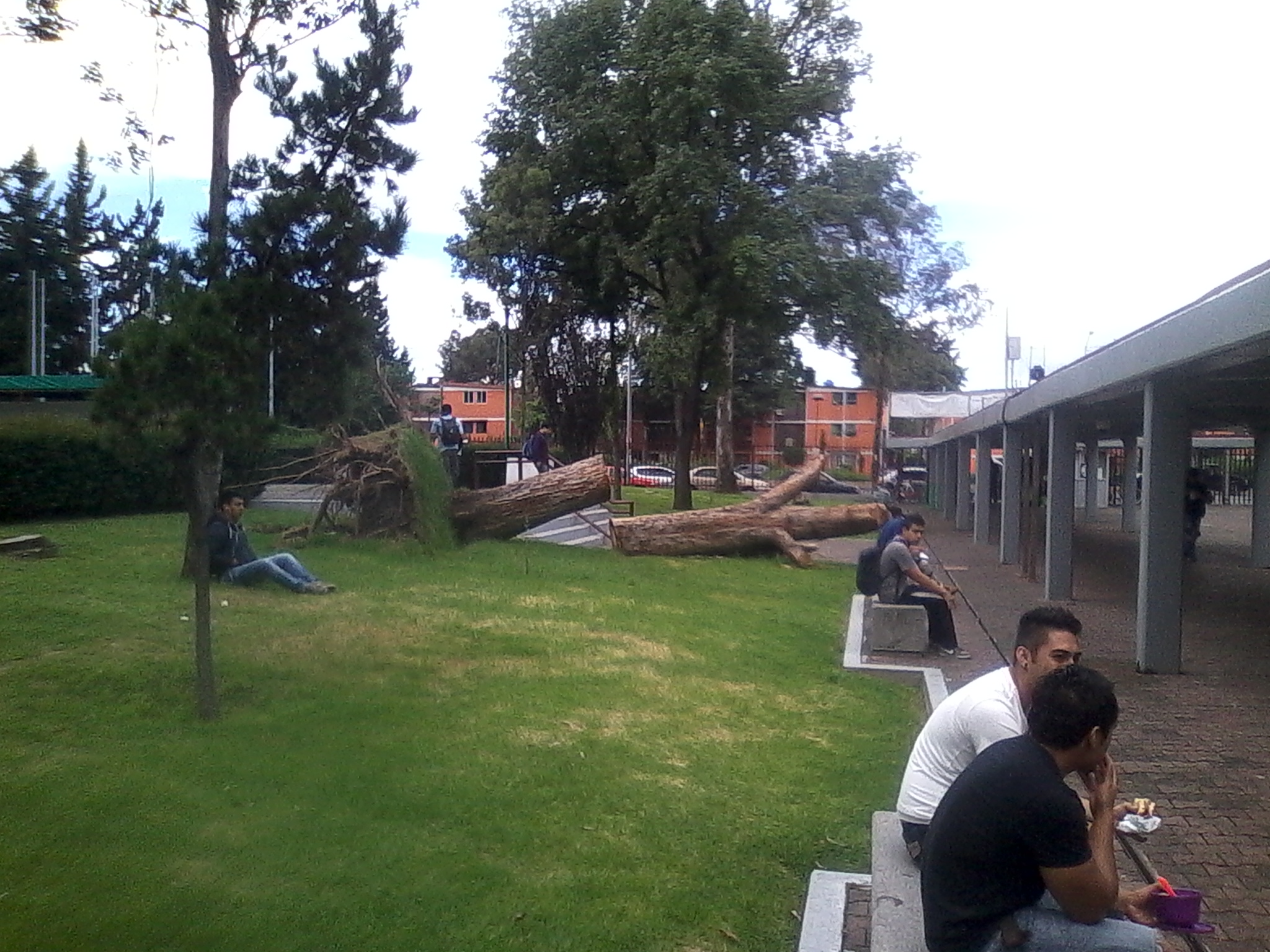
Summer is cool in Mexico City. It is cool because, unlike Spring, this is our rainy season And rains are very predictable. Almost every day we wake up with a gorgeous, clean, blue sky. Cool, nice temperature, around 15 C. The sun slowly evaporates the rain throughout the morning; when I go out for lunch, the sky is no longer so blue, giving way to a seemingly dirty white/grayish tint. No, it's not our world-famous pollution: It's just yesterday's rain. Rain starts falling usually between 4 and 7 PM. Sometimes it starts as a light rain, sometimes it starts with all of its thunder, all of its might. But anyway, almost every night, there is a moment of awe, of not believing how much rain we are getting today. It slowly fades away during the late night. And when I wake up, early next morning, everything is wet and still smells fresh. Yes, I love our summer, even though it makes shy away from my much enjoyed cycling to work and school. And I love taking some minutes off work, look through the window of my office (located ~70m over the level of our mostly flat city) and watching how different parts of the city have sun or rain; learning to estimate the distance to the clouds, adding it to the direction and guessing which of my friends have which weather. But I didn't realize our city had so clearly defined micro-climates... (would they really be *micro*-climates?) In fact, it even goes against my knowledge of Mexico City's logic I always thought Coyoac n, towards the South of the city, got more rain than the Center and North because we are near the mountains, and the dominant air currents go Southwards, "clumping" the clouds by us. But no, or at least, not this year. Regina (still in the far South Far because she's too far away from me and I'm too egocentric; she returns home after DebConf) often asks me about the weather, as our friends working nearer the center of the city. According to the photos they post on their $social_media_of_the_day accounts, rains are really heavier there. Today I heard on the radio accounts of yesterday's chaos after the rain. This evening, at ESIME-Culhuac n, I saw one of the reported fallen trees (of course, I am not sure if it's from yesterday's rain). And the media pushes galleries of images of a city covered in hail... While in Copilco we only had a regular rain, I'd even say a mild one. This city is bigger than any cloud you can throw at it.
AttachmentSize
IMG_20140819_155052.jpg929.69 KB

1 August 2014

Gunnar Wolf: Wow. Just rejected an editorial offer...

Yes, I've been bragging about the Operating Systems book all over... Today, a colleague handed me a phone call from somebody at Editorial Patria, a well known educational editorial in Mexico. They are looking for material similar to what I wrote, but need the material to be enfocado a competencias Focused on skills, a pedagogic fashion. I was more than interested, of course. As it currently stands, I am very happy that our book is being used already at three universities in three countries (by the different authors) and have heard other people saying they would recommend it, and of course I'm interested in making our work have as big an impact as possible. Of course, we'd have to modify several aspects of the book to cater to the skills focus... But it would be great to have the book available at commercial bookstores. After all, university editions are never as widely circulated as commercial ones. I had just one hard request to accept this: Our work must be distributed under a free licensing. Explicitly allow book photocopies and electronic distribution (didn't get into the "and modification" part, but I would eventually get there ;-) ) And... Of course, the negotiation immediately fell down. Editorials, this person says, live from selling individual books. She says she was turned down by another university professor and for another subject this same week. So, yes, I took the opportunity to explain things as I (and the people that think as I do Fortunately, not so few) see them. Yes, of course, editorials have to make a living. But text books are often photocopied as it is. Who buys a book? Whoever needs it. On one hand, if somebody will be using a book throughout a semester and it's reasonably priced (say, up to 3 cost of photocopies), they will probably buy it because it just works better (it is more comfortable to use and nicer to read). If a teacher likes the explanation for a particular topic, it should be completely legal for him to distribute photocopies (or digital copies) of the specific material And quite probably, among the students, more than one will end up appreciating the material enough to go look for the book in the library. And, as I have done throughout my life, if I read (in copies, electronically or in a library) a book I like... Quite probably I will go buy it. So... Of course, she insisted it was against their corporate policy. I insisted on my explanation. I hope they meet many stubborn teachers refusing to distribute books under a non-free licensing. I hope I contributed to making a dent in an industry that must change. Yes, a very very small dent, but one that helps them break free from their obsolete mindset ;-) (But yes, I don't know how long I will regret not being part of their very nice catalog of science and engineering books) ;-) )

29 July 2014

Gunnar Wolf: Editorial process starting in 3... 2... 1...

Yay! Today I finally submitted our book, Fundamentos de Sistemas Operativos, for the Editorial Department of our institute. Of course, I'm not na ve enough to assume there won't be a heavy editorial phase, but I'm more than eager to dive into it... And have the book printed in maybe two months time! Of course, this book is to be published under a free license (CC-BY-SA). And I'm talking with the coauthors, we are about to push the Git repository to a public location, as we believe the source for the text and figures can also be of interest to others. The book itself (as I've already boasted about here :- ) is available (somewhat as a preprint) for download. [update] Talked it over with the coauthors, and we finally have a public repository! Clone it from: https://github.com/gwolf/sistop.git Or just browse it from Github's web interface.

25 July 2014

Gunnar Wolf: Nice read: The Fasinatng Frustrating Fascinating History of Autocorrect

A long time ago, I did some (quite minor!) work on natural language parsing. Most of what I got was the very basic rudiments on what needs to be done to begin with. But I like reading some texts on the subject every now and then. I am also a member of the ACM Association for Computing Machinery. Most of you will be familiar with it, it's one of the main scholarly associations for the field of computing. One of the basic perks of being an ACM member is the subscription to a very nice magazine, Communications of the ACM. And, of course, although I enjoy the physical magazine, I like reading some columns and articles as they appear along the month using the RSS feeds. They also often contain pointers to interesting reads on other media As happened today. I found quite a nice article, I think, worth sharing with whoever thinks I have interesting things to say. They published a very short blurb titled The Fasinatng Frustrating Fascinating History of Autocorrect. I was somewhat skeptical reading it links to an identically named article, published in Wired. But gave it a shot, anyway... The article follows a style that's often abused and not very amusing, but I think was quite well done: The commented interview. Rather than just drily following through an interview, the writer tells us a story about that interview. And this is the story of Gideon Lewis-Kraus interviewing Dean Hachamovitch, the creator of the much hated (but very much needed) autocorrect feature that appeared originally in Microsoft Word. The story of Hachamovitch's work (and its derivations, to the much maligned phone input predictors) over the last twenty-something years is very light to read, very easy to enjoy. I hope you find it as interesting as I did.

17 July 2014

Jonathan McDowell: On the state of Free VoIP

Every now and then I decide I'll try and sort out my VoIP setup. And then I give up. Today I tried again. I really didn't think I was aiming that high. I thought I'd start by making my email address work as a SIP address. Seems reasonable, right? I threw in the extra constraints of wanting some security (so TLS, not UDP) and a soft client that would work on my laptop (I have a Grandstream hardphone and would like an Android client as well, but I figure those are the easy cases while the "I have my laptop and I want to remain connected" case is a bit trickier). I had a suitable Internet connected VM, access to control my DNS fully (so I can do SRV records) and time to read whatever HOWTOs required. And oh my ghod the state of the art is appalling. Let's start with getting a SIP server up and running. I went with repro which seemed to be a reasonably well recommended SIP server to register against. And mostly getting it up and running and registering against it is fine. Until you try and make a TLS SIP call through it (to a sip5060.net test address). Problem the first; the StartCom free SSL certs are not suitable because they don't advertise TLS Client. So I switch to CACert. And then I get bitten by the whole question about whether the common name on the cert should be the server name, or the domain name on the SIP address (it's the domain name on the SIP address apparently, though that might make your SIP client complain). That gets the SIP side working. Of course RTP is harder. repro looks like it's doing the right thing. The audio never happens. I capitulate at this point, and install Lumicall on my phone. That registers correctly and I can call the sip:test.time@sip5060.net test number and hear the time. So the server is functioning, it's the client that's a problem. I try the following (Debian/testing): I'm bored at this point. Can I "dial" my debian.org SIP address from Lumicall? Of course not; I get a "Codecs incompatible" (SIP 488 Not Acceptable Here) response. I have no idea what that means. I seem to have all of the options on Lumicall enabled. Is it a NAT thing? A codec thing? Did I sacrifice the wrong colour of goat? At some point during this process I get a Skype call from some friends, which I answer. Up comes a video call with them, their newborn, perfect audio, and no hassle. I have a conversation with them that doesn't involve me cursing technology at all. And then I go back to fighting with SIP. Gunnar makes the comment about Skype creating a VoIP solution 10 years ago when none was to be found. I believe they're still the market leader. It just works. I'm running the Linux client, and they're maintaining it (a little behind the curve, but close enough), and it works for text chat, voice chat and video calls. I've spent half a day trying to get a Free equivalent working and failing. I need something that works behind NAT, because it's highly likely when I'm on the move that's going to be the case. I want something that lets my laptop be the client, because I don't want to rely on my mobile phone. I want my email address to also be my VoIP address. I want some security (hell, I'm not even insisting on SRTP, though I'd like to). And the state of the Open VoIP stack just continues to make me embarrassed. I haven't given up yet, but I'd appreciate some pointers. And Skype, if you're hiring, drop me a line. ;)

28 June 2014

Gunnar Wolf: Forms of communication

I stared at Noodles' Emptiness, where I found a short rant on the currently most used forms of communication. No, into the most socially-useful forms of communication. No, into what works best for him. And, as each person's experience is unique, I won't try to correct him Noodles knows himself much, much, much, much better than I do. But some people have wondered recently (i.e. at conferences I have been at) why I give such an atypical use to social networks (...a term which I still hold to be grossly misused, but that's a topic for a different rant...One that's been had too many times). So, although my blog is syndicated at Planet Debian, and I know a good deal of readers come from there, this post is targetted at the rest of the world population: Those that don't understand why many among us prefer other ways of communication. Noodles mentions seven forms of communication he uses, arguably sorted by their nowadayness, low to high: Phone call, text (SMS) message, email, IRC, Skype, Google Hangouts and Facebook messenger. Among those, I strongly dislike two: Phone call and Skype (or any voice-based service, FWIW). I do most of my communication while multitasking, usually at work. I enjoy the quasi-real-timeliness of IRC and the instant messengers, but much more, I like the ability to delay an answer for seconds or minutes without it breaking the rules of engagement. Second, if the ordering is based on what I found, the reason for my little rant should become obvious: We had kept a great job so far building interoperable technology.1 Up until now, you could say drop me a mail , and no matter if you had your mail with GMail and I insisted on self-hosting my gwolf.org, as long as our communications adhered to simple and basic standards, we would be perfectly able to communicate. Skype is a bit of a special case here: They did build a great solution, ~ten years ago, when decent-quality VoIP was nowhere to be found. They have kept their algorithm and mechanisms propietary, and deliberately don't operate with others. And, all in all, there is a case for them remaining closed. But Google Hangouts and Facebook Messenger do piss me off. More the first than the second. Both arrived to the instant messenger scene long after the experimentation and early stages, so they both took Jabber / XMPP, a well tried and tested protocol made with interoperability and federability in mind. And... They closed it, so they can control their whole walled garden. So, yes, I do use them both Because in both there are many people which I value, and which I want to be in touch with. And no, I won't try to change the ways of everybody so they can talk with me on IRC. I'm an asshole, but everything has its limits! :) Of course, I can (still?) use them from my trusty old multiprotocol chat manager, Pidgin. And it's so much better to have one small program gobbling up moderate heaps of memory than to be connected to the Facebook site, spending much more memory and CPU cycles via Javascript in a Web browser. Bah. PS- Interestingly, he left out the face-to-face communication.I am quite an anchorite in my daily life, but I still think it's worth at least a mention ;-) So, Noodles: Thanks for the excuse to let me vent a rant ;-)

22 June 2014

Gunnar Wolf: Yo tampoco / #yotampoco / neither do I A bit of local action

Only a very short summary in English: I am Mexican. I am Jewish. I am almost completely disconnected from the local Jewish communities. And understanding the local Jewish communities is hard. There is a very interesting and brave campaign, recently started, called Neither do I The Mexican Jewish gay activist group Guimel, started off with this video (with English subtitles, if you are interested in following along). But how did I learn about this very bold initiative? By getting a hateful spam, inviting people to join a hate campaign. Right, the hate mail is not calling to violence, but it is based on premises as stupid as everybody's right not to include (to begin with). So, the least I can do about this is to share both said hate mail and publicly denounce my shock on reading this nonsense nowadays. And, also in Spanish (I know many people following me don't understand it Sorry, it would just take too long, and after all, it's mainly for local "consumption"), this is the reply I sent to them (and to the other recipients). Sorry in advance to the Spanish speakers for my exabrupts :) This was written "as is", without much prior thought, and quite angry about what I had just read.
Buf... Expresiones como esta, que hacen evidente la cerraz n de tanta gente en las comunidades jud as, justifican claramente por qu tantos nos hemos ido abriendo, integr ndonos a la sociedad circundante. Me da verg enza ser asociado como jud o a comunidades donde se defienden estos puntos de vista; si bien yo no soy de la comunidad Monte Sinai (como resultar obvio por mi nombre), para la sociedad en su conjunto s soy un jud o (as , a secas: Jud o). Mucho nos hemos quejado colectivamente a lo largo de los siglos acerca de la discriminaci n, de que seamos considerado la "basura" del mundo, los "apestados". Y es precisamente esa actitud, ante todo y en todo momento, lo que me ha llevado a alejarme del juda smo. Soy un ser humano m s, con una historia personal nica, con una historia cultural compartida pero tambi n nica, con algunas elecciones y algunas caracter sticas que me son inherentes nicas. Algo de eso no le gusta a alguien? Por motivos racionales o irracionales? No lo puedo ni pienso evitar. Pero el que una comunidad completa sea llamada a ignorar, humillar, alienar a sus hijos, por una estupidez as de anacr nica (en el caso que lo presenta el video al que hacen referencia, y a la gente que valientemente ha conformado Guimel) me parece que simplemente va m s all de toda estupidez. Piensen bien antes de adherirse a esta campa a de odio. Substituyan la sexualidad por cualquier otra raz n en la que somos minor a. No les da asco vivir con un vendedor de telas? Con un jud o apestoso? Y s , aqu ya estoy yo tambi n dejando ir a esos demonios... que hay que mantener bajo control. Porque somos hombres y mujeres de nuestro siglo, y porque el mundo y las nuevas generaciones merecen nuestro mejor esfuerzo para ir colectivamente destruyendo la estupidez de nuestros ancestros. Seamos m s racionales. Dejemos el odio, dejemos los prejuicios. Aceptemos a los diferentes, porque todos queremos que nos acepten. Porque todos somos diferentes.
AttachmentSize
tambien.txt8.55 KB

17 June 2014

Gunnar Wolf: My little Tor node: Alive again!

So, after writing my last blog post in frustration, several people knowing their way around Tor better than me wrote that I should just configure my machine not to be an exit relay, but a middle relay or a bridge. So, I set it up to be a bridge about five days ago. And, as they pointed out, I have not experienced any problems. Interesting: The traffic pattern is very different. Compare: Traffic pattern as an exit relay:
Traffic pattern as a bridge:
Anyway I'm happy to have Lobazal back online!

10 June 2014

Gunnar Wolf: Tor: I'm shutting down my relay only after four days

Some days ago, I bit the bullet and accepted the Tor Challenge. Sadly, after only four days of having a Tor relay node happily sitting at home (and, of course, giving a nice function to this little friend). The inconveniences were too many. I understand anonimity can be used for many nefarious things, but I was surprised and saddened to see the amount of blocking services. Most notorious to me were the Freenode IRC network, friendly home to many free software projects, and the different Wikimedia projects, which ban editting from IP addresses idenitfied as Tor relays. I'm saddened to say that, while I could perfectly survive (and even be a bit proud about supporting a project I believe in) by jumping through some hoops (i.e. by setting up a SOCKS over ssh tunnel to my office to do my Wikipedia edits while at home), after only four days, I decided to shut down my relay. And the main reason... Was something I'm not going to fight against. And it's not even from a nice, friendly free software project. One thing I am not willing to part with is the one tool that keeps my wife well in contact with her friends and family back in Argentina. Yes, I know I could set up one or many different flavors of SIP or Jabber-based VoIP for her But it's also her parents, brother, sisters, and friends who use Skype. So, Skype's banning of Tor relay nodes made me decide to shut down my relay. Sigh... And for somebody obsessed with graphing stuff, this is the graph of the short lifespan of the "Lobazal" Tor node: [update] I will do another blog post. Good news: My Tor node is alive again! Just no longer as an exit relay, as properly pointed out by many, but as a Tor bridge.
AttachmentSize
tor-challenge-1.png23.97 KB
tor1.png27.84 KB
tor2.png18.3 KB

6 June 2014

Gunnar Wolf: What defines an identity?

I must echo John Sullivan's post: GPG keysigning and government identification. John states some very important reasons for people everywhere to verify the identities of those parties they sign GPG keys with in a meaningful way, and that means, not just trusting government-issued IDs. As he says, It's not the Web of Amateur ID Checking. And I'll take the opportunity to expand, based on what some of us saw in Debian, on what this means. I know most people (even most people involved in Free Software development not everybody needs to join a globally-distributed, thousand-people-strong project such as Debian) are not that much into GPG, trust keyrings, or understand the value of a strong set of cross-signatures. I know many people have never been part of a key-signing party. I have been to several. And it was a very interesting experience. Fun, at the beginning at least, but quite tiring at the end. I was part of what could very well constitute the largest KSP ever in DebConf5 (Finland, 2005). Quite awe-inspiring We were over 200 people, all lined up with a printed list on one hand, our passport (or ID card for EU citizens) in the other. Actwally, we stood face to face, in a ribbon-like ring. And, after the basic explanation was given, it was time to check ID documents. And so it began. The rationale of this ring is that every person who signed up for the KSP would verify each of the others' identities. Were anything fishy to happen, somebody would surely raise a voice of alert. Of course, the interaction between every two people had to be quick More like a game than like a real check. "Hi, I'm #142 on the list. I checked, my ID is OK and my fingerprint is OK." "OK, I'm #35, I also printed the document and checked both my ID and my fingerprint are OK." The passport changes hands, the person in front of me takes the unique opportunity to look at a Mexican passport while I look at a Somewhere-y one. And all is fine and dandy. The first interactions do include some chatter while we grab up speed, so maybe a minute is spent Later on, we all get a bit tired, and things speed up a bit. But anyway, we were close to 200 people That means we surely spent over 120 minutes (2 full hours) checking ID documents. Of course, not all of the time under ideal lighting conditions. After two hours, nobody was checking anything anymore. But yes, as a group where we trust each other more than most social groups I have ever met, we did trust on others raising the alarm were anything fishy to happen. And we all finished happy and got home with a bucketload of signatures on. Yay! One year later, DebConf happened in Mexico. My friend Martin Krafft tested the system, perhaps cheerful and playful in his intent but the flaw in key signing parties such as the one I described he unveiled was huge: People join the KSP just because it's a social ritual, without putting any thought or judgement in it. And, by doing so, we ended up dilluting instead of strengthening our web of trust. Martin identified himself using an official-looking ID. According to his recount of the facts, he did start presenting a German ID and later switched to this other document. We could say it was a real ID from a fake country, or that it was a fake ID. It is up to each person to judge. But anyway, Martin brought his Transnational Republic ID document, and many tens of people agreed to sign his key based on it Or rather, based on it plus his outgoing, friendly personality. I did, at least, know perfectly well who he was, after knowing him for three years already. Many among us also did. Until he reached a very dilligent person, Manoj, that got disgusted by this experiment and loudly denounced it. Right, Manoj is known to have strong views, and using fake IDs is (or, at least, was) outside his definition of fair play. Some time after DebConf, a huge thread erupted questioning Martin's actions, as well as questioning what do we trust when we sign an identity document (a GPG key). So... We continued having traditional key signing parties for a couple of years, although more carefully and with more buzz regarding these issues. Until we finally decided to switch the protocol to a better one: One that ensures we do get some more talk and inter-personal recognition. We don't need everybody to cross-sign with everyone else A better trust comes from people chatting with each other and being able to actually pin-point who a person is, what do they do. And yes, at KSPs most people still require ID documents in order to cross-sign. Now... What do I think about this? First of all, if we have not ever talked for at least enough time for me to recognize you, don't be surprised: I won't sign your key or request you to sign mine (and note, I have quite a bad memory when it comes to faces and names). If it's the first conference (or social ocassion) we come together, I will most likely not look for key exchanges either. My personal way of verifying identities is by knowing the other person. So, no, I won't trust a government-issued ID. I know I will be signing some people based on something other than their name, but hey I know many people already who live pseudonymously, and if they choose for whatever reason to forgo their original name, their original name should not mean anything to me either. I know them by their pseudonym, and based on that pseudonym I will sign their identities. But... *sigh*, this post turned out quite long, and I'm not yet getting anywhere ;-) But what this means in the end is: We must stop and think what do we mean when we exchange signatures. We are not validating a person's worth. We are not validating that a government believes who they claim to be. We are validating we trust them to be identified with the (name,mail,affiliation) they are presenting us. And yes, our signature is much more than just a social rite It is a binding document. I don't know if a GPG signature is legally binding anywhere (I'm tempted to believe it is, as most jurisdictions do accept digital signatures, and the procedure is mathematically sound and criptographically strong), but it does have a high value for our project, and for many other projects in the Free Software world. So, wrapping up, I will also invite (just like John did) you to read the E-mail self-defense guide, published by the FSF in honor of today's Reset The Net effort.

27 May 2014

Gunnar Wolf: On how tech enthusiasts become tech detractors

On how tech enthusiasts become tech detractors
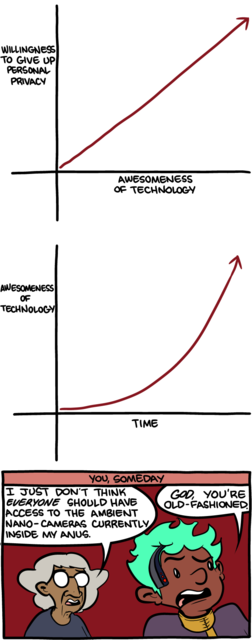
As often is the case, the Saturday Morning Breakfast Cereal webcomic (http://smbc-comics.com/ gets it right. And I cannot help but share today's comic. The picture explains it much better than what I ever could.

23 May 2014

Steve Kemp: Using a cubox as a media platform.

Somebody recent got in touch offering to mail me a Cubox, in exchange for me experimenting with it and writing about it. In the past I've written book reviews in exchange for receiving free copies, and while I don't want to make a habit of it I don't see a problem providing I'm up-front and honest. So, what is the cubox-i? It's another one of those "small computers", roughly similar to the Raspberry Pi, but with slightly different hardware, and a really neat little case design, as the name suggests it just looks like a tiny two inch cube, only spoiled by the mass of cabling attached to the back. Me? I was cheeky and said I'd have no use for one, unless it was the fancy-model. The hardware comes in 4 different versions, which you can read about on the Cubox-i product page. Ignoring the smaller/cheaper models the fancy version is the CuBox-i4Pro, and this differentiates itself from the Rasberry Pi: I had two uses for this toy; the first was to be a random NAS-box hosting local backups, the second was to be a media-center. In the past I used a Rasberry PI as a media-box, but unfortunately performance was appalling, largely because of the low-spead of the USB WiFi dongle I bought. The video playback would stall at times, even though the hardware could display full HD-output, the network constraints seemed to be a limiting factor. In the end I abandoned it and these days use it sporadically for emulation, and little else. I've been meaning to do something more interesting with it, but never quite got round to it. By contrast the Cubox-i is wonderful at being a media-box. I've exported some shares of MP4/AVI files from my desktop host, via NFS, then downloaded a binary image of the geexbox (XBMC) distribution which I installed onto the MicroSD card via dd. The box boots in about seven seconds, was configured to use WiFi (via "Programs Settings"), and was streaming media in less than two minutes. There is a Debian disitribution available for download from the cubox-i wiki, but sadly it is an ancient snapshot of Jessie from December last year. It did install, but there was no WiFi out of the box. Gunnar Wolf wrote about bootstrapping an image from sources, rather than using a binary snapshot. He's kindly shared the resulting image he built, but again sadly no WiFi support, so for the moment I'm just enjoying the media-suport. In the future I need to decide what to do: I also need to look at running Pure Debian, for obvious reasons, but if I can't use WiFi the machine is no good to me. (The TV is in a different room to the office which contains our Linux hosts.) Either way I've not been excited about new hardware for a while, not since I bought a Logitech Squeezebox, and we're both enjoying watching media on the TV.

17 May 2014

Gunnar Wolf: Guest class: Jose Juan "Kaz" Casimiro ( @brit_kazito ) dissects the Ext4 filesystem module

Yesterday night, we had the opportunity to have for the first time my friend Kaz as a guest in my Operating Systems class. We are about to finish the semester, and he took the opportunity not just to show how the Ext4 filesystem is structured, but how it is implemented in a current Linux release. Kaz took a very different approach from what I do: He did it really hands-on, starting with the explanation on how a hello world module would be created, and then digging in following the code of the ext4 module in Linux 3.14 (and some bits in the general filesystem-related includes). Of course, for a ~2hr session, he did not go into the full details, but did show where the main structures of a filesystem are defined, including a general walkthrough on the general kernel coding style. The class was very enjoyable and clear. We had the bad luck of the projector's lamp burning out at the beginning of the class, but still, you can see in the pictures the students were really into his exposition. I think the exposition did make it through and got the students involved and interested And that makes it really worth it! Now... Sadly, due to a (most probably) human factor, I tried to record this talk but lost most of it :-( I have only the first part, but lost most of the second one. I have some bits recorded by a second camera, but have to check if they make sense by themselves, or do need the whole context. Anyway, I'll be reviewing those bits, and will update this post when I get around to cleaning+fixing+integrating them. Some more photos...
AttachmentSize
Video of the first part of Kaz's class26.26 MB
Kaz's slides for the ext4 module40.72 KB

Next.

Previous.