Search Results: "cas"

9 March 2026

Sven Hoexter: Latest pflogsumm from unstable on trixie

If you want the latest pflogsumm release form unstable on your Debian trixie/stable mailserver you've to rely on pining (Hint for the future: Starting with apt 3.1 there is a new Include and Exclude option for your sources.list). For trixie you've to use e.g.:
$ cat /etc/apt/sources.list.d/unstable.sources
Types: deb
URIs: http://deb.debian.org/debian
Suites: unstable 
Components: main
#This will work with apt 3.1 or later:
#Include: pflogsumm
Signed-By: /usr/share/keyrings/debian-archive-keyring.pgp
$ cat /etc/apt/preferences.d/pflogsumm-unstable.pref 
Package: pflogsumm
Pin: release a=unstable
Pin-Priority: 950
Package: *
Pin: release a=unstable
Pin-Priority: 50
Should result in:
$ apt-cache policy pflogsumm
pflogsumm:
  Installed: (none)
  Candidate: 1.1.14-1
  Version table:
     1.1.14-1 950
        50 http://deb.debian.org/debian unstable/main amd64 Packages
     1.1.5-8 500
       500 http://deb.debian.org/debian trixie/main amd64 Packages
Why would you want to do that? Beside of some new features and improvements in the newer releases, the pflogsumm version in stable has an issue with parsing the timestamps generated by postfix itself when you write to a file via maillog_file. Since the Debian default setup uses logging to stdout and writing out to /var/log/mail.log via rsyslog, I never invested time to fix that case. But since Jim picked up pflogsumm development in 2025 that was fixed in pflogsumm 1.1.6. Bug is #1129958, originally reported in #1068425 Since it's an arch:all package you can just pick from unstable, I don't think it's a good candidate for backports, and just fetching the fixed version from unstable is a compromise for those who run into that issue.

8 March 2026

Gunnar Wolf: As Answers Get Cheaper, Questions Grow Dearer

This post is an unpublished review for As Answers Get Cheaper, Questions Grow Dearer
This opinion article tackles the much discussed issues of Large Language Models (LLMs) both endangering jobs and improving productivity. The authors begin by making a comparison, likening the current understanding of the effects LLMs are currently having upon knowledge-intensive work to that of artists in the early XIX century, when photography was first invented: they explain that photography didn t result in painting becoming obsolete, but undeniably changed in a fundamental way. Realism was no longer the goal of painters, as they could no longer compete in equal terms with photography. Painters then began experimenting with the subjective experiences of color and light: Impressionism no longer limits to copying reality, but adds elements of human feeling to creations. The authors argue that LLMs make getting answers terribly cheap not necessarily correct, but immediate and plausible. In order for the use of LLMs to be advantageous to users, a good working knowledge of the domain in which LLMs are queried is key. They cite as LLMs increasing productivity on average 14% at call centers, where questions have unambiguous answers and the knowledge domain is limited, but causing prejudice close to 10% to inexperience entrepreneurs following their advice in an environment where understanding of the situation and critical judgment are key. The problem, thus, becomes that LLMs are optimized to generate plausible answers. If the user is not a domain expert, plausibility becomes a stand-in for truth . They identify that, with this in mind, good questions become strategic: Questions that continue a line of inquiry, that expand the user s field of awareness, that reveal where we must keep looking. They liken this to Clayton Christensen s 2010 text on consulting : A consultant s value is not in having all the answers, but in teaching clients how to think. LLMs are already, and will likely become more so as they improve, game-changing for society. The authors argue that for much of the 20th century, an individual s success was measured by domain mastery, but bring to the table that the defining factor is no longer knowledge accumulation, but the ability to formulate the right questions. Of course, the authors acknowledge (it s even the literal title of one of the article s sections) that good questions need strong theoretical foundations. Knowing a specific domain enables users to imagine what should happen if following a specific lead, anticipate second-order effects, and evaluate whether plausible answers are meaningful or misleading. Shortly after I read the article I am reviewing, I came across a data point that quite validates its claims: A short, informally published paper on combinatorics and graph theory titled Claude s Cycles written by Donald Knuth (one of the most respected Computer Science professors and researchers and author of the very well known The Art of Computer Programming series of books). Knuth s text, and particularly its postscripts , perfectly illustrate what the article of this review conveys: LLMs can help a skillful researcher connect the dots in very varied fields of knowledge, perform tiring and burdensome calculators, even try mixing together some ideas that will fail or succeed. But guided by a true expert of the field, asking the right, insightful and informed questions will the answers prove to be of value and, in this case, of immense value. Knuth writes of a particular piece of the solution, I would have found this solution myself if I d taken time to look carefully at all 760 of the generalizable solutions for m=3 , but having an LLM perform all the legwork it was surely a better use of his time. Christensen, C.M. How Will You Measure Your Life? Harvard Business Review Press (2017). Knuth, D. Claude s Cycles. https://cs.stanford.edu/~knuth/papers/claude-cycles.pdf

6 March 2026

Antoine Beaupr : Wallabako retirement and Readeck adoption

Today I have made the tough decision of retiring the Wallabako project. I have rolled out a final (and trivial) 1.8.0 release which fixes the uninstall procedure and rolls out a bunch of dependency updates.

Why? The main reason why I'm retiring Wallabako is that I have completely stopped using it. It's not the first time: for a while, I wasn't reading Wallabag articles on my Kobo anymore. But I had started working on it again about four years ago. Wallabako itself is about to turn 10 years old. This time, I stopped using Wallabako because there's simply something better out there. I have switched away from Wallabag to Readeck! And I'm also tired of maintaining "modern" software. Most of the recent commits on Wallabako are from renovate-bot. This feels futile and pointless. I guess it must be done at some point, but it also feels we went wrong somewhere there. Maybe Filippo Valsorda is right and one should turn dependabot off. I did consider porting Wallabako to Readeck for a while, but there's a perfectly fine Koreader plugin that I've been pretty happy to use. I was worried it would be slow (because the Wallabag plugin is slow), but it turns out that Readeck is fast enough that this doesn't matter.

Moving from Wallabag to Readeck Readeck is pretty fantastic: it's fast, it's lightweight, everything Just Works. All sorts of concerns I had with Wallabag are just gone: questionable authentication, questionable API, weird bugs, mostly gone. I am still looking for multiple tags filtering but I have a much better feeling about Readeck than Wallabag: it's written in Golang and under active development. In any case, I don't want to throw shade at the Wallabag folks either. They did solve most of the issues I raised with them and even accepted my pull request. They have helped me collect thousands of articles for a long time! It's just time to move on. The migration from Wallabag was impressively simple. The importer is well-tuned, fast, and just works. I wrote about the import in this issue, but it took about 20 minutes to import essentially all articles, and another 5 hours to refresh all the contents. There are minor issues with Readeck which I have filed (after asking!): But overall I'm happy and impressed with the result. I'm also both happy and sad at letting go of my first (and only, so far) Golang project. I loved writing in Go: it's a clean language, fast to learn, and a beauty to write parallel code in (at the cost of a rather obscure runtime). It would have been much harder to write this in Python, but my experience in Golang helped me think about how to write more parallel code in Python, which is kind of cool. The GitLab project will remain publicly accessible, but archived, for the foreseeable future. If you're interested in taking over stewardship for this project, contact me. Thanks Wallabag folks, it was a great ride!

5 March 2026

Ian Jackson: Adopting tag2upload and modernising your Debian packaging

Introduction tag2upload allows authorised Debian contributors to upload to Debian simply by pushing a signed git tag to Debian s gitlab instance, Salsa. We have recently announced that tag2upload is, in our opinion, now very stable, and ready for general use by all Debian uploaders. tag2upload, as part of Debian s git transition programme, is very flexible - it needs to support a large variety of maintainer practices. And it s relatively unopinionated, wherever that s possible. But, during the open beta, various contributors emailed us asking for Debian packaging git workflow advice and recommendations. This post is an attempt to give some more opinionated answers, and guide you through modernising your workflow. (This article is aimed squarely at Debian contributors. Much of it will make little sense to Debian outsiders.) Why Ease of development git offers a far superior development experience to patches and tarballs. Moving tasks from a tarballs and patches representation to a normal, git-first, representation, makes everything simpler. dgit and tag2upload do automatically many things that have to be done manually, or with separate commands, in dput-based upload workflows. They will also save you from a variety of common mistakes. For example, you cannot accidentally overwrite an NMU, with tag2upload or dgit. These many safety catches mean that our software sometimes complains about things, or needs confirmation, when more primitive tooling just goes ahead. We think this is the right tradeoff: it s part of the great care we take to avoid our software making messes. Software that has your back is very liberating for the user. tag2upload makes it possible to upload with very small amounts of data transfer, which is great in slow or unreliable network environments. The other week I did a git-debpush over mobile data while on a train in Switzerland; it completed in seconds. See the Day-to-day work section below to see how simple your life could be. Don t fear a learning burden; instead, start forgetting all that nonsense Most Debian contributors have spent months or years learning how to work with Debian s tooling. You may reasonably fear that our software is yet more bizarre, janky, and mistake-prone stuff to learn. We promise (and our users tell us) that s not how it is. We have spent a lot of effort on providing a good user experience. Our new git-first tooling, especially dgit and tag2upload, is much simpler to use than source-package-based tooling, despite being more capable. The idiosyncrasies and bugs of source packages, and of the legacy archive, have been relentlessly worked around and papered over by our thousands of lines of thoroughly-tested defensive code. You too can forget all those confusing details, like our users have! After using our systems for a while you won t look back. And, you shouldn t fear trying it out. dgit and tag2upload are unlikely to make a mess. If something is wrong (or even doubtful), they will typically detect it, and stop. This does mean that starting to use tag2upload or dgit can involve resolving anomalies that previous tooling ignored, or passing additional options to reassure the system about your intentions. So admittedly it isn t always trivial to get your first push to succeed. Properly publishing the source code One of Debian s foundational principles is that we publish the source code. Nowadays, the vast majority of us, and of our upstreams, are using git. We are doing this because git makes our life so much easier. But, without tag2upload or dgit, we aren t properly publishing our work! Yes, we typically put our git branch on Salsa, and point Vcs-Git at it. However:
  • The format of git branches on Salsa is not standardised. They might be patches-unapplied, patches-applied, bare debian/, or something even stranger.
  • There is no guarantee that the DEP-14 debian/1.2.3-7 tag on salsa corresponds precisely to what was actually uploaded. dput-based tooling (such as gbp buildpackage) doesn t cross-check the .dsc against git.
  • There is no guarantee that the presence of a DEP-14 tag even means that that version of package is in the archive.
This means that the git repositories on Salsa cannot be used by anyone who needs things that are systematic and always correct. They are OK for expert humans, but they are awkward (even hazardous) for Debian novices, and you cannot use them in automation. The real test is: could you use Vcs-Git and Salsa to build a Debian derivative? You could not. tag2upload and dgit do solve this problem. When you upload, they:
  1. Make a canonical-form (patches-applied) derivative of your git branch;
  2. Ensure that there is a well-defined correspondence between the git tree and the source package;
  3. Publish both the DEP-14 tag and a canonical-form archive/debian/1.2.3-7 tag to a single central git depository, *.dgit.debian.org;
  4. Record the git information in the Dgit field in .dsc so that clients can tell (using the ftpmaster API) that this was a git-based upload, what the corresponding git objects are, and where to find them.
This dependably conveys your git history to users and downstreams, in a standard, systematic and discoverable way. tag2upload and dgit are the only system which achieves this. (The client is dgit clone, as advertised in e.g. dgit-user(7). For dput-based uploads, it falls back to importing the source package.) Adopting tag2upload - the minimal change tag2upload is a substantial incremental improvement to many existing workflows. git-debpush is a drop-in replacement for building, signing, and uploading the source package. So, you can just adopt it without completely overhauling your packaging practices. You and your co-maintainers can even mix-and-match tag2upload, dgit, and traditional approaches, for the same package. Start with the wiki page and git-debpush(1) (ideally from forky aka testing). You don t need to do any of the other things recommended in this article. Overhauling your workflow, using advanced git-first tooling The rest of this article is a guide to adopting the best and most advanced git-based tooling for Debian packaging. Assumptions
  • Your current approach uses the patches-unapplied git branch format used with gbp pq and/or quilt, and often used with git-buildpackage. You previously used gbp import-orig.
  • You are fluent with git, and know how to use Merge Requests on gitlab (Salsa). You have your origin remote set to Salsa.
  • Your main Debian branch name on Salsa is master. Personally I think we should use main but changing your main branch name is outside the scope of this article.
  • You have enough familiarity with Debian packaging including concepts like source and binary packages, and NEW review.
  • Your co-maintainers are also adopting the new approach.
tag2upload and dgit (and git-debrebase) are flexible tools and can help with many other scenarios too, and you can often mix-and-match different approaches. But, explaining every possibility would make this post far too confusing. Topics and tooling This article will guide you in adopting:
  • tag2upload
  • Patches-applied git branch for your packaging
  • Either plain git merge or git-debrebase
  • dgit when a with-binaries uploaded is needed (NEW)
  • git-based sponsorship
  • Salsa (gitlab), including Debian Salsa CI
Choosing the git branch format In Debian we need to be able to modify the upstream-provided source code. Those modifications are the Debian delta. We need to somehow represent it in git. We recommend storing the delta as git commits to those upstream files, by picking one of the following two approaches.
rationale Much traditional Debian tooling like quilt and gbp pq uses the patches-unapplied branch format, which stores the delta as patch files in debian/patches/, in a git tree full of unmodified upstream files. This is clumsy to work with, and can even be an alarming beartrap for Debian outsiders.
git merge Option 1: simply use git, directly, including git merge. Just make changes directly to upstream files on your Debian branch, when necessary. Use plain git merge when merging from upstream. This is appropriate if your package has no or very few upstream changes. It is a good approach if the Debian maintainers and upstream maintainers work very closely, so that any needed changes for Debian are upstreamed quickly, and any desired behavioural differences can be arranged by configuration controlled from within debian/. This is the approach documented more fully in our workflow tutorial dgit-maint-merge(7).
git-debrebase Option 2: Adopt git-debrebase. git-debrebase helps maintain your delta as linear series of commits (very like a topic branch in git terminology). The delta can be reorganised, edited, and rebased. git-debrebase is designed to help you carry a significant and complicated delta series. The older versions of the Debian delta are preserved in the history. git-debrebase makes extra merges to make a fast-forwarding history out of the successive versions of the delta queue branch. This is the approach documented more fully in our workflow tutorial dgit-maint-debrebase(7). Examples of complex packages using this approach include src:xen and src:sbcl.
Determine upstream git and stop using upstream tarballs We recommend using upstream git, only and directly. You should ignore upstream tarballs completely.
rationale Many maintainers have been importing upstream tarballs into git, for example by using gbp import-orig. But in reality the upstream tarball is an intermediate build product, not (just) source code. Using tarballs rather than git exposes us to additional supply chain attacks; indeed, the key activation part of the xz backdoor attack was hidden only in the tarball! git offers better traceability than so-called pristine upstream tarballs. (The word pristine is even a joke by the author of pristine-tar!)
First, establish which upstream git tag corresponds to the version currently in Debian. From the sake of readability, I m going to pretend that upstream version is 1.2.3, and that upstream tagged it v1.2.3. Edit debian/watch to contain something like this:
version=4
opts="mode=git" https://codeberg.org/team/package refs/tags/v(\d\S*)
You may need to adjust the regexp, depending on your upstream s tag name convention. If debian/watch had a files-excluded, you ll need to make a filtered version of upstream git.
git-debrebase From now on we ll generate our own .orig tarballs directly from git.
rationale We need some upstream tarball for the 3.0 (quilt) source format to work with. It needs to correspond to the git commit we re using as our upstream. We don t need or want to use a tarball from upstream for this. The .orig is just needed so a nice legacy Debian source package (.dsc) can be generated.
Probably, the current .orig in the Debian archive, is an upstream tarball, which may be different to the output of git-archive and possibly even have different contents to what s in git. The legacy archive has trouble with differing .origs for the same upstream version . So we must until the next upstream release change our idea of the upstream version number. We re going to add +git to Debian s idea of the upstream version. Manually make a tag with that name:
git tag -m "Compatibility tag for orig transition" v1.2.3+git v1.2.3~0
git push origin v1.2.3+git
If you are doing the packaging overhaul at the same time as a new upstream version, you can skip this part.
Convert the git branch
git merge Prepare a new branch on top of upstream git, containing what we want:
git branch -f old-master         # make a note of the old git representation
git reset --hard v1.2.3          # go back to the real upstream git tag
git checkout old-master :debian  # take debian/* from old-master
git commit -m "Re-import Debian packaging on top of upstream git"
git merge --allow-unrelated-histories -s ours -m "Make fast forward from tarball-based history" old-master
git branch -d old-master         # it's incorporated in our history now
If there are any patches, manually apply them to your main branch with git am, and delete the patch files (git rm -r debian/patches, and commit). (If you ve chosen this workflow, there should be hardly any patches,)
rationale These are some pretty nasty git runes, indeed. They re needed because we want to restart our Debian packaging on top of a possibly quite different notion of what the upstream is.
git-debrebase Convert the branch to git-debrebase format and rebase onto the upstream git:
git-debrebase -fdiverged convert-from-gbp upstream/1.2.3
git-debrebase -fdiverged -fupstream-not-ff new-upstream 1.2.3+git
If you had patches which patched generated files which are present only in the upstream tarball, and not in upstream git, you will encounter rebase conflicts. You can drop hunks editing those files, since those files are no longer going to be part of your view of the upstream source code at all.
rationale The force option -fupstream-not-ff will be needed this one time because your existing Debian packaging history is (probably) not based directly on the upstream history. -fdiverged may be needed because git-debrebase might spot that your branch is not based on dgit-ish git history.
Manually make your history fast forward from the git import of your previous upload.
dgit fetch
git show dgit/dgit/sid:debian/changelog
# check that you have the same version number
git merge -s ours --allow-unrelated-histories -m 'Declare fast forward from pre-git-based history' dgit/dgit/sid
Change the source format Delete any existing debian/source/options and/or debian/source/local-options.
git merge Change debian/source/format to 1.0. Add debian/source/options containing -sn.
rationale We are using the 1.0 native source format. This is the simplest possible source format - just a tarball. We would prefer 3.0 (native) , which has some advantages, but dpkg-source between 2013 (wheezy) and 2025 (trixie) inclusive unjustifiably rejects this configuration. You may receive bug reports from over-zealous folks complaining about the use of the 1.0 source format. You should close such reports, with a reference to this article and to #1106402.
git-debrebase Ensure that debian/source/format contains 3.0 (quilt).
Now you are ready to do a local test build. Sort out the documentation and metadata Edit README.source to at least mention dgit-maint-merge(7) or dgit-maint-debrebase(7), and to tell people not to try to edit or create anything in debian/patches/. Consider saying that uploads should be done via dgit or tag2upload. Check that your Vcs-Git is correct in debian/control. Consider deleting or pruning debian/gbp.conf, since it isn t used by dgit, tag2upload, or git-debrebase.
git merge Add a note to debian/changelog about the git packaging change.
git-debrebase git-debrebase new-upstream will have added a new upstream version stanza to debian/changelog. Edit that so that it instead describes the packaging change. (Don t remove the +git from the upstream version number there!)
Configure Salsa Merge Requests
git-debrebase In Settings / Merge requests , change Squash commits when merging to Do not allow .
rationale Squashing could destroy your carefully-curated delta queue. It would also disrupt git-debrebase s git branch structure.
Set up Salsa CI, and use it to block merges of bad changes Caveat - the tradeoff gitlab is a giant pile of enterprise crap. It is full of startling bugs, many of which reveal a fundamentally broken design. It is only barely Free Software in practice for Debian (in the sense that we are very reluctant to try to modify it). The constant-churn development approach and open-core business model are serious problems. It s very slow (and resource-intensive). It can be depressingly unreliable. That Salsa works as well as it does is a testament to the dedication of the Debian Salsa team (and those who support them, including DSA). However, I have found that despite these problems, Salsa CI is well worth the trouble. Yes, there are frustrating days when work is blocked because gitlab CI is broken and/or one has to keep mashing Retry . But, the upside is no longer having to remember to run tests, track which of my multiple dev branches tests have passed on, and so on. Automatic tests on Merge Requests are a great way of reducing maintainer review burden for external contributions, and helping uphold quality norms within a team. They re a great boon for the lazy solo programmer. The bottom line is that I absolutely love it when the computer thoroughly checks my work. This is tremendously freeing, precisely at the point when one most needs it deep in the code. If the price is to occasionally be blocked by a confused (or broken) computer, so be it. Setup procedure Create debian/salsa-ci.yml containing
include:
  - https://salsa.debian.org/salsa-ci-team/pipeline/raw/master/recipes/debian.yml
In your Salsa repository, under Settings / CI/CD , expand General Pipelines and set CI/CD configuration file to debian/salsa-ci.yml.
rationale Your project may have an upstream CI config in .gitlab-ci.yml. But you probably want to run the Debian Salsa CI jobs. You can add various extra configuration to debian/salsa-ci.yml to customise it. Consult the Salsa CI docs.
git-debrebase Add to debian/salsa-ci.yml:
.git-debrebase-prepare: &git-debrebase-prepare
  # install the tools we'll need
  - apt-get update
  - apt-get --yes install git-debrebase git-debpush
  # git-debrebase needs git user setup
  - git config user.email "salsa-ci@invalid.invalid"
  - git config user.name "salsa-ci"
  # run git-debrebase make-patches
  # https://salsa.debian.org/salsa-ci-team/pipeline/-/issues/371
  - git-debrebase --force
  - git-debrebase --noop-ok make-patches
  # make an orig tarball using the upstream tag, not a gbp upstream/ tag
  # https://salsa.debian.org/salsa-ci-team/pipeline/-/issues/541
  - git-deborig
.build-definition: &build-definition
  extends: .build-definition-common
  before_script: *git-debrebase-prepare
build source:
  extends: .build-source-only
  before_script: *git-debrebase-prepare
variables:
  # disable shallow cloning of git repository. This is needed for git-debrebase
  GIT_DEPTH: 0
rationale Unfortunately the Salsa CI pipeline currently lacks proper support for git-debrebase (salsa-ci#371) and has trouble directly using upstream git for orig tarballs (#salsa-ci#541). These runes were based on those in the Xen package. You should subscribe to the tickets #371 and #541 so that you can replace the clone-and-hack when proper support is merged.
Push this to salsa and make the CI pass. If you configured the pipeline filename after your last push, you will need to explicitly start the first CI run. That s in Pipelines : press New pipeline in the top right. The defaults will very probably be correct. Block untested pushes, preventing regressions In your project on Salsa, go into Settings / Repository . In the section Branch rules , use Add branch rule . Select the branch master. Set Allowed to merge to Maintainers . Set Allowed to push and merge to No one . Leave Allow force push disabled. This means that the only way to land anything on your mainline is via a Merge Request. When you make a Merge Request, gitlab will offer Set to auto-merge . Use that. gitlab won t normally merge an MR unless CI passes, although you can override this on a per-MR basis if you need to. (Sometimes, immediately after creating a merge request in gitlab, you will see a plain Merge button. This is a bug. Don t press that. Reload the page so that Set to auto-merge appears.) autopkgtests Ideally, your package would have meaningful autopkgtests (DEP-8 tests) This makes Salsa CI more useful for you, and also helps detect and defend you against regressions in your dependencies. The Debian CI docs are a good starting point. In-depth discussion of writing autopkgtests is beyond the scope of this article. Day-to-day work With this capable tooling, most tasks are much easier. Making changes to the package Make all changes via a Salsa Merge Request. So start by making a branch that will become the MR branch. On your MR branch you can freely edit every file. This includes upstream files, and files in debian/. For example, you can:
  • Make changes with your editor and commit them.
  • git cherry-pick an upstream commit.
  • git am a patch from a mailing list or from the Debian Bug System.
  • git revert an earlier commit, even an upstream one.
When you have a working state of things, tidy up your git branch:
git merge Use git-rebase to squash/edit/combine/reorder commits.
git-debrebase Use git-debrebase -i to squash/edit/combine/reorder commits. When you are happy, run git-debrebase conclude. Do not edit debian/patches/. With git-debrebase, this is purely an output. Edit the upstream files directly instead. To reorganise/maintain the patch queue, use git-debrebase -i to edit the actual commits.
Push the MR branch (topic branch) to Salsa and make a Merge Request. Set the MR to auto-merge when all checks pass . (Or, depending on your team policy, you could ask for an MR Review of course.) If CI fails, fix up the MR branch, squash/tidy it again, force push the MR branch, and once again set it to auto-merge. Test build An informal test build can be done like this:
apt-get build-dep .
dpkg-buildpackage -uc -b
Ideally this will leave git status clean, with no modified or un-ignored untracked files. If it shows untracked files, add them to .gitignore or debian/.gitignore as applicable. If it dirties the tree, consider trying to make it stop doing that. The easiest way is probably to build out-of-tree, if supported upstream. If this is too difficult, you can leave the messy build arrangements as they are, but you ll need to be disciplined about always committing, using git clean and git reset, and so on. For formal binaries builds, including for testing, use dgit sbuild as described below for uploading to NEW. Uploading to Debian Start an MR branch for the administrative changes for the release. Document all the changes you re going to release, in the debian/changelog.
git merge gbp dch can help write the changelog for you:
dgit fetch sid
gbp dch --ignore-branch --since=dgit/dgit/sid --git-log=^upstream/main
rationale --ignore-branch is needed because gbp dch wrongly thinks you ought to be running this on master, but of course you re running it on your MR branch. The --git-log=^upstream/main excludes all upstream commits from the listing used to generate the changelog. (I m assuming you have an upstream remote and that you re basing your work on their main branch.) If there was a new upstream version, you ll usually want to write a single line about that, and perhaps summarise anything really important.
(For the first upload after switching to using tag2upload or dgit you need --since=debian/1.2.3-1, where 1.2.3-1 is your previous DEP-14 tag, because dgit/dgit/sid will be a dsc import, not your actual history.)
Change UNRELEASED to the target suite, and finalise the changelog. (Note that dch will insist that you at least save the file in your editor.)
dch -r
git commit -m 'Finalise for upload' debian/changelog
Make an MR of these administrative changes, and merge it. (Either set it to auto-merge and wait for CI, or if you re in a hurry double-check that it really is just a changelog update so that you can be confident about telling Salsa to Merge unverified changes .) Now you can perform the actual upload:
git checkout master
git pull --ff-only # bring the gitlab-made MR merge commit into your local tree
git merge
git-debpush
git-debrebase
git-debpush --quilt=linear
--quilt=linear is needed only the first time, but it is very important that first time, to tell the system the correct git branch layout.
Uploading a NEW package to Debian If your package is NEW (completely new source, or has new binary packages) you can t do a source-only upload. You have to build the source and binary packages locally, and upload those build artifacts. Happily, given the same git branch you d tag for tag2upload, and assuming you have sbuild installed and a suitable chroot, dgit can help take care of the build and upload for you: Prepare the changelog update and merge it, as above. Then:
git-debrebase Create the orig tarball and launder the git-derebase branch:
git-deborig
git-debrebase quick
rationale Source package format 3.0 (quilt), which is what I m recommending here for use with git-debrebase, needs an orig tarball; it would also be needed for 1.0-with-diff.
Build the source and binary packages, locally:
dgit sbuild
dgit push-built
rationale You don t have to use dgit sbuild, but it is usually convenient to do so, because unlike sbuild, dgit understands git. Also it works around a gitignore-related defect in dpkg-source.
New upstream version Find the new upstream version number and corresponding tag. (Let s suppose it s 1.2.4.) Check the provenance:
git verify-tag v1.2.4
rationale Not all upstreams sign their git tags, sadly. Sometimes encouraging them to do so can help. You may need to use some other method(s) to check that you have the right git commit for the release.
git merge Simply merge the new upstream version and update the changelog:
git merge v1.2.4
dch -v1.2.4-1 'New upstream release.'
git-debrebase Rebase your delta queue onto the new upstream version:
git debrebase mew-upstream 1.2.4
If there are conflicts between your Debian delta for 1.2.3, and the upstream changes in 1.2.4, this is when you need to resolve them, as part of git merge or git (deb)rebase. After you ve completed the merge, test your package and make any further needed changes. When you have it working in a local branch, make a Merge Request, as above. Sponsorship git-based sponsorship is super easy! The sponsee can maintain their git branch on Salsa, and do all normal maintenance via gitlab operations. When the time comes to upload, the sponsee notifies the sponsor that it s time. The sponsor fetches and checks out the git branch from Salsa, does their checks, as they judge appropriate, and when satisfied runs git-debpush. As part of the sponsor s checks, they might want to see all changes since the last upload to Debian:
dgit fetch sid
git diff dgit/dgit/sid..HEAD
Or to see the Debian delta of the proposed upload:
git verify-tag v1.2.3
git diff v1.2.3..HEAD ':!debian'
git-debrebase Or to show all the delta as a series of commits:
git log -p v1.2.3..HEAD ':!debian'
Don t look at debian/patches/. It can be absent or out of date.
Incorporating an NMU Fetch the NMU into your local git, and see what it contains:
dgit fetch sid
git diff master...dgit/dgit/sid
If the NMUer used dgit, then git log dgit/dgit/sid will show you the commits they made. Normally the best thing to do is to simply merge the NMU, and then do any reverts or rework in followup commits:
git merge dgit/dgit/sid
git-debrebase You should git-debrebase quick at this stage, to check that the merge went OK and the package still has a lineariseable delta queue.
Then make any followup changes that seem appropriate. Supposing your previous maintainer upload was 1.2.3-7, you can go back and see the NMU diff again with:
git diff debian/1.2.3-7...dgit/dgit/sid
git-debrebase The actual changes made to upstream files will always show up as diff hunks to those files. diff commands will often also show you changes to debian/patches/. Normally it s best to filter them out with git diff ... ':!debian/patches' If you d prefer to read the changes to the delta queue as an interdiff (diff of diffs), you can do something like
git checkout debian/1.2.3-7
git-debrebase --force make-patches
git diff HEAD...dgit/dgit/sid -- :debian/patches
to diff against a version with debian/patches/ up to date. (The NMU, in dgit/dgit/sid, will necessarily have the patches already up to date.)
DFSG filtering (handling non-free files) Some upstreams ship non-free files of one kind of another. Often these are just in the tarballs, in which case basing your work on upstream git avoids the problem. But if the files are in upstream s git trees, you need to filter them out. This advice is not for (legally or otherwise) dangerous files. If your package contains files that may be illegal, or hazardous, you need much more serious measures. In this case, even pushing the upstream git history to any Debian service, including Salsa, must be avoided. If you suspect this situation you should seek advice, privately and as soon as possible, from dgit-owner@d.o and/or the DFSG team. Thankfully, legally dangerous files are very rare in upstream git repositories, for obvious reasons. Our approach is to make a filtered git branch, based on the upstream history, with the troublesome files removed. We then treat that as the upstream for all of the rest of our work.
rationale Yes, this will end up including the non-free files in the git history, on official Debian servers. That s OK. What s forbidden is non-free material in the Debianised git tree, or in the source packages.
Initial filtering
git checkout -b upstream-dfsg v1.2.3
git rm nonfree.exe
git commit -m "upstream version 1.2.3 DFSG-cleaned"
git tag -s -m "upstream version 1.2.3 DFSG-cleaned" v1.2.3+ds1
git push origin upstream-dfsg
And now, use 1.2.3+ds1, and the filtered branch upstream-dfsg, as the upstream version, instead of 1.2.3 and upstream/main. Follow the steps for Convert the git branch or New upstream version, as applicable, adding +ds1 into debian/changelog. If you missed something and need to filter out more a nonfree files, re-use the same upstream-dfsg branch and bump the ds version, eg v1.2.3+ds2. Subsequent upstream releases
git checkout upstream-dfsg
git merge v1.2.4
git rm additional-nonfree.exe # if any
git commit -m "upstream version 1.2.4 DFSG-cleaned"
git tag -s -m "upstream version 1.2.4 DFSG-cleaned" v1.2.4+ds1
git push origin upstream-dfsg
Removing files by pattern If the files you need to remove keep changing, you could automate things with a small shell script debian/rm-nonfree containing appropriate git rm commands. If you use git rm -f it will succeed even if the git merge from real upstream has conflicts due to changes to non-free files.
rationale Ideally uscan, which has a way of representing DFSG filtering patterns in debian/watch, would be able to do this, but sadly the relevant functionality is entangled with uscan s tarball generation.
Common issues
  • Tarball contents: If you are switching from upstream tarballs to upstream git, you may find that the git tree is significantly different. It may be missing files that your current build system relies on. If so, you definitely want to be using git, not the tarball. Those extra files in the tarball are intermediate built products, but in Debian we should be building from the real source! Fixing this may involve some work, though.
  • gitattributes: For Reasons the dgit and tag2upload system disregards and disables the use of .gitattributes to modify files as they are checked out. Normally this doesn t cause a problem so long as any orig tarballs are generated the same way (as they will be by tag2upload or git-deborig). But if the package or build system relies on them, you may need to institute some workarounds, or, replicate the effect of the gitattributes as commits in git.
  • git submodules: git submodules are terrible and should never ever be used. But not everyone has got the message, so your upstream may be using them. If you re lucky, the code in the submodule isn t used in which case you can git rm the submodule.
Further reading I ve tried to cover the most common situations. But software is complicated and there are many exceptions that this article can t cover without becoming much harder to read. You may want to look at:
  • dgit workflow manpages: As part of the git transition project, we have written workflow manpages, which are more comprehensive than this article. They re centered around use of dgit, but also discuss tag2upload where applicable. These cover a much wider range of possibilities, including (for example) choosing different source package formats, how to handle upstreams that publish only tarballs, etc. They are correspondingly much less opinionated. Look in dgit-maint-merge(7) and dgit-maint-debrebase(7). There is also dgit-maint-gbp(7) for those who want to keep using gbp pq and/or quilt with a patches-unapplied branch.
  • NMUs are very easy with dgit. (tag2upload is usually less suitable than dgit, for an NMU.) You can work with any package, in git, in a completely uniform way, regardless of maintainer git workflow, See dgit-nmu-simple(7).
  • Native packages (meaning packages maintained wholly within Debian) are much simpler. See dgit-maint-native(7).
  • tag2upload documentation: The tag2upload wiki page is a good starting point. There s the git-debpush(1) manpage of course.
  • dgit reference documentation: There is a comprehensive command-line manual in dgit(1). Description of the dgit data model and Principles of Operation is in dgit(7); including coverage of out-of-course situations. dgit is a complex and powerful program so this reference material can be overwhelming. So, we recommend starting with a guide like this one, or the dgit- (7) workflow tutorials.
  • Design and implementation documentation for tag2upload is linked to from the wiki.
  • Debian s git transition blog post from December. tag2upload and dgit are part of the git transition project, and aim to support a very wide variety of git workflows. tag2upload and dgit work well with existing git tooling, including git-buildpackage-based approaches. git-debrebase is conceptually separate from, and functionally independent of, tag2upload and dgit. It s a git workflow and delta management tool, competing with gbp pq, manual use of quilt, git-dpm and so on.
git-debrebase
  • git-debrebase reference documentation: Of course there s a comprehensive command-line manual in git-debrebase(1). git-debrebase is quick and easy to use, but it has a complex data model and sophisticated algorithms. This is documented in git-debrebase(5).


Edited 2026-03-05 18:48 UTC to add a missing --noop-ok to the Salsa CI runes. Thanks to Charlemagne Lasse for the report. Apologies if this causes Debian Planet to re-post this article as if it were new.


comment count unavailable comments

3 March 2026

Matthew Garrett: To update blobs or not to update blobs

A lot of hardware runs non-free software. Sometimes that non-free software is in ROM. Sometimes it s in flash. Sometimes it s not stored on the device at all, it s pushed into it at runtime by another piece of hardware or by the operating system. We typically refer to this software as firmware to differentiate it from the software run on the CPU after the OS has started1, but a lot of it (and, these days, probably most of it) is software written in C or some other systems programming language and targeting Arm or RISC-V or maybe MIPS and even sometimes x862. There s no real distinction between it and any other bit of software you run, except it s generally not run within the context of the OS3. Anyway. It s code. I m going to simplify things here and stop using the words software or firmware and just say code instead, because that way we don t need to worry about semantics. A fundamental problem for free software enthusiasts is that almost all of the code we re talking about here is non-free. In some cases, it s cryptographically signed in a way that makes it difficult or impossible to replace it with free code. In some cases it s even encrypted, such that even examining the code is impossible. But because it s code, sometimes the vendor responsible for it will provide updates, and now you get to choose whether or not to apply those updates. I m now going to present some things to consider. These are not in any particular order and are not intended to form any sort of argument in themselves, but are representative of the opinions you will get from various people and I would like you to read these, think about them, and come to your own set of opinions before I tell you what my opinion is. THINGS TO CONSIDER Ok we re done with the things to consider. Please spend a few seconds thinking about what the tradeoffs are here and what your feelings are. Proceed when ready. I trust my CPU vendor. I don t trust my CPU vendor because I want to, I trust my CPU vendor because I have no choice. I don t think it s likely that my CPU vendor has designed a CPU that identifies when I m generating cryptographic keys and biases the RNG output so my keys are significantly weaker than they look, but it s not literally impossible. I generate keys on it anyway, because what choice do I have? At some point I will buy a new laptop because Electron will no longer fit in 32GB of RAM and I will have to make the same affirmation of trust, because the alternative is that I just don t have a computer. And in any case, I will be communicating with other people who generated their keys on CPUs I have no control over, and I will also be relying on them to be trustworthy. If I refuse to trust my CPU then I don t get to computer, and if I don t get to computer then I will be sad. I suspect I m not alone here. Why would I install a code update on my CPU when my CPU s job is to run my code in the first place? Because it turns out that CPUs are complicated and messy and they have their own bugs, and those bugs may be functional (for example, some performance counter functionality was broken on Sandybridge at release, and was then fixed with a microcode blob update) and if you update it your hardware works better. Or it might be that you re running a CPU with speculative execution bugs and there s a microcode update that provides a mitigation for that even if your CPU is slower when you enable it, but at least now you can run virtual machines without code in those virtual machines being able to reach outside the hypervisor boundary and extract secrets from other contexts. When it s put that way, why would I not install the update? And the straightforward answer is that theoretically it could include new code that doesn t act in my interests, either deliberately or not. And, yes, this is theoretically possible. Of course, if you don t trust your CPU vendor, why are you buying CPUs from them, but well maybe they ve been corrupted (in which case don t buy any new CPUs from them either) or maybe they ve just introduced a new vulnerability by accident, and also you re in a position to determine whether the alleged security improvements matter to you at all. Do you care about speculative execution attacks if all software running on your system is trustworthy? Probably not! Do you need to update a blob that fixes something you don t care about and which might introduce some sort of vulnerability? Seems like no! But there s a difference between a recommendation for a fully informed device owner who has a full understanding of threats, and a recommendation for an average user who just wants their computer to work and to not be ransomwared. A code update on a wifi card may introduce a backdoor, or it may fix the ability for someone to compromise your machine with a hostile access point. Most people are just not going to be in a position to figure out which is more likely, and there s no single answer that s correct for everyone. What we do know is that where vulnerabilities in this sort of code have been discovered, updates have tended to fix them - but nobody has flagged such an update as a real-world vector for system compromise. My personal opinion? You should make your own mind up, but also you shouldn t impose that choice on others, because your threat model is not necessarily their threat model. Code updates are a reasonable default, but they shouldn t be unilaterally imposed, and nor should they be blocked outright. And the best way to shift the balance of power away from vendors who insist on distributing non-free blobs is to demonstrate the benefits gained from them being free - a vendor who ships free code on their system enables their customers to improve their code and enable new functionality and make their hardware more attractive. It s impossible to say with absolute certainty that your security will be improved by installing code blobs. It s also impossible to say with absolute certainty that it won t. So far evidence tends to support the idea that most updates that claim to fix security issues do, and there s not a lot of evidence to support the idea that updates add new backdoors. Overall I d say that providing the updates is likely the right default for most users - and that that should never be strongly enforced, because people should be allowed to define their own security model, and whatever set of threats I m worried about, someone else may have a good reason to focus on different ones.

  1. Code that runs on the CPU before the OS is still usually described as firmware - UEFI is firmware even though it s executing on the CPU, which should give a strong indication that the difference between firmware and software is largely arbitrary
  2. And, obviously 8051
  3. Because UEFI makes everything more complicated, UEFI makes this more complicated. Triggering a UEFI runtime service involves your OS jumping into firmware code at runtime, in the same context as the OS kernel. Sometimes this will trigger a jump into System Management Mode, but other times it won t, and it s just your kernel executing code that got dumped into RAM when your system booted.
  4. I don t understand most of the diff between one kernel version and the next, and I don t have time to read all of it either.
  5. There s a bunch of reasons to do this, the most reasonable of which is probably not wanting customers to replace the code and break their hardware and deal with the support overhead of that, but not being able to replace code running on hardware I own is always going to be an affront to me.

2 March 2026

Ben Hutchings: FOSS activity in February 2026

Valhalla's Things: A Pen Case (or a Few)

Posted on March 2, 2026
Tags: madeof:atoms, FreeSoftWear, craft:sewing
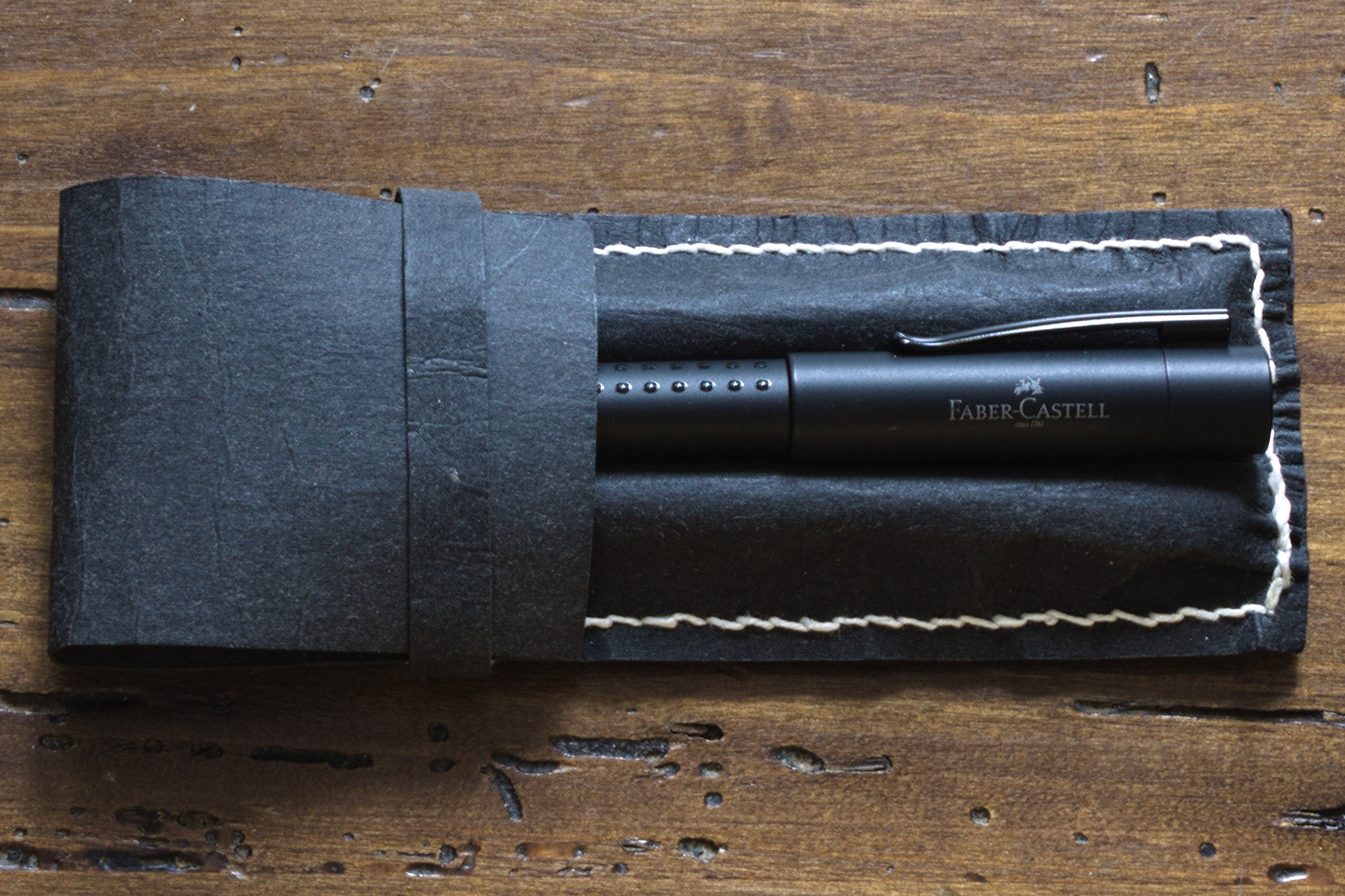
A pen case made of two pieces of a relatively stiff black material with a flat base and three separate channels on top, plus a flap covering everything and a band to keep the flap closed; there is visible light blue stitching all around the channels. For my birthday, I ve bought myself a fancy new expensive1 fountain pen. A two slot pen case in the same material as above, but brown: the flap is too short to cover the pens, and there isn't a band to keep it closed. Such a fancy pen, of course requires a suitable case: I couldn t use the failed prototype of a case I ve been keeping my Preppys in, so I had to get out the nice vegetable tanned leather Yeah, nope, I don t have that (yet). I got out the latex and cardboard material that is sold as a (cheaper) leather substitute, doesn t look like leather at all, but is quite nice (and easy) to work with. The project is not vegan anyway, because I used waxed linen thread, waxing it myself with a lot of very nicely smelling beeswax. a case similar to the one above, but this one only has two slots, and there is a a Faber Castell pen nested on top of the case between the two slots. Here the stitches are white, and in a coarser thread. I got the measurements2 from the less failed prototype where I keep my desktop pens, and this time I made a proper pattern I could share online, under the usual Free Culture license. A case like the one above, except that the stitches are in black, and not as regular. This one has also been scrunched up a bit for a different look, and now the band is a bit too wide. From the width of the material I could conveniently cut two cases, so that s what I did, started sewing the first one, realized that I got the order of stitching wrong, and also that if I used light blue thread instead of the black one it would look nice, and be easier to see in the pictures for the published pattern, started sewing the second one, and kept alternating between the two, depending on the availability of light for taking pictures. The open pen case, showing two pens, a blue Preppy and a gunmetal Plaisir cosily nested in the two outer slots, while the middle slot is ominously empty. One of the two took the place of my desktop one, where I had one more pen than slots, and one of the old prototypes was moved to keep my bedside pen, and the other new case was used for the new pen in my handbag, together with a Preppy, and now I have a free slot and you can see how this is going to go wrong, right? :D


  1. 16 . plus a 9 converter, and another 6 pen to get the EF nib from, since it wasn t available for the expensive pen.
  2. I have them written down somewhere. I couldn t find them. So I measured the real thing, with some approximation.

28 February 2026

Daniel Baumann: Debian Fast Forward: An alternative backports repository

The Debian project releases a new stable version of its Linux distribution approximately every two years. During its life time, a stable release usually gets security updates only, but in general no feature updates. For some packages it is desirable to get feature updates earlier than with the next stable release. Some new packages included in Debian after the initial release of a stable distribution are desirable for stable too. Both use-cases can be solved by recompiling the newer version of a package from testing/unstable on stable (aka backporting). Packages are backported together with only the minimal amount of required build-depends or depends not already fulfilled in stable (if any), and without any changes unless required to fix building on stable (if needed). There are official Debian Backports available, as well as several well-known unofficial backports repositories. I have been involved in one of these unofficial repositories since 2005 which subsequently turned 2010 into its own Debian derivative, mixing both backports and modified packages in one repository for simplicity. Starting with the Debian 13 (trixie) release, the (otherwise unmodified) backports of this derivative have been split out from the derivative distribution into a separate repository. This way the backports are more accessible and useful for all interested Debian users too.
TL;DR: Debian Fast Forward - https://fastforward.debian.net
  • is an alternative Debian repository containing complementary backports from testing/unstable to stable
  • with packages organized in a curated, self-contained selection of coherent sets
  • supporting amd64, i386, and arm64 architectures
  • containing around 400 packages in trixie-fastforward-backports
  • with 1 800 uploads since July 2025
End user documentation about how to enable Debian Fast Forwards is available. Have fun!

25 February 2026

Joachim Breitner: Vibe-coding a debugger for a DSL

Earlier this week a colleague of mine, Emilio Jes s Gallego Arias, shared a demo of something he built as an experiment, and I felt the desire to share this and add a bit of reflection. (Not keen on watching a 5 min video? Read on below.)

What was that? So what did you just see (or skipped watching)? You could see Emilio s screen, running VSCode and editing a Lean file. He designed a small programming language that he embedded into Lean, including an evaluator. So far, so standard, but a few things stick out already:
  • Using Lean s very extensible syntax this embedding is rather elegant and pretty.
  • Furthermore, he can run this DSL code right there, in the source code, using commands like #eval. This is a bit like the interpreter found in Haskell or Python, but without needing a separate process, or like using a Jupyter notebook, but without the stateful cell management.
This is already a nice demonstration of Lean s abilities and strength, as we know them. But what blew my mind the first time was what happened next: He had a visual debugger that allowed him to debug his DSL program. It appeared on the right, in Lean s Info View , where various Lean tools can hook into, show information and allow the user to interact. But it did not stop there, and my mind was blown a second time: Emilio opened VSCode s Debugger pane on the left, and was able to properly use VSCode s full-fledged debugger frontend for his own little embedded programming language! Complete with highlighting the executed line, with the ability to set breakpoints there, and showing the state of local variables in the debugger. Having a good debugger is not to be taken for granted even for serious, practical programming languages. Having it for a small embedded language that you just built yourself? I wouldn t have even considered that.

Did it take long? If I were Emilio s manager I would applaud the demo and then would have to ask how many weeks he spent on that. Coming up with the language, getting the syntax extension right, writing the evaluator and especially learning how the debugger integration into VSCode (using the DAP protocol) works, and then instrumenting his evaluator to speak that protocol that is a sizeable project! It turns out the answer isn t measured in weeks: it took just one day of coding together with GPT-Codex 5.3. My mind was blown a third time.

Why does Lean make a difference? I am sure this post is just one of many stories you have read in recent weeks about how new models like Claude Opus 4.6 and GPT-Codex 5.3 built impressive things in hours that would have taken days or more before. But have you seen something like this? Agentic coding is powerful, but limited by what the underlying platform exposes. I claim that Lean is a particularly well-suited platform to unleash the agents versatility. Here we are using Lean as a programming language, not as a theorem prover (which brings other immediate benefits when using agents, e.g. the produced code can be verified rather than merely plausible, but that s a story to be told elsewhere.) But arguably because Lean is also a theorem prover, and because of the requirements that stem from that, its architecture is different from that of a conventional programming language implementation:
  • As a theorem prover, it needs extensible syntax to allow formalizing mathematics in an ergonomic way, but it can also be used for embedding syntax.
  • As a theorem prover, it needs the ability to run tactics written by the user, hence the ability to evaluate the code right there in the editor.
  • As a theorem prover, it needs to give access to information such as tactic state, and such introspection abilities unlock many other features such as a debugger for an embedded language.
  • As a theorem prover, it has to allow tools to present information like the tactic state, so it has the concept of interactive Widgets .
So Lean s design has always made such a feat possible. But it was no easy feat. The Lean API is large, and documentation never ceases to be improvable. In the past, it would take an expert (or someone willing to become one) to pull off that stunt. These days, coding assistants have no issue digesting, understanding and using the API, as Emilio s demo shows. The combination of Lean s extensibility and the ability of coding agents to make use of that is a game changer to how we can develop software, with rich, deep, flexible and bespoke ways to interact with our code, created on demand.

Where does that lead us? Emilio actually shared more such demos (Github repository). A visual explorer for the compiler output (have a look at the screenshot. A browser-devtool-like inspection tool for Lean s InfoTree . Any of these provide a significant productivity boost. Any of these would have been a sizeable project half a year ago. Now it s just a few hours of chatting with the agent. So allow me to try and extrapolate into a future where coding agents have continued to advance at the current pace, and are used ubiquitously. Is there then even a point in polishing these tools, shipping them to our users, documenting them? Why build a compiler explorer for our users, if our users can just ask their agent to build one for them, right then when they need it, tailored to precisely the use case they have, with no unnecessary or confusing feature. The code would be single use, as the next time the user needs something like that the agent can just re-create it, maybe slightly different because every use case is different. If that comes to pass then Lean may no longer get praise for its nice out-of-the-box user experience, but instead because it is such a powerful framework for ad-hoc UX improvements. And Emilio wouldn t post demos about his debugger. He d just use it.

24 February 2026

John Goerzen: Screen Power Saving in the Linux Console

I just made up a Debian trixie setup that has no need for a GUI. In fact, I rarely use the text console either. However, because the machine is dual boot and also serves another purpose, it s connected to my main monitor and KVM switch. The monitor has three inputs, and when whatever display it s set to goes into powersave mode, it will seek out another one that s active and automatically switch to it. You can probably see where this is heading: it s really inconvenient if one of the inputs never goes into powersave mode. And, of course, it wastes energy. I have concluded that the Linux text console has lost the ability to enter powersave mode after an inactivity timeout. It can still do screen blanking setting every pixel to black but that is a distinct and much less useful thing. You can do a lot of searching online that will tell you what to do. Almost all of it is wrong these days. For instance, none of these work: Why is this? Well, we are on at least the third generation of Linux text console display subsystems. (Maybe more than 3, depending on how you count.) The three major ones were:
  1. The VGA text console
  2. fbdev
  3. DRI/KMS
As I mentioned recently in my post about running an accurate 80 25 DOS-style console on modern Linux, the VGA text console mode is pretty much gone these days. It relied on hardware rendering of the text fonts, and that capability simply isn t present on systems that aren t PCs or even on PCs that are UEFI, which is most of them now. fbdev, or a framebuffer console under earlier names, has been in Linux since the late 1990s. It was the default for most distros until more recently. It supported DPMS powersave modes, and most of the instructions you will find online reference it. Nowadays, the DRI/KMS system is used for graphics. Unfortunately, it is targeted mainly at X11 and Wayland. It is also used for the text console, but things like DPMS-enabled timeouts were never implemented there. You can find some manual workarounds for instance, using ddcutil or similar for an external monitor, or adjusting the backlight files under /sys on a laptop. But these have a number of flaws making unwanted brightness adjustments, and not automatically waking up on keypress among them. My workaround I finally gave up and ran apt-get install xdm. Then in /etc/X11/xdm/Xsetup, I added one line:
xset dpms 0 0 120
Now the system boots into an xdm login screen, and shuts down the screen after 2 minutes of inactivity. On the rare occasion where I want a text console from it, I can switch to it and it won t have a timeout, but I can live with that. Thus, quite hopefully, concludes my series of way too much information about the Linux text console!

23 February 2026

Antoine Beaupr : PSA: North america changes time forward soon, Europe next

This is a copy of an email I used to send internally at work and now made public. I'm not sure I'll make a habit of posting it here, especially not twice a year, unless people really like it. Right now, it's mostly here to keep with my current writing spree going.
This is your bi-yearly reminder that time is changing soon!

What's happening? For people not on tor-internal, you should know that I've been sending semi-regular announcements when daylight saving changes occur. Starting now, I'm making those announcements public so they can be shared with the wider community because, after all, this affects everyone (kind of). For those of you lucky enough to have no idea what I'm talking about, you should know that some places in the world implement what is called Daylight saving time or DST. Normally, you shouldn't have to do anything: computers automatically change time following local rules, assuming they are correctly configured, provided recent updates have been applied in the case of a recent change in said rules (because yes, this happens). Appliances, of course, will likely not change time and will need to adjusted unless they are so-called "smart" (also known as "part of a bot net"). If your clock is flashing "0:00" or "12:00", you have no action to take, congratulations on having the right time once or twice a day. If you haven't changed those clocks in six months, congratulations, they will be accurate again! In any case, you should still consider DST because it might affect some of your meeting schedules, particularly if you set up a new meeting schedule in the last 6 months and forgot to consider this change.

If your location does not have DST Properly scheduled meetings affecting multiple time zones are set in UTC time, which does not change. So if your location does not observer time changes, your (local!) meeting time will not change. But be aware that some other folks attending your meeting might have the DST bug and their meeting times will change. They might miss entire meetings or arrive late as you frantically ping them over IRC, Matrix, Signal, SMS, Ricochet, Mattermost, SimpleX, Whatsapp, Discord, Slack, Wechat, Snapchat, Telegram, XMPP, Briar, Zulip, RocketChat, DeltaChat, talk(1), write(1), actual telegrams, Meshtastic, Meshcore, Reticulum, APRS, snail mail, and, finally, flying a remote presence drone to their house, asking what's going on. (Sorry if I forgot your preferred messaging client here, I tried my best.) Be kind; those poor folks might be more sleep deprived as DST steals one hour of sleep from them on the night that implements the change.

If you do observe DST If you are affected by the DST bug, your local meeting times will change access the board. Normally, you can trust that your meetings are scheduled to take this change into account and the new time should still be reasonable. Trust, but verify; make sure the new times are adequate and there are no scheduling conflicts. Do this now: take a look at your calendar in two week and in April. See if any meeting need to be rescheduled because of an impossible or conflicting time.

When does time change, how and where? Notice how I mentioned "North America" in the subject? That's a lie. ("The doctor lies", as they say on the BBC.) Other places, including Europe, also changes times, just not all at once (and not all North America). We'll get into "where" soon, but first let's look at the "how". As you might already know, the trick is:
Spring forward, fall backwards.
This northern-centric (sorry!) proverb says that clocks will move forward by an hour this "spring", after moving backwards last "fall". This is why we lose an hour of work, sorry, sleep. It sucks, to put it bluntly. I want it to stop and will keep writing those advisories until it does. To see where and when, we, unfortunately, still need to go into politics.

USA and Canada First, we start with "North America" which, really, is just some parts of USA[1] and Canada[2]. As usual, on the Second Sunday in March (the 8th) at 02:00 local (not UTC!), the clocks will move forward. This means that properly set clocks will flip from 1:59 to 3:00, coldly depriving us from an hour of sleep that was perniciously granted 6 months ago and making calendar software stupidly hard to write. Practically, set your wrist watch and alarm clocks[3] back one hour before going to bed and go to bed early. [1] except Arizona (except the Navajo nation), US territories, and Hawaii [2] except Yukon, most of Saskatchewan, and parts of British Columbia (northeast), one island in Nunavut (Southampton Island), one town in Ontario (Atikokan) and small parts of Quebec (Le Golfe-du-Saint-Laurent), a list which I keep recopying because I find it just so amazing how chaotic it is. When your clock has its own Wikipedia page, you know something is wrong. [3] hopefully not managed by a botnet, otherwise kindly ask your bot net operator to apply proper software upgrades in a timely manner

Europe Next we look at our dear Europe, which will change time on the last Sunday in March (the 29th) at 01:00 UTC (not local!). I think it means that, Amsterdam-time, the clocks will flip from 1:59 to 3:00 AM local on that night. (Every time I write this, I have doubts. I would welcome independent confirmation from night owls that observe that funky behavior experimentally.) Just like your poor fellows out west, just fix your old-school clocks before going to bed, and go to sleep early, it's good for you.

Rest of the world with DST Renewed and recurring apologies again to the people of Cuba, Mexico, Moldova, Israel, Lebanon, Palestine, Egypt, Chile (except Magallanes Region), parts of Australia, and New Zealand which all have their own individual DST rules, omitted here for brevity. In general, changes also happen in March, but either on different times or different days, except in the south hemisphere, where they happen in April.

Rest of the world without DST All of you other folks without DST, rejoice! Thank you for reminding us how manage calendars and clocks normally. Sometimes, doing nothing is precisely the right thing to do. You're an inspiration for us all.

Changes since last time There were, again, no changes since last year on daylight savings that I'm aware of. It seems the US congress debating switching to a "half-daylight" time zone which is an half-baked idea that I should have expected from the current USA politics. The plan is to, say, switch from "Eastern is UTC-4 in the summer" to "Eastern is UTC-4.5". The bill also proposes to do this 90 days after enactment, which is dangerously optimistic about our capacity at deploying any significant change in human society. In general, I rely on the Wikipedia time nerds for this and Paul Eggert which seems to singlehandledly be keeping everything in order for all of us, on the tz-announce mailing list. This time, I've also looked at the tz mailing list which is where I learned about the congress bill. If your country has changed time and no one above noticed, now would be an extremely late time to do something about this, typically writing to the above list. (Incredibly, I need to write to the list because of this post.) One thing that did change since last year is that I've implemented what I hope to be a robust calendar for this, which was surprisingly tricky. If you have access to our Nextcloud, it should be visible under the heading "Daylight saving times". If you don't, you can access it using this direct link. The procedures around how this calendar was created, how this email was written, and curses found along the way, are also documented in this wiki page, if someone ever needs to pick up the Time Lord duty.

Wouter Verhelst: On Free Software, Free Hardware, and the firmware in between

When the Free Software movement started in the 1980s, most of the world had just made a transition from free university-written software to non-free, proprietary, company-written software. Because of that, the initial ethical standpoint of the Free Software foundation was that it's fine to run a non-free operating system, as long as all the software you run on that operating system is free. Initially this was just the editor. But as time went on, and the FSF managed to write more and more parts of the software stack, their ethical stance moved with the times. This was a, very reasonable, pragmatic stance: if you don't accept using a non-free operating system and there isn't a free operating system yet, then obviously you can't write that free operating system, and the world won't move towards a point where free operating systems exist. In the early 1990s, when Linus initiated the Linux kernel, the situation reached the point where the original dream of a fully free software stack was complete. Or so it would appear. Because, in fact, this was not the case. Computers are physical objects, composed of bits of technology that we refer to as "hardware", but in order for these bits of technology to communicate with other bits of technology in the same computer system, they need to interface with each other, usually using some form of bus protocol. These bus protocols can get very complicated, which means that a bit of software is required in order to make all the bits communicate with each other properly. Generally, this software is referred to as "firmware", but don't let that name deceive you; it's really just a bit of low-level software that is very specific to one piece of hardware. Sometimes it's written in an imperative high-level language; sometimes it's just a set of very simple initialization vectors. But whatever the case might be, it's always a bit of software. And although we largely had a free system, this bit of low-level software was not yet free. Initially, storage was expensive, so computers couldn't store as much data as today, and so most of this software was stored in ROM chips on the exact bits of hardware they were meant for. Due to this fact, it was easy to deceive yourself that the firmware wasn't there, because you never directly interacted with it. We knew it was there; in fact, for some larger pieces of this type of software it was possible, even in those days, to install updates. But that was rarely if ever done at the time, and it was easily forgotten. And so, when the free software movement slapped itself on the back and declared victory when a fully free operating system was available, and decided that the work of creating a free software environment was finished, that only keeping it recent was further required, and that we must reject any further non-free encroachments on our fully free software stack, the free software movement was deceiving itself. Because a computing environment can never be fully free if the low-level pieces of software that form the foundations of that computing environment are not free. It would have been one thing if the Free Software Foundation declared it ethical to use non-free low-level software on a computing environment if free alternatives were not available. But unfortunately, they did not. In fact, something very strange happened. In order for some free software hacker to be able to write a free replacement for some piece of non-free software, they obviously need to be able to actually install that theoretical free replacement. This isn't just a random thought; in fact it has happened. Now, it's possible to install software on a piece of rewritable storage such as flash memory inside the hardware and boot the hardware from that, but if there is a bug in your software -- not at all unlikely if you're trying to write software for a piece of hardware that you don't have documentation for -- then it's not unfathomable that the replacement piece of software will not work, thereby reducing your expensive piece of technology to something about as useful as a paperweight. Here's the good part. In the late 1990s and early 2000s, the bits of technology that made up computers became so complicated, and the storage and memory available to computers so much larger and cheaper, that it became economically more feasible to create a small, tiny, piece of software stored in a ROM chip on the hardware, with just enough knowledge of the bus protocol to download the rest from the main computer. This is awesome for free software. If you now write a replacement for the non-free software that comes with the hardware, and you make a mistake, no wobbles! You just remove power from the system, let the DRAM chips on the hardware component fully drain, return power, and try again. You might still end up with a brick of useless silicon if some of the things you sent to your technology make it do things that it was not designed to do and therefore you burn through some critical bits of metal or plastic, but the chance of this happening is significantly lower than the chance of you writing something that impedes the boot process of the piece of hardware and you are unable to fix it because the flash is overwritten. There is anecdotal evidence that there are free software hackers out there who do so. So, yay, right? You'd think the Free Software foundation would jump at the possibility to get more free software? After all, a large part of why we even have a Free Software Foundation in the first place, was because of some piece of hardware that was misbehaving, so you would think that the foundation's founders would understand the need for hardware to be controlled by software that is free. The strange thing, what has always been strange to me, is that this is not what happened. The Free Software Foundation instead decided that non-free software on ROM or flash chips is fine, but non-free software -- the very same non-free software, mind -- that touches the general storage device that you as a user use, is not. Never mind the fact that the non-free software is always there, whether it sits on your storage device or not. Misguidedness aside, if some people decide they would rather not update the non-free software in their hardware and use the hardware with the old and potentially buggy version of the non-free software that it came with, then of course that's their business. Unfortunately, it didn't quite stop there. If it had, I wouldn't have written this blog post. You see, even though the Free Software Foundation was about Software, they decided that they needed to create a hardware certification program. And this hardware certification program ended up embedding the strange concept that if something is stored in ROM it's fine, but if something is stored on a hard drive it's not. Same hardware, same software, but different storage. By that logic, Windows respects your freedom as long as the software is written to ROM. Because this way, the Free Software Foundation could come to a standstill and pretend they were still living in the 90s. An unfortunate result of the "RYF" program is that it means that companies who otherwise would have been inclined to create hardware that was truly free, top to bottom, are now more incentivised by the RYF program to create hardware in which the non-free low-level software can't be replaced. Meanwhile, the rest of the world did not pretend to still be living in the nineties, and free hardware communities now exist. Because of how the FSF has marketed themselves out of the world, these communities call themselves "Open Hardware" communities, rather than "Free Hardware" ones, but the principle is the same: the designs are there, if you have the skill you can modify it, but you don't have to. In the mean time, the open hardware community has evolved to a point where even CPUs are designed in the open, which you can design your own version of. But not all hardware can be implemented as RISC-V, and so if you want a full system that builds RISC-V you may still need components of the system that were originally built for other architectures but that would work with RISC-V, such as a network card or a GPU. And because the FSF has done everything in their power to disincentivise people who would otherwise be well situated to build free versions of the low-level software required to support your hardware, you may now be in the weird position where we seem to have somehow skipped a step.
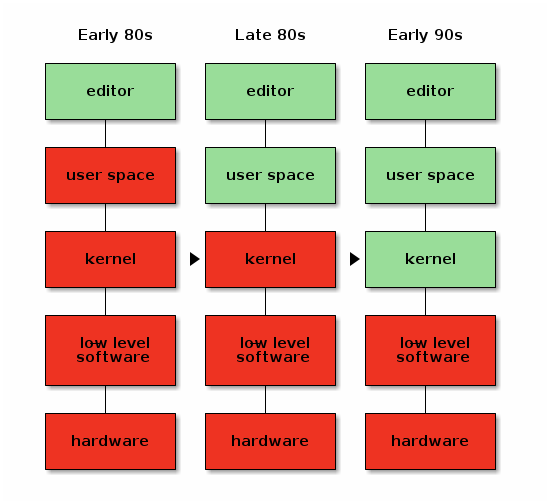
My own suspicion is that the universe is not only queerer than we suppose, but queerer than we can suppose.
-- J.B.S. Haldane (comments for this post will not pass moderation. Use your own blog!)

22 February 2026

Benjamin Mako Hill: What makes online groups vulnerable to governance capture?

Note: I have not published blog posts about my academic papers over the past few years. To ensure that my blog contains a more comprehensive record of my published papers and to surface these for folks who missed them, I will be periodically (re)publishing blog posts about some older published projects. This post is closely based on a previously published post by Zarine Kharazian on the Community Data Science Blog. For nearly a decade, the Croatian language version of Wikipedia was run by a cabal of far-right nationalists who edited articles in ways that promoted fringe political ideas and involved cases of historical revisionism related to the Usta e regime, a fascist movement that ruled the Nazi puppet state called the Independent State of Croatia during World War II. This cabal seized complete control of the encyclopedia s governance, banned and blocked those who disagreed with them, and operated a network of fake accounts to create the appearance of grassroots support for their policies. Thankfully, Croatian Wikipedia appears to be an outlier. Though both the Croatian and Serbian language editions have been documented to contain nationalist bias and historical revisionism, Croatian Wikipedia seems unique among Wikipedia editions in the extent to which its governance institutions were captured by a small group of users.

The situation in Croatian Wikipedia was well documented and is now largely fixed, but we still know very little about why it was taken over, while other language editions seem to have rebuffed similar capture attempts. In a paper published in the Proceedings of the ACM: Human-Computer Interaction (CSCW), Zarine Kharazian, Kate Starbird, and I present an interview-based study that provides an explanation for why Croatian was captured while several other editions facing similar contexts and threats fared better.

Short video presentation of the work given at Wikimania in August 2023.
Based on insights from interviews with 15 participants from both the Croatian and Serbian Wikipedia projects and from the broader Wikimedia movement, we arrived at three propositions that, together, help explain why Croatian Wikipedia succumbed to capture while Serbian Wikipedia did not:
  1. Perceived Value as a Target. Is the project worth expending the effort to capture?
  2. Bureaucratic Openness. How easy is it for contributors outside the core founding team to ascend to local governance positions?
  3. Institutional Formalization. To what degree does the project prefer personalistic, informal forms of organization over formal ones?
The conceptual model from our paper, visualizing possible institutional configurations among Wikipedia projects that affect the risk of governance capture.
We found that both Croatian and Serbian Wikipedias were attractive targets for far-right nationalist capture due to their sizable readership and resonance with national identity. However, we also found that the two projects diverged early in their trajectories in how open they remained to new contributors ascending to local governance positions and in the degree to which they privileged informal relationships over formal rules and processes as the project s organizing principles. Ultimately, Croatian s relative lack of bureaucratic openness and rules constraining administrator behavior created a window of opportunity for a motivated contingent of editors to seize control of the governance mechanisms of the project. Though our empirical setting was Wikipedia, our theoretical model may offer insight into the challenges faced by self-governed online communities more broadly. As interest in decentralized alternatives to Facebook and X (formerly Twitter) grows, communities on these sites will likely face similar threats from motivated actors. Understanding the vulnerabilities inherent in these self-governing systems is crucial to building resilient defenses against threats like disinformation. For more details on our findings, take a look at the published version of our paper.

Citation for the full paper: Kharazian, Zarine, Kate Starbird, and Benjamin Mako Hill. 2024. Governance Capture in a Self-Governing Community: A Qualitative Comparison of the Croatian, Serbian, Bosnian, and Serbo-Croatian Wikipedias. Proceedings of the ACM on Human-Computer Interaction 8 (CSCW1): 61:1-61:26. https://doi.org/10.1145/3637338.

This blog post and the paper it describes are collaborative work by Zarine Kharazian, Benjamin Mako Hill, and Kate Starbird.

Otto Kek l inen: Do AI models still keep getting better, or have they plateaued?

Featured image of post Do AI models still keep getting better, or have they plateaued?The AI hype is based on the assumption that the frontier AI labs are producing better and better foundational models at an accelerating pace. Is that really true, or are people just in sort of a mass psychosis because AI models have become so good at mimicking human behavior that we unconsciously attribute increasing intelligence to them? I decided to conduct a mini-benchmark of my own to find out if the latest and greatest AI models are actually really good or not.
The problem with benchmarks Every time any team releases a new LLM, they boast how well it performs on various industry benchmarks such as Humanity s Last Exam, SWE-Bench and Ai2 ARC or ARC-AGI. An overall leaderboard can be viewed at LLM-stats. This incentivizes teams to optimize for specific benchmarks, which might make them excel on specific tasks while general abilities degrade. Also, the older a benchmark dataset is, the more online material there is discussing the questions and best answers, which in turn increases the chances of newer models trained on more recent web content scoring better. Thus I prefer looking at real-time leaderboards such as the LM Arena leaderboard (or OpenCompass for Chinese models that might be missing from LM Arena). However, even though the LM Arena Elo score is rated by humans in real-time, the benchmark can still be played. For example, Meta reportedly used a special chat-optimized model instead of the actual Llama 4 model when getting scored on the LM Arena. Therefore I trust my own first-hand experience more than the benchmarks for gaining intuition. Intuition however is not a compelling argument in discussions on whether or not new flagship AI models have plateaued. Thus, I decided to devise my own mini-benchmark so that no model could have possibly seen it in its training data or be specifically optimized for it in any way.

My mini-benchmark I crafted 6 questions based on my own experience using various LLMs for several years and having developed some intuition about what kinds of questions LLMs typically struggle with. I conducted the benchmark using the OpenRouter.ai chat playroom with the following state-of-the-art models: OpenRouter.ai is great as it very easy to get responses from multiple models in parallel to a single question. Also it allows to turn off web search to force the models to answer purely based on their embedded knowledge. OpenRouter.ai Chat playroom Common for all the test questions is that they are fairly straightforward and have a clear answer, yet the answer isn t common knowledge or statistically the most obvious one, and instead requires a bit of reasoning to get correct. Some of these questions are also based on myself witnessing a flagship model failing miserably to answer it.

1. Which cities have hosted the Olympics more than just once? This question requires accounting for both summer and winter Olympics, and for Olympics hosted across multiple cities. The variance in responses comes from if the model understands that Beijing should be counted as it has hosted both summer and winter Olympics. Interestingly GPT was the only model to not mention Beijing at all. Some variance also comes from how models account for co-hosted Olympics. For example Cortina should be counted as having hosted the Olympics twice, in 1956 and 2026, but only Claude, Gemini and Kimi pointed this out. Stockholm s 1956 hosting of the equestrian games during the Melbourne Olympics is a special case, which GPT, Gemini and Kimi pointed out in a side note. Some models seem to have old training material, and for example Grok assumes the current year is 2024. All models that accounted for awarded future Olympics (e.g. Los Angeles 2028) marked them clearly as upcoming. Overall I would judge that only GPT and MinMax gave incomplete answers, while all other models replied as the best humans could reasonably have.

2. If EUR/USD continues to slide to 1.5 by mid-2026, what is the likely effect on BMW s stock price by end of 2026? This question requires mapping the currency exchange rate to historic value, dodging the misleading word slide , and reasoning on where the revenue of a company comes from and how a weaker US dollar affects it in multiple ways. I ve frequently witnessed flagship models get it wrong how interest rates and exchange rates work. Apparently the binary choice between up or down is somehow challenging to the internal statistical model in the LLMs on a topic where there are a lot of training material that talk about both things being likely to happen, and choosing between them requires specifically reasoning about the scenario at hand and disregarding general knowledge of the situation. However, this time all the models concluded correctly that a weak dollar would have a negative overall effect on the BMW stock price. Gemini, GLM, Qwen and Kimi also mention the potential hedging effect of BMW s X-series production in South Carolina for worldwide export.

3. What is the Unicode code point for the traffic cone emoji? This was the first question where the the flagship models clearly still struggle in 2026. The trap here is that there is no traffic cone emoji, so an advanced model should simply refuse to give any Unicode numbers at all. Most LLMs however have an urge to give some answer, leading to hallucinations. Also, as the answer has a graphical element to it, the LLM might not understand how the emoji looks in ways that would be obvious to a human, and thus many models claim the construction sign emoji is a traffic cone, which it is not. By far the worst response was from GPT, that simply hallucinates and stops there: OpenAIs GPT-5.2 completely wrong answer to traffic cone emoji question While Gemini and Grok were among the three models not falling into this trap, the response from Claude was exemplary good: Claude Opus 4.6 exemplary good answer to traffic cone emoji question
4. Which languages are the 10 most commonly spoken in the world? For each language, count from 1 to 5. This seemingly simple question can become quite complex when you account for the fact that other languages might also have their own character system, both for words and the numerals (e.g. Arabic /one vs /1), and that numbers might have variations depending on what the thing being counted is (e.g in French object gender un/une), or whether plain numbers and occurrences have their own words (e.g. Russian /odin vs /raz). I ve also witnessed older models frequently mix up on what parts of the reply should be using what language. For a human this question is trivial, assuming they know the language. For LLMs it is surprisingly challenging. Grok and MinMax only gave a list of the most popular languages and stopped there without showing any words in the languages. Qwen got a bit further by trying to list numbers in each language, but the lists were only the numbers 1 to 5: Qwen3.5 Plus count to five in top 10 languages I have seen Grok do something similar before, which in fact inspired me to include this question in my mini-benchmark. GPT got a bit further, but for Hindi, Arabic and Bengali it listed the numerals in local script, not the number words. Gemini, GLM and Kimi gave a complete and correct answer as a list, while the absolute best answer and presentation was by Claude, that gave the table below:

Claude Opus 4.6 10 Most Commonly Spoken Languages (by Total Speakers)
# Language 1 2 3 4 5
1 English One Two Three Four Five
2 Mandarin Chinese (y ) ( r) (s n) (s ) (w )
3 Hindi (ek) (do) (t n) (ch r) (p ch)
4 Spanish Uno Dos Tres Cuatro Cinco
5 French Un Deux Trois Quatre Cinq
6 Arabic (w id) (ithn n) (thal tha) (arba a) (khamsa)
7 Bengali (ek) (dui) (tin) (ch r) (p ch)
8 Portuguese Um Dois Tr s Quatro Cinco
9 Russian (odin) (dva) (tri) (chetyre) (pyat')
10 Japanese (ichi) (ni) (san) (shi) (go)
Note: Rankings are based on estimated total speakers (native + non-native). Rankings can vary depending on the source and methodology used.

5. Count the number of drone launch pads in the picture. Together with the question, I uploaded this picture: Drone pad picture attached to question above A human can easily count that there are 10 rows and 30+ columns in the grid, but because the picture resolution isn t good enough, the exact number of columns can t be counted, and the answer should be that there are at least 300 launch pads in the picture. GPT and Grok both guessed the count is zero. Instead of hallucinating some number they say zero, but it would have been better to not give any number at all, and just state that they are unable to perform the task. Gemini gave as its answer 101 , which is quite odd, but reading the reasoning section, it seems to have tried counting items in the image without reasoning much about what it is actually counting and that there is clearly a grid that can make the counting much easier. Both Qwen and Kimi state they can see four parallel structures, but are unable to count drone launch pads. The absolutely best answer was given by Claude, which counted 10-12 rows and 30-40+ columns, and concluded that there must be 300-500 drone launch pads. Very close to best human level - impressive! This question applied only to multi-modal models that can see images, so GLM and MinMax could not give any response.

6. Explain why I am getting the error below, and what is the best way to fix it? Together with the question above, I gave this code block:
$ SH_SCRIPTS="$(mktemp; grep -Irnw debian/ -e '^#!.*/sh'   sort -u   cut -d ':' -f 1   true)"
$ shellcheck -x --enable=all --shell=sh "$SH_SCRIPTS"
/tmp/tmp.xQOpI5Nljx
debian/tests/integration-tests: /tmp/tmp.xQOpI5Nljx
debian/tests/integration-tests: openBinaryFile: does not exist (No such file or directory)
Older models would easily be misled by the last error message thinking that a file went missing, and focus on suggesting changes to the complex-looking first line. In reality the error is simply caused by having the quotes around the $SH_SCRIPTS, resulting in the entire multi-line string being passed as a single argument to shellcheck. So instead of receiving two separate file paths, shellcheck tries to open one file literally named /tmp/tmp.xQOpI5Nljx\ndebian/tests/integration-tests. Incorrect argument expansion is fairly easy for an experienced human programmer to notice, but tricky for an LLM. Indeed, Grok, MinMax, and Qwen fell for this trap and focused on the mktemp, assuming it somehow fails to create a file. Interestingly GLM fails to produce an answer at all, as the reasoning step seems to be looping, thinking too much about the missing file, but not understanding why it would be missing when there is nothing wrong with how mktemp is executed. Claude, Gemini, and Kimi immediately spot the real root cause of passing the variable quoted and suggested correct fixes that involve either removing the quotes, or using Bash arrays or xargs in a way that makes the whole command also handle correctly filenames with spaces in them.

Conclusion
Model Sports Economics Emoji Languages Visual Shell Score
Claude Opus 4.6 6/6
GPT-5.2 ~ 2.5/6
Grok 4.1 3/6
Gemini 3.1 Pro 5/6
GLM 5 ? N/A 3/5
MinMax M2.5 N/A 1/5
Qwen3.5 Plus ~ 2.5/6
Kimi K2.5 4/6
Obviously, my mini-benchmark only had 6 questions, and I ran it only once. This was obviously not scientifically rigorous. However it was systematic enough to trump just a mere feeling. The main finding for me personally is that Claude Opus 4.6, the flagship model by Anthropic, seems to give great answers consistently. The answers are not only correct, but also well scoped giving enough information to cover everything that seems relevant, without blurping unnecessary filler. I used Claude extensively in 2023-2024 when it was the main model available at my day work, but for the past year I had been using other models that I felt were better at the time. Now Claude seems to be the best-of-the-best again, with Gemini and Kimi as close follow-ups. Comparing their pricing at OpenRouter.ai the Kimi K2.5 price of $0.6 / million tokens is almost 90% cheaper than the Claude Opus 4.6 s $5.0 / million tokens suggests that Kimi K2.5 offers the best price-per-performance ratio. Claude might be cheaper with a monthly subscription directly from Anthropic, potentially narrowing the price gap. Overall I do feel that Anthropic, Google and Moonshot.ai have been pushing the envelope with their latest models in a way that one can t really claim that AI models have plateaued. In fact, one could claim that at least Claude has now climbed over the hill of AI slop and consistently produces valuable results. If and when AI usage expands from here, we might actually not drown in AI slop as chances of accidentally crappy results decrease. This makes me positive about the future. I am also really happy to see that there wasn t just one model crushing everybody else, but that there are at least three models doing very well. As an open source enthusiast I am particularly glad to see that Moonshot.ai s Kimi K2.5 is published with an open license. Given the hardware, anyone can run it on their own. OpenRouter.ai currently lists 9 independent providers alongside Moonshot.ai itself, showcasing the potential of open-weight models in practice. If the pattern holds and flagship models continue improving at this pace we might look back at 2026 as the year AI stopped feeling like a call center associate and started to resemble a scientific researcher. While new models become available we need to keep testing, keep questioning, and keep our expectations grounded in actual performance rather than press releases. Thanks to OpenRouter.ai for providing a great service that makes testing various models incredibly easy!

21 February 2026

Vasudev Kamath: Learning Notes: Debsecan MCP Server

Since Generative AI is currently the most popular topic, I wanted to get my hands dirty and learn something new. I was learning about the Model Context Protocol at the time and wanted to apply it to build something simple.
Idea On Debian systems, we use debsecan to find vulnerabilities. However, the tool currently provides a simple list of vulnerabilities and packages with no indication of the system's security posture meaning no criticality information is exposed and no executive summary is provided regarding what needs to be fixed. Of course, one can simply run the following to install existing fixes and be done with it:
apt-get install $(debsecan --suite sid --format packages --only-fixed)
But this is not how things work in corporate environments; you need to provide a report showing the system's previous state and the actions taken to bring it to a safe state. It is all about metrics and reports. My goal was to use debsecan to generate a list of vulnerabilities, find more detailed information on them, and prioritize them as critical, high, medium, or low. By providing this information to an AI, I could ask it to generate an executive summary report detailing what needs to be addressed immediately and the overall security posture of the system.
Initial Take My initial thought was to use an existing LLM, either self-hosted or a cloud-based LLM like Gemini (which provides an API with generous limits via AI Studio). I designed functions to output the list of vulnerabilities on the system and provide detailed information on each. The idea was to use these as "tools" for the LLM.
Learnings
  1. I learned about open-source LLMs using Ollama, which allows you to download and use models on your laptop.
  2. I used Llama 3.1, Llama 3.2, and Granite 4 on my laptop without a GPU. I managed to run my experiments, even though they were time-consuming and occasionally caused my laptop to crash.
  3. I learned about Pydantic and how to use it to parse custom JSON schemas with minimal effort.
  4. I learned about osv.dev, an open-source initiative by Google that aggregates vulnerability information from various sources and provides data in a well-documented JSON schema format.
  5. I learned about the EPSS (Exploit Prediction Scoring System) and how it is used alongside static CVSS scoring to detect truly critical vulnerabilities. The EPSS score provides an idea of the probability of a vulnerability being exploited in the wild based on actual real-world attacks.
These experiments led to a collection of notebooks. One key takeaway was that when defining tools, I cannot simply output massive amounts of text because it consumes tokens and increases costs for paid models (though it is fine for local models using your own hardware and energy). Self-hosted models require significant prompting to produce proper output, which helped me understand the real-world application of prompt engineering.
Change of Plans Despite extensive experimentation, I felt I was nowhere close to a full implementation. While using a Gemini learning tool to study MCP, it suddenly occurred to me: why not write the entire thing as an MCP server? This would save me from implementing the agent side and allow me to hook it into any IDE-based LLM.
Design This MCP server is primarily a mix of a "tool" (which executes on the server machine to identify installed packages and their vulnerabilities) and a "resource" (which exposes read-only information for a specific CVE ID). The MCP exposes two tools:
  1. List Vulnerabilities: This tool identifies vulnerabilities in the packages installed on the system, categorizes them using CVE and EPSS scores, and provides a dictionary of critical, high, medium, and low vulnerabilities.
  2. Research Vulnerabilities: Based on the user prompt, the LLM can identify relevant vulnerabilities and pass them to this function to retrieve details such as whether a fix is available, the fixed version, and criticality.
Vibe Coding "Vibe coding" is the latest trend, with many claiming that software engineering jobs are a thing of the past. Without going into too much detail, I decided to give it a try. While this is not my first "vibe coded" project (I have done this previously at work using corporate tools), it is my first attempt to vibe code a hobby/learning project. I chose Antigravity because it seemed to be the only editor providing a sufficient amount of free tokens. For every vibe coding project, I spend time thinking about the barebones skeleton: the modules, function return values, and data structures. This allows me to maintain control over the LLM-generated code so it doesn't become overly complicated or incomprehensible. As a first step, I wrote down my initial design in a requirements document. In that document, I explicitly called for using debsecan as the model for various components. Additionally, I asked the AI to reference my specific code for the EPSS logic. The reasons were:
  1. debsecan already solves the core problem; I am simply rebuilding it. debsecan uses a single file generated by the Debian Security team containing all necessary information, which prevents us from needing multiple external sources.
  2. This provides the flexibility to categorize vulnerabilities within the listing tool itself since all required information is readily available, unlike my original notebook-based design.
I initially used Gemini 3 Flash as the model because I was concerned about exceeding my free limits.
Hiccups Although it initially seemed successful, I soon noticed discrepancies between the local debsecan outputs and the outputs generated by the tools. I asked the AI to fix this, but after two attempts, it still could not match the outputs. I realized it was writing its own version-comparison logic and failing significantly. Finally, I instructed it to depend entirely on the python-apt module for version comparison; since it is not on PyPI, I asked it to pull directly from the Git source. This solved some issues, but the problem persisted. By then, my weekly quota was exhausted, and I stopped debugging. A week later, I resumed debugging with the Claude 3.5 Sonnet model. Within 20-25 minutes, it found the fix, which involved four lines of changes in the parsing logic. However, I ran out of limits again before I could proceed further. In the requirements, I specified that the list vulnerabilities tool should only provide a dictionary of CVE IDs divided by severity. However, the AI instead provided full text for all vulnerability details, resulting in excessive data including negligible vulnerabilities being sent to the LLM. Consequently, it never called the research vulnerabilities tool. Since I had run out of limits, I manually fixed this in a follow-up commit.
How to Use I have published the current work in the debsecan-mcp repository. I have used the same license as the original debsecan. I am not entirely sure how to interpret licenses for vibe-coded projects, but here we are. To use this, you need to install the tool in a virtual environment and configure your IDE to use the MCP. Here is how I set it up for Visual Studio Code:
  1. Follow the guide from the VS Code documentation regarding adding an MCP server.
  2. My global mcp.json looks like this:
 
  "servers":  
      "debsecan-mcp":  
          "command": "uv",
              "args": [
                  "--directory",
                  "/home/vasudev/Documents/personal/FOSS/debsecan-mcp/debsecan-mcp",
                  "run",
                  "debsecan-mcp"
              ]
           
   ,
  "inputs": []
 
  1. I am running it directly from my local codebase using a virtualenv created with uv. You may need to tweak the path based on your installation.
  2. To use the MCP server in the Copilot chat window, reference it using #debsecan-mcp. The LLM will then use the server for the query.
  3. Use a prompt like: "Give an executive summary of the system security status and immediate actions to be taken."
  4. You can observe the LLM using list_vulnerabilities followed by research_cves. Because the first tool only provides CVE IDs based on severity, the LLM is smart enough to research only high and critical vulnerabilities, thereby saving tokens.
What's Next? This MCP is not yet perfect and has the following issues:
  1. The list_vulnerabilities dictionary contains duplicate CVE IDs because the code used a list instead of a set. While the LLM is smart enough to deduplicate these, it still costs extra tokens.
  2. Because I initially modeled this on debsecan, it uses a raw method for parsing /var/lib/dpkg/status instead of python-apt. I am considering switching to python-apt to reduce maintenance overhead.
  3. Interestingly, the AI did not add a single unit test, which is disappointing. I will add these once my limits are restored.
  4. I need to create a cleaner README with usage instructions.
  5. I need to determine if the MCP can be used via HTTP as well as stdio.
Conclusion Vibe coding is interesting, but things can get out of hand if not managed properly. Even with a good process, code must be reviewed and tested; you cannot blindly trust an AI to handle everything. Even if it adds tests, you must validate them, or you are doomed!

Thomas Goirand: Seamlessly upgrading a production OpenStack cluster in 4 hours : with 2k lines shell script


tl;dr: To the question: what does it take to upgrade OpenStack , my personal answer is: less than 2K lines of dash script. I ll here describe its internals, and why I believe it is the correct solution. Why writing this blog post During FOSSDEM 2024, I was asked how to you handle upgrades . I answered with a big smile and a short with a very small shell script as I couldn t explain in 2 minutes how it was done. Just saying it is great this way doesn t help giving readers enough hints to be trusted. Why and how did I do it the right way ? This blog post is an attempt to reply better to this question more deeply. Upgrading OpenStack in production I wrote this script maybe a 2 or 3 years ago. Though I m only blogging about it today, because I did such an upgrade in a public cloud in production last Thuesday evening (ie: the first region of the Infomaniak public cloud). I d say the cluster is moderately large (as of today: about 8K+ VMs running, 83 compute nodes, 12 network nodes, for a total of 10880 physical CPU cores and 125 TB of RAM if I only count the compute servers). It took only 4 hours to do the upgrade (though I already wore some more code to speed this up for the next time ). It went super smooth without a glitch. I mostly just sat, reading the script output and went to bed once it finished running. The next day, all my colleagues at Infomaniak were nicely congratulating me that it went that smooth (a big thanks to all of you who did). I couldn t dream of an upgrade that smooth! :) Still not impressed? Boring read? Yeah let s dive into more technical details. Intention behind the implementation My script isn t perfect. I wont ever pretend it is. But at least, it does minimize down time of every OpenStack service. It also is a by the book implementation of what s written in the OpenStack doc, following every upstream advice. As a result, it is fully seamless for some OpenStack services, and as HA as OpenStack can be for others. The upgrade process is of course idempotent and can be re-run in case of failure. Here s why. General idea My upgrade script does thing in a certain order, respecting what is documented about upgrades in the OpenStack documentation. It basically does: Installing dependencies The first thing the upgrade script does is: For this last thing, a static list of all needed dependency upgrade is maintained between each release of OpenStack, and for each type of nodes. Then for all packages in this list, the script checks with dpkg-query that the package is really installed, and with apt-cache policy that it really is going to be upgraded (Maybe there s an easier way to do this?). This way, no package is marked as manually installed by mistake during the upgrade process. This ensure that apt-get purge autoremove really does what it should, and that the script is really idempotent. The idea then, is that once all dependencies are installed, upgrading and restarting leaf packages (ie: OpenStack services like Nova, Glance, Cinder, etc.) is very fast, because the apt-get command doesn t need to install all dependencies. So at this point, doing apt-get install python3-cinder for example (which will also, thanks to dependencies, upgrade cinder-api and cinder-scheduler, if it s in a controller node) only takes a few seconds. This principle applies to all nodes (controller nodes, network nodes, compute nodes, etc.), which helps a lot speeding-up the upgrade and reduce unavailability. hapc At its core, the oci-cluster-upgrade-openstack-release script uses haproxy-cmd (ie: /usr/bin/hapc) to drain each API server to-be-upgraded from haproxy. Hapc is a simple Python wrapper around the haproxy admin socket: it sends command to it with an easy to understand CLI. So it is possible to reliably upgrade one API service only after it s drained away. Draining means one just wait for the last query to finish and the client to disconnect from http before giving the backend server some more queries. If you do not know hapc / haproxy-cmd, I recommend trying it: it s going to be hard for you to stop using it once you tested it. Its bash-completion script makes it VERY easy to use, and it is helpful in production. But not only: it is also nice to have when writing this type of upgrade script. Let s dive into haproxy-cmd. Example on how to use haproxy-cmd Let me show you. First, ssh one of the 3 controller and search where the virtual IP (VIP) is located with crm resource locate openstack-api-vip or with a (more simple) crm status . Let s ssh that server who got the VIP, and now, let s drain it away from haproxy. $ hapc list-backends
$ hapc drain-server --backend glancebe --server cl1-controller-1.infomaniak.ch --verbose --wait --timeout 50
$ apt-get install glance-api
$ hapc enable-server --backend glancebe --server cl1-controller-1.infomaniak.ch
Upgrading the control plane My upgrade script leverages hapc just like above. For each OpenStack project, it s done in this order on the first node holding the VIP: Starting at [1], the risk is that other nodes may have a new version of the database schema, but an old version of the code that isn t compatible with it. But it doesn t take long, because the next step is to take care of the other (usually 2) nodes of the OpenStack control plane: So while there s technically zero down time, still some issues between [1] and [2] above may happen because of the new DB schema and the old code (both for API and other services) are up and running at the same time. It is however supposed to be rare cases (some OpenStack project don t even have db change between some OpenStack releases, and it often continues to work on most queries with the upgraded db), and the cluster will be like that for a very short time, so that s fine, and better than an full API down time. Satellite services Then there s satellite services, that needs to be upgraded. Like Neutron, Nova, Cinder. Nova is the least offender as it has all the code to rewrite Json object schema on-the-fly so that it continues to work during an upgrade. Though it s a known issue that Cinder doesn t have the feature (last time I checked), and it s also probably the same for Neutron (maybe recent-ish versions of OpenStack do use oslo.versionnedobjects ?). Anyways, upgrade on these nodes are done just right after the control plane for each service. Parallelism and upgrade timings As we re dealing with potentially hundreds of nodes per cluster, a lot of operations are performed in parallel. I choose to simply use the & shell thingy with some wait shell stuff so that not too many jobs are done in parallel. For example, when disabling SSH on all nodes, this is done 24 nodes at a time. Which is fine. And the number of nodes is all depending on the type of thing that s being done. For example, while it s perfectly OK to disable puppet on 24 nodes at the same time, but it is not OK to do that with Neutron services. In fact, each time a Neutron agent is restarted, the script explicitly waits for 30 seconds. This conveniently avoids a hailstorm of messages in RabbitMQ, and neutron-rpc-server to become too busy. All of these waiting are necessary, and this is one of the reasons why can sometimes take that long to upgrade a (moderately big) cluster. Not using config management tooling Some of my colleagues would have prefer that I used something like Ansible. Whever, there s no reason to use such tool if the idea is just to perform some shell script commands on every servers. It is a way more efficient (in terms of programming) to just use bash / dash to do the work. And if you want my point of view about Ansible: using yaml for doing such programming would be crasy. Yaml is simply not adapted for a job where if, case, and loops are needed. I am well aware that Ansible has workarounds and it could be done, but it wasn t my choice.

20 February 2026

Reproducible Builds (diffoscope): diffoscope 313 released

The diffoscope maintainers are pleased to announce the release of diffoscope version 313. This version includes the following changes:
[ Chris Lamb ]
* Don't fail the entire pipeline if deploying to PyPI automatically fails.
[ Vagrant Cascadian ]
* Update external tool reference for 7z on guix.
You find out more by visiting the project homepage.

18 February 2026

Antoine Beaupr : net-tools to iproute cheat sheet

This is also known as: "ifconfig is not installed by default anymore, how do I do this only with the ip command?" I have been slowly training my brain to use the new commands but I sometimes forget some. So, here's a couple of equivalence from the old package to net-tools the new iproute2, about 10 years late:
net-tools iproute2 shorter form what it does
arp -an ip neighbor ip n
ifconfig ip address ip a show current IP address
ifconfig ip link ip l show link stats (up/down/packet counts)
route ip route ip r show or modify the routing table
route add default GATEWAY ip route add default via GATEWAY ip r a default via GATEWAY add default route to GATEWAY
route del ROUTE ip route del ROUTE ip r d ROUTE remove ROUTE (e.g. default)
netstat -anpe ss --all --numeric --processes --extended ss -anpe list listening processes, less pretty
Note that I wrote a whole article about the latter.

Another trick Also note that I often alias ip to ip -br -c as it provides a much prettier output. Compare, before:
anarcat@angela:~> ip a
1: lo: <LOOPBACK,UP,LOWER_UP> mtu 65536 qdisc noqueue state UNKNOWN group default qlen 1000
    link/loopback 00:00:00:00:00:00 brd 00:00:00:00:00:00
    inet 127.0.0.1/8 scope host lo
       valid_lft forever preferred_lft forever
    inet6 ::1/128 scope host noprefixroute 
       valid_lft forever preferred_lft forever
2: wlan0: <NO-CARRIER,BROADCAST,MULTICAST,UP> mtu 1500 qdisc noqueue state DOWN group default qlen 1000
    link/ether xx:xx:xx:xx:xx:xx brd ff:ff:ff:ff:ff:ff permaddr xx:xx:xx:xx:xx:xx
    altname wlp166s0
    altname wlx8cf8c57333c7
4: virbr0: <NO-CARRIER,BROADCAST,MULTICAST,UP> mtu 1500 qdisc noqueue state DOWN group default qlen 1000
    link/ether xx:xx:xx:xx:xx:xx brd ff:ff:ff:ff:ff:ff
    inet 192.168.122.1/24 brd 192.168.122.255 scope global virbr0
       valid_lft forever preferred_lft forever
20: eth0: <BROADCAST,MULTICAST,UP,LOWER_UP> mtu 1500 qdisc fq_codel state UP group default qlen 1000
    link/ether xx:xx:xx:xx:xx:xx brd ff:ff:ff:ff:ff:ff
    inet 192.168.0.108/24 brd 192.168.0.255 scope global dynamic noprefixroute eth0
       valid_lft 40699sec preferred_lft 40699sec
After:
anarcat@angela:~> ip -br -c a
lo               UNKNOWN        127.0.0.1/8 ::1/128 
wlan0            DOWN           
virbr0           DOWN           192.168.122.1/24 
eth0             UP             192.168.0.108/24 
I don't even need to redact MAC addresses! It also affects the display of the other commands, which look similarly neat. Also imagine pretty colors above. Finally, I don't have a cheat sheet for iw vs iwconfig (from wireless-tools) yet. I just use NetworkManager now and rarely have to mess with wireless interfaces directly.

Background and history For context, there are traditionally two ways of configuring the network in Linux:
  • the old way, with commands like ifconfig, arp, route and netstat, those are part of the net-tools package
  • the new way, mostly (but not entirely!) wrapped in a single ip command, that is the iproute2 package
It seems like the latter was made "important" in Debian in 2008, which means every release since Debian 5 "lenny" (!) has featured the ip command. The former net-tools package was demoted in December 2016 which means every release since Debian 9 "stretch" ships without an ifconfig command unless explicitly requested. Note that this was mentioned in the release notes in a similar (but, IMHO, less useful) table. (Technically, the net-tools Debian package source still indicates it is Priority: important but that's a bug I have just filed.) Finally, and perhaps more importantly, the name iproute is hilarious if you are a bilingual french speaker: it can be read as "I proute" which can be interpreted as "I fart" as "prout!" is the sound a fart makes. The fact that it's called iproute2 makes it only more hilarious.

16 February 2026

Philipp Kern: What is happening with this "connection verification"?

You might see a verification screen pop up on more and more Debian web properties. Unfortunately the AI world of today is meeting web hosts that use Perl CGIs and are not built as multi-tiered scalable serving systems. The issues have been at three layers:
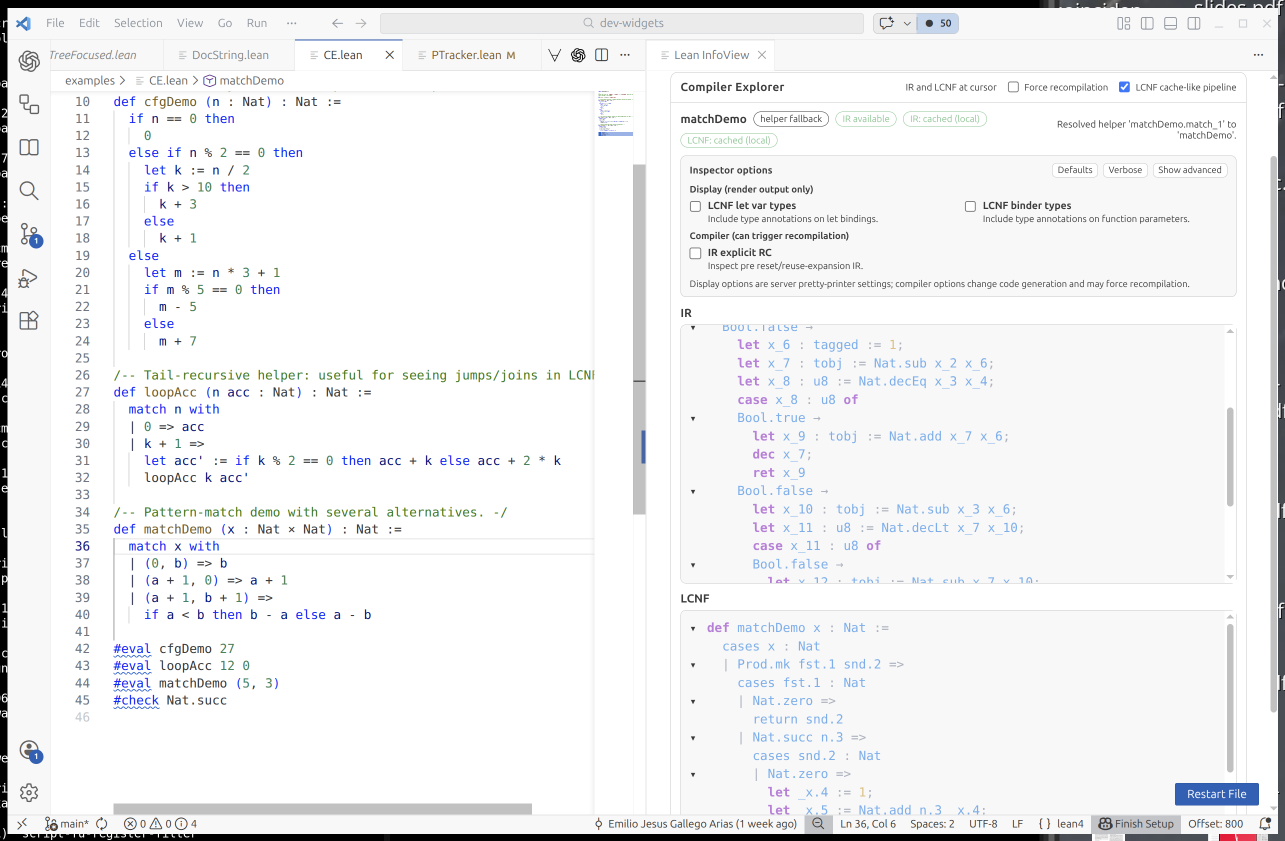
  1. Apache's serving capacity runs full - with no threads left to serve requests. This means that your connection will sit around for a long time, not getting accepted. In theory this can be configured, but that would require requests to be handled in time.
  2. Startup costs of request handlers are too high, because we spawn a process for every request. This currently affects the BTS and dgit's browse interface. packages.debian.org has been fixed, which increased scalability sufficiently.
  3. Requests themselves are too expensive to be served quickly - think git blame without caching.

Optimally we would go and solve some scalability issues with the services, however there is also a question of how much we want to be able to serve - as AI scraper demand is just a steady stream of requests that are not shown to humans.

How is it implemented?

DSA has now stood up some VMs with Varnish for proxying. Incoming TLS is provided by hitch, and TLS "on-loading" is done using haproxy. That way TLS goes in and TLS goes out. While Varnish does cache, if the content is cachable (e.g. does not depend on cookies) - that is not the primary reason for using it: It can be used for flexible query and response rewriting.

If no cookie with a proof of work is provided, the user is redirected to a challenge page that does some webcrypto in Javascript - because that looked similar to what other projects do (e.g. haphash that originally inspired the solution). However so far it looks like scrapers generally do not run with Javascript enabled, so this whole crypto proof of work business could probably be replaced with just a Javascript-based redirect. The existing solution also has big (security) holes in it. And, as we found out, Firefox is slower at webcrypto than Chrome. I have recently reduced the complexity, so you should notice it blocking you significantly less.

Once you have the cookie, you can keep accessing the site for as long as the cookie is valid. Please do not make any assumptions about the cookies, or you will be broken in the future.For legitimate scrapers that obey robots.txt, there is now an automatically generated IP allowlist in place (thanks, Marco d'Itri). Turns out that the search engines do not actually run Javascript either and then loudly complain about the redirect to the challenge page. Other bots are generally exempt.

Conclusion I hope that right now we found sort of the sweet spot where the admins can stop spending human time on updating firewall rules and the services are generally available, reasonably fast, and still indexed. In case you see problems or run into a block with your own (legitimate) bots, please let me know.

Antoine Beaupr : Kernel-only network configuration on Linux

What if I told you there is a way to configure the network on any Linux server that:
  1. works across all distributions
  2. doesn't require any software installed apart from the kernel and a boot loader (no systemd-networkd, ifupdown, NetworkManager, nothing)
  3. is backwards compatible all the way back to Linux 2.0, in 1996
It has literally 8 different caveats on top of that, but is still totally worth your time.

Known options in Debian People following Debian development might have noticed there are now four ways of configuring the network Debian system. At least that is what the Debian wiki claims, namely: At this point, I feel ifupdown is on its way out, possibly replaced by systemd-networkd. NetworkManager already manages most desktop configurations.

A "new" network configuration system The method is this:
  • ip= on the Linux kernel command line: for servers with a single IPv4 or IPv6 address, no software required other than the kernel and a boot loader (since 2002 or older)
So by "new" I mean "new to me". This option is really old. The nfsroot.txt where it is documented predates the git import of the Linux kernel: it's part of the 2005 git import of 2.6.12-rc2. That's already 20+ years old already. The oldest trace I found is in this 2002 commit, which imports the whole file at once, but the option might goes back as far as 1996-1997, if the copyright on the file is correct and the option was present back then.

What are you doing. The trick is to add an ip= parameter to the kernel's command-line. The syntax, as mentioned above, is in nfsroot.txt and looks like this:
ip=<client-ip>:<server-ip>:<gw-ip>:<netmask>:<hostname>:<device>:<autoconf>:<dns0-ip>:<dns1-ip>:<ntp0-ip>
Most settings are pretty self-explanatory, if you ignore the useless ones:
  • <client-ip>: IP address of the server
  • <gw-ip>: address of the gateway
  • <netmask>: netmask, in quad notation
  • <device>: interface name, if multiple available
  • <autoconf>: how to configure the interface, namely:
    • off or none: no autoconfiguration (static)
    • on or any: use any protocol (default)
    • dhcp, essentially like on for all intents and purposes
  • <dns0-ip>, <dns1-ip>: IP address of primary and secondary name servers, exported to /proc/net/pnp, can by symlinked to /etc/resolv.conf
We're ignoring the options:
  • <server-ip>: IP address of the NFS server, exported to /proc/net/pnp
  • <hostnname>: Name of the client, typically sent over the DHCP requests, which may lead to a DNS record to be created in some networks
  • <ntp0-ip>: exported to /proc/net/ipconfig/ntp_servers, unused by the kernel
Note that the Red Hat manual has a different opinion:
ip=[<server-id>]:<gateway-IP-number>:<netmask>:<client-hostname>:inteface:[dhcp dhcp6 auto6 on any none off]
It's essentially the same (although server-id is weird), and the autoconf variable has other settings, so that's a bit odd.

Examples For example, this command-line setting:
ip=192.0.2.42::192.0.2.1:255.255.255.0:::off
... will set the IP address to 192.0.2.42/24 and the gateway to 192.0.2.1. This will properly guess the network interface if there's a single one. A DHCP only configuration will look like this:
ip=::::::dhcp
Of course, you don't want to type this by hand every time you boot the machine. That wouldn't work. You need to configure the kernel commandline, and that depends on your boot loader.

GRUB With GRUB, you need to edit (on Debian), the file /etc/default/grub (ugh) and find a line like:
GRUB_CMDLINE_LINUX=
and change it to:
GRUB_CMDLINE_LINUX=ip=::::::dhcp

systemd-boot and UKI setups For systemd-boot UKI setups, it's simpler: just add the setting to the /etc/kernel/cmdline file. Don't forget to include anything that's non-default from /proc/cmdline. This assumes that is the Cmdline=@ setting in /etc/kernel/uki.conf. See 2025-08-20-luks-ukify-conversion for my minimal documentation on this.

Other systems This is perhaps where this is much less portable than it might first look, because of course each distribution has its own way of configuring those options. Here are some that I know of:
  • Arch (11 options, mostly /etc/default/grub, /boot/loader/entries/arch.conf for systemd-boot or /etc/kernel/cmdline for UKI)
  • Fedora (mostly /etc/default/grub, may be more RHEL mentions grubby, possibly some systemd-boot things here as well)
  • Gentoo (5 options, mostly /etc/default/grub, /efi/loader/entries/gentoo-sources-kernel.conf for systemd-boot, or /etc/kernel/install.d/95-uki-with-custom-opts.install)
It's interesting that /etc/default/grub is consistent across all distributions above, while the systemd-boot setups are all over the place (except for the UKI case), while I would have expected those be more standard than GRUB.

dropbear-initramfs If dropbear-initramfs is setup, it already requires you to have such a configuration, and it might not work out of the box. This is because, by default, it disables the interfaces configured in the kernel after completing its tasks (typically unlocking the encrypted disks). To fix this, you need to disable that "feature":
IFDOWN="none"
This will keep dropbear-initramfs from disabling the configured interface.

Why? Traditionally, I've always setup my servers with ifupdown on servers and NetworkManager on laptops, because that's essentially the default. But on some machines, I've started using systemd-networkd because ifupdown has ... issues, particularly with reloading network configurations. ifupdown is a old hack, feels like legacy, and is Debian-specific. Not excited about configuring another service, I figured I would try something else: just configure the network at boot, through the kernel command-line. I was already doing such configurations for dropbear-initramfs (see this documentation), which requires the network the be up for unlocking the full-disk encryption keys. So in a sense, this is a "Don't Repeat Yourself" solution.

Caveats Also known as: "wait, that works?" Yes, it does! That said...
  1. This is useful for servers where the network configuration will not change after boot. Of course, this won't work on laptops or any mobile device.
  2. This only works for configuring a single, simple, interface. You can't configure multiple interfaces, WiFi, bridges, VLAN, bonding, etc.
  3. It does support IPv6 and feels like the best way to configure IPv6 hosts: true zero configuration.
  4. It likely does not work with a dual-stack IPv4/IPv6 static configuration. It might work with a dynamic dual stack configuration, but I doubt it.
  5. I don't know what happens when a DHCP lease expires. No daemon seems to be running so I assume leases are not renewed, so this is more useful for static configurations, which includes server-side reserved fixed IP addresses. (A non-renewed lease risks getting reallocated to another machine, which would cause an addressing conflict.)
  6. It will not automatically reconfigure the interface on link changes, but ifupdown does not either.
  7. It will not write /etc/resolv.conf for you but the dns0-ip and dns1-ip do end up in /proc/net/pnp which has a compatible syntax, so a common configuration is:
    ln -s /proc/net/pnp /etc/resolv.conf
    
  8. I have not really tested this at scale: only a single, test server at home.
Yes, that's a lot of caveats, but it happens to cover a lot of machines for me, and it works surprisingly well. My main doubts are about long-term DHCP behaviour, but I don't see why that would be a problem with a statically defined lease.

Cleanup Once you have this configuration, you don't need any "user" level network system, so you can get rid of everything:
apt purge systemd-networkd ifupdown network-manager netplan.io
Note that ifupdown (and probably others) leave stray files in (e.g.) /etc/network which you might want to cleanup, or keep in case all this fails and I have put you in utter misery. Configuration files for other packages might also be left behind, I haven't tested this, no warranty.

Credits This whole idea came from the A/I folks (not to be confused with AI) who have been doing this forever, thanks!

Next.

Previous.