Search Results: "Petter Reinholdtsen"

17 October 2014

Petter Reinholdtsen: Debian Jessie, PXE and automatic firmware installation

When PXE installing laptops with Debian, I often run into the problem that the WiFi card require some firmware to work properly. And it has been a pain to fix this using preseeding in Debian. Normally something more is needed. But thanks to my isenkram package and its recent tasksel extension, it has now become easy to do this using simple preseeding. The isenkram-cli package provide tasksel tasks which will install firmware for the hardware found in the machine (actually, requested by the kernel modules for the hardware). (It can also install user space programs supporting the hardware detected, but that is not the focus of this story.) To get this working in the default installation, two preeseding values are needed. First, the isenkram-cli package must be installed into the target chroot (aka the hard drive) before tasksel is executed in the pkgsel step of the debian-installer system. This is done by preseeding the base-installer/includes debconf value to include the isenkram-cli package. The package name is next passed to debootstrap for installation. With the isenkram-cli package in place, tasksel will automatically use the isenkram tasks to detect hardware specific packages for the machine being installed and install them, because isenkram-cli contain tasksel tasks. Second, one need to enable the non-free APT repository, because most firmware unfortunately is non-free. This is done by preseeding the apt-mirror-setup step. This is unfortunate, but for a lot of hardware it is the only option in Debian. The end result is two lines needed in your preseeding file to get firmware installed automatically by the installer:
base-installer base-installer/includes string isenkram-cli
apt-mirror-setup apt-setup/non-free boolean true
The current version of isenkram-cli in testing/jessie will install both firmware and user space packages when using this method. It also do not work well, so use version 0.15 or later. Installing both firmware and user space packages might give you a bit more than you want, so I decided to split the tasksel task in two, one for firmware and one for user space programs. The firmware task is enabled by default, while the one for user space programs is not. This split is implemented in the package currently in unstable. If you decide to give this a go, please let me know (via email) how this recipe work for you. :) So, I bet you are wondering, how can this work. First and foremost, it work because tasksel is modular, and driven by whatever files it find in /usr/lib/tasksel/ and /usr/share/tasksel/. So the isenkram-cli package place two files for tasksel to find. First there is the task description file (/usr/share/tasksel/descs/isenkram.desc):
Task: isenkram-packages
Section: hardware
Description: Hardware specific packages (autodetected by isenkram)
 Based on the detected hardware various hardware specific packages are
 proposed.
Test-new-install: show show
Relevance: 8
Packages: for-current-hardware
Task: isenkram-firmware
Section: hardware
Description: Hardware specific firmware packages (autodetected by isenkram)
 Based on the detected hardware various hardware specific firmware
 packages are proposed.
Test-new-install: mark show
Relevance: 8
Packages: for-current-hardware-firmware
The key parts are Test-new-install which indicate how the task should be handled and the Packages line referencing to a script in /usr/lib/tasksel/packages/. The scripts use other scripts to get a list of packages to install. The for-current-hardware-firmware script look like this to list relevant firmware for the machine:
#!/bin/sh
#
PATH=/usr/sbin:$PATH
export PATH
isenkram-autoinstall-firmware -l
With those two pieces in place, the firmware is installed by tasksel during the normal d-i run. :) If you want to test what tasksel will install when isenkram-cli is installed, run DEBIAN_PRIORITY=critical tasksel --test --new-install to get the list of packages that tasksel would install. Debian Edu will be pilots in testing this feature, as isenkram is used there now to install firmware, replacing the earlier scripts.

4 October 2014

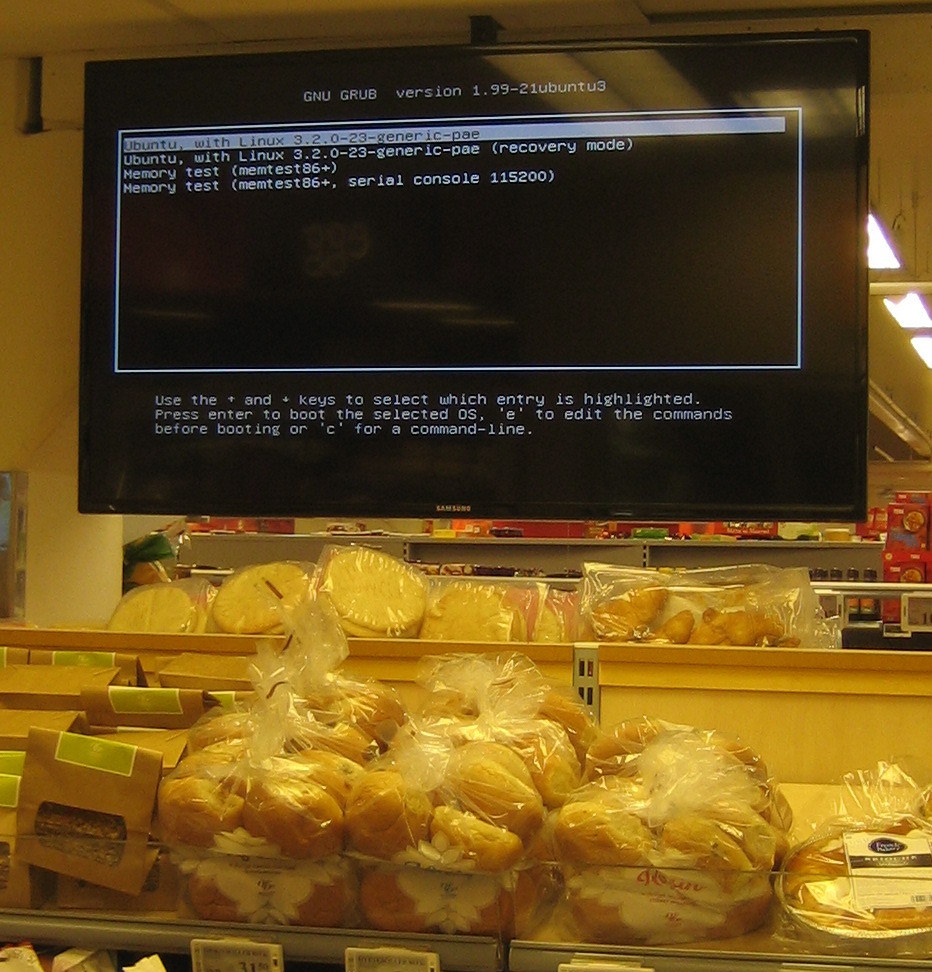
Petter Reinholdtsen: Ubuntu used to show the bread prizes at ICA Storo

Today I came across an unexpected Ubuntu boot screen. Above the bread shelf on the ICA shop at Storo in Oslo, the grub menu of Ubuntu with Linux kernel 3.2.0-23 (ie probably version 12.04 LTS) was stuck on a screen normally showing the bread types and prizes:

If it had booted as it was supposed to, I would never had known about this hidden Linux installation. It is interesting what errors can reveal.

Petter Reinholdtsen: New lsdvd release version 0.17 is ready

The lsdvd project got a new set of developers a few weeks ago, after the original developer decided to step down and pass the project to fresh blood. This project is now maintained by Petter Reinholdtsen and Steve Dibb. I just wrapped up a new lsdvd release, available in git or from the download page. This is the changelog dated 2014-10-03 for version 0.17. This change bring together patches for lsdvd in use in various Linux and Unix distributions, as well as patches submitted to the project the last nine years. Please check it out. :)

26 September 2014

Petter Reinholdtsen: How to test Debian Edu Jessie despite some fatal problems with the installer

The Debian Edu / Skolelinux project provide a Linux solution for schools, including a powerful desktop with education software, a central server providing web pages, user database, user home directories, central login and PXE boot of both clients without disk and the installation to install Debian Edu on machines with disk (and a few other services perhaps to small to mention here). We in the Debian Edu team are currently working on the Jessie based version, trying to get everything in shape before the freeze, to avoid having to maintain our own package repository in the future. The current status can be seen on the Debian wiki, and there is still heaps of work left. Some fatal problems block testing, breaking the installer, but it is possible to work around these to get anyway. Here is a recipe on how to get the installation limping along. First, download the test ISO via ftp, http or rsync (use ftp.skolelinux.org::cd-edu-testing-nolocal-netinst/debian-edu-amd64-i386-NETINST-1.iso). The ISO build was broken on Tuesday, so we do not get a new ISO every 12 hours or so, but thankfully the ISO we already got we are able to install with some tweaking. When you get to the Debian Edu profile question, go to tty2 (use Alt-Ctrl-F2), run
nano /usr/bin/edu-eatmydata-install
and add 'exit 0' as the second line, disabling the eatmydata optimization. Return to the installation, select the profile you want and continue. Without this change, exim4-config will fail to install due to a known bug in eatmydata. When you get the grub question at the end, answer /dev/sda (or if this do not work, figure out what your correct value would be. All my test machines need /dev/sda, so I have no advice if it do not fit your need. If you installed a profile including a graphical desktop, log in as root after the initial boot from hard drive, and install the education-desktop-XXX metapackage. XXX can be kde, gnome, lxde, xfce or mate. If you want several desktop options, install more than one metapackage. Once this is done, reboot and you should have a working graphical login screen. This workaround should no longer be needed once the education-tasks package version 1.801 enter testing in two days. I believe the ISO build will start working on two days when the new tasksel package enter testing and Steve McIntyre get a chance to update the debian-cd git repository. The eatmydata, grub and desktop issues are already fixed in unstable and testing, and should show up on the ISO as soon as the ISO build start working again. Well the eatmydata optimization is really just disabled. The proper fix require an upload by the eatmydata maintainer applying the patch provided in bug #702711. The rest have proper fixes in unstable. I hope this get you going with the installation testing, as we are quickly running out of time trying to get our Jessie based installation ready before the distribution freeze in a month.

25 September 2014

Petter Reinholdtsen: Suddenly I am the new upstream of the lsdvd command line tool

I use the lsdvd tool to handle my fairly large DVD collection. It is a nice command line tool to get details about a DVD, like title, tracks, track length, etc, in XML, Perl or human readable format. But lsdvd have not seen any new development since 2006 and had a few irritating bugs affecting its use with some DVDs. Upstream seemed to be dead, and in January I sent a small probe asking for a version control repository for the project, without any reply. But I use it regularly and would like to get an updated version into Debian. So two weeks ago I tried harder to get in touch with the project admin, and after getting a reply from him explaining that he was no longer interested in the project, I asked if I could take over. And yesterday, I became project admin. I've been in touch with a Gentoo developer and the Debian maintainer interested in joining forces to maintain the upstream project, and I hope we can get a new release out fairly quickly, collecting the patches spread around on the internet into on place. I've added the relevant Debian patches to the freshly created git repository, and expect the Gentoo patches to make it too. If you got a DVD collection and care about command line tools, check out the git source and join the project mailing list. :)

16 September 2014

Petter Reinholdtsen: Speeding up the Debian installer using eatmydata and dpkg-divert

The Debian installer could be a lot quicker. When we install more than 2000 packages in Skolelinux / Debian Edu using tasksel in the installer, unpacking the binary packages take forever. A part of the slow I/O issue was discussed in bug #613428 about too much file system sync-ing done by dpkg, which is the package responsible for unpacking the binary packages. Other parts (like code executed by postinst scripts) might also sync to disk during installation. All this sync-ing to disk do not really make sense to me. If the machine crash half-way through, I start over, I do not try to salvage the half installed system. So the failure sync-ing is supposed to protect against, hardware or system crash, is not really relevant while the installer is running. A few days ago, I thought of a way to get rid of all the file system sync()-ing in a fairly non-intrusive way, without the need to change the code in several packages. The idea is not new, but I have not heard anyone propose the approach using dpkg-divert before. It depend on the small and clever package eatmydata, which uses LD_PRELOAD to replace the system functions for syncing data to disk with functions doing nothing, thus allowing programs to live dangerous while speeding up disk I/O significantly. Instead of modifying the implementation of dpkg, apt and tasksel (which are the packages responsible for selecting, fetching and installing packages), it occurred to me that we could just divert the programs away, replace them with a simple shell wrapper calling "eatmydata $program $@", to get the same effect. Two days ago I decided to test the idea, and wrapped up a simple implementation for the Debian Edu udeb. The effect was stunning. In my first test it reduced the running time of the pkgsel step (installing tasks) from 64 to less than 44 minutes (20 minutes shaved off the installation) on an old Dell Latitude D505 machine. I am not quite sure what the optimised time would have been, as I messed up the testing a bit, causing the debconf priority to get low enough for two questions to pop up during installation. As soon as I saw the questions I moved the installation along, but do not know how long the question were holding up the installation. I did some more measurements using Debian Edu Jessie, and got these results. The time measured is the time stamp in /var/log/syslog between the "pkgsel: starting tasksel" and the "pkgsel: finishing up" lines, if you want to do the same measurement yourself. In Debian Edu, the tasksel dialog do not show up, and the timing thus do not depend on how quickly the user handle the tasksel dialog.
Machine/setup Original tasksel Optimised tasksel Reduction
Latitude D505 Main+LTSP LXDE 64 min (07:46-08:50) <44 min (11:27-12:11) >20 min 18%
Latitude D505 Roaming LXDE 57 min (08:48-09:45) 34 min (07:43-08:17) 23 min 40%
Latitude D505 Minimal 22 min (10:37-10:59) 11 min (11:16-11:27) 11 min 50%
Thinkpad X200 Minimal 6 min (08:19-08:25) 4 min (08:04-08:08) 2 min 33%
Thinkpad X200 Roaming KDE 19 min (09:21-09:40) 15 min (10:25-10:40) 4 min 21%
The test is done using a netinst ISO on a USB stick, so some of the time is spent downloading packages. The connection to the Internet was 100Mbit/s during testing, so downloading should not be a significant factor in the measurement. Download typically took a few seconds to a few minutes, depending on the amount of packages being installed. The speedup is implemented by using two hooks in Debian Installer, the pre-pkgsel.d hook to set up the diverts, and the finish-install.d hook to remove the divert at the end of the installation. I picked the pre-pkgsel.d hook instead of the post-base-installer.d hook because I test using an ISO without the eatmydata package included, and the post-base-installer.d hook in Debian Edu can only operate on packages included in the ISO. The negative effect of this is that I am unable to activate this optimization for the kernel installation step in d-i. If the code is moved to the post-base-installer.d hook, the speedup would be larger for the entire installation. I've implemented this in the debian-edu-install git repository, and plan to provide the optimization as part of the Debian Edu installation. If you want to test this yourself, you can create two files in the installer (or in an udeb). One shell script need do go into /usr/lib/pre-pkgsel.d/, with content like this:
#!/bin/sh
set -e
. /usr/share/debconf/confmodule
info()  
    logger -t my-pkgsel "info: $*"
 
error()  
    logger -t my-pkgsel "error: $*"
 
override_install()  
    apt-install eatmydata   true
    if [ -x /target/usr/bin/eatmydata ] ; then
        for bin in dpkg apt-get aptitude tasksel ; do
            file=/usr/bin/$bin
            # Test that the file exist and have not been diverted already.
            if [ -f /target$file ] ; then
                info "diverting $file using eatmydata"
                printf "#!/bin/sh\neatmydata $bin.distrib \"\$@\"\n" \
                    > /target$file.edu
                chmod 755 /target$file.edu
                in-target dpkg-divert --package debian-edu-config \
                    --rename --quiet --add $file
                ln -sf ./$bin.edu /target$file
            else
                error "unable to divert $file, as it is missing."
            fi
        done
    else
        error "unable to find /usr/bin/eatmydata after installing the eatmydata pacage"
    fi
 
override_install
To clean up, another shell script should go into /usr/lib/finish-install.d/ with code like this:
#! /bin/sh -e
. /usr/share/debconf/confmodule
error()  
    logger -t my-finish-install "error: $@"
 
remove_install_override()  
    for bin in dpkg apt-get aptitude tasksel ; do
        file=/usr/bin/$bin
        if [ -x /target$file.edu ] ; then
            rm /target$file
            in-target dpkg-divert --package debian-edu-config \
                --rename --quiet --remove $file
            rm /target$file.edu
        else
            error "Missing divert for $file."
        fi
    done
    sync # Flush file buffers before continuing
 
remove_install_override
In Debian Edu, I placed both code fragments in a separate script edu-eatmydata-install and call it from the pre-pkgsel.d and finish-install.d scripts. By now you might ask if this change should get into the normal Debian installer too? I suspect it should, but am not sure the current debian-installer coordinators find it useful enough. It also depend on the side effects of the change. I'm not aware of any, but I guess we will see if the change is safe after some more testing. Perhaps there is some package in Debian depending on sync() and fsync() having effect? Perhaps it should go into its own udeb, to allow those of us wanting to enable it to do so without affecting everyone. Update 2014-09-24: Since a few days ago, enabling this optimization will break installation of all programs using gnutls because of bug #702711. An updated eatmydata package in Debian will solve it.

10 September 2014

Petter Reinholdtsen: Good bye subkeys.pgp.net, welcome pool.sks-keyservers.net

Yesterday, I had the pleasure of attending a talk with the Norwegian Unix User Group about the OpenPGP keyserver pool sks-keyservers.net, and was very happy to learn that there is a large set of publicly available key servers to use when looking for peoples public key. So far I have used subkeys.pgp.net, and some times wwwkeys.nl.pgp.net when the former were misbehaving, but those days are ended. The servers I have used up until yesterday have been slow and some times unavailable. I hope those problems are gone now. Behind the round robin DNS entry of the sks-keyservers.net service there is a pool of more than 100 keyservers which are checked every day to ensure they are well connected and up to date. It must be better than what I have used so far. :) Yesterdays speaker told me that the service is the default keyserver provided by the default configuration in GnuPG, but this do not seem to be used in Debian. Perhaps it should? Anyway, I've updated my ~/.gnupg/options file to now include this line:
keyserver pool.sks-keyservers.net
With GnuPG version 2 one can also locate the keyserver using SRV entries in DNS. Just for fun, I did just that at work, so now every user of GnuPG at the University of Oslo should find a OpenGPG keyserver automatically should their need it:
% host -t srv _pgpkey-http._tcp.uio.no
_pgpkey-http._tcp.uio.no has SRV record 0 100 11371 pool.sks-keyservers.net.
%
Now if only the HKP lookup protocol supported finding signature paths, I would be very happy. It can look up a given key or search for a user ID, but I normally do not want that, but to find a trust path from my key to another key. Given a user ID or key ID, I would like to find (and download) the keys representing a signature path from my key to the key in question, to be able to get a trust path between the two keys. This is as far as I can tell not possible today. Perhaps something for a future version of the protocol?

25 August 2014

Petter Reinholdtsen: Do you need an agreement with MPEG-LA to publish and broadcast H.264 video in Norway?

Two years later, I am still not sure if it is legal here in Norway to use or publish a video in H.264 or MPEG4 format edited by the commercially licensed video editors, without limiting the use to create "personal" or "non-commercial" videos or get a license agreement with MPEG LA. If one want to publish and broadcast video in a non-personal or commercial setting, it might be that those tools can not be used, or that video format can not be used, without breaking their copyright license. I am not sure. Back then, I found that the copyright license terms for Adobe Premiere and Apple Final Cut Pro both specified that one could not use the program to produce anything else without a patent license from MPEG LA. The issue is not limited to those two products, though. Other much used products like those from Avid and Sorenson Media have terms of use are similar to those from Adobe and Apple. The complicating factor making me unsure if those terms have effect in Norway or not is that the patents in question are not valid in Norway, but copyright licenses are. These are the terms for Avid Artist Suite, according to their published end user license text (converted to lower case text for easier reading):
18.2. MPEG-4. MPEG-4 technology may be included with the software. MPEG LA, L.L.C. requires this notice: This product is licensed under the MPEG-4 visual patent portfolio license for the personal and non-commercial use of a consumer for (i) encoding video in compliance with the MPEG-4 visual standard ( MPEG-4 video ) and/or (ii) decoding MPEG-4 video that was encoded by a consumer engaged in a personal and non-commercial activity and/or was obtained from a video provider licensed by MPEG LA to provide MPEG-4 video. No license is granted or shall be implied for any other use. Additional information including that relating to promotional, internal and commercial uses and licensing may be obtained from MPEG LA, LLC. See http://www.mpegla.com. This product is licensed under the MPEG-4 systems patent portfolio license for encoding in compliance with the MPEG-4 systems standard, except that an additional license and payment of royalties are necessary for encoding in connection with (i) data stored or replicated in physical media which is paid for on a title by title basis and/or (ii) data which is paid for on a title by title basis and is transmitted to an end user for permanent storage and/or use, such additional license may be obtained from MPEG LA, LLC. See http://www.mpegla.com for additional details. 18.3. H.264/AVC. H.264/AVC technology may be included with the software. MPEG LA, L.L.C. requires this notice: This product is licensed under the AVC patent portfolio license for the personal use of a consumer or other uses in which it does not receive remuneration to (i) encode video in compliance with the AVC standard ( AVC video ) and/or (ii) decode AVC video that was encoded by a consumer engaged in a personal activity and/or was obtained from a video provider licensed to provide AVC video. No license is granted or shall be implied for any other use. Additional information may be obtained from MPEG LA, L.L.C. See http://www.mpegla.com.
Note the requirement that the videos created can only be used for personal or non-commercial purposes. The Sorenson Media software have similar terms:
With respect to a license from Sorenson pertaining to MPEG-4 Video Decoders and/or Encoders: Any such product is licensed under the MPEG-4 visual patent portfolio license for the personal and non-commercial use of a consumer for (i) encoding video in compliance with the MPEG-4 visual standard ( MPEG-4 video ) and/or (ii) decoding MPEG-4 video that was encoded by a consumer engaged in a personal and non-commercial activity and/or was obtained from a video provider licensed by MPEG LA to provide MPEG-4 video. No license is granted or shall be implied for any other use. Additional information including that relating to promotional, internal and commercial uses and licensing may be obtained from MPEG LA, LLC. See http://www.mpegla.com. With respect to a license from Sorenson pertaining to MPEG-4 Consumer Recorded Data Encoder, MPEG-4 Systems Internet Data Encoder, MPEG-4 Mobile Data Encoder, and/or MPEG-4 Unique Use Encoder: Any such product is licensed under the MPEG-4 systems patent portfolio license for encoding in compliance with the MPEG-4 systems standard, except that an additional license and payment of royalties are necessary for encoding in connection with (i) data stored or replicated in physical media which is paid for on a title by title basis and/or (ii) data which is paid for on a title by title basis and is transmitted to an end user for permanent storage and/or use. Such additional license may be obtained from MPEG LA, LLC. See http://www.mpegla.com for additional details.
Some free software like Handbrake and FFMPEG uses GPL/LGPL licenses and do not have any such terms included, so for those, there is no requirement to limit the use to personal and non-commercial.

31 July 2014

Petter Reinholdtsen: Debian Edu interview: Bernd Zeitzen

The complete and free out of the box software solution for schools, Debian Edu / Skolelinux, is used quite a lot in Germany, and one of the people involved is Bernd Zeitzen, who show up on the project mailing lists from time to time with interesting questions and tips on how to adjust the setup. I managed to interview him this summer. Who are you, and how do you spend your days? My name is Bernd Zeitzen and I'm married with Hedda, a self employed physiotherapist. My former profession is tool maker, but I haven't worked for 30 years in this job. 30 years ago I started to support my wife and become her officeworker and a few years later the administrator for a small computer network, today based on Ubuntu Server (Samba, OpenVPN). For her daily work she has to use Windows Desktops because the software she needs to organize her business only works with Windows . :-( In 1988 we started with one PC and DOS, then I learned to use Windows 98, 2000, XP, , 8, Ubuntu, MacOSX. Today we are running a Linux server with 6 Windows clients and 10 persons (teacher of children with special needs, speech therapist, occupational therapist, psychologist and officeworkers) using our Samba shares via OpenVPN to work with the documentations of our patients. How did you get in contact with the Skolelinux / Debian Edu project? Two years ago a friend of mine asked me, if I want to get a job in his school (Gymnasium Harsewinkel). They started with Skolelinux / Debian Edu and they were looking for people to give support to the teachers using the software and the network and teaching the pupils increasing their computer skills in optional lessons. I'm spending 4-6 hours a week with this job. What do you see as the advantages of Skolelinux / Debian Edu? The independence. First: Every person is allowed to use, share and develop the software. Even if you are poor, you are allowed to use the software included in Skolelinux/Debian Edu and all the other Free Software. Second: The software runs on old machines and this gives us the possibility to recycle computers, weeded out from offices. The servers and desktops are running for more than two years and they are working reliable. We have two servers (one tjener and one terminal server), 45 workstations in three classrooms and seven laptops as a mobile solution for all classrooms. These machines are all booting from the terminal server. In the moment we are installing 30 laptops as mobile workstations. Then the pupils have the possibility to work with these machines in their classrooms. Internet access is realized by a WLAN router, connected to the schools network. This is all done without a dedicated system administrator or a computer science teacher. What do you see as the disadvantages of Skolelinux / Debian Edu? Teachers and pupils are Windows users. <Irony on> And Linux isn't cool. It's software for freaks using the command line. <Irony off> They don't realize the stability of the system. Which free software do you use daily? Firefox, Thunderbird, LibreOffice, Ubuntu Server 12.04 (Samba, Apache, MySQL, Joomla!, and Skolelinux / Debian Edu) Which strategy do you believe is the right one to use to get schools to use free software? In Germany we have the situation: every school is free to decide which software they want to use. This decision is influenced by teachers who learned to use Windows and MS Office. They buy a PC with Windows preinstalled and an additional testing version of MS Office. They don't know about the possibility to use Free Software instead. Another problem are the publisher of school books. They develop their software, added to the school books, for Windows.

23 July 2014

Petter Reinholdtsen: 98.6 percent done with the Norwegian draft translation of Free Culture

This summer I finally had time to continue working on the Norwegian docbook version of the 2004 book Free Culture by Lawrence Lessig, to get a Norwegian text explaining the problems with todays copyright law. Yesterday, I finally completed translated the book text. There are still some foot/end notes left to translate, the colophon page need to be rewritten, and a few words and phrases still need to be translated, but the Norwegian text is ready for the first proof reading. :) More spell checking is needed, and several illustrations need to be cleaned up. The work stopped up because I had to give priority to other projects the last year, and the progress graph of the translation show this very well: If you want to read the result, check out the github project pages and the PDF, EPUB and HTML version available in the archive directory. Please report typos, bugs and improvements to the github project if you find any.

17 June 2014

Petter Reinholdtsen: From English wiki to translated PDF and epub via Docbook

The Debian Edu / Skolelinux project provide an instruction manual for teachers, system administrators and other users that contain useful tips for setting up and maintaining a Debian Edu installation. This text is about how the text processing of this manual is handled in the project. One goal of the project is to provide information in the native language of its users, and for this we need to handle translations. But we also want to make sure each language contain the same information, so for this we need a good way to keep the translations in sync. And we want it to be easy for our users to improve the documentation, avoiding the need to learn special formats or tools to contribute, and the obvious way to do this is to make it possible to edit the documentation using a web browser. We also want it to be easy for translators to keep the translation up to date, and give them help in figuring out what need to be translated. Here is the list of tools and the process we have found trying to reach all these goals. We maintain the authoritative source of our manual in the Debian wiki, as several wiki pages written in English. It consist of one front page with references to the different chapters, several pages for each chapter, and finally one "collection page" gluing all the chapters together into one large web page (aka the AllInOne page). The AllInOne page is the one used for further processing and translations. Thanks to the fact that the MoinMoin installation on wiki.debian.org support exporting pages in the Docbook format, we can fetch the list of pages to export using the raw version of the AllInOne page, loop over each of them to generate a Docbook XML version of the manual. This process also download images and transform image references to use the locally downloaded images. The generated Docbook XML files are slightly broken, so some post-processing is done using the documentation/scripts/get_manual program, and the result is a nice Docbook XML file (debian-edu-wheezy-manual.xml) and a handfull of images. The XML file can now be used to generate PDF, HTML and epub versions of the English manual. This is the basic step of our process, making PDF (using dblatex), HTML (using xsltproc) and epub (using dbtoepub) version from Docbook XML, and the resulting files are placed in the debian-edu-doc-en binary package. But English documentation is not enough for us. We want translated documentation too, and we want to make it easy for translators to track the English original. For this we use the poxml package, which allow us to transform the English Docbook XML file into a translation file (a .pot file), usable with the normal gettext based translation tools used by those translating free software. The pot file is used to create and maintain translation files (several .po files), which the translations update with the native language translations of all titles, paragraphs and blocks of text in the original. The next step is combining the original English Docbook XML and the translation file (say debian-edu-wheezy-manual.nb.po), to create a translated Docbook XML file (in this case debian-edu-wheezy-manual.nb.xml). This translated (or partly translated, if the translation is not complete) Docbook XML file can then be used like the original to create a PDF, HTML and epub version of the documentation. The translators use different tools to edit the .po files. We recommend using lokalize, while some use emacs and vi, others can use web based editors like Poodle or Transifex. All we care about is where the .po file end up, in our git repository. Updated translations can either be committed directly to git, or submitted as bug reports against the debian-edu-doc package. One challenge is images, which both might need to be translated (if they show translated user applications), and are needed in different formats when creating PDF and HTML versions (epub is a HTML version in this regard). For this we transform the original PNG images to the needed density and format during build, and have a way to provide translated images by storing translated versions in images/$LANGUAGECODE/. I am a bit unsure about the details here. The package maintainers know more. If you wonder what the result look like, we provide the content of the documentation packages on the web. See for example the Italian PDF version or the German HTML version. We do not yet build the epub version by default, but perhaps it will be done in the future. To learn more, check out the debian-edu-doc package, the manual on the wiki and the translation instructions in the manual.

29 May 2014

Petter Reinholdtsen: Free software car computer solution?

Dear lazyweb. I'm planning to set up a small Raspberry Pi computer in my car, connected to a small screen next to the rear mirror. I plan to hook it up with a GPS and a USB wifi card too. The idea is to get my own "Carputer". But I wonder if someone already created a good free software solution for such car computer. This is my current wish list for such system: If you know of any free software car computer system supporting some or all of these features, please let me know.

29 April 2014

Petter Reinholdtsen: Half the Coverity issues in Gnash fixed in the next release

I've been following the Gnash project for quite a while now. It is a free software implementation of Adobe Flash, both a standalone player and a browser plugin. Gnash implement support for the AVM1 format (and not the newer AVM2 format - see Lightspark for that one), allowing several flash based sites to work. Thanks to the friendly developers at Youtube, it also work with Youtube videos, because the Javascript code at Youtube detect Gnash and serve a AVM1 player to those users. :) Would be great if someone found time to implement AVM2 support, but it has not happened yet. If you install both Lightspark and Gnash, Lightspark will invoke Gnash if it find a AVM1 flash file, so you can get both handled as free software. Unfortunately, Lightspark so far only implement a small subset of AVM2, and many sites do not work yet. A few months ago, I started looking at Coverity, the static source checker used to find heaps and heaps of bugs in free software (thanks to the donation of a scanning service to free software projects by the company developing this non-free code checker), and Gnash was one of the projects I decided to check out. Coverity is able to find lock errors, memory errors, dead code and more. A few days ago they even extended it to also be able to find the heartbleed bug in OpenSSL. There are heaps of checks being done on the instrumented code, and the amount of bogus warnings is quite low compared to the other static code checkers I have tested over the years. Since a few weeks ago, I've been working with the other Gnash developers squashing bugs discovered by Coverity. I was quite happy today when I checked the current status and saw that of the 777 issues detected so far, 374 are marked as fixed. This make me confident that the next Gnash release will be more stable and more dependable than the previous one. Most of the reported issues were and are in the test suite, but it also found a few in the rest of the code. If you want to help out, you find us on the gnash-dev mailing list and on the #gnash channel on irc.freenode.net IRC server.

23 April 2014

Petter Reinholdtsen: Install hardware dependent packages using tasksel (Isenkram 0.7)

It would be nice if it was easier in Debian to get all the hardware related packages relevant for the computer installed automatically. So I implemented one, using my Isenkram package. To use it, install the tasksel and isenkram packages and run tasksel as user root. You should be presented with a new option, "Hardware specific packages (autodetected by isenkram)". When you select it, tasksel will install the packages isenkram claim is fit for the current hardware, hot pluggable or not. The implementation is in two files, one is the tasksel menu entry description, and the other is the script used to extract the list of packages to install. The first part is in /usr/share/tasksel/descs/isenkram.desc and look like this:
Task: isenkram
Section: hardware
Description: Hardware specific packages (autodetected by isenkram)
 Based on the detected hardware various hardware specific packages are
 proposed.
Test-new-install: mark show
Relevance: 8
Packages: for-current-hardware
The second part is in /usr/lib/tasksel/packages/for-current-hardware and look like this:
#!/bin/sh
#
(
    isenkram-lookup
    isenkram-autoinstall-firmware -l
)   sort -u
All in all, a very short and simple implementation making it trivial to install the hardware dependent package we all may want to have installed on our machines. I've not been able to find a way to get tasksel to tell you exactly which packages it plan to install before doing the installation. So if you are curious or careful, check the output from the isenkram-* command line tools first. The information about which packages are handling which hardware is fetched either from the isenkram package itself in /usr/share/isenkram/, from git.debian.org or from the APT package database (using the Modaliases header). The APT package database parsing have caused a nasty resource leak in the isenkram daemon (bugs #719837 and #730704). The cause is in the python-apt code (bug #745487), but using a workaround I was able to get rid of the file descriptor leak and reduce the memory leak from ~30 MiB per hardware detection down to around 2 MiB per hardware detection. It should make the desktop daemon a lot more useful. The fix is in version 0.7 uploaded to unstable today. I believe the current way of mapping hardware to packages in Isenkram is is a good draft, but in the future I expect isenkram to use the AppStream data source for this. A proposal for getting proper AppStream support into Debian is floating around as DEP-11, and GSoC project will take place this summer to improve the situation. I look forward to seeing the result, and welcome patches for isenkram to start using the information when it is ready. If you want your package to map to some specific hardware, either add a "Xb-Modaliases" header to your control file like I did in the pymissile package or submit a bug report with the details to the isenkram package. See also all my blog posts tagged isenkram for details on the notation. I expect the information will be migrated to AppStream eventually, but for the moment I got no better place to store it.

15 April 2014

Petter Reinholdtsen: FreedomBox milestone - all packages now in Debian Sid

The Freedombox project is working on providing the software and hardware to make it easy for non-technical people to host their data and communication at home, and being able to communicate with their friends and family encrypted and away from prying eyes. It is still going strong, and today a major mile stone was reached. Today, the last of the packages currently used by the project to created the system images were accepted into Debian Unstable. It was the freedombox-setup package, which is used to configure the images during build and on the first boot. Now all one need to get going is the build code from the freedom-maker git repository and packages from Debian. And once the freedombox-setup package enter testing, we can build everything directly from Debian. :) Some key packages used by Freedombox are freedombox-setup, plinth, pagekite, tor, privoxy, owncloud and dnsmasq. There are plans to integrate more packages into the setup. User documentation is maintained on the Debian wiki. Please check out the manual and help us improve it. To test for yourself and create boot images with the FreedomBox setup, run this on a Debian machine using a user with sudo rights to become root:
sudo apt-get install git vmdebootstrap mercurial python-docutils \
  mktorrent extlinux virtualbox qemu-user-static binfmt-support \
  u-boot-tools
git clone http://anonscm.debian.org/git/freedombox/freedom-maker.git \
  freedom-maker
make -C freedom-maker dreamplug-image raspberry-image virtualbox-image
Root access is needed to run debootstrap and mount loopback devices. See the README in the freedom-maker git repo for more details on the build. If you do not want all three images, trim the make line. Note that the virtualbox-image target is not really virtualbox specific. It create a x86 image usable in kvm, qemu, vmware and any other x86 virtual machine environment. You might need the version of vmdebootstrap in Jessie to get the build working, as it include fixes for a race condition with kpartx. If you instead want to install using a Debian CD and the preseed method, boot a Debian Wheezy ISO and use this boot argument to load the preseed values:
url=http://www.reinholdtsen.name/freedombox/preseed-jessie.dat
I have not tested it myself the last few weeks, so I do not know if it still work. If you wonder how to help, one task you could look at is using systemd as the boot system. It will become the default for Linux in Jessie, so we need to make sure it is usable on the Freedombox. I did a simple test a few weeks ago, and noticed dnsmasq failed to start during boot when using systemd. I suspect there are other problems too. :) To detect problems, there is a test suite included, which can be run from the plinth web interface. Give it a go and let us know how it goes on the mailing list, and help us get the new release published. :) Please join us on IRC (#freedombox on irc.debian.org) and the mailing list if you want to help make this vision come true.

9 April 2014

Petter Reinholdtsen: S3QL, a locally mounted cloud file system - nice free software

For a while now, I have been looking for a sensible offsite backup solution for use at home. My requirements are simple, it must be cheap and locally encrypted (in other words, I keep the encryption keys, the storage provider do not have access to my private files). One idea me and my friends had many years ago, before the cloud storage providers showed up, was to use Google mail as storage, writing a Linux block device storing blocks as emails in the mail service provided by Google, and thus get heaps of free space. On top of this one can add encryption, RAID and volume management to have lots of (fairly slow, I admit that) cheap and encrypted storage. But I never found time to implement such system. But the last few weeks I have looked at a system called S3QL, a locally mounted network backed file system with the features I need. S3QL is a fuse file system with a local cache and cloud storage, handling several different storage providers, any with Amazon S3, Google Drive or OpenStack API. There are heaps of such storage providers. S3QL can also use a local directory as storage, which combined with sshfs allow for file storage on any ssh server. S3QL include support for encryption, compression, de-duplication, snapshots and immutable file systems, allowing me to mount the remote storage as a local mount point, look at and use the files as if they were local, while the content is stored in the cloud as well. This allow me to have a backup that should survive fire. The file system can not be shared between several machines at the same time, as only one can mount it at the time, but any machine with the encryption key and access to the storage service can mount it if it is unmounted. It is simple to use. I'm using it on Debian Wheezy, where the package is included already. So to get started, run apt-get install s3ql. Next, pick a storage provider. I ended up picking Greenqloud, after reading their nice recipe on how to use S3QL with their Amazon S3 service, because I trust the laws in Iceland more than those in USA when it come to keeping my personal data safe and private, and thus would rather spend money on a company in Iceland. Another nice recipe is available from the article S3QL Filesystem for HPC Storage by Jeff Layton in the HPC section of Admin magazine. When the provider is picked, figure out how to get the API key needed to connect to the storage API. With Greencloud, the key did not show up until I had added payment details to my account. Armed with the API access details, it is time to create the file system. First, create a new bucket in the cloud. This bucket is the file system storage area. I picked a bucket name reflecting the machine that was going to store data there, but any name will do. I'll refer to it as bucket-name below. In addition, one need the API login and password, and a locally created password. Store it all in ~root/.s3ql/authinfo2 like this:
[s3c]
storage-url: s3c://s.greenqloud.com:443/bucket-name
backend-login: API-login
backend-password: API-password
fs-passphrase: local-password
I create my local passphrase using pwget 50 or similar, but any sensible way to create a fairly random password should do it. Armed with these details, it is now time to run mkfs, entering the API details and password to create it:
# mkdir -m 700 /var/lib/s3ql-cache
# mkfs.s3ql --cachedir /var/lib/s3ql-cache --authfile /root/.s3ql/authinfo2 \
  --ssl s3c://s.greenqloud.com:443/bucket-name
Enter backend login: 
Enter backend password: 
Before using S3QL, make sure to read the user's guide, especially
the 'Important Rules to Avoid Loosing Data' section.
Enter encryption password: 
Confirm encryption password: 
Generating random encryption key...
Creating metadata tables...
Dumping metadata...
..objects..
..blocks..
..inodes..
..inode_blocks..
..symlink_targets..
..names..
..contents..
..ext_attributes..
Compressing and uploading metadata...
Wrote 0.00 MB of compressed metadata.
# 
The next step is mounting the file system to make the storage available.
# mount.s3ql --cachedir /var/lib/s3ql-cache --authfile /root/.s3ql/authinfo2 \
  --ssl --allow-root s3c://s.greenqloud.com:443/bucket-name /s3ql
Using 4 upload threads.
Downloading and decompressing metadata...
Reading metadata...
..objects..
..blocks..
..inodes..
..inode_blocks..
..symlink_targets..
..names..
..contents..
..ext_attributes..
Mounting filesystem...
# df -h /s3ql
Filesystem                              Size  Used Avail Use% Mounted on
s3c://s.greenqloud.com:443/bucket-name  1.0T     0  1.0T   0% /s3ql
#
The file system is now ready for use. I use rsync to store my backups in it, and as the metadata used by rsync is downloaded at mount time, no network traffic (and storage cost) is triggered by running rsync. To unmount, one should not use the normal umount command, as this will not flush the cache to the cloud storage, but instead running the umount.s3ql command like this:
# umount.s3ql /s3ql
# 
There is a fsck command available to check the file system and correct any problems detected. This can be used if the local server crashes while the file system is mounted, to reset the "already mounted" flag. This is what it look like when processing a working file system:
# fsck.s3ql --force --ssl s3c://s.greenqloud.com:443/bucket-name
Using cached metadata.
File system seems clean, checking anyway.
Checking DB integrity...
Creating temporary extra indices...
Checking lost+found...
Checking cached objects...
Checking names (refcounts)...
Checking contents (names)...
Checking contents (inodes)...
Checking contents (parent inodes)...
Checking objects (reference counts)...
Checking objects (backend)...
..processed 5000 objects so far..
..processed 10000 objects so far..
..processed 15000 objects so far..
Checking objects (sizes)...
Checking blocks (referenced objects)...
Checking blocks (refcounts)...
Checking inode-block mapping (blocks)...
Checking inode-block mapping (inodes)...
Checking inodes (refcounts)...
Checking inodes (sizes)...
Checking extended attributes (names)...
Checking extended attributes (inodes)...
Checking symlinks (inodes)...
Checking directory reachability...
Checking unix conventions...
Checking referential integrity...
Dropping temporary indices...
Backing up old metadata...
Dumping metadata...
..objects..
..blocks..
..inodes..
..inode_blocks..
..symlink_targets..
..names..
..contents..
..ext_attributes..
Compressing and uploading metadata...
Wrote 0.89 MB of compressed metadata.
# 
Thanks to the cache, working on files that fit in the cache is very quick, about the same speed as local file access. Uploading large amount of data is to me limited by the bandwidth out of and into my house. Uploading 685 MiB with a 100 MiB cache gave me 305 kiB/s, which is very close to my upload speed, and downloading the same Debian installation ISO gave me 610 kiB/s, close to my download speed. Both were measured using dd. So for me, the bottleneck is my network, not the file system code. I do not know what a good cache size would be, but suspect that the cache should e larger than your working set. I mentioned that only one machine can mount the file system at the time. If another machine try, it is told that the file system is busy:
# mount.s3ql --cachedir /var/lib/s3ql-cache --authfile /root/.s3ql/authinfo2 \
  --ssl --allow-root s3c://s.greenqloud.com:443/bucket-name /s3ql
Using 8 upload threads.
Backend reports that fs is still mounted elsewhere, aborting.
#
The file content is uploaded when the cache is full, while the metadata is uploaded once every 24 hour by default. To ensure the file system content is flushed to the cloud, one can either umount the file system, or ask S3QL to flush the cache and metadata using s3qlctrl:
# s3qlctrl upload-meta /s3ql
# s3qlctrl flushcache /s3ql
# 
If you are curious about how much space your data uses in the cloud, and how much compression and deduplication cut down on the storage usage, you can use s3qlstat on the mounted file system to get a report:
# s3qlstat /s3ql
Directory entries:    9141
Inodes:               9143
Data blocks:          8851
Total data size:      22049.38 MB
After de-duplication: 21955.46 MB (99.57% of total)
After compression:    21877.28 MB (99.22% of total, 99.64% of de-duplicated)
Database size:        2.39 MB (uncompressed)
(some values do not take into account not-yet-uploaded dirty blocks in cache)
#
I mentioned earlier that there are several possible suppliers of storage. I did not try to locate them all, but am aware of at least Greenqloud, Google Drive, Amazon S3 web serivces, Rackspace and Crowncloud. The latter even accept payment in Bitcoin. Pick one that suit your need. Some of them provide several GiB of free storage, but the prize models are quite different and you will have to figure out what suits you best. While researching this blog post, I had a look at research papers and posters discussing the S3QL file system. There are several, which told me that the file system is getting a critical check by the science community and increased my confidence in using it. One nice poster is titled "An Innovative Parallel Cloud Storage System using OpenStack s SwiftObject Store and Transformative Parallel I/O Approach" by Hsing-Bung Chen, Benjamin McClelland, David Sherrill, Alfred Torrez, Parks Fields and Pamela Smith. Please have a look. Given my problems with different file systems earlier, I decided to check out the mounted S3QL file system to see if it would be usable as a home directory (in other word, that it provided POSIX semantics when it come to locking and umask handling etc). Running my test code to check file system semantics, I was happy to discover that no error was found. So the file system can be used for home directories, if one chooses to do so. If you do not want a locally file system, and want something that work without the Linux fuse file system, I would like to mention the Tarsnap service, which also provide locally encrypted backup using a command line client. It have a nicer access control system, where one can split out read and write access, allowing some systems to write to the backup and others to only read from it. As usual, if you use Bitcoin and want to show your support of my activities, please send Bitcoin donations to my address 15oWEoG9dUPovwmUL9KWAnYRtNJEkP1u1b.

1 April 2014

Petter Reinholdtsen: ReactOS Windows clone - nice free software

Microsoft have announced that Windows XP reaches its end of life 2014-04-08, in 7 days. But there are heaps of machines still running Windows XP, and depending on Windows XP to run their applications, and upgrading will be expensive, both when it comes to money and when it comes to the amount of effort needed to migrate from Windows XP to a new operating system. Some obvious options (buy new a Windows machine, buy a MacOSX machine, install Linux on the existing machine) are already well known and covered elsewhere. Most of them involve leaving the user applications installed on Windows XP behind and trying out replacements or updated versions. In this blog post I want to mention one strange bird that allow people to keep the hardware and the existing Windows XP applications and run them on a free software operating system that is Windows XP compatible. ReactOS is a free software operating system (GNU GPL licensed) working on providing a operating system that is binary compatible with Windows, able to run windows programs directly and to use Windows drivers for hardware directly. The project goal is for Windows user to keep their existing machines, drivers and software, and gain the advantages from user a operating system without usage limitations caused by non-free licensing. It is a Windows clone running directly on the hardware, so quite different from the approach taken by the Wine project, which make it possible to run Windows binaries on Linux. The ReactOS project share code with the Wine project, so most shared libraries available on Windows are already implemented already. There is also a software manager like the one we are used to on Linux, allowing the user to install free software applications with a simple click directly from the Internet. Check out the screen shots on the project web site for an idea what it look like (it looks just like Windows before metro). I do not use ReactOS myself, preferring Linux and Unix like operating systems. I've tested it, and it work fine in a virt-manager virtual machine. The browser, minesweeper, notepad etc is working fine as far as I can tell. Unfortunately, my main test application is the software included on a CD with the Lego Mindstorms NXT, which seem to install just fine from CD but fail to leave any binaries on the disk after the installation. So no luck with that test software. No idea why, but hope someone else figure out and fix the problem. I've tried the ReactOS Live ISO on a physical machine, and it seemed to work just fine. If you like Windows and want to keep running your old Windows binaries, check it out by downloading the installation CD, the live CD or the preinstalled virtual machine image.

30 March 2014

Petter Reinholdtsen: Debian Edu interview: Roger Marsal

Debian Edu / Skolelinux keep gaining new users. Some weeks ago, a person showed up on IRC, #debian-edu, with a wish to contribute, and I managed to get a interview with this great contributor Roger Marsal to learn more about his background. Who are you, and how do you spend your days? My name is Roger Marsal, I'm 27 years old (1986 generation) and I live in Barcelona, Spain. I've got a strong business background and I work as a patrimony manager and as a real estate agent. Additionally, I've co-founded a British based tech company that is nowadays on the last development phase of a new social networking concept. I'm a Linux enthusiast that started its journey with Ubuntu four years ago and have recently switched to Debian seeking rock solid stability and as a necessary step to gain expertise. In a nutshell, I spend my days working and learning as much as I can to face both my job, entrepreneur project and feed my Linux hunger. How did you get in contact with the Skolelinux / Debian Edu project? I discovered the LTSP advantages with "Ubuntu 12.04 alternate install" and after a year of use I started looking for an alternative. Even though I highly value and respect the Ubuntu project, I thought it was necessary for me to change to a more robust and stable alternative. As far as I was using Debian on my personal laptop I thought it would be fine to install Debian and configure an LTSP server myself. Surprised, I discovered that the Debian project also supported a kind of Edubuntu equivalent, and after having some pain I obtained a Debian Edu network up and running. I just loved it. What do you see as the advantages of Skolelinux / Debian Edu? I found a main advantage in that, once you know "the tips and tricks", a new installation just works out of the box. It's the most complete alternative I've found to create an LTSP network. All the other distributions seems to be made of plastic, Debian Edu seems to be made of steel. What do you see as the disadvantages of Skolelinux / Debian Edu? I found two main disadvantages. I'm not an expert but I've got notions and I had to spent a considerable amount of time trying to bring up a standard network topology. I'm quite stubborn and I just worked until I did but I'm sure many people with few resources (not big schools, but academies for example) would have switched or dropped. It's amazing how such a complex system like Debian Edu has achieved this out-of-the-box state. Even though tweaking without breaking gets more difficult, as more factors have to be considered. This can discourage many people too. Which free software do you use daily? I use Debian, Firefox, Okular, Inkscape, LibreOffice and Virtualbox. Which strategy do you believe is the right one to use to get schools to use free software? I don't think there is a need for a particular strategy. The free attribute in both "freedom" and "no price" meanings is what will really bring free software to schools. In my experience I can think of the "R" statistical language; a few years a ago was an extremely nerd tool for university people. Today it's being increasingly used to teach statistics at many different level of studies. I believe free and open software will increasingly gain popularity, but I'm sure schools will be one of the first scenarios where this will happen.

25 March 2014

Petter Reinholdtsen: Public Trusted Timestamping services for everyone

Did you ever need to store logs or other files in a way that would allow it to be used as evidence in court, and needed a way to demonstrate without reasonable doubt that the file had not been changed since it was created? Or, did you ever need to document that a given document was received at some point in time, like some archived document or the answer to an exam, and not changed after it was received? The problem in these settings is to remove the need to trust yourself and your computers, while still being able to prove that a file is the same as it was at some given time in the past. A solution to these problems is to have a trusted third party "stamp" the document and verify that at some given time the document looked a given way. Such notarius service have been around for thousands of years, and its digital equivalent is called a trusted timestamping service. The Internet Engineering Task Force standardised how such service could work a few years ago as RFC 3161. The mechanism is simple. Create a hash of the file in question, send it to a trusted third party which add a time stamp to the hash and sign the result with its private key, and send back the signed hash + timestamp. Both email, FTP and HTTP can be used to request such signature, depending on what is provided by the service used. Anyone with the document and the signature can then verify that the document matches the signature by creating their own hash and checking the signature using the trusted third party public key. There are several commercial services around providing such timestamping. A quick search for "rfc 3161 service" pointed me to at least DigiStamp, Quo Vadis, Global Sign and Global Trust Finder. The system work as long as the private key of the trusted third party is not compromised. But as far as I can tell, there are very few public trusted timestamp services available for everyone. I've been looking for one for a while now. But yesterday I found one over at Deutches Forschungsnetz mentioned in a blog by David M ller. I then found a good recipe on how to use the service over at the University of Greifswald. The OpenSSL library contain both server and tools to use and set up your own signing service. See the ts(1SSL), tsget(1SSL) manual pages for more details. The following shell script demonstrate how to extract a signed timestamp for any file on the disk in a Debian environment:
#!/bin/sh
set -e
url="http://zeitstempel.dfn.de"
caurl="https://pki.pca.dfn.de/global-services-ca/pub/cacert/chain.txt"
reqfile=$(mktemp -t tmp.XXXXXXXXXX.tsq)
resfile=$(mktemp -t tmp.XXXXXXXXXX.tsr)
cafile=chain.txt
if [ ! -f $cafile ] ; then
    wget -O $cafile "$caurl"
fi
openssl ts -query -data "$1" -cert   tee "$reqfile" \
      /usr/lib/ssl/misc/tsget -h "$url" -o "$resfile"
openssl ts -reply -in "$resfile" -text 1>&2
openssl ts -verify -data "$1" -in "$resfile" -CAfile "$cafile" 1>&2
base64 < "$resfile"
rm "$reqfile" "$resfile"
The argument to the script is the file to timestamp, and the output is a base64 encoded version of the signature to STDOUT and details about the signature to STDERR. Note that due to a bug in the tsget script, you might need to modify the included script and remove the last line. Or just write your own HTTP uploader using curl. :) Now you too can prove and verify that files have not been changed. But the Internet need more public trusted timestamp services. Perhaps something for Uninett or my work place the University of Oslo to set up?

21 March 2014

Petter Reinholdtsen: Video DVD reader library / python-dvdvideo - nice free software

Keeping your DVD collection safe from scratches and curious children fingers while still having it available when you want to see a movie is not straight forward. My preferred method at the moment is to store a full copy of the ISO on a hard drive, and use VLC, Popcorn Hour or other useful players to view the resulting file. This way the subtitles and bonus material are still available and using the ISO is just like inserting the original DVD record in the DVD player. Earlier I used dd for taking security copies, but it do not handle DVDs giving read errors (which are quite a few of them). I've also tried using dvdbackup and genisoimage, but these days I use the marvellous python library and program python-dvdvideo written by Bastian Blank. It is in Debian already and the binary package name is python3-dvdvideo. Instead of trying to read every block from the DVD, it parses the file structure and figure out which block on the DVD is actually in used, and only read those blocks from the DVD. This work surprisingly well, and I have been able to almost backup my entire DVD collection using this method. So far, python-dvdvideo have failed on between 10 and 20 DVDs, which is a small fraction of my collection. The most common problem is DVDs using UTF-16 instead of UTF-8 characters, which according to Bastian is against the DVD specification (and seem to cause some players to fail too). A rarer problem is what seem to be inconsistent DVD structures, as the python library claim there is a overlap between objects. An equally rare problem claim some value is out of range. No idea what is going on there. I wish I knew enough about the DVD format to fix these, to ensure my movie collection will stay with me in the future. So, if you need to keep your DVDs safe, back them up using python-dvdvideo. :)

Next.

Previous.