Search Results: "tachi"

6 June 2021

Evgeni Golov: Controlling Somfy roller shutters using an ESP32 and ESPHome

Our house has solar powered, remote controllable roller shutters on the roof windows, built by the German company named HEIM & HAUS. However, when you look closely at the remote control or the shutter motor, you'll see another brand name: SIMU. As the shutters don't have any wiring inside the house, the only way to control them is via the remote interface. So let's go on the Internet and see how one can do that, shall we? ;) First thing we learn is that SIMU remote stuff is just re-branded Somfy. Great, another name! Looking further we find that Somfy uses some obscure protocol to prevent (replay) attacks (spoiler: it doesn't!) and there are tools for RTL-SDR and Arduino available. That's perfect! Always sniff with RTL-SDR first! Given the two re-brandings in the supply chain, I wasn't 100% sure our shutters really use the same protocol. So the first "hack" was to listen and decrypt the communication using RTL-SDR:
$ git clone https://github.com/dimhoff/radio_stuff
$ cd radio_stuff
$ make -C converters am_to_ook
$ make -C decoders decode_somfy
$ rtl_fm -M am -f 433.42M -s 270K   ./am_to_ook -d 10 -t 2000 -    ./decode_somfy
<press some buttons on the remote>
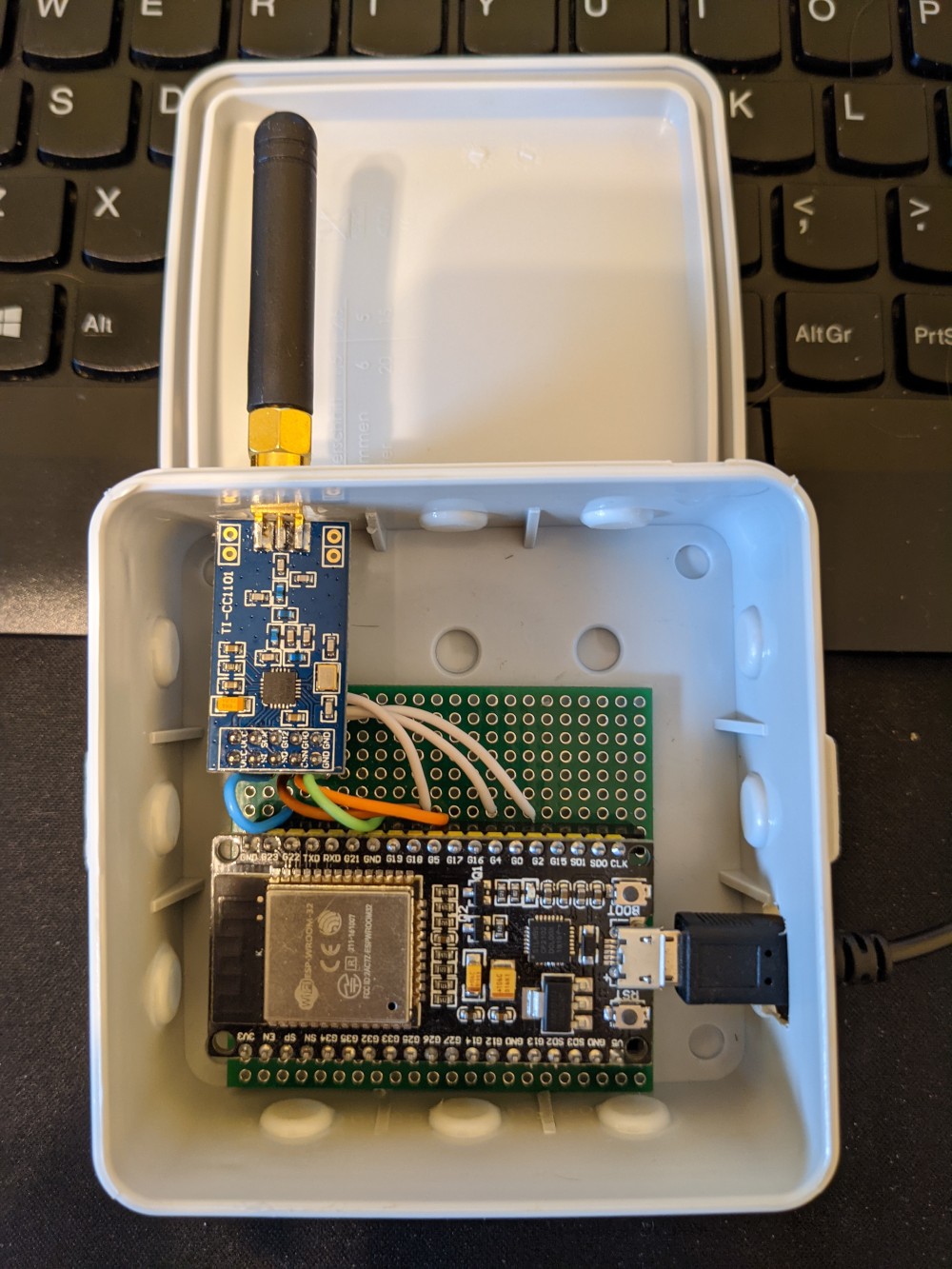
The output contains the buttons I pressed, but also the id of the remote and the command counter (which is supposed to prevent replay attacks). At this point I could just use the id and the counter to send own commands, but if I'd do that too often, the real remote would stop working, as its counter won't increase and the receiver will drop the commands when the counters differ too much. But that's good enough for now. I know I'm looking for the right protocol at the right frequency. As the end result should be an ESP32, let's move on! Acquiring the right hardware Contrary to an RTL-SDR, one usually does not have a spare ESP32 with 433MHz radio at home, so I went shopping: a NodeMCU-32S clone and a CC1101. The CC1101 is important as most 433MHz chips for Arduino/ESP only work at 433.92MHz, but Somfy uses 433.42MHz and using the wrong frequency would result in really bad reception. The CC1101 is essentially an SDR, as you can tune it to a huge spectrum of frequencies. Oh and we need some cables, a bread board, the usual stuff ;) The wiring is rather simple: ESP32 wiring for a CC1101 And the end result isn't too beautiful either, but it works: ESP32 and CC1101 in a simple case Acquiring the right software In my initial research I found an Arduino sketch and was totally prepared to port it to ESP32, but luckily somebody already did that for me! Even better, it's explicitly using the CC1101. Okay, okay, I cheated, I actually ordered the hardware after I found this port and the reference to CC1101. ;) As I am using ESPHome for my ESPs, the idea was to add a "Cover" that's controlling the shutters to it. Writing some C++, how hard can it be? Turns out, not that hard. You can see the code in my GitHub repo. It consists of two (relevant) files: somfy_cover.h and somfy.yaml. somfy_cover.h essentially wraps the communication with the Somfy_Remote_Lib library into an almost boilerplate Custom Cover for ESPHome. There is nothing too fancy in there. The only real difference to the "Custom Cover" example from the documentation is the split into SomfyESPRemote (which inherits from Component) and SomfyESPCover (which inherits from Cover) -- this is taken from the Custom Sensor documentation and allows me to define one "remote" that controls multiple "covers" using the add_cover function. The first two params of the function are the NVS name and key (think database table and row), and the third is the rolling code of the remote (stored in somfy_secrets.h, which is not in Git). In ESPHome a Cover shall define its properties as CoverTraits. Here we call set_is_assumed_state(true), as we don't know the state of the shutters - they could have been controlled using the other (real) remote - and setting this to true allows issuing open/close commands at all times. We also call set_supports_position(false) as we can't tell the shutters to move to a specific position. The one additional feature compared to a normal Cover interface is the program function, which allows to call the "program" command so that the shutters can learn a new remote. somfy.yaml is the ESPHome "configuration", which contains information about the used hardware, WiFi credentials etc. Again, mostly boilerplate. The interesting parts are the loading of the additional libraries and attaching the custom component with multiple covers and the additional PROG switches:
esphome:
  name: somfy
  platform: ESP32
  board: nodemcu-32s
  libraries:
    - SmartRC-CC1101-Driver-Lib@2.5.6
    - Somfy_Remote_Lib@0.4.0
    - EEPROM
  includes:
    - somfy_secrets.h
    - somfy_cover.h
 
cover:
  - platform: custom
    lambda:  -
      auto somfy_remote = new SomfyESPRemote();
      somfy_remote->add_cover("somfy", "badezimmer", SOMFY_REMOTE_BADEZIMMER);
      somfy_remote->add_cover("somfy", "kinderzimmer", SOMFY_REMOTE_KINDERZIMMER);
      App.register_component(somfy_remote);
      return somfy_remote->covers;
    covers:
      - id: "somfy"
        name: "Somfy Cover"
      - id: "somfy2"
        name: "Somfy Cover2"
switch:
  - platform: template
    name: "PROG"
    turn_on_action:
      - lambda:  -
          ((SomfyESPCover*)id(somfy))->program();
  - platform: template
    name: "PROG2"
    turn_on_action:
      - lambda:  -
          ((SomfyESPCover*)id(somfy2))->program();
The switch to trigger the program mode took me a bit. As the Cover interface of ESPHome does not offer any additional functions besides movement control, I first wrote code to trigger "program" when "stop" was pressed three times in a row, but that felt really cumbersome and also had the side effect that the remote would send more than needed, sometimes confusing the shutters. I then decided to have a separate button (well, switch) for that, but the compiler yelled at me I can't call program on a Cover as it does not have such a function. Turns out, you need to explicitly cast to SomfyESPCover and then it works, even if the code becomes really readable, NOT. Oh and as the switch does not have any code to actually change/report state, it effectively acts as a button that can be pressed. At this point we can just take an existing remote, press PROG for 5 seconds, see the blinds move shortly up and down a bit and press PROG on our new ESP32 remote and the shutters will learn the new remote. And thanks to the awesome integration of ESPHome into HomeAssistant, this instantly shows up as a new controllable cover there too. Future Additional Work I started writing this post about a year ago And the initial implementation had some room for improvement More than one remote The initial code only created one remote and one cover element. Sure, we could attach that to all shutters (there are 4 of them), but we really want to be able to control them separately. Thankfully I managed to read enough ESPHome docs, and learned how to operate std::vector to make the code dynamically accept new shutters. Using ESP32's NVS The ESP32 has a non-volatile key-value storage which is much nicer than throwing bits at an emulated EEPROM. The first library I used for that explicitly used EEPROM storage and it would have required quite some hacking to make it work with NVS. Thankfully the library I am using now has a plugable storage interface, and I could just write the NVS backend myself and upstream now supports that. Yay open-source! Remaining issues Real state is unknown As noted above, the ESP does not know the real state of the shutters: a command could have been lost in transmission (the Somfy protocol is send-only, there is no feedback) or the shutters might have been controlled by another remote. At least the second part could be solved by listening all the time and trying to decode commands heard over the air, but I don't think this is worth the time -- worst that can happen is that a closed (opened) shutter receives another close (open) command and that is harmless as they have integrated endstops and know that they should not move further. Can't program new remotes with ESP only To program new remotes, one has to press the "PROG" button for 5 seconds. This was not exposed in the old library, but the new one does support "long press", I just would need to add another ugly switch to the config and I currently don't plan to do so, as I do have working remotes for the case I need to learn a new one.

18 February 2021

Jonathan McDowell: Hacking and Bricking the EE Opsrey 2 Mini

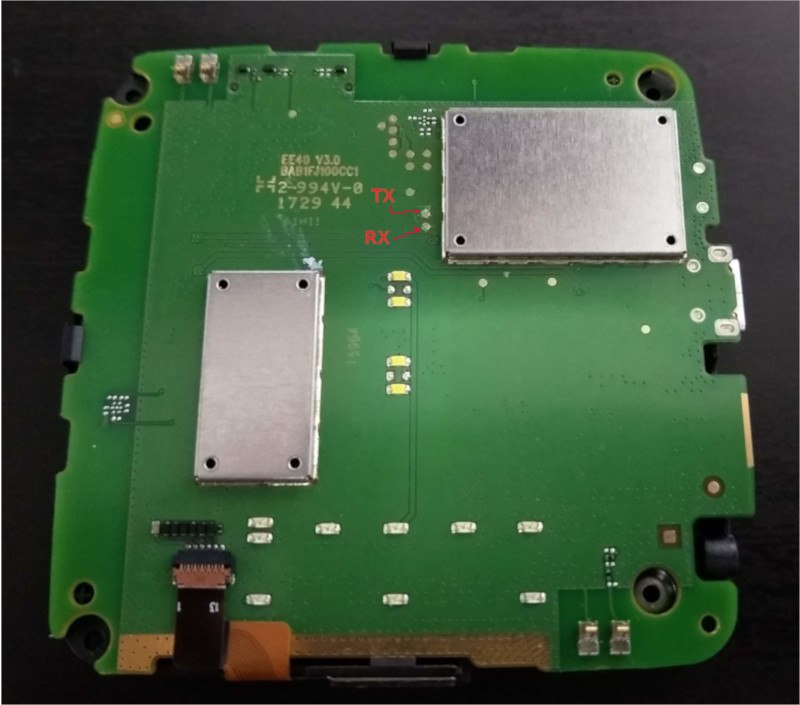
I ve mentioned in the past my twisted EE network setup from when I moved in to my current house. The 4GEE WiFi Mini (also known as the EE Osprey 2 Mini or the EE40VB, and actually a rebadged Alcatel Y853VB) has been sitting unused since then, so I figured I d see about trying to get a shell on it. TL;DR: Of course it s running Linux, there s a couple of test points internally which bring out the serial console, but after finding those and logging in I discovered it s running ADB on port 5555 quite happily available without authentication both via wifi and the USB port. So if you have physical or local network access, instant root shell. Well done, folks. And then I bricked it before I could do anything more interesting. There s a lack of information about this device out there - most of the links I can find are around removing the SIM lock - so I thought I d document the pieces I found just in case anyone else is trying to figure it out. It s based around a Qualcomm MDM9607 SoC, paired with 64M RAM and 256M NAND flash. Wifi is via an RTL8192ES. Kernel is 3.18.20. Busybox is v1.23.1. It s running dnsmasq but I didn t grab the version. Of course there s no source or offer of source provided. Taking it apart is fairly easy. There s a single screw to remove, just beside the SIM slot. The coloured rim can then be carefully pried away from the back, revealing the battery. There are then 4 screws in the corners which need removed in order to be able to lift out the actual PCB and gain access to the serial console test points. EE40VB PCB serial console test points My mistake was going poking around trying to figure out where the updates are downloaded from - I know I m running a slightly older release than what s current, and the device can do an automatic download + update. Top tip; don t run Jrdrecovery. It ll error on finding /cache/update.zip and wipe the main partition anyway. That ll leave you in a boot loop where the device boots the recovery partition which tries to install /cache/update.zip which of course still doesn t exist. So. Where next? First, I need to get the device into a state where I can actually do something other than watch it boot into recovery, fail to flash and reboot. Best guess at present is to try and get it to enter the Qualcomm EDL (Emergency Download) mode. That might be possible with a custom USB cable that grounds D+ on boot. Alternatively I need to probe some of the other test points on the PCB and see if grounding any of those helps enter EDL mode. I then need a suitable firehose OEM-signed programmer image. And then I need to actually get hold of a proper EE40VB firmware image, either via one of the OTA update files or possibly via an Alcatel ADSU image (though no idea how to get hold of one, other than by posting to a random GSM device forum and hoping for the kindness of strangers). More updates if/when I make progress
Qualcomm bootloader log
Format: Log Type - Time(microsec) - Message - Optional Info
Log Type: B - Since Boot(Power On Reset),  D - Delta,  S - Statistic
S - QC_IMAGE_VERSION_STRING=BOOT.BF.3.1.2-00053
S - IMAGE_VARIANT_STRING=LAATANAZA
S - OEM_IMAGE_VERSION_STRING=linux3
S - Boot Config, 0x000002e1
B -    105194 - SBL1, Start
D -     61885 - QSEE Image Loaded, Delta - (451964 Bytes)
D -     30286 - RPM Image Loaded, Delta - (151152 Bytes)
B -    459330 - Roger:boot_jrd_oem_main
B -    461526 - Welcome to key_check_poweron!!!
B -    466436 - REG0x00, rc=47
B -    469120 - REG0x01, rc=1f
B -    472018 - REG0x02, rc=1c
B -    474885 - REG0x03, rc=47
B -    477782 - REG0x04, rc=b2
B -    480558 - REG0x05, rc=
B -    483272 - REG0x06, rc=9e
B -    486139 - REG0x07, rc=
B -    488854 - REG0x08, rc=a4
B -    491721 - REG0x09, rc=80
B -    494130 - bq24295_probe: vflt/vsys/vprechg=0mV/0mV/0mV, tprechg/tfastchg=0Min/0Min, [0C, 0C]
B -    511546 - come to calculate vol and temperature!!
B -    511637 - ##############battery_core_convert_vntc: NTC_voltage=1785690
B -    517280 - battery_core_convert_vntc: <-44C, 1785690uV>, present=0
B -    529358 - bq24295_set_current_limit: setting=0mA, mode=-1, input/fastchg/prechg/termchg=-1mA/0mA/0mA/0mA
B -    534360 - bq24295_set_charge_current, rc=0,reg_val=0,i=0
B -    539636 - bq24295_enable_charge: setting=0, chg_enable=-1, otg_enable=0
B -    546072 - bq24295_enable_charging: enable_charging=0
B -    552172 - bq24295_set_current_limit: setting=0mA, mode=-1, input/fastchg/prechg/termchg=-1mA/0mA/0mA/0mA
B -    561566 - bq24295_set_charge_current, rc=0,reg_val=0,i=0
B -    567056 - bq24295_enable_charge: setting=0, chg_enable=0, otg_enable=0
B -    579286 - come to calculate vol and temperature!!
B -    579378 - ##############battery_core_convert_vntc: NTC_voltage=1785777
B -    585539 - battery_core_convert_vntc: <-44C, 1785777uV>, present=0
B -    597617 - charge_main: battery is plugout!!
B -    597678 - Welcome to pca955x_probe!!!
B -    601063 - pca955x_probe: PCA955X probed successfully!
D -     27511 - APPSBL Image Loaded, Delta - (179348 Bytes)
B -    633271 - QSEE Execution, Start
D -       213 - QSEE Execution, Delta
B -    638944 - >>>>>>>>>>>>>>>>>>>>>>>>>>>>>>>>>Start writting JRD RECOVERY BOOT
B -    650107 - >>>>>>>>>>>>>>>>>>>>>>>>>>>>>>>>>Start writting  RECOVERY BOOT
B -    653218 - >>>>>>>>>>>>>>>>>>>>>>>>>>>>>>>>>read_buf[0] == 0
B -    659044 - SBL1, End
D -    556137 - SBL1, Delta
S - Throughput, 2000 KB/s  (782884 Bytes,  278155 us)
S - DDR Frequency, 240 MHz
littlekernel aboot log
Android Bootloader - UART_DM Initialized!!!
[0] welcome to lk
[0] SCM call: 0x2000601 failed with :fffffffc
[0] Failed to initialize SCM
[10] platform_init()
[10] target_init()
[10] smem ptable found: ver: 4 len: 17
[10] ERROR: No devinfo partition found
[10] Neither 'config' nor 'frp' partition found
[30] voltage of NTC  is 1789872!
[30] voltage of BAT  is 3179553!
[30] usb present is 1!
[30] Loading (boot) image (4171776): start
[530] Loading (boot) image (4171776): done
[540] DTB Total entry: 25, DTB version: 3
[540] Using DTB entry 0x00000129/00010000/0x00000008/0 for device 0x00000129/00010000/0x00010008/0
[560] JRD_CHG_OFF_FEATURE!
[560] come to jrd_target_pause_for_battery_charge!
[570] power_on_status.hard_reset = 0x0
[570] power_on_status.smpl = 0x0
[570] power_on_status.rtc = 0x0
[580] power_on_status.dc_chg = 0x0
[580] power_on_status.usb_chg = 0x0
[580] power_on_status.pon1 = 0x1
[590] power_on_status.cblpwr = 0x0
[590] power_on_status.kpdpwr = 0x0
[590] power_on_status.bugflag = 0x0
[590] cmdline: noinitrd  rw console=ttyHSL0,115200,n8 androidboot.hardware=qcom ehci-hcd.park=3 msm_rtb.filter=0x37 lpm_levels.sleep_disabled=1  earlycon=msm_hsl_uart,0x78b3000  androidboot.serialno=7e6ba58c androidboot.baseband=msm rootfstype=ubifs rootflags=b
[620] Updating device tree: start
[720] Updating device tree: done
[720] booting linux @ 0x80008000, ramdisk @ 0x80008000 (0), tags/device tree @ 0x81e00000
Linux kernel console boot log
[    0.000000] Booting Linux on physical CPU 0x0
[    0.000000] Linux version 3.18.20 (linux3@linux3) (gcc version 4.9.2 (GCC) ) #1 PREEMPT Thu Aug 10 11:57:07 CST 2017
[    0.000000] CPU: ARMv7 Processor [410fc075] revision 5 (ARMv7), cr=10c53c7d
[    0.000000] CPU: PIPT / VIPT nonaliasing data cache, VIPT aliasing instruction cache
[    0.000000] Machine model: Qualcomm Technologies, Inc. MDM 9607 MTP
[    0.000000] Early serial console at I/O port 0x0 (options '')
[    0.000000] bootconsole [uart0] enabled
[    0.000000] Reserved memory: reserved region for node 'modem_adsp_region@0': base 0x82a00000, size 56 MiB
[    0.000000] Reserved memory: reserved region for node 'external_image_region@0': base 0x87c00000, size 4 MiB
[    0.000000] Removed memory: created DMA memory pool at 0x82a00000, size 56 MiB
[    0.000000] Reserved memory: initialized node modem_adsp_region@0, compatible id removed-dma-pool
[    0.000000] Removed memory: created DMA memory pool at 0x87c00000, size 4 MiB
[    0.000000] Reserved memory: initialized node external_image_region@0, compatible id removed-dma-pool
[    0.000000] cma: Reserved 4 MiB at 0x87800000
[    0.000000] Memory policy: Data cache writeback
[    0.000000] CPU: All CPU(s) started in SVC mode.
[    0.000000] Built 1 zonelists in Zone order, mobility grouping on.  Total pages: 17152
[    0.000000] Kernel command line: noinitrd  rw console=ttyHSL0,115200,n8 androidboot.hardware=qcom ehci-hcd.park=3 msm_rtb.filter=0x37 lpm_levels.sleep_disabled=1  earlycon=msm_hsl_uart,0x78b3000  androidboot.serialno=7e6ba58c androidboot.baseband=msm rootfstype=ubifs rootflags=bulk_read root=ubi0:rootfs ubi.mtd=16
[    0.000000] PID hash table entries: 512 (order: -1, 2048 bytes)
[    0.000000] Dentry cache hash table entries: 16384 (order: 4, 65536 bytes)
[    0.000000] Inode-cache hash table entries: 8192 (order: 3, 32768 bytes)
[    0.000000] Memory: 54792K/69632K available (5830K kernel code, 399K rwdata, 2228K rodata, 276K init, 830K bss, 14840K reserved)
[    0.000000] Virtual kernel memory layout:
[    0.000000]     vector  : 0xffff0000 - 0xffff1000   (   4 kB)
[    0.000000]     fixmap  : 0xffc00000 - 0xfff00000   (3072 kB)
[    0.000000]     vmalloc : 0xc8800000 - 0xff000000   ( 872 MB)
[    0.000000]     lowmem  : 0xc0000000 - 0xc8000000   ( 128 MB)
[    0.000000]     modules : 0xbf000000 - 0xc0000000   (  16 MB)
[    0.000000]       .text : 0xc0008000 - 0xc07e6c38   (8060 kB)
[    0.000000]       .init : 0xc07e7000 - 0xc082c000   ( 276 kB)
[    0.000000]       .data : 0xc082c000 - 0xc088fdc0   ( 400 kB)
[    0.000000]        .bss : 0xc088fe84 - 0xc095f798   ( 831 kB)
[    0.000000] SLUB: HWalign=64, Order=0-3, MinObjects=0, CPUs=1, Nodes=1
[    0.000000] Preemptible hierarchical RCU implementation.
[    0.000000] NR_IRQS:16 nr_irqs:16 16
[    0.000000] GIC CPU mask not found - kernel will fail to boot.
[    0.000000] GIC CPU mask not found - kernel will fail to boot.
[    0.000000] mpm_init_irq_domain(): Cannot find irq controller for qcom,gpio-parent
[    0.000000] MPM 1 irq mapping errored -517
[    0.000000] Architected mmio timer(s) running at 19.20MHz (virt).
[    0.000011] sched_clock: 56 bits at 19MHz, resolution 52ns, wraps every 3579139424256ns
[    0.007975] Switching to timer-based delay loop, resolution 52ns
[    0.013969] Switched to clocksource arch_mem_counter
[    0.019687] Console: colour dummy device 80x30
[    0.023344] Calibrating delay loop (skipped), value calculated using timer frequency.. 38.40 BogoMIPS (lpj=192000)
[    0.033666] pid_max: default: 32768 minimum: 301
[    0.038411] Mount-cache hash table entries: 1024 (order: 0, 4096 bytes)
[    0.044902] Mountpoint-cache hash table entries: 1024 (order: 0, 4096 bytes)
[    0.052445] CPU: Testing write buffer coherency: ok
[    0.057057] Setting up static identity map for 0x8058aac8 - 0x8058ab20
[    0.064242]
[    0.064242] **********************************************************
[    0.071251] **   NOTICE NOTICE NOTICE NOTICE NOTICE NOTICE NOTICE   **
[    0.077817] **                                                      **
[    0.084302] ** trace_printk() being used. Allocating extra memory.  **
[    0.090781] **                                                      **
[    0.097320] ** This means that this is a DEBUG kernel and it is     **
[    0.103802] ** unsafe for produciton use.                           **
[    0.110339] **                                                      **
[    0.116850] ** If you see this message and you are not debugging    **
[    0.123333] ** the kernel, report this immediately to your vendor!  **
[    0.129870] **                                                      **
[    0.136380] **   NOTICE NOTICE NOTICE NOTICE NOTICE NOTICE NOTICE   **
[    0.142865] **********************************************************
[    0.150225] MSM Memory Dump base table set up
[    0.153739] MSM Memory Dump apps data table set up
[    0.168125] VFP support v0.3: implementor 41 architecture 2 part 30 variant 7 rev 5
[    0.176332] pinctrl core: initialized pinctrl subsystem
[    0.180930] regulator-dummy: no parameters
[    0.215338] NET: Registered protocol family 16
[    0.220475] DMA: preallocated 256 KiB pool for atomic coherent allocations
[    0.284034] cpuidle: using governor ladder
[    0.314026] cpuidle: using governor menu
[    0.344024] cpuidle: using governor qcom
[    0.355452] msm_watchdog b017000.qcom,wdt: wdog absent resource not present
[    0.361656] msm_watchdog b017000.qcom,wdt: MSM Watchdog Initialized
[    0.371373] irq: no irq domain found for /soc/pinctrl@1000000 !
[    0.381268] spmi_pmic_arb 200f000.qcom,spmi: PMIC Arb Version-2 0x20010000
[    0.389733] platform 4080000.qcom,mss: assigned reserved memory node modem_adsp_region@0
[    0.397409] mem_acc_corner: 0 <--> 0 mV
[    0.401937] hw-breakpoint: found 5 (+1 reserved) breakpoint and 4 watchpoint registers.
[    0.408966] hw-breakpoint: maximum watchpoint size is 8 bytes.
[    0.416287] __of_mpm_init(): MPM driver mapping exists
[    0.420940] msm_rpm_glink_dt_parse: qcom,rpm-glink compatible not matches
[    0.427235] msm_rpm_dev_probe: APSS-RPM communication over SMD
[    0.432977] smd_open() before smd_init()
[    0.437544] msm_mpm_dev_probe(): Cannot get clk resource for XO: -517
[    0.445730] smd_channel_probe_now: allocation table not initialized
[    0.453100] mdm9607_s1: 1050 <--> 1350 mV at 1225 mV normal idle
[    0.458566] spm_regulator_probe: name=mdm9607_s1, range=LV, voltage=1225000 uV, mode=AUTO, step rate=4800 uV/us
[    0.468817] cpr_efuse_init: apc_corner: efuse_addr = 0x000a4000 (len=0x1000)
[    0.475353] cpr_read_fuse_revision: apc_corner: fuse revision = 2
[    0.481345] cpr_parse_speed_bin_fuse: apc_corner: [row: 37]: 0x79e8bd327e6ba58c, speed_bits = 4
[    0.490124] cpr_pvs_init: apc_corner: pvs voltage: [1050000 1100000 1275000] uV
[    0.497342] cpr_pvs_init: apc_corner: ceiling voltage: [1050000 1225000 1350000] uV
[    0.504979] cpr_pvs_init: apc_corner: floor voltage: [1050000 1050000 1150000] uV
[    0.513125] i2c-msm-v2 78b8000.i2c: probing driver i2c-msm-v2
[    0.518335] i2c-msm-v2 78b8000.i2c: error on clk_get(core_clk):-517
[    0.524478] i2c-msm-v2 78b8000.i2c: error probe() failed with err:-517
[    0.531111] i2c-msm-v2 78b7000.i2c: probing driver i2c-msm-v2
[    0.536788] i2c-msm-v2 78b7000.i2c: error on clk_get(core_clk):-517
[    0.542886] i2c-msm-v2 78b7000.i2c: error probe() failed with err:-517
[    0.549618] i2c-msm-v2 78b9000.i2c: probing driver i2c-msm-v2
[    0.555202] i2c-msm-v2 78b9000.i2c: error on clk_get(core_clk):-517
[    0.561374] i2c-msm-v2 78b9000.i2c: error probe() failed with err:-517
[    0.570613] msm-thermal soc:qcom,msm-thermal: msm_thermal:Failed reading node=/soc/qcom,msm-thermal, key=qcom,core-limit-temp. err=-22. KTM continues
[    0.583049] msm-thermal soc:qcom,msm-thermal: probe_therm_reset:Failed reading node=/soc/qcom,msm-thermal, key=qcom,therm-reset-temp err=-22. KTM continues
[    0.596926] msm_thermal:msm_thermal_dev_probe Failed reading node=/soc/qcom,msm-thermal, key=qcom,online-hotplug-core. err:-517
[    0.609370] sps:sps is ready.
[    0.613137] msm_rpm_glink_dt_parse: qcom,rpm-glink compatible not matches
[    0.619020] msm_rpm_dev_probe: APSS-RPM communication over SMD
[    0.625773] mdm9607_s2: 750 <--> 1275 mV at 750 mV normal idle
[    0.631584] mdm9607_s3_level: 0 <--> 0 mV at 0 mV normal idle
[    0.637085] mdm9607_s3_level_ao: 0 <--> 0 mV at 0 mV normal idle
[    0.643092] mdm9607_s3_floor_level: 0 <--> 0 mV at 0 mV normal idle
[    0.649512] mdm9607_s3_level_so: 0 <--> 0 mV at 0 mV normal idle
[    0.655750] mdm9607_s4: 1800 <--> 1950 mV at 1800 mV normal idle
[    0.661791] mdm9607_l1: 1250 mV normal idle
[    0.666090] mdm9607_l2: 1800 mV normal idle
[    0.670276] mdm9607_l3: 1800 mV normal idle
[    0.674541] mdm9607_l4: 3075 mV normal idle
[    0.678743] mdm9607_l5: 1700 <--> 3050 mV at 1700 mV normal idle
[    0.684904] mdm9607_l6: 1700 <--> 3050 mV at 1700 mV normal idle
[    0.690892] mdm9607_l7: 1700 <--> 1900 mV at 1700 mV normal idle
[    0.697036] mdm9607_l8: 1800 mV normal idle
[    0.701238] mdm9607_l9: 1200 <--> 1250 mV at 1200 mV normal idle
[    0.707367] mdm9607_l10: 1050 mV normal idle
[    0.711662] mdm9607_l11: 1800 mV normal idle
[    0.716089] mdm9607_l12_level: 0 <--> 0 mV at 0 mV normal idle
[    0.721717] mdm9607_l12_level_ao: 0 <--> 0 mV at 0 mV normal idle
[    0.727946] mdm9607_l12_level_so: 0 <--> 0 mV at 0 mV normal idle
[    0.734099] mdm9607_l12_floor_lebel: 0 <--> 0 mV at 0 mV normal idle
[    0.740706] mdm9607_l13: 1800 <--> 2850 mV at 2850 mV normal idle
[    0.746883] mdm9607_l14: 2650 <--> 3000 mV at 2650 mV normal idle
[    0.752515] msm_mpm_dev_probe(): Cannot get clk resource for XO: -517
[    0.759036] cpr_efuse_init: apc_corner: efuse_addr = 0x000a4000 (len=0x1000)
[    0.765807] cpr_read_fuse_revision: apc_corner: fuse revision = 2
[    0.771809] cpr_parse_speed_bin_fuse: apc_corner: [row: 37]: 0x79e8bd327e6ba58c, speed_bits = 4
[    0.780586] cpr_pvs_init: apc_corner: pvs voltage: [1050000 1100000 1275000] uV
[    0.787808] cpr_pvs_init: apc_corner: ceiling voltage: [1050000 1225000 1350000] uV
[    0.795443] cpr_pvs_init: apc_corner: floor voltage: [1050000 1050000 1150000] uV
[    0.803094] cpr_init_cpr_parameters: apc_corner: up threshold = 2, down threshold = 3
[    0.810752] cpr_init_cpr_parameters: apc_corner: CPR is enabled by default.
[    0.817687] cpr_init_cpr_efuse: apc_corner: [row:65] = 0x15000277277383
[    0.824272] cpr_init_cpr_efuse: apc_corner: CPR disable fuse = 0
[    0.830225] cpr_init_cpr_efuse: apc_corner: Corner[1]: ro_sel = 0, target quot = 631
[    0.837976] cpr_init_cpr_efuse: apc_corner: Corner[2]: ro_sel = 0, target quot = 631
[    0.845703] cpr_init_cpr_efuse: apc_corner: Corner[3]: ro_sel = 0, target quot = 899
[    0.853592] cpr_config: apc_corner: Timer count: 0x17700 (for 5000 us)
[    0.860426] apc_corner: 0 <--> 0 mV
[    0.864044] i2c-msm-v2 78b8000.i2c: probing driver i2c-msm-v2
[    0.869261] i2c-msm-v2 78b8000.i2c: error on clk_get(core_clk):-517
[    0.875492] i2c-msm-v2 78b8000.i2c: error probe() failed with err:-517
[    0.882225] i2c-msm-v2 78b7000.i2c: probing driver i2c-msm-v2
[    0.887775] i2c-msm-v2 78b7000.i2c: error on clk_get(core_clk):-517
[    0.893941] i2c-msm-v2 78b7000.i2c: error probe() failed with err:-517
[    0.900719] i2c-msm-v2 78b9000.i2c: probing driver i2c-msm-v2
[    0.906256] i2c-msm-v2 78b9000.i2c: error on clk_get(core_clk):-517
[    0.912430] i2c-msm-v2 78b9000.i2c: error probe() failed with err:-517
[    0.919472] msm-thermal soc:qcom,msm-thermal: msm_thermal:Failed reading node=/soc/qcom,msm-thermal, key=qcom,core-limit-temp. err=-22. KTM continues
[    0.932372] msm-thermal soc:qcom,msm-thermal: probe_therm_reset:Failed reading node=/soc/qcom,msm-thermal,
key=qcom,therm-reset-temp err=-22. KTM continues
[    0.946361] msm_thermal:get_kernel_cluster_info CPU0 topology not initialized.
[    0.953824] cpu cpu0: dev_pm_opp_get_opp_count: device OPP not found (-19)
[    0.960300] msm_thermal:get_cpu_freq_plan_len Error reading CPU0 freq table len. error:-19
[    0.968533] msm_thermal:vdd_restriction_reg_init Defer vdd rstr freq init.
[    0.975846] cpu cpu0: dev_pm_opp_get_opp_count: device OPP not found (-19)
[    0.982219] msm_thermal:get_cpu_freq_plan_len Error reading CPU0 freq table len. error:-19
[    0.991378] cpu cpu0: dev_pm_opp_get_opp_count: device OPP not found (-19)
[    0.997544] msm_thermal:get_cpu_freq_plan_len Error reading CPU0 freq table len. error:-19
[    1.013642] qcom,gcc-mdm9607 1800000.qcom,gcc: Registered GCC clocks
[    1.019451] clock-a7 b010008.qcom,clock-a7: Speed bin: 4 PVS Version: 0
[    1.025693] a7ssmux: set OPP pair(400000000 Hz: 1 uV) on cpu0
[    1.031314] a7ssmux: set OPP pair(1305600000 Hz: 7 uV) on cpu0
[    1.038805] i2c-msm-v2 78b8000.i2c: probing driver i2c-msm-v2
[    1.043587] AXI: msm_bus_scale_register_client(): msm_bus_scale_register_client: Bus driver not ready.
[    1.052935] i2c-msm-v2 78b8000.i2c: msm_bus_scale_register_client(mstr-id:86):0 (not a problem)
[    1.062006] irq: no irq domain found for /soc/wcd9xxx-irq !
[    1.069884] i2c-msm-v2 78b7000.i2c: probing driver i2c-msm-v2
[    1.074814] AXI: msm_bus_scale_register_client(): msm_bus_scale_register_client: Bus driver not ready.
[    1.083716] i2c-msm-v2 78b7000.i2c: msm_bus_scale_register_client(mstr-id:86):0 (not a problem)
[    1.093850] i2c-msm-v2 78b9000.i2c: probing driver i2c-msm-v2
[    1.098889] AXI: msm_bus_scale_register_client(): msm_bus_scale_register_client: Bus driver not ready.
[    1.107779] i2c-msm-v2 78b9000.i2c: msm_bus_scale_register_client(mstr-id:86):0 (not a problem)
[    1.167871] KPI: Bootloader start count = 24097
[    1.171364] KPI: Bootloader end count = 48481
[    1.175855] KPI: Bootloader display count = 3884474147
[    1.180825] KPI: Bootloader load kernel count = 16420
[    1.185905] KPI: Kernel MPM timestamp = 105728
[    1.190286] KPI: Kernel MPM Clock frequency = 32768
[    1.195209] socinfo_print: v0.10, id=297, ver=1.0, raw_id=72, raw_ver=0, hw_plat=8, hw_plat_ver=65536
[    1.195209]  accessory_chip=0, hw_plat_subtype=0, pmic_model=65539, pmic_die_revision=131074 foundry_id=0 serial_number=2120983948
[    1.216731] sdcard_ext_vreg: no parameters
[    1.220555] rome_vreg: no parameters
[    1.224133] emac_lan_vreg: no parameters
[    1.228177] usbcore: registered new interface driver usbfs
[    1.233156] usbcore: registered new interface driver hub
[    1.238578] usbcore: registered new device driver usb
[    1.244507] cpufreq: driver msm up and running
[    1.248425] ION heap system created
[    1.251895] msm_bus_fabric_init_driver
[    1.262563] qcom,qpnp-power-on qpnp-power-on-c7303800: PMIC@SID0 Power-on reason: Triggered from PON1 (secondary PMIC) and 'cold' boot
[    1.273747] qcom,qpnp-power-on qpnp-power-on-c7303800: PMIC@SID0: Power-off reason: Triggered from UVLO (Under Voltage Lock Out)
[    1.285430] input: qpnp_pon as /devices/virtual/input/input0
[    1.291246] PMIC@SID0: PM8019 v2.2 options: 3, 2, 2, 2
[    1.296706] Advanced Linux Sound Architecture Driver Initialized.
[    1.302493] Add group failed
[    1.305291] cfg80211: Calling CRDA to update world regulatory domain
[    1.311216] cfg80211: World regulatory domain updated:
[    1.317109] Switched to clocksource arch_mem_counter
[    1.334091] cfg80211:  DFS Master region: unset
[    1.337418] cfg80211:   (start_freq - end_freq @ bandwidth), (max_antenna_gain, max_eirp), (dfs_cac_time)
[    1.354087] cfg80211:   (2402000 KHz - 2472000 KHz @ 40000 KHz), (N/A, 2000 mBm), (N/A)
[    1.361055] cfg80211:   (2457000 KHz - 2482000 KHz @ 40000 KHz), (N/A, 2000 mBm), (N/A)
[    1.370545] NET: Registered protocol family 2
[    1.374082] cfg80211:   (2474000 KHz - 2494000 KHz @ 20000 KHz), (N/A, 2000 mBm), (N/A)
[    1.381851] cfg80211:   (5170000 KHz - 5250000 KHz @ 80000 KHz), (N/A, 2000 mBm), (N/A)
[    1.389876] cfg80211:   (5250000 KHz - 5330000 KHz @ 80000 KHz), (N/A, 2000 mBm), (N/A)
[    1.397857] cfg80211:   (5490000 KHz - 5710000 KHz @ 80000 KHz), (N/A, 2000 mBm), (N/A)
[    1.405841] cfg80211:   (5735000 KHz - 5835000 KHz @ 80000 KHz), (N/A, 2000 mBm), (N/A)
[    1.413795] cfg80211:   (57240000 KHz - 63720000 KHz @ 2160000 KHz), (N/A, 0 mBm), (N/A)
[    1.422355] TCP established hash table entries: 1024 (order: 0, 4096 bytes)
[    1.428921] TCP bind hash table entries: 1024 (order: 0, 4096 bytes)
[    1.435192] TCP: Hash tables configured (established 1024 bind 1024)
[    1.441528] TCP: reno registered
[    1.444738] UDP hash table entries: 256 (order: 0, 4096 bytes)
[    1.450521] UDP-Lite hash table entries: 256 (order: 0, 4096 bytes)
[    1.456950] NET: Registered protocol family 1
[    1.462779] futex hash table entries: 256 (order: -1, 3072 bytes)
[    1.474555] msgmni has been set to 115
[    1.478551] Block layer SCSI generic (bsg) driver version 0.4 loaded (major 251)
[    1.485041] io scheduler noop registered
[    1.488818] io scheduler deadline registered
[    1.493200] io scheduler cfq registered (default)
[    1.502142] msm_rpm_log_probe: OK
[    1.506717] msm_serial_hs module loaded
[    1.509803] msm_serial_hsl_probe: detected port #0 (ttyHSL0)
[    1.515324] AXI: get_pdata(): Error: Client name not found
[    1.520626] AXI: msm_bus_cl_get_pdata(): client has to provide missing entry for successful registration
[    1.530171] msm_serial_hsl_probe: Bus scaling is disabled                      [    1.074814] AXI: msm_bus_scale_register_client(): msm_bus_scale_register_client: Bus driver not ready.
[    1.083716] i2c-msm-v2 78b7000.i2c: msm_bus_scale_register_client(mstr-id:86):0 (not a problem)
[    1.093850] i2c-msm-v2 78b9000.i2c: probing driver i2c-msm-v2
[    1.098889] AXI: msm_bus_scale_register_client(): msm_bus_scale_register_client: Bus driver not ready.
[    1.107779] i2c-msm-v2 78b9000.i2c: msm_bus_scale_register_client(mstr-id:86):0 (not a problem)
[    1.167871] KPI: Bootloader start count = 24097
[    1.171364] KPI: Bootloader end count = 48481
[    1.175855] KPI: Bootloader display count = 3884474147
[    1.180825] KPI: Bootloader load kernel count = 16420
[    1.185905] KPI: Kernel MPM timestamp = 105728
[    1.190286] KPI: Kernel MPM Clock frequency = 32768
[    1.195209] socinfo_print: v0.10, id=297, ver=1.0, raw_id=72, raw_ver=0, hw_plat=8, hw_plat_ver=65536
[    1.195209]  accessory_chip=0, hw_plat_subtype=0, pmic_model=65539, pmic_die_revision=131074 foundry_id=0 serial_number=2120983948
[    1.216731] sdcard_ext_vreg: no parameters
[    1.220555] rome_vreg: no parameters
[    1.224133] emac_lan_vreg: no parameters
[    1.228177] usbcore: registered new interface driver usbfs
[    1.233156] usbcore: registered new interface driver hub
[    1.238578] usbcore: registered new device driver usb
[    1.244507] cpufreq: driver msm up and running
[    1.248425] ION heap system created
[    1.251895] msm_bus_fabric_init_driver
[    1.262563] qcom,qpnp-power-on qpnp-power-on-c7303800: PMIC@SID0 Power-on reason: Triggered from PON1 (secondary PMIC) and 'cold' boot
[    1.273747] qcom,qpnp-power-on qpnp-power-on-c7303800: PMIC@SID0: Power-off reason: Triggered from UVLO (Under Voltage Lock Out)
[    1.285430] input: qpnp_pon as /devices/virtual/input/input0
[    1.291246] PMIC@SID0: PM8019 v2.2 options: 3, 2, 2, 2
[    1.296706] Advanced Linux Sound Architecture Driver Initialized.
[    1.302493] Add group failed
[    1.305291] cfg80211: Calling CRDA to update world regulatory domain
[    1.311216] cfg80211: World regulatory domain updated:
[    1.317109] Switched to clocksource arch_mem_counter
[    1.334091] cfg80211:  DFS Master region: unset
[    1.337418] cfg80211:   (start_freq - end_freq @ bandwidth), (max_antenna_gain, max_eirp), (dfs_cac_time)
[    1.354087] cfg80211:   (2402000 KHz - 2472000 KHz @ 40000 KHz), (N/A, 2000 mBm), (N/A)
[    1.361055] cfg80211:   (2457000 KHz - 2482000 KHz @ 40000 KHz), (N/A, 2000 mBm), (N/A)
[    1.370545] NET: Registered protocol family 2
[    1.374082] cfg80211:   (2474000 KHz - 2494000 KHz @ 20000 KHz), (N/A, 2000 mBm), (N/A)
[    1.381851] cfg80211:   (5170000 KHz - 5250000 KHz @ 80000 KHz), (N/A, 2000 mBm), (N/A)
[    1.389876] cfg80211:   (5250000 KHz - 5330000 KHz @ 80000 KHz), (N/A, 2000 mBm), (N/A)
[    1.397857] cfg80211:   (5490000 KHz - 5710000 KHz @ 80000 KHz), (N/A, 2000 mBm), (N/A)
[    1.405841] cfg80211:   (5735000 KHz - 5835000 KHz @ 80000 KHz), (N/A, 2000 mBm), (N/A)
[    1.413795] cfg80211:   (57240000 KHz - 63720000 KHz @ 2160000 KHz), (N/A, 0 mBm), (N/A)
[    1.422355] TCP established hash table entries: 1024 (order: 0, 4096 bytes)
[    1.428921] TCP bind hash table entries: 1024 (order: 0, 4096 bytes)
[    1.435192] TCP: Hash tables configured (established 1024 bind 1024)
[    1.441528] TCP: reno registered
[    1.444738] UDP hash table entries: 256 (order: 0, 4096 bytes)
[    1.450521] UDP-Lite hash table entries: 256 (order: 0, 4096 bytes)
[    1.456950] NET: Registered protocol family 1
[    1.462779] futex hash table entries: 256 (order: -1, 3072 bytes)
[    1.474555] msgmni has been set to 115
[    1.478551] Block layer SCSI generic (bsg) driver version 0.4 loaded (major 251)
[    1.485041] io scheduler noop registered
[    1.488818] io scheduler deadline registered
[    1.493200] io scheduler cfq registered (default)
[    1.502142] msm_rpm_log_probe: OK
[    1.506717] msm_serial_hs module loaded
[    1.509803] msm_serial_hsl_probe: detected port #0 (ttyHSL0)
[    1.515324] AXI: get_pdata(): Error: Client name not found
[    1.520626] AXI: msm_bus_cl_get_pdata(): client has to provide missing entry for successful registration
[    1.530171] msm_serial_hsl_probe: Bus scaling is disabled
[    1.535696] 78b3000.serial: ttyHSL0 at MMIO 0x78b3000 (irq = 153, base_baud = 460800 [    1.544155] msm_hsl_console_setup: console setup on port #0
[    1.548727] console [ttyHSL0] enabled
[    1.548727] console [ttyHSL0] enabled
[    1.556014] bootconsole [uart0] disabled
[    1.556014] bootconsole [uart0] disabled
[    1.564212] msm_serial_hsl_init: driver initialized
[    1.578450] brd: module loaded
[    1.582920] loop: module loaded
[    1.589183] sps: BAM device 0x07984000 is not registered yet.
[    1.594234] sps:BAM 0x07984000 is registered.
[    1.598072] msm_nand_bam_init: msm_nand_bam_init: BAM device registered: bam_handle 0xc69f6400
[    1.607103] sps:BAM 0x07984000 (va:0xc89a0000) enabled: ver:0x18, number of pipes:7
[    1.616588] msm_nand_parse_smem_ptable: Parsing partition table info from SMEM
[    1.622805] msm_nand_parse_smem_ptable: SMEM partition table found: ver: 4 len: 17
[    1.630391] msm_nand_version_check: nand_major:1, nand_minor:5, qpic_major:1, qpic_minor:5
[    1.638642] msm_nand_scan: NAND Id: 0x1590aa98 Buswidth: 8Bits Density: 256 MByte
[    1.646069] msm_nand_scan: pagesize: 2048 Erasesize: 131072 oobsize: 128 (in Bytes)
[    1.653676] msm_nand_scan: BCH ECC: 8 Bit
[    1.657710] msm_nand_scan: CFG0: 0x290408c0,           CFG1: 0x0804715c
[    1.657710]             RAWCFG0: 0x2b8400c0,        RAWCFG1: 0x0005055d
[    1.657710]           ECCBUFCFG: 0x00000203,      ECCBCHCFG: 0x42040d10
[    1.657710]           RAWECCCFG: 0x42000d11, BAD BLOCK BYTE: 0x000001c5
[    1.684101] Creating 17 MTD partitions on "7980000.nand":
[    1.689447] 0x000000000000-0x000000140000 : "sbl"
[    1.694867] 0x000000140000-0x000000280000 : "mibib"
[    1.699560] 0x000000280000-0x000000e80000 : "efs2"
[    1.704408] 0x000000e80000-0x000000f40000 : "tz"
[    1.708934] 0x000000f40000-0x000000fa0000 : "rpm"
[    1.713625] 0x000000fa0000-0x000001000000 : "aboot"
[    1.718582] 0x000001000000-0x0000017e0000 : "boot"
[    1.723281] 0x0000017e0000-0x000002820000 : "scrub"
[    1.728174] 0x000002820000-0x000005020000 : "modem"
[    1.732968] 0x000005020000-0x000005420000 : "rfbackup"
[    1.738156] 0x000005420000-0x000005820000 : "oem"
[    1.742770] 0x000005820000-0x000005f00000 : "recovery"
[    1.747972] 0x000005f00000-0x000009100000 : "cache"
[    1.752787] 0x000009100000-0x000009a40000 : "recoveryfs"
[    1.758389] 0x000009a40000-0x00000aa40000 : "cdrom"
[    1.762967] 0x00000aa40000-0x00000ba40000 : "jrdresource"
[    1.768407] 0x00000ba40000-0x000010000000 : "system"
[    1.773239] msm_nand_probe: NANDc phys addr 0x7980000, BAM phys addr 0x7984000, BAM IRQ 164
[    1.781074] msm_nand_probe: Allocated DMA buffer at virt_addr 0xc7840000, phys_addr 0x87840000
[    1.791872] PPP generic driver version 2.4.2
[    1.801126] cnss_sdio 87a00000.qcom,cnss-sdio: CNSS SDIO Driver registered
[    1.807554] msm_otg 78d9000.usb: msm_otg probe
[    1.813333] msm_otg 78d9000.usb: OTG regs = c88f8000
[    1.820702] gbridge_init: gbridge_init successs.
[    1.826344] msm_otg 78d9000.usb: phy_reset: success
[    1.830294] qcom,qpnp-rtc qpnp-rtc-c7307000: rtc core: registered qpnp_rtc as rtc0
[    1.838474] i2c /dev entries driver
[    1.842459] unable to find DT imem DLOAD mode node
[    1.846588] unable to find DT imem EDLOAD mode node
[    1.851332] unable to find DT imem dload-type node
[    1.856921] bq24295-charger 4-006b: bq24295 probe enter
[    1.861161] qcom,iterm-ma = 128
[    1.864476] bq24295_otg_vreg: no parameters
[    1.868502] charger_core_register: Charger Core Version 5.0.0(Built at 20151202-21:36)!
[    1.877007] i2c-msm-v2 78b8000.i2c: msm_bus_scale_register_client(mstr-id:86):0x3 (ok)
[    1.885559] bq24295-charger 4-006b: bq24295_set_bhot_mode 3
[    1.890150] bq24295-charger 4-006b: power_good is 1,vbus_stat is 2
[    1.896588] bq24295-charger 4-006b: bq24295_set_thermal_threshold 100
[    1.902952] bq24295-charger 4-006b: bq24295_set_sys_min 3700
[    1.908639] bq24295-charger 4-006b: bq24295_set_max_target_voltage 4150
[    1.915223] bq24295-charger 4-006b: bq24295_set_recharge_threshold 300
[    1.922119] bq24295-charger 4-006b: bq24295_set_terminal_current_limit iterm_disabled=0, iterm_ma=128
[    1.930917] bq24295-charger 4-006b: bq24295_set_precharge_current_limit bdi->prech_cur=128
[    1.940038] bq24295-charger 4-006b: bq24295_set_safty_timer 0
[    1.945088] bq24295-charger 4-006b: bq24295_set_input_voltage_limit 4520
[    1.972949] sdhci: Secure Digital Host Controller Interface driver
[    1.978151] sdhci: Copyright(c) Pierre Ossman
[    1.982441] sdhci-pltfm: SDHCI platform and OF driver helper
[    1.989092] sdhci_msm 7824900.sdhci: sdhci_msm_probe: ICE device is not enabled
[    1.995473] sdhci_msm 7824900.sdhci: No vreg data found for vdd
[    2.001530] sdhci_msm 7824900.sdhci: sdhci_msm_pm_qos_parse_irq: error -22 reading irq cpu
[    2.009809] sdhci_msm 7824900.sdhci: sdhci_msm_pm_qos_parse: PM QoS voting for IRQ will be disabled
[    2.018600] sdhci_msm 7824900.sdhci: sdhci_msm_pm_qos_parse: PM QoS voting for cpu group will be disabled
[    2.030541] sdhci_msm 7824900.sdhci: sdhci_msm_probe: sdiowakeup_irq = 353
[    2.036867] sdhci_msm 7824900.sdhci: No vmmc regulator found
[    2.042027] sdhci_msm 7824900.sdhci: No vqmmc regulator found
[    2.048266] mmc0: SDHCI controller on 7824900.sdhci [7824900.sdhci] using 32-bit ADMA in legacy mode
[    2.080401] Welcome to pca955x_probe!!
[    2.084362] leds-pca955x 3-0020: leds-pca955x: Using pca9555 16-bit LED driver at slave address 0x20
[    2.095400] sdhci_msm 7824900.sdhci: card claims to support voltages below defined range
[    2.103125] i2c-msm-v2 78b7000.i2c: msm_bus_scale_register_client(mstr-id:86):0x5 (ok)
[    2.114183] msm_otg 78d9000.usb: Avail curr from USB = 1500
[    2.120251] come to USB_SDP_CHARGER!
[    2.123215] Welcome to sn3199_probe!
[    2.126718] leds-sn3199 5-0064: leds-sn3199: Using sn3199 9-bit LED driver at slave address 0x64
[    2.136511] sn3199->led_en_gpio=21
[    2.139143] i2c-msm-v2 78b9000.i2c: msm_bus_scale_register_client(mstr-id:86):0x6 (ok)
[    2.150207] usbcore: registered new interface driver usbhid
[    2.154864] usbhid: USB HID core driver
[    2.159825] sps:BAM 0x078c4000 is registered.
[    2.163573] bimc-bwmon 408000.qcom,cpu-bwmon: BW HWmon governor registered.
[    2.171080] devfreq soc:qcom,cpubw: Couldn't update frequency transition information.
[    2.178513] coresight-fuse a601c.fuse: QPDI fuse not specified
[    2.184242] coresight-fuse a601c.fuse: Fuse initialized
[    2.192407] coresight-csr 6001000.csr: CSR initialized
[    2.197263] coresight-tmc 6026000.tmc: Byte Counter feature enabled
[    2.203204] sps:BAM 0x06084000 is registered.
[    2.207301] coresight-tmc 6026000.tmc: TMC initialized
[    2.212681] coresight-tmc 6025000.tmc: TMC initialized
[    2.220071] nidnt boot config: 0
[    2.224563] mmc0: new ultra high speed SDR50 SDIO card at address 0001
[    2.231120] coresight-tpiu 6020000.tpiu: NIDnT on SDCARD only mode
[    2.236440] coresight-tpiu 6020000.tpiu: TPIU initialized
[    2.242808] coresight-replicator 6024000.replicator: REPLICATOR initialized
[    2.249372] coresight-stm 6002000.stm: STM initialized
[    2.255034] coresight-hwevent 606c000.hwevent: Hardware Event driver initialized
[    2.262312] Netfilter messages via NETLINK v0.30.
[    2.266306] nf_conntrack version 0.5.0 (920 buckets, 3680 max)
[    2.272312] ctnetlink v0.93: registering with nfnetlink.
[    2.277565] ip_set: protocol 6
[    2.280568] ip_tables: (C) 2000-2006 Netfilter Core Team
[    2.285723] arp_tables: (C) 2002 David S. Miller
[    2.290146] TCP: cubic registered
[    2.293915] NET: Registered protocol family 10
[    2.298740] ip6_tables: (C) 2000-2006 Netfilter Core Team
[    2.303407] sit: IPv6 over IPv4 tunneling driver
[    2.308481] NET: Registered protocol family 17
[    2.312340] bridge: automatic filtering via arp/ip/ip6tables has been deprecated. Update your scripts to load br_netfilter if you need this.
[    2.325094] Bridge firewalling registered
[    2.328930] Ebtables v2.0 registered
[    2.333260] NET: Registered protocol family 27
[    2.341362] battery_core_register: Battery Core Version 5.0.0(Built at 20151202-21:36)!
[    2.348466] pmu_battery_probe: vbat_channel=21, tbat_channel=17
[    2.420236] ubi0: attaching mtd16
[    2.723941] ubi0: scanning is finished
[    2.732997] ubi0: attached mtd16 (name "system", size 69 MiB)
[    2.737783] ubi0: PEB size: 131072 bytes (128 KiB), LEB size: 126976 bytes
[    2.744601] ubi0: min./max. I/O unit sizes: 2048/2048, sub-page size 2048
[    2.751333] ubi0: VID header offset: 2048 (aligned 2048), data offset: 4096
[    2.758540] ubi0: good PEBs: 556, bad PEBs: 2, corrupted PEBs: 0
[    2.764305] ubi0: user volume: 3, internal volumes: 1, max. volumes count: 128
[    2.771476] ubi0: max/mean erase counter: 192/64, WL threshold: 4096, image sequence number: 35657280
[    2.780708] ubi0: available PEBs: 0, total reserved PEBs: 556, PEBs reserved for bad PEB handling: 38
[    2.789921] ubi0: background thread "ubi_bgt0d" started, PID 96
[    2.796395] android_bind cdev: 0xC6583E80, name: ci13xxx_msm
[    2.801508] file system registered
[    2.804974] mbim_init: initialize 1 instances
[    2.809228] mbim_init: Initialized 1 ports
[    2.815074] rndis_qc_init: initialize rndis QC instance
[    2.819713] jrd device_desc.bcdDevice: [0x0242]
[    2.823779] android_bind scheduled usb start work: name: ci13xxx_msm
[    2.830230] android_usb gadget: android_usb ready
[    2.834845] msm_hsusb msm_hsusb: [ci13xxx_start] hw_ep_max = 32
[    2.840741] msm_hsusb msm_hsusb: CI13XXX_CONTROLLER_RESET_EVENT received
[    2.847433] msm_hsusb msm_hsusb: CI13XXX_CONTROLLER_UDC_STARTED_EVENT received
[    2.855851] input: gpio-keys as /devices/soc:gpio_keys/input/input1
[    2.861452] qcom,qpnp-rtc qpnp-rtc-c7307000: setting system clock to 1970-01-01 06:36:41 UTC (23801)
[    2.870315] open file error /usb_conf/usb_config.ini
[    2.876412] jrd_usb_start_work open file erro /usb_conf/usb_config.ini, retry_count:0
[    2.884324] parse_legacy_cluster_params(): Ignoring cluster params
[    2.889468] ------------[ cut here ]------------
[    2.894186] WARNING: CPU: 0 PID: 1 at /home/linux3/jrd/yanping.an/ee40/0810/MDM9607.LE.1.0-00130/apps_proc/oe-core/build/tmp-glibc/work-shared/mdm9607/kernel-source/drivers/cpuidle/lpm-levels-of.c:739 parse_cluster+0xb50/0xcb4()
[    2.914366] Modules linked in:
[    2.917339] CPU: 0 PID: 1 Comm: swapper Not tainted 3.18.20 #1
[    2.923171] [<c00132ac>] (unwind_backtrace) from [<c0011460>] (show_stack+0x10/0x14)
[    2.931092] [<c0011460>] (show_stack) from [<c001c6ac>] (warn_slowpath_common+0x68/0x88)
[    2.939175] [<c001c6ac>] (warn_slowpath_common) from [<c001c75c>] (warn_slowpath_null+0x18/0x20)
[    2.947895] [<c001c75c>] (warn_slowpath_null) from [<c034e180>] (parse_cluster+0xb50/0xcb4)
[    2.956189] [<c034e180>] (parse_cluster) from [<c034b6b4>] (lpm_probe+0xc/0x1d4)
[    2.963527] [<c034b6b4>] (lpm_probe) from [<c024857c>] (platform_drv_probe+0x30/0x7c)
[    2.971380] [<c024857c>] (platform_drv_probe) from [<c0246d54>] (driver_probe_device+0xb8/0x1e8)
[    2.980118] [<c0246d54>] (driver_probe_device) from [<c0246f30>] (__driver_attach+0x68/0x8c)
[    2.988467] [<c0246f30>] (__driver_attach) from [<c02455d0>] (bus_for_each_dev+0x6c/0x90)
[    2.996626] [<c02455d0>] (bus_for_each_dev) from [<c02465a4>] (bus_add_driver+0xe0/0x1c8)
[    3.004786] [<c02465a4>] (bus_add_driver) from [<c02477bc>] (driver_register+0x9c/0xe0)
[    3.012739] [<c02477bc>] (driver_register) from [<c080c3d8>] (lpm_levels_module_init+0x14/0x38)
[    3.021459] [<c080c3d8>] (lpm_levels_module_init) from [<c0008980>] (do_one_initcall+0xf8/0x1a0)
[    3.030217] [<c0008980>] (do_one_initcall) from [<c07e7d4c>] (kernel_init_freeable+0xf0/0x1b0)
[    3.038818] [<c07e7d4c>] (kernel_init_freeable) from [<c0582d48>] (kernel_init+0x8/0xe4)
[    3.046888] [<c0582d48>] (kernel_init) from [<c000dda0>] (ret_from_fork+0x14/0x34)
[    3.054432] ---[ end trace e9ec50b1ec4c8f73 ]---
[    3.059012] ------------[ cut here ]------------
[    3.063604] WARNING: CPU: 0 PID: 1 at /home/linux3/jrd/yanping.an/ee40/0810/MDM9607.LE.1.0-00130/apps_proc/oe-core/build/tmp-glibc/work-shared/mdm9607/kernel-source/drivers/cpuidle/lpm-levels-of.c:739 parse_cluster+0xb50/0xcb4()
[    3.083858] Modules linked in:
[    3.086870] CPU: 0 PID: 1 Comm: swapper Tainted: G        W      3.18.20 #1
[    3.093814] [<c00132ac>] (unwind_backtrace) from [<c0011460>] (show_stack+0x10/0x14)
[    3.101575] [<c0011460>] (show_stack) from [<c001c6ac>] (warn_slowpath_common+0x68/0x88)
[    3.109641] [<c001c6ac>] (warn_slowpath_common) from [<c001c75c>] (warn_slowpath_null+0x18/0x20)
[    3.118412] [<c001c75c>] (warn_slowpath_null) from [<c034e180>] (parse_cluster+0xb50/0xcb4)
[    3.126745] [<c034e180>] (parse_cluster) from [<c034b6b4>] (lpm_probe+0xc/0x1d4)
[    3.134126] [<c034b6b4>] (lpm_probe) from [<c024857c>] (platform_drv_probe+0x30/0x7c)
[    3.141906] [<c024857c>] (platform_drv_probe) from [<c0246d54>] (driver_probe_device+0xb8/0x1e8)
[    3.150702] [<c0246d54>] (driver_probe_device) from [<c0246f30>] (__driver_attach+0x68/0x8c)
[    3.159120] [<c0246f30>] (__driver_attach) from [<c02455d0>] (bus_for_each_dev+0x6c/0x90)
[    3.167285] [<c02455d0>] (bus_for_each_dev) from [<c02465a4>] (bus_add_driver+0xe0/0x1c8)
[    3.175444] [<c02465a4>] (bus_add_driver) from [<c02477bc>] (driver_register+0x9c/0xe0)
[    3.183398] [<c02477bc>] (driver_register) from [<c080c3d8>] (lpm_levels_module_init+0x14/0x38)
[    3.192107] [<c080c3d8>] (lpm_levels_module_init) from [<c0008980>] (do_one_initcall+0xf8/0x1a0)
[    3.200877] [<c0008980>] (do_one_initcall) from [<c07e7d4c>] (kernel_init_freeable+0xf0/0x1b0)
[    3.209475] [<c07e7d4c>] (kernel_init_freeable) from [<c0582d48>] (kernel_init+0x8/0xe4)
[    3.217542] [<c0582d48>] (kernel_init) from [<c000dda0>] (ret_from_fork+0x14/0x34)
[    3.225090] ---[ end trace e9ec50b1ec4c8f74 ]---
[    3.229667] /soc/qcom,lpm-levels/qcom,pm-cluster@0: No CPU phandle, assuming single cluster
[    3.239954] qcom,cc-debug-mdm9607 1800000.qcom,debug: Registered Debug Mux successfully
[    3.247619] emac_lan_vreg: disabling
[    3.250507] mem_acc_corner: disabling
[    3.254196] clock_late_init: Removing enables held for handed-off clocks
[    3.262690] ALSA device list:
[    3.264732]   No soundcard [    3.274083] UBIFS (ubi0:0): background thread "ubifs_bgt0_0" started, PID 102
[    3.305224] UBIFS (ubi0:0): recovery needed
[    3.466156] UBIFS (ubi0:0): recovery completed
[    3.469627] UBIFS (ubi0:0): UBIFS: mounted UBI device 0, volume 0, name "rootfs"
[    3.476987] UBIFS (ubi0:0): LEB size: 126976 bytes (124 KiB), min./max. I/O unit sizes: 2048 bytes/2048 bytes
[    3.486876] UBIFS (ubi0:0): FS size: 45838336 bytes (43 MiB, 361 LEBs), journal size 9023488 bytes (8 MiB, 72 LEBs)
[    3.497417] UBIFS (ubi0:0): reserved for root: 0 bytes (0 KiB)
[    3.503078] UBIFS (ubi0:0): media format: w4/r0 (latest is w4/r0), UUID 4DBB2F12-34EB-43B6-839B-3BA930765BAE, small LPT model
[    3.515582] VFS: Mounted root (ubifs filesystem) on device 0:12.
[    3.520940] Freeing unused kernel memory: 276K (c07e7000 - c082c000)
INIT: version 2.88 booting

16 December 2020

Jonathan McDowell: DeskPi Pro + 8GB Pi 4

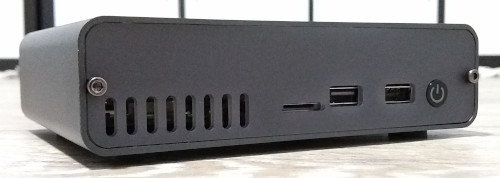
DeskPi Pro Raspberry Pi case Despite having worked on a number of ARM platforms I ve never actually had an ARM based development box at home. I have a Raspberry Pi B Classic (the original 256MB rev 0002 variant) a coworker gave me some years ago, but it s not what you d choose for a build machine and generally gets used as a self contained TFTP/console server for hooking up to devices under test. Mostly I ve been able to do kernel development with the cross compilers already built as part of Debian, and either use pre-built images or Debian directly when I need userland pieces. At a previous job I had a Marvell MACCHIATObin available to me, which works out as a nice platform - quad core A72 @ 2GHz with 16GB RAM, proper SATA and a PCIe slot. However they re still a bit pricey for a casual home machine. I really like the look of the HoneyComb LX2 - 16 A72 cores, up to 64GB RAM - but it s even more expensive. So when I saw the existence of the 8GB Raspberry Pi 4 I was interested. Firstly, the Pi 4 is a proper 64 bit device (my existing Pi B is ARMv6 which means it needs to run Raspbian instead of native Debian armhf), capable of running an upstream kernel and unmodified Debian userspace. Secondly the Pi 4 has a USB 3 controller sitting on a PCIe bus rather than just the limited SoC USB 2 controller. It s not SATA, but it s still a fairly decent method of attaching some storage that s faster/more reliable than an SD card. Finally 8GB RAM is starting to get to a decent amount - for a headless build box 4GB is probably generally enough, but I wanted some headroom. The Pi comes as a bare board, so I needed a case. Ideally I wanted something self contained that could take the Pi, provide a USB/SATA adaptor and take the drive too. I came across the pre-order for the DeskPi Pro, decided it was the sort of thing I was after, and ordered one towards the end of September. It finally arrived at the start of December, at which point I got round to ordering a Pi 4 from CPC. Total cost ~ 120 for the case + Pi.

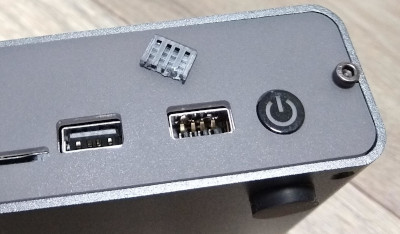
The Bad First, let s get the bad parts out of the way. Broken USB port (right) I managed to break a USB port on the Desk Pi. It has a pair of forward facing ports, I plugged my wireless keyboard dongle into it and when trying to remove it the solid spacer bit in the socket broke off. I ve never had this happen to me before and I ve been using USB devices for 20 years, so I m putting the blame on a shoddy socket. The first drive I tried was an old Crucial M500 mSATA device. I have an adaptor that makes it look like a normal 2.5 drive so I used that. Unfortunately it resulted in a boot loop; the Pi would boot its initial firmware, try to talk to the drive and then reboot before even loading Linux. The DeskPi Pro comes with an m2 adaptor and I had a spare m2 drive, so I tried that and it all worked fine. This might just be power issues, but it was an unfortunate experience especially after the USB port had broken off. (Given I ended up using an M.2 drive another case option would have been the Argon ONE M.2, which is a bit more compact.)
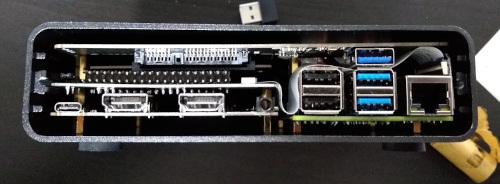
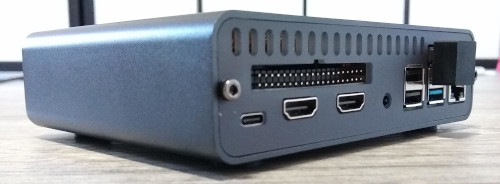
The Annoying DeskPi Pro without rear bezel The case is a little snug; I was worried I was going to damage things as I slid it in. Additionally the construction process is a little involved. There s a good set of instructions, but there are a lot of pieces and screws involved. This includes a couple of FFC cables to join things up. I think this is because they ve attempted to make a compact case rather than allowing a little extra room, and it does have the advantage that once assembled it feels robust without anything loose in it. DeskPi Pro with rear bezel and USB3 dongle I hate the need for an external USB3 dongle to bridge from the Pi to the USB/SATA adaptor. All the cases I ve seen with an internal drive bay have to do this, because the USB3 isn t brought out internally by the Pi, but it just looks ugly to me. It s hidden at the back, but meh. Fan control is via a USB/serial device, which is fine, but it attaches to the USB C power port which defaults to being a USB peripheral. Raspbian based kernels support device tree overlays which allows easy reconfiguration to host mode, but for a Debian based system I ended up rolling my own dtb file. I changed

#include "bcm283x-rpi-usb-peripheral.dtsi"
to
#include "bcm283x-rpi-usb-host.dtsi"
in arch/arm/boot/dts/bcm2711-rpi-4-b.dts and then I did:
cpp -nostdinc -I include -I arch -undef -x assembler-with-cpp \
    arch/arm/boot/dts/bcm2711-rpi-4-b.dts > rpi4.preprocessed
dtc -I dts -O dtb rpi4.preprocessed -o bcm2711-rpi-4-b.dtb
and the resulting bcm2711-rpi-4-b.dtb file replaced the one in /boot/firmware. This isn t a necessary step if you don t want to use the cooling fan in the case, or the front USB ports, and it s not really anyone s fault, but it was an annoying extra step to have to figure out. The DeskPi came with a microSD card that was supposed to have RaspiOS already on it. It didn t, it was blank. In my case that was fine, because I wanted to use Debian, but it was a minor niggle.

The Good I used Gunnar s pre-built Pi Debian image and it Just Worked; I dd d it to the microSD as instructed and the Pi 4 came up with working wifi, video and USB enabling me to get it configured for my network. I did an apt upgrade and got updated to the Buster 10.7 release, as well as the latest 5.9 backport kernel, and everything came back without effort after a reboot. It s lovely to be able to run Debian on this device without having to futz around with self-compiled kernels. The DeskPi makes a lot of effort to route things externally. The SD slot is brought out to the front, making it easy to fiddle with the card contents without having to open the case to replace it. All the important ports are brought out to the back either through orientation of the Pi, or extenders in the case. That means the built in Pi USB ports, the HDMI sockets (conveniently converted to full size internally), an audio jack and a USB-C power port. The aforementioned USB3 dongle for the bridge to the drive is the only external thing that s annoying. Thermally things seem good too. I haven t done a full torture test yet, but with the fan off the system is sitting at about 40 C while fairly idle. Some loops in bash that push load up to above 2 get the temperature up to 46 C or so, and turning the fan on brings it down to 40 C again. It s audible, but quieter than my laptop and not annoying. I liked the way the case came with everything I needed other than the Pi 4 and a suitable disk drive. There was an included PSU (a proper USB-C PD device, UK plug), the heatsink/fan is there, the USB/SATA converter is there and even an SD card is provided (though that s just because I had a pre-order). Speaking of the SD, I only needed it for initial setup. Recent Pi 4 bootloaders are capable of booting directly from USB mass storage devices. So I upgraded using the RPi EEPROM Recovery image (which just needs extracted to the SD FAT partition, no need for anything complicated - boot with it and the screen goes all green and you know it s ok), then created a FAT partition at the start of the drive for the kernel / bootloader config and a regular EXT4 partition for root. Copies everything over, updated paths, took out the SD and it all just works happily.

Summary My main complaint is the broken USB port, which feels like the result of a cheap connector. For a front facing port expected to see more use than the rear ports I think there s a reasonable expectation of robustness. However I m an early adopter and maybe future runs will be better. Other than that I m pretty happy. The case is exactly the sort of thing I wanted; I was looking for something that would turn the Pi into a box that can sit on my desk on the network and that I don t have to worry about knocking wires out of or lots of cables hooking bits up. Everything being included made it very convenient to get up and running. I still haven t poked the Pi that hard, but first impressions are looking good for it being a trouble free ARM64 dev box in the corner, until I can justify a HoneyComb.

15 September 2020

Russell Coker: More About the PowerEdge R710

I ve got the R710 (mentioned in my previous post [1]) online. When testing the R710 at home I noticed that sometimes the VGA monitor I was using would start flickering when in some parts of the BIOS setup, it seemed that the horizonal sync wasn t working properly. It didn t seem to be a big deal at the time. When I deployed it the KVM display that I had planned to use with it mostly didn t display anything. When the display was working the KVM keyboard wouldn t work (and would prevent a regular USB keyboard from working if they were both connected at the same time). The VGA output of the R710 also wouldn t work with my VGA->HDMI device so I couldn t get it working with my portable monitor. Fortunately the Dell front panel has a display and tiny buttons that allow configuring the IDRAC IP address, so I was able to get IDRAC going. One thing Dell really should do is allow the down button to change 0 to 9 when entering numbers, that would make it easier to enter 8.8.8.8 for the DNS server. Another thing Dell should do is make the default gateway have a default value according to the IP address and netmask of the server. When I got IDRAC going it was easy to setup a serial console, boot from a rescue USB device, create a new initrd with the driver for the MegaRAID controller, and then reboot into the server image. When I transferred the SSDs from the old server to the newer Dell server the problem I had was that the Dell drive caddies had no holes in suitable places for attaching SSDs. I ended up just pushing the SSDs in so they are hanging in mid air attached only by the SATA/SAS connectors. Plugging them in took the space from the above drive, so instead of having 2*3.5 disks I have 1*2.5 SSD and need the extra space to get my hand in. The R710 is designed for 6*3.5 disks and I m going to have trouble if I ever want to have more than 3*2.5 SSDs. Fortunately I don t think I ll need more SSDs. After booting the system I started getting alerts about a fault in one SSD, with no detail on what the fault might be. My guess is that the SSD in question is M.2 and it s in a M.2 to regular SATA adaptor which might have some problems. The data seems fine though, a BTRFS scrub found no checksum errors. I guess I ll have to buy a replacement SSD soon. I configured the system to use the nosmt kernel command line option to disable hyper-threading (which won t provide much performance benefit but which makes certain types of security attacks much easier). I ve configured BOINC to run on 6/8 CPU cores and surprisingly that didn t cause the fans to be louder than when the system was idle. It seems that a system that is designed for 6 SAS disks doesn t need a lot of cooling when run with SSDs. Update: It s a R710 not a T710. I mostly deal with Dell Tower servers and typed the wrong letter out of habit.

5 August 2020

Holger Levsen: 20200804-debconf6

DebConf6 This tshirt is 14 years old and from DebConf6. DebConf6 was my 4th DebConf and took place in Oaxtepec, Mexico. I'm a bit exhausted right now which is probably quite fitting to write something about DebConf6... many things in life are a question of perception, so I will mention the waterfall and the big swirl and the band playing with the fireworks during the conference dinner, the joy that we finally could use the local fiber network (after asking for months) just after discovering that the 6h shopping tour forgot to bring the essential pig tail connectors to connect the wireless antennas to the cards, which we needed to provide network to the rooms where the talks would take place. DebConf6 was the first DebConf with live streaming using dvswitch (written by Ben Hutchings and removed from unstable in 2015 as the world had moved to voctomix, which is yet another story to be told eventually). The first years (so DebConf6 and some) the videoteam focussed on getting the post processing done and the videos released, and streaming was optional, even though it was an exciting new feature and we still managed to stream mostly all we recorded and sometimes more... ;) Setting up the network uplink also was very challenging and took, I don't remember exactly, until day 4 or 5 of DebCamp (which lasted 7 days), so there were group of geeks in need of network, and mostly unable to fix it, because for fixing it we needed to communicate and IRC was down. (There was no mobile phone data at that time, the first iphone wasn't sold yet, it were the dark ages.) I remember literally standing on a roof to catch the wifi signal and excitingly shouting "I got one ping back! ... one ping back ...", less excitingly. I'll spare you the details now (and me writing them down) but I'll say that the solution involved Neil McGovern climbing an antenna and attaching a wifi antenna up high, probably 15m or 20m or some such. Finally we had uplink. I don't recall if that pig tail connector incident happened before of after, but in the end the network setup worked nicely on the wide area we occupied. Even though in some dorms the cleaning people daily removed one of our APs to be able to watch TV while cleaning ;) (Which kind of was ok, but still... they could have plugged it back in.) I also joyfully remember a certain vegetarian table, a most memorable bus ride (I'll just say 5 or rather cinco, and, unrelated except on the same bus ride, "Jesus" (and "Maria" for sure..)!) and talking with Jim Gettys and thus learning about the One Laptop per Child (OLPC) project. As for any DebConf, there's sooo much more to be told, but I'll end here and just thank Gunnar Wolf (as he masterminded much of this DebConf) and go to bed now :-)

23 April 2020

Evgeni Golov: Controlling roller shutters using a Shelly 2.5, ESPHome and Home Assistant

Our house has roller shutters on all windows and most of them have an electric motor to open and close them. The motors are Schellenberg shaft motors (not sure this is the right English term), that you can configure end positions for and then by applying current to the right pair of pins they move the shutters up and down until the current is removed or one of the endstops is reached. As the motors were installed over a long period of time, the attached control units varied in functionality: different ways to program open/close times, with and without battery for the clock/settings etc, but they all had something in common: no central management and pretty ugly. We decided to replace those control units with regular 2 gang light switches that match the other switches in the house. And as we didn't want to lose the automatic open/close timer, we had to add some smarts to it. Shelly 2.5 and ESPHome Say hello to Shelly 2.5! The Shelly 2.5 is an ESP8266 with two relays attached to it in a super tiny package you can hide in the wall behind a regular switch. Pretty nifty. It originally comes with a Mongoose OS based firmware and an own app, but ain't nobody needs that, especially nobody who wants to implement some crude logic. That said, the original firmware isn't bad. It has a no-cloud mode, a REST API and does support MQTT for integration into Home Assistant and others. My ESP firmware of choice is ESPHome, which you can flash easily onto a Shelly (no matter 1, 2 or 2.5) using a USB TTL adapter that provides 3.3V. Home Assistant has native ESPHome support with auto-discovery, which is much nicer than manually attaching things to MQTT topics. To get ESPHome compiled for the Shelly 2.5, we'll need a basic configuration like this:
esphome:
  name: shelly25
  platform: ESP8266
  board: modwifi
  arduino_version: 2.4.2
We're using board: modwifi as the Shelly 2.5 (and all other Shellys) has 2MB flash and the usually recommended esp01_1m would only use 1MB of that - otherwise the configurations are identical (see the PlatformIO entries for modwifi and esp01_1m). And arduino_version: 2.4.2 is what the Internet suggests is the most stable SDK version, and who will argue with the Internet?! Now an ESP8266 without network connection is boring, so we add a WiFi configuration:
wifi:
  ssid: !secret wifi_ssid
  password: !secret wifi_password
  power_save_mode: none
The !secret commands load the named variables from secrets.yaml. While testing, I found the network connection of the Shelly very unreliable, especially when placed inside the wall and thus having rather bad bad reception (-75dBm according to ESPHome). However, setting power_save_mode: none explicitly seems to have fixed this, even if NONE is supposed to be the default on ESP8266. At this point the Shelly has a working firmware and WiFi, but does not expose any of its features: no switches, no relays, no power meters. To fix that we first need to find out the GPIO pins all these are connected to. Thankfully we can basically copy paste the definition from the Tasmota (another open-source firmware for ESPs) template:
pin_led1: GPIO0
pin_button1: GPIO2
pin_relay1: GPIO4
pin_switch2n: GPIO5
pin_sda: GPIO12
pin_switch1n: GPIO13
pin_scl: GPIO14
pin_relay2: GPIO15
pin_ade7953: GPIO16
pin_temp: A0
If we place that into the substitutions section of the ESPHome config, we can use the names everywhere and don't have to remember the pin numbers. The configuration for the ADE7953 power sensor and the NTC temperature sensor are taken verbatim from the ESPHome documentation, so there is no need to repeat them here. The configuration for the switches and relays are also rather straight forward:
binary_sensor:
  - platform: gpio
    pin: $ pin_switch1n 
    name: "Switch #1"
    internal: true
    id: switch1
  - platform: gpio
    pin: $ pin_switch2n 
    name: "Switch #2"
    internal: true
    id: switch2
switch:
  - platform: gpio
    pin: $ pin_relay1 
    name: "Relay #1"
    internal: true
    id: relay1
    interlock: &interlock_group [relay1, relay2]
  - platform: gpio
    pin: $ pin_relay2 
    name: "Relay #2"
    internal: true
    id: relay2
    interlock: *interlock_group
All marked as internal: true, as we don't need them visible in Home Assistant. ESPHome and Schellenberg roller shutters Now that we have a working Shelly 2.5 with ESPHome, how do we control Schellenberg (and other) roller shutters with it? Well, first of all we need to connect the Up and Down wires of the shutter motor to the two relays of the Shelly. And if they would not be marked as internal: true, they would show up in Home Assistant and we would be able to flip them on and off, moving the shutters. But this would also mean that we need to flip them off each time after use, as while the motor knows when to stop and will do so, applying current to both wires at the same time produces rather interesting results. So instead of fiddling around with the relays directly, we define a time-based cover in our configuration:
cover:
  - platform: time_based
    name: "$ location  Rolladen"
    id: rolladen
    open_action:
      - switch.turn_on: relay2
    open_duration: $ open_duration 
    close_action:
      - switch.turn_on: relay1
    close_duration: $ close_duration 
    stop_action:
      - switch.turn_off: relay1
      - switch.turn_off: relay2
We use a time-based cover because that's the easiest thing that will also turn the relays off for us after the shutters have been opened/closed, as the motor does not "report" any state back. We could use the integrated power meter of the Shelly to turn off when the load falls under a threshold, but I was too lazy and this works just fine as it is. Next, let's add the physical switches to it. We could just add on_press automations to the binary GPIO sensors we configured for the two switch inputs the Shelly has. But if you have kids at home, you'll know that they like to press ALL THE THINGS and what could be better than a small kill-switch against small fingers?
switch:
  [ previous definitions go here ]
  - platform: template
    id: block_control
    name: "$ location  Block Control"
    optimistic: true
  - platform: template
    name: "Move UP"
    internal: true
    lambda:  -
      if (id(switch1).state && !id(block_control).state)  
        return true;
        else  
        return false;
       
    on_turn_on:
      then:
        cover.open: rolladen
    on_turn_off:
      then:
        cover.stop: rolladen
  - platform: template
    name: "Move DOWN"
    internal: true
    lambda:  -
      if (id(switch2).state && !id(block_control).state)  
        return true;
        else  
        return false;
       
    on_turn_on:
      then:
        cover.close: rolladen
    on_turn_off:
      then:
        cover.stop: rolladen
This adds three more template switches. The first one, "Block Control", is exposed to Home Assistant, has no lambda definition and is set to optimistic: true, which makes is basically a dumb switch that can be flipped at will and the only thing it does is storing the binary on/off state. The two others are almost identical. The name differs, obviously, and so does the on_turn_on automation (one triggers the cover to open, the other to close). And the really interesting part is the lambda that monitors one of the physical switches and if that is turned on, plus "Block Control" is off, reports the switch as turned on, thus triggering the automation. With this we can now block the physical switches via Home Assistant, while still being able to control the shutters via the same. All this (and a bit more) can be found in my esphome-configs repository on GitHub, enjoy!

10 September 2017

intrigeri: Can you reproduce this Tails ISO image?

Thanks to a Mozilla Open Source Software award, we have been working on making the Tails ISO images build reproducibly. We have made huge progress: since a few months, ISO images built by Tails core developers and our CI system have always been identical. But we're not done yet and we need your help! Our first call for testing build reproducibility in August uncovered a number of remaining issues. We think that we have fixed them all since, and we now want to find out what other problems may prevent you from building our ISO image reproducibly. Please try to build an ISO image today, and tell us whether it matches ours! Build an ISO These instructions have been tested on Debian Stretch and testing/sid. If you're using another distribution, you may need to adjust them. If you get stuck at some point in the process, see our more detailed build documentation and don't hesitate to contact us: Setup the build environment You need a system that supports KVM, 1 GiB of free memory, and about 20 GiB of disk space.
  1. Install the build dependencies:
    sudo apt install \
        git \
        rake \
        libvirt-daemon-system \
        dnsmasq-base \
        ebtables \
        qemu-system-x86 \
        qemu-utils \
        vagrant \
        vagrant-libvirt \
        vmdebootstrap && \
    sudo systemctl restart libvirtd
    
  2. Ensure your user is in the relevant groups:
    for group in kvm libvirt libvirt-qemu ; do
       sudo adduser "$(whoami)" "$group"
    done
    
  3. Logout and log back in to apply the new group memberships.
Build Tails 3.2~alpha2 This should produce a Tails ISO image:
git clone https://git-tails.immerda.ch/tails && \
cd tails && \
git checkout 3.2-alpha2 && \
git submodule update --init && \
rake build
Send us feedback! No matter how your build attempt turned out we are interested in your feedback. Gather system information To gather the information we need about your system, run the following commands in the terminal where you've run rake build:
sudo apt install apt-show-versions && \
(
  for f in /etc/issue /proc/cpuinfo
  do
    echo "--- File: $ f  ---"
    cat "$ f "
    echo
  done
  for c in free locale env 'uname -a' '/usr/sbin/libvirtd --version' \
            'qemu-system-x86_64 --version' 'vagrant --version'
  do
    echo "--- Command: $ c  ---"
    eval "$ c "
    echo
  done
  echo '--- APT package versions ---'
  apt-show-versions qemu:amd64 linux-image-amd64:amd64 vagrant \
                    libvirt0:amd64
)   bzip2 > system-info.txt.bz2
Then check that the generated file doesn't contain any sensitive information you do not want to leak:
bzless system-info.txt.bz2
Next, please follow the instructions below that match your situation! If the build failed Sorry about that. Please help us fix it by opening a ticket: If the build succeeded Compute the SHA-512 checksum of the resulting ISO image:
sha512sum tails-amd64-3.2~alpha2.iso
Compare your checksum with ours:
9b4e9e7ee7b2ab6a3fb959d4e4a2db346ae322f9db5409be4d5460156fa1101c23d834a1886c0ce6bef2ed6fe378a7e76f03394c7f651cc4c9a44ba608dda0bc
If the checksums match: success, congrats for reproducing Tails 3.2~alpha2! Please send an email to tails-dev@boum.org (public) or tails@boum.org (private) with the subject "Reproduction of Tails 3.2~alpha2 successful" and system-info.txt.bz2 attached. Thanks in advance! Then you can stop reading here. Else, if the checksums differ: too bad, but really it's good news as the whole point of the exercise is precisely to identify such problems :) Now you are in a great position to help improve the reproducibility of Tails ISO images by following these instructions:
  1. Install diffoscope version 83 or higher and all the packages it recommends. For example, if you're using Debian Stretch:
    sudo apt remove diffoscope && \
    echo 'deb http://ftp.debian.org/debian stretch-backports main' \
        sudo tee /etc/apt/sources.list.d/stretch-backports.list && \
    sudo apt update && \
    sudo apt -o APT::Install-Recommends="true" \
             install diffoscope/stretch-backports
    
  2. Download the official Tails 3.2~alpha2 ISO image.
  3. Compare the official Tails 3.2~alpha2 ISO image with yours:
    diffoscope \
           --text diffoscope.txt \
           --html diffoscope.html \
           --max-report-size 262144000 \
           --max-diff-block-lines 10000 \
           --max-diff-input-lines 10000000 \
           path/to/official/tails-amd64-3.2~alpha2.iso \
           path/to/your/own/tails-amd64-3.2~alpha2.iso
    bzip2 diffoscope. txt,html 
    
  4. Send an email to tails-dev@boum.org (public) or tails@boum.org (private) with the subject "Reproduction of Tails 3.2~alpha2 failed", attaching:
    • system-info.txt.bz2;
    • the smallest file among diffoscope.txt.bz2 and diffoscope.html.bz2, except if they are larger than 100 KiB, in which case better upload the file somewhere (e.g. share.riseup.net and share the link in your email.
Thanks a lot! Credits Thanks to Ulrike & anonym who authored a draft on which this blog post is based.

4 July 2017

Foteini Tsiami: Internationalization, part two

Now that sch-scripts has been renamed to ltsp-manager and translated to English, it was time to set up a proper project site for it in launchpad: http://www.launchpad.net/ltsp-manager The following subpages were created for LTSP Manager there: We currently have an initial version of LTSP Manager running in Debian Stretch; although more testing and more bug reports will be needed before we start the localization phase. Attaching a first screenshot!

21 June 2017

Joey Hess: DIY professional grade solar panel installation

I've installed 1 kilowatt of solar panels on my roof, using professional grade eqipment. The four panels are Astronergy 260 watt panels, and they're mounted on IronRidge XR100 rails. Did it all myself, without help. house with 4 solar panels on roof I had three goals for this install:
  1. Cheap but sturdy. Total cost will be under $2500. It would probably cost at least twice as much to get a professional install, and the pros might not even want to do such a small install.
  2. Learn the roof mount system. I want to be able to add more panels, remove panels when working on the roof, and understand everything.
  3. Make every day a sunny day. With my current solar panels, I get around 10x as much power on a sunny day as a cloudy day, and I have plenty of power on sunny days. So 10x the PV capacity should be a good amount of power all the time.
My main concerns were, would I be able to find the rafters when installing the rails, and would the 5x3 foot panels be too unweildly to get up on the roof by myself. I was able to find the rafters, without needing a stud finder, after I removed the roof's vent caps, which exposed the rafters. The shingles were on straight enough that I could follow the lines down and drilled into the rafter on the first try every time. And I got the rails on spaced well and straight, although I could have spaced the FlashFeet out better (oops). My drill ran out of juice half-way, and I had to hack it to recharge on solar power, but that's another story. Between the learning curve, a lot of careful measurement, not the greatest shoes for roofing, and waiting for recharging, it took two days to get the 8 FlashFeet installed and the rails mounted. Taking a break from that and swimming in the river, I realized I should have been wearing my water shoes on the roof all along. Super soft and nubbly, they make me feel like a gecko up there! After recovering from an (unrelated) achilles tendon strain, I got the panels installed today. Turns out they're not hard to handle on the roof by myself. Getting them up a ladder to the roof by yourself would normally be another story, but my house has a 2 foot step up from the back retaining wall to the roof, and even has a handy grip beam as you step up. roof next to the ground with a couple of cinderblock steps The last gotcha, which I luckily anticipated, is that panels will slide down off the rails before you can get them bolted down. This is where a second pair of hands would have been most useful. But, I macguyvered a solution, attaching temporary clamps before bringing a panel up, that stopped it sliding down while I was attaching it. clamp temporarily attached to side of panel I also finished the outside wiring today. Including the one hack of this install so far. Since the local hardware store didn't have a suitable conduit to bring the cables off the roof, I cobbled one together from pipe, with foam inserts to prevent chafing. some pipe with 5 wires running through it, attached to the side of the roof While I have 1 kilowatt of power on my roof now, I won't be able to use it until next week. After ordering the upgrade, I realized that my old PWM charge controller would be able to handle less than half the power, and to get even that I would have needed to mount the fuse box near the top of the roof and run down a large and expensive low-voltage high-amperage cable, around OO AWG size. Instead, I'll be upgrading to a MPPT controller, and running a single 150 volt cable to it. Then, since the MPPT controller can only handle 1 kilowatt when it's converting to 24 volts, not 12 volts, I'm gonna have to convert the entire house over from 12V DC to 24V DC, including changing all the light fixtures and rewiring the battery bank...

2 June 2017

Evgeni Golov: Breaking glass, OnePlus service and Android backups

While visiting our Raleigh office, I managed to crack the glass on the screen of my OnePlus 3. Luckily it was a clean crack from the left upper corner, to the right lower one. The crack was not really interfering with neither touch nor display, so I had not much pressure in fixing it. eBay lists new LCD sets for 110-130 , and those still require manual work of getting the LCD assembly out of the case, replacing it, etc. There are also glass-only sets for ~20 , but these require the complete removal of the glued glass part from the screen, and reattaching it, nothing you want to do at home. But there is also still the vendor, who can fix it, right? Internet suggested they would do it for about 100 , which seemed fair. As people have been asking about the support experience, here is a quick write up what happened:
  • Opened the RMA request online on Sunday, providing a brief description of the issue and some photos
  • Monday morning answer from the support team, confirming this is way out of warranty, but I can get the device fixed for about 93
  • After confirming that the extra cost is expected, I had an UPS sticker to ship the device to CTDI in Poland
  • UPS even tried a pick-up on Tuesday, but I was not properly prepared, so I dropped the device later at a local UPS point
  • It arrived in Poland on Wednesday
  • On Thursday the device was inspected, pictures made etc
  • Friday morning I had a quote in my inbox, asking me to pay 105 - the service partner decided to replace the front camera too, which was not part of the original 93 approximation.
  • Paid the money with my credit card and started waiting.
  • The actual repair happened on Monday.
  • Quality controlled on Tuesday.
  • Shipped to me on Wednesday.
  • Arrived at my door on Thursday.
All in all 9 working days, which is not great, but good enough IMHO. And the repair is good, and it was not (too) expensive. So I am a happy user of an OnePlus 3 again. Well, almost. Before sending the device for repairs, had to take a backup and wipe it. I would not send it with my, even encrypted, data on it. And backups and Android is something special. Android will backup certain data to Google, if you allow it to. Apps can forbid that. Sadly this also blocks non-cloud backups with adb backup. So to properly backup your system, you either need root or you create a full backup of the system in the recovery and restore that. I did the backup using TWRP, transferred it to my laptop, wiped the device, sent it in, got it back, copied the backup to the phone, restored it and... Was locked out of the device, it would not take my password anymore. Well, it seems that happens, just delete some files and it will be fine. It's 2017, are backups of mobile devices really supposed to be that hard?!

16 May 2017

Daniel Pocock: Building an antenna and receiving ham and shortwave stations with SDR

In my previous blog on the topic of software defined radio (SDR), I provided a quickstart guide to using gqrx, GNU Radio and the RTL-SDR dongle to receive FM radio and the amateur 2 meter (VHF) band. Using the same software configuration and the same RTL-SDR dongle, it is possible to add some extra components and receive ham radio and shortwave transmissions from around the world. Here is the antenna setup from the successful SDR workshop at OSCAL'17 on 13 May: After the workshop on Saturday, members of the OSCAL team successfully reconstructed the SDR and antenna at the Debian info booth on Sunday and a wide range of shortwave and ham signals were detected: Here is a close-up look at the laptop, RTL-SDR dongle (above laptop), Ham-It-Up converter (above water bottle) and MFJ-971 ATU (on right): Buying the parts
Component Purpose, Notes Price/link to source
RTL-SDR dongle Converts radio signals (RF) into digital signals for reception through the USB port. It is essential to buy the dongles for SDR with TCXO, the generic RTL dongles for TV reception are not stable enough for anything other than TV. ~ 25
Enamelled copper wire, 25 meters or more Loop antenna. Thicker wire provides better reception and is more suitable for transmitting (if you have a license) but it is heavier. The antenna I've demonstrated at recent events uses 1mm thick wire. ~ 10
4 (or more) ceramic egg insulators Attach the antenna to string or rope. Smaller insulators are better as they are lighter and less expensive. ~ 10
4:1 balun The actual ratio of the balun depends on the shape of the loop (square, rectangle or triangle) and the point where you attach the balun (middle, corner, etc). You may want to buy more than one balun, for example, a 4:1 balun and also a 1:1 balun to try alternative configurations. Make sure it is waterproof, has hooks for attaching a string or rope and an SO-239 socket. from 20
5 meter RG-58 coaxial cable with male PL-259 plugs on both ends If using more than 5 meters or if you want to use higher frequencies above 30MHz, use thicker, heavier and more expensive cables like RG-213. The cable must be 50 ohm. ~ 10
Antenna Tuning Unit (ATU) I've been using the MFJ-971 for portable use and demos because of the weight. There are even lighter and cheaper alternatives if you only need to receive. ~ 20 for receive only or second hand
PL-259 to SMA male pigtail, up to 50cm, RG58 Joins the ATU to the upconverter. Cable must be RG58 or another 50 ohm cable ~ 5
Ham It Up v1.3 up-converter Mixes the HF signal with a signal from a local oscillator to create a new signal in the spectrum covered by the RTL-SDR dongle ~ 40
SMA (male) to SMA (male) pigtail Join the up-converter to the RTL-SDR dongle ~ 2
USB charger and USB type B cable Used for power to the up-converter. A spare USB mobile phone charge plug may be suitable. ~ 5
String or rope For mounting the antenna. A ligher and cheaper string is better for portable use while a stronger and weather-resistent rope is better for a fixed installation. 5
Building the antenna There are numerous online calculators for measuring the amount of enamelled copper wire to cut. For example, for a centre frequency of 14.2 MHz on the 20 meter amateur band, the antenna length is 21.336 meters. Add an extra 24 cm (extra 12 cm on each end) for folding the wire through the hooks on the balun. After cutting the wire, feed it through the egg insulators before attaching the wire to the balun. Measure the extra 12 cm at each end of the wire and wrap some tape around there to make it easy to identify in future. Fold it, insert it into the hook on the balun and twist it around itself. Use between four to six twists. Strip off approximately 0.5cm of the enamel on each end of the wire with a knife, sandpaper or some other tool. Insert the exposed ends of the wire into the screw terminals and screw it firmly into place. Avoid turning the screw too tightly or it may break or snap the wire. Insert string through the egg insulators and/or the middle hook on the balun and use the string to attach it to suitable support structures such as a building, posts or trees. Try to keep it at least two meters from any structure. Maximizing the surface area of the loop improves the performance: a circle is an ideal shape, but a square or 4:3 rectangle will work well too. For optimal performance, if you imagine the loop is on a two-dimensional plane, the first couple of meters of feedline leaving the antenna should be on the plane too and at a right angle to the edge of the antenna. Join all the other components together using the coaxial cables. Configuring gqrx for the up-converter and shortwave signals Inspect the up-converter carefully. Look for the crystal and find the frequency written on the side of it. The frequency written on the specification sheet or web site may be wrong so looking at the crystal itself is the best way to be certain. On my Ham It Up, I found a crystal with 125.000 written on it, this is 125 MHz. Launch gqrx, go to the File menu and select I/O devices. Change the LNB LO value to match the crystal frequency on the up-converter, with a minus sign. For my Ham It Up, I use the LNB LO value -125.000000 MHz. Click OK to close the I/O devices window. On the Input Controls tab, make sure Hardware AGC is enabled. On the Receiver options tab, change the Mode value. Commercial shortwave broadcasts use AM and amateur transmission use single sideband: by convention, LSB is used for signals below 10MHz and USB is used for signals above 10MHz. To start exploring the 20 meter amateur band around 14.2 MHz, for example, use USB. In the top of the window, enter the frequency, for example, 14.200 000 MHz. Now choose the FFT Settings tab and adjust the Freq zoom slider. Zoom until the width of the display is about 100 kHZ, for example, from 14.15 on the left to 14.25 on the right. Click the Play icon at the top left to start receiving. You may hear white noise. If you hear nothing, check the computer's volume controls, move the Gain slider (bottom right) to the maximum position and then lower the Squelch value on the Receiver options tab until you hear the white noise or a transmission. Adjust the Antenna Tuner knobs Now that gqrx is running, it is time to adjust the knobs on the antenna tuner (ATU). Reception improves dramatically when it is tuned correctly. Exact instructions depend on the type of ATU you have purchased, here I present instructions for the MFJ-971 that I have been using. Turn the TRANSMITTER and ANTENNA knobs to the 12 o'clock position and leave them like that. Turn the INDUCTANCE knob while looking at the signals in the gqrx window. When you find the best position, the signal strength displayed on the screen will appear to increase (the animated white line should appear to move upwards and maybe some peaks will appear in the line). When you feel you have found the best position for the INDUCTANCE knob, leave it in that position and begin turning the ANTENNA knob clockwise looking for any increase in signal strength on the chart. When you feel that is correct, begin turning the TRANSMITTER knob. Listening to a transmission At this point, if you are lucky, some transmissions may be visible on the gqrx screen. They will appear as darker colours in the waterfall chart. Try clicking on one of them, the vertical red line will jump to that position. For a USB transmission, try to place the vertical red line at the left hand side of the signal. Try dragging the vertical red line or changing the frequency value at the top of the screen by 100 Hz at a time until the station is tuned as well as possible. Try and listen to the transmission and identify the station. Commercial shortwave broadcasts will usually identify themselves from time to time. Amateur transmissions will usually include a callsign spoken in the phonetic alphabet. For example, if you hear "CQ, this is Victor Kilo 3 Tango Quebec Romeo" then the station is VK3TQR. You may want to note down the callsign, time, frequency and mode in your log book. You may also find information about the callsign in a search engine. The video demonstrates reception of a transmission from another country, can you identify the station's callsign and find his location? If you have questions about this topic, please come and ask on the Debian Hams mailing list. The gqrx package is also available in Fedora and Ubuntu but it is known to crash on startup in Ubuntu 17.04. Users of other distributions may also want to try the Debian Ham Blend bootable ISO live image as a quick and easy way to get started.


6 May 2017

Vasudev Kamath: Magic: Attach a HTML file to mail and get different on other side

It's been a long time I did not write any new blog posts, and finally I got something which is interesting enough for a new post and so here it is. I actually wanted some bills from my ISP for some work and I could not find mail from the ISP which had bills for some specific months in my mailbox. Problem with my ISP is bills are accessible in their account which can be only accessed from their own network. They do have a mobile app and that does not seem to work especially for the billing section. I used mobile app and selected month for which I did not have bill and clicked Send Mail button. App happily showed message saying it sent the bill to my registered mail address but that was a fancy lie. After trying several time I gave up and decided I will do it once I get back home. Fast forward few hours, I'm back home from office and then I sat in front of my laptop and connected to ISP site, promptly downloaded the bills, then used notmuch-emacs and fire up a mail composer, attach those HTML file (yeah they produce bill in HTML file :-/) send it to my gmail and forget about it. Fast forward few more days, I just remember I need those bills. I got hold of mail I sent earlier in gmail inbox and clicked on attachment and when browser opened the attachment I was shocked/surprised . Did you ask why?. See what I saw when I opened attachment. Well I was confused for moment on what happened, I tried downloading the file and opened it an editor, and I see Chinese characters here also. After reaching home I checked the Sent folder in my laptop where I keep copy of mails sent using notmuch-emacs's notmuch-fcc-dirs variable. I open the file and open the attachement and I see same character as I saw in browser!. I open the original bills I downloaded and it looks fine. To check if I really attached the correct files I again drafted a mail this time to my personal email and sent it. Now I open the file from Sent folder and voila again there is different content inside my attachment!. Same happens when I receive the mail and open the attachment everything inside is Chinese characters!. Totally lost I finally opened the original file using emacs, since I use spacemacs it asked me for downloading of html layer and after which I was surprised because everything inside the editor is in Chinese!. OK finally I've something now so I opened same file at same time in nano from terminal and there it looks fine!. OK that is weird again I read carefully content and saw this line in beginning of file
<?xml version="1.0" encoding="UTF-16" ?>
<html xmlns="http://www.w3.org/1999/xhtml>....
OK that is new XML tag had encoding declared as UTF-16, really?. And just for checking I changed it to UTF-8 and voila file is back to normal in Emacs window!. To confirm this behavior I created a sample file with following content
<?xml version="1.0" encoding="utf-8"?><html xmlns="http://www.w3.org/1999/xhtml"><head><meta http-equiv="Content-Type" content="text/html; charset=iso-8859-1" /><title> Something weird </title><body>blablablablablalabkabakba</body></html>
Yeah with long line because ISP had similar case and now I opened the same file in nano using terminal and changed encoding="UTF-8" to encoding="UTF-16" and the behavior repeated I see Chinese character in the emacs buffer which has also opened the same file. Below is the small gif showing this happening in real time, see what happens in emacs buffer when I change the encoding in terminal below. Fun right?. I made following observation from above experiments.

  1. When I open original file in browser or my sample file with encoding="UTF-16" its normal, no Chinese characters.
  2. When I attach the mail and send it out the attachment some how gets converted into HTML file with Chinese characters and viewing source from browser shows header containing xml declarations and original <html> declarations get ripped off and new tags show up which I've pasted below.
  3. If I download the same file and open in editor only Chinese characters are present and no HTML tags inside it. So definitely the new tags which I saw by viewing source in browser is added by Firefox.
  4. I create similar HTML file and change encoding I can see the characters changing back and forth in emacs web-mode when I change encoding of the file.
<!DOCTYPE HTML PUBLIC "-//W3C//DTD HTML 4.01 Transitional//EN">
<html>
  <head><META http-equiv="Content-Type"  content="text/html; charset=utf-8">
So if I'm understanding this correctly, Emacs due to encoding declaration interprets the actual contents differently. To see how Emacs really interpreted the content I opened the sent mail I had in raw format and saw following header lines for attachment.
Content-Type: text/html; charset=utf-8
Content-Disposition: attachment;
             filename=SOA-102012059675-FEBRUARY-2017.html
Content-Transfer-Encoding: base64
This was followed with base64 encoded data. So does this mean emacs interpreted the content as UTF-16 and encoded the content using UTF-8?. Again I've no clue, so I changed the encoding in both the files to be as UTF-8 and sent the mail by attaching these files again to see what happens. And my guess was right I could get the attachment as is on the receiving side. And inspecting raw mail the attachment headers now different than before.
Content-Type: text/html
Content-Disposition: attachment;
             filename=SOA-102012059675-DECEMBER-2016.html
Content-Transfer-Encoding: quoted-printable
See how Content-Type its different now also see the Content-Transfer-Encoding its now quoted-printable as opposed to base64 earlier. Additionally I can see HTML content below the header. When I opened the attachment from mail I get the actual bill. As far as I understand base64 encoding is used when the data to be attached is base64. So I guess basically due to wrong encoding declared inside the file Emacs interpreted the content as a binary data and encoded it differently than what it really should be. Phew that was a lot of investigation to understand the magic but it was worth it. Do let me know your thoughts on this.

31 August 2016

Enrico Zini: Links for September 2016

A Few Useful Mental Tools from Richard Feynman [archive]
These tricks show Feynman taking the method of thought he learned in pure science and applying it to the more mundane topics most of us have to deal with every day.
Pasta [archive]
A comprehensive introduction to pasta, to keep at hand in case I meet someone who has little familiarity with it.
MPTP: One Designer Drug and Serendipity [archive]
Abstract: Through an unlikely series of coincidences and fortunate accidents, the development of Parkinson s disease in several illicit drug users was traced to their use of a meperidine analog contaminated with 1-methyl-4-phenyl-1,2,3,6-tetrahydropyridine (MPTP). The discovery of a chemical capable of producing animal models of the disease has revitalized research efforts and resulted in important new information. The serendipitous finding also prompted consideration of what changes seem advisable if designer drugs are to be dealt with more efficaciously.
The Debunking Handbook: now freely available for download
The Debunking Handbook, a guide to debunking misinformation, is now freely available to download. Although there is a great deal of psychological research on misinformation, there's no summary of the literature that offers practical guidelines on the most effective ways of reducing the influence of myths.
Faulty neon light jams radio appliances [archive]
An apparent interference source began plaguing wireless vehicle key fobs, cell phones, and other wireless electronics. Key fob owners found they could not open or start their vehicles remotely until their vehicles were towed at least a block away, nor were they able to call for help on their cell phones when problems occurred
Calvin & Muad'Dib
Calvin & Hobbes with text taken from Frank Herbert's Dune. It's been around since 2013 and I consistently found it moving and deep.
When Birds Attack - Bike Helmet Hacks [archive]
Australian magpies attacking cyclists has propted several creative adaptations, including attaching an afro wig to the bike helmet.

13 April 2016

Mike Gabriel: IPv6: Broken by Design; Digital Ocean - How are we doing?

Recently, Digital Ocean (which I am a customer of) asked me "how they were doing". Well, yet another survey... Let's ignore this one for now... I thought some days ago. And then yesterday, I added IPv6 support to my main mail server (which runs at Hetzner, Germany). All my hosted/rented/whatever systems report back to this main mailserver. Now that that main mail server finally has its AAAA record and its own IPv6 address, all associated systems try to reach this main mail server via IPv6. Of course. Crippling IPv6 support by adding Port Blocks But, then, I see messages like these in my syslog files on droplets hosted at Digital Ocean:
Apr 13 10:10:59 <do-droplet> postfix/smtp[23469]: connect to mail.<mydomain>[<ipv6-address>]:25: Connection timed out
After some more research [1], I realized that the folks out there at DO really apply some port blockings to IPv6 networks, but not to IPv4 networks. Pardon me? From my DO droplets, I can nmap any port on my mail server (25,80,143,443, 465, 587, etc.) via the IPv4 connection, but not over the IPv6 connection. Wait, not fully true: ports 80 and 443 are not blocked, but the other aforementioned ports are definitely blocked. Is Digital Ocean a professional ISP or a WiFi hotspot provider at my nearest coffee place? (This really makes me scratch my head...). Routing only the first 16 addresses of allocated /64 prefixes The above was the second IPv6 brokeness I learned about DO, recently. An earlier issue with DO's IPv6 support, I encountered while I was deploying an IPv6 capable OpenVPN internet gateway via a droplet hosted at DO. Digital Ocean assigns full IPv6 /64 prefixes to each individual droplet (which is great), but only properly routes the first 16 IP addresses of such a /64 prefix [2]. Urgh? I had to work around this flaw by adding an IPv6-over-IPv4 tunnel and attaching an IPv6 /56 prefix obtained from Hurricane Electrics' tunnel broker service [3] to the OpenVPN server. Thanks, Digital Ocean, for reminding me about giving feedback So, today, I luckily received a reminder mail about DO's yet-another-survey survey. My opportunity!!! Here is the feedback, I gave:
DO service is basically good.
BUT: You as a provider SUCK when it comes to IPv6.
(1) http://pixelschatten.net/blocked-ipv6-ports/
-> SMTP/IMAP traffic blocked over IPv6, but not over IPv4... WTF?). I normally have all my systems report back to my main mail server. I expect this to work as it is the default on all Linux hosts nowadays, and that is: prefer IPv6 over IPv4.
(2) https://digitalocean.uservoice.com/forums/136585-digitalocean/suggestion...
-> Droplets get a full /64 prefix assigned, but only the first 16 addresses (or such) get routed properly. WTF?
Please do your homework on IPv6 and don't cripple your service by offering crippled IPv6 support.
I tell people, DO is great, but their IPv6 support is broken-by-design. Let me know, once this is about to change.
Mike Gabriel (aka sunweaver at debian dot org, Debian Developer)
Apology for the tone of the wording Now reading the feedback given, I realize that my tone has been quite impolite. I am sorry about this. However, the experienced IPv6 issues are indeed annoying. So please excuse me for having expressed my annoyance with such harsh words. And... I am still annoyed about myself paying an ISP for such a crippled IPv6 support. (I need to consider migrating the VMs to another hoster, unless there will be some dynamics observable in the near future). @Digital Ocean: Keep up the good work that you do in the realm of VM hosting. Evolve and grow up in the realm of IPv6 networking. Thank you! light+love
Mike [1] http://pixelschatten.net/blocked-ipv6-ports/
[2] https://digitalocean.uservoice.com/forums/136585-digitalocean/suggestion...
[3] https://tunnelbroker.net/

1 March 2016

Enrico Zini: Static site generators

I decided to rethink the state of my personal site, and try out some of the new static site generators that are available now. To do that, I jotted down a series of things that I want in a static site generator, then wrote a tool to convert my ikiwiki site to other formats, and set out to evaluate things. As a benchmark I did a full rebuild of my site, which currently contains 1164 static files and 458 markdown pages. My requirements Free layout for my site My / is mostly a high-level index to the site contents. Blog posts are at /blog. My talk archive is organised like a separate blog at /talks. I want the freedom to create other sections of the site, each with its own rss feed, located wherever I want in the site hierarchy. Assets next to posts I occasionally blog just a photo with a little comment, and I would like the .md page with the comment to live next to the image in the file system. I did not even know that I had this as a requirement until I found static site generators that mandated a completely different directory structure for markdown contents and for static assets. Multiple RSS/Atom feeds I want at least one RSS/Atom feed per tag, because I use tags for marking which articles go to http://planet.debian.org. I also want RSS/Atom feeds for specific parts of the site, like the blog and talks. Arbitrary contents in /index.html I want total control over the contents of the main home page of the site. Quick preview while editing contents I do not like to wait several seconds for the site to be rebuilt at every review iteration of the pages I write. This makes me feel like the task of editing is harder than it should, and makes me lose motivation to post. Reasonable time for a full site rebuild I want to be able to run a full rebuild of the site in a reasonable time. I could define "reasonable" in this case as how long I can stare at the screen without getting bored, starting to do something else, and forgetting what it was that I was doing with the site. It is ok if a rebuild takes something like 10 or 30 seconds. It is not ok if it takes minutes. Code and dependency ecosystems that I can work with I can deal with Python and Go. I cannot deal with Ruby or JavaScript. I forgot all about Perl. Also, if it isn't in Debian it does not exist. Decent themes out of the box One of my hopes in switching to a more mainstream generator is to pick and choose themes and easily give my site a more modern look. Hugo Hugo is written in Go and is in Debian testing. Full rebuild time for my site is acceptable, and it can even parallelize:
  $ time hugo
  real      0m5.285s
  user      0m9.556s
  sys       0m1.052s
Free layout for my site was hard to get. I could replace /index.html by editing the template page for it, but then I did not find out how to create another similar index in an arbitrary place. Also, archetypes are applied only on the first path component of new posts, but I would like them instead to be matched on the last path component first, and failing that traveling up to the path until the top. This should be easy to fix by reorganizing the content a bit around here For example, a path for a new blog post of mine could be blog/2016/debian/ and I would like it to match the debian archetype first, and failing that the blog archetype. Assets next to posts almost work. Hugo automatically generates one feed per taxonomy element, and one feed per section. This would be currently sufficient for me, although I don't like the idea that sections map 1 to 1 to toplevel directories in the site structure. Hugo has a server that watches the file system and rerenders pages as they are modified, so the quick preview while editing works fine. About themes, it took me several tries to find a theme that would render navigation elements for both sections and tags, and most themes would render by pages with white components all around, and expect me to somehow dig in and tweak them. That frustrated me, because for quite a while I could not tell if I had misconfigured Hugo's taxonomies or if the theme was just somehow incomplete. Nikola Nikola is written in Python and is in Debian testing. Full rebuild time for my site is almost two orders of magnitude more than Hugo, and I am miffed to find the phrases "Nikola is fast." or "Fast building process" in its front page and package description:
  $ time nikola build
  real      3m31.667s
  user      3m4.016s
  sys       0m24.684s
Free layout could be achieved fiddling with the site configuration to tell it where to read sources. Assets next to post work after tweaking the configuration, but they require to write inconsistent links in the markdown source: https://github.com/getnikola/nikola/issues/2266 I have a hard time accepting that that, because I want to author content with consistent semantic interlinking, because I want to be able 10 years from now to parse it and convert it to something else if a new technology comes out. Nikola generates one RSS/Atom feed per tag just fine. I have not tried generating feeds for different sections of the site. Incremental generation inside its built in server works fine. Pelican Pelican is written in Python and is in Debian testing. Full rebuild time for my site is acceptable:
  $ time pelican -d
  real      0m18.207s
  user      0m16.680s
  sys       0m1.448s
By default, pelican seems to put generate a single flat directory of html files regardless of the directory hierarchy of the sources. To have free layout, pelican needs some convincing in the configuration:
  PATH_METADATA = r"(?P<relpath>.+)\.md"
  ARTICLE_SAVE_AS = " relpath /index.html"
but even if I do that, the urls that it generates still point to just slug /index.html and I have not trivially found a configuration option to fix that accordingly. I got quite uncomfortable at the idea of needing to configure content generation and linking to match, instead of having one automatically being in sync with the other. Having assets next to posts seems to be possible (also setting STATIC_PATHS = ["."]), but I do not recall making progress on this front. I did not manage to generate a feed for each tag out of the box, and probably there is some knob in the configuration for it. I gave up with Pelican as trying it out felt like a constant process of hacking the configuration from defaults that do not make any sense for me, withouth even knowing if a configuration exists that would do what I need Ikiwiki Ikiwiki is written in Perl and is in Debian. Although I am not anymore proficient with Perl, I was already using it, so it was worth considering. Full rebuild time feels a bit on the slow side but is still acceptable:
  $ time ikiwiki --setup site.setup
  real      0m37.356s
  user      0m34.488s
  sys       0m1.536s
In terms of free site structure, all feeds for all or part of the site, ikiwiki just excels. I even considered writing a python web server that monitors the file system and calls ikiwiki --refresh when anything changes, and calling it a day. However, when I tried to re-theme my website around a simple bootstrap boilerplate, I found that to be hard, as a some of the HTML structure is hardcoded in Perl (and it's also my fault) and there is only so much that can be done by tweaking the (rather unreadable) templates. siterefactor During all these experiments I had built siterefactor to generate contents for all those static site engines, and it was going through all the contents quite fast:
  $ time ./siterefactor src dst -t hugo
  real  0m1.222s
  user  0m0.904s
  sys   0m0.308s
So I wondered how slow it would become if, instead of making it write markdown, I made it write HTML via python markdown and Jinja2:
  $ time ./siterefactor ~/zz/ikiwiki/pub/ ~/zz/ikiwiki/web -t web
  real  0m6.739s
  user  0m5.952s
  sys   0m0.416s
I then started wondering how slower it would become if I implemented postprocessing of all local URLs generated by Markdown to make sure they are kept consistent even if the path of a generated page is different than the path of its source. Not much slower, really. I then added taxonomies. And arbitrary Jinja2 templates in the input, able to generate page lists and RSS/Atom feeds. And theming. And realised that reading all the sources and cross-linking them took 0.2 seconds, and the rest was generation time. And that after cross-linking, each page can be generated independently from all the others. staticsite So my site is now generated with staticsite:
  $ time ssite build
  real  0m6.833s
  user  0m5.804s
  sys   0m0.500s
It's comparable with Hugo, and on a single process.

21 July 2015

Jonathan McDowell: Recovering a DGN3500 via JTAG

Back in 2010 when I needed an ADSL2 router in the US I bought a Netgear DGN3500. It did what I wanted out of the box and being based on a MIPS AR9 (ARX100) it seemed likely OpenWRT support might happen. Long story short I managed to overwrite u-boot (the bootloader) while flashing a test image I d built. I ended up buying a new router (same model) to get my internet connection back ASAP and never getting around to fully fixing the broken one. Until yesterday. Below is how I fixed it; both for my own future reference and in case it s of use any any other unfortunate soul. The device has clear points for serial and JTAG and it was easy enough (even with my basic soldering skills) to put a proper header on. The tricky bit is that the flash is connected via SPI, so it s not just a matter of attaching JTAG, doing a scan and reflashing from the JTAG tool. I ended up doing RAM initialisation, then copying a RAM copy of u-boot in and then using that to reflash. There may well have been a better way, but this worked for me. For reference the failure mode I saw was an infinitely repeating:
ROM VER: 1.1.3
CFG 05
My JTAG device is a Bus Pirate v3b which is much better than the parallel port JTAG device I built the first time I wanted to do something similar. I put the latest firmware (6.1) on it. All of this was done from my laptop, which runs Debian testing (stretch). I used the OpenOCD 0.9.0-1+b1 package from there. Daniel Schwierzeck has some OpenOCD scripts which include a target definition for the ARX100. I added a board definition for the DGN3500 (I ve also send Daniel a patch to add this to his repo). I tied all of this together with an openocd.cfg that contained:
source [find interface/buspirate.cfg]
buspirate_port /dev/ttyUSB1
buspirate_vreg 0
buspirate_mode normal
buspirate_pullup 0
reset_config trst_only
source [find openocd-scripts/target/arx100.cfg]
source [find openocd-scripts/board/dgn3500.cfg]
gdb_flash_program enable
gdb_memory_map enable
gdb_breakpoint_override hard
I was then able to power on the router and type dgn3500_ramboot into the OpenOCD session. This fetched my RAM copy of u-boot from dgn3500_ram/u-boot.bin, copied it into the router s memory and started it running. From there I had a u-boot environment with access to the flash commands and was able to restore the original Netgear image (and once I was sure that was working ok I subsequently upgraded to the Barrier Breaker OpenWRT image).

12 June 2015

James Bromberger: Logical Volume Management with Debian on Amazon EC2

The recent AWS introduction of the Elastic File System gives you an automatic grow-and-shrink capability as an NFS mount, an exciting option that takes away the previous overhead in creating shared block file systems for EC2 instances. However it should be noted that the same auto-management of capacity is not true in the EC2 instance s Elastic Block Store (EBS) block storage disks; sizing (and resizing) is left to the customer. With current 2015 EBS, one cannot simply increase the size of an EBS Volume as the storage becomes full; (as at June 2015) an EBS volume, once created, has fixed size. For many applications, that lack of resize function on its local EBS disks is not a problem; many server instances come into existence for a brief period, process some data and then get Terminated, so long term managment is not needed. However for a long term data store on an instance (instead of S3, which I would recommend looking closely at from a durability and pricing fit), and where I want to harness the capacity to grow (or shrink) disk for my data, then I will need to leverage some slightly more advanced disk management. And just to make life interesting, I wish to do all this while the data is live and in-use, if possible. Enter: Logical Volume Management, or LVM. It s been around for a long, long time: LVM 2 made a debut around 2002-2003 (2.00.09 was Mar 2004) and LVM 1 was many years before that so it s pretty mature now. It s a powerful layer that sits between your raw storage block devices (as seen by the operating system), and the partitions and file systems you would normally put on them. In this post, I ll walk through the process of getting set up with LVM on Debian in the AWS EC2 environment, and how you d do some basic maintenance to add and remove (where possible) storage with minimal interruption. Getting Started First a little prep work for a new Debian instance with LVM. As I d like to give the instance its own ability to manage its storage, I ll want to provision an IAM Role for EC2 Instances for this host. In the AWS console, visit IAM, Roles, and I ll create a new Role I ll name EC2-MyServer (or similar), and at this point I ll skip giving it any actual privileges (later we ll update this). As at this date, we can only associate an instance role/profile at instance launch time. Now I launch a base image Debian EC2 instance launched with this IAM Role/Profile; the root file system is an EBS Volume. I am going to put data that I ll be managing on a separate disk from the root file system. First, I need to get the LVM utilities installed. It s a simple package to install: the lvm2 package. From my EC2 instance I need to get root privileges (sudo -i) and run:
apt update && apt install lvm2
After a few moments, the package is installed. I ll choose a location that I want my data to live in, such as /opt/. I want a separate disk for this task for a number of reasons:
  1. Root EBS volumes cannot currently be encrypted using Amazon s Encrypted EBS Volumes at this point in time. If I want to also use AWS encryption option, it ll have to be on a non-root disk. Note that instance-size restrictions also exist for EBS Encrypted Volumes.
  2. It s possibly not worth make a snapshot of the Operating System at the same time as the user content data I am saving. The OS install (except the /etc/ folder) can almost entirely be recreated from a fresh install. so why snapshot that as well (unless that s your strategy for preserving /etc, /home, etc).
  3. The type of EBS volume that you require may be different for different data: today (Apr 2015) there is a choice of Magnetic, General Purpose 2 (GP2) SSD, and Provisioned IO/s (PIOPS) SSD, each with different costs; and depending on our volume, we may want to select one for our root volume (operating system), and something else for our data storage.
  4. I may want to use EBS snapshots to clone the disk to another host, without the base OS bundled in with the data I am cloning.
I will create this extra volume in the AWS console and present it to this host. I ll start by using a web browser (we ll use CLI later) with the EC2 console. The first piece of information we need to know is where my EC2 instance is running. Specifically, the AWS Region and Availability Zone (AZ). EBS Volumes only exist within the one designated AZ. If I accidentally make the volume(s) in the wrong AZ, then I won t be able to connect them to my instance. It s not a huge issue, as I would just delete the volume and try again. I navigate to the Instances panel of the EC2 Console, and find my instance in the list:
EC2 instance listA (redacted) list of instance from the EC2 console.
Here I can see I have located an instance and it s running in US-East-1A: that s AZ A in Region US-East-1. I can also grab this with a wget from my running Debian instance by asking the MetaData server:
wget -q -O - http://169.254.169.254/latest/meta-data/placement/availability-zone
The returned text is simply: us-east-1a . Time to navigate to Elastic Block Store , choose Volumes and click Create :
Creating a volume in AWS EC2: ensure the AZ is the same as your instanceCreating a volume in AWS EC2: ensure the AZ is the same as your instance
You ll see I selected that I wanted AWS to encrypt this and as noted above, at this time that doesn t include the t2 family. However, you have an option of using encryption with LVM where the customer looks after the encryption key see LUKS. What s nice is that I can do both have AWS Encrypted Volumes, and then use encryption on top of this, but I have to manage my own keys with LUKS, and should I lose them, then I can keep all the cyphertext! I deselected this for my example (with a t2.micro), and continue; I could see the new volume in the list as creating , and then shortly afterwards as available . Time to attach it: select the disk, and either right-click and choose Attach , or from the menu at the top of the list, chose Actions -> Attach (both do the same thing).
Attach volumeAttaching a volume to an instance: you ll be prompted for the compatible instances in the same AZ.
At this point in time your EC2 instance will now notice a new disk; you can confirm this with dmesg tail , and you ll see something like:
[1994151.231815]  xvdg: unknown partition table
(Note the time-stamp in square brackets will be different). Previously at this juncture you would format the entire disk with your favourite file system, mount it in the desired location, and be done. But we re adding in LVM here between this raw device, and the filesystem we are yet to make . Marking the block device for LVM Our first operation with LVM is to put a marker on the volume to indicate it s being use for LVM so that when we scan the block device, we know what it s for. It s a really simple command:
pvcreate /dev/xvdg
The device name above (/dev/xvdg) should correspond to the one we saw from the dmesg output above. The output of the above is rather straight forward:
  Physical volume "/dev/xvdg" successfully created
Checking our EBS Volume We can check on the EBS volume which LVM sees as a Physical Volume using the pvs command.
# pvs
  PV  VG  Fmt  Attr PSize PFree
  /dev/xvdg  lvm2 ---  5.00g 5.00g
Here we see the entire disk is currently unused. Creating our First Volume Group Next step, we need to make an initial LVM Volume Group which will use our Physical volume (xvdg). The Volume Group will then contain one (or more) Logical Volumes that we ll format and use. Again, a simple command to create a volume group by giving it its first physical device that it will use:
# vgcreate  OptVG /dev/xvdg
  Volume group "OptVG" successfully created
And likewise we can check our set of Volume Groups with vgs :
# vgs
  VG  #PV #LV #SN Attr  VSize VFree
  OptVG  1  0  0 wz--n- 5.00g 5.00g
The Attribute flags here indicate this is writable, resizable, and allocating extents in normal mode. Lets proceed to make our (first) Logical Volume in this Volume Group:
# lvcreate -n OptLV -L 4.9G OptVG
  Rounding up size to full physical extent 4.90 GiB
  Logical volume "OptLV" created
You ll note that I have created our Logical Volume as almost the same size as the entire Volume Group (which is currently one disk) but I left some space unused: the reason for this comes down to keeping some space available for any jobs that LVM may want to use on the disk and this will be used later when we want to move data between raw disk devices. If I wanted to use LVM for Snapshots, then I d want to leave more space free (unallocated) again. We can check on our Logical Volume:
# lvs
  LV  VG  Attr  LSize Pool Origin Data%  Meta%  Move Log Cpy%Sync Convert
  OptLV OptVG -wi-a----- 4.90g
The attribytes indicating that the Logical Volume is writeable, is allocating its data to the disk in inherit mode (ie, as the Volume Group is doing), and that it is active. At this stage you may also discover we have a device /dev/OptVG/OptLV, and this is what we re going to format and mount. But before we do, we should review what file system we ll use.
Filesystems
Popular Linux file systems
Name Shrink Grow Journal Max File Sz Max Vol Sz
btrfs Y Y N 16 EB 16 EB
ext3 Y off-line Y Y 2 TB 32 TB
ext4 Y off-line Y Y 16 TB 1 EB
xfs N Y Y 8 EB 8 EB
zfs* N Y Y 16 EB 256 ZB
For more details see Wikipedia comparison. Note that ZFS requires 3rd party kernel module of FUSE layer, so I ll discount that here. BTRFS only went stable with Linux kernel 3.10, so with Debian Jessie that s a possibility; but for tried and trusted, I ll use ext4. The selection of ext4 also means that I ll only be able to shrink this file system off-line (unmounted). I ll make the filesystem:
# mkfs.ext4 /dev/OptVG/OptLV
mke2fs 1.42.12 (29-Aug-2014)
Creating filesystem with 1285120 4k blocks and 321280 inodes
Filesystem UUID: 4f831d17-2b80-495f-8113-580bd74389dd
Superblock backups stored on blocks:
  32768, 98304, 163840, 229376, 294912, 819200, 884736
Allocating group tables: done
Writing inode tables: done
Creating journal (32768 blocks): done
Writing superblocks and filesystem accounting information: done
And now mount this volume and check it out:
# mount /dev/OptVG/OptLV /opt/
# df -HT /opt
Filesystem  Type  Size  Used Avail Use% Mounted on
/dev/mapper/OptVG-OptLV ext4  5.1G  11M  4.8G  1% /opt
Lastly, we want this to be mounted next time we reboot, so edit /etc/fstab and add the line:
/dev/OptVG/OptLV /opt ext4 noatime,nodiratime 0 0
With this in place, we can now start using this disk. I selected here not to update the filesystem every time I access a file or folder updates get logged as normal but access time is just ignored. Time to expand After some time, our 5 GB /opt/ disk is rather full, and we need to make it bigger, but we wish to do so without any downtime. Amazon EBS doesn t support resizing volumes, so our strategy is to add a new larger volume, and remove the older one that no longer suits us; LVM and ext4 s online resize ability will allow us to do this transparently. For this example, we ll decide that we want a 10 GB volume. It can be a different type of EBS volume to our original we re going to online-migrate all our data from one to the other. As when we created the original 5 GB EBS volume above, create a new one in the same AZ and attach it to the host (perhaps a /dev/xvdh this time). We can check the new volume is visible with dmesg again:
[1999786.341602]  xvdh: unknown partition table
And now we initalise this as a Physical volume for LVM:
# pvcreate /dev/xvdh
  Physical volume "/dev/xvdh" successfully created
And then add this disk to our existing OptVG Volume Group:
# vgextend OptVG /dev/xvdh
  Volume group "OptVG" successfully extended
We can now review our Volume group with vgs, and see our physical volumes with pvs:
# vgs
  VG  #PV #LV #SN Attr  VSize  VFree
  OptVG  2  1  0 wz--n- 14.99g 10.09g
# pvs
  PV  VG  Fmt  Attr PSize  PFree
  /dev/xvdg  OptVG lvm2 a--  5.00g 96.00m
  /dev/xvdh  OptVG lvm2 a--  10.00g 10.00g
There are now 2 Physical Volumes we have a 4.9 GB filesystem taking up space, so 10.09 GB of unallocated space in the VG. Now its time to stop using the /dev/xvgd volume for any new requests:
# pvchange -x n /dev/xvdg
  Physical volume "/dev/xvdg" changed
  1 physical volume changed / 0 physical volumes not changed
At this time, our existing data is on the old disk, and our new data is on the new one. Its now that I d recommend running GNU screen (or similar) so you can detach from this shell session and reconnect, as the process of migrating the existing data can take some time (hours for large volumes):
# pvmove /dev/sdb1 /dev/sdd1
  /dev/xvdg: Moved: 0.1%
  /dev/xvdg: Moved: 8.6%
  /dev/xvdg: Moved: 17.1%
  /dev/xvdg: Moved: 25.7%
  /dev/xvdg: Moved: 34.2%
  /dev/xvdg: Moved: 42.5%
  /dev/xvdg: Moved: 51.2%
  /dev/xvdg: Moved: 59.7%
  /dev/xvdg: Moved: 68.0%
  /dev/xvdg: Moved: 76.4%
  /dev/xvdg: Moved: 84.7%
  /dev/xvdg: Moved: 93.3%
  /dev/xvdg: Moved: 100.0%
During the move, checking the Monitoring tab in the AWS EC2 Console for the two volumes should show one with a large data Read metric, and one with a large data Write metric clearly data should be flowing off the old disk, and on to the new. A note on disk throughput The above move was a pretty small, and empty volume. Larger disks will take longer, naturally, so getting some speed out of the process maybe key. There s a few things we can do to tweak this: Back to the move Upon completion I can see that the disk in use is the new disk and not the old one, using pvs again:
# pvs
  PV  VG  Fmt  Attr PSize  PFree
  /dev/xvdg  OptVG lvm2 ---  5.00g 5.00g
  /dev/xvdh  OptVG lvm2 a--  10.00g 5.09g
So all 5 GB is now unused (compare to above, where only 96 MB was PFree). With that disk not containing data, I can tell LVM to remove the disk from the Volume Group:
# vgreduce OptVG /dev/xvdg
  Removed "/dev/xvdg" from volume group "OptVG"
Then I cleanly wipe the labels from the volume:
# pvremove /dev/xvdg
  Labels on physical volume "/dev/xvdg" successfully wiped
If I really want to clean the disk, I could choose to use shred(1) on the disk to overwrite with random data. This can take a lng time Now the disk is completely unused and disassociated from the VG, I can return to the AWS EC2 Console, and detach the disk:
Detatch volume dialog boxDetach an EBS volume from an EC2 instance
Wait for a few seconds, and the disk is then shown as available ; I then chose to delete the disk in the EC2 console (and stop paying for it). Back to the Logical Volume it s still 4.9 GB, so I add 4.5 GB to it:
# lvresize -L +4.5G /dev/OptVG/OptLV
  Size of logical volume OptVG/OptLV changed from 4.90 GiB (1255 extents) to 9.40 GiB (2407 extents).
  Logical volume OptLV successfully resized
We now have 0.6GB free space on the physical volume (pvs confirms this). Finally, its time to expand out ext4 file system:
# resize2fs /dev/OptVG/OptLV
resize2fs 1.42.12 (29-Aug-2014)
Filesystem at /dev/OptVG/OptLV is mounted on /opt; on-line resizing required
old_desc_blocks = 1, new_desc_blocks = 1
The filesystem on /dev/OptVG/OptLV is now 2464768 (4k) blocks long.
And with df we can now see:
# df -HT /opt/
Filesystem  Type  Size  Used Avail Use% Mounted on
/dev/mapper/OptVG-OptLV ext4  9.9G  12M  9.4G  1% /opt
Automating this The IAM Role I made at the beginning of this post is now going to be useful. I ll start by adding an IAM Policy to the Role to permit me to List Volumes, Create Volumes, Attach Volumes and Detach Volumes to my instance-id. Lets start with creating a volume, with a policy like this:
 
  "Version": "2012-10-17",
  "Statement": [
   
  "Sid": "CreateNewVolumes",
  "Action": "ec2:CreateVolume",
  "Effect": "Allow",
  "Resource": "*",
  "Condition":  
  "StringEquals":  
  "ec2:AvailabilityZone": "us-east-1a",
  "ec2:VolumeType": "gp2"
   ,
  "NumericLessThanEquals":  
  "ec2:VolumeSize": "250"


  ]
 
This policy puts some restrictions on the volumes that this instance can create: only within the given Availability Zone (matching our instance), only GP2 SSD (no PIOPs volumes), and size no more than 250 GB. I ll add another policy to permit this instance role to tag volumes in this AZ that don t yet have a tag called InstanceId:
 
  "Version": "2012-10-17",
  "Statement": [
   
  "Sid": "TagUntaggedVolumeWithInstanceId",
  "Action": [
  "ec2:CreateTags"
  ],
  "Effect": "Allow",
  "Resource": "arn:aws:ec2:us-east-1:1234567890:volume/*",
  "Condition":  
  "Null":  
  "ec2:ResourceTag/InstanceId": "true"


  ]
 
Now that I can create (and then tag) volumes, this becomes a simple procedure as to what else I can do to this volume. Deleting and creating snapshots of this volume are two obvious options, and the corresponding policy:
 
  "Version": "2012-10-17",
  "Statement": [
   
  "Sid": "CreateDeleteSnapshots-DeleteVolume-DescribeModifyVolume",
  "Action": [
  "ec2:CreateSnapshot",
  "ec2:DeleteSnapshot",
  "ec2:DeleteVolume",
  "ec2:DescribeSnapshotAttribute",
  "ec2:DescribeVolumeAttribute",
  "ec2:DescribeVolumeStatus",
  "ec2:ModifyVolumeAttribute"
  ],
  "Effect": "Allow",
  "Resource": "*",
  "Condition":  
  "StringEquals":  
  "ec2:ResourceTag/InstanceId": "i-123456"


  ]
 
Of course it would be lovely if I could use a variable inside the policy condition instead of the literal string of the instance ID, but that s not currently possible. Clearly some of the more important actions I want to take are to attach and detach a volume to my instance:
 
  "Version": "2012-10-17",
  "Statement": [
     
      "Sid": "Stmt1434114682836",
      "Action": [
        "ec2:AttachVolume"
      ],
      "Effect": "Allow",
      "Resource": "arn:aws:ec2:us-east-1:123456789:volume/*",
      "Condition":  
        "StringEquals":  
          "ec2:ResourceTag/InstanceID": "i-123456"
         
       
     ,
     
      "Sid": "Stmt1434114745717",
      "Action": [
        "ec2:AttachVolume"
      ],
      "Effect": "Allow",
      "Resource": "arn:aws:ec2:us-east-1:123456789:instance/i-123456"
     
  ]
 
Now with this in place, we can start to fire up the AWS CLI we spoke of. We ll let the CLI inherit its credentials form the IAM Instance Role and the polices we just defined.
AZ= wget -q -O - http://169.254.169.254/latest/meta-data/placement/availability-zone 
Region= wget -q -O - http://169.254.169.254/latest/meta-data/placement/availability-zone rev cut -c 2- rev 
InstanceId= wget -q -O - http://169.254.169.254/latest/meta-data/instance-id
VolumeId= aws ec2 --region $ Region  create-volume --availability-zone $ AZ  --volume-type gp2 --size 1 --query "VolumeId" --output text 
aws ec2 --region $ Region  create-tags --resource $ VolumeID  --tags Key=InstanceId,Value=$ InstanceId 
aws ec2 --region $ Region  attach-volume --volume-id $ VolumeId  --instance-id $ InstanceId 
and at this stage, the above manipulation of the raw block device with LVM can begin. Likewise you can then use the CLI to detach and destroy any unwanted volumes if you are migrating off old block devices.

11 June 2015

Steve McIntyre: Debian-branded USB keys

I've had some 8GB USB keys made, with the Debian swirl and text. By buying a reasonable number, I've got what I think is a good price for nice high-quality keys (metal body with a solid loop for attaching to a keyring). I'm now selling these for 7 pounds each, and I'm planning on bringing some to DebConf 15 too, where they'll be 10 EUR. USB key They're selling faster than I expected - if you're interested in buying one (or several!), please let me know. If there's enough demand, I may order more.
27 May 2015

Vincent Bernat: Live patching QEMU for VENOM mitigation

CVE-2015-3456, also known as VENOM, is a security vulnerability in QEMU virtual floppy controller:
The Floppy Disk Controller (FDC) in QEMU, as used in Xen [ ] and KVM, allows local guest users to cause a denial of service (out-of-bounds write and guest crash) or possibly execute arbitrary code via the FD_CMD_READ_ID, FD_CMD_DRIVE_SPECIFICATION_COMMAND, or other unspecified commands.
Even when QEMU has been configured with no floppy drive, the floppy controller code is still active. The vulnerability is easy to test1:
#define FDC_IOPORT 0x3f5
#define FD_CMD_READ_ID 0x0a
int main()  
    ioperm(FDC_IOPORT, 1, 1);
    outb(FD_CMD_READ_ID, FDC_IOPORT);
    for (size_t i = 0;; i++)
        outb(0x42, FDC_IOPORT);
    return 0;
 
Once the fix installed, all processes still have to be restarted for the upgrade to be effective. It is possible to minimize the downtime by leveraging virsh save. Another possibility would be to patch the running processes. The Linux kernel attracted a lot of interest in this area, with solutions like Ksplice (mostly killed by Oracle), kGraft (by Red Hat) and kpatch (by Suse) and the inclusion of a common framework in the kernel. The userspace has far less out-of-the-box solutions2. I present here a simple and self-contained way to patch a running QEMU to remove the vulnerability without requiring any sensible downtime. Here is a short demonstration:

Proof of concept First, let s find a workaround that would be simple to implement through live patching: while modifying running code text is possible, it is easier to modify a single variable.

Concept Looking at the code of the floppy controller and the patch, we can avoid the vulnerability by not accepting any command on the FIFO port. Each request would be answered by Invalid command (0x80) and a user won t be able to push more bytes to the FIFO until the answer is read and the FIFO queue reset. Of course, the floppy controller would be rendered useless in this state. But who cares? The list of commands accepted by the controller on the FIFO port is contained in the handlers[] array:
static const struct  
    uint8_t value;
    uint8_t mask;
    const char* name;
    int parameters;
    void (*handler)(FDCtrl *fdctrl, int direction);
    int direction;
  handlers[] =  
      FD_CMD_READ, 0x1f, "READ", 8, fdctrl_start_transfer, FD_DIR_READ  ,
      FD_CMD_WRITE, 0x3f, "WRITE", 8, fdctrl_start_transfer, FD_DIR_WRITE  ,
    /* [...] */
      0, 0, "unknown", 0, fdctrl_unimplemented  , /* default handler */
 ;
To avoid browsing the array each time a command is received, another array is used to map each command to the appropriate handler:
/* Associate command to an index in the 'handlers' array */
static uint8_t command_to_handler[256];
static void fdctrl_realize_common(FDCtrl *fdctrl, Error **errp)
 
    int i, j;
    static int command_tables_inited = 0;
    /* Fill 'command_to_handler' lookup table */
    if (!command_tables_inited)  
        command_tables_inited = 1;
        for (i = ARRAY_SIZE(handlers) - 1; i >= 0; i--)  
            for (j = 0; j < sizeof(command_to_handler); j++)  
                if ((j & handlers[i].mask) == handlers[i].value)  
                    command_to_handler[j] = i;


    /* [...] */
 
Our workaround is to modify the command_to_handler[] array to map all commands to the fdctrl_unimplemented() handler (the last one in the handlers[] array).

Testing with gdb To check if the workaround works as expected, we test it with gdb. Unless you have compiled QEMU yourself, you need to install a package with debug symbols. Unfortunately, on Debian, they are not available, yet3. On Ubuntu, you can install the qemu-system-x86-dbgsym package after enabling the appropriate repositories. The following function for gdb maps every command to the unimplemented handler:
define patch
  set $handler = sizeof(handlers)/sizeof(*handlers)-1
  set $i = 0
  while ($i < 256)
   set variable command_to_handler[$i++] = $handler
  end
  printf "Done!\n"
end
Attach to the vulnerable process (with attach), call the function (with patch) and detach of the process (with detach). You can check that the exploit is not working anymore. This could be easily automated.

Limitations Using gdb has two main limitations:
  1. It needs to be installed on each host to be patched.
  2. The debug packages need to be installed as well. Moreover, it can be difficult to fetch previous versions of those packages.

Writing a custom patcher To overcome those limitations, we can write a customer patcher using the ptrace() system call without relying on debug symbols being present.

Finding the right memory spot Before being able to modify the command_to_handler[] array, we need to know its location. The first clue is given by the symbol table. To query it, use readelf -s:
$ readelf -s /usr/lib/debug/.build-id/09/95121eb46e2a4c13747ac2bad982829365c694.debug   \
>   sed -n -e 1,3p -e /command_to_handler/p
Symbol table '.symtab' contains 27066 entries:
   Num:    Value          Size Type    Bind   Vis      Ndx Name
  8485: 00000000009f9d00   256 OBJECT  LOCAL  DEFAULT   26 command_to_handler
This table is usually stripped out of the executable to save space, like shown below:
$ file -b /usr/bin/qemu-system-x86_64   tr , \\n
ELF 64-bit LSB shared object
 x86-64
 version 1 (SYSV)
 dynamically linked
 interpreter /lib64/ld-linux-x86-64.so.2
 for GNU/Linux 2.6.32
 BuildID[sha1]=0995121eb46e2a4c13747ac2bad982829365c694
 stripped
If your distribution provides a debug package, the debug symbols are installed in /usr/lib/debug. Most modern distributions are now relying on the build ID4 to map an executable to its debugging symbols, like the example above. Without a debug package, you need to recompile the existing package without stripping debug symbols in a clean environment5. On Debian, this can be done by setting the DEB_BUILD_OPTIONS environment variable to nostrip. We have now two possible cases:
  • the easy one, and
  • the hard one.

The easy case On x86, here is the standard layout of a regular Linux process in memory6: Memory layout of a regular process on x86 The random gaps (ASLR) are here to prevent an attacker from reliably jumping to a particular exploited function in memory. On x86-64, the layout is quite similar. The important point is that the base address of the executable is fixed. The memory mapping of a process is also available through /proc/PID/maps. Here is a shortened and annotated example on x86-64:
$ cat /proc/3609/maps
00400000-00401000         r-xp 00000000 fd:04 483  not-qemu [text segment]
00601000-00602000         r--p 00001000 fd:04 483  not-qemu [data segment]
00602000-00603000         rw-p 00002000 fd:04 483  not-qemu [BSS segment]
[random gap]
02419000-0293d000         rw-p 00000000 00:00 0    [heap]
[random gap]
7f0835543000-7f08356e2000 r-xp 00000000 fd:01 9319 /lib/x86_64-linux-gnu/libc-2.19.so
7f08356e2000-7f08358e2000 ---p 0019f000 fd:01 9319 /lib/x86_64-linux-gnu/libc-2.19.so
7f08358e2000-7f08358e6000 r--p 0019f000 fd:01 9319 /lib/x86_64-linux-gnu/libc-2.19.so
7f08358e6000-7f08358e8000 rw-p 001a3000 fd:01 9319 /lib/x86_64-linux-gnu/libc-2.19.so
7f08358e8000-7f08358ec000 rw-p 00000000 00:00 0
7f08358ec000-7f083590c000 r-xp 00000000 fd:01 5138 /lib/x86_64-linux-gnu/ld-2.19.so
7f0835aca000-7f0835acd000 rw-p 00000000 00:00 0
7f0835b08000-7f0835b0c000 rw-p 00000000 00:00 0
7f0835b0c000-7f0835b0d000 r--p 00020000 fd:01 5138 /lib/x86_64-linux-gnu/ld-2.19.so
7f0835b0d000-7f0835b0e000 rw-p 00021000 fd:01 5138 /lib/x86_64-linux-gnu/ld-2.19.so
7f0835b0e000-7f0835b0f000 rw-p 00000000 00:00 0
[random gap]
7ffdb0f85000-7ffdb0fa6000 rw-p 00000000 00:00 0    [stack]
With a regular executable, the value given in the symbol table is an absolute memory address:
$ readelf -s not-qemu   \
>   sed -n -e 1,3p -e /command_to_handler/p
Symbol table '.dynsym' contains 9 entries:
   Num:    Value          Size Type    Bind   Vis      Ndx Name
    47: 0000000000602080   256 OBJECT  LOCAL  DEFAULT   25 command_to_handler
So, the address of command_to_handler[], in the above example, is just 0x602080.

The hard case To enhance security, it is possible to load some executables at a random base address, just like a library. Such an executable is called a Position Independent Executable (PIE). An attacker won t be able to rely on a fixed address to find some helpful function. Here is the new memory layout: Memory layout of a PIE process on x86 With a PIE process, the value in the symbol table is now an offset from the base address.
$ readelf -s not-qemu-pie   sed -n -e 1,3p -e /command_to_handler/p
Symbol table '.dynsym' contains 17 entries:
   Num:    Value          Size Type    Bind   Vis      Ndx Name
    47: 0000000000202080   256 OBJECT  LOCAL  DEFAULT   25 command_to_handler
If we look at /proc/PID/maps, we can figure out where the array is located in memory:
$ cat /proc/12593/maps
7f6c13565000-7f6c13704000 r-xp 00000000 fd:01 9319  /lib/x86_64-linux-gnu/libc-2.19.so
7f6c13704000-7f6c13904000 ---p 0019f000 fd:01 9319  /lib/x86_64-linux-gnu/libc-2.19.so
7f6c13904000-7f6c13908000 r--p 0019f000 fd:01 9319  /lib/x86_64-linux-gnu/libc-2.19.so
7f6c13908000-7f6c1390a000 rw-p 001a3000 fd:01 9319  /lib/x86_64-linux-gnu/libc-2.19.so
7f6c1390a000-7f6c1390e000 rw-p 00000000 00:00 0
7f6c1390e000-7f6c1392e000 r-xp 00000000 fd:01 5138  /lib/x86_64-linux-gnu/ld-2.19.so
7f6c13b2e000-7f6c13b2f000 r--p 00020000 fd:01 5138  /lib/x86_64-linux-gnu/ld-2.19.so
7f6c13b2f000-7f6c13b30000 rw-p 00021000 fd:01 5138  /lib/x86_64-linux-gnu/ld-2.19.so
7f6c13b30000-7f6c13b31000 rw-p 00000000 00:00 0
7f6c13b31000-7f6c13b33000 r-xp 00000000 fd:04 4594  not-qemu-pie [text segment]
7f6c13cf0000-7f6c13cf3000 rw-p 00000000 00:00 0
7f6c13d2e000-7f6c13d32000 rw-p 00000000 00:00 0
7f6c13d32000-7f6c13d33000 r--p 00001000 fd:04 4594  not-qemu-pie [data segment]
7f6c13d33000-7f6c13d34000 rw-p 00002000 fd:04 4594  not-qemu-pie [BSS segment]
[random gap]
7f6c15c46000-7f6c15c67000 rw-p 00000000 00:00 0     [heap]
[random gap]
7ffe823b0000-7ffe823d1000 rw-p 00000000 00:00 0     [stack]
The base address is 0x7f6c13b31000, the offset is 0x202080 and therefore, the location of the array is 0x7f6c13d33080. We can check with gdb:
$ print &command_to_handler
$1 = (uint8_t (*)[256]) 0x7f6c13d33080 <command_to_handler>

Patching a memory spot Once we know the location of the command_to_handler[] array in memory, patching it is quite straightforward. First, we start tracing the target process:
/* Attach to the running process */
static int
patch_attach(pid_t pid)
 
    int status;
    printf("[.] Attaching to PID %d...\n", pid);
    if (ptrace(PTRACE_ATTACH, pid, NULL, NULL) == -1)  
        fprintf(stderr, "[!] Unable to attach to PID %d: %m\n", pid);
        return -1;
     
    if (waitpid(pid, &status, 0) == -1)  
        fprintf(stderr, "[!] Error while attaching to PID %d: %m\n", pid);
        return -1;
     
    assert(WIFSTOPPED(status)); /* Tracee may have died */
    if (ptrace(PTRACE_GETSIGINFO, pid, NULL, &si) == -1)  
        fprintf(stderr, "[!] Unable to read siginfo for PID %d: %m\n", pid);
        return -1;
     
    assert(si.si_signo == SIGSTOP); /* Other signals may have been received */
    printf("[*] Successfully attached to PID %d\n", pid);
    return 0;
 
Then, we retrieve the command_to_handler[] array, modify it and put it back in memory7.
static int
patch_doit(pid_t pid, unsigned char *target)
 
    int ret = -1;
    unsigned char *command_to_handler = NULL;
    size_t i;
    /* Get the table */
    printf("[.] Retrieving command_to_handler table...\n");
    command_to_handler = ptrace_read(pid,
                                     target,
                                     QEMU_COMMAND_TO_HANDLER_SIZE);
    if (command_to_handler == NULL)  
        fprintf(stderr, "[!] Unable to read command_to_handler table: %m\n");
        goto out;
     
    /* Check if the table has already been patched. */
    /* [...] */
    /* Patch it */
    printf("[.] Patching QEMU...\n");
    for (i = 0; i < QEMU_COMMAND_TO_HANDLER_SIZE; i++)  
        command_to_handler[i] = QEMU_NOT_IMPLEMENTED_HANDLER;
     
    if (ptrace_write(pid, target, command_to_handler,
           QEMU_COMMAND_TO_HANDLER_SIZE) == -1)  
        fprintf(stderr, "[!] Unable to patch command_to_handler table: %m\n");
        goto out;
     
    printf("[*] QEMU successfully patched!\n");
    ret = 0;
out:
    free(command_to_handler);
    return ret;
 
Since ptrace() only allows to read or write a word at a time, ptrace_read() and ptrace_write() are wrappers to read or write arbitrary large chunks of memory8. Here is the code for ptrace_read():
/* Read memory of the given process */
static void *
ptrace_read(pid_t pid, void *address, size_t size)
 
    /* Allocate the buffer */
    uword_t *buffer = malloc((size/sizeof(uword_t) + 1)*sizeof(uword_t));
    if (!buffer) return NULL;
    /* Read word by word */
    size_t readsz = 0;
    do  
        errno = 0;
        if ((buffer[readsz/sizeof(uword_t)] =
                ptrace(PTRACE_PEEKTEXT, pid,
                       (unsigned char*)address + readsz,
                       0)) && errno)  
            fprintf(stderr, "[!] Unable to peek one word at address %p: %m\n",
                    (unsigned char *)address + readsz);
            free(buffer);
            return NULL;
         
        readsz += sizeof(uword_t);
      while (readsz < size);
    return (unsigned char *)buffer;
 

Putting the pieces together The patcher is provided with the following information:
  • the PID of the process to be patched,
  • the command_to_handler[] offset from the symbol table, and
  • the build ID of the executable file used to get this offset (as a safety measure).
The main steps are:
  1. Attach to the process with ptrace().
  2. Get the executable name from /proc/PID/exe.
  3. Parse /proc/PID/maps to find the address of the text segment (it s the first one).
  4. Do some sanity checks:
    • check there is a ELF header at this location (4-byte magic number),
    • check the executable type (ET_EXEC for regular executables, ET_DYN for PIE), and
    • get the build ID and compare with the expected one.
  5. From the base address and the provided offset, compute the location of the command_to_handler[] array.
  6. Patch it.
You can find the complete patcher on GitHub.
$ ./patch --build-id 0995121eb46e2a4c13747ac2bad982829365c694 \
>         --offset 9f9d00 \
>         --pid 16833
[.] Attaching to PID 16833...
[*] Successfully attached to PID 16833
[*] Executable name is /usr/bin/qemu-system-x86_64
[*] Base address is 0x7f7eea912000
[*] Both build IDs match
[.] Retrieving command_to_handler table...
[.] Patching QEMU...
[*] QEMU successfully patched!

  1. The complete code for this test is on GitHub.
  2. An interesting project seems to be Katana. But there are also some insightful hacking papers on the subject.
  3. Some packages come with a -dbg package with debug symbols, some others don t. Fortunately, a proposal to automatically produce debugging symbols for everything is near completion.
  4. The Fedora Wiki contains the rationale behind the build ID.
  5. If the build is incorrectly reproduced, the build ID won t match. The information provided by the debug symbols may or may not be correct. Debian currently has a reproducible builds effort to ensure that each package can be reproduced.
  6. Anatomy of a program in memory is a great blog post explaining in more details how a program lives in memory.
  7. Being an uninitialized static variable, the variable is in the BSS section. This section is mapped to a writable memory segment. If it wasn t the case, with Linux, the ptrace() system call is still allowed to write. Linux will copy the page and mark it as private.
  8. With Linux 3.2 or later, process_vm_readv() and process_vm_writev() can be used to transfer data from/to a remote process without using ptrace() at all. However, ptrace() would still be needed to reliably stop the main thread.

23 May 2015

Eddy Petri&#537;or: Linksys NSLU2 adventures into the NetBSD land passed through JTAG highlands - part 2 - RedBoot reverse engineering and APEX hacking

(continuation of Linksys NSLU2 adventures into the NetBSD land passed through JTAG highlands - part 1; meanwhile, my article was mentioned briefly in BSDNow Episode 89 - Exclusive Disjunction around minute 36:25)

Choosing to call RedBoot from a hacked Apex
As I was saying in my previous post, in order to be able to automate the booting of the NetBSD image via TFTP, I opted for using a 2nd stage bootloader (planning to flash it in the NSLU2 instead of a Linux kernel), and since Debian was already using Apex, I chose Apex, too.

The first problem I found was that the networking support in Apex was relying on an old version of the Intel NPE library which I couldn't find on Intel's site. The new version was incompatible/not building with the old build wrapper in Apex, so I was faced with 3 options:
  1. Fight with the availabel Intel code and try to force it to compile in Apex
  2. Incorporate the NPE driver from NetBSD into a rump kernel to be included in Apex instead of the original Intel code, since the NetBSD driver only needed an easily compilable binary blob
  3. Hack together an Apex version that simulates the typing necessary RedBoot commands to load via TFTP the netbsd image and execute it.
After taking a look at the NPE driver buildsystem, I concluded there were very few options less attractive that option 1, among which was hammering nails through my forehead as a improvement measure against the severe brain damage which I would probably be likely to be inflicted with after dealing with the NPE "build system".

Option 2 looked like the best option I could have, given the situation, but my NetBSD foo was too close to 0 to even dream to endeavor on such a task. In my opinion, this still remains the technically superior solution to the problem since is very portable and a flexible way to ensure networking works in spite of the proprietary NPE code.

But, in practice, the best option I could implement at the time was option 3. I initially planned to pre-fill from Apex my desired commands into the RedBoot buffer that stored the keyboard strokes typed by the user:

load -r -b 0x200000 -h 192.168.0.2 netbsd-nfs.bin
g
Since this was the first time ever for me I was going to do less than trivial reverse engineering in order to find the addresses and signatures of interesting functions in the RedBoot code, it wasn't bad at all that I had a version of the RedBoot source code.

When stuck with reverse engineering, apply JTAG
The bad thing was that the code Linksys published as the source of the RedBoot running inside the NSLU2 was, in fact, a different code which had some significant changes around the code pieces I was mostly interested in. That in spite of the GPL terms.

But I thought that I could manage. After all, how hard could it be to identify the 2-3 functions I was interested in and 1 buffer? Even if I only had the disassembled code from the slug, it shouldn't be that hard.

I struggled with this for about 2-3 weeks on the few occasions I had during that time, but the excitement of leaning something new kept me going. Until I got stuck somewhere between the misalignment between the published RedBoot code and the disassembled code, the state of the system at the time of dumping the contents from RAM (for purposes of disassemby), the assembly code generated by GCC for some specific C code I didn't have at all, and the particularities of ARM assembly.

What was most likely to unblock me was to actually see the code in action, so I decided attaching a JTAG dongle to the slug and do a session of in-circuit-debugging was in order.

Luckily, the pinout of the JTAG interface was already identified in the NSLU2 Linux project, so I only had to solder some wires to the specified places and a 2x20 header to be able to connect through JTAG to the board.


JTAG connections on Kinder (the NSLU2 targeting NetBSD)

After this was done I tried immediately to see if when using a JTAG debugger I could break the execution of the code on the system. The answer was sadly, no.

The chip was identified, but breaking the execution was not happening. I tried this in OpenOCD and in another proprietary debugger application I had access to, and the result was the same, breaking was not happening.
$ openocd -f interface/ftdi/olimex-arm-usb-ocd.cfg -f board/linksys_nslu2.cfg
Open On-Chip Debugger 0.8.0 (2015-04-14-09:12)
Licensed under GNU GPL v2
For bug reports, read
http://openocd.sourceforge.net/doc/doxygen/bugs.html
Info : only one transport option; autoselect 'jtag'
adapter speed: 300 kHz
Info : ixp42x.cpu: hardware has 2 breakpoints and 2 watchpoints
0
Info : clock speed 300 kHz
Info : JTAG tap: ixp42x.cpu tap/device found: 0x29277013 (mfg: 0x009,
part: 0x9277, ver: 0x2)
[..]

$ telnet localhost 4444
Trying ::1...
Trying 127.0.0.1...
Connected to localhost.
Escape character is '^]'.
Open On-Chip Debugger
> halt
target was in unknown state when halt was requested
in procedure 'halt'
> poll
background polling: on
TAP: ixp42x.cpu (enabled)
target state: unknown
Looking into the documentation I found a bit of information on the XScale processors[X] which suggested that XScale processors might necessarily need the (otherwise optional) SRST signal on the JTAG interface to be able to single step the chip.

This confused me a lot since I was sure other people had already used JTAG on the NSLU2.

The options I saw at the time were:
  1. my NSLU2 did have a fully working JTAG interface (either due to the missing SRST signal on the interface or maybe due to a JTAG lock on later generation NSLU-s, as was my second slug)
  2. nobody ever single stepped the slug using OpenOCD or other JTAG debugger, they only reflashed, and I was on totally new ground
I even contacted Rod Whitby, the project leader of the NSLU2 project to try to confirm single stepping was done before. Rod told me he never did that and he only reflashed the device.

This confused me even further because, from what I encountered on other platforms, in order to flash some device, the code responsible for programming the flash is loaded in the RAM of the target microcontroller and that code is executed on the target after a RAM buffer with the to be flashed data is preloaded via JTAG, then the operation is repeated for all flash blocks to be reprogrammed.

I was aware it was possible to program a flash chip situated on the board, outside the chip, by only playing with the chip's pads, strictly via JTAG, but I was still hoping single stepping the execution of the code in RedBoot was possible.

Guided by that hope and the possibility the newer versions of the device to be locked, I decided to add a JTAG interface to my older NSLU2, too. But this time I decided I would also add the TRST and SRST signals to the JTAG interface, just in case single stepping would work.

This mod involved even more extensive changes than the ones done on the other NSLU, but I was so frustrated by the fact I was stuck that I didn't mind poking a few holes through the case and the prospect of a connector always sticking out from the other NSLU2, which was doing some small, yet useful work in my home LAN.

It turns out NOBODY single stepped the NSLU2 After biting the bullet and soldering JTAG interface with also the TRST and the SRST signals connected as the pinout page from the NSLU2 Linux wiki suggested, I was disappointed to observe that I was not able to single step the older NSLU2 either, in spite of the presence of the extra signals.

I even tinkered with the reset configurations of OpenOCD, but had not success. After obtaining the same result on the proprietary debugger, digging through a presentation made by Rod back in the hay day of the project and the conversations on the NSLU2 Linux Yahoo mailing list, I finally concluded:
Actually nobody single stepped the NSLU2, no matter the version of the NSLU2 or connections available on the JTAG interface!
So I was back to square 1, I had to either struggle with disassembly, reevaluate my initial options, find another option or even drop entirely the idea. At that point I was already committed to the project, so dropping entirely the idea didn't seem like the reasonable thing to do.

Since I was feeling I was really close to finish on the route I had chosen a while ago, I was not any significantly more knowledgeable in the NetBSD code, and looking at the NPE code made me feel like washing my hands, the only option which seemed reasonable was to go on.

Digging a lot more through the internet, I was finally able to find another version of the RedBoot source which was modified for Intel ixp42x systems. A few checks here and there revealed this newly found code was actually almost identical to the code I had disassembled from the slug I was aiming to run NetBSD on. This was a huge step forward.

Long story short, a couple of days later I had a hacked Apex that could go through the RedBoot data structures, search for available commands in RedBoot and successfully call any of the built-in RedBoot commands!

Testing with loading this modified Apex by hand in RAM via TFTP then jumping into it to see if things woked as expected revealed a few small issues which I corrected right away.

Flashing a modified RedBoot?! But why? Wasn't Apex supposed to avoid exactly that risky operation?
Since the tests when executing from RAM were successful, my custom second stage Apex bootloader for NetBSD net booting was ready to be flashed into the NSLU2.

I added two more targets in the Makefile in the code on the dedicated netbsd branch of my Apex repository to generate the images ready for flashing into the NSLU2 flash (RedBoot needs to find a Sercomm header in flash, otherwise it will crash) and the exact commands to be executed in RedBoot are also print out after generation. This way, if the command is copy-pasted, there is no risk the NSLU2 is bricked by mistake.

After some flashing and reflashing of the apex_nslu2.flash image into the NSLU2 flash, some manual testing, tweaking and modifying the default built in APEX commands, checking that the sequence of commands 'move', 'go 0x01d00000' would jump into Apex, which, in turn, would call RedBoot to transfer the netbsd-nfs.bin image from a TFTP to RAM and then execute it successfully, it was high time to check NetBSD would boot automatically after the NSLU was powered on.

It didn't. Contrary to my previous tests, no call made from Apex to the RedBoot code would return back to Apex, not even the execution of a basic command such as the 'version' command.

It turns out the default commands hardcoded into RedBoot were 'boot; exec 0x01d00000', but I had tested 'boot; go 0x01d0000', which is not the same thing.

While 'go' does a plain jump at the specified address, the 'exec' command also does some preparations so it allows a jump into the Linux kernel and those preparations break some environment the RedBoot commands expect. I don't know which those are and didn't had the mood or motivation to find out.

So the easiest solution was to change the RedBoot's built-in command and turn that 'exec' into a 'go'. But that meant this time I was actually risking to brick the NSLU, unless I
was able to reflash via JTAG the NSLU2.


(to be continued - next, changing RedBoot and bisecting through the NetBSD history)

[X] Linksys NSLU2 has an XScale IXP420 processor which is compatible at ASM level with the ARMv5TEJ instruction set

Next.

Previous.