Search Results: "storm"

16 November 2025

Russ Allbery: Cumulative haul

I haven't posted a book haul in forever, so lots of stuff stacked up, including a new translation of Bambi that I really should get around to reading. Nicholas & Olivia Atwater A Matter of Execution (sff)
Nicholas & Olivia Atwater Echoes of the Imperium (sff)
Travis Baldree Brigands & Breadknives (sff)
Elizabeth Bear The Folded Sky (sff)
Melissa Caruso The Last Hour Between Worlds (sff)
Melissa Caruso The Last Soul Among Wolves (sff)
Haley Cass Forever and a Day (romance)
C.L. Clark Ambessa: Chosen of the Wolf (sff)
C.L. Clark Fate's Bane (sff)
C.L. Clark The Sovereign (sff)
August Clarke Metal from Heaven (sff)
Erin Elkin A Little Vice (sff)
Audrey Faye Alpha (sff)
Emanuele Galletto, et al. Fabula Ultima: Core Rulebook (rpg)
Emanuele Galletto, et al. Fabula Ultima: Atlas High Fantasy (rpg)
Emanuele Galletto, et al. Fabula Ultima: Atlas Techno Fantasy (rpg)
Alix E. Harrow The Everlasting (sff)
Alix E. Harrow Starling House (sff)
Antonia Hodgson The Raven Scholar (sff)
Bel Kaufman Up the Down Staircase (mainstream)
Guy Gavriel Kay All the Seas of the World (sff)
N.K. Jemisin & Jamal Campbell Far Sector (graphic novel)
Mary Robinette Kowal The Martian Conspiracy (sff)
Matthew Kressel Space Trucker Jess (sff)
Mark Lawrence The Book That Held Her Heart (sff)
Yoon Ha Lee Moonstorm (sff)
Michael Lewis (ed.) Who Is Government? (non-fiction)
Aidan Moher Fight, Magic, Items (non-fiction)
Saleha Mohsin Paper Soldiers (non-fiction)
Ada Palmer Inventing the Renaissance (non-fiction)
Suzanne Palmer Driving the Deep (sff)
Suzanne Palmer The Scavenger Door (sff)
Suzanne Palmer Ghostdrift (sff)
Terry Pratchett Where's My Cow (graphic novel)
Felix Salten & Jack Zipes (trans.) The Original Bambi (classic)
L.M. Sagas Cascade Failure (sff)
Jenny Schwartz The House That Walked Between Worlds (sff)
Jenny Schwartz House in Hiding (sff)
Jenny Schwartz The House That Fought (sff)
N.D. Stevenson Scarlet Morning (sff)
Rory Stewart Politics on the Edge (non-fiction)
Emily Tesh The Incandescent (sff)
Brian K. Vaughan & Fiona Staples Saga #1 (graphic novel)
Scott Warren The Dragon's Banker (sff)
Sarah Wynn-Williams Careless People (non-fiction) As usual, I have already read and reviewed a whole bunch of these. More than I had expected, actually, given that I've not had a great reading year this year so far. I am, finally, almost caught up with reviews, with just one book read and not yet reviewed. And hopefully I'll have lots of time to read for the last month and a half of the year.

8 October 2025

Sven Hoexter: Backstage Render Markdown in a Collapsible Block

Brief note to maybe spare someone else the trouble. If you want to hide e.g. a huge table in Backstage (techdocs/mkdocs) behind a collapsible element you need the md_in_html extension and use the markdown attribute for it to kick in on the <details> html tag. Add the extension to your mkdocs.yaml:
markdown_extensions:
  - md_in_html
Hide the table in your markdown document in a collapsible element like this:
<details markdown>
<summary>Long Table</summary>
  Foo   Bar  
 - - 
  Fizz   Buzz  
</details>
It's also required to have an empty line between the html tag and starting the markdown part. Rendered for me that way in VSCode, GitHub and Backstage.

15 September 2025

Sven Hoexter: HaProxy: Configuring SNI for a TLS Proxy

If you use HaProxy to e.g. terminate TLS on the frontend and connect via TLS to a backend, one has to take care of sending the SNI (server name indication) extension in the TLS handshake sort of manually. Even if you use host names to address the backend server, e.g.
server foobar foobar.example:2342 ssl verify required ca-file /etc/haproxy/ca/foo.crt
HaProxy will try to establish the connection without SNI. You manually have to enforce SNI here, e.g.
server foobar foobar.example:2342 ssl verify required ca-file /etc/haproxy/ca/foo.crt sni str(foobar.example)
The surprising thing here was that it requires an expression, so you can not just write sni foobar.example, you've to wrap it in an expression. The simplest one is making sure it's a string. Update: Might be noteworthy that you've to configure SNI for the health check separately, and in that case it's a string not an expression. E.g.
server foobar foobar.example:2342 check check-ssl check-sni foobar.example ssl verify required ca-file /etc/haproxy/ca/foo.crt sni str(foobar.example)
The ca-file is shared between the ssl context and the check-ssl.

Sven Hoexter: Google Cloud: When the Load Balancer Frontend Hands you an F

If someone hands you an IP:Port of a Google Cloud load balancer, and tells you to connect there with TLS, but all you receive in return is an F (and a few other bytes with none printable characters) on running openssl s_client -connect ..., you might be missing SNI (server name indication). Sadly the other side was not transparent enough to explain in detail which exact type of Google Cloud load balancer they used, but the conversation got more detailed and up to a working TLS connection when the missing -servername foobar.host.name was added. I could not find any sort of official documentation on the responses of the GFE (the frontend part) when TLS parameters do not match the expectations. Also you won't have anything in the logs, because logging at Google Cloud is a backend function, and as long as your requests do not reach the backend, there are no logs. That makes it rather unpleasant to debug such cases, when one end says "I do not see anything in the logs", and the other one says "you reject my connection and just reply F".

9 September 2025

Sven Hoexter: debian/watch version 5 is a beauty

Kudos to yadd@ (and who else was involved to make that happen), for the new watch file v5 format. Especially templates for the big git hoster make it much nicer. Prepared two of my packages to switch on the next upload, exfatprogs tracking github releases and pflogsumm scraping a web page. That is much easier to read and less error prone.

3 September 2025

Colin Watson: Free software activity in August 2025

About 95% of my Debian contributions this month were sponsored by Freexian. You can also support my work directly via Liberapay or GitHub Sponsors. Python team forky is open! As a result I m starting to think about the upcoming Python 3.14. At some point we ll doubtless do a full test rebuild, but in advance of that I concluded that one of the most useful things I could do would be to work on our very long list of packages with new upstream versions. Of course there s no real chance of this ever becoming empty since upstream maintainers aren t going to stop work for that long, but there are a lot of packages there where we re quite a long way out of date, and many of those include fixes that we ll need for 3.14, either directly or by fixing interactions with new versions of other packages that in turn will need to be fixed. We can backport changes when we need to, but more often than not the most efficient way to do things is just to keep up to date. So, I upgraded these packages to new upstream versions (deep breath): That s only about 10% of the backlog, but of course others are working on this too. If we can keep this up for a while then it should help. I packaged pytest-run-parallel, pytest-unmagic (still in NEW), and python-forbiddenfruit (still in NEW), all needed as new dependencies of various other packages. setuptools upstream will be removing the setup.py install command on 31 October. While this may not trickle down immediately into Debian, it does mean that in the near future nearly all Python packages will have to use pybuild-plugin-pyproject (note that this does not mean that they necessarily have to use pyproject.toml; this is just a question of how the packaging runs the build system). We talked about this a bit at DebConf, and I said that I d noticed a number of packages where this isn t straightforward and promised to write up some notes. I wrote the Python/PybuildPluginPyproject wiki page for this; I expect to add more bits and pieces to it as I find them. On that note, I converted several packages to pybuild-plugin-pyproject: I fixed several build/test failures: I fixed some other bugs: I reviewed Debian defaults: nftables as banaction and systemd as backend, but it looked as though nothing actually needed to be changed so we closed this with no action. Rust team Upgrading Pydantic was complicated, and required a rust-pyo3 transition (which Jelmer Vernoo started and Peter Michael Green has mostly been driving, thankfully), packaging rust-malloc-size-of (including an upstream portability fix), and upgrading several packages to new upstream versions: bugs.debian.org I fixed bugs.debian.org: misspelled checkbox id uselessmesages , as well as a bug that caused incoming emails with certain header contents to go missing. OpenSSH I fixed openssh-server: refuses further connections after having handled PerSourceMaxStartups connections with a cherry-pick from upstream. Other bits and pieces I upgraded libfido2 to a new upstream version. I fixed mimalloc: FTBFS on armhf: cc1: error: -mfloat-abi=hard : selected architecture lacks an FPU, which was blocking changes to pendulum in the Python team. I also spent some time helping to investigate libmimalloc3: Illegal instruction Running mtxrun generate, though that bug is still open. I fixed various autopkgtest bugs in gssproxy, prompted by #1007 in Debusine. Since my old team is decommissioning Bazaar/Breezy code hosting in Launchpad (the end of an era, which I have distinctly mixed feelings about), I converted Storm to git.

20 August 2025

Sven Hoexter: Istio: Connect via a VirtualService to External IP Addresses

Rant - I've a theory about istio: It feels like a software designed by people who hate the IT industry and wanted revenge. So they wrote a software with so many odd points of traffic interception (e.g. SNI based traffic re-routing) that's completely impossible to debug. If you roll that out into an average company you completely halt the IT operations for something like a year. On topic: I've two endpoints (IP addresses serving HTTPS on a none standard port) outside of kubernetes, and I need some rudimentary balancing of traffic. Since istio is already here one can levarage that, combining the resource kinds ServiceEntry, DestinationRule and VirtualService to publish a service name within the istio mesh. Since we do not have host names and DNS for those endpoint IP addresses we need to rely on istio itself to intercept the DNS traffic and deliver a virtual IP address to access the service. The sample given here leverages the exportTo configuration to make the service name only available in the same namespace. If you need broader access remove or adjust that. As usual in kubernetes you can resolve the name also as FQDN, e.g. acme-service.mynamespace.svc.cluster.local.
---
apiVersion: networking.istio.io/v1beta1
kind: ServiceEntry
metadata:
  name: acme-service
spec:
  hosts:
    - acme-service
  ports:
    - number: 12345
      name: acmeglue
      protocol: HTTPS
  resolution: STATIC
  location: MESH_EXTERNAL
  # limit the availability to the namespace this resource is applied to
  # if you need cross namespace access remove all the  exportTo s in here
  exportTo:
    - "."
  # use  endpoints:  in this setup,  addreses:  did not work
  endpoints:
    # region1
    - address: 192.168.0.1
      ports:
        acmeglue: 12345
    # region2
     - address: 10.60.48.50
       ports:
        acmeglue: 12345
---
apiVersion: networking.istio.io/v1beta1
kind: DestinationRule
metadata:
  name: acme-service
spec:
  host: acme-service
  # limit the availability to the namespace this resource is applied to
  exportTo:
    - "."
  trafficPolicy:
    loadBalancer:
      simple: LEAST_REQUEST
    connectionPool:
      tcp:
        tcpKeepalive:
          # We have GCP service attachments involved with a 20m idle timeout
          # https://cloud.google.com/vpc/docs/about-vpc-hosted-services#nat-subnets-other
          time: 600s
---
apiVersion: networking.istio.io/v1beta1
kind: VirtualService
metadata:
  name: acme-service
spec:
  hosts:
    - acme-service
  # limit the availability to the namespace this resource is applied to
  exportTo:
    - "."
  http:
  - route:
    - destination:
        host: acme-service
    retries:
      attempts: 2
      perTryTimeout: 2s
      retryOn: connect-failure,5xx
---
# Demo Deployment, istio configuration is the important part
apiVersion: apps/v1
kind: Deployment
metadata:
  name: foobar
  labels:
    app: foobar
spec:
  replicas: 1
  selector:
    matchLabels:
      app: foobar
  template:
    metadata:
      labels:
        app: foobar
        # enable istio sidecar
        sidecar.istio.io/inject: "true"
      annotations:
        # Enable DNS capture and interception, IP resolved will be in 240.240/16
        # If you use network policies you've to allow egress to this range.
        proxy.istio.io/config:  
          proxyMetadata:
            ISTIO_META_DNS_CAPTURE: "true"
    spec:
      containers:
      - name: nginx
        image: nginx:latest
        ports:
        - containerPort: 80
Now we can exec into the deployed pod, do something like curl -vk https://acme-service:12345, and it will talk to one of the endpoints defined in the ServiceEntry via an IP address out of the 240.240/16 Class E network. Documentation
https://istio.io/latest/docs/reference/config/networking/virtual-service/
https://istio.io/latest/docs/reference/config/networking/service-entry/#ServiceEntry-Resolution
https://istio.io/latest/docs/reference/config/networking/destination-rule/#LoadBalancerSettings-SimpleLB
https://istio.io/latest/docs/ops/configuration/traffic-management/dns-proxy/#sidecar-mode

Reproducible Builds: Reproducible Builds summit 2025 to take place in Vienna

We are extremely pleased to announce the upcoming Reproducible Builds summit, which will take place from October 28th 30th 2025 in the historic city of Vienna, Austria. This year, we are thrilled to host the eighth edition of this exciting event, following the success of previous summits in various iconic locations around the world, including Hamburg (2023 2024), Venice (2022), Marrakesh (2019), Paris (2018), Berlin (2017), Berlin (2016) and Athens (2015). If you re excited about joining us this year, please make sure to read the event page which has more details about the event and location. As in previous years, we will be sending invitations to all those who attended our previous summit events or expressed interest to do so. However, even if you do not receive a personal invitation, please do email the organizers and we will find a way to accommodate you.

About the event The Reproducible Builds Summit is a unique gathering that brings together attendees from diverse projects, united by a shared vision of advancing the Reproducible Builds effort. During this enriching event, participants will have the opportunity to engage in discussions, establish connections and exchange ideas to drive progress in this vital field. Our aim is to create an inclusive space that fosters collaboration, innovation and problem-solving. With your help, we will bring this (and several other areas) into life:
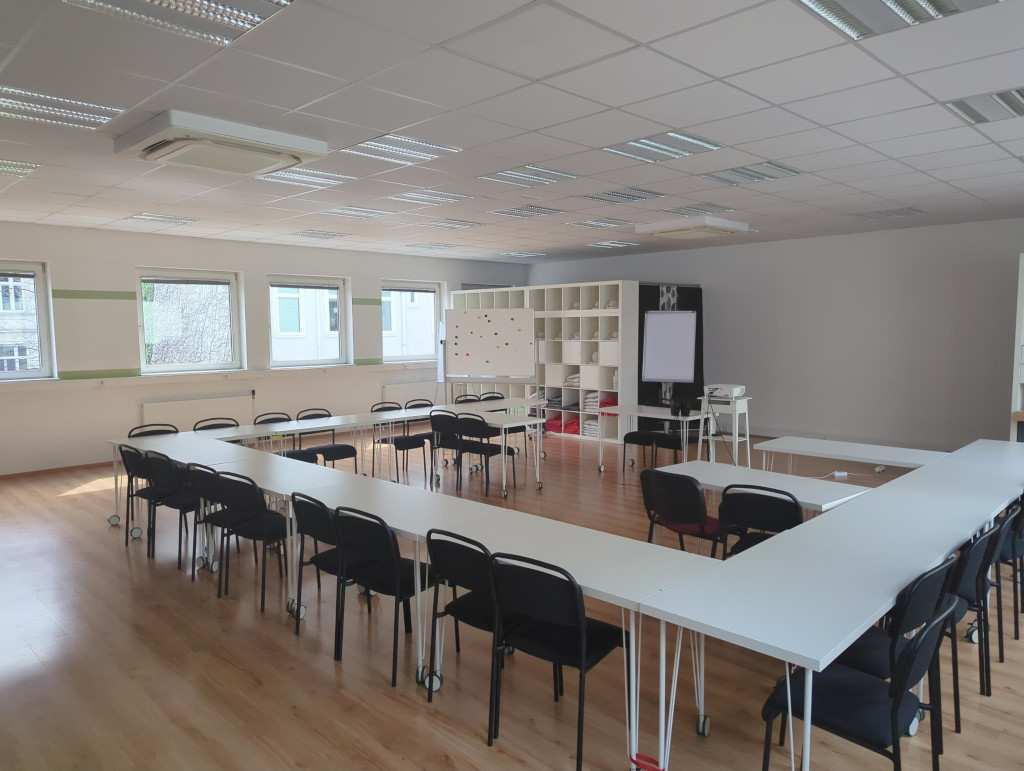
The main seminar room.

Schedule Although the exact content of the meeting will be shaped by the participants, the main goals will include:
  • Update & exchange about the status of reproducible builds in various projects.
  • Improve collaboration both between and inside projects.
  • Expand the scope and reach of reproducible builds to more projects.
  • Work together and hack on solutions.
  • Establish space for more strategic and long-term thinking than is possible in virtual channels.
  • Brainstorm designs on tools enabling users to get the most benefits from reproducible builds.
  • Discuss how reproducible builds will be usable and meaningful to users and developers alike.
Logs and minutes will be published after the meeting.

Location & date

Registration instructions Please reach out if you d like to participate in hopefully interesting, inspiring and intense technical sessions about reproducible builds and beyond! We look forward to what we anticipate to be yet another extraordinary event!

18 August 2025

Jonathan Dowland: Amiga redux

Matthew blogged about his Amiga CDTV project, a truly unique Amiga hack which also manages to be a novel Doom project (no mean feat: it's a crowded space) This re-awakened my dormant wish to muck around with my childhood Amiga some more. When I last wrote about it (four years ago ) I'd upgraded the disk drive emulator with an OLED display and rotary encoder. I'd forgotten to mention I'd also sourced a modern trapdoor RAM expansion which adds 2MiB of RAM. The Amiga can only see 1.5MiB1 of it at the moment, I need perform a mainboard modification to access the final 512kiB2, which means some soldering.
[Amiga Test Kit](https://github.com/keirf/Amiga-Stuff) showing 2MiB RAM Amiga Test Kit showing 2MiB RAM
What I had planned to do back then: replace the switch in the left button of the original mouse, which was misbehaving; perform the aformentioned mainboard mod; upgrade the floppy emulator wiring to a ribbon cable with plug-and-socket, for easier removal; fit an RTC chip to the RAM expansion board to get clock support in the OS. However much of that might be might be moot, because of two other mods I am considering, PiStorm I've re-considered the PiStorm accelerator mentioned in Matt's blog. Four years ago, I'd passed over it, because it required you to run Linux on a Raspberry Pi, and then an m68k emulator as a user-space process under Linux. I didn't want to administer another Linux system, and I'm generally uncomfortable about using a regular Linux distribution on SD storage over the long term. However in the intervening years Emu68, a bare-metal m68k emulator has risen to prominence. You boot the Pi straight into Emu68 without Linux in the middle. For some reason that's a lot more compelling to me. The PiStorm enormously expands the RAM visible to the Amiga. There would be no point in doing the mainboard mod to add 512k (and I don't know how that would interact with the PiStorm). It also can provide virtual hard disk devices to the Amiga (backed by files on the SD card), meaning the floppy emulator would be superfluous. Denise Mainboard I've just learned about a truly incredible project: the Denise Mini-ITX Amiga mainboard. It fitss into a Mini-ITX case (I have a suitable one spare already). Some assembly required. You move the chips from the original Amiga over to the Denise mainboard. It's compatible with the PiStorm (or vice-versa). It supports PC-style PS/2 keyboards (I have a Model M in the loft, thanks again Simon) and has a bunch of other modern conveniences: onboard RTC; mini-ITX power (I'll need something like a picoPSU too) It wouldn't support my trapdoor RAM card but it takes a 72-pin DIMM which can supply 2MiB of Chip RAM, and the PiStorm can do the rest (they're compatible3). No stock at the moment but if I could get my hands on this, I could build something that could permanently live on my desk.

  1. the Boobip board's 1.5MiB is "chip" RAM: accessible to the other chips on the mainboard, with access mediated by the AGNUS chip.
  2. the final 512kiB is "Fast" RAM: only accessible to the CPU, not mediated via Agnus.
  3. confirmation

13 August 2025

Sven Hoexter: Automated Browsing with Gemini and Chrome via BrowserMCP and gemini-cli

Brief dump so I don't forget how that worked in August 2025. Requires npm, npx and nodejs.
  1. Install Chrome
  2. Add the BrowserMCP extension
  3. Install gemini-cli npm install -g @google/gemini-cli
  4. Retrieve a Gemini API key via AI Studio
  5. Export API key for gemini-cli export GEMINI_API_KEY=2342
  6. Start BrowserMCP extension, see manual, an info box will appear that it's active with a cancel button.
  7. Add mcp server to gemini-cli gemini mcp add browsermcp npx @browsermcp/mcp@latest
  8. Start gemini-cli, let it use the mcp server and task it to open a website.

5 August 2025

Matthew Garrett: Cordoomceps - replacing an Amiga's brain with Doom

There's a lovely device called a pistorm, an adapter board that glues a Raspberry Pi GPIO bus to a Motorola 68000 bus. The intended use case is that you plug it into a 68000 device and then run an emulator that reads instructions from hardware (ROM or RAM) and emulates them. You're still limited by the ~7MHz bus that the hardware is running at, but you can run the instructions as fast as you want.

These days you're supposed to run a custom built OS on the Pi that just does 68000 emulation, but initially it ran Linux on the Pi and a userland 68000 emulator process. And, well, that got me thinking. The emulator takes 68000 instructions, emulates them, and then talks to the hardware to implement the effects of those instructions. What if we, well, just don't? What if we just run all of our code in Linux on an ARM core and then talk to the Amiga hardware?

We're going to ignore x86 here, because it's weird - but most hardware that wants software to be able to communicate with it maps itself into the same address space that RAM is in. You can write to a byte of RAM, or you can write to a piece of hardware that's effectively pretending to be RAM[1]. The Amiga wasn't unusual in this respect in the 80s, and to talk to the graphics hardware you speak to a special address range that gets sent to that hardware instead of to RAM. The CPU knows nothing about this. It just indicates it wants to write to an address, and then sends the data.

So, if we are the CPU, we can just indicate that we want to write to an address, and provide the data. And those addresses can correspond to the hardware. So, we can write to the RAM that belongs to the Amiga, and we can write to the hardware that isn't RAM but pretends to be. And that means we can run whatever we want on the Pi and then access Amiga hardware.

And, obviously, the thing we want to run is Doom, because that's what everyone runs in fucked up hardware situations.

Doom was Amiga kryptonite. Its entire graphical model was based on memory directly representing the contents of your display, and being able to modify that by just moving pixels around. This worked because at the time VGA displays supported having a memory layout where each pixel on your screen was represented by a byte in memory containing an 8 bit value that corresponded to a lookup table containing the RGB value for that pixel.

The Amiga was, well, not good at this. Back in the 80s, when the Amiga hardware was developed, memory was expensive. Dedicating that much RAM to the video hardware was unthinkable - the Amiga 1000 initially shipped with only 256K of RAM, and you could fill all of that with a sufficiently colourful picture. So instead of having the idea of each pixel being associated with a specific area of memory, the Amiga used bitmaps. A bitmap is an area of memory that represents the screen, but only represents one bit of the colour depth. If you have a black and white display, you only need one bitmap. If you want to display four colours, you need two. More colours, more bitmaps. And each bitmap is stored in an independent area of RAM. You never use more memory than you need to display the number of colours you want to.

But that means that each bitplane contains packed information - every byte of data in a bitplane contains the bit value for 8 different pixels, because each bitplane contains one bit of information per pixel. To update one pixel on screen, you need to read from every bitmap, update one bit, and write it back, and that's a lot of additional memory accesses. Doom, but on the Amiga, was slow not just because the CPU was slow, but because there was a lot of manipulation of data to turn it into the format the Amiga wanted and then push that over a fairly slow memory bus to have it displayed.

The CDTV was an aesthetically pleasing piece of hardware that absolutely sucked. It was an Amiga 500 in a hi-fi box with a caddy-loading CD drive, and it ran software that was just awful. There's no path to remediation here. No compelling apps were ever released. It's a terrible device. I love it. I bought one in 1996 because a local computer store had one and I pointed out that the company selling it had gone bankrupt some years earlier and literally nobody in my farming town was ever going to have any interest in buying a CD player that made a whirring noise when you turned it on because it had a fan and eventually they just sold it to me for not much money, and ever since then I wanted to have a CD player that ran Linux and well spoiler 30 years later I'm nearly there. That CDTV is going to be our test subject. We're going to try to get Doom running on it without executing any 68000 instructions.

We're facing two main problems here. The first is that all Amigas have a firmware ROM called Kickstart that runs at powerup. No matter how little you care about using any OS functionality, you can't start running your code until Kickstart has run. This means even documentation describing bare metal Amiga programming assumes that the hardware is already in the state that Kickstart left it in. This will become important later. The second is that we're going to need to actually write the code to use the Amiga hardware.

First, let's talk about Amiga graphics. We've already covered bitmaps, but for anyone used to modern hardware that's not the weirdest thing about what we're dealing with here. The CDTV's chipset supports a maximum of 64 colours in a mode called "Extra Half-Brite", or EHB, where you have 32 colours arbitrarily chosen from a palette and then 32 more colours that are identical but with half the intensity. For 64 colours we need 6 bitplanes, each of which can be located arbitrarily in the region of RAM accessible to the chipset ("chip RAM", distinguished from "fast ram" that's only accessible to the CPU). We tell the chipset where our bitplanes are and it displays them. Or, well, it does for a frame - after that the registers that pointed at our bitplanes no longer do, because when the hardware was DMAing through the bitplanes to display them it was incrementing those registers to point at the next address to DMA from. Which means that every frame we need to set those registers back.

Making sure you have code that's called every frame just to make your graphics work sounds intensely irritating, so Commodore gave us a way to avoid doing that. The chipset includes a coprocessor called "copper". Copper doesn't have a large set of features - in fact, it only has three. The first is that it can program chipset registers. The second is that it can wait for a specific point in screen scanout. The third (which we don't care about here) is that it can optionally skip an instruction if a certain point in screen scanout has already been reached. We can write a program (a "copper list") for the copper that tells it to program the chipset registers with the locations of our bitplanes and then wait until the end of the frame, at which point it will repeat the process. Now our bitplane pointers are always valid at the start of a frame.

Ok! We know how to display stuff. Now we just need to deal with not having 256 colours, and the whole "Doom expects pixels" thing. For the first of these, I stole code from ADoom, the only Amiga doom port I could easily find source for. This looks at the 256 colour palette loaded by Doom and calculates the closest approximation it can within the constraints of EHB. ADoom also includes a bunch of CPU-specific assembly optimisation for converting the "chunky" Doom graphic buffer into the "planar" Amiga bitplanes, none of which I used because (a) it's all for 68000 series CPUs and we're running on ARM, and (b) I have a quad core CPU running at 1.4GHz and I'm going to be pushing all the graphics over a 7.14MHz bus, the graphics mode conversion is not going to be the bottleneck here. Instead I just wrote a series of nested for loops that iterate through each pixel and update each bitplane and called it a day. The set of bitplanes I'm operating on here is allocated on the Linux side so I can read and write to them without being restricted by the speed of the Amiga bus (remember, each byte in each bitplane is going to be updated 8 times per frame, because it holds bits associated with 8 pixels), and then copied over to the Amiga's RAM once the frame is complete.

And, kind of astonishingly, this works! Once I'd figured out where I was going wrong with RGB ordering and which order the bitplanes go in, I had a recognisable copy of Doom running. Unfortunately there were weird graphical glitches - sometimes blocks would be entirely the wrong colour. It took me a while to figure out what was going on and then I felt stupid. Recording the screen and watching in slow motion revealed that the glitches often showed parts of two frames displaying at once. The Amiga hardware is taking responsibility for scanning out the frames, and the code on the Linux side isn't synchronised with it at all. That means I could update the bitplanes while the Amiga was scanning them out, resulting in a mashup of planes from two different Doom frames being used as one Amiga frame. One approach to avoid this would be to tie the Doom event loop to the Amiga, blocking my writes until the end of scanout. The other is to use double-buffering - have two sets of bitplanes, one being displayed and the other being written to. This consumes more RAM but since I'm not using the Amiga RAM for anything else that's not a problem. With this approach I have two copper lists, one for each set of bitplanes, and switch between them on each frame. This improved things a lot but not entirely, and there's still glitches when the palette is being updated (because there's only one set of colour registers), something Doom does rather a lot, so I'm going to need to implement proper synchronisation.

Except. This was only working if I ran a 68K emulator first in order to run Kickstart. If I tried accessing the hardware without doing that, things were in a weird state. I could update the colour registers, but accessing RAM didn't work - I could read stuff out, but anything I wrote vanished. Some more digging cleared that up. When you turn on a CPU it needs to start executing code from somewhere. On modern x86 systems it starts from a hardcoded address of 0xFFFFFFF0, which was traditionally a long way any RAM. The 68000 family instead reads its start address from address 0x00000004, which overlaps with where the Amiga chip RAM is. We can't write anything to RAM until we're executing code, and we can't execute code until we tell the CPU where the code is, which seems like a problem. This is solved on the Amiga by powering up in a state where the Kickstart ROM is "overlayed" onto address 0. The CPU reads the start address from the ROM, which causes it to jump into the ROM and start executing code there. Early on, the code tells the hardware to stop overlaying the ROM onto the low addresses, and now the RAM is available. This is poorly documented because it's not something you need to care if you execute Kickstart which every actual Amiga does and I'm only in this position because I've made poor life choices, but ok that explained things. To turn off the overlay you write to a register in one of the Complex Interface Adaptor (CIA) chips, and things start working like you'd expect.

Except, they don't. Writing to that register did nothing for me. I assumed that there was some other register I needed to write to first, and went to the extent of tracing every register access that occurred when running the emulator and replaying those in my code. Nope, still broken. What I finally discovered is that you need to pulse the reset line on the board before some of the hardware starts working - powering it up doesn't put you in a well defined state, but resetting it does.

So, I now have a slightly graphically glitchy copy of Doom running without any sound, displaying on an Amiga whose brain has been replaced with a parasitic Linux. Further updates will likely make things even worse. Code is, of course, available.

[1] This is why we had trouble with late era 32 bit systems and 4GB of RAM - a bunch of your hardware wanted to be in the same address space and so you couldn't put RAM there so you ended up with less than 4GB of RAM

comment count unavailable comments

30 July 2025

Utkarsh Gupta: FOSS Activites in July 2025

Here s my 70th monthly but brief update about the activities I ve done in the F/L/OSS world.

Debian
This was my 79th month of actively contributing to Debian. I became a DM in late March 2019 and a DD on Christmas 19! \o/ Debian was in freeze throughout so whilst I didn t do many uploads, there s a bunch of other things I did:
  • Attended DebConf25 in Brest, France.
    • Lead the bursary BOF and discussions.
    • Participated in other sessions, especially around the FTP masters.
    • I ve started to look at things with my trainee hat on.
    • Participated in the Debian Security Tracker sprints during DebCamp. More on that below.
  • Mentoring for newcomers.
  • Moderation of -project mailing list.

Ubuntu
This was my 54th month of actively contributing to Ubuntu. I joined Canonical to work on Ubuntu full-time back in February 2021. Whilst I can t give a full, detailed list of things I did (there s so much and some of it might not be public yet!), here s a quick TL;DR of what I did:
  • Released Questing snapshot 3! \o/
  • EOL d Oracular. o/
  • Participated in the mid-cycle sprints.
  • Got a recognition award for leading 24.04.2 LTS release and leading the Release Management team.
  • Preparing for the 24.04.3 LTS release early next month.

Debian (E)LTS
Debian Long Term Support (LTS) is a project to extend the lifetime of all Debian stable releases to (at least) 5 years. Debian LTS is not handled by the Debian security team, but by a separate group of volunteers and companies interested in making it a success. And Debian Extended LTS (ELTS) is its sister project, extending support to the stretch and jessie release (+2 years after LTS support). This was my 70th month as a Debian LTS and 57th month as a Debian ELTS paid contributor.
I only worked for 15.00 hours for LTS and 5.00 hours for ELTS and did the following things:
  • [LTS] Released DLA 4263-1 for ruby-graphql.
    • Coordinated with upstream due to lack of clarity on 1.11.4 being affected & not having a clear reproducer.
    • As 1.11.4 was still partially vulnerable and the backport was non-trivial, it was probably conveinent to bump the upstream version to 1.11.12 instead, fixing:
    • CVE-2025-27407): a remote code execution.
    • Salsa repository: https://salsa.debian.org/lts-team/packages/ruby-graphql.
    • Coordinated with the Security team for a p-u fix or a DSA.
  • [E/LTS] Frontdesk duty from 28th July to 04th August.
  • [LTS] Attended the monthly LTS meeting on IRC. Summary here.

Debian Security Tracker sprint 2025 Thanks to the LTS team for also organizing a security tracker sprint during DebCamp25. I attended the sprint and spent 10 hours working on the following tasks: That s all. A quicky shoutout to Roberto for organizing the sprints remotely and being awake at odd hours. <3
Until next time.
:wq for today.

18 July 2025

Sven Hoexter: Debian can Now Drop Xorg

even I managed to migrate my last setup to sway a few weeks ago. I was the last one you've been waiting for dear X Strike Force, right? Multi display support just works, no more modeline hackery. Oh and we can also remove those old clipboard manager. One oddity with sway I could not yet solve is that I had to delete the default wallpaper /usr/share/backgrounds/sway/Sway_Wallpaper_Blue_1920x1080.png to allow it to load the Debian wallpaper via
output * bg /usr/share/desktop-base/active-theme/wallpaper/contents/images/1920x1080.svg fill
Update: Thanks to Birger and Sebastian who easily could explain that. The sway-backgrounds package ships a config snippet in /etc/sway/config.d and if that's included e.g. via include /etc/sway/config.d/* after setting the background in your ~/.config/sway/config it does the obvious and overrides your own background configuration again. Didn't expect that but makes sense. So the right fix is to just remove the sway-backgrounds package. I also had a bit of fist fight with sway to make sure I've as much screen space available as possible. So I tried to shrink fonts and remove borders.
default_border none
default_floating_border none
titlebar_padding 1
titlebar_border_thickness 0
font pango: monospace 9
Rest I guess is otherwise well documented. I settled on wofi as menu tool, cliphist for clipboard access, of course waybar to be able to use the nm-applet, swayidle and swaylock are probably also more or less standard for screen locking. Having
for_window [app_id="firefox"] inhibit_idle fullscreen
is also sensible for video streaming, to avoid the idle locking.

16 July 2025

Sven Hoexter: Windows 10 to Ubuntu Migration

I know that Canonical / Ubuntu people are sometimes not well received due to promotion of Canonical tooling (some might remember upstart and Mir, or more recently snap and netplan). Thus for some positive vibes consider that I could hand out the Ubuntu Desktop image on a USB flash drive to a family member, and the family member could just replace Windows 10 without any assistance. It just worked. This was made possible by the will to keep a slightly dated ThinkPad in use, which it's not supported by Windows 11. I've to admit that I never looked at Ubuntu Desktop before, but the user experience is on par with everything else I know. Thanks to all the folks at Canonical who made that possible! Luckily the times when you had to fiddle with modelines for XFree86, and sleepless nights about configuring lpd to get printing up and running are long gone. I believe now that Microsoft is doing Microsoft things with rolling Windows updates which force users to replace completely fine working hardware is the time to encourage more people to move to open operating systems, and Ubuntu Desktop seems to be a very suitable choice. Things to Improve Albeit I think the out of the box experience is great, there are a few niche topics where things could improve. Default Access to Apt / Ubuntu Universe Well snaps are promoted as the primary application source, but having some graphical interface like synaptic available by default to just install from Ubuntu Universe would be helpful. In this case we wanted to install keepass2 to access the users keepass file kept from the Windows setup. Having to tell someone "open the terminal and type sudo apt install" is something that requires support. Snaps and Isolation Overrides I'm fine with snaps having least privileges, but it would be nice if one could add overrides easily. Here the family member was playing with an Arduino Uno and there is one sample in the workbook that utilizes a Java application called Processing. It's available as a snap, but that one doesn't have access to the required serial port device file. I tried hard to make it work - full details in the snapcraft forum - but failed, and opted to use the --devmode to install it without isolation enforcement. As far as I understood snap that results in no more automatic updates for the application. If someone from the Ubuntu crowd with more snap debug experience has additional hints on how to narrow down which change is required, I would love to improve that and create a PR for the processing developers. Either reply in the forum or reach out via mail sven at stormbind dot net.

Sven Hoexter: Google Cloud Oddities Summer 2025 Edition

Latest oddities I ran into with Google Cloud products before I start to forget about them again. e2 Compute Instances vs CloudNAT Years ago I already had a surprising encounter with the Google Cloud e2 instances. Back then we observed CPU steal time from 20-60%, which made the instances unusable for anything remotely latency sensitive. Now someone started to run a workload which creates many outbound connections to the same destination IP:Port. To connect to the internet we utilize the Google Cloud product "CloudNAT" which implements a NAT solution somewhere in the network layer. Starting the workload let after a few seconds to all sort of connection issues, and of course logs from CloudNAT that it dropped connections. The simplest reproducer I could find was while true; do curl http://sven.stormbind.net; done which already let to connection drops on CloudNAT. We starred a bit at output of gcloud compute routers get-nat-mapping-info our-default-natgw, but allocating additional ports still worked fine in general. Further investigation let to two differences between a project which was fine and those that failed:
  1. c2d or n2d machine types instead of e2 and
  2. usage of gVNIC.
Moving away from the e2 instances instantly fixed our issue. Only some connection drops could be observed on CloudNAT if we set the min_ports_per_vm value too low and it could not allocate new ports in time. Thus we did some additional optimizations: See also upstream documentation regarding timeouts. To complete the setup alignment we also enabled gVNIC on all GKE pools. Noteworthy detail a colleague figured out: If you use terraform to provision GKE pools make sure to use at least google provider v6.33.0 to avoid a re-creation of your node pool. GKE LoadBalancer Force allPorts: true on Forwarding Rule Technically it's possible to configure a forwarding rule to listen on some or all ports. That gets more complicated if you do not configure the forwarding rule via terraform or gcloud cli, but use a GKE resource kind: Service with spec.type: LoadBalancer. The logic documented by Google Cloud is that the forwarding rule will have per port configuration if it's five or less, and above that it will open for all ports. Sadly that does not work e.g. in cases where you've an internal load balancer and a serviceAttachment attached to the forwarding rule. In my experience reconfiguring was also unreliable in cases without a serviceAttachment and required a manual deletion of the service load balancer to have the operator reconcile it and create it correctly. Given that we wanted to have all ports open to allow us to dynamically add more ports on a specific load balancer, but there is no annotation for that, I worked around with this beauty:
      ports:
        - name: dummy-0
          port: 2342
          protocol: TCP
          targetPort: 2342
        - name: dummy-1
          port: 2343
          protocol: TCP
          targetPort: 2343
        - name: dummy-2
          port: 2344
          protocol: TCP
          targetPort: 2344
        - name: dummy-3
          port: 2345
          protocol: TCP
          targetPort: 2345
        - name: service-1
          port: 4242
          protocol: TCP
          targetPort: 4242
        - name: service-2
          port: 4343
          protocol: TCP
          targetPort: 4343
If something in that area did not work out there's basically two things to check:
  1. Is the port open on the forwarding rule / is the forwarding rule configured with allPorts: true?
  2. Got the VPC firewall rule created by the service operator in GKE updated to open all required ports?
Rate Limiting with Cloud Armor on Global TCP Proxy Load Balancer According to the Google Cloud support rate limiting on a TCP proxy is a preview feature. That seems to be the excuse why it's all very inconsistent right now, but it works. Terraform Sample Snippet
  rule  
    description = "L3-L4 Rate Limit"
    action      = "rate_based_ban"
    priority    = "2342"
    match  
      versioned_expr = "SRC_IPS_V1"
      config  
        src_ip_ranges = ["*"]
       
     
    rate_limit_options  
      enforce_on_key = "IP"
      # exceed_action only supports deny() with a response code
      exceed_action = "deny(429)"
      rate_limit_threshold  
        count        = 320
        interval_sec = 60
       
      ban_duration_sec = 240
      ban_threshold  
        count        = 320
        interval_sec = 60
       
      conform_action = "allow"
     
   
Config-Connector Sample Snippet
  - action: rate_based_ban
    description: L3-L4 Rate Limit
    match:
      config:
        srcIpRanges:
          - "*"
      versionedExpr: SRC_IPS_V1
    preview: false
    priority: 2342
    rateLimitOptions:
      banDurationSec: 240
      banThreshold:
        count: 320
        intervalSec: 60
      conformAction: allow
      enforceOnKey: IP
      exceedAction: deny
      rateLimitThreshold:
         count: 320
         intervalSec: 60

20 June 2025

Sven Hoexter: Terraform: Validation Condition Cycles

Terraform 1.9 introduced some time ago the capability to reference in an input variable validation condition other variables, not only the one you're validating. What does not work is having two variables which validate each other, e.g.
variable "nat_min_ports"  
  description = "Minimal amount of ports to allocate for 'min_ports_per_vm'"
  default     = 32
  type        = number
  validation  
    condition = (
      var.nat_min_ports >= 32 &&
      var.nat_min_ports <= 32768 &&
      var.nat_min_ports < var.nat_max_ports
    )
    error_message = "Must be between 32 and 32768 and less than 'nat_max_ports'"
   
 
variable "nat_max_ports"  
  description = "Maximal amount of ports to allocate for 'max_ports_per_vm'"
  default     = 16384
  type        = number
  validation  
    condition = (
      var.nat_max_ports >= 64 &&
      var.nat_max_ports <= 65536 &&
      var.nat_max_ports > var.nat_min_ports
    )
    error_message = "Must be between 64 and 65536 and above 'nat_min_ports'"
   
 
That let directly to the following rather opaque error message: Received an error Error: Cycle: module.gcp_project_network.var.nat_max_ports (validation), module.gcp_project_network.var.nat_min_ports (validation) Removed the sort of duplicate check var.nat_max_ports > var.nat_min_ports on nat_max_ports to break the cycle.

16 June 2025

Sven Hoexter: vym 3 Development Version in experimental

Took some time yesterday to upload the current state of what will be at some point vym 3 to experimental. If you're a user of this tool you can give it a try, but be aware that the file format changed, and can't be processed with vym releases before 2.9.500! Thus it's important to create a backup until you're sure that you're ready to move on. On the technical side this is also the switch from Qt5 to Qt6.

11 June 2025

Sven Hoexter: HaProxy: Two Ways of Activating PROXY Protocol

If you ever face the need to activate the PROXY Protocol in HaProxy (e.g. if you're as unlucky as I'm, and you have to use Google Cloud TCP proxy load balancer), be aware that there are two ways to do that. Both are part of the frontend configuration. accept-proxy This one is the big hammer and forces the usage of the PROXY protocol on all connections. Sample:
      frontend vogons
          bind *:2342 accept-proxy ssl crt /etc/haproxy/certs/vogons/tls.crt
tcp-request connection expect-proxy If you have to, e.g. during a phase of migrations, receive traffic directly, without the PROXY protocol header and from a proxy with the header there is also a more flexible option based on a tcp-request connection action. Sample:
      frontend vogons
          bind *:2342 ssl crt /etc/haproxy/certs/vogons/tls.crt
          tcp-request connection expect-proxy layer4 if   src 35.191.0.0/16 130.211.0.0/22  
Source addresses here are those of GCP global TCP proxy frontends. Replace with whatever suites your case. Since this is happening just after establishing a TCP connection, there is barely anything else available to match on beside of the source address. HaProxy Documentation

8 June 2025

Colin Watson: Free software activity in May 2025

My Debian contributions this month were all sponsored by Freexian. Things were a bit quieter than usual, as for the most part I was sticking to things that seemed urgent for the upcoming trixie release. You can also support my work directly via Liberapay or GitHub Sponsors. OpenSSH After my appeal for help last month to debug intermittent sshd crashes, Michel Casabona helped me put together an environment where I could reproduce it, which allowed me to track it down to a root cause and fix it. (I also found a misuse of strlcpy affecting at least glibc-based systems in passing, though I think that was unrelated.) I worked with Daniel Kahn Gillmor to fix a regression in ssh-agent socket handling. I fixed a reproducibility bug depending on whether passwd is installed on the build system, which would have affected security updates during the lifetime of trixie. I backported openssh 1:10.0p1-5 to bookworm-backports. I issued bookworm and bullseye updates for CVE-2025-32728. groff I backported a fix for incorrect output when formatting multiple documents as PDF/PostScript at once. debmirror I added a simple autopkgtest. Python team I upgraded these packages to new upstream versions: In bookworm-backports, I updated these packages: I fixed problems building these packages reproducibly: I backported fixes for some security vulnerabilities to unstable (since we re in freeze now so it s not always appropriate to upgrade to new upstream versions): I fixed various other build/test failures: I added non-superficial autopkgtests to these packages: I packaged python-django-hashids and python-django-pgbulk, needed for new upstream versions of python-django-pgtrigger. I ported storm to Python 3.14. Science team I fixed a build failure in apertium-oci-fra.

23 May 2025

Sven Hoexter: pflogsumm 1.1.6

Mainly relevant for the few who still run their own mail server and use Postfix + pflogsumm. Few weeks back Jim contacted me that he's going to pick up work on pflogsumm again, and as first step wanted to release 1.1.6 to incorporate patches from the Debian package. That one is now released. Since we're already in the Trixie freeze the package is in experimental, but as usual should be fine to install manually. Heads Up - Move to /usr/bin I took that as an opportunity to move pflogsumm from /usr/sbin to /usr/bin! There was not really a good reason to ever have it in sbin. It's neither a system binary, nor statically linked (like in the very old days), or something that really only makes sense to be used as root. Some out there likely have custom scripts which do not rely on an adjusted PATH variable, those scripts require an update.

Next.

Previous.