Otto Kek l inen: Using multiple git remotes for true distributed version control

 One of the primary design principles for Linus Torvalds when creating Git is that it should be a distributed system, capable of working with multiple remotes. However, most people seem to use Git with just one remote, typically having GitHub or GitLab as the only
 origin.
Version control systems before Git relied on a centralized model. For example in Subversion or CVS you could only sync with one single remote server, which was considered the primary host of the source code. Git however is not just a VCS, but a DVCS, for distributed version control system. If you currently use Git with just one single remote as if it was a centralized version control system, now is the time to change that and learn how to add multiple remotes, and configure more flexible git pull and git push rules.
The first concept to grasp is that Git can have multiple remotes. For example, after running a basic clone command such as git clone https://github.com/ottok/debcraft.git you would end up with a single remote origin pointing to GitHub:
$ git remote --verbose
origin https://github.com/ottok/debcraft.git (fetch)
origin https://github.com/ottok/debcraft.git (push)git remote:
$ git remote rename origin github
$ git remote add gitlab https://gitlab.com/ottok/debcraft.git
$ git remote --verbose
github https://github.com/ottok/debcraft.git (fetch)
github https://github.com/ottok/debcraft.git (push)
gitlab https://gitlab.com/ottok/debcraft.git (fetch)
gitlab https://gitlab.com/ottok/debcraft.git (push)
$ git pull --all
Fetching github
Fetching gitlab
Already up to date.gitlab/main and github/main which tell which commit the branch main points to on various remotes. In this case they are all in sync and point to the same 5d1815c:
$ git log --oneline
5d1815c (HEAD -> main, gitlab/main, github/main) Bump Debhelper version from 13 to 14
ca518a7 Temporarily disable automatic copyright year bumping due to frequent bugs
d6e201e Exclude .pm from codespell to decrease false positives (Closes: #1140488)
708ee35 Exclude debian/copyright from codespell due to frequent false positivesdev and I only want to push it to GitLab to trigger a CI run there, I can run git push gitlab dev. You can also configure a default remote by running once git push --set-upstream gitlab dev and thereafter simply run git push and it will automatically push the branch dev only to that remote.
A related setting is remote.pushDefault, which tells git which remote to push to when a branch does not define one of its own, and it applies to every branch that lacks a [branch] section in .git/config. Setting it once is what lets a repository have a per-branch pull remote, like the debcraft example below, and still have a single, predictable git push target. To see which remote git will use for each of your branches, run git branch -vv, and to refresh the remote-tracking branches of all remotes at once, run git fetch --all --prune.
If you want to have multiple remotes, but automatically push and pull to all of them at once, you configure one single remote to have multiple URLs with git remote set-url --add. Since git prints one line per push URL, git remote -v then shows the same remote several times, once for each URL it pushes to.
As an illustration, in my actual local Debcraft development project I have all these configured:
$ git remote -v
github-pull-requests git@github.com:ottok/debcraft.git (fetch)
github-pull-requests git@github.com:ottok/debcraft.git (push)
gitlab-merge-requests git@gitlab.com:ottok/debcraft.git (fetch)
gitlab-merge-requests git@gitlab.com:ottok/debcraft.git (push)
origin git@salsa.debian.org:debian/debcraft.git (fetch)
origin git@salsa.debian.org:debian/debcraft.git (push)
origin git@gitlab.com:ottok/debcraft.git (push)
origin git@github.com:ottok/debcraft.git (push)
otto git@salsa.debian.org:otto/debcraft.git (fetch)
otto git@salsa.debian.org:otto/debcraft.git (push)
otto git@gitlab.com:ottok/debcraft.git (push)
otto git@github.com:ottok/debcraft.git (push)
otto git@git.sr.ht:~ottok/debcraft (push)
otto ssh://git@codeberg.org/ottok/Debcraft.git (push)
salsa-merge-requests git@salsa.debian.org:debian/debcraft.git (fetch)
salsa-merge-requests git@salsa.debian.org:debian/debcraft.git (push)
$ cat .git/config
...
[remote "origin"]
url = git@salsa.debian.org:debian/debcraft.git
fetch = +refs/heads/*:refs/remotes/origin/*
pushurl = git@salsa.debian.org:debian/debcraft.git
pushurl = git@gitlab.com:ottok/debcraft.git
pushurl = git@github.com:ottok/debcraft.git
[remote "otto"]
url = git@salsa.debian.org:otto/debcraft.git
fetch = +refs/heads/*:refs/remotes/otto/*
pushurl = git@salsa.debian.org:otto/debcraft.git
pushurl = git@gitlab.com:ottok/debcraft.git
pushurl = git@github.com:ottok/debcraft.git
pushurl = git@git.sr.ht:~ottok/debcraft
pushurl = ssh://git@codeberg.org/ottok/Debcraft.git
...
[branch "main"]
remote = origin
merge = refs/heads/main
[branch "dev"]
remote = otto
merge = refs/heads/dev
...main:
- Running
git pullwill fetch fromsalsa.debian.org/debian/debcraft(the primary git hosting for this project) - Running
git pushwill push to Salsa, GitLab and GitHub, one after the other, making sure they all have the latestmain
dev:
- Running
git pullwill fetch fromsalsa.debian.org/otto/debcraft(the personal fork) - Running
git pushwill push to Salsa, GitLab, GitHub, Sourcehut and Codeberg all one after the other
$ git push
Everything up-to-date
Everything up-to-date
Everything up-to-dateUse cases for distributed version control
The most obvious use case for any distributed system is improved availability. In this example, the salsa.debian.org is often overloaded/unavailable, so pushing to GitLab and GitHub as well allows collaborators to use them to fetch git commits if the primary code hosting site is unresponsive. Once it comes back online again, the next git push/pull will automatically bring it up to the same content as what backup hosts had.
The second main benefit is that having the code live on multiple code forges allows collaborators to use their own favorite host. Debcraft itself is a great example of this, as collaborators who don t have a Salsa account can - and have - submitted Merge Requests on GitLab.com and Pull Requests on GitHub.com.
A third use case is code hosting migrations. If you for example want to gradually phase out GitHub.com and replace it with something else, you could configure git to pull from the old location and push to both, ensuring that other collaborators can start using the new code hosting location without disruptions to those who have not yet updated their remotes or done a fresh git clone from the new location.
Automating setting up a project on multiple code forges
While I don t push all projects I work on to all Salsa/GitLab/GitHub, I do set up multiple remotes for enough git projects that I have this script to automate configuring a git repository that is cloned from Salsa to also push to GitLab and GitHub. It accepts the repository whether it was cloned over SSH or HTTPS, and it adds the push URLs and then pushes the current branch, all branches, and tags for you:
#!/bin/bash
# Add GitLab and GitHub push URLs to an existing git remote, so that a plain
# "git push" writes the same commits to all three code forges.
#
# Usage: ./git-multipush-salsa.sh
#
# Environment:
# SALSA_REMOTE remote to turn into a mirror, default origin
# SALSA_USER your Salsa user, only used to detect that the source
# remote is somebody else's project
# GITLAB_USER your GitLab user, default ottok
# GITHUB_USER your GitHub user, default ottok
# PROTOCOL ssh (default) or https, for the push URLs
set -euo pipefail
SCRIPT=$(basename "$0")
SALSA_REMOTE=$ SALSA_REMOTE:-origin
SALSA_USER=$ SALSA_USER:-otto
GITLAB_USER=$ GITLAB_USER:-ottok
GITHUB_USER=$ GITHUB_USER:-ottok
PROTOCOL=$ PROTOCOL:-ssh
die()   echo "$SCRIPT: $*" >&2; exit 1;
# A failing command leaves the push URLs half configured behind, so say how
# to get back to where we started
fail()

echo "$SCRIPT: '$*' failed, the push URLs may already have been added" >&2
echo " git config --unset-all remote.$ SALSA_REMOTE .pushurl" >&2
echo " git remote set-url --add --push $ SALSA_REMOTE  $ SALSA_URL " >&2
exit 1

git rev-parse --git-dir > /dev/null 2>&1   die "not inside a git repository"
git remote   grep -qx "$SALSA_REMOTE"   die "no remote named '$SALSA_REMOTE'"
# Example: git@salsa.debian.org:otto/salsa-ci-pipeline.git
SALSA_URL=$(git remote get-url "$SALSA_REMOTE")
# The source remote may use any of the URL forms salsa.debian.org accepts,
# for example git@salsa.debian.org:otto/salsa-ci-pipeline.git or
# https://salsa.debian.org/otto/salsa-ci-pipeline.git
case "$SALSA_URL" in
git@salsa.debian.org:*) SALSA_PATH=$ SALSA_URL#git@salsa.debian.org:  ;;
ssh://git@salsa.debian.org/*) SALSA_PATH=$ SALSA_URL#ssh://git@salsa.debian.org/  ;;
https://salsa.debian.org/*) SALSA_PATH=$ SALSA_URL#https://salsa.debian.org/  ;;
http://salsa.debian.org/*) SALSA_PATH=$ SALSA_URL#http://salsa.debian.org/  ;;
*) die "unexpected source URL '$SALSA_URL', expected a salsa.debian.org URL" ;;
esac
SALSA_PATH=$ SALSA_PATH%/
SALSA_PATH=$ SALSA_PATH%.git
SOURCE_USER=$ SALSA_PATH%%/*
PROJECT=$ SALSA_PATH##*/
# Write the push URLs in one and the same protocol, no matter how the
# repository happens to have been cloned
if [ "$PROTOCOL" = "https" ]
then
SALSA_URL="https://salsa.debian.org/$ SALSA_PATH .git"
GITLAB_URL="https://gitlab.com/$ GITLAB_USER /$ PROJECT .git"
GITHUB_URL="https://github.com/$ GITHUB_USER /$ PROJECT .git"
else
SALSA_URL="git@salsa.debian.org:$ SALSA_PATH .git"
GITLAB_URL="git@gitlab.com:$ GITLAB_USER /$ PROJECT .git"
GITHUB_URL="git@github.com:$ GITHUB_USER /$ PROJECT .git"
fi
# Mirroring somebody else's project is fine, but it is usually not what you
# want: you most likely want to mirror your own fork instead
if [ "$SOURCE_USER" != "$SALSA_USER" ]
then
echo "Note: $SALSA_REMOTE points to $SOURCE_USER's project, not your own."
echo "To mirror your own fork, run this with SALSA_REMOTE set to its name."
echo
fi
# Bail out instead of adding the same push URLs twice
EXISTING=$(git remote get-url --push --all "$SALSA_REMOTE")
if [ "$(printf '%s\n' "$EXISTING"   wc -l)" -gt 1 ]
then
die "remote '$SALSA_REMOTE' already has multiple push URLs:
$EXISTING"
fi
echo "Mirroring $SALSA_URL to $GITLAB_URL and $GITHUB_URL"
git remote set-url --add --push "$SALSA_REMOTE" "$SALSA_URL"
git remote set-url --add --push "$SALSA_REMOTE" "$GITLAB_URL"
git remote set-url --add --push "$SALSA_REMOTE" "$GITHUB_URL"
# Push the branch you have checked out first, and never with --force: the
# first branch a GitLab or GitHub project receives becomes its default branch,
# the one you then protect
DEFAULT_BRANCH=$(git symbolic-ref --short HEAD)   die "not on a branch, check out a branch first"
git push -u "$SALSA_REMOTE" "$DEFAULT_BRANCH"
git push "$SALSA_REMOTE" --all
git push "$SALSA_REMOTE" --tags
# The push above creates the GitLab and GitHub projects, but GitLab projects
# are private by default, so make the new mirror public with glab if installed.
if command -v glab > /dev/null
then
echo "Make the GitLab project public and describe it as a mirror:"
glab api -X PUT "projects/$ GITLAB_USER %2F$ PROJECT " \
-f visibility=public \
-f description="Mirror of $ SALSA_URL " \
-f notification_email=disabled
else
echo "Install glab to do the same automatically, or visit"
echo "https://gitlab.com/$ GITLAB_USER /$ PROJECT /edit to make the project public"
fi
echo "To undo, drop all push URLs and add back only the original one:"
echo " git config --unset-all remote.$ SALSA_REMOTE .pushurl"
echo " git remote set-url --add --push $ SALSA_REMOTE  $ SALSA_URL "
If you prefer not to install glab, the last part simply reduces to visiting the GitLab project settings once and ticking the project public, and it is also worth setting a description like Mirror of https://salsa.debian.org/debian/debcraft and disabling notification email there, as nobody wants a mirror sending out a flood of emails every time you push.
There are a few caveats worth knowing about before mirroring everything everywhere. Every push to a remote with multiple push URLs writes to all of them, so a project with continuous integration configured on three forges will run its CI three times and cost you roughly three times as much. If one of the push URLs fails, say because the host is momentarily unreachable, git prints the error and stops there, leaving the remotes listed after the failing one without the new commits. Simply re-run the push once the host is reachable again; the remotes that did get the commits will just respond with Everything up-to-date. And you should never force-push to only one of the remotes, as that leaves the mirrors permanently out of sync with your local repository.
Avoid pulling too much
Related to multiple remotes, you should also be aware that git allows one to configure which branches to pull. By default a git clone will track all branches from the remote and pull everything, which in a typical open source project will bring in a lot of temporary development branches in vain.
Thus it is better to run git clone with the --single-branch and --branch parameters to fetch only the branch that matters, which in most cases is the main branch. That can be accomplished with:
git clone --single-branch --branch main https://github.com/ottok/debcraft.git
If a repository was already cloned, it can be configured to track only one branch with:
git config remote.upstream.fetch "+refs/heads/main:refs/remotes/upstream/main"
git fetch upstream
git config --get-all remote.upstream.fetch
+refs/heads/main:refs/remotes/upstream/main
If you later need to track more branches, you can configure them with commands such as:
git config --add remote.upstream.fetch "+refs/heads/3.2.y:refs/remotes/upstream/3.2.y"
git fetch upstream
git checkout 3.2.y
For additional details about any of the tips in this post I recommend reading the git man pages.
Now go and spread your code around
Distributing your code over multiple code forges costs you almost nothing in configuration, and in return you get availability, a choice of host for your collaborators, and freedom to migrate without a big bang. Add the push URLs to the remotes you already have, push once, and you are done.
The rest of the git fundamentals are covered in my other posts. If your commits are not yet polished, start with what makes a good git commit message and git commit messages by example. If you work on Debian packaging, Git-based collaboration in Debian explains why the Salsa merge request workflow is built the way it is, and Salsa merge request best practices covers the review process itself.
#!/bin/bash
# Add GitLab and GitHub push URLs to an existing git remote, so that a plain
# "git push" writes the same commits to all three code forges.
#
# Usage: ./git-multipush-salsa.sh
#
# Environment:
# SALSA_REMOTE remote to turn into a mirror, default origin
# SALSA_USER your Salsa user, only used to detect that the source
# remote is somebody else's project
# GITLAB_USER your GitLab user, default ottok
# GITHUB_USER your GitHub user, default ottok
# PROTOCOL ssh (default) or https, for the push URLs
set -euo pipefail
SCRIPT=$(basename "$0")
SALSA_REMOTE=$ SALSA_REMOTE:-origin
SALSA_USER=$ SALSA_USER:-otto
GITLAB_USER=$ GITLAB_USER:-ottok
GITHUB_USER=$ GITHUB_USER:-ottok
PROTOCOL=$ PROTOCOL:-ssh
die()   echo "$SCRIPT: $*" >&2; exit 1;
# A failing command leaves the push URLs half configured behind, so say how
# to get back to where we started
fail()

echo "$SCRIPT: '$*' failed, the push URLs may already have been added" >&2
echo " git config --unset-all remote.$ SALSA_REMOTE .pushurl" >&2
echo " git remote set-url --add --push $ SALSA_REMOTE  $ SALSA_URL " >&2
exit 1

git rev-parse --git-dir > /dev/null 2>&1   die "not inside a git repository"
git remote   grep -qx "$SALSA_REMOTE"   die "no remote named '$SALSA_REMOTE'"
# Example: git@salsa.debian.org:otto/salsa-ci-pipeline.git
SALSA_URL=$(git remote get-url "$SALSA_REMOTE")
# The source remote may use any of the URL forms salsa.debian.org accepts,
# for example git@salsa.debian.org:otto/salsa-ci-pipeline.git or
# https://salsa.debian.org/otto/salsa-ci-pipeline.git
case "$SALSA_URL" in
git@salsa.debian.org:*) SALSA_PATH=$ SALSA_URL#git@salsa.debian.org:  ;;
ssh://git@salsa.debian.org/*) SALSA_PATH=$ SALSA_URL#ssh://git@salsa.debian.org/  ;;
https://salsa.debian.org/*) SALSA_PATH=$ SALSA_URL#https://salsa.debian.org/  ;;
http://salsa.debian.org/*) SALSA_PATH=$ SALSA_URL#http://salsa.debian.org/  ;;
*) die "unexpected source URL '$SALSA_URL', expected a salsa.debian.org URL" ;;
esac
SALSA_PATH=$ SALSA_PATH%/
SALSA_PATH=$ SALSA_PATH%.git
SOURCE_USER=$ SALSA_PATH%%/*
PROJECT=$ SALSA_PATH##*/
# Write the push URLs in one and the same protocol, no matter how the
# repository happens to have been cloned
if [ "$PROTOCOL" = "https" ]
then
SALSA_URL="https://salsa.debian.org/$ SALSA_PATH .git"
GITLAB_URL="https://gitlab.com/$ GITLAB_USER /$ PROJECT .git"
GITHUB_URL="https://github.com/$ GITHUB_USER /$ PROJECT .git"
else
SALSA_URL="git@salsa.debian.org:$ SALSA_PATH .git"
GITLAB_URL="git@gitlab.com:$ GITLAB_USER /$ PROJECT .git"
GITHUB_URL="git@github.com:$ GITHUB_USER /$ PROJECT .git"
fi
# Mirroring somebody else's project is fine, but it is usually not what you
# want: you most likely want to mirror your own fork instead
if [ "$SOURCE_USER" != "$SALSA_USER" ]
then
echo "Note: $SALSA_REMOTE points to $SOURCE_USER's project, not your own."
echo "To mirror your own fork, run this with SALSA_REMOTE set to its name."
echo
fi
# Bail out instead of adding the same push URLs twice
EXISTING=$(git remote get-url --push --all "$SALSA_REMOTE")
if [ "$(printf '%s\n' "$EXISTING"   wc -l)" -gt 1 ]
then
die "remote '$SALSA_REMOTE' already has multiple push URLs:
$EXISTING"
fi
echo "Mirroring $SALSA_URL to $GITLAB_URL and $GITHUB_URL"
git remote set-url --add --push "$SALSA_REMOTE" "$SALSA_URL"
git remote set-url --add --push "$SALSA_REMOTE" "$GITLAB_URL"
git remote set-url --add --push "$SALSA_REMOTE" "$GITHUB_URL"
# Push the branch you have checked out first, and never with --force: the
# first branch a GitLab or GitHub project receives becomes its default branch,
# the one you then protect
DEFAULT_BRANCH=$(git symbolic-ref --short HEAD)   die "not on a branch, check out a branch first"
git push -u "$SALSA_REMOTE" "$DEFAULT_BRANCH"
git push "$SALSA_REMOTE" --all
git push "$SALSA_REMOTE" --tags
# The push above creates the GitLab and GitHub projects, but GitLab projects
# are private by default, so make the new mirror public with glab if installed.
if command -v glab > /dev/null
then
echo "Make the GitLab project public and describe it as a mirror:"
glab api -X PUT "projects/$ GITLAB_USER %2F$ PROJECT " \
-f visibility=public \
-f description="Mirror of $ SALSA_URL " \
-f notification_email=disabled
else
echo "Install glab to do the same automatically, or visit"
echo "https://gitlab.com/$ GITLAB_USER /$ PROJECT /edit to make the project public"
fi
echo "To undo, drop all push URLs and add back only the original one:"
echo " git config --unset-all remote.$ SALSA_REMOTE .pushurl"
echo " git remote set-url --add --push $ SALSA_REMOTE $ SALSA_URL "glab, the last part simply reduces to visiting the GitLab project settings once and ticking the project public, and it is also worth setting a description like Mirror of https://salsa.debian.org/debian/debcraft and disabling notification email there, as nobody wants a mirror sending out a flood of emails every time you push.
There are a few caveats worth knowing about before mirroring everything everywhere. Every push to a remote with multiple push URLs writes to all of them, so a project with continuous integration configured on three forges will run its CI three times and cost you roughly three times as much. If one of the push URLs fails, say because the host is momentarily unreachable, git prints the error and stops there, leaving the remotes listed after the failing one without the new commits. Simply re-run the push once the host is reachable again; the remotes that did get the commits will just respond with Everything up-to-date. And you should never force-push to only one of the remotes, as that leaves the mirrors permanently out of sync with your local repository.
Avoid pulling too much
Related to multiple remotes, you should also be aware that git allows one to configure which branches to pull. By default a git clone will track all branches from the remote and pull everything, which in a typical open source project will bring in a lot of temporary development branches in vain.
Thus it is better to run git clone with the --single-branch and --branch parameters to fetch only the branch that matters, which in most cases is the main branch. That can be accomplished with:
git clone --single-branch --branch main https://github.com/ottok/debcraft.git
If a repository was already cloned, it can be configured to track only one branch with:
git config remote.upstream.fetch "+refs/heads/main:refs/remotes/upstream/main"
git fetch upstream
git config --get-all remote.upstream.fetch
+refs/heads/main:refs/remotes/upstream/main
If you later need to track more branches, you can configure them with commands such as:
git config --add remote.upstream.fetch "+refs/heads/3.2.y:refs/remotes/upstream/3.2.y"
git fetch upstream
git checkout 3.2.y
For additional details about any of the tips in this post I recommend reading the git man pages.
Now go and spread your code around
Distributing your code over multiple code forges costs you almost nothing in configuration, and in return you get availability, a choice of host for your collaborators, and freedom to migrate without a big bang. Add the push URLs to the remotes you already have, push once, and you are done.
The rest of the git fundamentals are covered in my other posts. If your commits are not yet polished, start with what makes a good git commit message and git commit messages by example. If you work on Debian packaging, Git-based collaboration in Debian explains why the Salsa merge request workflow is built the way it is, and Salsa merge request best practices covers the review process itself.
git clone --single-branch --branch main https://github.com/ottok/debcraft.gitgit config remote.upstream.fetch "+refs/heads/main:refs/remotes/upstream/main"
git fetch upstream
git config --get-all remote.upstream.fetch
+refs/heads/main:refs/remotes/upstream/maingit config --add remote.upstream.fetch "+refs/heads/3.2.y:refs/remotes/upstream/3.2.y"
git fetch upstream
git checkout 3.2.y

 The Debian LTS Team, funded by
 As a graduate of a liberal arts university, I wound up, unsurprisingly, taking a
lot of classes in every possible academic discipline. Thinking back to the
person that I was going into university, I don t think I would have chosen to
take them after all, my degree was in the sciences; I d have been stoked to
do nothing more than wall-to-wall computer science until I ran out of
coursework and filled the rest of my hours with research and independent
studies with my professors (which, I guess I did actually do, just not as
much as I would have otherwise).
Even this blog s CSS theme (now 18 years old and starting to look it) was
something I wrote after receiving and repeatedly re-reading a tattered
third-hand copy of The Laws of Thought by George Boole. It was gifted to me
by a college friend majoring in philosophy while I was crashing at his rental
on the beach. He gave it to me because he knew I liked that shit and, while
it was definitely computer science in nature, I would not have read it
otherwise. I have vivid memories of sleeping on his la-z-boy surrounded by
towers of books he was working through. He went on to do incredible work,
getting his PhD, doing research, brilliant writing his death in 2023 has
robbed humanity of more time with him. The Laws of Thought sits behind me in
my office, and is one of my most valued possessions.
My friends mean more to me than I could ever express, and I definitely don t
show it enough. Each of my classes made me a more thoughtful person. My
professors made me a better, more well-rounded person and a person who
attempts to live up to the oft repeated credo of being men and women for
others . I did the best I could, even though I was never a particularly good
student. Without liberal arts, I don t think I would, dispositionally, have
been capable of pushing myself to this day to continue to learn on nights
and weekends, for no reason other than wanting to learn. I refuse to stop
expanding my perspective, and do my best to approach new problems with as much
humility and curiosity as I can muster.
Every few days for the last year or so, I have been thinking back to a reading
assignment from my junior year that, at the time, I thought was a borderline
throwaway filler assignment for the class. The reading is an essay from 1947 by
the french existentialist philosopher and libertarian marxist, Jean-Paul Sartre
(as some of the more erudite may have now already worked out given the blog s
title), Why Write? . I re-read it this week. It is not filler. I remember this
essay better than some of the classwork I considered more important at the
time.
As a graduate of a liberal arts university, I wound up, unsurprisingly, taking a
lot of classes in every possible academic discipline. Thinking back to the
person that I was going into university, I don t think I would have chosen to
take them after all, my degree was in the sciences; I d have been stoked to
do nothing more than wall-to-wall computer science until I ran out of
coursework and filled the rest of my hours with research and independent
studies with my professors (which, I guess I did actually do, just not as
much as I would have otherwise).
Even this blog s CSS theme (now 18 years old and starting to look it) was
something I wrote after receiving and repeatedly re-reading a tattered
third-hand copy of The Laws of Thought by George Boole. It was gifted to me
by a college friend majoring in philosophy while I was crashing at his rental
on the beach. He gave it to me because he knew I liked that shit and, while
it was definitely computer science in nature, I would not have read it
otherwise. I have vivid memories of sleeping on his la-z-boy surrounded by
towers of books he was working through. He went on to do incredible work,
getting his PhD, doing research, brilliant writing his death in 2023 has
robbed humanity of more time with him. The Laws of Thought sits behind me in
my office, and is one of my most valued possessions.
My friends mean more to me than I could ever express, and I definitely don t
show it enough. Each of my classes made me a more thoughtful person. My
professors made me a better, more well-rounded person and a person who
attempts to live up to the oft repeated credo of being men and women for
others . I did the best I could, even though I was never a particularly good
student. Without liberal arts, I don t think I would, dispositionally, have
been capable of pushing myself to this day to continue to learn on nights
and weekends, for no reason other than wanting to learn. I refuse to stop
expanding my perspective, and do my best to approach new problems with as much
humility and curiosity as I can muster.
Every few days for the last year or so, I have been thinking back to a reading
assignment from my junior year that, at the time, I thought was a borderline
throwaway filler assignment for the class. The reading is an essay from 1947 by
the french existentialist philosopher and libertarian marxist, Jean-Paul Sartre
(as some of the more erudite may have now already worked out given the blog s
title), Why Write? . I re-read it this week. It is not filler. I remember this
essay better than some of the classwork I considered more important at the
time.
 This is a new series






 Heads up, Debian IKE/IPsec users.
Starting with strongSwan
Heads up, Debian IKE/IPsec users.
Starting with strongSwan  The Reproducible Builds project


 I m looking at something entirely unrelated, but tripped over some search results that made me realise that a lot of people still think getting errors like

 The following contributor got their Debian Developer account in the last two
months:
The following contributor got their Debian Developer account in the last two
months:
 My Debian contributions this month were all


 One of those arguments became its own fix. My wording implied symbols were
unpacked inside the isolated sbuild environment (the consequence was I was
handed a
One of those arguments became its own fix. My wording implied symbols were
unpacked inside the isolated sbuild environment (the consequence was I was
handed a


 Every merge request above landed with unit tests, but those only tell you
that the pieces behave correctly. What Colin and I wanted was a real gdb
fetching real symbols from a real instance, so
Every merge request above landed with unit tests, but those only tell you
that the pieces behave correctly. What Colin and I wanted was a real gdb
fetching real symbols from a real instance, so

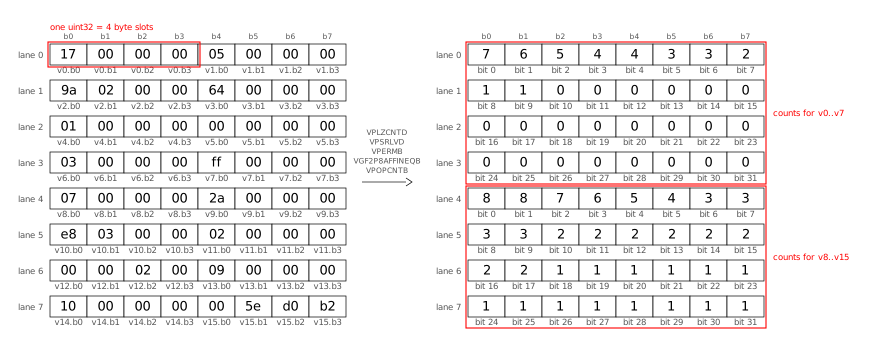
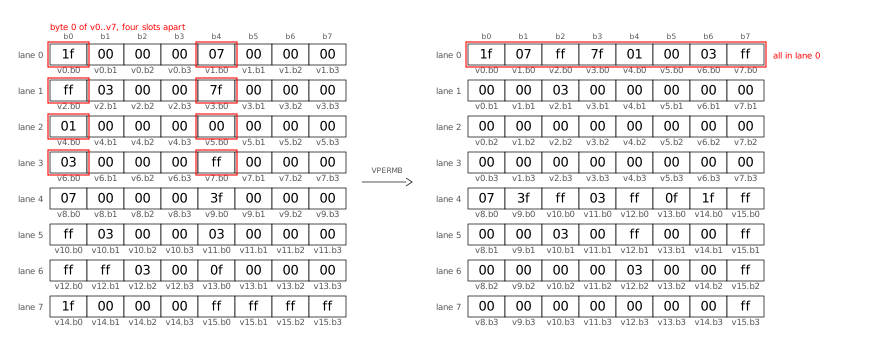
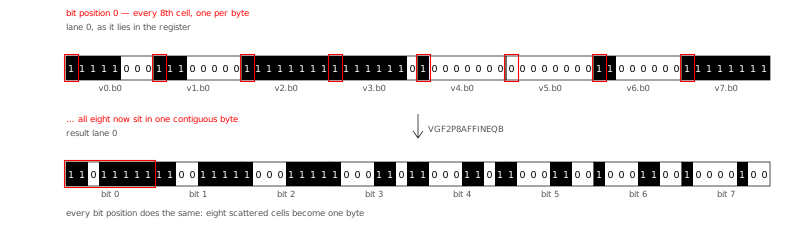
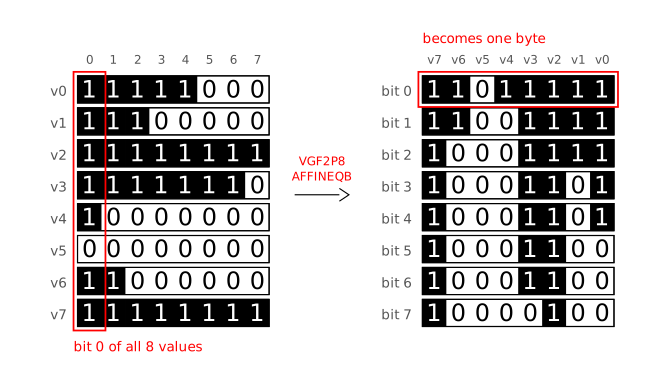
 SIMD bitpacking works like regular bitpacking, but processes 8

 Sharing source code from host to guest VM
Finally we need to make sure we have access in the dev-vm to our source code repositories.
For this I will share the directory
Sharing source code from host to guest VM
Finally we need to make sure we have access in the dev-vm to our source code repositories.
For this I will share the directory  Finally we mount the shared directory, and enable the mount on each boot.