Melissa Wen: 15 Tips for Debugging Issues in the AMD Display Kernel Driver
A self-help guide for examining and debugging the AMD display driver within the
Linux kernel/DRM subsystem.
It s based on my experience as an external developer working on the driver, and
are shared with the goal of helping others navigate the driver code.
Acknowledgments: These tips were gathered thanks to the countless help
received from AMD developers during the driver development process. The list
below was obtained by examining open source code, reviewing public
documentation, playing with tools, asking in public forums and also with the
help of my former GSoC mentor, Rodrigo Siqueira.
Pre-Debugging Steps:
Before diving into an issue, it s crucial to perform two essential steps:
1) Check the latest changes: Ensure you re working with the latest AMD
driver modifications located in the
amd-staging-drm-next branch
maintained by Alex Deucher. You may also find bug fixes for newer kernel
versions on branches that have the name pattern
Pre-Debugging Steps:
Before diving into an issue, it s crucial to perform two essential steps:
1) Check the latest changes: Ensure you re working with the latest AMD
driver modifications located in the
amd-staging-drm-next branch
maintained by Alex Deucher. You may also find bug fixes for newer kernel
versions on branches that have the name pattern drm-fixes-<date>.
2) Examine the issue tracker: Confirm that your issue isn t already
documented and addressed in the AMD display driver issue tracker. If you find a
similar issue, you can team up with others and speed up the debugging process.
Understanding the issue:
Do you really need to change this? Where should you start looking for changes?
3) Is the issue in the AMD kernel driver or in the userspace?: Identifying
the source of the issue is essential regardless of the GPU vendor. Sometimes
this can be challenging so here are some helpful tips:
- Record the screen: Capture the screen using a recording app while
experiencing the issue. If the bug appears in the capture, it s likely a
userspace issue, not the kernel display driver.
- Analyze the dmesg log: Look for error messages related to the display
driver in the dmesg log. If the error message appears before the message
[drm] Display Core v... , it s not likely a display driver issue. If this
message doesn t appear in your log, the display driver wasn t fully loaded and
you will see a notification that something went wrong here.
4) AMD Display Manager vs. AMD Display Core: The AMD display driver
consists of two components:
- Display Manager (DM): This component interacts directly with the Linux DRM
infrastructure. Occasionally, issues can arise from misinterpretations of DRM
properties or features. If the issue doesn t occur on other platforms with the
same AMD hardware - for example, only happens on Linux but not on Windows -
it s more likely related to the AMD DM code.
- Display Core (DC): This is the platform-agnostic part responsible for setting
and programming hardware features. Modifications to the DC usually require
validation on other platforms, like Windows, to avoid regressions.
5) Identify the DC HW family: Each AMD GPU has variations in its hardware
architecture. Features and helpers differ between families, so determining the
relevant code for your specific hardware is crucial.
- Find GPU product information in Linux/AMD GPU documentation
- Check the dmesg log for the Display Core version (since this commit
in Linux kernel 6.3v). For example:
[drm] Display Core v3.2.241 initialized on DCN 2.1[drm] Display Core v3.2.237 initialized on DCN 3.0.1
Investigating the relevant driver code:
Keep from letting unrelated driver code to affect your investigation.
6) Narrow the code inspection down to one DC HW family: the relevant code
resides in a directory named after the DC number. For example, the DCN 3.0.1
driver code is located at drivers/gpu/drm/amd/display/dc/dcn301. We all know
that the AMD s shared code is huge and you can use these boundaries to rule out
codes unrelated to your issue.
7) Newer families may inherit code from older ones: you can find dcn301
using code from dcn30, dcn20, dcn10 files. It s crucial to verify which hooks
and helpers your driver utilizes to investigate the right portion. You can
leverage ftrace for supplemental validation. To give an example, it was
useful when I was updating DCN3 color mapping to correctly use their new
post-blending color capabilities, such as:
Additionally, you can use two different HW families to compare behaviours.
If you see the issue in one but not in the other, you can compare the code and
understand what has changed and if the implementation from a previous family
doesn t fit well the new HW resources or design. You can also count on the help
of the community on the
Linux AMD issue tracker
to validate your code on other hardware and/or systems.
This approach helped me debug
a 2-year-old issue
where the cursor gamma adjustment was incorrect in DCN3 hardware, but working
correctly for DCN2 family. I solved the issue in two steps, thanks for
community feedback and validation:
- [PATCH] drm/amd/display: check attr flag before set cursor degamma on DCN3+
- [PATCH] drm/amd/display: enable cursor degamma for DCN3+ DRM legacy gamma
8) Check the hardware capability screening in the driver: You can currently find a
list of display hardware capabilities in the
drivers/gpu/drm/amd/display/dc/dcn*/dcn*_resource.c file. More precisely in
the dcn*_resource_construct() function.
Using DCN301 for illustration, here is the list of its hardware caps:
	/*************************************************
	 *  Resource + asic cap harcoding                *
	 *************************************************/
	pool->base.underlay_pipe_index = NO_UNDERLAY_PIPE;
	pool->base.pipe_count = pool->base.res_cap->num_timing_generator;
	pool->base.mpcc_count = pool->base.res_cap->num_timing_generator;
	dc->caps.max_downscale_ratio = 600;
	dc->caps.i2c_speed_in_khz = 100;
	dc->caps.i2c_speed_in_khz_hdcp = 5; /*1.4 w/a enabled by default*/
	dc->caps.max_cursor_size = 256;
	dc->caps.min_horizontal_blanking_period = 80;
	dc->caps.dmdata_alloc_size = 2048;
	dc->caps.max_slave_planes = 2;
	dc->caps.max_slave_yuv_planes = 2;
	dc->caps.max_slave_rgb_planes = 2;
	dc->caps.is_apu = true;
	dc->caps.post_blend_color_processing = true;
	dc->caps.force_dp_tps4_for_cp2520 = true;
	dc->caps.extended_aux_timeout_support = true;
	dc->caps.dmcub_support = true;
	/* Color pipeline capabilities */
	dc->caps.color.dpp.dcn_arch = 1;
	dc->caps.color.dpp.input_lut_shared = 0;
	dc->caps.color.dpp.icsc = 1;
	dc->caps.color.dpp.dgam_ram = 0; // must use gamma_corr
	dc->caps.color.dpp.dgam_rom_caps.srgb = 1;
	dc->caps.color.dpp.dgam_rom_caps.bt2020 = 1;
	dc->caps.color.dpp.dgam_rom_caps.gamma2_2 = 1;
	dc->caps.color.dpp.dgam_rom_caps.pq = 1;
	dc->caps.color.dpp.dgam_rom_caps.hlg = 1;
	dc->caps.color.dpp.post_csc = 1;
	dc->caps.color.dpp.gamma_corr = 1;
	dc->caps.color.dpp.dgam_rom_for_yuv = 0;
	dc->caps.color.dpp.hw_3d_lut = 1;
	dc->caps.color.dpp.ogam_ram = 1;
	// no OGAM ROM on DCN301
	dc->caps.color.dpp.ogam_rom_caps.srgb = 0;
	dc->caps.color.dpp.ogam_rom_caps.bt2020 = 0;
	dc->caps.color.dpp.ogam_rom_caps.gamma2_2 = 0;
	dc->caps.color.dpp.ogam_rom_caps.pq = 0;
	dc->caps.color.dpp.ogam_rom_caps.hlg = 0;
	dc->caps.color.dpp.ocsc = 0;
	dc->caps.color.mpc.gamut_remap = 1;
	dc->caps.color.mpc.num_3dluts = pool->base.res_cap->num_mpc_3dlut; //2
	dc->caps.color.mpc.ogam_ram = 1;
	dc->caps.color.mpc.ogam_rom_caps.srgb = 0;
	dc->caps.color.mpc.ogam_rom_caps.bt2020 = 0;
	dc->caps.color.mpc.ogam_rom_caps.gamma2_2 = 0;
	dc->caps.color.mpc.ogam_rom_caps.pq = 0;
	dc->caps.color.mpc.ogam_rom_caps.hlg = 0;
	dc->caps.color.mpc.ocsc = 1;
	dc->caps.dp_hdmi21_pcon_support = true;
	/* read VBIOS LTTPR caps */
	if (ctx->dc_bios->funcs->get_lttpr_caps)
		enum bp_result bp_query_result;
		uint8_t is_vbios_lttpr_enable = 0;
		bp_query_result = ctx->dc_bios->funcs->get_lttpr_caps(ctx->dc_bios, &is_vbios_lttpr_enable);
		dc->caps.vbios_lttpr_enable = (bp_query_result == BP_RESULT_OK) && !!is_vbios_lttpr_enable;

	if (ctx->dc_bios->funcs->get_lttpr_interop)
		enum bp_result bp_query_result;
		uint8_t is_vbios_interop_enabled = 0;
		bp_query_result = ctx->dc_bios->funcs->get_lttpr_interop(ctx->dc_bios, &is_vbios_interop_enabled);
		dc->caps.vbios_lttpr_aware = (bp_query_result == BP_RESULT_OK) && !!is_vbios_interop_enabled;
Keep in mind that the documentation of color capabilities are available at
the Linux kernel Documentation.
Understanding the development history:
What has brought us to the current state?
9) Pinpoint relevant commits: Use git log and git blame to identify commits
targeting the code section you re interested in.
10) Track regressions: If you re examining the amd-staging-drm-next
branch, check for regressions between DC release versions. These are defined by
DC_VER in the drivers/gpu/drm/amd/display/dc/dc.h file. Alternatively,
find a commit with this format drm/amd/display: 3.2.221 that determines a
display release. It s useful for bisecting. This information helps you
understand how outdated your branch is and identify potential regressions. You
can consider each DC_VER takes around one week to be bumped. Finally, check
testing log of each release in the report provided on the amd-gfx mailing
list, such as this one Tested-by: Daniel Wheeler:
Reducing the inspection area:
Focus on what really matters.
11) Identify involved HW blocks: This helps isolate the issue. You can find
more information about DCN HW blocks in the
DCN Overview documentation.
In summary:
- Plane issues are closer to HUBP and DPP.
- Blending/Stream issues are closer to MPC, OPP and OPTC. They are related
to DRM CRTC subjects.
This information was useful when debugging a hardware rotation issue where
the cursor plane got clipped off in the middle of the screen.
Finally, the issue was addressed by two patches:
- [PATCH 21/22] drm/amd/display: Fix rotated cursor offset calculation
- [PATCH] drm/amd/display: fix cursor offset on rotation 180
12) Issues around bandwidth (glitches) and clocks: May be affected by
calculations done in these HW blocks and HW specific values. The
recalculation equations are found in the DML folder.
DML stands for Display Mode Library. It s in charge of all required
configuration parameters supported by the hardware for multiple scenarios. See
more in the AMD DC Overview kernel docs.
It s a math library that optimally configures hardware to find the best
balance between power efficiency and performance in a given scenario.
Finding some clk variables that affect device behavior may be a sign of it.
It s hard for a external developer to debug this part, since it involves
information from HW specs and firmware programming that we don t have access.
The best option is to provide all relevant debugging information you have and
ask AMD developers to check the values from your suspicions.
- Do a trick: If you suspect the power setup is degrading performance, try
setting the amount of power supplied to the GPU to the maximum and see if
it affects the system behavior with this command:
sudo bash -c "echo high > /sys/class/drm/card0/device/power_dpm_force_performance_level"
I learned it when debugging
glitches with hardware cursor rotation on Steam Deck.
My first attempt was changing the clock calculation.
In the end, Rodrigo Siqueira proposed the right solution targeting bandwidth in
two steps:
Checking implicit programming and hardware limitations:
Bring implicit programming to the level of consciousness and recognize hardware
limitations.
13) Implicit update types: Check if the selected type for atomic update may
affect your issue. The update type depends on the mode settings, since
programming some modes demands more time for hardware processing. More details
in the
source code:
/* Surface update type is used by dc_update_surfaces_and_stream
 * The update type is determined at the very beginning of the function based
 * on parameters passed in and decides how much programming (or updating) is
 * going to be done during the call.
 *
 * UPDATE_TYPE_FAST is used for really fast updates that do not require much
 * logical calculations or hardware register programming. This update MUST be
 * ISR safe on windows. Currently fast update will only be used to flip surface
 * address.
 *
 * UPDATE_TYPE_MED is used for slower updates which require significant hw
 * re-programming however do not affect bandwidth consumption or clock
 * requirements. At present, this is the level at which front end updates
 * that do not require us to run bw_calcs happen. These are in/out transfer func
 * updates, viewport offset changes, recout size changes and pixel
depth changes.
 * This update can be done at ISR, but we want to minimize how often
this happens.
 *
 * UPDATE_TYPE_FULL is slow. Really slow. This requires us to recalculate our
 * bandwidth and clocks, possibly rearrange some pipes and reprogram
anything front
 * end related. Any time viewport dimensions, recout dimensions,
scaling ratios or
 * gamma need to be adjusted or pipe needs to be turned on (or
disconnected) we do
 * a full update. This cannot be done at ISR level and should be a rare event.
 * Unless someone is stress testing mpo enter/exit, playing with
colour or adjusting
 * underscan we don't expect to see this call at all.
 */
enum surface_update_type
UPDATE_TYPE_FAST, /* super fast, safe to execute in isr */
UPDATE_TYPE_MED,  /* ISR safe, most of programming needed, no bw/clk change*/
UPDATE_TYPE_FULL, /* may need to shuffle resources */
 ;
Using tools:
Observe the current state, validate your findings, continue improvements.
14) Use AMD tools to check hardware state and driver programming: help on
understanding your driver settings and checking the behavior when changing
those settings.
-
DC Visual confirmation:
Check multiple planes and pipe split policy.
-
DTN logs:
Check display hardware state, including rotation, size, format, underflow,
blocks in use, color block values, etc.

-
UMR:
Check ASIC info, register values, KMS state - links and elements (framebuffers,
planes, CRTCs, connectors).
 Source: UMR project documentation
15) Use generic DRM/KMS tools:
-
IGT test tools: Use
generic KMS tests or develop your own to isolate the issue in the kernel
space. Compare results across different GPU vendors to understand their
implementations and find potential solutions. Here AMD also has specific IGT
tests for its GPUs that is expect to work without failures on any AMD GPU. You
can check results of HW-specific tests using different display hardware
families or you can compare expected differences between the generic workflow
and AMD workflow.
-
drm_info: This tool summarizes the
current state of a display driver (capabilities, properties and formats) per
element of the DRM/KMS workflow. Output can be helpful when reporting bugs.
Don t give up!
Debugging issues in the AMD display driver can be challenging, but by following
these tips and leveraging available resources, you can significantly improve
your chances of success.
Worth mentioning: This blog post builds upon my talk,
I m not an AMD expert, but
presented at the 2022 XDC. It shares guidelines that helped me debug AMD
display issues as an external developer of the driver.
Open Source Display Driver: The Linux kernel/AMD display driver is open
source, allowing you to actively contribute by addressing issues listed in the
official tracker. Tackling existing
issues or resolving your own can be a rewarding learning experience and a
valuable contribution to the community. Additionally, the tracker serves as a
valuable resource for finding similar bugs, troubleshooting tips, and
suggestions from AMD developers. Finally, it s a platform for seeking help when
needed.
Remember, contributing to the open source community through issue resolution
and collaboration is mutually beneficial for everyone involved.
- Record the screen: Capture the screen using a recording app while experiencing the issue. If the bug appears in the capture, it s likely a userspace issue, not the kernel display driver.
- Analyze the dmesg log: Look for error messages related to the display
driver in the dmesg log. If the error message appears before the message
[drm] Display Core v..., it s not likely a display driver issue. If this message doesn t appear in your log, the display driver wasn t fully loaded and you will see a notification that something went wrong here.
- Display Manager (DM): This component interacts directly with the Linux DRM infrastructure. Occasionally, issues can arise from misinterpretations of DRM properties or features. If the issue doesn t occur on other platforms with the same AMD hardware - for example, only happens on Linux but not on Windows - it s more likely related to the AMD DM code.
- Display Core (DC): This is the platform-agnostic part responsible for setting and programming hardware features. Modifications to the DC usually require validation on other platforms, like Windows, to avoid regressions.
- Find GPU product information in Linux/AMD GPU documentation
- Check the dmesg log for the Display Core version (since this commit
in Linux kernel 6.3v). For example:
[drm] Display Core v3.2.241 initialized on DCN 2.1[drm] Display Core v3.2.237 initialized on DCN 3.0.1
Investigating the relevant driver code:
Keep from letting unrelated driver code to affect your investigation.
6) Narrow the code inspection down to one DC HW family: the relevant code
resides in a directory named after the DC number. For example, the DCN 3.0.1
driver code is located at drivers/gpu/drm/amd/display/dc/dcn301. We all know
that the AMD s shared code is huge and you can use these boundaries to rule out
codes unrelated to your issue.
7) Newer families may inherit code from older ones: you can find dcn301
using code from dcn30, dcn20, dcn10 files. It s crucial to verify which hooks
and helpers your driver utilizes to investigate the right portion. You can
leverage ftrace for supplemental validation. To give an example, it was
useful when I was updating DCN3 color mapping to correctly use their new
post-blending color capabilities, such as:
Additionally, you can use two different HW families to compare behaviours.
If you see the issue in one but not in the other, you can compare the code and
understand what has changed and if the implementation from a previous family
doesn t fit well the new HW resources or design. You can also count on the help
of the community on the
Linux AMD issue tracker
to validate your code on other hardware and/or systems.
This approach helped me debug
a 2-year-old issue
where the cursor gamma adjustment was incorrect in DCN3 hardware, but working
correctly for DCN2 family. I solved the issue in two steps, thanks for
community feedback and validation:
- [PATCH] drm/amd/display: check attr flag before set cursor degamma on DCN3+
- [PATCH] drm/amd/display: enable cursor degamma for DCN3+ DRM legacy gamma
8) Check the hardware capability screening in the driver: You can currently find a
list of display hardware capabilities in the
drivers/gpu/drm/amd/display/dc/dcn*/dcn*_resource.c file. More precisely in
the dcn*_resource_construct() function.
Using DCN301 for illustration, here is the list of its hardware caps:
/*************************************************
* Resource + asic cap harcoding *
*************************************************/
pool->base.underlay_pipe_index = NO_UNDERLAY_PIPE;
pool->base.pipe_count = pool->base.res_cap->num_timing_generator;
pool->base.mpcc_count = pool->base.res_cap->num_timing_generator;
dc->caps.max_downscale_ratio = 600;
dc->caps.i2c_speed_in_khz = 100;
dc->caps.i2c_speed_in_khz_hdcp = 5; /*1.4 w/a enabled by default*/
dc->caps.max_cursor_size = 256;
dc->caps.min_horizontal_blanking_period = 80;
dc->caps.dmdata_alloc_size = 2048;
dc->caps.max_slave_planes = 2;
dc->caps.max_slave_yuv_planes = 2;
dc->caps.max_slave_rgb_planes = 2;
dc->caps.is_apu = true;
dc->caps.post_blend_color_processing = true;
dc->caps.force_dp_tps4_for_cp2520 = true;
dc->caps.extended_aux_timeout_support = true;
dc->caps.dmcub_support = true;
/* Color pipeline capabilities */
dc->caps.color.dpp.dcn_arch = 1;
dc->caps.color.dpp.input_lut_shared = 0;
dc->caps.color.dpp.icsc = 1;
dc->caps.color.dpp.dgam_ram = 0; // must use gamma_corr
dc->caps.color.dpp.dgam_rom_caps.srgb = 1;
dc->caps.color.dpp.dgam_rom_caps.bt2020 = 1;
dc->caps.color.dpp.dgam_rom_caps.gamma2_2 = 1;
dc->caps.color.dpp.dgam_rom_caps.pq = 1;
dc->caps.color.dpp.dgam_rom_caps.hlg = 1;
dc->caps.color.dpp.post_csc = 1;
dc->caps.color.dpp.gamma_corr = 1;
dc->caps.color.dpp.dgam_rom_for_yuv = 0;
dc->caps.color.dpp.hw_3d_lut = 1;
dc->caps.color.dpp.ogam_ram = 1;
// no OGAM ROM on DCN301
dc->caps.color.dpp.ogam_rom_caps.srgb = 0;
dc->caps.color.dpp.ogam_rom_caps.bt2020 = 0;
dc->caps.color.dpp.ogam_rom_caps.gamma2_2 = 0;
dc->caps.color.dpp.ogam_rom_caps.pq = 0;
dc->caps.color.dpp.ogam_rom_caps.hlg = 0;
dc->caps.color.dpp.ocsc = 0;
dc->caps.color.mpc.gamut_remap = 1;
dc->caps.color.mpc.num_3dluts = pool->base.res_cap->num_mpc_3dlut; //2
dc->caps.color.mpc.ogam_ram = 1;
dc->caps.color.mpc.ogam_rom_caps.srgb = 0;
dc->caps.color.mpc.ogam_rom_caps.bt2020 = 0;
dc->caps.color.mpc.ogam_rom_caps.gamma2_2 = 0;
dc->caps.color.mpc.ogam_rom_caps.pq = 0;
dc->caps.color.mpc.ogam_rom_caps.hlg = 0;
dc->caps.color.mpc.ocsc = 1;
dc->caps.dp_hdmi21_pcon_support = true;
/* read VBIOS LTTPR caps */
if (ctx->dc_bios->funcs->get_lttpr_caps)
enum bp_result bp_query_result;
uint8_t is_vbios_lttpr_enable = 0;
bp_query_result = ctx->dc_bios->funcs->get_lttpr_caps(ctx->dc_bios, &is_vbios_lttpr_enable);
dc->caps.vbios_lttpr_enable = (bp_query_result == BP_RESULT_OK) && !!is_vbios_lttpr_enable;
if (ctx->dc_bios->funcs->get_lttpr_interop)
enum bp_result bp_query_result;
uint8_t is_vbios_interop_enabled = 0;
bp_query_result = ctx->dc_bios->funcs->get_lttpr_interop(ctx->dc_bios, &is_vbios_interop_enabled);
dc->caps.vbios_lttpr_aware = (bp_query_result == BP_RESULT_OK) && !!is_vbios_interop_enabled;
Keep in mind that the documentation of color capabilities are available at
the Linux kernel Documentation.
Understanding the development history:
What has brought us to the current state?
9) Pinpoint relevant commits: Use git log and git blame to identify commits
targeting the code section you re interested in.
10) Track regressions: If you re examining the amd-staging-drm-next
branch, check for regressions between DC release versions. These are defined by
DC_VER in the drivers/gpu/drm/amd/display/dc/dc.h file. Alternatively,
find a commit with this format drm/amd/display: 3.2.221 that determines a
display release. It s useful for bisecting. This information helps you
understand how outdated your branch is and identify potential regressions. You
can consider each DC_VER takes around one week to be bumped. Finally, check
testing log of each release in the report provided on the amd-gfx mailing
list, such as this one Tested-by: Daniel Wheeler:
Reducing the inspection area:
Focus on what really matters.
11) Identify involved HW blocks: This helps isolate the issue. You can find
more information about DCN HW blocks in the
DCN Overview documentation.
In summary:
- Plane issues are closer to HUBP and DPP.
- Blending/Stream issues are closer to MPC, OPP and OPTC. They are related
to DRM CRTC subjects.
This information was useful when debugging a hardware rotation issue where
the cursor plane got clipped off in the middle of the screen.
Finally, the issue was addressed by two patches:
- [PATCH 21/22] drm/amd/display: Fix rotated cursor offset calculation
- [PATCH] drm/amd/display: fix cursor offset on rotation 180
12) Issues around bandwidth (glitches) and clocks: May be affected by
calculations done in these HW blocks and HW specific values. The
recalculation equations are found in the DML folder.
DML stands for Display Mode Library. It s in charge of all required
configuration parameters supported by the hardware for multiple scenarios. See
more in the AMD DC Overview kernel docs.
It s a math library that optimally configures hardware to find the best
balance between power efficiency and performance in a given scenario.
Finding some clk variables that affect device behavior may be a sign of it.
It s hard for a external developer to debug this part, since it involves
information from HW specs and firmware programming that we don t have access.
The best option is to provide all relevant debugging information you have and
ask AMD developers to check the values from your suspicions.
- Do a trick: If you suspect the power setup is degrading performance, try
setting the amount of power supplied to the GPU to the maximum and see if
it affects the system behavior with this command:
sudo bash -c "echo high > /sys/class/drm/card0/device/power_dpm_force_performance_level"
I learned it when debugging
glitches with hardware cursor rotation on Steam Deck.
My first attempt was changing the clock calculation.
In the end, Rodrigo Siqueira proposed the right solution targeting bandwidth in
two steps:
Checking implicit programming and hardware limitations:
Bring implicit programming to the level of consciousness and recognize hardware
limitations.
13) Implicit update types: Check if the selected type for atomic update may
affect your issue. The update type depends on the mode settings, since
programming some modes demands more time for hardware processing. More details
in the
source code:
/* Surface update type is used by dc_update_surfaces_and_stream
* The update type is determined at the very beginning of the function based
* on parameters passed in and decides how much programming (or updating) is
* going to be done during the call.
*
* UPDATE_TYPE_FAST is used for really fast updates that do not require much
* logical calculations or hardware register programming. This update MUST be
* ISR safe on windows. Currently fast update will only be used to flip surface
* address.
*
* UPDATE_TYPE_MED is used for slower updates which require significant hw
* re-programming however do not affect bandwidth consumption or clock
* requirements. At present, this is the level at which front end updates
* that do not require us to run bw_calcs happen. These are in/out transfer func
* updates, viewport offset changes, recout size changes and pixel
depth changes.
* This update can be done at ISR, but we want to minimize how often
this happens.
*
* UPDATE_TYPE_FULL is slow. Really slow. This requires us to recalculate our
* bandwidth and clocks, possibly rearrange some pipes and reprogram
anything front
* end related. Any time viewport dimensions, recout dimensions,
scaling ratios or
* gamma need to be adjusted or pipe needs to be turned on (or
disconnected) we do
* a full update. This cannot be done at ISR level and should be a rare event.
* Unless someone is stress testing mpo enter/exit, playing with
colour or adjusting
* underscan we don't expect to see this call at all.
*/
enum surface_update_type
UPDATE_TYPE_FAST, /* super fast, safe to execute in isr */
UPDATE_TYPE_MED, /* ISR safe, most of programming needed, no bw/clk change*/
UPDATE_TYPE_FULL, /* may need to shuffle resources */
;
Using tools:
Observe the current state, validate your findings, continue improvements.
14) Use AMD tools to check hardware state and driver programming: help on
understanding your driver settings and checking the behavior when changing
those settings.
-
DC Visual confirmation:
Check multiple planes and pipe split policy.
-
DTN logs:
Check display hardware state, including rotation, size, format, underflow,
blocks in use, color block values, etc.
-
UMR:
Check ASIC info, register values, KMS state - links and elements (framebuffers,
planes, CRTCs, connectors).
Source: UMR project documentation
15) Use generic DRM/KMS tools:
-
IGT test tools: Use
generic KMS tests or develop your own to isolate the issue in the kernel
space. Compare results across different GPU vendors to understand their
implementations and find potential solutions. Here AMD also has specific IGT
tests for its GPUs that is expect to work without failures on any AMD GPU. You
can check results of HW-specific tests using different display hardware
families or you can compare expected differences between the generic workflow
and AMD workflow.
-
drm_info: This tool summarizes the
current state of a display driver (capabilities, properties and formats) per
element of the DRM/KMS workflow. Output can be helpful when reporting bugs.
Don t give up!
Debugging issues in the AMD display driver can be challenging, but by following
these tips and leveraging available resources, you can significantly improve
your chances of success.
Worth mentioning: This blog post builds upon my talk,
I m not an AMD expert, but
presented at the 2022 XDC. It shares guidelines that helped me debug AMD
display issues as an external developer of the driver.
Open Source Display Driver: The Linux kernel/AMD display driver is open
source, allowing you to actively contribute by addressing issues listed in the
official tracker. Tackling existing
issues or resolving your own can be a rewarding learning experience and a
valuable contribution to the community. Additionally, the tracker serves as a
valuable resource for finding similar bugs, troubleshooting tips, and
suggestions from AMD developers. Finally, it s a platform for seeking help when
needed.
Remember, contributing to the open source community through issue resolution
and collaboration is mutually beneficial for everyone involved.
/*************************************************
* Resource + asic cap harcoding *
*************************************************/
pool->base.underlay_pipe_index = NO_UNDERLAY_PIPE;
pool->base.pipe_count = pool->base.res_cap->num_timing_generator;
pool->base.mpcc_count = pool->base.res_cap->num_timing_generator;
dc->caps.max_downscale_ratio = 600;
dc->caps.i2c_speed_in_khz = 100;
dc->caps.i2c_speed_in_khz_hdcp = 5; /*1.4 w/a enabled by default*/
dc->caps.max_cursor_size = 256;
dc->caps.min_horizontal_blanking_period = 80;
dc->caps.dmdata_alloc_size = 2048;
dc->caps.max_slave_planes = 2;
dc->caps.max_slave_yuv_planes = 2;
dc->caps.max_slave_rgb_planes = 2;
dc->caps.is_apu = true;
dc->caps.post_blend_color_processing = true;
dc->caps.force_dp_tps4_for_cp2520 = true;
dc->caps.extended_aux_timeout_support = true;
dc->caps.dmcub_support = true;
/* Color pipeline capabilities */
dc->caps.color.dpp.dcn_arch = 1;
dc->caps.color.dpp.input_lut_shared = 0;
dc->caps.color.dpp.icsc = 1;
dc->caps.color.dpp.dgam_ram = 0; // must use gamma_corr
dc->caps.color.dpp.dgam_rom_caps.srgb = 1;
dc->caps.color.dpp.dgam_rom_caps.bt2020 = 1;
dc->caps.color.dpp.dgam_rom_caps.gamma2_2 = 1;
dc->caps.color.dpp.dgam_rom_caps.pq = 1;
dc->caps.color.dpp.dgam_rom_caps.hlg = 1;
dc->caps.color.dpp.post_csc = 1;
dc->caps.color.dpp.gamma_corr = 1;
dc->caps.color.dpp.dgam_rom_for_yuv = 0;
dc->caps.color.dpp.hw_3d_lut = 1;
dc->caps.color.dpp.ogam_ram = 1;
// no OGAM ROM on DCN301
dc->caps.color.dpp.ogam_rom_caps.srgb = 0;
dc->caps.color.dpp.ogam_rom_caps.bt2020 = 0;
dc->caps.color.dpp.ogam_rom_caps.gamma2_2 = 0;
dc->caps.color.dpp.ogam_rom_caps.pq = 0;
dc->caps.color.dpp.ogam_rom_caps.hlg = 0;
dc->caps.color.dpp.ocsc = 0;
dc->caps.color.mpc.gamut_remap = 1;
dc->caps.color.mpc.num_3dluts = pool->base.res_cap->num_mpc_3dlut; //2
dc->caps.color.mpc.ogam_ram = 1;
dc->caps.color.mpc.ogam_rom_caps.srgb = 0;
dc->caps.color.mpc.ogam_rom_caps.bt2020 = 0;
dc->caps.color.mpc.ogam_rom_caps.gamma2_2 = 0;
dc->caps.color.mpc.ogam_rom_caps.pq = 0;
dc->caps.color.mpc.ogam_rom_caps.hlg = 0;
dc->caps.color.mpc.ocsc = 1;
dc->caps.dp_hdmi21_pcon_support = true;
/* read VBIOS LTTPR caps */
if (ctx->dc_bios->funcs->get_lttpr_caps)
enum bp_result bp_query_result;
uint8_t is_vbios_lttpr_enable = 0;
bp_query_result = ctx->dc_bios->funcs->get_lttpr_caps(ctx->dc_bios, &is_vbios_lttpr_enable);
dc->caps.vbios_lttpr_enable = (bp_query_result == BP_RESULT_OK) && !!is_vbios_lttpr_enable;
if (ctx->dc_bios->funcs->get_lttpr_interop)
enum bp_result bp_query_result;
uint8_t is_vbios_interop_enabled = 0;
bp_query_result = ctx->dc_bios->funcs->get_lttpr_interop(ctx->dc_bios, &is_vbios_interop_enabled);
dc->caps.vbios_lttpr_aware = (bp_query_result == BP_RESULT_OK) && !!is_vbios_interop_enabled;
git log and git blame to identify commits
targeting the code section you re interested in.
10) Track regressions: If you re examining the amd-staging-drm-next
branch, check for regressions between DC release versions. These are defined by
DC_VER in the drivers/gpu/drm/amd/display/dc/dc.h file. Alternatively,
find a commit with this format drm/amd/display: 3.2.221 that determines a
display release. It s useful for bisecting. This information helps you
understand how outdated your branch is and identify potential regressions. You
can consider each DC_VER takes around one week to be bumped. Finally, check
testing log of each release in the report provided on the amd-gfx mailing
list, such as this one Tested-by: Daniel Wheeler:
Reducing the inspection area:
Focus on what really matters.
11) Identify involved HW blocks: This helps isolate the issue. You can find
more information about DCN HW blocks in the
DCN Overview documentation.
In summary:
- Plane issues are closer to HUBP and DPP.
- Blending/Stream issues are closer to MPC, OPP and OPTC. They are related
to DRM CRTC subjects.
This information was useful when debugging a hardware rotation issue where
the cursor plane got clipped off in the middle of the screen.
Finally, the issue was addressed by two patches:
- [PATCH 21/22] drm/amd/display: Fix rotated cursor offset calculation
- [PATCH] drm/amd/display: fix cursor offset on rotation 180
12) Issues around bandwidth (glitches) and clocks: May be affected by
calculations done in these HW blocks and HW specific values. The
recalculation equations are found in the DML folder.
DML stands for Display Mode Library. It s in charge of all required
configuration parameters supported by the hardware for multiple scenarios. See
more in the AMD DC Overview kernel docs.
It s a math library that optimally configures hardware to find the best
balance between power efficiency and performance in a given scenario.
Finding some clk variables that affect device behavior may be a sign of it.
It s hard for a external developer to debug this part, since it involves
information from HW specs and firmware programming that we don t have access.
The best option is to provide all relevant debugging information you have and
ask AMD developers to check the values from your suspicions.
- Do a trick: If you suspect the power setup is degrading performance, try
setting the amount of power supplied to the GPU to the maximum and see if
it affects the system behavior with this command:
sudo bash -c "echo high > /sys/class/drm/card0/device/power_dpm_force_performance_level"
I learned it when debugging
glitches with hardware cursor rotation on Steam Deck.
My first attempt was changing the clock calculation.
In the end, Rodrigo Siqueira proposed the right solution targeting bandwidth in
two steps:
Checking implicit programming and hardware limitations:
Bring implicit programming to the level of consciousness and recognize hardware
limitations.
13) Implicit update types: Check if the selected type for atomic update may
affect your issue. The update type depends on the mode settings, since
programming some modes demands more time for hardware processing. More details
in the
source code:
/* Surface update type is used by dc_update_surfaces_and_stream
* The update type is determined at the very beginning of the function based
* on parameters passed in and decides how much programming (or updating) is
* going to be done during the call.
*
* UPDATE_TYPE_FAST is used for really fast updates that do not require much
* logical calculations or hardware register programming. This update MUST be
* ISR safe on windows. Currently fast update will only be used to flip surface
* address.
*
* UPDATE_TYPE_MED is used for slower updates which require significant hw
* re-programming however do not affect bandwidth consumption or clock
* requirements. At present, this is the level at which front end updates
* that do not require us to run bw_calcs happen. These are in/out transfer func
* updates, viewport offset changes, recout size changes and pixel
depth changes.
* This update can be done at ISR, but we want to minimize how often
this happens.
*
* UPDATE_TYPE_FULL is slow. Really slow. This requires us to recalculate our
* bandwidth and clocks, possibly rearrange some pipes and reprogram
anything front
* end related. Any time viewport dimensions, recout dimensions,
scaling ratios or
* gamma need to be adjusted or pipe needs to be turned on (or
disconnected) we do
* a full update. This cannot be done at ISR level and should be a rare event.
* Unless someone is stress testing mpo enter/exit, playing with
colour or adjusting
* underscan we don't expect to see this call at all.
*/
enum surface_update_type
UPDATE_TYPE_FAST, /* super fast, safe to execute in isr */
UPDATE_TYPE_MED, /* ISR safe, most of programming needed, no bw/clk change*/
UPDATE_TYPE_FULL, /* may need to shuffle resources */
;
Using tools:
Observe the current state, validate your findings, continue improvements.
14) Use AMD tools to check hardware state and driver programming: help on
understanding your driver settings and checking the behavior when changing
those settings.
-
DC Visual confirmation:
Check multiple planes and pipe split policy.
-
DTN logs:
Check display hardware state, including rotation, size, format, underflow,
blocks in use, color block values, etc.
-
UMR:
Check ASIC info, register values, KMS state - links and elements (framebuffers,
planes, CRTCs, connectors).
Source: UMR project documentation
15) Use generic DRM/KMS tools:
-
IGT test tools: Use
generic KMS tests or develop your own to isolate the issue in the kernel
space. Compare results across different GPU vendors to understand their
implementations and find potential solutions. Here AMD also has specific IGT
tests for its GPUs that is expect to work without failures on any AMD GPU. You
can check results of HW-specific tests using different display hardware
families or you can compare expected differences between the generic workflow
and AMD workflow.
-
drm_info: This tool summarizes the
current state of a display driver (capabilities, properties and formats) per
element of the DRM/KMS workflow. Output can be helpful when reporting bugs.
Don t give up!
Debugging issues in the AMD display driver can be challenging, but by following
these tips and leveraging available resources, you can significantly improve
your chances of success.
Worth mentioning: This blog post builds upon my talk,
I m not an AMD expert, but
presented at the 2022 XDC. It shares guidelines that helped me debug AMD
display issues as an external developer of the driver.
Open Source Display Driver: The Linux kernel/AMD display driver is open
source, allowing you to actively contribute by addressing issues listed in the
official tracker. Tackling existing
issues or resolving your own can be a rewarding learning experience and a
valuable contribution to the community. Additionally, the tracker serves as a
valuable resource for finding similar bugs, troubleshooting tips, and
suggestions from AMD developers. Finally, it s a platform for seeking help when
needed.
Remember, contributing to the open source community through issue resolution
and collaboration is mutually beneficial for everyone involved.
sudo bash -c "echo high > /sys/class/drm/card0/device/power_dpm_force_performance_level"/* Surface update type is used by dc_update_surfaces_and_stream
* The update type is determined at the very beginning of the function based
* on parameters passed in and decides how much programming (or updating) is
* going to be done during the call.
*
* UPDATE_TYPE_FAST is used for really fast updates that do not require much
* logical calculations or hardware register programming. This update MUST be
* ISR safe on windows. Currently fast update will only be used to flip surface
* address.
*
* UPDATE_TYPE_MED is used for slower updates which require significant hw
* re-programming however do not affect bandwidth consumption or clock
* requirements. At present, this is the level at which front end updates
* that do not require us to run bw_calcs happen. These are in/out transfer func
* updates, viewport offset changes, recout size changes and pixel
depth changes.
* This update can be done at ISR, but we want to minimize how often
this happens.
*
* UPDATE_TYPE_FULL is slow. Really slow. This requires us to recalculate our
* bandwidth and clocks, possibly rearrange some pipes and reprogram
anything front
* end related. Any time viewport dimensions, recout dimensions,
scaling ratios or
* gamma need to be adjusted or pipe needs to be turned on (or
disconnected) we do
* a full update. This cannot be done at ISR level and should be a rare event.
* Unless someone is stress testing mpo enter/exit, playing with
colour or adjusting
* underscan we don't expect to see this call at all.
*/
enum surface_update_type
UPDATE_TYPE_FAST, /* super fast, safe to execute in isr */
UPDATE_TYPE_MED, /* ISR safe, most of programming needed, no bw/clk change*/
UPDATE_TYPE_FULL, /* may need to shuffle resources */
;
Using tools:
Observe the current state, validate your findings, continue improvements.
14) Use AMD tools to check hardware state and driver programming: help on
understanding your driver settings and checking the behavior when changing
those settings.
-
DC Visual confirmation:
Check multiple planes and pipe split policy.
-
DTN logs:
Check display hardware state, including rotation, size, format, underflow,
blocks in use, color block values, etc.
-
UMR:
Check ASIC info, register values, KMS state - links and elements (framebuffers,
planes, CRTCs, connectors).
Source: UMR project documentation
15) Use generic DRM/KMS tools:
-
IGT test tools: Use
generic KMS tests or develop your own to isolate the issue in the kernel
space. Compare results across different GPU vendors to understand their
implementations and find potential solutions. Here AMD also has specific IGT
tests for its GPUs that is expect to work without failures on any AMD GPU. You
can check results of HW-specific tests using different display hardware
families or you can compare expected differences between the generic workflow
and AMD workflow.
-
drm_info: This tool summarizes the
current state of a display driver (capabilities, properties and formats) per
element of the DRM/KMS workflow. Output can be helpful when reporting bugs.
Don t give up!
Debugging issues in the AMD display driver can be challenging, but by following
these tips and leveraging available resources, you can significantly improve
your chances of success.
Worth mentioning: This blog post builds upon my talk,
I m not an AMD expert, but
presented at the 2022 XDC. It shares guidelines that helped me debug AMD
display issues as an external developer of the driver.
Open Source Display Driver: The Linux kernel/AMD display driver is open
source, allowing you to actively contribute by addressing issues listed in the
official tracker. Tackling existing
issues or resolving your own can be a rewarding learning experience and a
valuable contribution to the community. Additionally, the tracker serves as a
valuable resource for finding similar bugs, troubleshooting tips, and
suggestions from AMD developers. Finally, it s a platform for seeking help when
needed.
Remember, contributing to the open source community through issue resolution
and collaboration is mutually beneficial for everyone involved.
 Source: UMR project documentation

 Check it out



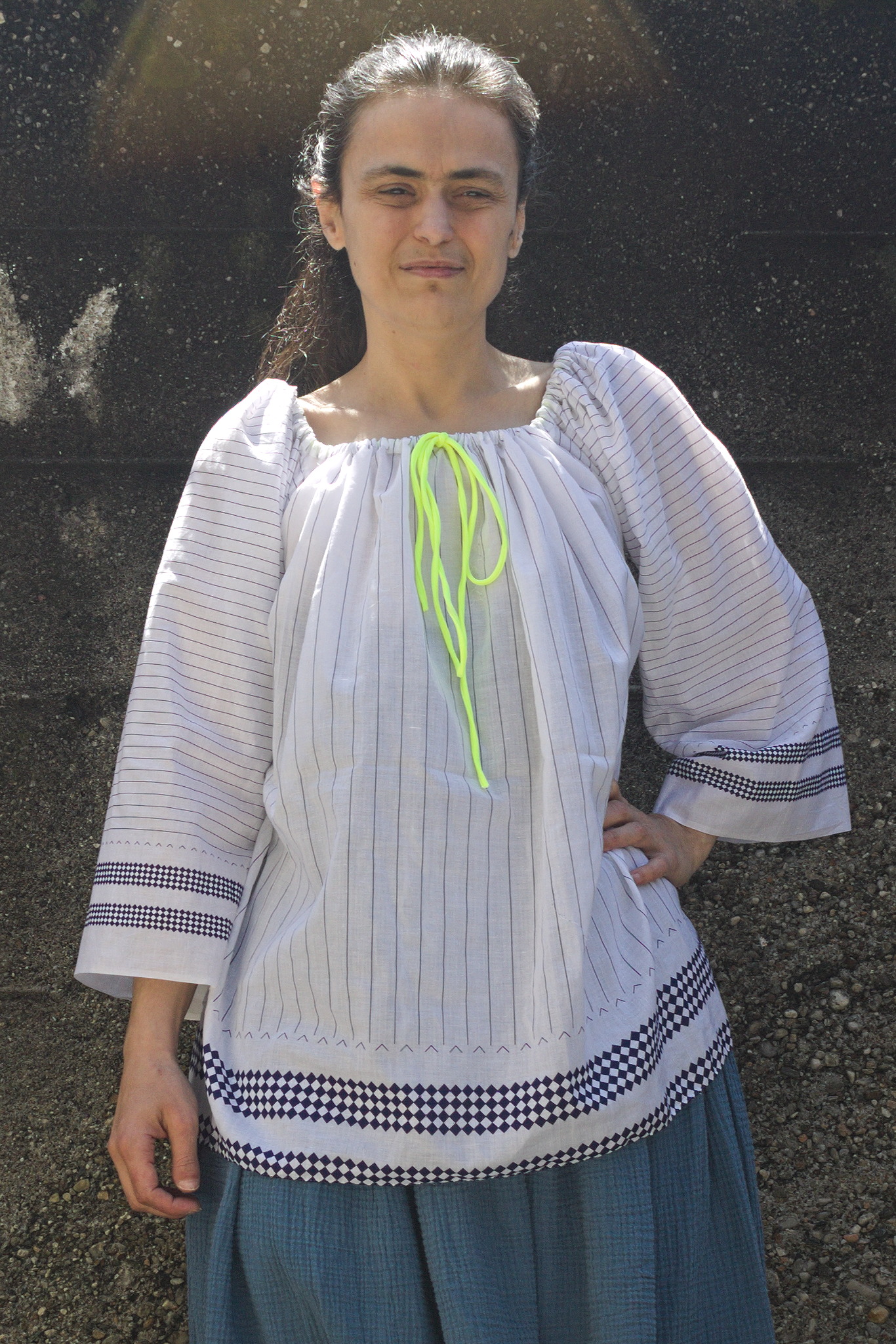 Since some time I ve been thinking about making myself a top or a dress with a wide gathered neckline that can be work at different widths, including off-the-shoulders.
A few years ago I ve been gifted a cut of nice, thin white fabric with a print of lines and lozenges that isn t uniform along the fabric, but looks like it was designed for some specific garment, and it was waiting in my stash for a suitable pattern.
And a few days ago, during a Sunday lunch, there was an off-hand mention of a dress from the late 1970s which had an elastic in the neckline, so that it could be optionally worn off-the-shoulders.
And something snapped in place.
I had plans for that afternoon, but they were scrapped, and I started to draw, measure, cut rectangles of fabric, pin and measure again, cut more fabric.
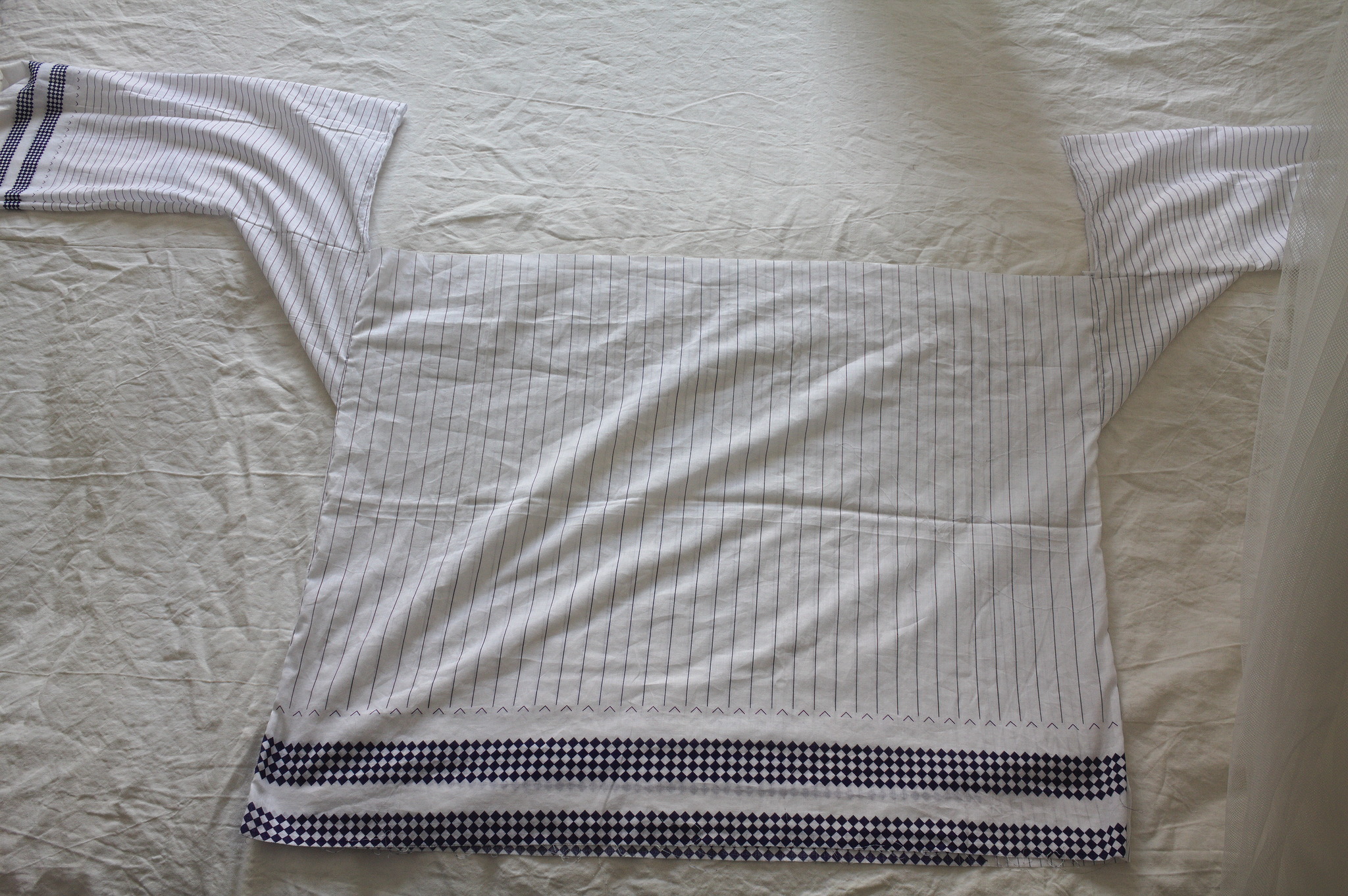
 The part of the fabric with large vertical stripes had two different widths: I could have made the back narrower, but I decided to just keep a strip with narrower lines to one side.
The fabric also didn t have a full second strip of lozenges, so I had to hem it halfway through it.
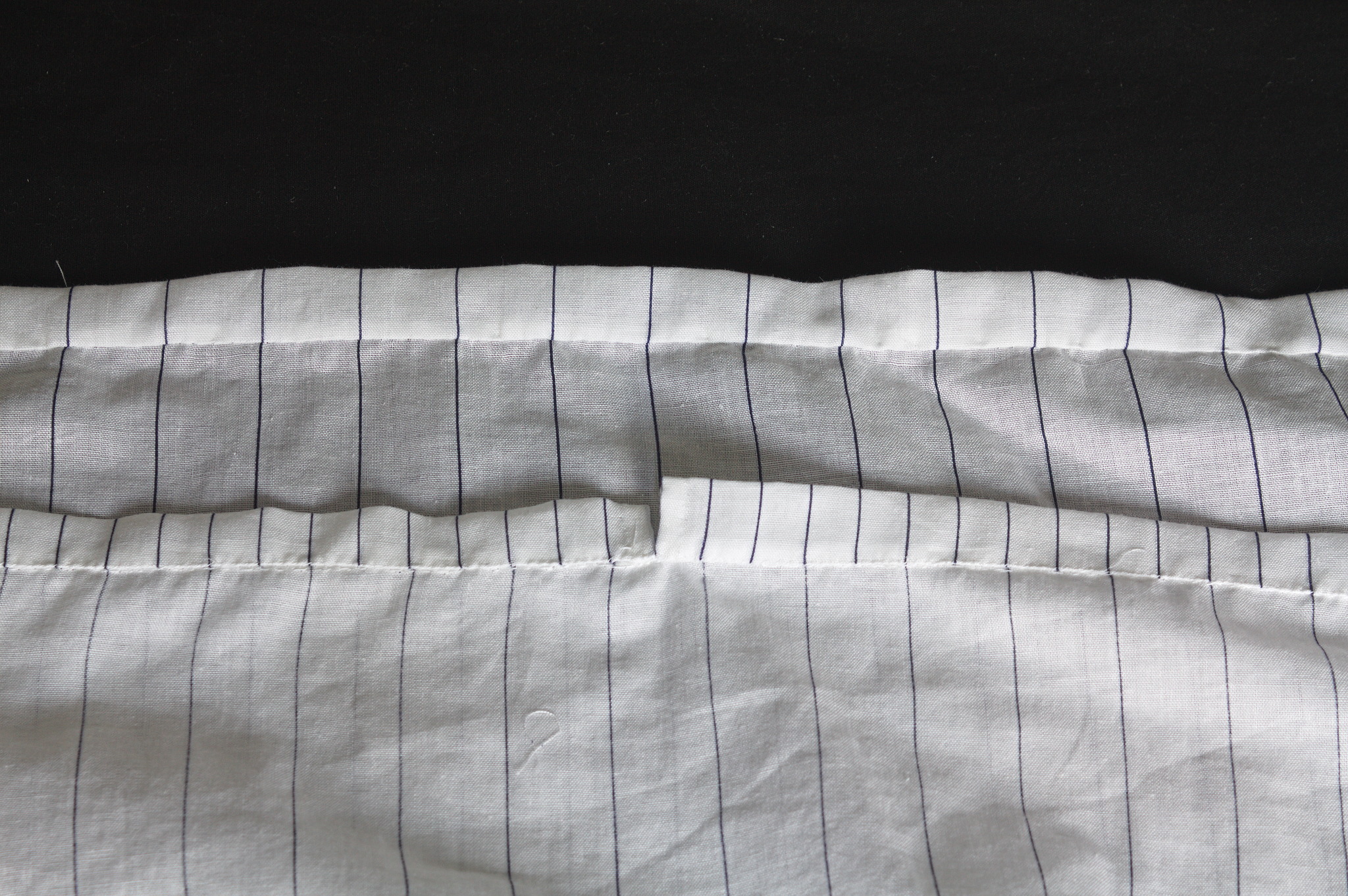 The casing for the elastic was pieced from various scraps, but at least I was able to match the lines on the center front and back, even if they are different. Not that it matters a lot, since it s all hidden in the gathering, but I would have known.
And since I was working on something definitely modern, even if made out of squares and rectangles, of course I decided to hand-sew everything, mostly to be able to use quite small sewing allowances, since the fabric was pretty thin.
In my stash I had a piece of swimsuit elastic that feels nice, looks nice and makes a knot that doesn t slip, so I used it. It s a perfect match, except for the neon yellow colour, which I do like, but maybe is a bit too high visibility? I will see if the haberdasher has the same elastic in dark blue, but right now this will do.
It was a quick project anyway: by the end of the working week the top was finished; I think that on a sewing machine it would be easy to make it in a day.
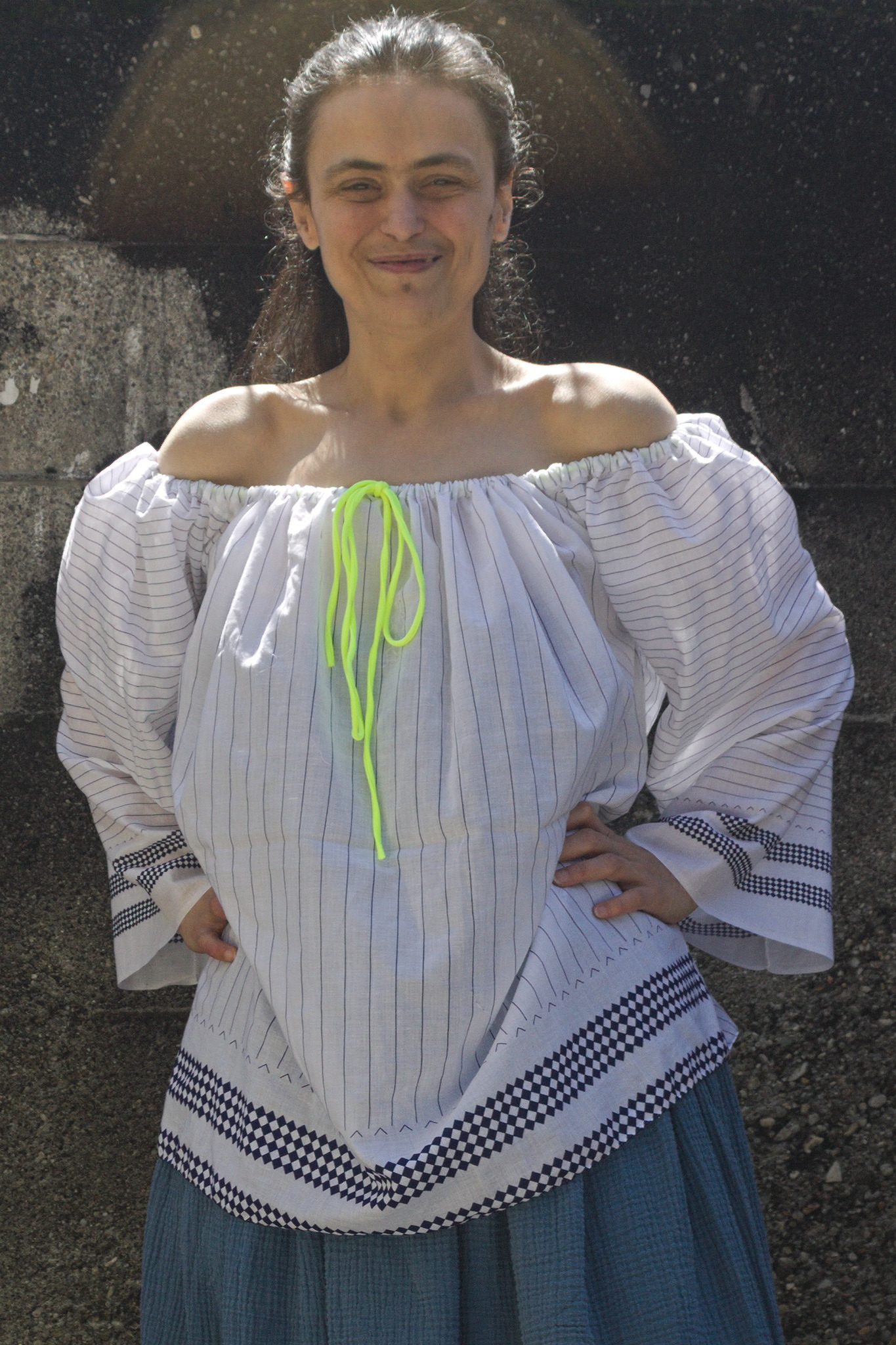 And it can be worn off the shoulders! Which is something I will probably never do in public (and definitely not outdoors), but now if I wanted I could! :D
As usual, the pattern (for what pattern there is) and instructions are
 My old Thinkpad X220 has been slowly dying
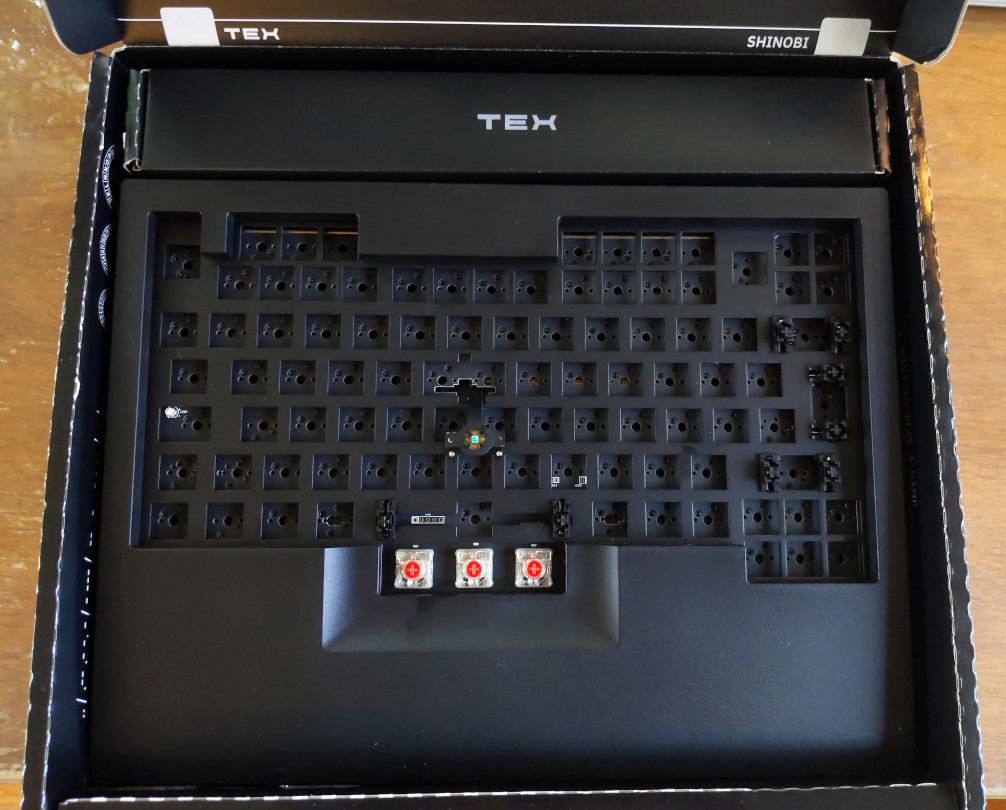 If you follow Debian Planet, you may have seen the Tex Shinobi when Jonathan
Dowland
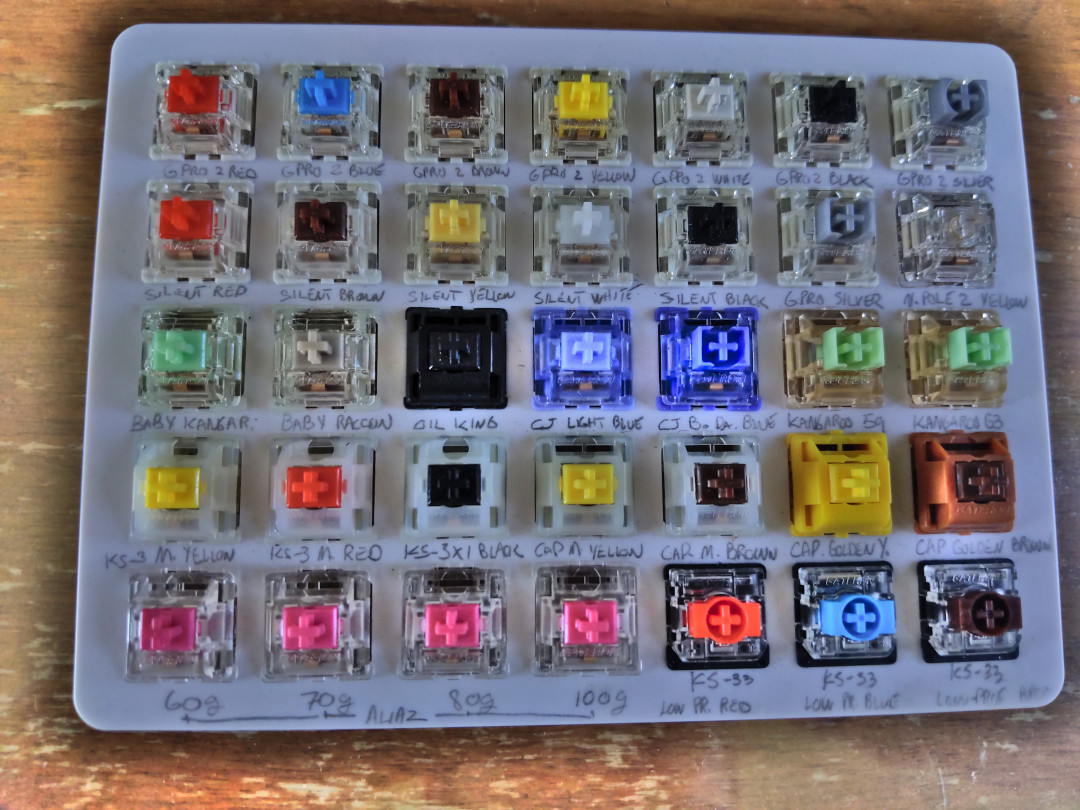 To know what model of switches I wanted, I bought a
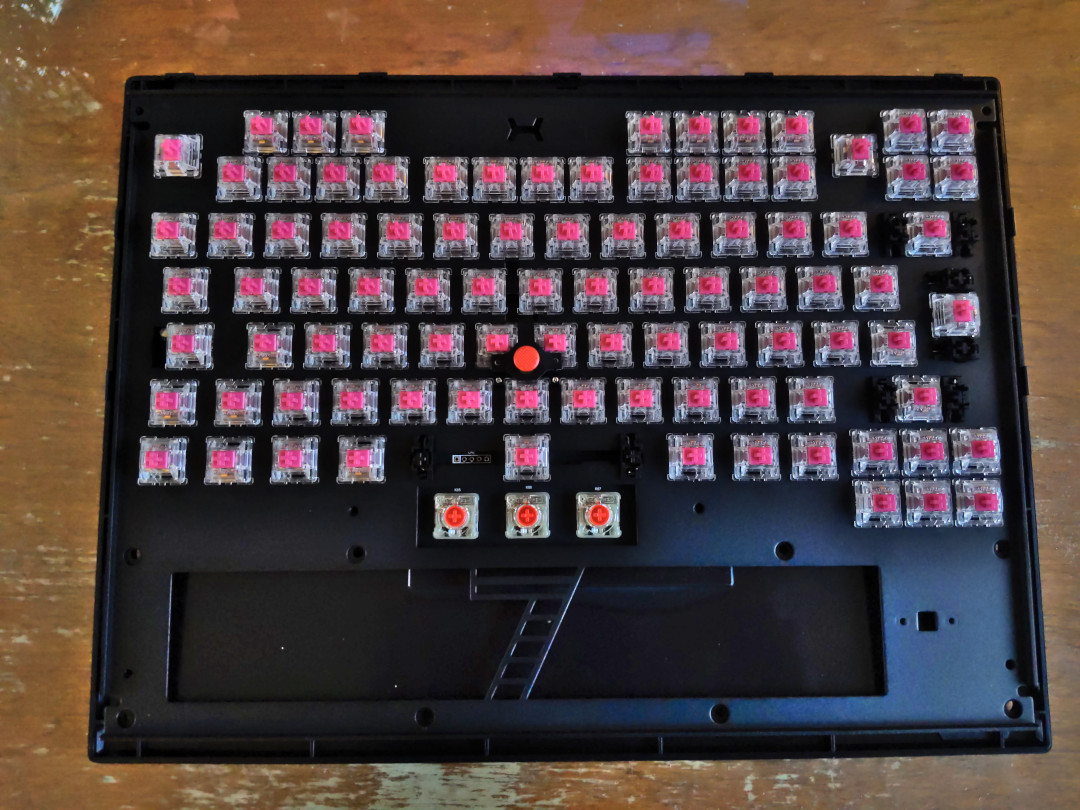 The only thing left to do on this keyboard is to replace the three soldered
switches that came pre-installed for the mouse buttons. They are Cherry MX Red
low-profile switches and are genuinely terrible
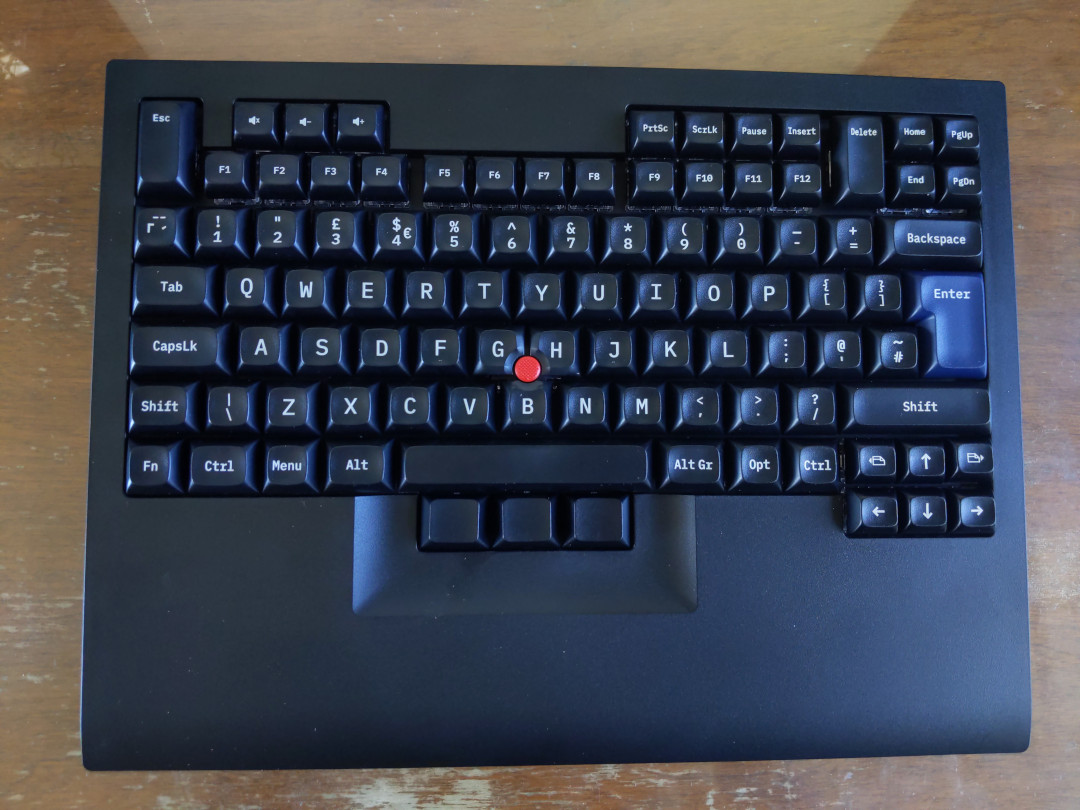 Overall, I am very satisfied with this keyboard and I look forward using it
daily when schools starts again in September.
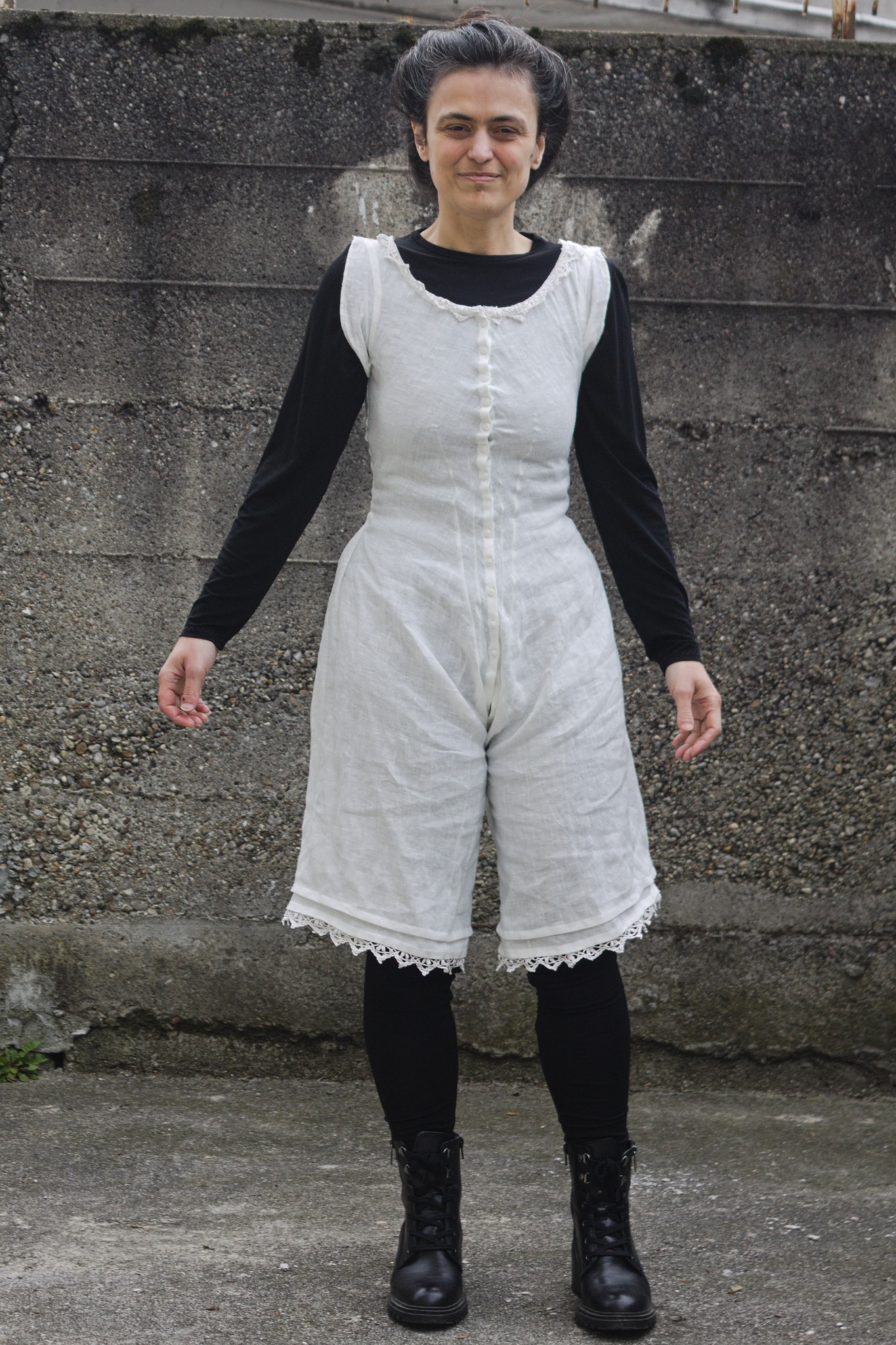 Some time ago, on an early Friday afternoon our internet connection died. After a reasonable time had passed we called the customer service, they told us that they would look into it and then call us back.
On Friday evening we had not heard from them, and I was starting to get worried. At the time in the evening when I would have been relaxing online I grabbed the first Victorian sewing-related book I found on my hard disk and started to read it.
For the record, it wasn t actually Victorian, it was
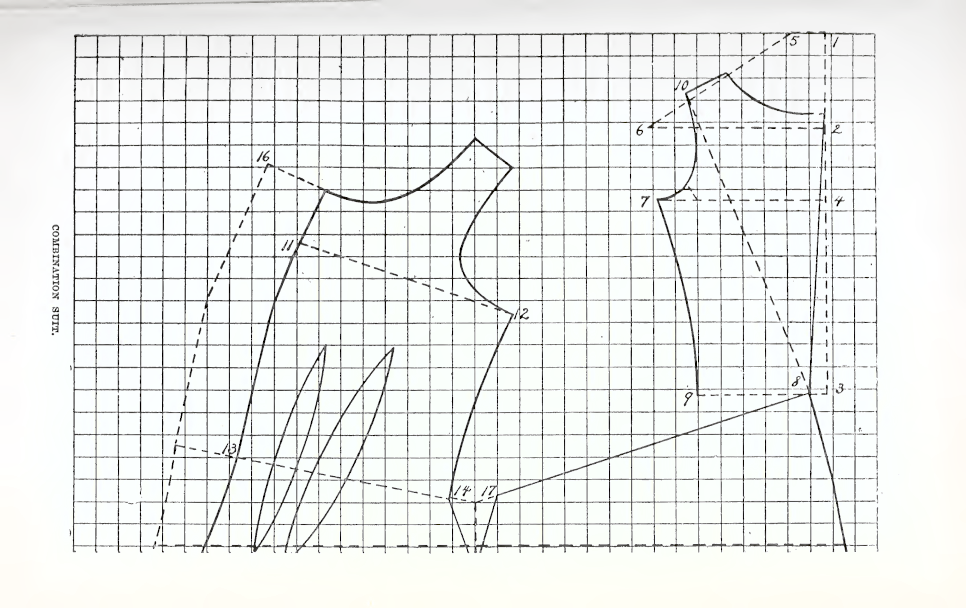 Anyway, this book had a system to draft a pair of combinations (chemise top + drawers); and months ago I had already tried to draft a pair from another system, but they didn t really fit and they were dropped low on the priority list, so on a whim I decided to try and draft them again with this new-to-me system.
Around 23:00 in the night the pattern was ready, and I realized that my SO had gone to sleep without waiting for me, as I looked too busy to be interrupted.
The next few days were quite stressful (we didn t get our internet back until Wednesday) and while I couldn t work at my day job I didn t sew as much as I could have done, but by the end of the week I had an almost complete mockup from an old sheet, and could see that it wasn t great, but it was a good start.
One reason why the mockup took a whole week is that of course I started to sew by machine, but then I wanted flat-felled seams, and felling them by hand is so much neater, isn t it?
And let me just say, I m grateful for the fact that I don t depend on streaming services for media, but I have a healthy mix of DVDs and stuff I had already temporary downloaded to watch later, because handsewing and being stressed out without watching something is not really great.
Anyway, the mockup was a bit short on the crotch, but by the time I could try it on and be sure I was invested enough in it that I decided to work around the issue by inserting a strip of lace around the waist.
And then I went back to the pattern to fix it properly, and found out that I had drafted the back of the drawers completely wrong, making a seam shorter rather than longer as it should have been. ooops.
I fixed the pattern, and then decided that YOLO and cut the new version directly on some lightweight linen fabric I had originally planned to use in this project.
The result is still not perfect, but good enough, and I finished it with a very restrained amount of lace at the neckline and hems, wore it one day when the weather was warm (loved the linen on the skin) and it s ready to be worn again when the weather will be back to being warm (hopefully not too soon).
The last problem was taking pictures of this underwear in a way that preserves the decency (and it even had to be outdoors, for the light!).
This was solved by wearing leggings and a matched long sleeved shirt under the combinations, and then promptly forgetting everything about decency and, well, you can see what happened.
 The pattern is, as usual, published on my
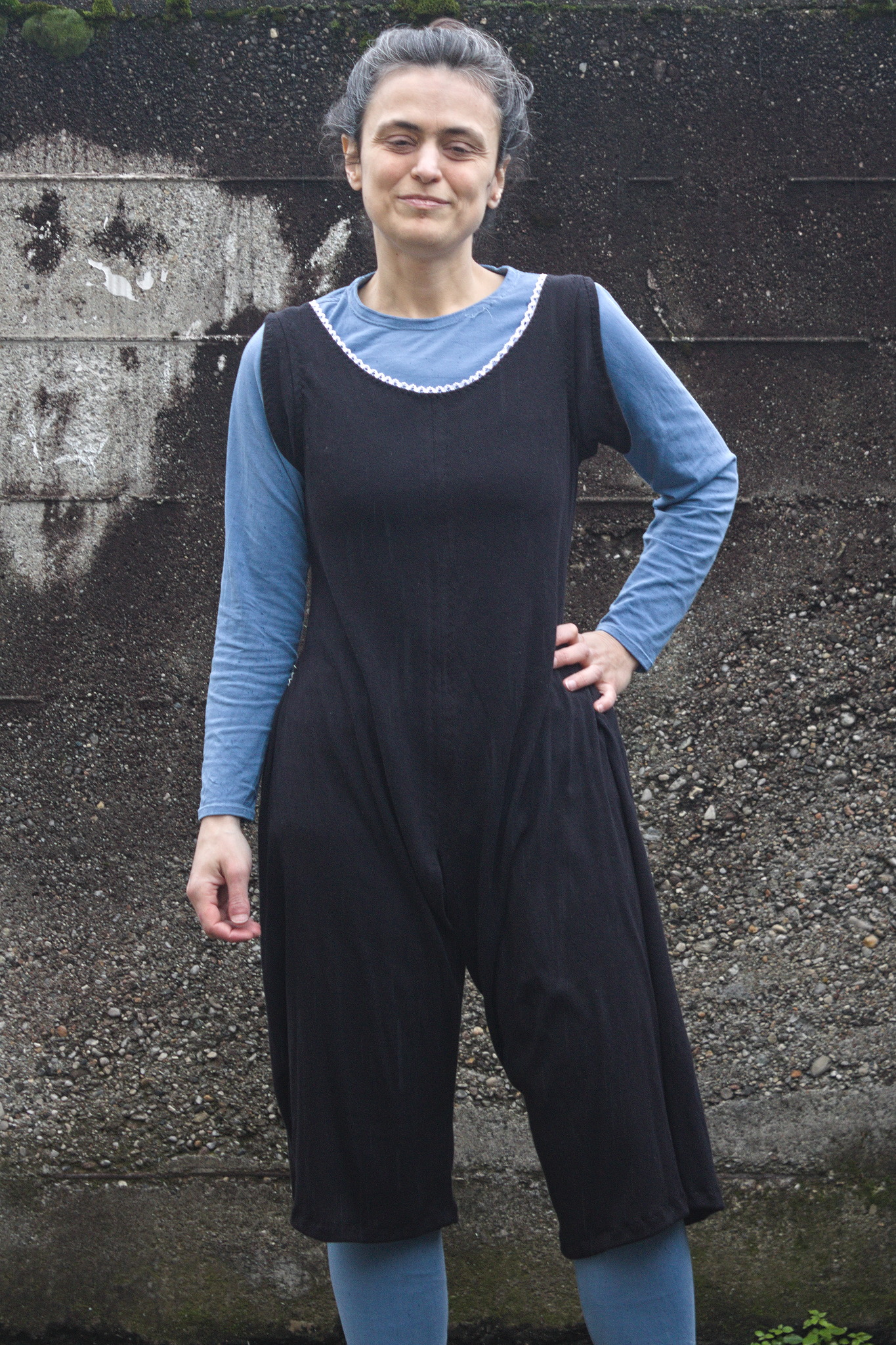 I suspect that the linen one will get worn a lot this summer (linen on the skin. nothing else need to be said), while the cotton one will be stored away for winter. And then maybe I may make a couple more, if I find out that I m using it enough.
 A few years ago a friend told me that her usual fabric shop was closing down and had a sale on all remaining stock.
While being sad for yet another brick and mortar shop that was going to be missed (at least it was because the owners were retiring, not because it wasn t sustainable anymore), of course I couldn t miss the opportunity.
So we drove a few hundred km, had some nice time with a friend that (because of said few hundred km) we rarely see, and spent a few hours looting the corps er helping the shop owner getting rid of stock before their retirement.
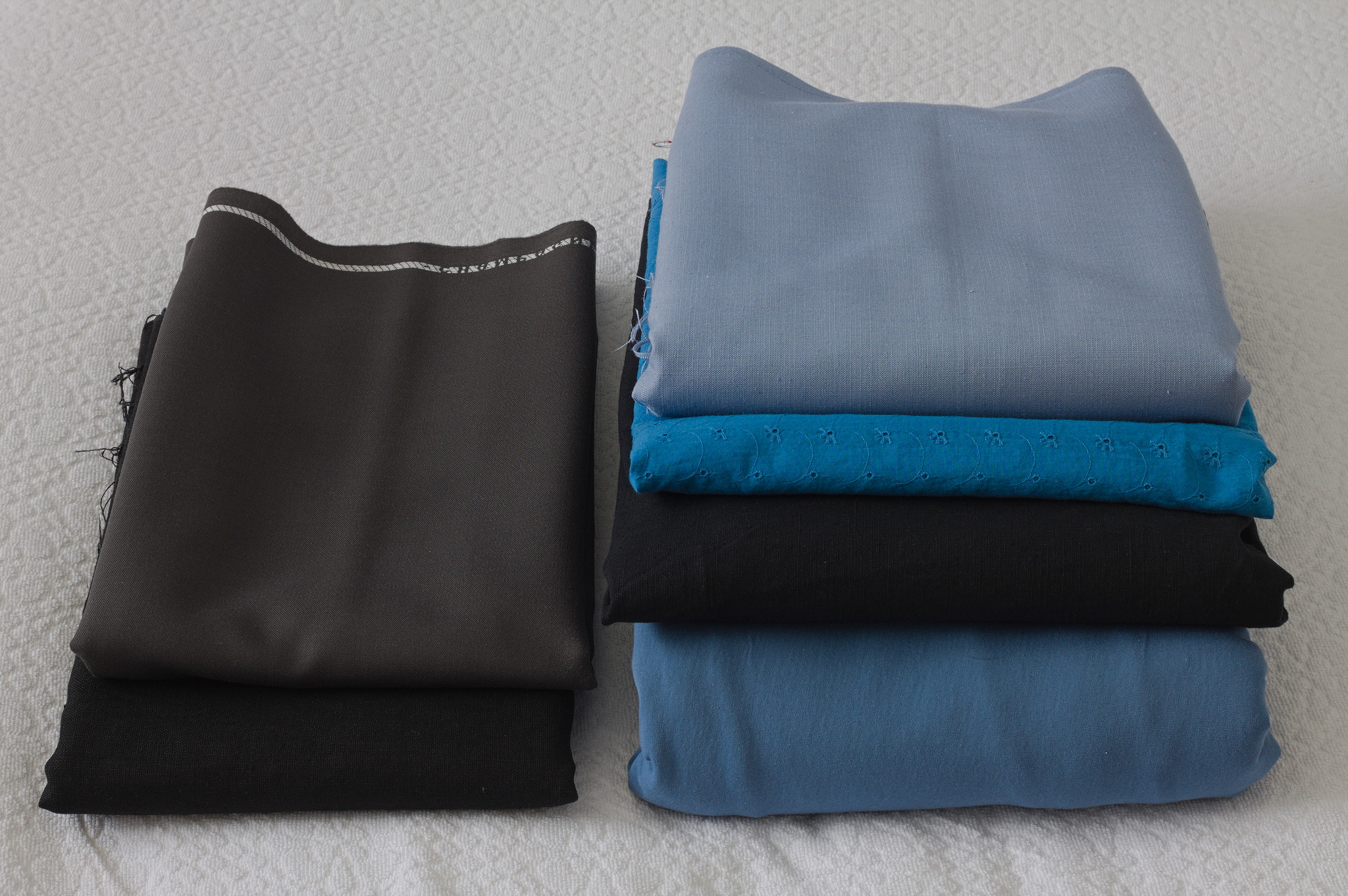 Among other things there was a cut of lightweight swiss embroidery cotton in blue which may or may not have been enthusiastically grabbed with plans of victorian underwear.
It was too nice to be buried under layers and layers of fabric (and I suspect that the embroidery wouldn t feel great directly on the skin under a corset), so the natural fit was something at the corset cover layer, and the fabric was enough for a combination garment of the kind often worn in the later Victorian age to prevent the accumulation of bulk at the waist.
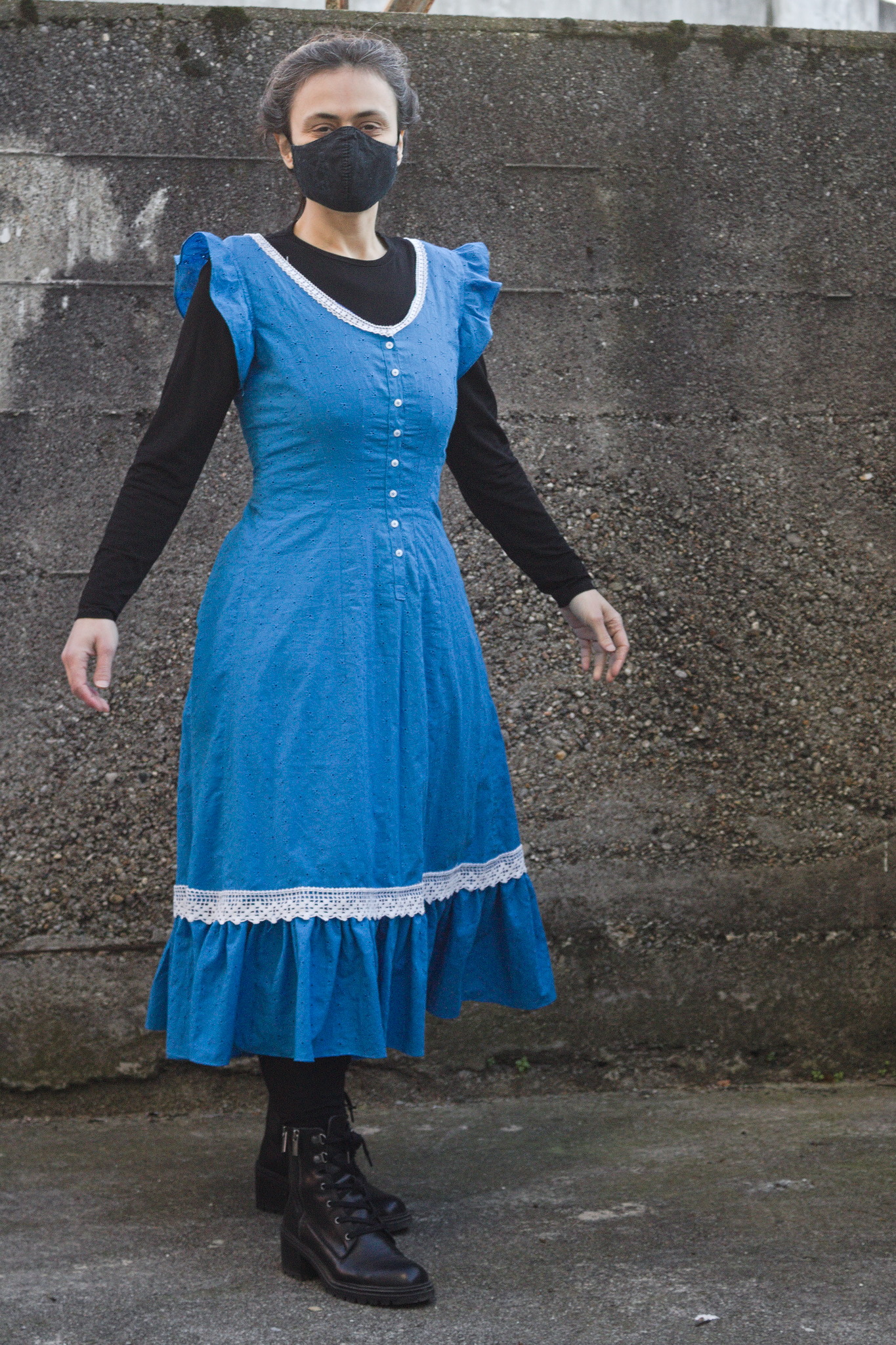
It also has the nice advantage that in this time of corrupted morals it is perfectly suitable as outerwear as a nice summer dress.
Then life happened, the fabric remained in my stash for a long while, but finally this year I have a good late victorian block that I can adapt, and with spring coming it was a good time to start working on the summer wardrobe.
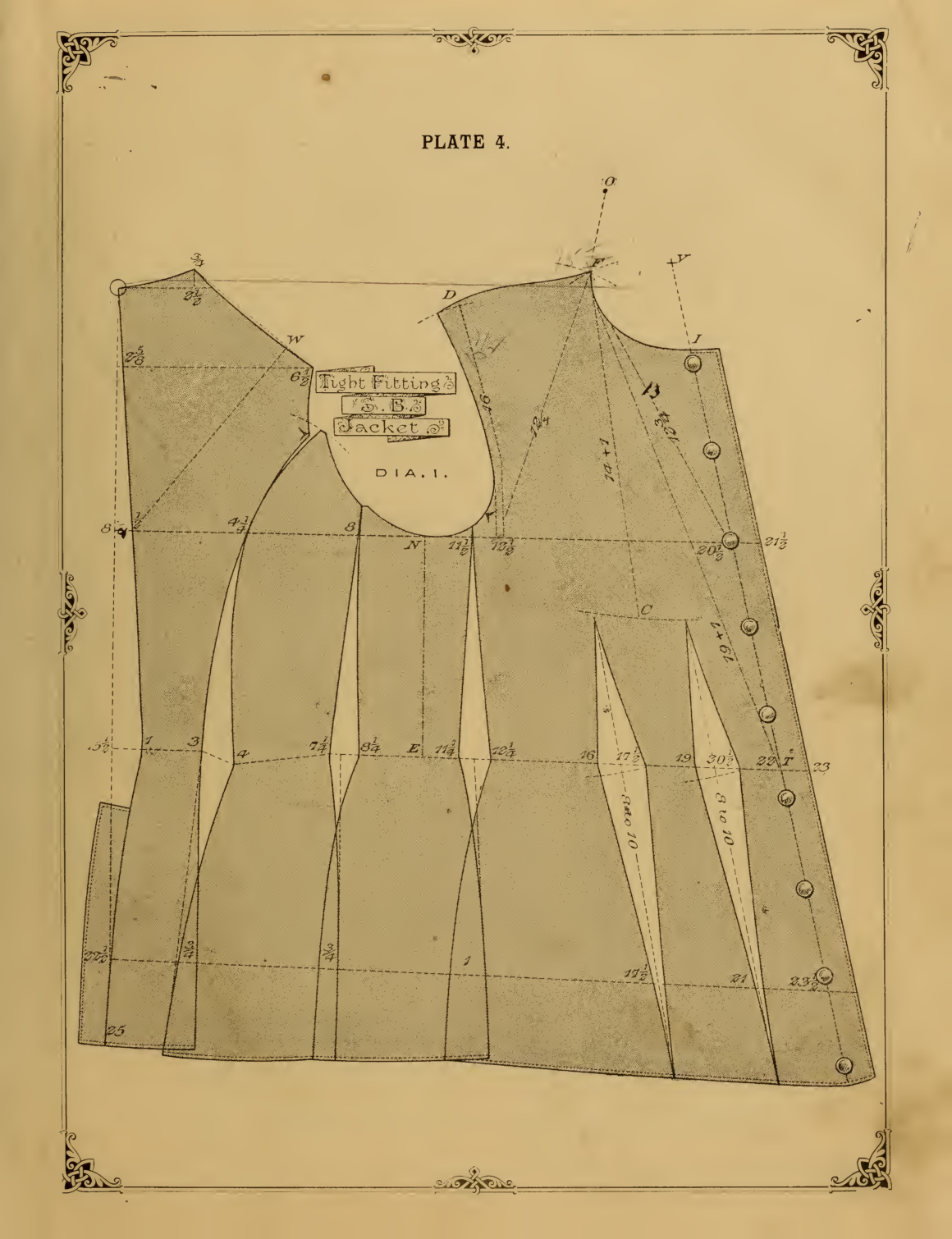 The block I ve used comes from
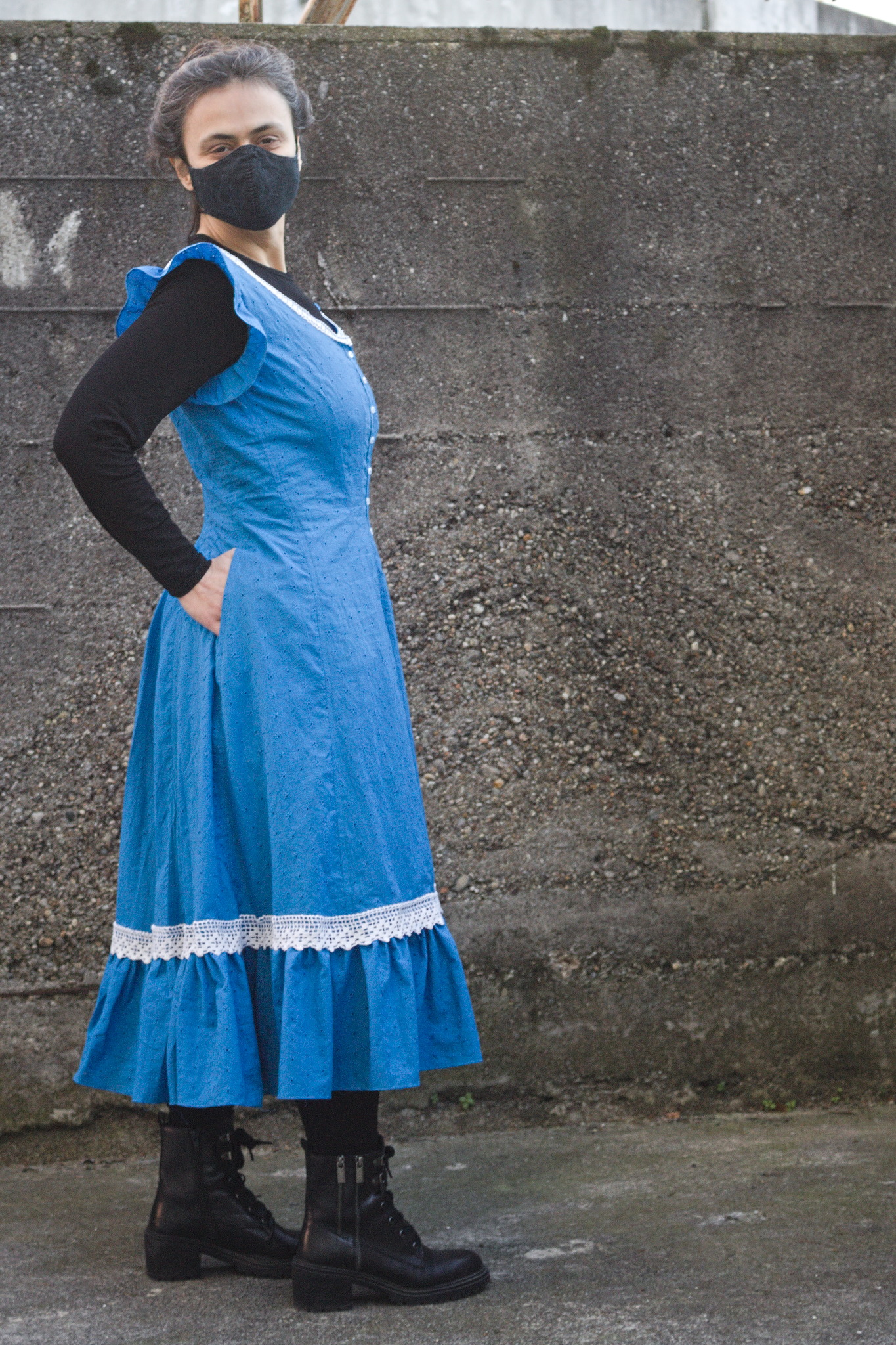 The only design choice left was the pocket situation: I wanted to wear this garment both as underwear (where pockets aren t needed, and add unwanted bulk) and outerwear (where no pockets is not an option), and the fabric felt too thin to support the weight of the contents of a full pocket. So I decided to add slits into the seams, with just a modesty placket, and wear
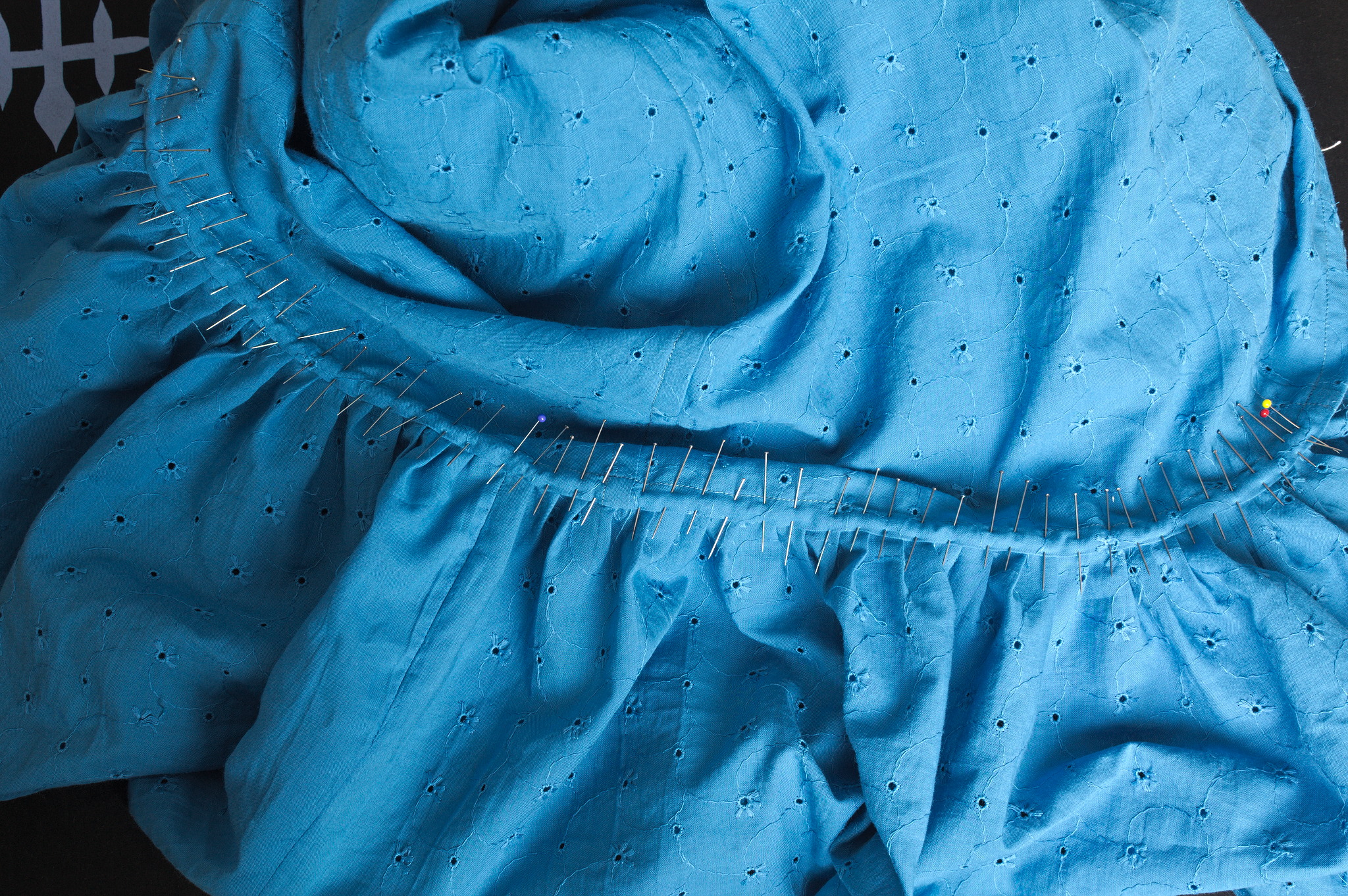 First I had to finish attaching the ruffles, however, and this is when I cursed myself for not using the ruffler foot I have (it would have meant not having selvedges on all seams of the ruffle), and for pleating the ruffle rather than gathering it (I prefer the look of handsewn gathers, but here I m sewing everything by machine, and that s faster, right? (it probably wasn t)).
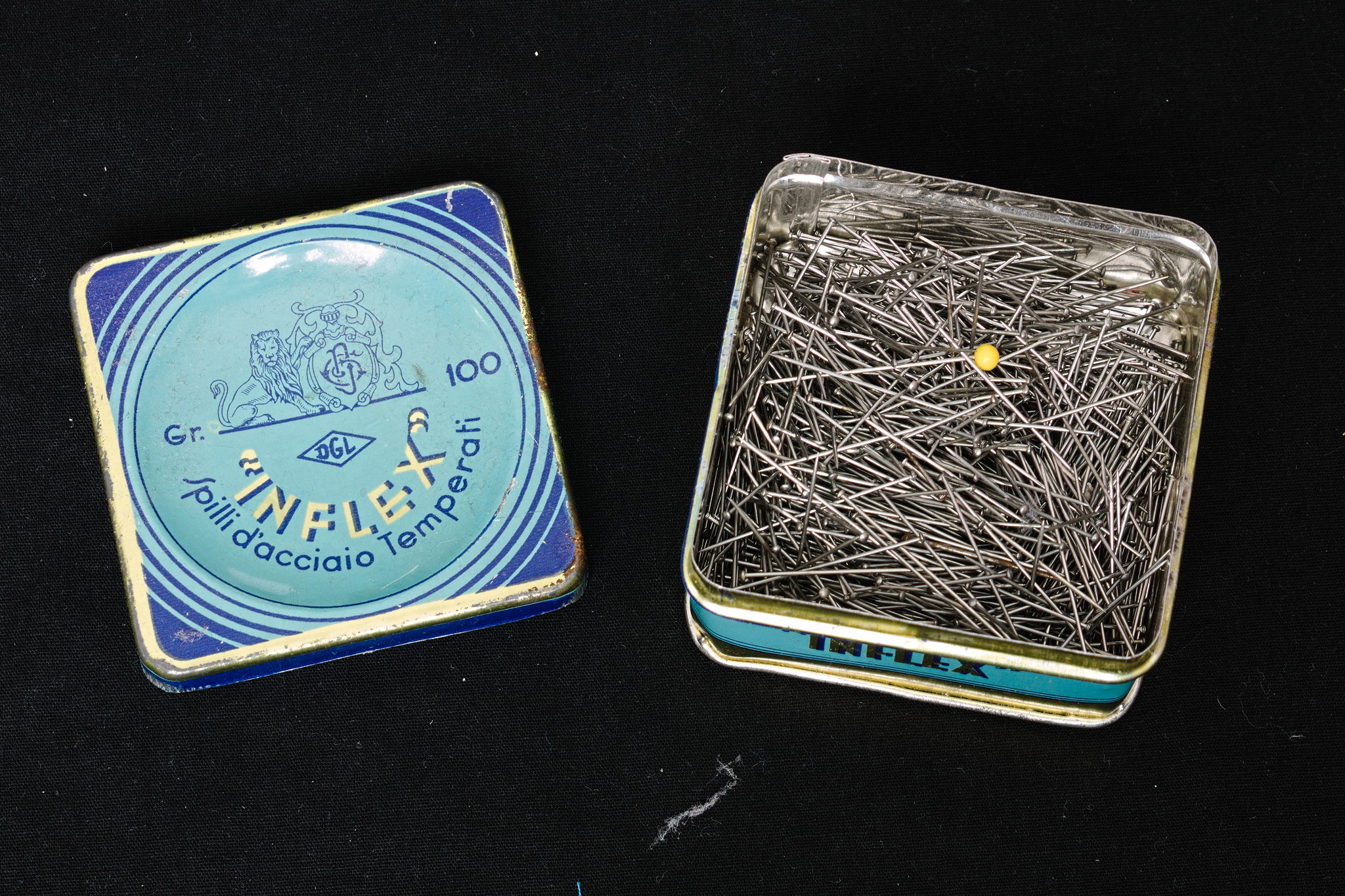 Also, this is where I started to get low on pins, and I had to use the ones from the vintage
 Except, maybe I shouldn t carry heavy items in my pockets when doing it? Oh, well.
I have other plans for the same pattern, but they involve making some crochet lace, so I expect I can aim at making them wearable in summer 2024.
Now I just have to wait for the weather to be a bit warmer, and then I can start enjoing this one.
 The GnuPG (gpg) ecosystem has been played with a bit in 2019 by adding fake signatures en masse to well known keys. The main result is that the SKS Keyserver network based on the

 But this again does not help me apart from setting some kind of background of where we are.) I have on this blog also shared how Africans have been setting new records in transparency and they did it almost 5 years back. For those new to the blog, African countries have been now broadcasting proceedings of their SC for almost 5 years now. I noticed it when privacy law was being debated and a few handles that I follow on Twitter and elsewhere had gone and given their submission in their SC. It was fascinating to not only hear but also read about the case from multiple viewpoints.
And just to remind people, I am sharing all of this from Pune, Maharashtra which is the second-biggest city in Maharashtra that has something like six million people and probably a million or more transitory students, and casual laborers but then again that doesn t help me other than providing a kind of context to what I m sharing..
Now a couple of years back or more I had asked mum to make a will. If she wanted to bequeath something to somebody else she could do that, had shared about that. There was some article in Indian Express or elsewhere that told people what they should be doing, especially if they had cost the barrier of age 60. Now for reasons best known to her, she refused and now I have to figure out what is the right way to go about doing things.
 In my two most recent posts, I listed the

 After a
 (Yes, this got in the way of working out what was going on with
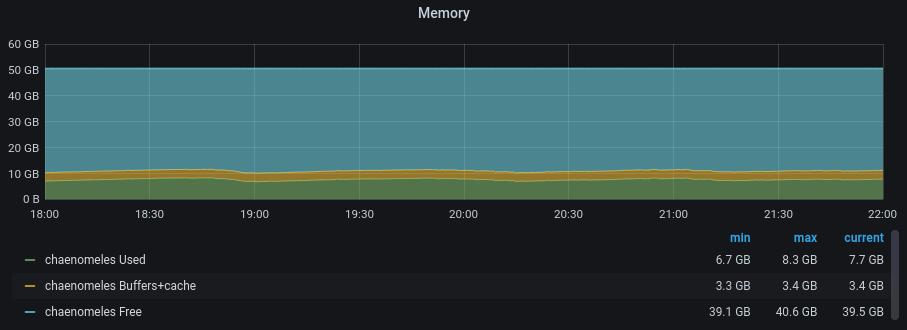 This isn t completely satisfying as we never quite got to the bottom of the
leak itself, and it s entirely possible that we ve only papered over it
using

 I just released version 1.5.0 of