Search Results: "amos"

1 July 2023

Debian Brasil: MiniDebConf Bras lia 2023 - um breve relato

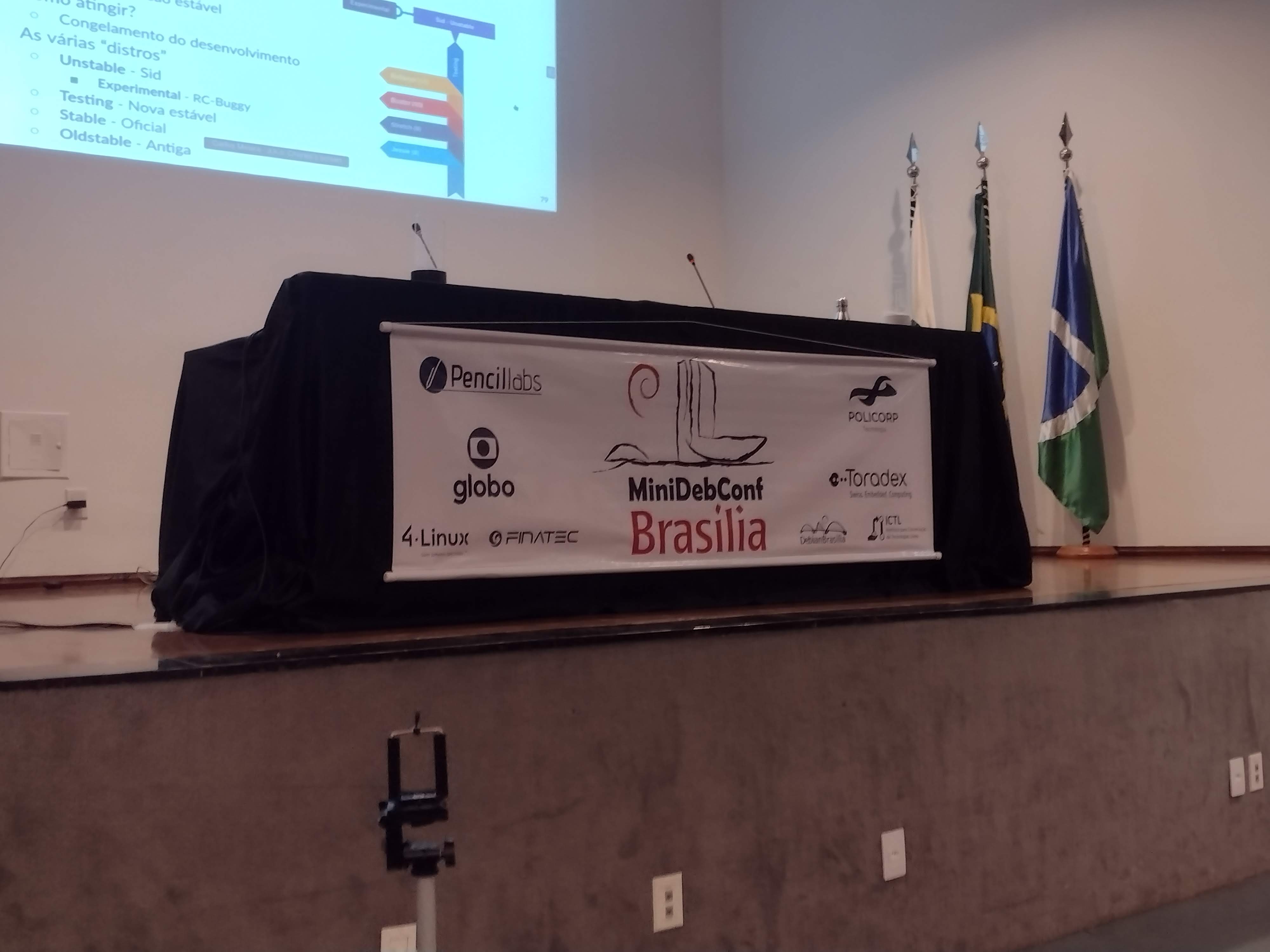
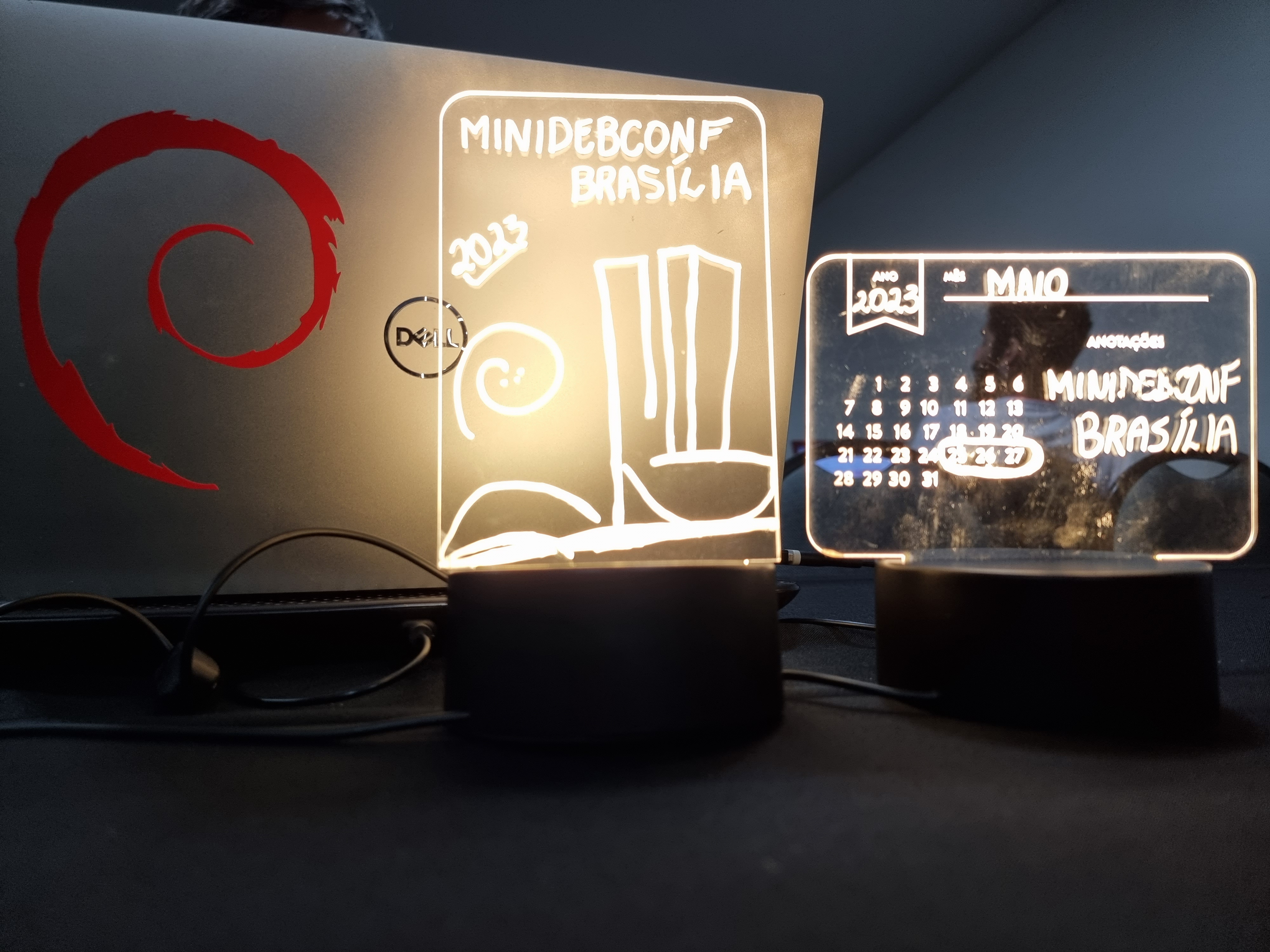
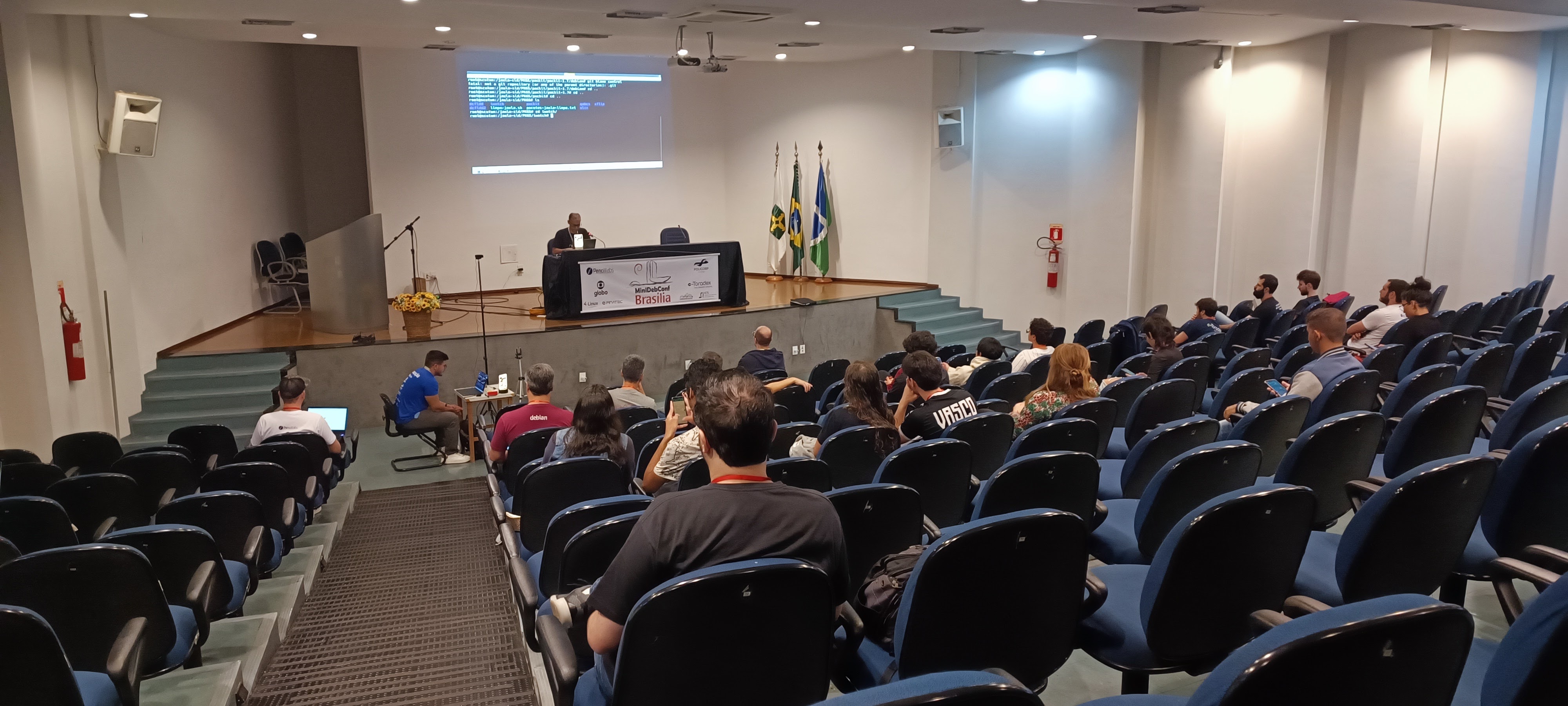
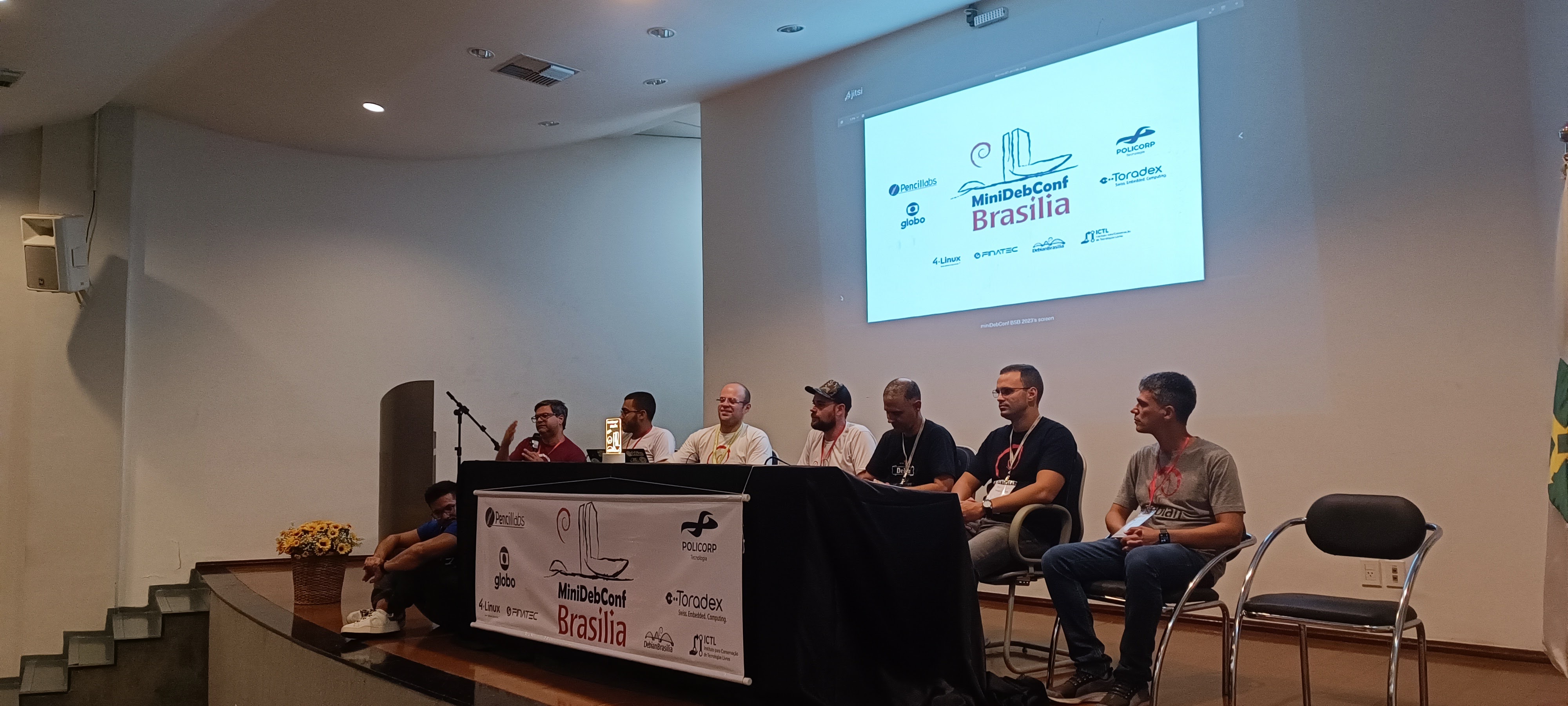
Minidebconf2033 palco No per odo de 25 a 27 de maio, Bras lia foi palco da MiniDebConf 2023. Esse encontro, composto por diversas atividades como palestras, oficinas, sprints, BSP (Bug Squashing Party), assinatura de chaves, eventos sociais e hacking, teve como principal objetivo reunir a comunidade e celebrar o maior projeto de Software Livre do mundo: o Debian. A MiniDebConf Bras lia 2023 foi um sucesso gra as participa o de todas e todos, independentemente do n vel de conhecimento sobre o Debian. Valorizamos a presen a tanto dos(as) usu rios(as) iniciantes que est o se familiarizando com o sistema quanto dos(as) desenvolvedores(as) oficiais do projeto. O esp rito de acolhimento e colabora o esteve presente em todos os momentos. As MiniDebConfs s o encontros locais organizados por membros do Projeto Debian, visando objetivos semelhantes aos da DebConf, por m em mbito regional. Ao longo do ano, eventos como esse ocorrem em diferentes partes do mundo, fortalecendo a comunidade Debian. Minidebconf2023 placa Atividades A programa o da MiniDebConf foi intensa e diversificada. Nos dias 25 e 26 (quinta e sexta-feira), tivemos palestras, debates, oficinas e muitas atividades pr ticas. J no dia 27 (s bado), ocorreu o Hacking Day, um momento especial em que os(as) colaboradores(as) do Debian se reuniram para trabalhar em conjunto em v rios aspectos do projeto. Essa foi a vers o brasileira da Debcamp, tradi o pr via DebConf. Nesse dia, priorizamos as atividades pr ticas de contribui o ao projeto, como empacotamento de softwares, tradu es, assinaturas de chaves, install fest e a Bug Squashing Party. Minidebconf2023 auditorio

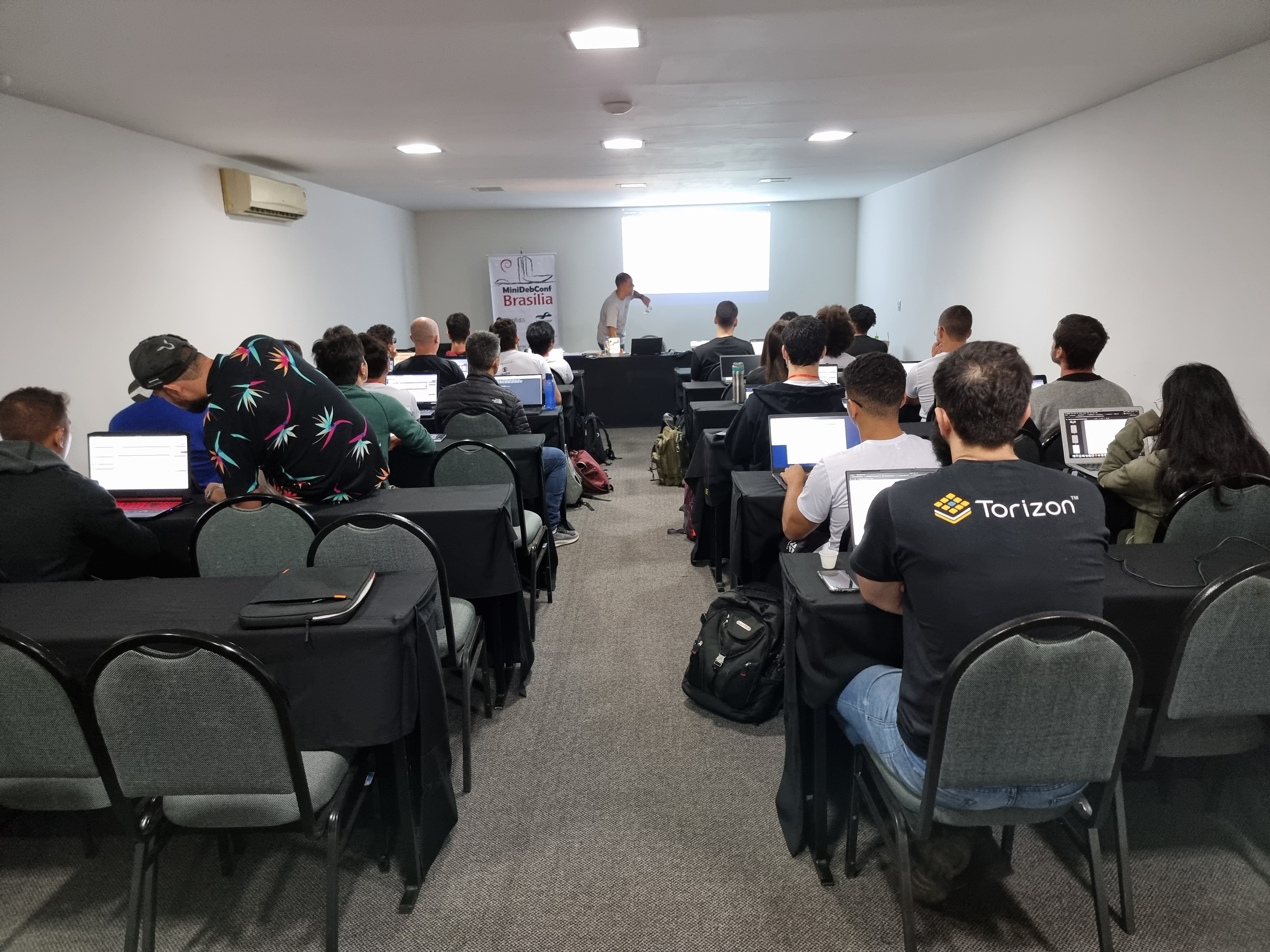
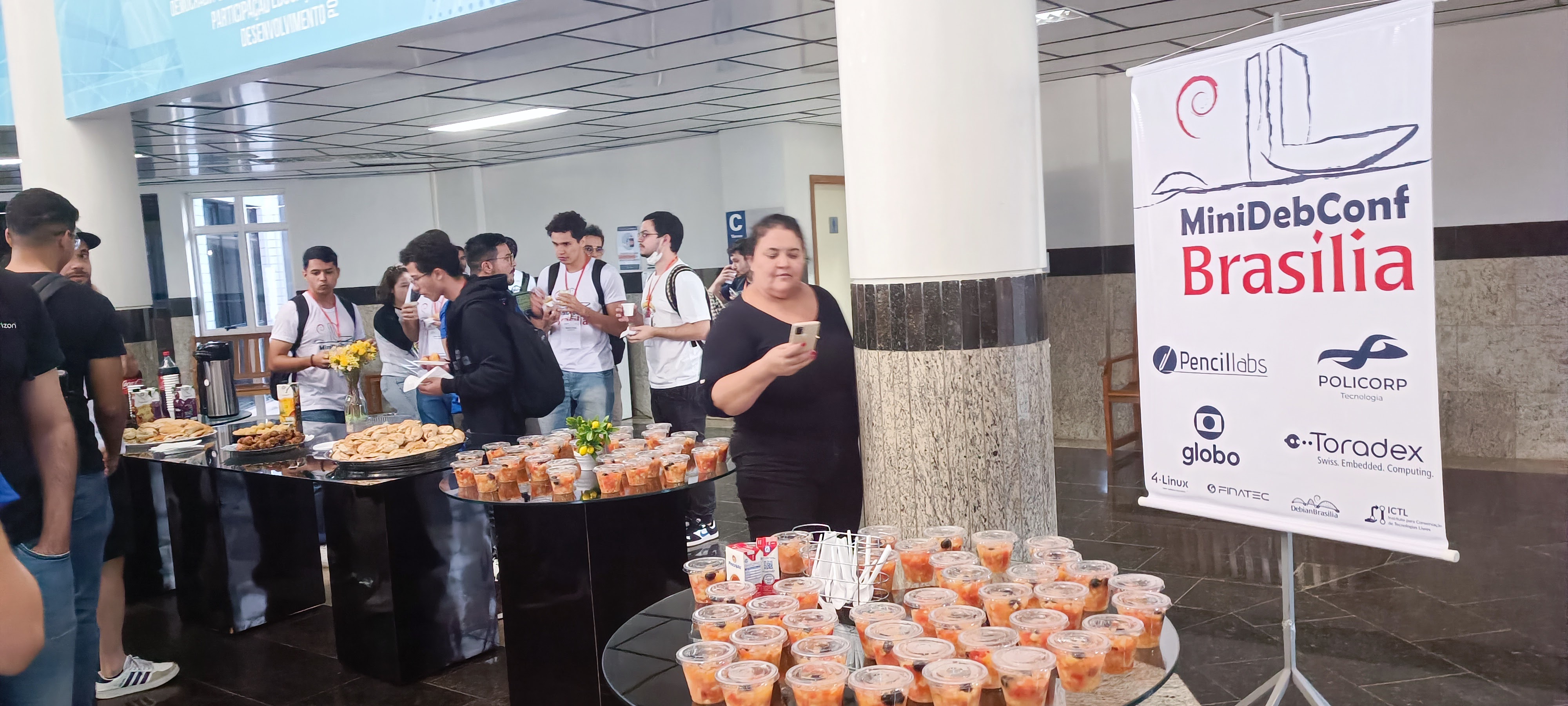
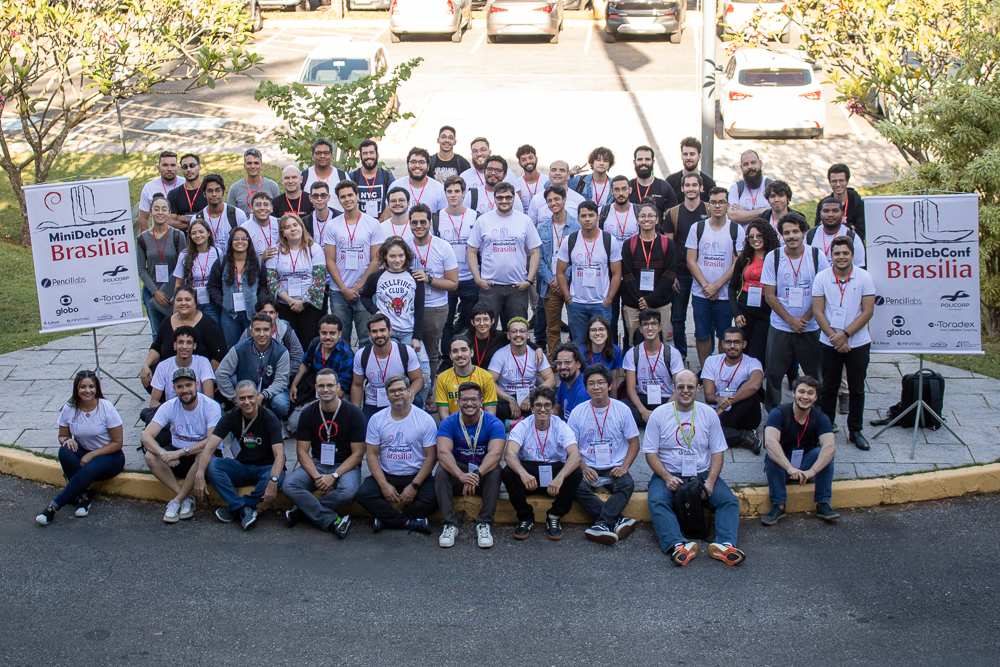
Minidebconf2023 oficina N meros da edi o Os n meros do evento impressionam e demonstram o envolvimento da comunidade com o Debian. Tivemos 236 inscritos(as), 20 palestras submetidas, 14 volunt rios(as) e 125 check-ins realizados. Al m disso, nas atividades pr ticas, tivemos resultados significativos, como 7 novas instala es do Debian GNU/Linux, a atualiza o de 18 pacotes no reposit rio oficial do projeto Debian pelos participantes e a inclus o de 7 novos contribuidores na equipe de tradu o. Destacamos tamb m a participa o da comunidade de forma remota, por meio de transmiss es ao vivo. Os dados anal ticos revelam que nosso site obteve 7.058 visualiza es no total, com 2.079 visualiza es na p gina principal (que contava com o apoio de nossos patrocinadores), 3.042 visualiza es na p gina de programa o e 104 visualiza es na p gina de patrocinadores. Registramos 922 usu rios(as) nicos durante o evento. No YouTube, a transmiss o ao vivo alcan ou 311 visualiza es, com 56 curtidas e um pico de 20 visualiza es simult neas. Foram incr veis 85,1 horas de exibi o, e nosso canal conquistou 30 novos inscritos(as). Todo esse engajamento e interesse da comunidade fortalecem ainda mais a MiniDebConf. Minidebconf2023 palestrantes Fotos e v deos Para revivermos os melhores momentos do evento, temos dispon veis fotos e v deos. As fotos podem ser acessadas em: https://deb.li/pbsb2023. J os v deos com as grava es das palestras est o dispon veis no seguinte link: https://deb.li/vbsb2023. Para manter-se atualizado e conectar-se com a comunidade Debian Bras lia, siga-nos em nossas redes sociais: Agradecimentos Gostar amos de agradecer profundamente a todos(as) os(as) participantes, organizadores(as), patrocinadores e apoiadores(as) que contribu ram para o sucesso da MiniDebConf Bras lia 2023. Em especial, expressamos nossa gratid o aos patrocinadores Ouro: Pencillabs, Globo, Policorp e Toradex Brasil, e ao patrocinador Prata, 4-Linux. Tamb m agradecemos Finatec e ao Instituto para Conserva o de Tecnologias Livres (ICTL) pelo apoio. Minidebconf2023 coffee A MiniDebConf Bras lia 2023 foi um marco para a comunidade Debian, demonstrando o poder da colabora o e do Software Livre. Esperamos que todas e todos tenham desfrutado desse encontro enriquecedor e que continuem participando ativamente das pr ximas iniciativas do Projeto Debian. Juntos, podemos fazer a diferen a! Minidebconf2023 fotos oficial

12 April 2023

Andrej Shadura: Connecting lights to a Swytch e-bike kit

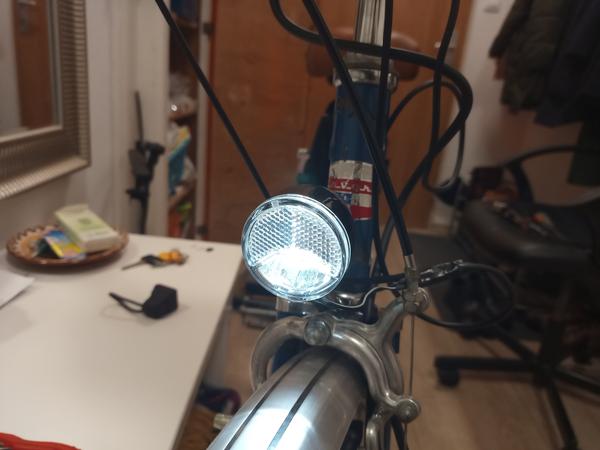
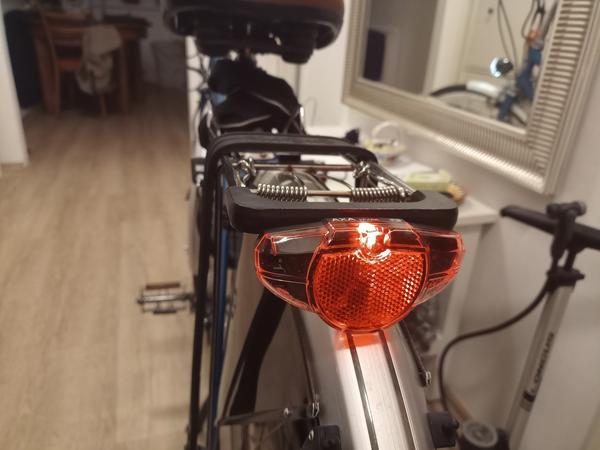
Last year I purchased an e-bike upgrade kit for my mother in law. We decided to install it on a bicycle she originally bought back in the 80s, which I fixed and refurbished a couple of years ago and used until September 2022 when I bought myself a Dutch Cortina U4. When I used this bicycle, I installed a lightweight Shutter Precision dynamo hub and compatible lights, XLC at the front, B chel at the back. Unfortunately, since Swytch is a front wheel with a built-in electric motor, these lights don t have a dynamo to connect to anymore, and Swytch doesn t have a dedicated connector for lights. I tried asking the manufacturer for more documentation or schematics, but they refused to do so. Luckily, a Canadian member of the Pedelecs forum managed to reverse-engineer the Swytch connector pinouts, which gave me an idea on how to proceed. Unfortunately, that meant that I had to replace both lights, and by trial and error I found specific models that worked. Before the Axa lights, I also tried B chel s Tivoli e-bike light, but it didn t work because the voltage was too low:
B chel Tivoli light that didn t workB chel Tivoli light that didn t work
Once I knew what to do, the rest was super easy So, here we go:
  1. Get a 3-pin (yellow) male connector with a cable, e.g. off AliExpress. Only two wires will be used, the white one is +4.2V (4-point-2, not 42!), the black one is earth. This will go into the throttle port. If you actually have a throttle, you need some sort of Y-splitter, but I don t, so this was not an issue for me. (However, I bought both sides (M and F), just to be sure.)
    Cable for the throttle portCable for the throttle port
  2. Purchase an Axa 606 E6-48 front light. The 606 comes in two versions, for dynamos and e-bikes, use the one for e-bikes; despite being officially rated as 6 48V, these lights work quite well off 4.2V too.
    Axa 606 E6-48 lightAxa 606 E6-48 light
  3. Purchase an Axa Spark Steady rear light. This light works with both AC and DC (just like the 606, the official rating is 6 48V), and works off 4.2V without an issue.
    Axa Spark lightAxa Spark light
  4. Wire lights up. I used tiny wire terminals to join the wires, but I m sure there are better options too. Insulate them well, make sure the red wire from the throttle connector is insulated too. I used a bunch of shrink tubes and black insulation tape. Since the voltage is not wildly different from what the dynamo hub produced (although AC, not DC), I was able to reuse the cable I had already routed to the rear carrier.
  5. Lights go on automatically as soon as you touch the power button on the battery pack, and stay on until the battery pack is switched off completely. I was considering adding a handlebar switch, but since I lost the only one I had, I had to do without.
Front lightFront light
Rear lightRear light
The side effect of using the Axa Spark at the rear is that it has a capacitor inside and keeps going for a couple more minutes after the battery pack is off I haven t decided whether that s a benefit or a drawback

1 April 2023

Debian Brasil: Primeira oficina de tradu o em 2023 da equipe pt_BR

The Brazilian translation team debian-l10n-portuguese realizou a primeira oficina de 2023 em fevereiro, com timos resultados: Nosso foco era completar as descri es dos 500 pacotes mais populares (popcon). Apesar de n o termos conseguido chegar 100% do ciclo de tradu o, grande parte dessas descri es est o em andamento e com um pouco mais de trabalho estar o dispon veis comunidade. Agrade o aos( s) participantes pelas contribui es. As oficinas foram bem movimentadas e, muito al m das tradu es em si, conversamos sobre diversas faces da comunidade Debian. Esperamos ter ajudado aos( s) iniciantes a contribuir com o projeto de maneira frequente. Agrade o em especial ao Charles (charles) que ministrou um dos dias da oficina, ao Paulo (phls) que sempre est a dando uma for a, e ao Fred Maranh o pelo seu incans vel trabalho no DDTSS. Equipe de tradu o do portugu s do Brasil

Paul Wise: FLOSS Activities March 2023

Focus This month I didn't have any particular focus. I just worked on issues in my info bubble.

Changes

Issues

Review

Administration
  • Debian QA services: disabled updating jessie as it was removed
  • Debian IRC: rescued #debian-s390x from inactive person
  • Debian servers: repair a /etc git repo
  • Debian wiki: unblock IP addresses, approve accounts

Communication
  • Respond to queries from Debian users and contributors on the mailing lists and IRC

Sponsors The gensim, sptag, purple-discord, harmony work was sponsored. All other work was done on a volunteer basis.

21 March 2023

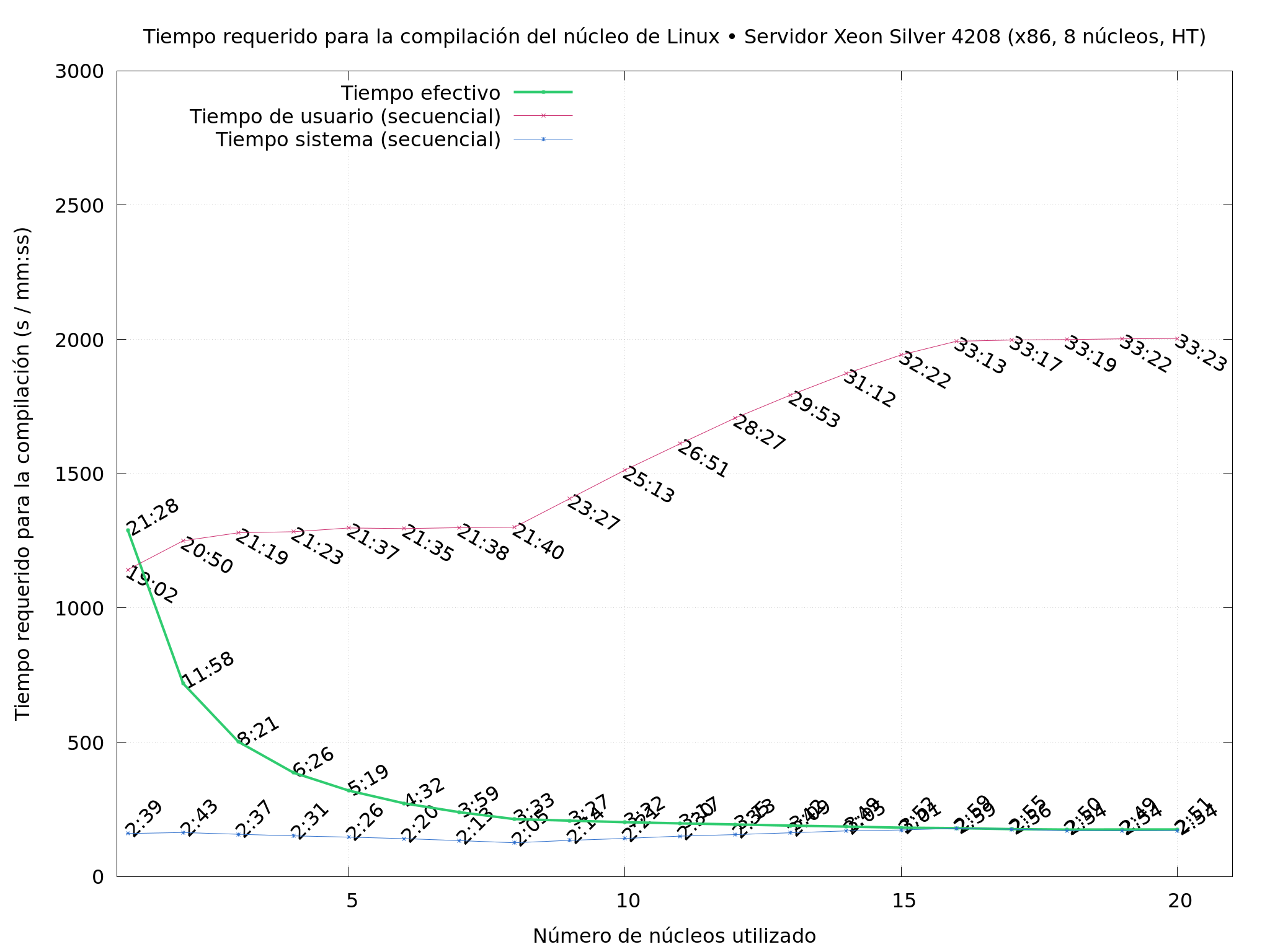
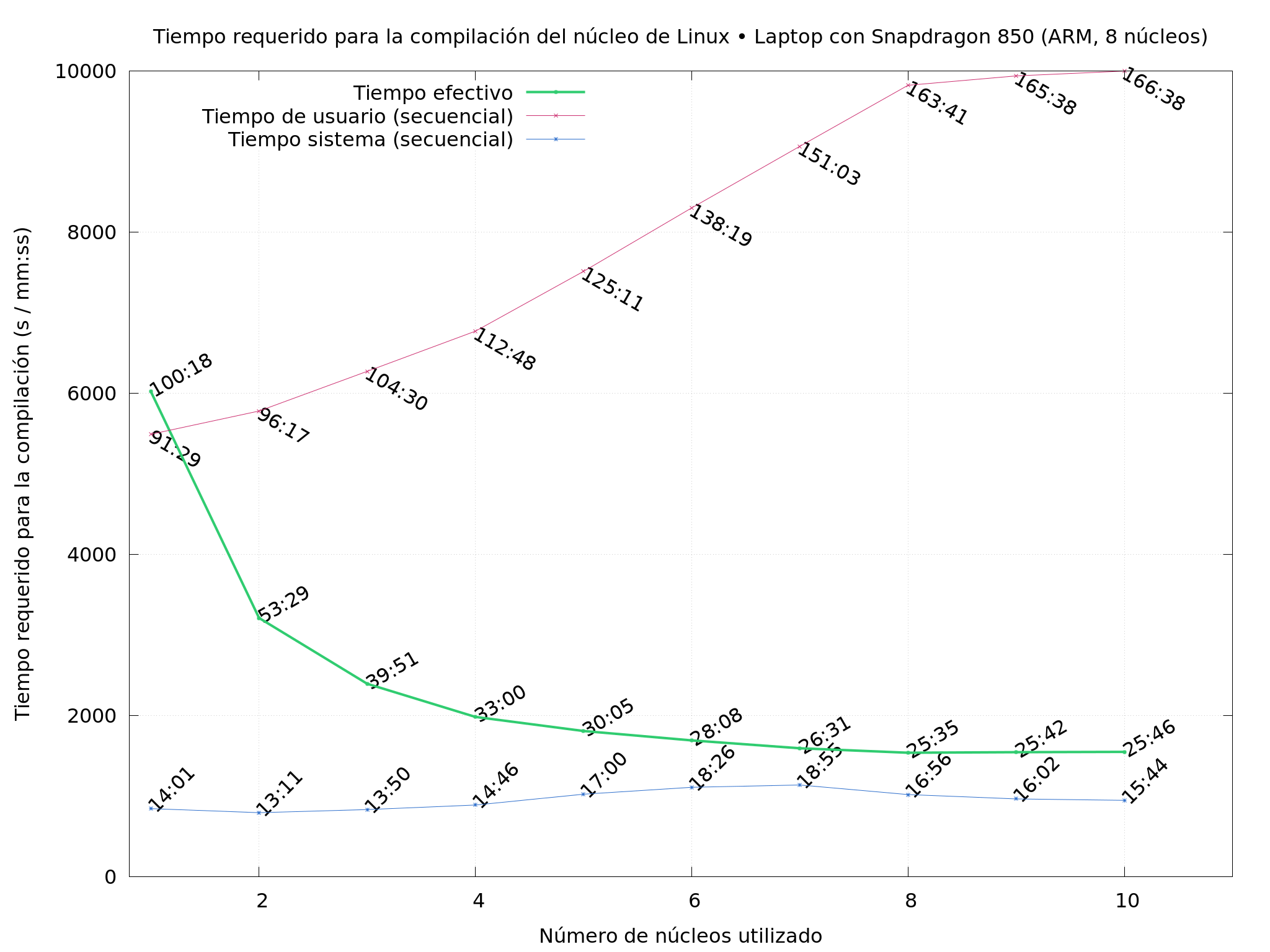
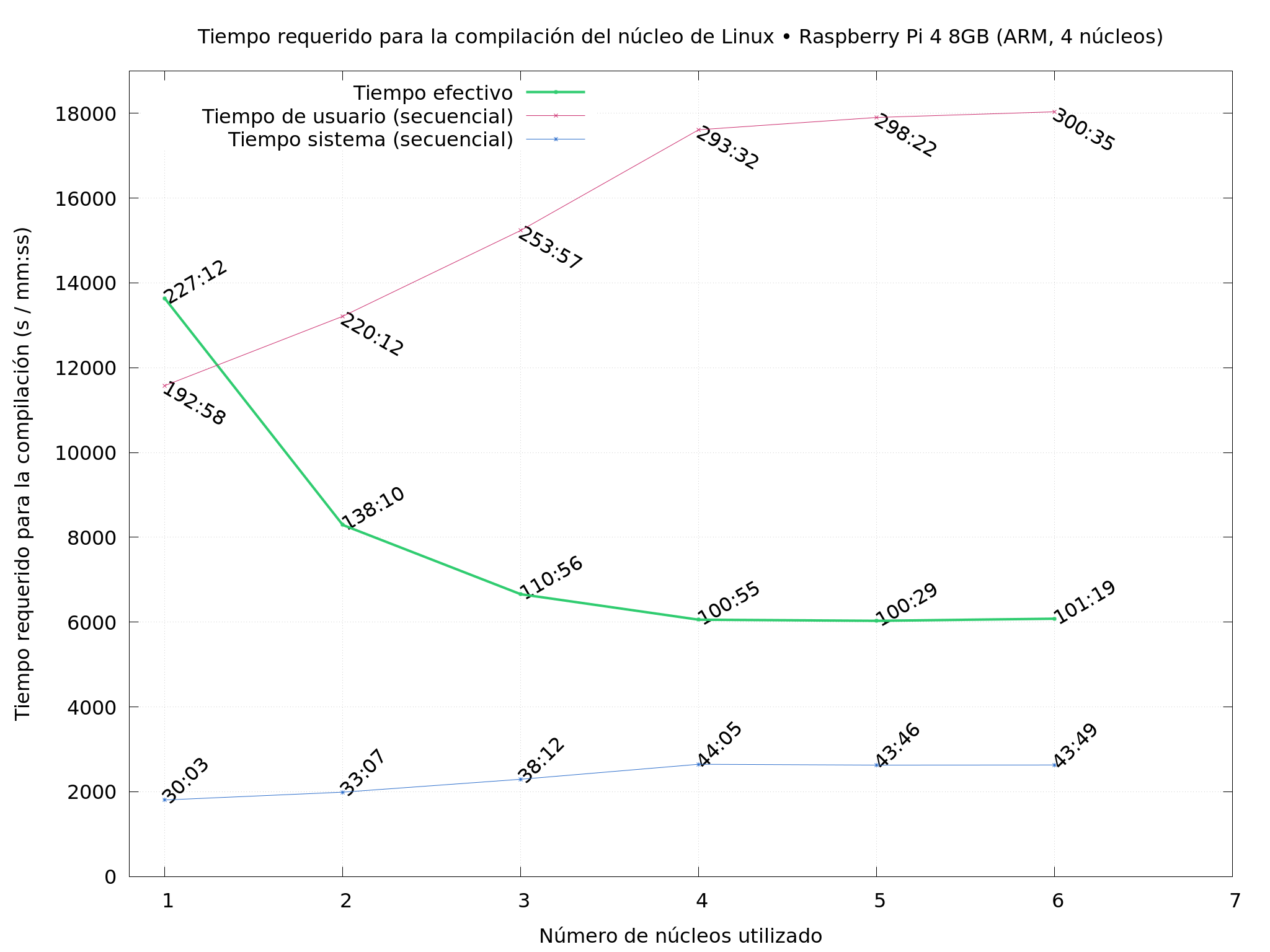
Gunnar Wolf: Impact of parallelism and processor architecture while building a kernel

Given that B lint just braggedblogged about how efficiently he can build a Linux kernel (less than 8 seconds, wow! Well, yes, until you read it is the result of aggressive caching and is achieved only for a second run), and that a question just popped up today on the Debian ARM mailing list, is an ARM computer a good choice? Which one? , I decided to share my results of an experiment I did several months ago, to graphically show to my students the effects of parallelism, the artifacts of hyperthreading, the effects of different architecture sets, and even illustrate about the actual futility of my experiment (somewhat referring to John Gustafson s reevaluation of Amdahl s law, already 30 years ago One does not take a fixed-size problem and run it on various numbers of processors except when doing academic research ; thanks for referring to my inconsequential reiterative compilations as academic research! ) I don t expect any of the following images to be groundbreaking, but at least, next time I need to find them it is quite likely I ll be able to find them and I will be able to more easily refer to them in online discussions So What did I do? I compiled Linux repeatedly, on several of the machines I had available, varying the -j flag (how many cores to use simultaneously), starting with single-core, and pushing up until just a bit over the physical number of cores the CPU has. Sadly, I lost several of my output images, but the three following are enough to tell interesting bits of the story: Of course, I have to add that this is not a scientific comparison; the server and my laptop have much better I/O than the Raspberry s puny micro-SD card (and compiling hundreds of thousands of files is quite an IO-stressed job, even though the full task does exhibit the very low compared single-threaded performance of the Raspberry even compared with the Yoga). No optimizations were done (they would be harmful to the effects I wanted to show!), the compile was made straight from the upstream sources.

12 November 2022

Debian Brasil: Participa o da comunidade Debian no Latinoware 2022

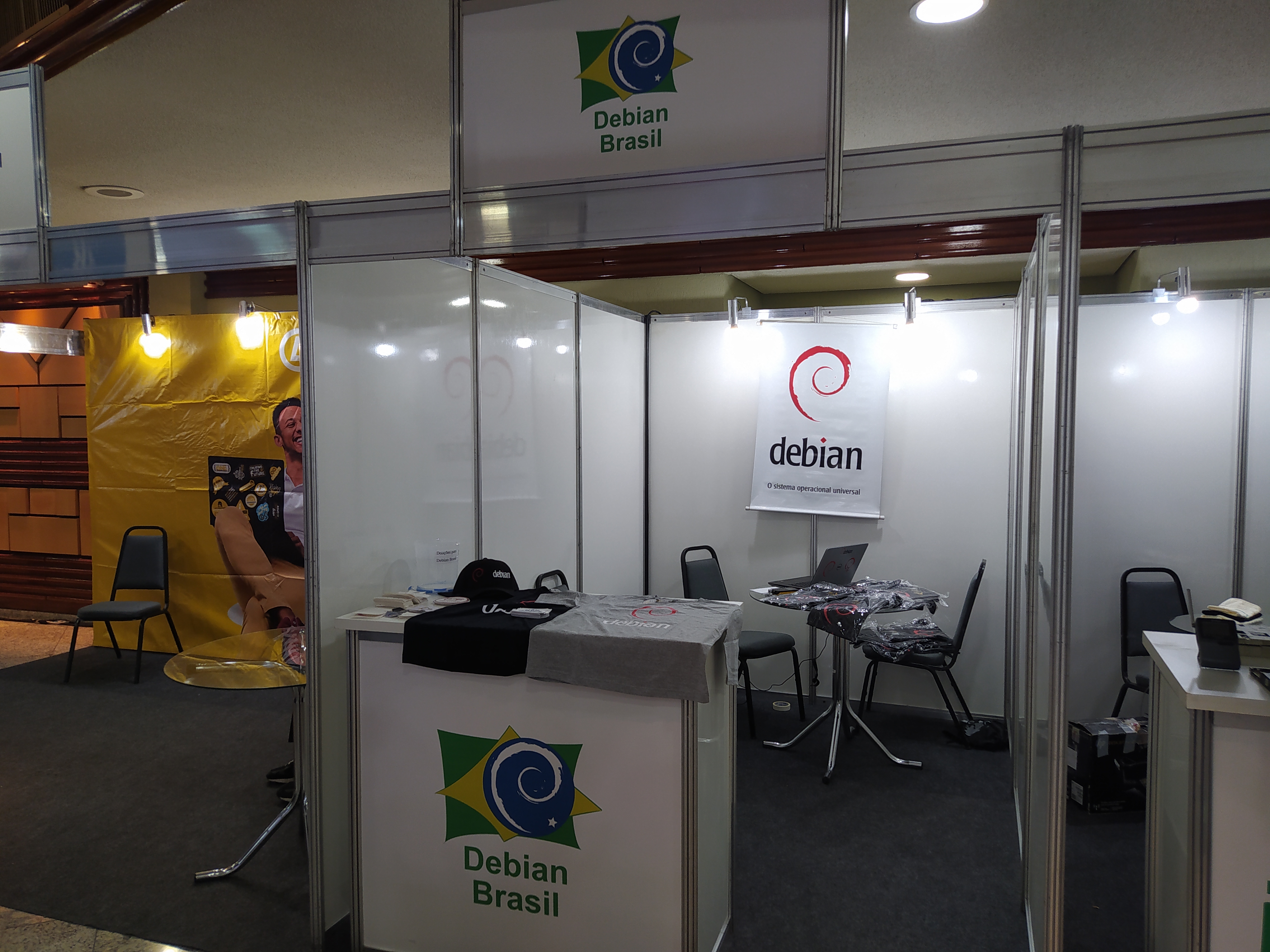
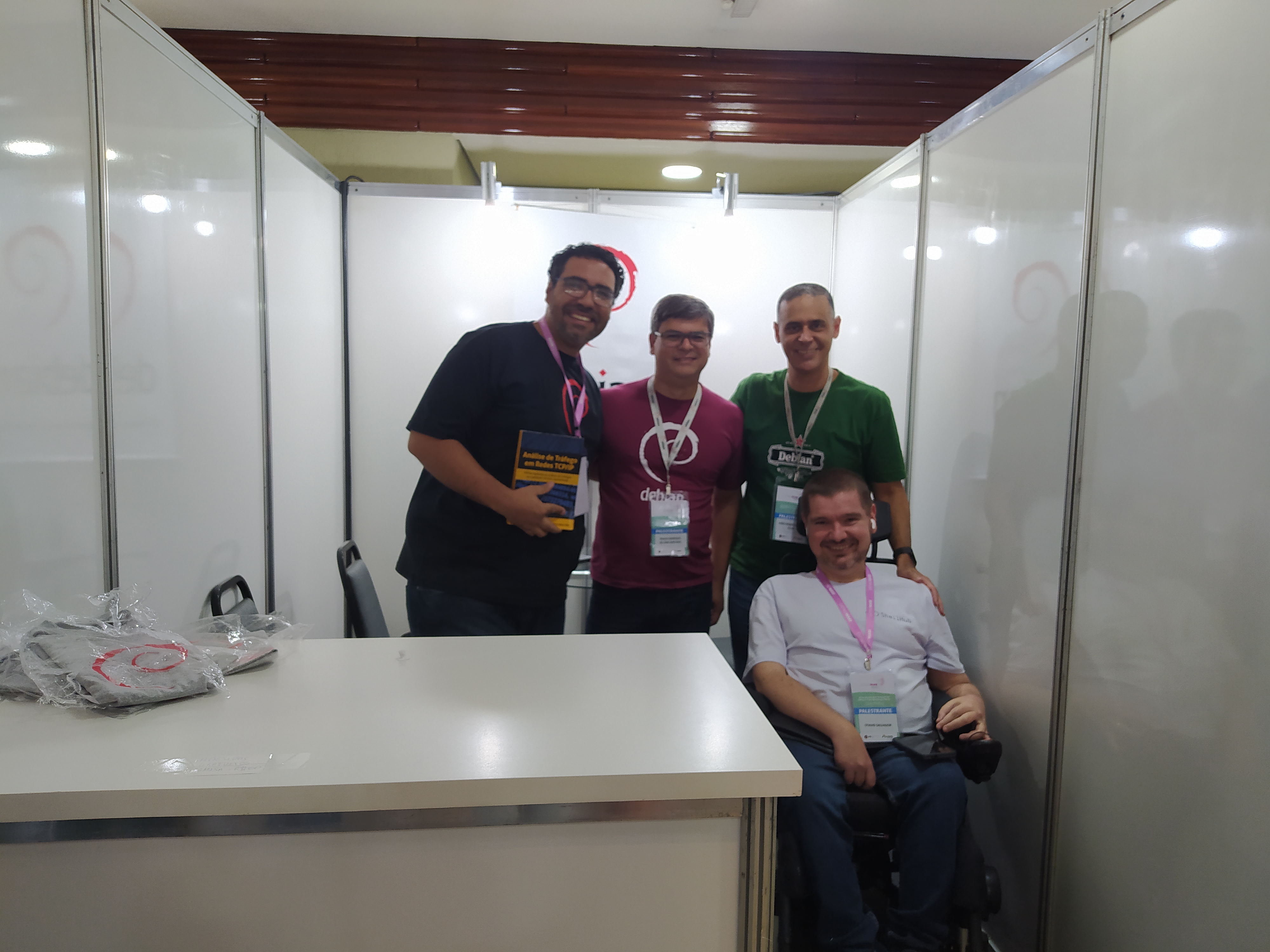
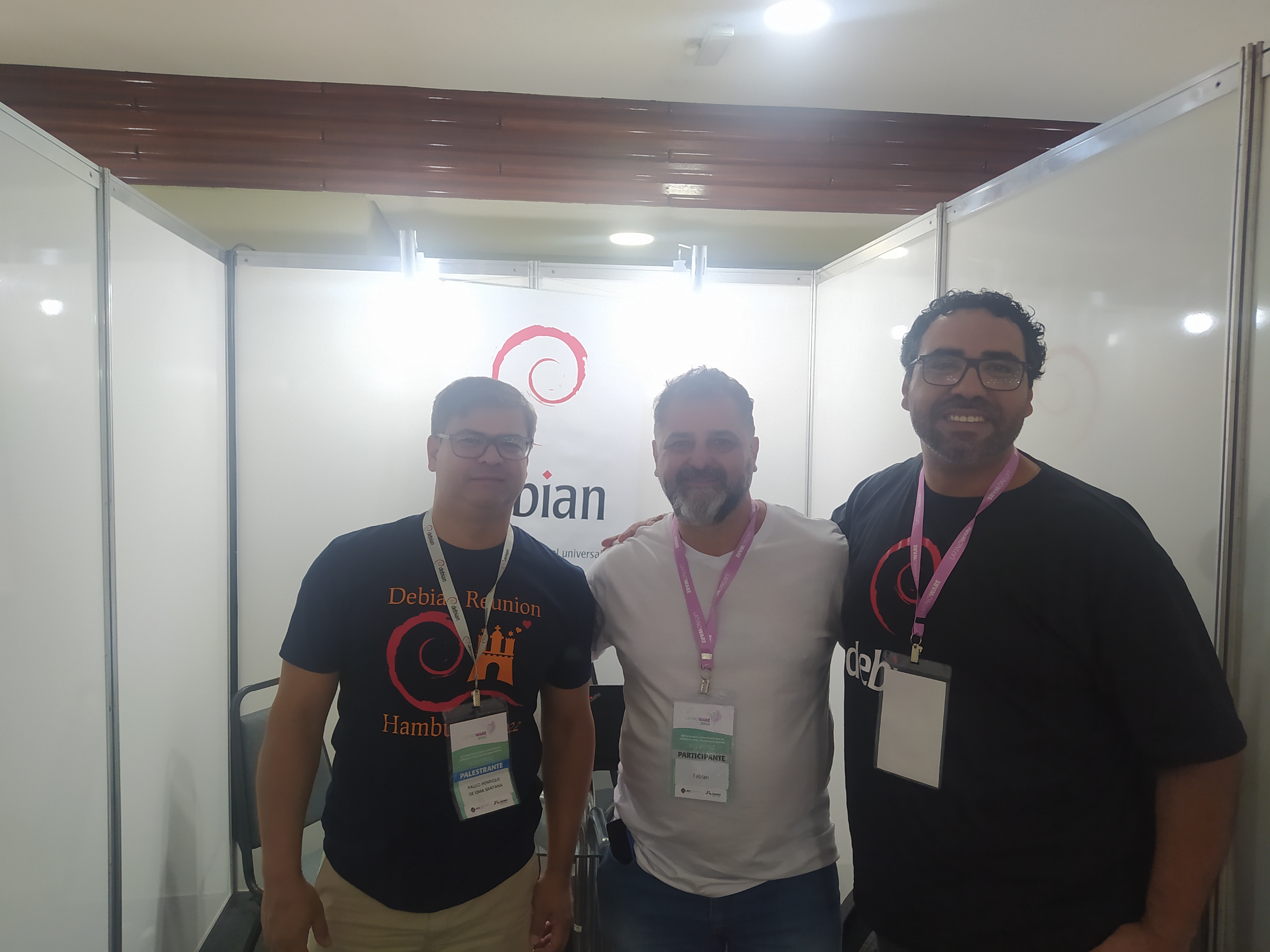
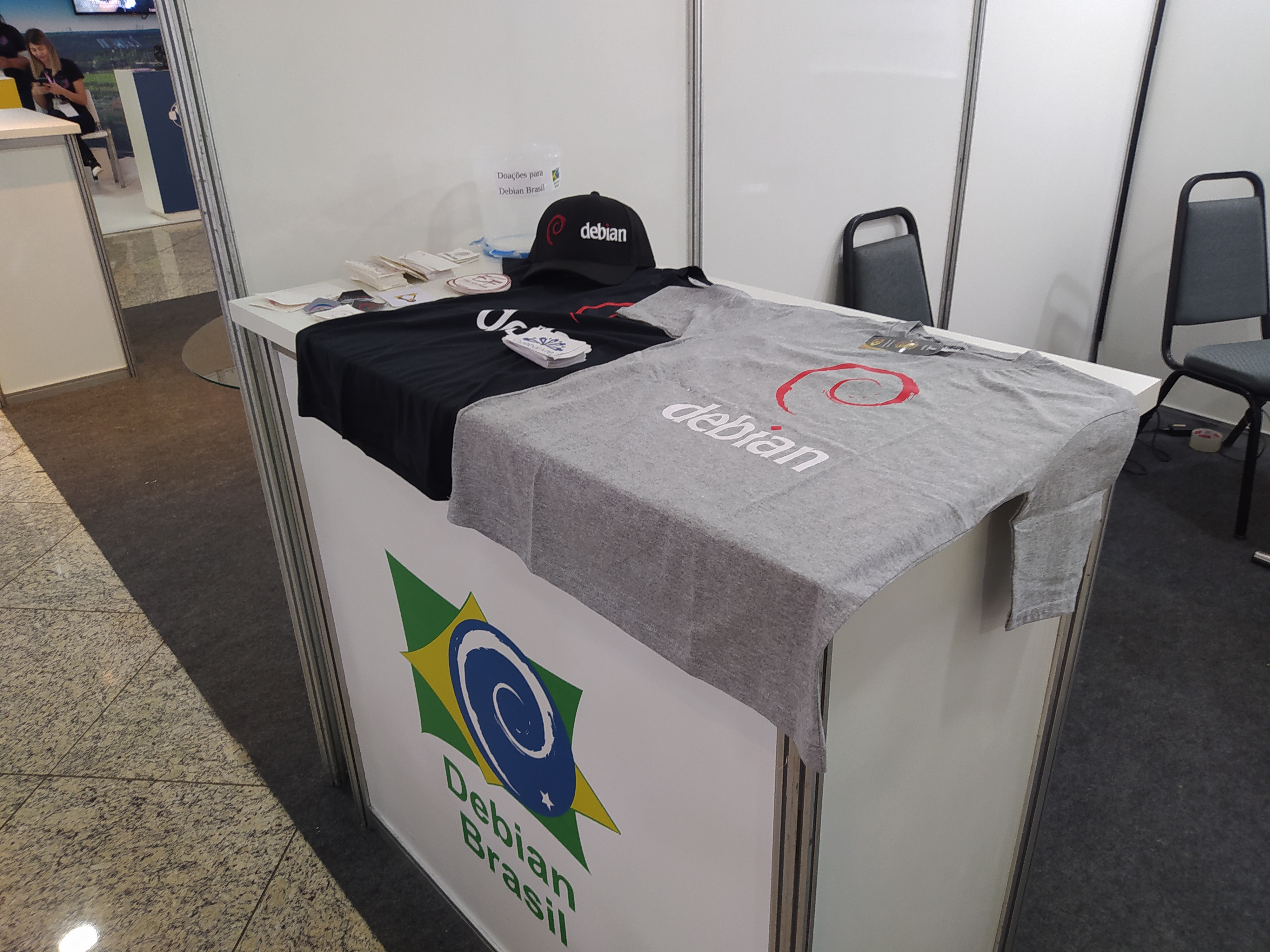
De 2 a 4 de novembro de 2022 aconteceu a 19 edi o do Latinoware - Congresso Latino-americano de Software Livre e Tecnologias Abertas, em Foz do Igua u. Ap s 2 anos acontecendo de forma online devido a pandemia do COVID-19, o evento voltou a ser presencial e sentimos que a comunidade Debian Brasil deveria estar presente. Nossa ltima participa o no Latinoware foi em 2016 A organiza o do Latinoware cedeu para a comunidade Debian Brasil um estande para que pud ssemos ter contato com as pessoas que visitavam a rea aberta de exposi es e assim divulgarmos o projeto Debian. Durante os 3 dias do evento, o estande foi organizado por mim (Paulo Henrique Santana) como Desenvolvedor Debian, e pelo Leonardo Rodrigues como contribuidor Debian. Infelizmente o Daniel Lenharo teve um imprevisto de ltima hora e n o pode ir para Foz do Igua u (sentimos sua falta l !). Latinoware 2022 estande 1 V rias pessoas visitaram o estande e aquelas mais iniciantes (principalmente estudantes) que n o conheciam o Debian, perguntavam do que se tratava o nosso grupo e a gente explicava v rios conceitos como o que Software Livre, distribui o GNU/Linux e o Debian propriamente dito. Tamb m recebemos pessoas da comunidade de Software Livre brasileira e de outros pa ses da Am rica Latina que j utilizavam uma distribui o GNU/Linux e claro, muitas pessoas que j utilizavam Debian. Tivemos algumas visitas especiais como do Jon maddog Hall, do Desenvolvedor Debian Emeritus Ot vio Salvador, do Desenvolvedor Debian Eriberto Mota, e dos Mantenedores Debian Guilherme de Paula Segundo e Paulo Kretcheu. Latinoware 2022 estande 4 Foto da esquerda pra direita: Leonardo, Paulo, Eriberto e Ot vio. Latinoware 2022 estande 5 Foto da esquerda pra direita: Paulo, Fabian (Argentina) e Leonardo. Al m de conversarmos bastante, distribu mos adesivos do Debian que foram produzidos alguns meses atr s com o patroc nio do Debian para serem distribu dos na DebConf22(e que haviam sobrado), e vendemos v rias camisetas do Debian produzidas pela comunidade Curitiba Livre. Latinoware 2022 estande 2 Latinoware 2022 estande 3 Tamb m tivemos 3 palestras inseridas na programa o oficial do Latinoware. Eu fiz as palestras: como tornar um(a) contribuidor(a) do Debian fazendo tradu es e como os SysAdmins de uma empresa global usam Debian . E o Leonardo fez a palestra: vantagens da telefonia Open Source nas empresas . Latinoware 2022 estande 6 Foto Paulo na palestra. Agradecemos a organiza o do Latinoware por receber mais uma vez a comunidade Debian e gentilmente ceder os espa os para a nossa participa o, e parabenizamos a todas as pessoas envolvidas na organiza o pelo sucesso desse importante evento para a nossa comunidade. Esperamos estar presentes novamente em 2023. Agracemos tamb m ao Jonathan Carter por aprovar o suporte financeiro do Debian para a nossa participa o no Latinoware. Vers o em ingl s

11 November 2022

Debian Brasil: Participa o da comunidade Debian no Latinoware 2022

De 2 a 4 de novembro de 2022 aconteceu a 19 edi o do Latinoware - Congresso Latino-americano de Software Livre e Tecnologias Abertas, em Foz do Igua u. Ap s 2 anos acontecendo de forma online devido a pandemia do COVID-19, o evento voltou a ser presencial e sentimos que a comunidade Debian Brasil deveria estar presente. Nossa ltima participa o no Latinoware foi em 2016 A organiza o do Latinoware cedeu para a comunidade Debian Brasil um estande para que pud ssemos ter contato com as pessoas que visitavam a rea aberta de exposi es e assim divulgarmos o projeto Debian. Durante os 3 dias do evento, o estande foi organizado por mim (Paulo Henrique Santana) como Desenvolvedor Debian, e pelo Leonardo Rodrigues como contribuidor Debian. Infelizmente o Daniel Lenharo teve um imprevisto de ltima hora e n o pode ir para Foz do Igua u (sentimos sua falta l !). Latinoware 2022 estande 1 V rias pessoas visitaram o estande e aquelas mais iniciantes (principalmente estudantes) que n o conheciam o Debian, perguntavam do que se tratava o nosso grupo e a gente explicava v rios conceitos como o que Software Livre, distribui o GNU/Linux e o Debian propriamente dito. Tamb m recebemos pessoas da comunidade de Software Livre brasileira e de outros pa ses da Am rica Latina que j utilizavam uma distribui o GNU/Linux e claro, muitas pessoas que j utilizavam Debian. Tivemos algumas visitas especiais como do Jon maddog Hall, do Desenvolvedor Debian Emeritus Ot vio Salvador, do Desenvolvedor Debian Eriberto Mota, e dos Mantenedores Debian Guilherme de Paula Segundo e Paulo Kretcheu. Latinoware 2022 estande 4 Foto da esquerda pra direita: Leonardo, Paulo, Eriberto e Ot vio. Latinoware 2022 estande 5 Foto da esquerda pra direita: Paulo, Fabian (Argentina) e Leonardo. Al m de conversarmos bastante, distribu mos adesivos do Debian que foram produzidos alguns meses atr s com o patroc nio do Debian para serem distribu dos na DebConf22(e que haviam sobrado), e vendemos v rias camisetas do Debian produzidas pela comunidade Curitiba Livre. Latinoware 2022 estande 2 Latinoware 2022 estande 3 Tamb m tivemos 3 palestras inseridas na programa o oficial do Latinoware. Eu fiz as palestras: como tornar um(a) contribuidor(a) do Debian fazendo tradu es e como os SysAdmins de uma empresa global usam Debian . E o Leonardo fez a palestra: vantagens da telefonia Open Source nas empresas . Latinoware 2022 estande 6 Foto Paulo na palestra. Agradecemos a organiza o do Latinoware por receber mais uma vez a comunidade Debian e gentilmente ceder os espa os para a nossa participa o, e parabenizamos a todas as pessoas envolvidas na organiza o pelo sucesso desse importante evento para a nossa comunidade. Esperamos estar presentes novamente em 2023. Agracemos tamb m ao Jonathan Carter por aprovar o suporte financeiro do Debian para a nossa participa o no Latinoware. Vers o em ingl s

9 November 2022

Debian Brasil: Brasileiros(as) Mantenedores(as) e Desenvolvedores(as) Debian a partir de julho de 2015

Desde de setembro de 2015, o time de publicidade do Projeto Debian passou a publicar a cada dois meses listas com os nomes dos(as) novos(as) Desenvolvedores(as) Debian (DD - do ingl s Debian Developer) e Mantenedores(as) Debian (DM - do ingl s Debian Maintainer). Estamos aproveitando estas listas para publicar abaixo os nomes dos(as) brasileiros(as) que se tornaram Desenvolvedores(as) e Mantenedores(as) Debian a partir de julho de 2015. Desenvolvedores(as) Debian / Debian Developers / DDs: Marcos Talau Fabio Augusto De Muzio Tobich Gabriel F. T. Gomes Thiago Andrade Marques M rcio de Souza Oliveira Paulo Henrique de Lima Santana Samuel Henrique S rgio Durigan J nior Daniel Lenharo de Souza Giovani Augusto Ferreira Adriano Rafael Gomes Breno Leit o Lucas Kanashiro Herbert Parentes Fortes Neto Mantenedores(as) Debian / Debian Maintainers / DMs: Guilherme de Paula Xavier Segundo David da Silva Polverari Paulo Roberto Alves de Oliveira Sergio Almeida Cipriano Junior Francisco Vilmar Cardoso Ruviaro William Grzybowski Tiago Ilieve
Observa es:
  1. Esta lista ser atualizada quando o time de publicidade do Debian publicar novas listas com DMs e DDs e tiver brasileiros.
  2. Para ver a lista completa de Mantenedores(as) e Desenvolvedores(as) Debian, inclusive outros(as) brasileiros(as) antes de julho de 2015 acesse: https://nm.debian.org/public/people

13 September 2022

Alberto Garc a: Adding software to the Steam Deck with systemd-sysext

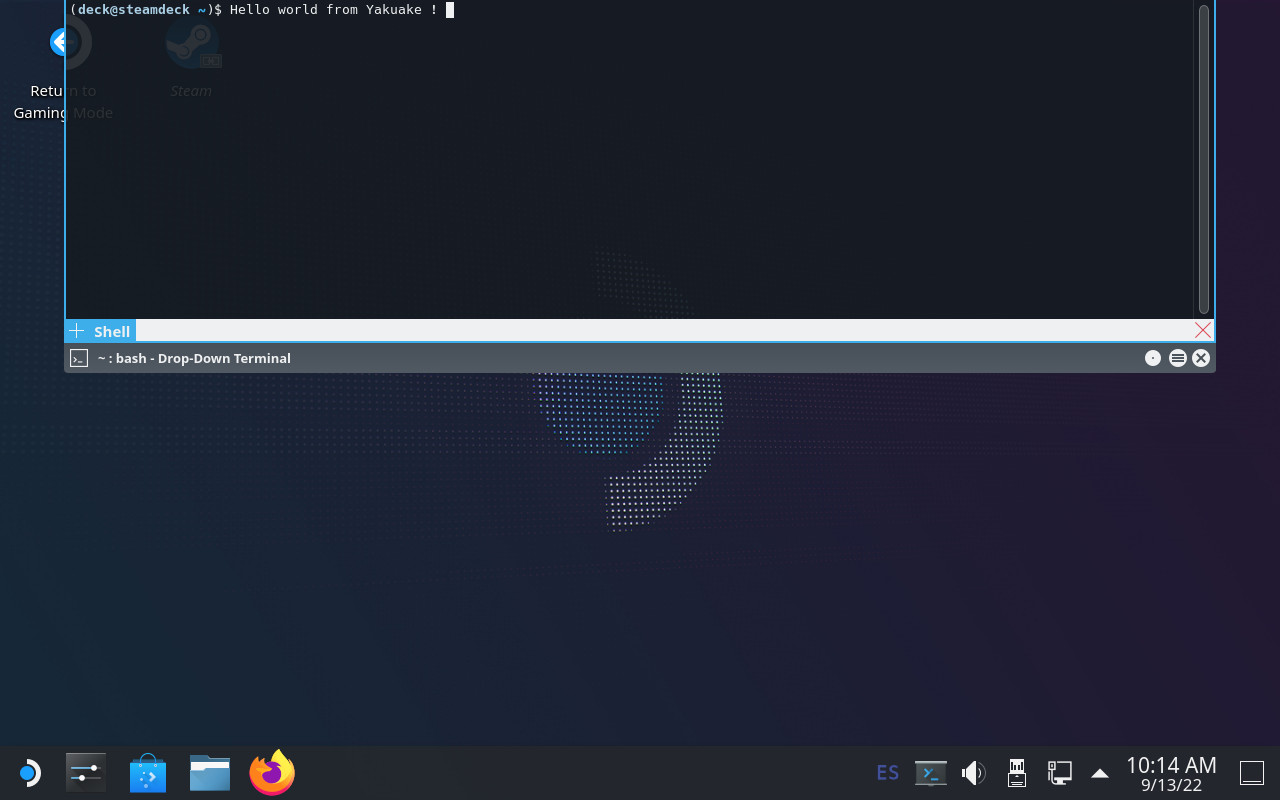
Yakuake on SteamOS Introduction: an immutable OS The Steam Deck runs SteamOS, a single-user operating system based on Arch Linux. Although derived from a standard package-based distro, the OS in the Steam Deck is immutable and system updates replace the contents of the root filesystem atomically instead of using the package manager. An immutable OS makes the system more stable and its updates less error-prone, but users cannot install additional packages to add more software. This is not a problem for most users since they are only going to run Steam and its games (which are stored in the home partition). Nevertheless, the OS also has a desktop mode which provides a standard Linux desktop experience, and here it makes sense to be able to install more software. How to do that though? It is possible for the user to become root, make the root filesytem read-write and install additional software there, but any changes will be gone after the next OS update. Modifying the rootfs can also be dangerous if the user is not careful. Ways to add additional software The simplest and safest way to install additional software is with Flatpak, and that s the method recommended in the Steam Deck Desktop FAQ. Flatpak is already installed and integrated in the system via the Discover app so I won t go into more details here. However, while Flatpak works great for desktop applications not every piece of software is currently available, and Flatpak is also not designed for other types of programs like system services or command-line tools. Fortunately there are several ways to add software to the Steam Deck without touching the root filesystem, each one with different pros and cons. I will probably talk about some of them in the future, but in this post I m going to focus on one that is already available in the system: systemd-sysext. About systemd-sysext This is a tool included in recent versions of systemd and it is designed to add additional files (in the form of system extensions) to an otherwise immutable root filesystem. Each one of these extensions contains a set of files. When extensions are enabled (aka merged ) those files will appear on the root filesystem using overlayfs. From then on the user can open and run them normally as if they had been installed with a package manager. Merged extensions are seamlessly integrated with the rest of the OS. Since extensions are just collections of files they can be used to add new applications but also other things like system services, development tools, language packs, etc. Creating an extension: yakuake I m using yakuake as an example for this tutorial since the extension is very easy to create, it is an application that some users are demanding and is not easy to distribute with Flatpak. So let s create a yakuake extension. Here are the steps: 1) Create a directory and unpack the files there:
$ mkdir yakuake
$ wget https://steamdeck-packages.steamos.cloud/archlinux-mirror/extra/os/x86_64/yakuake-21.12.1-1-x86_64.pkg.tar.zst
$ tar -C yakuake -xaf yakuake-*.tar.zst usr
2) Create a file called extension-release.NAME under usr/lib/extension-release.d with the fields ID and VERSION_ID taken from the Steam Deck s /etc/os-release file.
$ mkdir -p yakuake/usr/lib/extension-release.d/
$ echo ID=steamos > yakuake/usr/lib/extension-release.d/extension-release.yakuake
$ echo VERSION_ID=3.3.1 >> yakuake/usr/lib/extension-release.d/extension-release.yakuake
3) Create an image file with the contents of the extension:
$ mksquashfs yakuake yakuake.raw
That s it! The extension is ready. A couple of important things: image files must have the .raw suffix and, despite the name, they can contain any filesystem that the OS can mount. In this example I used SquashFS but other alternatives like EroFS or ext4 are equally valid. NOTE: systemd-sysext can also use extensions from plain directories (i.e skipping the mksquashfs part). Unfortunately we cannot use them in our case because overlayfs does not work with the casefold feature that is enabled on the Steam Deck. Using the extension Once the extension is created you simply need to copy it to a place where systemd-systext can find it. There are several places where they can be installed (see the manual for a list) but due to the Deck s partition layout and the potentially large size of some extensions it probably makes more sense to store them in the home partition and create a link from one of the supported locations (/var/lib/extensions in this example):
(deck@steamdeck ~)$ mkdir extensions
(deck@steamdeck ~)$ scp user@host:/path/to/yakuake.raw extensions/
(deck@steamdeck ~)$ sudo ln -s $PWD/extensions /var/lib/extensions
Once the extension is installed in that directory you only need to enable and start systemd-sysext:
(deck@steamdeck ~)$ sudo systemctl enable systemd-sysext
(deck@steamdeck ~)$ sudo systemctl start systemd-sysext
After this, if everything went fine you should be able to see (and run) /usr/bin/yakuake. The files should remain there from now on, also if you reboot the device. You can see what extensions are enabled with this command:
$ systemd-sysext status
HIERARCHY EXTENSIONS SINCE
/opt      none       -
/usr      yakuake    Tue 2022-09-13 18:21:53 CEST
If you add or remove extensions from the directory then a simple systemd-sysext refresh is enough to apply the changes. Unfortunately, and unlike distro packages, extensions don t have any kind of post-installation hooks or triggers, so in the case of Yakuake you probably won t see an entry in the KDE application menu immediately after enabling the extension. You can solve that by running kbuildsycoca5 once from the command line. Limitations and caveats Using systemd extensions is generally very easy but there are some things that you need to take into account:
  1. Using extensions is easy (you put them in the directory and voil !). However, creating extensions is not necessarily always easy. To begin with, any libraries, files, etc., that your extensions may need should be either present in the root filesystem or provided by the extension itself. You may need to combine files from different sources or packages into a single extension, or compile them yourself.
  2. In particular, if the extension contains binaries they should probably come from the Steam Deck repository or they should be built to work with those packages. If you need to build your own binaries then having a SteamOS virtual machine can be handy. There you can install all development files and also test that everything works as expected. One could also create a Steam Deck SDK extension with all the necessary files to develop directly on the Deck
  3. Extensions are not distribution packages, they don t have dependency information and therefore they should be self-contained. They also lack triggers and other features available in packages. For desktop applications I still recommend using a system like Flatpak when possible.
  4. Extensions are tied to a particular version of the OS and, as explained above, the ID and VERSION_ID of each extension must match the values from /etc/os-release. If the fields don t match then the extension will be ignored. This is to be expected because there s no guarantee that a particular extension is going to work with a different version of the OS. This can happen after a system update. In the best case one simply needs to update the extension s VERSION_ID, but in some cases it might be necessary to create the extension again with different/updated files.
  5. Extensions only install files in /usr and /opt. Any other file in the image will be ignored. This can be a problem if a particular piece of software needs files in other directories.
  6. When extensions are enabled the /usr and /opt directories become read-only because they are now part of an overlayfs. They will remain read-only even if you run steamos-readonly disable !!. If you really want to make the rootfs read-write you need to disable the extensions (systemd-sysext unmerge) first.
  7. Unlike Flatpak or Podman (including toolbox / distrobox), this is (by design) not meant to isolate the contents of the extension from the rest of the system, so you should be careful with what you re installing. On the other hand, this lack of isolation makes systemd-sysext better suited to some use cases than those container-based systems.
Conclusion systemd extensions are an easy way to add software (or data files) to the immutable OS of the Steam Deck in a way that is seamlessly integrated with the rest of the system. Creating them can be more or less easy depending on the case, but using them is extremely simple. Extensions are not packages, and systemd-sysext is not a package manager or a general-purpose tool to solve all problems, but if you are aware of its limitations it can be a practical tool. It is also possible to share extensions with other users, but here the usual warning against installing binaries from untrusted sources applies. Use with caution, and enjoy!

5 July 2022

Alberto Garc a: Running the Steam Deck s OS in a virtual machine using QEMU

SteamOS desktop Introduction The Steam Deck is a handheld gaming computer that runs a Linux-based operating system called SteamOS. The machine comes with SteamOS 3 (code name holo ), which is in turn based on Arch Linux. Although there is no SteamOS 3 installer for a generic PC (yet), it is very easy to install on a virtual machine using QEMU. This post explains how to do it. The goal of this VM is not to play games (you can already install Steam on your computer after all) but to use SteamOS in desktop mode. The Gamescope mode (the console-like interface you normally see when you use the machine) requires additional development to make it work with QEMU and will not work with these instructions. A SteamOS VM can be useful for debugging, development, and generally playing and tinkering with the OS without risking breaking the Steam Deck. Running the SteamOS desktop in a virtual machine only requires QEMU and the OVMF UEFI firmware and should work in any relatively recent distribution. In this post I m using QEMU directly, but you can also use virt-manager or some other tool if you prefer, we re emulating a standard x86_64 machine here. General concepts SteamOS is a single-user operating system and it uses an A/B partition scheme, which means that there are two sets of partitions and two copies of the operating system. The root filesystem is read-only and system updates happen on the partition set that is not active. This allows for safer updates, among other things. There is one single /home partition, shared by both partition sets. It contains the games, user files, and anything that the user wants to install there. Although the user can trivially become root, make the root filesystem read-write and install or change anything (the pacman package manager is available), this is not recommended because A simple way for the user to install additional software that survives OS updates and doesn t touch the root filesystem is Flatpak. It comes preinstalled with the OS and is integrated with the KDE Discover app. Preparing all necessary files The first thing that we need is the installer. For that we have to download the Steam Deck recovery image from here: https://store.steampowered.com/steamos/download/?ver=steamdeck&snr= Once the file has been downloaded, we can uncompress it and we ll get a raw disk image called steamdeck-recovery-4.img (the number may vary). Note that the recovery image is already SteamOS (just not the most up-to-date version). If you simply want to have a quick look you can play a bit with it and skip the installation step. In this case I recommend that you extend the image before using it, for example with truncate -s 64G steamdeck-recovery-4.img or, better, create a qcow2 overlay file and leave the original raw image unmodified: qemu-img create -f qcow2 -F raw -b steamdeck-recovery-4.img steamdeck-recovery-extended.qcow2 64G But here we want to perform the actual installation, so we need a destination image. Let s create one: $ qemu-img create -f qcow2 steamos.qcow2 64G Installing SteamOS Now that we have all files we can start the virtual machine:
$ qemu-system-x86_64 -enable-kvm -smp cores=4 -m 8G \
    -device usb-ehci -device usb-tablet \
    -device intel-hda -device hda-duplex \
    -device VGA,xres=1280,yres=800 \
    -drive if=pflash,format=raw,readonly=on,file=/usr/share/ovmf/OVMF.fd \
    -drive if=virtio,file=steamdeck-recovery-4.img,driver=raw \
    -device nvme,drive=drive0,serial=badbeef \
    -drive if=none,id=drive0,file=steamos.qcow2
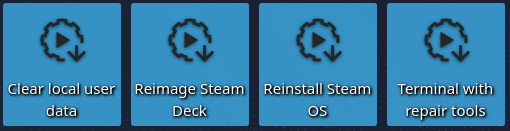
Note that we re emulating an NVMe drive for steamos.qcow2 because that s what the installer script expects. This is not strictly necessary but it makes things a bit easier. If you don t want to do that you ll have to edit ~/tools/repair_device.sh and change DISK and DISK_SUFFIX. SteamOS installer shortcuts Once the system has booted we ll see a KDE Plasma session with a few tools on the desktop. If we select Reimage Steam Deck and click Proceed on the confirmation dialog then SteamOS will be installed on the destination drive. This process should not take a long time. Now, once the operation finishes a new confirmation dialog will ask if we want to reboot the Steam Deck, but here we have to choose Cancel . We cannot use the new image yet because it would try to boot into the Gamescope session, which won t work, so we need to change the default desktop session. SteamOS comes with a helper script that allows us to enter a chroot after automatically mounting all SteamOS partitions, so let s open a Konsole and make the Plasma session the default one in both partition sets:
$ sudo steamos-chroot --disk /dev/nvme0n1 --partset A
# steamos-readonly disable
# echo '[Autologin]' > /etc/sddm.conf.d/zz-steamos-autologin.conf
# echo 'Session=plasma.desktop' >> /etc/sddm.conf.d/zz-steamos-autologin.conf
# steamos-readonly enable
# exit
$ sudo steamos-chroot --disk /dev/nvme0n1 --partset B
# steamos-readonly disable
# echo '[Autologin]' > /etc/sddm.conf.d/zz-steamos-autologin.conf
# echo 'Session=plasma.desktop' >> /etc/sddm.conf.d/zz-steamos-autologin.conf
# steamos-readonly enable
# exit
After this we can shut down the virtual machine. Our new SteamOS drive is ready to be used. We can discard the recovery image now if we want. Booting SteamOS and first steps To boot SteamOS we can use a QEMU line similar to the one used during the installation. This time we re not emulating an NVMe drive because it s no longer necessary.
$ cp /usr/share/OVMF/OVMF_VARS.fd .
$ qemu-system-x86_64 -enable-kvm -smp cores=4 -m 8G \
   -device usb-ehci -device usb-tablet \
   -device intel-hda -device hda-duplex \
   -device VGA,xres=1280,yres=800 \
   -drive if=pflash,format=raw,readonly=on,file=/usr/share/ovmf/OVMF.fd \
   -drive if=pflash,format=raw,file=OVMF_VARS.fd \
   -drive if=virtio,file=steamos.qcow2 \
   -device virtio-net-pci,netdev=net0 \
   -netdev user,id=net0,hostfwd=tcp::2222-:22
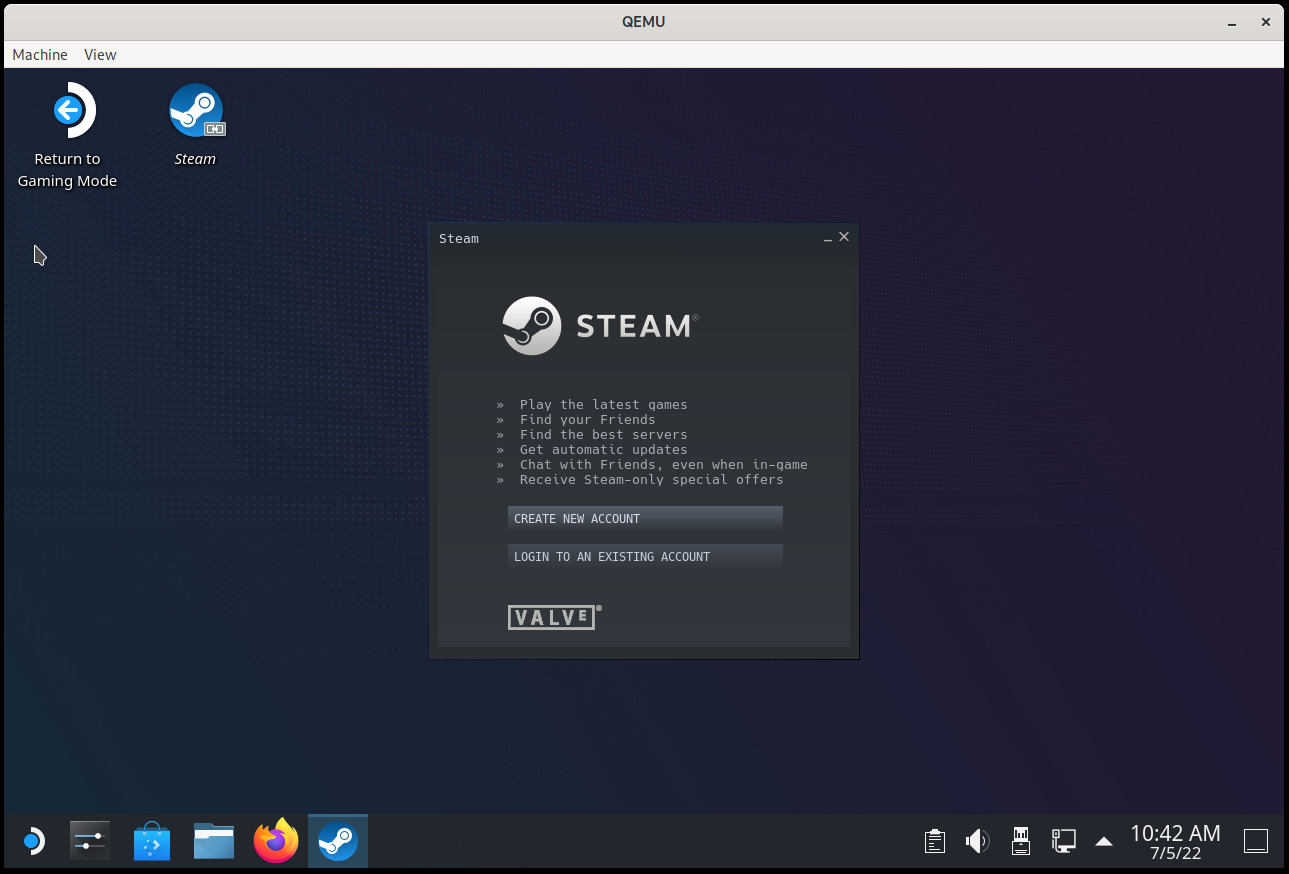
(the last two lines redirect tcp port 2222 to port 22 of the guest to be able to SSH into the VM. If you don t want to do that you can omit them) If everything went fine, you should see KDE Plasma again, this time with a desktop icon to launch Steam and another one to Return to Gaming Mode (which we should not use because it won t work). See the screenshot that opens this post. Congratulations, you re running SteamOS now. Here are some things that you probably want to do: Updating the OS to the latest version The Steam Deck recovery image doesn t install the most recent version of SteamOS, so now we should probably do a software update. Note: if the last step fails after reaching 100% with a post-install handler error then go to Connections in the system settings, rename Wired Connection 1 to something else (anything, the name doesn t matter), click Apply and run steamos-update again. This works around a bug in the update process. Recent images fix this and this workaround is not necessary with them. As we did with the recovery image, before rebooting we should ensure that the new update boots into the Plasma session, otherwise it won t work:
$ sudo steamos-chroot --partset other
# steamos-readonly disable
# echo '[Autologin]' > /etc/sddm.conf.d/zz-steamos-autologin.conf
# echo 'Session=plasma.desktop' >> /etc/sddm.conf.d/zz-steamos-autologin.conf
# steamos-readonly enable
# exit
After this we can restart the system. If everything went fine we should be running the latest SteamOS release. Enjoy! Reporting bugs SteamOS is under active development. If you find problems or want to request improvements please go to the SteamOS community tracker. Edit 06 Jul 2022: Small fixes, mention how to install the OS without using NVMe.

30 August 2021

Russell Coker: Links August 2021

Sciencealert has an interesting article on a game to combat misinformation by microdosing people [1]. The game seemed overly simplistic to me, but I guess I m not the target demographic. Research shows it to work. Vice has an interesting and amusing article about mass walkouts of underpaid staff in the US [2]. The way that corporations are fighting an increase in the minimum wage doesn t seem financially beneficial for them. An increase in the minimum wage means small companies have to increase salaries too and the ratio of revenue to payroll is probably worse for small companies. It seems that companies like McDonalds make oppressing their workers a higher priority than making a profit. Interesting article in Vice about how the company Shot Spotter (which determines the locations of gunshots by sound) forges evidence for US police [3]. All convictions based on Shot Spotter evidence should be declared mistrials. BitsNBites has an interesting article on the fundamental flaws of SIMD (Single Instruction Multiple Data) [4]. The Daily Dot has a disturbing article anbout the possible future of the QAnon movement [5]. Let s hope they become too busy fighting each other to hurt many innocent people. Ben Taylor wrote an interesting blog post suggesting that Web Assembly should be a default binary target [6]. I don t support that idea but I think that considering it is useful. Web assembly could be used more for non-web things and it would be a better option than Node.js for some things. There are also some interesting corner cases like games, Minecraft was written in Java and there s no reason that Web Assembly couldn t do the same things. Vice has an interesting article about the Phantom encrypted phone service that ran on Blackberry handsets [7]. Australia really needs legislation based on the US RICO law! Vice has an interesting article about an encrypted phone company run by drug dealers [8]. Apparently after making an encrypted phone system for their own use they decided to sell it to others and made millions of dollars. They could have run a successful legal business. Salon has an insightful interview with Michael Petersen about his research on fake news and people who share it because they need chaos [9]. Apparently low status people who are status seeking are a main contributor to this, they share fake news knowingly to spread chaos. A society with less inequality would have less problems with fake news. Salon has another insightful interview with Michael Petersen, about is later research on fake news as an evolutionary strategy [10]. People knowingly share fake news to mobilise their supporters and to signal allegiance to their group. The more bizarre the beliefs are the more strongly they signal allegiance. If an opposing group has a belief then they can show support for their group by having the opposite belief (EG by opposing vaccination if the other political side supports doctors). He also suggests that lying can be a way of establishing dominance, the more honest people are opposed by a lie the more dominant the liar may seem. Vice has an amusing article about how police took over the Encrochat encrypted phone network that was mostly used by criminals [11]. It s amusing to read of criminals getting taken down like this. It s also interesting to note that the authorities messed up by breaking the wipe facility which alerted the criminals that their security was compromised. The investigation could have continued for longer if they hadn t changed the functionality of compromised phones. A later vice article mentioned that the malware installed on Encrochat devices recorded MAC addresses of Wifi access points which was used to locate the phones even though they had the GPS hardware removed. Cory Doctorow wrote an insightful article for Locus about the insufficient necessity of interoperability [12]. The problem if monopolies is not just an inability to interoperate with other services or leave it s losing control over your life. A few cartel participants interoperating will be able to do all the bad things to us tha a single monopolist could do.

13 March 2021

Dima Kogan: Making the Supernova E3 tail light brighter

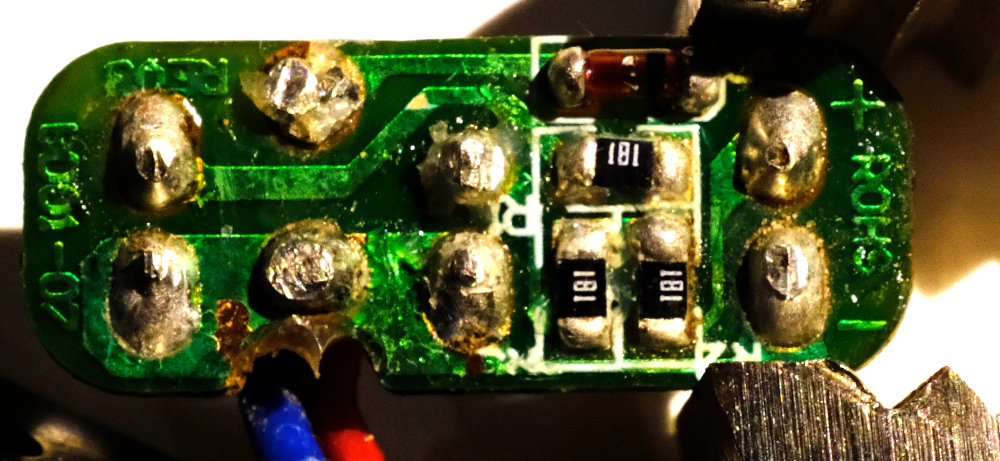
I got a dynamo hub for my bike and a fancy headlight. It's sweet, but I'm discovering that there're no standards for making tail lights work, so I just had to do some light reverse-engineering and soldering. And this is the findings. Different manufacturers do tail lights differently. Most tail lights are not connected directly to the dynamo, but to the headlight instead. Busch+M ller tail lights take an AC signal that looks very similar to what the hub is producing. You're not supposed to hook it up to the hub directly, but it does appear to work, and it's not clear how the headlight's tail-light output is different from the hub input. I haven't scoped it. Supernova tail lights work differently. Some guy on the internet reverse-engineered the headlight circuit showing an LM317 regulator producing 5.9V for the tail light. I have a Supernova E3 tail light (original one; model E161). The case says "6V", which is close to the 5.9V they give it. It wants its 6V, but I don't have a Supernova headlight, so I don't have 6V to give it. I do have a USB charger, so I have 5V instead. Giving it 5V does appear to work, but that results in less brightness than I would like. Presumably the voltage difference is to blame? I took apart the tail light. The circuitry is encased in hot glue. Scraping that off, we can see the action:
before.jpg
The circuit looks like this:
e3.svg
More or less, this is as expected. The circuit was designed to receive 6V, so the resistances (180 ohms) were selected to produce a certain amount of current. Given 5V, there's less current and less brightness. I can fix this by reducing the amount of resistance to bring the current levels up. I hooked up a power supply to produce 5V and 5.9V, and I measured the voltages in the circuit in those two states. Assume little accuracy in all of this
5V 5.9V
V across input diode 0.8V 0.8V
V across the resistors 2.37V 3.25V
V across the LEDs 1.83V 1.85V
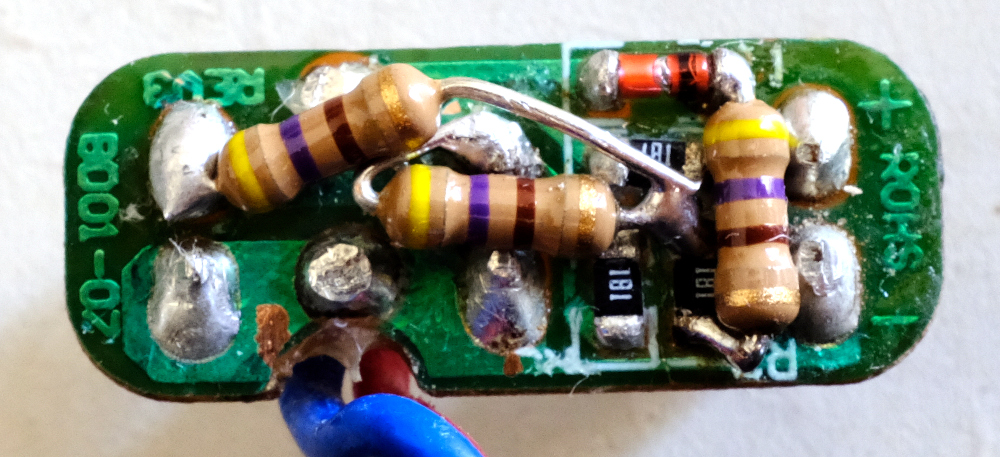
As expected, the voltages across the diodes are stable, and the resistors see the bulk of the voltage difference. The circuit designers wanted 3.25/180 ~ 18mA. With my reduced voltage I was getting 2.37/180 ~ 13mA instead. So I was 28% less bright than I should have been. That doesn't sound like a lot, but it's hard to tell by just looking at the thing. In any case, I can reduce the resistances to get the higher current at 5V: I want a resistance R of 180/3.25*2.37 ~ 131 ohms. In the interest of doing less work, I simply added more resistors in parallel instead of replacing the existing ones. So I need to add in parallel a resistance R such that 180R/(180+R) = 131. So I want a parallel R ~ 485 ohms. Looking through my box of parts, I don't have any nice surface-mount resistors with anywhere near the right resistance. But I do have through-hole ones at 470 ohms. Close-enough. I did some soldering gymnastics:
after.jpg
And I'm done. Haven't done any night rides outside yet with this setup, but in theory this should be bright-enough. And since the resistors are just burning off the excess voltage, and I'm giving it less voltage to burn off, I'm being more efficient than I would have been with 6V and the stock resistors.

4 June 2020

Gunnar Wolf: Tor from Telmex. When I say achievement unlocked , I mean it!

### The blockade has ended! For some introduction.. Back in 2016, Telmex Mexico's foremost communications provider and, through the brands grouped under the *Am rica M vil* brand, one of Latin America's most important ISPs set up rules to block connecitons to (at least) seven of Tor's *directory authorities* (*DirAuths*). We believe they might have blocked all of them, in an attempt to block connections from Tor from anywhere in their networks, but Tor is much more resourceful than that so, the measure was not too effective. Only... _Some_ blocking did hurt Telmex's users: The ability to play an active role in Tor. The ability to host Tor relays at home. Why? Because the *consensus protocol* requires relays to be reachable in order to be measured from the network's *DirAuths*. ### Technical work to prove the blocking We dug into the issue as part of the work we carried out in the project I was happy to lead between 2018 and 2019, *UNAM/DGAPA/PAPIME PE102718*. In March 2019, I presented a paper titled [Distributed Detection of Tor Directory Authorities Censorship in Mexico](https://www.thinkmind.org/index.php?view=article&articleid=icn_2019_6_20_38010) ([alternative download](http://ru.iiec.unam.mx/4538/) in the [Topic on Internet Censorship and Surveillance (TICS) track](https://tics.site/) of the XVIII International Conference on Networks. Then... We had many talks inside our group, but nothing seemed to move for several months. We did successfully push for increasing the number of Tor relays in Mexico (we managed to go from two to eleven stable relays not much in absolute terms, but quite good relatively, even more considering most users were not technically able to run one!) Jacobo N jera, journalist participant of our project, didn't leave things there just lying around waiting magically for justice to happen. Together with Vasilis Ververis, from the [Magma Project](https://magma.lavafeld.org/), they presented some weeks ago a [Case study: Tor Directory Authorities Censorship in Mexico](https://magma.lavafeld.org/guide/data-analysis.html#case-study-tor-directory-authorities-censorship-in-mexico). ### Pushing to action But a good part of being a journalist is knowing _how_ and _when_ to spread the word. Having already two technical studies showing the blocking in place, Jacobo presented his findings with [an article in GlobalVoices: *The largest telecommunications operator in Mexico blocks the secure network*](https://es.globalvoices.org/2020/05/28/en-mexico-el-mas-grande-operador-de-telecomunicaciones-bloquea-la-internet-segura/). Surprisingly (to me, at least), this story was picked up by a major Mexican newspaper: The same evening the story hit GlobalVoices, [Rodrigo Riquelme](https://www.eleconomista.com.mx/autor/rriquelme) posted an article, in the Technology section of *El Economista*, titled [Telmex blocks seven out of ten accesses to the Tor network in Mexico](https://www.eleconomista.com.mx/tecnologia/Telmex-bloquea-siete-de-10-accesos-a-la-red-Tor-en-Mexico-20200528-0078.html). And that very same day, Telmex sent a reply I am translating in full (that is now included at the end of Riquelme's article): > Mexico City, May 28, 2020 > > In relation to Tor navigation from TELMEX's network, the company > informs: > > In TELMEX, we are committed to the full respect to navigation > freedom for all of our users. > > TELMEX practices no application-level blocking policies; the Tor > application, as well as the rest of Internet applications, can be > freely accessed from our network. > > In order to protect the Internauts' information, the seven refered > nodes were in their time reported because they were associated with > the distribution of the WannaCry ransomware, which is the reason > they were filtered, but this does not hamper the use of the Tor > application. ### So we got an answer...? Jacobo knew we had to take advantage of this answer, and act fast! He entered rush-writing mode and, with the help of our good friend and lawyer Salvador Alc ntar, we wrote [a short letter to Renato Flores Cartas, Corporative Communication of Am rica M vil](https://internetanonima.net/respuesta-a-telmex-sobre-la-red-tor-en-mexico/), and sent it on June 1st. Next thing I know, this evening Jacobo was asking me if I could confirm the blocking was lifted. What I could not believe it! But, yes Today Jacobo published the confirmation that [the seven blocked IP routes were finally reachable again from ASN 8151 (UNINET / Telmex / Am rica M vil)!](https://internetanonima.net/confirmamos-desbloqueo-de-las-7-direcciones-de-la-red-tor-por-telmex/) Of course, this story was picked up again by El Economista [Telmex unblocks IP addresses for the Tor network's directory authority server IPs in Mexico](https://www.eleconomista.com.mx/tecnologia/Telmex-desbloquea-direcciones-IP-de-servidores-de-autoridad-de-la-red-Tor-en-Mexico-20200604-0094.html). ### Wrapping up How can I put this in words? I am very, very, very, *very, very, very*, **very, very, very** happy we managed to see this through! Although we have been pushing for increasing the usage of Tor among users at risk in Mexico Being a journalist, defending human rights, are still a high-risk profession in my country. We strongly believe in this, and will continue trying to raise awareness of the usage. But, just as with free software, *using* network anonymization tools is not all. We need more people to become active, to become engaged, to *become active participants* in anonymization. As the adage says, *anonymity loves company* In order to build strong, sufficient anonymization capability for everybody that needs it, we need more people to *provide relay services*. And this is a *huge* step to improve Mexico's participation in the Tor network! --- Image credits: [*Seeing My World Through a Keyhole*, by Kate Ter Haar](https://www.flickr.com/photos/katerha/4592429363) (CC-BY); [Tor logo (Wikimedia Commons)](https://commons.wikimedia.org/wiki/File:Tor-logo-2011-flat.svg)

6 April 2020

Joachim Breitner: A Telegram bot in Haskell on Amazon Lambda

I just had a weekend full of very successful serious geekery. On a whim I thought: Wouldn't it be nice if people could interact with my game Kaleidogen also via a telegram bot? This led me to learn about how I write a Telegram bot in Haskell and how I can deploy such a Haskell program to Amazon Lambda. In particular the latter bit might be interesting to some of my readers, so here is how went about it.

Kaleidogen Kaleidogen is a little contemplative game (or toy game where, starting from just unicolored disks, you combine abstract circular patterns to breed more interesting patterns. See my FARM 2019 talk for more details, or check out the source repository. BTW, I am looking for help turning it into an Android app!
KaleidogenBot in action

KaleidogenBot in action

Amazon Lambda Amazon Lambda is the Function as a service offering of Amazon Web Services. The idea is that you don t rent a server, where you have to deal with managing the whole system and that you are paying for constantly, but you just upload the code that responds to outside requests, and AWS takes care of the rest: Starting and stopping instances, providing a secure base system etc. When nobody is using the service, no cost occurs. This sounds ideal for hosting a toy Telegram bot: Most of the time nobody will be using it, and I really don't want to have to baby sit yet another service on my server. On Amazon Lambda, I can probably just forget about it. But Haskell is not one of the officially supported languages on Amazon Lambda. So to run Haskell on Lambda, one has to solve two problems:
  • how to invoke the Haskell code on the server, and
  • how to build Haskell so that it runs on the Amazon Linux distribution

A Haskell runtime for Lambda For the first we need a custom runtime. While this sounds complicated, it is actually a pretty simple concept: A runtime is an executable called bootstrap that queries the Lambda Runtime Interface for the next request to handle. The Lambda documentation is phrased as if this runtime has to be a dispatcher that calls the separate function s handler. But it could just do all the things directly. I found the Haskell package aws-lambda-haskell-runtime which provides precisely that: A function
runLambda :: (LambdaOptions -> IO (Either String LambdaResult)) -> IO ()
that talks to the Lambda Runtime API and invokes its argument on each message. The package also provides Template Haskell magic to collect handlers of any JSON-able type and generates a dispatcher, like you might expect from other, more dynamic languages. But that was too much magic for me, so I ignored that and just wrote the handler manually:
main :: IO ()
main = runLambda run
  where
   run ::  LambdaOptions -> IO (Either String LambdaResult)
   run opts = do
    result <- handler (decodeObj (eventObject opts)) (decodeObj (contextObject opts))
    either (pure . Left . encodeObj) (pure . Right . LambdaResult . encodeObj) result
data Event = Event
    path :: T.Text
  , body :: Maybe T.Text
    deriving (Generic, FromJSON)
data Response = Response
    statusCode :: Int
  , headers :: Value
  , body :: T.Text
  , isBase64Encoded :: Bool
    deriving (Generic, ToJSON)
handler :: Event -> Context -> IO (Either String Response)
handler Event body, path  context =
 
I expose my Lambda function to the world via Amazon s API Gateway, configured to just proxy the HTTP requests. This means that my code receives a JSON data structure describing the HTTP request (here called Event, listing only the fields I care about), and it will respond with a Response, again as JSON. The handler can then simply pattern-match on the path to decide what to do. For example this code handles URLs like /img/CAFFEEFACE.png, and responds with an image.
handler :: TC -> Event -> Context -> IO (Either String Response)
handler Event body, path  context
      Just bytes <- isImgPath path >>= T.decodeHex = do
        let pngData = genPurePNG bytes
        pure $ Right Response
              statusCode = 200
            , headers = object [ "Content-Type" .= ("image/png" :: String) ]
            , isBase64Encoded = True
            , body = T.decodeUtf8 $ LBS.toStrict $ Base64.encode pngData
             
     
isImgPath :: T.Text -> Maybe T.Text
isImgPath  = T.stripPrefix "/img/" >=> T.stripSuffix ".png"
If this program would grow more, then one should probably use something more structured for routing here; maybe servant, or bridging towards wai apps (amost like wai-lamda, but that still assumes an existing runtime, instead of simply being the runtime). But for my purposes, no extra layers of indirection or abstraction are needed!

Deploying Haskell to Lambda Building Haskell locally and deploying to different machiens is notoriously tricky; you often end up depending on a shared library that is not available on the other platform. The aws-lambda-haskell-runtime package, and similar projects like serverless-haskell, solve this using stack and Docker two technologies that are probably great, but I never warmed up to them. So instead adding layers and complexities, can I solve this instead my making things simpler? If I compiler my bootstrap into a static Linux binary, it should run on any Linux, including Amazon Linux. Unfortunately, building Haskell programs statically is also notoriously tricky. But it is made much simpler by the work of Niklas Hamb chen and others in the context of the Nix package manager, coordinated in the static-haskell-nix project. The promise here is that once you have set up building your project with Nix, then getting a static version is just one flag away. The support is not completely upstreamed into nixpkgs proper yet, but their repository has a nix file that contains a nixpkgs set with their patches:
let pkgs = (import (sources.nixpkgs-static + "/survey/default.nix")  ).pkgs; in
This, plus a fairly standard nix setup to build the package, yields what I was hoping for:
$ nix-build -A kaleidogen
/nix/store/ppwyq4d964ahd6k56wsklh93vzw07ln0-kaleidogen-0.1.0.0
$ file result/bin/kaleidogen-amazon-lambda
result/bin/kaleidogen-amazon-lambda: ELF 64-bit LSB executable, x86-64, version 1 (SYSV), statically linked, stripped
$ ls -sh result/bin/kaleidogen-amazon-lambda
6,7M result/bin/kaleidogen-amazon-lambda
If we put this file, named bootstrap, into a zip file and upload it to Amazon Lambda, then it just works! Creating the zip file is easily scripted using nix:
  function-zip = pkgs.runCommandNoCC "kaleidogen-lambda"  
    buildInputs = [ pkgs.zip ];
    ''
    mkdir -p $out
    cp $ kaleidogen /bin/kaleidogen-amazon-lambda bootstrap
    zip $out/function.zip bootstrap
  '';
So to upload this, I use this one-liner (line-wrapped for your convenience):
nix-build -A function-zip &&
aws lambda update-function-code --function-name kaleidogen \
  --zip-file fileb://result/function.zip
Thanks to how Nix pins all dependencies, I am fairly confident that I can return to this project in 4 months and still be able to build it. Of course, I want continuous integration and deployment. So I build the project with GitHub Actions, using a cachix nix cache to significantly speed up the build, and auto-deploy to Lambda using aws-lambda-deploy; see my workflow file for details.

The Telegram part The above allows me to run basically any stateless service, and a Telegram bot is nothing else: When configured to act as a WebHook, Telegram will send a request with a message to our Lambda function, where we can react on it. The telegram-api package provides bindigs for the Telegram Bot API (although I had to use the repository version, as the version on Hackage has some bitrot). Slightly simplified I can write a handler for an Update:
handleUpdate :: Update -> TelegramClient ()
handleUpdate Update  message = Just m   = do
  let c = ChatId (chat_id (chat m))
  liftIO $ printf "message from %s: %s\n" (maybe "?" user_first_name (from m)) (maybe "" T.unpack (text m))
  if "/start"  T.isPrefixOf  fromMaybe "" (text m)
  then do
    rm <- sendMessageM $ sendMessageRequest c "Hi! I am @KaleidogenBot.  "
    return ()
  else do
    m1 <- sendMessageM $ sendMessageRequest c "One moment "
    withPNGFile  $ \pngFN -> do
      m2 <- uploadPhotoM $ uploadPhotoRequest c
        (FileUpload (Just "image/png") (FileUploadFile pngFN))
      return ()
handleUpdate _ u =
  liftIO $ putStrLn $ "Unhandled message: " ++ show u
and call this from the handler that I wrote above:
     
      path == "/telegram" =
      case eitherDecode (LBS.fromStrict (T.encodeUtf8 (fromMaybe "" body))) of
        Left err ->  
        Right update -> do
          runTelegramClient token manager $ handleUpdate Nothing update
          pure $ Right Response
              statusCode = 200
            , headers = object [ "Content-Type" .= ("text/plain" :: String) ]
            , isBase64Encoded = False
            , body = "Done"
             
     
Note that the Lambda code receives the request as JSON data structure with a body that contains the original HTTP request body. Which, in this case, is itself JSON, so we have to decode that. All that is left to do is to tell Telegram where this code lives:
curl --request POST \
  --url https://api.telegram.org/bot<token>/setWebhook
  --header 'content-type: application/json'
  --data ' "url": "https://api.kaleidogen.nomeata.de/telegram" '
As a little add on, I also created a Telegram game for Kaleidogen. A Telegram game is nothing but a webpage that runs inside Telegram, so it wasn t much work to wrap the Web version of Kaleidogen that way, but the resulting Telegram game (which you can access via https://core.telegram.org/bots/games) still looks pretty neat.

No /dev/dri/renderD128 I am mostly happy with this setup: My game is now available to more people in more ways. I don t have to maintain any infrastructure. When nobody is using this bot no resources are wasted, and the costs of the service are neglectible -- this is unlikely to go beyond the free tier, and even if it would, the cost per generated image is roughly USD 0.000021. There is one slight disappointment, though. What I find most intersting about Kaleidogen from a technical point of view is that when you play it in the browser, the images are not generated by my code. Instead, my code creates a WebGL shader program on the fly, and that program generates the image on your graphics card. I even managed to make the GL rendering code work headlessly, i.e. from a command line program, using EGL and libgbm and a helper written in C. But it needs access to a graphics card via /dev/dri/renderD128. Amazon does not provide that to Lambda code, and neither do the other big Function-as-a-service providers. So I had to swallow my pride and reimplement the rendering in pure Haskell. So if you think the bot is kinda slow, then that s why. Despite properly optimizing the pure implementation (the inner loop does not do allocations and deals only with unboxed Double# values), the GL shader version is still three times as fast. Maybe in a few years GPU access will be so ubiquitous that it s even on Amazon Lambda; then I can easily use that.

1 March 2020

Paul Wise: FLOSS Activities February 2020

Changes

Issues

Review

Administration
  • Debian wiki: deploy changes, unblock IP addresses, approve new accounts, auto-approve email domains

Communication

Sponsors The apt-offline backport and purple-discord uploads were sponsored by my employer. All other work was done on a volunteer basis.

16 August 2017

Simon McVittie: DebConf 17: Flatpak and Debian

The indoor garden at Coll ge de Maisonneuve, the DebConf 17 venue
Decorative photo of the indoor garden
I'm currently at DebConf 17 in Montr al, back at DebConf for the first time in 10 years (last time was DebConf 7 in Edinburgh). It's great to put names to faces and meet more of my co-developers in person! On Monday I gave a talk entitled A Debian maintainer's guide to Flatpak , aiming to introduce Debian developers to Flatpak, and show how Flatpak and Debian (and Debian derivatives like SteamOS) can help each other. It seems to have been quite well received, with people generally positive about the idea of using Flatpak to deliver backports and faster-moving leaf packages (games!) onto the stable base platform that Debian is so good at providing. A video of the talk is available from the Debian Meetings Archive. I've also put up my slides in the DebConf git-annex repository, with some small edits to link to more source code: A Debian maintainer's guide to Flatpak. Source code for the slides is also available from Collabora's git server. The next step is to take my proof-of-concept for building Flatpak runtimes and apps from Debian and SteamOS packages, flatdeb, get it a bit more production-ready, and perhaps start publishing some sample runtimes from a cron job on a Debian or Collabora server. (By the way, if you downloaded that source right after my talk, please update - I've now pushed some late changes that were necessary to fix the 3D drivers for my OpenArena demo.) I don't think Debian will be going quite as far as Endless any time soon: as Cosimo outlined in the talk right before mine, they deploy their Debian derivative as an immutable base OS with libOSTree, with all the user-installable modules above that coming from Flatpak. That model is certainly an interesting thing to think about for Debian derivatives, though: at Collabora we work on a lot of appliance-like embedded Debian derivatives, with a lot of flexibility during development but very limited state on deployed systems, and Endless' approach seems a perfect fit for those situations. [Edited 2017-08-16 to fix the link for the slides, and add links for the video]

30 December 2016

Shirish Agarwal: Mausaji, Samosaji

mausaji

Mausaji, Never born Never died, Always in the heart.

Dear Friends, I have shared a few times that I had a privileged childhood. I never had led a hand-to-mouth existence but more than that I was privileged to have made the acquaintance of Jaipur wale Mausaji while I was very young. I have been called miserly by my cousin sisters whenever they write letters to me and I don t answer simply because whatever I feel for them, words feel inadequate and meaningless. The same thing applies in this as well. I am sharing few bits here as there are too many memories of a golden past which will not let me go till I have shared a few of them. First let me start by sharing the relation I had with him. By relation he was my mother s-sister s husband. In English, he would probably be termed as Maternal Uncle although he was much more than that. My one of the first remembrances of him was during Madhu Didi s Shaadi (marriage). Madhu Didi is uncle s daughter and I would have been a impish 4-5 year old at the time. This was the first time I was gonna be part of The Great North Indian Wedding and I didn t know what was in store for me as I had grown in Pune. I remember finishing my semester tests and mummy taking me to Pune Station. I was just excited that I would be travelling somewhere and had no clue what would be happening. We landed in Agra, took another train and landed in Jaipur in the middle of the night at their home at Sangram Colony. While I had known few of the cousins, I was stumped to see so many cousins jumping out of everywhere. The look on my face was one of stupefaction and surprise . The only thing which would closely resemble that would be Bilbo s 111st Birthday party in Lord of the Rings (Part 1). In fact, by a curious quirk/twist of fate, I came to know of a Naniji or somebody like that who by relation was far elder to me, while she was either my age or below my age. As was customary, had to bow down sheepishly. As a somewhat alone boy, to be thrown in this rambunctious bunch and be the babe in the woods, I was quickly chopped and eaten up but had no complaints. I would get into trouble onto a drop of a hat. While Mausiji would threaten me, Mausaji would almost always defend me. While Mausiji could see through me, the twinkle in Mausaji s eyes used to tell me that while he knew what I was upto, for reasons unknown, he would always defend me. Mausaji s Sangram Colony s house became my cricket ground, football ground and all and any ground to play and be. Mausaji and his brothers used to live near each other and the lane they had, had hardly any vehicles on it, so all the cousins could play all they want with me being the longest, perhaps unconsciously trying either to make for lost time or knowing/unknowing this was too good to last. Today s Pokemon generation might not be able to get it but that s alright. They also had a beautiful garden where Mausiji used to grow vegetables. While playing, we sometimes used to hurt her veggies (unconsciously) or just have shower with the garden hose. Mausaji used to enjoy seeing our antics. One of the relatives even had a dog who used to join in the fun sometimes. When mummy and Mausiji expressed concern about the dog biting, Mausaji would gently brush it aside. One of the other things in Didi s marriage is we got a whole lot of sweets. While Mausiji tried to keep us in check with sweets, both Manish Bhaiya and Mausaji used to secrete sweets from time to time. When I was hungry and used to steal food (can t wait till the appointed time) either Bhaiya or Mausaji would help me with the condition I would have to take the blame if and when we got caught as we invariably did. Mausaji s house had a basement where all the secreted sweets and food used to get in. Both me and Manish Bhaiya would be there and we would have a riot in ourselves. We would enjoy the adrenaline when we were stealing the food. As I was pretty young, I was crazy about the Tom and Jerry cartoons that used to come on Television that time. I and Bhaiya used to act like Jerry and/or his cronies while Mausiji would invariably be the Tom with Mausaji all-knowing about it but acting as a mere bystander. I remember him egging me for many of the antics I would do and get in trouble in but as shared would also be defended by him. The basement was also when I was becoming a teenager where Manish Bhaiya showed me his collection and we had a heart-to-heart about birds and bees. While whatever little I had known till that time was from school-friends and my peers at school and I didn t know what was right or wrong. Bhaiya clarified lot of things, concepts which I was either clueless or confused about. When I look back now, it is possible that Mausaji might have instructed Bhaiya to be my tutor as I used to be somewhat angry and lash out by the confusing times. As we used to go there for part of holidays, I remember doing all sorts of antics to make sure I would get an extra day, an extra hour to be there. I never used to understand why we had to go to meet the other relatives when all the fun I could have was right there only, couldn t Mummy know/see that I used to enjoy the most here. Mausaji was a clothier as we understand the term today and a gentleman to the core. He was the co-owner of Rajputana Cloth Store in Jaipur. Many VIP s as well as regular people used to visit him for getting clothes designed and stitched under his watchful eyes. I never saw him raise his voice against any of the personnel working under him and used to be a thorough gentleman to one and all. Later, as I grew up I came to know and see that people would phone up and just ask him to do the needful. He would get the right cloth, stitch it right and people used to trust him for that. He was such an expert on cloth and type of clothes, that by mere touch he could talk/share about what sort of cloth it is. One of his passions was driving and from the money he had saved, he had got an Ambassador Car. Every day or every other day or whenever he felt like it, he used to take either the gang or me with mummy or me with anybody else. Each ride used to be an adventure in itself, with a start beginning and an end. I always used to watch out for the car-rides as I knew we would get sweets or something as well as he would regale us with stories about a place here and there. There was a childlike curiosity and interest in him which was infectious to one and all. The only weakness that he had was he liked to drink wine once in a while. When I was a kid, I was never able to give him company, only few years back, for the first time I was able to share wine with him which was also a memory I treasure. Those who know him closely knew the many up and downs that he went through, but as a gentleman he never let on the hurts he had or didn t curse his fate or anything else that we do when things go bad from our perspective. While there is much to write about him, it will not accomplish anything that is not known about him. I ll add with the private joke that was between him and me. When I was little, I used to call him Mausaji, Samosaji for a) I liked Samosa and b) Samosa has a bit thick skin outside and underneath it s all gravy. In reality though, he was butter all the way. I miss you Mausaji and wish I could turn the clock back and come with Mummy to visit both Mausiji and you. I hope your new journey takes you to even further heights than this life. Savouring the memories mummy and I, hope we meet you again in some new Avataar
Filed under: Miscellenous Tagged: #antics, #growing up, #holidays, #Manish Bhiaya, #Mausaji, #Sangram Colony

30 December 2015

Bits from Debian: Debian lamenta el fallecimiento de Ian Murdock

Ian Murdock Con el coraz n compungido, Debian lamenta el fallecimiento de Ian Murdock, firme partidario del software libre y abierto, padre, hijo y el 'ian' en Debian. Ian empez el proyecto en agosto de 1993, publicando la primera versi n de Debian m s tarde en el mismo a o. Debian se convertir a as en el sistema operativo universal para el mundo, funcionando en cualquier dispositivo, desde sistemas embebidos hasta la estaci n espacial. Ian se centr en crear una distribuci n y una cultura de comunidad que hiciera lo correcto tanto en lo tico como en lo t cnico. Publicar cuando est listo y una postura firme sobre la libertad de software son las reglas de oro en el mundo del software libre y de c digo abierto. La devoci n le gui en su trabajo, tanto en Debian como en los a os posteriores, siempre trabajando hacia un futuro lo mejor posible. El sue o de Debian est vivo, la comunidad permanece incre blemente activa con miles de desarrolladores que trabajan incontables horas para ofrecer un sistema operativo seguro y confiable. La comunidad de Debian da el p same a la familia en este momento tan dif cil. Su familia nos ha pedido discreci n durante estos momentos dif ciles y deseamos respetarlo. Desde dentro de Debian y de la amplia comunidad de Linux podemos expresar nuestras muestras de condolencia a in-memoriam-ian@debian.org, donde ser n guardadas y archivadas.

25 September 2014

Aigars Mahinovs: Distributing third party applications via Docker?

Recently the discussions around how to distribute third party applications for "Linux" has become a new topic of the hour and for a good reason - Linux is becoming mainstream outside of free software world. While having each distribution have a perfectly packaged, version-controlled and natively compiled version of each application installable from a per-distribution repository in a simple and fully secured manner is a great solution for popular free software applications, this model is slightly less ideal for less popular apps and for non-free software applications. In these scenarios the developers of the software would want to do the packaging into some form, distribute that to end-users (either directly or trough some other channels, such as app stores) and have just one version that would work on any Linux distribution and keep working for a long while. For me the topic really hit at Debconf 14 where Linus voiced his frustrations with app distribution problems and also some of that was touched by Valve. Looking back we can see passionate discussions and interesting ideas on the subject from systemd developers (another) and Gnome developers (part2 and part3). After reading/watching all that I came away with the impression that I love many of the ideas expressed, but I am not as thrilled about the proposed solutions. The systemd managed zoo of btrfs volumes is something that I actually had a nightmare about. There are far simpler solutions with existing code that you can start working on right now. I would prefer basing Linux applications on Docker. Docker is a convenience layer on top of Linux cgroups and namespaces. Docker stores its images in a datastore that can be based on AUFS or btrfs or devicemapper or even plain files. It already has a semantic for defining images, creating them, running them, explicitly linking resources and controlling processes. Lets play a simple scenario on how third party applications should work on Linux. Third party application developer writes a new game for Linux. As his target he chooses one of the "application runtime" Docker images on Docker Hub. Let's say he chooses the latest Debian stable release. In that case he writes a simple Dockerfile that installs his build-dependencies and compiles his game in "debian-app-dev:wheezy" container. The output of that is a new folder containing all the compiled game resources and another Dockerfile - this one describes the runtime dependencies of the game. Now when a docker image is built from this compiled folder, it is based on "debian-app:wheezy" container that no longer has any development tools and is optimized for speed and size. After this build is complete the developer exports the Docker image into a file. This file can contain either the full system needed to run the new game or (after #8214 is implemented) just the filesystem layers with the actual game files and enough meta-data to reconstruct the full environment from public Docker repos. The developer can then distribute this file to the end user in the way that is comfortable for them. The end user would download the game file (either trough an app store app, app store website or in any other way) and import it into local Docker instance. For user convenience we would need to come with an file extension and create some GUIs to launch for double click, similar to GDebi. Here the user would be able to review what permissions the app needs to run (like GL access, PulseAudio, webcam, storage for save files, ...). Enough metainfo and cooperation would have to exist to allow desktop menu to detect installed "apps" in Docker and show shortcuts to launch them. When the user does so, a new Docker container is launched running the command provided by the developer inside the container. Other metadata would determine other docker run options, such as whether to link over a socket for talking to PulseAudio or whether to mount in a folder into the container to where the game would be able to save its save files. Or even if the application would be able to access X (or Wayland) at all. Behind the scenes the application is running from the contained and stable libraries, but talking to a limited and restricted set of system level services. Those would need to be kept backwards compatible once we start this process. On the sandboxing part, not only our third party application is running in a very limited environment, but also we can enhance our system services to recognize requests from such applications via cgroups. This can, for example, allow a window manager to mark all windows spawned by an application even if the are from a bunch of different processes. Also the window manager can now track all processes of a logical application from any of its windows. For updates the developer can simply create a new image and distribute the same size file as before, or, if the purchase is going via some kind of app-store application, the layers that actually changed can be rsynced over individually thus creating a much faster update experience. Images with the same base can share data, this would encourage creation of higher level base images, such as "debian-app-gamegl:wheezy" that all GL game developers could use thus getting a smaller installation package. After a while the question of updating abandonware will come up. Say there is is this cool game built on top of "debian-app-gamegl:wheezy", but now there was a security bug or some other issue that requires the base image to be updated, but that would not require a recompile or a change to the game itself. If this Docker proposal is realized, then either the end user or a redistributor can easily re-base the old Docker image of the game on a new base. Using this mechanism it would also be possible to handle incompatible changes to system services - ten years down the line AwesomeAudio replaces PulseAudio, so we create a new "debian-app-gamegl:wheezy.14" version that contains a replacement libpulse that actually talks to AwesomeAudio system service instead. There is no need to re-invent everything or push everything and now package management too into systemd or push non-distribution application management into distribution tools. Separating things into logical blocks does not hurt their interoperability, but it allows to recombine them in a different way for a different purpose or to replace some part to create a system with a radically different functionality. Or am I crazy and we should just go and sacrifice Docker, apt, dpkg, FHS and non-btrfs filesystems on the altar of systemd? P.S. You might get the impression that I dislike systemd. I love it! Like an init system. And I love the ideas and talent of the systemd developers. But I think that systemd should have nothing to do with application distribution or processes started by users. I am sometimes getting an uncomfortable feeling that systemd is morphing towards replacing the whole of System V jumping all the way to System D and rewriting, obsoleting or absorbing everything between the kernel and Gnome. In my opinion it would be far healthier for the community if all of these projects would developed and be usable separately from systemd, so that other solutions can compete on a level playing field. Or, maybe, we could just confess that what systemd is doing is creating a new Linux meta-distribution.

Next.

Previous.