Search Results: "Vincent Fourmond"

8 September 2017

Vincent Fourmond: Extract many attachement from many mails in one go using ripmime

I was recently looking for a way to extract many attachments from a series of emails. I first had a look at the AttachmentExtractor thunderbird plugin, but it seems very old and not maintained anymore. So I've come up with another very simple solution that also works with any other mail client.Just copy all the mails you want to extract attachments from to a single (temporary) mail folder, find out which file holds the mail folder and use ripmime on that file (ripmime is packaged for Debian). For my case, it looked like:
~ ripmime -i .icedove/XXXXXXX.default/Mail/pop.xxxx/tmp -d target-directory
Simple solution, but it saved me quite some time. Hope it helps !

23 July 2017

Vincent Fourmond: Screen that hurts my eyes, take 2

Six month ago, I wrote a lengthy post about my new computer hurting my eyes. I haven't made any progress with that, but I've accidentally upgraded my work computer from Kernel 4.4 to 4.8 and the nvidia drivers from 340.96-4 to 375.66-2. Well, my work computer now hurts, I've switched back to the previous kernel and drivers, I hope it'll be back to normal.Any ideas of something specific that changed, either between 4.4 and 4.8 (kernel startup code, default framebuffer modes, etc ?), or between the 340.96 and the 375.66 drivers ? In any case, I'll try that specific combination of kernels/drivers home to see if I can get it to a useable state.Update, July 23rdI reverted to the earlier drivers/kernel, to no avail. But it seems in fact the problem with my work computer is linked to an allergy of some kind, since antihistamine drugs have an effect (there are construction works in my lab, perhaps they are the cause ?). No idea still for my home computer, for which the problem is definitely not solved.

13 May 2017

Vincent Fourmond: Run QSoas complely non-interactively

QSoas can run scripts, and, since version 2.0, it can be run completely without user interaction from the command-line (though an interface may be briefly displayed). This possibility relies on the following command-line options:If you create a script.cmds file containing the following commands:
generate-buffer -10 10 sin(x)
save sin.dat
and run the following command from your favorite command-line interpreter:
~ QSoas --stdout --run '@ script.cmds' --exit-after-running
This will create a sin.dat file containing a sinusoid. However, if you run it twice, a Overwrite file 'sin.dat' ? dialog box will pop up. You can prevent that by adding the /overwrite=true option to save. As a general rule, you should avoid all commands that may ask questions in the scripts; a /overwrite=true option is also available for save-buffers for instance.I use this possibility massively because I don't like to store processed files, I prefer to store the original data files and run a script to generate the processed data when I want to plot or to further process them. It can also be used to generate fitted data from saved parameters files. I use this to run automatic tests on Linux, Windows and Mac for every single build, in order to quickly spot platform-specific regressions.To help you make use of this possibility, here is a shell function (Linux/Mac users only, add to your $HOME/.bashrc file or equivalent, and restart a terminal) to run directly on QSoas command files:
qs-run ()  
        QSoas --stdout --run "@ $1" --exit-after-running
 
To run the script.cmds script above, just run
~ qs-run script.cmds

About QSoasQSoas is a powerful open source data analysis program that focuses on flexibility and powerful fitting capacities. It is described in Fourmond, Anal. Chem., 2016, 88 (10), pp 5050 5052. Current version is 2.1

18 April 2017

Vincent Fourmond: make-theme-image: a script to make yourself an idea of a icon theme

I created some time ago a utils repository on github to publish miscellaneous scripts, but it's only recently that I have started to really populate it. One of my recent work is make-theme-image script, that downloads an icon them package, grabs relevant, user-specifiable, icons, and arrange them in a neat montage. The images displayed are the results of running

~ make-theme-image gnome-icon-theme moblin-icon-theme

This is quite useful to get a good idea of the icons available in a package. You can select the icons you want to display using the -w option. The following command should provide you with a decent overview of the icon themes present in Debian:

apt search -- -icon-theme   grep /   cut -d/ -f1   xargs make-theme-image

I hope you find it useful ! In any case, it's on github, so feel free to patch and share.

3 April 2017

Vincent Fourmond: Variations around ls -lrt

I have been using almost compulsively ls -lrt for a long time now. As per the ls man page, this command lists the files of the current directory, with the latest files at the end, so that they are the ones that show up just above your next command-line. This is very convenient to work with, hmmm, not-so-well-organized directories, because it just shows what you're working on, and you can safely ignore the rest. Typical example is a big Downloads directory, for instance, but I use it everywhere. I quickly used alias lrt="ls -lrt" to make it easier, but... I though I might have as well a reliable way to directly use what I saw. So I came up with the following shell function (zsh, but probably works with most Bourne-like shells):
lrt()  
    ls -lrt "$@"
    lrt="$(ls -rt "$@"   tail -n1)"
 
This small function runs ls -lrt as usual, but also sets the $lrt shell variable to the latest file, so you can use it in your next commands ! Especially useful for complex file names. Demonstration:
22:05 vincent@ashitaka ~/Downloads lrt
[...]
-rw-r--r-- 1 vincent vincent   1490027 Apr  2 15:44 k.zip
-rw-r--r-- 1 vincent vincent    668566 Apr  3 22:05 1-s2.0-S0013468617305947-main.pdf
22:06 vincent@ashitaka ~/Downloads cp -v $lrt ~/nice-paper.pdf
'1-s2.0-S0013468617305947-main.pdf' -> '/home/vincent/nice-paper.pdf'
This saves typing the name of the 1-s2.0-S0013468617305947-main.pdf: in this case, automatic completion doesn't help much, since many files in my Downloads directory start with the same orefix... I hope this helps !

2 February 2017

Vincent Fourmond: Extended dataset generation possibilities of QSoas

While the main focus of QSoas is the processing of experimental data, it also features commands to generate (calculate) datasets. The command generate-buffer creates a dataset of equally spaced points (you can change their number using the option /samples) between to limiting values, as below:
QSoas> generate-buffer -2 2
By default, the values are taken equal to . However, generate-buffer also takes an optional formula to directly set the values:
QSoas> generate-buffer -10 10 sin(x)
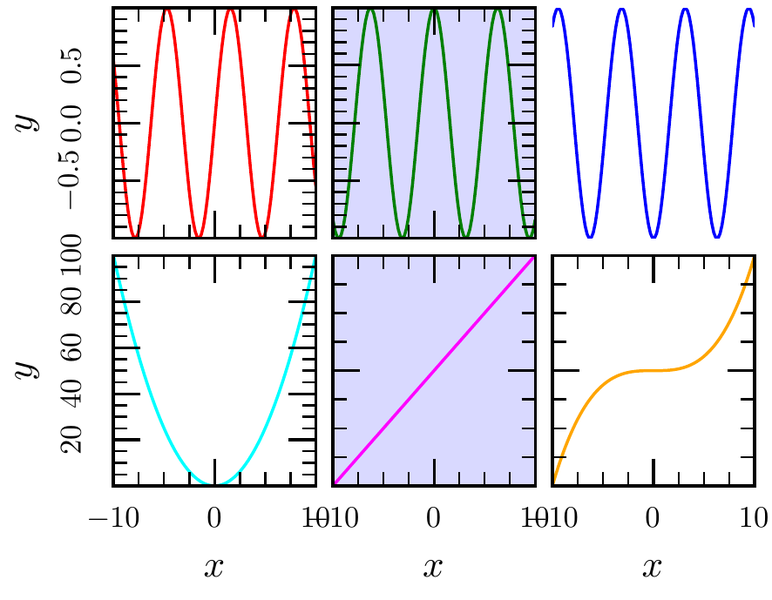
From version 2.0, it is possible to generate several datasets in a row using the /number option, and to color them using the /style option (but only since version 2.1). Each dataset is generated according to the formula, and number is a special number that starts at 0 and increases by 1 for each dataset. Here's what I used to generate the picture on the right:
QSoas> generate-buffer -2 2 sin(PI*x)**(number+1) /number=30 /style=red-to-blue
About QSoasQSoas is an open source data analysis program that focuses on flexibility and powerful fitting capacities. It is described in Fourmond, Anal. Chem., 2016, 88 (10), pp 5050 5052.

10 January 2017

Vincent Fourmond: Version 2.1 of QSoas is out

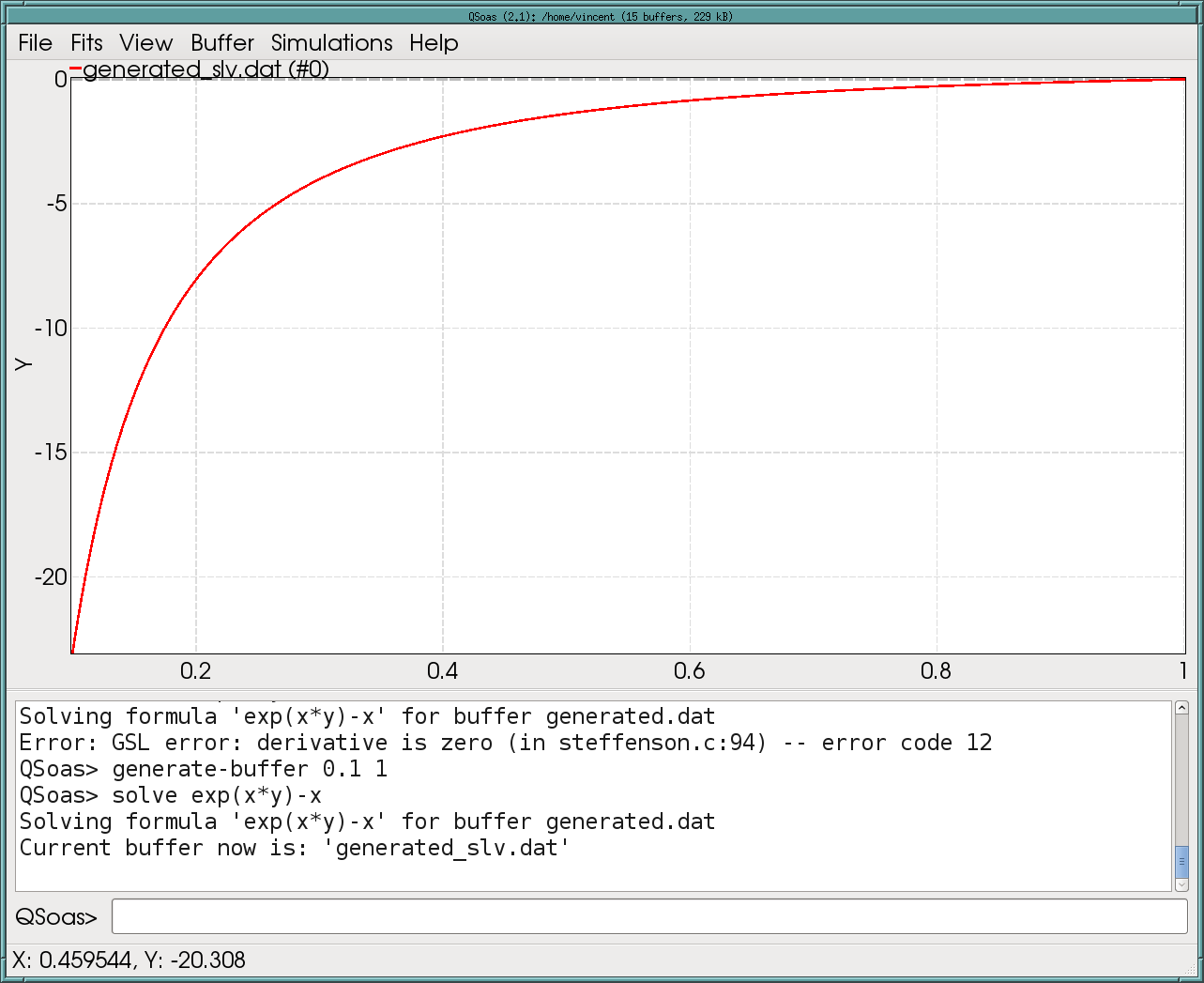
I have just released QSoas version 2.1. It brings in a new solve command to solve arbitrary non-linear equations of one unknown. I took advantage of this command in the figure to solve the equation for . It also provides a new way to reparametrize fits using the reparametrize-fit command, a new series of fits to model the behaviour of an adsorbed 1- or 2-electrons catalyst on an electrode (these fits are discussed in great details in our recent review (DOI: 10.1016/j.coelec.2016.11.002), improvements in various commands, the possibility to now compile using Ruby 2.3 and the most recent version of the GSL library, and sketches for an emacs major mode, which you can activate (for QSoas script files, ending in .cmds) using the following snippet in $HOME/.emacs:

(autoload 'qsoas-mode "$HOME/Prog/QSoas/misc/qsoas-mode.el" nil t)
(add-to-list 'auto-mode-alist '("\\.cmds$" . qsoas-mode))

Of course, you'll have to adapt the path $HOME/Prog/QSoas/misc/qsoas-mode.el to the actual location of qsoas-mode.el.As before, you can download the source code from our website, and purchase the pre-built binaries following the links from that page too. Enjoy !

6 January 2017

Vincent Fourmond: RFH: screen that hurts my eyes

Short summary:My eyes hurt when I use my home desktop computer - but only with this computer. This has been very long and frustrating for me, so if you think you can help, read the whole story just below, or skip to what I've tried and what I suspect might be the problem, and post comments below, or send me a mail (my adress should be quite obvious in this page).

Whole story:Two years ago, I bought myself a new fancy motherboard (a Asus B85M-G C2) with a new fancy Intel-based processor with built-in graphics (an Intel Core i7-4770) and memory to go with it. I installed it in the place of my old AMD-based motherboard, keeping everything else (my hoard of hard drives and such) excepted the graphics card, which was not needed anymore. I immediately noticed my eyes were aching when using the computer. I was quite surprised since I had been using the screen very heavily for almost 10 years before that, without any problems. I attributed that to Intel Graphics, so I tried putting back the old graphics card, but it did not help. The situation was very frustrating, since working on the computer for an hour or so was making my eyes hurt for several days. This problem was specific to this computer, I could keep on using my computer at work and my laptop without problems.I could use the computer using SSH from my laptop, so I could profit from the faster processor, but, hey, that wasn't how it was meant to happen. I bought another screen, also tried with one from the work, without any change. I tried using two screens at the same time (this is what I have at work), also without success, so I just kept not using the computer directly. I moved recently to a new place and tried to get that working back again, but didn't get any luck. Frustrated, I got another desktop computer and another screen, and I still have the same problem ! I also tried remounting the old motherboard with the AMD processor and the old graphics card, but that didn't bring any improvement. I just don't get it. This situation is rather frustrating for me, and it's been holding me back in my software projects for two years now (which partly explains my lack of involvement in Debian over the past few years). This post is here in the hope someone will have a idea, but also for me to keep track of what I've done and what I should.

What is puzzling me is that the computer I had before was perfectly fine, and that I have a very very similar setup at work (also with a NVIDIA graphics card) that doesn't hurt my eyes at all.

What I've tried:Here is what I tried, you need to keep in mind that when a trial fails, my eyes keep on hurting for several days, and might trigger false positives.
  • putting back the old (NVIDIA) graphics card, buying a new one (NVIDIA as well);
  • putting back the old motherboard (but with a new OS, but maybe my eyes were too sore for a clean test);
  • using another screen (a new one from the same brand, Samsung), a Dell and a HP from my work, and a brand new Phillips;
  • using two screens at the same time;
  • using a completely different (new, based on Xeon processors and a NVIDIA graphics card) computer (with new mouse, keyboard, hard drives and so on);
  • changing house, including changing the lighting conditions, the desk, the internet provider (no, I didn't do that just because of my computer problems !);
  • changing the way I drive the screens between VGA, DVI and HDMI;
  • copying the system I have in my workplace to the new computer and booting from that system (after a few adaptations, though).

As you can guess, none of those brought any improvement.

Wild hypotheses:
  • Is that a software thing ? Is there something wrong for me in the versions of Debian dating from August 2014 and after ?
  • Is that a BIOS problem with recent computers ?
  • Is that linked to some waves (bluetooth shoudln't be on, but maybe I didn't check well enough ?)
  • Is that linked to EFI (but I also have the problems when I use legacy BIOS for booting)
  • Something weird in my home ?
  • Anything else ?

Any help will be greatly appreciated, but please don't advise going to see a doctor, I don't see how this could be a medical condition specific to my home desktop computer, unless this is a very specific psychosomatic problem.

8 December 2016

Vincent Fourmond: Finding zeros of data using QSoas

QSoas does not provide by default commands to detect zeros of data, and the reason for that is that it is simple, using the integrate command to convert this problem into a peak-finding problem, which can be solved using the find-peaks command. Here is that strategy applied to determining the zeros of the 0-th order bessel function:

QSoas> generate-buffer -10 10 bessel_j0(x) /samples=100001
QSoas> integrate
Current buffer now is: 'generated_int.dat'
QSoas> find-peaks
Found 6 peaks
buffer what x y index width left_width right_width
generated_int.dat min -8.6538 -0.201157042341714 6731 1.7798 0.905999999999999 0.873800000000001
generated_int.dat max -5.52 0.398165469321319 22400 2.2854 1.1862 1.0992
generated_int.dat min -2.4048 -0.403288737672291 37976 1.8232 0.973 0.850199999999999
generated_int.dat max 2.4048 2.53731134529594 62024 nan 2.2026 nan
generated_int.dat min 5.52 1.73585713830231 77600 nan 5.7198 nan
generated_int.dat max 8.6538 2.33517964996535 93269 nan 8.5532 nan

Compare that with the values given on Mathematica's website. This strategy is reasonably resistant to noise, since integration decreases high-frequency noise, but you may have to play with the /window option to find-peaks to avoid detecting the same zero (peak) several times.Hopefully, I'll come back with more regular postings of tips and tricks !

21 July 2016

Vincent Fourmond: QSoas version 2.0 is out / QSoas paper

I thought it would come before that, but I've finally gotten around releasing version 2.0 of my data analysis program, QSoas !
It provides significant improvements to the fit interface, in particular for multi-buffer fits, with a Multi fit engine that performs very well for large multibuffer fits, a spreadsheet editor for fit parameters, and more usability improvements. It also features the definition of fits with distribution of values of one of the fit parameter, and new built-in fits. In addition, QSoas version 2.0 features new commands to derive data, to flag buffers and handle large multi-column datasets, and improvements of existing commands. The full list of changes since version 1.0 can be found there.
As before, you can download the source code from our website, and purchase the pre-built binaries following the links from that page too.In addition, I am glad to announce that QSoas is now described in a recent publication, Fourmond, Anal. Chem., 2016, 88, 5050-5052. Please cite this publication if you used QSoas to process your data.

29 March 2016

Vincent Fourmond: Release 0.14.1 of ctioga2

With the (relatively, sorry) recent switch to ruby2.3 as default Ruby version, I realized that my plotting program ctioga2 crashed with ruby 2.3 (due to a rather ugly lazy hack). I have just fixed this in release 0.14.1. Update as usual with:
~ gem update ctioga2
If you're not using Ruby 2.3, you probably don't need to update soon, though. Enjoy !

18 February 2016

Vincent Fourmond: Release of ctioga2 version 0.14

The day has finally come again to release a new version of my plotting program, ctioga2. Version 0.14 features, among others:
As usual, the best way to update the package is running:
~ gem update ctioga2
An updated Debian package should find its way to the archive later on today. Have fun !

16 February 2016

Vincent Fourmond: QSoas tips and tricks: better baselines using the "save points" feature

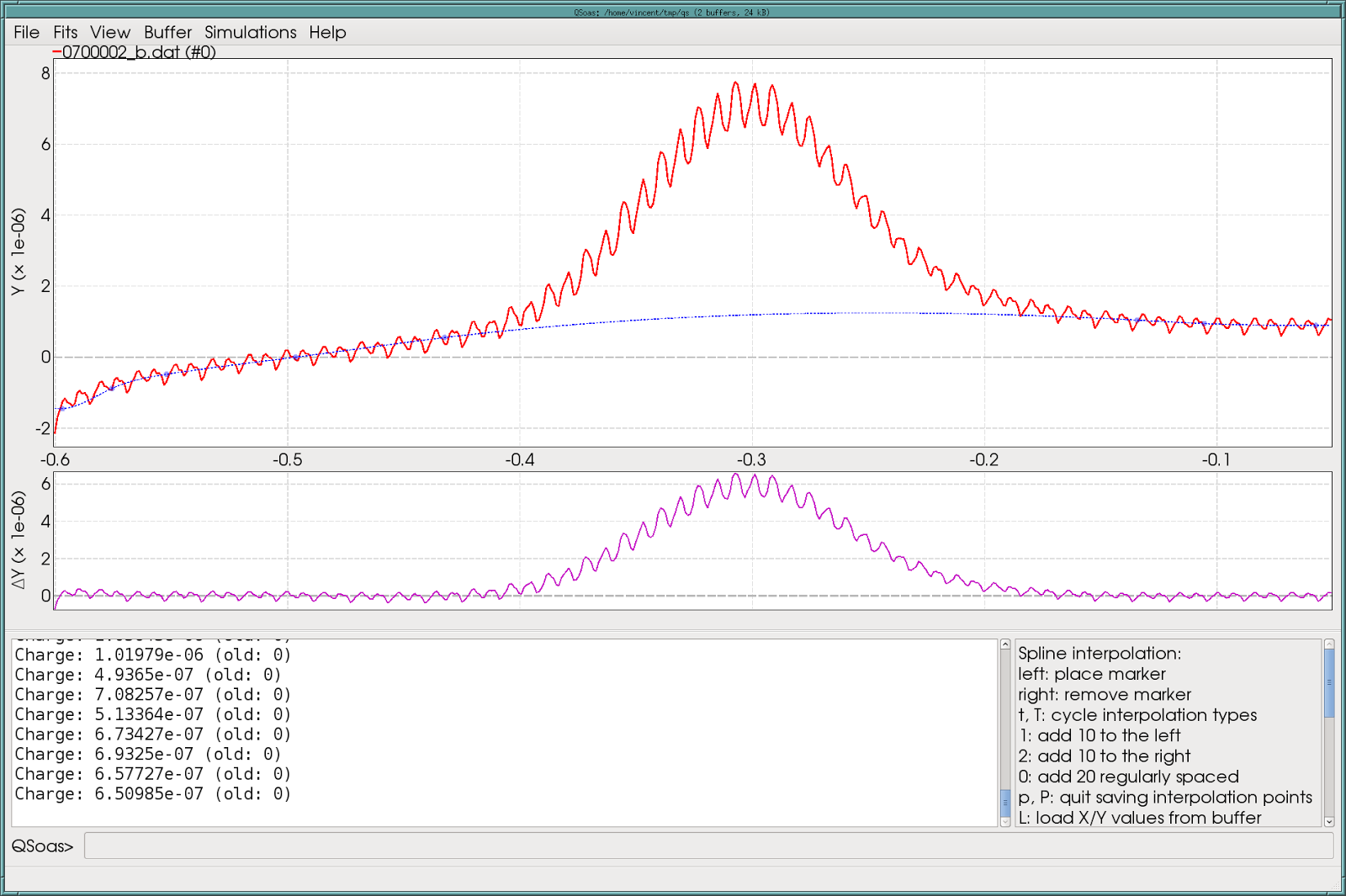
During data processing in our team, we often subtract plain polynomial baselines to our data, drawn by hand using the b command. Note that this is legitimate because we know that the signal we are looking for quickly drops to 0 outside a given range. The usual workflow is to just load the data, use b to draw a baseline and subtract it, and then have further fun with the baseline-subtracted data. This was the only possibility in the old SOAS. However, I don't like so much this kind of workflow, because such a baseline is arbitrary, and once it's subtracted, it's hard to reassess the baseline afterwards.
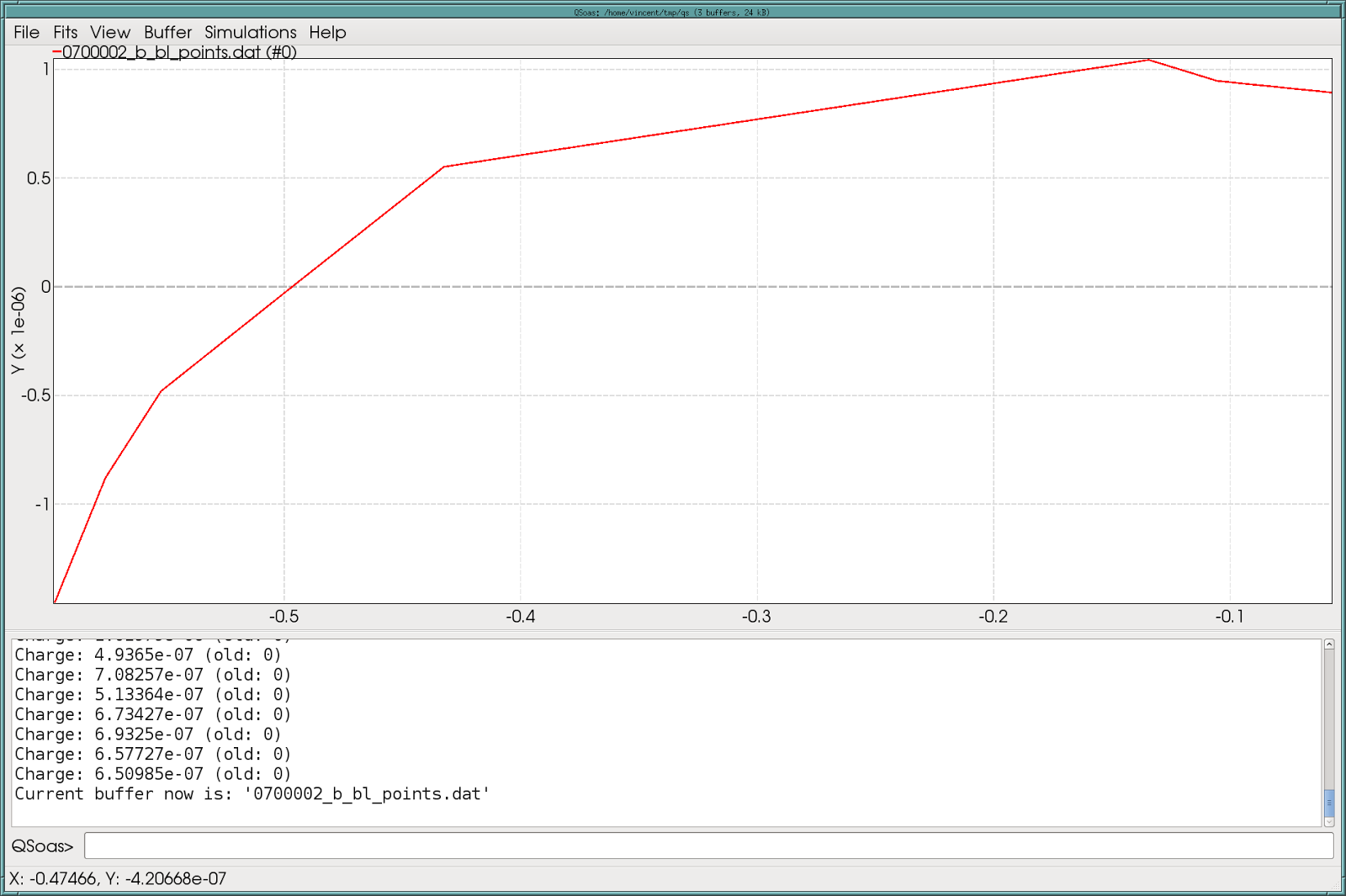
This is why I've designed a better way in QSoas: when you are done creating a baseline, push p: this exits pushing only the interpolation nodes:
Above, the baseline subtraction interface, and below, the resulting nodes:
The nodes can be reloaded by hitting uppercase L from within b and giving a buffer number (admittedly, the interface as of now isn't that good, I'll have to work on it). Alternatively, you can greenerate the baseline by using interpolate, and then further subtract it using S:
QSoas> interpolate 1 0
where 1 is the original buffer (in fact, only its X values will be used, so you don't have to use the same buffer) and 0 is the buffer containing the interpolation nodes. Saving only the interpolation nodes makes it possible to reedit the baseline easily, and regenerate the baseline-subtracted data using a script. This is my favorite approach, because I like to be able to trace every single step from the raw data to processed data. Another neat feature is that, from within b, you can reload only the X values of nodes using lowercase l (and giving buffer number): the Y values are computed as if you had clicked at the corresponding positions. This is very useful is you have a whole series of similar baselines to make: most often, you won't even need manual adjustment to get a good baseline. I hope you'll find this tip useful !

4 February 2016

Vincent Fourmond: Making oprofile work again with recent kernels

I've been using oprofile for profiling programs for a while now (and especially QSoas, because it doesn't require specific compilation options, and doesn't make your program run much more slowly (like valgrind does, which can also be used to some extent for profiling). It's a pity the Debian package was dropped long ago, but the ubuntu packages work out of the box on Debian. But, today, while trying to see what takes so long in some fits I'm running, here's what I get:
~ operf QSoas
Unexpected error running operf: Permission denied

Looking further using strace, I could see that what was not working was the first call to perf_event_open.
It took me quite a long time to understand why it stopped working and how to get it working again, so here's for those of you who googled the error and couldn't find any answer (including me, who will probably have forgotten the anwser in a couple of months). The reason behing the change is that, for security reason, non-privileged users do not have the necessary privileges since Debian kernel 4.1.3-1; here's the relevant bit from the changelog:

  * security: Apply and enable GRKERNSEC_PERF_HARDEN feature from Grsecurity,
    disabling use of perf_event_open() by unprivileged users by default
    (sysctl: kernel.perf_event_paranoid)

The solution is simple, just run as root:
~ sysctl kernel.perf_event_paranoid=1

(the default value seems to be 3, for now). Hope it helps !

25 January 2016

Vincent Fourmond: QSoas tips and tricks: using the fit interface to explore parameters to a function

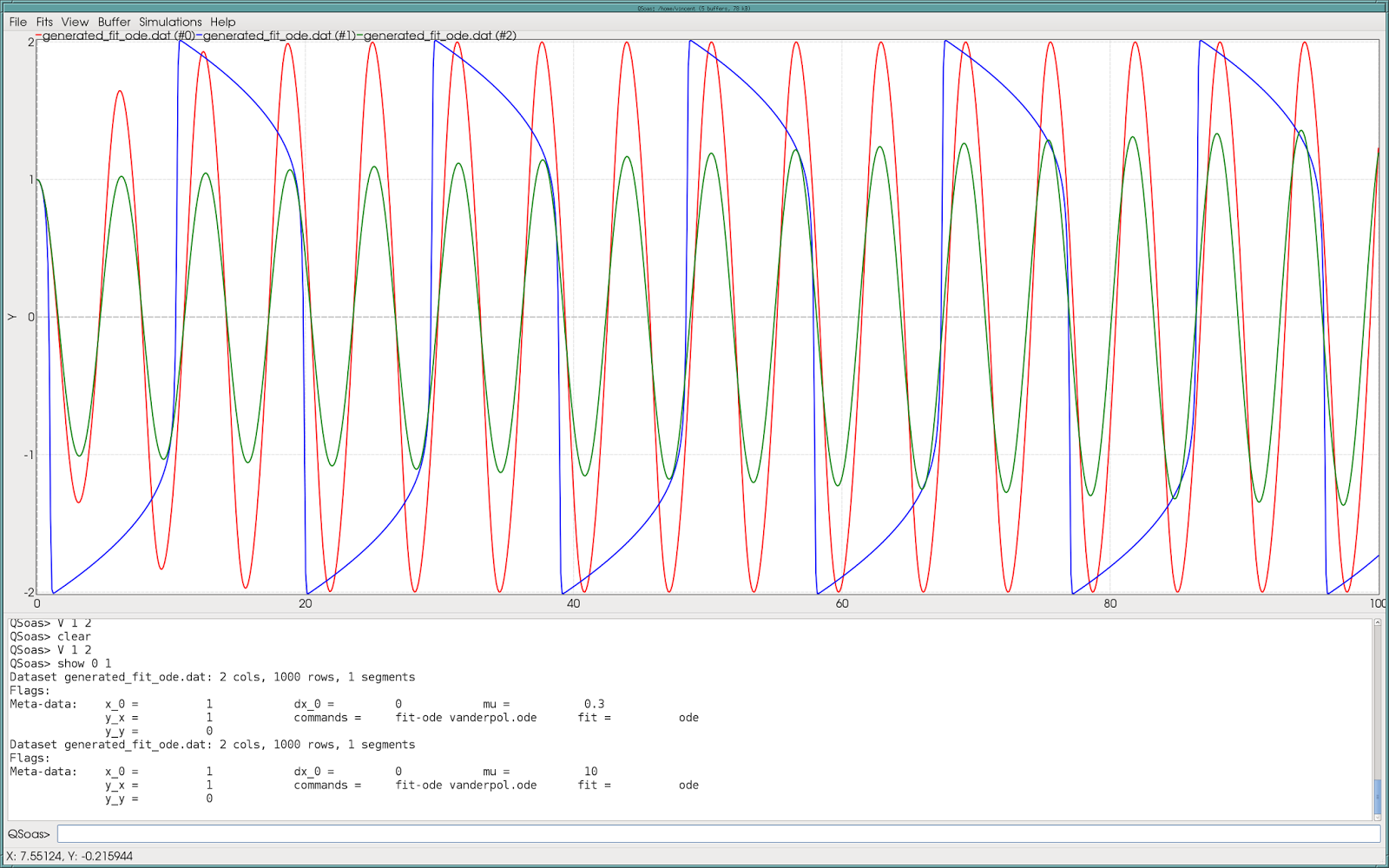
As I said before, one of the very strong points of QSoas, my data analysis software, is its fitting capacities, and its fitting interface. Today, as a first post in a series of tips and tricks about QSoas, I will show you that the fit interface can also be used for a quick exploration of the effect of parameters on a given function. For that, I have chosen a simple system, the Van der Pol oscillator. The differential equation can be written for QSoas in the following form (in a file named vanderpol.ode):
x = x_0
y = dx_0
d_x = y
d_y = mu * (1 - x**2) * y - x
Note the blank line between the initial conditions and the expression for the derivatives. This is the representation of the form using y as the derivative of x. The integration variable in QSoas is the time t. You can learn more about how to specify differential equations in QSoas from the manual. The game is now simply to use fit-ode to launch the fit interface, but before that, one needs data to serve as a template, generated using generate-buffer:
QSoas> generate-buffer 0 100 1
QSoas> fit-ode vanderpol.ode
Now, the fit interface looks like this:
You can play around with the parameters, and in particular the value of mu... For every modification, hit the Update button, or just Ctrl+U, to see the effect. For data you'd wish to take a closer look at, use the Push current to stack action from the Data... menu, which creates new buffers on the stack. A nice thing is that QSoas keeps the fit parameters as meta-data, which you can see later on using show:
See the values of mu in the terminal above ?This feature of QSoas makes it easy to quickly explore the effect of the parameters of a model on the shape of the resulting curve. I have used that very heavily in my research, I hope others will find it useful too. Enjoy !

11 January 2016

Vincent Fourmond: Ghost in the machine: faint remanence of screen contents across reboots in a Macbook pro retina

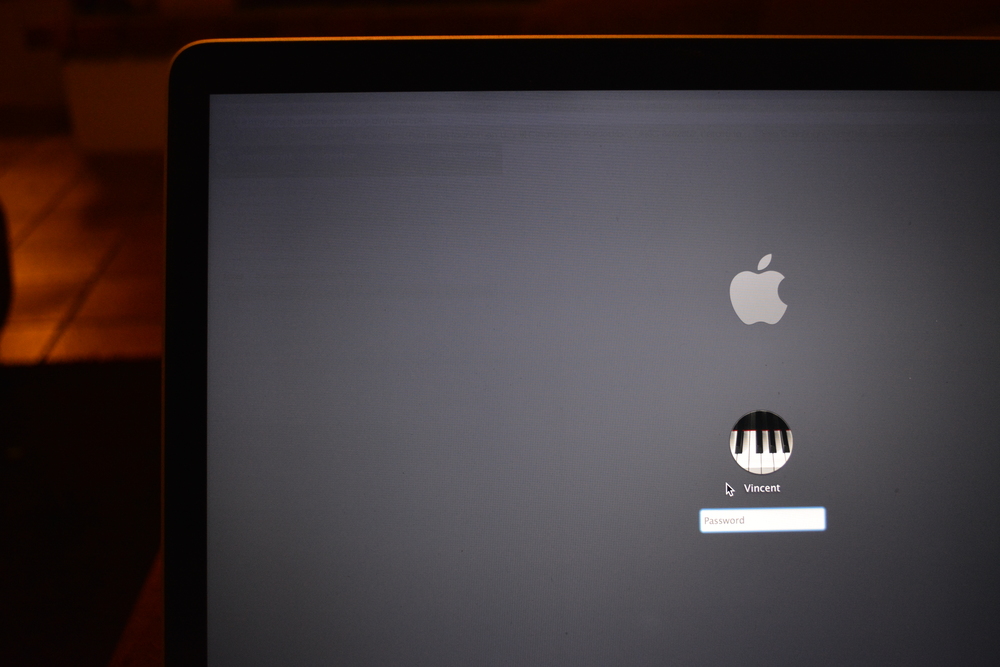
As was noted a few times before, I happen to own a Macbook Pro Retina laptop I mostly use under Linux. I had noticed from time to time weird mixes between two screens, i.e. I would be looking at a website, but, in some areas with uniform colors, I would see faint traces of other windows currently opened on another screen. These faint traces would not show up in a screenshot. It never really bothered me, and I attributed that to a weird specificity of the mac hardware (they often do that) that was not well handled by the nouveau driver, so I had simply dismissed that. Until, one day, I switch off the computer, switch back on, boot to MacOS and see this as a boot screen:
Here is a close-up view of the top-left corner of the screen:
If you look carefully, you can still see the contents of the page I was browsing just before switching off the computer ! So this problem is not Linux-specific, it also affects MacOS... To be honest, I don't have a clue about what's happening here, but it has to be a serious hardware malfunction. How can two video memory regions be composed upon display without the computer asking explicitly for it ? Why does that problem survives a reboot ? I mean, someone switches on my computer and can see the last thing I did on it ? I could actually read the address line without difficulty, although you'll have to take my word for it, since the picture does not show it that well. That's scary...

9 December 2015

Vincent Fourmond: Announcing QSoas, a powerful y=f(x) data analysis software

Why a new data analysis software ?I'm a researcher at the interface between physics, chemistry and biology, and in our team, we pride ourselves on making the most of the data we acquire, especially through quantitative analysis and modelling. In fact, we spend a lot of time doing fitting simple formulas or complex differential equations to our data. As we were not really satisfied with the data fitting capacities of the software available, we've had our custom data processing/fitting tool, SOAS, for ages. However, that tool was hard to maintain (Fortran + Fortran libraries interfacing with X11 with ABI changing every once in a while without notice), impossible to port to non-X11 platforms, not very user-friendly, and not easy to extend at all. So, when I got my permanent position, a rewrote a completely new version from scratch, called QSoas using C++, Qt, Ruby and the GNU Scientific Library. The result is incomparably more powerful, more easy to maintain, more user-friendly, and more portable (I build it for Linux, Mac and Windows).
What does it do ?The main features of QSoas are:
What has it done already ?We've relied heavily on QSoas's functionalities for the past 3-4 years, and a great part of the team's publications just wouldn't be there without QSoas. More precisely on selected examples:
I hope it will also help you get more than you previously could from your data (and faster, too !).
I want it, where can I get it ?You can download QSoas version 1.0 on its website. The source code is fully available under the GNU General Public License. For those not too compilation-savvy, we sell pre-built binaries for windows and mac, in collaboration with Satt Sud-Est and eValorix. Compilation under Linux is very simple, but I'm willing to come up with a Debian package, should some of you want that. You should definitely have a look at the tutorial and the command reference.

19 November 2015

Vincent Fourmond: Purely shell way to extract a numbered line from a file

I feel almost shameful to write it down, but as it took me a long time to realize this, I'll write it down anyway. Here's the simplest portable shell one-liner I've found to extract only the, say, 5th line from file:
~ cat file   tail -n +5   head -n1
Hope it helps...Update: following the comments to this post, here are a couple of other solutions. Thanks to all who contributed !
~ cat file   sed -ne 5p
~ cat file   sed -ne '5 p;q ' 
The second solution has the advantage of closing the input after line 5, so if you have an expensive command, you'll kill it with a SIGPIPE soon after it produces line 5. Other ones:
~ cat file   awk 'NR==5  print; exit '
~ cat file   head -n5   tail -n1 
The last one, while simpler, is slightly more expensive because all the lines before the one you're interested in are copied twice (first from cat to head and then from head to tail). This happens less with the first solution because, even if tail passes on all the lines after the one you're interested in, it is killed by a SIGPIPE when head closes.

3 September 2015

Vincent Fourmond: Releases 1.19.1 of Tioga and 0.13.1 of ctioga2

I've just released the versions 1.19.1 of Tioga and 0.13.1 of ctioga2. They both fix installation problems with recent versions of Ruby. Update as usual, though that isn't strictly necessary if you've managed to install them properly.
~ gem update tioga ctioga2

13 June 2015

Vincent Fourmond: Rescan-scsi-bus and slow DVD drives

For reasons that fail my, my internal SATA DVD drive is very seldom seen by the kernel at startup. My guess is that it takes very long to start, and the kernel doesn't wait that long before deciding that it had all SCSI devices, so it misses it. It's actually very annoying, since you can't use the drive at all. After digging around, I finally stumbled on the rescan-scsi-bus tool from the scsitools package. Running (as root, of course)
~ rescan-scsi-bus -w -l
(sometimes two or three times) is enough to get the device back up, with the /dev/dvd udev symlink.Hope this'll help !

Next.

Previous.