Search Results: "Philipp Kern"

23 September 2013

Russell Coker: Hive Bluetooth Stereo Speakers

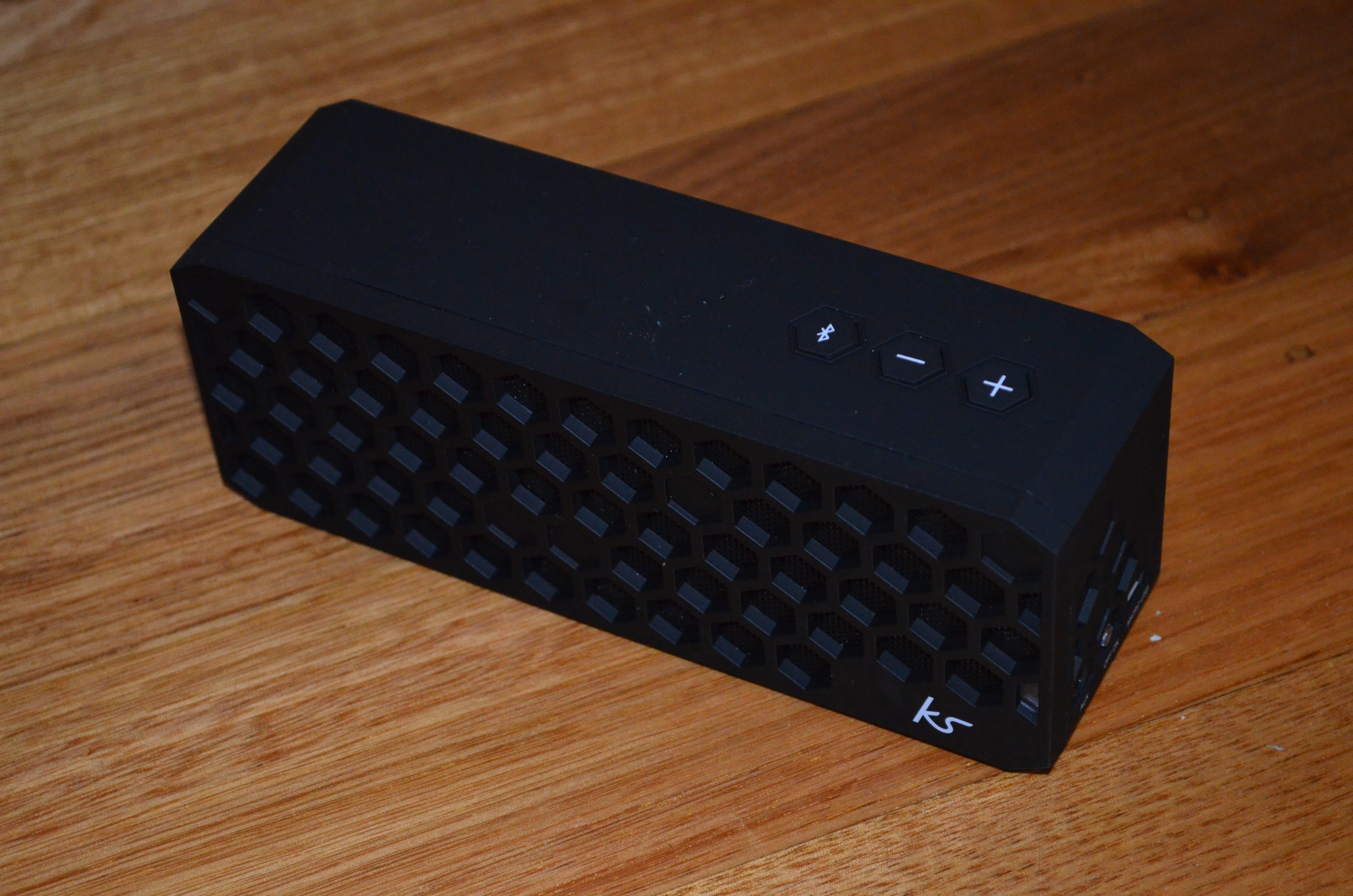
picture of Hive bluetooth speakers I ve just been given a set of Hive Bluetooth speakers by MobileZap (see this link for all their Bluetooth speakers) [1]. The speakers charge by a micro-USB cable so I started charging them in my car immediately after collecting them. To connect them to a phone or other Bluetooth device you just press the Bluetooth button on top and get the phone to be visible and scanning for devices, they identify themselves as Hive , after that they just work. My first test of using them was playing Ingress and the quality of the sound was impressive, I had thought that the Ingress recommendation to use headphones was due to the risk of annoying other people or alerting other players, but the quality of the sound was impressive and the internal speakers of a phone can t do it justice. After getting home I did some tests listening to music. For watching music videos it didn t work so well as the sound was too far removed from the video, but the audio quality was very good. I listened to Vow by Garbage (a good benchmark for stereo sound) and even though the Hive speakers are only 16.5cm wide I could still notice the stereo effect when they were about 1.5m away from me. The audio quality didn t compare well with my Bose QC-15 headphones, but for affordable and portable speakers it was quite good and an obvious improvement over the speakers that are built in to any phone I ve used. According to the Bluetooth Wikipedia page the range of a class 2 device is 10m and the range of a class 3 device is 1m. When my Samsung Galaxy Note 2 is talking to it I get a reliable range of about 5 meters and a mostly working range of 6 or 7 meters (sound randomly drops out and gets choppy). It could be that other phones would support a longer range due to having a higher transmission power (either class 1 or being closer to the limits of class 2) and a more sensitive receiver. But it doesn t seem likely that a 5m range is going to be a problem. Volume and Quality The speakers are rated at 5 Watt, when running at maximum volume (both through the phone volume setting and the volume control on the speakers) the sound is reasonably distortion free, as good as can be expected from playing an MP3 that s not compressed with the highest quality. Sound Meter [2] reports the sound volume as almost 85dB on a Galaxy S3 and as almost 100dB on a Galaxy Note 2, that would be somewhere between the volume of a busy street or alarm clock and the volume of a subway train or blow dryer which seems like a reasonable description, I find it very unpleasant to be within a meter of the speakers at maximum volume. With the typical amount of background noise in my house I can play music on the Hive speakers at one end of my house and hear it clearly at the other end. These speakers are more than capable of supplying the music for any party I d want to host or attend. I m not really into wild parties, but I think that anyone who has a one room party would be more than satisfied with the Hive speakers. Obviously the sound quality of portable speakers in a box that s 16.5cm wide and 6cm high isn t going to equal that of a full size set of speakers, but I think that hardly anyone who attends a party would expect better sound quality than the Hive speakers can provide. The aim of such speakers is to be portable, not really expensive, and to provide good sound quality within those constraints. I think that they meet such aims well. Over the years there have been many occasions when I have used a Thinkpad to provide the music for a party and found it to be quite loud enough. My current Thinkpad is a T420 which can produce 75dB according to my Galaxy S3 or 85dB according to my Galaxy Note 2. So it seems that I only really need about 10dB less than the maximum volume of the Hive speakers. Appearance The designers obviously made an effort on the appearance of the device. They have gone with the Hive concept and used hexagons everywhere. It really looks nice. Unfortunately when I took the photo there was some dust on it which didn t look bad to the eye but caught the camera flash. But with a matte black device there s always the problem of light colored dust. Even with a bit of dust it still looks great as a set of speakers, the dust just detracts from the appearance in photos. Line In One of the features I looked for was an audio line input so I could connect it directly to a non-Bluetooth device. I m assuming that this feature works as it s something that s difficult to stuff up when designing such a product, but I haven t got around to testing it. Once I started using the device I just found that I didn t have a real need for that feature. One thing that it might be useful for is PC desktop speakers that are powered by a USB port on the monitor. Currently I have a bearable (but not great) set of speakers for each PC and I don t need to change anything. But having the option of another set of speakers is very handy in case I suddenly need to make hardware changes. Other People s Reviews When I review a product I generally try and get opinions from random other people if possible. My mother and my mother-in-law were both impressed by the Hive speakers and expressed interest in owning a set. My mother-in-law was particularly interested as she uses her phone to listen to radio stations from outside Australia (I m going to get her onto Aldi for cheap 3G data ASAP so she can listen to Internet radio when travelling). Generally the impression that other people have of this device seems to be very positive. It seems that Bluetooth speakers aren t just a Geek toy. Conclusion While I m very impressed by this product, at this stage I m not sure whether I would pay for this one or something cheaper if I was paying for it. MobileZap offers a range of other products that look appealing at lower price points. It really depends on how much I use it. I ve just got a Makerbot Replicator 3D printer working and I ve found the Hive speakers very useful for the purpose of drowning out it s noise. If I keep doing that sort of thing then I ll get enough use out of the speakers to justify the price.

16 September 2013

Philipp Kern: buildd.debian.org

Did you notice that it was gone? It's back now. Phew. Apparently an upgrade to wheezy was scheduled for the passed week-end. This went badly with the RAID controller acting up after the upgrade. So the move to a new machine (or rather VM) was sped up. And because various policies changed, we needed to move to a dedicated database server with a new authentication scheme, get rid of the /org symlink, get rid of the buildd_* accounts, cope with a new PHP, cope with rlimits that broke a Python CGI (thanks, KiBi!), triggers that weren't tickled, and various other stuff. Thanks to DSA for handling the underlying infrastructure despite some communication issues during heavy fire fighting.

26 August 2013

Russell Coker: Scratching a Galaxy S

Some years ago when I first got a LG U990 Viewty (which in some ways is the best phone I ever owned) I went swimming and left my phone in my bag. My phone happened to rest on my car keys and had vibration mode enabled, after a couple of missed calls I had a nasty scratched area on the phone screen. Since then I ve been very wary about allowing metal objects to come in contact with a phone screen. Now I have a Samsung Galaxy S with some sort of motherboard damage (it won t even boot and I know it s not a software issue because it was initially intermittent). A phone that old isn t worth repairing (they sell on ebay for as little as $50) so it seemed worth testing how hard the screen is. The screen cover is Gorilla Glass which was the hardest glass available at the time the phone was new (apparently there are better versions of Gorilla Glass available now and my more recent phones should be tougher). My first test was with one of my favorite Japanese kitchen knives, it didn t scratch at all. Then I chose a knife sharpening stone as an obvious item that s harder than a knife, it scratched the screen easily. A quartz pebble also scratched the screen when I used some force, so presumably concrete and brick would also scratch it. Tests with all current Australian coins and my car keys showed that the screen is too hard to be scratched by them. I also tested hitting the phone screen with my keys, I hit it much harder than would happen if I was to run while having my phone and my keys in the same pocket and there was no damage. My conclusion is that any metal object you are likely to carry in your pocket is unlikely to cause any problem if knocked against the screen of a modern phone.

10 July 2013

Russell Coker: Samsung Galaxy Note 2

A few weeks ago I bought a new Samsung Galaxy Note 2 Android phone. As I predicted in my post about Phone and Tablet Sizes [1] the Note 2 with a 5.55 display is a bit too big for me to have an ideal single handed side grasp (I estimate that about 5.2 would be ideal). But I can stretch a bit and move it around in my hand to touch all parts of the screen with my thumb. Although when doing that I don t have a tight grip, with my previous phone the Samsung Galaxy S3 [2] I could properly wrap my hand around it to grip it tightly while using it with one hand. The Note 2 will be easier for me to drop or for a thief to snatch it from me. While the big screen makes the phone difficult to use with one hand it does allow viewing more data. The ConnectBot SSH client (Play Store link) [3] (F-Droid repository link) [4] works a lot better on a larger screen I ve also discovered that the volume control buttons can be used to change the font size in ConnectBot which is handy as the default is really tiny. Also Klaus Weidner s Hacker s Keyboard (Play Store link) [5] (F-Droid repository link) [6] works a lot better with a larger screen. When I tested the Hacker s keyboard on a smaller phone I found the 5 row layout too difficult to use, but on the Note 2 it works well. As an aside I wish I could quickly and easily toggle between 4 row mode (good for SMS) and 5 row mode (good for sysadmin work) in the Hackers Keyboard. For less serious use the large screen on the Note 2 is good for watching TV. I ve got a collection of mp4s of TV shows that I ve been meaning to watch, now I watch them in bed on my phone. Another advantage of the Note 2 is the battery life. When playing Ingress and doing all the usual email checks etc my Note 2 will last about as long as my wife s Galaxy S3 with it s power case. So without any extra batteries a Note 2 will probably last about twice as long as a Galaxy S3. The Note 2 has more RAM than the S3 I used to use (I had the S3 with 1G of RAM) and it also apparently has a faster CPU. The CPU speed hasn t been an issue for me but the extra RAM is a real benefit, it means that I can usually switch between Ingress and other programs without having to restart Ingress each time. As an aside I think that Google and LG should release a Nexus Ingress 4 phone or some other device that s optimised for Ingress, I m sure it would sell well. Some people make a big deal about the stylus that comes with the Note 2. It is a neat feature to have the device know when the stylus tip is hovering over the screen but it s not very useful for me. If I was going to create art work on a phone (as some people do) then it would interest me, but I m more interested in email and ssh for fine input and my fingers are generally good enough for those tasks. I have got thin fingers, so I think that people with thicker fingers could really benefit from the stylus. I recently bought a batch of stylus pens from Kogan which have a pen at one end and a rubber stylus tip at the other for fat fingered people I know who need to use an Android phone but can t afford a Note or Note 2. I also like the software build on it which is almost the same as that on the Galaxy S3. It seems that many people prefer the apparently stock features on the Nexus 4 but I like the way Samsung does things. Conclusion I m very happy with my new phone. The bigger screen allows me to see things more clearly, this is good for web browsing, reading email, and now that I can use the Hackers Keyboard I can type more effectively. The longer battery life is really good too, although I think that Samsung could have done better if the phone was 3mm thicker then it could have a much bigger battery and have a larger CCD for the camera. I don t think that the phone is really different, at least not for my use. Samsung has promoted it for artistic use and I ve seen evidence to support their claims. But for most people it ll just be a phone with a larger screen and a bigger battery. Some people criticise it for being too big, but it s still smaller than the handsets on most desk phones so it s not big by the standards of old fashioned phones. The increased size has not only allowed me to do the same things more effectively but also allowed me to do things I hadn t tried doing on a phone before such as watching TV. This isn t because of the phone being particularly special in any way, it s just that the change in size gives more possibilities for ways of using it. The Samsung Galaxy Mega is the largest smart phone. The 5.8 version of the Mega has a resolution of only 960*540 (less than the Note and Note 2 not good enough IMHO) and the 6.3 version has the same resolution as the Note 2 of 1280*720. I think that both Mega variants are too big for me, I need to be able to use a phone with one hand. So it seems that the Note 2 is probably the best phone for me right now.

29 May 2013

Russell Coker: Nexus 4

My wife has had a LG Nexus 4 for about 4 months now so it s time for me to review it and compare it to my Samsung Galaxy S3. A Sealed Case The first thing to note about the Nexus 4 is that it doesn t support changing a battery or using micro-SD storage. The advantage of these design choices is that it allows reduced weight and greater strength compared to what the phone might otherwise be. Such choices would also allow the phone to be slightly cheaper which is a massive advantage, it s worth noting that the Nexus 4 is significantly cheaper than any other device I can buy with comparable specs. My wife s phone has 8G of storage (not RAM thanks Robin) and cost $369 at the start of the year while the current price is $349 for the 8G version and $399 for the 16G version. Of course one down-side of this is that if you need 16G of storage then you need to spend an extra $50 on the 16G phone instead of buying a phone with 8G of storage and inserting a 16GB micro-SD card which costs $19 from OfficeWorks. Also there s no option of using a 32G SD card (which costs less than $50) or a 64G SD card. Battery etc The battery on the Nexus 4 isn t nearly big enough, when playing Ingress it lasts about half as long as my Galaxy S3, about 90 minutes to fully discharge. If it was possible to buy a bigger battery from a company like Mugan Power then the lack of battery capacity wouldn t be such a problem. But as it s impossible to buy a bigger battery (unless you are willing to do some soldering) the only option is an external battery. I was unable to find a Nexus 4 case which includes a battery (which is probably because the Nexus 4 is a lot less common than the Galaxy S3) so my wife had to buy an external battery. If you are serious about playing Ingress with a Nexus 4 then you will end up with a battery in your pocket and cable going to your phone from the battery, this is a real annoyance. While being a cheap fast phone with a clear screen makes it well suited to Ingress the issue of having a cable permanently attached is a real down-side. One significant feature of the Nexus 4 is that it supports wireless charging. I have no immediate plans to use that feature and the wireless charger isn t even on sale in Australia. But if the USB connector was to break then I could buy a wireless charger from the US and keep using the phone, while for every other phone I own a broken connector would render the phone entirely useless. Screen Brightness I have problems with my Galaxy S3 not being bright enough at midday when on auto brightness. I have problems with my wife s Nexus 4 being too bright in most situations other than use at midday. Sometimes at night it s painfully bright. The brightness of the display probably contributes to the excessive battery use. I don t know whether all Nexus 4 devices are like this or whether there is some variance. In any case it would be nice if the automatic screen brightness could be tuned so I could make it brighter on my phone and less bright on my wife s. According to AndroSensor my Galaxy S3 thinks that the ambient light in my computer room is 28 lux while my wife s Nexus 4 claims it s 4 lux. So I guess that part of the problem is the accuracy of the light sensors in the phones. On-Screen Buttons I am a big fan of hardware buttons. Hardware buttons work reliably when your fingers are damp and can be used by feel at night. My first Android phone the Sony-Ericsson Xperia X10 had three hardware buttons for settings, home, and back as well as buttons for power, changing volume, and taking a photo which I found very convenient. My Galaxy S3 has hardware buttons for power, home, and volume control. I think that Android phones should have more hardware buttons not less. Unfortunately it seems that Google and the phone manufacturers disagree with me and the trend is towards less buttons. Now the Nexus 4 only has hardware buttons for power, and volume control. One significant advantage of the Galaxy S3 over the Nexus 4 is that the S3 s settings and back buttons while not implemented in hardware are outside the usable screen area. So the 4.8 1280*720 display is all for application data while the buttons for home, settings, and back on the Nexus 4 take up space on the screen so only a subset of the 4.7 1280*768 is usable by applications. While according to specs the Nexus 4 has a screen almost as big as the Galaxy S3 and a slightly higher resolution in practice it has an obviously smaller screen with fewer usable pixels. Also one of the changes related to having the buttons on-screen means that the settings button is often in the top right corner which I find annoying. I didn t like that aspect of the GUI the first time I used a tablet running Android 3.0 and I still don t like it now. GPS My wife s Nexus 4 seems to be much less accurate than my Galaxy S3 for GPS. I don t know how much of this is due to phone design and how much is due to random factors in manufacturing. I presume that a large portion of it is due to random manufacturing issues because other people aren t complaining about it. Maybe she just got unlucky with an inaccurate phone. Shape and Appearance One feature that I really like in the Samsung Galaxy S is that it has a significant ridge surrounding the screen. If you place a Galaxy S face-down on a desk that makes it a lot less likely to get a scratch on the screen. The LG U990 Viewty also had a similar ridge. Of course the gel case I have bought for every Android phone has solved this problem, but it would really be nice to have a phone that I consider usable without needing to buy such a case. The Nexus 4 has a screen that curves at the edges which if anything makes the problem worse than merely lacking a ridge around the edge. On the up-side the Nexus 4 looks and feels nice before you use it. The back of the Nexus 4 sparkles, that s nice but when you buy a gel case (which doesn t seem to be optional with modern design trends) you don t get to see it. The Nexus 4 is a very attractive package, it s really a pity that they didn t design it to be usable without a gel case. Conclusion Kogan is currently selling the Galaxy S3 with 16G of storage for $429. When comparing that to the 16G version of the Nexus 4 at $399 that means there s a price of $30 to get a SD socket, the option of replacing a battery, one more hardware button, and more screen space. So when comparing the Google offers for the Nexus 4 with the Kogan offer on the Galaxy S3 or the Galaxy Note which also has 16G of storage and sells for $429 the Google offer doesn t seem appealing to me. The Nexus 4 is still a good phone and is working well for my wife, but she doesn t need as much storage as I do. Also when she got her phone the Galaxy S3 was much more expensive than it is now. Also Kogan offer the 16G version of the Nexus 4 for $389 which makes it more appealing when compared to the Galaxy S3. It s surprising that they can beat Google on price. Generally I recommend the Nexus 4 without hesitation to anyone who wants a very capable phone for less than $400 and doesn t need a lot of storage. If you need more storage then the Galaxy S3 is more appealing. Also if you need to use a phone a lot then a Galaxy S3 with a power case works well in situations where the Nexus 4 performs poorly.
27 May 2013

Petter Reinholdtsen: How to install Linux on a Packard Bell Easynote LV preinstalled with Windows 8

Two days ago, I asked how I could install Linux on a Packard Bell EasyNote LV computer preinstalled with Windows 8. I found a solution, but am horrified with the obstacles put in the way of Linux users on a laptop with UEFI and Windows 8. I never found out if the cause of my problems were the use of UEFI secure booting or fast boot. I suspect fast boot was the problem, causing the firmware to boot directly from HD without considering any key presses and alternative devices, but do not know UEFI settings enough to tell. There is no way to install Linux on the machine in question without opening the box and disconnecting the hard drive! This is as far as I can tell, the only way to get access to the firmware setup menu without accepting the Windows 8 license agreement. I am told (and found description on how to) that it is possible to configure the firmware setup once booted into Windows 8. But as I believe the terms of that agreement are completely unacceptable, accepting the license was never an alternative. I do not enter agreements I do not intend to follow. I feared I had to return the laptops and ask for a refund, and waste many hours on this, but luckily there was a way to get it to work. But I would not recommend it to anyone planning to run Linux on it, and I have become sceptical to Windows 8 certified laptops. Is this the way Linux will be forced out of the market place, by making it close to impossible for "normal" users to install Linux without accepting the Microsoft Windows license terms? Or at least not without risking to loose the warranty? I've updated the Linux Laptop wiki page for Packard Bell EasyNote LV, to ensure the next person do not have to struggle as much as I did to get Linux into the machine. Thanks to Bob Rosbag, Florian Weimer, Philipp Kern, Ben Hutching, Michael Tokarev and others for feedback and ideas.

3 March 2013

Philipp Kern: git-annex: encrypted remotes

Due to the data loss I blogged about, I had to reverse engineer the encryption used by git-annex for its encrypted special remotes. The file system on which the content lived has a bullet hole of 8 GB in it, which was helpfully discarded by pvmove. It's pretty unhappy about that fact, parts of the git repository are unusable and directories cannot be accessed anymore. git-annex cannot possibly run anymore.

However, I was still able to access the git-annex branch within said git repository (using porcelain). This branch contains a file called remote.log which contains the keys of the special remotes. There's one per remote, encrypted to a GPG key of your choice and all files within that remote are encrypted with the same symmetric key.

One small detail stopped me from getting the decryption right the first time, though. It seems that git-annex uses randomness generated by GPG and armored into base64. In my na vet I spotted the base64 and decoded it. Instead it's used verbatim: the first 256 bytes as HMAC key (which reduces randomness to 192 bytes) and the remaining bytes for the symmetric key used by GPG (which will do another key derivation for CAST5 with it). A bug about that just hit the git-annex wiki.

With that knowledge in mind I wrote a little tool that's able to generate encrypted content keys from the plain ones used in the symlinks. That helps you to locate the file in the encrypted remote. Fetch it and then use the tool to decrypt the file in question with the right key.

The lesson: Really backup the git repository used with git-annex and especially remote.log. I'm now missing most of the metadata but for some more important files it's luckily still present. Recovery of the file content does not depend on it if you can deduce the filename from the content. If you have many little files it might be a bit futile without it, though.

2 March 2013

Philipp Kern: PSA: LVM, pvmove and SSDs

If you use LVM with Wheezy on a solid-state drive, you really want to install the latest lvm2 update (i.e. 2.02.95-6, which contains the changes of -5). Otherwise, if you set issue_discards=1 in /etc/lvm/lvm.conf, you will experience severe data loss when using pvmove. Happened to me twice, once I didn't care (chroot data being lost), the second time (today) I did. Not fun, especially when the backup of the data was scheduled for the same day.

One has to wonder why it takes three months for a bug that trashes data to reach testing. (Obviously I know the answer, but they're not particularly good reasons.) Other distributions, like Ubuntu, were much quicker to notice and incorporate that fix. And in the case of the named distribution not because they auto-synced it from unstable. If somebody notices such a grave bug, please yell at people to get the fix out there to our users. Thanks.

8 February 2013

Philipp Kern: Mozilla's direction

Am I the only one who's disappointed with the route Mozilla's taking and left wondering what the direction is? First they killed off the development of Thunderbird because, as we all know, people mainly use webmail these days. Then they presented us their view that the big Certificate Authorities are too big to fail, as CAs gravely violated our trust (c.f. Trustwave and their MitM authority). And "now" they're also blocking the introduction of new formats into their browser because they cannot be the one who innovates. Instead Microsoft and Apple obviously need to take the lead in introducing a format into their browsers because otherwise it wouldn't be useful. Even though it's safe to say that Chrome and Firefox make up for more than half of the desktop browser market share. It might be that Chrome's nibbling from Firefox's, still IE seems to be in decline and Safari is rather a further mention than something many people would care strongly about.

There were of course some valid reasons for not supporting WebP yet. But most of them got fixed in the meantime and all we hear is the referal to proprietary vendors who need to move first. If I'd want to depend on such vendors I'd go with proprietary operating systems. (Having to deal with hardware products of proprietary vendors at $dayjob is enough.) So what's up Mozilla? The solution is to ignore your users and tag bugs with patches wontfix?

The only real advantage of Firefox over Chromium these days is the vast amount of plugins and extensions (e.g. Pentadactyl, for which there is no real equivalent available). Another sad fact is that you need to pull Firefox from a 3rd party repository (even though packages are coming from the 2nd party) to get a current version onto your Debian system to work with the web. But then it's not Mozilla who's to blame here. Maybe we should've introduced one Iceweasel version that's allowed to have reverse-dependencies and one that cannot.

(This post might contain hyberboles, which should be considered as such.)

5 February 2013

Antoine Beaupr : Why I don't like Pulseaudio

(This rant was originally part of the live streaming series, but I moved it to a separate article because people got stuck on it instead of responding to the actual subject of the article.) Before I get flamed for attacking Pulseaudio (PA), let's just settle this: I don't like it. I think PA is over-engineered and tries to do too many things at once. I used to (until just now) systematically purge pulseaudio-related packages from my system, mainly because PA has this awful tendency of automatically starting and staying around eternally, which wouldn't be so bad except PA has also the bad habit of hogging the audio device exclusively, which makes regular programs like mplayer, ogg123 fail to simply play audio, unless they go through the PA straight-jacket. (Update: this seems to be a bit better in newer versions of PA, where the audio device is released when sound is not being played. Thanks Philipp Kern for the correction.) In the GNU/Linux audio stack, we already have another system that supports multiple accesses: ALSA itself, so I believe that PA should at least behave nicely to other apps, and it seems I am always having problems with that. (The fact that ALSA itself is over-engineered is also telling of the poor state of the audio stack in GNU/Linux.) The other beef I have with PA is the Not Invented Here syndrome: instead of extending existing tools like ALSA or Jack, people just figured they could do everything better and start from scratch. So now we just have one more "standard" way of playing audio, good job Lennart.

27 January 2013

Russell Coker: LCA 2012

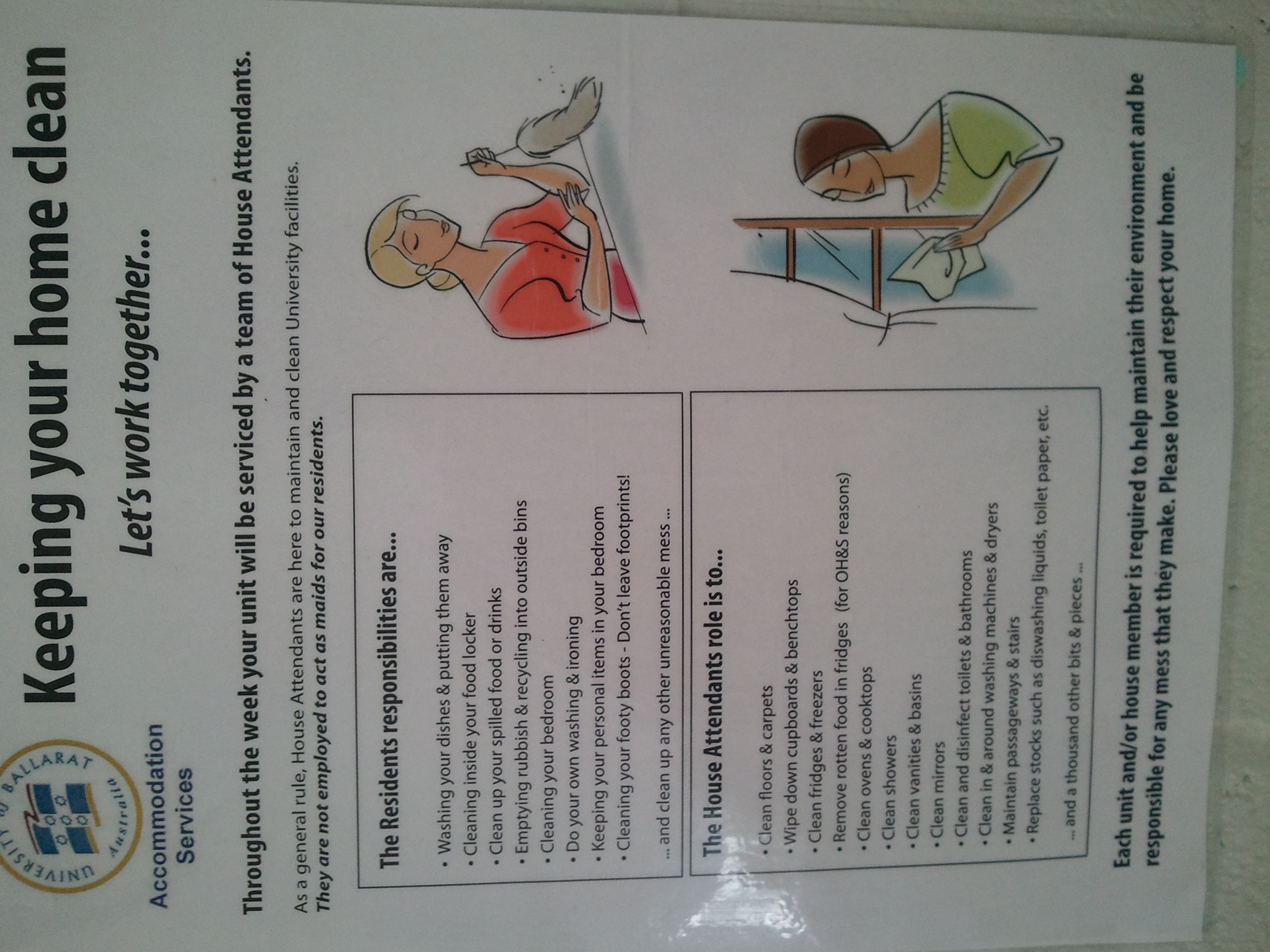
LCA 2013 [1] is starting so it seems like time to finish my write-up of LCA 2012. As usual it was a great conference, although I got sick immediately after getting there which reduced my ability to attend. Android A major unofficial theme of the conference was Android. Most delegates seemed to have Android phones, the Samsung Galaxy S and Galaxy Nexus seemed to be the most popular phones. Many delegates had two or more phones for development purposes. A large portion of the casual conversation at the conference concerned Android. There were a couple of really interesting talks about the Serval mesh networking project [2] which involves Android phones running in ad-hoc Wifi mode for long range communication without any official base station. Serval allows transferring messages, pictures, and voice calls. If you need to get longer range you can mount one phone in a convenient place and other phones will decide to use it as a relay there is no need to have a dedicated relay device (such as a mobile phone tower or Wifi access point). Serval is supposed to work with Wifi access points but due to Java not exposing some networking details to the higher levels of software the code that was available at the time of the conference didn t support networks other than a /24, which meant that the conference Wifi network didn t work with Serval. As an aside most people at the conference who installed Serval were using a development version that was newer than the version on the Android market. I can t remember what the extra features were though. Serval was designed for emergency situations, it can be installed on phones (and pushed to other phones via Wifi) in the field and allow communications when the infrastructure is broken. Also it s designed with some aim of circumventing censorship which among other things means that there are no facilities for tracking use. I think it would be really handy to be able to in some way track viewing of or interest in images that are transported via the mesh (maybe by something similar in concept to Google +1). Then in a crowd sourced environment people who take photos would be encouraged in their work by audience appreciation. One thing that interests me is the possibility of using Serval on a cruise ship. A cruise ship is an environment where mobile phone calls are unreasonably expensive, cabin phones aren t much use (who pays for a cruise and hangs out in their cabin?), and where there is usually a Wifi network installed. If a ship has a single bridged Wifi network that allows connecting to Wifi before authenticating for Internet access (which is probably the common case) then you could transport VOIP over that network without paying and without incurring any expense on the cruise company. One of the Serval developers assured me that this should be possible, of course a cruise ship with 3,000 passengers probably doesn t use a /24 for their Wifi so the current versions of Serval won t work At the geek my dinner event (a party where everyone brought $20 of food/drink which was cooked by volunteers) an artist showed me some art work that she created on her Samsung Galaxy Note (which was the biggest phone on sale at the time), it was very impressive. She recommended Picasso Mirror Draw, Sketch Free, Sketch Book Mobile Express, and Freenote as free graphical programs for Android. Samsung has a Noteworthy Project advertising campaign based on the artistic uses of the Galaxy Note which has some good videos of artists [3]. Chris Neugebauer and Paris Buttfield-Addison gave an informative and amusing talk about Android UI development (this link has the video) [4]. It s a pity that I missed seeing that one live but fortunately the video is of high quality. Accommodation picture of women cleaning As I ve become interested in Sociology I couldn t help but notice the pictures that accompanied the rules about cleaning the dormitory (which were displayed over the kitchen sink), it seems to imply that cleaning is only women s work. I wonder whether the people who created that poster deliberately chose pictures of women or whether they just chose the first available pictures from a collection of stock photos. Someone who was near my dorm room seemed to not realise how their alarm impacts other people. For the first two mornings I was woken repeatedly after 6AM by someone who was pressing the snooze button on their alarm. When sleeping in close proximity to other people the reasonable options involve some combination of having no loud alarm, immediately turning the alarm off and getting up (not pressing snooze to have it go off repeatedly), and setting the alarm for a time when almost everyone wants to get up (EG 1 hour before the first session). Networking Chris Neugebauer organised the Unprofessional Delegates Networking Session which was a great event. It was an event held at the same time as the Professional Delegates Networking Session with the difference being that you had to pay $5 for food and there was no free drink. A lot of great people attended the UPDNS so I m glad I don t pay for the PDNS. It seems that we won t have a UPDNS this year unfortunately. Conclusion LCA is always great fun and very educational. I recommend attending every year.

24 January 2013

Russell Coker: Power Supplies and Wires

For some time I ve been wondering how the wire size for power supplies limits the power. So I ve done some quick calculations to determine if it s a problem. The first type that is of interest are the Inverters that are used to convert 12VDC to 240VAC (mains power) to allow electric devices to be operated in a car. I ve seen some reports from dissatisfied user about Inverters not supplying as much power as expected and I ve had problems with my 150W Inverter not always supplying my Thinkpad (which definitely doesn t draw 150W). The second type is phone chargers as charging a phone in a reasonable amount of time is always a problem. Inverter Rating Fine Print vs Laptop PSU My Thinkpad Power Supply claims Efficiency Level IV which according to the US EPA document describing the efficiency marking protocol for external power supplies [1] means that it is at least 85% efficient when supplying 50W+. The peak output of the PSU is 4.5A at 20V which is 90W peak output, 90/0.85 == 106W power drawn. One would hope that wouldn t be a problem from a 150W PSU. But the fine print on the PSU says that it can provide 110W continuously and 150W for 10 minutes. So according to my calculations I m within 4W of overloading the PSU if my Thinkpad uses full power. It also says that it is designed for 13.8V input. I have no idea how the performance of the Inverter changes as the supply Voltage changes between the 12.6V that a 6 cell lead-acid battery is designed to provide and the 13.8V charge from the car alternator. But I have had occasions when my Inverter stopped working correctly presumably due to being unable to supply as much current as my Thinkpad draws. As an aside I measured the Voltage in my car (with the engine off) at 12.85V from the cigarette lighter socket and 13.02V directly from the battery. I wonder if there is some sort of overload protection on the cigarette lighter which has a side effect of reducing the Voltage. Resistance in wires reduces the Voltage, but all Voltage meters are designed to have a high resistance to prevent that from being an issue. If anyone has an explanation for the 0.17Volt drop then please write a comment! Can a Car Provide 130W from the Cigarette Lighter socket? If the Inverter is also 85% efficient (and it might be less as it has no indication of efficiency on the box) then when supplying 110W it would draw 110/0.85 == 129.4W (I ll round it up to 130W). The power in Watts is equal to the Voltage multiplied by the current in Amps (W=V*I). Therefore I=W/V so if the car battery was at 12.85V then 130W/12.85V == 10.12A will flow. The current that goes through a circuit is equal to the Voltage divided by the resistance (see the Wikipedia page on Ohm s law for more information). This also means that the resistance equals the Voltage divided by the current. 12.85V/10.12A == 1.27 Ohms. Note that this is the resistance of the entire circuit, all the wires going to the battery, the circuitry inside the Inverter, and the internal resistance of the battery. The Inverter s cable is 1M long (2 meters of wire) and each wire is about 3.5mm in diameter including the insulation which means that the copper wire is probably equivalent to a single core conductor that is about 1mm in diameter. According to one of the online guides to resistance [2] wire that is 1.02mm in diameter will have a resistance of 0.02 Ohms per meter which gives a resistance of 0.04 Ohms. 0.04 Ohms is 3% of the total resistance of the circuit which doesn t seem like it will be a real problem. In practice I ve noticed that the connector gets extremely hot when it s in use while the cable doesn t get warm enough to notice. I suspect that the quality of the connector limits the power that is available but I don t have an easy way of measuring this. Inverters that are rated at 300W are designed to attach directly to the battery. An Inverter that is rated at 300W would draw 300W/0.85 == 352W from the battery. That needs 352W/13.02V == 27.04A and therefore a circuit resistance of 13.02V/27.04A == 0.48 Ohms total resistance. I wonder whether dirt on the battery terminals would give a significant portion of that. Phone Charging I ve also been wondering about why mobile phones take so long to charge, and now I ve finally done the calculations. The latest standard for mobile phones is to use USB for charging. The Wikipedia page about USB says that the standard is for USB 2.0 to supply up to 500mA at 5V +-5%. That means 0.5A*5V == 2.5W +- 5%. If we assume that the internal power supply in a phone is also 85% efficient then that means 2.5*0.85 == 2.125W going to the battery. My Samsung Galaxy S3 has a battery which is rated at 7.98Wh. According to the Wikipedia page about Lithium Ion batteries the charge/discharge efficiency is 80% to 90% I ll assume that it s 85% for further calculations. If the battery in the phone is 85% efficient and the phone is doing nothing but charging then the charge time for a regular USB port would be 7.98Wh/0.85/2.125W == 4.42 hours (4 hours 25 minutes) of charge time. That probably means something closer to 5 hours to totally charge the phone while it s running. There are dedicated charging ports for USB which can supply up to 1.5A. The 3rd party charger which came with my phone was rated at 1A and would hopefully be capable of completely charging the phone in less than 3 hours (but in practice isn t). It s interesting to note that MacBooks expose the amount of current drawn from a USB port with a GUI, so it should be possible to measure a phone charge rate by connecting it to a MacBook (which is cheaper than cutting up a phone cable). My old Samsung Galaxy S has a battery which is rated at 5.55Wh, by the same calculations it would take slightly more than 3 hours to charge on a standard USB port or 1.5 hours on my newest USB charger. In practice it has never got anywhere close to that, I presume that the phone is designed to draw less than 500mA. Phone Cable Resistance The charger that came with my Galaxy S has a cable that is about 1.75M long, the cable is flat and measures just over 1mm thick and about 2mm wide. Presumably the wire is equivalent to a single core that s about 0.4mm in diameter thus giving it a resistance of about 0.134 Ohm per meter, or 1.75*2*0.134 == 0.469 Ohm for the cable. The charger is rated at 0.7A. To supply 0.7A at 5V the resistance would be 5V/0.7A == 7.143 Ohm so about 6.6% of the total resistance of the circuit would be in the wire from the charger to the phone. The charger that came with my Galaxy S3 has a round cable that s just over 3mm thick and about 90cm long. If each wire in the cable is equivalent to a solid wire that is 0.912mm in diameter then it would be 0.0264 Ohm per meter of wire or 0.9*2*0.0264 == 0.0475 Ohm. The total circuit resistance would be 5V/1A == 5 Ohm. So 0.0475 Ohm is less than 1% of the circuit resistance. Voltage Drop The Voltage across a part of a circuit is proportional to the resistance (see the Wikipedia page on Series and Parallel Circuits for a good explanation). Basically this means that if 1% of the resistance of a circuit is in the wire then 1% of the Voltage drop will also be in the wire, so if we have a 5V supply with my Galaxy S3 cable then each of the two wires in the cable will have a difference of about 0.025V between the ends and the phone will receive a supply of 4.95V, the difference isn t something that is worth worrying about. But the cable from my Galaxy S has a resistance equivalent to 6.6% of the circuit resistance which means that the theoretical charge time will be 6% longer than it might be or 6% more current will be drawn from the mains than should be needed. Conclusion The charger that came with my Samsung Galaxy S isn t much good. Wasting 6.6% of the power in the wire is unreasonable. Phones keep getting more power hungry and batteries keep getting larger. There are third party phone batteries and external batteries that are charged by USB which have more than twice the capacity of the stock phone batteries this means more than twice the charge time. This problem will keep getting worse. The problem of a phone in active use drawing more power than the charger can provide (and running out of battery while on the charger) seems likely to stay with us. So while an Android phone has the potential to be a great little embedded server it seems that hacking the power supply is going to be a required first step for realising that potential. The decision to make 5V the USB power standard was reasonable at the time as it was the voltage used for most things on the motherboard. The decision to use USB as the phone charging standard was also reasonable, it allows phones to be charged anywhere. The combination of those two decisions isn t good for the user. If a higher Voltage such as 12V was used then 5* the power could be supplied through the same wires at the same level of efficiency. It would be really good if cars came with built in Inverters and supplied 240VAC or 110VAC depending on the region they were manufactured for. It s becoming a fairly common feature to have a cigarette lighter port in the car boot as well as at least two ports inside the car. When a car has three sockets and only one device to actually light cigarettes (which I suspect is only provided to fill an empty socket) it s very obvious that people want to connect random devices. Also having USB charging ports inside the car would be a really good idea (one for each seat would be good for Ingress).

29 December 2012

Russell Coker: Samsung Galaxy Camera a Quick Review

I recently had a chance to briefly play with the new Samsung Galaxy Camera [1]. The Galaxy Camera is an Android device with a 4.8 display (the same size as the Samsung Galaxy S3) that has a fairly capable camera (IE nothing like a typical phone camera). It runs Android 4.1 (Jelly Bean) and the camera has 21* zoom with a 16 megapixel sensor. Camera Features It seems that professional photographers are often annoyed when they see someone with a DSLR set in auto mode. It s widely regarded that auto mode is a waste of a good camera, although the better lenses used with DSLRs will usually give a better result than any compact camera even when it s in auto mode. The problem is that photography is quite complex, in an earlier post about digital cameras I summarised some of the technical issues related to cameras and even without any great detail it became a complex issue [2]. The Galaxy Camera has a reasonably friendly GUI for changing camera settings which even includes help on some of the terms, I expect that most people who use it will end up using most of the features which could make it a good training camera for someone who is going to move to a DSLR. A DSLR version of the Galaxy Camera could also be an interesting product. The camera also has modes such as Waterfall and Panorama , hopefully the settings for those would be exposed to the user so they could devise their own similar groups of settings. I ve seen the phone criticised for the lack of physical controls as the expert mode in software is inherently slower than manually turning dials on a DSLR. But it seems obvious to me that anyone who knows how to use the controls manually should be using a DSLR or bridge camera and anyone who doesn t already know how to do such things will be better suited by the software controls. It supports 120fps video at 720*480 resolution (with a file format stating that it s 30fps to give 1/4 speed) which could be useful. I used to have a LG Viewty smart-phone that did 120fps video but the resolution was too low to be useful. 720*480 is enough resolution to see some detail and has the potential for some interesting video, one use that I ve heard of is filming athletes to allow them to analyse their performance in slow motion. It also does 60fps video at 720p (1280*720) resolution. One down-side to the device is that the lens cover doesn t seem particularly sturdy. It s quite OK for a device that will be stored in a camera case but not so good for a device that will be used as a tablet. I didn t get to poke at the lens cover (people don t like it if you mess with their Christmas presents) but it s design is a couple of thin flaps that automatically retract when the camera is enabled which looks quite weak. I d like to see something solid which doesn t look like it will slide back if the device is treated as roughly as a phone. I think that the lack of a solid lens cover could be the one factor that prevents it from being used as a replacement for a smart phone. Apart from that a Galaxy Camera and a cheap GSM phone could perform all the functions of a high end phone such as the Galaxy S3 while also producing great pictures. It would probably make sense for retailers to bundle a cheap phone with a Galaxy Camera for this purpose. Tablet Features The device boasts WiFi Direct to allow multiple cameras and phones to talk to each other without a regular WiFi access point [3]. I didn t test this and I don t think it would be particularly useful to me, but it seems like a handy feature for less technical users. It can connect to the Internet via Wifi or 3G, supports automatic upload of pictures (it comes with Dropbox support by default like the Galaxy S3), and has a suite of photo and video editing software. I don t expect that any photo editing software that runs on an Android device would be much good (I think that you really need fine cursor control with a mouse and a high resolution screen), but it would probably be handy for sending out a first draft of photos. Most Android apps should just work, the exceptions being apps that rely on a camera that faces the user or full phone functionality. So the Galaxy Camera can do almost anything that an Android phone or tablet can do. Value The RRP for the Galaxy Camera is $599, that puts it in the same price range as a DSLR with a single lens. While that s not a bad price when compared to smart-phones (it s cheaper than the LTE version of the Galaxy S3 phone) it s still quite expensive for a camera that s not a DSLR. Fortunately Kogan is selling it for $469 and has free shipping at the moment [4]. This still makes it more expensive than some of Bridge Cameras which probably have significantly better optical features, but in terms of what the typical user can do with a camera the Galaxy Camera will probably give a much better result. The sensor in the Galaxy Camera is smaller than that in the Nokia 808 PureView [5] (1/2.3 vs 1/1.2 ) so the Nokia PureView should be able to take better pictures in some situations. Unfortunately the Nokia 808 doesn t run Android, I d probably own one if it did. Some of the reviews are rather harsh, the Verge has a harsh but fair review by Aaron Souppouris which makes a number of negative comparisons to cheaper cameras [6]. I really recommend reading Aaron s review as there s a lot of good information there. But I think that Aaron is missing some things, for example he criticises the inclusion of ebook software by saying that he wouldn t read a book on a camera. But the device is a small tablet computer which also has a compact camera included. I can easily imagine someone reading a book or playing Angry Birds on their camera/tablet while in transit to where they are will photograph something. I can also imagine a Galaxy Camera being a valuable tool for a journalist who wants to be able to write short articles and upload pictures and video when out of the office. Aaron concludes by suggesting that the Galaxy Camera is a $200 camera with $300 of editing features. I think of it as $200 in camera hardware with software that allows less skilled users to take full advantage of the hardware and the ability to do all the software/Internet things that you would do on a $450+ smart-phone. Would I Buy One? No. The Galaxy Camera is among other things a great toy, I d love to have one to play with but I can t spare $469 on one. Part of the reason for this is that my wife just bought a DSLR and is getting lessons from a professional photographer, so I really won t get better pictures from a Galaxy Camera. The DSLR on auto mode will allow me to take pictures that will usually be better than a Galaxy Camera can achieve (sometimes you just can t beat a good lens). For more demanding pictures my wife can tweak the DSLR. The 120fps video is a really nice feature, I don t know if my wife s DSLR can do that, but it s a toy feature not something I really need. I ve just bought a Galaxy S3 which is a great little tablet computer (most of the time it won t be used for phone calls). I don t need another 4.8 tablet so a significant part of the use of the Galaxy Camera doesn t apply to me. I recommend the Galaxy Camera to anyone who wants to take good photos but can t get a DSLR and lessons on how to use it properly. But if you would rather get a 35mm camera with interchangeable lenses that runs Android then it might be worth waiting. I expect that the Galaxy Camera will be a great success in the market (it s something you will love when you see it). That will drive the development of similar products, if Samsung doesn t release a 35mm Android camera soon then someone else will (for example Sony develops both high end cameras and Android phones). If my wife didn t have a DSLR then I d probably have bought a Galaxy Camera already. I will recommend it to my parents and many other people I know who want an OK camera and can benefit from a tablet, but don t know how to use a DSLR properly (or don t want to carry a bulky camera).

28 December 2012

Russell Coker: SIM Annoyances

My new Samsung Galaxy S3 phone takes a micro-SIM (see the Wikipedia page about Subscriber Identity Modules for details [1]). All my other mobile devices take a mini-SIM so I can t just put the SIM from my old phone in my new phone. I ve just made my second application to Virgin Mobile for a new micro-SIM, the first time they sent me a nano-SIM by mistake. Also if my new phone breaks I will have difficulty in getting a micro-SIM to run in a mini-SIM device (it should be possible, but will be difficult at least). I may even have to ask my Telco to send me a new mini-SIM to allow the use of an older phone if my Galaxy S3 breaks. The difference between micro and mini SIMs is 25*15mm vs 15*12mm. For a phone with a 4.8 display this doesn t seem to be a great benefit. It doesn t seem that the phone would be much bigger if they had designed it for a mini-SIM. If they had used a nano-SIM which is 0.09mm thinner that might have allowed them to make the entire phone thinner, I think that such thin phones are a bad idea but the reviewers seem to like thin phones with small batteries. I think that any device which is large enough to have a speaker somewhere near my ear and a microphone somewhere near my mouth will be big enough to fit a 25mm long SIM card. It seems to have been a trend in Australia in the last few years towards only selling unlocked phones on contracts (relying on the contract terms to lock the customer in) and only use locked phones for discount sales for pre-paid use. Also the free phones in Australia are considerably more expensive than buying a phone outright [2]. So I m sure that most people have a collection of older phones which in future can t be easily interchanged with new phones due to SIM card size differences. This is more of a problem due to the fact that modern phones seem to have a low quality of hardware production, the majority of Android phones owned by my relatives have failed in some substantial way well within the two year replacement period. I don t believe that I can rely on my Galaxy S3 working until I want to buy something better, I expect that my old Galaxy S (which has a hardware fault that makes it crash regularly but is mostly usable) will be pressed into service again. In terms of phone purchases, buying a phone that takes a micro-SIM seems like a bad strategy as there is an even smaller nano-SIM available. For all I know Samsung will release a Galaxy S4 or Note3 that uses a nano-SIM and give me the same upgrade problem in a couple of years time. I wish that the people who reviewed phones would pay more attention to the real world use cases than to slightly better specifications. The micro and nano SIMs seem to provide no real benefit for users. Saving a fraction of a gram in device mass or a fraction of a millimeter in one dimension might seem nice when aggregated with other small savings, but for the user it s no real benefit. Being able to interchange a bunch of random phones is a real benefit. It s also a real benefit to be able to buy a phone and expect it to just work immediately. With the current state of the market one can t buy a phone and make any assumptions about the SIM size that it will accept, at best this requires some extra research before buying and at worst this could involve some time without phone service. I think that a major feature for a review of an important device like a modern smart phone should be how quickly and easily it can be deployed for full use. When SIM size issues prevent a new device from being used properly for over a week (as has happened for me) then it seems like a design failure.

20 December 2012

Russell Coker: Samsung Galaxy S3 First Review with Power Case

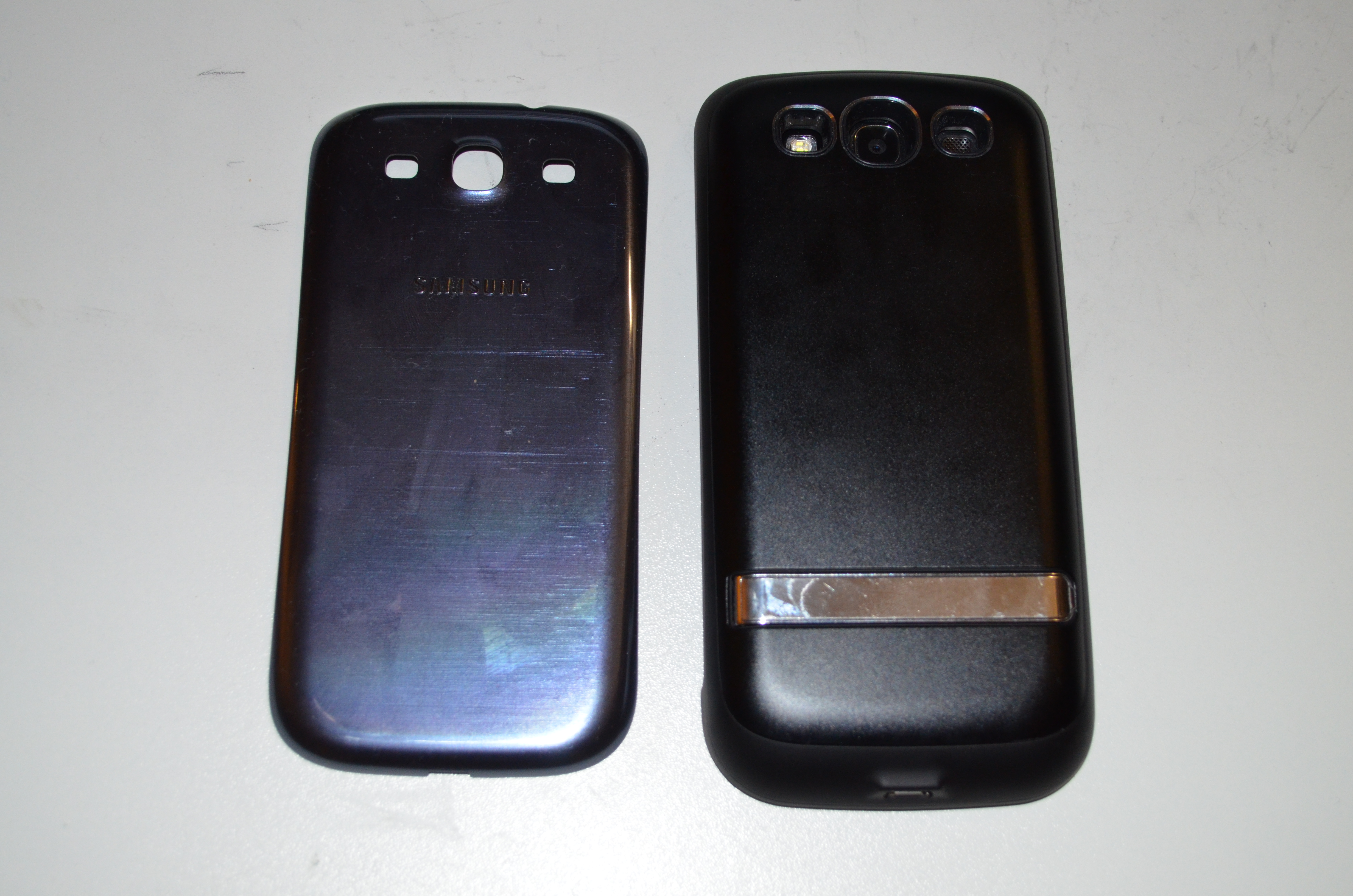
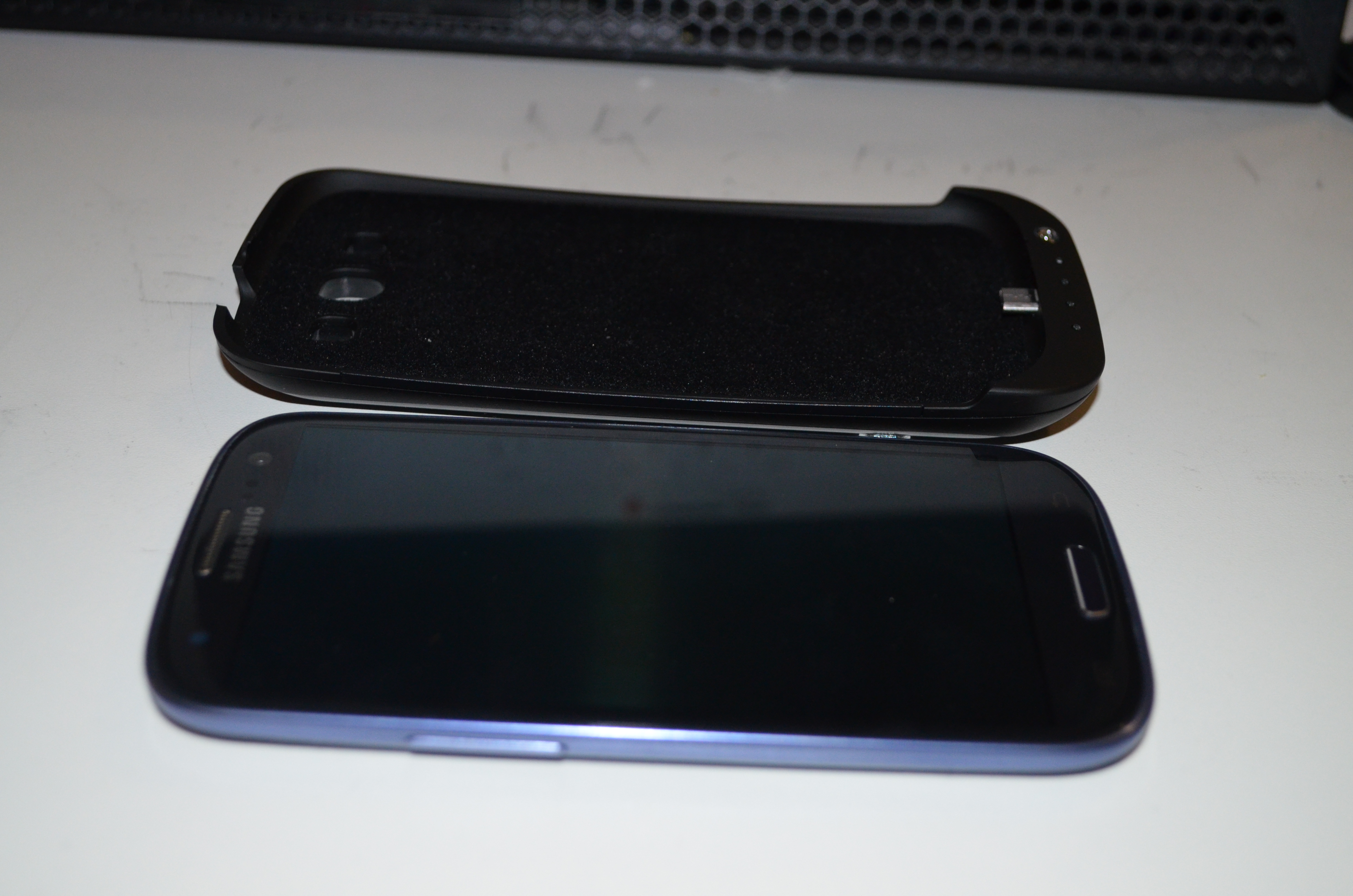
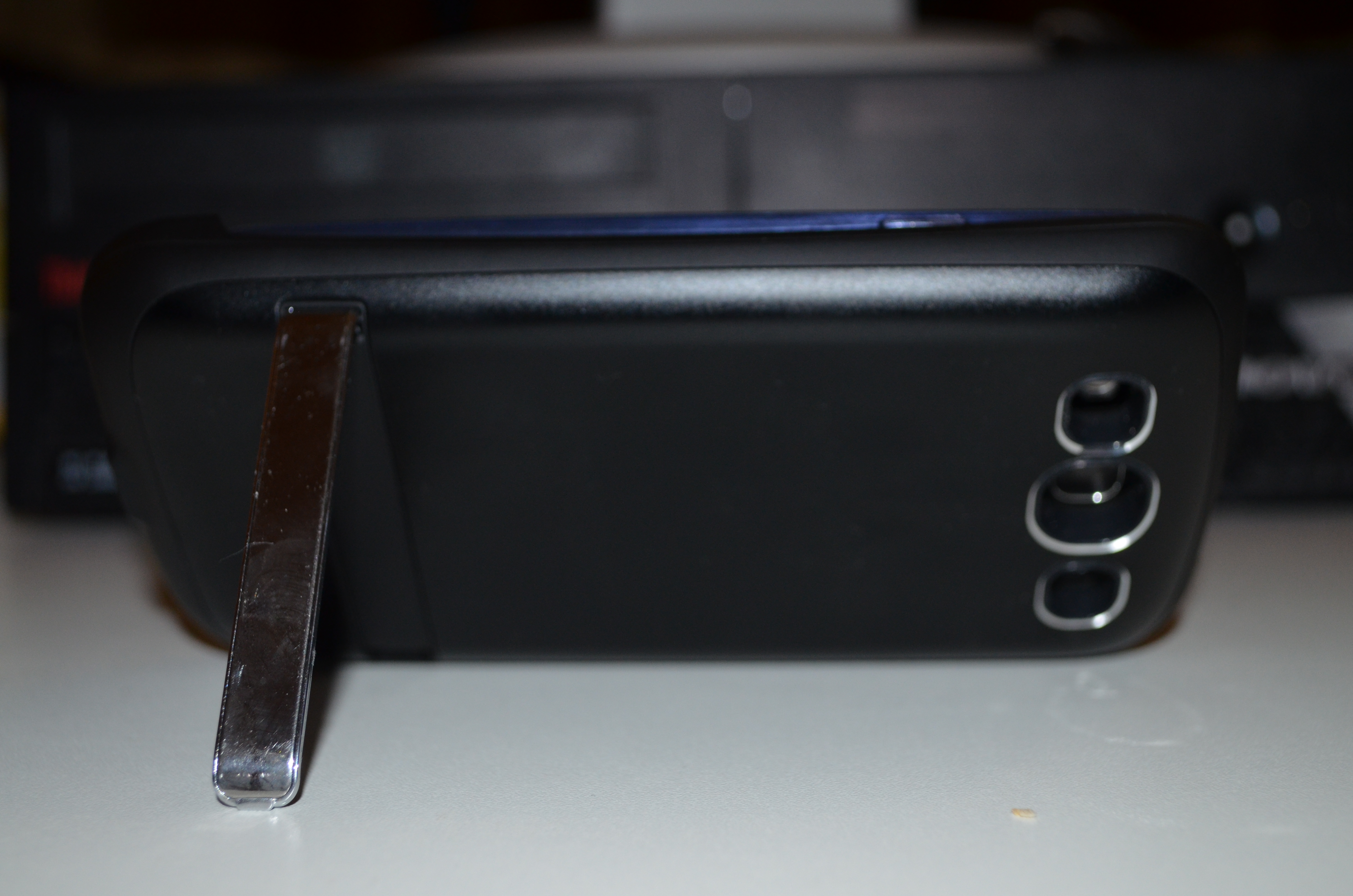
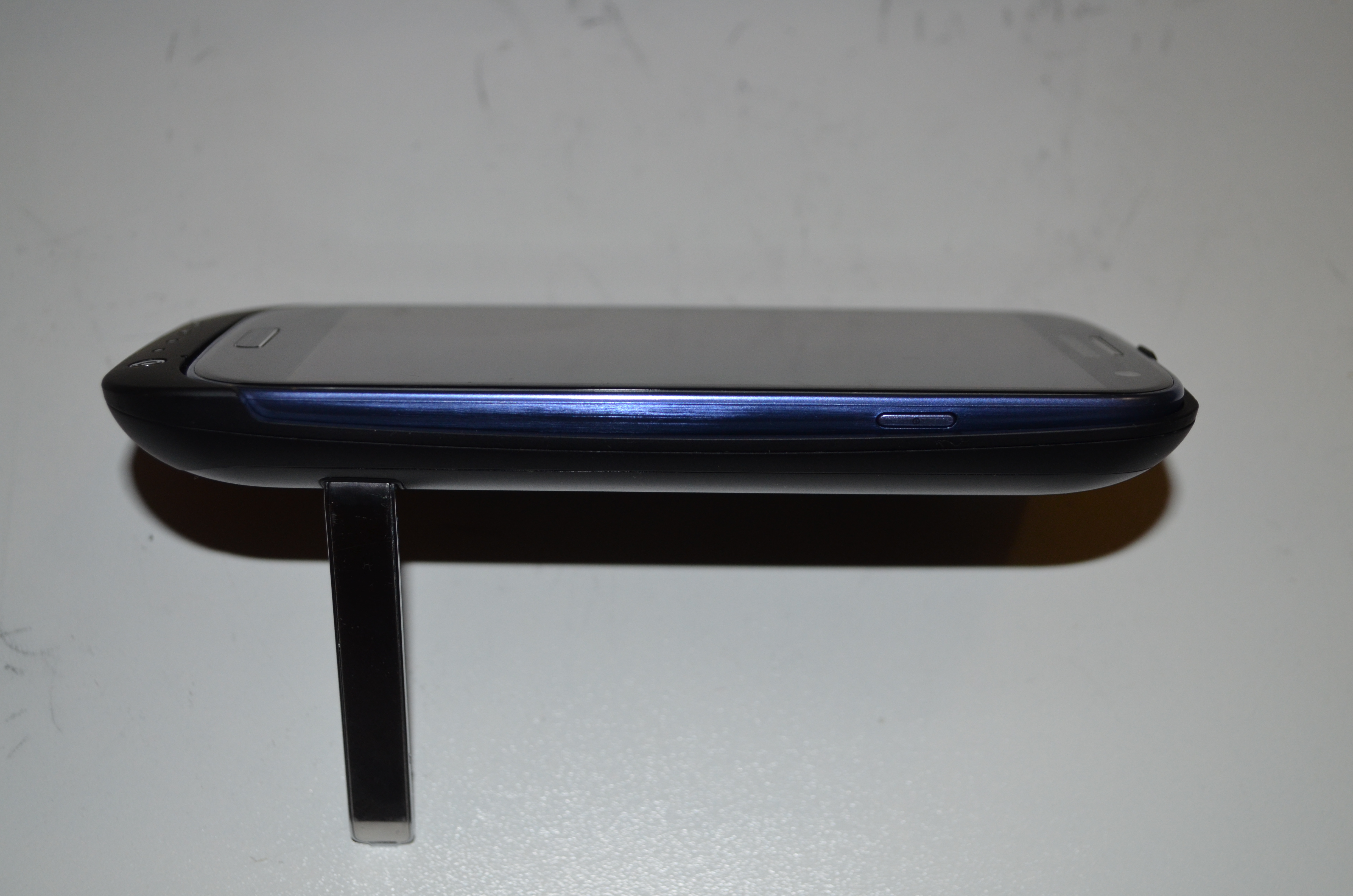
My new Samsung Galaxy S3 arrived a couple of days ago. Kogan added to the weirdness in their shipping that I documented in a previous post [1] by shipping the two phones on consecutive days with separate invoices for $789 each (as opposed to the $449 that I paid). This means that if customs were to track this down they could bust me for import duties (which apply whenever you order more than $1000 of electronics from another country) as multiple shipments in a small period of time are aggregated for tax purposes. It also means that it would be easy to defraud the tax office or an employer about the cost of the devices if I didn t blog about it Phone and Case Review back of power case with S3 installed next to back plastic of S3S3 and case next to each other To install the Samsung Galaxy S3 in the power case I bought from Kogan the back of the S3 has to be removed. One annoying implication of this is that when using the phone in it s case I will either have to carry the back of the phone with me or have no option of removing the case during the day. The phone has to slide in to the case from a small angle and if it s removed carelessly there seems to be a risk of breaking the power connector on the case. S3 on power case standedge view of S3 in power case stand The above photos show the kick-stand on the power case in use, I haven t yet had an opportunity to use the stand for anything other than photography and as it s made of thin plastic there s a reasonable chance that it will break off before I ever use it properly. One major deficiency of the power case is that it has no protection for the screen. The typical gel case will extend by about 2mm above the screen which means that you can place the phone screen-down on a table without a risk of scratching the screen. Also if a phone in a gel case is dropped on a hard surface it seems likely that the chance of the screen hitting a bump and cracking will be lower although I m not aware of any research regarding how well this theory works in practice. This combined with the fact that the power case is smooth and difficult to grip makes it quite unsuitable for regular use. I am concerned that the added mass of the power case would increase the risk of serious phone damage if it s dropped screen-down. I plan to buy a gel case ASAP which I will use most of the time. I will swap the gel case for the power case on the occasions when I expect to spend an extended period of time away from home or an office where I can charge my phone. The power case really should have been designed with a flange that extends above the level of the screen on all sites. It also shouldn t be smooth on the outside. Phone Review The Galaxy S3 equals the Galaxy S for the title of the most slippery phone I ve ever owned. This combined with the fact that the Galaxy S3 is slightly thinner and also 10% wider and longer makes it a more difficult phone to hold. It s a phone that really needs a case with a lot of grip. The camera is reasonable given the fact that any device that is 8.6mm thick will have a very small focal length and also a very small CCD for receiving light. The laws of physics just don t allow something the size of the Galaxy S3 to have a half-decent camera. My ideal mobile phone would be about the size of the Galaxy S3 with the power case, it would use the extra thickness for a big battery as well as a much longer focal length for the camera. I d like a phone to be about 16mm thick over most of it s area with a section that s 20mm for the camera. The burst shot mode (which allows you to take 20 pictures rapidly) is good for capturing certain types of relatively slow movement (EG someone s mouth moving when they talk). But it s no good at all if you try to pan the camera while doing burst mode. When I first started using the phone it gave me lots of hints about using various functions. This wasn t particularly useful for me as most things are obvious to anyone who has much experience with computers and the non-obvious things are probably going to be forgotten if you are doing something else when the help system prompts you. It will be useful for my sister in law who s getting the other phone, but the down-side of this is that I can t configure her phone before delivering it. She needs to use it first to see all the tips. The Galaxy S3 has a screen that s 4.8 diagonally which is slightly larger than the 4.0 screens of my previous Android phones (Sony Ericsson Xperia X10 and Samsung Galaxy S). That gives 44% more screen area which is a good thing. Unfortunately many apps seem to display the same amount of data, I had hoped that 44% more area and 140% more pixels would result in most apps displaying more data by default. Fortunately ConnectBot (my SSH client of choice) gives me 60 rows and 120 columns on the Galaxy S3 as opposed to the mere 31 rows and 80 columns on the Xperia X10. I don t use ConnectBot that often (a phone is a really bad ssh client no matter how you do it), but when I do it s really important and the extra space matters. The down-side of the larger screen for me is that the distance from the center of the palm of my hand to the end of my thumb is slightly less than 4.8 . This means that I can t hold the Galaxy S3 with one corner in the palm of my hand and still reach the far corner of the screen. So I am forced to hold the sides of the phone for one-handed use which means that it would be easier for it to slip out of my hand. A further complication is that the settings and back buttons are very close to the edge of the phone and can be hit by accident very easily. Hopefully a gel case will alleviate that. But I have never owned a hand-held device which was so difficult to hold in a stock configuration. According to AndroSensor (one of my favorite demo programs for showing useless things that a phone can do) the Galaxy S3 lacks support for measuring humidity and external temperature but it has all the other sensors. I think I can survive without knowing how hot and humid my pockets are, but it would still be nice to have every possible feature. The default partitioning of the phone storage is to have all internal storage used for applications and none used for a VFAT filesystem accessible over USB. It s nice that I won t run out of application storage space (a problem I ve had with every other Android device) but it does mean that I ll have to buy a micro SD card before I can use the phone properly. Micro SD storage costs about $1.50 per gig in the size range from 8G to 32G, it s not particularly expensive but it s annoying to have the phone not be fully usable right from the start. Without using a SD card I have to use gphoto2 to download pictures from the phone so it s fully usable in every way. But the cost of the power case, the gel case I m about to buy, and an SD card make the phone less of a bargain. The phone has more RAM, a faster CPU, and Android 4.1. These are all really good things, but nothing worth writing about in a review. Conclusions The power case is very poorly designed, I probably wouldn t buy it if I knew then what I know now. For one-handed phone use by someone like me with longer than average fingers a 4.0 phone is about the largest possible. This doesn t mean that phones should stay small, but it does mean that Apple weren t being entirely silly when they released all the 3.5 iPhones. Presumably a large portion of the population would find a 3.5 phone to be as usable as a 4.0 phone is for me. It now seems to me that as a 4.8 screen is going to be impractical for one-hand use by almost everyone the phone designers should concentrate more on larger phones similar to the Samsung Galaxy Note. I think that the 4.8 screen size may be ideal for some young children who could use it the way an adult might use a 7 tablet an Android phone seems to be a relatively common present for children in the 6-12 age range. Generally I think that no-one should ever buy a new phone or tablet without trying one of the same size. While I am happy with the S3 it really doesn t work in the way I expected. Having 2.9* as many characters on screen for ConnectBot is a massive benefit. If I ever write another magazine article on a hand-held device the extra size and resolution will really help if I found a suitable editor (please make suggestions in the comments). For the WordPress client to write long blog posts on it then the screen could potentially be reasonably useful, but so far it seems that it s more suited to reviewing posts and comments than to writing posts. Generally the Samsung Galaxy S3 is a good phone and I think it s great value for money when it s less than $500.

10 December 2012

Russell Coker: Returning the Aldi Tablet

I have decided to return the 7 Android tablet I bought from Aldi last week [1]. I still think that the tablet isn t all bad, but the main problem I had is the short battery life. The battery can be entirely exhausted in less than an hour s use. Another problem is the fact that most of the Angry Birds games just abort on startup, as my plans for the tablet involved some recreational use this is a significant problem. The final factor that made me decide to return it is the fact that Kogan offered a special deal on a Samsung Galaxy S3 [2] for $449. That ended up as $507 per phone for two phones that have PowerCases (which more than double the battery life as well as protecting the phone from being dropped). So a Galaxy S3 increments my Android device count and with a 4.8 720*1280 display will compete well with a low-end 7 tablet that only has a 800*480 display (the Galaxy S3 has 2.4* as many pixels). Aldi offers 60 days money back, so I ll return the tablet when my Galaxy S3 arrives.

22 November 2012

Philipp Kern: OpenClonk

The Free and Open successor to the Clonk computer game series OpenClonk is now available in Debian sid and Ubuntu raring: just use sudo apt-get install openclonk to install it (backports to Ubuntu precise and quantal can be found in the OpenClonk Releases PPA).

<iframe allowfullscreen="allowfullscreen" frameborder="0" height="236" src="https://www.youtube.com/embed/ykJZ9WsevGE" width="420">OpenClonk Beyond the Rocks Trailer</iframe>

It's still under development, but as you can see it's also already quite functional. The engine was made available freely under the ISC license after the original author of Clonk was no longer interested in creating new successors. Many of the old volunteer contributors then picked it up. Be aware that same computer multiplayer, which was available in the older parts of the series, is gone. If you play on the network, you need to ensure that both of you have the same version of the game.

2 October 2012

Philipp Kern: How to maintain an OpenWRT installation

I wondered how to properly maintain an OpenWRT installation that needs to track trunk for one reason or another. For instance the OpenWRT release pace is quite slow and "new" devices or various fixes are only available in this particular branch.

Now the OpenWRT project does offer snapshot builds. These are images built with the default config for the particular device type. You can even upgrade most models using sysupgrade, which preserves a list of configuration files you specify when flashing the new image, instead of doing a dreadful tftp upload. But you still lose all the packages you installed and accumulate a bit of cruft when reinstalling them. If you do not flash new images, you will be unable to install kernel modules after a while, because the kernel version they're based upon was updated.

So what's suggested is this:
The advantage of building an image that includes all the packages is that you don't get to reinstall them and due to the use of squashfs, all files provided by those packages are actually kept in compressed form in flash. The image I built has a size of about 7 MB and contains "heavyweight" packages like isc-dhcpd, bind, openvpn (using openssl), bash, vim-tiny, tcpdump-mini, luci, and a webserver with TLS support.

As always: Take great care when you're flashing devices. The devices I bought cannot be bricked, but this might not be true for all devices that run OpenWRT. You might need and go doing a tftp image upload if something goes wrong. Check the OpenWRT wiki for instructions and possibly make your computer ready for them before starting to play with your box. For my Buffalo WZR-HP-AG300H the sysupgrade procedure is stable.

23 September 2012

Philipp Kern: Call for testing: Upcoming Squeeze point release 6.0.6

We just sent out a new call for testing for the next point release of Debian Squeeze. The last one was back in May, hence there are a bunch of updates. Please test the packages in squeeze-proposed-updates on some machines running squeeze if possible, so that we don't screw up your production machines with bad updates in a week. The point release is scheduled for September 29th, i.e. next Saturday. Don't forget to copy the debian-release mailing list when you encounter regressions. Thanks for your efforts.

If you want to receive these notices by mail, please subscribe to the debian-stable-announce mailing list.

21 September 2012

Philipp Kern: IPv6 support in debian-installer, take 2

The IPv6 patch set for netcfg (part of debian-installer) has landed in Debian unstable. In follow-up uploads I diverged from the Ubuntu patch set a little bit:
Thanks to Michael Tokarev's recent upload of busybox, we now also have a more featureful ping and ping6 in debian-installer's environment.

Known bugs:
If you could take another look at a current d-i daily, install a system with it and look if the installed system has a correct network configuration, that would still be appreciated. I also need somebody to test the GNU/kFreeBSD image. I fixed it up to build there but the result might be entirely wrong.

My sincere thanks go to Bernhard Schmidt and Karsten Merker, who successfully completed installations over IPv6 in various environments!

Next.

Previous.