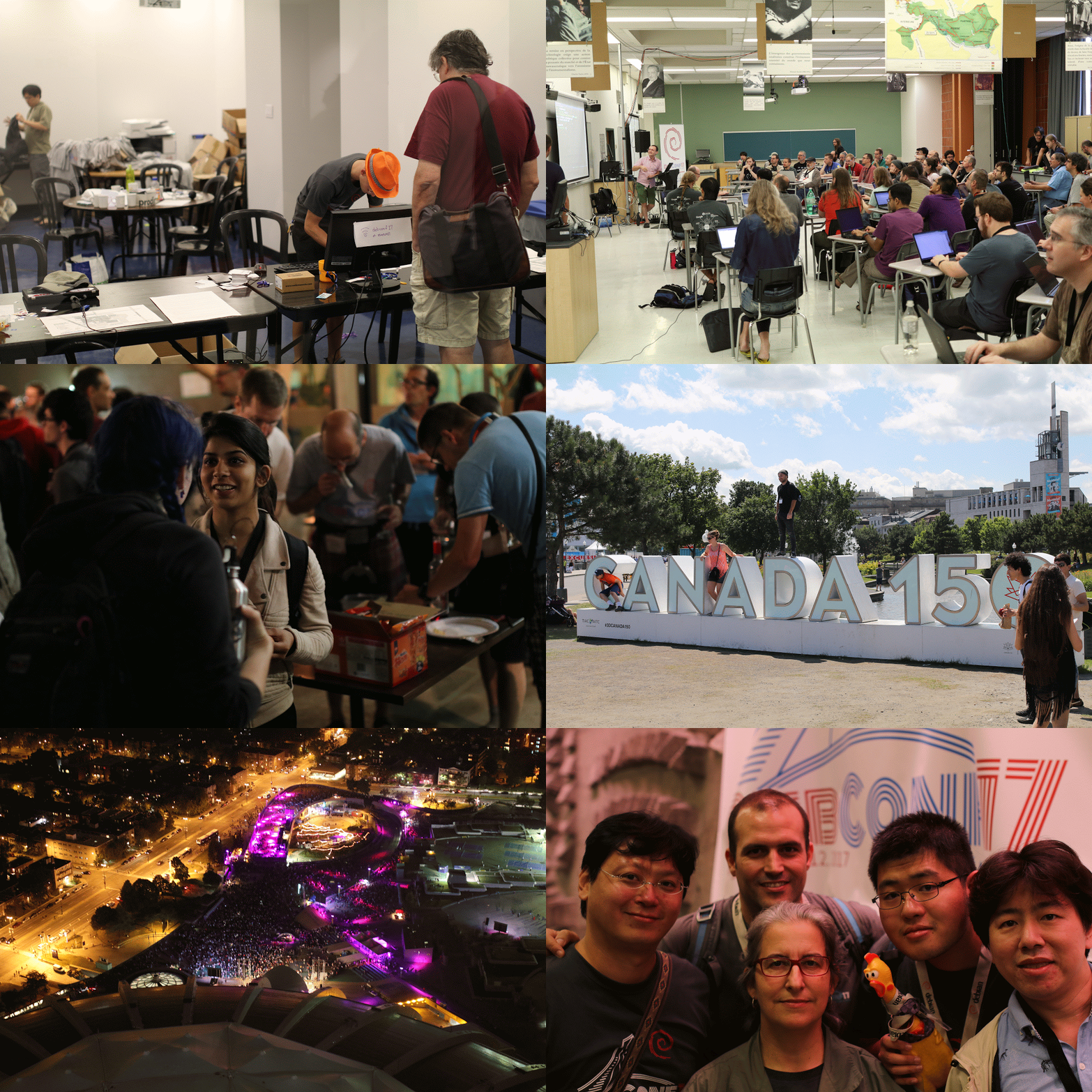
Search Results: "Aigars Mahinovs"

16 October 2022

Aigars Mahinovs: Ryzen 7000 amdgpu boot hang

So you decided to build a brand new system using all the latest and coolest tech, so you buy a Ryzen 7000 series Zen 4 CPU, like the Ryzen 7700X that I picked, with a new mother board and DDR5 memory and all that jazz. But for now, you don't yet have a fitting GPU for that system (as the new ones will only come out in November), so you are booting a Debian system using the new build-in video card of the new CPUs (Zen 4 generation has a simple AMD GPU build-in into every CPU now - great stuff for debugging and mostly-headless systems) and you get ... nothing on the screen. Hmm. You boot into the rescue mode and the kernel message stop after:
Oct 16 13:31:25 home kernel: [    4.128328] amdgpu: Ignoring ACPI CRAT on non-APU system
Oct 16 13:31:25 home kernel: [    4.128329] amdgpu: Virtual CRAT table created for CPU
Oct 16 13:31:25 home kernel: [    4.128332] amdgpu: Topology: Add CPU node
That looks bad, right? Well, if you either ssh into the machine or reboot with module_blacklist=amdgpu in the kernel command line you will find in /var/log/kern.log.1 those messages and also the following messages that will clarify the situation a bit:
Oct 16 13:31:25 home kernel: [    4.129352] amdgpu 0000:10:00.0: firmware: failed to load amdgpu/psp_13_0_5_toc.bin (-2)
Oct 16 13:31:25 home kernel: [    4.129354] firmware_class: See https://wiki.debian.org/Firmware for information about missing firmware
Oct 16 13:31:25 home kernel: [    4.129358] amdgpu 0000:10:00.0: firmware: failed to load amdgpu/psp_13_0_5_toc.bin (-2)
Oct 16 13:31:25 home kernel: [    4.129359] amdgpu 0000:10:00.0: Direct firmware load for amdgpu/psp_13_0_5_toc.bin failed with error -2
Oct 16 13:31:25 home kernel: [    4.129360] amdgpu 0000:10:00.0: amdgpu: fail to request/validate toc microcode
Oct 16 13:31:25 home kernel: [    4.129361] [drm:psp_sw_init [amdgpu]] *ERROR* Failed to load psp firmware!
Oct 16 13:31:25 home kernel: [    4.129432] [drm:amdgpu_device_init.cold [amdgpu]] *ERROR* sw_init of IP block <psp> failed -2
Oct 16 13:31:25 home kernel: [    4.129525] amdgpu 0000:10:00.0: amdgpu: amdgpu_device_ip_init failed
Oct 16 13:31:25 home kernel: [    4.129526] amdgpu 0000:10:00.0: amdgpu: Fatal error during GPU init
Oct 16 13:31:25 home kernel: [    4.129527] amdgpu 0000:10:00.0: amdgpu: amdgpu: finishing device.
Oct 16 13:31:25 home kernel: [    4.129633] amdgpu: probe of 0000:10:00.0 failed with error -2
So what you need is to get a new set of Linux Kernel Firmware blobs and upack that in /lib/firmware. The tarball from 2022-10-12 worked well for me. After that you also need to re-create the initramfs with update-initramfs -k all -c to include the new firmware. Having kernel version 5.18 or newer is also required for stable Zen 4 support. It might be that a fresh Mesa version is also of importance, but as I am running sid on this machine I can only say that Mesa 22.2.1 that is in sid works fine.

22 July 2022

Aigars Mahinovs: Debconf 22 photos

Finally after a long break, the in-person Debconf is a thing again, this time Debconf 22 is happening in Prizren, Kosovo. And it has been my pleasure to again be here and take lots of pictures of the event and of the surroundings. The photos can be found in this Google Photo shared album and also on this git-lfs share. But the main photographic delight, as always is the DebConf 22 Group Photo. And here it is!!! DebConf 22 Group photo small You can also see it in:

29 June 2022

Aigars Mahinovs: Long travel in an electric car

Since the first week of April 2022 I have (finally!) changed my company car from a plug-in hybrid to a fully electic car. My new ride, for the next two years, is a BMW i4 M50 in Aventurine Red metallic. An ellegant car with very deep and memorable color, insanely powerful (544 hp/795 Nm), sub-4 second 0-100 km/h, large 84 kWh battery (80 kWh usable), charging up to 210 kW, top speed of 225 km/h and also very efficient (which came out best in this trip) with WLTP range of 510 km and EVDB real range of 435 km. The car also has performance tyres (Hankook Ventus S1 evo3 245/45R18 100Y XL in front and 255/45R18 103Y XL in rear all at recommended 2.5 bar) that have reduced efficiency. So I wanted to document and describe how was it for me to travel ~2000 km (one way) with this, electric, car from south of Germany to north of Latvia. I have done this trip many times before since I live in Germany now and travel back to my relatives in Latvia 1-2 times per year. This was the first time I made this trip in an electric car. And as this trip includes both travelling in Germany (where BEV infrastructure is best in the world) and across Eastern/Northen Europe, I believe that this can be interesting to a few people out there. Normally when I travelled this trip with a gasoline/diesel car I would normally drive for two days with an intermediate stop somewhere around Warsaw with about 12 hours of travel time in each day. This would normally include a couple bathroom stops in each day, at least one longer lunch stop and 3-4 refueling stops on top of that. Normally this would use at least 6 liters of fuel per 100 km on average with total usage of about 270 liters for the whole trip (or about 540 just in fuel costs, nowadays). My (personal) quirk is that both fuel and recharging of my (business) car inside Germany is actually paid by my employer, so it is useful for me to charge up (or fill up) at the last station in Gemany before driving on. The plan for this trip was made in a similar way as when travelling with a gasoline car: travelling as fast as possible on German Autobahn network to last chargin stop on the A4 near G rlitz, there charging up as much as reasonable and then travelling to a hotel in Warsaw, charging there overnight and travelling north towards Ionity chargers in Lithuania from where reaching the final target in north of Latvia should be possible. How did this plan meet the reality? Travelling inside Germany with an electric car was basically perfect. The most efficient way would involve driving fast and hard with top speed of even 180 km/h (where possible due to speed limits and traffic). BMW i4 is very efficient at high speeds with consumption maxing out at 28 kWh/100km when you actually drive at this speed all the time. In real situation in this trip we saw consumption of 20.8-22.2 kWh/100km in the first legs of the trip. The more traffic there is, the more speed limits and roadworks, the lower is the average speed and also the lower the consumption. With this kind of consumption we could comfortably drive 2 hours as fast as we could and then pick any fast charger along the route and in 26 minutes at a charger (50 kWh charged total) we'd be ready to drive for another 2 hours. This lines up very well with recommended rest stops for biological reasons (bathroom, water or coffee, a bit of movement to get blood circulating) and very close to what I had to do anyway with a gasoline car. With a gasoline car I had to refuel first, then park, then go to bathroom and so on. With an electric car I can do all of that while the car is charging and in the end the total time for a stop is very similar. Also not that there was a crazy heat wave going on and temperature outside was at about 34C minimum the whole day and hitting 40C at one point of the trip, so a lot of power was used for cooling. The car has a heat pump standard, but it still was working hard to keep us cool in the sun. The car was able to plan a charging route with all the charging stops required and had all the good options (like multiple intermediate stops) that many other cars (hi Tesla) and mobile apps (hi Google and Apple) do not have yet. There are a couple bugs with charging route and display of current route guidance, those are already fixed and will be delivered with over the air update with July 2022 update. Another good alterantive is the ABRP (A Better Route Planner) that was specifically designed for electric car routing along the best route for charging. Most phone apps (like Google Maps) have no idea about your specific electric car - it has no idea about the battery capacity, charging curve and is missing key live data as well - what is the current consumption and remaining energy in the battery. ABRP is different - it has data and profiles for almost all electric cars and can also be linked to live vehicle data, either via a OBD dongle or via a new Tronity cloud service. Tronity reads data from vehicle-specific cloud service, such as MyBMW service, saves it, tracks history and also re-transmits it to ABRP for live navigation planning. ABRP allows for options and settings that no car or app offers, for example, saying that you want to stop at a particular place for an hour or until battery is charged to 90%, or saying that you have specific charging cards and would only want to stop at chargers that support those. Both the car and the ABRP also support alternate routes even with multiple intermediate stops. In comparison, route planning by Google Maps or Apple Maps or Waze or even Tesla does not really come close. After charging up in the last German fast charger, a more interesting part of the trip started. In Poland the density of high performance chargers (HPC) is much lower than in Germany. There are many chargers (west of Warsaw), but vast majority of them are (relatively) slow 50kW chargers. And that is a difference between putting 50kWh into the car in 23-26 minutes or in 60 minutes. It does not seem too much, but the key bit here is that for 20 minutes there is easy to find stuff that should be done anyway, but after that you are done and you are just waiting for the car and if that takes 4 more minutes or 40 more minutes is a big, perceptual, difference. So using HPC is much, much preferable. So we put in the Ionity charger near Lodz as our intermediate target and the car suggested an intermediate stop at a Greenway charger by Katy Wroclawskie. The location is a bit weird - it has 4 charging stations with 150 kW each. The weird bits are that each station has two CCS connectors, but only one parking place (and the connectors share power, so if two cars were to connect, each would get half power). Also from the front of the location one can only see two stations, the otehr two are semi-hidden around a corner. We actually missed them on the way to Latvia and one person actually waited for the charger behind us for about 10 minutes. We only discovered the other two stations on the way back. With slower speeds in Poland the consumption goes down to 18 kWh/100km which translates to now up to 3 hours driving between stops. At the end of the first day we drove istarting from Ulm from 9:30 in the morning until about 23:00 in the evening with total distance of about 1100 km, 5 charging stops, starting with 92% battery, charging for 26 min (50 kWh), 33 min (57 kWh + lunch), 17 min (23 kWh), 12 min (17 kWh) and 13 min (37 kW). In the last two chargers you can see the difference between a good and fast 150 kW charger at high battery charge level and a really fast Ionity charger at low battery charge level, which makes charging faster still. Arriving to hotel with 23% of battery. Overnight the car charged from a Porsche Destination Charger to 87% (57 kWh). That was a bit less than I would expect from a full power 11kW charger, but good enough. Hotels should really install 11kW Type2 chargers for their guests, it is a really significant bonus that drives more clients to you. The road between Warsaw and Kaunas is the most difficult part of the trip for both driving itself and also for charging. For driving the problem is that there will be a new highway going from Warsaw to Lithuanian border, but it is actually not fully ready yet. So parts of the way one drives on the new, great and wide highway and parts of the way one drives on temporary roads or on old single lane undivided roads. And the most annoying part is navigating between parts as signs are not always clear and the maps are either too old or too new. Some maps do not have the new roads and others have on the roads that have not been actually build or opened to traffic yet. It's really easy to loose ones way and take a significant detour. As far as charging goes, basically there is only the slow 50 kW chargers between Warsaw and Kaunas (for now). We chose to charge on the last charger in Poland, by Suwalki Kaufland. That was not a good idea - there is only one 50 kW CCS and many people decide the same, so there can be a wait. We had to wait 17 minutes before we could charge for 30 more minutes just to get 18 kWh into the battery. Not the best use of time. On the way back we chose a different charger in Lomza where would have a relaxed dinner while the car was charging. That was far more relaxing and a better use of time. We also tried charging at an Orlen charger that was not recommended by our car and we found out why. Unlike all other chargers during our entire trip, this charger did not accept our universal BMW Charging RFID card. Instead it demanded that we download their own Orlen app and register there. The app is only available in some countries (and not in others) and on iPhone it is only available in Polish. That is a bad exception to the rule and a bad example. This is also how most charging works in USA. Here in Europe that is not normal. The normal is to use a charging card - either provided from the car maker or from another supplier (like PlugSufring or Maingau Energy). The providers then make roaming arrangements with all the charging networks, so the cards just work everywhere. In the end the user gets the prices and the bills from their card provider as a single monthly bill. This also saves all any credit card charges for the user. Having a clear, separate RFID card also means that one can easily choose how to pay for each charging session. For example, I have a corporate RFID card that my company pays for (for charging in Germany) and a private BMW Charging card that I am paying myself for (for charging abroad). Having the car itself authenticate direct with the charger (like Tesla does) removes the option to choose how to pay. Having each charge network have to use their own app or token bring too much chaos and takes too much setup. The optimum is having one card that works everywhere and having the option to have additional card or cards for specific purposes. Reaching Ionity chargers in Lithuania is again a breath of fresh air - 20-24 minutes to charge 50 kWh is as expected. One can charge on the first Ionity just enough to reach the next one and then on the second charger one can charge up enough to either reach the Ionity charger in Adazi or the final target in Latvia. There is a huge number of CSDD (Road Traffic and Safety Directorate) managed chargers all over Latvia, but they are 50 kW chargers. Good enough for local travel, but not great for long distance trips. BMW i4 charges at over 50 kW on a HPC even at over 90% battery state of charge (SoC). This means that it is always faster to charge up in a HPC than in a 50 kW charger, if that is at all possible. We also tested the CSDD chargers - they worked without any issues. One could pay with the BMW Charging RFID card, one could use the CSDD e-mobi app or token and one could also use Mobilly - an app that you can use in Latvia for everything from parking to public transport tickets or museums or car washes. We managed to reach our final destination near Aluksne with 17% range remaining after just 3 charging stops: 17+30 min (18 kWh), 24 min (48 kWh), 28 min (36 kWh). Last stop we charged to 90% which took a few extra minutes that would have been optimal. For travel around in Latvia we were charging at our target farmhouse from a normal 3 kW Schuko EU socket. That is very slow. We charged for 33 hours and went from 17% to 94%, so not really full. That was perfectly fine for our purposes. We easily reached Riga, drove to the sea and then back to Aluksne with 8% still in reserve and started charging again for the next trip. If it were required to drive around more and charge faster, we could have used the normal 3-phase 440V connection in the farmhouse to have a red CEE 16A plug installed (same as people use for welders). BMW i4 comes standard with a new BMW Flexible Fast Charger that has changable socket adapters. It comes by default with a Schucko connector in Europe, but for 90 one can buy an adapter for blue CEE plug (3.7 kW) or red CEE 16A or 32A plugs (11 kW). Some public charging stations in France actually use the blue CEE plugs instead of more common Type2 electric car charging stations. The CEE plugs are also common in camping parking places. On the way back the long distance BEV travel was already well understood and did not cause us any problem. From our destination we could easily reach the first Ionity in Lithuania, on the Panevezhis bypass road where in just 8 minutes we got 19 kWh and were ready to drive on to Kaunas, there a longer 32 minute stop before the charging desert of Suwalki Gap that gave us 52 kWh to 90%. That brought us to a shopping mall in Lomzha where we had some food and charged up 39 kWh in lazy 50 minutes. That was enough to bring us to our return hotel for the night - Hotel 500W in Strykow by Lodz that has a 50kW charger on site, while we were having late dinner and preparing for sleep, the car easily recharged to full (71 kWh in 95 minutes), so I just moved it from charger to a parking spot just before going to sleep. Really easy and well flowing day. Second day back went even better as we just needed an 18 minute stop at the same Katy Wroclawskie charger as before to get 22 kWh and that was enough to get back to Germany. After that we were again flying on the Autobahn and charging as needed, 15 min (31 kWh), 23 min (48 kWh) and 31 min (54 kWh + food). We started the day on about 9:40 and were home at 21:40 after driving just over 1000 km on that day. So less than 12 hours for 1000 km travelled, including all charging, bio stops, food and some traffic jams as well. Not bad. Now let's take a look at all the apps and data connections that a technically minded customer can have for their car. Architecturally the car is a network of computers by itself, but it is very secured and normally people do not have any direct access. However, once you log in into the car with your BMW account the car gets your profile info and preferences (seat settings, navigation favorites, ...) and the car then also can start sending information to the BMW backend about its status. This information is then available to the user over multiple different channels. There is no separate channel for each of those data flow. The data only goes once to the backend and then all other communication of apps happens with the backend. First of all the MyBMW app. This is the go-to for everything about the car - seeing its current status and location (when not driving), sending commands to the car (lock, unlock, flash lights, pre-condition, ...) and also monitor and control charging processes. You can also plan a route or destination in the app in advance and then just send it over to the car so it already knows where to drive to when you get to the car. This can also integrate with calendar entries, if you have locations for appointments, for example. This also shows full charging history and allows a very easy export of that data, here I exported all charging sessions from June and then trimmed it back to only sessions relevant to the trip and cut off some design elements to have the data more visible. So one can very easily see when and where we were charging, how much power we got at each spot and (if you set prices for locations) can even show costs. I've already mentioned the Tronity service and its ABRP integration, but it also saves the information that it gets from the car and gathers that data over time. It has nice aspects, like showing the driven routes on a map, having ways to do business trip accounting and having good calendar view. Sadly it does not correctly capture the data for charging sessions (the amounts are incorrect). Update: after talking to Tronity support, it looks like the bug was in the incorrect value for the usable battery capacity for my car. They will look into getting th eright values there by default, but as a workaround one can edit their car in their system (after at least one charging session) and directly set the expected battery capacity (usable) in the car properties on the Tronity web portal settings. One other fun way to see data from your BMW is using the BMW integration in Home Assistant. This brings the car as a device in your own smart home. You can read all the variables from the car current status (and Home Asisstant makes cute historical charts) and you can even see interesting trends, for example for remaining range shows much higher value in Latvia as its prediction is adapted to Latvian road speeds and during the trip it adapts to Polish and then to German road speeds and thus to higher consumption and thus lower maximum predicted remaining range. Having the car attached to the Home Assistant also allows you to attach the car to automations, both as data and event source (like detecting when car enters the "Home" zone) and also as target, so you could flash car lights or even unlock or lock it when certain conditions are met. So, what in the end was the most important thing - cost of the trip? In total we charged up 863 kWh, so that would normally cost one about 290 , which is close to half what this trip would have costed with a gasoline car. Out of that 279 kWh in Germany (paid by my employer) and 154 kWh in the farmhouse (paid by our wonderful relatives :D) so in the end the charging that I actually need to pay adds up to 430 kWh or about 150 . Typically, it took about 400 in fuel that I had to pay to get to Latvia and back. The difference is really nice! In the end I believe that there are three different ways of charging:
  • incidental charging - this is wast majority of charging in the normal day-to-day life. The car gets charged when and where it is convinient to do so along the way. If we go to a movie or a shop and there is a chance to leave the car at a charger, then it can charge up. Works really well, does not take extra time for charging from us.
  • fast charging - charging up at a HPC during optimal charging conditions - from relatively low level to no more than 70-80% while you are still doing all the normal things one would do in a quick stop in a long travel process: bio things, cleaning the windscreen, getting a coffee or a snack.
  • necessary charging - charging from a whatever charger is available just enough to be able to reach the next destination or the next fast charger.
The last category is the only one that is really annoying and should be avoided at all costs. Even by shifting your plans so that you find something else useful to do while necessary charging is happening and thus, at least partially, shifting it over to incidental charging category. Then you are no longer just waiting for the car, you are doing something else and the car magically is charged up again. And when one does that, then travelling with an electric car becomes no more annoying than travelling with a gasoline car. Having more breaks in a trip is a good thing and makes the trips actually easier and less stressfull - I was more relaxed during and after this trip than during previous trips. Having the car air conditioning always be on, even when stopped, was a godsend in the insane heat wave of 30C-38C that we were driving trough. Final stats: 4425 km driven in the trip. Average consumption: 18.7 kWh/100km. Time driving: 2 days and 3 hours. Car regened 152 kWh. Charging stations recharged 863 kWh. Questions? You can use this i4talk forum thread or this Twitter thread to ask them to me.

30 June 2021

Aigars Mahinovs: Keeping it as simple as possible

You know that you've had the same server too long when they discontinue the entire class of servers you were using and you need to migrate to a new instance. And you know you've not done anything with that server (and the blog running on it) for too long when you have no idea how that thing is actually working. Its a good opportunity to start over from scratch, and a good motivation to the new thing as simply as humanly possible, or even simpler. So I am switching to a statically generated blog as well. Not sure what took me so long, but thank good the tooling has really improved since the last time I looked. It was as simple as picking Nikola, finding its import_feed plugin, changing the BLOG_RSS_LIMIT in my Django Mezzanine blog to a thousand (to export all posts via RSS/ATOM feed), fixing some bugs in the import_feed plugin, waiting a few minutes for the full feed to generate and to be imported, adjusting the config of the resulting site, posting that to git and writing a simple shell script to pull that repo periodically and call nikola build on it, as well as config to serve ther result via ngnix. Done. After that creating a new blog post is just nikola new_post and editing it in vim and pushing to git. I prefer Markdown, but it supports all kinds of formats. And the old posts are just stored as HTML. Really simple. I think I will spend more time fighting with Google to allow me to forward email from my domain to my GMail postbox without it refusing all of it as spam.

31 August 2017

Gunnar Wolf: gwolf.blog.fork()

Ohai, I have recently started to serve as a Feature Editor for the ACM XRDS magazine. As such, I was also invited to post some general blog posts on XRDS blog And I just started yesterday by posting about DebConf. I'm not going to pull (or mention) each of my posts in my main blog, nor will I syndicate it to Planet Debian (where most of my readership comes from), although I did add it to my dlvr.it account (that relays my posts to Twitter and Facebook, for those of you that care about said services). This mention is a one-off thing. So, if you want to see yet another post explaining what is DebConf and what is Debian to the wider public, well... Thate's what I came up with :) [Update]: Of course, I wanted to thank Aigars Mahinovs for the photos I used on that post. Have you looked at them all? I spent a moste enjoyable time going through them :-]

24 August 2017

Urvika Gola: Much awaited.. DebConf 17 in Montreal.

On 5th August I got a chance to attend, speak and experience DebConf 2017 at Montreal, Canada. The conference was stretch ed from 6 August to 12 August .
debconf_picture1Seasons of Debian Summer of Code & Winter of Outreachy
Pretty late for me to document my DebConf fun-learning-experiences, thanks to my delaying tactics.. I need to overcome.
But better late than ever, I had amazing time at DebConf. I got to meet and learn from my Outreachy Mentor, Daniel Pocock!
img_5634-e1503506917678.jpgPicture of Daniel and me captured by : Dorina Mosku
One thing about DebConf I loved was the amount of Diversity in Debian family! As a beginner, I got to get a big picture of what all projects are there. Daniel helped me a lot in getting started with packaging in Debian. I really appreciate the time he took out to guide me @DebConf and Pranav, remotely. One specific line I liked about Daniel s talk on Open Day, 5th August Free Communications with Free Software and Debian while talking about free RTC (Real Time Communication) is that, ..Instead of communication controlling the user, the user can control the communcation.. I talked about free RTC, my Project Lumicall and about my journey being an Outreachy Intern with Debian. I also covered my co-speaker s project work on Lumicall being a GSoC 2016 student.
IMG_0796Picture captured by Aigars Mahinovs
debconf_picture2Managing Debian s RTC services Daniel Pocock
Meeting the Outreachy family feels amaazzing! Karen Sandler, executive director of the Software Freedom Conservancy gave a talk on the Significance and Impact of Outreachy and Debian s support for the programme.
DG58B_gXUAA2GsAwith Karen Sandler and Outreachy alumini
DebConf 2017 has been a wonderful conference with the community being very welcoming and helpful

21 August 2017

Aigars Mahinovs: Debconf 17 photo retrospective

Debconf17 has come and gone by too fast, so we all could use a moment looing back at all the fun and serious happenings of the main event in the Debian social calendar. You can find my full photo gallery on Google, Flickr and Debconf Share. Debconf 17 photo animation Make sure to check out the Debconf17 group photo and as an extra special treat for you - enjoy the "living" Debconf17 group photo!

17 August 2017

Sean Whitton: I went all the way to Montr al for DebConf17, and all I got was a new MUA

This year s group photo (by Aigars Mahinovs). I really like the tagline
On Sunday night I got back from Montr al, where I attended both DebCamp17 and DebConf17. It was a wonderful two weeks. All I really did was work on Debian for roughly eight hours per day, interspersed with getting to know both people I ve been working with since I first began contributing to Debian in late 2015, and people I didn t yet know. But this was all I really needed to be doing. There was no need to engage in distracting myself. I enjoyed the first week more. There were sufficiently few people present that you could know at least all of their faces, and interesting-sounding talks didn t interrupt making progress on one s own work or unblocking other people s work. In the second week it was great to meet people who were only present for the second week, but it felt more like regular Debian, in that I was often waiting on other people or they were waiting on me. While I spent one morning actually writing fresh code, and I did a fair amount of pure packaging work, the majority of my time was poured into (i) Debian Policy; (ii) discussions within the Emacs team; and (iii) discussions about dgit. This was as I expected. During DebConf, it s not that useful to seclude oneself and sufficiently reacquaint oneself with a codebase that one can start producing patches, because that can be done anywhere in the world, without everyone else around. It s far more useful to bring different people together to get projects unblocked. I did some of that for my own work, and also tried to help other people s, including those who weren t able to attend the conference. In my ordinary life, taking a step back from the methods by which I protect my PGP keys and other personal data, I can appear to myself as a paranoid extremist, or some kind of data hoarder. It was comforting to find at DebConf plenty of people who go way further than me: multiple user accounts on their laptop, with separate X servers, for tasks of different security levels; PGP keys on smartcards; refusal to sign my PGP key based on government-issued ID alone; use of Qubes OS. One thing that did surprise me was to find myself in a minority for using the GNOME desktop; I had previously assumed that most people deep in Debian development didn t bother with tiling window managers. Turns out they are enthusiastic to talk about the trade-offs between window managers while riding the subway train back to our accommodation at midnight who knew such people existed? I was pleased to find them. One evening, I received a tag-teamed live tutorial in using i3 s core keybindings, and the next morning GNOME seemed deeply inelegant. The insinuation began, but I was immediately embroiled in inner struggle over the fact that i3 is a very popular tiling window manager, so it wouldn t be very cool if I were to start using it. This difficulty was compounded when I learned that the Haskell team lead still uses xmonad. The struggle continues. I hope that I ve been influenced by the highly non-judgemental and tolerant attitudes of the attendees of the conference. While most people at the conference were pretty ordinary aside from wanting to talk about the details of Debian packaging and processes! there were several people who rather visibly rejected social norms about how to present themselves. Around these people there was nothing of the usual tension. Further, in contrast with my environment as a graduate student, everyone was extremely relaxed about how everyone was spending their time. People drinking beer in the evenings were sitting at tables where other people were continuing to silently work on Debian. It is nice to have my experience in Montr al as a reference to check my own judgemental tendencies. I came away with a lot more than a new MUA: a certainty that I want to try to get to next year s conference; friends; a real life community behind what was hitherto mostly a hobby; a long list of tasks and the belief that I can accomplish them; a list of PGP fingerprints to sign; a new perspective on the arguments that occur on Debian mailing lists; an awareness of the risk of unconsciously manipulating other community members into getting work done. With regard to the MUA, I should say that I did not waste a lot of DebConf time messing with its configuration. I had actually worked out a notmuch configuration some months ago, but couldn t use it because I couldn t figure out how to incorporate my old mail archives into its index. Fortunately notmuch s maintainer is also on the Emacs team he was able to confirm that the crazy solution I d come up with was not likely to break notmuch s operating assumptions, and so I was able to spend about half an hour copying and pasting the configuration and scripts I d previously developed into my homedir, and then start using notmuch for the remainder of the conference. The main reason for wanting to use notmuch was to handle Debian mailing list volume more effectively than I m able to with mutt, so I was very happy to have the opportunity to pester David with newbie questions. Many, many thanks to all the volunteers whose efforts made DebCamp17 and DebConf17 possible.

Reproducible builds folks: Reproducible Builds: Weekly report #120

Here's what happened in the Reproducible Builds effort between Sunday 6th and Saturday 12th August 2017: Notes about reviews of unreproducible packages 13 package reviews have been added, 7 have been updated and 34 have been removed in this week, adding to our knowledge about identified issues. Packages reviewed and fixed, and reproducibility related bugs filed Upstream packages: Other bugs filed diffoscope development trydiffoscope development tests.reproducible-builds.org Misc. This week's edition was written by Chris Lamb & Holger Levsen & reviewed by a bunch of Reproducible Builds folks on IRC & the mailing lists.

28 December 2015

Aigars Mahinovs: Moving to Germany

After a long contemplation about what I want to do with my life and just as long a negotiation, I have accepted a job offer at BMW and will be moving from Latvia to Ulm, Germany in January 2016. It is going to be a big change and a big shake-up in my life, but the change should be for the better, eventually. I am going to move there using my car, loading a single car load of essential stuff and leaving the rest behind. My cat will be amond the essentials, so I have already started training him for car rides. The cat is not thrilled about it. I'll be renting out my current apartment - I wish to find someone that I know to rent to, but if noone comes up, then I'll have to give it to a renting company to rent out for me. There should be little change for my online activities, but this means that I will be less available for parties in Riga for the forseable future. Wish me luck!

30 August 2015

DebConf team: DebConf15: Farewell, and thanks for all the Fisch (Posted by DebConf Team)

A week ago, we concluded our biggest DebConf ever! It was a huge success. Handwritten feedback note We are overwhelmed by the positive feedback, for which we re very grateful. We want to thank you all for participating in the talks; speakers and audience alike, in person or live over the global Internet it wouldn t be the fantastic DebConf experience without you! Many of our events were recorded and streamed live, and are now available for viewing, as are the slides and photos. To share a sense of the scale of what all of us accomplished together, we ve compiled a few statistics: Our very own designer Valessio Brito made a lovely video of impressions and images of the conference.
We re collecting impressions from attendees as well as links to press articles, including Linux Weekly News coverage of specific sessions of DebConf. If you find something not yet included, please help us by adding links to the wiki.
DebConf15 group photo (by Aigars Mahinovs)
We tried a few new ideas this year, including a larger number of invited and featured speakers than ever before. On the Open Weekend, some of our sponsors presented their career opportunities at our job fair, which was very well attended. And a diverse selection of entertainment options provided the necessary breaks and ample opportunity for socialising. On the last Friday, the Oscar-winning documentary Citizenfour was screened, with some introductory remarks by Jacob Appelbaum and a remote address by its director, Laura Poitras, and followed by a long Q&A session by Jacob. DebConf15 was also the first DebConf with organised childcare (including a Teckids workshop for kids of age 8-16), which our DPL Neil McGovern standardised for the future: it s a thing now, he said. The participants used the week before the conference for intensive work, sprints and workshops, and throughout the main conference, significant progress was made on Debian and Free Software. Possibly the most visible was the endeavour to provide reproducible builds, but the planning of the next stable release stretch received no less attention. Groups like the Perl team, the diversity outreach programme and even DebConf organisation spent much time together discussing next steps and goals, and hundreds of commits were made to the archive, as well as bugs closed. DebConf15 was an amazing conference, it brought together hundreds of people, some oldtimers as well as plenty of new contributors, and we all had a great time, learning and collaborating with each other, says Margarita Manterola of the organiser team, and continues: The whole team worked really hard, and we are all very satisfied with the outcome. Another organiser, Martin Krafft adds: We mainly provided the infrastructure and space. A lot of what happened during the two weeks was thanks to our attendees. And that s what makes DebConf be DebConf. Photo of hostel staff wearing DebConf15 staff t-shirts (by Martin Krafft) Our organisation was greatly supported by the staff of the conference venue, the Jugendherberge Heidelberg International, who didn t take very long to identify with our diverse group, and who left no wishes untried. The venue itself was wonderfully spacious and never seemed too full as people spread naturally across the various conference rooms, the many open areas, the beergarden, the outside hacklabs and the lawn. The network installed specifically for our conference in collaboration with the nearby university, the neighbouring zoo, and the youth hostel provided us with a 1 Gbps upstream link, which we managed to almost saturate. The connection will stay in place, leaving the youth hostel as one with possibly the fastest Internet connection in the state. And the kitchen catered high-quality food to all attendees and their special requirements. Regional beer and wine, as well as local specialities, were provided at the bistro. DebConf exists to bring people together, which includes paying for travel, food and accomodation for people who could not otherwise attend. We would never have been able to achieve what we did without the support of our generous sponsors, especially our Platinum Sponsor Hewlett-Packard. Thank you very much. See you next year in Cape Town, South Africa!
The DebConf16 logo with white background

25 August 2015

Lunar: Reproducible builds: week 17 in Stretch cycle

A good amount of the Debian reproducible builds team had the chance to enjoy face-to-face interactions during DebConf15.
Names in red and blue were all present at DebConf15
Picture of the  reproducible builds  talk during DebConf15
Hugging people with whom one has been working tirelessly for months gives a lot of warm-fuzzy feelings. Several recorded and hallway discussions paved the way to solve the remaining issues to get reproducible builds part of Debian proper. Both talks from the Debian Project Leader and the release team mentioned the effort as important for the future of Debian. A forty-five minutes talk presented the state of the reproducible builds effort. It was then followed by an hour long roundtable to discuss current blockers regarding dpkg, .buildinfo and their integration in the archive. Picture of the  reproducible builds  roundtable during DebConf15 Toolchain fixes Reiner Herrmann submitted a patch to make rdfind sort the processed files before doing any operation. Chris Lamb proposed a new patch for wheel implementing support for SOURCE_DATE_EPOCH instead of the custom WHEEL_FORCE_TIMESTAMP. akira sent one making man2html SOURCE_DATE_EPOCH aware. St phane Glondu reported that dpkg-source would not respect tarball permissions when unpacking under a umask of 002. After hours of iterative testing during the DebConf workshop, Sandro Knau created a test case showing how pdflatex output can be non-deterministic with some PNG files. Packages fixed The following 65 packages became reproducible due to changes in their build dependencies: alacarte, arbtt, bullet, ccfits, commons-daemon, crack-attack, d-conf, ejabberd-contrib, erlang-bear, erlang-cherly, erlang-cowlib, erlang-folsom, erlang-goldrush, erlang-ibrowse, erlang-jiffy, erlang-lager, erlang-lhttpc, erlang-meck, erlang-p1-cache-tab, erlang-p1-iconv, erlang-p1-logger, erlang-p1-mysql, erlang-p1-pam, erlang-p1-pgsql, erlang-p1-sip, erlang-p1-stringprep, erlang-p1-stun, erlang-p1-tls, erlang-p1-utils, erlang-p1-xml, erlang-p1-yaml, erlang-p1-zlib, erlang-ranch, erlang-redis-client, erlang-uuid, freecontact, givaro, glade, gnome-shell, gupnp, gvfs, htseq, jags, jana, knot, libconfig, libkolab, libmatio, libvsqlitepp, mpmath, octave-zenity, openigtlink, paman, pisa, pynifti, qof, ruby-blankslate, ruby-xml-simple, timingframework, trace-cmd, tsung, wings3d, xdg-user-dirs, xz-utils, zpspell. The following packages became reproducible after getting fixed: Uploads that might have fixed reproducibility issues: Some uploads fixed some reproducibility issues but not all of them: Patches submitted which have not made their way to the archive yet: St phane Glondu reported two issues regarding embedded build date in omake and cduce. Aur lien Jarno submitted a fix for the breakage of make-dfsg test suite. As binutils now creates deterministic libraries by default, Aur lien's patch makes use of a wrapper to give the U flag to ar. Reiner Herrmann reported an issue with pound which embeds random dhparams in its code during the build. Better solutions are yet to be found. reproducible.debian.net Package pages on reproducible.debian.net now have a new layout improving readability designed by Mattia Rizzolo, h01ger, and Ulrike. The navigation is now on the left as vertical space is more valuable nowadays. armhf is now enabled on all pages except the dashboard. Actual tests on armhf are expected to start shortly. (Mattia Rizzolo, h01ger) The limit on how many packages people can schedule using the reschedule script on Alioth has been bumped to 200. (h01ger) mod_rewrite is now used instead of JavaScript for the form in the dashboard. (h01ger) Following the rename of the software, debbindiff has mostly been replaced by either diffoscope or differences in generated HTML and IRC notification output. Connections to UDD have been made more robust. (Mattia Rizzolo) diffoscope development diffoscope version 31 was released on August 21st. This version improves fuzzy-matching by using the tlsh algorithm instead of ssdeep. New command line options are available: --max-diff-input-lines and --max-diff-block-lines to override limits on diff input and output (Reiner Herrmann), --debugger to dump the user into pdb in case of crashes (Mattia Rizzolo). jar archives should now be detected properly (Reiner Herrman). Several general code cleanups were also done by Chris Lamb. strip-nondeterminism development Andrew Ayer released strip-nondeterminism version 0.010-1. Java properties file in jar should now be detected more accurately. A missing dependency spotted by St phane Glondu has been added. Testing directory ordering issues: disorderfs During the reproducible builds workshop at DebConf, participants identified that we were still short of a good way to test variations on filesystem behaviors (e.g. file ordering or disk usage). Andrew Ayer took a couple of hours to create disorderfs. Based on FUSE, disorderfs in an overlay filesystem that will mount the content of a directory at another location. For this first version, it will make the order in which files appear in a directory random. Documentation update Dhole documented how to implement support for SOURCE_DATE_EPOCH in Python, bash, Makefiles, CMake, and C. Chris Lamb started to convert the wiki page describing SOURCE_DATE_EPOCH into a Freedesktop-like specification in the hope that it will convince more upstream to adopt it. Package reviews 44 reviews have been removed, 192 added and 77 updated this week. New issues identified this week: locale_dependent_order_in_devlibs_depends, randomness_in_ocaml_startup_files, randomness_in_ocaml_packed_libraries, randomness_in_ocaml_custom_executables, undeterministic_symlinking_by_rdfind, random_build_path_by_golang_compiler, and images_in_pdf_generated_by_latex. 117 new FTBFS bugs have been reported by Chris Lamb, Chris West (Faux), and Niko Tyni. Misc. Some reproducibility issues might face us very late. Chris Lamb noticed that the test suite for python-pykmip was now failing because its test certificates have expired. Let's hope no packages are hiding a certificate valid for 10 years somewhere in their source! Pictures courtesy and copyright of Debian's own paparazzi: Aigars Mahinovs.

19 August 2015

Aigars Mahinovs: Poetry night - Space

A bi-lingual poem created on inspiration from Debconf15 and in honor of Debconf Poetry Night by Rhonda
Du ... Du hast ... Du hast apt ... Du hast apt gebrochen! Reconsider your disk usage, And APT might work again.
(as usual - licenced as CC-BY V3+ or GPLv2+)

18 August 2015

Aigars Mahinovs: Debconf 15 group photo

The long awaited group photo from Debconf15 is now available: here and here. Due to its spectacular glory, the Google Photos could not handle the massive 52 Mb, and 19283*8740=168.5Mpix of awesomness, so there is only a half-size version. Also I plan to have a lightning talk on Thursday on how exactly such things are made :)

25 September 2014

Aigars Mahinovs: Distributing third party applications via Docker?

Recently the discussions around how to distribute third party applications for "Linux" has become a new topic of the hour and for a good reason - Linux is becoming mainstream outside of free software world. While having each distribution have a perfectly packaged, version-controlled and natively compiled version of each application installable from a per-distribution repository in a simple and fully secured manner is a great solution for popular free software applications, this model is slightly less ideal for less popular apps and for non-free software applications. In these scenarios the developers of the software would want to do the packaging into some form, distribute that to end-users (either directly or trough some other channels, such as app stores) and have just one version that would work on any Linux distribution and keep working for a long while. For me the topic really hit at Debconf 14 where Linus voiced his frustrations with app distribution problems and also some of that was touched by Valve. Looking back we can see passionate discussions and interesting ideas on the subject from systemd developers (another) and Gnome developers (part2 and part3). After reading/watching all that I came away with the impression that I love many of the ideas expressed, but I am not as thrilled about the proposed solutions. The systemd managed zoo of btrfs volumes is something that I actually had a nightmare about. There are far simpler solutions with existing code that you can start working on right now. I would prefer basing Linux applications on Docker. Docker is a convenience layer on top of Linux cgroups and namespaces. Docker stores its images in a datastore that can be based on AUFS or btrfs or devicemapper or even plain files. It already has a semantic for defining images, creating them, running them, explicitly linking resources and controlling processes. Lets play a simple scenario on how third party applications should work on Linux. Third party application developer writes a new game for Linux. As his target he chooses one of the "application runtime" Docker images on Docker Hub. Let's say he chooses the latest Debian stable release. In that case he writes a simple Dockerfile that installs his build-dependencies and compiles his game in "debian-app-dev:wheezy" container. The output of that is a new folder containing all the compiled game resources and another Dockerfile - this one describes the runtime dependencies of the game. Now when a docker image is built from this compiled folder, it is based on "debian-app:wheezy" container that no longer has any development tools and is optimized for speed and size. After this build is complete the developer exports the Docker image into a file. This file can contain either the full system needed to run the new game or (after #8214 is implemented) just the filesystem layers with the actual game files and enough meta-data to reconstruct the full environment from public Docker repos. The developer can then distribute this file to the end user in the way that is comfortable for them. The end user would download the game file (either trough an app store app, app store website or in any other way) and import it into local Docker instance. For user convenience we would need to come with an file extension and create some GUIs to launch for double click, similar to GDebi. Here the user would be able to review what permissions the app needs to run (like GL access, PulseAudio, webcam, storage for save files, ...). Enough metainfo and cooperation would have to exist to allow desktop menu to detect installed "apps" in Docker and show shortcuts to launch them. When the user does so, a new Docker container is launched running the command provided by the developer inside the container. Other metadata would determine other docker run options, such as whether to link over a socket for talking to PulseAudio or whether to mount in a folder into the container to where the game would be able to save its save files. Or even if the application would be able to access X (or Wayland) at all. Behind the scenes the application is running from the contained and stable libraries, but talking to a limited and restricted set of system level services. Those would need to be kept backwards compatible once we start this process. On the sandboxing part, not only our third party application is running in a very limited environment, but also we can enhance our system services to recognize requests from such applications via cgroups. This can, for example, allow a window manager to mark all windows spawned by an application even if the are from a bunch of different processes. Also the window manager can now track all processes of a logical application from any of its windows. For updates the developer can simply create a new image and distribute the same size file as before, or, if the purchase is going via some kind of app-store application, the layers that actually changed can be rsynced over individually thus creating a much faster update experience. Images with the same base can share data, this would encourage creation of higher level base images, such as "debian-app-gamegl:wheezy" that all GL game developers could use thus getting a smaller installation package. After a while the question of updating abandonware will come up. Say there is is this cool game built on top of "debian-app-gamegl:wheezy", but now there was a security bug or some other issue that requires the base image to be updated, but that would not require a recompile or a change to the game itself. If this Docker proposal is realized, then either the end user or a redistributor can easily re-base the old Docker image of the game on a new base. Using this mechanism it would also be possible to handle incompatible changes to system services - ten years down the line AwesomeAudio replaces PulseAudio, so we create a new "debian-app-gamegl:wheezy.14" version that contains a replacement libpulse that actually talks to AwesomeAudio system service instead. There is no need to re-invent everything or push everything and now package management too into systemd or push non-distribution application management into distribution tools. Separating things into logical blocks does not hurt their interoperability, but it allows to recombine them in a different way for a different purpose or to replace some part to create a system with a radically different functionality. Or am I crazy and we should just go and sacrifice Docker, apt, dpkg, FHS and non-btrfs filesystems on the altar of systemd? P.S. You might get the impression that I dislike systemd. I love it! Like an init system. And I love the ideas and talent of the systemd developers. But I think that systemd should have nothing to do with application distribution or processes started by users. I am sometimes getting an uncomfortable feeling that systemd is morphing towards replacing the whole of System V jumping all the way to System D and rewriting, obsoleting or absorbing everything between the kernel and Gnome. In my opinion it would be far healthier for the community if all of these projects would developed and be usable separately from systemd, so that other solutions can compete on a level playing field. Or, maybe, we could just confess that what systemd is doing is creating a new Linux meta-distribution.

24 August 2014

Vincent Sanders: Without craftsmanship, inspiration is a mere reed shaken in the wind.

While I imagine Johannes Brahms was referring to music I think the sentiment applies to other endeavours just as well. The trap of believing an idea is worth something without an implementation occurs all too often, however this is not such an unhappy tale.

Lars original design idea
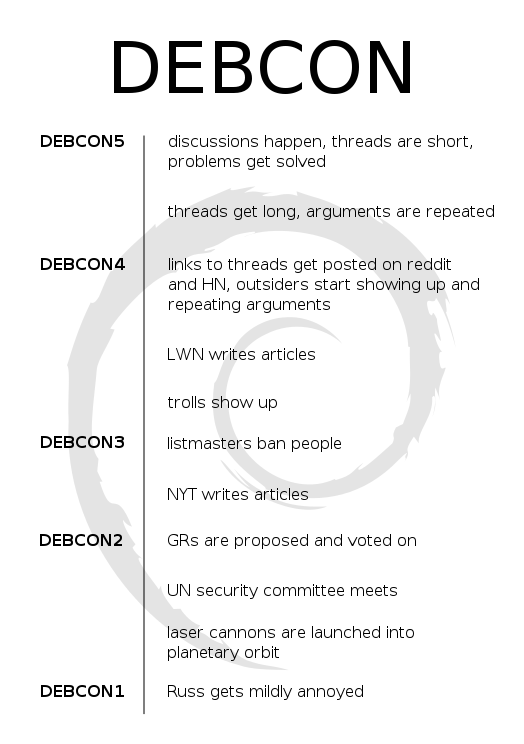
Lars Wirzenius, Steve McIntyre and myself were chatting a few weeks ago about several of the ongoing Debian discussions. As is often the case these discussions had devolved into somewhat unproductive noise and yet amongst all this was a voice of reason in Russ Allbery.

Lars decided that would take the opportunity of the upcoming opportunity of Debconf 14 to say thank you to Russ for his work. It was decided that a plaque would be a nice gift and I volunteered to do the physical manufacture. Lars came up with the idea of a DEBCON scale similar to the DEFCON scale and got some text together with an initial design idea.

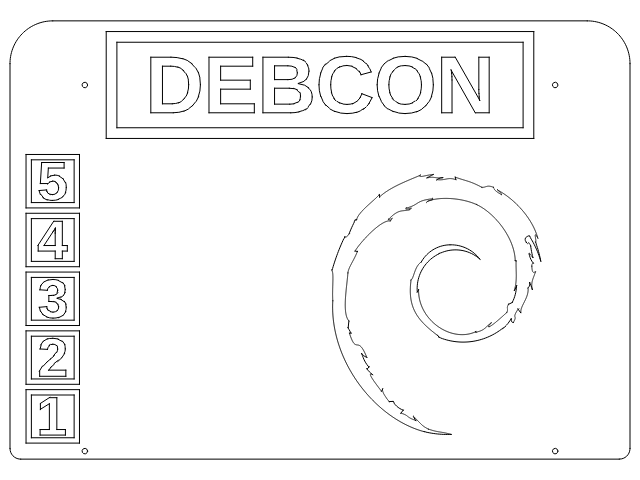
CAD drawing of cut paths in clear acrylic
I took the initial design and as is often the case what is practically possible forced several changes. The prototype was a steep learning curve on using the Cambridge makespace laser cutter to create all the separate pieces.

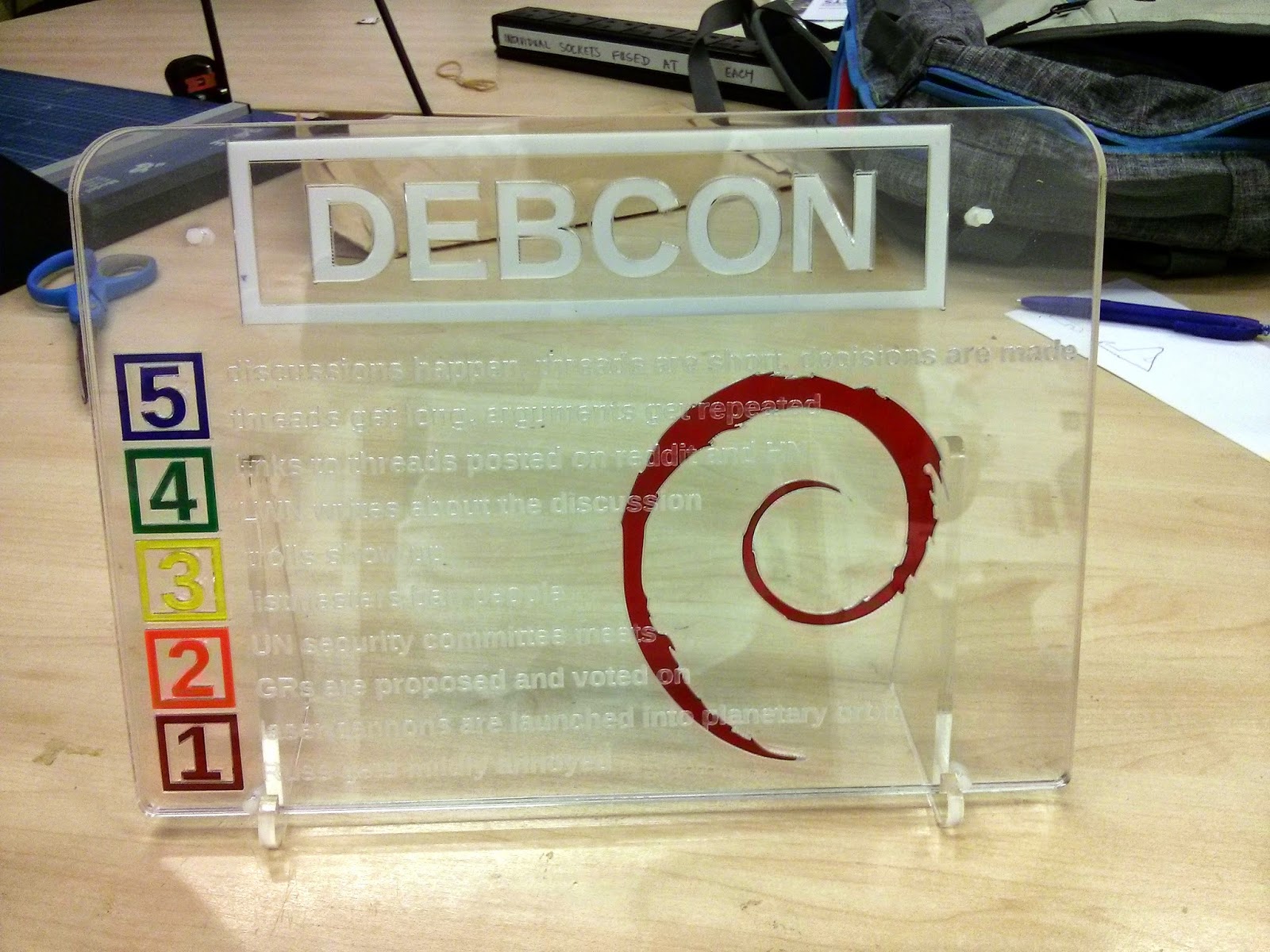
The construction is pretty simple and consisted of three layers of transparent acrylic plastic. The base layer is a single piece of plastic with the correct outline. The next layer has the DEBCON title, the Debian swirl and level numbers. The top layer has the text engraved in its back surface giving the impression the text floats above the layer behind it.

Failed prototype DEBCON plaqueFor the prototype I attempted to glue the pieces together. This was a complete disaster and required discarding the entire piece and starting again with new materials.

The final version with stand ready to be presented
For the second version I used four small nylon bolts to hold the sandwich of layers together which worked very well.

Presentation of plaque photo by Aigars Mahinovs
Yesterday at the Debconf 14 opening Steve McIntyre presented it to Russ and I think he was pleased, certainly he was surprised (photo from Aigars Mahinovs).

The design files are available from my design git repo, though why anyone would want to reproduce it I have no idea ;-)

13 June 2014

Aigars Mahinovs: Going to Debconf14

It's that time of the year, again, when I lan to go to Debconf, reserve vacation, get visa waiver, book tickets. Let's hope nothing blocks me from attending this time. It has been too long. Now I just need to finish up photoriver before Debconf :) In fact it is quite close to being ready - I just need to finish up the GPS tagging feature, figure out why FLickr stopped working recently and optionally work on burst detection and/or FlashAir IP address autodetection in the network.

3 April 2014

Aigars Mahinovs: Wireless photo workflow

For a while now I've been looking for ways to improve my photo workflow - to simplify and speed up the process. Now I've gotten a new toy to help that along - a Panasonic FlashAir SD card with WiFi connectivity. I was pretty sure that build-in workflows of some more automated solutions would not be a perfect fit for me, so I got this card which has a more manual workflow and a reasonable API, so I could write my own. Now I am trying to work out my requirements, the user stories if you will. I see two distinct workflows: live event and travel pictures. In both cases I want the images to retain the file names, Exif information and timing of the original photos and also have embedded GPS information from the phone synced to the time the photo was taken. And if I take a burst of very similar photos, I want the uploading process to only select and upload the "best" one (trivial heiristic being the file size) with an ability for me to later choose another one to replace it. There would need to be some way of syncing phone and camera time, especially considering that phones usually switch to local time zone when traveling and cameras do not, maybe the original time the photo was taken would need to be changed to local time zone, so that there are no photos that are taken during the day, but have a timestamp of 23:45 GMT. When I am in Live Event mode I would like the photos that I take to immediately start uploading to an event album that I create (or choose) at the start of the shoot with a preset privacy mode. This assumes that either I am willing to upload via 3G of my phone or that I have access to a stable WiFi network on-site. It might be good if I could upload a scaled down version of the pictures during the event and then later replace the image files with full-size images when the even is over and I am at home in my high-speed network. I probably don't need the full size files on my phone. When I am in Travel mode, I want to delay photo uploading until I am back at the hotel with its high speed Wifi, but also have an option to share some snapshots immediately over 3G or random cafe Wifi. I am likely to take more photos that there is memory in my phone, so I would like to clear original files from the phone while keeping them in the SD card and in the cloud, but still keeping enough metadata to allow re-uploading an image or choosing another image in a burst. Now I need to flesh out the technical requirements from the above and write an Android app to implement that. Or maybe start by writing this in Python as a cross-platform command-line/desktop app and only later porting it to Android when all the rought parts are ironed out. This will have an extra benefit of people being able to run the same workflow on a laptop instead of a phone or tablet. Let's assume that this is written in a pretty flexible way, allowing to plug in backends for different WiFi SD cards, cloud services, plug-in points for things like instant display of the latest photo on the laptop screen in full-screen mode and other custom actions, what else would people love to see in something like this? What other workflow am I completely overlooking?

27 March 2014

Aigars Mahinovs: Photo migration from Flickr to Google Plus

I've been with Flickr since 2005 now, posting a lot of my photos there, so that other poeple from the events, that I usually take photos of, could enjoy them. But lately I've become annoyed with it. It is very slow to uplaod to and even worse to get photos out of it - there is no large shiny button to Download a set of photos, like I noticed in G+. So I decided to try and copy my photos over. I am not abandoning or deleting my Flickr account yet, but we'll see. The process was not as simple as I hoped. There is this FlickrToGpluss website tool. It would have been perfect .. if it worked. In that tool you simply log in to both services, check which albums you want to migrate over and at what photo size and that's it - the service will do the migration directly on their servers. It actually feeds Google the URLs of the Flickr photos so the photos don't even go trought the service itself, only metadata does. Unfortunately I hit a couple snags - first of all the migration stopped progressing a few days and ~20 Gb into the process (out of ~40 Gb). And for the photos that were migrated their titles were empty and their file names were set to Flickr descriptions. Among other things that meant that when you downloaded the album as a zip file with all the photots (which was the feature that I was doing this whole thing for) you got photos in almost random order - namely in the order of their sorted titles. Ugh. So I canceled that migration (by revoking priviledges to that app on G+, there is no other way to see or modify progress there) and sat down to make a manual-ish solution. First, I had to get my photos out of Flickr. For that I took Offlickr and ran it in set mode:
./Offlickr.py -i 98848866@N00 -p -s -c 32
The "98848866@N00" is my Flickr ID which I got from this nice service, then -p to download photos (and not just metadata), -s to download all sets and -c 32 to do the download in 32 parallel threads. An important thing to do is to take all you photos that are not in a set in Flickr and add them to a new 'nonset" so that those photos are also picked up here, there is an option under Organize to select all non-set photos. It worked great, but there were a couple tiny issues:
  1. There is a bug in Offlickr that it does not honor pages in Flickr sets, so it only downloads first 500 images in each set, fix for that is in that bug;
  2. It also wanted Python2.6 for some reason, but worked fine with Python2.7
  3. With that number of threads sometimes Flickr actually failed to respond with the photo, serving a 500 error page instead. Offlickr does not check return code and happily daves that HTML page as the photo. To work around that I simply deleted the HTML errors and then ran the same Offlickr command again so that it re-downloads the missing files. Had to repeat that a few times to get all of them:
ack-grep -l -R "504 Gateway Time-out" dst/   xargs rm
After all that I had my photos, all 40 Gb of them on my computer. Should I upload them to G+ now? Not yet! See the photos all had lost their original file names. It turns out Flickr simply throws that little nugget of information away. It is nowhere to be found, neither in metadata or the UI or the Exif of the photos. Also some of my photos had clever descriptions that I did not want to loose or re-enter in G+ and also geolocation information. Flickr does not embed that info into the Exif of the image, instead it is provided separately - Offlickr saves that as an XML file next to each image. So I wrote a simple and hacky script to re-embed that info. It did 3 things:
  1. Embed title of the photo into the Description EXIF tag, so that G+ automatically picks it up as title of the photo;
  2. Embed the GEO location information into the proper EXIF tags, so that G+ picks that up automatically;
  3. Create a new file name based on original picture taken datetime and EXIF Canon FileNumber field (if such exists), so that all photos in an album are sequential.
It uses exiftool for the actual heavy lifting. After all that was finished I tested the result by uploading a few images to G+ and testing that their title is being set correctly, that they have a sane file name and that geo information works. After that I just uploaded them all. I tried figuring out the G+ API (they actually have it) but I was unable to pass the tutorial, so I abandoned it and simply uploaded the photos of each set int their own tab via a browser. That took a few hours. But that is much faster that with Flickr. Like 4 MB/s versus 0.5 MB/s faster. And here is the result. So far I kind of like it. We'll see how it goes after a year or so. Now on to an even more fun problem - I now have ~40 Gb of photos from Flickr/G+ and ~100 Gb of photos locally. Those sets partially intersect. I know for a fact that there are photos in Flickr set that are not in my local set and it is pretty obvoious that there are some the other way round. Now I need to find them. Oh and I cann't use simple hashes, because Exif has changed and so have the file names for most of them. And not to forget that I often take a burst of 3-4 pictures, so there are bound to be a some near-duplicate photos in each set too. This shall be fun :)

4 December 2013

Aigars Mahinovs: Translation management workflows

Whatever you do with translations, consider translation management issues. For example, you are developing a multilingual web site. All kinds of labels and buttons and form fields are nicely translatable with trans template tag and ugettext. You have po files that follow your code from dev to stage to production environment.
Now you add a CMS into the mix. And suddenly - you translations are in more than one place, in more than one format and follow different routes to production.
Now imagine that you need to add Chinese language to your entire site. The translator is an off-site contractor. What files would you send to him to translate? How would you generate them? How will you integrate them?
If someone adds or changes a page on production in English: how will your developers see that change? how will you know that an updated translation for Chinese is needed? how will you manage the update of the translation?
If you make a CMS and don't have at least the export_po_file and import_po_file management commands, then you are not really multilingual. It is either that or figuring out your own answer for the above questions.
I have finally found a Django-based CMS that has those - http://pythonhosted.org/django-page-cms/ . Have not really tried it yet, but I am hopeful.

Next.

Previous.