Search Results: "will"

9 March 2022

Jonathan Dowland: Broken webcam aspect ratio

picture of my Sony RX100-III camera Sony RX100-III, relegated to a webcam
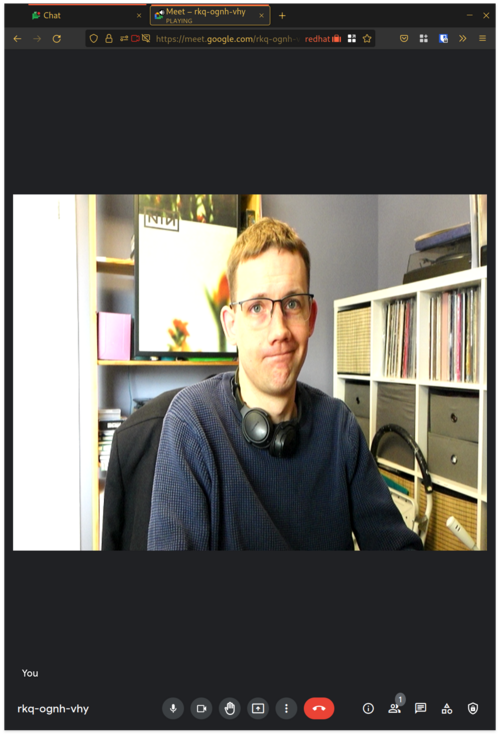
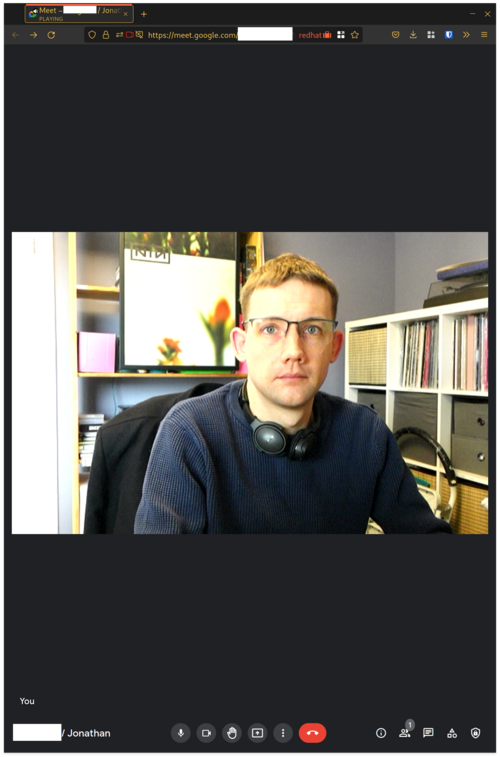
Sometimes I have remote meetings with Google Meet. Unlike the other video-conferencing services that I use (Bluejeans, Zoom), my video was stretched out of proportion under Google Meet with Firefox. I haven't found out why this was happening, but I did figure out a work-around. Thanks to Daniel Silverstone, Rob Kendrick, Gregor Herrmann and Ben Allen for pointing me in the right direction! Hardware The lovely Sony RX-100 mk3 that I bought in 2015 has spent most of its life languishing unused. During the Pandemic, once I was working from home all the time, I decided to press-gang it into service as a better-quality webcam. Newer models of this camera the mark 4 onwards have support for a USB mode called "PC Remote", which effectively makes them into webcams. Unfortunately my mark 3 does not support this, but it does have HDMI out, so I picked up a cheap "HDMI to USB Video Capture Card" from eBay. Video modes
Before: wrong aspect ratio Before: wrong aspect ratio
This device offers a selection of different video modes over a webcam interface. I used qv4l2 to explore the different modes. It became clear that the camera was outputting a signal at 16:9, but the modes on offer from the dongle were for a range of different aspect ratios. The picture for these other ratios was not letter or pillar-boxed, but stretched to fit. I also noticed that the modes which had the correct aspect ratio were at very low framerates: 1920x1080@5fps, 1360x768@8fps, 1280x720@10fps. It felt to me that I would look unnatural at such a low framerate. The most promising mode was close to the right ratio, 720x480 and 30 fps. Software
After: corrected aspect ratio After: corrected aspect ratio
My initial solution is to use the v4l2loopback kernel module, which provides a virtual loop-back webcam interface. I can write video data to it from one process, and read it back from another. Loading it as follows:
modprobe v4l2loopback exclusive_caps=1
The option exclusive_caps configures the module into a mode where it initially presents a write-only interface, but once a process has opened a file handle, it then switches to read-only for subsequent processes. Assuming there are no other camera devices connected at the time of loading the module, it will create /dev/video0.1 I experimented briefly with OBS Studio, the very versatile and feature-full streaming tool, which confirmed that I could use filters on the source video to fix the aspect ratio, and emit the result to the virtual device. I don't otherwise use OBS, though, so I achieve the same result using ffmpeg:
fmpeg -s 720x480 -i /dev/video1 -r 30 -f v4l2 -vcodec rawvideo \
    -pix_fmt yuyv422 -s 720x405 /dev/video0
The source options are to select the source video mode I want. The codec and pixel formats are to match what is being emitted (I determined that using ffprobe on the camera device). The resizing is triggered by supplying a different size to the -s parameter. I think that is equivalent to explicitly selecting a "scale" filter, and there might be other filters that could be used instead (to add pillar boxes for example). This worked just as well. In Google Meet, I select the Virtual Camera, and Google Meet is presented with only one video mode, in the correct aspect ratio, and no configurable options for it, so it can't misbehave. Future I'm planning to automate the loading (and unloading) of the module and starting the ffmpeg process in response to the real camera device being plugged or unplugged, using systemd events and services. (I don't leave the camera plugged in all the time due to some bad USB behaviour I've experienced if I do so.) If I get that working, I will write a follow-up.

  1. you can request a specific device name/number with another module option.

Fran ois Marier: Using a Streamzap remote control with MythTV on Debian Bullseye

After upgrading my MythTV machine to Debian Bullseye and MythTV 31, my Streamzap remote control stopped working correctly: the up and down buttons were working, but the OK button wasn't. Here's the complete solution that made it work with the built-in kernel support (i.e. without LIRC).

Button re-mapping Since some of the buttons were working, but not others, I figured that the buttons were probably not mapped to the right keys. Inspired by these old v4l-utils-based instructions, I made my own custom keymap by by copying the original keymap:
cp /lib/udev/rc_keymaps/streamzap.toml /etc/rc_keymaps/
and then modifying it to adapt it to what MythTV needs. This is what I ended up with:
<span class="createlink"><a href="/blog.cgi?do=create&amp;from=posts%2Fusing-streamzap-remote-with-mythtv-debian-bullseye&amp;page=protocols" rel="nofollow">?</a>protocols</span>
name = "streamzap"
protocol = "rc-5-sz"
[protocols.scancodes]
0x28c0 = "KEY_0"
0x28c1 = "KEY_1"
0x28c2 = "KEY_2"
0x28c3 = "KEY_3"
0x28c4 = "KEY_4"
0x28c5 = "KEY_5"
0x28c6 = "KEY_6"
0x28c7 = "KEY_7"
0x28c8 = "KEY_8"
0x28c9 = "KEY_9"
0x28ca = "KEY_ESC"
0x28cb = "KEY_MUTE"
0x28cc = "KEY_UP"
0x28cd = "KEY_RIGHTBRACE"
0x28ce = "KEY_DOWN"
0x28cf = "KEY_LEFTBRACE"
0x28d0 = "KEY_UP"
0x28d1 = "KEY_LEFT"
0x28d2 = "KEY_ENTER"
0x28d3 = "KEY_RIGHT"
0x28d4 = "KEY_DOWN"
0x28d5 = "KEY_M"
0x28d6 = "KEY_ESC"
0x28d7 = "KEY_L"
0x28d8 = "KEY_P"
0x28d9 = "KEY_ESC"
0x28da = "KEY_BACK"
0x28db = "KEY_FORWARD"
0x28dc = "KEY_R"
0x28dd = "KEY_PAGEUP"
0x28de = "KEY_PAGEDOWN"
0x28e0 = "KEY_D"
0x28e1 = "KEY_I"
0x28e2 = "KEY_END"
0x28e3 = "KEY_A"
Note that the keycodes can be found in the kernel source code. With my own keymap in place at /etc/rc_keymaps/streamzap.toml, I changed /etc/rc_maps.cfg to have the kernel driver automatically use it:
--- a/rc_maps.cfg
+++ b/rc_maps.cfg
@@ -126,7 +126,7 @@
 *      rc-real-audio-220-32-keys real_audio_220_32_keys.toml
 *      rc-reddo                 reddo.toml
 *      rc-snapstream-firefly    snapstream_firefly.toml
-*      rc-streamzap             streamzap.toml
+*      rc-streamzap             /etc/rc_keymaps/streamzap.toml
 *      rc-su3000                su3000.toml
 *      rc-tango                 tango.toml
 *      rc-tanix-tx3mini         tanix_tx3mini.toml

Button repeat delay To adjust the delay before button presses are repeated, I followed these old out-of-date instructions on the MythTV wiki and put the following in /etc/udev/rules.d/streamzap.rules:
ACTION=="add", ATTRS idVendor =="0e9c", ATTRS idProduct =="0000", RUN+="/usr/bin/ir-keytable -s rc0 -D 1000 -P 250"
Note that the -d option has been replaced with -s in the latest version of ir-keytable. To check that the Streamzap is indeed detected as rc0 on your system, use this command:
$ ir-keytable 
Found /sys/class/rc/rc0/ with:
    Name: Streamzap PC Remote Infrared Receiver (0e9c:0000)
    Driver: streamzap
    Default keymap: rc-streamzap
...
Make sure you don't pass the -c to ir-keytable or else it will clear the keymap set via /etc/rc_maps.cfg, removing all of the button mappings.

7 March 2022

Ayoyimika Ajibade: Progress Report!! Modifying Expectations...

Wait! Just like yesterday when I was accepted as an Outreachy intern and the first half of the internship is finished . How time flies when you are having a good time As part of the requirements for the final application during the contribution period for the Outreachy internship, I needed to provide a timeline to achieve our goal on my outreachy task which is transitioning of dependencies in node16 and webpack5. Having consulted my mentors who implied that the packages depending on webpack and nodejs combined are so numerous that its impossible to finish all within a space of three months but we have steps to guide us through the entire process to achieve most of our goals which are As of this writing(though a little late ) we have successfully rebuilt all reverse dependencies of webpack5 and split them equally each for I and my co-intern for all Javascript modules as ruby packages also depend on webpack which is a total of 44 packages. Filed a bug report on Debian bug tracking system for failing packages, also the original maintainer or uploader of the package to the Debian archive mostly Debian developers also get a mail in references to the package bug report. Sometimes the uploader who also receives the bug report decides to help out to fix the package and forward the patch upstream if need be. We have also filed an issue to upstream repo mostly via github where some respond and create PR to solve those errors and others are plain aversive to the whole idea. PR from the upstream developer is cherry-picked and a patch is created by us to incorporate the code into our own working repository. some package upstream maintainer rejects such issues or doesn't respond, we take it upon ourselves to fix the package. The total number of packages that are successfully updated and ready to be merged is 10 packages while 12 packages remain on my own end to be updated. One of the most challenging packages to update so far was prop-type as its runs its large test suite using jest of a lower version 19.0.2 compared to that of Debian OS which is version 27.5.1 updating and migrating its API's and methods to use the Debian updated version is so challenging after several googling, testing out the solution from StackOverflow, trials, and errors, reading documentations we eventually made progress with the help of my mentor, co-intern and the whole community member. It's so crazy that when I got it working I said to myself. phew it's not rocket science why can I figure it out sooner than expected I initially proposed that I would be halfway done with the project by now, I guess the reason am not able to achieve some of our goals which are finishing up with the packages for webpack and moving to transition some of the nodejs packages at all is DEBUGGING. Yes DEBUGGING! where you never can predict what the solution is. is the problem coming from Debian? or dependencies of the package you are working on, upstream bug, or dependencies of dependencies of the package you are working on, so many questions to answer. You can't easily find a solution to a bug as it takes time to try out so many guesses more of an educated guess, or even try out all the solutions from stack overflow and still no viable progress. Obviously, you cannot really know about something to set up a plan for unless you get right into it. One way of doing this, if I have to start again is the truly understand how the javascript package work under the hood, how its handles different interaction between packages, some of its dos and don't of transpiling, bundling, testing, e.t.c I guess my unrealistic goals need to be modified because some drawback that was not envisaged popped up and I underestimated the complexity of the tasks, which will be reducing the number of packages to update in transitioning of nodejs from what I planned My major focus for the second half of the internship is to fix bugs and errors I discover, file bug reports for future bugs to seek help from co-maintainer or developers, file issues upstream and close those whose bugs are already resolved for the remaining 12 packages, and ultimately successfully uploading all reverse dependencies. Also diving into transitioning of nodejs16. Thanks for stopping by

5 March 2022

Thorsten Alteholz: My Debian Activities in February 2022

FTP master This month I accepted 484 and rejected 73 packages. The overall number of packages that got accepted was 495. The overall number of rejected packages was 76, which is about 15% of the uploads to NEW. While most of the maintainers do a great job when creating their debian/copyright, others are a bit lax. Unfortunately those people seem to be more enthusiastic when fighting for changes in NEW processing or even removing NEW. One argument in discussions about NEW is that the copyright verification of packages can be done by the community after accepting the packages in the archive.
Last month I did not get any hint that such checks have been done by anybody. As the past already showed several times, this community based checks simply do not exist. So in the end poorly maintained copyright information will rot in the archive and I am not sure that this really corresponds with the Debian Social Contract. Debian LTS This was my ninety-second month that I did some work for the Debian LTS initiative, started by Raphael Hertzog at Freexian. This month my all in all workload has been 40h. During that time I did LTS and normal security uploads of: Unfortunately salsa went down at the end of the month, so several planned uploads did not happen and have to be delayed to March. I also continued to work on security support for golang packages. Further I worked on packages in NEW on security-master and injected missing sources. Last but not least I did some days of frontdesk duties. Debian ELTS This month was the forty-fourth ELTS month. During my allocated time I uploaded: Further I worked on cyrus-sasl but did not do an upload yet. Last but not least I did some days of frontdesk duties. Debian Printing As announced last month I uploaded a new version of cups. Altogether I uploaded new upstream versions or improved packaging of: Debian Astro This month I uploaded new upstream versions or improved packaging of: Other stuff This month I uploaded new upstream versions or improved packaging of:

Reproducible Builds: Reproducible Builds in February 2022

Welcome to the February 2022 report from the Reproducible Builds project. In these reports, we try to round-up the important things we and others have been up to over the past month. As ever, if you are interested in contributing to the project, please visit our Contribute page on our website.
Jiawen Xiong, Yong Shi, Boyuan Chen, Filipe R. Cogo and Zhen Ming Jiang have published a new paper titled Towards Build Verifiability for Java-based Systems (PDF). The abstract of the paper contains the following:
Various efforts towards build verifiability have been made to C/C++-based systems, yet the techniques for Java-based systems are not systematic and are often specific to a particular build tool (eg. Maven). In this study, we present a systematic approach towards build verifiability on Java-based systems.

GitBOM is a flexible scheme to track the source code used to generate build artifacts via Git-like unique identifiers. Although the project has been active for a while, the community around GitBOM has now started running weekly community meetings.
The paper Chris Lamb and Stefano Zacchiroli is now available in the March/April 2022 issue of IEEE Software. Titled Reproducible Builds: Increasing the Integrity of Software Supply Chains (PDF), the abstract of the paper contains the following:
We first define the problem, and then provide insight into the challenges of making real-world software build in a reproducible manner-this is, when every build generates bit-for-bit identical results. Through the experience of the Reproducible Builds project making the Debian Linux distribution reproducible, we also describe the affinity between reproducibility and quality assurance (QA).

In openSUSE, Bernhard M. Wiedemann posted his monthly reproducible builds status report.
On our mailing list this month, Thomas Schmitt started a thread around the SOURCE_DATE_EPOCH specification related to formats that cannot help embedding potentially timezone-specific timestamp. (Full thread index.)
The Yocto Project is pleased to report that it s core metadata (OpenEmbedded-Core) is now reproducible for all recipes (100% coverage) after issues with newer languages such as Golang were resolved. This was announced in their recent Year in Review publication. It is of particular interest for security updates so that systems can have specific components updated but reducing the risk of other unintended changes and making the sections of the system changing very clear for audit. The project is now also making heavy use of equivalence of build output to determine whether further items in builds need to be rebuilt or whether cached previously built items can be used. As mentioned in the article above, there are now public servers sharing this equivalence information. Reproducibility is key in making this possible and effective to reduce build times/costs/resource usage.

diffoscope diffoscope is our in-depth and content-aware diff utility. Not only can it locate and diagnose reproducibility issues, it can provide human-readable diffs from many kinds of binary formats. This month, Chris Lamb prepared and uploaded versions 203, 204, 205 and 206 to Debian unstable, as well as made the following changes to the code itself:
  • Bug fixes:
    • Fix a file(1)-related regression where Debian .changes files that contained non-ASCII text were not identified as such, therefore resulting in seemingly arbitrary packages not actually comparing the nested files themselves. The non-ASCII parts were typically in the Maintainer or in the changelog text. [ ][ ]
    • Fix a regression when comparing directories against non-directories. [ ][ ]
    • If we fail to scan using binwalk, return False from BinwalkFile.recognizes. [ ]
    • If we fail to import binwalk, don t report that we are missing the Python rpm module! [ ]
  • Testsuite improvements:
    • Add a test for recent file(1) issue regarding .changes files. [ ]
    • Use our assert_diff utility where we can within the test_directory.py set of tests. [ ]
    • Don t run our binwalk-related tests as root or fakeroot. The latest version of binwalk has some new security protection against this. [ ]
  • Codebase improvements:
    • Drop the _PATH suffix from module-level globals that are not paths. [ ]
    • Tidy some control flow in Difference._reverse_self. [ ]
    • Don t print a warning to the console regarding NT_GNU_BUILD_ID changes. [ ]
In addition, Mattia Rizzolo updated the Debian packaging to ensure that diffoscope and diffoscope-minimal packages have the same version. [ ]

Website updates There were quite a few changes to the Reproducible Builds website and documentation this month as well, including:
  • Chris Lamb:
    • Considerably rework the Who is involved? page. [ ][ ]
    • Move the contributors.sh Bash/shell script into a Python script. [ ][ ][ ]
  • Daniel Shahaf:
    • Try a different Markdown footnote content syntax to work around a rendering issue. [ ][ ][ ]
  • Holger Levsen:
    • Make a huge number of changes to the Who is involved? page, including pre-populating a large number of contributors who cannot be identified from the metadata of the website itself. [ ][ ][ ][ ][ ]
    • Improve linking to sponsors in sidebar navigation. [ ]
    • drop sponsors paragraph as the navigation is clearer now. [ ]
    • Add Mullvad VPN as a bronze-level sponsor . [ ][ ]
  • Vagrant Cascadian:

Upstream patches The Reproducible Builds project attempts to fix as many currently-unreproducible packages as possible. February s patches included the following:

Testing framework The Reproducible Builds project runs a significant testing framework at tests.reproducible-builds.org, to check packages and other artifacts for reproducibility. This month, the following changes were made:
  • Daniel Golle:
    • Update the OpenWrt configuration to not depend on the host LLVM, adding lines to the .config seed to build LLVM for eBPF from source. [ ]
    • Preserve more OpenWrt-related build artifacts. [ ]
  • Holger Levsen:
  • Temporary use a different Git tree when building OpenWrt as our tests had been broken since September 2020. This was reverted after the patch in question was accepted by Paul Spooren into the canonical openwrt.git repository the next day.
    • Various improvements to debugging OpenWrt reproducibility. [ ][ ][ ][ ][ ]
    • Ignore useradd warnings when building packages. [ ]
    • Update the script to powercycle armhf architecture nodes to add a hint to where nodes named virt-*. [ ]
    • Update the node health check to also fix failed logrotate and man-db services. [ ]
  • Mattia Rizzolo:
    • Update the website job after contributors.sh script was rewritten in Python. [ ]
    • Make sure to set the DIFFOSCOPE environment variable when available. [ ]
  • Vagrant Cascadian:
    • Various updates to the diffoscope timeouts. [ ][ ][ ]
Node maintenance was also performed by Holger Levsen [ ] and Vagrant Cascadian [ ].

Finally If you are interested in contributing to the Reproducible Builds project, please visit our Contribute page on our website. However, you can get in touch with us via:

3 March 2022

Joerg Jaspert: Scan for SSH private keys without passphrase

SSH private key scanner (keys without passphrase) So for policy reasons, customer wanted to ensure that every SSH private key in use by a human on their systems has a passphrase set. And asked us to make sure this is the case. There is no way in SSH to check this during connection, so client side needs to be looked at. Which means looking at actual files on the system. Turns out there are multiple formats for the private keys - and I really do not want to implement something able to deal with that on my own. OpenSSH to the rescue, it ships a little tool ssh-keygen, most commonly known for its ability to generate SSH keys. But it can do much more with keys. One action is interesting here for our case: The ability to print out the public key to a given private key. For a key that is unprotected, this will just work. A key with a passphrase instead leads to it asking you for one. So we have our way to check if a key is protected by a passphrase. Now we only need to find all possible keys (note, the requirement is not keys in .ssh/ , but all possible, so we need to scan for them. But we do not want to run ssh-keygen on just any file, we would like to do it when we are halfway sure, that it is actually a key. Well, turns out, even though SSH has multiple formats, they all appear to have the string PRIVATE KEY somewhere very early (usually first line). And they are tiny - even a 16384bit RSA key is just above 12000 bytes long. Lets find every file thats less then 13000 bytes and has the magic string in it, and throw it at ssh-keygen - if we get a public key back, flag it. Also, we supply a random (ohwell, hardcoded) passphrase, to avoid it prompting for any. Scanning the whole system, one will find quite a surprising number of unprotected SSH keys. Well, better description possibly Unprotected RSA private keys , so the output does need to be checked by a human. This, of course, can be done in shell, quite simple. So i wrote some Rust code instead, as I am still on my task to try and learn more of it. If you are interested, you can find sshprivscanner and play with it, patches/fixes/whatever welcome.

Jonathan McDowell: Neat uses for a backlit keyboard

I bought myself a new keyboard last November, a Logitech G213. True keyboard fans will tell me it s not a real mechanical keyboard, but it was a lot cheaper and met my requirements of having some backlighting and a few media keys (really all I use are the volume control keys). Oh, and being a proper UK layout. While the G213 isn t fully independent RGB per key it does have a set of zones that can be controlled. Also this has been reverse engineered, so there are tools to do this under Linux. All I really wanted was some basic backlighting to make things a bit nicer in the evenings, but with the ability to control colour I felt I should put it to good use. As previously mentioned I have a personal desktop / work laptop setup combined with a UGREEN USB 3.0 Sharing Switch Box, so the keyboard is shared between both machines. So I configured up both machines to set the keyboard colour when the USB device is plugged in, and told them to use different colours. Instant visual indication of which machine I m currently typing on! Running the script on USB detection is easy, a file in /etc/udev/rules.d/. I called it 99-keyboard-colour.rules:
# Change the keyboard colour when we see it
ACTION=="add", SUBSYSTEM=="usb", ATTR idVendor =="046d", ATTR idProduct =="c336", \
        RUN+="/usr/local/sbin/g213-set"
g213-set is a simple bit of Python:
#!/usr/bin/python3
import sys
found = False
devnum = 0
while not found:
    try:
        with open("/sys/class/hidraw/hidraw" + str(devnum) + "/device/uevent") as f:
            for line in f:
                line = line.rstrip()
                if line == 'HID_NAME=Logitech Gaming Keyboard G213':
                    found = True
    except:
        break
    if not found:
        devnum += 1
if not found:
    print("Could not find keyboard device")
    sys.exit(1)
eventfile = "/dev/hidraw" + str(devnum)
#                                   z       r     g     b
command = [ 0x11, 0xff, 0x0c, 0x3a, 0, 1, 0xff, 0xff, 0x00, 2, 0, 0, 0, 0, 0, 0, 0, 0, 0, 0 ]
with open(eventfile, "wb") as f:
    f.write(bytes(command))
I did wonder about trying to make it turn red when I m in a root terminal, but that gets a bit more complicated (I m guessing I need to hook into GNOME Terminal some how?) and this simple hack gives me a significant win anyway.

Enrico Zini: Migrating from procmail to sieve

Anarcat's "procmail considered harmful" post convinced me to get my act together and finally migrate my venerable procmail based setup to sieve. My setup was nontrivial, so I migrated with an intermediate step in which sieve scripts would by default pipe everything to procmail, which allowed me to slowly move rules from procmailrc to sieve until nothing remained in procmailrc. Here's what I did. Literature review https://brokkr.net/2019/10/31/lets-do-dovecot-slowly-and-properly-part-3-lmtp/ has a guide quite aligned with current Debian, and could be a starting point to get an idea of the work to do. https://wiki.dovecot.org/HowTo/PostfixDovecotLMTP is way more terse, but more aligned with my intentions. Reading the former helped me in understanding the latter. https://datatracker.ietf.org/doc/html/rfc5228 has the full Sieve syntax. https://doc.dovecot.org/configuration_manual/sieve/pigeonhole_sieve_interpreter/ has the list of Sieve features supported by Dovecot. https://doc.dovecot.org/settings/pigeonhole/ has the reference on Dovecot's sieve implementation. https://raw.githubusercontent.com/dovecot/pigeonhole/master/doc/rfc/spec-bosch-sieve-extprograms.txt is the hard to find full reference for the functions introduced by the extprograms plugin. Debugging tools: Backup of all mails processed One thing I did with procmail was to generate a monthly mailbox with all incoming email, with something like this:
BACKUP="/srv/backupts/test- date +%Y-%m-d .mbox"
:0c
$BACKUP
I did not find an obvious way in sieve to create montly mailboxes, so I redesigned that system using Postfix's always_bcc feature, piping everything to an archive user. I'll then recreate the monthly archiving using a chewmail script that I can simply run via cron. Configure dovecot
apt install dovecot-sieve dovecot-lmtpd
I added this to the local dovecot configuration:
service lmtp  
  unix_listener /var/spool/postfix/private/dovecot-lmtp  
    user = postfix
    group = postfix
    mode = 0666
   
 
protocol lmtp  
  mail_plugins = $mail_plugins sieve
 
plugin  
  sieve = file:~/.sieve;active=~/.dovecot.sieve
 
This makes Dovecot ready to receive mail from Postfix via a lmtp unix socket created in Postfix's private chroot. It also activates the sieve plugin, and uses ~/.sieve as a sieve script. The script can be a file or a directory; if it is a directory, ~/.dovecot.sieve will be a symlink pointing to the .sieve file to run. This is a feature I'm not yet using, but if one day I want to try enabling UIs to edit sieve scripts, that part is ready. Delegate to procmail To make sieve scripts that delegate to procmail, I enabled the sieve_extprograms plugin:
 plugin  
   sieve = file:~/.sieve;active=~/.dovecot.sieve
+  sieve_plugins = sieve_extprograms
+  sieve_extensions +vnd.dovecot.pipe
+  sieve_pipe_bin_dir = /usr/local/lib/dovecot/sieve-pipe
+  sieve_trace_dir = ~/.sieve-trace
+  sieve_trace_level = matching
+  sieve_trace_debug = yes
  
and then created a script for it:
mkdir -p /usr/local/lib/dovecot/sieve-pipe/
(echo "#!/bin/sh'; echo "exec /usr/bin/procmail") > /usr/local/lib/dovecot/sieve-pipe/procmail
chmod 0755 /usr/local/lib/dovecot/sieve-pipe/procmail
And I can have a sieve script that delegates processing to procmail:
require "vnd.dovecot.pipe";
pipe "procmail";
Activate the postfix side These changes switched local delivery over to Dovecot:
--- a/roles/mailserver/templates/dovecot.conf
+++ b/roles/mailserver/templates/dovecot.conf
@@ -25,6 +25,8 @@
 
+auth_username_format = %Ln
+
 
diff --git a/roles/mailserver/templates/main.cf b/roles/mailserver/templates/main.cf
index d2c515a..d35537c 100644
--- a/roles/mailserver/templates/main.cf
+++ b/roles/mailserver/templates/main.cf
@@ -64,8 +64,7 @@ virtual_alias_domains =
 
-mailbox_command = procmail -a "$EXTENSION"
-mailbox_size_limit = 0
+mailbox_transport = lmtp:unix:private/dovecot-lmtp
 
Without auth_username_format = %Ln dovecot won't be able to understand usernames sent by postfix in my specific setup. Moving rules over to sieve This is mostly straightforward, with the luxury of being able to do it a bit at a time. The last tricky bit was how to call spamc from sieve, as in some situations I reduce system load by running the spamfilter only on a prefiltered selection of incoming emails. For this I enabled the filter directive in sieve:
 plugin  
   sieve = file:~/.sieve;active=~/.dovecot.sieve
   sieve_plugins = sieve_extprograms
-  sieve_extensions +vnd.dovecot.pipe
+  sieve_extensions +vnd.dovecot.pipe +vnd.dovecot.filter
   sieve_pipe_bin_dir = /usr/local/lib/dovecot/sieve-pipe
+  sieve_filter_bin_dir = /usr/local/lib/dovecot/sieve-filter
   sieve_trace_dir = ~/.sieve-trace
   sieve_trace_level = matching
   sieve_trace_debug = yes
  
Then I created a filter script:
mkdir -p /usr/local/lib/dovecot/sieve-filter/"
(echo "#!/bin/sh'; echo "exec /usr/bin/spamc") > /usr/local/lib/dovecot/sieve-filter/spamc
chmod 0755 /usr/local/lib/dovecot/sieve-filter/spamc
And now what was previously:
:0 fw
  /usr/bin/spamc
:0
* ^X-Spam-Status: Yes
.spam/
Can become:
require "vnd.dovecot.filter";
require "fileinto";
filter "spamc";
if header :contains "x-spam-level" "**************"  
    discard;
  elsif header :matches "X-Spam-Status" "Yes,*"  
    fileinto "spam";
 
Updates Ansgar mentioned that it's possible to replicate the monthly mailbox using the variables and date extensions, with a hacky trick from the extensions' RFC:
require "date"
require "variables"
if currentdate :matches "month" "*"   set "month" "$ 1 ";  
if currentdate :matches "year" "*"   set "year" "$ 1 ";  
fileinto :create "$ month -$ year ";

John Goerzen: Tools for Communicating Offline and in Difficult Circumstances

Note: this post is also available on my website, where it will be updated periodically. When things are difficult maybe there s been a disaster, or an invasion (this page is being written in 2022 just after Russia invaded Ukraine), or maybe you re just backpacking off the grid there are tools that can help you keep in touch, or move your data around. This page aims to survey some of them, roughly in order from easiest to more complex.

Simple radios Handheld radios shouldn t be forgotten. They are cheap, small, and easy to operate. Their range isn t huge maybe a couple of miles in rural areas, much less in cities but they can be a useful place to start. They tend to have no actual encryption features (the privacy features really aren t.) In the USA, options are FRS/GMRS and CB.

Syncthing With Syncthing, you can share files among your devices or with your friends. Syncthing essentially builds a private mesh for file sharing. Devices will auto-discover each other when on the same LAN or Wifi network, and opportunistically sync. I wrote more about offline uses of Syncthing, and its use with NNCP, in my blog post A simple, delay-tolerant, offline-capable mesh network with Syncthing (+ optional NNCP). Yes, it is a form of a Mesh Network! Homepage: https://syncthing.net/

Briar Briar is an instant messaging service based around Android. It s IM with a twist: it can use a mesh of Bluetooh devices. Or, if Internet is available, Tor. It has even been extended to support the use of SD cards and USB sticks to carry your messages. Like some others here, it can relay messages for third parties as well. Homepage: https://briarproject.org/

Manyverse and Scuttlebutt Manyverse is a client for Scuttlebutt, which is a sort of asynchronous, offline-friendly social network. You can use it to keep in touch with your family and friends, and it supports syncing over Bluetooth and Wifi even in the absence of Internet. Homepages: https://www.manyver.se/ and https://scuttlebutt.nz/

Yggdrasil Yggdrasil is a self-healing, fully end-to-end Encrypted Mesh Network. It can work among local devices or on the global Internet. It has network services that can egress onto things like Tor, I2P, and the public Internet. Yggdrasil makes a perfect companion to ad-hoc wifi as it has auto peer discovery on the local network. I talked about it in more detail in my blog post Make the Internet Yours Again With an Instant Mesh Network. Homepage: https://yggdrasil-network.github.io/

Ad-Hoc Wifi Few people know about the ad-hoc wifi mode. Ad-hoc wifi lets devices in range talk to each other without an access point. You just all set your devices to the same network name and password and there you go. However, there often isn t DHCP, so IP configuration can be a bit of a challenge. Yggdrasil helps here.

NNCP Moving now to more advanced tools, NNCP lets you assemble a network of peers that can use Asynchronous Communication over sneakernet, USB drives, radios, CD-Rs, Internet, tor, NNCP over Yggdrasil, Syncthing, Dropbox, S3, you name it . NNCP supports multi-hop file transfer and remote execution. It is fully end-to-end encrypted. Think of it as the offline version of ssh. Homepage: https://nncp.mirrors.quux.org/

Meshtastic Meshtastic uses long-range, low-power LoRa radios to build a long-distance, encrypted, instant messaging system that is a Mesh Network. It requires specialized hardware, about $30, but will tend to get much better range than simple radios, and with very little power. Homepages: https://meshtastic.org/ and https://meshtastic.letstalkthis.com/

Portable Satellite Communicators You can get portable satellite communicators that can send SMS from anywhere on earth with a clear view of the sky. The Garmin InReach mini and Zoleo are two credible options. Subscriptions range from about $10 to $40 per month depending on usage. They also have global SOS features.

Telephone Lines If you have a phone line and a modem, UUCP can get through just about anything. It s an older protocol that lacks modern security, but will deal with slow and noisy serial lines well. XBee SX radios also have a serial mode that can work well with UUCP.

Additional Suggestions It is probably useful to have a Linux live USB stick with whatever software you want to use handy. Debian can be installed from the live environment, or you could use a security-focused distribution such as Tails or Qubes.

References This page originated in my Mastodon thread and incorporates some suggestions I received there. It also formed a post on my blog.

2 March 2022

Antoine Beaupr : procmail considered harmful

TL;DR: procmail is a security liability and has been abandoned upstream for the last two decades. If you are still using it, you should probably drop everything and at least remove its SUID flag. There are plenty of alternatives to chose from, and conversion is a one-time, acceptable trade-off.

Procmail is unmaintained procmail is unmaintained. The "Final release", according to Wikipedia, dates back to September 10, 2001 (3.22). That release was shipped in Debian since then, all the way back from Debian 3.0 "woody", twenty years ago. Debian also ships 25 uploads on top of this, with 3.22-21 shipping the "3.23pre" release that has been rumored since at least the November 2001, according to debian/changelog at least:
procmail (3.22-1) unstable; urgency=low
  * New upstream release, which uses the  standard' format for Maildir
    filenames and retries on name collision. It also contains some
    bug fixes from the 3.23pre snapshot dated 2001-09-13.
  * Removed  sendmail' from the Recommends field, since we already
    have  exim' (the default Debian MTA) and  mail-transport-agent'.
  * Removed suidmanager support. Conflicts: suidmanager (<< 0.50).
  * Added support for DEB_BUILD_OPTIONS in the source package.
  * README.Maildir: Do not use locking on the example recipe,
    since it's wrong to do so in this case.
 -- Santiago Vila <sanvila@debian.org>  Wed, 21 Nov 2001 09:40:20 +0100
All Debian suites from buster onwards ship the 3.22-26 release, although the maintainer just pushed a 3.22-27 release to fix a seven year old null pointer dereference, after this article was drafted. Procmail is also shipped in all major distributions: Fedora and its derivatives, Debian derivatives, Gentoo, Arch, FreeBSD, OpenBSD. We all seem to be ignoring this problem. The upstream website (http://procmail.org/) has been down since about 2015, according to Debian bug #805864, with no change since. In effect, every distribution is currently maintaining its fork of this dead program. Note that, after filing a bug to keep Debian from shipping procmail in a stable release again, I was told that the Debian maintainer is apparently in contact with the upstream. And, surprise! they still plan to release that fabled 3.23 release, which has been now in "pre-release" for all those twenty years. In fact, it turns out that 3.23 is considered released already, and that the procmail author actually pushed a 3.24 release, codenamed "Two decades of fixes". That amounts to 25 commits since 3.23pre some of which address serious security issues, but none of which address fundamental issues with the code base.

Procmail is insecure By default, procmail is installed SUID root:mail in Debian. There's no debconf or pre-seed setting that can change this. There has been two bug reports against the Debian to make this configurable (298058, 264011), but both were closed to say that, basically, you should use dpkg-statoverride to change the permissions on the binary. So if anything, you should immediately run this command on any host that you have procmail installed on:
dpkg-statoverride --update --add root root 0755 /usr/bin/procmail
Note that this might break email delivery. It might also not work at all, thanks to usrmerge. Not sure. Yes, everything is on fire. This is fine. In my opinion, even assuming we keep procmail in Debian, that default should be reversed. It should be up to people installing procmail to assign it those dangerous permissions, after careful consideration of the risk involved. The last maintainer of procmail explicitly advised us (in that null pointer dereference bug) and other projects (e.g. OpenBSD, in [2]) to stop shipping it, back in 2014. Quote:
Executive summary: delete the procmail port; the code is not safe and should not be used as a basis for any further work.
I just read some of the code again this morning, after the original author claimed that procmail was active again. It's still littered with bizarre macros like:
#define bit_set(name,which,value) \
  (value?(name[bit_index(which)] =bit_mask(which)):\
  (name[bit_index(which)]&=~bit_mask(which)))
... from regexp.c, line 66 (yes, that's a custom regex engine). Or this one:
#define jj  (aleps.au.sopc)
It uses insecure functions like strcpy extensively. malloc() is thrown around gotos like it's 1984 all over again. (To be fair, it has been feeling like 1984 a lot lately, but that's another matter entirely.) That null pointer deref bug? It's fixed upstream now, in this commit merged a few hours ago, which I presume might be in response to my request to remove procmail from Debian. So while that's nice, this is the just tip of the iceberg. I speculate that one could easily find an exploitable crash in procmail if only by running it through a fuzzer. But I don't need to speculate: procmail had, for years, serious security issues that could possibly lead to root privilege escalation, remotely exploitable if procmail is (as it's designed to do) exposed to the network. Maybe I'm overreacting. Maybe the procmail author will go through the code base and do a proper rewrite. But I don't think that's what is in the cards right now. What I expect will happen next is that people will start fuzzing procmail, throw an uncountable number of bug reports at it which will get fixed in a trickle while never fixing the underlying, serious design flaws behind procmail.

Procmail has better alternatives The reason this is so frustrating is that there are plenty of modern alternatives to procmail which do not suffer from those problems. Alternatives to procmail(1) itself are typically part of mail servers. For example, Dovecot has its own LDA which implements the standard Sieve language (RFC 5228). (Interestingly, Sieve was published as RFC 3028 in 2001, before procmail was formally abandoned.) Courier also has "maildrop" which has its own filtering mechanism, and there is fdm (2007) which is a fetchmail and procmail replacement. Update: there's also mailprocessing, which is not an LDA, but processing an existing folder. It was, however, specifically designed to replace complex Procmail rules. But procmail, of course, doesn't just ship procmail; that would just be too easy. It ships mailstat(1) which we could probably ignore because it only parses procmail log files. But more importantly, it also ships:
  • lockfile(1) - conditional semaphore-file creator
  • formail(1) - mail (re)formatter
lockfile(1) already has a somewhat acceptable replacement in the form of flock(1), part of util-linux (which is Essential, so installed on any normal Debian system). It might not be a direct drop-in replacement, but it should be close enough. formail(1) is similar: the courier maildrop package ships reformail(1) which is, presumably, a rewrite of formail. It's unclear if it's a drop-in replacement, but it should probably possible to port uses of formail to it easily.
Update: the maildrop package ships a SUID root binary (two, even). So if you want only reformail(1), you might want to disable that with:
dpkg-statoverride --update --add root root 0755 /usr/bin/lockmail.maildrop 
dpkg-statoverride --update --add root root 0755 /usr/bin/maildrop
It would be perhaps better to have reformail(1) as a separate package, see bug 1006903 for that discussion.
The real challenge is, of course, migrating those old .procmailrc recipes to Sieve (basically). I added a few examples in the appendix below. You might notice the Sieve examples are easier to read, which is a nice added bonus.

Conclusion There is really, absolutely, no reason to keep procmail in Debian, nor should it be used anywhere at this point. It's a great part of our computing history. May it be kept forever in our museums and historical archives, but not in Debian, and certainly not in actual release. It's just a bomb waiting to go off. It is irresponsible for distributions to keep shipping obsolete and insecure software like this for unsuspecting users. Note that I am grateful to the author, I really am: I used procmail for decades and it served me well. But now, it's time to move, not bring it back from the dead.

Appendix

Previous work It's really weird to have to write this blog post. Back in 2016, I rebuilt my mail setup at home and, to my horror, discovered that procmail had been abandoned for 15 years at that point, thanks to that LWN article from 2010. I would have thought that I was the only weirdo still running procmail after all those years and felt kind of embarrassed to only "now" switch to the more modern (and, honestly, awesome) Sieve language. But no. Since then, Debian shipped three major releases (stretch, buster, and bullseye), all with the same vulnerable procmail release. Then, in early 2022, I found that, at work, we actually had procmail installed everywhere, possibly because userdir-ldap was using it for lockfile until 2019. I sent a patch to fix that and scrambled to remove get rid of procmail everywhere. That took about a day. But many other sites are now in that situation, possibly not imagining they have this glaring security hole in their infrastructure.

Procmail to Sieve recipes I'll collect a few Sieve equivalents to procmail recipes here. If you have any additions, do contact me. All Sieve examples below assume you drop the file in ~/.dovecot.sieve.

deliver mail to "plus" extension folder Say you want to deliver user+foo@example.com to the folder foo. You might write something like this in procmail:
MAILDIR=$HOME/Maildir/
DEFAULT=$MAILDIR
LOGFILE=$HOME/.procmail.log
VERBOSE=off
EXTENSION=$1            # Need to rename it - ?? does not like $1 nor 1
:0
* EXTENSION ?? [a-zA-Z0-9]+
        .$EXTENSION/
That, in sieve language, would be:
require ["variables", "envelope", "fileinto", "subaddress"];
########################################################################
# wildcard +extension
# https://doc.dovecot.org/configuration_manual/sieve/examples/#plus-addressed-mail-filtering
if envelope :matches :detail "to" "*"  
  # Save name in $ name  in all lowercase
  set :lower "name" "$ 1 ";
  fileinto "$ name ";
  stop;
 

Subject into folder This would file all mails with a Subject: line having FreshPorts in it into the freshports folder, and mails from alternc.org mailing lists into the alternc folder:
:0
## mailing list freshports
* ^Subject.*FreshPorts.*
.freshports/
:0
## mailing list alternc
* ^List-Post.*mailto:.*@alternc.org.*
.alternc/
Equivalent Sieve:
if header :contains "subject" "FreshPorts"  
    fileinto "freshports";
  elsif header :contains "List-Id" "alternc.org"  
    fileinto "alternc";
 

Mail sent to root to a reports folder This double rule:
:0
* ^Subject: Cron
* ^From: .*root@
.rapports/
Would look something like this in Sieve:
if header :comparator "i;octet" :contains "Subject" "Cron"  
  if header :regex :comparator "i;octet"  "From" ".*root@"  
        fileinto "rapports";
   
 
Note that this is what the automated converted does (below). It's not very readable, but it works.

Bulk email I didn't have an equivalent of this in procmail, but that's something I did in Sieve:
if header :contains "Precedence" "bulk"  
    fileinto "bulk";
 

Any mailing list This is another rule I didn't have in procmail but I found handy and easy to do in Sieve:
if exists "List-Id"  
    fileinto "lists";
 

This or that I wouldn't remember how to do this in procmail either, but that's an easy one in Sieve:
if anyof (header :contains "from" "example.com",
           header :contains ["to", "cc"] "anarcat@example.com")  
    fileinto "example";
 
You can even pile up a bunch of options together to have one big rule with multiple patterns:
if anyof (exists "X-Cron-Env",
          header :contains ["subject"] ["security run output",
                                        "monthly run output",
                                        "daily run output",
                                        "weekly run output",
                                        "Debian Package Updates",
                                        "Debian package update",
                                        "daily mail stats",
                                        "Anacron job",
                                        "nagios",
                                        "changes report",
                                        "run output",
                                        "[Systraq]",
                                        "Undelivered mail",
                                        "Postfix SMTP server: errors from",
                                        "backupninja",
                                        "DenyHosts report",
                                        "Debian security status",
                                        "apt-listchanges"
                                        ],
           header :contains "Auto-Submitted" "auto-generated",
           envelope :contains "from" ["nagios@",
                                      "logcheck@",
                                      "root@"])
     
    fileinto "rapports";
 

Automated script There is a procmail2sieve.pl script floating around, and mentioned in the dovecot documentation. It didn't work very well for me: I could use it for small things, but I mostly wrote the sieve file from scratch.

Progressive migration Enrico Zini has progressively migrated his procmail setup to Sieve using a clever way: he hooked procmail inside sieve so that he could deliver to the Dovecot LDA and progressively migrate rules one by one, without having a "flag day". See this explanatory blog post for the details, which also shows how to configure Dovecot as an LMTP server with Postfix.

Other examples The Dovecot sieve examples are numerous and also quite useful. At the time of writing, they include virus scanning and spam filtering, vacation auto-replies, includes, archival, and flags.

Harmful considered harmful I am aware that the "considered harmful" title has a long and controversial history, being considered harmful in itself (by some people who are obviously not afraid of contradictions). I have nevertheless deliberately chosen that title, partly to make sure this article gets maximum visibility, but more specifically because I do not have doubts at this moment that procmail is, clearly, a bad idea at this moment in history.

Developing story I must also add that, incredibly, this story has changed while writing it. This article is derived from this bug I filed in Debian to, quite frankly, kick procmail out of Debian. But filing the bug had the interesting effect of pushing the upstream into action: as mentioned above, they have apparently made a new release and merged a bunch of patches in a new git repository. This doesn't change much of the above, at this moment. If anything significant comes out of this effort, I will try to update this article to reflect the situation. I am actually happy to retract the claims in this article if it turns out that procmail is a stellar example of defensive programming and survives fuzzing attacks. But at this moment, I'm pretty confident that will not happen, at least not in scope of the next Debian release cycle.

Ben Hutchings: Debian LTS work, February 2022

In February I was assigned 16 hours of work by Freexian's Debian LTS initiative and carried over 8 hours from January. I worked 16 hours, and will carry over the remaining time to March. I spent most of my time triaging security issues for Linux, working out which of them were fixed upstream and which actually applied to the versions provided in Debian 9 "stretch". I also rebased the Linux 4.9 (linux) package on the latest stable update, but did not make an upload this month.

Fran ois Marier: Ways to refer to locahost in Chromium

The filter rules preventing websites from portscanning the local machine have recently been tightened in Brave. It turns out there are a surprising number of ways to refer to the local machine in Chromium. localhost and friends 127.0.0.1 is the first address that comes to mind when thinking of the local machine. localhost is typically aliased to that address (via /etc/hosts), though that convention is not mandatory. The IPv6 equivalent is [::1]. 0.0.0.0 0.0.0.0 is not a routable address, but that's what's used to tell a service to bind (listen) on all network interfaces. In Chromium, it resolves to the local machine, just like 127.0.0.1. The IPv6 equivalent is [::].

DNS-based Of course, another way to encode these numerical URLs is to create A / AAAA records for them under a domain you control. I've done this under my personal domain: For these to work, you'll need to:
  • Make sure you can connect to IPv6-only hosts, for example by connecting to an appropriate VPN if needed.
  • Put nameserver 8.8.8.8 in /etc/resolv.conf since you need a DNS server that will not filter these localhost domains. (For example, Unbound will do that if you use private-address: 127.0.0.0/8 in the server config.)
  • Go into chrome://settings/security and disable Always use secure connections to make sure the OS resolver is used.
  • Turn off the chrome://flags/#block-insecure-private-network-requests flag since that security feature (CORS-RFC1918) is designed to protect against these kinds of requests.
127.0.0.0/8 subnet Technically, the entire 127.0.0.0/8 subnet can used to refer to the local machine. However, it's not a reliable way to portscan a machine from a web browser because it only catches the services that listen on all interfaces (i.e. 0.0.0.0). For example, on my machine, if I nmap 127.0.0.1, I get:
PORT     STATE SERVICE   VERSION
22/tcp   open  ssh       OpenSSH 8.2p1
25/tcp   open  smtp      Postfix smtpd
whereas if I nmap 127.0.1.25, I only get:
PORT   STATE SERVICE VERSION
22/tcp open  ssh     OpenSSH 8.2p1
That's because I've got the following in /etc/postfix/main.cf:
inet_interfaces = loopback-only
which I assume is explicitly binding 127.0.0.1. Nevertheless, it would be good to get that fixed in Brave too.

1 March 2022

Utkarsh Gupta: FOSS Activites in February 2022

Here s my (twenty-ninth) monthly but brief update about the activities I ve done in the F/L/OSS world.

Debian
This was my 38th month of actively contributing to Debian. I became a DM in late March 2019 and a DD on Christmas 19! \o/ I had been sick this month, so most of the time I spent away from system, recovering, et al, and also went through the huge backlog that I had, which is starting to get smaller. :D Anyway, I did the following stuff in Debian:

Uploads and bug fixes:
  • at (3.4.4-1) - Adding a DEP8 test for the package, fixing bug #985421.

Other $things:
  • Mentoring for newcomers.
  • Moderation of -project mailing list.

Ubuntu
This was my 13th month of actively contributing to Ubuntu. Now that I joined Canonical to work on Ubuntu full-time, there s a bunch of things I do! \o/ I mostly worked on different things, I guess. I was too lazy to maintain a list of things I worked on so there s no concrete list atm. Maybe I ll get back to this section later or will start to list stuff from the fall, as I was doing before. :D

Debian (E)LTS
Debian Long Term Support (LTS) is a project to extend the lifetime of all Debian stable releases to (at least) 5 years. Debian LTS is not handled by the Debian security team, but by a separate group of volunteers and companies interested in making it a success. And Debian Extended LTS (ELTS) is its sister project, extending support to the Jessie release (+2 years after LTS support). This was my twenty-ninth month as a Debian LTS and eighteenth month as a Debian ELTS paid contributor.
Whilst I was assigned 42.75 hours for LTS and 45.25 hours for ELTS, I could only work a little due to being sick and so I spent 15.75 hours on LTS and 9.25 hours on ELTS and worked on the following things:

LTS CVE Fixes and Announcements:

ELTS CVE Fixes and Announcements:

Other (E)LTS Work:

Debian LTS Survey I ve spent 10 hours on the LTS survey on the following bits:
(and 5 hours of the last month that I m going to invoice this month)
  • Put most of the content in the instance according to the question type.
  • Been going back and forth updating the status of the survey on the issue.
  • Trying to find a way to send to DDs - discussing with DPL, Raphael, and other people on the issue itself.
  • Completing the last bits to start the survey for the paid contributors, at least. Talking to Jeremiah about this.

Until next time.
:wq for today.

Russell Coker: SAGE (ITPA) Spam

In 2008 I joined SAGE (the System Administrators Guild of Australia). It was a professional society for people doing sysadmin work (running computer servers). I quit when I found that the level of clue was lower than hoped and that members used the code of ethics as nothing but a way to score points in online debates. After quitting SAGE kept emailing me and wouldn t respect my request to be removed from all lists so I had to block their mail server. SAGE has in recent times changed it s name to ITPA (Information Technology Professionals Association) and is still sending me email. I ve just sent yet another unsubscribe request. How many years of sending unwanted email can be caused by incompetence and when should we assume it s malice? They have been doing this for over a decade now. Even if it s incompetence, that s still damning given that it s incompetence in the main topic of the organisation. Here is the ITPA Code of Ethics [1], as you can see there is no reference to spam. The nearest seems to be I will continue to enlarge my understanding of the social and legal issues that arise in computing environments, and I will communicate that understanding to others when appropriate . So it s great that they aren t breaking their own code of ethics :-# but I d still like them to stop emailing me.

Abiola Ajadi: Career Interest!

Hi, Welcome back. In this blog, I will be discussing my career interests and what I plan to pursue after my internship.

What comes next after the internship After working a while with Debci project, I was able to learn better software development practices and love the open source community. I will love to build my career path around open-source.

What I am looking for Prior to starting my internship, I have worked as a front-end developer with react and javascript. During my internship with Debci I learn Ruby and also how to write tests . I am also passionate about community which is one of my core-values, I build and organize communities. I am looking for opportunities in areas of front-end development, Ruby, React. i am also open to opportunities in developer relations/community management where i can be part of building or managing a community, Interacting with developers, meeting new people. I am based in lagos, Nigeria and can work remotely, but also open to relocation. You can connect with me on linkedin

26 February 2022

Thomas Koch: Corona Plandemic

Posted on February 26, 2022
Tags: debian, life, peace
This is a short statement on what I understand about Covid-19 and the current situation so that I can refer to it in other posts and don t need to repeat myself. What I do, think and eventually write is heavily influenced by this understanding, as outlined futher below. Also I want to set a counterpoint to the people that still publicly proclaim the official narrative. On November 15th 2020 I already wrote an email to debian-private@ with the subject Basic information about Corona in German that referred to my information collection on that topic. Since then my understanding has refined but not fundamentally changed: I m happy to talk in detail about this topic and provide pointers. Right now a comprehensive overview is available at Grand-Jury.net. Why is this relevant? The internet in its current state is an instrument of control and suppression. This becomes especially obvious in the increase in censorship and the introduction of vaccine-passports which are planned to become universal passports for all aspects of our life. Therefor I want to work on initiatives for a free internet for the people. Right now I think about the freedombox, distributed search engines, re-decentralization in general and especially a decentralized alternative to Wikipedia.

Russ Allbery: INN 2.6.5

This is a bit of a sneak preview announcement since I'm waiting for the ISC mirror to update before sending the official announcement to the normal channels, but INN 2.6.5 has been released. (The release was finalized a few days ago, and I'm a bit behind in posting it.) This is a bug fix and minor feature release over INN 2.6.4, and the upgrade should be painless. You can download the new release from ftp.isc.org (once it updates) or my personal INN pages. The latter also has links to the full changelog and the other INN documentation. As always, thanks to Julien LIE for preparing this release and doing most of the maintenance work on INN! Changes in this release:

25 February 2022

Dirk Eddelbuettel: Rcpp now used by 2500 CRAN packages!

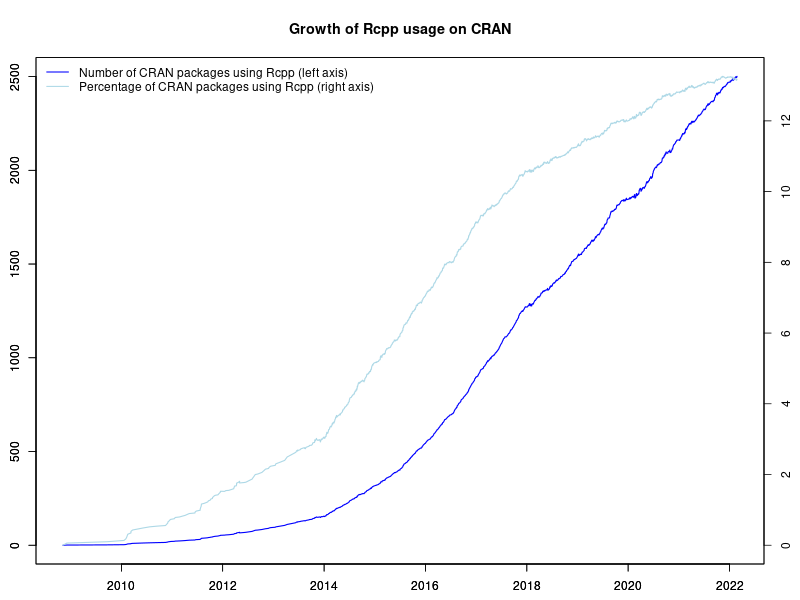
2500 Rcpp packages As of this morning, Rcpp stands at 2501 reverse-dependencies on CRAN. The graph on the left depicts the growth of Rcpp usage (as measured by Depends, Imports and LinkingTo, but excluding Suggests) over time. Rcpp was first released in November 2008. It probably cleared 50 packages around three years later in December 2011, 100 packages in January 2013, 200 packages in April 2014, and 300 packages in November 2014. It passed 400 packages in June 2015 (when I tweeted about it), 500 packages in late October 2015, 600 packages in March 2016, 700 packages in July 2016, 800 packages in October 2016, 900 packages early January 2017, 1000 packages in April 2017, 1250 packages in November 2017, 1500 packages in November 2018, 1750 packages in August 2019, 2000 packages in July 2020, and 2250 package in March of last year. The chart extends to the very beginning via manually compiled data from CRANberries and checked with crandb. The next part uses manually saved entries. The core (and by far largest) part of the data set was generated semi-automatically via a short script appending updates to a small file-based backend. A (manually curated) list of packages using Rcpp is available too. Also displayed in the graph is the relative proportion of CRAN packages using Rcpp. The four per-cent hurdle was cleared just before useR! 2014 where I showed a similar graph (as two distinct graphs) in my invited talk. We passed five percent in December of 2014, six percent July of 2015, seven percent just before Christmas 2015, eight percent in the summer of 2016, nine percent mid-December 2016, cracked ten percent in the summer of 2017, eleven percent in 2018 and passed 12.5 percent or one in every eight CRAN packages dependens on Rcpp along with the 2000 packages mark. Truly stunning. As before, there is more detail in the chart: how CRAN seems to be pushing back more and removing more aggressively (which my CRANberries tracks but not in as much detail as it could), how the growth of Rcpp seems to be slowing somewhat outright and even more so as a proportion of CRAN as one would expect a growth curve to. The Rcpp team continues to aim for keeping Rcpp as performant and reliable as it has been (and see e.g. here for some more details). A really big shoutout and Thank You! to all users and contributors of Rcpp for help, suggestions, bug reports, documentation or, of course, code. If you like this or other open-source work I do, you can now sponsor me at GitHub. For the first year, GitHub will match your contributions.

This post by Dirk Eddelbuettel originated on his Thinking inside the box blog. Please report excessive re-aggregation in third-party for-profit settings.

23 February 2022

Ian Jackson: Rooting an Eos Fairphone 4

Last week I received (finally) my Fairphone 4, supplied with a de-googled operating system, which I had ordered from the E Foundation s shop in December. (I m am very hard on hardware and my venerable Fairphone 2 is really on its last legs.) I expect to have full control over the software on any computing device I own which is as complicated, capable, and therefore, hazardous, as a mobile phone. Unfortunately the Eos image (they prefer to spell it /e/ os , srsly!) doesn t come with a way to get root without taking fairly serious measures including unlocking the bootloader. Unlocking the bootloader wouldn t be desirable for me but I can t live without root. So. I started with these helpful instructions: https://forum.xda-developers.com/t/fairphone-4-root.4376421/ I found the whole process a bit of a trial, and I thought I would write down what I did. But, it s not straightforward, at least for someone like me who only has a dim understanding of all this Android stuff. Unfortunately, due to the number of missteps and restarts, what I actually did is not really a sensible procedure. So here is a retcon of a process I think will work: Unlock the bootloader The E Foundation provide instructions for unlocking the bootloader on a stock FP4, here https://doc.e.foundation/devices/FP4/install and they seem applicable to the Murena phone supplied with Eos pre-installed, too. NB tht unlocking the bootloader wipes the phone. So we do it first. So:
  1. Power on the phone, with no SIM installed
  2. You get a welcome screen.
  3. Skip all things on startup including wifi
  4. Go to the very end of the settings, tap a gazillion times on the phone s version until you re a developer
  5. In the developer settings, allow usb debugging
  6. In the developer settings, allow oem bootloader unlocking
  7. Connect a computer via a USB cable, say yes on phone to USB debugging
  8. adb reboot bootloader
  9. The phone will reboot into a texty kind of screen, the bootloader
  10. fastboot flashing unlock
  11. The phone will reboot, back to the welcome screen
  12. Repeat steps 3-9 (maybe not all are necessary)
  13. fastboot flashing unlock_critical
  14. The phone will reboot, back to the welcome screen
Note that although you are running fastboot, you must run this command with the phone in bootloader mode, not fastboot (aka fastbootd ) mode. If you run fastboot flashing unlcok from fastboot you just get a don t know what you re talking about . I found conflicting instructions on what kind of Vulcan nerve pinches could be used to get into which boot modes, and had poor experiences with those. adb reboot bootloader always worked reliably for me. Some docs say to run fastboot oem unlock; I used flashing. Maybe this depends on the Android tools version. Initial privacy prep and OTA update We want to update the supplied phone OS. The build mine shipped with is too buggy to run Magisk, the application we are going to use to root the phone. (With the pre-installed phone OS, Magisk crashes at the patch boot image step.) But I didn t want to let the phone talk to Google, even for the push notifications registration.
  1. From the welcome screen, skip all things except location, date, time. Notably, do not set up wifi
  2. In settings, microg section
    1. turn off cloud messaging
    2. turn off google safetynet
    3. turn off google registration (NB you must do this after the other two, because their sliders become dysfunctional after you turn google registration off)
    4. turn off both location modules
  3. In settings, location section, turn off allowed location for browser and magic earth
  4. Now go into settings and enable wifi, giving it your wifi details
  5. Tell the phone to update its operating system. This is a big download.
Install Magisk, the root manager (As a starting point I used these instructions https://www.xda-developers.com/how-to-install-magisk/ and a lot of random forum posts.) You will need the official boot.img. Bizarrely there doesn t seem to be a way to obtain this from the phone. Instead, you must download it. You can find it by starting at https://doc.e.foundation/devices/FP4/install which links to https://images.ecloud.global/stable/FP4/. At the time of writing, the most recent version, whose version number seemed to correspond to the OS update I installed above, was IMG-e-0.21-r-20220123158735-stable-FP4.zip.
  1. Download the giant zipfile to your computer
  2. Unzip it to extract boot.img
  3. Copy the file to your phone s storage . Eg, via adb: with the phone booted into the main operating system, using USB debugging, adb push boot.img /storage/self/primary/Download.
  4. On the phone, open the browser, and enter https://f-droid.org. Click on the link to install f-droid. You will need to enable installing apps from the browser (follow the provided flow to the settings, change the setting, and then use Back, and you can do the install). If you wish, you can download the f-droid apk separately on a computer, and verify it with pgp.
  5. Using f-droid, install Magisk. You will need to enable installing apps from f-droid. (I installed Magisk from f-droid because 1. I was going to trust f-droid anyway 2. it has a shorter URL than Magisk s.)
  6. Open the Magisk app. Tell Magisk to install (Magisk, not the app). There will be only one option: patch boot file. Tell it to patch the boot.img file from before.
  7. Transfer the magisk_patched-THING.img back to your computer (eg via adb pull).
  8. adb reboot bootloader
  9. fastboot boot magisk_patched-THING.img (again, NB, from bootloader mode, not from fastboot mode)
  10. In Magisk you ll see it shows as installed. But it s not really; you ve just booted from an image with it. Ask to install Magisk with Direct install .
After you have done all this, I believe that each time you do an over-the-air OS update, you must, between installing the update and rebooting the phone, ask Magisk to Install to inactive slot (after OTA) . Presumably if you forget you must do the fastboot boot dance again. After all this, I was able to use tsu in Termux. There s a strange behaviour with the root prompt you get apropos Termux s request for root; I found that it definitely worked if Termux wasn t the foreground app You have to leave the bootloader unlocked. Howwever, as I understand it, the phone s encryption will still prevent an attacker from hoovering the data out of your phone. The bootloader lock is to prevent someone tricking you into entering the decryption passkey into a trojaned device. Other things to change There are probably other things to change. I have not yet transferred my Signal account from my old phone. It is possible that Signal will require me to re-enable the google push notifications, but I hope that having disabled them in microg it will be happy to use its own system, as it does on my old phone.

comment count unavailable comments

Joey Hess: announcing zephyr-copilot

I recently learned about the Zephyr Project which is a rather neat embedded OS for devices too small to run Linux. This led me to wondering if I could adapt arduino-copilot to target Zephyr, and so be able to program any of the 350+ boards it supports using Haskell. At the same time I had an opportunity to give a talk at the Houston Functional Programmers group. On February 1st I decided to give that talk, about arduino-copilot. That left 2 weeks to buy some hardware supported by Zephyr and port arduino-copilot to it. The result is zephyr-copilot, and I was able to demo it during my talk. This example can be used with any of 293 different boards, and will blink an on-board LED:
module Examples.Blink.Demo where
import Copilot.Zephyr.Board.Generic
main :: IO ()
main = zephyr $ do
        led0 =: blinking
        delay =: MilliSeconds (constant 100)
Doing much more than that needs a board specific module to set up GPIO pins etc. So far I only have written those for a couple of boards I have, but they are fairly easy to write. I'd be happy to help anyone who wants to contribute one. Due to the time constraints I have not implemented serial port support, or PWM or ADC yet, although all should be fairly easy. Zephyr also has no end of other capabilities, from networking to file systems to sensors, that could perhaps be supported in zephyr-copilot. My talk has now been published on youtube. I really enjoyed presenting again for the first time in 4 years(!), and to a very nice group of people. Thanks to Claude Rubinson for his persistence in getting me to give a talk.
Development of zephyr-copilot was sponsored by Mark Reidenbach, Erik Bj reholt, Jake Vosloo, and Graham Spencer on Patreon.

Next.

Previous.