Search Results: "ean"

29 August 2020

Russ Allbery: PGP::Sign 1.02

This is another test-only release of my module for manipulating PGP signatures in Perl. I'm trying to get the CPAN testing failures down to a dull roar. This iteration fixes some testing issues with systems that have only GnuPG v1 and tries to handle systems whose gpg is GnuPG v2 but is older than 2.1.12 and therefore doesn't have the --pinentry-mode flag that GnuPG uses to suppress password prompting. I handled the latter by skipping the tests if the gpg on the user's PATH was too old. I'm not certain this is the best approach, although it makes the CPAN automated testing more useful for me, since the module will not work without special configuration on those systems. On the other hand, if someone is installing it to point to some other GnuPG binary on the system at runtime, failing the installation because their system gpg is too old seems wrong, and the test failure doesn't indicate a bug in the module. Essentially, I'm missing richer test metadata in the Perl ecosystem. I want to be able to declare a dependency on a non-Perl system binary, but of course Perl has no mechanism to do that. I thought about trying to deal with the Windows failures due to missing IPC::Run features (redirecting high-numbered file descriptors) on the Windows platform in a similar way, but decided in that case I do want the tests to fail because PGP::Sign will never work on that platform regardless of the runtime configuration. Here too I spent some time searching for some way to indicate with Module::Build that the module doesn't work on Windows, and came up empty. This seems to be a gap in Perl's module distribution ecosystem. In any case, hopefully this release will clean up the remaining test failures on Linux and BSD systems, and I can move on to work on the Big Eight signing key, which was the motivating application for these releases. You can get the latest release from CPAN or from the PGP::Sign distribution page.

28 August 2020

Raphaël Hertzog: Freexian s report about Debian Long Term Support, July 2020

A Debian LTS logo Like each month, albeit a bit later due to vacation, here comes a report about the work of paid contributors to Debian LTS. Individual reports In July, 249.25 work hours have been dispatched among 14 paid contributors. Their reports are available: Evolution of the situation July was our first month of Stretch LTS! Given this is our fourth LTS release we anticipated a smooth transition and it seems everything indeed went very well. Many thanks to the members of the Debian ftpmaster-, security, release- and publicity- teams who helped us make this happen!
Stretch LTS begun on July 18th 2020 after the 13th and final Stretch point release. and is currently scheduled to end on June 30th 2022. Last month, we asked you to participate in a survey and we got 1764 submissions, which is pretty awesome. Thank you very much for participating!. Right now we are still busy crunching the results, but we already shared some early analysis during the Debconf LTS bof this week. The security tracker currently lists 54 packages with a known CVE and the dla-needed.txt file has 52 packages needing an update. Thanks to our sponsors New sponsors are in bold.

No comment Liked this article? Click here. My blog is Flattr-enabled.

26 August 2020

Dirk Eddelbuettel: #29: Easy, Reliable, Fast Linux CRAN Binaries via BSPM

Welcome to the 29th post in the randomly repeating R recommendations series or R4 for short. Our last post #28 introduced RSPM, and just before that we also talked in #27 about binary installations on Ubuntu (which was also a T4 video). This post is joined with I aki Ucar and mainly about work we have done with his bspm package.

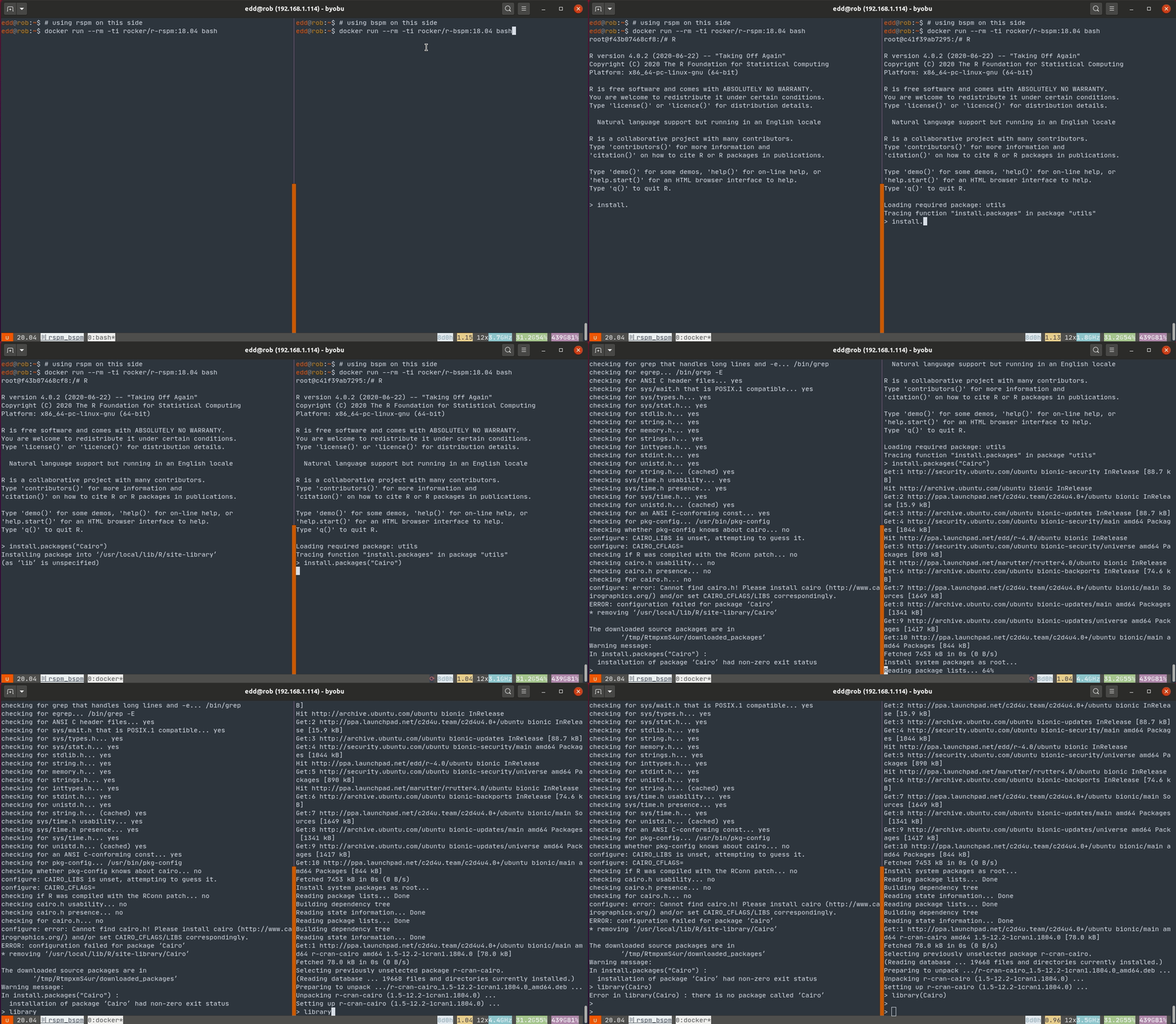
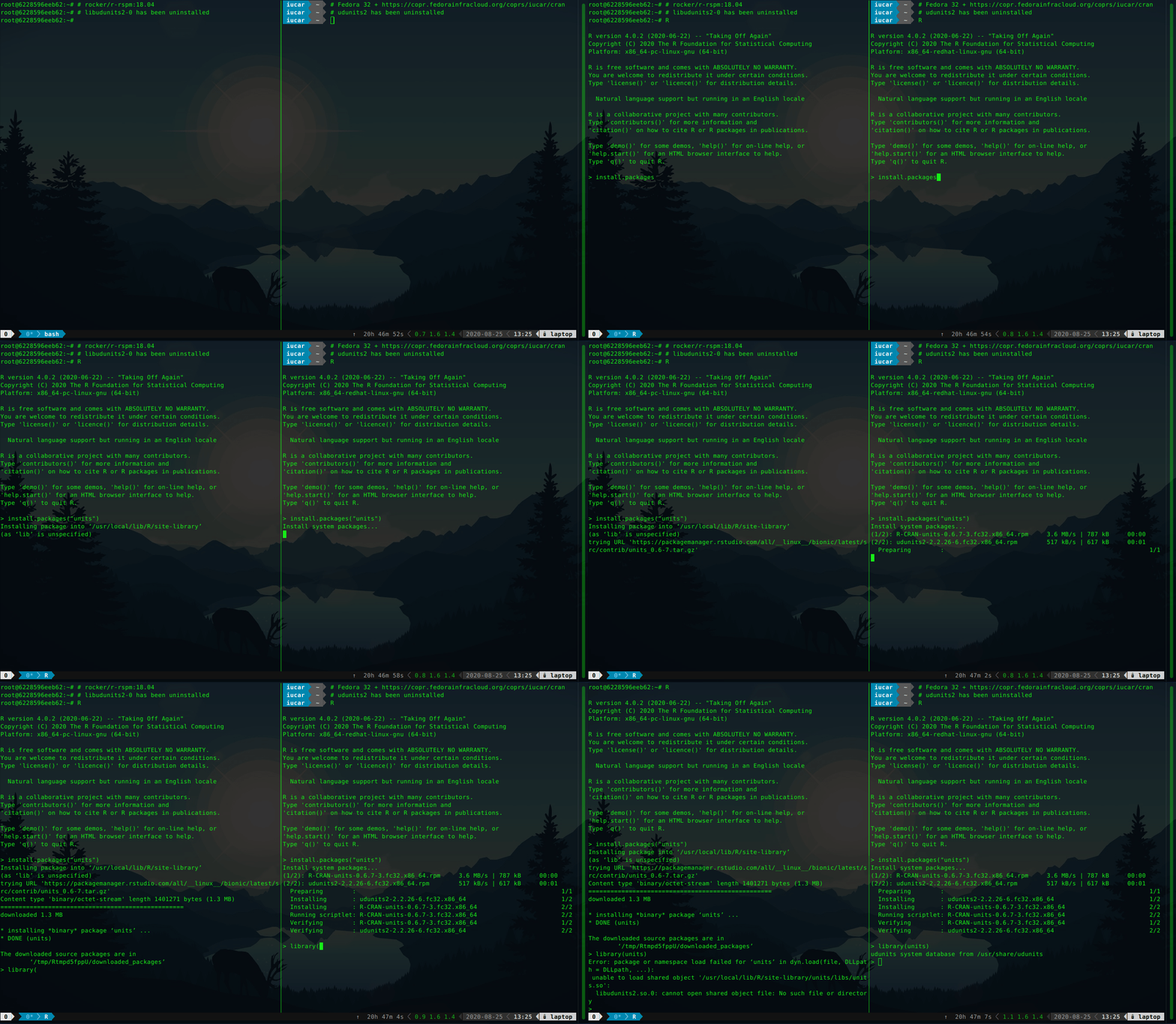
Background CRAN has been a cornerstone of the success of R in recent years. As a well-maintained repository with stringent quality control, it ensures users have access to highest-quality statistical / analytical software that just works . Users on Windows and macOS also benefit from faster installation via pre-compiled binary packages. Linux users generally install from source, which can be more tedious and, often, much slower. Those who know where to look have had access to (at least some) binaries for years as well (and one of us blogged and vlogged about this at length). Debian users get close to 1000 CRAN and BioConductor packages (and, true to Debian form, for well over a dozen hardware platforms). Michael Rutter maintains a PPA with 4600 binaries for three different Ubuntu flavors (see c2d4u4.0+). More recently, Fedora joined the party with 16000 (!!) binaries, essentially all of CRAN, via a Copr repository (see iucar/cran). The buzz currently is however with RSPM, a new package manager by RStudio. An audacious project, it provides binaries for several Linux distributions and releases. It has already been tested in many RStudio Cloud sessions (including with some of our students) as well as some CI integrations. RSPM cuts across and takes the breadth of CRAN across several Linux distributions, bringing installation of pre-built CRAN packages a binaries under their normal CRAN package names. Another nice touch is the integration with install.packages(): these binaries are installed in a way that is natural for R users but as binaries. It is however entirely disconnected from the system package management. This means that the installation of a package requiring an external library may succeed and still fail, as a required library simply cannot be pulled in directly by RSPM. So what is needed is a combination. We want binaries that are aware of their system dependencies but accessible directly from R just like RSPM offers it. Enter BSPM the Bridge to System Package Manager package (also on CRAN). The first illustration (using Ubuntu 18.04) shows RSPM on the left, and BSPM on the right, both installing the graphics package Cairo (and both using custom Rocker containers). This fails for RSPM as no binary is present and a source build fails for the familiar lack of a -dev package. It proceeds just fine on the right under BSPM. A second illustration shows once again RSPM on the left, and BSPM on the right (this time on Fedora), both installing the units package without a required system dependency. The installation of units works for BSPM as the dependency libudunits is brought in, but fails under RSPM. The binary installation succeeds in both cases, but the missing dependency (the UDUNITS2 library) is brought in only by BSPM. Consequently, the package fails to load under RSPM.

Summary To conclude, highlights of BSPM are:
  • direct installation of binary packages from R via R commands under their normal CRAN names (just like RSPM);
  • full integration with the system package manager, delivering system installations (improving upon RSPM);
  • full dependency resolution for R packages, including system requirements (improving upon RSPM).
This offers easy, reliable, fast installation of R packages, and we invite you to pick all three. We recommend usage with either Ubuntu with the 4.6k packages via the Rutter PPA, or Fedora via the even more complete Copr repository (which already includes a specially-tailored version of BSPM called CoprManager). We hope this short note wets your appetite to learn more about bspm (which is itself on CRAN) and the two sets of Rocker containers shown. The rocker/r-rspm container comes in two two flavours for Ubuntu 18.04 and 20.04. Similarly, the rocker/r-bspm container comes in the same two two flavours for Ubuntu 18.04 and 20.04, as well as in a Debian testing variant. Feedback is appreciated at the bspm or rocker issue trackers. If you like this or other open-source work I do, you can now sponsor me at GitHub. For the first year, GitHub will match your contributions.

This post by Dirk Eddelbuettel originated on his Thinking inside the box blog. Please report excessive re-aggregation in third-party for-profit settings.

Alexandre Viau: Setting up Nightscout using MongoDB Atlas

Nightscout is an Open Source web-based CGM (Continuous Glucose Monitor) that allows multiple caregivers to remotely view a patient s glucose data in real time. It is often deployed by non-technical people for their own use. The traditional method used a MongoDB Addon on Heroku that is now deprecated. I have sent patches to adapt the documentation on the relevant projects: This app is life-changing. Some Nigthscout users may be impatient, so I am writing this blog post to guide them in the meantime.

Setting up Nightscout If you want to setup Nightscout from scratch using MongoDB Atlas, please follow this modified guide. However, note that you will have to make one modification to the steps in the guide. At the start of Step 4, you will need to go to this repository instead: https://github.com/aviau/cgm-remote-monitor. This is my own version of Nightscout and it contains small modifications that will allow you to set it up with MongoDB Atlas easily. I will keep this blog post updated as I receive feedback. Come back here for more instructions.

25 August 2020

Jonas Meurer: cryptsetup-suspend

Introducing cryptsetup-suspend Today, we're introducing cryptsetup-suspend, whose job is to protect the content of your harddrives while the system is sleeping. TL;DR:
  • You can lock your encrypted harddrives during suspend mode by installing cryptsetup-suspend
  • For cryptsetup-suspend to work properly, at least Linux kernel 5.6 is required
  • We hope that in a bright future, everything will be available out-of-the-box in Debian and it's derivatives
Before: timeline_old.svg After: timeline_new.svg

Table of contents

What does this mean and why should you care about it? If you don't use full-disk encryption, don't read any further. Instead, think about, what will happen if you lose your notebook on the train, a random person picks it up and browses through all your personal pictures, e-mails, and tax records. Then encrypt your system and come back. If you believe full-disk encryption is necessary, you might know that it only works when your machine is powered off. Once you turn on the machine and decrypt your harddrive, your encryption key stays in RAM and can potentially be extracted by malicious software or physical access. Even if these attacks are non-trivial, it's enough to worry about. If an attacker is able to extract your disk encryption keys from memory, they're able to read the content of your disk in return. Sadly, in 2020, we hardly power off our laptops anymore. The sleep mode, also known as "suspend mode", is just too convenient. Just close the lid to freeze the system state and lift it anytime later in order to continue. Well, convenience usually comes with a cost: during suspend mode, your system memory is kept powered, all your data - including your encryption keys - stays there, waiting to be extracted by a malicious person. Unfortunately, there are practical attacks to extract the data of your powered memory. Cryptsetup-suspend expands the protection of your full-disk encryption to all those times when your computer sleeps in suspend mode. Cryptsetup-suspend utilizes the suspend feature of LUKS volumes and integrates it with your Debian system. Encryption keys are evicted from memory before suspend mode and the volumes have to be re-opened after resuming - potentially prompting for the required passphrases. By now, we have a working prototype which we want to introduce today. We did quite some testing, both on virtualized and bare-metal Debian and Ubuntu systems, with and without graphical stack, so we dare to unseal and set free the project and ask you - the community - to test, review, criticize and give feedback. Here's a screencast of cryptsetup-suspend in action:

State of the implementation: where are we? If you're interested in the technical details, here's how cryptsetup-suspend works internally. It basically consists of three parts: cryptsetup-suspend.svg
  1. cryptsetup-suspend: A C program that takes a list of LUKS devices as arguments, suspends them via luksSuspend and suspends the system afterwards. Also, it tries to reserve some memory for decryption, which we'll explain below.
  2. cryptsetup-suspend-wrapper: A shell wrapper script which works the following way:
    1. Extract the initramfs into a ramfs
    2. Run (systemd) pre-suspend scripts, stop udev, freeze almost all cgroups
    3. Chroot into the ramfs and run cryptsetup-suspend
    4. Resume initramfs devices inside chroot after resume
    5. Resume non-initramfs devices outside chroot
    6. Thaw groups, start udev, run (systemd) post-suspend scripts
    7. Unmount the ramfs
  3. A systemd unit drop-in file overriding the Exec property of systemd-suspend.service so that it invokes the script cryptsetup-suspend-wrapper.
Reusing large parts of the existing cryptsetup-initramfs implementation has some positive side-effects: Out-of-the-box, we support all LUKS block device setups that have been supported by the Debian cryptsetup packages before. Freezing most processes/cgroups is necessary to prevent possible race-conditions and dead-locks after the system resumes. Processes will try to access data on the locked/suspended block devices eventually leading to buffer overflows and data loss.

Technical challenges and caveats
  • Dead-locks at suspend: In order to prevent possible dead-locks between suspending the encrypted LUKS disks and suspending the system, we have to tell the Linux kernel to not sync() before going to sleep. A corresponding patch got accepted upstream in Linux 5.6. See section What about the kernel patch? below for details.
  • Race conditions at resume: Likewise, there's a risk of race conditions between resuming the system and unlocking the encypted LUKS disks. We went with freezing as many processes as possible as a counter measurement. See last part of section State of the implementation: where are we? for details.
  • Memory management: Memory management is definitely a challenge. Unlocking disks might require a lot of memory (if key derivation function is argon2i) and the swap device most likely is locked at that time. See section All that matters to me is the memories! below for details.
  • systemd dependency: Our implementation depends on systemd. It uses a unit drop-in file for systemd-suspend.service for hooking into the system suspend process and depends on systemds cgroup management to freeze and thaw processes. If you're using a different init system, sorry, you're currently out of luck.

What about the kernel patch? The problem is simple: the Linux kernel suspend implementation enforces a final filesystem sync() before the system goes to sleep in order to prevent potential data loss. While that's sensible in most scenarios, it may result in dead-locks in our situation, since the block device that holds the filesystem is already suspended. The fssync() call will block forever as it waits for the block device to finish the sync() operation. So we need a way to conditionally disable this sync() call in the Linux kernel resume function. That's what our patch does, by introducing a run-time switch at /sys/power/sync_on_suspend, but it only got accepted into the Linux kernel recently and was first released with Linux kernel 5.6. Since release 4.3, the Linux kernel at least provides a build-time flag to disable the sync(): CONFIG_SUSPEND_SKIP_SYNC (that was called SUSPEND_SKIP_SYNC first and renamed to CONFIG_SUSPEND_SKIP_SYNC in kernel release 4.9). Enabling this flag at build-time protects you against the dead locks perfectly well. But while that works on an individual basis, it's a non-option for the distribution Linux kernel defaults. In most cases you still want the sync() to happen, except if you have user-space code that takes care of the sync() just before suspending your system - just like our cryptsetup-suspend implementation does. So in order to properly test cryptsetup-suspend, you're strongly advised to run Linux kernel 5.6 or newer. Fortunately, Linux 5.6 is available in buster-backports thanks to the Debian Kernel Team.

All that matters to me is the memories! One of the tricky parts is memory management. Since version 2, LUKS uses argon2i as default key derivation function. Argon2i is a memory-hard hash function and LUKS2 assigns the minimum of half of your systems memory or 1 GB to unlocking your device. While this is usually unproblematic during system boot - there's not much in the system memory anyway - it can become problematic when suspending. When cryptsetup tries to unlock a device and wants 1 GB of memory for this, but everything is already occupied by your browser and video player, there's only two options what to do:
  1. Kill a process to free some memory
  2. Move some of the data from memory to swap space
The first option is certainly not what you expect when suspending your system. The second option is impossible, because swap is located on your harddrive which we have locked before. Our current solution is to allocate the memory after freezing the other processes, but before locking the disks. At this time, the system can still move data to swap, but it won't be accessed anymore. We then release the memory just in time for cryptsetup to claim it again. The implementation of this is still subject to change. memories.gif

What's missing: A proper user interface As mentioned before, we consider cryptsetup-suspend usable, but it certainly still has bugs and shortcomings. The most obvious one is lack of a proper user interface. Currently, we switch over to a tty command-line interface to prompt for passphrases when unlocking the LUKS devices. It certainly would be better to replace this with a graphical user interface later, probably by using plymouth or something alike. Unfortunately, it seems rather impossible to spawn a real graphical environment for the passphrase prompt. That would imply to load the full graphical stack into the ramfs, raising the required amount of memory significantly. Lack of memory is currently our biggest concern and source of trouble. We'd definitely appreciate to learn about your ideas how to improve the user experience here.

Let's get practical: how to use TL;DR: On Debian Bullseye (Testing), all you need to do is to install the cryptsetup-suspend package from experimental. It's not necessary to upgrade the other cryptsetup packages. On Debian Buster, cryptsetup packages from backports are required.
  1. First, be sure that you're running Linux kernel 5.6 or newer. For Buster systems, it's available in buster-backports.
  2. Second, if you're on Debian Buster, install the cryptsetup 2:2.3.3-2~bpo10+1 packages from buster-backports.
  3. Third, install the cryptsetup-suspend package from experimental. Beware that cryptsetup-suspend depends on cryptsetup-initramfs (>= 2:2.3.3-1~). Either you need the cryptsetup packages from testing/unstable, or the backports from buster-backports.
  4. Now that you have the cryptsetup-suspend package installed, everything should be in place: Just send your system to sleep. It should switch to a virtual text terminal before going to sleep, ask for a passphrase to unlock your encrypted disk(s) after resume and switch back to your former working environment (most likely your graphical desktop environment) afterwards.

Security considerations Suspending LUKS devices basically means to remove the corresponding encryption keys from system memory. This protects against all sort of attacks trying to read them from there, e.g. cold-boot attacks. But, cryptsetup-suspend only protects the encryption keys of your LUKS devices. Most likely there's more sensitive data in system memory, like all kinds of private keys (e.g. OpenPGP, OpenSSH) or documents with sensitive content. We hope that the community will help improve this situation by providing useful pre-/post-suspend scripts. A positive example is KeepassXC, which is able to lock itself when going to suspend mode.

Feedback and Comments We'd be more than happy to learn about your thoughts on cryptsetup-suspend. For specific issues, don't hesitate to open a bugreport against cryptsetup-suspend. You can also reach us via mail - see the next section for contact addresses. Last but not least, comments below the blogpost work as well.

Authors
  • Tim (tim at systemli.org)
  • Jonas (jonas at freesources.org)

24 August 2020

Jonathan Dowland: Out of control (21 minutes of madness mix)

Chemical Brothers   Out Of Control (21 Minutes of Madness remix) Copy 1143 of 1999 Chemical Brothers Out Of Control (21 Minutes of Madness remix) Copy 1143 of 1999
Also known as The Secret Psychedelic Mix. I picked this up last year. It was issued to promote the 20th anniversary re-issue of the parent album "Surrender". I remember liking this song back when it came out. At that time I didn't know who the guest singer was Bernard Sumner and if I had it wouldn't mean anything to me. This is a pretty good mix. There's nothing "extra" in the mix, really, it's the same elements as the original 7 minute version, for 21 minutes this time, with perhaps some more production elements (more dubby stuff) but it doesn't seem to overstay its welcome.

Ulrike Uhlig: Code reviews: from nitpicking to cooperation

After we gave our talk at DebConf 20, Doing things together, there were 5 minutes left for the live Q&A. Pollo asked a question that I think is interesting and deserves a longer answer: How can we still have a good code review process without making it a "you need to be perfect" scenario? I often find picky code reviews help me write better code. I find it useful to first disentangle what code reviews are good for, how we do them, why we do them that way, and how we can potentially improve processes. What are code reviews good for? Code review and peer review are great methods for cooperation aiming at: Looking at this list, the last point seems to be more like a nice side effect of all the other points. :) How do code reviews happen in our communities? It seems to be a common assumption that code reviews are and have to be picky and perfectionist. To me, this does not actually seem to be a necessity to accomplish the above mentioned goals. We might want to work with precision a quality which is different from perfection. Perfection can hardly be a goal: perfection does not exist. Perfectionist dynamics can lead to failing to call something "good enough" or "done". Sometimes, a disproportionate amount of time is invested in writing (several) code reviews for minor issues. In some cases, strong perfectionist dynamics of a reviewer can create a feeling of never being good enough along with a loss of self esteem for otherwise skilled code authors. When do we cross the line? When going from cooperation, precision, and learning to write better code, to nitpicking, we are crossing a line: nitpicking means to pedantically search for others' faults. For example, I once got one of my Git commits at work criticized merely for its commit message that was said to be "ugly" because I "use[d] the same word twice" in it. When we are nitpicking, we might not give feedback in an appreciative, cooperative way, we become fault finders instead. From there it's a short way to operating on the level of blame. Are you nitpicking to help or are you nitpicking to prove something? Motivations matter. How can we improve code reviewing? When we did something wrong, we can do better next time. When we are told that we are wrong, the underlying assumption is that we cannot change (See Bren Brown, The difference between blame and shame). We can learn to go beyond blame. Negative feedback rarely leads to improvement if the environment in which it happens lacks general appreciation and confirmation. We can learn to give helpful feedback. It might be harder to create an appreciative environment in which negative feedback is a possibility for growth. One can think of it like of a relationship: in a healthy relationship we can tell each other when something does not work and work it out because we regularly experience that we respect, value, and support each other. To be able to work precisely, we need guidelines, tools, and time. It's not possible to work with precision if we are in a hurry, burnt out, or working under a permanent state of exception. The same is true for receiving picky feedback. On DebConf's IRC channel, after our talk, marvil07 said: On picky code reviews, something that I find useful is automation on code reviews; i.e. when a bot is stating a list of indentation/style errors it feels less personal, and also saves time to humans to provide more insightful changes. Indeed, we can set up routines that do automatic fault checking (linting). We can set up coding guidelines. We can define what we call "done" or "good enough". We can negotiate with each other how we would like code to be reviewed. For example, one could agree that a particularly perfectionist reviewer should point out only functional faults. They can spare their time and refrain from writing lengthy reviews about minor esthetic issues that have never made it into a guideline. If necessary, author and reviewer can talk about what can be improved on the long term during a retrospective. Or, on the contrary, one could explicitly ask for a particularly detailed review including all sorts of esthetic issues to learn the best practices of a team applied to one's own code. In summary: let's not lose sight of what code reviews are good for, let's have a clear definition of "done", let's not confuse precision with perfection, let's create appreciative work environments, and negotiate with each other how reviews are made. I'm sure you will come up with more ideas. Please do not hesitate to share them!

Arnaud Rebillout: Send emails from your terminal with msmtp

In this tutorial, we'll configure everything needed to send emails from the terminal. We'll use msmtp, a lightweight SMTP client. For the sake of the example, we'll use a GMail account, but any other email provider can do. Your OS is expected to be Debian, as usual on this blog, although it doesn't really matter. We will also see how to store the credentials for the email account in the system keyring. And finally, we'll go the extra mile, and see how to configure various command-line utilities so that they automatically use msmtp to send emails. Even better, we'll make msmtp the default email sender, to actually avoid configuring these utilities one by one. Prerequisites Strong prerequisites (if you don't recognize yourself here, you probably landed on the wrong page): Weak prerequisites (if your setup doesn't match those points exactly, that's fine, you can still read on): GMail account setup For a GMail account, there's a bit of configuration to do. For other email providers, I have no idea, maybe you can just skip this part, or maybe you will have to go through a similar procedure. If you want an external program (msmtp in this case) to talk to the GMail servers on your behalf, and send emails, you can't just use your usual GMail password. Instead, GMail requires you to generate so-called app passwords, one for each application that needs to access your GMail account. This approach has several advantages: So app passwords are a good idea, it just requires a bit of work to set it up. Let's see what it takes. First, 2-Step Verification must be enabled on your GMail account. Visit https://myaccount.google.com/security, and if that's not the case, enable it. You'll need to authorize all of your devices (computer(s), phone(s) and so on), and it can be a bit tedious, granted. But you only have to do it once in a lifetime, and after it's done, you're left with a more secure account, so it's not that bad, right? Enabling the 2-Step Verification will unlock the feature we need: App passwords. Visit https://myaccount.google.com/apppasswords, and under "Signing in to Google", click "App passwords", and generate one. An app password is a 16 characters string, something like qwertyuiopqwerty. It's supposed to be used from only one place, ie. from ONE application that is installed on ONE device. That's why it's common to give it a name of the form application@device, so in our case it could be msmtp@laptop, but really it's free form, choose whatever name suits you, as long as it makes sense to you. So let's give a name to this app password, write it down for now, and we're done with the GMail config. Send your first email Time to get started with msmtp. First thing first, installation, trivial:
sudo apt install msmtp
Let's try to send an email. At this point, we did not create any configuration file for msmtp yet, so we have to provide every details on the command line.
# Write a dummy email
cat << EOF > message.txt
From: YOUR_LOGIN@gmail.com
To: SOMEONE_ELSE@SOMEWHERE_ELSE.com
Subject: Cafe Sua Da
Iced-coffee with condensed milk
EOF
# Send it
cat message.txt   msmtp \
    --auth=on --tls=on \
    --host smtp.gmail.com \
    --port 587 \
    --user YOUR_LOGIN \
    --read-envelope-from \
    --read-recipients
# msmtp prompts you for your password:
# this is where goes the app password!
Obviously, in this example you should replace the uppercase words with the real thing, that is, your email login, and real email addresses. Also, let me insist, you must enter the app password that was generated previously, not your real GMail password. And it should work already, this email should have been sent and received by now. So let me explain quickly what happened here. In the file message.txt, we provided From: (the email address of the person sending the email) and To: (the destination email address). Then we asked msmtp to re-use those values to set the envelope of the email with --read-envelope-from and --read-recipients. What about the other parameters? For more details, you should refer to the msmtp documentation. Write a configuration file So we could send an email, that's cool already. However the command to do that was a bit long, and we don't want to juggle with all these arguments every time we send an email. So let's write down all of that into a configuration file. msmtp supports two locations: ~/.msmtprc and ~/.config/msmtp/config, at your preference. In this tutorial we'll use ~/.msmtprc for brevity:
cat << 'EOF' > ~/.msmtprc
defaults
tls on
account gmail
auth on
host smtp.gmail.com
port 587
user YOUR_LOGIN
from YOUR_LOGIN@gmail.com
account default : gmail
EOF
And for a quick explanation: All in all it's pretty simple, and it's becoming easier to send an email:
# Write a dummy email. Note that the
# header 'From:' is no longer needed,
# it's already in '~/.msmtprc'.
cat << 'EOF' > message.txt
To: SOMEONE_ELSE@SOMEWHERE_ELSE.com
Subject: Flat White
The milky way for coffee
EOF
# Send it
cat message.txt   msmtp \
    --account default \
    --read-recipients
Actually, --account default is not needed, as it's the default anyway if you don't provide a --account argument. Furthermore --read-recipients can be shortened as -t. So we can make it real short now:
msmtp -t < message.txt
At this point, life is good! Except for one thing maybe: we still have to type the password every time we send an email. Surely it must be possible to avoid that annoyance... Store your password in the system keyring For this part, we'll make use of the libsecret tool to store the password in the system keyring via the Secret Service API. It means that your desktop environment should implement the Secret Service specification, which is the case for both GNOME and KDE. Note that GNOME provides Seahorse to have a look at your secrets, KDE has the KDE Wallet. There's also KeePassXC, which I have only heard of but never used. I guess it can be your password manager of choice if you use neither GNOME nor KDE. For those running an up-to-date Debian unstable, you should have msmtp >= 1.8.11-2, and you're all good to go. For those having an older version than that however, you will have to install the package msmtp-gnome in order to have msmtp built with libsecret support. Note that this package depends on seahorse, hence it pulls in a good part of the GNOME stack when you install it. For those not running GNOME, that's unfortunate. All of this was discussed and fixed in #962689. Alright! So let's just make sure that the libsecret tools are installed:
sudo apt install libsecret-tools
And now we can store our password in the system keyring with this command:
secret-tool store --label msmtp \
    host smtp.gmail.com \
    service smtp \
    user YOUR_LOGIN
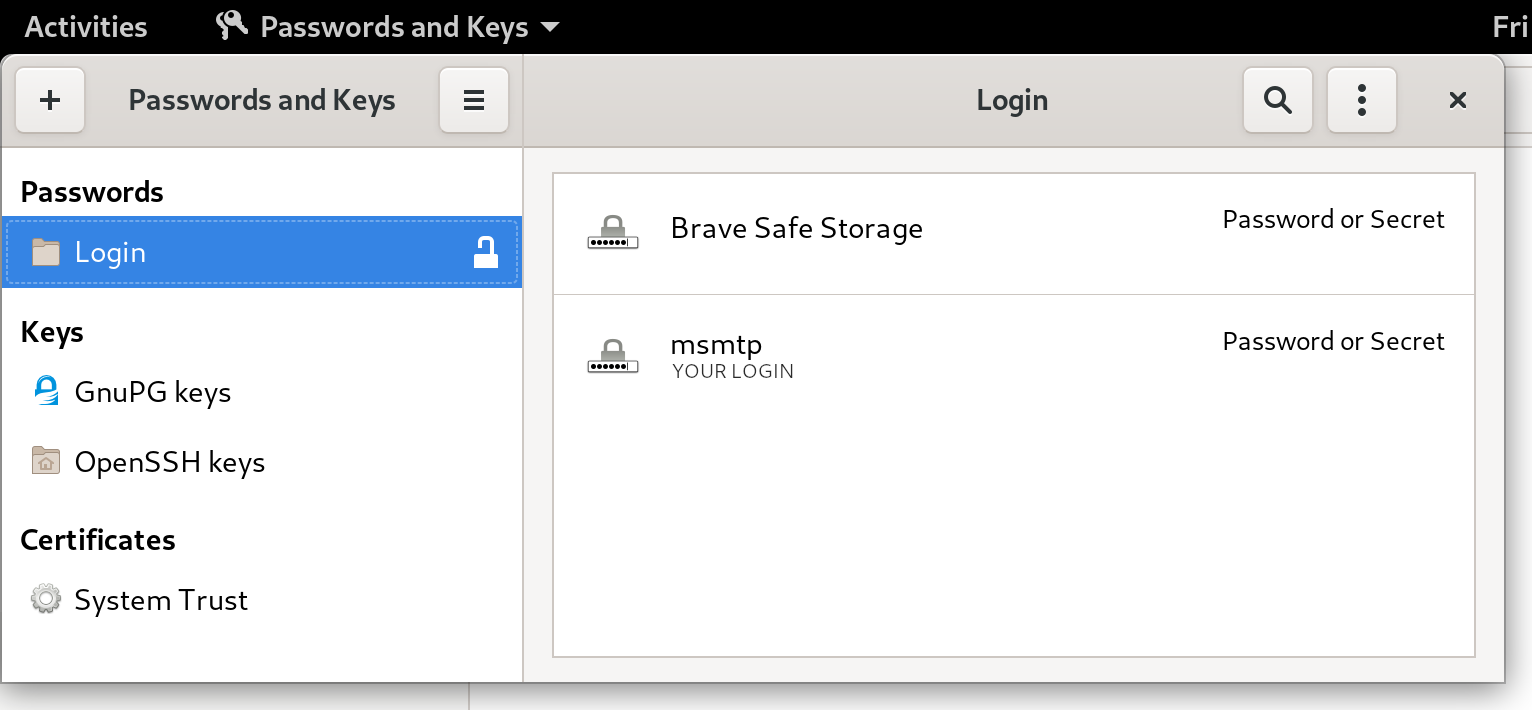
If this looks a bit too magic, and you want something more visual, you can actually fire a GUI like seahorse (for GNOME users), or kwalletmanager5 (for KDE users), and then you will see what passwords are stored in there. Here's a screenshot of Seahorse, with a msmtp password stored: seahorse with msmtp password Let's try to send an email again:
msmtp -t < message.txt
No need for a password anymore, msmtp got it from the system keyring! For more details on how msmtp handle the passwords, and to see what other methods are supported, refer to the extensive documentation. Use-cases and integration Let's go over a few use-cases, situations where you might end up sending emails from the command-line, and what configuration is required to make it work with msmtp. Git Send-Email Sending emails with git is a common workflow for some projects, like the Linux kernel. How does git send-email actually send emails? From the git-send-email manual page:
the built-in default is to search for sendmail in /usr/sbin, /usr/lib and $PATH if such program is available
It is possible to override this default though:
--smtp-server=
[...] Alternatively it can specify a full pathname of a sendmail-like program instead; the program must support the -i option.
So in order to use msmtp here, you'd add a snippet like that to your ~/.gitconfig file:
[sendemail]
    smtpserver = /usr/bin/msmtp
For a full guide, you can also refer to https://git-send-email.io. Debian developer tools Tools like bts or reportbug are also good examples of command-line tools that need to send emails. From the bts manual page:
--sendmail=SENDMAILCMD
Specify the sendmail command [...] Default is /usr/sbin/sendmail.
So if you want bts to send emails with msmtp instead of sendmail, you must use bts --sendmail='/usr/bin/msmtp -t'. Note that bts also loads settings from the file /etc/devscripts.conf and ~/.devscripts, so you could also set BTS_SENDMAIL_COMMAND='/usr/bin/msmtp -t' in one of those files. From the reportbug manual page:
--mta=MTA
Specify an alternate MTA, instead of /usr/sbin/sendmail (the default).
In order to use msmtp here, you'd write reportbug --mta=/usr/bin/msmtp. Note that reportbug reads it settings from /etc/reportbug.conf and ~/.reportbugrc, so you could as well set mta /usr/bin/msmtp in one of those files. So who is this sendmail again? By now, you probably noticed that sendmail seems to be considered the default tool for the job, the "traditional" command that has been around for ages. Rather than configuring every tool to use something else than sendmail, wouldn't it be simpler to actually replace sendmail by msmtp? Like, create a symlink that points to msmtp, something like ln -sr /usr/bin/msmtp /usr/sbin/sendmail? So that msmtp acts as a drop-in replacement for sendmail, and there's nothing else to configure? Answer is yes, kind of. Actually, the first msmtp feature that is listed on the homepage is "Sendmail compatible interface (command line options and exit codes)". Meaning that msmtp is a drop-in replacement for sendmail, that seems to be the intent. However, you should refrain from creating or modifying anything in /usr, as it's the territory of the package manager, apt. Any change in /usr might be overwritten by apt the next time you run an upgrade or install new packages. In the case of msmtp, there is actually a package named msmtp-mta that will create this symlink for you. So if you really want a definitive replacement for sendmail, there you go:
sudo apt install msmtp-mta
From this point, sendmail is now a symlink /usr/sbin/sendmail /usr/bin/msmtp, and there's no need to configure git, bts, reportbug or any other tool that would rely on sendmail. Everything should work "out of the box". Conclusion I hope that you enjoyed reading this article! If you have any comment, feel free to send me a short email, preferably from your terminal!

22 August 2020

Norbert Preining: Converting html to mp4

Such an obvious problem, convert a piece of html/js/css, often with animations, to a video (mp4 or similar). We were just put before this problem for the TUG 2020 online conference. Searching the internet it turned up mostly web services, some of them even with lots of money to pay. At the end (below I will give a short history) it turned out to be rather simple.

The key is to use timesnap, a tool to take screenshots from web pages. It is actively maintained, and internally uses puppeteer, which in turn uses Google Chrome browser headless. This also means that rendering quality is very high. So having an html file available, with all the necessary assets, either online or local, one simply creates enough single screenshots per second so that they can be assembled later on into a video with ffmpeg. In our case, we wanted our leaders to last 10secs before the actual presentation video starts. I decided to render at 30fps, which left me with the simple invocation:
timesnap Leader.html --viewport=1920,1080 --fps=30 --duration=10 --output-pattern="leader-%03d.png"
followed by conversion of the various png images to an mp4:
ffmpeg -r 30 -f image2 -s 1920x1080 -i leader-%03d.png -vcodec libx264 -crf 25 -pix_fmt yuv420p leader.mp4
The -r is the fps, so needs to agree with the --fps above. Also the --viewport and -s values should better agree. -crf is the video quality, and -pix_fmt the pixel format. With that very simple and quick invocation a nice leader video was ready! History It was actually more complicated than normal. For similar problems, it usually takes me about 5min of googling and a bit of scripting, but this time, it was actually a long way. Simply searching for convert html to mp4 doesn t give a lot but web services, often paid for. At some point I came up with the idea to use Electron and led to Electron Recorder, which looked promising, but didn t work. A bit more searching led me to PhantomJS, which is not developed anymore, but there was some explanation how to dump frames using phantomjs and merge them using ffmpeg, very similar to the above. Unfortunately, the rendering of the html page by phantomjs was broken, and thus not usable. Thus I ventured off into searching for alternatives of PhantomJS, which brought me to puppeteer, and from there it wasn t too long a way that pointed me at timesnap. Till now it is surprising to me that such a basic task is neither well documented, so hopefully this page helps some users.

Jelmer Vernooij: Debian Janitor: > 60,000 Lintian Issues Automatically Fixed

The Debian Janitor is an automated system that commits fixes for (minor) issues in Debian packages that can be fixed by software. It gradually started proposing merges in early December. The first set of changes sent out ran lintian-brush on sid packages maintained in Git. This post is part of a series about the progress of the Janitor.

Scheduling Lintian Fixes To determine which packages to process, the Janitor looks at the import of lintian output across the archive that is available in UDD [1]. It will prioritize those packages with the most and more severe issues that it has fixers for. Once a package is selected, it will clone the packaging repository and run lintian-brush on it. Lintian-brush provides a framework for applying a set of fixers to a package. It will run each of a set of fixers in a pristine version of the repository, and handles most of the heavy lifting.
The Inner Workings of a Fixer Each fixer is just an executable which gets run in a clean checkout of the package, and can make changes there. Most of the fixers are written in Python or shell, but they can be in any language. The contract for fixers is pretty simple:
  • If the fixer exits with non-zero, the changes are reverted and fixer is considered to have failed
  • If it exits with zero and made changes, then it should write a summary of its changes to standard out
If a fixer is uncertain about the changes it has made, it should report so on standard output using a pseudo-header. By default, lintian-brush will discard any changes with uncertainty but if you are running it locally you can still apply them by specifying --uncertain. The summary message on standard out will be used for the commit message and (possibly) the changelog message, if the package doesn t use gbp dch.
Example Fixer Let s look at an example. The package priority extra is deprecated since Debian Policy 4.0.1 (released August 2 017) see Policy 2.5 "Priorities". Instead, most packages should use the optional priority. Lintian will warn when a package uses the deprecated extra value for the Priority - the associated tag is priority-extra-is-replaced-by-priority-optional. Lintian-brush has a fixer script that can automatically replace extra with optional . On systems that have lintian-brush installed, the source for the fixer lives in /usr/share/lintian-brush/fixers/priority-extra-is-replaced-by-priority-optional.py, but here is a copy of it for reference:
 1
 2
 3
 4
 5
 6
 7
 8
 9
10
11
12
13
#!/usr/bin/python3
from debmutate.control import ControlEditor
from lintian_brush.fixer import report_result, fixed_lintian_tag
with ControlEditor() as updater:
    for para in updater.paragraphs:
        if para.get("Priority") == "extra":
            para["Priority"] = "optional"
            fixed_lintian_tag(
                para, 'priority-extra-is-replaced-by-priority-optional')
report_result("Change priority extra to priority optional.")
This fixer is written in Python and uses the debmutate library to easily modify control files while preserving formatting or back out if it is not possible to preserve formatting. All the current fixers come with tests, e.g. for this particular fixer the tests can be found here: https://salsa.debian.org/jelmer/lintian-brush/-/tree/master/tests/priority-extra-is-replaced-by-priority-optional. For more details on writing new fixers, see the README for lintian-brush. For more details on debugging them, see the manual page.
Successes by fixer Here is a list of the fixers currently available, with the number of successful merges/pushes per fixer:
Lintian Tag Previously merged/pushed Ready but not yet merged/pushed
uses-debhelper-compat-file 4906 4161
upstream-metadata-file-is-missing 4281 3841
package-uses-old-debhelper-compat-version 4256 3617
upstream-metadata-missing-bug-tracking 2438 2995
out-of-date-standards-version 2062 2936
upstream-metadata-missing-repository 1936 2987
trailing-whitespace 1720 2295
insecure-copyright-format-uri 1791 1093
package-uses-deprecated-debhelper-compat-version 1391 1287
vcs-obsolete-in-debian-infrastructure 872 782
homepage-field-uses-insecure-uri 527 1111
vcs-field-not-canonical 850 655
debian-changelog-has-wrong-day-of-week 224 376
debian-watch-uses-insecure-uri 314 242
useless-autoreconf-build-depends 112 428
priority-extra-is-replaced-by-priority-optional 315 194
debian-rules-contains-unnecessary-get-orig-source-target 35 428
tab-in-license-text 125 320
debian-changelog-line-too-long 186 190
debian-rules-sets-dpkg-architecture-variable 69 166
debian-rules-uses-unnecessary-dh-argument 42 182
package-lacks-versioned-build-depends-on-debhelper 125 95
unversioned-copyright-format-uri 43 136
package-needs-versioned-debhelper-build-depends 127 50
binary-control-field-duplicates-source 34 134
renamed-tag 73 69
vcs-field-uses-insecure-uri 14 109
uses-deprecated-adttmp 13 91
debug-symbol-migration-possibly-complete 12 88
copyright-refers-to-symlink-license 51 48
debian-control-has-unusual-field-spacing 33 66
old-source-override-location 32 62
out-of-date-copyright-format 20 62
public-upstream-key-not-minimal 43 30
older-source-format 17 54
custom-compression-in-debian-source-options 12 57
copyright-refers-to-versionless-license-file 29 39
tab-in-licence-text 33 31
global-files-wildcard-not-first-paragraph-in-dep5-copyright 28 33
out-of-date-copyright-format-uri 9 50
field-name-typo-dep5-copyright 29 29
copyright-does-not-refer-to-common-license-file 13 42
debhelper-but-no-misc-depends 9 45
debian-watch-file-is-missing 11 41
debian-control-has-obsolete-dbg-package 8 40
possible-missing-colon-in-closes 31 13
unnecessary-testsuite-autopkgtest-field 32 9
missing-debian-source-format 7 33
debhelper-tools-from-autotools-dev-are-deprecated 9 29
vcs-field-mismatch 8 29
debian-changelog-file-contains-obsolete-user-emacs-setting 33 0
patch-file-present-but-not-mentioned-in-series 24 9
copyright-refers-to-versionless-license-file 22 9
debian-control-has-empty-field 25 6
missing-build-dependency-for-dh-addon 10 20
obsolete-field-in-dep5-copyright 15 13
xs-testsuite-field-in-debian-control 20 7
ancient-python-version-field 13 12
unnecessary-team-upload 19 5
misspelled-closes-bug 6 16
field-name-typo-in-dep5-copyright 1 20
transitional-package-not-oldlibs-optional 4 17
maintainer-script-without-set-e 9 11
dh-clean-k-is-deprecated 4 14
no-dh-sequencer 14 4
missing-vcs-browser-field 5 12
space-in-std-shortname-in-dep5-copyright 6 10
xc-package-type-in-debian-control 4 11
debian-rules-missing-recommended-target 4 10
desktop-entry-contains-encoding-key 1 13
build-depends-on-obsolete-package 4 9
license-file-listed-in-debian-copyright 1 12
missing-built-using-field-for-golang-package 9 4
unused-license-paragraph-in-dep5-copyright 4 7
missing-build-dependency-for-dh_command 6 4
comma-separated-files-in-dep5-copyright 3 6
systemd-service-file-refers-to-var-run 4 5
copyright-not-using-common-license-for-apache2 3 5
debian-tests-control-autodep8-is-obsolete 2 6
dh-quilt-addon-but-quilt-source-format 2 6
no-homepage-field 3 5
font-packge-not-multi-arch-foreign 1 6
homepage-in-binary-package 1 4
vcs-field-bitrotted 1 3
built-using-field-on-arch-all-package 2 1
copyright-should-refer-to-common-license-file-for-apache-2 1 2
debian-pyversions-is-obsolete 3 0
debian-watch-file-uses-deprecated-githubredir 1 1
executable-desktop-file 1 1
skip-systemd-native-flag-missing-pre-depends 1 1
vcs-field-uses-not-recommended-uri-format 1 1
init.d-script-needs-depends-on-lsb-base 1 0
maintainer-also-in-uploaders 1 0
public-upstream-keys-in-multiple-locations 1 0
wrong-debian-qa-group-name 1 0
Total 29656 32209

Footnotes
[1]temporarily unavailable due to Debian bug #960156 but the Janitor is relying on historical data

For more information about the Janitor's lintian-fixes efforts, see the landing page

17 August 2020

Arnaud Rebillout: Modify Vim syntax files for your taste

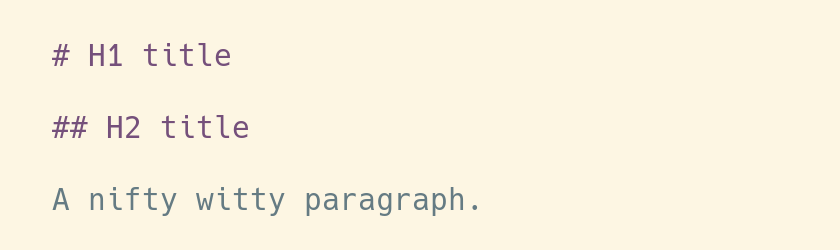
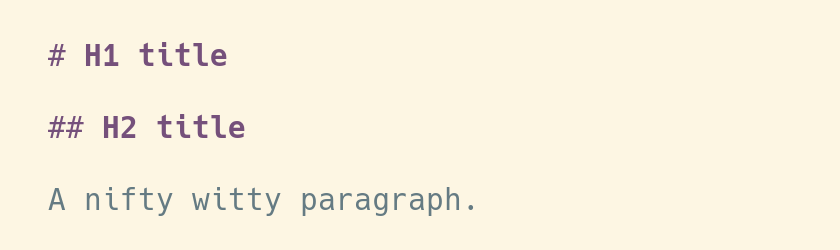
In this short how-to, we'll see how to make small modifications to a Vim syntax file, in order to change how a particular file format is highlighted. We'll go for a simple use-case: modify the Markdown syntax file, so that H1 and H2 headings (titles and subtitles, if you prefer) are displayed in bold. Of course, this won't be exactly as easy as expected, but no worries, we'll succeed in the end. The calling Let's start with a screenshot: how Vim displays Markdown files for me, someone who use the GNOME terminal with the Solarized light theme. Vim - Markdown file with original highlighting I'm mostly happy with that, except for one or two little details. I'd like to have the titles displayed in bold, for example, so that they're easier to spot when I skim through a Markdown file. It seems like a simple thing to ask, so I hope there can be a simple solution. The first steps Let's learn the basics. In Vim world, the rules to highlight files formats are defined in the directory /usr/share/vim/vim82/syntax (I bet you'll have to adjust this path depending on the version of Vim that is installed on your system). And so, for the Markdown file format, the rules are defined in the file /usr/share/vim/vim82/syntax/markdown.vim. The first thing we could do is to have a look at this file, try to make sense of it, and maybe start to make some modifications. But wait a moment. You should know that modifying a system file is not a great idea. First because your changes will be lost as soon as an update kicks in and the package manager replaces this file by a new version. Second, because you will quickly forget what files you modified, and what were your modifications, and if you do that too much, you might experience what is called "maintenance headache" in the long run. So instead, maybe you DO NOT modify this file, and instead you copy it in your personal Vim folder, more precisely in ~/.vim/syntax. Create this directory if it does not exist:
mkdir -p ~/.vim/syntax
cp /usr/share/vim/vim82/syntax/markdown.vim ~/.vim/syntax
The file in your personal folder takes precedence over the system file of the same name in /usr/share/vim/vim82/syntax/, it is a replacement for the existing syntax files. And so from now on, Vim uses the file ~/.vim/syntax/markdown.vim, and this is where we can make our modifications. (And by the way, this is explained in the Vim faq-24.12) And so, it's already nice to know all of that, but wait, there's even better. There's is another location of interest, and it is ~/.vim/after/syntax. You can drop syntax files in this directory, and these files are treated as additions to the existing syntax. So if you only want to make slight modifications, that's the way to go. (And by the way, this is explained in the Vim faq-24.11) So let's forget about a syntax replacement in ~/.vim/syntax/markdown.vim, and instead let's go for some syntax additions in ~/.vim/after/syntax/markdown.vim.
mkdir -p ~/.vim/after/syntax
touch ~/.vim/after/syntax/markdown.vim
Now, let's answer the initial question: how do we modify the highlighting rules for Markdown files, so that the titles are displayed in bold? First, we have to understand where are the rules that define the highlighting for titles. Here there are, from the file /usr/share/vim/vim82/syntax/markdown.vim:
hi def link markdownH1 htmlH1
hi def link markdownH2 htmlH2
hi def link markdownH3 htmlH3
...
You should know that H1 means Heading 1, and so on, and so we want to make H1 and H2 bold. What we can see here is that the headings in the Markdown files are highlighted like the headings in HTML files, and this is obviously defined in the file /usr/share/vim/vim82/syntax/html.vim. So let's have a look into this file:
hi def link htmlH1 Title
hi def link htmlH2 htmlH1
hi def link htmlH3 htmlH2
...
Let's keep digging a bit. Where is Title defined? For those using the default color scheme like me, this is defined straight in the Vim source code, in the file src/highlight.c.
CENT("Title term=bold ctermfg=DarkMagenta",
     "Title term=bold ctermfg=DarkMagenta gui=bold guifg=Magenta"),
And for those using custom color schemes, it might be defined in a file under /usr/share/vim/vim82/colors/. Alright, so how do we override that? We can just define this kind of rules in our syntax additions file at ~/.vim/after/syntax/markdown.vim:
hi link markdownH1 markdownHxBold
hi link markdownH2 markdownHxBold
hi markdownHxBold  term=bold ctermfg=DarkMagenta gui=bold guifg=Magenta cterm=bold
As you can see, the only addition we made, compared to what's defined in src/highlight.c, is cterm=bold. And that's already enough to achieve the initial goal, make the titles (ie. H1 and H2) bold. The result can be seen in the following screenshot: Vim - Markdown file with modified highlighting The rabbit hole So we could stop right here, and life would be easy and good. However, with this solution there's still something that is not perfect. We use the color DarkMagenta as defined in the default color scheme. What I didn't mention however, is that this is applicable for a light background. If you have a dark background though, dark magenta won't be easy to read. Actually, if you look a bit more into src/highlight.c, you will see that the default color scheme comes in two variants, one for a light background, and one for a dark background. And so the definition for Title for a dark background is as follow:
CENT("Title term=bold ctermfg=LightMagenta",
     "Title term=bold ctermfg=LightMagenta gui=bold guifg=Magenta"),
Hmmm, so how do we do that in our syntax file? How can we support both light and dark background, so that the color is right in both cases? After a bit of research, and after looking at other syntax files, it seems that the solution is to check for the value of the background option, and so our syntax file becomes:
hi link markdownH1 markdownHxBold
hi link markdownH2 markdownHxBold
if &background == "light"
  hi markdownHxBold term=bold ctermfg=DarkMagenta gui=bold guifg=Magenta cterm=bold
else
  hi markdownHxBold term=bold ctermfg=LightMagenta gui=bold guifg=Magenta cterm=bold
endif
In case you wonder, in Vim script you prefix Vim options with &, and so you get the value of the background option by writing &background. You can learn this kind of things in the Vim scripting cheatsheet. And so, it's easy enough, except for one thing: it doesn't work. The headings always show up in DarkMagenta, even for a dark background. This is why I called this paragraph "the rabbit hole", by the way. So... Well after trying a few things, I noticed that in order to make it work, I would have to reload the syntax files with :syntax on. At this point, the most likely explanation is that the background option is not set yet when the syntax files are loaded at startup, hence it needs to be reloaded manually afterward. And after muuuuuuch research, I found out that it's actually possible to set a hook for when an option is modified. Meaning, it's possible to execute a function when the background option is modified. Quite cool actually. And so, there it goes in my ~/.vimrc:
" Reload syntax when the background changes 
autocmd OptionSet background if exists("g:syntax_on")   syntax on   endif
For humans, this line reads as:
  1. when the background option is modified -- autocmd OptionSet background
  2. check if the syntax is on -- if exists("g:syntax_on")
  3. if that's the case, reload it -- syntax on
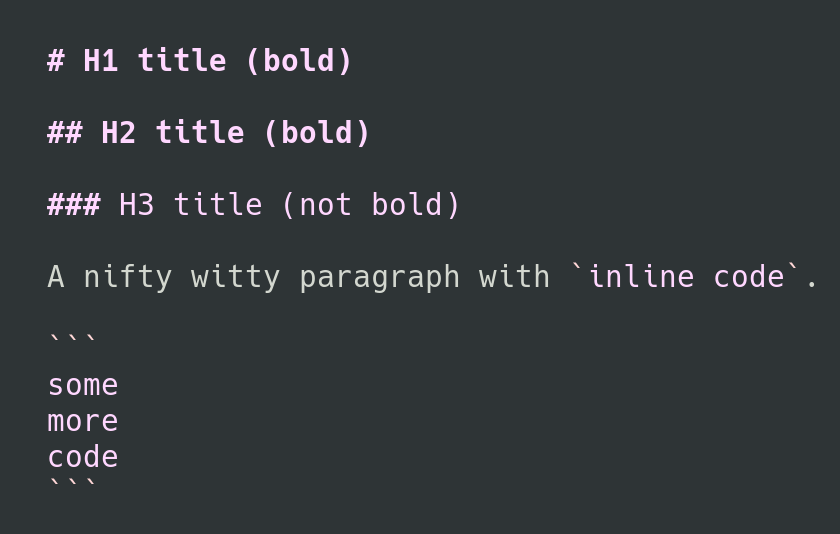
With that in place, my Markdown syntax overrides work for both dark and light background. Champagne! The happy end To finish, let me share my actual additions to the markdown.vim syntax. It makes H1 and H2 bold, along with their delimiters, and it also colors the inline code and the code blocks.
" H1 and H2 headings -> bold
hi link markdownH1 markdownHxBold
hi link markdownH2 markdownHxBold
" Heading delimiters (eg '#') and rules (eg '----', '====') -> bold
hi link markdownHeadingDelimiter markdownHxBold
hi link markdownRule markdownHxBold
" Code blocks and inline code -> highlighted
hi link markdownCode htmlH1
" The following test requires this addition to your vimrc:
" autocmd OptionSet background if exists("g:syntax_on")   syntax on   endif
if &background == "light"
  hi markdownHxBold term=bold ctermfg=DarkMagenta gui=bold guifg=Magenta cterm=bold
else
  hi markdownHxBold term=bold ctermfg=LightMagenta gui=bold guifg=Magenta cterm=bold
endif
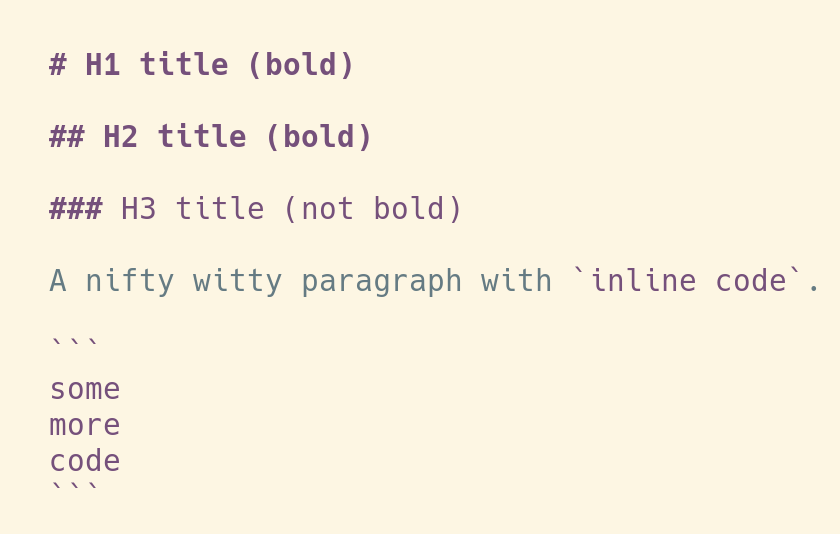
And here's how it looks like with a light background: Vim - Markdown file with final highlighting (light) And a dark background: Vim - Markdown file with final highlighting (dark) That's all, that's very little changes compared to the highlighting from the original syntax file, and now that we understand how it's supposed to be done, it's not much effort to achieve it. It's just that finding the workaround to make it work for both light and dark background took forever, and leaves the usual, unanswered question: bug or feature?

15 August 2020

Antonio Terceiro: Useful ffmpeg commands for editing video

For DebConf20, we are recommending that speakers pre-record the presentation part of their talks, and will have live Q&A. We had a smaller online MiniDebConf a couple of months ago, where for instance I had connectivity issues during my talk, so even though it feels too artificial, I guess pre-recording can decrease by a lot the likelihood of a given talk going bad. Paul Gevers and I submitted a short 20 min talk giving an update on autopkgtest, ci.debian.net and friends. We will provide the latest updates on autopkgtest, autodep8, debci, ci.debian.net, and its integration with the Debian testing migration software, britney. We agreed on a split of the content, each one recorded their part, and I offered to join them together. The logical chaining of the topics is such that we can't just concatenate the recordings, so we need to interlace our parts. So I set out to do a full video editing work. I have done this before, although in a simpler way, for one of the MiniDebconfs we held in Curitiba. In that case, it was just cutting the noise at the beginning and the end of the recording, and adding beginning and finish screens with sponsors logos etc. The first issue I noticed was that both our recordings had a decent amount of audio noise. To extract the audio track from the videos, I resorted to How can I extract audio from video with ffmpeg? on Stack Overflow:
ffmpeg -i input-video.avi -vn -acodec copy output-audio.aac
I then edited the audio with Audacity. I passed a noise reduction filter a couple of times, then a compressor filter to amplify my recording on mine, as Paul's already had a good volume. And those are my more advanced audio editing skills, which I acquired doing my own podcast. I now realized I could have just muted the audio tracks from the original clip and align the noise-free audio with it, but I ended up creating new video files with the clean audio. Another member of the Stack Overflow family came to the rescue, in How to merge audio and video file in ffmpeg. To replace the audio stream, we can do something like this:
ffmpeg -i video.mp4 -i audio.wav -c:v copy -c:a aac -map 0:v:0 -map 1:a:0 output.mp4
Paul's recording had a 4:3 aspect ratio, while the requested format is 16:9. This late in the game, there was zero chance I would request him to redo the recording. So I decided to add those black bars on the side to make it the right aspect when showing full screen. And yet again the quickest answer I could find came from the Stack Overflow empire: ffmpeg: pillarbox 4:3 to 16:9:
ffmpeg -i "input43.mkv" -vf "scale=640x480,setsar=1,pad=854:480:107:0" [etc..]
The final editing was done with pitivi, which is what I have used before. I'm a very basic user, but I could do what I needed. It was basically splitting the clips at the right places, inserting the slides as images and aligning them with the video, and making most our video appear small in the corner when presenting the slides. P.S.: all the command lines presented here are examples, basically copied from the linked Q&As, and have to be adapted to your actual input and output formats.

14 August 2020

Markus Koschany: My Free Software Activities in July 2020

Welcome to gambaru.de. Here is my monthly report (+ the first week in August) that covers what I have been doing for Debian. If you re interested in Java, Games and LTS topics, this might be interesting for you. Debian Games

Debian Java Misc Debian LTS This was my 53. month as a paid contributor and I have been paid to work 15 hours on Debian LTS, a project started by Rapha l Hertzog. In that time I did the following: ELTS Extended Long Term Support (ELTS) is a project led by Freexian to further extend the lifetime of Debian releases. It is not an official Debian project but all Debian users benefit from it without cost. The current ELTS release is Debian 8 Jessie . This was my 26. month and I have been paid to work 13,25 hours on ELTS. Thanks for reading and see you next time.

Jonathan Dowland: Generic Haskell

When I did the work described earlier in template haskell, I also explored generic programming in Haskell to solve a particular problem. StrIoT is a program generator: it outputs source code, which may depend upon other modules, which need to be imported via declarations at the top of the source code files. The data structure that StrIoT manipulates contains information about what modules are loaded to resolve the names that have been used in the input code, so we can walk that structure to automatically derive an import list. The generic programming tools I used for this are from Scrap Your Boilerplate (SYB), a module written to complement a paper of the same name. In this code snippet, everything and mkQ are from SYB:
extractNames :: Data a => a -> [Name]
extractNames = everything (++) (\a -> mkQ [] f a)
     where f = (:[])
The input must be any type which implements typeclass Data, as must all its members (and their members etc.): This holds for the Template Haskell Exp types. The output is a normal list of Names. The utility function has a more specific type Name -> [Name]. This is all that's needed to walk over the heterogeneous data structures and do something specific (f) when we encounter a Name. Post-processing the Names to get a list of modules is simple
 nub . catMaybes . map nameModule . concatMap extractNames
Unfortunately, there's a weird GHC behaviour relating to the module names for some Prelude functions that makes the above less useful in practice. For example, the Prelude function words :: String -> [String] can normally be used without an explicit import (since it's a Prelude function). However, once round-tripped through a Name, it becomes GHC.OldList.words. Attempting to import GHC.OldList fails in some contexts, because it's a hidden module or package. I've been meaning to investigate further and, if necessary, file a GHC bug about this. For this reason I've scrapped all the above and gone with a different plan. We go back to requiring the user to specify their required import list explicitly. We then walk over the Exp data type prior to code generation and decanonicalize all the Names. I also use generic programming/SYB to do this:
unQualifyNames :: Exp -> Exp
unQualifyNames = everywhere (\a -> mkT f a)
     where f :: Name -> Name
           f n = if n == '(.)
            then mkName "."
            else (mkName . last . splitOn "." . pprint) n
I've had to special-case composition (.) since that code-point is also used as the delimiter between package, module and function. Otherwise this looks very similar to the earlier function, except using everywhere and mkT (make transformation) instead of everything and mkQ (make query).

Keith Packard: picolibc-news

Picolibc Updates I thought work on picolibc would slow down at some point, but I keep finding more things that need work. I spent a few weeks working in libm and then discovered some important memory allocation bugs in the last week that needed attention too. Cleaning up the Picolibc Math Library Picolibc uses the same math library sources as newlib, which includes code from a range of sources: The original SunPro math code had been split into two levels at some point:
  1. IEEE-754 functions. These offer pure IEEE-754 semantics, including return values and exceptions. They do not set the POSIX errno value. These are all prefixed with __ieee754_ and can be called directly by applications if desired.
  2. POSIX functions. These can offer POSIX semantics, including setting errno and returning expected values when errno is set.
New Code Sponsored by ARM Szabolcs Nagy and Wilco Dijkstra's work in the last few years has been to improve the performance of some of the core math functions, which is much appreciated. They've adopted a more modern coding style (C99) and written faster code at the expense of a larger memory foot print. One interesting choice was to use double computations for the float implementations of various functions. This makes these functions shorter and more accurate than versions done using float throughout. However, for machines which don't have HW double, this pulls in soft double code which adds considerable size to the resulting binary and slows down the computations, especially if the platform does support HW float. The new code also takes advantage of HW fused-multiply-add instructions. Those offer more precision than a sequence of primitive instructions, and so the new code can be much shorter as a result. The method used to detect whether the target machine supported fma operations was slightly broken on 32-bit ARM platforms, where those with 'float' fma acceleration but without 'double' fma acceleration would use the shorter code sequence, but with an emulated fma operation that used the less-precise sequence of operations, leading to significant reductions in the quality of the resulting math functions. I fixed the double fma detection and then also added float fma detection along with implementations of float and double fma for ARM and RISC-V. Now both of those platforms get fma-enhanced math functions where available. Errno Adventures I'd submitted patches to newlib a while ago that aliased the regular math library names to the __ieee754_ functions when the library was configured to not set errno, which is pretty common for embedded environments where a shared errno is a pain anyways. Note the use of the word can in remark about the old POSIX wrapper functions. That's because all of these functions are run-time switchable between _IEEE_ and _POSIX_ mode using the _LIB_VERSION global symbol. When left in the usual _IEEE_ mode, none of this extra code was ever executed, so these wrapper functions never did anything beyond what the underlying __ieee754_ functions did. The new code by Nagy and Dijkstra changed how functions are structured to eliminate the underlying IEEE-754 api. These new functions use tail calls to various __math_ error reporting functions. Those can be configured at library build time to set errno or not, centralizing those decisions in a few functions. The result of this combination of source material is that in the default configuration, some library functions (those written by Nagy and Dijkstra) would set errno and others (the old SunPro code) would not. To disable all errno references, the library would need to be compiled with a set of options, -D_IEEE_LIBM to disable errno in the SunPro code and -DWANT_ERRNO=0 to disable errno in the new code. To enable errno everywhere, you'd set -D_POSIX_MODE to make the default value for _LIB_VERSION be _POSIX_ instead of _IEEE_. To clean all of this up, I removed the run-time _LIB_VERSION variable and made that compile-time. In combination with the earlier work to alias the __ieee754_ functions to the regular POSIX names when _IEEE_LIBM was defined this means that the old SunPro POSIX functions now only get used when _IEEE_LIBM is not defined, and in that case the _LIB_VERSION tests always force use of the errno setting code. In addition, I made the value of WANT_ERRNO depend on whether _IEEE_LIBM was defined, so now a single definition (-D_IEEE_LIBM) causes all of the errno handling from libm to be removed, independent of which code is in use. As part of this work, I added a range of errno tests for the math functions to find places where the wrong errno value was being used. Exceptions As an alternative to errno, C also provides for IEEE-754 exceptions through the fenv functions. These have some significant advantages, including having independent bits for each exception type and having them accumulate instead of sharing errno with a huge range of other C library functions. Plus, they're generally implemented in hardware, so you get exceptions for both library functions and primitive operations. Well, you should get exceptions everywhere, except that the GCC soft float libraries don't support them at all. So, errno can still be useful if you need to know what happened in your library functions when using soft floats. Newlib has recently seen a spate of fenv support being added for various architectures, so I decided that it would be a good idea to add some tests. I added tests for both primitive operations, and then tests for library functions to check both exceptions and errno values. Oddly, this uncovered a range of minor mistakes in various math functions. Lots of these were mistakes in the SunPro POSIX wrapper functions where they modified the return values from the __ieee754_ implementations. Simply removing those value modifications fixed many of those errors. Fixing Memory Allocator bugs Picolibc inherits malloc code from newlib which offers two separate implementations, one big and fast, the other small and slow(er). Selecting between them is done while building the library, and as Picolibc is expected to be used on smaller systems, the small and slow one is the default. Contributed by someone from ARM back in 2012/2013, nano-mallocr reminds me of the old V7 memory allocator. A linked list, sorted in address order, holds discontiguous chunks of available memory. Allocation is done by searching for a large enough chunk in the list. The first one large enough is selected, and if it is large enough, a chunk is split off and left on the free list while the remainder is handed to the application. When the list doesn't have any chunk large enough, sbrk is called to get more memory. Free operations involve walking the list and inserting the chunk in the right location, merging the freed memory with any immediately adjacent chunks to reduce fragmentation. The size of each chunk is stored just before the first byte of memory used by the application, where it remains while the memory is in use and while on the free list. The free list is formed by pointers stored in the active area of the chunk, so the only overhead for chunks in use is the size field. Something Something Padding To deal with the vagaries of alignment, the original nano-mallocr code would allow for there to be 'padding' between the size field and the active memory area. The amount of padding could vary, depending on the alignment required for a particular chunk (in the case of memalign, that padding can be quite large). If present, nano-mallocr would store the padding value in the location immediately before the active area and distinguish that from a regular size field by a negative sign. The whole padding thing seems mysterious to me -- why would it ever be needed when the allocator could simply create chunks that were aligned to the required value and a multiple of that value in size. The only use I could think of was for memalign; adding this padding field would allow for less over-allocation to find a suitable chunk. I didn't feel like this one (infrequent) use case was worth the extra complexity; it certainly caused me difficulty in reading the code. A Few Bugs In reviewing the code, I found a couple of easy-to-fix bugs. Time For Testing Once I had uncovered a few bugs in this code, I decided that it would be good to write a few tests to exercise the API. With the tests running on four architectures in nearly 60 variants, it seemed like I'd be able to uncover at least a few more failures: These new tests did find bugs. But not where I expected them. Which is why I'm so fond of testing. GCC Optimizations One of my tests was to call calloc and make sure it returned a chunk of memory that appeared to work or failed with a reasonable value. To my surprise, on aarch64, that test never finished. It worked elsewhere, but on that architecture it hung in the middle of calloc itself. Which looked like this:
void * nano_calloc(malloc_size_t n, malloc_size_t elem)
 
    ptrdiff_t bytes;
    void * mem;
    if (__builtin_mul_overflow (n, elem, &bytes))
     
    RERRNO = ENOMEM;
    return NULL;
     
    mem = nano_malloc(bytes);
    if (mem != NULL) memset(mem, 0, bytes);
    return mem;
 
Note the naming here -- nano_mallocr uses nano_ prefixes in the code, but then uses #defines to change their names to those expected in the ABI. (No, I don't understand why either). However, GCC sees the real names and has some idea of what these functions are supposed to do. In particular, the pattern:
foo = malloc(n);
if (foo) memset(foo, '\0', n);
is converted into a shorter and semantically equivalent:
foo = calloc(n, 1);
Alas, GCC doesn't take into account that this optimization is occurring inside of the implementation of calloc. Another sequence of code looked like this:
chunk->size = foo
nano_free((char *) chunk + CHUNK_OFFSET);
Well, GCC knows that the content of memory passed to free cannot affect the operation of the application, and so it converted this into:
nano_free((char *) chunk + CHUNK_OFFSET);
Remember that nano_mallocr stores the size of the chunk just before the active memory. In this case, nano_mallocr was splitting a large chunk into two pieces, setting the size of the left-over part and placing that on the free list. Failing to set that size value left whatever was there before for the size and usually resulted in the free list becoming quite corrupted. Both of these problems can be corrected by compiling the code with a couple of GCC command-line switches (-fno-builtin-malloc and -fno-builtin-free). Reworking Malloc Having spent this much time reading through the nano_mallocr code, I decided to just go through it and make it easier for me to read today, hoping that other people (which includes 'future me') will also find it a bit easier to follow. I picked a couple of things to focus on:
  1. All newly allocated memory should be cleared. This reduces information disclosure between whatever code freed the memory and whatever code is about to use the memory. Plus, it reduces the effect of un-initialized allocations as they now consistently get zeroed memory. Yes, this masks bugs. Yes, this goes slower. This change is dedicated to Kees Cook, but please blame me for it not him.
  2. Get rid of the 'Padding' notion. Every time I read this code it made my brain hurt. I doubt I'll get any smarter in the future.
  3. Realloc could use some love, improving its efficiency in common cases to reduce memory usage.
  4. Reworking linked list walking. nano_mallocr uses a singly-linked free list and open-codes all list walking. Normally, I'd switch to a library implementation to avoid introducing my own bugs, but in this fairly simple case, I think it's a reasonable compromise to open-code the list operations using some patterns I learned while working at MIT from Bob Scheifler.
  5. Discover necessary values, like padding and the limits of the memory space, from the environment rather than having them hard-coded.
Padding To get rid of 'Padding' in malloc, I needed to make sure that every chunk was aligned and sized correctly. Remember that there is a header on every allocated chunk which is stored before the active memory which contains the size of the chunk. On 32-bit machines, that size is 4 bytes. If the machine requires allocations to be aligned on 8-byte boundaries (as might be the case for 'double' values), we're now going to force the alignment of the header to 8-bytes, wasting four bytes between the size field and the active memory. Well, the existing nano_mallocr code also wastes those four bytes to store the 'padding' value. Using a consistent alignment for chunk starting addresses and chunk sizes has made the code a lot simpler and easier to reason about while not using extra memory for normal allocation. Except for memalign, which I'll cover in the next section. realloc The original nano_realloc function was as simple as possible:
mem = nano_malloc(new_size);
if (mem)  
    memcpy(mem, old, MIN(old_size, new_size));
    nano_free(old);
 
return mem;
However, this really performs badly when the application is growing a buffer while accumulating data. A couple of simple optimizations occurred to me:
  1. If there's a free chunk just after the original location, it could be merged to the existing block and avoid copying the data.
  2. If the original chunk is at the end of the heap, call sbrk() to increase the size of the chunk.
The second one seems like the more important case; in a small system, the buffer will probably land at the end of the heap at some point, at which point growing it to the size of available memory becomes quite efficient. When shrinking the buffer, instead of allocating new space and copying, if there's enough space being freed for a new chunk, create one and add it to the free list. List Walking Walking singly-linked lists seem like one of the first things we see when learning pointer manipulation in C:
for (element = head; element; element = element->next)
    do stuff ...
However, this becomes pretty complicated when 'do stuff' includes removing something from the list:
prev = NULL;
for (element = head; element; element = element->next)
    ...
    if (found)
        break;
    ...
    prev = element
if (prev != NULL)
    prev->next = element->next;
else
    head = element->next;
An extra variable, and a test to figure out how to re-link the list. Bob showed me a simpler way, which I'm sure many people are familiar with:
for (ptr = &head; (element = *ptr); ptr = &(element->next))
    ...
    if (found)
        break;
*ptr = element->next;
Insertion is similar, as you would expect:
for (ptr = &head; (element = *ptr); ptr = &(element->next))
    if (found)
        break;
new_element->next = element;
*ptr = new_element;
In terms of memory operations, it's the same -- each 'next' pointer is fetched exactly once and the list is re-linked by performing a single store. In terms of reading the code, once you've seen this pattern, getting rid of the extra variable and the conditionals around the list update makes it shorter and less prone to errors. In the nano_mallocr code, instead of using 'prev = NULL', it actually used 'prev = free_list', and the test for updating the head was 'prev == element', which really caught me unawares. System Parameters Any malloc implementation needs to know a couple of things about the system it's running on:
  1. Address space. The maximum range of possible addresses sets the limit on how large a block of memory might be allocated, and hence the size of the 'size' field. Fortunately, we've got the 'size_t' type for this, so we can just use that.
  2. Alignment requirements. These derive from the alignment requirements of the basic machine types, including pointers, integers and floating point numbers which are formed from a combination of machine requirements (some systems will fault if attempting to use memory with the wrong alignment) along with a compromise between memory usage and memory system performance.
I decided to let the system tell me the alignment necessary using a special type declaration and the 'offsetof' operation:
typedef struct  
    char c;
    union  
    void *p;
    double d;
    long long ll;
    size_t s;
      u;
  align_t;
#define MALLOC_ALIGN        (offsetof(align_t, u))
Because C requires struct fields to be stored in order of declaration, the 'u' field would have to be after the 'c' field, and would have to be assigned an offset equal to the largest alignment necessary for any of its members. Testing on a range of machines yields the following alignment requirements:
Architecture Alignment
x86_64 8
RISC-V 8
aarch64 8
arm 8
x86 4
So, I guess I could have just used a constant value of '8' and not worried about it, but using the compiler-provided value means that running picolibc on older architectures might save a bit of memory at no real cost in the code. Now, the header containing the 'size' field can be aligned to this value, and all allocated blocks can be allocated in units of this value. memalign memalign, valloc and pvalloc all allocate memory with restrictions on the alignment of the base address and length. You'd think these would be simple -- allocate a large chunk, align within that chunk and return the address. However, they also all require that the address can be successfully passed to free. Which means that the allocator needs to do some tricks to make it all work. Essentially, you allocate 'lots' of memory and then arrange that any bytes at the head and tail of the allocation can be returned to the free list. The tail part is easy; if it's large enough to form a free chunk (which must contain the size and a 'next' pointer for the free list), it can be split off. Otherwise, it just sits at the end of the allocation being wasted space. The head part is a bit tricky when it's not large enough to form a free chunk. That's where the 'padding' business came in handy; that can be as small as a 'size_t' value, which (on 32-bit systems) is only four bytes. Now that we're giving up trying to reason about 'padding', any extra block at the start must be big enough to hold a free block, which includes the size and a next pointer. On 32-bit systems, that's just 8 bytes which (for most of our targets) is the same as the alignment value we're using. On 32-bit systems that can use 4-byte alignment, and on 64-bit systems, it's possible that the alignment required by the application for memalign and the alignment of a chunk returned by malloc might be off by too small an amount to create a free chunk. So, we just allocate a lot of extra space; enough so that we can create a block of size 'toosmall + align' at the start and create a free chunk of memory out of that. This works, and at least returns all of the unused memory back for other allocations. Sending Patches Back to Newlib I've sent the floating point fixes upstream to newlib where they've already landed on master. I've sent most of the malloc fixes, but I'm not sure they really care about seeing nano_mallocr refactored. If they do, I'll spend the time necessary to get the changes ported back to the newlib internal APIs and merged upstream.

John Goerzen: In Which COVID-19 Misinformation Leads To A Bunch of Graphs Made With Rust

A funny and by funny, I mean sad thing has happened. Recently the Kansas Department of Health and Environment (KDHE) has been analyzing data from the patchwork implementation of mask requirements in Kansas. They came to a conclusion that shouldn t be surprising to anyone: masks help. They published a chart showing this. A right-wing propaganda publication got ahold of this, and claimed the numbers were doctored because there were two-different Y-axes. I set about to analyze the data myself from public sources, and produced graphs of various kinds using a single Y-axis and supporting the idea that the graphs were not, in fact, doctored. Here s one graph that s showing that:
In order to do that, I had imported COVID-19 data from various public sources. Many states in the US are large enough to have significant variation in COVID-19 conditions, and many of the source people look at don t show county-level data over time. I wanted to do that. Eventually, I wrote covid19db, which ingests data from a number of public sources and generates a SQLite database file. Using Github Actions, this file is automatically updated every morning and available for download. Or, you can download the code and generate a database yourself locally. Then, I wrote covid19ks, which generates various pretty graphs covering the data. These graphs, incidentally, turn out to highlight just how poorly the United States is doing compared to the rest of the industrialized world. I hope that these resources, and especially covid19db, might be useful to others that would like to analyze the data. The code isn t the prettiest since it was done in a hurry, but I think that functionally this is useful.

13 August 2020

Sven Hoexter: An Average IT Org

Supply chain attacks are a known issue, and also lately there was a discussion around the relevance of reproducible builds. Looking in comparison at an average IT org doing something with the internet, I believe the pressing problem is neither supply chain attacks nor a lack of reproducible builds. The real problem is the amount of prefabricated binaries supplied by someone else, created in an unknown build environment with unknown tools, the average IT org requires to do anything. The Mess the World Runs on By chance I had an opportunity to look at what some other people I know use, and here is the list I could compile by scratching just at the surface: Of course there are also all the script language repos - Python, Ruby, Node/Typescript - around as well. Looking at myself, who's working in a different IT org but with a similar focus, I have the following lingering around on my for work laptop and retrieved it as a binary from a 3rd party: Yes some of that is even non-free and might contain spyw^telemetry. Takeway I By guessing based on Pareto Principle probably 80% of the software mentioned above is also open source software. But, and here we leave Pareto behind, close to none is build by the average IT org from source. Why should the average IT org care about advanced issues like supply chain attacks on source code and mitigations, when it already gets into very hot water the day DockerHub closes down, HashiCorp moves from open core to full proprietary or Elastic decides to no longer offer free binary builds? The reality out there seems to be that infrastructure of "modern" IT orgs is managed similar to the Windows 95 installation of my childhood. You just grab running binaries from somewhere and run them. The main difference seems to be that you no longer have the inconvenience of downloading a .xls from geocities you've to rename to .rar and that it's legal. Takeway II In the end the binary supply is like a drug for the user, and somehow the Debian project is also just another dealer / middle man in this setup. There are probably a lot of open questions to think about in that context. Are we the better dealer because we care about signed sources we retrieve from upstream and because we engage in reproducible build projects? Are our own means of distributing binaries any better than a binary download from github via https with a manual checksum verification, or the Debian repo at download.docker.com? Is the approach of the BSD/Gentoo ports, where you have to compile at least some software from source, the better one? Do I really want to know how some of the software is actually build? Or some more candid ones like is gnutls a good choice for the https support in apt and how solid is the gnupg code base? Update: Regarding apt there seems to be some movement.

Norbert Preining: Switching from KDE/Plasma to Gnome3 for one week

This guy is doing a great work, providing patches to improve kwin, and then tried Gnome3 for a week, 7 days. His verdict:
overall, after one week of using this, I can say it s f**king HORRIBLE!!! well, it s not as bad as I thought but yeah, it was overall a pretty unpleasant experience
I definitely have seen improvements, but the desktop is still not in shape. I mean, it s still not as usable as KDE is .
Honestly, I can t agree more. I have tried Gnome3 for over a year, again and again, and it feels like a block of concrete put onto the feet of dissidents by Italian mafia bosses. It drowns and kills you. Here are the links: Start, Day 1, Day 2, Day 3, Day 4, Day 5, Day 6, Day 7. Thanks a lot for these blog posts, incredibly informative and convincing!

12 August 2020

Michael Stapelberg: Linux distributions: Can we do without hooks and triggers?

Hooks are an extension feature provided by all package managers that are used in larger Linux distributions. For example, Debian uses apt, which has various maintainer scripts. Fedora uses rpm, which has scriptlets. Different package managers use different names for the concept, but all of them offer package maintainers the ability to run arbitrary code during package installation and upgrades. Example hook use cases include adding daemon user accounts to your system (e.g. postgres), or generating/updating cache files. Triggers are a kind of hook which run when other packages are installed. For example, on Debian, the man(1) package comes with a trigger which regenerates the search database index whenever any package installs a manpage. When, for example, the nginx(8) package is installed, a trigger provided by the man(1) package runs. Over the past few decades, Open Source software has become more and more uniform: instead of each piece of software defining its own rules, a small number of build systems are now widely adopted. Hence, I think it makes sense to revisit whether offering extension via hooks and triggers is a net win or net loss.

Hooks preclude concurrent package installation Package managers commonly can make very little assumptions about what hooks do, what preconditions they require, and which conflicts might be caused by running multiple package s hooks concurrently. Hence, package managers cannot concurrently install packages. At least the hook/trigger part of the installation needs to happen in sequence. While it seems technically feasible to retrofit package manager hooks with concurrency primitives such as locks for mutual exclusion between different hook processes, the required overhaul of all hooks seems like such a daunting task that it might be better to just get rid of the hooks instead. Only deleting code frees you from the burden of maintenance, automated testing and debugging. In Debian, there are 8620 non-generated maintainer scripts, as reported by find shard*/src/*/debian -regex ".*\(pre\ post\)\(inst\ rm\)$" on a Debian Code Search instance.

Triggers slow down installing/updating other packages Personally, I never use the apropos(1) command, so I don t appreciate the man(1) package s trigger which updates the database used by apropos(1). The process takes a long time and, because hooks and triggers must be executed serially (see previous section), blocks my installation or update. When I tell people this, they are often surprised to learn about the existance of the apropos(1) command. I suggest adopting an opt-in model.

Unnecessary work if programs are not used between updates Hooks run when packages are installed. If a package s contents are not used between two updates, running the hook in the first update could have been skipped. Running the hook lazily when the package contents are used reduces unnecessary work. As a welcome side-effect, lazy hook evaluation automatically makes the hook work in operating system images, such as live USB thumb drives or SD card images for the Raspberry Pi. Such images must not ship the same crypto keys (e.g. OpenSSH host keys) to all machines, but instead generate a different key on each machine. Why do users keep packages installed they don t use? It s extra work to remember and clean up those packages after use. Plus, users might not realize or value that having fewer packages installed has benefits such as faster updates. I can also imagine that there are people for whom the cost of re-installing packages incentivizes them to just keep packages installed you never know when you might need the program again

Implemented in an interpreted language While working on hermetic packages (more on that in another blog post), where the contained programs are started with modified environment variables (e.g. PATH) via a wrapper bash script, I noticed that the overhead of those wrapper bash scripts quickly becomes significant. For example, when using the excellent magit interface for Git in Emacs, I encountered second-long delays when using hermetic packages compared to standard packages. Re-implementing wrappers in a compiled language provided a significant speed-up. Similarly, getting rid of an extension point which mandates using shell scripts allows us to build an efficient and fast implementation of a predefined set of primitives, where you can reason about their effects and interactions. magit needs to run git a few times for displaying the full status, so small overhead quickly adds up.

Incentivizing more upstream standardization Hooks are an escape hatch for distribution maintainers to express anything which their packaging system cannot express. Distributions should only rely on well-established interfaces such as autoconf s classic ./configure && make && make install (including commonly used flags) to build a distribution package. Integrating upstream software into a distribution should not require custom hooks. For example, instead of requiring a hook which updates a cache of schema files, the library used to interact with those files should transparently (re-)generate the cache or fall back to a slower code path. Distribution maintainers are hard to come by, so we should value their time. In particular, there is a 1:n relationship of packages to distribution package maintainers (software is typically available in multiple Linux distributions), so it makes sense to spend the work in the 1 and have the n benefit.

Can we do without them? If we want to get rid of hooks, we need another mechanism to achieve what we currently achieve with hooks. If the hook is not specific to the package, it can be moved to the package manager. The desired system state should either be derived from the package contents (e.g. required system users can be discovered from systemd service files) or declaratively specified in the package build instructions more on that in another blog post. This turns hooks (arbitrary code) into configuration, which allows the package manager to collapse and sequence the required state changes. E.g., when 5 packages are installed which each need a new system user, the package manager could update /etc/passwd just once. If the hook is specific to the package, it should be moved into the package contents. This typically means moving the functionality into the program start (or the systemd service file if we are talking about a daemon). If (while?) upstream is not convinced, you can either wrap the program or patch it. Note that this case is relatively rare: I have worked with hundreds of packages and the only package-specific functionality I came across was automatically generating host keys before starting OpenSSH s sshd(8) . There is one exception where moving the hook doesn t work: packages which modify state outside of the system, such as bootloaders or kernel images. Even that can be moved out of a package-specific hook, as Fedora demonstrates.

Conclusion Global state modifications performed as part of package installation today use hooks, an overly expressive extension mechanism. Instead, all modifications should be driven by configuration. This is feasible because there are only a few different kinds of desired state modifications. This makes it possible for package managers to optimize package installation.

Michael Stapelberg: Optional dependencies don t work

In the i3 projects, we have always tried hard to avoid optional dependencies. There are a number of reasons behind it, and as I have recently encountered some of the downsides of optional dependencies firsthand, I summarized my thoughts in this article.

What is a (compile-time) optional dependency? When building software from source, most programming languages and build systems support conditional compilation: different parts of the source code are compiled based on certain conditions. An optional dependency is conditional compilation hooked up directly to a knob (e.g. command line flag, configuration file, ), with the effect that the software can now be built without an otherwise required dependency. Let s walk through a few issues with optional dependencies.

Inconsistent experience in different environments Software is usually not built by end users, but by packagers, at least when we are talking about Open Source. Hence, end users don t see the knob for the optional dependency, they are just presented with the fait accompli: their version of the software behaves differently than other versions of the same software. Depending on the kind of software, this situation can be made obvious to the user: for example, if the optional dependency is needed to print documents, the program can produce an appropriate error message when the user tries to print a document. Sometimes, this isn t possible: when i3 introduced an optional dependency on cairo and pangocairo, the behavior itself (rendering window titles) worked in all configurations, but non-ASCII characters might break depending on whether i3 was compiled with cairo. For users, it is frustrating to only discover in conversation that a program has a feature that the user is interested in, but it s not available on their computer. For support, this situation can be hard to detect, and even harder to resolve to the user s satisfaction.

Packaging is more complicated Unfortunately, many build systems don t stop the build when optional dependencies are not present. Instead, you sometimes end up with a broken build, or, even worse: with a successful build that does not work correctly at runtime. This means that packagers need to closely examine the build output to know which dependencies to make available. In the best case, there is a summary of available and enabled options, clearly outlining what this build will contain. In the worst case, you need to infer the features from the checks that are done, or work your way through the --help output. The better alternative is to configure your build system such that it stops when any dependency was not found, and thereby have packagers acknowledge each optional dependency by explicitly disabling the option.

Untested code paths bit rot Code paths which are not used will inevitably bit rot. If you have optional dependencies, you need to test both the code path without the dependency and the code path with the dependency. It doesn t matter whether the tests are automated or manual, the test matrix must cover both paths. Interestingly enough, this principle seems to apply to all kinds of software projects (but it slows down as change slows down): one might think that important Open Source building blocks should have enough users to cover all sorts of configurations. However, consider this example: building cairo without libxrender results in all GTK application windows, menus, etc. being displayed as empty grey surfaces. Cairo does not fail to build without libxrender, but the code path clearly is broken without libxrender.

Can we do without them? I m not saying optional dependencies should never be used. In fact, for bootstrapping, disabling dependencies can save a lot of work and can sometimes allow breaking circular dependencies. For example, in an early bootstrapping stage, binutils can be compiled with --disable-nls to disable internationalization. However, optional dependencies are broken so often that I conclude they are overused. Read on and see for yourself whether you would rather commit to best practices or not introduce an optional dependency.

Best practices If you do decide to make dependencies optional, please:
  1. Set up automated testing for all code path combinations.
  2. Fail the build until packagers explicitly pass a --disable flag.
  3. Tell users their version is missing a dependency at runtime, e.g. in --version.

Next.

Previous.