This post is the second and final part of my Malaysia-Thailand trip. Feel free to check out the Malaysia part here if you haven t already. Kuala Lumpur to Bangkok is around 1500 km by road, and so I took a Malaysian Airlines flight to travel to Bangkok. The flight staff at the Kuala Lumpur only asked me for a return/onward flight and Thailand immigration asked a few questions but did not check any documents (obviously they checked and stamped my passport ;)). The currency of Thailand is the Thai baht, and 1 Thai baht = 2.5 Indian Rupees. The Thailand time is 1.5 hours ahead of Indian time (For example, if it is 12 noon in India, it will be 13:30 in Thailand).
I landed in Bangkok at around 3 PM local time. Fletcher was in Bangkok that time, leaving for Pattaya and we had booked the same hostel. So I took a bus to Pattaya from the airport. The next bus for which the tickets were available was at 7 PM, so I took tickets for that one. The bus ticket cost was 143 Thai Baht. I didn t buy SIM at the airport, thinking there must be better deals in the city. As a consequence, there was no way to contact Fletcher through internet. Although I had a few minutes call remaining out of my international roaming pack.
A welcome sign at Bangkok's Suvarnabhumi airport.
Bus from Suvarnabhumi Airport to Jomtien Beach in Pattaya.
Our accommodation was near Jomtien beach, so I got off at the last stop, as the bus terminates at the Jomtien beach. Then I decided to walk towards my accommodation. I was using OsmAnd for navigation. However, the place was not marked on OpenStreetMap, and it turned out I missed the street my hostel was on and walked around 1 km further as I was chasing a similarly named incorrect hostel on OpenStreetMap. Then I asked for help from two men sitting at a caf . One of them said he will help me find the street my hostel is on. So, I walked with him, and he told me he lives in Thailand for many years, but he is from Kuwait. He also gave me valuable information. Like, he told me about shared hail-and-ride songthaews which run along the Jomtien Second Road and charge 10 Baht for any distance on their route. This tip significantly reduced our expenses. Further, he suggested me 7-Eleven shops for buying a local SIM. Like Malaysia, Thailand has 24/7 7-Eleven convenience stores, a lot of them not even 100 m apart.
The Kuwaiti person dropped me at the address where my hostel was. I tried searching for a person in-charge of that hostel, and soon I realized there was no reception. After asking for help from locals for some time, I bumped into Fletcher, who also came to this address and was searching for the same. After finding a friend, I felt a sigh of relief. Adjacent to the property, there was a hairdresser shop. We went there and asked about this property. The woman called the owner, and she also told us the required passcodes to go inside. Our accommodation was in a room on the second floor, which required us to put a passcode for opening. We entered the passcode and entered the room. So, we stayed at this hostel which had no reception. Due to this, it took 2 hours to find our room and enter. It reminded me of a difficult experience I had in Albania, where me and Akshat were not able to find our apartment in one of the hottest days and the owner didn t know our language.
Traveling from the place where the bus dropped me to the hostel, I saw streets were filled with bars and massage parlors, which was expected. Prostitutes were everywhere. We went out at night towards the beach and also roamed around in 7-Elevens to buy a SIM card for myself. I got a SIM for 7 day unlimited internet for 399 baht. Turns out that the rates of SIM cards at the airport were not so different from inside the city.
Road near Jomtien beach in Pattaya
Photo of a songthaew in Pattaya. There are shared songthaews which run along Jomtien Second road and takes 10 bath to anywhere on the route.
Jomtien Beach in Pattaya.
In terms of speaking English, locals didn t know English at all in both Pattaya and Bangkok. I normally don t expect locals to know English in a non-English speaking country, but the fact that Bangkok is one of the most visited places by tourists made me expect locals to know some English. Talking to locals is an integral part of travel for me, which I couldn t do a lot in Thailand. This aspect is much more important for me than going to touristy places.
So, we were in Pattaya. Next morning, Fletcher and I went to Tiger park using shared songthaew. After that, we planned to visit Pattaya Floating market which is near the Tiger Park, but we felt the ticket prices were higher than it was worth. Fletcher had to leave for Bangkok on that day. I suggested him to go to Suvarnabhumi Airport from the Jomtien beach bus terminal (this was the route I took the last day in opposite direction) to avoid traffic congestion inside Bangkok, as he can follow up with metro once he reaches the airport. From the floating market, we were walking in sweltering heat to reach the Jomtien beach. I tried asking for a lift and eventually got successful as a scooty stopped, and surprisingly the person gave a ride to both of us. He was from Delhi, so maybe that s the reason he stopped for us. Then we took a songthaew to the bus terminal and after having lunch, Fletcher left for Bangkok.
A welcome sign at Pattaya Floating market.
This Korean Vegetasty noodles pack was yummy and was available at many 7-Eleven stores.
Next day I went to Bangkok, but Fletcher already left for Kuala Lumpur. Here I had booked a private room in a hotel (instead of a hostel) for four nights, mainly because of my luggage. This costed 5600 INR for four nights. It was 2 km from the metro station, which I used to walk both sides. In Bangkok, I visited Sukhumvit and Siam by metro. Going to some areas require crossing the Chao Phraya river. For this, I took Chao Phraya Express Boat for going to places like Khao San road and Wat Arun. I would recommend taking the boat ride as it had very good views. In Bangkok, I met a person from Pakistan staying in my hotel and so here also I got some company. But by the time I met him, my days were almost over. So, we went to a random restaurant selling Indian food where we ate some paneer dish with naan and that restaurant person was from Myanmar.
Wat Arun temple stamps your hand upon entry
Wat Arun temple
Khao San Road
A food stall at Khao San Road
Chao Phraya Express Boat
For eating, I mainly relied on fruits and convenience stores. Bananas were very tasty. This was the first time I saw banana flesh being yellow. Mangoes were delicious and pineapples were smaller and flavorful. I also ate Rose Apple, which I never had before. I had Chhole Kulche once in Sukhumvit. That was a little expensive as it costed 164 baht. I also used to buy premix coffee packets from 7-Eleven convenience stores and prepare them inside the stores.
Banana with yellow flesh
Fruits at a stall in Bangkok
Trimmed pineapples from Thailand.
Corn in Bangkok.
A board showing coffee menu at a 7-Eleven store along with rates in Pattaya.
In this section of 7-Eleven, you can buy a premix coffee and mix it with hot water provided at the store to prepare.
My booking from Bangkok to Delhi was in Air India flight, and they were serving alcohol in the flight. I chose red wine, and this was my first time having alcohol in a flight.
Red wine being served in Air India
Notes
In this whole trip spanning two weeks, I did not pay for drinking water (except for once in Pattaya which was 9 baht) and toilets. Bangkok and Kuala Lumpur have plenty of malls where you should find a free-of-cost toilet nearby. For drinking water, I relied mainly on my accommodation providing refillable water for my bottle.
Thailand seemed more expensive than Malaysia on average. Malaysia had discounted price due to the Chinese New year.
I liked Pattaya more than Bangkok. Maybe because Pattaya has beach and Bangkok doesn t. Pattaya seemed more lively, and I could meet and talk to a few people as opposed to Bangkok.
Chao Phraya River express boat costs 150 baht for one day where you can hop on and off to any boat.
A first revision of the still only one-week old (at CRAN) package ciw has been
released to CRAN! It provides
is a single (efficient) function incoming() (now along with
an alias ciw()) which summarises the state of the incoming
directories at CRAN. I happen
to like having these things at my (shell) fingertips, so it goes along
with (still draft) wrapper
ciw.r that will be part of the next littler release.
For example, when I do this right now as I type this, I see
(typically less than one second later)
See ciw.r --help or ciw.r --usage for more.
Alternatively, in your R session, you can call
ciw::incoming() (or now ciw::ciw()) for the
same result (and/or load the package first).
This release adds some packaging touches, brings the new alias
ciw() as well as a state variable with all (known) folder
names and some internal improvements for dealing with error conditions.
The NEWS entry follows.
Changes in version 0.0.2
(2024-03-20)
The package README and DESCRIPTION have been expanded
An alias ciw can now be used for
incoming
Network error handling is now more robist
A state variable known_folders lists all CRAN
folders below incoming
I started looking at aerc, a new Terminal mail client, in
around 2019. At that time it was promising, but ultimately not ready yet for me, so
I put it away and went back to neomutt which I have been
using (in one form or another) all century.
These days, I use neomutt as an IMAP client which is perhaps what it's worst
at: prior to that, and in common with most users (I think), I used it to read
local mail, either fetched via offlineimap or
directly on my mail server. I switched to using it as a (slow, blocking) IMAP
client because I got sick of maintaining offlineimap (or
mbsync), and I started to use neomutt to
read my work mail, which was too large (and rate limited) for local
syncing.
This year I noticed that aerc had a new maintainer who was presenting about
it at FOSDEM, so I thought I'd take another look. It's
come a long way: far enough to actually displace neomutt for my day-to-day
mail use. In particular, it's a much better IMAP client.
I still reach for neomutt for some tasks, but I'm now using aerc for most
things.
aerc is available in Debian, but I recommending building from upstream source
at the moment as the project is quite fast-moving.
I ve been working for the past few weeks on Corydalis, and was in no
hurry to make a release, but last evening I found the explanation for
a really, really, really annoying issue: unintended zooming on touch
interfaces in the image viewer. Or more precisely, I found this post
from 2015 (9 years ago!):
https://webkit.org/blog/5610/more-responsive-tapping-on-ios/ and I
finally understood things. And decided this was the best choice for
cutting a new release.
Of course, the release contains more things, see the changelog on the
release page:
https://github.com/iustin/corydalis/releases/tag/v2024.12.0. And of
course, it s up on http://demo.corydalis.io.
And after putting out the new release, I saw that release tagging is
in the pre-built binaries still broken, and found the reason at
https://github.com/actions/checkout/issues/290. Will fix for the
next release The stream of bugs never ends
I am eager to incorporate your AI generated code into my software.
Really!
I want to facilitate making the process as easy as possible. You're already
using an AI to do most of the hard lifting, so why make the last step hard? To
that end, I skip my usually extensive code review process for your AI generated
code submissions. Anything goes as long as it compiles!
Please do remember to include "(AI generated)" in the description of your
changes (at the top), so I know to skip my usual review process.
Also be sure to sign off to the standard
Developer Certificate of Origin
so I know you attest that you own the code that you generated.
When making a git commit, you can do that by using the
--signoffoption.
I do make some small modifications to AI generated submissions.
For example, maybe you used AI to write this code:
+ // Fast inverse square root
+ float fast_rsqrt( float number )
+
+  float x2 = number * 0.5F;
+  float y  = number;
+  long i  = * ( long * ) &y;
+  i  = 0x5f3659df - ( i >> 1 );
+  y  = * ( float * ) &i;
+  return (y * ( 1.5F - ( x2 * y * y ) ));
+
...
- foo = rsqrt(bar)
+ foo = fast_rsqrt(bar)
Before AI, only a genious like John Carmack could write anything close to
this, and now you've generated it with some simple prompts to an AI.
So of course I will accept your patch. But as part of my QA process,
I might modify it so the new code is not run all the time. Let's only run
it on leap days to start with. As we know, leap day is February 30th, so I'll
modify your patch like this:
Despite my minor modifications, you did the work (with AI!) and so
you deserve the credit, so I'll keep you listed as the author.
Congrats, you made the world better!
PS: Of course, the other reason I don't review AI generated code is that I
simply don't have time and have to prioritize reviewing code written by
falliable humans. Unfortunately, this does mean that if you submit AI
generated code that is not clearly marked as such, and use my limited
reviewing time, I won't have time to review other submissions from you
in the future. I will still accept all your botshit submissions though!
PPS: Ignore the haters who claim that botshit makes AIs that get trained
on it less effective. Studies like this one
just aren't believable. I asked Bing to summarize it and it said not to worry
about it!
My effort to improve transparency and confidence of public apt archives continues. I started to work on this in Apt Archive Transparency in which I mention the debdistget project in passing. Debdistget is responsible for mirroring index files for some public apt archives. I ve realized that having a publicly auditable and preserved mirror of the apt repositories is central to being able to do apt transparency work, so the debdistget project has become more central to my project than I thought. Currently I track Trisquel, PureOS, Gnuinos and their upstreams Ubuntu, Debian and Devuan.
Debdistget download Release/Package/Sources files and store them in a git repository published on GitLab. Due to size constraints, it uses two repositories: one for the Release/InRelease files (which are small) and one that also include the Package/Sources files (which are large). See for example the repository for Trisquel release files and the Trisquel package/sources files. Repositories for all distributions can be found in debdistutils archives GitLab sub-group.
The reason for splitting into two repositories was that the git repository for the combined files become large, and that some of my use-cases only needed the release files. Currently the repositories with packages (which contain a couple of months worth of data now) are 9GB for Ubuntu, 2.5GB for Trisquel/Debian/PureOS, 970MB for Devuan and 450MB for Gnuinos. The repository size is correlated to the size of the archive (for the initial import) plus the frequency and size of updates. Ubuntu s use of Apt Phased Updates (which triggers a higher churn of Packages file modifications) appears to be the primary reason for its larger size.
Working with large Git repositories is inefficient and the GitLab CI/CD jobs generate quite some network traffic downloading the git repository over and over again. The most heavy user is the debdistdiff project that download all distribution package repositories to do diff operations on the package lists between distributions. The daily job takes around 80 minutes to run, with the majority of time is spent on downloading the archives. Yes I know I could look into runner-side caching but I dislike complexity caused by caching.
Fortunately not all use-cases requires the package files. The debdistcanary project only needs the Release/InRelease files, in order to commit signatures to the Sigstore and Sigsum transparency logs. These jobs still run fairly quickly, but watching the repository size growth worries me. Currently these repositories are at Debian 440MB, PureOS 130MB, Ubuntu/Devuan 90MB, Trisquel 12MB, Gnuinos 2MB. Here I believe the main size correlation is update frequency, and Debian is large because I track the volatile unstable.
So I hit a scalability end with my first approach. A couple of months ago I solved this by discarding and resetting these archival repositories. The GitLab CI/CD jobs were fast again and all was well. However this meant discarding precious historic information. A couple of days ago I was reaching the limits of practicality again, and started to explore ways to fix this. I like having data stored in git (it allows easy integration with software integrity tools such as GnuPG and Sigstore, and the git log provides a kind of temporal ordering of data), so it felt like giving up on nice properties to use a traditional database with on-disk approach. So I started to learn about Git-LFS and understanding that it was able to handle multi-GB worth of data that looked promising.
Fairly quickly I scripted up a GitLab CI/CD job that incrementally update the Release/Package/Sources files in a git repository that uses Git-LFS to store all the files. The repository size is now at Ubuntu 650kb, Debian 300kb, Trisquel 50kb, Devuan 250kb, PureOS 172kb and Gnuinos 17kb. As can be expected, jobs are quick to clone the git archives: debdistdiff pipelines went from a run-time of 80 minutes down to 10 minutes which more reasonable correlate with the archive size and CPU run-time.
The LFS storage size for those repositories are at Ubuntu 15GB, Debian 8GB, Trisquel 1.7GB, Devuan 1.1GB, PureOS/Gnuinos 420MB. This is for a couple of days worth of data. It seems native Git is better at compressing/deduplicating data than Git-LFS is: the combined size for Ubuntu is already 15GB for a couple of days data compared to 8GB for a couple of months worth of data with pure Git. This may be a sub-optimal implementation of Git-LFS in GitLab but it does worry me that this new approach will be difficult to scale too. At some level the difference is understandable, Git-LFS probably store two different Packages files around 90MB each for Trisquel as two 90MB files, but native Git would store it as one compressed version of the 90MB file and one relatively small patch to turn the old files into the next file. So the Git-LFS approach surprisingly scale less well for overall storage-size. Still, the original repository is much smaller, and you usually don t have to pull all LFS files anyway. So it is net win.
Throughout this work, I kept thinking about how my approach relates to Debian s snapshot service. Ultimately what I would want is a combination of these two services. To have a good foundation to do transparency work I would want to have a collection of all Release/Packages/Sources files ever published, and ultimately also the source code and binaries. While it makes sense to start on the latest stable releases of distributions, this effort should scale backwards in time as well. For reproducing binaries from source code, I need to be able to securely find earlier versions of binary packages used for rebuilds. So I need to import all the Release/Packages/Sources packages from snapshot into my repositories. The latency to retrieve files from that server is slow so I haven t been able to find an efficient/parallelized way to download the files. If I m able to finish this, I would have confidence that my new Git-LFS based approach to store these files will scale over many years to come. This remains to be seen. Perhaps the repository has to be split up per release or per architecture or similar.
Another factor is storage costs. While the git repository size for a Git-LFS based repository with files from several years may be possible to sustain, the Git-LFS storage size surely won t be. It seems GitLab charges the same for files in repositories and in Git-LFS, and it is around $500 per 100GB per year. It may be possible to setup a separate Git-LFS backend not hosted at GitLab to serve the LFS files. Does anyone know of a suitable server implementation for this? I had a quick look at the Git-LFS implementation list and it seems the closest reasonable approach would be to setup the Gitea-clone Forgejo as a self-hosted server. Perhaps a cloud storage approach a la S3 is the way to go? The cost to host this on GitLab will be manageable for up to ~1TB ($5000/year) but scaling it to storing say 500TB of data would mean an yearly fee of $2.5M which seems like poor value for the money.
I realized that ultimately I would want a git repository locally with the entire content of all apt archives, including their binary and source packages, ever published. The storage requirements for a service like snapshot (~300TB of data?) is today not prohibitly expensive: 20TB disks are $500 a piece, so a storage enclosure with 36 disks would be around $18.000 for 720TB and using RAID1 means 360TB which is a good start. While I have heard about ~TB-sized Git-LFS repositories, would Git-LFS scale to 1PB? Perhaps the size of a git repository with multi-millions number of Git-LFS pointer files will become unmanageable? To get started on this approach, I decided to import a mirror of Debian s bookworm for amd64 into a Git-LFS repository. That is around 175GB so reasonable cheap to host even on GitLab ($1000/year for 200GB). Having this repository publicly available will make it possible to write software that uses this approach (e.g., porting debdistreproduce), to find out if this is useful and if it could scale. Distributing the apt repository via Git-LFS would also enable other interesting ideas to protecting the data. Consider configuring apt to use a local file:// URL to this git repository, and verifying the git checkout using some method similar to Guix s approach to trusting git content or Sigstore s gitsign.
A naive push of the 175GB archive in a single git commit ran into pack size limitations:
remote: fatal: pack exceeds maximum allowed size (4.88 GiB)
however breaking up the commit into smaller commits for parts of the archive made it possible to push the entire archive. Here are the commands to create this repository:
git init
git lfs install
git lfs track 'dists/**' 'pool/**'
git add .gitattributes
git commit -m"Add Git-LFS track attributes." .gitattributes
time debmirror --method=rsync --host ftp.se.debian.org --root :debian --arch=amd64 --source --dist=bookworm,bookworm-updates --section=main --verbose --diff=none --keyring /usr/share/keyrings/debian-archive-keyring.gpg --ignore .git .
git add dists project
git commit -m"Add." -a
git remote add origin git@gitlab.com:debdistutils/archives/debian/mirror.git
git push --set-upstream origin --all
for d in pool//; do
   echo $d;
   time git add $d;
   git commit -m"Add $d." -a
   git push
done
The resulting repository size is around 27MB with Git LFS object storage around 174GB. I think this approach would scale to handle all architectures for one release, but working with a single git repository for all releases for all architectures may lead to a too large git repository (>1GB). So maybe one repository per release? These repositories could also be split up on a subset of pool/ files, or there could be one repository per release per architecture or sources.
Finally, I have concerns about using SHA1 for identifying objects. It seems both Git and Debian s snapshot service is currently using SHA1. For Git there is SHA-256 transition and it seems GitLab is working on support for SHA256-based repositories. For serious long-term deployment of these concepts, it would be nice to go for SHA256 identifiers directly. Git-LFS already uses SHA256 but Git internally uses SHA1 as does the Debian snapshot service.
What do you think? Happy Hacking!
Debian is running a "vcswatch"
service that keeps track of the status of all packaging repositories that have a
Vcs-Git
(and other VCSes) header set and shows which repos might need a package upload to push pending changes out.
Naturally, this is a lot of data and the scratch partition on qa.debian.org
had to be expanded several times, up to 300 GB in the last iteration.
Attempts to reduce that size using shallow clones (git clone --depth=50)
did not result more than a few percent of space saved. Running git gc on
all repos helps a bit, but is tedious and as Debian is growing, the repos are
still growing both in size and number. I ended up blocking all repos with
checkouts larger than a gigabyte, and still the only cure was expanding the
disk, or to lower the blocking threshold.
Since we only need a tiny bit of info from the repositories, namely the content
of debian/changelog and a few other files from debian/, plus
the number of commits since the last tag on the packaging branch, it made sense
to try to get the info without fetching a full repo clone. The question if we
could grab that solely using the GitLab API at salsa.debian.org was never
really answered. But then, in #1032623,
G bor N meth suggested the use of
git clone --filter blob:none.
As things go, this sat unattended in the bug report for almost a year until the
next "disk full" event made me give it a try.
The blob:none filter makes git clone omit all files, fetching only commit and
tree information. Any blob (file content) needed at git run time is
transparently fetched from the upstream repository, and stored locally. It
turned out to be a game-changer. The (largish) repositories I tried it on
shrank to 1/100 of the original size.
Poking around I figured we could even do better by using tree:0 as
filter. This additionally omits all trees from the git clone, again only
fetching the information at run time when needed. Some of the larger repos I
tried it on shrank to 1/1000 of their original size.
I deployed the new option on qa.debian.org and scheduled all repositories to
fetch a new clone on the next scan:
The initial dip from 100% to 95% is my first "what happens if we block repos
> 500 MB" attempt. Over the week after that, the git filter clones reduce the
overall disk consumption from almost 300 GB to 15 GB, a 1/20. Some
repos shrank from GBs to below a MB.
Perhaps I should make all my git clones use one of the filters.
Last week we held our promised miniDebConf in Santa Fe City, Santa Fe province,
Argentina just across the river from Paran , where I have spent almost six
beautiful months I will never forget.
Around 500 Kilometers North from Buenos Aires, Santa Fe and Paran are separated
by the beautiful and majestic Paran river, which flows from Brazil, marks the
Eastern border of Paraguay, and continues within Argentina as the heart of the
litoral region of the country, until it merges with the Uruguay river (you
guessed right the river marking the Eastern border of Argentina, first with
Brazil and then with Uruguay), and they become the R o de la Plata.
This was a short miniDebConf: we were lent the APUL union s building for the
weekend (thank you very much!); during Saturday, we had a cycle of talks, and on
sunday we had more of a hacklab logic, having some unstructured time to work
each on their own projects, and to talk and have a good time together.
We were five Debian people attending:
santiago debacle eamanu dererk gwolf @debian.org. My main contact to
kickstart organization was Mart n Bayo. Mart n was for many years the leader of
the Technical Degree on Free Software at Universidad Nacional del
Litoral,
where I was also a teacher for several years. Together with Leo Mart nez, also a
teacher at the tecnicatura, they contacted us with Guillermo and Gabriela,
from the APUL non-teaching-staff union of said university.
We had the following set of talks (for which there is a promise to get
electronic record, as APUL was kind enough to record them! of course, I will
push them to our usual conference video archiving service as soon as I get them)
Hour
Title (Spanish)
Title (English)
Presented by
10:00-10:25
Introducci n al Software Libre
Introduction to Free Software
Mart n Bayo
10:30-10:55
Debian y su comunidad
Debian and its community
Emanuel Arias
11:00-11:25
Por qu sigo contribuyendo a Debian despu s de 20 a os?
Why am I still contributing to Debian after 20 years?
Santiago Ruano
11:30-11:55
Mi identidad y el proyecto Debian: Qu es el llavero OpenPGP y por qu ?
My identity and the Debian project: What is the OpenPGP keyring and why?
Gunnar Wolf
12:00-13:00
Explorando las masculinidades en el contexto del Software Libre
Exploring masculinities in the context of Free Software
Gora Ortiz Fuentes - Jos Francisco Ferro
13:00-14:30
Lunch
14:30-14:55
Debian para el d a a d a
Debian for our every day
Leonardo Mart nez
15:00-15:25
Debian en las Raspberry Pi
Debian in the Raspberry Pi
Gunnar Wolf
15:30-15:55
Device Trees
Device Trees
Lisandro Dami n Nicanor Perez Meyer (videoconferencia)
16:00-16:25
Python en Debian
Python in Debian
Emmanuel Arias
16:30-16:55
Debian y XMPP en la medici n de viento para la energ a e lica
Debian and XMPP for wind measuring for eolic energy
Martin Borgert
As it always happens DebConf, miniDebConf and other Debian-related activities
are always fun, always productive, always a great opportunity to meet again our
decades-long friends. Lets see what comes next!
Closing arguments in the trial between various people and Craig Wright over whether he's Satoshi Nakamoto are wrapping up today, amongst a bewildering array of presented evidence. But one utterly astonishing aspect of this lawsuit is that expert witnesses for both sides agreed that much of the digital evidence provided by Craig Wright was unreliable in one way or another, generally including indications that it wasn't produced at the point in time it claimed to be. And it's fascinating reading through the subtle (and, in some cases, not so subtle) ways that that's revealed.
One of the pieces of evidence entered is screenshots of data from Mind Your Own Business, a business management product that's been around for some time. Craig Wright relied on screenshots of various entries from this product to support his claims around having controlled meaningful number of bitcoin before he was publicly linked to being Satoshi. If these were authentic then they'd be strong evidence linking him to the mining of coins before Bitcoin's public availability. Unfortunately the screenshots themselves weren't contemporary - the metadata shows them being created in 2020. This wouldn't fundamentally be a problem (it's entirely reasonable to create new screenshots of old material), as long as it's possible to establish that the material shown in the screenshots was created at that point. Sadly, well.
One part of the disclosed information was an email that contained a zip file that contained a raw database in the format used by MYOB. Importing that into the tool allowed an audit record to be extracted - this record showed that the relevant entries had been added to the database in 2020, shortly before the screenshots were created. This was, obviously, not strong evidence that Craig had held Bitcoin in 2009. This evidence was reported, and was responded to with a couple of additional databases that had an audit trail that was consistent with the dates in the records in question. Well, partially. The audit record included session data, showing an administrator logging into the data base in 2011 and then, uh, logging out in 2023, which is rather more consistent with someone changing their system clock to 2011 to create an entry, and switching it back to present day before logging out. In addition, the audit log included fields that didn't exist in versions of the product released before 2016, strongly suggesting that the entries dated 2009-2011 were created in software released after 2016. And even worse, the order of insertions into the database didn't line up with calendar time - an entry dated before another entry may appear in the database afterwards, indicating that it was created later. But even more obvious? The database schema used for these old entries corresponded to a version of the software released in 2023.
This is all consistent with the idea that these records were created after the fact and backdated to 2009-2011, and that after this evidence was made available further evidence was created and backdated to obfuscate that. In an unusual turn of events, during the trial Craig Wright introduced further evidence in the form of a chain of emails to his former lawyers that indicated he had provided them with login details to his MYOB instance in 2019 - before the metadata associated with the screenshots. The implication isn't entirely clear, but it suggests that either they had an opportunity to examine this data before the metadata suggests it was created, or that they faked the data? So, well, the obvious thing happened, and his former lawyers were asked whether they received these emails. The chain consisted of three emails, two of which they confirmed they'd received. And they received a third email in the chain, but it was different to the one entered in evidence. And, uh, weirdly, they'd received a copy of the email that was submitted - but they'd received it a few days earlier. In 2024.
And again, the forensic evidence is helpful here! It turns out that the email client used associates a timestamp with any attachments, which in this case included an image in the email footer - and the mysterious time travelling email had a timestamp in 2024, not 2019. This was created by the client, so was consistent with the email having been sent in 2024, not being sent in 2019 and somehow getting stuck somewhere before delivery. The date header indicates 2019, as do encoded timestamps in the MIME headers - consistent with the mail being sent by a computer with the clock set to 2019.
But there's a very weird difference between the copy of the email that was submitted in evidence and the copy that was located afterwards! The first included a header inserted by gmail that included a 2019 timestamp, while the latter had a 2024 timestamp. Is there a way to determine which of these could be the truth? It turns out there is! The format of that header changed in 2022, and the version in the email is the new version. The version with the 2019 timestamp is anachronistic - the format simply doesn't match the header that gmail would have introduced in 2019, suggesting that an email sent in 2022 or later was modified to include a timestamp of 2019.
This is by no means the only indication that Craig Wright's evidence may be misleading (there's the whole argument that the Bitcoin white paper was written in LaTeX when general consensus is that it's written in OpenOffice, given that's what the metadata claims), but it's a lovely example of a more general issue.
Our technology chains are complicated. So many moving parts end up influencing the content of the data we generate, and those parts develop over time. It's fantastically difficult to generate an artifact now that precisely corresponds to how it would look in the past, even if we go to the effort of installing an old OS on an old PC and setting the clock appropriately (are you sure you're going to be able to mimic an entirely period appropriate patch level?). Even the version of the font you use in a document may indicate it's anachronistic. I'm pretty good at computers and I no longer have any belief I could fake an old document.
(References: this Dropbox, under "Expert reports", "Patrick Madden". Initial MYOB data is in "Appendix PM7", further analysis is in "Appendix PM42", email analysis is "Sixth Expert Report of Mr Patrick Madden")
Happy to share that ciw is now on CRAN! I had tooted a little bit
about it, e.g., here.
What it provides is a single (efficient) function
incoming() which summarises the state of the incoming
directories at CRAN. I happen
to like having these things at my (shell) fingertips, so it goes along
with (still draft) wrapper
ciw.r that will be part of the next littler release.
For example, when I do this right now as I type this, I see
which is rather compact as CRAN kept busy! This call runs in
about (or just over) one second, which includes launching
r. Good enough for me. From a well-connected EC2 instance
it is about 800ms on the command-line. When I do I from here inside an R
session it is maybe 700ms. And doing it over in Europe is faster still.
(I am using ping=FALSE for these to omit the default sanity
check of can I haz networking? to speed things up. The check adds
another 200ms or so.)
The function (and the wrapper) offer a ton of options too this is
ridiculously easy to do thanks to the docopt
package:
edd@rob:~$ ciw.r -xUsage: ciw.r [-h] [-x] [-a] [-m] [-i] [-t] [-p] [-w] [-r] [-s] [-n] [-u] [-l rows] [-z] [ARG...]-m--mega use 'mega' mode of all folders (see--usage)-i--inspect visit 'inspect' folder-t--pretest visit 'pretest' folder-p--pending visit 'pending' folder-w--waiting visit 'waiting' folder-r--recheck visit 'waiting' folder-a--archive visit 'archive' folder-n--newbies visit 'newbies' folder-u--publish visit 'publish' folder-s--skipsort skip sorting of aggregate results by age-l--lines rows print top 'rows' of the result object [default: 50]-z--ping run the connectivity check first-h--help show this help text-x--usage show help and short example usage where ARG... can be one or more file name, or directories or package names.Examples:ciw.r-ip# run in 'inspect' and 'pending' modeciw.r-a# run with mode 'auto' resolved in incoming()ciw.r# run with defaults, same as '-itpwr'When no argument is given, 'auto' is selected which corresponds to 'inspect', 'waiting','pending','pretest', and 'recheck'. Selecting '-m' or '--mega' are select as default.Folder selecting arguments are cumulative;but'mega' is a single selections of all folders(i.e.'inspect', 'waiting', 'pending', 'pretest', 'recheck', 'archive', 'newbies', 'publish').ciw.r is part of littler which brings 'r' to the command-line.See https://dirk.eddelbuettel.com/code/littler.html for more information.edd@rob:~$
The README at the git
repo and the CRAN
page offer a screenshot movie showing some of the options in
action.
I have been using the little tools quite a bit over the last two or
three weeks since I first put it together and find it quite handy. With
that again a big Thank You! of appcreciation for all that CRAN does which this week included
letting this past the newbies desk in under 24 hours.
If you like this or other open-source work I do, you can sponsor me at
GitHub.
Utkarsh Gupta
did 11.25h (out of 26.75h assigned and 33.25h from previous period), thus carrying over 48.75 to the next month.
Evolution of the situation
In February, we have released 17 DLAs.
The number of DLAs published during February was a bit lower than usual, as there was much work going on in the area of triaging CVEs (a number of which turned out to not affect Debia buster, and others which ended up being duplicates, or otherwise determined to be invalid). Of the packages which did receive updates, notable were sudo (to fix a privilege management issue), and iwd and wpa (both of which suffered from authentication bypass vulnerabilities).
While this has already been already announced in the Freexian blog, we would like to mention here the start of the Long Term Support project for Samba 4.17. You can find all the important details in that post, but we would like to highlight that it is thanks to our LTS sponsors that we are able to fund the work from our partner, Catalyst, towards improving the security support of Samba in Debian 12 (Bookworm).
Thanks to our sponsors
Sponsors that joined recently are in bold.
Introduction
There have been many experiments with the sizes of computers, some of which have stayed around and some have gone away. The trend has been to make computers smaller, the early computers had buildings for them. Recently for come classes computers have started becoming as small as could be reasonably desired. For example phones are thin enough that they can blow away in a strong breeze, smart watches are much the same size as the old fashioned watches they replace, and NUC type computers are as small as they need to be given the size of monitors etc that they connect to.
This means that further development in the size and shape of computers will largely be determined by human factors.
I think we need to consider how computers might be developed to better suit humans and how to write free software to make such computers usable without being constrained by corporate interests.
Those of us who are involved in developing OSs and applications need to consider how to adjust to the changes and ideally anticipate changes. While we can t anticipate the details of future devices we can easily predict general trends such as being smaller, higher resolution, etc.
Desktop/Laptop PCs
When home computers first came out it was standard to have the keyboard in the main box, the Apple ][ being the most well known example. This has lost popularity due to the demand to have multiple options for a light keyboard that can be moved for convenience combined with multiple options for the box part. But it still pops up occasionally such as the Raspberry Pi 400 [1] which succeeds due to having the computer part being small and light. I think this type of computer will remain a niche product. It could be used in a add a screen to make a laptop as opposed to the add a keyboard to a tablet to make a laptop model but a tablet without a keyboard is more useful than a non-server PC without a display.
The PC as box with connections for keyboard, display, etc has a long future ahead of it. But the sizes will probably decrease (they should have stopped making PC cases to fit CD/DVD drives at least 10 years ago). The NUC size is a useful option and I think that DVD drives will stop being used for software soon which will allow a range of smaller form factors.
The regular laptop is something that will remain useful, but the tablet with detachable keyboard devices could take a lot of that market. Full functionality for all tasks requires a keyboard because at the moment text editing with a touch screen is an unsolved problem in computer science [2].
The Lenovo Thinkpad X1 Fold [3] and related Lenovo products are very interesting. Advances in materials allow laptops to be thinner and lighter which leaves the screen size as a major limitation to portability. There is a conflict between desiring a large screen to see lots of content and wanting a small size to carry and making a device foldable is an obvious solution that has recently become possible. Making a foldable laptop drives a desire for not having a permanently attached keyboard which then makes a touch screen keyboard a requirement. So this means that user interfaces for PCs have to be adapted to work well on touch screens. The Think line seems to be continuing the history of innovation that it had when owned by IBM. There are also a range of other laptops that have two regular screens so they are essentially the same as the Thinkpad X1 Fold but with two separate screens instead of one folding one, prices are as low as $600US.
I think that the typical interfaces for desktop PCs (EG MS-Windows and KDE) don t work well for small devices and touch devices and the Android interface generally isn t a good match for desktop systems. We need to invent more options for this. This is not a criticism of KDE, I use it every day and it works well. But it s designed for use cases that don t match new hardware that is on sale. As an aside it would be nice if Lenovo gave samples of their newest gear to people who make significant contributions to GUIs. Give a few Thinkpad Fold devices to KDE people, a few to GNOME people, and a few others to people involved in Wayland development and see how that promotes software development and future sales.
We also need to adopt features from laptops and phones into desktop PCs. When voice recognition software was first released in the 90s it was for desktop PCs, it didn t take off largely because it wasn t very accurate (none of them recognised my voice). Now voice recognition in phones is very accurate and it s very common for desktop PCs to have a webcam or headset with a microphone so it s time for this to be re-visited. GPS support in laptops is obviously useful and can work via Wifi location, via a USB GPS device, or via wwan mobile phone hardware (even if not used for wwan networking). Another possibility is using the same software interfaces as used for GPS on laptops for a static definition of location for a desktop PC or server.
The Interesting New Things
Watch Like
The wrist-watch [4] has been a standard format for easy access to data when on the go since it s military use at the end of the 19th century when the practical benefits beat the supposed femininity of the watch. So it seems most likely that they will continue to be in widespread use in computerised form for the forseeable future. For comparison smart phones have been in widespread use as pocket watches for about 10 years.
The question is how will watch computers end up? Will we have Dick Tracy style watch phones that you speak into? Will it be the current smart watch functionality of using the watch to answer a call which goes to a bluetooth headset? Will smart watches end up taking over the functionality of the calculator watch [5] which was popular in the 80 s? With today s technology you could easily have a fully capable PC strapped to your forearm, would that be useful?
Phone Like
Folding phones (originally popularised as Star Trek Tricorders) seem likely to have a long future ahead of them. Engineering technology has only recently developed to the stage of allowing them to work the way people would hope them to work (a folding screen with no gaps). Phones and tablets with multiple folds are coming out now [6]. This will allow phones to take much of the market share that tablets used to have while tablets and laptops merge at the high end. I ve previously written about Convergence between phones and desktop computers [7], the increased capabilities of phones adds to the case for Convergence.
Folding phones also provide new possibilities for the OS. The Oppo OnePlus Open and the Google Pixel Fold both have a UI based around using the two halves of the folding screen for separate data at some times. I think that the current user interfaces for desktop PCs don t properly take advantage of multiple monitors and the possibilities raised by folding phones only adds to the lack. My pet peeve with multiple monitor setups is when they don t make it obvious which monitor has keyboard focus so you send a CTRL-W or ALT-F4 to the wrong screen by mistake, it s a problem that also happens on a single screen but is worse with multiple screens. There are rumours of phones described as three fold (where three means the number of segments with two folds between them), it will be interesting to see how that goes.
Will phones go the same way as PCs in terms of having a separation between the compute bit and the input device? It s quite possible to have a compute device in the phone form factor inside a secure pocket which talks via Bluetooth to another device with a display and speakers. Then you could change your phone between a phone-size display and a tablet sized display easily and when using your phone a thief would not be able to easily steal the compute bit (which has passwords etc). Could the watch part of the phone (strapped to your wrist and difficult to steal) be the active part and have a tablet size device as an external display? There are already announcements of smart watches with up to 1GB of RAM (same as the Samsung Galaxy S3), that s enough for a lot of phone functionality.
The Rabbit R1 [8] and the Humane AI Pin [9] have some interesting possibilities for AI speech interfaces. Could that take over some of the current phone use? It seems that visually impaired people have been doing badly in the trend towards touch screen phones so an option of a voice interface phone would be a good option for them. As an aside I hope some people are working on AI stuff for FOSS devices.
Laptop Like
One interesting PC variant I just discovered is the Higole 2 Pro portable battery operated Windows PC with 5.5 touch screen [10]. It looks too thick to fit in the same pockets as current phones but is still very portable. The version with built in battery is $AU423 which is in the usual price range for low end laptops and tablets. I don t think this is the future of computing, but it is something that is usable today while we wait for foldable devices to take over.
The recent release of the Apple Vision Pro [11] has driven interest in 3D and head mounted computers. I think this could be a useful peripheral for a laptop or phone but it won t be part of a primary computing environment. In 2011 I wrote about the possibility of using augmented reality technology for providing a desktop computing environment [12]. I wonder how a Vision Pro would work for that on a train or passenger jet.
Another interesting thing that s on offer is a laptop with 7 touch screen beside the keyboard [13]. It seems that someone just looked at what parts are available cheaply in China (due to being parts of more popular devices) and what could fit together. I think a keyboard should be central to the monitor for serious typing, but there may be useful corner cases where typing isn t that common and a touch-screen display is of use. Developing a range of strange hardware and then seeing which ones get adopted is a good thing and an advantage of Ali Express and Temu.
Useful Hardware for Developing These Things
I recently bought a second hand Thinkpad X1 Yoga Gen3 for $359 which has stylus support [14], and it s generally a great little laptop in every other way. There s a common failure case of that model where touch support for fingers breaks but the stylus still works which allows it to be used for testing touch screen functionality while making it cheap.
The PineTime is a nice smart watch from Pine64 which is designed to be open [15]. I am quite happy with it but haven t done much with it yet (apart from wearing it every day and getting alerts etc from Android). At $50 when delivered to Australia it s significantly more expensive than most smart watches with similar features but still a lot cheaper than the high end ones. Also the Raspberry Pi Watch [16] is interesting too.
The PinePhonePro is an OK phone made to open standards but it s hardware isn t as good as Android phones released in the same year [17]. I ve got some useful stuff done on mine, but the battery life is a major issue and the screen resolution is low. The Librem 5 phone from Purism has a better hardware design for security with switches to disable functionality [18], but it s even slower than the PinePhonePro. These are good devices for test and development but not ones that many people would be excited to use every day.
Wwan hardware (for accessing the phone network) in M.2 form factor can be obtained for free if you have access to old/broken laptops. Such devices start at about $35 if you want to buy one. USB GPS devices also start at about $35 so probably not worth getting if you can get a wwan device that does GPS as well.
What We Must Do
Debian appears to have some voice input software in the pocketsphinx package but no documentation on how it s to be used. This would be a good thing to document, I spent 15 mins looking at it and couldn t get it going.
To take advantage of the hardware features in phones we need software support and we ideally don t want free software to lag too far behind proprietary software which IMHO means the typical Android setup for phones/tablets.
Support for changing screen resolution is already there as is support for touch screens. Support for adapting the GUI to changed screen size is something that needs to be done even today s hardware of connecting a small laptop to an external monitor doesn t have the ideal functionality for changing the UI. There also seem to be some limitations in touch screen support with multiple screens, I haven t investigated this properly yet, it definitely doesn t work in an expected manner in Ubuntu 22.04 and I haven t yet tested the combinations on Debian/Unstable.
ML is becoming a big thing and it has some interesting use cases for small devices where a smart device can compensate for limited input options. There s a lot of work that needs to be done in this area and we are limited by the fact that we can t just rip off the work of other people for use as training data in the way that corporations do.
Security is more important for devices that are at high risk of theft. The vast majority of free software installations are way behind Android in terms of security and we need to address that. I have some ideas for improvement but there is always a conflict between security and usability and while Android is usable for it s own special apps it s not usable in a I want to run applications that use any files from any other applicationsin any way I want sense. My post about Sandboxing Phone apps is relevant for people who are interested in this [19]. We also need to extend security models to cope with things like ok google type functionality which has the potential to be a bug and the emerging class of LLM based attacks.
I will write more posts about these thing.
Please write comments mentioning FOSS hardware and software projects that address these issues and also documentation for such things.
/usr-move, by Helmut Grohne
Much of the work was spent on handling interaction with time time64 transition
and sending patches for mitigating fallout. The set of packages relevant to
debootstrap is mostly converted and the patches for glibc and base-files
have been refined due to feedback from the upload to Ubuntu noble. Beyond this,
he sent patches for all remaining packages that cannot move their files with
dh-sequence-movetousr and packages using dpkg-divert in ways that dumat
would not recognize.
Upcoming improvements to Salsa CI, by Santiago Ruano Rinc n
Last month, Santiago Ruano Rinc n started the work on integrating sbuild into
the Salsa CI pipeline. Initially, Santiago used sbuild with the unshare
chroot mode. However, after discussion with josch, jochensp and helmut (thanks
to them!), it turns out that the unshare mode is not the most suitable for the
pipeline, since the level of isolation it provides is not needed, and some test
suites would fail (eg: krb5). Additionally, one of the requirements of the
build job is the use of ccache, since it is needed by some C/C++ large projects
to reduce the compilation time. In the preliminary work with unshare last
month, it was not possible to make ccache to work.
Finally, Santiago changed the chroot mode, and now has a couple of POC (cf:
1
and 2)
that rely on the schroot and sudo, respectively. And the good news is that
ccache is successfully used by sbuild with schroot!
The image here comes from an example of building grep. At the end of the
build, ccache -s shows the statistics of the cache that it used, and so a
little more than half of the calls of that job were cacheable. The most
important pieces are in place to finish the integration of sbuild into the
pipeline.
Other than that, Santiago also reviewed the very useful
merge request !346,
made by IOhannes zm lnig to autodetect the release from debian/changelog. As
agreed with IOhannes, Santiago is preparing a merge request to include the
release autodetection use case in the very own Salsa CI s CI.
Packaging simplemonitor, by Carles Pina i Estany
Carles started using simplemonitor in
2017, opened a
WNPP bug in 2022
and started packaging simplemonitor dependencies in October 2023. After
packaging five direct and indirect dependencies, Carles finally uploaded
simplemonitor to unstable in February.
During the packaging of simplemonitor, Carles reported
a few issues
to upstream. Some of these were to make the simplemonitor package build and run
tests reproducibly. A reproducibility issue was reprotest overriding the
timezone, which broke simplemonitor s tests. There have been discussions on
resolving this upstream in simplemonitor and
in reprotest,
too.
Carles also started upgrading or improving some of simplemonitor s dependencies.
Miscellaneous contributions
Stefano Rivera spent some time doing admin on debian.social infrastructure.
Including dealing with a spike of abuse on the Jitsi server.
Stefano started to prepare a new release of dh-python, including cleaning out
a lot of old Python 2.x related code. Thanks to Niels Thykier (outside
Freexian) for spear-heading this work.
DebConf 24 planning is beginning. Stefano discussed venues and finances with
the local team and remotely supported a site-visit by Nattie (outside
Freexian).
Also in the DebConf 24 context, Santiago took part in discussions and
preparations related to the Content Team.
A JIT bug was
reported against pypy3 in Debian Bookworm. Stefano bisected the upstream
history to find the patch (it was already resolved upstream) and released an
update to pypy3 in bookworm.
Enrico participated in /usr-merge discussions with Helmut.
Colin dug into a cluster of celery build failures and tracked the hardest bit
down to a Python 3.12 regression, now
fixed in unstable. celery should be back in testing once the 64-bit time_t
migration is out of the way.
Thorsten Alteholz uploaded a new upstream version of cpdb-libs. Unfortunately
upstream changed the naming of their release tags, so updating the watch file
was a bit demanding. Anyway this version 2.0 is a huge step towards
introduction of the new Common Print Dialog Backends.
Helmut send patches for 48 cross build failures.
Helmut changed debvm to use mkfs.ext4 instead of genext2fs.
Helmut sent a
debci MR
for improving collector robustness.
In preparation for DebConf 25, Santiago worked on the Brest Bid.
To achieve my aims regarding Convergence of mobile phone and PC [1] I need something a big bigger than the 4G of RAM that s in the PinePhone Pro [2]. The PinePhonePro was released at the end of 2021 but has a SoC that was first released in 2016. That SoC seems to compare well to the ones used in the Pixel and Pixel 2 phones that were released in the same time period so it s not a bad SoC, but it doesn t compare well to more recent Android devices and it also isn t a great fit for the non-Android things I want to do. Also the PinePhonePro and Librem5 have relatively short battery life so reusing Android functionality for power saving could provide a real benefit. So I want a phone designed for the mass market that I can use for running Debian.
PostmarketOS
One thing I m definitely not going to do is attempt a full port of Linux to a different platform or support of kernel etc. So I need to choose a device that already has support from a somewhat free Linux system. The PostmarketOS system is the first I considered, the PostmarketOS Wiki page of supported devices [3] was the first place I looked. The main supported devices are the PinePhone (not Pro) and the Librem5, both of which are under-powered. For the community devices there seems to be nothing that supports calls, SMS, mobile data, and USB-OTG and which also has 4G of RAM or more. If I skip USB-OTG (which presumably means I d have to get dock functionality via wifi not impossible but not great) then I m left with the SHIFT6mq which was never sold in Australia and the Xiomi POCO F1 which doesn t appear to be available on ebay.
LineageOS
The libhybris libraries are a compatibility layer between Android and glibc programs [4]. Which includes running Wayland with Android display drivers. So running a somewhat standard Linux desktop on top of an Android kernel should be possible. Here is a table of the LineageOS supported devices that seem to have a useful feature set and are available in Australia and which could be used for running Debian with firmware and drivers copied from Android. I only checked LineageOS as it seems to be the main free Android build.
I just bought a Note 9 with 128G of storage and 6G of RAM for $109 to try out Droidian, it has some screen burn but that s OK for a test system and if I end up using it seriously I ll just buy another that s in as-new condition. With no support for an external display I ll need to setup a software dock to do Convergence, but that s not a serious problem. If I end up making a Note 9 with Droidian my daily driver then I ll use the 512G/8G model for that and use the cheap one for testing.
Mobian
I should have checked the Mobian list first as it s the main Debian variant for phones.
From the Mobian Devices list [16] the OnePlus 6T has 8G of RAM or more but isn t available in Australia and costs more than $400 when imported. The PocoPhone F1 doesn t seem to be available on ebay. The Shift6mq is made by a German company with similar aims to the Fairphone [17], it looks nice but costs E577 which is more than I want to spend and isn t on the officially supported list.
Smart Watches
The same issues apply to smart watches. AstereoidOS is a free smart phone OS designed for closed hardware [18]. I don t have time to get involved in this sort of thing though, I can t hack on every device I use.
Release 0.6.35 of the digest package
arrived at CRAN today and has
also been uploaded to Debian
already.
digest
creates hash digests of arbitrary R objects. It can use a number
different hashing algorithms (md5, sha-1,
sha-256, sha-512, crc32,
xxhash32, xxhash64, murmur32,
spookyhash, blake3,crc32c and
now also xxh3_64 and xxh3_128), and enables
easy comparison of (potentially large and nested) R language objects as
it relies on the native serialization in R. It is a mature and
widely-used package (with 65.8 million downloads just on the partial
cloud mirrors of CRAN which keep logs) as many tasks may involve
caching of objects for which it provides convenient
general-purpose hash key generation to quickly identify the various
objects.
This release updates the included xxHash version to the
current verion 0.8.2 updating the existing xxhash32 and
xxhash64 hash functions and also adding the newer
xxh3_64 and xxh3_128 ones. We have a project
at work using xxh3_128 from Python which made me realize
having it from R would be nice too, and given the existing
infrastructure in the package actually doing so was fairly quick and
straightforward.
My CRANberries
provides a summary of changes to the previous
version. For questions or comments use the issue tracker
off the GitHub
repo. For documentation (including the changelog)
see the documentation
site.
If you like this or other open-source work I do, you can now sponsor me at
GitHub.
I like using one machine and setup for everything, from serious development work to hobby projects to managing my finances. This is very convenient, as often the lines between these are blurred. But it is also scary if I think of the large number of people who I have to trust to not want to extract all my personal data. Whenever I run a cabal install, or a fun VSCode extension gets updated, or anything like that, I am running code that could be malicious or buggy.
In a way it is surprising and reassuring that, as far as I can tell, this commonly does not happen. Most open source developers out there seem to be nice and well-meaning, after all.
Convenient or it won t happen
Nevertheless I thought I should do something about this. The safest option would probably to use dedicated virtual machines for the development work, with very little interaction with my main system. But knowing me, that did not seem likely to happen, as it sounded like a fair amount of hassle. So I aimed for a viable compromise between security and convenient, and one that does not get too much in the way of my current habits.
For instance, it seems desirable to have the project files accessible from my unconstrained environment. This way, I could perform certain actions that need access to secret keys or tokens, but are (unlikely) to run code (e.g. git push, git pull from private repositories, gh pr create) from the outside , and the actual build environment can do without access to these secrets.
The user experience I thus want is a quick way to enter a development environment where I can do most of the things I need to do while programming (network access, running command line and GUI programs), with access to the current project, but without access to my actual /home directory.
I initially followed the blog post Application Isolation using NixOS Containers by Marcin Sucharski and got something working that mostly did what I wanted, but then a colleague pointed out that tools like firejail can achieve roughly the same with a less global setup. I tried to use firejail, but found it to be a bit too inflexible for my particular whims, so I ended up writing a small wrapper around the lower level sandboxing tool https://github.com/containers/bubblewrap.
Selective bubblewrapping
This script, called dev and included below, builds a new filesystem namespace with minimal /proc and /dev directories, it s own /tmp directories. It then binds-mound some directories to make the host s NixOS system available inside the container (/bin, /usr, the nix store including domain socket, stuff for OpenGL applications). My user s home directory is taken from ~/.dev-home and some configuration files are bind-mounted for convenient sharing. I intentionally don t share most of the configuration for example, a direnv enable in the dev environment should not affect the main environment. The X11 socket for graphical applications and the corresponding .Xauthority file is made available. And finally, if I run dev in a project directory, this project directory is bind mounted writable, and the current working directory is preserved.
The effect is that I can type dev on the command line to enter dev mode rather conveniently. I can run development tools, including graphical ones like VSCode, and especially the latter with its extensions is part of the sandbox. To do a git push I either exit the development environment (Ctrl-D) or open a separate terminal. Overall, the inconvenience of switching back and forth seems worth the extra protection.
Clearly, isn t going to hold against a determined and maybe targeted attacker (e.g. access to the X11 and the nix daemon socket can probably be used to escape easily). But I hope it will help against a compromised dev dependency that just deletes or exfiltrates data, like keys or passwords, from the usual places in $HOME.
Rough corners
There is more polishing that could be done.
In particular, clicking on a link inside VSCode in the container will currently open Firefox inside the container, without access to my settings and cookies etc. Ideally, links would be opened in the Firefox running outside. This is a problem that has a solution in the world of applications that are sandboxed with Flatpak, and involves a bunch of moving parts (a xdg-desktop-portal user service, a filtering dbus proxy, exposing access to that proxy in the container). I experimented with that for a bit longer than I should have, but could not get it to work to satisfaction (even without a container involved, I could not get xdg-desktop-portal to heed my default browser settings ). For now I will live with manually copying and pasting URLs, we ll see how long this lasts.
With this setup (and unlike the NixOS container setup I tried first), the same applications are installed inside and outside. It might be useful to separate the set of installed programs: There is simply no point in running evolution or firefox inside the container, and if I do not even have VSCode or cabal available outside, so that it s less likely that I forget to enter dev before using these tools.
It shouldn t be too hard to cargo-cult some of the NixOS Containers infrastructure to be able to have a separate system configuration that I can manage as part of my normal system configuration and make available to bubblewrap here.
So likely I will refine this some more over time. Or get tired of typing dev and going back to what I did before
The script
The dev script (at the time of writing)
I had reported this to Ansible a year ago (2023-02-23), but it seems this is considered expected behavior, so I am posting it here now.
TL;DR
Don't ever consume any data you got from an inventory if there is a chance somebody untrusted touched it.
Inventory plugins
Inventory plugins allow Ansible to pull inventory data from a variety of sources.
The most common ones are probably the ones fetching instances from clouds like Amazon EC2
and Hetzner Cloud or the ones talking to tools like Foreman.
For Ansible to function, an inventory needs to tell Ansible how to connect to a host (so e.g. a network address) and which groups the host belongs to (if any).
But it can also set any arbitrary variable for that host, which is often used to provide additional information about it.
These can be tags in EC2, parameters in Foreman, and other arbitrary data someone thought would be good to attach to that object.
And this is where things are getting interesting.
Somebody could add a comment to a host and that comment would be visible to you when you use the inventory with that host.
And if that comment contains a Jinja expression, it might get executed.
And if that Jinja expression is using the pipe lookup, it might get executed in your shell.
Let that sink in for a moment, and then we'll look at an example.
Example inventory plugin
defines the plugin name as evgeni.inventoryrce.inventory
accepts any config that ends with evgeni.yml (we'll need that to trigger the use of this inventory later)
adds an imaginary host exploit.example.com with local connection type and something_funny variable to the inventory
In reality this would be talking to some API, iterating over hosts known to it, fetching their data, etc.
But the structure of the code would be very similar.
The crucial part is that if we have a string with a Jinja expression, we can set it as a variable for a host.
Using the example inventory plugin
Now we install the collection containing this inventory plugin,
or rather write the code to ~/.ansible/collections/ansible_collections/evgeni/inventoryrce/plugins/inventory/inventory.py
(or wherever your Ansible loads its collections from).
And we create a configuration file.
As there is nothing to configure, it can be empty and only needs to have the right filename: touch inventory.evgeni.yml is all you need.
If we now call ansible-inventory, we'll see our host and our variable present:
(ANSIBLE_INVENTORY_ENABLED=evgeni.inventoryrce.inventory is required to allow the use of our inventory plugin, as it's not in the default list.)
So far, nothing dangerous has happened.
The inventory got generated, the host is present, the funny variable is set, but it's still only a string.
Executing a playbook, interpreting Jinja
To execute the code we'd need to use the variable in a context where Jinja is used.
This could be a template where you actually use this variable, like a report where you print the comment the creator has added to a VM.
Or a debug task where you dump all variables of a host to analyze what's set.
Let's use that!
-hosts:alltasks:-name:Display all variables/facts known for a hostansible.builtin.debug:var:hostvars[inventory_hostname]
This playbook looks totally innocent: run against all hosts and dump their hostvars using debug.
No mention of our funny variable.
Yet, when we execute it, we see:
% ANSIBLE_INVENTORY_ENABLED=evgeni.inventoryrce.inventoryansible-playbook-iinventory.evgeni.ymltest.yml
PLAY [all] ************************************************************************************************TASK [Gathering Facts] ************************************************************************************ok: [exploit.example.com]TASK [Display all variables/facts known for a host] *******************************************************ok: [exploit.example.com] => "hostvars[inventory_hostname]": "ansible_all_ipv4_addresses": [ "192.168.122.1" ], "something_funny": ""PLAY RECAP *************************************************************************************************exploit.example.com : ok=2 changed=0 unreachable=0 failed=0 skipped=0 rescued=0 ignored=0
We got all variables dumped, that was expected, but now something_funny is an empty string?
Jinja got executed, and the expression was lookup("pipe", "touch /tmp/hacked" ) and touch does not return anything.
But it did create the file!
% ls-alh/tmp/hacked-rw-r--r--. 1 evgeni evgeni 0 Mar 10 17:18 /tmp/hacked
We just "hacked" the Ansible control node (aka: your laptop),
as that's where lookup is executed.
It could also have used the url lookup to send the contents of your Ansible vault to some internet host.
Or connect to some VPN-secured system that should not be reachable from EC2/Hetzner/ .
Why is this possible?
This happens because set_variable(entity, varname, value) doesn't mark the values as unsafe and Ansible processes everything with Jinja in it.
In this very specific example, a possible fix would be to explicitly wrap the string in AnsibleUnsafeText by using wrap_var:
fork,vinhostvars.items():try:self.inventory.set_variable(host_name,k,v)exceptValueErrorase:self.display.warning("Could not set host info hostvar for %s, skipping %s: %s"%(host,k,to_text(e)))
(foreman.py)
And honestly, I can totally understand that.
When developing an inventory, you do not expect to handle insecure input data.
You also expect the API to handle the data in a secure way by default.
But set_variable doesn't allow you to tag data as "safe" or "unsafe" easily and data in Ansible defaults to "safe".
Can something similar happen in other parts of Ansible?
It certainly happened in the past that Jinja was abused in Ansible: CVE-2016-9587, CVE-2017-7466, CVE-2017-7481
But even if we only look at inventories, add_host(host) can be abused in a similar way:
% ANSIBLE_INVENTORY_ENABLED=evgeni.inventoryrce.inventoryansible-playbook-iinventory.evgeni.ymltest.yml
PLAY [all] ************************************************************************************************TASK [Gathering Facts] ************************************************************************************fatal: [lol lookup("pipe", "touch /tmp/hacked-host" ) ]: UNREACHABLE! => "changed": false, "msg": "Failed to connect to the host via ssh: ssh: Could not resolve hostname lol: No address associated with hostname", "unreachable": true PLAY RECAP ************************************************************************************************lol lookup("pipe", "touch /tmp/hacked-host" ) : ok=0 changed=0 unreachable=1 failed=0 skipped=0 rescued=0 ignored=0% ls-alh/tmp/hacked-host
-rw-r--r--. 1 evgeni evgeni 0 Mar 13 08:44 /tmp/hacked-host
Affected versions
I've tried this on Ansible (core) 2.13.13 and 2.16.4.
I'd totally expect older versions to be affected too, but I have not verified that.
FTP master
This month I accepted 242 and rejected 42 packages. The overall number of packages that got accepted was 251.
This was just a short month and the weather outside was not really motivating. I hope it will be better in March.
Debian LTS
This was my hundred-sixteenth month that I did some work for the Debian LTS initiative, started by Raphael Hertzog at Freexian.
During my allocated time I uploaded:
[DLA 3739-1] libjwt security update for one CVE to fix some constant-time-for-execution-issue
[#1064551] Bookworm PU bug for libjwt; upload after approval
[DLA 3741-1] engrampa security update for one CVE to fix a path traversal issue with CPIO archives
[#1060186] Bookworm PU-bug for libde265 was flagged for acceptance
[#1056935] Bullseye PU-bug for libde265 was flagged for acceptance
I also started to work on qtbase-opensource-src (an update is needed for ELTS, so an LTS update seems to be appropriate as well, especially as there are postponed CVE).
Debian ELTS
This month was the sixty-seventth ELTS month. During my allocated time I uploaded:
[ELA-1047-1]bind9 security update for one CVE to fix an stack exhaustion issue in Jessie and Stretch
The upload of bind9 was a bit exciting, but all occuring issues with the new upload workflow could be quickly fixed by Helmut and the packages finally reached their destination. I wonder why it is always me who stumbles upon special cases? This month I also worked on the Jessie and Stretch updates for exim4. I also started to work on an update for qtbase-opensource-src in Stretch (and LTS and other releases as well).
Debian Printing
This month I uploaded new upstream versions of:
This work is generously funded by Freexian!
Debian Matomo
I started a new team debian-matomo-maintainers. Within this team all matomo related packages should be handled. PHP PEAR or PECL packages shall be still maintained in their corresponding teams.
This month I uploaded:
Recently, I got a new laptop and had to set it up so I could start using it. But
I wasn't really in the mood to go through the same old steps which I had
explained in this post earlier. I was complaining about
this to my colleague, and there came the suggestion of why not copy the entire
disk to the new laptop. Though it sounded like an interesting idea to me, I had
my doubts, so here is what I told him in return.
I don't have the tools to open my old laptop and connect the new disk over
USB to my new laptop.
I use full disk encryption, and my old laptop has a 512GB disk, whereas the
new laptop has a 1TB NVME, and I'm not so familiar with resizing LUKS.
He promptly suggested both could be done. For step 1, just expose the disk using
NVME over TCP and connect it over the network and do a full disk copy, and the
rest is pretty simple to achieve. In short, he suggested the following:
Export the disk using nvmet-tcp from the old laptop.
Do a disk copy to the new laptop.
Resize the partition to use the full 1TB.
Resize LUKS.
Finally, resize the BTRFS root disk.
Exporting Disk over NVME TCP
The easiest way suggested by my colleague to do this is using
systemd-storagetm.service.
This service can be invoked by simply booting into storage-target-mode.target
by specifying rd.systemd.unit=storage-target-mode.target. But he suggested not
to use this as I need to tweak the dracut initrd image to involve network
services as well as configuring WiFi from this mode is a painful thing to do.
So alternatively, I simply booted both my laptops with GRML rescue CD. And the
following step was done to export the NVME disk on my current laptop using the
nvmet-tcp module of Linux:
modprobenvmet-tcp
cd/sys/kernel/config/nvmet
mkdirports/0
cdports/0
echo"ipv4">addr_adrfam
echo0.0.0.0>addr_traaddr
echo4420>addr_trsvcid
echotcp>addr_trtype
cd/sys/kernel/config/nvmet/subsystems
mkdirtestnqn
echo1>testnqn/allow_any_host
mkdirtestnqn/namespaces/1
cdtestnqn
# replace the device name with the disk you want to exportecho"/dev/nvme0n1">namespaces/1/device_path
echo1>namespaces/1/enable
ln-s"../../subsystems/testnqn"/sys/kernel/config/nvmet/ports/0/subsystems/testnqn
These steps ensure that the device is now exported using NVME over TCP. The next
step is to detect this on the new laptop and connect the device:
Finally, nvme list shows the device which is connected to the new laptop,
and we can proceed with the next step, which is to do the disk copy.
Copying the Disk
I simply used the dd command to copy the root disk to my new laptop. Since
the new laptop didn't have an Ethernet port, I had to rely only on WiFi, and it
took about 7 and a half hours to copy the entire 512GB to the new laptop. The
speed at which I was copying was about 18-20MB/s. The other option would have
been to create an initial partition and file system and do an rsync of the root
disk or use BTRFS itself for file system transfer.
Resizing Partition and LUKS Container
The final part was very easy. When I launched parted, it detected that the
partition table does not match the disk size and asked if it can fix it, and I
said yes. Next, I had to install cloud-guest-utils to get growpart to
fix the second partition, and the following command extended the partition to
the full 1TB:
growpart/dev/nvem0n1p2
Next, I used cryptsetup-resize to increase the LUKS container size.
Finally, I rebooted into the disk, and everything worked fine. After logging
into the system, I resized the BTRFS file system. BTRFS requires the system to
be mounted for resize, so I could not attempt it in live boot.
btfsfielsystemresizemax/
Conclussion
The only benefit of this entire process is that I have a new laptop, but I still
feel like I'm using my existing laptop. Typically, setting up a new laptop takes
about a week or two to completely get adjusted, but in this case, that entire
time is saved.
An added benefit is that I learned how to export disks using NVME over TCP,
thanks to my colleague. This new knowledge adds to the value of the experience.
Posted on March 10, 2024
Tags: madeof:atoms, craft:cooking
A few notes on what we had for lunch, to be able to repeat it after the
summer.
There were a number of food intolerance related restrictions which meant
that the traditional lasagna recipe wasn t an option; the result still
tasted good, but it was a bit softer and messier to take out of the pan
and into the dishes.
On Saturday afternoon we made fresh no-egg pasta with 200 g (durum)
flour and 100 g water, after about 1 hour it was divided in 6 parts and
rolled to thickness #6 on the pasta machine.
Meanwhile, about 500 ml of low fat almost-rag -like meat sauce was taken
out of the freezer: this was a bit too little, 750 ml would have been
better.
On Saturday evening we made a sauce with 1 l of low-fat milk and 80 g of
flour, and the meat sauce was heated up.
Then everything was put in a 28 cm 23 cm pan, with 6 layers of pasta and
7 layers of the two sauces, and left to cool down.
And on Sunday morning it was baked for 35 min in the oven at 180 C.
With 3 people we only had about two thirds of it.
Next time I think we should try to use 400 - 500 g of flour (so that
it s easier to work by machine), 2 l of milk, 1.5 l of meat sauce and
divide it into 3 pans: one to eat the next day and two to freeze
(uncooked) for another day.
No pictures, because by the time I thought about writing a post we were
already more than halfway through eating it :)
 A welcome sign at Bangkok's Suvarnabhumi airport.
 Bus from Suvarnabhumi Airport to Jomtien Beach in Pattaya.
 Road near Jomtien beach in Pattaya
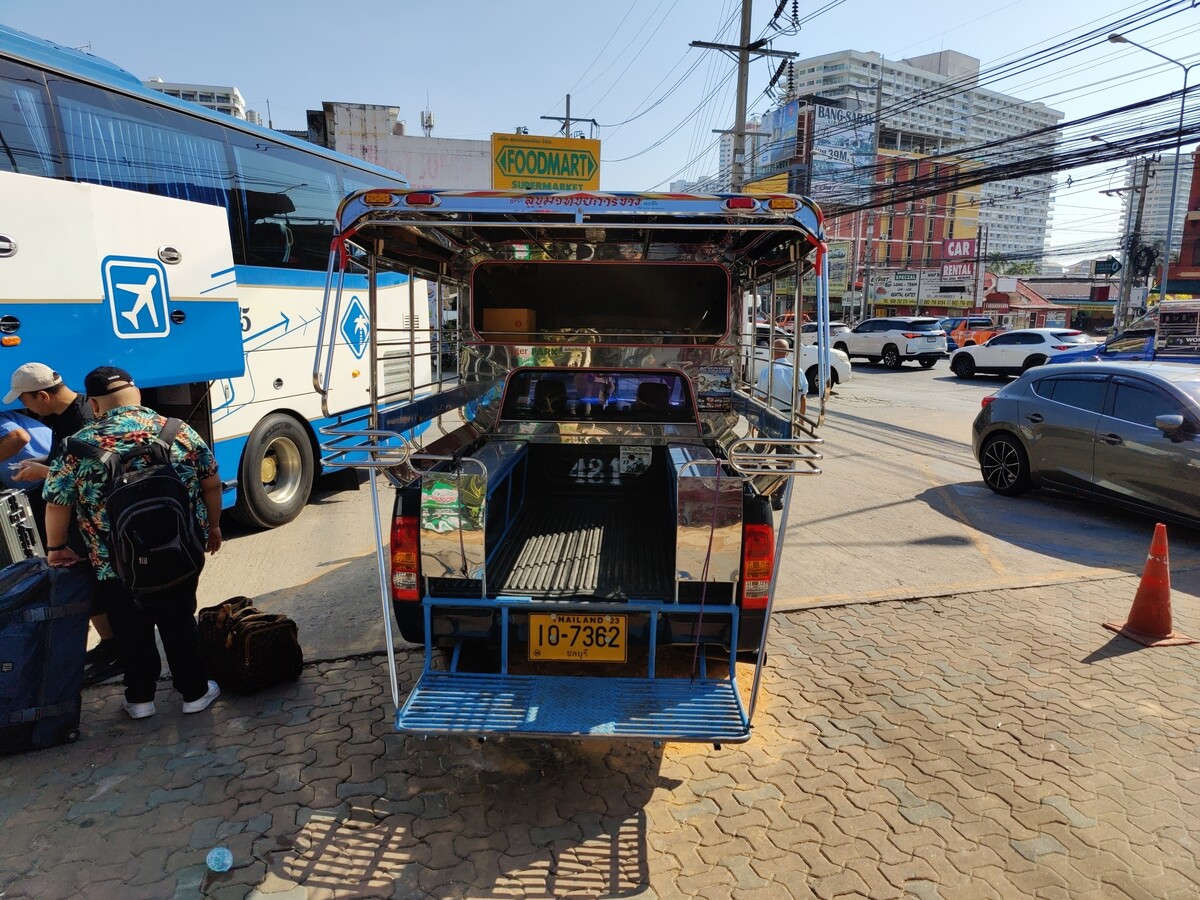 Photo of a songthaew in Pattaya. There are shared songthaews which run along Jomtien Second road and takes 10 bath to anywhere on the route.
 Jomtien Beach in Pattaya.
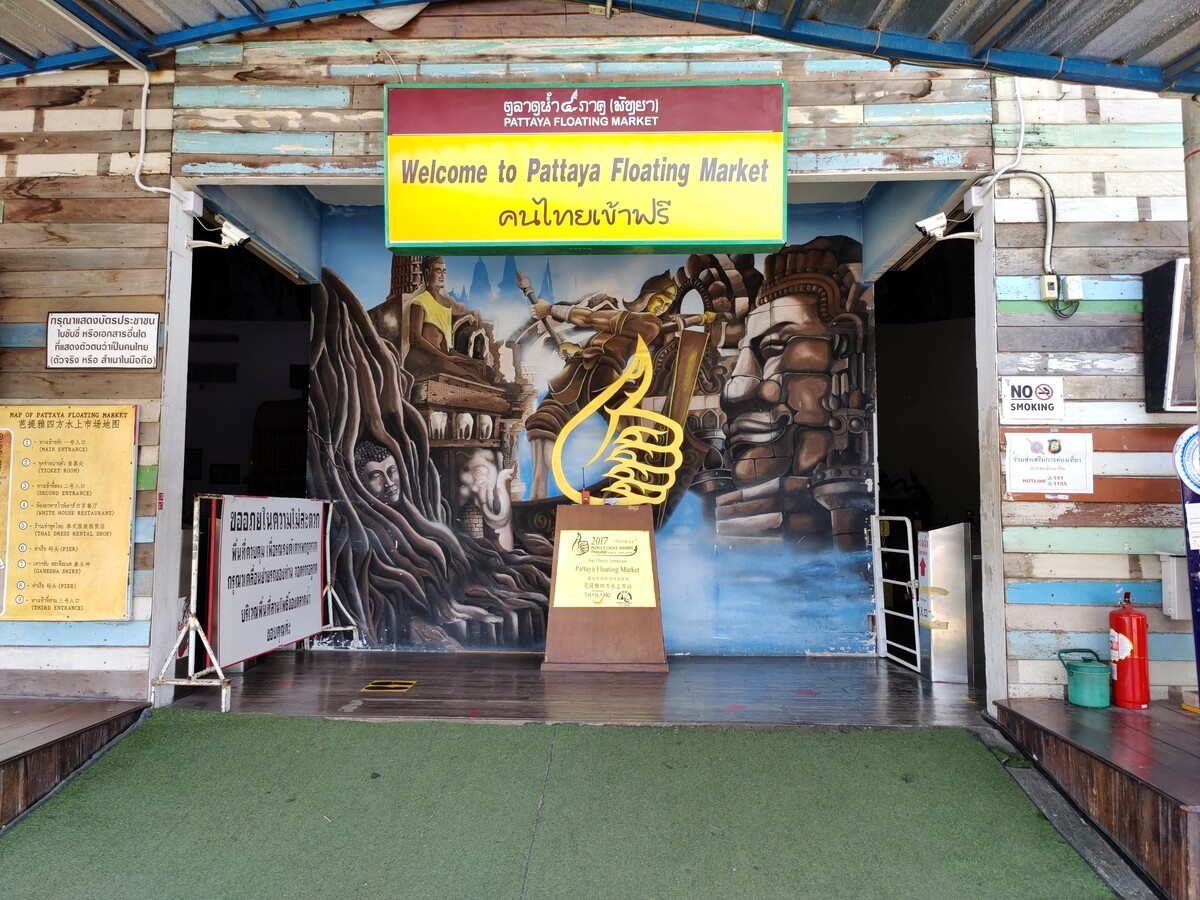 A welcome sign at Pattaya Floating market.
 This Korean Vegetasty noodles pack was yummy and was available at many 7-Eleven stores.
 Wat Arun temple stamps your hand upon entry
 Wat Arun temple
 Khao San Road
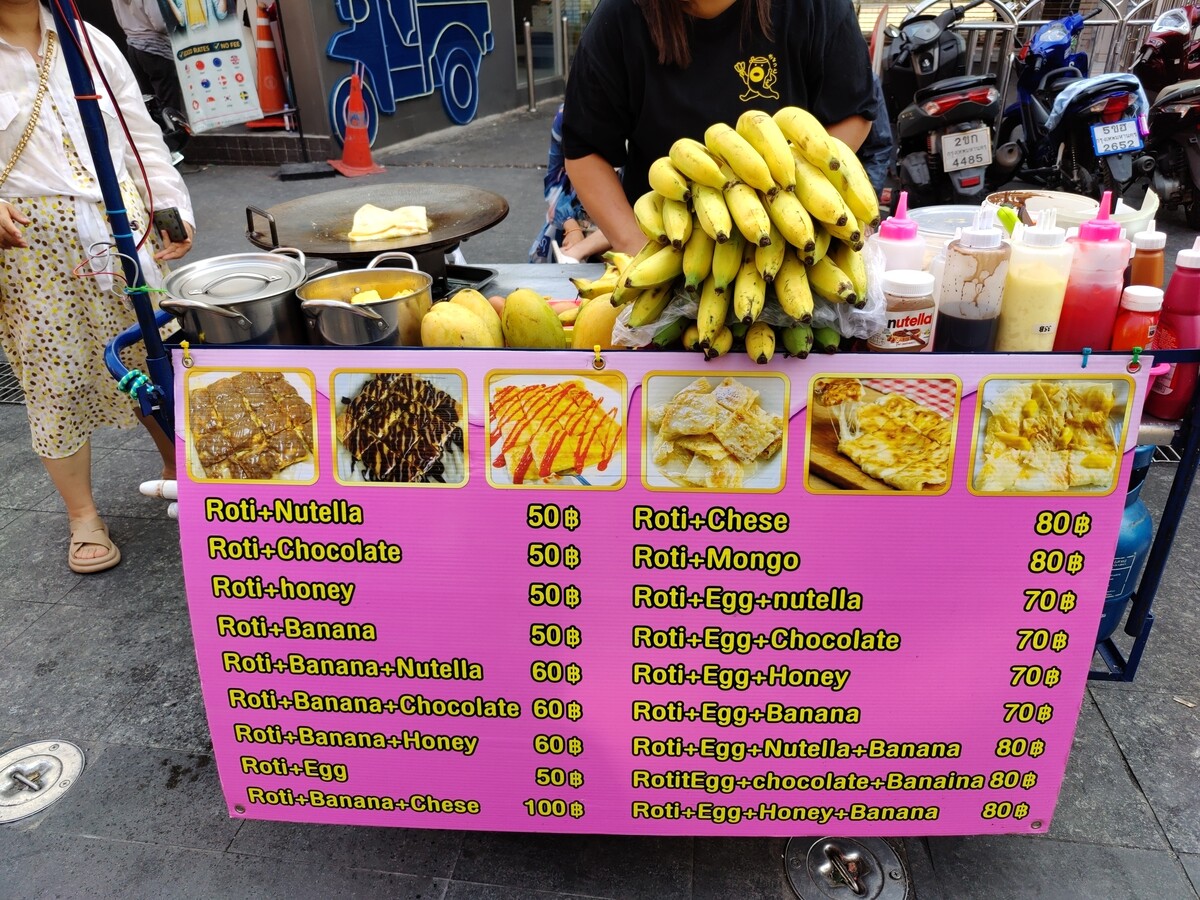 A food stall at Khao San Road
 Chao Phraya Express Boat
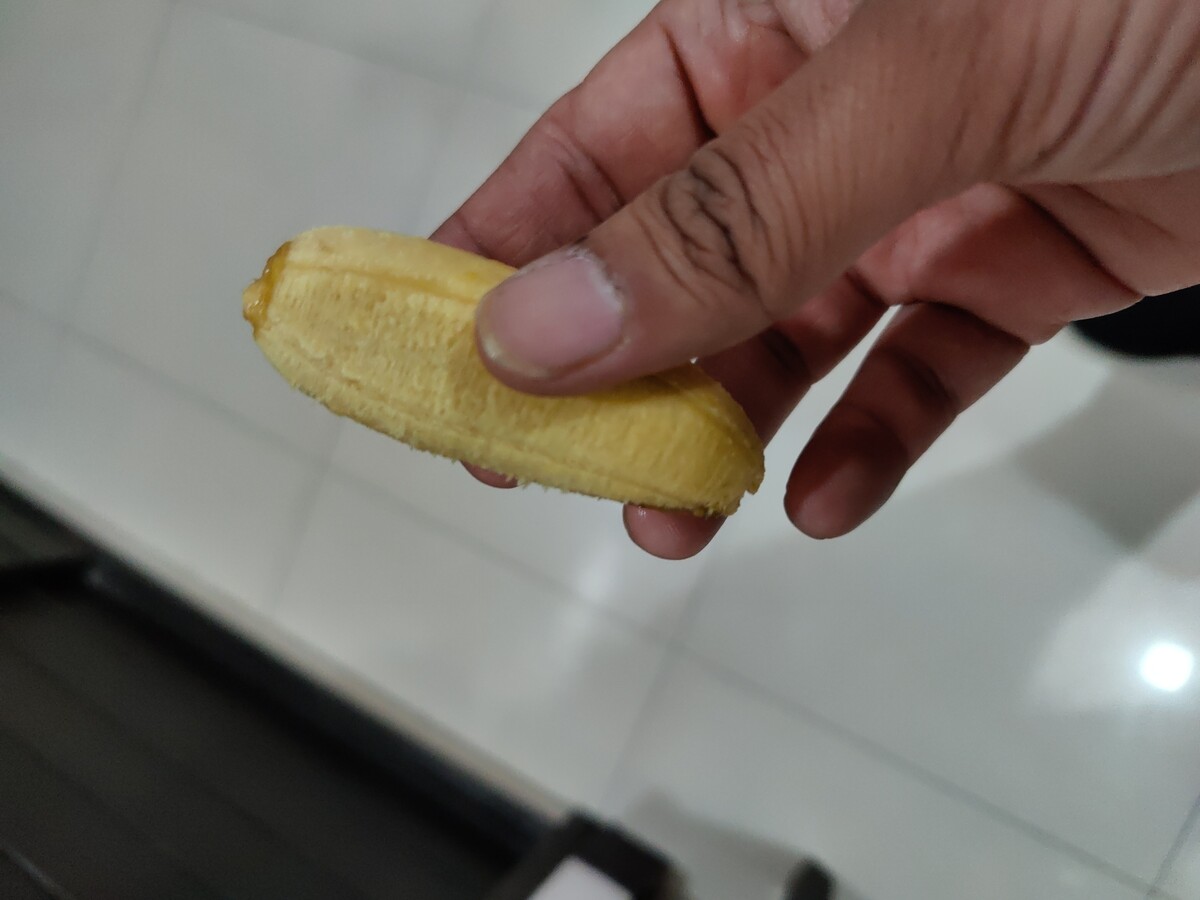 Banana with yellow flesh
 Fruits at a stall in Bangkok
 Trimmed pineapples from Thailand.
 Corn in Bangkok.
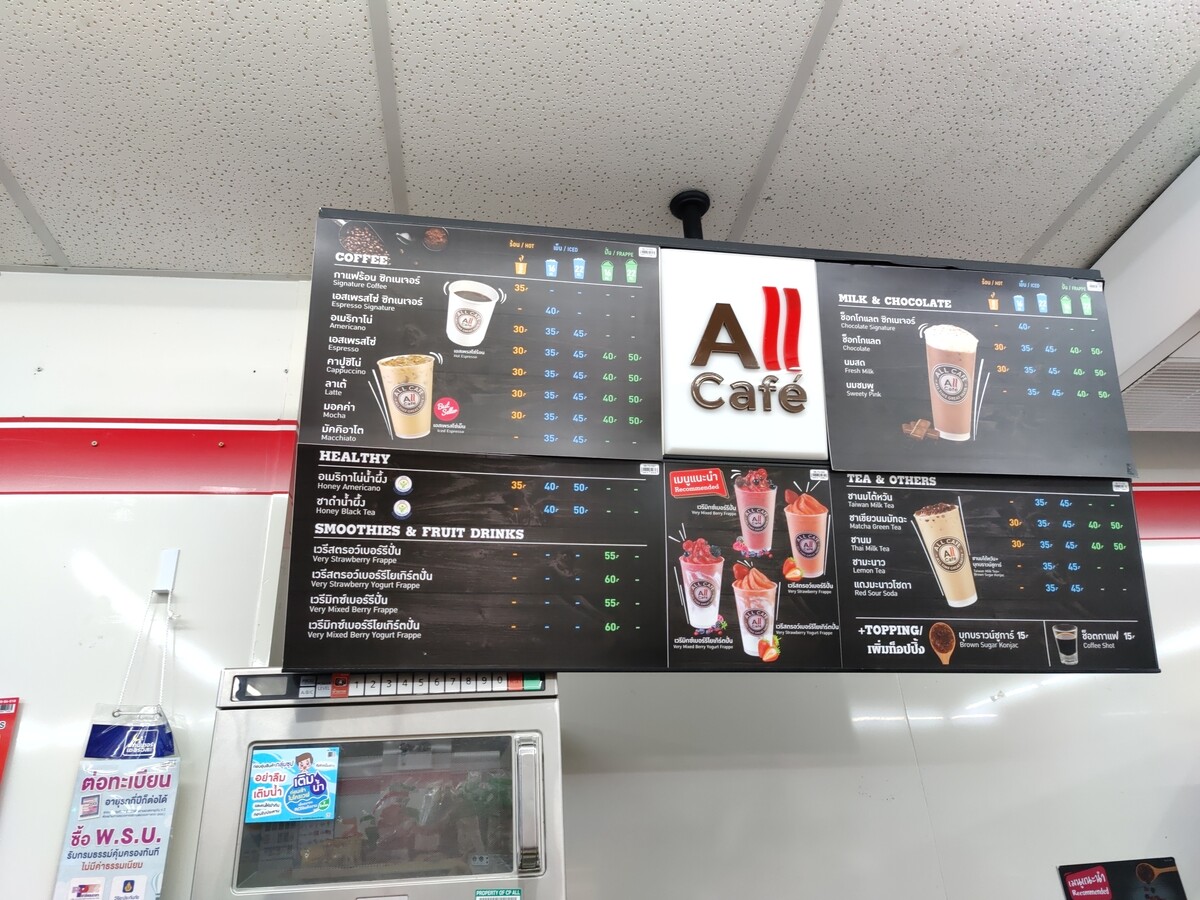 A board showing coffee menu at a 7-Eleven store along with rates in Pattaya.
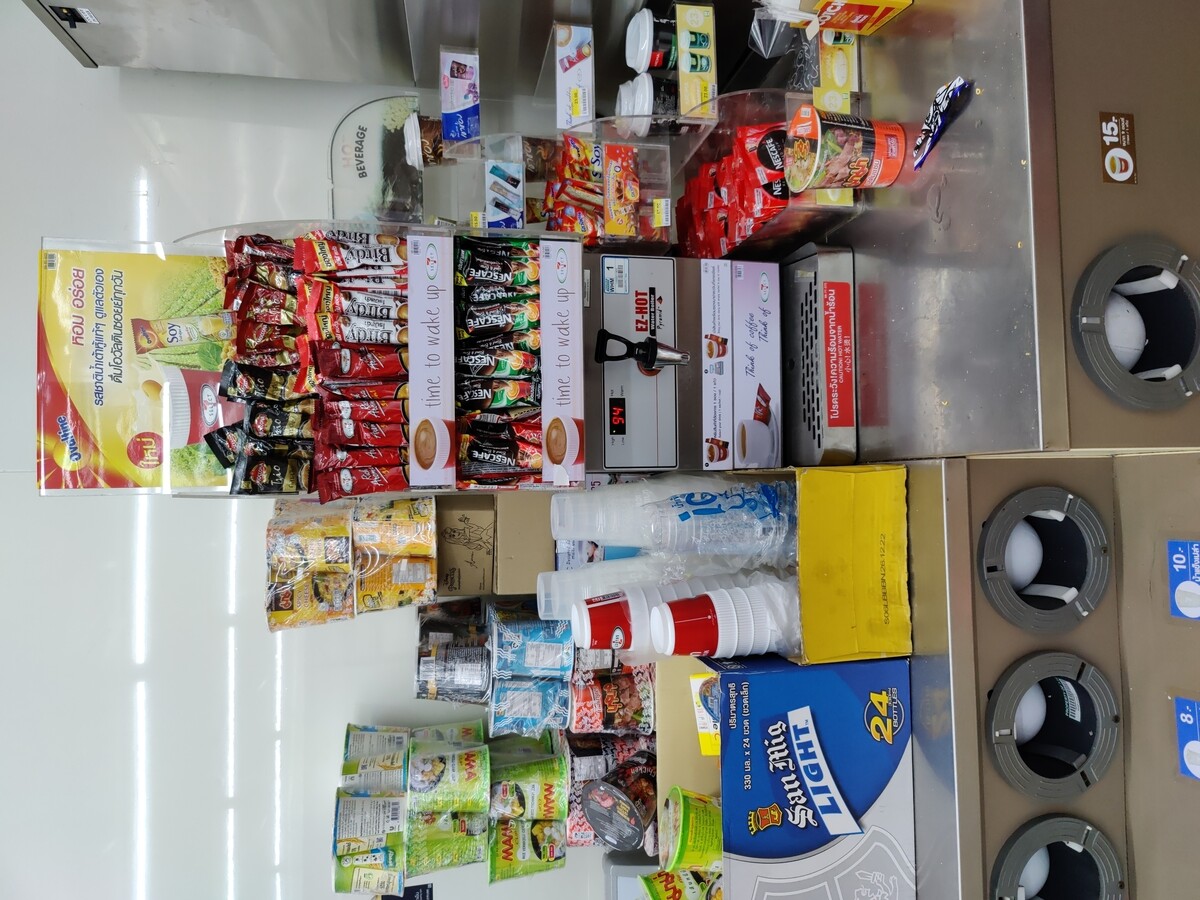 In this section of 7-Eleven, you can buy a premix coffee and mix it with hot water provided at the store to prepare.
 Red wine being served in Air India
 A first revision of the still only one-week old (at

 I am eager to incorporate your AI generated code into my software.
Really!
I want to facilitate making the process as easy as possible. You're already
using an AI to do most of the hard lifting, so why make the last step hard? To
that end, I skip my usually extensive code review process for your AI generated
code submissions. Anything goes as long as it compiles!
Please do remember to include "(AI generated)" in the description of your
changes (at the top), so I know to skip my usual review process.
Also be sure to sign off to the standard
 Debian is running a "
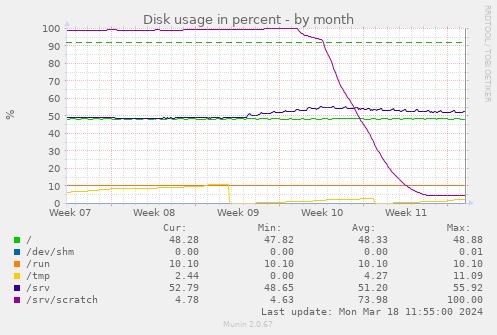 The initial dip from 100% to 95% is my first "what happens if we block repos
> 500 MB" attempt. Over the week after that, the git filter clones reduce the
overall disk consumption from almost 300 GB to 15 GB, a 1/20. Some
repos shrank from GBs to below a MB.
Perhaps I should make all my git clones use one of the filters.
 Last week we held our promised miniDebConf in Santa Fe City, Santa Fe province,
Argentina just across the river from Paran , where I have spent almost six
beautiful months I will never forget.

 Closing arguments in the trial between various people and

 Like each month, have a look at the work funded by
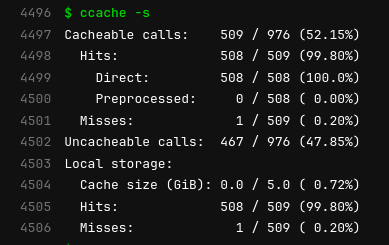 The image here comes from an example of building
 I like using one machine and setup for everything, from serious development work to hobby projects to managing my finances. This is very convenient, as often the lines between these are blurred. But it is also scary if I think of the large number of people who I have to trust to not want to extract all my personal data. Whenever I run a
 I had reported this to Ansible a year ago (2023-02-23), but it seems this is considered expected behavior, so I am posting it here now.
TL;DR
Don't ever consume any data you got from an inventory if there is a chance somebody untrusted touched it.
Inventory plugins
 Recently, I got a new laptop and had to set it up so I could start using it. But
I wasn't really in the mood to go through the same old steps which I had
explained in this