Search Results: "mak"

12 March 2022

Petter Reinholdtsen: Publish Hargassner wood chip boiler state to MQTT

Recently I had a look at a Hargassner wood chip boiler, and what kind of free software can be used to monitor and control it. The boiler can be connected to some cloud service via what the producer call an Internet Gateway, which seem to be a computer connecting to the boiler and passing the information gathered to the cloud. I discovered the boiler controller got an IP address on the local network and listen on TCP port 23 to provide status information as a text line of numbers. It also provide a HTTP server listening on port 80, but I have not yet figured out what it can do beside return an error code. If I am to believe various free software implementations talking to such boiler, the interpretation of the line of numbers differ between type of boiler and software version on the boiler. By comparing the list of numbers on the front panel of the boiler with the numbers returned via TCP, I have been able to figure out several of the numbers, but there are a lot left to understand. I've located several temperature measurements and hours running values, as well as oxygen measurements and counters. I decided to write a simple parser in Python for the values I figured out so far, and a simple MQTT injector publishing both the interpreted and the unknown values on a MQTT bus to make collecting and graphing simpler. The end result is available from the hargassner2mqtt project page on gitlab. I very much welcome patches extending the parser to understand more values, boiler types and software versions. I do not really expect very few free software developers got their hands on such unit to experiment, but it would be fun if others too find this project useful. As usual, if you use Bitcoin and want to show your support of my activities, please send Bitcoin donations to my address 15oWEoG9dUPovwmUL9KWAnYRtNJEkP1u1b.

Dirk Eddelbuettel: Rcpp 1.0.8.2: Hotfix release per CRAN request

rcpp logo A new hot-fix release 1.0.8.2 of Rcpp just got to CRAN. It will also be uploaded to Debian shortly, and Windows and macOS binaries will appear at CRAN in the next few days. This release breaks with the six-months cycle started with release 1.0.5 in July 2020 as CRAN desired an update to silence nags from the newest clang version which turned a little loud over a feature deprecated in C++11 (namely std::unary_function() and std::binary_function()). This was easy to replace with std::function() which we did. The release also contains a minor bugfix relative to 1.0.8 and C++98 builds, and minor correction to one pdf vignette. The release was fully tested by us and CRAN as usual against all reverse dependencies. Rcpp has become the most popular way of enhancing R with C or C++ code. Right now, around 2519 packages on CRAN depend on Rcpp for making analytical code go faster and further, along with 239 in BioConductor. The full list of details for this interim release follows.

Changes in Rcpp hotfix release version 1.0.8.2 (2022-03-10)
  • Changes in Rcpp API:
    • Accomodate C++98 compilation by adjusting attributes.cpp (Dirk in #1193 fixing #1192)
    • Accomodate newest compilers replacing deprecated std::unary_function and std::binary_function with std::function (Dirk in #1202 fixing #1201 and CRAN request)
  • Changes in Rcpp Documentation:
    • Adjust one overflowing column (Bill Denney in #1196 fixing #1195)
  • Changes in Rcpp Deployment:
    • Accomodate four digit version numbers in unit test (Dirk)

Thanks to my CRANberries, you can also look at a diff to the previous release. Questions, comments etc should go to the rcpp-devel mailing list off the R-Forge page. Bugs reports are welcome at the GitHub issue tracker as well (where one can also search among open or closed issues); questions are also welcome under rcpp tag at StackOverflow which also allows searching among the (currently) 2843 previous questions. If you like this or other open-source work I do, you can sponsor me at GitHub.

This post by Dirk Eddelbuettel originated on his Thinking inside the box blog. Please report excessive re-aggregation in third-party for-profit settings.

9 March 2022

Jonathan Dowland: Broken webcam aspect ratio

picture of my Sony RX100-III camera Sony RX100-III, relegated to a webcam
Sometimes I have remote meetings with Google Meet. Unlike the other video-conferencing services that I use (Bluejeans, Zoom), my video was stretched out of proportion under Google Meet with Firefox. I haven't found out why this was happening, but I did figure out a work-around. Thanks to Daniel Silverstone, Rob Kendrick, Gregor Herrmann and Ben Allen for pointing me in the right direction! Hardware The lovely Sony RX-100 mk3 that I bought in 2015 has spent most of its life languishing unused. During the Pandemic, once I was working from home all the time, I decided to press-gang it into service as a better-quality webcam. Newer models of this camera the mark 4 onwards have support for a USB mode called "PC Remote", which effectively makes them into webcams. Unfortunately my mark 3 does not support this, but it does have HDMI out, so I picked up a cheap "HDMI to USB Video Capture Card" from eBay. Video modes
Before: wrong aspect ratio Before: wrong aspect ratio
This device offers a selection of different video modes over a webcam interface. I used qv4l2 to explore the different modes. It became clear that the camera was outputting a signal at 16:9, but the modes on offer from the dongle were for a range of different aspect ratios. The picture for these other ratios was not letter or pillar-boxed, but stretched to fit. I also noticed that the modes which had the correct aspect ratio were at very low framerates: 1920x1080@5fps, 1360x768@8fps, 1280x720@10fps. It felt to me that I would look unnatural at such a low framerate. The most promising mode was close to the right ratio, 720x480 and 30 fps. Software
After: corrected aspect ratio After: corrected aspect ratio
My initial solution is to use the v4l2loopback kernel module, which provides a virtual loop-back webcam interface. I can write video data to it from one process, and read it back from another. Loading it as follows:
modprobe v4l2loopback exclusive_caps=1
The option exclusive_caps configures the module into a mode where it initially presents a write-only interface, but once a process has opened a file handle, it then switches to read-only for subsequent processes. Assuming there are no other camera devices connected at the time of loading the module, it will create /dev/video0.1 I experimented briefly with OBS Studio, the very versatile and feature-full streaming tool, which confirmed that I could use filters on the source video to fix the aspect ratio, and emit the result to the virtual device. I don't otherwise use OBS, though, so I achieve the same result using ffmpeg:
fmpeg -s 720x480 -i /dev/video1 -r 30 -f v4l2 -vcodec rawvideo \
    -pix_fmt yuyv422 -s 720x405 /dev/video0
The source options are to select the source video mode I want. The codec and pixel formats are to match what is being emitted (I determined that using ffprobe on the camera device). The resizing is triggered by supplying a different size to the -s parameter. I think that is equivalent to explicitly selecting a "scale" filter, and there might be other filters that could be used instead (to add pillar boxes for example). This worked just as well. In Google Meet, I select the Virtual Camera, and Google Meet is presented with only one video mode, in the correct aspect ratio, and no configurable options for it, so it can't misbehave. Future I'm planning to automate the loading (and unloading) of the module and starting the ffmpeg process in response to the real camera device being plugged or unplugged, using systemd events and services. (I don't leave the camera plugged in all the time due to some bad USB behaviour I've experienced if I do so.) If I get that working, I will write a follow-up.

  1. you can request a specific device name/number with another module option.

Dirk Eddelbuettel: RcppRedis 0.2.0: Major Updates

A new major release of RcppRedis arrived on CRAN today. RcppRedis is one of several packages connecting R to the fabulous Redis in-memory datastructure store (and much more). RcppRedis does not pretend to be feature complete, but it may do some things faster than the other interfaces, and also offers an optional coupling with MessagePack binary (de)serialization via RcppMsgPack. The package has carried production loads for several years now. This release integrates support for pub/sub, a popular messaging pattern in which one or more clients can subscribe to one or more channels . Whenever a client instances publishes, the Redis server immediately updates all clients listening on the given channel. This pattern is fairly common to transmit data to listeners. A there is a bit more to explain about this, I also added a brand-new vignette describing pub/sub with RcppRedis, along with another introductory vignette about Redis itself. We blogged about this exciting new feature and its particular use for market monitoring in R4 #36 recently too. The pub/sub feature was available in package rredis by Bryan Lewis and has now been ported over by Bryan in a truly elegant yet compact implementation. We placed the code for the pub/sub examples, both for a single symbol (SP 500) as well as for a set of (futures) symbols, into a new examples/ subdirectory. Other changes in this release are the removal of the build-dependency on Boost (or, rather, my BH package), an update to the included hiredis library (used if no system-wide version is found), and an updated to the UCRT build for R. That last one is a bit of a sore spot and nobody at CRAN deemed it necessary to tell me they were waiting for me to make this change; communication with the CRAN team can still be challenging (and I am being generous here). Anyway, the package is now on CRAN so all is well now, at long last. The detailed changes list follows.

Changes in version 0.2.0 (2022-03-08)
  • Two simple C++11 features remove needs for BH and lexical_cast() (Dirk in #45 addressing #44).
  • Redis pub/sub is now supported (Dirk in #43, Bryan in #46).
  • Bryan Lewis is now a coauthor.
  • Added pub/sub examples for single and multiple Globex symbols.
  • The included hiredis sources have been updated to release 1.0.2.
  • Two vignettes have been added to introduce Redis and to described a live market-monitoring application included in directory pubsub/.
  • The UCRT build was updated per a suggestion by Tomas.

Courtesy of CRANberries, there is also a diffstat report for this release. More information is on the RcppRedis page. If you like this or other open-source work I do, you can now sponsor me at GitHub.

This post by Dirk Eddelbuettel originated on his Thinking inside the box blog. Please report excessive re-aggregation in third-party for-profit settings.

Fran ois Marier: Using a Streamzap remote control with MythTV on Debian Bullseye

After upgrading my MythTV machine to Debian Bullseye and MythTV 31, my Streamzap remote control stopped working correctly: the up and down buttons were working, but the OK button wasn't. Here's the complete solution that made it work with the built-in kernel support (i.e. without LIRC).

Button re-mapping Since some of the buttons were working, but not others, I figured that the buttons were probably not mapped to the right keys. Inspired by these old v4l-utils-based instructions, I made my own custom keymap by by copying the original keymap:
cp /lib/udev/rc_keymaps/streamzap.toml /etc/rc_keymaps/
and then modifying it to adapt it to what MythTV needs. This is what I ended up with:
<span class="createlink"><a href="/blog.cgi?do=create&amp;from=posts%2Fusing-streamzap-remote-with-mythtv-debian-bullseye&amp;page=protocols" rel="nofollow">?</a>protocols</span>
name = "streamzap"
protocol = "rc-5-sz"
[protocols.scancodes]
0x28c0 = "KEY_0"
0x28c1 = "KEY_1"
0x28c2 = "KEY_2"
0x28c3 = "KEY_3"
0x28c4 = "KEY_4"
0x28c5 = "KEY_5"
0x28c6 = "KEY_6"
0x28c7 = "KEY_7"
0x28c8 = "KEY_8"
0x28c9 = "KEY_9"
0x28ca = "KEY_ESC"
0x28cb = "KEY_MUTE"
0x28cc = "KEY_UP"
0x28cd = "KEY_RIGHTBRACE"
0x28ce = "KEY_DOWN"
0x28cf = "KEY_LEFTBRACE"
0x28d0 = "KEY_UP"
0x28d1 = "KEY_LEFT"
0x28d2 = "KEY_ENTER"
0x28d3 = "KEY_RIGHT"
0x28d4 = "KEY_DOWN"
0x28d5 = "KEY_M"
0x28d6 = "KEY_ESC"
0x28d7 = "KEY_L"
0x28d8 = "KEY_P"
0x28d9 = "KEY_ESC"
0x28da = "KEY_BACK"
0x28db = "KEY_FORWARD"
0x28dc = "KEY_R"
0x28dd = "KEY_PAGEUP"
0x28de = "KEY_PAGEDOWN"
0x28e0 = "KEY_D"
0x28e1 = "KEY_I"
0x28e2 = "KEY_END"
0x28e3 = "KEY_A"
Note that the keycodes can be found in the kernel source code. With my own keymap in place at /etc/rc_keymaps/streamzap.toml, I changed /etc/rc_maps.cfg to have the kernel driver automatically use it:
--- a/rc_maps.cfg
+++ b/rc_maps.cfg
@@ -126,7 +126,7 @@
 *      rc-real-audio-220-32-keys real_audio_220_32_keys.toml
 *      rc-reddo                 reddo.toml
 *      rc-snapstream-firefly    snapstream_firefly.toml
-*      rc-streamzap             streamzap.toml
+*      rc-streamzap             /etc/rc_keymaps/streamzap.toml
 *      rc-su3000                su3000.toml
 *      rc-tango                 tango.toml
 *      rc-tanix-tx3mini         tanix_tx3mini.toml

Button repeat delay To adjust the delay before button presses are repeated, I followed these old out-of-date instructions on the MythTV wiki and put the following in /etc/udev/rules.d/streamzap.rules:
ACTION=="add", ATTRS idVendor =="0e9c", ATTRS idProduct =="0000", RUN+="/usr/bin/ir-keytable -s rc0 -D 1000 -P 250"
Note that the -d option has been replaced with -s in the latest version of ir-keytable. To check that the Streamzap is indeed detected as rc0 on your system, use this command:
$ ir-keytable 
Found /sys/class/rc/rc0/ with:
    Name: Streamzap PC Remote Infrared Receiver (0e9c:0000)
    Driver: streamzap
    Default keymap: rc-streamzap
...
Make sure you don't pass the -c to ir-keytable or else it will clear the keymap set via /etc/rc_maps.cfg, removing all of the button mappings.

5 March 2022

Reproducible Builds: Reproducible Builds in February 2022

Welcome to the February 2022 report from the Reproducible Builds project. In these reports, we try to round-up the important things we and others have been up to over the past month. As ever, if you are interested in contributing to the project, please visit our Contribute page on our website.
Jiawen Xiong, Yong Shi, Boyuan Chen, Filipe R. Cogo and Zhen Ming Jiang have published a new paper titled Towards Build Verifiability for Java-based Systems (PDF). The abstract of the paper contains the following:
Various efforts towards build verifiability have been made to C/C++-based systems, yet the techniques for Java-based systems are not systematic and are often specific to a particular build tool (eg. Maven). In this study, we present a systematic approach towards build verifiability on Java-based systems.

GitBOM is a flexible scheme to track the source code used to generate build artifacts via Git-like unique identifiers. Although the project has been active for a while, the community around GitBOM has now started running weekly community meetings.
The paper Chris Lamb and Stefano Zacchiroli is now available in the March/April 2022 issue of IEEE Software. Titled Reproducible Builds: Increasing the Integrity of Software Supply Chains (PDF), the abstract of the paper contains the following:
We first define the problem, and then provide insight into the challenges of making real-world software build in a reproducible manner-this is, when every build generates bit-for-bit identical results. Through the experience of the Reproducible Builds project making the Debian Linux distribution reproducible, we also describe the affinity between reproducibility and quality assurance (QA).

In openSUSE, Bernhard M. Wiedemann posted his monthly reproducible builds status report.
On our mailing list this month, Thomas Schmitt started a thread around the SOURCE_DATE_EPOCH specification related to formats that cannot help embedding potentially timezone-specific timestamp. (Full thread index.)
The Yocto Project is pleased to report that it s core metadata (OpenEmbedded-Core) is now reproducible for all recipes (100% coverage) after issues with newer languages such as Golang were resolved. This was announced in their recent Year in Review publication. It is of particular interest for security updates so that systems can have specific components updated but reducing the risk of other unintended changes and making the sections of the system changing very clear for audit. The project is now also making heavy use of equivalence of build output to determine whether further items in builds need to be rebuilt or whether cached previously built items can be used. As mentioned in the article above, there are now public servers sharing this equivalence information. Reproducibility is key in making this possible and effective to reduce build times/costs/resource usage.

diffoscope diffoscope is our in-depth and content-aware diff utility. Not only can it locate and diagnose reproducibility issues, it can provide human-readable diffs from many kinds of binary formats. This month, Chris Lamb prepared and uploaded versions 203, 204, 205 and 206 to Debian unstable, as well as made the following changes to the code itself:
  • Bug fixes:
    • Fix a file(1)-related regression where Debian .changes files that contained non-ASCII text were not identified as such, therefore resulting in seemingly arbitrary packages not actually comparing the nested files themselves. The non-ASCII parts were typically in the Maintainer or in the changelog text. [ ][ ]
    • Fix a regression when comparing directories against non-directories. [ ][ ]
    • If we fail to scan using binwalk, return False from BinwalkFile.recognizes. [ ]
    • If we fail to import binwalk, don t report that we are missing the Python rpm module! [ ]
  • Testsuite improvements:
    • Add a test for recent file(1) issue regarding .changes files. [ ]
    • Use our assert_diff utility where we can within the test_directory.py set of tests. [ ]
    • Don t run our binwalk-related tests as root or fakeroot. The latest version of binwalk has some new security protection against this. [ ]
  • Codebase improvements:
    • Drop the _PATH suffix from module-level globals that are not paths. [ ]
    • Tidy some control flow in Difference._reverse_self. [ ]
    • Don t print a warning to the console regarding NT_GNU_BUILD_ID changes. [ ]
In addition, Mattia Rizzolo updated the Debian packaging to ensure that diffoscope and diffoscope-minimal packages have the same version. [ ]

Website updates There were quite a few changes to the Reproducible Builds website and documentation this month as well, including:
  • Chris Lamb:
    • Considerably rework the Who is involved? page. [ ][ ]
    • Move the contributors.sh Bash/shell script into a Python script. [ ][ ][ ]
  • Daniel Shahaf:
    • Try a different Markdown footnote content syntax to work around a rendering issue. [ ][ ][ ]
  • Holger Levsen:
    • Make a huge number of changes to the Who is involved? page, including pre-populating a large number of contributors who cannot be identified from the metadata of the website itself. [ ][ ][ ][ ][ ]
    • Improve linking to sponsors in sidebar navigation. [ ]
    • drop sponsors paragraph as the navigation is clearer now. [ ]
    • Add Mullvad VPN as a bronze-level sponsor . [ ][ ]
  • Vagrant Cascadian:

Upstream patches The Reproducible Builds project attempts to fix as many currently-unreproducible packages as possible. February s patches included the following:

Testing framework The Reproducible Builds project runs a significant testing framework at tests.reproducible-builds.org, to check packages and other artifacts for reproducibility. This month, the following changes were made:
  • Daniel Golle:
    • Update the OpenWrt configuration to not depend on the host LLVM, adding lines to the .config seed to build LLVM for eBPF from source. [ ]
    • Preserve more OpenWrt-related build artifacts. [ ]
  • Holger Levsen:
  • Temporary use a different Git tree when building OpenWrt as our tests had been broken since September 2020. This was reverted after the patch in question was accepted by Paul Spooren into the canonical openwrt.git repository the next day.
    • Various improvements to debugging OpenWrt reproducibility. [ ][ ][ ][ ][ ]
    • Ignore useradd warnings when building packages. [ ]
    • Update the script to powercycle armhf architecture nodes to add a hint to where nodes named virt-*. [ ]
    • Update the node health check to also fix failed logrotate and man-db services. [ ]
  • Mattia Rizzolo:
    • Update the website job after contributors.sh script was rewritten in Python. [ ]
    • Make sure to set the DIFFOSCOPE environment variable when available. [ ]
  • Vagrant Cascadian:
    • Various updates to the diffoscope timeouts. [ ][ ][ ]
Node maintenance was also performed by Holger Levsen [ ] and Vagrant Cascadian [ ].

Finally If you are interested in contributing to the Reproducible Builds project, please visit our Contribute page on our website. However, you can get in touch with us via:

4 March 2022

Abiola Ajadi: Outreachy-And it s a wrap!

Outreachy Wrap-up Project Improve Debian Continuous Integration UX
Project Link: https://www.outreachy.org/outreachy-december-2021-internship-round/communities/debian/#improve-debian-continuous-integration-ux
Code Repository: https://salsa.debian.org/ci-team/debci
Mentors: Antonio Terceiro, Paul Gevers and Pavit Kaur

About the project Debci exist to make sure packages work currently after an update, How it does this is by testing all of the packages that have tests written in them to make sure it works and nothing is broken This project entails making improvements to the platform to make it easier to use and maintain.

Deliverables of the project:
  • Package landing page displaying pending jobs
  • web frontend: centralize job listings in a single template
  • self-service: request test form forgets values when validation fails
  • Improvement to status

Work done

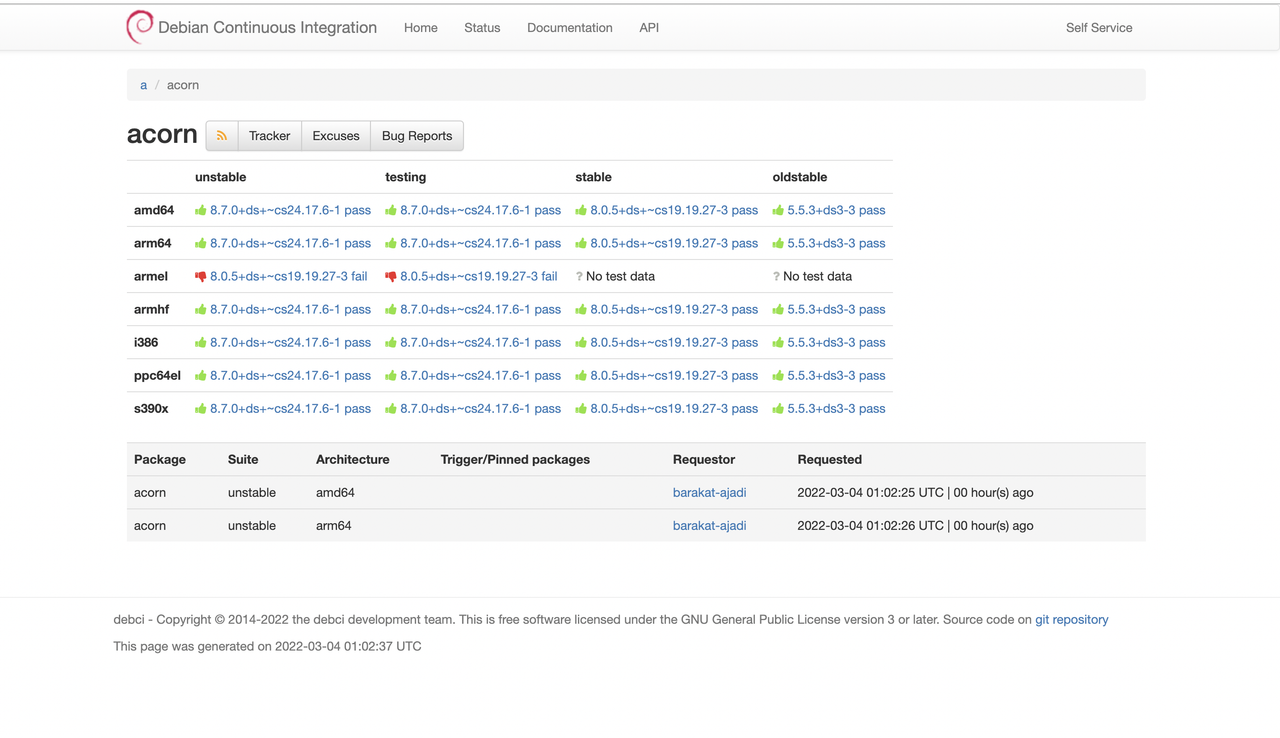
Package landing page displaying pending jobs Previously, Jobs that were pending were not displayed on the package page. Working on this added a feature to display pending jobs on package landing. Working on this task made it known that the same block of codes was repeated in different files which led to the next task Screenshot-2022-03-04-at-02-03-06.png Merge request
web frontend: centralize job listings in a single template Jobs are listed in various landings such as status packages, Status alerts, status failing, History, and so on. The same Code was repeated in these pages to list the jobs, I worked on refactoring it and created a single template for job listing so it can be used anywhere it s needed. I also wrote a test for the feature I added.
Merge request
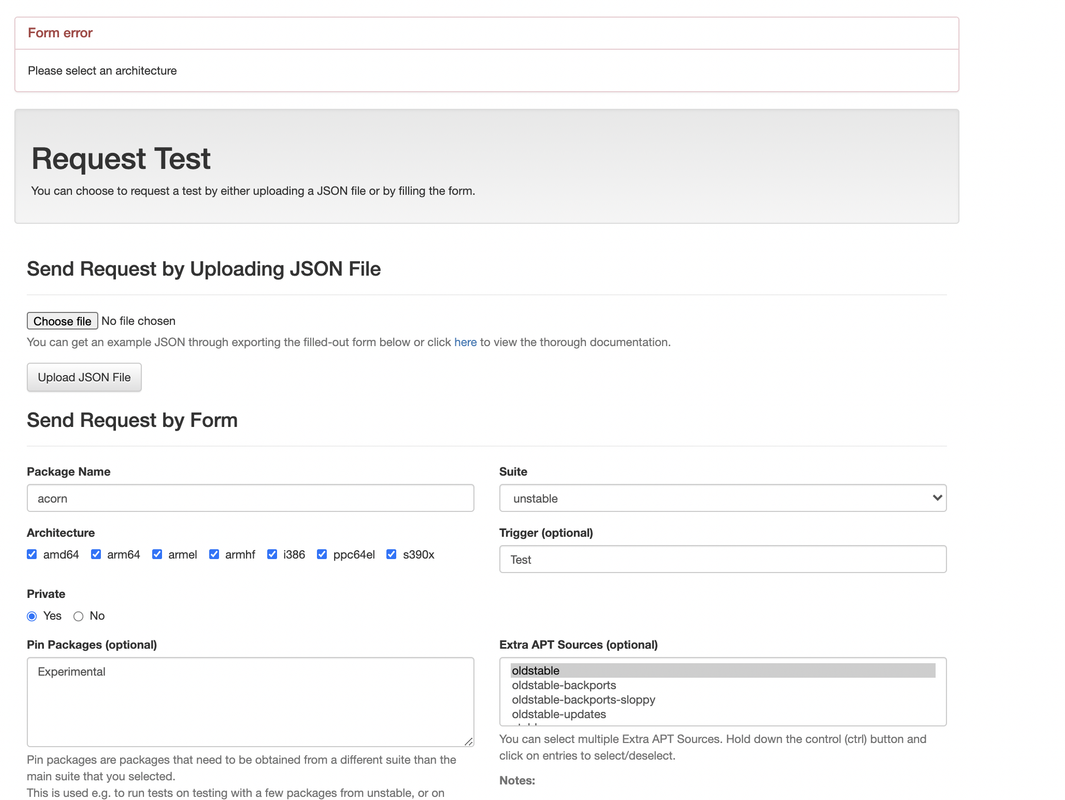
self service: request test form forgets values when validation fails When one tries to request for a test and it fails with an error, originally the form does not remember the values that were typed in the package name, suite field et. c. This fix ensures the form remembers the values inputted even when it throws an error. Image of request test page N/B: The form checks all architecture on the load of the page
merge request
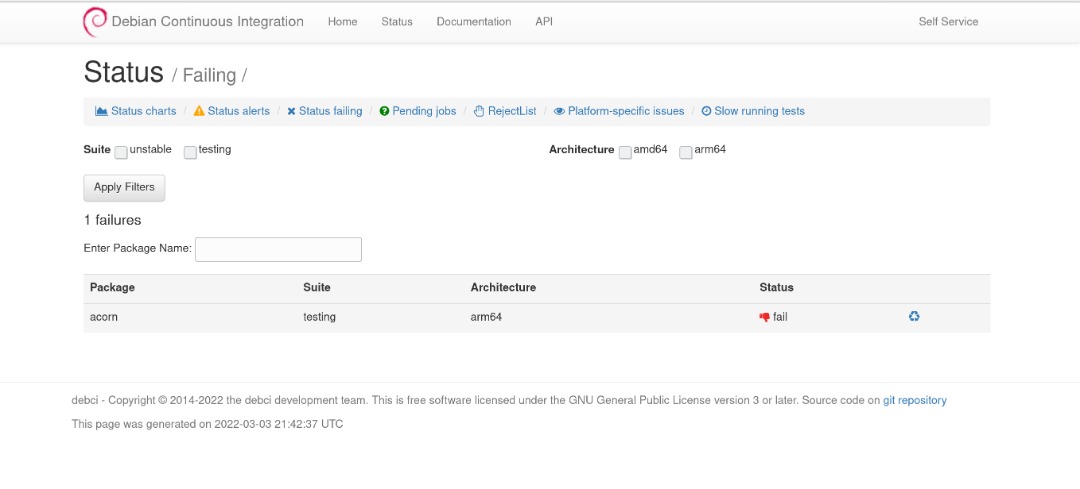
Improvement to status Originally the Status pages were rendered as static HTML pages but I converted these pages to be generated dynamically, I wrote endpoints for each page. Since most of the status pages have a list of jobs I modified it to use the template I created for job-listing. Previously, the status pages had a mechanism to filter such as All, Latest 50 et.c which wasn t paginated. I removed this mechanism added a filter by architecture and suites to these pages and also add pagination. Last but not the least, I wrote tests for these implementations carried out on the status page. Image of Status failing page merge request:
first task
second task

Major take-aways I learnt a lot during my internship but most importantly I learnt how to:
  • write Tests in Ruby and how writing tests is an important aspect of software development
  • maintain good coding practice, Paying attending to commit messages, Indentation et.c are good areas I developed in writing code.
  • make contributions in Ruby Programming Language.

Acknowledgement I can not end this without saying thank you to my mentors Antonio Terceiro, Paul Gevers, and Pavit Kaur for their constant support and guidance throughout the entire duration of this Internship. It has been a pleasure Interacting and learning from everyone.

Review Outreachy has helped me feel more confident about open-source, especially during the application phase. I had to reach out to the community I was interested in and ask questions on how to get started. The informal chats week was awesome I was able to build my network and have interesting conversations with amazing individuals in open-source. To round up, Always ask questions and do not be afraid of making a mistake, as one of the outreachy blog post topics says Everyone struggles!, but never give up!

3 March 2022

Joerg Jaspert: Scan for SSH private keys without passphrase

SSH private key scanner (keys without passphrase) So for policy reasons, customer wanted to ensure that every SSH private key in use by a human on their systems has a passphrase set. And asked us to make sure this is the case. There is no way in SSH to check this during connection, so client side needs to be looked at. Which means looking at actual files on the system. Turns out there are multiple formats for the private keys - and I really do not want to implement something able to deal with that on my own. OpenSSH to the rescue, it ships a little tool ssh-keygen, most commonly known for its ability to generate SSH keys. But it can do much more with keys. One action is interesting here for our case: The ability to print out the public key to a given private key. For a key that is unprotected, this will just work. A key with a passphrase instead leads to it asking you for one. So we have our way to check if a key is protected by a passphrase. Now we only need to find all possible keys (note, the requirement is not keys in .ssh/ , but all possible, so we need to scan for them. But we do not want to run ssh-keygen on just any file, we would like to do it when we are halfway sure, that it is actually a key. Well, turns out, even though SSH has multiple formats, they all appear to have the string PRIVATE KEY somewhere very early (usually first line). And they are tiny - even a 16384bit RSA key is just above 12000 bytes long. Lets find every file thats less then 13000 bytes and has the magic string in it, and throw it at ssh-keygen - if we get a public key back, flag it. Also, we supply a random (ohwell, hardcoded) passphrase, to avoid it prompting for any. Scanning the whole system, one will find quite a surprising number of unprotected SSH keys. Well, better description possibly Unprotected RSA private keys , so the output does need to be checked by a human. This, of course, can be done in shell, quite simple. So i wrote some Rust code instead, as I am still on my task to try and learn more of it. If you are interested, you can find sshprivscanner and play with it, patches/fixes/whatever welcome.

Jonathan McDowell: Neat uses for a backlit keyboard

I bought myself a new keyboard last November, a Logitech G213. True keyboard fans will tell me it s not a real mechanical keyboard, but it was a lot cheaper and met my requirements of having some backlighting and a few media keys (really all I use are the volume control keys). Oh, and being a proper UK layout. While the G213 isn t fully independent RGB per key it does have a set of zones that can be controlled. Also this has been reverse engineered, so there are tools to do this under Linux. All I really wanted was some basic backlighting to make things a bit nicer in the evenings, but with the ability to control colour I felt I should put it to good use. As previously mentioned I have a personal desktop / work laptop setup combined with a UGREEN USB 3.0 Sharing Switch Box, so the keyboard is shared between both machines. So I configured up both machines to set the keyboard colour when the USB device is plugged in, and told them to use different colours. Instant visual indication of which machine I m currently typing on! Running the script on USB detection is easy, a file in /etc/udev/rules.d/. I called it 99-keyboard-colour.rules:
# Change the keyboard colour when we see it
ACTION=="add", SUBSYSTEM=="usb", ATTR idVendor =="046d", ATTR idProduct =="c336", \
        RUN+="/usr/local/sbin/g213-set"
g213-set is a simple bit of Python:
#!/usr/bin/python3
import sys
found = False
devnum = 0
while not found:
    try:
        with open("/sys/class/hidraw/hidraw" + str(devnum) + "/device/uevent") as f:
            for line in f:
                line = line.rstrip()
                if line == 'HID_NAME=Logitech Gaming Keyboard G213':
                    found = True
    except:
        break
    if not found:
        devnum += 1
if not found:
    print("Could not find keyboard device")
    sys.exit(1)
eventfile = "/dev/hidraw" + str(devnum)
#                                   z       r     g     b
command = [ 0x11, 0xff, 0x0c, 0x3a, 0, 1, 0xff, 0xff, 0x00, 2, 0, 0, 0, 0, 0, 0, 0, 0, 0, 0 ]
with open(eventfile, "wb") as f:
    f.write(bytes(command))
I did wonder about trying to make it turn red when I m in a root terminal, but that gets a bit more complicated (I m guessing I need to hook into GNOME Terminal some how?) and this simple hack gives me a significant win anyway.

Enrico Zini: Migrating from procmail to sieve

Anarcat's "procmail considered harmful" post convinced me to get my act together and finally migrate my venerable procmail based setup to sieve. My setup was nontrivial, so I migrated with an intermediate step in which sieve scripts would by default pipe everything to procmail, which allowed me to slowly move rules from procmailrc to sieve until nothing remained in procmailrc. Here's what I did. Literature review https://brokkr.net/2019/10/31/lets-do-dovecot-slowly-and-properly-part-3-lmtp/ has a guide quite aligned with current Debian, and could be a starting point to get an idea of the work to do. https://wiki.dovecot.org/HowTo/PostfixDovecotLMTP is way more terse, but more aligned with my intentions. Reading the former helped me in understanding the latter. https://datatracker.ietf.org/doc/html/rfc5228 has the full Sieve syntax. https://doc.dovecot.org/configuration_manual/sieve/pigeonhole_sieve_interpreter/ has the list of Sieve features supported by Dovecot. https://doc.dovecot.org/settings/pigeonhole/ has the reference on Dovecot's sieve implementation. https://raw.githubusercontent.com/dovecot/pigeonhole/master/doc/rfc/spec-bosch-sieve-extprograms.txt is the hard to find full reference for the functions introduced by the extprograms plugin. Debugging tools: Backup of all mails processed One thing I did with procmail was to generate a monthly mailbox with all incoming email, with something like this:
BACKUP="/srv/backupts/test- date +%Y-%m-d .mbox"
:0c
$BACKUP
I did not find an obvious way in sieve to create montly mailboxes, so I redesigned that system using Postfix's always_bcc feature, piping everything to an archive user. I'll then recreate the monthly archiving using a chewmail script that I can simply run via cron. Configure dovecot
apt install dovecot-sieve dovecot-lmtpd
I added this to the local dovecot configuration:
service lmtp  
  unix_listener /var/spool/postfix/private/dovecot-lmtp  
    user = postfix
    group = postfix
    mode = 0666
   
 
protocol lmtp  
  mail_plugins = $mail_plugins sieve
 
plugin  
  sieve = file:~/.sieve;active=~/.dovecot.sieve
 
This makes Dovecot ready to receive mail from Postfix via a lmtp unix socket created in Postfix's private chroot. It also activates the sieve plugin, and uses ~/.sieve as a sieve script. The script can be a file or a directory; if it is a directory, ~/.dovecot.sieve will be a symlink pointing to the .sieve file to run. This is a feature I'm not yet using, but if one day I want to try enabling UIs to edit sieve scripts, that part is ready. Delegate to procmail To make sieve scripts that delegate to procmail, I enabled the sieve_extprograms plugin:
 plugin  
   sieve = file:~/.sieve;active=~/.dovecot.sieve
+  sieve_plugins = sieve_extprograms
+  sieve_extensions +vnd.dovecot.pipe
+  sieve_pipe_bin_dir = /usr/local/lib/dovecot/sieve-pipe
+  sieve_trace_dir = ~/.sieve-trace
+  sieve_trace_level = matching
+  sieve_trace_debug = yes
  
and then created a script for it:
mkdir -p /usr/local/lib/dovecot/sieve-pipe/
(echo "#!/bin/sh'; echo "exec /usr/bin/procmail") > /usr/local/lib/dovecot/sieve-pipe/procmail
chmod 0755 /usr/local/lib/dovecot/sieve-pipe/procmail
And I can have a sieve script that delegates processing to procmail:
require "vnd.dovecot.pipe";
pipe "procmail";
Activate the postfix side These changes switched local delivery over to Dovecot:
--- a/roles/mailserver/templates/dovecot.conf
+++ b/roles/mailserver/templates/dovecot.conf
@@ -25,6 +25,8 @@
 
+auth_username_format = %Ln
+
 
diff --git a/roles/mailserver/templates/main.cf b/roles/mailserver/templates/main.cf
index d2c515a..d35537c 100644
--- a/roles/mailserver/templates/main.cf
+++ b/roles/mailserver/templates/main.cf
@@ -64,8 +64,7 @@ virtual_alias_domains =
 
-mailbox_command = procmail -a "$EXTENSION"
-mailbox_size_limit = 0
+mailbox_transport = lmtp:unix:private/dovecot-lmtp
 
Without auth_username_format = %Ln dovecot won't be able to understand usernames sent by postfix in my specific setup. Moving rules over to sieve This is mostly straightforward, with the luxury of being able to do it a bit at a time. The last tricky bit was how to call spamc from sieve, as in some situations I reduce system load by running the spamfilter only on a prefiltered selection of incoming emails. For this I enabled the filter directive in sieve:
 plugin  
   sieve = file:~/.sieve;active=~/.dovecot.sieve
   sieve_plugins = sieve_extprograms
-  sieve_extensions +vnd.dovecot.pipe
+  sieve_extensions +vnd.dovecot.pipe +vnd.dovecot.filter
   sieve_pipe_bin_dir = /usr/local/lib/dovecot/sieve-pipe
+  sieve_filter_bin_dir = /usr/local/lib/dovecot/sieve-filter
   sieve_trace_dir = ~/.sieve-trace
   sieve_trace_level = matching
   sieve_trace_debug = yes
  
Then I created a filter script:
mkdir -p /usr/local/lib/dovecot/sieve-filter/"
(echo "#!/bin/sh'; echo "exec /usr/bin/spamc") > /usr/local/lib/dovecot/sieve-filter/spamc
chmod 0755 /usr/local/lib/dovecot/sieve-filter/spamc
And now what was previously:
:0 fw
  /usr/bin/spamc
:0
* ^X-Spam-Status: Yes
.spam/
Can become:
require "vnd.dovecot.filter";
require "fileinto";
filter "spamc";
if header :contains "x-spam-level" "**************"  
    discard;
  elsif header :matches "X-Spam-Status" "Yes,*"  
    fileinto "spam";
 
Updates Ansgar mentioned that it's possible to replicate the monthly mailbox using the variables and date extensions, with a hacky trick from the extensions' RFC:
require "date"
require "variables"
if currentdate :matches "month" "*"   set "month" "$ 1 ";  
if currentdate :matches "year" "*"   set "year" "$ 1 ";  
fileinto :create "$ month -$ year ";

Jamie McClelland: LVM Cache Surprises

By far the biggest LVM Cache surprise is just how well it works. Between 2010 and 2020, my single, biggest and most consistent headache managing servers at May First has been disk i/o. We run a number of physical hosts with encrypted disks, with each providing a dozen or so sundry KVM guests. And they consume a lot of disk i/o. This problem kept me awake at night and made me want to put my head on the table and cry during the day as I monitored the output of vmstat 1 and watched each disk i/o death spiral unfold. We tried everything. Turned off fsck s, turned off RAID monthly checks. Switched to less intensive backup systems. Added solid state drives and tried to stragically distribute them to our database partitions and other read/write heavy services. Added tmpfs file systems where it was possible. But, the sad truth was: we simply did not have the resources to pay for the infrastructure that could support the disk i/o our services demanded. Then, we discovered LVM caching (cue Hallelujah). We starting provisioning SSD partitions to back up our busiest spinning disk logical volumes and presto. Ten years of agony gone like a poof of smoke! I don t know which individuals are responsible for writing the LVM caching code but if you see this: THANK YOU! Your contributions to the world are noticed, appreciated and have had an enormous impact on at least one individual.

Some surprises

Filters For the last two years, with the exception of one little heart attack, LVM caches have gone very smoothly. Then, last week we upgraded 13 physical servers straight through from stretch to bullseye. It went relatively smoothly for the first half of our servers (the old ones hosting fewer resources). But, after rebooting our first server with lvm caching going on, we noticed that the cached disk wasn t accessible. No problem, we reasoned. We ll just uncache it. Except that didn t work either. We tried every argument we could find on the Internet but lvm insisted that the block device from the SSD volume group (that provides the caching device) was not available. Running pvs showed an unknown device and vgs reported similar errors. Now I started to panic a bit. There was a clean shutdown of the server, so surely all the data had been flushed to the disk. But, how can we get that data? We started a restore from backup process because we really thought that data was gone for ever. Then we had a really great theory: the caching logical volume comes from the SSD volume group, which gets decrypted after the spinning disk volume group. Maybe there s a timing issue? When the spinning disk volume group comes online, the caching logical volume is not yet available. So, we booted into busybox, and manually decrypted the SSD volume first, followed by the spinning disk volume. Alas, no dice. Now that we were fully desperate, we decided to restore the lvm configuration file for the entire spinning disk volume group. This felt kinda risky since we might be damaging all the currently working logical volumes, but it seemed like the only option we had. The main problem was that busybox didn t seem to have the lvm config tool we needed to restore the configuration from our backup (I think it might be there but it was late and we couldn t figure it out). And, our only readily available live install media was a Debian stretch disk via debirf. Debian stretch is pretty old and we really would have preferred to have the most modern tools available, but we decided to go with what we had. And, that was a good thing, because as soon as we booted into stretch and decrypted the disks, the lvm volume suddenly appeared, happy as ever. We uncached it and booted into the host system and there it was. We went to bed confused but relieved. The next morning my co-worker figured it out: filtering. During the stretch days we occassionally ran into an annoying problem: the logical volumes from guests would suddenly pop up on the host. This was mostly annoying but also it made possible some serious mistakes if you accidentally took a volume from a guest and used it on the host. The LVM folks seemed to have noticed this problem and introduced a new default filter that tries to only show you the devices that you should be seeing. Unfortunately for us, this new filter removed logical volumes from the list of available physical volumes. That does make sense for most people. But, not for us. It sounds a bit weird, but our setup looks like this:
  • One volume group derived from the spinning disks
  • One volume group derived from the SSD disks
Then we carve out logical volumes from each for each guest. Once we discovered LVM caching, we carved out SSD logical volumes to be used as caches for the spinning logical volumes. In restrospect, if we could start over, we would probably do it differently. In any event, once we discovered the problem, we used the handy configuration options in lvm.conf to tweak the filters to include our cache disks and once again, everything is back to working.

Saturated SSDs The other surprise seems unrelated to the upgrade. We have a phsyical server that has been suffering from disk i/o problems despite our use of LVM caching. Our answer, of course, was to add more LVM caches to the spinning logical volumes that seemed to be suffering. But somehow this was making things even worse. Then, we finally just removed the LVM caches from all the spinning disks and presto, disk i/o problems seemed to go away. What? Isn t that the opposite of what s supposed to happen? We re still trying to figure this one out, but it seems that our SSDs are saturated, in which case adding them as a caching volume really is going to make things worse. We re still not sure why they are saturated when none of the SSDs on our other hosts are saturated, but a few theories include:
  • They are doing more writing and/or it s a different kind of writing. I m still not sure I quite have the right tool to compare this host with other hosts. And, this host is our only MySQL network database server, hosting hundreds of GBs of database - all writing/reading direclty onto the SSDs.
  • They are broken or substanard SSDs (smartctl doesn t uncover any problems but maybe it s a bad model?)
I ll update this post as we learn more but welcome any suggestions in the comments. Update: 2022-03-07 Two more possible causes:
  • Our use of the write back feature: LVM cache has a nice feature that caches writes to smooth out writes to the underlying disk. Maybe our disks are simply writing more then can be handled and not using write back is our solution. This server supports a guest with an unusually large disk.
  • Maybe we haven t allocated a big enough LVM cache for the given volume so the contents are constantly being ejected?

John Goerzen: Tools for Communicating Offline and in Difficult Circumstances

Note: this post is also available on my website, where it will be updated periodically. When things are difficult maybe there s been a disaster, or an invasion (this page is being written in 2022 just after Russia invaded Ukraine), or maybe you re just backpacking off the grid there are tools that can help you keep in touch, or move your data around. This page aims to survey some of them, roughly in order from easiest to more complex.

Simple radios Handheld radios shouldn t be forgotten. They are cheap, small, and easy to operate. Their range isn t huge maybe a couple of miles in rural areas, much less in cities but they can be a useful place to start. They tend to have no actual encryption features (the privacy features really aren t.) In the USA, options are FRS/GMRS and CB.

Syncthing With Syncthing, you can share files among your devices or with your friends. Syncthing essentially builds a private mesh for file sharing. Devices will auto-discover each other when on the same LAN or Wifi network, and opportunistically sync. I wrote more about offline uses of Syncthing, and its use with NNCP, in my blog post A simple, delay-tolerant, offline-capable mesh network with Syncthing (+ optional NNCP). Yes, it is a form of a Mesh Network! Homepage: https://syncthing.net/

Briar Briar is an instant messaging service based around Android. It s IM with a twist: it can use a mesh of Bluetooh devices. Or, if Internet is available, Tor. It has even been extended to support the use of SD cards and USB sticks to carry your messages. Like some others here, it can relay messages for third parties as well. Homepage: https://briarproject.org/

Manyverse and Scuttlebutt Manyverse is a client for Scuttlebutt, which is a sort of asynchronous, offline-friendly social network. You can use it to keep in touch with your family and friends, and it supports syncing over Bluetooth and Wifi even in the absence of Internet. Homepages: https://www.manyver.se/ and https://scuttlebutt.nz/

Yggdrasil Yggdrasil is a self-healing, fully end-to-end Encrypted Mesh Network. It can work among local devices or on the global Internet. It has network services that can egress onto things like Tor, I2P, and the public Internet. Yggdrasil makes a perfect companion to ad-hoc wifi as it has auto peer discovery on the local network. I talked about it in more detail in my blog post Make the Internet Yours Again With an Instant Mesh Network. Homepage: https://yggdrasil-network.github.io/

Ad-Hoc Wifi Few people know about the ad-hoc wifi mode. Ad-hoc wifi lets devices in range talk to each other without an access point. You just all set your devices to the same network name and password and there you go. However, there often isn t DHCP, so IP configuration can be a bit of a challenge. Yggdrasil helps here.

NNCP Moving now to more advanced tools, NNCP lets you assemble a network of peers that can use Asynchronous Communication over sneakernet, USB drives, radios, CD-Rs, Internet, tor, NNCP over Yggdrasil, Syncthing, Dropbox, S3, you name it . NNCP supports multi-hop file transfer and remote execution. It is fully end-to-end encrypted. Think of it as the offline version of ssh. Homepage: https://nncp.mirrors.quux.org/

Meshtastic Meshtastic uses long-range, low-power LoRa radios to build a long-distance, encrypted, instant messaging system that is a Mesh Network. It requires specialized hardware, about $30, but will tend to get much better range than simple radios, and with very little power. Homepages: https://meshtastic.org/ and https://meshtastic.letstalkthis.com/

Portable Satellite Communicators You can get portable satellite communicators that can send SMS from anywhere on earth with a clear view of the sky. The Garmin InReach mini and Zoleo are two credible options. Subscriptions range from about $10 to $40 per month depending on usage. They also have global SOS features.

Telephone Lines If you have a phone line and a modem, UUCP can get through just about anything. It s an older protocol that lacks modern security, but will deal with slow and noisy serial lines well. XBee SX radios also have a serial mode that can work well with UUCP.

Additional Suggestions It is probably useful to have a Linux live USB stick with whatever software you want to use handy. Debian can be installed from the live environment, or you could use a security-focused distribution such as Tails or Qubes.

References This page originated in my Mastodon thread and incorporates some suggestions I received there. It also formed a post on my blog.

Ian Jackson: 3D printed hard case for Fairphone 4

About 4 years ago, I posted about making a 3D printed case for my then-new phone. The FP2 was already a few years old when I got one and by now, some spares are unavailable - which is a problem, because I'm terribly hard on hardware. Indeed, that's why I need a very sturdy case for my phone - a case which can be ablative when necessary. With the arrival of my new Fairphone 4, I've updated my case design. Sadly the FP4 doesn't have a notification LED - I guess we're supposed to be glued to the screen and leaving the phone ignored in a corner unless it lights up is forbidden. But that does at least make the printing simpler, as there's no need for a window for the LED. Source code: https://www.chiark.greenend.org.uk/ucgi/~ianmdlvl/git?p=reprap-play.git;a=blob;f=fairphone4-case.scad;h=1738612c2aafcd4ee4ea6b8d1d14feffeba3b392;hb=629359238b2938366dc6e526d30a2a7ddec5a1b0 And the diagrams (which are part of the source, although I didn't update them for the FP4 changes: https://www.chiark.greenend.org.uk/ucgi/~ianmdlvl/git?p=reprap-diagrams.git;a=tree;f=fairphone-case;h=65f423399cbcfd3cf24265ed3216e6b4c0b26c20;hb=07e1723c88a294d68637bb2ca3eac388d2a0b5d4 ( big pictures )

comment count unavailable comments

2 March 2022

Antoine Beaupr : procmail considered harmful

TL;DR: procmail is a security liability and has been abandoned upstream for the last two decades. If you are still using it, you should probably drop everything and at least remove its SUID flag. There are plenty of alternatives to chose from, and conversion is a one-time, acceptable trade-off.

Procmail is unmaintained procmail is unmaintained. The "Final release", according to Wikipedia, dates back to September 10, 2001 (3.22). That release was shipped in Debian since then, all the way back from Debian 3.0 "woody", twenty years ago. Debian also ships 25 uploads on top of this, with 3.22-21 shipping the "3.23pre" release that has been rumored since at least the November 2001, according to debian/changelog at least:
procmail (3.22-1) unstable; urgency=low
  * New upstream release, which uses the  standard' format for Maildir
    filenames and retries on name collision. It also contains some
    bug fixes from the 3.23pre snapshot dated 2001-09-13.
  * Removed  sendmail' from the Recommends field, since we already
    have  exim' (the default Debian MTA) and  mail-transport-agent'.
  * Removed suidmanager support. Conflicts: suidmanager (<< 0.50).
  * Added support for DEB_BUILD_OPTIONS in the source package.
  * README.Maildir: Do not use locking on the example recipe,
    since it's wrong to do so in this case.
 -- Santiago Vila <sanvila@debian.org>  Wed, 21 Nov 2001 09:40:20 +0100
All Debian suites from buster onwards ship the 3.22-26 release, although the maintainer just pushed a 3.22-27 release to fix a seven year old null pointer dereference, after this article was drafted. Procmail is also shipped in all major distributions: Fedora and its derivatives, Debian derivatives, Gentoo, Arch, FreeBSD, OpenBSD. We all seem to be ignoring this problem. The upstream website (http://procmail.org/) has been down since about 2015, according to Debian bug #805864, with no change since. In effect, every distribution is currently maintaining its fork of this dead program. Note that, after filing a bug to keep Debian from shipping procmail in a stable release again, I was told that the Debian maintainer is apparently in contact with the upstream. And, surprise! they still plan to release that fabled 3.23 release, which has been now in "pre-release" for all those twenty years. In fact, it turns out that 3.23 is considered released already, and that the procmail author actually pushed a 3.24 release, codenamed "Two decades of fixes". That amounts to 25 commits since 3.23pre some of which address serious security issues, but none of which address fundamental issues with the code base.

Procmail is insecure By default, procmail is installed SUID root:mail in Debian. There's no debconf or pre-seed setting that can change this. There has been two bug reports against the Debian to make this configurable (298058, 264011), but both were closed to say that, basically, you should use dpkg-statoverride to change the permissions on the binary. So if anything, you should immediately run this command on any host that you have procmail installed on:
dpkg-statoverride --update --add root root 0755 /usr/bin/procmail
Note that this might break email delivery. It might also not work at all, thanks to usrmerge. Not sure. Yes, everything is on fire. This is fine. In my opinion, even assuming we keep procmail in Debian, that default should be reversed. It should be up to people installing procmail to assign it those dangerous permissions, after careful consideration of the risk involved. The last maintainer of procmail explicitly advised us (in that null pointer dereference bug) and other projects (e.g. OpenBSD, in [2]) to stop shipping it, back in 2014. Quote:
Executive summary: delete the procmail port; the code is not safe and should not be used as a basis for any further work.
I just read some of the code again this morning, after the original author claimed that procmail was active again. It's still littered with bizarre macros like:
#define bit_set(name,which,value) \
  (value?(name[bit_index(which)] =bit_mask(which)):\
  (name[bit_index(which)]&=~bit_mask(which)))
... from regexp.c, line 66 (yes, that's a custom regex engine). Or this one:
#define jj  (aleps.au.sopc)
It uses insecure functions like strcpy extensively. malloc() is thrown around gotos like it's 1984 all over again. (To be fair, it has been feeling like 1984 a lot lately, but that's another matter entirely.) That null pointer deref bug? It's fixed upstream now, in this commit merged a few hours ago, which I presume might be in response to my request to remove procmail from Debian. So while that's nice, this is the just tip of the iceberg. I speculate that one could easily find an exploitable crash in procmail if only by running it through a fuzzer. But I don't need to speculate: procmail had, for years, serious security issues that could possibly lead to root privilege escalation, remotely exploitable if procmail is (as it's designed to do) exposed to the network. Maybe I'm overreacting. Maybe the procmail author will go through the code base and do a proper rewrite. But I don't think that's what is in the cards right now. What I expect will happen next is that people will start fuzzing procmail, throw an uncountable number of bug reports at it which will get fixed in a trickle while never fixing the underlying, serious design flaws behind procmail.

Procmail has better alternatives The reason this is so frustrating is that there are plenty of modern alternatives to procmail which do not suffer from those problems. Alternatives to procmail(1) itself are typically part of mail servers. For example, Dovecot has its own LDA which implements the standard Sieve language (RFC 5228). (Interestingly, Sieve was published as RFC 3028 in 2001, before procmail was formally abandoned.) Courier also has "maildrop" which has its own filtering mechanism, and there is fdm (2007) which is a fetchmail and procmail replacement. Update: there's also mailprocessing, which is not an LDA, but processing an existing folder. It was, however, specifically designed to replace complex Procmail rules. But procmail, of course, doesn't just ship procmail; that would just be too easy. It ships mailstat(1) which we could probably ignore because it only parses procmail log files. But more importantly, it also ships:
  • lockfile(1) - conditional semaphore-file creator
  • formail(1) - mail (re)formatter
lockfile(1) already has a somewhat acceptable replacement in the form of flock(1), part of util-linux (which is Essential, so installed on any normal Debian system). It might not be a direct drop-in replacement, but it should be close enough. formail(1) is similar: the courier maildrop package ships reformail(1) which is, presumably, a rewrite of formail. It's unclear if it's a drop-in replacement, but it should probably possible to port uses of formail to it easily.
Update: the maildrop package ships a SUID root binary (two, even). So if you want only reformail(1), you might want to disable that with:
dpkg-statoverride --update --add root root 0755 /usr/bin/lockmail.maildrop 
dpkg-statoverride --update --add root root 0755 /usr/bin/maildrop
It would be perhaps better to have reformail(1) as a separate package, see bug 1006903 for that discussion.
The real challenge is, of course, migrating those old .procmailrc recipes to Sieve (basically). I added a few examples in the appendix below. You might notice the Sieve examples are easier to read, which is a nice added bonus.

Conclusion There is really, absolutely, no reason to keep procmail in Debian, nor should it be used anywhere at this point. It's a great part of our computing history. May it be kept forever in our museums and historical archives, but not in Debian, and certainly not in actual release. It's just a bomb waiting to go off. It is irresponsible for distributions to keep shipping obsolete and insecure software like this for unsuspecting users. Note that I am grateful to the author, I really am: I used procmail for decades and it served me well. But now, it's time to move, not bring it back from the dead.

Appendix

Previous work It's really weird to have to write this blog post. Back in 2016, I rebuilt my mail setup at home and, to my horror, discovered that procmail had been abandoned for 15 years at that point, thanks to that LWN article from 2010. I would have thought that I was the only weirdo still running procmail after all those years and felt kind of embarrassed to only "now" switch to the more modern (and, honestly, awesome) Sieve language. But no. Since then, Debian shipped three major releases (stretch, buster, and bullseye), all with the same vulnerable procmail release. Then, in early 2022, I found that, at work, we actually had procmail installed everywhere, possibly because userdir-ldap was using it for lockfile until 2019. I sent a patch to fix that and scrambled to remove get rid of procmail everywhere. That took about a day. But many other sites are now in that situation, possibly not imagining they have this glaring security hole in their infrastructure.

Procmail to Sieve recipes I'll collect a few Sieve equivalents to procmail recipes here. If you have any additions, do contact me. All Sieve examples below assume you drop the file in ~/.dovecot.sieve.

deliver mail to "plus" extension folder Say you want to deliver user+foo@example.com to the folder foo. You might write something like this in procmail:
MAILDIR=$HOME/Maildir/
DEFAULT=$MAILDIR
LOGFILE=$HOME/.procmail.log
VERBOSE=off
EXTENSION=$1            # Need to rename it - ?? does not like $1 nor 1
:0
* EXTENSION ?? [a-zA-Z0-9]+
        .$EXTENSION/
That, in sieve language, would be:
require ["variables", "envelope", "fileinto", "subaddress"];
########################################################################
# wildcard +extension
# https://doc.dovecot.org/configuration_manual/sieve/examples/#plus-addressed-mail-filtering
if envelope :matches :detail "to" "*"  
  # Save name in $ name  in all lowercase
  set :lower "name" "$ 1 ";
  fileinto "$ name ";
  stop;
 

Subject into folder This would file all mails with a Subject: line having FreshPorts in it into the freshports folder, and mails from alternc.org mailing lists into the alternc folder:
:0
## mailing list freshports
* ^Subject.*FreshPorts.*
.freshports/
:0
## mailing list alternc
* ^List-Post.*mailto:.*@alternc.org.*
.alternc/
Equivalent Sieve:
if header :contains "subject" "FreshPorts"  
    fileinto "freshports";
  elsif header :contains "List-Id" "alternc.org"  
    fileinto "alternc";
 

Mail sent to root to a reports folder This double rule:
:0
* ^Subject: Cron
* ^From: .*root@
.rapports/
Would look something like this in Sieve:
if header :comparator "i;octet" :contains "Subject" "Cron"  
  if header :regex :comparator "i;octet"  "From" ".*root@"  
        fileinto "rapports";
   
 
Note that this is what the automated converted does (below). It's not very readable, but it works.

Bulk email I didn't have an equivalent of this in procmail, but that's something I did in Sieve:
if header :contains "Precedence" "bulk"  
    fileinto "bulk";
 

Any mailing list This is another rule I didn't have in procmail but I found handy and easy to do in Sieve:
if exists "List-Id"  
    fileinto "lists";
 

This or that I wouldn't remember how to do this in procmail either, but that's an easy one in Sieve:
if anyof (header :contains "from" "example.com",
           header :contains ["to", "cc"] "anarcat@example.com")  
    fileinto "example";
 
You can even pile up a bunch of options together to have one big rule with multiple patterns:
if anyof (exists "X-Cron-Env",
          header :contains ["subject"] ["security run output",
                                        "monthly run output",
                                        "daily run output",
                                        "weekly run output",
                                        "Debian Package Updates",
                                        "Debian package update",
                                        "daily mail stats",
                                        "Anacron job",
                                        "nagios",
                                        "changes report",
                                        "run output",
                                        "[Systraq]",
                                        "Undelivered mail",
                                        "Postfix SMTP server: errors from",
                                        "backupninja",
                                        "DenyHosts report",
                                        "Debian security status",
                                        "apt-listchanges"
                                        ],
           header :contains "Auto-Submitted" "auto-generated",
           envelope :contains "from" ["nagios@",
                                      "logcheck@",
                                      "root@"])
     
    fileinto "rapports";
 

Automated script There is a procmail2sieve.pl script floating around, and mentioned in the dovecot documentation. It didn't work very well for me: I could use it for small things, but I mostly wrote the sieve file from scratch.

Progressive migration Enrico Zini has progressively migrated his procmail setup to Sieve using a clever way: he hooked procmail inside sieve so that he could deliver to the Dovecot LDA and progressively migrate rules one by one, without having a "flag day". See this explanatory blog post for the details, which also shows how to configure Dovecot as an LMTP server with Postfix.

Other examples The Dovecot sieve examples are numerous and also quite useful. At the time of writing, they include virus scanning and spam filtering, vacation auto-replies, includes, archival, and flags.

Harmful considered harmful I am aware that the "considered harmful" title has a long and controversial history, being considered harmful in itself (by some people who are obviously not afraid of contradictions). I have nevertheless deliberately chosen that title, partly to make sure this article gets maximum visibility, but more specifically because I do not have doubts at this moment that procmail is, clearly, a bad idea at this moment in history.

Developing story I must also add that, incredibly, this story has changed while writing it. This article is derived from this bug I filed in Debian to, quite frankly, kick procmail out of Debian. But filing the bug had the interesting effect of pushing the upstream into action: as mentioned above, they have apparently made a new release and merged a bunch of patches in a new git repository. This doesn't change much of the above, at this moment. If anything significant comes out of this effort, I will try to update this article to reflect the situation. I am actually happy to retract the claims in this article if it turns out that procmail is a stellar example of defensive programming and survives fuzzing attacks. But at this moment, I'm pretty confident that will not happen, at least not in scope of the next Debian release cycle.

Ben Hutchings: Debian LTS work, February 2022

In February I was assigned 16 hours of work by Freexian's Debian LTS initiative and carried over 8 hours from January. I worked 16 hours, and will carry over the remaining time to March. I spent most of my time triaging security issues for Linux, working out which of them were fixed upstream and which actually applied to the versions provided in Debian 9 "stretch". I also rebased the Linux 4.9 (linux) package on the latest stable update, but did not make an upload this month.

Keith Packard: picolibc-testing

Testing Picolibc with the glibc tests Picolibc has a bunch of built-in tests, but more testing is always better, right? I decided to see how hard it would be to run some of the tests provided in the GNU C Library (glibc). Parallel meson build files Similar to how Picolibc uses meson build files to avoid modifying the newlib autotools infrastructure, I decided to take the glibc code and write meson build rules that would compile the tests against Picolibc header files and link against Picolibc libraries. I decided to select a single target for this project so I could focus on getting things building and not worry too much about making it portable. I wanted to pick something that had hardware floating point so that I would have rounding modes and exception support, so I picked the ARM Cortex M7 with hard float ABI:
$ arm-none-eabi-gcc -mcpu=cortex-m7 -mfloat-abi=hard
It should be fairly easy to extend this to other targets, but for now, that's what I've got working. There's a cross-cortex-m7.txt file containing all of the cross compilation details which is used when running meson setup. All of the Picolibc-specific files live in a new picolibc directory so they are isolated from the main glibc code. Pre-loading a pile of hacks Adapt Picolibc to support the Glibc test code required a bunch of random hacks, from providing _unlocked versions of the stdio macros to stubbing out various unsupportable syscalls (like sleep and chdir). Instead of modifying the Glibc code, I created a file called hacks.h which is full of this stuff and used the gcc -include parameter to read that into the compiler before starting compilation on all of the files. Supporting command line parameters The glibc tests all support a range of command line parameters, some of which turned out to be quite useful for this work. Picolibc had limited semihosting support for accessing the command line, but that required modifying applications to go fetch the command line using a special semihosting function. To make this easier, I added a new crt0 variant for picolibc called (oddly) semihost. This extends the existing hosted variant by adding a call to the semihosting library to fetch the current command line and splitting that into words at each space. It doesn't handle any quoting, but it's sufficient for the needs here. Avoiding glibc headers The glibc tests use some glibc-specific extensions to the standard POSIX C library, so I needed to include those in the test builds. Headers for those extensions are mixed in with the rest of the POSIX standard headers, which conflict with the Picolibc versions. To work around this, I stuck stub #include files in the picolibc directory which directly include the appropriate headers for the glibc API extensions. This includes things like argp.h and array_length.h. For other headers which weren't actually needed for picolibc, I created empty files. Adding more POSIX to Picolibc At this point, code was compiling but failing to find various standard POSIX functions which aren't available in Picolibc. That included some syscalls which could be emulated using semihosting, like gettimeofday and getpagesize. It also included some generally useful additions, like replacing ecvtbuf and fcvtbuf with ecvt_r and fcvt_r. The _r variants provide a target buffer size instead of assuming that it was large enough as the Picolibc buf variants did. Which tests are working? So far, I've got some of the tests in malloc, math, misc and stdio-common running. There are a lot of tests in the malloc directory which cover glibc API extensions or require POSIX syscalls not supported by semihosting. I think I've added all of the tests which should be supported. For the math tests, I'm testing the standard POSIX math APIs in both float and double forms, except for the Bessel and Gamma functions. Picolibc's versions of those are so bad that they violate some pretty basic assumptions about error bounds built into the glibc test code. Until Picolibc gets better versions of these functions, we'll have to skip testing them this way. In the misc directory, I've only added tests for ecvt, fcvt, gcvt, dirname and hsearch. I don't think there are any other tests there which should work. Finally, for stdio-common, almost all of the tests expect a fully functioning file system, which semihosting really can't support. As a result, we're only able to run the printf, scanf and some of the sprintf tests. All in all, we're running 78 of the glibc test programs, which is a small fraction of the total tests, but I think it's the bulk of the tests which cover APIs that don't depend too much on the underlying POSIX operating system. Bugs found and fixed in Picolibc This exercise has resulted in 17 fixes in Picolibc, which can be classified as:
  1. Math functions taking sNaN and not raising FE_INVALID and returning qNaN. Almost any operation on an sNaN value is supposed to signal an invalid operand and replace that with a qNaN so that further processing doesn't raise another exception. This was fairly easy to fix, just need to use return x + x; instead of return x;.
  2. Math functions failing to set errno. I'd recently restructured the math library to get rid of the separate IEEE version of the functions which didn't set errno and missed a couple of cases that needed to use the errno-setting helper functions.
  3. Corner cases in string/float conversion, including the need to perform round-to-even for '%a' conversions in printf and supporting negative decimal values for fcvt. This particular exercise led to replacing the ecvtbuf and fcvtbuf APIs with glibc's ecvt_r and fcvt_r versions as those pass explicit buffer lengths, making overflow prevention far more reliable.
  4. A bunch of malloc entry points were not handling failure correctly; allocation values close to the maximum possible size caused numerous numeric wrapping errors with the usual consequences (allocations "succeed", but return a far smaller buffer than requested). Also, realloc was failing to check the return value from malloc before copying the old data, which really isn't a good idea.
  5. Tinystdio's POSIX support code was returning an error instead of EOF at end of file.
  6. Error bounds for the Picolibc math library aren't great; I had to generate Picolibc-specific ulps files. Most functions are between 0 and 3 ulps, but for some reason, the float version of erfc (ercf) has errors as large as 64 ulps. That needs investigation.
Tests added to Picolibc With all of the fixes applied to Picolibc, I added some tests to verify them without relying on running the glibc tests, that includes sNaN vs qNaN tests for math functions, testing fopen and mktemp, checking the printf %a rounding support and adding a ecvt/fcvt tests. I also discovered that the github-based CI system was compiling but not testing when using clang with a riscv target, so that got added in. Where's the source code? The Picolibc changes are sitting on the glibc-testing branch. I'll merge them once the current CI pass finishes. The hacked-up Glibc bits are in a glibc mirror at github in the picolibc project on the picolibc-testing branch. It would be interesting to know what additional tests should be usable in this environment. And, perhaps, finding a way to use this for picolibc CI testing in the future. Concluding thoughts Overall, I'm pretty pleased with these results. The bugs in malloc are fairly serious and could easily result in trouble, but the remaining issues are mostly minor and shouldn't have a big impact on applications using Picolibc. I'll get the changes merged and start thinking about doing another Picolibc release.

Fran ois Marier: Ways to refer to locahost in Chromium

The filter rules preventing websites from portscanning the local machine have recently been tightened in Brave. It turns out there are a surprising number of ways to refer to the local machine in Chromium. localhost and friends 127.0.0.1 is the first address that comes to mind when thinking of the local machine. localhost is typically aliased to that address (via /etc/hosts), though that convention is not mandatory. The IPv6 equivalent is [::1]. 0.0.0.0 0.0.0.0 is not a routable address, but that's what's used to tell a service to bind (listen) on all network interfaces. In Chromium, it resolves to the local machine, just like 127.0.0.1. The IPv6 equivalent is [::].

DNS-based Of course, another way to encode these numerical URLs is to create A / AAAA records for them under a domain you control. I've done this under my personal domain: For these to work, you'll need to:
  • Make sure you can connect to IPv6-only hosts, for example by connecting to an appropriate VPN if needed.
  • Put nameserver 8.8.8.8 in /etc/resolv.conf since you need a DNS server that will not filter these localhost domains. (For example, Unbound will do that if you use private-address: 127.0.0.0/8 in the server config.)
  • Go into chrome://settings/security and disable Always use secure connections to make sure the OS resolver is used.
  • Turn off the chrome://flags/#block-insecure-private-network-requests flag since that security feature (CORS-RFC1918) is designed to protect against these kinds of requests.
127.0.0.0/8 subnet Technically, the entire 127.0.0.0/8 subnet can used to refer to the local machine. However, it's not a reliable way to portscan a machine from a web browser because it only catches the services that listen on all interfaces (i.e. 0.0.0.0). For example, on my machine, if I nmap 127.0.0.1, I get:
PORT     STATE SERVICE   VERSION
22/tcp   open  ssh       OpenSSH 8.2p1
25/tcp   open  smtp      Postfix smtpd
whereas if I nmap 127.0.1.25, I only get:
PORT   STATE SERVICE VERSION
22/tcp open  ssh     OpenSSH 8.2p1
That's because I've got the following in /etc/postfix/main.cf:
inet_interfaces = loopback-only
which I assume is explicitly binding 127.0.0.1. Nevertheless, it would be good to get that fixed in Brave too.

1 March 2022

Utkarsh Gupta: FOSS Activites in February 2022

Here s my (twenty-ninth) monthly but brief update about the activities I ve done in the F/L/OSS world.

Debian
This was my 38th month of actively contributing to Debian. I became a DM in late March 2019 and a DD on Christmas 19! \o/ I had been sick this month, so most of the time I spent away from system, recovering, et al, and also went through the huge backlog that I had, which is starting to get smaller. :D Anyway, I did the following stuff in Debian:

Uploads and bug fixes:
  • at (3.4.4-1) - Adding a DEP8 test for the package, fixing bug #985421.

Other $things:
  • Mentoring for newcomers.
  • Moderation of -project mailing list.

Ubuntu
This was my 13th month of actively contributing to Ubuntu. Now that I joined Canonical to work on Ubuntu full-time, there s a bunch of things I do! \o/ I mostly worked on different things, I guess. I was too lazy to maintain a list of things I worked on so there s no concrete list atm. Maybe I ll get back to this section later or will start to list stuff from the fall, as I was doing before. :D

Debian (E)LTS
Debian Long Term Support (LTS) is a project to extend the lifetime of all Debian stable releases to (at least) 5 years. Debian LTS is not handled by the Debian security team, but by a separate group of volunteers and companies interested in making it a success. And Debian Extended LTS (ELTS) is its sister project, extending support to the Jessie release (+2 years after LTS support). This was my twenty-ninth month as a Debian LTS and eighteenth month as a Debian ELTS paid contributor.
Whilst I was assigned 42.75 hours for LTS and 45.25 hours for ELTS, I could only work a little due to being sick and so I spent 15.75 hours on LTS and 9.25 hours on ELTS and worked on the following things:

LTS CVE Fixes and Announcements:

ELTS CVE Fixes and Announcements:

Other (E)LTS Work:

Debian LTS Survey I ve spent 10 hours on the LTS survey on the following bits:
(and 5 hours of the last month that I m going to invoice this month)
  • Put most of the content in the instance according to the question type.
  • Been going back and forth updating the status of the survey on the issue.
  • Trying to find a way to send to DDs - discussing with DPL, Raphael, and other people on the issue itself.
  • Completing the last bits to start the survey for the paid contributors, at least. Talking to Jeremiah about this.

Until next time.
:wq for today.

26 February 2022

Russ Allbery: INN 2.6.5

This is a bit of a sneak preview announcement since I'm waiting for the ISC mirror to update before sending the official announcement to the normal channels, but INN 2.6.5 has been released. (The release was finalized a few days ago, and I'm a bit behind in posting it.) This is a bug fix and minor feature release over INN 2.6.4, and the upgrade should be painless. You can download the new release from ftp.isc.org (once it updates) or my personal INN pages. The latter also has links to the full changelog and the other INN documentation. As always, thanks to Julien LIE for preparing this release and doing most of the maintenance work on INN! Changes in this release:

23 February 2022

Jonathan McDowell: Upgrading my home internet; a story of yak shaving

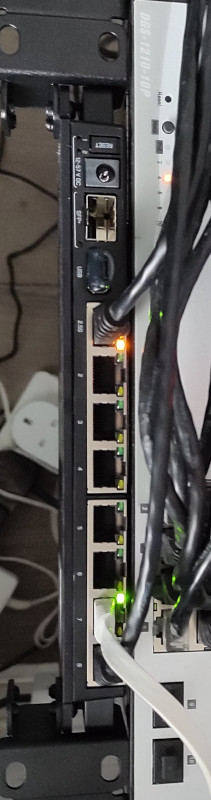
RB5009 This has ended up longer than I expected. I ll write up posts about some of the individual steps with some more details at some point, but this is an overview of the yak shaving I engaged in. The TL;DR is:
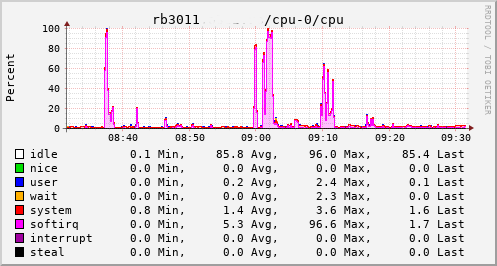
The desire for a faster connection When I migrated my home connection to FTTP I kept the same 80M/20M profile I d had on FTTC. I didn t have a pressing need for faster, and I saved money because I was no longer paying for the phone line portion. I wanted more, but at the time I think the only option was for a 160M/30M profile instead and I didn t need it and it wasn t enough better to convince me. Time passed and BT rolled out their GigE (really 900M) download option. And again, I didn t need it, but I wanted it. My provider, Aquiss, initially didn t offer this (I think they had up to 330M download options available by this point). So I stayed on 80M/20M. And the only time I really wanted it to be faster was when pushing off-site backups to rsync.net. Of course, we ve had the pandemic, and that s involved 2 adults working from home with plenty of video calls throughout the day. The 80M/20M connection has proved rock solid for this, so again, I didn t feel an upgrade was justified. We got a 4K capable TV last year and while the bandwidth usage for 4K streaming is noticeably higher, again the connection can handle it no problem. At some point last year I noticed Aquiss had added speed options all the way to 900M down. At the end of the year I accepted a new role, which is fully remote, so I had a bit of an acceptance about the fact that I wasn t going back into an office any time soon. The combination (and the desire for the increased upload speed) finally allowed me to justify the upgrade to myself.

Testing the current setup for bottlenecks The first thing to do was see whether my internal network could cope with an upgrade. I m mostly running Cat6 GigE so I wasn t worried about that side of things. However I m using an RB3011 as my core router, and while it has some coprocessors for routing acceleration they re not supported under mainline Linux (and unlikely to be any time soon). So I had to benchmark what it was capable of routing. I run a handful of VLANs within my home network, with stateful firewalling between them, so I felt that would be a good approximation of the maximum speed to the outside world I might be able to get if I had the external connection upgraded. I went for the easy approach and fired up iPerf3 on 2 hosts, both connected via ethernet but on separate networks, so routed through the RB3011. That resulted in slightly more than a 300Mb/s throughput. Ok. I confirmed that I could get 900Mb/s+ on 2 hosts both on the same network, just to be sure there wasn t some other issue I was missing. Nope, so unsurprisingly the router was the bottleneck. So. To upgrade my internet speed I need to upgrade my router. I could just buy something off the shelf, but I like being able to run Debian (or OpenWRT) on the router rather than some horrible vendor firmware. Lucky MikroTik launched the RB5009 towards the end of last year. RouterOS is probably more than capable, but what really interested me was the fact it s an ARM64 platform based on an Armada 7040, which is pretty well supported in mainline kernels already. There s a 10G connection from the internal switch to the CPU, as well as a 2.5Gb/s ethernet port and a 10G SFP+ cage. All good stuff. I ordered one just before the New Year. Thankfully the OpenWRT folk had done all of the hard work on getting a mainline kernel booting on the device; Sergey Sergeev and Robert Marko in particular fighting RouterBoot and producing a suitable device tree file to get everything up and running. I ended up soldering a serial console connection up to aid debugging, and lightly patching Rob s u-boot to fix the incorrect RAM size reported by RouterBoot. A few kernel tweaks were necessary to make the networking entirely happy and at that point it was time to think about actually doing a replacement.

Upgrading to Debian 11 (bullseye) My RB3011 is currently running Debian 10 (buster); an upgrade has been on my todo list, but with the impending replacement I decided I d hold off and create a new Debian 11 (bullseye) image for the RB5009. Additionally, I don t actually run off the internal NAND in the RB3011; I have a USB flash drive for the rootfs and just the kernel booting off internal NAND. Originally this was for ease of testing, then a combination of needing to figure out a good read-only root solution and a small enough image to fit in the 120M available. For the upgrade I decided to finally look at these pieces. I ve ended up with a script that will build me a squashfs image, and the initial rootfs takes care of mounting this and then a tmpfs as an overlay fs. That means I can easily see what pieces are being written to. The RB5009 has a total of 1G NAND so I m not as space constrained, but the squashfs ends up under 50M. I ve added some additional pieces to allow me to pre-populate the overlay fs with updates rather than always needing to rebuild the squashfs image. With that done I decided to try it out on the RB3011; I tweaked the build script to be able to build for armhf (the RB3011) or arm64 (the RB5009) and to deal with some slight differences in configuration between the two (e.g. interface naming). The idea here was to ensure I d got all the appropriate configuration sorted for the RB5009, in the known-good existing environment. Everything is still on a USB stick at this stage and the new device has an armhf busybox root meaning it can be used on either device, and the init script detects the architecture to select the appropriate squashfs to mount.

A problem with ESP8266 home automation devices Everything seemed to work fine - a few niggles with the watchdog, which is overly sensitive on the RB3011, but I got those sorted (and the build script updated) and the device came up and successfully did the PPPoE dance to bring up external connectivity. And then I noticed that my home automation devices were having problems connecting to the mosquitto MQTT server. It turned out it was only the ESP8266 based devices that were failing, and examining the serial debug output on one of my test devices revealed it was hitting an out of memory issue (displaying E:M 280) when establishing the TLS MQTT connection. I rolled back to the Debian 10 image and set about creating a test environment to look at the ESP8266 issues. My first action was to try and reduce my RAM footprint to try and ensure there was enough spare to establish the connection. I moved a few functions that were still sitting in IRAM into flash. I cleaned up a couple of buffers that are on the stack to be more correctly sized. I tried my new image, and I didn t get the memory issue. Instead I progressed a bit further and got a watchdog reset. Doh! It was obviously something related to the TLS connection, but I couldn t easily see what the difference was; the same x509 cert was in use, it looked like the initial handshake was the same (and trying with openssl s_client looked pretty similar too). I set about instrumenting the ancient Mbed TLS used in the Espressif SDK and discovered that whatever had changed between buster + bullseye meant the EPS8266 was now trying a TLS-DHE-RSA-WITH-AES-256-CBC-SHA256 handshake instead of a TLS-RSA-WITH-AES-256-CBC-SHA256 handshake and that was causing enough extra CPU usage that it couldn t complete in time and the watchdog kicked in. So I commented out MBEDTLS_KEY_EXCHANGE_DHE_RSA_ENABLED in the config_esp.h for mbedtls and rebuilt things. Hacky, but I ll go back to trying to improve this generally at some point.

A detour into interrupt load Now, my testing of the RB3011 image is generally done at weekends, when I have enough time to tear down and rebuild the connection rather than doing it in the evening and having limited time to get things working again in time for work in the morning. So at the point I had an image ready to go I pulled the trigger on the line upgrade. I went with the 500M/75M option rather than the full 900M - I suspect I d have difficulty actually getting that most of the time and 75M of upload bandwidth seems fairly substantial for now. It only took a couple of days from the order to the point the line was regraded (which involved no real downtime - just a reconnection in the night). Of course this happened just after the weekend I d discovered the ESP8266 issue. collectd CPU usage for RB3011 This provided an opportunity to see just what the RB3011 could actually manage. In the configuration I had it turned out to be not much more than the 80Mb/s speeds I had previously seen. The upload jumped from a solid 20Mb/s to 75Mb/s, so I knew the regrade had actually happened. Looking at CPU utilisation clearly showed the problem; softirqs were using almost 100% of a CPU core. Now, the way the hardware is setup on the RB3011 is that there are two separate 5 port switches, each connected back to the CPU via a separate GigE interface. For various reasons I had everything on a single switch, which meant that all traffic was boomeranging in and out of the same CPU interface. The IPQ8064 has dual cores, so I thought I d try moving the external connection to the other switch. That puts it on its own GigE CPU interface, which then allows binding the interrupts to a different CPU core. That helps; throughput to the outside world hits 140Mb/s+. Still a long way from the expected max, but proof we just need more grunt.
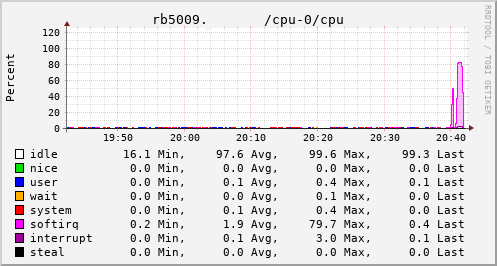
Success collectd CPU usage for RB5009 Which brings us to this past weekend, when, having worked out all the other bits, I tried the squashfs root image again on the RB3011. Success! The home automation bits connected to it, the link to the outside world came up, everything seemed happy. So I double checked my bootloader bits on the RB5009, brought it down to the comms room and plugged it in instead. And, modulo my failing to update the nftables config to allow it to do forwarding, it all came up ok. Some testing with iperf3 internally got a nice 912Mb/s sustained between subnets, and some less scientific testing with wget + speedtest-cli saw speeds of over 460Mb/s to the outside world. Time from ordering the router until it was in service? Just under 8 weeks

Next.

Previous.