Search Results: "ema"

10 October 2017

Yves-Alexis Perez: OpenPGP smartcard transition (part 1)

A long time ago, I switched my GnuPG setup to a smartcard based one. I kept using the same master key, but: I've been working with that setup for a few years now and it is working perfectly fine. The signature counter on the OpenPGP basic card is a bit north of 5000 which is large but not that huge, all considered (and not counting authentication and decryption key usage).

One very nice feature of using a smartcard is that my laptop (or other machines I work on) never manipulates the private key directly but only sends request to the card, which is a really huge improvement, in my opinion. But it's also not the perfect solution for me: the OpenPGP card uses a proprietary platform from ZeitControl, named BasicCard. We have very few information on the smartcard, besides the fact that Werner Koch trust ZeistControl to not mess up. One caveat for me is that the card does not use a certified secure microcontroler like you would find in smartcard chips found in debit card or electronic IDs. That means it's not really been audited by a competent hardware lab, and thus can't be considered secure against physical attacks. The cardOS software and the application implementing the OpenPGP specification are not public either and have not been audited either, to the best of my knowledge.

At one point I was interested in the Yubikey Neo, especially since the architecture Yubico used was common: a (supposedly) certified platform (secure microcontroler, card OS) and a GlobalPlatform / JavaCard virtual machine. The applet used in the Yubikey Neo is open-source, too, so you could take a look at it and identify any issue.

Unfortunately, Yubico transitioned to a less common and more proprietary infrastructure for Yubikey 4: it's not longer Javacard based, and they don't provide the applet source anymore. This was not really seen as a good move by a lot of people, including Konstantin Ryabitsev (kernel.org administrator). Also, it wasn't possible even for the Yubico Neo to actually build the applet yourself and inject it on the card: when the Yubikey leaves the facility, the applet is already installed and the smartcard is locked (for obvious security reason). I've tried asking about getting naked/empty Yubikey with developers keys to load the applet myself, but it' was apparently not possible or would have required signing an NDA with NXP (the chip maker), which is not really possible as an individual (not that I really want to anyway).

In the meantime, a coworker actually wrote an OpenPGP javacard applet, with the intention to support latest version of the OpenPGP specification, and especially elliptic curve cryptography. The applet is called SmartPGP and has been released on ANSSI github repository. I investigated a bit, and found a smartcard with correct specification: certified (in France or Germany), and supporting Javacard 3.0.4 (required for ECC). The card can do RSA2048 (unfortunately not RSA4096) and EC with NIST (secp256r1, secp384r1, secp521r1) and Brainpool (P256, P384, P512) curves.

I've ordered some cards, and when they arrived started playing. I've built the SmartPGP applet and pushed it to a smartcard, then generated some keys and tried with GnuPG. I'm right now in the process of migrating to a new smartcard based on that setup, which seems to work just fine after few days.

Part two of this serie will describe how to build the applet and inject it in the smartcard. The process is already documented here and there, but there are few things not to forget, like how to lock the card after provisionning, so I guess having the complete process somewhere might be useful in case some people want to reproduce it.

Reproducible builds folks: Reproducible Builds: Weekly report #128

Here's what happened in the Reproducible Builds effort between Sunday October 1 and Saturday October 7 2017: Media coverage Documentation updates Packages reviewed and fixed, and bugs filed Reviews of unreproducible packages 32 package reviews have been added, 46 have been updated and 62 have been removed in this week, adding to our knowledge about identified issues. Weekly QA work During our reproducibility testing, FTBFS bugs have been detected and reported by: diffoscope development strip-nondeterminism development Rob Browning noticed that strip-nondeterminism was causing serious performance regressions in the Clojure programming language within Debian. After some discussion, Chris Lamb also posted a query to debian-devel in case there were any other programming languages that might be suffering from the same problem. reprotest development Versions 0.7.1 and 0.7.2 were uploaded to unstable by Ximin Luo: It included contributions already covered by posts of the previous weeks, as well as new ones from: tests.reproducible-builds.org Misc. This week's edition was written by Bernhard M. Wiedemann, Chris Lamb, Holger Levsen, Mattia Rizzolo & reviewed by a bunch of Reproducible Builds folks on IRC & the mailing lists.

9 October 2017

Petter Reinholdtsen: Generating 3D prints in Debian using Cura and Slic3r(-prusa)

At my nearby maker space, Sonen, I heard the story that it was easier to generate gcode files for theyr 3D printers (Ultimake 2+) on Windows and MacOS X than Linux, because the software involved had to be manually compiled and set up on Linux while premade packages worked out of the box on Windows and MacOS X. I found this annoying, as the software involved, Cura, is free software and should be trivial to get up and running on Linux if someone took the time to package it for the relevant distributions. I even found a request for adding into Debian from 2013, which had seem some activity over the years but never resulted in the software showing up in Debian. So a few days ago I offered my help to try to improve the situation. Now I am very happy to see that all the packages required by a working Cura in Debian are uploaded into Debian and waiting in the NEW queue for the ftpmasters to have a look. You can track the progress on the status page for the 3D printer team. The uploaded packages are a bit behind upstream, and was uploaded now to get slots in the NEW queue while we work up updating the packages to the latest upstream version. On a related note, two competitors for Cura, which I found harder to use and was unable to configure correctly for Ultimaker 2+ in the short time I spent on it, are already in Debian. If you are looking for 3D printer "slicers" and want something already available in Debian, check out slic3r and slic3r-prusa. The latter is a fork of the former.

8 October 2017

Iain R. Learmonth: Free Software Efforts (2017W40)

Here s my weekly report for week 40 of 2017. In this week I have looked at censorship in Catalonia and had my deleted Facebook account hacked (which made HN front page). I ve also been thinking about DRM on the web.

Debian I have prepared and uploaded fixes for the measurement-kit and hamradio-maintguide packages. I have also sponsored uploads for gnustep-base (to experimental) and chkservice. I have given DM upload privileges to Eric Heintzmann for the gnustep-base package as he has shown to care for the GNUstep packages well. In the near future, I think we re looking at a transition for gnustep- base,back,gui as these packages all have updates. Bugs filed: #877680 Bugs closed (fixed/wontfix): #872202, #877466, #877468

Tor Project This week I have participated in a discussion around renaming the Operations section of the Metrics website. I have also filed a new ticket on Atlas, which I am planning to implement, to link to the new relay lifecycle post on the Tor Project blog if a relay is less than a week old to help new relay operators understand the bandwidth usage they ll be seeing. Finally, I ve been hacking on a Twitter bot to tweet factoids about the public Tor network. I ve detailed this in a separate blog post. Bugs closed (fixed/wontfix): #23683

Sustainability I believe it is important to be clear not only about the work I have already completed but also about the sustainability of this work into the future. I plan to include a short report on the current sustainability of my work in each weekly report. I have not had any free software related expenses this week. The current funds I have available for equipment, travel and other free software expenses remains 60.52. I do not believe that any hardware I rely on is looking at imminent failure.

Michael Stapelberg: Debian stretch on the Raspberry Pi 3 (update)

I previously wrote about my Debian stretch preview image for the Raspberry Pi 3. Now, I m publishing an updated version, containing the following changes: A couple of issues remain, notably the lack of WiFi and bluetooth support (see wiki:RaspberryPi3 for details. Any help with fixing these issues is very welcome! As a preview version (i.e. unofficial, unsupported, etc.) until all the necessary bits and pieces are in place to build images in a proper place in Debian, I built and uploaded the resulting image. Find it at https://people.debian.org/~stapelberg/raspberrypi3/2017-10-08/. To install the image, insert the SD card into your computer (I m assuming it s available as /dev/sdb) and copy the image onto it:
$ wget https://people.debian.org/~stapelberg/raspberrypi3/2017-10-08/2017-10-08-raspberry-pi-3-buster-PREVIEW.img.bz2
$ bunzip2 2017-10-08-raspberry-pi-3-buster-PREVIEW.img.bz2
$ sudo dd if=2017-10-08-raspberry-pi-3-buster-PREVIEW.img of=/dev/sdb bs=5M
If resolving client-supplied DHCP hostnames works in your network, you should be able to log into the Raspberry Pi 3 using SSH after booting it:
$ ssh root@rpi3
# Password is  raspberry 

4 October 2017

Daniel Silverstone: F/LOSS (in)activity, September 2017

In the interests of keeping myself "honest" regarding F/LOSS activity, here's a report, sadly it's not very good.
Unfortunately, September was a poor month for me in terms of motivation and energy for F/LOSS work. I did some amount of Gitano work, merging a patch from Richard Ipsum for help text of the config command. I also submitted another patch to the STM32F103xx Rust repository, though it wasn't a particularly big thing. Otherwise I've been relatively quiet on the Rust/USB stuff and have otherwise kept away from projects. Sometimes one needs to take a step away from things in order to recuperate and care for oneself rather than the various demands on ones time. This is something I had been feeling I needed for a while, and with a lack of motivation toward the start of the month I gave myself permission to take a short break. Next weekend is the next Gitano developer day and I hope to pick up my activity again then, so I should have more to report for October.

Iain R. Learmonth: MAC Catching

As we walk around with mobile phones in our pockets, there are multiple radios each with identifiers that can be captured and recorded just through their normal operation. Bluetooth and Wifi devices have MAC addresses and can advertise their presence to other devices merely by sending traffic, or by probing for devices to connect to if they re not connected. I found a simple tool, probemon that allows for anyone with a wifi card to track who is at which location at any given time. You could deploy a few of these with Raspberry Pis or even go even cheaper with a number of ESP8266. In the news recently was a report from TfL about their WiFi data collection. Sky News reported that TfL plans to make 322m by collecting data from passengers mobiles . TfL have later denied this but the fact remains that collecting this data is trivial. I ve been thinking about ideas for spoofing mass amounts of wireless devices making the collected data useless. I ve found that people have had success in using Scapy to forge WiFi frames. When I have some free time I plan to look into some kind of proof-of-concept for this. On the underground, this is the way to do this, but above ground I ve also heard of systems that use the TMSI from 3G/4G, not WiFi data, to identify mobile phones. You ll have to be a bit more brave if you want to forge these (please do not, unless using alternative licensed frequencies, you may interfere with mobile service and prevent 999 calls). If you wanted to spy on mobile phones near to you, you can do this with the gr-gsm package now available in Debian.

3 October 2017

Reproducible builds folks: Reproducible Builds: Weekly report #127

Here's what happened in the Reproducible Builds effort between Sunday September 24 and Saturday September 30 2017: Development and fixes in key packages Kai Harries did an initial packaging of the Nix package manager for Debian. You can track his progress in #877019. Uploads in Debian: Packages reviewed and fixed, and bugs filed Patches sent upstream: Reproducible bugs (with patches) filed in Debian: QA bugs filed in Debian: Reviews of unreproducible packages 103 package reviews have been added, 153 have been updated and 78 have been removed in this week, adding to our knowledge about identified issues. Weekly QA work During our reproducibility testing, FTBFS bugs have been detected and reported by: diffoscope development Mattia Rizzolo uploaded version 87 to stretch-backports. strip-nondeterminism development reprotest development tests.reproducible-builds.org reproducible-website development Misc. This week's edition was written by Ximin Luo, Bernhard M. Wiedemann, Holger Levsen and Chris Lamb & reviewed by a bunch of Reproducible Builds folks on IRC & the mailing lists.

Iain R. Learmonth: Facebook Lies

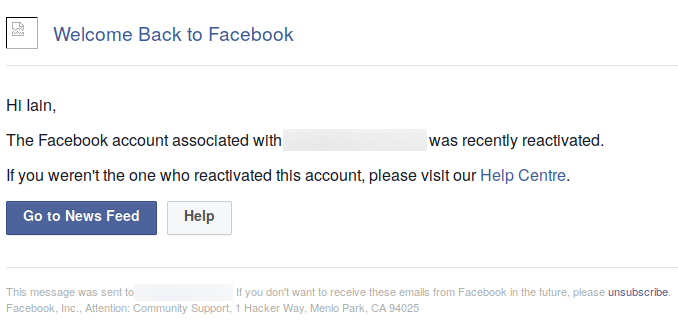
In the past, I had a Facebook account. Long ago I deleted this account through the procedure outlined on their help pages. In theory, 14 days after I used this process my account would be irrevocably gone. This was all lies. My account was not deleted and yesterday I received an email:
Screenshot of the email I received from Facebook Screenshot of the email I received from Facebook
It took me a moment to figure it out, but what had happened here is someone had logged into my Facebook account using my email address and password. Facebook simply reactivated the account, which had not had its data deleted, as if I had logged in. This was possible because:
  1. Facebook was clinging to the hope that I would like to return
  2. The last time I used Facebook I didn t know what a password manager was and was using the same password for basically everything
When I logged back in, all I needed to provide to prove I was me was my date of birth. Given that old Facebook passwords are readily available from dumps (people think their accounts are gone, so why should they be changing their passwords?) and my date of birth is not secret either, this is not great. I followed the deletion procedure again and in 2 weeks (you can t immediately request deletion apparently) I ll check to see if the account is really gone. I ve updated the password so at least the deletion process can t be interrupted by whoever has that password (probably lots of people - it ll be in a ton of dumps where databases have been hacked). If it s still not gone, I hear you can just post obscene and offensive material until Facebook deletes you. I d rather not have to take that route though. If you re interested to see if you ve turned up in a hacked database dump yourself, I would recommend hibp. Update (2017-10-04): Thanks for all the comments. Sorry I haven t been able to reply to all of them. Discussion around this post occured at Hacker News if you would like to read more there. You can also read about a similar, and more frustrating, case that came up in the HN discussion.

2 October 2017

Antoine Beaupr : My free software activities, September 2017

Debian Long Term Support (LTS) This is my monthly Debian LTS report. I mostly worked on the git, git-annex and ruby packages this month but didn't have time to completely use my allocated hours because I started too late in the month.

Ruby I was hoping someone would pick up the Ruby work I submitted in August, but it seems no one wanted to touch that mess, understandably. Since then, new issues came up, and not only did I have to work on the rubygems and ruby1.9 package, but now the ruby1.8 package also had to get security updates. Yes: it's bad enough that the rubygems code is duplicated in one other package, but wheezy had the misfortune of having two Ruby versions supported. The Ruby 1.9 also failed to build from source because of test suite issues, which I haven't found a clean and easy fix for, so I ended up making test suite failures non-fatal in 1.9, which they were already in 1.8. I did keep a close eye on changes in the test suite output to make sure tests introduced in the security fixes would pass and that I wouldn't introduce new regressions as well. So I published the following advisories:
  • ruby 1.8: DLA-1113-1, fixing CVE-2017-0898 and CVE-2017-10784. 1.8 doesn't seem affected by CVE-2017-14033 as the provided test does not fail (but it does fail in 1.9.1). test suite was, before patch:
    2199 tests, 1672513 assertions, 18 failures, 51 errors
    
    and after patch:
    2200 tests, 1672514 assertions, 18 failures, 51 errors
    
  • rubygems: uploaded the package prepared in August as is in DLA-1112-1, fixing CVE-2017-0899, CVE-2017-0900, CVE-2017-0901. here the test suite passed normally.
  • ruby 1.9: here I used the used 2.2.8 release tarball to generate a patch that would cover all issues and published DLA-1114-1 that fixes the CVEs of the two packages above. the test suite was, before patches:
    10179 tests, 2232711 assertions, 26 failures, 23 errors, 51 skips
    
    and after patches:
    1.9 after patches (B): 10184 tests, 2232771 assertions, 26 failures, 23 errors, 53 skips
    

Git I also quickly issued an advisory (DLA-1120-1) for CVE-2017-14867, an odd issue affecting git in wheezy. The backport was tricky because it wouldn't apply cleanly and the git package had a custom patching system which made it tricky to work on.

Git-annex I did a quick stint on git-annex as well: I was able to reproduce the issue and confirm an approach to fixing the issue in wheezy, although I didn't have time to complete the work before the end of the month.

Other free software work

New project: feed2exec I should probably make a separate blog post about this, but ironically, I don't want to spend too much time writing those reports, so this will be quick. I wrote a new program, called feed2exec. It's basically a combination of feed2imap, rss2email and feed2tweet: it allows you to fetch RSS feeds and send them in a mailbox, but what's special about it, compared to the other programs above, is that it is more generic: you can basically make it do whatever you want on new feed items. I have, for example, replaced my feed2tweet instance with it, using this simple configuration:
[anarcat]
url = https://anarc.at/blog/index.rss
output = feed2exec.plugins.exec
args = tweet "%(title)0.70s %(link)0.70s"
The sample configuration file also has examples to talk with Mastodon, Pump.io and, why not, a torrent server to download torrent files available over RSS feeds. A trivial configuration can also make it work as a crude podcast client. My main motivation to work on this was that it was difficult to extend feed2imap to do what I needed (which was to talk to transmission to download torrent files) and rss2email didn't support my workflow (which is delivering to feed-specific mail folders). Because both projects also seemed abandoned, it seemed like a good idea at the time to start a new one, although the rss2email community has now restarted the project and may produce interesting results. As an experiment, I tracked my time working on this project. It turns out it took about 45 hours to write that software. Considering feed2exec is about 1400 SLOC, that's 30 lines of code per hour. I don't know if that's slow or fast, but it's an interesting metric for future projects. It sure seems slow to me, but we need to keep in mind those 30 lines of code don't include documentation and repeated head banging on the keyboard. For example, I found two issues with the upstream feedparser package which I use to parse feeds which also seems unmaintained, unfortunately. Feed2exec is beta software at this point, but it's working well enough for me and the design is much simpler than the other programs of the kind. The main issue people can expect from it at this point is formatting issues or parse errors on exotic feeds, and noisy error messages on network errors, all of which should be fairly easy to fix in the test suite. I hope it will be useful for the community and, as usual, I welcome contributions, help and suggestions on how to improve the software.

More Python templates As part of the work on feed2exec, I did cleanup a few things in the ecdysis project, mostly to hook tests up in the CI, improve on the advancedConfig logger and cleanup more stuff. While I was there, it turns out that I built a pretty decent basic CI configuration for Python on GitLab. Whereas the previous templates only had a non-working Django example, you should now be able to chose a Python template when you configure CI on GitLab 10 and above, which should hook you up with normal Python setup procedures like setup.py install and setup.py test.

Selfspy I mentioned working on a monitoring tool in my last post, because it was a feature from Workrave missing in SafeEyes. It turns out there is already such a tool called selfspy. I did an extensive review of the software to make sure it wouldn't leak out confidential information out before using it, and it looks, well... kind of okay. It crashed on me at least once so far, which is too bad because then it loses track of the precious activity. I have used it at least once to figure out what the heck I worked on during the day, so it's pretty useful. I particularly used it to backtrack my work on feed2exec as I didn't originally track my time on the project. Unfortunately, selfspy seems unmaintained. I have proposed a maintenance team and hopefully the project maintainer will respond and at least share access so we don't end up in a situation like linkchecker. I also sent a bunch of pull requests to fix some issues like being secure by default and fixing the build. Apart from the crash, the main issue I have found with the software is that it doesn't detect idle time which means certain apps are disproportionatly represented in statistics. There are also some weaknesses in the crypto that should be adressed for people that encrypt their database. Next step is to package selfspy in Debian which should hopefully be simple enough...

Restic documentation security As part of a documentation patch on the Restic backup software, I have improved on my previous Perl script to snoop on process commandline arguments. A common flaw in shell scripts and cron jobs is to pass secret material in the environment (usually safe) but often through commandline arguments (definitely not safe). The challenge, in this peculiar case, was the env binary, but the last time I encountered such an issue was with the Drush commandline tool, which was passing database credentials in clear to the mysql binary. Using my Perl sniffer, I could get to 60 checks per second (or 60Hz). After reimplementing it in Python, this number went up to 160Hz, which still wasn't enough to catch the elusive env command, which is much faster at hiding arguments than MySQL, in large part because it simply does an execve() once the environment is setup. Eventually, I just went crazy and rewrote the whole thing in C which was able to get 700-900Hz and did catch the env command about 10-20% of the time. I could probably have rewritten this by simply walking /proc myself (since this is what all those libraries do in the end) to get better result, but then my point was made. I was able to prove to the restic author the security issues that warranted the warning. It's too bad I need to repeat this again and again, but then my tools are getting better at proving that issue... I suspect it's not the last time I have to deal with this issue and I am happy to think that I can come up with an even more efficient proof of concept tool the next time around.

Ansible 101 After working on documentation last month, I ended up writing my first Ansible playbook this month, converting my tasksel list to a working Ansible configuration. This was a useful exercise: it allow me to find a bunch of packages which have been removed from Debian and provides much better usability than tasksel. For example, it provides a --diff argument that shows which packages are missing from a given setup. I am still unsure about Ansible. Manifests do seem really verbose and I still can't get used to the YAML DSL. I could probably have done the same thing with Puppet and just run puppet apply on the resulting config. But I must admit my bias towards Python is showing here: I can't help but think Puppet is going to be way less accessible with its rewrite in Clojure and C (!)... But then again, I really like Puppet's approach of having generic types like package or service rather than Ansible's clunky apt/yum/dnf/package/win_package types...

Pat and Ham radio After responding (too late) to a request for volunteers to help in Puerto Rico, I realized that my amateur radio skills were somewhat lacking in the "packet" (data transmission in ham jargon) domain, as I wasn't used to operate a Winlink node. Such a node can receive and transmit actual emails over the airwaves, for free, without direct access to the internet, which is very useful in disaster relief efforts. Through summary research, I stumbled upon the new and very promising Pat project which provides one of the first user-friendly Linux-compatible Winlink programs. I provided improvements on the documentation and some questions regarding compatibility issues which are still pending. But my pet issue is the establishment of pat as a normal internet citizen by using standard protocols for receiving and sending email. Not sure how that can be implemented, but we'll see. I am also hoping to upload an official Debian package and hopefully write more about this soon. Stay tuned!

Random stuff I ended up fixing my Kodi issue by starting it as a standalone systemd service, instead of gdm3, which is now completely disabled on the media box. I simply used the following /etc/systemd/service/kodi.service file:
[Unit]
Description=Kodi Media Center
After=systemd-user-sessions.service network.target sound.target
[Service]
User=xbmc
Group=video
Type=simple
TTYPath=/dev/tty7
StandardInput=tty
ExecStart=/usr/bin/xinit /usr/bin/dbus-launch --exit-with-session /usr/bin/kodi-standalone -- :1 -nolisten tcp vt7
Restart=on-abort
RestartSec=5
[Install]
WantedBy=multi-user.target
The downside of this is that it needs Xorg to run as root, whereas modern Xorg can now run rootless. Not sure how to fix this or where... But if I put needs_root_rights=no in Xwrapper.config, I get the following error in .local/share/xorg/Xorg.1.log:
[  2502.533] (EE) modeset(0): drmSetMaster failed: Permission denied
After fooling around with iPython, I ended up trying the xonsh shell, which is supposed to provide a bash-compatible Python shell environment. Unfortunately, I found it pretty unusable as a shell: it works fine to do Python stuff, but then all my environment and legacy bash configuration files were basically ignored so I couldn't get working quickly. This is too bad because the project looked very promising... Finally, one of my TLS hosts using a Let's Encrypt certificate wasn't renewing properly, and I figured out why. It turns out the ProxyPass command was passing everything to the backend, including the /.well-known requests, which obviously broke ACME verification. The solution was simple enough, disable the proxy for that directory:
ProxyPass /.well-known/ !

Antoine Beaupr : My free software activities, September 2017

Debian Long Term Support (LTS) This is my monthly Debian LTS report. I mostly worked on the git, git-annex and ruby packages this month but didn't have time to completely use my allocated hours because I started too late in the month.

Ruby I was hoping someone would pick up the Ruby work I submitted in August, but it seems no one wanted to touch that mess, understandably. Since then, new issues came up, and not only did I have to work on the rubygems and ruby1.9 package, but now the ruby1.8 package also had to get security updates. Yes: it's bad enough that the rubygems code is duplicated in one other package, but wheezy had the misfortune of having two Ruby versions supported. The Ruby 1.9 also failed to build from source because of test suite issues, which I haven't found a clean and easy fix for, so I ended up making test suite failures non-fatal in 1.9, which they were already in 1.8. I did keep a close eye on changes in the test suite output to make sure tests introduced in the security fixes would pass and that I wouldn't introduce new regressions as well. So I published the following advisories:
  • ruby 1.8: DLA-1113-1, fixing CVE-2017-0898 and CVE-2017-10784. 1.8 doesn't seem affected by CVE-2017-14033 as the provided test does not fail (but it does fail in 1.9.1). test suite was, before patch:
    2199 tests, 1672513 assertions, 18 failures, 51 errors
    
    and after patch:
    2200 tests, 1672514 assertions, 18 failures, 51 errors
    
  • rubygems: uploaded the package prepared in August as is in DLA-1112-1, fixing CVE-2017-0899, CVE-2017-0900, CVE-2017-0901. here the test suite passed normally.
  • ruby 1.9: here I used the used 2.2.8 release tarball to generate a patch that would cover all issues and published DLA-1114-1 that fixes the CVEs of the two packages above. the test suite was, before patches:
    10179 tests, 2232711 assertions, 26 failures, 23 errors, 51 skips
    
    and after patches:
    1.9 after patches (B): 10184 tests, 2232771 assertions, 26 failures, 23 errors, 53 skips
    

Git I also quickly issued an advisory (DLA-1120-1) for CVE-2017-14867, an odd issue affecting git in wheezy. The backport was tricky because it wouldn't apply cleanly and the git package had a custom patching system which made it tricky to work on.

Git-annex I did a quick stint on git-annex as well: I was able to reproduce the issue and confirm an approach to fixing the issue in wheezy, although I didn't have time to complete the work before the end of the month.

Other free software work

New project: feed2exec I should probably make a separate blog post about this, but ironically, I don't want to spend too much time writing those reports, so this will be quick. I wrote a new program, called feed2exec. It's basically a combination of feed2imap, rss2email and feed2tweet: it allows you to fetch RSS feeds and send them in a mailbox, but what's special about it, compared to the other programs above, is that it is more generic: you can basically make it do whatever you want on new feed items. I have, for example, replaced my feed2tweet instance with it, using this simple configuration:
[anarcat]
url = https://anarc.at/blog/index.rss
output = feed2exec.plugins.exec
args = tweet "%(title)0.70s %(link)0.70s"
The sample configuration file also has examples to talk with Mastodon, Pump.io and, why not, a torrent server to download torrent files available over RSS feeds. A trivial configuration can also make it work as a crude podcast client. My main motivation to work on this was that it was difficult to extend feed2imap to do what I needed (which was to talk to transmission to download torrent files) and rss2email didn't support my workflow (which is delivering to feed-specific mail folders). Because both projects also seemed abandoned, it seemed like a good idea at the time to start a new one, although the rss2email community has now restarted the project and may produce interesting results. As an experiment, I tracked my time working on this project. It turns out it took about 45 hours to write that software. Considering feed2exec is about 1400 SLOC, that's 30 lines of code per hour. I don't know if that's slow or fast, but it's an interesting metric for future projects. It sure seems slow to me, but we need to keep in mind those 30 lines of code don't include documentation and repeated head banging on the keyboard. For example, I found two issues with the upstream feedparser package which I use to parse feeds which also seems unmaintained, unfortunately. Feed2exec is beta software at this point, but it's working well enough for me and the design is much simpler than the other programs of the kind. The main issue people can expect from it at this point is formatting issues or parse errors on exotic feeds, and noisy error messages on network errors, all of which should be fairly easy to fix in the test suite. I hope it will be useful for the community and, as usual, I welcome contributions, help and suggestions on how to improve the software.

More Python templates As part of the work on feed2exec, I did cleanup a few things in the ecdysis project, mostly to hook tests up in the CI, improve on the advancedConfig logger and cleanup more stuff. While I was there, it turns out that I built a pretty decent basic CI configuration for Python on GitLab. Whereas the previous templates only had a non-working Django example, you should now be able to chose a Python template when you configure CI on GitLab 10 and above, which should hook you up with normal Python setup procedures like setup.py install and setup.py test.

Selfspy I mentioned working on a monitoring tool in my last post, because it was a feature from Workrave missing in SafeEyes. It turns out there is already such a tool called selfspy. I did an extensive review of the software to make sure it wouldn't leak out confidential information out before using it, and it looks, well... kind of okay. It crashed on me at least once so far, which is too bad because then it loses track of the precious activity. I have used it at least once to figure out what the heck I worked on during the day, so it's pretty useful. I particularly used it to backtrack my work on feed2exec as I didn't originally track my time on the project. Unfortunately, selfspy seems unmaintained. I have proposed a maintenance team and hopefully the project maintainer will respond and at least share access so we don't end up in a situation like linkchecker. I also sent a bunch of pull requests to fix some issues like being secure by default and fixing the build. Apart from the crash, the main issue I have found with the software is that it doesn't detect idle time which means certain apps are disproportionatly represented in statistics. There are also some weaknesses in the crypto that should be adressed for people that encrypt their database. Next step is to package selfspy in Debian which should hopefully be simple enough...

Restic documentation security As part of a documentation patch on the Restic backup software, I have improved on my previous Perl script to snoop on process commandline arguments. A common flaw in shell scripts and cron jobs is to pass secret material in the environment (usually safe) but often through commandline arguments (definitely not safe). The challenge, in this peculiar case, was the env binary, but the last time I encountered such an issue was with the Drush commandline tool, which was passing database credentials in clear to the mysql binary. Using my Perl sniffer, I could get to 60 checks per second (or 60Hz). After reimplementing it in Python, this number went up to 160Hz, which still wasn't enough to catch the elusive env command, which is much faster at hiding arguments than MySQL, in large part because it simply does an execve() once the environment is setup. Eventually, I just went crazy and rewrote the whole thing in C which was able to get 700-900Hz and did catch the env command about 10-20% of the time. I could probably have rewritten this by simply walking /proc myself (since this is what all those libraries do in the end) to get better result, but then my point was made. I was able to prove to the restic author the security issues that warranted the warning. It's too bad I need to repeat this again and again, but then my tools are getting better at proving that issue... I suspect it's not the last time I have to deal with this issue and I am happy to think that I can come up with an even more efficient proof of concept tool the next time around.

Ansible 101 After working on documentation last month, I ended up writing my first Ansible playbook this month, converting my tasksel list to a working Ansible configuration. This was a useful exercise: it allow me to find a bunch of packages which have been removed from Debian and provides much better usability than tasksel. For example, it provides a --diff argument that shows which packages are missing from a given setup. I am still unsure about Ansible. Manifests do seem really verbose and I still can't get used to the YAML DSL. I could probably have done the same thing with Puppet and just run puppet apply on the resulting config. But I must admit my bias towards Python is showing here: I can't help but think Puppet is going to be way less accessible with its rewrite in Clojure and C (!)... But then again, I really like Puppet's approach of having generic types like package or service rather than Ansible's clunky apt/yum/dnf/package/win_package types...

Pat and Ham radio After responding (too late) to a request for volunteers to help in Puerto Rico, I realized that my amateur radio skills were somewhat lacking in the "packet" (data transmission in ham jargon) domain, as I wasn't used to operate a Winlink node. Such a node can receive and transmit actual emails over the airwaves, for free, without direct access to the internet, which is very useful in disaster relief efforts. Through summary research, I stumbled upon the new and very promising Pat project which provides one of the first user-friendly Linux-compatible Winlink programs. I provided improvements on the documentation and some questions regarding compatibility issues which are still pending. But my pet issue is the establishment of pat as a normal internet citizen by using standard protocols for receiving and sending email. Not sure how that can be implemented, but we'll see. I am also hoping to upload an official Debian package and hopefully write more about this soon. Stay tuned!

Random stuff I ended up fixing my Kodi issue by starting it as a standalone systemd service, instead of gdm3, which is now completely disabled on the media box. I simply used the following /etc/systemd/service/kodi.service file:
[Unit]
Description=Kodi Media Center
After=systemd-user-sessions.service network.target sound.target
[Service]
User=xbmc
Group=video
Type=simple
TTYPath=/dev/tty7
StandardInput=tty
ExecStart=/usr/bin/xinit /usr/bin/dbus-launch --exit-with-session /usr/bin/kodi-standalone -- :1 -nolisten tcp vt7
Restart=on-abort
RestartSec=5
[Install]
WantedBy=multi-user.target
The downside of this is that it needs Xorg to run as root, whereas modern Xorg can now run rootless. Not sure how to fix this or where... But if I put needs_root_rights=no in Xwrapper.config, I get the following error in .local/share/xorg/Xorg.1.log:
[  2502.533] (EE) modeset(0): drmSetMaster failed: Permission denied
After fooling around with iPython, I ended up trying the xonsh shell, which is supposed to provide a bash-compatible Python shell environment. Unfortunately, I found it pretty unusable as a shell: it works fine to do Python stuff, but then all my environment and legacy bash configuration files were basically ignored so I couldn't get working quickly. This is too bad because the project looked very promising... Finally, one of my TLS hosts using a Let's Encrypt certificate wasn't renewing properly, and I figured out why. It turns out the ProxyPass command was passing everything to the backend, including the /.well-known requests, which obviously broke ACME verification. The solution was simple enough, disable the proxy for that directory:
ProxyPass /.well-known/ !

Antoine Beaupr : Strategies for offline PGP key storage

While the adoption of OpenPGP by the general population is marginal at best, it is a critical component for the security community and particularly for Linux distributions. For example, every package uploaded into Debian is verified by the central repository using the maintainer's OpenPGP keys and the repository itself is, in turn, signed using a separate key. If upstream packages also use such signatures, this creates a complete trust path from the original upstream developer to users. Beyond that, pull requests for the Linux kernel are verified using signatures as well. Therefore, the stakes are high: a compromise of the release key, or even of a single maintainer's key, could enable devastating attacks against many machines. That has led the Debian community to develop a good grasp of best practices for cryptographic signatures (which are typically handled using GNU Privacy Guard, also known as GnuPG or GPG). For example, weak (less than 2048 bits) and vulnerable PGPv3 keys were removed from the keyring in 2015, and there is a strong culture of cross-signing keys between Debian members at in-person meetings. Yet even Debian developers (DDs) do not seem to have established practices on how to actually store critical private key material, as we can see in this discussion on the debian-project mailing list. That email boiled down to a simple request: can I have a "key dongles for dummies" tutorial? Key dongles, or keycards as we'll call them here, are small devices that allow users to store keys on an offline device and provide one possible solution for protecting private key material. In this article, I hope to use my experience in this domain to clarify the issue of how to store those precious private keys that, if compromised, could enable arbitrary code execution on millions of machines all over the world.

Why store keys offline? Before we go into details about storing keys offline, it may be useful to do a small reminder of how the OpenPGP standard works. OpenPGP keys are made of a main public/private key pair, the certification key, used to sign user identifiers and subkeys. My public key, shown below, has the usual main certification/signature key (marked SC) but also an encryption subkey (marked E), a separate signature key (S), and two authentication keys (marked A) which I use as RSA keys to log into servers using SSH, thanks to the Monkeysphere project.
    pub   rsa4096/792152527B75921E 2009-05-29 [SC] [expires: 2018-04-19]
      8DC901CE64146C048AD50FBB792152527B75921E
    uid                 [ultimate] Antoine Beaupr  <anarcat@anarc.at>
    uid                 [ultimate] Antoine Beaupr  <anarcat@koumbit.org>
    uid                 [ultimate] Antoine Beaupr  <anarcat@orangeseeds.org>
    uid                 [ultimate] Antoine Beaupr  <anarcat@debian.org>
    sub   rsa2048/B7F648FED2DF2587 2012-07-18 [A]
    sub   rsa2048/604E4B3EEE02855A 2012-07-20 [A]
    sub   rsa4096/A51D5B109C5A5581 2009-05-29 [E]
    sub   rsa2048/3EA1DDDDB261D97B 2017-08-23 [S]
All the subkeys (sub) and identities (uid) are bound by the main certification key using cryptographic self-signatures. So while an attacker stealing a private subkey can spoof signatures in my name or authenticate to other servers, that key can always be revoked by the main certification key. But if the certification key gets stolen, all bets are off: the attacker can create or revoke identities or subkeys as they wish. In a catastrophic scenario, an attacker could even steal the key and remove your copies, taking complete control of the key, without any possibility of recovery. Incidentally, this is why it is so important to generate a revocation certificate and store it offline. So by moving the certification key offline, we reduce the attack surface on the OpenPGP trust chain: day-to-day keys (e.g. email encryption or signature) can stay online but if they get stolen, the certification key can revoke those keys without having to revoke the main certification key as well. Note that a stolen encryption key is a different problem: even if we revoke the encryption subkey, this will only affect future encrypted messages. Previous messages will be readable by the attacker with the stolen subkey even if that subkey gets revoked, so the benefits of revoking encryption certificates are more limited.

Common strategies for offline key storage Considering the security tradeoffs, some propose storing those critical keys offline to reduce those threats. But where exactly? In an attempt to answer that question, Jonathan McDowell, a member of the Debian keyring maintenance team, said that there are three options: use an external LUKS-encrypted volume, an air-gapped system, or a keycard. Full-disk encryption like LUKS adds an extra layer of security by hiding the content of the key from an attacker. Even though private keyrings are usually protected by a passphrase, they are easily identifiable as a keyring. But when a volume is fully encrypted, it's not immediately obvious to an attacker there is private key material on the device. According to Sean Whitton, another advantage of LUKS over plain GnuPG keyring encryption is that you can pass the --iter-time argument when creating a LUKS partition to increase key-derivation delay, which makes brute-forcing much harder. Indeed, GnuPG 2.x doesn't have a run-time option to configure the key-derivation algorithm, although a patch was introduced recently to make the delay configurable at compile time in gpg-agent, which is now responsible for all secret key operations. The downside of external volumes is complexity: GnuPG makes it difficult to extract secrets out of its keyring, which makes the first setup tricky and error-prone. This is easier in the 2.x series thanks to the new storage system and the associated keygrip files, but it still requires arcane knowledge of GPG internals. It is also inconvenient to use secret keys stored outside your main keyring when you actually do need to use them, as GPG doesn't know where to find those keys anymore. Another option is to set up a separate air-gapped system to perform certification operations. An example is the PGP clean room project, which is a live system based on Debian and designed by DD Daniel Pocock to operate an OpenPGP and X.509 certificate authority using commodity hardware. The basic principle is to store the secrets on a different machine that is never connected to the network and, therefore, not exposed to attacks, at least in theory. I have personally discarded that approach because I feel air-gapped systems provide a false sense of security: data eventually does need to come in and out of the system, somehow, even if only to propagate signatures out of the system, which exposes the system to attacks. System updates are similarly problematic: to keep the system secure, timely security updates need to be deployed to the air-gapped system. A common use pattern is to share data through USB keys, which introduce a vulnerability where attacks like BadUSB can infect the air-gapped system. From there, there is a multitude of exotic ways of exfiltrating the data using LEDs, infrared cameras, or the good old TEMPEST attack. I therefore concluded the complexity tradeoffs of an air-gapped system are not worth it. Furthermore, the workflow for air-gapped systems is complex: even though PGP clean room went a long way, it's still lacking even simple scripts that allow signing or transferring keys, which is a problem shared by the external LUKS storage approach.

Keycard advantages The approach I have chosen is to use a cryptographic keycard: an external device, usually connected through the USB port, that stores the private key material and performs critical cryptographic operations on the behalf of the host. For example, the FST-01 keycard can perform RSA and ECC public-key decryption without ever exposing the private key material to the host. In effect, a keycard is a miniature computer that performs restricted computations for another host. Keycards usually support multiple "slots" to store subkeys. The OpenPGP standard specifies there are three subkeys available by default: for signature, authentication, and encryption. Finally, keycards can have an actual physical keypad to enter passwords so a potential keylogger cannot capture them, although the keycards I have access to do not feature such a keypad. We could easily draw a parallel between keycards and an air-gapped system; in effect, a keycard is a miniaturized air-gapped computer and suffers from similar problems. An attacker can intercept data on the host system and attack the device in the same way, if not more easily, because a keycard is actually "online" (i.e. clearly not air-gapped) when connected. The advantage over a fully-fledged air-gapped computer, however, is that the keycard implements only a restricted set of operations. So it is easier to create an open hardware and software design that is audited and verified, which is much harder to accomplish for a general-purpose computer. Like air-gapped systems, keycards address the scenario where an attacker wants to get the private key material. While an attacker could fool the keycard into signing or decrypting some data, this is possible only while the key is physically connected, and the keycard software will prompt the user for a password before doing the operation, though the keycard can cache the password for some time. In effect, it thwarts offline attacks: to brute-force the key's password, the attacker needs to be on the target system and try to guess the keycard's password, which will lock itself after a limited number of tries. It also provides for a clean and standard interface to store keys offline: a single GnuPG command moves private key material to a keycard (the keytocard command in the --edit-key interface), whereas moving private key material to a LUKS-encrypted device or air-gapped computer is more complex. Keycards are also useful if you operate on multiple computers. A common problem when using GnuPG on multiple machines is how to safely copy and synchronize private key material among different devices, which introduces new security problems. Indeed, a "good rule of thumb in a forensics lab", according to Robert J. Hansen on the GnuPG mailing list, is to "store the minimum personal data possible on your systems". Keycards provide the best of both worlds here: you can use your private key on multiple computers without actually storing it in multiple places. In fact, Mike Gerwitz went as far as saying:
For users that need their GPG key on multiple boxes, I consider a smartcard to be essential. Otherwise, the user is just furthering her risk of compromise.

Keycard tradeoffs As Gerwitz hinted, there are multiple downsides to using a keycard, however. Another DD, Wouter Verhelst clearly expressed the tradeoffs:
Smartcards are useful. They ensure that the private half of your key is never on any hard disk or other general storage device, and therefore that it cannot possibly be stolen (because there's only one possible copy of it). Smartcards are a pain in the ass. They ensure that the private half of your key is never on any hard disk or other general storage device but instead sits in your wallet, so whenever you need to access it, you need to grab your wallet to be able to do so, which takes more effort than just firing up GnuPG. If your laptop doesn't have a builtin cardreader, you also need to fish the reader from your backpack or wherever, etc.
"Smartcards" here refer to older OpenPGP cards that relied on the IEC 7816 smartcard connectors and therefore needed a specially-built smartcard reader. Newer keycards simply use a standard USB connector. In any case, it's true that having an external device introduces new issues: attackers can steal your keycard, you can simply lose it, or wash it with your dirty laundry. A laptop or a computer can also be lost, of course, but it is much easier to lose a small USB keycard than a full laptop and I have yet to hear of someone shoving a full laptop into a washing machine. When you lose your keycard, unless a separate revocation certificate is available somewhere, you lose complete control of the key, which is catastrophic. But, even if you revoke the lost key, you need to create a new one, which involves rebuilding the web of trust for the key a rather expensive operation as it usually requires meeting other OpenPGP users in person to exchange fingerprints. You should therefore think about how to back up the certification key, which is a problem that already exists for online keys; of course, everyone has a revocation certificates and backups of their OpenPGP keys... right? In the keycard scenario, backups may be multiple keycards distributed geographically. Note that, contrary to an air-gapped system, a key generated on a keycard cannot be backed up, by design. For subkeys, this is not a problem as they do not need to be backed up (except encryption keys). But, for a certification key, this means users need to generate the key on the host and transfer it to the keycard, which means the host is expected to have enough entropy to generate cryptographic-strength random numbers, for example. Also consider the possibility of combining different approaches: you could, for example, use a keycard for day-to-day operation, but keep a backup of the certification key on a LUKS-encrypted offline volume. Keycards introduce a new element into the trust chain: you need to trust the keycard manufacturer to not have any hostile code in the key's firmware or hardware. In addition, you need to trust that the implementation is correct. Keycards are harder to update: the firmware may be deliberately inaccessible to the host for security reasons or may require special software to manipulate. Keycards may be slower than the CPU in performing certain operations because they are small embedded microcontrollers with limited computing power. Finally, keycards may encourage users to trust multiple machines with their secrets, which works against the "minimum personal data" principle. A completely different approach called the trusted physical console (TPC) does the opposite: instead of trying to get private key material onto all of those machines, just have them on a single machine that is used for everything. Unlike a keycard, the TPC is an actual computer, say a laptop, which has the advantage of needing no special procedure to manage keys. The downside is, of course, that you actually need to carry that laptop everywhere you go, which may be problematic, especially in some corporate environments that restrict bringing your own devices.

Quick keycard "howto" Getting keys onto a keycard is easy enough:
  1. Start with a temporary key to test the procedure:
        export GNUPGHOME=$(mktemp -d)
        gpg --generate-key
    
  2. Edit the key using its user ID (UID):
        gpg --edit-key UID
    
  3. Use the key command to select the first subkey, then copy it to the keycard (you can also use the addcardkey command to just generate a new subkey directly on the keycard):
        gpg> key 1
        gpg> keytocard
    
  4. If you want to move the subkey, use the save command, which will remove the local copy of the private key, so the keycard will be the only copy of the secret key. Otherwise use the quit command to save the key on the keycard, but keep the secret key in your normal keyring; answer "n" to "save changes?" and "y" to "quit without saving?" . This way the keycard is a backup of your secret key.
  5. Once you are satisfied with the results, repeat steps 1 through 4 with your normal keyring (unset $GNUPGHOME)
When a key is moved to a keycard, --list-secret-keys will show it as sec> (or ssb> for subkeys) instead of the usual sec keyword. If the key is completely missing (for example, if you moved it to a LUKS container), the # sign is used instead. If you need to use a key from a keycard backup, you simply do gpg --card-edit with the key plugged in, then type the fetch command at the prompt to fetch the public key that corresponds to the private key on the keycard (which stays on the keycard). This is the same procedure as the one to use the secret key on another computer.

Conclusion There are already informal OpenPGP best-practices guides out there and some recommend storing keys offline, but they rarely explain what exactly that means. Storing your primary secret key offline is important in dealing with possible compromises and we examined the main ways of doing so: either with an air-gapped system, LUKS-encrypted keyring, or by using keycards. Each approach has its own tradeoffs, but I recommend getting familiar with keycards if you use multiple computers and want a standardized interface with minimal configuration trouble. And of course, those approaches can be combined. This tutorial, for example, uses a keycard on an air-gapped computer, which neatly resolves the question of how to transmit signatures between the air-gapped system and the world. It is definitely not for the faint of heart, however. Once one has decided to use a keycard, the next order of business is to choose a specific device. That choice will be addressed in a followup article, where I will look at performance, physical design, and other considerations.
This article first appeared in the Linux Weekly News.

Antoine Beaupr : Strategies for offline PGP key storage

While the adoption of OpenPGP by the general population is marginal at best, it is a critical component for the security community and particularly for Linux distributions. For example, every package uploaded into Debian is verified by the central repository using the maintainer's OpenPGP keys and the repository itself is, in turn, signed using a separate key. If upstream packages also use such signatures, this creates a complete trust path from the original upstream developer to users. Beyond that, pull requests for the Linux kernel are verified using signatures as well. Therefore, the stakes are high: a compromise of the release key, or even of a single maintainer's key, could enable devastating attacks against many machines. That has led the Debian community to develop a good grasp of best practices for cryptographic signatures (which are typically handled using GNU Privacy Guard, also known as GnuPG or GPG). For example, weak (less than 2048 bits) and vulnerable PGPv3 keys were removed from the keyring in 2015, and there is a strong culture of cross-signing keys between Debian members at in-person meetings. Yet even Debian developers (DDs) do not seem to have established practices on how to actually store critical private key material, as we can see in this discussion on the debian-project mailing list. That email boiled down to a simple request: can I have a "key dongles for dummies" tutorial? Key dongles, or keycards as we'll call them here, are small devices that allow users to store keys on an offline device and provide one possible solution for protecting private key material. In this article, I hope to use my experience in this domain to clarify the issue of how to store those precious private keys that, if compromised, could enable arbitrary code execution on millions of machines all over the world.

Why store keys offline? Before we go into details about storing keys offline, it may be useful to do a small reminder of how the OpenPGP standard works. OpenPGP keys are made of a main public/private key pair, the certification key, used to sign user identifiers and subkeys. My public key, shown below, has the usual main certification/signature key (marked SC) but also an encryption subkey (marked E), a separate signature key (S), and two authentication keys (marked A) which I use as RSA keys to log into servers using SSH, thanks to the Monkeysphere project.
    pub   rsa4096/792152527B75921E 2009-05-29 [SC] [expires: 2018-04-19]
      8DC901CE64146C048AD50FBB792152527B75921E
    uid                 [ultimate] Antoine Beaupr  <anarcat@anarc.at>
    uid                 [ultimate] Antoine Beaupr  <anarcat@koumbit.org>
    uid                 [ultimate] Antoine Beaupr  <anarcat@orangeseeds.org>
    uid                 [ultimate] Antoine Beaupr  <anarcat@debian.org>
    sub   rsa2048/B7F648FED2DF2587 2012-07-18 [A]
    sub   rsa2048/604E4B3EEE02855A 2012-07-20 [A]
    sub   rsa4096/A51D5B109C5A5581 2009-05-29 [E]
    sub   rsa2048/3EA1DDDDB261D97B 2017-08-23 [S]
All the subkeys (sub) and identities (uid) are bound by the main certification key using cryptographic self-signatures. So while an attacker stealing a private subkey can spoof signatures in my name or authenticate to other servers, that key can always be revoked by the main certification key. But if the certification key gets stolen, all bets are off: the attacker can create or revoke identities or subkeys as they wish. In a catastrophic scenario, an attacker could even steal the key and remove your copies, taking complete control of the key, without any possibility of recovery. Incidentally, this is why it is so important to generate a revocation certificate and store it offline. So by moving the certification key offline, we reduce the attack surface on the OpenPGP trust chain: day-to-day keys (e.g. email encryption or signature) can stay online but if they get stolen, the certification key can revoke those keys without having to revoke the main certification key as well. Note that a stolen encryption key is a different problem: even if we revoke the encryption subkey, this will only affect future encrypted messages. Previous messages will be readable by the attacker with the stolen subkey even if that subkey gets revoked, so the benefits of revoking encryption certificates are more limited.

Common strategies for offline key storage Considering the security tradeoffs, some propose storing those critical keys offline to reduce those threats. But where exactly? In an attempt to answer that question, Jonathan McDowell, a member of the Debian keyring maintenance team, said that there are three options: use an external LUKS-encrypted volume, an air-gapped system, or a keycard. Full-disk encryption like LUKS adds an extra layer of security by hiding the content of the key from an attacker. Even though private keyrings are usually protected by a passphrase, they are easily identifiable as a keyring. But when a volume is fully encrypted, it's not immediately obvious to an attacker there is private key material on the device. According to Sean Whitton, another advantage of LUKS over plain GnuPG keyring encryption is that you can pass the --iter-time argument when creating a LUKS partition to increase key-derivation delay, which makes brute-forcing much harder. Indeed, GnuPG 2.x doesn't have a run-time option to configure the key-derivation algorithm, although a patch was introduced recently to make the delay configurable at compile time in gpg-agent, which is now responsible for all secret key operations. The downside of external volumes is complexity: GnuPG makes it difficult to extract secrets out of its keyring, which makes the first setup tricky and error-prone. This is easier in the 2.x series thanks to the new storage system and the associated keygrip files, but it still requires arcane knowledge of GPG internals. It is also inconvenient to use secret keys stored outside your main keyring when you actually do need to use them, as GPG doesn't know where to find those keys anymore. Another option is to set up a separate air-gapped system to perform certification operations. An example is the PGP clean room project, which is a live system based on Debian and designed by DD Daniel Pocock to operate an OpenPGP and X.509 certificate authority using commodity hardware. The basic principle is to store the secrets on a different machine that is never connected to the network and, therefore, not exposed to attacks, at least in theory. I have personally discarded that approach because I feel air-gapped systems provide a false sense of security: data eventually does need to come in and out of the system, somehow, even if only to propagate signatures out of the system, which exposes the system to attacks. System updates are similarly problematic: to keep the system secure, timely security updates need to be deployed to the air-gapped system. A common use pattern is to share data through USB keys, which introduce a vulnerability where attacks like BadUSB can infect the air-gapped system. From there, there is a multitude of exotic ways of exfiltrating the data using LEDs, infrared cameras, or the good old TEMPEST attack. I therefore concluded the complexity tradeoffs of an air-gapped system are not worth it. Furthermore, the workflow for air-gapped systems is complex: even though PGP clean room went a long way, it's still lacking even simple scripts that allow signing or transferring keys, which is a problem shared by the external LUKS storage approach.

Keycard advantages The approach I have chosen is to use a cryptographic keycard: an external device, usually connected through the USB port, that stores the private key material and performs critical cryptographic operations on the behalf of the host. For example, the FST-01 keycard can perform RSA and ECC public-key decryption without ever exposing the private key material to the host. In effect, a keycard is a miniature computer that performs restricted computations for another host. Keycards usually support multiple "slots" to store subkeys. The OpenPGP standard specifies there are three subkeys available by default: for signature, authentication, and encryption. Finally, keycards can have an actual physical keypad to enter passwords so a potential keylogger cannot capture them, although the keycards I have access to do not feature such a keypad. We could easily draw a parallel between keycards and an air-gapped system; in effect, a keycard is a miniaturized air-gapped computer and suffers from similar problems. An attacker can intercept data on the host system and attack the device in the same way, if not more easily, because a keycard is actually "online" (i.e. clearly not air-gapped) when connected. The advantage over a fully-fledged air-gapped computer, however, is that the keycard implements only a restricted set of operations. So it is easier to create an open hardware and software design that is audited and verified, which is much harder to accomplish for a general-purpose computer. Like air-gapped systems, keycards address the scenario where an attacker wants to get the private key material. While an attacker could fool the keycard into signing or decrypting some data, this is possible only while the key is physically connected, and the keycard software will prompt the user for a password before doing the operation, though the keycard can cache the password for some time. In effect, it thwarts offline attacks: to brute-force the key's password, the attacker needs to be on the target system and try to guess the keycard's password, which will lock itself after a limited number of tries. It also provides for a clean and standard interface to store keys offline: a single GnuPG command moves private key material to a keycard (the keytocard command in the --edit-key interface), whereas moving private key material to a LUKS-encrypted device or air-gapped computer is more complex. Keycards are also useful if you operate on multiple computers. A common problem when using GnuPG on multiple machines is how to safely copy and synchronize private key material among different devices, which introduces new security problems. Indeed, a "good rule of thumb in a forensics lab", according to Robert J. Hansen on the GnuPG mailing list, is to "store the minimum personal data possible on your systems". Keycards provide the best of both worlds here: you can use your private key on multiple computers without actually storing it in multiple places. In fact, Mike Gerwitz went as far as saying:
For users that need their GPG key on multiple boxes, I consider a smartcard to be essential. Otherwise, the user is just furthering her risk of compromise.

Keycard tradeoffs As Gerwitz hinted, there are multiple downsides to using a keycard, however. Another DD, Wouter Verhelst clearly expressed the tradeoffs:
Smartcards are useful. They ensure that the private half of your key is never on any hard disk or other general storage device, and therefore that it cannot possibly be stolen (because there's only one possible copy of it). Smartcards are a pain in the ass. They ensure that the private half of your key is never on any hard disk or other general storage device but instead sits in your wallet, so whenever you need to access it, you need to grab your wallet to be able to do so, which takes more effort than just firing up GnuPG. If your laptop doesn't have a builtin cardreader, you also need to fish the reader from your backpack or wherever, etc.
"Smartcards" here refer to older OpenPGP cards that relied on the IEC 7816 smartcard connectors and therefore needed a specially-built smartcard reader. Newer keycards simply use a standard USB connector. In any case, it's true that having an external device introduces new issues: attackers can steal your keycard, you can simply lose it, or wash it with your dirty laundry. A laptop or a computer can also be lost, of course, but it is much easier to lose a small USB keycard than a full laptop and I have yet to hear of someone shoving a full laptop into a washing machine. When you lose your keycard, unless a separate revocation certificate is available somewhere, you lose complete control of the key, which is catastrophic. But, even if you revoke the lost key, you need to create a new one, which involves rebuilding the web of trust for the key a rather expensive operation as it usually requires meeting other OpenPGP users in person to exchange fingerprints. You should therefore think about how to back up the certification key, which is a problem that already exists for online keys; of course, everyone has a revocation certificates and backups of their OpenPGP keys... right? In the keycard scenario, backups may be multiple keycards distributed geographically. Note that, contrary to an air-gapped system, a key generated on a keycard cannot be backed up, by design. For subkeys, this is not a problem as they do not need to be backed up (except encryption keys). But, for a certification key, this means users need to generate the key on the host and transfer it to the keycard, which means the host is expected to have enough entropy to generate cryptographic-strength random numbers, for example. Also consider the possibility of combining different approaches: you could, for example, use a keycard for day-to-day operation, but keep a backup of the certification key on a LUKS-encrypted offline volume. Keycards introduce a new element into the trust chain: you need to trust the keycard manufacturer to not have any hostile code in the key's firmware or hardware. In addition, you need to trust that the implementation is correct. Keycards are harder to update: the firmware may be deliberately inaccessible to the host for security reasons or may require special software to manipulate. Keycards may be slower than the CPU in performing certain operations because they are small embedded microcontrollers with limited computing power. Finally, keycards may encourage users to trust multiple machines with their secrets, which works against the "minimum personal data" principle. A completely different approach called the trusted physical console (TPC) does the opposite: instead of trying to get private key material onto all of those machines, just have them on a single machine that is used for everything. Unlike a keycard, the TPC is an actual computer, say a laptop, which has the advantage of needing no special procedure to manage keys. The downside is, of course, that you actually need to carry that laptop everywhere you go, which may be problematic, especially in some corporate environments that restrict bringing your own devices.

Quick keycard "howto" Getting keys onto a keycard is easy enough:
  1. Start with a temporary key to test the procedure:
        export GNUPGHOME=$(mktemp -d)
        gpg --generate-key
    
  2. Edit the key using its user ID (UID):
        gpg --edit-key UID
    
  3. Use the key command to select the first subkey, then copy it to the keycard (you can also use the addcardkey command to just generate a new subkey directly on the keycard):
        gpg> key 1
        gpg> keytocard
    
  4. If you want to move the subkey, use the save command, which will remove the local copy of the private key, so the keycard will be the only copy of the secret key. Otherwise use the quit command to save the key on the keycard, but keep the secret key in your normal keyring; answer "n" to "save changes?" and "y" to "quit without saving?" . This way the keycard is a backup of your secret key.
  5. Once you are satisfied with the results, repeat steps 1 through 4 with your normal keyring (unset $GNUPGHOME)
When a key is moved to a keycard, --list-secret-keys will show it as sec> (or ssb> for subkeys) instead of the usual sec keyword. If the key is completely missing (for example, if you moved it to a LUKS container), the # sign is used instead. If you need to use a key from a keycard backup, you simply do gpg --card-edit with the key plugged in, then type the fetch command at the prompt to fetch the public key that corresponds to the private key on the keycard (which stays on the keycard). This is the same procedure as the one to use the secret key on another computer.

Conclusion There are already informal OpenPGP best-practices guides out there and some recommend storing keys offline, but they rarely explain what exactly that means. Storing your primary secret key offline is important in dealing with possible compromises and we examined the main ways of doing so: either with an air-gapped system, LUKS-encrypted keyring, or by using keycards. Each approach has its own tradeoffs, but I recommend getting familiar with keycards if you use multiple computers and want a standardized interface with minimal configuration trouble. And of course, those approaches can be combined. This tutorial, for example, uses a keycard on an air-gapped computer, which neatly resolves the question of how to transmit signatures between the air-gapped system and the world. It is definitely not for the faint of heart, however. Once one has decided to use a keycard, the next order of business is to choose a specific device. That choice will be addressed in a followup article, where I will look at performance, physical design, and other considerations.
This article first appeared in the Linux Weekly News.

James McCoy: Monthly FLOSS activity - 2017/09 edition

Debian devscripts Before deciding to take an indefinite hiatus from devscripts, I prepared one more upload merging various contributed patches and a bit of last minute cleanup. I also setup integration with Travis CI to hopefully catch issues sooner than "while preparing an upload", as was typically the case before. Anyone with push access to the Debian/devscripts GitHub repo can take advantage of this to test out changes, or keep the development branches up to date. In the process, I was able to make some improvements to travis.debian.net, namely support for DEB_BUILD_PROFILES and using a separate, minimal docker image for running autopkgtests. unibilium neovim Oddly, the mips64el builds were in BD-Uninstallable state, even though luajit's buildd status showed it was built. Looking further, I noticed the libluajit-5.1 ,-dev binary packages didn't have the mips64el architecture enabled, so I asked for it to be enabled. msgpack-c There were a few packages left which would FTBFS if I uploaded msgpack-c 2.x to unstable. All of the bug reports had either trivial work arounds (i.e., forcing use of the v1 C++ API) or trivial patches. However, I didn't want to continue waiting for the packages to get fixed since I knew other people had expressed interest in the new msgpack-c. Trying to avoid making other packages insta-buggy, I NMUed autobahn-cpp with the v1 work around. That didn't go over well, partly because I didn't send a finalized "Hey, I'd like to get this done and here's my plan to NMU" email. Based on that feedback, I decided to bump the remaining bugs to "serious" instead of NMUing and upload msgpack-c. Thanks to Jonas Smedegaard for quickly integrating my proposed fix for libdata-messagepack-perl. Hopefully, upstream has some time to review the PR soon. vim subversion
neovim

1 October 2017

Paul Wise: FLOSS Activities September 2017

Changes

Issues

Review

Administration
  • icns: merged patches
  • Debian: help guest user with access, investigate/escalate broken network, restart broken stunnels, investigate static.d.o storage, investigate weird RAID mails, ask hoster to investigate power issue,
  • Debian mentors: lintian/security updates & reboot
  • Debian wiki: merged & deployed patch, redirect DDTSS translator, redirect user support requests, whitelist email addresses, update email for accounts with bouncing email,
  • Debian derivatives census: merged/deployed patches
  • Debian PTS: debugged cron mails, deployed changes, reran scripts, fixed configuration file
  • Openmoko: debug reboot issue, debug load issues

Communication

Sponsors The samba bug was sponsored by my employer. All other work was done on a volunteer basis.

30 September 2017

Chris Lamb: Free software activities in September 2017

Here is my monthly update covering what I have been doing in the free software world in September 2017 (previous month):
Reproducible builds

Whilst anyone can inspect the source code of free software for malicious flaws, most software is distributed pre-compiled to end users. The motivation behind the Reproducible Builds effort is to allow verification that no flaws have been introduced either maliciously or accidentally during this compilation process by promising identical results are always generated from a given source, thus allowing multiple third-parties to come to a consensus on whether a build was compromised. I have generously been awarded a grant from the Core Infrastructure Initiative to fund my work in this area. This month I:
  • Published a short blog post about how to determine which packages on your system are reproducible. [...]
  • Submitted a pull request for Numpy to make the generated config.py files reproducible. [...]
  • Provided a patch to GTK upstream to ensure the immodules.cache files are reproducible. [...]
  • Within Debian:
    • Updated isdebianreproducibleyet.com, moving it to HTTPS, adding cachebusting as well as keeping the number up-to-date.
    • Submitted the following patches to fix reproducibility-related toolchain issues:
      • gdk-pixbuf: Make the output of gdk-pixbuf-query-loaders reproducible. (#875704)
      • texlive-bin: Make PDF IDs reproducible. (#874102)
    • Submitted a patch to fix a reproducibility issue in doit.
  • Categorised a large number of packages and issues in the Reproducible Builds "notes" repository.
  • Chaired our monthly IRC meeting. [...]
  • Worked on publishing our weekly reports. (#123, #124, #125, #126 & #127)


I also made the following changes to our tooling:
reproducible-check

reproducible-check is our script to determine which packages actually installed on your system are reproducible or not.

  • Handle multi-architecture systems correctly. (#875887)
  • Use the "restricted" data file to mask transient issues. (#875861)
  • Expire the cache file after one day and base the local cache filename on the remote name. [...] [...]
I also blogged about this utility. [...]
diffoscope

diffoscope is our in-depth and content-aware diff utility that can locate and diagnose reproducibility issues.

  • Filed an issue attempting to identify the causes behind an increased number of timeouts visible in our CI infrastructure, including running a number of benchmarks of recent versions. (#875324)
  • New features:
    • Add "binwalking" support to analyse concatenated CPIO archives such as initramfs images. (#820631).
    • Print a message if we are reading data from standard input. [...]
  • Bug fixes:
    • Loosen matching of file(1)'s output to ensure we correctly also match TTF files under file version 5.32. [...]
    • Correct references to path_apparent_size in comparators.utils.file and self.buf in diffoscope.diff. [...] [...]
  • Testing:
    • Make failing some critical flake8 tests result in a failed build. [...]
    • Check we identify all CPIO fixtures. [...]
  • Misc:
    • No need for try-assert-except block in setup.py. [...]
    • Compare types with identity not equality. [...] [...]
    • Use logging.py's lazy argument interpolation. [...]
    • Remove unused imports. [...]
    • Numerous PEP8, flake8, whitespace, other cosmetic tidy-ups.

strip-nondeterminism

strip-nondeterminism is our tool to remove specific non-deterministic results from a completed build.

  • Log which handler processed a file. (#876140). [...]

disorderfs

disorderfs is our FUSE-based filesystem that deliberately introduces non-determinism into directory system calls in order to flush out reproducibility issues.


Debian My activities as the current Debian Project Leader are covered in my monthly "Bits from the DPL" email to the debian-devel-announce mailing list.
Lintian I made a large number of changes to Lintian, the static analysis tool for Debian packages. It reports on various errors, omissions and general quality-assurance issues to maintainers: I also blogged specifically about the Lintian 2.5.54 release.

Patches contributed
  • debconf: Please add a context manager to debconf.py. (#877096)
  • nm.debian.org: Add pronouns to ALL_STATUS_DESC. (#875128)
  • user-setup: Please drop set_special_users hack added for "the convenience of heavy testers". (#875909)
  • postgresql-common: Please update README.Debian for PostgreSQL 10. (#876438)
  • django-sitetree: Should not mask test failures. (#877321)
  • charmtimetracker:
    • Missing binary dependency on libqt5sql5-sqlite. (#873918)
    • Please drop "Cross-Platform" from package description. (#873917)
I also submitted 5 patches for packages with incorrect calls to find(1) in debian/rules against hamster-applet, libkml, pyferret, python-gssapi & roundcube.

Debian LTS

This month I have been paid to work 15 hours on Debian Long Term Support (LTS). In that time I did the following:
  • "Frontdesk" duties, triaging CVEs, etc.
  • Documented an example usage of autopkgtests to test security changes.
  • Issued DLA 1084-1 and DLA 1085-1 for libidn and libidn2-0 to fix an integer overflow vulnerabilities in Punycode handling.
  • Issued DLA 1091-1 for unrar-free to prevent a directory traversal vulnerability from a specially-crafted .rar archive. This update introduces an regression test.
  • Issued DLA 1092-1 for libarchive to prevent malicious .xar archives causing a denial of service via a heap-based buffer over-read.
  • Issued DLA 1096-1 for wordpress-shibboleth, correcting an cross-site scripting vulnerability in the Shibboleth identity provider module.

Uploads
  • python-django:
    • 1.11.5-1 New upstream security release. (#874415)
    • 1.11.5-2 Apply upstream patch to fix QuerySet.defer() with "super" and "subclass" fields. (#876816)
    • 2.0~alpha1-2 New upstream alpha release of Django 2.0, dropping support for Python 2.x.
  • redis:
    • 4.0.2-1 New upstream release.
    • 4.0.2-2 Update 0004-redis-check-rdb autopkgtest test to ensure that the redis.rdb file exists before testing against it.
    • 4.0.2-2~bpo9+1 Upload to stretch-backports.
  • aptfs (0.11.0-1) New upstream release, moving away from using /var/lib/apt/lists internals. Thanks to Julian Andres Klode for a helpful bug report. (#874765)
  • lintian (2.5.53, 2.5.54) New upstream releases. (Documented in more detail above.)
  • bfs (1.1.2-1) New upstream release.
  • docbook-to-man (1:2.0.0-39) Tighten autopkgtests and enable testing via travis.debian.net.
  • python-daiquiri (1.3.0-1) New upstream release.

I also made the following non-maintainer uploads (NMUs):

Debian bugs filed
  • clipit: Please choose a sensible startup default in "live" mode. (#875903)
  • git-buildpackage: Please add a --reset option to gbp pull. (#875852)
  • bluez: Please default Device "friendly name" to hostname without domain. (#874094)
  • bugs.debian.org: Please explicitly link to packages,tracker .debian.org. (#876746)
  • Requests for packaging:
    • selfspy log everything you do on the computer. (#873955)
    • shoogle use the Google API from the shell. (#873916)

FTP Team

As a Debian FTP assistant I ACCEPTed 86 packages: bgw-replstatus, build-essential, caja-admin, caja-rename, calamares, cdiff, cockpit, colorized-logs, comptext, comptty, copyq, django-allauth, django-paintstore, django-q, django-test-without-migrations, docker-runc, emacs-db, emacs-uuid, esxml, fast5, flake8-docstrings, gcc-6-doc, gcc-7-doc, gcc-8, golang-github-go-logfmt-logfmt, golang-github-google-go-cmp, golang-github-nightlyone-lockfile, golang-github-oklog-ulid, golang-pault-go-macchanger, h2o, inhomog, ip4r, ldc, libayatana-appindicator, libbson-perl, libencoding-fixlatin-perl, libfile-monitor-lite-perl, libhtml-restrict-perl, libmojo-rabbitmq-client-perl, libmoosex-types-laxnum-perl, libparse-mime-perl, libplack-test-agent-perl, libpod-projectdocs-perl, libregexp-pattern-license-perl, libstring-trim-perl, libtext-simpletable-autowidth-perl, libvirt, linux, mac-fdisk, myspell-sq, node-coveralls, node-module-deps, nov-el, owncloud-client, pantomime-clojure, pg-dirtyread, pgfincore, pgpool2, pgsql-asn1oid, phpliteadmin, powerlevel9k, pyjokes, python-evdev, python-oslo.db, python-pygal, python-wsaccel, python3.7, r-cran-bindrcpp, r-cran-dotcall64, r-cran-glue, r-cran-gtable, r-cran-pkgconfig, r-cran-rlang, r-cran-spatstat.utils, resolvconf-admin, retro-gtk, ring-ssl-clojure, robot-detection, rpy2-2.8, ruby-hocon, sass-stylesheets-compass, selinux-dbus, selinux-python, statsmodels, webkit2-sharp & weston. I additionally filed 4 RC bugs against packages that had incomplete debian/copyright files against: comptext, comptext, ldc & python-oslo.concurrency.

Iain R. Learmonth: Breaking RSS Change in Hugo

My website and blog are managed by the static site generator Hugo. I ve found this to be a stable and flexible system, but at the last upgrade a breaking change has occurred that broken the syndication of my blog on various planets. At first I thought perhaps with my increased posting rate the planets were truncating my posts but this was not the case. The problem was in Hugo pull request #3129 where for some reason they have changed the RSS feed to contain only a lead instead of the full article. I ve seen other content management systems offer a similar option but at least they point out that it s truncated and offer a read more link. Here it just looks like I m publishing truncated unfinished really short posts. If you take a look at the post above, you ll see that the change is in an embedded template and it took a little reading the docs to work out how to revert the change. The steps are actually not that difficult, but it s still annoying that the change occurred. In a Hugo site, you will have a layouts directory that will contain your overrides from your theme. Create a new file in the path layouts/_default/rss.xml (you may need to create the _default directory) with the following content:
<rss version="2.0" xmlns:atom="http://www.w3.org/2005/Atom">
  <channel>
    <title>  if eq  .Title  .Site.Title   .Site.Title   else   with .Title  .  on   end   .Site.Title   end  </title>
    <link>  .Permalink  </link>
    <description>Recent content   if ne  .Title  .Site.Title   with .Title  in  .    end   end  on   .Site.Title  </description>
    <generator>Hugo -- gohugo.io</generator>  with .Site.LanguageCode  
    <language> . </language> end  with .Site.Author.email  
    <managingEditor> .  with $.Site.Author.name   ( . ) end </managingEditor> end  with .Site.Author.email  
    <webMaster> .  with $.Site.Author.name   ( . ) end </webMaster> end  with .Site.Copyright  
    <copyright> . </copyright> end  if not .Date.IsZero  
    <lastBuildDate>  .Date.Format "Mon, 02 Jan 2006 15:04:05 -0700"   safeHTML  </lastBuildDate>  end  
      with .OutputFormats.Get "RSS"  
          printf "<atom:link href=%q rel=\"self\" type=%q />" .Permalink .MediaType   safeHTML  
      end  
      range .Data.Pages  
    <item>
      <title>  .Title  </title>
      <link>  .Permalink  </link>
      <pubDate>  .Date.Format "Mon, 02 Jan 2006 15:04:05 -0700"   safeHTML  </pubDate>
        with .Site.Author.email  <author> .  with $.Site.Author.name   ( . ) end </author> end 
      <guid>  .Permalink  </guid>
      <description>  .Content   html  </description>
    </item>
      end  
  </channel>
</rss>
If you like my new Hugo theme, please let me know and I ll bump tidying it up and publishing it further up my todo list.

29 September 2017

Iain R. Learmonth: Tor Metrics Team Meeting in Berlin

We had a meeting of the Metrics Team in Berlin yesterday to organise a roadmap for the next 12 months. This roadmap isn t yet finalised as it will now be taken to the main Tor developers meeting in Montreal where perhaps there are things we thought were needed but aren t, or things that we had forgotten. Still we have a pretty good draft and we were all quite happy with it. We have updated tickets in the Metrics component on the Tor trac to include either metrics-2017 or metrics-2018 in the keywords field to identify tickets that we expect to be able to resolve either by the end of this year or by the end of next year (again, not yet finalised but should give a good idea). In some cases this may mean closing the ticket without fixing it, but only if we believe that either the ticket is out of scope for the metrics team or that it s an old ticket and no one else has had the same issue since. Having an in-person meeting has allowed us to have easy discussion around some of the more complex tickets that have been sitting around. In many cases these are tickets where we need input from other teams, or perhaps even just reassigning the ticket to another team, but without a clear plan we couldn t do this. My work for the remainder of the year will be primarily on Atlas where we have a clear plan for integrating with the Tor Metrics website, and may include some other small things relating to the website. I will also be triaging the current Compass tickets as we look to shut down compass and integrate the functionality into Atlas. Compass specific tickets will be closed but some tickets relating to desirable functionality may be moved to Atlas with the fix implemented there instead.

28 September 2017

Sean Whitton: Debian Policy 4.1.1.0 released

I just released Debian Policy version 4.1.1.0. There are only two normative changes, and neither is very important. The main thing is that this upload fixes a lot of packaging bugs that were found since we converted to build with Sphinx. There are still some issues remaining; I hope to submit some patches to the www-team s scripts to fix those.

Ricardo Mones: Long time no post

Seems the breakage of my desktop computer more than 3 months ago did also caused also a hiatus on my online publishing activities... it was not really intended, it happened I was just busy with other things _ .

With a broken computer being able to build software on the laptop became a priority. Around September 2016 or so the good'n'old black MacBook decided to stop working. I didn't really need a replacement by that time, but never liked to have just a single working system, and in October just found an offer which I could not resist and bought a ThinkPad X260. It helped to build my final project (it was faster than the desktop), but lacking time for FOSS hadn't used it for much more.

Setting up the laptop for software (Debian packages and Claws Mail, mainly) was somewhat easy. Finding a replacement for the broken desktop was a bit more difficult. I considered a lot of configurations and prices, from those new Ryzen to just buying the same components (pretty difficult now because they're discontinued). In the end, I decided to spend the minimum and make good use of everything else still working (memory, discs and wireless card), so I finally got an AMD A10-7860K on top of an Asus A88M-PLUS. This board has more SATA ports, so I added an unused SSD, remains of a broken laptop, to install the new system Debian Stretch, of course while keeping the existing software RAID partitions of the spinning drives.


The last thing distracting from the usual routine was replacing the car. Our child is growing as expected and the Fiesta was starting to appear small and uncomfortable, specially for long distance travel. We went for an hybrid model, with a high capacity boot. Given our budget, we only found 3 models below the limit: Kia Niro, Hyundai Ioniq and Toyota Auris TS. The color was decided by the kid (after forbidding black), and this was the winner...

In the middle of all of this we also took some vacation to travel to the south of Galicia, mostly around Vigo area, but also visiting Oporto and other nice places.

Next.

Previous.