Search Results: "ag"

17 March 2010

Gunnar Wolf: Getting away from Panam

Several months ago, around the Central American Free Software Encounter (ECSL) in Estel , Nicaragua, I started stirring the waters The Central American regions have vibrant, beautiful Free Software communities, but have mostly (with some very notable examples, of course) shied away from being active participants in major development projects. What was I to do about it? Of course, try to get them to become Debian contributors! During the following weeks, I talked about it with several friends from the region, and the result was an announcement and lots of arguments that followed it. Panam was decided as the host country, and many people have put a lot of work into making the MiniDebConf happen. Mauro Rosero and Anto Recio came up with what appears to be a wonderful local venue and a set of sponsored amenities, and the Debian project is sponsoring what is needed in terms of transportation for people from the whole region (spanning from Mexico to Ecuador and Venezuela IIRC). I am very sorry, however, that I cannot attend this meeting. This very same weekend, I will fly three hours, but in the opposite direction: I will go to Tijuana, where fate decided I will present my first round of CENEVAL equivalence exams (Acuerdo 286 Licenciatura). I expect that to be the topic of another post, to come soon. So, while my friends will be having a good time and talking about Debian and group work, I will sit through three periods of four hours, answering an exam for the first time in a very long time. Fun, hah? Anyway, I will meet Guillermo Amaral (thanks for hosting me! ;-) ), which ensures I will not miss all of the fun ;-)

Martin Michlmayr: Using the installer to flash the kernel again

Every once in a while someone asks how they can use the Debian installer to access their system on disk to run commands, for example to write the kernel and ramdisk to flash again. This is particularly useful on headless NAS devices. So here's how to do it:
  1. Start the Debian installer.
  2. Remove the SSH key from ~/.known_hosts because the installer will always generate a new key.
  3. Connect to the installer with SSH: ssh installer@...
  4. Follow the installer until you reach the partitioner, then choose "go back".
  5. Open a shell (look for Execute a shell towards the end of the menu).
  6. Run the commands below (the example assumes that /boot is /dev/sda1 and / is /dev/sda2.
mkdir -p /target
mount /dev/sda2 /target
mount /dev/sda1 /target/boot
mount --bind /dev /target/dev
mount -t proc none /target/proc
mount -t sysfs none /target/sys
chroot /target /bin/sh
# the prompt will change
# make modifications to the system and regenerate the initramfs
update-initramfs -u
exit
# the prompt will change again as you're leaving the chroot
umount /target/sys
umount /target/proc
umount /target/dev
umount /target/boot
umount /target
reboot

Theodore Ts'o: The history of General Tso s Chicken

I just came across this story (http://goo.gl/EbqP) today, and given my name, and given that I fancy myself a bit of a foodie, who could resist? (Not that I considered the deep-fried, dunked-in-sugar-syrup mess that passes for General Tso s chicken in most fast food Chinese restaurants to be gourmet food, mind you!)
Here s the first thing you should know: The general had nothing to do with his chicken. You can banish any stories of him stir-frying over the flames of the cities he burned, or heartbreaking tales of a last supper, prepared with blind courage, under attack from overwhelming hordes. Unlike the amoeba-like mythologies that follow so many traditional dishes, the story of General Tso s chicken is compellingly simple. One man, Peng Chang-kuei very old but still alive invented it. But what s it ? Because while chef Peng is universally credited with inventing a dish called General Tso s chicken, he probably wouldn t recognize the crisp, sweet, red nuggets you get with pork fried rice for $4.95 with a choice of soda or soup. All that happened under his nose. It all got away from him
No related posts.

Theodore Ts'o: The history of General Tso s Chicken

I just came across this story (http://goo.gl/EbqP) today, and given my name, and given that I fancy myself a bit of a foodie, who could resist? (Not that I considered the deep-fried, dunked-in-sugar-syrup mess that passes for General Tso s chicken in most fast food Chinese restaurants to be gourmet food, mind you!)
Here s the first thing you should know: The general had nothing to do with his chicken. You can banish any stories of him stir-frying over the flames of the cities he burned, or heartbreaking tales of a last supper, prepared with blind courage, under attack from overwhelming hordes. Unlike the amoeba-like mythologies that follow so many traditional dishes, the story of General Tso s chicken is compellingly simple. One man, Peng Chang-kuei very old but still alive invented it. But what s it ? Because while chef Peng is universally credited with inventing a dish called General Tso s chicken, he probably wouldn t recognize the crisp, sweet, red nuggets you get with pork fried rice for $4.95 with a choice of soda or soup. All that happened under his nose. It all got away from him
No related posts.

Steve Kemp: Are you sure you don't mind me going without you?

Recently I received a small flurry of patches to my blog compiler, from Chris Frey. These patches significantly speedup rebuilding a static blog when using Danga's memcached. The speedup is sufficiently fast that my prior SQLite based approach is no longer required - and (re)building my blog now takes on the order of 5 seconds. On the topic of other people's blogs I've been enjoying David Watson's recent photo challenge. I was almost tempted to join in, but I'm not sure I could manage one every day - Although I can pretend I recently carried out my my first real photoshoot. I'm still taking pictures of "things/places" but I'm starting to enjoy "people" more. With a bit of luck I'll get some more people to pose in the near future, even if I have to rely upon posting to gumtree for local bodies! ObFilm: Love Actually

David Pashley: Letter to my MP regarding the Digital Economy Bill

I have just sent the following email to my MP, David Lepper MP, outlining my concerns about the Digital Economy Bill. I urge you to write to your MP with a similar letter. Open Rights Group's guide to writing to your MP
From: David Pashley <david@davidpashley.com>
To: David Lepper
Cc: 
Bcc: 
Subject: Digital Economy Bill
Reply-To: 
Dear Mr Lepper, 
I'm writing to you so express my concern at the Digital Economy Bill
which is currently working its way through the House of Commons. I
believe that the bill as it stands will have a negative effect on
the digital economy that the UK and in particular Brighton have
worked so hard to foster. 
Section 4-17 deals with disconnecting people reported as infringing
copyright. As it stands, this section will result in the possibility
that my internet connection could be disconnected as a result of the
actions of my flatmate. My freelance web development business is
inherently linked to my access of the Internet. I currently allow my
landlady to share my internet access with her holiday flat above me.
I will have to stop this arrangement for fear of a tourist's actions
jeopardising my business. 
This section will also result in the many pubs and cafes, much
favoured by Brighton's freelancers, from removing their free wifi. I
have often used my local pub's wifi when I needed a change of
scenery. I know a great many freelancers use Cafe Delice in the
North Laine as a place to meet other freelancers and discuss
projects while drinking coffee and working.
Section 18 deals with ISPs being required to prevent access to sites
hosting copyrighted material. The ISPs can insist on a court
injunction forcing them to prevent access. Unfortunately, a great
many ISPs will not want to deal with the costs of any court
proceedings and will just block the site in question. A similar law
in the Unitied States, the Digital Millenium Copyright Act (DMCA)
has been abused time and time again by spurious copyright claims to
silence critics or embarrassments.  A recent case is Microsoft
shutting down the entire Cryptome.org website because they were
embarrassed by a document they had hosted.  There are many more
examples of abuse at http://www.chillingeffects.org/
A concern is that there's no requirement for the accuser to prove
infringement has occured, nor is there a valid defense that a user
has done everything possible to prevent infringement. 
There are several ways to reduce copyright infringement of music and
movies without introducing new legislation. The promotion of legal
services like iTunes and spotify, easier access to legal media, like
Digital Rights Management free music. Many of the record labels and
movie studios are failing to promote competing legal services which
many people would use if they were aware of them. A fairer
alternative to disconnection is a fine through the courts. 
You can find further information on the effects of the Digital
Economy Bill at http://www.openrightsgroup.org/ and
http://news.bbc.co.uk/1/hi/technology/8544935.stm
The bill has currently passed the House of Lords and its first
reading in the Commons. There is a danger that without MPs demanding
to scrutinise this bill, this damaging piece of legislation will be
rushed through Parliament before the general election.
I ask you to demand your right to debate this bill and to amend the
bill to remove sections 4-18. I would also appreciate a response to
this email. If you would like to discuss the issues I've raised
further, I can be contacted on 01273 xxxxxx or 07966 xxx xxx or via
email at this address.
Thank you for your time.
-- 
David Pashley
david@davidpashley.com
Read Comments (0)

Wouter Verhelst: Baobab

So, we recorded the performance. As I mentioned in my previous blog post, the sound for sunday was not recorded properly, so while the image looks far better, having a video with no sound is hardly interesting. But as a 'sneak preview' for the people involved, I uploaded one fragment of the Saturday recording to youtube: <object height="385" width="640"><param name="movie" value="http://www.youtube-nocookie.com/v/dziL11aNHvA&amp;fs=1&amp;"><param name="allowFullScreen" value="true"><param name="allowscriptaccess" value="always"><embed allowfullscreen="true" allowscriptaccess="always" height="385" src="http://www.youtube-nocookie.com/v/dziL11aNHvA&amp;fs=1&amp;" type="application/x-shockwave-flash" width="640"></embed></object> There's a lot of grain in this image, courtesy of the fact that two of our three cameras just weren't very good. But beyond that, it looks quite good, I'd say...

Sandro Tosi: Check Nagios from the desktop: nagstamon

I just discovered nagstamon and all the team fallen in love with it!

I tried to use Nagios Checker, the Firefox plugin to notify of any Nagios alert, but that doesn't play nicely with several opened windows (alerts are multiplied for the number of windows, since it seems everyone does the checks, not just one) and it tends to slow down Firefox, that's already quite slow per se :)

The upstream author provides a Debian package, so promptly I wrote to him asking if he can consider maintain the package in Debian, with me as mentor/co-maintainer and so (it's in Python so I can that :) ); let's see how it goes.

Give it a try, it's really simple and awesome!

16 March 2010

Torsten Landschoff: New notebook: Dell Latitude E6400

It has been some time since I blogged about something. I wanted to write this post for a while, but never got around. Since beginning of february 2010, I have a new job and got a new work notebook: A shiny Dell Latitude E6400. Interestingly, the company usually relies on getting Lenovo Notebooks due to good Linux support, but we were unable to find a notebook without integrated camera and decent specs. We also researched some HP Notebooks. We ended up with a Dell since the website makes it really easy to find a system that fits your requirements. There is still room for improvement though you still have to select between Vostro, Latitude, Precision Mobile and XPS before you are allowed to configure the system. There is a filter on the left side of the shop, but filtering for a Core 2 Duo and 4 GB RAM won t show you the notebook I got. Instead there is some overpriced Latitude (~ 3000) and an XPS system. I just tried the XPS, but was unable to find a Core 2 Duo processor in the options. Anyway, somehow I made it through and got the following configuration:
Processor Intel(R) Core(TM)2 Duo CPU P8700 @ 2.53GHz
RAM 4 GB 800MHz DDR2
Graphics Mobile Intel Integrated Graphics Media Accelerator X4500HD
Display 14.1 Widescreen WXGA+ (1440X900), LED backlight, non-glare
Hard Drive Seagate ST9250410ASG 250GB
Webcam None, but microphone fitted
Battery 9-cell 85 Wh
WLAN Intel Wireless WiFi Link 5100 (according to lspci, I did not care too much)
LAN Intel 82567LM Gigabit Network Connection
I installed Ubuntu karmic (amd64) the day it arrived and I am impressed. I have yet to find a serious problem with hardware support. Everything just worked out of the box, installation was done after half an hour (I needed 10 minutes to find a network cable since the installer did not support the wireless). I wanted to install Debian on it but so far I did not get around to actually do it. But I expect sid to perform just as well with lenny probably lacking some of the needed drivers. So why am I writing this? The main point is that you can buy a notebook today and have it fully supported wrt. Linux. Open Source has come a long way! Second: If I replace my personal notebook (a Sony Vaio), I will probably buy Dell as well. Definitely nothing from Sony, because I did not find any way to change the display brightness for the 3 years old system, which makes it usable only next to a power outlet.

Bdale Garbee: TeleMetrum v1.0 Order Placed

I've been too busy (work, family, and fighting a nasty cold!) to write much text lately, other than the comments I put on launch photos uploaded to my Flickr stream, but the remainder of our testing of the prototype TeleMetrum v0.2 boards went really well! The only significant change we decided to make before going to production was to change the 3.3 volt regulator from a 100mA to a 150mA part. This will ensure adequate power for the companion boards we have planned, even when the GPS chip is in maximum power mode searching for satellites during a cold start. So... [drum roll, please] Keith and I just placed the orders for our first production lot of TeleMetrum v1.0 boards! With any luck, in 3-4 weeks we should have a pile of altimeters to sell, along with the associated TeleDongle ground stations already in stock. Stay tuned!

Russell Coker: Starting with KVM

I ve just bought a new Thinkpad that has hardware virtualisation support and I ve got KVM running. HugePages The Linux-KVM site has some information on using hugetlbfs to allow the use of 2MB pages for KVM [1]. I put vm.nr_hugepages = 1024 in /etc/sysctl.conf to reserve 2G of RAM for KVM use. The web page notes that it may be impossible to allocate enough pages if you set it some time after boot (the kernel can allocate memory that can t be paged and it s possible for RAM to become too fragmented to allow allocation). As a test I reduced my allocation to 296 pages and then increased it again to 1024, I was surprised to note that my system ran extremely slow while reserving the pages it seems that allocating such pages is efficient when done at boot time but not so efficient when done later. hugetlbfs /hugepages hugetlbfs mode=1770,gid=121 0 0 I put the above line in /etc/fstab to mount the hugetlbfs filesystem. The mode of 1770 allows anyone in the group to create files but not unlink or rename each other s files. The gid of 121 is for the kvm group. I m not sure how hugepages are used, they aren t used in the most obvious way. I expected that allocating 1024 huge pages would allow allocating 2G of RAM to the virtual machine, that s not the case as -m 2048 caused kvm to fail. I also expected that the number of HugePages free according to /proc/meminfo would reliably drop by an amount that approximately matches the size of the virtual machine which doesn t seem to be the case. I have no idea why KVM with Hugepages would be significantly slower for user and system CPU time but still slightly faster for the overall build time (see the performance section below). I ve been unable to find any documents explaining in which situations huge pages provide advantages and disadvantages or how they work with KVM virtualisation the virtual machine allocates memory in 4K pages so how does that work with 2M pages provided to it by the OS? But Hugepages does provide a slight benefit in performance and if you have plenty of RAM (I have 5G and can afford to buy more if I need it) you should just install it as soon as you start. I have filed Debian bug report #574073 about KVM displaying an error you normally can t see when it can t access the hugepages filesystem [6]. Permissions open /dev/kvm: Permission denied
Could not initialize KVM, will disable KVM support One thing that annoyed me about KVM is that the Debian/Lenny version will run QEMU instead if it can t run KVM. I discovered this when a routine rebuild of the SE Linux Policy packages in a Debian/Unstable virtual machine took an unreasonable amount of time. When I halted the virtual machine I noticed that it had displayed the above message on stderr before changing into curses mode (I m not sure the correct term for this) such that the message was obscured until the xterm was returned to the non-curses mode at program exit. I had to add the user in question to the kvm group. I ve filed Debian bug report #574063 about this [2]. Performance Below is a table showing the time taken for building the SE Linux reference policy on Debian/Unstable. It compares running QEMU emulation (using the kvm command but without permission to access /dev/kvm), KVM with and without hugepages, Xen, and a chroot. Xen is run on an Opteron 1212 Dell server system with 2*1TB SATA disks in a RAID-1 while the KVM/QEMU tests are on an Intel T7500 CPU in a Thinkpad T61 with a 100G SATA disk [4]. All virtual machines had 512M of RAM and 2 CPU cores. The Opteron 1212 system is running Debian/Lenny and the Thinkpad is running Debian/Lenny with a 2.6.32 kernel from Testing.
Elapsed User System
QEMU on Opteron 1212 with Xen installed 126m54 39m36 8m1
QEMU on T7500 95m42 42m57 8m29
KVM on Opteron 1212 7m54 4m47 2m26
Xen on Opteron 1212 6m54 3m5 1m5
KVM on T7500 6m3 2m3 1m9
KVM Hugepages on T7500 with NCurses console 5m58 3m32 2m16
KVM Hugepages on T7500 5m50 3m31 1m54
KVM Hugepages on T7500 with 1800M of RAM 5m39 3m30 1m48
KVM Hugepages on T7500 with 1800M and file output 5m7 3m28 1m38
Chroot on T7500 3m43 3m11 29
I was surprised to see how inefficient it is when compared with a chroot on the same hardware. It seems that the system time is the issue. Most of the tests were done with 512M of RAM for the virtual machine, I tried 1800M which improved performance slightly (less IO means less context switches to access the real block device) and redirecting the output of dpkg-buildpackage to /tmp/out and /tmp/err reduced the built time by 32 seconds it seems that the context switches for networking or console output really hurt performance. But for the default build it seems that it will take about 50% longer in a virtual machine than in a chroot, this is bearable for the things I do (of which building the SE Linux policy is the most time consuming), but if I was to start compiling KDE then I would be compelled to use a chroot. I was also surprised to see how slow it was when compared to Xen, for the tests on the Opteron 1212 system I used a later version of KVM (qemu-kvm 0.11.0+dfsg-1~bpo50+1 from Debian/Unstable) but could only use 2.6.26 as the virtualised kernel (the Debian 2.6.32 kernels gave a kernel Oops on boot). I doubt that the lower kernel version is responsible for any significant portion of the extra minute of build time. Storage One way of managing storage for a virtual machine is to use files on a large filesystem for it s block devices, this can work OK if you use a filesystem that is well designed for large files (such as XKS). I prefer to use LVM, one thing I have not yet discovered is how to make udev assign the KVM group to all devices that match /dev/V0/kvm-*. Startup KVM seems to be basically designed to run from a session, unlike Xen which can be started with xm create and then run in the background until you feel like running xm console to gain access to the console. One way of dealing with this is to use screen. The command screen -S kvm-foo -d -m kvm WHATEVER will start a screen session named kvm-foo that will be detached and will start by running kvm with WHATEVER as the command-line options. When screen is used for managing virtual machines you can use the command screen -ls to list the running sessions and then commands such as screen -r kvm-unstable to reattach to screen sessions. To detach from a running screen session you type ^A^D. The problem with this is that screen will exit when the process ends and that loses the shutdown messages from the virtual machine. To solve this you can put exec bash or sleep 200 at the end of the script that runs kvm. start-stop-daemon -S -c USERNAME --exec /usr/bin/screen -- -S kvm-unstable -d -m /usr/local/sbin/kvm-unstable On a Debian system the above command in a system boot script (maybe /etc/rc.local) could be used to start a KVM virtual machine on boot. In this example USERNAME would be replaced by the name of the account used to run kvm, and /usr/local/sbin/kvm-unstable is a shell script to run kvm with the correct parameters. Then as user USERNAME you can attach to the session later with the command screen -x kvm-unstable . Thanks to Jason White for the tip on using screen. I ve filed Debian bug report #574069 [3] requesting that kvm change it s argv[0] so that top(1) and similar programs can be used to distinguish different virtual machines. Currently when you have a few entries named kvm in top s output it is annoying to match the CPU hogging process to the virtual machine it s running. It is possible to use KVM with X or VNC for a graphical display by the virtual machine. I don t like these options, I believe that Xephyr provides better isolation, I ve previously documented how to use Xephyr [5]. kvm -kernel /boot/vmlinuz-2.6.32-2-amd64 -initrd /boot/initrd.img-2.6.32-2-amd64 -hda /dev/V0/unstable -hdb /dev/V0/unstable-swap -m 512 -mem-path /hugepages -append "selinux=1 audit=1 root=/dev/hda ro rootfstype=ext4" -smp 2 -curses -redir tcp:2022::22 The above is the current kvm command-line that I m using for my Debian/Unstable test environment. Networking I m using KVM options such as -redir tcp:2022::22 to redirect unprivileged ports (in this case 2022) to the ssh port. This works for a basic test virtual machine but is not suitable for production use. I want to run virtual machines with minimal access to the environment, this means not starting them as root. One thing I haven t yet investigated is the vde2 networking system which allows a private virtual network over multiple physical hosts and which should allow kvm to be run without root privs. It seems that all the other networking options for kvm which have appealing feature sets require that the kvm process be started with root privs. Is KVM worth using? It seems that KVM is significantly slower than a chroot, so for a basic build environment a secure chroot environment would probably be a better option. I had hoped that KVM would be more reliable than Xen which would offset the performance loss however as KVM and Debian kernel 2.6.32 don t work together on my Opteron system it seems that I will have some reliability issues with KVM that compare with the Xen issues. There are currently no Xen kernels in Debian/Testing so KVM is usable now with the latest bleeding edge stuff (on my Thinkpad at least) while Xen isn t. Qemu is really slow, so Xen is the only option for 32bit hardware. Therefore all my 32bit Xen servers need to keep running Xen. I don t plan to switch my 64bit production servers to KVM any time soon. When Debian/Squeeze is released I will consider whether to use KVM or Xen after upgrading my 64bit Debian server. I probably won t upgrade my 64bit RHEL-5 server any time soon maybe when RHEL-7 is released. My 64bit Debian test and development server will probably end up running KVM very soon, I need to upgrade the kernel for Ext4 support and that makes KVM more desirable. So it seems that for me KVM is only going to be seriously used on my laptop for a while. Generally I am disappointed with KVM. I had hoped that it would give almost the performance of Xen (admittedly it was only 14.5% slower). I had also hoped that it would be really reliable and work with the latest kernels (unlike Xen) but it is giving me problems with 2.6.32 on Opteron. Also it has some new issues such as deciding to quietly do something I don t want when it s unable to do what I want it to do.

Wouter Verhelst: Stuff

I'm running again. No, not running in a bubulle style; I'm running for DPL. It started as a fairly last-minute decision because I would hate to see an election with only one candidate, but then two other people submitted their candidacy right after me. As I stated in my candidacy email, I had "a concert" this weekend. Actually, there were three two-hour performances; two on saturday, one on sunday. Early on, I also suggested videotaping the performance (using the excellent dvswitch, for which I added a patch to support crossfading transitions) to the organising group within the choir, and they liked that. Apart from dvswitch, we used the theatre's own audio mixing setup (so I wouldn't have to worry about that too much) and the theatre's intercom system. I'd made some tally lights, but in the end we were not entirely able to use them, because there were some issues to be dealt with that meant I couldn't quite get them working properly. So on saturday, I was in the theatre pretty early to get everything set up, did some explanations to the volunteers who would do the actual recording, drove my dad (who'd done the direction for the video parts) home, went home, and found my bed at around midnight. On sunday, I got up fairly early, booted my laptop to update the live images with some fixes for some issues we'd encountered on saturday, left for the theatre fairly early again, set up the extra camera position, found out that one of the laptops was actually running at 100Mbit rather than a gigabit and that therefore the extra camera wasn't going to work, learned that one of the volunteers for sunday had done some other camera work for another performance right before that, for which he'd rented some high-end DV-capable cameras. So we broke down the two low-end set-ups, set up the high-end cameras, connected them to the laptops, recalibrated the whitebalance and the diaphragm setting, and restarted the streams. Then one laptop started failing. Since we had had to remove one camera anyway, I just replaced it. By that time, I had about 15 minutes left before sunday's performance would start, so I went to prepare for that. After the performance had finished, I found out that something had gone wrong with the sound of sunday's performance; rather than music, we only heard crackling all the time. Luckily, the sound had also been separately recorded to a different medium, and that recording is fine, so we only need to resync the audio to the video, which should not be a problem. All in all, I had an extremely busy weekend. The alert reader will note that I didn't mention 'food' anywhere in the above paragraphs, mostly because I hardly ever found the time to eat. But it was also extremely satisfying. We still have some postprocessing to do, but I expect I'll put some videos online once we've done that. They're truly stunning, at times. And then yesterday I still had to spend some time writing my DPL platform, and doing some campaigning work. All in all, I didn't find my bed until approximately 4 AM... oh well. I look forward to the election time, and hope that I will do well. I don't need to win, but I'd hope my result will be at least as good as the last time... Update: we used the theatre's audio setup, not video setup -- oops :-)

Andrew Pollock: [life] T minus 10 weeks

Sarah hit the 30 week mark yesterday, and we had the 30 week anatomical ultrasound. Fortunately, it was far less eventful than the 20 week one. She's growing really well. She's on average in the 51st percentile, so we couldn't ask for better than that. She's currently head up, but there's still time for her to flip over. We've got another ultrasound in 6 weeks. Looking back at my blog, it's amazing how much has happened in 10 weeks. Sarah's Mum booked her flights to come out for the birth. I think she gets here the week before the due date. Quite by accident, we managed to find a second hand nursing chair at the Home Consignment Center (which we'd only learned of the day before, and is an awesome place for a browse), so I think that rounds out the large items we need to get.

Joachim Breitner: kexec saved my day

Yesterday evening, when returning from a two-day trip with no connectivity, I found my server to be broken. I still reacted on ping, but no service would respond. I tried to restart it using my hoster s web interface, but it would not come back up. I booted into the recovery system and checked the hard disk, but could not find any issues. File system checks went through without a hitch. But it would still not boot. Unfortunately, my hoster does not provide access to the system console, so I had no idea what was going wrong. I never did anything with kexec, (a relatively new feature of the Linux kernel to act as a bootloader to load another system) and I was very positively surprised to find that it works out-of-the-box and flawlessly: I was able to load my system s kernel and initrd from the recovery system and successfully booted it. I then ran lilo and rebooted right again, which now worked. I m not sure if running lilo fixed it, or the clean shut-down, nor do I know what caused the problem in the first place, but kexec saved my day here.

Stefano Zacchiroli: Elections!

DPL elections strike back So ... here we go, it's DPL election time again, and I'm a candidate. After a few long days of suspense with me as the only candidate, we are now 4 candidates. I was not particularly happy of the scenario of being the only candidate: it would have given (both to the world and to DDs) an unjustified impression of disinterest towards the position, and would have also made quite pointless to discuss topics of Debian "politics" ( so, NOTA, what do you think of time-based freezes? ). With 4 candidates, campaigning is now much more useful, interesting, and challenging, as the archives of -vote already show. As last year, I've setup a page documenting my attempt, which includes an index of questions posed to the candidates on -vote. (To maintain the index, it helps quite a lot to maintain one-subject-per-question. Hint, hint.) Good luck to all candidates!
... and don't forget the DPL campaigning law! (with credits to Rhonda)

Tollef Fog Heen: A small explanation about the yubikey

Russell Coker recently reviewed the Yubikey. The article mentions me, so I figured I'd correct a minor thing and respond to one of the comments. First, the yubikey-server-c is my reimplementation of the Yubikey authentication protocol. Yubico provides two implementations, one in PHP and one in Java, neither which I'm particuarly interesting on building my system security on. Any bugs, misfeatures, etc in the C implementation are mine and mine alone. Barak A. Pearlmutter, one of the commenters on Russell's blog writes: i don t understand. isn t this thing vulnerable to eavesdropping and replaying? even if it has a counter which changes etc, the things it is talking to (web sites) can t know that some generated string is being reused. and it doesn t even have a clock, so these things can be old. The way the Yubikey works is you have a central authentication server. This has a secret shared with the key. Setting this secret is the primary function of the personalisation tool. When you press the button, the key takes its internal state (various counters, uid field, etc) and encrypts this using AES-128. This is then sent to the application you are trying to access, be it Wordpress, SSH or something else. Said application then contacts the authentication server which decrypts the ticket, checks the values of the counters to make sure it's not a replay and responds with OK, bad ticket, replay and various other status codes. Based on this, the application grants or denies access. There are really two places you could attack this: in the communication between the web browser and application or between application and authentication server. Both of those can be secured using SSL. There is no way to use a single yubikey in multiple authentication realms without extra software. To do this, you would have a OpenID provider that uses the Yubikey for authentication, or you could have a Kerberos server with cross-realm trust. As for the PAM modules and other tools so far not being packaged, yes, I know, I might fix it, but the current setup has the bits I use, as I use RADIUS authentication to get services to support both Yubikey and passwords.

Ian Wienand: Handling hostnames, UDP and IPv6 in Python

So, you have some application where you want the user to specify a remote host/port, and you want to support IPv4 and IPv6. For literal addresses, things are fairly simple. IPv4 addresses are simple, and RFC2732 has things covered by putting the IPv6 address within square brackets. It gets more interesting as to what you should do with hostnames. The problem is that getaddrinfo can return you multiple addresses, but without extra disambiguation from the user it is very difficult to know which one to choose. RFC4472 discusses this, but there does not appear to be any good solution. Possibly you can do something like ping/ping6 and have a separate program name or configuration flag to choose IPv6. This comes at a cost of transparency. The glibc implementation of getaddrinfo() puts considerable effort into deciding if you have an IPv6 interface up and running before it will return an IPv6 address. It will even recognise link-local addresses and sort addresses more likely to work to the front of the returned list as described here. However, there is still a small possibility that the IPv6 interface doesn't actually work, and so the library will sort the IPv6 address as first in the returned list when maybe it shouldn't be. If you are using TCP, you can connect to each address in turn to find one that works. With UDP, however, the connect essentially does nothing. So I believe probably the best way to handle hostnames for UDP connections, at least on Linux/glibc, is to trust getaddrinfo to return the sanest values first, try a connect on the socket anyway just for extra security and then essentially hope it works. Below is some example code to do that (literal address splitter bit stolen from Python's httplib).
import socket
DEFAULT_PORT = 123
host = '[fe80::21c:a0ff:fb27:7196]:567'
# the port will be anything after the last :
p = host.rfind(":")
# ipv6 literals should have a closing brace
b = host.rfind("]")
# if the last : is outside the [addr] part (or if we don't have []'s
if (p > b):
    try:
        port = int(host[p+1:])
    except ValueError:
        print "Non-numeric port"
        raise
    host = host[:p]
else:
    port = DEFAULT_PORT
# now strip off ipv6 []'s if there are any
if host and host[0] == '[' and host[-1] == ']':
    host = host[1:-1]
print "host = <%s>, port = <%d>" % (host, port)
the_socket = None
res = socket.getaddrinfo(host, port, socket.AF_UNSPEC, socket.SOCK_DGRAM)
# go through all the returned values, and choose the ipv6 one if
# we see it.
for r in res:
    af,socktype,proto,cname,sa = r
    try:
        the_socket = socket.socket(af, socktype, proto)
        the_socket.connect(sa)
    except socket.error, e:
        # connect failed!  try the next one
        continue
    break
if the_socket == None:
    raise socket.error, "Could not get address!"
# ready to send!
the_socket.send("hi!")

Russ Allbery: backport 1.25

This little script to help with Debian package backporting seems to be more widely used than I ever expected. I'm glad people are finding it useful! This release incorporates changes based on a patch by Eddy Petri or to extract the correct version number from the source package *.dsc file. Previously, backport grabbed the version from the file name, but this fails in the presence of epochs. (I should also extract the package name from the *.dsc file, at which point the name of the *.dsc file doesn't matter, but I'll do that another day.) Also new in this release is the addition of the backporter to the Uploaders control field automatically if they're not already in Maintainer or Uploaders. This is currently unconditional, since I think it's generally the right thing to do, but if someone complains I can make it conditional. Mostly to help with testing, I also added a new command-line option to just prepare the backport and not actually call pbuilder. Instead, the pbuilder command line is printed out. This may also be useful if additional work is required on the source package before actually building it; one can do that work and then cut and paste the command line. You can get the latest version from my scripts page.

Russell Coker: Thinkpad T61

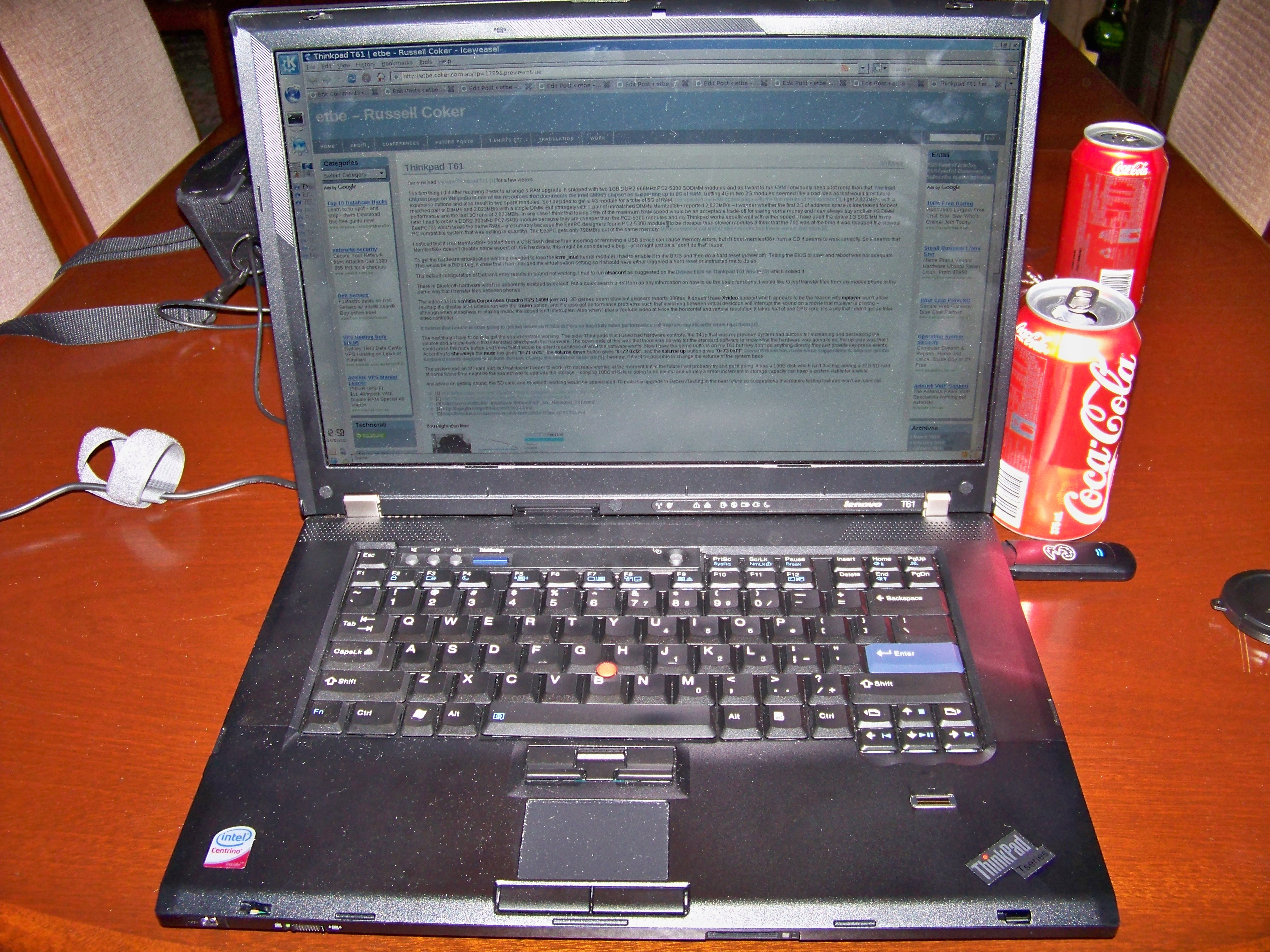
picture of my new Thinkpad T61 I ve now had my new Thinkpad T61 [1] for almost a month. The letters on the keyboard are not even starting to wear off which is unusual, either this Thinkpad is built with harder plastic than the older ones or I m typing more softly. Memory The first thing I did after receiving it was to arrange a RAM upgrade. It shipped with two 1GB DDR2 666MHz PC2-5300 SODIMM modules and as I want to run KVM I obviously need a lot more than that. The Intel Chipset page on Wikipedia is one of the resources that documents the Intel GM965 chipset as supporting up to 8G of RAM. Getting 4G in two 2G modules seemed like a bad idea as that would limit future expansion options and also result in two spare modules. So I decided to get a 4G module for a total of 5G of RAM. I ve updated my RAM speed page with the test results of this system [2], I get 2,823MB/s with a matched pair of DIMMs and 2,023MB/s with a single DIMM. But strangely with a pair of unmatched DIMMs Memtest86+ reported 2,823MB/s I wonder whether the first 2G of address space is interleaved for best performance and the last 3G runs at 2,023MB/s. In any case I think that losing 29% of the maximum RAM speed would be an acceptable trade-off for saving some money and I can always buy another 4G DIMM later. I had to order a DDR2-800MHz PC2-6400 module because they are cheaper than the PC2-5300 modules and my Thinkpad works equally well with either speed. I have used the spare 1G SODIMM in my EeePC701 which takes the same RAM presumably because the EeePC designers found PC2-5300 modules to be cheaper than slower modules (I think that the 701 was at the time it was released the slowest PC compatible system that was selling in quantity). The EeePC gets only 798MB/s out of the same memory. My document about Memtest86+ results has these results and more [2]. I noticed that if I run Memtest86+ booted from a USB flash device then inserting or removing a USB device can cause memory errors, but if I boot memtest86+ from a CD it seems to work correctly. So it seems that Memtest86+ doesn t disable some aspect of USB hardware, this might be considered a bug or it might just be a don t do that issue. Misc To get the hardware virtualisation working (needed to load the kvm_intel kernel module) I had to enable it in the BIOS and then do a hard reset (power off). Telling the BIOS to save and reboot was not adequate. This would be a BIOS bug, it knew that I had changed the virtualisation setting so it should have either triggered a hard reset or instructed me to do so. The default configuration of Debian/Lenny results in sound not working, I had to run alsaconf as suggested on the Debian Etch on Thinkpad T61 howto [3] which solved it. Generally I m happy with this system, the screen resolution is 1680*1050 which has 20% more pixels than the 1400*1050 screen on my Thinkpad T41p, it s a lot faster for CPU operations and should be a lot faster for video when I get the drivers sorted out (currently it s a lot slower), and I have virtualisation working again. But when you buy a system that s much like the last one but 6 years newer you expect it to be better. Generally the amount of effort involved in the process of buying a new system, upgrading the RAM to the desired specs, installing Linux and tweaking all the options is enough to make me want to wait at least another 6 years before buying another. Part of the reason for this difficulty is that I want to get so much functionality from the machine, a machine with more modest goals (such as a Netbook) takes a lot less time to configure. Problems There is Bluetooth hardware which is apparently enabled by default. But a quick search didn t turn up any information on how to do the basic functions, I would like to just transfer files from my mobile phone in the same way that I transfer files between phones. The video card is a nVidia Corporation Quadro NVS 140M (rev a1). 3D games seem slow but glxgears reports 300fps. It doesn t have Xvideo support which appears to be the reason why mplayer won t allow resizing it s display area unless run with the -zoom option, and it s also got performance problems such that switching between virtual desktops will interrupt the sound on a movie that mplayer is playing although when alsaplayer is playing music the sound isn t interrupted. Also when I play a Youtube video at twice the horizontal and vertical resolution it takes half of one CPU core. It s a pity that I didn t get an Intel video controller. It seems that Debian is soon going to get the Nouveau NVidia drivers so hopefully video performance will improve significantly when I get them [4]. The next thing I have to do is to get the sound controls working. The older Thinkpads that I used had hardware controls, the T41p that was my previous system had buttons for increasing and decreasing the volume and a mute button that interacted directly with the hardware. The down-side of this was that there was no way for the standard software to know what the hardware was going to do, the up-side was that I could press the mute button and know that it would be silent regardless of what the software wants. Now I have the same buttons on my T61 but they don t do anything directly, they just provide key-press events. According to showkeys the mute key gives 0 71 0xf1 , the volume down button gives 0 72 0xf2 , and the volume up button gives 0 73 0xf3 . Daniel Pittman has made some suggestions to help me get the keyboard events mapped to actions that can change the sound via software [5] which I haven t yet had time to investigate. I wonder if it will ever be possible to change the volume of the system beep. The system has an SD card slot, but that doesn t seem to work. I m not really worried at the moment but in the future I will probably try and get it going. It has a 100G disk which isn t that big, adding a 32G SD card at some future time might be the easiest way to upgrade the storage copying 100G of data is going to be painful and usually a small increment in storage capacity can keep a system viable for a while. Any advice on getting sound, the SD card, and Bluetooth working would be appreciated. I ll probably upgrade to Debian/Testing in the near future so suggestions that require testing features won t be ruled out.

Dirk Eddelbuettel: Rcpp 0.7.10

Versions 0.7.7 to 0.7.9 of Rcpp contained a bug: protecting paths with quotes was supposed to help with Windows builds, but did the opposite at least in 'backticks mode' for getting path and/or library information. Using the shQuote() function instead helped. Our thanks to the tireless R-on-Windows maintainer Uwe Ligges for an earlier heads-up about the problem. So another quick bug-fix release 0.7.10 is now in Debian and should be on CRAN some time tomorrow. We also put two small improvements in, see the full NEWS entry for this release:
0.7.10  2010-03-15
    o	new class Rcpp::S4 whose constructor checks if the object is an S4 object
	
    o	maximum number of templated arguments to the pairlist function, 
	the DottedPair constructor, the Language constructor and the 
	Pairlist constructor has been updated to 20 (was 5) and a script has been
	added to the source tree should we want to change it again
    o   use shQuotes() to protect Windows path names (which may contain spaces)
As always, even fuller details are in Rcpp Changelog page and the Rcpp page which also leads to the downloads, the browseable doxygen docs and zip files of doxygen output for the standard formats. A local directory has source and documentation too. Questions, comments etc should go to the rcpp-devel mailing list off the R-Forge page

Next.

Previous.