Search Results: "nate"

6 June 2017

Dirk Eddelbuettel: anytime 0.3.0

A new version of the anytime package is now on CRAN. It marks the eleventh release since the inaugural version late last summer. anytime is a very focused package aiming to do just one thing really well: to convert anything in integer, numeric, character, factor, ordered, ... format to either POSIXct or Date objects -- and to do so without requiring a format string. See the anytime page, or the GitHub README.md for a few examples. This release brings a little more consistency to how numeric or integer arguments are handled. Previously, we were overly eager in accepting something such as 20150605 (i.e. today) as a (numerical or integer) input to both anytime() and anydate(). That is well-intentioned, but ultimately foolish. We relied on heuristic cutoffs to determine whether input was "meant to be" a date or time offset. There lies madness. We now differentiate whether we were called via anytime() (in which case numerical data is second offset to the epoch, just as.POSICct()) or anytime() (in which case it is days offset to the (date) epoch, just like as.Date()). The previous behaviour can be restored via a options, both function-local as well as global are supported. And of course, there is no change for all other (and more common) input formats, notably character or factor. A full list of changes follows.

Changes in anytime version 0.3.0 (2017-06-05)
  • Numeric input is now always an offset to epoch, with anytime() using seconds, and anydate() using dates. (#65 fixing #63).
  • Old behaviour can be re-enabled with an option also supporting a global setting getOption("anytimeOldHeuristic")
  • RStudio versions 1.1.129 or later can run all functions without fear of crashing due to a change in their use of Boost.
  • Replaced init.c with registration code inside of RcppExports.cpp thanks to Rcpp 0.12.11.

Courtesy of CRANberries, there is a comparison to the previous release. More information is on the anytime page. For questions or comments use the issue tracker off the GitHub repo.

This post by Dirk Eddelbuettel originated on his Thinking inside the box blog. Please report excessive re-aggregation in third-party for-profit settings.

4 June 2017

Dirk Eddelbuettel: RcppArmadillo 0.7.900.2.0

armadillo image The new RcppArmadillo release 0.7.900.2.0 is now on CRAN, and the Debian package was just updated as well. Armadillo is a powerful and expressive C++ template library for linear algebra aiming towards a good balance between speed and ease of use with a syntax deliberately close to a Matlab. RcppArmadillo integrates this library with the R environment and language--and is widely used by (currently) 350 other packages on CRAN---an increase of 32 since the last CRAN release of 0.7.800.2.0 in April! With the 7.900.* series of Armadillo, Conrad has started to more fully utilize OpenMP (also see Wikipedia on OpenMP) for operations that can be parallelized. To use this in your package you need to update its src/Makevars ,.win file similarly to what the skeleton default now uses
PKG_CXXFLAGS = $(SHLIB_OPENMP_CXXFLAGS) 
PKG_LIBS = $(SHLIB_OPENMP_CFLAGS) $(LAPACK_LIBS) $(BLAS_LIBS) $(FLIBS)
and you may want to enable C++11 while you are at it---though this may pose issues with older-than-ancient RHEL installations which are still (way too) pervasive so we do not do it by default (yet). Here, we once again rely on the build infrastructure automagically provided by R itself: if and when OpenMP is available, R will use it via $(SHLIB_OPENMP_CXXFLAGS) etc; see the fine WRE manual for details. That said, some operating systems make this harder than other, and macOS usually takes the crown. See for example this blog post by James for surviving in that environment. I am a little short of details because on Linux these things just work, and have for well over a decade. The rcpp-devel mailing list will be the best place for questions. Changes in this release relative to the previous CRAN release are as follows:

Changes in RcppArmadillo version 0.7.900.2.0 (2017-06-02)
  • Upgraded to Armadillo release 7.900.2 (Evil Banana Republic)
    • Expanded clamp() to handle cubes
    • Computationally expensive element-wise functions (such as exp(), log(), cos(), etc) can now be automatically sped up via OpenMP; this requires a C++11/C++14 compiler with OpenMP 3.0+ support for GCC and clang compilers
    • One caveat: when using GCC, use of -march=native in conjunction with -fopenmp may lead to speed regressions on recent processors
  • Added gcc 7 to support compiler check (James Balamuta in #128 addressing #126).
  • A unit test helper function for rmultinom was corrected (#133).
  • OpenMP support was added to the skeleton helper in inline.R

Courtesy of CRANberries, there is a diffstat report. More detailed information is on the RcppArmadillo page. Questions, comments etc should go to the rcpp-devel mailing list off the R-Forge page.

This post by Dirk Eddelbuettel originated on his Thinking inside the box blog. Please report excessive re-aggregation in third-party for-profit settings.

Lars Wirzenius: Vmdb2 first alpha release: Debian disk image creation tool

tl;dr: Get vmdebootstrap replacement from http://git.liw.fi/vmdb2 and run it from the source tree. Tell me if something doesn't work. Send patches. Many years ago I wrote vmdebootstrap, a tool for installing Debian on a disk image for virtual machines. I had a clear personal need: I was setting up a CI system and it needed six workers: one each for Debian oldstable, stable, and unstable, on two architectures (i386, amd64). Installing Debian six times in the same way is a lot of work, so I figured how difficult can it be to automate it. Turns out that not difficult at all, except to install a bootloader. (Don't ask me why I didn't use any of the other tools for this. It was long ago, and while some of the tools that now exist probably did exist then, I like writing code and learning things while doing it.) After a while I was happy with what the program did, but didn't want to upload it to Debian, and didn't want to add the kinds of things other people wanted, so I turned vmdebootstrap over to Neil Williams, who added a ton of new features. Unfortunately, it turned out that my initial architecture was not scaleable, and also the code I wrote wasn't very good, and there weren't any tests. Neil did heroic work forcing my crappy software into doing things I never envisioned. Last year he needed a break and asked me to take vmdebootstrap back. I did, and have been hiding from the public eye ever since, since I was so ashamed of the code. (I created a new identity and pretended to be an international assassin and backup specialist, travelling the world forcing people to have at least one tested backup of their system. If you've noticed reports in the press about people reporting near-death experiences while holding a shiny new USB drive, that would've been my fault.) Pop quiz: if you have a program with ten boolean options ("do this, except if that option is given, do the other thing"), how many black box tests do you need to test all the functionality? If one run of the program takes half an hour, how long will a full test suite run? I did some hard thinking about vmdebootstrap, and came to the sad conclusion that it had reached the end of its useful life as a living software project. There was no reasonable way to add most of the additional functionality people were asking for, and even maintaining the current code was too tedious a task to consider seriously. It was time to make a clean break of the past and start over, without caring about backwards compatibility. After all, the old code wasn't going anywhere so anyone who needed it could still use it. There was no need to burden a new program with my past mistakes. All new mistakes were called for. At the Cambridge mini-Debconf of November, 2016, I gave a short presentation of what I was going to do. I also posted about my plans to the debian-cloud list. In short, I would write a new, more flexible and cleaner replacement to be called vmdb2. For various personal reasons, I've not been able to spend as much time on vmdb2 as I'd like to, but I've now reached the point where I'd like to announce the first alpha version publically. The source code is hosted here: http://git.liw.fi/vmdb2 . There are .deb packages at my personal public APT repo (http://liw.fi/code/), but vmdb2 is easy enough to run directly from a git checkout:
sudo ./vmdb2 foo.vmdb --output foo.img
There's no need to install it to try it. What works: What doesn't work: I'm not opposed to adding support for those, but they're not directly interesting to me. For example, I only have amd64 machines. The best way to get support for additional features is to tell me how, preferably in the form of patches. (If I have to read tons of docs, or other people's code, and then write code and iterate while other people tell me it doesn't work, it's probably not happening.) Why would you be interested in vmdb2? There's a lot of other tools to do what it does, so perhaps you shouldn't care. That's fine. I like writing tools for myself. But if this kind of tool is of interest to you, please do have a look. A short tutorial: vmdb2 wants you to give it a "specification file" (conventionally suffixed .vmdb, because someone stole the .spec suffix, but vmdb2 doesn't care about the name). Below is an example. vmdb2 image specification files are in YAML, since I like YAML, and specify a sequence of steps to take to build the image. Each step is a tiny piece of self-contained functionality provided by a plugin.
steps:
  - mkimg: "  output  "
    size: 4G
  - mklabel: msdos
    device: "  output  "
  - mkpart: primary
    device: "  output  "
    start: 0%
    end: 100%
    part-tag: root-part
The above create an image (name is specified with the --output option), which is four gigabytes in size, and create a partitition table and a single partition that fills the whole disk. The "tag" is given so that later steps can easily refer to the partition. If you prefer another way to partition the disk, you can achieve that by adding more "mkpart" steps. For example, for UEFI you'll want to have an EFI partition.
  - mkfs: ext4
    partition: root-part
  - mount: root-part
    fs-tag: root-fs
The above formats the partition with the ext4 filesystem, and then mounts it. The mount point will be a temporary directory created by vmdb2, and a tag is again given to the mount point so it can be referred to.
  - unpack-rootfs: root-fs
The above unpacks a tar archive to put content into the filesystem, if the tar archive exists. The tar archive is specified with the --rootfs-tarball command line option.
  - debootstrap: stretch
    mirror: http://http.debian.net/debian
    target: root-fs
    unless: rootfs_unpacked
  - apt: linux-image-amd64
    fs-tag: root-fs
    unless: rootfs_unpacked
  - cache-rootfs: root-fs
    unless: rootfs_unpacked
The above will run debootstrap and install a kernel into the filesystem, but skip doing that if the rootfs tarball was used. Also, the tarball is created if it didn't exist. This way the tarball is used by all but the first run, which saves a bit of time. On my laptop and with a local mirror, debootstrap and kernel installation takes on the order of nine minutes (500 to 600 seconds), whereas unpacking the tar archive is a bit faster (takes around 30 seconds). When iterating over things other than debootstrap, this speeds things up something wonderful, and seems worth the complexity. The "unless:" mechanism is generic. All the steps share some state, and the unpack-rootfs step sets the "rootfs_unpacked" flag in the shared state. The "unless:" field tells vmdb2 to check for the flag and if it is not set, or if it is set to false ("unless it is set to true"), vmdb2 will execute the step. vmdb2 may get more such flags in the future, if there's need.
  - chroot: root-fs
    shell:  
      sed -i '/^root:[^:]*:/s//root::/' /etc/passwd
      echo pc-vmdb2 > /etc/hostname
The above executes a couple of shell commands in a chroot of the root filesystem we've just created. In this case they remove a login password from root, and set the hostname. This is a replacement of the vmdebootstrap "customize" script, but it can be inserted anywhere into the sequence of steps. There's boot chroot and non-chroot variants of the step. This is a good point to mention that writing customize scripts gets quite repetitive and tedious after a while, so vmdb2 has a plugin to run Ansible instead. You can customize your image with that instead, while the image is being built and not have to wait until you boot the image and running Ansible over ssh.
  - grub: bios
    root-fs: root-fs
    root-part: root-part
    device: "  output  "
    console: serial
Finally, install a boot loader, grub. This shows the BIOS variant, UEFI is also supported. This also configures grub and the kernel to use a serial console. There's a "yarn" (test suite) to build and smoke test an image with vmdb2 to make sure at least the basic functionality works. The smoke test boots the image under Qemu, logs in as root, and tells the VM to power off. Very, very basic, but has already found actual bugs in vmdb2. The smoke test needs the serial console to work. As with vmdebootstrap originally, I don't particularly want to maintain the package in Debian. I've added Debian packaging (so that I can install it on my own machines), but I already have enough packages to maintain, so I'm hoping someone else will volunteer to take on the Debian maintainership and bug handling duties. If you would like vmdb2 to do more things to suit you better, I'm happy to explain how to write plugins to provide more types of steps. If you are currently using vmdebootstrap, either directly or as part of another tool, I encourage you to have a look at vmdb2. In the long term, I would like to retire vmdebootstrap entirely, once vmdb2 can do everything vmdebootstrap can do, and few people use vmdebootstrap. This may take a while. In any case, whether you want a new image building tool or not, happy hacking.

1 June 2017

Thorsten Alteholz: My Debian Activities in May 2017

FTP assistant This month I only marked 39 packages for accept and rejected 5 packages. Debian LTS This was my thirty-fifth month that I did some work for the Debian LTS initiative, started by Raphael Hertzog at Freexian. This month my all in all workload has been 27.25h. During that time I did LTS uploads or prepared one for Jessie/Sid: For [DLA 948-1] dropbear and [DLA 958-1] libonig I only did the LTS bookkeeping and sent the DLA. The icu upload would not have been possible without the help of Roberto. I also tried to work on jasper, libxml2, libytnef and swftools but unfortunately all upstreams did not finish their respective patches this month, so maybe there will be an upload in June. Other stuff Again this has been a busy LTS month, so I only uploaded a new version of smstools, which closed most of its bugs and adopted adopted ptpd as DOPOM. As a prerequisite of wview I uploaded radlib. Unfortunately I could not do anything for wview, so work on this has to be postponed. Another new package is te923con, which I hope is able to read data from my weather station. Last but no least I fixed an RC bug in alljoyn-services-1504.

Steve Kemp: So I accidentally wrote a linux security module

Tonight I read this weeks LWN quotes-page a little later than usual because I was busy at work for most of the day. Anyway as always LWNs content was awesome, and this particular list lead to an interesting discussion about a new Linux-Security-Module (LSM).
That read weirdly, what I was trying to say was that every Thursday morning I like to read LWN at work. Tonight is the first chance I had to get round to it.
One of the later replies in the thread was particularly interesting as it said:
Suggestion:
Create an security module that looks for the attribute
    security.WHITELISTED
on things being executed/mmapped and denys it if the attribute
isn't present. Create a program (whitelistd) that reads
/etc/whitelist.conf and scans the system to ensure that only
things on the list have the attribute.
So I figured that was a simple idea, and it didn't seem too hard even for myself as a non-kernel non-developer. There are several linux security modules included in the kernel-releases, beneath the top-level security/ directory, so I assumed I could copy & paste code around them to get something working. During the course of all this work, which took about 90 minutes from start to Finnish (that pun never gets old), this online documentation was enormously useful: Brief attr primer If you're not familiar with the attr tool it's pretty simple. You can assign values to arbitrary labels on files. The only annoying thing is you have to use extra-flags to commands like rsync, tar, cp, etc, to preserve the damn things. Set three attributes on the file named moi:
$ touch moi
$ attr -s forename -V "Steve"      moi
$ attr -s surname  -V "Kemp"       moi
$ attr -s name     -V "Steve Kemp" moi
Now list the attributes present:
$ attr -l moi
Attribute "name" has a 10 byte value for moi
Attribute "forename" has a 5 byte value for moi
Attribute "surname" has a 4 byte value for moi
And retrieve one?
$ attr -q -g name moi
Steve Kemp
LSM Skeleton My initial starting point was to create "steve_lsm.c", with the following contents:
 #include <linux/lsm_hooks.h>
 /*
  * Log things for the moment.
  */
 static int steve_bprm_check_security(struct linux_binprm *bprm)
  
     printk(KERN_INFO "STEVE LSM check of %s\n", bprm->filename);
     return 0;
  
 /*
  * Only check exec().
  */
 static struct security_hook_list steve_hooks[] =  
     LSM_HOOK_INIT(bprm_check_security, steve_bprm_check_security),
  ;
 /*
  * Somebody set us up the bomb.
  */
 static void __init steve_init(void)
  
     security_add_hooks(steve_hooks, ARRAY_SIZE(steve_hooks), "steve");
     printk(KERN_INFO "STEVE LSM initialized\n");
  
With that in place I had to modify the various KBuild files beneath security/ to make sure this could be selected as an LSM, and add in a Makefile to the new directory security/steve/. With the boiler-plate done though, and the host machine rebooted into my new kernel it was simple to test things out. Obviously the first step, post-boot, is to make sure that the module is active, which can be done in two ways, looking at the output of dmesg, and explicitly listing the modules available:
 ~# dmesg   grep STEVE   head -n2
 STEVE LSM initialized
 STEVE LSM check of /init
 $ echo $(cat /sys/kernel/security/lsm)
 capability,steve
Making the LSM functional The next step was to make the module do more than mere logging. In short this is what we want: NOTE we don't care what the content of the extended attribute is, we just care whether it exists or not. Reading the extended attribute is pretty simple, using the __vfs_getxattr function. All in all our module becomes this:
  #include <linux/xattr.h>
  #include <linux/binfmts.h>
  #include <linux/lsm_hooks.h>
  #include <linux/sysctl.h>
  #include <linux/ptrace.h>
  #include <linux/prctl.h>
  #include <linux/ratelimit.h>
  #include <linux/workqueue.h>
  #include <linux/string_helpers.h>
  #include <linux/task_work.h>
  #include <linux/sched.h>
  #include <linux/spinlock.h>
  #include <linux/lsm_hooks.h>
  /*
   * Perform a check of a program execution/map.
   *
   * Return 0 if it should be allowed, -EPERM on block.
   */
  static int steve_bprm_check_security(struct linux_binprm *bprm)
   
         // The current task & the UID it is running as.
         const struct task_struct *task = current;
         kuid_t uid = task->cred->uid;
         // The target we're checking
         struct dentry *dentry = bprm->file->f_path.dentry;
         struct inode *inode = d_backing_inode(dentry);
         // The size of the label-value (if any).
         int size = 0;
         // Root can access everything.
         if ( uid.val == 0 )
            return 0;
         size = __vfs_getxattr(dentry, inode, "user.whitelisted", NULL, 0);
         if ( size >= 0 )
          
             printk(KERN_INFO "STEVE LSM check of %s resulted in %d bytes from 'user.whitelisted' - permitting access for UID %d\n", bprm->filename, size, uid.val );
             return 0;
          
         printk(KERN_INFO "STEVE LSM check of %s denying access for UID %d [ERRO:%d] \n", bprm->filename, uid.val, size );
         return -EPERM;
   
  /*
   * The hooks we wish to be installed.
   */
  static struct security_hook_list steve_hooks[] =  
       LSM_HOOK_INIT(bprm_check_security, steve_bprm_check_security),
   ;
  /*
   * Initialize our module.
   */
  void __init steve_add_hooks(void)
   
       /* register ourselves with the security framework */
       security_add_hooks(steve_hooks, ARRAY_SIZE(steve_hooks), "steve");
       printk(KERN_INFO "STEVE LSM initialized\n");
   
Once again we reboot with this new kernel, and we test that the LSM is active. After the basic testing, as before, we can now test real functionality. By default no binaries will have the attribute we look for present - so we'd expect ALL commands to fail, unless executed by root. Let us test that:
~# su - nobody -s /bin/sh
No directory, logging in with HOME=/
Cannot execute /bin/sh: Operation not permitted
That looks like it worked. Let us allow users to run /bin/sh:
 ~# attr -s whitelisted -V 1 /bin/sh
Unfortunately that fails, because symlinks are weird, but repeating the test with /bin/dash works as expected:
 ~# su - nobody -s /bin/dash
 No directory, logging in with HOME=/
 Cannot execute /bin/dash: Operation not permitted
 ~# attr -s whitelisted -V 1 /bin/dash
 ~# attr -s whitelisted -V 1 /usr/bin/id
 ~# su - nobody -s /bin/dash
 No directory, logging in with HOME=/
 $ id
 uid=65534(nobody) gid=65534(nogroup) groups=65534(nogroup)
 $ uptime
 -su: 2: uptime: Operation not permitted
And our logging shows the useful results as we'd expect:
  STEVE LSM check of /usr/bin/id resulted in 1 bytes from 'user.WHITELISTED' - permitting access for UID 65534
  STEVE LSM check of /usr/bin/uptime denying access for UID 65534 [ERRO:-95]
Surprises If you were paying careful attention you'll see that we changed what we did part-way through this guide. Not sure what is going on there, but it was very confusing. It appears to be the case that when you set an attribute a secret user. prefix is added to the name. Could be worth some research by somebody with more time on their hands than I have. Anyway I don't expect this is a terribly useful module, but it was my first, and I think it should be pretty stable. Feedback on my code certainly welcome!

Rapha&#235;l Hertzog: My Free Software Activities in May 2017

My monthly report covers a large part of what I have been doing in the free software world. I write it for my donors (thanks to them!) but also for the wider Debian community because it can give ideas to newcomers and it s one of the best ways to find volunteers to work with me on projects that matter to me. Debian LTS I was allocated 12 hours to work on security updates for Debian 7 Wheezy. During this time I did the following: Misc Debian work Debian Handbook. I started to work on the update of the Debian Administrator s Handbook for Debian 9 Stretch. As part of this, I noticed a regression in dblatex and filed this issue both in the upstream tracker and in Debian and got that issue fixed in sid and stretch (sponsored the actual upload, filed the unblock request). I also stumbled on a regression in dia which was due to an incorrect Debian-specific patch that I reverted with a QA upload since the package is currently orphaned. Django. On request of Scott Kitterman, I uploaded a new security release of Django 1.8 to jessie-backports but that upload got rejected because stretch no longer has Django 1.8 and I m not allowed to maintain that branch in that repository. Ensued a long and heated discussion that has no clear resolution yet. It seems likely that some solution will be found for Django (the 1.8.18 that was rejected was accepted as a one-time update already, and our plans for the future make it clear that we would have like to have an LTS version in stretch in the first place) but the backports maintainers are not willing to change the policy to accomodate for other similar needs in the future. The discussion has been complicated by the intervention of Neil Williams who brought up an upgrade problem of lava-server (#847277). Instead of fixing the root-problem in Django (#863267), or adding a work-around in lava-server s code, he asserted that upgrading first to Django 1.8 from jessie-backports was the only upgrade path for lava-server. Thanks See you next month for a new summary of my activities.

No comment Liked this article? Click here. My blog is Flattr-enabled.

Markus Koschany: My Free Software Activities in May 2017

Welcome to gambaru.de. Here is my monthly report that covers what I have been doing for Debian. If you re interested in Java, Games and LTS topics, this might be interesting for you. Debian Games Bug fixes New upstream release Debian Java Debian LTS This was my fifteenth month as a paid contributor and I have been paid to work 27,25 hours on Debian LTS, a project started by Rapha l Hertzog. In that time I did the following: Misc Thanks for reading and see you next time.

Russ Allbery: Review: Migration

Review: Migration, by Julie E. Czerneda
Series: Species Imperative #2
Publisher: DAW
Copyright: 2005
ISBN: 0-7564-0260-3
Format: Hardcover
Pages: 453
Migration is the second book of the Species Imperative, and this is the old-fashioned type of trilogy that you very much want to read in order. Start with Survival. There is a (slightly awkward) recap of the previous book at the start, though, if it's been a bit since you read it. In my review of Survival, I praised Czerneda's ability to capture the feel of academic research and the sense of real scientists doing science. I thought I went out on a bit of a limb, not being a scientist myself (just someone who worked at a university for decades), but Czerneda was still holding back. I'm now completely convinced: whatever else this series is, and it contains a lot of politics and world-building and fascinating (if very human-like) aliens, it's some of the best science fiction about practicing scientists I've ever read. I cannot express how much I adore the fact that the center of this book is not space combat, not daring adventure across alien landscapes, but getting a bunch of really smart experts in their field together in a room with good equipment and good computers to chase an intellectual problem from their own individual perspectives. And if Mac is perhaps a bit *too* good at quickly overcoming interpersonal conflict and suspicion, I'll forgive that for the deft sense of politics. Mac's success may be a bit unrealistic, but the direction and thrust of her tactics are spot-on. This is how interactions between smart and curious people often work, at least if they're sufficiently motivated to put aside pettier political infighting. This is also how the dynamics of emergency war rooms work: if you can give people a focus and divide up the work, the results can be amazing. The second best part of the book is Oversight. The first book opened with the latest round of Mac's ongoing war with Charles Mudge III, the oversight board of the neighboring wilderness trust. He shows up again at the start of this book, acting completely consistent to his stubborn idealism shown in Survival, and then develops into one of the best characters in the book. Unexpected allies is one of the tropes I love most in fiction in general, but this one resonates so deeply with the way grudging respect and familiar patterns, even patterns of argument, work on people. Czerneda had me grinning. It's just perfectly in line with Mac's character, her single-minded focus on work that tended to miss a few points of human connection, and the sort of deepening respect that builds up even between adversaries when they know deep inside that they are following different interpretations of the same principles. I'm going to be rather sketchy on the plot, since Migration follows closely on from Survival and is concerned almost entirely with the aftermath of the climactic events at the end of that book. But as you can tell, this is more of Mac, and she's not managed to separate herself from Dhryn problems or from the Ministry of Extra-Solar Affairs. She does, however, get rather far away from Norcoast for a while, an interlude in the wild northern Canadian wilderness that once again proves Czerneda to be the type of writer who can make the quotidian as engrossing as alien dramatics. She's also suffering from nightmares, anxiety, and a lot of circular thinking, making this one of the series that shows the realistic toll of dramatic events on human psychology. There was a bit of a nascent love story in Survival; there's a lot more of that here. It's the one bit of the book that I have mixed feelings about, since it feels a touch unnecessary to me, and therefore a bit intrusive. It also involves a fair bit of love at, well, not first sight but surprisingly fast, which is something I know intellectually that other people think happens, but which always undermines my suspension of disbelief. That said, Czerneda gives Mac a clear tendency in how she forms emotional attachments and sticks with it throughout this series to date, which I do like, and she keeps the romance consistent with that. It thankfully does not get too much in the way of the plot, although I could have done with just a few fewer determined proclamations that the characters won't let love get in the way of doing what they need to do. That quibble aside, this is fantastic stuff that avoids most of the cliches of this sort of story of alien politics and possible war. The focus is firmly on analysis and understanding rather than guns and action, the portrayal of scientists, analysis, and problem-solving is spot on, the aliens are delightfully different (and different from each other within the same alien species, which is important depth), and Mac is a fantastic protagonist. She's vulnerable, wounded, and out of her depth, but she knows how to map new situations to her areas of competence and how to admit when she doesn't know something, and her effectiveness is well-grounded and believable. Oh, and there are some amazing descriptions of the Canadian wilderness that almost make me want to find a secluded cabin without Internet access. (At least if it had all of the convenient technology that Mac's future Earth has.) It's a rare middle book of a trilogy that's better than the first, but this one is. Much better. And I already liked the first book. Highly recommended; I think this is one of Czerneda's best. Followed by Regeneration. Rating: 9 out of 10

30 May 2017

Reproducible builds folks: Reproducible Builds: week 109 in Stretch cycle

Here's what happened in the Reproducible Builds effort between Sunday May 21 and Saturday May 27 2017: Past and upcoming events Bernhard M. Wiedemann gave a short talk on reproducible builds in openSUSE at the openSUSE Conference 2017. Slides and video recordings are available on that page. Chris Lamb will present at the Hong Kong Open Source Conference 2017 on reproducible builds on June 9th. Our next IRC meeting has been scheduled for Thursday June 1 at 16:00 UTC with this agenda. Academia Justin Cappos continued his work on the reproducible builds paper, with text and suggestions from Ximin Luo integrated. Toolchain developments #863470: "ftp.debian.org: security sync must not exclude .buildinfo" - while this bug isn't fixed, you need to make sure not to build jessie updates with stretch's dpkg, or else the upload will be rejected. Ximin Luo built GCC twice and ran diffoscope on them. Unfortunately the results were 1.7 GB in size and it can't be displayed in a web browser. 99/171 of the .debs are reproducible, though. He's now working on diffoscope (see below) to make it generate output more intelligently for such large size diffs. Here is a summary diff where the recursion depth cut-off was set low, so the size is reasonable and one can still see the outlines of where to look next. debuerreotype was newly added to Debian unstable. It is a reproducible, snapshot-based Debian rootfs builder. Patches and bugs filed Reviews of unreproducible packages 29 package reviews have been added, 49 have been updated and 23 have been removed in this week, adding to our knowledge about identified issues. Weekly QA work During our reproducibility testing, FTBFS bugs have been detected and reported by: diffoscope development Development continued in git, with commits from: strip-nondeterminism development Version 0.034-1 was uploaded to unstable by Chris Lamb. It included previous weeks' contributions from: tests.reproducible-builds.org: Misc. This week's edition was written by Ximin Luo, Bernhard M. Wiedemann, Chris Lamb and Holger Levsen & reviewed by a bunch of Reproducible Builds folks on IRC & the mailing lists.

29 May 2017

Steve Kemp: Security is hard ..

3D-Printing
I continued to be impressed with local vendors, found on 3dhubs. I've had several more things printed out, including an "internet button", and some card-holders for Settlers of Catan. The most recent print I had made was a collection of display cases, for holding an OLED display, as well as an ESP8266 device. Unfortunately at the same time as I was falling in love with the service I discovered a glaring XSS attack against the site itself. Anybody who viewed my profile page could have arbitrary javascript executed, which in some cases would actually disclose their private details - such as:
  • Their forename & surname.
  • Their email-address.
  • Their telephone number.
  • Their GeoIP details.
Discovering this took minutes, writing it up took an hour, and a month later it is still unfixed. I've deleted my account.

26 May 2017

Michael Prokop: The #newinstretch game: dbgsym packages in Debian/stretch

Debug packages include debug symbols and so far were usually named <package>-dbg in Debian. Those packages are essential if you ve to debug failing (especially: crashing) programs. Since December 2015 Debian has automatic dbgsym packages, being built by default. Those packages are available as <package>-dbgsym, so starting with Debian/stretch you should no longer look for -dbg packages but for -dbgsym instead. Currently there are 13.369 dbgsym packages available for the amd64 architecture of Debian/stretch, comparing this to the 2.250 packages which I counted being available for Debian/jessie this is really a huge improvement. (If you re interested in the details of dbgsym packages as a package maintainer take a look at the Automatic Debug Packages page in the Debian wiki.) The dbgsym packages are NOT provided by the usual Debian archive though (which is good thing, since those packages are quite disk space consuming, e.g. just the amd64 stretch mirror of debian-debug consumes 47GB). Instead there s a new archive called debian-debug. To get access to the dbgsym packages via the debian-debug suite on your Debian/stretch system include the following entry in your apt s sources.list configuration (replace deb.debian.org with whatever mirror you prefer):
deb http://deb.debian.org/debian-debug/ stretch-debug main
If you re not yet familiar with usage of such debug packages let me give you a short demo. Let s start with sending SIGILL (Illegal Instruction) to a running sha256sum process, causing it to generate a so called core dump file:
% sha256sum /dev/urandom &
[1] 1126
% kill -4 1126
% 
[1]+  Illegal instruction     (core dumped) sha256sum /dev/urandom
% ls
core
$ file core
core: ELF 64-bit LSB core file x86-64, version 1 (SYSV), SVR4-style, from 'sha256sum /dev/urandom', real uid: 1000, effective uid: 1000, real gid: 1000, effective gid: 1000, execfn: '/usr/bin/sha256sum', platform: 'x86_64'
Now we can run the GNU Debugger (gdb) on this core file, executing:
% gdb sha256sum core
[...]
Type "apropos word" to search for commands related to "word"...
Reading symbols from sha256sum...(no debugging symbols found)...done.
[New LWP 1126]
Core was generated by  sha256sum /dev/urandom'.
Program terminated with signal SIGILL, Illegal instruction.
#0  0x000055fe9aab63db in ?? ()
(gdb) bt
#0  0x000055fe9aab63db in ?? ()
#1  0x000055fe9aab8606 in ?? ()
#2  0x000055fe9aab4e5b in ?? ()
#3  0x000055fe9aab42ea in ?? ()
#4  0x00007faec30872b1 in __libc_start_main (main=0x55fe9aab3ae0, argc=2, argv=0x7ffc512951f8, init=<optimized out>, fini=<optimized out>, rtld_fini=<optimized out>, stack_end=0x7ffc512951e8) at ../csu/libc-start.c:291
#5  0x000055fe9aab4b5a in ?? ()
(gdb) 
As you can see by the several ?? question marks, the bt command (short for backtrace) doesn t provide useful information.
So let s install the according debug package, which is coreutils-dbgsym in this case (since the sha256sum binary which generated the core file is part of the coreutils package). Then let s rerun the same gdb steps:
% gdb sha256sum core
[...]
Type "apropos word" to search for commands related to "word"...
Reading symbols from sha256sum...Reading symbols from /usr/lib/debug/.build-id/a4/b946ef7c161f2d215518ca38d3f0300bcbdbb7.debug...done.
done.
[New LWP 1126]
Core was generated by  sha256sum /dev/urandom'.
Program terminated with signal SIGILL, Illegal instruction.
#0  0x000055fe9aab63db in sha256_process_block (buffer=buffer@entry=0x55fe9be95290, len=len@entry=32768, ctx=ctx@entry=0x7ffc51294eb0) at lib/sha256.c:526
526     lib/sha256.c: No such file or directory.
(gdb) bt
#0  0x000055fe9aab63db in sha256_process_block (buffer=buffer@entry=0x55fe9be95290, len=len@entry=32768, ctx=ctx@entry=0x7ffc51294eb0) at lib/sha256.c:526
#1  0x000055fe9aab8606 in sha256_stream (stream=0x55fe9be95060, resblock=0x7ffc51295080) at lib/sha256.c:230
#2  0x000055fe9aab4e5b in digest_file (filename=0x7ffc51295f3a "/dev/urandom", bin_result=0x7ffc51295080 "\001", missing=0x7ffc51295078, binary=<optimized out>) at src/md5sum.c:624
#3  0x000055fe9aab42ea in main (argc=<optimized out>, argv=<optimized out>) at src/md5sum.c:1036
As you can see it s reading the debug symbols from /usr/lib/debug/.build-id/a4/b946ef7c161f2d215518ca38d3f0300bcbdbb7.debug and this is what we were looking for.
gdb now also tells us that we don t have lib/sha256.c available. For even better debugging it s useful to have the according source code available. This is also just an apt-get source coreutils ; cd coreutils-8.26/ away:
~/coreutils-8.26 % gdb sha256sum ~/core
[...]
Type "apropos word" to search for commands related to "word"...
Reading symbols from sha256sum...Reading symbols from /usr/lib/debug/.build-id/a4/b946ef7c161f2d215518ca38d3f0300bcbdbb7.debug...done.
done.
[New LWP 1126]
Core was generated by  sha256sum /dev/urandom'.
Program terminated with signal SIGILL, Illegal instruction.
#0  0x000055fe9aab63db in sha256_process_block (buffer=buffer@entry=0x55fe9be95290, len=len@entry=32768, ctx=ctx@entry=0x7ffc51294eb0) at lib/sha256.c:526
526           R( h, a, b, c, d, e, f, g, K(25), M(25) );
(gdb) bt
#0  0x000055fe9aab63db in sha256_process_block (buffer=buffer@entry=0x55fe9be95290, len=len@entry=32768, ctx=ctx@entry=0x7ffc51294eb0) at lib/sha256.c:526
#1  0x000055fe9aab8606 in sha256_stream (stream=0x55fe9be95060, resblock=0x7ffc51295080) at lib/sha256.c:230
#2  0x000055fe9aab4e5b in digest_file (filename=0x7ffc51295f3a "/dev/urandom", bin_result=0x7ffc51295080 "\001", missing=0x7ffc51295078, binary=<optimized out>) at src/md5sum.c:624
#3  0x000055fe9aab42ea in main (argc=<optimized out>, argv=<optimized out>) at src/md5sum.c:1036
(gdb) 
Now we re ready for all the debugging magic. :) Thanks to everyone who was involved in getting us the automatic dbgsym package builds in Debian!

24 May 2017

Michal &#268;iha&#345;: Weblate 2.14.1

Weblate 2.14.1 has been released today. It is bugfix release fixing possible migration issues, search results navigation and some minor security issues. Full list of changes: If you are upgrading from older version, please follow our upgrading instructions. You can find more information about Weblate on https://weblate.org, the code is hosted on Github. If you are curious how it looks, you can try it out on demo server. You can login there with demo account using demo password or register your own user. Weblate is also being used on https://hosted.weblate.org/ as official translating service for phpMyAdmin, OsmAnd, Turris, FreedomBox, Weblate itself and many other projects. Should you be looking for hosting of translations for your project, I'm happy to host them for you or help with setting it up on your infrastructure. Further development of Weblate would not be possible without people providing donations, thanks to everybody who have helped so far! The roadmap for next release is just being prepared, you can influence this by expressing support for individual issues either by comments or by providing bounty for them.

Filed under: Debian English SUSE Weblate

23 May 2017

Dirk Eddelbuettel: Rcpp 0.12.11: Loads of goodies

The elevent update in the 0.12.* series of Rcpp landed on CRAN yesterday following the initial upload on the weekend, and the Debian package and Windows binaries should follow as usual. The 0.12.11 release follows the 0.12.0 release from late July, the 0.12.1 release in September, the 0.12.2 release in November, the 0.12.3 release in January, the 0.12.4 release in March, the 0.12.5 release in May, the 0.12.6 release in July, the 0.12.7 release in September, the 0.12.8 release in November, the 0.12.9 release in January, and the 0.12.10.release in March --- making it the fifteenth release at the steady and predictable bi-montly release frequency. Rcpp has become the most popular way of enhancing GNU R with C or C++ code. As of today, 1026 packages on CRAN depend on Rcpp for making analytical code go faster and further, along with another 91 in BioConductor. This releases follows on the heels of R's 3.4.0 release and addresses on or two issues from the transition, along with a literal boatload of other fixes and enhancements. James "coatless" Balamuta was once restless in making the documentation better, Kirill Mueller addressed a number of more obscure compiler warnings (triggered under under -Wextra and the like), Jim Hester improved excecption handling, and much more mostly by the Rcpp Core team. All changes are listed below in some detail. One big change that JJ made is that Rcpp Attributes also generate the now-almost-required package registration. (For background, I blogged about this one, two, three times.) We tested this, and do not expect it to throw curveballs. If you have an existing src/init.c, or if you do not have registration set in your NAMESPACE. It should cover most cases. But one never knows, and one first post-release buglet related to how devtools tests things has already been fixed in this PR by JJ.

Changes in Rcpp version 0.12.11 (2017-05-20)
  • Changes in Rcpp API:
    • Rcpp::exceptions can now be constructed without a call stack (Jim Hester in #663 addressing #664).
    • Somewhat spurious compiler messages under very verbose settings are now suppressed (Kirill Mueller in #670, #671, #672, #687, #688, #691).
    • Refreshed the included tinyformat template library (James Balamuta in #674 addressing #673).
    • Added printf-like syntax support for exception classes and variadic templating for Rcpp::stop and Rcpp::warning (James Balamuta in #676).
    • Exception messages have been rewritten to provide additional information. (James Balamuta in #676 and #677 addressing #184).
    • One more instance of Rf_mkString is protected from garbage collection (Dirk in #686 addressing #685).
    • Two exception specification that are no longer tolerated by g++-7.1 or later were removed (Dirk in #690 addressing #689)
  • Changes in Rcpp Documentation:
  • Changes in Rcpp Sugar:
    • Added sugar function trimws (Nathan Russell in #680 addressing #679).
  • Changes in Rcpp Attributes:
    • Automatically generate native routine registrations (JJ in #694)
    • The plugins for C++11, C++14, C++17 now set the values R 3.4.0 or later expects; a plugin for C++98 was added (Dirk in #684 addressing #683).
  • Changes in Rcpp support functions:
    • The Rcpp.package.skeleton() function now creates a package registration file provided R 3.4.0 or later is used (Dirk in #692)

Thanks to CRANberries, you can also look at a diff to the previous release. As always, even fuller details are on the Rcpp Changelog page and the Rcpp page which also leads to the downloads page, the browseable doxygen docs and zip files of doxygen output for the standard formats. A local directory has source and documentation too. Questions, comments etc should go to the rcpp-devel mailing list off the R-Forge page.

This post by Dirk Eddelbuettel originated on his Thinking inside the box blog. Please report excessive re-aggregation in third-party for-profit settings.

22 May 2017

Michal &#268;iha&#345;: HackerOne experience with Weblate

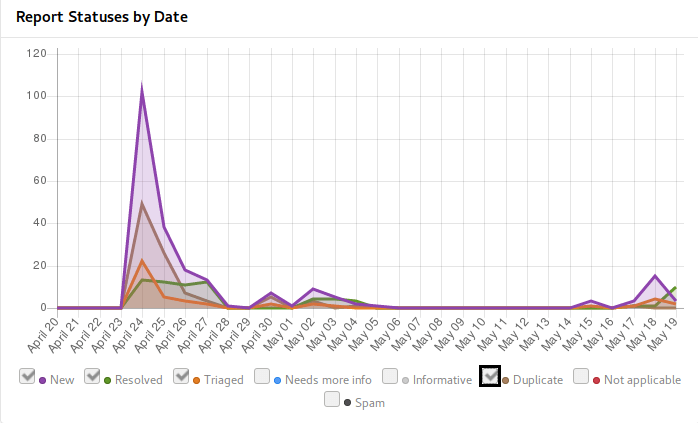
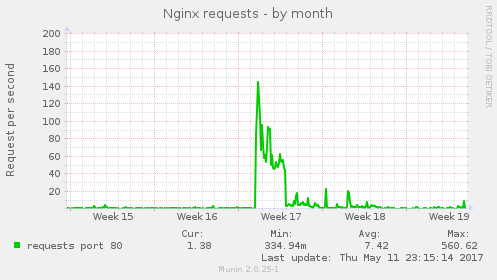
Weblate has started to use HackerOne Community Edition some time ago and I think it's good to share my experience with that. Do you have open source project and want to get more attention of security community? This post will answer how it looks from perspective of pretty small project. I've applied with Weblate to HackerOne Community Edition by end of March and it was approved early in April. Based on their recommendations I've started in invite only mode, but that really didn't bring much attention (exactly none reports), so I've decided to go public. I've asked for making the project public just after coming from two weeks vacation, while expecting the approval to take some time where I'll settle down things which have popped up during vacation. In the end that was approved within single day, so I was immediately under fire of incoming reports: Reports on HackerOne I was surprised that they didn't lie - you will really get huge amount of issues just after making your project public. Most of them were quite simple and repeating (as you can see from number of duplicates), but it really provided valuable input. Even more surprisingly there was second peak coming in when I've started to disclose resolved issues (once Weblate 2.14 has been released). Overall the issues could be divided to few groups: In the end it was really challenging week to be able to cope with the incoming reports, but I think I've managed it quite well. The HackerOne metrics states that there are 2 hours in average to respond on incoming incidents, what I think will not work in the long term :-). Anyway thanks to this, you can now enjoy Weblate 2.14 which more secure than any release before, if you have not yet upgraded, you might consider doing that now or look into our support offering for self hosted Weblate. The downside of this all was that the initial publishing on HackerOne made our website target of lot of automated tools and the web server was not really ready for that. I'm really sorry to all Hosted Weblate users who were affected by this. This has been also addressed now, but the infrastructure really should have been prepared before on this. To share how it looked like, here is number of requests to the nginx server: nxing requests I'm really glad I could make Weblate available on HackerOne as it will clearly improve it's security and security of hosted offering we have. I will certainly consider providing swag and/or bounties on further severe reports, but that won't be possible without enough funding for Weblate.
Filed under: Debian English SUSE Weblate

20 May 2017

Ritesh Raj Sarraf: Patanjali Research Foundation

PSA: Research in the domain of Ayurveda

http://www.patanjaliresearchfoundation.com/patanjali/
I am so glad to see this initiative taken by the Patanjali group. This is a great stepping stone in the health and wellness domain. So far, Allopathy has been blunt in discarding alternate medicine practices, without much solid justification. The only, repetitive, response I've heard is "lack of research". This initiative definitely is a great step in that regard. Ayurveda (Ancient Hindu art of healing) has a huge potential to touch lives. For the Indian sub-continent, this has the potential of a blessing. The Prime Minister of India himself inaugurated the research centre.

Categories:

Keywords:

Like:

17 May 2017

Daniel Pocock: Hacking the food chain in Switzerland

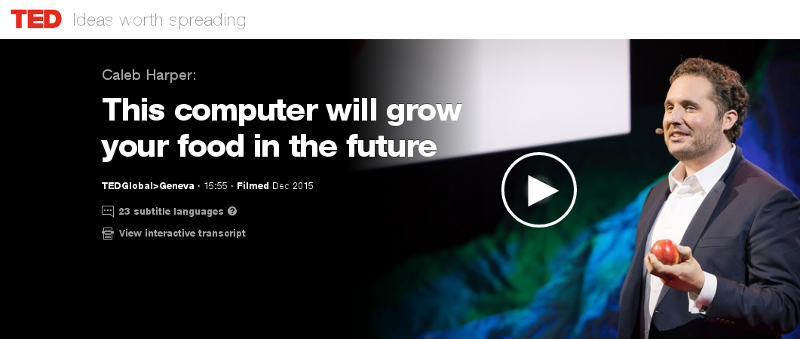
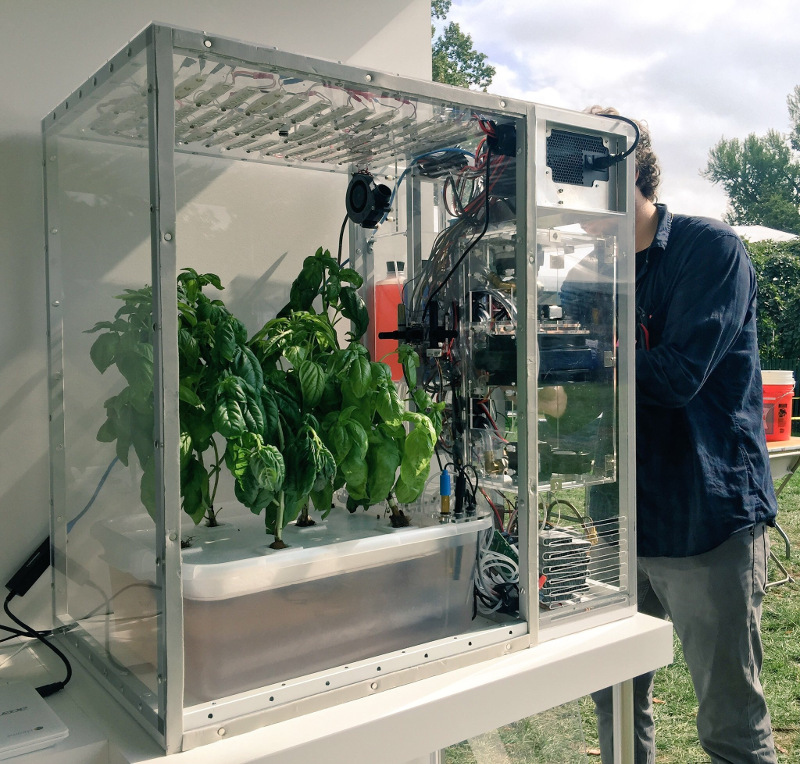
A group has recently been formed on Meetup seeking to build a food computer in Zurich. The initial meeting is planned for 6:30pm on 20 June 2017 at ETH, (Zurich Centre/Zentrum, R mistrasse 101). The question of food security underlies many of the world's problems today. In wealthier nations, we are being called upon to trust a highly opaque supply chain and our choices are limited to those things that major supermarket chains are willing to stock. A huge transport and storage apparatus adds to the cost and CO2 emissions and detracts from the nutritional value of the produce that reaches our plates. In recent times, these problems have been highlighted by the horsemeat scandal, the Guacapocalypse and the British Hummus crisis. One interesting initiative to create transparency and encourage diversity in our diets is the Open Agriculture (OpenAg) Initiative from MIT, summarised in this TED video from Caleb Harper. The food produced is healthier and fresher than anything you might find in a supermarket and has no exposure to pesticides. An open source approach to food An interesting aspect of this project is the promise of an open source approach. The project provides hardware plans, a a video of the build process, source code and the promise of sharing climate recipes (scripts) to replicate the climates of different regions, helping ensure it is always the season for your favour fruit or vegetable. Do we need it? Some people have commented on the cost of equipment and electricity. Carsten Agger recently blogged about permaculture as a cleaner alternative. While there are many places where people can take that approach, there are also many overpopulated regions and cities where it is not feasible. Some countries, like Japan, have an enormous population and previously productive farmland contaminated by industry, such as the Fukushima region. Growing our own food also has the potential to reduce food waste, as individual families and communities can grow what they need. Whether it is essential or not, the food computer project also provides a powerful platform to educate people about food and climate issues and an exciting opportunity to take the free and open source philosophy into many more places in our local communities. The Zurich Meetup group has already received expressions of interest from a diverse group including professionals, researchers, students, hackers, sustainability activists and free software developers. Next steps People who want to form a group in their own region can look in the forum topic "Where are you building your Food Computer?" to find out if anybody has already expressed interest. Which patterns from the free software world can help more people build more food computers? I've already suggested using Debian's live-wrapper to distribute a runnable ISO image that can boot from a USB stick, can you suggest other solutions like this? Can you think of any free software events where you would like to see a talk or exhibit about this project? Please suggest them on the OpenAg forum. There are many interesting resources about the food crisis, an interesting starting point is watching the documentary Food, Inc. If you are in Switzerland, please consider attending the meeting on at 6:30pm on 20 June 2017 at ETH (Centre/Zentrum), Zurich. One final thing to contemplate: if you are not hacking your own food supply, who is?
Michal &#268;iha&#345;: Weblate 2.14

Weblate 2.14 has been released today slightly ahead of the schedule. There are quite a lot of security improvements based on reports we got from HackerOne program, API extensions and other minor improvements. Full list of changes: If you are upgrading from older version, please follow our upgrading instructions. You can find more information about Weblate on https://weblate.org, the code is hosted on Github. If you are curious how it looks, you can try it out on demo server. You can login there with demo account using demo password or register your own user. Weblate is also being used on https://hosted.weblate.org/ as official translating service for phpMyAdmin, OsmAnd, Turris, FreedomBox, Weblate itself and many other projects. Should you be looking for hosting of translations for your project, I'm happy to host them for you or help with setting it up on your infrastructure. Further development of Weblate would not be possible without people providing donations, thanks to everybody who have helped so far! The roadmap for next release is just being prepared, you can influence this by expressing support for individual issues either by comments or by providing bounty for them.

Filed under: Debian English SUSE Weblate

15 May 2017

Michal &#268;iha&#345;: New projects on Hosted Weblate

Hosted Weblate provides also free hosting for free software projects. The hosting requests queue was over one month long, so it's time to process it and include new project. This time, the newly hosted projects include: We now also host few new Minetest mods: If you want to support this effort, please donate to Weblate, especially recurring donations are welcome to make this service alive. You can do them on Liberapay or Bountysource.

Filed under: Debian English SUSE Weblate

intrigeri: GNOME and Debian usability testing, May 2017

During the Contribute your skills to Debian event that took place in Paris last week-end, we conducted a usability testing session. Six people were tasked with testing a few aspects of the GNOME 3.22 desktop environment and of the Debian 9 (Stretch) operating system. A number of other people observed them and took notes. Then, two observers and three testers analyzed the results, that we are hereby presenting: we created a heat map visualization, summed up the challenges met during the tests, and wrote this blog post together. We will point the relevant upstream projects to our results. A couple of other people also did some usability testing but went in much more depth: their feedback is much more detailed and comes with a number of improvement ideas. I will process and publish their results as soon as possible. Missions Testers were provided a laptop running GNOME on a a Debian 9 (Stretch) Live system. A quick introduction (mostly copied from the one we found in some GNOME usability testing reports) was read. Then they were asked to complete the following tasks. A. Nautilus Mission A.1 Download and rename file in Nautilus
  1. Download a file from the web, a PDF document for example.
  2. Open the folder in which the file has been downloaded.
  3. Rename the dowloaded file to SUCCESS.pdf.
  4. Toggle the browser window to full screen.
  5. Open the file SUCCESS.pdf.
  6. Go back to the File manager.
  7. Close the file SUCCESS.pdf.
Mission A.2 Manipulate folders in Nautilus
  1. Create a new folder named cats in your user directory.
  2. Create a new folder named to do in your user directory.
  3. Move the cats folder to the to do folder.
  4. Delete the cats folder.
Mission A.3 Create a bookmark in Nautilus
  1. Create a folder named unicorns in your personal directory.
  2. This folder is important. Add a bookmark for unicorns in order to find it again in a few weeks.
Mission A.4 Nautilus display settings Folders and files are usually listed as icons, but they can also be displayed differently.
  1. Configure the File manager to make it show items as a list, with one file per line.
  2. You forgot your glasses and the font size is too small for you to see the text: increase the size of the text.
B. Package management Introduction On Debian, each application is available as a "package" which contains every file needed for the software to work. Unlike in other operating systems, it is rarely necessary and almost never a good idea, to download and install software from the authors website. We can rather install it from an online library managed by Debian (like an appstore). This alternative offers several advantages, such as being able to update all the software installed in one single action. Specific tools are available to install and update Debian packages. Mission B.1 Install and remove packages
  1. Install the vlc package.
  2. Start VLC.
  3. Remove the vlc package.
Mission B.2 Search and install a package
  1. Find a piece of software which can download files with BitTorrent in a graphical interface.
  2. Install the corresponding package.
  3. Launch that BitTorrent software.
Mission B.3 Upgrade the system Make sure the whole system (meaning all installed packages) is up to date. C. Settings Mission C.1 Change the desktop background
  1. Download an image you like from the web.
  2. Set the downloaded image as the desktop wallpaper.
Mission C.2 Tweak temporary files management Configure the system so that temporary files older than three days are deleted automatically. Mission C.3 Change the default video player
  1. Install VLC (ask for help if you could not do it during the previous mission).
  2. Make VLC the default video player.
  3. Download a video file from the web.
  4. Open the downloaded video, then check if it opens with VLC.
Mission C.4 Add and remove world clocks When you click the time and date in the top bar, a menu pops-up. There, you can display clocks in several time-zones.
  1. Add a clock with Rio de Janeiro timezone, then another showing the current time in Boston.
  2. Check that the time and date menu now displays these two additional clocks.
  3. Remove the Boston clock.
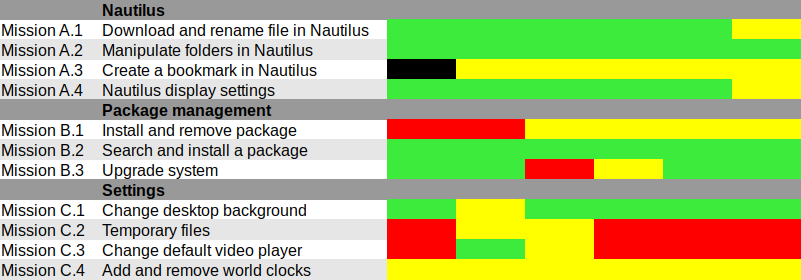
Results and analysis Heat map We used Jim Hall's heat map technique to summarize our usability test results. As Renata puts it, it is "a great way to see how the users performed on each task. The heat map clarifies how easy or difficult it was for the participant to accomplish a certain task.
  1. Scenario tasks (from the usability test) are arranged in rows.
  2. Test participants (for each tester) are arranged in columns.
  3. The colored blocks represent each tester s difficulty with each scenario task.
Green blocks represent the ability of the participant to accomplish the tasks with little or no difficulty. Yellow blocks indicate the tasks that the tester had significant difficulties accomplishing. Red blocks indicate that testers experienced extreme difficulty or where testers completed the tasks incorrectly. Black blocks indicate tasks the tester was unable to complete." Alternatively, here is the spreadsheet that was used to create this picture, with added text to avoid relying on colors only. Most tasks were accomplished with little or no difficulty so we will now focus on the problematic parts. What were the challenges? The heat map shows several "hot" rows, that we will now be looking at in more details. Mission A.3 Create a bookmark in Nautilus Most testers right-clicked the folder first, and eventually found they could simply drag'n'drop to the bookmarks location in the sidebar. One tester thought that he could select a folder, click the hamburger icon, and from there use the "Bookmark this folder" menu item. However, this menu action only works on the folder one has entered, not on the selected one. Mission B.1 Install and remove a package Here we faced a number of issues caused by the fact that Debian Live images don't include package indices (with good reason), so no package manager can list available software. Everyone managed to start a graphical package manager via the Overview (or via the CLI or Alt-F2 for a couple power users). Some testers tried to use GNOME Software, which listed only already installed packages (Debian bug #862560) and provided no way we could find to refresh the package indices. That's arguably a bug in Debian Live, but still: GNOME Software might display some useful information when it detects this unusual situation. We won't list here all the obstacles that were met in Synaptic: it's no news its usability is rather sub-optimal and better alternatives (such as GNOME Software) are in the works. Mission C.2 Tweak temporary files management The mission was poorly phrased: some observers had to clarify that it was specifically about GNOME, and not generic Linux system administration: some power-users were already searching the web for command-line tools to address the task at hand. Even with this clarification, no tester would have succeeded without being told they were allowed to use the web with a search query including the word "GNOME", or use the GNOME help or the Overview. Yet eventually all testers succeeded. It's interesting to note that regular GNOME users had the same problem as others: they did not try searching "temporary" in the Overview and did not look-up the GNOME Help until they were suggested to do so. Mission C.3 Change the default video player One tester configured one single video file format to be opened by default with VLC, via right-click in Nautilus Open with etc. He believed this would be enough to make VLC the default video player, missing the subtle difference between "default video player" and "default player for one single video format". One tester tried to complete this task inside VLC itself and then needed some help to succeed. It might be that the way web browsers ask "Do you want ThisBrowser to become the default web browser?" gave a hint an application GUI is the right place to do it. Two testers searched "default" in the Overview (perhaps the previous mission dealing with temporary files was enough to put them in this direction). At least one tester was confused since the only search result (Details View information about your system), which is the correct one to get there, includes the word View, which suggests that one cannot modify settings there, but only view them. One long-term GNOME user looked in Tweak Tool first, and then used the Overview. Here again, GNOME users experienced essentially the same issues as others. Mission C.4 Add and remove world clocks One tester tried to look for the clock on the top right corner of the screen, then realized it was in the middle. Other than this, all testers easily found a way to add world clocks. However, removing a world clock was rather difficult; although most testers managed to do it, it took them a number of attempts to succeed:
  1. Several testers left-clicked or right-clicked the clock they wanted to remove, expecting this would provide them with a way to remove it (which is not the case).
  2. After a while, all testers noticed the Select button (that has no text label nor tooltip info), which allowed them to select the clock they wanted to remove; then, most testers clicked the 1 selected button, hoping it would provide a contextual menu or some other way to act on the selected clocks (it doesn't).
  3. Eventually, everyone managed to locate the Delete button on the bottom right corner of the window; some testers mentioned that it is less visible and flashy than the blue bar that appears on the top of the screen once they had entered "Selection" mode.
General notes and observations

12 May 2017

Steve McIntyre: Fonts and presentations

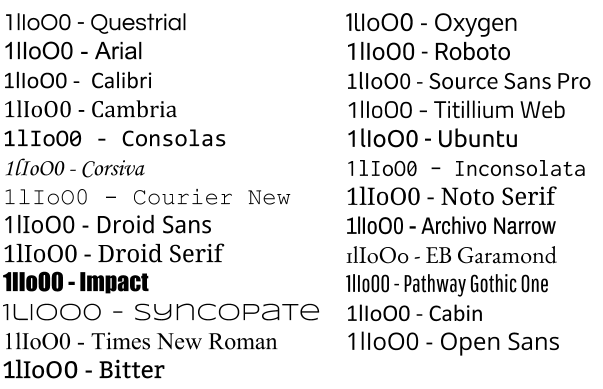
When you're giving a presentation, the choice of font can matter a lot. Not just in terms of how pretty your slides look, but also in terms of whether the data you're presenting is actually properly legible. Unfortunately, far too many fonts are appallingly bad if you're trying to tell certain characters apart. Imagine if you're at the back of a room, trying to read information on a slide that's (typically) too small and (if you're unlucky) the presenter's speech is also unclear to you (noisy room, bad audio, different language). A good clear font is really important here. To illustrate the problem, I've picked a few fonts available in Google Slides. I've written the characters "1lIoO0" (that's one, lower case L, upper case I, lower case o, upper case O, zero) in each of those fonts. Some of the sans-serif fonts in particular are comically bad for trying to distinguish between these characters. font examples It may not matter in all cases if your audience can read all the characters on your slides and tell them apart, put if you're trying to present scientific or numeric results it's critical. Please consider that before looking for a pretty font.
Next.

Previous.